Security Blind Spots Identified by AI The large-scale data breaches disclosed in quick succession in South Korea and Japan in October 2026 mostly originated not from internal core systems, but from peripheral entry points such as externally exposed web services, app backend APIs, and outsourced SaaS (services provided by third-party vendors via the cloud, such […]
Security Blind Spots Identified by AI The large-scale data breaches disclosed in quick succession in South Korea and Japan in October 2026 mostly originated not from internal core systems, but from peripheral entry points such as externally exposed web services, app backend APIs, and outsourced SaaS (services provided by third-party vendors via the cloud, such […]
You recognize the website. You’ve visited it before. You may even have it bookmarked. Then it asks you to do something unusual: install an update, allow notifications, or run a command to prove you’re human.
Stop and check first. A website you trust can still display instructions you shouldn’t follow. Our researchers have documented attacks in which criminals hacked legitimate websites and used them to deliver fake verification pages that trick visitors into installing malware.
Within the
You recognize the website. You’ve visited it before. You may even have it bookmarked. Then it asks you to do something unusual: install an update, allow notifications, or run a command to prove you’re human.
Stop and check first. A website you trust can still display instructions you shouldn’t follow. Our researchers have documented attacks in which criminals hacked legitimate websites and used them to deliver fake verification pages that trick visitors into installing malware.
Within the same week, serious problems emerged in several parts of the web’s security infrastructure. Attackers were exploiting two flaws in PHP, researchers disclosed a critical flaw in Brotli software used by Node.js, and eight compromised security certificates raised concerns about how browsers and apps verify websites. The incidents have different causes and levels of risk, but their timing makes this an unusual cluster.
PHP is used by about 7 in 10 websites whose underlying programming language is known. Node.js is used by 7.4% of websites with an identified web-server technology, according to W3Techs. Both run websites behind the scenes, so flaws in them can put the sites that rely on them at risk. Most browsers have blocked the certificates, though updates may still be needed for other software and devices.
These problems don’t mean you need to stop browsing. But keep your software and security protection up to date, and be wary of unexpected requests.
How to stay safe when browsing
Check the website’s address, but remember that even the genuine site may have been compromised. The important question is whether the page’s instructions make sense. A familiar website may earn your visit, but that doesn’t mean you should automatically let it run software on your device.
In documented campaigns, malicious instructions appeared on legitimate, hacked WordPress websites, not just lookalike domains.
A secure connection doesn’t guarantee that a page is safe, either. HTTPS protects the connection between your browser and the site. Browser protections against dangerous content are a separate layer. A page asking you to install software or enter sensitive information still deserves scrutiny, even when the connection is encrypted.
Ask yourself: “Does this request make sense for what I came here to do?”
Reading an article shouldn’t require opening PowerShell. Watching a video shouldn’t require following a website’s instructions to “repair” your computer. These are familiar themes in ClickFix attacks, which disguise malicious commands as routine verification or troubleshooting steps.
You can’t patch someone else’s web server, but you can keep the software on your own device updated. Turn on automatic updates for your operating system, browser, and applications where available, and don’t repeatedly postpone installing them. Updates fix security flaws that criminals could otherwise use to access your files or accounts.
Keep your browser’s phishing and malware protection enabled, too. Free browser extensions like Malwarebytes Browser Guard warn about known dangerous websites, malicious downloads, and clipboard hijacking. Treat those warnings as a reason to leave, not as another obstacle to get round. These checks are a useful layer of protection, but they can’t certify that every unflagged page is safe.
Use strong, unique passwords stored in a password manager, and enable multifactor authentication on important accounts. These measures help protect your accounts from unauthorized access.
If a request involves running code or making changes to your device, verify it independently. If a website claims your browser needs updating, close the prompt and check through the browser’s own settings. If it says an account or service needs attention, check through the official app, help page, or support channel that you open yourself.
Criminals often present the harmful step as the thing that will let you do what you came to do: fix the connection, enable the player, or complete the security check. The frustration of being blocked can make it tempting to follow their instructions.
Use up-to-date, real-time anti-malware protection on your devices to help stop malware from wreaking havoc or stealing your information.
Watch for unexpected content, downloads, redirects, and repeated login requests, even on familiar sites. If something looks wrong, leave the page. If you’re unsure, use Malwarebytes Scam Guard to check whether a request may be a scam and get possible next steps.
From reporting threats to removing them.
Cybersecurity risks should never spread beyond a headline. Keep threats off your devices by downloading Malwarebytes today.
UPD 23.10.2026: added Kaspersky SIEM rules and events for developing custom detection rules or conducting threat hunting.
UPD 22.10.2026: added a description of how the Kaspersky Managed Detection and Response service detects the described malicious activity.
UPD 22.10.2026: added a description of how Kaspersky Vulnerability Management detects vulnerable versions of PHP.
Vulnerability overview
On October 20, 2026, the PHP security team published a preliminary notice regarding an upcoming emergen
UPD 23.10.2026: added Kaspersky SIEM rules and events for developing custom detection rules or conducting threat hunting.
UPD 22.10.2026: added a description of how the Kaspersky Managed Detection and Response service detects the described malicious activity.
UPD 22.10.2026: added a description of how Kaspersky Vulnerability Management detects vulnerable versions of PHP.
Vulnerability overview
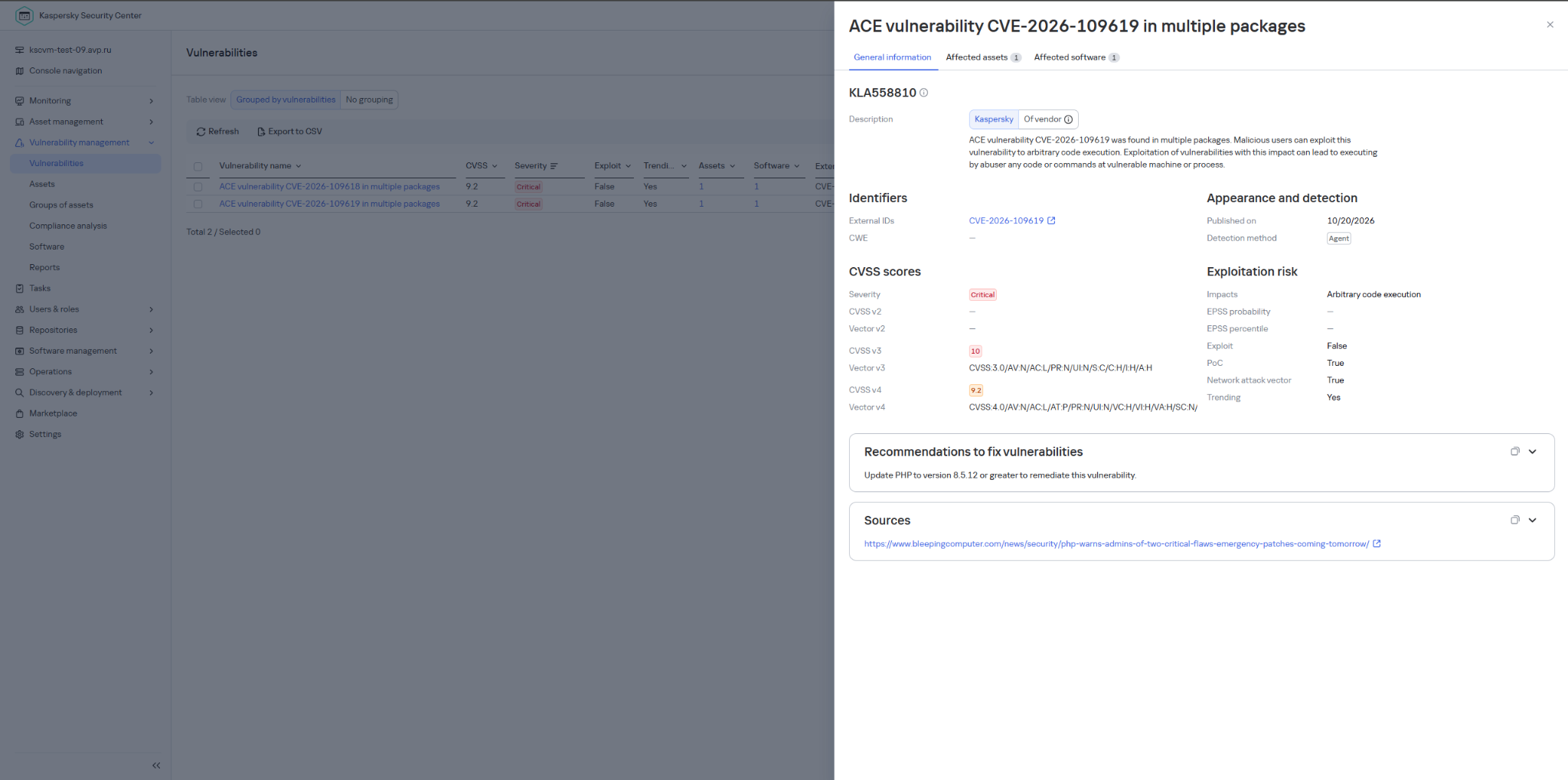
On October 20, 2026, the PHP security team published a preliminary notice regarding an upcoming emergency release that addresses two critical vulnerabilities (both rated 9.2 on the CVSS scale). The patches were released on Wednesday, October 21, 2026, at 14:00 UTC.
The release was expedited after information about the vulnerabilities was leaked to the public before the scheduled embargo was lifted. In a post on Hacker News, a user reported two RCE vulnerabilities in PHP, allegedly affecting all versions starting with PHP 5.4.0.
The vulnerabilities in question are CVE-2026-109618 and CVE-2026-109619. Shortly after the post appeared, researchers confirmed the existence of the vulnerabilities. Along with the leak of details, an exploit unofficially named PHP2Shell appeared online. In the leaked demo video, the exploit is shown in action on web servers running WordPress, MediaWiki, phpBB, Magento, Joomla, Laravel, Symfony, Drupal, and WHMCS — platforms that power many modern websites. The authenticity of the demonstration and the exact behavior of the exploit had not been independently verified at the time of publication.
According to the researcher who published the PoC, the vulnerabilities are related to the handling of the multipart/form-data MIME type in conjunction with the session upload progress mechanism (session.upload_progress) in the PHP core and fall under the categories of use-after-free and memory corruption. This means that the flaws cannot be fixed via application code, and the only fix is to update PHP on the server. The attack requires no authentication: an attacker with network access to a PHP application can execute arbitrary code with the privileges of the PHP process without needing to authenticate. Security advisories issued by the PHP team on October 21 confirm this information.
The vulnerabilities affect PHP versions 5, 7, and 8. As of this publication, branches 8.2 through 8.5 are supported. Older branches, including PHP 8.1, 8.0, 7.x, and 5.x, have reached the end of their lifecycle; however, due to the critical severity of the vulnerabilities, backported patches have also been released for versions 7.4, 8.0, and 8.1.
Sansec experts estimate that widespread exploitation could begin within 15 minutes of the update’s release. We strongly recommend that administrators responsible for publicly accessible PHP web servers take the following steps before the patch is available:
Take an inventory of all PHP-based systems in your infrastructure (such as web servers, control panels, and third-party software).
Disable upload-progress: set session.upload_progress.enabled = Off using the php_admin_flag in PHP-FPM pools.
Block multipart requests on nginx and Apache servers.
Consider temporarily isolating PHP applications that connect to the Internet until fixes are released.
Be ready to install the patch immediately upon its release.
Plan to migrate servers running unsupported versions (8.1 and earlier) to the latest PHP branch.
Detection by Kaspersky solutions
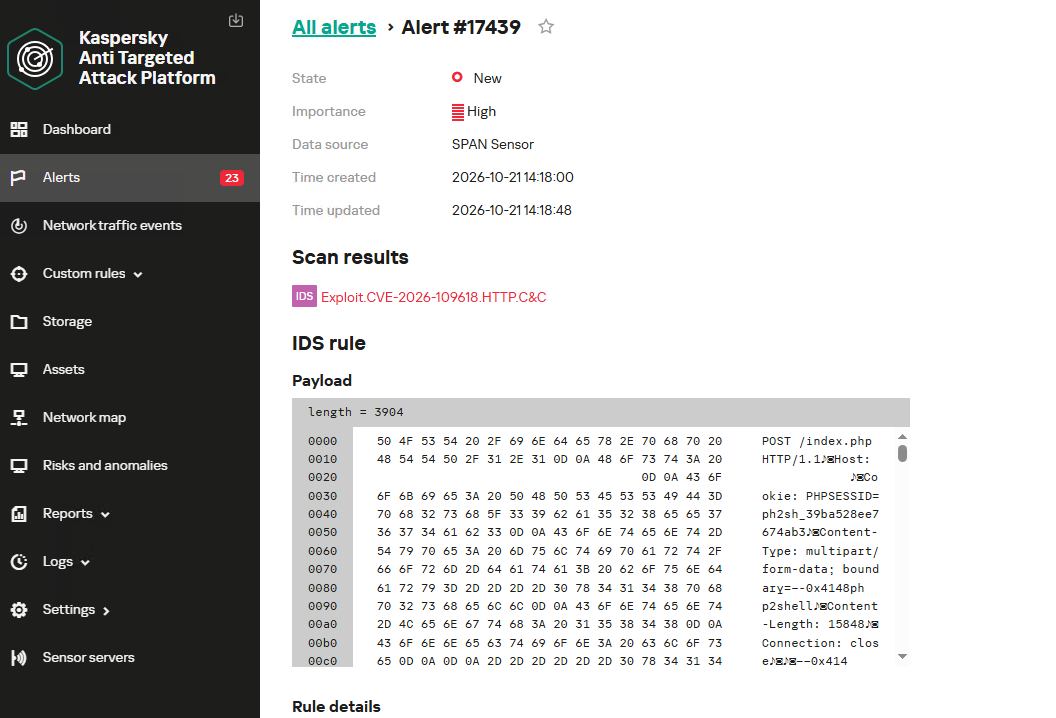
Kaspersky solutions detect the described malicious activity at various stages of the attack. Possible detection scenarios are listed below.
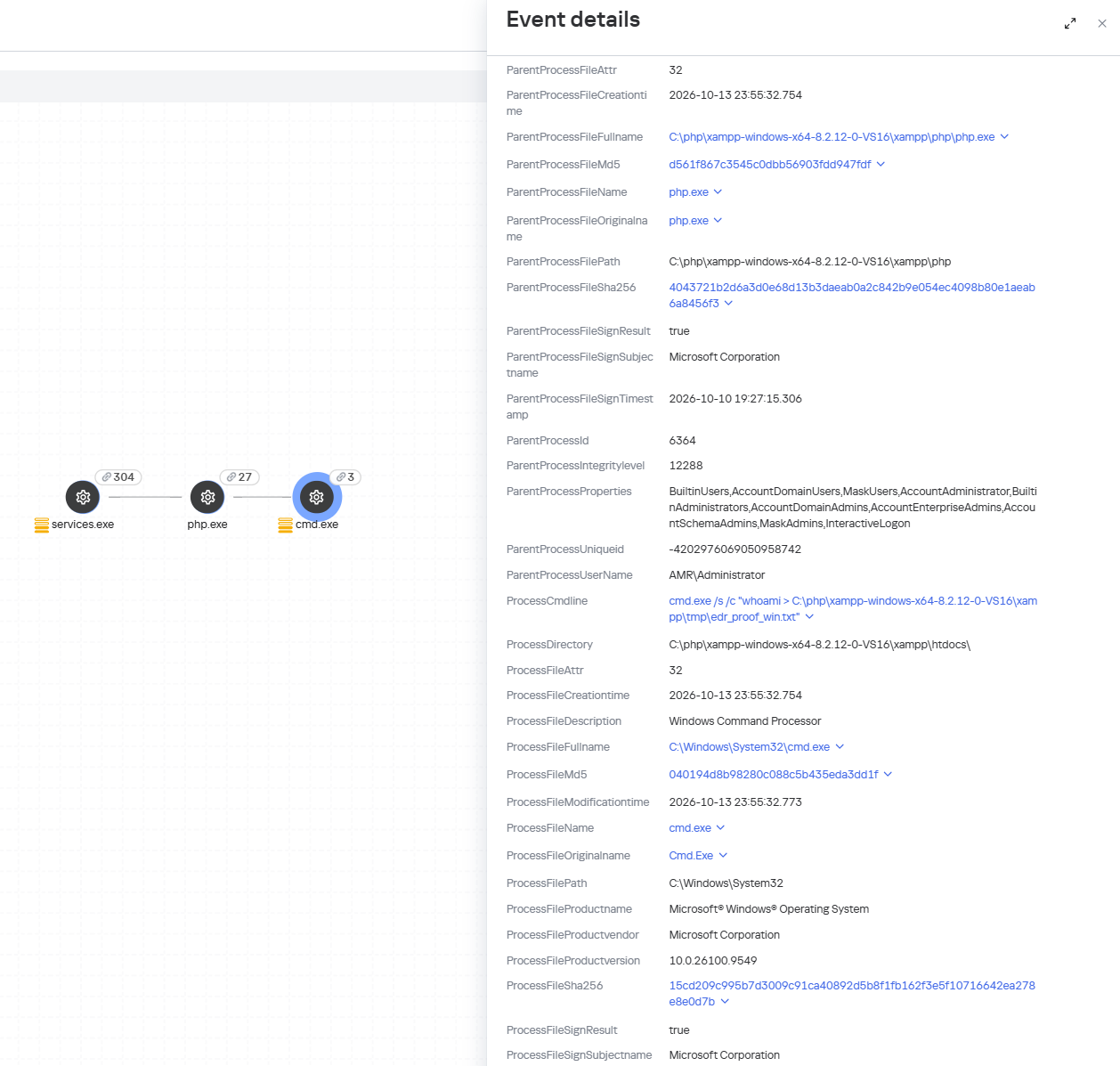
When an attempt is made to exploit these RCE vulnerabilities, Kaspersky Endpoint Detection and Response promptly alerts the user to suspicious actions performed in the context of a web server, on both Linux and Windows machines. This activity is detected by the following rules:
Spawning of suspicious processes by the web server;
Creation of suspicious executable files in the web application directory;
Creation of suspicious scripts in the web application directory;
Creation of files with uncommon extensions in the web application directory;
Execution of reconnaissance commands by the web server process;
Execution of persistence commands by the web server process;
Delivery and launch of web shells on the web server.
Moreover, MDR detects other malicious activity not directly related to remote code execution.
To protect companies that use our Kaspersky SIEM system, the product repository includes rules that help detect the following malicious activity.
Execution of suspicious executable files by web server processes on Windows and Linux machines:
R300_04_Windows shell started by a web application
R152_08_A running Linux shell process has a suspicious parent process
Execution of reconnaissance commands by the web server process:
R286_05_Possible web-shell (Linux)
We also recommend monitoring the creation of scripts or executable files in the web server directory when developing your own detection rules or conducting threat hunting:
((DeviceEventClassID = '4663' AND DeviceCustomString1 ilike 'WriteData') OR DeviceEventClassID = '11')
AND match(FileName,'(?i).*\.(php|asp|aspx|ashx|jsp|js|jar|jse|dll|exe|bat|ps1|vbs|wsf|wsh|msi|msp|hta|cpl)$')
AND match(DestinationProcessName,'(?i).*(php-cgi|nginx|httpd|w3wp)\.exe')
Name = 'openat' AND has(SA.Nametype, 'CREATE')
AND
length(arrayFilter(x -> match(x, '(public_html|var/www|usr/local/apache2|usr/local/httpd|var/apache|srv/www|home/httpd/html|srv/http|usr/share/nginx/html|var/lib/pgsql/data|usr/local/mysql/data|var/lib/mysql|var/vsftpd|etc/bind|var/named)'), SA.FileName))>1
AND
length(arrayFilter(x -> match(x, '\.(aspx|asp|asmx|asax|ashx|jspx|jsp|js|phpt|php|phtml|pht|cfm|shtml|htaccess|fcgi|cgi|pl|py|sh)'), SA.FileName))>1
If you’ve encountered websites in maintenance mode today, it may be a security precaution. Reports of attacks targeting two critical PHP vulnerabilities have prompted warnings to install emergency updates and consider temporarily taking affected services offline until they can be patched.The vulnerabilities, known as PHP2Shell, are tracked as CVE-2026-109618 and CVE-2026-109619. Both carry a severity rating of 9.2 out of 10.Why this mattersPHP is a programming language that works behind the sce
If you’ve encountered websites in maintenance mode today, it may be a security precaution. Reports of attacks targeting two critical PHP vulnerabilities have prompted warnings to install emergency updates and consider temporarily taking affected services offline until they can be patched.
The vulnerabilities, known as PHP2Shell, are tracked as CVE-2026-109618 and CVE-2026-109619. Both carry a severity rating of 9.2 out of 10.
Why this matters
PHP is a programming language that works behind the scenes to power a large part of the web. It underpins WordPress, Drupal, Joomla, Magento, and many other applications, including software whose users may not realize PHP is involved.
Successful exploitation could let an attacker run malicious code on an affected server without logging in. That code would run with the permissions available to the PHP process, potentially allowing attackers to steal application data, alter website content, or establish a backdoor.
The PHP team says all PHP installations serving web requests are at risk. In some configurations, an attacker can trigger an exploit before the website’s own code even runs.
Cloudflare’s chief technology officer, Dane Knecht, has reported “early attacks emerging,” while warning that firewall mitigations are only a stopgap.
Emergency patches are now available
The PHP team scheduled its emergency security updates for October 21 at 10:00 am ET (14:00 UTC). It has now released fixes in PHP 8.5.12, 8.4.27, 8.3.36, and 8.2.35, and urges users to update immediately. Administrators should check with their hosting provider or operating system vendor for the appropriate updated packages.
You may still encounter offline websites while administrators install the updates and check their systems.
CERT-EU recommends identifying PHP-based applications and patching as soon as possible. Where an immediate fix is not feasible, it advises considering isolation of internet-facing applications from public networks.
The risk may outlast today’s emergency
The longer-term concern is forgotten infrastructure: abandoned websites, unsupported applications, and connected devices with PHP-based management interfaces. Vulnerable installations may remain exposed if nobody maintains them or a vendor no longer supplies updates.
PHP 8.1 and older no longer receive routine security updates from the PHP project. Administrators using those versions should check whether their vendor supplies a fix or arrange an upgrade to a supported version.
Website owners should establish who updates their underlying PHP installation. Updating WordPress or its plugins is not the same as updating PHP. Hosting providers or server administrators may need to apply the fix.
For visitors, temporary downtime alone doesn’t mean a website has been breached. It may reflect a protective decision while its administrators install updates.
However, consumers need to be extra careful as a “trusted website” may no longer be trustworthy, and not just because of PHP2Shell, but also because of eight compromised TLS certificates.
Shahak Shalev, Global Head of Scam and AI Research at Malwarebytes, said:
“This is a goldmine for hackers. They can hijack real websites to take advantage of the site’s reputation to do things like phish people, serve malicious software from the trusted channel. The opportunities are endless.”
What to do
If you’re a website visitor:
Some websites may temporarily go offline while they are patched.
Watch for unexpected content, downloads, or redirects, and repeated login requests, even on familiar sites.
If something looks wrong, leave the page.
You don’t need to install PHP updates on your own device.
If you’re a website owner:
Ask your hosting or IT provider to confirm PHP fixes are installed, not just scheduled, across all your websites and applications.
If they can’t patch immediately, ask whether affected services should temporarily be taken offline.
Using unsupported PHP? Check for a vendor fix or upgrade to a supported version.
What Malwarebytes is doing
Helping keep you safe from hacked websites:Malwarebytes web protection and Browser Guard block known harmful sites, scam pages, and dangerous downloads. Our researchers are watching for websites compromised through these flaws so we can quickly add them to our block lists.
Updating our own websites: We use a managed hosting provider and are working with them to install the PHP fixes. We are closely monitoring our websites until the updates are in place.
Stop threats before they can do any harm.
Malwarebytes Browser Guard blocks phishing pages and malicious sites automatically. Free, one click to install. Add it to your browser →
Overview Immediately after the PHP vulnerabilities CVE-2026-109618 and CVE-2026-109619 were disclosed on October 21, 2026, a large number of repositories named “php2shell” were created in a short period of time on GitHub, a code repository platform. Of the top 100 repositories (excluding forks) found by searching for “php2shell,” 99 addressed these vulnerabilities, and nearly all […]
Overview Immediately after the PHP vulnerabilities CVE-2026-109618 and CVE-2026-109619 were disclosed on October 21, 2026, a large number of repositories named “php2shell” were created in a short period of time on GitHub, a code repository platform. Of the top 100 repositories (excluding forks) found by searching for “php2shell,” 99 addressed these vulnerabilities, and nearly all […]
On October 22, 2026, the PHP Security Team announced in an advisory that it would release security updates addressing the vulnerabilities CVE-2026-109618 and CVE-2026-109619. Although the causes of the two vulnerabilities differ, they are both remote code execution vulnerabilities that allow an unauthenticated threat actor to execute arbitrary code remotely. AhnLab SEcurity intelligence Center (ASEC) […]
On October 22, 2026, the PHP Security Team announced in an advisory that it would release security updates addressing the vulnerabilities CVE-2026-109618 and CVE-2026-109619. Although the causes of the two vulnerabilities differ, they are both remote code execution vulnerabilities that allow an unauthenticated threat actor to execute arbitrary code remotely. AhnLab SEcurity intelligence Center (ASEC) […]
Executive SummaryOn October 21, 2026, the PHP project released versions 8.5.12, 8.4.27, 8.3.36, and 8.2.35 to fix two critical vulnerabilities, CVE-2026-109618 and CVE-2026-109619, both rated CVSS v4.0 9.2. The two flaws are known together as PHP2Shell. They were disclosed by the security firms Calif and Wiz and by OpenAI, working with the PHP security team, after AI-assisted auditing turned an out-of-memory weakness that a 2024 audit had flagged but could not prove exploitable into working remo
On October 21, 2026, the PHP project released versions 8.5.12, 8.4.27, 8.3.36, and 8.2.35 to fix two critical vulnerabilities, CVE-2026-109618 and CVE-2026-109619, both rated CVSS v4.0 9.2. The two flaws are known together as PHP2Shell. They were disclosed by the security firms Calif and Wiz and by OpenAI, working with the PHP security team, after AI-assisted auditing turned an out-of-memory weakness that a 2024 audit had flagged but could not prove exploitable into working remote code execution.
Both vulnerabilities sit in PHP's memory management and error handling, code that nearly every request touches, and the earliest affected path dates to PHP 5.4.0. An unauthenticated attacker can execute code on the web server or read its process memory, including passwords, tokens, and API keys belonging to other requests. On Apache with mod_php, the attack runs before any application code executes, which means an application with no bugs of its own is still exposed. As of October 21, 2026, no verified proof-of-concept code is available publicly. Attack attempts have been observed by Cloudflare after the leak, but no confirmed in-the-wild compromise has yet been reported.
While upgrading every PHP runtime remains the primary control, SentinelOne agent detects attackers’ post-exploitation activities. Once an attacker has code execution on the web server process, the behavior that follows web server flaws: execute shell commands, drop and invoke webshells, download and execute custom payloads and outbound connections. On managed hosts, the Singularity™ agent and Singularity AI SIEM detection content look for such behaviors, and Purple AI® can be used to hunt for it during the patching window. The separate memory-disclosure path runs no code on the host, so it leaves no process behavior to detect; that path is instead surfaced through web server, WAF, and CDN telemetry forwarded into AI SIEM.
This report details PHP2Shell's mechanism, affected versions, and confirmed activity, and outlines how SentinelOne customers can strengthen their defenses.
Key Highlights
The flaw is in PHP itself, not in any application. WordPress, Drupal, Joomla, Magento, Laravel, and other web applications are all exposed on an affected PHP version, because the vulnerable code is in the runtime beneath them.
The patch is the only complete fix. PHP states plainly that no configuration change fully closes the vulnerability. Every interim mitigation reduces one attack path and leaves others open.
The unauthenticated path runs before your code does. On Apache with mod_php, a single crafted HTTP request triggers the flaw during request startup, so application-level controls never see it. PHP assesses the risk as highest for mod_php.
Memory disclosure leaks secrets without a shell. One path reads live worker memory and returns passwords, tokens, API keys, and certificates with no code execution, which makes it quieter than a shell and harder to catch with execution-focused tooling.
End of Life PHP will not get a patch. Organizations running PHP 8.1 and prior will not receive an official release. Source-only backports exist for 7.4, 8.0, and 8.1, and distribution or LTS vendors may offer fixed packages.
Leverage SentinelOne platform post-exploitation coverage. The detection by the agent is agnostic to the vulnerability and exploit chain and focuses on attackers activity following the exploit, including but not limited to, installation and usage of webshells, command executions and outbound connection behavior that follows the code execution.
Organizations should take the following steps immediately:
Update every PHP runtime to a fixed version and restart Apache, PHP-FPM, and any long-running workers.
Inventory internet-facing PHP, including the copies bundled inside appliances, control panels, and vendor software.
Isolate end-of-life PHP (8.1 and older) from the internet until it can be upgraded.
Rotate credentials, tokens, and keys that a PHP worker could hold in memory on any exposed, unpatched system.
Monitor the official PHP changelog for relevant updates
What is PHP2SHELL
PHP2Shell is a family of memory-safety vulnerabilities in core PHP, grouped under two CVEs that share one root cause. When PHP hits a fatal condition such as exhausting its configured memory limit, it does not unwind cleanly. It abandons the current operation with a “longjmp” out of the C call stack, so no cleanup runs and nothing records that a data structure was left half-built. A later cleanup routine, or a later request, then trusts that state.
CVE-2026-109618 is the out-of-memory case. PHP marks request data as valid before allocating memory for it. If that allocation hits the memory limit and fails, the entry is left pointing to uninitialized heap memory. When the failed request runs its cleanup routine, it processes these stale bytes, leading to corruption..
CVE-2026-109619 is the stale-state case. When a fatal error occurs, PHP fails to clean up properly, leaving a global pointer pointing to memory that has already been freed. Because worker processes handle multiple requests, a subsequent request on the same worker can interact with this freed memory before initialization resets it – resulting in a use-after-free condition. Session upload progress (enabled by default) is a confirmed trigger for this behavior.
Both flaws were discovered through AI-assisted auditing under OpenAI's “Patch the Planet” program. Calif and OpenAI independently reported the root cause to the PHP security team on August 11, 2026, and Wiz reported additional attack vectors on August 24, 2026. PHP first saw signs of the underlying out-of-memory problem during a 2024 audit by OSTIF and Quarkslab, but no exploitation path was proven at the time and the fix stalled. The PHP Foundation has since described that delay as a structural failure in its security process.
On October 20, the two CVE identifiers leaked on social media. PHP released a patch on October 21, 2026.
PHP2SHELL at a Glance
Attribute
Detail
Tracking
CVE-2026-109618, CVE-2026-109619 (PHP2Shell)
Vulnerability Class
Memory safety: use-after-free and improper handling of exceptional conditions (CWE-416, CWE-755)
Severity
CVSS v4.0 9.2, Critical, for both CVEs
Affected
PHP 5.4.0 through the release before each branch's fix. Nearly every version released in a decade is affected by at least one issue
Attack Vector
Unauthenticated, network, over a single crafted HTTP request
Impact
Remote code execution as the web worker, or disclosure of sensitive process memory
Exploitation Status
As of October 21, 2026: no verified proof-of-concept code is available publicly, attack attempts observed by Cloudflare after the leak, no confirmed in-the-wild compromise reported.
Affected and Fixed PHP Versions
PHP Branch
Vulnerable
First Fixed Release
8.5
< 8.5.12
8.5.12
8.4
< 8.4.27
8.4.27
8.3
< 8.3.36
8.3.36
8.2
< 8.2.35
8.2.35 (branch reaches end of life December 31, 2026)
8.1 and older
All releases
No official fix. Source backports only for 7.4, 8.0, and 8.1
Affected and Fixed PHP Versions
PHP Branch
Vulnerable
First Fixed Release
8.5
< 8.5.12
8.5.12
8.4
< 8.4.27
8.4.27
8.3
< 8.3.36
8.3.36
8.2
< 8.2.35
8.2.35 (branch reaches end of life December 31, 2026)
8.1 and older
All releases
No official fix. Source backports only for 7.4, 8.0, and 8.1
Am I Affected?
Assume exposure for any PHP runtime below the fixed version for its branch. Check the version the web server actually loads, which can differ from the command-line version, using php --version for the CLI and the equivalent for PHP-FPM or the Apache module. Linux distributions and LTS vendors received the patch in advance, and a packaged build may carry the fix under an older version number, so confirm against your vendor's advisory rather than the version string alone.
PHP states that all installations serving web requests are at risk, including PHP-FPM, Apache with mod_php, php-cgi, FrankenPHP, and LiteSpeed, and rates the risk highest for mod_php. Do not use configuration to rule out exposure. PHP validated mod_php code execution with default input and memory limits, and states that no configuration change is a complete mitigation. OpenAI has published a PHP version checker, which should be reviewed before you run it.
How The Two CVEs Differ
CVE-2026-109618
CVE-2026-109619
PHP title
RCE via OOM corruption
RCE via stale global state
Trigger
Out-of-memory during request startup, such as multipart parsing
A fatal error, including out-of-memory or an execution timeout, that leaves request state published
Requests needed
One. The invalid state is processed during the same request's shutdown
Two. One request poisons the worker, a later request on the same worker consumes the stale state
Confirmed code execution
mod_php with default PHP input and memory limits. PHP-FPM is susceptible by source analysis, with no complete exploit demonstrated
mod_php through the PHP 8.5 fatal backtrace and session upload progress paths. PHP-FPM through session upload progress, which needs a suitable application operation
Interim setting
memory_limit=-1 set administratively, plus a low post_max_size
session.upload_progress.enabled=0, and fatal_error_backtraces=0 on PHP 8.5
Limit of the setting
Partial. An underlying allocation failure can still reach the vulnerable path
Partial. Blocks the confirmed paths only
Why This Matters
A flaw in PHP itself reaches far further than a flaw in any one application. PHP is widely used across the internet, and it is embedded in content management systems, control panels such as cPanel and Plesk, and a variety of vendor applications. The hard part of this response is not applying the patch. It is finding every runtime that needs it.
The patch is also the only complete fix, and a large share of PHP cannot receive it. PHP 8.1 and older are at end of life, and Talos estimates from open-source data that around half of internet-facing PHP runs on branches with no official update. Those systems need to be upgraded to a supported branch or taken off the internet, not merely reconfigured.
Exploitation is also hard to see. The memory-disclosure path returns secrets from live worker memory without running code at all, which Wiz notes makes it harder to catch with tools focused on malicious code execution. Because the flaws execute below the application layer, Wiz also reports that application logs may contain little context, and the clearest traces are in web server and PHP error logs rather than in application telemetry.
Attack Chain
Stage 1: Reaching the Flaw Over an Unauthenticated Request
The attacker sends a crafted multipart HTTP request that places PHP's memory under pressure or forces a fatal error during request startup. A chunked or lengthless request slips past the post_max_size check, and empty file controls with deeply nested field names expand a small request body into large internal allocations.
Stage 2: Corrupting Worker State
The forced out-of-memory condition or fatal error interrupts PHP in a context that does not account for the early exit. For CVE-2026-109618, Apache with mod_php runs its request shutdown unconditionally and processes the partially initialized state as if it were valid. For CVE-2026-109619, a global pointer is left referring to freed request memory, and a later request on the same worker consumes it.
Stage 3: Code Execution or Memory Disclosure
With the heap arranged to reclaim the freed or invalid memory with attacker-controlled bytes, the corrupted state becomes a memory-corruption primitive that yields code execution as the web worker. PHP confirmed complete remote code execution against mod_php with default input and memory limits. On a separate path, the attacker instead reads live worker memory and extracts passwords, tokens, API keys, and certificates belonging to other requests, returned through the PHPSESSID response cookie, with no code execution at all.
Stage 4: Post-Exploitation
Code runs with the privileges of the web server worker, commonly www-data. From there, operators drop a web shell into the web root, spawn shells and tooling such as sh, bash, python, curl, and wget, and move laterally using any credentials recovered through memory disclosure.
Hardening Recommendations
These steps apply to any PHP estate, independent of security vendor. Patching is the only complete remediation. Everything else reduces exposure during the window before every runtime is updated.
Patch Every PHP Runtime and Restart Workers
Update to PHP 8.5.12, 8.4.27, 8.3.36, or 8.2.35, or to the fixed package from your Linux distribution or hosting provider.
Restart Apache, PHP-FPM, and every long-running PHP worker after updating. The running process keeps the vulnerable code until it is restarted.
Remember that updating an application, CMS, or framework does not update the PHP runtime beneath it.
Assess Your Exposure
Inventory every PHP runtime: web servers first, then vendor appliances, Windows software that bundles php.exe or php-cgi.exe, control panels such as cPanel and Plesk, and any WordPress, Drupal, Joomla, or Magento install.
Isolate end-of-life PHP (8.1 and older) behind a VPN or take it off the internet until it is upgraded to a supported branch.
Apply Interim Settings Only as a Bridge
For CVE-2026-109618, set memory_limit=-1 administratively so applications cannot override it, and keep post_max_size low. Do not substitute RLIMIT_AS or RLIMIT_DATA, which can trigger the vulnerable path.
For CVE-2026-109619, set session.upload_progress.enabled=0, and on PHP 8.5 set fatal_error_backtraces=0, applied before request parsing and followed by a worker restart.
Treat all of these as partial. PHP confirms there is no complete configuration mitigation, and hiding diagnostics with error_reporting, display_errors, or the @ operator does not help.
Constrain the Request at the Edge
At the proxy or web application firewall, enforce limits on decoded request size, input field count, multipart part count, header count per part, and nesting depth, including requests that arrive without a usable Content-Length.
Enable your WAF or reverse proxy vendor's managed rules for PHP2Shell, which several vendors published on October 21, and test first because rules can block legitimate traffic.
Treat the WAF as a layer, not a fix: Cloudflare saw attackers mutating payloads to bypass its rules.
If an application does not use multipart form data, block multipart requests to it before they reach PHP.
Limit Worker Reuse and Blast Radius
Lower PHP-FPM pm.max_requests so workers recycle more often, reducing how long the corrupted state can persist.
Use a cgroup memory.max as an availability boundary that kills only the affected worker, not the whole pool.
Apply SELinux or AppArmor policies to restrict what a web worker can execute.
Rotate Secrets Reachable in Process Memory
Assume any credential, session token, API key, or certificate held by a PHP worker on an exposed, unpatched system may have been disclosed.
Rotate them now rather than after confirmed compromise, because memory disclosure leaves little trace.
Hunt for Post-Exploitation
Review the web root for newly created files and web shells, and watch for new cron jobs, scheduled tasks, and accounts.
Alert on PHP worker processes (php-fpm, php-cgi, httpd, apache2, w3wp) spawning shells, interpreters, or download tools, including cmd.exe and powershell.exe on Windows.
In web server and PHP error logs, look for unusual multipart requests followed by memory-limit fatal errors or repeated HTTP 500 responses, and for unexplained PHP worker churn (Wiz).
Check response headers for unexpectedly large or malformed PHPSESSID cookies, which Wiz identifies as a sign of the memory-disclosure path.
Enable log_errors, a working error_log, and error_reporting=E_ALL in startup configuration for an isolated audit, as PHP recommends, and treat a clean log as supporting evidence rather than proof of safety.
Treat these signals as leads, not verdicts. They come from public research rather than confirmed attack traffic, and memory-limit errors and HTTP 500s also occur on healthy systems.
How SentinelOne Protects You
PHP2Shell executes inside the web server worker process, below the application. SentinelOne’s visibility begins where that worker runs on a host with the agent installed. The agent cannot see internal application activity which doesn’t interact with the OS or other processes as the memory-disclosure path. What SentinelOne can address is the behavior of the code executed by the attacker.
The Behavior After Exploitation
Code execution through a web server worker process has the worker’s privileges. From there the sequence is familiar. The attacker runs host and user discovery, pulls a second-stage payload with a built-in download utility, writes a web shell into the document root so a fragile memory bug does not have to be triggered twice, opens an outbound connection to attacker infrastructure, and reads application configuration files for database credentials.
Detection on the Host
The Singularity agent builds a storyline of every process group activity on a host, including the web server workers PHP2Shell targets. These workers have a predictable life: they answer HTTP requests. They do not normally start /bin/sh, run reconnaissance commands, download executables into /tmp, write new .php files into the web root, or open outbound connections to arbitrary hosts. Behavioral detection looks for that deviation from the worker’s normal behavior. With the policy mode set to protect, the agent can terminate the process tree and quarantine dropped artifacts.
Detection in Singularity AI SIEM
Platform detection content looks at what happens on the host after exploitation, not at the request body.
Attacker Step
Telemetry
Visible Indicators
Code execution in the worker
Process creation
Web server and script-interpreter processes spawning system shells, enumeration utilities (id, whoami, uname, hostname), or sensitive file reads
Tooling download
Process Creation, File Creation
Downloaders (curl, wget, interpreters) fetching to world-writable paths, and executables written and then run from /tmp
Webshell drop
File creation
Web server processes writing .php, .jsp, .sh, or other script files into web-served directories, correlated with the inbound HTTP connection that preceded it
Reverse shell and C2
Process Creation, IP Connect
Shell processes with socket-redirection patterns (/dev/tcp, nc, socat) and unexpected outbound connections from web workers
Novel child process
First-seen analytics
A PHP or web server process spawning a child it has never spawned in that environment
Correlation rules tie these together. An inbound HTTP connection followed by a file drop or process spawn from the same worker is the shape of a successful PHP2Shell chain.
Visibility at the Edge
The memory-disclosure path never starts a process, so host telemetry alone will not see it. It can leave traces in web server, WAF, and CDN logs: unusual multipart requests followed by memory-limit errors or bursts of HTTP 500s, malformed or oversized PHPSESSID cookies, and unexplained worker churn. Singularity AI SIEM can ingest those sources alongside endpoint data if you forward them. Existing content covers allowed web shell uploads, successful POSTs to server-side scripts that have never received them before, and web shell command execution at the network layer.
Hunt with Purple AI While You Patch
Patching is the only complete fix, and the Hardening section covers interim settings. While that work runs, analysts can ask Purple AI questions such as:
Show me web server workers that spawned a shell in the last 72 hours.
Show me new files written to web roots by php-fpm.
Show me hosts with a spike in 500 responses followed by a child process from Apache.
Show me outbound connections from www-data to destinations we have never seen.
The 500-response question depends on web server logs being ingested.
Confirm Agent Saturation on Web-Facing Servers
Confirm the agent is deployed, healthy, and in protect mode on every server that serves PHP, including internet-facing Linux hosts.
Conclusion
The exploitation picture for PHP2Shell is moving quickly. As of October 21, 2026, no verified proof-of-concept code is available publicly. Attack attempts have been observed by Cloudflare after the leak, but no confirmed in-the-wild compromise has yet been reported. SentinelOne is monitoring PHP2Shell activity and will update this report as exploitation evidence, vendor guidance, and detection content change.
SentinelOne recommends customers follow vendor guidance and prioritize patching as the primary defensive tactic. Interim settings, WAF rules, and detection reduce risk while it is deployed. Update every PHP runtime to 8.5.12, 8.4.27, 8.3.36, or 8.2.35, restart the workers, and confirm the fix is running on the version the web server actually loads. Move PHP 8.1 and older to a supported branch or off the internet, and rotate any secrets that a worker on an unpatched, exposed system could have held in memory.
SentinelOne Black October Webinar
Disclaimer
Information contained herein is current as of October 21, 2026, and is subject to change as patch releases and threat activity evolve. Recipients should not rely solely on this report for security decisions and should consult with their security teams and SentinelOne account representatives for current guidance.
On October 20, the PHP security team announced an out-of-band security release for Wednesday, October 21, 2026 at 14:00 UTC, fixing two critical vulnerabilities rated CVSS v4.0 9.2 (CVE-2026-109618 and CVE-2026-109619). Hours before the release, technical details leaked publicly. They point to the session.upload_progress feature, which has been part of PHP since 5.4.0 and is enabled by default. The community quickly converged on an interim mitigation: set session.upload_progress.enabled = Off in
On October 20, the PHP security team announced an out-of-band security release for Wednesday, October 21, 2026 at 14:00 UTC, fixing two critical vulnerabilities rated CVSS v4.0 9.2 (CVE-2026-109618 and CVE-2026-109619). Hours before the release, technical details leaked publicly. They point to the session.upload_progress feature, which has been part of PHP since 5.4.0 and is enabled by default. The community quickly converged on an interim mitigation: set session.upload_progress.enabled = Off in php.ini.
That leaves defenders with two questions: how big is the exposed surface, and where should they start? We used Internet Scanning in VirusTotal to answer both.
Note: Official details, affected versions and fixed versions are published by the PHP project with the release. The figures below describe the Internet-facing PHP footprint, not confirmed vulnerable hosts.
Most PHP servers don't say they are PHP
VirusTotal fingerprints roughly 5.1 million IP addresses running PHP (port_service_cpe:php), about 3.8 million of them with at least one port open today. Only around 1.1 million of those announce a version in an HTTP header such as X-Powered-By: PHP/8.3.35.
In other words, roughly four out of five PHP servers hide their version (expose_php = Off, stripped headers, reverse proxies). VirusTotal still identifies them as PHP through other signals: the application on top (WordPress, Laravel, Nextcloud...), PHPSESSID cookies and framework-specific headers. If you only search for a version string, you only see the fraction of the problem that volunteers it.
The version picture: the long tail of end-of-life PHP
Among the servers that do disclose their version, the split is stark:
~272K run a supported branch (8.2 to 8.5), the only branches that receive security fixes from the PHP project.
~758K run an end-of-life branch between 5.4 and 8.1. These branches have session.upload_progress enabled by default and no longer receive security fixes. PHP 7.4 alone accounts for ~187K IPs and PHP 5.4 for ~119K.
~88K run PHP 5.2 or 5.3, which predate session.upload_progress.
Being up to date doesn't buy much time either: about 85K IPs run the exact releases published on September 24 (8.3.35, 8.2.34, 8.4.26 and 8.5.11), the latest available before this fix.
What runs on top, and where
Apache (~2.9M) and nginx (~1.48M) are the web servers most often seen on PHP hosts, followed by LiteSpeed (~90K). On the application side, WordPress dominates with ~538K IPs, followed by Laravel (~141K) and Nextcloud (~107K). Webmail (Roundcube) and database admin panels (phpMyAdmin) add another ~25K high-value targets.
The geography is concentrated: the United States accounts for ~920K PHP hosts with at least one open port, and a handful of cloud and hosting providers (AWS, DigitalOcean, Alibaba, OVHcloud, Hetzner) concentrate a large share. That concentration is good news for remediation: a few providers that push a configuration change or a WAF rule can cover a lot of ground.
Going beyond the web port
PHP rarely travels alone. ~394K PHP hosts also have port 22 open (SSH by default), ~233K port 3306 (MySQL) and ~68K port 3389 (RDP). Those co-exposed services are useful for something else: identifying the exact build behind the web server.
The leaked material references LiteSpeed lsphp82 8.2.34 builds for Debian 12, Ubuntu 22.04 and Ubuntu 24.04, and notes that HTTP headers alone don't tell those builds apart. The OpenSSH package on port 22 does. With the bracket syntax, every condition is pinned to its port:
Of the ~3.5K IPs whose banners show both LiteSpeed and PHP 8.2.34, about 500 also have port 22 open. Across all PHP 8.2.34 hosts, the OpenSSH package on port 22 matches Ubuntu 24.04 on 269 IPs, Ubuntu 22.04 on 112 and Debian 12 on 65. For a defender, that is the difference between "patch everything" and "these are the machines that match the leaked target profile, patch them first". Keep in mind that port 22 reveals the host operating system: PHP may still run inside a container built on a different base image.
Adversaries run PHP too
The exposed surface also includes attacker infrastructure. Around 5.7K PHP hosts with at least one open port have five or more detections in VirusTotal, 729 of them disclosing PHP 8.x. One of them is an old acquaintance: the NOX Stealer panel (rebranded as BOMBAY) on 5.175.221[.]206:8443, which we profiled in our Internet Scanning post, runs nginx 1.24.0 with PHP/8.3.33.
What the VirusTotal corpus saw
The leak left traces across VirusTotal. The archive referenced in the write-up was first submitted at 02:29 UTC on October 21, less than 15 minutes after the first submission of the write-up URL. By the time of writing, 21 crowdsourced reports covering the vulnerabilities had been ingested as collections. Following entity:collection collection_type:report "CVE-2026-109618" is the fastest way to keep up with new reporting as it appears.
What to do now
Patch. Upgrade to the fixed release of your branch (8.2, 8.3, 8.4 or 8.5) as soon as it is available on php.net or through your distribution.
Plan the EOL migration. PHP 8.1 and older no longer receive security fixes. If you are on 5.4 to 8.1, upgrade the branch or check whether your distribution or vendor ships a backport.
Disable upload progress until you patch. Set session.upload_progress.enabled = Off in php.ini (or the pool configuration) and reload PHP-FPM, Apache or LSAPI. It only breaks upload progress bars that rely on the feature. Community analysis suggests it may not cover every vector, so treat it as a stopgap, not a fix.
Filter multipart at the edge. Where an application doesn't need file uploads, block or inspect multipart/form-data requests before they reach PHP. Cloudflare shipped emergency rules to its Managed and Free rulesets on October 21, and its CTO stated that they cover known payloads, while stressing that only updating PHP fully protects a site.
Make sure the WAF can't be bypassed. Edge rules only help if the origin is not directly reachable. Search your own ranges in VirusTotal (for example, entity:ip port_service_cpe:php asn:<your ASN>) to find origins that expose PHP directly to the Internet.
Don't rely on hiding the version.expose_php = Off hides the header, not the vulnerability.
Queries used in this post
Query
What it finds
entity:ip port_service_cpe:php
All IPs where VirusTotal fingerprinted PHP on any port
entity:ip port_service_cpe:php port_status:open
PHP hosts with at least one port currently open
entity:ip port_service_cpe:php port_banner:"PHP/"
PHP hosts that disclose their version in an HTTP header
Note: All counts in this post were taken on October 21, 2026. For large result sets VirusTotal returns estimated totals that vary between runs, so we report the median of seven runs, rounded. Port modifiers without a port in brackets match per IP, not per port: port_service_cpe:php port_status:open means PHP was fingerprinted on the IP and at least one of its ports is open.
The AhnLab SEcurity intelligence Center (ASEC) recently identified the LegionLoader malware, which is currently being distributed via the ClickFix method. There are two main distribution methods identified so far; both involve tricking users into visiting a malicious URL and then prompting them to directly execute malicious PowerShell commands through a fake Cloudflare CAPTCHA screen. […]
The AhnLab SEcurity intelligence Center (ASEC) recently identified the LegionLoader malware, which is currently being distributed via the ClickFix method. There are two main distribution methods identified so far; both involve tricking users into visiting a malicious URL and then prompting them to directly execute malicious PowerShell commands through a fake Cloudflare CAPTCHA screen. […]

 Entrar