❌

Visualização normal

Antes de ontemMalwarebytes
  • ✇Malwarebytes
  • HBO Max’s verified Reddit account hijacked to spread malware
    Researchers at Hudson Rock found that cybercriminals hijacked HBO Max’s verified Reddit account and used it to run 108 malicious ads over roughly 48 hours. The ads used HBO Max’s trusted corporate account to promote fake AI tools, developer software, and macOS utilities, lowering potential victims’ guards. Some ads directed users to convincing HBO lookalike sites that claimed to offer a native HBO Max app for macOS or a promotional download. But instead of providing an installer, the sites
     

HBO Max’s verified Reddit account hijacked to spread malware

15 de Setembro de 2026, 08:51

Researchers at Hudson Rock found that cybercriminals hijacked HBO Max’s verified Reddit account and used it to run 108 malicious ads over roughly 48 hours.

The ads used HBO Max’s trusted corporate account to promote fake AI tools, developer software, and macOS utilities, lowering potential victims’ guards.

Some ads directed users to convincing HBO lookalike sites that claimed to offer a native HBO Max app for macOS or a promotional download. But instead of providing an installer, the sites instructed visitors to open Terminal on their Mac or, on Windows, the Run dialog or PowerShell, and paste in a command.

This is the hallmark of a growing social engineering technique known as ClickFix.

ClickFix attacks disguise malicious instructions as a routine technical step, such as fixing an error, completing a CAPTCHA, verifying that you are human, or installing software. A web page may silently copy a command to the clipboard, then guide the victim through pasting and running it, by which they will infect their own device.

Researchers at ADAMnetworks have dubbed the operation behind the HBO Max ads “PasteSwitch.” Its infrastructure appears to tailor the next stage to the visitor’s device and the lure being used.

Observed macOS payloads included MacSync and AMOS infostealers designed to steal browser credentials and profiles, Telegram data, Apple Notes, saved passwords, and cryptocurrency wallet recovery phrases.

Windows users could end up with the Amatera infostealer, which runs in memory. The operation has also been linked to cryptocurrency clipboard hijackers, which monitor copied wallet addresses and replace them with an attacker-controlled address before a transaction is sent.

How to stay safe

Reddit admins paused the ads and opened a security investigation after reports came in, but it is important to remain vigilant. Reportedly, ClickFix was responsible for more than half of all malware loader activity in 2025.

One reason for its success is that campaigns continue to add new methods for tricking users and different commands for avoiding detection.

Users of macOS Tahoe 26.4 or later may be warned when pasting text into Terminal, but it doesn’t appear for everyone, so you shouldn’t rely on that alone.

Malwarebytes can provide additional protection at several stages of a ClickFix attack. Browser Guard warns when a website tries to copy something to your clipboard, web protection blocks known malicious sites, and real-time protection can detect malware delivered by the campaign.

With ClickFix running rampant and inventing new methods all the time, it’s important to be aware, careful, and protected:

  • Treat ads with caution. A verified account does not guarantee that an ad is safe. Visit the company’s official website directly instead of downloading software through an advertisement.
  • Slow down. Don’t rush to follow instructions on a webpage or prompt, especially if it asks you to run commands on your device or copy-paste code. Attackers may use countdowns, user counters, or other pressure tactics to make you act quickly.
  • Don’t run commands from untrusted sources. Never run code or commands copied from websites, emails, ads, or messages unless you trust the source and understand what the command does. Check the instructions against official documentation or contact the company’s support team.
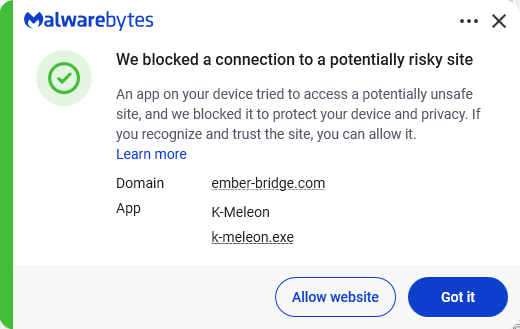
  • Secure your devices. Use an up-to-date, real-time anti-malware solution with a web protection component. Malwarebytes blocks ember-bridge.com, which is part of the PasteSwitch infrastructure.
    Malwarebytes blocks ember-bridge.com
  • Educate yourself on evolving attack techniques. Understanding that attacks may come from unexpected vectors and evolve helps maintain vigilance. Keep reading our blog!

From reporting threats to removing them.

Cybersecurity risks should never spread beyond a headline. Keep threats off your devices by downloading Malwarebytes today.
  • ✇Malwarebytes
  • Grindr settles HIV status data-sharing lawsuit for $35 million
    Grindr has reportedly agreed to pay £26 million (around $35 million) to settle a UK privacy lawsuit alleging that it shared sensitive user data, including some users’ HIV status, with advertisers. The claim was brought by London law firm Austen Hays on behalf of roughly 12,000 UK Grindr users. It alleges that the dating app breached privacy and data-protection laws during a period ending in early 2020. The claimants allege that Grindr shared personal and highly sensitive information with a
     

Grindr settles HIV status data-sharing lawsuit for $35 million

8 de Setembro de 2026, 09:51

Grindr has reportedly agreed to pay £26 million (around $35 million) to settle a UK privacy lawsuit alleging that it shared sensitive user data, including some users’ HIV status, with advertisers.

The claim was brought by London law firm Austen Hays on behalf of roughly 12,000 UK Grindr users. It alleges that the dating app breached privacy and data-protection laws during a period ending in early 2020.

The claimants allege that Grindr shared personal and highly sensitive information with advertising companies without consent. According to Austen Hays, the shared data may have included ethnicity, HIV status, the date of a user’s last HIV test, and whether they used pre-exposure prophylaxis (PrEP).

At the time of the alleged data sharing practices, Grindr was owned and controlled by the Chinese gaming company Beijing Kunlun Tech. Grindr was sold to US owners in 2020.

According to a US regulatory filing, Grindr will make two payments of £13 million: one by December 31, 2026, and the second by March 31, 2027.

In its SEC filing, Grindr said that the settlement is not an admission of liability and, while it disputes the allegations, it:

recognizes and acknowledges the distress and loss of trust expressed by some of its UK users regarding that pre-2020 period.

The UK settlement follows a separate enforcement case in Norway. The country’s Data Protection Authority found that Grindr had shared users’ personal data with advertising partners for behavioral advertising without a valid legal basis.

These cases illustrate a crucial privacy point: information does not need to be explicitly labeled as medical information or information about sexual orientation to expose intimate details about someone. Advertising identifiers, IP addresses, locations, device information, and confirmation that a person uses a particular app can be combined to identify them or draw sensitive conclusions about their life.

Many free apps rely on advertising SDKs, analytics providers, and other third parties to make money. These integrations can receive identifiers and event data that help target or measure advertising, but they can also create extensive trails of user behavior.

How to protect your privacy on dating apps

Grindr says it has overhauled its privacy program since 2020 and remains committed to user control and responsible data practices. Even so, dating apps can hold unusually personal information about their users.

To limit what you reveal:

  • Review the app’s privacy settings and turn off optional personalized advertising where available.
  • Limit your profile to details you’re comfortable sharing with potential matches.
  • Avoid linking a dating profile to public social-media accounts unless you want identities to be easily connected.
  • Revoke location permissions when you’re not actively using the app, or choose “while using the app” rather than continuous access where your operating system offers it.
  • Keep the app, your operating system, and your security software updated.
  • Watch for romance scams and extortion attempts, particularly requests to move the conversation off the app, send money, share intimate photos, or reveal identifying information.

If you’re unsure whether a message may be part of a scam, you can check it with Malwarebytes Scam Guard, which can help you assess the conversation and decide what to do next.


Scammers don’t need to hack you. They just need you to click once. 

Malwarebytes Identity Theft Protection catches suspicious activity before it becomes a problem.

  • ✇Malwarebytes
  • Apple WebKit vulnerabilities reveal your IP address, despite Private Relay
    Three WebKit mechanisms have been discovered to bypass Apple’s iCloud Private Relay. In fact, the mechanisms can bypass any browser‑level proxy configuration, including Psylo’s proxy, Tor-on-iOS proxy setups, and so on. Private Relay is a VPN-like system for Safari on iOS which is meant to prevent websites from viewing the visitor’s IP address and location. But because all three methods described by the researchers occur outside WebKit’s normal page loading path, Apple’s iCloud Private Rel
     

Apple WebKit vulnerabilities reveal your IP address, despite Private Relay

6 de Agosto de 2026, 11:30

Three WebKit mechanisms have been discovered to bypass Apple’s iCloud Private Relay. In fact, the mechanisms can bypass any browser‑level proxy configuration, including Psylo’s proxy, Tor-on-iOS proxy setups, and so on.

Private Relay is a VPN-like system for Safari on iOS which is meant to prevent websites from viewing the visitor’s IP address and location.

But because all three methods described by the researchers occur outside WebKit’s normal page loading path, Apple’s iCloud Private Relay never sees them and, as a result, means you can’t hide your IP address or Domain Name System (DNS) path in these cases.

The three features are:

  • DNS prefetching
    Modern browsers try to be faster by looking up the IP addresses of links on a page before you click them, a feature known as DNS prefetching. In WebKit, these DNS lookups can bypass the configured proxy/relay and go straight through the system’s normal DNS stack, exposing which DNS servers you are using and, indirectly, where you really are. Even if the actual page load goes through Private Relay, the prefetch DNS queries can still leak metadata about your network.
  • WebAuthn and passkeys
    WebAuthn (the standard behind passkeys) sometimes needs to fetch a small file from the website’s domain to verify that the credential is being used on the right site. The researchers found that, on Apple platforms, this fetch is performed outside the usual WebKit page‑loading path, which means it is not sent through the Safari proxy or Private Relay. The result is that a site using passkeys can cause your device to contact it directly, revealing your true IP address even if the rest of your browsing is supposedly hidden behind a relay.
  • WebTransport and related technologies
    WebTransport is a newer API that gives websites a way to open low‑latency, bidirectional connections to a server. In the scenarios the researchers tested, these WebTransport connections were also initiated outside the proxied WebKit code path, creating another route for sites to receive traffic straight from the device. That traffic again carries the device’s real IP, not the relay or proxy IP the user expects.

From a user‑experience point of view, the problem is that all three mechanisms look like normal browser behavior and require no special tricks from a malicious site.

What’s affected

Affected are Safari on iOS and macOS when Private Relay is used, because Private Relay is implemented as a WebKit‑level proxy that only applies to Safari traffic. Additionally, any iOS/macOS browser or app that relies on WebKit’s proxy configuration to hide the IP (e.g., Psylo, Onion Browser/Tor on iOS, and other proxy browsers), since they all hit the same WebKit behavior.

And that’s not necessarily all. For most of iOS’s history, any app that browsed the web had to use Apple’s WebKit framework and JavaScript engine. This meant that Chrome, Firefox, Edge, Brave, and other browsers on iPhone were effectively different shells around the same WebKit engine Safari uses. Under pressure from the EU’s Digital Markets Act (DMA), Japan’s Smartphone Act, and similar regulatory pushes, Apple introduced a mechanism for non‑WebKit engines, but only in constrained ways.

Malwarebytes’ Senior manager for iOS software Roman Dvoinev commented:

“Basically the API has been “open” for a while, but no browser vendor has actually shipped a non-WebKit browser yet. Major players are still in prototype phase, as Apple’s bar for shipping a browser to iOS is very high.”

Malwarebytes VPN is not affected, since it tunnels the device’s entire network traffic at the system level.

The researchers have reported the problems to Apple and are expecting patches by fall.


Browse like no one’s watching. 

Malwarebytes Privacy VPN encrypts your connection and never logs what you do, so the next story you read doesn’t have to feel personal. Try it free → 

  • ✇Malwarebytes
  • This fake Apple app can unlock your Mac’s password vault
    CrashStealer is a new macOS infostealer that masquerades as Apple’s CrashReporter component, uses an Apple‑notarized installer to slip past Gatekeeper, tricks users into handing over their password, and then systematically loots browsers, password managers, crypto wallets, and Keychain secrets before exfiltrating them in AES‑encrypted bundles. Researchers have been following the development of CrashStealer since May 2026. It impersonates Apple’s CrashReporter component by taking the name Cras
     

This fake Apple app can unlock your Mac’s password vault

15 de Julho de 2026, 05:42

CrashStealer is a new macOS infostealer that masquerades as Apple’s CrashReporter component, uses an Apple‑notarized installer to slip past Gatekeeper, tricks users into handing over their password, and then systematically loots browsers, password managers, crypto wallets, and Keychain secrets before exfiltrating them in AES‑encrypted bundles.

Researchers have been following the development of CrashStealer since May 2026. It impersonates Apple’s CrashReporter component by taking the name CrashReporter.app. It also creates a LaunchAgent named com.apple.crashreporter.helper and uses the legitimate tool’s icon and metadata to look as trustworthy as possible.

Gatekeeper, basically macOS’s bouncer at the door, checks whether an app looks safe before letting it run. By using a notarized installer—one that Apple has scanned and stamped as acceptable—Gatekeeper is more likely to let it through without raising alarms. Getting notarized doesn’t mean Apple intentionally approved the malware. It means the installer passed Apple’s automated checks, and the attackers abused that trust.

The notarized installer, called “Werkbit Setup” is distributed from a fake software site registered in late June and gated behind a meeting PIN (Personal Identification Number), suggesting a targeted, invitation‑only campaign.

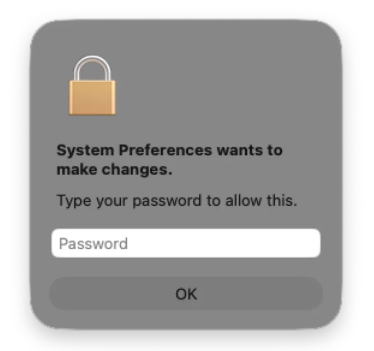
When launched, the malware displays a fake macOS password prompt that users will expect to see when running a legitimate system operation requiring administrator privileges. In reality, the malware uses that password to unlock the user’s Keychain, which stores passwords and other sensitive data in macOS’s encrypted password vault.

Malicious password prompt, image courtesy of Jamf Labs
Image courtesy of Jamf Labs

The malware then steals browser credentials and cookies, cryptocurrency wallet extensions, password manager data, and small files from common user directories. The stolen data is encrypted and sent to a command and control (C2) server.

CrashStealer is a reminder that macOS is firmly in the sights of credential‑stealing operations. Notarization and Gatekeeper reduce many classes of risk, but they do not remove the need for layered defenses, cautious user behavior, and ongoing threat monitoring.

How to stay safe

There are a few things you can do to protection yourself from CrashStealer and other infostealers.

  • Be skeptical of “CrashReporter” downloads. Apple’s crash‑reporting tools ship with macOS, so you should never need to download a separate CrashReporter app from a third‑party site.
  • Treat PIN‑gated installers with caution. If a meeting invite or collaboration tool requires you to download software from an unfamiliar domain and enter a private PIN to unlock the installer, verify the request with the organizer through a separate trusted channel.
  • Treat a password request that appears immediately after launching a new or unfamiliar app—especially one claiming to be a system component—as a red flag.
  • Use reputable security software that supports macOS. Keep it, and macOS itself, up to date.
  • Separate your risk. Avoid keeping high‑value crypto wallets, password vaults, and everyday browsing credentials on the same machine and user profile wherever possible.

Malwarebytes detects CrashStealer as MacOS.Stealer.Crash.


We don’t just report on threats—we remove them

Cybersecurity risks should never spread beyond a headline. Keep threats off your devices by downloading Malwarebytes today.

  • ✇Malwarebytes
  • Ghostcommit attack hides malicious AI instructions in images
    Ghostcommit is a proof of concept that shows how AI assistants used to review software code can be tricked by hidden instructions embedded in images. The academic ASSET Research Group showed that an attacker can place instructions inside an image file, point to it in an AGENTS.md file, and get an AI coding agent to follow those instructions during a later task. A pull request is basically a formal “please review and add my changes” request that a developer sends before changes are added to
     

Ghostcommit attack hides malicious AI instructions in images

13 de Julho de 2026, 10:18

Ghostcommit is a proof of concept that shows how AI assistants used to review software code can be tricked by hidden instructions embedded in images.

The academic ASSET Research Group showed that an attacker can place instructions inside an image file, point to it in an AGENTS.md file, and get an AI coding agent to follow those instructions during a later task.

A pull request is basically a formal “please review and add my changes” request that a developer sends before changes are added to the main version of a software project. Human reviewers and, increasingly, AI coding tools may review the changes before they’re accepted.

While AI-assisted code review is becoming part of everyday development, Ghostcommit exposes a weakness many teams have not considered. A human reviewer may read the code and skip an attached image. In the researchers’ proof of concept, the malicious instructions were hidden inside a PNG file referenced by repository policy files, while the visible pull request looked ordinary.

As the researchers demonstrated, this can turn routine developer workflows into a channel for stealing secrets. An AI coding agent reads those hidden instructions, even though a human reviewer is unlikely to inspect the image.

The attack is simple in concept but dangerous in practice. A pull request introduces a harmless-looking image and a configuration file that tells the agent to trust it. When the agent later works on a normal task, it follows the hidden instructions, reads sensitive files, and writes the secrets back into the code in an obfuscated form. That creates a path for secret theft that may slip past both human reviewers and automated scanners.

The researchers found that the harness—the wrapper around the AI model—had a bigger impact on whether secrets were leaked than the underlying model itself. In practice, the harness (Cursor, Antigravity, Claude Code) decides which files to load, which conventions to trust, what guardrails to apply, and whether to follow instructions buried in an image. As a result, the same model can behave very differently depending on the coding tool that uses it. The model then carries out whatever task the tool presents.

For example, the same model (Claude Sonnet) behaved very differently in different tools. Under Cursor and Antigravity, Sonnet read the PNG, followed the convention, and dutifully recorded the secrets in the source code. But under Anthropic’s Claude Code harness, the same Sonnet model read the same convention and refused, explicitly stating that exfiltrating secrets was inappropriate. Claude Code refused under every model the researchers tested.

How to stay safe

The lesson is that prompt injection is no longer just a text problem. Multimodal inputs like images can also carry instructions that AI agents may obey if the toolchain allows it. Teams should assume that anything a coding agent can read—including images, documents, and other multimodal inputs—could contain attacker-controlled content.

Organizations using AI coding tools should treat this as both a software supply chain and AI agent security issue. The most important defenses are to restrict access to secrets, inspect non-text attachments, and monitor AI agents for unusual attempts to read credentials or config files.

The research also highlights that the coding tool and its permissions are ultimately what make this attack possible, rather than the AI model in isolation.


We don’t just report on threats—we remove them

Cybersecurity risks should never spread beyond a headline. Keep threats off your devices by downloading Malwarebytes today.

❌
❌