On November 3, Google issued Chrome 157 to the stable channel for Windows, Mac and Linux. The update is rolling out over the coming days and weeks.Most users are on Chrome’s Stable channel. The desktop update brings Chrome to versions 157.0.8103.38/.39 for Windows and Mac and 157.0.8103.38 for Linux. It includes 213 security fixes, including seven vulnerabilities rated Critical by Google.Chrome for Android was also updated to 157.0.8103.38. It will become available on Google Play over the coming
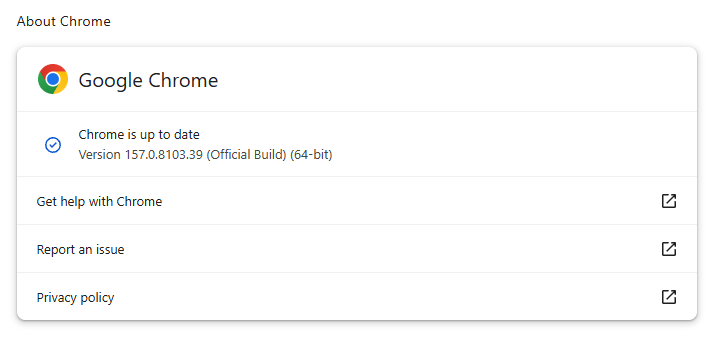
On November 3, Google issued Chrome 157 to the stable channel for Windows, Mac and Linux. The update is rolling out over the coming days and weeks.
Most users are on Chrome’s Stable channel. The desktop update brings Chrome to versions 157.0.8103.38/.39 for Windows and Mac and 157.0.8103.38 for Linux. It includes 213 security fixes, including seven vulnerabilities rated Critical by Google.
Chrome for Android was also updated to 157.0.8103.38. It will become available on Google Play over the coming days.
How to update Chrome
The easiest option is to allow Chrome to update automatically. But you can end up lagging behind on updates if you never close your browser or if something goes wrong, such as an extension preventing the update.
If you don’t want to wait for the rollout to reach you, you can update manually. Open About Google Chrome from Chrome’s settings or Help menu. Chrome will check for updates. If one is available, click Relaunch to apply it.
Google rates seven vulnerabilities in the update as Critical. One, a memory corruption flaw in ANGLE, affects Chrome for Android. It could potentially allow a remote attacker to run code outside the sandbox through a specially crafted HTML page.
ul.menu .wp-block-kadence-advancedbtn .kb-btn400740_68fb6a-2d.kb-button{width:initial;}.wp-block-kadence-advancedbtn .kb-btn400740_68fb6a-2d.kb-button{color:var(--color-neutral-10);background:var(--color-brand-blue-60);border-top-left-radius:40px;border-top-right-radius:40px;border-bottom-right-radius:40px;border-bottom-left-radius:40px;padding:var(--kb-btn-padding);margin:var(--kb-btn-margin);box-shadow:1px 1px 2px 0px rgba(0, 0, 0, 0.2);}.wp-block-kadence-advancedbtn .kb-btn400740_68fb6a-2d.kb-button:hover, .wp-block-kadence-advancedbtn .kb-btn400740_68fb6a-2d.kb-button:focus{box-shadow:0px 4px 0px 0px var(--color-brand-blue-90);}Try it now
CVE-2026-121229: Memory corruption in ANGLE, which could allow a remote attacker to potentially execute arbitrary code outside the sandbox via a crafted HTML page.
ANGLE is Chrome’s graphics translation layer. A buffer overflow occurs when a program puts more data into an area of memory than it can hold, overwriting data in adjoining memory. An attacker can exploit this to make the vulnerable process run malicious code.
Chrome vulnerabilities that enable remote code execution outside the browser sandbox are particularly valuable to attackers because they can turn a visit to a malicious or compromised website into direct code running on the underlying operating system, often without requiring additional exploitation steps.
Chrome’s Prerender component helps pages open faster by loading and preparing a page in the background before you navigate to it. If you then visit that page, Chrome can display the prepared version almost instantly instead of loading it from scratch.
This goes beyond just downloading content: Chrome also starts rendering the page and running its JavaScript.
A use-after-free vulnerability occurs when a program attempts to access a memory location after it has been freed. That can cause crashes or, in some cases, allow an attacker to run their own code.
Dawn powers WebGPU in Chrome, allowing websites to use a device’s graphics processor for rendering and computational tasks. It checks and translates WebGPU instructions into commands that the device’s underlying graphics system can understand.
A buffer overflow occurs when a program writes more data to a block of memory than it can hold. This can cause a crash or, in some cases, allow an attacker to run code.
Stop threats before they can do any harm.
Malwarebytes Browser Guard blocks phishing pages and malicious sites automatically. Free, one click to install. Add it to your browser →
.kadence-column484175_1ef361-88 > .kt-inside-inner-col{padding-top:20px;padding-right:20px;padding-bottom:10px;padding-left:20px;}.kadence-column484175_1ef361-88 > .kt-inside-inner-col{column-gap:var(--global-kb-gap-sm, 1rem);}.kadence-column484175_1ef361-88 > .kt-inside-inner-col{flex-direction:column;}.kadence-column484175_1ef361-88 > .kt-inside-inner-col > .aligncenter{width:100%;}.kadence-column484175_1ef361-88 > .kt-inside-inner-col{background-color:rgba(255, 229, 229, 0.83);}.kadence-column484175_1ef361-88 > .kt-inside-inner-col:before{opacity:0.3;}.kadence-column484175_1ef361-88{position:relative;}@media all and (max-width: 1024px){.kadence-column484175_1ef361-88 > .kt-inside-inner-col{flex-direction:column;justify-content:center;}}@media all and (max-width: 767px){.kadence-column484175_1ef361-88 > .kt-inside-inner-col{flex-direction:column;justify-content:center;}}
In this article
Google says Videostrong backdoored 1.3 million certified Android TV boxes and sold criminals access to the botnet.
The takedown disrupted the botnet, but the backdoor remains in infected boxes’ firmware.
Suspect your box? Disconnect it and ask the seller about a fix or replacement.
Most malware needs you to click something. This one came in the box.
Google’s Threat Intelligence Group (GTIG) says it has high confidence that Android device maker Videostrong Technology built and ran the XCPE backdoor for financial gain. Videostrong sold access to criminal affiliates, who loaded their own malware modules onto the boxes.
GTIG found that the backdoor, called x.cpe (or com.oemservice in some builds), sits in the firmware with system-level privileges. If someone uninstalls it, it reinstalls itself from the /oem/ partition when the device reboots. It could also switch off Google Play Protect app verification, allowing it to install more software without asking.
Google says Videostrong got past its compatibility and security tests by loading the malicious code after the device’s first boot. This allowed the devices to remain part of the residential proxy network.
Residential proxy networks rent out ordinary home IP addresses to customers. That makes their traffic appear to come from a legitimate consumer connection rather than a data center. This can help cybercriminals evade IP-based fraud controls and reputation systems.
The problem for users
Here’s what the backdoored set-top boxes could mean for their owners:
Your home internet connection could be used by others. Residential proxy modules routed other people’s traffic through infected boxes and their owners’ home IP addresses.
Ad fraud. Modules generated fake ad views and clicks in the background.
Spying and remote access to your device. Google observed operators capturing live screenshots, injecting keystrokes, collecting account and device information, and opening reverse shells.
More malware. Some affiliate modules were backdoors that could load further modules.
Your IP address could be linked to activity you didn’t start. Proxy traffic can include attempts to guess account passwords, for example, and may make your home IP address appear in connection with that activity.
How to stay safe
Google and its partners took legal action to take down the domains and servers Videostrong used to control the botnet. Google says it has banned Videostrong and its future subsidiaries and affiliates from making certified Android devices, and strengthened firmware integrity checks for certified Android TV devices.
The takedown only cuts the current connection to the malicious servers. It doesn’t remove the backdoor from infected devices, and can potentially be exploited by other criminals. If you think your box may be affected, disconnect it and contact the seller or manufacturer to ask for clean firmware or a replacement. Uninstalling the app won’t remove the backdoor from the firmware.
Google hasn’t published a complete list of affected models, so owners may not be able to tell from the model name alone whether their box is infected. If you decide to replace your box:
Buy from a reputable manufacturer.
Be cautious about “free TV” boxes. We’ve previously reported on Superbox and similar devices.
Be cautious about apps that pay you to share your bandwidth. They can route other people’s traffic through your internet connection.
Stick to trusted app stores and keep Google Play Protect switched on.
Isolate the box. Put TV boxes and other IoT gear on a separate network or VLAN with restricted outbound access. This doesn’t keep the devices themselves safe, but it does keep other devices separate.
Scammers know more about you than you think.
Malwarebytes Mobile Security protects you from phishing, scam texts, malicious sites, and more. With real-time AI-powered Scam Guard built right in.
.kadence-column482616_9de20c-07 > .kt-inside-inner-col{padding-top:20px;padding-right:20px;padding-bottom:10px;padding-left:20px;}.kadence-column482616_9de20c-07 > .kt-inside-inner-col{column-gap:var(--global-kb-gap-sm, 1rem);}.kadence-column482616_9de20c-07 > .kt-inside-inner-col{flex-direction:column;}.kadence-column482616_9de20c-07 > .kt-inside-inner-col > .aligncenter{width:100%;}.kadence-column482616_9de20c-07 > .kt-inside-inner-col{background-color:#ffe5e5;}.kadence-column482616_9de20c-07 > .kt-inside-inner-col:before{opacity:0.3;}.kadence-column482616_9de20c-07{position:relative;}@media all and (max-width: 1024px){.kadence-column482616_9de20c-07 > .kt-inside-inner-col{flex-direction:column;justify-content:center;}}@media all and (max-width: 767px){.kadence-column482616_9de20c-07 > .kt-inside-inner-col{flex-direction:column;justify-content:center;}}
In this article
Attackers stole $6.3 billion from the Binance cryptocurrency exchange
Binance says user funds are safe, but watch out for fake support or recovery offers from scammers
Users should check their accounts and use official Binance channels.
Binance says a security incident affected approximately $6.3 billion in cryptocurrency. Its initial investigation points to a compromised DevOps engineer’s laptop as a possible entry point.
The exchange says it has frozen around $3 billion with help from blockchain partners. It has promised to cover all losses using its emergency fund and company funds. Binance is reportedly the largest cryptocurrency exchange by daily trading volume.
What happened?
In an update on October 30, Binance said attackers may have used a compromised laptop belonging to a DevOps engineer to access a service container and submit unauthorized withdrawal transactions. The company said:
“We have found no evidence of any wallet private key leak.”
This doesn’t mean that one employee could simply transfer billions of dollars. Binance co-CEO Richard Teng told BleepingComputer the attacker did not simply use one engineer’s permissions. The incident involved a more complex process, rather than a single “one-click” action. Binance also said investigators had identified additional breach points.
Blockchain intelligence firms TRM Labs and Chainalysis have linked the theft to TraderTraitor, a North Korean hacking group associated with previous cryptocurrency thefts. TRM Labs estimates that about $6.36 billion left Binance wallets across ten blockchains, with most of it moving within about 20 minutes.
What should Binance users do?
Binance says approximately $3 billion has been frozen on-chain, while blockchain analysts have reported somewhat different totals. For now, those figures should be treated as developing estimates rather than a final accounting of recovered funds or the exchange’s ultimate losses.
Binance.com users (Binance.US was not affected) should check their accounts, avoid follow-up scams, and respond quickly if they spot signs of a separate compromise.
Go directly to official updates. Open the Binance app or navigate to its support site yourself. Avoid logging in through unexpected messages claiming that you must urgently verify your account or claim compensation. Binance has asked customers to rely on official channels.
Review your account and report anything unexpected. Check your transaction history and account security settings. If you find activity you do not recognize, contact Binance through its official support service. Binance’s support center includes options to disable an account and reset a password or two-factor authentication.
Never give anyone your authentication codes. Treat requests for login codes as a warning sign, even if the person claims to be helping with the incident.
Preserve evidence if you lose money to a related scam. Keep messages, wallet addresses, transaction details, and information about anyone offering recovery services.
.kadence-column482644_f2c16d-bc > .kt-inside-inner-col{padding-top:20px;padding-right:20px;padding-bottom:10px;padding-left:20px;}.kadence-column482644_f2c16d-bc > .kt-inside-inner-col{column-gap:var(--global-kb-gap-sm, 1rem);}.kadence-column482644_f2c16d-bc > .kt-inside-inner-col{flex-direction:column;}.kadence-column482644_f2c16d-bc > .kt-inside-inner-col > .aligncenter{width:100%;}.kadence-column482644_f2c16d-bc > .kt-inside-inner-col{background-color:#ffe5e5;}.kadence-column482644_f2c16d-bc > .kt-inside-inner-col:before{opacity:0.3;}.kadence-column482644_f2c16d-bc{position:relative;}@media all and (max-width: 1024px){.kadence-column482644_f2c16d-bc > .kt-inside-inner-col{flex-direction:column;justify-content:center;}}@media all and (max-width: 767px){.kadence-column482644_f2c16d-bc > .kt-inside-inner-col{flex-direction:column;justify-content:center;}}
In this article
Hackers published work details and internal group memberships for more than 41,000 DHS workers.
The data could enable targeted scams, harassment, stalking, or physical threats.
DHS employees should follow agency guidance, verify unexpected contact, and report threats to security.
A group of hackers calling themselves the Department of Peace says it stole and published the personal details of more than 41,000 people working for the US Department of Homeland Security (DHS). The department says it is aware of a potential breach.
The group, which also claimed the theft of contract documents from the DHS in March, gave the data to Swiss hacktivist maia arson crimew, who published it in collaboration with the transparency collective DDoSecrets. The latter also published the BlueLeaks data dump that listed law enforcement officers’ details in 2020.
The aim of publishing the data was to replace “anonymity with accountability,” DDoSecrets co-founder Emma Best said in an online statement.
According to TechCrunch, timestamps on the records suggest the data was taken around mid-August. The group said it had launched the attack in response to a July 17 statement by DHS Secretary Markwayne Mullin, in which he promised to “turn up the heat” with traffic stops.
What was stolen?
The data files published online, which the publishers have called “Icepick,” span staff at nearly 7,000 offices. They include the names, work email addresses, phone numbers, office addresses, job titles and membership in internal DHS groups. The employees impacted include almost 6,600 Immigration and Customs Enforcement (ICE) employees. ICE is the DHS unit responsible for immigration enforcement and deportations in the US.
The dataset also carried details of over 21,000 Customs and Border Protection (CBP) employees, along with information on people who work at the Cybersecurity and Infrastructure Security Agency (CISA).
The data dump revealed less information than the ShinyHunters’ FBI data heist in September, which reportedly contained Social Security numbers, emergency contacts, medical records and home addresses. Nevertheless, this is more than just a phone book of folks in the DHS.
For one thing, it doesn’t take much to cross-reference data. Reuters matched six DHS employees’ data to credit bureau records and breach data from a dark web intelligence platform. Online activists regularly use open-source intelligence (OSINT) to “doxx” people from very few clues, meaning that even a leak of basic identity information can put someone in danger. In fact, the creators of a separate searchable version say they added information through automated and manual research. So some details shown in that version may not have come from the data stolen from DHS.
Breaches happen every day. Don’t be the last to know.
The data in this case also included membership of groups within Active Directory, a Microsoft tool that contains identity information about computer users. Active Directory controls who can access different internal tools, services, and third-party software within an organization.
The files listed over 200 CBP users in a group that could access the facial recognition tool Mobile Fortify. Other groups reference a service called Penlink, which the company claims can track the location data of hundreds of millions of mobile devices.
According to the Guardian, job titles in the data dump show which agents were assigned to sensitive jobs such as special operations, surveillance, and undercover work.
How did they get the data?
The Department of Peace said that it got to the information via a single sign-on (SSO) service provided by identity company Okta. SSO is a prized target for hackers because a single authentication can get a user into many different workplace services and applications.
Okta says it has no evidence its data or systems were compromised, but that doesn’t rule out someone abusing a DHS account with stolen credentials.
DHS told reporters it was aware of a potential breach. One DHS employee whose data showed up in the breach told Reuters they hadn’t heard anything about it.
What DHS employees can do now
The leaked records include work contact details and internal group memberships. This information could help attackers create convincing messages or calls, and may expose some employees to unwanted attention or threats. DHS has warned about the risk of harassment, stalking, and physical harm. It is not yet clear whether the leak has led to specific threats or affected any operations.
If you work for DHS:
Follow security advice and instructions from the DHS.
Treat unexpected calls, emails, and texts about your role or colleagues with caution. Verify them through a contact method you already trust, and never share passwords or MFA codes.
Change any personal passwords you’ve reused for work, and turn on MFA where available. Follow your agency’s process for work accounts.
Report suspicious contact or threats to your agency’s security team. If you believe there’s an immediate danger, contact law enforcement.
Do you think your information might have been leaked in a data breach? Check out the Malwarebytes Identity Theft Protection service.
Someone’s got their eye on your personal information. Make sure it’s us.
Apple’s latest updates include a fix for a CoreGraphics bug that may have been exploited in targeted attacks. The fix is now available for older iPhones and iPads.Apple released security updates on October 26. Apple first fixed the flaw in iOS 26.7.1. Its latest updates also bring the fix to older devices that can’t run iOS 26, including the iPhone XS, iPhone XS Max, iPhone XR, and seventh-generation iPad.The iOS 18.7.11 update is a backport: it brings a fix from a newer software version to an o
Apple’s latest updates include a fix for a CoreGraphics bug that may have been exploited in targeted attacks. The fix is now available for older iPhones and iPads.
Apple released security updates on October 26. Apple first fixed the flaw in iOS 26.7.1. Its latest updates also bring the fix to older devices that can’t run iOS 26, including the iPhone XS, iPhone XS Max, iPhone XR, and seventh-generation iPad.
The iOS 18.7.11 update is a backport: it brings a fix from a newer software version to an older one. Here, Apple has made the fix available to older devices running iOS 18, so they can be protected without upgrading to an operating system they don’t support.
Updates for your particular device
The table below shows which updates are available and links to Apple’s security information for each one.
iPhone 11 and later, iPad Pro 12.9-inch 4th generation and later, iPad Pro 11-inch 2nd generation and later, iPad Air 4th generation and later, iPad 9th generation and later, and iPad mini 6th generation and later
iPhone 11 and later, iPad Pro 12.9-inch 3rd generation and later, iPad Pro 11-inch 1st generation and later, iPad Air 3rd generation and later, iPad 8th generation and later, and iPad mini 5th generation and later
For iOS and iPadOS users, here’s how to check if you’re using the latest software version:
Go to Settings > General > Software Update. You will see if there are updates available and be guided through installing them.
Turn on Automatic Updates if you haven’t already—you’ll find it on the same screen.
How to update your Mac
To update macOS on any supported Mac, use the Software Update feature, which Apple designed to work consistently across all recent versions. Here are the steps:
Click the Apple menu in the upper-left corner of your screen.
Choose System Settings (or System Preferences on older versions).
Select General in the sidebar, then click Software Update on the right. On older macOS, just look for Software Update directly.
Your Mac will check for updates automatically. If updates are available, click Update Now (or Upgrade Now for major new versions) and follow the on-screen instructions. Before you upgrade to macOS Tahoe 26, please read these instructions.
Enter your administrator password if prompted, then let your Mac finish the update (it might need to restart during this process).
Keep your Mac plugged in and connected to the internet until the update is done.
How to update your Safari browser
Safari updates are included with macOS updates, so installing the latest version of macOS will also update Safari. To check manually:
Open the Apple menu > System Settings > General > Software Update.
If you see a Safari update listed separately, click Update Now to install it.
Restart your device when prompted.
Technical details
The headline bug is CVE-2026-86950, in CoreGraphics, Apple’s framework for drawing graphics, images and PDF content. It’s an out-of-bounds write flaw, where software writes data outside the memory set aside for it. The result is that “processing a maliciously crafted file may lead to arbitrary code execution.”
Apple says it is aware of a report that the flaw may have been exploited in an “extremely sophisticated attack against specific targeted individuals” on versions of iOS before iOS 27.
That wording indicates Apple believes the bug was used in real attacks against a limited group of users.
Usually, journalists, activists and officials are the targets of this kind of attack. If you think you could be a target of highly sophisticated spyware, you should update, restart your phone, and consider applying Apple’s Lockdown Mode.
Scammers know more about you than you think.
Malwarebytes Mobile Security protects you from phishing, scam texts, malicious sites, and more. With real-time AI-powered Scam Guard built right in.
.kadence-column480165_4ecc5f-ac > .kt-inside-inner-col{padding-top:20px;padding-right:20px;padding-bottom:10px;padding-left:20px;}.kadence-column480165_4ecc5f-ac > .kt-inside-inner-col{column-gap:var(--global-kb-gap-sm, 1rem);}.kadence-column480165_4ecc5f-ac > .kt-inside-inner-col{flex-direction:column;}.kadence-column480165_4ecc5f-ac > .kt-inside-inner-col > .aligncenter{width:100%;}.kadence-column480165_4ecc5f-ac > .kt-inside-inner-col{background-color:#ffe5e5;}.kadence-column480165_4ecc5f-ac > .kt-inside-inner-col:before{opacity:0.3;}.kadence-column480165_4ecc5f-ac{position:relative;}@media all and (max-width: 1024px){.kadence-column480165_4ecc5f-ac > .kt-inside-inner-col{flex-direction:column;justify-content:center;}}@media all and (max-width: 767px){.kadence-column480165_4ecc5f-ac > .kt-inside-inner-col{flex-direction:column;justify-content:center;}}
In this article
Some Halloween AI video sites ask for personal photos without clearly identifying who runs them.
Outside AI providers may also receive your uploads.
Before uploading, check who gets your photos, how they’re used, and when they’re deleted.
This Halloween, AI is doing the costumes. Upload a photo and you can become a vampire, surround your dog with pumpkins, or star in a viral “zombie love story:” Your partner has turned, you lower the gun, and the zombie’s leap ends in a hug.
But before you upload, do you know who will receive your photos?
We found no malware or phishing on the sites we examined. What concerned us was how little we could establish about who operated them and who would be responsible for the photos people uploaded.
Polished, friendly, and anonymous
These sites look professional and sound reassuring. They promise privacy, have FAQs and refund policies, and some even add consent checkboxes for photos of children. One calls itself “an independent tool with no ties to TikTok or any film studio.”
What they don’t tell you is who is behind them. On the sites we checked, we found no company name, address, or named operator, only a support email on the site’s own domain.
Where do your photos go?
These sites ask for clear, well-lit photos of you, your partner, your friends, your pets, and, with a parent’s permission, your children.
The sites we looked at say they rely on outside AI providers to generate the videos. That means you’re trusting both the website collecting your photos and the providers processing them.
Wherever you upload photos, check who can access them and how they can be used. Scammers can use someone’s likeness to create fake intimate images and demand money to keep them private. In our Face Value report, 10% of respondents said someone had threatened to release AI-generated explicit content of them. We found no evidence of that happening through these Halloween sites, but it’s a reason to be careful where you share your photos.
The sites promise to delete uploads within days, and we have no evidence that they fail to do so. But we couldn’t independently verify those promises. Without an identifiable operator, it’s harder to establish who is accountable for handling your photos and responding to deletion requests.
Google sign-in doesn’t identify everyone handling your photos
These sites use the real Google sign-in window, so you type your password into Google, not the video site. But using Google to sign in doesn’t mean Google endorses the service or guarantees its privacy promises.
Click the app name in Google’s sign-in window and you’ll see Developer info. On one site we checked, the only contact listed was a Gmail address. We saw the same with the September sites. A Gmail address alone doesn’t establish wrongdoing, but it does little to identify the operator.
On another, Google said you were signing in “to continue to neon.tech.” Neon is a legitimate database company and authentication service provider. Its name appearing here doesn’t mean it operates or endorses the Halloween video site.
Login providers can handle Google sign-in on a site’s behalf. Depending on the setup, Google may display the provider’s domain instead of the video site’s name. Here, the sign-in screen gave visitors no clear indication of who operated the Halloween service.
Built from a kit, recycled for the next trend
Sites like these don’t necessarily take a team or months of work. Some use the same $249 website kit we wrote about in September, which promises you can “launch your AI product in one hour.” On one Halloween site, the builders hadn’t even cleared out the kit’s sample content. Hidden in the page was a note saying it was “a demo site” for the template, along with placeholder links like “your-app-name.”
Another site’s code contained remnants of an AI rap and dance video maker, including a “hotel lobby” stage, a recording studio, and AI-written raps. Those remnants suggest the site uses code also intended for other AI video services.
Using a website kit isn’t itself suspicious. But a polished page can be quick to assemble, so its appearance tells you little about the business handling your photos.
Take your time before paying, too
On one site, a single 15-second zombie clip cost $9.99. The pricing page nudged visitors toward bigger packs, bringing the advertised price per video down to $2.99. But that lowest price meant spending $199 on enough credits for roughly 66 zombie films. There were monthly and yearly plans too, costing up to $600 a year.
One site also used countdown offers, reminders in the browser tab, and claims about how many people had made films that day to encourage visitors to buy.
There’s no need to rush. Check the payment terms as carefully as the privacy policy. The sites themselves warn that AI can change faces, so your video may not look much like you. Under the policies we reviewed, credits are returned if a video fails to generate. But if you simply don’t like the result, trying again costs more credits.
Subscriptions renew until you cancel, yearly plans are charged in one go, and some credits expire before you use them.
What to check before uploading your photos
Whichever tool or platform you choose, make sure you’re comfortable with how it will handle your data, your photos, and your payment info.
Find out who runs the service. Look for a named operator and clear contact details. If you can’t establish who would be responsible for your photos, consider another service.
Check where your photos go. Read the privacy policy for information about outside AI providers, retention periods, and whether uploads can be used for AI training.
Look for a deletion process. Check how to request deletion and whether the policy explains what happens to copies held by outside providers.
Be especially careful with children’s photos. A parental consent checkbox doesn’t explain how a service will protect them. Only upload other people’s photos with their permission.
Read Google’s sign-in window. Check the developer details and any permissions requested. Google sign-in doesn’t replace checking the service itself.
Ignore countdowns and check payment terms. Take time to understand the full cost, credit expiry, and whether your purchase starts a subscription.
Review your Google connections afterward. Remove services you no longer use from your Google account’s third-party connections. This doesn’t cancel subscriptions or delete photos or other data already held by the service.
But these tools can’t verify a service’s photo deletion promises. You should still check who operates it and what its privacy terms say before uploading.
Something feel off? Check it before you click.
Malwarebytes Scam Guard helps you analyze suspicious links, texts, and screenshots instantly.
.kadence-column480618_38f885-ca > .kt-inside-inner-col{padding-top:20px;padding-right:20px;padding-bottom:10px;padding-left:20px;}.kadence-column480618_38f885-ca > .kt-inside-inner-col{column-gap:var(--global-kb-gap-sm, 1rem);}.kadence-column480618_38f885-ca > .kt-inside-inner-col{flex-direction:column;}.kadence-column480618_38f885-ca > .kt-inside-inner-col > .aligncenter{width:100%;}.kadence-column480618_38f885-ca > .kt-inside-inner-col{background-color:#ffe5e5;}.kadence-column480618_38f885-ca > .kt-inside-inner-col:before{opacity:0.3;}.kadence-column480618_38f885-ca{position:relative;}@media all and (max-width: 1024px){.kadence-column480618_38f885-ca > .kt-inside-inner-col{flex-direction:column;justify-content:center;}}@media all and (max-width: 767px){.kadence-column480618_38f885-ca > .kt-inside-inner-col{flex-direction:column;justify-content:center;}}
In this article
Capcom’s breach exposed 11.7 million account records.
Leaked details could fuel convincing phishing messages.
Passwords on 196 accounts were changed without permission.
Use CAPCOM ID? Check your account and enable two-factor authentication.
Gamers are being warned to watch their inboxes after someone gained unauthorized access to Capcom’s online membership service.
Capcom, the Japanese video game developer and publisher behind Resident Evil, Monster Hunter, and Street Fighter, disclosed a breach affecting more than 11.7 million CAPCOM ID records worldwide.
The exposed information includes email addresses, account activity details, and IP addresses. A much smaller number of records also contained personal details such as dates of birth.
The company says credit card information was not affected, and it has not confirmed that passwords originally chosen by customers were compromised, but someone changed the passwords on 196 accounts without authorization. Capcom has since reset those passwords.
CAPCOM ID is the company’s unified account system for its websites and services, including online features in certain games. Users can also link it to gaming platform accounts, including PlayStation, Xbox, Steam, Epic Games, and Nintendo accounts.
For players, the exposed information could help scammers make fake Capcom messages more convincing, potentially tricking them into handing over passwords or verification codes.
Capcom discovered the incident on October 19, and says it has addressed the attack method. Games and services remain available, and the company plans to notify affected customers.
The 11.7 million figure refers to affected records, so it may not represent that many individual users. Capcom is still investigating the impact, including how the passwords on 196 accounts were changed without permission and whether any other unauthorized activity occurred on those accounts.
How to stay safe
As with any breach, watch for phishing messages, particularly those using the breach to create urgency. If an email claims your account needs attention, open your browser and go to cid.capcom.com independently to check it. Capcom warns users not to follow URLs or open attachments in suspicious messages.
You can also take these steps:
Enable CAPCOM ID’s two-factor authentication: This adds an authenticator-app code to the sign-in process, helping protect your account if someone obtains your password. Set it up from your Account page using a smartphone or tablet. Capcom recommends Google Authenticator or Microsoft Authenticator.
Check your account, especially if you received an unexpected password-change notice: Review your registered information and linked platform accounts from your Account page. If you cannot sign in, use Forgot your password? on the login page. See Capcom’s support page for instructions.
Use officialsupport channels if you need help: Find the appropriate regional contact in Capcom’s breach notice, rather than trusting contact details in an unexpected message.
Pro tip: Unsure whether a message is a scam? Malwarebytes’ Scam Guard can help you assess it and suggest what to do next.
Something feel off? Check it before you click.
Malwarebytes Scam Guard helps you analyze suspicious links, texts, and screenshots instantly.
A recently disclosed flaw in Signal’s calling software could allow another participant to keep hearing you after you hang up.The vulnerability, tracked as CVE-2026-113380 (CVSS score 9.3 out of 10), affects RingRTC versions earlier than 2.72.0. RingRTC is the open-source library behind Signal’s voice and video calling functionality, providing calling components for its mobile and desktop applications.The flaw concerns how Signal’s calling library shuts down a call. It does not affect how it encr
A recently disclosed flaw in Signal’s calling software could allow another participant to keep hearing you after you hang up.
The vulnerability, tracked as CVE-2026-113380 (CVSS score 9.3 out of 10), affects RingRTC versions earlier than 2.72.0. RingRTC is the open-source library behind Signal’s voice and video calling functionality, providing calling components for its mobile and desktop applications.
The flaw concerns how Signal’s calling library shuts down a call. It does not affect how it encrypts conversations. According to the published vulnerability description, another participant could overwhelm a call’s internal event queue and interfere with the steps that should disconnect it when you end the call.
The main concern is unwanted listening after someone believes a conversation has ended. If a malicious call participant successfully triggered the flaw, they could potentially continue hearing audio that the other person no longer intended to share. That might include an offhand remark, a conversation with someone nearby, or other private background sound.
The vulnerability description also mentions that video might remain active, but does not confirm that behavior or explain what affected users would see on screen. It also doesn’t specify how long any continued transmission might last.
There are no known reports of exploitation in the wild. The vulnerability concerns only how a call is shut down. It does not involve stolen passwords, compromised accounts, or exposed message histories that would call for a password reset.
What to do
The developers updated the code to make shutdown more resilient when a call’s internal queue is full or another termination step fails.
Install any available Signal updates on your devices. The fix is available in the underlying RingRTC library, but the affected and first-fixed Signal app versions have not yet been confirmed publicly in the sources reviewed.
Personally, I found an update in the Google Play Store which brought my Android app to version 8.32.2. I did not find one in the Apple App Store, although this might be because I have automatic updates enabled. The current version on my iPad is listed as 8.32 (1910). While I think that means it’s all patched, this is hard to confirm from Signal’s website.
I’ve emailed Signal for clarification and will update this article when I hear back.
Scammers know more about you than you think.
Malwarebytes Mobile Security protects you from phishing, scam texts, malicious sites, and more. With real-time AI-powered Scam Guard built right in.
As Android Central reports, users have received unexpected emails telling them their phone number has been verified for secondary Google accounts.Like me and many others, you may have one Google account for everyday use, another for work, and a third for things you would rather keep separate. But if you’re using an Android phone, those accounts may have something in common that you didn’t intend or even know about: your phone number.Google’s own documentation confirms that phone number verificat
As Android Central reports, users have received unexpected emails telling them their phone number has been verified for secondary Google accounts.
Like me and many others, you may have one Google account for everyday use, another for work, and a third for things you would rather keep separate. But if you’re using an Android phone, those accounts may have something in common that you didn’t intend or even know about: your phone number.
Google’s own documentation confirms that phone number verification is on by default and adds your number to all Google accounts signed in on the device. This applies to both existing accounts and any you add later.
Google says phone number verification helps support features such as signing in, account recovery, Rich Communications Services (RCS) messaging, and finding or securing a lost device.
But it also means that a number you intended to use with your main account can become associated with a secondary account simply because both are signed in on the same Android device.
If you deliberately left your phone number off a secondary account, this links it to your real identity without you knowingly making that connection. Your number doesn’t automatically become public, but Google gains another way to connect accounts you wanted to keep separate.
“After some digging I learned that my Google account was added to my wife’s phone’s accounts when I logged in on the Play Store, but was not removed when I logged out after noticing the tracking issue.”
While that particular issue should be solved by Google’s move toward device-based Timeline storage, unwanted phone number associations need to be removed manually.
How to remove your number from separate accounts
Phone manufacturers arrange their settings differently, so there may be some differences in menu names and locations. We tried to make sure everyone can follow these instructions, but there might be makes and models where you get stuck. Feel free to ask in the comments and maybe others with the same phone can help you.
Step 1: Turn off automatic phone number verification
This needs to be done on the Android phone itself:
Open the phone’s Settings app.
Tap Google. On some phones, this may be called Google services or Google services and preferences.
Open All services.
Under Privacy & security, tap Phone number verification.
Turn off Verify phone numbers automatically, or the equivalent verification switch shown on your phone.
Turning this off does not remove numbers already added to your accounts.
Step 2: Check which accounts already have your number
This step can be done in a browser, so should be the same for everyone.
Open a browser and type myaccount.google.com into the address bar.
Check the account picture or initial in the top-right corner. Make sure you are looking at the account you want to inspect.
Select Personal info.
Find Contact info, then select Phone. Depending on the layout, you may see Phone directly.
Select any number listed to review its details and how it is used.
To remove the number from that account, select the delete icon and follow the on-screen instructions. Repeat for each account you want to check.
Step 3: Check for other uses of the number
There’s a wrinkle. Google says changing a number in your Google Account only affects some services. Other services, such as 2-Step Verification, may use the number separately and may not all appear on the Phone page.
On each account you are cleaning up:
Check the number’s Usage section on the Phone page to see which services are listed.
Visit Security or Security & sign-in and review your recovery phone and 2-Step Verification settings.
If you use another Google service that has its own phone number settings, check those settings too.
If your goal is to remove the number entirely from a particular account, don’t assume deleting it from Personal info has removed every separate use. Check those security settings as well, but make sure to keep a working alternative sign-in and recovery method before removing the number.
Android Central reports that some users say automatic verification switches itself back on after they disable it. Those are user reports, not confirmation that this happens on every phone. But if you’re concerned, check the setting again later.
Scammers know more about you than you think.
Malwarebytes Mobile Security protects you from phishing, scam texts, malicious sites, and more. With real-time AI-powered Scam Guard built right in.
On October 13 and 14, Google issued several Chrome updates.Most users are on Chrome’s Stable channel. The desktop update brings Chrome to versions 155.0.8059.79/.80 for Windows and Mac and 155.0.8059.79 for Linux. The update includes 37 security fixes, including seven rated Critical.On the same day, Google released version 155.0.8059.79 for Android. It may not be available on Google Play for everyone yet but keep an eye out for it. Google says it also includes stability and performance improveme
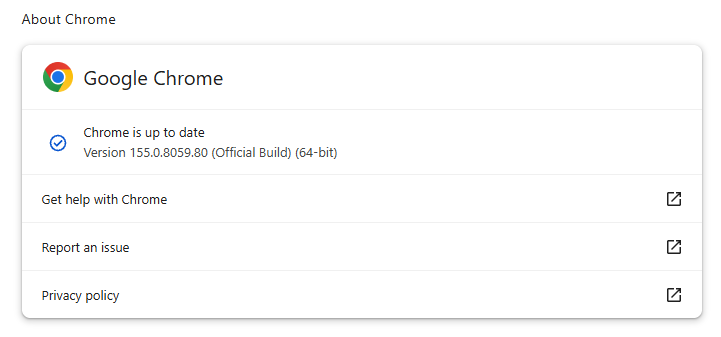
Most users are on Chrome’s Stable channel. The desktop update brings Chrome to versions 155.0.8059.79/.80 for Windows and Mac and 155.0.8059.79 for Linux. The update includes 37 security fixes, including seven rated Critical.
On the same day, Google released version155.0.8059.79 for Android. It may not be available on Google Play for everyone yet but keep an eye out for it. Google says it also includes stability and performance improvements.
Updates will roll out over the coming days and weeks.
How to update Chrome
The easiest option is to allow Chrome to update automatically. But you can end up lagging behind on updates if you never close your browser or if something goes wrong, such as an extension preventing the update.
If you don’t want to wait for the rollout to reach you, manually updating is easy. Open About Google Chrome from Chrome’s settings or Help menu. Chrome will check for updates. If one is available, click Relaunch to apply it.
ul.menu .wp-block-kadence-advancedbtn .kb-btn400740_68fb6a-2d.kb-button{width:initial;}.wp-block-kadence-advancedbtn .kb-btn400740_68fb6a-2d.kb-button{color:var(--color-neutral-10);background:var(--color-brand-blue-60);border-top-left-radius:40px;border-top-right-radius:40px;border-bottom-right-radius:40px;border-bottom-left-radius:40px;padding:var(--kb-btn-padding);margin:var(--kb-btn-margin);box-shadow:1px 1px 2px 0px rgba(0, 0, 0, 0.2);}.wp-block-kadence-advancedbtn .kb-btn400740_68fb6a-2d.kb-button:hover, .wp-block-kadence-advancedbtn .kb-btn400740_68fb6a-2d.kb-button:focus{box-shadow:0px 4px 0px 0px var(--color-brand-blue-90);}Try it now
The first is tracked as CVE-2026-110152, a buffer overflow in ANGLE in Google Chrome on Android. It could allow a remote attacker to execute arbitrary code outside the sandbox via a crafted HTML page.
ANGLE is Chrome’s graphics-translation layer. A buffer overflow occurs when a program puts more data into an area of memory than it can hold, overwriting data in adjoining memory. An attacker can exploit this to make the vulnerable process run malicious code.
Chrome vulnerabilities that enable remote code execution outside the browser sandbox are particularly valuable to attackers because they can turn a visit to a malicious or compromised website into direct code running on the underlying operating system, often without requiring additional exploitation steps.
Then I spotted two use-after-free vulnerabilities in the PDF component. CVE-2026-110136, rated Critical, could allow a remote attacker to execute arbitrary code outside the sandbox via a crafted HTML page. CVE-2026-110147, rated High, could allow an attacker to execute arbitrary code inside the sandbox via a crafted HTML page.
A use-after-free vulnerability occurs when a program attempts to access a memory location after it has been freed. That can cause crashes or, in some cases, allow an attacker to run their own code.
Inside the sandbox means the malicious code would run in a restricted, sealed-off environment designed to limit access to the rest of your device. That limits what the attacker can do as it constrains them to the browser, lowering the impact compared with code running outside the sandbox. However, attackers often chain multiple vulnerabilities together to escape the sandbox and achieve a more serious compromise. So, the phrase describes an important security limitation, but it does not mean the vulnerability is harmless.
Stop threats before they can do any harm.
Malwarebytes Browser Guard blocks phishing pages and malicious sites automatically. Free, one click to install. Add it to your browser →
Maybe it’s a text saying your package couldn’t be delivered, with a link to reschedule. Or an email from your bank asking you to verify your account. Or perhaps it’s an invitation from someone you know to view a document. The message looks real enough, but something about the link feels fishy. Do you click it? Malwarebytes Scam Link Check is a new free tool that lets you check a suspicious link before you click. #mb-button-07dd71d9-2822-4603-884c-0eabf0eb276a .mb-button-item-0 .btn-main:hover{b
Maybe it’s a text saying your package couldn’t be delivered, with a link to reschedule. Or an email from your bank asking you to verify your account. Or perhaps it’s an invitation from someone you know to view a document.
The message looks real enough, but something about the link feels fishy. Do you click it?
Simply paste the link into Scam Link Check, and Malwarebytes will scan it for signs of phishing, scams, malware, and other online threats. You’ll know within seconds whether the link appears safe or might be dangerous.
What is Malwarebytes Scam Link Check?
When you paste a link, Malwarebytes Scam Link Check analyzes the website using our threat intelligence technology. Along with a safety verdict, you’ll learn more about what we found, including:
Information about the website’s domain and reputation
Signs that the site may be impersonating a known brand
Where the link ultimately leads
A preview of the website
Recommended next steps
When should you check a link?
Scam links can show up pretty much anywhere: text messages, emails, social media posts, messaging apps, QR codes, and even search results.
It’s a good idea to check a link whenever you’re unsure about where it may lead, especially if the message asks you to log in, make a payment, share personal details, or act quickly.
For instance, you might want to investigate a link if you receive a message claiming:
You missed a package delivery
There’s a problem with your bank account
You need to reset a password or verify your identity
You owe a toll, fine, or other payment
You’ve won a prize or are eligible for a refund
How to check if a link is safe
Using Malwarebytes Scam Link Check is simple and takes just a few steps:
Copy the suspicious link without opening it.
Paste the link into the tool.
Wait while Malwarebytes scans the site for potential threats.
Review the results.
If we can’t determine whether a link is safe, it’s best not to click it yet. Instead, reach out to the company using the contact details listed on its official website.
Check before you click
Scammers are getting more adept at creating convincing copies of a brand’s site, making it even harder to decipher what’s real and what’s not.
With Malwarebytes Scam Link Check, you don’t have to figure it out on your own.
Your streaming box might not look like much of a computer. But connect enough inexpensive devices together, and they can run an AI model.Researchers at Anthropic demonstrated this by running a Google Gemma model across 15 off-brand Android TV boxes. They warn that small models could soon spread across vulnerable internet-of-things (IoT) devices, including smart ovens and TV boxes, stating:“Our experiments suggest that small AI models may be months away from being capable enough to self-replicate
Your streaming box might not look like much of a computer. But connect enough inexpensive devices together, and they can run an AI model.
Researchers at Anthropic demonstrated this by running a Google Gemma model across 15 off-brand Android TV boxes. They warn that small models could soon spread across vulnerable internet-of-things (IoT) devices, including smart ovens and TV boxes, stating:
“Our experiments suggest that small AI models may be months away from being capable enough to self-replicate on commercial internet-of-things (IoT) devices, like smart ovens and off-brand Android TV boxes.”
In this scenario, AI isn’t simply helping an attacker write malicious code. It becomes part of the software carrying out the replication.
Anthropic breaks that process into four stages:
Find another device.
Gain the ability to execute code on it.
Set up the software needed to run an AI model.
Continue spreading from the new host.
The researchers tested whether AI agents could complete this sequence. They did not demonstrate a small model spreading and running independently on compromised household devices.
The tests used Android emulators with unauthenticated debugging access, making it much easier for the agents to gain access than it would be on properly secured devices. Large file transfers and sustained communication between devices could make real-world replication easier to detect, while limited computing power could slow it. Crucially, the experiments did not demonstrate a model that was both capable enough to complete the replication process and small enough to run on the consumer hardware being targeted.
Anthropic projects that smaller models could reach the necessary capability by the end of 2026 if improvement continues at its historical rate.
Varun Chandrasekaran, an assistant professor at the University of Illinois, told AFP that the findings were consistent with related research but cautioned that Anthropic’s work had not been independently verified. He identified people using AI to improve attacks as the bigger current threat, rather than AI systems going rogue.
Smart-device botnets are already a problem.
Criminals hijacking connected devices is nothing new. Mirai and its descendants have recruited routers, security cameras, and digital video recorders into botnets used to launch distributed denial-of-service (DDoS) attacks, overwhelming services with traffic. BADBOX 2.0 illustrates another form of abuse: compromised consumer devices used for activities including residential proxy services, which route other people’s traffic through victims’ internet connections.
Neither demonstrates autonomous AI replication, but both show that connected devices can become infrastructure for criminals.
What you can do now
The practical response is to reduce the opportunities for any attacker to misuse your connected devices:
Keep operating systems, software, and firmware up to date to reduce exposure to known vulnerabilities.
Buy from reputable vendors that provide ongoing firmware and security updates. A bargain device is less attractive if you cannot trust its software or obtain security fixes.
Avoid unofficial app stores promising free streaming content. The FBI specifically flags these marketplaces in its BADBOX 2.0 guidance.
Don’t disable protections to make an app work. Requests to turn off Google Play Protect are a warning sign, as are Android devices without Play Protect certification.
If you notice something suspicious, disconnect the device from your network while you investigate.
Put smart devices that are unable to run security software on a separate network isolated from your computers and phones, such as a guest network.
Scammers know more about you than you think.
Malwarebytes Mobile Security protects you from phishing, scam texts, malicious sites, and more. With real-time AI-powered Scam Guard built right in.
Google has published security fixes for Android. The October updates are available for Android operating system versions 14, 15, 16, 16-qpr2, and 17 where “qpr” stands for Quarterly Platform Release. QPRs are interim updates Google pushes out between major yearly cycles.These Android security bulletins contain valuable information for Android users. The updates are important as they fix several vulnerabilities rated as Critical, which can be exploited without users even doing anything.However, w
Google has published security fixes for Android. The October updates are available for Android operating system versions 14, 15, 16, 16-qpr2, and 17 where “qpr” stands for Quarterly Platform Release. QPRs are interim updates Google pushes out between major yearly cycles.
These Android security bulletins contain valuable information for Android users. The updates are important as they fix several vulnerabilities rated as Critical, which can be exploited without users even doing anything.
However, we don’t write about them very often. The main reason for that lack of attention is that many Android users aren’t able to get the updates immediately and lots of others will never see them.
Google’s October fixes list Android 14 and newer, but a substantial share of the Android ecosystem still runs older software. In the distribution figures reported about last year, roughly four in ten devices were running Android 12 or earlier. This was while Android 13 still received updates which ended early March 2026.
And then there is the patch gap caused by device vendors meaning that even phones that remain supported may have to wait until the vendors test and sometimes modify the patches, so they work with their devices. And other vendors are on a different stride. For example, Samsung lists devices including the Galaxy S22 series and several Galaxy A models on a quarterly rather than a monthly security-update schedule.
You can imagine that cybercriminals love to get their hands on known vulnerabilities that many users have not yet been able to patch. Looking at the number of users that are unable to patch immediately that makes for an enormous target group.
How to stay safe
Get the updates as soon as they are made available to you is the most important word of advice here.
For most Android phones this is the general idea: open Settings, find Software update or System update (sometimes under System or About phone), check for updates, and follow the instructions to download, install, and restart. The menu names vary between vendors and even models, but the process is broadly the same.
If that doesn’t work for you or you can’t find instructions for your specific device, post what you’re looking for in the comments. We have lots of helpful readers.
In August, the Malwarebytes research team reported on a new malicious turnkey kit that makes it possible for almost anyone to launch a sophisticated online scam. The kit was not simply a fake website. It bundled the command center, victim tracking, and administrative tools into a ready-to-use package, reducing the technical knowledge needed to operate a scam.
The discovery highlights an important feature of the cybercrime economy: criminals don’t necessarily need to build their own infrastruc
In August, the Malwarebytes research team reported on a new malicious turnkey kit that makes it possible for almost anyone to launch a sophisticated online scam. The kit was not simply a fake website. It bundled the command center, victim tracking, and administrative tools into a ready-to-use package, reducing the technical knowledge needed to operate a scam.
The discovery highlights an important feature of the cybercrime economy: criminals don’t necessarily need to build their own infrastructure from scratch. Instead, they can buy ready-made services that handle much of the complicated work for them.
The same pattern is well established in phishing. Scam emails are no longer limited to poorly written, easily spotted phishing attempts. Cybercriminals now use complete, subscription-based platforms that make launching convincing attacks as easy as signing up for a monthly service.
One of the most dangerous examples of this trend is BlueKit, a phishing-as-a-service (PhaaS) toolkit designed to automate and scale account hijacking.
BlueKit allows attackers to manage entire phishing campaigns through a single dashboard without needing deep technical knowledge.
BlueKit thread on underground cybercrime forum“petrushka” (Russian for parsley), the operator behind BlueKit
BlueKit’s origins
The Malwarebytes research team has been tracking BlueKit’s development since the service first appeared on a prominent cybercrime forum in April.
Rather than simply documenting its initial capabilities, our researchers followed its evolution over time, watching how the service developed and what its growing capabilities could mean for cybercriminal operations.
BlueKit offered by the threat actor “petrushka”
A template library targeting familiar brands
As of September, BlueKit boasts an extensive template library supporting 97distinct brands across 176variants. The service’s operators describe these phishing pages as:
“pixel-perfect and ready to deploy in one click.”
The offer of “BlueKit” (extended)BlueKit’s websitePhishing kits list on BlueKit’s website
Our analysis shows that the platform targets both consumer and business platforms. Its phishing kit templates include:
Consumer services: Templates impersonating major providers, including Amazon, Booking.com, Google/Gmail, and Apple.
Finance and cryptocurrency: Templates impersonating financial institutions such as American Express and Bank of America, alongside numerous cryptocurrency exchanges.
Social media and communications: Templates impersonating major social media platforms including TikTok, Facebook, and X.
Generative AI platforms: Templates designed to steal login details for services including OpenAI and Anthropic.
Below is a video demo of a phishing page impersonating the crypto wallet provider Trezor:
.kadence-column471581_a23f77-44 > .kt-inside-inner-col{display:flex;}.kadence-column471581_a23f77-44{max-width:801px;margin-left:auto;margin-right:auto;}.wp-block-kadence-column.kb-section-dir-horizontal:not(.kb-section-md-dir-vertical)>.kt-inside-inner-col>.kadence-column471581_a23f77-44{-webkit-flex:0 1 801px;flex:0 1 801px;max-width:unset;margin-left:unset;margin-right:unset;}.kadence-column471581_a23f77-44 > .kt-inside-inner-col,.kadence-column471581_a23f77-44 > .kt-inside-inner-col:before{border-top-left-radius:0px;border-top-right-radius:0px;border-bottom-right-radius:0px;border-bottom-left-radius:0px;}.kadence-column471581_a23f77-44 > .kt-inside-inner-col{column-gap:var(--global-kb-gap-sm, 1rem);}.kadence-column471581_a23f77-44 > .kt-inside-inner-col{flex-direction:column;justify-content:center;align-items:center;}.kadence-column471581_a23f77-44 > .kt-inside-inner-col > .kb-image-is-ratio-size{align-self:stretch;}.kadence-column471581_a23f77-44 > .kt-inside-inner-col > .wp-block-kadence-advancedgallery{align-self:stretch;}.kadence-column471581_a23f77-44 > .kt-inside-inner-col > .aligncenter{width:100%;}.kt-row-column-wrap > .kadence-column471581_a23f77-44{align-self:center;}.kt-inner-column-height-full:not(.kt-has-1-columns) > .wp-block-kadence-column.kadence-column471581_a23f77-44{align-self:auto;}.kt-inner-column-height-full:not(.kt-has-1-columns) > .wp-block-kadence-column.kadence-column471581_a23f77-44 > .kt-inside-inner-col{flex-direction:column;justify-content:center;}.kadence-column471581_a23f77-44 > .kt-inside-inner-col:before{opacity:0.3;}.kadence-column471581_a23f77-44{position:relative;}@media all and (min-width: 1025px){.wp-block-kadence-column.kb-section-dir-horizontal>.kt-inside-inner-col>.kadence-column471581_a23f77-44{-webkit-flex:0 1 801px;flex:0 1 801px;max-width:unset;margin-left:unset;margin-right:unset;}}@media all and (max-width: 1024px){.kt-row-column-wrap > .kadence-column471581_a23f77-44{align-self:center;}}@media all and (max-width: 1024px){.kt-inner-column-height-full:not(.kt-has-1-columns) > .wp-block-kadence-column.kadence-column471581_a23f77-44{align-self:auto;}}@media all and (max-width: 1024px){.kt-inner-column-height-full:not(.kt-has-1-columns) > .wp-block-kadence-column.kadence-column471581_a23f77-44 > .kt-inside-inner-col{flex-direction:column;justify-content:center;}}@media all and (max-width: 1024px){.kadence-column471581_a23f77-44 > .kt-inside-inner-col{flex-direction:column;justify-content:center;align-items:center;}}@media all and (max-width: 767px){.kt-row-column-wrap > .kadence-column471581_a23f77-44{align-self:center;}.kt-inner-column-height-full:not(.kt-has-1-columns) > .wp-block-kadence-column.kadence-column471581_a23f77-44{align-self:auto;}.kt-inner-column-height-full:not(.kt-has-1-columns) > .wp-block-kadence-column.kadence-column471581_a23f77-44 > .kt-inside-inner-col{flex-direction:column;justify-content:center;}.wp-block-kadence-column.kb-section-sm-dir-vertical:not(.kb-section-sm-dir-horizontal):not(.kb-section-sm-dir-specificity)>.kt-inside-inner-col>.kadence-column471581_a23f77-44{max-width:801px;-webkit-flex:1;flex:1;margin-left:auto;margin-right:auto;}.kadence-column471581_a23f77-44 > .kt-inside-inner-col{flex-direction:column;justify-content:center;align-items:center;}}
Beyond consumer-oriented attacks, BlueKit also presents an acute threat to businesses by providing the tools necessary to target corporate logins.
Our team found support for critical business infrastructure and single sign-on (SSO) gateways. This includes customer relationship and marketing automation platforms, such as Salesforce and HubSpot, developer and source control environments like GitHub, and security services including Check Point, Citrix, Cloudflare, and Cisco.
Business-oriented phishing templates on BlueKit’s website
A toolkit that never stops updating
One of the interesting things about BlueKit is that its creators are constantly adding new features, much like a legitimate software company releasing updates for its apps.
For example, on July 26, the BlueKit team used its official Telegram channel to announce an upcoming upgrade: a built-in SMS sender. Less than a month later, on August 10, they announced its release.
The new tool allows scammers to send text messages directly from the BlueKit dashboard. Alongside phishing emails, attackers can now easily send scam texts (called “smishing”) to trick people into clicking malicious links.
The operators say the update even lets attackers use local US phone numbers, which could make the messages appear more trustworthy. It gives them an entirely new, highly effective way to deliver scams from one control panel.
SMS sender announcement in BlueKit’s Telegram channelSMS sender module on BlueKit’s website
But BlueKit’s creators aren’t just focused on adding shiny new tools like the SMS sender. They’re also constantly working behind the scenes to improve their core product. A September update, for example, improved their fake website templates to make them look even more convincing, and upgraded the hidden technology they use to steal and manage sessions.
BlueKit’s September updates
Three ways BlueKit makes phishing easier for scammers
After monitoring BlueKit’s development and analyzing its capabilities, our research team identified three ways the service lowers the barrier to launching sophisticated phishing attacks: setting up a site, capturing account access, and using AI to support the attack.
1. Quick setup
BlueKit is an “easy-to-install” phishing service, highlighting just how quickly sophisticated phishing infrastructure can be deployed.
According to its operators, an attacker can connect a domain and have a phishing site ready in around 10 minutes. The cheapest subscription costs $250 for seven days, and an attacker could potentially go from purchasing the service to launching a sophisticated phishing campaign in a matter of minutes.
Description of BlueKit’s easy setup procedure
2. More than password theft
When most people think of phishing, they picture a scammer tricking them into handing over a username and password. But BlueKit goes much deeper than a basic smash-and-grab.
Behind the scenes, this tool secretly collects a complete digital profile of your computer , including a device fingerprint, cookie sessions, and even passkeys.
Device fingerprint: BlueKit records your IP address, web browser details, and device characteristics. Together, details such as screen size, operating system, and hidden hardware settings can form a “fingerprint” that helps distinguish one browser or device from another.
Many modern security systems look for familiar devices to double-check that it’s really you trying to log in. So by stealing this background information alongside your password, an attacker can mimic your device to bypass security checks.
Session cookies: When you log into a website like your email or online bank, the site doesn’t make you retype your password every time you open a new page. Instead, it places a tiny file on your device called a session cookie to recognize that you’ve already signed in.
Think of a session cookie like a VIP wristband given to you at a concert entrance. Once the guard checks your ticket—your login—they give you a wristband. While you’re wearing that wristband, you can walk freely in and out of the venue without showing your ticket again.
Instead of just stealing your ticket, BlueKit also steals thewristband itself. Once the attacker takes your session cookie, they can paste it into their own browser and walk straight into your active account. They don’t need to guess your password, and they don’t need to ask for a two-factor code. The website already thinks they are you.
Description of BlueKit’s data-capturing capabilitiesLive demos using real credentials, shared by the BlueKit team
3.A built-in AI assistant
What makes BlueKit especially interesting right now is that it comes with its own built-in, “no-rules” artificial intelligence.
Think of it like a malicious version of ChatGPT, built directly into the scammer’s toolkit. Usually, AI tools have safety filters to prevent people from doing illegal things. BlueKit’s creators, however, have removed those guardrails, advertising that their custom AI will answer “even extreme prompts” and help with “fraud-related questions.”
Instead of writing convincing scam emails from scratch, an attacker can simply ask the AI to write phishing emails and fake text messages.
This is a huge development. BlueKit illustrates how advanced AI features are not just for legitimate businesses. They are being packaged and sold as standard features in cybercriminal services, making it easier for attackers to launch highly convincing attacks.
BlueKit’s advertised AI capabilitiesAI features advertised on BlueKit’s website
The business behind BlueKit
BlueKit’s claimed customer numbers also point to a potentially significant revenue stream. On August 29, the operators announced that the service had passed 1,000 customers.
Based on the advertised subscription prices, we can illustrate the potential revenue generated so far, although the actual distribution of subscriptions is unknown.
BlueKit’s announcement claiming more than 1,000 customers
If all 1,000 customers purchased one 7-day subscription at $250: $250,000 in gross revenue.
If all 1,000 customers purchased one 30-day subscription at $940: $940,000 in gross revenue.
If purchases were split roughly equally between the 7-day ($250), 14-day ($480), and 30-day ($940) plans: Approximately $557,000 in gross revenue.
These are hypothetical calculations, but even so, the figures are a striking example of the economics behind phishing-as-a-service: operators can potentially generate hundreds of thousands of dollars in revenue by selling access to their infrastructure to other criminals.
BlueKit’s advertised subscription prices
What this means for you
Phishing has officially evolved beyond obvious scam pages filled with typos and blurry logos. BlueKit combines convincing login pages, a built-in AI assistant, and subscription access to tools that once required more technical skills.
Services like these make sophisticated phishing easier to launch, allowing scammers to generate a highly convincing, customized phishing attack from scratch in as little as 10 minutes.
Ultimately, services like BlueKit mean that advanced, highly deceptive cyberattacks are no longer limited to elite hackers. They are now fast, cheap, and accessible to anyone with a few dollars to spare.
Polished wording and familiar branding are not proof that a message or login page is genuine.
Open the app or website yourself. If a message asks you to sign in, use the official app or a saved bookmark rather than the link in the email or message.
Check the website address before signing in. Scammers can use lookalike addresses with small spelling changes, known as typosquatting. A password manager can help as it will only autofill logins on the correct site, while Malwarebytes Browser Guard can help block phishing pages.
Use passkeys where available, and keep two-factor authentication enabled. These are still valuable protections, although some phishing techniques can capture sessions after a user completes a login.
If you signed in through a suspicious link, secure your account through the official app or website. Change your password, review your account activity, and sign out of all sessions.
Pro tip: Malwarebytes Scam Guard can also help you assess a suspicious message before you act on it.
“One of the best cybersecurity suites on the planet.”
Last week on Malwarebytes Labs:Fake xStocks, Pendle, and other sites bait crypto users with rewards votesShadow AI explained: The work shortcut that could leak your company’s secretsConvincing Free Mobile phishing emails appear after data breachMalwarebytes earns another Top Product award in independent testingPentagon breach exposes Social Security numbers and military records of millionsLosing gamblers pushed to bet more by DraftKings’ AI, report saysHackers steal protective order and foster c
Free Mobile, one of France’s main cellular providers, was fined €27 million by France’s data protection regulator, the CNIL, in January over failures to protect customer data. The October 2024 breach allowed an unauthorized party to access sensitive customer records, including bank account details and login information. Since the breach, we’ve seen many poorly written scam campaigns targeting Free Mobile customers.
However, over the past few weeks, a well-written scam has appeared, closely co
Free Mobile, one of France’s main cellular providers, was fined €27 million by France’s data protection regulator, the CNIL, in January over failures to protect customer data. The October 2024 breach allowed an unauthorized party to access sensitive customer records, including bank account details and login information. Since the breach, we’ve seen many poorly written scam campaigns targeting Free Mobile customers.
However, over the past few weeks, a well-written scam has appeared, closely copying the design of the official Free Mobile website and email templates.
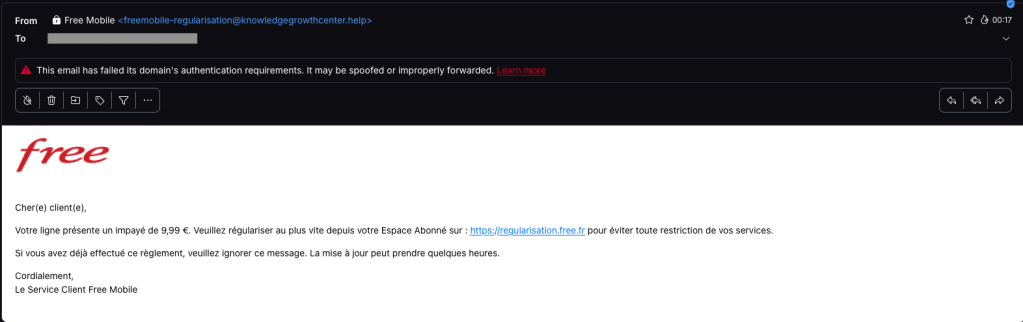
One of our employees, who is a Free Mobile customer, received this phishing email on Wednesday, September 30. The message used the same logo and template as legitimate emails from the company, but came from the suspicious email address freemobile-regularisation[@]knowledgegrowthcenter[.]help. It included a link that appeared to point to regularisation.free.fr :
The email tells the user that an invoice of €9.99 needs to be paid to avoid having the customer’s service suspended. Clicking the link opens a redirection chain:
Malwarebytes can help protect you from these threats, but treat unexpected messages about your accounts and invoices with caution:
Don’t follow links in unsolicited emails. If a message concerns your account, open the official Free Mobile app or website directly, or call the official help line at 3244.
Check the actual domain in your browser’s address bar to see if it matches what you expect—https://mobile.free.fr in this case.
Apple has released updates for iPhones, iPads, and Macs to fix a flaw that could let an attacker run code when a device processes a malicious file. Apple says it may have been used in highly targeted attacks against iPhone users running versions of iOS before iOS 27.
The fix is in iOS and iPadOS 26.7.1, as well as macOS Sequoia 15.8.1 and macOS Tahoe 26.7.1. Check Software Update on each of your Apple devices and install the latest version offered.
Updates for your particular device
The
Apple has released updates for iPhones, iPads, and Macs to fix a flaw that could let an attacker run code when a device processes a malicious file. Apple says it may have been used in highly targeted attacks against iPhone users running versions of iOS before iOS 27.
The fix is in iOS and iPadOS 26.7.1, as well as macOS Sequoia 15.8.1 and macOS Tahoe 26.7.1. Check Software Update on each of your Apple devices and install the latest version offered.
Updates for your particular device
The table below shows which relevant updates are available and links to Apple’s security information for each one.
iPhone 11 and later, iPad Pro 12.9-inch 3rd generation and later, iPad Pro 11-inch 1st generation and later, iPad Air 3rd generation and later, iPad 8th generation and later, and iPad mini 5th generation and later
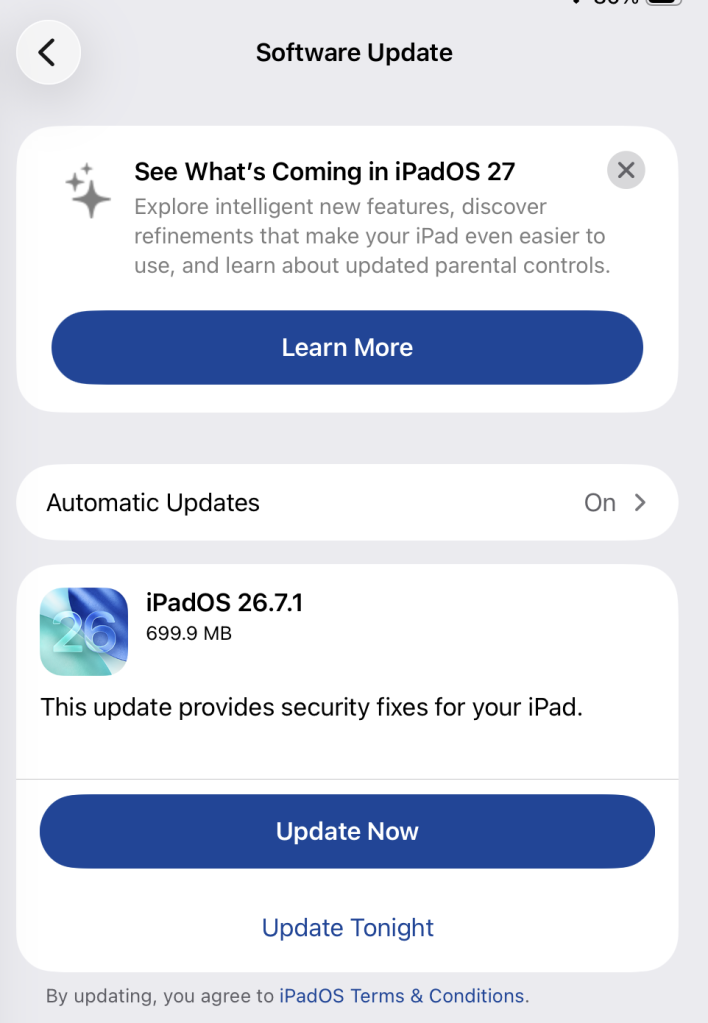
To check if you’re using the latest software version, go to Settings > General > Software Update. You’ll see if an update is available and be guided through installing it.
Turn on Automatic Updates if you haven’t already—you’ll find it on the same screen.
Available update options on iPad
How to update macOS on any version
To update macOS on any supported Mac, use Software Update:
Click the Apple menu in the upper-left corner of your screen.
Choose System Settings (or System Preferences on older versions).
Select General in the sidebar, then click Software Update on the right. On older macOS, look for Software Update directly.
Your Mac will check for updates automatically. If updates are available, click Update Now (or Upgrade Now for major new versions) and follow the on-screen instructions. Before you upgrade to macOS Tahoe 26, read Apple’s instructions.
Enter your administrator password if prompted, then let your Mac finish the update. It may need to restart.
Make sure your Mac stays plugged in and connected to the internet until the update is done.
Technical details
The bug, CVE-2026-86950, affects CoreGraphics, an Apple framework used throughout its operating systems and apps to display and process visual content such as images and PDFs.
It’s an out-of-bounds write issue, which Apple addressed with improved bounds checking. This type of bug happens when software writes data beyond the limits of its allocated area of memory. It can overwrite other data in memory, interfere with the normal operation of the program, cause a crash, or even let an attacker take control of the affected process. In this case, processing a maliciously crafted file may lead to an attacker running their own code.
Apple says it is aware of a report that the issue may have been exploited in an “extremely sophisticated attack” against specific people using versions of iOS before iOS 27. Although the reported attack was highly targeted, other attackers could try to exploit the flaw now that it has been disclosed.
Scammers know more about you than you think.
Malwarebytes Mobile Security protects you from phishing, scam texts, malicious sites, and more. With real-time AI-powered Scam Guard built right in.
We discovered an undocumented remote-access Trojan (RAT) called Kothamine Agent. It supports more than 30 commands and it gives attackers control of an infected Windows computer: they can run commands, read and change files, and add new capabilities. Some versions can also steal browser data and record through the camera and microphone.
We found Kothamine linked to malicious npm packages, which could put users and developers who install those packages at risk. In recent versions, the malware
We discovered an undocumented remote-access Trojan (RAT) called Kothamine Agent. It supports more than 30 commands and it gives attackers control of an infected Windows computer: they can run commands, read and change files, and add new capabilities. Some versions can also steal browser data and record through the camera and microphone.
We found Kothamine linked to malicious npm packages, which could put users and developers who install those packages at risk. In recent versions, the malware uses tailcat, an open-source tool from Tailscale, to receive commands over an encrypted connection. That makes its communications harder to inspect and gives defenders no conventional command-and-control (C2) domain to block.
Based on VirusTotal uploads and GitHub commits, Kothamine appears to have been in development or distribution since at least July. Earlier versions used the Tailscale VPN instead of tailcat. Depending on the build, the malware includes the networking tools or downloads them from sources including GitHub.
How to stay safe
Before installing an unfamiliar npm package, check its repository, maintainers, dependencies, and recent releases. Search for reports of malicious activity, and favor packages with an established history and regular maintenance.
Check the name carefully. Make sure you aren’t downloading a fake package with a similar name.
Check the developer or organization and make sure the publisher appears legitimate. Check, for example, if it has a website or a GitHub repository.
Read some reviews, issues and reports. Search for the package name on Google and check for reports of detected potential malware.
Look at how popular it is. A package with many downloads and users is generally easier to verify than a brand-new package with almost no history.
Technical analysis
Kothamine and the malicious npm packages
Kothamine is written in C and C++. In the majority of the samples we analyzed, it consists of an injector and a DLL containing the agent. The agent supports more than 30 commands, allowing the operator to control the infected system and load additional DLLs to extend its capabilities.
Kothamine Agent execution
Kothamine Agent has undergone some changes over time. Earlier versions we found on VirusTotal used the Tailscale VPN rather than tailcat, and the strings were not encrypted. Some features, including a User Account Control (UAC) bypass and stealer commands, were detected only in certain builds.
In some versions, Kothamine downloaded Tailscale files from the official Tailscale website or a GitHub repository instead of including them in the agent.
The same GitHub repository is cited in an advisory about a malicious npm package named dotnet-runtime-base. The package download npm-sc-legit.exe from that repository. At the time of writing, two other packages published by the same developer had been removed.
The developer’s removed npm packages
The authors behind these campaigns made a mistake and published instructions for compiling kothamine-stub-cpp in one of the packages. The guide also discusses loading .NET assemblies, which we did not observe in the samples we analyzed.
Instructions for compiling and publishing Kothamine
The npm-sc-legit.exe executable is a compiled version of Kothamine that also contains commands for stealing data. We did not find a panel or builder for Kothamine, but the features present across different builds suggest that operators can enable particular functions and commands as needed.
Executables and DLL hosted on GitHub
The following analysis focuses on a recent Kothamine Agent sample that uses tailcat for C2 communication.
How Kothamine Agent works
In the analyzed versions, an executable internally referred to as Kothamine Injector injects the Kothamine Agent DLL, typically into explorer.exe. We also refer to earlier versions to show how the agent has changed.
1. Kothamine Injector
Kothamine Injector performs the following operations:
Adds Windows Defender exclusions using PowerShell
Copies itself to %ROAMING%\MicrosoftEdgeUpdateCore.exe
Extracts the agent DLL to %ROAMING%\MicrosoftEdgeUpdateCore.dll
Creates up.ps1 in %TEMP% for persistence
Injects the agent DLL into explorer.exe using OpenProcess, VirtualAllocEx, WriteProcessMemory, CreateRemoteThread, and LoadLibraryA
The Kothamine Agent DLL injected into explorer.exe
The up.ps1 script creates a scheduled task to achieve persistence using the Injector executable:
Some of the detected builds do not have encrypted strings. Others, however, have strings encrypted using a simple XOR operation and a dedicated XOR key for each string.
An earlier version with unobfuscated strings showing executed commandsPartial output of the script that decrypts the strings in recent versions
C2 communication using tailcat
The distinctive feature of Kothamine is not technical complexity, the agent functionality or obfuscation, but its use of tailcat and Tailscale VPN to receive commands to execute. This gives the agent a resilient, encrypted communication channel.
Tailcat is a recent open-source project released by the Tailscale team. Tailcat uses Tailscale’s data plane (WireGuard, NAT traversal and DERP) but without its control plane. According to official documentation, this means that tailcat has no IP addresses, accounts, admins, users, administrative controls, or governance. These characteristics therefore make it an attractive tool for use in malware.
Unlike Tailscale VPN, tailcat does not require an account or device registration. Its developers designed it for short-lived connections.
Since there are no accounts, access is based on possession of a tailcat address and the public keys used to identify the connecting devices. This does not make the connection completely anonymous: hosted relays may retain metadata logs.
The tc-address passed with the forward flag enables the client to obtain the information necessary to correctly route the request. In addition, tailcat does not require privileged access to the machine, as it uses the CLI tool and userspace libraries.
In recent Kothamine versions, the agent extracts tailcat from its resources and saves it as %ROAMING%\TailscalePortable\tailcat.exe.
Kothamine Agent extracting tailcat from its resources
The tailcat executable is launched with the CreateProcessA function and the following parameters (internally referred to as spawn_tailcat_forward phase):
This command makes tailcat server ports available as standard local TCP ports (18080 in this case) and the requests are forwarded to the port 4444 of the operator’s node. Kothamine uses socket functions to connect to 127.0.0.1:18080, where tailcat is listening.
If the agent ID string is not empty, the agent sends a profile request encrypted containing the following information (run_c2_loopphase):
After, the agent enters an infinite loop to receive commands to execute from the C2 (run_c2_loop phase). The agent waits for new commands to execute using the select socket function and periodically sends KEEP-ALIVE messages if a command is not received.
The messages exchanged with the C2 are encrypted and decrypted using AES-GCM (aes_encrypt phase).
The 32-byte AES key is base64-decoded from the string (c2_key phase):
mrowPsW2P5kzFGCNWeKAd+kYpo8Yy5c2pzaOSRuzisU=
Supported commands
In this build, the Kothamine agent supports 30 commandsrelated to:
Interaction with processes
Interaction with file and directory
Execute shell commands
Extend agent capability based on received DLLs
Command Name
Description
sysinfo/systeminfo, curpid
Return system information, such as PID, current path, hostname, and OS (hardcoded).
tasklist, kill
Returns the processes obtained via “tasklist /FO CSV /NH“. Terminates the process specified by the PID using “taskkill /F /PID”.
ping
Liveness check, “Pong” returns to C2.
ipconfig
Executes the “ipconfig /all” command and returns the result.
exec, shell_exec
Executes shell commands with _popen() and send the output back.
Writes and loads a base-64 encoded DLL received. The DLL is loaded using LoadLibraryA, and the “GetFeatureApi” method, resolved via GetProcAddress, is executed. Save the function pointers required to execute the function.
It interacts with loaded features to view, execute, or remove them.
Given that the other commands are common to the other agents, the focus of the analysis is on the “plugin” system that allows the operator to receive DLLs and extend the agent’s functionality.
Plugin system
To load a new DLL, the operator uses the command:
load_feature
At a high level, the process works as follows. The code and variable names below are reconstructed from usage and output logs.
First, the agent checks whether the functionality has already been loaded and unloads it if so:
if (g_features.find(name) != g_features.end()) {
    send_text("[!] " + name + " already loaded, unloading first");
    unload_feature(name);
}
It attempts to create the received DLL in a location obtained through GetTempPath or SHGetFolderPathA, or in the hardcoded path C:\Windows\Temp. It writes the decoded DLL and loads it with LoadLibraryA.
Resolves and executes the GetFeatureApi method of the loaded DLL:
pGFA = GetProcAddress(hModDLL, "GetFeatureApi");
if (!pGFA) {
    send_text("[!] GetProcAddress(GetFeatureApi) failed, lastError= …");
    FreeLibrary(hMod);
    return 0;
}
api = pGFA();
We did not find a DLL that would allow us to fully analyze the structure returned by GetFeatureApi. However, by analyzing the code and the strings, we identified these fields:
/* Function used for C2 callback */
typedef void (*FeatureSendCb)(void *data, int len);

struct FeatureApi {
    char *version;
    char *name;
    void (*init)(FeatureSendCb send);
    void (*exec)(char *args, FeatureSendCb send);
    void (*cleanup)(void);
};
The pointers to the loaded DLL and the returned structure are saved in the globalvariable internally called g_features, using this structure:
struct LoadedFeature {
    void *hModule;          /* Loaded DLL */
    struct FeatureApi *api; /* Pointer returned by GetFeatureApi() */
};
Executes the init function contained in the returned structure, passing it the function used for C2 communication:
After the feature is loaded, the operator can execute the loaded feature using the command:
exec_feature [args]
Code that retrieves the structure and executes the exec function
Different Kothamine builds: Tailscale VPN, UAC Bypass and stealer commands
As previously mentioned, we detected versions of Kothamine with different capabilities.
Earlier versions used the Tailscale VPN before tailcat was released. They downloaded and ran the installer from the Tailscale website with the /quiet and /silent flags, or downloaded the required files directly from GitHub. These included tailscaled.exe, tailscale.exe, tailscale-ipn.exe, and wintun.dll.
A Kothamine version that downloads executables and DLLs from GitHub
Some versions bypass User Account Control (UAC) using fodhelper.exe to run elevated.ps1. In the example below, the PowerShell script starts a Tailscale VPN connection:
The agent then connects to port 4444 at a Tailscale network IP address (100.x.x.x) and starts receiving and executing commands.
A Kothamine version that bypasses UAC using fodhelper.exe
Finally, as we mentioned earlier, different builds of Kothamine support other commands. For instance, the version uploaded to GitHub includes additional commands including getdiscord, getsessions, screenshot, screenshare, and camera. These allow operators to:
Steal cookies from various browsers
Steal gaming-related JSON files, including files associated with Steam and Minecraft
Take screenshots and record through the camera and microphone
Access clipboard contents
Indicators of compromise
SHA-256 hashes
ec4219a7ecf132c29080fbb20e4ab410c57faa85aeed7acade1eb15d905a6ee0: Kothamine Injector analyzed in the blog
74eca3973ad72a6ddc9397aff8250d9ee287211fc9a055d5ee290d01cf76a70c: Kothamine Agent analyzed in the blog
URLs
https://github[.]com/cphc811-ui/: Repository used to download executables and DLLs associated with the Tailscale VPN
The Irish Data Protection Commission (DPC) has fined Google €403 million ($459 million) for violating European privacy law. The penalty follows a six-year inquiry into Google’s management of user location data between May 2018 and February 2020.
During that time, Google collected users’ location data without making clear that it could be used to infer their interests and shape the ads they saw.
Google’s location history keeps track of users’ locations when using their devices. It’s an opt-
The Irish Data Protection Commission (DPC) has fined Google €403 million ($459 million) for violating European privacy law. The penalty follows a six-year inquiry into Google’s management of user location data between May 2018 and February 2020.
During that time, Google collected users’ location data without making clear that it could be used to infer their interests and shape the ads they saw.
Google’s location history keeps track of users’ locations when using their devices. It’s an opt-in service that includes a Timeline feature to display a private map of the places they’ve visited. A separate Android feature, Location Accuracy, helps devices determine their location more accurately than GPS alone.
Google had told users that they could stop Location History tracking by turning off that setting. But a report by the Associated Press in 2018 found that doing so wasn’t enough to stop Google from saving some of that location data. Researchers at Princeton University later confirmed the AP’s findings.
One reason was Web & App Activity, a separate Google account setting that can save information about what Google account holders have been browsing on the web and doing with their apps. That service was also collecting location data. Turning off Location History did not turn off Web & App Activity.
This issue led to payouts in multiple US jurisdictions. Google agreed to pay $85 million to Arizona in October 2022, $392 million to 40 states that November, and $9.5 million to the District of Columbia the following month. It also agreed to pay $39.9 million to Washington State in 2023, $1.38 billion to Texas in May 2025 as part of a two-suit settlement. Last September, a jury awarded $425 million in a separate class action case.
The DPC first looked into the issue in 2018 after the AP investigation and launched an official statutory inquiry in February 2020. Along with the fine, it has ordered Google to bring its location data processing into compliance within six months. The DPC says it will publish the full text of its decision in due course.
Google told Bloomberg that it had revised its practices since 2019 and launched tools to make location data easier to manage. In December 2023, Google announced that it would change its Timeline feature to keep its data on users’ devices. It also said that, for people turning on Location History for the first time, the default period before data is automatically deleted would fall from 18 months to 3 months.
If you’re still OK with posting pictures of your kids on social media, take a minute to hear from mother of two Kalie Robins. At the start of September, she did something that hundreds of thousands of parents do every day. She posted a video of her young daughter on Facebook.
Under the video of Robins and her daughter singing in a car, Facebook’s Meta AI system displayed a suggested question: “Who is the child passenger?”
Robins was shocked that Facebook would ask this question about a min
If you’re still OK with posting pictures of your kids on social media, take a minute to hear from mother of two Kalie Robins. At the start of September, she did something that hundreds of thousands of parents do every day. She posted a video of her young daughter on Facebook.
Under the video of Robins and her daughter singing in a car, Facebook’s Meta AI system displayed a suggested question: “Who is the child passenger?”
Robins was shocked that Facebook would ask this question about a minor, so curiosity prompted her to click it. That’s when a flood of automated stalker-type behavior began.
In Instagram post, an enraged Robins described what happened:
“It starts pulling completely separate information for each of my kids.”
That included names, birth dates, and videos of them.
The site also pulled up a picture of her newborn daughter that Robins’ mother had posted on Facebook years ago, along with a long-deleted picture that Robins said had once been in her own account.
Things got weirder. The site then presented another question: “Where does Kalie Robins live?”
An increasingly outraged Robins clicked that question. She described the results:
“[Facebook] started digging through completely unrelated sh*t from years of my life.”
It dug through old posts that hinted at where she had lived in the past and newer posts that connected her to her current home. It finished by attempting to pinpoint her location.
Robins complained:
“I didn’t ask Facebook to build a profile of my family.”
She expressed shock that Facebook would piece together snippets of personal information from historical posts and package them into a detailed profile for other users.
You can watch Kalie Robins’ Instagram video here:
.kadence-column465357_a378ee-2f > .kt-inside-inner-col{display:flex;}.kadence-column465357_a378ee-2f{max-width:558px;margin-left:auto;margin-right:auto;}.wp-block-kadence-column.kb-section-dir-horizontal:not(.kb-section-md-dir-vertical)>.kt-inside-inner-col>.kadence-column465357_a378ee-2f{-webkit-flex:0 1 558px;flex:0 1 558px;max-width:unset;margin-left:unset;margin-right:unset;}.kadence-column465357_a378ee-2f > .kt-inside-inner-col,.kadence-column465357_a378ee-2f > .kt-inside-inner-col:before{border-top-left-radius:0px;border-top-right-radius:0px;border-bottom-right-radius:0px;border-bottom-left-radius:0px;}.kadence-column465357_a378ee-2f > .kt-inside-inner-col{column-gap:var(--global-kb-gap-sm, 1rem);}.kadence-column465357_a378ee-2f > .kt-inside-inner-col{flex-direction:column;align-items:center;}.kadence-column465357_a378ee-2f > .kt-inside-inner-col > .kb-image-is-ratio-size{align-self:stretch;}.kadence-column465357_a378ee-2f > .kt-inside-inner-col > .wp-block-kadence-advancedgallery{align-self:stretch;}.kadence-column465357_a378ee-2f > .kt-inside-inner-col > .aligncenter{width:100%;}.kadence-column465357_a378ee-2f > .kt-inside-inner-col:before{opacity:0.3;}.kadence-column465357_a378ee-2f{position:relative;}@media all and (min-width: 1025px){.wp-block-kadence-column.kb-section-dir-horizontal>.kt-inside-inner-col>.kadence-column465357_a378ee-2f{-webkit-flex:0 1 558px;flex:0 1 558px;max-width:unset;margin-left:unset;margin-right:unset;}}@media all and (max-width: 1024px){.kadence-column465357_a378ee-2f > .kt-inside-inner-col{flex-direction:column;justify-content:center;align-items:center;}}@media all and (max-width: 767px){.wp-block-kadence-column.kb-section-sm-dir-vertical:not(.kb-section-sm-dir-horizontal):not(.kb-section-sm-dir-specificity)>.kt-inside-inner-col>.kadence-column465357_a378ee-2f{max-width:558px;-webkit-flex:1;flex:1;margin-left:auto;margin-right:auto;}.kadence-column465357_a378ee-2f > .kt-inside-inner-col{flex-direction:column;justify-content:center;align-items:center;}}
Meta launched Meta AI in April 2024 and has since built it into Facebook, Instagram, WhatsApp, and Messenger. It operates across Facebook, Instagram, and WhatsApp. The assistant can answer questions, generate images, and help users create or retrieve information.
“The feature never should have prompted the individual with questions like that.”
The company said the feature had “missed the mark” and that it had fixed the issue that caused Meta AI to suggest questions about personal topics.
In a classic “yes, but” non-apology, a Meta spokesperson also pointed out that the AI only surfaced information drawn from posts the person asking could already access. Although that doesn’t seem to explain why it reportedly surfaced a photo she had deleted years ago.
A pattern of Meta AI failures
Meta AI hasn’t always respected privacy. In June last year, we reported that users were publicly sharing conversations, often without realizing it. A separate bug we reported the following month could have allowed people to view other users’ private Meta AI chats by simply guessing their IDs. Late last year, Meta also started targeting people with ads based on their Meta AI conversations.
What can users do?
Parents get understandably irate when they discover just how much sites like Facebook can learn about their kids. While Robins regularly posted pictures and videos of her children, she had no idea that the service could aggregate information from years of posts to profile them. She’s not alone.
So what can people do about it? Perhaps the better question is: What should people not do? The clearest answer is not to post identifiable pictures of your kids (or other people’s) on social media. Not just to stop them being tracked in a privacy hellscape, but also to reduce the risk of even darker outcomes.
Robins described what she planned to do next:
“I’m done. I’m removing any identifiable pictures and videos of our kids.”
She added that she’ll ask her friends to do the same because, if they don’t, Facebook would still be able to harvest her children’s pictures from their accounts and use them in the profiles it builds.
From reporting threats to removing them.
Cybersecurity risks should never spread beyond a headline. Keep threats off your devices by downloading Malwarebytes today.

 Entrar