 Entrar
Gemini vs. GenAI Fraud: How Google Blocked 8.3 Billion Malicious Ads in 2025
17 de Abril de 2026, 06:31
The post Gemini vs. GenAI Fraud: How Google Blocked 8.3 Billion Malicious Ads in 2025 appeared first on Daily CyberSecurity.



Image Source: FBI Report[/caption]
These scams are no longer basic phishing attempts. Attackers spend time building trust, approaching victims through social media, messaging apps, or even dating platforms. Once trust is established, victims are guided toward fake investment platforms that show fabricated profits. By the time withdrawals are attempted, the money is gone.

The Anthropic–DoD preliminary injunction exposes the "race to the bottom" in AI governance. Explore why White House policies and corporate terms of service cannot withstand the pressures of global AI dominance.
The post AI Governance by Terms of Service is Not Governance at All: The Anthropic Case, White House Policy, and the Coming Race to the Bottom appeared first on Security Boulevard.
Taiwanese vendor QNAP has addressed multiple vulnerabilities, including four SD-WAN router issues (CVE-2025-62843 to CVE-2025-62846) demonstrated at the Pwn2Own Ireland 2025 by Team DDOS. The team chained multiple bugs in QNAP devices to gain root access and earned a $100,000 reward.
The flaws could allow attackers to access sensitive data, execute code, or disrupt system operations if left unpatched.
The manufacturer addressed the four vulnerabilities in QuRouter version 2.6.3.009.
The vulnerabilities identified in QHora devices highlight how different levels of access can translate into significant security risks for an organization’s infrastructure. Below are the descriptions of the flaws:
CVE-2025-62843 involves an issue with communication channel restrictions. If an attacker gains physical access to the device, they can exploit this flaw to obtain privileges intended for other endpoints, effectively bypassing existing controls.
CVE-2025-62844 affects the local network level. In this case, an attacker with LAN access can take advantage of weak authentication mechanisms to retrieve sensitive information, exposing data that should remain protected.
More critical is CVE-2025-62846, which comes into play when an attacker gains administrative credentials. By exploiting an SQL injection vulnerability, they can execute unauthorized commands, compromising the integrity and control of the system.
Finally, CVE-2025-62845 relates to improper handling of escape and control sequences. An attacker with elevated privileges can trigger unexpected system behavior, potentially impacting stability and security.
Overall, these vulnerabilities show how a combination of physical access, network exposure, and elevated privileges can amplify risk, making timely patching and strong security practices essential.
In November 2025, the Taiwanese vendor patched seven zero-day vulnerabilities exploited at Pwn2Own Ireland 2025. The flaws affected QTS, QuTS hero, Hyper Data Protector, Malware Remover, and HBS 3 Hybrid Backup Sync.
The vulnerabilities addressed by the company were:
Follow me on Twitter: @securityaffairs and Facebook and Mastodon
(SecurityAffairs – hacking, QNAP)
Session 14A: Software Security: Applications & Policies
Authors, Creators & Presenters: Yue Xiao (IBM Research), Dhilung Kirat (IBM Research), Douglas Lee Schales (IBM Research), Jiyong Jang (IBM Research), Luyi Xing (Indiana University Bloomington), Xiaojing Liao (Indiana University)
PAPER
JBomAudit: Assessing the Landscape, Compliance, and Security Implications of Java SBOMs
A Software Bill of Materials (SBOM) is a detailed inventory that lists the dependencies that make up a software product. Accurate, complete, and up-to-date SBOMs are essential for vulnerability management, reducing license compliance risks, and maintaining high software integrity. The US National Institute of Standards and Technology (NTIA) has established minimum requirements for SBOMs to comply with, especially the correctness and completeness of listed dependencies in SBOMs. However, these requirements remain unexamined in practice. This paper presents the first systematic study on the landscape of SBOMs, including their prevalence, release trends, and characteristics in the Java ecosystem. We developed an end-to-end tool to evaluate the completeness and accuracy of dependencies in SBOMs. Our tool analyzed 25,882 SBOMs and associated JAR files, identifying that 7,907 SBOMs failed to disclose direct dependencies, highlighting the prevalence and severity of SBOM noncompliance issues. Furthermore, 4.97% of these omitted dependencies were vulnerable, leaving software susceptible to potential exploits. Through detailed measurement studies and analysis of root causes, this research uncovers significant security implications of non-compliant SBOMs, especially concerning vulnerability management. These findings, crucial for enhancing SBOM compliance assurance, are being responsibly reported to relevant stakeholders.
ABOUT NDSS
The Network and Distributed System Security Symposium (NDSS) fosters information exchange among researchers and practitioners of network and distributed system security. The target audience includes those interested in practical aspects of network and distributed system security, with a focus on actual system design and implementation. A major goal is to encourage and enable the Internet community to apply, deploy, and advance the state of available security technologies.
Our thanks to the Network and Distributed System Security (NDSS) Symposium for publishing their Creators, Authors and Presenter’s superb NDSS Symposium 2025 Conference content on the Organizations' YouTube Channel.
The post NDSS 2025 – JBomAudit: Assessing The Landscape, Compliance, And Security Implications Of Java SBOMS appeared first on Security Boulevard.
Session 14A: Software Security: Applications & Policies
Authors, Creators & Presenters: All From The Institute of Information Engineering, Chinese Academy of Sciences: Lifang Xiao, Hanyu Wang, Aimin Yu, Lixin Zhao, Dan Meng
PAPER
CASPR: Context-Aware Security Policy Recommendation
Nowadays, SELinux has been widely used to provide flexible mandatory access control and security policies are critical to maintain the security of operating systems. Strictly speaking, all access requests must be restricted by appropriate policy rules to satisfy the functional requirements of the software or application. However, manually configuring security policy rules is an error-prone and time-consuming task that often requires expert knowledge. Therefore, it is a challenging task to recommend policy rules without anomalies effectively due to the numerous policy rules and the complexity of semantics. The majority of previous research mined information from policies to recommend rules but did not apply to the newly defined types without any rules. In this paper, we propose a context-aware security policy recommendation (CASPR) method that can automatically analyze and refine security policy rules. Context-aware information in CASPR includes policy rules, file locations, audit logs, and attribute information. According to these context-aware information, multiple features are extracted to calculate the similarity of privilege sets. Based on the calculation results, CASPR clusters types by the K-means model and then recommends rules automatically. The method automatically detects anomalies in security policy, namely, constraint conflicts, policy inconsistencies, and permission incompleteness. Further, the detected anomalous policies are refined so that the authorization rules can be effectively enforced. The experiment results confirm the feasibility of the proposed method for recommending effective rules for different versions of policies. We demonstrate the effectiveness of clustering by CASPR and calculate the contribution of each context-aware feature based on SHAP. CASPR not only recommends rules for newly defined types based on context-aware information but also enhances the accuracy of security policy recommendations for existing types, compared to other rule recommendation models. CASPR has an average accuracy of 91.582% and F1-score of 93.761% in recommending rules. Further, three kinds of anomalies in the policies can be detected and automatically repaired. We employ CASPR in multiple operating systems to illustrate the universality. The research has significant implications for security policy recommendation and provides a novel method for policy analysis with great potential.
ABOUT NDSS
The Network and Distributed System Security Symposium (NDSS) fosters information exchange among researchers and practitioners of network and distributed system security. The target audience includes those interested in practical aspects of network and distributed system security, with a focus on actual system design and implementation. A major goal is to encourage and enable the Internet community to apply, deploy, and advance the state of available security technologies.
Our thanks to the Network and Distributed System Security (NDSS) Symposium for publishing their Creators, Authors and Presenter’s superb NDSS Symposium 2025 Conference content on the Organizations' YouTube Channel.
The post NDSS 2025 – CASPR: Context-Aware Security Policy Recommendation appeared first on Security Boulevard.
Session 13A: JavaScript Security
Authors, Creators & Presenters: Liam Wachter (EPFL), Julian Gremminger (EPFL), Christian Wressnegger (Karlsruhe Institute of Technology (KIT)), Mathias Payer (EPFL), Flavio Toffalini (EPFL)
PAPER
DUMPLING: Fine-Grained Differential JavaScript Engine Fuzzing
Web browsers are ubiquitous and execute untrusted JavaScript (JS) code. JS engines optimize frequently executed code through just-in-time (JIT) compilation. Subtly conflicting assumptions between optimizations frequently result in JS engine vulnerabilities. Attackers can take advantage of such diverging assumptions and use the flexibility of JS to craft exploits that produce a miscalculation, remove bounds checks in JIT compiled code, and ultimately gain arbitrary code execution. Classical fuzzing approaches for JS engines only detect bugs if the engine crashes or a runtime assertion fails. Differential fuzzing can compare interpreted code against optimized JIT compiled code to detect differences in execution. Recent approaches probe the execution states of JS programs through ad-hoc JS functions that read the value of variables at runtime. However, these approaches have limited capabilities to detect diverging executions and inhibit optimizations during JIT compilation, thus leaving JS engines under-tested. We propose DUMPLING, a differential fuzzer that compares the full state of optimized and unoptimized execution for arbitrary JS programs. Instead of instrumenting the JS input, DUMPLING instruments the JS engine itself, enabling deep and precise introspection. These extracted fine-grained execution states, coined as (frame) dumps, are extracted at a high frequency even in the middle of JIT compiled functions. DUMPLING finds eight new bugs in the thoroughly tested V8 engine, where previous differential fuzzing approaches struggled to discover new bugs. We receive $11,000 from Google's Vulnerability Rewards Program for reporting the vulnerabilities found by DUMPLING.
ABOUT NDSS
The Network and Distributed System Security Symposium (NDSS) fosters information exchange among researchers and practitioners of network and distributed system security. The target audience includes those interested in practical aspects of network and distributed system security, with a focus on actual system design and implementation. A major goal is to encourage and enable the Internet community to apply, deploy, and advance the state of available security technologies.
Our thanks to the Network and Distributed System Security (NDSS) Symposium for publishing their Creators, Authors and Presenter’s superb NDSS Symposium 2025 Conference content on the Organizations' YouTube Channel.
The post NDSS 2025 -DUMPLING: Fine-Grained Differential JavaScript Engine Fuzzing appeared first on Security Boulevard.
Session 13A: JavaScript Security
Authors, Creators & Presenters: Darion Cassel (Carnegie Mellon University), Nuno Sabino (IST & CMU), Min-Chien Hsu (Carnegie Mellon University), Ruben Martins (Carnegie Mellon University), Limin Jia (Carnegie Mellon University)
PAPER
NodeMedic-FINE: Automatic Detection and Exploit Synthesis for Node.js Vulnerabilities
The Node.js ecosystem comprises millions of packages written in JavaScript. Many packages suffer from vulnerabilities such as arbitrary code execution (ACE) and arbitrary command injection (ACI). Prior work has developed automated tools based on dynamic taint tracking to detect potential vulnerabilities, and to synthesize proof-of-concept exploits that confirm them, with limited success. One challenge these tools face is that expected inputs to package APIs often have varied types and object structure. Failure to call these APIs with inputs of the correct type and with specific fields leads to unsuccessful exploit generation and missed vulnerabilities. Generating inputs that can successfully deliver the desired exploit payload despite manipulation performed by the package is also difficult. To address these challenges, we use a type and object-structure aware fuzzer to generate inputs to explore more execution paths during dynamic taint analysis. We leverage information generated by the taint analysis to infer the types and structure of the inputs, which are then used by the exploit synthesis engine to guide exploit generation. We implement NodeMedic-FINE and evaluate it on 33,011 npm packages that contain calls to ACE and ACI sinks. Our tool finds 2257 potential flows and automatically synthesizes working exploits in 766 packages.
ABOUT NDSS
The Network and Distributed System Security Symposium (NDSS) fosters information exchange among researchers and practitioners of network and distributed system security. The target audience includes those interested in practical aspects of network and distributed system security, with a focus on actual system design and implementation. A major goal is to encourage and enable the Internet community to apply, deploy, and advance the state of available security technologies.
Our thanks to the Network and Distributed System Security (NDSS) Symposium for publishing their Creators, Authors and Presenter’s superb NDSS Symposium 2025 Conference content on the Organizations' YouTube Channel.
The post NDSS 2025 – NodeMedic-FINE: Automatic Detection And Exploit Synthesis For Node.js Vulnerabilities appeared first on Security Boulevard.

As extensões de navegador mal-intencionadas continuam sendo um ponto cego significativo para as equipes de cibersegurança de muitas organizações. Elas se tornaram um elemento permanente no arsenal dos criminosos cibernéticos, sendo usadas para roubo de sessão e conta, espionagem, mascaramento de outras atividades criminosas, fraude em anúncios e roubo de criptomoedas. Os incidentes de alto perfil envolvendo extensões mal-intencionadas são frequentes, abrangendo desde o comprometimento da extensão de segurança Cyberhaven até a publicação em massa de extensões de infostealer.
As extensões atraem os invasores porque concedem permissões e amplo acesso a informações dentro de aplicativos SaaS e sites. Como não são aplicativos independentes, geralmente passam despercebidas pelas políticas de segurança e ferramentas de controle padrão.
A equipe de segurança de uma empresa deve abordar esse problema de forma sistemática. O gerenciamento de extensões de navegador exige combinar ferramentas de política com serviços ou utilitários focados na análise de extensões. Este tópico foi o foco da palestra de Athanasios Giatsos no Security Analyst Summit 2025.
A extensão da Web de um navegador tem amplo acesso às informações da página da Web: ela pode ler e modificar qualquer dado disponível para o usuário por meio do aplicativo da Web, incluindo registros financeiros ou médicos. As extensões também acessam dados importantes sem que o usuário perceba como cookies, armazenamento local e configurações de proxy. Isso simplifica bastante o sequestro de sessão. Às vezes, as extensões vão muito além das páginas da Web: elas podem acessar a localização do usuário, downloads do navegador, captura de tela da área de trabalho, conteúdo da área de transferência e notificações do navegador.
Na arquitetura de extensões anteriormente dominante, as extensões do Manifest V2, que funcionavam no Chrome, Edge, Opera, Vivaldi, Firefox e Safari, são praticamente indistinguíveis de aplicativos completos em termos de recursos. Elas podem executar scripts em segundo plano continuamente, manter páginas da Web invisíveis abertas, carregar e executar scripts de sites externos e comunicar-se com sites arbitrários para recuperar ou enviar dados. Para conter possíveis abusos, bem como limitar os bloqueadores de anúncios, o Google fez a transição do Chromium e do Chrome para o Manifest V3. A atualização limitou ou bloqueou muitos recursos das extensões. As extensões precisam declarar todos os sites com que interagem, não podem mais executar código de terceiros carregado dinamicamente e devem usar microsserviços de curta duração em vez de scripts persistentes em segundo plano. Embora certos ataques tenham se tornado mais difíceis com a nova arquitetura, invasores ainda conseguem adaptar o código mal-intencionado para manter a maior parte das funções necessárias, mesmo sacrificando a discrição. Portanto, contar apenas com navegadores e extensões que operam sob o Manifest V3 em uma organização simplifica o monitoramento, mas não é uma solução completa.
Além disso, o V3 não resolve o problema principal das extensões: elas geralmente são baixadas de lojas de aplicativos oficiais usando domínios legítimos do Google, da Microsoft ou da Mozilla. Suas atividades parecem ser iniciadas pelo próprio navegador, tornando extremamente difícil distinguir entre as ações executadas por uma extensão e aquelas realizadas manualmente pelo usuário.
Com base em vários incidentes públicos, Athanasios Giatsos destaca diversos cenários em que as extensões mal-intencionadas podem surgir:
Em todos esses cenários, ela está amplamente disponível na Chrome Web Store e, às vezes, até anunciada. No entanto, há também um cenário de ataque direcionado em que páginas ou mensagens de phishing solicitam que as vítimas instalem uma extensão mal-intencionada que não está disponível para o público em geral.
A distribuição centralizada pela Chrome Web Store, somada às atualizações automáticas do navegador e das extensões, frequentemente leva os usuários a instalar sem perceber e sem esforço uma extensão mal-intencionada. Se uma extensão já instalada em um computador receber uma atualização mal-intencionada, ela será instalada automaticamente.
Em sua palestra, Athanasios fez uma série de recomendações gerais:
Acrescentamos algumas informações práticas e considerações específicas para essas recomendações.
Lista restrita de extensões e navegadores. Além de aplicar políticas de segurança ao navegador oficialmente aprovado da empresa, é crucial proibir a instalação de versões portáteis e de navegadores de IA populares, como o Comet,ou outras soluções não autorizadas que permitem a instalação das mesmas extensões perigosas. Ao implementar essa etapa, restrinja os privilégios de administrador local à equipe de TI e às demais pessoas cujas funções realmente exijam esse nível de acesso.
Como parte da política do navegador principal da empresa, você deve desativar o modo de desenvolvedor e proibir a instalação de extensões a partir de arquivos locais. Para o Chrome, gerencie isso por meio do Admin Console. Essas configurações também estão disponíveis por meio de Políticas de Grupo do Windows, perfis de configuração do macOS ou por meio de um arquivo de política JSON no Linux.
Atualizações gerenciadas. Implemente a fixação de versão para impedir que as atualizações de extensões permitidas sejam imediatamente instaladas em toda a empresa. As equipes de TI e de cibersegurança precisam testar regularmente as novas versões das extensões aprovadas e fixar as versões atualizadas somente depois de terem sido verificadas.
Proteção multicamadas. É obrigatória a instalação de um agente EDR em todos os dispositivos corporativos para impedir que os usuários iniciem navegadores não autorizados, mitigar os riscos de visita em sites de phishing mal-intencionados e bloquear downloads de malware. Também é necessário rastrear solicitações de DNS e tráfego de rede do navegador no nível do firewall para detecção em tempo real de comunicações com hosts suspeitos e outras anomalias.
Monitoramento contínuo. Use soluções de EDR e SIEM para coletar informações do estado do navegador das estações de trabalho dos funcionários. Isso inclui a lista de extensões em cada navegador instalado, juntamente com os arquivos de manifesto para análise de versão e permissão. Isso permite a detecção rápida de novas extensões que estão sendo instaladas ou da versão que está sendo atualizada e as alterações de permissão concedidas.
Para implementar os controles discutidos acima, a empresa precisa de um banco de dados interno de extensões aprovadas e proibidas. Infelizmente, as lojas de aplicativos e os próprios navegadores não oferecem mecanismos para avaliar o risco em uma escala organizacional ou para preencher automaticamente essa lista. Portanto, a equipe de cibersegurança precisa criar esse processo e a lista. Os funcionários também precisarão de um procedimento formal para enviar solicitações para adicionar extensões à lista aprovada.
A avaliação das necessidades da empresa e das alternativas disponíveis é melhor conduzida com um representante da respectiva unidade de negócios. No entanto, a avaliação de risco continua sendo de inteira responsabilidade da equipe de segurança. Não é necessário baixar extensões manualmente e ver suas referências em diferentes repositórios de extensões. Essa tarefa pode ser realizada por várias ferramentas, como utilitários de código aberto, serviços on-line gratuitos e plataformas comerciais.
Serviços como Spin.AI e Koidex (anteriormente ExtensionTotal) podem ser usados para avaliar o risco geral. Ambos mantêm um banco de dados de extensões populares, de modo que a avaliação geralmente seja instantânea. Eles usam LLMs para gerar um breve resumo das propriedades da extensão, mas também fornecem uma análise detalhada, incluindo as permissões necessárias, o perfil do desenvolvedor e o histórico de versões, classificações e downloads.
Para analisar os dados principais das extensões, você também pode usar o Chrome-Stats. Embora tenha sido projetado principalmente para desenvolvedores de extensões, esse serviço exibe classificações, avaliações e outros dados da loja. Ele permite que usuários baixem a versão atual e versões anteriores de uma extensão, facilitando a investigação de incidentes.
Você pode utilizar ferramentas, como o CRX Viewer, para uma análise mais detalhada das extensões suspeitas ou críticas para a operação. Essa ferramenta permite que os analistas examinem os componentes internos da extensão, filtrando e exibindo o conteúdo de forma prática, com ênfase no código HTML e JavaScript.

Reuters news agency says it obtained document after visiting URL it predicted file would be uploaded to
The chair of the Office for Budget Responsibility has said he felt mortified by the early release of its budget forecasts as the watchdog launched a rapid inquiry into how it had “inadvertently made it possible” to see the documents.
Richard Hughes said he had written to the chancellor, Rachel Reeves, and the chair of the Treasury select committee, Meg Hillier, to apologise.
Continue reading...
© Photograph: Kirsty O’Connor/Treasury
© Photograph: Kirsty O’Connor/Treasury
© Photograph: Kirsty O’Connor/Treasury

Microsoft this week pushed security updates to fix more than 60 vulnerabilities in its Windows operating systems and supported software, including at least one zero-day bug that is already being exploited. Microsoft also fixed a glitch that prevented some Windows 10 users from taking advantage of an extra year of security updates, which is nice because the zero-day flaw and other critical weaknesses affect all versions of Windows, including Windows 10.
Affected products this month include the Windows OS, Office, SharePoint, SQL Server, Visual Studio, GitHub Copilot, and Azure Monitor Agent. The zero-day threat concerns a memory corruption bug deep in the Windows innards called CVE-2025-62215. Despite the flaw’s zero-day status, Microsoft has assigned it an “important” rating rather than critical, because exploiting it requires an attacker to already have access to the target’s device.
“These types of vulnerabilities are often exploited as part of a more complex attack chain,” said Johannes Ullrich, dean of research for the SANS Technology Institute. “However, exploiting this specific vulnerability is likely to be relatively straightforward, given the existence of prior similar vulnerabilities.”
Ben McCarthy, lead cybersecurity engineer at Immersive, called attention to CVE-2025-60274, a critical weakness in a core Windows graphic component (GDI+) that is used by a massive number of applications, including Microsoft Office, web servers processing images, and countless third-party applications.
“The patch for this should be an organization’s highest priority,” McCarthy said. “While Microsoft assesses this as ‘Exploitation Less Likely,’ a 9.8-rated flaw in a ubiquitous library like GDI+ is a critical risk.”
Microsoft patched a critical bug in Office — CVE-2025-62199 — that can lead to remote code execution on a Windows system. Alex Vovk, CEO and co-founder of Action1, said this Office flaw is a high priority because it is low complexity, needs no privileges, and can be exploited just by viewing a booby-trapped message in the Preview Pane.
Many of the more concerning bugs addressed by Microsoft this month affect Windows 10, an operating system that Microsoft officially ceased supporting with patches last month. As that deadline rolled around, however, Microsoft began offering Windows 10 users an extra year of free updates, so long as they register their PC to an active Microsoft account.
Judging from the comments on last month’s Patch Tuesday post, that registration worked for a lot of Windows 10 users, but some readers reported the option for an extra year of updates was never offered. Nick Carroll, cyber incident response manager at Nightwing, notes that Microsoft has recently released an out-of-band update to address issues when trying to enroll in the Windows 10 Consumer Extended Security Update program.
“If you plan to participate in the program, make sure you update and install KB5071959 to address the enrollment issues,” Carroll said. “After that is installed, users should be able to install other updates such as today’s KB5068781 which is the latest update to Windows 10.”
Chris Goettl at Ivanti notes that in addition to Microsoft updates today, third-party updates from Adobe and Mozilla have already been released. Also, an update for Google Chrome is expected soon, which means Edge will also be in need of its own update.
The SANS Internet Storm Center has a clickable breakdown of each individual fix from Microsoft, indexed by severity and CVSS score. Enterprise Windows admins involved in testing patches before rolling them out should keep an eye on askwoody.com, which often has the skinny on any updates gone awry.
As always, please don’t neglect to back up your data (if not your entire system) at regular intervals, and feel free to sound off in the comments if you experience problems installing any of these fixes.
[Author’s note: This post was intended to appear on the homepage on Tuesday, Nov. 11. I’m still not sure how it happened, but somehow this story failed to publish that day. My apologies for the oversight.]
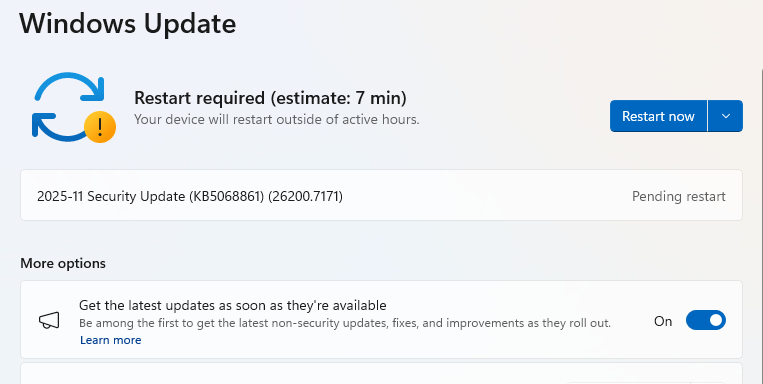
These updates fix serious security issues — including one that attackers are already exploiting to take control of Windows systems. By chaining it with other attacks, they can gain full admin access, install malware, steal data, or make deeper changes you wouldn’t normally be able to undo. Run Windows Update today, restart your PC, and check you’re up to date.
Microsoft releases important security updates on the second Tuesday of every month—known as “Patch Tuesday.” This month’s patches fix critical flaws in Windows 10, Windows 11, Windows Server, Office, and related services.
Particularly noteworthy are some critical Remote Code Execution (RCE) bugs in Microsoft Graphics and Office that can allow attackers to run malicious code just by convincing someone to open a booby-trapped file or document.
A “zero-day” is a software flaw that attackers are already exploiting before a fix is available. The name comes from the fact that defenders have zero days to protect themselves—attackers can strike before patches are released. In this month’s update, Microsoft fixed one such vulnerability: CVE-2025-62215, a Windows Kernel Elevation of Privilege (EoP) flaw.
It lets an attacker who already has local access to a device gain higher, admin-level permissions by exploiting what’s known as a “race condition.” A race condition vulnerability happens when different programs or processes try to use the same resource at the same time without proper coordination. During that brief window of confusion, attackers can slip through and exploit the system.
Attackers need to combine this vulnerability with other attack methods. Once they’ve compromised a system, they use this vulnerability to escalate privileges and gain admin-level rights.
Another critical vulnerability worth noting is CVE-2025-60724, which comes with a CVSS score of 9.8 out of 10. It’s a heap-based buffer overflow in the GDI+ Microsoft Graphics Component, which allows an unauthorized attacker to run malicious code over a network.
A buffer overflow happens when software writes more data to memory than it can handle, potentially overwriting other areas and injecting malicious code. In the case of CVE-2025-60724, Microsoft warns that attackers could exploit the flaw by convincing a victim to download and open a document that contains a specially crafted metafile. In more advanced attacks, the same vulnerability could be triggered remotely by uploading a malicious file to a vulnerable web service.
These updates fix security problems and keep your Windows PC protected. Here’s how to make sure you’re up to date:
1. Open Settings
2. Go to Windows Update
3. Check for Updates
If you have selected automatic updates earlier, you may see this:
4. Download and Install
5. Double-check you’re up to date
We don’t just report on threats—we remove them
Cybersecurity risks should never spread beyond a headline. Keep threats off your devices by downloading Malwarebytes today.
Microsoft today released software updates to plug a whopping 172 security holes in its Windows operating systems, including at least two vulnerabilities that are already being actively exploited. October’s Patch Tuesday also marks the final month that Microsoft will ship security updates for Windows 10 systems. If you’re running a Windows 10 PC and you’re unable or unwilling to migrate to Windows 11, read on for other options.
The first zero-day bug addressed this month (CVE-2025-24990) involves a third-party modem driver called Agere Modem that’s been bundled with Windows for the past two decades. Microsoft responded to active attacks on this flaw by completely removing the vulnerable driver from Windows.
The other zero-day is CVE-2025-59230, an elevation of privilege vulnerability in Windows Remote Access Connection Manager (also known as RasMan), a service used to manage remote network connections through virtual private networks (VPNs) and dial-up networks.
“While RasMan is a frequent flyer on Patch Tuesday, appearing more than 20 times since January 2022, this is the first time we’ve seen it exploited in the wild as a zero day,” said Satnam Narang, senior staff research engineer at Tenable.
Narang notes that Microsoft Office users should also take note of CVE-2025-59227 and CVE-2025-59234, a pair of remote code execution bugs that take advantage of “Preview Pane,” meaning that the target doesn’t even need to open the file for exploitation to occur. To execute these flaws, an attacker would social engineer a target into previewing an email with a malicious Microsoft Office document.
Speaking of Office, Microsoft quietly announced this week that Microsoft Word will now automatically save documents to OneDrive, Microsoft’s cloud platform. Users who are uncomfortable saving all of their documents to Microsoft’s cloud can change this in Word’s settings; ZDNet has a useful how-to on disabling this feature.
Kev Breen, senior director of threat research at Immersive, called attention to CVE-2025-59287, a critical remote code execution bug in the Windows Server Update Service (WSUS) — the very same Windows service responsible for downloading security patches for Windows Server versions. Microsoft says there are no signs this weakness is being exploited yet. But with a threat score of 9.8 out of possible 10 and marked “exploitation more likely,” CVE-2025-59287 can be exploited without authentication and is an easy “patch now” candidate.
“Microsoft provides limited information, stating that an unauthenticated attacker with network access can send untrusted data to the WSUS server, resulting in deserialization and code execution,” Breen wrote. “As WSUS is a trusted Windows service that is designed to update privileged files across the file system, an attacker would have free rein over the operating system and could potentially bypass some EDR detections that ignore or exclude the WSUS service.”
For more on other fixes from Redmond today, check out the SANS Internet Storm Center monthly roundup, which indexes all of the updates by severity and urgency.
Windows 10 isn’t the only Microsoft OS that is reaching end-of-life today; Exchange Server 2016, Exchange Server 2019, Skype for Business 2016, Windows 11 IoT Enterprise Version 22H2, and Outlook 2016 are some of the other products that Microsoft is sunsetting today.
If you’re running any Windows 10 systems, you’ve probably already determined whether your PC meets the technical hardware specs recommended for the Windows 11 OS. If you’re reluctant or unable to migrate a Windows 10 system to Windows 11, there are alternatives to simply continuing to use Windows 10 without ongoing security updates.
One option is to pay for another year’s worth of security updates through Microsoft’s Extended Security Updates (ESU) program. The cost is just $30 if you don’t have a Microsoft account, and apparently free if you register the PC to a Microsoft account. This video breakdown from Ask Your Computer Guy does a good job of walking Windows 10 users through this process. Microsoft emphasizes that ESU enrollment does not provide other types of fixes, feature improvements or product enhancements. It also does not come with technical support.
If your Windows 10 system is associated with a Microsoft account and signed in when you visit Windows Update, you should see an option to enroll in extended updates. Image: https://www.youtube.com/watch?v=SZH7MlvOoPM
Windows 10 users also have the option of installing some flavor of Linux instead. Anyone seriously considering this option should check out the website endof10.org, which includes a plethora of tips and a DIY installation guide.
Linux Mint is a great option for Linux newbies. Like most modern Linux versions, Mint will run on anything with a 64-bit CPU that has at least 2GB of memory, although 4GB is recommended. In other words, it will run on almost any computer produced in the last decade.
Linux Mint also is likely to be the most intuitive interface for regular Windows users, and it is largely configurable without any fuss at the text-only command-line prompt. Mint and other flavors of Linux come with LibreOffice, which is an open source suite of tools that includes applications similar to Microsoft Office, and it can open, edit and save documents as Microsoft Office files.
If you’d prefer to give Linux a test drive before installing it on a Windows PC, you can always just download it to a removable USB drive. From there, reboot the computer (with the removable drive plugged in) and select the option at startup to run the operating system from the external USB drive. If you don’t see an option for that after restarting, try restarting again and hitting the F8 button, which should open a list of bootable drives. Here’s a fairly thorough tutorial that walks through exactly how to do all this.
And if this is your first time trying out Linux, relax and have fun: The nice thing about a “live” version of Linux (as it’s called when the operating system is run from a removable drive such as a CD or a USB stick) is that none of your changes persist after a reboot. Even if you somehow manage to break something, a restart will return the system back to its original state.
As ever, if you experience any difficulties during or after applying this month’s batch of patches, please leave a note about it in the comments below.
