The post The InstallFix Trap: Fake Claude AI Google Ads Drop Fileless RedLine Malware on Developers appeared first on Daily CyberSecurity.
Related posts:
AI Hype Hijacked: How a Fake Claude Installer Blinds Windows Security
Exploited in the Wild: Interlock Ransomware Weaponizes Critical 10.0 CVSS Cisco Zero-Day
Copyright Lures and “Fileless” Shadows: Inside the PureLog Stealer Campaign
In our previous research, we analyzed a Windows infostealer we track as NWHStealer. The attackers behind this stealer are continuously finding new methods to distribute the stealer. During our hunting activities, we noticed how attackers are using a JavaScript runtime called Bun to help distribute it.
Bun is a legitimate, fast, all-in-one JavaScript and TypeScript toolkit designed as a modern, high-performance replacement for Node.js. It is built from the ground up to simplify modern web deve
In our previous research, we analyzed a Windows infostealer we track as NWHStealer. The attackers behind this stealer are continuously finding new methods to distribute the stealer. During our hunting activities, we noticed how attackers are using a JavaScript runtime called Bun to help distribute it.
Bun is a legitimate, fast, all-in-one JavaScript and TypeScript toolkit designed as a modern, high-performance replacement for Node.js. It is built from the ground up to simplify modern web development by integrating several essential tools into a single executable.
Its relative newness also makes it appealing for attackers. Bun has not yet been widely seen in malware campaigns, and it allows them to package malicious code into larger executables that may be less easily detected.
What is NWHStealer and what can it do?
NWHStealer is a Rust-based stealer distributed using a range of lures and delivery methods. These include Node.js scripts, MSI installers, and, more recently, JavaScript loaders built with the Bun runtime.
It is often hosted on legitimate platforms such as GitHub, GitLab, MediaFire, Itch.io, and SourceForge, which helps it blend in with normal software and increases the chances of users downloading it. Attackers continue to create new profiles and lures to spread the stealer.
Once installed on your PC, NWHStealer can:
Collect system information, including operating system, hardware, security software, user data and connected devices.
Steal data from browsers, extensions and crypto wallets.
Steal data from different applications, including FTP applications such as FileZilla, CoreFTP and messaging apps such as Steam and Discord.
Inject malicious code into browser processes and run additional payloads (e.g. XMRig).
Attempt to bypass User Account Control (UAC).
Achieve persistence via scheduled tasks.
Get new command-and-control (C2) addresses from Telegram.
How to stay safe
Attackers are constantly adapting their techniques, and the use of newer tools like Bun shows how they try to stay ahead of detection.
NWHStealer is particularly concerning because of how widely it is distributed, and the types of data it targets. Stolen browser data, saved passwords, and cryptocurrency wallet information can quickly lead to account takeovers, financial loss, and further compromise.
Here are a few simple ways to stay safe:
Only download software from official websites.
Be cautious with downloads from platforms like GitHub, SourceForge, or file-sharing platforms unless you trust the source.
Attackers are continuing to create new profiles to distribute this stealer across platforms. Check the profile/developer/publisher’s profile, reputation, and how new it is when downloading something from file hosting providers or blogs.
Check the structure of the archives, that the content, images, txt files are consistent with what you downloaded. Also check the archive name, they usually have recognizable patterns.
Check the file’s publisher and signature before you run it.
The new distribution method: Bun JavaScript Runtime
According to its official site, Bun is an all-in-one JavaScript, TypeScript & JSX toolkit. It’s built from scratch in Zig and powered by Apple’s JavaScriptCore engine, with a focus on fast startup and low memory usage.
Bun is composed of four main components:
JavaScript Runtime: a JavaScript runtime designed as a drop-in replacement for Node.js.
Package Manager: a fast alternative for npm.
Test Runner: a built-in, Jest-compatible runner that executes tests much faster than standard runners.
Bundler: replaces tools like Webpack, Vite, or esbuild for packaging code.
In recent campaigns, we detected that NWHStealer is being distributed using a Bun JavaScript Runtime bundle.
As we saw in our previous research, game-related and other software lures are used to start the infection chain. Some of the detected ZIP names in these recent campaigns include:
Game-related software and cheats such as:
MOUSE_PI_Trainer_v1.0.zip
FiveM Mod.zip
VampireCrawlers_Trainer_v1.0.zip
MagicalPrincess_Trainer_v1.0.zip
TerraTechLegion_Trainer_v1.0.zip
Other software such as:
TradingView-Activation-Script-0.9.zip
AutoTune 2026.zip
Metatune by Slate Digital 2026.zip
GoGoTv_Plus.zip, Autodesk.zip
In the case analyzed in this article, the infection chain starts with an archive containing Installer.exe, which embeds JavaScript code bundled with the Bun runtime.
The “DW” folder contains another loader, called dw.exe. This self-injection loader is similar to the one analyzed previously, but with a different decryption routine. This loader is not present in all ZIP files analyzed.
The malicious ZIP contains two loaders
The Readme.txt file asks the user to manually launch dw.exe if the main .exe file fails to run properly. This gives the attacker two ways to distribute the stealer if the C2 of the main Bun loader is offline. The loader in dw.exe works independently from the Bun JavaScript loader.
The Readme file inside the ZIP archiveThe fake Build Tools setup shown if dw.exe is started
In this article, we don’t analyze dw.exe, as it’s a variant of the previous loaders. Instead, we focus on the JavaScript loader executed with the Bun JavaScript runtime.
Analysis of the JavaScript Loader
The executed JavaScript code by the Bun JavaScript runtime is inside the .bun section and is obfuscated.
The .bun section with the obfuscated JavaScript code
The malicious code is implemented in two parts of the code:
sysreq.js: performs the anti-virtualization checks with a score system.
memload.js: communicates with the C2 server, performs decryption and loads the next stage.
Entry point of the JavaScript loader
The loader runs several PowerShell CIM (Common Information Model) commands and WMI (Windows Management Instrumentation) commands to detect virtual environments. There are different controls related to CPU numbers, disk space, screen resolution, USB devices, hardware manufacturers and products, number of installed software, presence of specific folders such as Browser folders, number of running processes and username. A scoring system is implemented, and based on this score, the loader decides whether to continue with the infection or terminate it.
To detect a virtual environment, the loader executes more than 10 PowerShell commands, such as:
Get-CimInstance -ClassName Win32_DiskDrive | Select-Object Model
The strings are decrypted using XOR and base64 decoding; there are arrays of tuples and each contains the encrypted strings and a key used for XOR decryption.
Encrypted data with XOR keys
Several functions handle string decryption, including one that decrypts the config used in the C2 communication. Partial config:
The post Cisco Talos Unmasks UAT-8302’s Global Government Espionage Network appeared first on Daily CyberSecurity.
Related posts:
Operation DRAGONCLONE: China Mobile Tietong Hit by Advanced APT Attack
Torrent of Threats: China-Nexus APT UAT-9244 Hijacks South American Telecoms with PeerTime Backdoor
Earth Kurma APT Targets Southeast Asia with Stealthy Cyberespionage
The post The AI-Powered Cybercrime Factory: Unmasking the Bluekit “All-in-One” Phishing Revolution appeared first on Daily CyberSecurity.
Related posts:
New AI-Driven Phishing Campaign Subverts Microsoft’s Device Code Flow
Server-Side Phishing Campaign Evades Detection, Targets Employee Portals
Haozi Returns: The Phishing-as-a-Service Platform Making Cybercrime Easy
The FIFA World Cup 2026 is scheduled to begin June 11 across the US, Canada, and Mexico. The web is filling with sites impersonating ticket vendors, telecoms, sticker publishers, toy manufacturers, immigration services, and crypto projects, all linked to the World Cup brand. Together, they map out four recurring patterns of fraud and risk targeting fans.What World Cup fans need to knowIf you’re planning anything around the 2026 World Cup, whether it’s buying a ticket or merchandise, booking a fl
The FIFA World Cup 2026 is scheduled to begin June 11 across the US, Canada, and Mexico. The web is filling with sites impersonating ticket vendors, telecoms, sticker publishers, toy manufacturers, immigration services, and crypto projects, all linked to the World Cup brand. Together, they map out four recurring patterns of fraud and risk targeting fans.
What World Cup fans need to know
If you’re planning anything around the 2026 World Cup, whether it’s buying a ticket or merchandise, booking a flight, applying for a US visa, or speculating on “World Cup” crypto, expect a surge in scams and other risky World Cup-related activity.
The good news is the patterns are obvious once you know what to look for:
Countdown timers that reset when you reload the page
Prices 80–90% below retail
The word “official” used without a clear link to the brand behind it
Crypto tokens claiming to be “official” World Cup products
Your headline rule for the next two months: If a site uses the World Cup or a known brand to get your money, stop and verify it from the official source before you do anything else.
How these World Cup scams work
The path to these scam sites is almost always the same: a fan searches for something on search engines or social media (for example, “World Cup 2026 jersey,” “buy Panini sticker album,” “visa to attend the World Cup,” “FIFA World Cup token”) and lands one of the hundreds of sites set up to exploit that demand.
Often the route there runs through an ad network. That might involve a sponsored search result, a banner on an unrelated site, or a redirect chain that sends the victim to a different domain than the one they clicked. (Note that tools like Malwarebytes Browser Guard can block malicious ads, scam domains, and redirect chains before the page loads.)
The branding on the destination site is consistent with the legitimate company. There are testimonials and satisfied-customer counts, so nothing looks immediately wrong. Urgency tricks like “Only a few items left” and the countdown timer are there to prevent you from looking too closely or investigating too deeply.
We’ve found these sites group naturally into four categories: crypto, travel, merchandise, and predictors. The sites in each category have their own tells, but they’re united by brand parasitism: borrowing authority from FIFA, the host nations, or a real licensee like LEGO or Panini.
Crypto
The most crowded category is crypto, and the biggest risk comes from sites that claim or imply official links to the World Cup.
One site marketed its token as “the official community token celebrating the FIFA World Cup 2026,” advertising a “Mega Airdrop,” a 7-billion-token total supply, and a participant counter pinned to the symbolic number 48 (the count of qualified national teams). Another shows FIFA’s official mascot, using tournament branding to sell an unlicensed token.
None of the sites we examined are connected to FIFA. FIFA does have a real digital-collectibles ecosystem—the FIFA Collect NFT marketplace, the Right-to-Buy ticket NFTs, and the FIFA Rivals game on the Mythos chain—all of which sit on FIFA-controlled infrastructure and are documented at FIFA’s own domains. None of the sites we examined sit inside that ecosystem. The real partners for 2026 are documented and easy to verify. “World Cup token” is not one of them.
We found multiple sites using FIFA branding to create a false sense of legitimacy. But there’s a real risk you’ll receive nothing, receive something you can’t sell, or sign a transaction that gives the operator access to your wallet.
Some sites don’t pretend to be official, but still carry risk to World Cup fans. One Solana-based token branded itself the “World Cup Rug Index,” with the tagline “Every match is a market. Every loss is a rug,” and a contract ending in “pump,” the signature of pump.fun launches.
In crypto, a “rug” is when early holders sell and the price collapses, leaving later buyers with losses. These projects are not scams in the sense of pretending to be something they’re not. They are openly speculative. The risk is in the structure: early buyers can sell into demand from later buyers, who are left holding the losses.
This is different from the fake “World Cup tokens” above. Those rely on FIFA branding to create a false sense of legitimacy. These rely on momentum, where most participants arrive late.
There is no official World Cup token
There is no official World Cup token
There is no official World Cup token
There is no official World Cup token
Travel
The most dangerous category is the “World Cup visa.” One site, WC2026 Visa, advertised a “Visa to the World Cup 2026 US” for $270 per person, with a “98% Success Rate,” a countdown to June 11, and the standard reassuring trio: “Secure Process,” “Fast Processing,” “18+ only.”
There is no such product. The US Department of State has stated this directly: there is no special tournament visa. Foreign visitors traveling to the United States for the World Cup must use the same B1/B2 visitor visa, or the Visa Waiver Program with an ESTA authorisation, that any other tourist would. The only tournament-specific visa programme is FIFA PASS (the Priority Appointment Scheduling System), a routing mechanism that gives ticket holders earlier interview slots at US consulates. It doesn’t bypass the interview, it doesn’t issue a visa, it doesn’t cost $270, and access to it begins with buying a ticket directly from FIFA.
A site advertising a dedicated “World Cup visa” tricks people into believing they’re going down an official immigration pathway. Any personal data harvested in the process, such as passport details, date of birth, travel plans, and in some flows a payment instrument, gives the operator all the data they need for identity theft. Fans should only apply through .gov sites in the US, .gc.ca in Canada, and .gob.mx in Mexico.
Travel portals aggregating tickets, flights, and hotels, and eSIM sites selling connectivity for the tournament are not inherently fraudulent and are often real businesses. But any site invoking the World Cup deserves the same scrutiny: who actually fulfils this product, what is the refund policy in writing, and is this domain legitimately connected to a known brand or partner?
Scam site selling World Cup tickets
Scam site offering Visas
Scam site selling World Cup tickets
Scam site selling eSIMs
Merchandise
The merchandise category is where the impersonation gets most aggressive, because there are real licensees to imitate. LEGO’s partnership with FIFA is genuine, announced in late 2025. It debuted with the LEGO Editions FIFA World Cup Official Trophy, joined in 2026 by player sets featuring Messi, Ronaldo, Mbappé, and Vinicius Jr. A whole cluster of LEGO-styled scam storefronts now prices the trophy set at €29.99, marked down from €299.99, an 83–90% discount. LEGO does not discount its premium licensed sets by 90%.
Related to those storefronts is the “LEGO FIFA World Cup 2026 Quiz Challenge” pattern, promising “exclusive edition rewards” for fans who complete a quiz. Quiz-funnel scams are a long-running affiliate-marketing genre, and the typical mechanic is to harvest contact information and push the user toward a subscription billing flow disguised as a shipping fee for the “prize.” LEGO does not run quiz funnels. Its real World Cup activity runs through LEGO.com and physical LEGO stores.
Counterfeit jersey storefronts have been a fixture of the open web for years, and the World Cup cycle multiplies them. Typical examples: a site branded simply “JERSEY 2026 World Cup” selling a Portugal home shirt with a “BUY 2, PAY FOR 1” overlay, a 30-day countdown, and a Trustpilot-shaped widget claiming over ten thousand satisfied customers; or a retro-jersey storefront offering Germany and Argentina shirts at $24.90 each. Search demand spikes during a World Cup year and counterfeit storefronts spin up to meet it; many will be offline shortly after the tournament ends.
Then there is the Panini-styled storefront pattern: pages advertising the official 2026 sticker album under headers like “ONE-TIME PURCHASE BY NIF” (NIF being the Portuguese personal tax identifier, a phrase that appears nowhere in legitimate Panini commerce). These pages combine sub-ten-minute countdowns, inventory counters (“There are still 127 Units”), and country-specific scarcity claims (“Only 5,000 units available for Portugal!”).
The high-pressure funnel and unusual NIF framing point to localised affiliate or look-alike storefronts, not Panini’s own commerce flow, which runs through paninistore.com and licensed retail. These are not Panini storefronts. They are look-alike commerce flows using Panini’s brand to sell through high-pressure funnels. Whether the product arrives or not, the user is not buying from the company they think they are.
Fake World Cup jersey site
Fake Panini site
Fake World Cup Lego site
Fake World Cup jersey site
Fake World Cup jersey site
Fake World Cup Lego site
Fake World Cup Lego site
Fake World Cup Lego site
Predictions and prize pools
“WorldCup Predictor” sites present a prize pool that supposedly grows with every prediction, and ask users to select a champion team from flag tiles. You are paying for entries into a pooled outcome tied to the tournament.
These sites are not pretending to be something they’re not. The risk is that they operate without clear oversight. There is no visible licensing, no clear jurisdiction, and no way to verify from the front end whether payouts are enforced or even guaranteed.
Licensed sportsbooks and regulated platforms typically do not present themselves this way. They identify their licensing authority, provide responsible gambling tools, and use verified payment processors. A “Login to play” button, a flag picker, and a floating prize pool are not the same thing.
“World Cup Predictor” sites are paid-entry pools, closer to unlicensed betting
“World Cup Predictor” sites are paid-entry pools, closer to unlicensed betting
What FIFA, the brands, and the platforms could be doing better
Many of these sites would not exist, or would be far shorter-lived, if a few things changed upstream. Brand owners with active 2026 partnerships—LEGO, Panini, the national federations, the kit manufacturers—could reduce confusion by publishing a single canonical page each, well before kickoff, listing authorized retailers and the exact SKUs and prices of their World Cup products. Someone trying to verify whether a €29.99 LEGO trophy is real should not have to triangulate between Brickset, LEGO’s newsroom, and a third-party blog.
FIFA’s own licensing communications have improved compared with past tournaments, and the LEGO and Panini announcements were clearly disclosed on inside.fifa.com. But the gap between “FIFA has announced a partnership” and “here are the only sites authorized to sell on FIFA’s behalf” remains wide. Closing it would make impersonation much harder.
Search engines and ad networks carry a large share of the structural responsibility. Visa-impersonation pages are precisely the kind of sites that surface through paid search ads against terms like “world cup visa,” and platforms have the data to detect and block them at scale.
What to do if you may have been caught
Every World Cup cycle generates its own scam economy. 2018 had fake ticket marketplaces; 2022 leaned on phishing around Qatar’s Hayya system; 2026 is building around meme coins and visa impersonation. What’s different this time is the speed: sites can be spun up, monetized, and abandoned within weeks, and AI-generated copy, mascot art, and product images have stripped away many of the visual cues people used to rely on.
This cycle’s scam economy moves fast, but the basics still work: treat unsolicited “World Cup” links with suspicion, type official domains yourself, and ignore pressure from countdown timers.
If you think you’ve been caught:
If you entered card details: Contact your card issuer immediately and request a refund for an unauthorized or non-delivered transaction.
If you submitted personal or passport data: Treat it as compromised. Monitor your credit, place a fraud alert if available, and watch for targeted phishing.
If you connected your crypto wallet or signed a transaction: Revoke permissions, move remaining assets to a new wallet, and stop using the old one for anything valuable.
If you bought goods that weren’t delivered: Keep your order confirmation, URL, and payment record. Report it to your national consumer protection body (FTC in the US, Action Fraud in the UK, or your local equivalent).
Always verify through official channels. That’s FIFA.com for tickets, paniniamerica.net or paninistore.com for stickers, LEGO.com for LEGO Editions sets, and official government sites for visas. Remember, legitimate sources do not rely on countdown timers.
Stop threats before they can do any harm.
Malwarebytes Browser Guard blocks phishing pages and malicious sites automatically. Free, one click to install. Add it to your browser →
Fake Antigravity downloads are enabling fast account takeovers using hidden malware and stolen session cookies.
The post Fake Google Antigravity Installer Can Steal Accounts in Minutes appeared first on TechRepublic.
During our threat hunting, we found a campaign using the same malware loader from our previous research to deliver a different threat: Needle Stealer, data-stealing malware designed to quietly harvest sensitive information from infected devices, including browser data, login sessions, and cryptocurrency wallets.
In this case, attackers used a website promoting a tool called TradingClaw (tradingclaw[.]pro), which claims to be an AI-powered assistant for TradingView.
TradingView is a legiti
During our threat hunting, we found a campaign using the same malware loader from our previous research to deliver a different threat: Needle Stealer, data-stealing malware designed to quietly harvest sensitive information from infected devices, including browser data, login sessions, and cryptocurrency wallets.
In this case, attackers used a website promoting a tool called TradingClaw (tradingclaw[.]pro), which claims to be an AI-powered assistant for TradingView.
TradingView is a legitimate platform used by traders to analyze financial markets, but this fake TradingClaw site is not part of TradingView, nor is it related to the legitimate startup tradingclaw.chat. Instead, it’s being used here as a lure to trick people into downloading malware.
What is Needle Stealer?
Needle is a modular infostealer written in Golang. In simple terms, that means it’s built in pieces, so attackers can turn features on or off depending on what they want to steal.
According to its control panel, Needle includes:
Needle Core: The main component, with features like form grabbing (capturing data you enter into websites) and clipboard hijacking
Desktop wallet spoofer: Targets cryptocurrency wallet apps like Ledger, Trezor, and Exodus
Browser wallet spoofer: Targets browser-based wallets like MetaMask and Coinbase, including attempts to extract seed phrases
The panel also shows a “coming soon” feature to generate fake Google or Cloudflare-style pages, suggesting the attackers plan to expand into more advanced phishing techniques.
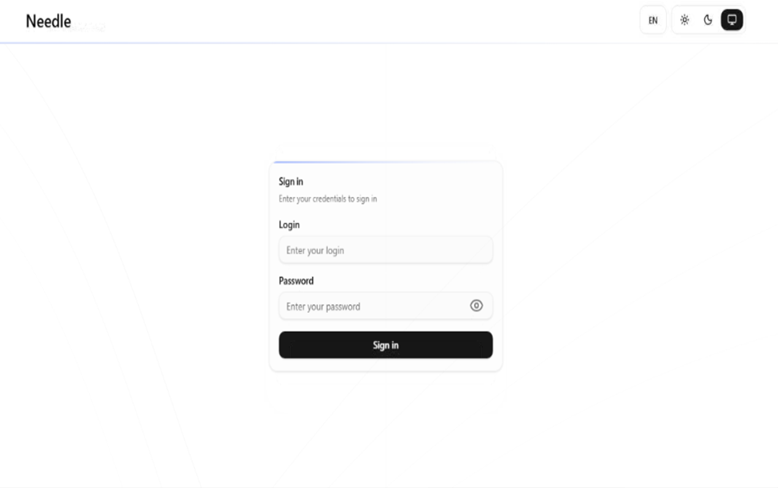
Needle Stealer panel
In this article, we analyze the distribution of the stealer through a fake website related to an AI service called TradingClaw. We have detected that the same stealer is also distributed by other malware such as Amadey, GCleaner, and CountLoader/DeepLoad.
Analysis of the TradingClaw campaign
In this campaign, the malware is distributed through a fake website advertising TradingClaw as an AI trading tool.
Malicious TradingClaw website
The site itself behaves selectively. In some cases, visitors are shown the fake TradingClaw page, while in others they are redirected to a different site (studypages[.]com). This kind of filtering is commonly used by attackers to avoid detection and only show the malicious content to intended targets. Search engines, for example, see the Studypages version:
Google results shows the Studypages fake page
If a user proceeds, they are prompted to download a ZIP file. This file contains the first stage of the infection chain.
Like in the previous campaign, the attack relies on a technique called DLL hijacking. In simple terms, this means the malware disguises itself as a legitimate file that a trusted program will load automatically. When the program runs, it unknowingly executes the malicious code instead.
In this case, the DLL loader (named iviewers.dll) is executed first. It then loads a second-stage DLL, which ultimately injects the Needle Stealer into a legitimate Windows process (RegAsm.exe) using a technique known as process hollowing.
Needle Stealer injected in RegAsm.exe process
The stealer is developed in Golang, and most of the functions are implemented in the “ext” package.
Part of the “exe” package
What the malware does
Once installed, the Needle core module can:
Take screenshots of the infected system
Steal browser data, including history, cookies, and saved information
Extract data from apps like Telegram and FTP clients
Collect files such as .txt documents and wallet data
Steal cryptocurrency wallet information
One of the more concerning features is its ability to install malicious browser extensions.
Malicious browser extensions
The stealer also supports the distribution of malicious browser extensions, giving attackers a powerful way to take control of the victim’s browser.
We identified multiple variations of these extensions, each with slightly different file structures and components. Behind the scenes, the malware uses built-in Golang features to unpack a hidden ZIP archive (often named base.zip or meta.zip) that contains the extension files, along with a configuration file (cfg.json).
This configuration file is key. It tells the malware where to send stolen data (the command-and-control server), which malicious extension to install, and which features to enable.
The stealer extension is dropped in a random folder in the path %LOCALAPPDATA%\Packages\Extensions. The folder contains three main files popup.js, content.js, and background.js.
The malicious extension dropped
The extensions analyzed have Google-related names.
The fake malicious extension on Edge Browser
What the malicious extensions can do
The extension gives attackers near full control over the browser, with capabilities that go far beyond typical malware.
It can:
Connect to a remote server using a built-in API key and regularly check in for instructions. It can also switch to backup domains if the main server goes offline.
Generate a unique ID to track the infected user over time.
Collect full browsing history and send it to a remote server (/upload).
Monitor what you’re doing in real time, including which sites you visit, and apply attacker-controlled redirect rules. This allows it to silently send you to different websites or alter what you see on a page, including injecting or hiding content.
Intercept downloads, cancel legitimate files, and replace them with malicious ones from attacker-controlled servers.
Inject scripts directly into web pages, enabling further data theft or manipulation.
Display fake browser notifications with attacker-controlled text and images.
How it communicates with attackers
The stealer and its extension communicate with command-and-control (C2) servers using several API endpoints. These are essentially different “channels” used for specific tasks:
/backup-domains/active—retrieves backup servers to stay connected if the main one is blocked
/upload—sends stolen data back to the attackers
/extension—receives instructions for redirects, downloads, and notifications
/scripts—downloads malicious code to inject into web pages
How to stay safe
Scammers are increasingly using AI-themed tools to make fake websites look legitimate. In this case, a supposed “AI trading assistant” was used to trick people into installing malware.
To reduce your risk:
Download software only from official websites. If a tool claims to work with a well-known platform, check the platform’s official site to confirm it’s real.
Check who created the file before running it. Look at the publisher name and avoid anything that looks unfamiliar or inconsistent.
Review your browser extensions regularly. Remove anything you don’t recognize, especially extensions you didn’t knowingly install.
What to do if you think you’ve been affected
If you think you may have downloaded this infostealer:
Check EDR and firewall logs for communications with the C2s listed in the IOCs part.
From a different, clean device, sign out of every active session on your important accounts: Google, Microsoft 365, any banking portal, GitHub, Discord, Telegram, Steam, and your crypto exchange. Change all passwords and enable 2FA for accounts you have accessed from this machine.
Check the folder %LOCALAPPDATA%\Packages\Extensions and suspicious browser extensions.
If you have cryptocurrency wallets on the machine, move the funds from a clean device immediately. This is what these operators monetize first.
Somebody went looking for Google’s new Antigravity coding tool this week, clicked download, ran the installer, and got exactly what they thought they were getting. Antigravity installed cleanly. A shortcut appeared on the desktop. The application opened and worked. Nothing looked or felt wrong.
But behind the scenes, that installer can give your accounts, your data, and even your machine to an attacker, without breaking anything the user can see.
In this article, we’ll break down the tech
Somebody went looking for Google’s new Antigravity coding tool this week, clicked download, ran the installer, and got exactly what they thought they were getting. Antigravity installed cleanly. A shortcut appeared on the desktop. The application opened and worked. Nothing looked or felt wrong.
But behind the scenes, that installer can give your accounts, your data, and even your machine to an attacker, without breaking anything the user can see.
In this article, we’ll break down the technical details of the campaign, how it works under the hood, and what to do if you think you’ve installed it.
The download that actually gave you what you wanted
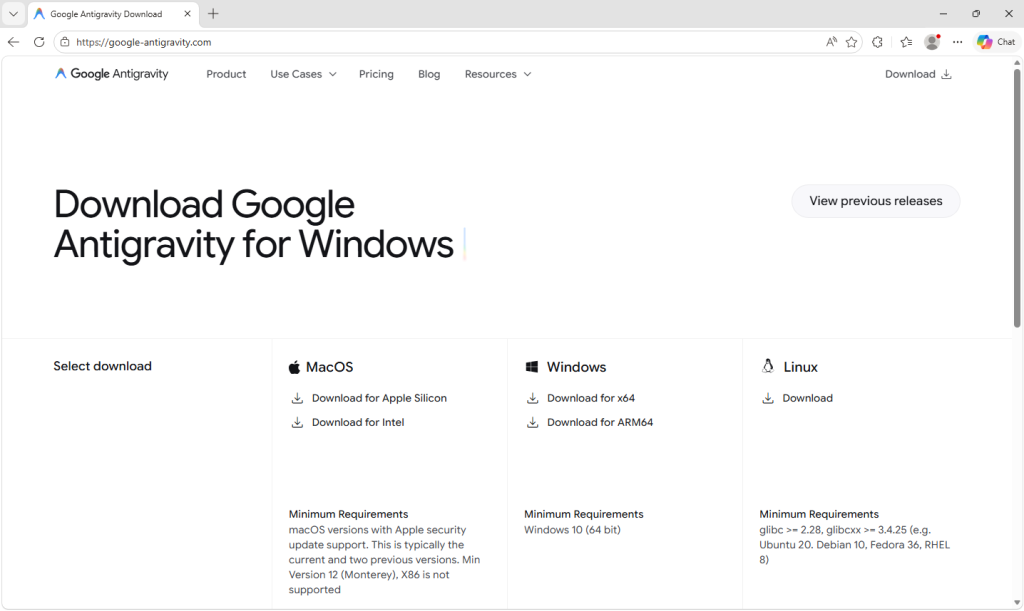
Google Antigravity launched in November 2025 and has been one of the most searched-for developer tools on the web ever since. The real product lives at antigravity.google. Hardly anyone new to the product has the real URL memorized, so when a user reached a hyphenated lookalike (what we call a typosquat domain) at google-antigravity[.]com it was convincing enough at a glance.
So they went on to download the file, called Antigravity_v1.22.2.0.exe.
The installer isn’t simply named to look like the real one from Google. It’s 138 MB: large enough to carry the entire Antigravity application, its Electron runtime, its Vulkan graphics libraries, its updater, all of it. Because that is what is actually inside.
The attacker didn’t build a convincing fake; they took the genuine Antigravity installer, added one additional step to run their PowerShell script during setup, and repackaged the result. The malicious step is one extra line in a sequence that runs dozens of legitimate ones. Here’s what the Setup looked like:
How do we know it’s one line? Because you can see it.
The MSI’s custom-action table (the list of every step the installer takes during install) contains 11 rows that are standard, boilerplate entries the installer tool generates automatically: extract files, check the Windows version, elevate to admin, write a log, clean up afterwards. Each of those has a name that starts with AI_ followed by a description of what it does. And then, sitting at the bottom of the same list, there is one more row, named wefasgsdfg — a keyboard mash the attacker typed in when the installer tool prompted them for a name, and the one that runs their PowerShell script.
Antigravity installs properly into C:\Program Files (x86)\Google LLC\Antigravity\. A Start Menu entry appears, a desktop shortcut is placed, and everything works. The user opens the app, tries it, closes it, and goes on with their day. It all seems fine, because they actually installed the thing they wanted to install. The malicious part is happening quietly, in a folder they’ll never open.
Two small scripts, and a phone call
Somewhere in the middle of the install, the MSI runs a small helper script that drops two PowerShell files into the user’s temporary folder: scr5020.ps1 and pss5032.ps1. The filenames look like specifics but aren’t: the four characters after each prefix are generated fresh every time the installer runs.
What stays constant is the prefix: scr for the user script, pss for the PowerShell wrapper, because those come from the installer tool’s standard naming pattern for custom-action scripts.
Of the two files, the second is an unaltered Advanced Installer utility. It’s genuinely innocent and present in many real products. The first was added by the attacker, and it has one job: open an HTTPS connection to https://opus-dsn[.]com/login/, download whatever code the server sends back, and run it. To blend in, it spoofs a Microsoft referrer header and routes through the system’s default web proxy, so it inherits whatever corporate proxy configuration and authentication IT has set up, without the user noticing. It also saves and restores the parent PowerShell’s TLS setting, leaving that one global unchanged after it exits. That’s the entire script.
Researchers call this pattern a downloader cradle, and its advantage to the attacker is flexibility. The real payload lives on their server, not inside the installer out in the wild, so they can swap it out, change targeting, or turn the operation off without touching the file users are downloading.
In this case, the cradle did exactly what it was built to do and no more: a DNS query for opus-dsn[.]com, a single TCP connection on port 443 to 89[.]124[.]96[.]27 with a quiet HTTPS GET to /login/, and then the PowerShell process exited.
Nothing else happened. No second-stage script was fetched. No file was dropped. No scheduled task was created. No changes were made to Windows Defender. Most automated security tools would shrug and move on.
But the malware hadn’t failed. It had introduced itself to the attacker’s server and asked for code to run next—and whether the answer comes back is a decision the operator gets to make later, on their own time, one victim at a time. You cannot tell, from the victim’s side, what was returned. For analysis, we retrieved what the server sends when the answer is yes.
What arrives when the answer is yes
When the server decides a target is worth attacking, the follow-on script does its work in three movements.
First, it makes Defender look the other way. It calls Add-MpPreference (with the cmdlet name split by a backtick, a small obfuscation to dodge naïve string-matching detections) to exclude %ProgramData% and %APPDATA% from scanning, exclude .exe, .msi, and .dll files from scanning, and exclude PowerShell, regasm.exe, rundll32.exe,msedge.exe, and chrome.exe from scanning. Only after that does it phone home—collecting a profile of the machine (Windows version, Active Directory domain, installed antivirus product), RSA-encrypting it with a public key embedded in the script, and sending it to opus-dsn[.]com inside a utm_content query parameter that looks, in any access log, like ordinary marketing tracking. This is the profile the operator uses to decide whether this particular machine is worth the next stage.
Second, it widens the gap. A second Add-MpPreference block extends the exclusion list to include the .png file extension and the conhost.exe process—the exact two additions the next stage will need. It then writes AmsiEnable=0 into HKLM\Software\Policies\Microsoft\Windows Script\Settings, disabling Windows’ Antimalware Scan Interface—the layer that normally lets Defender read scripts before they execute. After this point, the malicious activity is being conducted in folders, with file types, and through processes that Defender has been instructed to ignore.
Third, it stages persistence. It downloads a file called secret.png from https://captr.b-cdn[.]net/secret.png (a BunnyCDN URL that looks at a glance like any other content-delivery link) and saves it to C:\ProgramData\MicrosoftEdgeUpdate.png, a path chosen to sit beside Microsoft’s real browser-update folders. The file is not an image. It is an AES-256-CBC ciphertext (key and IV both derived via PBKDF2 with 10,000 iterations from a hardcoded passphrase) wrapping a .NET assembly. A scheduled task is then registered with the name MicrosoftEdgeUpdateTaskMachineCore{JBNEN-NQVNZJ-KJAN323-111}, which is all but indistinguishable at a glance from the real Microsoft Edge update task and set to fire at every logon, running unprivileged so it never produces a UAC prompt. The action it executes is conhost.exe --headless launching a hidden PowerShell, which decrypts the fake PNG in memory and reflectively loads the resulting .NET assembly into its own address space. Nothing lands on disk as an ordinary executable. All that persists is the encrypted image, in a folder Defender has been asked to ignore.
And then a second payload, that doesn’t persist at all. The script doesn’t stop there. After registering and starting the scheduled task, it sends a second beacon to confirm install, then runs an entirely separate block that downloads a second encrypted file (GGn.xml) from the same BunnyCDN host, decrypts it with a different, hardcoded AES key, and reflectively loads that assembly into the running PowerShell process too. The first payload survives reboots; this one runs once, in memory, and is gone. Two .NET assemblies, one campaign, on the victim.
What the payload is built to do
The decrypted assembly is a .NET stealer. We can characterize it from its own class and method names, which describe its job in plain English: it scans browsers, messaging apps, gaming platforms, FTP clients, and crypto wallets, collecting data labeled Logins, Cookies, Autofills, and FtpConnections.
In practice, that means every Chromium- and Firefox-based browser on the machine (Chrome, Edge, Brave, and others) gets stripped of saved passwords, autofill data (including saved credit cards), and the cookies that keep users signed in. Discord tokens, Telegram sessions, Steam logins, FTP credentials, and cryptocurrency wallet files are taken as well.
(Most of the exact target paths are obfuscated and only decrypted at runtime, so the specific apps aren’t all visible from a static analysis, but the categories of theft are clear from the class names.)
Session cookies are the part that should alarm most people, because they work faster than anything else. A stolen login cookie lets an attacker walk straight into a Gmail inbox or banking portal without needing a password or triggering two-factor authentication. As far as the website is concerned, the user is already signed in. The gap between infection and account takeover can be minutes.
Beyond data theft, the malware also imports Windows APIs used for clipboard hijacking and keystroke logging, tools that can capture what you type or swap a cryptocurrency wallet address at the exact moment you send funds.
It also includes the building blocks for “hidden desktop” tradecraft: creating a second, invisible Windows desktop that the attacker can capture and potentially control. In its most advanced form, this lets an attacker operate inside that hidden environment—logging in to accounts, approving transactions, or sending messages—while the victim’s real screen shows nothing unusual. For the duration of the infection, the attacker is, effectively, a second presence on the computer.
A new tool, a new lookalike, the same trap
The reason this campaign matters beyond the single installer is that its shape isn’t new. It’s a refined version of a pattern we’ve been watching for months: new AI products launch with huge attention, and within weeks, lookalike domains and trojanized installers appear alongside them. Antigravity is the latest example, but it won’t be the last.
The incentive for attackers is obvious. Every high-profile AI launch creates a surge of users who want to try it immediately, before they’ve had time to memorize the real URL, or might fail to double-check it against trusted sources.
What makes this style of campaign hard to spot is that most victims never know they were targeted. Those who escaped, because the operator chose not to escalate on their machine, have no reason to think anything happened.
The ones who didn’t escape usually find out later: a password reset they didn’t request, a friend asking about a strange message, or a bank balance that suddenly looks wrong. By then, the decision to target them was made days earlier.
What to do if you may have been affected
If you or anyone who shares your computer recently installed something calling itself Google Antigravity from anywhere other than antigravity.google, start by checking the network indicators. Look in firewall logs, EDR alerts, or your router logs for connections to opus-dsn[.]com, captr.b-cdn[.]net, or 89[.]124[.]96[.]27. A single connection from a PowerShell process is enough to confirm the check-in happened.
From a different, clean device, sign out of every active session on your important accounts: Google, Microsoft 365, any banking portal, GitHub, Discord, Telegram, Steam, and your crypto exchange. Most services have a “sign out everywhere” option under security settings.
Change passwords on those accounts, starting with your email. If your email is compromised, an attacker can reset almost anything else.
Rotate any API keys, SSH keys, or cloud credentials that were on the affected computer, not just the passwords attached to them.
If you have cryptocurrency wallets on the machine, move the funds from a clean device immediately. This is what these operators monetize first.
Watch your bank and credit card statements for unfamiliar charges, and consider placing a fraud alert with your bank.
Wipe and reinstall Windows. A machine that has run this class of malware should not be trusted.
If the machine is a work laptop, tell your IT or security team today. The beacon collects the machine’s Active Directory domain, so on a domain-joined corporate laptop, the attacker now knows which company’s network this victim belongs to, which means this isn’t just a personal problem.
An attachment in an email impersonating DHL about a shipment contains a link to a preconfigured SimpleHelp remote access tool—an ideal starting point for attackers to explore a network, steal data, and drop additional malware.
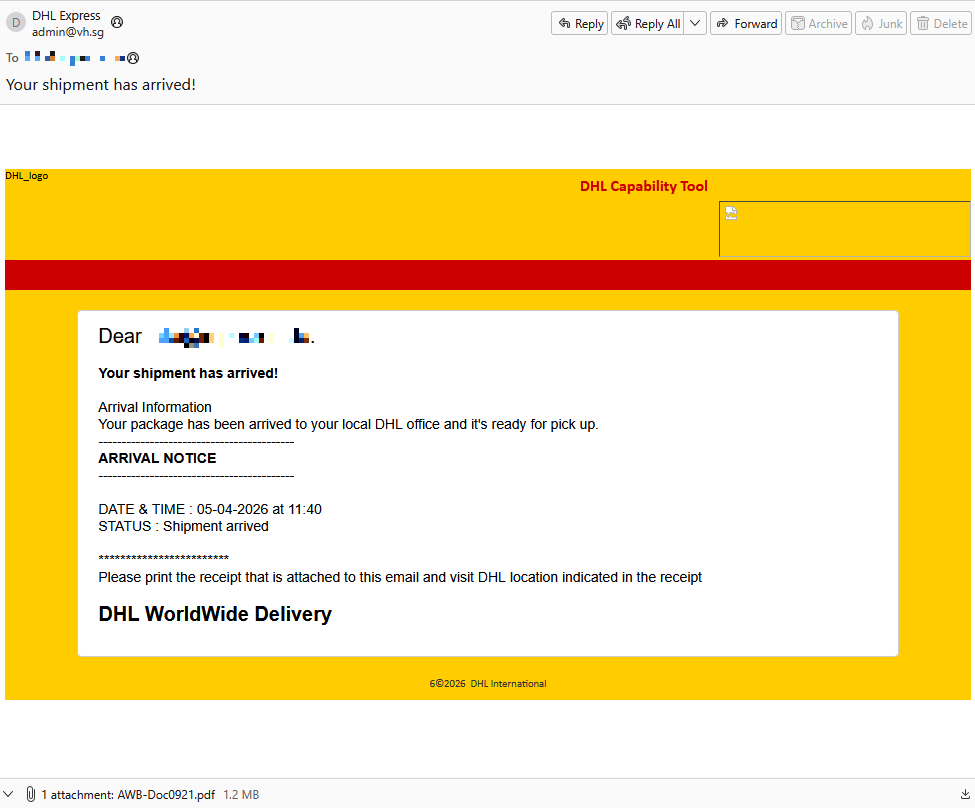
A German industrial spare parts and equipment supplier received an email pretending to be from DHL, claiming a shipment had arrived.
Given their line of business, I imagine they get this type of email all the time. But a few details stood out:
The sender’s em
An attachment in an email impersonating DHL about a shipment contains a link to a preconfigured SimpleHelp remote access tool—an ideal starting point for attackers to explore a network, steal data, and drop additional malware.
A German industrial spare parts and equipment supplier received an email pretending to be from DHL, claiming a shipment had arrived.
Given their line of business, I imagine they get this type of email all the time. But a few details stood out:
The sender’s email address did not belong to DHL,
the receiver address was the general info@ for the company,
the images in the email were hosted on ecp.yusercontent.com,
and, most importantly, there was attachment.
While the remote content is hosted on a legitimate Yahoo webpage commonly used to serve images and other content in Yahoo Mail, this is not something DHL typically uses.
The attachment, a PDF file called AWB-Doc0921.pdf is just a blurred image with a Microsoft-branded button that prompts the victim to “Continue” to access a secure file.
In reality, clicking the button downloads a file called AWB-Doc0921.scr from the domain longhungphatlogistics[.]vn, a domain belonging to a Vietnamese logistics company that was likely compromised to host malware.
Malwarebytes blocks longhungphatlogistics[.]vn
A .scr file is a Windows file, which is an executable (.exe) file used to launch screensavers. They are often used to hide malicious code because Windows trusts them, allowing them to bypass some security layers.
In this case, the file is a modified installer of a remote access tool signed by SimpleHelp.
UAC prompt for the signed installer
SimpleHelp is a remote support and remote monitoring and management (RMM) platform. It allows remote desktop control, file transfer, diagnostics, and unattended access. In the wrong hands, that’s effectively a support-style backdoor. Attackers can use it for reconnaissance, credential theft, lateral movement, defense evasion, and staging further malware, including ransomware. We’ve seen SimpleHelp abused in this way before.
This is basically a beaconing model. Once installed, the system connects out to the attacker’s server, which is more likely to be allowed through NAT and firewalls than inbound connections. Because the user initiated the install, the attacker gets immediate visibility of the system and can reconnect later whenever the service is running. In the case of a phish, that means the lure only has to get the victim to execute the file once. After that, the attacker’s console can show the new machine as a manageable asset.
For what seems to be a non-targeted attack, the campaign shows a decent level of sophistication by using legitimate components to trick targets into running the remote access tool.
How to stay safe
The good news: once you know what to look for, these attacks are much easier to spot and block. The bad news: they’re cheap, scalable, and will continue to circulate.
So, the next time a “PDF” prompts you to download a file, pause to think about what might be hiding under the hood.
Beyond avoiding unsolicited attachments, here are a few ways to stay safe:
Only access your accounts through official apps or by typing the official website directly into your browser.
Check file extensions carefully. Even if a file installs a legitimate tool, it may not be safe to run it.
This trojanized Slack installer looks normal, but quietly gives attackers an invisible desktop to access your accounts and data. We take a deep dive into the attack.
The post A fake Slack download is giving attackers a hidden desktop on your machine appeared first on Security Boulevard.
This trojanized Slack installer looks normal, but quietly gives attackers an invisible desktop to access your accounts and data. We take a deep dive into the attack.
A trojanized Slack download from a typosquatting website is giving attackers something most users wouldn’t even know to look for: a hidden desktop running on their machine.
The installer looks legitimate and even launches a working copy of Slack. But in the background, it can create an invisible session where attackers can browse, access accounts, and interact with your system without anything appearing on your screen. To be clear, this campaign has nothing to do with Slack, the company, and
A trojanized Slack download from a typosquatting website is giving attackers something most users wouldn’t even know to look for: a hidden desktop running on their machine.
The installer looks legitimate and even launches a working copy of Slack. But in the background, it can create an invisible session where attackers can browse, access accounts, and interact with your system without anything appearing on your screen. To be clear, this campaign has nothing to do with Slack, the company, and we’ve let them know what we found.
Slack has tens of millions of daily active users across more than 200,000 paying organisations in over 150 countries, including 77 of the Fortune 100. So a trojanized installer is not just a threat to the individual who runs it, but also to corporate networks, SSO-linked accounts, and internal communications.
Everyone trusts the logo
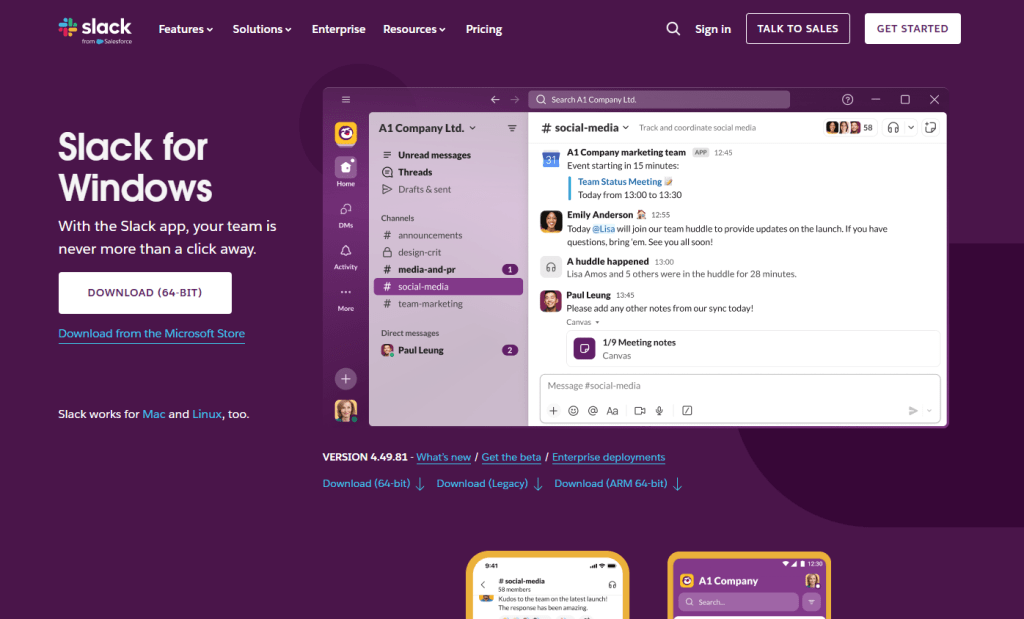
Fake Slack website
Slack is one of those apps that people install without a second thought. It sits alongside Chrome and Zoom in the pantheon of software that workers download on day one of a new job, often from a quick Google search rather than a bookmarked link. That’s what makes it such a compelling lure. The brand is instantly recognisable, the installer is something millions of people have run before, and the whole experience of watching it set up feels completely ordinary.
The attackers behind this campaign registered the domain slacks[.]pro (note the extra “s” and the .pro top-level domain instead of .com). The site’s source code includes a JavaScript click handler that intercepts every click on the page and redirects the browser to a download hosted on a separate domain, debtclean-ua[.]sbs. The only clicks excluded are the cookie consent buttons; everything else triggers the download. This is not a true drive-by that exploits the browser silently, but it’s close enough: it requires just one click from a distracted user.
What arrives on the victim’s desktop is a file named slack-4-49-81.exe, a name that mirrors Slack’s real version numbering closely enough that most people wouldn’t hesitate.
JavaScript click handler
This isn’t an obscure tactic. In August 2024, we documented a near-identical campaign using fraudulent Google Ads to redirect Slack searches to a malicious download page. Those attacks delivered SecTopRAT, a remote access Trojan with stealer capabilities.
These campaigns keep coming back because the formula works: attackers take a trusted brand, register a convincing domain, and count on the fact that most people do not scrutinise a URL when they’re just trying to get set up for work.
A real install and a hidden loader, running side by side
Here’s what makes this particular sample clever: it doesn’t just pretend to install Slack. It actually installs a working copy of the application while simultaneously running a malware loader in the background. The victim sees a legitimate splash screen, watches Slack appear in their taskbar, and has no reason to suspect anything went wrong.
Within seconds of being launched, slack-4-49-81.exe writes two temporary files to the user’s %TEMP% folder. The first, slack.tmp, is the decoy: a self-extracting Squirrel installer package. Squirrel is a legitimate, open-source update framework built into dozens of Electron apps including the real Slack, Discord, and Microsoft Teams. The dropper bundles a genuine copy of Squirrel’s Update.exe alongside a NuGet package called slack-4.49.81-full.nupkg, a branded splash image (background.gif), and a release manifest. When slack.tmp runs, it unpacks all of this into %LOCALAPPDATA%\SquirrelTemp, launches Update.exe with a standard --install flag, and from that point on, the Slack installation proceeds exactly as it would if the user had downloaded the app from slack.com. Slack opens, looks right, and works.
The second file, svc.tmp, arrives seconds later. This is the loader: a separate ~519KB executable embedded inside the 150MB installer and extracted into %TEMP% alongside the decoy. It is unsigned, identifies itself in its portable executable (PE) metadata as Windows Component Update Service by Microsoft Corporation, and has no relationship to the Squirrel framework or the Slack application being installed next to it. Almost immediately it creates a small file called loader_log.txt in the temp folder, confirming the loader stage has started, and attempts to contact a command-and-control (C2) server at 94.232.46.16 on TCP port 8081.
Meanwhile, the Squirrel installation completes and writes a registry Run key to survive reboots: value name com.squirrel.slack.slack under HKCU\SOFTWARE\Microsoft\Windows\CurrentVersion\Run. This is the exact key name and path that a legitimate Slack installation creates. An IT admin scrolling through autostart entries would see what looks like a normal Slack install and keep moving.
Inside the loader: what static analysis reveals
To understand what the loader is engineered to do once it has a C2 channel, we examined the binary directly. Its PE version information claims to be a Windows Component Update Service (internal name WinSvcUpd.exe), published by Microsoft Corporation, version 1.4.2.0. None of this is true. It’s a false flag designed to survive a glance in a process list or task manager.
The binary is a 64-bit Windows executable compiled with MSVC. Its seven PE sections carry randomised names, like .7ssik, .d1npl, .m6zef, rather than the standard .text and .rdata produced by normal compilers, consistent with the use of a custom builder or crypter tool. Its import table is deliberately minimal: 90 functions from KERNEL32.dll and nothing else. There are no static imports for networking, registry access, or process manipulation. Instead, it resolves those APIs at runtime using GetProcAddress and LoadLibraryExW, a standard technique that hides the binary’s real capabilities from import-table analysis.
PE sections
What makes this sample unusual for a loader is how talkative it is internally. The binary is laced with debug strings that lay out its entire architecture, organised into labelled subsystems. These strings were never meant for the victim to see. They are developer diagnostics left in the build, and they tell us exactly what this tool was designed to do.
Strings prefixed [P1] describe the first phase: the loader downloads a payload from its C2 ([P1] Downloading payload...). The download itself uses WinHTTP, resolved at runtime. The debug strings [HTTP] Connect, [HTTP] Send, and [HTTP] Recv trace the full request cycle, while [HTTP] winhttp unavailable reveals the fallback path if the library cannot be loaded. It stores the payload in shared memory via Windows file-mapping APIs ([P1] Payload in shared memory), and launches a second copy of itself as Phase 2 ([P1] Phase-2 launched). Phase 2 reads the payload from shared memory ([P2] Payload copied from shared memory) and decrypts it. The strings [CRYPT] Decrypting... and [CRYPT] MZ OK confirm the payload arrives encrypted and is validated as a Windows executable after decryption. The decrypted DLL is written to disk under a filename matching the pattern wmiprvse_*.tmp, designed to blend in with temporary files created by the legitimate Windows WMI Provider Host.
The loader is then designed to call a specific exported function from the decrypted DLL: HvncRun. The strings [LOAD] Calling HvncRun... and --- HvncClient log --- identify the payload as an HVNC client, a Hidden Virtual Network Computing tool. HVNC differs from a conventional remote access Trojan in a critical way: it creates a completely separate, invisible desktop session on the victim’s machine. The attacker can open browsers, access banking portals, and interact with authenticated sessions without anything appearing on the user’s visible screen. It’s a tool primarily associated with financial fraud operations.
To run the HVNC payload covertly, the loader is equipped to inject the DLL into explorer.exe using a technique known as section-based injection. The strings [INJ] === Section-based injection into explorer.exe === and [INJ] Remote thread created in explorer.exe! describe a sequence in which the loader creates a shared memory section via NtCreateSection, maps it into both its own process and the Windows shell, writes shellcode and the DLL path into the shared region, and starts a remote thread via NtCreateThreadEx. This is a harder-to-detect variant of process injection than the classic WriteProcessMemory approach, because it avoids writing directly into the target’s memory space. If the NT APIs are unavailable, the loader falls back to writing the DLL to disk and loading it directly ([INJ] Required NT APIs not available, falling back to DropAndLoad).
The binary includes active anti-analysis defences. The string [AA] Debugger/sandbox detected indicates it checks for observation and alters its behaviour accordingly. It has the tools to do so: IsDebuggerPresent and GetTickCount appear in the import table, commonly used for debugger detection and timing-based sandbox evasion, though both are also standard CRT imports in any MSVC-compiled binary. The debug string is the stronger signal that these APIs are used intentionally.
What this means for someone who ran it
If you downloaded Slack from anywhere other than slack.com recently, particularly from a domain ending in .pro, or one that auto-downloaded a file when you clicked anywhere on the page, take it seriously.
The loader attempts to reach its C2 server before the Slack window finishes loading. It is engineered to use that connection (if established) to download and decrypt an HVNC payload and inject it into explorer.exe to operate from within the Windows shell itself. The Squirrel installation writes the same Run key that a legitimate Slack install would, so the autostart entry is indistinguishable from a clean machine. Meanwhile, the loader only needs to succeed once: if it downloads the HVNC payload and injects it into explorer.exe during the initial execution, the attacker has a foothold that lasts until the next reboot. Whether additional persistence for the payload exists depends on the C2 operator’s next moves.
How to stay safe
This campaign is a case study in how much engineering effort goes into looking ordinary. One code path installs real software through a legitimate framework. The other runs a multi-phase loader with dynamic API resolution, encrypted payload delivery, process injection into the Windows shell, and anti-analysis defences, all packed into a binary that identifies itself as a Microsoft service. The decoy hides what’s going on, while the loader gives the attacker a foothold.
Bookmark the real download pages for the software you use. If you find yourself Googling “Slack download” and clicking the first result that looks right, you’re exactly the person this campaign was built to catch.
Only download Slack from the official site. Go directly to slack.com or use a trusted bookmark. Avoid clicking ads or unfamiliar links.
Check the URL carefully. Look for subtle changes like extra letters or unusual domains (for example, “.pro” instead of “.com”).
Be wary of sites that trigger downloads on click. If a page starts downloading a file when you click anywhere, close it.
Verify the installer before running it. Right-click the file, check its properties, and look for a valid digital signature.
Use real-time security protection. A security tool can block known malicious domains and catch suspicious behavior during installation.
Watch for unusual behavior after installing software. Unexpected network activity, slowdowns, or unknown processes are worth investigating.
If something feels off, act quickly. Disconnect from the internet, run a full scan, and change your passwords from a clean device, especially for email, banking, and work accounts.
What to do if you may have been affected
Disconnect from the network immediately to sever any active C2 session.
Change all passwords for accounts you have accessed from this machine. Do this from a different, clean device. Prioritise email, banking, and SSO accounts.
If this was a work machine, notify your IT or security team immediately.
A convincing phishing campaign is going after YouTube creators, and if it works, attackers don’t just steal your Google login. They can take over your entire Google account, including Gmail, your files, and payments, then hijack your YouTube channel and use your audience to run scams.
The lure is a fake copyright strike notification that’s so convincing even security-aware users could fall for it. The attack site pulls in your real channel data, such as your profile picture, subscriber count,
A convincing phishing campaign is going after YouTube creators, and if it works, attackers don’t just steal your Google login. They can take over your entire Google account, including Gmail, your files, and payments, then hijack your YouTube channel and use your audience to run scams.
The lure is a fake copyright strike notification that’s so convincing even security-aware users could fall for it. The attack site pulls in your real channel data, such as your profile picture, subscriber count, and latest video, to build a personalized scare page. It funnels you toward a sign-in page designed to steal your Google account.
The operation runs like a franchise: multiple attackers share the same platform, each running their own campaigns against different creators.
Why your YouTube channel is worth more than you think
For full-time creators, a YouTube channel isn’t just a hobby, it’s a business. It generates revenue through ads, sponsorships, and merchandise. And it all sits behind a single Google login that also controls your Gmail, Google Drive, and payment details.
That’s what makes creators such attractive targets. Attackers who hijack a channel often rebrand it within minutes, typically to impersonate a cryptocurrency company, and use the existing audience to livestream scams. The original creator gets locked out and watches their years of work being used to defraud their own subscribers.
A copyright strike is the perfect bait because it exploits the one thing creators fear most: losing their channel overnight.
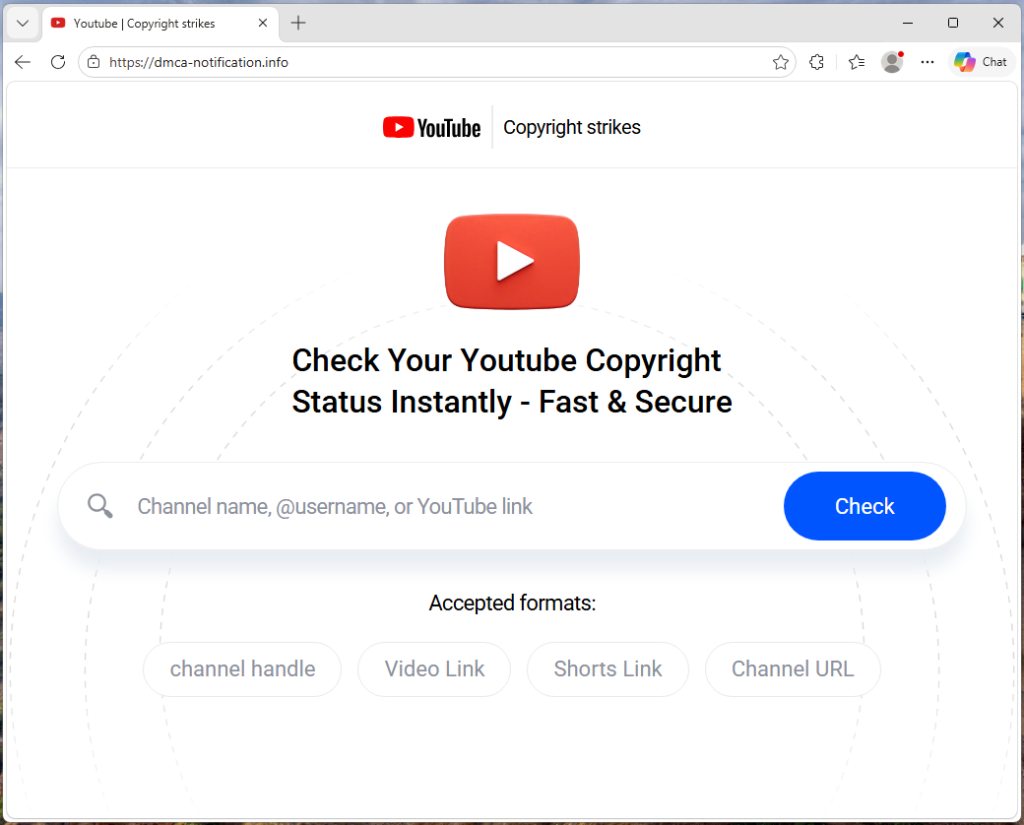
“Check your Youtube copyright status instantly”
The campaign runs from a site called dmca-notification[.]info. The browser tab reads “Youtube | Copyright strikes,” and the page itself looks clean and professional, complete with YouTube logo, search bar, and helpful instructions.
It invites you to enter your channel name, @handle, or video link to check your copyright status. Nothing about it stands out as immediately suspicious.
Each phishing link includes the target’s channel handle directly in the URL, so the page already knows who you are before you type anything.
The source code contains a tracking flag called suppressTelegramVisit, which changes how visits are logged depending on whether an affiliate parameter is present. This suggests the operators may be coordinating traffic through Telegram, although the kit could be distributed through any platform.
Your own videos, used against you
Once the page has your channel name, it fetches real data from YouTube: your avatar, subscriber count, video count, and your most recent upload (including its title, thumbnail, and view count). That information is then used to build a fake copyright complaint.
You see your own branding alongside a claim that a specific segment of your latest video has been flagged for copyright infringement. The timestamps are dynamically generated for each victim based on the video’s length, making each notice look unique and legitimate. It’s similar to receiving a fake legal notice that includes your real home address. The personal details make it harder to dismiss as spam.
“Respond within three days or face enforcement actions”
The page piles on the pressure. A warning tells you that deleting the video won’t remove the strike. A red notice threatens that if you don’t respond within three days, your channel will face enforcement actions. The proposed fix is simple: sign in with Google to verify you’re the channel owner, and the claim will be resolved within 24 hours.
Every element on the page is designed to push you toward the “Login via Google” button before you stop to think.
The sign-in page that steals your account
When you click that button, the site contacts its own backend server to fetch the address of an external phishing page, one that the attacker can swap out to a new domain at any time.
In observed traffic, the request to /api/get-active-domain returned the domain blacklivesmattergood4[.]com, which was then loaded inside a full-screen overlay on top of the copyright notice page.
What appears next is a classic Browser-in-the-Browser attack: a fake Chrome pop-up rendered entirely in HTML and CSS. It includes a title bar reading “Sign in – Google Accounts – Google Chrome,” a padlock icon, and a URL that looks like accounts.google.com. None of it is real. They’re all just graphics. The only real address bar is the one at the top of your actual browser, which still shows dmca-notification[.]info.
Inside the fake window sits a convincing replica of Google’s sign-in page. It looks exactly like the real thing, but every keystroke goes to the attacker.
Traffic capture also showed attempts to contact additional domains—dopozj[.]net, ec40pr[.]net, and xddlov[.]net—which returned 502 errors at the time of capture. These may be backup infrastructure or credential relay servers that were offline.
The rotating-domain approach is what makes this campaign resilient. The phishing domain is fetched in real time with no caching, allowing attackers to rotate infrastructure quickly. If one domain is taken down, the next victim is sent to a new one.
Once credentials are entered, the overlay closes and the victim is returned to the copyright notice page with no confirmation or error . It gives the attacker time to use the stolen credentials before the victim realizes anything happened.
Big channels get a free pass (on purpose)
One interesting detail: the kit checks whether the target channel has more than three million subscribers. If it does, the entire phishing flow is skipped. Instead of the copyright strike warning and login button, the page shows a benign message: “Your channel is in good standing. No further action is needed.”
This is almost certainly an evasion tactic. Very large channels are more likely to have dedicated security teams, relationships with YouTube’s trust and safety staff, or the visibility to trigger a rapid takedown if they publicly report the scam. By automatically exempting them, the kit reduces the risk of drawing attention from exactly the people most capable of getting the operation shut down.
Not just one scammer
The source code reveals that this isn’t a single phishing page run by one person. The kit includes an affiliate tracking system where each attacker gets their own ID embedded in the phishing links they send out. A central backend tracks which operator delivered which victim and how far each target got through the funnel. Our traffic capture confirms this: the phishing link included a referral ID (ref=huyznaetdmca), the default affiliate tag, which appears to be a transliteration of a Russian phrase. Brand names like Google and YouTube are also written with lookalike Cyrillic characters in the source code to evade automated security scanners.
In short, this is phishing-as-a-service: a shared platform that multiple attackers can use to run campaigns against YouTube creators at scale.
How to protect yourself
This campaign is a reminder that phishing has moved far beyond badly spelled emails from a Nigerian prince. Today’s phishing kits are professionally engineered platforms with rotating infrastructure, real-time personalization, and franchise-style distribution.
For YouTube creators, the key rule is simple: copyright strikes only appear in YouTube Studio.
If you get a warning anywhere else, treat it as suspicious.
Be wary of urgency. Real copyright processes don’t rush you into action
Go directly to studio.youtube.com or through trusted channels to check your status
Never sign in through a link in an email or message
Spot a fake browser window
Try dragging it: A real window moves freely. A fake one is stuck inside the page
Minimize your browser: A real pop-up stays open. A fake one disappears
Check the URL: If you can’t interact with it, it’s just an image
Even if everything looks right, always check the actual address bar before entering your username and password.
If you’ve already entered your details, act quickly:
Change your Google password immediately
Revoke active sessions in your account security settings
Check your YouTube channel for unauthorized changes
Indicators of Compromise (IOCs)
Domain
dmca-notification[.]info (primary phishing site)
blacklivesmattergood4[.]com (credential harvesting domain — active at time of capture)
dopozj[.]net (associated infrastructure — 502 at time of capture)
ec40pr[.]net (associated infrastructure — 502 at time of capture)
xddlov[.]net (associated infrastructure — 502 at time of capture)
Something feel off? Check it before you click.
Malwarebytes Scam Guard helps you analyze suspicious links, texts, and screenshots instantly.
Hiding in imposter sites, GitHub downloads, and YouTube links, this infostealer is designed to hijack accounts and drain cryptocurrency wallets.
The post From fake Proton VPN sites to gaming mods, this Windows infostealer is everywhere appeared first on Security Boulevard.
Inside a targeted email campaign that funnels the most vulnerable financial people into handing over sensitive data, and signing up for weekly fees.
The post Credit Resources Vault: Why this credit email set off our scam alarms appeared first on Security Boulevard.
We’ve uncovered multiple campaigns distributing an infostealer we track as NWHStealer, using everything from fake VPN downloads to hardware utilities and gaming mods. What makes this campaign stand out isn’t just the malware, but how widely and convincingly it’s being spread.
Once installed, it can collect browser data, saved passwords, and cryptocurrency wallet information, which attackers may use to access accounts, steal funds, or carry out further attacks.
We detected multiple campaig
We’ve uncovered multiple campaigns distributing an infostealer we track as NWHStealer, using everything from fake VPN downloads to hardware utilities and gaming mods. What makes this campaign stand out isn’t just the malware, but how widely and convincingly it’s being spread.
Once installed, it can collect browser data, saved passwords, and cryptocurrency wallet information, which attackers may use to access accounts, steal funds, or carry out further attacks.
We detected multiple campaigns using different platforms and lures to distribute NWHStealer. The stealer is loaded and executed in several ways, such as self-injection or injection into other processes like RegAsm (Microsoft’s Assembly Registration Tool). Often, additional wrappers such as MSI or Node.js are used as the initial loader.
The stealer is distributed using lures (what the file claims to be) such as:
It’s hosted or shared across multiple distribution channels, including:
Fake websites impersonating legitimate services, like Proton VPN
Code hosting platforms like GitHub and GitLab
File hosting services such as MediaFire and SourceForge
Links and redirects from gaming- and security-related YouTube videos
Although there are many distribution methods, in this blog we look at two cases:
Case 1: A free web hosting provider distributing a malicious ZIP file that loads the stealer using self-injection
Case 2: Fake websites that load the stealer using DLL hijacking and injection into the RegAsm process
Case 1: Free web hosting provider distributes the stealer
The first case is the most unexpected. We found that a free web hosting provider, onworks[.]net, hosts ZIP files in its download section that ultimately distribute the stealer.
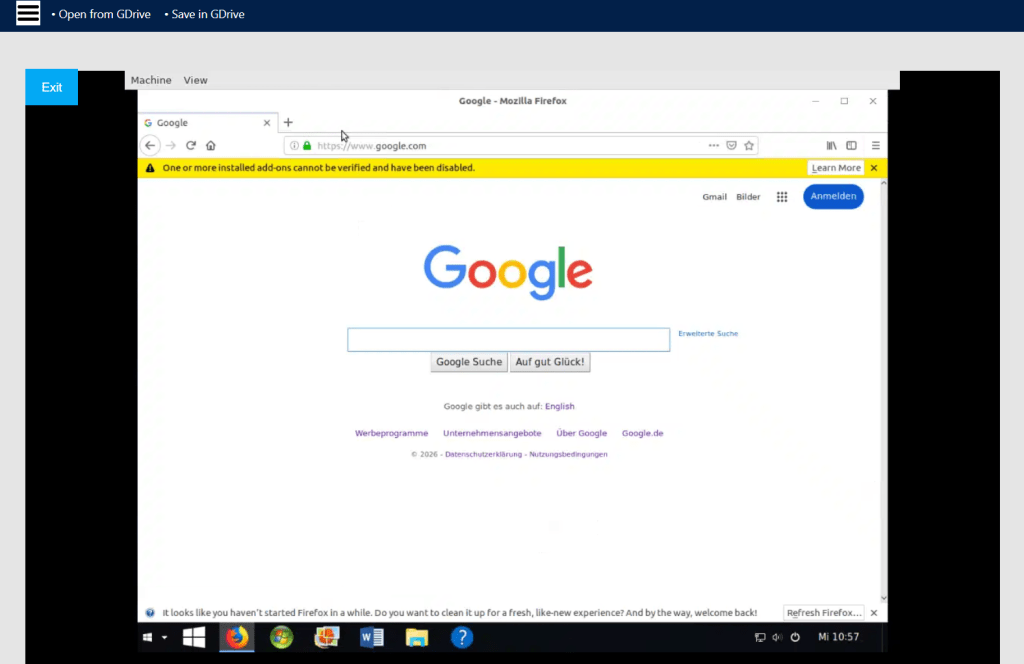
The website, ranked in the top 100,000, allows users to run virtual machines entirely in the browser.
Virtual machine running in the browser
Through this site, users download a malicious ZIP with names like:
OhmGraphite-0.36.1.zip
Sidebar Diagnostics-3.6.5.zip
Pachtop_1.2.2.zip
HardwareVisualizer_1.3.1.zip
One of the pages that downloads the malicious archive
In this case, the malicious code responsible for loading the stealer is embedded in the executable, for example HardwareVisualizer.exe.
The loader that starts the infection chain
The loader contains junk code to make analysis more difficult and performs several operations, including:
Checking the environment for analysis tools and terminating if detected
Implementing a custom decryption function for strings
Resolving functions using LoadLibraryA and GetProcAddress
Decrypting and loading the next stage using AES-CBC via BCrypt APIs
This isn’t the only way the stealer is distributed. We found similar lures, with the same ZIP names, that instead distribute the stealer via DLL hijacking.
In this case, HardwareVisualizer.exe is actually the WinRAR executable, and the malicious code resides in WindowsCodecs.dll.
The WinRAR executable with the malicious DLL
While tracking the DLL loader, we also saw it distributed in other campaigns with different lures. For example, in the second case analyzed, this malicious DLL is delivered through fake websites.
Case 2: Fake Proton VPN website and DLL loader
In the second case, we detected a website impersonating Proton VPN that delivers a malicious ZIP. This archive executes the stealer using DLL hijacking or an MSI file. To be clear, this has no affiliation with Proton VPN, and we’ve contacted them to let them know what we found.
Links to the website appear in several compromised YouTube channels, along with AI-generated videos demonstrating the installation process:
Youtube channels with malicious Proton VPN links.
Youtube channels with malicious Proton VPN links.
Youtube channels with malicious Proton VPN links.
Youtube channels with malicious Proton VPN links.
Youtube channels with malicious Proton VPN links.
Youtube channels with malicious Proton VPN links.
Fake website distributes the stealer via DLL hijackingFolders containing the malicious DLL
In other infection chains, this DLL appears under different names, such as:
iviewers.dll
TextShaping.dll
CrashRpt1403.dll
This DLL decrypts two embedded resources. The decryption method varies between samples: Some use custom AES implementations, while others rely on the OpenSSL library.
One of the decrypted resources is a second-stage DLL, runpeNew.dll, which is loaded and executed via the GetGet method.
The second-stage DLL starts a process (such as RegAsm) and performs process hollowing using low-level APIs, including:
NtProtectVirtualMemory
NtCreateUserProcess
NtUnmapViewOfSection
NtAllocateVirtualMemory
NtResumeThread
The final payload: NWHStealer
At the end of these infection chains, the attacker deploys NWHStealer. The stealer runs directly in memory or injects itself into other processes such as RegAsm.exe.
It enumerates more than 25 folders and registry keys associated with cryptocurrency wallets.
Enumeration phase of wallets
The stealer also collects and exfiltrates data from multiple browsers, including Edge, Chrome, Opera, 360 Browser, K-Melon, Brave, Chromium, and Chromodo.
Enumeration of browser foldersEnumeration of browser extensions
Additionally, it injects a DLL into browser processes such as msedge.exe, firefox.exe, or chrome.exe. This DLL extracts and decrypts browser data before sending it to the command-and-control (C2) server.
The injected DLL in Microsoft Edge
The injected DLL also executes a PowerShell command that:
Creates hidden directories in LOCALAPPDATA
Adds those directories to Windows Defender exclusions
Forces a Group Policy update
Encrypts a getPayload request and sends it to the C2
Receives and executes additional payloads disguised as system processes (e.g., svchost.exe, RuntimeBroker.exe)
Creates scheduled tasks to run the payload at user logon with elevated privileges
Data sent to the C2 is encrypted using AES-CBC. If the primary server is unavailable, the malware can retrieve a new C2 domain via a Telegram-based dead drop.
Dead drop resolver via TelegramJSON containing various information about the compromised system
The stealer also uses a known CMSTP User Account Control (UAC) bypass technique to execute PowerShell commands:
Generates a random .inf file in the temp folder
Uses cmstp.exe to elevate privileges
Automatically confirms the prompt using Windows APIs
How to stay safe
Instead of relying on phishing emails or obvious scams, the attackers behind this campaign are hiding malware inside tools people actively search for and trust. By spreading through platforms like GitHub, SourceForge, and YouTube, they increase the chances that users will let their guard down.
Once installed, the impact can be serious. Stolen browser data, saved passwords, and cryptocurrency wallet information can lead to account takeovers, financial loss, and further compromise.
Here are our tips for avoiding being caught out:
Download software only from official websites
Be cautious with downloads from GitHub, SourceForge, or file-sharing platforms unless you trust the source
Check file signatures and publisher details before running anything
Avoid downloading tools from links in YouTube descriptions
This is only a partial list of malicious URLs. Download the Malwarebytes Browser Guard plugin for full protection and to block the remaining malicious URLs.
If there is anything that annoys me more than a scammer, it’s companies that behave like one, while staying just on the right side of the law. They manage to linger and disappoint customers for years.
It’s also why sometimes people think that Malwarebytes Scam Guard can be overly cautious when flagging websites. Some sites sit in a grey area where even seasoned researchers have to look twice to figure out whether something is an outright scam.
That’s exactly what happened here.
After re
If there is anything that annoys me more than a scammer, it’s companies that behave like one, while staying just on the right side of the law. They manage to linger and disappoint customers for years.
It’s also why sometimes people think that MalwarebytesScam Guard can be overly cautious when flagging websites. Some sites sit in a grey area where even seasoned researchers have to look twice to figure out whether something is an outright scam.
That’s exactly what happened here.
After receiving an anonymized report from a customer, I started an investigation into an email Scam Guard flagged as highly suspicious.
The email
The email came from the address anna@cosmosshift[.]org and promoted a service called Credit Resources Vault, urging recipients to click a button labelled Check Eligibility Now..
There are immediate red flags:
The sender domain (cosmosshift.org) has no clear connection to credit services or financial products. There is no “Cosmos Shift” financial institution.
The message creates urgency around credit approval, a classic social engineering pressure tactic.
It includes a physical address and an opt-out link which appear to be legitimate, but are also a common technique in phishing called legitimacy laundering.
Unlike most phishing emails, this one includes a personalized greeting using the recipient’s email address. Since the recipient says they’ve never interacted with the sender, this suggests their details may have come from a data broker or a past data breach.
The website paints a suspicious picture
Clicking the link leads to (yourcreditvault.com), a polished-looking site that appears to offer credit services.
Credit Resources landing page
But under the hood we found more red flags:
The website was built with Vite/React, a modern JavaScript framework more typical of startup side projects than regulated financial services.
References to bolt.new suggest the site may have been assembled using AI tools
There are no visible indicators of banking-grade security. The HTML source shows only a basic app shell with no indicators of financial-sector encryption infrastructure.
The branding (including the logo) looks hastily put together
The JavaScript bundle (index-B54Ghi53.js) behind the submission form is heavily obfuscated: a technique used by cybercriminals to hide where the submitted data is being sent.
None of this proves malicious intent on its own. But together, it paints a picture of something built quickly, and designed to collect data rather than deliver a robust financial service.
The form collects data, and $20/week
The biggest concern is the form, which collects an extraordinary amount of data for what’s presented as a basic credit eligibility check.
The application form
By monitoring network traffic during form submission, we were able to capture exactly what fields are transmitted:
Personal: first name, last name, email, phone
Address: street, city, province, postal code
Full banking details: bank name, institution number, transit number, account number
Tracking data tied to advertising campaigns
A drawn-on-screen signature, which gets uploaded to the owner’s Google Drive.
That’s far more than what’s needed for a credit eligibility check.
With those banking details alone, someone can set up fraudulent Pre-Authorized Debits (PADs). A PAD is a form of direct bank withdrawal used legitimately by billers, but can also be abused.
Enlarged screenshot of the box they want a checkmark in
And that’s exactly what appears to happen.
A small checkbox, paired with fine print, authorizes the company to withdraw $20 weekly per the PAD agreement the target just signed. This checkbox serves two purposes: it provides the operators with legal cover (“you agreed to it!”) and it weaponizes the very bank account details the form just collected.
Targeting the financially vulnerable
This campaign seems to deliberately target people with poor or limited credit history. The promise of “approval when others say no” is powerful, especially for people under financial pressure.
These are not random victims, but people targeted because their need makes them more likely to hand over sensitive information without scrutinizing the source.
The $20/week PAD charge (over $1,000 per year) can lead to overdrafts, fees, and further financial harm.
Where your data goes
Our network traffic analysis revealed a sophisticated, multi-service backend that uses individual components which all might be legitimate.
Supabase: Victim data is sent via POST request to a Supabase project:
POST https://bstvkdzfgpktokbiagsc.supabase.co/rest/v1/vault_memberships
Supabase is a legitimate, well-regarded cloud database platform with free tiers.
Brevo (formerly Sendinblue): This is a legitimate mass-email platform. Enrolling victims here means they can be targeted with follow-up campaigns indefinitely.
POST https://bstvkdzfgpktokbiagsc.supabase.co/functions/v1/add-to-brevo
Google Drive and Sheets: The signature data field includes a signature_drive_url, indicating victims’ handwritten signatures might get stored on Google Drive infrastructure. A google_sheets_synced field confirms that incoming victim records are mirrored to a live Google Sheet, giving the operators a real-time dashboard of everyone that submitted a form.
Individually, these are trusted platforms. Together, they form a system designed to:
Collect sensitive personal and banking data
Store it in accessible formats
Add users to ongoing marketing or even phishing campaigns
In other words, submitting the form doesn’t just risk your bank account, but may also put you on a list of people likely to be targeted again.
Infrastructure
The infrastructure behind this campaign spans multiple domains:
cosmosshift[.]org (email sender)
yourcreditvault[.]com (landing page).
yourscore[.]ca (redirect after submitting the form)
creditresources[.]ca (follow-up email that included the phone number 1-833-427-1562)
debtlesscredit[.]com (another website using that same phone number)
Using multiple domains and having one telephone number associated with more than one domain raising red flags about the legitimacy of the company.
So is this a scam?
That depends on how you define it.
While this may not meet the strict legal definition of a scam, we can see why Scam Guard flagged it, as many of the tactics used here are also seen in phishing emails and on scam websites.
The evidence suggests these sites are operated by real companies, but they sit firmly in a grey area. On one hand, they have corporate registrations, public websites, and apparently even some satisfied customers. On the other, the business model—charging recurring fees for credit or debt “programs”—has generated a steady stream of consumer complaints and scam accusations. The use of multiple domains (Credit Resources, Debtless Credit, Your Credit Vault) also points to a lead-generation strategy that’s common in the debt-relief space.
It’s also likely that these companies rely on purchased mailing lists and may have found our customer’s email address on a list of likely candidates. Unfortunately, lists like these are bought and sold by legitimate marketers and cybercriminals alike.
We have reached out to the sender of the email and Credit Resources for comment but had not received an answer at the time of publication.
What do cybercriminals know about you?
Use Malwarebytes’ free Digital Footprint scan to see whether your personal information has been exposed online.
Claude’s rapid growth—nearly 290 million web visits per month—has made it an attractive target for attackers, and this campaign shows how easy it is to fall for a fake site.
We discovered a fake website impersonating Anthropic’s Claude to serve a trojanized installer. The domain mimics Claude’s official site, and visitors who download the ZIP archive receive a copy of Claude that installs and runs as expected. But in the background, it deploys a PlugX malware chain that gives attackers remote
Claude’s rapid growth—nearly 290 million web visits per month—has made it an attractive target for attackers, and this campaign shows how easy it is to fall for a fake site.
We discovered a fake website impersonating Anthropic’s Claude to serve a trojanized installer. The domain mimics Claude’s official site, and visitors who download the ZIP archive receive a copy of Claude that installs and runs as expected. But in the background, it deploys a PlugX malware chain that gives attackers remote access to the system.
A convincing fake Claude site serving PlugX malware
A deep dive into the campaign
The fake site presents itself as an official download page for a “Pro” version of Claude and offers visitors a file called Claude-Pro-windows-x64.zip. Passive DNS records show the domain is equipped with active mail-sending infrastructure: its MX records have pointed to two commercial bulk-email platforms—Kingmailer (last observed March 28, 2026) and CampaignLark (observed from April 5, 2026). The switch between providers suggests the operators actively maintain and rotate their sending capability.
The ZIP contains an MSI installer that installs to C:\Program Files (x86)\Anthropic\Claude\Cluade\—a path designed to mimic a legitimate Anthropic installation, complete with a reference to Squirrel, the update framework that real Electron-based applications like Claude use. The misspelling “Cluade” is a clear red flag.
The installer places a shortcut, Claude AI.lnk, on the Desktop pointing to Claude.vbs inside the SquirrelTemp directory. When the victim clicks the shortcut, it launches a VBScript dropper, which locates claude.exe two directories up at C:\Program Files (x86)\Anthropic\Claude\Cluade\claude.exe and runs the real application in the foreground.
The dropper then creates a new shortcut, Claude.lnk, on the Desktop pointing directly to claude.exe. This leaves the victim with a working shortcut going forward, while the original Claude AI.lnk becomes a dead link after the VBScript deletes itself.
What happens behind the curtain
While the legitimate application runs in the foreground, the VBScript quietly copies three files from the SquirrelTemp directory into the Windows Startup folder at C:\Users\<USER>\AppData\Roaming\Microsoft\Windows\Start Menu\Programs\Startup\.
Static analysis of the dropper script identifies these as an executable called NOVUpdate.exe, a DLL named avk.dll, and an encrypted data file called NOVUpdate.exe.dat. The script then launches NOVUpdate.exe with a hidden window (window style 0), so nothing appears on screen.
This is a textbook DLL sideloading attack, a technique catalogued by MITRE as T1574.002. NOVUpdate.exe is a legitimately signed G DATA antivirus updater. When it executes, it attempts to load a library called avk.dll from its own directory. Normally, this would be a genuine G DATA component, but here the attacker has substituted a malicious version. Signed sideloading hosts like this can complicate detection because the parent executable may appear benign to endpoint security tools.
Based on the Lab52 report documenting this same GData sideloading triad, the malicious avk.dll is expected to read and decrypt a payload stored in the accompanying .dat file. This pattern—a signed executable, a trojanized DLL, and an encrypted data file forming a three-component sideloading triad—is characteristic of the PlugX malware family, a remote access Trojan tracked in espionage campaigns since at least 2008.
Sandbox telemetry: C2 callback within seconds
Behavioural analysis in a sandboxed environment confirmed key parts of the execution chain. WScript.exe was observed dropping NOVUpdate.exe and avk.dll into the Startup folder. Just 22 seconds later, NOVUpdate.exe had established its first outbound TCP connection to 8.217.190.58 on port 443. The connection was repeated multiple times during the observation window.
The IP address 8.217.190.58 falls within an Alibaba Cloud–associated address range (8.217.x.x). Cloud hosting providers are routinely abused by threat actors for command-and-control infrastructure; the hosting provider alone does not indicate malicious ownership of the IP.
The sandbox also recorded NOVUpdate.exe modifying the registry key HKLM\System\CurrentControlSet\Services\Tcpip\Parameters, a path related to TCP/IP network configuration.
Cleaning up after itself
Static analysis of the dropper script reveals additional anti-forensic measures. After deploying the payload files, the VBScript writes a small batch file called ~del.vbs.bat that waits two seconds, then deletes both the original VBScript and the batch file itself. This means the dropper is gone from disk by the time a user or analyst goes looking for it. The only artifacts that persist are the sideloading files in the Startup folder and the running NOVUpdate.exe process. The script also wraps the entire malicious payload section in an On Error Resume Next statement, silently swallowing any errors so that failures in the deployment do not produce visible error dialogs that might alert the victim.
A known playbook with a fresh lure
This sideloading technique—abusing G DATA’s avk.dll alongside a legitimate G DATA executable and an XOR-encrypted payload file—was publicly documented by Lab52 in February 2026 in their report “PlugX Meeting Invitation via MSBuild and GDATA.” In that campaign, phishing emails used fake meeting invitations to deliver a nearly identical three-file sideloading package. The Lab52 sample used AVKTray.dat as the encrypted payload filename; this campaign uses NOVUpdate.exe.dat. The core mechanism is the same.
PlugX has historically been associated with espionage operators linked to Chinese state interests. However, researchers have noted that PlugX source code has circulated in underground forums, broadening the pool of potential operators. Attribution based on tooling alone is not definitive.
What is clear is that the operators behind this campaign have combined a proven sideloading technique with a timely social engineering lure—exploiting the surging popularity of AI tools to trick users into running a trojanized installer.
How to stay safe
This campaign works because everything looks normal. The app installs, launches, and behaves as expected, while a hidden sideloading chain runs in the background using a signed security tool to avoid suspicion.
Attackers are also moving fast. This technique was documented just weeks ago, and has already been reused with a new lure. As AI tools grow in popularity, we can expect more lookalike sites and fake installers like this.
Here’s how to check if you’ve been affected:
Check your Startup folder for NOVUpdate.exe, avk.dll, or NOVUpdate.exe.dat.
If any are present, disconnect from the internet immediately.
Look for the misspelled directory C:\Program Files (x86)\Anthropic\Claude\Cluade\ on your system.
A fake Microsoft support website is tricking people into downloading what looks like a normal Windows update. Instead, it installs malware designed to steal passwords, payment details, and account access. Because the file looks legitimate and avoids detection, it can slip past both users and security tools.
A very convincing Windows update
We spotted the campaign at microsoft-update[.]support, a typosquatted domain dressed up to look like an official Microsoft support page. The site is wri
A fake Microsoft support website is tricking people into downloading what looks like a normal Windows update. Instead, it installs malware designed to steal passwords, payment details, and account access. Because the file looks legitimate and avoids detection, it can slip past both users and security tools.
A very convincing Windows update
We spotted the campaign at microsoft-update[.]support, a typosquatted domain dressed up to look like an official Microsoft support page. The site is written entirely in French (but these campaigns tend to spread quickly) and presents a fake cumulative update for Windows version 24H2, complete with a plausible KB article number. A large blue download button invites users to install the update.
Fake Windows update site. Look at that convincing URL!
What gets downloaded is WindowsUpdate 1.0.0.msi, an 83 MB Windows Installer package. At first glance, everything looks legitimate. Its file properties are carefully spoofed: the Author field reads “Microsoft,” the title reads “Installation Database,” and the Comments field claims it contains “the logic and data required to install WindowsUpdate.”
The package was built with WiX Toolset 4.0.0.5512, a legitimate open-source installer framework, and was created on April 4, 2026.
Why this campaign is targeting France
The choice to target French-speaking users is not random. France has suffered a historic cascade of data breaches over the past two years, leaving a staggering volume of personal information circulating on criminal marketplaces. The breaches provide the raw data, and campaigns like this one turn that into highly believable scams.
In October 2024, Free, France’s second-largest internet service provider, confirmed that an attacker had accessed personal data for roughly 19 million subscriber contracts, including bank account details. Just weeks earlier, Société Française du Radiotéléphone (SFR) disclosed its own breach exposing customer names, addresses, phone numbers, and banking details.
Earlier in 2024, France Travail, the national public employment service, suffered an intrusion that compromised the records of 43 million people, covering current and past jobseekers spanning two decades. Researchers also discovered an unprotected Elasticsearch server aggregating 90 million records from at least 17 separate French breaches into a single database.
This torrent of leaked data has made France an attractive target for credential theft. KELA’s 2025 infostealer research identified France among the top countries for victims, alongside Brazil, India, the US, Spain, the United Kingdom, and Indonesia.
When attackers already have a victim’s name, address, and ISP from a previous leak, a French-language “Windows update” page becomes a far more convincing lure than a generic English one.
Electron on the outside, Python on the inside
When the MSI executes, it installs an Electron application (essentially a stripped-down Chromium browser bundled with custom JavaScript) to C:\Users\<USER>\AppData\Local\Programs\WindowsUpdate\.
The main binary, WindowsUpdate.exe, is a renamed copy of the standard Electron shell—VirusTotal’s metadata identifies it as electron.exe. Across 69 antivirus engines, it drew zero detections because the executable itself is clean. This suggests the malicious logic lives inside the Electron app’s bundled JavaScript (typically packaged as app.asar).
Alongside the Electron shell sits AppLauncher.vbs, a Visual Basic Script that acts as the initial launcher. The system’s built-in cscript.exe interpreter runs the VBS, which then starts the Electron app—a classic living-off-the-land technique that avoids launching the payload directly and keeps the execution chain looking routine in process logs.
But the Electron wrapper is only the outer layer. Once running, WindowsUpdate.exe spawns _winhost.exe, a renamed Python 3.10 interpreter disguised to resemble a legitimate Windows process. This process unpacks a full Python runtime into C:\Users<USER>\AppData\Local\Temp\WinGet\tools, including python.exe and supporting libraries.
It then installs a set of Python packages commonly seen in data theft tools:
pycryptodome, used to encrypt stolen data
psutil, used to inspect running processes and detect sandbox environments
pywin32, which enables deep access to the Windows API
PythonForWindows, used to interact with system internals such as processes and privileges
Analysis of the Electron app’s JavaScript confirms this. Two heavily obfuscated files, processed using techniques like control-flow flattening and opaque predicates, contain the core functionality.
The larger file (~7 MB) is the main stealer payload, with references to pbkdf2, sha256, and AES decryption routines, as well as a campaign expiry check. The smaller file (~1 MB) targets Discord: because Discord runs on Electron, the script modifies its code to intercept login tokens, payment details, and two-factor authentication changes when the app is opened.
Both files returned zero detections across major antivirus engines—the result of malware that hides inside legitimate software and heavily obfuscated code.
Two ways it survives a reboot
The malware sets up two independent persistence mechanisms.
First, reg.exe writes a value called SecurityHealth under the user’s CurrentVersion\Run registry key, pointing to WindowsUpdate.exe. The value name impersonates Windows Security Health, the service responsible for Defender notifications. It’s something most users and even IT staff would scroll past without suspicion.
Second, cscript.exe drops a shortcut file named Spotify.lnk into the user’s Startup folder. Anyone who notices it would likely assume Spotify had configured itself to launch at login.
Two persistence mechanisms, two different disguises, each designed to look like something the user would expect to see.
Fingerprinting the victim, phoning home, uploading the haul
Within seconds of launching, WindowsUpdate.exe reaches out to www.myexternalip.com and ip-api.com to discover the victim’s public IP address and geolocation. This kind of reconnaissance is a near-universal trait of infostealers, telling the operator where the victim is and may determine what data gets collected.
The malware then contacts its command-and-control (C2) infrastructure. It reaches datawebsync-lvmv.onrender[.]com, a C2 endpoint hosted on Render, and sync-service.system-telemetry.workers[.]dev, a relay running on Cloudflare Workers. That second domain is particularly crafty: “system-telemetry” is exactly the kind of subdomain a network analyst might dismiss as legitimate monitoring traffic during a quick log review.
For exfiltration, the malware turns to store8.gofile[.]io, a file-sharing service that allows anonymous uploads. Gofile has become a favourite among commodity stealers because it is free, ephemeral, and produces no paper trail for the operator.
Hundreds of processes killed before breakfast
Sandbox telemetry captured more than two hundred separate invocations of taskkill.exe, each launched as an individual process. While the specific target processes were not recorded in the condensed telemetry, the sheer volume and pattern is consistent with infostealers that systematically terminate security tools, browser processes (to unlock credential databases), and competing malware before beginning their collection routine. Kill everything that might interfere, then get to work.
Why the automated defences gave it a pass
At the time of analysis, VirusTotal showed zero detections across 69 engines for the main executable and 62 for the VBS launcher. No YARA rules matched, and behavioural scoring classified the activity as low risk.
This is not a failure of any single tool. It’s the intended result of the malware’s architecture.
The Electron shell is a legitimate binary used by millions of applications. The malicious logic is hidden inside obfuscated JavaScript, which traditional antivirus tools don’t deeply inspect. The Python payload runs under a misleading process name and pulls in components at runtime from what appear to be normal sources.
Individually, each piece looks harmless. It’s only when you follow the full chain—VBS launcher to Electron app to renamed Python process to data collection and exfiltration—that the activity becomes clearly malicious.
Since our analysis, we’ve added detections to protect users from this threat.
What this means and what to do next
The combination of a localized phishing lure, a legitimately built MSI installer, an Electron wrapper, and a runtime-deployed Python payload shows how commodity stealers are evolving. Each layer serves a purpose: the MSI provides a familiar installation experience, the Electron shell helps the file appear clean, and the Python runtime gives flexible access to the operating system. The entire chain is built from off-the-shelf, legitimate components.
The targeting of French users follows a clear pattern. When tens of millions of personal records are already circulating, the cost of creating a convincing localized lure drops significantly. An attacker who already knows which provider a victim uses can tailor a phishing page to match what they expect to see, whether that’s from their ISP or, in this case, Microsoft.
The most important takeaway is that a zero-detection VirusTotal result does not mean a file is safe. It often means the malicious logic is hidden, e.g. inside obfuscated scripts or delivered at runtime, leaving little for traditional detection methods to flag.
If you think you may have installed this update, here’s what to do:
Check your registry key. To do this, press Windows + R, type regedit, and press Enter. Go to HKCU\SOFTWARE\Microsoft\Windows\CurrentVersion\Run. Look for an entry named SecurityHealth pointing to WindowsUpdate.exe in your AppData folder, and delete it.
Look for a Spotify.lnk file in your Startup folder that you didn’t create, and remove it Delete the folder C:\Users<USER>\AppData\Local\Programs\WindowsUpdate\
Clear the temporary files in C:\Users<USER>\AppData\Local\Temp\WinGet\tools\
Change all passwords stored in your browser—assume saved credentials, cookies, and session tokens may have been compromised
Enable two-factor authentication, prioritizing email and financial accounts
Run a full system scan with an up-to-date antimalware tool (ideally one with behavioural detection)
How to update Windows safely
The safest way to update Windows is through the built-in update feature. Open Start, go to Settings > Windows Update, and click “Check for updates.” This should always be your first port of call.
Microsoft does offer standalone update packages through the Microsoft Update Catalog (catalog.update.microsoft.com), but this is the only legitimate source for manual downloads. Any other website offering a Windows update as a file should be treated as suspicious.
Be wary of pages that mimic Microsoft Support or Windows Update. These can look convincing, but the URL is what matters. Legitimate Microsoft pages are only served from domains ending in microsoft.com. A domain like microsoft-update[.]support may look plausible, but it is not connected to Microsoft.
If you receive an email, text, or notification urging you to install an urgent update, don’t click the link. Instead, open Settings > Windows Update and check directly.
Finally, consider enabling automatic updates. This removes the need to download updates manually and reduces the chance of being tricked into installing a fake one.
We uncovered two job scams posing as legitimate offers from Coca-Cola and Ferrari that could pry into Google and Facebook accounts.
The post That dream job offer from Coca-Cola or Ferrari? It’s a trap for your passwords appeared first on Security Boulevard.
As layoffs surge and job seekers flood the market, phishing campaigns impersonating major brands, including Coca-Cola and Ferrari, are ramping up—and they’re more sophisticated than ever.
The first scam we found uses a convincing booking page to collect personal details, then tricks victims into handing over their Google work account credentials through a fake sign-in page disguised inside what looks like a real Chrome browser window. What makes this campaign particularly dangerous is that it
As layoffs surge and job seekers flood the market, phishing campaigns impersonating major brands, including Coca-Cola and Ferrari, are ramping up—and they’re more sophisticated than ever.
The first scam we found uses a convincing booking page to collect personal details, then tricks victims into handing over their Google work account credentials through a fake sign-in page disguised inside what looks like a real Chrome browser window. What makes this campaign particularly dangerous is that it goes beyond the usual fake-window trick: the kit doesn’t just grab a password and stop—the source code shows it relaying user input to an attacker-controlled backend and dynamically serving different two-factor authentication prompts based on the server’s response, consistent with real-time phishing frameworks designed to defeat MFA.
If you’ve received an unexpected job offer asking you to “schedule a call,” here’s what to watch out for.
A perfect storm for job scams
These scams aren’t appearing in a vacuum. The US labor market has been under sustained pressure, as employers laid off more than 1.17 million workers in 2025—the most since the pandemic—all fueled by a combination of federal workforce reductions, corporate cost-cutting, and a broader hiring slowdown. The unemployment rate climbed to a four-year high of 4.5% in November 2025, and long-term unemployment, which includes those who are jobless for 27 weeks or more—has risen by 322,000 over the past year.
In speaking with CNBC, Heather Long, chief economist at Navy Federal Credit Union described the outlook bluntly: “It’s likely to be a tough spring for job seekers.”
Amid the turmoil, scammers are staying busy. According to the FTC, losses from job and employment scams surged from $90 million in 2020 to over $501 million in 2024, with reports in the category tripling over that period. As the Better Business Bureau’s (BBB) Melanie McGovern put it: “Employment scams are making a big comeback.”
We recently found two campaigns that illustrate how polished these lures have become: one impersonating Coca-Cola, the other impersonating Ferrari. Both exploit the desperation and trust that come with a competitive job market, and both deploy phishing kits that go well beyond a simple fake login page.
Scam 1: The Coca-Cola interview that steals your Google account
The attack begins with a link to what appears to be a Calendly scheduling page for a Coca-Cola recruiter named “Tricia Guyer.” You’re asked to fill in your name, email, what kind of job you’re interested in, and your work preference – nothing that would raise alarms during a normal job search.
The first red flag, though, is how you got there. Legitimate recruiters typically do not send unsolicited scheduling links without prior contact or without first receiving an application. All this means that if you didn’t apply for a role at Coca-Cola and you’ve never spoken to this person, treat the link with extreme suspicion, no matter how professional the page looks.
The fake browser window that fools even careful users
After you fill in the booking form, you’re asked to pick a date and click “Continue with Google.” Here, something sneaky happens. Instead of opening a real Google login page, the site draws a simulated Chrome browser window inside the web page itself, rather than opening a real browser pop-up. It even has a title bar with minimize, maximize, and close buttons. It also has a URL bar that says https://accounts.google.com/signin/v3/.
In many ways, it looks exactly like a pop-up window from Google—but it’s not. It’s just a picture of one, with form fields layered on top.
The fake Calendly page asks for your name, email, and more
The fake Calendly page requests you to schedule a meeting time
Near the end of the scam, you are asked for sign-in options
Finally, a malicious, fake sign-in page is presented
They don’t just want your password—they want your verification code too
Most fake browser window attacks are relatively simple: they show you a convincing login form, grab your email and password, and stop there. If you have two-factor authentication enabled, those stolen credentials alone aren’t enough to get into your account, as the attacker hits a wall at the verification step.
This kit doesn’t hit that wall.
Once you type in your email and password, the page begins polling the attacker’s backend server every three seconds—a pattern visible in the source code—waiting for instructions on what to show you next. On the other end, the submitted credentials are sent to the attacker’s server via a dedicated login endpoint. The kit’s behavior—immediately polling for an authentication challenge type after submission—is consistent with the attacker using those credentials against the real Google login in parallel. The kit contains four separate verification screens: for email codes, authenticator codes, SMS codes, and Google phone prompts. When Google asks the attacker for a second verification step, the backend tells the page which screen to serve, and the source code routes the victim to the matching prompt based on an authType value in the server’s response. You see what looks like a normal Google prompt and hand over the code without thinking twice.
Because this back-and-forth happens every few seconds, the attacker can relay each challenge and punch your response into the real Google login almost instantly. The backend can also push custom error messages to your screen. The code checks for an error field in the server response and displays it directly—like “Wrong password, try again”—to force a retry if something doesn’t work on their end. This turns what would normally be a simple credential grab into a potential full account takeover, even with two-factor authentication enabled. By the time you see the “Meeting Confirmed” page, your credentials and any verification codes you entered have already been sent to the attacker’s server.
Personal Gmail? They don’t want it
One telling detail: the form rejects @gmail.com addresses with the message “Please use your work or business email”—a filter that is hardcoded in the source code. This targets corporate Google Workspace accounts specifically. The reason is simple. A compromised work account is far more valuable as it can give access to company emails, shared documents, internal calendars, and be used to launch further attacks against coworkers.
Scam 2: The Ferrari career page that steals your Facebook credentials
The Coca-Cola kit isn’t an isolated case. We found a second phishing campaign—this one impersonating Ferrari—that takes a different but equally effective approach.
The page presents itself as Ferrari’s official corporate career portal. It includes the company’s navigation bar, branding, and sections you’d expect on a real employer’s hiring page—headings like “Career Opportunities,” “Focus on People,” “Passion at the Center,” and “Excellence.”
But the trap is at the top. Overlaid on the page is a pop-up claiming “You’ve Been Invited to Apply” for a marketing role. It explains that you are accessing the page via a “direct email invitation to expedite the selection process.” It then asks you to either “Continue with Facebook” or to enter your email with a passcode.
This fake popup poses an “invitation” to apply for a marketing role at Ferrari.
This is the phishing hook. Whether you click the Facebook button or enter your email, you’re redirected to a fake Facebook login page designed to harvest your credentials. The approach mirrors a common OAuth phishing technique: many legitimate job application portals do allow sign-in through social media accounts, which is exactly what makes this trick so convincing. The victim isn’t being asked to do anything unusual—just “log in with Facebook” to complete a job application.
Unlike the Coca-Cola campaign—which targeted corporate Google Workspace accounts and featured a sophisticated MFA-bypass kit—the Ferrari scam casts a wider net by going after Facebook credentials. A compromised Facebook account can give attackers access to linked services, personal messages, and identity information that fuels further social engineering. It also provides a launchpad for spreading scams to the victim’s contacts.
The common thread between both campaigns is the bait: a prestigious company name and the promise of a career opportunity. In a labor market where millions of people are actively searching for work, that combination is devastatingly effective.
How to protect yourself
Be suspicious of unsolicited job offers. If you didn’t apply for the role and don’t know the recruiter, don’t click the link. Look up the company’s careers page directly and verify whether the position and recruiter are real.
Know how to spot a fake browser window:
Try dragging the “pop-up”: A real pop-up moves freely outside your main browser window, while a fake one gets stuck at the edges because it’s part of the page.
Try minimizing your browser: A real pop-up stays on your desktop as its own window, while a fake one disappears along with the page.
Inspect the URL bar inside the window: It may look correct, but it’s just a graphic. You can’t click on it, select the text, or type a new address the way you can in a real browser.
Even if the pop-up passes the above tests, always double-check the URL before entering any credentials.
Never enter your passwords on a scheduling page. Legitimate services like Calendly do not require your email password to book a meeting.
If you already entered your credentials, change your Google password immediately and revoke all sessions at myaccount.google.com > Security > Your devices.
The job market is a hunting ground for scammers
Job seekers are uniquely vulnerable to phishing. You’re expecting emails from strangers, you’re used to filling out forms, and you’re motivated enough by the opportunity not to question an extra login step. With the US unemployment rate hovering around 4.3 to 4.4% through early 2026, hundreds of thousands of recently displaced federal workers competing for private-sector roles, and hiring at its lowest pace in years, the pool of potential victims has never been larger. Scammers know this, and they’re investing serious effort into making their lures look legitimate, complete with real company logos, professional booking interfaces, and pixel-perfect fake login pages. These kits are getting better faster than most people’s instincts are adapting.
The best protection isn’t spotting the fake—it’s knowing that no legitimate hiring process will ever require you to authenticate through an unfamiliar page, whether it’s dressed up as Google, Facebook, or anything else. When in doubt, close the tab, go to the company’s website yourself, and apply the old-fashioned way.
Indicators of Compromise (IOCs)
Domain
hrguxhellito281[.]onrender[.]com (backend server)
We don’t just report on threats—we remove them
Cybersecurity risks should never spread beyond a headline. Keep threats off your devices by downloading Malwarebytes today.

 Entrar