Visualização normal

Antes de ontemStream principal
  • ✇The Cloudflare Blog
  • Unmasking the Unseen: Your Guide to Taming Shadow AI with Cloudflare One Noelle Kagan · Joey Steinberger
    The digital landscape of corporate environments has always been a battleground between efficiency and security. For years, this played out in the form of "Shadow IT" — employees using unsanctioned laptops or cloud services to get their jobs done faster. Security teams became masters at hunting these rogue systems, setting up firewalls and policies to bring order to the chaos.But the new frontier is different, and arguably far more subtle and dangerous.Imagine a team of engineers, deep into the d
     

Unmasking the Unseen: Your Guide to Taming Shadow AI with Cloudflare One

25 de Agosto de 2025, 11:05

The digital landscape of corporate environments has always been a battleground between efficiency and security. For years, this played out in the form of "Shadow IT" — employees using unsanctioned laptops or cloud services to get their jobs done faster. Security teams became masters at hunting these rogue systems, setting up firewalls and policies to bring order to the chaos.

But the new frontier is different, and arguably far more subtle and dangerous.

Imagine a team of engineers, deep into the development of a groundbreaking new product. They're on a tight deadline, and a junior engineer, trying to optimize his workflow, pastes a snippet of a proprietary algorithm into a popular public AI chatbot, asking it to refactor the code for better performance. The tool quickly returns the revised code, and the engineer, pleased with the result, checks it in. What they don't realize is that their query, and the snippet of code, is now part of the AI service’s training data, or perhaps logged and stored by the provider. Without anyone noticing, a critical piece of the company's intellectual property has just been sent outside the organization's control, a silent and unmonitored data leak.

This isn't a hypothetical scenario. It's the new reality. Employees, empowered by these incredibly powerful AI tools, are now using them for everything from summarizing confidential documents to generating marketing copy and, yes, even writing code. The data leaving the company in these interactions is often invisible to traditional security tools, which were never built to understand the nuances of a browser tab interacting with a large language model. This quiet, unmanaged usage is "Shadow AI," and it represents a new, high-stakes security blind spot.

To combat this, we need a new approach—one that provides visibility into this new class of applications and gives security teams the control they need, without impeding the innovation that makes these tools so valuable.

Shadow AI reporting

This is where the Cloudflare Shadow IT Report comes in. It’s not a list of threats to be blocked, but rather a visibility and analytics tool designed to help you understand the problem before it becomes a crisis. Instead of relying on guesswork or trying to manually hunt down every unsanctioned application, Cloudflare One customers can use the insights from their traffic to gain a clear, data-driven picture of their organization's application usage.

The report provides a detailed, categorized view of your application activity, and is easily narrowed down to AI activity. We’ve leveraged our network and threat intelligence capabilities to identify and classify AI services, identifying general-purpose models like ChatGPT, code-generation assistants like GitHub Copilot, and specialized tools used for marketing, data analysis, or other content creation, like Leonardo.ai. This granular view allows security teams to see not just that an employee is using an AI app, but which AI app, and what users are accessing it.

How we built it

Sharp eyed users may have noticed that we’ve had a shadow IT feature for a while — so what changed? While Cloudflare Gateway, our secure web gateway (SWG), has recorded some of this data for some time, users have wanted deeper insights and reporting into their organization's application usage. Cloudflare Gateway processes hundreds of millions of rows of app usage data for our biggest users daily, and that scale was causing issues with queries into larger time windows. Additionally, the original implementation lacked the filtering and customization capabilities to properly investigate the usage of AI applications. We knew this was information that our customers loved, but we weren’t doing a good enough job of showing it to them.

Solving this was a cross-team effort requiring a complete overhaul by our analytics and reporting engineers. You may have seen our work recently in this July 2025 blog post detailing how we adopted TimescaleDB to support our analytics platform, unlocking our analytics, allowing us to aggregate and compress long term data to drastically improve query performance. This solves the issue we originally faced around our scale, letting our biggest customers query their data for long time periods. Our crawler collects the original HTTP traffic data from Gateway, which we store into a Timescale database.

Once the data are in our database, we built specific, materialized views in our database around the Shadow IT and AI use case to support analytics for this feature. Whereas the existing HTTP analytics we built are centered around the HTTP requests on an account, these specific views are centered around the information relevant to applications, for example: Which of my users are going to unapproved applications? How much bandwidth are they consuming? Is there an end-user in an unexpected geographical location interacting with an unreviewed application? What devices are using the most bandwidth?

Over the past year, the team has defined a set framework for the analytics we surface. Our timeseries graphs and top-n graphs are all filterable by duration and the relevant data points shown, allowing users to drill down to specific data points and see the details of their corporate traffic. We overhauled Shadow IT by examining the data we had and researching how AI applications were presenting visibility challenges for customers. From there we leveraged our existing framework and built the Shadow IT dashboard. This delivered the application-level visibility that we know our customers needed.

How to use it

1. Proxy your traffic with Gateway

The core of the system is Cloudflare Gateway, an in-line filter and proxy for all your organization's Internet traffic, regardless of where your users are. When an employee tries to access an AI application, their traffic flows through Cloudflare’s global network. Cloudflare can inspect the traffic, including the hostname, and map the traffic to our application definitions. TLS inspection is optional for Gateway customers, but it is required for ShadowIT analytics.

Interactions are logged and tied to user identity, device posture, bandwidth consumed and even the geographic location. This rich context is crucial for understanding who is using which AI tools, when, and from where.

2. Review application use

All this granular data is then presented in an our Shadow IT Report within your Cloudflare One dashboard. Simply filter for AI applications so you can:

  • High-Level Overview: Get an immediate sense of your organization's AI adoption. See the top AI applications in use, overall usage trends, and the volume of data being processed. This will help you identify and target your security and governance efforts.

  • Granular Drill-Downs: Need more detail? Click on any AI application to see specific users or groups accessing it, their usage frequency, location, and the amount of data transferred. This detail helps you pinpoint teams using AI around the company, as well as how much data is flowing to those applications.

ShadowIT analytics dashboard

3. Mark application approval statuses

We understand that not all AI tools are created equal, and your organization's comfort level will vary. The Shadow AI Report introduces a flexible framework for Application Approval Status, allowing you to formally categorize each detected AI application:

  • Approved: These are the AI applications that have passed your internal security vetting, comply with your policies, and are officially sanctioned for use. 

  • Unapproved: These are the red-light applications. Perhaps they have concerning data privacy policies, a history of vulnerabilities, or simply don’t align with your business objectives.

  • In Review: For those gray-area applications, or newly discovered tools, this status lets your teams acknowledge their usage while conducting thorough due diligence. It buys you time to make an informed decision without immediate disruption.

Review and mark application statuses in the dashboard

4. Enforce policies

These approval statuses come alive when integrated with Cloudflare Gateway policies. This allows you to automatically enforce your AI decisions at the edge of Cloudflare’s network, ensuring consistent security for every employee, anywhere they work.

Here’s how you can translate your decisions into inline protection:

  • Block unapproved AI: The simplest and most direct action. Create a Gateway HTTP policy that blocks all traffic to any AI application marked as "Unapproved." This immediately shuts down risky data exfiltration.

  • Limit "In Review" exposure: For applications still being assessed, you might not want a hard block, but rather a soft limit on potential risks:

  • Data Loss Prevention (DLP): Cloudflare DLP inspects and analyzes traffic for indicators of sensitive data (e.g., credit card numbers, PII, internal project names, source code) and can then block the transfer. By applying DLP to "In Review" AI applications, you can prevent AI prompts containing this proprietary data, as well as notify the user why the prompt was blocked. This could have saved our poor junior engineer from their well-intended mistake.. 

  • Restrict Specific Actions: Block only file uploads allowing basic interaction but preventing mass data egress. 

  • Isolate Risky Sessions: Route traffic for "In Review" applications through Cloudflare's Browser Isolation. Browser Isolation executes the browser session in a secure, remote container, isolating all data interactions from your corporate network. With it, you can control file uploads, clipboard actions, reduce keyboard inputs and more, reducing interaction with the application while you review it.

  • Audit "Approved" usage: Even for AI tools you trust, you might want to log all interactions for compliance auditing or apply specific data handling rules to ensure ongoing adherence to internal policies.

This workflow enables your team to consistently audit your organization’s AI usage and easily update policies to quickly and easily reduce security risk.

Forensics with Cloudflare Log Explorer

While the Shadow AI Report provides excellent insights, security teams often need to perform deeper forensic investigations. For these advanced scenarios, we offer Cloudflare Log Explorer.

Log Explorer allows you to store and query your Cloudflare logs directly within the Cloudflare dashboard or via API, eliminating the need to send massive log volumes to third-party SIEMs for every investigation. It provides raw, unsampled log data with full context, enabling rapid and detailed analysis.

Log Explorer customers can dive into Shadow AI logs with pre-populated SQL queries from Cloudflare Analytics, enabling deeper investigations into AI usage:

Log Search’s SQL query interface

How to investigate Shadow AI with Log Explorer:

  • Trace Specific User Activity: If the Shadow AI Report flags a user with high activity on an "In Review" or "Unapproved" AI app, you can jump into Log Explorer and query by user, application category, or specific AI services. 

  • Analyze Data Exfiltration Attempts: If you have DLP policies configured, you can search for DLP matches in conjunction with AI application categories. This helps identify attempts to upload sensitive data to AI applications and pinpoint exactly what data was being transmitted.

  • Identify Anomalous AI Usage: The Shadow AI Report might show a spike in usage for a particular AI application. In Log Explorer, you can filter by application status (In Review or Unapproved) for a specific time range. Then, look for unusual patterns, such as a high number of requests from a single source IP address, or unexpected geographic origins, which could indicate compromised accounts or policy evasion attempts.

If AI visibility is a challenge for your organization, the Shadow AI Report is available now for Cloudflare One customers, as part of our broader shadow IT discovery capabilities. Log in to your dashboard to start regaining visibility and shaping your AI governance strategy today. 

Ready to modernize how you secure access to AI apps? Reach out for a consultation with our Cloudflare One security experts about how to regain visibility and control. 

Or if you’re not ready to talk to someone yet,  nearly every feature in Cloudflare One is available at no cost for up to 50 users. Many of our largest enterprise customers start by exploring the products themselves on our free plan, and you can get started here.

If you’ve got feedback or want to help shape how Cloudflare enhances visibility across shadow AI, please consider joining our user research program

One platform to manage your company’s predictive security posture with Cloudflare

In today’s fast-paced digital landscape, companies are managing an increasingly complex mix of environments — from SaaS applications and public cloud platforms to on-prem data centers and hybrid setups. This diverse infrastructure offers flexibility and scalability, but also opens up new attack surfaces.

To support both business continuity and security needs, “security must evolve from being reactive to predictive”. Maintaining a healthy security posture entails monitoring and strengthening your security defenses to identify risks, ensure compliance, and protect against evolving threats. With our newest capabilities, you can now use Cloudflare to achieve a healthy posture across your SaaS and web applications. This addresses any security team’s ultimate (daily) question: How well are our assets and documents protected?

A predictive security posture relies on the following key components:

  • Real-time discovery and inventory of all your assets and documents

  • Continuous asset-aware threat detection and risk assessment

  • Prioritised remediation suggestions to increase your protection

Today, we are sharing how we have built these key components across SaaS and web applications, and how you can use them to manage your business’s security posture.

Your security posture at a glance

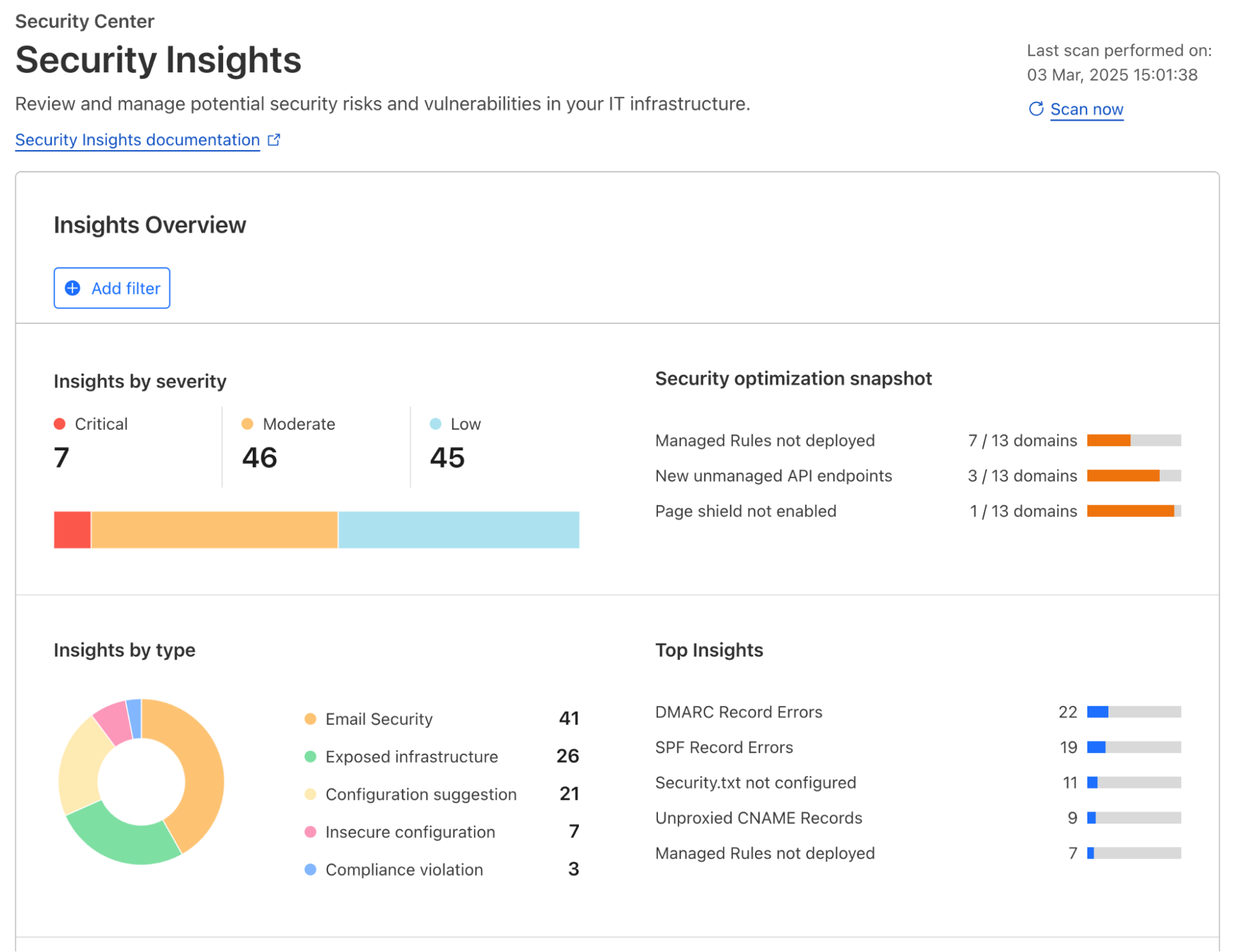
Regardless of the applications you have connected to Cloudflare’s global network, Cloudflare actively scans for risks and misconfigurations associated with each one of them on a regular cadence. Identified risks and misconfigurations are surfaced in the dashboard under Security Center as insights.

Insights are grouped by their severity, type of risks, and corresponding Cloudflare solution, providing various angles for you to zoom in to what you want to focus on. When applicable, a one-click resolution is provided for selected insight types, such as setting minimum TLS version to 1.2 which is recommended by PCI DSS. This simplicity is highly appreciated by customers that are managing a growing set of assets being deployed across the organization.

To help shorten the time to resolution even further, we have recently added role-based access control (RBAC) to Security Insights in the Cloudflare dashboard. Now for individual security practitioners, they have access to a distilled view of the insights that are relevant for their role. A user with an administrator role (a CSO, for example) has access to, and visibility into, all insights.

In addition to account-wide Security Insights, we also provide posture overviews that are closer to the corresponding security configurations of your SaaS and web applications. Let’s dive into each of them.

Securing your SaaS applications

Without centralized posture management, SaaS applications can feel like the security wild west. They contain a wealth of sensitive information – files, databases, workspaces, designs, invoices, or anything your company needs to operate, but control is limited to the vendor’s settings, leaving you with less visibility and fewer customization options. Moreover, team members are constantly creating, updating, and deleting content that can cause configuration drift and data exposure, such as sharing files publicly, adding PII to non-compliant databases, or giving access to third party integrations. With Cloudflare, you have visibility across your SaaS application fleet in one dashboard.

Posture findings across your SaaS fleet

From the account-wide Security Insights, you can review insights for potential SaaS security issues:

You can choose to dig further with Cloud Access Security Broker (CASB) for a thorough review of the misconfigurations, risks, and failures to meet best practices across your SaaS fleet. You can identify a wealth of security information including, but not limited to:

  • Publicly available or externally shared files

  • Third-party applications with read or edit access

  • Unknown or anonymous user access

  • Databases with exposed credentials

  • Users without two-factor authentication

  • Inactive user accounts

You can also explore the Posture Findings page, which provides easy searching and navigation across documents that are stored within the SaaS applications.

Additionally, you can create policies to prevent configuration drift in your environment. Prevention-based policies help maintain a secure configuration and compliance standards, while reducing alert fatigue for Security Operations teams, and these policies can prevent the inappropriate movement or exfiltration of sensitive data. Unifying controls and visibility across environments makes it easier to lock down regulated data classes, maintain detailed audit trails via logs, and improve your security posture to reduce the risk of breaches.

How it works: new, real-time SaaS documents discovery

Delivering SaaS security posture information to our customers requires collecting vast amounts of data from a wide range of platforms. In order to ensure that all the documents living in your SaaS apps (files, designs, etc.) are secure, we need to collect information about their configuration — are they publicly shared, do third-party apps have access, is multi-factor authentication (MFA) enabled? 

We previously did this with crawlers, which would pull data from the SaaS APIs. However, we were plagued with rate limits from the SaaS vendors when working with larger datasets. This forced us to work in batches and ramp scanning up and down as the vendors permitted. This led to stale findings and would make remediation cumbersome and unclear – for example, Cloudflare would be reporting that a file is still shared publicly for a short period after the permissions were removed, leading to customer confusion.

To fix this, we upgraded our data collection pipeline to be dynamic and real-time, reacting to changes in your environment as they occur, whether it’s a new security finding, an updated asset, or a critical alert from a vendor. We started with our Microsoft asset discovery and posture findings, providing you real-time insight into your Microsoft Admin Center, OneDrive, Outlook, and SharePoint configurations. We will be rapidly expanding support to additional SaaS vendors going forward.

Listening for update events from Cloudflare Workers

Cloudflare Workers serve as the entry point for vendor webhooks, handling asset change notifications from external services. The workflow unfolds as follows:

  • Webhook listener: An initial Worker acts as the webhook listener, receiving asset change messages from vendors.

  • Data storage & queuing: Upon receiving a message, the Worker uploads the raw payload of the change notification to Cloudflare R2 for persistence, and publishes it to a Cloudflare Queue dedicated to raw asset changes.

  • Transformation Worker: A second Worker, bound as a consumer to the raw asset change queue, processes the incoming messages. This Worker transforms the raw vendor-specific data into a generic format suitable for CASB. The transformed data is then:

    • Stored in Cloudflare R2 for future reference.

    • Published on another Cloudflare Queue, designated for transformed messages.

CASB Processing: Consumers & Crawlers

Once the transformed messages reach the CASB layer, they undergo further processing:

  • Polling consumer: CASB has a consumer that polls the transformed message queue. Upon receiving a message, it determines the relevant handler required for processing.

  • Crawler execution: The handler then maps the message to an appropriate crawler, which interacts with the vendor API to fetch the most up-to-date asset details.

  • Data storage: The retrieved asset data is stored in the CASB database, ensuring it is accessible for security and compliance checks.

With this improvement, we are now processing 10 to 20 Microsoft updates per second, or 864,000 to 1.72 million updates daily, giving customers incredibly fast visibility into their environment. Look out for expansion to other SaaS vendors in the coming months. 

Securing your web applications

A unique challenge of securing web applications is that no one size fits all. An asset-aware posture management bridges the gap between a universal security solution and unique business needs, offering tailored recommendations for security teams to protect what matters.

Posture overview from attacks to threats and risks

Starting today, all Cloudflare customers have access to Security Overview, a new landing page customized for each of your onboarded domains. This page aggregates and prioritizes security suggestions across all your web applications:

  1. Any (ongoing) attacks detected that require immediate attention

  2. Disposition (mitigated, served by Cloudflare, served by origin) of all proxied traffic over the last 7 days

  3. Summary of currently active security modules that are detecting threats

  4. Suggestions of how to improve your security posture with a step-by-step guide

  5. And a glimpse of your most active and lately updated security rules

These tailored security suggestions are surfaced based on your traffic profile and business needs, which is made possible by discovering your proxied web assets.

Discovery of web assets

Many web applications, regardless of their industry or use case, require similar functionality: user identification, accepting payment information, etc. By discovering the assets serving this functionality, we can build and run targeted threat detection to protect them in depth.

As an example, bot traffic towards marketing pages versus login pages have different business impacts. Content scraping may be happening targeting your marketing materials, which you may or may not want to allow, while credential stuffing on your login page deserves immediate attention.

Web assets are described by a list of endpoints; and labelling each of them defines their business goals. A simple example can be POST requests to path /portal/login, which likely describes an API for user authentication. While the GET requests to path /portal/login denote the actual login webpage.

To describe business goals of endpoints, labels come into play. POST requests to the /portal/login endpoint serving end users and to the /api/admin/login endpoint used by employees can both can be labelled using the same cf-log-in managed label, letting Cloudflare know that usernames and passwords would be expected to be sent to these endpoints.

API Shield customers can already make use of endpoint labelling. In early Q2 2025, we are adding label discovery and suggestion capabilities, starting with three labels, cf-log-in, cf-sign-up, and cf-rss-feed. All other customers can manually add these labels to the saved endpoints. One example, explained below, is preventing disposable emails from being used during sign-ups. 

Always-on threat detection and risk assessment

Use-case driven threat detection

Customers told us that, with the growing excitement around generative AI, they need support to secure this new technology while not hindering innovation. Being able to discover LLM-powered services allows fine-tuning security controls that are relevant for this particular technology, such as inspecting prompts, limit prompting rates based on token usage, etc. In a separate Security Week blog post, we will share how we build Cloudflare Firewall for AI, and how you can easily protect your generative AI workloads.

Account fraud detection, which encompasses multiple attack vectors, is another key area that we are focusing on in 2025.

On many login and signup pages, a CAPTCHA solution is commonly used to only allow human beings through, assuming only bots perform undesirable actions. Put aside that most visual CAPTCHA puzzles can be easily solved by AI nowadays, such an approach cannot effectively solve the root cause of most account fraud vectors. For example, human beings using disposable emails to sign up single-use accounts to take advantage of signup promotions.

To solve this fraudulent sign up issue, a security rule currently under development could be deployed as below to block all attempts that use disposable emails as a user identifier, regardless of whether the requester was automated or not. All existing or future cf-log-in and cf-sign-up labelled endpoints are protected by this single rule, as they both require user identification.

Our fast expanding use-case driven threat detections are all running by default, from the first moment you onboarded your traffic to Cloudflare. The instant available detection results can be reviewed through security analytics, helping you make swift informed decisions.

API endpoint risk assessment

APIs have their own set of risks and vulnerabilities, and today Cloudflare is delivering seven new risk scans through API Posture Management. This new capability of API Shield helps reduce risk by identifying security issues and fixing them early, before APIs are attacked. Because APIs are typically made up of many different backend services, security teams need to pinpoint which backend service is vulnerable so that development teams may remediate the identified issues.

Our new API posture management risk scans do exactly that: users can quickly identify which API endpoints are at risk to a number of vulnerabilities, including sensitive data exposure, authentication status, Broken Object Level Authorization (BOLA) attacks, and more.

Authentication Posture is one risk scan you’ll see in the new system. We focused on it to start with because sensitive data is at risk when API authentication is assumed to be enforced but is actually broken. Authentication Posture helps customers identify authentication misconfigurations for APIs and alerts of their presence. This is achieved by scanning for successful requests against the API and noting their authentication status. API Shield scans traffic daily and labels API endpoints that have missing and mixed authentication for further review.

For customers that have configured session IDs in API Shield, you can find the new risk scan labels and authentication details per endpoint in API Shield. Security teams can take this detail to their development teams to fix the broken authentication.

We’re launching today with scans for authentication posture, sensitive data, underprotected APIs, BOLA attacks, and anomaly scanning for API performance across errors, latency, and response size.

Simplify maintaining a good security posture with Cloudflare

Achieving a good security posture in a fast-moving environment requires innovative solutions that can transform complexity into simplicity. Bringing together the ability to continuously assess threats and risks across both public and private IT environments through a single platform is our first step in supporting our customers’ efforts to maintain a healthy security posture.

To further enhance the relevance of security insights and suggestions provided and help you better prioritize your actions, we are looking into integrating Cloudflare’s global view of threat landscapes. With this, you gain additional perspectives, such as what the biggest threats to your industry are, and what attackers are targeting at the current moment. Stay tuned for more updates later this year.

If you haven’t done so yet, onboard your SaaS and web applications to Cloudflare today to gain instant insights into how to improve your business’s security posture.

❌
❌