Visualização normal

Antes de ontemStream principal
  • ✇Malwarebytes
  • Update WhatsApp now: Two new flaws could expose you to malicious files
    Meta has published a new security advisory for messaging app WhatsApp, announcing patches for two vulnerabilities. WhatsApp has fixed two security flaws that could be abused to interfere with how media and attachments are handled on your device. There is no evidence that either bug has been exploited in the wild. These bugs don’t automatically infect devices, but they lower the barrier for social engineering and could be chained with other vulnerabilities for more serious attacks. Mali
     

Update WhatsApp now: Two new flaws could expose you to malicious files

5 de Maio de 2026, 08:39

Meta has published a new security advisory for messaging app WhatsApp, announcing patches for two vulnerabilities.

WhatsApp has fixed two security flaws that could be abused to interfere with how media and attachments are handled on your device. There is no evidence that either bug has been exploited in the wild.

These bugs don’t automatically infect devices, but they lower the barrier for social engineering and could be chained with other vulnerabilities for more serious attacks.

Malicious messages

The first issue, tracked as CVE‑2026‑23866, affects how WhatsApp processes AI‑generated “rich response messages” that embed Instagram Reels. On affected iOS and Android versions, incomplete validation means a specially crafted message could cause the app to load media from an attacker‑controlled URL. In some cases, this could trigger operating system‑level custom URL scheme handlers.

In other words: a booby‑trapped message could prompt your device to open content from an untrusted source.

How to update WhatsApp for Android

You can easily update WhatsApp from the Google Play Store.

  1. Open the Google Play Store
  2. Search for WhatsApp Messenger
  3. Tap Update

Note: Updates may not be available immediately in all regions.

How to update WhatsApp on iOS

To update WhatsApp on iOS:

  • Open the App Store
  • Tap your profile icon
  • Scroll to find WhatsApp and tap Update

If it’s not listed, search for WhatsApp to check if an “Update” button is available.

Misleading filenames

The second bug, CVE‑2026‑23863, affects WhatsApp for Windows before version 2.3000.1032164386.258709.

In this case, WhatsApp did not correctly handle filenames containing embedded NUL bytes. This could allow a file to appear as a harmless type in the interface while actually being treated as an executable when opened. That’s a classic recipe for social engineering: “click the PDF,” but get an .exe file.

How to update WhatsApp for Windows

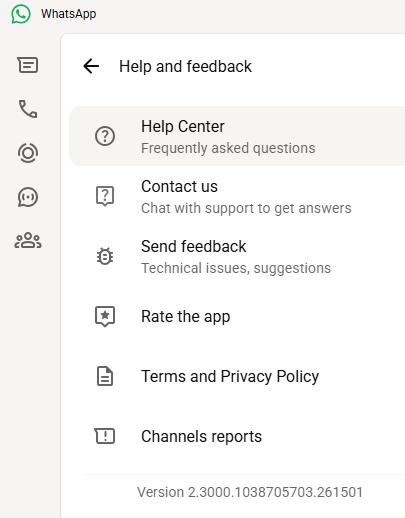
You can find your WhatsApp for Windows version number by clicking on your profile picture and selecting Help and feedback.

Version 2.3000.1038705703.261501

If your version number is earlier than 2.3000.1032164386.258709, update via the Microsoft Store:

  1. Click the Start menu and search for Microsoft Store to open it
  2. Click Library located at the bottom-left corner
  3. Find WhatsApp Desktop
  4. Click Get Updates or Update

Once installed, restart the app to apply the changes.

Automatic updates on Windows

My WhatsApp was already up to date because I have automatic updates turned on. Here’s how to turn it on:

  1. Click the Start menu and search for Microsoft Store to open it
  2. Select Profile (your account picture) > Settings
  3. Make sure App updates is toggled to On
Auto updates on Windows

Scammers don’t need to hack you. They just need you to click once. 

Malwarebytes Identity Theft Protection catches suspicious activity before it becomes a problem.

  • ✇Malwarebytes
  • Actively exploited cPanel bug exposes millions of websites to takeover
    Security researchers are warning about a newly discovered vulnerability in the widely used web server management software cPanel and WebHost Manager (WHM).  This is a critical, actively exploited authentication-bypass bug in cPanel/WHM that lets attackers gain administrative access to the interface without credentials, potentially take over servers and all hosted sites. The vulnerability, tracked as CVE-2026-41940, has been added to the Known Exploited Vulnerabilities catalog by the Cybers
     

Actively exploited cPanel bug exposes millions of websites to takeover

1 de Maio de 2026, 07:48

Security researchers are warning about a newly discovered vulnerability in the widely used web server management software cPanel and WebHost Manager (WHM). 

This is a critical, actively exploited authentication-bypass bug in cPanel/WHM that lets attackers gain administrative access to the interface without credentials, potentially take over servers and all hosted sites.

The vulnerability, tracked as CVE-2026-41940, has been added to the Known Exploited Vulnerabilities catalog by the Cybersecurity and Infrastructure Security Agency (CISA), meaning there is evidence it is being used in real-world attacks.

Because cPanel/WHM is used by over a million sites worldwide, including banks and health organizations, the potential impact is huge. In simple terms, the bug can act like a front‑door key to a big chunk of the web’s hosting infrastructure.

cPanel released patches on April 28, 2026, and urged all customers and hosts to update. It said all supported versions after 11.40 are affected, including DNSOnly and WP Squared.

Hosting providers including Namecheap, HostGator, and KnownHost temporarily blocked access to cPanel interfaces while patching, treating this as a critical authentication bypass and reporting exploit attempts going back to late February 2026.

How to stay safe

While it’s up to the hosting companies and website owners to patch as quickly as possible, there are ways to reduce your risk if a site you use is compromised.

As always, limit the data you share with websites to what’s absolutely necessary. Data they don’t have can’t be stolen.

When ordering from an online retailer, don’t tick the box to save your card details for future purchases as they will be stored on the server.

If there’s an option to check out as a guest, use it. It reduces the amount of personal data tied to an account.

Don’t reuse passwords. When one site is compromised, having the same credentials in several places turns it into a multi‑account takeover problem. A password manager can help you create complex unique passphrases, and remember them for you.

Where possible, pay by credit card. In many regions, this gives you stronger fraud protection.


Personal Data Remover

Your details are probably already for sale. 


When a site you trust gets hacked

If you think you’ve been affected by a data breach, take the following steps:

  • Check the company’s advice. Every breach is different, so check with the company to find out what’s happened and follow any specific advice it offers.
  • Change your password. You can make a stolen password useless to thieves by changing it. Choose a strong password that you don’t use for anything else. Better yet, let a password manager choose one for you.
  • Enable two-factor authentication (2FA). If you can, use a FIDO2-compliant hardware key, laptop, or phone as your second factor. Some forms of 2FA can be phished just as easily as a password, but 2FA that relies on a FIDO2 device can’t be phished.
  • Watch out for impersonators. The thieves may contact you posing as the breached platform. Check the official website to see if it’s contacting victims and verify the identity of anyone who contacts you using a different communication channel.
  • Take your time. Phishing attacks often impersonate people or brands you know, and use themes that require urgent attention, such as missed deliveries, account suspensions, and security alerts.
  • Consider not storing your card details. It’s definitely more convenient to let sites remember your card details, but it increases risk if a retailer suffers a breach.
  • Set up identity monitoring, which alerts you if your personal information is found being traded illegally online and helps you recover after.

What do cybercriminals know about you?

Use Malwarebytes’ free Digital Footprint scan to see whether your personal information has been exposed online.

  • ✇Malwarebytes
  • Microsoft won’t patch PhantomRPC: Feature or bug?
    A researcher has discovered a weakness called PhantomRPC that Microsoft does not consider a vulnerability it plans to patch. PhantomRPC involves Windows Remote Procedure Call (RPC), the core of communication between Windows processes. The vulnerability lets a process with impersonation rights escalate to SYSTEM by impersonating high‑privileged clients that connect to a fake RPC server. The researcher presented a detailed technical report outlining five exploitation paths, including coerci
     

Microsoft won’t patch PhantomRPC: Feature or bug?

29 de Abril de 2026, 10:27

A researcher has discovered a weakness called PhantomRPC that Microsoft does not consider a vulnerability it plans to patch.

PhantomRPC involves Windows Remote Procedure Call (RPC), the core of communication between Windows processes. The vulnerability lets a process with impersonation rights escalate to SYSTEM by impersonating high‑privileged clients that connect to a fake RPC server.

The researcher presented a detailed technical report outlining five exploitation paths, including coercion, user interaction, or background services. They warned that potential vectors are “effectively unlimited” because the root issue is architectural.

Microsoft, however, classified the issue as “moderate,” refused a bounty, declined to assign a CVE (a spot in the list of Common Vulnerabilities and Exposures), and closed the case without tracking. Its position is that the technique requires an already‑compromised machine and does not provide unauthenticated or remote access.

Experts disagreed with Microsoft’s assessment. Their concern is that Microsoft is downplaying a systemic local privilege escalation technique that exists in all supported Windows versions.

The issue

At the core of this issue is that the Windows RPC runtime does not sufficiently verify that the server a high‑privileged client connects to is the intended legitimate endpoint.

If a legitimate RPC server is not reachable (for example because the service stopped, was misconfigured, not installed, or due to a race condition), an attacker with SeImpersonatePrivilege can spin up a fake RPC server that “fills the gap” using the same interface and endpoint.

When a SYSTEM or high‑privileged client connects to this fake server, using an impersonation level that allows the server to impersonate the client, the attacker can call RpcImpersonateClient and immediately escalate their privileges to SYSTEM.

From Microsoft’s perspective, the ability to run a rogue RPC server in this way falls under the category of “already compromised.”

SeImpersonatePrivilege

To understand the issue better, we need to dig into what SeImpersonatePrivilege does.

Basically, SeImpersonatePrivilege is the Windows permission that lets a program “pretend to be you” after you’ve already logged in, so it can do things on your behalf using your level of access.

It’s needed because many system services and server‑type apps (file sharing, RPC servers, COM servers, web apps) have to perform actions on behalf of a user, like reading their files or applying group policy.

If an attacker gains this privilege, they can create a fake service or server and wait for a more powerful account to talk to it. When that high‑privilege service connects, the attacker can grab its security token and impersonate it, effectively upgrading from an account with lower privileges to full SYSTEM control on that machine.

Protection

A Microsoft spokesperson provided the following statement:

“This technique requires an already-compromised machine and does not grant unauthenticated or remote access. Any update is a balance between existing compatibility and customer risk, and we remain committed to continually hardening our products. We recommend customers follow security best practices, including limiting administrative privileges and applying the principle of least privilege.”

In our opinion, mitigating PhantomRPC properly would require deep changes to the RPC architecture, which is hard to do on existing Windows versions without breaking compatibility. It’s maybe something we’ll see in future versions, given the scale of change needed.

What you can do:

  • As PhantomRPC is a piece in a larger chain, it is still very important to keep Windows updated.
  • Use your admin account sparingly and only for the tasks that need that kind of privilege.
  • Use an up-to-date, real-time anti-malware solution that can detect and block suspicious privilege‑escalation activity.
  • Avoid disabling or “hardening” services blindly since a malicious service might step in their place.

To answer the question in the title: it looks like a “feature” that can be abused in many ways; one that has outlived its original threat model. Defenders have to treat them as ongoing risks, rather than one‑off CVEs.


CNET Editors' Choice Award 2026

“One of the best cybersecurity suites on the planet.” 

According to CNET. Read their review


Apple fixes iOS bug that kept deleted notifications, including chat previews

23 de Abril de 2026, 07:27

A vulnerability in iPhones and iPads allowed law enforcement to recover deleted notifications, including Signal message previews.

The post Apple fixes iOS bug that kept deleted notifications, including chat previews appeared first on Security Boulevard.

  • ✇Malwarebytes
  • Apple fixes iOS bug that kept deleted notifications, including chat previews
    Apple has released a software update that deals with an issue that could allow deleted notifications to be retrieved. Something that, in at least one reported case, was used by law enforcement during forensic analysis. Apple fixed the issue in iOS and iPadOS versions 18.7.8 and 26.4.2 (check availability for your device at those links). The update deals with a singular security vulnerability, tracked as CVE-2026-28950. Although the description is brief—“a logging issue was addressed with
     

Apple fixes iOS bug that kept deleted notifications, including chat previews

23 de Abril de 2026, 07:27

Apple has released a software update that deals with an issue that could allow deleted notifications to be retrieved. Something that, in at least one reported case, was used by law enforcement during forensic analysis.

Apple fixed the issue in iOS and iPadOS versions 18.7.8 and 26.4.2 (check availability for your device at those links). The update deals with a singular security vulnerability, tracked as CVE-2026-28950.

Although the description is brief—“a logging issue was addressed with improved data redaction”—the impact points us in the right direction.

“Notifications marked for deletion could be unexpectedly retained on the device.”

This suggests that Apple’s bug was that iOS kept copies of notification content in an internal database for longer than intended, even after the messages “disappeared” or the app was uninstalled. In a case reported by 404 Media, law enforcement was able to recover those notifications using standard forensic tools once they had access to the unlocked device. The example in that reported case involved Signal.


Mobile protection, anywhere, anytime.


A response on X by Signal states:

“The FBI was able to forensically extract copies of incoming Signal messages from a defendant’s iPhone, even after the app was deleted, because copies of the content were saved in the device’s push notification database.”

Before we go into the update process, you may want to know that you can mute or hide notifications in Signal, which also protects them from prying eyes. In Signal, open your Settings and tap on Notifications. You can adjust several settings there. For example, I have mine set so I only see the name of the sender.

Install the update

For iOS and iPadOS users, you can check if you’re using the latest software version by going to Settings > General > Software Update. It’s also worth turning on Automatic Updates if you haven’t already. You can do that on the same screen.

Update settings on iPad

Scammers know more about you than you think. 

Malwarebytes Mobile Security protects you from phishing, scam texts, malicious sites, and more. With real-time AI-powered Scam Guard built right in. 

Download for iOS → Download for Android → 

April Patch Tuesday fixes two zero-days, including one under active attack

15 de Abril de 2026, 06:57

This month’s Patch Tuesday addresses 167 vulnerabilities, including two zero-days that could lead to system compromise, data exposure, and privilege escalation.

The post April Patch Tuesday fixes two zero-days, including one under active attack appeared first on Security Boulevard.

  • ✇Malwarebytes
  • April Patch Tuesday fixes two zero-days, including one under active attack
    This month’s patch Tuesday looks to remediate 167 security vulnerabilities including two zero-day vulnerabilities, one of which is known to be actively exploited in the wild. This makes April one of those months where “Patch Tuesday” looks more like “patch the entire stack,” from servers and endpoints to network gear, browsers, and mobile devices. But the alternative is leaving a long list of well‑documented doors open for attackers to walk through. Microsoft defines a zero-day as “a flaw
     

April Patch Tuesday fixes two zero-days, including one under active attack

15 de Abril de 2026, 06:57

This month’s patch Tuesday looks to remediate 167 security vulnerabilities including two zero-day vulnerabilities, one of which is known to be actively exploited in the wild.

This makes April one of those months where “Patch Tuesday” looks more like “patch the entire stack,” from servers and endpoints to network gear, browsers, and mobile devices. But the alternative is leaving a long list of well‑documented doors open for attackers to walk through.

Microsoft defines a zero-day as “a flaw in software for which no official patch or security update is available yet.” In this case, one being actively exploited and the other is publicly disclosed, which makes both high priorities on your to-do list.

So, let’s have a look at those two zero-days.

The vulnerability tracked as CVE-2026-32201 (CVSS score 6.5 out of 10)  is an improper input validation issue in Microsoft Office SharePoint that allows an unauthorized attacker to perform spoofing over a network.

An attacker who successfully exploited this vulnerability could view some sensitive information, and make changes to disclosed information, but cannot limit access to the resource. In simple terms, it could be used to spread false information in a trusted SharePoint environment. This vulnerability is being exploited in the wild.

The second zero-day this month, tracked as CVE-2026-33825 with a CVSS score of 7.8 out of 10, is an elevation of privilege (EoP) vulnerability in Microsoft Defender’s anti-malware platform. It allows a local attacker to escalate their privileges to SYSTEM, effectively giving them the keys to the kingdom on the affected system. Once at that level, an attacker can disable security tools, install persistent malware, harvest credentials, and move laterally to other systems in the same network. This vulnerability is publicly disclosed, which often lowers the barrier for cybercriminals to start exploiting it.

In addition, BleepingComputer warns:

“Microsoft has also fixed multiple remote code execution bugs in Microsoft Office (Word and Excel) that can be executed via the preview pane or by opening malicious documents. Therefore, users should prioritize updating Microsoft Office as soon as possible, especially if they commonly receive attachments.”

How to apply fixes and check if you’re protected

These updates fix security problems and keep your Windows PC protected. Here’s how to make sure you’re up to date:

1. Open Settings

  • Click the Start button (the Windows logo at the bottom left of your screen).
  • Click on Settings (it looks like a little gear).

2. Go to Windows Update

  • In the Settings window, select Windows Update (usually at the bottom of the menu on the left).

3. Check for updates

  • Click the button that says Check for updates.
  • Windows will search for the latest Patch Tuesday updates.
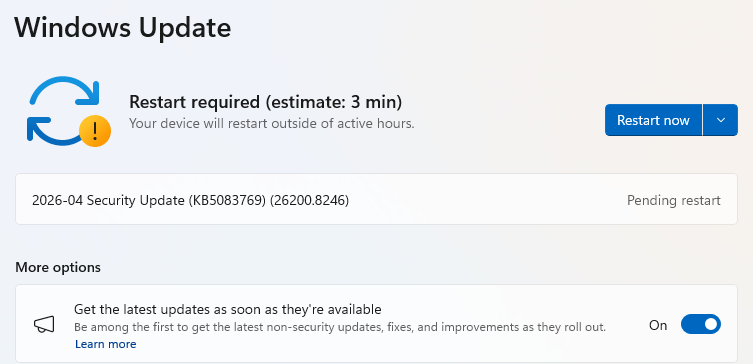
  • If you have selected to get the latest updates as soon as they’re available, you may see this under More options.
  • In which case you may see a Restart required message. Restart your system and the update will complete.
    Restart required
  • If not, continue with the steps below.

4. Download and Install If updates are found, they’ll start downloading automatically. Once complete, you’ll see a button that says Install or Restart now.

  • Click Install if needed and follow any prompts. Your computer will usually need a restart to finish the update. If it does, click Restart now.

5. Double-check you’re up to date

  • After restarting, go back to Windows Update and check again. If it says You’re up to date, you’re all set!
Windows up to date

We don’t just report on threats—we remove them

Cybersecurity risks should never spread beyond a headline. Keep threats off your devices by downloading Malwarebytes today.

Simply opening a PDF could trigger this Adobe Reader zero-day

13 de Abril de 2026, 08:38

Even though it’s patched, Adobe confirmed it was exploited in the wild, so updating is urgent, not optional.

The post Simply opening a PDF could trigger this Adobe Reader zero-day appeared first on Security Boulevard.

  • ✇Malwarebytes
  • Simply opening a PDF could trigger this Adobe Reader zero-day
    Opening the wrong PDF in Adobe Reader was enough to let criminals quietly spy on your computer and unleash more attacks, even though everything looked normal. A researcher analyzed a malicious PDF and found that it abused a previously unknown flaw (a “zero‑day”) in Adobe Acrobat Reader. When a victim simply opens this PDF, hidden code inside it can read files that Acrobat Reader should not be allowed to access and send them to an attacker’s server. Some tests show that it allows attackers
     

Simply opening a PDF could trigger this Adobe Reader zero-day

13 de Abril de 2026, 08:38

Opening the wrong PDF in Adobe Reader was enough to let criminals quietly spy on your computer and unleash more attacks, even though everything looked normal.

A researcher analyzed a malicious PDF and found that it abused a previously unknown flaw (a “zero‑day”) in Adobe Acrobat Reader.

When a victim simply opens this PDF, hidden code inside it can read files that Acrobat Reader should not be allowed to access and send them to an attacker’s server. Some tests show that it allows attackers to pull in additional malicious code from a remote server and run it on the victim’s machine, potentially escaping Adobe’s sandbox protections.

In its security bulletin, Adobe acknowledges that the vulnerability tracked as CVE-2026-34621, is being exploited in the wild.

The issue impacts the following products and versions for both Windows and macOS:

  • Acrobat DC versions 26.001.21367 and earlier (fixed in 26.001.21411)
  • Acrobat Reader DC versions 26.001.21367 and earlier (fixed in 26.001.21411)
  • Acrobat 2024 versions 24.001.30356 and earlier (fixed in 24.001.30362 for Windows and 24.001.30360 for macOS)

Exploitation requires you to open a malicious PDF, but nothing more. No extra clicks or permissions are needed. The researcher found malicious samples using this exploit dating back to November 11, 2025.

Testing showed that a successful exploitation can:

  • Pull in JavaScript from a remote server and execute it inside Adobe Reader.
  • Steal arbitrary local files and send them out, proving real‑world data theft is possible even without a full remote code execution chain.

How to stay safe

The easiest way to stay safe is to install the emergency update.

The latest product versions are available to end users via one of the following methods:    

  • Manually: Go to Help > Check for updates
  • Automatically: Updates install without user intervention when detected
  • Direct download: Available from the Acrobat Reader Download Center

For IT administrators (managed environments):

  • Refer to the relevant release notes for installer links
  • Deploy updates using AIP-GPO, bootstrapper, SCUP/SCCM (Windows), or Apple Remote Desktop/SSH (macOS)

If you’re unable or unwilling to update right away:

  • Be extra cautious with PDFs from unknown senders or unexpected attachments, even after patching, as attackers may pivot to new variants.
  • Use an up-to-date, real-time anti-malware solution to block known malicious servers and detect malware and exploits.
  • Carefully monitor all HTTP/HTTPS traffic for the  “Adobe Synchronizer” string in the User Agent field.

We don’t just report on threats—we remove them

Cybersecurity risks should never spread beyond a headline. Keep threats off your devices by downloading Malwarebytes today.

Meet Khaled Mohamed: the bug hunter who found a Microsoft flaw

25 de Março de 2026, 06:57

We talked to Khaled Mohamed on going from script kiddie to bug bounty hunter, and the moment he uncovered a flaw in Microsoft Authenticator.

The post Meet Khaled Mohamed: the bug hunter who found a Microsoft flaw appeared first on Security Boulevard.

  • ✇Malwarebytes
  • Meet Khaled Mohamed: the bug hunter who found a Microsoft flaw
    It’s only on rare occasions that anyone pays attention to the acknowledgment section of a vulnerability disclosure. But for the person who found the bug, it’s often the conclusion of hours of work, trial and error, searching for recognition, and finally seeing the vulnerability get patched. Bug hunters are doing us all a huge favor when they responsibly disclose a vulnerability to the vendor. This week we talked to Khaled Mohamed, the bug bounty hunter who found CVE-2026-26123, a flaw in M
     

Meet Khaled Mohamed: the bug hunter who found a Microsoft flaw

25 de Março de 2026, 06:57

It’s only on rare occasions that anyone pays attention to the acknowledgment section of a vulnerability disclosure.

But for the person who found the bug, it’s often the conclusion of hours of work, trial and error, searching for recognition, and finally seeing the vulnerability get patched. Bug hunters are doing us all a huge favor when they responsibly disclose a vulnerability to the vendor.

This week we talked to Khaled Mohamed, the bug bounty hunter who found CVE-2026-26123, a flaw in Microsoft Authenticator for both iOS and Android, where, in some cases, another app on your phone could steal or misuse your sign‑in codes.

Q: Tell us a little bit about yourself. How did you end up in cybersecurity?

Khaled Mohamed

A: I’m Khaled Mohamed, a 23-year-old security engineer and I’m also an active bug bounty hunter. I’ve been listed in the Halls of Fame of several major companies, including Google, GitHub, LinkedIn, Mastercard, Starbucks, and Vimeo. I find it incredibly rewarding to identify significant security issues for some of the most renowned organizations in the world. There’s an amazing feeling that comes with fixing a vulnerability that could have seriously impacted countless users.

My journey into cybersecurity started in a tough and unconventional way.

I was that kid who loved to explore and break things. Eventually, I became a “script kiddie.” I still remember the thrill of knocking my neighbor’s Wi-Fi offline with a simple script and thinking I ruled the world.

From there, I began learning about cybersecurity, especially web security—how websites can be broken, and how to secure them.

When I was 15, I got my first freelance project: web application penetration testing. I completely failed to find any real vulnerabilities, but that experience was a turning point. It pushed me to discover the real science behind cybersecurity. I went on to pursue a degree in Computer Science, and I’m still learning every day. There’s truly no end to it.

I think many people in this field share a similar story. At its core, curiosity is what keeps us moving forward.

Q: Did you set out to find a vulnerability in Authenticator, or did something unusual catch your attention?

A: As I mentioned earlier, I’m a bug bounty hunter, though I wasn’t specifically targeting Microsoft Authenticator at the time. I just happened to notice something unusual in the way the app handled deep links and sign-in flows on mobile devices. When you tap a sign-in link or scan a QR code, the operating system prompts you to “Open Link.”

That made me curious. What would happen if a different app intercepted that action? The more I investigated and experimented, the clearer it became that there was a genuine security issue. Pulling at that thread eventually led me to discover and report CVE-2026-26123.

Q: What surprised you the most about the Authenticator vulnerability?

A: CVE-2026-26123 could lead to a full account takeover in a surprisingly simple way. If a malicious application was installed on the device, and the user scanned a sign-in QR code using the phone’s built-in scanner, their account could effectively be taken over. Even advanced protections such as two-factor authentication (2FA) could be bypassed, leaving all associated Microsoft accounts completely compromised.

The potential real-world impact on multi-factor authentication and passwordless sign-in flows was significant, and that genuinely surprised me.

Q: What advice would you give to aspiring bug hunters or anyone starting out in cybersecurity?

A: Always think like an attacker and train your mindset to identify the potential impact behind every action. Your technical knowledge is just a tool: use it to achieve the impact you’ve envisioned.

Test everything yourself. Don’t assume something is secure just because others have tested it before. Think deeply about how things might still be vulnerable, then work to prove or disprove your assumptions through hands-on testing.

Q: What do you think is the most common mistake made in cybersecurity?

A: One of the most common—and most dangerous—mistakes in cybersecurity is underestimating the real threat level. Many organizations still believe that cyberattacks are rare events or that attackers primarily target large, well-known corporations. In reality, every company, regardless of size or reputation, can become a target.

Q: Is there anything else you’d like to share with our audience?

A: I want people to know that responsible disclosure works. Microsoft responded through their Coordinated Vulnerability Disclosure program, and the patch was released as part of the March 10, 2026 security update, meaning users are now protected.

This process—a researcher discovers an issue, reports it responsibly, and the vendor fixes it—is what keeps the entire ecosystem safer over time. If you find a vulnerability, report it. Don’t sit on it.

We’d like to thank Khaled Mohamed for his time and wish him all the best in his future endeavors.

Microsoft acknowledgement for Khaled Mohamed

We don’t just report on phone security—we provide it

Cybersecurity risks should never spread beyond a headline. Keep threats off your mobile devices by downloading Malwarebytes for iOS, and Malwarebytes for Android today.

Apple patches WebKit bug that could let sites access your data

18 de Março de 2026, 08:19

Apple has released a Background Security Improvement that silently fixes a WebKit vulnerability (CVE-2026-20643).

The post Apple patches WebKit bug that could let sites access your data appeared first on Security Boulevard.

  • ✇Malwarebytes
  • Apple patches WebKit bug that could let sites access your data
    Apple has released a Background Security Improvement to patch a flaw that could allow malicious websites to bypass browser protections and access data from other sites. What is it? The patched WebKit vulnerability is described as: “A cross-origin issue in the Navigation API was addressed with improved input validation.” WebKit vulnerabilities refer to security flaws in Apple’s web rendering engine, which powers Safari, Mail, and the App Store on iOS and macOS. What this means is
     

Apple patches WebKit bug that could let sites access your data

18 de Março de 2026, 08:19

Apple has released a Background Security Improvement to patch a flaw that could allow malicious websites to bypass browser protections and access data from other sites.

What is it?

The patched WebKit vulnerability is described as:

“A cross-origin issue in the Navigation API was addressed with improved input validation.”

WebKit vulnerabilities refer to security flaws in Apple’s web rendering engine, which powers Safari, Mail, and the App Store on iOS and macOS.

What this means is that the CVE-2026-20643 vulnerability makes it possible for a malicious website to pretend to be another site, maybe one you trust, and then read or steal information that should be kept separate. Normally, browsers enforce a rule called the “same‑origin policy,” which is like a strict fence that stops one site from peeking into another site’s data. This bug could help cybercriminals cut through that fence.

In practical terms, an attacker would first have to lure you to a specially crafted web page. If you visited it, that page could try to bypass the normal isolation between sites and access things it should not see, such as data from another tab or embedded content from a different service.

Attackers do not currently appear to exploit this flaw in the wild, but they like to chain issues like this with other bugs to steal accounts or sensitive data, which likely prompted Apple to ship it as a Background Security Improvement. Apple’s fix tightens how WebKit checks and handles cross‑site navigation.

What to do

This patch for a WebKit vulnerability, tracked as CVE-2026-20643, installs on top of versions 26.3.1/26.3.2 and not as a separate full OS version. Background Security Improvements are only available on the latest OS branch (26.x) and apply silently in the background if you’re on the latest version.

For iOS and iPadOS users, you can check if you’re using the latest software version by  going to Settings > General > Software Update. It’s also worth turning on Automatic Updates if you haven’t already. You can do that on the same screen.

For macOS Tahoe users, you can find out if you’re on the latest 26.3 version from the Apple menu. In the upper-left corner of your screen, choose About This Mac. The information shown there includes the macOS name and version number. If you need to know the build number as well, click the version number to see it.

This Background Security Improvement is only available for Mac users running Tahoe 26.3.1 and MacBook Neo users running 26.3.2.

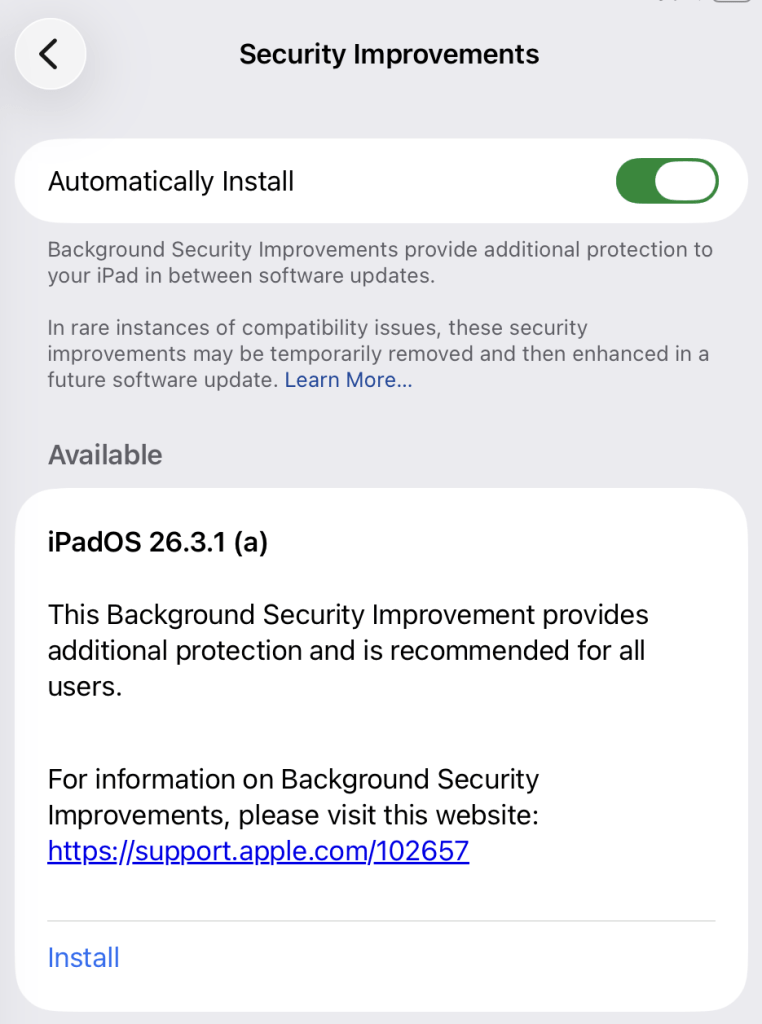
All users have to do is to check if they have the Background Security Improvements option set to enabled.

For iPhone and iPad users, this setting can be found under Privacy & Security, where you can scroll down and look for the Background Security Improvements toggle.

Automatically install security improvements

On a Mac (macOS Tahoe 26.3.+ only), you can check by following these instructions:

  1. Click the Apple menu > System Settings.
  2. In the sidebar, click Privacy & Security.
  3. Scroll down on the right and click Background Security Improvements.
  4. Make sure Automatically Install is turned on. If it’s off, the Mac won’t get Background Security Improvements until the fixes are rolled into a later full update.

The Install option in my screenshot means that you can speed up the process by clicking it. But it’s fine to wait until it happens automatically.

After the update, your OS version should show 26.3.1 (a), except for MacBook Neos which should be at 26.3.2 (a).


We don’t just report on phone security—we provide it

Cybersecurity risks should never spread beyond a headline. Keep threats off your mobile devices by downloading Malwarebytes for iOS, and Malwarebytes for Android today.

  • ✇Malwarebytes
  • Zombie ZIP method can fool antivirus during the first scan
    A researcher published “Zombie ZIP,” a simple way to change the first part (header) of a ZIP file so it falsely claims its contents are uncompressed while they are actually compressed. Many antivirus products trust that header and never properly decompress or inspect the real payload. In tests conducted about a week after disclosure, around 60 of 63 common antivirus suites failed to detect malware hidden this way—roughly 95% of engines let it pass. Zombie ZIP is essentially a method to cre
     

Zombie ZIP method can fool antivirus during the first scan

16 de Março de 2026, 13:09

A researcher published “Zombie ZIP,” a simple way to change the first part (header) of a ZIP file so it falsely claims its contents are uncompressed while they are actually compressed.

Many antivirus products trust that header and never properly decompress or inspect the real payload. In tests conducted about a week after disclosure, around 60 of 63 common antivirus suites failed to detect malware hidden this way—roughly 95% of engines let it pass.

Zombie ZIP is essentially a method to create a malformed ZIP file that can bypass detection by most antivirus scanners. The technique has a major caveat, though. The malformed ZIP file requires a custom loader to open it correctly. Any normal archive utility like the built-in Windows extractor, 7-zip, WinRAR, and others will also flag the file as malformed.

The vulnerability is tracked as CVE-2026-0866, although several cybersecurity researchers dispute whether it should be categorized as a vulnerability or assigned a CVE at all. The fact that it requires a custom loader makes it almost impossible for this method to infect a system that is not already compromised.

It still allows anti-malware solutions to detect both the custom loader and any known malware once the payload is properly decompressed. In other words, the bypass only affects the initial inspection of the ZIP file, not the actual execution of already known malware.

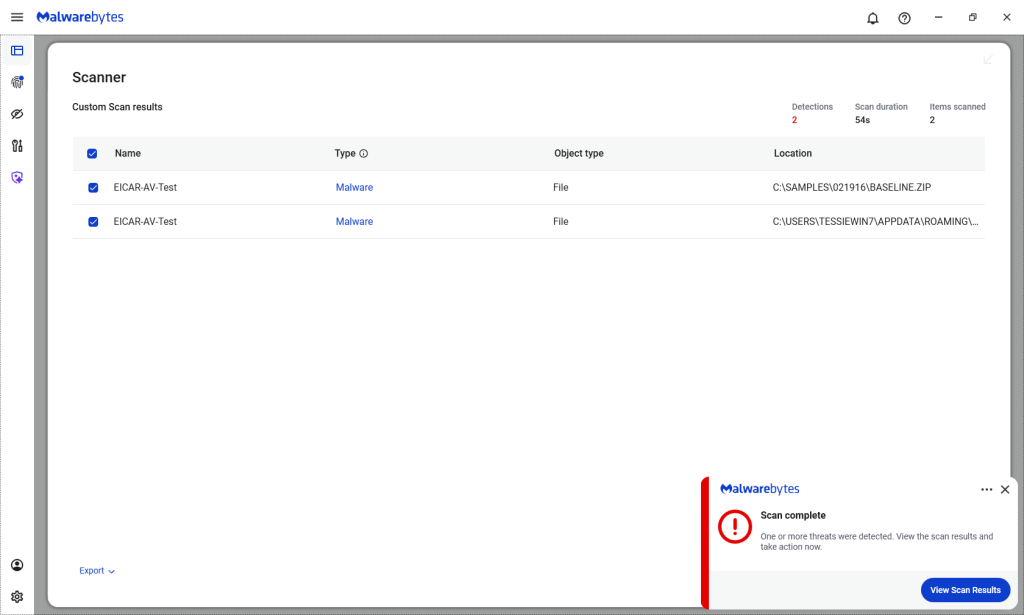
Malwarebytes/ThreatDown products detected both files, by the way.

Malwarebytes detects Zombie ZIPs

Technical details

On their GitHub page (currently blocked by Malwarebytes Browser Guard due to a risky pattern), the researchers explain how the Zombie ZIP method works.

By changing the file’s compressiontype to 0 (STORED), tools trying to read the archive assume the file’s contents are simply stored inside the ZIP file and not compressed.

“AV engines trust the ZIP Method field. When Method=0 (STORED), they scan the data as raw uncompressed bytes. But the data is actually DEFLATE compressed — so the scanner sees compressed noise and finds no signatures.

The CRC is set to the uncompressed payload’s checksum, creating an additional mismatch that causes standard extraction tools (7-Zip, unzip, WinRAR) to report errors or extract corrupted output.

However, a purpose-built loader that ignores the declared method and decompresses as DEFLATE recovers the payload perfectly.

The vulnerability is scanner evasion: security controls assert ‘no malware present’ while malware is present and trivially recoverable by attacker tooling.”

Security researcher Didier Stevens published a method to safely examine the content of a malformed Zombie ZIP file. One way to spot the manipulation is by comparing the ZIP header fields compressedsize and uncompressedsize. If they are different, that means the ZIP file is not actually STORED, but compressed.


We don’t just report on threats—we remove them

Cybersecurity risks should never spread beyond a headline. Keep threats off your devices by downloading Malwarebytes today.

  • ✇Malwarebytes
  • A week in security (March 9 – March 15)
    Last week on Malwarebytes Labs: Watch out for fake Malwarebytes renewal notices in your calendar Google patches two Chrome zero-days under active attack. Update now Attackers impersonate Temu in ClickFix $Temu airdrop scam Apple patches Coruna exploit kit flaws for older iOS versions This Android vulnerability can break your lock screen in under 60 seconds Microsoft Authenticator could leak login codes—update your app now Meta rolls out anti-scam tools across WhatsApp, Face
     

A week in security (March 9 – March 15)

16 de Março de 2026, 04:16

Last week on Malwarebytes Labs:

Stay safe!


We don’t just report on scams—we help detect them

Cybersecurity risks should never spread beyond a headline. If something looks dodgy to you, check if it’s a scam using Malwarebytes Scam Guard. Submit a screenshot, paste suspicious content, or share a link, text or phone number, and we’ll tell you if it’s a scam or legit. Available with Malwarebytes Premium Security for all your devices, and in the Malwarebytes app for iOS and Android.

  • ✇Malwarebytes
  • [updated] Google patches two Chrome zero-days under active attack
    Update March 16, 2026Earlier this week, Google incorrectly reported that an actively exploited vulnerability in Chrome had been fixed, and has now announced it will roll out a new update to protect users against the vulnerability tracked as CVE-2026-3909. Original content: Google has released an out-of-band security update for Chrome desktop that patches two high‑severity zero‑day vulnerabilities. Both bugs can be exploited remotely and require only that a user visit a malicious websit
     

[updated] Google patches two Chrome zero-days under active attack

13 de Março de 2026, 09:58

Update March 16, 2026
Earlier this week, Google incorrectly reported that an actively exploited vulnerability in Chrome had been fixed, and has now announced it will roll out a new update to protect users against the vulnerability tracked as CVE-2026-3909.

Original content:

Google has released an out-of-band security update for Chrome desktop that patches two high‑severity zero‑day vulnerabilities.

Both bugs can be exploited remotely and require only that a user visit a malicious website. Because the attack complexity is low, the vulnerabilities pose a higher real-world risk.

How to update Chrome

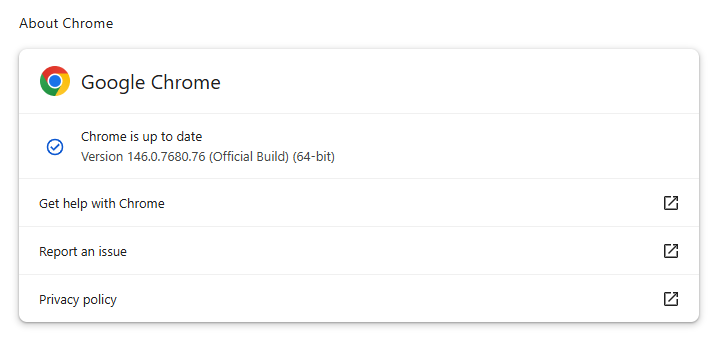
The latest version numbers are 146.0.7680.75/76 for Windows and macOS and 146.0.7680.75 for Linux. If your Chrome browser is on version 146.0.7680.75 or later, you’re protected from these vulnerabilities.

The easiest way to stay up to date is to allow Chrome to update automatically. However, updates can lag if you rarely close your browser, or if something interferes with the update process.

To update manually:

  1. Click the More menu (three dots)
  2. Go to Settings > About Chrome.
  3. If an update is available, Chrome will start downloading it.
  4. Restart Chrome to complete the update, and you’ll be protected against these vulnerabilities.
Chrome on Windows up to date
Chrome (on Windows) is up to date

You can also find step-by-step instructions in our guide to how to update Chrome on every operating system, which includes instructions for checking your version number.

Technical details

Google reports that it discovered and fixed both bugs internally, with patches landing within roughly two days of reporting.

CVE‑2026‑3909 is an out‑of‑bounds write vulnerability in Skia, Chrome’s 2D graphics library used to render web content and UI elements. A remote attacker can lure a user to a malicious webpage that triggers the bug, corrupts memory, and potentially achieves code execution in the browser context. Skia is an open source 2D graphics library used not only in Google Chrome but also in many other products.

CVE‑2026‑3910 is an inappropriate implementation flaw in the V8 JavaScript and WebAssembly engine. A specially crafted HTML page could allow a remote attacker to execute arbitrary code inside the V8 sandbox. V8 is the engine that Google developed for processing JavaScript, and it has seen more than its fair share of bugs.

Chrome’s Skia and V8 components are prime targets because they sit directly on the path between untrusted web content and the underlying system.

It is possible to chain an out‑of‑bounds write in Skia with other bugs to break out of the renderer sandbox, while V8 implementation flaws frequently appear in exploit chains used by targeted threat actors and spyware vendors.

How to stay safe

To protect your device, update Chrome as soon as possible. Here are some more tips to avoid becoming a victim, even before a zero-day is patched:

  • Don’t click on unsolicited links in emails, messages, unknown websites, or on social media.
  • Enable automatic updates and restart regularly. Many users leave browsers open for days, which delays protection even if the update is downloaded in the background.
  • Use an up-to-date, real-time anti-malware solution which includes a web protection component.

Users of other Chromium-based browsers can expect to see a similar update soon.


We don’t just report on threats—we remove them

Cybersecurity risks should never spread beyond a headline. Keep threats off your devices by downloading Malwarebytes today.

  • ✇Malwarebytes
  • Apple patches Coruna exploit kit flaws for older iOS versions
    On March 3, 2026, Google warned about a powerful exploit kit targeting Apple iPhone models running iOS version 13.0 (released in September 2019) up to version 17.2.1 (released in December 2023). In the latest security updates, Apple patched the vulnerabilities used in the Coruna exploit kit for older mobile devices that can no longer be updated to the latest iOS version. For newer iOS versions, patches associated with the Coruna exploit were already shipped in iOS 16.6 through 17.2 in updates
     

Apple patches Coruna exploit kit flaws for older iOS versions

12 de Março de 2026, 14:49

On March 3, 2026, Google warned about a powerful exploit kit targeting Apple iPhone models running iOS version 13.0 (released in September 2019) up to version 17.2.1 (released in December 2023).

In the latest security updates, Apple patched the vulnerabilities used in the Coruna exploit kit for older mobile devices that can no longer be updated to the latest iOS version. For newer iOS versions, patches associated with the Coruna exploit were already shipped in iOS 16.6 through 17.2 in updates released in 2023 and 2024.

The Coruna exploit kit was first observed in highly targeted attacks, but was later seen in watering hole attacks targeting Ukrainian users by a suspected Russian espionage group. Later still, it appeared on a very large set of fake Chinese financial websites, suggesting the exploit was being used by more mainstream cybercriminals.

The exploit relies on WebKit vulnerabilities (CVE-2023-43000 and CVE-2024-23222) that can be triggered by processing  maliciously crafted web content, and then gains kernel privileges by abusing a separate kernel vulnerability tracked as CVE-2023-41974.

The table below shows which updates are available and points you to the relevant security content for that operating system (OS).

iOS 16.7.15 and iPadOS 16.7.15iPhone 8, iPhone 8 Plus, iPhone X, iPad (5th generation), iPad Pro 9.7-inch, and iPad Pro 12.9-inch (1st generation)
iOS 15.8.7 and iPadOS 15.8.7iPhone XS, iPhone XS Max, iPhone XR, iPad (7th generation)

How to update your iPhone or iPad

For iOS and iPadOS users, here’s how to check if you’re using the latest software version:

  • Go to Settings > General > Software Update. You will see if there are updates available and be guided through installing them.
  • Turn on Automatic Updates if you haven’t already. You’ll find it on the same screen.

We don’t just report on phone security—we provide it

Cybersecurity risks should never spread beyond a headline. Keep threats off your mobile devices by downloading Malwarebytes for iOS, and Malwarebytes for Android today.

  • ✇Malwarebytes
  • This Android vulnerability can break your lock screen in under 60 seconds
    A vulnerability in Android devices can allow attackers to gain access to a phone in less than a minute.The vulnerability, tracked as CVE-2026-20435, affects certain MediaTek SoCs (System-on-a-Chip) using Trustonic’s TEE (Trusted Execution Environment). That may sound rare, but reportedly that’s about one in four Android phones, mostly cheaper models.Researchers demonstrated the vulnerability by connecting a vulnerable phone to a laptop over USB, showing how their exploit recovered the handset PI
     

This Android vulnerability can break your lock screen in under 60 seconds

12 de Março de 2026, 10:13

A vulnerability in Android devices can allow attackers to gain access to a phone in less than a minute.

The vulnerability, tracked as CVE-2026-20435, affects certain MediaTek SoCs (System-on-a-Chip) using Trustonic’s TEE (Trusted Execution Environment). That may sound rare, but reportedly that’s about one in four Android phones, mostly cheaper models.

Researchers demonstrated the vulnerability by connecting a vulnerable phone to a laptop over USB, showing how their exploit recovered the handset PIN, decrypted storage, and extracted seed phrases from several software wallets.

You may argue that if an attacker has your phone, you’re already in trouble. Which is true. But the protection you rely on to keep your data safe if your phone is lost or stolen doesn’t help one bit here.

The exploit was able to extract the root keys protecting full‑disk encryption before Android fully boots and then decrypt storage. While full‑disk encryption and lock screen are supposed to be your safety net if the phone is stolen or lost, those layers fail on affected devices.

Is my phone affected?

If you’re not sure whether this vulnerability affects your mobile device, you can look up your phone on a platform like GSMArena  or your vendor’s website to see which SoC it uses, then cross‑check with MediaTek’s March Security bulletin under CVE-2026-20435.

MediaTek released a firmware patch that device manufacturers can include in security updates for their phones. So all you can do is make sure you’re fully patched with the latest security update from your manufacturer. Which, depending on the patch gaps and how far along your device is in the EOL cycle, can take anywhere from days to forever.

EOL (End-of-Life) refers to the point in a product’s lifecycle when the manufacturer stops selling, marketing, or providing full support for it.

But obviously the best advice we can give you is to keep a close eye on your phone, so it doesn’t get lost or stolen.


We don’t just report on phone security—we provide it

Cybersecurity risks should never spread beyond a headline. Keep threats off your mobile devices by downloading Malwarebytes for iOS, and Malwarebytes for Android today.

❌
❌