Visualização normal
-
Hackread – Latest Cybersecurity, Tech, Crypto & Hacking News
-
Fake macOS Troubleshooting Sites Used to Steal iCloud Data in ClickFix Scam
Microsoft researchers warn of a new ClickFix campaign targeting macOS with fake guides on Medium and Craft to deploy AMOS and SHub Stealer via Terminal commands.
-
Security | CIO

-
Cloud modernization is advancing. Utilization isn’t
At Datadog, an observability and security platform for cloud applications, I work on research studies that analyze anonymized infrastructure telemetry from thousands of production environments across Kubernetes, managed container platforms and serverless services across cloud providers. The datasets span multiple cloud providers and billions of workload hours. Much of that work goes into our annual reports on container and serverless adoption, where we examine how organiza
Cloud modernization is advancing. Utilization isn’t
At Datadog, an observability and security platform for cloud applications, I work on research studies that analyze anonymized infrastructure telemetry from thousands of production environments across Kubernetes, managed container platforms and serverless services across cloud providers. The datasets span multiple cloud providers and billions of workload hours. Much of that work goes into our annual reports on container and serverless adoption, where we examine how organizations run workloads in modern cloud environments.
Over the past few years, one question kept coming up as we updated these reports: As cloud platforms become more granular and autoscaling adoption increases, does resource efficiency improve?
Going into this work, I didn’t have a formal hypothesis about utilization improving over time. But there was an implicit assumption—one that felt reasonable. As platforms became more granular and autoscaling adoption increased, resource efficiency should improve at least incrementally.
It didn’t.
When we compared successive editions of the research, including the 2023 Container Report and the 2025 State of Containers and Serverless, the answer was less straightforward than expected. The share of Kubernetes workloads running well below their requested CPU and memory levels remained broadly consistent between reports.
That persistence raises an uncomfortable question: If modernization alone doesn’t improve utilization, what does?
Rapid evolution in cloud infrastructure
Cloud environments today look markedly different from even three years ago.
In the 2023 Container Report, we found that over 65% of Kubernetes workloads were using less than 50% of their requested CPU and memory. That report examined container telemetry across thousands of production environments to understand how teams run Kubernetes workloads.
Two years later, the 2025 State of Containers and Serverless expanded the scope of the research to look at broader compute patterns, including the growing mix of containers and serverless, while continuing to analyze Kubernetes workloads.
Using the same <50% threshold for comparison, the overall utilization pattern remained similar. In October 2025, 72% of Kubernetes workloads were still using less than 50% of their requested CPU, and 62% were using less than 50% of their requested memory.
In other words, even as organizations adopted newer compute models and expanded autoscaling, most workloads continued to run well below their requested capacity.
At a surface level, the modernization between those report cycles is obvious: More granular compute models, broader instance diversification, increased use of managed services and deeper abstraction.
Looking only at platform capabilities and adoption trends, this appears to be steady operational maturity, the kind often discussed in CIO.com’s own coverage of cloud strategy.
If modernization alone were enough, we would expect to see measurable improvement in utilization patterns. The data suggests otherwise.
The utilization baseline barely moved
Using the same <50% threshold for comparison, the 2025 data shows a familiar pattern. In October 2025, 72% of Kubernetes workloads were using less than 50% of their requested CPU, and 62% (vs. 65% in 2023) were using less than 50% of their requested memory.
In other words, most workloads still operate well below their provisioned capacity.
Looking even closer, the distribution becomes more pronounced. In October 2025, 57% of workloads were using less than 25% of requested CPU, and 37% were using less than 25% of requested memory.
This is not marginal inefficiency at the edges. It reflects a large share of workloads running far below their requested baseline.
When I saw those updated numbers in the 2025 report, I was a little surprised. Not because I expected perfection, since cloud systems are inherently uneven, but because I expected at least some measurable drift toward tighter provisioning as platform sophistication increased.
Instead, the overall distribution remained remarkably persistent.
To be clear, this does not imply that teams are careless or that modernization efforts failed. It suggests something more structural. Utilization behaves less like a short-term tuning issue and more like a stable characteristic of how systems are configured and operated over time.
A longitudinal comparison between the 2023 and 2025 data shows that individual workloads churn, clusters scale and instance types diversify, yet the aggregate distribution remains comparatively steady. That persistence stood out more than any single annual trend.
Importantly, the longitudinal data does not explain why that persistence exists. It only shows that modernization at the platform layer does not automatically reshape the utilization distribution.
At scale, persistent underutilization also has cost implications. Even if individual workloads appear inexpensive, conservative provisioning raises the baseline against which budgets are set.
Over time, that baseline becomes normalized, shaping cloud forecasts, contract negotiations and infrastructure investment priorities.
Averages hide persistence
Infrastructure data is rarely evenly distributed; it is long-tailed.
A relatively small number of workloads drive sustained utilization. A much larger number are bursty, intermittently active or lightly used. When averaged together, the system appears stable even when individual components are dynamic.
Averaging utilization metrics can therefore be misleading. An average implies symmetry. In practice, resource usage is asymmetric. Extreme values often drive cost and capacity exposure, while the median workload remains comparatively quiet. When those extremes are averaged away, the signals that matter most are softened.
Partial instrumentation adds another layer. Not every workload produces the same performance and utilization data at the same level of detail. As organizations mix legacy systems with newer managed services, visibility gaps are common. Those gaps can skew aggregate metrics and create a false sense of stability or efficiency.
CIOs encounter similar issues when interpreting other aggregate metrics such as average latency, mean time to recovery or blended cloud spend. As CIO.com has noted in discussions of meaningful metrics, aggregation can obscure operational reality.
In infrastructure, that obscurity can persist for years.
What “utilization” measures
Before interpreting the trend, it is important to clarify what these utilization metrics measure.
In Kubernetes environments, utilization is typically measured relative to requested resources rather than raw machine capacity. Requests influence scheduling and reserve capacity on anode, shaping the baseline against which utilization is measured. But they also encode human judgment. Sometimes that judgment is based on load testing. Sometimes it reflects historical spikes. Sometimes it is simply conservative.
Two teams can run similar services and choose very different request baselines. The utilization metric will faithfully reflect that configuration choice.
That is one reason I am cautious about treating utilization as a moral signal. It is a technical metric, but it is also a reflection of configuration decisions embedded over time.
Looking at it over time shows what changes and what stubbornly does not, even as platforms evolve.
Autoscaling isn’t the same as precision
One obvious question is whether autoscaling adoption should materially change these patterns.
Horizontal Pod Autoscaling (HPA) is common across Kubernetes environments and widely supported across platforms. This reflects broader ecosystem trends described in the CNCF Annual Survey.
But elasticity is not the same as precision.
Many autoscaling configurations still center on CPU and memory signals. More context-aware scaling, based on queue depth or application-level indicators, remains less prevalent. Vertical scaling is comparatively rare and often used in advisory modes rather than actively reshaping requests.
Workloads can scale up and down without necessarily altering their baseline request posture or the broader utilization distribution we observe.
Enabling elasticity is straightforward. Sustaining precision over time is much harder.
Technical debt doesn’t disappear with new platforms
Another pattern surfaced in the Container Reports is version lag. In both the 2022 and 2023 editions, a significant share of Kubernetes clusters were running versions approaching end-of-life even as newer releases were widely available.
Production systems rarely upgrade at the same pace as new platform capabilities are released. End-of-life versions persist. Premium support tiers extend. Older runtimes remain embedded even when more efficient versions are available.
Upgrades compete with feature delivery. Stability is prioritized. Risk is managed conservatively.
Version adoption does not directly determine utilization levels. But it reflects a broader dynamic: Configuration and upgrade decisions change more slowly than platform capabilities. When analyzed at scale, that inertia becomes visible. New tools layer onto existing systems, but earlier configuration assumptions often remain intact.
In practice, modern platforms often inherit older provisioning choices.
Capability is not outcome
Seeing the same utilization pattern persist across report cycles shifted my thinking. It was not about Kubernetes, serverless or autoscaling in isolation. It was about separating capability from outcome.
Cloud platforms today offer far more granularity than they did a few years ago. We can allocate resources in smaller increments. We can autoscale pods and nodes. We can mix execution models. We can diversify architectures.
None of that automatically changes the empirical shape of infrastructure usage.
Modernization creates new possibilities, but it does not automatically change how resources are used.
Across report cycles, it became clear that architecture was evolving faster than the underlying usage patterns.
That distinction has significant implications for how infrastructure performance—and investment decisions—are interpreted.
When platform evolution isn’t enough
If multiple years of visible platform evolution do not materially shift the utilization baseline, the constraint likely extends beyond feature availability.
What makes this pattern interesting is not that utilization is low in any single snapshot. It is that it remains low even as surrounding variables change. Platform capabilities evolve. Adoption curves shift. Workload composition becomes more heterogeneous. Yet the aggregate distribution remains comparatively stable.
That stability suggests something important: Modernization changes what is possible, but it does not automatically change how systems are configured or revisited over time.
For CIOs and senior technology leaders, the implication is not to pursue the next abstraction layer. It is to examine the decision frameworks that shape provisioning, headroom and risk tolerance year after year.
Cloud platforms will continue to evolve quickly. Whether utilization patterns change will depend less on new capabilities and more on how deliberately organizations revisit the assumptions embedded in their configurations.
This article is published as part of the Foundry Expert Contributor Network.
Want to join?

-
Security Boulevard
-
3 easy-to-miss cybersecurity risks for small businesses
Small business owners should be sure to fix these three non-technical risks that require little cybersecurity expertise. The post 3 easy-to-miss cybersecurity risks for small businesses appeared first on Security Boulevard.
3 easy-to-miss cybersecurity risks for small businesses
Small business owners should be sure to fix these three non-technical risks that require little cybersecurity expertise.
The post 3 easy-to-miss cybersecurity risks for small businesses appeared first on Security Boulevard.
-
Malwarebytes
-
3 easy-to-miss cybersecurity risks for small businesses
There’s a lot to security that isn’t necessarily “cyber.” It’s not all hackers or complex network attacks. Alongside traditional cyberattacks that deploy malware or exploit known software vulnerabilities, there are also less technical—yet equally devastating—forms of theft. This doesn’t mean that well-known cybersecurity best practices don’t apply. Every small business owner should still use unique passwords for every account, turn on multi-factor authentication, keep their software and op
3 easy-to-miss cybersecurity risks for small businesses
There’s a lot to security that isn’t necessarily “cyber.” It’s not all hackers or complex network attacks.
Alongside traditional cyberattacks that deploy malware or exploit known software vulnerabilities, there are also less technical—yet equally devastating—forms of theft.
This doesn’t mean that well-known cybersecurity best practices don’t apply. Every small business owner should still use unique passwords for every account, turn on multi-factor authentication, keep their software and operating systems updated, and run always-on cybersecurity software.
But for the everyday small business owner juggling dozens of accounts, networks, devices, and the reams of data being created, stored, and shared across text messages, emails, and online portals, this advice is for you.
For National Small Business Week in the US, here are three ways to protect your business that require little technical prowess.
Don’t use your Social Security Number as your tax ID
In the US, the Internal Revenue Service (IRS) allows small business owners to use their personal Social Security Number (SSN) as the Federal Tax ID. It’s a small grace meant to simplify annual record-keeping for sole proprietors and owner-employees, but for cybercriminals, it’s a basic oversight they’d like every small business to make.
Using your Social Security Number as your Federal Tax ID means putting your Social Security Number in an ever-increasing number of hands. That’s because small business taxes are different from taxes for everyday salaried employees.
Whenever a small business takes on a new client or a contractor who pays for services costing at least $600, that small business has to share and receive what is called a W-9 form. This exact form isn’t filed with the IRS, but it is used to track payments for later filings.
What’s more important, though, is that this form asks for an owner’s name, address, and tax ID number.
This means that as a small business grows, its vulnerability to identity theft increases in tandem. Every W-9 filed that uses an owner’s SSN as their tax ID number is another opportunity for that SSN to be stolen. After just one year of operation, a small business owner’s SSN could end up in the inboxes, filing cabinets, and cloud drives of a dozen different people and companies.
This is exactly what cybercriminals want.
Equipped with a W-9 form about your business, a cybercriminal could impersonate you or your business. They could open a business credit line, file fraudulent returns that claim your small business income, or scam your clients.
How to stay safe:
Apply for a free Employer Identification Number (EIN) at IRS.gov. It’s quick to do and it separates your business tax identity from your personal tax identity. After that, put the EIN on W-9s, 1099s, and all other business paperwork instead of your SSN.
Keep your personal cloud storage personal
The most popular cloud storage for most small business owners is the cloud storage they already have—their personal Google Drive or iCloud.
Built to make memory archival as easy as possible, these tools can automatically back up and secure nearly every single moment that happens through your device, from the vacation photos you snapped last summer, to your kid’s first steps recorded on video, to the texts you sent, the notes you made, and the calendar appointments you managed.
But this type of automatic archival poses a threat to any non-personal information that you view, send, markup, or sign when using your personal smartphone. Suddenly, and often without thinking about it, your cloud storage has backups of signed contracts, tax returns, client intake forms, invoices, business financial statements, and photos of physical paperwork.
Above, we warned about using your SSN as your tax ID because it creates a risk if anyone in your business network is breached. But storing client information in your personal cloud storage creates a different problem: it puts that risk directly on you.
Compounding the threat here is the fact that many personal cloud storage accounts are shared with family members. More people accessing the same account means more exposure and more chances for mistakes, even if everyone has good intentions.
How to stay safe:
Go through the cloud backup settings on both your phone and your computer and manage what data is being synced. Move sensitive business files to a dedicated business storage account with proper access controls, sharing permissions, and audit logs—something that can tell you who opened a file and when.
If anything business-related has to live in a personal cloud account, give that account a strong, unique password, turn on multi-factor authentication, and don’t share access with anyone who isn’t you.
Protect device and account access in the home
Devices have a funny way of moving around. Your smartphone goes into your spouse’s hands as they override your music choices in the car. Your tablet ends most nights in your kid’s bedroom as they watch TV. And your laptop gets tugged around from couch to counter to kitchen table—each time fully opened and logged in, a portal to the web.
You trust everyone in your home to act safely online, but the path to online safety is full of mistakes.
A single errant click on a fake ad, a malicious search result, or a disguised download is all it takes to compromise your device today, along with all your small business records.
Aside from the threat of malware, someone using your device could make purchases, accidentally delete files, and overwrite important documents.
Remember, an “insider threat” doesn’t need to be malicious to cause damage—they just need to be inside your network (which in this, is your home).
How to stay safe:
Treat your devices that you use for work as work devices. That means requiring a passcode or password for device entry, along with multi-factor authentication for important business accounts.
Also, to ensure that any wrong click doesn’t lead to a malicious PDF download or a wayward malware installation, use always-on antimalware protection software, like Malwarebytes for Teams.
Secure your success
It’s easy to get overwhelmed with modern cybersecurity advice. Every week there are new vulnerabilities to patch, emerging scams to avoid, and novel viruses and pieces of malware that can seemingly take over your device, your data, and your business.
Thankfully, there are important steps you can take today that don’t require you to fiddle with internal settings or take a class on network engineering. Some of the most effective protections are simple: Limit how widely you share sensitive information, keep business and personal data separate, and control who can access your devices.
For everything else, try Malwarebytes for Teams to receive 24/7, always-on antimalware protection to shut out viruses, block malware attacks, and keep hackers out of your business.
-
Malwarebytes

-
“iCloud storage is full” scam is back, and now it wants your payment details
A few months ago, we reported on a fake cloud storage alert that triggered a redirect chain to an app that has since been delisted from the Apple Store. The threat of losing your photos is a powerful lure, so scammers are now using it to steal personal and financial details. The Guardian warns about an iCloud-themed campaign that start with a few “your iCloud storage is full’ messages, then escalates to threats. If you don’t respond or take action, the emails claim your data will be wiped
“iCloud storage is full” scam is back, and now it wants your payment details
A few months ago, we reported on a fake cloud storage alert that triggered a redirect chain to an app that has since been delisted from the Apple Store.
The threat of losing your photos is a powerful lure, so scammers are now using it to steal personal and financial details.
The Guardian warns about an iCloud-themed campaign that start with a few “your iCloud storage is full’ messages, then escalates to threats. If you don’t respond or take action, the emails claim your data will be wiped on a specific date.
US Consumer Affairs has urged users not to click any links and to contact Apple directly if they receive such messages.
The deadline in the emails is never far away, usually just two days. No scammer ever wants you to think things through before you act, so there is always time pressure.
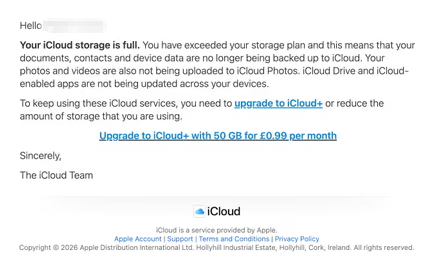
We’ve seen these emails in English and Spanish. Oddly, the monthly rate is set at 99 pence or 99 euro cents respectively.
The 0.99 seems to be the magic number. In reality, scammers don’t care about the payment. What they want is for you fill out the form on their phishing site.

The screenshot above is just one of many examples. There are plenty of variations, but they all follow the same them: make a small payment to stop the files in your iCloud storage from being deleted.
The websites these emails link to also vary, but they all ask for personal and payment details to complete that payment.
How to stay safe
It’s worth remembering that Apple does notify users when their iCloud storage is nearing capacity, but those alerts appear within your device settings or as official system notifications. They don’t come through unsolicited text messages or emails with external links. If you need to check your storage, go directly to Settings on your device and review your iCloud usage.
So, to stay safe:
- Always access your account through our official website.
- Never share your password with anyone.
- Never click on links in unsolicited emails without verifying with a trusted source.
- Use an up-to-date, real-time anti-malware solution with a web protection component.
- Do not engage with websites that attract visitors like this.
Pro tip: Malwarebytes Scam Guard would have helped you identify this email as a scam and provided advice on how to proceed.
Something feel off? Check it before you click.
Malwarebytes Scam Guard helps you analyze suspicious links, texts, and screenshots instantly.
Available with Malwarebytes Premium Security for all your devices, and in the Malwarebytes app for iOS and Android.