Visualização normal

Antes de ontemStream principal

Gmail Finally Lets You Change Your Email Address Without Losing Anything

1 de Abril de 2026, 09:53

Gmail users in the US can now change their email address without losing data. Here’s how the long-awaited Google feature works and its key limits.

The post Gmail Finally Lets You Change Your Email Address Without Losing Anything appeared first on TechRepublic.

Iranian hackers breach FBI director’s personal email, and post his CV and photos online

31 de Março de 2026, 04:37
It's not every day that you read that the head of America's top law enforcement agency has been hacked, but then - these aren't ordinary times. Read more in my article on the Hot for Security blog.

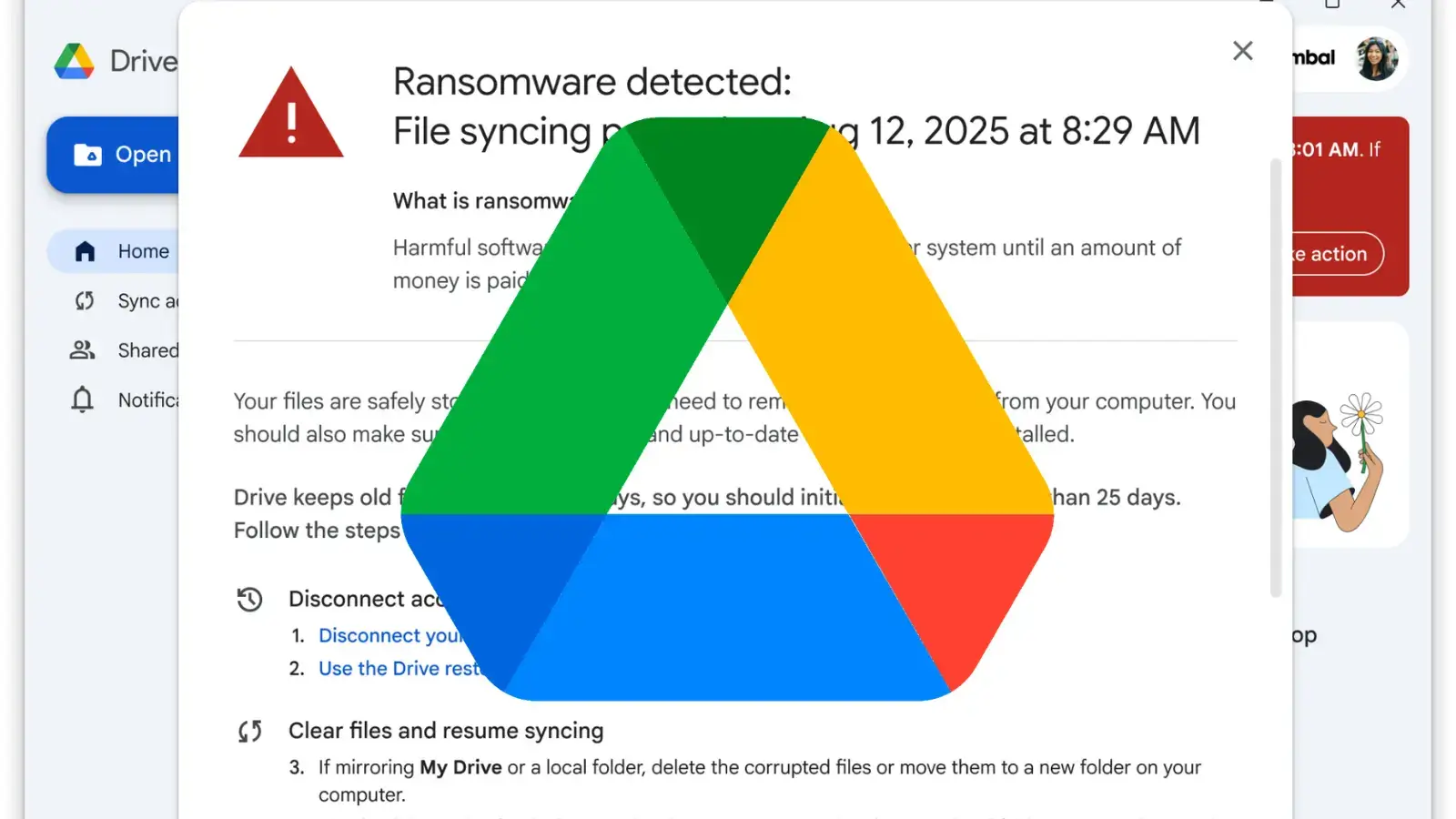
Google Introduces Advanced Ransomware Defense and Recovery Features in Drive

Google has officially moved its advanced ransomware detection and file restoration features for Google Drive out of beta, making them generally available to organizations globally. Originally launched for beta testing in September 2025, these security enhancements are designed to minimize the destructive impact of malware attacks on both personal and corporate endpoints. The general availability […]

The post Google Introduces Advanced Ransomware Defense and Recovery Features in Drive appeared first on GBHackers Security | #1 Globally Trusted Cyber Security News Platform.

Iran-Linked Handala Hackers Breach FBI Chief Kash Patel’s Gmail

Iran-linked Handala hackers breached FBI Chief Kash Patel’s Gmail, leaking photos and documents. Officials say no classified data was exposed.
  • ✇ASEC BLOG
  • January 2026 Phishing Email Trends Report ATCP
    This report provides the distribution quantity, statistics, trends, and case information on phishing emails and email threats collected and analyzed for one month in January 2026. The following are some statistics and cases included in the original report. 1) Phishing Email Threat Statistics In January 2026, the most prevalent threat type among phishing email attachments […]
     

January 2026 Phishing Email Trends Report

Por:ATCP
10 de Fevereiro de 2026, 12:00
This report provides the distribution quantity, statistics, trends, and case information on phishing emails and email threats collected and analyzed for one month in January 2026. The following are some statistics and cases included in the original report. 1) Phishing Email Threat Statistics In January 2026, the most prevalent threat type among phishing email attachments […]

Gmail Spam Filter Breakdown Affects 1.8B Users

26 de Janeiro de 2026, 06:32

The disruption began Saturday (5am Pacific time, Jan .24) affecting approximately 1.8 billion Gmail users worldwide with widespread email misclassification.

The post Gmail Spam Filter Breakdown Affects 1.8B Users appeared first on TechRepublic.

  • ✇Malwarebytes
  • A week in security (November 17 – November 23)
    Last week on Malwarebytes Labs: AI teddy bear for kids responds with sexual content and advice about weapons Fake calendar invites are spreading. Here’s how to remove them and prevent more Budget Samsung phones shipped with unremovable spyware, say researchers What the Flock is happening with license plate readers? Holiday scams 2025: These common shopping habits make you the easiest target [Correction] Gmail can read your emails and attachments to power “smart features” Ma
     
  • ✇Malwarebytes
  • Fake calendar invites are spreading. Here’s how to remove them and prevent more
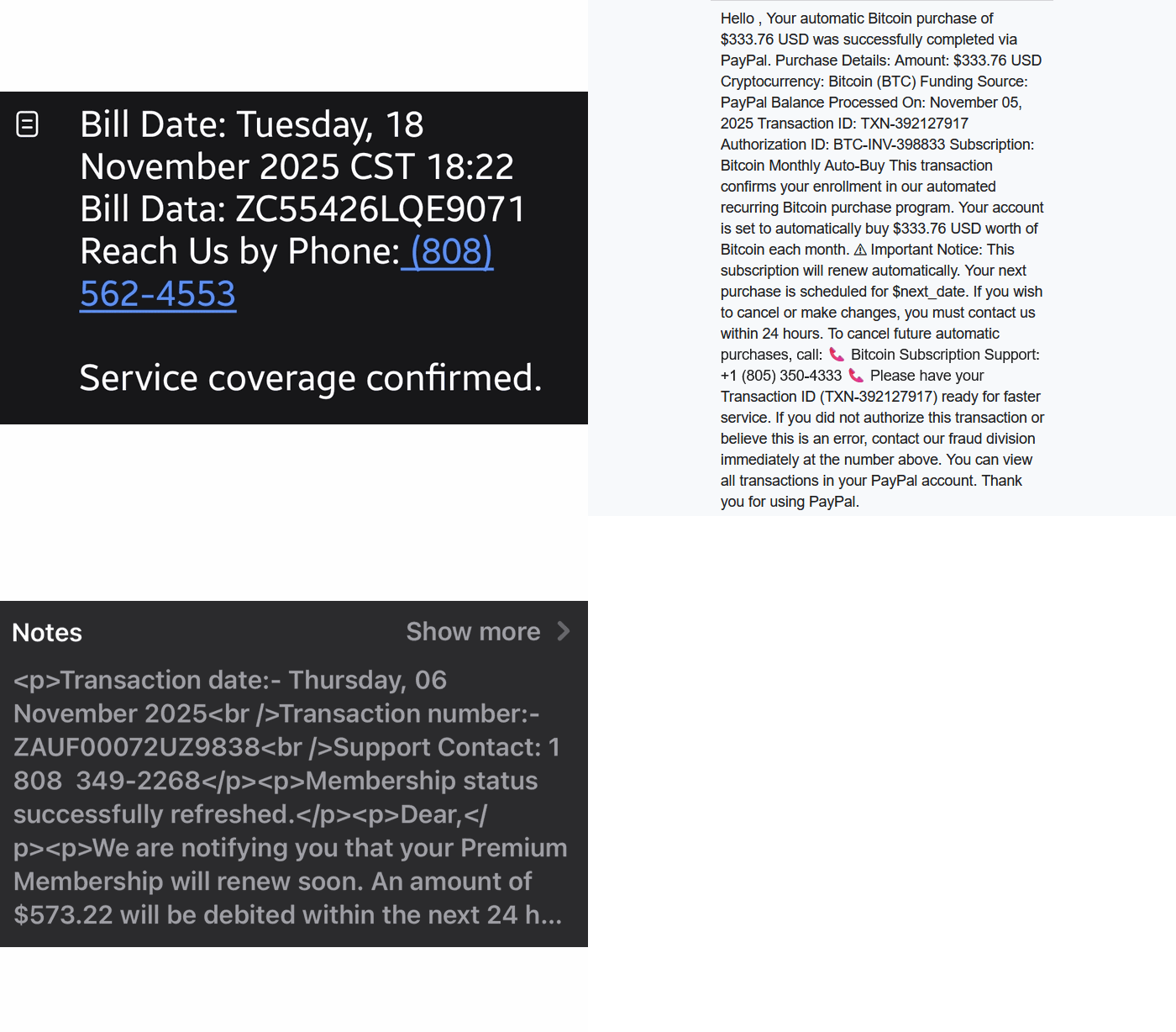
    We’re seeing a surge in phishing calendar invites that users can’t delete, or that keep coming back because they sync across devices. The good news is you can remove them and block future spam by changing a few settings. Most of these unwanted calendar entries are there for phishing purposes. Most of them warn you about a “impending payment” but the difference is in the subject and the action they want the target to take. Sometimes they want you to call a number: And sometimes they
     

Fake calendar invites are spreading. Here’s how to remove them and prevent more

21 de Novembro de 2025, 12:28

We’re seeing a surge in phishing calendar invites that users can’t delete, or that keep coming back because they sync across devices. The good news is you can remove them and block future spam by changing a few settings.

Most of these unwanted calendar entries are there for phishing purposes. Most of them warn you about a “impending payment” but the difference is in the subject and the action they want the target to take.

Sometimes they want you to call a number:

"Call this number" scams

And sometimes they invite you to an actual meeting:

fake Geek Squad billing update meeting

We haven’t followed up on these scams, but when attackers want you to call them or join a meeting, the end goal is almost always financial. They might use a tech support scam approach and ask you to install a Remote Monitoring and Management tool, sell you an overpriced product, or simply ask for your banking details.

The sources are usually distributed as email attachments or as download links in messaging apps.

How to remove fake entries from your calendar

This blog focuses on how to remove these unwanted entries. One of the obstacles is that calendars often sync across devices.

Outlook Calendar

If you use Outlook:

  • Delete without interacting: Avoid clicking any links or opening attachments in the invite. If available, use the “Do not send a response” option when deleting to prevent confirming that your email is active.
  • Block the sender: Right-click the event and select the option to report the sender as junk or spam to help prevent future invites from that email address.
  • Adjust calendar settings: Access your Outlook settings and disable the option to automatically add events from email. This setting matters because even if the invite lands in your spam folder, auto-adding invites will still put the event on your calendar.
    Outlook accept settings
  • Report the invite: Report the spam invitation to Microsoft as phishing or junk.
  • Verify billing issues through official channels: If you have concerns about your account, go directly to the company’s official website or support, not the information in the invite.

Gmail Calendar

To disable automatic calendar additions:

  • Open Google Calendar.
  • Click the gear icon and select Settings in the upper right part of the screen.
    Gmail calendar settings
  • Under Event settings, change Add invitations to my calendar to either Only if the sender is known or When I respond to the invitation email. (The default setting is From everyone, which will add any invite to your calendar.)
  • Uncheck Show events automatically created by Gmail if you want to stop Gmail from adding to your calendar on its own.

Android Calendar

To prevent unknown senders from adding invites:

  • Open the Calendar app.
  • Tap Menu > Settings.
  • Tap General > Adding invitations > Add invitations to my calendar.
  • Select Only if the sender is known.

For help reviewing which apps have access to your Android Calendar, refer to the support page.

Mac Calendars

To control how events get added to your Calendar on a Mac:

  • Go to Apple menu > System Settings > Privacy & Security.
  • Click Calendars.
  • Turn calendar access on or off for each app in the list.
  • If you allow access, click Options to choose whether the app has full access or can only add events.

iPhone and iPad Calendar

The controls are similar to macOS, but you may also want to remove additional calendars:

  • Open Settings.
  • Tap Calendar > Accounts > Subscribed Calendars.
  • Select any unwanted calendars and tap the Delete Account option.

Additional calendars

Which brings me to my next point. Check both the Outlook Calendar and the mobile Calendar app for Additional Calendars or subscribed URLs and Delete/Unsubscribe. This will stop the attacker from being able to add even more events to your Calendar. And looking in both places will be helpful in case of synchronization issues.

Several victims reported that after removing an event, they just came back. This is almost always due to synchronization. Make sure you remove the unwanted calendar or event everywhere it exists.

Tracking down the source can be tricky, but it may help prevent the next wave of calendar spam.

How to prevent calendar spam

We’ve covered some of this already, but the main precautions are:

  • Turn off auto‑add or auto‑processing so invites stay as emails until you accept them.
  • Restrict calendar permissions so only trusted people and apps can add events.
  • In shared or resource calendars, remove public or anonymous access and limit who can create or edit items.
  • Use an up-to-date real-time anti-malware solution with a web protection component to block known malicious domains.
  • Don’t engage with unsolicited events. Don’t click links, open attachments, or reply to suspicious calendar events such as “investment,” “invoice,” “bonus payout,” “urgent meeting”—just delete the event.
  • Enable multi-factor authentication (MFA) on your accounts so attackers who compromise credentials can’t abuse the account itself to send or auto‑accept invitations.

Pro tip: If you’re not sure whether an event is a scam, you can feed the message to Malwarebytes Scam Guard. It’ll help you decide what to do next.

The Really Really Sale

We don’t just report on threats—we remove them

Cybersecurity risks should never spread beyond a headline. Keep threats off your devices by downloading Malwarebytes today.

  • ✇Malwarebytes
  • [Correction] Gmail can read your emails and attachments to power “smart features”
    Update November 22. We’ve updated this article after realising we contributed to a perfect storm of misunderstanding around a recent change in the wording and placement of Gmail’s smart features. The settings themselves aren’t new, but the way Google recently rewrote and surfaced them led a lot of people (including us) to believe Gmail content might be used to train Google’s AI models, and that users were being opted in automatically. After taking a closer look at Google’s documentation and revi
     

[Correction] Gmail can read your emails and attachments to power “smart features”

20 de Novembro de 2025, 10:48

Update November 22. We’ve updated this article after realising we contributed to a perfect storm of misunderstanding around a recent change in the wording and placement of Gmail’s smart features. The settings themselves aren’t new, but the way Google recently rewrote and surfaced them led a lot of people (including us) to believe Gmail content might be used to train Google’s AI models, and that users were being opted in automatically. After taking a closer look at Google’s documentation and reviewing other reporting, that doesn’t appear to be the case.

Gmail does scan email content to power its own “smart features,” such as spam filtering, categorisation, and writing suggestions. But this is part of how Gmail normally works and isn’t the same as training Google’s generative AI models. Google also maintains that these feature settings are opt-in rather than opt-out, although users’ experiences seem to vary depending on when and how the new wording appeared.

It’s easy to see where the confusion came from. Google’s updated language around “smart features” is vague, and the term “smart” often implies AI—especially at a time when Gemini is being integrated into other parts of Google’s products. When the new wording started appearing for some users without much explanation, many assumed it signalled a broader shift. It’s also come around the same time as a proposed class-action lawsuit in the state of California, which, according to Bloomberg, alleges that Google gave Gemini AI access to Gmail, Chat, and Meet without proper user consent.

We’ve revised this article to reflect what we can confirm from Google’s documentation, as it’s always been our aim to give readers accurate, helpful guidance.


Google has updated some Gmail settings around how its “smart features” work, which control how Gmail analyses your messages to power built-in functions.

According to reports we’ve seen, Google has started automatically opting users in to allow Gmail to access all private messages and attachments for its smart features. This means your emails are analyzed to improve your experience with Chat, Meet, Drive, Email and Calendar products. However, some users are now reporting that these settings are switched on by default instead of asking for explicit opt-in—although Google’s help page states that users are opted-out for default.

How to check your settings

Opting in or out requires you to change settings in two places, so I’ve tried to make it as easy to follow as possible. Feel free to let me know in the comments if I missed anything.

To fully opt out, you must turn off Gmail’s smart features in two separate locations in your settings. Don’t miss one, or AI training may continue.

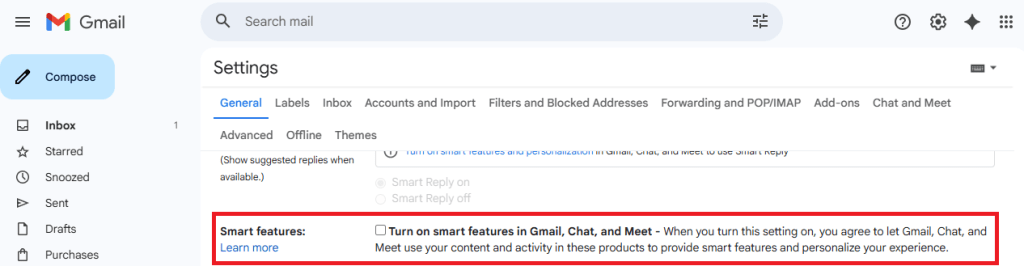
Step 1: Turn off Smart features in Gmail, Chat, and Meet settings

  • Open Gmail on your desktop or mobile app.
  • Click the gear icon → See all settings (desktop) or Menu → Settings (mobile).
  • Find the section called smart features in Gmail, Chat, and Meet. You’ll need to scroll down quite a bit.
Smart features settings
  • Uncheck this option.
  • Scroll down and hit Save changes if on desktop.

Step 2: Turn off Google Workspace smart features

  • Still in Settings, locate Google Workspace smart features.
  • Click on Manage Workspace smart feature settings.
  • You’ll see two options: Smart features in Google Workspace and Smart features in other Google products.
Smart feature settings

  • Toggle both off.
  • Save again in this screen.

Step 3: Verify if both are off

  • Make sure both toggles remain off.
  • Refresh your Gmail app or sign out and back in to confirm changes.

We don’t just report on privacy—we offer you the option to use it.

Privacy risks should never spread beyond a headline. Keep your online privacy yours by using Malwarebytes Privacy VPN.

  • ✇Arstechnica
  • Google says Gmail security is “strong and effective” as it denies major breach Ryan Whitwam
    The sky is falling, and Gmail has supposedly been hacked to bits by malicious parties unknown. Or has it? Reports circulated last week claiming that Gmail was the subject of a major data breach, citing a series of warnings Google has distributed and increasing reports of phishing attacks. The hysteria was short-lived, though. In a brief post on its official blog, Google says that Gmail's security is "strong and effective," and reports to the contrary are mistaken. This story seems to have develo
     

Google says Gmail security is “strong and effective” as it denies major breach

2 de Setembro de 2025, 15:39

The sky is falling, and Gmail has supposedly been hacked to bits by malicious parties unknown. Or has it? Reports circulated last week claiming that Gmail was the subject of a major data breach, citing a series of warnings Google has distributed and increasing reports of phishing attacks. The hysteria was short-lived, though. In a brief post on its official blog, Google says that Gmail's security is "strong and effective," and reports to the contrary are mistaken.

This story seems to have developed due to a random confluence of security events. Google experienced a Gmail data breach in June, but the attack was limited to the company's corporate Salesforce server. The hacker was able to access publicly available information like business names and contact details, but no private information was compromised.

Over the following weeks, Google alerted Gmail users to an increase in phishing attacks in July and August. It didn't offer many details, but many believed the spike in phishing was related to the corporate server breach. Indeed, more people are talking about hacking attempts on social media right now. This led to the claim that Gmail's entire user base of 2.5 billion people was about to be hacked at any moment, with some reports advising everyone to change their passwords and enable two-factor authentication. While that's generally good security advice, Google says the truth is much less dramatic.

Read full article

Comments

© Ryan Whitwam

  • ✇Krebs on Security
  • Oregon Man Charged in ‘Rapper Bot’ DDoS Service BrianKrebs
    A 22-year-old Oregon man has been arrested on suspicion of operating “Rapper Bot,” a massive botnet used to power a service for launching distributed denial-of-service (DDoS) attacks against targets — including a March 2025 DDoS that knocked Twitter/X offline. The Justice Department asserts the suspect and an unidentified co-conspirator rented out the botnet to online extortionists, and tried to stay off the radar of law enforcement by ensuring that their botnet was never pointed at KrebsOnSecur
     

Oregon Man Charged in ‘Rapper Bot’ DDoS Service

19 de Agosto de 2025, 17:51

A 22-year-old Oregon man has been arrested on suspicion of operating “Rapper Bot,” a massive botnet used to power a service for launching distributed denial-of-service (DDoS) attacks against targets — including a March 2025 DDoS that knocked Twitter/X offline. The Justice Department asserts the suspect and an unidentified co-conspirator rented out the botnet to online extortionists, and tried to stay off the radar of law enforcement by ensuring that their botnet was never pointed at KrebsOnSecurity.

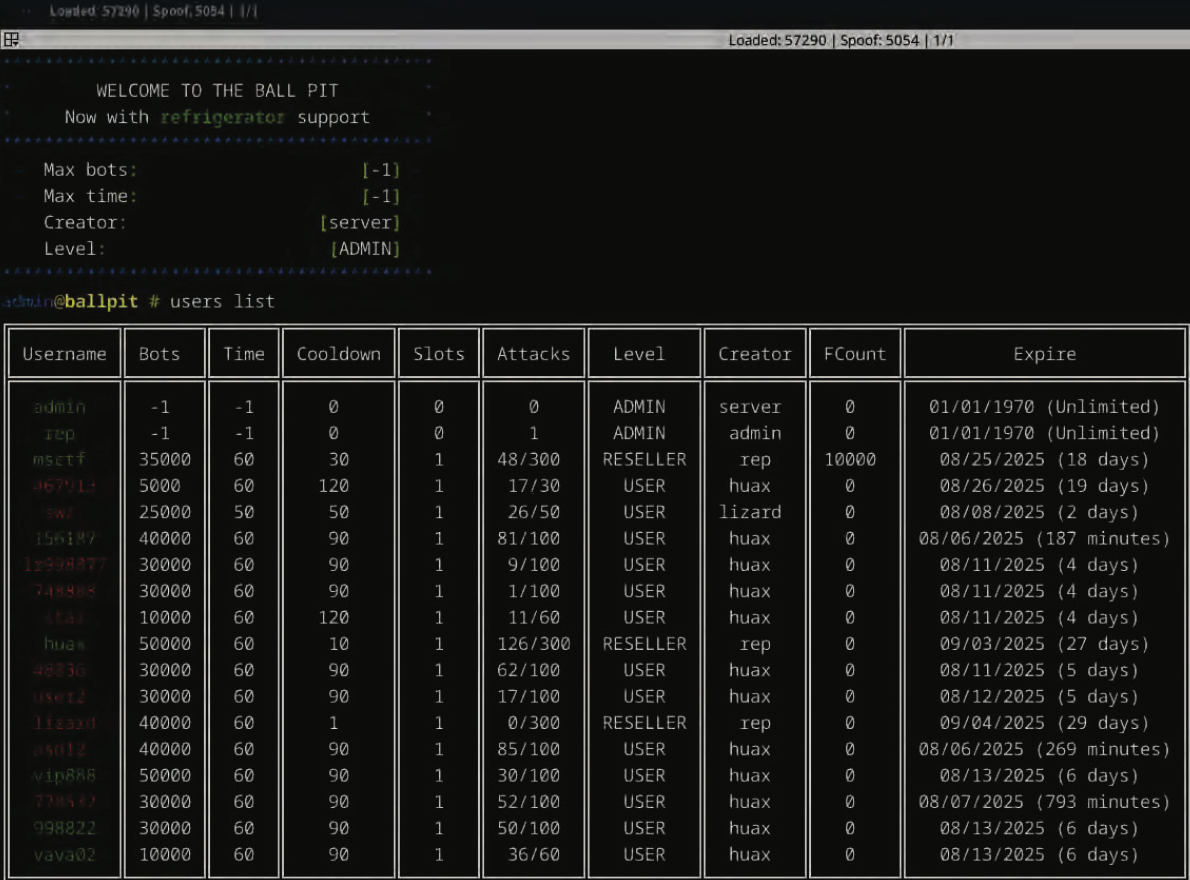
The control panel for the Rapper Bot botnet greets users with the message “Welcome to the Ball Pit, Now with refrigerator support,” an apparent reference to a handful of IoT-enabled refrigerators that were enslaved in their DDoS botnet.

On August 6, 2025, federal agents arrested Ethan J. Foltz of Springfield, Ore. on suspicion of operating Rapper Bot, a globally dispersed collection of tens of thousands of hacked Internet of Things (IoT) devices.

The complaint against Foltz explains the attacks usually clocked in at more than two terabits of junk data per second (a terabit is one trillion bits of data), which is more than enough traffic to cause serious problems for all but the most well-defended targets. The government says Rapper Bot consistently launched attacks that were “hundreds of times larger than the expected capacity of a typical server located in a data center,” and that some of its biggest attacks exceeded six terabits per second.

Indeed, Rapper Bot was reportedly responsible for the March 10, 2025 attack that caused intermittent outages on Twitter/X. The government says Rapper Bot’s most lucrative and frequent customers were involved in extorting online businesses — including numerous gambling operations based in China.

The criminal complaint was written by Elliott Peterson, an investigator with the Defense Criminal Investigative Service (DCIS), the criminal investigative division of the Department of Defense (DoD) Office of Inspector General. The complaint notes the DCIS got involved because several Internet addresses maintained by the DoD were the target of Rapper Bot attacks.

Peterson said he tracked Rapper Bot to Foltz after a subpoena to an ISP in Arizona that was hosting one of the botnet’s control servers showed the account was paid for via PayPal. More legal process to PayPal revealed Foltz’s Gmail account and previously used IP addresses. A subpoena to Google showed the defendant searched security blogs constantly for news about Rapper Bot, and for updates about competing DDoS-for-hire botnets.

According to the complaint, after having a search warrant served on his residence the defendant admitted to building and operating Rapper Bot, sharing the profits 50/50 with a person he claimed to know only by the hacker handle “Slaykings.” Foltz also shared with investigators the logs from his Telegram chats, wherein Foltz and Slaykings discussed how best to stay off the radar of law enforcement investigators while their competitors were getting busted.

Specifically, the two hackers chatted about a May 20 attack against KrebsOnSecurity.com that clocked in at more than 6.3 terabits of data per second. The brief attack was notable because at the time it was the largest DDoS that Google had ever mitigated (KrebsOnSecurity sits behind the protection of Project Shield, a free DDoS defense service that Google provides to websites offering news, human rights, and election-related content).

The May 2025 DDoS was launched by an IoT botnet called Aisuru, which I discovered was operated by a 21-year-old man in Brazil named Kaike Southier Leite. This individual was more commonly known online as “Forky,” and Forky told me he wasn’t afraid of me or U.S. federal investigators. Nevertheless, the complaint against Foltz notes that Forky’s botnet seemed to diminish in size and firepower at the same time that Rapper Bot’s infection numbers were on the upswing.

“Both FOLTZ and Slaykings were very dismissive of attention seeking activities, the most extreme of which, in their view, was to launch DDoS attacks against the website of the prominent cyber security journalist Brian Krebs,” Peterson wrote in the criminal complaint.

“You see, they’ll get themselves [expletive],” Slaykings wrote in response to Foltz’s comments about Forky and Aisuru bringing too much heat on themselves.

“Prob cuz [redacted] hit krebs,” Foltz wrote in reply.

“Going against Krebs isn’t a good move,” Slaykings concurred. “It isn’t about being a [expletive] or afraid, you just get a lot of problems for zero money. Childish, but good. Let them die.”

“Ye, it’s good tho, they will die,” Foltz replied.

The government states that just prior to Foltz’s arrest, Rapper Bot had enslaved an estimated 65,000 devices globally. That may sound like a lot, but the complaint notes the defendants weren’t interested in making headlines for building the world’s largest or most powerful botnet.

Quite the contrary: The complaint asserts that the accused took care to maintain their botnet in a “Goldilocks” size — ensuring that “the number of devices afforded powerful attacks while still being manageable to control and, in the hopes of Foltz and his partners, small enough to not be detected.”

The complaint states that several days later, Foltz and Slaykings returned to discussing what that they expected to befall their rival group, with Slaykings stating, “Krebs is very revenge. He won’t stop until they are [expletive] to the bone.”

“Surprised they have any bots left,” Foltz answered.

“Krebs is not the one you want to have on your back. Not because he is scary or something, just because he will not give up UNTIL you are [expletive] [expletive]. Proved it with Mirai and many other cases.”

[Unknown expletives aside, that may well be the highest compliment I’ve ever been paid by a cybercriminal. I might even have part of that quote made into a t-shirt or mug or something. It’s also nice that they didn’t let any of their customers attack my site — if even only out of a paranoid sense of self-preservation.]

Foltz admitted to wiping the user and attack logs for the botnet approximately once a week, so investigators were unable to tally the total number of attacks, customers and targets of this vast crime machine. But the data that was still available showed that from April 2025 to early August, Rapper Bot conducted over 370,000 attacks, targeting 18,000 unique victims across 1,000 networks, with the bulk of victims residing in China, Japan, the United States, Ireland and Hong Kong (in that order).

According to the government, Rapper Bot borrows much of its code from fBot, a DDoS malware strain also known as Satori. In 2020, authorities in Northern Ireland charged a then 20-year-old man named Aaron “Vamp” Sterritt with operating fBot with a co-conspirator. U.S. prosecutors are still seeking Sterritt’s extradition to the United States. fBot is itself a variation of the Mirai IoT botnet that has ravaged the Internet with DDoS attacks since its source code was leaked back in 2016.

The complaint says Foltz and his partner did not allow most customers to launch attacks that were more than 60 seconds in duration — another way they tried to keep public attention to the botnet at a minimum. However, the government says the proprietors also had special arrangements with certain high-paying clients that allowed much larger and longer attacks.

The accused and his alleged partner made light of this blog post about the fallout from one of their botnet attacks.

Most people who have never been on the receiving end of a monster DDoS attack have no idea of the cost and disruption that such sieges can bring. The DCIS’s Peterson wrote that he was able to test the botnet’s capabilities while interviewing Foltz, and that found that “if this had been a server upon which I was running a website, using services such as load balancers, and paying for both outgoing and incoming data, at estimated industry average rates the attack (2+ Terabits per second times 30 seconds) might have cost the victim anywhere from $500 to $10,000.”

“DDoS attacks at this scale often expose victims to devastating financial impact, and a potential alternative, network engineering solutions that mitigate the expected attacks such as overprovisioning, i.e. increasing potential Internet capacity, or DDoS defense technologies, can themselves be prohibitively expensive,” the complaint continues. “This ‘rock and a hard place’ reality for many victims can leave them acutely exposed to extortion demands – ‘pay X dollars and the DDoS attacks stop’.”

The Telegram chat records show that the day before Peterson and other federal agents raided Foltz’s residence, Foltz allegedly told his partner he’d found 32,000 new devices that were vulnerable to a previously unknown exploit.

Foltz and Slaykings discussing the discovery of an IoT vulnerability that will give them 32,000 new devices.

Shortly before the search warrant was served on his residence, Foltz allegedly told his partner that “Once again we have the biggest botnet in the community.” The following day, Foltz told his partner that it was going to be a great day — the biggest so far in terms of income generated by Rapper Bot.

“I sat next to Foltz while the messages poured in — promises of $800, then $1,000, the proceeds ticking up as the day went on,” Peterson wrote. “Noticing a change in Foltz’ behavior and concerned that Foltz was making changes to the botnet configuration in real time, Slaykings asked him ‘What’s up?’ Foltz deftly typed out some quick responses. Reassured by Foltz’ answer, Slaykings responded, ‘Ok, I’m the paranoid one.”

The case is being prosecuted by Assistant U.S. Attorney Adam Alexander in the District of Alaska (at least some of the devices found to be infected with Rapper Bot were located there, and it is where Peterson is stationed). Foltz faces one count of aiding and abetting computer intrusions. If convicted, he faces a maximum penalty of 10 years in prison, although a federal judge is unlikely to award anywhere near that kind of sentence for a first-time conviction.

❌
❌