Visualização normal

Antes de ontemStream principal
  • ✇Securelist
  • “Legitimate” phishing: how attackers weaponize Amazon SES to bypass email security Roman Dedenok
    Introduction The primary goal for attackers in a phishing campaign is to bypass email security and trick the potential victim into revealing their data. To achieve this, scammers employ a wide range of tactics, from redirect links to QR codes. Additionally, they heavily rely on legitimate sources for malicious email campaigns. Specifically, we’ve recently observed an uptick in phishing attacks leveraging Amazon SES. The dangers of Amazon SES abuse Amazon Simple Email Service (Amazon SES) is a cl
     

“Legitimate” phishing: how attackers weaponize Amazon SES to bypass email security

4 de Maio de 2026, 07:00

Introduction

The primary goal for attackers in a phishing campaign is to bypass email security and trick the potential victim into revealing their data. To achieve this, scammers employ a wide range of tactics, from redirect links to QR codes. Additionally, they heavily rely on legitimate sources for malicious email campaigns. Specifically, we’ve recently observed an uptick in phishing attacks leveraging Amazon SES.

The dangers of Amazon SES abuse

Amazon Simple Email Service (Amazon SES) is a cloud-based email platform designed for highly reliable transactional and marketing message delivery. It integrates seamlessly with other products in Amazon’s cloud ecosystem, AWS.

At first glance, it might seem like just another delivery channel for email phishing, but that isn’t the case. The insidious nature of Amazon SES attacks lies in the fact that attackers aren’t using suspicious or dangerous domains; instead, they are leveraging infrastructure that both users and security systems have grown to trust. These emails utilize SPF, DKIM, and DMARC authentication protocols, passing all standard provider checks, and almost always contain .amazonses.com in the Message-ID headers. Consequently, from a technical standpoint, every email sent via Amazon SES – even a phishing one – looks completely legitimate.

Phishing URLs can be masked with redirects: a user sees a link like amazonaws.com in the email and clicks it with confidence, only to be sent to a phishing site rather than a legitimate one. Amazon SES also allows for custom HTML templates, which attackers use to craft more convincing emails. Because this is legitimate infrastructure, the sender’s IP address won’t end up on reputation-based blocklists. Blocking it would restrict all incoming mail sent through Amazon SES. For major services, that kind of measure is ineffective, as it would significantly disrupt user workflows due to a massive number of false positives.

How compromise happens

In most cases, attackers gain access to Amazon SES through leaked IAM (AWS Identity and Access Management) access keys. Developers frequently leave these keys exposed in public GitHub repositories, ENV files, Docker images, configuration backups, or even in publicly accessible S3 buckets. To hunt for these IAM keys, phishers use various tools, such as automated bots based on the open-source utility TruffleHog, which is designed for detecting leaked secrets. After verifying the key’s permissions and email sending limits, attackers are equipped to spread a massive volume of phishing messages.

Examples of phishing with Amazon SES

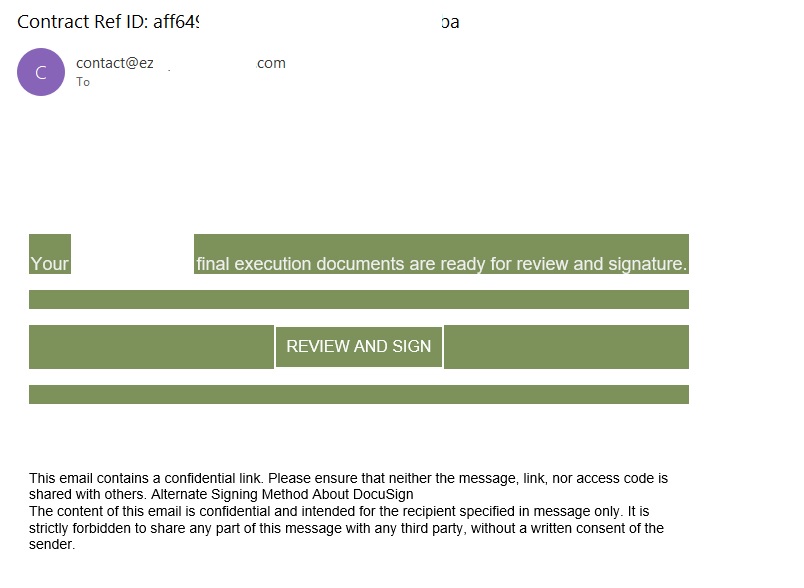
In early 2026, one of the most common themes in phishing emails sent with Amazon SES was fake notifications from electronic signature services.

Phishing email imitating a Docusign notification

Phishing email imitating a Docusign notification

The email’s technical headers confirm that it was sent with Amazon SES. At first glance, it all looks legitimate enough.

Phishing email headers

Phishing email headers

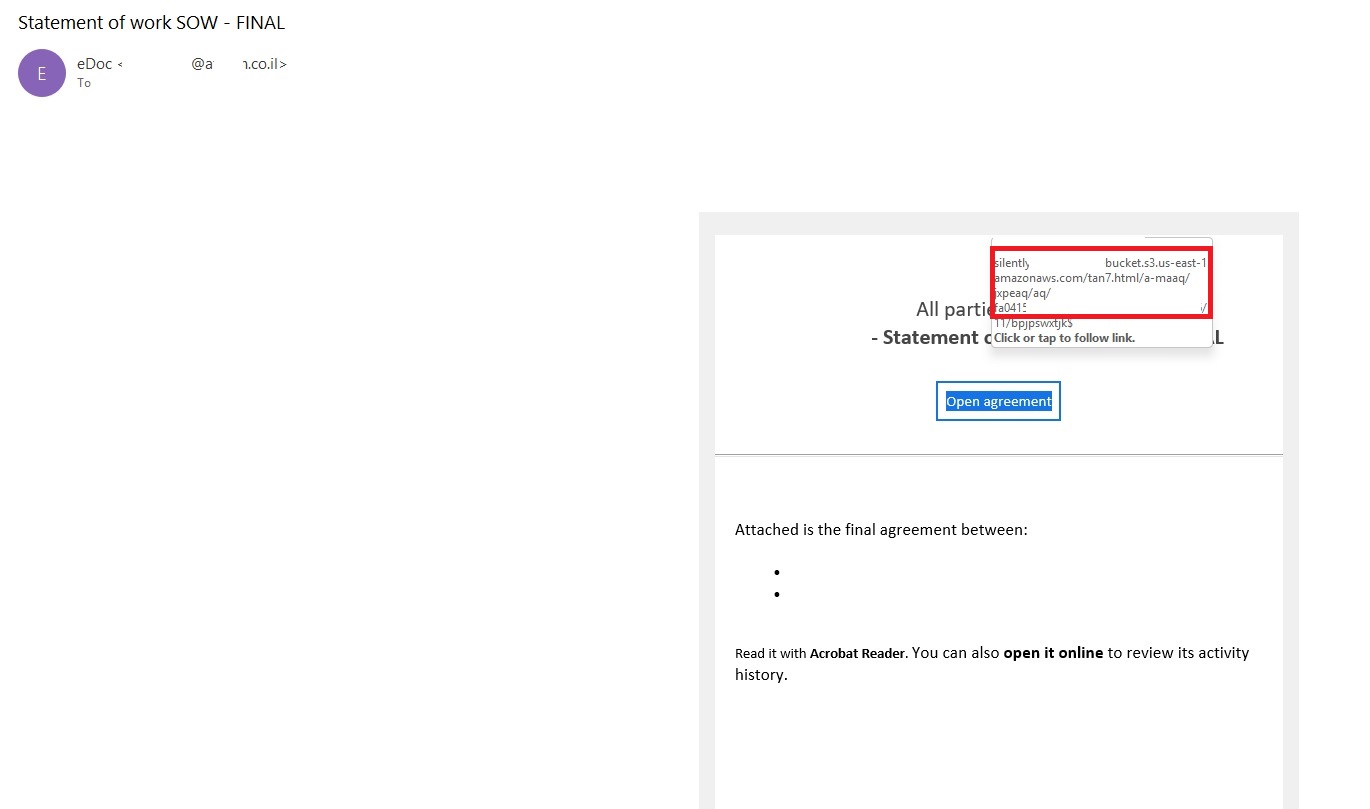
In these emails, the victim is typically asked to click a link to review and sign a specific document.

Phishing email with a "document"

Phishing email with a “document”

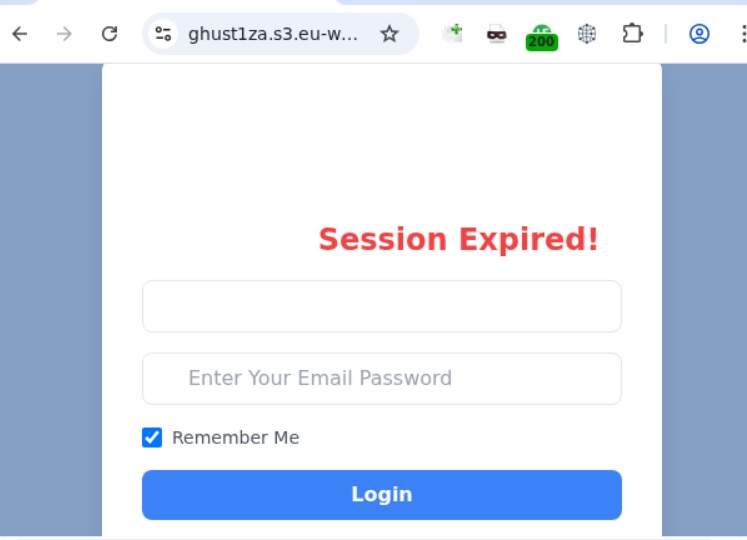
Upon clicking the link, the user is directed to a sign-in form hosted on amazonaws.com. This can easily mislead the victim, convincing them that what they’re doing is safe.

Phishing sign-in form

Phishing sign-in form

The resulting form is, of course, a phishing page, and any data entered into it goes directly to the attackers.

Amazon SES and BEC

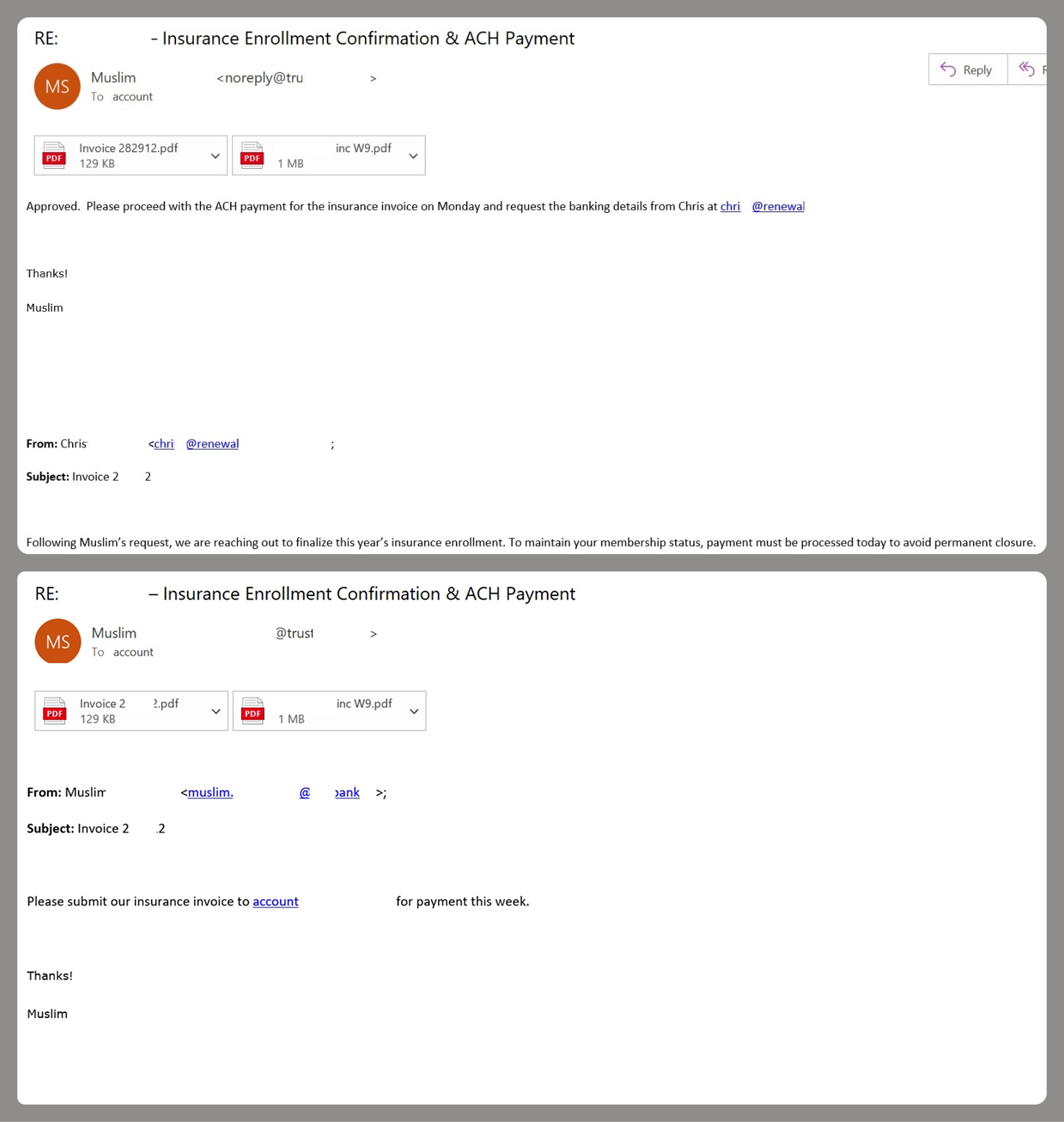
However, Amazon SES is used for more than just standard phishing; it’s also a vehicle for a very sophisticated type of BEC campaigns. In one case we investigated, a fraudulent email appeared to contain a series of messages exchanged between an employee of the target organization and a service provider about an outstanding invoice. The email was sent as if from that employee to the company’s finance department, requesting urgent payment.

BEC email featuring a fake conversation between an employee and a vendor

BEC email featuring a fake conversation between an employee and a vendor

The PDF attachments didn’t contain any malicious phishing URLs or QR codes, only payment details and supporting documentation.

Forged financial documents

Forged financial documents

Naturally, the email didn’t originate with the employee, but with an attacker impersonating them. The entire thread quoted within the email was actually fabricated, with the messages formatted to appear as a legitimate forwarded thread to a cursory glance. This type of attack aims to lower the user’s guard and trick them into transferring funds to the scammers’ account.

Takeaways

Phishing via Amazon SES is shifting from isolated incidents into a steady trend. By weaponizing this service, attackers avoid the effort of building dubious domains and mail infrastructure from scratch. Instead, they hijack existing access keys to gain the ability to blast out thousands of phishing emails. These messages pass email authentication, originate from IP addresses that are unlikely to be blocklisted, and contain links to phishing forms that look entirely legitimate.

Since these Amazon SES phishing attacks stem from compromised or leaked AWS credentials, prioritizing the security of these accounts is critical. To mitigate these risks, we recommend following these guidelines:

  • Implement the principle of least privilege when configuring IAM access keys, granting elevated permissions only to users who require them for specific tasks.
  • Transition from IAM access keys to roles when configuring AWS; these are profiles with specific permissions that can be assigned to one or several users.
  • Enable multi-factor authentication, an ever-relevant step.
  • Configure IP-based access restrictions.
  • Set up automated key rotation and run regular security audits.
  • Use the AWS Key Management Service to encrypt data with unique cryptographic keys and manage them from a centralized location.

We recommend that users remain vigilant when handling email. Do not determine whether an email is safe based solely on the From field. If you receive unexpected documents via email, a prudent precaution is to verify the request with the sender through a different communication channel. Always carefully inspect where links in the body of an email actually lead. Additionally, robust email security solutions can provide an essential layer of protection for both corporate and personal correspondence.

  • ✇Data and computer security | The Guardian
  • Google warns quantum computers could hack encrypted systems by 2029 Aisha Down
    Banks, governments and tech providers urged to upgrade security because current systems will soon be obsolete Banks, governments and technology providers need to be prepared for quantum computer hackers capable of breaking most existing encryption systems by 2029, Google has warned.The tech company said in a blogpost that quantum computers would pose a “significant threat to current cryptographic standards” before the end of the decade and urged other companies to follow its lead. Continue read
     

Google warns quantum computers could hack encrypted systems by 2029

Banks, governments and tech providers urged to upgrade security because current systems will soon be obsolete

Banks, governments and technology providers need to be prepared for quantum computer hackers capable of breaking most existing encryption systems by 2029, Google has warned.

The tech company said in a blogpost that quantum computers would pose a “significant threat to current cryptographic standards” before the end of the decade and urged other companies to follow its lead.

Continue reading...

© Photograph: Reuters

© Photograph: Reuters

© Photograph: Reuters

  • ✇Schneier on Security
  • iPhones and iPads Approved for NATO Classified Data Bruce Schneier
    Apple announcement: …iPhone and iPad are the first and only consumer devices in compliance with the information assurance requirements of NATO nations. This enables iPhone and iPad to be used with classified information up to the NATO restricted level without requiring special software or settings—a level of government certification no other consumer mobile device has met. This is out of the box, no modifications required. Boing Boing post.
     

iPhones and iPads Approved for NATO Classified Data

12 de Março de 2026, 16:59

Apple announcement:

…iPhone and iPad are the first and only consumer devices in compliance with the information assurance requirements of NATO nations. This enables iPhone and iPad to be used with classified information up to the NATO restricted level without requiring special software or settings—a level of government certification no other consumer mobile device has met.

This is out of the box, no modifications required.

Boing Boing post.

  • ✇Security Boulevard
  • TikTok Says No to End-to-End Encryption: Here’s Why That’s a Big Deal Tom Eston
    In a move that bucks the entire industry trend, TikTok has confirmed it will not implement end-to-end encryption (E2EE) for direct messages on its platform — arguing that E2EE would make users less safe. We break down what’s really going on: the child safety argument, the privacy counterargument, the geopolitical questions surrounding ByteDance, and what […] The post TikTok Says No to End-to-End Encryption: Here’s Why That’s a Big Deal appeared first on Shared Security Podcast. The post TikTok S
     

TikTok Says No to End-to-End Encryption: Here’s Why That’s a Big Deal

9 de Março de 2026, 01:00

In a move that bucks the entire industry trend, TikTok has confirmed it will not implement end-to-end encryption (E2EE) for direct messages on its platform — arguing that E2EE would make users less safe. We break down what’s really going on: the child safety argument, the privacy counterargument, the geopolitical questions surrounding ByteDance, and what […]

The post TikTok Says No to End-to-End Encryption: Here’s Why That’s a Big Deal appeared first on Shared Security Podcast.

The post TikTok Says No to End-to-End Encryption: Here’s Why That’s a Big Deal appeared first on Security Boulevard.

💾

  • ✇Security Boulevard
  • TikTok’s New U.S. Deal and Privacy Policy: What Users Don’t Understand Tom Eston
    TikTok has shifted to a majority-American entity, TikTok USDS Joint Venture, LLC, to comply with U.S. national security requirements and avoid a ban. This week we discuss why a recent privacy policy update went viral—especially language about sensitive data like immigration status and precise location—and argue much of it reflects longstanding practices and required California […] The post TikTok’s New U.S. Deal and Privacy Policy: What Users Don’t Understand appeared first on Shared Security Po
     
  • ✇Security Boulevard
  • Why the US–EU Privacy Divide Still Matters in the Age of AI  Jonathan Mortensen
    Explore the evolving landscape of privacy and security in the age of AI. This article examines the cultural and regulatory differences between the U.S. and Europe, the limitations of current policies, and the imperative for architectural solutions to ensure that autonomous systems can uphold privacy standards. The post Why the US–EU Privacy Divide Still Matters in the Age of AI  appeared first on Security Boulevard.
     

Why the US–EU Privacy Divide Still Matters in the Age of AI 

19 de Fevereiro de 2026, 05:00
Data Privacy Automation User Privacy Threatens Security Defenses

Explore the evolving landscape of privacy and security in the age of AI. This article examines the cultural and regulatory differences between the U.S. and Europe, the limitations of current policies, and the imperative for architectural solutions to ensure that autonomous systems can uphold privacy standards.

The post Why the US–EU Privacy Divide Still Matters in the Age of AI  appeared first on Security Boulevard.

Microsoft Shared BitLocker Keys With FBI, Raising Privacy Fears

26 de Janeiro de 2026, 13:42

Microsoft confirmed it can hand over BitLocker recovery keys stored in the cloud under warrant, reviving debate over who controls encrypted data.

The post Microsoft Shared BitLocker Keys With FBI, Raising Privacy Fears appeared first on TechRepublic.

‘All brakes are off’: Russia’s attempt to rein in illicit market for leaked data backfires

26 de Dezembro de 2025, 06:00

Russian state has tolerated parallel probiv market for its convenience but now Ukrainian spies are exploiting it

Russia is scrambling to rein in the country’s sprawling illicit market for leaked personal data, a shadowy ecosystem long exploited by investigative journalists, police and criminal groups.

For more than a decade, Russia’s so-called probiv market – a term derived from the verb “to pierce” or “to punch into a search bar” – has operated as a parallel information economy built on a network of corrupt officials, traffic police, bank employees and low-level security staff willing to sell access to restricted government or corporate databases.

Continue reading...

© Photograph: Alexander Zemlianichenko/AP

© Photograph: Alexander Zemlianichenko/AP

© Photograph: Alexander Zemlianichenko/AP

Personal details of Tate galleries job applicants leaked online

Sensitive information relates to more than 100 individuals and their referees

Personal details submitted by applicants for a job at Tate art galleries have been leaked online, exposing their addresses, salaries and the phone numbers of their referees, the Guardian has learned.

The records, running to hundreds of pages, appeared on a website unrelated to the government-sponsored organisation, which operates the Tate Modern and Tate Britain galleries in London, Tate St Ives in Cornwall and Tate Liverpool.

Continue reading...

© Photograph: Justin Kase zsixz/Alamy

© Photograph: Justin Kase zsixz/Alamy

© Photograph: Justin Kase zsixz/Alamy

Knee-jerk corporate responses to data leaks protect brands like Qantas — but consumers are getting screwed

When courts ban people from accessing leaked data – as happened after the airline’s data breach – only hackers and scammers win

It’s become the playbook for big Australian companies that have customer data stolen in a cyber-attack: call in the lawyers and get a court to block anyone from accessing it.

Qantas ran it after suffering a major cybersecurity attack that accessed the frequent flyer details of 5 million customers.

Continue reading...

© Photograph: Bianca de Marchi/AAP

© Photograph: Bianca de Marchi/AAP

© Photograph: Bianca de Marchi/AAP

  • ✇McAfee Blog
  • What to Do If Your Email Is Hacked Alex Merton-McCann
    I think I could count on one hand the people I know who have NOT had their email hacked. Maybe they found a four-leaf clover when they were kids! Email hacking is one of the very unfortunate downsides of living in our connected, digital world. And it usually occurs as a result of a data breach – a situation that even the savviest tech experts find themselves in. What is a data breach? In simple terms, a data breach happens when personal information is accessed, disclosed without permission, or l
     

What to Do If Your Email Is Hacked

6 de Setembro de 2025, 10:00

I think I could count on one hand the people I know who have NOT had their email hacked. Maybe they found a four-leaf clover when they were kids! Email hacking is one of the very unfortunate downsides of living in our connected, digital world. And it usually occurs as a result of a data breach – a situation that even the savviest tech experts find themselves in.

What is a data breach?

In simple terms, a data breach happens when personal information is accessed, disclosed without permission, or lost. Companies, organisations, and government departments of any size can be affected. Data stolen can include customer login details (email addresses and passwords), credit card numbers, identifying IDs of customers e.g. driver’s license numbers and/or passport numbers, confidential customer information, company strategy, or even matters of national security.

Data breaches have made headlines, particularly over the last few years. When the Optus and Medibank data breaches hit the news in 2022 affecting almost 10 million Aussies apiece, we were all shaken. But then when Aussie finance company Latitude was affected in 2023 with a whopping 14 million people from both Australia and New Zealand, it almost felt inevitable that by now, most of us would have been impacted.

The reality is that data breaches have been happening for years. In fact, the largest data breach in Australian history happened in 2019 to the online design site Canva which affected 139 million users globally. In short, it can happen to anyone, and the chances are you may have already been affected.

Your email is more valuable than you think

The sole objective of a hacker is to get their hands on your data. Any information that you share in your email account can be very valuable to them. Why do they want your data, you ask? It’s simple really – so they can cash in!

Some will keep the juicy stuff for themselves – passwords or logins to government departments or large companies they may want to ’target’ with the aim of extracting valuable data and/or funds. The more sophisticated ones will sell your details including name, telephone, email address, and credit card details to cash in on the dark web. They often do this in batches. Some experts believe they can get as much as AU$250 for a full set of details including credit cards. So, you can see why they’d be interested in you.

The other reason why hackers will be interested in your email address and password is that many of us re-use our login details across our other online accounts. Once they’ve got their hands on your email credentials, they may be able to access your online banking and investment accounts, if you use the same credentials everywhere. So, you can see why I harp on about using a unique password for every online account!

How big is the problem?

There is a plethora of statistics on just how big this issue is – all of them concerning. According to the Australian Institute of Criminology, of all the country’s cybercrime reports in 2024, about 21.9% involved identity theft and misuse. The Australian Bureau of Statistics adds that the identity theft victimisation rate has steadily increased from 0.8% to 1.2% from 2021 to 2024, respectively.

Meanwhile, The Australian Government revealed that at least one cybercrime is reported every 6 minutes, with business email compromise alone costing the national economy up to $84 million in losses. Regardless of which statistic you choose to focus on, we have a big issue on our hands.

How does an email account get hacked?

Hackers use a range of techniques—some highly sophisticated, others deceptively simple—to gain access. It is important to know how these attacks happen so you can stay ahead and prevent them.

  • Phishing scams: These are deceptive emails that trick you into entering your login details on a fake website that looks legitimate.
  • Data breaches: If a website where you used your email and password gets breached, criminals can use those leaked credentials to try and access your email account.
  • Weak or reused passwords: Using simple, easy-to-guess passwords or the same password across multiple sites makes it easy for hackers to gain access.
  • Malware: Malicious software like keyloggers can be installed on your computer without your knowledge, capturing everything you type, including passwords.
  • Unsecure Wi-Fi networks: Using public Wi-Fi without a VPN can expose your data to criminals monitoring the network.

From email hack to identity theft

Yes, absolutely. An email account is often the central hub of your digital life. Once a cybercriminal controls it, they can initiate password resets for your other online accounts, including banking, shopping, and social media. They can intercept sensitive information sent to you, such as financial statements or medical records.

With enough information gathered from your emails, they can commit identity theft, apply for credit in your name, or access other sensitive services. If you suspect your email was hacked, it’s crucial to monitor your financial statements and consider placing a fraud alert with credit bureaus.

Signs that your email has been hacked

  • You can no longer log in. The most obvious sign of an email hack is when your password suddenly stops working. Cybercriminals often change the password immediately to lock you out.
  • Friends receive strange messages from you. If your contacts report receiving spam or phishing emails from your address that you didn’t send, it’s a major red flag that someone else has control of your account.
  • Unusual activity in your folders. Check your “Sent” folder for messages you don’t recognize. Hackers might also set up forwarding rules to send copies of your incoming emails to their own address, so check your settings for any unfamiliar forwarding addresses.
  • Password reset emails you didn’t request. Receiving unexpected password reset emails for other services (like your bank or social media) is a sign that a hacker is using your email to try and take over your other online accounts.
  • Security alerts from your provider. Pay attention to notifications about new sign-ins from unfamiliar devices, locations, or IP addresses. These are often the first warnings that your account has been compromised.

Steps to email recovery

If you find yourself a victim of email hacking, these are a few very important steps you need to take. Fast.

Change your password

Using a separate, clean device, this is the very first thing you must do to ensure the hacker can’t get back into your account. It is essential that your new password is complex and totally unrelated to previous passwords. Always use random words and characters, a passphrase with a variety of upper and lower cases, and throw in some symbols and numbers.

I really like the idea of a crazy, nonsensical sentence – easier to remember and harder to crack! But, better still, get yourself a password manager that will create a password that no human would be capable of creating. If you find the hacker has locked you out of your account by changing your password, you will need to reset the password by clicking on the ‘Forgot My Password’ link.

Update other accounts that use the same password

This is time-consuming, but essential. Ensure you change any other accounts that use the same username and password as your compromised email. Hackers love the fact that many people use the same logins for multiple accounts, so it is guaranteed they will try your info in other email applications and sites such as PayPal, Amazon, Netflix – you name it!

Once the dust has settled, review your password strategy for all your online accounts. A best practice is to ensure every online account has its own unique and complex password.

Sign out of all devices

Most email services have a security feature that lets you remotely log out of all active sessions. Once you’ve changed your password, signing out from your email account also signs out the hacker and forces them to log-in with the new password, which fortunately they do not know. These, combined with two- or multi-factor authentication, will help you to regain control of your account and prevent further compromise.

Inform your email contacts

A big part of the hacker’s strategy is to get their claws into your address book to hook others as well. Send a message to all your email contacts as soon as possible so they know to avoid opening any emails—most likely loaded with malware—that have come from you.

Commit to multi-factor authentication

Two-factor or multi-factor authentication may seem like an additional, inconvenient step to your login, but it also adds another layer of protection. Enabling this means you will need a special one-time-use code to log in, aside from your password. This is sent to your mobile phone or generated via an authenticator app. So worthwhile!

Check your email settings

It is common for hackers to modify your email settings so that a copy of every email you receive is automatically forwarded to them. Not only can they monitor your logins to other sites; they can also keep a watchful eye on any particularly juicy personal information. So, check your mail forwarding settings to ensure no unexpected email addresses have been added.

Also, ensure your ‘reply to’ email address is actually yours. Hackers have been known to create an email address that looks similar to yours, so that when someone replies, it will go straight to their account, not yours.

Don’t forget to check your email signature to ensure nothing spammy has been added, as well as your recovery phone number and alternate email address. Hackers also change these to maintain control. Update them to your own secure details.

Scan your computer for malware and viruses

Regularly scanning your devices for unwanted invaders is essential. If you find anything, please ensure it is addressed, and then change your email password again. If you don’t have antivirus software, please invest in it.

Comprehensive security software will provide you with a digital shield for your online life, protecting all your devices – including your smartphone – from viruses and malware. Some services also include a password manager to help you generate and store unique passwords for all your accounts.

Consider creating a new email address

If you have been hacked several times and your email provider isn’t mitigating the amount of spam you are receiving, consider starting afresh. Do not, however, delete your old email address because email providers are known to recycle old email addresses. This means a hacker could spam every site they can find with a ‘forgot my password’ request and try to impersonate you and steal your identity.

Your email is an important part of your online identity so being vigilant and addressing any fallout from hacking is essential for your digital reputation. Even though it may feel that getting hacked is inevitable, you can definitely reduce your risk by installing some good-quality security software on all your devices.

Trusted and reliable comprehensive security software will alert you when visiting risky websites, warn you when a download looks dodgy, and block annoying and dangerous emails with anti-spam technology. It makes sense really – if you don’t receive the dodgy phishing email – you can’t click on it. Smart!

Finally, don’t forget that hackers love social media – particularly those of us who overshare on it. So, before you post details of your adorable new kitten, remember it may just provide the perfect clue for a hacker trying to guess your email password!

Report the incident

Reporting an email hack is a crucial step to create a necessary paper trail for disputes with banks or credit agencies. When reporting, gather evidence such as screenshots of suspicious activity, unrecognized login locations and times, and any phishing emails you received. This information can be vital for the investigation.

  • Your email provider: Use their official support or recovery channels immediately. They can help you investigate and regain control of your account. Do not use links from suspicious emails claiming to be from support.
  • Financial institutions: If you’ve disclosed sensitive financial information or use the email for banking, contact your bank and credit card companies immediately. Alert them to potential fraud and monitor your statements.
  • Friends, family, and contacts: Send a message to your contacts warning them that your account was compromised. Advise them not to open suspicious messages or click on links sent from your address during that time.
  • Your employer: If it’s a work email, or if your personal email is used for work purposes, notify your IT department immediately. They need to take steps to protect company data and systems.
  • Relevant authorities: For financial loss or identity theft, you can report the incident to authorities like the FBI’s Internet Crime Complaint Center or Action Fraud in the UK. This creates an official record and aids in wider law enforcement efforts.

Check if online accounts linked to your email were compromised

  • Prioritize critical accounts: Immediately check your online banking, financial, and government-related accounts. Review recent activity for any unauthorized transactions or changes.
  • Review social media and shopping sites: Check your social media for posts or messages you didn’t send. Review your online shopping accounts like Amazon for any purchases or address changes you don’t recognize.
  • Enable alerts: Turn on login and transaction alerts for your sensitive accounts. This will give you real-time notifications of any suspicious activity in the future.

Should you delete your hacked email account?

Generally, no. Deleting the account can cause more problems than it solves. Many online services are linked to that email, and deleting it means you lose the ability to receive password reset links and security notifications for those accounts.

More importantly, some email providers recycle deleted addresses, meaning a hacker could potentially re-register your old email address and use it to impersonate you and take over your linked accounts.

The better course of action is to regain control, thoroughly secure the account with a new password and multi-factor authentication, and clean up any damage. Only consider migrating to a new email address after you have fully secured the old one.

Future-proof your email after reclaiming control

  • Run a full security scan: Before doing anything else, run a comprehensive scan with a trusted antivirus program on all your devices to ensure no malware or keyloggers remain.
  • Double-check security settings: Confirm that your recovery email and phone number are correct and that multi-factor authentication is enabled, preferably using an authenticator app rather than SMS.
  • Review account permissions: Check which third-party apps and websites have access to your email account. Revoke access for any service you don’t recognize or no longer use.
  • Set periodic reminders: Make it a habit to review your account’s security logs and settings every few months to catch any potential issues early.
  • Learn to spot phishing: Be skeptical of unsolicited emails asking for personal information or creating a sense of urgency. Check the sender’s address and hover over links before clicking.
  • Keep software updated:Regularly update your operating system, web browser, and security software to protect against the latest vulnerabilities.
  • Secure your devices: Use comprehensive security software like McAfee+ on all your devices—computers, tablets, and smartphones—to protect against malware, viruses, and risky websites.

Provider-specific email recovery

Each email provider has a specific, structured process for account recovery. It is vital to only use the official recovery pages provided by the service and be wary of scam websites or third-party services that claim they can recover your account for a fee. Below are the official steps of the major providers that you can follow.

Gmail

  1. Go to Google’s official Account Recovery page.
  2. Enter your email address and follow the on-screen prompts. You will be asked questions to confirm your identity, such as previous passwords or details from your recovery phone number or email.
  3. Once you regain access, you will be prompted to create a new password.
  4. Immediately visit the Google Security Checkup to review recent activity, remove unfamiliar devices, check third-party app access, and enable 2-step verification.

Yahoo email

  1. Navigate to the Yahoo Sign-in Helper page.
  2. Enter your email address or recovery phone number and click “Continue.”
  3. Follow the instructions to receive a verification code or account key to prove your identity.
  4. Once verified, create a new, strong password.
  5. After regaining access, go to your Account Security page to review recent activity, check recovery information, and turn on 2-step verification.

Outlook or Hotmail

  1. Go to the official Microsoft account recovery page.
  2. You’ll need to provide your email, phone, or Skype name, and verify your identity using the security information linked to your account.
  3. If you cannot access your recovery methods, you will be directed to an account recovery form where you must provide as much information as possible to prove ownership.
  4. After resetting your password, visit your Microsoft account security dashboard to review sign-in activity, check connected devices, and enable two-step verification.

Final thoughts

Your email account is the master key to your digital kingdom, and protecting it is more critical than ever since many of your other accounts are connected with your email. Realizing “my email has been hacked” is a stressful experience, but taking swift and correct action can significantly limit the damage.

By following the recovery steps and adopting strong, ongoing security habits like using a password manager and enabling multi-factor authentication, you can turn a potential crisis into a lesson in digital resilience. Stay vigilant, stay proactive, and keep your digital front door securely locked.

To add another wall of defense, consider investing in a trusted and reliable comprehensive security software like McAfee+. Our solution will help you dodge hacking attempts by alerting you when visiting risky websites, or downloading questionable apps, and blocking malicious emails with anti-spam technology.

The post What to Do If Your Email Is Hacked appeared first on McAfee Blog.

  • ✇McAfee Blog
  • Watch Out For IRS Scams and Avoid Identity Theft McAfee
    Tax season isn’t just busy for taxpayers—it’s prime time for scammers, too. As you gather your W-2s, 1099s, and other tax documents, cybercriminals are gearing up to exploit the flood of personal and financial data in circulation. From phishing emails posing as the IRS to fake tax preparers looking to steal your refund, these scams can lead to identity theft, fraudulent tax returns, and serious financial headaches.  The good news? IRS scams follow predictable patterns, and with a little awarenes
     

Watch Out For IRS Scams and Avoid Identity Theft

Por:McAfee
11 de Março de 2025, 14:00

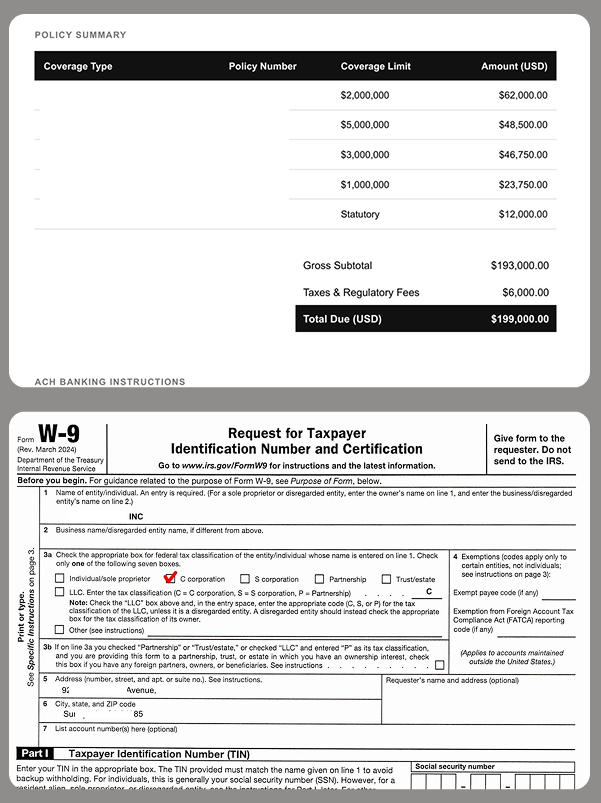
Tax season isn’t just busy for taxpayers—it’s prime time for scammers, too. As you gather your W-2s, 1099s, and other tax documents, cybercriminals are gearing up to exploit the flood of personal and financial data in circulation. From phishing emails posing as the IRS to fake tax preparers looking to steal your refund, these scams can lead to identity theft, fraudulent tax returns, and serious financial headaches. 

The good news? IRS scams follow predictable patterns, and with a little awareness, you can spot the warning signs before falling victim. Let’s break down the most common tax scams and how you can safeguard your personal information this filing season. 

Impersonation Schemes

A commonly used tactic involves hackers posing as collectors from the IRS, as tax preparers, or government bureaus. This tactic is pretty effective due to Americans’ concerns about misfiling their taxes or accidentally running into trouble with the IRS. Scammers take advantage of this fear, manipulating innocent users into providing sensitive information or money over the phone or by email. And in extreme cases, hackers may be able to infect computers with malware via malicious links or attachments sent through IRS email scams.

Robocalls

Another tactic used to take advantage of taxpayers is the canceled social security number scam. Hackers use robocalls claiming that law enforcement will suspend or cancel the victim’s Social Security number in response to taxes owed. Often, victims are scared into calling the fraudulent numbers back and persuaded into transferring assets to accounts that the scammer controls. Users need to remember that the IRS will only contact taxpayers through snail mail or in person, not over the phone.

Emails

Another scam criminals use involves emails impersonating the IRS. Victims receive a phishing email claiming to be from the IRS, reminding them to file their taxes or offering them information about their tax refund via malicious links. If a victim clicks on the link, they will be redirected to a spoofed site that collects the victim’s personal data, facilitating identity theft. What’s more, a victim’s computer can become infected with malware if they click on a link with malicious code, allowing fraudsters to steal more data.

Phony CPAs

Scammers also take advantage of the fact that many users seek out the help of a tax preparer or CPA during this time. These criminals will often pose as professionals, accepting money to complete a user’s taxes but won’t sign the return. This makes it look like the user completed the return themselves. However, these ghost tax preparers often lie on the return to make the user qualify for credits they haven’t earned or apply changes that will get them in trouble. Since the scammers don’t sign, the victim will then be responsible for any errors. This could lead to the user having to repay money owed, or potentially lead to an audit.

While these types of scams can occur at any time of the year, they are especially prevalent leading up to the April tax filing due date. Consumers need to be on their toes during tax season to protect their personal information and keep their finances secure. To avoid being spoofed by scammers and identity thieves, follow these tips:

File before cybercriminals do it for you. The easiest defense you can take against tax seasons schemes is to get your hands on your W-2 and file as soon as possible. The more prompt you are to file, the less likely your data will be raked in by a cybercriminal.

Keep an eye on your credit and your identity. Keeping tabs on your credit report and knowing if your personal information has been compromised in some way can help prevent tax fraud. Together, they can let you know if someone has stolen your identity or if you have personal info on the dark web that could lead to identity theft.

  • Our credit monitoring servicecan keep an eye on changes to your credit score, report, and accounts with timely notifications and guidance so you can take action to tackle identity theft.
  • Our identity monitoring servicechecks the dark web for your personal info, including email, government IDs, credit card and bank account info, and more—then provides alerts if your data is found on the dark web, an average of 10 months ahead of similar services.​


Beware of phishing attempts. It’s clear that phishing is the primary tactic crooks are leveraging this tax season, so it’s crucial you stay vigilant around your inbox. This means if any unfamiliar or remotely suspicious emails come through requesting tax data, double check their legitimacy with a manager or the security department before you respond. Remember: the IRS will not initiate contact with taxpayers by email, text messages, or social media channels to request personal or financial info. So someone contacts you that way, ignore the message.

Watch out for spoofed websites. Scammers have extremely sophisticated tools that help disguise phony web addresses for DIY tax software, such as stolen company logos and site designs. To avoid falling for this, go directly to the source. Type the address of a website directly into the address bar of your browser instead of following a link from an email or internet search. If you receive any suspicious links in your email, investigating the domain is usually a good way to tell if the source is legitimate or not.

Use a VPN, especially in public. Also known as a virtual private network, a VPN helps protect your vital personal info and other data with bank-grade encryption. The VPN encrypts your internet connection to keep your online activity private on any network, even public networks. Using a public network without a VPN can increase your risk because others on the network can potentially spy on your browsing and activity. If you’re new to the notion of using a VPN, check out this article on VPNs and how to choose one so that you can get the best protection and privacy possible. (Our McAfee+ plans offer a VPN as part of your subscription.)

Protect yourself from scam messages. Scammers also send links to scam sites via texts, social media messages, and email. Text Scam Detector can help you spot if the message you got is a fake. It uses AI technology that automatically detects links to scam URLs. If you accidentally click, don’t worry, it can block risky sites if you do.

Clean up your personal info online. Crooks and scammers have to find you before they can contact you. After all, they need to get your phone number or email from somewhere. Sometimes, that’s from “people finder” and online data brokers that gather and sell personal info to any buyer. Including crooks. McAfee Personal Data Cleanup can remove your personal info from the data broker sites scammers use to contact their victims.

Consider an identity theft protection solution. If for some reason your personal data does become compromised, be sure to use an identity theft solution such as McAfee Identity Theft Protection, which allows users to take a proactive approach to protect their identities with personal and financial monitoring and recovery tools to help keep their identities personal and secured.

The post Watch Out For IRS Scams and Avoid Identity Theft appeared first on McAfee Blog.

  • ✇Data and computer security | The Guardian
  • Apple removes advanced data protection tool in face of UK government request Rachel Hall
    Apple says removal of tool after government asked for right to see data will make iCloud users more vulnerableBusiness live – latest updatesApple has taken the unprecedented step of removing its strongest data security tool from customers in the UK, after the government demanded “backdoor” access to user data.UK users will no longer have access to the advanced data protection (ADP) tool, which uses end-to-end encryption to allow only account holders to view items such as photos or documents they
     

Apple removes advanced data protection tool in face of UK government request

21 de Fevereiro de 2025, 14:36

Apple says removal of tool after government asked for right to see data will make iCloud users more vulnerable

Apple has taken the unprecedented step of removing its strongest data security tool from customers in the UK, after the government demanded “backdoor” access to user data.

UK users will no longer have access to the advanced data protection (ADP) tool, which uses end-to-end encryption to allow only account holders to view items such as photos or documents they have stored online in the iCloud storage service.

Continue reading...

© Photograph: Yui Mok/PA

© Photograph: Yui Mok/PA

❌
❌