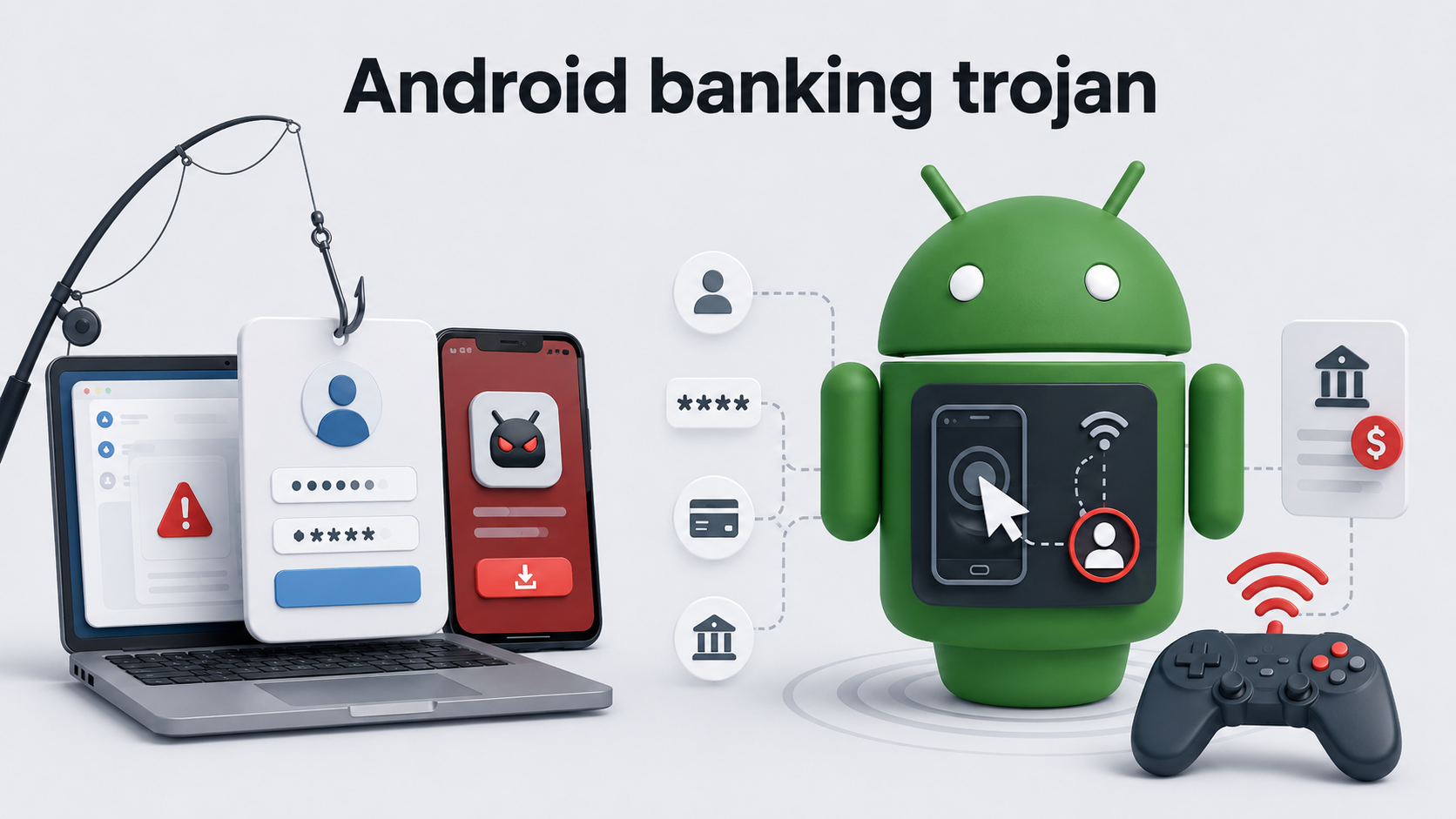
StreamRAT, a newly identified Android banking trojan distributed through fake free-TV streaming advertisements on Meta and TikTok. The campaign, tracked as “Steamtv Esp.,” primarily targeted Spanish-speaking Android users and exposed an estimated 570,000 Meta users between June 11 and July 3, 2026. The operation highlights the continued effectiveness of piracy-themed social engineering. Victims who clicked […]
The post StreamRAT Abuses Android Accessibility, MediaProjection and HVNC for Full Dev
StreamRAT, a newly identified Android banking trojan distributed through fake free-TV streaming advertisements on Meta and TikTok. The campaign, tracked as “Steamtv Esp.,” primarily targeted Spanish-speaking Android users and exposed an estimated 570,000 Meta users between June 11 and July 3, 2026. The operation highlights the continued effectiveness of piracy-themed social engineering. Victims who clicked […]
Google has introduced new privacy and network-security protections in Android 17, including stricter controls that prevent apps from scanning devices connected to a user’s local Wi‑Fi network without permission.
The update is designed to reduce household profiling, limit tracking, and defend users against threats ranging from malicious Wi‑Fi activity to cellular SMS scams.
Android smartphones often connect to home Wi‑Fi networks shared by smart TVs, cameras, game consoles, speakers, printe
Google has introduced new privacy and network-security protections in Android 17, including stricter controls that prevent apps from scanning devices connected to a user’s local Wi‑Fi network without permission.
The update is designed to reduce household profiling, limit tracking, and defend users against threats ranging from malicious Wi‑Fi activity to cellular SMS scams.
Android smartphones often connect to home Wi‑Fi networks shared by smart TVs, cameras, game consoles, speakers, printers, and other Internet of Things devices.
Previously, an app could potentially discover devices on the same local network without clearly asking the user for access. That information could reveal details about a household’s technology, behavior, or device ownership.
Android 17 now enforces Local Network Protection, requiring apps to request explicit permission before scanning for or connecting to devices on the local network.
This gives users more control over which applications can view nearby devices and communicate across their home Wi‑Fi environment. The restriction does not remove common features such as streaming content to a television.
Instead, Google recommends that developers use secure Android system tools for actions such as casting. Users can select a compatible TV or device through the operating system, without giving the app broad visibility into every device connected to the network.
Android 17 New Protection for Wi-Fi Tracking
The Wi‑Fi privacy improvement is part of a wider Android 17 security update focused on protecting network metadata and encrypted connections.
Google is also adding support for Encrypted Client Hello, or ECH, a privacy technology that hides the name of a website a device is trying to reach during the early stages of an HTTPS connection.
HTTPS already encrypts most traffic between a device and a website. However, network operators and eavesdroppers can sometimes still see domain-name information, allowing them to identify websites or apps being accessed.
Adds ECH to hide visited domains and improve privacy (source: Google)
This metadata can be used for profiling or to support targeted phishing and scam operations. With ECH and Private DNS, Android 17 aims to encrypt more of this connection data.
For supported websites and applications, the change makes it more difficult for Wi‑Fi operators, internet providers, and network snoops to determine a user’s online destination.
Google’s Android 17 enables Certificate Transparency by default, requiring website and app certificates to be recorded in public logs to help detect suspicious or improperly issued certificates that could enable interception attacks.
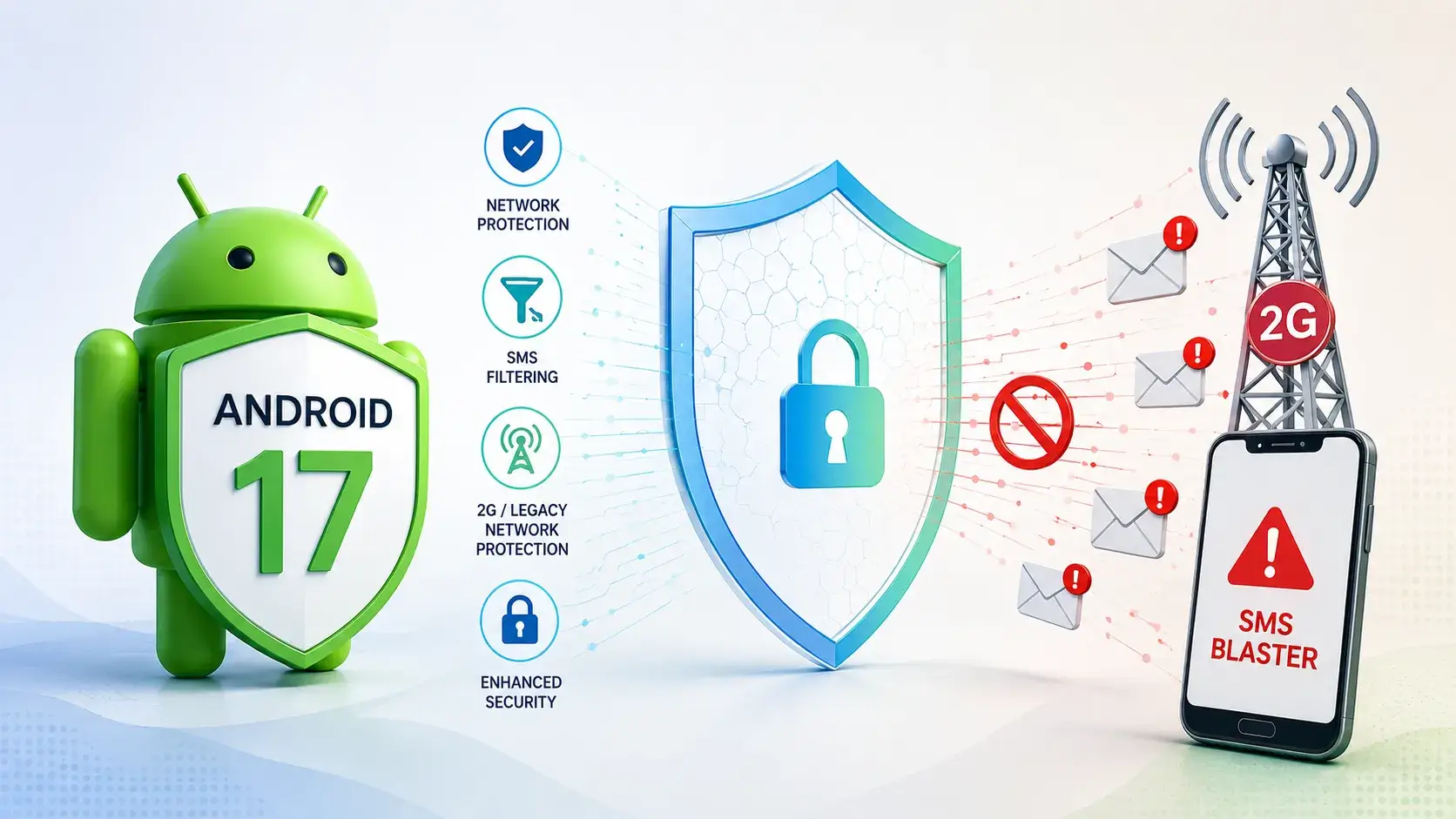
Another major change targets 2G downgrade attacks and SMS blaster activity. Criminals use fake cellular base stations to force nearby devices onto older 2G networks, where security protections are weaker.
SMS blaster Attack (source: Google)
Attackers can then send fraudulent text messages that imitate banks, delivery companies, government agencies, or other trusted organizations. Android previously offered users a manual option to turn off 2G connectivity.
Android 17 expands this defense by allowing participating mobile carriers to turn off 2G by default for subscribers. The zero-click protection reduces exposure to rogue base stations and phishing messages delivered through legacy cellular networks.
For users, the changes mostly operate in the background. For developers, Android 17 introduces new requirements for local network access and modern encrypted networking practices. Together, the measures show Google’s effort to reduce data exposure across Wi‑Fi, web browsing, certificate validation, and cellular communications.
Prevent incidents due to slow investigations. Power your Tier 1 with threat intelligence from 15K SOCs: Integrate TI Lookup in your SOC
Android 17 introduces a new set of network security controls to reduce cellular downgrade attacks, protect local networks, and limit metadata exposure during encrypted web sessions. This update includes carrier-managed 2G shutdown capabilities designed to combat SMS blaster campaigns that increasingly target users in public spaces. Google states the Android 17 changes focus on four […]
The post Android 17 Adds New Network Security Features to Block 2G SMS Blaster Attacks appeared first on GBHack
Android 17 introduces a new set of network security controls to reduce cellular downgrade attacks, protect local networks, and limit metadata exposure during encrypted web sessions. This update includes carrier-managed 2G shutdown capabilities designed to combat SMS blaster campaigns that increasingly target users in public spaces. Google states the Android 17 changes focus on four […]
Android 17 becomes the first major mobile OS to enable Encrypted Client Hello (ECH) by default, hiding visited website names from ISPs and network eavesdroppers.
Related Posts:
Android 17 Memory Limits: Stricter App Constraints
Google Restricts Pixel Kernel Source Access, Ditching Public Git Repos
Google Pixel 11 Pro Teaser Reveals Mysterious Spinning Light
The post Android 17 Enables Encrypted Client Hello by Default to Hide Website Names appeared first on Daily CyberSecurity.
Android 17 becomes the first major mobile OS to enable Encrypted Client Hello (ECH) by default, hiding visited website names from ISPs and network eavesdroppers.
Em junho de 2026, descobrimos um malware incomum que tem como alvo… centrais multimídia automotivas baseadas em Android. Este é o primeiro caso documentado de malware distribuído para centrais multimídia automotivas por meio de um serviço de atualização automática de firmware. Já abordamos diversos incidentes de cibersegurança automotiva, mas, em geral, eles envolviam vazamentos de dados na infraestrutura digital das fabricantes ou testes conduzidos por pesquisadores de segurança.
No entanto, es
Em junho de 2026, descobrimos um malware incomum que tem como alvo… centrais multimídia automotivas baseadas em Android. Este é o primeiro caso documentado de malware distribuído para centrais multimídia automotivas por meio de um serviço de atualização automática de firmware. Já abordamos diversos incidentes de cibersegurança automotiva, mas, em geral, eles envolviam vazamentos de dados na infraestrutura digital das fabricantes ou testes conduzidos por pesquisadores de segurança.
No entanto, este caso envolve malware que cibercriminosos estão distribuindo ativamente. Os objetivos são cometer fraude publicitária e criar uma botnet de proxies formada por centrais multimídia automotivas infectadas. Neste artigo, explicamos o que é uma central multimídia automotiva, como os invasores infectam esses dispositivos e o que isso pode significar para os motoristas.
O que é uma central multimídia automotiva?
Primeiro, vamos esclarecer o que é exatamente uma central multimídia automotiva. O termo pode parecer técnico, mas, na realidade, a maioria dos motoristas interage com uma delas sempre que usa o carro. A central multimídia é o sistema de infoentretenimento do veículo, geralmente centrado em uma tela usada para controlar a navegação, a música e outras funções do veículo. Nos carros modernos, as centrais multimídia automotivas costumam estar conectadas à Internet.
As fabricantes usam frequentemente o Android nas centrais multimídia por sua praticidade, já que o sistema foi desenvolvido para atender a diferentes usos automotivos e oferece diversas vantagens:
muitas opções de personalização da interface;
facilidade para desenvolver aplicativos;
a possibilidade de adicionar aplicativos e componentes próprios ao sistema;
um grande ecossistema de aplicativos já existente.
No entanto, essas mesmas vantagens também criam riscos, pois os aplicativos podem ser maliciosos em vez de legítimos. E foi exatamente isso que aconteceu neste caso: usando um aplicativo malicioso, invasores incorporaram veículos a uma botnet. Veja como isso aconteceu…
Como os invasores infectam as centrais multimídia automotivas e qual malware utilizam?
Primeiro, é importante observar que esse malware não afeta todas as centrais multimídia automotivas, mas apenas aquelas que utilizam software desenvolvido pela empresa chinesa DoFun. A empresa desenvolve firmware, aplicativos e serviços de nuvem para sistemas de infoentretenimento automotivos baseados em Android e, de acordo com seu site, atende a mais de 30 milhões de proprietários de veículos em todo o mundo.
Para distribuir o malware para o sistema de infoentretenimento de um veículo, os invasores usam o TWCore, um aplicativo de sistema legítimo responsável pelas atualizações de software nas centrais multimídia automotivas da DoFun. Em condições normais, o TWCore obtém da nuvem da desenvolvedora informações sobre os arquivos que precisam ser baixados e instalados no dispositivo. Esses arquivos são, principalmente, atualizações de software já instalado na central multimídia, mas o mesmo mecanismo pode ser usado para instalar novos aplicativos. E é exatamente isso que os invasores exploram: eles usam o TWCore para instalar o JarService (um dropper de cavalo de Troia malicioso) nas centrais multimídia automotivas.
O JarService é essencialmente um aplicativo “vazio”. Ou seja, ele não tem uma interface de usuário e não tenta se passar por um serviço legítimo. A ausência de uma interface faz todo sentido neste caso: os invasores não precisam convencer o usuário a instalar o malware manualmente, e nenhuma interação do usuário é necessária.
O código do JarService contém, de forma criptografada, a carga útil da próxima etapa, além de informações sobre sua versão e ponto de entrada. A função do JarService é descriptografar esses dados e iniciar a próxima etapa da infecção: um módulo malicioso de download. Depois de iniciado, o módulo de download se conecta ao servidor de comando e controle (C2) dos invasores e envia informações sobre o malware instalado. Em resposta, o servidor fornece um link para a carga útil da próxima etapa. O módulo de download obtém essa carga útil, descriptografa-a e a executa.
Neste caso, o malware instala um tipo de malware conhecido como “clicker”, usado para aumentar fraudulentamente o número de impressões de anúncios. Depois de ser executado, o malware entra em contato regularmente com o servidor C2 e envia informações sobre o dispositivo infectado, incluindo seu modelo, resolução de tela, endereço MAC e detalhes da rede Wi-Fi conectada. Em troca, o malware pode receber vários comandos dos invasores. Por exemplo, ele pode fazer solicitações HTTP e abrir páginas da Web. Mas, mais importante ainda, pode baixar e executar código malicioso adicional no sistema de infoentretenimento do veículo comprometido.
Os invasores usam esse recurso para instalar um módulo malicioso chamado zhima, que adiciona a central multimídia infectada a uma botnet. A botnet resultante é usada para operar um serviço conhecido como proxy residencial, permitindo que os invasores direcionem seu tráfego por meio dos dispositivos infectados ao realizar ataques e outras atividades maliciosas.
Quem está por trás do malware e o que os invasores pretendem alcançar?
Os invasores infectam centrais multimídia automotivas com malware principalmente para expandir a botnet. Uma investigação realizada por especialistas da Kaspersky constatou que a operação está associada à plataforma maliciosa BADBOX e, mais especificamente, a um dos agentes de ameaça ligados a ela: o MoYu Group. Indícios no código do malware, juntamente com semelhanças em relação à infraestrutura anteriormente atribuída ao MoYu Group, apontam para o envolvimento do grupo. A própria BADBOX reúne uma série de atividades maliciosas voltadas à infecção de dispositivos Android e à exploração clandestina de seus recursos.
Os invasores, então, ganham dinheiro monetizando o acesso a recursos que pertencem a outras pessoas. Ao investigar a infraestrutura da botnet, nossos especialistas descobriram vínculos entre o MoYu Group e os serviços PXYEDGE e ProxyForU, que oferecem serviços de proxy residencial. Esses serviços permitem que clientes de todo o mundo direcionem seu tráfego de Internet por meio de dispositivos conectados à botnet e, assim, acessem a Internet usando os endereços IP desses dispositivos. Isso sugere que as centrais multimídia automotivas infectadas já podem estar sendo usadas como parte dessa infraestrutura.
Como o malware afeta os usuários?
Em primeiro lugar, o malware consome parte dos recursos computacionais da central multimídia automotiva. A carga adicional pode fazer com que o sistema de infoentretenimento do veículo fique mais lento ou menos estável. Ao mesmo tempo, é muito provável que a velocidade da conexão de Internet do dispositivo infectado também diminua, pois os invasores podem direcionar grandes volumes de tráfego por meio dele.
Também vale destacar que o malware não se limita a oferecer funcionalidade de proxy. Ele pode receber comandos dos invasores, além de baixar e executar código malicioso adicional. Como resultado, as consequências de uma infecção podem variar de acordo com a carga útil que os operadores da botnet decidirem instalar no dispositivo.
Conclusão
Este caso demonstra mais uma vez que ataques a todos os tipos de dispositivos conectados à Internet, de decodificadores de TV a sistemas de infoentretenimento automotivo, não são apenas uma possibilidade teórica, mas uma realidade concreta. Os invasores estão constantemente procurando novos dispositivos cujos recursos possam explorar para seus próprios fins. Por isso, a proteção contra malware é importante muito além de computadores e smartphones.
Nossos especialistas informaram a desenvolvedora sobre o esquema de distribuição do malware que identificaram, e ela corrigiu os problemas de segurança identificados.
Uma análise técnica completa do malware está disponível na Securelist.
Que outros métodos os invasores podem usar para comprometer um veículo e quais riscos eles representam para os motoristas? Leia mais em nossas publicações:
From several independent reports, we’ve seen evidence of scammers using fake Android “interview” apps to target job seekers on the Indeed platform.Indeed is one of the world’s largest employment websites, giving scammers access to a huge pool of potential victims, especially in a competitive job market.What we foundA user in the UK posted on our forums after being instructed by a supposed employer on Indeed to install an “Interview App.”A user in Brasil submitted an anonymized report after rece
From several independent reports, we’ve seen evidence of scammers using fake Android “interview” apps to target job seekers on the Indeed platform.
Indeed is one of the world’s largest employment websites, giving scammers access to a huge pool of potential victims, especially in a competitive job market.
What we found
A user in the UK posted on our forums after being instructed by a supposed employer on Indeed to install an “Interview App.”
A user in Brasil submitted an anonymized report after receiving similar instructions to install an APK named MyInterview from a link shared during a job interview.
Meanwhile, Reddit users discussed a “Indeed Interview” app that allegedly completely compromised one user’s phone.
The victim who installed the MyInterview APK said their phone began closing apps by itself after installation. They also shared a screenshot showing MyInterview listed under Android’s downloaded Accessibility services.
Common lures used by the scammers include:
“Complete your interview by installing the Indeed app.”
“Update your Indeed application.”
“Identity verification required.”
“Download our recruitment portal.”
“Salary agreement available after app installation.”
An analysis by Malwarebytes Android Malware Researcher Nazeeh Sulaiman showed that these Android apps impersonate Indeed’s login page before creating a VPN connection after an applicant enters an email address. Static analysis identified the apps as Trojan.Droppers, capable of installing additional untrusted apps.
At the time of writing, the final payload was spyware, although we initially expected a banking Trojan. Once the malware is granted the Accessibility permission, it effectively takes over the device. The interesting thing here is that it can prevent users from uninstalling the malicious app. When the user taps Uninstall in Android Settings, the malware simply forces the screen back, preventing removal.
How it works
Scammers advertise fake job openings on Indeed and lure applicants into installing a fake Android app that impersonates Indeed and present itself as an interview tool.
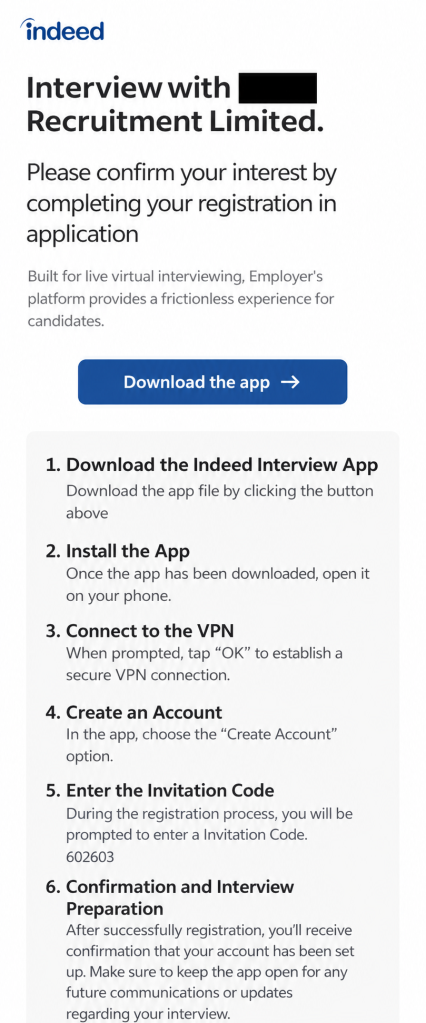
After confirming their application, job seekers receive instructions like these:
In this example the job seeker is instructed by a “recruitment firm” to download and install the app, connect to the VPN, create an account, and enter an invitation code. They are then told to keep the app open while waiting for confirmation.
This malicious app is not affiliated with Indeed. The company’s official Android app, Indeed Job Search, is distributed through Google Play, not through an APK supplied in a recruitment message or an unfamiliar interview website.
The interview process on Indeed does not require applicants to install a separate app, confirmed by an Indeed spokesperson:
“Interviewing through Indeed’s platform happens entirely in a browser and never requires downloading a special app. Any message asking a job seeker to download an app to participate in an interview is not legitimate. We encourage job seekers to avoid clicking links or downloading files from any message directing them to do so.”
It’s worth pointing out that the dropper is not necessarily the final payload. It’s an initial-stage app intended to install another malicious or unwanted app onto the device, often after bypassing a victim’s caution with a seemingly legitimate pretext. Even if the fake Indeed app does not visibly steal data itself, it can serve as a delivery mechanism for more dangerous malware.
A VPN connection is perfectly legitimate in many situations, but there is no obvious reason for an interview app to create one immediately after an applicant supplies an email address.
In a malicious workflow, a VPN can give an app substantial influence over the device’s network traffic. It may allow attackers to route communications through systems they control, hide what the app is doing, or support later stages of the attack. The VPN behavior alone does not prove that traffic was intercepted or modified, but combined with brand impersonation and dropper functionality, it is a serious warning sign.
The fake app’s presence in Accessibility settings is also concerning. Accessibility services can view screen content and perform actions of behalf of the user, making them attractive to malware developers. In the screenshot supplied to us, MyInterview was disabled, so there is no evidence the service was active on that device. Nevertheless, its presence as a downloaded Accessibility service is relevant to the overall risk assessment.
How to stay safe
A job interview should not require you to sideload an Android app, enable a VPN connection, or install software from an unknown source.
In this campaign, the supposed interview app is simply the lure: it impersonates Indeed, establishes a suspicious network connection, and is designed to deliver additional malware.
Before using any recruitment platform, make sure you understand its hiring process and be suspicious of requests that deviates from it or move you to another platform.
Don’t install apps just because someone tell you to, especially if you have to especially if you have to install them outside Google Play.
Verify job offers through independent channels. In some of the reported cases, the companies either did not exist or not have offices in the cities where they claimed to be hiring.
The Indeed spokesperson added:
“Job seekers are at the heart of everything we do, and their safety and trust are a top priority. We are aware of scams involving individuals instructing job seekers to download an app to complete a virtual interview. These are in no way affiliated with Indeed, and we strongly condemn bad actors who exploit the trust job seekers place in our platform and brand.
For more on how to verify a legitimate Indeed app and spot the warning signs of a fake one, visit our Help Center.”
O Adform, uma importante plataforma de publicidade, permaneceu comprometido por aproximadamente 24 horas (desde o fim do dia 26 de julho até a noite de 27 de julho) após ser alvo de um ataque por invasores desconhecidos. Poucas pessoas fora do setor conhecem o nome, mas o Adform veicula cerca de 1,5 bilhão de impressões de anúncios todos os dias em dezenas de milhares de sites. Isso significa que qualquer pessoa que visitasse um site que veiculasse anúncios do Adform poderia ter sido alvo do ata
O Adform, uma importante plataforma de publicidade, permaneceu comprometido por aproximadamente 24 horas (desde o fim do dia 26 de julho até a noite de 27 de julho) após ser alvo de um ataque por invasores desconhecidos. Poucas pessoas fora do setor conhecem o nome, mas o Adform veicula cerca de 1,5 bilhão de impressões de anúncios todos os dias em dezenas de milhares de sites. Isso significa que qualquer pessoa que visitasse um site que veiculasse anúncios do Adform poderia ter sido alvo do ataque.
Os invasores não estavam tentando instalar malware. Em vez disso, eles executaram um script no navegador da vítima que verificava a área de transferência a cada três segundos. Se detectasse que um endereço de carteira de criptomoedas havia sido copiado, o script o substituía pelo endereço de carteira dos invasores. Assim, se alguém tivesse um site com o anúncio malicioso aberto em uma guia do navegador e estivesse realizando uma transação com criptomoedas em outra guia ou em um aplicativo dedicado, os fundos poderiam acabar nas mãos dos invasores. Os responsáveis pelo Adform detectaram o ataque e corrigiram o problema, mas não há garantia de que um incidente semelhante não volte a acontecer. Por isso, todos os usuários devem se proteger contra publicidade maliciosa. Confira nossas dicas no final desta postagem.
O que sabemos sobre o ataque ao Adform
Não há muitas informações disponíveis, pois a declaração oficial da empresa aborda apenas o que aconteceu e quando, sem explicar a causa do incidente. Uma pesquisa independente revelou detalhes técnicos sobre como usuários comuns foram alvo do ataque, mas nada disso explica como o próprio Adform foi invadido inicialmente.
O que está claro é que os invasores inseriram seu próprio código no JavaScript carregado em todos os sites que veiculavam anúncios do Adform. Sempre que um anúncio estava prestes a ser exibido, o script era carregado do servidor do Adform, selecionava o anúncio correto e o exibia. No entanto, os invasores haviam acrescentado um conjunto de funções maliciosas: monitorar a área de transferência, enviar ao próprio servidor dados sobre o site em que o ataque ocorreu e o endereço IP da vítima, além de substituir endereços de carteiras de Bitcoin, Ethereum e Tron.
Para que o ataque funcionasse, bastava uma guia do navegador aberta com qualquer site que veiculasse anúncios do Adform. Não importava o tipo de site, a aparência do anúncio ou a qual anunciante ele pertencia. A única coisa que importava era se o site usava HTTP ou HTTPS. Segundo o Adform, o ataque não poderia ser realizado em um site carregado por HTTPS, pois, nesse caso, a conexão com o servidor dos invasores era bloqueada.
A empresa não divulgou informações sobre quantos usuários foram afetados nem sobre quantos sites ainda veiculam conteúdo e anúncios por HTTP.
Anúncios maliciosos fazem parte do nosso dia a dia
Infelizmente, anúncios on-line perigosos se tornaram um problema sistêmico. E não estamos falando apenas de anúncios de suplementos de procedência duvidosa ou de jogos de azar. Estamos falando de anúncios que disseminam malware ou levam a sites criados para roubar dados de pagamento e outras informações valiosas. Os invasores construíram uma infraestrutura em escala industrial para realizar esse tipo de ataque e utilizam diversas abordagens.
• Sequestro das contas de anúncios de marcas legítimas e respeitáveis. Basta roubar a senha de alguém da equipe de marketing. A partir daí, os cibercriminosos veiculam anúncios se passando pela empresa que invadiram e promovendo atualizações falsas de aplicativos, promoções fraudulentas e golpes semelhantes. Nos piores casos, como nas invasões de contas da adtech.de e da adxpansion.com, os invasores conseguiram veicular anúncios que redirecionavam as vítimas diretamente para a instalação automática de malware (downloads drive-by).
• Comprar anúncios diretamente. Isso mesmo. Os invasores simplesmente criam suas próprias contas de anunciante e veiculam anúncios para seus sites de phishing e malware, como qualquer outra empresa na Internet.
Como os anúncios aparecem praticamente em todos os lugares, em sites, aplicativos e redes sociais, essas ameaças podem surgir em praticamente qualquer contexto. E existem variações dessa ameaça tanto em computadores quanto em dispositivos móveis.
• Use um serviço de DNS seguro com filtragem de conteúdo integrada. Eles são eficazes no bloqueio da maioria das redes de anúncios conhecidas. A ideia é simples: sempre que seu dispositivo tenta se conectar a um servidor, o serviço DNS bloqueia solicitações para domínios de anúncios conhecidos. Isso desativa os anúncios em todos os lugares de uma só vez: em smart TVs, em todos os navegadores e em aplicativos para dispositivos móveis. Alguns provedores de Internet oferecem esse serviço, mas uma solução mais simples e universal é configurar o DNS seguro no roteador da sua casa seguindo nosso guia.
• Ative os bloqueadores de anúncios e rastreadores em sua solução completa de cibersegurança. Recomendamos Kaspersky Premium, que chama esse recurso de Antibanner. Esse tipo de proteção é especialmente importante durante viagens, pois o DNS seguro pode causar problemas de conexão em hotéis, restaurantes e aeroportos.
• Use proteção para o navegador. Um software de segurança básico pode impedir o download e a execução de um malware de roubo de dados, mas um pequeno script, como o usado no ataque ao Adform, ainda pode passar despercebido. Para se proteger contra esse tipo de ameaça, use uma solução capaz de analisar o que realmente está acontecendo no navegador. No Kaspersky Premium, esse recurso é oferecido pela extensão de navegador Kaspersky Protection. Ela protege contra a coleta de dados on-line, bloqueia banners de anúncios, protege seus pagamentos, protege o que você digita e bloqueia ataques de phishing.
Quer saber quais outros riscos podem estar escondidos nos anúncios on-line e como se proteger? Confira outras postagens:
Cybercriminals used to hacking home routers and security cameras have found another Internet-connected device to add to their botnets: your car, according to research published by Kaspersky Lab.
The post Malware Takes the Wheel: Kaspersky Finds First Car Head Unit-Specific Attack appeared first on The Security Ledger with Paul F. Roberts.
Cybercriminals used to hacking home routers and security cameras have found another Internet-connected device to add to their botnets: your car, according to research published by Kaspersky Lab.
Google’s new Android verification flow adds a 24-hour wait for apps from unverified developers as broader identity checks approach.
The post Google Tightens Android Sideloading: Unverified Apps Now Face a 24-Hour Wait appeared first on TechRepublic.
Discover how Android 17 memory limits will terminate apps with severe leaks. Learn about new tools to improve your app performance and stop memory leaks.
Related Posts:
Google Restricts Pixel Kernel Source Access, Ditching Public Git Repos
Google Pixel 11 Pro Teaser Reveals Mysterious Spinning Light
Samsung One UI 9 Locks the Phone Forever After 13 Wrong Codes
The post Android 17 Memory Limits: Stricter App Constraints appeared first on Daily CyberSecurity.
Discover how Android 17 memory limits will terminate apps with severe leaks. Learn about new tools to improve your app performance and stop memory leaks.
Manic Android malware combines banking fraud and spyware, using a Bluetooth relay to steal data even when devices are offline.
ThreatFabric’s Mobile Threat Intelligence team has identified a new Android malware, dubbed Manic, which has been active in the wild since at least February 2026. The researchers state that the malware is still under development as of July.
“Manic sits at the intersection of Android banking malware and mobile spyware, combining financial-fraud capabilities with b
Manic Android malware combines banking fraud and spyware, using a Bluetooth relay to steal data even when devices are offline.
ThreatFabric’s Mobile Threat Intelligence team has identified a new Android malware, dubbed Manic, which has been active in the wild since at least February 2026. The researchers state that the malware is still under development as of July.
“Manic sits at the intersection of Android banking malware and mobile spyware, combining financial-fraud capabilities with broader surveillance and device-control features.” reads the report published by the ThreatFabric’s Mobile Threat Intelligence team. “Its targeting is strongly focused on Ukraine, covering Ukrainian banks, government and identity services, and messaging applications, while also extending to Russian and European financial institutions, global fintech and cryptocurrency services, and military-focused communications.”
The malware monitors 169 different Android apps, including banking and payment apps across several European countries, government and eID services, crypto exchanges and wallets, 2FA tools, messaging apps, browsers and email clients.
This wide coverage appears deliberate. By targeting both financial and communication apps, the attackers can track a victim’s money, messages, location and files from the same device.
ThreatFabric traces the first infrastructure registrations back to February 2026, with development and production services appearing in late March and April. By July, an updated build had added stronger anti-analysis checks, in-memory DEX loading, and a technique the researchers call lock-secret phishing, which extracts the device PIN or pattern by presenting a fake prompt before the victim reaches the real lock screen.
Once installed, Manic requests Accessibility and notification access, then uses the Accessibility service as a UI keylogger. It classifies everything it captures before logging it: lock-screen input, recovery phrase candidates, four-to-six-digit SMS codes, passwords, long messages, email logins, and ordinary text.
“Manic uses its Accessibility service as a UI keylogger. It classifies captured text before recording it, distinguishing lock-screen input, recovery-phrase candidates, four- to six-digit SMS codes, passwords, long messages, email logins, and ordinary text.” continues the report. “Each key log record includes the app and package, captured text, timestamp, whether the input came from Autofill or manual entry, and whether the app is on Manic’s target list “
Each log record includes the app name and package, the captured text, a timestamp, whether input came from autofill or manual entry, and whether the app is on Manic’s target list.
The PIN theft technique works differently from a typical banking overlay. When Manic detects a numeric keypad in a targeted app, it places an invisible layer over the keys and records each tap. It then briefly passes the tap to the real keypad using Android’s Accessibility features, so the banking app works normally while Manic captures the PIN.
Another function, called autoEnterPin, can try to enter a stored PIN or pattern on the Android lock screen. This gives attackers two options: capture a PIN during a banking session and later use it to unlock the device without the victim being present.
According to the researchers, Manic stands out for its offline relay.
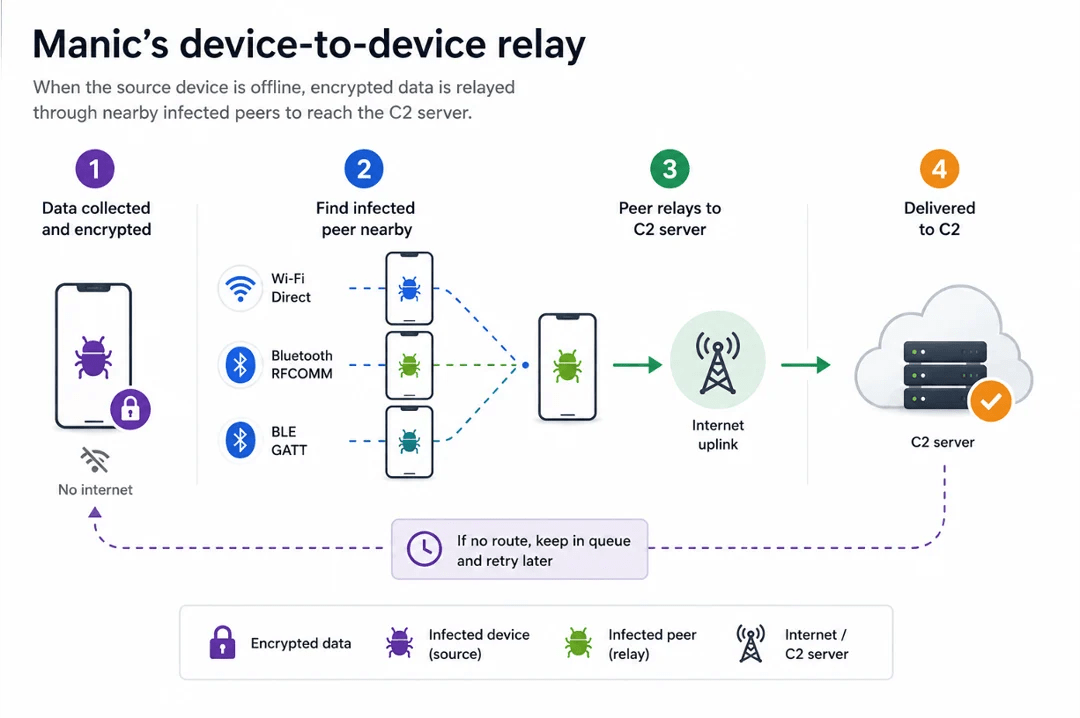
“Manic uses a store-and-forward relay mechanism to exfiltrate data even when the infected device cannot reach the C2 server directly.” continues the report. “Collected files and command results are encrypted with AES-GCM and placed in a local queue, allowing the source device to remain offline while the malware searches for another infected device that can provide a route to the C2 infrastructure.”
Manic searches for nearby infected devices over Wi-Fi Direct, Bluetooth RFCOMM, or BLE GATT, and supports chains of up to four relay hops. Cutting an infected phone off from the Internet doesn’t cut it off from exfiltration, as long as another infected device is within radio range. It’s a store-and-forward mesh built out of other people’s compromised phones.
Manic gives attackers remote control of the device through WebRTC, allowing them to view the screen and interact with it using Android’s Accessibility features. It can hide its activity with black screens, fake screens or fake update messages, while also covering permission requests.
The July version goes a step further by removing itself from the device’s app launcher. This keeps it out of the normal app list and lets attackers activate it through its wrapper or a deep link.
For defenders, the combination here is complete in an uncomfortable way: credential theft, live screen monitoring, authentication interception, device takeover, and an exfiltration path that doesn’t require the infected device to have Internet access at all. Monitoring for unusual Accessibility service grants and unexpected Bluetooth or Wi-Fi Direct connections from phones that aren’t actively transferring files are the most practical detection starting points.
“Manic is an evolving Android fraud platform designed for Device Takeover (DTO), combining credential and authentication theft with live screen monitoring and remote control. Its targeting spans banks, payment and cryptocurrency services, eID applications, and messengers, with a strong focus on Ukraine.” concludes the report. “A particularly distinctive capability is its offline mesh relay, which allows collected data to move through nearby infected devices over Wi-Fi Direct or Bluetooth when direct C2 access is unavailable. “
While monitoring Android threats in June 2026, we discovered a new piece of Android malware. What struck us as unusual was that it installed like an ordinary user app yet made no attempt to disguise itself as legitimate software: it had no user interface at all. This led us to suspect the app might be reaching users’ devices without their knowledge. Further investigation confirmed that hypothesis and allowed us to reconstruct the entire infection chain.
Key findings:
We identified new Android m
While monitoring Android threats in June 2026, we discovered a new piece of Android malware. What struck us as unusual was that it installed like an ordinary user app yet made no attempt to disguise itself as legitimate software: it had no user interface at all. This led us to suspect the app might be reaching users’ devices without their knowledge. Further investigation confirmed that hypothesis and allowed us to reconstruct the entire infection chain.
Key findings:
We identified new Android malware: a multi-stage downloader whose ultimate purpose is ad fraud and creation of a proxy botnet.
The malware spread through the built-in updaters of Android-based automotive head unit firmware. This is the first documented case of malware found on a car head unit with an infection chain specific to that type of device.
We attribute this activity, with high confidence, to the MoYu Group, an actor linked to the BADBOX botnet.
Kaspersky solutions detect the threats described below under the following detection names:
HEUR:Trojan-Dropper.AndroidOS.Agent.vu
HEUR:Trojan-Downloader.AndroidOS.Agent.ov
HEUR:Trojan-Proxy.AndroidOS.Zhima.*
HEUR:Trojan.AndroidOS.Vo1d.*
Head unit firmware overview
A head unit is a system that combines multimedia functions with partial control over certain vehicle functions. Head units may come as part of a car’s factory equipment or as an aftermarket upgrade. The main attack vectors for these systems are compromise via physical access and vulnerabilities in the head unit’s OS or components, both of which we’ve covered previously.
In some cases, head units run on Android, primarily because it’s convenient for manufacturers: Android’s source code already accounts for use cases within automotive head units. Android also allows manufacturers to add their own system applications during the build process, which they can use for a range of purposes: customizing the UI, adding system components tailored to the vendor’s needs, and more.
Most apps developed for Android devices can also run on an Android-based head unit, and that is true for malware as well. That said, it’s hard to imagine certain categories of smartphone-targeted malware being used to attack a head unit. Banking Trojans are a good example: since mobile banking is used almost exclusively on smartphones, infecting a head unit with a banking Trojan would be a waste of the attacker’s resources.
It’s worth noting that head units often include SIM card slots and can connect to the internet, enabling features like navigation and software updates. Since a head unit typically holds nothing of value to an attacker, one of the more likely attack scenarios using “classic” Android malware is infecting the device to recruit it into a botnet – similar to attacks on IoT devices.
During our research, we found exactly that kind of malware. The design of firmware for DoFun head units enabled attackers to distribute malware. We notified the vendor about the distribution scheme, and they subsequently reported fixing the security issues.
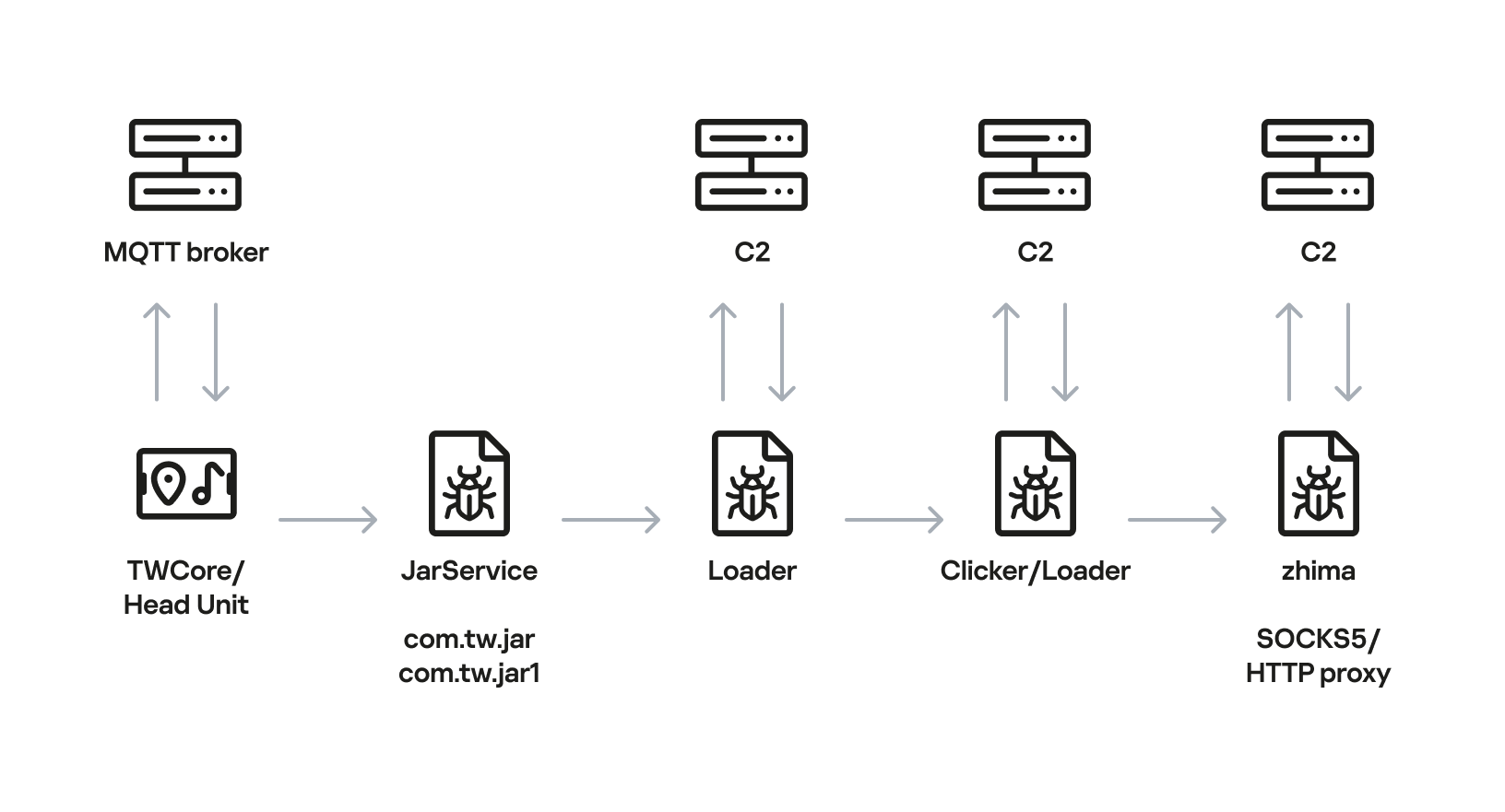
Below is the entire infection chain:
Head unit infection scheme
Let’s look at exactly how these head units became infected.
The TWCore app
TWCore is a legitimate system application responsible for collecting analytics data and updating the head unit software. Let’s take a closer look at how the update function works.
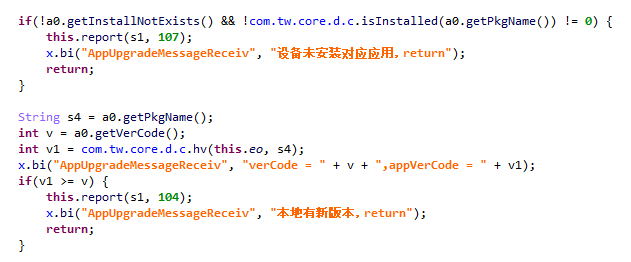
The process is fairly simple. An MQTT message broker hosted on the subdomain cardoor[.]cn sends a message containing information about the APK files that need to be downloaded and installed on the head unit. Notably, the object describing this message includes an installNotExists field, a Boolean flag that can be set to true or false. This flag allows TWCore to install apps that weren’t originally present on the device.
TWCore only checks whether an app is already installed on the device when installNotExists = false
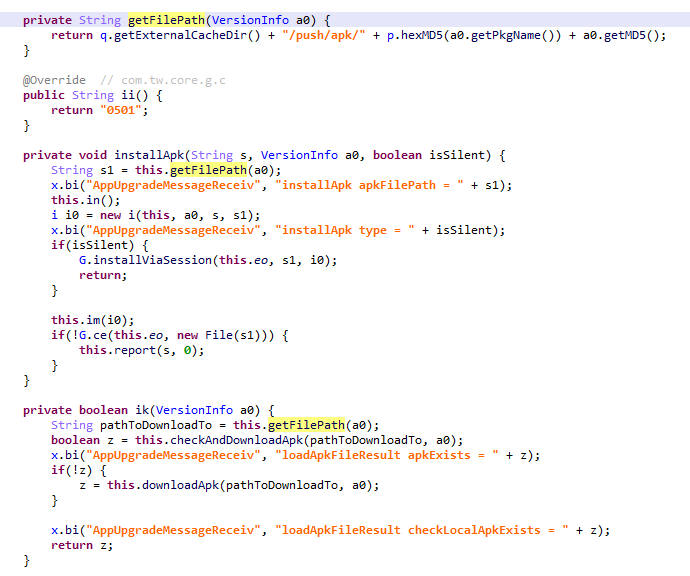
The APK file is downloaded to <TWCore external cache dir>/push/apk/ for installation.
The path TWCore uses to download APK files
Our telemetry revealed previously unknown malware at these file paths. On top of that, our data indicates that in every observed case, the malware was installed by an app with the package name com.tw.core, which matches the TWCore package name.
Next, we’ll break down the malware installed by TWCore: the JarService dropper.
Stage 1: the JarService dropper
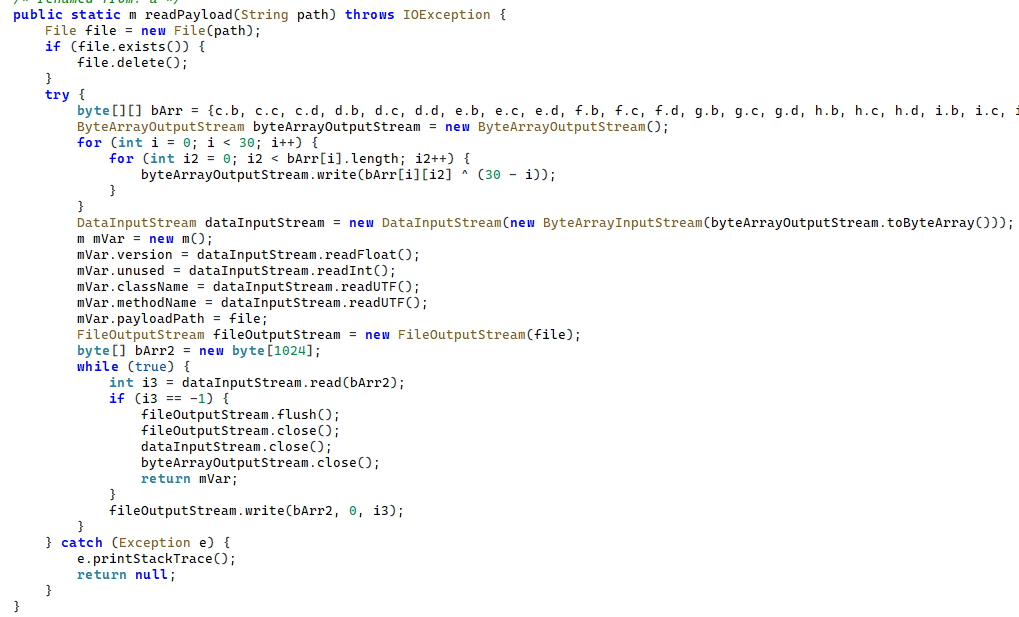
As mentioned earlier, JarService is a small dropper app with no UI of any kind. It decrypts data stored as encrypted blocks within the Trojan’s code. Each block is XOR-encrypted with a single-byte key that shifts linearly from block to block. The decrypted data contains serialized information about the payload version and entry point, along with the malware’s own code for further loading.
Decrypting and deserializing information about the stage 2 payload
In the version of JarService we analyzed, the entry point for the next-stage payload was the wa method of the com.c.j.qbh class.
Stage 2: the loader
This stage’s payload is a malicious loader. Its code contains encrypted strings that are later used as class names to execute the stage 3 payload using the reflection mechanism. The loader sends implant information to one of the attackers’ servers via a POST request. Example of a request to the C2 server:
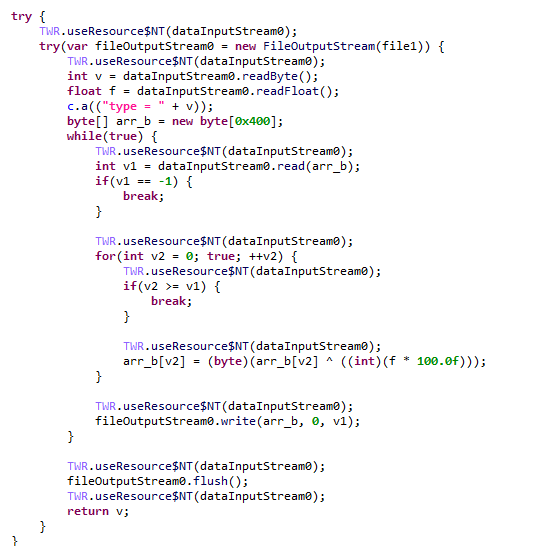
The Trojan uses the link in the dexUrl field of the data object to download serialized data for loading the next stage. This data begins with a single-byte integer, a key used to decrypt the strings in the loader’s code. Immediately following this number is a four-byte floating-point value used to XOR-decrypt the stage 3 payload, which itself is located after these keys.
Decrypting the stage 3 payload
In the decrypted payload, the entry point is the init method of the com.ast.sdk.BillingMain class, shown in the screenshot below.
Entry point of the stage 3 payload
While analyzing this stage, we noticed that the download link for the next-stage payload includes a version number. We decided to try other version numbers to retrieve different payload versions, and ultimately obtained seven distinct variants, which we list under “Indicators of Compromise” at the end of this report. The earliest version, numbered 3.57, uses a different decoding algorithm than the one described above. This may indicate that an earlier version of the infection chain used a different loader between JarService and the stage 3 payload.
Stage 3: clicker / reverse proxy loader
In this stage, the malware sends a POST request to /cpc/api/task every 90 minutes by default, containing information about the infected device (display resolution, device model, the SSID of the connected Wi-Fi network, MAC address, and so on) along with the Trojan’s configuration version. If the configuration is outdated, the C2 server returns an updated configuration containing new C2 addresses and new paths for sending HTTP requests. An example of a response is shown below. Note that at the time of our research, the most up-to-date configuration version was 3.82.
If the configuration version doesn’t need updating, the C2 server instead returns integer command identifiers, which the attackers refer to as productId. The Trojan maps each identifier to command information, which it stores as a serialized JSON object using the SharedPreferences API. Each identifier also has its own version, expressed as a UNIX timestamp. If the C2 response includes an unknown productId or one whose version is outdated, the malware sends a GET request to the attackers’ server at /cpc/api/xml to retrieve the command contents for all such identifiers. The C2 server responds with command information for each unknown identifier. An example of a response is shown below.
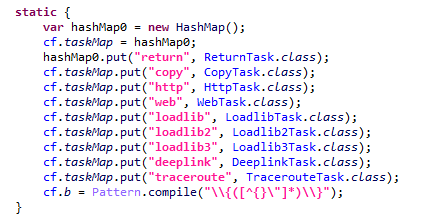
The command information includes a tagName field, which is the command name. The code maps each name to the corresponding class responsible for executing it.
List of executable commands
At the time of our research, the attackers had implemented nine commands. The table below lists command names, brief descriptions, and arguments. The functionality of these commands suggests that the malware can be used to display ads, commit ad fraud (serving as a clicker), and download additional malicious code.
Command name
Description
Arguments
return
Return a value from SharedPreferences.
key: the key whose value should be returned
copy
Set the contents of the clipboard.
text: the key whose value from SharedPreferences is returned as the clipboard contents url: a link for downloading gzip-compressed data (optional); this data is then concatenated with the value of the text key, with (5 spaces) used as a separator
http
Make a POST/GET HTTP request to a specified resource and, if instructed, save the response in SharedPreferences under a specified key.
url: the resource address method: the HTTP method name (optional) startLabel: a marker for the start of the data to save from the resource (optional) endLabel: a marker for the end of the data to save from the resource (optional) valueLabel: the key under which to save the value (optional) header: a dictionary of headers for the HTTP request (optional) content: the content of the POST request (optional)
web
Open a link in the WebView and execute arbitrary JavaScript code within it.
url: the link to open in the WebView js: base64-encoded JavaScript code to execute in the WebView; used when the url parameter is empty or absent corejs: JavaScript code to execute when the resource loads in the WebView (optional) param: a string dictionary of parameters for launching the WebView client: if this key is present, WebViewClient is used to handle redirects manually time: task timeout
loadlib
Not fully implemented at the time of publishing this report.
–
loadlib2
Download and execute arbitrary code.
url: the address to download the payload from name: the name of the module being downloaded md5: the MD5 hash of the payload clear: a comma-separated list of payload names to delete (optional) params: an array of parameters to launch the payload with className: the class name of the payload entry point method: the name of the virtual method at the payload entry point cmethod: the name of the static method used to instantiate the entry-point class (optional) thread: a flag; the payload runs in a separate thread if this flag is not set reload: a flag that, when set, restarts already loaded modules
loadlib3
Not fully implemented at the time of publishing this report.
–
deeplink
Open a resource in the browser.
url: a link to the resource
traceroute
Check resource availability via an ICMP ping.
host: comma-separated list of resources to check
However, attackers use only a relatively small subset of these commands in real-world attacks. As shown in the example C2 response above, at the time of publishing this report the attackers were using the loadlib2 and http commands. The payload downloaded via the loadlib2 command is a reverse proxy module named “zhima”, which researchers from the Nokia Deepfield Emergency Response Team independently discovered in TV set-top boxes around the same time as we did and also described in their report. This confirms that the attackers’ ultimate goal is building a proxy botnet.
While investigating this stage of the attack chain, we noticed that the zhima download link also included a version number. As with the previous stage, we tried other possible version numbers and found eight variants of the zhima module, the earliest of which was version 57. The complete list of identified zhima modules is provided under “Indicators of Compromise” below.
Attribution
While analyzing the complete infection chain, we noticed that the stage 2 loader created a thread with the meaningful name mosdk-host-loader. We decided to investigate what mosdk referred to in that name. This led us to a malicious app installed on various TV set-top boxes with the package name com.abc.nexus (3AD4BF5A86D26FFBF09CAE42AF330A98). It consists of several components (including a dropper similar to JarService), each used by the attackers to covertly monetize the device’s computing power. Each malicious component in the app corresponds to its own service, and the service containing the launch code for the JarService-like dropper is named AdmoyuService. In light of this and the name of the malicious thread found in the payload code, we concluded that moyu in the service name referred to MoYu Group, one of the actors linked to the BADBOX malware platform, which had been described by researchers at HUMAN. This assessment is further supported by extensive overlap between the malware’s network infrastructure and that of MoYu Group, which was independently identified by researchers from the Nokia Deepfield Emergency Response Team around the same time as our own research. Based on these similar naming patterns and prominent infrastructure overlap between the activity of MoYu Group and the attacks described in this report, we attribute it to the same actor with high confidence.
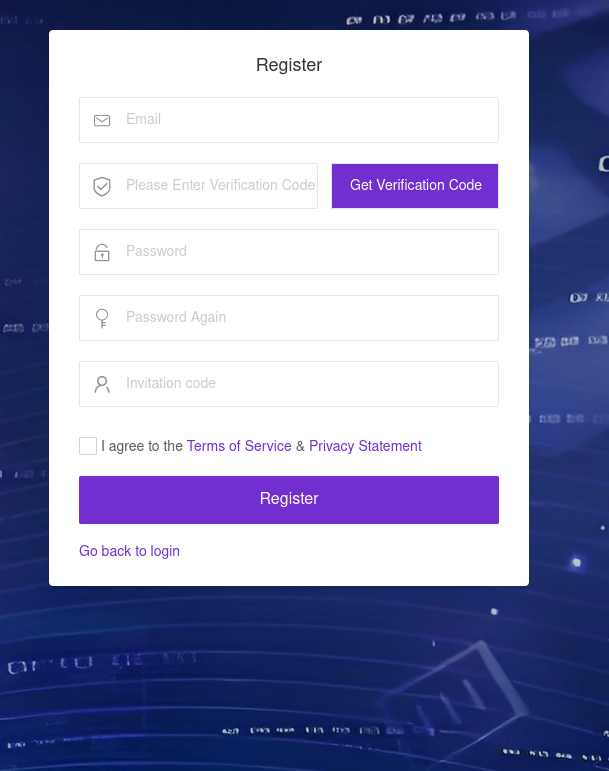
While investigating the malware downloaded by TWCore, we noticed that the domain admin.uipoxy[.]com resolved to the IP address 128.14.210[.]58, one of the C2 servers for the zhima reverse proxy module. It appears that the URL hxxp://admin.uipoxy[.]com/proxy/u/login hosts the zhima admin panel. Interestingly, this panel allows anyone to register as long as they have a valid invite code.
The malware operator registration page
During registration, users are prompted to review the terms of use and privacy policy. Both documents are hosted on links under the pxyedge[.]com domain, which belongs to PXYEDGE, a vendor specializing in the sale of residential proxies.
We found several similarities in the authentication APIs across all of these sites:
The sign-in page was hosted on an admin.* subdomain.
The sign-in page was located at /proxy/u/login.
The signup page was located at /proxy/register?channelKey=<invitation code>.
Based on this, we believe these services are connected to MoYu Group.
Conclusion
Despite efforts by cybersecurity professionals and law enforcement to shut down the BADBOX botnet, individual actors linked to it continue their malicious activity, infecting devices worldwide. Delivery methods for this kind of malware vary widely, from downloads via pre-installed backdoors to infected builds of IPTV apps. The case examined here demonstrates an even more sophisticated delivery method: distribution through the legitimate update functionality of a system application. Attackers are also actively expanding into new platforms. This malware is the first known malicious app targeting head units, which means these platforms now require protection against malware as well.
A public PoC for CVE-2026-0075 exposes an Android elevation of privilege in ContactsProvider2 with no user interaction. Details are now disclosed.
Related Posts:
CVE-2026-47301: PoC Exploit Achieves SYSTEM-Level Code Execution in SCCM
CVE-2026-66780 (CVSS 9.9): MITM Flaw Hits Red Hat ACM
CVE-2026-76404: Critical Remote Code Execution Hits Splunk MCP Server App (CVSS 9.1)
The post CVE-2026-0075: PoC Discloses Android EoP With No User Interaction appeared first on Daily CyberSecurity.
Android 17 QPR2 Beta 3 adds Pixel customization tools, call-forwarding scam protections, and experimental cellular security features.
The post Android 17 QPR2 Beta 3: Google Adds Customization and New Scam Defenses appeared first on TechRepublic.
Google has quietly replaced public Git access to Pixel kernel source code with a manual application process, slowing custom ROM development, GrapheneOS reports.
Related Posts:
Google Pixel 11 Pro Teaser Reveals Mysterious Spinning Light
Samsung One UI 9 Locks the Phone Forever After 13 Wrong Codes
Google Weighs Restricting Local ADB, Threatening Shizuku on Android
The post Google Restricts Pixel Kernel Source Access, Ditching Public Git Repos appeared first on Daily CyberSecurity.
Google has quietly replaced public Git access to Pixel kernel source code with a manual application process, slowing custom ROM development, GrapheneOS reports.
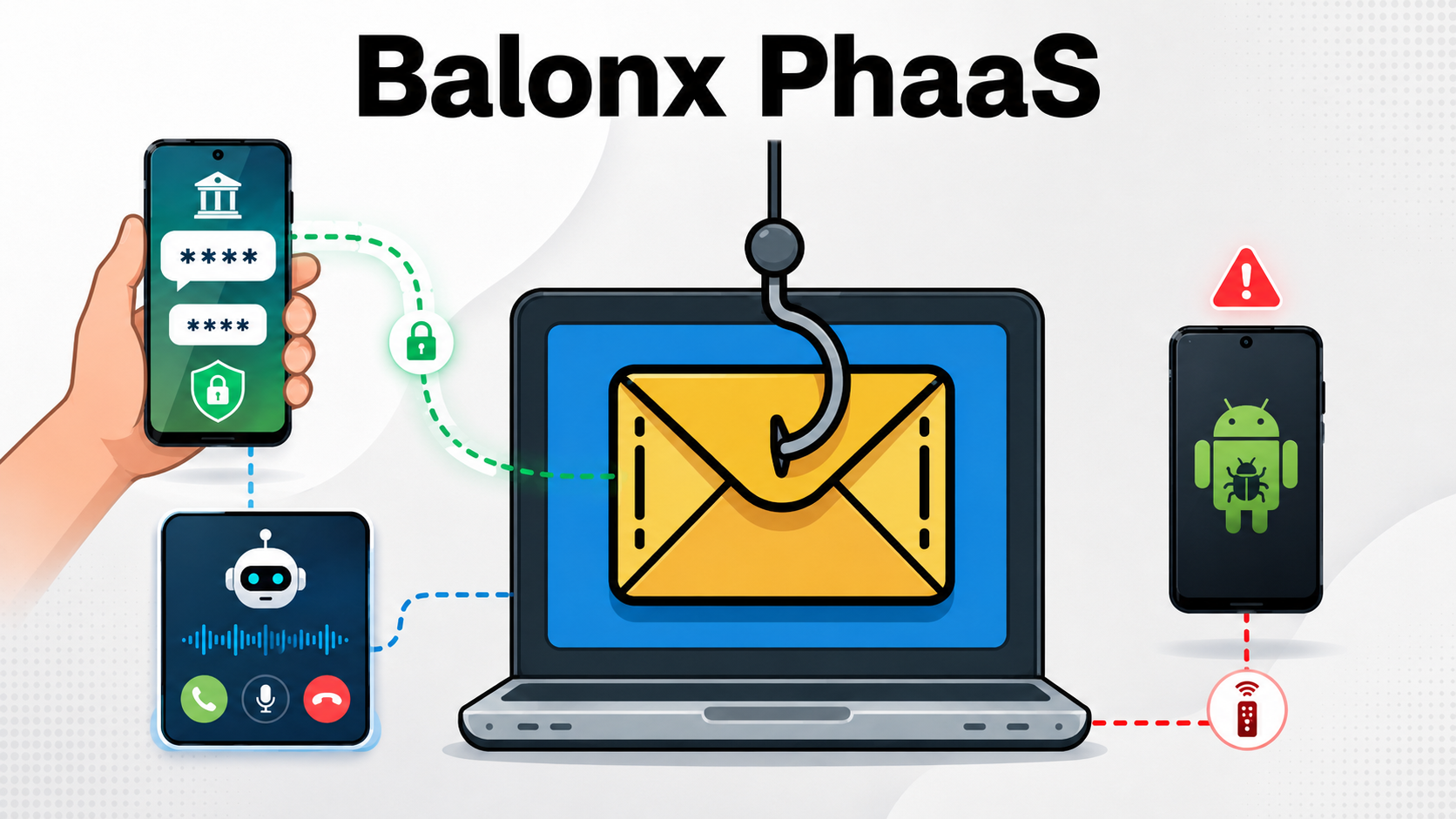
Mexico’s banking sector is facing a more industrialized fraud threat as the Balonx Sistema phishing-as-a-service (PhaaS) operation combines real-time OTP theft, Android malware, and AI-generated vishing calls. Balonx is not a conventional credential-harvesting kit. It operates as a subscription-based criminal service that rents access to affiliates, lowering the barrier for telemarketing fraud groups and inexperienced […]
The post Balonx PhaaS Steals Bank OTPs in Real Time While AI Calls and And
Mexico’s banking sector is facing a more industrialized fraud threat as the Balonx Sistema phishing-as-a-service (PhaaS) operation combines real-time OTP theft, Android malware, and AI-generated vishing calls. Balonx is not a conventional credential-harvesting kit. It operates as a subscription-based criminal service that rents access to affiliates, lowering the barrier for telemarketing fraud groups and inexperienced […]
BTMOB has evolved beyond a conventional Android banking trojan into a turnkey fraud platform that lets criminals build branded phishing apps, remotely operate infected phones, and automate theft. Its emergence illustrates how leaked malware source code and low-code tooling are turning mobile fraud into a scalable franchise. The malicious lnat-tv-pro.apk sample connected to server[.]yaarsa[.]com/con over […]
The post BTMob Uses Custom Phishing Apps to Turn Android Users Into Remote-Controlled Fra
BTMOB has evolved beyond a conventional Android banking trojan into a turnkey fraud platform that lets criminals build branded phishing apps, remotely operate infected phones, and automate theft. Its emergence illustrates how leaked malware source code and low-code tooling are turning mobile fraud into a scalable franchise. The malicious lnat-tv-pro.apk sample connected to server[.]yaarsa[.]com/con over […]
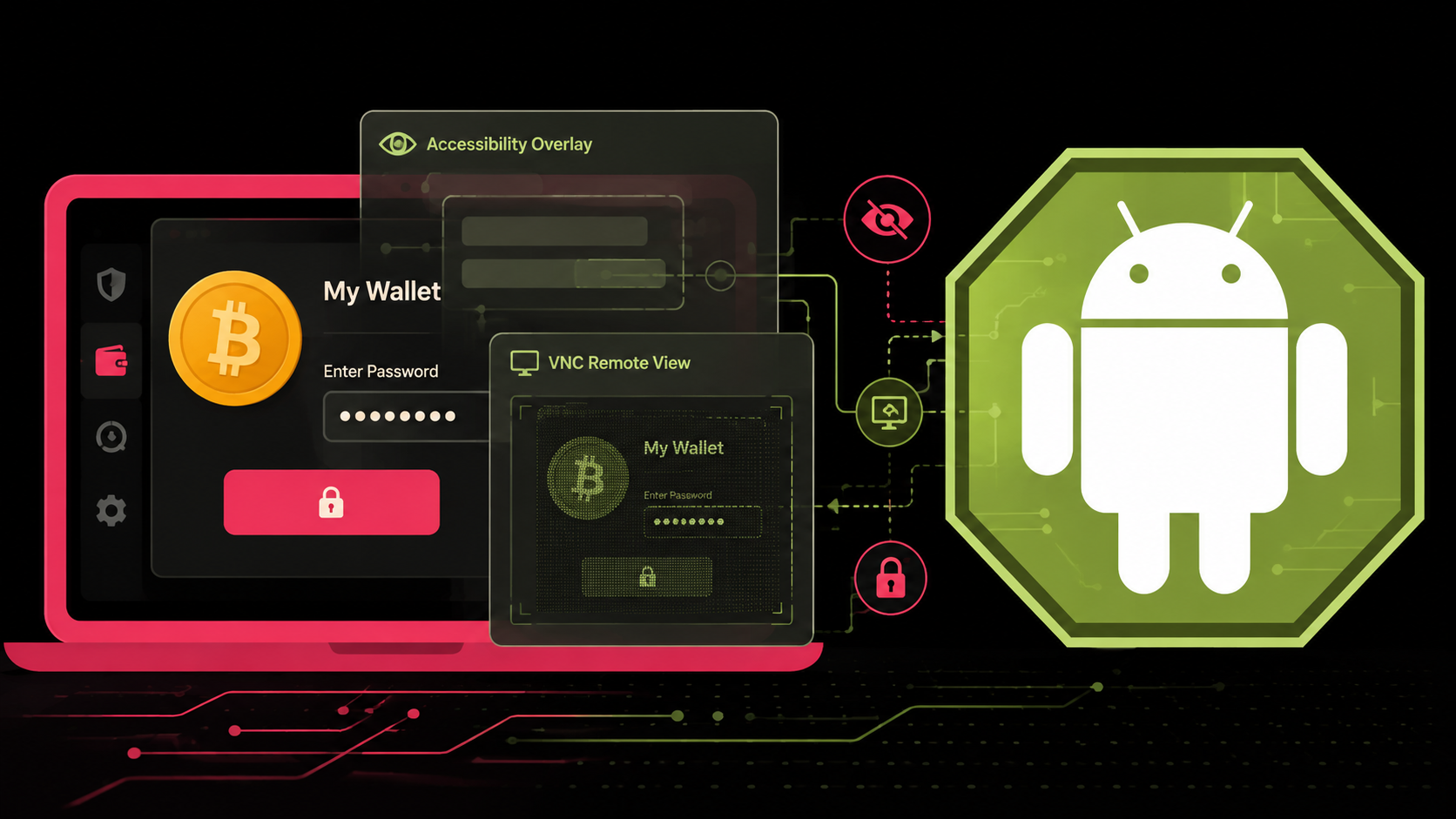
Octagon, a previously undocumented Android banking and cryptocurrency fraud platform marketed as malware-as-a-service by a Russian-speaking actor using the handle AndroidKitKat. First advertised on a Russian-language cybercrime forum on June 1, 2026, the toolkit combines abuse of accessibility, stealthy remote control, credential-stealing overlays, SMS interception, and device reconnaissance to enable direct account takeover and cryptocurrency […]
The post Octagon Android Bot Uses Hidden VNC and
Octagon, a previously undocumented Android banking and cryptocurrency fraud platform marketed as malware-as-a-service by a Russian-speaking actor using the handle AndroidKitKat. First advertised on a Russian-language cybercrime forum on June 1, 2026, the toolkit combines abuse of accessibility, stealthy remote control, credential-stealing overlays, SMS interception, and device reconnaissance to enable direct account takeover and cryptocurrency […]
Palo Alto Networks analyzed Kimwolf botnet malware. Read our Kimwolf botnet malware analysis to learn how it attacks Android TV boxes.
Related Posts:
Project CAV3RN Framework Adds DNS and Google Relays
DeadLock Ransomware Employs Decentralized Infrastructure
Apple Sends Mercenary Spyware Alerts to Users in 110+ Countries
The post Kimwolf Botnet Malware Upgrades DDoS and C2 Defenses appeared first on Daily CyberSecurity.
Google says Chrome cut unwanted Android notifications by more than 7 billion per day using permission controls, abuse detection, rate limits, and on-device ML.
The post Google Says Chrome Cut 7 Billion Unwanted Android Notifications Per Day appeared first on TechRepublic.
Google says Chrome cut unwanted Android notifications by more than 7 billion per day using permission controls, abuse detection, rate limits, and on-device ML.

 Entrar