❌

Visualização normal

Antes de ontemStream principal
  • ✇Malwarebytes
  • Fake PDF and search tools hijacked searches for 13.4 million Chrome users
    Ads promoted browser extensions as tools to find manuals, convert PDFs, or make searches safer. But many of these extensions sent users’ search queries through servers controlled by their operators.Socket researcher John Tuckner identified 319 extensions with an estimated 13.4 million installs over a decade. The extensions hijacked users’ default search settings and routed their searches through servers controlled by the operators before sending them to Yahoo or Bing. This gave the operators acc
     

Fake PDF and search tools hijacked searches for 13.4 million Chrome users

30 de Outubro de 2026, 12:25

Ads promoted browser extensions as tools to find manuals, convert PDFs, or make searches safer. But many of these extensions sent users’ search queries through servers controlled by their operators.

Socket researcher John Tuckner identified 319 extensions with an estimated 13.4 million installs over a decade. The extensions hijacked users’ default search settings and routed their searches through servers controlled by the operators before sending them to Yahoo or Bing. This gave the operators access to users’ queries and let them earn referral payments.

Socket says the extensions were promoted through ads on networks including Google Ads, promoting tools such as “manual finders,” “PDF converters,” “safe search,” and “AI search.”

The extensions were listed in Google’s official store, but most were unlisted. That means people with a direct link could visit a listing and install an extension, while ordinary searches in the store would not show it. An ad offered help with an immediate task, a landing page encouraged installation, and the official store provided a familiar place to complete it.

Search hijacking

The main risk was that operators could see what users searched for. Searches can reveal health worries, financial problems, workplace interests, or other personal matters. Socket says queries were often associated with a unique identifier, which could let the operators link a user’s searches over time.

The proxy could also choose where to send a search. Socket says this could potentially direct users to phishing or malware pages, but it did not find evidence that the extensions had done so.

What should users do?

If your searches start going astray, or you installed a search, PDF-converter, manual-finder, or security extension after clicking an ad, check what’s installed.

  • Review your extensions. Enter chrome://extensions in Chrome’s address bar. Remove extensions you don’t recognize, no longer use, or don’t trust. To remove one, select Remove and confirm. If you’re unsure about an extension, check it against the list at the end of Socket’s blog.
  • Check your search settings. In Chrome, at the top right, select More (the three-dot menu), then Settings > Search engine. If Chrome says an extension is controlling a setting, review or remove that extension. The absence of this notice doesn’t confirm that all your extensions are safe.
  • Run a Malwarebytes scan to check for malicious extensions and other malware that could be affecting your device.

From reporting threats to removing them.

Cybersecurity risks should never spread beyond a headline. Keep threats off your devices by downloading Malwarebytes today.
  • ✇Malwarebytes
  • Malicious Firefox extensions impersonate popular crypto wallets
    Socket’s threat researchers found three malicious Firefox extensions that impersonated the Phantom, Jupiter, and Bitget crypto wallets.Once installed, the malicious extensions stole recovery phrases and private keys, which would provide the attacker with full control of a wallet.A crypto wallet is an app, browser extension, or physical device that lets you manage cryptocurrency such as Bitcoin. Despite its name, it doesn’t actually hold your coins. Those are recorded on a blockchain, a shared di
     

Malicious Firefox extensions impersonate popular crypto wallets

29 de Outubro de 2026, 11:06

Socket’s threat researchers found three malicious Firefox extensions that impersonated the Phantom, Jupiter, and Bitget crypto wallets.

Once installed, the malicious extensions stole recovery phrases and private keys, which would provide the attacker with full control of a wallet.

A crypto wallet is an app, browser extension, or physical device that lets you manage cryptocurrency such as Bitcoin. Despite its name, it doesn’t actually hold your coins. Those are recorded on a blockchain, a shared digital record of transactions. Instead, the wallet manages the secret digital keys that let you access and spend them.

When you create a wallet, you may be given a recovery phrase: a list of words you can use to restore access. Write it down and store it offline. It’s a backup of your keys, not just an ordinary password. Anyone who gets hold of it can take control of your funds, which is why fake wallet extensions try to steal it.

Cybercriminals listed three fake wallet extensions on Firefox Add-ons, impersonating Phantom, Jupiter, and Bitget. The genuine wallets offer extensions for other browsers: Jupiter lists Chrome, Brave, and Edge; Bitget’s extension is for Chrome; and Phantom says its Firefox extension is no longer supported.

The malicious extensions looked for 12-, 15-, 18-, and 24-word recovery phrases, as well as Ethereum and Solana private keys. They could read input fields, detect pasted text, and scan screens displaying recovery phrases.

A recovery phrase or private key is a bearer secret: whoever holds it controls the wallet and can move its assets. The Phantom variant’s backend logged captured secrets, sent them to a Telegram bot, and automatically moved funds to hardcoded payout addresses. Those addresses covered Ethereum, BSC, Polygon, Arbitrum, Optimism, Base, Avalanche, Solana, and Bitcoin. The Phantom variant could read a phrase both when it was typed during import and when it was displayed on a reveal screen.

How to stay safe

Socket says all three listings were live on Firefox Add-ons during its analysis and have since been removed. But if you find one of these extensions in your Firefox browser, you should:

  • Remove the extension. Use the three-dot menu next to it and choose Remove.
  • If you ever entered a phrase or key, create a new wallet on a clean device and move your assets immediately. Treat the old wallet as compromised.
  • In the future, install wallets only from the vendor’s official website link, not from store search results.
  • The fake Phantom listing asked to access data on all websites and had no privacy policy. These are warning signs to look out for.
  • Use an up-to-date, real-time anti-malware solution that blocks malicious websites.
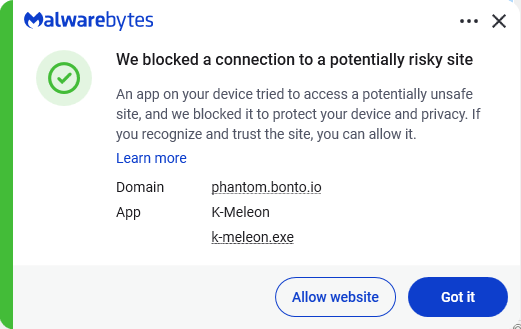
Malwarebytes blocks phantom.bonto.io
Malwarebytes blocks bonto.io subdomains

Never enter your recovery phrase on a website. Enter it only in the official wallet app when restoring. Wallet support will never ask for it.

IOCs

The malicious extensions:

  • Phantom impersonator: add-on ID 3092199
  • Jupiter impersonator: add-on ID 3092666
  • Bitget impersonator: add-on ID 3092059

Subdomains:

  • bonto[.]io
  • phantom[.]bonto[.]io
  • jupiter[.]bonto[.]io
  • bitget[.]bonto[.]io
  • coinbase[.]bonto[.]io
  • exodus[.]bonto[.]io

IP addresses:

  • 104.21.34[.]69
  • 172.67.155[.]198

From reporting threats to removing them.

Cybersecurity risks should never spread beyond a headline. Keep threats off your devices by downloading Malwarebytes today.

  • ✇Cybersecurity News
  • Fake Phantom, Jupiter, and Bitget Firefox Extensions Steal Crypto Recovery Phrases Do Son
    Socket uncovers malicious Firefox extensions spoofing Phantom, Jupiter, and Bitget. These malicious Firefox wallet extensions steal seed phrases. Related Posts: Yoba Malware Campaign Sideloads Payloads Through Signed OpenAI and Anthropic Binaries Fake FedEx Tax Invoice PDFs Deliver Fileless Sirius Backdoor to Windows Systems Brazilian Magecart Group Hits Convertr Ecommerce Platform in Plausible Analytics Supply Chain Attack The post Fake Phantom, Jupiter, and Bitget Firefox Extensions Steal C
     
  • ✇Cybersecurity News
  • OffiDocs Chrome Extensions With 2.3 Million Installs Caught Harvesting Browsing URLs Do Son
    60 OffiDocs Chrome extensions with 2.3M installs secretly send browsing URLs. See how these spying Chrome extensions work and how to stay safe. Related Posts: Keystone Wallet Data Breach Exposes Customer Orders PingCAP Data Breach Exposes TiDB Cloud Customer Records and Source Code Smart TV ACR Tracking Study Finds Failed Opt-Outs and 57 Million Exposed Viewing Records The post OffiDocs Chrome Extensions With 2.3 Million Installs Caught Harvesting Browsing URLs appeared first on Daily CyberSe
     
  • ✇Cybersecurity News
  • 16 Fake Rabby and OKX Firefox Extensions Stole Crypto Wallet Recovery Phrases Do Son
    Socket found 16 malicious Firefox extensions posing as Rabby and OKX. These crypto wallet stealers grabbed seed phrases. Here is what to do. Related Posts: The Silent Threat of Midnight Mimosa Malware Phishing Campaign Abuses Microsoft Power BI to Install Rogue ScreenConnect Clients Rogue AI Agents Hijacked urlquery Scan Browsers to Reach Russian Bankruptcy Records The post 16 Fake Rabby and OKX Firefox Extensions Stole Crypto Wallet Recovery Phrases appeared first on Daily CyberSecurity.
     
  • ✇Cybersecurity News
  • Socket Links Popular VS Code Color Themes to the GlassWorm Supply Chain Campaign Do Son
    Socket links GlassWorm VS Code themes to malicious VS Code extensions with 8,000+ installs, including a Coca-Cola theme. See how to check yours. Related Posts: Moroccan Intelligence Deploys Vast Surveillance Panopticon DragonForce Backdoor Adds MQTT Fallback to Microsoft Teams TURN Command Channel New 2CLoader Malware Delivers Vidar and Remus Infostealers While Dodging Sandboxes The post Socket Links Popular VS Code Color Themes to the GlassWorm Supply Chain Campaign appeared first on Daily C
     
  • ✇Cybersecurity News
  • Chrome Extension Popups Freeze for macOS Users Do Son
    A Chrome extension popup freeze bug on macOS delays 1Password and other extensions by minutes. Google has flagged it high priority but has no fix yet. Related Posts: Apple Introduces the iOS 27 Auto Lock Feature Trump Mandates Super Intelligence to Replace AI Terminology iPhone 18 Pro Face ID Failures Trigger System Restarts The post Chrome Extension Popups Freeze for macOS Users appeared first on Daily CyberSecurity.
     
  • ✇Cybersecurity News
  • KREMLIN Banking Malware Targets Brazilian Banks Do Son
    Learn how Brazilian KREMLIN banking malware steals credentials using fake browser extensions. Elastic Security Labs details the KREMLIN banking malware. Related Posts: LLM-Generated PhantomRaven Information Stealer Discovered Mantax Otax Android Malware: Spyware Meets Ransomware SloppyRAT Malware Analyzed in Ransomware Attacks The post KREMLIN Banking Malware Targets Brazilian Banks appeared first on Daily CyberSecurity.
     

77 Counterfeit Open VSX Extensions Collected Developer and CI/CD Data

10 de Agosto de 2026, 11:52

Security researchers found 150 lookalike Open VSX extensions published under trusted names, highlighting how extension marketplaces can expose developer credentials, source code, and CI/CD systems to supply-chain risk.

The post 77 Counterfeit Open VSX Extensions Collected Developer and CI/CD Data appeared first on TechRepublic.

Chrome to Block Policy-Abusing Extensions on Personal Devices

4 de Agosto de 2026, 11:43

Google is developing Chrome protections that could block policy-installed extensions from hijacking New Tab pages and search settings on personal devices.

The post Chrome to Block Policy-Abusing Extensions on Personal Devices appeared first on TechRepublic.

  • ✇Arstechnica
  • Browser extensions turn nearly 1 million browsers into website-scraping bots Dan Goodin
    Extensions installed on almost 1 million devices have been overriding key security protections to turn browsers into engines that scrape websites on behalf of a paid service, a researcher said. The 245 extensions, available for Chrome, Firefox, and Edge, have racked up nearly 909,000 downloads, John Tuckner of SecurityAnnex reported. The extensions serve a wide range of purposes, including managing bookmarks and clipboards, boosting speaker volumes, and generating random numbers. The common thre
     

Browser extensions turn nearly 1 million browsers into website-scraping bots

9 de Julho de 2025, 17:08

Extensions installed on almost 1 million devices have been overriding key security protections to turn browsers into engines that scrape websites on behalf of a paid service, a researcher said.

The 245 extensions, available for Chrome, Firefox, and Edge, have racked up nearly 909,000 downloads, John Tuckner of SecurityAnnex reported. The extensions serve a wide range of purposes, including managing bookmarks and clipboards, boosting speaker volumes, and generating random numbers. The common thread among all of them: They incorporate MellowTel-js, an open source JavaScript library that allows developers to monetize their extensions.

Intentional weakening of browsing protections

Tuckner and critics say the monetization works by using the browser extensions to scrape websites on behalf of paying customers, which include AI startups, according to MellowTel founder Arsian Ali. Tuckner reached this conclusion after uncovering close ties between MellowTel and Olostep, a company that bills itself as "the world's most reliable and cost-effective Web scraping API." Olostep says its service “avoids all bot detection and can parallelize up to 100K requests in minutes.” Paying customers submit the locations of browsers they want to access specific webpages. Olostep then uses its installed base of extension users to fulfill the request.

Read full article

Comments

  • ✇Arstechnica
  • Time to check if you ran any of these 33 malicious Chrome extensions Dan Goodin
    As many of us celebrated the year-end holidays, a small group of researchers worked overtime tracking a startling discovery: At least 33 browser extensions hosted in Google’s Chrome Web Store, some for as long as 18 months, were surreptitiously siphoning sensitive data from roughly 2.6 million devices. The compromises came to light with the discovery by data loss prevention service Cyberhaven that a Chrome extension used by 400,000 of its customers had been updated with code that stole their sen
     

Time to check if you ran any of these 33 malicious Chrome extensions

3 de Janeiro de 2025, 09:15

As many of us celebrated the year-end holidays, a small group of researchers worked overtime tracking a startling discovery: At least 33 browser extensions hosted in Google’s Chrome Web Store, some for as long as 18 months, were surreptitiously siphoning sensitive data from roughly 2.6 million devices.

The compromises came to light with the discovery by data loss prevention service Cyberhaven that a Chrome extension used by 400,000 of its customers had been updated with code that stole their sensitive data.

’Twas the night before Christmas

The malicious extension, available as version 24.10.4, was available for 31 hours, from December 25 at 1:32 AM UTC to Dec 26 at 2:50 AM UTC. Chrome browsers actively running Cyberhaven during that window would automatically download and install the malicious code. Cyberhaven responded by issuing version 24.10.5, and 24.10.6 a few days later.

Read full article

Comments

© Getty Images

❌
❌