Threat actors are increasingly exploiting legitimate cloud services to evade detection and streamline the deployment of their scam infrastructure. Cloud hosting services and decentralized networks have become primary platforms for hosting phishing pages and sites. Throughout 2025 and 2026, we have observed phishing operators steadily migrate toward platforms like Cloudflare Workers, Vercel, Netlify, GitHub Pages, and IPFS. This post analyzes the mechanics of a real-life adversary-in-the-middle (AitM) attack in a cloud environment and presents detailed statistics on the platforms and domains phishers abuse most frequently.
The cloud as a safe haven for phishers
Threat actors select platform-as-a-service (PaaS) offerings and distributed cloud environments to host phishing sites for much the same reasons legitimate software developers do:
Inherent trust and reputation. Phishing pages hosted on reputable platforms appear trustworthy, reducing suspicion among potential victims.
Most platforms offer generous free-tier developer plans. The onboarding process takes minutes and rarely requires Know Your Customer (KYC) identity verification. This enables a single operator to create hundreds of malicious accounts.
Evasion and anonymity. Attackers leverage native security features to obscure their true origin server IP address behind a CDN, which complicates detection for security vendors.
Additionally, these platforms allocate shared subdomains hosting millions of legitimate projects and websites. Security teams cannot simply block the parent domain or its subdomains without inflicting collateral damage on bona fide users – a limitation that malicious actors take advantage of. To counter this tactic, security vendors must advance content-based analysis methodologies.
Multi-stage AitM attack
Consider a modern AitM phishing campaign that leverages Cloudflare Workers, a widely adopted cloud platform. The attackers execute the operation through multiple HTML pages distributed across a compromised website and the cloud platform. Each page serves a specific function: harvesting target email addresses, initializing the reverse-proxy infrastructure, or spoofing the login form to capture multi-factor authentication (MFA) sessions.
Stage 1. Contact harvesting and network monitoring evasion
The attack typically begins with a phishing email that uses a plausible pretext – such as a request from a coworker to review documents – to entice the target into clicking a malicious link.
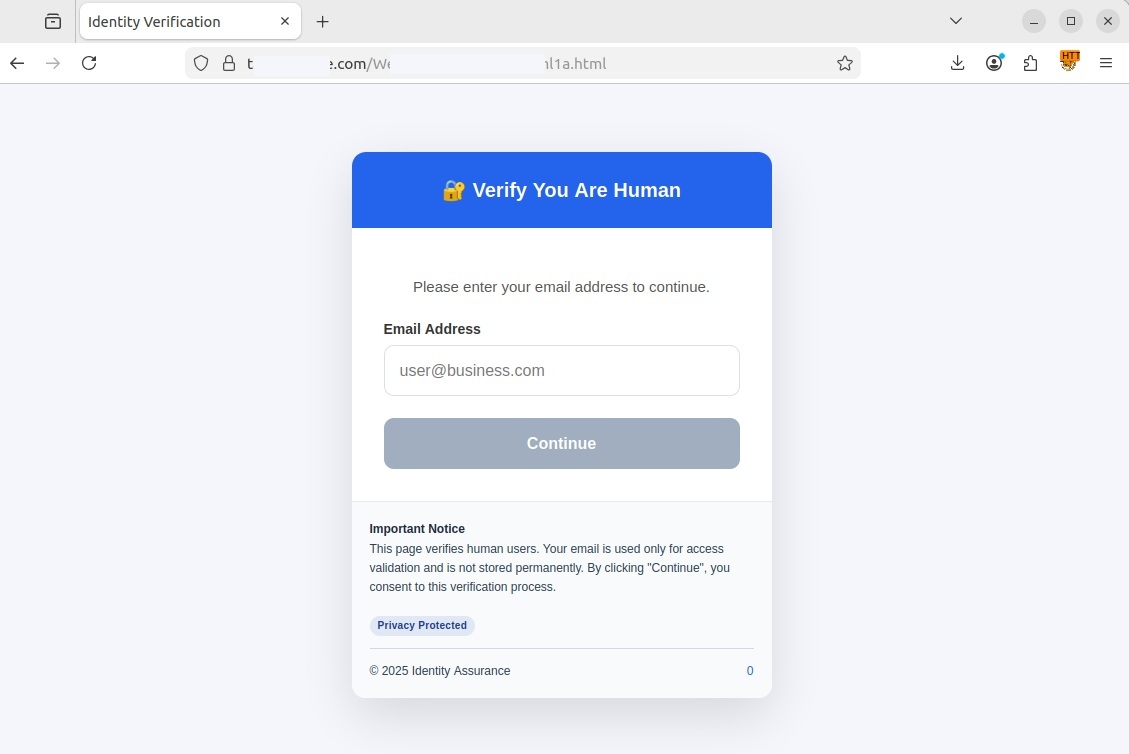
Upon clicking the link, the user is redirected to a fake CAPTCHA landing page hosted on a compromised legitimate website. This specific campaign used the https://t[REDACTED]e.com website, but any other variations are possible. In this scenario, the compromised page served as a disposable relay — vendor detection mechanisms typically block phishing links delivered directly via email much faster — to prevent the early discovery of the core phishing content hosted on Cloudflare.
If the user entered their email address and clicked Continue, the pseudo-CAPTCHA marked them as a human user and initiated a redirect. The primary objective of this stage is to harvest target email addresses, filter out bots, and route legitimate users to a subdomain of workers.dev. Such subdomains are generated automatically and free of charge by Cloudflare Workers. The victim’s email address was embedded in the URL hash (the part of the URL following the # character), allowing the page at [REDACTED].workers.dev to extract the email without issuing a request to the attacker’s server, thereby avoiding detection.
Stage 2. Initializing a transparent proxy
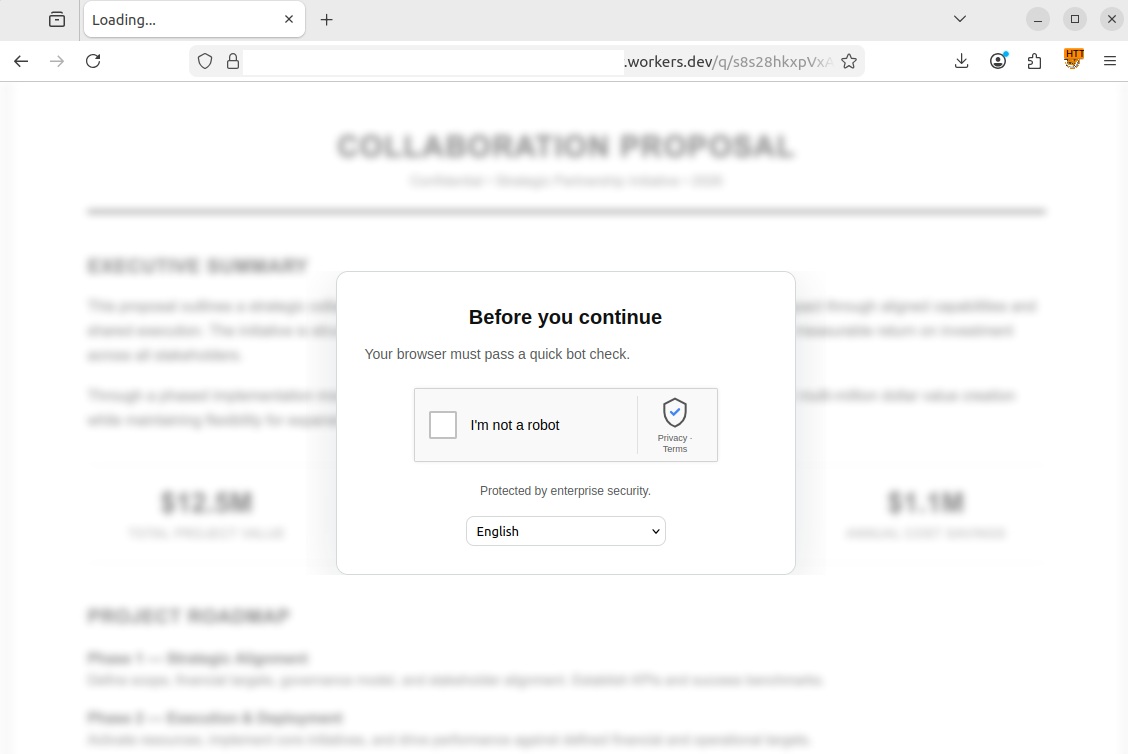
The user’s browser then loaded a [REDACTED].workers.dev page with #user@business.com at the end of the URL. At this point, the page presented the victim with a genuine CAPTCHA challenge. This step ensured that an actual user was interacting with the page rather than a security sandbox.
Another CAPTCHA, this time a legitimate one
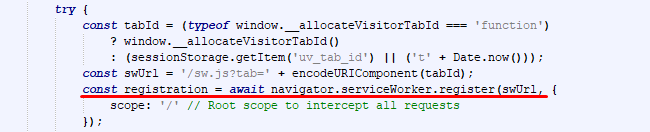
Once the user successfully completed the challenge, a service worker was registered in their browser. This is a special JavaScript file capable of running in the background and intercepting all network requests generated by the current tab. As this type of script was designed as a core component of progressive web apps (PWAs) to optimize load times and support offline functionality, browsers treat service workers as standard site feature and execute them without prompting for user consent as long as the website uses an HTTPS connection.
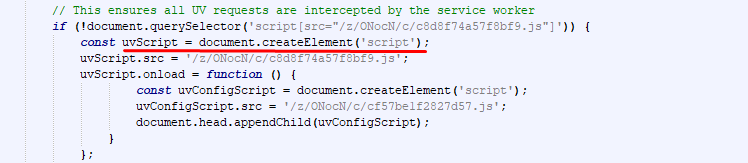
The attackers leveraged the service worker to deploy Ultraviolet, a legitimate open-source web proxy library, to dynamically rewrite all links and forms on the page. This forced every outgoing request – including those for Microsoft login credentials – to route through the attackers’ server rather than directly to the legitimate services.
Immediately upon loading, the page extracted the victim’s email address from the URL hash and stored it in the browser’s sessionStorage property so it would not be overwritten when the CAPTCHA loaded. This step also allowed the script to pre-fill the username field in the form automatically. A pre-populated login field enhanced the page’s credibility and bolstered user trust. Once the CAPTCHA was passed, the malicious script constructed a redirect URL for the third stage, appending the email retrieved from sessionStorage back to the hash. By passing the email via the URL hash across three consecutive stages, the attackers successfully kept it hidden from network attack detection systems.
Registering a service worker to intercept traffic
Establishing a transparent proxy via an external library
Stage 3. Session hijacking and browser window spoofing
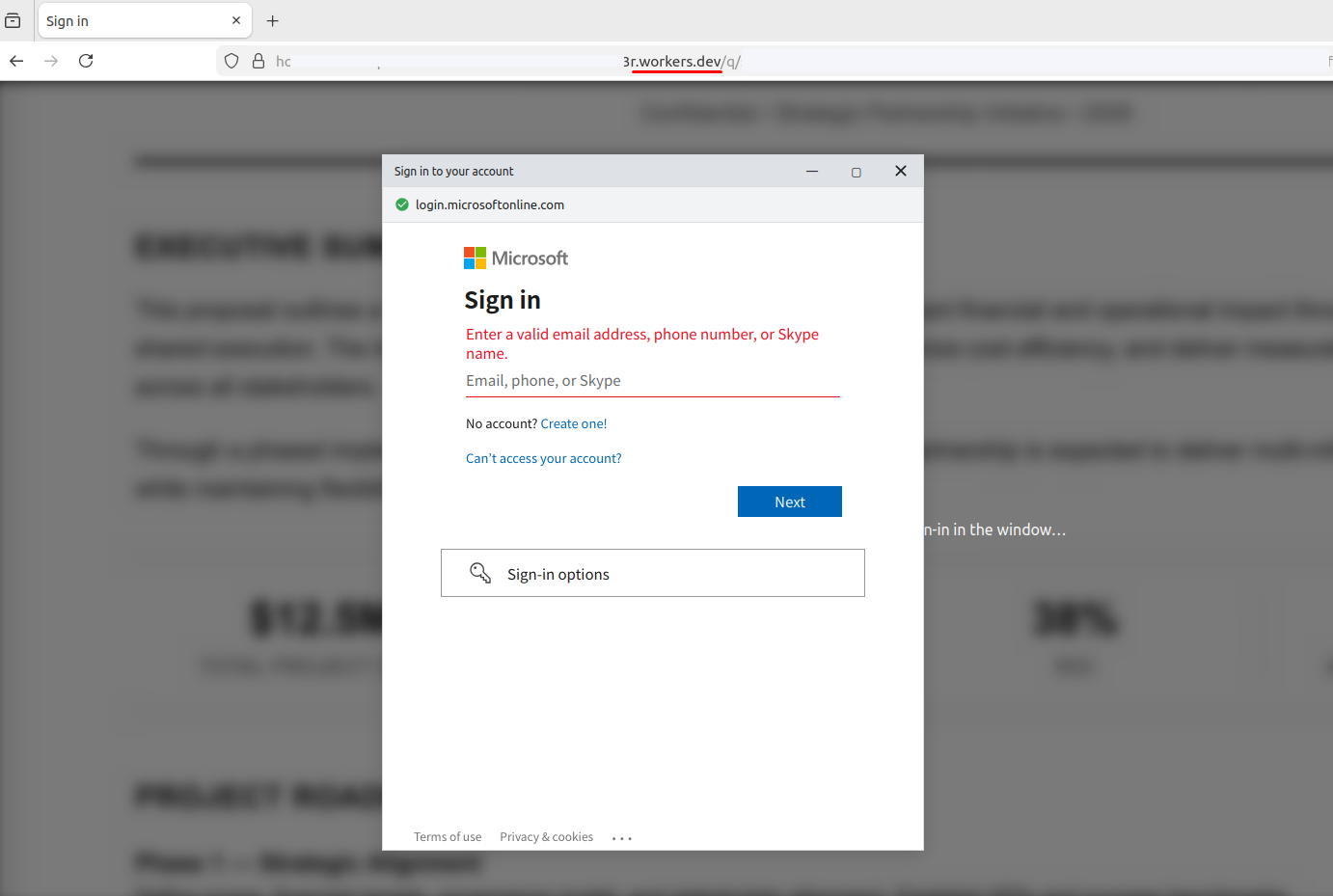
The final stage unfolded on a third page, combining adversary-in-the-middle (AitM) traffic interception with a browser-in-the-browser (BitB) UI spoofing technique. BitB attacks operate by rendering a block inside a legitimate webpage that visually mimics a native browser pop-up window.
In this case, the script hosted on the attacker’s page generated a pop-up visually identical to a native browser window, complete with window controls and a spoofed address bar showing a trusted Microsoft URL. Within this simulated window, an iframe loaded the authentic login interface, routed dynamically through the service worker reverse proxy created in Stage 2. When the victim entered their credentials and MFA code into the BitB window, the proxy script intercepted both the credentials and the session tokens. Combining BitB with AitM significantly increases the threat: BitB provides a convincing, trusted visual wrapper (displaying a legitimate URL and branding), while the hidden AitM proxy quietly handles traffic interception and session hijacking behind the scenes.
Upon successful login, the proxy instructs the interface to close the pop-up and redirect the victim to a generic system error page, such as SessionExpired. This minimizes suspicion: the victim assumes a technical glitch occurred and attempts to log in again, unaware that the attacker already has full access to the session.
Cloud platform phishing attack statistics
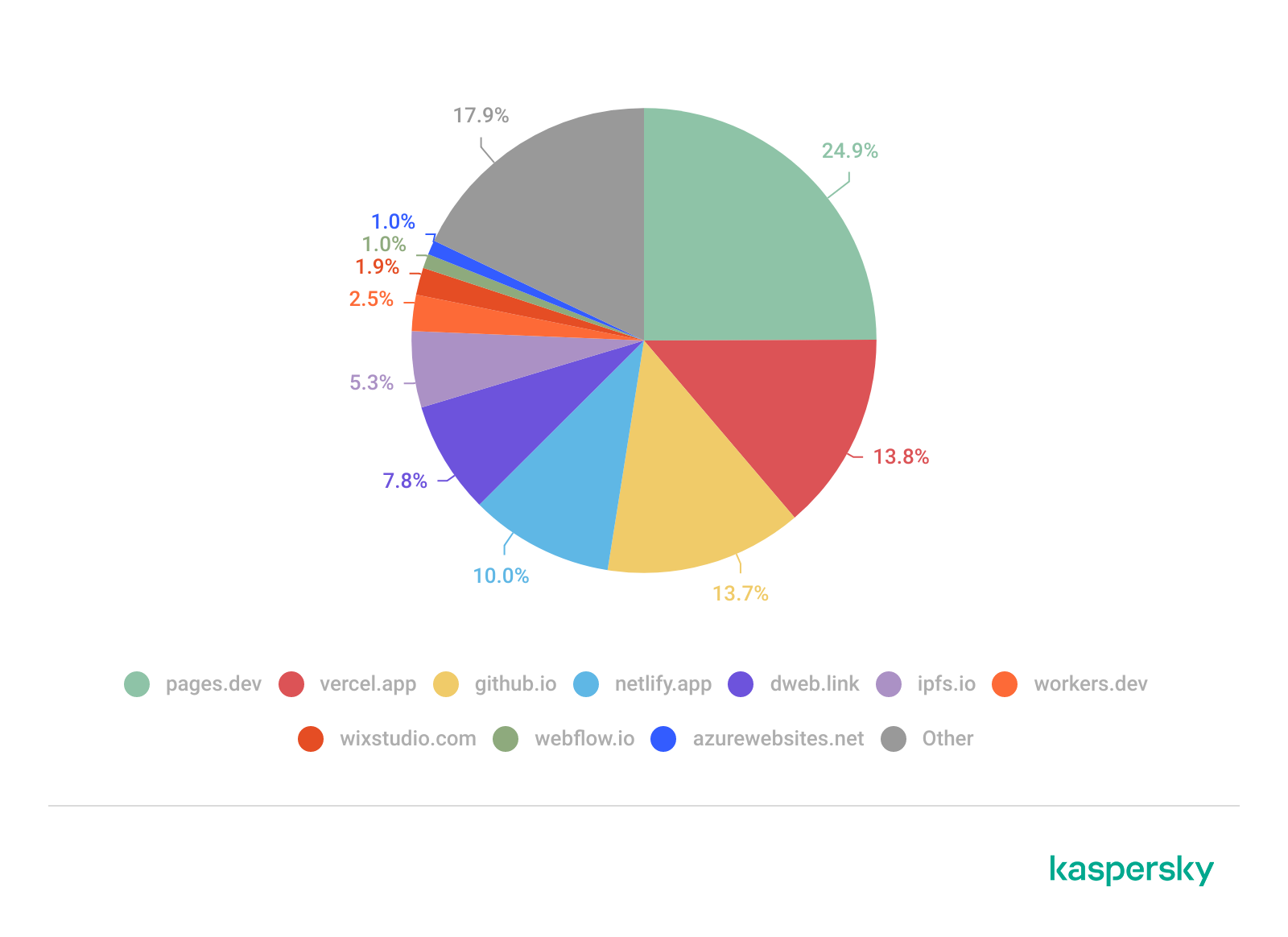
We analyzed phishing URLs hosted across popular cloud platforms – including Cloudflare, Netlify, and GitHub Pages – over a 12-month period spanning August 2025 to July 2026. The data below outlines trends in unique third-level domains exploited to deliver phishing content. In total, our security solutions blocked 224,984 unique third-level domains on cloud and decentralized services used in phishing attacks within that timeframe.
Based on this telemetry, we compiled a list of the TOP 10 cloud domains most frequently abused in phishing campaigns over the specified period.
Number of phishing links
Unsurprisingly, Cloudflare and Vercel emerged as the undisputed leaders: both offer free tiers, automated SSL certificate issuance, and global CDNs. GitHub Pages ranked third. The widespread legitimate use of the github.io domain complicates bulk blocking efforts, as security teams risk limiting access to non-malicious projects.
Decentralized networks also warrant close attention – we posted on this subject in 2023. The ipfs.io and dweb.link domains function as IPFS gateways. The principal risk associated with these platforms is content persistence: even if a specific gateway gets blocked, the phishing page remains accessible via alternative nodes across the network.
The visual website builders Wix and Webflow also ranked among the TOP 10 (eighth and ninth, respectively). These platforms allow low-skilled individuals to build phishing pages rapidly without advanced coding expertise, which significantly lowers the barrier to entry for less capable malicious actors.
Domain
Number of phishing links
Platform
1
pages.dev
24.9%
Cloudflare Pages
2
vercel.app
13.8%
Vercel
3
github.io
13.7%
GitHub Pages
4
netlify.app
10.0%
Netlify
5
dweb.link
7.8%
IPFS gateway
6
ipfs.io
5.3%
IPFS (InterPlanetary File System)
7
workers.dev
2.5%
Cloudflare Workers
8
wixstudio.com
1.9%
Wix Studio
9
webflow.io
1.0%
Webflow
10
azurewebsites.net
1.0%
Microsoft Azure
Other
17.9%
In total, we identified and neutralized over 390,000 phishing pages hosted across legitimate cloud platforms and decentralized networks (IPFS) over the past 12 months. This data confirms that threat actors actively exploit the implicit trust associated with legitimate PaaS providers (such as Cloudflare Workers, Vercel, Netlify, and GitHub Pages) and IPFS gateways. High domain reputation, generous free tiers, and built-in evasion capabilities enable phishers to deploy multi-stage AitM attacks designed to hijack MFA sessions.
Recommendations
Traditional security controls, such as relying on HTTPS lock icons or reputation-based domain denylists, are inadequate against these attacks. The cloud provider’s apex domain maintains a positive reputation score, while attackers generate malicious subdomains programmatically and at scale.
Effective defense against these threats calls for a layered security posture:
Exercise caution with unexpected requests, even if they are served from reputable domains or secured with valid SSL/TLS certificates.
Treat any CAPTCHA interface requiring personal data input as a possible scam. Legitimate CAPTCHA challenges rarely request personally identifiable information, such as email addresses.
Inspect the URL in the address bar at the very top of the browser window. In BitB attacks, threat actors can render a fake browser pop-up displaying any target URL, even a legitimate one. However, the true address bar – located at the top of the main browser window alongside native navigation controls (Back, Forward, Refresh) – will continue to display the actual attacker-controlled domain.
Avoid entering credentials in pop-ups you did not expect to see. If a login or MFA form appears without your explicit action, close the tab immediately. Navigate to the intended service manually by entering its address directly into the browser.
Additional protection can be provided by Kaspersky Secure Mail Gateway for enterprise environments and Kaspersky Premium for personal correspondence. These robust email security solutions neutralize phishing links at the delivery stage before they reach the inbox.
The US Federal Government is committing $600 million to build one of the world’s most advanced AI infrastructure systems. Executive Order 14363, the Genesis Mission, connects national laboratory supercomputers across nuclear simulation, biodefense, energy grid modeling, and every major scientific domain. Fifty-one organizations signed on, including NVIDIA, OpenAI, IBM, Microsoft, AWS, Google, and Oracle.
The security framework governing these workloads was not written for this scale of use.
NIST SP 800-234, the High-Performance Computing Security Overlay, is well-constructed, tailoring 60 controls across four security zones, building on the SP 800-53B moderate baseline. It was designed for deterministic HPC workloads such as climate simulations, finite element analysis, and computational fluid dynamics. These workloads share a common attribute: code that runs the same way, every time, and behaves predictably under well-understood inputs. The security controls governing those workloads assume you can scan at the perimeter, clear memory between jobs, and attest to integrity at load time.
AI workloads break every one of those assumptions.
SentinelOne has submitted a formal proposal to the NIST HPC Security Working Group regarding this gap, and NIST has acknowledged it. We have a post on LinkedIn to share our proposal, and welcome commentary from across the industry.
The supply chain problem just got a lot more dangerous
This spring, in just three weeks, three AI-driven supply chain attacks targeted widely deployed software: LiteLLM, the most-used AI infrastructure package in Python development environments, Axios, the most-downloaded HTTP client in the JavaScript ecosystem, and CPU-Z, a trusted system diagnostic tool with a legitimate signed binary from the official vendor domain.
SentinelOne stopped all three on the same day each attack launched, with no prior knowledge of any payload.
The most important aspect of this outcome is how these attacks were stopped, and why signature-based detection couldn’t work. Each attack arrived through a trusted delivery channel. LiteLLM was compromised after credentials were stolen via Trivy, a security scanner. The attacker published two malicious versions to the PyPI repository. In at least one confirmed case, an AI coding agent with unrestricted permissions auto-updated to the infected version, meaning there was no human review or approval step before the payload ran. The Axios attacker exploited a legacy access token that the project maintainers had forgotten to revoke, bypassing every npm security control. CPU-Z attackers targeted the vendor’s distribution infrastructure directly; anyone who downloaded from the official website received a properly signed binary containing a payload. In all three cases, while the authorization chain was legitimate, the intent was not.
This is the defining characteristic of modern supply chain attacks: the workflow is verified, but the intent has been subverted. Every perimeter control, signature library, and reputation lookup checks authorization and passes. These attacks were designed to exploit that gap, and they ran at machine speed through automated pipelines with no human checkpoint.
To put this into the context of HPC and AI workloads running at scale, a compromised Python package in a developer’s environment is a serious incident; a poisoned training pipeline on classified biodefense data on a national laboratory supercomputer is on a different order of magnitude. The model it produces may be correct 99.9 percent of the time and adversarially wrong under precisely targeted conditions. No perimeter scan, signature check, or load-time integrity verification will catch it after training completes.
Where the current framework falls short
Of the 60 controls SP 800-234 tailors, three bear directly on AI workload protection, and each carries a documented gap. In a fourth area, supply chain, the overlay does not tailor at all.
SI-3 (Malware scanning): The control acknowledges that real-time scanning is most effective but explicitly permits tailoring for performance on HPC systems, deferring to perimeter scanning before data reaches the compute zone. For traditional HPC workloads, that tradeoff may be defensible, but for AI workloads, it leaves behavioral analysis of the execution process completely unaddressed. A poisoned training run that executes within the expected statistical range of a training job looks like legitimate compute to a perimeter scanner.
SI-4 (System monitoring): The control notes that high-speed data flows in HPC environments can overwhelm standard monitoring tools, and lacks AI-specific monitoring requirements or telemetry collection requirements from execution pipelines. The practical interpretation of this is: monitor what you can, accept the gap for what you can’t. On infrastructure running AI at scale, that gap creates a primary attack surface.
SC-4 (Information in shared resources): Requires GPU memory clearing between user reassignments. It addresses data residency at the transition but does not address runtime behavioral monitoring of workloads during execution, side-channel attack detection, or anomalous compute-pattern identification while training is active.
SR family (Supply chain risk management): The overlay carries all 12 moderate-baseline SR controls forward from SP 800-53B, with no HPC or AI-specific guidance, and supply chain is not among the 14 categories it tailors to. The SR controls still address only the conventional software and hardware supply chain; they say nothing about training-data provenance, model-weight integrity, or pre-trained-model validation, and the framework defines no AI equivalent of a software bill of materials. LiteLLM, Axios, and CPU-Z all arrived through legitimate software supply chain channels. AI workloads carry that same exposure one layer deeper, in the data and model artifacts that software trains on, which is exactly where the overlay is silent
AI Runtime Threats
The attacks against AI workloads on HPC are not theoretical, and they are not detectable at the perimeter.
Training data poisoning scales at rates most security teams are not equipped to respond to. Research1 across 41 studies documents attack success rates exceeding 60 percent from manipulation of 100 to 500 training samples, a fraction of a percent of a typical dataset. Poisoning as little as 3 percent2 of training data achieved 41 percent attack success rates in code-generating models. OWASP’s LLM Top 103 documents the consequence. Backdoors leave model behavior intact until a specific trigger activates adversarial outputs. The model ships, it gets deployed, and operates correctly, until it doesn’t. No post-training audit reliably catches a well-designed poisoning attack.
GPU side-channel attacks are executed remotely by a co-tenant workload on shared GPU infrastructure; no physical access is required. The NVBleed research demonstrated covert channel attacks on NVIDIA NVLink, achieving over 91 percent accuracy in recovering data-dependent information from co-tenant GPU workloads on a shared fabric. The BarraCUDA research demonstrated the extraction of neural network weights via electromagnetic side channels from NVIDIA hardware. Both attack classes execute during active training, not at job transition. If your HPC environment runs multiple projects or security classifications on shared accelerators, the co-tenancy model is an active attack surface today.
Inference pipeline compromise survives load-time integrity checks. A model with clean weights at deployment faces attacks through three vectors: hot-swap modification of serving configurations while inference runs; preprocessing and postprocessing layer injection that alters inputs before they reach the model or modifies outputs before delivery; and adversarial input manipulation that triggers targeted misbehavior in a model that appears fully operational. For AI serving safety-critical inference, each is a security risk, not just a research concern.
The characteristic that makes AI workloads uniquely difficult is persistence. A compromised simulation may produce visibly wrong results, but a compromised model can produce correct results the overwhelming majority of the time and adversarially wrong results under precisely targeted conditions. By the time anyone has reason to investigate, the window for recovery has often closed.
Securing HPC AI Workloads
We know the technology required to address these gaps exists and has been proven at scale in environments with performance constraints far tighter than those in HPC. What is needed is a well-defined architecture that enables the secure execution of large-scale AI workloads.
Dedicated security compute. Runtime security that shares CPU resources with the workload it monitors can be starved of CPU time under heavy load and interfered with by a workload that achieves kernel-level access. The SPiCa research demonstrated that eBPF monitoring pipelines can be manipulated from within the kernel by rootkits filtering events before they reach the analysis engine, meaning that a co-scheduled monitor is not a reliable monitor.
Every other infrastructure function on an HPC node has dedicated resources. The job scheduler, the filesystem client, and the out-of-band management plane. Security monitoring is infrastructure and should be afforded the same dedicated resources.
Modern HPC nodes have 128 to 256 CPU cores. One reserved for security monitoring is less than one percent of the available compute. Linux kernel CPU isolation via isolcpus, nohz_full, and rcu_nocbs is production-proven in high-frequency trading and real-time systems, with bounded, predictable overhead.
eBPF-based behavioral telemetry at the training layer. Effective monitoring of an AI training pipeline means continuous observation of compute behavior profiles, memory access patterns, GPU utilization, and inter-node communication, with behavioral baselines established for approved training configurations. A poisoning attack that executes within expected statistical ranges is not visible to a perimeter scanner, but it is visible to a behavioral baseline that knows what the training job should look like.
This is the same principle that SentinelOne’s on-device Behavioral AI detected for LiteLLM, Axios, and CPU-Z. The LiteLLM detection flagged a Python interpreter executing Base64-decoded code in a spawned subprocess. The CPU-Z detection flagged an anomalous process chain: cpuz_x64.exe spawning PowerShell, which spawned csc.exe, which spawned cvtres.exe. CPU-Z doesn’t do that. The behavioral baseline knew what legitimate execution looked like, and in these cases, that behavior was the decisive signal.
Cloudflare uses an eBPF-based architecture to mitigate DDoS attacks exceeding 7 Tbps. SentinelOne uses it to detect and stop threats in under one second across enterprise fleets. A training job that begins writing to unexpected locations, establishing anomalous inter-node communication, or deviating from its expected compute profile is detectable at runtime, before the model completes training. The performance argument against runtime monitoring on HPC was never about the technology; it requires a shift in architecture.
Inference-time output monitoring. Deployed models require continuous observation of output distributions, latency patterns, confidence score distributions, and input-output statistical properties. A model under adversarial input attack, or serving modified weights, exhibits detectable output patterns before any human analyst notices the outputs are wrong. Circuit-breaker logic needs to be designed into the serving architecture, not added after the first incident.
Model integrity verification that runs during inference. Load-time attestation is a necessary and important requirement; it is not sufficient. Long-running inference deployments are vulnerable to hot-swap attacks that replace weights after the initial integrity check passes. Continuous cryptographic hash verification of loaded model weights, running on the dedicated security core with automated circuit-breaker logic on failure, closes that vector. For a model serving safety-critical calculations, the re-verification frequency should match the workload’s risk profile with predictable overhead.
An SR-family extension for the AI supply chain. The existing SR controls address software supply chain risk. They do not address training data provenance, model weight integrity at ingestion, or pre-trained model validation. An AI bill of materials, including cryptographic documentation from the training data source through intermediate checkpoints to the deployed model, is the model-layer equivalent of software supply chain controls. Without it, every pre-trained model loaded into an HPC environment is an unverified artifact from an unverified chain.
Defending AI at Every Layer
The supply chain attacks this spring demonstrated what happens when defense architecture falls behind the delivery mechanisms attackers use. LiteLLM, Axios, and CPU-Z all arrived through trusted channels, carrying payloads no signature database contained. They were stopped because behavioral detection does not require prior knowledge of the payload. It requires knowing what legitimate execution looks like and acting when execution deviates.
Defenders protecting AI workloads face that same problem across every layer they own. HPC is the hardest version of it. But identities, endpoints, applications, and infrastructure all carry the same exposure at different scales. SentinelOne gives defenders coverage across all four, with behavioral AI running at each layer to catch what signatures miss. The specifics of how that works across your AI environment are in our AI security overview.
Citations
1 “Data Poisoning 2018–2025: A Systematic Review. IACIS (2025)”, and “Data Poisoning Vulnerabilities Across Health Care AI Architectures. JMIR (2026)
2 “Poisoning Attacks on LLMs Require a Near-Constant Number of Poison Samples” (2025). arXiv:2510.07192 and Huang et al., 2020.
3 OWASP (2025) LLM04:2025 Data and Model Poisoning. OWASP Gen AI Security Project.
Intune is a Microsoft service that administrators can use for endpoint management. Microsoft appears to be investing most of its efforts into pushing administrators towards Intune and away from other endpoint management systems such as SCCM.
Intune isn’t universal… yet.
Intune adoption appears to be far from universal — admins are still widely using “legacy” endpoint management systems such as Group Policy and SCCM; however, with Microsoft pushing its customers towards Intune, we expect Intune adoption to accelerate in the coming years and for Intune tradecraft to become more relevant.
Intune is an attractive system for adversaries to target, as it is an authorized system capable of performing the most highly privileged actions on endpoints, such as running arbitrary commands and applications as the NT AUTHORITY\SYSTEM principal.
Intune Trust Boundary
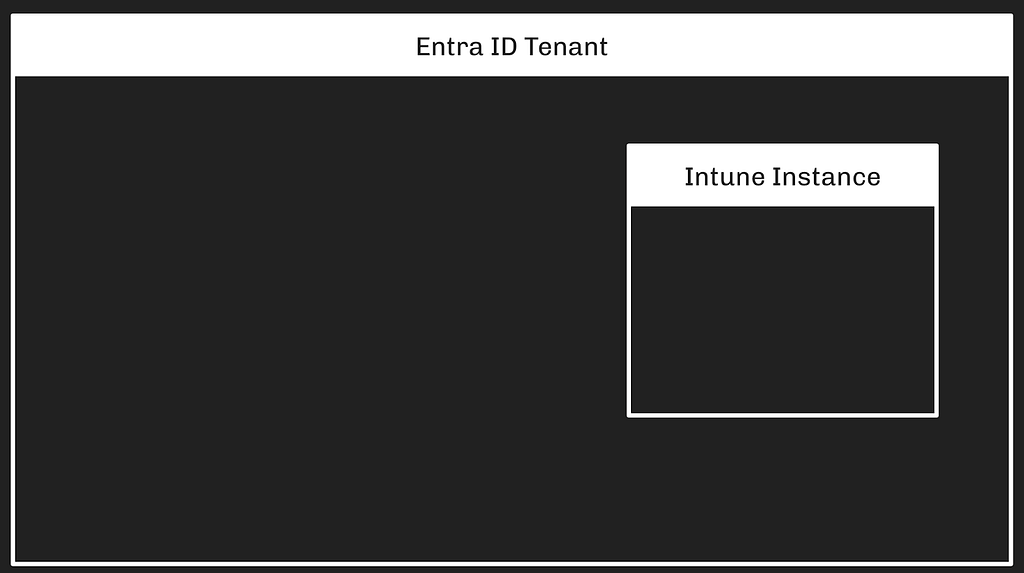
Intune is an Azure service and requires an existing Entra tenant for admins to use it. Only one Intune instance can be associated with each Entra tenant. Intune instances can not be associated with more than one Entra tenant.
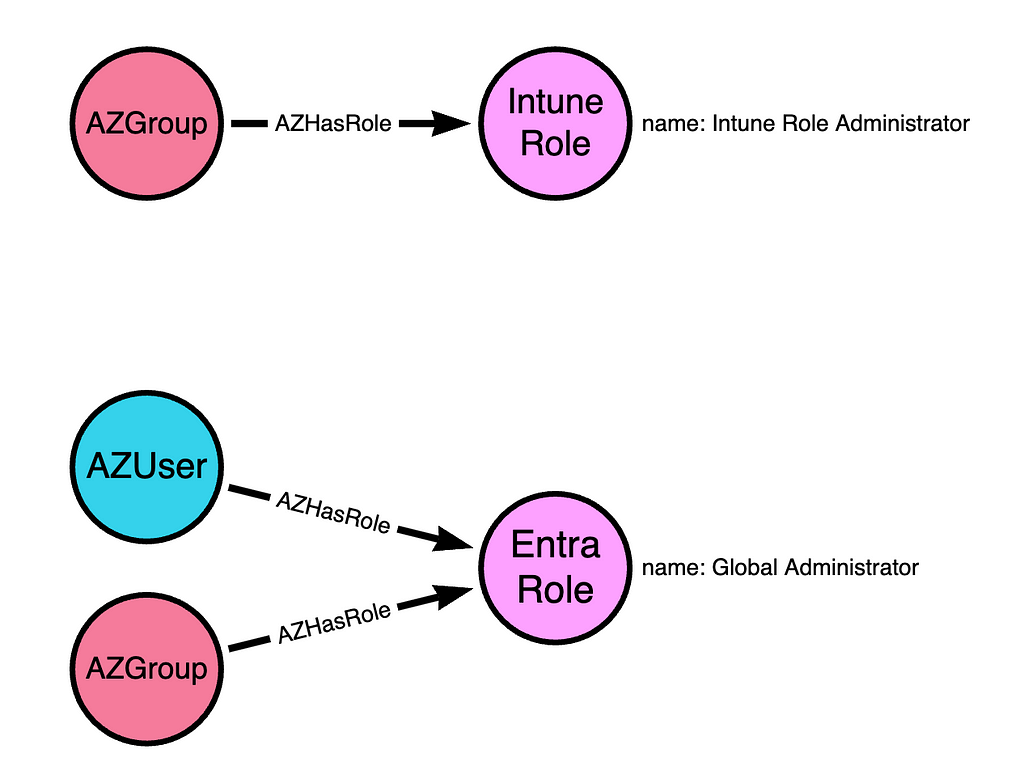
Two roles in the Entra tenant grant full control of an Intune instance:
Global Administrator
Intune Administrator
There is also a distinct authorization system within the Intune service with its own roles and mechanics.
Because the Intune service must be associated with precisely one Entra tenant, and because Entra’s authorization system grants full control of the Intune instance, the trust boundary around an Intune instance is established and enforced by the Entra tenant:
Intune Devices vs. Entra Devices
The Intune service refers to managed endpoints as “devices.” This is the same word Entra uses when describing endpoints. Intune Devices are typically endpoints that are registered or joined to the Entra tenant, but this is not a hard requirement. It is possible to manage an endpoint in Intune while that endpoint is not registered or joined to an Entra tenant.
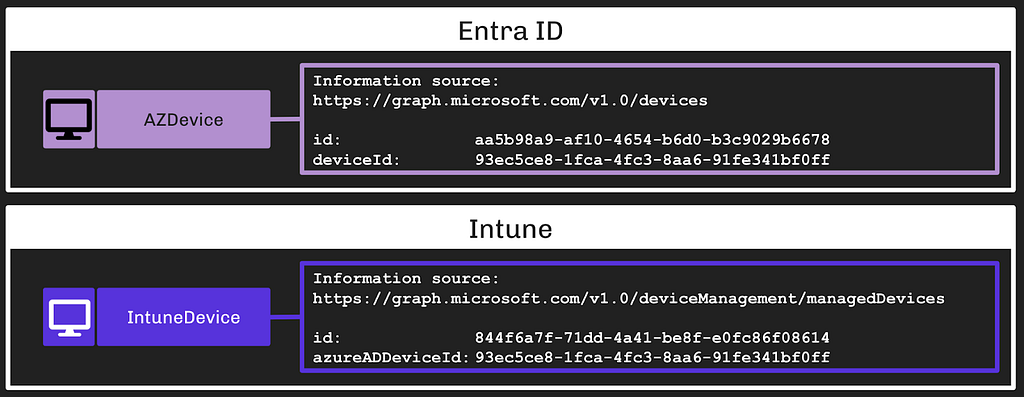
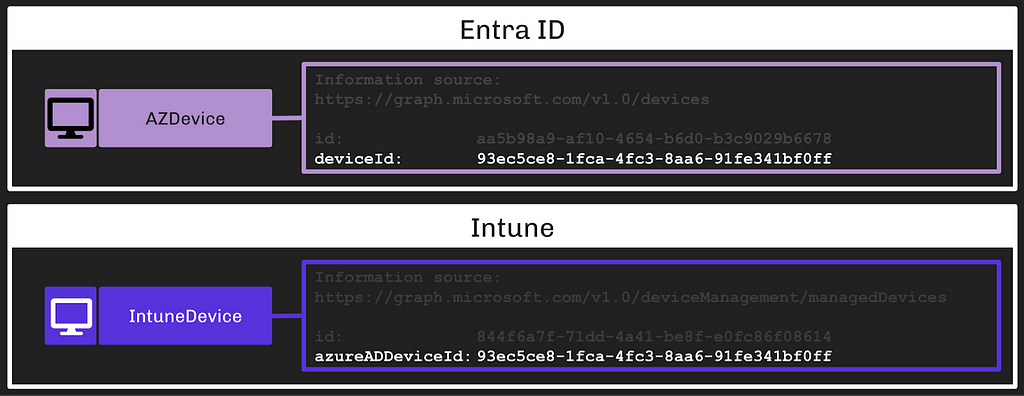
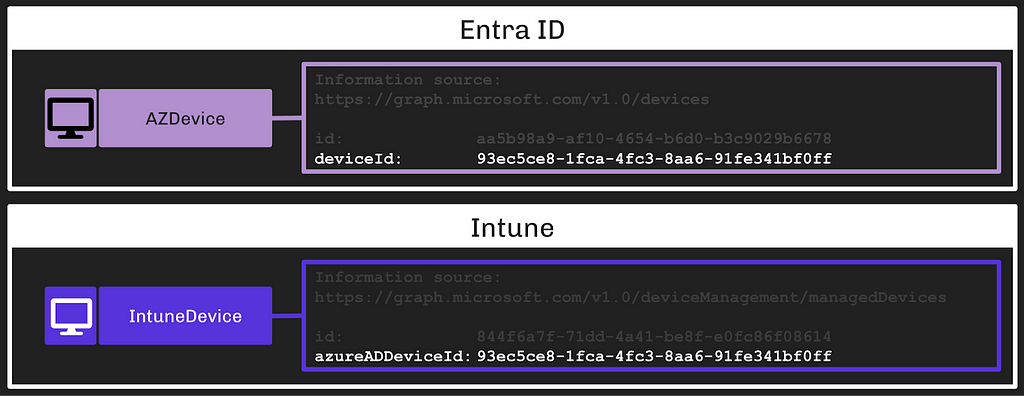
Because of this, Intune Devices are distinct objects from Entra Devices. They are accessed and managed with a distinct API and they have universally unique identifiers that are distinct from Entra Devices:
We can determine when an Intune Device is the same endpoint as an Entra Device by comparing two fields:
The deviceId field on Entra Devices
The azureADDeviceId field on Intune Devices
In this example, we can see that the two devices are, in fact, the same endpoint:
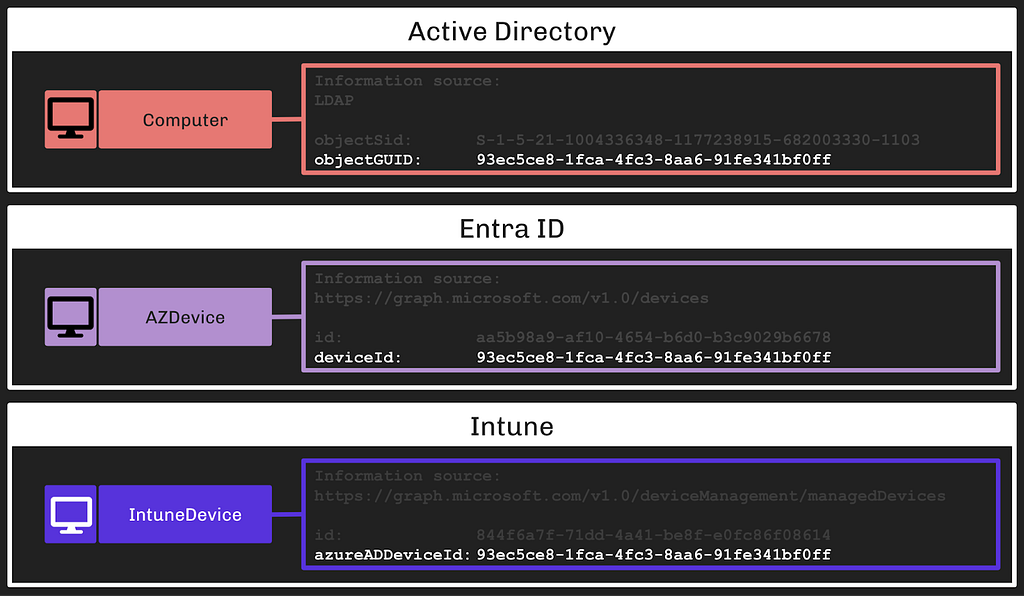
An Intune Device may represent the same endpoint as an Entra Device; furthermore, both of these objects may also represent an on-premises Active Directory joined computer. When that is the case, the on-premises AD computer’s LDAP object will have the same value for its objectGUID property:
This is one endpoint represented across three systems with three distinct objects.
Intune RBAC vs. Entra RBAC vs. MS Graph
Intune has its own role-based access control (RBAC) system that is distinct from the Entra ID RBAC system, but the Intune service is also subject to Entra RBAC — an Entra Global Admin has full control of the Intune instance. Intune is accessed via the MS Graph API and there are several relevant MS Graph permissions that can control access to the Intune instance as well.
Intune RBAC — Role Assignments
The Intune RBAC system is very similar to the Entra RBAC system in that it is based on role definitions, role assignments, permissions, and scopes.
The first material difference of note is that Intune roles must be assigned to groups. While it is possible to create an Intune role assignment for a user, the system will not respect this configuration. Intune role assignments only work when assigned to groups, while Entra roles work when assigned to any principal type:
Intune RBAC — Permissions
Intune permissions (more accurately called Resource Operations) enable specific actions against specific Intune object classes. Intune permissions are formatted as:
Microsoft.<ServiceName>_<ObjectClass>_<Action>
All Intune permissions have “Intune” as the service name.
An example Intune permission is:
Microsoft.Intune_DeviceConfigurations_Create
This permission enables a principal to Create new Intune objects called DeviceConfigurations. This is a powerful permission that enables remote code execution on Intune-managed endpoints.
At time of writing, Intune has 239 distinct permissions, there does not appear to be an online resource listing all of these permissions, and MS Graph serves them at the /deviceManagement/resourceOperations API endpoint. BARK’s Get-IntuneResourceOperations hits that endpoint to list all Intune permissions.
Intune RBAC — Scope Groups
Intune’s RBAC system supports limiting role assignments to particular sets of endpoints. The mechanism for this is called Scope Groups. Scope Groups are Entra ID security groups. The default (and most common) configuration is to use a virtual scope group called allDevicesAndLicensedUsers. This scope group value means the role assignment will enable the principal to perform actions against all devices in the Intune instance.
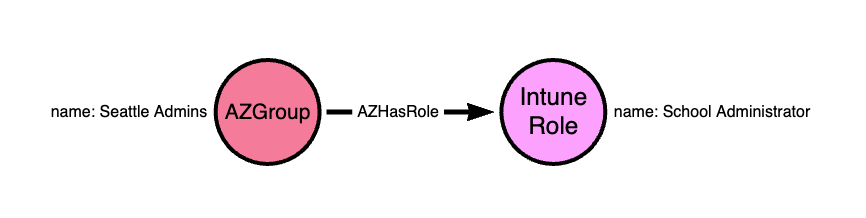
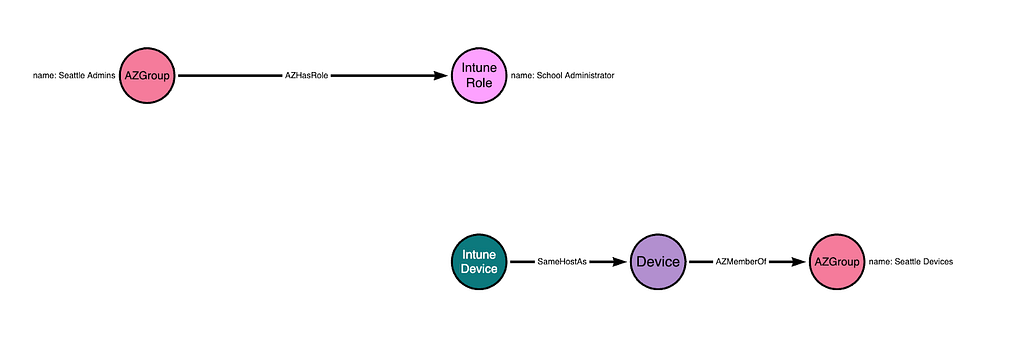
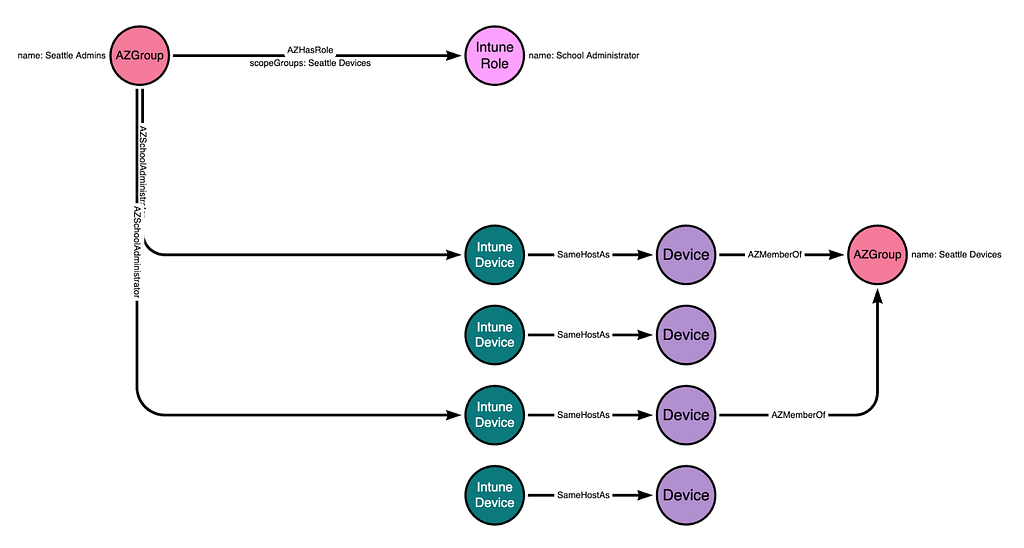
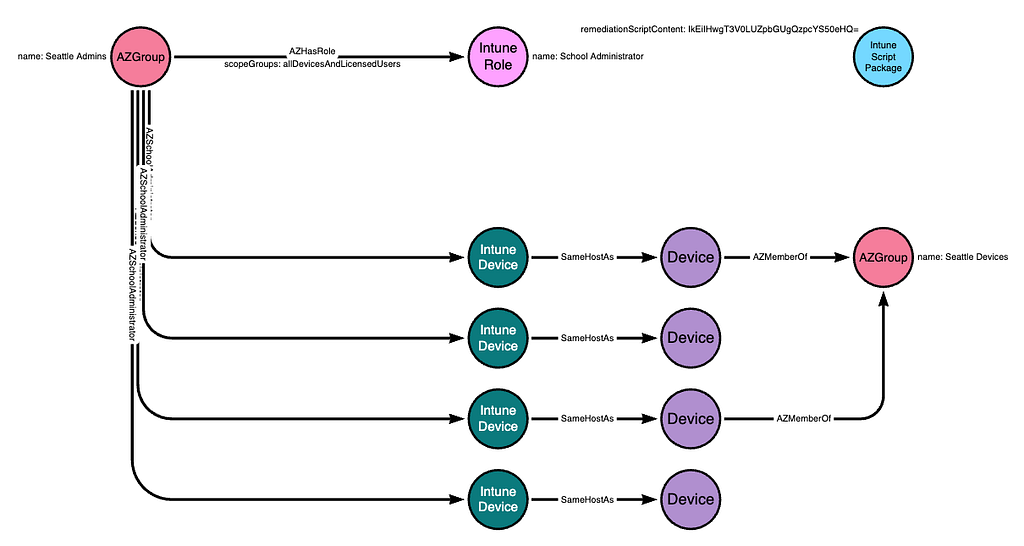
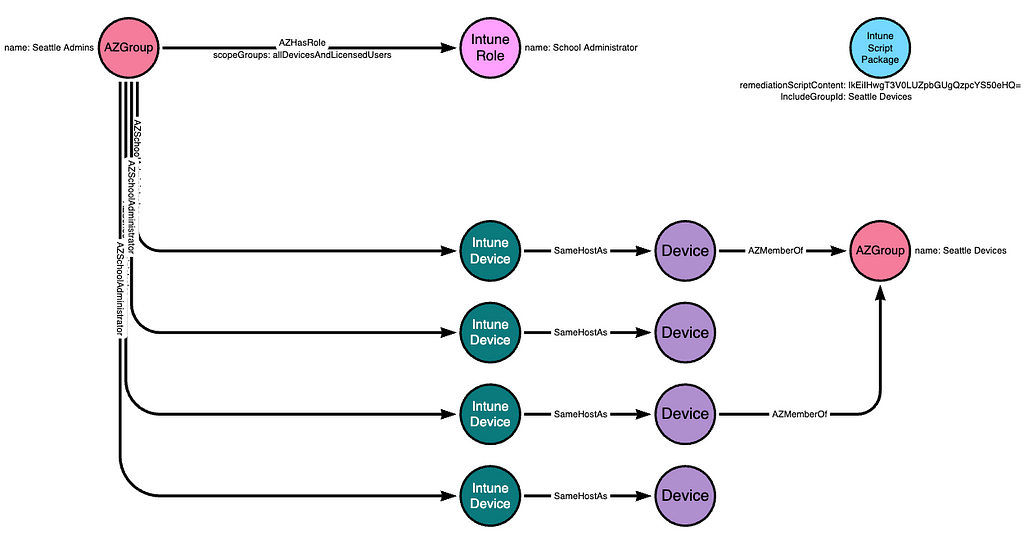
Scope Groups may be used to limit which devices a principal can control when granted a role assignment. For example, the Entra group called “Seattle Admins” may have an Intune role assignment for the built-in role called “School Administrator”:
If the Intune admin wants to limit this role assignment to only granting control of devices in Seattle, they may create a new Entra group called “Seattle Devices” and then add the relevant Entra Devices (not the Intune Devices) to that group.
Recall from earlier that Entra devices and Intune devices that represent the same endpoint share a common property value that ties the objects to the same host.
Putting this all together, we can visualize the above configuration as such:
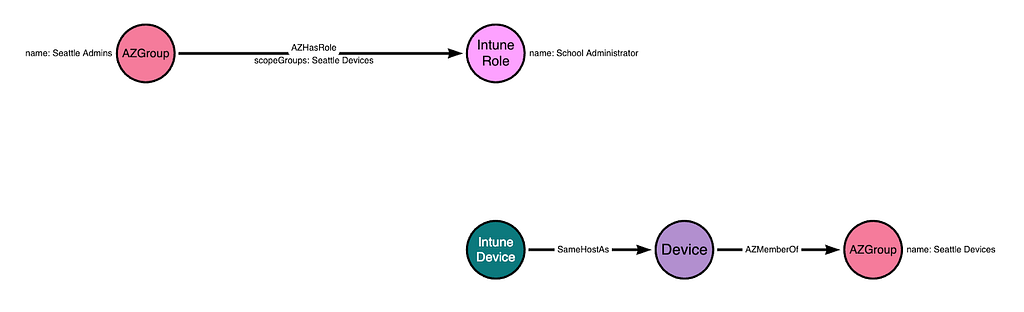
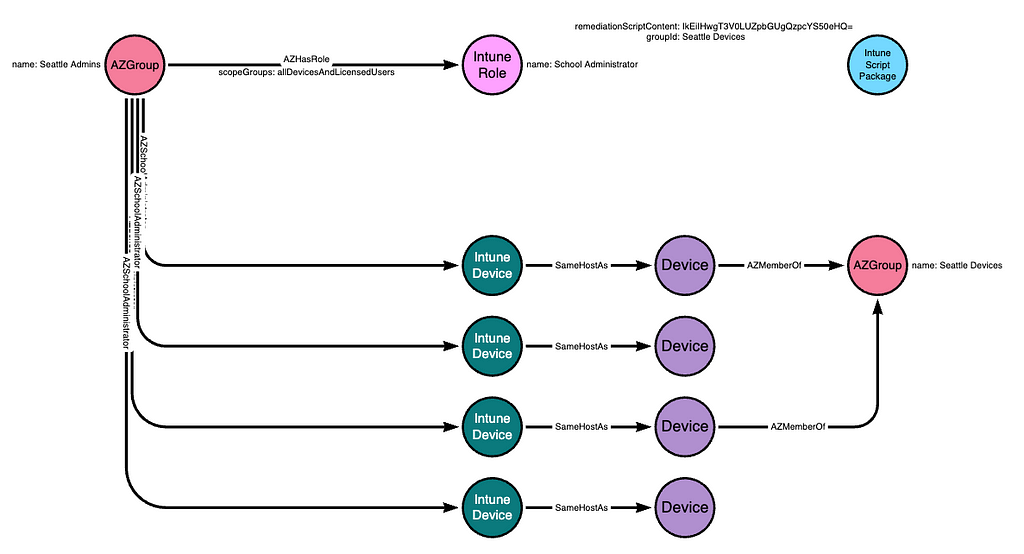
The one piece that is missing is the inclusion of the Scope Group configuration within the role assignment itself. Let’s add that in:
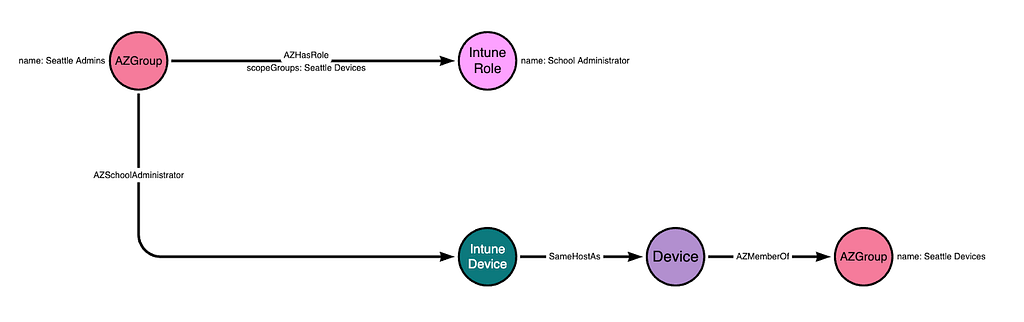
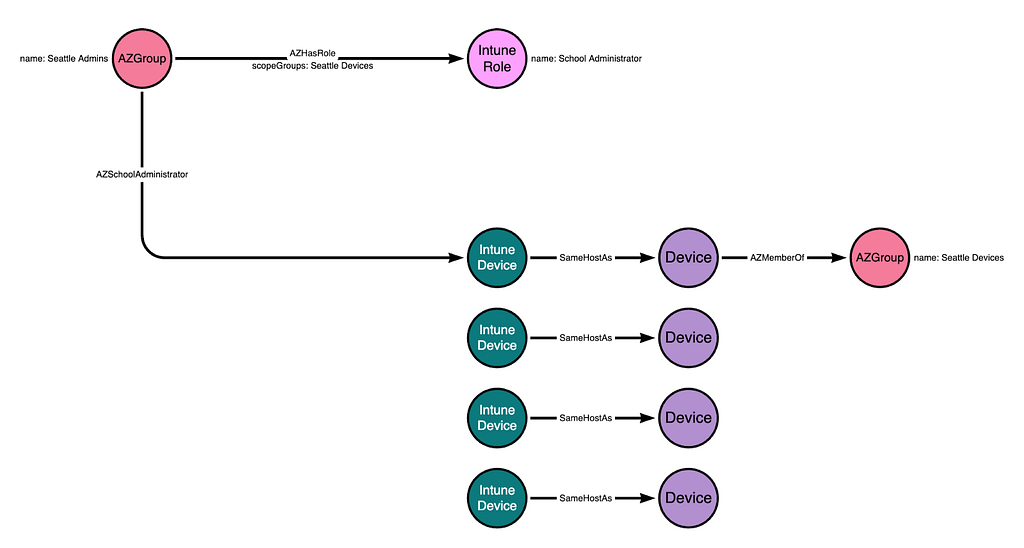
This configuration means that the “Seattle Admins” group will have all permissions granted by the “School Administrator” role, but only for those devices that belong to the groups listed in the “scopeGroups” attribute of the role assignment. The “Seattle Admins” group gains control of the Intune Device due to this configuration:
There may be other Intune devices in this instance, but if those devices are not added to the “Seattle Devices” group, then this configuration means the “Seattle Admins” group does not gain control of those other devices:
If an Entra Device that is associated with an Intune Device is added to the “Seattle Devices” group, then the “School Admins” group will gain control of that device:
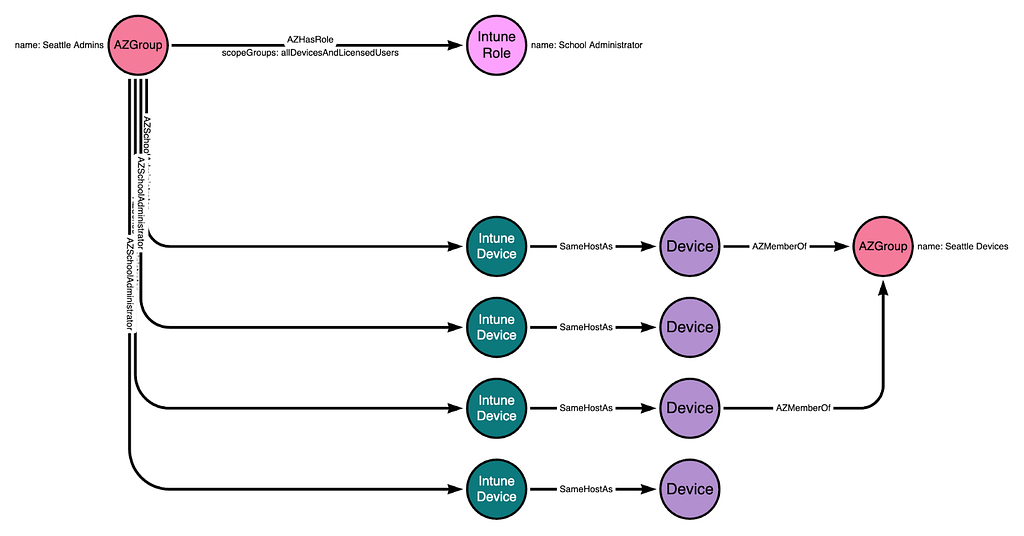
If the “scopeGroups” property on the role assignment is changed to allDevicesAndLicensedUsers, then the “Seattle Admins” group will gain control of all Intune-managed devices within the Intune instance:
You can use RBAC and scope tags to make sure that the right admins have the correct access and visibility to the required Intune objects. Roles determine what access admins have to which objects. Scope tags determine which objects admins can see.
Scope Tags limit visibility, they do not limit access.
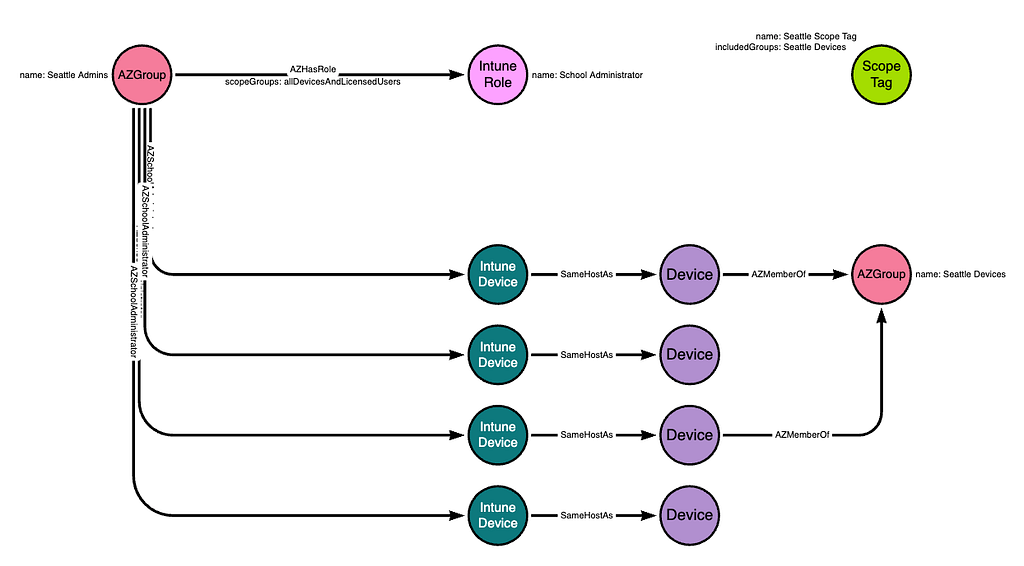
Scope Tags are a distinct class of Intune object. They are referenced on most Intune objects including roles, role assignments, applications, and devices. For example, let’s say we want members of the “Seattle Admins” group to only be able to see devices that belong to the “Seattle Devices” group.
The Intune admin must first create the scope tag. Then, they modify the scope tag so that the scope tag itself includes the “Seattle Devices” group:
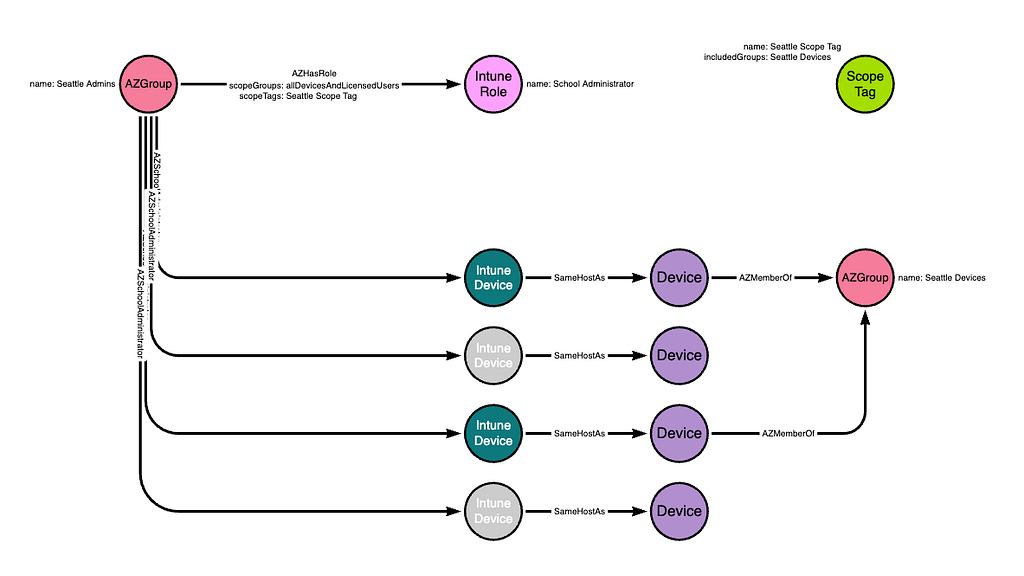
Next, the Intune admin would modify the existing role assignment connecting the “Seattle Admins” group to the “School Administrator” role. The modification is to update the “scopeTags” attribute on the role assignment itself to reference the existing scope tag. When this update happens, the members of the “Seattle Admins” group will lose the ability to see any device that is not a member of the “Seattle Devices” group:
While the members of the “Seattle Admins” group can no longer see those devices in Intune, they still control those devices. We can prove this in a lab by logging in as a member of the “Seattle Admins” group and deploying a new configuration to include all devices. Because the “scopeGroups” attribute of the role assignment is inclusive of all devices, the change will apply to all devices.
Scope tags do not appear to be commonly used in the real world. There are complicated rules around scope tags that I believe will introduce enough friction to discourage most Intune admins from making use of scope tags.
Entra ID RBAC
Two built-in roles in Entra have full control of an Intune instance:
Global Administrator
Intune Administrator
Principals with either of those roles are not limited in any way by Intune RBAC. I still need to look into which specific Entra ID permissions may be relevant in the same way, as admins may be using custom Entra ID roles that also have control of Intune.
MS Graph App Roles
Intune is accessed via MS Graph, which has its own set of permissions related to Intune. The MS Graph app roles that apply to Intune include, for example:
DeviceManagementRBAC.ReadWrite.All
DeviceManagementConfiguration.ReadWrite.All
DeviceManagementManagedDevices.ReadWrite.All
Most (all?) of the Intune-relevant MS Graph app roles begin with “DeviceManagement”.
Some of these app roles enable abuse. For example:
DeviceManagementConfiguration.ReadWrite.All app role enables arbitrary, privileged command execution on all Intune-managed endpoints
DeviceManagementRBAC.ReadWrite.All enables privileged role assignment in Intune, including the ability to grant Intune role assignments that lead to arbitrary, privileged command execution on Intune-managed endpoints
Those are the two MS Graph app roles I have completed the research on. There are others that appear very attractive, including:
DeviceManagementApps.ReadWrite.All
DeviceManagementServiceConfig.ReadWrite.All
Intune Arbitrary Command Execution via Remediations
Intune is an endpoint management system and, as such, provides Intune admins with various mechanisms for performing privileged actions on endpoints such as controlling operating system configurations, installing arbitrary applications, and running arbitrary commands.
One method of running arbitrary commands is by using Remediations (previously known as “Proactive Remediations”). Remediations allow Intune admins to run PowerShell scripts on Intune-managed devices as the Windows NT AUTHORITY\SYSTEM principal.
Remediations run PowerShell scripts. To run a remediation script, the admin must create or modify an existing PowerShell script. This step is done locally on the admin’s own host.
Next, the Intune admin must create or modify an existing script package. Creating a new script package is done by making a “POST” request to the MS Graph /devicemanagement/deviceHealthScriptsendpoint. This is a privileged action. In order to successfully make a “POST” request to that endpoint, a principal must have one of the following:
A. One of these Entra ID roles:
Global Administrator
Intune Administrator
B. An Intune role assignment including the atomic permission (resource operation), Microsoft.Intune_DeviceConfigurations_Create. These built-in Intune roles have that permission:
School Administrator
Policy and Profile Manager
C. The MS Graph app role, DeviceManagementConfiguration.ReadWrite.All
The PowerShell script is stored as a base64-encoded string on the deviceHealthScript resource:
The script package defines which groups are able to run the package. For example, the admin may assign the script package to the “Seattle Devices” group in order to make the package available to those devices:
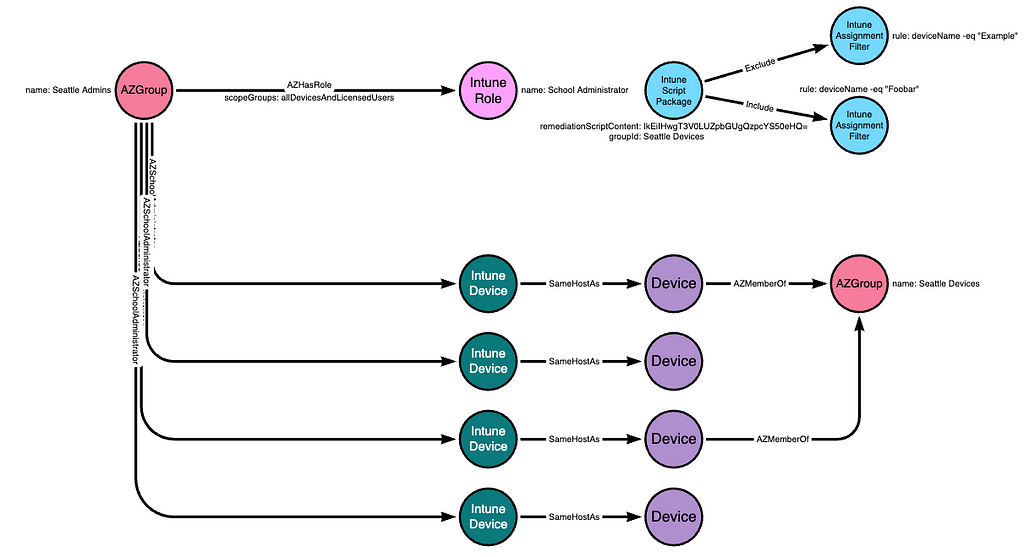
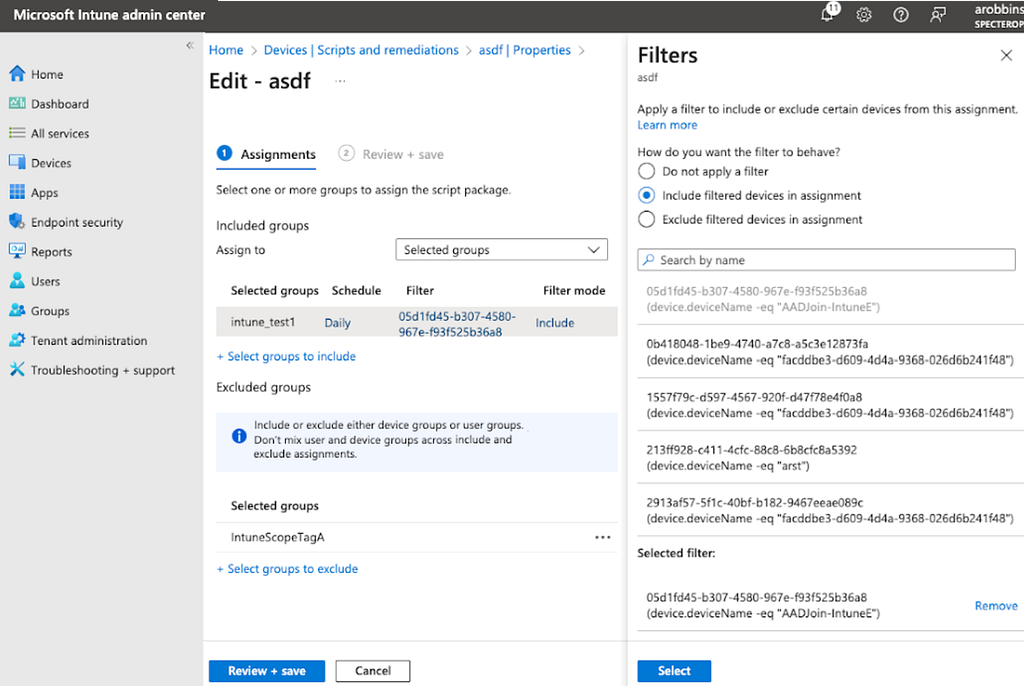
Script packages also allow admins to include or exclude devices using assignment filters:
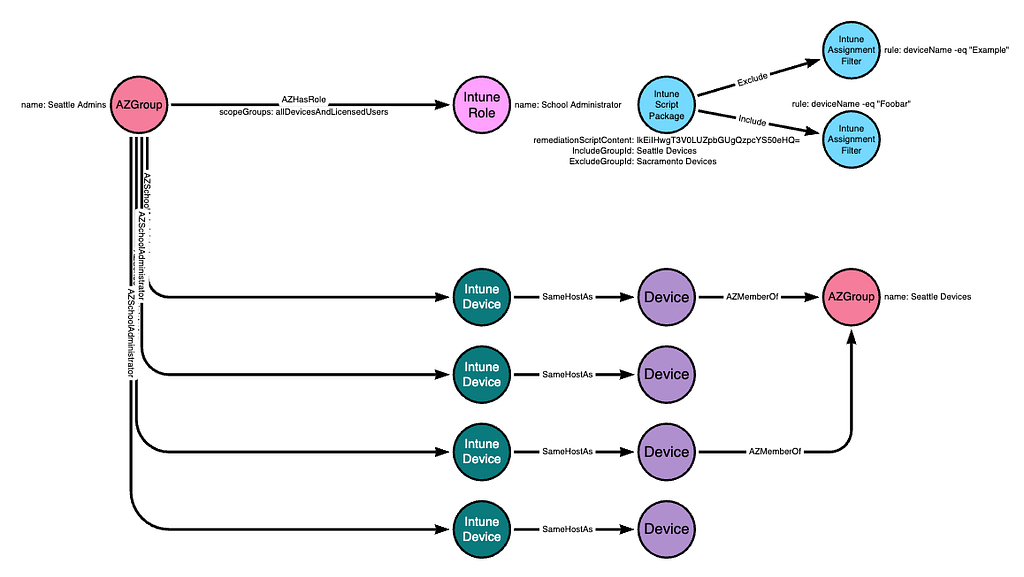
Finally, script packages allow admins to exclude groups using an exclusion property of the package:
We have not observed wide-spread usage of exclusion groups or inclusion/exclusion filters. Due to the complexity involved with these filters, we do not expect most Intune admins to make use of filters beyond using the readily-available “All devices” assignment, or selecting specific groups to include.
We expect a typical environment to not make use of most of these filter mechanisms. In our example, we will simplify the diagram so that the “Seattle Devices” group is included in the script package:
Now that the script package is created and assigned to the “Seattle Devices” group, the script will automatically run on a specified interval; the default is once every 24 hours.
Intune Arbitrary Command Execution via On-Demand Proactive Remediation
Intune allows administrators to run specific remediation scripts on specific devices via a feature called on-demand proactive remediations. This feature is currently in preview and subject to change.
In order to run an on-demand proactive remediation, the admin must create a script (or target an existing script). The documentation for the initiateOnDemandProactiveRemediation action indicates that this action can be used to trigger several kinds of scripts within the Intune platform:
deviceHealthScripts
deviceManagementScripts
deviceComplianceScripts
At the time of writing (December 17, 2024), I have finished the work to understand which permissions are required in order to perform the initiateOnDemandProactiveRemediation action when sending a POST request to this URI:
A principal with an Intune role activated that includes one of the following permissions will successfully perform a “POST” request to the above endpoint:
The following built-in Intune roles have that/those permissions:
Help Desk Operator
School Administrator
In the previous section titled “Intune Arbitrary Command Execution via Remediations”, we discussed how script package filters limit which devices a remediation script package will automatically run on. For the endpoint discussed in this section, the initiateOnDemandProactiveRemediation action is not limited by those filters. Even if a script package is explicitly configured to not run on a set of devices, the initiateOnDemandProactiveRemediation action will successfully execute those same script packages on that same set of devices.
January 27, 2025 update: I made a mistake, the above repo is NOT an official Microsoft repo. I will try to get an answer from Microsoft directly regarding whether this behavior is expected.
Intune Script Packages
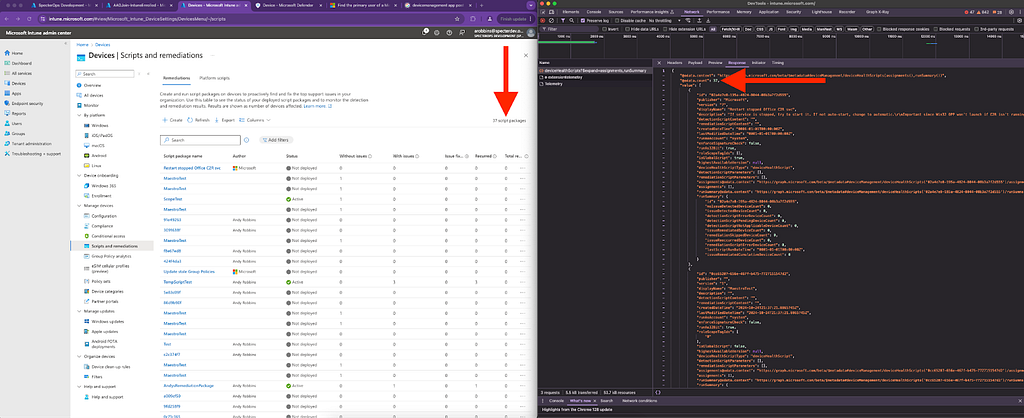
There are several Intune resource types admins can use to store and execute scripts on Intune-managed devices. The most obvious is a resource called deviceHealthScript. These objects are called “Script Packages” in the Intune portal GUI:
Look carefully at the above screenshot. Look at what the arrow on the left is pointing at. The Intune portal GUI calls the items in this list “Script Packages”. The Intune GUI says there are 37 “script packages”. Now carefully look at what the arrow on the right is pointing at: the number 37. Now look at the URI that was accessed to retrieve that number: it’s the deviceHealthScripts URI.
“Script Package” is the customer-facing name. That is the name Microsoft uses in the remediations feature documentation. “deviceHealthScript” is the name that MS Graph’s Intune API endpoints uses.
Because most Intune admins will likely be more familiar with the term “Script Package”, that is the name we will use when describing these objects.
Script packages (deviceHealthScripts) are Intune resources. There are several properties on these objects that are interesting to an attacker:
id — The universally unique identifier (UUID) of the script package
detectionScriptContent — Base64 encoded PowerShell “detection” script that will run on an endpoint executing this script package
remediationScriptContent — Base64 encoded PowerShell “remediation” script that will run on an endpoint executing this script package
runAsAccount — Whether the script will run as the logged-on user or as the NT AUTHORITY\SYSTEM principal
Intune admins can populate the detectionScriptContent and remediationScriptContent properties of these objects with anything they want; it doesn’t need to be a PowerShell script, but PowerShell is the only type of script that will successfully execute on an endpoint running a script package.
Adversaries find PowerShell scripts attractive because they may have contents that lead to successfully actioning an operational objective. Those contents may include less-sensitive data such as internal hostnames, or highly-sensitive data such as credentials.
A principal with one of the following Entra ID admin roles can read the contents of all script packages within an Intune instance:
Global Administrator
Intune Administrator
Global Reader
Security Reader
Reports Reader
Security Operator
Security Administrator
Helpdesk Administrator
A principal with one of the following built-in Intune roles can read the contents of all script packages within an Intune instance:
Help Desk Operator
Endpoint Security Manager
Policy and Profile Manager
Read Only Operator
School Administrator
Application Manager
The atomic Intune permission that enables reading script package contents is:
Microsoft.Intune_DeviceConfigurations_Read
These MS Graph app roles allow a service principal to read all deviceHealthScripts in the Intune instance:
DeviceManagementConfiguration.Read.All
DeviceManagementConfiguration.ReadWrite.All
Intune Platform Scripts
Platform scripts are Intune resources that store information about scripts that can run on Intune-managed devices. “Platform script” is the user-facing name of this resource. The MS Graph API refers to these resources as deviceManagementScripts. We will refer to them as “Platform Scripts”.
Platform scripts, similar to script packages, contain the base64-encoded script that will run on Intune-managed endpoints. Those scripts may contain sensitive information such as internal host names or credentials.
A principal with one of the following Entra ID admin roles can read the contents of all platform scripts within an Intune instance:
Global Administrator
Intune Administrator
Global Reader
Security Reader
Reports Reader
Security Operator
Security Administrator
Helpdesk Administrator
A principal with one of the following Intune roles can read the contents of all platform scripts within an Intune instance:
Help Desk Operator
Endpoint Security Manager
Policy and Profile Manager
Read Only Operator
School Administrator
Application Manager
The atomic Intune permission that enables reading platform script contents is:
Microsoft.Intune_DeviceConfigurations_Read
These MS Graph app roles allow a service principal to read all platform scripts in the Intune instance:
DeviceManagementConfiguration.Read.All
DeviceManagementConfiguration.ReadWrite.All
Intune Compliance Scripts
Compliance scripts are scripts that run during an Intune-managed Windows or Linux system. Compliance scripts are referred to as “Scripts” within the compliance policy GUI, and as “deviceComplianceScripts” by the API. We will call them “Compliance Scripts”.
Compliance scripts are associated with compliance policies. Compliance policies specify which devices/groups are in-scope for that particular policy. Compliance scripts automatically run once every 24 hours when associated with a compliance policy.
Admins can force a compliance script to execute “on-demand” by instructing a device to “sync”.
Intune Device User Hunting
When an on-premises Active Directory user logs onto a domain-joined computer, several artifacts are created within the operating system that make it possible to impersonate that user. This is well-established knowledge going back to at least 2008 when Luke Jennings published the seminal paper, “Security Implications of Windows Access Tokens — A Penetration Tester’s Guide”.
This tradecraft means adversaries are interested in discovering which Intune-managed devices users have logged onto. There are several data sources we can pull from to discover which users have logged onto which devices, each with their own strengths and drawbacks:
User Hunting via Sign-in Logs
Of the built-in options, Entra sign-in logs are the highest-fidelity source for discovering which users have performed some kind of abusable logon on a device.
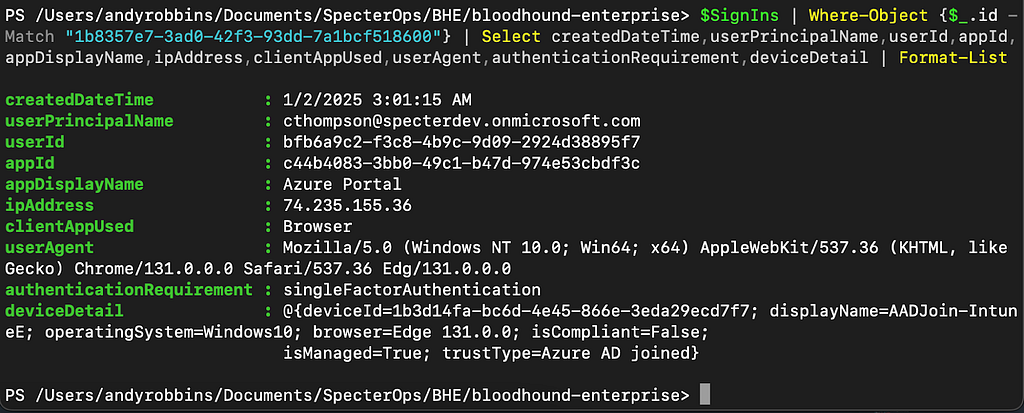
Sign-in logs are a trove of information. In the above screenshot, we can see:
The UUID of the user that performed a sign-in
The date and time of the sign-in
The application the user was “signing into” (Azure Portal)
Version information about the browser the user used
The UUID of the Entra device the user used
This is more than enough information to populate an attack graph:
Notice that, in the above diagram, we have labeled the device as an “Entra Device” and not as an “Intune Device”. This is because Entra logs the Entra device identifier, NOT the Intune device identifier. Recall from earlier that we can identify hosts that are both Entra-joined and Intune-managed devices by comparing the deviceId and azureADDeviceId property values:
We can connect the Entra and Intune device nodes with an edge indicating they are the same host. This reveals the full pattern connecting the Intune device to the Entra user:
But Entra sign-in logs come with serious limitations. Adversaries may be unable or unwilling to rely on Entra sign-in logs for user hunting for a few reasons:
Comprehensive sign-in log collection is very slow. It can take several hours to collect those logs from the MS Graph API
The available filters to constrain the sign-in logs MS Graph returns do not materially reduce the time it takes to collect those logs
Reading sign-in logs requires non-default permissions that an initial-access user or service principal is unlikely to possess
User Hunting via Intune Device “usersLoggedOn” Attribute
Intune devices have a property called usersLoggedOn. This attribute is a collection of loggedOnUser resources. A loggedOnUser resource contains two pieces of information:
The Entra ID of the user that logged onto the device
The timestamp of the most recent time that user logged onto that device
This data source gives us all three elements we need to construct a similar attack graph as in the previous section:
Using this attribute for user hunting comes with some advantages:
Collecting Intune devices via the MS Graph API is dramatically faster than collecting Entra sign-in logs
The usersLoggedOn attribute stores 30 days worth of logons (the same length as Entra sign-in logs)
The rights needed to collect Intune devices may be “lower” than those needed to collect sign-in logs
User Hunting via Entra/Intune Device Owner
Entra and Intune devices have “owners”. Ownership of an Entra or Intune device does not guarantee control of the device, nor does it guarantee that the user that owns the device uses the device. In the real world, we see many Entra and Intune devices where the owner has been set to an IT contact. We do not consider device ownership a reliable indicator for the purposes of user hunting.
In the real world, we have seen little reason to put much trust in the “primary user” of an Intune device for user hunting purposes, especially in light of the Intune device usersLoggedOn attribute.
Conclusion and Future Work
Intune attack paths are interesting for the attack paths that emerge within the Intune platform itself. But these attack paths are compelling for the attack paths that emerge connecting Entra/Azure to on-premises Active Directory and vice versa. This blog post hopefully sets some foundational knowledge to setup for the next post(s) in this series, which will show real examples of performing the abuse primitives this post discusses.
I will also be continuing Intune tradecraft research, to include:
Finishing research on atomic Entra ID RBAC permissions that enable abuse of Intune resources
Learning how line of business apps and permissions against them can be abused
Investigating Intune device query and determining the data collection and other abuse primitive types that may be enabled by this feature
Researching Remote Help and Intune’s Teamviewer integration to understand how those features work and how they may be abused for lateral movement
The new year always kicks off with a flood of prediction articles; then, 12 months later, our newsfeed is filled with wrap-up articles. But we are often left to wonder if experts got it right in January about how the year would unfold. As we close out 2024, let’s take a moment to go back and see if the crystal balls were working about how the year would play out in cybersecurity.
Here are five trends that were often predicted for 2024.
1. The use of artificial intelligence in cybersecurity will increase
As the year began, there was no doubt that artificial intelligence (AI) would be a main character in the year’s events — and that was right on the money. Many organizations began to use or continue using AI in their cybersecurity operations in a wide range of ways. For example, Microsoft’s internal response teams use a large language model to manage requests and tickets based on how they were handled previously, saving 20 hours per person each week.
As the world turned its attention over the summer to the Paris Olympics, the team responsible for keeping the Paris Olympics data, apps, systems and even physical buildings protected turned to AI. While 140 cyberattacks were linked to the Olympics, the teams’ efforts resulted in no disruption of the competitions.
Throughout the entire life cycle of the games, from before the opening ceremony to after the torch left Paris, cybersecurity teams used AI to secure critical information systems, protect sensitive data and raise awareness within the games’ ecosystem. Additionally, algorithmic video surveillance based in AI scanned video to detect abandoned bags, the presence of weapons, unusual crowd movements and fires.
2. Organizations will see more AI-based threats and attacks
Unfortunately, experts were right about cyber criminals also turning to AI technology to more effectively conduct attacks. Threat actors are using AI in a wide range of ways for data breaches and cyberattacks, including improved reconnaissance, better target profiling and lowering expertise required for conducting an attack. Because AI can automate many processes required for an attack, such as vulnerability scanning, exploitation and data exfiltration processes, more cyber criminals now have the skills for even more damaging attacks.
“Since the release of gen AI, attackers are increasingly employing tools along with large language models to carry out large-scale social engineering attacks, and Gartner predicts that by 2027, 17% of total cyberattacks/data leaks will involve generative AI,” wrote Gartner in an August 2024 press release.
IBM distinguished engineer Jeff Crume has no doubt that the trend of cyber criminals using AI for attacks will continue in 2025. He says that cyber professionals do a better job of authentication because attackers are finding it easier to log in than to hack in. While looking for bad grammar and spelling errors now works to spot phishing attacks, he expects that this will no longer work as AI-based phishing attacks hit mass distribution.
While experts correctly predicted that deepfakes would become more of a threat in 2024, it’s likely no one expected the scale of arguably the most shocking deepfake story of the year. At the beginning of 2024, attackers created a deepfake video call that led to an employee giving the cyber criminals $25 million, which showed the power and damage that deepfakes can cause. But the World Economic Forum expects that the trend will only increase, even declaring that over the next two years, AI-fueled disinformation will be the number one threat in the world.
4. A growing impact of quantum computing on cybersecurity
Ray Harishankar, IBM Fellow, IBM Quantum Safe, predicted that in 2024, “harvest now, decrypt later” attacks would become more common. As the year moved forward, quantum computing became an increasingly top concern, especially the harvest-now attacks. In July, the Office of Management and Budget released the Report on Post-Quantum Cryptography, which urged organizations to prepare their systems and processes for advancements in quantum computing.
During the fall of 2024, the predictions of the quantum’s impact became even more urgent, as symmetric cryptography would be unsafe by 2029, with even asymmetric cryptography fully breakable by quantum technology by 2034.
“That does not mean, however, that the risks are five years away. The prospect of harvest-now, decrypt-later attacks is already a concern, making the post-quantum cryptography transition an urgent priority,” wrote Gartner.
5. Recession of ransomware attacks
John Dwyer, former Head of Research at IBM X-Force, predicted we might face a ransomware recession as more companies pledged not to pay the ransom. While we wish we could declare this came true, the jury is still out, and likely, we won’t know for sure until all the data is collected from 2024.
However, Wired declared in the summer of 2024 that “ransomware showed no signs of slowing down in 2024 — despite increasing police crackdowns.” In December, Heather Wishart-Smith wrote in her Forbes article The Persistent Ransomware Threat: 2024 Trends and High-Profile Attacks about the increasing dual extortion technique of cyber criminals as an increasing trend in 2024.
All in all, the experts were largely on target with their 2024 predictions. And in the next few weeks, we will start the prediction game all over again as we wonder what’s in the cards for cybersecurity in 2025.
For the last couple of years, a lot of attention has been placed on the evolutionary state of artificial intelligence (AI) technology and its impact on cybersecurity. In many industries, the risks associated with AI-generated attacks are still present and concerning, especially with the global average of data breach costs increasing by 10% from last year.
However, according to the most recent Cloud Threat Landscape Report released by IBM’s X-Force team, the near-term threat of an AI-generated attack targeting cloud computing environments is actually moderately low. Still, projections from X-Force reveal that an increase in these sophisticated attack methods could be on the horizon.
Current status of the cloud computing market
The cloud computing market continues to grow exponentially, with experts expecting its value to reach more than $675 billion by the end of 2024. As more organizations expand their operational capabilities beyond on-premise restrictions and leverage public and private cloud infrastructure and services, adoption of AI technology is steadily increasing across multiple industry sectors.
Generative AI’s rapid integration into cloud computing platforms has created many opportunities for businesses, especially when enabling better automation and efficiency in the deployment, provisioning and scalability of IT services and SaaS applications.
However, as more businesses rely on new disruptive technologies to help them maximize the value of their cloud investments, the potential security danger that generative AI poses is something closely monitored by various cybersecurity organizations.
Why are AI-generated attacks in the cloud currently considered lower risk?
Although AI-generated attacks are still among the top emerging risks for senior risk and assurance executives, according to a recent Gartner report, the current threat of AI technologies being exploited and leveraged in cloud infrastructure attacks is still moderately low, according to X-Force’s research.
This isn’t to say that AI technology isn’t still being regularly used in the development and distribution of highly sophisticated phishing schemes at scale. This behavior has already been observed with active malware distributors like Hive0137, who make use of large language models (LLMs) when scripting new dark web tools. Rather, the current lower risk projections are relevant to the likelihood of AI platforms being directly targeted in both cloud and on-premise environments.
One of the primary reasons for this lower risk has to do with the complex undertaking it will take for cyber criminals to breach and manipulate the underlying infrastructure of AI deployments successfully. Even if attackers put considerable resources into this effort, the still relatively low market saturation of cloud-based AI tools and solutions would likely lead to a low return on investment in time, resources and risks associated with carrying out these attacks.
Preparing for an inevitable increase in AI-driven cloud threats
While the immediate risks of AI-driven cloud threats may be lower today, this isn’t to say that organizations shouldn’t prepare for this to change in the near future.
IBM’s X-Force team has recognized correlations between the percentage of market share new technologies have across various markets and the trigger points related to their associated cybersecurity risks. According to the recent X-Force analysis, once generative AI matures and approaches 50% market saturation, it’s likely that its attack surface will become a larger target for cyber criminals.
For organizations currently utilizing AI technologies and proceeding with cloud adoption, designing more secure AI strategies is essential. This includes developing stronger identity security postures, integrating security throughout their cloud development processes and safeguarding the integrity of their data and quantum computation models.

 Entrar