In that article we mentioned the importance of encryption.
“With a browser password manager, someone with access to your browser could see your passwords in clear text, although Windows can be set to ask for authentication (the same you use at startup of your device).”
The typical behavior of browser password managers is to store passwords encrypted on disk, tied to your user account, and protected by the operating system.
But recently, a security researcher systematically tested every major Chromium-based browser for how they handle credentials in memory. The researcher found that Edge was the only one loading the entire password vault into plaintext process memory at startup, where it remains for the duration of the session.
Chrome and other Chromium browsers were observed to only decrypt a password when needed (autofill or “show password”), not the whole vault, and to use mechanisms like app‑bound encryption for keys. Edge does not use those protections in this context.
So, the researcher decided to write a proof-of-concept (PoC) demonstrating that accessing that vault doesn’t rely on zero-days or complex exploitation. It relies on the relatively simple ability to read process memory, which does require elevated privileges.
But when the researcher reported the issue to Microsoft, the response was underwhelming. The company’s official response was that the behavior is “by design.” The reasoning most likely is that this behavior speeds up sign‑in and autofill, and attackers would already need a compromised machine or elevated access to read RAM, which Microsoft treats as out of scope for this design decision.
Which is basically true. An attacker already needs significant foothold: for example, code execution on the box and the ability to read Edge’s process memory, often requiring elevated privileges. This is not a remote, unauthenticated bug in the browser, but the design makes post‑compromise credential harvesting easier. And it’s a capability many infostealers already have.
It’s just another thing an attacker can do once they’ve compromised your machine. Combined with this academic study from 2024, which found many password managers leak plaintext passwords into memory under some conditions, it leads us to repeat our advice.
Should you allow your browser to remember your passwords?
Your browser password manager gives you ease of use, but that costs you some security. Of course, password managers aren’t foolproof either, so it’s important to decide for yourself where you store your passwords.
If you’re confident the website is safe, and anyone that can access it under your account won’t learn anything new, feel free to store the password in your browser, but disable autofill so you stay in control.
Use MFA where possible. It enormously reduces the risk should someone get hold of your password. And refrain from using the browser password manager to store your credit card details or other sensitive personally identifiable information, such as medical information.
But we’d add that, among the major browsers, Edge appears to be the weakest option if you still choose to use a built‑in password manager.
Stop threats before they can do any harm.
Malwarebytes Browser Guard blocks phishing pages and malicious sites automatically. Free, one click to install. Add it to your browser →
Days after confirming a major data breach, Instructure is now facing a second blow.
Earlier this week, Instructure confirmed a major data breach affecting its cloud‑hosted Canvas environment, with the ShinyHunters group claiming it stole hundreds of millions of records tied to thousands of schools and universities worldwide. As discussed in our earlier blog, that incident involved data such as student and staff records, enrollment details, and private messages allegedly accessed through Canvas export features and APIs. At that stage, the focus was on large‑scale data theft and the long‑term risks for affected students and families, including identity fraud and highly targeted phishing.
According to new reporting, ShinyHunters has now hit Instructure again, this time moving from quiet data theft to very visible extortion. Using another vulnerability in Instructure’s systems, the attackers were able to modify Canvas login portals for hundreds of educational institutions, defacing both web logins and the Canvas app with an on‑screen ransom message.
The message both claimed responsibility for the earlier breach and set a deadline of May 12 for Instructure and affected schools to contact the gang or risk the public release of stolen data.
This second wave matters for two reasons. First, it confirms that ShinyHunters still has meaningful access to Instructure’s environment, or at least to components that control the look and behavior of school login pages. Second, it marks a clear escalation in pressure tactics, from leaked claims and dark web posts to messages shown directly to students, parents, and staff trying to access their courses.
How to deal with this data breach
For students and families, the practical advice from our original blog still applies:
Reset Canvas‑related passwords
Enable multi‑factor authentication where possible
Monitor financial and credit activity as children get older
Stay wary of highly personalized phishing that references real schools, courses, or teachers
For schools and districts, this latest extortion campaign underlines the need to coordinate closely with Instructure, review single sign-on (SSO) integrations, and prepare clear communications so that any future defacements or data leaks do not catch staff and parents by surprise.
“One of the best cybersecurity suites on the planet.”
Researchers tracked a large AI‑themed investment scam campaign involving more than 15,000 domains. It uses cloaking and deepfakes to hide from security tools while targeting ordinary users.
Criminals abused the Keitaro ad-tracking platform as part of a cloaking system so real victims see scam content, while security scanners, ad reviewers, and some random visitors see harmless pages, making the operation hard to detect and shut down.
Keitaro is a commercial tracking platform originally meant for digital marketers to manage ad campaigns, test which ads work best, and route visitors to different landing pages.
Because it is feature rich, easy to spin up on regular hosting, and built to filter and route traffic, criminals found they can abuse those capabilities to run scams at scale.
Traffic starts in many places. The scammers used compromised websites, spam emails, social media posts, and online ads, all quietly routing through the same tracking infrastructure.
The scam sites typically promise “Smart AI Trading Technology” or “Intelligent Trading Solutions” and claim consistently high returns, often reinforced with deepfake images or fabricated media to look more credible.
Some parts of the campaign now use deepfake videos and fake interviews with well-known public figures, making it look like a celebrity, or finance expert personally endorses the platform.
Once you follow a link, the cloaking part of the operation kicks in. Cloaking is the trick that makes these scams so hard to see from the outside.
When you click an ad or link, your visit passes through a traffic distribution system (TDS), a kind of router for web visitors that decides which page you see. In these cases, the TDS is connected to the tracker.
The system checks things like:
Your country/region
Your device and browser
Where you came from (Facebook ad, Google ad, email link, etc.)
Sometimes your IP address reputation or other subtle fingerprints
You’re shown the real investment scam landing page only if you match the “ideal victim” profile (for example, a regular consumer in a target country coming from a social media ad).
Everyone else, like a security researcher, ad platform reviewer, or automated scanner, gets shown a benign page, like a generic blog or placeholder site.
How to stay safe
The best way to stay safe is to stay informed about the tricks scammers use. Learn to spot the red flags that almost always give away scams and phishing emails, and remember:
There is no such thing as a risk-free, consistently profitable investment. If you’re looking to invest, navigate directly to known, regulated financial institutions.
Deepfakes are very convincing nowadays, so you will hardly be able to tell the difference between the real celebrity and their deepfake persona.
Don’t act upon unsolicited investment advice, whether it reaches you by email, social media, or sponsored search results.
The Online Safety Act came into effect in July, 2025, and the report explores what has changed in the online lives of UK families since then.
We discussed in December 2025 whether the privacy risks of age verification outweighed the enhanced child protection. While the report shows some progress, it mostly provides “an early view of how the online landscape is changing, and crucially, where it is not.”
Around half of children say they now see more age-appropriate content, and roughly four in ten parents and children feel the online world has become somewhat safer.
The online world is as much a part of a child’s environment as the physical world is. And blocking the view to parts of that world is not taken lightly. Almost half of children think age checks are easy to bypass. About a third admit to doing so recently, using tactics from fake birthdates and borrowed logins to spoofed faces and, less commonly, VPNs.
“I did catch my son [12] using an eyebrow pencil to draw a moustache on his face, and it verified him as 15 years old.”
Yet 90% of children who noticed improved blocking and reporting saw this as a good thing. Their support for these safety features is pragmatic. They point to:
clearer rules
restricted contact with strangers
limits on high-risk functions
They also rate these features as helpful in reducing exposure to harmful content and interactions.
But the system is not perfect. In the month after the child protection codes came into force, almost half of children reported some online harm, including violent, hateful, and body image-related content that should be covered by the Act’s protections.
The survey also revealed that age checks are now commonplace. Over half of children said they were asked to verify their age within a recent two-month window, often on major platforms like TikTok, YouTube/Google, and Roblox, on both new and existing accounts.
The technology is improving. Platforms use facial age estimation, government ID, and third-party age assurance apps, and these are usually easy for children to complete.
However, gains in protection come with unresolved and, in some cases, growing concerns around privacy and data use, especially around age verification and AI.
Parents are worried not just about what data is collected for age checks, but whether it will be stored or reused by government or industry. This has fueled calls for central, privacy-protective solutions rather than fragmented data collection across platforms.
Because age assurance systems are both intrusive (in terms of data) and often ineffective (easy workarounds, weak enforcement), the report suggests they may not yet provide a good safety-to-privacy trade-off from a family perspective.
Obviously, the survey also didn’t capture input from adults pretending to be children to gain access to child-only spaces, a risk that parents link directly to predatory behavior.
The authors conclude that the Online Safety Act has started to reshape children’s online environments, making safety features more visible and enabling more age‑appropriate experiences in some areas.
However, the Act has not yet produced a “step change.” Harmful content remains widespread, age‑assurance is patchy and easy to circumvent, and key concerns such as time spent online, AI risks, and persuasive design remain under‑regulated.
Browse like no one’s watching.
Malwarebytes Privacy VPN encrypts your connection and never logs what you do, so the next story you read doesn’t have to feel personal. Try it free →
Google Chrome has been quietly downloading a 4GB AI model onto users’ devices without asking first.
Security researcher Alexander Hanff, aka ThatPrivacyGuy, reports that Chrome has been silently installing Gemini Nano, Google’s on-device AI model, as a file called weights.bin stored in the OptGuideOnDeviceModel directory within users’ Chrome profiles. This 4GB download happens automatically when Chrome determines your device meets the hardware requirements. It does not ask for consent, and sends no notification—not even one of those annoying cookie banners you’ve learned to dismiss without reading.
The Gemini Nano model powers features like “Help me write” text composition assistance, on-device scam detection, and a Summarizer API that websites can call directly. These features are enabled by default in some recent Chrome versions. And here’s the kicker: if you discover the file and delete it, Chrome simply downloads it again.
Why this matters
Let’s start with the obvious problem: a 4GB download isn’t trivial for everyone. If you’re lucky enough to have unlimited fiber internet, you might not notice. But for users on metered connections, mobile hotspots, or in developing countries where data is expensive, Google just cost them real money without permission. For rural users or those with bandwidth caps, this kind of silent transfer can blow through monthly limits in minutes.
Hanff focuses on the environmental angle. He calculated that if this model were pushed to just 1 billion Chrome users (roughly 30% of Chrome’s user base), the distribution alone would consume 240 gigawatt-hours of energy and generate 60,000 tons of CO2 equivalent. That’s not including actually using the model, just the downloads.
But to us, the most troubling aspect is the broader pattern this represents. Just a few weeks ago, we reported another unsolicited AI invasion on our personal computers discovered by Hanff. He documented how Anthropic’s Claude Desktop app, which silently installed browser integration files across multiple Chromium browsers, including five browsers he didn’t even have installed. The integration would reinstall itself if removed, and it also happened without any meaningful user disclosure.
Hanff argues that both cases likely violate EU privacy law, specifically the ePrivacy Directive’s rules about storing data on user devices and the GDPR’s requirements around transparency and lawful processing. While these claims haven’t been tested in court, they highlight a fundamental tension: can companies just install whatever they want on your computer as long as they say it’s a feature of an app you installed?
Google might argue that having an AI on your device provides better privacy than cloud-based alternatives. Which is generally true, but it does not apply here, since Chrome’s most prominent AI feature—the “AI Mode” pill in the address bar—doesn’t even use the local model. According to Hanff’s analysis, it routes queries to Google’s cloud servers anyway.
All in all, users see a 4GB local AI model and reasonably assume their data stays private, when in reality, the most visible AI feature sends everything to Google’s servers.
Tech companies need to stop treating silent deployment as acceptable practice. We see no valid excuse for this. Your device is yours. The storage is yours. The bandwidth is yours. And the electricity bill is yours.
What happened to asking for permission? And when I remove it, I want it gone permanently—not automatic reinstallation.
When are the tech giants going to learn that we don’t want to be left discovering after the fact that our devices have become deployment targets for features we never asked for.
Browse like no one’s watching.
Malwarebytes Privacy VPN encrypts your connection and never logs what you do, so the next story you read doesn’t have to feel personal. Try it free →
In our previous research, we analyzed a Windows infostealer we track as NWHStealer. The attackers behind this stealer are continuously finding new methods to distribute the stealer. During our hunting activities, we noticed how attackers are using a JavaScript runtime called Bun to help distribute it.
Bun is a legitimate, fast, all-in-one JavaScript and TypeScript toolkit designed as a modern, high-performance replacement for Node.js. It is built from the ground up to simplify modern web development by integrating several essential tools into a single executable.
Its relative newness also makes it appealing for attackers. Bun has not yet been widely seen in malware campaigns, and it allows them to package malicious code into larger executables that may be less easily detected.
What is NWHStealer and what can it do?
NWHStealer is a Rust-based stealer distributed using a range of lures and delivery methods. These include Node.js scripts, MSI installers, and, more recently, JavaScript loaders built with the Bun runtime.
It is often hosted on legitimate platforms such as GitHub, GitLab, MediaFire, Itch.io, and SourceForge, which helps it blend in with normal software and increases the chances of users downloading it. Attackers continue to create new profiles and lures to spread the stealer.
Once installed on your PC, NWHStealer can:
Collect system information, including operating system, hardware, security software, user data and connected devices.
Steal data from browsers, extensions and crypto wallets.
Steal data from different applications, including FTP applications such as FileZilla, CoreFTP and messaging apps such as Steam and Discord.
Inject malicious code into browser processes and run additional payloads (e.g. XMRig).
Attempt to bypass User Account Control (UAC).
Achieve persistence via scheduled tasks.
Get new command-and-control (C2) addresses from Telegram.
How to stay safe
Attackers are constantly adapting their techniques, and the use of newer tools like Bun shows how they try to stay ahead of detection.
NWHStealer is particularly concerning because of how widely it is distributed, and the types of data it targets. Stolen browser data, saved passwords, and cryptocurrency wallet information can quickly lead to account takeovers, financial loss, and further compromise.
Here are a few simple ways to stay safe:
Only download software from official websites.
Be cautious with downloads from platforms like GitHub, SourceForge, or file-sharing platforms unless you trust the source.
Attackers are continuing to create new profiles to distribute this stealer across platforms. Check the profile/developer/publisher’s profile, reputation, and how new it is when downloading something from file hosting providers or blogs.
Check the structure of the archives, that the content, images, txt files are consistent with what you downloaded. Also check the archive name, they usually have recognizable patterns.
Check the file’s publisher and signature before you run it.
The new distribution method: Bun JavaScript Runtime
According to its official site, Bun is an all-in-one JavaScript, TypeScript & JSX toolkit. It’s built from scratch in Zig and powered by Apple’s JavaScriptCore engine, with a focus on fast startup and low memory usage.
Bun is composed of four main components:
JavaScript Runtime: a JavaScript runtime designed as a drop-in replacement for Node.js.
Package Manager: a fast alternative for npm.
Test Runner: a built-in, Jest-compatible runner that executes tests much faster than standard runners.
Bundler: replaces tools like Webpack, Vite, or esbuild for packaging code.
In recent campaigns, we detected that NWHStealer is being distributed using a Bun JavaScript Runtime bundle.
As we saw in our previous research, game-related and other software lures are used to start the infection chain. Some of the detected ZIP names in these recent campaigns include:
Game-related software and cheats such as:
MOUSE_PI_Trainer_v1.0.zip
FiveM Mod.zip
VampireCrawlers_Trainer_v1.0.zip
MagicalPrincess_Trainer_v1.0.zip
TerraTechLegion_Trainer_v1.0.zip
Other software such as:
TradingView-Activation-Script-0.9.zip
AutoTune 2026.zip
Metatune by Slate Digital 2026.zip
GoGoTv_Plus.zip, Autodesk.zip
In the case analyzed in this article, the infection chain starts with an archive containing Installer.exe, which embeds JavaScript code bundled with the Bun runtime.
The “DW” folder contains another loader, called dw.exe. This self-injection loader is similar to the one analyzed previously, but with a different decryption routine. This loader is not present in all ZIP files analyzed.
The malicious ZIP contains two loaders
The Readme.txt file asks the user to manually launch dw.exe if the main .exe file fails to run properly. This gives the attacker two ways to distribute the stealer if the C2 of the main Bun loader is offline. The loader in dw.exe works independently from the Bun JavaScript loader.
The Readme file inside the ZIP archiveThe fake Build Tools setup shown if dw.exe is started
In this article, we don’t analyze dw.exe, as it’s a variant of the previous loaders. Instead, we focus on the JavaScript loader executed with the Bun JavaScript runtime.
Analysis of the JavaScript Loader
The executed JavaScript code by the Bun JavaScript runtime is inside the .bun section and is obfuscated.
The .bun section with the obfuscated JavaScript code
The malicious code is implemented in two parts of the code:
sysreq.js: performs the anti-virtualization checks with a score system.
memload.js: communicates with the C2 server, performs decryption and loads the next stage.
Entry point of the JavaScript loader
The loader runs several PowerShell CIM (Common Information Model) commands and WMI (Windows Management Instrumentation) commands to detect virtual environments. There are different controls related to CPU numbers, disk space, screen resolution, USB devices, hardware manufacturers and products, number of installed software, presence of specific folders such as Browser folders, number of running processes and username. A scoring system is implemented, and based on this score, the loader decides whether to continue with the infection or terminate it.
To detect a virtual environment, the loader executes more than 10 PowerShell commands, such as:
Get-CimInstance -ClassName Win32_DiskDrive | Select-Object Model
The strings are decrypted using XOR and base64 decoding; there are arrays of tuples and each contains the encrypted strings and a key used for XOR decryption.
Encrypted data with XOR keys
Several functions handle string decryption, including one that decrypts the config used in the C2 communication. Partial config:
Instructure, the company behind the Canvas learning management system (LMS), confirmed a cyber incident and subsequent data breach affecting its cloud‑hosted environment.
The ShinyHunters ransomware group claims it is behind the attack and says it stole roughly 275 million records tied to students, teachers, and staff.
Image courtesy of BleepingComputer
The criminals shared a list of 8,809 school districts, universities, and online education platforms with BleepingComputer whose Canvas instances they claim were impacted, with per‑institution record counts ranging from tens of thousands to several million.
What to do if your child’s Instructure/Canvas data was exposed
If you’ve been told that your child was affected by the Instructure breach, you may be wondering what you can do to protect them. Here are some practical steps you can take right away.
1. Check what the school and Instructure are saying
Start with the notification from the school or district and Instructure’s own updates to understand what data about your child was involved (for example: name, email address, student ID, or course information). Follow any specific steps they recommend for student accounts and keep an eye on follow‑up messages in case new information comes to light.
Make sure the notification is real before anything else. If anything in the message looks suspicious, such as odd links, pressure to act immediately, or requests for extra data, check this first. Go to the district’s or Instructure’s site directly and use the contact details listed there to verify.
2. Lock down your child’s school and learning accounts
If your child has a Canvas or related account, change that password immediately, especially if your school lets students or parents log in with a username and password instead of single sign‑on. If your child tends to reuse passwords (for example, using the same one for Canvas, email, and gaming accounts), change those other passwords as well.
Give every account its own strong, unique password and consider using a family password manager so you can create and store these without relying on memory. For younger children, you may want to manage these credentials yourself and keep a list of which education platforms they use.
3. Turn on multi‑factor authentication where possible
Multi‑factor authentication (MFA) makes it much harder for someone to log into an account with just a password. If your school or district allows it on parent or student accounts (for example, a code sent by SMS, email, or generated in an authenticator app), turn it on and, ideally, have the codes go to a device or app you control.
Remind your child that security codes are like short‑term passwords. They should never share them with friends, teachers, or anyone claiming to be “IT support,” even if a message looks urgent or uses school branding.
4. Consider extra identity protection for minors
If the breach included very sensitive identifiers (such as national ID or Social Security numbers in some regions), ask both the school and the breached provider what protection is being offered for minors, such as credit monitoring or identity restoration services. In some countries, you can also place a credit freeze or similar block on a minor’s file to prevent new accounts being opened in their name.
Even if your child is too young to have a credit file today, it’s worth keeping a note of this incident so you remember to check their records once they are old enough.
5. Stay alert for follow‑on scams
Attackers like to reuse stolen data from education platforms to make phishing and scam messages more convincing, mentioning real school names, teachers, or courses. Be especially wary of emails and texts that claim to be from the school, district, or Instructure and that ask you to “confirm” login details, open unexpected attachments (like “new assignments”), or pay fees via unusual methods.
As a rule of thumb, avoid clicking links in unsolicited messages about the breach. Instead, open a new browser window and go to the official site or app as you normally would, then log in from there to check for messages.
What do cybercriminals know about you?
Use Malwarebytes’ free Digital Footprint scan to see whether your personal information has been exposed online.
Meta has published a new security advisory for messaging app WhatsApp, announcing patches for two vulnerabilities.
WhatsApp has fixed two security flaws that could be abused to interfere with how media and attachments are handled on your device. There is no evidence that either bug has been exploited in the wild.
These bugs don’t automatically infect devices, but they lower the barrier for social engineering and could be chained with other vulnerabilities for more serious attacks.
Malicious messages
The first issue, tracked as CVE‑2026‑23866, affects how WhatsApp processes AI‑generated “rich response messages” that embed Instagram Reels. On affected iOS and Android versions, incomplete validation means a specially crafted message could cause the app to load media from an attacker‑controlled URL. In some cases, this could trigger operating system‑level custom URL scheme handlers.
In other words: a booby‑trapped message could prompt your device to open content from an untrusted source.
Note: Updates may not be available immediately in all regions.
How to update WhatsApp on iOS
To update WhatsApp on iOS:
Open the App Store
Tap your profile icon
Scroll to find WhatsApp and tap Update
If it’s not listed, search for WhatsApp to check if an “Update” button is available.
Misleading filenames
The second bug, CVE‑2026‑23863, affects WhatsApp for Windows before version 2.3000.1032164386.258709.
In this case, WhatsApp did not correctly handle filenames containing embedded NUL bytes. This could allow a file to appear as a harmless type in the interface while actually being treated as an executable when opened. That’s a classic recipe for social engineering: “click the PDF,” but get an .exe file.
How to update WhatsApp for Windows
You can find your WhatsApp for Windows version number by clicking on your profile picture and selecting Help and feedback.
Version 2.3000.1038705703.261501
If your version number is earlier than 2.3000.1032164386.258709, update via the Microsoft Store:
Click the Start menu and search for Microsoft Store to open it
Click Library located at the bottom-left corner
Find WhatsApp Desktop
Click Get Updates or Update
Once installed, restart the app to apply the changes.
Automatic updates on Windows
My WhatsApp was already up to date because I have automatic updates turned on. Here’s how to turn it on:
Click the Start menu and search for Microsoft Store to open it
Select Profile (your account picture) > Settings
Make sure App updates is toggled to On
Scammers don’t need to hack you. They just need you to click once.
Your prices could be going up because of a little something that one group has started calling the “cyber tax.”
Not a “tax” in any regulatory sense of the word, this newly named “cyber tax” is instead a consequence of the growing number of cyberattacks on small businesses. According to the latest research from the Identity Theft Resource Center, 81% of small- and medium-sized businesses suffered a data breach, a security breach, or both, within the past year. And of those businesses, more than 50% of lost more than $250,000.
According to the most recent data from the US Federal Reserve, the median American family has just $8,000 in savings, meaning that a hit of $250,000 could bankrupt a family and turn their lives upside down. But there’s an interesting layer within this data—the median American family is quite similar to the median American business. In fact, they’re often the exact same person.
The local grocer, the nearby HVAC repair service, the avid cyclist who just opened a bike shop, and the tax professional, and physical therapist helping out neighbors are everyday individuals and family members. They do not have multimillion dollar corporations at their backs, supporting them with legal teams, insurance policies, and dedicated IT support teams.
A loss of $250,000, then, is a potential loss of their business. And to stay afloat, the Identity Theft Resource Center found, for the first time ever, that 38% decided to raise their prices.
“It was near 40% said ‘We actually had to raise prices—we had to pass this cost onto our customers,’” said Eva Velasquez, CEO of the Identity Theft Resource Center. “We’re now really seeing the long-term downstream effects of cyberattacks.”
As frustrating as the cyber tax can be, small businesses themselves are also facing a new wave of cyberattacks, from AI-powered phishing emails so convincing that small business owners can’t tell the legitimate from the illegitimate, to deepfake calls that impersonate the CEO of a three-person company, to supply-chain attacks that target small companies as a way to reach bigger ones.
Today, on the Lock and Code podcast with host David Ruiz, we speak with Velasquez about cybercrime’s impact on small businesses, the new threats being deployed because of AI, and what is necessary to protect business owners and their consumers.
“Great businesses with great protocols in place can still have a vulnerability exploited because this is what the cyber bad guys are doing all day long. They only have to be right once, whereas small business owners have to be right 100% of the time.”
Researchers have uncovered a long-running phishing operation that abuses trusted Google services to hijack tens of thousands of Facebook accounts.
The compromised Facebook accounts are mainly business and advertiser profiles, which criminals can monetize after gaining access and control.
The attackers found a way to send phishing emails that come “through Google,” making them look legitimate at first glance. The emails are sent via Google’s AppSheet platform, so they pass the usual technical checks (SPF, DKIM, DMARC), and many email filters treat them as trusted.
Google AppSheet is a development platform that lets people build mobile and web apps without writing code. It can automate workflows and notifications, typically used to send app-driven alerts and internal updates.
And that’s where the phishers abused it. The sender name can be customized, and the sending address may look something like noreply@appsheet.com, delivered through appsheet.bounces.google.com. To the average user, it looks like a perfectly normal notification, in these cases often about Facebook policy violations, copyright complaints, or verification issues.
Researchers linked these emails to a Vietnamese‑linked operation that has already compromised around 30,000 Facebook accounts and is still active.
The stolen accounts are mostly pages and business profiles that have financial value: advertising accounts, brand pages, and companies that rely on Facebook for marketing. Once inside, attackers run scams, place fraudulent ads, or sell access to others. In some cases, the same group offers “account recovery” services to fix the problems they created.
No matter the lure, the goal is the same: Facebook credentials, 2FA codes, and recovery data. The phishing sites are just the entry point. Behind them is a fairly industrial infrastructure built around Telegram bots and channels to collect and process stolen data.
How to stay safe
This campaign is not “just another phishing mail.” It is one more example of how attackers exploit the trust we place in major platforms.
Facebook does not send complaints, verification requests, security checks, job offers, and other urgent messages through Google infrastructure.
Any email that claims your Facebook or Instagram account is about to be disabled, locked, or punished deserves extra scrutiny, especially if it demands action within 24 hours.
If you get a worrying message about your account, go directly to facebook.com or the Facebook app. Don’t click links in the message.
If a form asks for password, multiple 2FA codes, date of birthm phone number, and ID photos in one go, then stop. That’s the “full recovery pack” these attackers need to take over your account.
The FIFA World Cup 2026 is scheduled to begin June 11 across the US, Canada, and Mexico. The web is filling with sites impersonating ticket vendors, telecoms, sticker publishers, toy manufacturers, immigration services, and crypto projects, all linked to the World Cup brand. Together, they map out four recurring patterns of fraud and risk targeting fans.
What World Cup fans need to know
If you’re planning anything around the 2026 World Cup, whether it’s buying a ticket or merchandise, booking a flight, applying for a US visa, or speculating on “World Cup” crypto, expect a surge in scams and other risky World Cup-related activity.
The good news is the patterns are obvious once you know what to look for:
Countdown timers that reset when you reload the page
Prices 80–90% below retail
The word “official” used without a clear link to the brand behind it
Crypto tokens claiming to be “official” World Cup products
Your headline rule for the next two months: If a site uses the World Cup or a known brand to get your money, stop and verify it from the official source before you do anything else.
How these World Cup scams work
The path to these scam sites is almost always the same: a fan searches for something on search engines or social media (for example, “World Cup 2026 jersey,” “buy Panini sticker album,” “visa to attend the World Cup,” “FIFA World Cup token”) and lands one of the hundreds of sites set up to exploit that demand.
Often the route there runs through an ad network. That might involve a sponsored search result, a banner on an unrelated site, or a redirect chain that sends the victim to a different domain than the one they clicked. (Note that tools like Malwarebytes Browser Guard can block malicious ads, scam domains, and redirect chains before the page loads.)
The branding on the destination site is consistent with the legitimate company. There are testimonials and satisfied-customer counts, so nothing looks immediately wrong. Urgency tricks like “Only a few items left” and the countdown timer are there to prevent you from looking too closely or investigating too deeply.
We’ve found these sites group naturally into four categories: crypto, travel, merchandise, and predictors. The sites in each category have their own tells, but they’re united by brand parasitism: borrowing authority from FIFA, the host nations, or a real licensee like LEGO or Panini.
Crypto
The most crowded category is crypto, and the biggest risk comes from sites that claim or imply official links to the World Cup.
One site marketed its token as “the official community token celebrating the FIFA World Cup 2026,” advertising a “Mega Airdrop,” a 7-billion-token total supply, and a participant counter pinned to the symbolic number 48 (the count of qualified national teams). Another shows FIFA’s official mascot, using tournament branding to sell an unlicensed token.
None of the sites we examined are connected to FIFA. FIFA does have a real digital-collectibles ecosystem—the FIFA Collect NFT marketplace, the Right-to-Buy ticket NFTs, and the FIFA Rivals game on the Mythos chain—all of which sit on FIFA-controlled infrastructure and are documented at FIFA’s own domains. None of the sites we examined sit inside that ecosystem. The real partners for 2026 are documented and easy to verify. “World Cup token” is not one of them.
We found multiple sites using FIFA branding to create a false sense of legitimacy. But there’s a real risk you’ll receive nothing, receive something you can’t sell, or sign a transaction that gives the operator access to your wallet.
Some sites don’t pretend to be official, but still carry risk to World Cup fans. One Solana-based token branded itself the “World Cup Rug Index,” with the tagline “Every match is a market. Every loss is a rug,” and a contract ending in “pump,” the signature of pump.fun launches.
In crypto, a “rug” is when early holders sell and the price collapses, leaving later buyers with losses. These projects are not scams in the sense of pretending to be something they’re not. They are openly speculative. The risk is in the structure: early buyers can sell into demand from later buyers, who are left holding the losses.
This is different from the fake “World Cup tokens” above. Those rely on FIFA branding to create a false sense of legitimacy. These rely on momentum, where most participants arrive late.
There is no official World Cup token
There is no official World Cup token
There is no official World Cup token
There is no official World Cup token
Travel
The most dangerous category is the “World Cup visa.” One site, WC2026 Visa, advertised a “Visa to the World Cup 2026 US” for $270 per person, with a “98% Success Rate,” a countdown to June 11, and the standard reassuring trio: “Secure Process,” “Fast Processing,” “18+ only.”
There is no such product. The US Department of State has stated this directly: there is no special tournament visa. Foreign visitors traveling to the United States for the World Cup must use the same B1/B2 visitor visa, or the Visa Waiver Program with an ESTA authorisation, that any other tourist would. The only tournament-specific visa programme is FIFA PASS (the Priority Appointment Scheduling System), a routing mechanism that gives ticket holders earlier interview slots at US consulates. It doesn’t bypass the interview, it doesn’t issue a visa, it doesn’t cost $270, and access to it begins with buying a ticket directly from FIFA.
A site advertising a dedicated “World Cup visa” tricks people into believing they’re going down an official immigration pathway. Any personal data harvested in the process, such as passport details, date of birth, travel plans, and in some flows a payment instrument, gives the operator all the data they need for identity theft. Fans should only apply through .gov sites in the US, .gc.ca in Canada, and .gob.mx in Mexico.
Travel portals aggregating tickets, flights, and hotels, and eSIM sites selling connectivity for the tournament are not inherently fraudulent and are often real businesses. But any site invoking the World Cup deserves the same scrutiny: who actually fulfils this product, what is the refund policy in writing, and is this domain legitimately connected to a known brand or partner?
Scam site selling World Cup tickets
Scam site offering Visas
Scam site selling World Cup tickets
Scam site selling eSIMs
Merchandise
The merchandise category is where the impersonation gets most aggressive, because there are real licensees to imitate. LEGO’s partnership with FIFA is genuine, announced in late 2025. It debuted with the LEGO Editions FIFA World Cup Official Trophy, joined in 2026 by player sets featuring Messi, Ronaldo, Mbappé, and Vinicius Jr. A whole cluster of LEGO-styled scam storefronts now prices the trophy set at €29.99, marked down from €299.99, an 83–90% discount. LEGO does not discount its premium licensed sets by 90%.
Related to those storefronts is the “LEGO FIFA World Cup 2026 Quiz Challenge” pattern, promising “exclusive edition rewards” for fans who complete a quiz. Quiz-funnel scams are a long-running affiliate-marketing genre, and the typical mechanic is to harvest contact information and push the user toward a subscription billing flow disguised as a shipping fee for the “prize.” LEGO does not run quiz funnels. Its real World Cup activity runs through LEGO.com and physical LEGO stores.
Counterfeit jersey storefronts have been a fixture of the open web for years, and the World Cup cycle multiplies them. Typical examples: a site branded simply “JERSEY 2026 World Cup” selling a Portugal home shirt with a “BUY 2, PAY FOR 1” overlay, a 30-day countdown, and a Trustpilot-shaped widget claiming over ten thousand satisfied customers; or a retro-jersey storefront offering Germany and Argentina shirts at $24.90 each. Search demand spikes during a World Cup year and counterfeit storefronts spin up to meet it; many will be offline shortly after the tournament ends.
Then there is the Panini-styled storefront pattern: pages advertising the official 2026 sticker album under headers like “ONE-TIME PURCHASE BY NIF” (NIF being the Portuguese personal tax identifier, a phrase that appears nowhere in legitimate Panini commerce). These pages combine sub-ten-minute countdowns, inventory counters (“There are still 127 Units”), and country-specific scarcity claims (“Only 5,000 units available for Portugal!”).
The high-pressure funnel and unusual NIF framing point to localised affiliate or look-alike storefronts, not Panini’s own commerce flow, which runs through paninistore.com and licensed retail. These are not Panini storefronts. They are look-alike commerce flows using Panini’s brand to sell through high-pressure funnels. Whether the product arrives or not, the user is not buying from the company they think they are.
Fake World Cup jersey site
Fake Panini site
Fake World Cup Lego site
Fake World Cup jersey site
Fake World Cup jersey site
Fake World Cup Lego site
Fake World Cup Lego site
Fake World Cup Lego site
Predictions and prize pools
“WorldCup Predictor” sites present a prize pool that supposedly grows with every prediction, and ask users to select a champion team from flag tiles. You are paying for entries into a pooled outcome tied to the tournament.
These sites are not pretending to be something they’re not. The risk is that they operate without clear oversight. There is no visible licensing, no clear jurisdiction, and no way to verify from the front end whether payouts are enforced or even guaranteed.
Licensed sportsbooks and regulated platforms typically do not present themselves this way. They identify their licensing authority, provide responsible gambling tools, and use verified payment processors. A “Login to play” button, a flag picker, and a floating prize pool are not the same thing.
“World Cup Predictor” sites are paid-entry pools, closer to unlicensed betting
“World Cup Predictor” sites are paid-entry pools, closer to unlicensed betting
What FIFA, the brands, and the platforms could be doing better
Many of these sites would not exist, or would be far shorter-lived, if a few things changed upstream. Brand owners with active 2026 partnerships—LEGO, Panini, the national federations, the kit manufacturers—could reduce confusion by publishing a single canonical page each, well before kickoff, listing authorized retailers and the exact SKUs and prices of their World Cup products. Someone trying to verify whether a €29.99 LEGO trophy is real should not have to triangulate between Brickset, LEGO’s newsroom, and a third-party blog.
FIFA’s own licensing communications have improved compared with past tournaments, and the LEGO and Panini announcements were clearly disclosed on inside.fifa.com. But the gap between “FIFA has announced a partnership” and “here are the only sites authorized to sell on FIFA’s behalf” remains wide. Closing it would make impersonation much harder.
Search engines and ad networks carry a large share of the structural responsibility. Visa-impersonation pages are precisely the kind of sites that surface through paid search ads against terms like “world cup visa,” and platforms have the data to detect and block them at scale.
What to do if you may have been caught
Every World Cup cycle generates its own scam economy. 2018 had fake ticket marketplaces; 2022 leaned on phishing around Qatar’s Hayya system; 2026 is building around meme coins and visa impersonation. What’s different this time is the speed: sites can be spun up, monetized, and abandoned within weeks, and AI-generated copy, mascot art, and product images have stripped away many of the visual cues people used to rely on.
This cycle’s scam economy moves fast, but the basics still work: treat unsolicited “World Cup” links with suspicion, type official domains yourself, and ignore pressure from countdown timers.
If you think you’ve been caught:
If you entered card details: Contact your card issuer immediately and request a refund for an unauthorized or non-delivered transaction.
If you submitted personal or passport data: Treat it as compromised. Monitor your credit, place a fraud alert if available, and watch for targeted phishing.
If you connected your crypto wallet or signed a transaction: Revoke permissions, move remaining assets to a new wallet, and stop using the old one for anything valuable.
If you bought goods that weren’t delivered: Keep your order confirmation, URL, and payment record. Report it to your national consumer protection body (FTC in the US, Action Fraud in the UK, or your local equivalent).
Always verify through official channels. That’s FIFA.com for tickets, paniniamerica.net or paninistore.com for stickers, LEGO.com for LEGO Editions sets, and official government sites for visas. Remember, legitimate sources do not rely on countdown timers.
Stop threats before they can do any harm.
Malwarebytes Browser Guard blocks phishing pages and malicious sites automatically. Free, one click to install. Add it to your browser →
There’s a lot to security that isn’t necessarily “cyber.” It’s not all hackers or complex network attacks.
Alongside traditional cyberattacks that deploy malware or exploit known software vulnerabilities, there are also less technical—yet equally devastating—forms of theft.
This doesn’t mean that well-known cybersecurity best practices don’t apply. Every small business owner should still use unique passwords for every account, turn on multi-factor authentication, keep their software and operating systems updated, and run always-on cybersecurity software.
But for the everyday small business owner juggling dozens of accounts, networks, devices, and the reams of data being created, stored, and shared across text messages, emails, and online portals, this advice is for you.
For National Small Business Week in the US, here are three ways to protect your business that require little technical prowess.
Don’t use your Social Security Number as your tax ID
In the US, the Internal Revenue Service (IRS) allows small business owners to use their personal Social Security Number (SSN) as the Federal Tax ID. It’s a small grace meant to simplify annual record-keeping for sole proprietors and owner-employees, but for cybercriminals, it’s a basic oversight they’d like every small business to make.
Using your Social Security Number as your Federal Tax ID means putting your Social Security Number in an ever-increasing number of hands. That’s because small business taxes are different from taxes for everyday salaried employees.
Whenever a small business takes on a new client or a contractor who pays for services costing at least $600, that small business has to share and receive what is called a W-9 form. This exact form isn’t filed with the IRS, but it is used to track payments for later filings.
What’s more important, though, is that this form asks for an owner’s name, address, and tax ID number.
This means that as a small business grows, its vulnerability to identity theft increases in tandem. Every W-9 filed that uses an owner’s SSN as their tax ID number is another opportunity for that SSN to be stolen. After just one year of operation, a small business owner’s SSN could end up in the inboxes, filing cabinets, and cloud drives of a dozen different people and companies.
This is exactly what cybercriminals want.
Equipped with a W-9 form about your business, a cybercriminal could impersonate you or your business. They could open a business credit line, file fraudulent returns that claim your small business income, or scam your clients.
How to stay safe:
Apply for a free Employer Identification Number (EIN) at IRS.gov. It’s quick to do and it separates your business tax identity from your personal tax identity. After that, put the EIN on W-9s, 1099s, and all other business paperwork instead of your SSN.
Keep your personal cloud storage personal
The most popular cloud storage for most small business owners is the cloud storage they already have—their personal Google Drive or iCloud.
Built to make memory archival as easy as possible, these tools can automatically back up and secure nearly every single moment that happens through your device, from the vacation photos you snapped last summer, to your kid’s first steps recorded on video, to the texts you sent, the notes you made, and the calendar appointments you managed.
But this type of automatic archival poses a threat to any non-personal information that you view, send, markup, or sign when using your personal smartphone. Suddenly, and often without thinking about it, your cloud storage has backups of signed contracts, tax returns, client intake forms, invoices, business financial statements, and photos of physical paperwork.
Above, we warned about using your SSN as your tax ID because it creates a risk if anyone in your business network is breached. But storing client information in your personal cloud storage creates a different problem: it puts that risk directly on you.
Compounding the threat here is the fact that many personal cloud storage accounts are shared with family members. More people accessing the same account means more exposure and more chances for mistakes, even if everyone has good intentions.
How to stay safe:
Go through the cloud backup settings on both your phone and your computer and manage what data is being synced. Move sensitive business files to a dedicated business storage account with proper access controls, sharing permissions, and audit logs—something that can tell you who opened a file and when.
If anything business-related has to live in a personal cloud account, give that account a strong, unique password, turn on multi-factor authentication, and don’t share access with anyone who isn’t you.
Protect device and account access in the home
Devices have a funny way of moving around. Your smartphone goes into your spouse’s hands as they override your music choices in the car. Your tablet ends most nights in your kid’s bedroom as they watch TV. And your laptop gets tugged around from couch to counter to kitchen table—each time fully opened and logged in, a portal to the web.
You trust everyone in your home to act safely online, but the path to online safety is full of mistakes.
A single errant click on a fake ad, a malicious search result, or a disguised download is all it takes to compromise your device today, along with all your small business records.
Aside from the threat of malware, someone using your device could make purchases, accidentally delete files, and overwrite important documents.
Remember, an “insider threat” doesn’t need to be malicious to cause damage—they just need to be inside your network (which in this, is your home).
How to stay safe:
Treat your devices that you use for work as work devices. That means requiring a passcode or password for device entry, along with multi-factor authentication for important business accounts.
Also, to ensure that any wrong click doesn’t lead to a malicious PDF download or a wayward malware installation, use always-on antimalware protection software, like Malwarebytes for Teams.
Secure your success
It’s easy to get overwhelmed with modern cybersecurity advice. Every week there are new vulnerabilities to patch, emerging scams to avoid, and novel viruses and pieces of malware that can seemingly take over your device, your data, and your business.
Thankfully, there are important steps you can take today that don’t require you to fiddle with internal settings or take a class on network engineering. Some of the most effective protections are simple: Limit how widely you share sensitive information, keep business and personal data separate, and control who can access your devices.
For everything else, try Malwarebytes for Teams to receive 24/7, always-on antimalware protection to shut out viruses, block malware attacks, and keep hackers out of your business.
Security researchers are warning about a newly discovered vulnerability in the widely used web server management software cPanel and WebHost Manager (WHM).
This is a critical, actively exploited authentication-bypass bug in cPanel/WHM that lets attackers gain administrative access to the interface without credentials, potentially take over servers and all hosted sites.
The vulnerability, tracked as CVE-2026-41940, has been added to the Known Exploited Vulnerabilities catalog by the Cybersecurity and Infrastructure Security Agency (CISA), meaning there is evidence it is being used in real-world attacks.
Because cPanel/WHM is used by over a million sites worldwide, including banks and health organizations, the potential impact is huge. In simple terms, the bug can act like a front‑door key to a big chunk of the web’s hosting infrastructure.
cPanel released patches on April 28, 2026, and urged all customers and hosts to update. It said all supported versions after 11.40 are affected, including DNSOnly and WP Squared.
Hosting providers including Namecheap, HostGator, and KnownHost temporarily blocked access to cPanel interfaces while patching, treating this as a critical authentication bypass and reporting exploit attempts going back to late February 2026.
How to stay safe
While it’s up to the hosting companies and website owners to patch as quickly as possible, there are ways to reduce your risk if a site you use is compromised.
As always, limit the data you share with websites to what’s absolutely necessary. Data they don’t have can’t be stolen.
When ordering from an online retailer, don’t tick the box to save your card details for future purchases as they will be stored on the server.
If there’s an option to check out as a guest, use it. It reduces the amount of personal data tied to an account.
Don’t reuse passwords. When one site is compromised, having the same credentials in several places turns it into a multi‑account takeover problem. A password manager can help you create complex unique passphrases, and remember them for you.
Where possible, pay by credit card. In many regions, this gives you stronger fraud protection.
Check the company’s advice. Every breach is different, so check with the company to find out what’s happened and follow any specific advice it offers.
Change your password. You can make a stolen password useless to thieves by changing it. Choose a strong password that you don’t use for anything else. Better yet, let a password manager choose one for you.
Enable two-factor authentication (2FA). If you can, use a FIDO2-compliant hardware key, laptop, or phone as your second factor. Some forms of 2FA can be phished just as easily as a password, but 2FA that relies on a FIDO2 device can’t be phished.
Watch out for impersonators. The thieves may contact you posing as the breached platform. Check the official website to see if it’s contacting victims and verify the identity of anyone who contacts you using a different communication channel.
Take your time. Phishing attacks often impersonate people or brands you know, and use themes that require urgent attention, such as missed deliveries, account suspensions, and security alerts.
Consider not storing your card details. It’s definitely more convenient to let sites remember your card details, but it increases risk if a retailer suffers a breach.
In those cases, scammers created a PayPal subscription and then paused it, which triggered PayPal’s genuine “Your automatic payment is no longer active” notification. They also set up a fake subscriber account, likely a Google Workspace mailing list, which automatically forwarded any email it received to all other group members.
Recently, ConsumerWorld.org alerted us that tech support scammers have found a way to manipulate the subject line of PayPal payment notifications.
This is a screenshot of the example they sent us.
Screenshot email from PayPal scammers
As you can see, the email comes from service@paypal.com. It wasn’t spoofed, which means it passes standard security checks (DKIM, SPF, DMARC).
While the body of the email says that you received a payment of ¥1 JPY (a whopping $0.0063), the subject line tells a different story:
“Pending charge of USD 987.90 for account activation. Questions? Call-(888) 607-0685.”
As an extra bonus for the scammers, the email contains personalized details—the recipient’s actual name and a real transaction ID.
The number in the subject line is not PayPal’s. The legitimate contact number appears inside the email.
“The amount doesn’t match what I see in the email body—that’s weird and scary.”
“I need to call this number immediately to dispute this charge.”
They call the number in the subject line, only to reach tech support scammers.
These scammers pretend to be PayPal support and may try to:
Get you to “verify” payment methods
Collect banking details
Convince you to install remote access tools
Take control of accounts or devices
All of the above
How the subject line is altered is still unclear. Based on PayPal’s documented email behavior, subject lines are typically fixed and not meant to include arbitrary free text or phone numbers. Our findings indicate that the subject line was already weaponized at the point PayPal’s systems signed the email. If someone along the way had rewritten the subject, the dkim=pass header.d=paypal.com result would likely fail.
One possibility is that the scammer abused PayPal’s note or remittance field in a way that surfaces in certain payout templates, including the subject line and HTML <title>, even though normal merchant payment‑received emails don’t allow arbitrary subjects.
The title tag matches the subject line of the email
We have contacted PayPal for comment and will update this post if we hear back.
How to avoid PayPal scams
The best way to stay safe is to stay informed about the tricks scammers use. Learn to spot the red flags that almost always give away scams and phishing emails, and remember:
Use verified, official ways to contact companies. Don’t call numbers listed in suspicious emails or attachments.
Beware of someone wanting to connect to your computer remotely. One of the tech support scammer’s biggest weapons is their ability to connect remotely to their victims. If they do this, they essentially have total access to all of your files and folders.
Report suspicious emails to PayPal.Send the email to phishing@paypal.com to support their investigations.
If you’ve fallen victim to a tech support scam:
Paid the scammer? Contact your bank or card provider and let them know what’s happened. You can also file a complaint with the FTC or your local law enforcement, depending on your region.
Shared a password? Change it anywhere it’s used. Consider using a password manager and enable 2FA for important accounts.
Gave access to your device?Run a full security scan. If scammers had access to your system, they may have planted a backdoor so they can revisit whenever they feel like it. Malwarebytes can remove these and other software left behind by scammers.
Watch your accounts: Keep an eye out for unexpected payments or suspicious charges on your credit cards and bank accounts.
Be wary of suspicious emails. If you’ve fallen for one scam, they may target you again.
Pro tip: Malwarebytes Scam Guard recognized this email as a call back scam. Upload any suspicious text, emails, attachments, and other files to ask for its opinion. It’s really very good at recognizing scams.
Something feel off? Check it before you click.
Malwarebytes Scam Guard helps you analyze suspicious links, texts, and screenshots instantly.
Ukrainian police arrested three individuals in Lviv who allegedly orchestrated one of the largest Roblox account theft operations to date. Between October 2025 and January 2026, the hacking group is said to have compromised over 610,000 Roblox accounts, including at least 357 high-value “elite” accounts, making around $225,000 from selling access to them.
The hackers distributed infostealing malware disguised as game-enhancement tools, harvested login credentials from infected devices, and sold accounts through a Russian website and closed online communities based on their value.
This operation targeted Roblox accounts because they hold significant monetary value for many users. Accounts can contain high Robux balances, limited-edition items that can no longer be obtained, years of gaming progress with achievements and unlocks, and paid access to premium content.
Roblox account recovery
If you recently downloaded any suspicious game enhancements or other Roblox-related software, your first priority is to run a full system anti-malware scan.
If the hackers changed your password and you’re unable to log in, use the password recovery option on the Roblox login page by clicking “Forgot Password or Username?”. Enter the email address associated with your account and check your inbox (including spam folders) for the reset link.
After recovering access, immediately terminate all active sessions to prevent hackers from maintaining access through stolen cookies. Go to Settings > Security and click Log out of all other sessions at the bottom of the page. This ensures that anyone who had unauthorized access can no longer use your account.
If you’ve been completely locked out—because hackers have changed both your password and recovery details—contact Roblox Support immediately. Visit the Roblox support page and provide as much detail as possible. They may ask for:
Your account username (this is crucial for identification).
The original email address used to create the account.
Payment information or purchase receipts showing Robux transactions.
The approximate date and time of the compromise.
Screenshots showing account details before the compromise, including creation date.
Your previous account settings or any other details that prove ownership.
Roblox explicitly states that, unless required by law, it is under no obligation to restore compromised accounts. It does not guarantee that accounts will be returned to their previous state or that lost virtual items and currency can be recovered. Only in very limited circumstances may Roblox offer the ability to recover lost inventory or its approximate value. It’s important to note that you must contact Roblox within 30 days of the compromise if you want assistance recovering lost items or currency. The support process typically takes 2–5 days.
There are a few steps that make it harder for someone to steal your Roblox account:
Verified email address. Ensure your account has a verified email address that you actively monitor. This helps you spot unauthorized password or email changes quickly.
Use unique passwords. Never reuse passwords across different accounts. If one is exposed elsewhere, attackers will try it on other platforms, including Roblox. Your Roblox password should be completely unique and stored securely. A password manager can help you with both.
Don’t share access. Never share your password with anyone, even with people claiming to be friends. Your account credentials should belong only to you (and your parents if you’re a minor). Roblox staff will never ask for your password.
Be wary of game enhancements, hacks, cracks and keys. The hackers in this case specifically distributed malware disguised as game-enhancement tools. Be extremely cautious about downloading any third-party programs, cheats, exploits, or tools that claim to improve your Roblox experience. These are often vehicles for credential theft and account compromise.
Keep software updated. Keep all the software on your device up-to-date, so you’re protected against the latest known exploits.
Use anti-malware. Run up-to-date, real-time anti-malware software to protect your device against information stealers and other malware.
Let’s face it, an incognito window can only do so much.
Breaches, dark web trading, credit fraud. Malwarebytes Identity Theft Protection monitors for all of it, alerts you fast, and comes with identity theft insurance.
The internet’s chatbots have read every forum rant, leaked Slack log, and confident blog post your uncle ever wrote about chemtrails. The results are predictable: they reflect the state of the internet, and it isn’t pretty. That, along with some questionable design decisions, is partly why Elon Musk’s Grok chatbot briefly generated antisemitic content and referred to “MechaHitler” during testing.
Wouldn’t it be nice if we had a chatbot that only draws on knowledge from before the internet, reality TV, or AI-slop content ever existed? Three researchers have created just that: a chatbot that hasn’t read anything published after 1930.
Talkie is a 13-billion-parameter language model trained on digital scans of English-language texts published before the end of 1930. That cutoff aligns with the current US public domain year, meaning anything published until the end of that year is fair game and there are no lawsuits from irate IP-holders to worry about.
David Duvenaud, an associate professor of computer science and statistics at the University of Toronto, led the work with two collaborators. You can download it from GitHub or Hugging Face, or chat with it through a web interface, if you don’t mind a model whose mental map of the world ends with the Great Depression.
The model knows only what appears in books, newspapers, legal texts, and other publications before its cutoff date. So it’s great for questions about Prohibition or World War One. NASA’s first moon landing? Not so much.
Why bother?
The obvious question: why train an AI that doesn’t know what the Nazis did, what the internet is, or what an LLM even is?
These aren’t so much exercises to look at the “good old days” through rose-colored glasses so much as intellectual experiments. Nostalgia misrepresents the past, and the world was just as problematic back then, if not more so.
Duvenaud told The Register that such a model could be useful for examining how people might have interpreted laws or events at the time, using only the knowledge available then.
Another fun experiment: Use it to see whether a model can “rediscover” later breakthroughs using only earlier knowledge, as a way of probing the limits of AI reasoning.
Where it breaks
There are definite weaknesses in Talkie, which its inventors are well aware of.
For example, there was no digital publishing in 1930, so every word of Talkie’s corpus had to be transcribed from a scan. OCR is famously imperfect anyway, but more so on the blurry text printed back in the day.
It also leaks future information that can sometimes creep in from mislabeled future documents, despite the researchers’ best efforts. We asked it about television, which was just starting out in the late 1920s, and this is what happened:
But still, what an absorbing project. It isn’t alone, either. In their paper, the researchers mention other projects such as Ranke-4b from the University of Zurich, a series of LLMs with historical snapshots of data. “Trip” also created Mr Chatterbox, which he trained on a dataset of British literature from 1500–1900 to become, in his words, “a Victorian gentleman in silicon.” Magic.
These are both a fun experiment and a useful insight into the workings of AI. As the Talkie researchers put it:
“Have you ever daydreamed about talking to someone from the past? What would you ask someone with no knowledge of the modern world? What would they ask you?”
And they provide some fun-making opportunities. The nerd in us still wants to hook one of these things up to an Edwardian typewriter keyboard and a ticker tape, steampunk-style.
Your name, address, and phone number are probably already for sale.
Data brokers collect and sell your personal details to anyone willing to pay. Malwarebytes Personal Data Remover finds them and gets your information removed, then keeps watch so it stays that way.
PhantomRPC involves Windows Remote Procedure Call (RPC), the core of communication between Windows processes. The vulnerability lets a process with impersonation rights escalate to SYSTEM by impersonating high‑privileged clients that connect to a fake RPC server.
The researcher presented a detailed technical report outlining five exploitation paths, including coercion, user interaction, or background services. They warned that potential vectors are “effectively unlimited” because the root issue is architectural.
Microsoft, however, classified the issue as “moderate,” refused a bounty, declined to assign a CVE (a spot in the list of Common Vulnerabilities and Exposures), and closed the case without tracking. Its position is that the technique requires an already‑compromised machine and does not provide unauthenticated or remote access.
Experts disagreed with Microsoft’s assessment. Their concern is that Microsoft is downplaying a systemic local privilege escalation technique that exists in all supported Windows versions.
The issue
At the core of this issue is that the Windows RPC runtime does not sufficiently verify that the server a high‑privileged client connects to is the intended legitimate endpoint.
If a legitimate RPC server is not reachable (for example because the service stopped, was misconfigured, not installed, or due to a race condition), an attacker with SeImpersonatePrivilege can spin up a fake RPC server that “fills the gap” using the same interface and endpoint.
When a SYSTEM or high‑privileged client connects to this fake server, using an impersonation level that allows the server to impersonate the client, the attacker can call RpcImpersonateClient and immediately escalate their privileges to SYSTEM.
From Microsoft’s perspective, the ability to run a rogue RPC server in this way falls under the category of “already compromised.”
SeImpersonatePrivilege
To understand the issue better, we need to dig into what SeImpersonatePrivilege does.
Basically, SeImpersonatePrivilege is the Windows permission that lets a program “pretend to be you” after you’ve already logged in, so it can do things on your behalf using your level of access.
It’s needed because many system services and server‑type apps (file sharing, RPC servers, COM servers, web apps) have to perform actions on behalf of a user, like reading their files or applying group policy.
If an attacker gains this privilege, they can create a fake service or server and wait for a more powerful account to talk to it. When that high‑privilege service connects, the attacker can grab its security token and impersonate it, effectively upgrading from an account with lower privileges to full SYSTEM control on that machine.
Protection
A Microsoft spokesperson provided the following statement:
“This technique requires an already-compromised machine and does not grant unauthenticated or remote access. Any update is a balance between existing compatibility and customer risk, and we remain committed to continually hardening our products. We recommend customers follow security best practices, including limiting administrative privileges and applying the principle of least privilege.”
In our opinion, mitigating PhantomRPC properly would require deep changes to the RPC architecture, which is hard to do on existing Windows versions without breaking compatibility. It’s maybe something we’ll see in future versions, given the scale of change needed.
What you can do:
As PhantomRPC is a piece in a larger chain, it is still very important to keep Windows updated.
Use your admin account sparingly and only for the tasks that need that kind of privilege.
Avoid disabling or “hardening” services blindly since a malicious service might step in their place.
To answer the question in the title: it looks like a “feature” that can be abused in many ways; one that has outlived its original threat model. Defenders have to treat them as ongoing risks, rather than one‑off CVEs.
“One of the best cybersecurity suites on the planet.”
For years, Malwarebytes has protected people by going where they are, and where people are today is increasingly within AI tools. As these chatbots tackle more everyday questions—like what to wear for an interview, how to replace a pendant light in the home, and where to eat during upcoming travel—it won’t be long before people ask these same tools how to stay safe online. And with online scams arriving through phone calls, emails, texts, and suspicious links, the time is now to make the internet safer.
That’s where Malwarebytes comes in.
To ensure that people can trust the answers they receive from their AI tools, Malwarebytes has now integrated its years of threat intelligence into two of the most popular providers: ChatGPT and now Claude.
Plus, with scams being harder to spot, even savvy internet users are getting caught off guard. In fact, according to research we conducted last year, 66% of people said it’s hard to tell a scam from the real thing.
Now, we’re hoping it’s easier. After connecting Malwarebytes to Claude, you can simply ask: “Malwarebytes, is this a scam?” and you’ll get a clear, informed answer, super fast.
How to use Malwarebytes in Claude
Users can activate Malwarebytes in Claude in three simple steps with no Malwarebytes account needed. Here’s how:
Open Claude and navigate to Customize > Connectors
Click the + button and select Browse connectors
Search for Malwarebytes and click Connect
Now, all you have to do is ask Malwarebytes to check suspicious links, emails, text messages, or websites directly in Claude. You’ll get instant, trusted answers powered by our pioneering threat intelligence.
Here’s what you can check
Check links: Paste a URL you received in a text, email, or message, and Claude will tell you if it’s safe to click.
Check phone numbers: Share a phone number from an unknown caller or message, and Claude will check if it’s associated with scams.
Check email addresses: Share a sender’s email address, and Claude will check if the domain is linked to phishing or fraud.
Look up domain registration: Ask Claude to look up WHOIS information for a domain to see when it was registered, who the registrar is, and whether it looks legitimate.
Check multiple items at once: If you receive a message with several links, phone numbers, or email addresses, Claude can check them all in a single step.
Report suspicious content: If you confirm something is a scam, you can ask Claude to report it to the Malwarebytes threat intelligence team for further analysis.
Understanding the results
Using Claude to check links, phone numbers, or email addresses can provide one of four verdicts. Here’s what each of those means and how you should proceed:
Malicious: This link, number, or email address is a confirmed threat. Do not click the link, call the number, or reply to the email.
Suspicious: This link, number, or email address may be dangerous. The context suggests that the link, number, or email address may be risky, but there is no confirmed threat yet. It’s best to proceed with caution.
Safe: This link, number, or email address is known and legitimate. It is safe to interact with.
Unknown: No information is available in the threat intelligence database. This does not mean it’s safe, so be careful. However, it’s important to note that any “unknown” results will trigger a WHOIS lookup for registrar abuse contacts.
Help center
If you need step-by-step instructions to set up or use Malwarebytes in Claude, visit our Help Center.
Why this matters
Scams are everywhere nowadays, and to add insult to injury, they’re getting a lot harder to spot. But, by bringing Malwarebytes into the tools you already use—like Claude— we’re making it easier to protect yourself without disrupting your day. So, whether you’re working, learning, or just staying connected, Malwarebytes can help keep you safe.
Researchers have documented a long‑running campaign that uses fake CAPTCHA pages to trick mobile users into sending dozens of international SMS messages in the background.
If you’ve spent any time on today’s web, CAPTCHAs may seem like background noise: click a few traffic lights, prove you’re human, move on. Something scammers have learned to abuse in ClickFix campaigns where they lure victims into infecting their own machines.
Recently, though, researchers found a twist where “prove you’re human” quietly turns into “run up an international phone bill.” The research describes an International Revenue Share Fraud (IRSF) campaign. IRSF, also known as SMS pumping fraud, abuses the complex pricing structures of international calls and SMS traffic to generate revenue by inflating message volume to particular destinations.
Instead of installing malware on the victim’s device, the scam exploits how telecom billing and affiliate networks work, turning ordinary web traffic into premium SMS revenue for cybercriminals.
How it works
A typical flow for the scam looks like this:
Victims arrive via malvertising or TDS redirects, often from typosquatted telecom domains, onto a page that looks like a basic image‑selection or quiz CAPTCHA.
To “continue,” they’re prompted to tap a button that opens their SMS app with a prefilled message and recipient list.
This isn’t one SMS to one number. The fake CAPTCHA runs through multiple steps, and each message is preconfigured with more than a dozen international numbers across 17 countries known for high termination fees, including Azerbaijan, Myanmar, and Egypt.
On a typical consumer plan, that can translate to roughly $30 in international SMS charges per person, with a slice of the termination fees flowing back to the attacker via revenue‑sharing agreements.
To keep you from simply backing out, the pages deploy dedicated back‑button hijacking. JavaScript rewrites browser history and bounces you back to the scam when you try to leave. The researchers also found the campaign was plugged into a Click2SMS‑style affiliate network that advertises “all kinds of traffic allowed” and carrier billing, effectively packaging IRSF as another monetization option for shady publishers.
This operation defrauds both individuals and telecom carriers. Victims face unexpected premium SMS charges on their bills and may struggle to trace the cause. Carriers pay revenue shares to the perpetrators and may absorb losses from customer disputes or chargebacks.
Never send an SMS to “prove you’re human.” Legitimate CAPTCHAs run entirely in your browser. They won’t open your SMS or dialer app.
Check your mobile bill regularly for small, unfamiliar international SMS charges, not just big spikes. If you see anything suspicious, dispute it quickly and ask your provider to block international or premium SMS if you don’t need it.
Use a mobile protection app that blocks known malicious sites, like these domains involved in this campaign:
sweeffg[.]online
colnsdital[.]com
zawsterris[.]com
megaplaylive[.]com
ruelomamuy[.]com
Malwarebytes blocks ruelomamuy[.]com
Scammers know more about you than you think.
Malwarebytes Mobile Security protects you from phishing, scam texts, malicious sites, and more. With real-time AI-powered Scam Guard built right in.

 Entrar
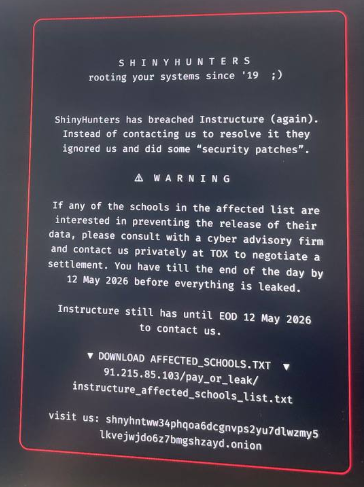


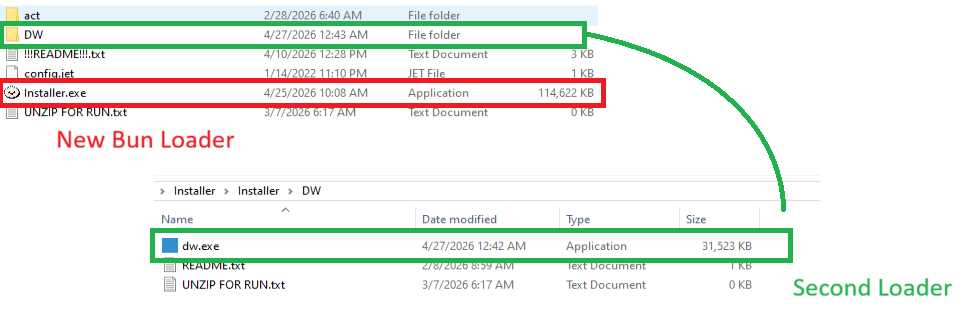


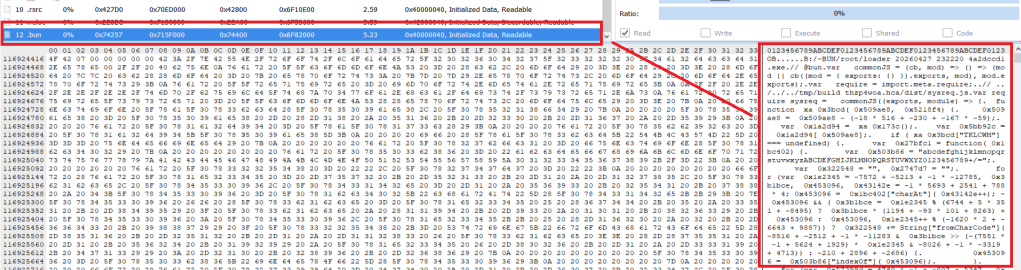
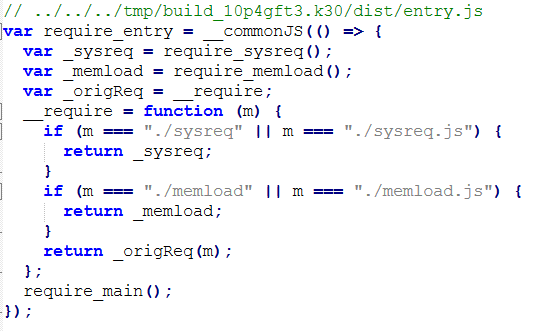

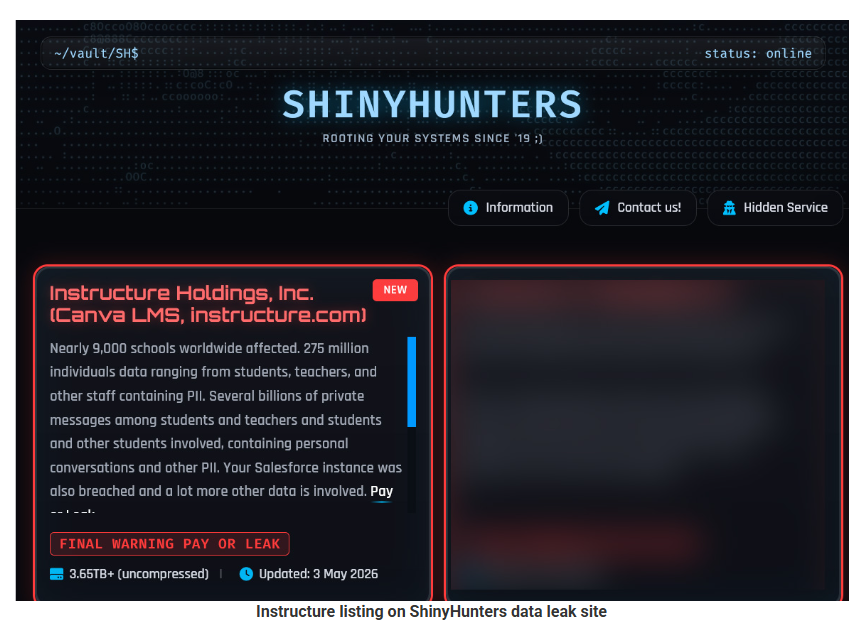

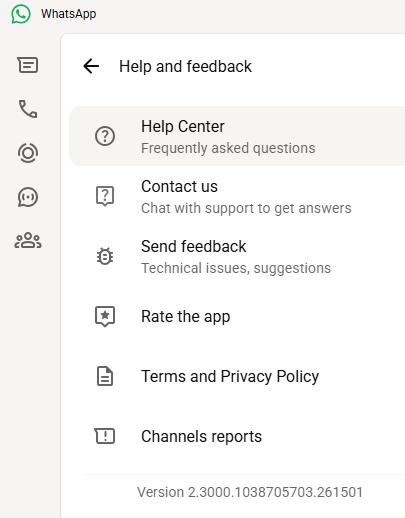
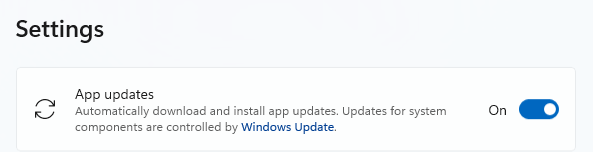









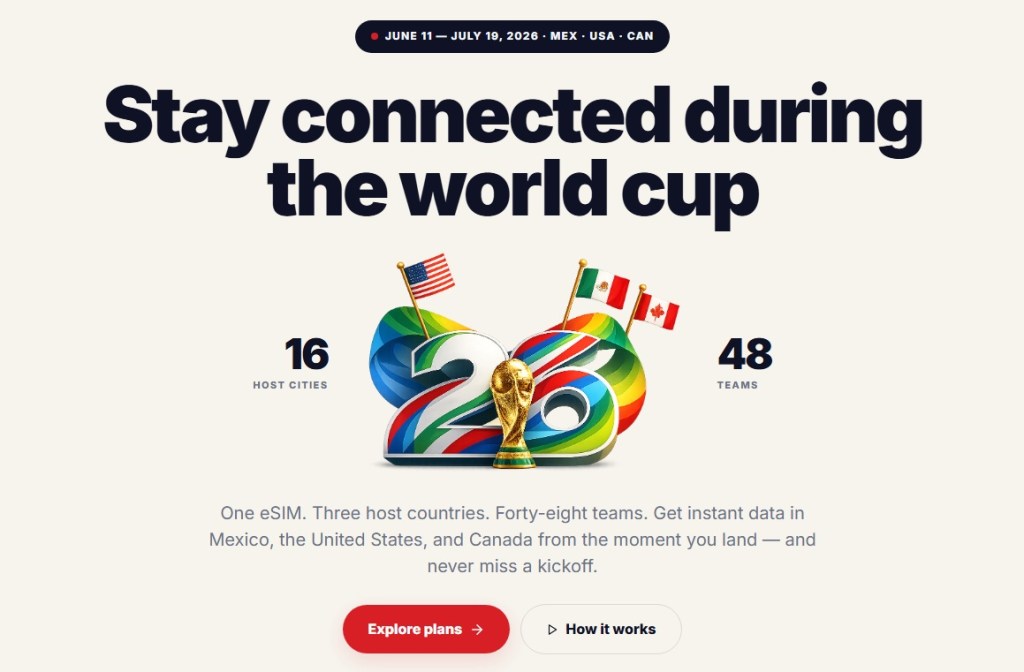
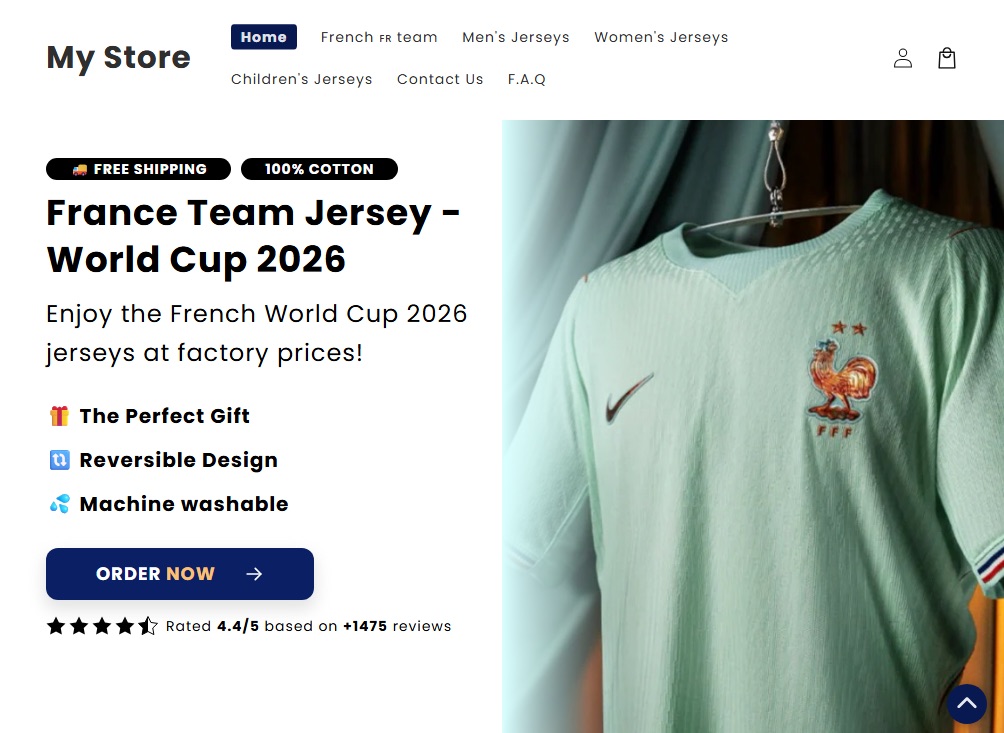


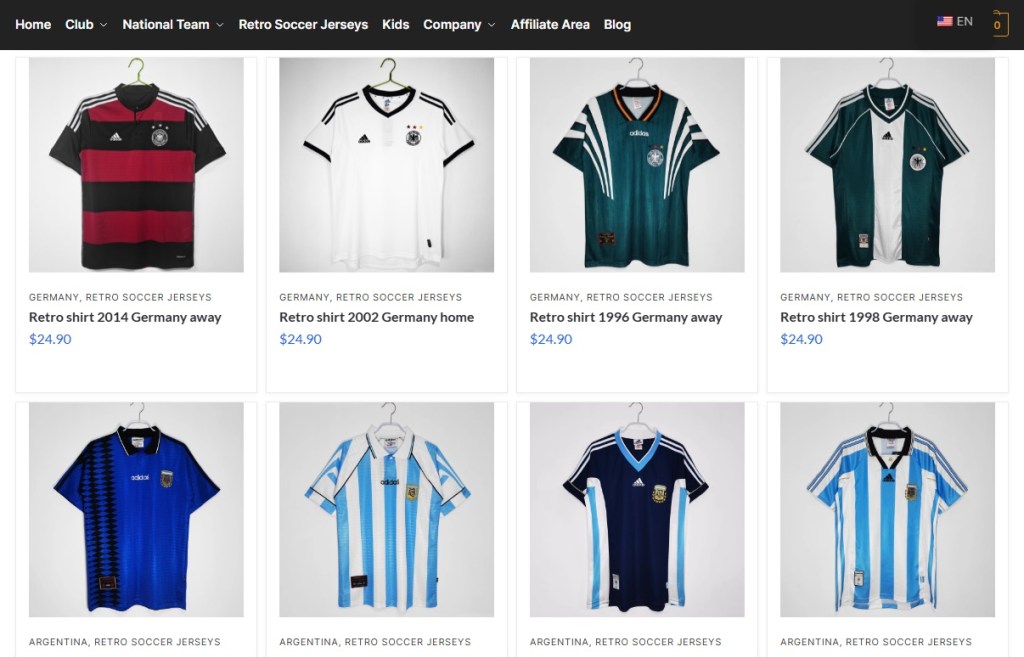
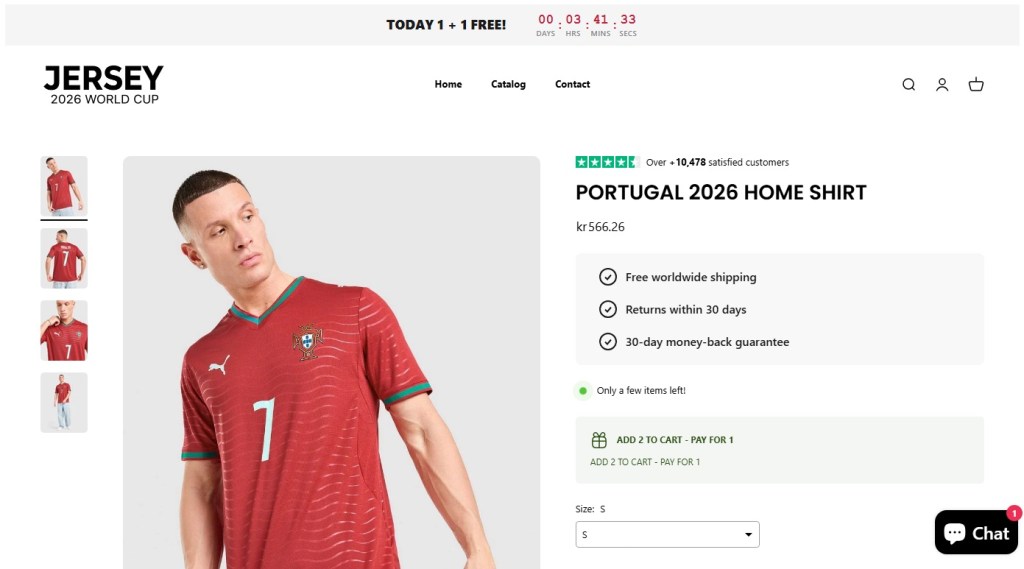
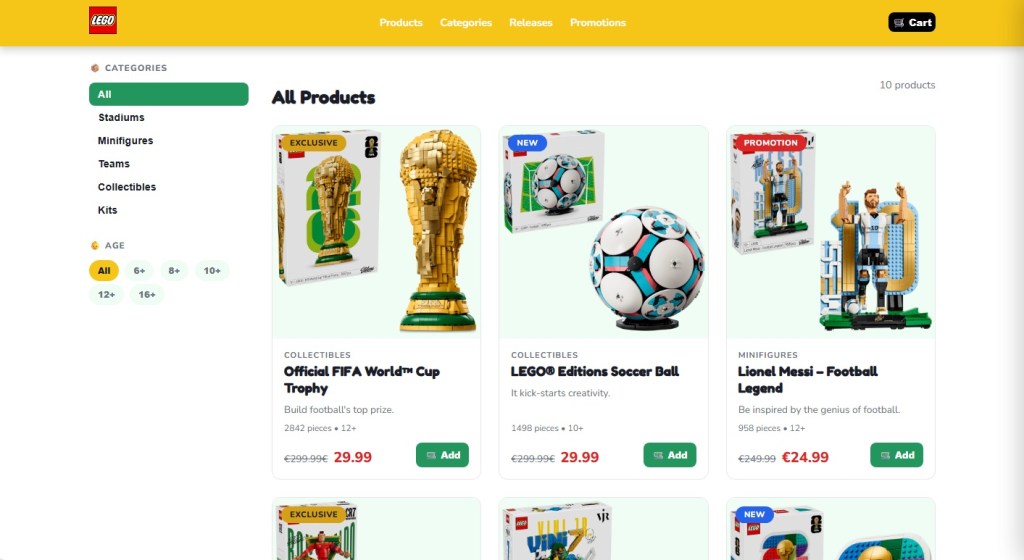
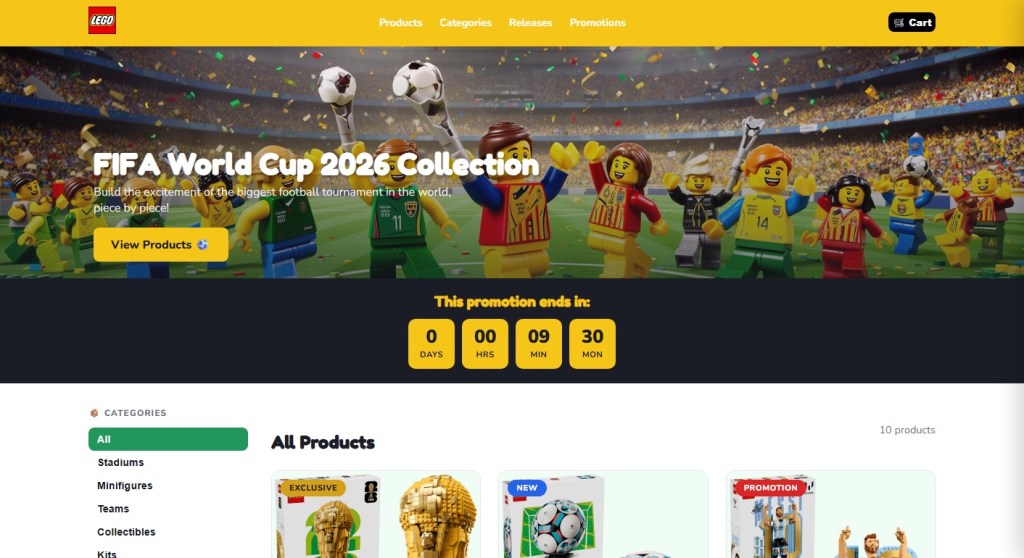




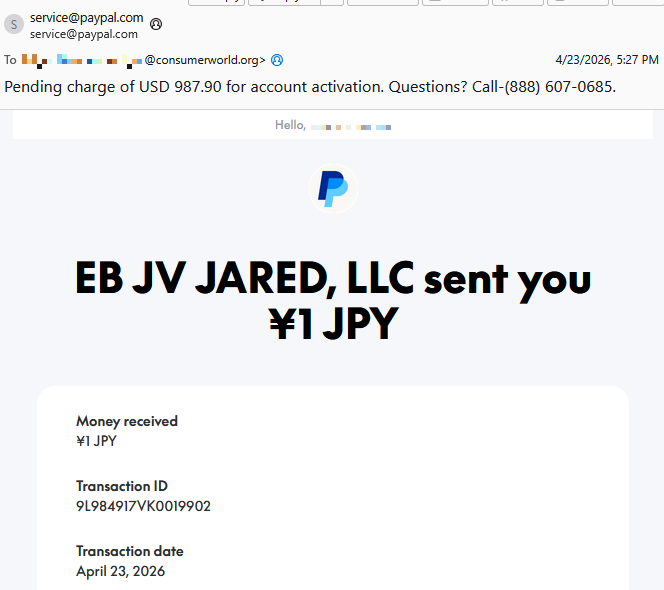
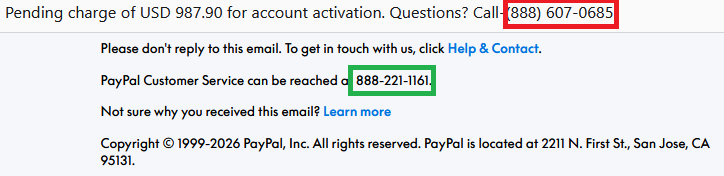



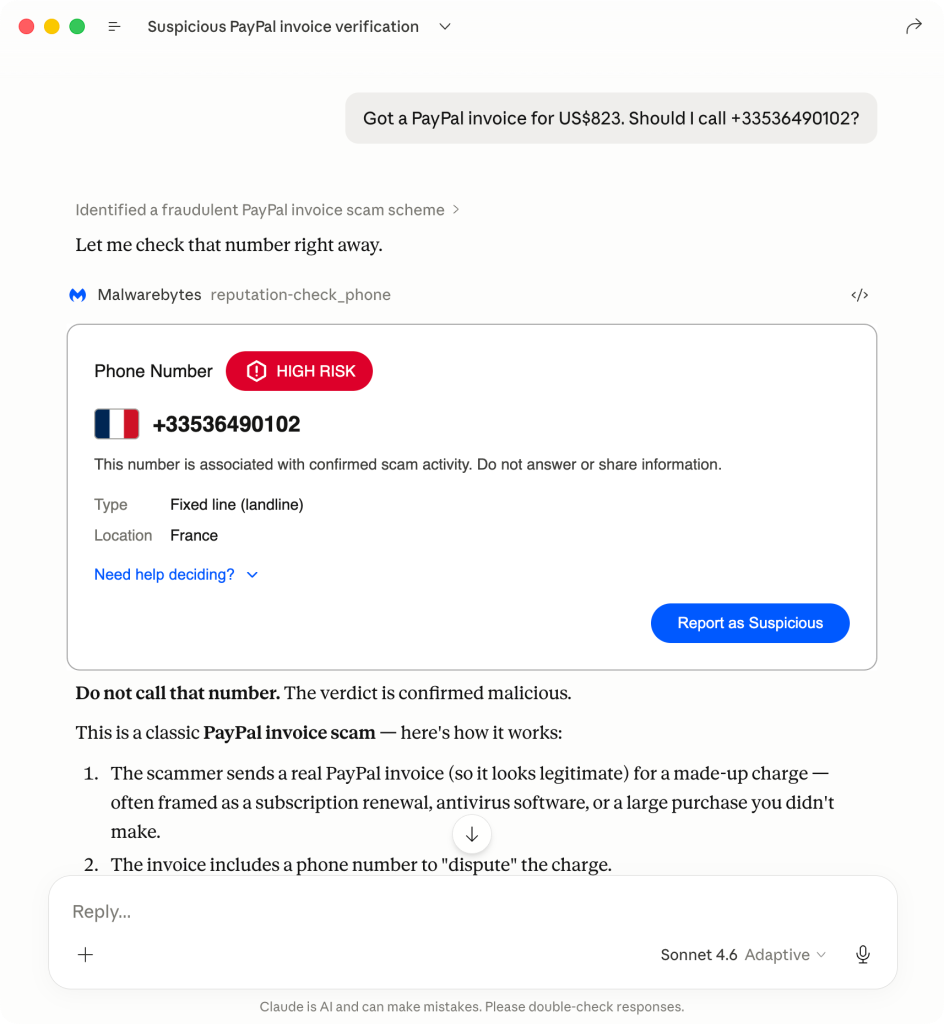
![Malwarebytes blocks ruelomamuy[.]com](https://www.malwarebytes.com/wp-content/uploads/sites/2/2026/04/ruelomamuycomblock.png)
