❌

Visualização de leitura

Google issues Android security updates: who can get them and how

Google has published security fixes for Android. The October updates are available for Android operating system versions 14, 15, 16, 16-qpr2, and 17 where “qpr” stands for Quarterly Platform Release. QPRs are interim updates Google pushes out between major yearly cycles.

These Android security bulletins contain valuable information for Android users. The updates are important as they fix several vulnerabilities rated as Critical, which can be exploited without users even doing anything.

However, we don’t write about them very often. The main reason for that lack of attention is that many Android users aren’t able to get the updates immediately and lots of others will never see them.

Google’s October fixes list Android 14 and newer, but a substantial share of the Android ecosystem still runs older software. In the distribution figures reported about last year, roughly four in ten devices were running Android 12 or earlier. This was while Android 13 still received updates which ended early March 2026.

And then there is the patch gap caused by device vendors meaning that even phones that remain supported may have to wait until the vendors test and sometimes modify the patches, so they work with their devices. And other vendors are on a different stride. For example, Samsung lists devices including the Galaxy S22 series and several Galaxy A models on a quarterly rather than a monthly security-update schedule.

You can imagine that cybercriminals love to get their hands on known vulnerabilities that many users have not yet been able to patch. Looking at the number of users that are unable to patch immediately that makes for an enormous target group.

How to stay safe

Get the updates as soon as they are made available to you is the most important word of advice here.

For most Android phones this is the general idea: open Settings, find Software update or System update (sometimes under System or About phone), check for updates, and follow the instructions to download, install, and restart. The menu names vary between vendors and even models, but the process is broadly the same.

If that doesn’t work for you or you can’t find instructions for your specific device, post what you’re looking for in the comments. We have lots of helpful readers.

Other things you can do:

Should you decide to get a new Android phone, read our blog Upgrading your Android device? Read this first.


Scammers know more about you than you think. 

Malwarebytes Mobile Security protects you from phishing, scam texts, malicious sites, and more. With real-time AI-powered Scam Guard built right in. 

.wp-block-kadence-advancedbtn.kb-btns97520_6de029-2f{gap:var(--global-kb-gap-xs, 0.5rem );justify-content:flex-start;align-items:center;}.kt-btns97520_6de029-2f .kt-button{font-weight:normal;font-style:normal;}.kt-btns97520_6de029-2f .kt-btn-wrap-0{margin-right:5px;}.wp-block-kadence-advancedbtn.kt-btns97520_6de029-2f .kt-btn-wrap-0 .kt-button{color:#555555;border-color:#555555;}.wp-block-kadence-advancedbtn.kt-btns97520_6de029-2f .kt-btn-wrap-0 .kt-button:hover, .wp-block-kadence-advancedbtn.kt-btns97520_6de029-2f .kt-btn-wrap-0 .kt-button:focus{color:#ffffff;border-color:#444444;}.wp-block-kadence-advancedbtn.kt-btns97520_6de029-2f .kt-btn-wrap-0 .kt-button::before{display:none;}.wp-block-kadence-advancedbtn.kt-btns97520_6de029-2f .kt-btn-wrap-0 .kt-button:hover, .wp-block-kadence-advancedbtn.kt-btns97520_6de029-2f .kt-btn-wrap-0 .kt-button:focus{background:#444444;}
ul.menu .wp-block-kadence-advancedbtn .kb-btn97520_074a67-a8.kb-button{width:initial;}.wp-block-kadence-advancedbtn .kb-btn97520_074a67-a8.kb-button{color:var(--color-neutral-10);background:var(--color-brand-blue-60);border-top-left-radius:40px;border-top-right-radius:40px;border-bottom-right-radius:40px;border-bottom-left-radius:40px;box-shadow:1px 1px 2px 0px rgba(0, 0, 0, 0.2);}.wp-block-kadence-advancedbtn .kb-btn97520_074a67-a8.kb-button:hover, .wp-block-kadence-advancedbtn .kb-btn97520_074a67-a8.kb-button:focus{box-shadow:0px 4px 0px 0px var(--color-brand-blue-90);}Try it now

Beware of fake Indeed interview apps used to install spyware

From several independent reports, we’ve seen evidence of scammers using fake Android “interview” apps to target job seekers on the Indeed platform.

Indeed is one of the world’s largest employment websites, giving scammers access to a huge pool of potential victims, especially in a competitive job market.

What we found

A user in the UK posted on our forums after being instructed by a supposed employer on Indeed to install an “Interview App.”

A user in Brasil submitted an anonymized report after receiving similar instructions to install an APK named MyInterview from a link shared during a job interview.

Meanwhile, Reddit users discussed a “Indeed Interview” app that allegedly completely compromised one user’s phone.

The victim who installed the MyInterview APK said their phone began closing apps by itself after installation. They also shared a screenshot showing MyInterview listed under Android’s downloaded Accessibility services.

Common lures used by the scammers include:

  • “Complete your interview by installing the Indeed app.”
  • “Update your Indeed application.”
  • “Identity verification required.”
  • “Download our recruitment portal.”
  • “Salary agreement available after app installation.”

An analysis by Malwarebytes Android Malware Researcher Nazeeh Sulaiman showed that these Android apps impersonate Indeed’s login page before creating a VPN connection after an applicant enters an email address. Static analysis identified the apps as Trojan.Droppers, capable of installing additional untrusted apps.

At the time of writing, the final payload was spyware, although we initially expected a banking Trojan. Once the malware is granted the Accessibility permission, it effectively takes over the device. The interesting thing here is that it can prevent users from uninstalling the malicious app. When the user taps Uninstall in Android Settings, the malware simply forces the screen back, preventing removal.

How it works

Scammers advertise fake job openings on Indeed and lure applicants into installing a fake Android app that impersonates Indeed and present itself as an interview tool.

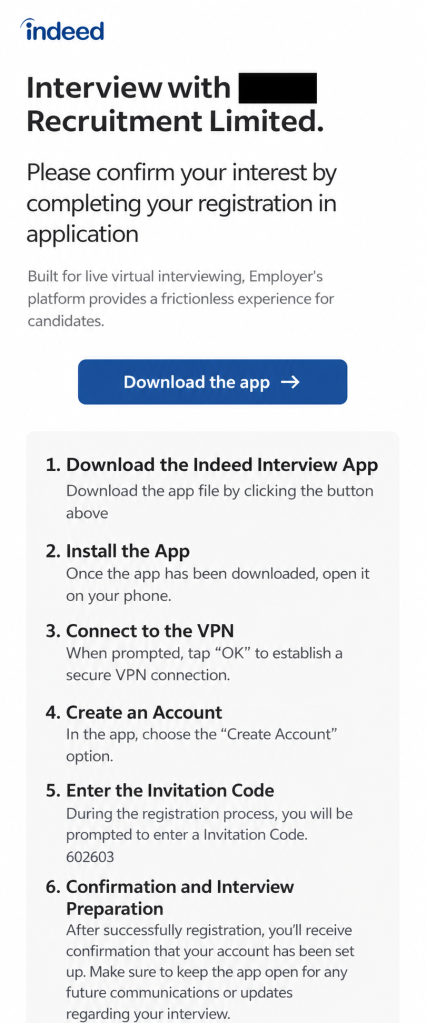
After confirming their application, job seekers receive instructions like these:

Instructions for the Interview App

In this example the job seeker is instructed by a “recruitment firm” to download and install the app, connect to the VPN, create an account, and enter an invitation code. They are then told to keep the app open while waiting for confirmation.

This malicious app is not affiliated with Indeed. The company’s official Android app, Indeed Job Search, is distributed through Google Play, not through an APK supplied in a recruitment message or an unfamiliar interview website.

The interview process on Indeed does not require applicants to install a separate app, confirmed by an Indeed spokesperson:

“Interviewing through Indeed’s platform happens entirely in a browser and never requires downloading a special app. Any message asking a job seeker to download an app to participate in an interview is not legitimate. We encourage job seekers to avoid clicking links or downloading files from any message directing them to do so.”

It’s worth pointing out that the dropper is not necessarily the final payload. It’s an initial-stage app intended to install another malicious or unwanted app onto the device, often after bypassing a victim’s caution with a seemingly legitimate pretext. Even if the fake Indeed app does not visibly steal data itself, it can serve as a delivery mechanism for more dangerous malware.

A VPN connection is perfectly legitimate in many situations, but there is no obvious reason for an interview app to create one immediately after an applicant supplies an email address.

In a malicious workflow, a VPN can give an app substantial influence over the device’s network traffic. It may allow attackers to route communications through systems they control, hide what the app is doing, or support later stages of the attack. The VPN behavior alone does not prove that traffic was intercepted or modified, but combined with brand impersonation and dropper functionality, it is a serious warning sign.

The fake app’s presence in Accessibility settings is also concerning. Accessibility services can view screen content and perform actions of behalf of the user, making them attractive to malware developers. In the screenshot supplied to us, MyInterview was disabled, so there is no evidence the service was active on that device. Nevertheless, its presence as a downloaded Accessibility service is relevant to the overall risk assessment.

How to stay safe

A job interview should not require you to sideload an Android app, enable a VPN connection, or install software from an unknown source.

In this campaign, the supposed interview app is simply the lure: it impersonates Indeed, establishes a suspicious network connection, and is designed to deliver additional malware.

Before using any recruitment platform, make sure you understand its hiring process and be suspicious of requests that deviates from it or move you to another platform.

Don’t install apps just because someone tell you to, especially if you have to especially if you have to install them outside Google Play.

Verify job offers through independent channels. In some of the reported cases, the companies either did not exist or not have offices in the cities where they claimed to be hiring.

The Indeed spokesperson added:

“Job seekers are at the heart of everything we do, and their safety and trust are a top priority. We are aware of scams involving individuals instructing job seekers to download an app to complete a virtual interview. These are in no way affiliated with Indeed, and we strongly condemn bad actors who exploit the trust job seekers place in our platform and brand.  

For more on how to verify a legitimate Indeed app and spot the warning signs of a fake one, visit our Help Center.”

Indicators of compromise (IOCs)

Trojan droppers:

MD5Package name
D6B7F7C2514AC5AC93C5EB93E80EF317     com.rodugasewubawo.rzfwhQfswMDX
7796C6ADC5D9EC00EA41B80648329B37    com.pogupijabedoku.VXCBLuvjmRcZzL

Dropped malware payload:

MD5Package name
8EA8F77C03AC58ACC19C25DDC6D1CD48   com.dupahu.nTTpEllELgMgD

Domain: startcareer[.]org

❌