Visualização de leitura

Introducing context-aware vulnerability discovery and remediation with Cloudflare Managed Defense and OpenAI Daybreak models

Your scanner just flagged 4,000 new vulnerabilities, 78 of them critical. Which one do you fix first?

To answer that question, Cloudflare is announcing early access to Vulnerability Discovery and Remediation, now part of Cloudflare Managed Defense. Vulnerability Discovery and Remediation is a new, invitation-only Cloudflare service that helps customers detect and mitigate vulnerabilities in their codebases.

Through the OpenAI Daybreak Defense Network, we use OpenAI Daybreak models, including GPT-5.6 Cyber, for reconnaissance, hunting, and validation against codebases that you authorize us to access. If we detect a vulnerability, we will then propose solutions to you, automatically checking each proposed patch and any accompanying proposed mitigation before presenting them for review. Importantly, you are in the driver’s seat: while we may propose code patches and other mitigations, you decide whether they are implemented.

Choosing what to fix first has always been hard. It's getting harder. Large language models can now surface weaknesses across a codebase in minutes, which means the number of findings keeps climbing. But the real problem is speed. Attackers can use AI to accelerate parts of vulnerability discovery and exploitation, giving security teams and developers less time to decide what matters and act on it.

Imagine that your scanner tells you there's a vulnerability in a handler. It doesn't tell you whether that code is deployed. It doesn't tell you whether anyone is actually hitting that route, what security activity surrounds it, or what controls you already have in place. You have to prioritize the finding without evidence of its production exposure or the protections already in place.

This is where we can help. With our global network, we can see which routes are active, how much traffic they carry, and what security events surround them. When customers enable Vulnerability Discovery and Remediation with Web Application Firewall (WAF), we can also see what rules are already applied and are actively blocking attacks. That context turns a generic finding into a specific priority: this vulnerability is in code that's live, on a route that's heavily used, with recent attack activity and no existing protection. And we can help you mitigate that vulnerability by proposing custom WAF mitigations and code patches tailored to your systems.

If this sounds familiar, it should. In “Build your own vulnerability harness”, we described the model-agnostic pipeline we use to scan Cloudflare's fleet, adversarially validate every finding, and turn raw model output into fixes engineers can trust. That internal system is one pillar of Vulnerability Discovery and Remediation. The harness gave us a way to find bugs at fleet scale. Vulnerability Discovery and Remediation brings that discovery process to the code the customer authorizes us to inspect, then connects the findings to production traffic, security events, and the edge controls that can act on them.

This diagram provides an overview of our process, which we explain in more detail below.

Adding context to a vulnerability harness

Our solution works across Cloudflare Workers and proxied applications. The process of detecting vulnerabilities begins with the collection of a traffic and security data snapshot from Web Assets and WAF. The snapshot shows which routes are active, how much traffic they receive, and whether recent security events are associated with them. For instance, a path exhibiting a high volume of detection triggers may also be considered critical for security context purposes. Web Assets and WAF itself serve as the first and second pillar of Vulnerability Discovery and Remediation respectively.

Next, we use source code vulnerability analysis to identify potential weaknesses in code. But that analysis does not show which routes reach it, how much traffic those routes receive, whether they receive suspicious requests, or which protections already apply. We treat routes carrying a high volume of requests as hot paths. Source code deployed to these routes undergoes stricter security profiling. Together, these signals provide evidence about how the API is used and where a vulnerability may be exposed.

For Workers, we retrieve the most recent source version of the Worker and its configured routes to identify the endpoints the Worker serves. Next, we match the Worker's routes to Web Assets and request metadata from Workers Observability, tying the exact source under review to the endpoints it handles in production. This collected network context stays available throughout the investigation, allowing agents to pull it when they need it. 

Our vulnerability harness then starts up. It begins by using the Reconnaissance agent to map request paths to the parts of the codebase that handle them. Reconnaissance uses that map to send hunter agents into specific sections of the customer-authorized code, where they look for vulnerabilities and pull in relevant network context as needed. That context can help the hunter agents pay more attention to code behind an active or recently targeted route, but it does not establish that a vulnerability exists. Every vulnerability finding has to be corroborated by evidence in the source code.

Once the hunters return their findings, the validation stage checks the proposed mitigations before assigning each vulnerability an initial risk rating based on source code. The network evidence we collect can raise that rating further when, for example, the affected endpoint carries significant traffic or shows signs of active probing.

The result is a prioritized list of findings, each with a recommended code patch and, when the evidence supports it, a Cloudflare WAF Custom rule that can reduce exposure while the code fix is reviewed. If you have authorized our VDR to defend your zone, we will deploy the rules, scoped conservatively around the method, path, and other request details needed to reach the vulnerable code. If a route pattern contains only variables and wildcards, we do not suggest a rule. We would rather miss a possible connection than claim one the evidence cannot support.

The HTTP method override bypass example above shows how these signals work together. The harness maps the source finding to the production route, uses traffic and security activity to prioritize it, and scopes a proposed WAF rule around the requests that can reach the vulnerable code. That rule can reduce exposure while engineering reviews and ships the code patch.

Where the model runs

When you authorize an investigation, Vulnerability Discovery and Remediation runs the harness on Cloudflare and sends model prompts from Workers through Cloudflare AI Gateway to OpenAI Daybreak models on OpenAI's servers. GPT-5.6 Cyber is used during reconnaissance, hunting, and validation, and its responses return to the harness so the workflow can continue on Cloudflare. No model inference runs at Cloudflare's edge, and the model cannot apply any patch or rule it proposes.

We keep each investigation narrow by limiting it to the source code and evidence the customer authorizes. Before that context reaches the model, Vulnerability Discovery and Remediation removes what the investigation does not need and applies the redaction controls configured for the engagement. The harness treats source code, logs, and request metadata as evidence to inspect, rather than instructions to follow.

Tool access follows the same boundary: each call is logged and checked against the investigation's access policy before it runs, and every patch or rule proposal must pass checks implemented outside the model. If one of those checks fails, the workflow stops before the proposal reaches customer review.

Nothing is presented for review until it has cleared the checks and our team validates the output. For an edge-defense suggestion, that means validating the rule syntax and running it against synthetic fixtures that represent expected requests, rather than against customer traffic. If a check fails or the result remains ambiguous, we hold the output back and route it for diagnosis.

Passing those checks still does not change your environment. After validation by our team, Vulnerability Discovery and Remediation prepares the source code patch and WAF rule.

Join early access

Vulnerability Discovery and Remediation is available to selected customers by invitation during early access through our Managed Defense team. Each engagement starts with one application whose codebase the customer authorizes us to investigate. To connect the findings to production, Vulnerability Discovery and Remediation uses authorized read access to the Web Assets operation inventory, the relevant WAF controls, and Workers Trace Events Logpush where available. The investigation is semi-automated, but you review every result before deciding whether to test or deploy a change.

If you're interested in learning more, talk to your Cloudflare account team.

Unlocking the Cloudflare app ecosystem with OAuth for all

Cloudflare provides services that help run 20% of the web, but we don’t do it alone. Developers on our platform use a myriad of tools and services from other companies too. Cloudflare provides a rich API for our platform that enables developers to create automations, CI/CD, and integrations that glue together the various parts of their infrastructure. Earlier this month, we announced self-managed OAuth, making it easier for customers to create and manage their own OAuth clients for delegated access to the Cloudflare API.

Cloudflare isn’t new to OAuth. If you’ve used Wrangler, or used integrations from partners like PlanetScale, then you’ve already used it. However, until now, third-party OAuth was only available through a small number of manually onboarded integrations, and was not available to developers more broadly. That meant developers building their own integrations had to rely on API tokens, which are harder to manage and a poor fit for many delegated application flows. 

Over the last year, we onboarded a growing number of early partners while improving the consent, revocation, and security model behind Cloudflare OAuth. But as our Developer Platform grew and agentic tools drove demand for delegated access, it became clear that opening up OAuth to all customers was critical to the success of our platform. 

With self-managed OAuth, developers can now offer a standard OAuth flow where customers grant scoped access directly, making it easier to build SaaS integrations, internal developer platforms, and agentic tools while giving users clearer consent, easier revocation, and more control over what an application can do.

Scaling the ecosystem securely

While our earlier OAuth solution was sufficient for a small number of carefully managed partners, we realized that our permissions model, our consent experience, and our ways of mitigating potential abuse vectors were not mature enough. 

Earlier this year we updated our consent experience to make it clearer which application is requesting access, and what permissions it will receive. We also added revocation to the dashboard so developers can easily control which applications have access to their data, and made app ownership more visible to prevent OAuth phishing attacks. 

Opening self-managed OAuth to all customers also required major upgrades to our underlying OAuth engine. This process required a large amount of planning to do with minimal user interruption, while also ensuring data stability and security.

Planning the upgrade to our OAuth engine

Years ago, we deployed Hydra, an open-source OAuth engine, to power Cloudflare OAuth under the hood. That deployment served us well when usage was limited, but as the developer platform grew and agentic workflows became more common, it became clear that we needed a major upgrade to unlock new capabilities and improve performance. 

As we planned the upgrade, we decided to do two smaller sequential upgrades rather than doing one large upgrade.  First, we would move to the latest 1.X release, evaluate any behavior or performance changes, and then proceed with the 2.X upgrade.

During our upgrade planning, it became clear that even the 1.X upgrade would still impact customers because the Hydra database required extensive schema migrations that:

  1. Created indexes in a manner that would claim an exclusive lock on critical tables, preventing active users from performing important OAuth operations 
  2. Added columns to critical tables, and moved other columns to new tables

There was also a quirk in the version of Hydra we were using in which the SDK would perform SELECT * operations, causing deserialization issues with the schema changes.

To prevent user impact, we rewrote the SQL migrations to use features such as CREATE INDEX CONCURRENTLY, and built a custom version of Hydra which selected explicit columns rather than SELECT *.

With the latest 1.X upgrade planned out, we now needed to create a plan for the even larger 2.X upgrade. We identified three potential options, and weighed the benefits and drawbacks of each one. Doing an in-place upgrade was not going to work for us, due to the sheer amount of schema changes the major version bump brought with it. We decided that a blue-green strategy would work, but there was more that needed to be done than simply flipping a switch to start using the new version. The upgrade and migration process would take multiple hours, and we needed the system to continue functioning correctly in that time window.

The first blue-green option would involve disabling writes to the database, preventing any new authorizations from occurring. This means they would not be lost in the transition, but it also meant that nobody would be able to use existing OAuth apps unless they already had a valid credential. It also presented another large problem: if users needed to revoke access from an application for any reason, it would not be possible while the upgrade was being performed.

To combat these issues, we came up with a way to leave writes to the database enabled, at the cost of losing some of them in the switch to the green version. The first thing to solve was minimizing the number of writes for new tokens. There was an operational lever we pulled: increasing the expiry time of tokens to multiple hours. This would allow apps that received new tokens before the upgrade to continue using them without needing to refresh.

With reducing writes solved, we needed to come up with a way to not lose any revocations our users performed during the upgrade window. To do this, we created a queue system (using Cloudflare Queues!) which, after a revocation event, would have a record written into the queue with information about that revocation. This would allow us to drain the queue with the database flipped to the green version, replaying all revocation events that took place in the time window in which they would have been lost. This was critical to get right, otherwise applications that users had revoked would inadvertently have their access restored.

Executing the upgrade

Upgrading to 1.X

From an operational point of view, our first upgrade to the last 1.X release went off without any hitches. Our custom database migrations ran faster than we expected, with no user impact. We had to do a hard cutover to the new version because the old version was unable to introspect tokens that were created by the newer version.

After the cutover, we saw an increase in refresh token errors that we had not seen before. This ended up being due to stricter refresh invalidation behaviors in the new version; if a refresh token was reused, Hydra would invalidate the whole access and refresh token chain. This is problematic for Wrangler and MCP clients. These clients both have a high request volume, and a single reused refresh token would invalidate the entire session.

We mitigated this by adding refresh token coalescing behavior to our Worker which routes OAuth traffic to the correct destination. This allowed us to briefly cache the refresh token request before it reached Hydra, so that if we detected a retry we could short-circuit the request and respond without invalidating the tokens. Fortunately, 2.X versions of Hydra have a configurable “refresh token grace period”, which resolves this by allowing a refresh token to be retried for a period of time without invalidating the whole chain.

Upgrading to 2.X

Since multiple hours of high user-facing impact would not be acceptable, we had our blue-green upgrade strategy set. At a high level, this sounds simple; the migrations would run on a copy of our production database, and then cut over along with the new Hydra version after they complete. In reality, there were a lot more moving parts:

  • Enable revocation replay capture queue
  • Copy and restore our database to the new target
  • Targeted data cleanup — existing data violated some new constraints introduced in the newer versions, which could prevent migrations from succeeding
  • Perform cutovers on the Hydra service along with two additional critical internal systems simultaneously to prevent any errors
  • Post-cutover monitoring and validation

We chose an upgrade window when Hydra had the lowest request volume per second to minimize lost token writes. Other than some timeout tuning, our production migrations ran well against the new database: the net runtime in production was approximately three hours. After the migrations completed, we carefully rolled out the new version of the Hydra service, along with two additional system configs to flip our systems to use the new SDK version.

Shortly after cutting traffic over, we observed that a data cleanup job in our authorization service (which relies on the Hydra consent session API) was being overeager in its purging of OAuth policy data. After investigation, we discovered that there was an issue in one of the Hydra migrations that corrupted the state of certain valid OAuth sessions, which resulted in the migration marking them as invalid. The valid sessions being corrupted caused a disagreement between Hydra and our authorization service, manifesting as an increase in 403s. To mitigate this, we did data restorations and began work on improvements for OAuth authorization behaviors to remove reliance on static policy data.

Beyond the data cleanup issue, there were some additional small fixes more driven by specific client behaviors which we landed quickly. 

With the Hydra version upgrade complete, OAuth traffic has remained stable with improved system performance and reliability for our customers. It also brought production onto the same foundation our newer OAuth APIs had already been validated against in staging, clearing the way for our self-managed OAuth release on June 3

Performance improvements

After completing a large upgrade like this, it is always rewarding and illuminating to look at some broad metrics about the impact. We gathered additional metrics during the database migrations, and observed considerable performance improvements after the upgrade was complete.

Database

Hydra performance

Self-managed OAuth for all

Opening up OAuth to all customers is an important step toward a broader Cloudflare app ecosystem. Today, any Cloudflare customer can create their own OAuth applications and build integrations on top of Cloudflare. We’re extremely excited to launch Cloudflare self-managed OAuth for all. 

To get started, take a look at our documentation or jump straight to the OAuth apps page in the dashboard and create your first OAuth app.

Securing non-human identities: automated revocation, OAuth, and scoped permissions

Agents let you build software faster than ever, but securing your environment and the code you write — from both mistakes and malice — takes real effort. Open Web Application Security Project (OWASP) details a number of risks present in agentic AI systems, including the risk of credential leaks, user impersonation, and elevation of privilege. These risks can result in extreme damage to your environments including denial of service, data loss, or data leaks — which can do untold financial and reputational damage. 

This is an identity problem. In modern development, "identities" aren't just people — they are the agents, scripts, and third-party tools that act on your behalf. To secure these non-human identities, you need to manage their entire lifecycle: ensuring their credentials (tokens) aren't leaked, seeing which applications have access via OAuth, and narrowing their permissions using granular RBAC.

Today, we are introducing updates to address these needs: scannable tokens to protect your credentials, OAuth visibility to manage your principals, and resource-scoped RBAC to fine-tune your policies.

Understanding identity: Principals, Credentials, and Policies

To secure the Internet in an era of autonomous agents, we have to rethink how we handle identity. Whether a request comes from a human developer or an AI agent, every interaction with an API relies on three core pillars:

  • The Principal (The Traveler): This is the identity itself — the "who." It might be you logging in via OAuth, or a background agent using an API token to deploy code.
  • The Credential (The Passport): This is the proof of that identity. In this world, your API token is your passport. If it’s stolen or leaked, anyone can "wear" your identity.
  • The Policy (The Visa): This defines what that identity is allowed to do. Just because you have a valid passport doesn't mean you have a visa to enter every country. A policy ensures that even a verified identity can only access the specific resources it needs.

When these three pillars aren't managed together, security breaks down. You might have a valid Principal using a stolen Credential, or a legitimate identity with a Policy that is far too broad.

Leaked token detection

Agents and other third-party applications use API tokens to access the Cloudflare API. One of the simplest ways that we see people leaking their secrets is by accidentally pushing them to a public GitHub repository. GitGuardian reports that last year more than 28 million secrets were published to public GitHub repositories, and that AI is causing leaks to happen 5x faster than before.

If an API token is a digital passport, then leaking it on a public repository is like leaving your passport on a park bench. Anyone who finds it can impersonate that identity until the document is canceled. Our partnership with GitHub acts like a global "lost and found" for these credentials. By the time you realize your passport is missing, we’ve already identified the document, verified its authenticity via the checksum, and voided it to prevent misuse.

We’re partnering with several leading credential scanning tools to help proactively find your leaked tokens and revoke them before they could be used maliciously. We know it’s not a matter of if, but rather when, before you, an employee, or one of your agents makes a mistake and pushes a secret somewhere it shouldn’t be. 

GitHub

We’ve partnered with GitHub and are participating in their Secret Scanning program to find your tokens in both public and private repositories. If we are notified that a token has leaked to a public repository, we will automatically revoke the token to prevent it from being used maliciously. For private repositories, GitHub will notify you about any leaked Cloudflare tokens and you can clean these up.

How it works

We’ve shared the new token formats (below!) with GitHub, and they now scan for them on every commit. If they find something that looks like a leaked Cloudflare token, they verify the token is real (using the checksum), send us a webhook to revoke it, and then we notify you via email so you can generate a new one in Dashboard settings.

This means we plug the hole as soon as it’s found. By the time you realize you made a mistake, we've already fixed it. 

We hope this is the kind of feature you don’t need to use, but our partners are on the lookout for leaks to help keep you secure. 

Cloudflare One

Cloudflare One customers are also protected from these leaks. By configuring the Credentials and Secrets DLP profile, organizations can activate prevention everywhere a credential can travel:

  • Network Traffic (Cloudflare Gateway): Apply these entries to a policy to detect and block Cloudflare API tokens moving across your network. A token in a file upload, an outbound request, or a download is stopped before it reaches its destination.
  • Outbound Email (Cloudflare Email Security): Microsoft 365 customers can extend this same prevention to Outlook. The DLP Assist add-in scans messages before delivery, catching a token before it’s sent externally.
  • Data at Rest (Cloudflare CASB): Cloudflare’s Cloud Access Security Broker applies the same profile to scan files across connected SaaS applications, catching tokens saved or shared in Google Drive, OneDrive, Dropbox, and other integrated services.

The most novel exposure vector, though, is AI traffic. Cloudflare AI Gateway integrates with the same DLP profiles to scan and block both incoming prompts and outgoing AI model responses in real time.

Other credential scanners

The only way credential scanning works is if we meet you where you are, so we are working with several open source and commercial credential scanners to ensure you are protected no matter what secret scanner you use. 

How it works

Until now, Cloudflare’s API tokens were pretty generic looking, so they were hard for credential scanners to identify with high confidence. These automated security tools scan your code repositories looking for exposed credentials like API keys, tokens or passwords. The “cf” prefix makes Cloudflare tokens instantly recognizable with greater confidence, and the checksum makes it easy for tools to statically validate them. Your existing tokens will continue to work, but every new token you generate will use the scannable format so it’s easily detected with high confidence.

Getting started

If you have existing API tokens, you can roll the token to create a new, scannable API token. This is optional, but recommended to ensure that your tokens are easily discoverable in case they leak. 

While API tokens are generally used by your own scripts and agents, OAuth is how you manage access for third-party platforms. Both require clear visibility to prevent unauthorized access and ensure you know exactly who — or what — has access to your data.

Improving the OAuth consent experience

When you connect third-party applications like Wrangler to your Cloudflare Account using OAuth, you're granting that application access to your account’s data. Over time, you may forget why you granted a third party application access to your Account in the first place. Previously, there was no central place to view & manage those applications. Starting today, there is.  

Going forward, when a third party application requests access to your Cloudflare account, you’ll be able to review: 

  • Which third-party application is requesting access, along with information about the application like Name, Logo, and the Publisher.
  • Which scopes the third-party application is requesting access to.
  • Which accounts to grant the third party application access to.

Not all applications require the same permissions; some only need to read data, others may need to make changes to your Account. Understanding these scopes before you grant access helps you maintain least-privilege.

We also added a Connected Applications experience so you can see which applications have access to which accounts, what scopes/permissions are associated with that application, and easily revoke that access as needed. 

Getting started

The OAuth consent and revocation improvements are available now. Check which apps currently have access to your accounts by visiting My Profile > Access Management > Connected Applications. 

For developers building integrations with Cloudflare, keep an eye on the Cloudflare Changelog for more announcements around how you can register your own OAuth apps soon! 

Fine-grained resource-level permissioning 

If the token is the passport, then resource-scoped permissions are the visas inside it. Having a valid passport gets you through the front door, but it shouldn't give you access to every room in the building. By narrowing the scope to specific resources — like a single Load Balancer pool or a specific Gateway policy — you are ensuring that even if an identity is verified, it only has the "visa" to go where it’s strictly necessary.

Last year, we announced support for resource scoped permissions in Cloudflare’s role-based access control (RBAC) system for several of our Zero Trust products. This enables you to right size permissions for both users and agents to minimize security risks. We’ve expanded this capability to several new resources-level permissions. The resource scope is now supported for:

  • Access Applications
  • Access Identity Providers
  • Access Policies
  • Access Service Tokens
  • Access Targets

We’ve also completely overhauled the API Token creation experience, making it easier for customers to provision and manage Account API Tokens right from the Cloudflare Dashboard.

How it works

When you add a member to your Cloudflare account or create an API Token, you typically assign that principal a policy. A Permission Policy is what gives a principal permission to take an action, whether that’s managing Cloudflare One Access Applications, or DNS Records. Without a policy, a principal can authenticate, but they are unauthorized to do any actions within an account.

Policies are made up of three components: a Principal, a Role, and a Scope. The Principal is who or what you're granting access to, whether that's a human user, a Non-Human Identity (NHI) like an API Token, or increasingly, an Agent acting on behalf of a user. The Role defines what actions they're permitted to take. The Scope determines where those permissions apply, and historically, that's been restricted to the entire account, or individual zones.

New permission roles

We’re also expanding the role surface more broadly at both the Account & Zone level with the introduction of a number of new roles for many products.  

  • Account scope
    • CDN Management
    • MCP Portals
    • Radar
    • Request Tracer
    • SSL/TLS Management
  • Zone scope
    • Analytics
    • Logpush
    • Page Rules
    • Security Center
    • Snippets
    • Zone Settings

Getting started

The resource scope and all new account and zone-level roles are available today for all Cloudflare customers. You can assign account, zone, or resource-scoped policies through the Cloudflare Dashboard, the API, or Terraform. 

For a full breakdown of all available roles and how scopes work, visit our roles and scope documentation.

Secure your accounts

These updates provide the granular building blocks needed for a true least-privilege architecture. By refining how we manage permissions and credentials, developers and enterprises can have greater confidence in their security posture across the users, apps, agents, and scripts that access Cloudflare. Least privilege isn’t a new concept, and for enterprises, it’s never been optional. Whether a human administrator is managing a zone or an agent is programmatically deploying a Worker, the expectation is the same, they should only be authorized to do the job it was given, and nothing else. 

Following today’s announcement, we recommend customers:

  1. Review your API tokens, and reissue with the new, scannable API tokens as soon as possible. 
  2. Review your authorized OAuth apps, and revoke any that you are no longer using
  3. Review member & API Token permissions in your accounts and ensure that users are taking advantage of the new account, zone, or resource scoped permissions as needed to reduce your risk area. 

Scaling MCP adoption: Our reference architecture for simpler, safer and cheaper enterprise deployments of MCP

We at Cloudflare have aggressively adopted Model Context Protocol (MCP) as a core part of our AI strategy. This shift has moved well beyond our engineering organization, with employees across product, sales, marketing, and finance teams now using agentic workflows to drive efficiency in their daily tasks. But the adoption of agentic workflow with MCP is not without its security risks. These range from authorization sprawl, prompt injection, and supply chain risks. To secure this broad company-wide adoption, we have integrated a suite of security controls from both our Cloudflare One (SASE) platform and our Cloudflare Developer platform, allowing us to govern AI usage with MCP without slowing down our workforce. 

In this blog we’ll walk through our own best practices for securing MCP workflows, by putting different parts of our platform together to create a unified security architecture for the era of autonomous AI. We’ll also share two new concepts that support enterprise MCP deployments:

We also talk about how our organization approached deploying MCP, and how we built out our MCP security architecture using Cloudflare products including remote MCP servers, Cloudflare Access, MCP server portals and AI Gateway

Remote MCP servers provide better visibility and control

MCP is an open standard that enables developers to build a two-way connection between AI applications and the data sources they need to access. In this architecture, the MCP client is the integration point with the LLM or other AI agent, and the MCP server sits between the MCP client and the corporate resources.

The separation between MCP clients and MCP servers allows agents to autonomously pursue goals and take actions while maintaining a clear boundary between the AI (integrated at the MCP client) and the credentials and APIs of the corporate resource (integrated at the MCP server). 

Our workforce at Cloudflare is constantly using MCP servers to access information in various internal resources, including our project management platform, our internal wiki, documentation and code management platforms, and more. 

Very early on, we realized that locally-hosted MCP servers were a security liability. Local MCP server deployments may rely on unvetted software sources and versions, which increases the risk of supply chain attacks or tool injection attacks. They prevent IT and security administrators from administrating these servers, leaving it up to individual employees and developers to choose which MCP servers they want to run and how they want to keep them up to date. This is a losing game.

Instead, we have a centralized team at Cloudflare that manages our MCP server deployment across the enterprise. This team built a shared MCP platform inside our monorepo that provides governed infrastructure out of the box. When an employee wants to expose an internal resource via MCP, they first get approval from our AI governance team, and then they copy a template, write their tool definitions, and deploy, all the while inheriting default-deny write controls with audit logging, auto-generated CI/CD pipelines, and secrets management for free. This means standing up a new governed MCP server is minutes of scaffolding. The governance is baked into the platform itself, which is what allowed adoption to spread so quickly. 

Our CI/CD pipeline deploys them as remote MCP servers on custom domains on Cloudflare’s developer platform. This gives us visibility into which MCPs servers are being used by our employees, while maintaining control over software sources. As an added bonus, every remote MCP server on the Cloudflare developer platform is automatically deployed across our global network of data centers, so MCP servers can be accessed by our employees with low latency, regardless of where they might be in the world.

Cloudflare Access provides authentication

Some of our MCP servers sit in front of public resources, like our Cloudflare documentation MCP server or Cloudflare Radar MCP server, and thus we want them to be accessible to anyone. But many of the MCP servers used by our workforce are sitting in front of our private corporate resources. These MCP servers require user authentication to ensure that they are off limits to everyone but authorized Cloudflare employees. To achieve this, our monorepo template for MCP servers integrates Cloudflare Access as the OAuth provider. Cloudflare Access secures login flows and issues access tokens to resources, while acting as an identity aggregator that verifies end user single-sign on (SSO), multifactor authentication (MFA), and a variety of contextual attributes such as IP addresses, location, or device certificates. 

MCP server portals centralize discovery and governance

MCP server portals unify governance and control for all AI activity.

As the number of our remote MCP servers grew, we hit a new wall: discovery. We wanted to make it easy for every employee (especially those that are new to MCP) to find and work with all the MCP servers that are available to them. Our MCP server portals product provided a convenient solution. The employee simply connects their MCP client to the MCP server portal, and the portal immediately reveals every internal and third-party MCP servers they are authorized to use. 

Beyond this, our MCP server portals provide centralized logging, consistent policy enforcement and data loss prevention (DLP guardrails). Our administrators can see who logged into what MCP portal and create DLP rules that prevent certain data, like personally identifiable data (PII), from being shared with certain MCP servers.

We can also create policies that control who has access to the portal itself, and what tools from each MCP server should be exposed. For example, we could set up one MCP server portal that is only accessible to employees that are part of our finance group that exposes just the read-only tools for the MCP server in front of our internal code repository. Meanwhile, a different MCP server portal, accessible only to employees on their corporate laptops that are in our engineering team, could expose more powerful read/write tools to our code repository MCP server.

An overview of our MCP server portal architecture is shown above. The portal supports both remote MCP servers hosted on Cloudflare, and third-party MCP servers hosted anywhere else. What makes this architecture uniquely performant is that all these security and networking components run on the same physical machine within our global network. When an employee's request moves through the MCP server portal, a Cloudflare-hosted remote MCP server, and Cloudflare Access, their traffic never needs to leave the same physical machine. 

Code Mode with MCP server portals reduces costs

After months of high-volume MCP deployments, we’ve paid out our fair share of tokens. We’ve also started to think most people are doing MCP wrong.

The standard approach to MCP requires defining a separate tool for every API operation that is exposed via an MCP server. But this static and exhaustive approach quickly exhausts an agent’s context window, especially for large platforms with thousands of endpoints.

We previously wrote about how we used server-side Code Mode to power Cloudflare’s MCP server, allowing us to expose the thousands of end-points in Cloudflare API while reducing token use by 99.9%. The Cloudflare MCP server exposes just two tools: a search tool lets the model write JavaScript to explore what’s available, and an execute tool lets it write JavaScript to call the tools it finds. The model discovers what it needs on demand, rather than receiving everything upfront.

We like this pattern so much, we had to make it available for everyone. So we have now launched the ability to use the “Code Mode” pattern with MCP server portals. Now you can front all of your MCP servers with a centralized portal that performs audit controls and progressive tool disclosure, in order to reduce token costs.

Here is how it works. Instead of exposing every tool definition to a client, all of your underlying MCP servers collapse into just two MCP portal tools: portal_codemode_search and portal_codemode_execute. The search tool gives the model access to a codemode.tools() function that returns all the tool definitions from every connected upstream MCP server. The model then writes JavaScript to filter and explore these definitions, finding exactly the tools it needs without every schema being loaded into context. The execute tool provides a codemode proxy object where each upstream tool is available as a callable function. The model writes JavaScript that calls these tools directly, chaining multiple operations, filtering results, and handling errors in code. All of this runs in a sandboxed environment on the MCP server portal powered by Dynamic Workers

Here is an example of an agent that needs to find a Jira ticket and update it with information from Google Drive. It first searches for the right tools:

The model now knows the exact tool names and parameters it needs, without the full schemas of tools ever entering its context. It then writes a single execute call to chain the operations together:

This is just two tool calls. The first discovers what's available, the second does the work. Without Code Mode, this same workflow would have required the model to receive the full schemas of every tool from both MCP servers upfront, and then make three separate tool invocations.

Let’s put the savings in perspective: when our internal MCP server portal is connected to just four of our internal MCP servers, it exposes 52 tools that consume approximately 9,400 tokens of context just for their definitions. With Code Mode enabled, those 52 tools collapse into 2 portal tools consuming roughly 600 tokens, a 94% reduction. And critically, this cost stays fixed. As we connect more MCP servers to the portal, the token cost of Code Mode doesn’t grow.

Code Mode can be activated on an MCP server portal by adding a query parameter to the URL. Instead of connecting to your portal over its usual URL (e.g. https://myportal.example.com/mcp), you attach ?codemode=search_and_execute to the URL (e.g. https://myportal.example.com/mcp?codemode=search_and_execute).

AI Gateway provides extensibility and cost controls

We aren’t done yet. We plug AI Gateway into our architecture by positioning it on the connection between the MCP client and the LLM. This allows us to quickly switch between various LLM providers (to prevent vendor lock-in) and to enforce cost controls (by limiting the number of tokens each employee can burn through). The full architecture is shown below.

Cloudflare Gateway discovers and blocks shadow MCP

Now that we’ve provided governed access to authorized MCP servers, let’s look into dealing with unauthorized MCP servers. We can perform shadow MCP discovery using Cloudflare Gateway. Cloudflare Gateway is our comprehensive secure web gateway that provides enterprise security teams with visibility and control over their employees’ Internet traffic.

We can use the Cloudflare Gateway API to perform a multi-layer scan to find remote MCP servers that are not being accessed via an MCP server portal. This is possible using a variety of existing Gateway and Data Loss Prevention (DLP) selectors, including:

  • Using the Gateway httpHost selector to scan for 
    • known MCP server hostnames using (like mcp.stripe.com)
    • mcp.* subdomains using wildcard hostname patterns 
  • Using the Gateway httpRequestURI selector to scan for MCP-specific URL paths like /mcp and /mcp/sse 
  • Using DLP-based body inspection to find MCP traffic, even if that traffic uses URI that do not contain the telltale mentions of mcp or sse. Specifically, we use the fact that MCP uses JSON-RPC over HTTP, which means every request contains a "method" field with values like "tools/call", "prompts/get", or "initialize." Here are some regex rules that can be used to detect MCP traffic in the HTTP body:

The Gateway API supports additional automation. For example, one can use the custom DLP profile we defined above to block traffic, or redirect it, or just to log and inspect MCP payloads. Put this together, and Gateway can be used to provide comprehensive detection of unauthorized remote MCP servers accessed via an enterprise network. 

For more information on how to build this out, see this tutorial

Public-facing MCP Servers are protected with AI Security for Apps

So far, we’ve been focused on protecting our workforce’s access to our internal MCP servers. But, like many other organizations, we also have public-facing MCP servers that our customers can use to agentically administer and operate Cloudflare products. These MCP servers are hosted on Cloudflare’s developer platform. (You can find a list of individual MCPs for specific products here, or refer back to our new approach for providing more efficient access to the entire Cloudflare API using Code Mode.)

We believe that every organization should publish official, first-party MCP servers for their products. The alternative is that your customers source unvetted servers from public repositories where packages may contain dangerous trust assumptions, undisclosed data collection, and any range of unsanctioned behaviors. By publishing your own MCP servers, you control the code, update cadence, and security posture of the tools your customers use.

Since every remote MCP server is an HTTP endpoint, we can put it behind the Cloudflare Web Application Firewall (WAF). Customers can enable the AI Security for Apps feature within the WAF to automatically inspect inbound MCP traffic for prompt injection attempts, sensitive data leakage, and topic classification. Public facing MCPs are protected just as any other web API.  

The future of MCP in the enterprise

We hope our experience, products, and reference architectures will be useful to other organizations as they continue along their own journey towards broad enterprise-wide adoption of MCP.

We’ve secured our own MCP workflows by: 

  • Offering our developers a templated framework for building and deploying remote MCP servers on our developer platform using Cloudflare Access for authentication
  • Ensuring secure, identity-based access to authorized MCP servers by connecting our entire workforce to MCP server portals
  • Controlling costs using AI Gateway to mediate access to the LLMs powering our workforce’s MCP clients, and using Code Mode in MCP server portals to reduce token consumption and context bloat
  • Discovering shadow MCP usage by Cloudflare Gateway 

For organizations advancing on their own enterprise MCP journeys, we recommend starting by putting your existing remote and third-party MCP servers behind  Cloudflare MCP server portals and enabling Code Mode to start benefitting for cheaper, safer and simpler enterprise deployments of MCP.  

Acknowledgements:  This reference architecture and blog represents this work of many people across many different roles and business units at Cloudflare. This is just a partial list of contributors: Ann Ming Samborski,  Kate Reznykova, Mike Nomitch, James Royal, Liam Reese, Yumna Moazzam, Simon Thorpe, Rian van der Merwe, Rajesh Bhatia, Ayush Thakur, Gonzalo Chavarri, Maddy Onyehara, and Haley Campbell.

Managed OAuth for Access: make internal apps agent-ready in one click

We have thousands of internal apps at Cloudflare. Some are things we’ve built ourselves, others are self-hosted instances of software built by others. They range from business-critical apps nearly every person uses, to side projects and prototypes.

All of these apps are protected by Cloudflare Access. But when we started using and building agents — particularly for uses beyond writing code — we hit a wall. People could access apps behind Access, but their agents couldn’t.

Access sits in front of internal apps. You define a policy, and then Access will send unauthenticated users to a login page to choose how to authenticate. 

Example of a Cloudflare Access login page

This flow worked great for humans. But all agents could see was a redirect to a login page that they couldn’t act on.

Providing agents with access to internal app data is so vital that we immediately implemented a stopgap for our own internal use. We modified OpenCode’s web fetch tool such that for specific domains, it triggered the cloudflared CLI to open an authorization flow to fetch a JWT (JSON Web Token). By appending this token to requests, we enabled secure, immediate access to our internal ecosystem.

While this solution was a temporary answer to our own dilemma, today we’re retiring this workaround and fixing this problem for everyone. Now in open beta, every Access application supports managed OAuth. One click to enable it for an Access app, and agents that speak OAuth 2.0 can easily discover how to authenticate (RFC 9728), send the user through the auth flow, and receive back an authorization token (the same JWT from our initial solution). 

Now, the flow works smoothly for both humans and agents. Cloudflare Access has a generous free tier. And building off our newly-introduced Organizations beta, you’ll soon be able to bridge identity providers across Cloudflare accounts too.

How managed OAuth works

For a given internal app protected by Cloudflare Access, you enable managed OAuth in one click:

Once managed OAuth is enabled, Cloudflare Access acts as the authorization server. It returns the www-authenticate header, telling unauthorized agents where to look up information on how to get an authorization token. They find this at https://<your-app-domain>/.well-known/oauth-authorization-server. Equipped with that direction, agents can just follow OAuth standards: 

  1. The agent dynamically registers itself as a client (a process known as Dynamic Client Registration — RFC 7591), 
  2. The agent sends the human through a PKCE (Proof Key for Code Exchange) authorization flow (RFC 7636)
  3. The human authorizes access, which grants a token to the agent that it can use to make authenticated requests on behalf of the user

Here’s what the authorization flow looks like:

If this authorization flow looks familiar, that’s because it’s what the Model Context Protocol (MCP) uses. We originally built support for this into our MCP server portals product, which proxies and controls access to many MCP servers, to allow the portal to act as the OAuth server. Now, we’re bringing this to all Access apps, so agents can access not only MCP servers that require authorization, but also web pages, web apps, and REST APIs.

Mass upgrading your internal apps to be agent-ready

Upgrading the long tail of internal software to work with agents is a daunting task. In principle, in order to be agent-ready, every internal and external app would ideally have discoverable APIs, a CLI, a well-crafted MCP server, and have adopted the many emerging agent standards.

AI adoption is not something that can wait for everything to be retrofitted. Most organizations have a significant backlog of apps built over many years. And many internal “apps” work great when treated by agents as simple websites. For something like an internal wiki, all you really need is to enable Markdown for Agents, turn on managed OAuth, and agents have what they need to read protected content.

To make the basics work across the widest set of internal applications, we use Managed OAuth. By putting Access in front of your legacy internal apps, you make them agent-ready instantly. No code changes, no retrofitting. Instead, just immediate compatibility.

It’s the user’s agent. No service accounts and tokens needed

Agents need to act on behalf of users inside organizations. One of the biggest anti-patterns we’ve seen is people provisioning service accounts for their agents and MCP servers, authenticated using static credentials. These have their place in simple use cases and quick prototypes, and Cloudflare Access supports service tokens for this purpose.

But the service account approach quickly shows its limits when fine-grained access controls and audit logs are required. We believe that every action an agent performs must be easily attributable to the human who initiated it, and that an agent must only be able to perform actions that its human operator is likewise authorized to do. Service accounts and static credentials become points at which attribution is lost. Agents that launder all of their actions through a service account are susceptible to confused deputy problems and result in audit logs that appear to originate from the agent itself.

For security and accountability, agents must use security primitives capable of expressing this user–agent relationship. OAuth is the industry standard protocol for requesting and delegating access to third parties. It gives agents a way to talk to your APIs on behalf of the user, with a token scoped to the user’s identity, so that access controls correctly apply and audit logs correctly attribute actions to the end user.

Standards for the win: how agents can and should adopt RFC 9728 in their web fetch tools

RFC 9728 is the OAuth standard that makes it possible for agents to discover where and how to authenticate. It standardizes where this information lives and how it’s structured. This RFC became official in April 2025 and was quickly adopted by the Model Context Protocol (MCP), which now requires that both MCP servers and clients support it.

But outside of MCP, agents should adopt RFC 9728 for an even more essential use case: making requests to web pages that are protected behind OAuth and making requests to plain old REST APIs.

Most agents have a tool for making basic HTTP requests to web pages. This is commonly called the “web fetch” tool. It’s similar to using the fetch() API in JavaScript, often with some additional post-processing on the response. It’s what lets you paste a URL into your agent and have your agent go look up the content.

Today, most agents’ web fetch tools won’t do anything with the www-authenticate header that a URL returns. The underlying model might choose to introspect the response headers and figure this out on its own, but the tool itself does not follow www-authenticate, look up /.well-known/oauth-authorization-server, and act as the client in the OAuth flow. But it can, and we strongly believe it should! Agents already do this to act as remote MCP clients.

To demonstrate this, we’ve put up a draft pull request that adapts the web fetch tool in Opencode to show this in action. Before making a request, the adapted tool first checks whether it already has credentials ; if it does, it uses them to make the initial request. If the tool gets back a 401 or a 403 with a www-authenticate header, it asks the user for consent to be sent through the server’s OAuth flow.

Here’s how that OAuth flow works. If you give the agent a URL that is protected by OAuth and complies with RFC 9728, the agent prompts the human for consent to open the authorization flow:

…sending the human to the login page:

…and then to a consent dialog that prompts the human to grant access to the agent:

Once the human grants access to the agent, the agent uses the token it has received to make an authenticated request:

Any agent from Codex to Claude Code to Goose and beyond can implement this, and there’s nothing bespoke to Cloudflare. It’s all built using OAuth standards.

We think this flow is powerful, and that supporting RFC 9728 can help agents with more than just making basic web fetch requests. If a REST API supports RFC 9728 (and the agent does too), the agent has everything it needs to start making authenticated requests against that API. If the REST API supports RFC 9727, then the client can discover a catalog of REST API endpoints on its own, and do even more without additional documentation, agent skills, MCP servers or CLIs. 

Each of these play important roles with agents — Cloudflare itself provides an MCP server for the Cloudflare API (built using Code Mode), Wrangler CLI, and Agent Skills, and a Plugin. But supporting RFC 9728 helps ensure that even when none of these are preinstalled, agents have a clear path forward. If the agent has a sandbox to execute untrusted code, it can just write and execute code that calls the API that the human has granted it access to. We’re working on supporting this for Cloudflare’s own APIs, to help your agents understand how to use Cloudflare.

Coming soon: share one identity provider (IdP) across many Cloudflare accounts

At Cloudflare our own internal apps are deployed to dozens of different Cloudflare accounts, which are all part of an Organization — a newly introduced way for administrators to manage users, configurations, and view analytics across many Cloudflare accounts. We have had the same challenge as many of our customers: each Cloudflare account has to separately configure an IdP, so Cloudflare Access uses our identity provider. It’s critical that this is consistent across an organization — you don’t want one Cloudflare account to inadvertently allow people to sign in just with a one-time PIN, rather than requiring that they authenticate via single-sign on (SSO).

To solve this, we’re currently working on making it possible to share an identity provider across Cloudflare accounts, giving organizations a way to designate a single primary IdP for use across every account in their organization.

As new Cloudflare accounts are created within an organization, administrators will be able to configure a bridge to the primary IdP with a single click, so Access applications across accounts can be protected by one identity provider. This removes the need to manually configure IdPs account by account, which is a process that doesn’t scale for organizations with many teams and individuals each operating their own accounts.

What’s next

Across companies, people in every role and business function are now using agents to build internal apps, and expect their agents to be able to access context from internal apps. We are responding to this step function growth in internal software development by making the Workers Platform and Cloudflare One work better together — so that it is easier to build and secure internal apps on Cloudflare. 

Expect more to come soon, including:

  • More direct integration between Cloudflare Access and Cloudflare Workers, without the need to validate JWTs or remember which of many routes a particular Worker is exposed on.
  • wrangler dev --tunnel — an easy way to expose your local development server to others when you’re building something new, and want to share it with others before deploying
  • A CLI interface for Cloudflare Access and the entire Cloudflare API
  • More announcements to come during Agents Week 2026

Enable Managed OAuth for your internal apps behind Cloudflare Access

Managed OAuth is now available, in open beta, to all Cloudflare customers. Head over to the Cloudflare dashboard to enable it for your Access applications. You can use it for any internal app, whether it’s one built on Cloudflare Workers, or hosted elsewhere. And if you haven’t built internal apps on the Workers Platform yet — it’s the fastest way for your team to go from zero to deployed (and protected) in production.

Building a serverless, post-quantum Matrix homeserver

* This post was updated at 11:45 a.m. Pacific time to clarify that the use case described here is a proof of concept and a personal project. Some sections have been updated for clarity.

Matrix is the gold standard for decentralized, end-to-end encrypted communication. It powers government messaging systems, open-source communities, and privacy-focused organizations worldwide. 

For the individual developer, however, the appeal is often closer to home: bridging fragmented chat networks (like Discord and Slack) into a single inbox, or simply ensuring your conversation history lives on infrastructure you control. Functionally, Matrix operates as a decentralized, eventually consistent state machine. Instead of a central server pushing updates, homeservers exchange signed JSON events over HTTP, using a conflict resolution algorithm to merge these streams into a unified view of the room's history.

But there is a "tax" to running it. Traditionally, operating a Matrix homeserver has meant accepting a heavy operational burden. You have to provision virtual private servers (VPS), tune PostgreSQL for heavy write loads, manage Redis for caching, configure reverse proxies, and handle rotation for TLS certificates. It’s a stateful, heavy beast that demands to be fed time and money, whether you’re using it a lot or a little.

We wanted to see if we could eliminate that tax entirely.

Spoiler: We could. In this post, we’ll explain how we ported a Matrix homeserver to Cloudflare Workers. The resulting proof of concept is a serverless architecture where operations disappear, costs scale to zero when idle, and every connection is protected by post-quantum cryptography by default. You can view the source code and deploy your own instance directly from Github.

From Synapse to Workers

Our starting point was Synapse, the Python-based reference Matrix homeserver designed for traditional deployments. PostgreSQL for persistence, Redis for caching, filesystem for media.

Porting it to Workers meant questioning every storage assumption we’d taken for granted.

The challenge was storage. Traditional homeservers assume strong consistency via a central SQL database. Cloudflare Durable Objects offers a powerful alternative. This primitive gives us the strong consistency and atomicity required for Matrix state resolution, while still allowing the application to run at the edge.

We ported the core Matrix protocol logic — event authorization, room state resolution, cryptographic verification — in TypeScript using the Hono framework. D1 replaces PostgreSQL, KV replaces Redis, R2 replaces the filesystem, and Durable Objects handle real-time coordination.

Here’s how the mapping worked out:

From monolith to serverless

Moving to Cloudflare Workers brings several advantages for a developer: simple deployment, lower costs, low latency, and built-in security.

Easy deployment: A traditional Matrix deployment requires server provisioning, PostgreSQL administration, Redis cluster management, TLS certificate renewal, load balancer configuration, monitoring infrastructure, and on-call rotations.

With Workers, deployment is simply: wrangler deploy. Workers handles TLS, load balancing, DDoS protection, and global distribution.

Usage-based costs: Traditional homeservers cost money whether anyone is using them or not. Workers pricing is request-based, so you pay when you’re using it, but costs drop to near zero when everyone’s asleep. 

Lower latency globally: A traditional Matrix homeserver in us-east-1 adds 200ms+ latency for users in Asia or Europe. Workers, meanwhile, run in 300+ locations worldwide. When a user in Tokyo sends a message, the Worker executes in Tokyo. 

Built-in security: Matrix homeservers can be high-value targets: They handle encrypted communications, store message history, and authenticate users. Traditional deployments require careful hardening: firewall configuration, rate limiting, DDoS mitigation, WAF rules, IP reputation filtering.

Workers provide all of this by default. 

Post-quantum protection 

Cloudflare deployed post-quantum hybrid key agreement across all TLS 1.3 connections in October 2022. Every connection to our Worker automatically negotiates X25519MLKEM768 — a hybrid combining classical X25519 with ML-KEM, the post-quantum algorithm standardized by NIST.

Classical cryptography relies on mathematical problems that are hard for traditional computers but trivial for quantum computers running Shor’s algorithm. ML-KEM is based on lattice problems that remain hard even for quantum computers. The hybrid approach means both algorithms must fail for the connection to be compromised.

Following a message through the system

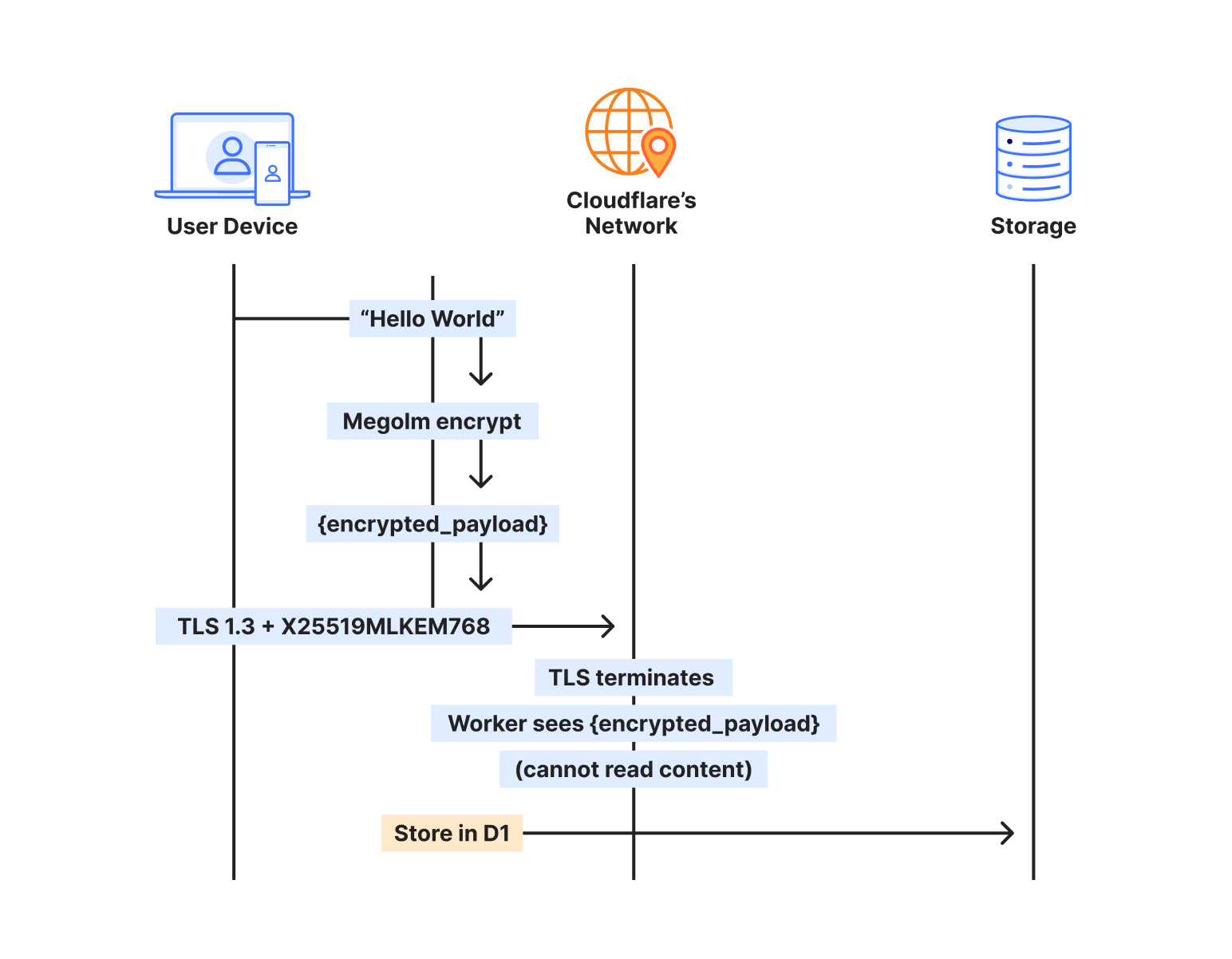
Understanding where encryption happens matters for security architecture. When someone sends a message through our homeserver, here’s the actual path:

The sender’s client takes the plaintext message and encrypts it with Megolm — Matrix’s end-to-end encryption. This encrypted payload then gets wrapped in TLS for transport. On Cloudflare, that TLS connection uses X25519MLKEM768, making it quantum-resistant.

The Worker terminates TLS, but what it receives is still encrypted — the Megolm ciphertext. We store that ciphertext in D1, index it by room and timestamp, and deliver it to recipients. But we never see the plaintext. The message “Hello, world” exists only on the sender’s device and the recipient’s device.

When the recipient syncs, the process reverses. They receive the encrypted payload over another quantum-resistant TLS connection, then decrypt locally with their Megolm session keys.

Two layers, independent protection

This protects via two encryption layers that operate independently:

The transport layer (TLS) protects data in transit. It’s encrypted at the client and decrypted at the Cloudflare edge. With X25519MLKEM768, this layer is now post-quantum.

The application layer (Megolm E2EE) protects message content. It’s encrypted on the sender’s device and decrypted only on recipient devices. This uses classical Curve25519 cryptography.

Who sees what

Any Matrix homeserver operator — whether running Synapse on a VPS or this implementation on Workers — can see metadata: which rooms exist, who’s in them, when messages were sent. But no one in the infrastructure chain can see the message content, because the E2EE payload is encrypted on sender devices before it ever hits the network. Cloudflare terminates TLS and passes requests to your Worker, but both see only Megolm ciphertext. Media in encrypted rooms is encrypted client-side before upload, and private keys never leave user devices.

What traditional deployments would need

Achieving post-quantum TLS on a traditional Matrix deployment would require upgrading OpenSSL or BoringSSL to a version supporting ML-KEM, configuring cipher suite preferences correctly, testing client compatibility across all Matrix apps, monitoring for TLS negotiation failures, staying current as PQC standards evolve, and handling clients that don’t support PQC gracefully.

With Workers, it’s automatic. Chrome, Firefox, and Edge all support X25519MLKEM768. Mobile apps using platform TLS stacks inherit this support. The security posture improves as Cloudflare’s PQC deployment expands — no action required on our part.

The storage architecture that made it work

The key insight from porting Tuwunel was that different data needs different consistency guarantees. We use each Cloudflare primitive for what it does best.

D1 for the data model

D1 stores everything that needs to survive restarts and support queries: users, rooms, events, device keys. Over 25 tables covering the full Matrix data model.

CREATE TABLE events (
	event_id TEXT PRIMARY KEY,
	room_id TEXT NOT NULL,
	sender TEXT NOT NULL,
	event_type TEXT NOT NULL,
	state_key TEXT,
	content TEXT NOT NULL,
	origin_server_ts INTEGER NOT NULL,
	depth INTEGER NOT NULL
);

D1’s SQLite foundation meant we could port Tuwunel’s queries with minimal changes. Joins, indexes, and aggregations work as expected.

We learned one hard lesson: D1’s eventual consistency breaks foreign key constraints. A write to rooms might not be visible when a subsequent write to events checks the foreign key. We removed all foreign keys and enforce referential integrity in application code.

KV for ephemeral state

OAuth authorization codes live for 10 minutes, while refresh tokens last for a session.

// Store OAuth code with 10-minute TTL
kv.put(&format!("oauth_code:{}", code), &token_data)?
	.expiration_ttl(600)
	.execute()
	.await?;

KV’s global distribution means OAuth flows work fast regardless of where users are located.

R2 for media

Matrix media maps directly to R2, so you can upload an image, get back a content-addressed URL – and egress is free.

Durable Objects for atomicity

Some operations can’t tolerate eventual consistency. When a client claims a one-time encryption key, that key must be atomically removed. If two clients claim the same key, encrypted session establishment fails.

Durable Objects provide single-threaded, strongly consistent storage:

#[durable_object]
pub struct UserKeysObject {
	state: State,
	env: Env,
}

impl UserKeysObject {
	async fn claim_otk(&self, algorithm: &str) -> Result<Option<Key>> {
    	// Atomic within single DO - no race conditions possible
    	let mut keys: Vec<Key> = self.state.storage()
        	.get("one_time_keys")
        	.await
        	.ok()
        	.flatten()
        	.unwrap_or_default();

    	if let Some(idx) = keys.iter().position(|k| k.algorithm == algorithm) {
        	let key = keys.remove(idx);
        	self.state.storage().put("one_time_keys", &keys).await?;
        	return Ok(Some(key));
    	}
    	Ok(None)
	}
}

We use UserKeysObject for E2EE key management, RoomObject for real-time room events like typing indicators and read receipts, and UserSyncObject for to-device message queues. The rest flows through D1.

Complete end-to-end encryption, complete OAuth

Our implementation supports the full Matrix E2EE stack: device keys, cross-signing keys, one-time keys, fallback keys, key backup, and dehydrated devices.

Modern Matrix clients use OAuth 2.0/OIDC instead of legacy password flows. We implemented a complete OAuth provider, with dynamic client registration, PKCE authorization, RS256-signed JWT tokens, token refresh with rotation, and standard OIDC discovery endpoints.

curl https://matrix.example.com/.well-known/openid-configuration
{
  "issuer": "https://matrix.example.com",
  "authorization_endpoint": "https://matrix.example.com/oauth/authorize",
  "token_endpoint": "https://matrix.example.com/oauth/token",
  "jwks_uri": "https://matrix.example.com/.well-known/jwks.json"
}

Point Element or any Matrix client at the domain, and it discovers everything automatically.

Sliding Sync for mobile

Traditional Matrix sync transfers megabytes of data on initial connection,  draining mobile battery and data plans.

Sliding Sync lets clients request exactly what they need. Instead of downloading everything, clients get the 20 most recent rooms with minimal state. As users scroll, they request more ranges. The server tracks position and sends only deltas.

Combined with edge execution, mobile clients can connect and render their room list in under 500ms, even on slow networks.

The comparison

For a homeserver serving a small team:


Traditional (VPS)

Workers

Monthly cost (idle)

$20-50

<$1

Monthly cost (active)

$20-50

$3-10

Global latency

100-300ms

20-50ms

Time to deploy

Hours

Seconds

Maintenance

Weekly

None

DDoS protection

Additional cost

Included

Post-quantum TLS

Complex setup

Automatic

*Based on public rates and metrics published by DigitalOcean, AWS Lightsail, and Linode as of January 15, 2026.

The economics improve further at scale. Traditional deployments require capacity planning and over-provisioning. Workers scale automatically.

The future of decentralized protocols

We started this as an experiment: could Matrix run on Workers? It can—and the approach can work for other stateful protocols, too.

By mapping traditional stateful components to Cloudflare’s primitives — Postgres to D1, Redis to KV, mutexes to Durable Objects — we can see  that complex applications don't need complex infrastructure. We stripped away the operating system, the database management, and the network configuration, leaving only the application logic and the data itself.

Workers offers the sovereignty of owning your data, without the burden of owning the infrastructure.

I have been experimenting with the implementation and am excited for any contributions from others interested in this kind of service. 

Ready to build powerful, real-time applications on Workers? Get started with Cloudflare Workers and explore Durable Objects for your own stateful edge applications. Join our Discord community to connect with other developers building at the edge.

15 years of helping build a better Internet: a look back at Birthday Week 2025

Cloudflare launched fifteen years ago with a mission to help build a better Internet. Over that time the Internet has changed and so has what it needs from teams like ours.  In this year’s Founder’s Letter, Matthew and Michelle discussed the role we have played in the evolution of the Internet, from helping encryption grow from 10% to 95% of Internet traffic to more recent challenges like how people consume content. 

We spend Birthday Week every year releasing the products and capabilities we believe the Internet needs at this moment and around the corner. Previous Birthday Weeks saw the launch of IPv6 gateway in 2011,  Universal SSL in 2014, Cloudflare Workers and unmetered DDoS protection in 2017, Cloudflare Radar in 2020, R2 Object Storage with zero egress fees in 2021,  post-quantum upgrades for Cloudflare Tunnel in 2022, Workers AI and Encrypted Client Hello in 2023. And those are just a sample of the launches.

This year’s themes focused on helping prepare the Internet for a new model of monetization that encourages great content to be published, fostering more opportunities to build community both inside and outside of Cloudflare, and evergreen missions like making more features available to everyone and constantly improving the speed and security of what we offer.

We shipped a lot of new things this year. In case you missed the dozens of blog posts, here is a breakdown of everything we announced during Birthday Week 2025. 

Monday, September 22

What In a sentence …
Help build the future: announcing Cloudflare’s goal to hire 1,111 interns in 2026 To invest in the next generation of builders, we announced our most ambitious intern program yet with a goal to hire 1,111 interns in 2026.
Supporting the future of the open web: Cloudflare is sponsoring Ladybird and Omarchy To support a diverse and open Internet, we are now sponsoring Ladybird (an independent browser) and Omarchy (an open-source Linux distribution and developer environment).
Come build with us: Cloudflare’s new hubs for startups We are opening our office doors in four major cities (San Francisco, Austin, London, and Lisbon) as free hubs for startups to collaborate and connect with the builder community.
Free access to Cloudflare developer services for non-profit and civil society organizations We extended our Cloudflare for Startups program to non-profits and public-interest organizations, offering free credits for our developer tools.
Introducing free access to Cloudflare developer features for students We are removing cost as a barrier for the next generation by giving students with .edu emails 12 months of free access to our paid developer platform features.
Cap’n Web: a new RPC system for browsers and web servers We open-sourced Cap'n Web, a new JavaScript-native RPC protocol that simplifies powerful, schema-free communication for web applications.
A lookback at Workers Launchpad and a warm welcome to Cohort #6 We announced Cohort #6 of the Workers Launchpad, our accelerator program for startups building on Cloudflare.

Tuesday, September 23

What In a sentence …
Building unique, per-customer defenses against advanced bot threats in the AI era New anomaly detection system that uses machine learning trained on each zone to build defenses against AI-driven bot attacks.
Why Cloudflare, Netlify, and Webflow are collaborating to support Open Source tools To support the open web, we joined forces with Webflow to sponsor Astro, and with Netlify to sponsor TanStack.
Launching the x402 Foundation with Coinbase, and support for x402 transactions We are partnering with Coinbase to create the x402 Foundation, encouraging the adoption of the x402 protocol to allow clients and services to exchange value on the web using a common language
Helping protect journalists and local news from AI crawlers with Project Galileo We are extending our free Bot Management and AI Crawl Control services to journalists and news organizations through Project Galileo.
Cloudflare Confidence Scorecards - making AI safer for the Internet Automated evaluation of AI and SaaS tools, helping organizations to embrace AI without compromising security.

Wednesday, September 24

What In a sentence …
Automatically Secure: how we upgraded 6,000,000 domains by default Our Automatic SSL/TLS system has upgraded over 6 million domains to more secure encryption modes by default and will soon automatically enable post-quantum connections.
Giving users choice with Cloudflare’s new Content Signals Policy The Content Signals Policy is a new standard for robots.txt that lets creators express clear preferences for how AI can use their content.
To build a better Internet in the age of AI, we need responsible AI bot principles A proposed set of responsible AI bot principles to start a conversation around transparency and respect for content creators' preferences.
Securing data in SaaS to SaaS applications New security tools to give companies visibility and control over data flowing between SaaS applications.
Securing today for the quantum future: WARP client now supports post-quantum cryptography (PQC) Cloudflare’s WARP client now supports post-quantum cryptography, providing quantum-resistant encryption for traffic.
A simpler path to a safer Internet: an update to our CSAM scanning tool We made our CSAM Scanning Tool easier to adopt by removing the need to create and provide unique credentials, helping more site owners protect their platforms.

Thursday, September 25

What In a sentence …
Every Cloudflare feature, available to everyone We are making every Cloudflare feature, starting with Single Sign On (SSO), available for anyone to purchase on any plan.
Cloudflare's developer platform keeps getting better, faster, and more powerful Updates across Workers and beyond for a more powerful developer platform – such as support for larger and more concurrent Container images, support for external models from OpenAI and Anthropic in AI Search (previously AutoRAG), and more.
Partnering to make full-stack fast: deploy PlanetScale databases directly from Workers You can now connect Cloudflare Workers to PlanetScale databases directly, with connections automatically optimized by Hyperdrive.
Announcing the Cloudflare Data Platform A complete solution for ingesting, storing, and querying analytical data tables using open standards like Apache Iceberg.
R2 SQL: a deep dive into our new distributed query engine A technical deep dive on R2 SQL, a serverless query engine for petabyte-scale datasets in R2.
Safe in the sandbox: security hardening for Cloudflare Workers A deep-dive into how we’ve hardened the Workers runtime with new defense-in-depth security measures, including V8 sandboxes and hardware-assisted memory protection keys.
Choice: the path to AI sovereignty To champion AI sovereignty, we've added locally-developed open-source models from India, Japan, and Southeast Asia to our Workers AI platform.
Announcing Cloudflare Email Service’s private beta We announced the Cloudflare Email Service private beta, allowing developers to reliably send and receive transactional emails directly from Cloudflare Workers.
A year of improving Node.js compatibility in Cloudflare Workers There are hundreds of new Node.js APIs now available that make it easier to run existing Node.js code on our platform.

Friday, September 26

What In a sentence …
Cloudflare just got faster and more secure, powered by Rust We have re-engineered our core proxy with a new modular, Rust-based architecture, cutting median response time by 10ms for millions.
Introducing Observatory and Smart Shield New monitoring tools in the Cloudflare dashboard that provide actionable recommendations and one-click fixes for performance issues.
Monitoring AS-SETs and why they matter Cloudflare Radar now includes Internet Routing Registry (IRR) data, allowing network operators to monitor AS-SETs to help prevent route leaks.
An AI Index for all our customers We announced the private beta of AI Index, a new service that creates an AI-optimized search index for your domain that you control and can monetize.
Introducing new regional Internet traffic and Certificate Transparency insights on Cloudflare Radar Sub-national traffic insights and Certificate Transparency dashboards for TLS monitoring.
Eliminating Cold Starts 2: shard and conquer We have reduced Workers cold starts by 10x by implementing a new "worker sharding" system that routes requests to already-loaded Workers.
Network performance update: Birthday Week 2025 The TCP Connection Time (Trimean) graph shows that we are the fastest TCP connection time in 40% of measured ISPs – and the fastest across the top networks.
How Cloudflare uses performance data to make the world’s fastest global network even faster We are using our network's vast performance data to tune congestion control algorithms, improving speeds by an average of 10% for QUIC traffic.
Code Mode: the better way to use MCP It turns out we've all been using MCP wrong. Most agents today use MCP by exposing the "tools" directly to the LLM. We tried something different: Convert the MCP tools into a TypeScript API, and then ask an LLM to write code that calls that API. The results are striking.

Come build with us!

Helping build a better Internet has always been about more than just technology. Like the announcements about interns or working together in our offices, the community of people behind helping build a better Internet matters to its future. This week, we rolled out our most ambitious set of initiatives ever to support the builders, founders, and students who are creating the future.

For founders and startups, we are thrilled to welcome Cohort #6 to the Workers Launchpad, our accelerator program that gives early-stage companies the resources they need to scale. But we’re not stopping there. We’re opening our doors, literally, by launching new physical hubs for startups in our San Francisco, Austin, London, and Lisbon offices. These spaces will provide access to mentorship, resources, and a community of fellow builders.

We’re also investing in the next generation of talent. We announced free access to the Cloudflare developer platform for all students, giving them the tools to learn and experiment without limits. To provide a path from the classroom to the industry, we also announced our goal to hire 1,111 interns in 2026 — our biggest commitment yet to fostering future tech leaders.

And because a better Internet is for everyone, we’re extending our support to non-profits and public-interest organizations, offering them free access to our production-grade developer tools, so they can focus on their missions.

Whether you're a founder with a big idea, a student just getting started, or a team working for a cause you believe in, we want to help you succeed.

Until next year

Thank you to our customers, our community, and the millions of developers who trust us to help them build, secure, and accelerate the Internet. Your curiosity and feedback drive our innovation.

It’s been an incredible 15 years. And as always, we’re just getting started!

(Watch the full conversation on our show ThisWeekinNET.com about what we launched during Birthday Week 2025 here.)

Announcing the Cloudflare Browser Developer Program

Today, we are announcing Cloudflare’s Browser Developer Program, a collaborative initiative to strengthen partnership between Cloudflare and browser development teams.

Browser developers can apply to join here

At Cloudflare, we aim to help build a better Internet. One way we achieve this is by providing website owners with the tools to detect and block unwanted traffic from bots through Cloudflare Challenges or Turnstile. As both bots and our detection systems become more sophisticated, the security checks required to validate human traffic become more complicated. While we aim to strike the right balance, we recognize these security measures can sometimes cause issues for legitimate browsers and their users.

Building a better web together

A core objective of the program is to provide a space for intentional collaboration where we can work directly with browser developers to ensure that both accessibility and security can co-exist. We aim to support the evolving browser landscape, while upholding our responsibility to our customers to deliver the best security products. This program provides a dedicated channel for browser teams to share feedback, report issues, and help ensure that Cloudflare’s Challenges and Turnstile work seamlessly with all browsers.

What the program includes

Browser developers in the program will benefit from:

  • A two-way communication channel to Cloudflare’s team dedicated to addressing browser-specific concerns, feedback, and issues.

  • Best practices for building and testing against Cloudflare Challenges and Turnstile.

  • A private community forum for updates, questions, and discussion between browser developers and Cloudflare engineers. 

  • Early visibility into updates or changes to that may impact how your browser handles Cloudflare Challenges.

  • (If applicable) Testing integration where we will incorporate your browser into our testing pipeline and monitor its performance with our releases.

This program is designed as a partnership where Cloudflare will, with our best effort, ensure our security products work properly with all browsers, while giving browser developers a voice in how these systems evolve. As an output of this program, we expect to publish clear browser requirements to run Cloudflare Challenges while striking the balance between openness and security. 

For end users browsing the web, we continue to support a wide range of browsers. We will continue to update this list based on the insights and collaborations from the Browser Developer Program. We are also committed to ensuring our Challenge interstitial pages and Turnstile provide clear, actionable UI/UX for any error or failed states, making it easier for you to understand and resolve issues you may encounter. 

How to apply

If you are working on a browser and want to ensure your users have a seamless experience with Cloudflare-protected websites, we encourage you to apply here

We’ll ask for basic information about your project and ask you to sign our Browser Developer Program Agreement. In addition, we expect participants to adhere to our Community Code of Conduct and commit to constructive engagement.

Once you’re accepted, you’ll be invited to a private space in the Cloudflare Community where you can engage directly with our team. 

Why is this important?

Cloudflare Challenges, a security mechanism to verify whether a visitor is a human or a bot, serve a wide variety of browsers in the world today. Chrome leads with 68.0%, Safari at 8.7%, Firefox at 6.3%, Edge at 4.8%, and Opera at 6.2%. However, the very long tail of browsers that collectively make up the remaining traffic, each representing less than 1% individually but together painting a picture of an incredibly diverse web ecosystem.

Browser traffic distribution, with 100+ browsers comprising the 'Other' category

This diversity spans a wide range of environments, each with unique constraints and capabilities:

  • Emerging and experimental browsers pushing the boundaries of web technology

  • Privacy-focused browsers such as DuckDuckGo that prioritize user data protection

  • Embedded browsers inside social media apps like Facebook, Instagram, and TikTok

  • WebViews used by mobile applications

  • Gaming and VR browsers such as Oculus for headsets and gaming consoles

  • Smart device browsers built into classroom displays and home appliances

Supporting this level of diversity poses real engineering challenges. Many of these browsers deviate from standard assumptions. Some lack full support for modern Web APIs, others operate under more stringent data privacy policies, and some are optimized for environments where our script to verify visitors may be hindered or blocked from running properly. These browsers are not bad or malicious. But their behavior may fall outside the typical patterns observed in mainstream browsers, which can lead to problematic or failed Challenge flows which we would like to avoid.

From an engineering perspective, our job is to strike a difficult balance. If our logic is too rigid that it expects only the behaviors of the majority, we risk excluding legitimate users on less conventional platforms. But if we relax our standards too much, we increase the attack surface for abuse. We cannot overfit to the top 5 browsers, nor can we afford to treat all clients as equal in capability or trustworthiness.

The Browser Developer Program is one way to close this gap. By working directly with browser teams, especially those building for niche or emerging environments, we can better understand the constraints they operate under and collaborate to make each of our systems more compatible and resilient. 

Join us!

This program is free to join, and is open to any browser developer, no matter the size or the lifecycle stage. Our goal is to listen, learn, and collaborate with browser developers to create a better experience for everyone. 

We believe this program will ultimately benefit end users the most. By joining this program, you will help us build solutions that prioritize both the security needs of businesses as well as the diverse ways people access the Internet. 

We look forward to your participation!

❌