 Entrar
New CGrabber and Direct-Sys Malware Spread Through GitHub ZIP Files
Hackers spread CGrabber and Direct-Sys malware through GitHub ZIP files, bypassing security tools to steal passwords, crypto wallets, and user data.

Agents let you build software faster than ever, but securing your environment and the code you write — from both mistakes and malice — takes real effort. Open Web Application Security Project (OWASP) details a number of risks present in agentic AI systems, including the risk of credential leaks, user impersonation, and elevation of privilege. These risks can result in extreme damage to your environments including denial of service, data loss, or data leaks — which can do untold financial and reputational damage.
This is an identity problem. In modern development, "identities" aren't just people — they are the agents, scripts, and third-party tools that act on your behalf. To secure these non-human identities, you need to manage their entire lifecycle: ensuring their credentials (tokens) aren't leaked, seeing which applications have access via OAuth, and narrowing their permissions using granular RBAC.
Today, we are introducing updates to address these needs: scannable tokens to protect your credentials, OAuth visibility to manage your principals, and resource-scoped RBAC to fine-tune your policies.
To secure the Internet in an era of autonomous agents, we have to rethink how we handle identity. Whether a request comes from a human developer or an AI agent, every interaction with an API relies on three core pillars:
The Principal (The Traveler): This is the identity itself — the "who." It might be you logging in via OAuth, or a background agent using an API token to deploy code.
The Credential (The Passport): This is the proof of that identity. In this world, your API token is your passport. If it’s stolen or leaked, anyone can "wear" your identity.
The Policy (The Visa): This defines what that identity is allowed to do. Just because you have a valid passport doesn't mean you have a visa to enter every country. A policy ensures that even a verified identity can only access the specific resources it needs.
When these three pillars aren't managed together, security breaks down. You might have a valid Principal using a stolen Credential, or a legitimate identity with a Policy that is far too broad.
Agents and other third-party applications use API tokens to access the Cloudflare API. One of the simplest ways that we see people leaking their secrets is by accidentally pushing them to a public GitHub repository. GitGuardian reports that last year more than 28 million secrets were published to public GitHub repositories, and that AI is causing leaks to happen 5x faster than before.
If an API token is a digital passport, then leaking it on a public repository is like leaving your passport on a park bench. Anyone who finds it can impersonate that identity until the document is canceled. Our partnership with GitHub acts like a global "lost and found" for these credentials. By the time you realize your passport is missing, we’ve already identified the document, verified its authenticity via the checksum, and voided it to prevent misuse.
We’re partnering with several leading credential scanning tools to help proactively find your leaked tokens and revoke them before they could be used maliciously. We know it’s not a matter of if, but rather when, before you, an employee, or one of your agents makes a mistake and pushes a secret somewhere it shouldn’t be.
We’ve partnered with GitHub and are participating in their Secret Scanning program to find your tokens in both public and private repositories. If we are notified that a token has leaked to a public repository, we will automatically revoke the token to prevent it from being used maliciously. For private repositories, GitHub will notify you about any leaked Cloudflare tokens and you can clean these up.
We’ve shared the new token formats (below!) with GitHub, and they now scan for them on every commit. If they find something that looks like a leaked Cloudflare token, they verify the token is real (using the checksum), send us a webhook to revoke it, and then we notify you via email so you can generate a new one in Dashboard settings.
This means we plug the hole as soon as it’s found. By the time you realize you made a mistake, we've already fixed it.
We hope this is the kind of feature you don’t need to use, but our partners are on the lookout for leaks to help keep you secure.
Cloudflare One customers are also protected from these leaks. By configuring the Credentials and Secrets DLP profile, organizations can activate prevention everywhere a credential can travel:
Network Traffic (Cloudflare Gateway): Apply these entries to a policy to detect and block Cloudflare API tokens moving across your network. A token in a file upload, an outbound request, or a download is stopped before it reaches its destination.
Outbound Email (Cloudflare Email Security): Microsoft 365 customers can extend this same prevention to Outlook. The DLP Assist add-in scans messages before delivery, catching a token before it’s sent externally.
Data at Rest (Cloudflare CASB): Cloudflare’s Cloud Access Security Broker applies the same profile to scan files across connected SaaS applications, catching tokens saved or shared in Google Drive, OneDrive, Dropbox, and other integrated services.
The most novel exposure vector, though, is AI traffic. Cloudflare AI Gateway integrates with the same DLP profiles to scan and block both incoming prompts and outgoing AI model responses in real time.
The only way credential scanning works is if we meet you where you are, so we are working with several open source and commercial credential scanners to ensure you are protected no matter what secret scanner you use.
Until now, Cloudflare’s API tokens were pretty generic looking, so they were hard for credential scanners to identify with high confidence. These automated security tools scan your code repositories looking for exposed credentials like API keys, tokens or passwords. The “cf” prefix makes Cloudflare tokens instantly recognizable with greater confidence, and the checksum makes it easy for tools to statically validate them. Your existing tokens will continue to work, but every new token you generate will use the scannable format so it’s easily detected with high confidence.
Credential Type | What it's for | New Format |
User API Key | Legacy global API key tied to your user account (full access) | cfk_[40 characters][checksum] |
User API Token | Scoped token you create for specific permissions | cfut_[40 characters][checksum] |
Account API Token | Token owned by the account (not a specific user) | cfat_[40 characters][checksum] |
If you have existing API tokens, you can roll the token to create a new, scannable API token. This is optional, but recommended to ensure that your tokens are easily discoverable in case they leak.
While API tokens are generally used by your own scripts and agents, OAuth is how you manage access for third-party platforms. Both require clear visibility to prevent unauthorized access and ensure you know exactly who — or what — has access to your data.
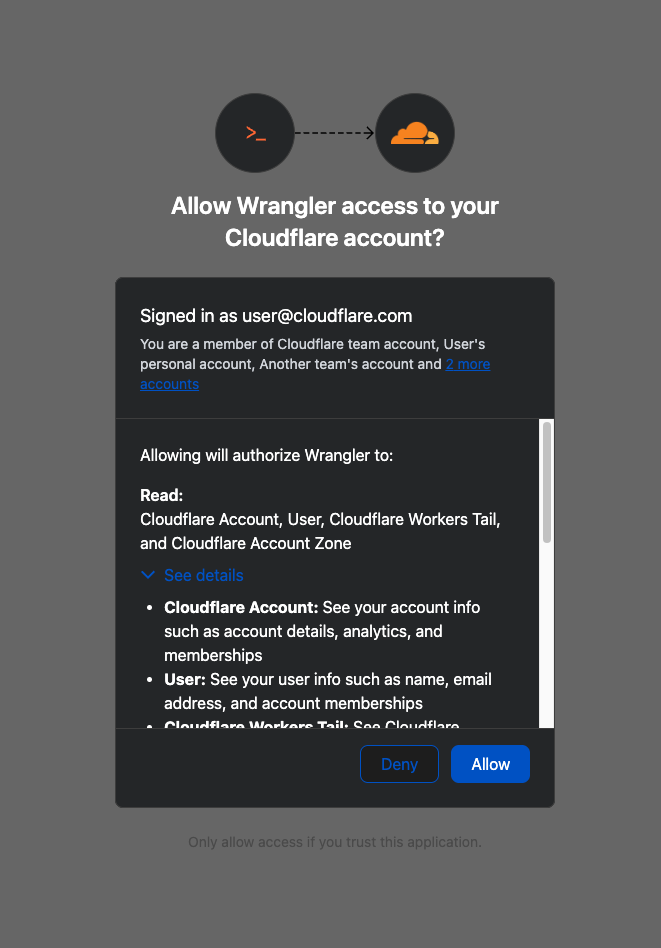
When you connect third-party applications like Wrangler to your Cloudflare Account using OAuth, you're granting that application access to your account’s data. Over time, you may forget why you granted a third party application access to your Account in the first place. Previously, there was no central place to view & manage those applications. Starting today, there is.
Going forward, when a third party application requests access to your Cloudflare account, you’ll be able to review:
Which third-party application is requesting access, along with information about the application like Name, Logo, and the Publisher.
Which scopes the third-party application is requesting access to.
Which accounts to grant the third party application access to.
| Before | After |
|---|---|
 |
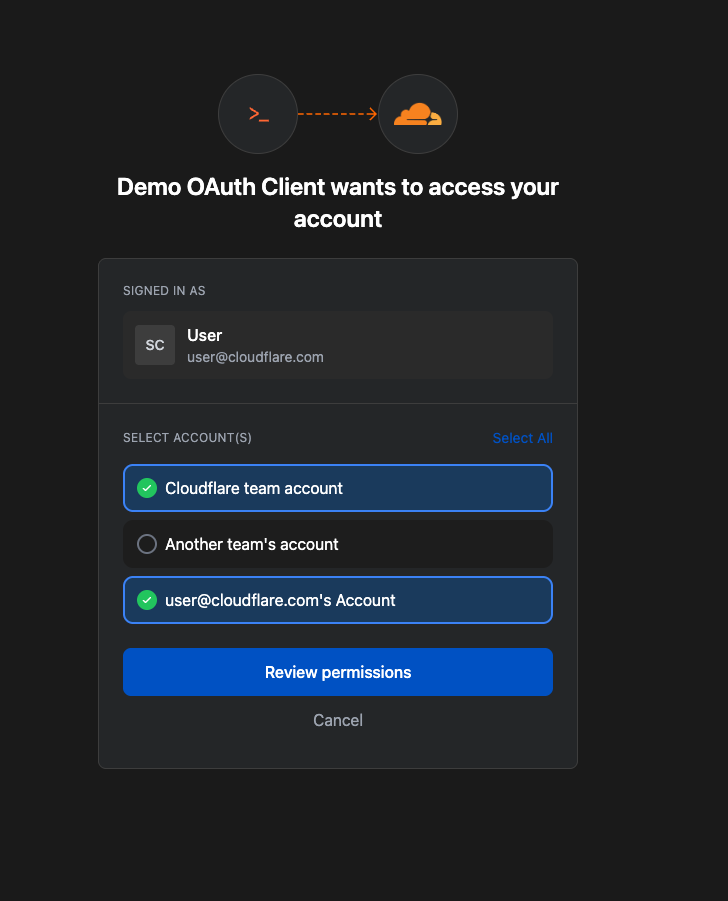 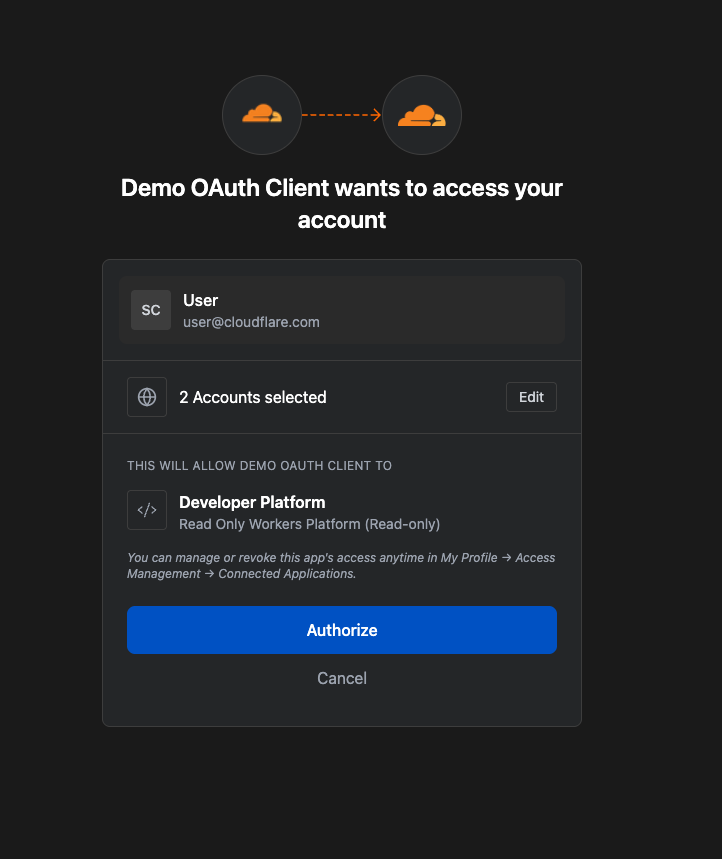 |
Not all applications require the same permissions; some only need to read data, others may need to make changes to your Account. Understanding these scopes before you grant access helps you maintain least-privilege.
We also added a Connected Applications experience so you can see which applications have access to which accounts, what scopes/permissions are associated with that application, and easily revoke that access as needed.
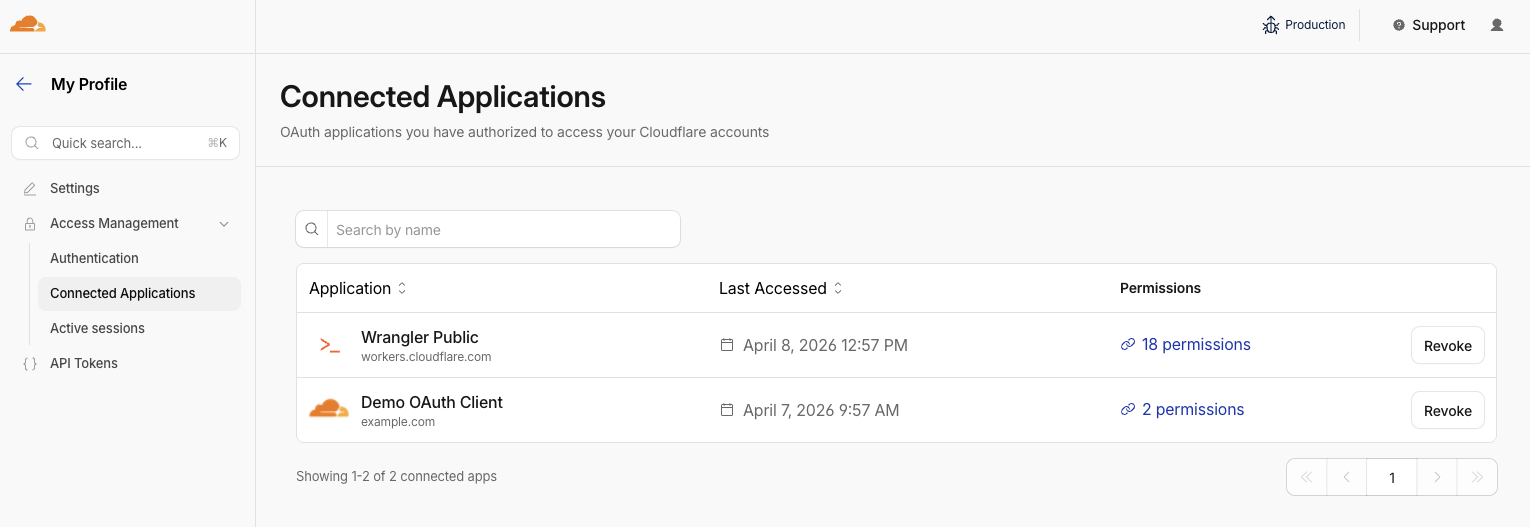
The OAuth consent and revocation improvements are available now. Check which apps currently have access to your accounts by visiting My Profile > Access Management > Connected Applications.
For developers building integrations with Cloudflare, keep an eye on the Cloudflare Changelog for more announcements around how you can register your own OAuth apps soon!
If the token is the passport, then resource-scoped permissions are the visas inside it. Having a valid passport gets you through the front door, but it shouldn't give you access to every room in the building. By narrowing the scope to specific resources — like a single Load Balancer pool or a specific Gateway policy — you are ensuring that even if an identity is verified, it only has the "visa" to go where it’s strictly necessary.
Last year, we announced support for resource scoped permissions in Cloudflare’s role-based access control (RBAC) system for several of our Zero Trust products. This enables you to right size permissions for both users and agents to minimize security risks. We’ve expanded this capability to several new resources-level permissions. The resource scope is now supported for:
Access Applications
Access Identity Providers
Access Policies
Access Service Tokens
Access Targets
We’ve also completely overhauled the API Token creation experience, making it easier for customers to provision and manage Account API Tokens right from the Cloudflare Dashboard.

When you add a member to your Cloudflare account or create an API Token, you typically assign that principal a policy. A Permission Policy is what gives a principal permission to take an action, whether that’s managing Cloudflare One Access Applications, or DNS Records. Without a policy, a principal can authenticate, but they are unauthorized to do any actions within an account.
Policies are made up of three components: a Principal, a Role, and a Scope. The Principal is who or what you're granting access to, whether that's a human user, a Non-Human Identity (NHI) like an API Token, or increasingly, an Agent acting on behalf of a user. The Role defines what actions they're permitted to take. The Scope determines where those permissions apply, and historically, that's been restricted to the entire account, or individual zones.
We’re also expanding the role surface more broadly at both the Account & Zone level with the introduction of a number of new roles for many products.
Account scope
CDN Management
MCP Portals
Radar
Request Tracer
SSL/TLS Management
Zone scope
Analytics
Logpush
Page Rules
Security Center
Snippets
Zone Settings
The resource scope and all new account and zone-level roles are available today for all Cloudflare customers. You can assign account, zone, or resource-scoped policies through the Cloudflare Dashboard, the API, or Terraform.
For a full breakdown of all available roles and how scopes work, visit our roles and scope documentation.
These updates provide the granular building blocks needed for a true least-privilege architecture. By refining how we manage permissions and credentials, developers and enterprises can have greater confidence in their security posture across the users, apps, agents, and scripts that access Cloudflare. Least privilege isn’t a new concept, and for enterprises, it’s never been optional. Whether a human administrator is managing a zone or an agent is programmatically deploying a Worker, the expectation is the same, they should only be authorized to do the job it was given, and nothing else.
Following today’s announcement, we recommend customers:
Review your API tokens, and reissue with the new, scannable API tokens as soon as possible.
Review your authorized OAuth apps, and revoke any that you are no longer using
Review member & API Token permissions in your accounts and ensure that users are taking advantage of the new account, zone, or resource scoped permissions as needed to reduce your risk area.
We at Cloudflare have aggressively adopted Model Context Protocol (MCP) as a core part of our AI strategy. This shift has moved well beyond our engineering organization, with employees across product, sales, marketing, and finance teams now using agentic workflows to drive efficiency in their daily tasks. But the adoption of agentic workflow with MCP is not without its security risks. These range from authorization sprawl, prompt injection, and supply chain risks. To secure this broad company-wide adoption, we have integrated a suite of security controls from both our Cloudflare One (SASE) platform and our Cloudflare Developer platform, allowing us to govern AI usage with MCP without slowing down our workforce.
In this blog we’ll walk through our own best practices for securing MCP workflows, by putting different parts of our platform together to create a unified security architecture for the era of autonomous AI. We’ll also share two new concepts that support enterprise MCP deployments:
We are launching Code Mode with MCP server portals, to drastically reduce token costs associated with MCP usage;
We describe how to use Cloudflare Gateway for Shadow MCP detection, to discover use of unauthorized remote MCP servers.
We also talk about how our organization approached deploying MCP, and how we built out our MCP security architecture using Cloudflare products including remote MCP servers, Cloudflare Access, MCP server portals and AI Gateway.
MCP is an open standard that enables developers to build a two-way connection between AI applications and the data sources they need to access. In this architecture, the MCP client is the integration point with the LLM or other AI agent, and the MCP server sits between the MCP client and the corporate resources.

The separation between MCP clients and MCP servers allows agents to autonomously pursue goals and take actions while maintaining a clear boundary between the AI (integrated at the MCP client) and the credentials and APIs of the corporate resource (integrated at the MCP server).
Our workforce at Cloudflare is constantly using MCP servers to access information in various internal resources, including our project management platform, our internal wiki, documentation and code management platforms, and more.
Very early on, we realized that locally-hosted MCP servers were a security liability. Local MCP server deployments may rely on unvetted software sources and versions, which increases the risk of supply chain attacks or tool injection attacks. They prevent IT and security administrators from administrating these servers, leaving it up to individual employees and developers to choose which MCP servers they want to run and how they want to keep them up to date. This is a losing game.

Instead, we have a centralized team at Cloudflare that manages our MCP server deployment across the enterprise. This team built a shared MCP platform inside our monorepo that provides governed infrastructure out of the box. When an employee wants to expose an internal resource via MCP, they first get approval from our AI governance team, and then they copy a template, write their tool definitions, and deploy, all the while inheriting default-deny write controls with audit logging, auto-generated CI/CD pipelines, and secrets management for free. This means standing up a new governed MCP server is minutes of scaffolding. The governance is baked into the platform itself, which is what allowed adoption to spread so quickly.
Our CI/CD pipeline deploys them as remote MCP servers on custom domains on Cloudflare’s developer platform. This gives us visibility into which MCPs servers are being used by our employees, while maintaining control over software sources. As an added bonus, every remote MCP server on the Cloudflare developer platform is automatically deployed across our global network of data centers, so MCP servers can be accessed by our employees with low latency, regardless of where they might be in the world.
Some of our MCP servers sit in front of public resources, like our Cloudflare documentation MCP server or Cloudflare Radar MCP server, and thus we want them to be accessible to anyone. But many of the MCP servers used by our workforce are sitting in front of our private corporate resources. These MCP servers require user authentication to ensure that they are off limits to everyone but authorized Cloudflare employees. To achieve this, our monorepo template for MCP servers integrates Cloudflare Access as the OAuth provider. Cloudflare Access secures login flows and issues access tokens to resources, while acting as an identity aggregator that verifies end user single-sign on (SSO), multifactor authentication (MFA), and a variety of contextual attributes such as IP addresses, location, or device certificates.

MCP server portals unify governance and control for all AI activity.
As the number of our remote MCP servers grew, we hit a new wall: discovery. We wanted to make it easy for every employee (especially those that are new to MCP) to find and work with all the MCP servers that are available to them. Our MCP server portals product provided a convenient solution. The employee simply connects their MCP client to the MCP server portal, and the portal immediately reveals every internal and third-party MCP servers they are authorized to use.
Beyond this, our MCP server portals provide centralized logging, consistent policy enforcement and data loss prevention (DLP guardrails). Our administrators can see who logged into what MCP portal and create DLP rules that prevent certain data, like personally identifiable data (PII), from being shared with certain MCP servers.
We can also create policies that control who has access to the portal itself, and what tools from each MCP server should be exposed. For example, we could set up one MCP server portal that is only accessible to employees that are part of our finance group that exposes just the read-only tools for the MCP server in front of our internal code repository. Meanwhile, a different MCP server portal, accessible only to employees on their corporate laptops that are in our engineering team, could expose more powerful read/write tools to our code repository MCP server.
An overview of our MCP server portal architecture is shown above. The portal supports both remote MCP servers hosted on Cloudflare, and third-party MCP servers hosted anywhere else. What makes this architecture uniquely performant is that all these security and networking components run on the same physical machine within our global network. When an employee's request moves through the MCP server portal, a Cloudflare-hosted remote MCP server, and Cloudflare Access, their traffic never needs to leave the same physical machine.
After months of high-volume MCP deployments, we’ve paid out our fair share of tokens. We’ve also started to think most people are doing MCP wrong.
The standard approach to MCP requires defining a separate tool for every API operation that is exposed via an MCP server. But this static and exhaustive approach quickly exhausts an agent’s context window, especially for large platforms with thousands of endpoints.
We previously wrote about how we used server-side Code Mode to power Cloudflare’s MCP server, allowing us to expose the thousands of end-points in Cloudflare API while reducing token use by 99.9%. The Cloudflare MCP server exposes just two tools: a search tool lets the model write JavaScript to explore what’s available, and an execute tool lets it write JavaScript to call the tools it finds. The model discovers what it needs on demand, rather than receiving everything upfront.
We like this pattern so much, we had to make it available for everyone. So we have now launched the ability to use the “Code Mode” pattern with MCP server portals. Now you can front all of your MCP servers with a centralized portal that performs audit controls and progressive tool disclosure, in order to reduce token costs.
Here is how it works. Instead of exposing every tool definition to a client, all of your underlying MCP servers collapse into just two MCP portal tools: portal_codemode_search and portal_codemode_execute. The search tool gives the model access to a codemode.tools() function that returns all the tool definitions from every connected upstream MCP server. The model then writes JavaScript to filter and explore these definitions, finding exactly the tools it needs without every schema being loaded into context. The execute tool provides a codemode proxy object where each upstream tool is available as a callable function. The model writes JavaScript that calls these tools directly, chaining multiple operations, filtering results, and handling errors in code. All of this runs in a sandboxed environment on the MCP server portal powered by Dynamic Workers.
Here is an example of an agent that needs to find a Jira ticket and update it with information from Google Drive. It first searches for the right tools:
// portal_codemode_search
async () => {
 const tools = await codemode.tools();
 return tools
  .filter(t => t.name.includes("jira") || t.name.includes("drive"))
  .map(t => ({ name: t.name, params: Object.keys(t.inputSchema.properties || {}) }));
}
The model now knows the exact tool names and parameters it needs, without the full schemas of tools ever entering its context. It then writes a single execute call to chain the operations together:
// portal_codemode_execute
async () => {
 const tickets = await codemode.jira_search_jira_with_jql({
  jql: ‘project = BLOG AND status = “In Progress”’,
  fields: [“summary”, “description”]
 });
 const doc = await codemode.google_workspace_drive_get_content({
  fileId: “1aBcDeFgHiJk”
 });
 await codemode.jira_update_jira_ticket({
  issueKey: tickets[0].key,
  fields: { description: tickets[0].description + “\n\n” + doc.content }
 });
 return { updated: tickets[0].key };
}
This is just two tool calls. The first discovers what's available, the second does the work. Without Code Mode, this same workflow would have required the model to receive the full schemas of every tool from both MCP servers upfront, and then make three separate tool invocations.
Let’s put the savings in perspective: when our internal MCP server portal is connected to just four of our internal MCP servers, it exposes 52 tools that consume approximately 9,400 tokens of context just for their definitions. With Code Mode enabled, those 52 tools collapse into 2 portal tools consuming roughly 600 tokens, a 94% reduction. And critically, this cost stays fixed. As we connect more MCP servers to the portal, the token cost of Code Mode doesn’t grow.
Code Mode can be activated on an MCP server portal by adding a query parameter to the URL. Instead of connecting to your portal over its usual URL (e.g. https://myportal.example.com/mcp), you attach ?codemode=search_and_execute to the URL (e.g. https://myportal.example.com/mcp?codemode=search_and_execute).
We aren’t done yet. We plug AI Gateway into our architecture by positioning it on the connection between the MCP client and the LLM. This allows us to quickly switch between various LLM providers (to prevent vendor lock-in) and to enforce cost controls (by limiting the number of tokens each employee can burn through). The full architecture is shown below.

Now that we’ve provided governed access to authorized MCP servers, let’s look into dealing with unauthorized MCP servers. We can perform shadow MCP discovery using Cloudflare Gateway. Cloudflare Gateway is our comprehensive secure web gateway that provides enterprise security teams with visibility and control over their employees’ Internet traffic.
We can use the Cloudflare Gateway API to perform a multi-layer scan to find remote MCP servers that are not being accessed via an MCP server portal. This is possible using a variety of existing Gateway and Data Loss Prevention (DLP) selectors, including:
Using the Gateway httpHost selector to scan for
known MCP server hostnames using (like mcp.stripe.com)
mcp.* subdomains using wildcard hostname patterns
Using the Gateway httpRequestURI selector to scan for MCP-specific URL paths like /mcp and /mcp/sse
Using DLP-based body inspection to find MCP traffic, even if that traffic uses URI that do not contain the telltale mentions of mcp or sse. Specifically, we use the fact that MCP uses JSON-RPC over HTTP, which means every request contains a "method" field with values like "tools/call", "prompts/get", or "initialize." Here are some regex rules that can be used to detect MCP traffic in the HTTP body:
const DLP_REGEX_PATTERNS = [
  {
    name: "MCP Initialize Method",
    regex: '"method"\\s{0,5}:\\s{0,5}"initialize"',
  },
  {
    name: "MCP Tools Call",
    regex: '"method"\\s{0,5}:\\s{0,5}"tools/call"',
  },
  {
    name: "MCP Tools List",
    regex: '"method"\\s{0,5}:\\s{0,5}"tools/list"',
  },
  {
    name: "MCP Resources Read",
    regex: '"method"\\s{0,5}:\\s{0,5}"resources/read"',
  },
  {
    name: "MCP Resources List",
    regex: '"method"\\s{0,5}:\\s{0,5}"resources/list"',
  },
  {
    name: "MCP Prompts List",
    regex: '"method"\\s{0,5}:\\s{0,5}"prompts/(list|get)"',
  },
  {
    name: "MCP Sampling Create Message",
    regex: '"method"\\s{0,5}:\\s{0,5}"sampling/createMessage"',
  },
  {
    name: "MCP Protocol Version",
    regex: '"protocolVersion"\\s{0,5}:\\s{0,5}"202[4-9]',
  },
  {
    name: "MCP Notifications Initialized",
    regex: '"method"\\s{0,5}:\\s{0,5}"notifications/initialized"',
  },
  {
    name: "MCP Roots List",
    regex: '"method"\\s{0,5}:\\s{0,5}"roots/list"',
  },
];
The Gateway API supports additional automation. For example, one can use the custom DLP profile we defined above to block traffic, or redirect it, or just to log and inspect MCP payloads. Put this together, and Gateway can be used to provide comprehensive detection of unauthorized remote MCP servers accessed via an enterprise network.
For more information on how to build this out, see this tutorial.
So far, we’ve been focused on protecting our workforce’s access to our internal MCP servers. But, like many other organizations, we also have public-facing MCP servers that our customers can use to agentically administer and operate Cloudflare products. These MCP servers are hosted on Cloudflare’s developer platform. (You can find a list of individual MCPs for specific products here, or refer back to our new approach for providing more efficient access to the entire Cloudflare API using Code Mode.)
We believe that every organization should publish official, first-party MCP servers for their products. The alternative is that your customers source unvetted servers from public repositories where packages may contain dangerous trust assumptions, undisclosed data collection, and any range of unsanctioned behaviors. By publishing your own MCP servers, you control the code, update cadence, and security posture of the tools your customers use.
Since every remote MCP server is an HTTP endpoint, we can put it behind the Cloudflare Web Application Firewall (WAF). Customers can enable the AI Security for Apps feature within the WAF to automatically inspect inbound MCP traffic for prompt injection attempts, sensitive data leakage, and topic classification. Public facing MCPs are protected just as any other web API.
We hope our experience, products, and reference architectures will be useful to other organizations as they continue along their own journey towards broad enterprise-wide adoption of MCP.
We’ve secured our own MCP workflows by:
Offering our developers a templated framework for building and deploying remote MCP servers on our developer platform using Cloudflare Access for authentication
Ensuring secure, identity-based access to authorized MCP servers by connecting our entire workforce to MCP server portals
Controlling costs using AI Gateway to mediate access to the LLMs powering our workforce’s MCP clients, and using Code Mode in MCP server portals to reduce token consumption and context bloat
Discovering shadow MCP usage by Cloudflare Gateway
For organizations advancing on their own enterprise MCP journeys, we recommend starting by putting your existing remote and third-party MCP servers behind Cloudflare MCP server portals and enabling Code Mode to start benefitting for cheaper, safer and simpler enterprise deployments of MCP.
Acknowledgements: This reference architecture and blog represents this work of many people across many different roles and business units at Cloudflare. This is just a partial list of contributors: Ann Ming Samborski, Kate Reznykova, Mike Nomitch, James Royal, Liam Reese, Yumna Moazzam, Simon Thorpe, Rian van der Merwe, Rajesh Bhatia, Ayush Thakur, Gonzalo Chavarri, Maddy Onyehara, and Haley Campbell.
We have thousands of internal apps at Cloudflare. Some are things we’ve built ourselves, others are self-hosted instances of software built by others. They range from business-critical apps nearly every person uses, to side projects and prototypes.
All of these apps are protected by Cloudflare Access. But when we started using and building agents — particularly for uses beyond writing code — we hit a wall. People could access apps behind Access, but their agents couldn’t.
Access sits in front of internal apps. You define a policy, and then Access will send unauthenticated users to a login page to choose how to authenticate.

Example of a Cloudflare Access login page
This flow worked great for humans. But all agents could see was a redirect to a login page that they couldn’t act on.
Providing agents with access to internal app data is so vital that we immediately implemented a stopgap for our own internal use. We modified OpenCode’s web fetch tool such that for specific domains, it triggered the cloudflared CLI to open an authorization flow to fetch a JWT (JSON Web Token). By appending this token to requests, we enabled secure, immediate access to our internal ecosystem.
While this solution was a temporary answer to our own dilemma, today we’re retiring this workaround and fixing this problem for everyone. Now in open beta, every Access application supports managed OAuth. One click to enable it for an Access app, and agents that speak OAuth 2.0 can easily discover how to authenticate (RFC 9728), send the user through the auth flow, and receive back an authorization token (the same JWT from our initial solution).
Now, the flow works smoothly for both humans and agents. Cloudflare Access has a generous free tier. And building off our newly-introduced Organizations beta, you’ll soon be able to bridge identity providers across Cloudflare accounts too.
For a given internal app protected by Cloudflare Access, you enable managed OAuth in one click:
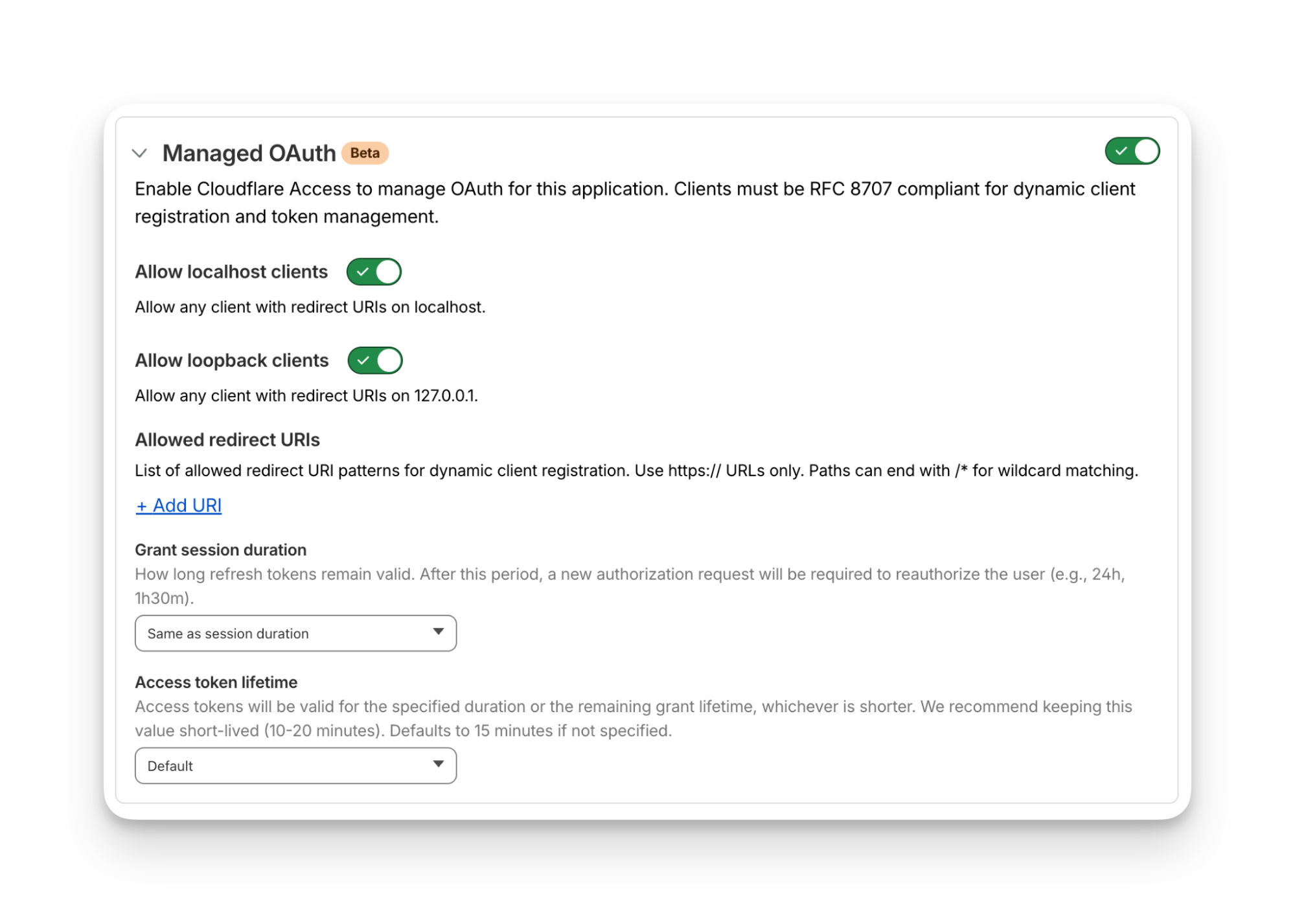
Once managed OAuth is enabled, Cloudflare Access acts as the authorization server. It returns the www-authenticate header, telling unauthorized agents where to look up information on how to get an authorization token. They find this at https://<your-app-domain>/.well-known/oauth-authorization-server. Equipped with that direction, agents can just follow OAuth standards:
The agent dynamically registers itself as a client (a process known as Dynamic Client Registration — RFC 7591),
The agent sends the human through a PKCE (Proof Key for Code Exchange) authorization flow (RFC 7636)
The human authorizes access, which grants a token to the agent that it can use to make authenticated requests on behalf of the user
Here’s what the authorization flow looks like:
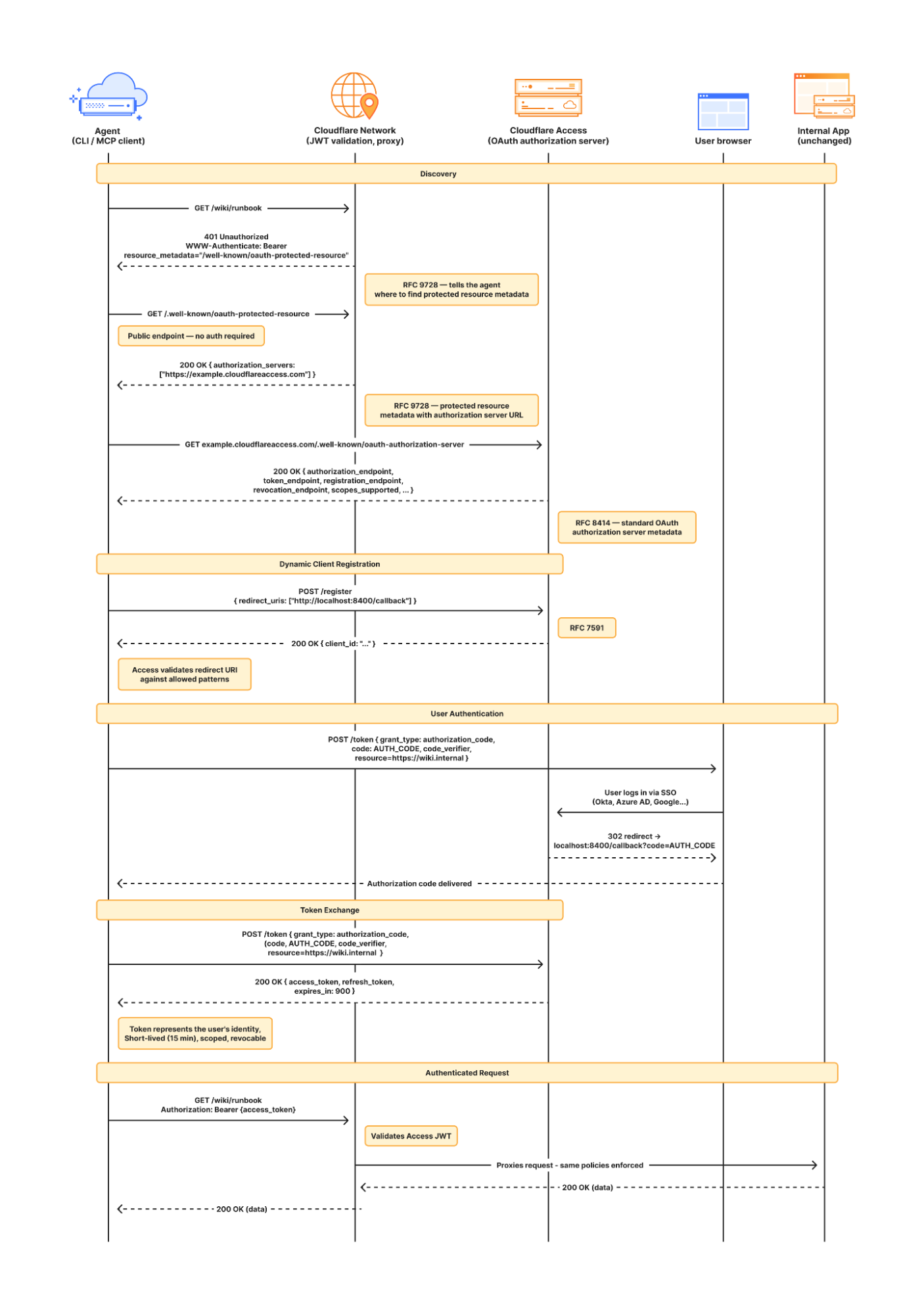
If this authorization flow looks familiar, that’s because it’s what the Model Context Protocol (MCP) uses. We originally built support for this into our MCP server portals product, which proxies and controls access to many MCP servers, to allow the portal to act as the OAuth server. Now, we’re bringing this to all Access apps so agents can access not only MCP servers that require authorization, but also web pages, web apps, and REST APIs.
Upgrading the long tail of internal software to work with agents is a daunting task. In principle, in order to be agent-ready, every internal and external app would ideally have discoverable APIs, a CLI, a well-crafted MCP server, and have adopted the many emerging agent standards.
AI adoption is not something that can wait for everything to be retrofitted. Most organizations have a significant backlog of apps built over many years. And many internal “apps” work great when treated by agents as simple websites. For something like an internal wiki, all you really need is to enable Markdown for Agents, turn on managed OAuth, and agents have what they need to read protected content.
To make the basics work across the widest set of internal applications, we use Managed OAuth. By putting Access in front of your legacy internal apps, you make them agent-ready instantly. No code changes, no retrofitting. Instead, just immediate compatibility.
Agents need to act on behalf of users inside organizations. One of the biggest anti-patterns we’ve seen is people provisioning service accounts for their agents and MCP servers, authenticated using static credentials. These have their place in simple use cases and quick prototypes, and Cloudflare Access supports service tokens for this purpose.
But the service account approach quickly shows its limits when fine-grained access controls and audit logs are required. We believe that every action an agent performs must be easily attributable to the human who initiated it, and that an agent must only be able to perform actions that its human operator is likewise authorized to do. Service accounts and static credentials become points at which attribution is lost. Agents that launder all of their actions through a service account are susceptible to confused deputy problems and result in audit logs that appear to originate from the agent itself.
For security and accountability, agents must use security primitives capable of expressing this user–agent relationship. OAuth is the industry standard protocol for requesting and delegating access to third parties. It gives agents a way to talk to your APIs on behalf of the user, with a token scoped to the user’s identity, so that access controls correctly apply and audit logs correctly attribute actions to the end user.
RFC 9728 is the OAuth standard that makes it possible for agents to discover where and how to authenticate. It standardizes where this information lives and how it’s structured. This RFC became official in April 2025 and was quickly adopted by the Model Context Protocol (MCP), which now requires that both MCP servers and clients support it.
But outside of MCP, agents should adopt RFC 9728 for an even more essential use case: making requests to web pages that are protected behind OAuth and making requests to plain old REST APIs.
Most agents have a tool for making basic HTTP requests to web pages. This is commonly called the “web fetch” tool. It’s similar to using the fetch() API in JavaScript, often with some additional post-processing on the response. It’s what lets you paste a URL into your agent and have your agent go look up the content.
Today, most agents’ web fetch tools won’t do anything with the www-authenticate header that a URL returns. The underlying model might choose to introspect the response headers and figure this out on its own, but the tool itself does not follow www-authenticate, look up /.well-known/oauth-authorization-server, and act as the client in the OAuth flow. But it can, and we strongly believe it should! Agents already do this to act as remote MCP clients.
To demonstrate this, we’ve put up a draft pull request that adapts the web fetch tool in Opencode to show this in action. Before making a request, the adapted tool first checks whether it already has credentials ; if it does, it uses them to make the initial request. If the tool gets back a 401 or a 403 with a www-authenticate header, it asks the user for consent to be sent through the server’s OAuth flow.
Here’s how that OAuth flow works. If you give the agent a URL that is protected by OAuth and complies with RFC 9728, the agent prompts the human for consent to open the authorization flow:

…sending the human to the login page:
…and then to a consent dialog that prompts the human to grant access to the agent:

Once the human grants access to the agent, the agent uses the token it has received to make an authenticated request:
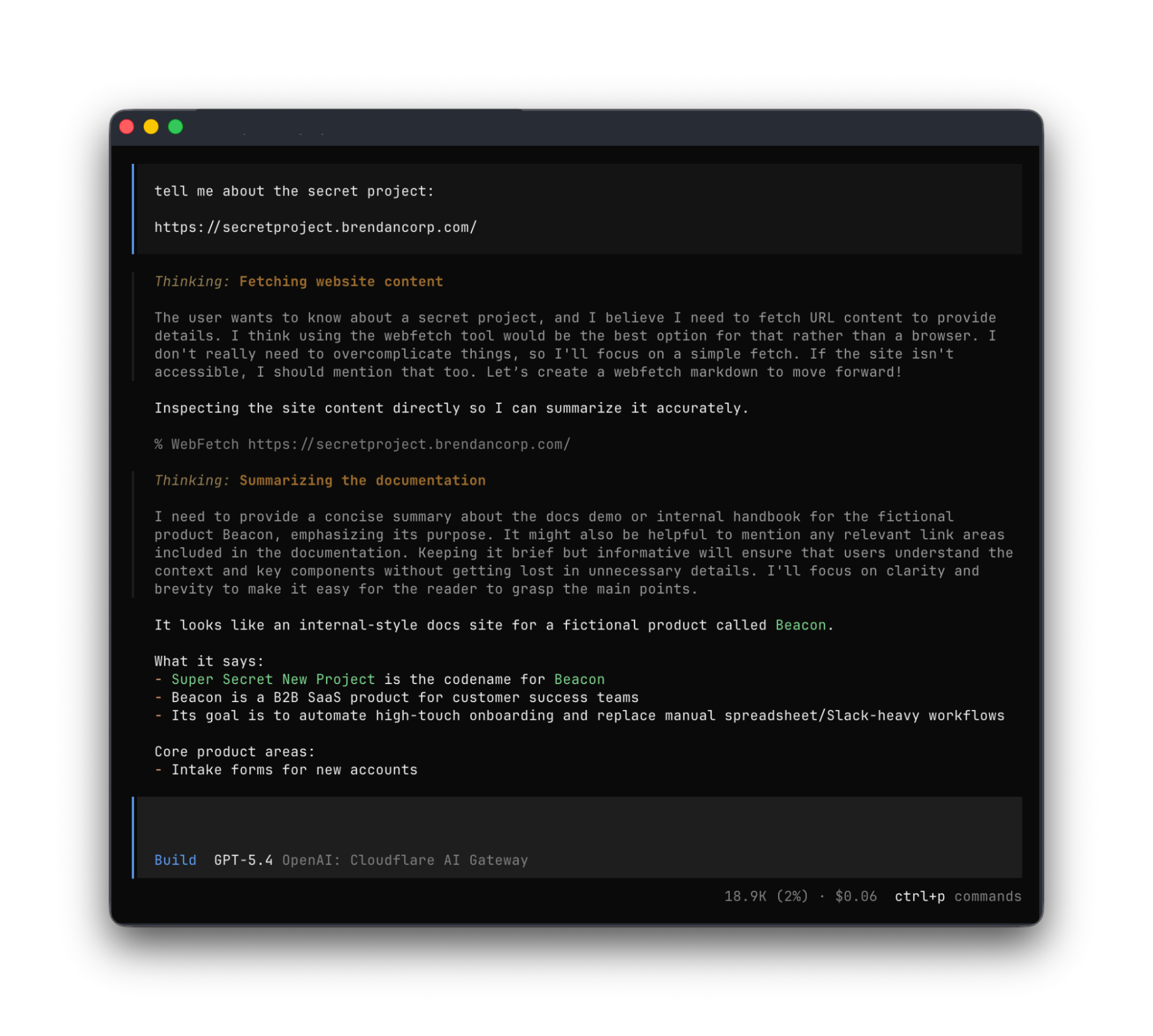
Any agent from Codex to Claude Code to Goose and beyond can implement this, and there’s nothing bespoke to Cloudflare. It’s all built using OAuth standards.
We think this flow is powerful, and that supporting RFC 9728 can help agents with more than just making basic web fetch requests. If a REST API supports RFC 9728 (and the agent does too), the agent has everything it needs to start making authenticated requests against that API. If the REST API supports RFC 9727, then the client can discover a catalog of REST API endpoints on its own, and do even more without additional documentation, agent skills, MCP servers or CLIs.
Each of these play important roles with agents — Cloudflare itself provides an MCP server for the Cloudflare API (built using Code Mode), Wrangler CLI, and Agent Skills, and a Plugin. But supporting RFC 9728 helps ensure that even when none of these are preinstalled, agents have a clear path forward. If the agent has a sandbox to execute untrusted code, it can just write and execute code that calls the API that the human has granted it access to. We’re working on supporting this for Cloudflare’s own APIs, to help your agents understand how to use Cloudflare.
At Cloudflare our own internal apps are deployed to dozens of different Cloudflare accounts, which are all part of an Organization — a newly introduced way for administrators to manage users, configurations, and view analytics across many Cloudflare accounts. We have had the same challenge as many of our customers: each Cloudflare account has to separately configure an IdP, so Cloudflare Access uses our identity provider. It’s critical that this is consistent across an organization — you don’t want one Cloudflare account to inadvertently allow people to sign in just with a one-time PIN, rather than requiring that they authenticate via single-sign on (SSO).
To solve this, we’re currently working on making it possible to share an identity provider across Cloudflare accounts, giving organizations a way to designate a single primary IdP for use across every account in their organization.
As new Cloudflare accounts are created within an organization, administrators will be able to configure a bridge to the primary IdP with a single click, so Access applications across accounts can be protected by one identity provider. This removes the need to manually configure IdPs account by account, which is a process that doesn’t scale for organizations with many teams and individuals each operating their own accounts.
Across companies, people in every role and business function are now using agents to build internal apps, and expect their agents to be able to access context from internal apps. We are responding to this step function growth in internal software development by making the Workers Platform and Cloudflare One work better together — so that it is easier to build and secure internal apps on Cloudflare.
Expect more to come soon, including:
More direct integration between Cloudflare Access and Cloudflare Workers, without the need to validate JWTs or remember which of many routes a particular Worker is exposed on.
wrangler dev --tunnel — an easy way to expose your local development server to others when you’re building something new, and want to share it with others before deploying
A CLI interface for Cloudflare Access and the entire Cloudflare API
More announcements to come during Agents Week 2026
Managed OAuth is now available, in open beta, to all Cloudflare customers. Head over to the Cloudflare dashboard to enable it for your Access applications. You can use it for any internal app, whether it’s one built on Cloudflare Workers, or hosted elsewhere. And if you haven’t built internal apps on the Workers Platform yet — it’s the fastest way for your team to go from zero to deployed (and protected) in production.
GlassWorm hides inside developer tools. Once it’s in, it steals data, installs remote access malware, and even a fake browser extension to monitor activity. While it starts with developers, the impact can quickly spread. With stolen credentials, access tokens, and compromised tools, attackers can launch wider supply chain attacks, putting companies and everyday users at risk.
How the infection starts
GlassWorm is usually distributed through developer channels. That means that programmers get their systems compromised by downloading malicious packages from code repositories like npm, GitHub, PyPI, and so on. These can be new malicious packages or altered packages from once-trusted, but now compromised, accounts.
The developer installs or updates a trusted or popular npm/PyPI package or VS Code extension, but the maintainer’s account or supply chain has been compromised.
What happens after installation
Once the package is pulled, a preinstall script or invisible Unicode loader runs and fingerprints the machine. If it finds a Russian locale, execution stops. If not, the script waits a few hours and then quietly contacts the Solana blockchain to discover where to fetch stage two of the infection. Rather than hardcoding a link that could be taken down, the attacker stores this information in the memo field of a Solana transaction.
Stage two: Data theft
The stage two payload is an infostealer that targets browser extension profiles, standalone wallet apps, and .txt/image files likely holding seeds or keys, along with npm tokens, git credentials, VS Code secrets, and cloud provider credentials. After gathering this information, it sends it to a remote server via a POST request.
Stage three: Full system compromise
After that, it’s on to stage three. The malware fetches two main components: the Ledger/Trezor phishing binary aimed at users with a Ledger or Trezor device plugged in, and a Node.js Remote Access Trojan (RAT) with several modules, including browser credential stealers and a Chrome‑extension installer. It gains persistence by setting up scheduled tasks and Run registry keys so that the RAT comes back on every reboot.
How the malware stays hidden and connected
The RAT does not hardcode its main command and control (C2) address. Instead, it performs a distributed hash table (DHT) lookup for the pinned public key. DHT is a distributed system that provides a lookup service similar to a hash table. Key–value pairs are stored in a DHT and can be used to retrieve the value associated with a given key. If this method fails, the RAT goes back to the Solana blockchain to fetch a new IP address.
Browser surveillance and tracking
The RAT also force-installs a Chrome extension (in the example described by Aikido, it pretends to be “Google Docs Offline”), which acts as an onboard session surveillance. Besides stealing cookies, localStorage, the full Document Object Model (DOM) tree of the active tab, bookmarks, screenshots, keystrokes, clipboard content, up to 5,000 browser history entries, and the installed extensions list, it can also be used to take screenshots and act as a keylogger.
What this looks like to the victim
From the victim’s point of view, all this happens very stealthily. If they’re paying close attention, they may see a few suspicious outgoing connections, the startup entries, and the new browser extension.
Who’s at risk, and how this could spread
The current setup appears to focus on developers who may have cryptocurrency assets, but many of these components and the stolen information can be used to initiate supply chain attacks or target other groups of users.
Because of the stealthy nature of this infection chain, there are two main strategies to stay safe:
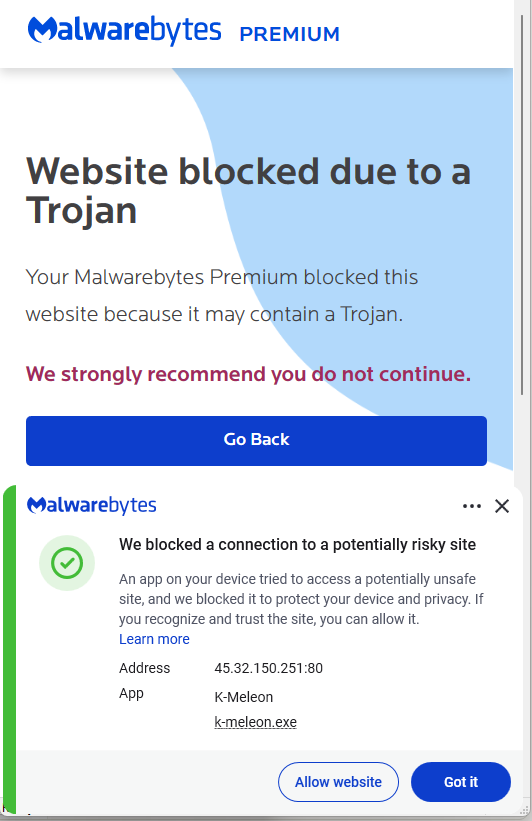
IP addresses:
45.32.150[.]251
217.69.3[.]152
217.69.0[.]159
45.150.34[.]158
Registry keys:
HKEY_CURRENT_USER\Software\Microsoft\Windows\CurrentVersion\Run\UpdateApp
HKEY_CURRENT_USER\Software\Microsoft\Windows\CurrentVersion\Run\UpdateLedger
Scheduled Task:
Name: UpdateApp which runs: AghzgY.ps1
Browser extension:
Display name: Google Docs Offline (version 1.95.1)
Windows extension directory name :jucku
macOS extension directory name: myextension
We don’t just report on threats—we remove them
Cybersecurity risks should never spread beyond a headline. Keep threats off your devices by downloading Malwarebytes today.
* This post was updated at 11:45 a.m. Pacific time to clarify that the use case described here is a proof of concept and a personal project. Some sections have been updated for clarity.
Matrix is the gold standard for decentralized, end-to-end encrypted communication. It powers government messaging systems, open-source communities, and privacy-focused organizations worldwide.
For the individual developer, however, the appeal is often closer to home: bridging fragmented chat networks (like Discord and Slack) into a single inbox, or simply ensuring your conversation history lives on infrastructure you control. Functionally, Matrix operates as a decentralized, eventually consistent state machine. Instead of a central server pushing updates, homeservers exchange signed JSON events over HTTP, using a conflict resolution algorithm to merge these streams into a unified view of the room's history.
But there is a "tax" to running it. Traditionally, operating a Matrix homeserver has meant accepting a heavy operational burden. You have to provision virtual private servers (VPS), tune PostgreSQL for heavy write loads, manage Redis for caching, configure reverse proxies, and handle rotation for TLS certificates. It’s a stateful, heavy beast that demands to be fed time and money, whether you’re using it a lot or a little.
We wanted to see if we could eliminate that tax entirely.
Spoiler: We could. In this post, we’ll explain how we ported a Matrix homeserver to Cloudflare Workers. The resulting proof of concept is a serverless architecture where operations disappear, costs scale to zero when idle, and every connection is protected by post-quantum cryptography by default. You can view the source code and deploy your own instance directly from Github.
Our starting point was Synapse, the Python-based reference Matrix homeserver designed for traditional deployments. PostgreSQL for persistence, Redis for caching, filesystem for media.
Porting it to Workers meant questioning every storage assumption we’d taken for granted.
The challenge was storage. Traditional homeservers assume strong consistency via a central SQL database. Cloudflare Durable Objects offers a powerful alternative. This primitive gives us the strong consistency and atomicity required for Matrix state resolution, while still allowing the application to run at the edge.
We ported the core Matrix protocol logic — event authorization, room state resolution, cryptographic verification — in TypeScript using the Hono framework. D1 replaces PostgreSQL, KV replaces Redis, R2 replaces the filesystem, and Durable Objects handle real-time coordination.
Here’s how the mapping worked out:

Moving to Cloudflare Workers brings several advantages for a developer: simple deployment, lower costs, low latency, and built-in security.
Easy deployment: A traditional Matrix deployment requires server provisioning, PostgreSQL administration, Redis cluster management, TLS certificate renewal, load balancer configuration, monitoring infrastructure, and on-call rotations.
With Workers, deployment is simply: wrangler deploy. Workers handles TLS, load balancing, DDoS protection, and global distribution.
Usage-based costs: Traditional homeservers cost money whether anyone is using them or not. Workers pricing is request-based, so you pay when you’re using it, but costs drop to near zero when everyone’s asleep.
Lower latency globally: A traditional Matrix homeserver in us-east-1 adds 200ms+ latency for users in Asia or Europe. Workers, meanwhile, run in 300+ locations worldwide. When a user in Tokyo sends a message, the Worker executes in Tokyo.
Built-in security: Matrix homeservers can be high-value targets: They handle encrypted communications, store message history, and authenticate users. Traditional deployments require careful hardening: firewall configuration, rate limiting, DDoS mitigation, WAF rules, IP reputation filtering.
Workers provide all of this by default.
Cloudflare deployed post-quantum hybrid key agreement across all TLS 1.3 connections in October 2022. Every connection to our Worker automatically negotiates X25519MLKEM768 — a hybrid combining classical X25519 with ML-KEM, the post-quantum algorithm standardized by NIST.
Classical cryptography relies on mathematical problems that are hard for traditional computers but trivial for quantum computers running Shor’s algorithm. ML-KEM is based on lattice problems that remain hard even for quantum computers. The hybrid approach means both algorithms must fail for the connection to be compromised.
Understanding where encryption happens matters for security architecture. When someone sends a message through our homeserver, here’s the actual path:
The sender’s client takes the plaintext message and encrypts it with Megolm — Matrix’s end-to-end encryption. This encrypted payload then gets wrapped in TLS for transport. On Cloudflare, that TLS connection uses X25519MLKEM768, making it quantum-resistant.
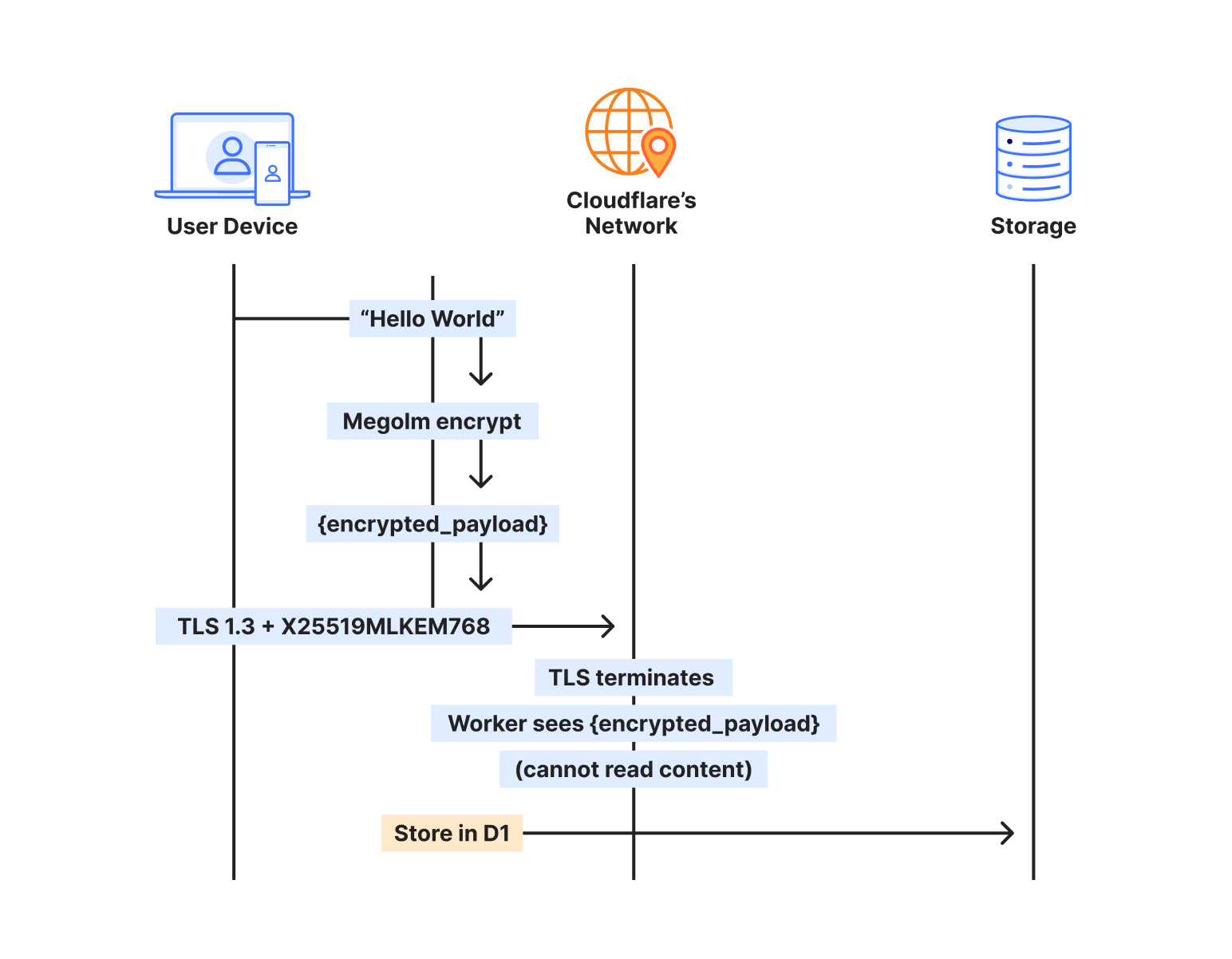
The Worker terminates TLS, but what it receives is still encrypted — the Megolm ciphertext. We store that ciphertext in D1, index it by room and timestamp, and deliver it to recipients. But we never see the plaintext. The message “Hello, world” exists only on the sender’s device and the recipient’s device.
When the recipient syncs, the process reverses. They receive the encrypted payload over another quantum-resistant TLS connection, then decrypt locally with their Megolm session keys.
This protects via two encryption layers that operate independently:
The transport layer (TLS) protects data in transit. It’s encrypted at the client and decrypted at the Cloudflare edge. With X25519MLKEM768, this layer is now post-quantum.
The application layer (Megolm E2EE) protects message content. It’s encrypted on the sender’s device and decrypted only on recipient devices. This uses classical Curve25519 cryptography.
Any Matrix homeserver operator — whether running Synapse on a VPS or this implementation on Workers — can see metadata: which rooms exist, who’s in them, when messages were sent. But no one in the infrastructure chain can see the message content, because the E2EE payload is encrypted on sender devices before it ever hits the network. Cloudflare terminates TLS and passes requests to your Worker, but both see only Megolm ciphertext. Media in encrypted rooms is encrypted client-side before upload, and private keys never leave user devices.
Achieving post-quantum TLS on a traditional Matrix deployment would require upgrading OpenSSL or BoringSSL to a version supporting ML-KEM, configuring cipher suite preferences correctly, testing client compatibility across all Matrix apps, monitoring for TLS negotiation failures, staying current as PQC standards evolve, and handling clients that don’t support PQC gracefully.
With Workers, it’s automatic. Chrome, Firefox, and Edge all support X25519MLKEM768. Mobile apps using platform TLS stacks inherit this support. The security posture improves as Cloudflare’s PQC deployment expands — no action required on our part.
The key insight from porting Tuwunel was that different data needs different consistency guarantees. We use each Cloudflare primitive for what it does best.
D1 stores everything that needs to survive restarts and support queries: users, rooms, events, device keys. Over 25 tables covering the full Matrix data model.
CREATE TABLE events (
	event_id TEXT PRIMARY KEY,
	room_id TEXT NOT NULL,
	sender TEXT NOT NULL,
	event_type TEXT NOT NULL,
	state_key TEXT,
	content TEXT NOT NULL,
	origin_server_ts INTEGER NOT NULL,
	depth INTEGER NOT NULL
);
D1’s SQLite foundation meant we could port Tuwunel’s queries with minimal changes. Joins, indexes, and aggregations work as expected.
We learned one hard lesson: D1’s eventual consistency breaks foreign key constraints. A write to rooms might not be visible when a subsequent write to events checks the foreign key. We removed all foreign keys and enforce referential integrity in application code.
OAuth authorization codes live for 10 minutes, while refresh tokens last for a session.
// Store OAuth code with 10-minute TTL
kv.put(&format!("oauth_code:{}", code), &token_data)?
	.expiration_ttl(600)
	.execute()
	.await?;
KV’s global distribution means OAuth flows work fast regardless of where users are located.
Matrix media maps directly to R2, so you can upload an image, get back a content-addressed URL – and egress is free.
Some operations can’t tolerate eventual consistency. When a client claims a one-time encryption key, that key must be atomically removed. If two clients claim the same key, encrypted session establishment fails.
Durable Objects provide single-threaded, strongly consistent storage:
#[durable_object]
pub struct UserKeysObject {
	state: State,
	env: Env,
}

impl UserKeysObject {
	async fn claim_otk(&self, algorithm: &str) -> Result<Option<Key>> {
    	// Atomic within single DO - no race conditions possible
    	let mut keys: Vec<Key> = self.state.storage()
        	.get("one_time_keys")
        	.await
        	.ok()
        	.flatten()
        	.unwrap_or_default();

    	if let Some(idx) = keys.iter().position(|k| k.algorithm == algorithm) {
        	let key = keys.remove(idx);
        	self.state.storage().put("one_time_keys", &keys).await?;
        	return Ok(Some(key));
    	}
    	Ok(None)
	}
}
We use UserKeysObject for E2EE key management, RoomObject for real-time room events like typing indicators and read receipts, and UserSyncObject for to-device message queues. The rest flows through D1.
Our implementation supports the full Matrix E2EE stack: device keys, cross-signing keys, one-time keys, fallback keys, key backup, and dehydrated devices.
Modern Matrix clients use OAuth 2.0/OIDC instead of legacy password flows. We implemented a complete OAuth provider, with dynamic client registration, PKCE authorization, RS256-signed JWT tokens, token refresh with rotation, and standard OIDC discovery endpoints.
curl https://matrix.example.com/.well-known/openid-configuration
{
  "issuer": "https://matrix.example.com",
  "authorization_endpoint": "https://matrix.example.com/oauth/authorize",
  "token_endpoint": "https://matrix.example.com/oauth/token",
  "jwks_uri": "https://matrix.example.com/.well-known/jwks.json"
}
Point Element or any Matrix client at the domain, and it discovers everything automatically.
Traditional Matrix sync transfers megabytes of data on initial connection, draining mobile battery and data plans.
Sliding Sync lets clients request exactly what they need. Instead of downloading everything, clients get the 20 most recent rooms with minimal state. As users scroll, they request more ranges. The server tracks position and sends only deltas.
Combined with edge execution, mobile clients can connect and render their room list in under 500ms, even on slow networks.
For a homeserver serving a small team:
| Traditional (VPS) | Workers |
|---|---|---|
Monthly cost (idle) | $20-50 | <$1 |
Monthly cost (active) | $20-50 | $3-10 |
Global latency | 100-300ms | 20-50ms |
Time to deploy | Hours | Seconds |
Maintenance | Weekly | None |
DDoS protection | Additional cost | Included |
Post-quantum TLS | Complex setup | Automatic |
*Based on public rates and metrics published by DigitalOcean, AWS Lightsail, and Linode as of January 15, 2026.
The economics improve further at scale. Traditional deployments require capacity planning and over-provisioning. Workers scale automatically.
We started this as an experiment: could Matrix run on Workers? It can—and the approach can work for other stateful protocols, too.
By mapping traditional stateful components to Cloudflare’s primitives — Postgres to D1, Redis to KV, mutexes to Durable Objects — we can see that complex applications don't need complex infrastructure. We stripped away the operating system, the database management, and the network configuration, leaving only the application logic and the data itself.
Workers offers the sovereignty of owning your data, without the burden of owning the infrastructure.
I have been experimenting with the implementation and am excited for any contributions from others interested in this kind of service.
Ready to build powerful, real-time applications on Workers? Get started with Cloudflare Workers and explore Durable Objects for your own stateful edge applications. Join our Discord community to connect with other developers building at the edge.
Cloudflare launched fifteen years ago with a mission to help build a better Internet. Over that time the Internet has changed and so has what it needs from teams like ours. In this year’s Founder’s Letter, Matthew and Michelle discussed the role we have played in the evolution of the Internet, from helping encryption grow from 10% to 95% of Internet traffic to more recent challenges like how people consume content.
We spend Birthday Week every year releasing the products and capabilities we believe the Internet needs at this moment and around the corner. Previous Birthday Weeks saw the launch of IPv6 gateway in 2011, Universal SSL in 2014, Cloudflare Workers and unmetered DDoS protection in 2017, Cloudflare Radar in 2020, R2 Object Storage with zero egress fees in 2021, post-quantum upgrades for Cloudflare Tunnel in 2022, Workers AI and Encrypted Client Hello in 2023. And those are just a sample of the launches.
This year’s themes focused on helping prepare the Internet for a new model of monetization that encourages great content to be published, fostering more opportunities to build community both inside and outside of Cloudflare, and evergreen missions like making more features available to everyone and constantly improving the speed and security of what we offer.
We shipped a lot of new things this year. In case you missed the dozens of blog posts, here is a breakdown of everything we announced during Birthday Week 2025.
Monday, September 22
| What | In a sentence … |
|---|---|
| Help build the future: announcing Cloudflare’s goal to hire 1,111 interns in 2026 | To invest in the next generation of builders, we announced our most ambitious intern program yet with a goal to hire 1,111 interns in 2026. |
| Supporting the future of the open web: Cloudflare is sponsoring Ladybird and Omarchy | To support a diverse and open Internet, we are now sponsoring Ladybird (an independent browser) and Omarchy (an open-source Linux distribution and developer environment). |
| Come build with us: Cloudflare’s new hubs for startups | We are opening our office doors in four major cities (San Francisco, Austin, London, and Lisbon) as free hubs for startups to collaborate and connect with the builder community. |
| Free access to Cloudflare developer services for non-profit and civil society organizations | We extended our Cloudflare for Startups program to non-profits and public-interest organizations, offering free credits for our developer tools. |
| Introducing free access to Cloudflare developer features for students | We are removing cost as a barrier for the next generation by giving students with .edu emails 12 months of free access to our paid developer platform features. |
| Cap’n Web: a new RPC system for browsers and web servers | We open-sourced Cap'n Web, a new JavaScript-native RPC protocol that simplifies powerful, schema-free communication for web applications. |
| A lookback at Workers Launchpad and a warm welcome to Cohort #6 | We announced Cohort #6 of the Workers Launchpad, our accelerator program for startups building on Cloudflare. |
Tuesday, September 23
| What | In a sentence … |
|---|---|
| Building unique, per-customer defenses against advanced bot threats in the AI era | New anomaly detection system that uses machine learning trained on each zone to build defenses against AI-driven bot attacks. |
| Why Cloudflare, Netlify, and Webflow are collaborating to support Open Source tools | To support the open web, we joined forces with Webflow to sponsor Astro, and with Netlify to sponsor TanStack. |
| Launching the x402 Foundation with Coinbase, and support for x402 transactions | We are partnering with Coinbase to create the x402 Foundation, encouraging the adoption of the x402 protocol to allow clients and services to exchange value on the web using a common language |
| Helping protect journalists and local news from AI crawlers with Project Galileo | We are extending our free Bot Management and AI Crawl Control services to journalists and news organizations through Project Galileo. |
| Cloudflare Confidence Scorecards - making AI safer for the Internet | Automated evaluation of AI and SaaS tools, helping organizations to embrace AI without compromising security. |
Wednesday, September 24
| What | In a sentence … |
|---|---|
| Automatically Secure: how we upgraded 6,000,000 domains by default | Our Automatic SSL/TLS system has upgraded over 6 million domains to more secure encryption modes by default and will soon automatically enable post-quantum connections. |
| Giving users choice with Cloudflare’s new Content Signals Policy | The Content Signals Policy is a new standard for robots.txt that lets creators express clear preferences for how AI can use their content. |
| To build a better Internet in the age of AI, we need responsible AI bot principles | A proposed set of responsible AI bot principles to start a conversation around transparency and respect for content creators' preferences. |
| Securing data in SaaS to SaaS applications | New security tools to give companies visibility and control over data flowing between SaaS applications. |
| Securing today for the quantum future: WARP client now supports post-quantum cryptography (PQC) | Cloudflare’s WARP client now supports post-quantum cryptography, providing quantum-resistant encryption for traffic. |
| A simpler path to a safer Internet: an update to our CSAM scanning tool | We made our CSAM Scanning Tool easier to adopt by removing the need to create and provide unique credentials, helping more site owners protect their platforms. |
Thursday, September 25
| What | In a sentence … |
|---|---|
| Every Cloudflare feature, available to everyone | We are making every Cloudflare feature, starting with Single Sign On (SSO), available for anyone to purchase on any plan. |
| Cloudflare's developer platform keeps getting better, faster, and more powerful | Updates across Workers and beyond for a more powerful developer platform – such as support for larger and more concurrent Container images, support for external models from OpenAI and Anthropic in AI Search (previously AutoRAG), and more. |
| Partnering to make full-stack fast: deploy PlanetScale databases directly from Workers | You can now connect Cloudflare Workers to PlanetScale databases directly, with connections automatically optimized by Hyperdrive. |
| Announcing the Cloudflare Data Platform | A complete solution for ingesting, storing, and querying analytical data tables using open standards like Apache Iceberg. |
| R2 SQL: a deep dive into our new distributed query engine | A technical deep dive on R2 SQL, a serverless query engine for petabyte-scale datasets in R2. |
| Safe in the sandbox: security hardening for Cloudflare Workers | A deep-dive into how we’ve hardened the Workers runtime with new defense-in-depth security measures, including V8 sandboxes and hardware-assisted memory protection keys. |
| Choice: the path to AI sovereignty | To champion AI sovereignty, we've added locally-developed open-source models from India, Japan, and Southeast Asia to our Workers AI platform. |
| Announcing Cloudflare Email Service’s private beta | We announced the Cloudflare Email Service private beta, allowing developers to reliably send and receive transactional emails directly from Cloudflare Workers. |
| A year of improving Node.js compatibility in Cloudflare Workers | There are hundreds of new Node.js APIs now available that make it easier to run existing Node.js code on our platform. |
Friday, September 26
| What | In a sentence … |
|---|---|
| Cloudflare just got faster and more secure, powered by Rust | We have re-engineered our core proxy with a new modular, Rust-based architecture, cutting median response time by 10ms for millions. |
| Introducing Observatory and Smart Shield | New monitoring tools in the Cloudflare dashboard that provide actionable recommendations and one-click fixes for performance issues. |
| Monitoring AS-SETs and why they matter | Cloudflare Radar now includes Internet Routing Registry (IRR) data, allowing network operators to monitor AS-SETs to help prevent route leaks. |
| An AI Index for all our customers | We announced the private beta of AI Index, a new service that creates an AI-optimized search index for your domain that you control and can monetize. |
| Introducing new regional Internet traffic and Certificate Transparency insights on Cloudflare Radar | Sub-national traffic insights and Certificate Transparency dashboards for TLS monitoring. |
| Eliminating Cold Starts 2: shard and conquer | We have reduced Workers cold starts by 10x by implementing a new "worker sharding" system that routes requests to already-loaded Workers. |
| Network performance update: Birthday Week 2025 | The TCP Connection Time (Trimean) graph shows that we are the fastest TCP connection time in 40% of measured ISPs – and the fastest across the top networks. |
| How Cloudflare uses performance data to make the world’s fastest global network even faster | We are using our network's vast performance data to tune congestion control algorithms, improving speeds by an average of 10% for QUIC traffic. |
| Code Mode: the better way to use MCP | It turns out we've all been using MCP wrong. Most agents today use MCP by exposing the "tools" directly to the LLM. We tried something different: Convert the MCP tools into a TypeScript API, and then ask an LLM to write code that calls that API. The results are striking. |
Helping build a better Internet has always been about more than just technology. Like the announcements about interns or working together in our offices, the community of people behind helping build a better Internet matters to its future. This week, we rolled out our most ambitious set of initiatives ever to support the builders, founders, and students who are creating the future.
For founders and startups, we are thrilled to welcome Cohort #6 to the Workers Launchpad, our accelerator program that gives early-stage companies the resources they need to scale. But we’re not stopping there. We’re opening our doors, literally, by launching new physical hubs for startups in our San Francisco, Austin, London, and Lisbon offices. These spaces will provide access to mentorship, resources, and a community of fellow builders.
We’re also investing in the next generation of talent. We announced free access to the Cloudflare developer platform for all students, giving them the tools to learn and experiment without limits. To provide a path from the classroom to the industry, we also announced our goal to hire 1,111 interns in 2026 — our biggest commitment yet to fostering future tech leaders.
And because a better Internet is for everyone, we’re extending our support to non-profits and public-interest organizations, offering them free access to our production-grade developer tools, so they can focus on their missions.
Whether you're a founder with a big idea, a student just getting started, or a team working for a cause you believe in, we want to help you succeed.
Thank you to our customers, our community, and the millions of developers who trust us to help them build, secure, and accelerate the Internet. Your curiosity and feedback drive our innovation.
It’s been an incredible 15 years. And as always, we’re just getting started!
(Watch the full conversation on our show ThisWeekinNET.com about what we launched during Birthday Week 2025 here.)
Today, we are announcing Cloudflare’s Browser Developer Program, a collaborative initiative to strengthen partnership between Cloudflare and browser development teams.
Browser developers can apply to join here.
At Cloudflare, we aim to help build a better Internet. One way we achieve this is by providing website owners with the tools to detect and block unwanted traffic from bots through Cloudflare Challenges or Turnstile. As both bots and our detection systems become more sophisticated, the security checks required to validate human traffic become more complicated. While we aim to strike the right balance, we recognize these security measures can sometimes cause issues for legitimate browsers and their users.
A core objective of the program is to provide a space for intentional collaboration where we can work directly with browser developers to ensure that both accessibility and security can co-exist. We aim to support the evolving browser landscape, while upholding our responsibility to our customers to deliver the best security products. This program provides a dedicated channel for browser teams to share feedback, report issues, and help ensure that Cloudflare’s Challenges and Turnstile work seamlessly with all browsers.
Browser developers in the program will benefit from:
A two-way communication channel to Cloudflare’s team dedicated to addressing browser-specific concerns, feedback, and issues.
Best practices for building and testing against Cloudflare Challenges and Turnstile.
A private community forum for updates, questions, and discussion between browser developers and Cloudflare engineers.
Early visibility into updates or changes to that may impact how your browser handles Cloudflare Challenges.
(If applicable) Testing integration where we will incorporate your browser into our testing pipeline and monitor its performance with our releases.
This program is designed as a partnership where Cloudflare will, with our best effort, ensure our security products work properly with all browsers, while giving browser developers a voice in how these systems evolve. As an output of this program, we expect to publish clear browser requirements to run Cloudflare Challenges while striking the balance between openness and security.
For end users browsing the web, we continue to support a wide range of browsers. We will continue to update this list based on the insights and collaborations from the Browser Developer Program. We are also committed to ensuring our Challenge interstitial pages and Turnstile provide clear, actionable UI/UX for any error or failed states, making it easier for you to understand and resolve issues you may encounter.
If you are working on a browser and want to ensure your users have a seamless experience with Cloudflare-protected websites, we encourage you to apply here.
We’ll ask for basic information about your project and ask you to sign our Browser Developer Program Agreement. In addition, we expect participants to adhere to our Community Code of Conduct and commit to constructive engagement.
Once you’re accepted, you’ll be invited to a private space in the Cloudflare Community where you can engage directly with our team.
Cloudflare Challenges, a security mechanism to verify whether a visitor is a human or a bot, serve a wide variety of browsers in the world today. Chrome leads with 68.0%, Safari at 8.7%, Firefox at 6.3%, Edge at 4.8%, and Opera at 6.2%. However, the very long tail of browsers that collectively make up the remaining traffic, each representing less than 1% individually but together painting a picture of an incredibly diverse web ecosystem.

Browser traffic distribution, with 100+ browsers comprising the 'Other' category
This diversity spans a wide range of environments, each with unique constraints and capabilities:
Emerging and experimental browsers pushing the boundaries of web technology
Privacy-focused browsers such as DuckDuckGo that prioritize user data protection
Embedded browsers inside social media apps like Facebook, Instagram, and TikTok
WebViews used by mobile applications
Gaming and VR browsers such as Oculus for headsets and gaming consoles
Smart device browsers built into classroom displays and home appliances
Supporting this level of diversity poses real engineering challenges. Many of these browsers deviate from standard assumptions. Some lack full support for modern Web APIs, others operate under more stringent data privacy policies, and some are optimized for environments where our script to verify visitors may be hindered or blocked from running properly. These browsers are not bad or malicious. But their behavior may fall outside the typical patterns observed in mainstream browsers, which can lead to problematic or failed Challenge flows which we would like to avoid.
From an engineering perspective, our job is to strike a difficult balance. If our logic is too rigid that it expects only the behaviors of the majority, we risk excluding legitimate users on less conventional platforms. But if we relax our standards too much, we increase the attack surface for abuse. We cannot overfit to the top 5 browsers, nor can we afford to treat all clients as equal in capability or trustworthiness.
The Browser Developer Program is one way to close this gap. By working directly with browser teams, especially those building for niche or emerging environments, we can better understand the constraints they operate under and collaborate to make each of our systems more compatible and resilient.
This program is free to join, and is open to any browser developer, no matter the size or the lifecycle stage. Our goal is to listen, learn, and collaborate with browser developers to create a better experience for everyone.
We believe this program will ultimately benefit end users the most. By joining this program, you will help us build solutions that prioritize both the security needs of businesses as well as the diverse ways people access the Internet.
We look forward to your participation!
On June 27, the United Nations celebrates Micro-, Small, and Medium-sized Enterprises Day (MSME) to recognize the critical role these businesses play in the global economy and economic development. According to the World Bank and the UN, small and medium-sized businesses make up about 90 percent of all businesses, between 50-70 percent of global employment, and 50 percent of global GDP. They not only drive local and national economies, but also sustain the livelihoods of women, youth, and other groups in vulnerable situations.
As part of MSME Day, we wanted to highlight some of the amazing startups and small businesses that are using Cloudflare to not only secure and improve their websites, but also build, scale, and deploy new serverless applications (and businesses) directly on Cloudflare's global network.
Cloudflare started as an idea to provide better security and performance tools for everyone. Back in 2010, if you were a large enterprise and wanted better performance and security for your website, you could buy an expensive piece of on-premise hardware or contract with a large, global Content Delivery Network (CDN) provider. Those same types of services were not only unaffordable for most website owners or smaller businesses, but also generally unavailable, as they typically demanded expensive on-premise hardware or direct server access that most smaller operations lacked. Cloudflare launched, fittingly at a startup competition, with the goal of making those same types of tools available to everyone.
As Cloudflare has grown, we have continued to highlight how our millions of free customers, many of them individual developers, startups, and small businesses, drive our network, company, and mission. They help keep our costs low, allow us to interconnect with more networks, and help us build better products.
Over the last 12 months, we have put even more of an emphasis on supporting startup and small business communities by expanding free developer tools, which make it easier for anyone to build full stack, AI-enabled applications directly on Cloudflare's network, and investing in programs like Cloudflare for Startups, Workers Launchpad, and the Dev Alliance. For example:
More than 3,000 startups are receiving free credits to build and scale their applications directly on Cloudflare's global network using our developer services.
In 2024 alone, 122 startups in 22 countries were accepted into Cloudflare's Launchpad Program, which provides additional infrastructure, tools, and community support to help entrepreneurs scale their applications and businesses, including access to Cloudflare demo days.
Since 2022, Cloudflare has worked with over 40 venture capital partners to secure more than $2 billion in potential financing for companies participating in our startup programs.
With the right tools in hand, entrepreneurs are turning ideas into real world impact, and we’re honored to support them.
Cloudflare proudly supports over hundreds of thousands of small businesses that are using our services, including SaaS startups, health and wellness providers, real estate firms, local retailers, and global service providers. Here are just a few examples of these amazing new companies.
A scalable headless CMS for developers that generates fully documented APIs, delivered worldwide using Workers and Pages. | |
Enables mobile developers to push live updates without app store delays, with Workers & R2 distributing updates at the edge. | |
Offers real-time and historical exchange rate data for 150+ currencies, using Workers to ensure fast, reliable API access. | |
Turns Notion pages into embeddable web content, dynamically rendered and cached with Workers and Pages. | |
An open-source visual site builder delivering fast, global performance through Pages and Workers. | |
Streamlines code review workflows to reduce tech debt, with Workers helping automate and scale delivery. | |
A global optical retailer modernizing its frontend architecture using Pages and Workers for faster, scalable web experiences. | |
A full-stack platform for Nuxt developers to build, store, and deploy apps with ease and integrated with Workers, Pages, and more. | |
A curated directory of startup tools, served instantly worldwide with Pages and Workers. | |
Builds AI-native productivity tools that are fast, modular, and edge-ready using Cloudflare to support performance and flexibility. | |
Offers open-source Capacitor plugins for mobile developers, with docs and assets served quickly via Workers and Pages. |
No-code storefronts for food brands, delivering ultra-low latency and handling high traffic with Workers. | |
Creates interactive sales documents that load fast and stay secure globally using Workers, KV, and R2. | |
Multiplayer game SDK and backend platform providing low-latency previews and real-time APIs with Workers and Pages. | |
Powers transport apps with geolocation-aware content and secure APIs, ensuring uptime even in remote areas via Workers. | |
AI-driven presentation builder handling high-volume rendering quickly using Pages and Workers. | |
Provides tools for logistics companies to monitor vehicle fleets, manage drivers, and improve fuel efficiency. | |
Social platform focused on meaningful questions, fast-loading and globally accessible with Pages and Workers. | |
Provides secure identity infrastructure with high-performance APIs and built-in protection using Workers and R2. | |
AI-powered scheduling tool delivering fast booking and timezone handling at Cloudflare’s edge. | |
Ambient audio streaming with ultra-low latency for mobile and desktop users, powered by Workers and R2. | |
Property search platform delivering fast, map-based listings and seamless mobile experience via Pages and Workers. | |
Digital garden showcasing creative web projects, hosted and powered for speed on Pages and Workers. | |
Inventory management app delivering fast UIs and APIs globally using Workers, R2, and Pages. | |
Mobile-friendly mini websites from Instagram bios, powered by Workers for routing and Pages for hosting. |
Cloudflare is also working with our civil society partners in the Asia-Pacific region to help provide security training for new businesses. For example, in 2025, we partnered with Cyberpeace, a leading nonprofit organization in India, to host a webinar focused on building cyber resilience. The session included a live onboarding session, training on security services, and information on the most common cyber threats. Our first session attracted over 95 participants, and due to the high demand, Cloudflare is planning to host an additional in-person training session later this year. Stay tuned for more details!
It is incredible to see all the innovative ways companies are building new ideas with Cloudflare. However, as a startup originally designed to protect other startups, we know security remains one of the most pressing concerns for any small business. According to the U.S. Federal Communications Commission, theft of digital information has surpassed physical theft as the most commonly reported fraud for small businesses. In 2025 so far, Cloudflare has mitigated over three million Layer 3 (network layer) DDoS attacks targeting small businesses protected by our network.
This year, to help celebrate MSME day, Cloudflare is continuing our efforts to provide training and capacity building for our small business partners by releasing a brand new Cloudflare Small Business Security Guide. The guide includes step-by-step instructions that will allow anyone to better understand cyber security services and protect their business and customers from common cyberattacks. For more information, visit the Cloudflare for Small Businesses page to download the guide today.
Cloudflare will always make robust security services available to any small business that needs them, free of charge. It is a fundamental part of our mission to help build a better Internet and our identity as a company.
If you are building a small business and need access to better developer or security services, getting started with Cloudflare is simple, fast, and straightforward. Signing up for a Free plan takes only minutes and can instantly provide access to the tools you need to secure and accelerate your web presence and keep your small business thriving.
We are thrilled to announce the General Availability of Cloudflare Log Explorer, a powerful new product designed to bring observability and forensics capabilities directly into your Cloudflare dashboard. Built on the foundation of Cloudflare's vast global network, Log Explorer leverages the unique position of our platform to provide a comprehensive and contextualized view of your environment.
Security teams and developers use Cloudflare to detect and mitigate threats in real-time and to optimize application performance. Over the years, users have asked for additional telemetry with full context to investigate security incidents or troubleshoot application performance issues without having to forward data to third party log analytics and Security Information and Event Management (SIEM) tools. Besides avoidable costs, forwarding data externally comes with other drawbacks such as: complex setups, delayed access to crucial data, and a frustrating lack of context that complicates quick mitigation.
Log Explorer has been previewed by several hundred customers over the last year, and they attest to its benefits:
“Having WAF logs (firewall events) instantly available in Log Explorer with full context — no waiting, no external tools — has completely changed how we manage our firewall rules. I can spot an issue, adjust the rule with a single click, and immediately see the effect. It’s made tuning for false positives faster, cheaper, and far more effective.”
“While we use Logpush to ingest Cloudflare logs into our SIEM, when our development team needs to analyze logs, it can be more effective to utilize Log Explorer. SIEMs make it difficult for development teams to write their own queries and manipulate the console to see the logs they need. Cloudflare's Log Explorer, on the other hand, makes it much easier for dev teams to look at logs and directly search for the information they need.”
With Log Explorer, customers have access to Cloudflare logs with all the context available within the Cloudflare platform. Compared to external tools, customers benefit from:
Reduced cost and complexity: Drastically reduce the expense and operational overhead associated with forwarding, storing, and analyzing terabytes of log data in external tools.
Faster detection and triage: Access Cloudflare-native logs directly, eliminating cumbersome data pipelines and the ingest lags that delay critical security insights.
Accelerated investigations with full context: Investigate incidents with Cloudflare's unparalleled contextual data, accelerating your analysis and understanding of "What exactly happened?" and "How did it happen?"
Minimal recovery time: Seamlessly transition from investigation to action with direct mitigation capabilities via the Cloudflare platform.
Log Explorer is available as an add-on product for customers on our self serve or Enterprise plans. Read on to learn how each of the capabilities of Log Explorer can help you detect and diagnose issues more quickly.
Custom dashboards allow you to define the specific metrics you need in order to monitor unusual or unexpected activity in your environment.
Getting started is easy, with the ability to create a chart using natural language. A natural language interface is integrated into the chart create/edit experience, enabling you to describe in your own words the chart you want to create. Similar to the AI Assistant we announced during Security Week 2024, the prompt translates your language to the appropriate chart configuration, which can then be added to a new or existing custom dashboard.
As an example, you can create a dashboard for monitoring for the presence of Remote Code Execution (RCE) attacks happening in your environment. An RCE attack is where an attacker is able to compromise a machine in your environment and execute commands. The good news is that RCE is a detection available in Cloudflare WAF. In the dashboard example below, you can not only watch for RCE attacks, but also correlate them with other security events such as malicious content uploads, source IP addresses, and JA3/JA4 fingerprints. Such a scenario could mean one or more machines in your environment are compromised and being used to spread malware — surely, a very high risk incident!
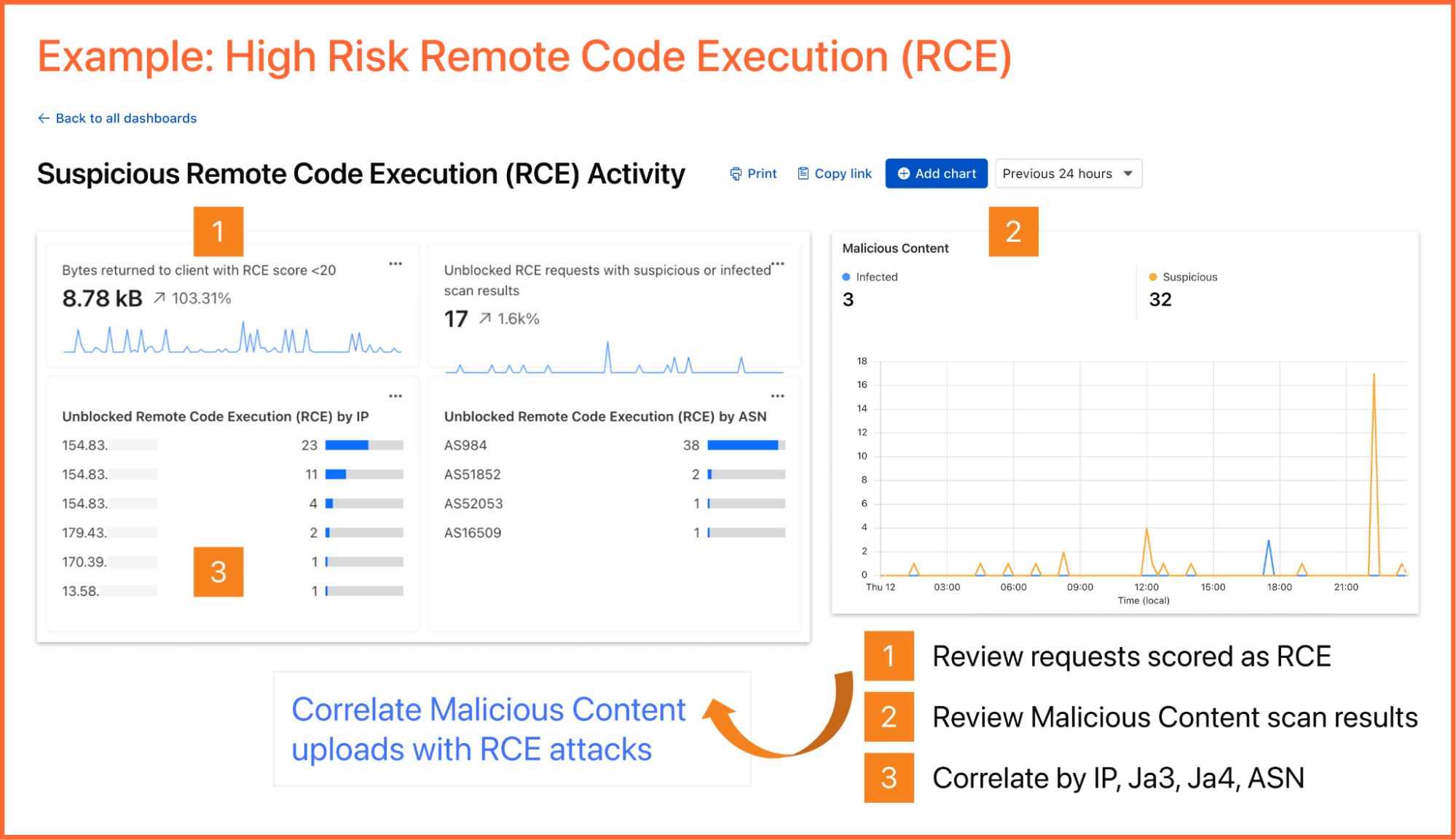
A reliability engineer might want to create a dashboard for monitoring errors. They could use the natural language prompt to enter a query like “Compare HTTP status code ranges over time.” The AI model then decides the most appropriate visualization and constructs their chart configuration.
While you can create custom dashboards from scratch, you could also use an expert-curated dashboard template to jumpstart your security and performance monitoring.
Available templates include:
Bot monitoring: Identify automated traffic accessing your website
API Security: Monitor the data transfer and exceptions of API endpoints within your application
API Performance: See timing data for API endpoints in your application, along with error rates
Account Takeover: View login attempts, usage of leaked credentials, and identify account takeover attacks
Performance Monitoring: Identify slow hosts and paths on your origin server, and view time to first byte (TTFB) metrics over time
Security Monitoring: monitor attack distribution across top hosts and paths, correlate DDoS traffic with origin Response time to understand the impact of DDoS attacks.
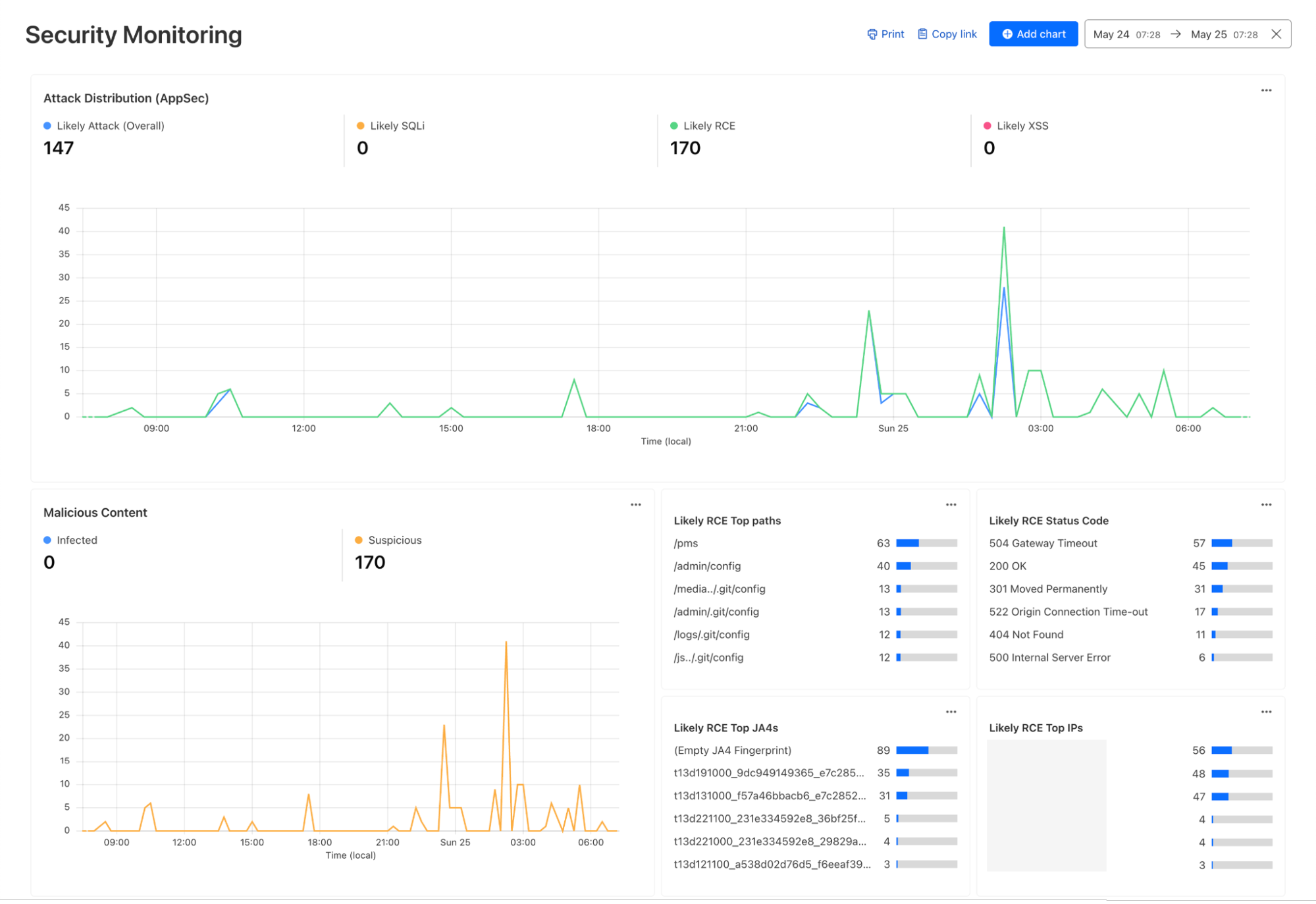
Continuing with the example from the prior section, after successfully diagnosing that some machines were compromised through the RCE issue, analysts can pivot over to Log Search in order to investigate whether the attacker was able to access and compromise other internal systems. To do that, the analyst could search logs from Zero Trust services, using context, such as compromised IP addresses from the custom dashboard, shown in the screenshot below:
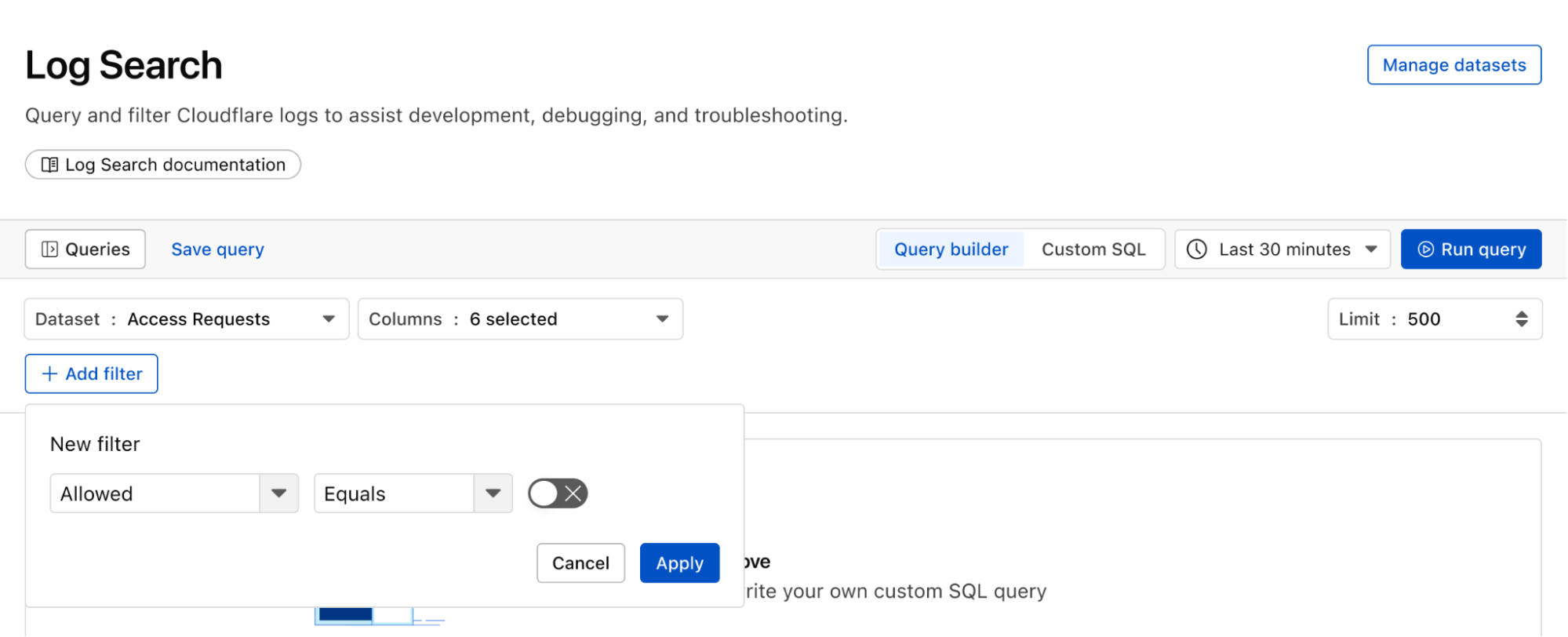
Log Search is a streamlined experience including data type-aware search filters, or the ability to switch to a custom SQL interface for more powerful queries. Log searches are also available via a public API.
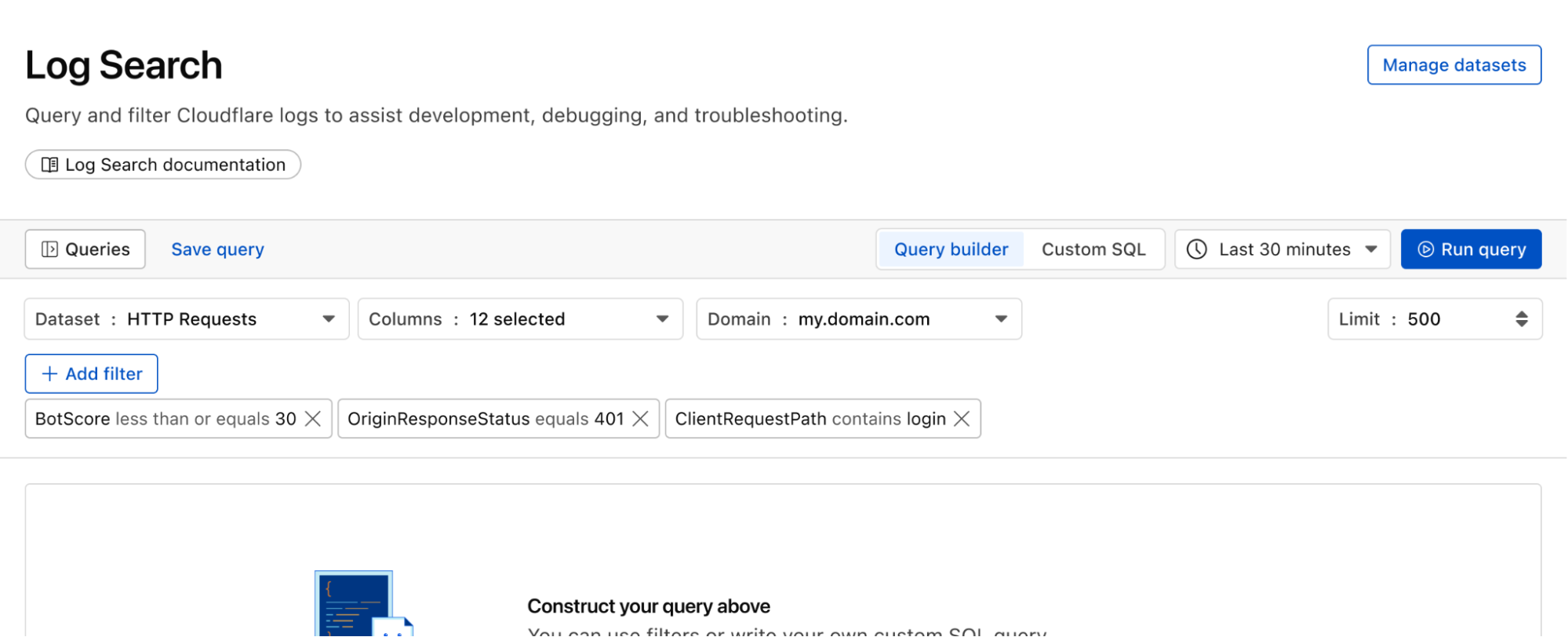
Queries built in Log Search can now be saved for repeated use and are accessible to other Log Explorer users in your account. This makes it easier than ever to investigate issues together.
With custom alerting, you can configure custom alert policies in order to proactively monitor the indicators that are important to your business.
Starting from Log Search, define and test your query. From here you can opt to save and configure a schedule interval and alerting policy. The query will run automatically on the schedule you define.
If you want to monitor the error rate for a particular host, you can use this Log Search query to calculate the error rate per time interval:
SELECT SUBSTRING(EdgeStartTimeStamp, 1, 14) || '00:00' AS time_interval,
       COUNT() AS total_requests,
       COUNT(CASE WHEN EdgeResponseStatus >= 500 THEN 1 ELSE NULL END) AS error_requests,
       COUNT(CASE WHEN EdgeResponseStatus >= 500 THEN 1 ELSE NULL END) * 100.0 / COUNT() AS error_rate_percentage
 FROM http_requests
WHERE EdgeStartTimestamp >= '2025-06-09T20:56:58Z'
  AND EdgeStartTimestamp <= '2025-06-10T21:26:58Z'
  AND ClientRequestHost = 'customhostname.com'
GROUP BY time_interval
ORDER BY time_interval ASC;
Running the above query returns the following results. You can see the overall error rate percentage in the far right column of the query results.
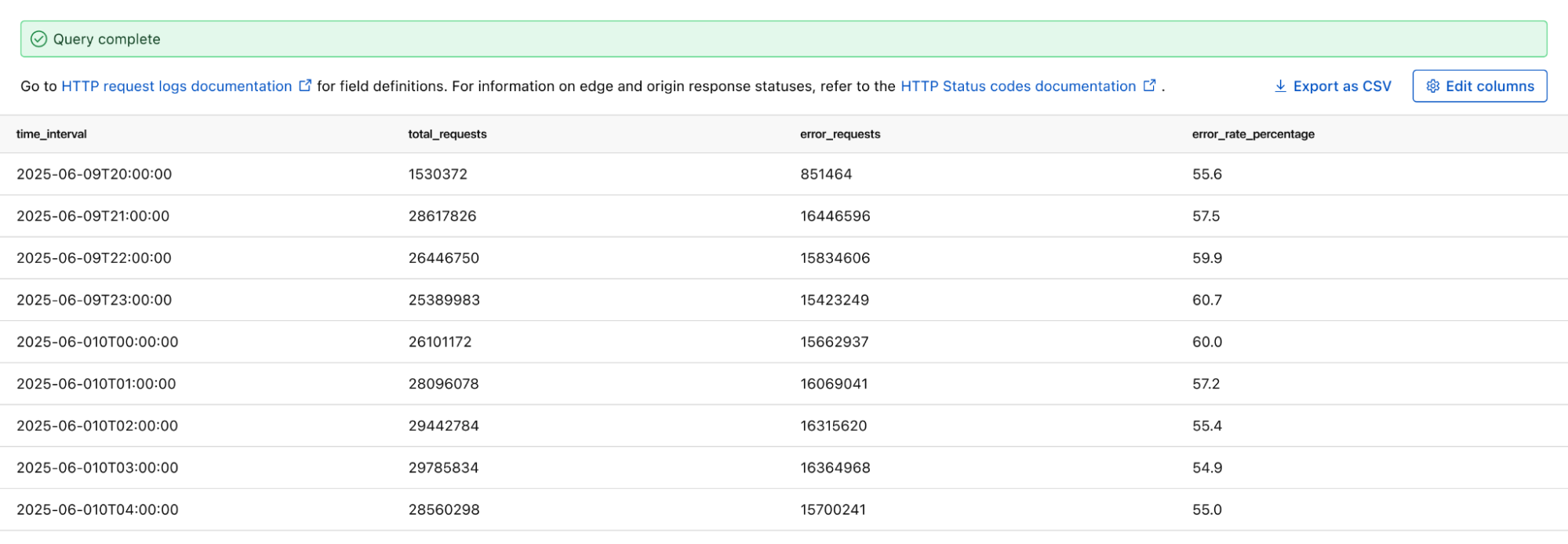
We can identify malware in the environment by monitoring logs from Cloudflare Secure Web Gateway. As an example, Katz Stealer is malware-as-a-service designed for stealing credentials. We can monitor DNS queries and HTTP requests from users within the company in order to identify any machines that may be infected with Katz Stealer malware.
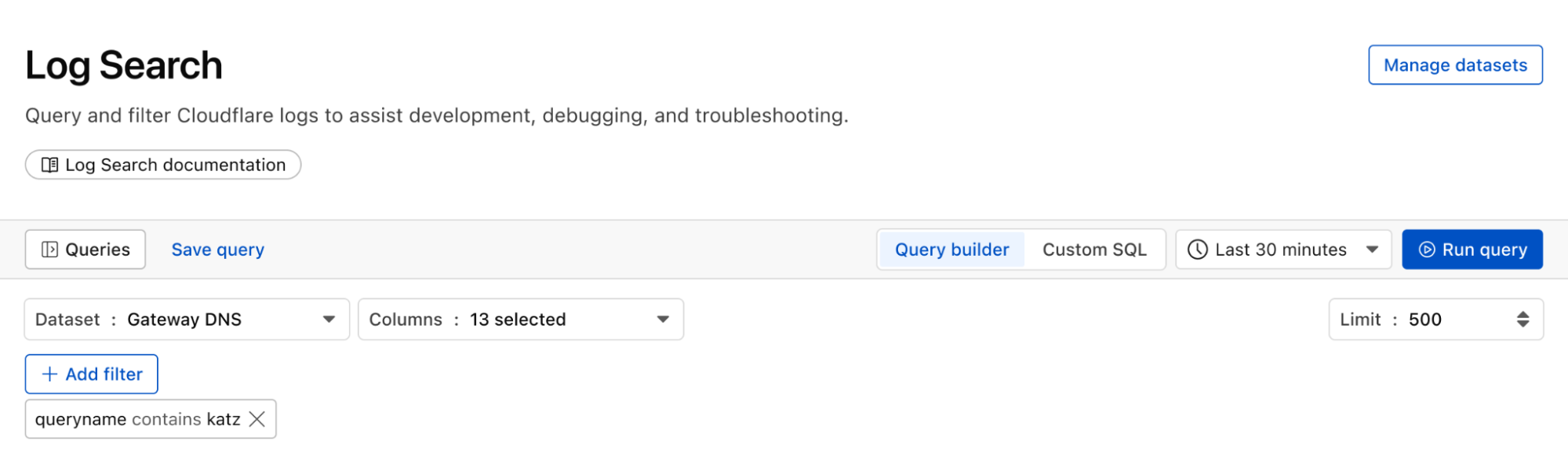
And with custom alerts, you can configure an alert policy so that you can be notified via webhook or PagerDuty.
With flexible retention, you can set the precise length of time you want to store your logs, allowing you to meet specific compliance and audit requirements with ease. Other providers require archiving or hot and cold storage, making it difficult to query older logs. Log Explorer is built on top of our R2 storage tier, so historical logs can be queried as easily as current logs.
With Log Explorer, we have built a scalable log storage platform on top of Cloudflare R2 that lets you efficiently search your Cloudflare logs using familiar SQL queries. In this section, we’ll look into how we did this and how we solved some technical challenges along the way. Log Explorer consists of three components: ingestors, compactors, and queriers. Ingestors are responsible for writing logs from Cloudflare’s data pipeline to R2. Compactors optimize storage files, so they can be queried more efficiently. Queriers execute SQL queries from users by fetching, transforming, and aggregating matching logs from R2.
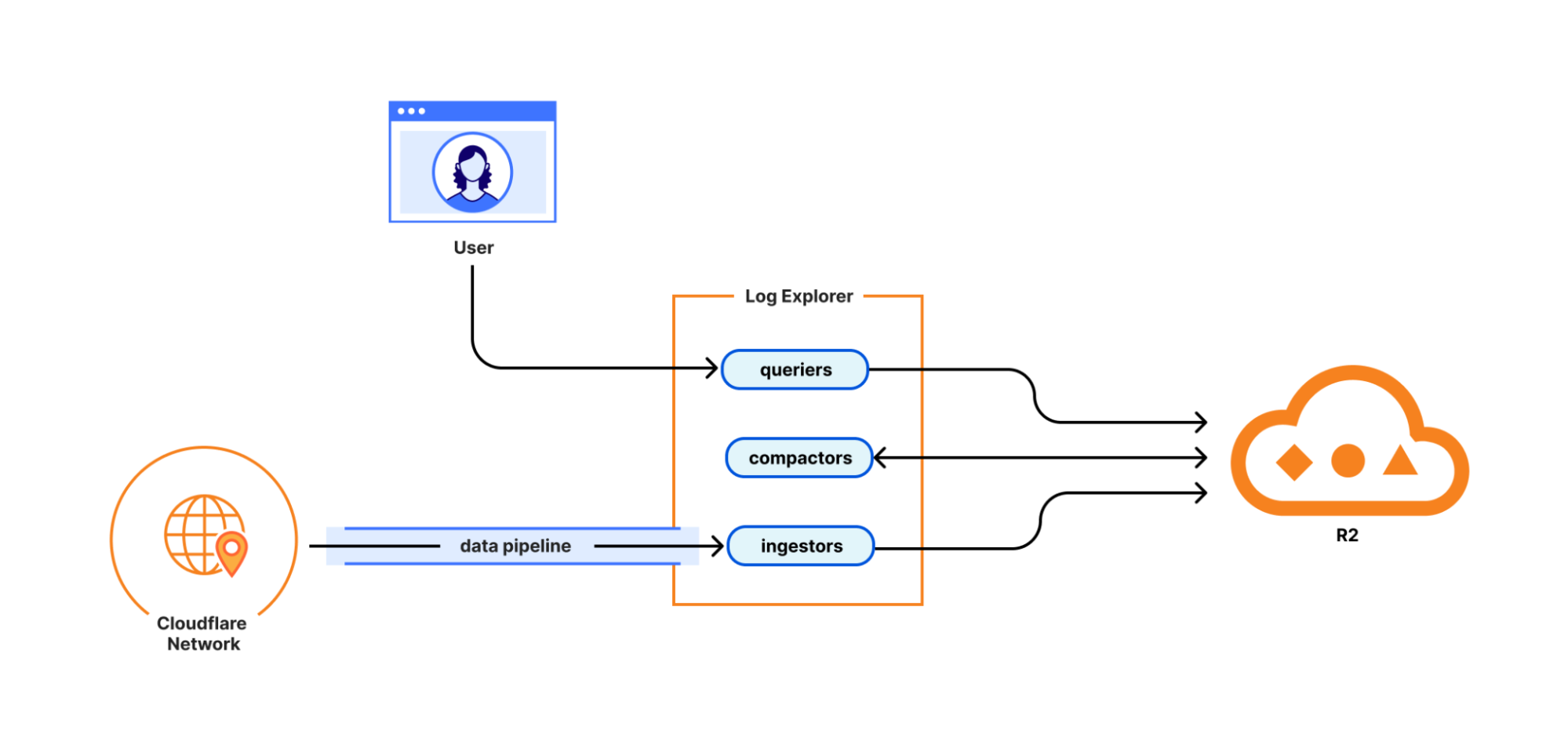
During ingestion, Log Explorer writes each batch of log records to a Parquet file in R2. Apache Parquet is an open-source columnar storage file format, and it was an obvious choice for us: it’s optimized for efficient data storage and retrieval, such as by embedding metadata like the minimum and maximum values of each column across the file which enables the queriers to quickly locate the data needed to serve the query.
Log Explorer stores logs on a per-customer level, just like Cloudflare D1, so that your data isn't mixed with that of other customers. In Q3 2025, per-customer logs will allow you the flexibility to create your own retention policies and decide in which regions you want to store your data. But how does Log Explorer find those Parquet files when you query your logs? Log Explorer leverages the Delta Lake open table format to provide a database table abstraction atop R2 object storage. A table in Delta Lake pairs data files in Parquet format with a transaction log. The transaction log registers every addition, removal, or modification of a data file for the table – it’s stored right next to the data files in R2.
Given a SQL query for a particular log dataset such as HTTP Requests or Gateway DNS, Log Explorer first has to load the transaction log of the corresponding Delta table from R2. Transaction logs are checkpointed periodically to avoid having to read the entire table history every time a user queries their logs.
Besides listing Parquet files for a table, the transaction log also includes per-column min/max statistics for each Parquet file. This has the benefit that Log Explorer only needs to fetch files from R2 that can possibly satisfy a user query. Finally, queriers use the min/max statistics embedded in each Parquet file to decide which row groups to fetch from the file.
Log Explorer processes SQL queries using Apache DataFusion, a fast, extensible query engine written in Rust, and delta-rs, a community-driven Rust implementation of the Delta Lake protocol. While standing on the shoulders of giants, our team had to solve some unique problems to provide log search at Cloudflare scale.
Log Explorer ingests logs from across Cloudflare’s vast global network, spanning more than 330 cities in over 125 countries. If Log Explorer were to write logs from our servers straight to R2, its storage would quickly fragment into a myriad of small files, rendering log queries prohibitively expensive.
Log Explorer’s strategy to avoid this fragmentation is threefold. First, it leverages Cloudflare’s data pipeline, which collects and batches logs from the edge, ultimately buffering each stream of logs in an internal system named Buftee. Second, log batches ingested from Buftee aren’t immediately committed to the transaction log; rather, Log Explorer stages commits for multiple batches in an intermediate area and “squashes” these commits before they’re written to the transaction log. Third, once log batches have been committed, a process called compaction merges them into larger files in the background.
While the open-source implementation of Delta Lake provides compaction out of the box, we soon encountered an issue when using it for our workloads. Stock compaction merges data files to a desired target size S by sorting the files in reverse order of their size and greedily filling bins of size S with them. By merging logs irrespective of their timestamps, this process distributed ingested batches randomly across merged files, destroying data locality. Despite compaction, a user querying for a specific time frame would still end up fetching hundreds or thousands of files from R2.
For this reason, we wrote a custom compaction algorithm that merges ingested batches in order of their minimum log timestamp, leveraging the min/max statistics mentioned previously. This algorithm reduced the number of overlaps between merged files by two orders of magnitude. As a result, we saw a significant improvement in query performance, with some large queries that had previously taken over a minute completing in just a few seconds.
We're just getting started! We're actively working on even more powerful features to further enhance your experience with Log Explorer. Subscribe to the blog and keep an eye out for more updates in our Change Log to our observability and forensics offering soon.
To get started with Log Explorer, sign up here or contact your account manager. You can also read more in our Developer Documentation.
