Cybersecurity expert Tom Rønning finds Microsoft Edge loads all saved passwords into computer memory as cleartext, making them easy for hackers to steal.
Using Artificial Intelligence (AI) to generate your passwords is a bad idea. It’s likely to give that password to a criminal who can then use it in a dictionary attack—which is when an attacker runs through a prepared list of likely passwords (words, phrases, patterns) with automated tools until one of them works, instead of trying every possible combination.
AI cybersecurity firm Irregular tested ChatGPT, Claude, and Gemini and found that the passwords they generate are “highly predictable,” and not truly random. When they tested Claude, 50 prompts produced just 23 unique passwords. One string appeared 10 times, while many others shared the same structure.
This could turn out to be a problem.
Traditionally, attackers build or download wordlists made of common passwords, real‑world leaks, and patterned variants (words plus numbers and symbols) to use in dictionary attacks. It requires almost no effort to add a thousand or so passwords commonly provided by AI chatbots.
AI chatbots are trained to provide answers based on what they’ve learned. They are good at predicting what comes next based on what they already have, not at inventing something completely new.
As the researchers put it:
“LLMs work by predicting the most likely next token, which is the exact opposite of what secure password generation requires: uniform, unpredictable randomness.”
In the past, we explained why computers are not very good at randomness in the first place. Password managers get around this fact by using dedicated cryptographic random number generators that mix in real‑world entropy, instead of the pattern‑based text generation you see with LLMs.
In other words, a good password manager doesn’t “invent” your password the way an AI does. It asks the operating system for cryptographic random bits and turns those directly into characters, so there’s no hidden pattern for attackers to learn.
A website or platform where you submit such passwords may tell you they’re strong, but the same basic reasoning as to why you shouldn’t reuse passwords applies. What use is a strong password if cybercriminals already have it?
As always, we prefer passkeys over passwords, but we realize this isn’t always an option. If you have to use a password, don’t let an AI make one up for you. It’s just not safe. And if you already did, consider changing it and add multi-factor authentication (2FA) to make the account more secure.
We don’t just report on privacy—we offer you the option to use it.
Privacy risks should never spread beyond a headline. Keep your online privacy yours by using Malwarebytes Privacy VPN.
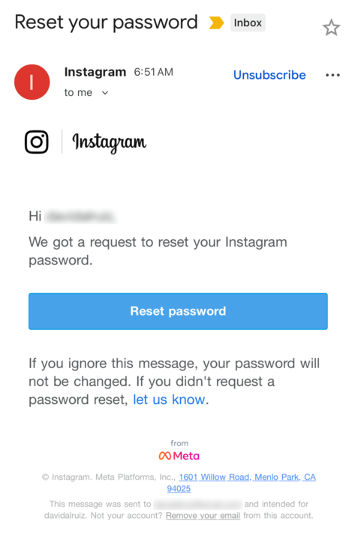
Last week, many Instagram users began receiving unsolicited emails from the platform that warned about a password reset request.
The message said:
“Hi {username}, We got a request to reset your Instagram password. If you ignore this message, your password will not be changed. If you didn’t request a password reset, let us know.”
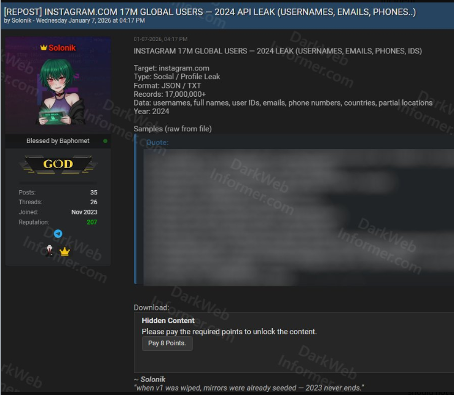
Around the same time that users began receiving these emails, a cybercriminal using the handle “Solonik” offered data that alleged contains information about 17 million Instagram users for sale on a Dark Web forum.
These 17 million or so records include:
Usernames
Full names
User IDs
Email addresses
Phone numbers
Countries
Partial locations
Please note that there are no passwords listed in the data.
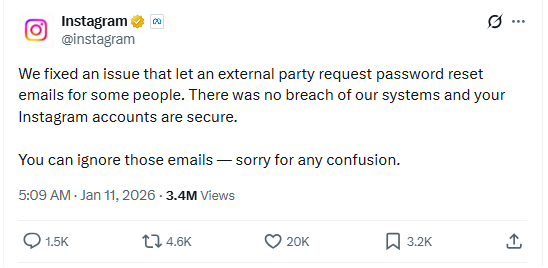
Despite the timing of the two events, Instagram denied this weekend that these events are related. On the platform X, the company stated they fixed an issue that allowed an external party to request password reset emails for “some people.”
So, what’s happening?
Regarding the data found on the dark web last week, Shahak Shalev, global head of scam and AI research at Malwarebytes, shared that “there are some indications that the Instagram data dump includes data from other, older, alleged Instagram breaches, and is a sort of compilation.” As Shalev’s team investigates the data, he also said that the earliest password reset requests reported by users came days before the data was first posted on the dark web, which might mean that “the data may have been circulating in more private groups before being made public.”
However, another possibility, Shalev said, is that “another vulnerability/data leak was happening as some bad actor tried spraying for [Instagram] accounts. Instagram’s announcement seems to reference that spraying. Besides the suspicious timing, there’s no clear connection between the two at this time.”
But, importantly, scammers will not care whether these incidents are related or not. They will try to take advantage of the situation by sending out fake emails.
“We felt it was important to alert people about the data availability so that everyone could reset their passwords, directly from the app, and be on alert for other phishing communications,” Shalev said.
If and when we find out more, we’ll keep you posted, so stay tuned.
Should you want to err on the safe side and decide to change your password, make sure to do so in the app and not click any links in the email, to avoid the risk that you have received a fake email. Or you might end up providing scammers with your password.
Another thing to keep in mind is that these are Meta-data. Which means some users may have reused or linked them to their Facebook or WhatsApp accounts. So, as a precaution, you can check recent logins and active sessions on Instagram, WhatsApp, and Facebook, and log out from any devices or locations you do not recognize.
If you want to find out whether your data was included in an Instagram data breach, or any other for that matter, try our free Digital Footprint scan.
Misconfigurations remain a popular compromise point — and routers are leading the way.
According to recent survey data, 86% of respondents have never changed their router admin password, and 52% have never adjusted any factory settings. This puts attackers in the perfect position to compromise enterprise networks. Why put the time and effort into creating phishing emails and stealing staff data when supposedly secure devices can be accessed using “admin” and “password” as credentials?
It’s time for a router reality check.
Rising router risks
Routers allow multiple devices to use the same internet connection. They accomplish this goal by directing traffic — internal devices are routed along the most efficient path to outside-facing services, and incoming data is sent to the appropriate endpoint.
If attackers manage to compromise routers, they can control both what comes out of and what goes into your network. This introduces risks such as:
The nature of router attacks also makes them hard to detect. This is because cyber criminals aren’t forcing their way into routers or taking circuitous routes to evade security defenses. Instead, they’re taking advantage of overlooked weak spots to access routers directly, which means they aren’t raising red flags.
Consider a router with “admin” as the login and no password. A few simple guesses get attackers into router settings without triggering a security response since they haven’t breached a network service or compromised an application. Instead, they’ve accessed routers the same way as staff and IT teams.
Companies recognize the need for robust cybersecurity. According to Gartner, spending on information security will grow 15% in 2025 to reach $212 billion. Common investment areas include endpoint protection platforms (EPPs), endpoint detection and response (EDR) and the integration of generative AI (gen AI). Routers, however, are often overlooked.
For example, 89% of respondents have never updated their router firmware. The same number have never changed their default network name, and 72% have never changed their Wi-Fi password.
This is problematic. A recent report found that popular OT/IoT router firmware images were outdated and contained exploitable N-day vulnerabilities. The report found that, on average, open-source components were more than five years old and were four years behind the latest release.
As noted by GovTech, meanwhile, an attack on a Pittsburgh-area water authority succeeded in part because the default password to its network was “1111”. Other common passwords include “password” and “123456;” in some cases, routers have no passwords. All attackers need is the login credential — which is often “admin” — and they have full access to router functions.
Even more telling is the fact that router security is getting worse, not better. Consider that in 2022, 48% of respondents said they had not adjusted their router settings, and 16% had never changed the admin password. In 2024, over 50% of routers were still running on factory settings, and just 14% had changed their password.
By spending more on security tools but not changing default configurations or updating router firmware, businesses are closing the doors but leaving the windows wide open.
Minimizing misconfiguration mistakes
So, how do companies minimize the risk of misconfiguration mistakes?
It starts with the basics: Change passwords regularly, update firmware and ensure that routers aren’t left on factory settings. Simple? Absolutely. Common? As survey data indicates, not so much.
In part, the disconnect between router risks and security realities stems from the sheer volume of cyberattacks. For example, 2023 saw 94% of companies hit by phishing attacks, and as noted by the IBM Cost of a Data Breach Report 2024, the average cost of a data breach is now $4.88 million, up 10% from 2023 and the highest ever reported. This puts cybersecurity teams on the defensive and on high alert for common attack vectors such as phishing, smishing and the use of “shadow IT” applications that haven’t been vetted or approved.
As a result, routers can slip through the cracks. The first step in solving this problem is creating a regular update schedule. Every four to six months, schedule a router review — put it in a shared calendar, and make sure all security staff know it’s going to happen. When the designated day comes, update firmware where possible and change login and password details. It’s also worth establishing a weekly schedule to review router traffic for any odd behaviors or unexpected login requests.
Shoring up security
While basic cyber hygiene helps lower the risk of router attacks, shoring up security requires a more in-depth approach.
The first step is finding and securing every router on your network. Given the increasingly complex nature of enterprise networks, the easiest way to accomplish this goal is by using automation. Solutions such as IBM SevOne Automated Network Observability provide pre-built workflow templates for IT teams to identify connected devices, collect performance data and make data-driven decisions.
Companies also need to consider what happens when a router compromise occurs. Despite best efforts by security teams, the growing number of end points means it’s only a matter of time until attackers manage to find unprotected routers or circumvent existing defenses.
Effective response requires effective incident management. Solutions such as IBM Instana offer full-stack visibility, one-second granularity and three seconds to notify, giving teams the information they need when they need it to reduce security risks.
Bottom line? Failure to monitor and update router settings can open the door to compromise. To solve the problem, teams need a router reality check. By combining security hygiene best practices with intelligent automation solutions, enterprises can keep unauthorized users where they belong: 0utside protected networks.
The rising risk of router attacks, paired with a growing list of unreasonable expectations, creates complex challenges for security teams. The solution? Unreasonable observability. Learn more on IBM Instana and how it can help.
 Entrar