
Visualização de leitura

Managed OAuth for Access: make internal apps agent-ready in one click

We have thousands of internal apps at Cloudflare. Some are things we’ve built ourselves, others are self-hosted instances of software built by others. They range from business-critical apps nearly every person uses, to side projects and prototypes.

All of these apps are protected by Cloudflare Access. But when we started using and building agents — particularly for uses beyond writing code — we hit a wall. People could access apps behind Access, but their agents couldn’t.

Access sits in front of internal apps. You define a policy, and then Access will send unauthenticated users to a login page to choose how to authenticate. 

Example of a Cloudflare Access login page

This flow worked great for humans. But all agents could see was a redirect to a login page that they couldn’t act on.

Providing agents with access to internal app data is so vital that we immediately implemented a stopgap for our own internal use. We modified OpenCode’s web fetch tool such that for specific domains, it triggered the cloudflared CLI to open an authorization flow to fetch a JWT (JSON Web Token). By appending this token to requests, we enabled secure, immediate access to our internal ecosystem.

While this solution was a temporary answer to our own dilemma, today we’re retiring this workaround and fixing this problem for everyone. Now in open beta, every Access application supports managed OAuth. One click to enable it for an Access app, and agents that speak OAuth 2.0 can easily discover how to authenticate (RFC 9728), send the user through the auth flow, and receive back an authorization token (the same JWT from our initial solution). 

Now, the flow works smoothly for both humans and agents. Cloudflare Access has a generous free tier. And building off our newly-introduced Organizations beta, you’ll soon be able to bridge identity providers across Cloudflare accounts too.

How managed OAuth works

For a given internal app protected by Cloudflare Access, you enable managed OAuth in one click:
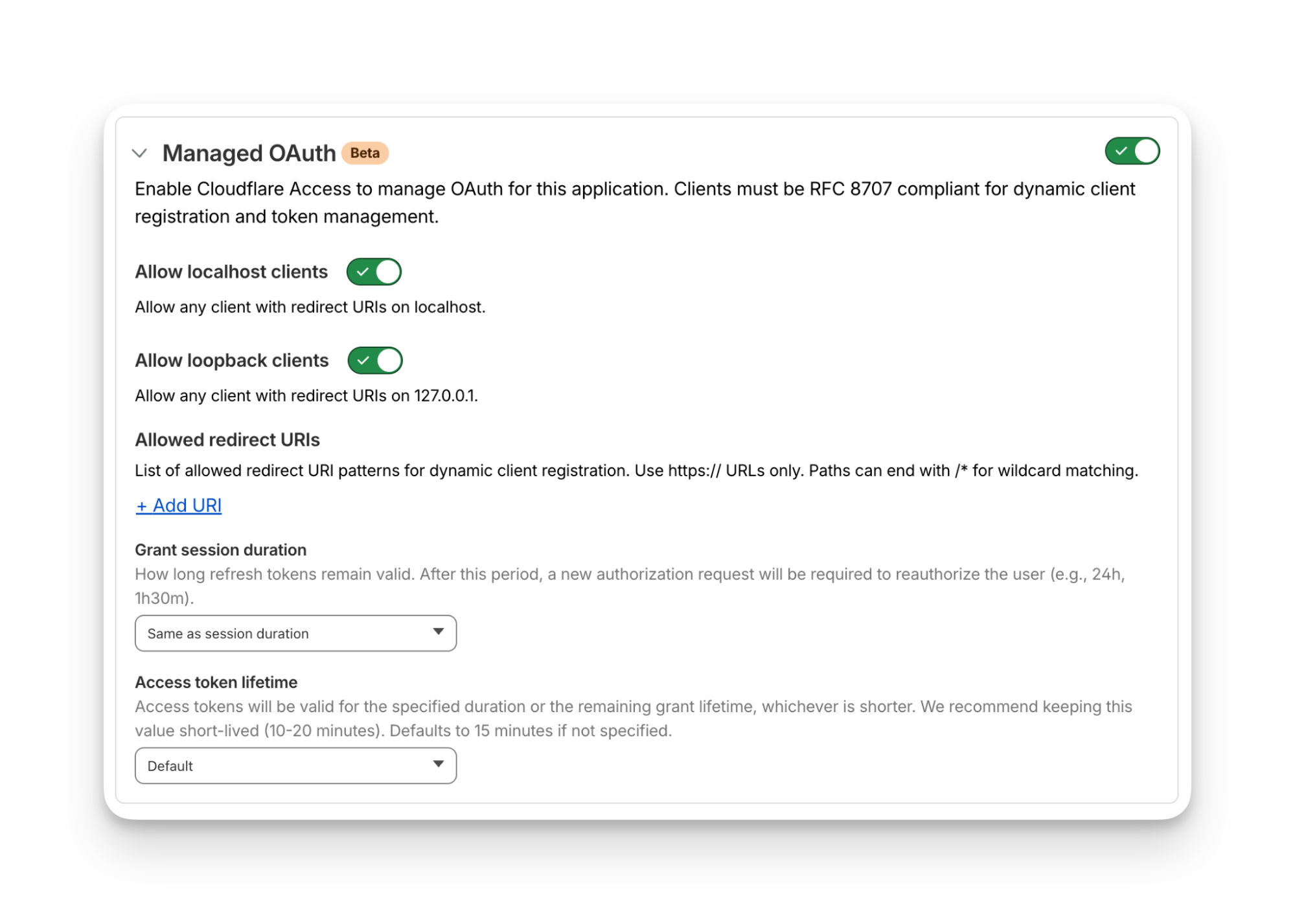
Once managed OAuth is enabled, Cloudflare Access acts as the authorization server. It returns the www-authenticate header, telling unauthorized agents where to look up information on how to get an authorization token. They find this at https://<your-app-domain>/.well-known/oauth-authorization-server. Equipped with that direction, agents can just follow OAuth standards: 

  1. The agent dynamically registers itself as a client (a process known as Dynamic Client Registration — RFC 7591), 

  2. The agent sends the human through a PKCE (Proof Key for Code Exchange) authorization flow (RFC 7636)

  3. The human authorizes access, which grants a token to the agent that it can use to make authenticated requests on behalf of the user

Here’s what the authorization flow looks like:
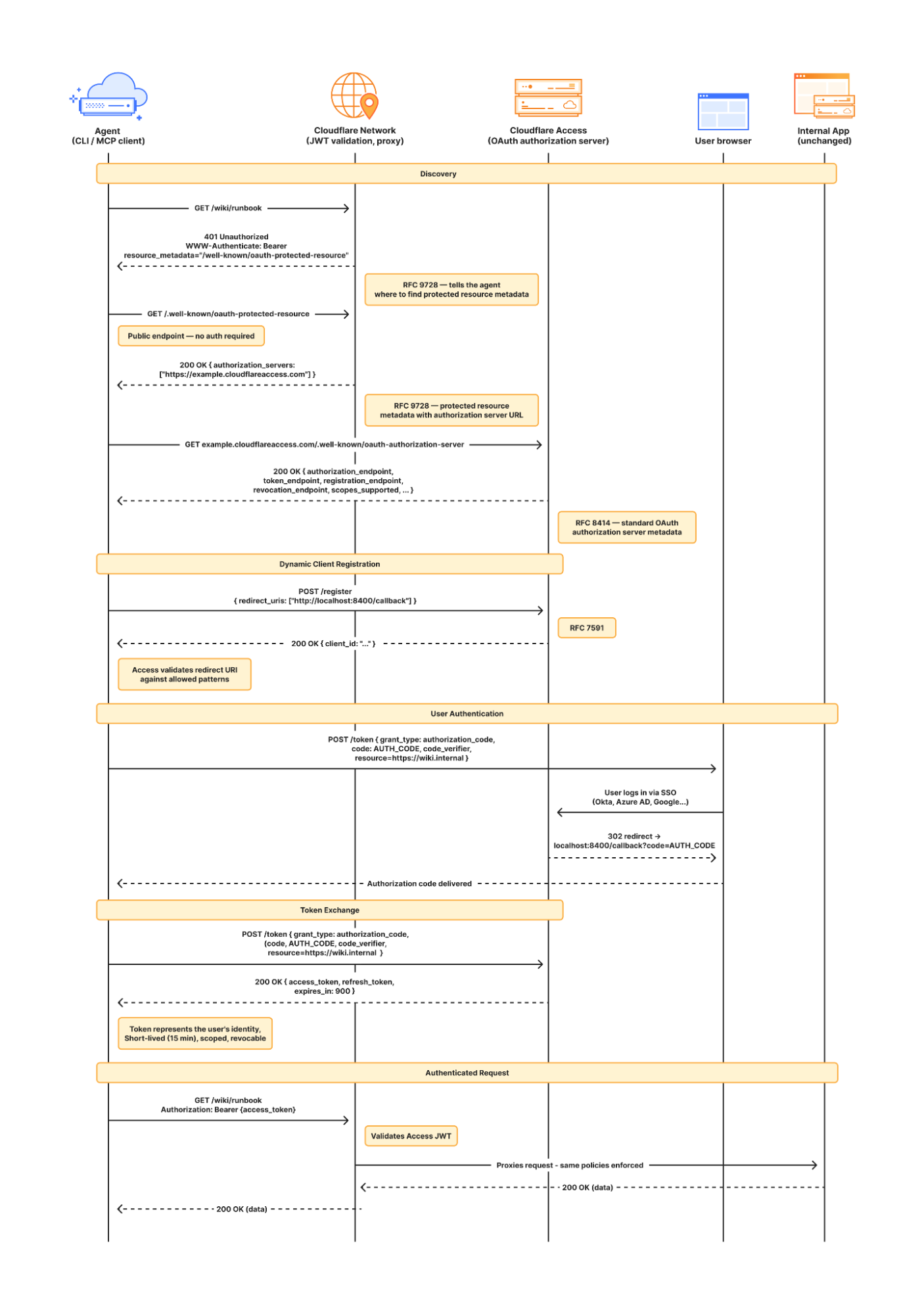
If this authorization flow looks familiar, that’s because it’s what the Model Context Protocol (MCP) uses. We originally built support for this into our MCP server portals product, which proxies and controls access to many MCP servers, to allow the portal to act as the OAuth server. Now, we’re bringing this to all Access apps so agents can access not only MCP servers that require authorization, but also web pages, web apps, and REST APIs.

Mass upgrading your internal apps to be agent-ready

Upgrading the long tail of internal software to work with agents is a daunting task. In principle, in order to be agent-ready, every internal and external app would ideally have discoverable APIs, a CLI, a well-crafted MCP server, and have adopted the many emerging agent standards.

AI adoption is not something that can wait for everything to be retrofitted. Most organizations have a significant backlog of apps built over many years. And many internal “apps” work great when treated by agents as simple websites. For something like an internal wiki, all you really need is to enable Markdown for Agents, turn on managed OAuth, and agents have what they need to read protected content.

To make the basics work across the widest set of internal applications, we use Managed OAuth. By putting Access in front of your legacy internal apps, you make them agent-ready instantly. No code changes, no retrofitting. Instead, just immediate compatibility.

It’s the user’s agent. No service accounts and tokens needed

Agents need to act on behalf of users inside organizations. One of the biggest anti-patterns we’ve seen is people provisioning service accounts for their agents and MCP servers, authenticated using static credentials. These have their place in simple use cases and quick prototypes, and Cloudflare Access supports service tokens for this purpose.

But the service account approach quickly shows its limits when fine-grained access controls and audit logs are required. We believe that every action an agent performs must be easily attributable to the human who initiated it, and that an agent must only be able to perform actions that its human operator is likewise authorized to do. Service accounts and static credentials become points at which attribution is lost. Agents that launder all of their actions through a service account are susceptible to confused deputy problems and result in audit logs that appear to originate from the agent itself.

For security and accountability, agents must use security primitives capable of expressing this user–agent relationship. OAuth is the industry standard protocol for requesting and delegating access to third parties. It gives agents a way to talk to your APIs on behalf of the user, with a token scoped to the user’s identity, so that access controls correctly apply and audit logs correctly attribute actions to the end user.

Standards for the win: how agents can and should adopt RFC 9728 in their web fetch tools

RFC 9728 is the OAuth standard that makes it possible for agents to discover where and how to authenticate. It standardizes where this information lives and how it’s structured. This RFC became official in April 2025 and was quickly adopted by the Model Context Protocol (MCP), which now requires that both MCP servers and clients support it.

But outside of MCP, agents should adopt RFC 9728 for an even more essential use case: making requests to web pages that are protected behind OAuth and making requests to plain old REST APIs.

Most agents have a tool for making basic HTTP requests to web pages. This is commonly called the “web fetch” tool. It’s similar to using the fetch() API in JavaScript, often with some additional post-processing on the response. It’s what lets you paste a URL into your agent and have your agent go look up the content.

Today, most agents’ web fetch tools won’t do anything with the www-authenticate header that a URL returns. The underlying model might choose to introspect the response headers and figure this out on its own, but the tool itself does not follow www-authenticate, look up /.well-known/oauth-authorization-server, and act as the client in the OAuth flow. But it can, and we strongly believe it should! Agents already do this to act as remote MCP clients.

To demonstrate this, we’ve put up a draft pull request that adapts the web fetch tool in Opencode to show this in action. Before making a request, the adapted tool first checks whether it already has credentials ; if it does, it uses them to make the initial request. If the tool gets back a 401 or a 403 with a www-authenticate header, it asks the user for consent to be sent through the server’s OAuth flow.

Here’s how that OAuth flow works. If you give the agent a URL that is protected by OAuth and complies with RFC 9728, the agent prompts the human for consent to open the authorization flow:

…sending the human to the login page:

…and then to a consent dialog that prompts the human to grant access to the agent:

Once the human grants access to the agent, the agent uses the token it has received to make an authenticated request:
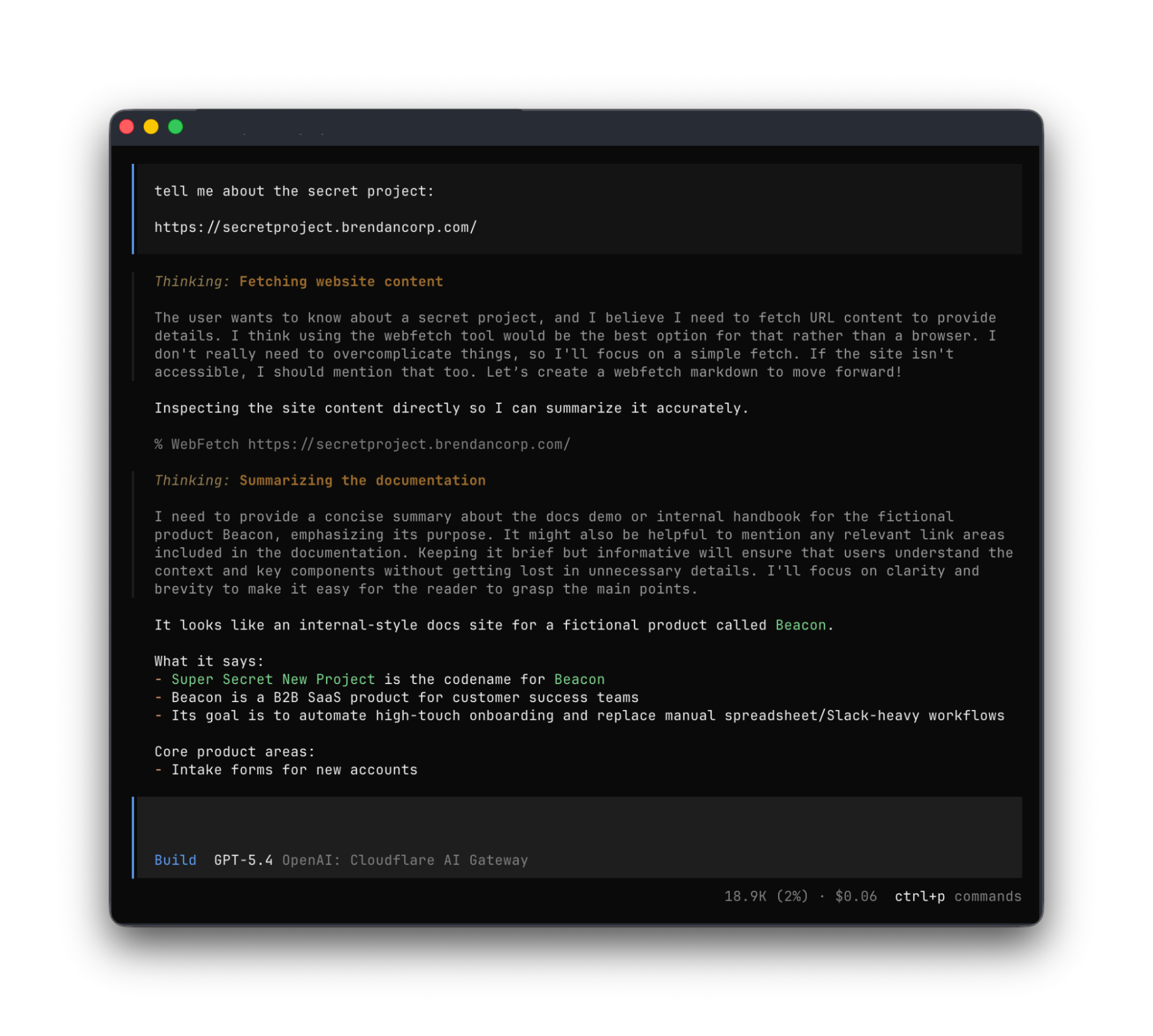
Any agent from Codex to Claude Code to Goose and beyond can implement this, and there’s nothing bespoke to Cloudflare. It’s all built using OAuth standards.

We think this flow is powerful, and that supporting RFC 9728 can help agents with more than just making basic web fetch requests. If a REST API supports RFC 9728 (and the agent does too), the agent has everything it needs to start making authenticated requests against that API. If the REST API supports RFC 9727, then the client can discover a catalog of REST API endpoints on its own, and do even more without additional documentation, agent skills, MCP servers or CLIs. 

Each of these play important roles with agents — Cloudflare itself provides an MCP server for the Cloudflare API (built using Code Mode), Wrangler CLI, and Agent Skills, and a Plugin. But supporting RFC 9728 helps ensure that even when none of these are preinstalled, agents have a clear path forward. If the agent has a sandbox to execute untrusted code, it can just write and execute code that calls the API that the human has granted it access to. We’re working on supporting this for Cloudflare’s own APIs, to help your agents understand how to use Cloudflare.

Coming soon: share one identity provider (IdP) across many Cloudflare accounts

At Cloudflare our own internal apps are deployed to dozens of different Cloudflare accounts, which are all part of an Organization — a newly introduced way for administrators to manage users, configurations, and view analytics across many Cloudflare accounts. We have had the same challenge as many of our customers: each Cloudflare account has to separately configure an IdP, so Cloudflare Access uses our identity provider. It’s critical that this is consistent across an organization — you don’t want one Cloudflare account to inadvertently allow people to sign in just with a one-time PIN, rather than requiring that they authenticate via single-sign on (SSO).

To solve this, we’re currently working on making it possible to share an identity provider across Cloudflare accounts, giving organizations a way to designate a single primary IdP for use across every account in their organization.

As new Cloudflare accounts are created within an organization, administrators will be able to configure a bridge to the primary IdP with a single click, so Access applications across accounts can be protected by one identity provider. This removes the need to manually configure IdPs account by account, which is a process that doesn’t scale for organizations with many teams and individuals each operating their own accounts.

What’s next

Across companies, people in every role and business function are now using agents to build internal apps, and expect their agents to be able to access context from internal apps. We are responding to this step function growth in internal software development by making the Workers Platform and Cloudflare One work better together — so that it is easier to build and secure internal apps on Cloudflare. 

Expect more to come soon, including:

  • More direct integration between Cloudflare Access and Cloudflare Workers, without the need to validate JWTs or remember which of many routes a particular Worker is exposed on.

  • wrangler dev --tunnel — an easy way to expose your local development server to others when you’re building something new, and want to share it with others before deploying

  • A CLI interface for Cloudflare Access and the entire Cloudflare API

  • More announcements to come during Agents Week 2026

Enable Managed OAuth for your internal apps behind Cloudflare Access

Managed OAuth is now available, in open beta, to all Cloudflare customers. Head over to the Cloudflare dashboard to enable it for your Access applications. You can use it for any internal app, whether it’s one built on Cloudflare Workers, or hosted elsewhere. And if you haven’t built internal apps on the Workers Platform yet — it’s the fastest way for your team to go from zero to deployed (and protected) in production.

Unmasking the Unseen: Your Guide to Taming Shadow AI with Cloudflare One

The digital landscape of corporate environments has always been a battleground between efficiency and security. For years, this played out in the form of "Shadow IT" — employees using unsanctioned laptops or cloud services to get their jobs done faster. Security teams became masters at hunting these rogue systems, setting up firewalls and policies to bring order to the chaos.

But the new frontier is different, and arguably far more subtle and dangerous.

Imagine a team of engineers, deep into the development of a groundbreaking new product. They're on a tight deadline, and a junior engineer, trying to optimize his workflow, pastes a snippet of a proprietary algorithm into a popular public AI chatbot, asking it to refactor the code for better performance. The tool quickly returns the revised code, and the engineer, pleased with the result, checks it in. What they don't realize is that their query, and the snippet of code, is now part of the AI service’s training data, or perhaps logged and stored by the provider. Without anyone noticing, a critical piece of the company's intellectual property has just been sent outside the organization's control, a silent and unmonitored data leak.

This isn't a hypothetical scenario. It's the new reality. Employees, empowered by these incredibly powerful AI tools, are now using them for everything from summarizing confidential documents to generating marketing copy and, yes, even writing code. The data leaving the company in these interactions is often invisible to traditional security tools, which were never built to understand the nuances of a browser tab interacting with a large language model. This quiet, unmanaged usage is "Shadow AI," and it represents a new, high-stakes security blind spot.

To combat this, we need a new approach—one that provides visibility into this new class of applications and gives security teams the control they need, without impeding the innovation that makes these tools so valuable.

Shadow AI reporting

This is where the Cloudflare Shadow IT Report comes in. It’s not a list of threats to be blocked, but rather a visibility and analytics tool designed to help you understand the problem before it becomes a crisis. Instead of relying on guesswork or trying to manually hunt down every unsanctioned application, Cloudflare One customers can use the insights from their traffic to gain a clear, data-driven picture of their organization's application usage.

The report provides a detailed, categorized view of your application activity, and is easily narrowed down to AI activity. We’ve leveraged our network and threat intelligence capabilities to identify and classify AI services, identifying general-purpose models like ChatGPT, code-generation assistants like GitHub Copilot, and specialized tools used for marketing, data analysis, or other content creation, like Leonardo.ai. This granular view allows security teams to see not just that an employee is using an AI app, but which AI app, and what users are accessing it.

How we built it

Sharp eyed users may have noticed that we’ve had a shadow IT feature for a while — so what changed? While Cloudflare Gateway, our secure web gateway (SWG), has recorded some of this data for some time, users have wanted deeper insights and reporting into their organization's application usage. Cloudflare Gateway processes hundreds of millions of rows of app usage data for our biggest users daily, and that scale was causing issues with queries into larger time windows. Additionally, the original implementation lacked the filtering and customization capabilities to properly investigate the usage of AI applications. We knew this was information that our customers loved, but we weren’t doing a good enough job of showing it to them.

Solving this was a cross-team effort requiring a complete overhaul by our analytics and reporting engineers. You may have seen our work recently in this July 2025 blog post detailing how we adopted TimescaleDB to support our analytics platform, unlocking our analytics, allowing us to aggregate and compress long term data to drastically improve query performance. This solves the issue we originally faced around our scale, letting our biggest customers query their data for long time periods. Our crawler collects the original HTTP traffic data from Gateway, which we store into a Timescale database.

Once the data are in our database, we built specific, materialized views in our database around the Shadow IT and AI use case to support analytics for this feature. Whereas the existing HTTP analytics we built are centered around the HTTP requests on an account, these specific views are centered around the information relevant to applications, for example: Which of my users are going to unapproved applications? How much bandwidth are they consuming? Is there an end-user in an unexpected geographical location interacting with an unreviewed application? What devices are using the most bandwidth?

Over the past year, the team has defined a set framework for the analytics we surface. Our timeseries graphs and top-n graphs are all filterable by duration and the relevant data points shown, allowing users to drill down to specific data points and see the details of their corporate traffic. We overhauled Shadow IT by examining the data we had and researching how AI applications were presenting visibility challenges for customers. From there we leveraged our existing framework and built the Shadow IT dashboard. This delivered the application-level visibility that we know our customers needed.

How to use it

1. Proxy your traffic with Gateway

The core of the system is Cloudflare Gateway, an in-line filter and proxy for all your organization's Internet traffic, regardless of where your users are. When an employee tries to access an AI application, their traffic flows through Cloudflare’s global network. Cloudflare can inspect the traffic, including the hostname, and map the traffic to our application definitions. TLS inspection is optional for Gateway customers, but it is required for ShadowIT analytics.

Interactions are logged and tied to user identity, device posture, bandwidth consumed and even the geographic location. This rich context is crucial for understanding who is using which AI tools, when, and from where.

2. Review application use

All this granular data is then presented in an our Shadow IT Report within your Cloudflare One dashboard. Simply filter for AI applications so you can:

  • High-Level Overview: Get an immediate sense of your organization's AI adoption. See the top AI applications in use, overall usage trends, and the volume of data being processed. This will help you identify and target your security and governance efforts.

  • Granular Drill-Downs: Need more detail? Click on any AI application to see specific users or groups accessing it, their usage frequency, location, and the amount of data transferred. This detail helps you pinpoint teams using AI around the company, as well as how much data is flowing to those applications.

ShadowIT analytics dashboard

3. Mark application approval statuses

We understand that not all AI tools are created equal, and your organization's comfort level will vary. The Shadow AI Report introduces a flexible framework for Application Approval Status, allowing you to formally categorize each detected AI application:

  • Approved: These are the AI applications that have passed your internal security vetting, comply with your policies, and are officially sanctioned for use. 

  • Unapproved: These are the red-light applications. Perhaps they have concerning data privacy policies, a history of vulnerabilities, or simply don’t align with your business objectives.

  • In Review: For those gray-area applications, or newly discovered tools, this status lets your teams acknowledge their usage while conducting thorough due diligence. It buys you time to make an informed decision without immediate disruption.

Review and mark application statuses in the dashboard

4. Enforce policies

These approval statuses come alive when integrated with Cloudflare Gateway policies. This allows you to automatically enforce your AI decisions at the edge of Cloudflare’s network, ensuring consistent security for every employee, anywhere they work.

Here’s how you can translate your decisions into inline protection:

  • Block unapproved AI: The simplest and most direct action. Create a Gateway HTTP policy that blocks all traffic to any AI application marked as "Unapproved." This immediately shuts down risky data exfiltration.

  • Limit "In Review" exposure: For applications still being assessed, you might not want a hard block, but rather a soft limit on potential risks:

  • Data Loss Prevention (DLP): Cloudflare DLP inspects and analyzes traffic for indicators of sensitive data (e.g., credit card numbers, PII, internal project names, source code) and can then block the transfer. By applying DLP to "In Review" AI applications, you can prevent AI prompts containing this proprietary data, as well as notify the user why the prompt was blocked. This could have saved our poor junior engineer from their well-intended mistake.. 

  • Restrict Specific Actions: Block only file uploads allowing basic interaction but preventing mass data egress. 

  • Isolate Risky Sessions: Route traffic for "In Review" applications through Cloudflare's Browser Isolation. Browser Isolation executes the browser session in a secure, remote container, isolating all data interactions from your corporate network. With it, you can control file uploads, clipboard actions, reduce keyboard inputs and more, reducing interaction with the application while you review it.

  • Audit "Approved" usage: Even for AI tools you trust, you might want to log all interactions for compliance auditing or apply specific data handling rules to ensure ongoing adherence to internal policies.

This workflow enables your team to consistently audit your organization’s AI usage and easily update policies to quickly and easily reduce security risk.

Forensics with Cloudflare Log Explorer

While the Shadow AI Report provides excellent insights, security teams often need to perform deeper forensic investigations. For these advanced scenarios, we offer Cloudflare Log Explorer.

Log Explorer allows you to store and query your Cloudflare logs directly within the Cloudflare dashboard or via API, eliminating the need to send massive log volumes to third-party SIEMs for every investigation. It provides raw, unsampled log data with full context, enabling rapid and detailed analysis.

Log Explorer customers can dive into Shadow AI logs with pre-populated SQL queries from Cloudflare Analytics, enabling deeper investigations into AI usage:

Log Search’s SQL query interface

How to investigate Shadow AI with Log Explorer:

  • Trace Specific User Activity: If the Shadow AI Report flags a user with high activity on an "In Review" or "Unapproved" AI app, you can jump into Log Explorer and query by user, application category, or specific AI services. 

  • Analyze Data Exfiltration Attempts: If you have DLP policies configured, you can search for DLP matches in conjunction with AI application categories. This helps identify attempts to upload sensitive data to AI applications and pinpoint exactly what data was being transmitted.

  • Identify Anomalous AI Usage: The Shadow AI Report might show a spike in usage for a particular AI application. In Log Explorer, you can filter by application status (In Review or Unapproved) for a specific time range. Then, look for unusual patterns, such as a high number of requests from a single source IP address, or unexpected geographic origins, which could indicate compromised accounts or policy evasion attempts.

If AI visibility is a challenge for your organization, the Shadow AI Report is available now for Cloudflare One customers, as part of our broader shadow IT discovery capabilities. Log in to your dashboard to start regaining visibility and shaping your AI governance strategy today. 

Ready to modernize how you secure access to AI apps? Reach out for a consultation with our Cloudflare One security experts about how to regain visibility and control. 

Or if you’re not ready to talk to someone yet,  nearly every feature in Cloudflare One is available at no cost for up to 50 users. Many of our largest enterprise customers start by exploring the products themselves on our free plan, and you can get started here.

If you’ve got feedback or want to help shape how Cloudflare enhances visibility across shadow AI, please consider joining our user research program

Aligning our prices and packaging with the problems we help customers solve

At Cloudflare, we have a simple but audacious goal: to help build a better Internet. That mission has driven us to build one of the world’s largest networks, to stand up for content providers, and to innovate relentlessly to make the Internet safer, faster, and more reliable for everyone, everywhere.

Building world-class products is only part of the battle, however. Fulfilling our mission means making these products accessible, including a pricing model that is fair, predictable, and aligned with the value we provide. If our packaging is confusing, or if our pricing penalizes you for using the service, then we’re not living up to our mission. And the best way to ensure that alignment?

Listen to our customers.

Over the years, your feedback has shaped our product roadmap, helping us evolve to offer nearly 100 products across four solution areas — Application Services, Network Services, Zero Trust Services, and our Developer Platform — on a single, unified platform and network infrastructure. Recently, we’ve heard a new theme emerge: the need for simplicity. You’ve asked us, “A hundred products is a lot. Can you please be more prescriptive?” and “Can you make your pricing more straightforward?”

We heard that feedback loud and clear. That's why we are incredibly excited to introduce Externa and Interna, two new families of use-case bundles designed to simplify your journey with Cloudflare.

Two challenges, two solutions

When we speak with CIOs, CTOs, and CISOs, their challenges almost always boil down to connecting and protecting two fundamental domains: (1) their external, public-facing infrastructure and (2) their internal, private systems.

Historically, the industry has sold dozens of point products to solve these problems with a series of band-aids. A WAF from one vendor, a DDoS scrubber from another, a VPN from a third. The result is a mess of complexity, vendor lock-in, and a security posture riddled with gaps. It’s expensive, inefficient, and insecure. 

We think that’s backwards. There’s a simpler, more integrated approach with our new solution packages:

  • Externa to connect and protect the part of your business facing the public Internet — the websites, APIs, applications, and networks that are the front doors and face of your business

  • Interna to connect and protect your internal private systems and resources — the employees, devices, data, and networks that are at the heart of your organization

These packages represent our prescriptive view on what a modern connectivity and security architecture should look like. And, they’re best when used together.

Externa: Connect and protect external, public-facing systems 

With Externa, we’re solving for the complexity of connecting and protecting your public-facing infrastructure. A key principle here is fairness. We’ve seen competitors send customers astronomical bills after a DDoS attack because they charge for all traffic — clean or malicious. It’s like a fire department charging you for the water they use to save your house. We don’t do that and never have, which is why with Externa, you only pay for legitimate traffic.

We believe a simple, integrated model will reduce total cost of ownership and lead to a stronger security posture. A patchwork of band-aids is a lot of overhead to manage. Externa bundles our WAF, DDoS, API security, networking, application performance services, and more, into a simple package with units of measure that scale with value.

What does this mean for you?

  • No attack traffic tax: your costs remain predictable, even during a massive DDoS attack.

  • Simple, value-driven price units: no origin fetch fees, duplicate charges per request, or paying per rule.

  • Simplified connectivity costs: free private interconnects to on-ramp easily, wherever you’re hosted.

And because security shouldn’t stop at your perimeter, every Externa package includes 50 seats of Interna, our SASE solution package.

Interna: Connect and protect internal, private systems 

With Interna, we’re fixing the broken economics of networking and security. The old models were built for a world where everyone came into an office. The world has changed: in today’s hybrid work environment, your internal network isn't just confined to your offices and data centers anymore. It's wherever your employees and data are. But many vendors still effectively charge you twice for the same user — once for the seat and again when they’re using the office network.

We believe you should never pay for user bandwidth. Our model recognizes that a user is a user, wherever they are; we don’t double-charge for bandwidth; we actually subtract the traffic that’s generated from user device clients from your WAN meter. We’ve gone a step further: every Interna user license contributes to a shared bandwidth pool that you can use to build a modern, secure, and fast corporate WAN. With Interna, the budget you already have for security now builds your corporate network, too.

What does this mean for you?

  • Never pay for user bandwidth: a single per-seat price covers your users wherever they work, reducing your WAN bill and eliminating the hybrid work penalty.

  • Each license expands your WAN: pooled bandwidth from user licenses helps you replace expensive, dedicated WAN contracts.

  • All-inclusive security: premium features like Digital Experience Monitoring (DEM) and both in-line and API-based Cloud Access Security Broker (CASB) are included, not expensive add-ons.

The unifying Cloudflare advantage

Our unique advantage has always been our network. Serving millions of customers — from individual developers on our Free plan to the world’s largest enterprises — on one platform and one global network gives us incredible leverage. It’s what allows us to offer robust free services and protect journalists and nonprofits. It’s also what makes our platform structurally better: our AI models are trained on data from 20% of the web, providing more effective threat detection than siloed platforms ever could.

We believe that the same structural advantage should help businesses of all sizes scale without compromise. As companies grow, they often face a difficult choice: does the patchwork of point products they started with become too complex to manage, or does the integrated platform they chose become too limited? You asked for a more prescriptive path, one that solves this false choice.

With our new Externa and Interna bundles, that trade-off is over. The Essentials, Advantage, and Premier tiers in each family are designed to provide a clear path for businesses of all sizes, allowing you to adopt stage-appropriate networking and security solutions that scale seamlessly. As your business grows, you move up the tiers from Essentials to Advantage to Premier, gaining access to more advanced features along the way. It’s growth, simplified.

Ready for the next steps towards simplified security and connectivity?

We’ve aimed to deliver pricing and packaging that is fair, accessible, predictable, and scales with value. This is what it means to align our pricing and packaging with our principles. It’s another step toward a better Internet. 

Learn more about these packages or contact our sales team today to learn how to transform your business.

❌