Visualização de leitura

Belgium’s NIS2 Audit Window Opens April 18, 2026. The Rest of the EU Is Right Behind.

Belgium's NIS2 conformity assessment deadline hits April 18, 2026, and other EU member states are ramping enforcement close behind. See what auditors will demand from your SOC: incident reporting timelines, Article 20 management liability, and automatic documentation.

The post Belgium’s NIS2 Audit Window Opens April 18, 2026. The Rest of the EU Is Right Behind. appeared first on D3 Security.

The post Belgium’s NIS2 Audit Window Opens April 18, 2026. The Rest of the EU Is Right Behind. appeared first on Security Boulevard.

How we simplified NCMEC reporting with Cloudflare Workflows

Cloudflare plays a significant role in supporting the Internet’s infrastructure. As a reverse proxy by approximately 20% of all websites, we sit directly in the request path between users and the origin, helping to improve performance, security, and reliability at scale. Beyond that, our global network powers services like delivery, Workers, and R2 — making Cloudflare not just a passive intermediary, but an active platform for delivering and hosting content across the Internet.

Since Cloudflare’s launch in 2010, we have collaborated with the National Center for Missing and Exploited Children (NCMEC), a US-based clearinghouse for reporting child sexual abuse material (CSAM), and are committed to doing what we can to support identification and removal of CSAM content.

Members of the public, customers, and trusted organizations can submit reports of abuse observed on Cloudflare’s network. A minority of these reports relate to CSAM, which are triaged with the highest priority by Cloudflare’s Trust & Safety team. We will also forward details of the report, along with relevant files (where applicable) and supplemental information to NCMEC.

The process to generate and submit reports to NCMEC involves multiple steps, dependencies, and error handling, which quickly became complex under our original queue-based architecture. In this blog post, we discuss how Cloudflare Workflows helped streamline this process and simplify the code behind it.

Life before Cloudflare Workflows

When we designed our latest NCMEC reporting system in early 2024, Cloudflare Workflows did not exist yet. We used the Workers platform Queues as a solution for managing asynchronous tasks, and structured our system around them.

Our goal was to ensure reliability, fault tolerance, and automatic retries. However, without an orchestrator, we had to manually handle state, retries, and inter-queue messaging. While Queues worked, we needed something more explicit to help debug and observe the more complex asynchronous workflows we were building on top of the messaging system that Queues gave us.

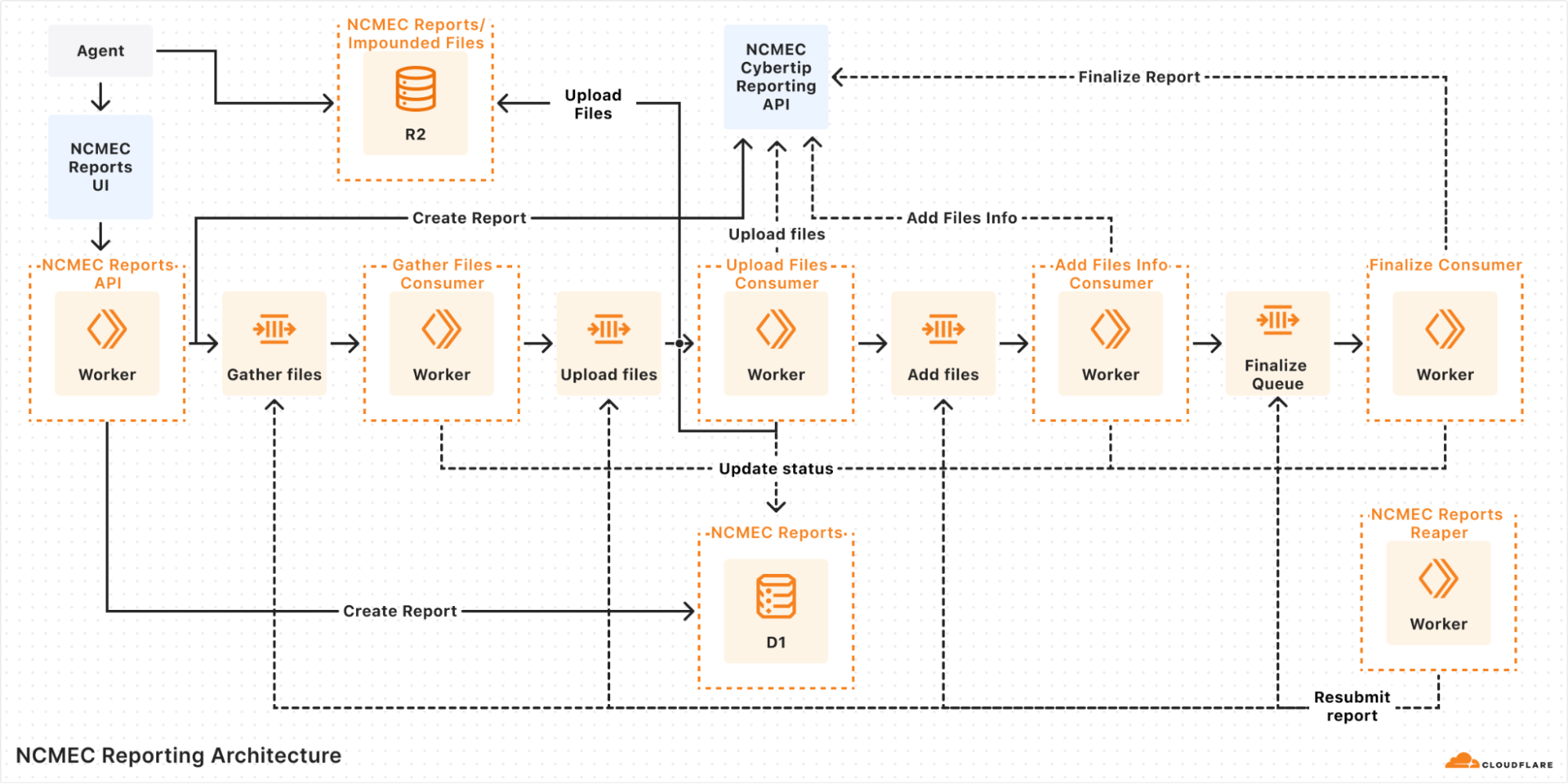
In our queue-based architecture each report would go through multiple steps:

  1. Validate input: Ensure the report has all necessary details.

  2. Initiate report: Call the NCMEC API to create a report.

  3. Fetch impounded files (if applicable): Retrieve files stored in R2.

  4. Upload files: Send files to NCMEC via API.

  5. Finalize report: Mark the report as completed.

A diagram of our queue-based architecture 

Each of these steps was handled by a separate queue, and if an error occurred, the system would retry the message several times before marking the report as failed. But errors weren’t always straightforward — for instance, if an external API call consistently failed due to bad input or returned an unexpected response shape, retries wouldn’t help. In those cases, the report could get stuck in an intermediate state, and we’d often have to manually dig through logs across different queues to figure out what went wrong.

Even more frustrating, when handling failed reports, we relied on a "Reaper" — a cron job that ran every hour to resubmit failed reports. Since a report could fail at any step, the Reaper had to deduce which queue failed and send a message to begin reprocessing. This meant:

  • Debugging was a nightmare: Tracing the journey of a single report meant jumping between logs for multiple queues.

  • Retries were unreliable: Some queues had retry logic, while others relied on the Reaper, leading to inconsistencies.

  • State management was painful: We had no clear way to track whether a report was halfway through the pipeline or completely lost, except by looking through the logs.

  • Operational overhead was high: Developers frequently had to manually inspect failed reports and resubmit them.

Queues gave us a solid foundation for moving messages around, but it wasn’t meant to handle orchestration. What we’d really done was build a bunch of loosely connected steps on top of a message bus and hoped it would all hold together. It worked, for the most part, but it was clunky, hard to reason about, and easy to break. Just understanding how a single report moved through the system meant tracing messages across multiple queues and digging through logs.

We knew we needed something better: a way to define workflows explicitly, with clear visibility into where things were and what had failed. But back then, we didn’t have a good way to do that without bringing in heavyweight tools or writing a bunch of glue code ourselves. When Cloudflare Workflows came along, it felt like the missing piece, finally giving us a simple, reliable way to orchestrate everything without duct tape.

The solution: Cloudflare Workflows

Once Cloudflare Workflows was announced, we saw an immediate opportunity to replace our queue-based architecture with a more structured, observable, and retryable system. Instead of relying on a web of multiple queues passing messages to each other, we now have a single workflow that orchestrates the entire process from start to finish. Critically, if any step failed, the Workflow could pick back up from where it left off, without having to repeat earlier processing steps, re-parsing files, or duplicating uploads.

With Cloudflare Workflows, each report follows a clear sequence of steps:

  1. Creating the report: The system validates the incoming report and initiates it with NCMEC.

  2. Checking for impounded files: If there are impounded files associated with the report, the workflow proceeds to file collection.

  3. Gathering files: The system retrieves impounded files stored in R2 and prepares them for upload.

  4. Uploading files to NCMEC: Each file is uploaded to NCMEC using their API, ensuring all relevant evidence is submitted.

  5. Adding file metadata: Metadata about the uploaded files (hashes, timestamps, etc.) is attached to the report.

  6. Finalizing the report: Once all files are processed, the report is finalized and marked as complete.

Here’s a simplified version of the orchestrator:

import { WorkflowEntrypoint, WorkflowEvent, WorkflowStep } from 'cloudflare:workers';


export class ReportWorkflow extends WorkflowEntrypoint<Env, ReportType> {
  async run(event: WorkflowEvent<ReportType>, step: WorkflowStep) {
    const reportToCreate: ReportType = event.payload;
    let reportId: number | undefined;


    try {
      await step.do('Create Report', async () => {
        const createdReport = await createReportStep(reportToCreate, this.env);
        reportId = createdReport?.id;
      });


      if (reportToCreate.hasImpoundedFiles) {
        await step.do('Gather Files', async () => {
          if (!reportId) throw new Error('Report ID is undefined.');
          await gatherFilesStep(reportId, this.env);
        });


        await step.do('Upload Files', async () => {
          if (!reportId) throw new Error('Report ID is undefined.');
          await uploadFilesStep(reportId, this.env);
        });


        await step.do('Add File Metadata', async () => {
          if (!reportId) throw new Error('Report ID is undefined.');
          await addFilesInfoStep(reportId, this.env);
        });
      }


      await step.do('Finalize Report', async () => {
        if (!reportId) throw new Error('Report ID is undefined.');
        await finalizeReportStep(reportId, this.env);
      });
    } catch (error) {
      console.error(error);
      throw error;
    }
  }
}

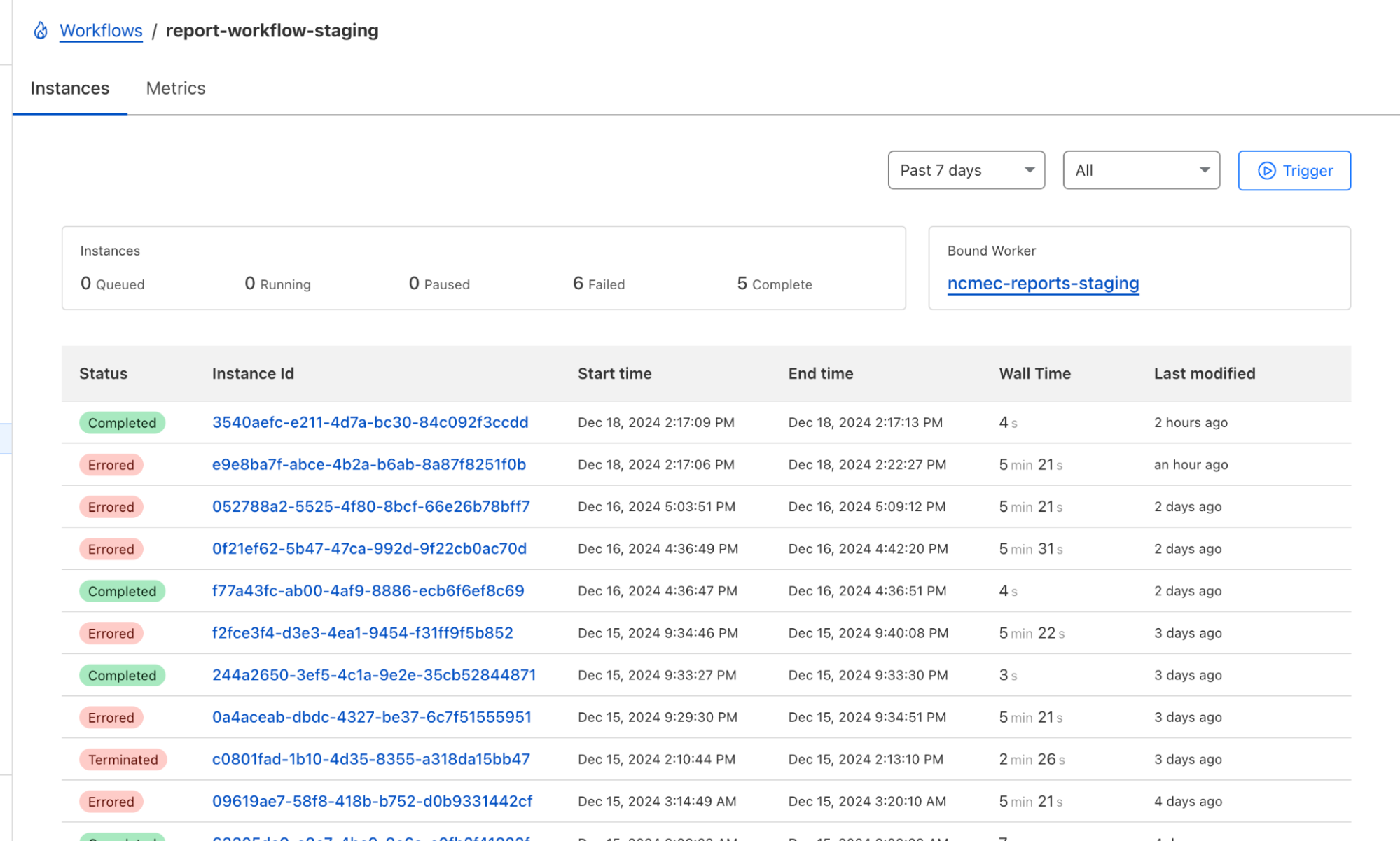
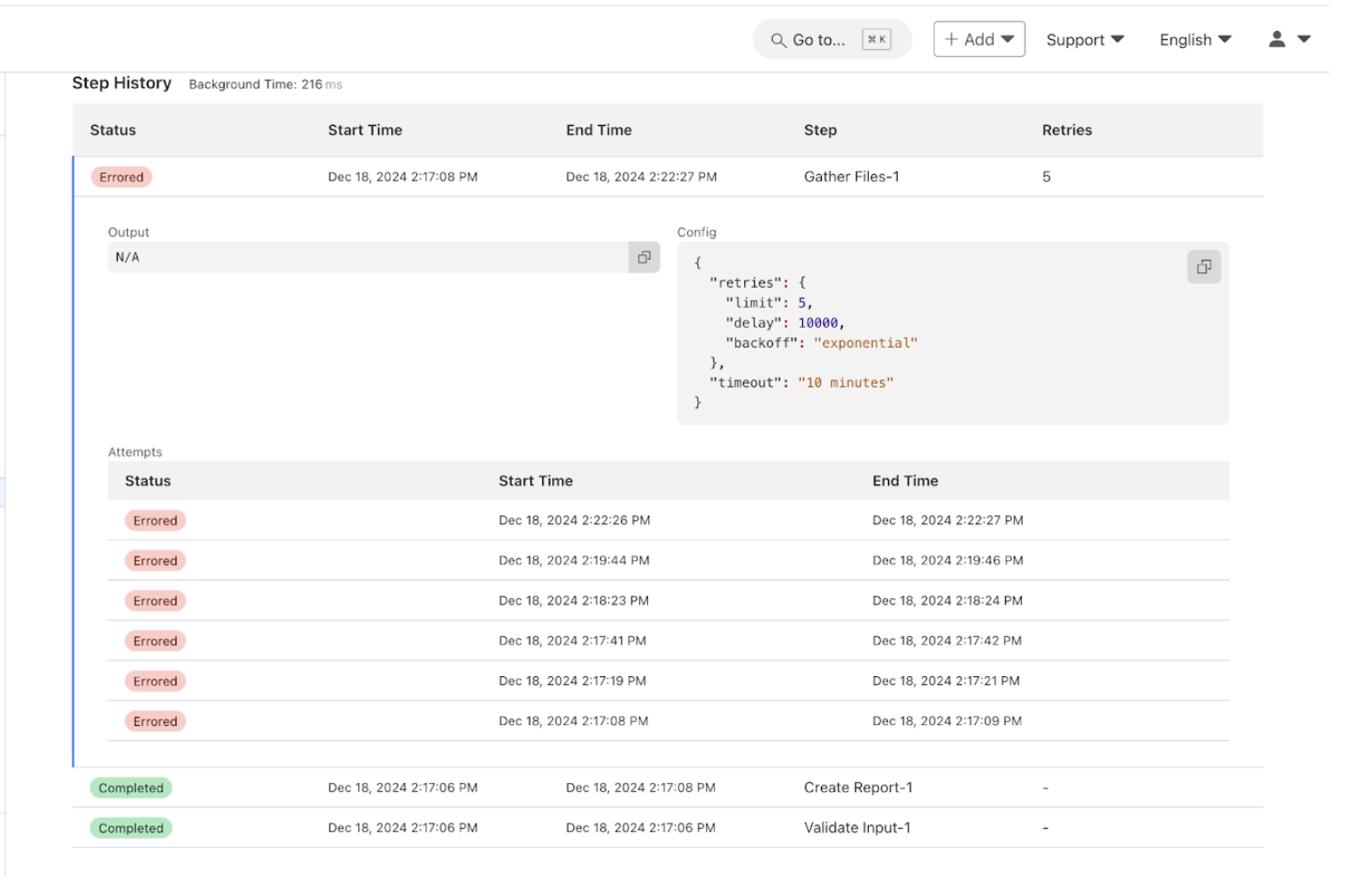
Not only can tasks be broken into discrete steps, but the Workflows dashboard gives us real-time visibility into each report processed and the status of each step in the workflow!

This allows us to easily see active and completed workflows, identify which steps failed and where, and retry failed steps or terminate workflows. These features revolutionize how we troubleshoot issues, providing us with a tool to deep dive into any issues that arise and retry steps with a click of a button.

Below are two dashboard screenshots, one of our running workflows and the second of an inspection of the success and failures of each step in the workflow. Some workflows look slower or “stuck” — that’s because failed steps are retried with exponential backoff. This helps smooth over transient issues like flaky APIs without manual intervention.

Cloudflare Workflows Dashboard for our NCMEC Workflow

Cloudflare Workflows Dashboard containing a breakout of the NCMEC Workflow Steps

Cloudflare Workflows transformed how we handle NCMEC incident reports. What was once a complex, queue-based architecture is now a structured, retryable, and observable process. Debugging is easier, error handling is more robust, and monitoring is seamless. 

Deploy your own Workflows

If you’re also building larger, multi-step applications, or have an existing Workers application that has started to approach what we ended up with for our incident reporting process, then you can typically wrap that code within a Workflow with minimal changes. Workflows can read from R2, write to KV, query D1 and call other APIs just like any other Worker, but are designed to help orchestrate asynchronous, long-running tasks.

To get started with Workflows, you can head to the Workflows developer documentation and/or pull down the starter project and dive into the code immediately:

$ npm create cloudflare@latest workflows-starter -- 
--template="cloudflare/workflows-starter"

Learn more about Cloudflare Workflows, and about using the Cloudflare CSAM Scanning Tool.

A maintainer’s guide to vulnerability disclosure: GitHub tools to make it simple


Imagine this: You’re sipping your morning coffee and scrolling through your emails, when you spot it—a vulnerability report for your open source project. It’s your first one. Panic sets in. What does this mean? Where do you even start?

Many maintainers face this moment without a clear roadmap, but the good news is that handling vulnerability reports doesn’t have to be stressful. Below, we’ll show you that with the right tools and a step-by-step approach, you can tackle security issues efficiently and confidently.

Let’s dig in.

What is vulnerability disclosure?

If you discovered that the lock on your front door was faulty, would you attach a note announcing it to everyone passing by? Of course not! Instead, you’d quietly tell the people who need to know—your family or housemates—so you can fix it before it becomes a real safety risk.

That’s exactly how vulnerability disclosure should be handled. Security issues aren’t just another bug. They can be a blueprint for attackers if exposed too soon. Instead of discussing them in the open, maintainers should work with security researchers behind the scenes to fix problems before they become public.

This approach, known as Coordinated Vulnerability Disclosure (CVD), keeps your users safe while giving you time to resolve the issue properly.

To support maintainers in this process, GitHub provides tools like Private Vulnerability Reporting (PVR), draft security advisories, and Dependabot alerts. These tools are free to use for open source projects, and are designed to make managing vulnerabilities straightforward and effective.

Let’s walk through how to handle vulnerability reports, so that the next time one lands in your inbox, you’ll know exactly what to do!

The vulnerability disclosure process, at a glance

Here’s a quick overview of what you should do if you receive a vulnerability report:

  1. Enable Private Vulnerability Reporting (PVR) to handle submissions securely.
  2. Collaborate on a fix: Use draft advisories to plan and test resolutions privately.
  3. Request a Common Vulnerabilities and Exposures (CVE) identifier: Learn how to assign a CVE to your advisory for broader visibility.
  4. Publish the advisory: Notify your community about the issue and the fix.
  5. Notify and protect users: Utilize tools like Dependabot for automated updates.

Now, let’s break down each step.

A cartoon bug happily emerging from an open envelope, symbolizing bug reports or vulnerability disclosures.

1. Start securely with PVR

Here’s the thing: There are security researchers out there actively looking for vulnerabilities in open source projects and trying to help. But if they don’t know who to report the problem to, it’s hard to resolve it. They could post the issue publicly, but this could expose users to attacks before there’s a fix. They could send it to the wrong person and delay the response. Or they could give up and move on.

The best way to ensure these researchers can reach you easily and safely is to turn on GitHub’s Private Vulnerability Reporting (PVR).

Think of PVR as a private inbox for security issues. It provides a built-in, confidential way for security researchers to report vulnerabilities directly in your repository.

🔗 How to enable PVR for a repository or an organization.

Heads up! By default, maintainers don’t receive notifications for new PVR reports, so be sure to update your notification settings so nothing slips through the cracks.

Enhance PVR with a SECURITY.md file

PVR solves the “where” and the “how” of reporting security issues. But what if you want to set clear expectations from the start? That’s where a SECURITY.md file comes in handy.

PVR is your front door, and SECURITY.md is your welcome guide telling visitors what to do when they arrive. Without it, researchers might not know what’s in scope, what details you need, or whether their report will be reviewed.

Maintainers are constantly bombarded with requests, making triage difficult—especially if reports are vague or missing key details. A well-crafted SECURITY.md helps cut through the noise by defining expectations early. It reassures researchers that their contributions are valued while giving them a clear framework to follow.

A good SECURITY.md file includes:

  • How to report vulnerabilities (ex: “Please submit reports through PVR.”)
  • What information should be included in a report (e.g., steps to reproduce, affected versions, etc.)

Pairing PVR with a clear SECURITY.md file helps you streamline incoming reports more effectively, making it easier for researchers to submit useful details and for you to act on them efficiently.

Three people gathered around a computer screen with puzzled and concerned expressions, discussing something on the screen.

2. Collaborate on a fix: Draft security advisories

Once you confirm the issue is a valid vulnerability, the next step is fixing it without tipping off the wrong people.

But where do you discuss the details? You can’t just drop a fix in a public pull request and hope no one notices. If attackers spot the change before the fix is officially released, they can exploit it before users can update.

What you’ll need is a private space where you and your collaborators can investigate the issue, work on and test a fix, and then coordinate its release.

GitHub provides that space with draft security advisories. Think of them like a private fork, but specifically for security fixes.

Why use draft security advisories?

  • They keep your discussion private, so that you can work privately with your team or trusted contributors without alerting bad actors.
  • They centralize everything, so your discussions, patches, and plans are kept in a secure workspace.
  • They’re ready for publishing when you are: You can convert your draft advisory into a public advisory whenever you’re ready.

🔗 How to create a draft advisory.

By using draft security advisories, you take control of the disclosure timeline, ensuring security issues are fixed before they become public knowledge.

A stylized illustration of a document labeled 'CVE,' symbolizing a Common Vulnerabilities and Exposures report.

3. Request a CVE with GitHub

Some vulnerabilities are minor contained issues that can be patched quietly. Others have a broader impact and need to be tracked across the industry.

When a vulnerability needs broader visibility, a Common Vulnerabilities and Exposures (CVE) identifier provides a standardized way to document and reference it. GitHub allows maintainers to request a CVE directly from their draft security advisory, making the process seamless.

What is a CVE, and why does it matter?

A CVE is like a serial number for a security vulnerability. It provides an industry-recognized reference so that developers, security teams, and automated tools can consistently track and respond to vulnerabilities.

Why would you request a CVE?

  • For maintainers, it helps ensure a vulnerability is adequately documented and recognized in security databases.
  • For security researchers, it provides validation that their findings have been acknowledged and recorded.

CVEs are used in security reports, alerts, feeds, and automated security tools. This helps standardize communication between projects, security teams, and end users.

Requesting a CVE doesn’t make a vulnerability more or less critical, but it does help ensure that those affected can track and mitigate risks effectively.

🔗 How to request a CVE.

Once assigned, the CVE is linked to your advisory but will remain private until you publish it.

By requesting a CVE when appropriate, you’re helping improve visibility and coordination across the industry.

A bold, rectangular stamp with the word 'PUBLISHED,' indicating the completion and release of content.

4. Publish the advisory

Good job! You’ve fixed the vulnerability. Now, it’s time to let your users know about it. A security advisory does more than just announce an issue. It guides your users on what to do next.

What is a security advisory, and why does it matter?

A security advisory is like a press release for an important update. It’s not just about disclosing a problem, it’s about ensuring your users know exactly what’s happening, why it matters, and what they need to do.

A clear and well-written advisory helps to:

  • Inform users: Clearly explain the issue and provide instructions for fixing it.
  • Build trust: Demonstrate accountability and transparency by addressing vulnerabilities proactively.
  • Trigger automated notifications: Tools, like GitHub Dependabot, use advisories to alert developers with affected dependencies.

🔗 How to publish a security advisory.

Once published, the advisory becomes public in your repository and includes details about the vulnerability and how to fix it.

Best practices for writing an advisory

  • Use plain language: Write in a way that’s easy to understand for both developers and non-technical users
  • Include essential details:
    • A description of the vulnerability and its impact
    • Versions affected by the issue
    • Steps to update, patch, or mitigate the risk
  • Provide helpful resources:
    • Links to patched versions or updated dependencies
    • Workarounds for users who can’t immediately apply the fix
    • Additional documentation or best practices

📌 Check out this advisory for a well-structured reference.

A well-crafted security advisory is not just a formality. It’s a roadmap that helps your users stay secure. Just as a company would carefully craft a press release for a significant change, your advisory should be clear, reassuring, and actionable. By making security easier to understand, you empower your users to protect themselves and keep their projects safe.

A person typing on a laptop while a small, animated robot (Dependabot) with arms raised in excitement interacts beside them.

5. After publication: Notify and protect users

Publishing your security advisory isn’t the finish line. It’s the start of helping your users stay protected. Even the best advisory is only effective if the right people see it and take action.

Beyond publishing the advisory, consider:

  • Announcing it through your usual channels: Blog posts, mailing lists, release notes, and community forums help reach users who may not rely on automated alerts.
  • Documenting it for future users: Someone might adopt your project later without realizing a past version had a security issue. Keep advisories accessible and well-documented.

You should also take advantage of GitHub tools, including:

  • Dependabot alerts
    • Automatically informs developers using affected dependencies
    • Encourages updates by suggesting patched versions
  • Proactive prevention
    • Use scanning tools to find similar problems in different parts of your project. If you find a problem in one area, it might also exist elsewhere
    • Regularly review and update your project’s dependencies to avoid known issues
  • CVE publication and advisory database
  • If you requested a CVE, GitHub will publish the CVE record to CVE.org for industry-wide tracking
  • If eligible, your advisory will also be added to the GitHub Advisory Database, improving visibility for security researchers and developers

Whether through automated alerts or direct communication, making your advisory visible is key to keeping your project and its users secure.

Next report? You’re ready!

With the right tools and a clear approach, handling vulnerabilities isn’t just manageable—it’s part of running a strong, secure project. So next time a report comes in, take a deep breath. You’ve got this!

Three thought bubbles—two filled with question marks and one with light bulbs—symbolizing frequently asked questions (FAQ) and the process of finding answers or solutions.

FAQ: Common questions from maintainers

You’ve got questions? We got answers! Whether you’re handling your first vulnerability report or just want to sharpen your response process, here is what you need to know.

1. Why is Private Vulnerability Reporting (PVR) better than emails or public issues for vulnerability reports?
Great question! At first glance, email or public issue tracking might seem like simple ways to handle vulnerability reports. But PVR is a better choice because it:

  • Keeps things private and secure: PVR ensures that sensitive details stay confidential. No risk of accidental leaks, and no need to juggle security concerns over email.
  • Keeps everything in one place: No more scattered emails or external tools. Everything—discussions, reports, and updates—is neatly stored right in your repository.
  • Makes it easier for researchers: PVR gives researchers a dedicated, structured way to report issues without jumping through hoops.

Bottom line? PVR makes life easier for both maintainers and researchers while keeping security under control.

2. What steps should I take if I receive a vulnerability report that I believe is a false positive?
Not every report is a real security issue, but it’s always worth taking a careful look before dismissing it.

  • Double-check details: Sometimes, what seems like a false alarm might be misunderstood. Review the details thoroughly.
  • Ask for more information: Ask clarifying questions or request additional details through GitHub’s PVR. Many researchers are happy to provide further context.
  • Check with others: If you’re unsure, bring in a team member or a security-savvy friend to help validate the report.
  • Close the loop: If it is a false positive, document your reasoning in the PVR thread. Transparency keeps things professional and builds trust with the researcher.

3. How fast do I need to respond?
* Acknowledge ASAP: Even if you don’t have a fix yet, let the researcher know you got their report. A simple “Thanks, we’re looking into it” goes a long way.
* Follow the 90-day best practice: While there’s no hard rule, most security pros aim to address verified vulnerabilities within 90 days.
* Prioritize by severity: Use the Common Vulnerability Scoring System (CVSS) to gauge urgency and decide what to tackle first.

Think of it this way: No one likes being left in the dark. A quick update keeps researchers engaged and makes collaboration smoother.

4. How do I figure out the severity of a reported vulnerability?
Severity can be tricky, but don’t stress! There are tools and approaches that make it easier.

  • Use the CVSS calculator: It gives you a structured way to evaluate the impact and exploitability of a vulnerability.
  • Consider real-world impact: A vulnerability that requires special conditions to exploit might be lower risk, while one that can be triggered easily by any user could be more severe.
  • Collaborate with the reporter: They might have insights on how the issue could be exploited in real-world scenarios.

Take it step by step—it’s better to get it right than to rush.

5. Should I request a CVE before or after publishing an advisory?
There’s no one-size-fits-all answer, but here’s a simple way to decide:

  • If it’s urgent: Publish the advisory first, then request a CVE. CVE assignments can take 1–3 days, and you don’t want to delay the fix.
  • For less urgent cases: Request a CVE beforehand to ensure it’s included in Dependabot alerts from the start.

Either way, your advisory gets published, and your users stay informed.

6. Where can I learn more about managing vulnerabilities and security practices?
There’s no need to figure everything out on your own. These resources can help:

Security is an ongoing journey, and every step you take makes your projects stronger. Keep learning, stay proactive, and you’ll be in great shape.

Next steps

By taking these steps, you’re protecting your project and contributing to a safer and more secure open source ecosystem.

The post A maintainer’s guide to vulnerability disclosure: GitHub tools to make it simple appeared first on The GitHub Blog.

CISA’s cyber incident reporting portal: Progress and future plans

On August 29, 2024, CISA announced the launch of a new cyber-incident Reporting Portal, part of the new CISA Services Portal.

“The Incident Reporting Portal enables entities and individuals reporting cyber incidents to create unique accounts, save reports and return to submit later, and eliminate the repetitive nature of inputting routine information such as contact information,” says Lauren Boas Hayes, Senior Advisor for Technology & Innovation, at CISA.

Shortly after the announcement, Security Intelligence reported on how the portal was designed and how it differs from other cyber incident reporting structures. We noted that CISA’s biggest advantage was its ability to assist the reporting organization with response and remediation.

“Any organization experiencing a cyberattack or incident should report it — for its own benefit and to help the broader community. CISA and our government partners have unique resources and tools to aid with response and recovery, but we can’t help if we don’t know about an incident,” said CISA Executive Assistant Director for Cybersecurity Jeff Greene in a formal statement covering the portal’s announcement.

Four months later

Since the announcement in August, a lot has happened. There was a presidential election, and a new administration will take charge on January 20. The current CISA director and other political appointees will step down. The agency’s future is uncertain as of this writing, particularly regarding who will oversee it and whether its functions will be divided across different federal departments. Still, it is expected that its work will continue.

Before these changes occur, we wanted to check in with CISA to follow up on the portal’s progress and what the future might look like.

Explore cybersecurity services

Long history of collecting cyber incident reports

CISA was first created in 2018, but federal agencies have collected cyber incident reports for decades.

“The launch of the Incident Reporting Portal is a significant step forward for CISA’s ability to collect operationally relevant data from reporters in a system which is more usable for reporters,” says Hayes. “The vision for the Incident Reporting Portal is for CISA’s Incident Reporting Portal to continue to enhance the functionality of the system to enable entities to share submitted reports with colleagues or clients to facilitate more effective third-party reporting, communicate directly with CISA, and access information and services relevant to the reporter.”

The portal is expected to make compliance with the Cyber Incident Reporting for Critical Infrastructure Act of 2022 easier. This act will “require CISA to coordinate with Federal partners and others on various cyber incident reporting and ransomware-related activities” across the 16 sectors, agencies and industries deemed “vital to the health, economy and security of the community or region.”

Hayes adds that while reporting under the Cyber Incident Reporting for Critical Infrastructure Act of 2022 will not be required until the Final Rule goes into effect, the agency encourages critical infrastructure owners and operators to voluntarily share information on cyber incidents prior to that date to help prevent other organizations from becoming victims of similar incidents.

“Sharing information allows us to work with our full breadth of partners to help prevent attackers from compromising other victims using the same techniques,” says Hayes.  “Sharing information can provide insight into the scale of an adversary’s campaign.”

Why reporting is vital to overall cybersecurity

While reporting cyber incidents to the portal is voluntary at the moment, all organizations are encouraged to share the information. If they feel the need, they can do so anonymously. As cyberattacks and nation-state threats become more sophisticated and increasingly target critical infrastructure industries, sharing this information with CISA allows the agency to help other organizations prepare for emerging threats and implement preventive measures before the damage is done.

“Isolating cyberattacks and preventing them in the future requires the coordination of many groups and organizations,” CISA explained. “By rapidly sharing critical information about attacks and vulnerabilities, the scope and magnitude of cyber events can be greatly decreased.”

And it isn’t just CISA that uses this information. According to the U.S. Government Accountability Office (GAO), 14 federal agencies are responsible for protecting critical infrastructure from cyberattacks, many in unexpected ways. For example, TSA, which handles airport security screening, is also responsible for safeguarding the country’s gasoline pipelines.

“Entities representing critical infrastructure owners and operators told us there are great benefits in getting information about threats from federal agencies,” the GAO reported.

What comes next

Despite a changing presidential administration, CISA is moving forward. It is planning a future designed to keep the critical infrastructure safe from cyber threats, which, in turn, will provide a layer of protection for the nation’s citizens and businesses.

“Sharing information allows us to work with our full breadth of partners so that the attackers can’t use the same techniques on other victims and can provide insight into the scale of an adversary’s campaign,” Jeff Greene was quoted in Federal News Network. “CISA is excited to make available our new portal with improved functionality and features for cyber reporting.”

As for the Incident Reporting Portal’s future, Hayes says, “In the future, we are planning to implement additional features that will take time to develop and incorporate user feedback. Our user experience team is actively working to get feedback on how we can improve the system over time.”

The post CISA’s cyber incident reporting portal: Progress and future plans appeared first on Security Intelligence.

❌