Researchers have documented a long‑running campaign that uses fake CAPTCHA pages to trick mobile users into sending dozens of international SMS messages in the background.
If you’ve spent any time on today’s web, CAPTCHAs may seem like background noise: click a few traffic lights, prove you’re human, move on. Something scammers have learned to abuse in ClickFix campaigns where they lure victims into infecting their own machines.
Recently, though, researchers found a twist where “prove you’re human” quietly turns into “run up an international phone bill.” The research describes an International Revenue Share Fraud (IRSF) campaign. IRSF, also known as SMS pumping fraud, abuses the complex pricing structures of international calls and SMS traffic to generate revenue by inflating message volume to particular destinations.
Instead of installing malware on the victim’s device, the scam exploits how telecom billing and affiliate networks work, turning ordinary web traffic into premium SMS revenue for cybercriminals.
How it works
A typical flow for the scam looks like this:
Victims arrive via malvertising or TDS redirects, often from typosquatted telecom domains, onto a page that looks like a basic image‑selection or quiz CAPTCHA.
To “continue,” they’re prompted to tap a button that opens their SMS app with a prefilled message and recipient list.
This isn’t one SMS to one number. The fake CAPTCHA runs through multiple steps, and each message is preconfigured with more than a dozen international numbers across 17 countries known for high termination fees, including Azerbaijan, Myanmar, and Egypt.
On a typical consumer plan, that can translate to roughly $30 in international SMS charges per person, with a slice of the termination fees flowing back to the attacker via revenue‑sharing agreements.
To keep you from simply backing out, the pages deploy dedicated back‑button hijacking. JavaScript rewrites browser history and bounces you back to the scam when you try to leave. The researchers also found the campaign was plugged into a Click2SMS‑style affiliate network that advertises “all kinds of traffic allowed” and carrier billing, effectively packaging IRSF as another monetization option for shady publishers.
This operation defrauds both individuals and telecom carriers. Victims face unexpected premium SMS charges on their bills and may struggle to trace the cause. Carriers pay revenue shares to the perpetrators and may absorb losses from customer disputes or chargebacks.
Never send an SMS to “prove you’re human.” Legitimate CAPTCHAs run entirely in your browser. They won’t open your SMS or dialer app.
Check your mobile bill regularly for small, unfamiliar international SMS charges, not just big spikes. If you see anything suspicious, dispute it quickly and ask your provider to block international or premium SMS if you don’t need it.
Use a mobile protection app that blocks known malicious sites, like these domains involved in this campaign:
sweeffg[.]online
colnsdital[.]com
zawsterris[.]com
megaplaylive[.]com
ruelomamuy[.]com
Malwarebytes blocks ruelomamuy[.]com
Scammers know more about you than you think.
Malwarebytes Mobile Security protects you from phishing, scam texts, malicious sites, and more. With real-time AI-powered Scam Guard built right in.
Research from Infoblox reveals a massive Click2SMS fraud scheme using fake CAPTCHAs and back button hijacking to trick victims into sending costly international texts.
Fake CAPTCHA ClickFix attack tricks users into running malicious commands, using cmdkey and regsvr32 to maintain persistence and avoid detection on Windows
Passkeys secure authentication but do not prove users are human. Learn how bots operate after login and why modern apps need bot detection, behavioral analysis, and runtime identity.
Em 2022, analisamos em profundidade um método de ataque chamado browser-in-the-browser, originalmente desenvolvido pelo pesquisador de cibersegurança conhecido como mr.d0x. Na época, ainda não havia exemplos reais desse modelo sendo utilizado em ataques. Quatro anos depois, a situação mudou: os ataques browser-in-the-browser deixaram de ser apenas um conceito teórico e passaram a ser utilizados em campanhas reais. Neste artigo, revisitamos o que exatamente é um ataque browser-in-the-browser, mostramos como hackers estão utilizando essa técnica e, principalmente, explicamos como evitar se tornar a próxima vítima.
O que é um ataque browser-in-the-browser (BitB)?
Para começar, vale relembrar o que mr.d0x realmente desenvolveu. A base do ataque surgiu da observação de quão avançadas se tornaram as ferramentas modernas de desenvolvimento Web, como HTML, CSS e JavaScript. Essa constatação levou o pesquisador a conceber um modelo de phishing particularmente sofisticado.
Um ataque browser-in-the-browser é uma forma avançada de phishing que utiliza recursos de design e desenvolvimento Web para criar sites fraudulentos que imitam janelas de login de serviços conhecidos, como Microsoft, Google, Facebook ou Apple, com aparência praticamente idêntica à original. No conceito proposto pelo pesquisador, o atacante cria um site aparentemente legítimo para atrair as vítimas. Uma vez nesse site, o usuário descobre que não pode deixar comentários ou realizar uma compra sem antes fazer login.
O processo parece simples: basta clicar no botão Fazer login com {nome de um serviço popular}. É nesse momento que ocorre o golpe. Em vez de abrir a página real de autenticação do serviço legítimo, o usuário recebe um formulário falso renderizado dentro do próprio site malicioso, que se apresenta visualmente como se fosse… uma janela pop-up do navegador. Além disso, a barra de endereço exibida nessa janela, também renderizada pelos invasores, mostra uma URL aparentemente legítima. Mesmo uma inspeção cuidadosa pode não revelar a fraude.
A partir desse ponto, o usuário desavisado insere suas credenciais Microsoft, Google, Facebook ou Apple nessa janela renderizada, e esses dados são enviados diretamente aos cibercriminosos. Durante algum tempo, esse esquema permaneceu apenas como um experimento teórico do pesquisador de segurança. Hoje, porém, ataques reais já incorporaram essa técnica aos seus arsenais de phishing.
Roubo de credenciais do Facebook
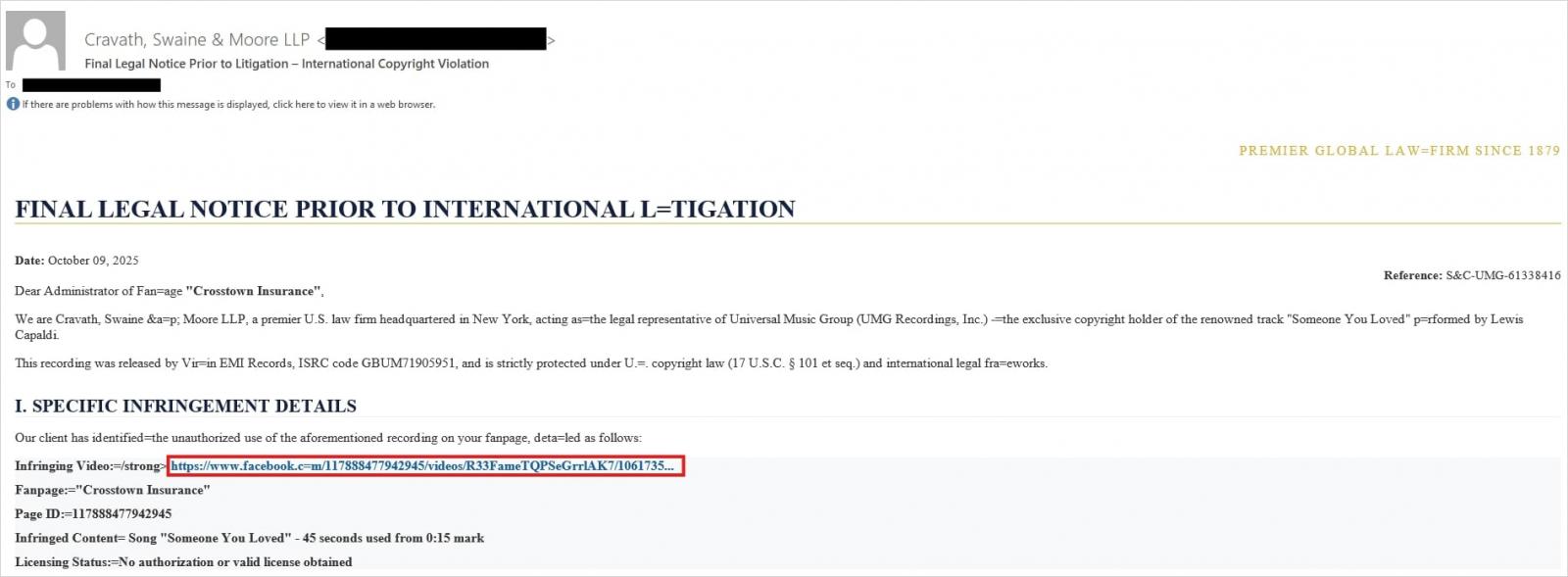
Os atacantes adaptaram o conceito original de mr.d0x. Em ataques recentes do tipo browser-in-the-browser, o golpe começa com e-mails criados para alarmar o destinatário. Em uma campanha de phishing, por exemplo, os criminosos se passaram por um escritório de advocacia informando ao usuário que ele teria cometido uma violação de direitos autorais ao publicar conteúdo no Facebook. A mensagem incluía um link aparentemente legítimo que supostamente levaria à publicação problemática.
Os invasores enviaram mensagens em nome de um escritório de advocacia fictício alegando violação de direitos autorais, acompanhadas de um link que supostamente direcionava ao post problemático no Facebook. Fonte
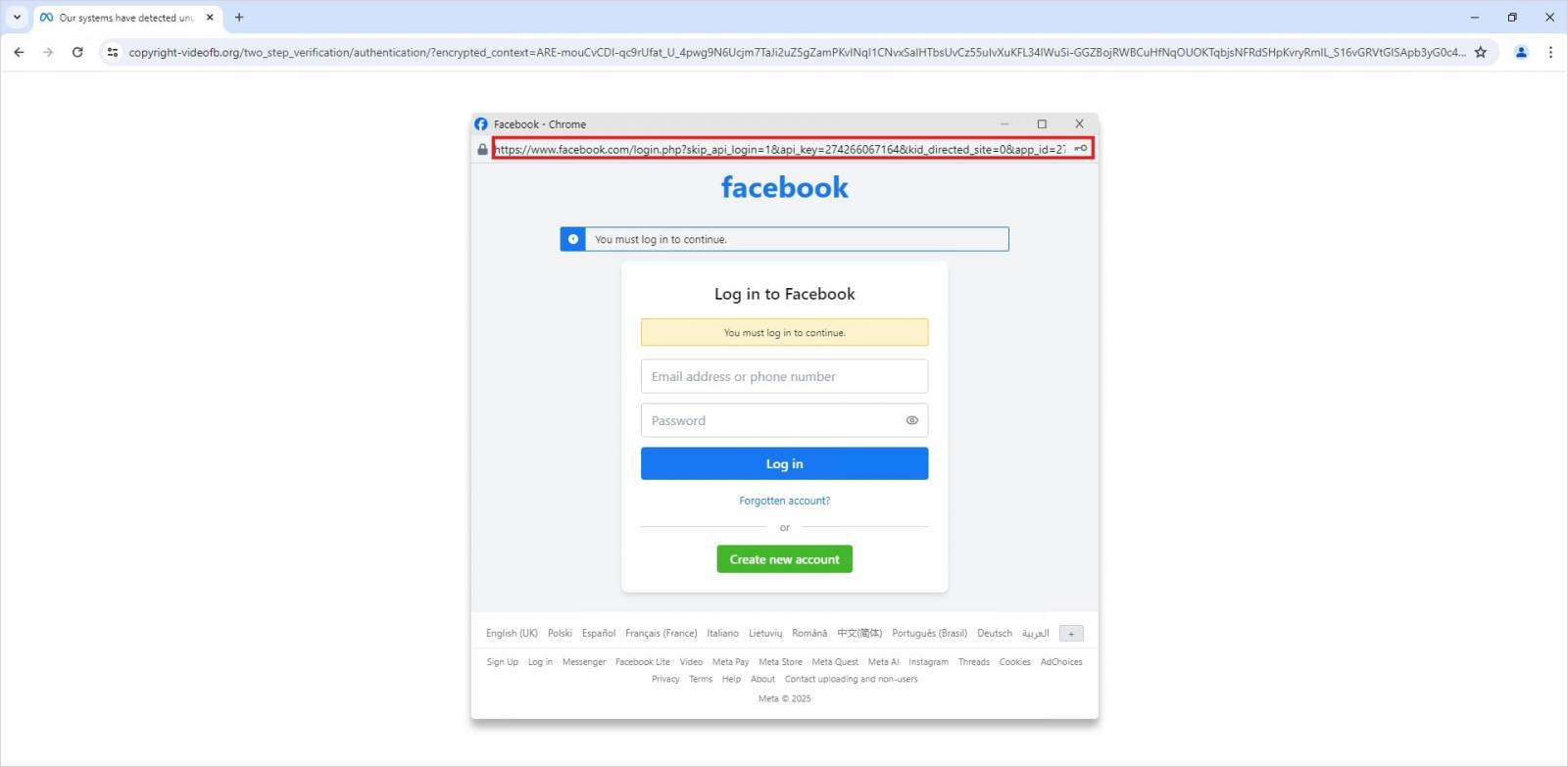
Curiosamente, para reduzir a desconfiança da vítima, ao clicar no link não era exibida imediatamente uma página falsa de login do Facebook. Em vez disso, o usuário era primeiro apresentado a um CAPTCHA falso da Meta. Somente após “passar” por essa verificação é que a vítima recebia a janela pop-up de autenticação falsa.
Isso não é um pop-up real do navegador, mas um elemento da própria página que imita uma tela de login do Facebook. Esse truque permite que os invasores exibam um endereço aparentemente legítimo. Fonte
Naturalmente, a página falsa de login do Facebook segue o modelo descrito por mr.d0x. Ela é construída inteiramente com ferramentas de desenvolvimento Web para capturar as credenciais da vítima. Enquanto isso, a URL exibida na barra de endereço simulada aponta para o site verdadeiro do Facebook, www.facebook.com.
Como evitar se tornar uma vítima
O fato de golpistas já estarem utilizando ataques browser-in-the-browser demonstra que as técnicas de fraude digital evoluem constantemente. Ainda assim, existe uma forma eficaz de verificar se uma janela de login é legítima. Utilizar um gerenciador de senhas, que funciona como um teste de segurança confiável para sites.
Isso ocorre, porque, ao preencher credenciais automaticamente, o gerenciador de senhas verifica a URL real da página, e não aquilo que parece estar na barra de endereço ou o que a interface visual mostra. Diferentemente de um usuário humano, não é possível enganar um gerenciador de senhas por meio de técnicas como browser-in-the-browser, domínios com pequenas variações ortográficas (typosquatting) ou formulários de phishing ocultos em anúncios e pop-ups. A regra é simples: se o gerenciador de senhas oferecer o preenchimento automático de login e senha, você está em um site para o qual já salvou credenciais. Se ele permanecer silencioso, há um forte indício de que algo está errado.
Além disso, seguir algumas recomendações clássicas de segurança digital ajuda a se proteger contra phishing ou, pelo menos, reduzir os danos caso um ataque seja bem-sucedido:
Ative a autenticação em dois fatores (2FA) em todas as contas que suportam esse recurso. Idealmente, utilize códigos temporários gerados por um aplicativo autenticador dedicado como segundo fator. Isso ajuda a evitar golpes de phishing que interceptam códigos de confirmação enviados por SMS, aplicativos de mensagem ou e-mail. Leia mais sobre 2FA de código único em nosso post dedicado.
Utilize chaves de acesso. A opção de login com chave de acesso também pode indicar que você está em um site legítimo. Aprenda tudo sobre o que são chaves de acesso e como começar a usá-las em nossa análise aprofundada sobre essa tecnologia.
Crie senhas únicas e complexas para todas as contas. Faça o que fizer, nunca reutilize a mesma senha em contas diferentes. Recentemente explicamos em nosso blog o que torna uma senha realmente forte. Gerar combinações únicas, sem precisar memorizá-las, KPMé a melhor opção. Como benefício adicional, também pode gerar códigos temporários para autenticação em dois fatores, armazenar suas chaves de acesso e sincronizar suas senhas e arquivos entre seus diferentes dispositivos.
Por fim, este post serve como mais um lembrete de que ataques teóricos descritos por pesquisadores de cibersegurança frequentemente acabam sendo utilizados em ataques reais. Então, fique de olho no nosso blog, e assine nosso canal no Telegram para se manter atualizado sobre as ameaças mais recentes à sua segurança digital e saber como neutralizá-las.
Leia sobre outras técnicas de phishing criativas que os golpistas estão usando diariamente:
When the mysterious operator of an internet archiving-service decided to silence a curious Finnish blogger, they didn’t just send a stroppy email - they allegedly weaponised their own CAPTCHA page to launch a DDoS attack, threatened to invent an entirely new genre of AI porn, and tampered with parts of their own archive to smear the blogger's name.
In this episode, we unravel how a website designed to preserve history may have trashed its own credibility - and how Wikipedia responded when trust went out the window.
Plus a ransomware gang shoots itself in the foot with a classic case of buffoonery, accidentally corrupting the very keys victims would need to decrypt their data. When even the criminals can’t unlock your files, what happens next?
All this, a surprisingly zen Pick of the Week, and a gloriously splenetic rant against web forms, on episode 456 of the award-winning "Smashing Security" podcast, with cybersecurity veteran and keynote speaker Graham Cluley and special guest Paul Ducklin.
A fake CAPTCHA scam is tricking Windows users into running PowerShell commands that install StealC malware and steal passwords, crypto wallets, and more.
Our business solutions remove all remnants of ransomware and prevent you from getting reinfected. Want to learn more about how we can help protect your business? Get a free trial below.
Early on in 2025, I described how criminals used fake CAPTCHA sites and a clipboard hijacker to provide instructions for website visitors that would effectively infect their own machines with an information stealer known as the Lumma Stealer.
ClickFix is the name researchers have since given to this type of campaign—one that uses the clipboard and fake CAPTCHA sites to trick users into running malicious commands themselves.
Later, we found that the cybercriminals behind it seemed to be running some A/B tests to figure out which infection method worked best: ClickFix, or the more traditional file download that disguises malware as a useful application.
The criminals probably decided to go with ClickFix, because they soon came up with a campaign that targeted Mac users to spread the infamous Atomic Stealer.
Now, as reported by researchers from Push Security, the attackers behind ClickFix have tried to make the campaign more “user-friendly.” The latest fake CAPTCHA pages include embedded video tutorials showing exactly how to run the malicious code.
Image courtesy of Push Security
The site automatically detects the visitor’s operating system and provides matching instructions, copying the right code for that OS straight to the clipboard—making typos less likely and infection more certain.
A countdown timer adds urgency, pressuring users to complete the “challenge” within a minute. When people rush instead of thinking things through, social engineering wins.
Unsurprisingly, most of these pages spread through SEO-poisoned Google search results, although they also circulate via email, social media, and in-app ads too.
How to stay safe
With ClickFix running rampant—and it doesn’t look like it’s going away anytime soon—it’s important to be aware, careful, and protected.
Slow down. Don’t rush to follow instructions on a webpage or prompt, especially if it asks you to run commands on your device or copy-paste code. Attackers rely on urgency to bypass your critical thinking, so be cautious of pages urging immediate action. Sophisticated ClickFix pages add countdowns, user counters, or other pressure tactics to make you act quickly.
Avoid running commands or scripts from untrusted sources. Never run code or commands copied from websites, emails, or messages unless you trust the source and understand the action’s purpose. Verify instructions independently. If a website tells you to execute a command or perform a technical action, check through official documentation or contact support before proceeding.
Limit the use of copy-paste for commands. Manually typing commands instead of copy-pasting can reduce the risk of unknowingly running malicious payloads hidden in copied text.
Secure your devices. Use an up-to-date real-time anti-malware solution with a web protection component.
Educate yourself on evolving attack techniques. Understanding that attacks may come from unexpected vectors and evolve helps maintain vigilance. Keep reading our blog!
Pro tip: Did you know that the free Malwarebytes Browser Guard extension warns you when a website tries to copy something to your clipboard?
We don’t just report on threats—we remove them
Cybersecurity risks should never spread beyond a headline. Keep threats off your devices by downloading Malwarebytes today.

 Entrar
![Malwarebytes blocks ruelomamuy[.]com](https://www.malwarebytes.com/wp-content/uploads/sites/2/2026/04/ruelomamuycomblock.png)