
 Entrar
The post Chrome’s Security Overhaul: 127 Fixes and $100k+ in Bounties Power the New Chrome 148 Stable Release appeared first on Daily CyberSecurity.
Visualização de leitura

Google Chrome’s silent 4GB AI download problem
Google Chrome has been quietly downloading a 4GB AI model onto users’ devices without asking first.
Security researcher Alexander Hanff, aka ThatPrivacyGuy, reports that Chrome has been silently installing Gemini Nano, Google’s on-device AI model, as a file called weights.bin stored in the OptGuideOnDeviceModel directory within users’ Chrome profiles. This 4GB download happens automatically when Chrome determines your device meets the hardware requirements. It does not ask for consent, and sends no notification—not even one of those annoying cookie banners you’ve learned to dismiss without reading.
The Gemini Nano model powers features like “Help me write” text composition assistance, on-device scam detection, and a Summarizer API that websites can call directly. These features are enabled by default in some recent Chrome versions. And here’s the kicker: if you discover the file and delete it, Chrome simply downloads it again.
Why this matters
Let’s start with the obvious problem: a 4GB download isn’t trivial for everyone. If you’re lucky enough to have unlimited fiber internet, you might not notice. But for users on metered connections, mobile hotspots, or in developing countries where data is expensive, Google just cost them real money without permission. For rural users or those with bandwidth caps, this kind of silent transfer can blow through monthly limits in minutes.
Hanff focuses on the environmental angle. He calculated that if this model were pushed to just 1 billion Chrome users (roughly 30% of Chrome’s user base), the distribution alone would consume 240 gigawatt-hours of energy and generate 60,000 tons of CO2 equivalent. That’s not including actually using the model, just the downloads.
But to us, the most troubling aspect is the broader pattern this represents. Just a few weeks ago, we reported another unsolicited AI invasion on our personal computers discovered by Hanff. He documented how Anthropic’s Claude Desktop app, which silently installed browser integration files across multiple Chromium browsers, including five browsers he didn’t even have installed. The integration would reinstall itself if removed, and it also happened without any meaningful user disclosure.
Hanff argues that both cases likely violate EU privacy law, specifically the ePrivacy Directive’s rules about storing data on user devices and the GDPR’s requirements around transparency and lawful processing. While these claims haven’t been tested in court, they highlight a fundamental tension: can companies just install whatever they want on your computer as long as they say it’s a feature of an app you installed?
Google might argue that having an AI on your device provides better privacy than cloud-based alternatives. Which is generally true, but it does not apply here, since Chrome’s most prominent AI feature—the “AI Mode” pill in the address bar—doesn’t even use the local model. According to Hanff’s analysis, it routes queries to Google’s cloud servers anyway.
All in all, users see a 4GB local AI model and reasonably assume their data stays private, when in reality, the most visible AI feature sends everything to Google’s servers.
Tech companies need to stop treating silent deployment as acceptable practice. We see no valid excuse for this. Your device is yours. The storage is yours. The bandwidth is yours. And the electricity bill is yours.
What happened to asking for permission? And when I remove it, I want it gone permanently—not automatic reinstallation.
When are the tech giants going to learn that we don’t want to be left discovering after the fact that our devices have become deployment targets for features we never asked for.
Browse like no one’s watching.
Malwarebytes Privacy VPN encrypts your connection and never logs what you do, so the next story you read doesn’t have to feel personal. Try it free →
Google Chrome 148 Released With Fixes for 127 Security Flaws
Google has officially rolled out Chrome version 148 to the stable channel, delivering a massive security overhaul that addresses 127 vulnerabilities across Windows, Mac, and Linux. The update, now available as version 148.0.7778.96 for Linux and 148.0.7778.96 or 148.0.7778.97 for Windows and Mac, patches several critical memory management flaws that could allow attackers to execute […]
The post Google Chrome 148 Released With Fixes for 127 Security Flaws appeared first on GBHackers Security | #1 Globally Trusted Cyber Security News Platform.
Google Chrome Accused of Silently Installing 4GB AI Model on User Devices
Cybersecurity researcher Alexander Hanff claims that Google Chrome automatically installs a 4GB Gemini Nano AI model without user notification or consent.
Billions of Chrome Users Urged to Update After Google Patches 30 Security Flaws
Google patched 30 Chrome vulnerabilities, including four Critical flaws. Here’s what users should know and how to update Chrome and Firefox.
The post Billions of Chrome Users Urged to Update After Google Patches 30 Security Flaws appeared first on TechRepublic.
Critical Chrome Vulnerabilities Enables Remote Code Execution Attacks
Google has released a critical security update for its Chrome desktop browser to address 30 security vulnerabilities, including four severe flaws that could enable Remote Code Execution (RCE) attacks.
The Stable channel has been updated to version 147.0.7727.137/138 for Windows and Mac, and to 147.0.7727.137 for Linux.
Google is rolling out this update gradually over the coming days and weeks to ensure a stable deployment.
The majority of the severe flaws patched in this release are “Use-After-Free” memory vulnerabilities.
A Use-After-Free bug occurs when an application attempts to access memory space that has already been freed or deallocated.
This memory mismanagement can lead to unexpected browser crashes, severe data corruption, and, most dangerously, arbitrary code execution.
If successfully exploited, these vulnerabilities allow remote attackers to run malicious commands on a victim’s machine simply by convincing the user to visit a specially crafted malicious webpage.
This requires no additional user interaction and could allow hackers to bypass Chrome’s built-in sandbox protections, potentially compromising the underlying system.
Critical Chrome Vulnerabilities
Google is temporarily restricting access to specific bug details and exploit links until a vast majority of the user base has successfully applied the security patch.
This industry standard practice prevents threat actors from reverse-engineering fixes to launch attacks against unpatched, vulnerable systems.
Google awarded bug bounties to researchers, including $16,000 for a high-severity GPU flaw and $7,000 for a critical Canvas issue.
Below is a summary of the most critical and highly rewarded vulnerabilities addressed in this Chrome release:
- CVE-2026-7363 is a critical use-after-free vulnerability in the Canvas component, reported by heapracer, with a $7,000 bounty.
- CVE-2026-7361 is a critical use-after-free vulnerability affecting iOS, reported by Google, with the bounty yet to be determined.
- CVE-2026-7344 is a critical use-after-free vulnerability in the Accessibility component, reported by Google, with a pending bounty.
- CVE-2026-7343 is a critical use-after-free vulnerability in the Views component, reported by Google, with a pending bounty.
- CVE-2026-7333 is a high-severity use-after-free vulnerability in the GPU component, reported by c6eed09fc8b174b0f3eebedcceb1e792, with a $16,000 bounty.
To protect against potential exploitation, individuals and network administrators are strongly advised to update their Google Chrome browsers immediately.
Check for updates in Google Chrome via Help → About Google Chrome, then restart the browser to apply them. A quick browser restart is required to apply the latest protections fully.
Administrators managing enterprise environments should prioritize the rapid deployment of Chrome version 147.0.7727.137/138 across their networks to prevent potential intrusions.
Follow us on Google News, LinkedIn, and X for daily cybersecurity updates. Contact us to feature your stories.
The post Critical Chrome Vulnerabilities Enables Remote Code Execution Attacks appeared first on Cyber Security News.

82 Chrome Extensions Found Selling User Data, 6.5 Million Users Affected
LayerX research finds 82 Chrome extensions collecting and selling user data, affecting at least 6.5 million users through disclosed but concerning practices.
Claude Desktop Reportedly Adds Browser Access Bridge to Multiple Chromium-Based Browsers
A recent technical audit by privacy researcher Alexander Hanff has revealed that Anthropic’s Claude Desktop application for macOS silently installs a Native Messaging bridge into the directories of several Chromium-based browsers.
This undocumented behavior occurs without user consent, raising significant privacy and security concerns within the cybersecurity community.
When a user installs Claude Desktop (Claude.app), the application automatically places a Native Messaging manifest file named com.anthropic.claude_browser_extension.json into the application support folders of up to seven Chromium-based browsers, including Chrome, Brave, Edge, Arc, Vivaldi, and Opera.
For a browser extension to communicate with a local desktop application, it requires a Native Messaging host. This bridge operates outside the browser’s secure sandbox, running with the same privileges as the user.
The manifest file preauthorizes three specific Chrome extension IDs to trigger the helper binary (chrome-native-host) located in the Claude Desktop app bundle.
Alarmingly, this installation happens automatically even if the user has never installed the Claude browser extension, and even in directories for browsers that are not currently installed on the machine.
Furthermore, Claude Desktop rewrites these manifest files whenever it launches, making them difficult to remove permanently.
Security and Privacy Implications
While the helper binary remains dormant until activated by one of the three pre-authorized extensions, its presence expands the user’s machine’s attack surface.
If an attacker successfully compromises one of the allowed extension IDs via an account takeover, a malicious Web Store update, or a compromised build pipeline, they could achieve out-of-sandbox code execution.
The privacy risks are equally severe. According to Anthropic’s own documentation, their browser integrations are designed to share login states, read the Document Object Model (DOM), extract structured data, and fill forms.
This means a fully activated bridge could allow the AI agent to read decrypted private messages, access banking portals, and capture passwords as they are typed.
Furthermore, Anthropic previously disclosed that its Claude for Chrome extension is vulnerable to prompt injection attacks.
A successful prompt injection against the extension could, in theory, use the pre-installed Native Messaging bridge to execute commands on the host machine.
The core issue Hanff highlights is the total lack of transparency. The software employs a “dark pattern” by forcing an integration across independent software boundaries without prompting the user to opt in.
Hanff noted that this silent deployment of dormant tracking and automation capabilities may be in direct violation of the EU’s ePrivacy Directive and computer misuse regulations, which strictly govern the storage of information on a user’s terminal equipment.
Standard cybersecurity practices dictate that such powerful system integrations should be installed only when a user actively requests them, be properly scoped to the targeted browser, and be visible within the application’s settings.
As AI tools increasingly seek agentic control over our digital environments, enforcing strict user consent and transparent security boundaries remains critical.
Follow us on Google News, LinkedIn, and X for daily cybersecurity updates. Contact us to feature your stories.
The post Claude Desktop Reportedly Adds Browser Access Bridge to Multiple Chromium-Based Browsers appeared first on Cyber Security News.

Claude Desktop Reportedly Adds Browser Access Bridge for Chromium Browsers
A detailed cybersecurity report published by privacy expert Alexander Hanff on April 18, 2026, reveals that Anthropic’s Claude Desktop application for macOS silently installs a Native Messaging bridge across multiple Chromium-based browsers. This unprompted installation establishes out-of-sandbox browser automation hooks that pose significant privacy and security risks, bypassing explicit user consent and standard application security […]
The post Claude Desktop Reportedly Adds Browser Access Bridge for Chromium Browsers appeared first on GBHackers Security | #1 Globally Trusted Cyber Security News Platform.

Chrome Privacy Concerns Rise as Expert Warns of Fingerprinting Risks
A privacy expert warns Chrome still allows browser fingerprinting and tracking, raising concerns after Google’s shift away from third-party cookie changes.
The post Chrome Privacy Concerns Rise as Expert Warns of Fingerprinting Risks appeared first on TechRepublic.
The 5 Best VPN Extensions for Chrome
Looking for the best Chrome VPN extensions in 2026 to enhance your online security and privacy? Dive into our list of top-rated VPNs and find your best fit.
The post The 5 Best VPN Extensions for Chrome appeared first on TechRepublic.
Fake TikTok Downloaders on Chrome and Edge Spying on 130,000 Users
Over 130,000 users are at risk from fake TikTok downloader extensions on Chrome and Microsoft Edge. Researchers discovered these malicious tools use device fingerprinting to spy on users and steal sensitive browser data.
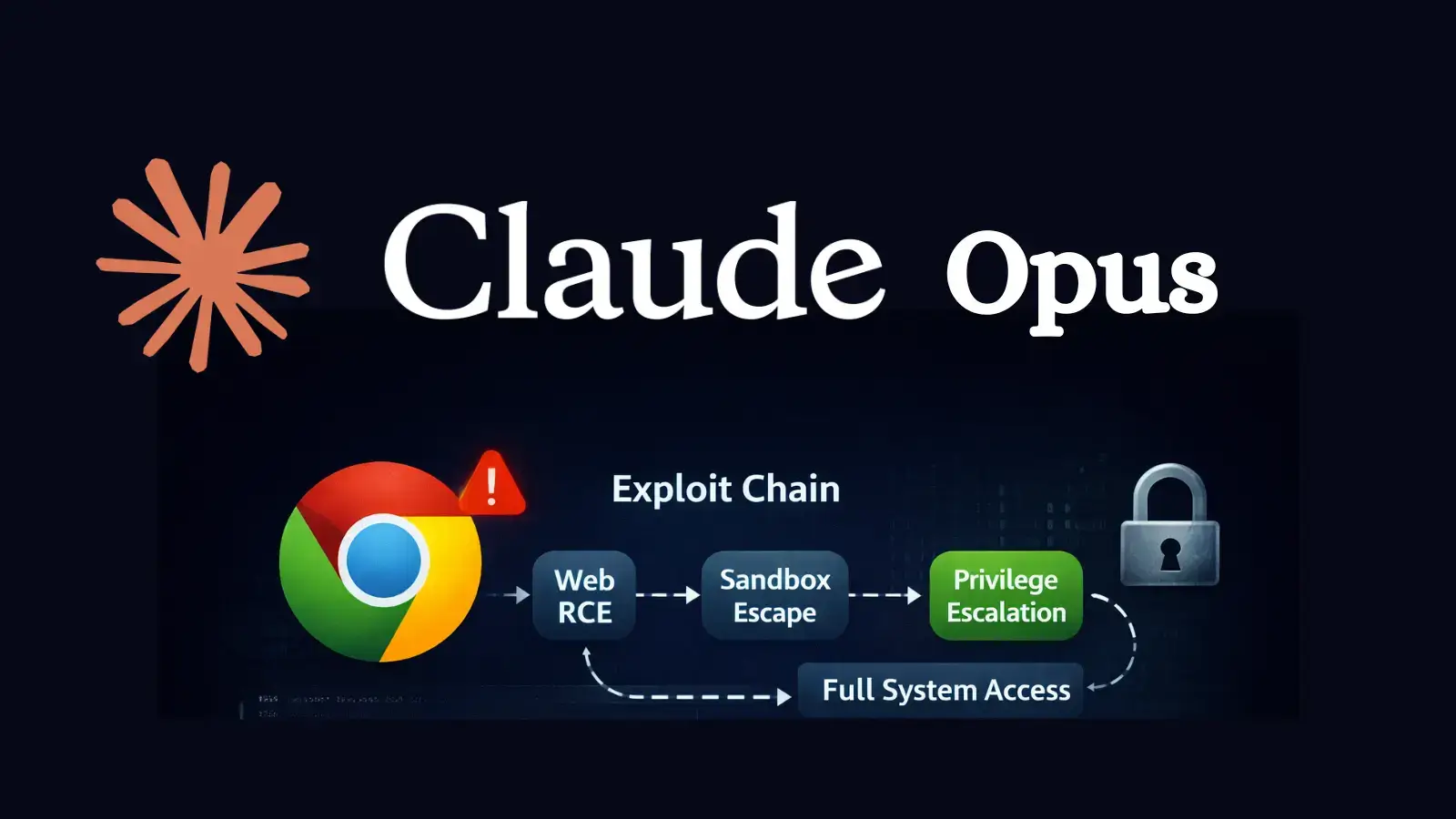
Researcher Claims Claude Opus Enabled Creation of Working Chrome Exploit
A security researcher has shown that Anthropic’s Claude Opus can help build a working browser exploit chain against Google Chrome’s V8 engine, raising fresh concerns about how quickly AI can speed up offensive security work. The experiment was published by Mohan Pedhapati, also known as s1r1us, CTO of Hacktron, and it arrived just days after […]
The post Researcher Claims Claude Opus Enabled Creation of Working Chrome Exploit appeared first on GBHackers Security | #1 Globally Trusted Cyber Security News Platform.
Chrome Privacy Vulnerability Exposes Users via Fingerprinting and Header Leaks
A new technical review of Google Chrome’s privacy posture shows that modern tracking no longer depends only on cookies, because websites can combine browser fingerprinting, storage tricks, and HTTP header leaks to identify users with surprising accuracy. Chrome has reduced some obvious signals, but many high-value surfaces such as canvas rendering, WebGL, audio processing, Client […]
The post Chrome Privacy Vulnerability Exposes Users via Fingerprinting and Header Leaks appeared first on GBHackers Security | #1 Globally Trusted Cyber Security News Platform.

Browser Guard gets even better with Access Control
Have you ever been on a website when a pop-up suddenly asked for access to your camera, microphone, location, or notifications? Whether you clicked “allow,” dismissed it, or just wondered why it appeared, those permission requests aren’t always harmless. Some sites can abuse those permissions.
With Access Control, a new feature in Browser Guard, you decide exactly which websites can access your device and stop the rest. That means you choose which websites can:
- Use your camera
- Use your microphone
- Access your location
- Send you notifications
Further, not only can you control which websites have access to your devices, but you can also block websites or even require those specific sites to request permission every single time they try to gain access to your machines. You can always allow trusted sites to access your camera or location while blocking everything else.
Access Control is now available for Malwarebytes subscribers using Chrome and Edge browsers on a Windows device.
How to use Access Control
We designed Access Control to be both powerful and simple because we know every moment you spend getting set up is another moment you’re left unprotected.
How to use Access Control:
- Install/Open Browser Guard: Click the Malwarebytes icon in your browser’s header
- Access Dashboard: Click the Dashboard tab at the bottom of the extension panel.
- Navigate to Access Control: On the left sidebar of the web page, select Access Control.
- Manage Permissions: See visited websites, click “Allow” to enable or disable Malwarebytes’ ability to see visited sites.
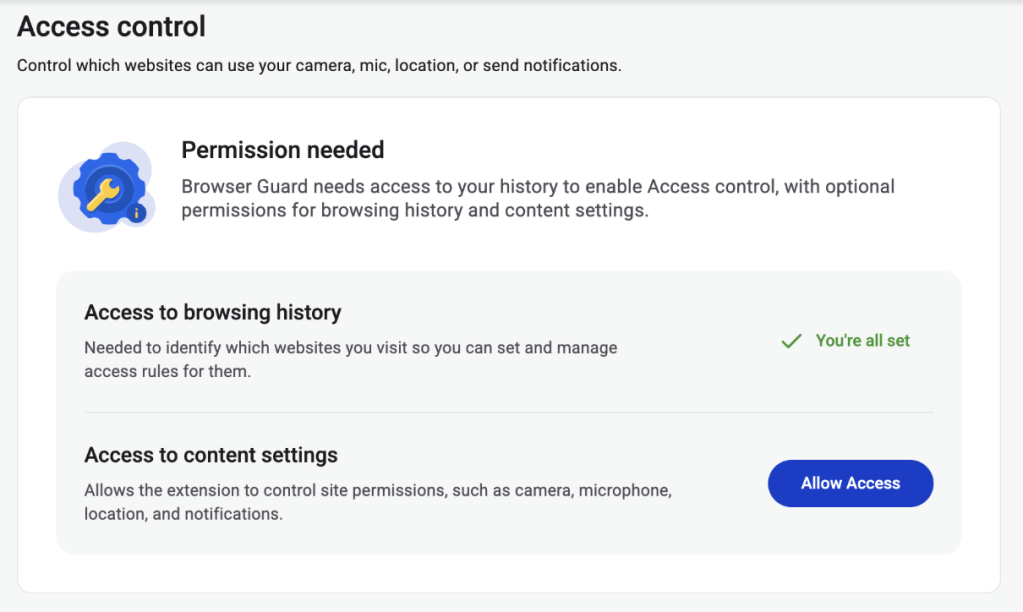
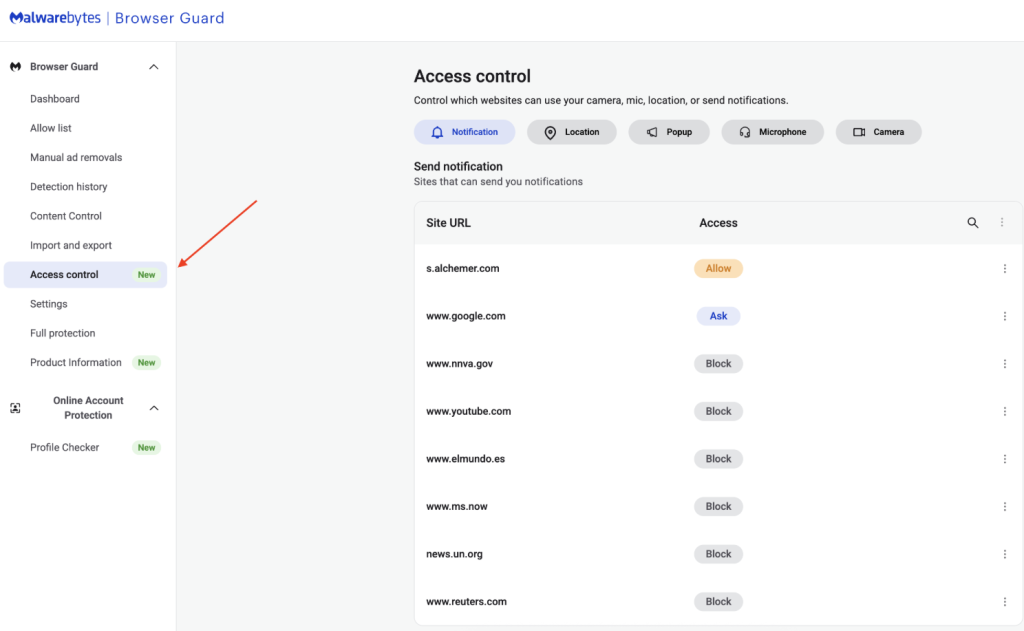
This feature is rolling out in beta first, so you might see improvements and updates as we refine it. Currently, the feature works across Chrome and Edge, but will roll out to other browsers soon.
Access Control is another step toward making privacy simple and accessible. Not a subscriber yet? Check out Malwarebytes’ plans today to unlock this feature and more.
We don’t just report on threats—we remove them
Cybersecurity risks should never spread beyond a headline. Keep threats off your devices by downloading Malwarebytes today.
