Visualização de leitura

Getting the Most Value Out of the OSCP: After the Exam

In the final post of this series, I’ll discuss what to do after your latest exam attempt to get the most value out of your OSCP journey.

DISCLAIMER:
All opinions expressed in this article are solely my own. I have reviewed the content to ensure compliance with OffSec’s copyright policies and agreements. I have not been sponsored or incentivized in any way to recommend or oppose any resources mentioned in this article.

Introduction

Throughout this series, I’ve shared practical advice for PEN-200: Penetration Testing with Kali Linux students seeking to maximize the professional, educational, and financial value of pursuing the Offensive Security Certified Professional (OSCP) certification. So far, I’ve focused on four distinct phases of “the OSCP journey”: 1) pre-enrollment preparation, 2) the course material, 3) the lab networks, and 4) the exam. In this final post, I’ll discuss how students can leverage their most recent exam experience to learn from their mistakes and increase their chances of passing the exam on subsequent attempts. I’ll also share guidance for newly certified OSCP professionals on how to continue their cybersecurity journey with purpose and direction.

PEN-200: Penetration Testing Certification with Kali Linux | OffSec

After the Exam…

“To finish the moment, to find the journey’s end in every step of the road, to live the greatest number of good hours, is wisdom.” — Ralph Waldo Emerson

What you do after each OSCP exam attempt carries both short- and long-term implications for your professional success. Here are the three takeaways from this post:

  1. Pass or fail, every student should conduct a thorough retrospective of their last exam attempt to determine what went well, where to focus future study efforts, and what productivity sinks to eliminate
  2. For students still trying to pass the exam, connecting with others can inspire new strategies, uncover useful training resources, and impart valuable insight; certified professionals can also use this network for career support and guidance
  3. The final piece of advice in this series is simply to reflect on your OSCP journey so far and decide what you want to pursue next, whether that’s further self-guided study, a new certification, or a job transition

Conduct an Exam Attempt Retrospective

After your OSCP exam—whether you passed or not—the most valuable thing you can do is pause and unpack what actually happened. For students still pursuing the certification, the benefit is clear: increasing the odds of passing the next attempt. However, even newly certified professionals can gain valuable insight by identifying areas for improvement or exam-day “bottlenecks” that hindered productivity. In this section, I propose a structured retrospective methodology, defined here as a deliberate and reflective review of your performance with the goal of identifying what worked, what failed, and what to improve. You can think of it as a technical postmortem of your latest exam attempt.

It took me three attempts to pass the OSCP exam. In my first attempt, I performed well on the standalone machine set but struggled with lateral movement and privilege escalation in the Active Directory (AD) set. I assumed my only obstacle was a lack of familiarity with AD attack vectors, so I rewrote my notes for the appropriate PEN-200 modules and practiced more with AD network exercises. Had I conducted an exam retrospective, however, I would have uncovered several other weaknesses in my approach:

  • An underdeveloped external reconnaissance methodology
  • Poor tradecraft documentation
  • Suboptimal time management

My second attempt resulted in an even poorer performance (I exfiltrated only a single flag) despite being better informed on AD internals. Needless to say, I was shocked and profoundly disappointed.

After pulling myself out of that slump, I mulled over my latest attempt and used the lessons I’d learned to perform significantly better on my third and final try. With that success in mind, I revisited my retrospective process and refined it for this blog series. The workflow is illustrated in the swimlane flowchart diagram below:
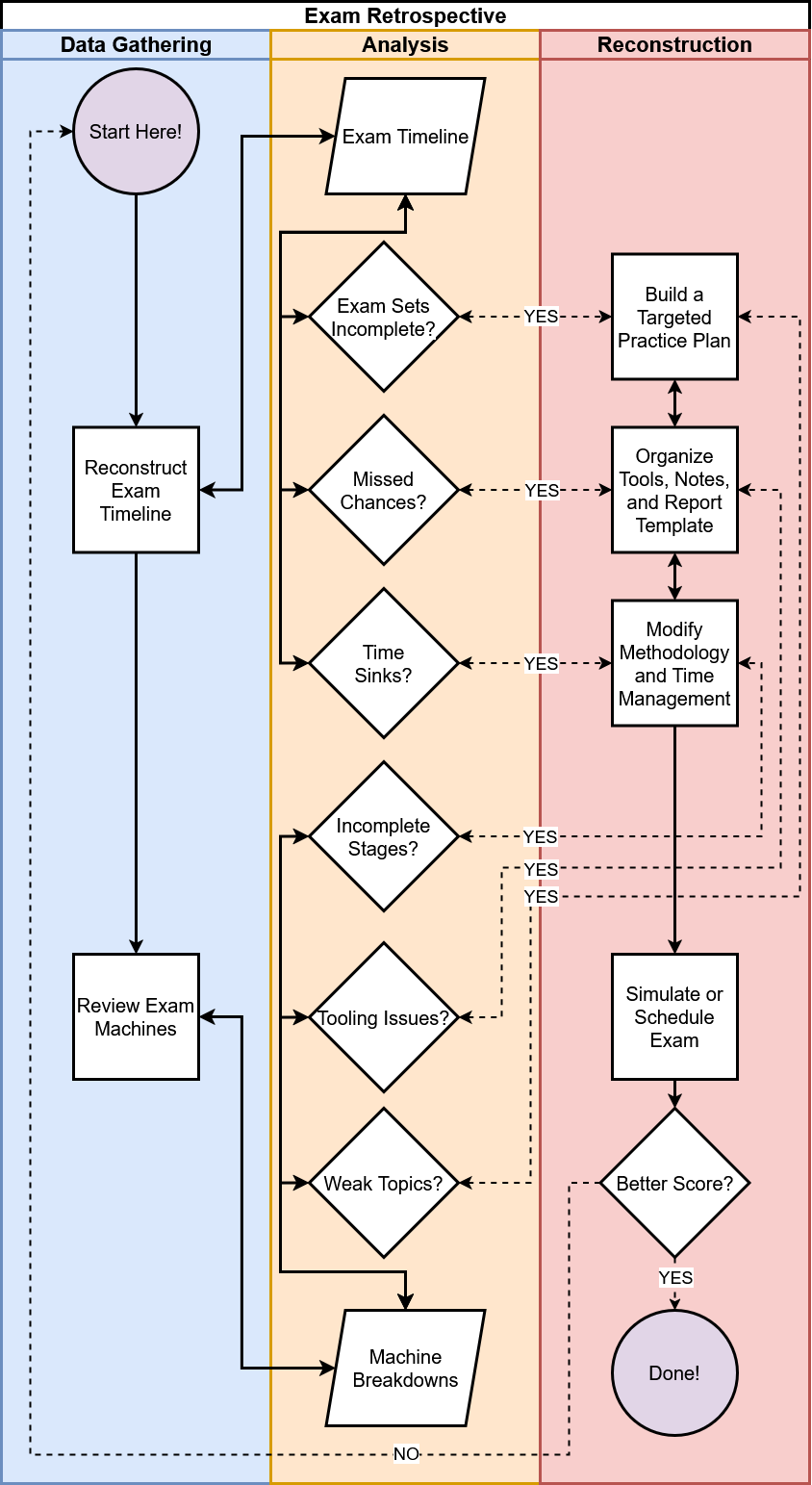
The first, and arguably most important, phase of the exam retrospective is data gathering. The quantity, quality, and accuracy of the data you collect at this stage largely determines the retrospective’s value. By the end of this phase, you should have two core outputs that will inform the next stages of analysis:

  • Timeline: Reconstruct your exam attempt as accurately as possible by capturing timestamps of your actions; break down each event by challenge set, machine, attack stage (e.g., reconnaissance, privilege escalation, lateral movement), and report status
  • Machine Breakdown: Review your notes to identify the observable technologies on each of the six exam machines; note the services discovered, attacks or procedures attempted, tools used, and where you stopped along each attack path

After completing the data gathering phase, take a two-pronged approach to the analysis phase:

  1. Identify operational hurdles that ate into your 24-hour testing window and hampered productivity using the exam timeline
  2. Use the machine breakdowns to identify which technologies, tools, or attack stages hindered your exam performance

The goal in both cases is to enumerate deficiencies you can address later in the reconstruction phase. During reconstruction, you will build on your findings by 1) creating a targeted study plan, 2) reorganizing your notes, reference guides, or report templates, and 3) refining your testing methodology and time management strategy.

Start by analyzing your exam timeline and using your observations to guide improvements in your preparation:

1. Did one challenge set (i.e., the AD or independent challenges) take significantly longer than the other or remain incomplete?

This could signal a technical knowledge gap in areas like AD enumeration, Windows/Linux exploitation, or web application testing. If so, adjust your study plan to focus deliberately on these topics before your next attempt. Platforms like Hack The Box (HTB) allow you to filter machines by technology, operating systems (OS), or attack type; making it easier to target weak areas and reinforce essential skills.

2. Did missing or incomplete notes, fragmented reference guides, or disorganized report templates cause you to lose time?

If you struggled to retrieve commands or documentation under pressure, it’s time to streamline your tradecraft resources. Consolidate your notes, build out your reference guides, and prep your report templates in advance to minimize exam-day friction.

3. Did you fall into time sinks or go down rabbit holes that led nowhere?

Reflect on how your methodology might have contributed to wasted time. Consider introducing more automation, pruning redundant steps, or adopting a timeboxing approach like the Pomodoro Technique to improve your efficiency.

In the second step of the analysis phase, use the exam machine breakdowns you created earlier to answer the following questions and develop action items:

1. Did you fail to exploit or enumerate any technologies or services?

Use these insights to shape a focused study plan. Again, utilize platforms like HTB and prioritize practical training resources to dictate your informed study approach.

2. Did you discover a vulnerability but fail to exploit it due to tool issues or syntax errors?

Explore alternative tools that better align with your workflow and update your reference guide with accurate syntax and usage examples. Link entries in your reference guide for given exploitation techniques to examples of HTB or OffSec lab machines where you successfully executed those techniques. Aim to maintain at least two tools for each post-exploitation task: one that runs from your Kali Linux box and another that you can execute on a compromised host (e.g., a PowerShell script or .NET assembly). Apply the same principle to external recon tasks. Keeping your toolkit diverse and your notes accurate can save critical time under pressure.

3. Did specific attack stages (e.g., external reconnaissance, privilege escalation, credential harvesting) not return actionable results or break down?

Revisit and revise your methodology. Resources like HackTricks and Swisskys cheatsheets can help close knowledge gaps. Add checkboxes or mind maps to your processes for common services (e.g., FTP, SMB, and HTTP) to ensure thorough and repeatable enumeration. Apply the same structured approach to post-exploitation workflows for both Windows and Linux targets. Test your updated methodology against easy-to-medium HTB machines to validate your changes before the next attempt.

By the end of both analyses, you should have a concrete plan to address the weaknesses exposed during the retrospective. If you’re still preparing for the OSCP—or simply want to gauge your progress—allocate time to retest your skills and methodology after completing your action items. If you followed my advice from the third post of this series and haven’t yet completed one of the three PEN-200 lab networks that simulate the exam environment, now’s the time. Treat the lab network as your control environment and your new score as the dependent variable: the measurable outcome of your adjusted approach. Once you’re satisfied with the results, reschedule your next OSCP exam attempt.

By following this approach, PEN-200 students will be better prepared for future OSCP exam attempts and better equipped to continue their self-guided education after earning the certification. This methodology can be applied as an iterative feedback loop across multiple attempts, helping to identify skill gaps and drive continuous improvement. As long as students maintain a positive attitude and a genuine interest in self-discovery, they can expect steady progress in both exam performance and testing confidence.

Network With Industry Professionals and Fellow Students

Throughout the OSCP study process, it’s easy to become hyperfocused and socially isolated. In doing so, students often miss out on one of the PEN-200’s greatest strengths: its expansive network of peers, mentors, and potential professional contacts. Whether you’ve already earned your OSCP or are still working through the exam process, connecting with others can transform the solitary grind of preparation into a collaborative, enriching journey and accelerate your professional aspirations.

As a current PEN-200 student, networking offers opportunities to learn, share, and stay motivated. After I failed my second attempt, I reached out to a friend enrolled in PEN-300: Advanced Evasion Techniques and Breaching Defenses and asked if I could shadow him while we both worked on HTB Pro Labs. During those sessions, we swapped enumeration checklists, shared our favorite tools, and discussed our approaches to exam retrospectives. Other students can benefit from networking by finding accountability partners, joining study groups, discovering new exploitation strategies, and staying emotionally grounded throughout this challenging process.

NOTE:
One of my favorite takeaways from shadowing mock penetration tests was learning how to speed up directory brute-force enumeration on Windows Internet Information Services (IIS) web servers. Because Windows hosts are case-insensitive—unlike UNIX-like systems—you can significantly reduce redundancy and improve performance by using tools like gobuster or dirsearch with a wordlist limited to lowercase or uppercase entries. This is just one example of how collaborating with other OffSec students or ethical hackers can inspire new testing strategies and accelerate your learning process.

For newly certified OSCP holders, networking takes on renewed importance. Earning the certification opens doors to job opportunities, interviews, and professional conversations that weren’t accessible before—but you can’t expect to walk through them without making connections first. Talking with people who are deeply embedded in the industry also provides insights that static courses can’t realistically capture like real-time knowledge about evolving roles, industry or specific company expectations, and career path requirements that wax and wane with industry trends. Networking also helps you plan the next phase of your self-guided education—whether that means expanding on PEN-200 concepts, charting your own course by exploring new cybersecurity domains, building a home lab, or other ideas I’ll cover later in the post. Conversations with those who’ve already moved beyond PEN-200 can help you set clear goals, avoid common pitfalls, and stay aligned with the rapidly evolving demands of the offensive security industry.

The most obvious networking platform for PEN-200 students is the official OffSec Discord server, but many other communities are worth exploring:

  • Discord Servers: HackTheBox, TryHackMe, Kali Linux & Friends, and DEFCON host active pocket communities of current and former PEN-200 students
  • OffSec Office Hours: The OffSec Discord hosts weekly livestreams on Fridays where an instructor walks through an OffSec Proving Grounds machine; these sessions are a great way to stay sharp and engage with other OSCP-hopefuls
  • Reddit: The r/oscp subreddit focuses specifically on OSCP-related content, though the quality and tone of posts can vary (it is Reddit, after all)
  • Content Creators: Figures like IppSec, The Cyber Mentor, and Tib3rius regularly produce livestreams and educational material, maintaining active online communities where you can connect with like-minded learners
  • LinkedIn: Many OffSec students use LinkedIn to showcase their OSCP certification, share their learning journeys, comment on others’ milestones, and build professional relationships
  • In-Person Events: Local meetups such as OWASP Local Chapters, Security BSides events, or regional DEF CON Groups are great places to find a supportive community, sharpen your skills, define a new career path, and potentially meet future travel partners for a trip to the world-famous DEF CON conference in Las Vegas

Discord - Group Chat That's All Fun & Games

Whether you’re newly certified or still grinding to earn the OSCP, don’t neglect the networking opportunities this journey presents. As a current student, sharing tips and hurdles keeps you technically informed and motivated. As a newly minted OSCP, connecting with career mentors and peers reinforces your knowledge and expands your professional circle. By engaging in Discord servers, study group meetups, or LinkedIn discussions, you gain real-time insights, accountability, and a support network that lasts well beyond the exam. No matter where you are in the OSCP journey, investing time in these communities accelerates your learning and lays the groundwork for long-term success in offensive security.

Ask Yourself, “What’s Next?”

I would like to take a moment to personally congratulate everyone reading this who has recently passed the OSCP exam. You’ve likely invested months—if not years—into earning this credential, amassing a solid foundation of experience and knowledge along the way. Ask yourself: What did you enjoy most? What would you prefer to avoid in the future? These reflections can guide your next challenge, the skills you want to sharpen, and your broader career direction. To close out this series, I’d like to explore those possibilities and highlight how they can enhance your professional profile.

First things first: take a break. Seriously. You’ve reached an impressive milestone and while it’s tempting to dive immediately into the next pursuit, give yourself time to rest and decompress. If possible, take a vacation (or at least a few days off) to recover from the intensity of exam prep.

Before deciding what’s next, update your resume to include your OSCP certification and prepare for the job hunt. If you’re entering the cybersecurity job market, I highly recommend the Infosec Job Hunting w/ BanjoCrashland YouTube playlist. It covers everything from finding job postings and writing resumes to networking and interview preparation. Many of the techniques discussed in this series involve open-source intelligence (OSINT) gathering techniques, which can double as skill development for future offensive roles. The creator, Jason Blanchard of Black Hills Information Security, also hosts a weekly Twitch stream, Job Hunt Like a Hacker, which expands on these lessons with real-time advice and feedback. While I haven’t attended the stream personally, at least 278 people (as of this writing) credit Blanchard and his content for helping them successfully pivot into cybersecurity—an endorsement of both his insight and the supportive community he’s fostered.

Many OSCP holders choose to write a public reflection on Medium, LinkedIn, or a personal blog platform. If you do the same, structure it like a retrospective: document what went well, what didn’t, how you studied, and what you would change in hindsight. Avoid spoilers, walkthroughs, or anything that could violate OffSec Terms and Conditions. A well-written reflection not only inspires other PEN-200 students but can also serve as a networking tool, a technical writing sample, and a resume booster. Take your time writing it and ensure it’s something you’re proud to attach your name to.

This whole series has focused on one cybersecurity certification (the OSCP) and briefly mentioned a few others. In spite of that, I recommend caution before making another certification your next professional goal. As I said in the first post of this series, it’s important to view all certifications through a critical lens. The certification industry is, ultimately, a business and students should remain conscious of marketing narratives that inflate their importance or imply that earning one guarantees employment in your field of choice. Rather than chasing credentials to bypass every human resources (HR) filter—a Sisyphean task, in my opinion—focus instead on crafting a narrative of steady, deliberate growth in your ethical hacking journey. That narrative can include certifications, but it could also highlight personal projects, practical experience, and self-guided exploration. In short, learn to wield certifications like a scalpel rather than a claymore while also peppering your journey with cost-effective resume boosters.

For example, many offensive security professionals pursue the Certified Red Team Operator (CRTO) or Offensive Security Experienced Penetration Tester (OSEP) after earning the OSCP. Equally valid (and often more cost-effective) alternatives include climbing the ranks on HTB, developing your own command and control (C2) framework, or participating in bug bounty programs like HackerOne or Bugcrowd. A few strategic acronyms on your resume can open doors, but too many can spell doom for your wallet.

PEN-200 offers valuable lessons, but it’s still an entry-level certification and only scratches the surface of many cybersecurity topics. If you want to build on its concepts at a higher level, consider the following:

  • Web Applications

While PEN-200 introduces core techniques like SQL injection (SQLi) and cross-site scripting (XSS), the web app security field itself spans hundreds of server-side and client-side vectors, subtle edge cases, and novel exploitation methods that researchers are constantly discovering. PortSwigger Academy is my favorite free platform for advancing these skills, as it offers comprehensive written material and interactive labs.

  • AD Attack Vectors

AD represents a massive attack surface and the PEN-200 therefore covers only the fundamentals while omitting topics like Kerberos delegation, Active Directory Certificate Services (ADCS), and Microsoft Configuration Manager (MCM/SCCM). Use BloodHound Community Edition as both an addition to your toolkit and a knowledge base for improving AD tradecraft.

  • Reporting

As mentioned in the third post of this series, technical reporting may be the most transferable skill from the PEN-200 into real-world engagements. Refer back to the included resources in that article and set time aside to improve this area.

  • Red Teaming

While red teaming overlaps significantly with penetration testing, it emphasizes different skills such as persistence, command and control, and exfiltration. Explore techniques relative to these domains and learn how to adapt each PEN-200 post-exploitation technique to blend with legitimate network traffic, enhancing stealth.

NOTE:
The differences between penetration testing and red teaming are often subtle and vary between organizations. Understanding these nuances is crucial when entering the job market, as mismatched expectations can hinder a successful career pivot. My favorite explanation comes from JUMPSEC, which notes that penetration testing aims to uncover as many flaws as possible, while red teaming focuses on achieving specific objectives to demonstrate real-world impact. Red teaming also places greater emphasis on operational security (OPSEC) evasion and threat actor emulation.

There are even more offensive security topics not covered in PEN-200 that may interest you:

  • Cloud Security

Just as pervasive as web applications, cloud platforms—such as Amazon Web Services (AWS), Google Cloud Platform (GCP), and Microsoft Azure—present huge attack surfaces. HackTricks Training is a relatively new but solid starting point for offensive cloud security training.

  • Wireless Security

While access to PEN-210: Foundational Wireless Network Attacks and an OffSec Wireless Professional (OSWP) exam voucher are available to OffSec Learn One subscribers, you might try the free WiFiChallenge Lab first before enrolling in another certification program.

  • Malware & Payload Development

Maldev Academy and SEKTOR7 Institute come highly recommended throughout the industry. The skills these courses help you develop are essential to advanced post-exploitation, red teaming, and custom implant engineering.

  • Other Domains

Other common domains are mobile devices and applications, industrial control systems (ICS), Internet of Things (IoT) devices, large language model (LLM) web applications, social engineering, and physical access control systems (PACS).

I wrote this series for PEN-200 students whose goal is to pivot into the offensive security consulting industry; however, that is only one demographic of the PEN-200 student body. Many students pursuing the OSCP are considering (or already employed in) fields tangential to penetration testing and red teaming. If you’re more aligned with adjacent fields like reverse engineering, development, security, and operations (DevSecOps), security operations center (SOC), or detection engineering, there are valuable resources for those too:

  • Reverse Engineering & Malware Analysis

Try Malware Unicorn’s Reverse Engineering 101 or HackerSploit’s Malware Analysis Bootcamp for free, the latter of which concludes with case studies of artifacts from the 2018 Flare-On Challenge capture the flag (CTF) event and the cyberweapon Stuxnet (used during the sabotage campaign of Iranian nuclear enrichment facilities known as Operation Olympic Games).

  • DevSecOps

I highly recommend the corporate training program Secure Code Warrior or the more affordable Hacksplaining platform for individuals looking to improve their secure development skills.

  • SOC

SOC analysts are often on the front lines of incident detection and response. Utilize online training platforms like CyberDefenders or TryHackMe, both of which offer learning paths for SOC levels 1–3. Radiant Security has a helpful explanation of the differences between these tiers.

  • Detection Engineering

Now that you understand how many fundamental attacks work, flip the perspective by learning how to detect malicious behavior, craft alerts, and better understand attacker tradecraft. Budget-conscious learners can start with Practical Threat Detection Engineering from packt and its accompanying code repository, while Applied Network Defense offers a well-regarded catalog for those seeking deeper coverage.

  • Other Domains

Other common domains are digital forensics and incident response (DFIR), governance, risk, and compliance (GRC), and threat intelligence gathering (AKA threat hunting).

NOTE:
As with all commercial training options, consider whether the return on investment (ROI) justifies enrollment.

Lastly, consider how you might participate in or give back to the information security community. If you live in or near a city, look for volunteer opportunities as a technical coach for underrepresented communities (e.g., older citizens, non-native English speakers, or individuals with physical or cognitive disabilities) or as a volunteer network engineer for nonprofit organizations. Consider volunteering at a local public school to talk about careers in cybersecurity and what drew you to ethical hacking. Many diversity-focused nonprofit organizations and affinity groups in cybersecurity offer valuable resources like career mentorship, CTF events, digital privacy training, and financial sponsorship for professional development. Notable examples include Women in Cybersecurity (WiCyS), Blacks in Cybersecurity (BIC), Latinas in Cyber (LAIC), Secure Diversity, and Minorities in Cybersecurity (MiC). Getting involved with these groups can expand your network, strengthen your resume, and allow you to give back to the community in meaningful ways.

Earning the OSCP is an extraordinary accomplishment, but it’s just one checkpoint in a much longer and more worthwhile journey. Whether you continue with more certifications, lab projects, or community involvement, remember to stay curious, humble, and ethical. Make your next steps intentional, and remember: as with the OSCP, the process itself should be as rewarding as the prize.

Conclusion

It’s been a privilege to write this series and I’m grateful to my colleagues and friends for their valuable feedback and ongoing support. As always, I welcome your questions, constructive critiques, or additional advice for current and future PEN-200 students in the comments.


Getting the Most Value Out of the OSCP: After the Exam was originally published in Posts By SpecterOps Team Members on Medium, where people are continuing the conversation by highlighting and responding to this story.


Getting the Most Value Out of the OSCP: The Exam

A practical guide to maximizing the short- and long-term benefits of your upcoming OSCP exam attempt(s).

DISCLAIMER:
All opinions expressed in this article are solely my own. I have reviewed the content to ensure compliance with OffSec’s copyright policies and agreements. I have not been sponsored or incentivized in any way to recommend or oppose any resources mentioned in this article.

Introduction

In the last post in this series, I discussed a few proactive steps students should take throughout the PEN-200: Penetration Testing with Kali Linux labs as part of their efforts to earn the Offensive Security Certified Professional (OSCP) certification. In this entry, let’s focus on test day itself—and how to maximize the educational, financial, and professional value of the OSCP exam experience.

PEN-200: Penetration Testing Certification with Kali Linux | OffSec

During the Exam(s)…

“You may be disappointed if you fail, but you are doomed if you don’t try.” — Beverly Sills

Congratulations—you’re now ready to take the OSCP exam! Despite being the shortest of the five phases in the “OSCP journey”, there are still important steps you can take to ensure you’re getting your money’s worth. Here are three key takeaways for all future exam-takers:

  1. The OSCP exam is designed to mimic a black-box penetration test, but due to the nature of standardized testing, it inevitably falls short of being a perfect replica of a real-world engagement; while this is completely reasonable, it helps to be prepared to speak to these nuances in future job interviews and not to confuse exam-specific tactics with best practices in the field
  2. Certification exams—for better or worse—play a role in many offensive security consulting careers, so it’s best to set a precedent for sustainable and practical test-taking behavior by developing realistic, ethical, and repeatable exam-day practices and using them during your OSCP attempt(s)
  3. Follow OffSec’s exam-day instructions to the letter, as even minor deviations could invalidate months (or years) of work toward the OSCP and may disqualify you from future OffSec certifications

Understand the Differences Between the OSCP Exam and Real-World Practice

While the OSCP exam certainly tests your offensive security knowledge, it’s important to understand what the exam is and isn’t. OffSec has gone to great lengths to make the OSCP a realistic simulation of a black-box penetration test; however, to ensure fair grading and timely results, it comes with inherent limitations. By recognizing these gaps ahead of time, students can better interpret their exam experience, set realistic expectations for future consulting roles, better articulate their skills in interviews, and avoid drawing the wrong conclusions about what the certification does (or doesn’t) prove to a technical recruiter.

While not an exhaustive list, here are the differences I consider the most significant to keep in mind:

  • Team Collaboration: Although the OSCP exam is a solo endeavor, operators seldom work alone in real-world engagements; exceptions may exist for engagements with extremely limited scope or niche objectives, but most involve at least two consultants
  • Client Interaction: During the exam, your only contact is with the OSCP proctor(s); in a real engagement, you should expect to interact with business managers, engineers, security operations center (SOC) employees, and a designated point of contact (POC) throughout the lifecycle of a client-consultant relationship
  • Scope Definition and Rules of Engagement (ROE): While the Exam Restrictions in the exam guide could be interpreted as a partial ROE, real-world assessments include far more comprehensive documentation and legal implications for its violations; consultants may also be involved in negotiating the scope of upcoming engagements
  • Engagement Objectives and Metrics: The objective of the OSCP exam is to gain initial and elevated access to as many systems as possible; in contrast, real-world assessments—especially red team exercises—may involve more targeted objectives, like exfiltrating dummy data, compromising specific users or systems, bypassing defenses, or demonstrating how vulnerabilities are tied to business impact
  • Operating with Due Caution: Whereas the OSCP exam gives candidates near-total freedom within the simulated network (aside from a few restricted attacks and tools), real-world consultants must consider the impact of their actions on live systems and people, adapting their approach as needed; consultants will often request POC approval before executing commands that could trigger account lockouts or system downtime
  • Deconfliction: If an attack is detected, SOC teams may raise a deconfliction event to confirm it was part of the assessment; if not confirmed, the alert could trigger a full-scale incident response process
  • Post-Engagement Procedures: After the OSCP exam, the student’s only obligation is to submit a report; in contrast, wrapping up legitimate consulting engagements may involve artifact cleanup, resolving deconfliction events, stakeholder presentations, blue team debriefs, infrastructure teardown, and secure data destruction
  • Cloud-Hosted Tools: Using third-party or cloud-hosted tools to process clients’ artifacts—such as for reverse engineering, data exfiltration, or hash cracking—carries the risk of exposing secrets to systems beyond client or consultant control; because the OSCP exam uses entirely fictional data, its restrictions around cloud usage are more flexible
  • Timeline: The OSCP exam splits the practical and reporting components into two ~24-hour phases that test a candidate’s ability to rapidly identify, exploit, and document vulnerabilities; in contrast, real-world engagements typically span several weeks per phase depending on scope and client expectations
  • Threat Modeling: Some assessments require consultants to emulate specific threat actors by using a tailored subset of tactics, techniques, and procedures (TTPs); during the OSCP, students are not bound by these constraints
  • Kali Linux Requirement: The OSCP must be completed using a Kali Linux VM, but while Kali is a popular Linux distribution for ethical hacking, its large toolset increases both operational overhead and the probability of detection; real-world operators often use custom minimal Linux builds with obfuscated toolkits deployed via continuous integration and continuous delivery/deployment (CI/CD) pipelines to reduce both detection risk and scaling costs
  • Social Engineering: While the OSCP exam may involve limited client-side attacks (an assumption based on the fact that there is a “Client-Side Attacks” module in the publicly available syllabus), its highly automated structure means it offers few opportunities to exploit the weakest link in any cybersecurity program: the human element; in real-world assessments, consultants may use tactics like spear-phishing, vishing, or smishing (if the ROE permits it) to achieve credential access or arbitrary code execution (ACE) capabilities
  • Physical Security: Some assessments allow physical intrusion tactics—such as piggybacking/tailgating or lock-picking—to gain access to critical infrastructure and test physical security controls; while not feasible during the OSCP exam and somewhat niche, it’s still valuable to conceptually understand these attack vectors

The OSCP is an achievement to be proud of, but it doesn’t perfectly mirror professional practice. Keeping these differences in mind, students can more accurately frame their OSCP experience, communicate their skills more effectively, and set realistic expectations for job responsibilities. Recognizing its limitations is a critical step toward bridging the gap between certification and your career.

Develop Healthy Exam Habits

If this is your first multi-day practical exam, it’s best to build healthy habits and eliminate disruptive ones early. This sets you up for long-term success and a better experience in future exams, regardless of which certification you’re pursuing.

The OSCP exam, for those unfamiliar, is a grueling ordeal. It begins with a 23-hour, 45-minute technical assessment where the student must exfiltrate a minimum number of flags from six machines. Three of these are standalone targets that require the student to complete the full attack path—from initial access to privilege escalation. The other three form an Active Directory (AD) set, where the student is ceded access as a lower-privileged user and escalates to Domain Admin or equivalent-level access. To pass, students must capture enough flags to reach at least 70 out of 100 points (each flag is worth 10 points). They’re then given ~24 more hours to submit a professional report detailing how they achieved each objective. Needless to say, it’s an exhausting endeavor and a major source of stress for many.

As painful as it is to admit, the OSCP—for all its notoriety and difficulty—is considered an entry-level certification in offensive security consulting. It covers a wide breadth of knowledge but ultimately scratches the surface of or doesn’t attempt to address topics like evading operational security (OPSEC) solutions, deploying and maintaining command and control (C2) infrastructure, and identifying more advanced vulnerabilities, to name a few. While certifications aren’t strict gatekeepers to the industry or career advancement, an employer may eventually require you to pursue more advanced practical exams (or you may feel pressured to do so to stay competitive in the job market). With that in mind, and especially if the OSCP is your first multi-day practical exam, it’s in your best interest to develop sustainable exam habits early on to avoid building a detrimental relationship with certifications.

Let’s start with the simplest, yet arguably hardest, topic: sleep. While it may be tempting to pull an all-nighter and grind through flags as quickly as possible, this approach is likely counterproductive. Research consistently show that sleep deprivation impairs cognitive functioning, stifles creativity, and slows reaction times—all of which are essential during the OSCP exam. Some studies even suggest that sleeping more than usual the night before a test is correlated with better performance. For multi-day exams, I aim for at least eight hours of sleep each night, regardless of how much progress I made the day before. If you’re interested in the science behind sleep, I highly recommend Why We Sleep by Matthew Walker, PhD.

Your exam success largely depends on the quality of your notes. Make a habit of taking structured, detailed, and legible notes throughout your technical challenges. Consider building a note template in a node-based application like Obsidian and refining it during a few PEN-200 Challenge Labs or Hack the Box (HTB) machine exercises. The more structure you establish in advance, the more mental bandwidth you preserve on exam day. Effective note-taking is a transferable skill that strengthens both your technical execution and report-writing abilities as an offensive security consultant.

A few days before an exam, I like to deep clean my office—starting with vacuuming the floors and finishing by decluttering my workspace. A minimalist setup not only supports compliance with OffSec’s exam policies (more on that later), but also fosters a calmer mental space where you can think clearly and move efficiently. I also recommend silencing your phone, placing it out of reach, notifying others that you’ll be unavailable, and using noise-canceling headphones if you’re in a shared household. The fewer distractions in your space, the easier it is to focus on solving complex problems.

The tight 24-hour window of the OSCP exam demands a strategic approach to time management. Techniques like the Pomodoro Technique—working in focused sprints followed by short breaks—can help prevent burnout and minimize the risk of losing hours chasing rabbit holes. Even if you choose not to use a formal time-management method, entering the exam with a clear plan is far more effective than charging in with a purely reactive mindset. Some approaches that merit attention include capping your focus on a single challenge to 60-90 minutes before pivoting to another, or pre-allocating specific blocks of time to each machine/challenge set in the exam.

Your time-management strategy should also account for the maintenance of your own body: plan your meals in advance, step away from the screen while eating, and stay well hydrated. If possible, build in time on test-day for light aerobic activity—such as a quick jog, a walk with the dog, or a short set of bodyweight exercises like jumping jacks, mountain climbers, or burpees. Brief physical movements can help re-energize your mind, reduce stress, and boost cognitive performance.

To help anchor your experience and reduce anxiety, consider designing personal pre- and post-exam rituals. The night before, do something relaxing—like casually reviewing your notes, solving an easy HTB machine, or writing encouraging Post-it notes to stick on your wall. Set your clothes, snacks, and water up like you’re getting ready for a marathon—because in many ways, you are. After the exam, give yourself a buffer to recover, reflect, and decompress. Personally, I like to go out with friends, play nostalgic video games, or grab a Guinness. Whatever your rituals look like, make them personal and genuinely rewarding.

Finally, I encourage all students to embrace the result of the exam, pass or fail. The OSCP is not the final word on your skills—it’s a checkpoint, not a verdict. In fact, failing by a narrow margin can often be more educational—and ultimately more empowering—than barely passing. By adopting a growth mindset, you can view a missed attempt not as a reflection of your limitations, but as an opportunity to walk away with clearer insight into your strengths and gaps. This self-awareness can be carried with confidence into job interviews, real-world engagements, and the refinement of your study plan. We’ll explore this topic more deeply in the next post.

Building sustainable and empowering exam habits isn’t just about getting through a difficult 24 hours; it’s about establishing a process you can carry into future certifications, real-world assessments, and high-stakes professional challenges. By developing tenable and fulfilling exam-day practices with intent, you give yourself the best possible chance to succeed—not just in the exam, but in the career that follows.

Don’t Risk Your Exam Attempt

The OSCP certification is a multi-thousand dollar investment, so the last thing any student wants is to have their attempt invalidated due to a preventable mistake or misunderstanding that results in an accusation of academic misconduct. Rather than viewing the exam solely as a test of technical skill, candidates should approach it as a professional engagement with clearly defined operational and ethical boundaries. To safeguard the time, effort, and money you’ve invested in the OSCP journey, it’s imperative to read every instruction carefully, double-check your testing environment, and follow OffSec’s exam-day guidelines to the letter.

As one of the most recognized credentials in cybersecurity, the OSCP carries significant industry weight—and OffSec therefore takes the integrity of its exam process seriously. In 2018, in response to growing concerns about cheating, OffSec introduced an online proctoring system to the exam. Candidates are required to verify their identity with a government-issued ID and maintain continuous screen sharing and webcam visibility during the first ~24 hours of the exam.

In 2019, an individual using the handle cyb3rsick publicly released write-ups for several [now retired] OSCP exam machines, reportedly in protest of the exam’s format, which they claimed “allowed thousands of [students] to cheat and pass the exam”. Coverage of the incident highlighted both the controversy and the industry’s reaction. In response, OffSec published a blog post that provided insight into the organization’s anti-cheating measures. These include: relying on community reports, monitoring suspicious groups or individuals, modifying exam systems on a “regular basis”, using undisclosed detection mechanisms during grading, and online proctoring. Most notably, OffSec emphasized that cheaters may face severe consequences—including potential legal action. As stated in their post, “cheaters have lost their certs, paid fines, lost their jobs, and been embarrassed in front of their peers”.

Some stories involving failed exam attempts, revoked certifications, or bans appear to stem from accidental missteps rather than deliberate misconduct. While it’s clear that OffSec has taken meaningful action against individuals who have knowingly violated academic integrity policies, it’s also reasonable to acknowledge that some cases may result from honest mistakes, misunderstandings, or technical issues. One example occurred in 2019, when a student used the common Linux/Unix* post-exploitation enumeration tool, LinPEAS, during their exam. At the time, a recent update to the script had introduced an auto-exploitation feature, which resulted in the student escalating privileges immediately on the target host. Because the Exam Restrictions prohibit the use of tools with auto-exploitation capabilities, the student initially received a failing grade. OffSec later addressed the incident in a blog post, and the student reportedly had their result overturned and was awarded a passing grade. There have also been multiple incidents of students losing their certifications after their private exam reports were leaked or stolen and subsequently used by others to cheat—an issue OffSec has acknowledged in their Support Portal.

This section is not intended to criticize or undermine OffSec’s authority to vigorously pursue cases of academic misconduct or copyright infringement, but rather to inform aspiring OSCP-certified professionals—especially those acting in good faith—on how to conduct themselves confidently and transparently on exam day.

To align with OffSec’s expectations for a successful exam day, I recommend the following:

  • Revisit the OSCP Exam Guide and PEN-200 Reporting Requirements a week or two before your exam; consider incorporating them into a Requirements or Rules of Engagement section in your report template to reinforce them into memory
  • Keep the proctoring window visible at all times, reply promptly to requests, and reconnect your camera immediately if it becomes disconnected
  • Remove unnecessary items from your workspace, such as additional screens (OffSec permits up to four monitors during the exam), notebooks, smart devices, or inactive laptops
  • Store your phone in a separate room and notify others that you’ll be unreachable during the exam
  • Before the exam, take inventory of your toolkit and review each utility’s documented functionality to ensure it doesn’t include features that OffSec prohibits (e.g., spoofing, automatic exploitation, commercial services) and keep a record of any new tools you use during the exam; this level of caution is also applicable to real-world engagements, where it is important to fully understand the behavior and implications of the tools you deploy in a client environment
  • Keep all notes local; avoid accessing documents stored on cloud platforms (e.g., GitHub, GitLab, or OneNote)
  • Terminate unnecessary screen-sharing programs (e.g., Discord, Zoom, Teams); even idle background processes can raise red flags
  • Use a single device and identity throughout the exam; ensure the name on your ID matches your OffSec registration details, complete the exam on a single authorized system, and terminate any third-party virtual private network (VPN) applications—as changing IP addresses mid-exam may be interpreted as location switching
  • Minimize physical and digital movement; don’t leave the camera’s view without telling the proctor, and avoid switching desktops, using unrelated virtual machines (VMs), or removing hardware devices
  • Never download artifacts from the exam environment to your local machine; all work should remain within your VM
  • Be mindful of physical cues that might appear suspicious on camera, such as repeated glances away from the screen, whispering, interacting with unmonitored people, or unexplained movements
  • If you’re referencing notes from a previous attempt, inform the proctor to distinguish it from reused or plagiarized content
  • Have a backup device and mobile hotspot ready in case of system failure or internet loss
  • Consider creating a clean system user profile just for the exam to reduce redundant applications and protect your privacy

If, despite following this advice, you’re still found guilty of academic misconduct, stay calm and professional. Cooperate fully with the investigation, be honest and transparent, and avoid becoming defensive—it’s important not to escalate the situation. Instead, politely request specific details regarding the accusation, seek to understand the exact concerns, and explain any misunderstood behavior or tools (e.g., a tool that was not on the shortlist of restricted software but raised concern). If you’re unsatisfied with the outcome, wait a week or two to cool off before submitting a formal appeal to challenges [at] offsec [dot] com. Maintain the same professional and respectful tone in your appeal as you did during the investigation.

On a final note, it’s important to acknowledge that OffSec exams involve a high degree of monitoring. Your screen is shared throughout the exam, you’re under near-continuous video surveillance, and you must perform a 360-degree scan of your workspace to confirm that no unauthorized devices or individuals are present. Before beginning the exam, Windows users are required to execute a proctor-provided PowerShell script that gathers system information and lists running processes—likely to flag potentially unauthorized tools. Out of an abundance of caution, it’s a good idea to clean up your local system before exam day; remove any personal files or unfamiliar tools that could trigger concern. For more details on how OffSec collects and processes personal data, refer to their Privacy Policy.

NOTE:
If you’re uncomfortable with the format or privacy implications of the OSCP exam, you might consider alternatives like the Certified Red Team Operator (CRTO) or Practical Network Penetration Tester (PNPT). These certifications cover similar material and offer more flexible testing policies.

OffSec has every right (and responsibility) to uphold the integrity of its certification, but that doesn’t make the proctoring process any less stressful for honest students. Trying to be diplomatic while raising a nuanced point, it’s fair to say that even well-intentioned candidates may find themselves under scrutiny. By taking proactive steps to minimize ambiguity in your environment and interactions with the proctors, you not only protect your OSCP investment but also reinforce the professional habits OffSec aims to instill through its arduous exam process.

Conclusion

Feel free to leave a comment with any questions, feedback, or additional advice to contribute to this discussion. In the final post of this series, I’ll cover what students should do after each OSCP exam attempt—whether they pass or not.


Getting the Most Value Out of the OSCP: The Exam was originally published in Posts By SpecterOps Team Members on Medium, where people are continuing the conversation by highlighting and responding to this story.

Getting the Most Value Out of the OSCP: The PEN-200 Labs

How to leverage the PEN-200 simulated black-box penetration testing scenarios for maximal self-improvement and career success.

DISCLAIMER:
All opinions expressed in this article are solely my own. I have reviewed the content to ensure compliance with OffSec’s copyright policies and agreements. I have not been sponsored or incentivized in any way to recommend or oppose any resources mentioned in this article.

Introduction

In the last post of this series, I explored some hidden benefits and extra steps students should take when writing notes for the PEN-200: Penetration Testing with Kali Linux course. Before attempting the Offensive Security Certified Professional (OSCP) exam, it’s highly recommended to complete the practical lab networks. But first, read this article to learn how to maximize the lab experience.

PEN-200: Penetration Testing Certification with Kali Linux | OffSec

During the Labs…

“Success is no accident. It is hard work, perseverance, learning, studying, sacrifice, and most of all, love of what you are doing.” — Pelé

The PEN-200 course includes multiple virtual lab environments, each offering an opportunity to grow as an offensive security professional. The three key takeaways from this post are:

  1. Learn how to write a high-quality penetration testing report and apply those skills to each lab network
  2. Use the labs as a baseline to build your own testing environment where you can refine offensive techniques, understand how misconfigurations arise, and analyze network packets associated with different attacks
  3. Develop a repeatable testing methodology, apply it to the labs, and continuously refine it through an iterative process

Write Reports for Each Lab

For all the effort OSCP candidates put into identifying and exploiting technical vulnerabilities, the irony of the course is that its arguably most valuable skill is also the least offensive: report writing. In the real world, the value of an offensive security engagement doesn’t come from hacking efforts alone—it mostly comes from a legible, actionable, and informative report. Given this, it’s somewhat disappointing that the OSCP exam report—a required component of the certification process—is graded more on accuracy than quality. According to the PEN-200 Reporting Requirements, “[students] must submit an exam penetration test report clearly demonstrating how [they] successfully achieved the certification exam objectives”. This policy ensures that passing students have demonstrated the minimum technical competency of an offensive security professional, but not necessarily the writing skills needed to excel in the field. If your goal is not just to pass the exam but to be a standout candidate in future consulting roles, you should learn how to write an exemplary penetration test report and use the PEN-200 labs as practice.

Report writing is often the least enjoyable part of a penetration test, but a poorly written report can have serious consequences. The most immediate impact may be frustration from supervisors or colleagues, but the affected audience is often much larger. If your firm has a quality assurance (QA) process, multiple rounds of revision can delay the report’s delivery, damaging the company’s reputation. Worse, if significant errors slip through and the client receives a flawed report—such as one containing incorrect, incomplete, or difficult-to-read sections—the aftermath can be disastrous. Miscommunication about findings can lead to delayed security improvements, inadequate risk mitigations, and ultimately an unresolved attack surface. The client may become furious over wasted time and resources, potentially demanding revisions, reattempts, or—worst-case scenario—a partial or full refund.

Given the stakes, it’s imperative to take reporting seriously—and this is where the PEN-200 labs come in. While their official purpose is to provide students a sandbox environment for practicing their newly learned offensive techniques, they also serve as an excellent training ground for report writing. The lab structures simulate a black-box penetration test scenario, lending authenticity and relevance to aspiring offensive security professionals. Furthermore, three lab networks are specifically designed to replicate the OSCP exam conditions, allowing students to simulate the exam environment under self-imposed time constraints.

NOTE:
Consider attempting two of these lab networks within a 48-hour window (24-hours each for testing and reporting) before your first exam attempt, reserving the third for after you’ve conducted your first attempt postmortem (more on that later in the series).

Before you begin report writing, it’s essential to understand their structure. While formats vary across firms, most reports include at least an Executive Summary, Assessment Results, Attack Path Narrative, and Appendix. A full breakdown of these sections is beyond the scope of this post, but for practical guidance, Brian King’s Hack for Show, Report for Dough (Wild West Hackin’ Fest 2018) is a phenomenal resource. It also covers several report writing best and worst practices, helping students refine their skills. Students can also reference OffSec’s official OSCP exam report templates as a primary source for understanding the certification provider’s expectations.

When writing reports, I strongly advise sticking to Microsoft Word. While I personally find it somewhat infuriating and a victim of “featuritis”, it remains the dominant word processor application in the industry and offers useful features like change trackers (especially relevant for collaborative projects), cross-references, and a citation management system. For screenshots, I highly recommend Greenshot, Flameshot, Snagit, and ZoomIt from the Sysinternals suite. Including a network topology diagram in your lab reports can improve clarity—draw.io is a popular choice for this. Finally, ensure that your report writing toolset does not violate OffSec’s Academic Policy; for example, as stated in the OSCP Exam Guide, using large language models (LLMs) and artificial intelligence (AI) chatbots to generate or refine content constitutes sharing PEN-200 material with a third-party, which is a copyright violation.

Each firm has its own style guide for consultants, so it’s important to adopt a writing style that aligns with industry expectations when creating lab reports. While I couldn’t find a publicly available style guide specifically for penetration test reports, the Microsoft Writing Style Guide serves as a suitable alternative. Below are key writing principles to follow, with some modifications and additions to Microsoft’s guide:

  • Use active voice over passive voice (e.g., “the student scanned the host…” vs. “the host was scanned by the student…”), unless the latter sounds objectively less “awkward”
  • Maintain a consistent preterite verb tense and third-person narrative (e.g., “the student conducted a penetration test…”)
  • Spell out acronyms on first use (e.g., “dynamic link library (DLL))
  • Assign articles to acronyms based on pronunciation (e.g., “a DLL, an ISP)
  • Ensure text in screenshots is at least as large as figure subtitles or body text for readability
  • Avoid opinionated language, colloquialisms, redundant phrases, and contractions to maintain a professional tone

Welcome - Microsoft Writing Style Guide

The main drawback of using the PEN-200 labs for report writing practice is that students cannot share their reports for peer-review due to copyright restrictions. According to Section 16 (IP Ownership) of OffSec Terms and Conditions, students are forbidden from sharing derivative PEN-200 content such as lab walk-throughs—which implicitly includes reports. Violating this agreement could result in punitive action from OffSec, such as having existing certifications revoked or being banned from future enrollment. To work within these constraints, students should conduct independent research on report writing and rigorously self-grade their reports while keeping them private. Those seeking peer feedback can instead write reports on alternative virtual lab environments with looser copyright restrictions, such as Hack the Box (HTB), and request evaluation from qualified career mentors.

It’s in your best interest to start developing your report writing skills early and the professionally managed PEN-200 lab networks provide an excellent environment to practice within. If you’re still struggling with report writing—or want to learn more about report review, delivery, and feedback procedures in general—consider enrolling in Luke Rogerson’s The Art of Report Writing, offered by Zero-Point Security. While I haven’t personally taken the course, it comes highly recommended by many in the consulting field and features an expansive syllabus. Investing in your report writing abilities—both during the PEN-200 labs and through external resources—will pay dividends in your future career.

Use the Labs as a Baseline for Your Personal Lab

The PEN-200 labs are excellent for simulating black-box penetration tests, but students shouldn’t rely solely on them for experimenting with offensive techniques. Your ultimate goal should be to either design a personal lab for yourself or use an existing template by the time you have completed the PEN-200 labs. If you choose to follow the former path, don’t be afraid to take inspiration from the labs when designing your own.

Developing your own cyber range offers several advantages over the PEN-200 labs. Most obviously, your lab access won’t expire when your OffSec subscription ends. Setting up a personal lab manually also deepens your understanding of how misconfigurations and vulnerable applications introduce security risks. You can also expand upon the PEN-200 syllabus by incorporating technologies not covered in the course, such as security incident and event management (SIEM) solutions, Kerberos delegation attack paths, and persistence techniques, to name a few. If you want to get even more granular, you can use a network protocol analyzer utility like Wireshark to manually inspect the network packets associated with your favorite tools or exploits. Finally, for students eager to stay current with cybersecurity trends, a personal lab provides a low-risk environment to deploy and test new exploits and tools.

Historically, deploying a personal cybersecurity lab was a costly endeavor. The resources required to simulate an entire Active Directory (AD) network required substantial investments in RAM, CPU cores, and HDD/SSD storage, often housed in bulky rack servers or large PC chassis. For those starting from scratch, costs can easily creep up to hundreds or even thousands of dollars. Luckily, mini PCs like the GMKtec NucBox offer a significantly more affordable and compact alternative to the comically large and expensive gaming rigs often associated with home labs. You can even purchase a barebones mini PC—no RAM, SSD, or OS pre-installed—and salvage memory and storage components from refurbished PCs. By integrating them into a custom-built setup and installing an open-source OS like Ubuntu, you can significantly cut costs while still aggregating the hardware required to create a fully functional lab environment.

Deploying a cybersecurity lab has traditionally been seen as a technically demanding experience due to the sheer scope of involved technologies. Most PEN-200 students may already be familiar with virtualization platforms like VMware Fusion and Workstation or Oracle VirtualBox, but not necessarily infrastructure as code (IaC) tools like Vagrant, Terraform, Ansible, and Packer. Similarly, containerization platforms such as Docker, Podman, or Kubernetes (K8s) introduce additional complexity. Once the lab is deployed, students must also administer network segmentation, domain name system (DNS) records, snapshot management, and, in the case of free licensed Windows virtual machines (VMs), manually extend the 180-day trial period by rearming the instance. Thankfully, platforms like Ludus have emerged to simplify the cybersecurity lab deployment process, consolidating many of these technologies into a single, streamlined solution.

Ludus is a cyber range orchestration platform that Erik Hunstad, the founder of Bad Sector Labs and Chief Technology Officer of Sixgen, created. The platform is built on top of the Proxmox Virtual Environment (Proxmox VE) hypervisor—a powerful open-source solution for VM and container management—enabling the virtualization of entire simulated networks. Among its many features, Ludus supports user-defined networking and firewall rules, DNS record management, snapshot functionality, and automated configuration pulls from Ansible Galaxy’s collection library. It deploys VM templates that can either be sourced from Ludus’s builtin library or customized and imported. The end-user only needs to install Ludus on a dedicated host, create an environment configuration file, deploy the range, and apply host- or domain-specific changes—which can easily be automated. Ludus is an extremely powerful and customizable tool for students who want to focus on refining their penetration testing skills rather than spending excessive time troubleshooting setup issues.

Ludus | Ludus

Designing a cyber range from scratch can be intimidating, but fortunately, multiple preconfigured penetration testing labs are available for students to deploy. One of the most popular lab templates today is Game of Active Directory (GOAD) by M4yFly, offered by Orange Cyberdefense. GOAD supports multiple attack path scenarios, many of which are covered in the PEN-200 course, making it an ideal choice for a first personal cyber range. It is also compatible with Ludus, further simplifying deployment.

Game Of Active Directory v2

Regardless of whether you use GOAD, a custom-built network, or another public lab template, consider supplementing the range with Elastic Security, an SIEM platform from the Elastic Stack (ELK). Integrating Elastic Security—or another free SIEM solution—into your lab allows students to observe how offensive techniques are detected in real time, providing valuable insights into defensive strategies. Elastic Security is also Ludus-compatible and, to demonstrate how to integrate it with a personal cyber range, I recommend this walkthrough from I.T. Security Labs that shows how to deploy GOAD with Elastic Security through Ludus.

NOTE:
Other noteworthy lab templates include BadBlood, ADCS Lab, and SCCM Lab, the last two of which are compatible with Ludus. BadBlood (by Secframe) is a PowerShell scripting suite that generates polymorphic Microsoft AD cyber ranges, ensuring distinct challenges with each invocation. The ADCS and SCCM labs focus on Active Directory Certificate Services (AD CS) and Microsoft Configuration Manager (MCM/SCCM). While not covered in the PEN-200 syllabus, recent security research has demonstrated that they both represent a significantly large attack surface, and the aforementioned labs provide an opportunity to develop skills in testing and securing both technology stacks.

In conclusion, a personal cybersecurity range inspired by the PEN-200 lab networks provides several key advantages: freedom from OffSec subscription limits, exposure to multiple relevant technologies, a sandbox for testing new techniques and tools, and the ability to integrate operational security (OPSEC) solutions. If you successfully design a custom penetration testing lab from scratch (not derivative of PEN-200 content), you can share your deployment template publicly—a valuable addition to your portfolio that can strengthen future job applications.

Develop a Testing Methodology

Once you begin the PEN-200 labs, it’s crucial to develop a repeatable and self-improving testing methodology early to avoid falling into a “spray and pray” mentality. A structured approach not only helps you uncover hidden vulnerabilities more efficiently, but also minimizes the risk of needing lab extensions or incurring multiple exam retake fees—maximizing the value of your PEN-200 experience.

In the context of PEN-200 and offensive security, a testing methodology is a systematic process encompassing enumeration, documentation, tool selection, exploit testing, privilege escalation, and post-exploitation routines. Ideally, your methodology should evolve as you progress through the labs—allowing you to address knowledge gaps, adopt time-saving techniques, and incorporate novel attack strategies. Students who follow a codified and mature testing methodology are less likely to waste time redoing scans, chase dead ends, overlook low-hanging fruit, become prone to burnout and frustration, or rely on luck or accidental success to achieve the testing objective.

In the first post of this series, I introduced the concept of command reference guides (AKA “cheat sheets”), which serve as a repository for your preferred offensive tooling usage. Beyond providing easy copy-and-paste shortcuts for commands, your reference guide can be structured to align with your testing methodology. In our previous example, I demonstrated how you could leverage Obsidian to document the usage of impacket-GetUserSPNs for conducting a Kerberoasting attack. Let’s expand on this example by organizing the navigation pane of the guide into distinct phases of a simple penetration testing methodology.

Our reference guide now consists of seven root directories, each representing a major phase of a typical penetration test (e.g., Reconnaissance, Initial Access, Privilege Escalation, etc.). Notice how each of the three tools we’ve added so far (i.e., impacket-GetUserSPNs, BloodHound, and Hashcat) is intuitively placed within the appropriate parent directory, and further compartmentalized into subdirectories based on the specific technique utilized during that phase (e.g., Identifying Kerberoastable Accounts, Kerberoasting, Hash Cracking, etc.). In the Internal Enumeration and Privilege Escalation phases, we’ve gone a step further by dividing techniques by the environment we’re working in—in this case, Active Directory, Linux, and Windows. Since Kerberoasting is specific to AD environments, we placed our entry for BloodHound and impacket-GetUserSPNs in the Active Directory subdirectory of Internal Enumeration and Privilege Escalation, respectively.

I want to emphasize the importance of iterative learning when developing your testing methodology. It’s unrealistic to expect that your initial attempt at following a testing methodology will be optimal, so it’s critical to refine your process after each lab or exercise—especially during the early, high-growth stage of your OSCP journey. Consider keeping a brief log for each machine or network within your reference guide, summarizing the attack path, the tools and techniques you utilized, and the areas where you struggled most. Use the last section in particular to feed both successes and setbacks into your methodology refinement. This continuous improvement process will steadily strengthen your assessment methodology, significantly boosting your confidence and skills ahead of the OSCP exam.

In conclusion, I strongly encourage students to treat the labs not just as an opportunity to improve their ability to identify and exploit vulnerabilities, but also as a chance to build an iterative, professional methodology for offensive security engagements—and to commit to regularly polishing it as they progress. Doing so will not only prepare you for the OSCP exam, but will also translate directly to future responsibilities in a consulting role, strengthen your technical interview performance, and ultimately support your growth as a security professional.

Conclusion

If you have questions, feedback, or suggestions you feel should have been included in this post, please feel free to leave a comment. In the next installment of this series, I’ll dive into the OSCP exam itself.


Getting the Most Value Out of the OSCP: The PEN-200 Labs was originally published in Posts By SpecterOps Team Members on Medium, where people are continuing the conversation by highlighting and responding to this story.

Getting the Most Value Out of the OSCP: The PEN-200 Course

In this second post of a five-part series, I provide advice on how to best utilize the PEN-200 course material for a successful career in ethical hacking.

Disclaimer:
All opinions expressed in this article are solely my own. I have reviewed the content to ensure compliance with OffSec’s copyright policies and agreements. I have not been sponsored or incentivized in any way to recommend or oppose any resources mentioned in this article.

Introduction

In my previous post in this series, I discussed practical steps students could take before enrolling in the PEN-200 to get the most value out of the pursuit for the Offensive Security Certified Professional (OSCP) certification. The next step is to discuss what to do while reading the official course material.

PEN-200: Penetration Testing Certification with Kali Linux | OffSec

During the Course

“One hour per day of study in your chosen field is all it takes. One hour per day of study will put you at the top of your field within three years. Within five years, you’ll be a national authority. In seven years, you can be one of the best people in the world at what you do.” — Earl Nightingale

The PEN-200 course is composed of 28 distinct modules covering fundamental penetration testing concepts. In this post, I discuss my advice for students starting the course. My three main arguments are:

  1. Use the note-taking process and exercises in PEN-200 as a chance to build confidence with tools and platforms relevant to offensive security roles
  2. Not all PEN-200 techniques are practical for real-world assessments — some require adaptation to evade defenses while others risk service disruption, credential exposure, and more; understanding these nuances will make you a more effective and responsible professional
  3. PEN-200’s curated references to blogs, proof of concepts (PoCs), and whitepapers provide not only valuable learning but also insight into key industry contributors, which can give you an edge in job hunting and networking

Use Job-Relevant Tools and Platforms to Write Your Notes

The OSCP certification is primarily geared towards beginner-level security professionals, so it’s fair to assume that most students have limited experience with the tools that offensive security consultants commonly use. The PEN-200 course provides a valuable opportunity for OSCP candidates to gain exposure to these tools and build their proficiency before entering the field.

To clarify, this section is not about the “hacking tools” you will inevitably use to identify and exploit vulnerabilities — PEN-200 provides ample guidance on those. My advice focuses on tools that are tangential to offensive tasks but still widely used in cybersecurity roles.

The PEN-200 course is designed to be completed using Kali Linux, a Debian-based distribution pre-installed with many of the most popular tools for offensive security testing. While Kali is convenient for quickly deploying a Linux virtual machine (VM) with a broad toolkit, you shouldn’t feel restricted to using it for professional development. Experiment with other Linux distributions (e.g., Parrot OS, BackBox Linux, BlackArch) and even Windows-based distributions (e.g., CommandoVM, FLARE-VM) while improving your proficiency with virtualization software like VMWare or VirtualBox.

Kali Linux | Penetration Testing and Ethical Hacking Linux Distribution

Although it is more commonly associated with software development, git — the popular version control system — is a valuable asset to offensive security consultants. Deploying your PEN-200 notes to a git repository offers a great opportunity to improve your fluency with fundamental operations like commit, pull, push, merge, and more. The biggest hurdle to mastering git is often the concept of “branching”: the process of diverging from the master branch (often called master or main , depending on your platform), making independent changes, then later merging those changes back into the main branch. Fortunately, there are many excellent online tutorials to help with this.

Learn Git Branching

If you choose to use git for your notes, consider hosting them in a private repository on GitHub or GitLab. Both platforms are based on git but offer additional features such as access control, repository templates, Markdown support, and more. Personally, I prefer GitLab for storing my notes due to its granular visibility controls, but GitHub is undeniably the most popular option and the one you’re most likely to encounter in a cybersecurity role. Whichever platform you choose, make absolutely sure it’s locked down and only you can access it. Copyright infringements of OffSec’s proprietary course materials — even accidental ones — can result in punitive responses from OffSec.

Now that you’ve chosen where to host your notes, it’s time to start writing them! The three most popular command-line text editors are Vim, Emacs, and nano. Of these, nano is the most beginner-friendly and an excellent starting point. Both Vim and Emacs are feature-rich and highly customizable, but have a high learning curve. If productivity and modularity are values you prioritize, it pays to start learning one (or both) early. The debate over which is superior is so enduring that it even has its own Wikipedia article.

Of the two, I only have experience with Vim, so it’s the only one I can recommend. Its commands can be confusing at times, but it’s a huge productivity booster in the long-run. If you decide to go down the Vim rabbit hole, I recommend starting with Vi, Vim’s precursor. Vi supports fewer commands, but is more likely to be encountered on older Linux distributions, so you won’t be caught off guard when your favorite Vim commands aren’t working. Once you’ve got the hang of Vi and are ready to graduate to Vim mastery, consider using the online tutorial/game VIM Adventures to hone your skills.

Learn VIM while playing a game - VIM Adventures

Command-line text editors can be fun, but they’re not for everyone. If that’s you, I highly recommend Obsidian as your note-taking application. As I discussed in my last blog post, Obsidian is an extremely popular graphical text editor packed with useful features. In 2021, an employee of the cybersecurity consulting firm TrustedSec published a blog post detailing how they incorporated Obsidian into their internal tradecraft documentation. While this setup isn’t a one-to-one equivalent of an online course, the features showcased in the article — especially the usage of the Obsidian-Git community plugin — are particularly relevant for PEN-200 students.

Obsidian, Taming a Collective Consciousness

tmux is an open-source terminal multiplexer which allows users to manage multiple terminal instances from a single screen. This might not seem groundbreaking if you work from a multi-monitor desktop; however, tmux is a game-changer when you’re managing multiple jobs on a remote Linux system with only shell access. You can split your terminal into multiple panes, reattach to sessions in case a connection drops, or run concurrent background jobs and reconnect to them as needed. Needless to say, it’s an incredibly powerful utility that’s often overlooked. Most PEN-200 students know IppSec from his Hack the Box (HTB) walkthroughs, but his tmux tutorial is just as valuable to OSCP-hopefuls.

Lastly, take advantage of every opportunity to sharpen your scripting skills in languages like Python, Bash, PowerShell, and more. Some great use cases would be scheduling tasks on Kali via cron jobs, or automating the process of reconnaissance, post-exploitation enumeration, and credential extraction. As you study, you’ll come across many PoC exploits — some written in languages you don’t know, others that could be improved upon. Instead of settling, why not rewrite the PoC yourself in your preferred language? Not only does this give you a working exploit, but it also becomes a strong addition to your job application portfolio. For inspiration, check out this blog post by a colleague of mine, who developed a working exploit for CVE-2022–35914 after finding the official solution for an OffSec Proving Grounds machine unsatisfactory. When developing scripts or PoCs, consider using a code editor like Visual Studio Code, a popular Microsoft option packed with features and supported languages.

Charting a path to RCE thru PHP callbacks

In short, be proactive when writing your notes. While you may never need to learn an entirely new scripting language, coding platform, or operating system on the fly during a billable engagement, it helps to have a solid grasp of the most useful technologies before landing your first consulting job.

Understand the Real-World Impact of Each Technique

The PEN-200 course provides a thorough and comprehensive foundation in penetration testing. However, applying its techniques in real-world engagements exactly as taught — without considering their potential impact — can lead to unintended consequences. Understanding not just how a technique works but also when, where, and whether to use it, distinguishes a skilled penetration tester from “script kiddies”. This section explores the risks of blindly following course material and how students can develop the judgment necessary to apply techniques responsibly in real-world engagements.

NOTE:
Developing a mature understanding of our tradecraft also helps mitigate the risk of introducing a backdoor through our toolkit. This is demonstrated in a recent CloudSEK report, which revealed that a trojanized version of a remote access Trojan (RAT) malware builder infected 18,459 devices, mostly belonging to cybersecurity students and hobbyists.

OSCP-certified professionals generally agree that PEN-200 does not emphasize stealth. While the syllabus includes an antivirus (AV) evasion module, the course primarily teaches identifying and exploiting vulnerabilities rather than evading detection — likely to prevent overwhelming new students. However, many of these techniques would immediately trigger alerts in security-mature environments. For example, Mimikatz, a popular tool for extracting plaintext credentials and password hashes from Windows Local Security Authority Subsystem Service (LSASS) memory, would almost certainly trigger endpoint detection and response (EDR) alerts if triggered in its original binary form. Many penetration testing techniques face similar scrutiny, and students should understand their OPSEC implications before applying them in real-world assessments.

When people think of service disruption in cybersecurity, their minds often jump to denial of service (DoS) attacks. However, even legitimate penetration testing techniques , if used carelessly, can cause outages and service unavailability. This risk is a major deterrent for businesses considering cybersecurity consulting services, as potential disruptions — such as bandwidth spikes, application latency, or unscheduled downtime — can lead to performance degradation and reputational damage. Common offenders include port scanners like Nmap, vulnerability scanners like Nessus, and brute-force password tools like Kerbrute, which can trigger account lockouts due to repeated failed login attempts. In real-world scenarios, penetration testers must pace network scans carefully, communicate clearly with the client about targeted systems and services, and adhere to account lockout policies to minimize disruptions.

Some tools and techniques can inadvertently expose plaintext credentials or hashed passwords, introducing serious security risks. In a simulated exercise, for example, we might use Mimikatz to dump NT LAN Manager (NTLM) hashes from memory or input a username and password into the Get-Credential PowerShell cmdlet before passing them to a PowerView function. While this may seem harmless in a controlled lab environment, the real-world consequences are far graver. If a Windows host logs command line output or an EDR solution records process activity, these credentials could be stored in logs accessible to administrators, regular users, or even threat actors — potentially leading to credential theft and further malicious actions long after the engagement is complete. Using third-party cloud-hosted tools to process artifacts containing client secrets — such as CrackStation for password hashes or DynamiteLab for packet captures — could also result in credential exposure, as neither the consultants nor the client have control over where that sensitive data is stored.

Lastly, we must consider whether a method could violate personal ethical boundaries or contractual obligations. Cybersecurity consulting firms often establish internal guidelines prohibiting high-risk activities that could cause irreversible damage with little value in a report, such as intentional DoS attacks, disabling security services, unauthorized password changes, or exfiltrating sensitive data like the ntds.dit database or structures containing personally identifiable information (PII). Consultants are also contractually bound by the client-imposed rules of engagement (ROE), which may restrict certain tactics or system/user targets, requiring testers to adjust their tradecraft. For example, Responder, a tool used for capturing NTLM v2 hashes, could unintentionally collect credentials from out-of-scope users or systems, constituting an indirect ROE violation. Ultimately, both personal ethics and professional constraints can significantly impact how penetration testers apply offensive techniques in real-world engagements.

In this section, I’ve explored four critical questions students should ask themselves after becoming proficient with a new security tool or technique:

  1. Does this tool/technique carry a high risk of triggering OPSEC solutions?
  2. Could this tool/technique result in service disruptions?
  3. Could this tool/technique expose plaintext credentials or weak password hashes?
  4. How could this tool/technique violate ethical or contractual boundaries?
NOTE:
Other important questions to consider — but omitted for brevity — include: “Would bypassing a common OPSEC solution for this tool/technique require disabling security services?”, “Does this tool/technique leave behind system artifacts that require cleanup to maintain stealth or as part of post-engagement procedures?”, and “Which threat actors have used this tool/technique before?”.

While these questions are important, they should not interfere with your learning process while navigating the course for the first time. Instead, keep them in the back of your mind and revisit them once you have the confidence and time to explore them fully. Developing this awareness early will help ensure you approach offensive security with the professionalism and responsibility expected in real-world engagements.

Read the Footnotes and Follow the Authors

Earlier this year, while preparing for the Offensive Security Experienced Penetration Tester (OSEP) certification, I was working through the PEN-300 course material, a direct continuation of the techniques taught in PEN-200. As I reviewed the footnotes in one of the modules, a particular blog post caught my attention. The topic was interesting, but what really stood out was the author’s handle — it looked vaguely familiar. Curious, I clicked on their profile to dig deeper.

A few seconds later, it hit me. I had accidentally stumbled on my boss’s old blog channel!

This story underscores an important lesson: the footnotes in PEN-200 (and other OffSec courses) aren’t just extra reading material — they’re a window into the offensive security industry. The white papers, PoCs, and blog posts referenced in these courses were written by researchers and hackers who have shaped modern penetration testing techniques and, in some cases, you may even cross paths with them later in your career. Taking the time to explore these citations offers more than just educational enrichment. It provides insight into “who’s who” in the industry, giving you an edge when networking or job hunting. While the extra reading may seem tedious, its benefits are an underappreciated strength of the course.

Understanding who the key players are in offensive security isn’t just an academic exercise; it’s a form of situational awareness that can benefit your career. The individuals whose blog posts and exploit code appear throughout the PEN-200 course are often the same ones presenting at security conferences, contributing to your favorite security tools, or even leading your next interview. The offensive security industry is surprisingly small, so by familiarizing yourself with just a handful of regular contributors, you gain a solid understanding of current industry trends, the companies driving innovation in different areas of cybersecurity, and even what technical skills hiring managers are prioritizing. This awareness can help you make more informed decisions, from identifying career mentors to choosing which companies to apply to.

Once you’ve read the footnote and understood its material, make an effort to follow the author on any platform where they have a public profile. Many security researchers publish their articles on Medium, but it’s also common to find their work cross-posted on personal websites. If the author works at a cybersecurity consulting firm, check their company’s blog — firms like TrustedSec, Mandiant, PortSwigger, and SpecterOps regularly publish security research. If the footnote references a coding project, explore the author’s GitHub profile to see their other work or contributions to open-source projects. Following them on X (formerly Twitter), BlueSky, or LinkedIn ensures you’ll receive timely updates on future publications. Lastly, try searching for the author on YouTube by their full name or handle, as they may have presented at major cybersecurity conferences like DEF CON, Black Hat, or RSA Conference.

Taking the time to read the footnotes and dive into the work of influential security researchers not only enhances the educational value you gain from the PEN-200 course, but also sharpens your situational awareness of the offensive security industry. This knowledge can serve as a powerful networking tool, help you discover new areas of professional interest, and guide your career path. So, next time you come across a footnote, don’t just skim it — take the extra step and use it as a launchpad for further exploration. You might just end up connecting with your next manager…

Conclusion

As always, feel free to comment if you enjoyed the article, have questions/criticisms, or would have liked to see other arguments included. In the next post, I will discuss my advice for the PEN-200 labs.


Getting the Most Value Out of the OSCP: The PEN-200 Course was originally published in Posts By SpecterOps Team Members on Medium, where people are continuing the conversation by highlighting and responding to this story.

SlackPirate Set Sails Again! Or: How to Send the Entire “Bee Movie” Script to Your Friends in Slack

TLDR: SlackPirate has been defunct for a few years due to a breaking change in how the Slack client interacts with the Slack API. It has a new PR by yours truly to let you loot Slack again out of the box, and a BOF exists to get you all the credential material you need to do it. I recommend you let Nemesis do the heavy lifting of finding interesting data in what you pull back.

Slack Cookies BOF PR

SlackPirate PR

The BOF

This all started because I noticed that my brilliant colleague Matt Creel had added a new BOF to TrustedSec’s CS-Remote-OPs-BOF collection that pulled Slack cookies from the memory of either a browser or Slack client process. This would allow an operator to then utilize the stolen cookies to proxy browser traffic through a compromised machine and access the target organization’s Slack instance. He released a great blog about it if you want to learn more.

Slack is awesome, and full of valuable data about an organization. There’s the obvious stuff like people being lax and pasting credentials, but don’t forget that is also a comprehensive directory of who works there, and probably more valuable than their internal documentation (when was the last time you actually searched Confluence? Exactly.)

I was stoked to start using Matt’s BOF, since there hasn’t been an assessment where I got access to Slack where it didn’t prove useful. That said, something was nagging at me… This is the age of Nemesis! We don’t need to read anymore, reading is for squares! We have computers to do that for us while we watch short-form videos of animals with funny things on their heads (see below). Reading Slack was no exception.

A classic.

So I set out to find a good Slack looter. I quickly stumbled upon SlackPirate, created by Mikail Tunç, which seemed to be the defacto choice. And for good reason! It is simple, fairly comprehensive, and also quite modular; you can change what is being searched for with relative ease. By default though it does a lot, such as:

  • Scraping all messages for private keys, passwords, and cloud provider credentials
  • Grabbing a list of all Slack users
  • Downloading hosted files en-masse
  • Pulling important Slack-specific data, such as pinned messages

Great! I plugged in my cookie and… no dice. I was unable to authenticate to any of the API endpoints I should be able to. I knew the Slack cookie I had was valid, so it was time to investigate.

Troubleshooting

Figuring out what was the matter was pretty breezy! Slack is an Electron app, so you can still access the Chrome dev tools. Slack used to allow this by exporting a particular environment variable:

SET SLACK_DEVELOPER_MENU=TRUE && start C:\Users\<USER>\AppData\Local\slack\slack.exe

You could then access the developer tools by pressing ctrl + alt + i. This no longer works for me, so I instead opted to use Chrome remote debugging, which was successful.

(NOTE: If you’re reading this blog, there’s a good chance your security team will have an alert in place for Chrome remote debugging to prevent cookie crimes. You may want to check with them before doing this on a work computer.)

C:\Users\<USER>\AppData\Local\slack\slack.exe --args --remote-debugging-port=9222

Then when you browse to chrome://inspect/ you will be able to see Slack as with option to inspect:

Chrome remote debugging

By pressing “inspect” you get your dev tools, plus a neat window of the Electron app you are debugging! I have never tried to use this to screen-peek on an Electron app over a proxy, but wouldn’t that be neat.

Inspecting Slack network traffic

My strategy at this point was to record network traffic while performing actions that seemed like they would have to be hitting a defined API endpoint from the client and seeing what the network traffic looked like. For example, going to the “users” page and finding what endpoint got hit to retrieve them. That’s what I am doing in the screenshot above for the BloodHoundGang slack (which you should join if you haven’t).

This allowed me to compare the requests with what was being performed in SlackPirate and determine what had changed to break it.

Turns out, not much! The APIs ended up being the same as before, the only piece that was missing what that now requests were made with a token included in the request payload itself, in addition to the cookie in the headers we already knew about.

An API request for user data containing an API token

As you can see, this token is also in a nice searchable format, starting with “xoxc”, so the same technique used by Matt’s BOF to pull the cookie from memory can be used for the token. Now the BOF pulls both, and can be used not only get the credential material needed to browse a target organization’s Slack via a proxy, but also interact with it programmatically.

With these two pieces of information, you can hit the Slack API just as if you were the client when a user clicks around and types. You can even make your own janky Slack bots that post out of your account… which of course I did. But you already knew that from the title. So here’s screenshots of my fellow Specters suffering while I posted the entire Bee Movie into our group chat, each line as its own message. We all know it’s what you’re here for.

🐝
The aftermath

Quick aside — you may be thinking: Why go through all the trouble of doing this with the Electron client? Why not just open Slack in a web browser and inspect that traffic?

Anecdotally, I see people using the client way more often, so I wanted to make sure whatever I looked at would be representative of that. Also developers seem to trust dedicated clients more, so the tokens and cookies you snoop from them last much longer. For instance my buddy Jesko got tired of having to reauth to Slack, so he snagged a token from his phone’s client that never expires. My janky Slack bots haven’t had to reauth yet either.

SlackPirate Updates

So with our new programmatic access, it is time to loot! For the most part all of my changes to SlackPirate were updating the script to utilize the new token in addition to a cookie. There are a few other changes I threw in though that you may want to be aware of:

  • There was an “interactive mode” that let you interact with multiple workspaces. This functionality has been removed and you will always need to provide the appropriate token and cookie for the individual workspace you want to target as arguments to the script
  • The list of what files and strings are searched for by default is more focused on finding credential material, especially in file formats that are easy for Nemesis to parse
  • Various functions targeting AWS data have been changed to also look for Azure data

And there you have it. With these new updates, you are ready to get back to a nice easy life of not reading and letting Nemesis read your target’s whole Slack for you. So kick back and let your reading comprehension regress to a third-grade level with another classic animal-with-thing-on-head video from the cellar. It is a fine vintage.


SlackPirate Set Sails Again! Or: How to Send the Entire “Bee Movie” Script to Your Friends in Slack was originally published in Posts By SpecterOps Team Members on Medium, where people are continuing the conversation by highlighting and responding to this story.

❌