Visualização de leitura

Advancing Artificial Intelligence Security: Our Partnership with OpenAI and Red Team Operations

Red Team Operations and offensive security assessments have always been a critical part to a mature security program, whether as a validation exercise or to identify new attack paths in a technology implementation. AI and LLMs are advancing at such a rapid pace that it is natural for both users and organizations to question the security implications of these technologies. That is why we are incredibly proud to announce our partnership with OpenAI to strengthen their security posture, to conduct joint research, and to develop open-source techniques and tools. OpenAI’s announcement provides additional details on how we’ve partnered together.

Partnership

Our partnership is founded on a shared vision to secure AI systems and user’s data ensuring trustworthy AI is accessible to all. SpecterOps has always believed in transparency, both with our customers and the community — and in the advent of machine learning, artificial intelligence, and society’s increased usage of large language models; security and privacy are more critical to organizations than ever before. Leveraging OpenAI’s expertise in developing models and SpecterOps industry leadership in understanding attack paths within technologies, we are collaborating on:

  • Security Research to jointly discover and share novel approaches to defend against threat actors and detect malicious activity
  • Continuous Security Assessments that evaluate emerging technologies attack paths unique to artificial intelligence and sharing the outcomes where possible
  • Red Team Exercises to validate and improve the detection and response program at scale by looking at the unique complexities of the scale of OpenAI’s mission

AI and Security

A 2024 report from McKinsey captured that 72% of worldwide respondents have adopted AI and a post from National University states “83% of companies claim that AI is a top priority in their business plans”. With rapid developments by foundation model providers and businesses increasingly adopting AI comes new and additional risks. Some of the more distinct threats to AI systems can include:

  • Sensitive information disclosure including PII, trade secrets, confidential information, or access credentials to internal or cloud computing resources
  • Model and data poisoning by introducing malicious information into model training, fine-tuning, or databases for retrieval augmented generation processes
  • Prompt injection to bypass or maliciously control the system in unintended ways

Because of the growing AI use and the potential risks to creators and consumers, getting ahead of security issues today will better serve how AI impacts humanity tomorrow.

SpecterOps AI Red Team Services

SpecterOps is an industry leader at thinking like an adversary and leveraging red team operations to challenge assumptions to improve the security of assessed technologies. We do this by leveraging years of experience working with clients across all industries to identify and execute novel attack paths and through research efforts to create and publish tools and techniques accessible to all.

We deliver AI red team services by leveraging our adversarial mindset and security expertise to evaluate AI technologies through their design, development, deployment, and operations and maintenance stages. AI systems are decomposed into their individual components and holistically evaluated for attack vectors and vulnerabilities both unique to artificial intelligence and traditional technologies.

Our AI red team services are composed of:

  • Threat modeling to understand a model’s acceptable use and failures modes and then mapping out unique attack vectors that can negatively impact model development
  • Direct model inference assessments for security, safety and trustworthiness, alignment, and privacy
  • Penetration tests to identify and exploit weaknesses in AI systems’ full applications stack, identity and access management services, data storage, cloud and compute resources, agentic workflows, pipelines, and all other supporting infrastructure
  • Red Team Operations to exploit attack paths providing stimuli for monitoring, detection, and incident response

In partnership with OpenAI we are deepening the quality of our assessments by having direct insights into state-of-the-art model technologies. As we work together, we’re able to iterate faster and incorporate lessons learned, communicate risks that have significant value, and generate actionable remediation guidance to ensure systems and data are both secured and resilient.

Conclusion

SpecterOps is excited to partner with OpenAI to continue advancing the safety and security of AI. This new partnership marks the start of continuous assessments, research, and innovative improvements to defending systems from risks distinctive to artificial intelligence. We are even more excited to be able share outcomes with a larger audience. In collaboration with OpenAI, our world class red team services will be at the forefront of security ensuring a more secure world for our clients and the community.

References


Advancing Artificial Intelligence Security: Our Partnership with OpenAI and Red Team Operations was originally published in Posts By SpecterOps Team Members on Medium, where people are continuing the conversation by highlighting and responding to this story.

Enhancements for BloodHound v7.0 Provide Fresh User Experience and Attack Path Risk Optimizations

TL;DR:

  • Refreshed user interface with a new vertical navigation layout for improved user experience.
  • General Availability of “Improved Analysis Algorithm” that provides more accurate risk scoring for findings across your environment.
  • Enhancements to the Posture page, including a new “Attack Paths” metric and increased visibility into your Attack Path security posture.
  • Release highlights focus on helping security teams better visualize, assess, and remediate identity-based Attack Paths.

General Availability of Improved Analysis Algorithm and Security Posture Management Improvements

The BloodHound team previewed several concepts in the last couple of releases that made it easier for customers to visualize Attack Paths and show improvements in identity risk reduction over time.

This week’s release of BloodHound v7.0 includes significant enhancements focused on improving user experience and Attack Path risk assessment. Thanks to the feedback from customers and community, we are excited to showcase these enhancements together!

Fresh User Experience

In v7.0, the look and feel of BloodHound Enterprise (BHE) and BloodHound Community Edition (BHCE) have been given a noticeable refresh! With the goal of improving the user experience, the navigation pane has been moved to a vertical format.

New vertical navigation pane for BHE and BHCE.

When users hover over the icons the menu bar appears. This new open layout enhances the user experience, especially for users of ultra-wide monitors.

Improved Analysis Algorithm

In the BHE v7.0 release we are excited to announce the General Availability (GA) of Improved Analysis Algorithm. This was made available as Early Access in BHE v6.3 and enabled customers to get a risk assessment of the Attack Paths in their environment through:

· Enhanced risk scoring — Improved risk scoring by utilizing Impact and Exposure measurements that analyzes the blast radius of an object.

· Granular risk measurement — assessing the risk of every finding so you can pinpoint where to prioritize your efforts.

· Hybrid Attack Path risk analysis — Quantifying Attack Path risk associated with moving between Active Directory (AD) and Entra ID environments.

The Improved Analysis Algorithm leverages Exposure and Impact for risk scoring.

The Improved Analysis Algorithm has been refined to provide a more accurate measurement of risk scoring for findings across BloodHound, including measuring the risk generated from hybrid paths, resulting in a more precise Attack Path risk assessment of your environment.

Example: Impact signifies the granular risk measurement and risk score of the above Attack Path.

Posture Page Update

The Posture page was also re-worked in BHE v6.3. With this release, it now provides improved visibility into resolved Attack Paths and additional metrics to track remediation over time. The new, intuitive format is more ideal for board-level reporting. Building on that foundation, the following enhancements have been added in BHE v7.0:

· Attack Paths metric

· Viewing all environments by type

· Increased visibility of findings

Attack Paths Metric

Security teams and CISOs are primarily focused on their organization’s security risk posture. However, with the onslaught of threats, cutting through the noise to focus on what matters most and tracking remediation progress is challenging for blue teams.

The addition of Attack Paths gives practitioners a representative metric that starts to address this challenge by providing a read out on risk assessments and tracking remediation efforts on what matters most. The Attack Paths metric measures the risk highlighted by the combination of all findings within an environment. For most of our findings, which are focused on Tier Zero, the Exposure is used, indicating how many principals (user or computer account) can gain access through any path to the Tier Zero object identified. For other findings, such as Kerberoastable assets, or control by large default groups, we use the Impact, that is how many principals can be controlled by the given asset once compromised.

Attack Paths Metric provides a summary on risk assessment and remediation progress.

Viewing all environments by type

Most organizations have multiple environments, whether from separation of duties such as development or production, expansion through mergers and acquisitions, or migrations into hybrid environments, it’s common for customers to have multiple AD domains or Azure tenants which can create identity risk. These organizations need visibility across all their environments from one place to centralize risk measurement and reporting.

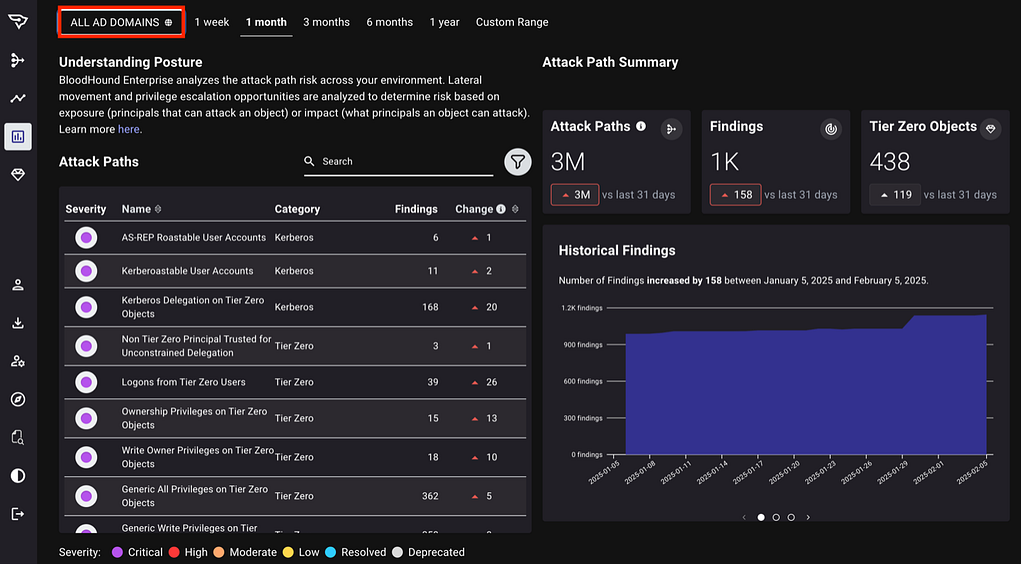
BHE v7.0 makes this easier by providing your security teams with holistic visibility into the Attack Path security posture across all your environments at once on a per-type basis. This view summarizes the Attack Paths, Findings, and Tier Zero Objects metrics across multiple environments, and shows them all in one place for quick review of the progress your teams have made.

Visibility of all environments by type.

Increased visibility of findings

SecOps teams often struggle to provide their leadership with effective board-level reporting. Risk reporting is either too abstract or dives deep into the data, making it difficult to utilize. When it comes to Attack Path risk assessments, it is critical to have a clear before and after snapshot as well as visibility into the intermediate findings along the remediation journey.

Prior to BHE v7.0, the Posture page provided a high-level summary of initial findings and resolutions, which was a useful baseline. In BHE v7.0, we’ve improved this reporting with granular visibility between initial findings to resolution path including any intermediate findings. This enables practitioners to provide a more meaningful summary on the risk and remediation progress for board-level reporting.

Visibility of findings.

Improved CSV export functionality

The ability to export data and easily share and sync with other tools, systems and teams is essential in today’s complex cybersecurity ecosystem.

For example, security teams can now ingest Attack Path findings into their SIEM/SOAR platforms. This helps automate incident threat response workflows and streamline security tasks. Additionally, the Attack Path data can be leveraged by incident response, threat hunting, vulnerability management and other security teams and systems.

The CSV export functionality on the Attack Paths page was improved to make the exported fields consistent across findings, added the new Exposure/Impact measurements where appropriate, and added human-readable column headers when the CSV is exported out of the UI.

Improved CSV export functionality.

Summary

BloodHound v7.0 packs a lot of capabilities that enable security teams to better assess and prioritize risks, track remediation efforts, and ultimately strengthen their security posture. All BloodHound users can find expanded details on these updates in our release notes or by contacting your Technical Account Manager.

Our team is excited to showcase the latest enhancements and share what’s coming down the line for BloodHound at our upcoming SO-CON event in the Washington, DC area from March 31 — April 1, 2025. We look forward to seeing you there!


Enhancements for BloodHound v7.0 Provide Fresh User Experience and Attack Path Risk Optimizations was originally published in Posts By SpecterOps Team Members on Medium, where people are continuing the conversation by highlighting and responding to this story.

SlackPirate Set Sails Again! Or: How to Send the Entire “Bee Movie” Script to Your Friends in Slack

TLDR: SlackPirate has been defunct for a few years due to a breaking change in how the Slack client interacts with the Slack API. It has a new PR by yours truly to let you loot Slack again out of the box, and a BOF exists to get you all the credential material you need to do it. I recommend you let Nemesis do the heavy lifting of finding interesting data in what you pull back.

Slack Cookies BOF PR

SlackPirate PR

The BOF

This all started because I noticed that my brilliant colleague Matt Creel had added a new BOF to TrustedSec’s CS-Remote-OPs-BOF collection that pulled Slack cookies from the memory of either a browser or Slack client process. This would allow an operator to then utilize the stolen cookies to proxy browser traffic through a compromised machine and access the target organization’s Slack instance. He released a great blog about it if you want to learn more.

Slack is awesome, and full of valuable data about an organization. There’s the obvious stuff like people being lax and pasting credentials, but don’t forget that is also a comprehensive directory of who works there, and probably more valuable than their internal documentation (when was the last time you actually searched Confluence? Exactly.)

I was stoked to start using Matt’s BOF, since there hasn’t been an assessment where I got access to Slack where it didn’t prove useful. That said, something was nagging at me… This is the age of Nemesis! We don’t need to read anymore, reading is for squares! We have computers to do that for us while we watch short-form videos of animals with funny things on their heads (see below). Reading Slack was no exception.

A classic.

So I set out to find a good Slack looter. I quickly stumbled upon SlackPirate, created by Mikail Tunç, which seemed to be the defacto choice. And for good reason! It is simple, fairly comprehensive, and also quite modular; you can change what is being searched for with relative ease. By default though it does a lot, such as:

  • Scraping all messages for private keys, passwords, and cloud provider credentials
  • Grabbing a list of all Slack users
  • Downloading hosted files en-masse
  • Pulling important Slack-specific data, such as pinned messages

Great! I plugged in my cookie and… no dice. I was unable to authenticate to any of the API endpoints I should be able to. I knew the Slack cookie I had was valid, so it was time to investigate.

Troubleshooting

Figuring out what was the matter was pretty breezy! Slack is an Electron app, so you can still access the Chrome dev tools. Slack used to allow this by exporting a particular environment variable:

SET SLACK_DEVELOPER_MENU=TRUE && start C:\Users\<USER>\AppData\Local\slack\slack.exe

You could then access the developer tools by pressing ctrl + alt + i. This no longer works for me, so I instead opted to use Chrome remote debugging, which was successful.

(NOTE: If you’re reading this blog, there’s a good chance your security team will have an alert in place for Chrome remote debugging to prevent cookie crimes. You may want to check with them before doing this on a work computer.)

C:\Users\<USER>\AppData\Local\slack\slack.exe --args --remote-debugging-port=9222

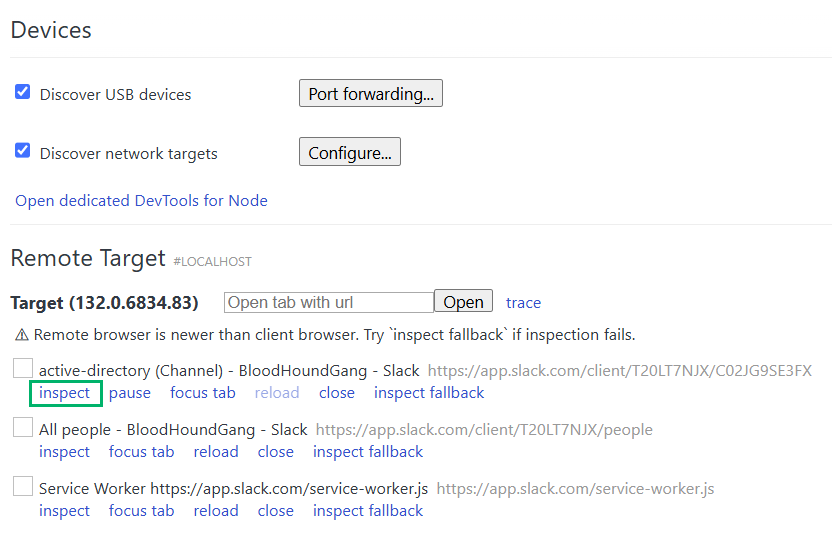
Then when you browse to chrome://inspect/ you will be able to see Slack as with option to inspect:

Chrome remote debugging

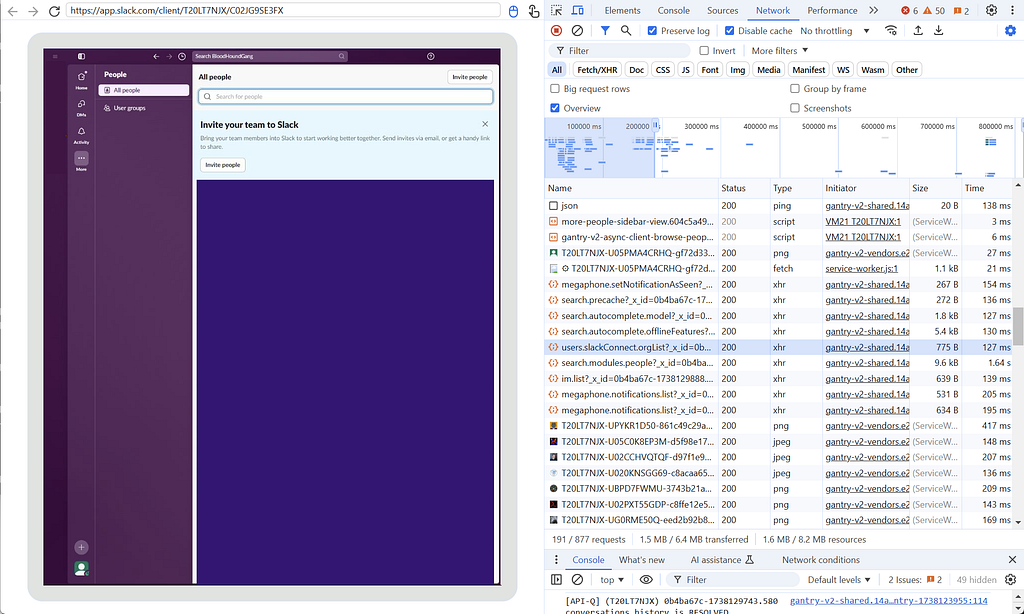
By pressing “inspect” you get your dev tools, plus a neat window of the Electron app you are debugging! I have never tried to use this to screen-peek on an Electron app over a proxy, but wouldn’t that be neat.

Inspecting Slack network traffic

My strategy at this point was to record network traffic while performing actions that seemed like they would have to be hitting a defined API endpoint from the client and seeing what the network traffic looked like. For example, going to the “users” page and finding what endpoint got hit to retrieve them. That’s what I am doing in the screenshot above for the BloodHoundGang slack (which you should join if you haven’t).

This allowed me to compare the requests with what was being performed in SlackPirate and determine what had changed to break it.

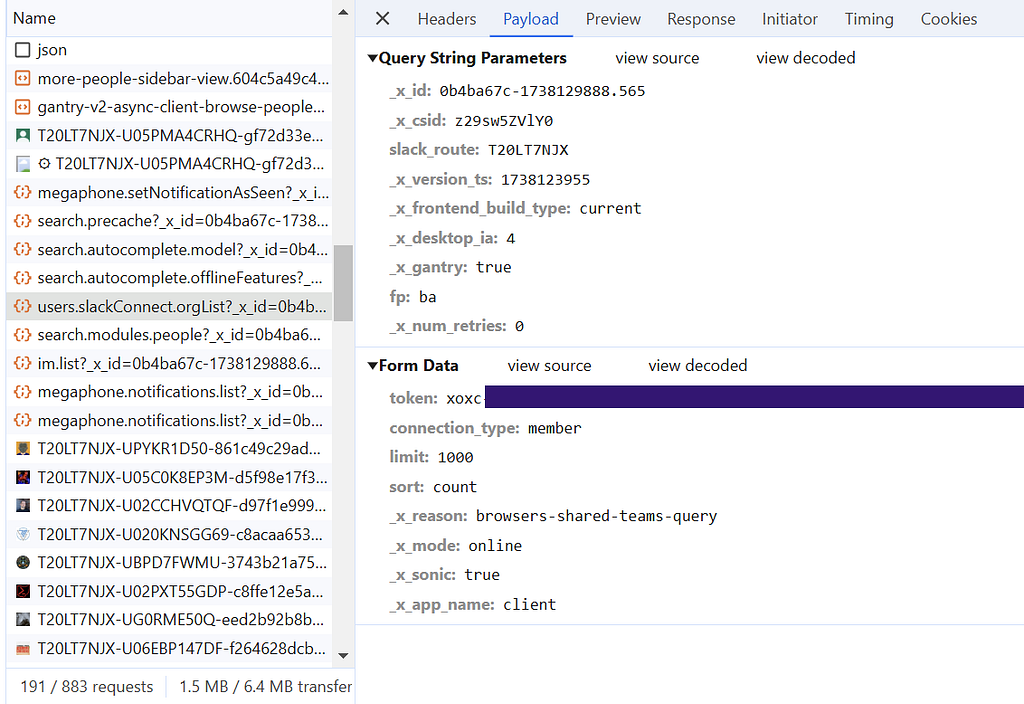
Turns out, not much! The APIs ended up being the same as before, the only piece that was missing what that now requests were made with a token included in the request payload itself, in addition to the cookie in the headers we already knew about.

An API request for user data containing an API token

As you can see, this token is also in a nice searchable format, starting with “xoxc”, so the same technique used by Matt’s BOF to pull the cookie from memory can be used for the token. Now the BOF pulls both, and can be used not only get the credential material needed to browse a target organization’s Slack via a proxy, but also interact with it programmatically.

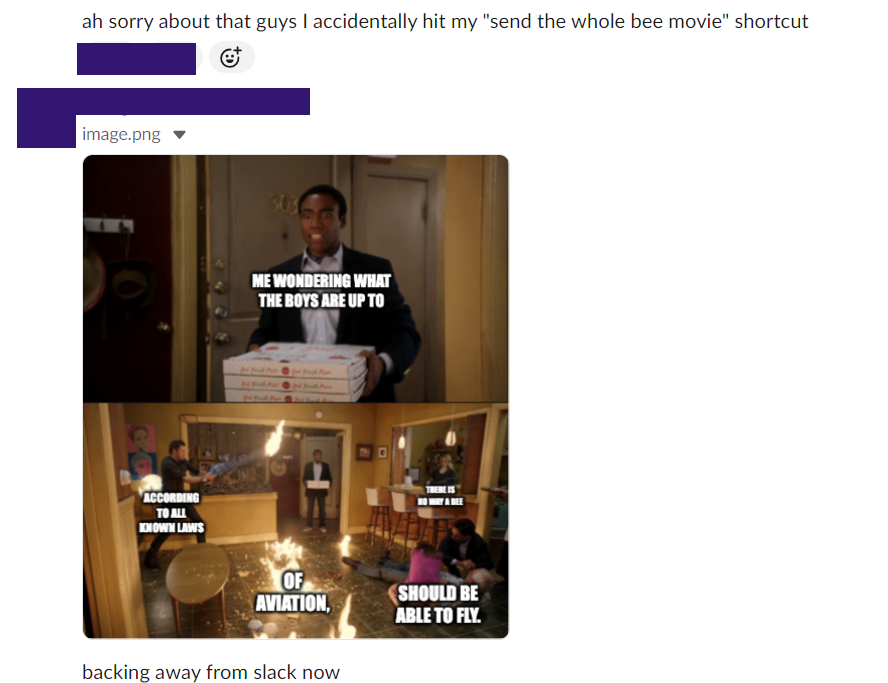
With these two pieces of information, you can hit the Slack API just as if you were the client when a user clicks around and types. You can even make your own janky Slack bots that post out of your account… which of course I did. But you already knew that from the title. So here’s screenshots of my fellow Specters suffering while I posted the entire Bee Movie into our group chat, each line as its own message. We all know it’s what you’re here for.

🐝
The aftermath

Quick aside — you may be thinking: Why go through all the trouble of doing this with the Electron client? Why not just open Slack in a web browser and inspect that traffic?

Anecdotally, I see people using the client way more often, so I wanted to make sure whatever I looked at would be representative of that. Also developers seem to trust dedicated clients more, so the tokens and cookies you snoop from them last much longer. For instance my buddy Jesko got tired of having to reauth to Slack, so he snagged a token from his phone’s client that never expires. My janky Slack bots haven’t had to reauth yet either.

SlackPirate Updates

So with our new programmatic access, it is time to loot! For the most part all of my changes to SlackPirate were updating the script to utilize the new token in addition to a cookie. There are a few other changes I threw in though that you may want to be aware of:

  • There was an “interactive mode” that let you interact with multiple workspaces. This functionality has been removed and you will always need to provide the appropriate token and cookie for the individual workspace you want to target as arguments to the script
  • The list of what files and strings are searched for by default is more focused on finding credential material, especially in file formats that are easy for Nemesis to parse
  • Various functions targeting AWS data have been changed to also look for Azure data

And there you have it. With these new updates, you are ready to get back to a nice easy life of not reading and letting Nemesis read your target’s whole Slack for you. So kick back and let your reading comprehension regress to a third-grade level with another classic animal-with-thing-on-head video from the cellar. It is a fine vintage.


SlackPirate Set Sails Again! Or: How to Send the Entire “Bee Movie” Script to Your Friends in Slack was originally published in Posts By SpecterOps Team Members on Medium, where people are continuing the conversation by highlighting and responding to this story.

❌