In that article we mentioned the importance of encryption.
“With a browser password manager, someone with access to your browser could see your passwords in clear text, although Windows can be set to ask for authentication (the same you use at startup of your device).”
The typical behavior of browser password managers is to store passwords encrypted on disk, tied to your user account, and protected by the operating system.
But recently, a security researcher systematically tested every major Chromium-based browser for how they handle credentials in memory. The researcher found that Edge was the only one loading the entire password vault into plaintext process memory at startup, where it remains for the duration of the session.
Chrome and other Chromium browsers were observed to only decrypt a password when needed (autofill or “show password”), not the whole vault, and to use mechanisms like app‑bound encryption for keys. Edge does not use those protections in this context.
So, the researcher decided to write a proof-of-concept (PoC) demonstrating that accessing that vault doesn’t rely on zero-days or complex exploitation. It relies on the relatively simple ability to read process memory, which does require elevated privileges.
But when the researcher reported the issue to Microsoft, the response was underwhelming. The company’s official response was that the behavior is “by design.” The reasoning most likely is that this behavior speeds up sign‑in and autofill, and attackers would already need a compromised machine or elevated access to read RAM, which Microsoft treats as out of scope for this design decision.
Which is basically true. An attacker already needs significant foothold: for example, code execution on the box and the ability to read Edge’s process memory, often requiring elevated privileges. This is not a remote, unauthenticated bug in the browser, but the design makes post‑compromise credential harvesting easier. And it’s a capability many infostealers already have.
It’s just another thing an attacker can do once they’ve compromised your machine. Combined with this academic study from 2024, which found many password managers leak plaintext passwords into memory under some conditions, it leads us to repeat our advice.
Should you allow your browser to remember your passwords?
Your browser password manager gives you ease of use, but that costs you some security. Of course, password managers aren’t foolproof either, so it’s important to decide for yourself where you store your passwords.
If you’re confident the website is safe, and anyone that can access it under your account won’t learn anything new, feel free to store the password in your browser, but disable autofill so you stay in control.
Use MFA where possible. It enormously reduces the risk should someone get hold of your password. And refrain from using the browser password manager to store your credit card details or other sensitive personally identifiable information, such as medical information.
But we’d add that, among the major browsers, Edge appears to be the weakest option if you still choose to use a built‑in password manager.
Stop threats before they can do any harm.
Malwarebytes Browser Guard blocks phishing pages and malicious sites automatically. Free, one click to install. Add it to your browser →
Discover the 13 hidden costs of password-based authentication, from $70-per-reset help desk overhead to SMS OTP fees and breach exposure. Includes a simple ROI worksheet formula to calculate your organization's annual password tax and build the business case for passwordless authentication
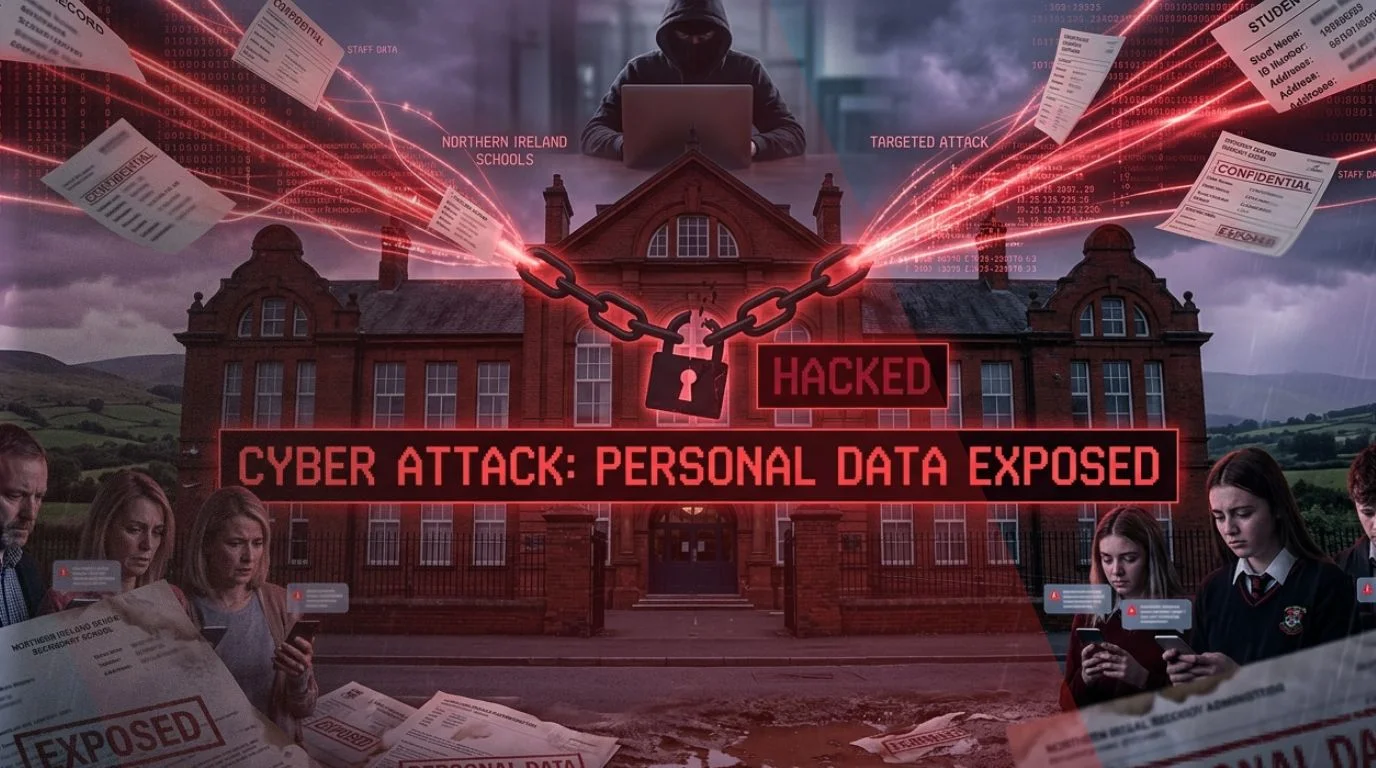
The Education Authority cyberattack investigation has confirmed that a recent incident involved a targeted attack on a small number of schools, leading to the compromise of some personal data. The update comes days after the incident was first reported, with new findings shedding light on the nature and impact of the breach.
According to officials, the Education Authority cyberattack was identified on April 10, 2026, when authorities were alerted to suspicious activity affecting school systems. Forensic experts have since determined that attackers gained specific and targeted access to personal information linked to certain schools.
Targeted Nature of Education Authority Cyberattack
The latest findings indicate that the Education Authority cyberattack was not a widespread system breach but a focused attack on select institutions. Investigators confirmed that personal data was accessed in these cases, though the full extent of the compromised information has not yet been disclosed.
Authorities had earlier stated that there was no evidence of data exfiltration or corruption. That assessment was based on initial findings, with officials noting at the time that the investigation was ongoing. The updated confirmation reflects the results of a more detailed forensic review, which required analysis across multiple systems.
The breach is believed to have occurred before additional cybersecurity measures were implemented by the authority earlier this month.
Investigation and Law Enforcement Involvement
The Education Authority cyberattack is currently under active investigation, with law enforcement agencies involved. The Police Service of Northern Ireland and the Information Commissioner’s Office were notified immediately after forensic experts confirmed that personal data had been accessed.
Officials stated that details of the incident are being disclosed publicly following an arrest made by the police. Prior to this development, authorities had withheld information to avoid interfering with ongoing investigations.
The involvement of regulatory and law enforcement bodies highlights the seriousness of the Education Authority cyberattack, particularly given the sensitivity of data held by educational institutions.
Containment and System Recovery Efforts
System managers have assessed that the Education Authority cyberattack has been contained. Additional security measures were deployed as soon as the incident was detected, aimed at preventing further unauthorized access.
Efforts are now focused on restoring normal operations. Work is ongoing to reconnect affected schools to the C2k system, which supports digital services across the education network. Officials said that restoring full functionality remains a priority while ensuring system security.
The authority has also urged users to reset their C2k passwords as a precautionary step.
Notification of Affected Individuals
Authorities have confirmed that individuals whose personal data may have been compromised in the Education Authority cyberattack will be notified. The process of informing affected schools and individuals is currently underway and is being guided by the final findings of the investigation, along with advice from relevant authorities.
Officials acknowledged the concern such incidents may cause and said efforts are being made to communicate with impacted parties as quickly as possible.
At the same time, they noted that certain details cannot yet be disclosed publicly due to the ongoing police investigation. Further updates are expected once authorities are able to share more information without affecting the case.
Ongoing Monitoring and Next Steps
The Education Authority cyberattack remains under close monitoring as forensic analysis continues. Investigators are working to fully understand how the breach occurred and whether additional risks remain.
While the incident appears to be contained, the confirmation of targeted access to personal data underscores the risks facing education systems, which often manage sensitive information across interconnected platforms.
Authorities have indicated that further updates will be provided as the investigation progresses and more details become available.
According to a new law, the Hong Kong police can demand that you reveal the encryption keys protecting your computer, phone, hard drives, etc.—even if you are just transiting the airport.
In a security alert dated March 26, the U.S. Consulate General said that, on March 23, 2026, Hong Kong authorities changed the rules governing enforcement of the National Security Law. Under the revised framework, police can require individuals to provide passwords or other assistance to access personal electronic devices, including cellphones and laptops.
The consulate warned that refusal to comply is now a criminal offense. It also said authorities have expanded powers to take and keep personal electronic devices as evidence if they claim the devices are linked to national security offenses.
There are strong noticeable patterns among these 50 passwords that can be seen easily:
All of the passwords start with a letter, usually uppercase G, almost always followed by the digit 7.
Character choices are highly uneven for example, L , 9, m, 2, $ and # appeared in all 50 passwords, but 5 and @ only appeared in one password each, and most of the letters in the alphabet never appeared at all.
There are no repeating characters within any password. Probabilistically, this would be very unlikely if the passwords were truly random but Claude preferred to avoid repeating characters, possibly because it “looks like it’s less random”.
...
There are strong noticeable patterns among these 50 passwords that can be seen easily:
All of the passwords start with a letter, usually uppercase G, almost always followed by the digit 7.
Character choices are highly uneven for example, L , 9, m, 2, $ and # appeared in all 50 passwords, but 5 and @ only appeared in one password each, and most of the letters in the alphabet never appeared at all.
There are no repeating characters within any password. Probabilistically, this would be very unlikely if the passwords were truly random but Claude preferred to avoid repeating characters, possibly because it “looks like it’s less random”.
Claude avoided the symbol *. This could be because Claude’s output format is Markdown, where * has a special meaning.
Even entire passwords repeat: In the above 50 attempts, there are actually only 30 unique passwords. The most common password was G7$kL9#mQ2&xP4!w, which repeated 18 times, giving this specific password a 36% probability in our test set; far higher than the expected probability 2-100 if this were truly a 100-bit password.
This result is not surprising. Password generation seems precisely the thing that LLMs shouldn’t be good at. But if AI agents are doing things autonomously, they will be creating accounts. So this is a problem.
Actually, the whole process of authenticating an autonomous agent has all sorts of deep problems.
Good article on password managers that secretly have a backdoor.
New research shows that these claims aren’t true in all cases, particularly when account recovery is in place or password managers are set to share vaults or organize users into groups. The researchers reverse-engineered or closely analyzed Bitwarden, Dashlane, and LastPass and identified ways that someone with control over the server—either administrative or the result of a compromise—can, in fact, steal data and, in some cases, entire vaults. The researchers also devised other attacks that can weaken the encryption to the point that ciphertext can be converted to plaintext.
This is where I plug my own Password Safe. It isn’t as full-featured as the others and it doesn’t use the cloud at all, but it’s actual encryption with no recovery features.
A nationwide cyberattack against the OnSolve CodeRED emergency notifications system has prompted cities and counties across the US to warn residents and advise them to change their passwords.
CodeRED is used by local governments to deliver fast, targeted alerts during severe weather, evacuations, missing persons, and other urgent events. Both the data breach and the service outage have serious implications for communities.
The OnSolve CodeRED system is a cloud-based platform used by city, county, and state agencies to send emergency alerts via voice calls, SMS, email, mobile app notifications, and national alerting systems. Because of the incident, some regions temporarily lost access to the system and had to rely on social media or other methods to reach the public.
To avoid confusion: CodeRED is not the same as the Emergency Alert System (EAS), which is the federal government-managed emergency notifications system. The CodeRED emergency notification system is a voluntary program where residents can sign up to receive notifications and emergency alerts affecting the city they live in.
What’s happened?
Among the many affected municipalities, the City of Cambridge’s Emergency Communications, Police, and Fire Departments issued an alert urging users to change their passwords, especially if they reused the same password elsewhere. Similar advisories have been published by towns and counties in multiple states as the scale of the attack became clear.
The City of University Park, Texas, also warned residents:
“As a precaution, we want to make residents aware of a recent cybersecurity incident involving the City’s third-party emergency alert system, CodeRED. We were notified that a cybercriminal group targeted the system, which caused disruption and may have compromised some user data. This incident did not affect any City systems or services and remains isolated to the CodeRED software.”
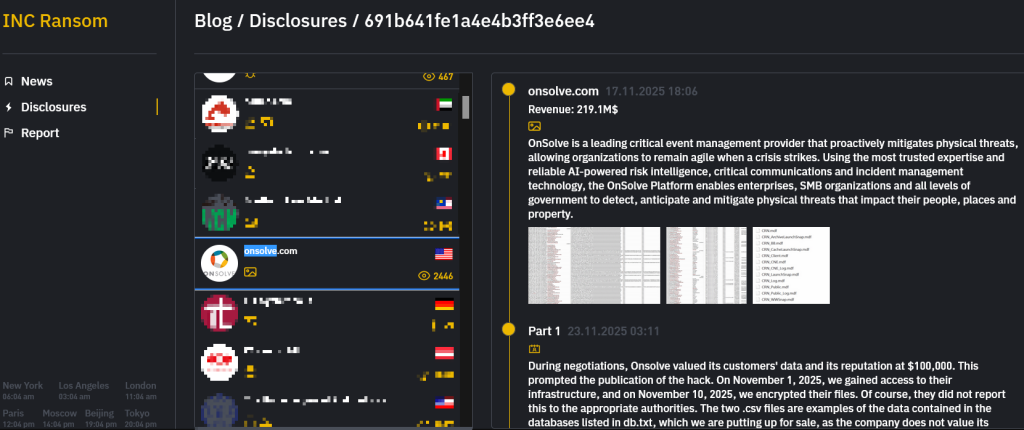
The cause is reportedly a ransomware attack claimed by the INC Ransom group. The group posted screenshots that appear to show stolen customer data, including email addresses and associated clear-text passwords.
The INC Ransom group also published part of the alleged ransom negotiation, suggesting that Crisis24 (the provider behind CodeRED) initially offered $100,000, later increasing the offer to $150,000, which INC rejected.
The incident forced Crisis24 to shut down its legacy environment and rebuild the system in a new, isolated infrastructure. Some regions, such as Douglas County, Colorado, have terminated their CodeRED contracts following the outage.
Why this matters
Cyberattacks happen, and data breaches are not always preventable. But storing your subscriber database—including passwords in clear text—seems rather careless. Providers should assume people reuse passwords, especially for accounts they don’t view as very sensitive.
Not that ransomware groups care, of course, but systems like CodeRED genuinely saves lives. When that system goes down or cannot be trusted, communities may miss evacuation orders, severe weather warnings, or active-shooter alerts when minutes matter.
Users are now being told to change their passwords, sometimes across multiple websites. But has everyone been notified? And even if they have, will they actually take action?
Protecting yourself after a data breach
If you think you have been the victim of a data breach, here are steps you can take to protect yourself:
Check the vendor’s advice. Every breach is different, so check with the vendor to find out what’s happened and follow any specific advice it offers.
Change your password. You can make a stolen password useless to thieves by changing it. Choose a strong password that you don’t use for anything else. Better yet, let a password manager choose one for you.
Enable two-factor authentication (2FA). If you can, use a FIDO2-compliant hardware key, laptop, or phone as your second factor. Some forms of 2FA can be phished just as easily as a password, but 2FA that relies on a FIDO2 device can’t be phished.
Watch out for impersonators. The thieves may contact you posing as the breached platform. Check the official website to see if it’s contacting victims and verify the identity of anyone who contacts you using a different communication channel.
Take your time. Phishing attacks often impersonate people or brands you know, and use themes that require urgent attention, such as missed deliveries, account suspensions, and security alerts.
Consider not storing your card details. It’s definitely more convenient to let sites remember your card details, but we highly recommend not storing that information on websites.
Security and attacks continues to be a very active environment, and the visibility that Cloudflare Radar provides on this dynamic landscape has evolved and expanded over time. To that end, during 2023’s Security Week, we launched our URL Scanner, which enables users to safely scan any URL to determine if it is safe to view or interact with. During 2024’s Security Week, we launched an Email Security page, which provides a unique perspective on the threats posed by malicious emails, spam volume, the adoption of email authentication methods like SPF, DMARC, and DKIM, and the use of IPv4/IPv6 and TLS by email servers. For Security Week 2025, we are adding several new DDoS-focused graphs, new insights into leaked credential trends, and a new Bots page to Cloudflare Radar. We are also taking this opportunity to refactor Radar’s Security & Attacks page, breaking it out into Application Layer and Network Layer sections.
Below, we review all of these changes and additions to Radar.
Layered security
Since Cloudflare Radar launched in 2020, it has included both network layer (Layers 3 & 4) and application layer (Layer 7) attack traffic insights on a single Security & Attacks page. Over the last four-plus years, we have evolved some of the existing data sets on the page, as well as adding new ones. As the page has grown and improved over time, it risked becoming unwieldy to navigate, making it hard to find the graphs and data of interest. To help address that, the Security section on Radar now features separate Application Layer and Network Layer pages. The Application Layer page is the default, and includes insights from analysis of HTTP-based malicious and attack traffic. The Network Layer page includes insights from analysis of network and transport layer attacks, as well as observed TCP resets and timeouts. Future security and attack-related data sets will be added to the relevant page. Email Security remains on its own dedicated page.
A geographic and network view of application layer DDoS attacks
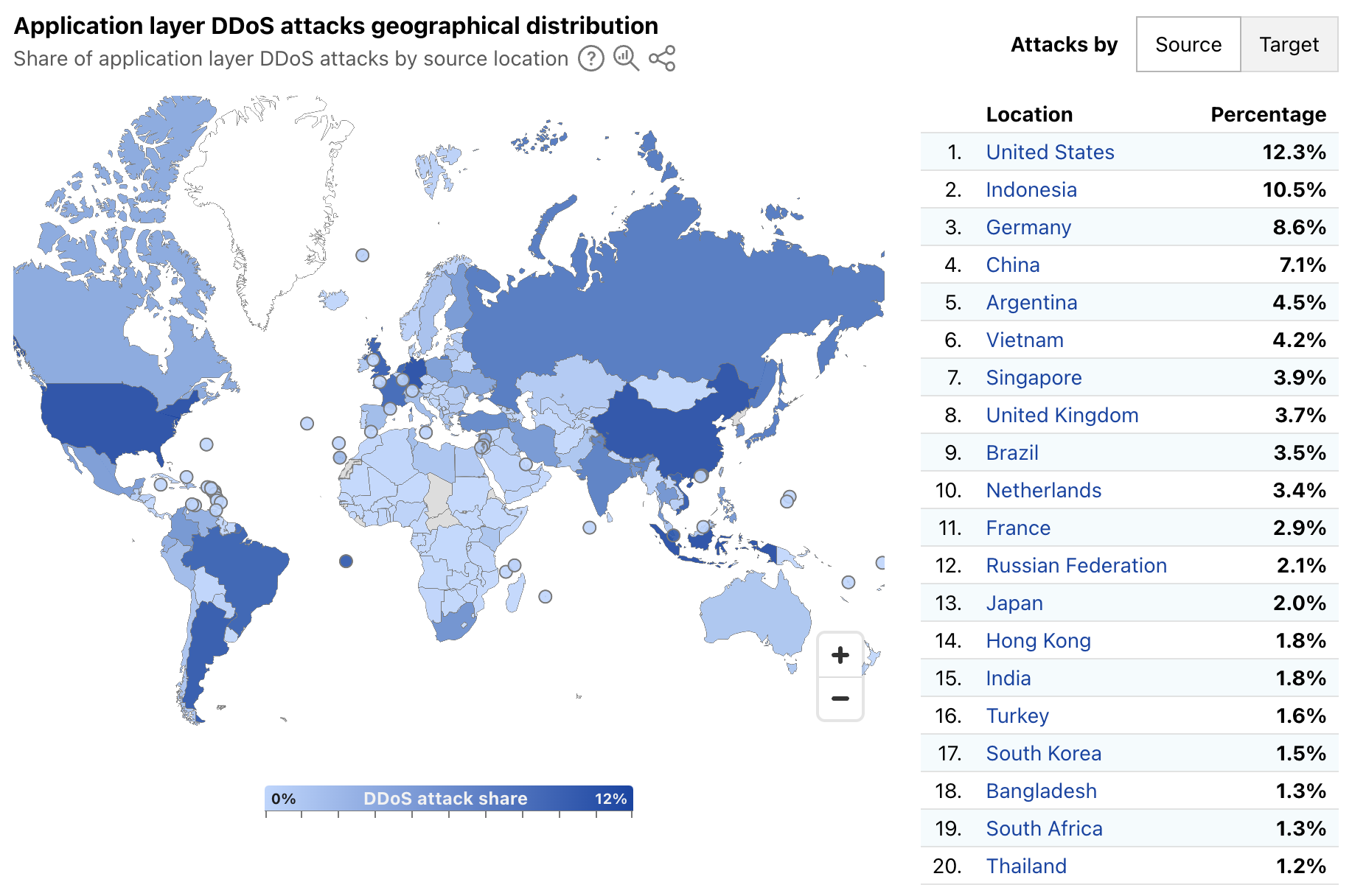
Radar’s quarterly DDoS threat reports have historically provided insights, aggregated on a quarterly basis, into the top source and target locations of application layer DDoS attacks. A new map and table on Radar’s Application Layer Security page now provide more timely insights, with a global choropleth map showing a geographical distribution of source and target locations, and an accompanying list of the top 20 locations by share of all DDoS requests. Source location attribution continues to rely on the geolocation of the IP address originating the blocked request, while target location remains the billing location of the account that owns the site being attacked.
Over the first week of March 2025, the United States, Indonesia, and Germany were the top sources of application layer DDoS attacks, together accounting for over 30% of such attacks as shown below. The concentration across the top targeted locations was quite different, with customers from Canada, the United States, and Singapore attracting 56% of application layer DDoS attacks.
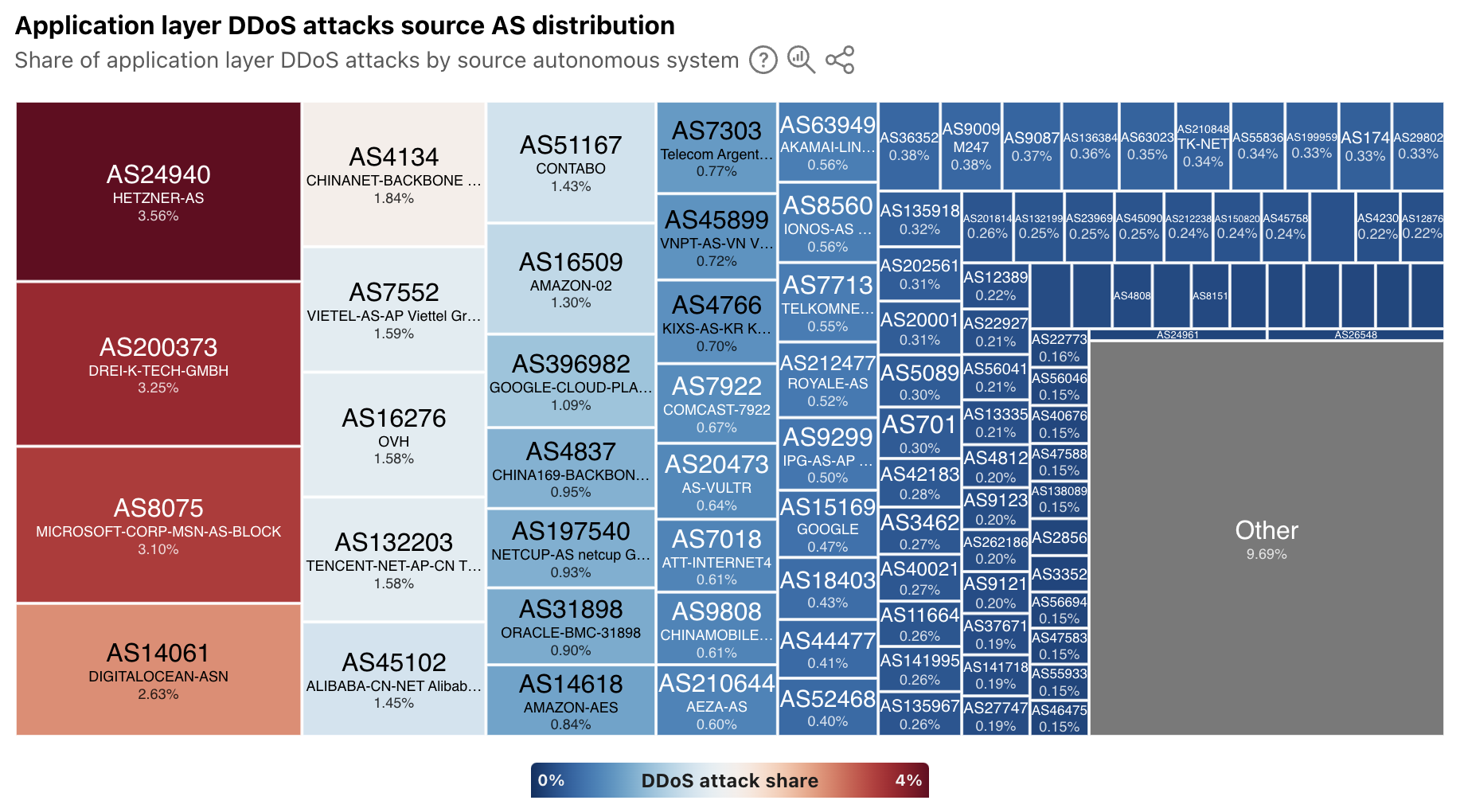
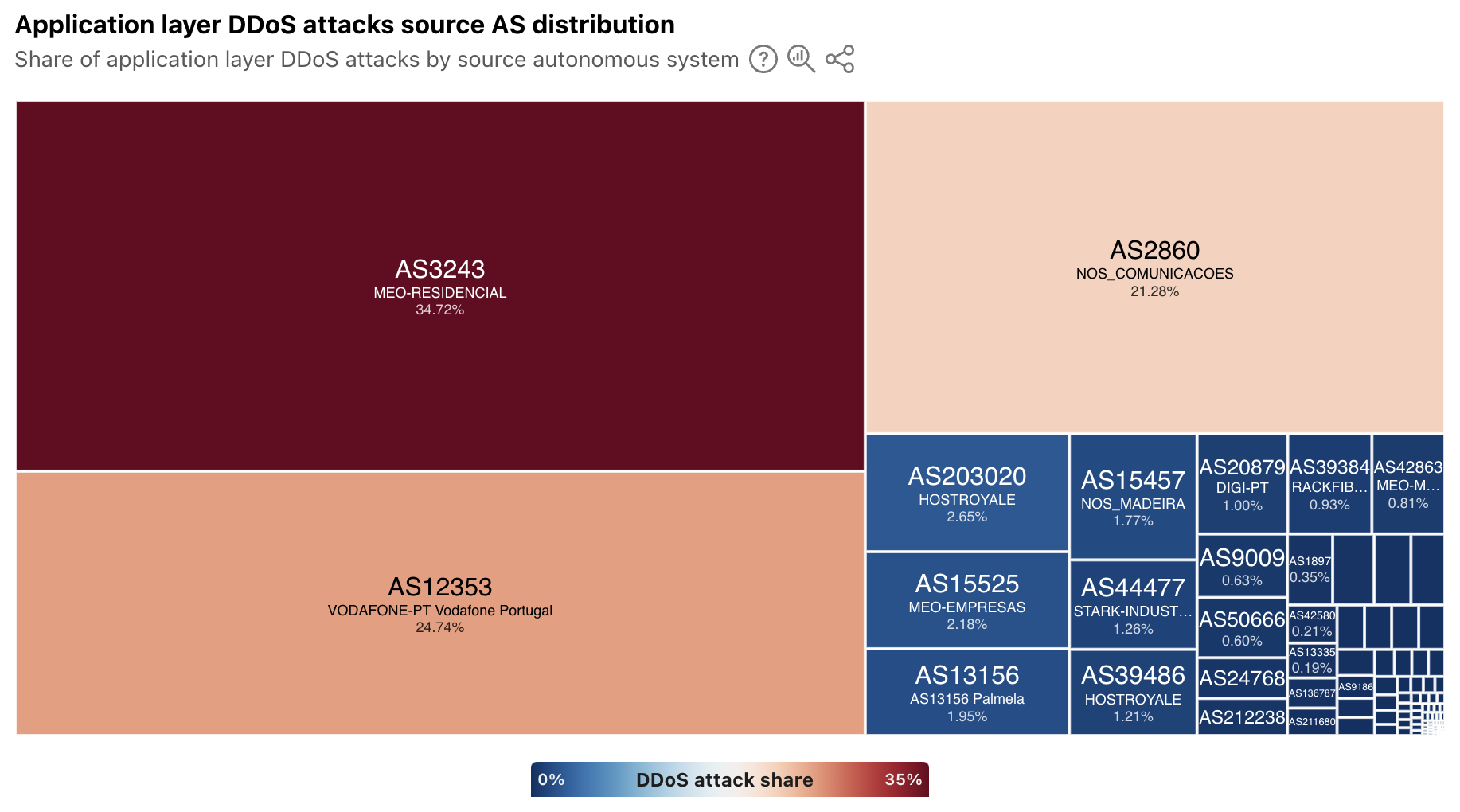
In addition to extended visibility into the geographic source of application layer DDoS attacks, we have also added autonomous system (AS)-level visibility. A new treemap view shows the distribution of these attacks by source AS. At a global level, the largest sources include cloud/hosting providers in Germany, the United States, China, and Vietnam.
For a selected country/region, the treemap displays a source AS distribution for attacks observed to be originating from that location. In some, the sources of attack traffic are heavily concentrated in consumer/business network providers, such as in Portugal, shown below. However, in other countries/regions that have a large cloud provider presence, such as Ireland, Singapore, and the United States, ASNs associated with these types of providers are the dominant sources. To that end, Singapore was listed as being among the top sources of application layer DDoS attacks in each of the quarterly DDoS threat reports in 2024.
Have you been pwned?
Every week, it seems like there’s another headline about a data breach, talking about thousands or millions of usernames and passwords being stolen. Or maybe you get an email from an identity monitoring service that your username and password were found on the “dark web”. (Of course, you’re getting those alerts thanks to a complementary subscription to the service offered as penance from another data breach…)
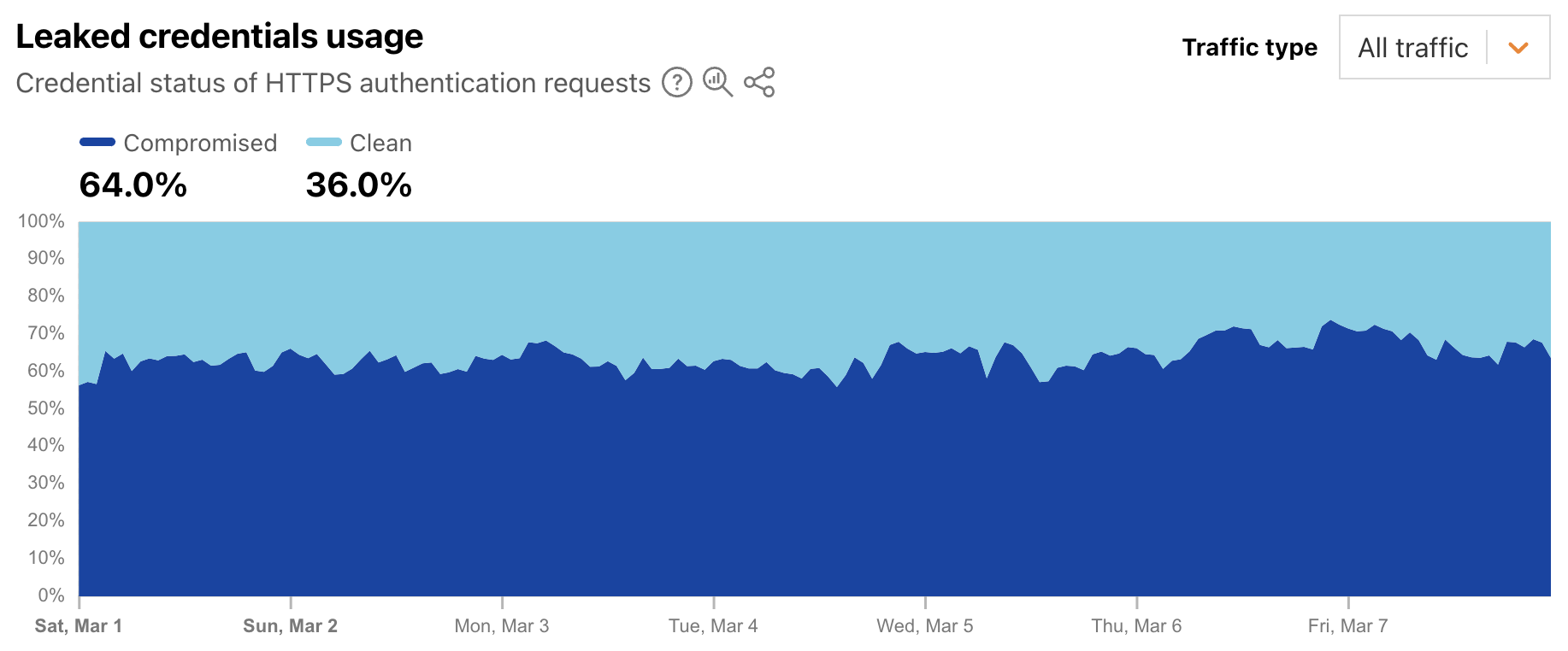
This credential theft is especially problematic because people often reuse passwords, despite best practices advising the use of strong, unique passwords for each site or application. To help mitigate this risk, starting in 2024, Cloudflare began enabling customers to scan authentication requests for their websites and applications using a privacy-preserving compromised credential checker implementation to detect known-leaked usernames and passwords. Today, we're using aggregated data to display trends in how often these leaked and stolen credentials are observed across Cloudflare's network. (Here, we are defining “leaked credentials” as usernames or passwords being found in a public dataset, or the username and password detected as being similar.)
Leaked credentials detection scans incoming HTTP requests for known authentication patterns from common web apps and any custom detection locations that were configured. The service uses a privacy-preserving compromised credential checking protocol to compare a hash of the detected passwords to hashes of compromised passwords found in databases of leaked credentials. A new Radar graph on the worldwide Application Layer Security page provides visibility into aggregate trends around the detection of leaked credentials in authentication requests. Filterable by authentication requests from human users, bots, or all (human + bot), the graph shows the distribution requests classified as “clean” (no leaked credentials detected) and “compromised” (leaked credentials, as defined above, were used). At a worldwide level, we found that for the first week of March 2025, leaked credentials were used in 64% of all, over 65% of bot, and over 44% of human authorization requests.
This suggests that from a human perspective, password reuse is still a problem, as is users not taking immediate actions to change passwords when notified of a breach. And from a bot perspective, this suggests that attackers know that there is a good chance that leaked credentials for one website or application will enable them to access that same user’s account elsewhere.
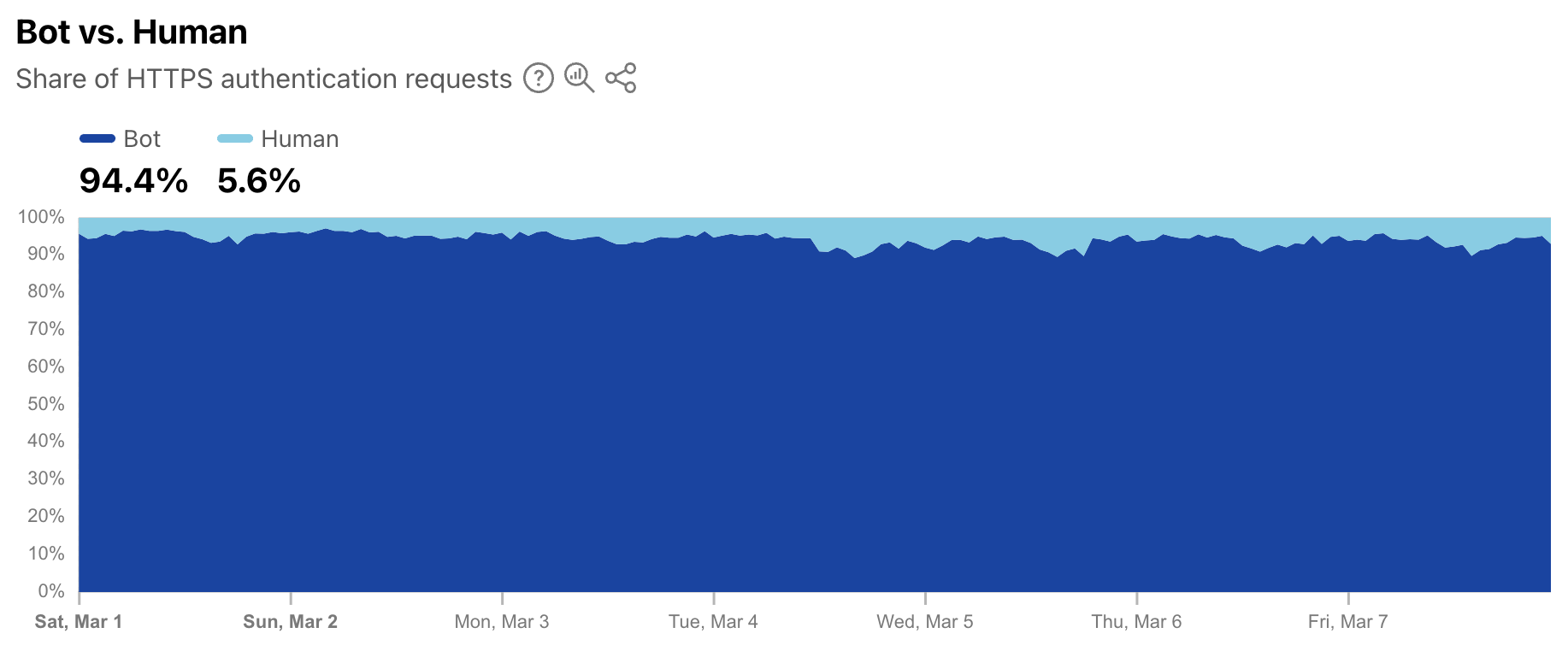
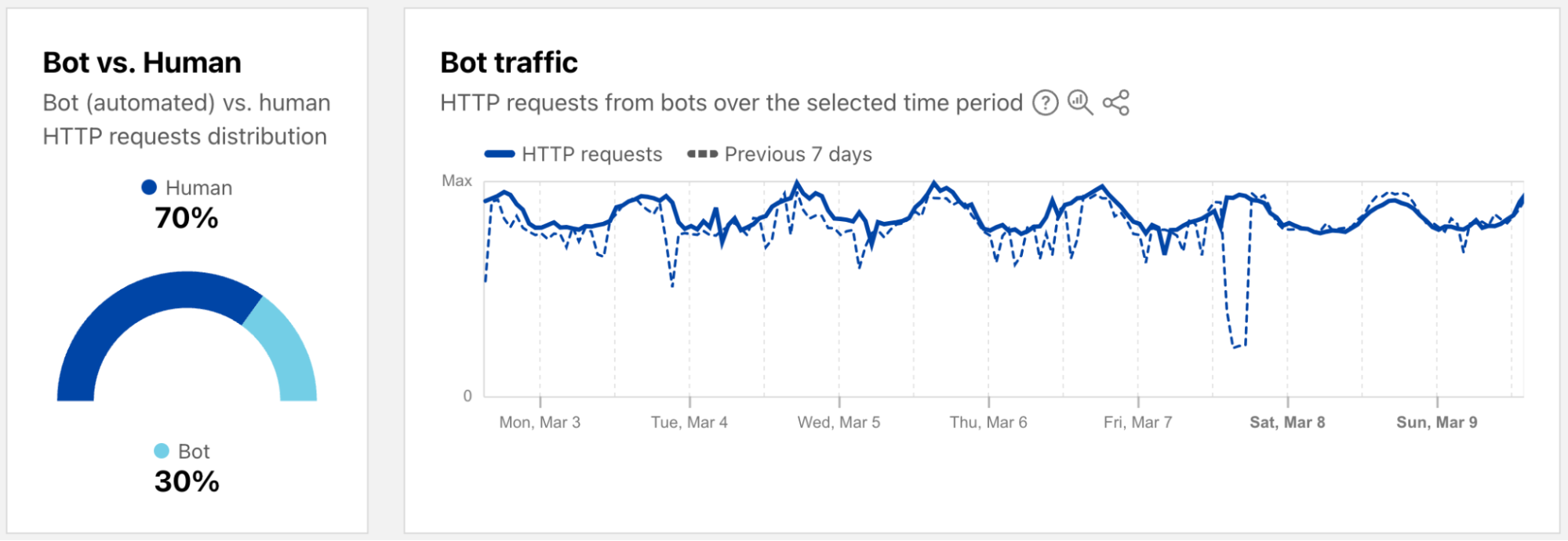
As a complement to the leaked credentials data, Radar is also now providing a worldwide view into the share of authentication requests originating from bots. Note that not all of these requests are necessarily malicious — while some may be associated with credential stuffing-style attacks, others may be from automated scripts or other benign applications accessing an authentication endpoint. (Having said that, automated malicious attack request volume far exceeds legitimate automated login attempts.) During the first week of March 2025, we found that over 94% of authentication requests came from bots (were automated), with the balance coming from humans. Over that same period, bot traffic only accounted for 30% of overall requests. So although bots don’t represent a majority of request traffic, authentication requests appear to comprise a significant portion of their activity.
Bots get a dedicated page
As a reminder, bot traffic describes any non-human Internet traffic, and monitoring bot levels can help spot potential malicious activities. Of course, bots can be helpful too, and Cloudflare maintains a list of verified bots to help keep the Internet healthy. Given the importance of monitoring bot activity, we have launched a new dedicated Bots page in the Traffic section of Cloudflare Radar to support these efforts. For both worldwide and location views over the selected time period, the page shows the distribution of bot (automated) vs. human HTTP requests, as well as a graph showing bot traffic trends. (Our bot score, combining machine learning, heuristics, and other techniques, is used to identify automated requests likely to be coming from bots.)
Both the 2023 and 2024 Cloudflare Radar Year in Review microsites included a “Bot Traffic Sources” section, showing the locations and networks that Cloudflare determined that the largest shares of automated/likely automated traffic was originating from. However, these traffic shares were published just once a year, aggregating traffic from January through the end of November.
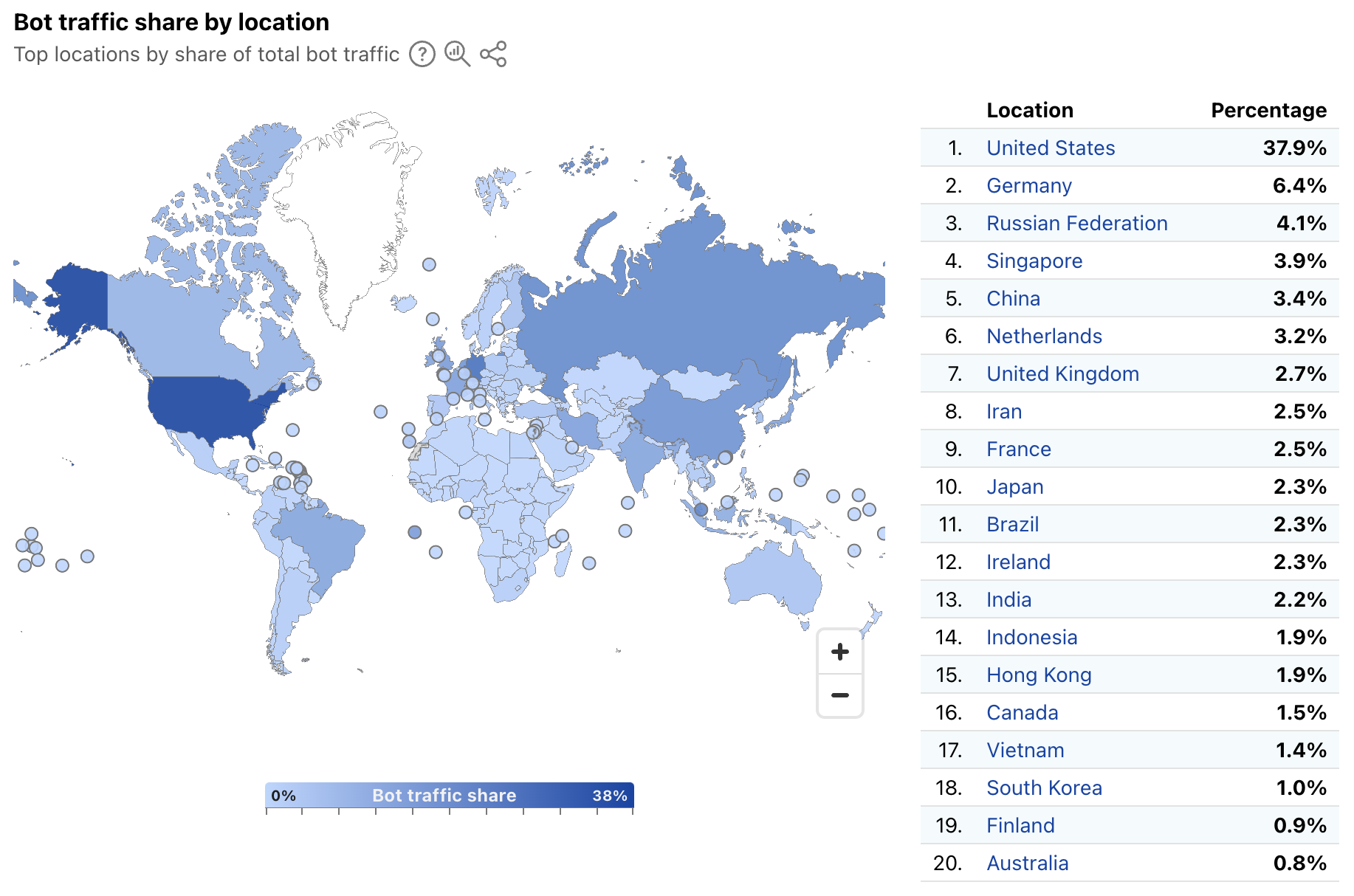
In order to provide a more timely perspective, these insights are now available on the new Radar Bots page. Similar to the new DDoS attacks content discussed above, the worldwide view includes a choropleth map and table illustrating the locations originating the largest shares of all bot traffic. (Note that a similar Traffic Characteristics map and table on the Traffic Overview page ranks locations by the bot traffic share of the location’s total traffic.) Similar to Year in Review data linked above, the United States continues to originate the largest share of bot traffic.
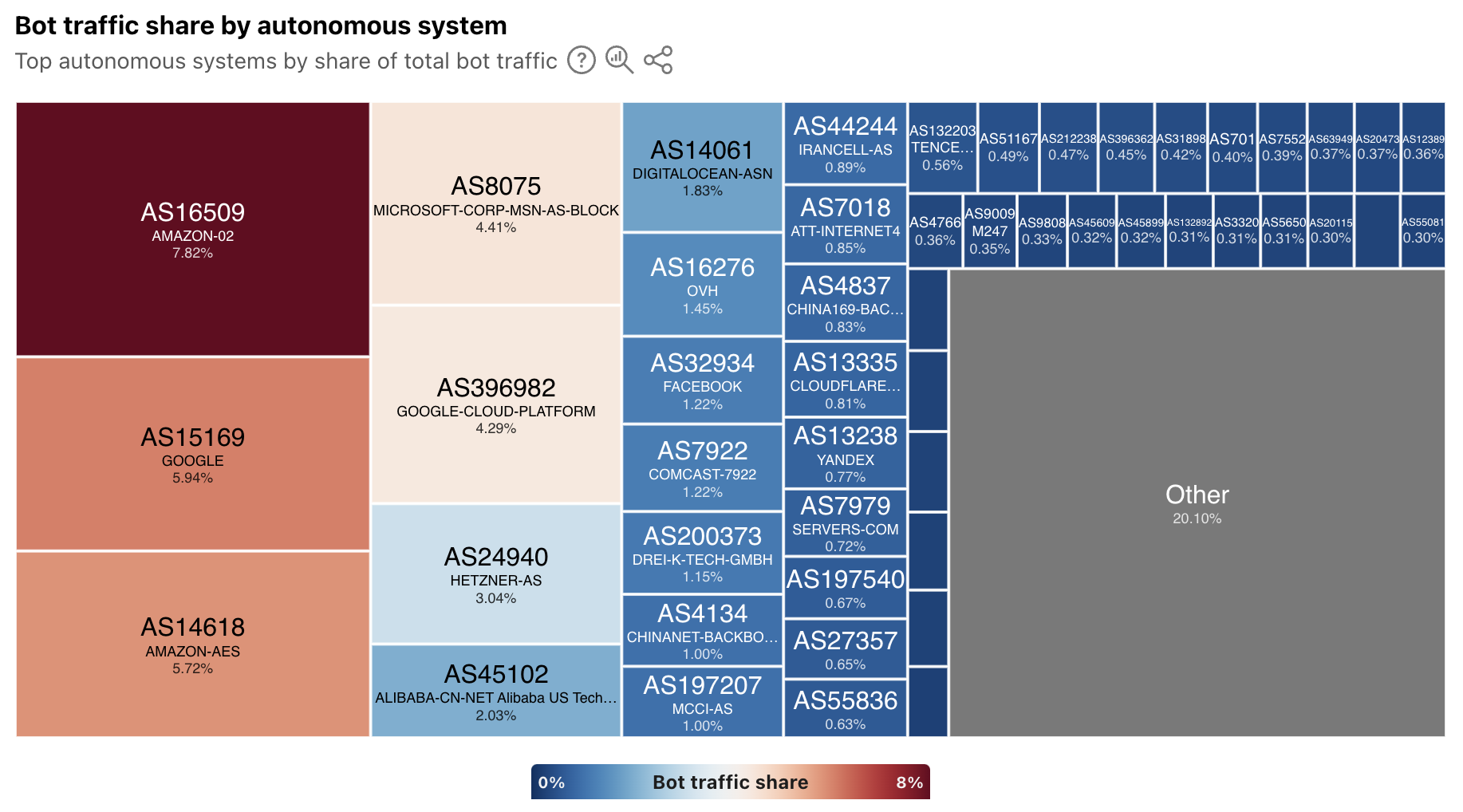
In addition, the worldwide view also breaks out bot traffic share by AS, mirroring the treemap shown in the Year in Review. As we have noted previously, cloud platform providers account for a significant amount of bot traffic.
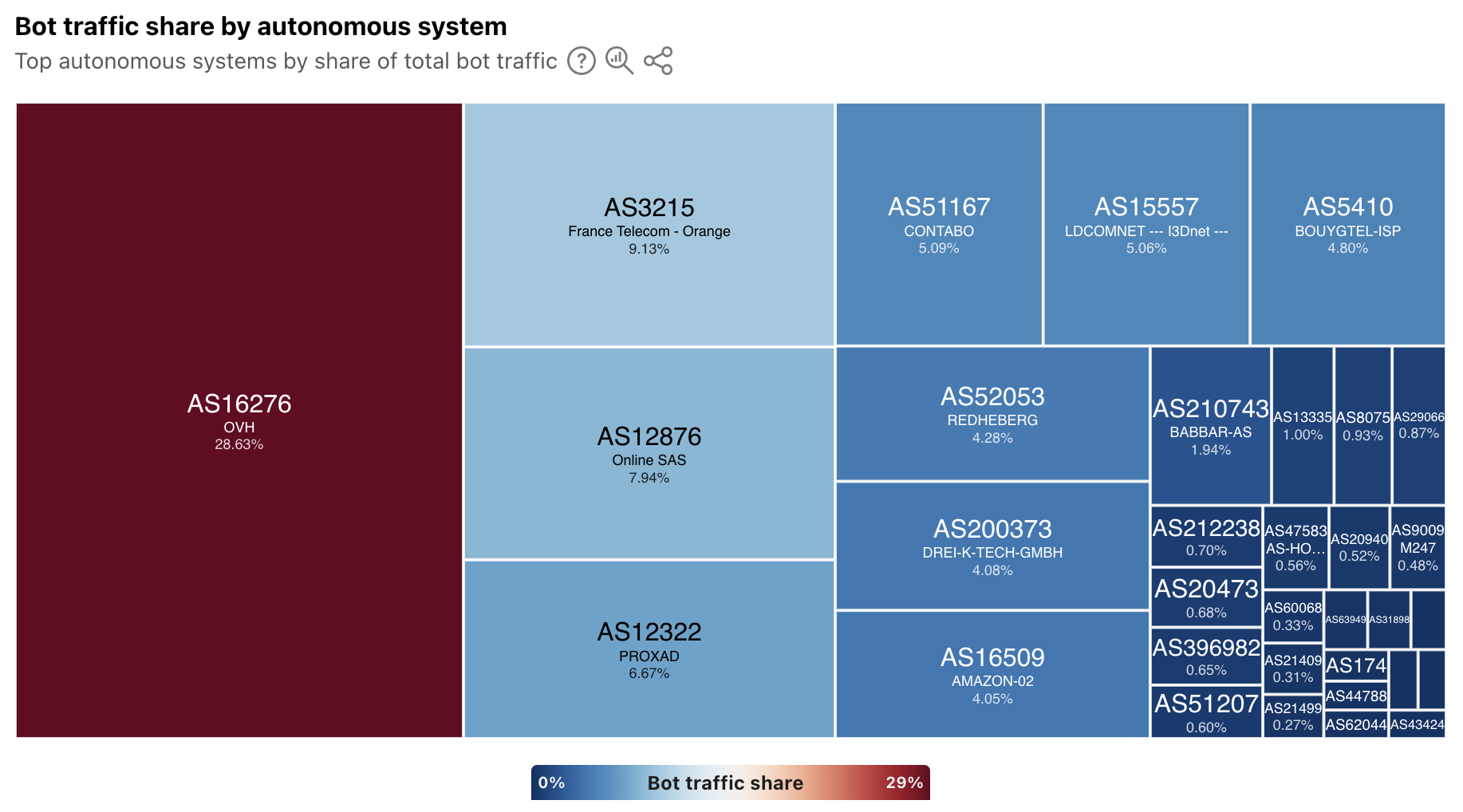
At a location level, depending on the country/region selected, the top sources of bot traffic may be cloud/hosting providers, consumer/business network providers, or a mix. For instance, France’s distribution is shown below, and four ASNs account for just over half of the country’s bot traffic. Of these ASNs, two (AS16276 and AS12876) belong to cloud/hosting providers, and two (AS3215 and AS12322) belong to network providers.
In addition, the Verified Bots list has been moved to the new Bots page on Radar. The data shown and functionality remains unchanged, and links to the old location will automatically be redirected to the new one.
Summary
The Cloudflare dashboard provides customers with specific views of security trends, application and network layer attacks, and bot activity across their sites and applications. While these views are useful at an individual customer level, aggregated views at a worldwide, location, and network level provide a macro-level perspective on trends and activity. These aggregated views available on Cloudflare Radar not only help customers understand how their observations compare to the larger whole, but they also help the industry understand emerging threats that may require action.
The underlying data for the graphs and data discussed above is available via the Radar API (Application Layer, Network Layer, Bots, Leaked Credentials). The data can also be interactively explored in more detail across locations, networks, and time periods using Radar’s Data Explorer and AI Assistant. And as always, Radar and Data Explorer charts and graphs are downloadable for sharing, and embeddable for use in your own blog posts, websites, or dashboards.

 Entrar