Entrar
The post The TOAD Trap: Why Scammers are Trading Malicious Links for VoIP Phone Numbers appeared first on Daily CyberSecurity.
Visualização de leitura

Spam e phishing direcionados aos contribuintes | Blog oficial da Kaspersky
Em muitos países, a primavera é a época tradicional para a apresentação de declarações de imposto de renda. Esses documentos são uma mina de ouro para as pessoas mal-intencionadas porque contêm uma grande quantidade de dados pessoais, como histórico profissional, renda, ativos, detalhes da conta bancária e por aí vai. Não é surpresa que os golpistas aumentem seus esforços nessa época; a internet está cheia de sites falsos projetados para parecerem exatamente recursos governamentais e autoridades fiscais.
Com a proximidade de prazos e números a serem analisados, a pressa de terminar tudo a tempo pode fazer com que as pessoas baixem a guarda. Na confusão, é fácil não perceber os sinais de que o site onde você está detalhando suas finanças não tem nenhuma conexão com o fisco, ou que o arquivo que acabou de ser baixado, supostamente de um fiscal, na verdade é malware.
Nesta postagem, detalharemos como esses sites fraudulentos de agências fiscais operam em diferentes países e o que é preciso evitar fazer para manter seu dinheiro e suas informações confidenciais seguros.
Brasileiros na mira
A temporada de declaração do Imposto de Renda no Brasil trouxe um aumento notável na atividade de cibercriminosos. Apenas em março, a Kaspersky identificou ao menos 61 domínios maliciosos registrados no país, todos utilizando o Leão como isca para enganar contribuintes e roubar informações sensíveis ou pagamentos indevidos.
Os ataques vão desde páginas falsas que simulam serviços oficiais até campanhas de phishing que se passam por comunicações legítimas de órgãos governamentais. O principal objetivo é induzir as vítimas a fornecer suas credenciais do Gov.br, plataforma oficial de serviços públicos digitais do Governo Federal, ou a realizar transferências financeiras sob pressão.
A principal estratégia da campanha é a abordagem clássica de criar sites fraudulentos que imitam páginas oficiais, utilizando termos como “IRPF”, “regularização”, “declaração” e até referências diretas à Receita Federal, como logotipos, para parecerem legítimos. Essas páginas são projetadas para confundir os usuários e aumentar as chances de acesso não autorizado a dados pessoais.
A campanha também incluiu o envio de e-mails falsos a contribuintes, informando sobre supostos problemas em suas declarações. Nessas mensagens, as vítimas são alertadas sobre irregularidades no CPF e incentivadas a resolver a situação com urgência, muitas vezes com promessas de benefícios, como descontos em multas.
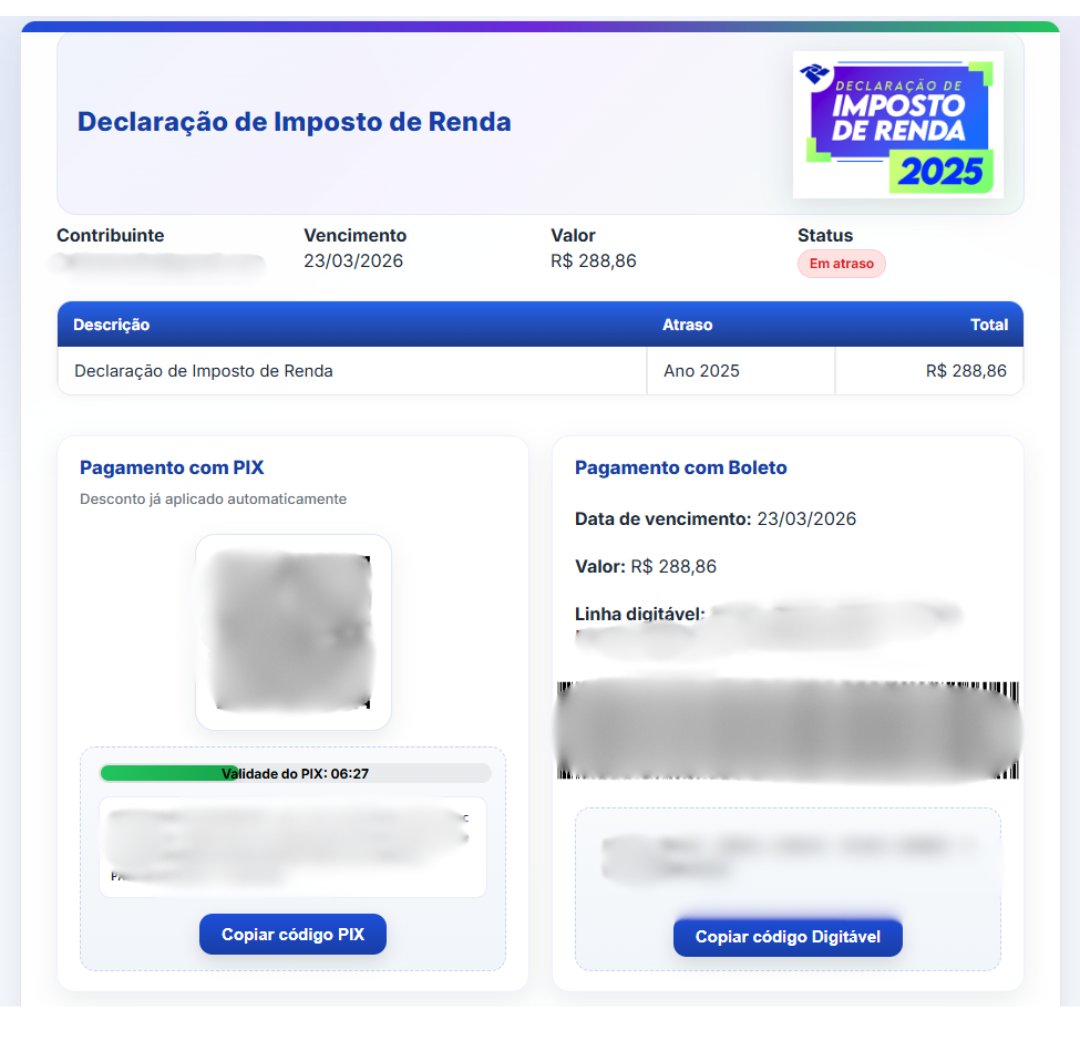
Exemplo de notificação fraudulenta recebida por e-mail para pagamento, via PIX ou boleto, de falsa pendência com a Receita Federal do Brasil
Ao seguir as instruções, as vítimas são direcionadas a realizar pagamentos via PIX ou boleto, sistema de cobrança brasileiro com código de barras. Os prazos são sempre curtos, aumentando a pressão e reduzindo o tempo disponível para verificação. Os valores são enviados para contas de terceiros, o que dificulta a recuperação do dinheiro.
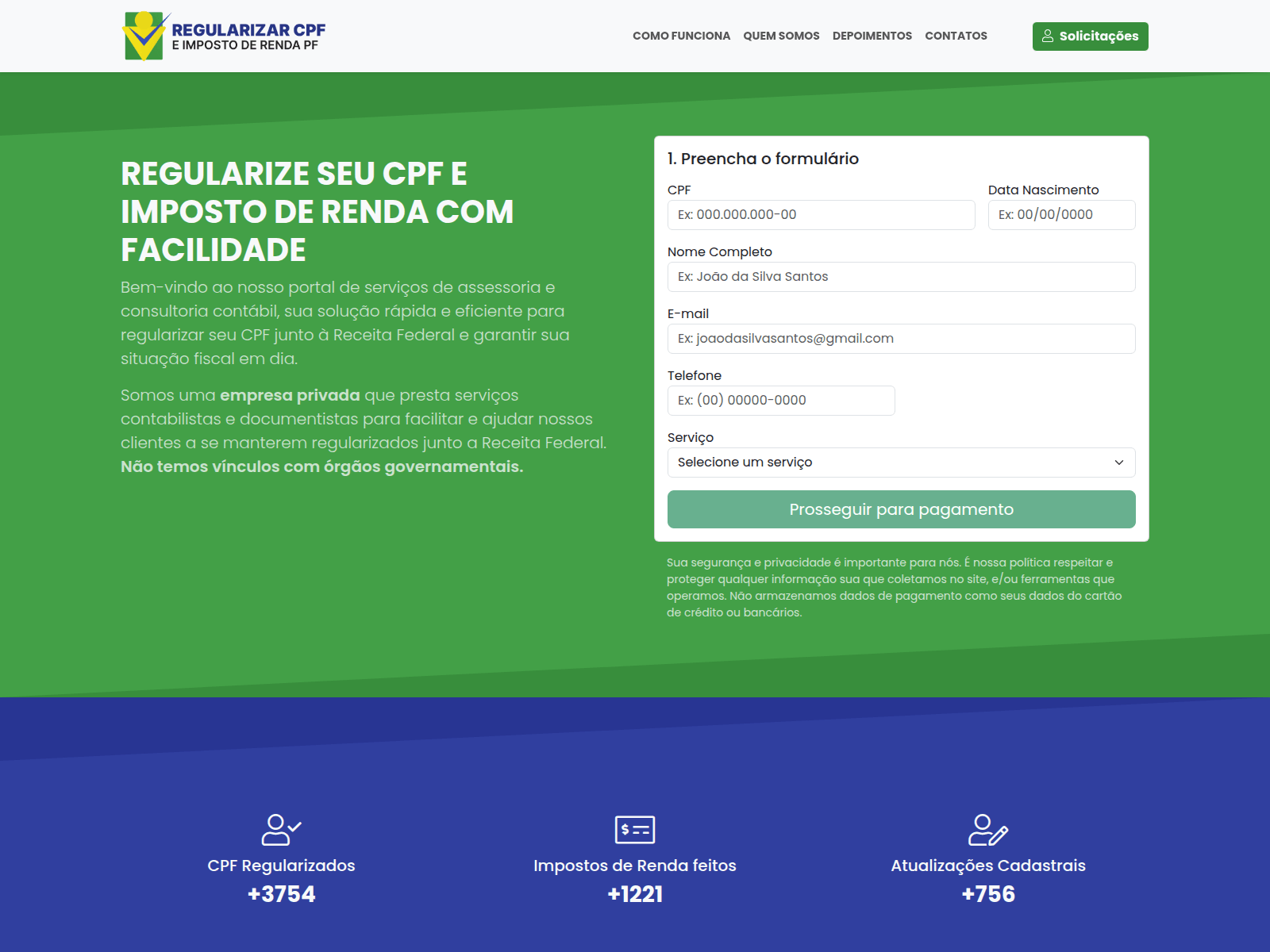
Além de sites de phishing que imitam recursos legítimos, nossos especialistas descobriram sites fraudulentos que prometem serviços pagos para preencher e auditar documentos fiscais, mas que, na prática, roubam dados de alto valor, como números do CPF.
-
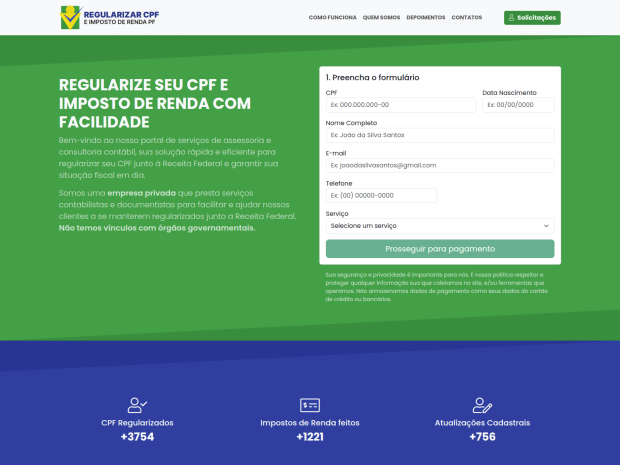
- Golpistas no Brasil oferecem ajuda com declarações de impostos. Para contatá-los, o usuário deve fornecer o nome, número de telefone, endereço, data de nascimento, e-mail e CPF em um formulário especial. A entrega de um CPF pode representar um risco para a vítima, uma vez que golpistas podem fazer pedidos de empréstimo fraudulentos, podem invadir contas de serviços governamentais e outros ataques de engenharia social
-
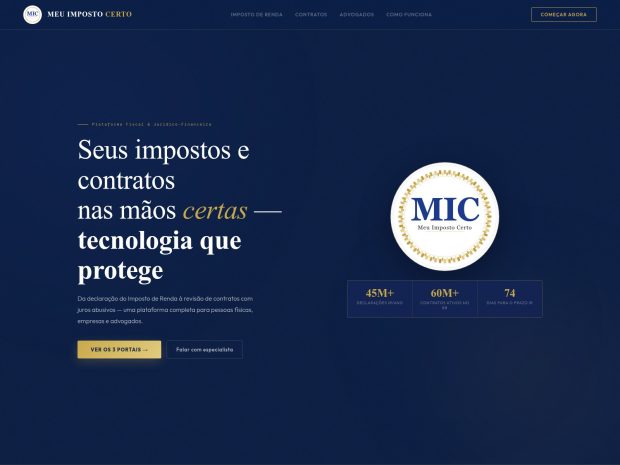
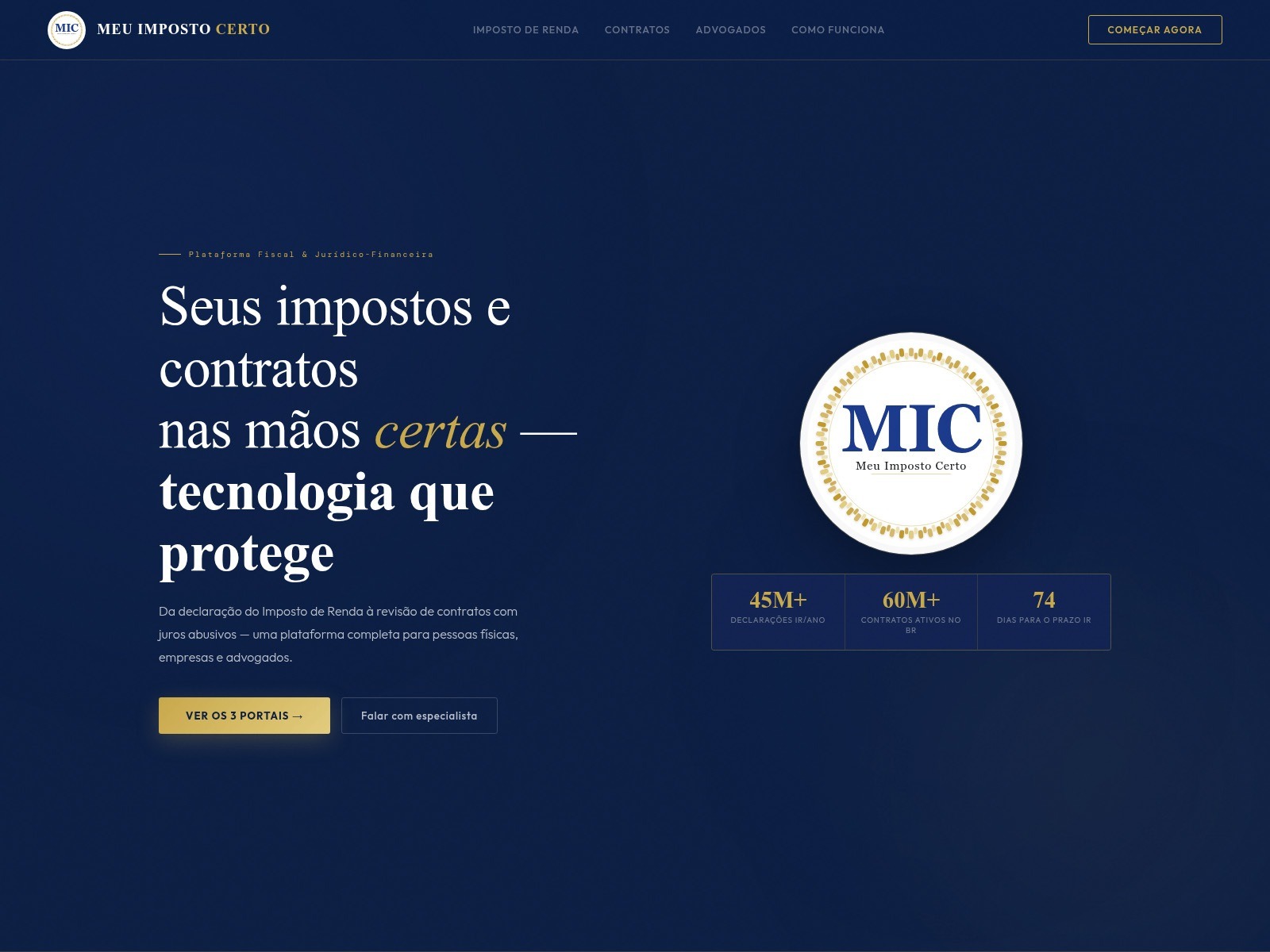
- Outro site de golpe brasileiro. Segundo os golpistas, eles arquivam 60 milhões de declarações de impostos anualmente, supostamente ajudando 28% da população brasileira
Phishing contra contribuintes
Além do Brasil, os invasores estão falsificando sites de autoridades fiscais em vários outros países, inclusive os portais oficiais dos governos da Alemanha, França, Áustria, Suíça, Chile e Colômbia. O modus operandi é similar: nos sites fraudulentos, os golpistas coletam credenciais de serviços legítimos e roubam dados pessoais antes de se oferecerem para processar uma dedução fiscal, desde que a vítima forneça os dados do cartão de crédito. Em alguns casos, eles até cobram uma taxa por esse serviço fraudulento.
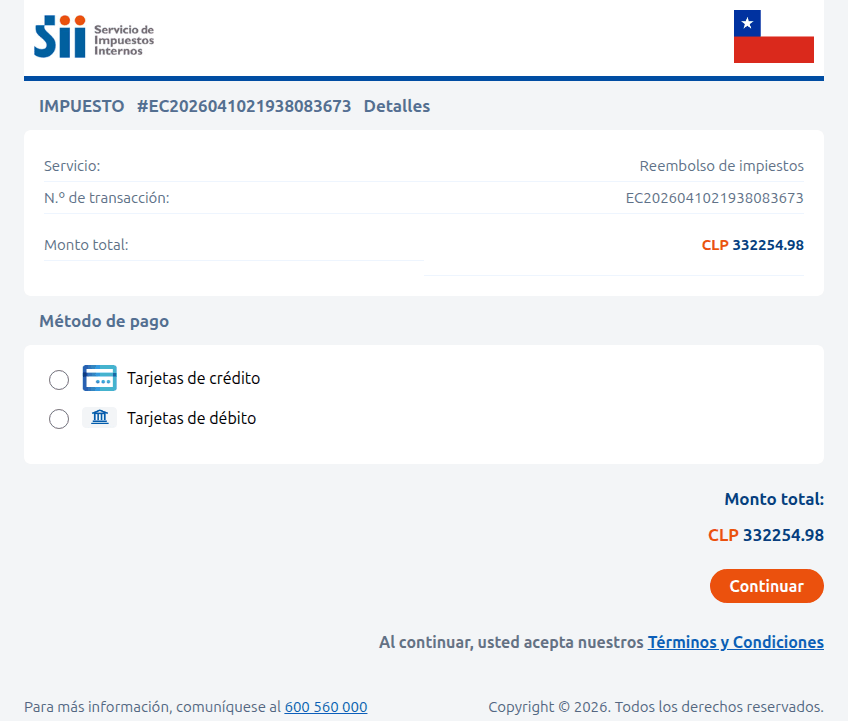
Um site que imita a autoridade fiscal chilena. A vítima é instruída a inserir os dados do cartão de crédito para receber uma restituição substancial de impostos, aproximadamente US$ 375. Em vez disso, os fundos são desviados da conta da vítima diretamente para os golpistas
Às vezes, a tática envolve acusações feitas em nome de órgãos governamentais. Na imagem abaixo, por exemplo, um suposto chefe de auditoria fiscal, em Paris, informa à vítima que ela forneceu informações de renda incompletas. Então, para evitar penalidades, a pessoa é instruída a baixar um documento e fazer as correções imediatamente. No entanto, o arquivo PDF esconde algo muito pior: malware.
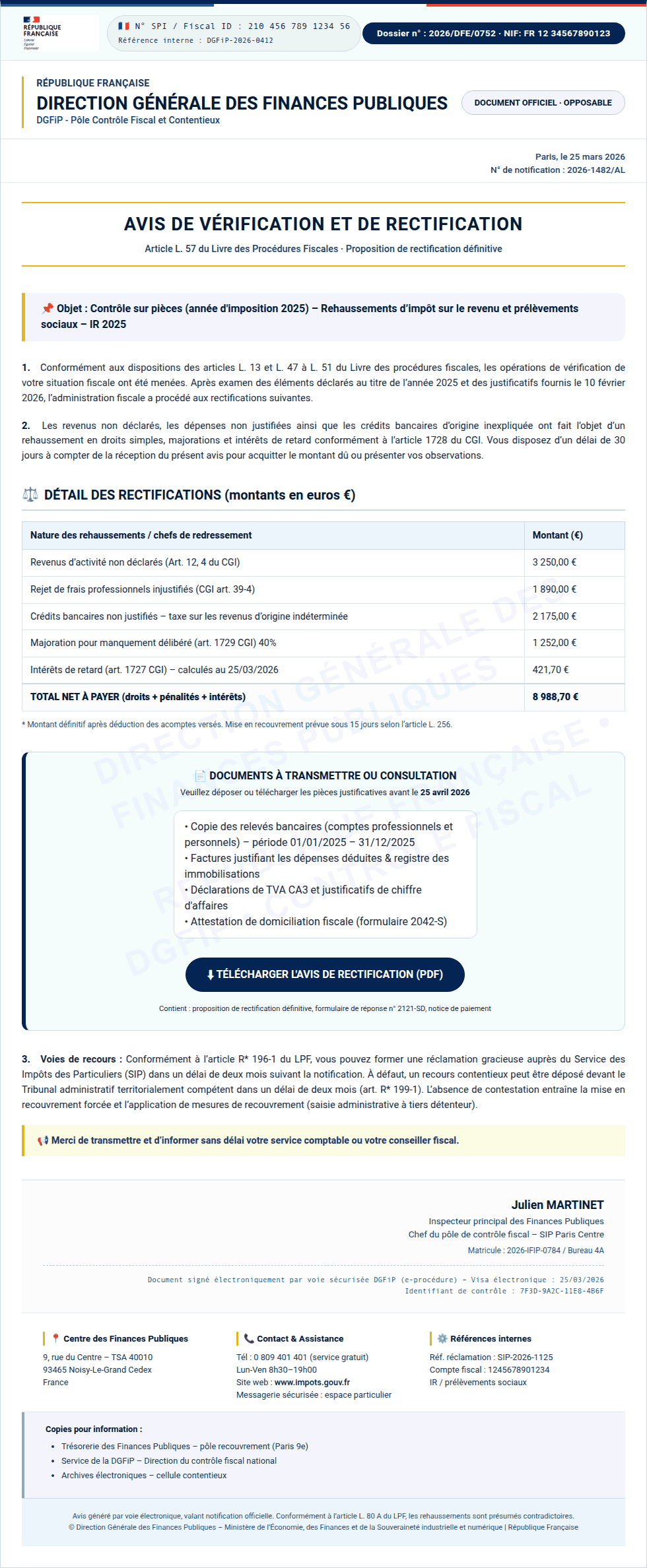
Em vez de um documento oficial da autoridade fiscal francesa, a pessoa encontra malware no PDF, pronto para infectar o dispositivo
Na Colômbia, um site falso da direção nacional de impostos e alfândegas também solicita que as pessoas baixem documentos que devem ser “desbloqueados com uma chave de segurança”. Na realidade, trata-se simplesmente de um arquivo comprimido ZIP malicioso e protegido por senha.
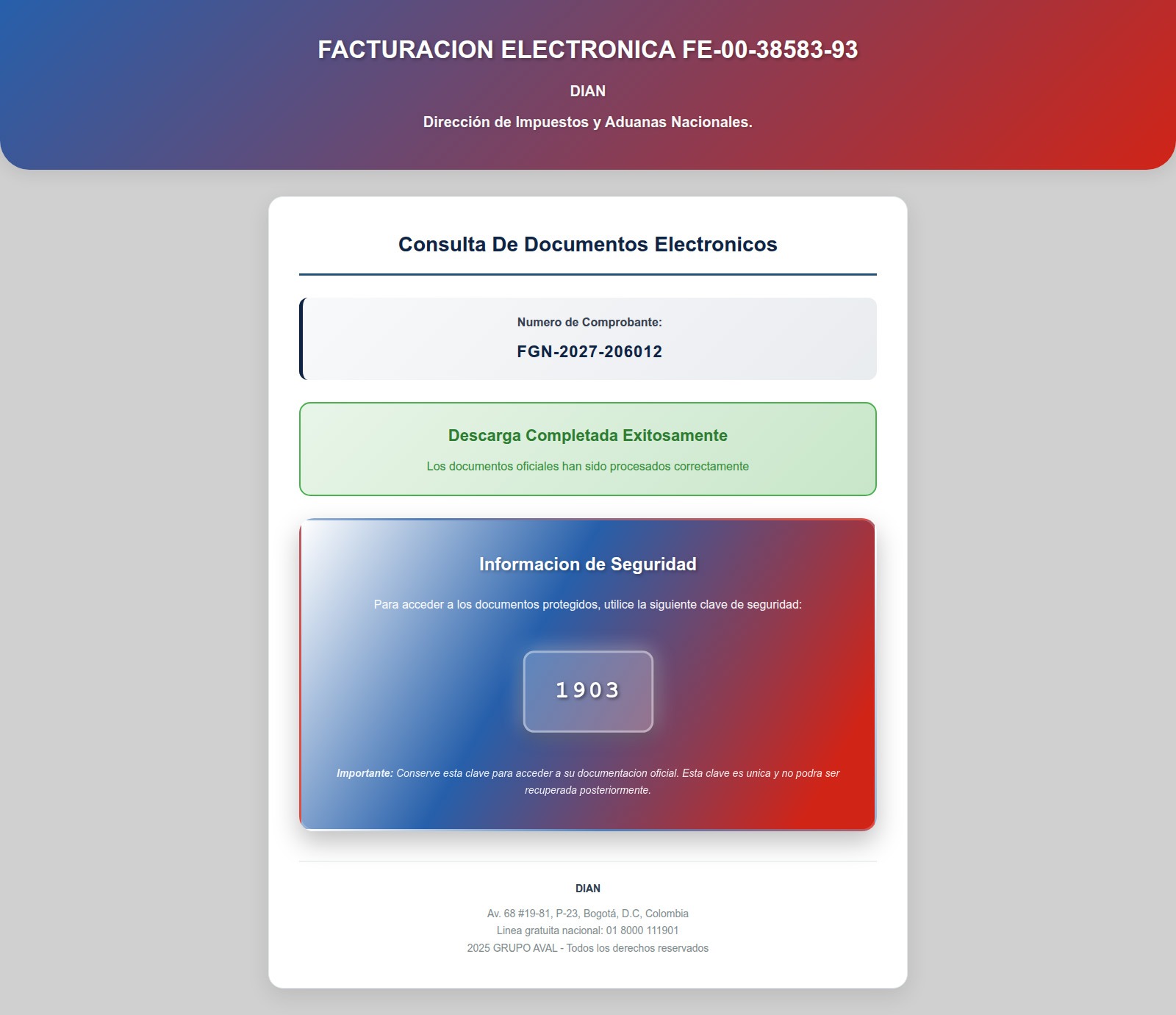
Depois de inserir a senha, a pessoa abre um arquivo comprimido malicioso que infecta o dispositivo
Lucros de criptomoedas isentos de impostos
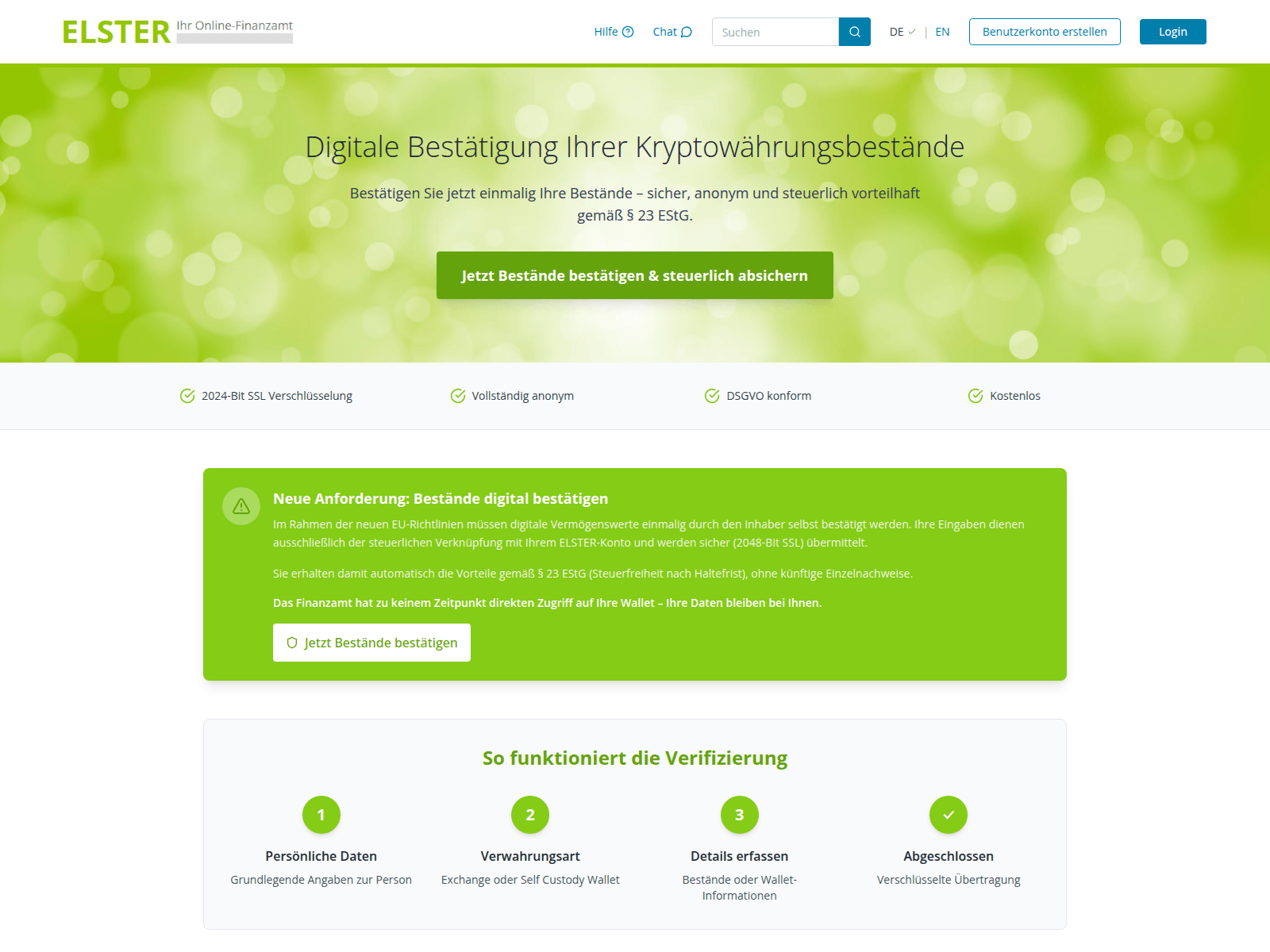
Os detentores de criptomoedas passaram a representar um alvo específico para os invasores. As autoridades fiscais alemãs falsas estão exigindo que os proprietários de carteiras “verifiquem seus ativos digitais” e citam os regulamentos da UE tendo como objetivo o cálculo de impostos. E, claro, há um “lado positivo”: obviamente, os ganhos com criptomoedas estão supostamente isentos de impostos! No entanto, para solicitar um benefício tão generoso, os usuários devem passar por um procedimento de “verificação”. O site ainda promete fazer a criptografia de dados usando um “protocolo SSL de 2048 bits”.
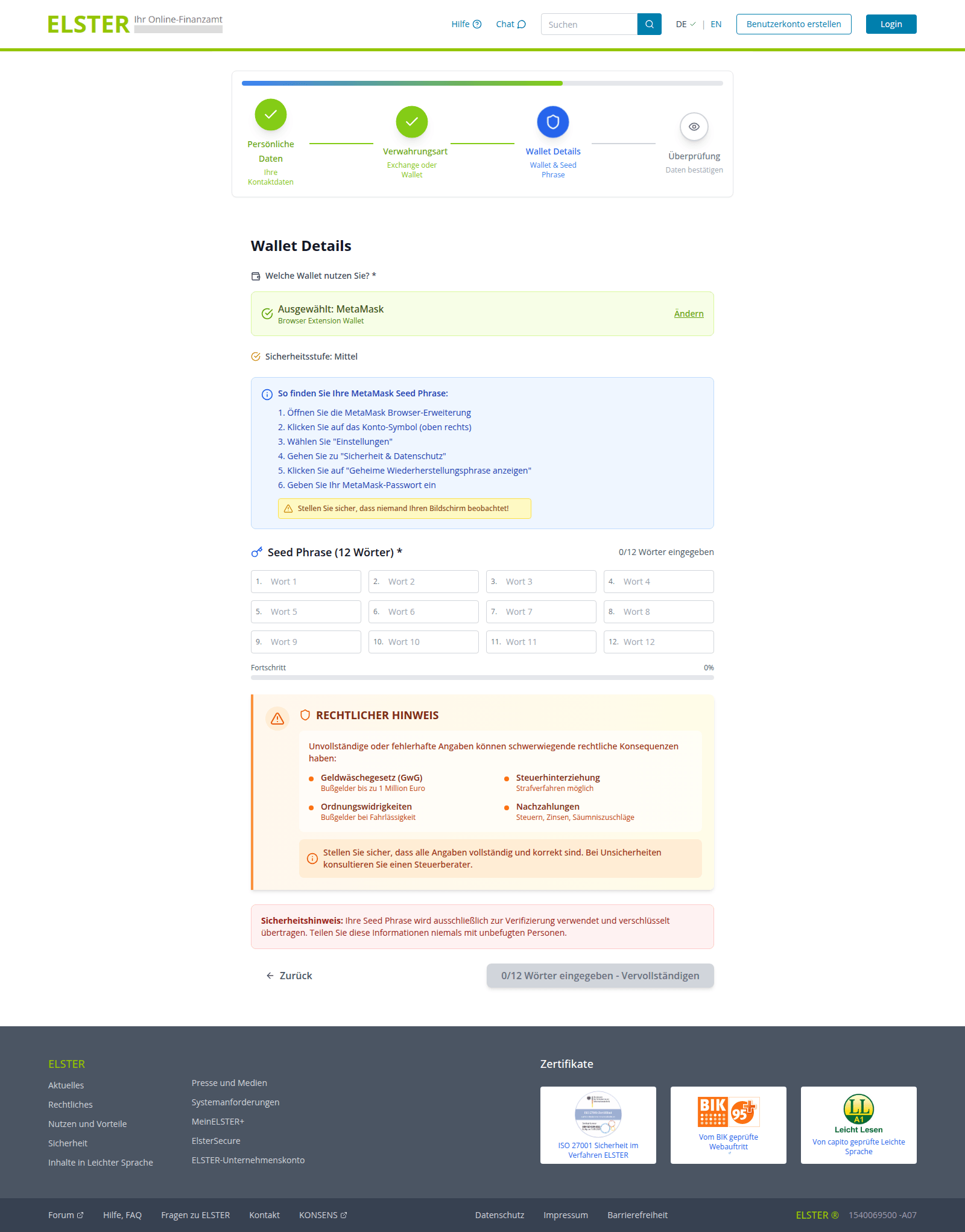
Para concluir o processo de “verificação”, os usuários são forçados a inserir a frase-semente, ou seja, a sequência exclusiva de palavras vinculadas a uma carteira de criptomoedas que concede acesso de recuperação total. Essa solicitação está associada a uma ameaça: a recusa em fornecer os dados levará a graves consequências legais, como multas de até um milhão de euros ou processo criminal.
-
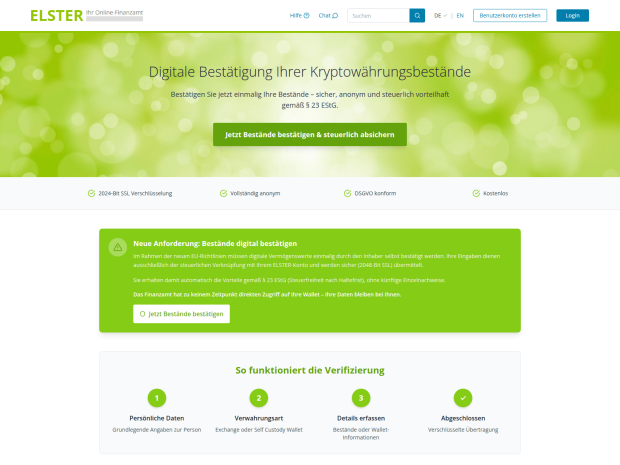
- Um anúncio no portal falso ELSTER afirma que ganhos em criptomoedas são isentos de impostos após "verificação", e que a "autoridade fiscal" não tem acesso direto às carteiras dos usuários. Dá para acreditar?
-
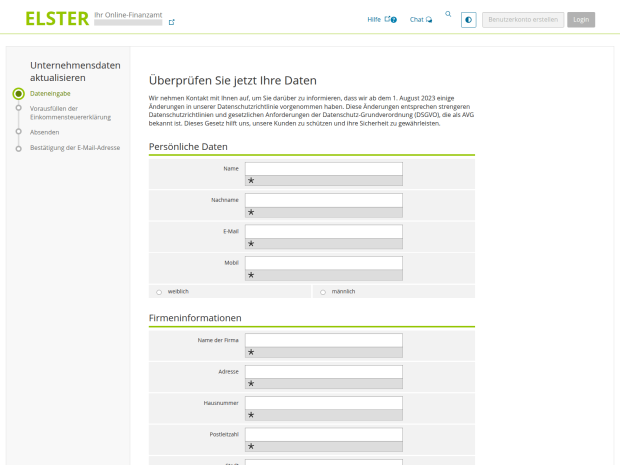
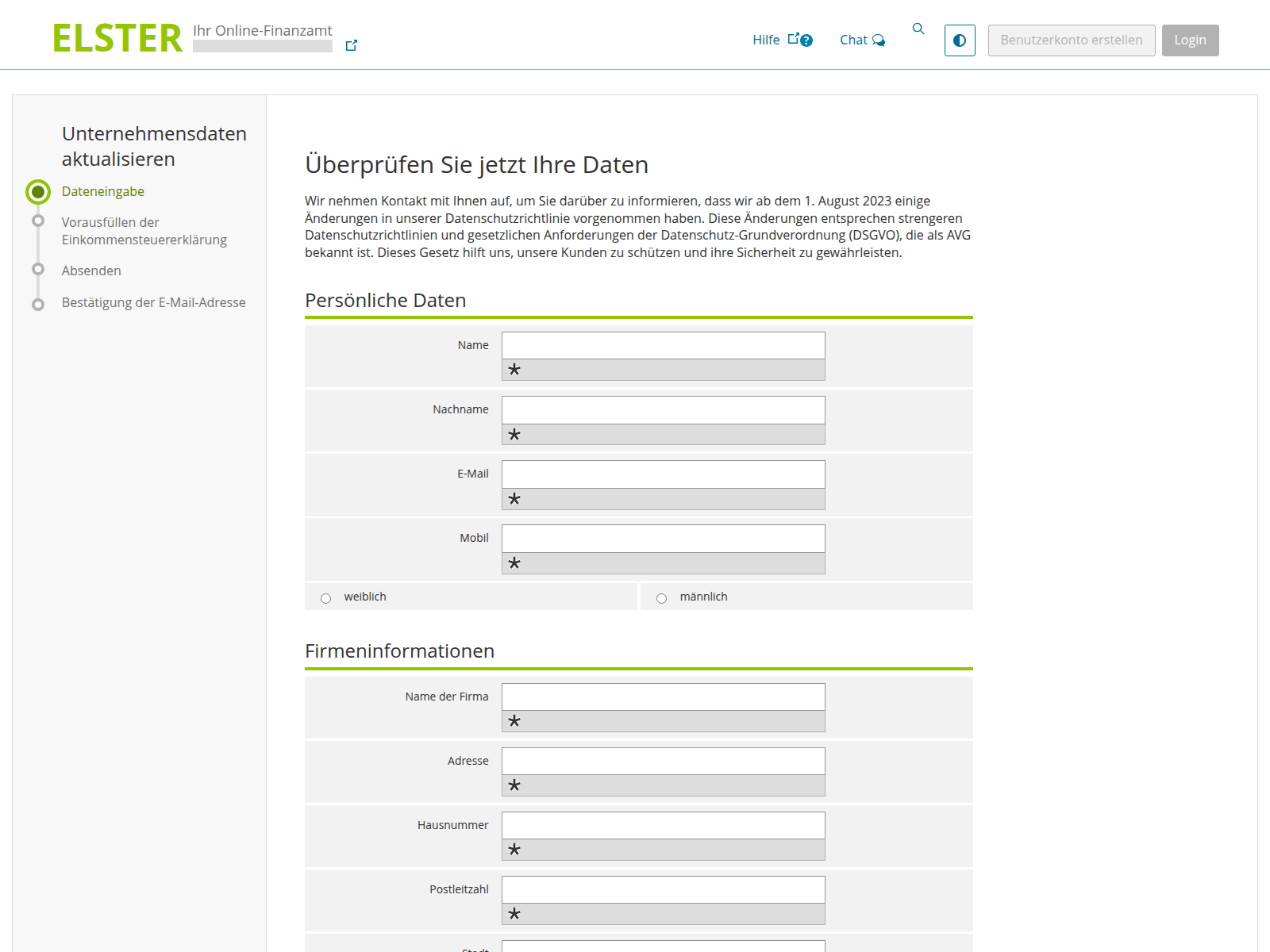
- Primeiro, a pessoa é forçada a inserir as informações pessoais…
-
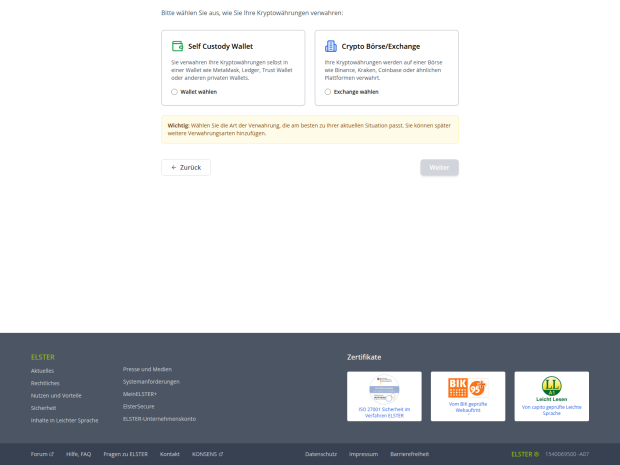
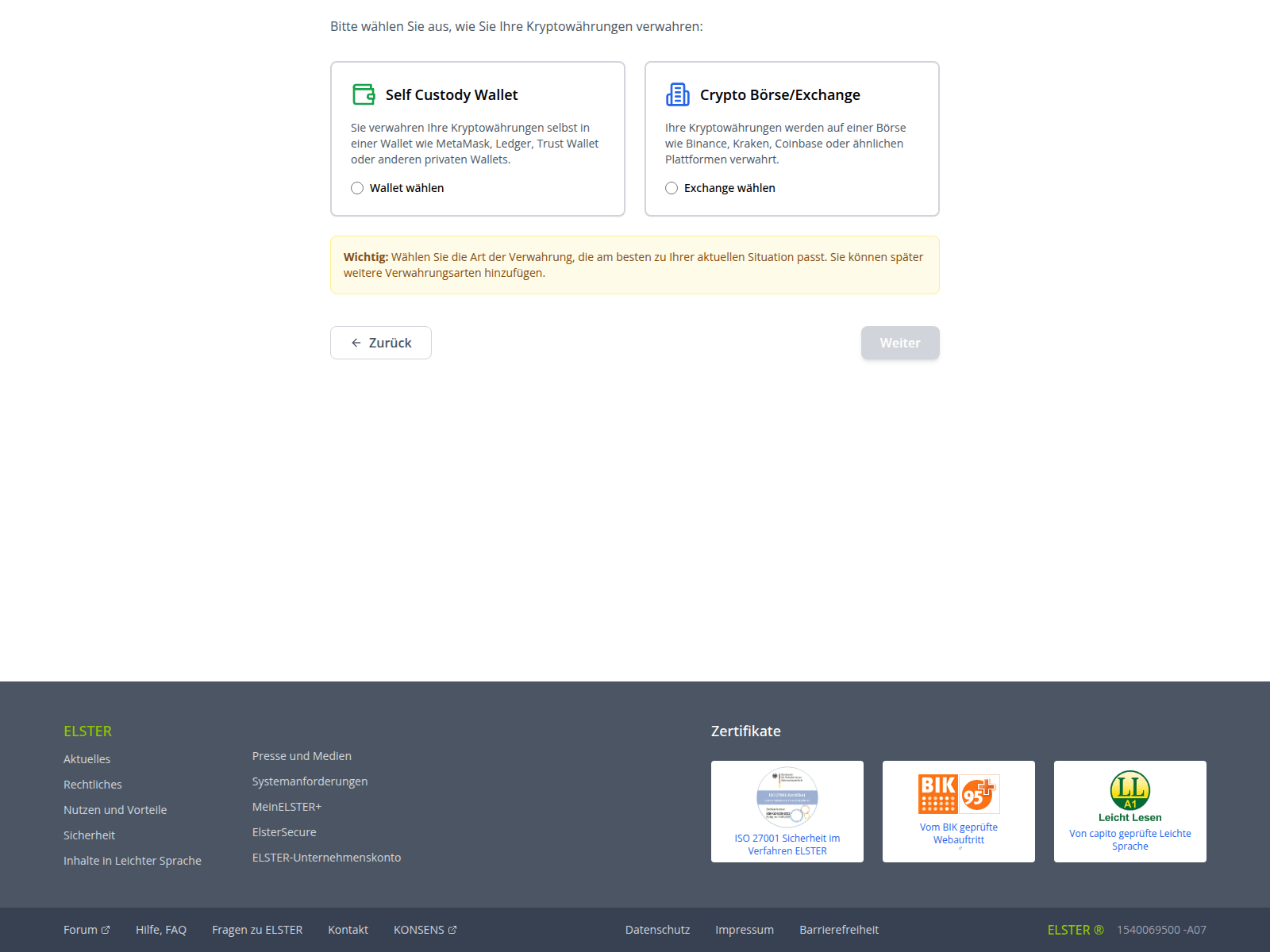
- …E, em seguida, ela escolhe como verificar as participações em criptomoedas: vinculando uma carteira ou uma conta de câmbio. Entre os serviços visados por esses golpistas, podemos citar alguns, como Ledger, Trezor, Trust Wallet, BitBox02, KeepKey, MetaMask, Phantom e Coinbase
-
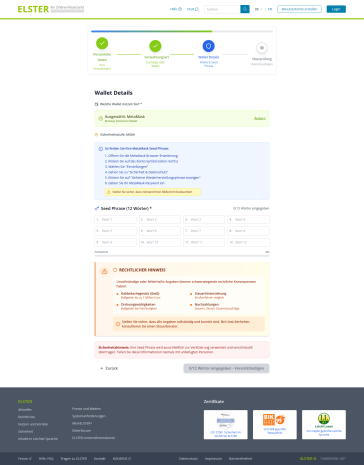
- Por fim, a vítima é forçada a fornecer a frase-semente para entregar aos golpistas o controle total sobre a carteira. Os invasores muito amigavelmente alertam a vítima para que se certifique de que ninguém esteja olhando para a tela, enquanto a ameaçam com penalidades legais inexistentes por descumprimento
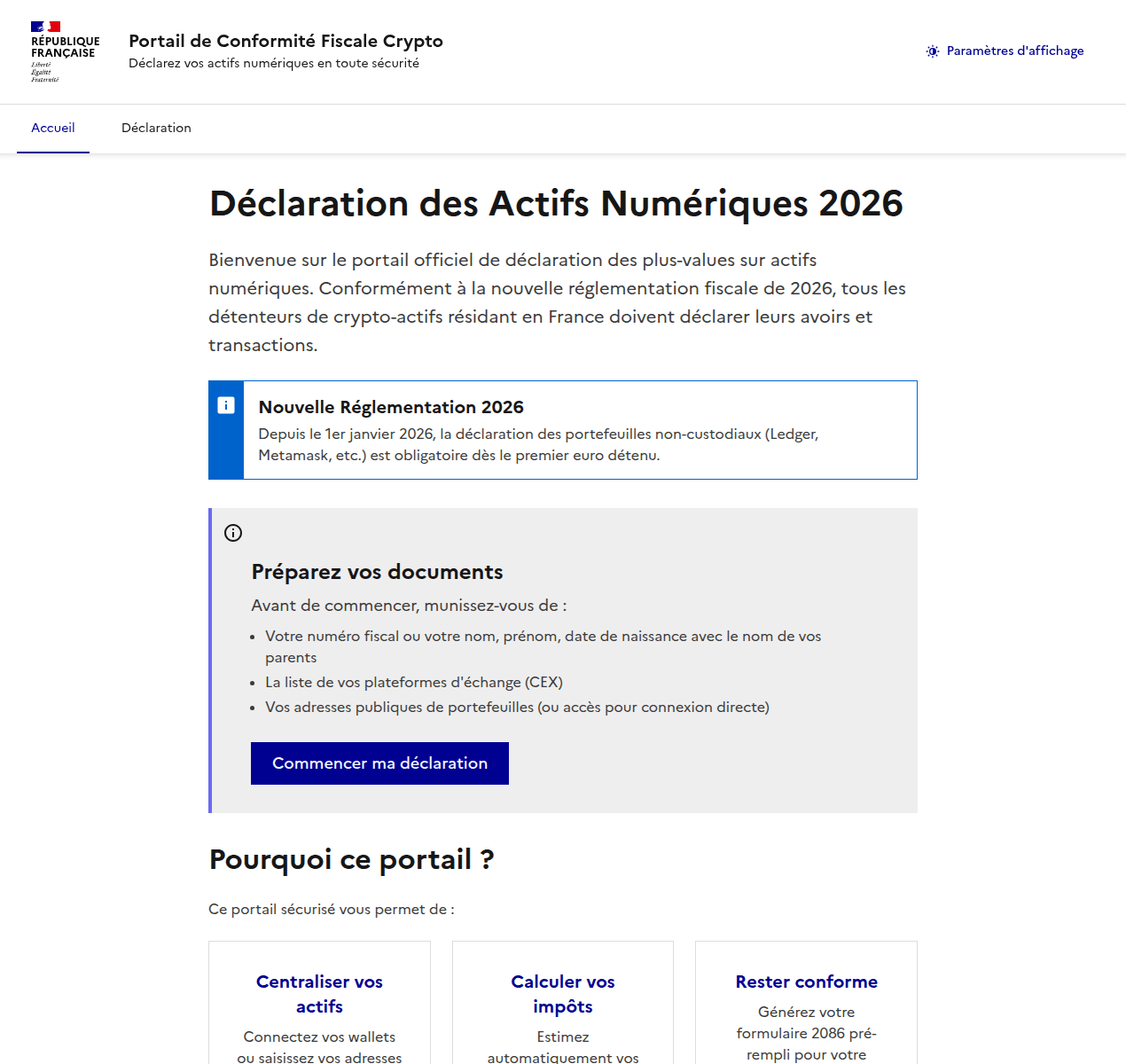
Os invasores também aplicaram um golpe semelhante em usuários franceses. Eles criaram um “portal de conformidade tributária de criptomoedas” inexistente, que imita o design do site do ministério da economia e finanças da França. O site de phishing exige, agressivamente, que os residentes franceses enviem uma “declaração de ativos digitais”.
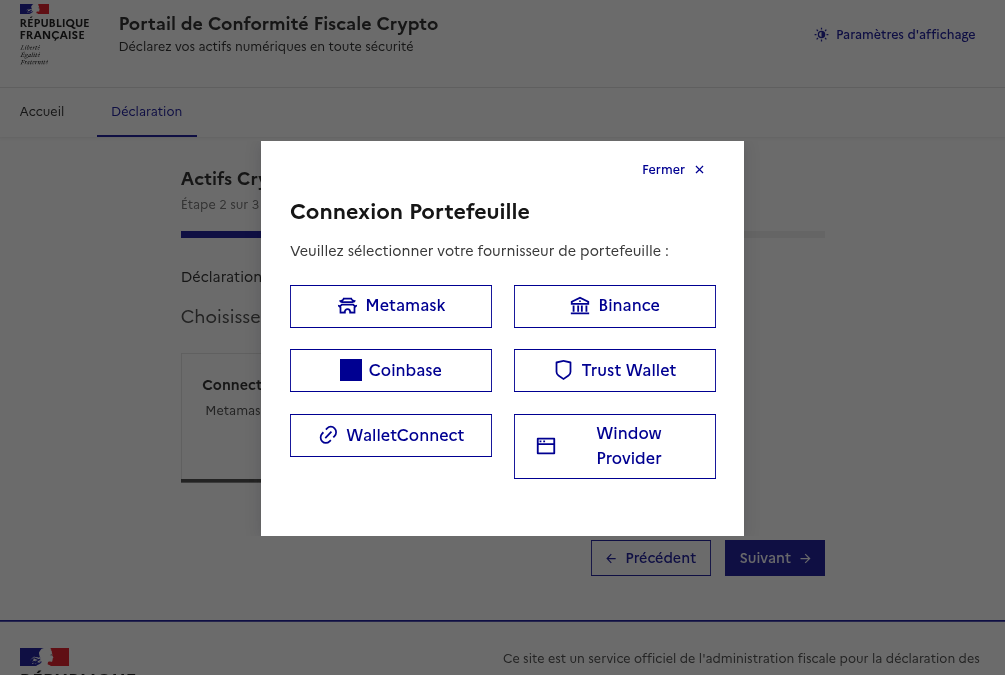
Depois que o usuário insere as informações pessoais, os golpistas solicitam que eles insiram manualmente a frase-semente ou “vinculem” a carteira de criptomoedas ao portal. Se a vítima seguir em frente, as carteiras MetaMask, Binance, Coinbase, Trust Wallet ou WalletConnect serão drenadas.
-
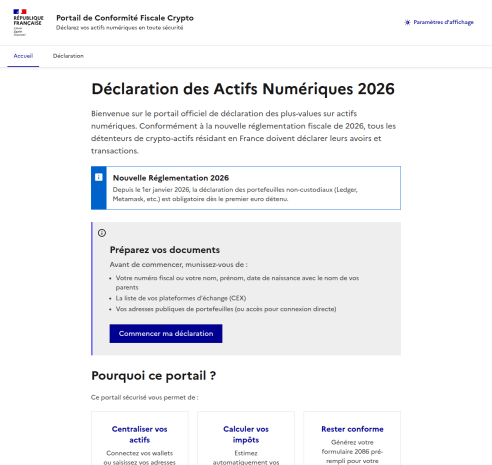
- O site de phishing exige, agressivamente, que os residentes franceses enviem uma "declaração de ativos digitais". (tradução: eles querem sequestrar as contas de criptomoedas
-
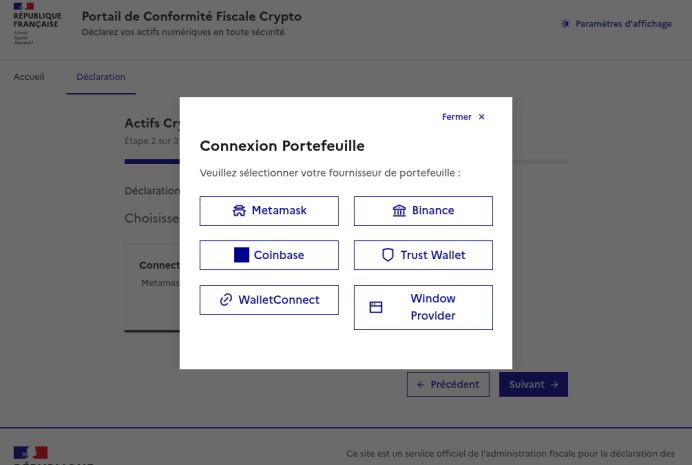
- Uma vez que os dados pessoais são inseridos, os golpistas oferecem a opção de inserir manualmente uma frase-semente ou de "vincular" uma carteira ao portal
A IA pode ajudar com as declarações de impostos?
Quando você tem IA à disposição, capaz de gerar texto instantaneamente e preencher planilhas, há uma forte tentação de delegar tudo a ela. Infelizmente, isso pode gerar sérias consequências. Em primeiro lugar, todos os chatbots populares processam os dados em seus respectivos servidores, o que coloca suas informações confidenciais em risco de vazamento. Em segundo lugar, é comum que eles cometam erros incrivelmente tolos, e isso pode resultar em problemas reais com o fisco.
Antes de informar a um chatbot ou agente de IA quanto você ganhou no ano passado, juntamente com dados pessoais e bancários detalhados, lembre-se da frequência com que ocorrem vazamentos em serviços de IA e considere os riscos. Não informe sua renda para a IA, não forneça detalhes pessoais, como nome ou endereço, e, sob hipótese alguma, não carregue fotos ou números de documentos vitais, como passaportes, informações de seguro ou números de previdência social. Os arquivos que contêm informações confidenciais devem ser mantidos em contêineres criptografados, como o [placeholder KPM].
Se, mesmo assim, você ainda quiser usar ferramentas de IA, é recomendável executá-las localmente. Isso pode ser feito gratuitamente até mesmo em um laptop padrão, e já mostramos como configurar modelos de linguagem locais usando o DeepSeek como um exemplo. No entanto, a qualidade da saída desses modelos é geralmente inferior. É bem possível que a verificação dupla de cada dígito em uma resposta gerada por IA leve mais tempo do que apenas preencher a papelada manualmente. Não se esqueça, você é o único responsável perante a administração fiscal por quaisquer erros, e não a IA.
Por fim, fique atento aos modelos de phishing por IA que oferecem “assistência” com a declaração de impostos. Os especialistas da Kaspersky descobriram sites que pedem aos usuários o envio de notas fiscais, supostamente para a geração automatizada de declarações e solicitações de dedução. Porém, o que acontecia, de fato, era que os invasores coletavam os dados pessoais para revender na dark web ou para usar em futuros ataques de phishing, chantagem e esquemas de extorsão.
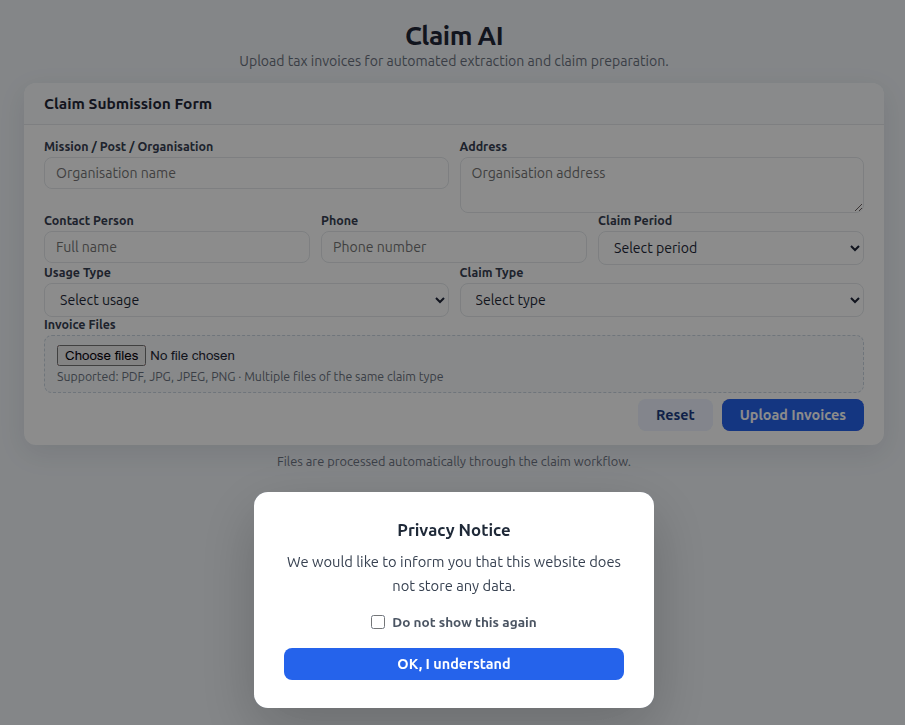
Os criadores de uma ferramenta de IA falsa solicitam aos usuários que carreguem documentos fiscais e garantem que o site não armazena nenhum dado do usuário. Na realidade, todas as informações inseridas, como nome, endereço, documentos, pessoa de contato e número de telefone acabam nas mãos de criminosos virtuais
Lembre-se de que serviços legítimos de IA alertam para não compartilhar dados confidenciais, e documentos fiscais se enquadram nessa categoria. Quaisquer ferramentas de IA que prometem oferecer ajuda para lidar com a papelada fiscal são simplesmente uma farsa.
Como proteger a si mesmo e às suas informações
- Faça você mesmo a sua declaração. O risco de encontrar golpistas é extremamente alto. Mesmo que uma empresa de consultoria seja legítima, a empresa receberá um dossiê completo seu: detalhes do passaporte, informações de emprego e renda, endereço e muito mais. Não se esqueça de que mesmo os serviços mais honestos não estão imunes a ataques e violações de dados.
- Cuidado com sites falsos. Use uma solução de segurança confiável que impede a visita a sites de phishing e bloqueia downloads de arquivos maliciosos.
- Mantenha todos os documentos importantes criptografados. Armazenar fotos, notas ou arquivos na área de trabalho ou manter mensagens com estrela em um aplicativo de mensagens não é uma forma segura de lidar com dados confidenciais. Um cofre seguro como o Kaspersky Password Manager pode armazenar mais do que apenas senhas e informações de cartão de crédito: ele também pode proteger documentos e até fotos.
- Não confie na IA. Mesmo os chatbots mais avançados são propensos a erros e alucinações e, em princípio, os desenvolvedores podem ler qualquer conversa que você tenha com a IA. Se você absolutamente precisar usar a IA, instale e execute uma versão local em seu próprio computador.
- Siga apenas os canais oficiais. O “inspetor fiscal chefe” do seu país ou cidade definitivamente não enviará uma mensagem para você, pois funcionários de alto escalão têm coisas mais importantes a fazer. Contate as autoridades fiscais apenas por canais oficiais e verifique o remetente de todos os e-mails recebidos. Na maioria das vezes, mesmo uma pequena diferença no nome ou no endereço é um sinal que revela uma campanha de phishing.
Leitura adicional sobre phishing e segurança de dados:




Scammers Use Hidden Text to Bypass AI Email Filters in Phishing Scams
Scammers are hiding invisible text inside phishing emails to manipulate AI-powered email filters and increase the chances of scams reaching inboxes.
Google AppSheet Abuse Helped Phish 30,000 Facebook Accounts
Hackers abused Google AppSheet to send Meta phishing emails, compromising 30,000 Facebook business accounts across 50 countries.
The post Google AppSheet Abuse Helped Phish 30,000 Facebook Accounts appeared first on TechRepublic.
Scammers Weaponize Amazon SES to Bypass Security
The post Scammers Weaponize Amazon SES to Bypass Security appeared first on Daily CyberSecurity.
Microsoft warns of global campaign stealing auth tokens from 35K users
Microsoft revealed a phishing campaign hitting 35,000 users in 26 countries, stealing login tokens via fake code-of-conduct emails and legit services.
Microsoft disclosed a major phishing campaign that targeted over 35,000 users across 26 countries in mid-April 2026.

Attackers used fake “code of conduct” emails sent through legitimate platforms to trick recipients into visiting bogus sites that stole authentication tokens.
“The campaign targeted tens of thousands of users, primarily in the United States, and directed them through several stages of CAPTCHA and intermediate staging pages designed to reinforce legitimacy while filtering out automated defenses.” reads the report published by Microsoft. “The lures in this campaign used polished, enterprise-style HTML templates with structured layouts and preemptive authenticity statements, making them appear more credible than typical phishing emails and increasing their plausibility as legitimate internal communications. “
Most victims (92%) were in the U.S., mainly in healthcare and finance.

Attackers used alarming, time-sensitive messages to pressure victims into action, leading them to a fake but legitimate-looking sign-in page. This adversary‑in‑the‑middle (AiTM) phishing flow let attackers intercept authentication tokens in real time, bypassing weak MFA. Microsoft urges training, anti-phishing tools, secure browsers, and SmartScreen protections to defend against such threats.
The phishing campaign impersonated internal compliance and regulatory departments, using subject lines like “Internal case log issued under conduct policy” to create urgency and legitimacy. Attackers distributed emails via a legitimate email delivery service, embedding links in PDF attachments that led to attacker-controlled domains such as acceptable-use-policy-calendly[.]de.

After completing fake Cloudflare CAPTCHAs, victims were asked to “Review & Sign” documents and then redirected to a deceptive Microsoft sign-in page. This final step launched an adversary‑in‑the‑middle (AiTM) attack chain that proxied authentication and captured tokens, giving immediate access to user accounts despite multifactor authentication.
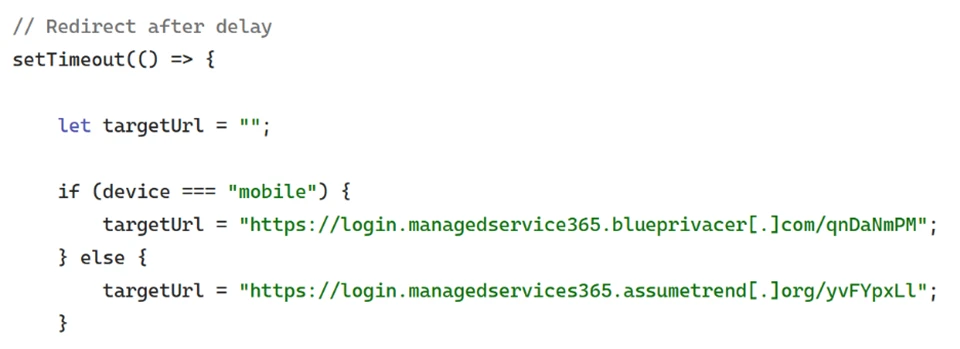
“Following these steps, users were redirected to a third site hosting the final stage of the attack. Analysis of the underlying code indicates that the final destination varied depending on whether the user accessed the workflow from a mobile device or a desktop system.” continues the report.
The campaign’s structure mimicked legitimate workflow and compliance verification processes, making detection difficult. Microsoft described it as “one of the most sophisticated code-of-conduct‑themed credential theft operations observed to date,” confirming that the attackers’ methods reflected a high degree of operational planning and technical adaptability.
Microsoft recommends a layered approach to reduce risk. Organizations should review Exchange Online Protection and Defender for Office 365 settings, enable features like Zero-hour Auto Purge, Safe Links, and Safe Attachments, and use network protection and SmartScreen-enabled browsers.
User awareness training and phishing simulations are key, along with manual monitoring and removal of suspicious emails. Strong authentication is essential, including MFA or passwordless methods, plus conditional access for privileged accounts.
Finally, enabling automated attack disruption in Defender XDR can help detect and contain threats quickly, limiting their impact.
Follow me on Twitter: @securityaffairs and Facebook and Mastodon
(SecurityAffairs – hacking, phishing)
Education Sector Hit by Espionage, Phishing, and Supply Chain Attacks
Educational institutions are now facing a coordinated mix of state espionage, spear‑phishing, and supply chain intrusions, even as classic ransomware and vulnerability volumes show signs of easing. Every attributed campaign was linked to state actors, with no financially motivated groups observed. China-aligned clusters led by MISSION2074 dominate, with additional activity from Stone Panda, Hafnium, Lotus […]
The post Education Sector Hit by Espionage, Phishing, and Supply Chain Attacks appeared first on GBHackers Security | #1 Globally Trusted Cyber Security News Platform.

Code of Conduct Phish Hits 35,000 Users in Multi-Stage AiTM Attack
A highly sophisticated phishing campaign leveraging code-of-conduct-themed lures has targeted more than 35,000 users across 13,000 organizations. The multi-stage attack, observed between April 14 and April 16, 2026, highlights how threat actors are refining social engineering, delivery infrastructure, and authentication abuse to bypass modern defenses. The campaign primarily impacted users in the United States, accounting […]
The post Code of Conduct Phish Hits 35,000 Users in Multi-Stage AiTM Attack appeared first on GBHackers Security | #1 Globally Trusted Cyber Security News Platform.
Attackers Exploit Amazon SES to Send Authenticated Phishing Emails
Attackers are increasingly abusing Amazon Simple Email Service (SES) to deliver highly convincing phishing emails that bypass traditional security controls, marking a growing trend in email-based threats. The primary goal of any phishing campaign is to evade detection while tricking victims into revealing sensitive data. To achieve this, threat actors continuously refine their techniques, using […]
The post Attackers Exploit Amazon SES to Send Authenticated Phishing Emails appeared first on GBHackers Security | #1 Globally Trusted Cyber Security News Platform.

Breaking the code: Multi-stage ‘code of conduct’ phishing campaign leads to AiTM token compromise
Phishing campaigns continue to improve sophistication and refinement in blending social engineering, delivery and hosting infrastructure, and authentication abuse to remain effective against evolving security controls. A large-scale credential theft campaign observed by Microsoft Defender Research exemplifies this trend, using code of conduct-themed lures, a multi-step attack chain, and legitimate email services to distribute fully authenticated messages from attacker-controlled domains.
The campaign targeted tens of thousands of users, primarily in the United States, and directed them through several stages of CAPTCHA and intermediate staging pages designed to reinforce legitimacy while filtering out automated defenses. The lures in this campaign used polished, enterprise-style HTML templates with structured layouts and preemptive authenticity statements, making them appear more credible than typical phishing emails and increasing their plausibility as legitimate internal communications. Because the messages contained concerning accusations and repeated time-bound action prompts, the campaign created a sense of urgency and pressure to act.
Email threat landscape
The attack chain ultimately led to a legitimate sign-in experience that was part of an adversary‑in‑the‑middle (AiTM) phishing flow, which allowed the attackers to proxy the authentication session and capture authentication tokens that could provide immediate account access. Unlike traditional credential harvesting, AiTM attacks intercept authentication traffic in real time, bypassing non-phishing-resistant multifactor authentication (MFA).
In this blog, we’re sharing our analysis of this campaign’s lures, infrastructure, and techniques. Organizations can defend against financial fraud initiated through phishing emails by educating users about phishing lures, investing in advanced anti-phishing solutions like Microsoft Defender for Office 365 and configuring essential email security settings, and encouraging users to employ web browsers that support SmartScreen. Organizations can also enable network protection, which lets Windows use SmartScreen as a host-based web proxy.
Multi-step social engineering campaign leading to credential theft
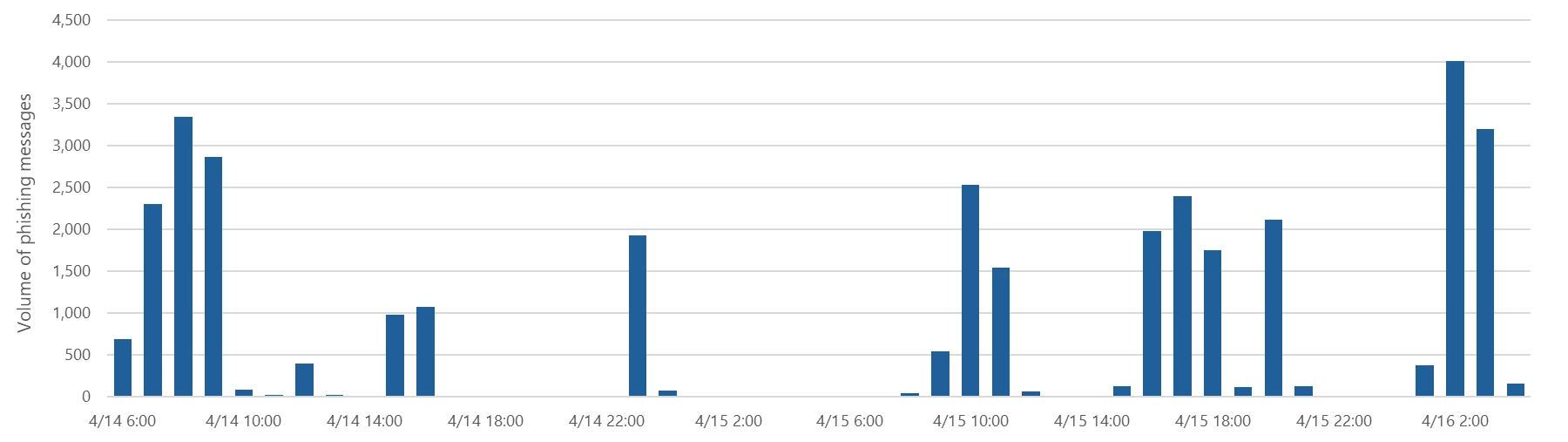
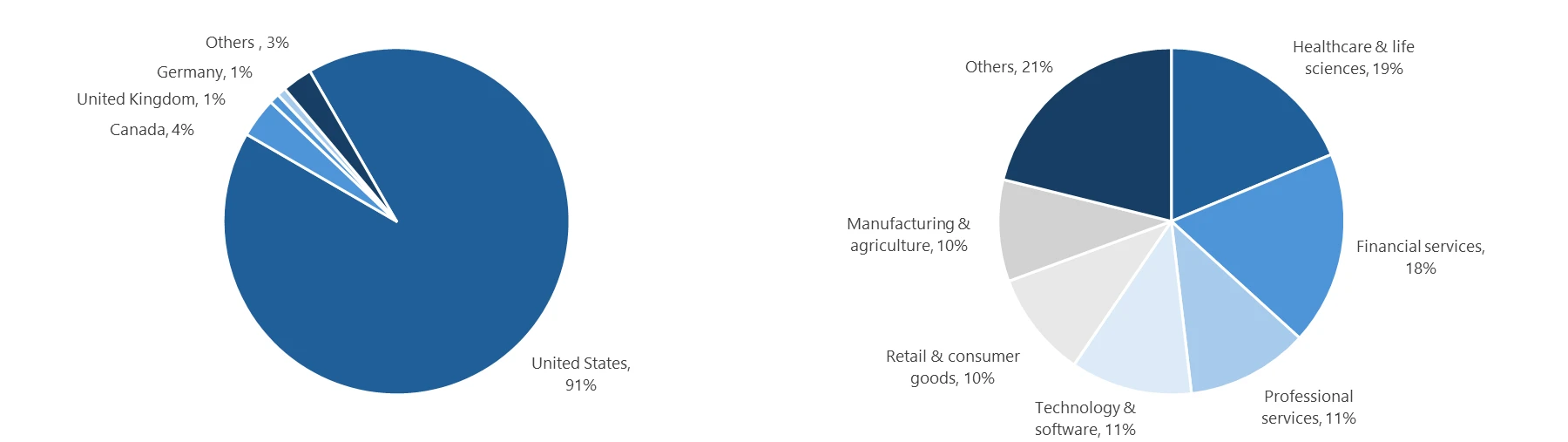
Between April 14 and 16, 2026, the Microsoft Defender Research team observed a series of sophisticated phishing campaigns targeting more than 35,000 users across over 13,000 organizations in 26 countries, with majority of targets located in the United States (92%). The campaign did not focus on a single vertical but instead impacted a broad range of industries, most notably Healthcare & life sciences (19%), Financial services (18%), Professional services (11%), and Technology & software (11%). Messages were distributed in multiple distinct waves between 06:51 UTC on April 14 and 03:54 UTC on April 16.
Emails in this campaign posed as internal compliance or regulatory communications, using display names such as “Internal Regulatory COC”, “Workforce Communications”, and “Team Conduct Report”. Subject lines included “Internal case log issued under conduct policy” and “Reminder: employer opened a non-compliance case log”.
Message bodies claimed that a “code of conduct review” had been initiated, referenced organization-specific names embedded within the text, and instructed recipients to “open the personalized attachment” to review case materials. At the top of each message, a notice stated that the message had been “issued through an authorized internal channel” and that links and attachments had been “reviewed and approved for secure access”, reinforcing the email’s purported legitimacy. To further support the confidentiality of the supposed review, the end of each message contained a green banner stating that the contents had been encrypted using Paubox, a legitimate service associated with HIPAA-compliant communications.
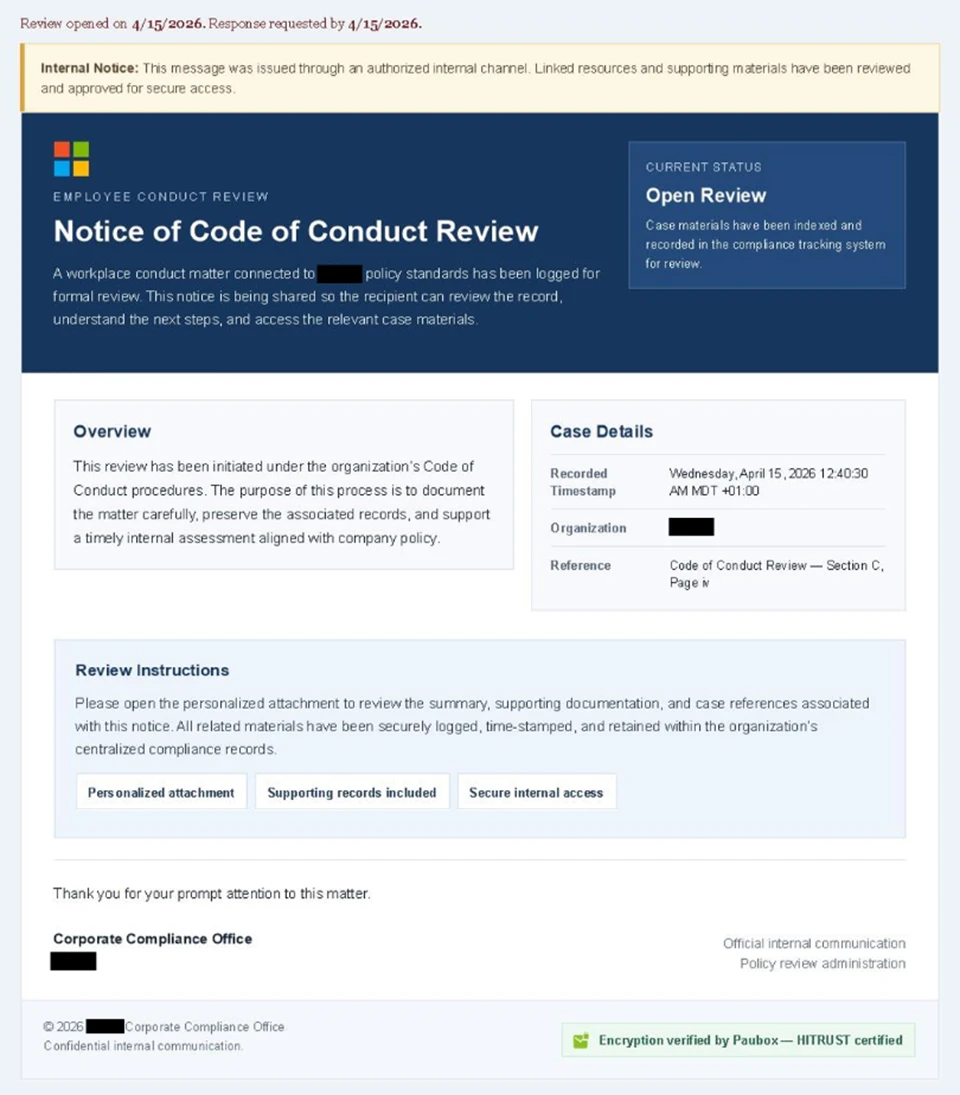
Analysis of the sending infrastructure indicated that the campaign emails were sent using a legitime email delivery service, likely originating from a cloud-hosted Windows virtual machine. The messages were sent from multiple sender addresses using domains that are likely attacker-controlled.
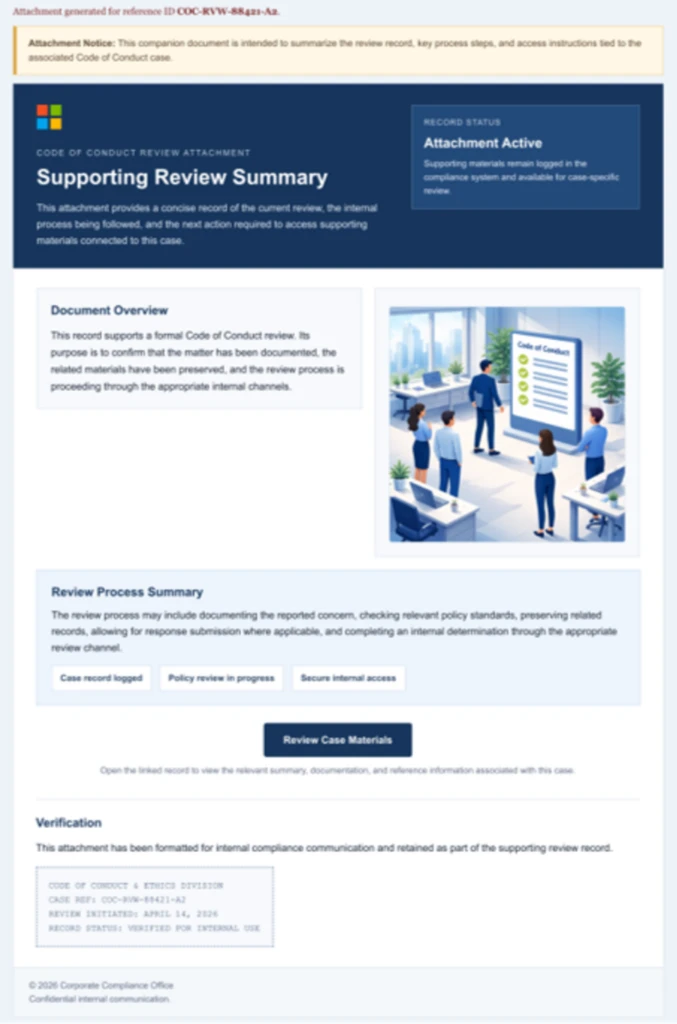
Each campaign email included a PDF attachment with filenames such as Awareness Case Log File – Tuesday 14th, April 2026.pdf and Disciplinary Action – Employee Device Handling Case.pdf. The attachment provided additional context about the supposed conduct review, including a summary of the review process and instructions for accessing supporting documentation. Recipients were directed to click a “Review Case Materials” link within the PDF, which initiated the credential harvesting flow.
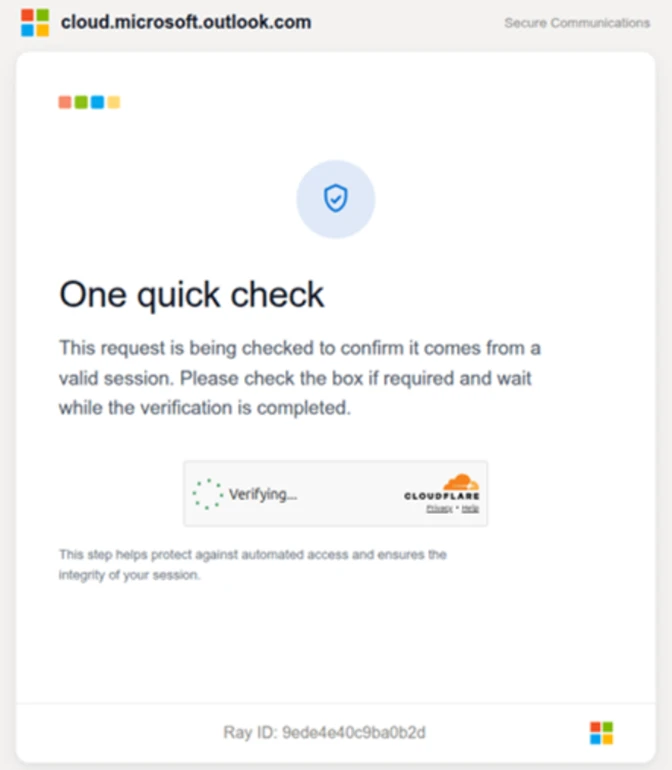
When clicked, users were initially directed to one of two attacker-controlled domains (for example, acceptable-use-policy-calendly[.]de or compliance-protectionoutlook[.]de). These landing pages displayed a Cloudflare CAPTCHA, presented as a mechanism to validate that the user was coming “from a valid session”. This CAPTCHA likely served as a gating mechanism to impede automated analysis and sandbox detonation.
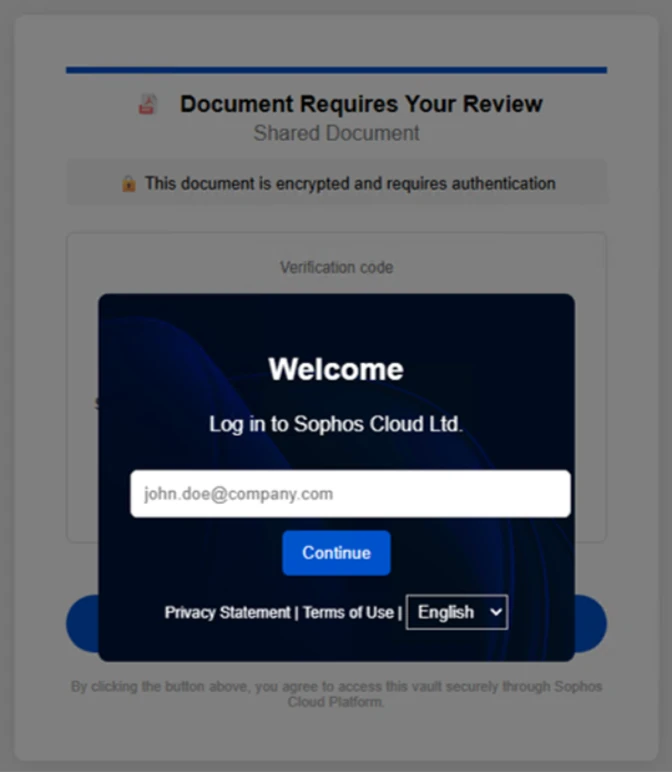
After completing the CAPTCHA, users were redirected to an intermediate site designed to prepare them for the final stage of the attack. This page informed users that the requested documentation was encrypted and required account authentication. While this stage of the attack has several hallmarks of device code phishing, we were only able to confirm the AITM portion of the attack chain.
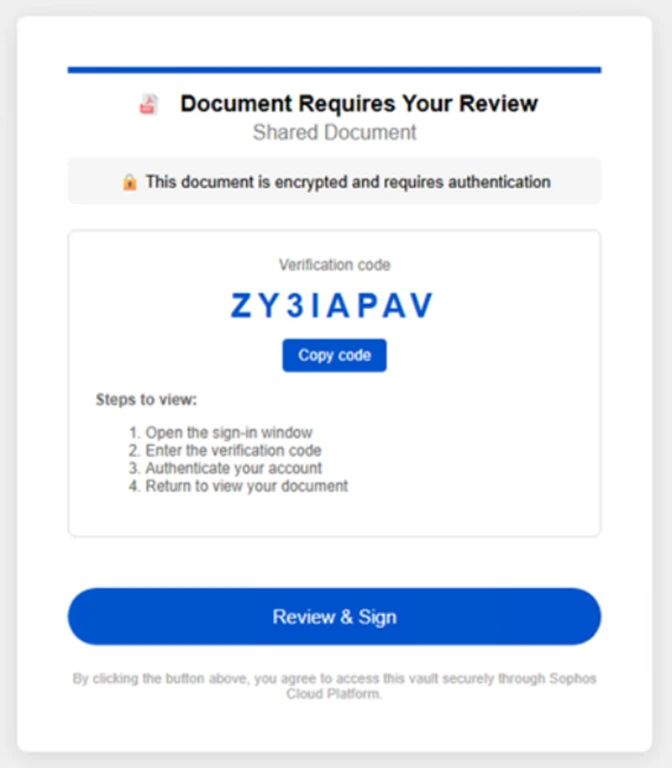
After clicking the provided “Review & Sign” button, users were presented with a sign-in prompt requesting their email address.
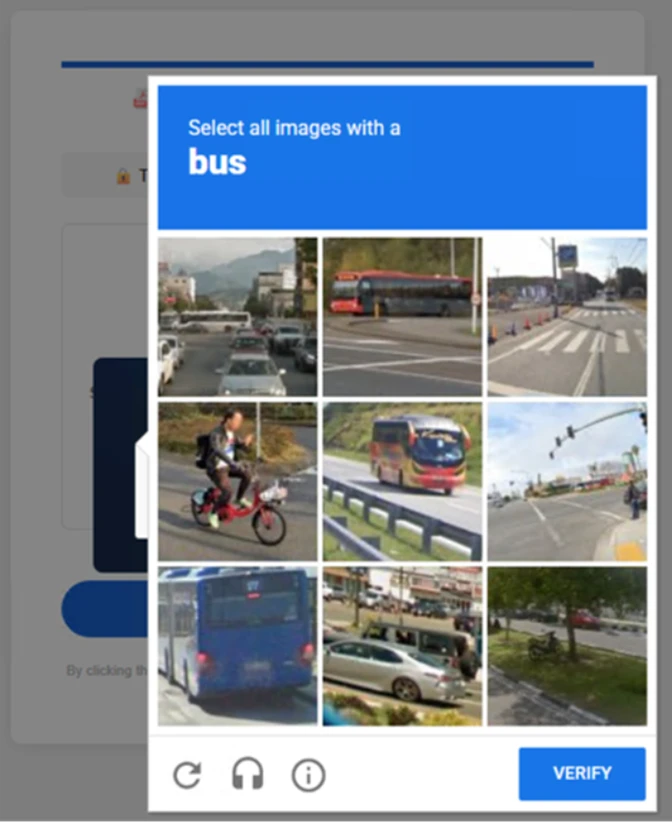
After submission, users were required to complete a second CAPTCHA involving image selection.
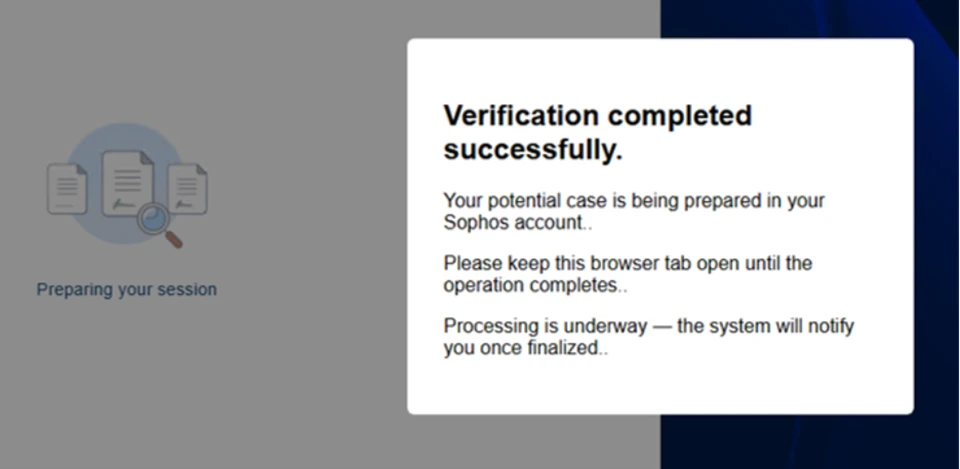
Once these steps were completed, users were shown a message indicating that verification was successful and that their “case” was being prepared.
Following these steps, users were redirected to a third site hosting the final stage of the attack. Analysis of the underlying code indicates that the final destination varied depending on whether the user accessed the workflow from a mobile device or a desktop system.
On the final page, users were informed that all materials related to their code of conduct review had been “securely logged”, “time-stamped”, and “maintained within the organization’s centralized compliance tracking system”. They were then prompted to schedule a time to discuss the case, which required signing in to their account.
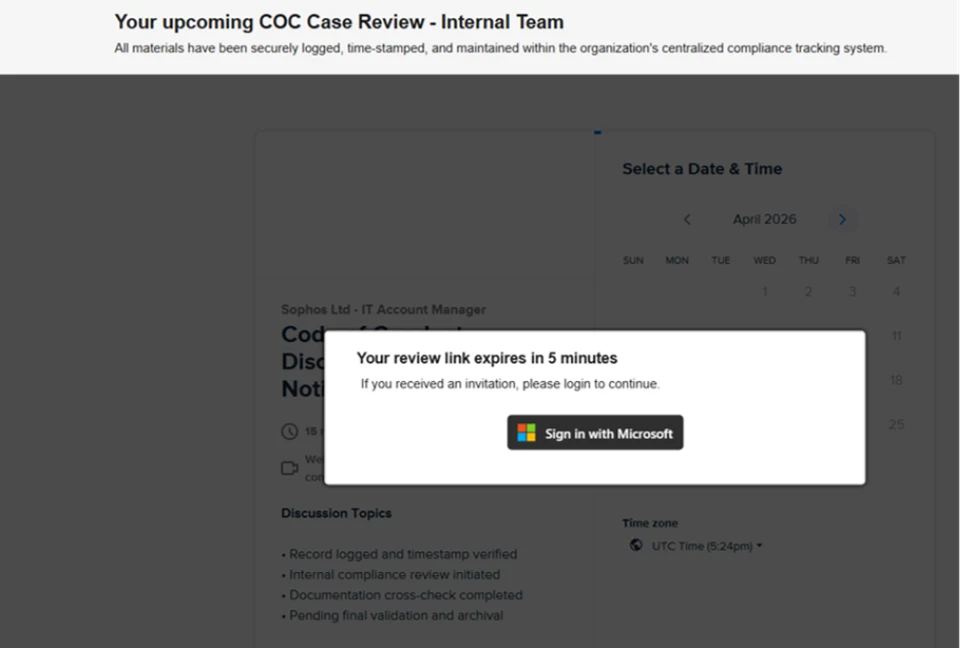
Selecting the “Sign in with Microsoft” option redirected users to a Microsoft authentication page, initiating an AiTM session hijacking flow designed to capture authentication tokens and compromise user accounts.
Mitigation and protection guidance
Microsoft recommends the following mitigations to reduce the impact of this threat. Check the recommendations card for the deployment status of monitored mitigations.
- Review the recommended settings for Exchange Online Protection and Microsoft Defender for Office 365 to ensure your organization has established essential defenses and knows how to monitor and respond to threat activity.
- Invest in user awareness training and phishing simulations. Attack simulation training in Microsoft Defender for Office 365, which also includes simulating phishing messages in Microsoft Teams, is one approach to running realistic attack scenarios in your organization.
- Enable Zero-hour auto purge (ZAP) in Defender for Office 365 to quarantine sent mail in response to newly acquired threat intelligence and retroactively neutralize malicious phishing, spam, or malware messages that have already been delivered to mailboxes.
- Responders could also manually check for and purge unwanted emails containing URLs and/or Subject fields that are similar, but not identical, to those of known bad messages. Investigate malicious email that was delivered in Microsoft 365 and use Threat Explorer to find and delete phishing emails.
- Turn on Safe Links and Safe Attachments in Microsoft Defender for Office 365.
- Enable network protection in Microsoft Defender for Endpoint.
- Encourage users to use Microsoft Edge and other web browsers that support Microsoft Defender SmartScreen, which identifies and blocks malicious websites, including phishing sites, scam sites, and sites that host malware.
- Enable password-less authentication methods (for example, Windows Hello, FIDO keys, or Microsoft Authenticator) for accounts that support password-less. For accounts that still require passwords, use authenticator apps like Microsoft Authenticator for multifactor authentication (MFA). Refer to this article for the different authentication methods and features.
- Conditional access policies can also be scoped to strengthen privileged accounts with phishing resistant MFA.
- Configure automatic attack disruption in Microsoft Defender XDR. Automatic attack disruption is designed to contain attacks in progress, limit the impact on an organization’s assets, and provide more time for security teams to remediate the attack fully.
Microsoft Defender detections
Microsoft Defender customers can refer to the list of applicable detections below. Microsoft Defender coordinates detection, prevention, investigation, and response across endpoints, identities, email, apps to provide integrated protection against attacks like the threat discussed in this blog.
| Tactic | Observed activity | Microsoft Defender coverage |
| Initial access | Phishing emails | Microsoft Defender for Office 365 – A potentially malicious URL click was detected – A user clicked through to a potentially malicious URL – Suspicious email sending patterns detected – Email messages containing malicious URL removed after delivery – Email messages removed after delivery – Email reported by user as malware or phish |
| Persistence | Threat actors sign in with stolen valid entities | Microsoft Entra ID Protection – Anomalous Token – Unfamiliar sign-in properties – Unfamiliar sign-in properties for session cookies Microsoft Defender for Cloud Apps – Impossible travel activity |
Microsoft Security Copilot
Microsoft Security Copilot is embedded in Microsoft Defender and provides security teams with AI-powered capabilities to summarize incidents, analyze files and scripts, summarize identities, use guided responses, and generate device summaries, hunting queries, and incident reports.
Customers can also deploy AI agents, including the following Microsoft Security Copilot agents, to perform security tasks efficiently:
- Threat Intelligence Briefing agent
- Phishing Triage agent
- Threat Hunting agent
- Dynamic Threat Detection agent
Security Copilot is also available as a standalone experience where customers can perform specific security-related tasks, such as incident investigation, user analysis, and vulnerability impact assessment. In addition, Security Copilot offers developer scenarios that allow customers to build, test, publish, and integrate AI agents and plugins to meet unique security needs.
Threat intelligence reports
Microsoft Defender XDR customers can use the following threat analytics reports in the Defender portal (requires license for at least one Defender XDR product) to get the most up-to-date information about the threat actor, malicious activity, and techniques discussed in this blog. These reports provide the intelligence, protection information, and recommended actions to prevent, mitigate, or respond to associated threats found in customer environments.
- Threat overview profile: Adversary-in-the-middle credential phishing
- Threat overview profile: Evolving phishing threats
Microsoft Security Copilot customers can also use the Microsoft Security Copilot integration in Microsoft Defender Threat Intelligence, either in the Security Copilot standalone portal or in the embedded experience in the Microsoft Defender portal to get more information about this threat actor.
Hunting queries
Microsoft Defender XDR customers can run the following advanced hunting queries to find related activity in their networks:
Campaign emails by sender address
The following query identifies emails associated with this campaign using a message’s sending email address.
EmailEvents
| where SenderMailFromAddress in (" cocpostmaster@cocinternal.com "," nationaladmin@gadellinet.com ","
nationalintegrity@harteprn.com”,” m365premiumcommunications@cocinternal.com”,” documentviewer@na.businesshellosign.de”)
Indicators of compromise
| Indicator | Type | Description | First seen | Last seen |
| compliance-protectionoutlook[.]de | Domain | Domain hosting malicious campaign content | 2026-04-14 | 2026-04-16 |
| acceptable-use-policy-calendly[.]de | Domain | Domain hosting malicious campaign content | 2026-04-14 | 2026-04-16 |
| cocinternal[.]com | Domain | Domain hosting sender email address | 2026-04-14 | 2026-04-16 |
| Gadellinet[.]com | Domain | Domain hosting sender email address | 2026-04-14 | 2026-04-16 |
| Harteprn[.]com | Domain | Domain hosting sender email address | 2026-04-14 | 2026-04-16 |
| Cocpostmaster[@]cocinternal.com | Email address | Email address used to send campaign emails | 2026-04-14 | 2026-04-16 |
| Nationaladmin[@]gadellinet.com | Email address | Email address used to send campaign emails | 2026-04-14 | 2026-04-16 |
| Nationalintegrity[@]harteprn.com | Email address | Email address used to send campaign emails | 2026-04-14 | 2026-04-16 |
| M365premiumcommunications[@]cocinternal.com | Email address | Email address used to send campaign emails | 2026-04-14 | 2026-04-16 |
| Documentviewer[@]na.businesshellosign.de | Email address | Email address used to send campaign emails | 2026-04-14 | 2026-04-16 |
| Awareness Case Log File – Monday 13th, April 2026.pdf | Filename | Name of PDF attachment containing phishing link | 2026-04-14 | 2026-04-14 |
| Awareness Case Log File – Tuesday 14th, April 2026.pdf | Filename | Name of PDF attachment containing phishing link | 2026-04-15 | 2026-04-15 |
| Awareness Case Log File – Wednesday 15th, April 2026.pdf | Filename | Name of PDF attachment containing phishing link | 2026-04-16 | 2026-04-16 |
| 5DB1ECBBB2C90C51D81BDA138D4300B90EA5EB2885CCE1BD921D692214AECBC6 | SHA-256 | File hash of campaign PDF attachment | 2026-04-14 | 2026-04-16 |
| B5A3346082AC566B4494E6175F1CD9873B64ABE6C902DB49BD4E8088876C9EAD | SHA-256 | File hash of campaign PDF attachment | 2026-04-14 | 2026-04-16 |
| 11420D6D693BF8B19195E6B98FEDD03B9BCBC770B6988BC64CB788BFABE1A49D | SHA-256 | File hash of campaign PDF attachment | 2026-04-14 | 2026-04-16 |
Learn more
For the latest security research from the Microsoft Threat Intelligence community, check out the Microsoft Threat Intelligence Blog.
To get notified about new publications and to join discussions on social media, follow us on LinkedIn, X (formerly Twitter), and Bluesky.
To hear stories and insights from the Microsoft Threat Intelligence community about the ever-evolving threat landscape, listen to the Microsoft Threat Intelligence podcast.
The post Breaking the code: Multi-stage ‘code of conduct’ phishing campaign leads to AiTM token compromise appeared first on Microsoft Security Blog.
Attackers Weaponized Kuse.ai for Stealth Phishing
The post Attackers Weaponized Kuse.ai for Stealth Phishing appeared first on Daily CyberSecurity.
Bluekit phishing kit enables automated phishing with 40+ templates and AI tools
Bluekit is a new phishing kit with AI features, automated domain setup, and tools like spoofing, voice cloning, and 40+ attack templates.
Bluekit is a newly discovered phishing kit still in development that includes advanced features such as an AI assistant and automated domain registration. According to Varonis, it offers over 40 website templates along with tools for spoofing, voice cloning, antibot protection, geolocation tricks, and two-factor authentication bypass support.
“Varonis Threat Labs recently discovered Bluekit, a new phishing kit pitching a broader model. It advertises 40+ website templates, automated domain purchase and registration, 2FA support, spoofing, geolocation emulation, Telegram and browser notifications, antibot cloaking, and add-ons like an AI assistant, voice cloning, and a mail sender.” reads the report published by Varonis.
Bluekit supports multiple phishing templates targeting major services such as iCloud, Apple ID, Gmail, Outlook, Yahoo, ProtonMail, GitHub, Twitter, Zoho, Zara, and Ledger. It combines email, cloud, crypto, and developer platforms in one kit.

The kit also includes a site-builder where users select domains, templates, and target brands. It provides detailed control over phishing pages, including login detection, redirects, anti-analysis checks, spoofing, and device filtering.
Bluekit tracks sessions in real time, storing cookies and login data, and displays post-login activity. Overall, it acts as a full phishing platform rather than a simple credential-stealing tool.
Bluekit includes an AI Assistant panel with multiple model options such as Llama (default), GPT-4.1, Claude Sonnet 4, Gemini, and DeepSeek variants.

The researcher noted that in testing, only the default Llama model was usable, while the others appeared but required extra configuration, suggesting possible use of jailbroken or non-standard setups if activated in practice.
The researchers tested the assistant with a phishing scenario targeting a Microsoft 365 MFA reset for a company executive, including QR-based lures and credential-harvesting pages.
Instead of producing a ready-made phishing campaign, the AI generated only a structured draft. The output relied heavily on placeholders and generic text, requiring manual refinement.
“We expected something closer to a polished phishing copilot: a finished lure, cleaner email copy, and perhaps even a workable QR-driven flow with less manual effort. What we received was much more limited.” continues the report. “The assistant returned a structured campaign draft, and much of it relied on placeholders instead of content that looked ready to use as-is.”
Overall, the AI Assistant acts more as a tool for building campaign outlines rather than delivering fully functional phishing kits.
Bluekit has been monitored over time not just for isolated campaigns, but for how quickly it evolves. Researchers initially aimed to catch it in real-world phishing activity, but its rapid development made the release cycle itself part of the observation. New features and templates were added so frequently that tracking updates became as important as identifying active deployments.
“Compared with similar phishing kits that have already advanced further into automation and operator convenience, Bluekit still appears to be a kit in active development.” concludes the report. “The feature set keeps evolving as we track it, and if that pace continues with broader adoption, Bluekit is likely to surface in future campaigns.”
Follow me on Twitter: @securityaffairs and Facebook and Mastodon
(SecurityAffairs – hacking, Bluekit phishing kit)
“Legitimate” phishing: how attackers weaponize Amazon SES to bypass email security

Introduction
The primary goal for attackers in a phishing campaign is to bypass email security and trick the potential victim into revealing their data. To achieve this, scammers employ a wide range of tactics, from redirect links to QR codes. Additionally, they heavily rely on legitimate sources for malicious email campaigns. Specifically, we’ve recently observed an uptick in phishing attacks leveraging Amazon SES.
The dangers of Amazon SES abuse
Amazon Simple Email Service (Amazon SES) is a cloud-based email platform designed for highly reliable transactional and marketing message delivery. It integrates seamlessly with other products in Amazon’s cloud ecosystem, AWS.
At first glance, it might seem like just another delivery channel for email phishing, but that isn’t the case. The insidious nature of Amazon SES attacks lies in the fact that attackers aren’t using suspicious or dangerous domains; instead, they are leveraging infrastructure that both users and security systems have grown to trust. These emails utilize SPF, DKIM, and DMARC authentication protocols, passing all standard provider checks, and almost always contain .amazonses.com in the Message-ID headers. Consequently, from a technical standpoint, every email sent via Amazon SES – even a phishing one – looks completely legitimate.
Phishing URLs can be masked with redirects: a user sees a link like amazonaws.com in the email and clicks it with confidence, only to be sent to a phishing site rather than a legitimate one. Amazon SES also allows for custom HTML templates, which attackers use to craft more convincing emails. Because this is legitimate infrastructure, the sender’s IP address won’t end up on reputation-based blocklists. Blocking it would restrict all incoming mail sent through Amazon SES. For major services, that kind of measure is ineffective, as it would significantly disrupt user workflows due to a massive number of false positives.
How compromise happens
In most cases, attackers gain access to Amazon SES through leaked IAM (AWS Identity and Access Management) access keys. Developers frequently leave these keys exposed in public GitHub repositories, ENV files, Docker images, configuration backups, or even in publicly accessible S3 buckets. To hunt for these IAM keys, phishers use various tools, such as automated bots based on the open-source utility TruffleHog, which is designed for detecting leaked secrets. After verifying the key’s permissions and email sending limits, attackers are equipped to spread a massive volume of phishing messages.
Examples of phishing with Amazon SES
In early 2026, one of the most common themes in phishing emails sent with Amazon SES was fake notifications from electronic signature services.
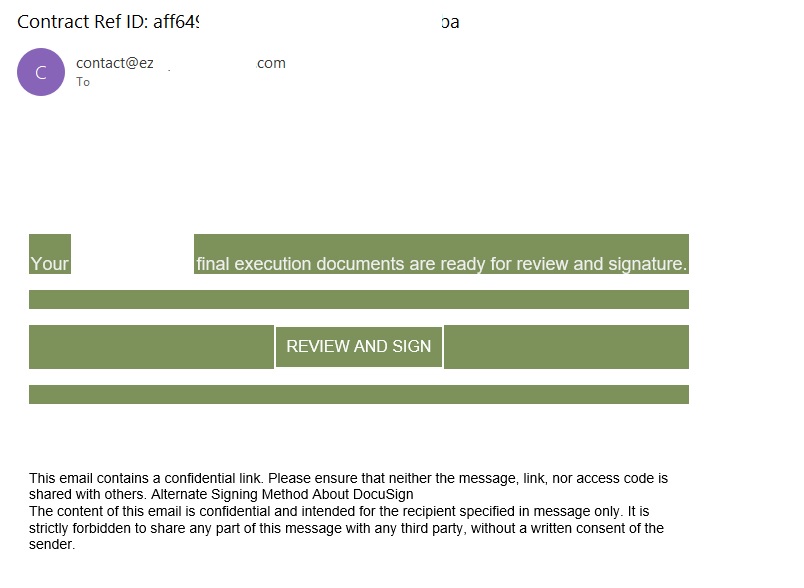
Phishing email imitating a Docusign notification
The email’s technical headers confirm that it was sent with Amazon SES. At first glance, it all looks legitimate enough.

Phishing email headers
In these emails, the victim is typically asked to click a link to review and sign a specific document.
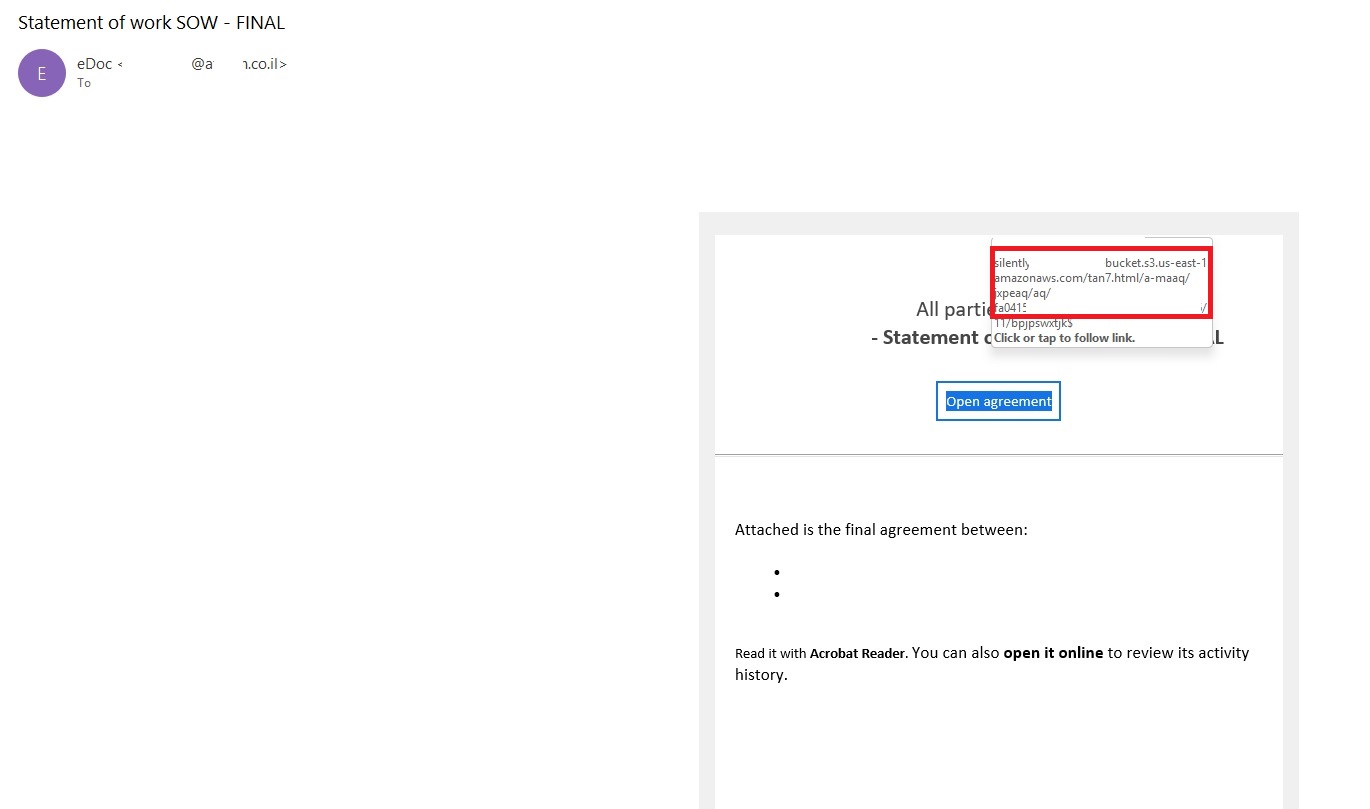
Phishing email with a “document”
Upon clicking the link, the user is directed to a sign-in form hosted on amazonaws.com. This can easily mislead the victim, convincing them that what they’re doing is safe.
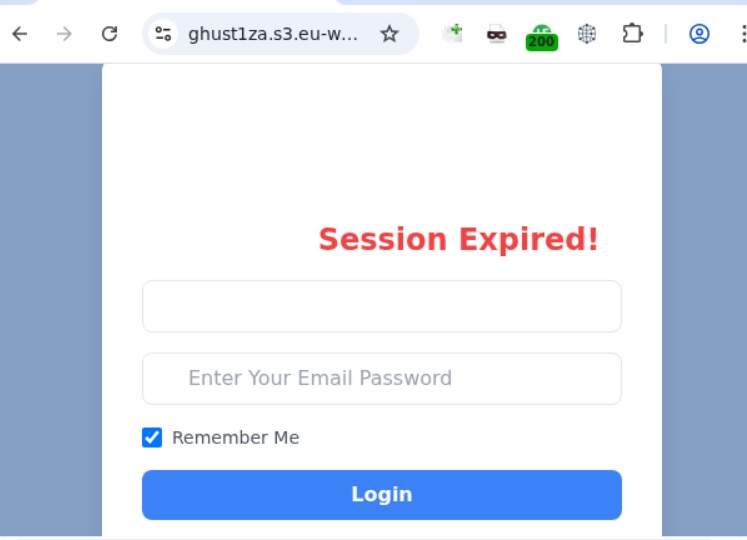
Phishing sign-in form
The resulting form is, of course, a phishing page, and any data entered into it goes directly to the attackers.
Amazon SES and BEC
However, Amazon SES is used for more than just standard phishing; it’s also a vehicle for a very sophisticated type of BEC campaigns. In one case we investigated, a fraudulent email appeared to contain a series of messages exchanged between an employee of the target organization and a service provider about an outstanding invoice. The email was sent as if from that employee to the company’s finance department, requesting urgent payment.
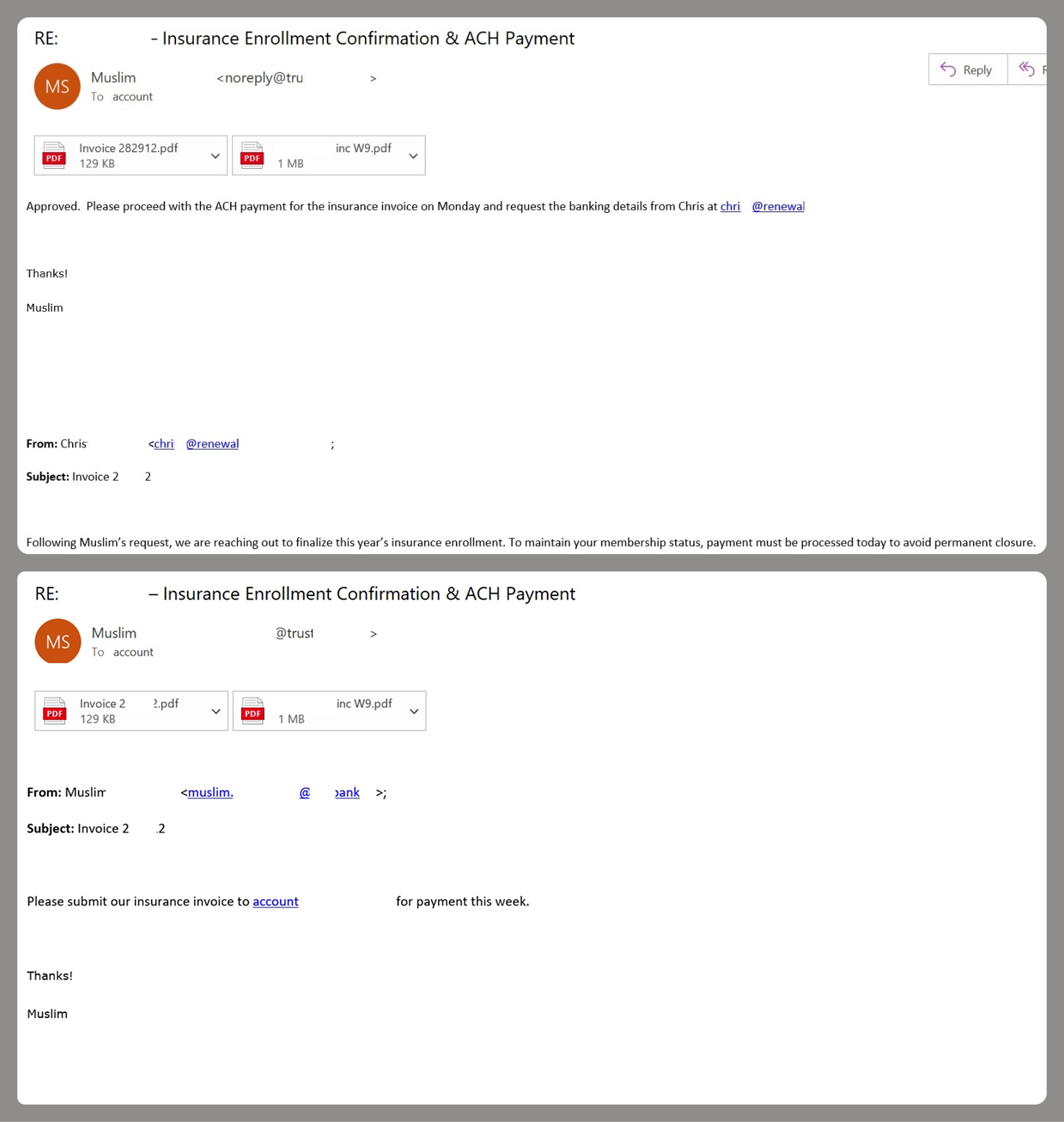
BEC email featuring a fake conversation between an employee and a vendor
The PDF attachments didn’t contain any malicious phishing URLs or QR codes, only payment details and supporting documentation.
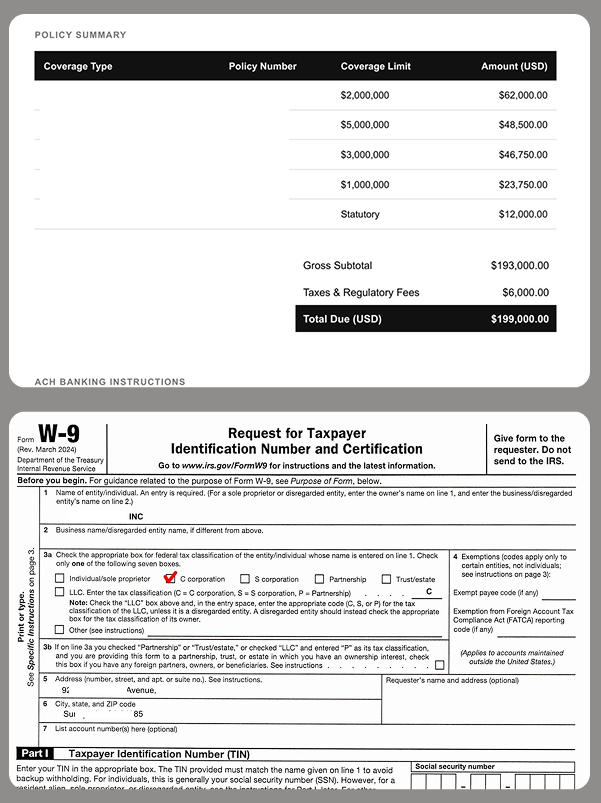
Forged financial documents
Naturally, the email didn’t originate with the employee, but with an attacker impersonating them. The entire thread quoted within the email was actually fabricated, with the messages formatted to appear as a legitimate forwarded thread to a cursory glance. This type of attack aims to lower the user’s guard and trick them into transferring funds to the scammers’ account.
Takeaways
Phishing via Amazon SES is shifting from isolated incidents into a steady trend. By weaponizing this service, attackers avoid the effort of building dubious domains and mail infrastructure from scratch. Instead, they hijack existing access keys to gain the ability to blast out thousands of phishing emails. These messages pass email authentication, originate from IP addresses that are unlikely to be blocklisted, and contain links to phishing forms that look entirely legitimate.
Since these Amazon SES phishing attacks stem from compromised or leaked AWS credentials, prioritizing the security of these accounts is critical. To mitigate these risks, we recommend following these guidelines:
- Implement the principle of least privilege when configuring IAM access keys, granting elevated permissions only to users who require them for specific tasks.
- Transition from IAM access keys to roles when configuring AWS; these are profiles with specific permissions that can be assigned to one or several users.
- Enable multi-factor authentication, an ever-relevant step.
- Configure IP-based access restrictions.
- Set up automated key rotation and run regular security audits.
- Use the AWS Key Management Service to encrypt data with unique cryptographic keys and manage them from a centralized location.
We recommend that users remain vigilant when handling email. Do not determine whether an email is safe based solely on the From field. If you receive unexpected documents via email, a prudent precaution is to verify the request with the sender through a different communication channel. Always carefully inspect where links in the body of an email actually lead. Additionally, robust email security solutions can provide an essential layer of protection for both corporate and personal correspondence.