Visualização de leitura

Scaling MCP adoption: Our reference architecture for simpler, safer and cheaper enterprise deployments of MCP

We at Cloudflare have aggressively adopted Model Context Protocol (MCP) as a core part of our AI strategy. This shift has moved well beyond our engineering organization, with employees across product, sales, marketing, and finance teams now using agentic workflows to drive efficiency in their daily tasks. But the adoption of agentic workflow with MCP is not without its security risks. These range from authorization sprawl, prompt injection, and supply chain risks. To secure this broad company-wide adoption, we have integrated a suite of security controls from both our Cloudflare One (SASE) platform and our Cloudflare Developer platform, allowing us to govern AI usage with MCP without slowing down our workforce. 

In this blog we’ll walk through our own best practices for securing MCP workflows, by putting different parts of our platform together to create a unified security architecture for the era of autonomous AI. We’ll also share two new concepts that support enterprise MCP deployments:

We also talk about how our organization approached deploying MCP, and how we built out our MCP security architecture using Cloudflare products including remote MCP servers, Cloudflare Access, MCP server portals and AI Gateway

Remote MCP servers provide better visibility and control

MCP is an open standard that enables developers to build a two-way connection between AI applications and the data sources they need to access. In this architecture, the MCP client is the integration point with the LLM or other AI agent, and the MCP server sits between the MCP client and the corporate resources.

The separation between MCP clients and MCP servers allows agents to autonomously pursue goals and take actions while maintaining a clear boundary between the AI (integrated at the MCP client) and the credentials and APIs of the corporate resource (integrated at the MCP server). 

Our workforce at Cloudflare is constantly using MCP servers to access information in various internal resources, including our project management platform, our internal wiki, documentation and code management platforms, and more. 

Very early on, we realized that locally-hosted MCP servers were a security liability. Local MCP server deployments may rely on unvetted software sources and versions, which increases the risk of supply chain attacks or tool injection attacks. They prevent IT and security administrators from administrating these servers, leaving it up to individual employees and developers to choose which MCP servers they want to run and how they want to keep them up to date. This is a losing game.

Instead, we have a centralized team at Cloudflare that manages our MCP server deployment across the enterprise. This team built a shared MCP platform inside our monorepo that provides governed infrastructure out of the box. When an employee wants to expose an internal resource via MCP, they first get approval from our AI governance team, and then they copy a template, write their tool definitions, and deploy, all the while inheriting default-deny write controls with audit logging, auto-generated CI/CD pipelines, and secrets management for free. This means standing up a new governed MCP server is minutes of scaffolding. The governance is baked into the platform itself, which is what allowed adoption to spread so quickly. 

Our CI/CD pipeline deploys them as remote MCP servers on custom domains on Cloudflare’s developer platform. This gives us visibility into which MCPs servers are being used by our employees, while maintaining control over software sources. As an added bonus, every remote MCP server on the Cloudflare developer platform is automatically deployed across our global network of data centers, so MCP servers can be accessed by our employees with low latency, regardless of where they might be in the world.

Cloudflare Access provides authentication

Some of our MCP servers sit in front of public resources, like our Cloudflare documentation MCP server or Cloudflare Radar MCP server, and thus we want them to be accessible to anyone. But many of the MCP servers used by our workforce are sitting in front of our private corporate resources. These MCP servers require user authentication to ensure that they are off limits to everyone but authorized Cloudflare employees. To achieve this, our monorepo template for MCP servers integrates Cloudflare Access as the OAuth provider. Cloudflare Access secures login flows and issues access tokens to resources, while acting as an identity aggregator that verifies end user single-sign on (SSO), multifactor authentication (MFA), and a variety of contextual attributes such as IP addresses, location, or device certificates. 

MCP server portals centralize discovery and governance

MCP server portals unify governance and control for all AI activity.

As the number of our remote MCP servers grew, we hit a new wall: discovery. We wanted to make it easy for every employee (especially those that are new to MCP) to find and work with all the MCP servers that are available to them. Our MCP server portals product provided a convenient solution. The employee simply connects their MCP client to the MCP server portal, and the portal immediately reveals every internal and third-party MCP servers they are authorized to use. 

Beyond this, our MCP server portals provide centralized logging, consistent policy enforcement and data loss prevention (DLP guardrails). Our administrators can see who logged into what MCP portal and create DLP rules that prevent certain data, like personally identifiable data (PII), from being shared with certain MCP servers.

We can also create policies that control who has access to the portal itself, and what tools from each MCP server should be exposed. For example, we could set up one MCP server portal that is only accessible to employees that are part of our finance group that exposes just the read-only tools for the MCP server in front of our internal code repository. Meanwhile, a different MCP server portal, accessible only to employees on their corporate laptops that are in our engineering team, could expose more powerful read/write tools to our code repository MCP server.

An overview of our MCP server portal architecture is shown above. The portal supports both remote MCP servers hosted on Cloudflare, and third-party MCP servers hosted anywhere else. What makes this architecture uniquely performant is that all these security and networking components run on the same physical machine within our global network. When an employee's request moves through the MCP server portal, a Cloudflare-hosted remote MCP server, and Cloudflare Access, their traffic never needs to leave the same physical machine. 

Code Mode with MCP server portals reduces costs

After months of high-volume MCP deployments, we’ve paid out our fair share of tokens. We’ve also started to think most people are doing MCP wrong.

The standard approach to MCP requires defining a separate tool for every API operation that is exposed via an MCP server. But this static and exhaustive approach quickly exhausts an agent’s context window, especially for large platforms with thousands of endpoints.

We previously wrote about how we used server-side Code Mode to power Cloudflare’s MCP server, allowing us to expose the thousands of end-points in Cloudflare API while reducing token use by 99.9%. The Cloudflare MCP server exposes just two tools: a search tool lets the model write JavaScript to explore what’s available, and an execute tool lets it write JavaScript to call the tools it finds. The model discovers what it needs on demand, rather than receiving everything upfront.

We like this pattern so much, we had to make it available for everyone. So we have now launched the ability to use the “Code Mode” pattern with MCP server portals. Now you can front all of your MCP servers with a centralized portal that performs audit controls and progressive tool disclosure, in order to reduce token costs.

Here is how it works. Instead of exposing every tool definition to a client, all of your underlying MCP servers collapse into just two MCP portal tools: portal_codemode_search and portal_codemode_execute. The search tool gives the model access to a codemode.tools() function that returns all the tool definitions from every connected upstream MCP server. The model then writes JavaScript to filter and explore these definitions, finding exactly the tools it needs without every schema being loaded into context. The execute tool provides a codemode proxy object where each upstream tool is available as a callable function. The model writes JavaScript that calls these tools directly, chaining multiple operations, filtering results, and handling errors in code. All of this runs in a sandboxed environment on the MCP server portal powered by Dynamic Workers

Here is an example of an agent that needs to find a Jira ticket and update it with information from Google Drive. It first searches for the right tools:

// portal_codemode_search
async () => {
 const tools = await codemode.tools();
 return tools
  .filter(t => t.name.includes("jira") || t.name.includes("drive"))
  .map(t => ({ name: t.name, params: Object.keys(t.inputSchema.properties || {}) }));
}

The model now knows the exact tool names and parameters it needs, without the full schemas of tools ever entering its context. It then writes a single execute call to chain the operations together:

// portal_codemode_execute
async () => {
 const tickets = await codemode.jira_search_jira_with_jql({
  jql: ‘project = BLOG AND status = “In Progress”’,
  fields: [“summary”, “description”]
 });
 const doc = await codemode.google_workspace_drive_get_content({
  fileId: “1aBcDeFgHiJk”
 });
 await codemode.jira_update_jira_ticket({
  issueKey: tickets[0].key,
  fields: { description: tickets[0].description + “\n\n” + doc.content }
 });
 return { updated: tickets[0].key };
}

This is just two tool calls. The first discovers what's available, the second does the work. Without Code Mode, this same workflow would have required the model to receive the full schemas of every tool from both MCP servers upfront, and then make three separate tool invocations.

Let’s put the savings in perspective: when our internal MCP server portal is connected to just four of our internal MCP servers, it exposes 52 tools that consume approximately 9,400 tokens of context just for their definitions. With Code Mode enabled, those 52 tools collapse into 2 portal tools consuming roughly 600 tokens, a 94% reduction. And critically, this cost stays fixed. As we connect more MCP servers to the portal, the token cost of Code Mode doesn’t grow.

Code Mode can be activated on an MCP server portal by adding a query parameter to the URL. Instead of connecting to your portal over its usual URL (e.g. https://myportal.example.com/mcp), you attach ?codemode=search_and_execute to the URL (e.g. https://myportal.example.com/mcp?codemode=search_and_execute).

AI Gateway provides extensibility and cost controls

We aren’t done yet. We plug AI Gateway into our architecture by positioning it on the connection between the MCP client and the LLM. This allows us to quickly switch between various LLM providers (to prevent vendor lock-in) and to enforce cost controls (by limiting the number of tokens each employee can burn through). The full architecture is shown below.

Cloudflare Gateway discovers and blocks shadow MCP

Now that we’ve provided governed access to authorized MCP servers, let’s look into dealing with unauthorized MCP servers. We can perform shadow MCP discovery using Cloudflare Gateway. Cloudflare Gateway is our comprehensive secure web gateway that provides enterprise security teams with visibility and control over their employees’ Internet traffic.

We can use the Cloudflare Gateway API to perform a multi-layer scan to find remote MCP servers that are not being accessed via an MCP server portal. This is possible using a variety of existing Gateway and Data Loss Prevention (DLP) selectors, including:

  • Using the Gateway httpHost selector to scan for 

    • known MCP server hostnames using (like mcp.stripe.com)

    • mcp.* subdomains using wildcard hostname patterns 

  • Using the Gateway httpRequestURI selector to scan for MCP-specific URL paths like /mcp and /mcp/sse 

  • Using DLP-based body inspection to find MCP traffic, even if that traffic uses URI that do not contain the telltale mentions of mcp or sse. Specifically, we use the fact that MCP uses JSON-RPC over HTTP, which means every request contains a "method" field with values like "tools/call", "prompts/get", or "initialize." Here are some regex rules that can be used to detect MCP traffic in the HTTP body:

const DLP_REGEX_PATTERNS = [
  {
    name: "MCP Initialize Method",
    regex: '"method"\\s{0,5}:\\s{0,5}"initialize"',
  },
  {
    name: "MCP Tools Call",
    regex: '"method"\\s{0,5}:\\s{0,5}"tools/call"',
  },
  {
    name: "MCP Tools List",
    regex: '"method"\\s{0,5}:\\s{0,5}"tools/list"',
  },
  {
    name: "MCP Resources Read",
    regex: '"method"\\s{0,5}:\\s{0,5}"resources/read"',
  },
  {
    name: "MCP Resources List",
    regex: '"method"\\s{0,5}:\\s{0,5}"resources/list"',
  },
  {
    name: "MCP Prompts List",
    regex: '"method"\\s{0,5}:\\s{0,5}"prompts/(list|get)"',
  },
  {
    name: "MCP Sampling Create Message",
    regex: '"method"\\s{0,5}:\\s{0,5}"sampling/createMessage"',
  },
  {
    name: "MCP Protocol Version",
    regex: '"protocolVersion"\\s{0,5}:\\s{0,5}"202[4-9]',
  },
  {
    name: "MCP Notifications Initialized",
    regex: '"method"\\s{0,5}:\\s{0,5}"notifications/initialized"',
  },
  {
    name: "MCP Roots List",
    regex: '"method"\\s{0,5}:\\s{0,5}"roots/list"',
  },
];

The Gateway API supports additional automation. For example, one can use the custom DLP profile we defined above to block traffic, or redirect it, or just to log and inspect MCP payloads. Put this together, and Gateway can be used to provide comprehensive detection of unauthorized remote MCP servers accessed via an enterprise network. 

For more information on how to build this out, see this tutorial

Public-facing MCP Servers are protected with AI Security for Apps

So far, we’ve been focused on protecting our workforce’s access to our internal MCP servers. But, like many other organizations, we also have public-facing MCP servers that our customers can use to agentically administer and operate Cloudflare products. These MCP servers are hosted on Cloudflare’s developer platform. (You can find a list of individual MCPs for specific products here, or refer back to our new approach for providing more efficient access to the entire Cloudflare API using Code Mode.)

We believe that every organization should publish official, first-party MCP servers for their products. The alternative is that your customers source unvetted servers from public repositories where packages may contain dangerous trust assumptions, undisclosed data collection, and any range of unsanctioned behaviors. By publishing your own MCP servers, you control the code, update cadence, and security posture of the tools your customers use.

Since every remote MCP server is an HTTP endpoint, we can put it behind the Cloudflare Web Application Firewall (WAF). Customers can enable the AI Security for Apps feature within the WAF to automatically inspect inbound MCP traffic for prompt injection attempts, sensitive data leakage, and topic classification. Public facing MCPs are protected just as any other web API.  

The future of MCP in the enterprise

We hope our experience, products, and reference architectures will be useful to other organizations as they continue along their own journey towards broad enterprise-wide adoption of MCP.

We’ve secured our own MCP workflows by: 

  • Offering our developers a templated framework for building and deploying remote MCP servers on our developer platform using Cloudflare Access for authentication

  • Ensuring secure, identity-based access to authorized MCP servers by connecting our entire workforce to MCP server portals

  • Controlling costs using AI Gateway to mediate access to the LLMs powering our workforce’s MCP clients, and using Code Mode in MCP server portals to reduce token consumption and context bloat

  • Discovering shadow MCP usage by Cloudflare Gateway 

For organizations advancing on their own enterprise MCP journeys, we recommend starting by putting your existing remote and third-party MCP servers behind  Cloudflare MCP server portals and enabling Code Mode to start benefitting for cheaper, safer and simpler enterprise deployments of MCP.  

Acknowledgements:  This reference architecture and blog represents this work of many people across many different roles and business units at Cloudflare. This is just a partial list of contributors: Ann Ming Samborski,  Kate Reznykova, Mike Nomitch, James Royal, Liam Reese, Yumna Moazzam, Simon Thorpe, Rian van der Merwe, Rajesh Bhatia, Ayush Thakur, Gonzalo Chavarri, Maddy Onyehara, and Haley Campbell.

Managed OAuth for Access: make internal apps agent-ready in one click

We have thousands of internal apps at Cloudflare. Some are things we’ve built ourselves, others are self-hosted instances of software built by others. They range from business-critical apps nearly every person uses, to side projects and prototypes.

All of these apps are protected by Cloudflare Access. But when we started using and building agents — particularly for uses beyond writing code — we hit a wall. People could access apps behind Access, but their agents couldn’t.

Access sits in front of internal apps. You define a policy, and then Access will send unauthenticated users to a login page to choose how to authenticate. 

Example of a Cloudflare Access login page

This flow worked great for humans. But all agents could see was a redirect to a login page that they couldn’t act on.

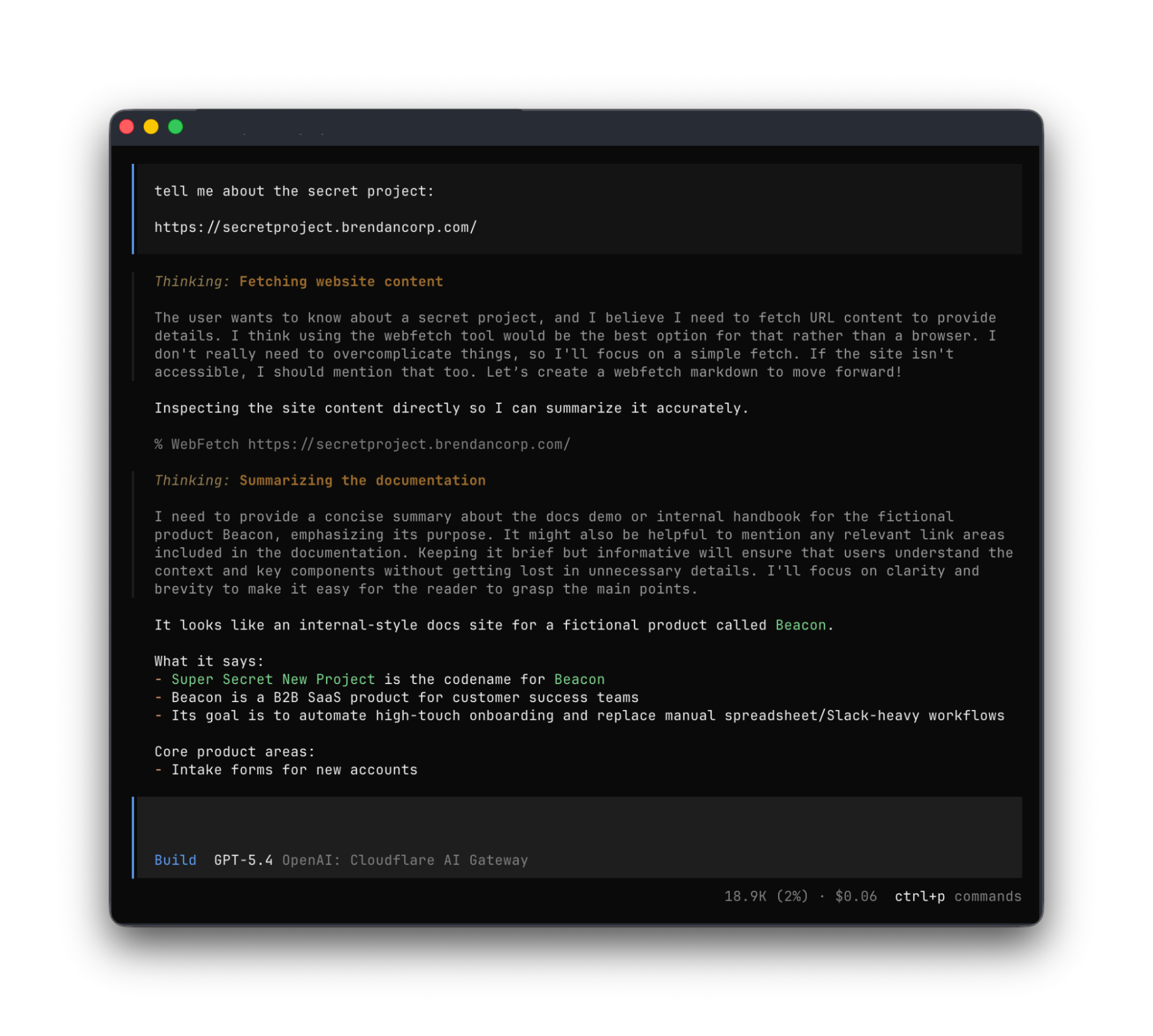
Providing agents with access to internal app data is so vital that we immediately implemented a stopgap for our own internal use. We modified OpenCode’s web fetch tool such that for specific domains, it triggered the cloudflared CLI to open an authorization flow to fetch a JWT (JSON Web Token). By appending this token to requests, we enabled secure, immediate access to our internal ecosystem.

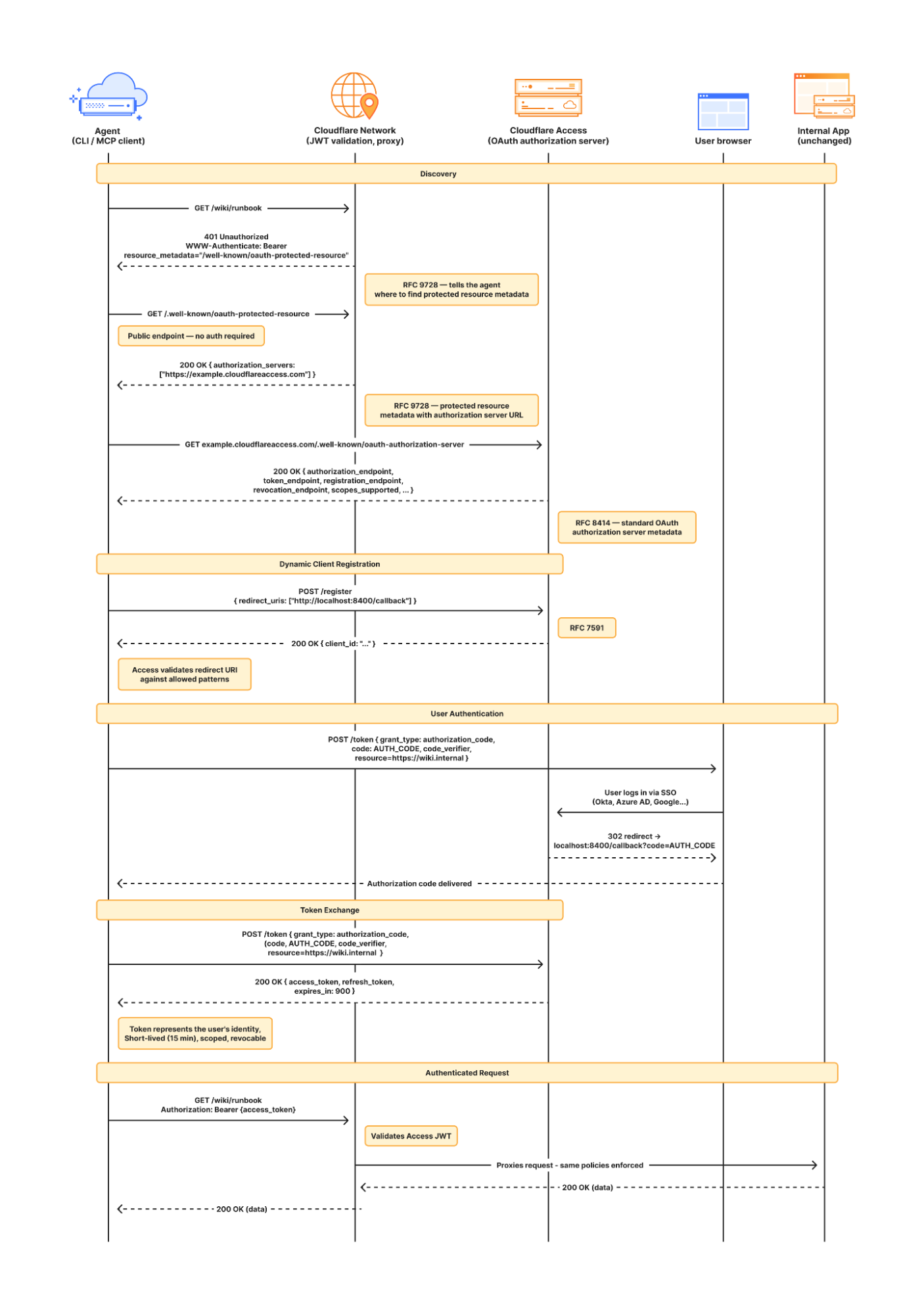
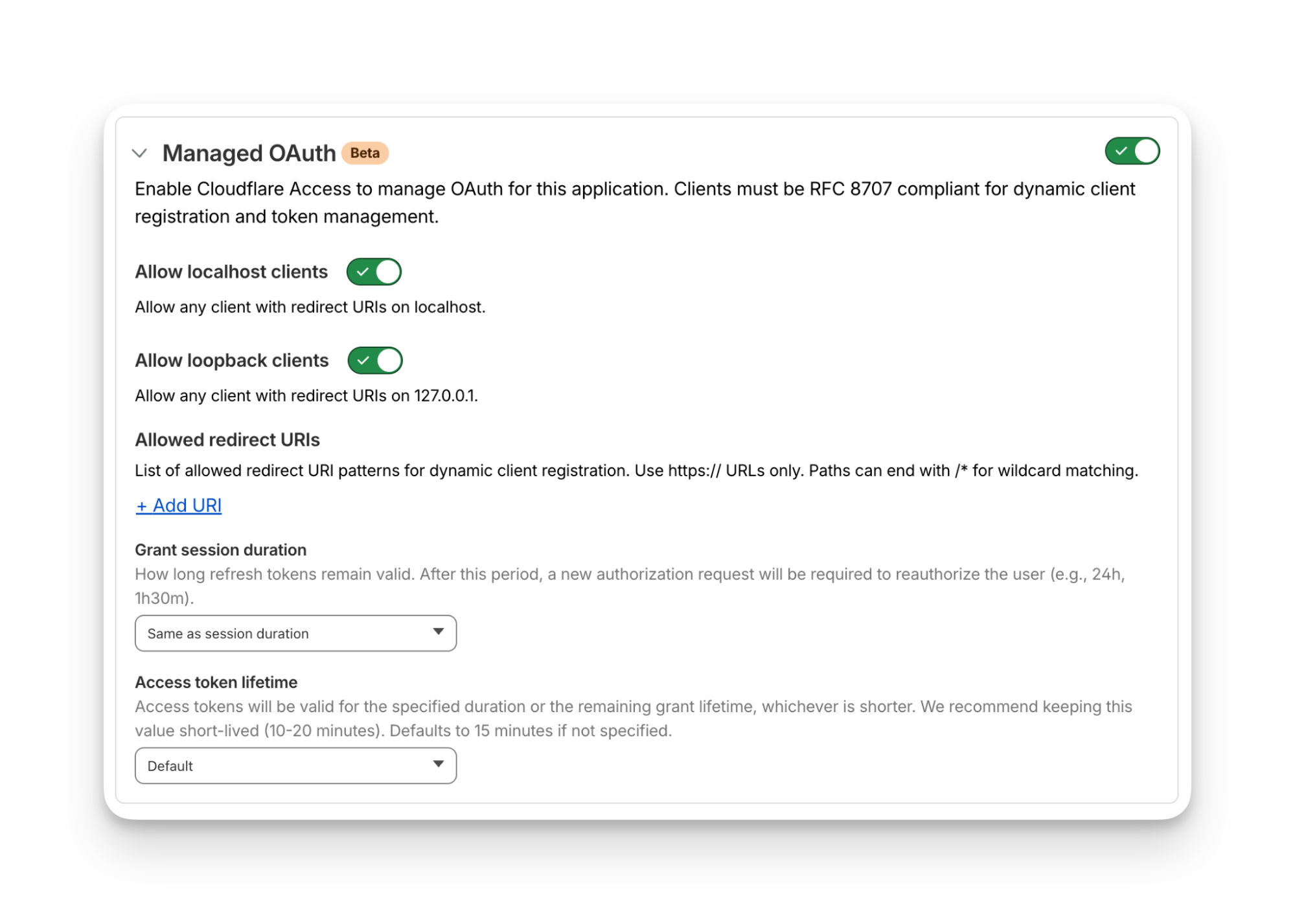
While this solution was a temporary answer to our own dilemma, today we’re retiring this workaround and fixing this problem for everyone. Now in open beta, every Access application supports managed OAuth. One click to enable it for an Access app, and agents that speak OAuth 2.0 can easily discover how to authenticate (RFC 9728), send the user through the auth flow, and receive back an authorization token (the same JWT from our initial solution). 

Now, the flow works smoothly for both humans and agents. Cloudflare Access has a generous free tier. And building off our newly-introduced Organizations beta, you’ll soon be able to bridge identity providers across Cloudflare accounts too.

How managed OAuth works

For a given internal app protected by Cloudflare Access, you enable managed OAuth in one click:

Once managed OAuth is enabled, Cloudflare Access acts as the authorization server. It returns the www-authenticate header, telling unauthorized agents where to look up information on how to get an authorization token. They find this at https://<your-app-domain>/.well-known/oauth-authorization-server. Equipped with that direction, agents can just follow OAuth standards: 

  1. The agent dynamically registers itself as a client (a process known as Dynamic Client Registration — RFC 7591), 

  2. The agent sends the human through a PKCE (Proof Key for Code Exchange) authorization flow (RFC 7636)

  3. The human authorizes access, which grants a token to the agent that it can use to make authenticated requests on behalf of the user

Here’s what the authorization flow looks like:

If this authorization flow looks familiar, that’s because it’s what the Model Context Protocol (MCP) uses. We originally built support for this into our MCP server portals product, which proxies and controls access to many MCP servers, to allow the portal to act as the OAuth server. Now, we’re bringing this to all Access apps so agents can access not only MCP servers that require authorization, but also web pages, web apps, and REST APIs.

Mass upgrading your internal apps to be agent-ready

Upgrading the long tail of internal software to work with agents is a daunting task. In principle, in order to be agent-ready, every internal and external app would ideally have discoverable APIs, a CLI, a well-crafted MCP server, and have adopted the many emerging agent standards.

AI adoption is not something that can wait for everything to be retrofitted. Most organizations have a significant backlog of apps built over many years. And many internal “apps” work great when treated by agents as simple websites. For something like an internal wiki, all you really need is to enable Markdown for Agents, turn on managed OAuth, and agents have what they need to read protected content.

To make the basics work across the widest set of internal applications, we use Managed OAuth. By putting Access in front of your legacy internal apps, you make them agent-ready instantly. No code changes, no retrofitting. Instead, just immediate compatibility.

It’s the user’s agent. No service accounts and tokens needed

Agents need to act on behalf of users inside organizations. One of the biggest anti-patterns we’ve seen is people provisioning service accounts for their agents and MCP servers, authenticated using static credentials. These have their place in simple use cases and quick prototypes, and Cloudflare Access supports service tokens for this purpose.

But the service account approach quickly shows its limits when fine-grained access controls and audit logs are required. We believe that every action an agent performs must be easily attributable to the human who initiated it, and that an agent must only be able to perform actions that its human operator is likewise authorized to do. Service accounts and static credentials become points at which attribution is lost. Agents that launder all of their actions through a service account are susceptible to confused deputy problems and result in audit logs that appear to originate from the agent itself.

For security and accountability, agents must use security primitives capable of expressing this user–agent relationship. OAuth is the industry standard protocol for requesting and delegating access to third parties. It gives agents a way to talk to your APIs on behalf of the user, with a token scoped to the user’s identity, so that access controls correctly apply and audit logs correctly attribute actions to the end user.

Standards for the win: how agents can and should adopt RFC 9728 in their web fetch tools

RFC 9728 is the OAuth standard that makes it possible for agents to discover where and how to authenticate. It standardizes where this information lives and how it’s structured. This RFC became official in April 2025 and was quickly adopted by the Model Context Protocol (MCP), which now requires that both MCP servers and clients support it.

But outside of MCP, agents should adopt RFC 9728 for an even more essential use case: making requests to web pages that are protected behind OAuth and making requests to plain old REST APIs.

Most agents have a tool for making basic HTTP requests to web pages. This is commonly called the “web fetch” tool. It’s similar to using the fetch() API in JavaScript, often with some additional post-processing on the response. It’s what lets you paste a URL into your agent and have your agent go look up the content.

Today, most agents’ web fetch tools won’t do anything with the www-authenticate header that a URL returns. The underlying model might choose to introspect the response headers and figure this out on its own, but the tool itself does not follow www-authenticate, look up /.well-known/oauth-authorization-server, and act as the client in the OAuth flow. But it can, and we strongly believe it should! Agents already do this to act as remote MCP clients.

To demonstrate this, we’ve put up a draft pull request that adapts the web fetch tool in Opencode to show this in action. Before making a request, the adapted tool first checks whether it already has credentials ; if it does, it uses them to make the initial request. If the tool gets back a 401 or a 403 with a www-authenticate header, it asks the user for consent to be sent through the server’s OAuth flow.

Here’s how that OAuth flow works. If you give the agent a URL that is protected by OAuth and complies with RFC 9728, the agent prompts the human for consent to open the authorization flow:

…sending the human to the login page:

…and then to a consent dialog that prompts the human to grant access to the agent:

Once the human grants access to the agent, the agent uses the token it has received to make an authenticated request:

Any agent from Codex to Claude Code to Goose and beyond can implement this, and there’s nothing bespoke to Cloudflare. It’s all built using OAuth standards.

We think this flow is powerful, and that supporting RFC 9728 can help agents with more than just making basic web fetch requests. If a REST API supports RFC 9728 (and the agent does too), the agent has everything it needs to start making authenticated requests against that API. If the REST API supports RFC 9727, then the client can discover a catalog of REST API endpoints on its own, and do even more without additional documentation, agent skills, MCP servers or CLIs. 

Each of these play important roles with agents — Cloudflare itself provides an MCP server for the Cloudflare API (built using Code Mode), Wrangler CLI, and Agent Skills, and a Plugin. But supporting RFC 9728 helps ensure that even when none of these are preinstalled, agents have a clear path forward. If the agent has a sandbox to execute untrusted code, it can just write and execute code that calls the API that the human has granted it access to. We’re working on supporting this for Cloudflare’s own APIs, to help your agents understand how to use Cloudflare.

Coming soon: share one identity provider (IdP) across many Cloudflare accounts

At Cloudflare our own internal apps are deployed to dozens of different Cloudflare accounts, which are all part of an Organization — a newly introduced way for administrators to manage users, configurations, and view analytics across many Cloudflare accounts. We have had the same challenge as many of our customers: each Cloudflare account has to separately configure an IdP, so Cloudflare Access uses our identity provider. It’s critical that this is consistent across an organization — you don’t want one Cloudflare account to inadvertently allow people to sign in just with a one-time PIN, rather than requiring that they authenticate via single-sign on (SSO).

To solve this, we’re currently working on making it possible to share an identity provider across Cloudflare accounts, giving organizations a way to designate a single primary IdP for use across every account in their organization.

As new Cloudflare accounts are created within an organization, administrators will be able to configure a bridge to the primary IdP with a single click, so Access applications across accounts can be protected by one identity provider. This removes the need to manually configure IdPs account by account, which is a process that doesn’t scale for organizations with many teams and individuals each operating their own accounts.

What’s next

Across companies, people in every role and business function are now using agents to build internal apps, and expect their agents to be able to access context from internal apps. We are responding to this step function growth in internal software development by making the Workers Platform and Cloudflare One work better together — so that it is easier to build and secure internal apps on Cloudflare. 

Expect more to come soon, including:

  • More direct integration between Cloudflare Access and Cloudflare Workers, without the need to validate JWTs or remember which of many routes a particular Worker is exposed on.

  • wrangler dev --tunnel — an easy way to expose your local development server to others when you’re building something new, and want to share it with others before deploying

  • A CLI interface for Cloudflare Access and the entire Cloudflare API

  • More announcements to come during Agents Week 2026

Enable Managed OAuth for your internal apps behind Cloudflare Access

Managed OAuth is now available, in open beta, to all Cloudflare customers. Head over to the Cloudflare dashboard to enable it for your Access applications. You can use it for any internal app, whether it’s one built on Cloudflare Workers, or hosted elsewhere. And if you haven’t built internal apps on the Workers Platform yet — it’s the fastest way for your team to go from zero to deployed (and protected) in production.

How Cloudy translates complex security into human action

Today’s security ecosystem generates a staggering amount of complex telemetry. For instance, processing a single email requires analyzing sender reputation, authentication results, link behavior, infrastructure metadata, and countless other attributes. Simultaneously, Cloud access security broker (CASB) engines continuously scan SaaS environments for signals that detect misconfigurations, risky access, and exposed data.

But while detections have become more sophisticated, explanations have not always kept pace.

Security and IT teams are often aware when something is flagged, but they do not always know, at a glance, why. End users are asked to make real-time decisions about emails that may impact the entire organization, yet they are rarely given clear, contextual guidance in the moment that matters.

Cloudy changes that.

Cloudy is our LLM-powered explanation layer, built directly into Cloudflare One. It translates complex machine learning outputs into precise, human-readable guidance for security teams and end users alike. Instead of exposing raw technical signals, Cloudy surfaces the reasoning behind a detection in a way that drives informed action.

For Cloudflare Email Security, this means helping users understand why a message was flagged before they escalate it to the security operations center, or SOC. For Cloudflare CASB, it means helping administrators quickly understand the risk and remediation path for SaaS findings without having to manually assess low-level signals.

This post outlines how we are extending Cloudy across Phishnet and API CASB to improve decision making, reduce unnecessary noise, and turn complex security signals into clear, actionable insight.

Cloudy for Email Security users

When an email is analyzed by Cloudflare Email Security, it is not evaluated by a single signal or model. Instead, a wide range of machine learning models analyze different parts of the message, from sender reputation and message structure to content, links, and behavioral patterns. This model set continues to grow as our machine learning team regularly trains and deploys new detections to keep pace with evolving threats.

Based on this analysis, messages are labeled with outcomes such as Malicious, Suspicious, Spam, Bulk, or Spoof. While these detections have been effective, we consistently heard feedback from customers that it was not always clear why a message was flagged. The decision was correct, they told us —  but the reasoning behind it was often opaque to both end users and security teams.

To address this, we introduced the first version of Cloudy: LLM-powered summaries for detections. These summaries translate what our machine learning models are seeing into human readable explanations. Initially, these summaries were available in the Cloudflare dashboard to help SOC teams during investigations. Over the past few months, customer feedback has confirmed that these explanations significantly improve understanding in our detections.

As we continued speaking with customers, another challenge surfaced. Our Phishnet tool allows users to submit messages to the SOC when they believe an email may be suspicious. While this empowers employees to participate in security, many SOC teams told us their queues were being flooded with submissions that turned out to be clean messages.

The result was unnecessary backlog and slower response times for emails that actually required investigation.

At the same time, customers told us that traditional security awareness training was not always enough. Users still struggled to evaluate emails in the moment, when it mattered most. They wanted more contextual guidance directly within the workflow where decisions are made.

This upgrade is designed to address both of these problems. By bringing clearer explanations and contextual education directly into Phishnet, we aim to help users make better decisions while reducing noise for SOC teams, without sacrificing security.

The problem: Some users flag too many emails, while some aren’t cautious enough

As organizations and attack techniques have evolved, so has the role of the end user. Modern email threats increasingly rely on social engineering, subtle impersonation, and psychological pressure which places users directly in the decision path.

In response, users are being asked to act as an additional layer of defense. However, traditional security awareness tools often fall short. Training is typically delivered through periodic sessions or simulated phishing campaigns, disconnected from real messages and real decisions. When users encounter an unfamiliar email, they are left without enough context to confidently assess risk.

This gap commonly leads to one of two outcomes. Some users submit nearly every questionable message to the SOC, creating excessive noise and slowing down investigations. Others interact with messages they should not, simply because nothing in the moment signals clear risk.

By embedding Cloudy directly into Phishnet, we close this gap. 

Users receive immediate, contextual explanations that help them understand what Cloudflare is seeing and why a message may be risky. This enables users to make informed decisions at the point of interaction, reduces unnecessary escalations to the SOC, and allows security teams to focus on the messages that truly require attention.

Over time, this approach shifts users from being a source of noise to becoming an effective part of the detection and response workflow. The result: stronger email security, without adding friction or burden to security teams.

Phishnet for Microsoft gets a Cloudy upgrade

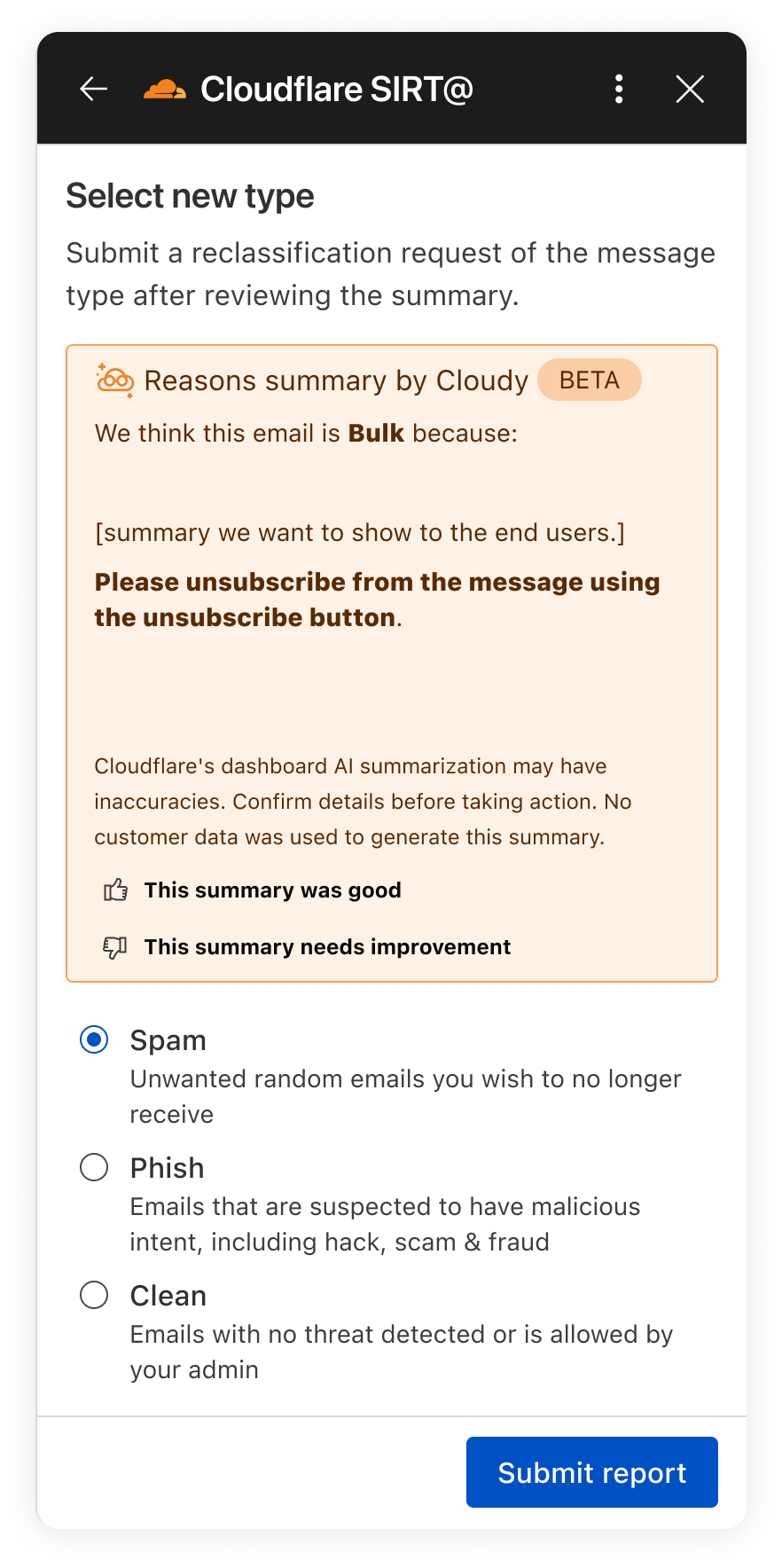
In the next month, we will be upgrading our Phishnet reporting button to extend the Cloudy summaries.

The new Phishnet screens will show Cloudy summaries.

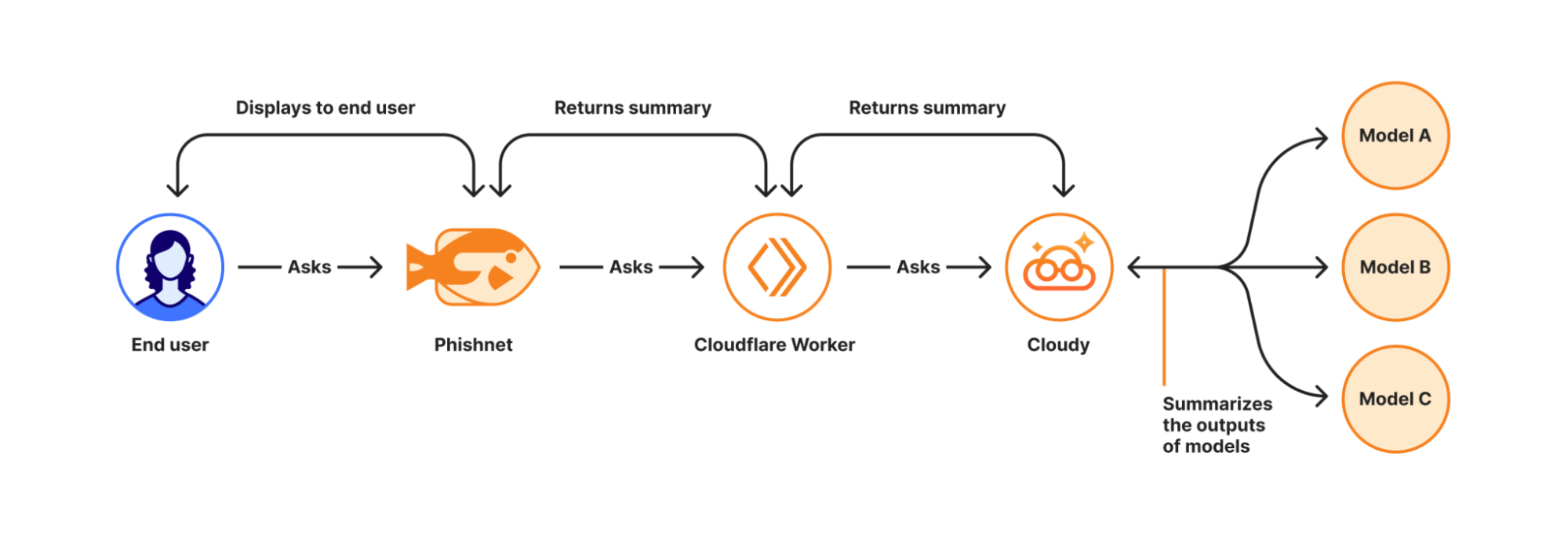
With this upgrade, end users receive a simplified, user-friendly version of Cloudy summaries at the moment they report a message. These summaries are generated in real time using Cloudflare Workers AI and run directly on Cloudflare’s global Workers platform when a user interacts with a message in Phishnet.

When a user clicks the Phishnet reporting button, the request triggers a Workers-based workflow that aggregates structured outputs from multiple detection models associated with that message. These model outputs include signals such as sender reputation, domain and infrastructure characteristics, authentication results, link and content analysis, and behavioral indicators collected during message processing.

The aggregated signals are then passed to Workers AI, where a series of purpose-built prompts generate a natural language explanation. Each prompt is designed to transform low-level detection outputs into a concise and human-readable summary. This process focuses on explanation rather than classification and does not alter the original disposition of the message.

How Cloudy transforms detections into clear explanations.

For this experience, we intentionally redesigned the summaries compared to those shown to administrators in the Cloudflare dashboard. During testing, we found that admin-focused summaries often relied on technical concepts that were difficult for non-technical users to interpret. Terms such as ASNs, IP reputation, or authentication failures required translation. 

To ensure end users can understand the summaries, Phishnet emphasizes plain-language explanations while preserving the meaning of the underlying detections.

Signal

What it means

Cloudy translation for end users

SPF Fail

Sender explicitly not authorized by SPF

This email failed a sender verification check.

DKIM Fail

Message signature does not validate

The message integrity check failed, which can be a sign of tampering.

DMARC Fail

DMARC policy check failed

The sender’s domain could not confirm this email is legitimate.

Reply to Mismatch

Reply To differs from From

Replies may go to a different address than the sender shown.

Domain Age

Domain recently registered

The sender domain is newly created, which is common in phishing.

URL Low Reputation

Destination URL has poor reputation

The link destination has signals associated with risk.

Because this workflow runs on the Cloudflare Workers platform, summaries are generated with low latency and at global scale — so users receive immediate feedback at the moment of interaction. This real-time context allows users to better understand why an email may be risky or why it appears safe before deciding whether to escalate it to the SOC.

We are currently beta testing this experience with Microsoft customers to ensure the summaries are accurate and reliable. Cloudy summaries are not trained on customer data. We are also applying additional validation to ensure the generated explanations do not hallucinate. Accuracy is critical at this stage as incorrect guidance could introduce real security risk.

Following the beta period, we plan to expand access to all Microsoft users. We will also bring similar upgrades to the Phishnet sidebar for Google Workspace users later in 2026.

Your CASB findings, explained with Cloudy

But helping end users better understand what makes an email risky is only part of the story. We are also applying Cloudy to the administrative side of security operations, where clarity and speed matter just as much. Beyond Phishnet, Cloudy now translates complex CASB findings into structured explanations that help security and IT teams quickly understand risk, prioritize remediation, and take confident action across their SaaS environments.

API CASB in the wild

Inside Cloudflare One, our SASE platform, CASB connects to the SaaS and cloud tools your teams already use. By talking to providers over API, CASB gives security and IT teams:

  • A consolidated view of misconfigurations, overshared files, and risky access patterns across apps like Microsoft 365, Google Workspace, Slack, Salesforce, Box, GitHub, Jira, and Confluence (CASB Integrations).

  • Continuous scanning for new issues as users collaborate, share, and adopt new tools.

  • Findings that are organized, searchable, and exportable for triage and reporting.

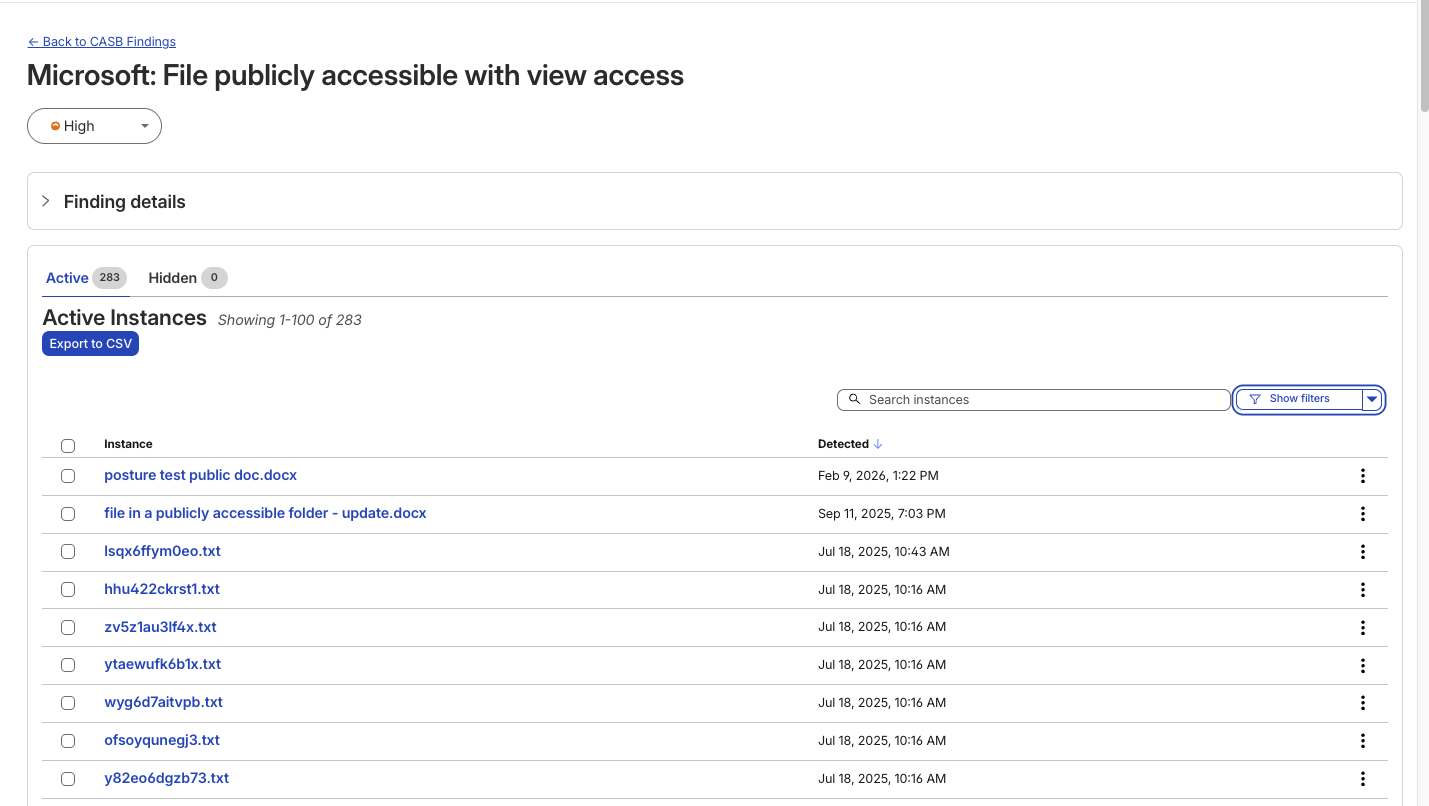
A typical CASB Findings page showing detections for a Microsoft 365 finding.

Making SaaS security straightforward

Until now, understanding what exactly triggered a CASB Finding — the detections that CASB makes across connected SaaS integrations — has been a black box. While the information was there to put together an explanation of why that file, that user, that configuration was triggering a CASB Finding Type, it wasn’t exactly obvious the reason why it was ultimately detected by our system.

With the introduction of Cloudy summaries in CASB, users receive a short description of the detection rationale with the specific details of the match listed out for easy comprehension.

Unlike a simple text summary, Cloudy for CASB provides a structured breakdown designed for immediate remediation. As seen in our beta testing across different providers, from Microsoft 365 to Dropbox, the model consistently parses findings into two distinct sections:

  • Risk: It identifies exactly why the finding matters. For instance, rather than just noting a 'Suspended User,' Cloudy clarifies that this 'may indicate a compromised account or a user who should no longer have access to company data'.

  • Guidance: It offers immediate next steps. Instead of generic advice, it suggests specific actions, such as verifying if a suspension was intentional or reviewing an application's legitimacy before revoking access.

This structure ensures that analysts can understand the gravity of a finding without needing deep expertise in the specific SaaS application involved.

An example Cloudy Summary in a CASB Posture Finding.

Finding Type

Technical Signal

Cloudy Translation (Risk & Guidance)

Identity & Access

Dropbox:

Suspended User

Risk: A suspended user account may indicate a compromised account or a user who should no longer have access to company data.

Guidance: Verify that the suspension is intentional and that the user's access has been properly revoked.

Shadow IT

Google Workspace:

Installed 3rd-party app

Risk: This installed application with Google Sign In access may pose a risk of unauthorized access to user data.

Guidance: Review the application's legitimacy and necessity, and consider revoking access if it is no longer needed.

Email Security

Microsoft 365:

Domain DMARC record not present

Risk: The absence of a DMARC record may leave the domain vulnerable to email spoofing and phishing attacks.

Guidance: Configure a DMARC record for the domain to specify how to handle unauthenticated emails.

Data Loss Prevention

Microsoft 365:

File publicly accessible + DLP Match

Risk: This file being shared publicly with edit access may allow unauthorized modifications... especially given the potential sensitive content indicated by the DLP Profile match.

Guidance: Review the file's content... and consider restricting access if necessary.

We know that when it comes to our customers getting to the bottom of identified security issues, time is of the essence. We believe that any amount of unnecessary uncertainty or lack of clarity around what’s going wrong just puts more time between an imperfect state and one that is more secure.

We built this feature on the same privacy-first foundations as all products at Cloudflare. Cloudy summaries in CASB are generated using Cloudflare Workers AI, ensuring that your data remains within our secure infrastructure during analysis. The models are not trained on your SaaS data, and the summaries are generated ephemerally to aid in triage. This allows your team to leverage the speed of AI without exposing sensitive internal documents or configurations to public models.

What’s next

For Email Security, we will continue to expand how Cloudy supports both administrators and end users. Our focus is on delivering clearer explanations, better in context guidance, and deeper integration into daily workflows.

For CASB, we’re excited to look for opportunities where Cloudy can make it even easier for CASB administrators to understand what’s going on across their cloud and SaaS apps. Keep an eye out as we look to expand Cloudy coverage to allow administrators to query their findings using natural language, further reducing the time it takes to identify and remediate risks.

Looking ahead, this includes richer explanations for additional detection types, tighter feedback loops between user actions and detections, and continued improvements to how users and SOC teams collaborate through Phishnet. Our goal is to make Cloudy a core part of how organizations understand, trust, and act on email security decisions.

We provide all organizations (whether a Cloudflare customer or not) with free access to our Retro Scan tool, allowing them to use our predictive AI models to scan existing inbox messages in Microsoft 365. 

Retro Scan will detect and highlight any threats found, enabling organizations to remediate them directly in their email accounts. With these insights, organizations can implement further controls, either using Cloudflare Email Security or their preferred solution, to prevent similar threats from reaching their inboxes in the future.

If you are interested in how Cloudflare can help secure your inboxes, sign up for a phishing risk assessment here.

From reactive to proactive: closing the phishing gap with LLMs

Email security has always been defined by impermanence. It is a perpetual call-and-response arms race, where defenses are only as strong as the last bypass discovered and attackers iterate relentlessly for even marginal gains. Every control we deploy eventually becomes yesterday’s solution.

What makes this challenge especially difficult is that our biggest weaknesses are, by definition, invisible.

This problem is best illustrated by a classic example from World War II. Mathematician Abraham Wald was tasked with helping Allied engineers decide where to reinforce bomber aircraft. Engineers initially focused on the bullet holes visible on planes returning from missions. Wald pointed out the flaw: they were reinforcing the areas where planes could already take damage and survive. The true vulnerabilities were on the planes that never came back.

Email security faces an identical hurdle: our detection gaps are unseen. By integrating LLMs, we advance email phishing protection and move from reactive to proactive detection improvement.

The limits of reactive defense

Traditional email security systems improve primarily through user-reported misses. For example, if we marked a spam message as clean, customers can send us the original EML to our pipelines for our analysts to analyze and update our models. This feedback loop is necessary and valuable, but it is inherently reactive. It depends on someone noticing a failure after the fact and taking the time to report it.

That means detection improvements are often driven by what attackers already succeeded at, rather than by what they are about to exploit next.

To close this gap, we need a way to systematically observe the “planes that didn’t make it back.”

Mapping the threat landscape with LLMs

Large Language Models (LLMs) hit the mainstream market in late 2022 and early 2023, fundamentally changing how we process unstructured data. At their core, LLMs use deep learning and massive datasets to predict the next token in a sequence, allowing them to understand context and nuance. They are particularly well-suited for email security because they can read natural language and characterize complex concepts (like intent, urgency, and deception) across millions of messages.

Every day, Cloudflare processes millions of unwanted emails. Historically, it was not feasible to deeply characterize each message beyond coarse classifications. Manually mapping emails to nuanced threat vectors simply did not scale. 

Now, Cloudflare has integrated LLMs into our email security tools to identify threats before they strike. By using the power of LLMs, as we’ll describe below, we can finally see a clear and comprehensive picture of the evolving threat landscape.

Our LLM-driven categorization shows clear spikes and persistent trends across several distinct categories, including "PrizeNotification" and "SalesOutreach".

These LLM-generated tags provide Cloudflare analysts with high-fidelity signals in near real time. Tasks that previously required hours of manual investigation and complex querying can now be surfaced automatically, with relevant context attached. This directly increases the velocity at which we can build new targeted Machine Learning models or retrain existing ones to address emerging behaviors.

Because Cloudflare operates at global Internet scale, we can gather these insights earlier than ever before, often before a new technique becomes widely visible through customer-reported misses.

The Sales Outreach threat

One of the clearest patterns we’ve identified using this new intelligence is the continued persistence of malicious messages structured to look like Sales Outreach-style phishing. These emails are designed to mimic legitimate B2B communication, often presenting opportunities to purchase or receive "special deals" on unique items or services, to lure targets into clicking malicious links or providing credentials.

Once LLM categorization surfaced Sales Outreach as a dominant vector, we moved from broad visibility to targeted data collection. 

Using LLM-generated tags, we began systematically isolating messages that exhibited Sales Outreach characteristics across our global dataset. This produced a continuously growing, high-precision corpus of real-world examples, including confirmed malicious messages as well as borderline cases that traditional systems struggled to classify. From this corpus, we built a dedicated training pipeline.

First, we curated training data by grouping messages based on shared linguistic and structural traits identified by the LLMs. These traits included persuasive framing, manufactured urgency, transactional language, and subtle forms of social proof.

Next, we focused feature extraction on sentiment and intent rather than static indicators. The model learns how requests are phrased, how credibility is established, and how calls to action are embedded within otherwise normal business conversations.

Finally, we trained a purpose-built sentiment analysis model optimized specifically for Sales Outreach behavior. This avoided overloading a general phishing classifier and allowed us to tune precision and recall for this threat class.

Turning language into enforcement

The output of this model is a risk score that reflects how closely a message aligns with known Sales Outreach attack patterns. That score is evaluated alongside existing signals such as sender reputation, link behavior, and historical context to determine whether a message should be blocked, quarantined, or allowed.

This process is continuous. As attackers adapt their language, newly observed messages are fed back into the pipeline and used to refine the model without waiting for large volumes of user-reported misses. LLMs act as the discovery layer by surfacing new linguistic variants, while the specialized model performs fast and scalable enforcement.

This is what an all-out offensive looks like in practice. It is a feedback loop where large-scale language understanding drives focused, high-precision detection. The result is earlier intervention against a threat class that thrives on subtlety, and fewer malicious sales emails reaching the inbox.

Results of the undertaking

The visibility unlocked by LLM-driven mapping fundamentally changed how we improve detections. Instead of waiting for attackers to succeed and relying on downstream user reports, we gained the ability to identify systemic gaps earlier and address them at the source. This shift from reactive remediation to proactive reinforcement translated directly into measurable customer impact.

The most immediate signal of success was a marked reduction in customer friction. Sales Outreach–related phishing has historically generated a high volume of user-reported misses, largely because these messages closely resemble legitimate business communication and often evade traditional rule-based or reputation-driven systems. As our targeted models came online and were continuously refined using LLM-derived insights, fewer of these messages reached end users in the first place.

The data reflects this change clearly. Average daily Sales Outreach submissions — messages that we labeled as clean but were in fact Sales Outreach phishing emails, flagged by end users — dropped from 965 in Q3 2025 to 769 in Q4 2025, representing a 20.4% reduction in reported misses in a single quarter.

This reduction is not just a metric improvement; it represents thousands fewer disruptive moments per day for security teams and end users alike. Each avoided submission is a phishing attempt that was stopped before it could erode trust, consume analyst time, or force a user to make a security judgment mid-workflow. We have seen this trend continue in Q1 of 2026 with average daily submissions decreasing by two-thirds.

In effect, LLMs allowed us to “see” the planes that never made it back. By illuminating previously invisible failure modes, we were able to reinforce defenses precisely where attackers were concentrating their efforts. The result is a system that improves not only detection rates, but also the day-to-day experience of the people relying on it.

The next front in the arms race

Our work with LLMs is just beginning. 

To stay ahead of the next evolution of attacks, we are moving toward a model of total environmental awareness by refining LLM specificity to extract forensic-level detail from every interaction. This granular mapping allows us to identify specific tactical signatures rather than relying on broad labels. 

Simultaneously, we are deploying specialized machine learning models purpose-built to hunt for emerging, high-obfuscation vectors at the "fringes" that traditional defenses miss. By leveraging this real-time LLM data as a strategic compass, we can shift our human expertise away from known noise and toward the critical gaps where the next strike is likely to land.

By illuminating the "planes that didn't make it back," we are doing more than just reacting to missed email; we are systematically narrowing the battlefield. In the email arms race, the advantage belongs to the side that can see the invisible first.

Ready to enhance your email security?

We provide all organizations (whether a Cloudflare customer or not) with free access to our Retro Scan tool, allowing them to use our predictive AI models to scan existing inbox messages in Microsoft 365. 

Retro Scan will detect and highlight any threats found, enabling organizations to remediate them directly in their email accounts. With these insights, organizations can implement further controls, either using Cloudflare Email Security or their preferred solution, to prevent similar threats from reaching their inboxes in the future.

If you are interested in how Cloudflare can help secure your inboxes, sign up for a phishing risk assessment here.

15 years of helping build a better Internet: a look back at Birthday Week 2025

Cloudflare launched fifteen years ago with a mission to help build a better Internet. Over that time the Internet has changed and so has what it needs from teams like ours.  In this year’s Founder’s Letter, Matthew and Michelle discussed the role we have played in the evolution of the Internet, from helping encryption grow from 10% to 95% of Internet traffic to more recent challenges like how people consume content. 

We spend Birthday Week every year releasing the products and capabilities we believe the Internet needs at this moment and around the corner. Previous Birthday Weeks saw the launch of IPv6 gateway in 2011,  Universal SSL in 2014, Cloudflare Workers and unmetered DDoS protection in 2017, Cloudflare Radar in 2020, R2 Object Storage with zero egress fees in 2021,  post-quantum upgrades for Cloudflare Tunnel in 2022, Workers AI and Encrypted Client Hello in 2023. And those are just a sample of the launches.

This year’s themes focused on helping prepare the Internet for a new model of monetization that encourages great content to be published, fostering more opportunities to build community both inside and outside of Cloudflare, and evergreen missions like making more features available to everyone and constantly improving the speed and security of what we offer.

We shipped a lot of new things this year. In case you missed the dozens of blog posts, here is a breakdown of everything we announced during Birthday Week 2025. 

Monday, September 22

What In a sentence …
Help build the future: announcing Cloudflare’s goal to hire 1,111 interns in 2026 To invest in the next generation of builders, we announced our most ambitious intern program yet with a goal to hire 1,111 interns in 2026.
Supporting the future of the open web: Cloudflare is sponsoring Ladybird and Omarchy To support a diverse and open Internet, we are now sponsoring Ladybird (an independent browser) and Omarchy (an open-source Linux distribution and developer environment).
Come build with us: Cloudflare’s new hubs for startups We are opening our office doors in four major cities (San Francisco, Austin, London, and Lisbon) as free hubs for startups to collaborate and connect with the builder community.
Free access to Cloudflare developer services for non-profit and civil society organizations We extended our Cloudflare for Startups program to non-profits and public-interest organizations, offering free credits for our developer tools.
Introducing free access to Cloudflare developer features for students We are removing cost as a barrier for the next generation by giving students with .edu emails 12 months of free access to our paid developer platform features.
Cap’n Web: a new RPC system for browsers and web servers We open-sourced Cap'n Web, a new JavaScript-native RPC protocol that simplifies powerful, schema-free communication for web applications.
A lookback at Workers Launchpad and a warm welcome to Cohort #6 We announced Cohort #6 of the Workers Launchpad, our accelerator program for startups building on Cloudflare.

Tuesday, September 23

What In a sentence …
Building unique, per-customer defenses against advanced bot threats in the AI era New anomaly detection system that uses machine learning trained on each zone to build defenses against AI-driven bot attacks.
Why Cloudflare, Netlify, and Webflow are collaborating to support Open Source tools To support the open web, we joined forces with Webflow to sponsor Astro, and with Netlify to sponsor TanStack.
Launching the x402 Foundation with Coinbase, and support for x402 transactions We are partnering with Coinbase to create the x402 Foundation, encouraging the adoption of the x402 protocol to allow clients and services to exchange value on the web using a common language
Helping protect journalists and local news from AI crawlers with Project Galileo We are extending our free Bot Management and AI Crawl Control services to journalists and news organizations through Project Galileo.
Cloudflare Confidence Scorecards - making AI safer for the Internet Automated evaluation of AI and SaaS tools, helping organizations to embrace AI without compromising security.

Wednesday, September 24

What In a sentence …
Automatically Secure: how we upgraded 6,000,000 domains by default Our Automatic SSL/TLS system has upgraded over 6 million domains to more secure encryption modes by default and will soon automatically enable post-quantum connections.
Giving users choice with Cloudflare’s new Content Signals Policy The Content Signals Policy is a new standard for robots.txt that lets creators express clear preferences for how AI can use their content.
To build a better Internet in the age of AI, we need responsible AI bot principles A proposed set of responsible AI bot principles to start a conversation around transparency and respect for content creators' preferences.
Securing data in SaaS to SaaS applications New security tools to give companies visibility and control over data flowing between SaaS applications.
Securing today for the quantum future: WARP client now supports post-quantum cryptography (PQC) Cloudflare’s WARP client now supports post-quantum cryptography, providing quantum-resistant encryption for traffic.
A simpler path to a safer Internet: an update to our CSAM scanning tool We made our CSAM Scanning Tool easier to adopt by removing the need to create and provide unique credentials, helping more site owners protect their platforms.

Thursday, September 25

What In a sentence …
Every Cloudflare feature, available to everyone We are making every Cloudflare feature, starting with Single Sign On (SSO), available for anyone to purchase on any plan.
Cloudflare's developer platform keeps getting better, faster, and more powerful Updates across Workers and beyond for a more powerful developer platform – such as support for larger and more concurrent Container images, support for external models from OpenAI and Anthropic in AI Search (previously AutoRAG), and more.
Partnering to make full-stack fast: deploy PlanetScale databases directly from Workers You can now connect Cloudflare Workers to PlanetScale databases directly, with connections automatically optimized by Hyperdrive.
Announcing the Cloudflare Data Platform A complete solution for ingesting, storing, and querying analytical data tables using open standards like Apache Iceberg.
R2 SQL: a deep dive into our new distributed query engine A technical deep dive on R2 SQL, a serverless query engine for petabyte-scale datasets in R2.
Safe in the sandbox: security hardening for Cloudflare Workers A deep-dive into how we’ve hardened the Workers runtime with new defense-in-depth security measures, including V8 sandboxes and hardware-assisted memory protection keys.
Choice: the path to AI sovereignty To champion AI sovereignty, we've added locally-developed open-source models from India, Japan, and Southeast Asia to our Workers AI platform.
Announcing Cloudflare Email Service’s private beta We announced the Cloudflare Email Service private beta, allowing developers to reliably send and receive transactional emails directly from Cloudflare Workers.
A year of improving Node.js compatibility in Cloudflare Workers There are hundreds of new Node.js APIs now available that make it easier to run existing Node.js code on our platform.

Friday, September 26

What In a sentence …
Cloudflare just got faster and more secure, powered by Rust We have re-engineered our core proxy with a new modular, Rust-based architecture, cutting median response time by 10ms for millions.
Introducing Observatory and Smart Shield New monitoring tools in the Cloudflare dashboard that provide actionable recommendations and one-click fixes for performance issues.
Monitoring AS-SETs and why they matter Cloudflare Radar now includes Internet Routing Registry (IRR) data, allowing network operators to monitor AS-SETs to help prevent route leaks.
An AI Index for all our customers We announced the private beta of AI Index, a new service that creates an AI-optimized search index for your domain that you control and can monetize.
Introducing new regional Internet traffic and Certificate Transparency insights on Cloudflare Radar Sub-national traffic insights and Certificate Transparency dashboards for TLS monitoring.
Eliminating Cold Starts 2: shard and conquer We have reduced Workers cold starts by 10x by implementing a new "worker sharding" system that routes requests to already-loaded Workers.
Network performance update: Birthday Week 2025 The TCP Connection Time (Trimean) graph shows that we are the fastest TCP connection time in 40% of measured ISPs – and the fastest across the top networks.
How Cloudflare uses performance data to make the world’s fastest global network even faster We are using our network's vast performance data to tune congestion control algorithms, improving speeds by an average of 10% for QUIC traffic.
Code Mode: the better way to use MCP It turns out we've all been using MCP wrong. Most agents today use MCP by exposing the "tools" directly to the LLM. We tried something different: Convert the MCP tools into a TypeScript API, and then ask an LLM to write code that calls that API. The results are striking.

Come build with us!

Helping build a better Internet has always been about more than just technology. Like the announcements about interns or working together in our offices, the community of people behind helping build a better Internet matters to its future. This week, we rolled out our most ambitious set of initiatives ever to support the builders, founders, and students who are creating the future.

For founders and startups, we are thrilled to welcome Cohort #6 to the Workers Launchpad, our accelerator program that gives early-stage companies the resources they need to scale. But we’re not stopping there. We’re opening our doors, literally, by launching new physical hubs for startups in our San Francisco, Austin, London, and Lisbon offices. These spaces will provide access to mentorship, resources, and a community of fellow builders.

We’re also investing in the next generation of talent. We announced free access to the Cloudflare developer platform for all students, giving them the tools to learn and experiment without limits. To provide a path from the classroom to the industry, we also announced our goal to hire 1,111 interns in 2026 — our biggest commitment yet to fostering future tech leaders.

And because a better Internet is for everyone, we’re extending our support to non-profits and public-interest organizations, offering them free access to our production-grade developer tools, so they can focus on their missions.

Whether you're a founder with a big idea, a student just getting started, or a team working for a cause you believe in, we want to help you succeed.

Until next year

Thank you to our customers, our community, and the millions of developers who trust us to help them build, secure, and accelerate the Internet. Your curiosity and feedback drive our innovation.

It’s been an incredible 15 years. And as always, we’re just getting started!

(Watch the full conversation on our show ThisWeekinNET.com about what we launched during Birthday Week 2025 here.)

Unmasking the Unseen: Your Guide to Taming Shadow AI with Cloudflare One

The digital landscape of corporate environments has always been a battleground between efficiency and security. For years, this played out in the form of "Shadow IT" — employees using unsanctioned laptops or cloud services to get their jobs done faster. Security teams became masters at hunting these rogue systems, setting up firewalls and policies to bring order to the chaos.

But the new frontier is different, and arguably far more subtle and dangerous.

Imagine a team of engineers, deep into the development of a groundbreaking new product. They're on a tight deadline, and a junior engineer, trying to optimize his workflow, pastes a snippet of a proprietary algorithm into a popular public AI chatbot, asking it to refactor the code for better performance. The tool quickly returns the revised code, and the engineer, pleased with the result, checks it in. What they don't realize is that their query, and the snippet of code, is now part of the AI service’s training data, or perhaps logged and stored by the provider. Without anyone noticing, a critical piece of the company's intellectual property has just been sent outside the organization's control, a silent and unmonitored data leak.

This isn't a hypothetical scenario. It's the new reality. Employees, empowered by these incredibly powerful AI tools, are now using them for everything from summarizing confidential documents to generating marketing copy and, yes, even writing code. The data leaving the company in these interactions is often invisible to traditional security tools, which were never built to understand the nuances of a browser tab interacting with a large language model. This quiet, unmanaged usage is "Shadow AI," and it represents a new, high-stakes security blind spot.

To combat this, we need a new approach—one that provides visibility into this new class of applications and gives security teams the control they need, without impeding the innovation that makes these tools so valuable.

Shadow AI reporting

This is where the Cloudflare Shadow IT Report comes in. It’s not a list of threats to be blocked, but rather a visibility and analytics tool designed to help you understand the problem before it becomes a crisis. Instead of relying on guesswork or trying to manually hunt down every unsanctioned application, Cloudflare One customers can use the insights from their traffic to gain a clear, data-driven picture of their organization's application usage.

The report provides a detailed, categorized view of your application activity, and is easily narrowed down to AI activity. We’ve leveraged our network and threat intelligence capabilities to identify and classify AI services, identifying general-purpose models like ChatGPT, code-generation assistants like GitHub Copilot, and specialized tools used for marketing, data analysis, or other content creation, like Leonardo.ai. This granular view allows security teams to see not just that an employee is using an AI app, but which AI app, and what users are accessing it.

How we built it

Sharp eyed users may have noticed that we’ve had a shadow IT feature for a while — so what changed? While Cloudflare Gateway, our secure web gateway (SWG), has recorded some of this data for some time, users have wanted deeper insights and reporting into their organization's application usage. Cloudflare Gateway processes hundreds of millions of rows of app usage data for our biggest users daily, and that scale was causing issues with queries into larger time windows. Additionally, the original implementation lacked the filtering and customization capabilities to properly investigate the usage of AI applications. We knew this was information that our customers loved, but we weren’t doing a good enough job of showing it to them.

Solving this was a cross-team effort requiring a complete overhaul by our analytics and reporting engineers. You may have seen our work recently in this July 2025 blog post detailing how we adopted TimescaleDB to support our analytics platform, unlocking our analytics, allowing us to aggregate and compress long term data to drastically improve query performance. This solves the issue we originally faced around our scale, letting our biggest customers query their data for long time periods. Our crawler collects the original HTTP traffic data from Gateway, which we store into a Timescale database.

Once the data are in our database, we built specific, materialized views in our database around the Shadow IT and AI use case to support analytics for this feature. Whereas the existing HTTP analytics we built are centered around the HTTP requests on an account, these specific views are centered around the information relevant to applications, for example: Which of my users are going to unapproved applications? How much bandwidth are they consuming? Is there an end-user in an unexpected geographical location interacting with an unreviewed application? What devices are using the most bandwidth?

Over the past year, the team has defined a set framework for the analytics we surface. Our timeseries graphs and top-n graphs are all filterable by duration and the relevant data points shown, allowing users to drill down to specific data points and see the details of their corporate traffic. We overhauled Shadow IT by examining the data we had and researching how AI applications were presenting visibility challenges for customers. From there we leveraged our existing framework and built the Shadow IT dashboard. This delivered the application-level visibility that we know our customers needed.

How to use it

1. Proxy your traffic with Gateway

The core of the system is Cloudflare Gateway, an in-line filter and proxy for all your organization's Internet traffic, regardless of where your users are. When an employee tries to access an AI application, their traffic flows through Cloudflare’s global network. Cloudflare can inspect the traffic, including the hostname, and map the traffic to our application definitions. TLS inspection is optional for Gateway customers, but it is required for ShadowIT analytics.

Interactions are logged and tied to user identity, device posture, bandwidth consumed and even the geographic location. This rich context is crucial for understanding who is using which AI tools, when, and from where.

2. Review application use

All this granular data is then presented in an our Shadow IT Report within your Cloudflare One dashboard. Simply filter for AI applications so you can:

  • High-Level Overview: Get an immediate sense of your organization's AI adoption. See the top AI applications in use, overall usage trends, and the volume of data being processed. This will help you identify and target your security and governance efforts.

  • Granular Drill-Downs: Need more detail? Click on any AI application to see specific users or groups accessing it, their usage frequency, location, and the amount of data transferred. This detail helps you pinpoint teams using AI around the company, as well as how much data is flowing to those applications.

ShadowIT analytics dashboard

3. Mark application approval statuses

We understand that not all AI tools are created equal, and your organization's comfort level will vary. The Shadow AI Report introduces a flexible framework for Application Approval Status, allowing you to formally categorize each detected AI application:

  • Approved: These are the AI applications that have passed your internal security vetting, comply with your policies, and are officially sanctioned for use. 

  • Unapproved: These are the red-light applications. Perhaps they have concerning data privacy policies, a history of vulnerabilities, or simply don’t align with your business objectives.

  • In Review: For those gray-area applications, or newly discovered tools, this status lets your teams acknowledge their usage while conducting thorough due diligence. It buys you time to make an informed decision without immediate disruption.

Review and mark application statuses in the dashboard

4. Enforce policies

These approval statuses come alive when integrated with Cloudflare Gateway policies. This allows you to automatically enforce your AI decisions at the edge of Cloudflare’s network, ensuring consistent security for every employee, anywhere they work.

Here’s how you can translate your decisions into inline protection:

  • Block unapproved AI: The simplest and most direct action. Create a Gateway HTTP policy that blocks all traffic to any AI application marked as "Unapproved." This immediately shuts down risky data exfiltration.

  • Limit "In Review" exposure: For applications still being assessed, you might not want a hard block, but rather a soft limit on potential risks:

  • Data Loss Prevention (DLP): Cloudflare DLP inspects and analyzes traffic for indicators of sensitive data (e.g., credit card numbers, PII, internal project names, source code) and can then block the transfer. By applying DLP to "In Review" AI applications, you can prevent AI prompts containing this proprietary data, as well as notify the user why the prompt was blocked. This could have saved our poor junior engineer from their well-intended mistake.. 

  • Restrict Specific Actions: Block only file uploads allowing basic interaction but preventing mass data egress. 

  • Isolate Risky Sessions: Route traffic for "In Review" applications through Cloudflare's Browser Isolation. Browser Isolation executes the browser session in a secure, remote container, isolating all data interactions from your corporate network. With it, you can control file uploads, clipboard actions, reduce keyboard inputs and more, reducing interaction with the application while you review it.

  • Audit "Approved" usage: Even for AI tools you trust, you might want to log all interactions for compliance auditing or apply specific data handling rules to ensure ongoing adherence to internal policies.

This workflow enables your team to consistently audit your organization’s AI usage and easily update policies to quickly and easily reduce security risk.

Forensics with Cloudflare Log Explorer

While the Shadow AI Report provides excellent insights, security teams often need to perform deeper forensic investigations. For these advanced scenarios, we offer Cloudflare Log Explorer.

Log Explorer allows you to store and query your Cloudflare logs directly within the Cloudflare dashboard or via API, eliminating the need to send massive log volumes to third-party SIEMs for every investigation. It provides raw, unsampled log data with full context, enabling rapid and detailed analysis.

Log Explorer customers can dive into Shadow AI logs with pre-populated SQL queries from Cloudflare Analytics, enabling deeper investigations into AI usage:

Log Search’s SQL query interface

How to investigate Shadow AI with Log Explorer:

  • Trace Specific User Activity: If the Shadow AI Report flags a user with high activity on an "In Review" or "Unapproved" AI app, you can jump into Log Explorer and query by user, application category, or specific AI services. 

  • Analyze Data Exfiltration Attempts: If you have DLP policies configured, you can search for DLP matches in conjunction with AI application categories. This helps identify attempts to upload sensitive data to AI applications and pinpoint exactly what data was being transmitted.

  • Identify Anomalous AI Usage: The Shadow AI Report might show a spike in usage for a particular AI application. In Log Explorer, you can filter by application status (In Review or Unapproved) for a specific time range. Then, look for unusual patterns, such as a high number of requests from a single source IP address, or unexpected geographic origins, which could indicate compromised accounts or policy evasion attempts.

If AI visibility is a challenge for your organization, the Shadow AI Report is available now for Cloudflare One customers, as part of our broader shadow IT discovery capabilities. Log in to your dashboard to start regaining visibility and shaping your AI governance strategy today. 

Ready to modernize how you secure access to AI apps? Reach out for a consultation with our Cloudflare One security experts about how to regain visibility and control. 

Or if you’re not ready to talk to someone yet,  nearly every feature in Cloudflare One is available at no cost for up to 50 users. Many of our largest enterprise customers start by exploring the products themselves on our free plan, and you can get started here.

If you’ve got feedback or want to help shape how Cloudflare enhances visibility across shadow AI, please consider joining our user research program

❌