Visualização de leitura

Microsoft Patch Still Leaves 1,300 SharePoint Servers Exposed

More than 1,300 internet-exposed SharePoint servers remain unpatched against CVE-2026-32201, a spoofing flaw Microsoft says was exploited as a zero-day.

The post Microsoft Patch Still Leaves 1,300 SharePoint Servers Exposed appeared first on TechRepublic.

Microsoft Patch Tuesday for April 2026 - Snort Rule and Prominent Vulnerabilities

Microsoft Patch Tuesday for April 2026 - Snort Rule and Prominent Vulnerabilities

Microsoft has released its monthly security update for April 2026, which includes 165 vulnerabilities affecting a wide range of products, including eight Microsoft marked as “critical.” 

CVE-2026-23666 is a critical Denial of Service (DoS) vulnerability that affects the .NET framework. Successful exploitation could allow the attacker to deny service over the network.

CVE-2026-32157 is a critical use after free vulnerability in the Remote Desktop Client that results in code execution. Attack requires an authorized user on the client to connect to a malicious server, which could result in code execution on the client. 

CVE-2026-32190 is a critical user after free vulnerability in Microsoft Office that can result in local code execution. Attacker is remote but attack is carried out locally.  Code from the local machine needs to be executed to exploit the vulnerability. 

CVE-2026-33114 is a critical untrusted pointer deference vulnerability in Microsoft Office Word that could allow the attacker to execute code locally. Code from the local machine needs to be executed to exploit this vulnerability.

CVE-2026-33115 is a critical use after free vulnerability in Microsoft Office word that can result in local code execution. Similar to CVE-2026-33114 and CVE-2026-32190 the attacker is remote, but code needs to be executed from the local machine to exploit the vulnerability.

CVE-2026-33824 is a critical double free vulnerability in the Widows Internet Key Exchange (IKE) extension, allowing remote code execution. An unauthenticated attacker can send specially crafted packets to a Windows machine with IKE version 2 enabled to potentially enable remote code execution. Additional mitigations can include blocking inbound traffic on UDP ports 500 and 4500 if IKE is not in use.

CVE-2026-33826 is a critical improper input validation in Windows Active Directory that can result in code execution over an adjacent network. Requires an authenticated attacker to send specially crafted RPC calls to an RPC host. Can result in remote code execution. Note that successful exploitation requires the attacker be in the same restricted Active Directory domain as the target system.

CVE-2026-33827 is a critical race condition vulnerability in Windows TCP/IP that can result in remote code execution. Successful exploitation requires the attacker to win a race condition along with additional actions prior to exploitation to prepare the target environment. An unauthenticated actor can send specially crafted IPv6 packets to a Windows node where IPSec is enabled to potentially achieve remote code execution. 

CVE-2026-32201 is an important improper input validation vulnerability in Microsoft Office SharePoint that can allow an unauthorized user to perform spoofing. An attacker that successfully exploits this vulnerability could view some sensitive information and make changes to disclosed information. This vulnerability has already been detected as being exploited in the wild.

The majority of the remaining vulnerabilities are labeled as important with a two moderate and one low vulnerability also being patched.  Talos would like to highlight the several additional  important vulnerabilities that Microsoft has deemed as “more likely” to be exploited.

·      CVE-2026-0390 - UEFI Secure Boot Security Feature Bypass Vulnerability

·      CVE-2026-26151 - Remote Desktop Spoofing Vulnerability

·      CVE-2026-26169 - Windows Kernel Memory Information Disclosure Vulnerability

·      CVE-2026-26173 - Windows Ancillary Function Driver for WinSock Elevation of Privilege Vulnerability

·      CVE-2026-26177 - Windows Ancillary Function Driver for WinSock Elevation of Privilege Vulnerability

·      CVE-2026-26182 - Windows Ancillary Function Driver for WinSock Elevation of Privilege Vulnerability

·      CVE-2026-27906 - Windows Hello Security Feature Bypass Vulnerability

·      CVE-2026-27908 - Windows TDI Translation Driver (tdx.sys) Elevation of Privilege Vulnerability

·      CVE-2026-27909 - Windows Search Service Elevation of Privilege Vulnerability

·      CVE-2026-27913 - Windows BitLocker Security Feature Bypass Vulnerability

·      CVE-2026-27914 - Microsoft Management Console Elevation of Privilege Vulnerability

·      CVE-2026-27921 - Windows TDI Translation Driver (tdx.sys) Elevation of Privilege Vulnerability

·      CVE-2026-27922 - Windows Ancillary Function Driver for WinSock Elevation of Privilege Vulnerability

·      CVE-2026-32070 - Windows Common Log File System Driver Elevation of Privilege Vulnerability

·      CVE-2026-32075 - Windows UPnP Device Host Elevation of Privilege Vulnerability

·      CVE-2026-32093 - Windows Function Discovery Service (fdwsd.dll) Elevation of Privilege Vulnerability

·      CVE-2026-32152 - Desktop Window Manager Elevation of Privilege Vulnerability

·      CVE-2026-32154 - Desktop Window Manager Elevation of Privilege Vulnerability

·      CVE-2026-32155 - Desktop Window Manager Elevation of Privilege Vulnerability

·      CVE-2026-32162 - Windows COM Elevation of Privilege Vulnerability

·      CVE-2026-32202 - Windows Shell Spoofing Vulnerability

·      CVE-2026-32225 - Windows Shell Security Feature Bypass Vulnerability

·      CVE-2026-33825 - Microsoft Defender Elevation of Privilege Vulnerability

A complete list of all other vulnerabilities Microsoft disclosed this month is available on its update page. In response to these vulnerability disclosures, Talos is releasing a new Snort rule set that detects attempts to exploit some of them. Please note that additional rules may be released at a future date and current rules are subject to change pending additional information. Cisco Security Firewall customers should use the latest update to their ruleset by updating their SRU. Open-source Snort Subscriber Rule Set customers can stay up to date by downloading the latest rule pack available for purchase on Snort.org.  

The rules included in this release that protect against the exploitation of many of these vulnerabilities are: 1:65902-1:65903, 1:66242-1:66251, 1:66259-1:66260, 1:66264-1:66267, 1:66275-1:66276 

The following Snort 3 rules are also available: 1:301398, 1:301468-1:3101472, 1:301475, 1:301477-1:301478, 1:301480

April Patch Tuesday fixes two zero-days, including one under active attack

This month’s Patch Tuesday addresses 167 vulnerabilities, including two zero-days that could lead to system compromise, data exposure, and privilege escalation.

The post April Patch Tuesday fixes two zero-days, including one under active attack appeared first on Security Boulevard.

Microsoft Patch Tuesday for April 2026 fixed actively exploited SharePoint zero-day

Microsoft Patch Tuesday security updates for April 2026 fixed 165 vulnerabilities, including an actively exploited SharePoint zero-day.

Microsoft Patch Tuesday security updates addressed 165 vulnerabilities, making it one of the largest updates by CVE count. One of the most interesting flaws fixed by the IT giant is a critical SharePoint zero-day, tracked as CVE-2026-32201, already exploited in attacks in the wild.

Security experts highlight the scale and urgency of this release, urging organizations to apply patches quickly to reduce exposure and prevent potential compromise from actively targeted flaws.

Eight of these flaws are rated Critical, two are rated as Moderate, and the rest are rated Important in severity.

CVE-2026-32201 (CVSS score of 6.5) is a spoofing vulnerability in Microsoft SharePoint Server, likely related to cross-site scripting (XSS). While details are limited, it could allow attackers to view or modify exposed information. Microsoft has not disclosed how widespread exploitation is, but given the potential impact, organizations, especially those with internet-facing SharePoint servers—should prioritize testing and applying the patch quickly.

“Improper input validation in Microsoft Office SharePoint allows an unauthorized attacker to perform spoofing over a network.” reads the advisory. “An attacker who successfully exploited the vulnerability could view some sensitive information (Confidentiality), make changes to disclosed information (Integrity), but cannot limit access to the resource (Availability).” “Exploitation Detected”

  • CVE-2026-33825 (CVSS score: 7.8) – Microsoft Defender Elevation of Privilege Vulnerability
    This publicly disclosed flaw can allow privilege escalation, though current exploits may face reliability issues. Despite that, it represents a real risk. Organizations relying on Defender should test and deploy the patch quickly to reduce exposure.
  • CVE-2026-33827 (CVSS score: 8.1) – Windows TCP/IP Remote Code Execution Vulnerability
    This flaw enables remote, unauthenticated attackers to execute code without user interaction, making it potentially wormable on systems with IPv6 and IPSec enabled. Although it involves a race condition, such bugs are often exploitable. Prompt patching is strongly recommended.
  • CVE-2026-33824 (CVSS score: 9.8) – Windows Internet Key Exchange (IKE) Service Extensions Remote Code Execution Vulnerability
    This critical flaw in Windows IKE service extensions could allow remote attackers to execute code on affected systems. Systems with IKE enabled are at risk, though blocking UDP ports 500 and 4500 can reduce exposure from external threats. However, internal attackers may still exploit it for lateral movement, so rapid patching is strongly recommended.

“By my count, this is the second-largest monthly release in Microsoft’s history. There are many things we could speculate on to justify the size, but if Microsoft is like the other programs out there (including ours), they are likely seeing a rise in submissions found by AI tools. For us, our incoming rate has essentially tripled, making triage a challenge, to say the least.” reported ZDI. “Whatever the reason, we have a lot of bugs to deal with this month. I should also point out that the Pwn2Own Berlin occurs next month, and it’s typical for vendors to patch as much as they can before the event.”

The full list of vulnerabilities addressed by Microsoft is available here.

Follow me on Twitter: @securityaffairs and Facebook and Mastodon

Pierluigi Paganini

(SecurityAffairs – hacking, Microsoft Patch Tuesday)

April Patch Tuesday fixes two zero-days, including one under active attack

This month’s patch Tuesday looks to remediate 167 security vulnerabilities including two zero-day vulnerabilities, one of which is known to be actively exploited in the wild.

This makes April one of those months where “Patch Tuesday” looks more like “patch the entire stack,” from servers and endpoints to network gear, browsers, and mobile devices. But the alternative is leaving a long list of well‑documented doors open for attackers to walk through.

Microsoft defines a zero-day as “a flaw in software for which no official patch or security update is available yet.” In this case, one being actively exploited and the other is publicly disclosed, which makes both high priorities on your to-do list.

So, let’s have a look at those two zero-days.

The vulnerability tracked as CVE-2026-32201 (CVSS score 6.5 out of 10)  is an improper input validation issue in Microsoft Office SharePoint that allows an unauthorized attacker to perform spoofing over a network.

An attacker who successfully exploited this vulnerability could view some sensitive information, and make changes to disclosed information, but cannot limit access to the resource. In simple terms, it could be used to spread false information in a trusted SharePoint environment. This vulnerability is being exploited in the wild.

The second zero-day this month, tracked as CVE-2026-33825 with a CVSS score of 7.8 out of 10, is an elevation of privilege (EoP) vulnerability in Microsoft Defender’s anti-malware platform. It allows a local attacker to escalate their privileges to SYSTEM, effectively giving them the keys to the kingdom on the affected system. Once at that level, an attacker can disable security tools, install persistent malware, harvest credentials, and move laterally to other systems in the same network. This vulnerability is publicly disclosed, which often lowers the barrier for cybercriminals to start exploiting it.

In addition, BleepingComputer warns:

“Microsoft has also fixed multiple remote code execution bugs in Microsoft Office (Word and Excel) that can be executed via the preview pane or by opening malicious documents. Therefore, users should prioritize updating Microsoft Office as soon as possible, especially if they commonly receive attachments.”

How to apply fixes and check if you’re protected

These updates fix security problems and keep your Windows PC protected. Here’s how to make sure you’re up to date:

1. Open Settings

  • Click the Start button (the Windows logo at the bottom left of your screen).
  • Click on Settings (it looks like a little gear).

2. Go to Windows Update

  • In the Settings window, select Windows Update (usually at the bottom of the menu on the left).

3. Check for updates

  • Click the button that says Check for updates.
  • Windows will search for the latest Patch Tuesday updates.
  • If you have selected to get the latest updates as soon as they’re available, you may see this under More options.
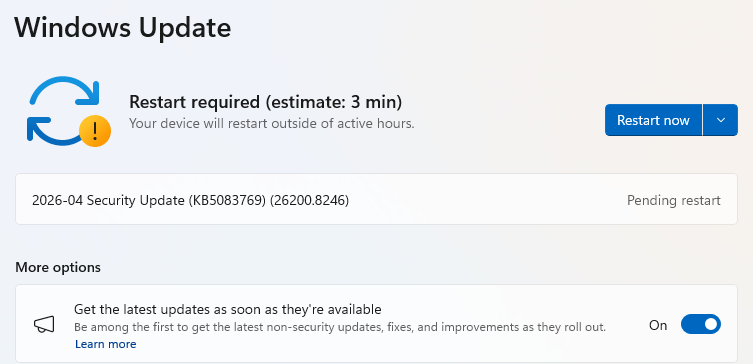
  • In which case you may see a Restart required message. Restart your system and the update will complete.
    Restart required
  • If not, continue with the steps below.

4. Download and Install If updates are found, they’ll start downloading automatically. Once complete, you’ll see a button that says Install or Restart now.

  • Click Install if needed and follow any prompts. Your computer will usually need a restart to finish the update. If it does, click Restart now.

5. Double-check you’re up to date

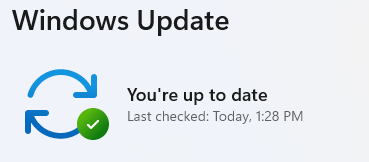
  • After restarting, go back to Windows Update and check again. If it says You’re up to date, you’re all set!
Windows up to date

We don’t just report on threats—we remove them

Cybersecurity risks should never spread beyond a headline. Keep threats off your devices by downloading Malwarebytes today.

March 2026 Patch Tuesday fixes two zero-day vulnerabilities

Microsoft patched 79 security vulnerabilities this month, including bugs that could let attackers escalate privileges or crash critical services.

The post March 2026 Patch Tuesday fixes two zero-day vulnerabilities appeared first on Security Boulevard.

March 2026 Patch Tuesday fixes two zero-day vulnerabilities

Microsoft patched 79 security vulnerabilities this month, including bugs that could let attackers escalate privileges or crash critical services.

The post March 2026 Patch Tuesday fixes two zero-day vulnerabilities appeared first on Security Boulevard.

March 2026 Patch Tuesday fixes two zero-day vulnerabilities

Microsoft patched 79 security vulnerabilities this month, including bugs that could let attackers escalate privileges or crash critical services.

The post March 2026 Patch Tuesday fixes two zero-day vulnerabilities appeared first on Security Boulevard.

Microsoft Patch Tuesday for March 2026 — Snort rules and prominent vulnerabilities

Microsoft Patch Tuesday for March 2026 — Snort rules and prominent vulnerabilities

Microsoft has released its monthly security update for March 2026 which includes 79 vulnerabilities, including three that Microsoft marked as “critical.” The remaining vulnerabilities listed are classified as “important.” Microsoft assessed that exploitation of the three “critical” vulnerabilities is “less likely.”  

CVE-2026-26110 and CVE-2026-26113 are “critical” Microsoft Office Remote Code Execution Vulnerabilities that could allow an unauthorized attacker to execute code locally; the former is a type confusion issue caused by access to a resource using an incompatible type, and the latter is an untrusted pointer dereference. 

CVE-2026-26144 is a “critical” information disclosure vulnerability affecting Microsoft Excel. This vulnerability is due to improper neutralization of input in Microsoft Excel which could enable an unauthorized attacker to disclose information on affected systems. This vulnerability has not been previously publicly disclosed or exploited, and Microsoft has rated it as “exploitation unlikely.” 

CVE-2026-26109 is an “important” vulnerability in Microsoft Office Excel that allows an unauthorized attacker to execute code locally due to an out-of-bounds read. This issue could enable an attacker to compromise the affected system. vulnerability in Microsoft Office Excel that allows an unauthorized attacker to execute code locally due to an out-of-bounds read. This issue could enable an attacker to compromise the affected system. 

CVE-2026-26106 and CVE-2026-26114 are “important” remote code execution vulnerabilities affecting Microsoft SharePoint Server. CVE-2026-26106 is caused by improper input validation in Microsoft Office SharePoint, while CVE-2026-26114 results from deserialization of untrusted data. In both cases, an authenticated attacker with at least Site Member permissions (PR:L) can execute code remotely over a network on the SharePoint Server. 

CVE-2026-26115CVE-2026-26116, and CVE-2026-21262 are “important” elevation of privilege vulnerabilities in SQL Server, each with a CVSS v3.1 highest base score of 8.8. CVE-2026-26115 is caused by improper input validation in SQL Server, while CVE-2026-26116 is due to improper neutralization of special elements used in a SQL command ('sqlinjection'). CVE-2026-21262 results from improper access control in SQL Server. In each case, an authorized attacker could exploit the vulnerability over a network to elevate privileges, potentially gaining administrator privileges. CVE-2026-21262 has also been publicly disclosed. 

CVE-2026-26118 is an elevation of privilege vulnerability in Azure MCP Server Tools with a CVSS v3.1 highest base score of 8.8. It has been rated “important” by Microsoft. This vulnerability is caused by server-side request forgery (SSRF) in Azure MCP Server, which allows an authorized attacker to elevate privileges over a network. An attacker could exploit this issue by sending specially crafted input to an Azure Model Context Protocol (MCP) Server tool that accepts user-provided parameters. If the attacker can interact with the MCP-backed agent, they may submit a malicious URL instead of a standard Azure resource identifier. The MCP Server then sends an outbound request to that URL, possibly includingits managed identity token. The attacker can capture this token without requiring administrative access. A successful attacker could obtain the permissions associated with the MCP Server’s managed identity, enabling access or actions on any resources authorized for that identity. However, the attacker does not gain broader tenant-level or administrator permissions—only those linked to the compromised managed identity.  

CVE-2026-26128 is an elevation of privilege vulnerability in Windows SMB Server that has been rated “important” by Microsoft. This vulnerability is caused by improper authentication in Windows SMB Server, allowing an authorized attacker to elevate privileges over a network. An attacker who successfully exploits this vulnerability could gain SYSTEM privileges. 

Cisco Talos would also like to highlight several vulnerabilities that are only rated as “important,” but Microsoft lists as “more likely” to be exploited:  

  • CVE-2026-23668 - Windows Graphics Component Elevation of Privilege Vulnerability 
  • CVE-2026-24289 - Windows Kernel Elevation of Privilege Vulnerability 
  • CVE-2026-24291 - Windows Accessibility Infrastructure (ATBroker.exe) Elevation of Privilege Vulnerability 
  • CVE-2026-24294 - Windows SMB Server Elevation of Privilege Vulnerability 
  • CVE-2026-25176 - Windows Ancillary Function Driver for WinSock Elevation of Privilege Vulnerability 
  • CVE-2026-25187 - Winlogon Elevation of Privilege Vulnerability 

A complete list of all the other vulnerabilities Microsoft disclosed this month is available on its update page. In response to these vulnerability disclosures, Talos is releasing a new Snort rule set that detects attempts to exploit some of them. Please note that additional rules may be released at a future date and current rules are subject to change pending additionalinformation. Cisco Security Firewall customers should use the latest update to their ruleset by updating their SRU. Open-source Snort Subscriber Rule Set customers can stay up to date by downloading the latest rule pack available for purchase on Snort.org.  

The rules included in this release that protect against the exploitation of many of these vulnerabilities are: 66089 - 66092, 66096, 66097, 66101 - 66104. 

The following Snort 3 rules are also available: 301442 – 301446. 

Microsoft Patch Tuesday security updates for March 2026 fixed 84 bugs

Microsoft Patch Tuesday security updates for March 2026 addressed 84 vulnerabilities in its products. None of the flaws are known to be exploited so far.

Microsoft Patch Tuesday security updates for March 2026 addressed 84 vulnerabilities across its products. The IT giant addressed flaws across Windows, Office, Edge, Azure, SQL Server, Hyper-V, and ReFS. Including third-party and Chromium updates, the total reaches 94 vulnerabilities. Eight flaws are rated Critical and the rest Important. Two vulnerabilities, tracked as CVE-2026-26127 and CVE-2026-21262, were publicly disclosed, but none is known to be actively exploited.

Below are the descriptions of these flaws:

  • CVE-2026-26127 (CVSS score of 7.5) – .NET out-of-bounds read allows unauthenticated remote attackers to cause denial of service against .NET-based apps over the network.zh-tw.tenable+2
  • CVE-2026-21262 (CVSS score of 8.8) – Microsoft SQL Server elevation of privilege flaw letting an authenticated user escalate to full SQL sysadmin privileges on the database server.isc.sans+1

Other interesting flaws addressed by Microsoft are:

  • CVE-2026-21536 (CVSS score of 9.8) – allows remote attackers to execute arbitrary code on Microsoft Devices Pricing Program services over the network without privileges or user interaction, marking it the most severe flaw in Microsoft’s March 2026 Patch Tuesday.
  • CVE-2026-26110 (CVSS score of 8.4) – enables remote code execution in Microsoft Office through malicious files processed in the Preview Pane, potentially allowing zero-click exploitation when users simply view documents.

The full list of CVEs addressed by Microsoft Patch Tuesday security updates for March 2026 is available here.

Follow me on Twitter: @securityaffairs and Facebook and Mastodon

Pierluigi Paganini

(SecurityAffairs – hacking, Microsoft)

March 2026 Patch Tuesday fixes two zero-day vulnerabilities

Microsoft releases important security updates on the second Tuesday of every month, known as Patch Tuesday. This month’s update fixes 79 Microsoft CVEs including two zero-day vulnerabilities.

Microsoft defines a zero-day as “a flaw in software for which no official patch or security update is available yet.” So, since the patch is now available, those two are no longer zero-days. There is also no reason to believe they were ever actively exploited.

But let’s have a look at the possible consequences if you don’t install the update.

The vulnerability tracked as CVE-2026-21262 (CVSS score 8.8 out of 10) is a bug in Microsoft SQL Server that lets a logged-in user quietly climb the privilege ladder and potentially become a full database administrator (sysadmin). With that level of control, they can read, change, or delete data, create new accounts, and tamper with database configurations or jobs. Where SQL Server is supposed to check what each user is allowed to do, in this case it can be tricked into granting more power than intended.

There is no user interaction required once the attacker has that foothold: exploitation can happen over the network using crafted SQL requests that abuse the flawed permission checks. In a typical real‑world scenario, this bug would be the second act in an attack chain: first get in with low privileges, then use CVE-2026-21262 to quietly promote yourself to database king and start rewriting the script.

CVE-2026-26127 (CVSS score 7.5 out of 10) is a bug in Microsoft’s .NET platform that lets an attacker remotely crash .NET applications, effectively taking them offline for a while. The flaw lives in Microsoft .NET 9.0 and 10.0, across Windows, macOS, and Linux, in the .NET runtime or libraries, not in a specific app. In other words, it’s a bug in the engine that runs .NET code, so any app created with affected .NET versions could be at risk until patched.

The main outcome is denial of service: an attacker can cause targeted .NET processes to crash or become unstable, leading to downtime or degraded performance. For a public‑facing web API, a payment service, or any line‑of‑business app built on .NET, this can mean real‑world outages and angry users while services are repeatedly knocked over.

Vulnerabilities affecting Microsoft Office users are two remote code execution flaws in Microsoft Office (CVE-2026-26110 and CVE-2026-26113) which can both be exploited via the preview pane, and a Microsoft Excel information disclosure flaw (CVE-2026-26144), which could be used to exfiltrate data via Microsoft Copilot. Office vulnerabilities appear regularly in Patch Tuesday releases, and in this case none have been reported as actively exploited.

How to apply fixes and check if you’re protected

These updates fix security problems and keep your Windows PC protected. Here’s how to make sure you’re up to date:

1. Open Settings

  • Click the Start button (the Windows logo at the bottom left of your screen).
  • Click on Settings (it looks like a little gear).

2. Go to Windows Update

  • In the Settings window, select Windows Update (usually at the bottom of the menu on the left).

3. Check for updates

  • Click the button that says Check for updates.
  • Windows will search for the latest Patch Tuesday updates.
  • If you have selected to get the latest updates as soon as they’re available, you may see this under More options.
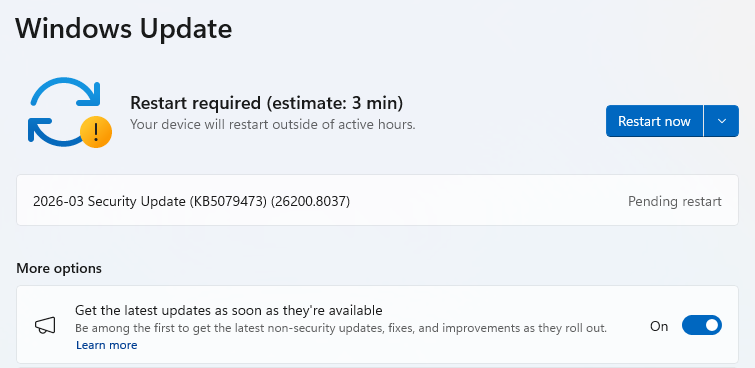
  • In which case you may see a Restart required message. Restart your system and the update will complete.
    Restart now to apply patches
  • If not, continue with the steps below.

4. Download and Install

  • If updates are found, they’ll start downloading right away. Once complete, you’ll see a button that says Install or Restart now.
  • Click Install if needed and follow any prompts. Your computer will usually need a restart to finish the update. If it does, click Restart now.
    Windows up to date

5. Double-check you’re up to date

  • After restarting, go back to Windows Update and check again. If it says You’re up to date, you’re all set!

We don’t just report on threats—we remove them

Cybersecurity risks should never spread beyond a headline. Keep threats off your devices by downloading Malwarebytes today.

❌