Visualização de leitura

DetectFlow: Deploying Detections at Scale Without the Engineering Overhead

DetectFlow Cuts SIEM Costs and Speeds Threat Detection

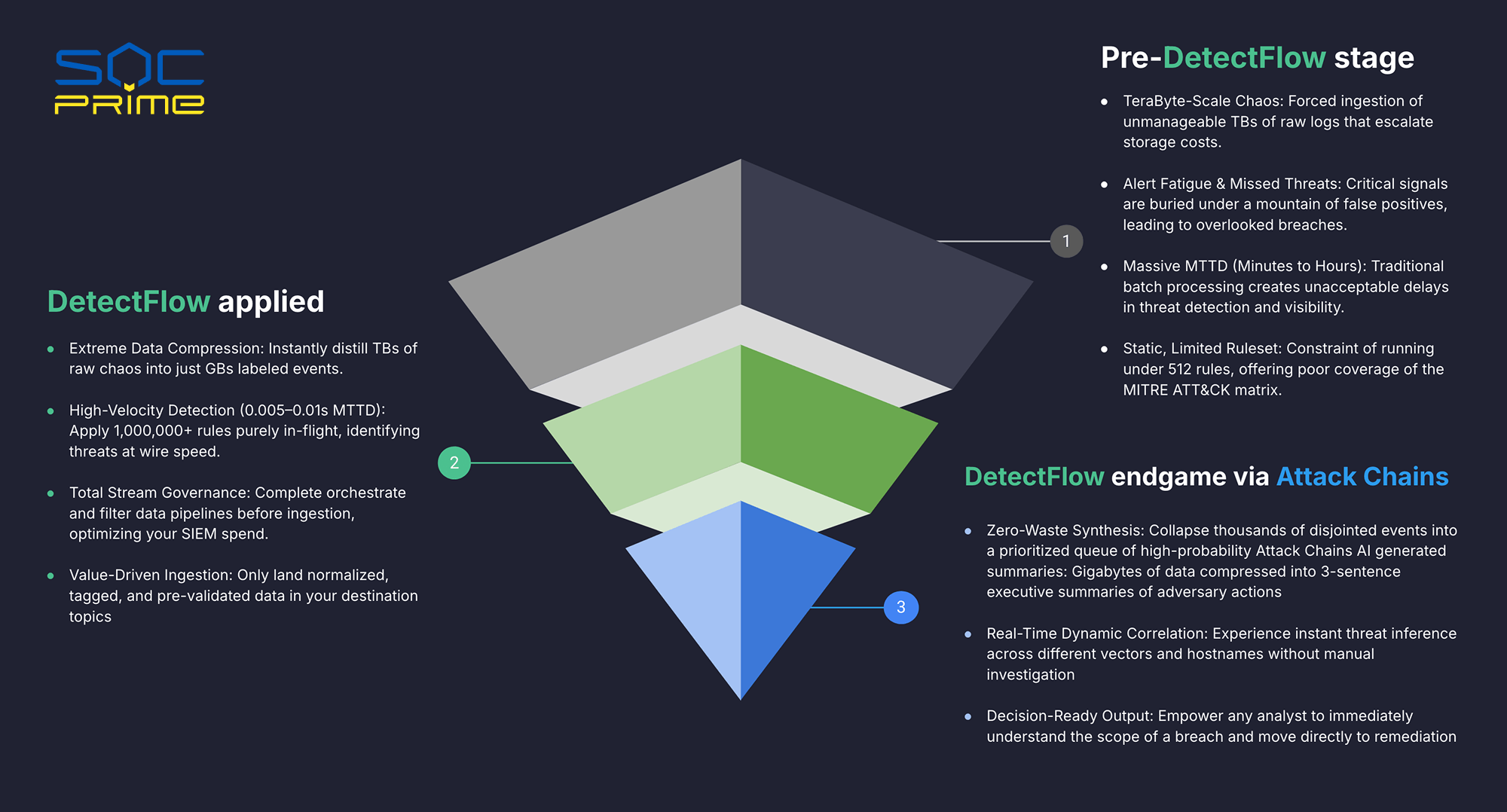
The Problem: Achieving Threat Detections at Scale  

At SOC Prime, we have spent over a decade making detection engineering easier for organizations of every size. Each year, as threats multiply and environments grow more complex, the traditional approach puts SOC Managers in an impossible position — responsible for coverage they cannot achieve with the tools and team they have. DetectFlow offers a path to deploying detections at scale without the engineering overhead. Here is what it solves:

  • Your team is drowning in noise, not finding threats: False positives overwhelm analysts and real signals get missed. Alert fatigue isn’t a people problem, it’s a systems problem
  • Your detection coverage has hard limits you can’t engineer around: Running under 512 rules means your team has blind spots across the MITRE ATT&CK matrix that no amount of headcount can close
  • By the time your team sees a threat, the attacker has already moved: Batch processing creates detection delays measured in minutes to hours, turning a containable incident into a breach
  • Your SIEM budget is consumed by data you never needed: Forced ingestion of raw logs at terabyte scale drives storage costs that are impossible to justify to leadership


DetectFlow Applied: Cut Costs and add Speed

DetectFlow fundamentally changes the economics and speed of threat detection. Rather than ingesting raw chaos and sorting it out later, DetectFlow:

  • compresses terabytes of raw log data into gigabytes of clean, labeled events (instantly, before anything touches your SIEM). 
  • detection happens in-flight, at wire speed, applying 50,000+ in real time and driving mean time to detect down to 0.005–0.01 seconds
  • the entire data pipeline is governed and filtered before ingestion, so your SIEM only receives normalized, tagged, and pre-validated events resulting in dramatic optimization of your SIEM spend: you’re paying to store and analyze signal, not noise.


The Endgame: Attack Chains That Tell the Full Story

Where DetectFlow truly separates itself is in how it surfaces what matters. Instead of handing analysts thousands of disjointed, low-context alerts to manually correlate, DetectFlow: 

  • collapses that noise into a prioritized queue of high-probability Attack Chains, complete with AI-generated executive summaries that condense gigabytes of adversary activity into a clear brief. 
  • Threat inference happens in real time, automatically correlating activity across different vectors and hostnames without requiring any manual investigation. 
  • The output isn’t a list of alerts: it’s a decision. Any analyst, regardless of experience level, can immediately understand the full scope of a breach and move directly to remediation.

 To learn more about DetectFlow head to our overview page.

FAQ

How does DetectFlow reduce SIEM costs?

DetectFlow sits upstream of your SIEM, processing raw event streams before they are ever ingested. It compresses terabytes of raw log data down to roughly 7% of the original volume, filtering out the noise and passing only normalized, threat-tagged events into your SIEM. The result is that your SIEM licensing and storage costs are calculated against signal, not raw volume. For organizations ingesting at scale, that shift alone can be the difference between a sustainable security budget and one that is impossible to defend to a CFO.

What is MTTD and how does DetectFlow improve it?

MTTD (Mean Time to Detect) is the measure of how long it takes your team to identify an active threat after it begins. Traditional SIEM architectures rely on batch processing, which means detection queries run on a delay, often 15 minutes or more after an event occurs. DetectFlow applies detection rules in real time, directly against the live data stream, reducing MTTD to between 0.005 and 0.01 seconds. In practical terms, that is the difference between catching an attacker in the first move and discovering a breach after lateral movement has already occurred.

Why can’t we just add more detection rules to our SIEM?

Most enterprise SIEMs have a hard operational ceiling on how many rules can run simultaneously. Microsoft Sentinel, for example, caps at 512. Beyond the rule limit, every additional rule adds query overhead, slows detection, and increases costs. DetectFlow runs detection at the pipeline layer using Apache Flink, where it can apply tens of thousands of Sigma rules simultaneously without those constraints. That is what allows your team to close MITRE ATT&CK coverage gaps that are simply not addressable inside a SIEM architecture.

Does DetectFlow replace our existing SIEM?

No. DetectFlow integrates with your existing SIEM, it does not replace it. It sits in the Kafka pipeline layer before ingestion, and your SIEM receives cleaner, pre-enriched, threat-tagged events through the same connectors it already uses. Your analysts continue working in familiar dashboards. The change they notice is better data quality, fewer false positives, and faster investigations, not a new tool to learn.

What does “Attack Chains” mean and why does it matter for my team?

Attack Chains is how DetectFlow surfaces correlated threats rather than individual alerts. Instead of passing thousands of isolated events to your analysts for manual investigation, DetectFlow uses AI to collapse related activity across different vectors and hostnames into a single prioritized queue, with a three-sentence executive summary of what the adversary is doing. For a SOC Manager, that means your team is triaging a coherent story about an attack in progress, not a pile of disconnected signals that require hours of investigation before the picture becomes clear.


The post DetectFlow: Deploying Detections at Scale Without the Engineering Overhead appeared first on SOC Prime.

Telemetry Pipeline: How It Works and Why It Matters in 2026

Delemetry Data Pipeline

A telemetry pipeline has become a core layer in modern security operations because teams no longer send data from applications, infrastructure, and cloud services straight into a single backend and hope for the best. In 2026, most environments are distributed across cloud, hybrid, and on-prem systems, which means more services, more data sources, more formats, and more operational complexity for teams that already struggle to keep visibility, control costs, and respond quickly. 

Splunk’s State of Security 2025 found that 46% of security professionals spend more time maintaining tools than defending the organization. Cisco’s research adds that 59% deal with too many alerts, 55% face too many false positives, and 57% lose valuable investigation time because of gaps in data management. When too much raw telemetry flows into the stack without filtering, enrichment, or routing, the result is higher bills, slower investigations, and more noise for already stretched teams.

That is why telemetry pipelines are gaining momentum. They give organizations a control layer to normalize, enrich, route, and govern telemetry before it reaches SIEM, observability, or storage platforms. What began primarily as a way to control volume and cost is quickly becoming a must for modern security operations. Gartner suggests that by 2027, 40% of all log data will be processed through telemetry pipeline products, up from less than 20% in 2024.

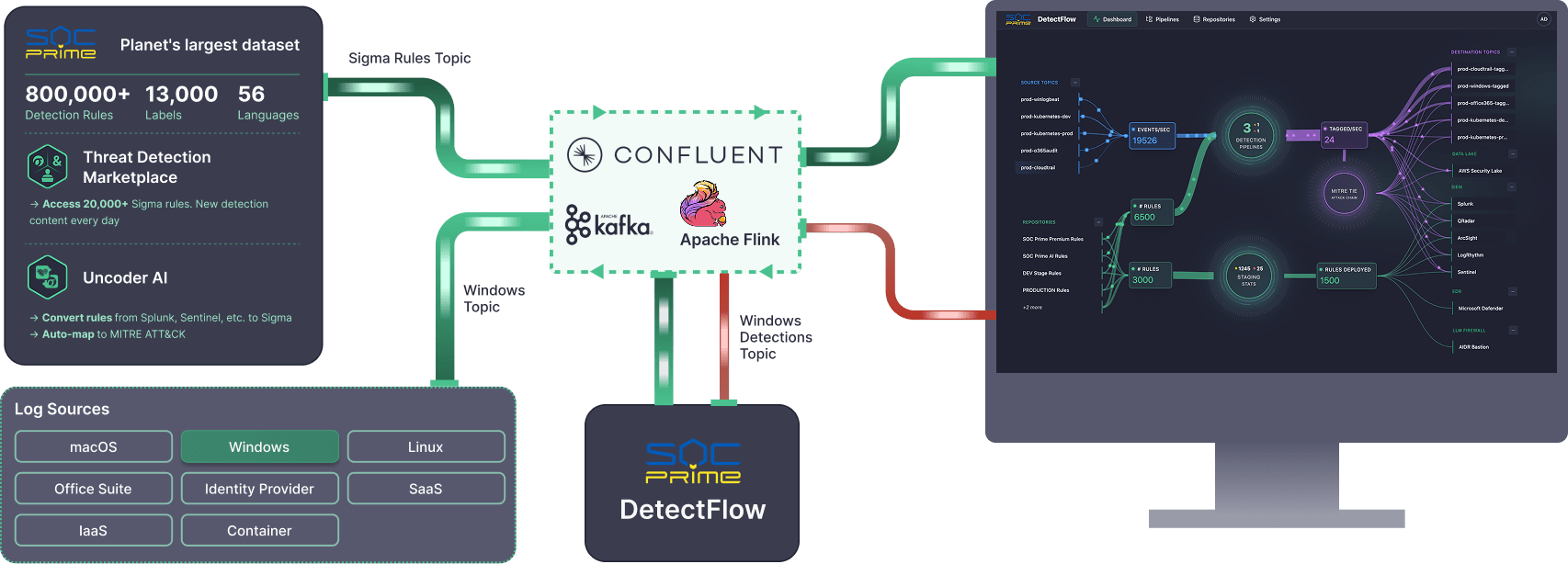
As that model matures, the next logical step is not just to manage telemetry better, but to make it useful earlier. If teams are already adding a pipeline to reduce noise, control spend, and improve routing, it makes sense to move part of the detection process closer to the stream itself rather than waiting for every event to land in downstream tools first. Solutions like SOC Prime’s DetectFlow act as an additional detection layer running directly on the stream. Instead of using the pipeline only for transport and optimization, DetectFlow applies tens of thousands of Sigma rules on live Kafka streams with Apache Flink, tags and enriches events in flight, and helps teams act on higher-value signals much earlier in the flow.

What Is Telemetry?

Before talking about telemetry pipelines, it is important to define telemetry itself.

Telemetry is the evidence systems leave behind while they run. It shows how applications, infrastructure, and services behave in real time, including performance, failures, usage, and health. 

For enterprises, that evidence is valuable because it shows what users are actually experiencing, where bottlenecks form, when failures begin, and where suspicious activity starts to flicker. For security teams, telemetry is even more important because it becomes the raw material for detection, investigation, hunting, and response.

Put differently, telemetry is the trail of digital footprints your environment leaves behind. Useful on its own, but much more powerful when it is organized before the tracks disappear into the mud.

What Are the Main Types of Telemetry Data?

Most teams work with four main telemetry categories grouped under the MELT model: Metrics, Events, Logs, and Traces.

Metrics

Metrics are numerical measurements collected over time, such as CPU usage, memory consumption, latency, throughput, request volume, and error rate. They help teams track system health, identify trends, and spot anomalies before they become visible outages.

Events

Events capture notable actions or state changes inside a system. They usually mark something important that happened, such as a user login, a deployment, a configuration update, a purchase, or a failover. Events are especially useful because they often connect technical activity to business activity.

Logs

Logs are timestamped records of discrete activity inside an application, system, or service. They provide detailed evidence about what happened, when it happened, and often who or what triggered it. Logs are essential for debugging, troubleshooting, auditing, and security investigations.

Traces

Traces show the end-to-end path of a request as it moves across different services and components. They help teams understand how systems interact, how long each step takes, and where delays or failures occur. Traces are especially valuable in distributed systems and microservices environments.

Some platforms also break telemetry into more specific categories, such as requests, dependencies, exceptions, and availability signals. These help teams understand incoming operations, external service calls, failures, and uptime. 

Telemetry Data Pros and Cons

Telemetry data can be one of the most valuable assets in modern operations, but only when it is managed with purpose. Done well, it gives teams a real-time view of how systems behave, how users interact with services, and where risks or inefficiencies begin to form. Done poorly, it becomes just another stream of noisy, expensive data.

Telemetry Data Benefits

The biggest advantage of telemetry is visibility. By collecting and analyzing metrics, logs, traces, and events, teams can see what is happening across applications, infrastructure, and services in real time.

Key benefits include:

  • Real-time visibility into system health, performance, and user activity
  • Proactive issue detection by spotting anomalies before they turn into outages or incidents
  • Improved operational efficiency through automated monitoring and faster workflows
  • Faster troubleshooting by giving teams the context needed to identify root causes quickly
  • Better decision-making through data-backed insights for product, operations, and security teams

To get the full value, telemetry needs to be consolidated and handled consistently. A unified telemetry layer helps reduce mess across tools, improves scalability, and makes data easier to analyze and act on.

Telemetry Data Challenges

Telemetry also comes with real challenges, especially as data volumes grow. The most common ones include:

  • Security and privacy risks when sensitive data is collected or stored without strong controls
  • Legacy system integration across different formats, sources, and older technologies
  • Rising storage and ingestion costs when too much low-value data is kept in expensive platforms
  • Tool fragmentation makes correlation and investigation harder
  • Interoperability issues when systems do not follow consistent standards or schemas

This is exactly why telemetry strategy matters. The goal is not to collect more data for the sake of it, but to collect the right data, shape it early, and route it where it creates the most value. In cybersecurity, that difference is critical. The right telemetry can speed up detection and response, while unmanaged telemetry can bury important signals under cost and noise.

How to Analyze Telemetry Data 

The best way to analyze telemetry data is to stop treating analysis as the last step. In practice, good analysis starts much earlier, with clear goals, structured collection, smart routing, and storage policies that keep useful data accessible without flooding downstream tools. 

Define Goals

Start with the question behind the data. Are you trying to improve performance, reduce MTTR, monitor customer experience, detect security threats, or control SIEM costs? Once that is clear, decide which signals matter most and which KPIs will show progress. For a product team, that may be latency and error rate. For a SOC, it may be detection coverage, false positives, and investigation speed. This is also the stage to set privacy and compliance boundaries so teams know what data should be collected, masked, or excluded from the start. 

Configure Collection

Once goals are clear, configure the tools that will collect the right telemetry from the right places. That usually means deciding which applications, hosts, cloud services, APIs, endpoints, and identity systems should send logs, metrics, traces, and events. It also means setting practical rules for sampling, field selection, filtering, and schema consistency.

Shape and Route the Data 

Before data reaches SIEM, observability, or storage platforms, it should be shaped to fit the goal. That can mean normalizing records into consistent schemas, enriching events with identity or asset context, filtering noisy data, redacting sensitive fields, and routing each signal to the destination where it creates the most value.

Store Data With Intent

Not all telemetry needs the same retention period, storage tier, or query speed. High-value operational and security data may need to stay hot for rapid search and alerting, while bulk historical data can move to cheaper long-term storage. The key is to align retention with investigation needs, compliance obligations, and cost tolerance. 

Analyze, Alert, and Refine

Only after that foundation is in place does analysis become truly useful. Dashboards, alerts, anomaly detection, and visualizations work much better when the underlying telemetry is already clean, consistent, and routed with purpose. Machine learning and AI can make this process more effective by helping teams spot unusual patterns, detect anomalies faster, and identify changes that may be easy to miss in high-volume environments.

That is especially important in security operations, where the real challenge is turning telemetry into better decisions with less noise. This is exactly why a pipeline-based approach becomes so valuable. When telemetry is already being normalized, enriched, and routed upstream, analysis can start earlier, before raw events pile up in costly SIEM platforms.

Solutions like DetectFlow placе detection logic, threat correlation, and Agentic AI capabilities directly in the pipeline. At the pre-SIEM stage, DetectFlow can correlate events across log sources from multiple systems, while Flink Agent and AI help surface the attack chains that matter in real time and reduce false positives. In practice, that means teams can move detection left and deliver cleaner, richer, and more actionable signals downstream.

Telemetry and Monitoring: Main Difference

Telemetry and monitoring are closely related, but they are not the same thing. Telemetry is the process of collecting and transmitting data from systems and applications. It captures raw signals such as metrics, logs, traces, and events, then sends them to a central place for analysis. Monitoring is what teams do with that data to understand system health, performance, and availability. It turns telemetry into dashboards, alerts, and reports that help people act on what they see.

The difference matters because many organizations still build their strategy around dashboards and alerts alone. Monitoring is important, but it is only one use of telemetry. Security teams also rely on telemetry for investigation, hunting, root-cause analysis, and detection engineering. In other words, telemetry is the foundation, while monitoring is one of the ways that foundation is used.

In fact, telemetry is like the nervous system, constantly gathering signals from every part of the body. Monitoring is like the brain, interpreting those signals and deciding what needs attention. Telemetry feeds monitoring. Without telemetry, there is nothing to monitor. Without monitoring, telemetry remains a raw signal with no clear action attached.

What Is a Telemetry Pipeline?

A telemetry pipeline is the operating layer between telemetry sources and telemetry destinations. It collects signals from applications, hosts, cloud platforms, APIs, identity systems, endpoints, and networks, then processes that data before sending it onward.

The easiest way to think about it is that telemetry sources produce data, but the pipeline gives that data direction. Without a pipeline, downstream tools become catch-all warehouses. With a pipeline, telemetry can be standardized, routed by value, and governed according to policy. That is especially important for security operations, where one class of data may need real-time detection while another belongs in lower-cost retention or long-term investigation storage.

From a business perspective, the value is straightforward:

  • Lower cost by reducing unnecessary downstream ingestion
  • Better signal quality through normalization and enrichment
  • Less analyst fatigue by cutting noisy, low-value events earlier
  • More flexibility to send each data type where it creates the most value
  • Stronger governance through filtering, redaction, and policy-based routing


How Does the Telemetry Pipeline Work?

At a high level, a telemetry pipeline works through three core stages: ingest, process, and route. Together, these stages turn raw telemetry from many sources into clean, useful data to act on.

Ingest

The first stage is ingestion. This is where the pipeline collects telemetry from across the environment: applications, cloud services, containers, endpoints, identity systems, network tools, and infrastructure components. In modern environments, this stage must handle multiple signal types at once, including logs, metrics, traces, and events, often arriving at very different volumes and speeds.

Process

The second stage is processing, and this is where most of the value is created. Data is cleaned, normalized, enriched, filtered, and optimized before it reaches downstream systems. That can include removing duplicates, standardizing schemas, enriching records with identity or threat context, redacting sensitive fields, or reducing noisy data that creates cost without adding much value.

This is also where optimization and governance come in. Instead of treating all telemetry as equally important, teams can shape data according to business and security priorities. High-value signals can be enriched and preserved. Low-value records can be reduced, tiered, or dropped. Sensitive information can be handled according to the compliance policy. In other words, processing is where the pipeline stops being a transport mechanism and becomes a control mechanism. 

Route

The final stage is routing. Once telemetry has been shaped, the pipeline sends it to the right destinations. Security-relevant events may go to a SIEM or an in-stream detection layer. Operational metrics may go to observability tooling. Bulk logs may go to lower-cost storage. Archived data may be retained for compliance or long-term investigation. The point is that the same data no longer has to go everywhere in the same form.

By integrating collection, processing, and routing into one flow, a telemetry pipeline turns data from a flood into a controlled stream. It does not just move telemetry. It makes telemetry usable.

What Kind of Companies Need Telemetry Data Pipelines?

Any company running modern digital systems needs telemetry. The real difference is how urgently it needs to manage that telemetry well. Telemetry pipelines become especially important when blind spots are expensive, which usually means complex infrastructure, regulated data, customer-facing services, or constant security pressure. AWS’s observability guidance is explicitly built for cloud, hybrid, and on-prem environments, which already describes most enterprise estates.

That need shows up across many industries. Technology and SaaS companies rely on telemetry pipelines to protect uptime and customer experience. Financial institutions use them to monitor transactions, improve fraud detection, and keep audit data under control. Healthcare organizations use them to balance reliability with privacy and compliance. Retailers, telecom providers, manufacturers, logistics firms, and public-sector agencies need them because scale and continuity leave very little room for guesswork.

For security teams, the case is even sharper. Telemetry becomes the evidence layer behind detection, triage, investigation, and response. That is why the better question is no longer whether a company needs telemetry, but whether it is still treating telemetry like raw exhaust, or finally managing it like the strategic asset it has become.

How SOC Prime Turns Telemetry Pipelines Into Detection Pipelines

Telemetry pipelines started as a smarter way to move, shape, and control data before it reached expensive downstream platforms. SOC Prime extends that idea further with DetectFlow, which turns the pipeline into an active detection layer instead of using it only for transport and optimization. 

DetectFlow can run tens of thousands of Sigma detections on live Kafka streams, chain detections at line speed, drastically reduce the volume of potential alerts, and surface attack chains that are then further correlated and pre-triaged by Agentic AI before they hit the SIEM. It also brings real-time visibility, in-flight tagging and enrichment, and ensures infrastructure scalability that goes beyond traditional SIEM limits. That moves detection left, closer to the data, earlier in the flow, and far less dependent on costly downstream solutions.

For cybersecurity teams, that is the larger takeaway. Telemetry pipelines are not just an observability upgrade or a cost-control tactic. They are becoming a core part of modern cyber defense. And when detection logic, correlation, and AI move into the pipeline itself, telemetry stops being just something teams store and search later, instead acting on it in real time.


The post Telemetry Pipeline: How It Works and Why It Matters in 2026 appeared first on SOC Prime.

Observability Pipeline: Managing Telemetry at Scale

Observability began as a visibility problem. Yet, today it is framed just as much as a control challenge because teams have to manage the floods of telemetry moving daily through the business environment. Most organizations already collect large volumes of logs, metrics, events, and traces. The issue now lies in managing tons of that data before it reaches expensive downstream tools. Gartner defines observability platforms as systems that ingest telemetry to help teams understand the health, performance, and behavior of applications, services, and infrastructure. That matters because when systems slow down or fail, the impact reaches far beyond the technical side, affecting revenue, customer sentiment, and brand perception.

This creates a familiar paradox. Complex environments require broad telemetry coverage, yet large data volumes can quickly become expensive and difficult to manage. When every signal is forwarded by default, useful insight gets mixed with duplication, low-value data, and rising storage and processing costs. Gartner reports observability spend rising around 20% year over year, with many organizations already spending more than $800,000 annually. The trend shows that by 2028, 80% of enterprises without observability cost controls will overspend by more than 50%.

The pressure is pushing teams to look for more control earlier in the flow. Observability pipelines answer that need by giving teams a practical way to filter, enrich, transform, and route data before it turns into noise, waste, and operational drag downstream.

The same logic is starting to shape cybersecurity operations as well. This is where tools like SOC Prime’s DetectFlow enter the picture. DetectFlow moves the detection layer directly into the pipeline, enabling SOC teams to run tens of thousands of Sigma rules to live Kafka streams using Apache Flink, tagging, enriching, and chaining events at the pre-SIEM stage to scale without the usual vendor caps on speed, capacity, or cost.

What Is an Observability Pipeline?

An observability pipeline is the solution that moves telemetry from sources to destinations while performing tasks like transformation, enrichment, and aggregation. Specifically, it takes in logs, metrics, traces, and events, then prepares that data before it reaches monitoring platforms, SIEMs, data lakes, or long-term storage. Along the way, observability pipelines can filter noisy data, enrich records with context, aggregate high-volume streams, secure sensitive fields, and route each data type to the destination where it makes the most sense.

This becomes important as telemetry grows across microservices, containers, cloud services, and distributed systems. Without a pipeline, teams often forward everything by default, which increases cost, adds noise, and makes data handling harder to manage across multiple tools and environments.

Observability pipelines help solve several common challenges:

  • Data overload. High telemetry volume makes it harder to separate useful signals from low-value data, especially when logs, metrics, and traces arrive from many different systems at once.
  • Rising storage and processing costs. Sending all data to downstream platforms drives up ingest, indexing, and retention costs, even when much of that data adds little value.
  • Noisy data. Duplicate, low-priority, or low-context telemetry can overwhelm the signals that actually matter for troubleshooting, security, and performance analysis.
  • Compliance & security risks. Logs and telemetry streams may contain personal or regulated data, which increases compliance and privacy risks when it is forwarded or stored without proper masking or redaction.
  • Complex Infrastructure. Teams often need to send different data sets to different destinations, such as monitoring tools, SIEMs, and lower-cost storage, which becomes difficult to manage without a central control plane.
  • Migration and vendor flexibility. Pipelines make it easier to reshape and reroute telemetry for new tools or parallel destinations without rebuilding collection from scratch.

In simple terms, an observability pipeline gives teams more control over telemetry. It helps organizations keep the useful signals, improve context, and send each stream where it fits.

How Observability Pipelines Work

At a practical level, observability pipelines create a single flow for handling telemetry data. Instead of managing multiple handoffs between sources and destinations, teams can work through one control layer that prepares data for different operational and security use cases.

Collect

The first step is gathering data from across the organizational environment. That can include application logs, infrastructure metrics, cloud events, container data, and security records. Bringing those inputs into one pipeline gives teams a more consistent starting point and reduces the need for separate connections between every source and every tool.

Process

Once data enters the pipeline, it can be adjusted to match the needs of the business. Teams may standardize formats, enrich records with metadata, remove duplicate events, mask sensitive fields, or reduce unnecessary detail. This step helps make the data more usable, whether the goal is troubleshooting, compliance, long-term retention, or security analysis.

Route

After processing, the pipeline sends data to the right destination. High-priority records may go to a monitoring platform or SIEM for immediate visibility, while other data can be archived, stored in a data lake, or routed to lower-cost storage. This makes it easier to support different teams without forcing every system to handle the same data in the same way.

Benefits of Using Observability Pipeline

An observability pipeline helps teams to manage growing telemetry volumes, improve data quality, and control how information is used across operations and security. As environments become more distributed, that kind of control matters more for cost, performance, and faster decision-making.

Some of the main benefits include:

  • Lower storage and processing costs. An observability pipeline helps reduce unnecessary spend by filtering low-value events, deduplicating records, and sending only the right data to high-cost platforms. This keeps teams from paying top price for data that adds little value.
  • Better signal quality. When noisy or incomplete telemetry is cleaned up earlier, the data that reaches downstream tools becomes easier to search, analyze, and act on. That helps teams focus on what actually matters instead of sorting through clutter.
  • Faster troubleshooting and investigations. Better-prepared data speeds up incident response. Operations teams can identify performance issues faster, while security teams can get cleaner and more relevant records into SIEMs and other detection tools without overwhelming analysts with noise.
  • Stronger compliance and data protection. Logs and telemetry may contain sensitive or regulated information. A pipeline makes it easier to mask, redact, or route that data properly before it is stored or shared, which supports compliance and reduces risk.
  • More flexibility across tools and teams. Different teams need different views of the same data. An observability pipeline makes it easier to route specific streams to monitoring platforms, data lakes, SIEMs, or lower-cost storage without rebuilding collection every time requirements change.
  • Better scalability for modern environments. As infrastructure grows across cloud, containers, and distributed systems, pipelines help organizations scale telemetry handling in a more controlled and sustainable way.

In its essence, the value of an observability pipeline comes down to control. It helps teams cut waste, improve signal quality, support security and compliance, and make better use of telemetry across the business.

Observability Pipeline in the Cloud

Cloud environments make observability harder because they add more motion, more dependencies, and far more telemetry to manage. Microservices, containers, Kubernetes, and short-lived workloads all produce signals that change quickly and accumulate quickly. In Chronosphere’s cloud-native observability research summary, 87% of engineers said cloud-native architectures have made discovering and troubleshooting incidents more complex, and 96% said they feel stretched to their limits.

That complexity creates a practical problem for the business. Teams need broad visibility to understand what is happening across cloud services, applications, and infrastructure, but forwarding everything by default quickly becomes expensive and hard to manage. Experts describe the market shift as a move from volume to value, driven by rising telemetry costs, AI workloads, and the need for more disciplined visibility.

This is where observability pipelines become especially useful in the cloud. A pipeline gives teams a control layer between data sources and downstream tools, so they can filter noisy records, enrich important ones, and route each stream to the right destination. That means less waste in premium platforms, better-quality signals for troubleshooting, and more flexibility across monitoring, storage, and security tools. In cloud-native environments, that kind of control is no longer a nice extra.

The cloud angle also matters for cybersecurity. Security teams rely on the same cloud telemetry for threat detection, investigation, and compliance, but raw volume can overwhelm SIEMs and bury the events that matter. An observability pipeline helps earlier in the flow by reducing noise, improving context, and sending higher-value records to the right systems. That is also where SOC Prime’s DetectFlow fits naturally, moving detection closer to ingestion so teams can evaluate, enrich, and correlate events before they become downstream overload.

Observability Pipeline: A Smarter Layer for Security Operations

An observability pipeline gives teams something they increasingly need across modern environments: control before data turns into cost, noise, and slow decision-making. The more telemetry organizations collect, the more important it becomes to filter, enrich, transform, and route it with purpose. That makes observability pipelines useful far beyond monitoring alone. They help improve data quality, keep downstream platforms efficient, and create a stronger foundation for both operations and security.

Notably, security teams face the same telemetry problem, but with higher stakes. SIEMs have practical limits, rule counts do not scale forever, and too much raw data can put enourmous burned onto security analysis. This is where DetectFlow adds a meaningful value layer, extending observability pipeline logic into threat detection by moving detection closer to the ingestion layer.

DetectFlow runs tens of thousands of Sigma detections on live Kafka streams using Apache Flink, correlates events across multiple log sources at the pre-SIEM stage, and uses Flink Agent plus active threat context for AI-powered analysis. In practice, that means SOC teams can reduce noise earlier, surface attack chains faster, and improve investigative clarity before downstream tools get overwhelmed.

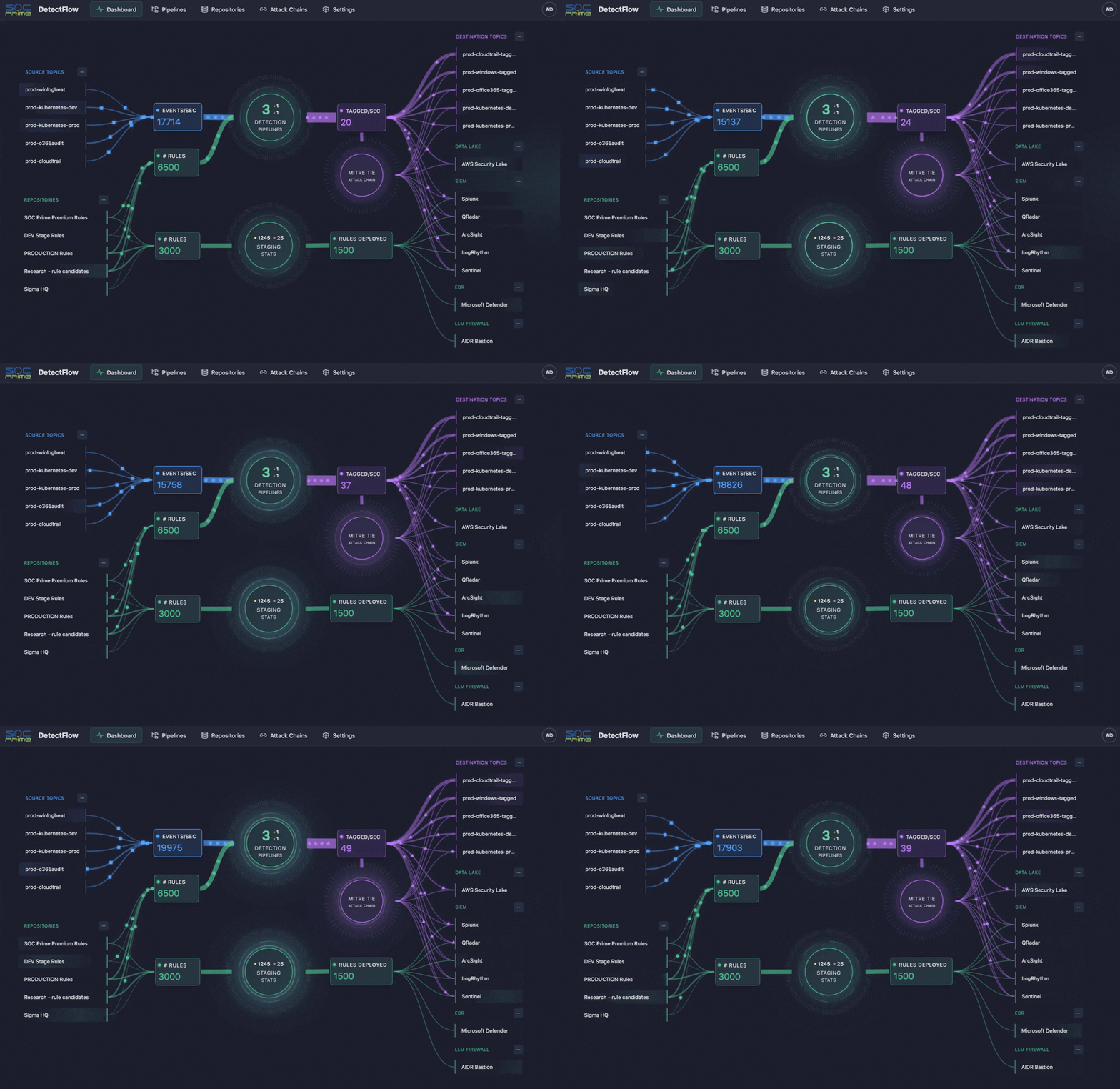
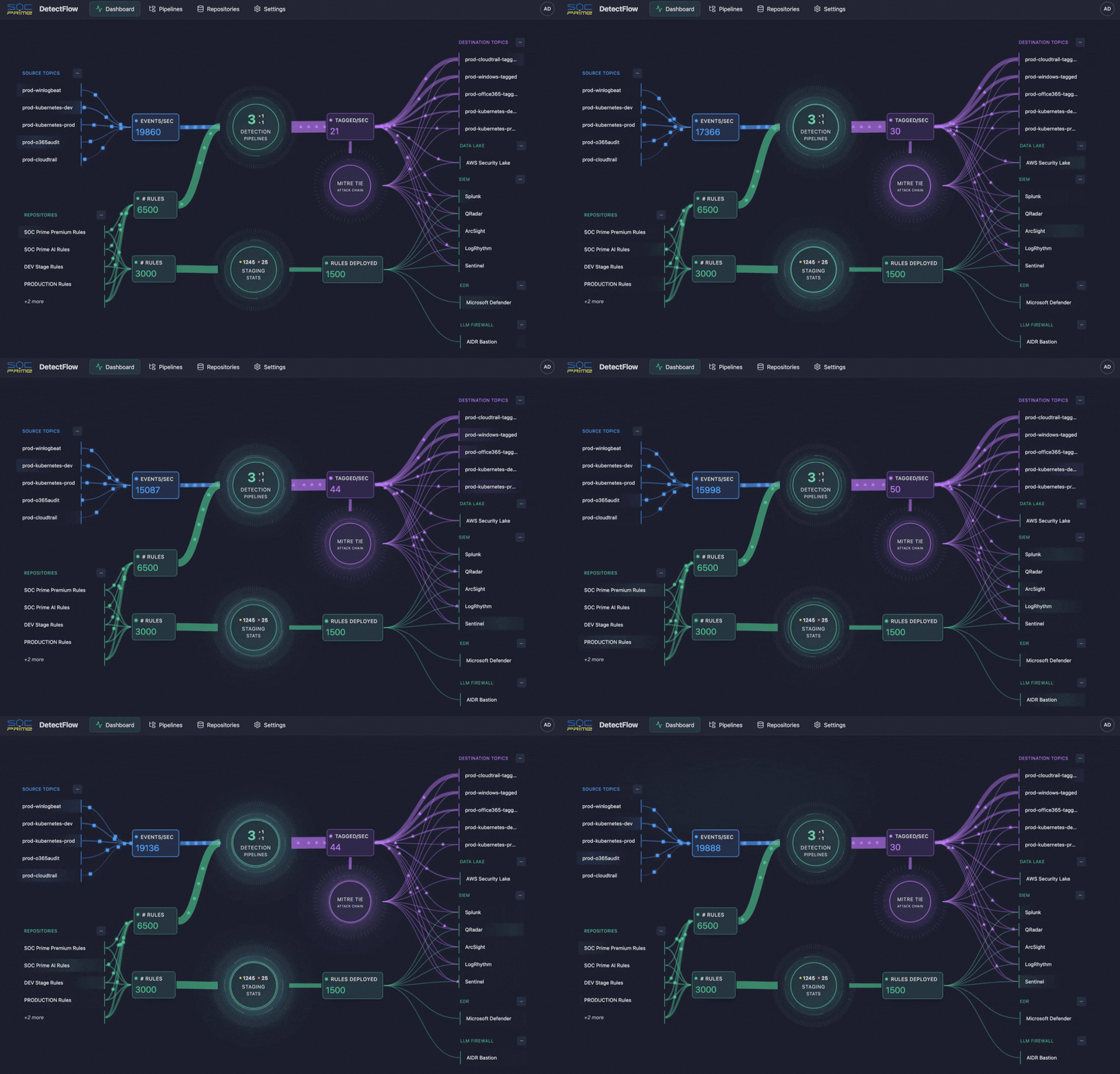
SOC Prime DetectFlow Dashboard


The post Observability Pipeline: Managing Telemetry at Scale appeared first on SOC Prime.

SIEM vs Log Management: Observability, Telemetry, and Detection

SIEM vs Log Management: Rethinking Security Data Workflows

Security teams are no longer short on data. They are drowning in it. Cloud control plane logs, endpoint telemetry, identity events, SaaS audit trails, application logs, and network signals keep expanding, while the SOC is still expected to deliver faster detection and cleaner investigations. That is why SIEM vs log management is not just a tooling debate. It is a telemetry strategy question about what to retain as evidence, what to analyze for real-time detection, and where to do the heavy lifting.

Observability programs accelerate the flood. More telemetry can mean better visibility, but only if the SOC can trust it, normalize it, enrich it, and query it fast enough to keep pace with active threats. At scale, the cost and operational burden show up quickly across both SIEM and log management. PwC highlights how rising data volumes and cost models can push teams to limit ingestion and create blind spots, while alert overload and performance constraints make it harder to separate real threats from noise. Speed is also unforgiving. Verizon reports the median time for users to fall for phishing is less than 60 seconds, while breach lifecycles remain measured in months.

That is why many SOCs are adopting a security data pipeline mindset. It means processing telemetry before it lands in your tools, so you control what gets stored, what gets indexed, and what gets analyzed. Solutions like SOC Prime’s DetectFlow add even more value by turning a data pipeline into a detection pipeline through in-flight normalization and enrichment, running thousands of Sigma rules on streaming data, and supporting value-based routing. Low-signal noise can stay in lower-cost log storage for retention, search, and forensics, while only enriched, detection-tagged events flow into the SIEM for triage and response. The outcome is lower SIEM ingestion and alert noise costs without sacrificing investigation history.

SIEM vs Log Management: Definitions

Before comparing tools, it helps to align on what each category is designed to do, because overlapping feature checklists can hide fundamentally different objectives.

Gartner defines SIEM around a customer need to analyze event data in real time for early detection and to collect, store, investigate, and report on log data for detection, investigation, and incident response. In other words, SIEM is a security-focused system of record that expects heterogeneous data, correlates it, and supports security operations workflows.

Log management has a different center of gravity. NIST describes log management as the process and infrastructure for generating, transmitting, storing, analyzing, and disposing of log data, supported by planning and operational practices that keep logging consistent and reliable. In fact, log management is how you keep the raw evidence searchable and retained at scale, while SIEM is where you operationalize security analytics and response.

The practical difference shows up when you ask two questions:

  • What is the unit of value? For log management, it is searchable records and operational visibility. For SIEM, it’s detection fidelity and incident context.
  • Where does analytics happen? In log management, analytics often supports exploration and troubleshooting. In SIEM, analytics is built for threat detection, alerting, triage, and case management


What Is a Log Management System?

A log management system is the operational backbone for ingesting and organizing logs, so teams can search, retain, and use them to understand what happened.

Log management is often the first place teams see the economics of telemetry. Many organizations don’t need to run expensive correlation on every log line. Instead, they store more data cheaply and retrieve it quickly when an incident demands it. That’s why log management is frequently paired with data routing and filtering approaches that reduce noise before it reaches higher-cost analytics layers.

For security teams, log management becomes truly valuable when it produces high-integrity, well-structured telemetry that downstream detections can rely on, without forcing the SIEM to act as a catch-all storage sink.

What Is a SIEM?

A SIEM stands for Security Information and Event Management. It is designed to centralize security-relevant telemetry and turn it into detections, investigations, and reports. Normally, SIEM is described as supporting threat detection, compliance, and incident management through the collection and analysis of security events, both near real-time and historical, across a broad scope of log and contextual data sources.

But SIEMs face structural pressures as telemetry grows. Common pain points in traditional SIEM approaches include skyrocketing data volumes and cost, alert overload, and scalability and performance constraints when searching and correlating large datasets in real time. Those pressures matter because defenders already operate on unfavorable timelines. IBM’s Cost of a Data Breach report shows breach lifecycles still commonly span months, which makes efficient investigation and reliable telemetry critical.

So while SIEM remains central for security analytics and response, many teams now treat it as the destination for curated, detection-ready data, not the place where all telemetry must land first.

SIEM vs Log Management: Main Features

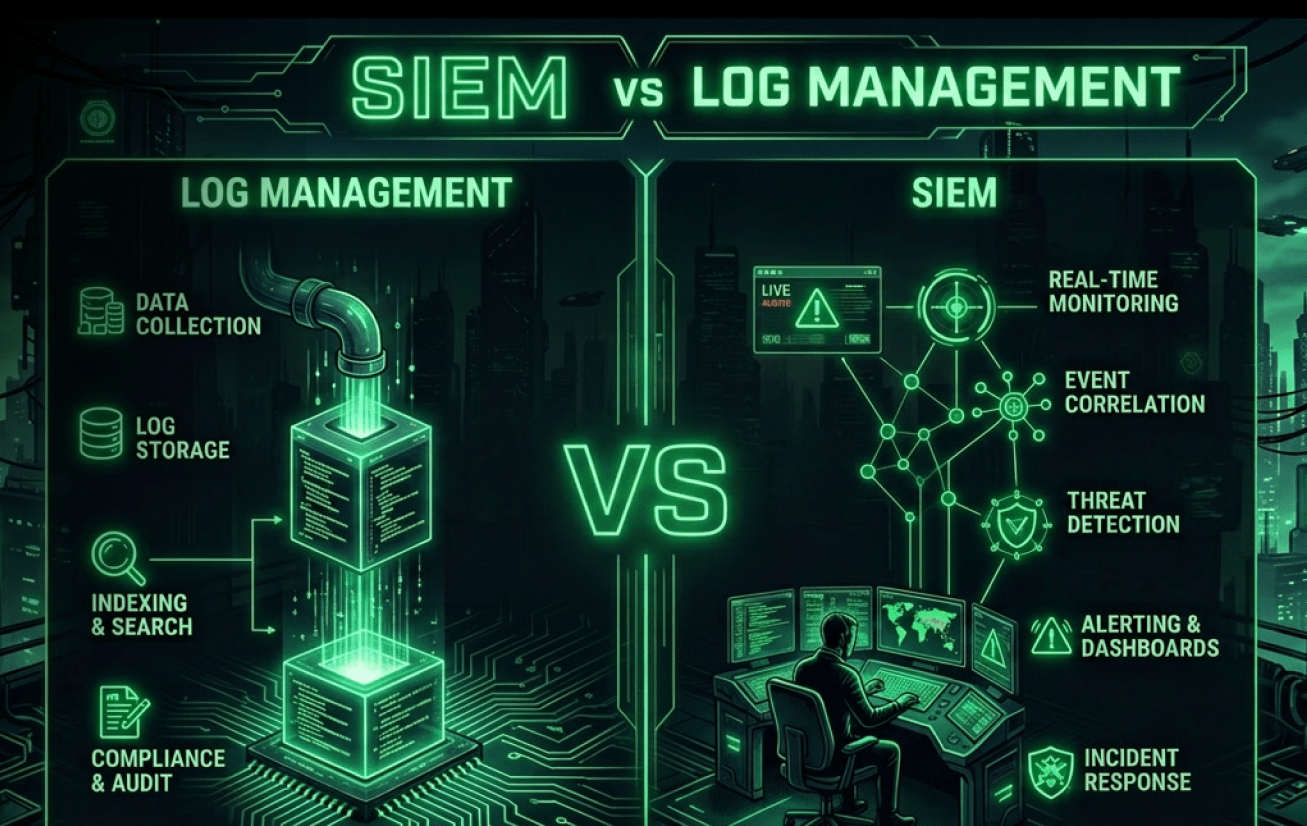
A useful way to compare SIEM and log management is to map them to the security data lifecycle: collect, transform, store, analyze, and respond. Log management does most of the work in collect through store, with fast search to support investigations. SIEM concentrates on analyzing through response, where correlation, enrichment, alerting, and case management are expected to work under pressure.

Log management features typically cluster around collect, transform, store, and search:

  • Ingestion at scale: agents, syslog, API pulls, cloud-native integrations
  • Parsing and field extraction: schema mapping, pipeline transforms, enrichment for searchability
  • Retention and storage controls: tiering, compression, cost governance, access policies
  • Search and exploration: fast queries for troubleshooting and forensic hunting

SIEM features concentrate on analyzing and responding:

  • Security analytics and correlation: rules, detections, behavioral patterns, cross-source joins
  • Context and enrichment: identity, asset inventory, threat intel, entity resolution
  • Alert management: triage workflows, suppression, prioritization, reporting
  • Case management: investigations, evidence tracking, compliance reporting


SOC Prime vs Log Management

In other words, log management optimizes for retention and retrieval, and SIEM optimizes for detection and action. Yet, traditional SIEM approaches strain when the platform becomes both the telemetry lake and the correlation engine, especially under rising ingestion costs and alert noise. That is why many teams treat log management as the evidence layer, SIEM as the decision layer, and a pipeline layer as the control plane that shapes what flows into each.

Benefits of Using Log Management and SIEMs

Log management and SIEM are most effective when they’re treated as complementary layers in a single security data strategy.

Log management delivers depth and durability. It helps teams retain more raw evidence, troubleshoot operational issues that look like security incidents, and preserve the grounds needed for later forensics. This becomes essential when threat hypotheses emerge after the fact (for example, learning a new indicator days later and needing to search back in time).

SIEM delivers security outcomes: detection, prioritization, and incident workflows. A well-tuned SIEM program can reduce “needle-in-a-haystack” work by correlating events across identities, endpoints, networks, and cloud control planes.

The best security programs get three benefits from combining both:

  • Cost control: store more, analyze less expensively by default, and route high-value data to SIEM.
  • Better investigations: keep deep history in log platforms while SIEM tracks detections and cases.
  • Higher signal quality: normalize and enrich logs so detections fire on consistent fields rather than brittle strings.


How SOC Prime Can Improve the Work of SIEM & Log Management

SOC Prime brings the SIEM and log management story together as a single end-to-end workflow.

You start with Attack Detective to audit your SOC and map gaps to MITRE ATT&CK, so you know which telemetry and techniques you are missing. Then, Threat Detection Marketplace becomes the sourcing layer where you pull context-enriched detections aligned to those gaps and the latest TTPs. Uncoder AI acts as a detection-engineering booster, making the content operational and portable to any native formats your SIEM, EDR, or Data Lake actually runs, while also helping refine and optimize the logic so it performs at scale.

DetectFlow is the final layer that turns a data pipeline into a detection pipeline and enables full detection orchestration. Running tens of thousands of Sigma rules on live Kafka streams with sub-second MTTD using Apache Flink, DetectFlow tags and enriches events in flight before they reach your security stack and routes outcomes by value. This removes the need for SIEM min-maxing around rule limits and performance tradeoffs, because detection scale shifts to the stream layer, where it grows with your infrastructure, not vendor caps. For SIEM, it delivers cleaner, enriched, detection-tagged signals for triage and response. For log management, it preserves deep retention while making searches and investigations faster through normalized fields and attached detection context.

SOC Prime DetectFlow


The post SIEM vs Log Management: Observability, Telemetry, and Detection appeared first on SOC Prime.

What Is a Security Data Pipeline Platform: Key Benefits for Modern SOC

Security teams are drowning in telemetry: cloud logs, endpoint events, SaaS audit trails, identity signals, and network data. Yet many programs still push everything into a SIEM, hoping detections will sort it out later.

The problem is that “more data in the SIEM” doesn’t automatically translate into better detection. It often translates into chaos. Many SOCs admit they don’t even know what they’ll do with all that data once it’s ingested. The SANS 2025 Global SOC Survey reports that 42% of SOCs dump all incoming data into a SIEM without a plan for retrieval or analysis. Without upstream control over quality, structure, and routing, the SIEM becomes a dumping ground where messy inputs create messy outcomes: false positives, brittle detections, and missing context when it matters most.

That pressure shows up directly in the analyst experience. A Devo survey found that 83% of cyber defenders are overwhelmed by alert volume, false positives, and missing context, and 85% spend substantial time gathering and connecting evidence just to make alerts actionable. Even the mechanics of SIEM-based detection can work against you. Events must be collected, parsed, indexed, and stored before they’re reliably searchable and correlatable.

Cost is part of the same story. Forrester notes that “How do we reduce our SIEM ingest costs?” is one of the top inquiry questions it gets from clients. The practical answer is data pipeline management for security: route, reduce, redact, enrich, and transform logs before they hit the SIEM. Done well, this reduces spend and makes telemetry usable by enforcing consistent fields, stable schemas, and healthier pipelines so data turns into detections.

The demand pushes security teams to borrow a familiar idea from the data world. ETL stands for Extract, Transform, Load. It pulls data from multiple sources, transforms it into a consistent format, and then loads it into a target system for analytics and reporting. IBM describes ETL as a way to consolidate and prepare data, and notes that ETL is often batch-oriented and can be time-consuming when updates need to be frequent. Security increasingly needs the real-time version of this concept because a security signal loses value when it arrives late.

That is why event streaming has become so relevant. Apache Kafka sees event streaming as capturing events in real time, storing streams durably, processing them in real time or later, and routing them to different destinations. In security terms, this means you can normalize and enrich telemetry before detections depend on it, monitor telemetry health so the SOC does not go blind, and route the right data to the right place for response, hunting, or retention.

This is where Security Data Pipeline Platforms (SDPP) enter the picture. An SDPP is the solution located between sources and destinations that turns raw telemetry into governed, security-ready data. It handles ingestion, normalization, enrichment, routing, tiering, and data health so downstream systems can rely on clean and consistent events instead of compensating for broken schemas and missing context.

What Is a Security Data Pipeline Platform (SDPP)?

A Security Data Pipeline Platform (SDPP) is a centralized system that ingests security telemetry from many sources, processes it in-flight, and delivers it to one or more destinations, including SIEM, XDR, SOAR, and Data Lakes. The SDPP job is to take raw security data as it arrives, shape it properly, and deliver it downstream in a form that is consistent, enriched, and ready for detection and response. The shift is subtle but important. Instead of treating log management as “collect and store,” an SDPP treats it as “collect, improve, then distribute.”

In practice, SDPPs commonly support:

  • Collection from agents, APIs, syslog, cloud streams, and message buses
  • Parsing and normalization to consistent schemas (e.g., OCSF-style concepts)
  • Enrichment with asset, identity, vulnerability, and threat intel context
  • Filtering and sampling to reduce noise and control spend
  • Routing to multiple destinations (and different formats per destination)

Unlike legacy data pipelines that mainly move data from point A to point B, an SDPP adds intelligence and governance. It treats security data as a managed capability that can be standardized, observed, and adapted as environments change. That matters as teams adopt hybrid SIEM plus Data Lake strategies, scale cloud infrastructure for detection & response, and standardize telemetry for correlation & automation.

What Are the Key Capabilities of a Security Data Pipeline?

A security data pipeline turns raw telemetry into something usable before it hits your security stack. The most effective pipelines do two things at once. They improve data quality, and they control where data goes, how long it stays, and what it looks like when it arrives.

Ingest at Scale

A modern security data pipeline must collect continuously, not occasionally. That means cloud logs, SaaS audit feeds, endpoint telemetry, identity signals, and network data, pulled via APIs, agents, and streaming transports.

Transform in Flight

In-flight transformation is where the pipeline earns its value. As data flows, fields are parsed, key attributes are extracted, and formats are normalized into stable schemas. This reduces errors from inconsistent data and keeps correlation logic portable across tools. At the same time, noise can be filtered, events sampled, and privacy or redaction rules applied in a controlled, measurable, and reversible way. The result is clean, reliable data that’s ready for detection and action as it moves through the system.

Enrich With Context

Enrichment transforms daily SOC work by bringing context to the data before it reaches analysts. Instead of spending time manually gathering information, the pipeline adds identity and asset details, environment tags, vulnerability insights, and threat intelligence so events are ready for triage and correlation.

Route and Tier

Routing is where telemetry becomes truly governed. Instead of sending all data to a single destination, the pipeline applies policies to deliver the right events to SIEM, XDR, SOAR, and Data Lakes. Data is stored by value, with clear hot, warm, and cold retention paths, and can be accessed quickly when investigations require it. By handling different formats and subsets for each tool, routing keeps the pipeline organized, consistent, and fully managed across environments, turning raw streams into reliable, actionable telemetry.

Monitor Data Health

Pipelines need their own observability. Missing data, unexpected schema changes, or sudden spikes and drops can create blind spots that may only be noticed during an incident. A strong Security Data Pipeline Platform provides observability across the system, making these issues visible early and supporting safe rerouting if a destination fails.

AI Assistance

Teams are increasingly comfortable with relevant AI assistance in pipelines, especially for repetitive tasks like parser generation when formats change, drift detection, clustering similar events, and QA. The goal is not autonomous decision-making. It is a faster, more consistent pipeline operation with human control.

Detect in Stream

Some teams are now running detections directly in the data stream, turning their pipelines into active detection layers. Tools like SOC Prime’s DetectFlow enable this by applying tens of thousands of Sigma rules to live Kafka streams using Apache Flink, tagging and enriching events in real time before they reach systems like SIEM. The goal is not to replace centralized analytics, but to prioritize critical events earlier, improve routing, and reduce mean time to detect (MTTD).

What Challenge SDPPs Help to Solve?

Security Data Pipeline Platforms exist because modern SOC pain is not only “too many logs.” It is the friction between data collection and real detection outcomes. When telemetry is late, inconsistent, expensive to store, and hard to query at scale, the SOC ends up working around the data instead of working on threats. The main challenges SDPPs help solve are the following:

  • Data arrives too late to be useful. SIEM-based detection is not instant. Events must be collected, parsed, ingested, indexed, and stored before they are reliably searchable and correlatable. In real environments, correlation can take 15+ minutes depending on ingestion and processing load. SDPPs reduce this gap by shaping telemetry in-flight so downstream systems receive cleaner, normalized events sooner, and by routing high-priority data on faster paths when needed.
  • “Store everything” breaks the budget. Event data growth makes the default approach unaffordable. Even if you can pay to ingest everything, you still end up indexing and retaining huge volumes that do not improve detection outcomes. SDPPs help teams set clear policies, so high-value security events go to real-time systems, while bulk or long-retention logs are routed to cheaper tiers with predictable rehydration during investigations.
  • Detection logic can’t keep up with log volume. Average SOCs deploy roughly 40 rules per year, while practical SIEM rule programs and performance limits often cap usable coverage in the hundreds. More telemetry lands, but detection content does not scale at the same pace. SDPPs close the gap by reducing noise, stabilizing schemas, and preparing data so each rule has a higher signal value and works more consistently across environments.
  • ETL is not enough on its own. ETL is great for extracting, transforming, and loading data for analytics and reporting, often in batch. Security needs the continuous version of that idea. Telemetry arrives as a stream, formats change frequently, and detections need consistent schemas plus health monitoring to stay reliable. SDPPs complement ETL-style workflows by providing security-specific processing for streaming logs, schema drift handling, and operational observability.
  • Threats iterate faster than your query budget. AI-driven campaigns can evolve malicious payloads in minutes, which punishes workflows that depend on slow query cycles and manual evidence stitching. SIEMs also impose practical ceilings, including hard caps like under 1,000 queries per hour, depending on platform and licensing. SDPPs help by making each query more effective through normalization and enrichment, and by reducing the need for brute-force querying via smart routing, filtering, and tagging upstream.

What Are the Benefits of a Security Data Pipeline Platform?

When security teams talk about “too much data,” they rarely mean they want less visibility. They mean the work has become inefficient. Analysts waste time stitching context together, detections break when schemas drift, and leaders end up paying for ingest that does not move risk down.

A Security Data Pipeline Platform changes the day-to-day reality by putting one layer in charge of how telemetry is prepared and where it goes. For SOC teams, that means events arrive cleaner, more consistent, and easier to investigate. For the business, it means you can scale detection and retention without turning SIEM spend and operational noise into a permanent paycheck.

Therefore, key benefits of using Security Data Pipeline Platforms include the following:

  • Less noise, more signal. By filtering low-value events, deduplicating repeats, and adding context before events reach alerting systems, the SDPP helps analysts focus on what actually matters.
  • Lower SIEM and storage spend. The pipeline controls what gets sent to expensive destinations, routing high-value events to real-time systems while pushing bulk telemetry to cheaper tiers.
  • Less manual burden and rework. Transformation and routing rules live once in the pipeline instead of being rebuilt across tools and environments.
  • Stronger governance and compliance. Centralized policies simplify privacy controls, data residency constraints, and retention rules.
  • Fewer blind spots and surprises. Silence detection and telemetry health monitoring surface missing logs, drift, and delivery failures before incidents do.

How a Security Data Pipeline Platform Can Help Your Business?

At a business level, a Security Data Pipeline Platform is about making security operations predictable. When telemetry is governed upstream, leadership gets clearer answers to three questions that usually stay messy in mature environments: what data matters, where it should live, and what it should cost to operate at scale.

One practical impact is budget planning that survives data growth. Instead of treating ingestion as an uncontrollable variable, the pipeline makes volume a managed policy. You can set targets, prove what was reduced, and preserve the context that supports detection and compliance. That predictability turns cost reduction into operational freedom rather than a risky cut.

Another impact is standardization that unlocks reuse. When normalization is done once and applied everywhere, detection content and correlation logic can be reused across environments instead of being rewritten per source or per destination. That reduces the hidden maintenance costs that slow rollouts and drain engineering time.

A third impact is flexibility without lock-in. Intelligent routing and tiering let you align data to purpose, not vendor limitations. High-priority telemetry stays hot for response, broader datasets support hunting in cheaper stores, and long-retention logs can be archived with a clear rehydration path for investigations. The pipeline keeps the data layer stable while destinations evolve.

Finally, pipelines support operational assurance. Many organizations worry more about missing telemetry than noisy telemetry because quiet failures create blind spots that surface during incidents and audits. A pipeline that monitors source health and drift makes gaps visible early and improves confidence in security reporting.

Unlocking More SDPP Value With SOC Prime DetectFlow

Security data pipelines already help you collect, shape, and route telemetry with intent. SOC Prime’s DetectFlow adds an in-stream detection layer that turns your data pipeline into a detection pipeline. It runs Sigma rules on live Kafka streams using Apache Flink, tags, and enriches matching events in-flight, and routes high-priority matches downstream without changing your SIEM ingestion architecture.

Detect Flow, in-stream detection layer for SDPP

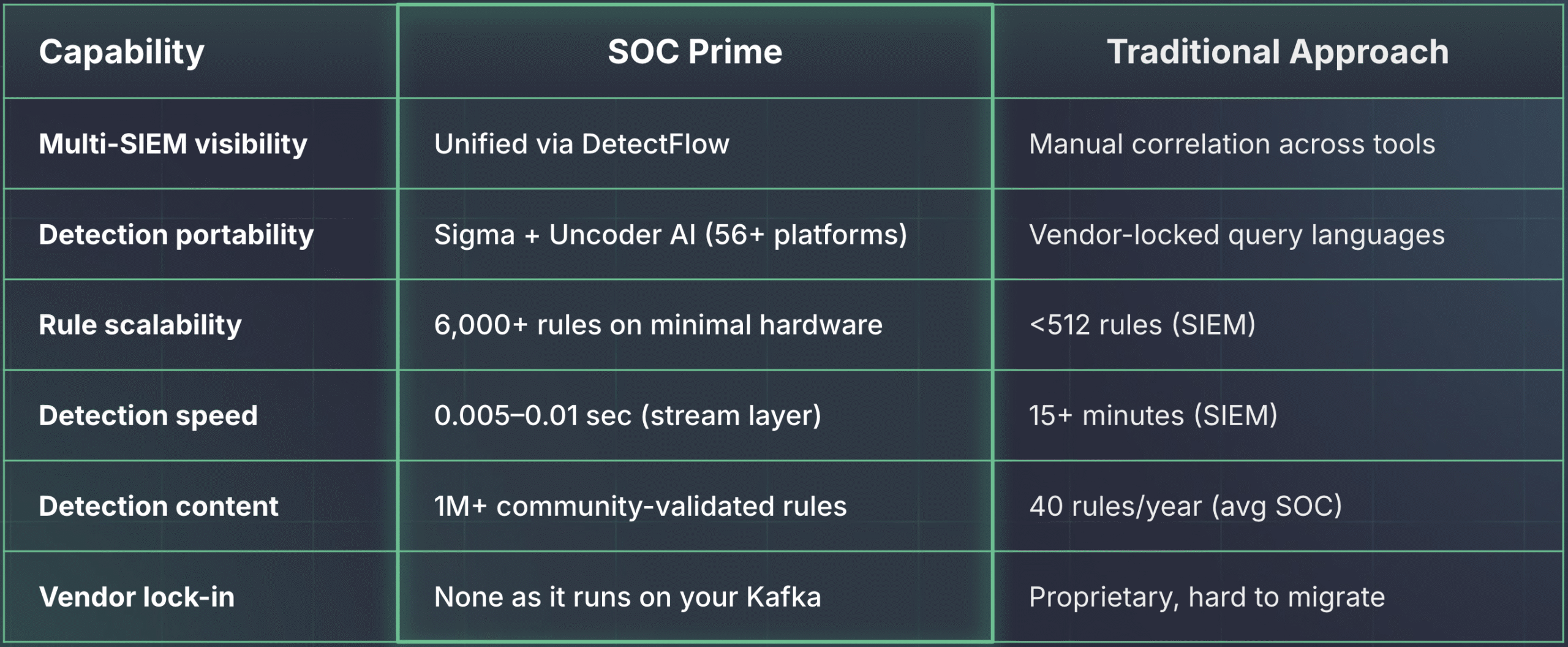
This directly targets the detection coverage gap. There are 216 MITRE ATT&CK techniques and 475 sub-techniques, yet the average SOC ships ~40 rules per year, and many SIEMs start to struggle around ~500 custom rules. DetectFlow is built to run tens of thousands of Sigma rules at stream speed with sub-second MTTD versus 15+ minutes common in SIEM-first pipelines. Because it scales with your infrastructure, you avoid vendor caps, keep data in your environment, support air-gapped or cloud-connected deployments, and unlock up to 10× rule capacity on existing infrastructure.

DetectFlow vs Traditional Approach: Benefits for SOC Teams

For more details, reach out to us at sales@socprime.com or kick off your journey at socprime.com/detectflow.


The post What Is a Security Data Pipeline Platform: Key Benefits for Modern SOC appeared first on SOC Prime.

What Are the Main AI-Assisted Cyber-Attacks and Scams?

AI-assisted threats aren’t a brand-new genre of attacks. They’re familiar tactics-phishing, fraud, account takeover, and malware delivery-executed faster, at greater scale, and with sharper personalization. In other words, AI and cybersecurity now intersect in two directions: defenders use AI to analyze large volumes of telemetry and spot anomalies faster than humans alone, while attackers use AI to improve their outreach, automation, and “trial-and-error” speed. Сybe defenders describe AI in security as pattern-driven detection and automation that can improve speed and accuracy, while also noting that attackers can apply AI to malicious workflows.

The most common AI-assisted cyber-attacks and scams are as follows:

  • AI-Boosted Phishing and Business Email Compromise (BEC) scams. LLMs help criminals write credible, well-structured messages in the victim’s language and tone. They can rapidly rewrite content, create follow-up replies on demand, and tailor lures to job roles and current events.
  • Deepfake-Enabled Impersonation. Synthetic audio (voice cloning) and synthetic video can be used for “urgent payment” fraud, impersonated executive approvals, fraudulent HR outreach, or staged customer-support calls. Even imperfect deepfakes can work when victims are rushed, communicating over noisy channels, or operating outside normal approval paths.
  • Automated Reconnaissance and Targeting. Attackers can summarize public information, such as job postings, press releases, org charts, and breach dumps, into “attack briefs” that suggest likely targets, plausible pretexts, and access paths.
  • AI-Accelerated Malware and Script Generation. Generative tools can speed up creation of droppers, macros, and “living-off-the-land” scripts, and can help troubleshoot syntax and error messages. Faster iteration means defenders have less time to react.
  • Credential and Session Theft at Scale. Password spraying and credential stuffing can be tuned by automation that adapts user selection, timing, and error-handling. Increasingly, scammers chase session tokens or OAuth consents, not just passwords.
  • Scam Content Factories. AI can crank out fake landing pages, counterfeit apps, “support” chatbots, and localized scam ads with synthetic testimonials reducing campaign cost and increasing reach.

To reduce exposure to AI-assisted attacks and scams, strengthen identity verification, limit single-person approvals, increase visibility across key communication and access points, and focus on controls that protect payments, accounts, and sensitive data.

Also, as AI continues to reshape both defensive and offensive cyber operations, organizations must focus on augmenting human expertise with modern technology to build resilient, future-ready cyber defenses. SOC Prime Platform is built around this principle, combining advanced machine learning with community-driven knowledge to strengthen security operations at scale. The Platform enables security teams to access the world’s largest and continuously updated detection intelligence repository, operationalize an end-to-end pipeline from detection to simulation, and orchestrate security workflows using natural language to help teams stay ahead of evolving threats while improving speed, accuracy, and resilience across the SOC.

How Сan AI Be Used in Cyber-Attacks?

To understand AI-assisted attacks, think in terms of an end-to-end “attack pipeline.” AI doesn’t replace access, infrastructure, or tradecraft, but it reduces friction across every step of AI and cybercrime:

  • Reconnaissance and Profiling. Attackers collect and summarize open-source intelligence (OSINT), turning scattered data into target profiles: who approves invoices, which vendors you use, what tech stack you mention, and which business events (audits, renewals, travel) create exploitable urgency.
  • Pretext and Conversation Management. LLMs generate believable emails, chat messages, and call scripts, including realistic threading (“Re: last week’s ticket”), polite urgency, and style mimicry. They also make rapid iteration easy-attackers can create dozens of variants to see which one passes filters or persuades a recipient.
  • Malware, Tooling, and “Glue Code.” AI can accelerate writing of scripts (PowerShell, JavaScript), macro logic, and simple loaders, especially the repetitive “stitching” that connects LOLBins, downloads, and persistence steps. Sophos explicitly flags malicious use cases like generating phishing emails and building malware.
  • Evasion and Operational Speed. Generative tools can rewrite text to evade keyword-based defenses, change document layouts, and generate decoy content. During execution, attackers often brute-force their way through roadblocks: if one command fails, AI-assisted troubleshooting can propose alternatives, shrinking the time defenders have to contain the activity.
  • Scaling Exploitation and Prioritization. Automation can scan for exposed services, rank targets, and queue follow-up actions once a foothold exists. AI can also summarize vulnerability disclosures or help adapt public exploit code to a victim’s stack, turning “known issues” into faster compromise.
  • Post-Exploitation and Exfiltration. AI can help triage file shares (what’s valuable, what’s sensitive), draft exfiltration scripts, and generate extortion notes tailored to an industry’s pain points.

To defend against AI-assisted attacks, security teams can break the pipeline at multiple points, including patching internet-facing systems quickly, reducing recon value (limiting unnecessary public details), strengthening identity verification for high-risk requests, and restricting execution paths (macros, scripts, unsigned binaries). Fortinet recommends behavioral analytics/UEBA as an approach to detect unusual activity when signatures and IOCs are insufficient.

A useful mindset is “assume the message is perfect.” If you assume grammar and tone provide no signal, you’ll invest in controls that still work: authentication, authorization, and execution restrictions. Treat AI as a multiplier on attacker speed, not a new kind of access.

Operationally, defenders should expect more “hands-on keyboard” moments that look like normal admin activity. Robust logging across identity, email, and endpoint scripting environments reveals critical activity, including OAuth consent abuse, anomalous PowerShell execution, persistence mechanisms, and outbound data exfiltration. Centralized correlation makes attacker behavior patterns visible.

How Can I Avoid Falling for an AI-Assisted Scam?

Avoiding AI-assisted scams is less about “detecting AI” and more about hardening your verification habits, especially when a message is urgent or emotionally charged. The keyword to keep in mind is AI and cyber-attacks: the attacker’s goal is still to get targeted victims to click, pay, reveal credentials, or approve access. The following steps can be helpful to timely recognize and avoid AI-based scams:

  1. Slow down high-risk actions. Create a rule: any request involving money, credentials, MFA codes, payroll changes, gift cards, or “security checks” triggers a pause. Scammers rely on speed to outrun verification.
  2. Verify via a second channel under control. If an email requests payment, confirm via a known phone number or internal ticketing system-not by replying to the same thread. For voice requests, call back using a directory number, not the number in the message.
  3. Treat “new instructions” as suspicious. New bank accounts, new portals, new WhatsApp numbers, “temporary” email addresses, and last-minute vendor changes should require a formal verification step and a second approver.
  4. Use phishing resistant multi-factor authentication (MFA). Enable MFA everywhere, but prefer passkeys or hardware keys over SMS or push-only approvals. Never share one-time codes-real support teams don’t need them.
  5. Use a password manager and unique passwords. Credential reuse is a core enabler of AI-driven attacks, and password managers make unique credentials manageable.
  6. Be strict with links and attachments. Type known URLs manually, avoid unexpected archives/HTML/macro documents, and open necessary files in a controlled environment (viewer mode, sandbox, or non-privileged device).
  7. Look for workflow mismatches, not grammar. AI can produce flawless writing. The key question is whether the request follows expected processes, approvals, and tools.
  8. Reduce what attackers can learn. Limit public exposure of org charts, invoice processes, personal contact info, and travel details.
  9. Practice realistic scenarios. Run drills for deepfake audio requests, “vendor bank change” emails, and fake support chats. Measure where people comply and tune procedures.

Sophos notes that automation can reduce human error, but humans still make the final call on payments and credential disclosure, so the verification process beats “gut feel.”

If you’re a company, add two organizational habits:

  • Label and route suspicious reports to a single mailbox or ticket queue;
  • Publish a one-page “verification playbook” for finance, HR, and helpdesk. The goal is to remove ambiguity so people don’t improvise under pressure.

On the personal side, keep devices and browsers updated, and prefer official app stores and verified vendor portals. If you’re prompted to scan a QR code or install a “security update,” treat it as suspicious until you verify the request through an official channel. Scam kits increasingly mix QR codes, short links, and fake support numbers to move you off email, where auditing is easier.

AI in Phishing and Social Engineering

AI makes phishing and social engineering more dangerous because it improves three things attackers historically struggled with: personalization, language quality, and volume. That’s why defenders keep asking how cybersecurity AI is being improved-they want the same speed advantage for detection and response.

What Changes With AI-Driven Phishing

  • Better pretexts that reference real vendors, projects, tickets, or policies
  • Multilingual lures with fewer “non-native” signals
  • Interactive manipulation (attackers can keep a chat going and answer objections)
  • Synthetic proof (fake screenshots, invoices, and “security alerts”)
  • Voice support scams (a cloned “helpdesk” voice persuades users to install tools or approve MFA prompts)

How to Defend (Practical Controls)

Follow these tips to proactively defend against phishing and social engineering attacks:

  • Harden email and domain trust. Enforce SPF/DKIM/DMARC, flag lookalike domains, and monitor mailbox rules and external forwarding. Treat bank-detail changes as a controlled process with documented verification.
  • Reduce credential replay value. Use Single Sign-On (SSO) with phishing-resistant MFA and conditional access. Even if a password is captured, it shouldn’t be enough to log in.
  • Add behavioral detections for identity and mailbox abuse. Fortinet describes AI security as analyzing large datasets to detect phishing and anomalies. Turn that into alerts for impossible travel, unusual OAuth grants, anomalous token use, suspicious mailbox API access, and unexpected forwarding rules.
  • Block easy initial execution. Disable Office macros from the internet, restrict script interpreters, and use application control for common LOLBins. Many social-engineering chains depend on “one-click” script execution.
  • Train for high-quality phishing. Update awareness programs with examples that have perfect grammar and realistic context. Teach staff to verify workflows, not writing quality.
  • Secure the helpdesk path. Many campaigns end in a password reset. Require strong identity verification, log all resets, and add extra approval for privileged accounts.

Layered defense matters: even if a user clicks, strong authentication, least privilege, and anomaly detection should prevent a single message from turning into a full compromise.

For teams that run security tooling, consider building detections around “impossible workflows”: a user authenticates from a new device and immediately creates inbox rules; a helpdesk reset is followed by mass file downloads; or a finance account initiates a new vendor payout destination and then logs in from an unusual geolocation. These sequences are often more reliable than any single IOC.

To reduce phishing risk, sandbox potentially malicious attachments, disable untrusted shortened links, and flag activity from new domains and unfamiliar senders. Pair that with clear UI cues, such as external sender banners, warnings for lookalike domains, and friction for messages that request credential resets or financial changes.

What If I Have Been Targeted by an AI-Assisted Cyber-Attack?

If you suspect you’ve been compromised, your first goal is to contain and gather evidence before attackers can regain access or pressure you into a rushed decision. This illustrates how AI affects cybersecurity: AI-driven attackers move faster and persist longer, forcing defenders to respond with speed, structure, and consistency.

Tips for Individual Users

  1. Stop the interaction; don’t negotiate with the scammer.
  2. Secure your email first: reset password, enable MFA, revoke unknown sessions/devices.
  3. Check recovery settings, forwarding rules, and recent logins.
  4. Review financial accounts for new payment methods or transactions; coct your bank/provider quickly.
  5. Preserve evidence: emails (with headers), chat logs, phone numbers, voice notes, screenshots, and any files/links.

Tips for Organizations

  1. Secure Compromised Assets. Isolate affected endpoints and accounts; disable or reset compromised users; revoke tokens and sessions.
  2. Collect Telemetry Before “Clean-Up.” Preserve and export email artifacts, capture EDR process trees, pull proxy and DNS logs, retrieve identity provider logs, and archive mailbox audit data.
  3. Hunt for Follow-On Actions. Review OAuth consent grants, inspect mailbox rule creation, check for new MFA enrollments, audit privileged and admin changes, and search for data staging activity in cloud storage.
  4. Contain Business Impact. Freeze payment changes and vendor updates; rotate secrets/API keys where exposure is possible.
  5. Coordinate Response. Assign an incident commander, keep one incident channel, and avoid parallel fixes that destroy evidence.
  6. Eradicate and Recover. Remove persistence, reimage where needed, restore only after confirming access is removed, and run lessons learned.

Fortinet highlights that AI-enabled security supports rapid detection and response at scale, but also stresses best practices, such as human oversight and regular updates-automation drives speed, humans ensure control.

After initial containment, evaluate impact:

  • Was any data accessed or exported?
  • Were any privileged accounts touched?
  • Did the attacker register new MFA methods or create persistent mailbox rules?

Answering these questions guides whether you need password resets for a subset of users, a broader token revocation, or a full endpoint reimage. Also review external exposure: if the incident involved supplier invoices or customer support, notify those counterparties so they can watch for follow on targeting.

If the lure involved malware execution, capture a memory image (when feasible) and key artifacts (prefetch, shimcache/amcache, scheduled tasks, autoruns). Validate backups before restoring, and assume credentials used on the affected host are compromised. For cloud-centric incidents, export identity and audit logs and review any new app registrations, service principals, or API keys created during the window.

Is There a Difference Between AI and Deepfakes

AI encompasses pattern recognition, prediction, and content generation, whereas deepfakes represent a targeted AI-driven technique. In cybersecurity, AI often means machine learning models that detect anomalies, classify malware, or automate analysis. Fortinet describes AI in cybersecurity as using algorithms and machine learning to enhance detection, prevention, and response by analyzing data at speeds and scales beyond human capability.

A “deepfake” is described as a specific application of AI (typically deep learning) that generates or alters media so it appears real-most commonly audio, images, or video. Deepfakes are a subset of generative AI focused on synthetic media rather than log analysis or behavior detection. Fortinet also frames deepfakes as AI that creates fake audio, images, and videos.

Why the difference matters:

  • Text scams rely on workflow verification; deepfakes add “perceptual” deception (you hear/see the person).
  • Email gateways and MFA help against phishing; deepfake fraud needs call-back protocols, identity verification, and “no approvals by voice note” policies.
  • People trust faces and voices; a single convincing clip can override email skepticism.

How to Defend Against Deepfake-Enabled Fraud

  1. Start with context: is the request consistent with process and approvals?
  2. Verify out-of-band via a known number, directory, or ticketing system; use shared passphrases for sensitive approvals.
  3. Prefer interactive verification (live call with challenge-response) over forwarded clips.
  4. Treat “cheapfakes” seriously too simple edits and spliced audio can be as effective as AI.
  5. Favor trusted provenance (verified meeting invites, signed messages) where available.

Even as synthetic media improves, good process design, including verification, separation of duties, and least privilege, limits the blast radius.

From a user-education standpoint, teach people that “seeing is no longer believing.” Encourage staff to treat unsolicited voice notes and short clips as untrusted artifacts, just like unknown attachments. In higher-risk roles, consider routine “liveness” checks (live video, call-back, or in-person confirmation) for any action that can move money or change access.

Deepfakes also have telltale technical artifacts, but they’re inconsistent: lip-sync jitter, unnatural blinking, odd lighting, or audio that lacks room noise and has abrupt transitions. Don’t rely on these alone. Build controls around authorization: require a second factor of confirmation (ticket ID, internal chat confirmation, or a call-back) and separate duties so one person can’t both request and approve a sensitive change.

What Is the Future of AI-Assisted Cyber-Attacks?

The near-term future is less about “AI superhackers” and more about automation plus realism. Expect AI-assisted campaigns to become more targeted, more continuous, and more integrated across channels (email → chat → voice → helpdesk). Attackers will use AI to draft lures, manage conversations, summarize stolen data, and coordinate multi-step playbooks with less manual effort.

Trends and Predictions Related to AI Cyber-Attacks

AI-driven attacks are transforming the threat landscape, allowing adversaries to automate targeting, personalize messaging, and rapidly refine tactics. The latest trends in cybercrime reveal a shift toward AI-enhanced campaigns that include:

  • Agentic workflows that scan, prioritize targets, and trigger follow-ups when victims engage
  • Faster personalization from OSINT and breach data, delivered in the victim’s language and tone
  • Deepfake fraud at lower cost (instant voice cloning, short “good enough” videos)
  • Adaptive phishing infrastructure with AI-generated portals, forms, and support chatbots
  • Rapid iteration against controls-attackers test variations, learn what blocks them, and adjust

The counter-trend is that defensive AI is improving too. Sophos emphasizes behavior-pattern detection, anomaly spotting, and automation that frees analysts for higher-value work. Fortinet similarly describes AI-driven security as real-time detection at scale and highlights best practices, like high-quality data, regularly updating models, and maintaining human oversight.

How to Future-Proof Against AI-Assisted Cyber-Attacks

Gartner’s 2026 strategic trends also highlight a growing emphasis on proactive cybersecurity, aimed at countering the speed and complexity of AI-driven attacks. The following defensive measures can help security teams safeguard organizations against AI cyber-attacks:

  1. Harden Identity at the Core. Deploy phishing-resistant MFA, enforce conditional access policies, and reduce standing privileges through least-privilege access.
  2. Treat Verification as a Product. Standardize call-backs, require shared passphrases, and enforce dual approvals so verification is simple, fast, and mandatory.
  3. Centralize Signals and Accelerate Triage. Aggregate identity, endpoint, email, and network telemetry, then automate correlation and prioritization of high-risk activity.
  4. Stress-Test Human Workflows. Simulate attacks against vendor change requests, helpdesk resets, executive approvals, and finance processes to expose gaps.
  5. Add AI Governance. Validate AI outputs, measure false positives, and avoid blind trust in automation.

AI will raise the baseline quality of scams, but layered controls and disciplined verification can keep the advantage on the defender’s side. Over time, expect more blending of AI with commodity tooling: the exploit chain may still be basic, but the social engineering around it will be tailored and persistent. The best defense posture will look like a feedback loop-detect, contain, learn, and harden-so each attempt improves your controls and makes the next attempt more expensive.

Expect more emphasis on content provenance: signed email, verified sender indicators, meeting-link verification, and (where applicable) cryptographic proof that media came from a trusted device. In parallel, organizations will adopt “AI-ready” security operations-playbooks that assume higher alert volume and faster attacker iteration, and that use automation to enrich and route cases while analysts focus on decisions and containment.

Another emerging trend is the need for AI governance in cybersecurity. Security teams must assess how AI models are trained and updated, and avoid blind reliance on their outputs. AI-driven detections should be treated like any other signal-validated, correlated, and monitored for false positives-ensuring that automation enhances security rather than introducing new risks. SOC Prime’s AI-Native Detection Intelligence Platform enables security teams to cover a full pipeline from detection to simulation and enables line-speed ETL detection, helping organizations take AI cyber defense to the next level while effectively thwarting AI-assisted cyber-attacks.


The post What Are the Main AI-Assisted Cyber-Attacks and Scams? appeared first on SOC Prime.

❌