
 Entrar
The post Rancher Flaw Allows Malicious Plugins to Hijack Kubernetes Clusters appeared first on Daily CyberSecurity.
Visualização de leitura

82 Chrome Extensions Found Selling User Data, 6.5 Million Users Affected
LayerX research finds 82 Chrome extensions collecting and selling user data, affecting at least 6.5 million users through disclosed but concerning practices.
Malicious TikTok Downloader Extensions Quietly Compromised 130K Users
Malicious browser extensions disguised as TikTok downloaders compromised 130,000 users, exposing a growing blind spot in enterprise security.
The post Malicious TikTok Downloader Extensions Quietly Compromised 130K Users appeared first on TechRepublic.
Massive Chrome Extension Scam Exposes 20,000 Users to Data Theft
Researchers linked 108 malicious Chrome extensions to a coordinated campaign that exposed about 20,000 users to data theft, backdoors, and ad injection.
The post Massive Chrome Extension Scam Exposes 20,000 Users to Data Theft appeared first on TechRepublic.
Over Permissive and Proliferating, AI-Driven Browser Extensions Create Security Blindspots

How many browsers extensions do you have running? Most enterprise users have at least one and seven out of ten have seen an extension expand its permissions over the last 12 months—with AI extensions being the worst offenders…by sixfold.
The post Over Permissive and Proliferating, AI-Driven Browser Extensions Create Security Blindspots appeared first on Security Boulevard.
GlassWorm Campaign Expands Through Malicious Open VSX Extensions

GlassWorm Exploits Extension Relationships
The campaign abuses two extension manifest fields commonly used by open VSX extensions and compatible editors: extensionPack and extensionDependencies. These fields allow one extension to automatically install additional extensions when the primary extension is installed. Both settings are declared inside an extension’s package.json file and reference other extensions using the publisher.name identifier. In legitimate scenarios, this functionality provides convenience for developers. For example, extension packs can bundle multiple tools together so that a developer setting up a particular environment can install them all at once. A legitimate example cited in official documentation shows how a PHP development pack might bundle debugging and language tooling:{ "extensionPack": ["xdebug.php-debug", "zobo.php-intellisense"] }However, GlassWorm operators have repurposed this functionality to distribute malware indirectly through open VSX extensions. Because these manifest fields do not require extensions to share the same publisher or namespace, any extension author can reference any other extension. This design allows attackers to publish seemingly harmless extensions that later become indirect malware installers.
Transitive Delivery Expands the GlassWorm Attack Surface
Unlike earlier iterations where malicious code was embedded directly in extensions, the newer GlassWorm approach enables transitive malware delivery. A benign-looking extension can later be updated to include an extensionPack or extensionDependencies entry that installs a separate malicious extension. One confirmed example involves otoboss.autoimport-extension, where version 1.5.7 includes an extensionPack reference to oigotm.my-command-palette-extension, while version 1.5.6 references federicanc.dotenv-syntax-highlighting, which has been confirmed as GlassWorm-linked. Additional live cases were also identified, including:- twilkbilk.color-highlight-css
- crotoapp.vscode-xml-extension
Inflated Downloads and Impersonated Tools
Many of the malicious open VSX extensions in the GlassWorm campaign impersonate widely used developer tools to increase credibility. These include utilities such as linters, formatters, code runners, and language tools for frameworks, including Angular, Flutter, Python, and Vue. Other impersonated tools include:- vscode-icons
- WakaTime
- Better Comments
GlassWorm Loader Evolution and Infrastructure Changes
While the distribution method has evolved, the underlying GlassWorm loader retains several recognizable characteristics. The latest variants still rely on:- Staged JavaScript execution
- Russian locale and timezone geofencing
- Solana transaction memos used as dead drops
- In-memory follow-on code execution
- BjVeAjPrSKFiingBn4vZvghsGj9KCE8AJVtbc9S8o8SC
- 6YGcuyFRJKZtcaYCCFba9fScNUvPkGXodXE1mJiSzqDJ
- 45.32.151.157
- 70.34.242.255
- Continued use of the Solana memo program MemoSq4gqABAXKb96qnH8TysNcWxMyWCqXgDLGmfcHr
- Replacement of the earlier static AES-wrapped loader with heavier RC4, base64, and string-array obfuscation
- Relocation of decryption keys from the extension code into HTTP response headers, specifically ivbase64 and secretkey
- AES key: wDO6YyTm6DL0T0zJ0SXhUql5Mo0pdlSz
- AES IV: c4b9a3773e9dced6015a670855fd32b
VS Code extensions with 125M+ installs expose users to cyberattacks
Four popular VS Code extensions with 125M+ installs have flaws that could let hackers steal files and run code remotely.
OX Security researchers warn that security flaws in four widely used VS Code extensions (Live Server, Code Runner, Markdown Preview Enhanced, and Microsoft Live Preview) could allow attackers to steal local files and execute code remotely. These extensions have been installed over 125 million times, putting many users at risk.
“The OX Security Research team found vulnerabilities in four popular VS Code extensions (later confirmed on Cursor and Windsurf). Three were assigned CVEs – CVE-2025-65715, CVE-2025-65716, and CVE-2025-65717 – totaling over 120 million downloads and posing a significant threat to developers worldwide.” reads the report published by OX Security. “Our research demonstrates that a hacker needs only one malicious extension, or a single vulnerability within one extension, to perform lateral movement and compromise entire organizations.“
Below are the flaws discovered by the researchers:
| CVE ID | Extension Name | CVSS Score | Downloads | Vulnerability | Affected Versions | Link |
| CVE-2025-65717 | Live Server | 9.1 | 72M+ | Remote file exfiltration | All versions | Marketplace |
| CVE-2025-65715 | Code Runner | 7.8 | 37M+ | Remote code execution | All versions | Marketplace |
| CVE-2025-65716 | Markdown Preview Enhanced | 8.8 | 8.5M+ | JavaScript code execution leading to local port scanning with potential data exfiltration | All versions | Marketplace |
| No CVE issued | Microsoft Live Preview | 11M+ | One-Click XSS to full IDE files exfiltration | Fixed in v0.4.16+ (no CVE issued, no proper credit) |
IDE extensions act like mini-admins with broad access to users’ systems. If users install poorly designed or malicious extensions, attackers can run code, modify files, and take over their machines. Opening a project or clicking a file can let attackers move laterally, steal data, and gain full control, putting sensitive information at high risk.
Researchers disclosed three vulnerabilities in July–August 2025 but received no response from the maintainers, despite reaching out via email, GitHub, and social media. Months of disclosure attempts went unanswered, highlighting a systemic issue: extension security lacks accountability and incentives for timely fixes.
The experts remark that current “install at your own risk” model is no longer safe. Solutions include mandatory security reviews before publishing, AI-powered vulnerability scanning, and enforceable maintainer response rules. As AI coding assistants speed development and reliance on extensions grows, securing developer tools must start at the source.
The experts recommend users should avoid opening untrusted HTML while localhost servers run and avoid running unnecessary servers. They should never paste or run unverified snippets in global settings.json. Users must install only trusted extensions, monitor or back up settings.json, disable or remove non-essential extensions, harden local networks with firewalls, and promptly apply security updates to IDEs, extensions, OS, and development dependencies.
“The vulnerabilities discovered in these widely adopted VS Code extensions – collectively downloaded over 128 million times – expose a critical blind spot in modern development security.” concludes the report. “While organizations invest heavily in securing production environments, the developer’s local machine remains a largely unprotected gateway to an organization’s most sensitive assets.”
Follow me on Twitter: @securityaffairs and Facebook and Mastodon
(SecurityAffairs – hacking, VS Code extensions)
How to find and remove credential-stealing Chrome extensions
Researchers have found yet another family of malicious extensions in the Chrome Web Store. This time, 30 different Chrome extensions were found stealing credentials from more than 260,000 users.
The extensions rendered a full-screen iframe pointing to a remote domain. This iframe overlaid the current webpage and visually appeared as the extension’s interface. Because this functionality was hosted remotely, it was not included in the review that allowed the extensions into the Web Store.
In other recent findings, we reported about extensions spying on ChatGPT chats, sleeper extensions that monitored browser activity, and a fake extension that deliberately caused a browser crash.
To spread the risk of detections and take-downs, the attackers used a technique known as “extension spraying.” This means they used different names and unique identifiers for basically the same extension.
What often happens is that researchers provide a list of extension names and IDs, and it’s up to users to figure out whether they have one of these extensions installed.
Searching by name is easy when you open your “Manage extensions” tab, but unfortunately extension names are not unique. You could, for example, have the legitimate extension installed that a criminal tried to impersonate.
Searching by unique identifier
For Chrome and Edge, a browser extension ID is a unique 32‑character string of lowercase letters that stays the same even if the extension is renamed or reshipped.
When we’re looking at the extensions from a removal angle, there are two kinds: those installed by the user, and those force‑installed by other means (network admin, malware, Group Policy Object (GPO), etc.).
We will only look at the first type in this guide—the ones users installed themselves from the Web Store. The guide below is aimed at Chrome, but it’s almost the same for Edge.
How to find installed extensions
You can review the installed Chrome extensions like this:
- In the address bar type
chrome://extensions/. - This will open the Extensions tab and show you the installed extensions by name.
- Now toggle Developer mode to on and you will also see their unique ID.
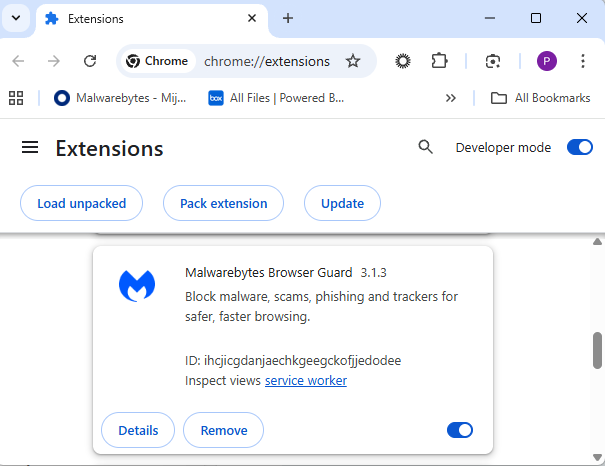
Removal method in the browser
Use the Remove button to get rid of any unwanted entries.
If it disappears and stays gone after restart, you’re done. If there is no Remove button or Chrome says it’s “Installed by your administrator,” or the extension reappears after a restart, there’s a policy, registry entry, or malware forcing it.
Alternative
Alternatively, you can also search the Extensions folder. On Windows systems this folder lives here: C:\Users\<your‑username>\AppData\Local\Google\Chrome\User Data\Default\Extensions.
Please note that the AppData folder is hidden by default. To unhide files and folders in Windows, open Explorer, click the View tab (or menu), and check the Hidden items box. For more advanced options, choose Options > Change folder and search options > View tab, then select Show hidden files, folders, and drives.
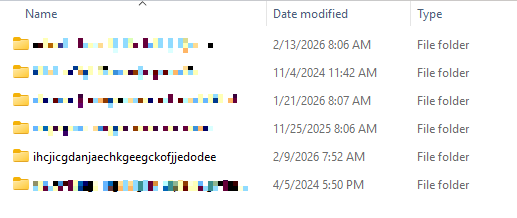
You can organize the list alphabetically by clicking on the Name column header once or twice. This makes it easier to find extensions if you have a lot of them installed.
Deleting the extension folder here has one downside. It leaves an orphaned entry in your browser. When you start Chrome again after doing this, the extension will no longer load because its files are gone. But it will still show up in the Extensions tab, only without the appropriate icon.
So, our advice is to remove extensions in the browser when possible.
Malicious extensions
Below is the list of credential-stealing extensions using the iframe method, as provided by the researchers.
| Extension ID | Extension name |
|---|---|
| acaeafediijmccnjlokgcdiojiljfpbe | ChatGPT Translate |
| baonbjckakcpgliaafcodddkoednpjgf | XAI |
| bilfflcophfehljhpnklmcelkoiffapb | AI For Translation |
| cicjlpmjmimeoempffghfglndokjihhn | AI Cover Letter Generator |
| ckicoadchmmndbakbokhapncehanaeni | AI Email Writer |
| ckneindgfbjnbbiggcmnjeofelhflhaj | AI Image Generator Chat GPT |
| cmpmhhjahlioglkleiofbjodhhiejhei | AI Translator |
| dbclhjpifdfkofnmjfpheiondafpkoed | Ai Wallpaper Generator |
| djhjckkfgancelbmgcamjimgphaphjdl | AI Sidebar |
| ebmmjmakencgmgoijdfnbailknaaiffh | Chat With Gemini |
| ecikmpoikkcelnakpgaeplcjoickgacj | Ai Picture Generator |
| fdlagfnfaheppaigholhoojabfaapnhb | Google Gemini |
| flnecpdpbhdblkpnegekobahlijbmfok | ChatGPT Picture Generator |
| fnjinbdmidgjkpmlihcginjipjaoapol | Email Generator AI |
| fpmkabpaklbhbhegegapfkenkmpipick | Chat GPT for Gmail |
| fppbiomdkfbhgjjdmojlogeceejinadg | Gemini AI Sidebar |
| gcfianbpjcfkafpiadmheejkokcmdkjl | Llama |
| gcdfailafdfjbailcdcbjmeginhncjkb | Grok Chatbot |
| gghdfkafnhfpaooiolhncejnlgglhkhe | AI Sidebar |
| gnaekhndaddbimfllbgmecjijbbfpabc | Ask Gemini |
| gohgeedemmaohocbaccllpkabadoogpl | DeepSeek Chat |
| hgnjolbjpjmhepcbjgeeallnamkjnfgi | AI Letter Generator |
| idhknpoceajhnjokpnbicildeoligdgh | ChatGPT Translation |
| kblengdlefjpjkekanpoidgoghdngdgl | AI GPT |
| kepibgehhljlecgaeihhnmibnmikbnga | DeepSeek Download |
| lodlcpnbppgipaimgbjgniokjcnpiiad | AI Message Generator |
| llojfncgbabajmdglnkbhmiebiinohek | ChatGPT Sidebar |
| nkgbfengofophpmonladgaldioelckbe | Chat Bot GPT |
| nlhpidbjmmffhoogcennoiopekbiglbp | AI Assistant |
| phiphcloddhmndjbdedgfbglhpkjcffh | Asking Chat Gpt |
| pgfibniplgcnccdnkhblpmmlfodijppg | ChatGBT |
| cgmmcoandmabammnhfnjcakdeejbfimn | Grok |
We don’t just report on threats—we remove them
Cybersecurity risks should never spread beyond a headline. Keep threats off your devices by downloading Malwarebytes today.
10K Claude Desktop Users Exposed by Zero-Click Vulnerability
A zero-click flaw in Anthropic’s Claude Desktop Extensions allows attackers to trigger remote code execution via Google Calendar events.
The post 10K Claude Desktop Users Exposed by Zero-Click Vulnerability appeared first on TechRepublic.
Open the wrong “PDF” and attackers gain remote access to your PC
Cybercriminals behind a campaign dubbed DEAD#VAX are taking phishing one step further by delivering malware inside virtual hard disks that pretend to be ordinary PDF documents. Open the wrong “invoice” or “purchase order” and you won’t see a document at all. Instead, Windows mounts a virtual drive that quietly installs AsyncRAT, a backdoor Trojan that allows attackers to remotely monitor and control your computer.
It’s a remote access tool, which means attackers gain remote hands‑on‑keyboard control, while traditional file‑based defenses see almost nothing suspicious on disk.
From a high-level view, the infection chain is long, but every step looks just legitimate enough on its own to slip past casual checks.
Victims receive phishing emails that look like routine business messages, often referencing purchase orders or invoices and sometimes impersonating real companies. The email doesn’t attach a document directly. Instead, it links to a file hosted on IPFS (InterPlanetary File System), a decentralized storage network increasingly abused in phishing campaigns because content is harder to take down and can be accessed through normal web gateways.
The linked file is named as a PDF and has the PDF icon, but is actually a virtual hard disk (VHD) file. When the user double‑clicks it, Windows mounts it as a new drive (for example, drive E:) instead of opening a document viewer. Mounting VHDs is perfectly legitimate Windows behavior, which makes this step less likely to ring alarm bells.
Inside the mounted drive is what appears to be the expected document, but it’s actually a Windows Script File (WSF). When the user opens it, Windows executes the code in the file instead of displaying a PDF.
After some checks to avoid analysis and detection, the script injects the payload—AsyncRAT shellcode—into trusted, Microsoft‑signed processes such as RuntimeBroker.exe, OneDrive.exe, taskhostw.exe, or sihost.exe. The malware never writes an actual executable file to disk. It lives and runs entirely in memory inside these legitimate processes, making detection and eventually at a later stage, forensics much harder. It also avoids sudden spikes in activity or memory usage that could draw attention.
For an individual user, falling for this phishing email can result in:
- Theft of saved and typed passwords, including for email, banking, and social media.
- Exposure of confidential documents, photos, or other sensitive files taken straight from the system.
- Surveillance via periodic screenshots or, where configured, webcam capture.
- Use of the machine as a foothold to attack other devices on the same home or office network.
How to stay safe
Because detection can be hard, it is crucial that users apply certain checks:
- Don’t open email attachments until after verifying, with a trusted source, that they are legitimate.
- Make sure you can see the actual file extensions. Unfortunately, Windows allows users to hide them. So, when in reality the file would be called
invoice.pdf.vhdthe user would only seeinvoice.pdf. To find out how to do this, see below. - Use an up-to-date, real-time anti-malware solution that can detect malware hiding in memory.
Showing file extensions on Windows 10 and 11
To show file extensions in Windows 10 and 11:
- Open Explorer (Windows key + E)
- In Windows 10, select View and check the box for File name extensions.
- In Windows 11, this is found under View > Show > File name extensions.
Alternatively, search for File Explorer Options to uncheck Hide extensions for known file types.
For older versions of Windows, refer to this article.
We don’t just report on threats—we remove them
Cybersecurity risks should never spread beyond a headline. Keep threats off your devices by downloading Malwarebytes today.
Chrome Add-On Caught Stealing Amazon Commissions
A Chrome extension posing as an Amazon ad blocker was caught hijacking affiliate links in the background, redirecting commissions without user consent.
The post Chrome Add-On Caught Stealing Amazon Commissions appeared first on TechRepublic.
A week in security (January 19 – January 25)
Last week on Malwarebytes Labs:
- Spammers abuse Zendesk to flood inboxes with legitimate-looking emails, but why?
- Fake LastPass maintenance emails target users
- Under Armour ransomware breach: data of 72 million customers appears on the dark web
- Can you use too many LOLBins to drop some RATs?
- Malicious Google Calendar invites could expose private data
- Fake extension crashes browsers to trick users into infecting themselves
- Google will pay $8.25m to settle child data-tracking allegations
- Firefox joins Chrome and Edge as sleeper extensions spy on users
On the ThreatDown blog:
Stay safe!
We don’t just report on threats—we remove them
Cybersecurity risks should never spread beyond a headline. Keep threats off your devices by downloading Malwarebytes today.
Firefox joins Chrome and Edge as sleeper extensions spy on users
A group of cybercriminals called DarkSpectre is believed to be behind three campaigns spread by malicious browser extensions: ShadyPanda, GhostPoster, and Zoom Stealer.
We wrote about the ShadyPanda campaign in December 2025, warning users that extensions which had behaved normally for years suddenly went rogue. After a malicious update, these extensions were able to track browsing behavior and run malicious code inside the browser.
Also in December, researchers uncovered a new campaign, GhostPoster, and identified 17 compromised Firefox extensions. The campaign was found to hide JavaScript code inside the image logo of malicious Firefox extensions with more than 50,000 downloads, allowing attackers to to monitor browser activity and plant a backdoor.
The use of malicious code in images is a technique called steganography. Earlier GhostPoster extensions hid JavaScript loader code inside PNG icons such as logo.png for Firefox extensions like “Free VPN Forever,” using a marker (for example, three equals signs) in the raw bytes to separate image data from payload.
Newer variants moved to embedding payloads in arbitrary images inside the extension bundle, then decoding and decrypting them at runtime. This makes the malicious code much harder for researchers to detect.
Based on that research, other researchers found an additional 17 extensions associated with the same group, beyond the original Firefox set. These were downloaded more than 840,000 times in total, with some remaining active in the wild for up to five years.
GhostPoster first targeted Microsoft Edge users and later expanded to Chrome and Firefox as the attackers built out their infrastructure. The attackers published the extensions in each browser’s web store as seemingly useful tools with names like “Google Translate in Right Click,” “Ads Block Ultimate,” “Translate Selected Text with Google,” “Instagram Downloader,” and “Youtube Download.”
The extensions can see visited sites, search queries, and shopping behavior, allowing attackers to create detailed profiles of users’ habits and interests.
Combined with other malicious code, this visibility could be extended to credential theft, session hijacking, or attacks targeting online banking workflows, even if those are not the primary goal today.
How to stay safe
Although we always advise people to install extensions only from official web stores, this case proves once again that not all extensions available there are safe. That said, the risk involved in installing an extension from outside the web store is even greater.
Extensions listed in the web store undergo a review process before being approved. This process, which combines automated and manual checks, assesses the extension’s safety, policy compliance, and overall user experience. The goal is to protect users from scams, malware, and other malicious activity.
Mozilla and Microsoft have removed the identified add-ons from their stores, and Google has confirmed their removal from the Chrome Web Store. However, already installed extensions remain active in Chrome and Edge until users manually uninstall them. When Mozilla blocks an add-on it is also disabled, which prevents it from interacting with Firefox and accessing your browser and your data.
If you’re worried that you may have installed one of these extensions, Windows users can run a Malwarebytes Deep Scan with their browsers closed.
- On the Malwarebytes Dashboard click on the three stacked dots to select the Advanced Scan option.
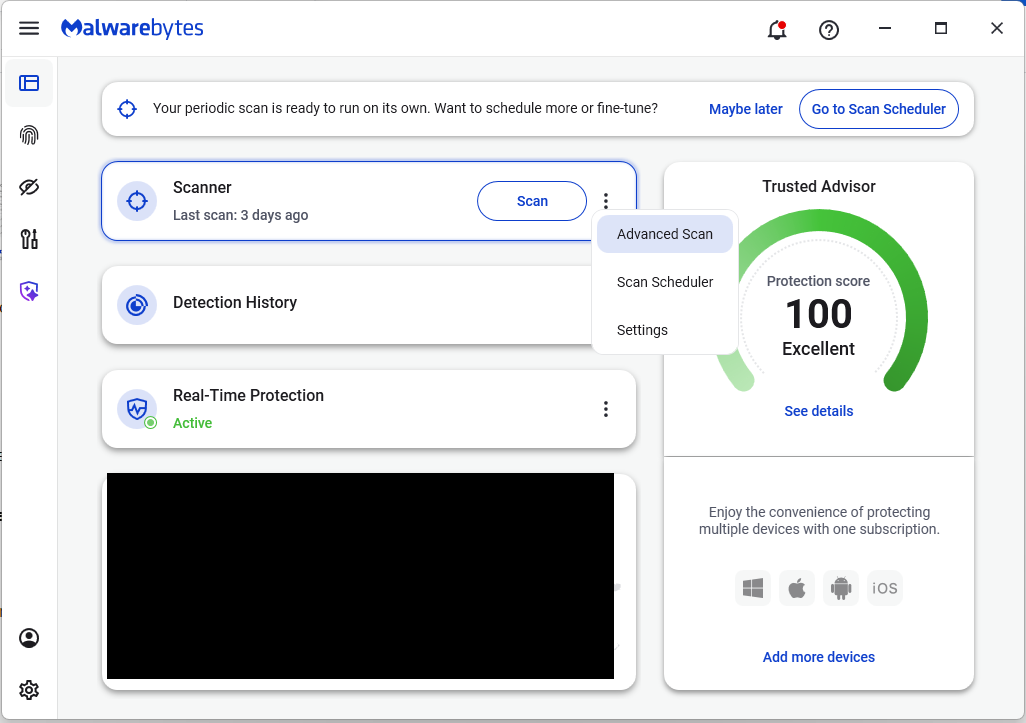
- On the Advanced Scan tab, select Deep Scan. Note that this scan uses more system resources than usual.
- After the scan, remove any found items, and then reopen your browser(s).
Manual check:
These are the names of the 17 additional extensions that were discovered:
- AdBlocker
- Ads Block Ultimate
- Amazon Price History
- Color Enhancer
- Convert Everything
- Cool Cursor
- Floating Player – PiP Mode
- Full Page Screenshot
- Google Translate in Right Click
- Instagram Downloader
- One Key Translate
- Page Screenshot Clipper
- RSS Feed
- Save Image to Pinterest on Right Click
- Translate Selected Text with Google
- Translate Selected Text with Right Click
- Youtube Download
Note: There may be extensions with the same names that are not malicious.
We don’t just report on threats—we help safeguard your entire digital identity
Cybersecurity risks should never spread beyond a headline. Protect your, and your family’s, personal information by using identity protection.
“Sleeper” browser extensions woke up as spyware on 4 million devices
Researchers have unraveled a malware campaign that really did play the long game. After seven years of behaving normally, a set of browser extensions installed on roughly 4.3 million Chrome and Edge users’ devices suddenly went rogue. Now they can track what you browse and run malicious code inside your browser.
The researchers found five extensions that operated cleanly for years before being weaponized in mid-2024. The developers earned trust, built up millions of installs, and even collected “Featured” or “Verified” status in the Chrome and Edge stores. Then they pushed silent updates that turned these add-ons into spyware and malware.
The extensions turned into a remote code execution framework. They could download and run malicious JavaScript inside the browser and collect information about visited sites and the user’s browser, sending it all back to attackers believed to be based in China.
One of the most prevalent of these extensions is WeTab, with around three million installs on Edge. It acts as spyware by streaming visited URLs, search queries, and other data in real time. The researchers note that while Google has removed the extensions, the Edge store versions are still available.
Playing the long game is not something cybercriminals usually have the time or patience for.
The researchers attributed the campaign to the ShadyPanda group, which has been active since at least 2018 and launched their first campaign in 2023. That was a simpler case of affiliate fraud, inserting affiliate tracking codes into users’ shopping clicks.
What the group did learn from that campaign was that they could get away with deploying malicious updates to existing extensions. Google vets new extensions carefully, but updates don’t get the same attention.
It’s not the first time we’ve seen this behavior, but waiting for years is exceptional. When an extension has been available in the web store for a while, cybercriminals can insert malicious code through updates to the extension. Some researchers refer to the clean extensions as “sleeper agents” that sit quietly for years before switching to malicious behavior.
This new campaign is far more dangerous. Every infected browser runs a remote code execution framework. Every hour, it checks api.extensionplay[.]com for new instructions, downloads arbitrary JavaScript, and executes it with full browser API access.
How to find malicious extensions manually
The researchers at Koi shared a long list of Chrome and Edge extension IDs linked to this campaign. You can check if you have these extensions in your browser:
In Chrome
- Open Google Chrome.
- In the address bar at the top, type chrome://extensions/ and press Enter. This opens the Extensions page, which shows all extensions installed in your browser.
- At the top right of this page, turn on Developer mode.
- Now each extension card will show an extra line with its ID.
- Press Ctrl+F (or Cmd+F on Mac) to open the search box and paste the ID you’re checking (e.g.
eagiakjmjnblliacokhcalebgnhellfi) into the search box.
If the page scrolls to an extension and highlights the ID, it’s installed. If it says No results found, it isn’t in that Chrome profile.
If you see that ID under an extension, it means that particular add‑on is installed for the current Chrome profile.
To remove it, click Remove on that extension’s card on the same page.
In Edge
Since Edge is a Chromium browser the steps are the same, just go to edge://extensions/ instead.
We don’t just report on threats—we remove them
Cybersecurity risks should never spread beyond a headline. Keep threats off your devices by downloading Malwarebytes today.
Browser extensions turn nearly 1 million browsers into website-scraping bots
Extensions installed on almost 1 million devices have been overriding key security protections to turn browsers into engines that scrape websites on behalf of a paid service, a researcher said.
The 245 extensions, available for Chrome, Firefox, and Edge, have racked up nearly 909,000 downloads, John Tuckner of SecurityAnnex reported. The extensions serve a wide range of purposes, including managing bookmarks and clipboards, boosting speaker volumes, and generating random numbers. The common thread among all of them: They incorporate MellowTel-js, an open source JavaScript library that allows developers to monetize their extensions.
Intentional weakening of browsing protections
Tuckner and critics say the monetization works by using the browser extensions to scrape websites on behalf of paying customers, which include AI startups, according to MellowTel founder Arsian Ali. Tuckner reached this conclusion after uncovering close ties between MellowTel and Olostep, a company that bills itself as "the world's most reliable and cost-effective Web scraping API." Olostep says its service “avoids all bot detection and can parallelize up to 100K requests in minutes.” Paying customers submit the locations of browsers they want to access specific webpages. Olostep then uses its installed base of extension users to fulfill the request.


Time to check if you ran any of these 33 malicious Chrome extensions
As many of us celebrated the year-end holidays, a small group of researchers worked overtime tracking a startling discovery: At least 33 browser extensions hosted in Google’s Chrome Web Store, some for as long as 18 months, were surreptitiously siphoning sensitive data from roughly 2.6 million devices.
The compromises came to light with the discovery by data loss prevention service Cyberhaven that a Chrome extension used by 400,000 of its customers had been updated with code that stole their sensitive data.
’Twas the night before Christmas
The malicious extension, available as version 24.10.4, was available for 31 hours, from December 25 at 1:32 AM UTC to Dec 26 at 2:50 AM UTC. Chrome browsers actively running Cyberhaven during that window would automatically download and install the malicious code. Cyberhaven responded by issuing version 24.10.5, and 24.10.6 a few days later.


© Getty Images
