Visualização de leitura

Real Apple notifications are being used to drive tech support scams

Scammers have found a way to abuse legitimate Apple account notification emails to trick targets into calling fake tech support numbers.

According to a report from BleepingComputer, scammers create an Apple account and insert a phishing message into the personal information fields, then modify the account so that Apple sends a genuine security alert about the change to the target.

BleepingComputer was able to replicate the attack.

The attacker creates an Apple ID they control, then stuffs the phishing message into the personal information fields (first name, last name, possibly address), splitting it across fields because they will not fit into just one.

To launch the phish, the attacker changes something benign on their specially created Apple account, such as shipping information, which causes Apple’s systems to send a “Your Apple account was updated” security email.

While the original alert is addressed to the attacker’s iCloud email, they are then able to redistribute it to a wider victim list, for example through a mailing list.

In the copy the targets receive, the email headers still show a legitimate Apple sender, and the presence of the attacker’s iCloud address can even make it look like “someone else” has gained access to the account.
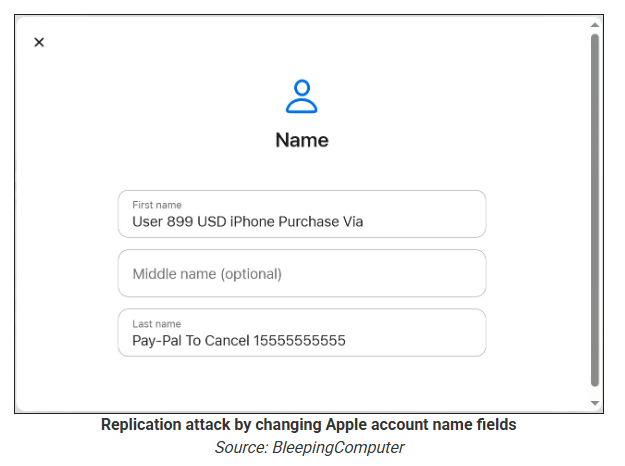
Reconstruction. Image courtesy of BleepingComputer

Because Apple includes those user-supplied fields in the security email, the phishing text is delivered inside a legitimate message sent from Apple’s own infrastructure.

This method, called call-back phishing, filters out suspicious users, so the scammers can focus on the people who fell for the first part.

The emails come from a legitimate source, sail through every security filter because of that, and look convincing enough to scare the receiver into thinking someone spent $899 from their PayPal account.
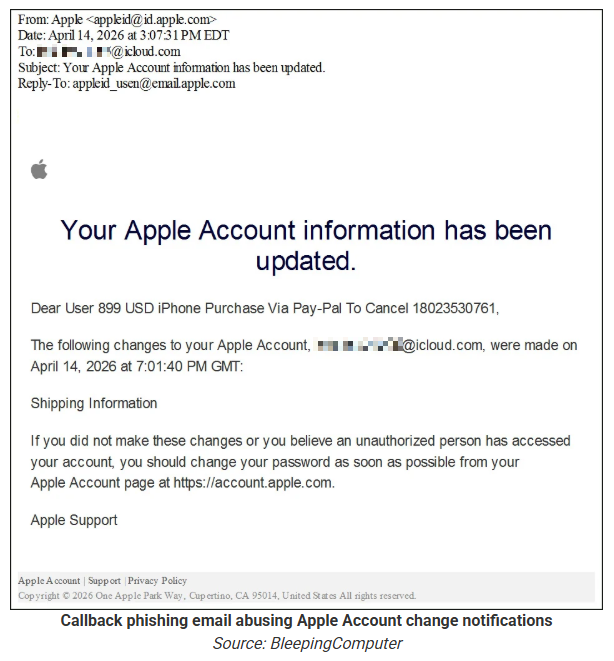
Phishing email screenshot, courtesy of BleepingComputer

But the structure of the email does not make sense.

“Dear User” is immediately followed by the scam message where your name should have been. The header says it’s about account information rather than a purchase. And the iCloud account does not belong to the recipient. So, once you know how it’s done, they’re not impossible to spot. Which is why we wrote this blog.

And when in doubt, you can always ask Malwarebytes Scam Guard.


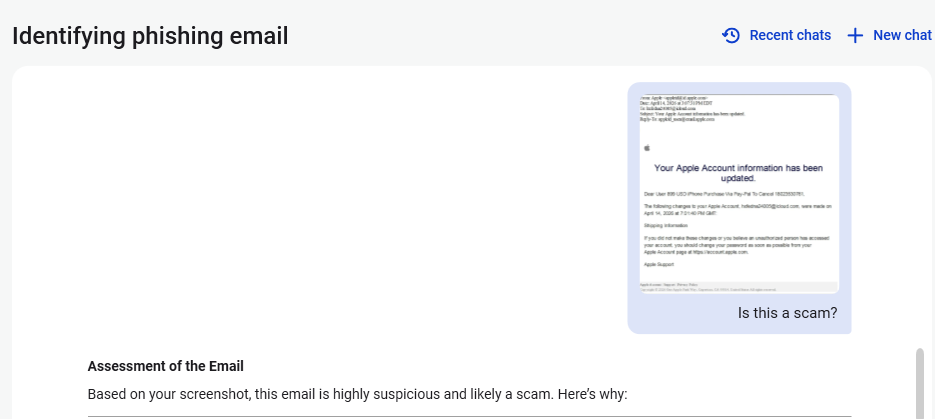
Scam or legit? Scam Guard knows.


Is this a scam?
Asking Scam Guard

Scam Guard identified the screenshot as a scam and guides users through the next steps.

Scams like these work, because many users still view phone calls as more trustworthy than email, especially if the email itself passed all the usual technical authenticity checks and they initiated the call themselves.

How to stay safe

Tech support scammers will try to convince callers to install some kind of remote desktop application to steal data from your computer, or ask for financial details so they can steal your money.

To stay safe from these scammers:

  • Be wary of unexpected alerts about high‑value purchases you do not recognize. They are suspicious even if they come from a real domain.
  • Never call a number sent to you by unsolicited means or even found in sponsored search results.
  • Carefully read emails and text messages, even if they come form trustworthy addresses. Does the email make sense from a structural and linguistic point of view?
  • If someone claiming to be support for a legitimate company asks for remote access or payment details during a call, hang up and contact the company through official channels.
  • Use Malwarebytes Scam Guard to analyze any kind of message that alarms you or urges you to take immediate action.

Something feel off? Check it before you click.  

Malwarebytes Scam Guard helps you analyze suspicious links, texts, and screenshots instantly.  

Available with Malwarebytes Premium Security for all your devices, and in the Malwarebytes app for iOS and Android.  
Try it free → 

March 2026 Security Issues in the Korean & Global Financial Sector

Content. a number of malware samples including phishing, web shell, droppers, backdoor malware, downloaders, Infostealer, and CoinMiner targeting the financial sector have been distributed. we observed a number of cases where Korean disguised attachment names and HTML/JS execution methods were utilized to propagate phishing. account compromise campaigns through the Telegram API were confirmed, with approximately […]

O papel do Bubble em golpes de phishing | Blog oficial da Kaspersky

Uma variedade de criadores de aplicativos com tecnologia de IA promete dar vida às suas ideias com rapidez e facilidade. Infelizmente, sabemos exatamente quem está sempre à procura de novas ideias para dar vida, principalmente porque somos muito bons em identificar e bloquear as antigas. Estamos falando de phishers, é claro. Recentemente, descobrimos que eles adicionaram um novo truque ao seu arsenal: gerar sites usando o criador de aplicativos da Web com tecnologia IA Bubble. É muito provável que essa tática já esteja disponível em uma ou mais plataformas de phishing como serviço, o que praticamente garante que essas armadilhas começarão a aparecer em uma ampla variedade de ataques. Mas vamos detalhar em etapas.

Por que os phishers estão usando o Bubble?

Incluir um link direto para um site de phishing em um e-mail é um caminho sem volta para o fracasso. Há uma grande probabilidade de a mensagem nem chegar ao destino, pois os filtros de segurança provavelmente a bloquearão antes que o usuário a veja. Da mesma forma, o uso de redirecionamentos automatizados já está no radar das soluções de segurança modernas. E os QR codes? Embora fazer com que a vítima escaneie um código com o celular, em vez de clicar em um link, possa funcionar em teoria, os phishers inevitavelmente perdem tráfego nessa etapa: nem todo mundo está disposto a inserir credenciais corporativas em um dispositivo pessoal. É aqui que os serviços automatizados de geração de código socorrem os cibercriminosos.

O Bubble se posiciona como uma plataforma no-code para o desenvolvimento de aplicativos da Web e móveis. Essencialmente, um usuário descreve o que precisa em uma interface visual e a plataforma gera uma solução finalizada. Os phishers adotaram essa tecnologia para criar aplicativos da Web cujos endereços, depois, eles incorporam em seus e-mails de phishing. Embora a função real desses aplicativos se resuma ao mesmo antigo redirecionamento automatizado para um site malicioso, há algumas nuances específicas em jogo.

Primeiro, o aplicativo da Web resultante é hospedado diretamente nos servidores da plataforma. O URL pronto para uso em um e-mail de phishing se parece com https://%name%.bubble.io/. Do ponto de vista das soluções de segurança, parece ser um site legítimo e antigo.

Em segundo lugar, o código desse aplicativo da Web não se parece com um redirecionamento típico. Para ser honesto, é difícil dizer com o que ele se parece. O código gerado por essa plataforma no-code é uma enorme mistura de JavaScript e estruturas isoladas de Shadow DOM (Document Object Model). Mesmo para um especialista, é difícil entender o que está acontecendo à primeira vista; é preciso analisar o código a fundo para entender como tudo funciona e com qual objetivo. Os algoritmos automatizados de análise de código da Web têm ainda mais chances de falhar, frequentemente chegando ao veredicto de que é apenas um site funcional e útil.

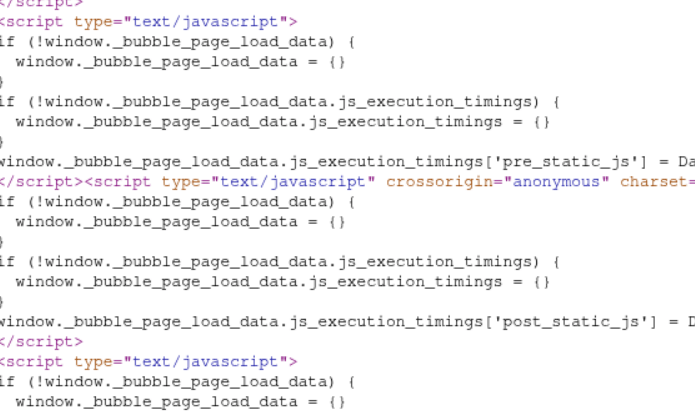
Um fragmento de código de aplicativo da Web hospedado na plataforma Bubble

Um fragmento de código de aplicativo da Web hospedado na plataforma Bubble

O que são essas plataformas de phishing e qual é o objetivo?

Os phishers atuais raramente desenvolvem e implementam novos truques do zero. A maioria usa kits de phishing, essencialmente pacotes do tipo “faça você mesmo o seu esquema fraudulento”, ou até mesmo plataformas de phishing como serviço em larga escala.

Essas plataformas fornecem aos invasores um kit de ferramentas sofisticado (e altamente frustrante) que está em constante evolução para melhorar a entrega de e-mail e burlar as defesas antiphishing. Por exemplo, essas ferramentas permitem que os invasores, entre muitas outras coisas, façam o seguinte: interceptem cookies de sessão; realizem phishing pelo Google Tarefas (uma tática que abordamos em uma postagem anterior); executem ataques de intermediário (AiTM) para validar a autenticação de dois fatores (2FA) e burlá-la em tempo real; criem sites de phishing equipados com honeypots e geofencing para se esconder dos rastreadores de segurança; e usem assistentes de IA para gerar e-mails de phishing únicos. Para piorar a situação, a infraestrutura dessas plataformas geralmente é hospedada em serviços perfeitamente legítimos como AWS, tornando suas táticas ainda mais difíceis de detectar.

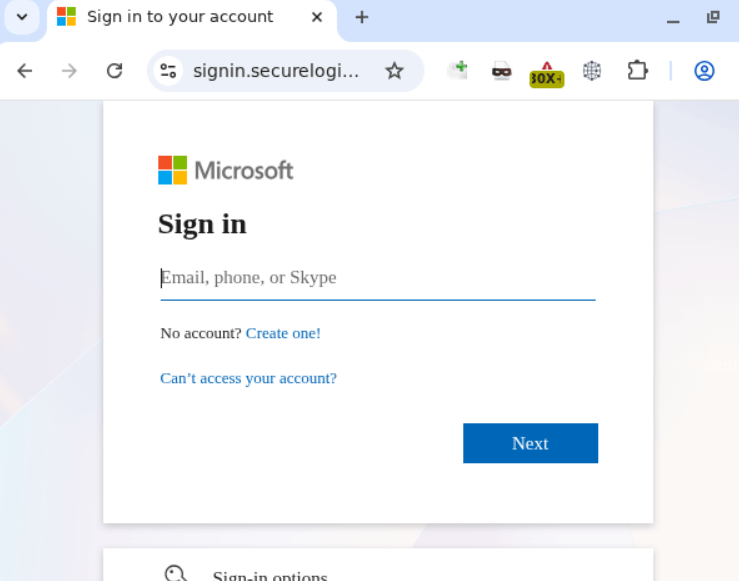
As mesmas plataformas são usadas para criar a página de destino final que coleta credenciais. Nesse caso específico, o aplicativo da Web hospedado no Bubble redireciona as vítimas para um site com uma verificação da Cloudflare que imita a janela de login da Microsoft.

Formulário de phishing projetado para coletar credenciais corporativas

Formulário de phishing projetado para coletar credenciais corporativas

Aparentemente, no universo paralelo dos invasores, o Skype ainda é uma ferramenta de comunicação viável, mas fora isso, o site é bastante convincente.

Como proteger a sua empresa contra ataques de phishing sofisticados

No cenário digital atual, os funcionários precisam entender que as credenciais corporativas devem ser inseridas apenas em serviços e sites que inegavelmente pertencem à empresa. Você pode conscientizar sua equipe sobre ameaças cibernéticas modernas usando a Kaspersky Automated Security Awareness Platform para treinamento on-line.

É claro que até o funcionário mais cauteloso pode ocasionalmente morder a isca. Recomendamos equipar todas as estações de trabalho conectadas à Internet com soluções de segurança robustas que simplesmente bloquearão qualquer tentativa de visitar um site malicioso. Por fim, para reduzir o número de e-mails perigosos que ocupam as caixas de entrada corporativas, sugerimos implementar um produto de segurança de gateway com tecnologias antiphishing avançadas.

Gmail Finally Lets You Change Your Email Address Without Losing Anything

Gmail users in the US can now change their email address without losing data. Here’s how the long-awaited Google feature works and its key limits.

The post Gmail Finally Lets You Change Your Email Address Without Losing Anything appeared first on TechRepublic.

Axios Supply Chain Attack Exposes Developers to Hidden Malware

Axios supply chain attack

The Axios supply chain attack that surfaced on March 31, 2026, has raised serious concerns across the JavaScript ecosystem, exposing how a compromised npm Account can be leveraged to distribute malware at scale. The incident involved poisoned releases of the widely used HTTP client library Axios, where attackers exploited a hijacked Axios maintainer account to silently introduce a cross-platform remote access trojan (RAT).  Security researchers have identified two malicious versions of Axios, 1.14.1 and 0.30.4, published to npm. These releases did not go through the project’s standard GitHub Actions CI/CD pipeline. Instead, they were manually pushed using stolen credentials from a trusted npm Account belonging to a core Axios maintainer.  The attacker altered the account’s registered email to a ProtonMail address and used the npm CLI to publish the compromised packages. This bypassed the cryptographic protection typically enforced by trusted publishing workflows, making the malicious releases appear legitimate at first glance. 

Hidden Dependency and Malware Deployment 

Notably, the malicious code was not embedded directly within Axios itself. Instead, the attacker injected a fake dependency: plain-crypto-js@4.2.1. This package was never referenced in the Axios source code. Its sole purpose was to execute a post-install script that deployed a RAT.  Once installed, the dependency triggered a script (node setup.js) that contacted a live command-and-control (C2) server at http://sfrclak.com:8000/6202033. The malware then delivered platform-specific payloads targeting macOS, Windows, and Linux systems.  After execution, the malicious package removed traces of itself. It deleted its own package.json file and replaced it with a clean decoy version, effectively concealing evidence of compromise during post-installation inspection. 

Timeline of the Axios Supply Chain Attack 

The Axios supply chain attack was carefully staged over approximately 18 hours: 
  • March 30, 2026 – 05:57 UTC: A clean version of plain-crypto-js@4.2.0 was published to establish credibility.  
  • March 30, 2026 – 23:59 UTC: The malicious version 4.2.1 was released, introducing the RAT dropper.  
  • March 31, 2026 – 00:21 UTC: axios@1.14.1 was published using the compromised npm Account.  
  • March 31, 2026 – 01:00 UTC: axios@0.30.4 followed, targeting legacy users.  
  • ~03:15 UTC: Both malicious Axios versions were removed from npm.  
  • 03:25 UTC: npm placed a security hold on plain-crypto-js.  
  • 04:26 UTC: A security placeholder package replaced the malicious dependency.  
The poisoned Axios versions remained available for nearly three hours, while the malicious dependency was live for over four hours. 

How the Attack Worked 

The attacker gained access to a primary Axios maintainer account and used it to publish new versions directly to npm. Unlike legitimate releases, which are tied to GitHub Actions using OIDC authentication, these malicious versions lacked any trusted publisher metadata or corresponding Git commits.  This discrepancy became a key forensic indicator. Legitimate releases showed automated publishing records, while the compromised versions appeared as manually uploaded artifacts. 

Dependency Injection Strategy 

The attacker inserted plain-crypto-js@^4.2.1 into Axios’s dependency list. This change was subtle; every other dependency remained identical to the previous clean versions.  Because npm automatically installs dependencies, the malicious package executed without requiring any direct interaction from developers. A simple npm install axios@1.14.1 was enough to trigger the attack.  A review of the Axios codebase confirmed that the injected dependency was never used, making it a “phantom dependency”, a strong indicator of tampering. 

Cross-Platform RAT Behavior 

The malware deployed different payloads depending on the operating system: 
  • macOS: Used AppleScript to download and execute a binary stored in /Library/Caches, disguised to resemble a legitimate system process.  
  • Windows: Leveraged VBScript and PowerShell to download and execute a RAT, while disguising persistence mechanisms as system binaries.  
  • Linux: Downloaded a Python script (/tmp/ld.py) and executed it in the background using nohup 
Each variant communicated with the same C2 server but used different identifiers to receive tailored payloads. The traffic was designed to resemble legitimate npm registry activity, helping it evade detection. 

Anti-Forensics and Stealth 

A defining feature of the Axios supply chain attack was its emphasis on evasion. The dropper used layered obfuscation techniques, including XOR encoding and base64 transformations, to hide its logic.  After execution, it erased itself and replaced its configuration files with clean versions. This meant that developers inspecting their node_modules directory after installation would find no obvious signs of compromise.  Runtime analysis revealed a 36-second gap between the initial installation and the cleanup process, just enough time for the malware to establish persistence. 

Impact and Response 

Axios is one of the most widely used HTTP libraries in the JavaScript ecosystem, with over 300 million weekly downloads. This made the attack particularly dangerous, as even a short-lived malicious release could impact thousands of projects.  Developers who installed axios@1.14.1 or axios@0.30.4 are advised to treat their systems as fully compromised. Safe versions include 1.14.0 and 0.30.3.  Recommended actions include: 
  • Rotating all credentials, including API keys and tokens  
  • Reviewing network logs for suspicious outbound connections  
  • Rebuilding affected systems entirely rather than attempting partial cleanup  
  • Reinstalling dependencies with scripts disabled  

Google Introduces Advanced Ransomware Defense and Recovery Features in Drive

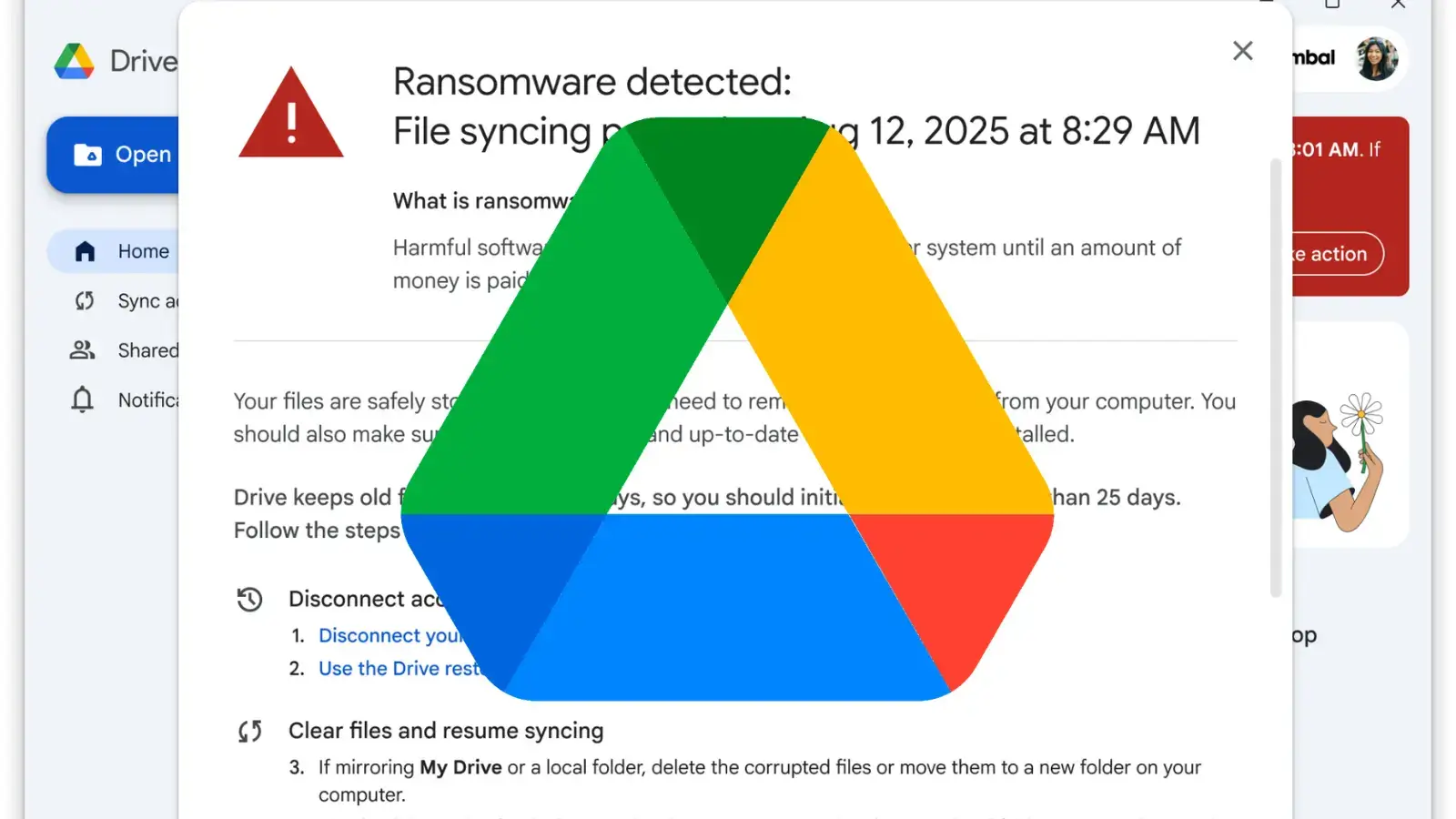
Google has officially moved its advanced ransomware detection and file restoration features for Google Drive out of beta, making them generally available to organizations globally. Originally launched for beta testing in September 2025, these security enhancements are designed to minimize the destructive impact of malware attacks on both personal and corporate endpoints. The general availability […]

The post Google Introduces Advanced Ransomware Defense and Recovery Features in Drive appeared first on GBHackers Security | #1 Globally Trusted Cyber Security News Platform.

Russian APT targets Ukraine via Zimbra XSS flaw CVE-2025-66376

Russian APT exploits a critical XSS flaw in Zimbra, tracked as CVE-2025-66376, running scripts via HTML emails to target users in Ukraine.

Russia-linked threat actor exploits a high-severity XSS vulnerability, tracked as CVE-2025-66376 (CVSS score of 7.2), in Zimbra Collaboration. Attackers exploited insufficiently sanitized HTML emails to run scripts when opened, targeting users in Ukraine.

The flaw is a stored XSS vulnerability in the Classic UI where attackers could abuse CSS @import directives in email HTML. Attackers could exploit the bug to take over a user’s email account and compromise the entire Zimbra environment.

Synacor addressed the flaw with the release of Zimbra versions 10.1.13 and 10.0.18.

According to cybersecurity firm Seqrite Labs, a Russia-linked APT group, likely APT28  (aka UAC-0001, aka Fancy BearPawn StormSofacy GroupSednit, BlueDelta, and STRONTIUM), has exploited the Zimbra vulnerability in attacks against entities in Ukraine. Attackers used JavaScript in phishing emails to silently harvest credentials, session tokens, 2FA codes, saved passwords, and 90 days of mailbox data. Then they exfiltrated stoled data via DNS and HTTPS.

“A social engineered internship inquiry is used to deliver an obfuscated JavaScript payload embedded directly in the email body. When the victim opens the email in a vulnerable Zimbra webmail session, it exploits CVE-2025-66376 which is a stored XSS bug caused by inadequate sanitization of CSS @import directives within the HTML content.” reads the report published by Seqrite Labs. “Based on technical overlaps with Zimbra exploitation and geopolitical targeting alignment, we assess with moderate confidence that this campaign aligns with tradecraft previously documented with Russian state-sponsored intrusion sets targeting Ukrainian government entities. This has been reported to CERT-UA.”

A national maritime agency was targeted on January 22 using a compromised student email. Seqrite Labs tracked this campaign as Operation GhostMail.

A phishing email targeted Ukraine’s State Hydrology Agency, part of critical infrastructure, using a compromised student account to appear legitimate. The message hid malicious JavaScript in the HTML body, exploiting a Zimbra XSS flaw (CVE-2025-66376).

Once opened, it executed in the user’s session, stealing credentials, tokens, emails, and 2FA data. The multi-stage payload used SOAP requests, DNS and HTTPS exfiltration, and enabled persistent access, allowing attackers to monitor accounts and extract up to 90 days of emails.

The phishing campaign’s C2 infrastructure was set up on 20 Jan 2026 with two domains:

  • js-l1wt597cimk[.]i[.]zimbrasoft[.]com[.]ua
  • js-26tik3egye4[.]i[.]zimbrasoft[.]com[.]ua

Historical patterns show Russian APTs like Fancy Bear (APT28), Cozy Bear (APT29), and Winter Vivern (TA473) targeting Zimbra, but this attack differs as it leverages an HTML email XSS payload requiring user interaction, dual-channel exfiltration, and structured SOAP API abuse. Based on targeting and payload similarities to SpyPress.ZIMBRA, Operation GhostMail is attributed to APT28 with medium confidence.

“The targeting of a Ukrainian government entity aligns with ongoing geopolitical cyber activity observed against public-sector institutions in the region.” concludes the report. “While definitive attribution requires further infrastructure or code-overlap confirmation, the techniques used are consistent with previously documented Russian state-sponsored groups exploiting webmail platforms across Eastern Europe. “

On Wednesday, the US CISA added the flaw CVE-2025-66376 to its Known Exploited Vulnerabilities catalog, ordering federal agencies to address it by April 1st, 2026.

Follow me on Twitter: @securityaffairs and Facebook and Mastodon

Pierluigi Paganini

(SecurityAffairs – hacking, Zimbra)

Proton Mail Shared User Information with the Police

404 Media has a story about Proton Mail giving subscriber data to the Swiss government, who passed the information to the FBI.

It’s metadata—payment information related to a particular account—but still important knowledge. This sort of thing happens, even to privacy-centric companies like Proton Mail.

February 2026 Security Issues Related to the Korean & Global Financial Sector

This report comprehensively covers actual cyber threats and related security issues targeting financial institutions in South Korea and abroad. It includes analysis of malware and phishing cases distributed targeting the financial sector, presents the Top 10 major malware targeting the financial sector, and provides statistics on the industry sectors of South Korean accounts leaked via […]

February 2026 Phishing Email Trends Report

Statistics on Attachment Threats Types in February 2026, the highest percentage of phishing email attachment threats is FakePage (42%). threat actors sophisticatedly mimic login pages and advertisement pages with HTML and other scripts to trick users into entering data and sending it to a C2 server or to a fake site. another popular method is […]

Phishing por meio do Google Tarefas | Blog oficial da Kaspersky

Temos discutido repetidamente esquemas de phishing em que invasores exploram vários servidores legítimos para enviar e-mails. Caso consigam sequestrar algum servidor de SharePoint, eles o usarão; caso contrário, se limitarão a enviar notificações por meio de um serviço gratuito, como o GetShared. Contudo, o enorme ecossistema do Google é um dos alvos favoritos dos criminosos, e a bola da vez é o Google Tarefas. Como de costume, este truque tem como principal objetivo driblar os filtros de e-mail, explorando a boa reputação do intermediário.

Como é o phishing no Google Tarefas

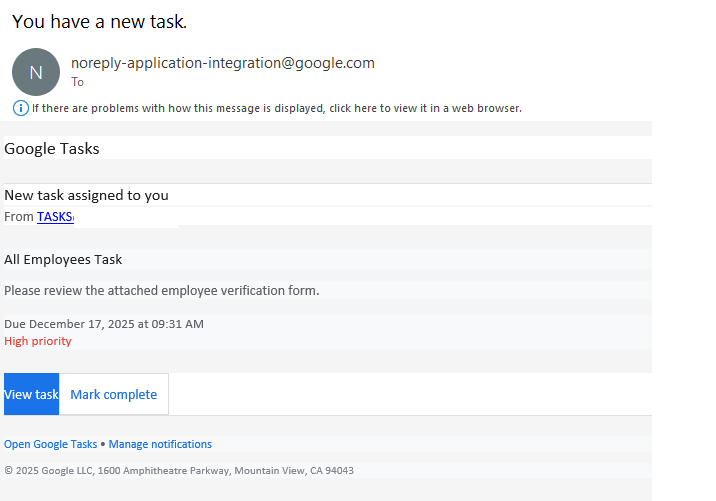
O destinatário recebe uma notificação legítima de um endereço @google.com com a mensagem: “Você tem uma nova tarefa”. Basicamente, os invasores tentam fazer parecer que a empresa passou a usar o gerenciador de tarefas do Google e, por isso, a vítima precisa clicar imediatamente em um link para preencher um formulário de verificação.

Notificação do Google Tarefas

Para impedir que o destinatário tenha tempo para pensar se isso é necessário, a tarefa geralmente inclui um prazo curto e é marcada com alta prioridade. Ao clicar no link dentro da tarefa, a vítima é direcionada para uma URL que leva a um formulário onde deve inserir suas credenciais corporativas para “confirmar seu status de funcionário”. Essas credenciais, obviamente, são o objetivo final do ataque de phishing.

Como proteger as credenciais de funcionários contra phishing

Naturalmente, os funcionários devem ser alertados sobre a existência desse esquema. Por exemplo, compartilhando um link para o nosso acervo de postagens sobre como identificar o phishing. Mas, na realidade, o problema não é com nenhum serviço específico, mas sim com a cultura geral de segurança cibernética dentro de uma empresa. Os processos de fluxo de trabalho precisam ser claramente definidos para que todos os funcionários entendam quais ferramentas são realmente usadas pela empresa. Recomenda-se manter um documento corporativo público com a lista dos serviços autorizados e as pessoas ou departamentos responsáveis por eles. Isso proporciona aos funcionários um meio de verificar se aquele convite, tarefa ou notificação é legítimo. Além disso, nunca é demais lembrar que as credenciais corporativas devem ser inseridas somente em recursos internos da empresa. Para automatizar o processo de treinamento e manter sua equipe atualizada sobre as ameaças cibernéticas modernas, você pode usar uma ferramenta dedicada, como a Kaspersky Automated Security Awareness Platform.

Além disso, recomendamos reduzir a chegada de e-mails potencialmente perigosos às caixas de entrada dos funcionários com uma solução de segurança de gateway de e-mail especializada. Também é vital equipar todas as estações de trabalho conectadas à Web com um software de segurança. Mesmo que um invasor consiga enganar um funcionário, o produto de segurança bloqueará a tentativa de visitar o site de phishing, evitando o vazamento das credenciais corporativas.

❌