
 Entrar
The post Apple Unveils End-to-End Encryption for iPhone-to-Android RCS Messaging appeared first on Daily CyberSecurity.
Visualização de leitura

DarkSword Malware
DarkSword is a sophisticated piece of malware—probably government designed—that targets iOS.
Google Threat Intelligence Group (GTIG) has identified a new iOS full-chain exploit that leveraged multiple zero-day vulnerabilities to fully compromise devices. Based on toolmarks in recovered payloads, we believe the exploit chain to be called DarkSword. Since at least November 2025, GTIG has observed multiple commercial surveillance vendors and suspected state-sponsored actors utilizing DarkSword in distinct campaigns. These threat actors have deployed the exploit chain against targets in Saudi Arabia, Turkey, Malaysia, and Ukraine.
DarkSword supports iOS versions 18.4 through 18.7 and utilizes six different vulnerabilities to deploy final-stage payloads. GTIG has identified three distinct malware families deployed following a successful DarkSword compromise: GHOSTBLADE, GHOSTKNIFE, and GHOSTSABER. The proliferation of this single exploit chain across disparate threat actors mirrors the previously discovered Coruna iOS exploit kit. Notably, UNC6353, a suspected Russian espionage group previously observed using Coruna, has recently incorporated DarkSword into their watering hole campaigns.
A week after it was identified, a version of it leaked onto the internet, where it is being used more broadly.
This news is a month old. Your devices are safe, assuming you patch regularly.
Microsoft asks iPhone users to reauthenticate after Outlook outage
After addressing a widespread outage that affected Outlook.com users worldwide on Monday, Microsoft has asked iPhone users to re-enter their credentials to regain access to their Outlook and Hotmail accounts via the default Mail app. [...]
iOS Flaw Let Deleted Notifications Linger, Apple Issues Fix
Apple fixed an iOS flaw that kept deleted notifications on devices, allowing recovery of messages, including from apps like Signal.
Apple released updates for iOS and iPadOS to address the vulnerability CVE-2026-28950, a flaw in Notification Services that stored notifications even after deletion. This logging issue could allow recovery of sensitive data, including messages from apps like Signal. The company resolved it by improving how data is redacted and handled on devices.
The recent revelations about FBI forensic access to Signal messages on an iPhone have reignited a long-standing misunderstanding about mobile privacy: the belief that disappearing messages and encrypted apps guarantee that no trace of communication remains once a message is deleted or an app is removed. A court case in Texas, reported by 404 Media and later analyzed by multiple security researchers, shows why that assumption does not match how modern smartphones actually work.
“The FBI was able to forensically extract copies of incoming Signal messages from a defendant’s iPhone, even after the app was deleted, because copies of the content were saved in the device’s push notification database, multiple people present for FBI testimony in a recent trial told 404 Media. The case involved a group of people setting off fireworks and vandalizing property at the ICE Prairieland Detention Facility in Alvarado, Texas in July, and one shooting a police officer in the neck.” reads the post published by 404 Media. “The news shows how forensic extraction—when someone has physical access to a device and is able to run specialized software on it—can yield sensitive data derived from secure messaging apps in unexpected places.”
Investigators were able to recover incoming messages from a suspect’s iPhone even after Signal had been uninstalled, even though the messages were configured to disappear after a short time. The FBI did not break Signal’s encryption, nor did they exploit any vulnerability in its protocol. Instead, the data was retrieved from a completely different layer of the system: Apple’s own notification storage.
Court testimony reveals that only incoming iPhone messages were recovered, not outgoing ones. This is key because incoming messages are processed by Apple’s push notification system, temporarily stored for lock screen/notification previews, and may leave OS traces even if deleted from the app. Outgoing messages lack this notification trail, explaining the investigators’ limitation.
Users misunderstand what “deleting” or “disappearing” actually means, instant messaging apps like Signal encrypt in transit and delete from their interface per timer, but once delivered, messages decrypt on the recipient’s device for display. The OS may then cache notification content independently, outside Signal’s control.
“There is an important detail to keep in mind here: only incoming messages were recovered, not outgoing ones. This is entirely consistent with how push notifications work.” reads an analysis published by researcher Andrea Fortuna. “When someone sends you a message on Signal, the app server pushes a notification to Apple’s infrastructure, which then delivers it to your device. If the notification content was not stripped before delivery, the text lands in the operating system’s notification database. Outgoing messages, which originate directly from your device to the server, never go through this pathway and therefore leave no equivalent trace.”
Apple’s Push Notification service routes encrypted messages to devices via secure tokens. Payloads with visible alerts (if previews enabled) are decrypted locally but rendered by iOS, which caches notification data for history/reboot recovery. iOS databases persist fragments even after app deletion, enabling forensic recovery of past notifications despite end-to-end encryption.
According to Apple, the issue impacts the following devices:
- iPhone 11 and later, iPad Pro 12.9-inch 3rd generation and later, iPad Pro 11-inch 1st generation and later, iPad Air 3rd generation and later, iPad 8th generation and later, and iPad mini 5th generation and later.
- iPhone XR, iPhone XS, iPhone XS Max, iPhone 11 (all models), iPhone SE (2nd generation), iPhone 12 (all models), iPhone 13 (all models), iPhone SE (3rd generation), iPhone 14 (all models), iPhone 15 (all models), iPhone 16 (all models), iPhone 16e, iPad mini (5th generation – A17 Pro), iPad (7th generation – A16), iPad Air (3rd – 5th generation), iPad Air 11-inch (M2 – M3), iPad Air 13-inch (M2 – M3), iPad Pro 11-inch (1st generation – M4), iPad Pro 12.9-inch (3rd – 6th generation), and iPad Pro 13-inch (M4).
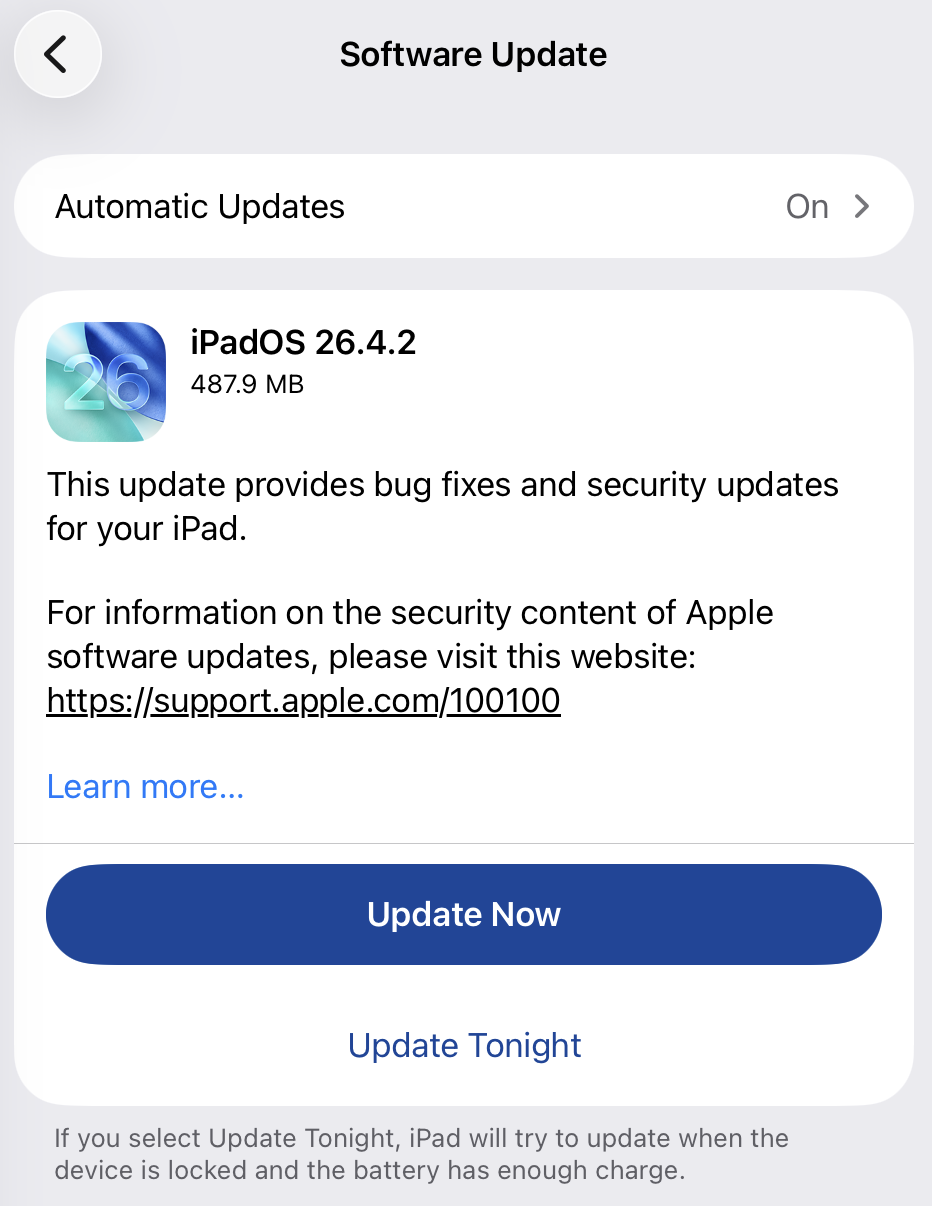
iOS 26.4.2, iPadOS 26.4.2, iOS 18.7.8, and iPadOS 18.7.8 releases address the flaw.
Signal welcomed Apple’s quick fix, noting that no user action is needed. After installing the update, any stored notifications are deleted and future ones won’t be retained.
“We are very happy that today Apple issued a patch and a security advisory. This comes following @404mediaco reporting that the FBI accessed Signal message notification content via iOS despite the app being deleted.”Signal wrote on X. “Note that no action is needed for this fix to protect Signal users on iOS. Once you install the patch, all inadvertently-preserved notifications will be deleted and no forthcoming notifications will be preserved for deleted applications,”
We are very happy that today Apple issued a patch and a security advisory. This comes following @404mediaco reporting that the FBI accessed Signal message notification content via iOS despite the app being deleted.
— Signal (@signalapp) April 22, 2026
Apple’s advisory confirmed that the bugs that allowed this to…
Follow me on Twitter: @securityaffairs and Facebook and Mastodon
(SecurityAffairs – hacking, Signal)
CVE-2026-28950: Apple Fixes iOS Flaw That Retained Deleted Notification Data
Apple has released security updates to address a Notification Services issue in iOS and iPadOS that could cause alerts marked for deletion to remain stored on a device. The fix was delivered in iOS 26.4.2 / iPadOS 26.4.2 and iOS 18.7.8 / iPadOS 18.7.8, where Apple says the problem was resolved through improved data redaction.
The issue drew attention because it was patched outside Apple’s normal release cycle and was publicly linked to concerns that deleted notification content could remain recoverable on affected devices. Based on public reporting, the flaw may have allowed sensitive message previews to persist in internal notification storage longer than users would reasonably expect.
For defenders and privacy-focused users, the key concern is not traditional remote exploitation but unintended data retention. At the time of disclosure, Apple did not publish exploit samples, telemetry artifacts, or a public proof-of-concept, leaving many technical details for CVE-2026-28950 limited to the vendor advisory and media reporting.
CVE-2026-28950 analysis
Apple describes the issue as a logging-related flaw in Notification Services that allowed notifications intended for deletion to be unexpectedly retained on the device. In practice, this means content visible in alerts, such as message previews or other app-generated text, may continue to exist in local storage after the user assumes it has been removed.
Public reporting connected the patch to earlier forensic concerns involving message content recovered from notification storage on iPhones. While Apple did not explicitly confirm those reports as the direct trigger for the update, the description of the flaw closely aligns with the broader privacy risk described in public coverage.
The main security impact is on confidentiality rather than integrity or availability. The problem is especially relevant in environments where lock-screen notifications or mobile message previews may expose regulated, operational, or otherwise sensitive information. From that standpoint, the CVE-2026-28950 vulnerability is best understood as a privacy and data-remanence issue rather than a conventional code-execution bug.
Public reporting also leaves several gaps. Apple did not assign a public CVSS score in the cited coverage, and there are no published network indicators or forensic signatures that would support classic threat hunting. As a result, organizations should focus on version validation and privacy controls rather than looking for a known CVE-2026-28950 payload or a fixed list of CVE-2026-28950 IOCs.
CVE-2026-28950 Mitigation
The primary response is to install Apple’s fixed releases across affected iPhone and iPad fleets. Security teams should verify that supported devices have moved to the patched versions and prioritize users who regularly handle confidential communications, executive discussions, legal material, or regulated data on mobile devices.
An additional defense-in-depth step is to reduce the amount of sensitive information shown in notifications. Public reporting notes that Signal users, for example, can limit what appears in alerts by changing notification content settings to display less message text. While that does not replace patching, it can reduce exposure where private data might otherwise remain accessible in notification storage.
From an operational perspective, the most practical path is simple: inventory devices, confirm version compliance, and review notification-preview policies for high-risk user groups. This is a more realistic protection strategy than trying to Detect CVE-2026-28950 through conventional threat indicators, because the issue centers on retained local data rather than a well-documented exploit chain.
Additionally, by leveraging SOC Prime’s AI-Native Detection Intelligence Platform backed by top cyber defense expertise, global organizations can adopt a resilient security posture and transform their SOC to always stay ahead of emerging threats tied to zero-day exploitation.
FAQ
What is CVE-2026-28950 and how does it work?
It is an iOS and iPadOS Notification Services flaw that could cause deleted notifications to remain stored on a device. Apple says the problem was caused by a logging issue and addressed it through improved data redaction.
When was CVE-2026-28950 first discovered?
The public sources do not provide a private discovery date. What is confirmed is that Apple released fixes on April 22, 2026.
What is the impact of CVE-2026-28950 on systems?
The main impact is exposure of sensitive notification content that may remain on the device after deletion. This can matter in forensic, privacy, or device-access scenarios where retained alert data could reveal message previews or other confidential content.
Can CVE-2026-28950 still affect me in 2026?
Yes. Devices that have not been updated to the patched releases may still be exposed during 2026, particularly if apps display sensitive content in notifications.
How can I protect myself from CVE-2026-28950?
Install Apple’s updates, verify device compliance, and reduce sensitive notification previews where possible. For privacy-sensitive environments, limiting the amount of message content shown in alerts is a sensible additional safeguard. If you want, I can now also make the meta title, meta description, and excerpt match this less-keyword-stuffed style.
The post CVE-2026-28950: Apple Fixes iOS Flaw That Retained Deleted Notification Data appeared first on SOC Prime.
O iPhone não é tão invencível assim: uma análise do DarkSword e do Coruna | Blog oficial da Kaspersky
O DarkSword e o Coruna são novas ferramentas utilizadas em ataques invisíveis a dispositivos iOS. Esses ataques não exigem interação do usuário e já estão sendo usados em larga escala por agentes mal-intencionados. Antes do surgimento dessas ameaças, a maioria dos usuários do iPhone não precisava se preocupar com a segurança de dados. Poucos grupos realmente se preocupavam com isso, como políticos, ativistas, diplomatas, executivos de negócios de alto nível e pessoas que lidam com dados extremamente confidenciais, já que eles poderiam vir a ser alvos de agências de inteligência estrangeiras. Já discutimos spywares avançados usados contra esses grupos anteriormente, e observamos como era raro encontrá-los.
No entanto, o DarkSword e o Coruna, descobertos por pesquisadores no início deste ano, são revolucionários. Esses malwares estão sendo usados em infecções em massa de usuários comuns. Nesta postagem, explicamos por que essa mudança ocorreu, os riscos dessas ferramentas e como se proteger.
O que sabemos sobre o DarkSword e como ele pode infectar o seu iPhone
Em meados de março de 2026, três equipes de pesquisa diferentes coordenaram a divulgação das suas descobertas sobre um novo spyware chamado de DarkSword. Essa ferramenta é capaz de invadir silenciosamente dispositivos com o iOS 18, sem que o usuário perceba que algo está errado.
Primeiro, devemos esclarecer uma coisa: o iOS 18 não é tão antigo quanto parece. Embora a versão mais recente seja o iOS 26, a Apple revisou recentemente o sistema de versões, surpreendendo a todos. A empresa decidiu avançar oito versões (da 18 diretamente para a 26) para que o número do sistema operacional correspondesse ao ano atual. Apesar disso, a Apple estima que cerca de um quarto de todos os dispositivos ativos ainda executam o iOS 18 ou uma versão anterior.
Agora que isso já foi esclarecido, vamos voltar a falar sobre o DarkSword. A pesquisa mostra que esse malware infecta as vítimas quando elas visitam sites perfeitamente legítimos que contêm códigos maliciosos. O spyware se instala sem qualquer interação do usuário: basta acessar uma página comprometida. Isso é conhecido como técnica de infecção zero clique. Os pesquisadores relatam que milhares de dispositivos já foram infectados desta forma.
Para comprometer um dispositivo, o DarkSword usa uma cadeia de exploits com seis vulnerabilidades para evitar o sandbox, aumentar privilégios e executar código. Assim que o dispositivo é infectado, o malware consegue coletar dados, incluindo:
- Senhas
- Fotos
- Conversas e dados do iMessage, WhatsApp e Telegram
- Histórico do navegador
- Informações dos aplicativos Calendário, Notas e Saúde da Apple
Além disso, o DarkSword coleta dados de carteiras de criptomoedas, atuando como malware de dupla finalidade para espionagem e roubo de criptoativos.
A única boa notícia é que o spyware não sobrevive a uma reinicialização. O DarkSword é um malware sem arquivo, o que significa que ele vive na RAM do dispositivo e nunca se incorpora ao sistema de arquivos.
Coruna: direcionado às versões mais antigas do iOS
Apenas duas semanas antes da descoberta do DarkSword se tornar pública, os pesquisadores revelaram outra ameaça que tinha o iOS como alvo, chamada de Coruna. Esse malware consegue comprometer dispositivos que executam softwares mais antigos, especificamente as versões 13 a 17.2.1 do iOS. O método utilizado pelo Coruna é exatamente igual ao do DarkSword: as vítimas visitam um site legítimo injetado com código malicioso que, em seguida, infecta o dispositivo delas com o malware. Todo o processo é completamente invisível e não requer interação do usuário.
Uma análise detalhada do código do Coruna revelou que ele explora 23 vulnerabilidades distintas do iOS, várias delas localizadas no WebKit da Apple. Vale lembrar que, de um modo geral (fora da UE), todos os navegadores iOS precisam usar o mecanismo WebKit. Isso significa que essas vulnerabilidades não afetam apenas os usuários do Safari, mas também qualquer pessoa que use outros navegadores no iPhone.
A versão mais recente do Coruna, assim como o DarkSword, inclui modificações projetadas para drenar carteiras de criptomoedas. Ele também coleta fotos e, em alguns casos, informações de e-mails. Ao que tudo indica, roubar criptomoedas parece ser o principal motivo da implementação generalizada do Coruna.
Quem criou o Coruna e o DarkSword, e como eles foram disseminados?
A análise do código de ambas as ferramentas sugere que o Coruna e o DarkSword provavelmente foram desenvolvidos por grupos diferentes. No entanto, ambos são softwares criados por empresas patrocinadas pelo governo, possivelmente dos EUA. Isso se reflete na alta qualidade do código: não são kits montados com partes aleatórias, mas exploits projetados de forma uniforme. Em algum momento, essas ferramentas vazaram e foram parar nas mãos de gangues de cibercriminosos.
Os especialistas da GReAT, da Kaspersky, analisaram todos os componentes do Coruna e confirmaram que o kit de exploração é uma versão atualizada da estrutura usada na Operação Triangulação. Esse ataque anterior tinha como alvo os funcionários da Kaspersky, uma história que abordamos em detalhes neste blog.
Uma teoria sugere que um funcionário da empresa que desenvolveu o Coruna vendeu o malware para hackers. Desde então, ele tem sido usado para drenar carteiras de criptomoedas de usuários na China. Alguns especialistas estimam que pelo menos 42 mil dispositivos foram infectados somente neste país.
Quanto ao DarkSword, os cibercriminosos já o usaram para infectar dispositivos de usuários na Arábia Saudita, Turquia e Malásia. O problema se agrava pelo fato de que os invasores que implementaram o DarkSword deixaram o código-fonte completo nos sites infectados, facilitando a detecção dele por outros grupos criminosos.
O código também inclui comentários detalhados explicado exatamente o que faz cada componente, reforçando a hipótese de que ele surgiu no Ocidente. Essas instruções detalhadas tornam mais fácil para outros hackers adaptarem a ferramenta para interesses próprios.
Como se proteger do Coruna e do DarkSword
Dois malwares poderosos que permitem a infecção em massa de iPhones sem exigir qualquer interação do usuário caíram nas mãos de um grupo essencialmente ilimitado de cibercriminosos. Para ser infectado pelo Coruna ou pelo DarkSword, basta que você visite o site errado na hora errada. Portanto, este é um daqueles casos em que todos os usuários precisam levar a sério a segurança do iOS, não apenas aqueles que pertencem a grupos de alto risco.
A melhor coisa a fazer para se proteger do Coruna e do DarkSword é atualizar assim que possível os dispositivos para a versão mais recente do iOS ou do iPadOS 26. Se isso não for possível (por exemplo, se o dispositivo for mais antigo e não compatível com o iOS 26), ainda assim é recomendado baixar a versão mais recente disponível. Especificamente, procure as versões 15.8.7, 16.7.15 ou 18.7.7. A Apple aplicou correções em vários sistemas operacionais mais antigos, o que é raro.
Para proteger os dispositivos Apple contra malwares semelhantes que provavelmente aparecerão no futuro, recomendamos fazer o seguinte:
- Instale as atualizações em todos os dispositivos da Apple o quanto antes. A empresa lança regularmente versões do SO que corrigem vulnerabilidades conhecidas. Não as ignore.
- Ative a opção Otimização de segurança em segundo plano. Esse recurso permite que o dispositivo receba correções de segurança críticas além das atualizações completas do iOS, reduzindo o risco de exploração de vulnerabilidades pelos hackers. Para ativá-lo, vá para Configurações → Privacidade e segurança → Otimização de segurança em segundo plano e ative a opção Instalar automaticamente.
- Considere usar o Modo de bloqueio. Essa é uma configuração de segurança reforçada que, apesar de limitar alguns recursos do dispositivo, bloqueia ou restringe ataques de forma significativa. Para ativá-lo, vá para Configurações → Privacidade e segurança → Modo de bloqueio → Ativar o Modo de bloqueio.
- Reinicie o dispositivo uma vez por dia (ou mais). Isso interrompe a atuação de malwares sem arquivo, pois essas ameaças não são incorporadas ao sistema e desaparecem após a reinicialização.
- Use o armazenamento criptografado para dados confidenciais. Mantenha chaves de carteiras de criptomoedas, fotos de documentos e dados confidenciais em um local seguro. Kaspersky Password Manager é uma ótima opção para isso, pois gerencia suas senhas, tokens de autenticação de dois fatores e chaves de acesso em todos os dispositivos, mantendo notas, fotos e documentos sincronizados e criptografados.
A ideia de que os dispositivos da Apple são à prova de balas é um mito. Eles são vulneráveis a ataques de zero clique, cavalos de Troia e técnicas de infecção ClickFix. Além disso, aplicativos maliciosos já foram encontrados na App Store mais de uma vez. Leia mais aqui:
- Predador vs. iPhone: a arte da vigilância invisível
- AirBorne: Ataques a dispositivos da Apple através de vulnerabilidades no AirPlay
- Os seus fones de ouvido Bluetooth estão espionando você?
- O trojan para roubo de dados SparkCat penetra na App Store e no Google Play para roubar dados de fotos
- Banshee: um malware de roubo de dados que persegue usuários do macOS




Apple Fixes iPhone Bug After FBI Retrieved Signal Messages
Apple patched an iPhone notification bug that let deleted messages linger in system storage, closing a privacy gap exposed by an FBI Signal case.
The post Apple Fixes iPhone Bug After FBI Retrieved Signal Messages appeared first on TechRepublic.
Apple fixes iOS bug that kept deleted notifications, including chat previews
A vulnerability in iPhones and iPads allowed law enforcement to recover deleted notifications, including Signal message previews.
The post Apple fixes iOS bug that kept deleted notifications, including chat previews appeared first on Security Boulevard.
Apple fixes iOS bug that kept deleted notifications, including chat previews
Apple has released a software update that deals with an issue that could allow deleted notifications to be retrieved. Something that, in at least one reported case, was used by law enforcement during forensic analysis.
Apple fixed the issue in iOS and iPadOS versions 18.7.8 and 26.4.2 (check availability for your device at those links). The update deals with a singular security vulnerability, tracked as CVE-2026-28950.
Although the description is brief—“a logging issue was addressed with improved data redaction”—the impact points us in the right direction.
“Notifications marked for deletion could be unexpectedly retained on the device.”
This suggests that Apple’s bug was that iOS kept copies of notification content in an internal database for longer than intended, even after the messages “disappeared” or the app was uninstalled. In a case reported by 404 Media, law enforcement was able to recover those notifications using standard forensic tools once they had access to the unlocked device. The example in that reported case involved Signal.
A response on X by Signal states:
“The FBI was able to forensically extract copies of incoming Signal messages from a defendant’s iPhone, even after the app was deleted, because copies of the content were saved in the device’s push notification database.”
Before we go into the update process, you may want to know that you can mute or hide notifications in Signal, which also protects them from prying eyes. In Signal, open your Settings and tap on Notifications. You can adjust several settings there. For example, I have mine set so I only see the name of the sender.
Install the update
For iOS and iPadOS users, you can check if you’re using the latest software version by going to Settings > General > Software Update. It’s also worth turning on Automatic Updates if you haven’t already. You can do that on the same screen.
Scammers know more about you than you think.
Malwarebytes Mobile Security protects you from phishing, scam texts, malicious sites, and more. With real-time AI-powered Scam Guard built right in.
New Apple Phishing Scam Uses Fake $899 iPhone Purchase Alert
An Apple account notification has been exploited in a new email phishing attack that comes with a fake iPhone purchase claim.
The post New Apple Phishing Scam Uses Fake $899 iPhone Purchase Alert appeared first on TechRepublic.
Apple fixes bug that let the FBI recover deleted Signal messages
Apple has released out-of-band security updates for iPhone and iPad devices to fix a Notification Services flaw that could allow notifications marked for deletion to remain stored on the device. [...]
Real Apple notifications are being used to drive tech support scams
Scammers have found a way to abuse legitimate Apple account notification emails to trick targets into calling fake tech support numbers.
According to a report from BleepingComputer, scammers create an Apple account and insert a phishing message into the personal information fields, then modify the account so that Apple sends a genuine security alert about the change to the target.
BleepingComputer was able to replicate the attack.
The attacker creates an Apple ID they control, then stuffs the phishing message into the personal information fields (first name, last name, possibly address), splitting it across fields because they will not fit into just one.
To launch the phish, the attacker changes something benign on their specially created Apple account, such as shipping information, which causes Apple’s systems to send a “Your Apple account was updated” security email.
While the original alert is addressed to the attacker’s iCloud email, they are then able to redistribute it to a wider victim list, for example through a mailing list.
In the copy the targets receive, the email headers still show a legitimate Apple sender, and the presence of the attacker’s iCloud address can even make it look like “someone else” has gained access to the account.
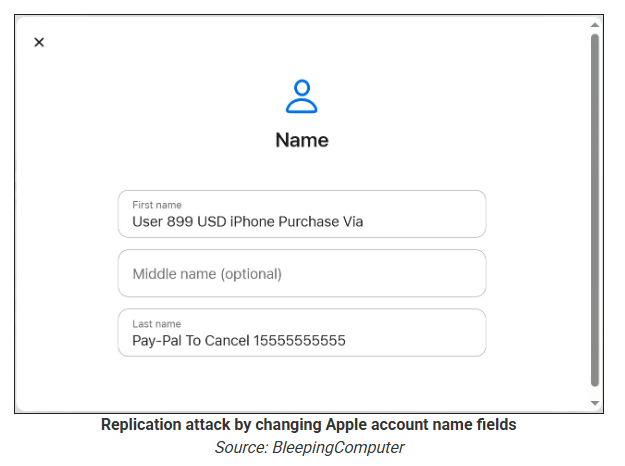
Because Apple includes those user-supplied fields in the security email, the phishing text is delivered inside a legitimate message sent from Apple’s own infrastructure.
This method, called call-back phishing, filters out suspicious users, so the scammers can focus on the people who fell for the first part.
The emails come from a legitimate source, sail through every security filter because of that, and look convincing enough to scare the receiver into thinking someone spent $899 from their PayPal account.
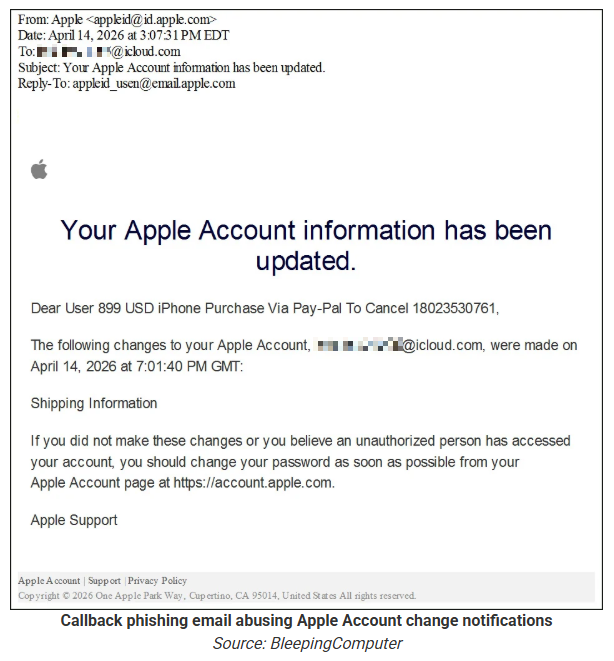
But the structure of the email does not make sense.
“Dear User” is immediately followed by the scam message where your name should have been. The header says it’s about account information rather than a purchase. And the iCloud account does not belong to the recipient. So, once you know how it’s done, they’re not impossible to spot. Which is why we wrote this blog.
And when in doubt, you can always ask Malwarebytes Scam Guard.

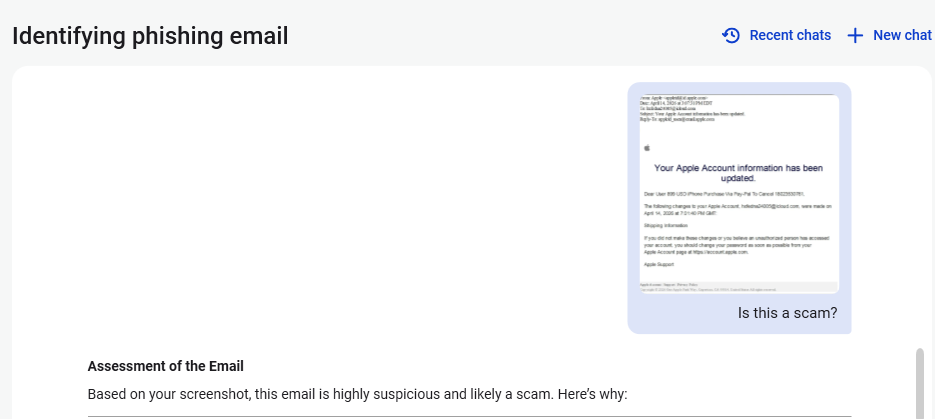
Scam Guard identified the screenshot as a scam and guides users through the next steps.
Scams like these work, because many users still view phone calls as more trustworthy than email, especially if the email itself passed all the usual technical authenticity checks and they initiated the call themselves.
How to stay safe
Tech support scammers will try to convince callers to install some kind of remote desktop application to steal data from your computer, or ask for financial details so they can steal your money.
To stay safe from these scammers:
- Be wary of unexpected alerts about high‑value purchases you do not recognize. They are suspicious even if they come from a real domain.
- Never call a number sent to you by unsolicited means or even found in sponsored search results.
- Carefully read emails and text messages, even if they come form trustworthy addresses. Does the email make sense from a structural and linguistic point of view?
- If someone claiming to be support for a legitimate company asks for remote access or payment details during a call, hang up and contact the company through official channels.
- Use Malwarebytes Scam Guard to analyze any kind of message that alarms you or urges you to take immediate action.
Something feel off? Check it before you click.
Malwarebytes Scam Guard helps you analyze suspicious links, texts, and screenshots instantly.
Available with Malwarebytes Premium Security for all your devices, and in the Malwarebytes app for iOS and Android.
2026’s Breach List So Far: FBI Hacked, 1B Androids at Risk, 270M iPhones Vulnerable
From the FBI breach to the DarkSword iPhone exploit, these are the biggest cyber attacks and security failures that have shaped 2026 so far.
The post 2026’s Breach List So Far: FBI Hacked, 1B Androids at Risk, 270M iPhones Vulnerable appeared first on TechRepublic.
China's Apple App Store infiltrated by crypto-stealing wallet apps
A set of 26 malicious apps on Apple App Store impersonate popular wallets, such as Metamask, Coinbase, Trust Wallet, and OneKey, to steal recovery or seed phrases and drain them of cryptocurrency assets. [...]
Apple account change alerts abused to send phishing emails
Apple account change notifications are being abused to send fake iPhone purchase phishing scams within legitimate emails sent from Apple's servers, increasing legitimacy and potentially allowing them to bypass spam filters. [...]
Apple Works on Fix for iPhone Passcode Bug Linked to Missing Czech Keyboard Character
Apple is reportedly developing a software fix for a frustrating iOS 26 bug that has left some users entirely locked out of their iPhones for months.
According to a recent report by The Register, Cupertino’s software engineers are scrambling to patch a keyboard interface flaw that inadvertently removed a specific special character necessary for unlocking devices configured with custom alphanumeric passcodes.
The issue first gained public attention when a 21-year-old university student, Connor Byrne, shared his predicament on Reddit.
As The Register reported, Byrne opted not to use the standard four- or six-digit PIN on his iPhone 13. Instead, he enhanced his device security by setting a complex, custom alphanumeric string as his primary passcode.
While cybersecurity professionals highly recommend complex passcodes to thwart brute-force attacks, Byrne’s specific password combination triggered an unexpected software trap.
He utilized the caron or háček (ˇ) symbol from the iPhone’s Czech keyboard layout. When Apple released iOS 26 to the general public in September 2025, the company unknowingly removed this specific character from the lock screen keyboard.
Without the ability to type the required symbol, Byrne was permanently locked out of his smartphone. The only native solution provided by the device was a full factory reset.
However, a reset would permanently erase months of valuable photographs and personal files stored locally on the device. Choosing to preserve his data, the user has remained locked out while waiting for a potential software patch.
Following the viral social media post, Apple’s internal engineering team reportedly began investigating the issue. The Register notes that Apple is now working on a targeted fix to restore the missing character, which is expected to roll out in an upcoming major iOS 26 release.
Interestingly, despite Apple’s engineers responding within 9 days after the issue surfaced online, the extended lockout has permanently damaged the user’s trust.
According to The Register, Byrne has decided to migrate to an Android device, specifically eyeing the Samsung Galaxy S26 Ultra.
He cited both the software quality assurance oversight, noting that the current keyboard’s flaws duplicate characters side-by-side, and a preference for alternative camera hardware. Apple has not yet issued an official public comment on the fix’s timeline.
- Backup Data Regularly: Always maintain up-to-date iCloud or physical backups. If a critical lock screen glitch occurs after an update, you can safely perform a factory reset without losing your data.
- Review Custom Passcodes: If you use a custom alphanumeric passcode, ensure it relies on standard characters that are universally available across different keyboard layouts to avoid getting locked out.
- Monitor Software Updates: Be cautious when adopting major operating system upgrades immediately upon release. As this incident highlights, unexpected interface bugs can temporarily sever device access.
Follow us on Google News, LinkedIn, and X for daily cybersecurity updates. Contact us to feature your stories.
The post Apple Works on Fix for iPhone Passcode Bug Linked to Missing Czech Keyboard Character appeared first on Cyber Security News.

Singer loses life savings to fake wallet downloaded from the Apple App Store
If you hold cryptocurrency, there's a very simple golden rule that you should always follow. Never hand over your seed phrase.
Garrett Dutton, better known as G. Love - the front man of blues-hip-hop outfit G. Love & Special Sauce - has learnt that lesson the hard way.
Read more in my article on the Hot for Security blog.
