
 Entrar
Deepfakes, AI resumes, and the growing threat of fake applicants
Recruiters expect the odd exaggerated resume, but many companies, including us here at Malwarebytes, are now dealing with something far more serious: job applicants who aren’t real people at all.
From fabricated identities to AI-generated resumes and outsourced impostor interviews, hiring pipelines have become a new way for attackers to sneak into organizations.
Fake applicants aren’t just a minor HR inconvenience anymore but a genuine security risk. So, what’s the purpose behind it, and what should you look out for?
How these fake applicants operate
These applicants don’t just fire off a sketchy resume and hope for the best. Many use polished, coordinated tactics designed to slip through screening.
AI-generated resumes
AI-generated resumes are now one of the most common signs of a fake applicant. Language models can produce polished, keyword-heavy resumes in seconds, and scammers often generate dozens of variations to see which one gets past an Applicant Tracking System. In some cases, entire profiles are generated at the same time.
These resumes often look flawless on paper but fall apart when you ask about specific projects, timelines, or achievements. Hiring teams have reported waves of nearly identical resumes for unrelated positions, or applicants whose written materials are far more detailed than anything they can explain in conversation. Some have even received multiple resumes with the same formatting quirks, phrasing, or project descriptions.
Fake or borrowed identities
Impersonation is common. Scammers use AI-generated or stolen profile photos, fake addresses, and VoIP phone numbers to look legitimate. LinkedIn activity is usually sparse, or you’ll find several nearly identical profiles using the same name with slightly different skills.
At Malwarebytes, as in this Register article, we’ve noticed that the details applicants provide don’t always match what we see during the interview. In some cases, the same name and phone number have appeared across multiple applications, each supported by a freshly tailored resume. Further discrepancies occur in many instances where the applicant claims to be located in one country, but calls from another country entirely, usually in Asia.
Outsourced, scripted, and deepfake interviews
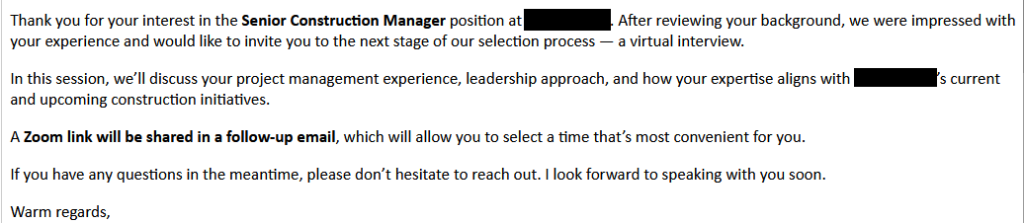
Fraudulent interviews tend to follow a familiar pattern. Introductions are short and vague, and answers arrive after long, noticeable pauses, as if the person is being coached off-screen. Many try to keep the camera off, or ask to complete tests offline instead of live.
In more advanced cases, you might see the telltale signs of real-time filters or deepfake tools, like mismatched lip-sync, unnatural blinking, or distorted edges. Most scammers still rely on simpler tricks like camera avoidance or off-screen coaching, but there have been reports of attackers using deepfake video or voice clones in interviews. It’s still rare, but it shows how quickly these tools are evolving.
Why they’re doing it
Scammers have a range of motives, from fraud to full system access.
Financial gain
For some groups, the goal is simple: money. They target remote, well-paid roles and then subcontract the work to cheaper labor behind the scenes. The fraudulent applicant keeps the salary while someone else quietly does the job at a fraction of the cost. It’s a volume game, and the more applications they get through, the more income they can generate.
Identity or documentation fraud
Others are trying to build a paper trail. A “successful hire” can provide employment verification, payroll history, and official contract letters. These documents can later support visa applications, bank loans, or other kinds of identity or financial fraud. In these cases, the scammer may never even intend to start work. They just need the paperwork that makes them look legitimate.
Algorithm testing and data harvesting
Some operations use job applications as a way to probe and learn. They send out thousands of resumes to test how screening software responds, to reverse-engineer what gets past filters, and to capture recruiter email patterns for future campaigns. By doing this at scale, they train automation that can mimic real applicants more convincingly over time.
System access for cybercrime
This is where the stakes get higher. Landing a remote role can give scammers access to internal systems, company data, and intellectual property—anything the job legitimately touches.
Even when the scammer isn’t hired, simply entering your hiring pipeline exposes internal details: how your team communicates, who makes what decisions, which roles have which tools. That information can be enough to craft a convincing impersonation later. At that point, the hiring process becomes an unguarded door into the organization.
The wider risk (not just to recruiters)
Recruiters aren’t the only ones affected. Everyday people on LinkedIn or job sites can get caught in the fallout too.
Fake applicant networks rely on scraping public profiles to build believable identities. LinkedIn added anti-bot checks in 2023, but fake profiles still get through, which means your name, photo, or job history could be copied and reused without your knowledge.
They also send out fake connection requests that lead to phishing messages, malicious job offers, or attempts to collect personal information. Recent research from the University of Portsmouth found that fake social media profiles are more common than many people realise:
80% of respondents said they’d encountered suspicious accounts, and 77% had received link requests from strangers.
It’s a reminder that anyone on LinkedIn can be targeted, not just recruiters, and that these profiles often work by building trust first and slipping in malicious links or requests later.
How recruiters can protect themselves
You can tighten screening without discriminating or adding friction by following these steps:
Verify identity earlier
Start with a camera-on video call whenever you can. Look for the subtle giveaways of filters or deepfakes: unnatural blinking, lip-sync that’s slightly off, or edges of the face that seem to warp or lag. If something feels odd, a simple request like “Please adjust your glasses” or “touch your cheek for a moment” can quickly show whether you’re speaking to a real person.
Cross-check details
Make sure the basics line up. The applicant’s face should match their documents, and their time zone should match where they say they live. Work history should hold up when you check references. A quick search can reveal duplicate resumes, recycled profiles, or LinkedIn accounts with only a few months of activity.
Watch for classic red flags
Most fake applicants slip when the questions get personal or specific. A resume that’s polished but hollow, a communication style that changes between messages, or hesitation when discussing timelines or past roles can all signal coaching. Long pauses before answers often hint that someone off-screen may be feeding responses.
Secure onboarding
If someone does pass the process, treat early access carefully. Limit what new hires can reach, require multi-factor authentication from day one, and make sure their device has been checked before it touches your network. Bringing in your security team early helps ensure that recruitment fraud doesn’t become an accidental entry point.
Final thoughts
Recruiting used to be about finding the best talent. Today, it often includes identity verification and security awareness.
As remote work becomes the norm, scammers are getting smarter. Fake applicants might show up as a nuisance, but the risks range from compliance issues to data loss—or even full-scale breaches.
Spotting the signs early, and building stronger screening processes, protects not just your hiring pipeline, but your organization as a whole.
We don’t just report on threats—we help safeguard your entire digital identity
Cybersecurity risks should never spread beyond a headline. Protect your, and your family’s, personal information by using identity protection.
![Malwarebytes blocks meetingzs[.]com](https://www.malwarebytes.com/wp-content/uploads/sites/2/2025/11/meetingzscomblock.png)
