Security professionals everywhere face a paradox: while more data provides the visibility needed to catch threats, it also makes it harder for humans to process it all and find what's important. When there’s a sudden spike in suspicious traffic, every second counts. But for many security teams — especially lean ones — it’s hard to quickly figure out what’s going on. Finding a root cause means diving into dashboards, filtering logs, and cross-referencing threat feeds. All the data tracking that has happened can be the very thing that slows you down — or worse yet, what buries the threat that you’re looking for.
Today, we’re excited to announce that we’ve solved that problem. We’ve integrated Cloudy — Cloudflare’s first AI agent — with our security analytics functionality, and we’ve also built a new, conversational interface that Cloudflare users can use to ask questions, refine investigations, and get answers. With these changes, Cloudy can now help Cloudflare users find the needle in the digital haystack, making security analysis faster and more accessible than ever before.
Since Cloudy’s launch in March of this year, its adoption has been exciting to watch. Over 54,000 users have tried Cloudy for custom rule creation, and 31% of them have deployed a rule suggested by the agent. For our log explainers in Cloudflare Gateway, Cloudy has been loaded over 30,000 times in just the last month, with 80% of the feedback we received confirming the summaries were insightful. We are excited to empower our users to do even more.
Talk to your traffic: a new conversational interface for faster RCA and mitigation
Security analytics dashboards are powerful, but they often require you to know exactly what you're looking for — and the right queries to get there. The new Cloudy chat interface changes this. It is designed for faster root cause analysis (RCA) of traffic anomalies, helping you get from “something’s wrong” to “here’s the fix” in minutes. You can now start with a broad question and narrow it down, just like you would with a human analyst.
For example, you can start an investigation by asking Cloudy to look into a recommendation from Security Analytics.
From there, you can ask follow-up questions to dig deeper:
"Focus on login endpoints only."
"What are the top 5 IP addresses involved?"
"Are any of these IPs known to be malicious?"
This is just the beginning of how Cloudy is transforming security. You can read more about how we’re using Cloudy to bring clarity to another critical security challenge: automating summaries of email detections. This is the same core mission — translating complex security data into clear, actionable insights — but applied to the constant stream of email threats that security teams face every day.
Use Cloudy to understand, prioritize, and act on threats
Analyzing your own logs is powerful — but it only shows part of the picture. What if Cloudy could look beyond your own data and into Cloudflare’s global network to identify emerging threats? This is where Cloudforce One's Threat Events platform comes in.
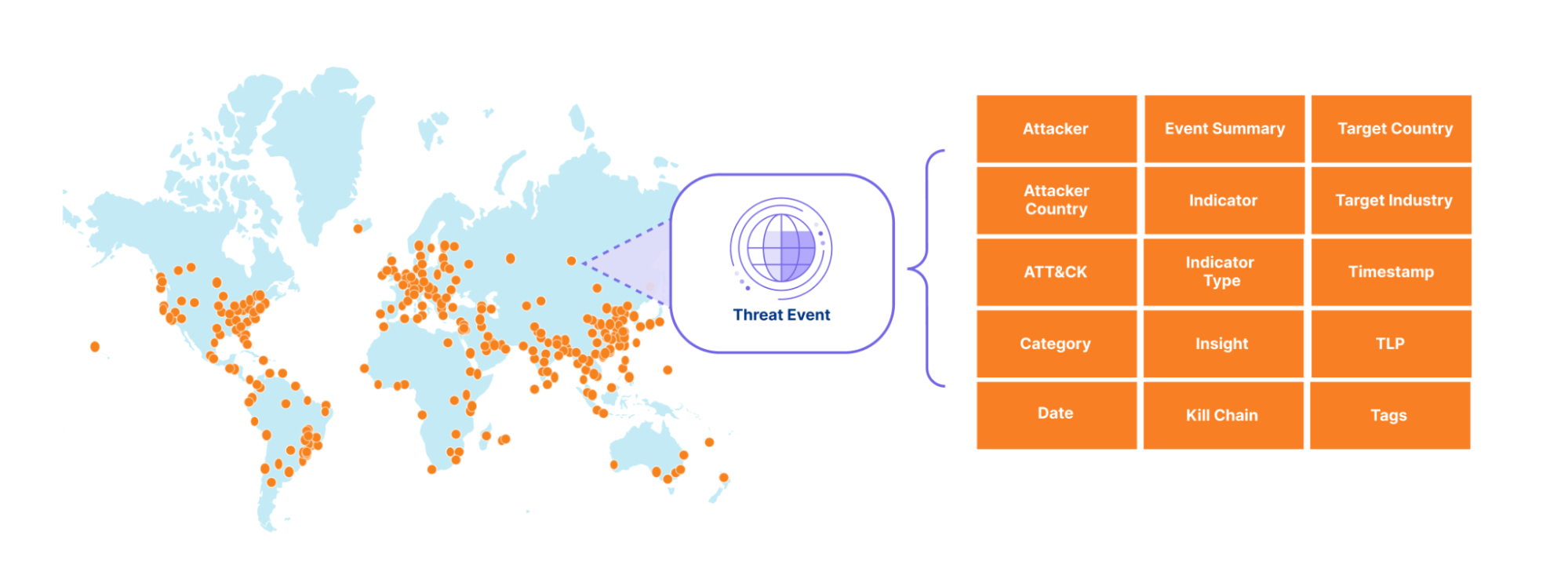
Cloudforce One translates the high-volume attack data observed on the Cloudflare network into real-time, attacker-attributed events relevant to your organization. This platform helps you track adversary activity at scale — including APT infrastructure, cybercrime groups, compromised devices, and volumetric DDoS activity. Threat events provide detailed, context-rich events, including interactive timelines and mappings to attacker TTPs, regions, and targeted verticals.
We have spent the last few months making Cloudy more powerful by integrating it with the Cloudforce One Threat Events platform. Cloudy now can offer contextual data about the threats we observe and mitigate across Cloudflare's global network, spanning everything from APT activity and residential proxies to ACH fraud, DDoS attacks, WAF exploits, cybercrime, and compromised devices. This integration empowers our users to quickly understand, prioritize, and act on indicators of compromise (IOCs) based on a vast ocean of real-time threat data.
Cloudy lets you query this global dataset in a natural language and receive clear, concise answers. For example, imagine asking these questions and getting immediate actionable answers:
Who is targeting my industry vertical or country?
What are the most relevant indicators (IPs, JA3/4 hashes, ASNs, domains, URLs, SHA fingerprints) to block right now?
How has a specific adversary progressed across the cyber kill chain over time?
What novel new threats are threat actors using that might be used against your network next, and what insights do Cloudflare analysts know about them?
Simply interact with Cloudy in the Cloudflare Dashboard > Security Center > Threat Intelligence, providing your queries in natural language. It can walk you from a single indicator (like an IP address or domain) to the specific threat event Cloudflare observed, and then pivot to other related data — other attacks, related threats, or even other activity from the same actor.
This cuts through the noise, so you can quickly understand an adversary's actions across the cyber kill chain and MITRE ATT&CK framework, and then block attacks with precise, actionable intelligence. The threat events platform is like an evidence board on the wall that helps you understand threats; Cloudy is like your sidekick that will run down every lead.
How it works: Agents SDK and Workers AI
Developing this advanced capability for Cloudy was a testament to the agility of Cloudflare's AI ecosystem. We leveraged our Agents SDK running on Workers AI. This allowed for rapid iteration and deployment, ensuring Cloudy could quickly grasp the nuances of threat intelligence and provide highly accurate, contextualized insights. The combination of our massive network telemetry, purpose-built LLM prompts, and the flexibility of Workers AI means Cloudy is not just fast, but also remarkably precise.
And a quick word on what we didn’t do when developing Cloudy: We did not train Cloudy on any Cloudflare customer data. Instead, Cloudy relies on models made publicly available through Workers AI. For more information on Cloudflare’s approach to responsible AI, please see these FAQs.
What's next for Cloudy
This is just the next step in Cloudy’s journey. We're working on expanding Cloudy's abilities across the board. This includes intelligent debugging for WAF rules and deeper integrations with Alerts to give you more actionable, contextual notifications. At the same time, we are continuously enriching our threat events datasets and exploring ways for Cloudy to help you visualize complex attacker timelines, campaign overviews, and intricate attack graphs. Our goal remains the same: make Cloudy an indispensable partner in understanding and reacting to the security landscape.
The new chat interface is now available on all plans, and the threat intelligence capabilities are live for Cloudforce One customers. Learn more about Cloudforce One here and reach out for a consultation if you want to go deeper with our experts.
Today, one of the greatest challenges that cyber defenders face is analyzing detection hits from indicator feeds, which provide metadata about specific indicators of compromise (IOCs), like IP addresses, ASNs, domains, URLs, and hashes. While indicator feeds have proliferated across the threat intelligence industry, most feeds contain no contextual information about why an indicator was placed on the feed. Another limitation of most feeds today is that they focus solely on blockable indicators and cannot easily accommodate more complex cases, such as a threat actor exploiting a CVE or an insider threat. Instead, this sort of complex threat intelligence is left for long form reporting. However, long-form reporting comes with its own challenges, such as the time required for writing and editing, which can lead to significant delays in releasing timely threat intelligence.
To help address these challenges, we are excited to launch our threat events platform for Cloudforce One customers. Every day, Cloudflare blocks billions of cyber threats. This new platform contains contextual data about the threats we monitor and mitigate on the Cloudflare network and is designed to empower security practitioners and decision makers with actionable insights from a global perspective.
On average, we process 71 million HTTP requests per second and 44 million DNS queries per second. This volume of traffic provides us with valuable insights and a comprehensive view of current (real-time) threats. The new threat events platform leverages the insights from this traffic to offer a comprehensive, real-time view of threat activity occurring on the Internet, enabling Cloudforce One customers to better protect their assets and respond to emerging threats.
How we built the threat events platform leveraging Cloudflare’s traffic insights
The sheer volume of threat activity observed across Cloudflare’s network would overwhelm any system or SOC analyst. So instead, we curate this activity into a stream of events that include not only indicators of compromise (IOCs) but also context, making it easier to take action based on Cloudflare’s unique data. To start off, we expose events related to denial of service (DOS) attacks observed across our network, along with the advanced threat operations tracked by our Cloudforce One Intelligence team, like the various tools, techniques, and procedures used by the threat actors we are tracking. We mapped the events to the MITRE ATT&CK framework and to the cyber kill chain stages. In the future, we will add events related to traffic blocked by our Web Application Firewall (WAF), Zero Trust Gateway, Zero Trust Email Security Business Email Compromise, and many other Cloudflare-proprietary datasets. Together, these events will provide our customers with a detailed view of threat activity occurring across the Internet.
Each event in our threat events summarizes specific threat activity we have observed, similar to a STIX2 sighting object and provides contextual information in its summary, detailed view and via the mapping to the MITRE ATT&Ck and KillChain stages. For an example entry, please see the API documentation.
Our goal is to empower customers to better understand the threat landscape by providing key information that allows them to investigate and address both broad and specific questions about threats targeting their organization. For example:
Who is targeting my industry vertical?
Who is targeting my country?
What indicators can I use to block attacks targeting my verticals?
What has an adversary done across the kill chain over some period of time?
Each event has a unique identifier that links it to the identified threat activity, enabling our Cloudforce One threat intelligence analysts to provide additional context in follow-on investigations.
How we built the threat events platform using Cloudflare Workers
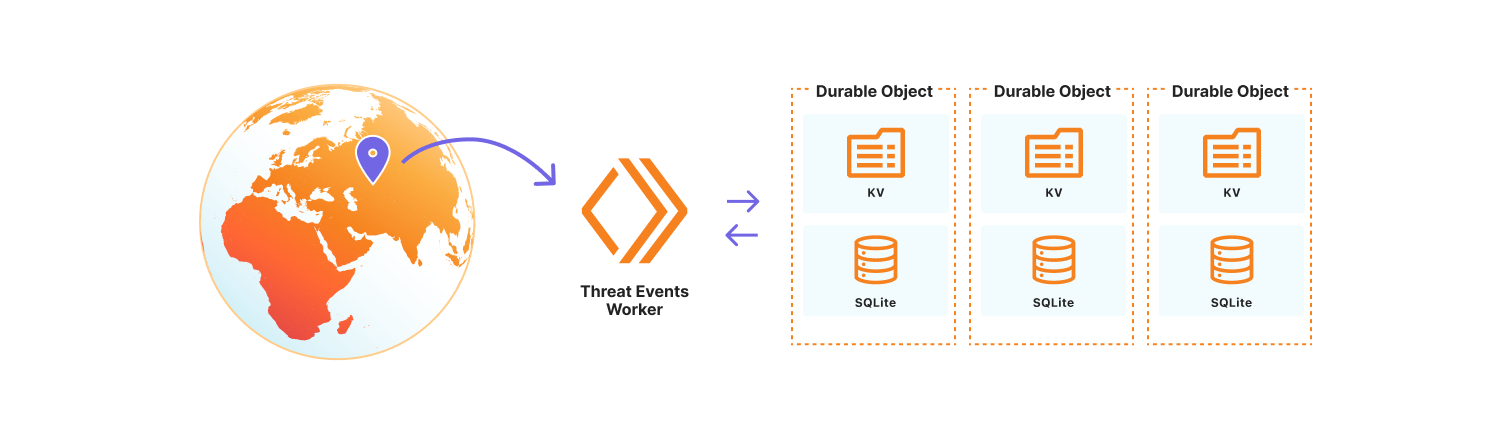
We chose to use the Cloudflare Developer Platform to build out the threat events platform, as it allowed us to leverage the versatility and seamless integration of Cloudflare Workers. At its core, the platform is a Cloudflare Worker that uses SQLite-backed Durable Objects to store events observed on the Cloudflare network. We opted to use Durable Objects over D1, Cloudflare’s serverless SQL database solution, because it permits us to dynamically create SQL tables to store uniquely customizable datasets. Storing datasets this way allows threat events to scale across our network, so we are resilient to surges in data that might correlate with the unpredictable nature of attacks on the Internet. It also permits us to control events by data source, share a subset of datasets with trusted partners, or restrict access to only authorized users. Lastly, the metadata for each individual threat event is stored in the Durable Object KV so that we may store contextual data beyond our fixed, searchable fields. This data may be in the form of requests-per-second for our denial of service events, or sourcing information so Cloudforce One analysts can tie the event to the exact threat activity for further investigation.
How to use threat events
Cloudforce One customers can access threat events through the Cloudflare Dashboard in Security Center or via the Cloudforce One threat events API. Each exposes the stream of threat activity occurring across the Internet as seen by Cloudflare, and are customizable by user-defined filters.
In the Cloudflare Dashboard, users have access to an Attacker Timelapse view, designed to answer strategic questions, as well as a more granular events table for drilling down into attack details. This approach ensures that users have the most relevant information at their fingertips.
Events Table
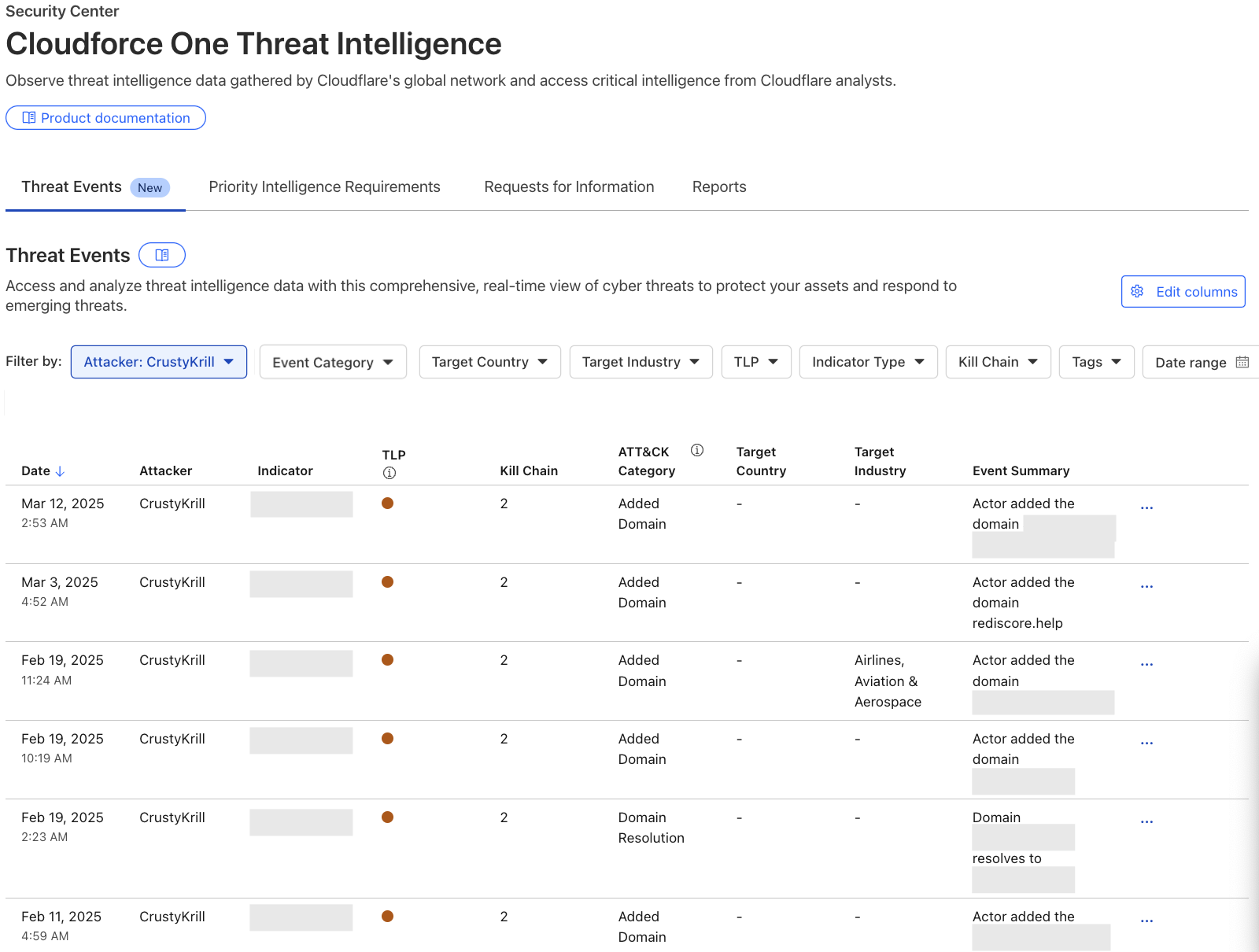
The events table is a detailed view in the Security Center where users can drill down into specific threat activity filtered by various criteria. It is here that users can explore specific threat events and adversary campaigns using Cloudflare’s traffic insights. Most importantly, this table will provide our users with actionable Indicators of Compromise and an event summary so that they can properly defend their services. All of the data available in our events table is equally accessible via the Cloudforce One threat events API.
To showcase the power of threat events, let’s explore a real-world case:
Recently leaked chats of the Black Basta criminal enterprise exposed details about their victims, methods, and infrastructure purchases. Although we can’t confirm whether the leaked chats were manipulated in any way, the infrastructure discussed in the chats was simple to verify. As a result, this threat intelligence is now available as events in the threat events, along with additional unique Cloudflare context.
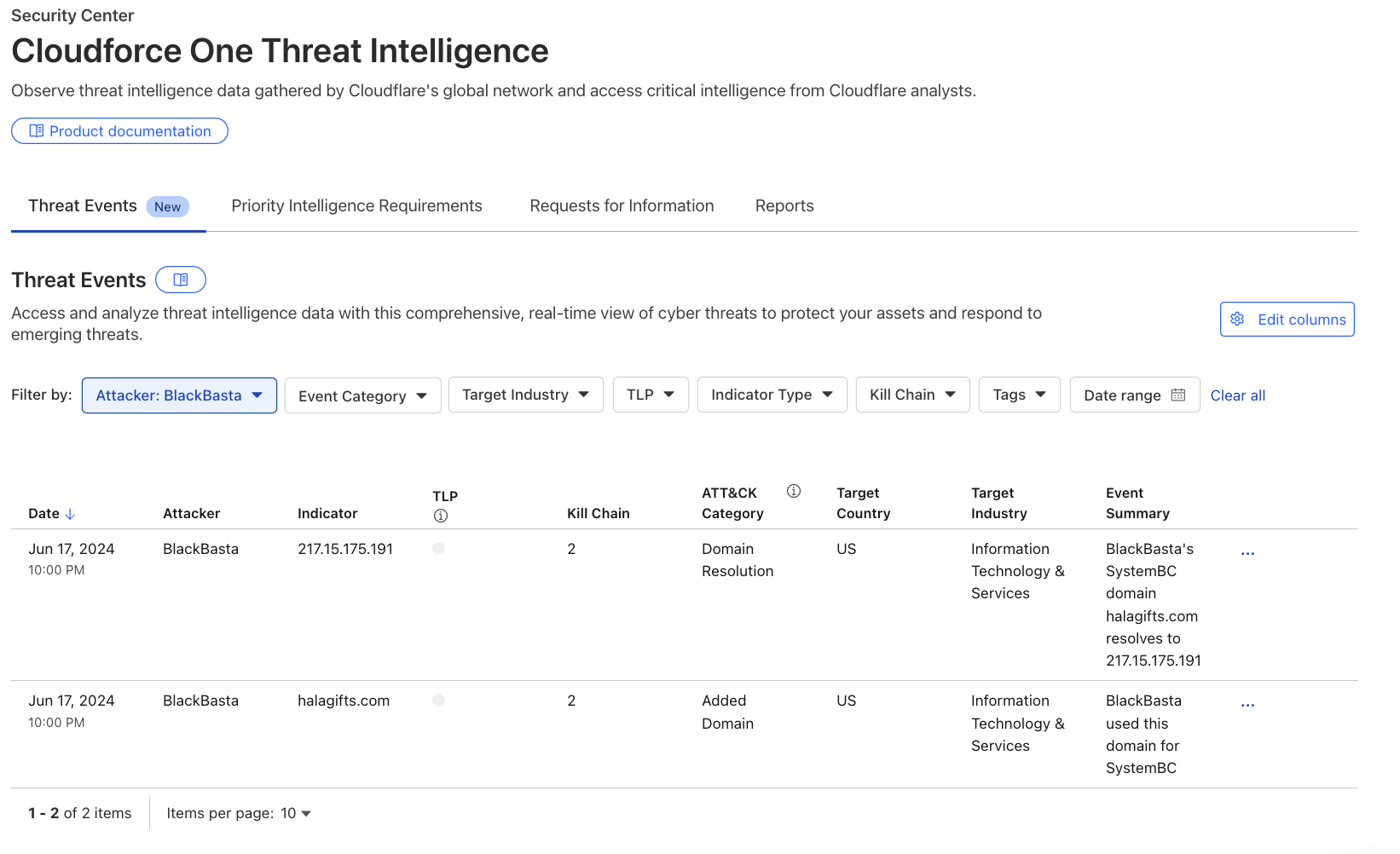
Analysts searching for domains, hosts, and file samples used by Black Basta can leverage the threat events to gain valuable insight into this threat actor’s operations. For example, in the threat events UI, a user can filter the “Attacker” column by selecting ‘BlackBasta’ in the dropdown, as shown in the image below. This provides a curated list of verified IP addresses, domains, and file hashes for further investigation. For more detailed information on Cloudflare’s unique visibility into Black Basta threat activity see Black Basta’s blunder: exploiting the gang’s leaked chats.
Why we are publishing threat events
Our customers face a myriad of cyber threats that can disrupt operations and compromise sensitive data. As adversaries become increasingly sophisticated, the need for timely and relevant threat intelligence has never been more critical. This is why we are introducing threat events, which provides deeper insights into these threats.
The threat events platform aims to fill this gap by offering a more detailed and contextualized view of ongoing threat activity. This feature allows analysts to self-serve and explore incidents through customizable filters, enabling them to identify patterns and respond effectively. By providing access to real-time threat data, we empower organizations to make informed decisions about their security strategies.
To validate the value of our threat events platform, we had a Fortune 20 threat intelligence team put it to the test. They conducted an analysis against 110 other sources, and we ranked as their #1 threat intelligence source. They found us "very much a unicorn" in the threat intelligence space. It’s early days, but the initial feedback confirms that our intelligence is not only unique but also delivering exceptional value to defenders.
What’s next
While Cloudforce One customers now have access to our API and dashboard, allowing for seamless integration of threat intelligence into their existing systems, they will also soon have access to more visualisations and analytics for the threat events in order to better understand and report back on their findings. This upcoming UI will include enhanced visualizations of attacker timelines, campaign overviews, and attack graphs, providing even deeper insights into the threats facing your organization. Moreover, we’ll add the ability to integrate with existing SIEM platforms and share indicators across systems.
Read more about the threat intelligence research our team publishes here or reach out to your account team about how to leverage our new threat events to enhance your cybersecurity posture.
At Cloudflare, we are constantly innovating and launching new features and capabilities across our product portfolio. Today, we're releasing a number of new features aimed at improving the security tools available to our customers.
Automated security level: Cloudflare’s Security Level setting has been improved and no longer requires manual configuration. By integrating botnet data along with other request rate signals, all customers are protected from confirmed known malicious botnet traffic without any action required.
Cipher suite selection: You now have greater control over encryption settings via the Cloudflare dashboard, including specific cipher suite selection based on our client or compliance requirements.
Improved URL scanner: New features include bulk scanning, similarity search, location picker and more.
These updates are designed to give you more power and flexibility when managing online security, from proactive threat detection to granular control over encryption settings.
Automating Security Level to provide stronger protection for all
Cloudflare’s Security Level feature was designed to protect customer websites from malicious activity.
Available to all Cloudflare customers, including the free tier, it has always had very simple logic: if a connecting client IP address has shown malicious behavior across our network, issue a managed challenge. The system tracks malicious behavior by assigning a threat score to each IP address. The more bad behavior is observed, the higher the score. Cloudflare customers could configure the threshold that would trigger the challenge.
We are now announcing an update to how Security Level works, by combining the IP address threat signal with threshold and botnet data. The resulting detection improvements have allowed us to automate the configuration, no longer requiring customers to set a threshold.
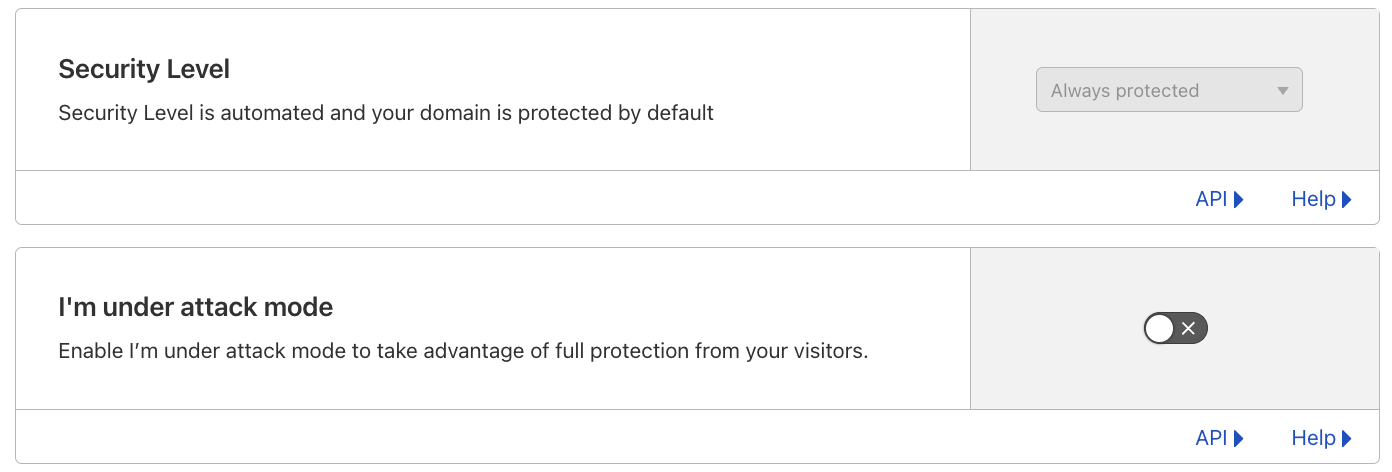
The Security Level setting is now Always protected in the dashboard, and ip_threat_score fields in WAF Custom Rules will no longer be populated. No change is required by Cloudflare customers. The “I am under attack” option remains unchanged.
Stronger protection, by default, for all customers
Although we always favor simplicity, privacy-related services, including our own WARP, have seen growing use. Meanwhile, carrier-grade network address translation (CGNATs) and outbound forward proxies have been widely used for many years.
These services often result in multiple users sharing the same IP address, which can lead to legitimate users being challenged unfairly since individual addresses don’t strictly correlate with unique client behavior. Moreover, threat actors have become increasingly adept at anonymizing and dynamically changing their IP addresses using tools like VPNs, proxies, and botnets, further diminishing the reliability of IP addresses as a standalone indicator of malicious activity. Recognising these limitations, it was time for us to revisit Security Level’s logic to reduce the number of false positives being observed.
In February 2024, we introduced a new security system that automatically combines the real-time DDoS score with a traffic threshold and a botnet tracking system. The real-time DDoS score is part of our autonomous DDoS detection system, which analyzes traffic patterns to identify potential threats. This system superseded and replaced the existing Security Level logic, and is deployed on all customer traffic, including free plans. After thorough monitoring and analysis over the past year, we have confirmed that these behavior-based mitigation systems provide more accurate results. Notably, we've observed a significant reduction in false positives, demonstrating the limitations of the previous IP address-only logic.
Better botnet tracking
Our new logic combines IP address signals with behavioral and threshold indicators to improve the accuracy of botnet detection. While IP addresses alone can be unreliable due to potential false positives, we enhance their utility by integrating them with additional signals. We monitor surges in traffic from known "bad" IP addresses and further refine this data by examining specific properties such as path, accept, and host headers.
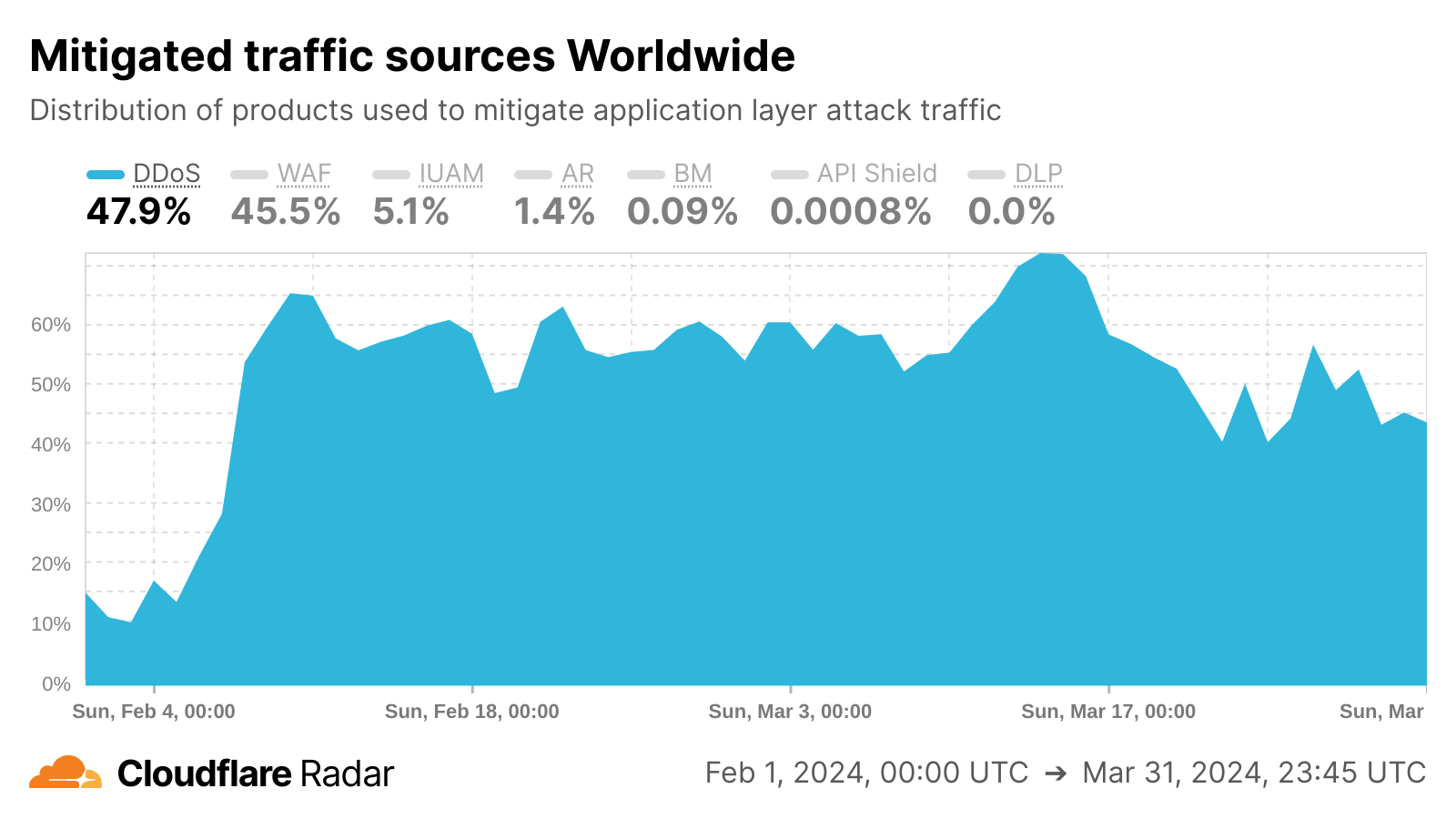
We also introduced a new botnet tracking system that continuously detects and tracks botnet activity across the Cloudflare network. From our unique vantage point as a reverse proxy for nearly 20% of all websites, we maintain a dynamic database of IP addresses associated with botnet activity. This database is continuously updated, enabling us to automatically respond to emerging threats without manual intervention. This effect is visible in the Cloudflare Radar chart below, as we saw sharp growth in DDoS mitigations in February 2024 as the botnet tracking system was implemented.
What it means for our customers and their users
Customers now get better protection while having to manage fewer configurations, and they can rest assured that their online presence remains fully protected. These security measures are integrated and enabled by default across all of our plans, ensuring protection without the need for manual configuration or rule management.
This improvement is particularly beneficial for users accessing sites through proxy services or CGNATs, as these setups can sometimes trigger unnecessary security checks, potentially disrupting access to websites.
What’s next
Our team is looking at defining the next generation of threat scoring mechanisms. This initiative aims to provide our customers with more relevant and effective controls and tools to combat today's and tomorrow's potential security threats.
Effective March 17, 2025, we are removing the option to configure manual rules using the threat score parameter in the Cloudflare dashboard. The "I'm Under Attack" mode remains available, allowing users to issue managed challenges to all traffic when needed.
By the end of Q1 2026, we anticipate disabling all rules that rely on IP threat score. This means that using the threat score parameter in the Rulesets API and via Terraform won’t be available after the end of the transition period. However, we encourage customers to be proactive and edit or remove the rules containing the threat score parameter starting today.
Cipher suite selection now available in the UI
Building upon our core security features, we're also giving you more control over your encryption: cipher suite selection is now available in the Cloudflare dashboard!
When a client initiates a visit to a Cloudflare-protected website, a TLS handshake occurs, where clients present a list of supported cipher suites — cryptographic algorithms crucial for secure connections. While newer algorithms enhance security, balancing this with broad compatibility is key, as some customers prioritise reach by supporting older devices, even with less secure ciphers. To accommodate varied client needs, Cloudflare's default settings emphasise wide compatibility, allowing customers to tailor cipher suite selection based on their priorities: strong security, compliance (PCI DSS, FIPS 140-2), or legacy device support.
Previously, customizing cipher suites required multiple API calls, proving cumbersome for many users. Now, Cloudflare introduces Cipher Suite Selection to the dashboard. This feature introduces user-friendly selection flows like security recommendations, compliance presets, and custom selections.
Understanding cipher suites
Cipher suites are collections of cryptographic algorithms used for key exchange, authentication, encryption, and message integrity, essential for a TLS handshake. During the handshake’s initiation, the client sends a "client hello" message containing a list of supported cipher suites. The server responds with a "server hello" message, choosing a cipher suite from the client's list based on security and compatibility. This chosen cipher suite forms the basis of TLS termination and plays a crucial role in establishing a secure HTTPS connection. Here’s a quick overview of each component:
Key exchange algorithm: Secures the exchange of encryption keys between parties.
Authentication algorithm: Verifies the identities of the communicating parties.
Encryption algorithm: Ensures the confidentiality of the data.
Message integrity algorithm: Confirms that the data remains unaltered during transmission.
Perfect forward secrecyis an important feature of modern cipher suites. It ensures that each session's encryption keys are generated independently, which means that even if a server’s private key is compromised in the future, past communications remain secure.
What we are offering
You can find cipher suite configuration under Edge Certificates in your zone’s SSL/TLS dashboard. There, you will be able to view your allow-listed set of cipher suites.
Additionally, you will be able to choose from three different user flows, depending on your specific use case, to seamlessly select your appropriate list. Those three user flows are: security recommendation selection, compliance selection, or custom selection. The goal of the user flows is to outfit customers with cipher suites that match their goals and priorities, whether those are maximum compatibility or best possible security.
1. Security recommendations
To streamline the process, we have turned our cipher suites recommendations into selectable options. This is in an effort to expose our customers to cipher suites in a tangible way and enable them to choose between different security configurations and compatibility. Here is what they mean:
Modern: Provides the highest level of security and performance with support for Perfect Forward Secrecy and Authenticated Encryption (AEAD). Ideal for customers who prioritize top-notch security and performance, such as financial institutions, healthcare providers, or government agencies. This selection requires TLS 1.3 to be enabled and the minimum TLS version set to 1.2.
Compatible: Balances security and compatibility by offering forward-secret cipher suites that are broadly compatible with older systems. Suitable for most customers who need a good balance between security and reach. This selection also requires TLS 1.3 to be enabled and the minimum TLS version set to 1.2.
Legacy: Optimizes for the widest reach, supporting a wide range of legacy devices and systems. Best for customers who do not handle sensitive data and need to accommodate a variety of visitors. This option is ideal for blogs or organizations that rely on older systems.
2. Compliance selection
Additionally, we have also turned our compliance recommendations into selectable options to make it easier for our customers to meet their PCI DSS or FIPS-140-2 requirements.
PCI DSS Compliance: Ensures that your cipher suite selection aligns with PCI DSS standards for protecting cardholder data. This option will enforce a requirement to set a minimum TLS version of 1.2, and TLS 1.3 to be enabled, to maintain compliance.
Since the list of supported cipher suites require TLS 1.3 to be enabled and a minimum TLS version of 1.2 in order to be compliant, we will disable compliance selection until the zone settings are updated to meet those requirements. This effort is to ensure that our customers are truly compliant and have the proper zone settings to be so.
FIPS 140-2 Compliance: Tailored for customers needing to meet federal security standards for cryptographic modules. Ensures that your encryption practices comply with FIPS 140-2 requirements.
3. Custom selection
For customers needing precise control, the custom selection flow allows individual cipher suite selection, excluding TLS 1.3 suites which are automatically enabled with TLS 1.3. To prevent disruptions, guardrails ensure compatibility by validating that the minimum TLS version aligns with the selected cipher suites and that the SSL/TLS certificate is compatible (e.g., RSA certificates require RSA cipher suites).
API
The API will still be available to our customers. This aims to support an existing framework, especially to customers who are already API reliant. Additionally, Cloudflare preserves the specified cipher suites in the order they are set via the API and that control of ordering will remain unique to our API offering.
With your Advanced Certificate Manager or Cloudflare for SaaS subscription, head to Edge Certificates in your zone’s SSL dashboard and give it a try today!
Smarter scanning, safer Internet with the new version of URL Scanner
Cloudflare's URL Scanner is a tool designed to detect and analyze potential security threats like phishing and malware by scanning and evaluating websites, providing detailed insights into their safety and technology usage. We've leveraged our own URL Scanner to enhance our internal Trust & Safety efforts, automating the detection and mitigation of some forms of abuse on our platform. This has not only strengthened our own security posture, but has also directly influenced the development of the new features we're announcing today.
Phishing attacks are on the rise across the Internet, and we saw a major opportunity to be "customer zero" for our URL Scanner to address abuse on our own network. By working closely with our Trust & Safety team to understand how the URL Scanner could better identify potential phishing attempts, we've improved the speed and accuracy of our response to abuse reports, making the Internet safer for everyone. Today, we're excited to share the new API version and the latest updates to URL Scanner, which include the ability to scan from specific geographic locations, bulk scanning, search by Indicators of Compromise (IOCs), improved UI and information display, comprehensive IOC listings, advanced sorting options, and more. These features are the result of our own experiences in leveraging URL Scanner to safeguard our platform and our customers, and we're confident that they will prove useful to our security analysts and threat intelligence users.
Scan up to 100 URLs at once by using bulk submissions
Cloudflare Enterprise customers can now conduct routine scans of their web assets to identify emerging vulnerabilities, ensuring that potential threats are addressed proactively, by using the Bulk Scanning API endpoint. Another use case for the bulk scanning functionality is developers leveraging bulk scanning to verify that all URLs your team is accessing are secure and free from potential exploits before launching new websites or updates.
Scanning of multiple URLs addresses the specific needs of our users engaged in threat hunting. Many of them maintain extensive lists of URLs that require swift investigation to identify potential threats. Currently, they face the task of submitting these URLs one by one, which not only slows down their workflow but also increases the manual effort involved in their security processes. With the introduction of bulk submission capabilities, users can now submit up to 100 URLs at a time for scanning.
How we built the bulk scanning feature
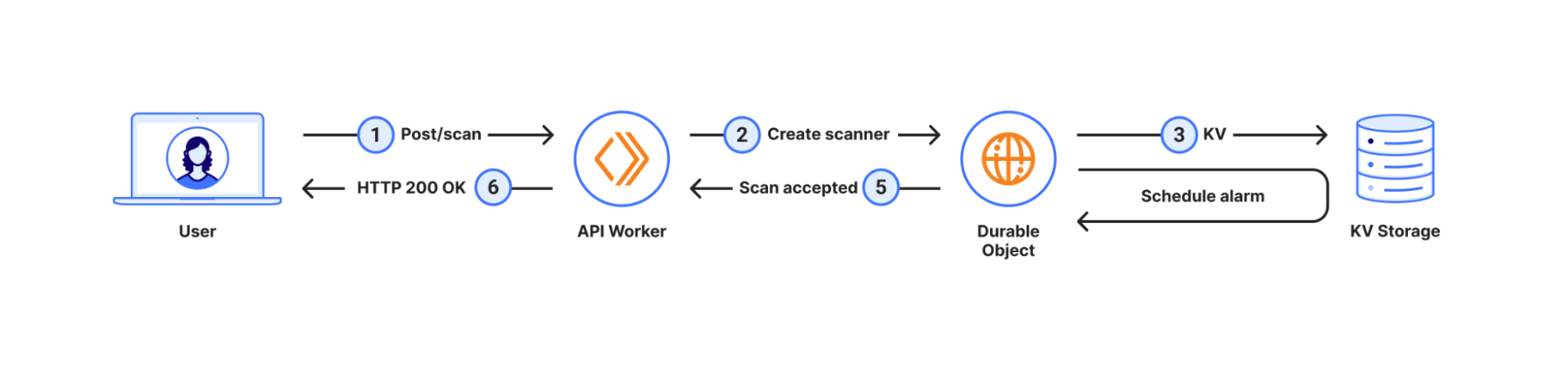
Let’s look at a regular workflow:
In this workflow, when the user submits a new scan, we create a Durable Object with the same ID as the scan, save the scan options, like the URL to scan, to the Durable Objects’s storage and schedule an alarm for a few seconds later. This allows us to respond immediately to the user, signalling a successful submission. A few seconds later the alarm triggers, and we start the scan itself.
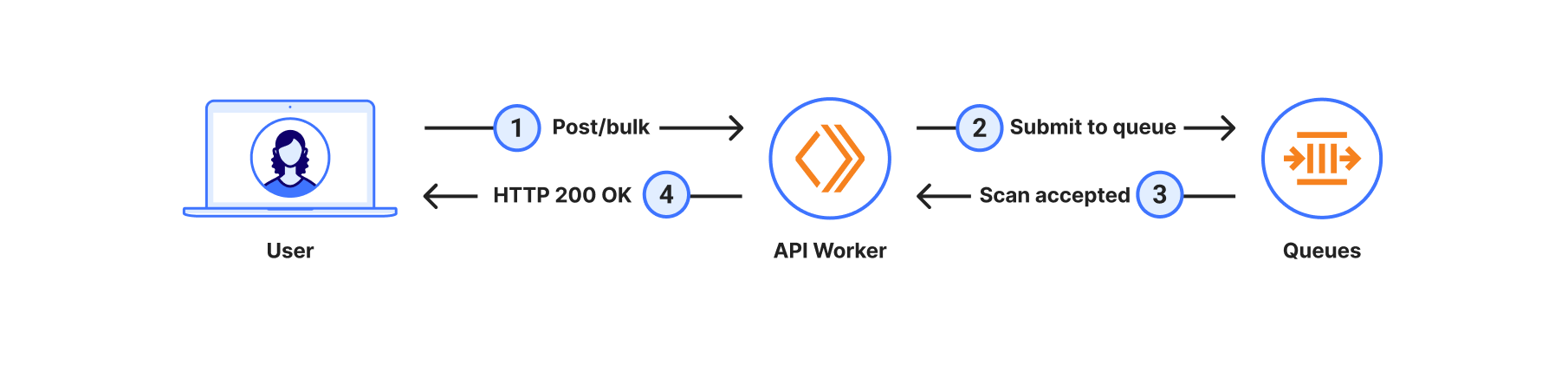
However, with bulk scanning, the process is slightly different:
In this case, there are no Durable Objects involved just yet; the system simply sends each URL in the bulk scan submission as a new message to the queue.
Notice that in both of these cases the scan is triggered asynchronously. In the first case, it starts when the Durable Objects alarm fires and, in the second case, when messages in the queue are consumed. While the durable object alarm will always fire in a few seconds, messages in the queue have no predetermined processing time, they may be processed seconds to minutes later, depending on how many messages are already in the queue and how fast the system processes them.
When users bulk scan, having the scan done at some point in time is more important than having it done now. When using the regular scan workflow, users are limited in the number of scans per minute they can submit. However, when using bulk scan this is not a concern, and users can simply send all URLs they want to process in a single HTTP request. This comes with the tradeoff that scans may take longer to complete, which is a perfect fit for Cloudflare Queues. Having the ability to configure retries, max batch size, max batch timeouts, and max concurrency is something we’ve found very useful. As the scans are completed asynchronously, users can request the resulting scan reports via the API.
Discover related scans and better IOC search
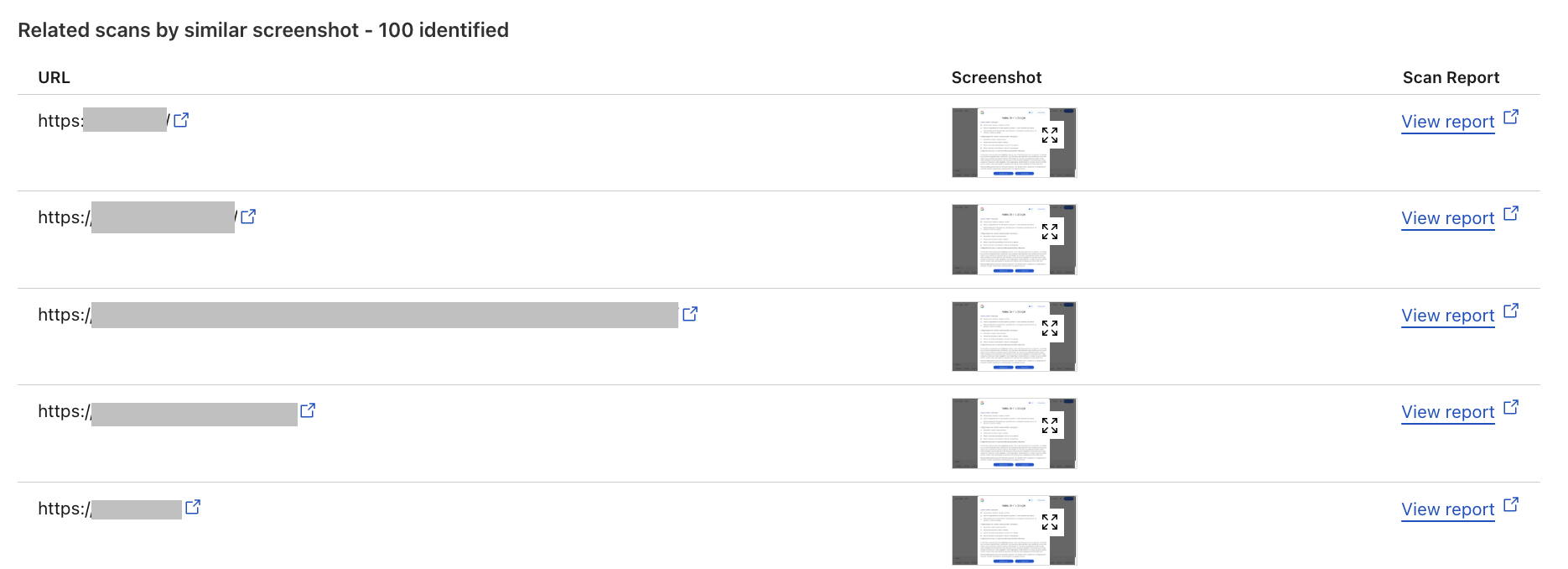
The Related Scans feature allows API, Cloudflare dashboard and Radar users alike to view related scans directly within the URL Scanner Report. This helps users analyze and understand the context of a scanned URL by providing insights into similar URLs based on various attributes. Filter and search through URL Scanner reports to retrieve information on related scans, including those with identical favicons, similar HTML structures, and matching IP addresses.
The Related Scans tab presents a table with key headers corresponding to four distinct filters. Each entry includes the scanned URL and a direct link to view the detailed scan report, allowing for quick access to further information.
We've introduced the ability to search by indicators of compromise (IOCs), such as IP addresses and hashes, directly within the user interface. Additionally, we've added advanced filtering options by various criteria, including screenshots, hashes, favicons, and HTML body content. This allows for more efficient organization and prioritization of URLs based on specific needs. While attackers often make minor modifications to the HTML structure of phishing pages to evade detection, our advanced filtering options enable users to search for URLs with similar HTML content. This means that even if the visual appearance of a phishing page changes slightly, we can still identify connections to known phishing campaigns by comparing the underlying HTML structure. This proactive approach helps users identify and block these threats effectively.
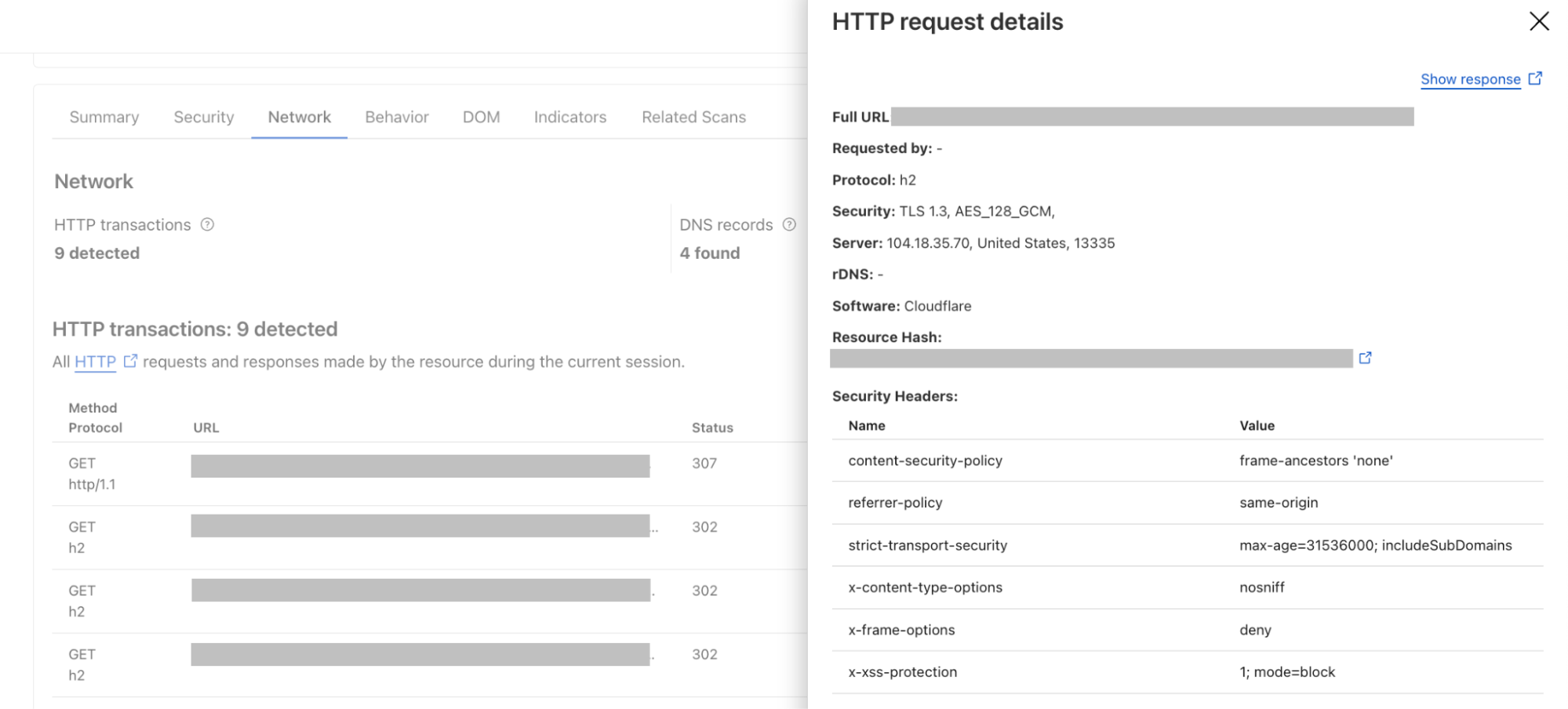
Another use case for the advanced filtering options is the search by hash; a user who has identified a malicious JavaScript file through a previous investigation can now search using the file's hash. By clicking on an HTTP transaction, you'll find a direct link to the relevant hash, immediately allowing you to pivot your investigation. The real benefit comes from identifying other potentially malicious sites that have that same hash. This means that if you know a given script is bad, you can quickly uncover other compromised websites delivering the same malware.
The user interface has also undergone significant improvements to enhance the overall experience. Other key updates include:
Page title and favicon surfaced, providing immediate visual context
Detailed summaries are now available
Redirect chains allow users to understand the navigation path of a URL
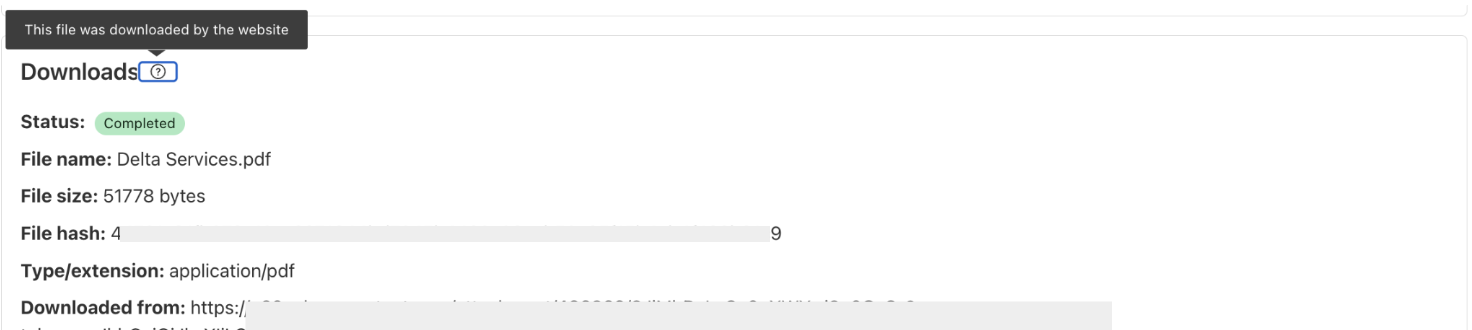
The ability to scan files from URLs that trigger an automatic file download
Download HAR files
With the latest updates to our URL Scanner, users can now download both the HAR (HTTP Archive) file and the JSON report from their scans. The HAR file provides a detailed record of all interactions between the web browser and the scanned website, capturing crucial data such as request and response headers, timings, and status codes. This format is widely recognized in the industry and can be easily analyzed using various tools, making it invaluable for developers and security analysts alike.
For instance, a threat intelligence analyst investigating a suspicious URL can download the HAR file to examine the network requests made during the scan. By analyzing this data, they can identify potential malicious behavior, such as unexpected redirects and correlate these findings with other threat intelligence sources. Meanwhile, the JSON report offers a structured overview of the scan results, including security verdicts and associated IOCs, which can be integrated into broader security workflows or automated systems.
New API version
Finally, we’re announcing a new version of our API, allowing users to transition effortlessly to our service without needing to overhaul their existing workflows. Moving forward, any future features will be integrated into this updated API version, ensuring that users have access to the latest advancements in our URL scanning technology.
We understand that many organizations rely on automation and integrations with our previous API version. Therefore, we want to reassure our customers that there will be no immediate deprecation of the old API. Users can continue to use the existing API without disruption, giving them the flexibility to migrate at their own pace. We invite you to try the new API today and explore these new features to help with your web security efforts.
Never miss an update
In summary, these updates to Security Level, cipher suite selection, and URL Scanner help us provide comprehensive, accessible, and proactive security solutions. Whether you're looking for automated protection, granular control over your encryption, or advanced threat detection capabilities, these new features are designed to empower you to build a safer and more secure online presence. We encourage you to explore these features in your Cloudflare dashboard and discover how they can benefit your specific needs.
We’ll continue to share roundup blog posts as we build and innovate. Follow along on the Cloudflare Blog for the latest news and updates.

 Entrar