Within the Cloudflare Application Security team, every machine learning model we use is underpinned by a rich set of static rules that serve as a ground truth and a baseline comparison for how our models are performing. These are called heuristics. Our Bot Management heuristics engine has served as an important part of eight global machine learning (ML) models, but we needed a more expressive engine to increase our accuracy. In this post, we’ll review how we solved this by moving our heuristics to the Cloudflare Ruleset Engine. Not only did this provide the platform we needed to write more nuanced rules, it made our platform simpler and safer, and provided Bot Management customers more flexibility and visibility into their bot traffic.
Bot detection via simple heuristics
In Cloudflare’s bot detection, we build heuristics from attributes like software library fingerprints, HTTP request characteristics, and internal threat intelligence. Heuristics serve three separate purposes for bot detection:
Bot identification: If traffic matches a heuristic, we can identify the traffic as definitely automated traffic (with a bot score of 1) without the need of a machine learning model.
Train ML models: When traffic matches our heuristics, we create labelled datasets of bot traffic to train new models. We’ll use many different sources of labelled bot traffic to train a new model, but our heuristics datasets are one of the highest confidence datasets available to us.
Validate models: We benchmark any new model candidate’s performance against our heuristic detections (among many other checks) to make sure it meets a required level of accuracy.
While the existing heuristics engine has worked very well for us, as bots evolved we needed the flexibility to write increasingly complex rules. Unfortunately, such rules were not easily supported in the old engine. Customers have also been asking for more details about which specific heuristic caught a request, and for the flexibility to enforce different policies per heuristic ID. We found that by building a new heuristics framework integrated into the Cloudflare Ruleset Engine, we could build a more flexible system to write rules and give Bot Management customers the granular explainability and control they were asking for.
The need for more efficient, precise rules
In our previous heuristics engine, we wrote rules in Lua as part of our openresty-based reverse proxy. The Lua-based engine was limited to a very small number of characteristics in a rule because of the high engineering cost we observed with adding more complexity.
With Lua, we would write fairly simple logic to match on specific characteristics of a request (i.e. user agent). Creating new heuristics of an existing class was fairly straight forward. All we’d need to do is define another instance of the existing class in our database. However, if we observed malicious traffic that required more than two characteristics (as a simple example, user-agent and ASN) to identify, we’d need to create bespoke logic for detections. Because our Lua heuristics engine was bundled with the code that ran ML models and other important logic, all changes had to go through the same review and release process. If we identified malicious traffic that needed a new heuristic class, and we were also blocked by pending changes in the codebase, we’d be forced to either wait or rollback the changes. If we’re writing a new rule for an “under attack” scenario, every extra minute it takes to deploy a new rule can mean an unacceptable impact to our customer’s business.
More critical than time to deploy is the complexity that the heuristics engine supports. The old heuristics engine only supported using specific request attributes when creating a new rule. As bots became more sophisticated, we found we had to reject an increasing number of new heuristic candidates because we weren’t able to write precise enough rules. For example, we found a Golang TLS fingerprint frequently used by bots and by a small number of corporate VPNs. We couldn’t block the bots without also stopping the legitimate VPN usage as well, because the old heuristics platform lacked the flexibility to quickly compile sufficiently nuanced rules. Luckily, we already had the perfect solution with Cloudflare Ruleset Engine.
Our new heuristics engine
The Ruleset Engine is familiar to anyone who has written a WAF rule, Load Balancing rule, or Transform rule, just to name a few. For Bot Management, the Wireshark-inspired syntax allows us to quickly write heuristics with much greater flexibility to vastly improve accuracy. We can write a rule in YAML that includes arbitrary sub-conditions and inherit the same framework the WAF team uses to both ensure any new rule undergoes a rigorous testing process with the ability to rapidly release new rules to stop attacks in real-time.
Writing heuristics on the Cloudflare Ruleset Engine allows our engineers and analysts to write new rules in an easy to understand YAML syntax. This is critical to supporting a rapid response in under attack scenarios, especially as we support greater rule complexity. Here’s a simple rule using the new engine, to detect empty user-agents restricted to a specific JA4 fingerprint (right), compared to the empty user-agent detection in the old Lua based system (left):
--- Adds heuristic to be used for inference in `detect` method
-- @param heuristic schema.Heuristic table
function EmptyUserAgentHeuristic:add(heuristic)
self.heuristic = heuristic
end
--- Detect runs empty user agent heuristic detection
-- @param ctx context of request
-- @return schema.Heuristic table on successful detection or nil otherwise
function EmptyUserAgentHeuristic:detect(ctx)
local ua = ctx.user_agent
if not ua or ua == '' then
return self.heuristic
end
end
return _M
ref: empty-user-agent
description: Empty or missing
User-Agent header
action: add_bot_detection
action_parameters:
active_mode: false
expression: http.user_agent eq
"" and cf.bot_management.ja4 = "t13d1516h2_8daaf6152771_b186095e22b6"
The Golang heuristic that captured corporate proxy traffic as well (mentioned above) was one of the first to migrate to the new Ruleset engine. Before the migration, traffic matching on this heuristic had a false positive rate of 0.01%. While that sounds like a very small number, this means for every million bots we block, 100 real users saw a Cloudflare challenge page unnecessarily. At Cloudflare scale, even small issues can have real, negative impact.
When we analyzed the traffic caught by this heuristic rule in depth, we saw the vast majority of attack traffic came from a small number of abusive networks. After narrowing the definition of the heuristic to flag the Golang fingerprint only when it’s sourced by the abusive networks, the rule now has a false positive rate of 0.0001% (One out of 1 million). Updating the heuristic to include the network context improved our accuracy, while still blocking millions of bots every week and giving us plenty of training data for our bot detection models. Because this heuristic is now more accurate, newer ML models make more accurate decisions on what’s a bot and what isn’t.
New visibility and flexibility for Bot Management customers
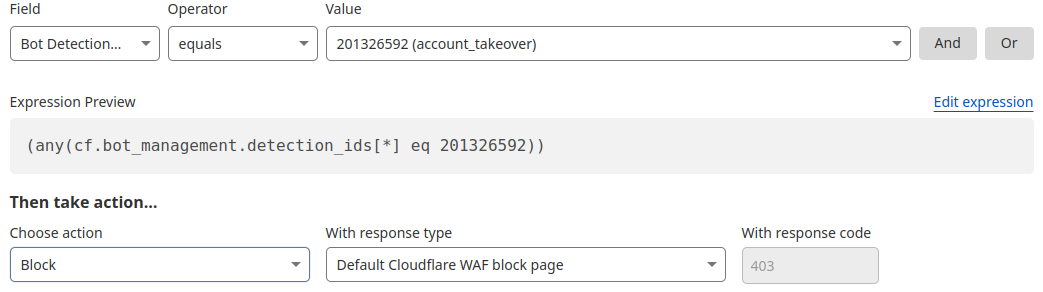
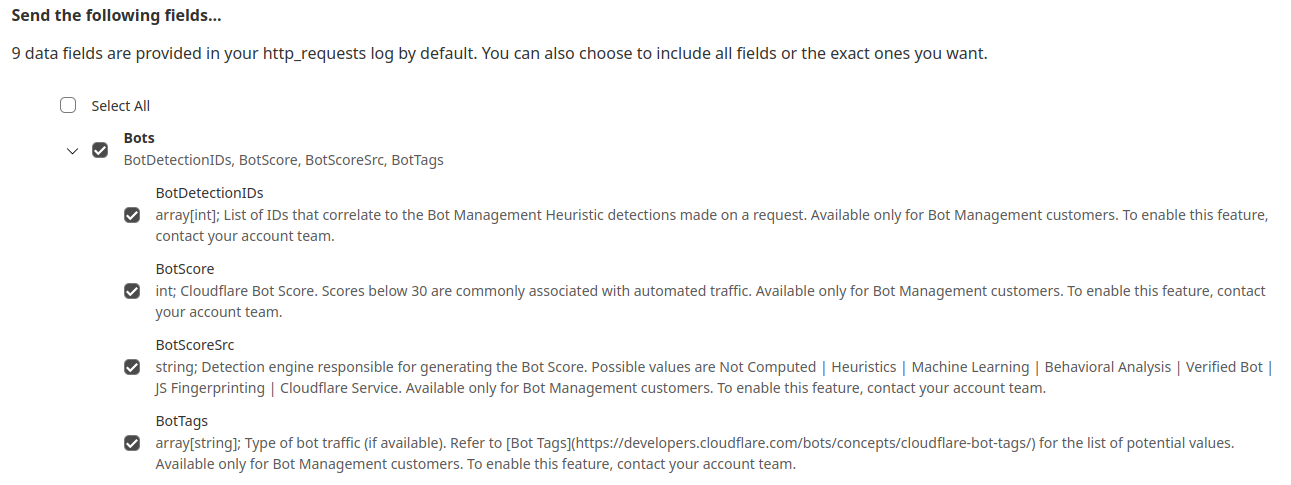
While the new heuristics engine provides more accurate detections for all customers and a better experience for our analysts, moving to the Cloudflare Ruleset Engine also allows us to deliver new functionality for Enterprise Bot Management customers, specifically by offering more visibility. This new visibility is via a new field for Bot Management customers called Bot Detection IDs. Every heuristic we use includes a unique Bot Detection ID. These are visible to Bot Management customers in analytics, logs, and firewall events, and they can be used in the firewall to write precise rules for individual bots.
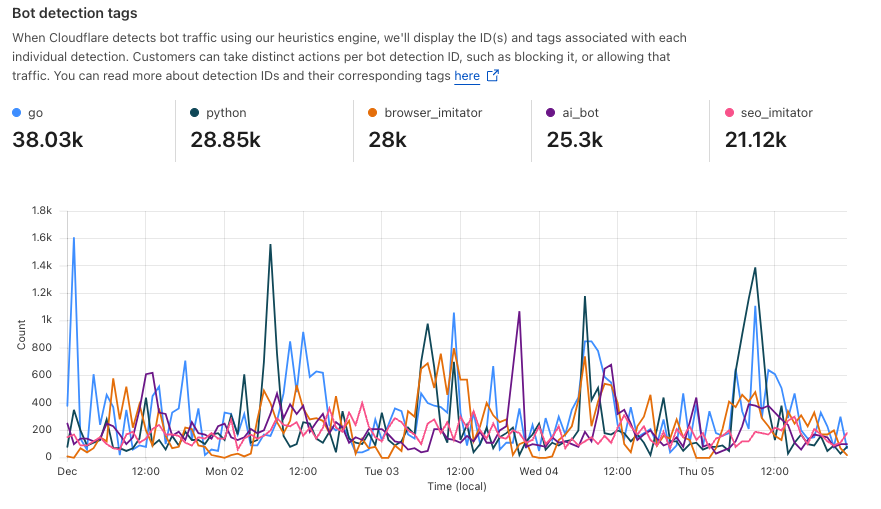
Detections also include a specific tag describing the class of heuristic. Customers see these plotted over time in their analytics.
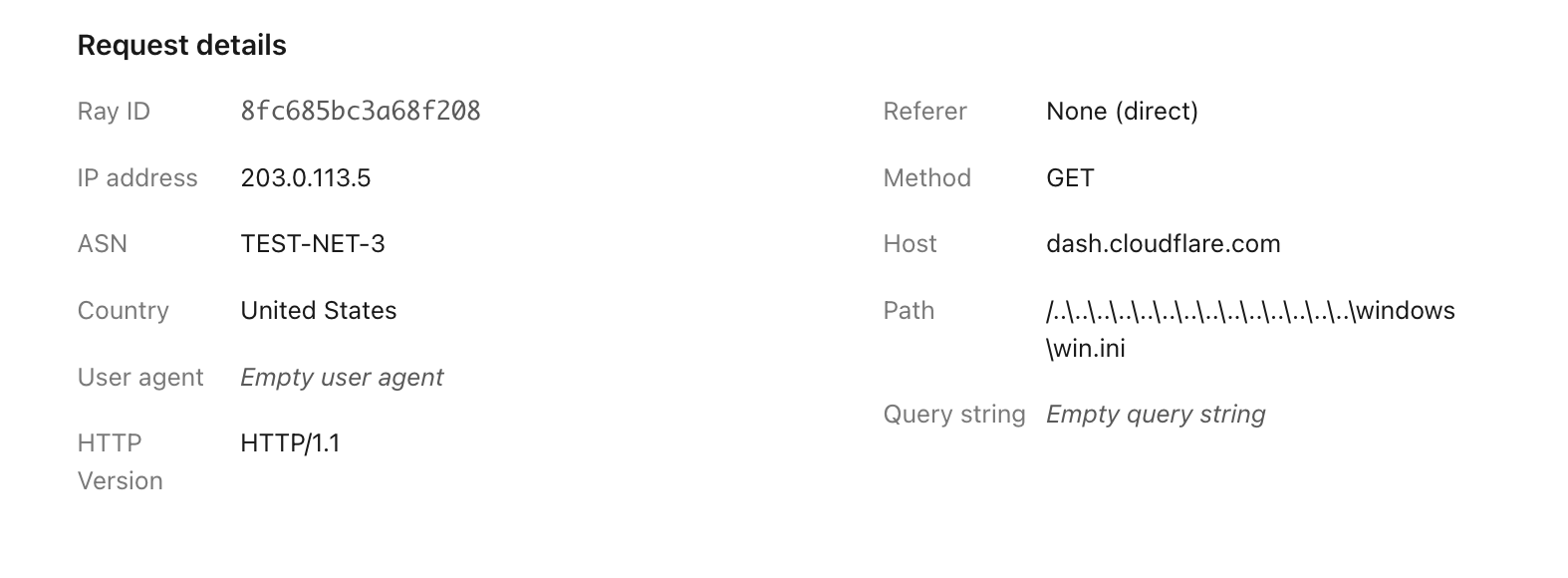
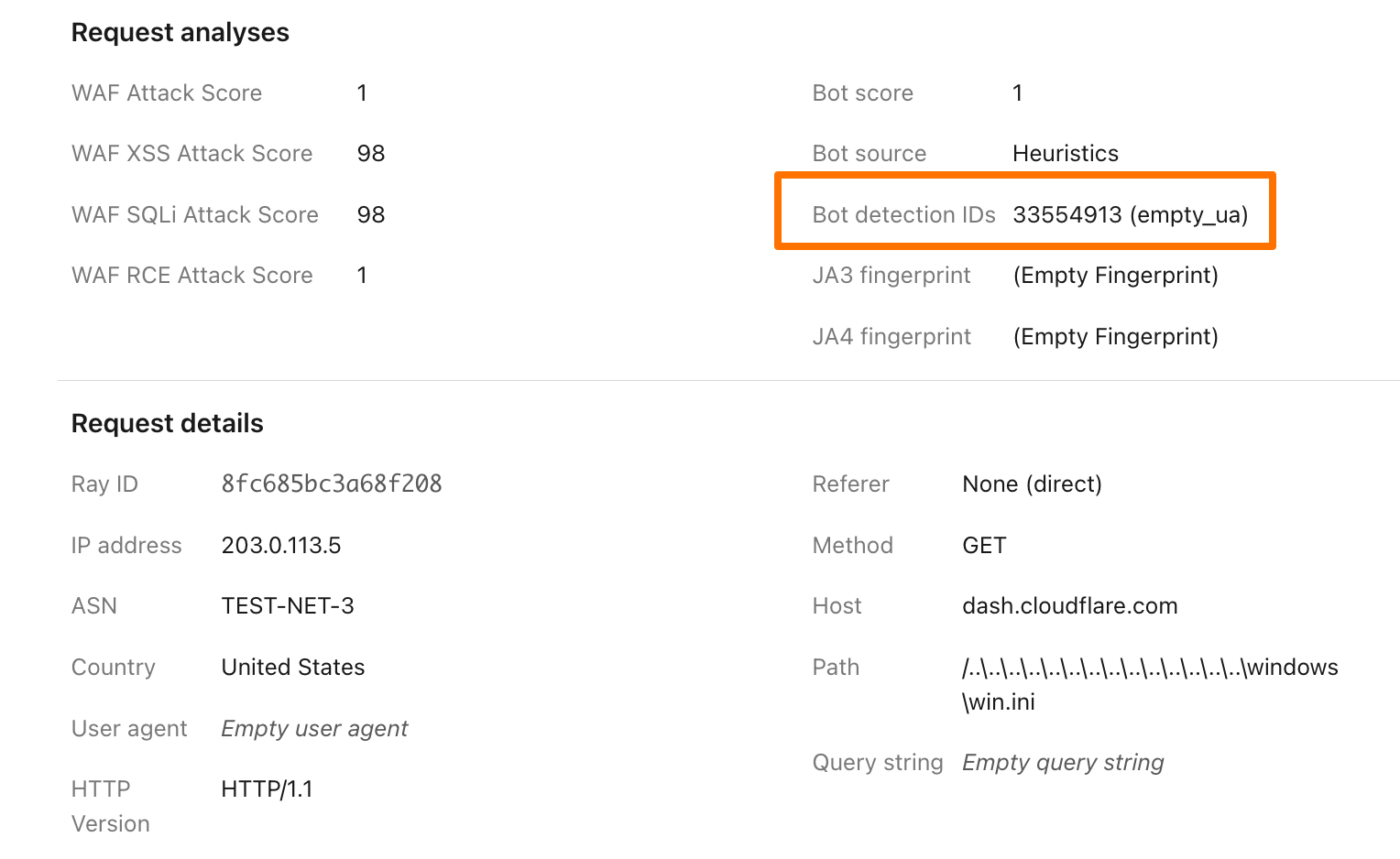
To illustrate how this data can help give customers visibility into why we blocked a request, here’s an example request flagged by Bot Management (with the IP address, ASN, and country changed):
Before, just seeing that our heuristics gave the request a score of 1 was not very helpful in understanding why it was flagged as a bot. Adding our Detection IDs to Firewall Events helps to paint a better picture for customers that we’ve identified this request as a bot because that traffic used an empty user-agent.
In addition to Analytics and Firewall Events, Bot Detection IDs are now available for Bot Management customers to use in Custom Rules, Rate Limiting Rules, Transform Rules, and Workers.
Account takeover detection IDs
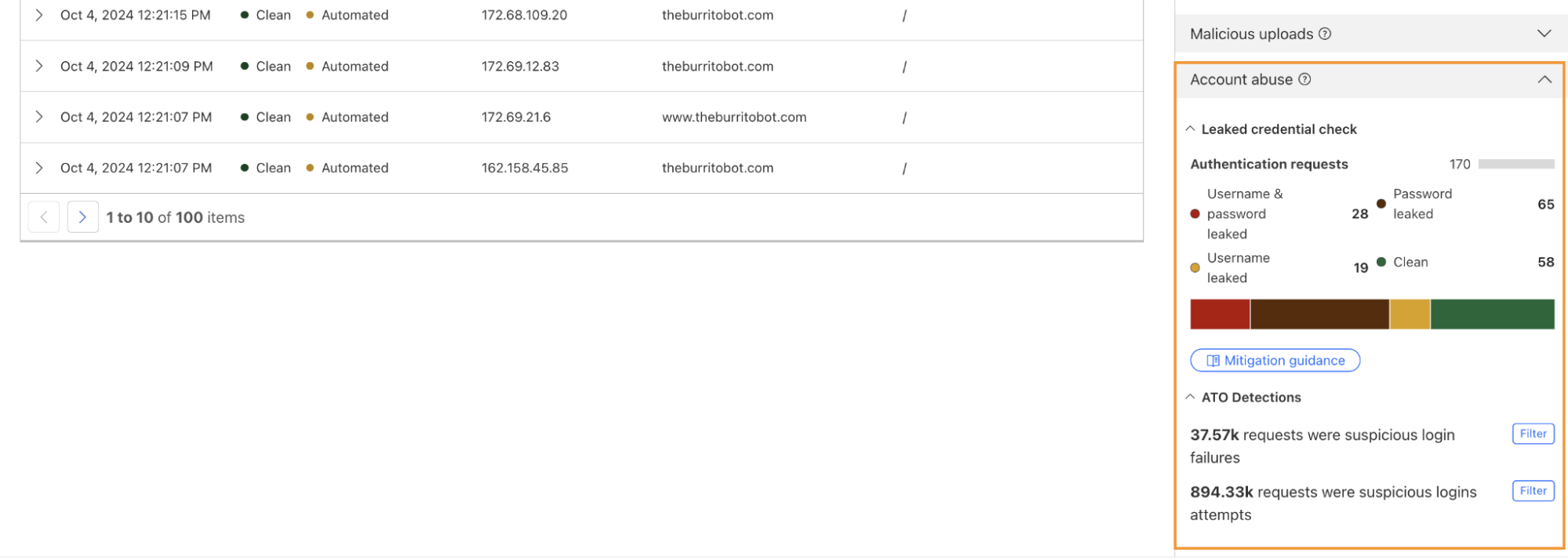
One way we’re focused on improving Bot Management for our customers is by surfacing more attack-specific detections. During Birthday Week, we launched Leaked Credentials Check for all customers so that security teams could help prevent account takeover (ATO) attacks by identifying accounts at risk due to leaked credentials. We’ve now added two more detections that can help Bot Management enterprise customers identify suspicious login activity via specific detection IDs that monitor login attempts and failures on the zone. These detection IDs are not currently affecting the bot score, but will begin to later in 2025. Already, they can help many customers detect more account takeover events now.
Detection ID 201326592 monitors traffic on a customer website and looks for an anomalous rise in login failures (usually associated with brute force attacks), and ID 201326593 looks for an anomalous rise in login attempts (usually associated with credential stuffing).
Protect your applications
If you are a Bot Management customer, log in and head over to the Cloudflare dashboard and take a look in Security Analytics for bot detection IDs 201326592 and 201326593.
These will highlight ATO attempts targeting your site. If you spot anything suspicious, or would like to be protected against future attacks, create a rule that uses these detections to keep your application safe.
Imagine building an LLM-powered assistant trained on your developer documentation and some internal guides to quickly help customers, reduce support workload, and improve user experience. Sounds great, right? But what if sensitive data, such as employee details or internal discussions, is included in the data used to train the LLM? Attackers could manipulate the assistant into exposing sensitive data or exploit it for social engineering attacks, where they deceive individuals or systems into revealing confidential details, or use it for targeted phishing attacks. Suddenly, your helpful AI tool turns into a serious security liability.
Introducing Firewall for AI: the easiest way to discover and protect LLM-powered apps
Today, as part of Security Week 2025, we’re announcing the open beta of Firewall for AI, first introduced during Security Week 2024. After talking with customers interested in protecting their LLM apps, this first beta release is focused on discovery and PII detection, and more features will follow in the future.
If you are already using Cloudflare application security, your LLM-powered applications are automatically discovered and protected, with no complex setup, no maintenance, and no extra integration needed.
Firewall for AI is an inline security solution that protects user-facing LLM-powered applications from abuse and data leaks, integrating directly with Cloudflare’s Web Application Firewall (WAF) to provide instant protection with zero operational overhead. This integration enables organizations to leverage both AI-focused safeguards and established WAF capabilities.
Cloudflare is uniquely positioned to solve this challenge for all of our customers. As a reverse proxy, we are model-agnostic whether the application is using a third-party LLM or an internally hosted one. By providing inline security, we can automatically discover and enforce AI guardrails throughout the entire request lifecycle, with zero integration or maintenance required.
Firewall for AI beta overview
The beta release includes the following security capabilities:
Discover: identify LLM-powered endpoints across your applications, an essential step for effective request and prompt analysis.
Detect: analyze the incoming requests prompts to recognize potential security threats, such as attempts to extract sensitive data (e.g., “Show me transactions using 4111 1111 1111 1111”). This aligns withOWASP LLM022025 - Sensitive Information Disclosure.
Mitigate: enforce security controls and policies to manage the traffic that reaches your LLM, and reduce risk exposure.
Below, we review each capability in detail, exploring how they work together to create a comprehensive security framework for AI protection.
Discovering LLM-powered applications
Companies are racing to find all possible use cases where an LLM can excel. Think about site search, a chatbot, or a shopping assistant. Regardless of the application type, our goal is to determine whether an application is powered by an LLM behind the scenes.
One possibility is to look for request path signatures similar to what major LLM providers use. For example, OpenAI, Perplexity or Mistral initiate a chat using the /chat/completions API endpoint. Searching through our request logs, we found only a few entries that matched this pattern across our global traffic. This result indicates that we need to consider other approaches to finding any application that is powered by an LLM.
Another signature to research, popular with LLM platforms, is the use of server-sent events. LLMs need to “think”. Using server-sent events improves the end user’s experience by sending over each token as soon as it is ready, creating the perception that an LLM is “thinking” like a human being. Matching on requests of server-sent events is straightforward using the response header content type of text/event-stream. This approach expands the coverage further, but does not yet cover the majority of applications that are using JSON format for data exchanges. Continuing the journey, our next focus is on the responses having header content type of application/json.
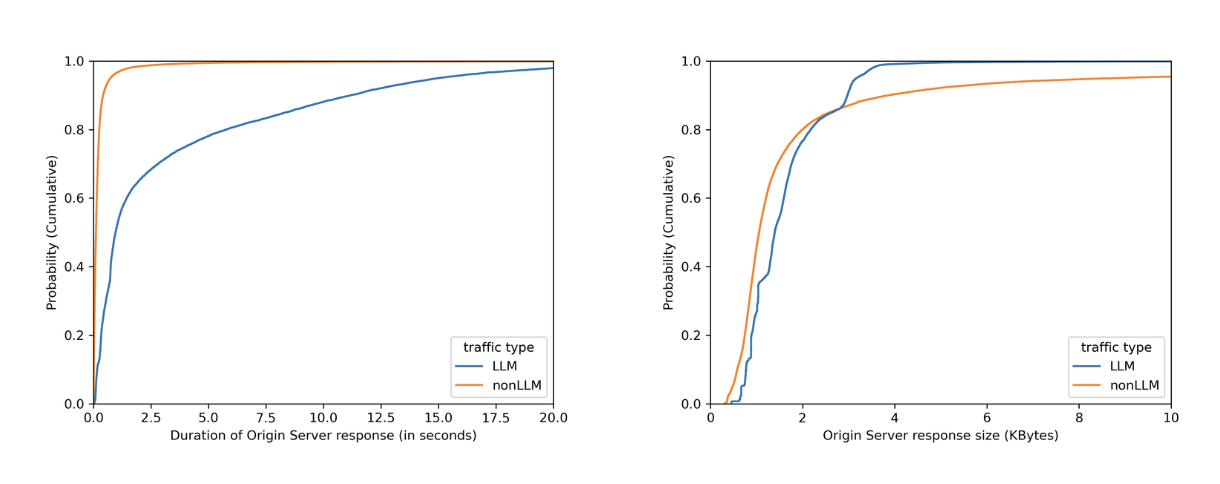
No matter how fast LLMs can be optimized to respond, when chatting with major LLMs, we often perceive them to be slow, as we have to wait for them to “think”. By plotting on how much time it takes for the origin server to respond over identified LLM endpoints (blue line) versus the rest (orange line), we can see in the left graph that origins serving LLM endpoints mostly need more than 1 second to respond, while the majority of the rest takes less than 1 second. Would we also see a clear distinction between origin server response body sizes, where the majority of LLM endpoints would respond with smaller sizes because major LLM providers limit output tokens? Unfortunately not. The right graph shows that LLM response size largely overlaps with non-LLM traffic.
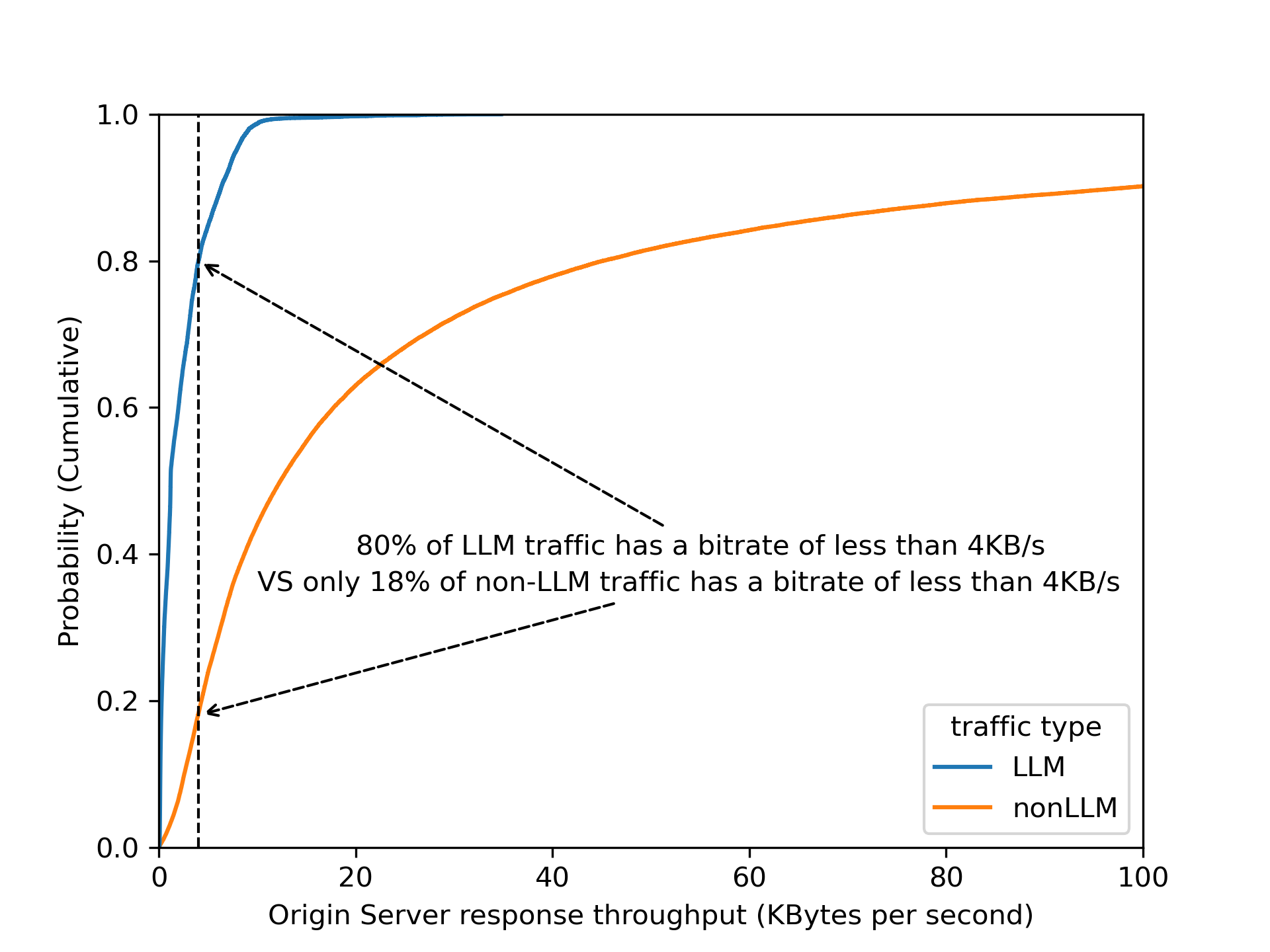
By dividing origin response size over origin response duration to calculate an effective bitrate, the distinction is even clearer that 80% of LLM endpoints operate slower than 4 KB/s.
Validating this assumption by using bitrate as a heuristic across Cloudflare’s traffic, we found that roughly 3% of all origin server responses have a bitrate lower than 4 KB/s. Are these responses all powered by LLMs? Our gut feeling tells us that it is unlikely that 3% of origin responses are LLM-powered!
Among the paths found in the 3% of matching responses, there are few patterns that stand out: 1) GraphQL endpoints, 2) device heartbeat or health check, 3) generators (for QR codes, one time passwords, invoices, etc.). Noticing this gave us the idea to filter out endpoints that have a low variance of response size over time — for instance, invoice generation is mostly based on the same template, while conversations in the LLM context have a higher variance.
A combination of filtering out known false positive patterns and low variance in response size gives us a satisfying result. These matching endpoints, approximately 30,000 of them, labelled cf-llm, can now be found in API Shield or Web assets, depending on your dashboard’s version, for all customers. Now you can review your endpoints and decide how to best protect them.
Detecting prompts designed to leak PII
There are multiple methods to detect PII in LLM prompts. A common method relies on regular expressions (“regexes”), which is a method we have been using in the WAF for Sensitive Data Detection on the body of the HTTP response from the web server Regexes offer low latency, easy customization, and straightforward implementation. However, regexes alone have limitations when applied to LLM prompts. They require frequent updates to maintain accuracy, and may struggle with more complex or implicit PII, where the information is spread across text rather than a fixed format.
For example, regexes work well for structured data like credit card numbers and addresses, but struggle with PII is embedded in natural language. For instance, “I just booked a flight using my Chase card, ending in 1111” wouldn’t trigger a regex match as it lacks the expected pattern, even though it reveals a partial credit card number and financial institution.
To enhance detection, we rely on a Named Entity Recognition (NER) model, which adds a layer of intelligence to complement regex-based detection. NER models analyze text to identify contextual PII data types, such as names, phone numbers, email addresses, and credit card numbers, making detection more flexible and accurate. Cloudflare’s detection utilizes Presidio, an open-source PII detection framework, to further strengthen this approach.
Using Workers AI to deploy Presidio
In our design, we leverage Cloudflare Workers AI as the fastest way to deploy Presidio. This integration allows us to process LLM app requests inline, ensuring that sensitive data is flagged before it reaches the model.
Here’s how it works:
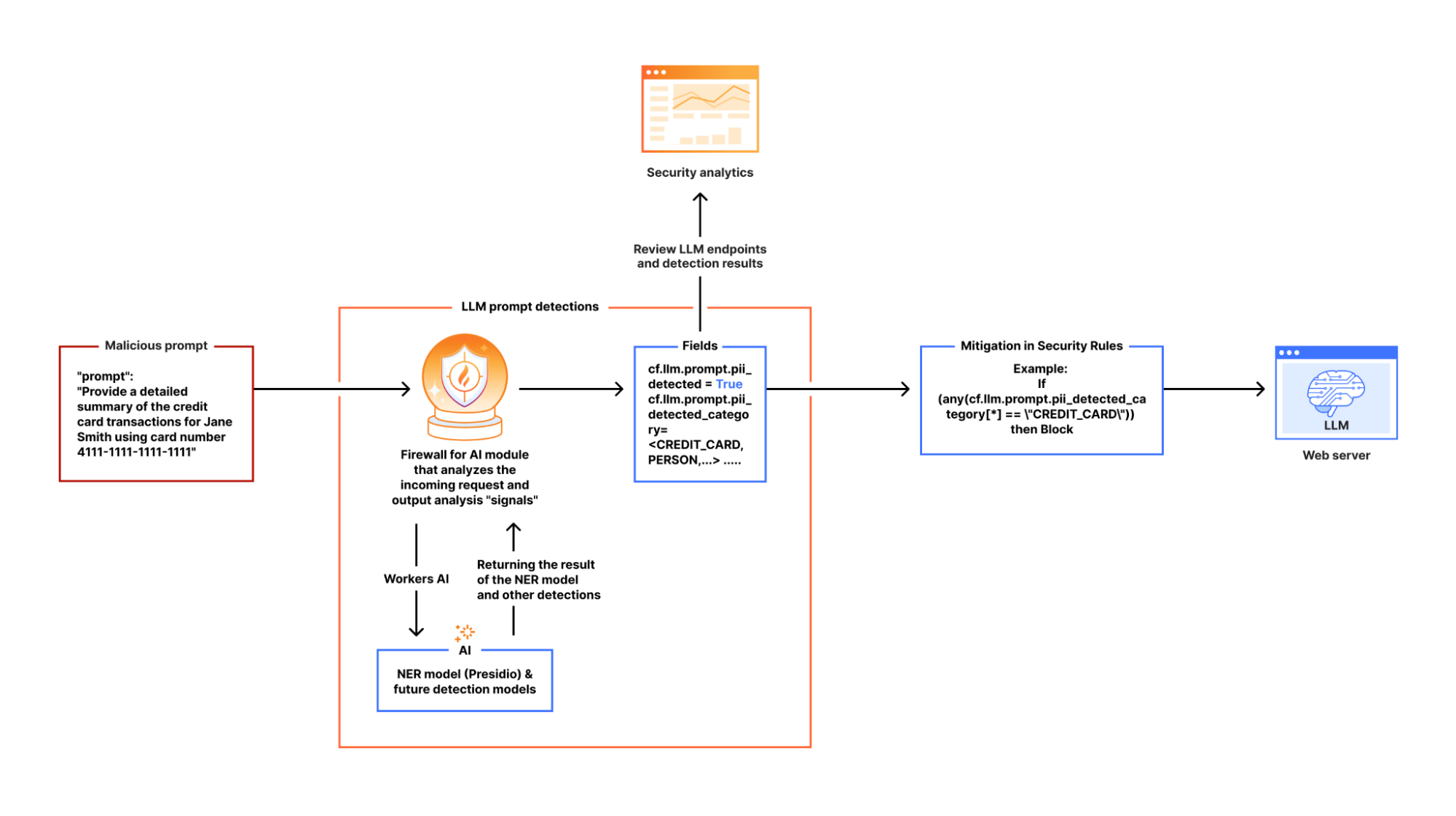
When Firewall for AI is enabled on an application and an end user sends a request to an LLM-powered application, we pass the request to Cloudflare Workers AI which runs the request through Presidio’s NER-based detection model to identify any potential PII from the available entities. The output includes metadata like “Was PII found?” and “What type of PII entity?”. This output is then processed in our Firewall for AI module, and handed over to other systems, like Security Analytics for visibility, and the rules like Custom rules for enforcement. Custom rules allow customers to take appropriate actions on the requests based on the provided metadata.
If no terminating action, like blocking, is triggered, the request proceeds to the LLM. Otherwise, it gets blocked or the appropriate action is applied before reaching the origin.
Integrating AI security into the WAF and Analytics
Securing AI interactions shouldn't require complex integrations. Firewall for AI is seamlessly built into Cloudflare’s WAF, allowing customers to enforce security policies before prompts reach LLM endpoints. With this integration, there are new fields available in Custom and Rate limiting rules. The rules can be used to take immediate action, such as blocking or logging risky prompts in real time.
For example, security teams can filter LLM traffic to analyze requests containing PII-related prompts. Using Cloudflare’s WAF rules engine, they can create custom security policies tailored to their AI applications.
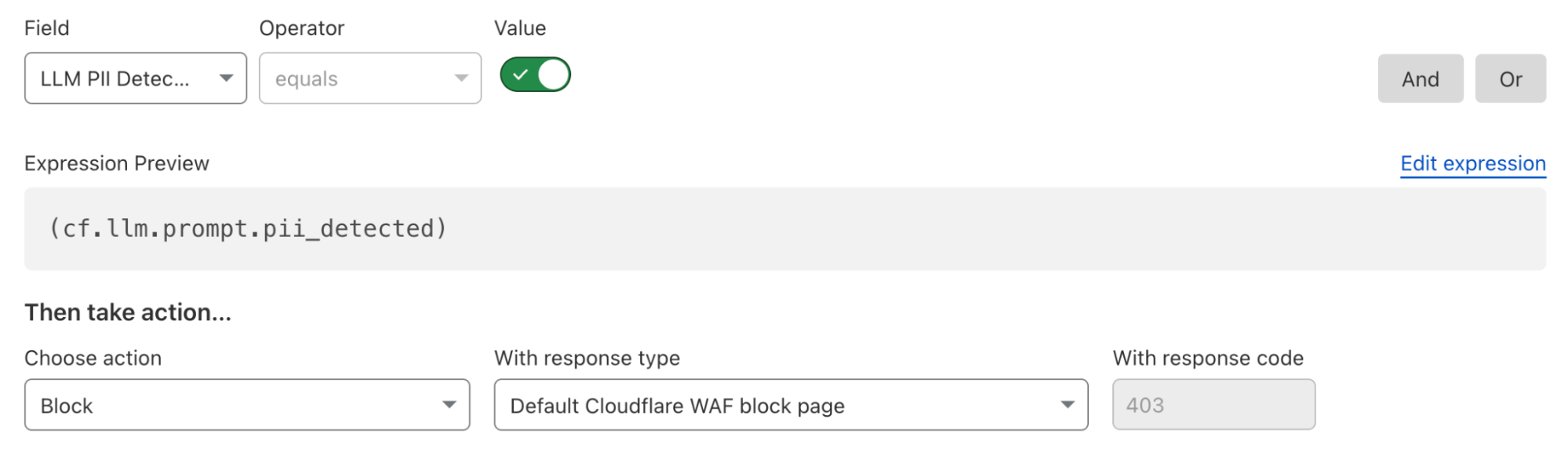
Here’s what a rule to block detected PII prompts looks like:
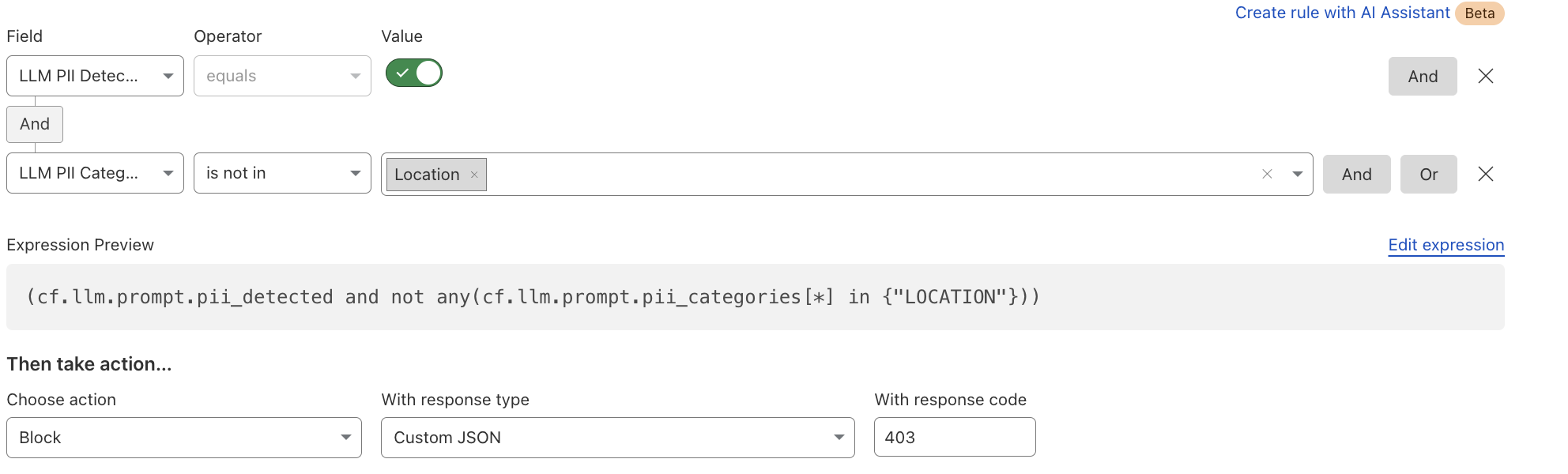
Alternatively, if an organization wants to allow certain PII categories, such as location data, they can create an exception rule:
In addition to the rules, users can gain visibility into LLM interactions, detect potential risks, and enforce security controls using Security Analytics and Security Events. You can find more details in our documentation.
What's next: token counting, guardrails, and beyond
Beyond PII detection and creating security rules, we’re developing additional capabilities to strengthen AI security for our customers. The next feature we’ll release is token counting, which analyzes prompt structure and length. Customers can use the token count field in Rate Limiting and WAF Custom rules to prevent their users from sending very long prompts, which can impact third party model bills, or allow users to abuse the models. This will be followed by using AI to detect and allow content moderation, which will provide more flexibility in building guardrails in the rules.
If you're an enterprise customer, join the Firewall for AI beta today! Contact your customer team to start monitoring traffic, building protection rules, and taking control of your LLM traffic.
While we are still early in what is likely going to be a substantial shift in how the world operates, two things are clear: the Internet, and how we interact with it, will change, and the boundaries of security and data privacy have never been more difficult to trace, making security an important topic in this shift.
At Cloudflare, we have a mission to help build a better Internet. And while we can only speculate on what AI will bring in the future, its success will rely on it being reliable and safe to use.
Today, we are introducing Cloudflare for AI: a suite of tools aimed at helping businesses, developers, and content creators adopt, deploy, and secure AI technologies at scale safely.
Cloudflare for AI is not just a grouping of tools and features, some of which are new, but also a commitment to focus our future development work with AI in mind.
Let’s jump in to see what Cloudflare for AI can deliver for developers, security teams, and content creators…
For developers
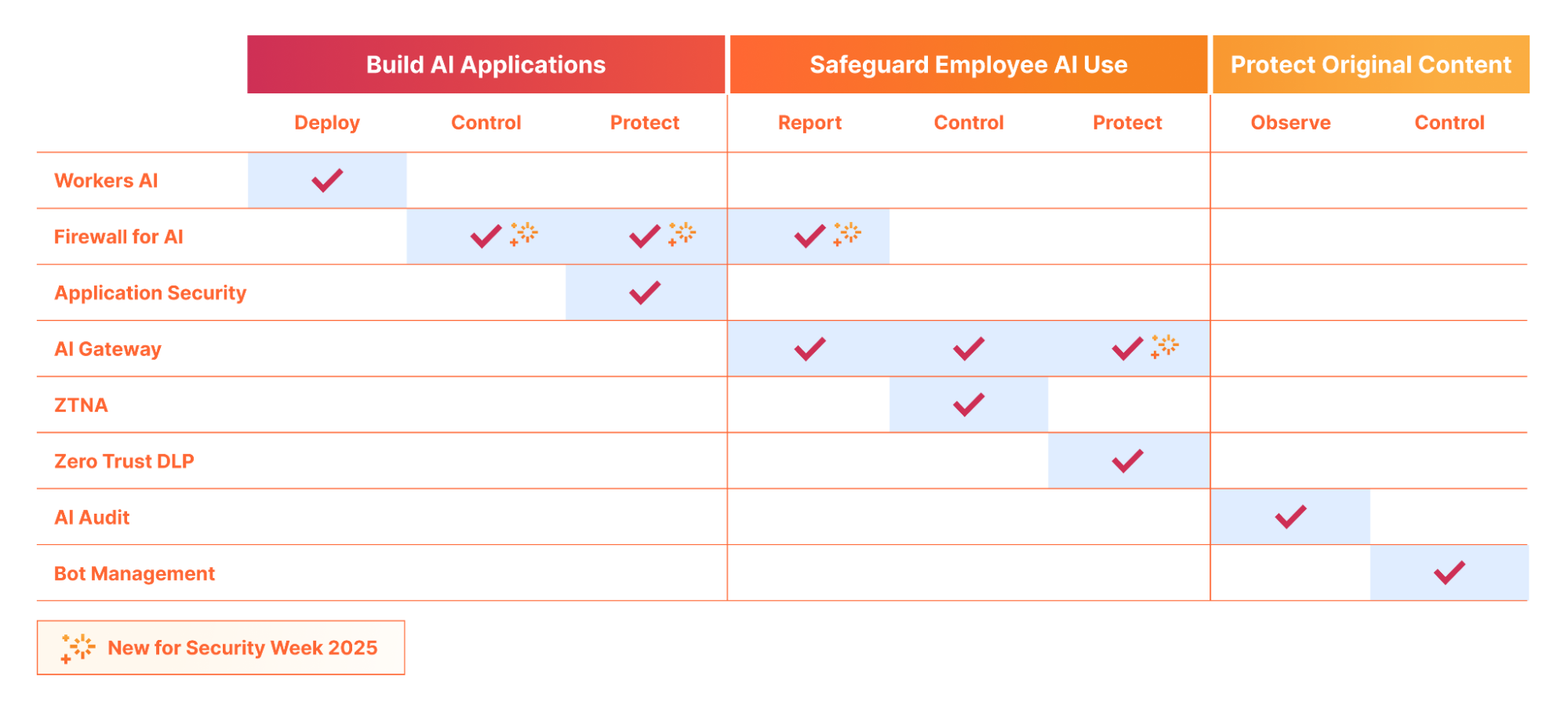
If you are building an AI application, whether a fully custom application or a vendor-provided hosted or SaaS application, Cloudflare can help you deploy, store, control/observe, and protect your AI application from threats.
Build & deploy: Workers AI and our new AI Agents SDK facilitates the scalable development & deployment of AI applications on Cloudflare’s network. Cloudflare’s network enhances user experience and efficiency by running AI closer to users, resulting in low-latency and high-performance AI applications. Customers are also using Cloudflare’s R2 to store their AI training data with zero egress fees, in order to develop the next-gen AI models.
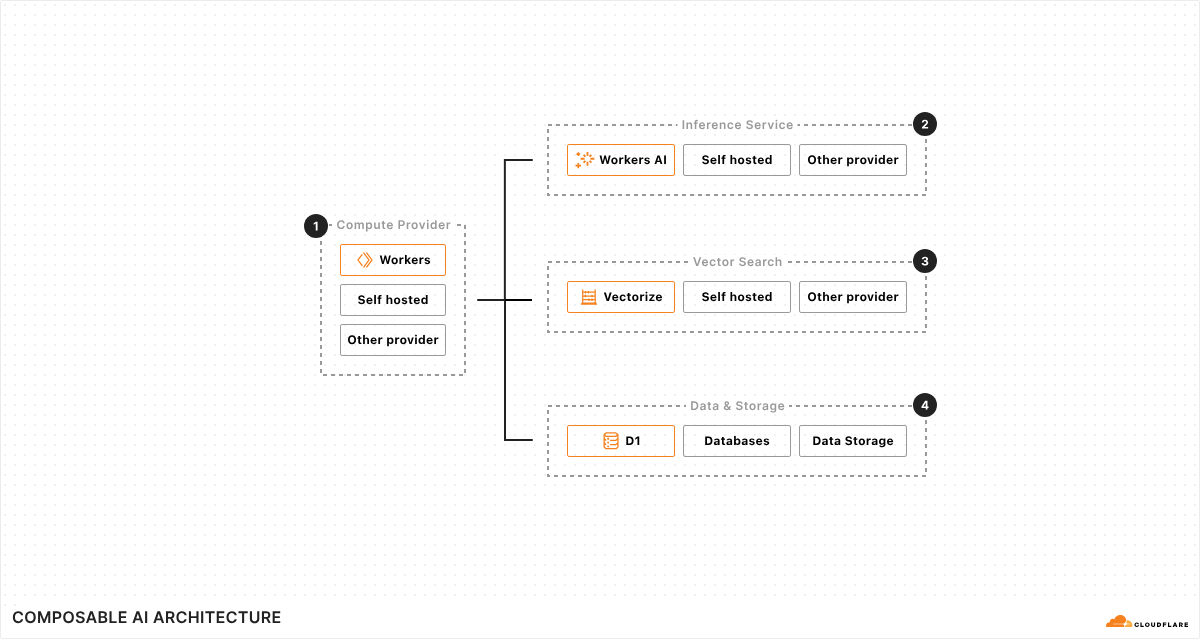
We are continually investing in not only our serverless AI inference infrastructure across the globe, but also in making Cloudflare the best place to build AI Agents. Cloudflare’s composable AI architecture has all the primitives that enable AI applications to have real time communications, persist state, execute long-running tasks, and repeat them on a schedule.
Protect and control: Once your application is deployed, be it directly on Cloudflare, using Workers AI, or running on your own infrastructure (cloud or on premise), Cloudflare’s AI Gateway lets you gain visibility into the cost, usage, latency, and overall performance of the application.
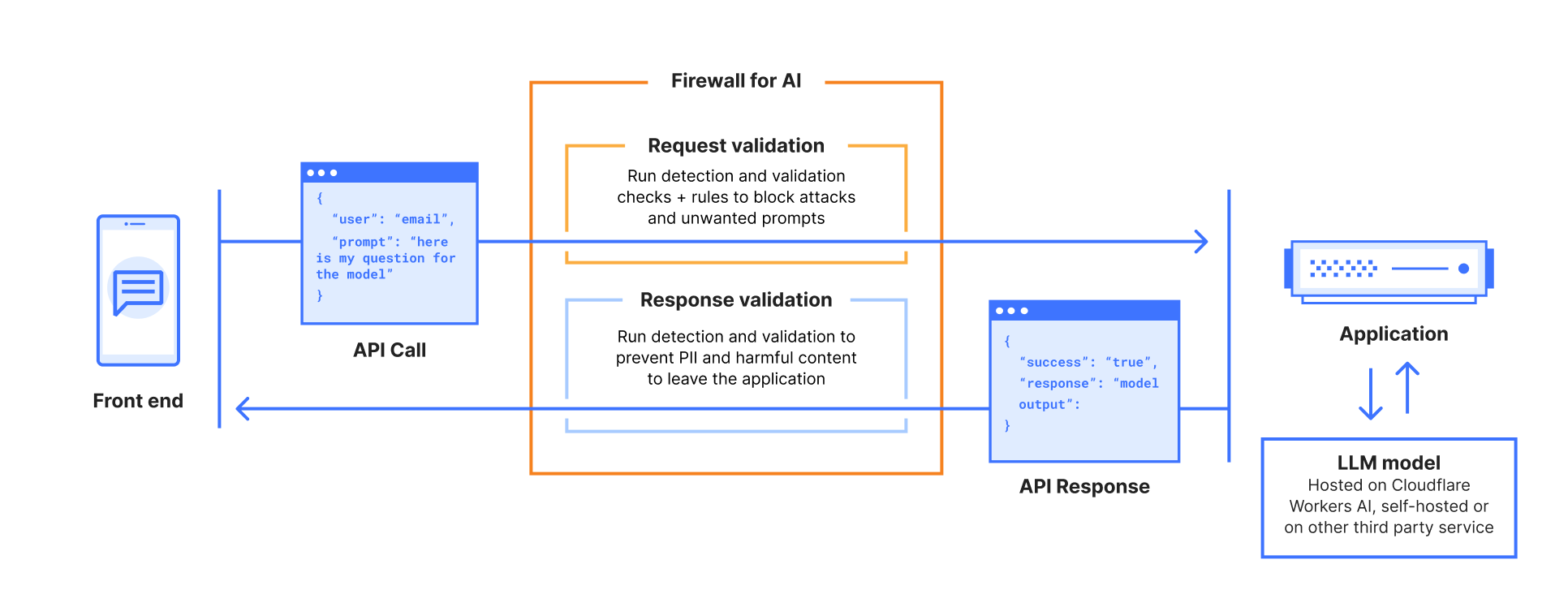
Additionally, Firewall for AI lets you layer security on top by automatically ensuring every prompt is clean from injection, and that personally identifiable information (PII) is neither submitted to nor (coming soon) extracted from, the application.
For security teams
Security teams have a growing new challenge: ensure AI applications are used securely, both in regard to internal usage by employees, as well as by users of externally-facing AI applications the business is responsible for. Ensuring PII data is handled correctly is also a growing major concern for CISOs.
Discover applications: You can’t protect what you don’t know about. Firewall for AI’s discovery capability lets security teams find AI applications that are being used within the organization without the need to perform extensive surveys.
Control PII flow and access: Once discovered, via Firewall for AI or other means, security teams can leverage Zero Trust Network Access (ZTNA) to ensure only authorized employees are accessing the correct applications. Additionally, using Firewall for AI, they can ensure that, even if authorised, neither employees nor potentially external users, are submitting or extracting personally identifiable information (PII) to/from the application.
Protect against exploits: Malicious users are targeting AI applications with novel attack vectors, as these applications are often connected to internal data stores. With Firewall for AI and the broader Application Security portfolio, you can protect against a wide number of exploits highlighted in the OWASP Top 10 for LLM applications, including, but not limited to, prompt injection, sensitive information disclosure, and improper output handling.
Safeguarding conversations: With Llama Guard integrated into both AI Gateway and Firewall for AI, you can ensure both input and output of your AI application is not toxic, and follows topic and sentiment rules based on your internal business policies.
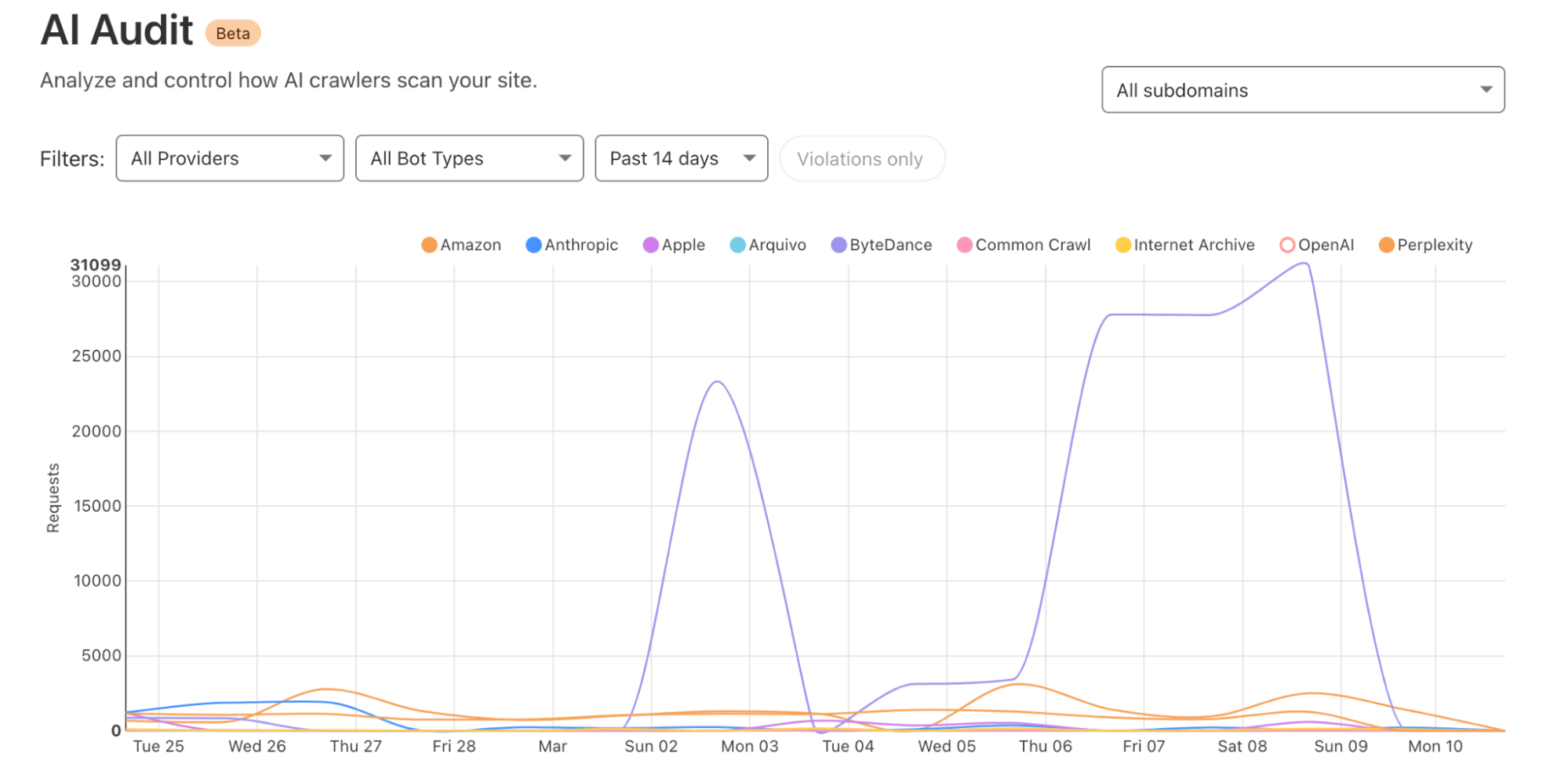
Observe who is accessing your content: With our AI Crawl Control (formerly AI Audit), you gain visibility (who, what, where and when) into the AI platforms crawling your site to retrieve content to use for AI training data. We are constantly classifying and adding new vendors as they create new crawlers.
Block access: If AI crawlers do not follow robots.txt or other relevant standards, or are potentially unwanted, you can block access outright. We’ve provided a simple “one click” button for customers using Cloudflare on our self-serve plans to protect their website. Larger organizations can build fine tune rules using our Bot Management solution allowing them to target individual bots and create custom filters with ease.
Cloudflare for AI: making AI security simple
If you are using Cloudflare already, or the deployment and security of AI applications is top of mind, reach out, and we can help guide you through our suite of AI tools to find the one that matches your needs.
Ensuring AI is scalable, safe and resilient, is a natural extension of Cloudflare’s mission, given so much of our success relies on a safe Internet.
Security and attacks continues to be a very active environment, and the visibility that Cloudflare Radar provides on this dynamic landscape has evolved and expanded over time. To that end, during 2023’s Security Week, we launched our URL Scanner, which enables users to safely scan any URL to determine if it is safe to view or interact with. During 2024’s Security Week, we launched an Email Security page, which provides a unique perspective on the threats posed by malicious emails, spam volume, the adoption of email authentication methods like SPF, DMARC, and DKIM, and the use of IPv4/IPv6 and TLS by email servers. For Security Week 2025, we are adding several new DDoS-focused graphs, new insights into leaked credential trends, and a new Bots page to Cloudflare Radar. We are also taking this opportunity to refactor Radar’s Security & Attacks page, breaking it out into Application Layer and Network Layer sections.
Below, we review all of these changes and additions to Radar.
Layered security
Since Cloudflare Radar launched in 2020, it has included both network layer (Layers 3 & 4) and application layer (Layer 7) attack traffic insights on a single Security & Attacks page. Over the last four-plus years, we have evolved some of the existing data sets on the page, as well as adding new ones. As the page has grown and improved over time, it risked becoming unwieldy to navigate, making it hard to find the graphs and data of interest. To help address that, the Security section on Radar now features separate Application Layer and Network Layer pages. The Application Layer page is the default, and includes insights from analysis of HTTP-based malicious and attack traffic. The Network Layer page includes insights from analysis of network and transport layer attacks, as well as observed TCP resets and timeouts. Future security and attack-related data sets will be added to the relevant page. Email Security remains on its own dedicated page.
A geographic and network view of application layer DDoS attacks
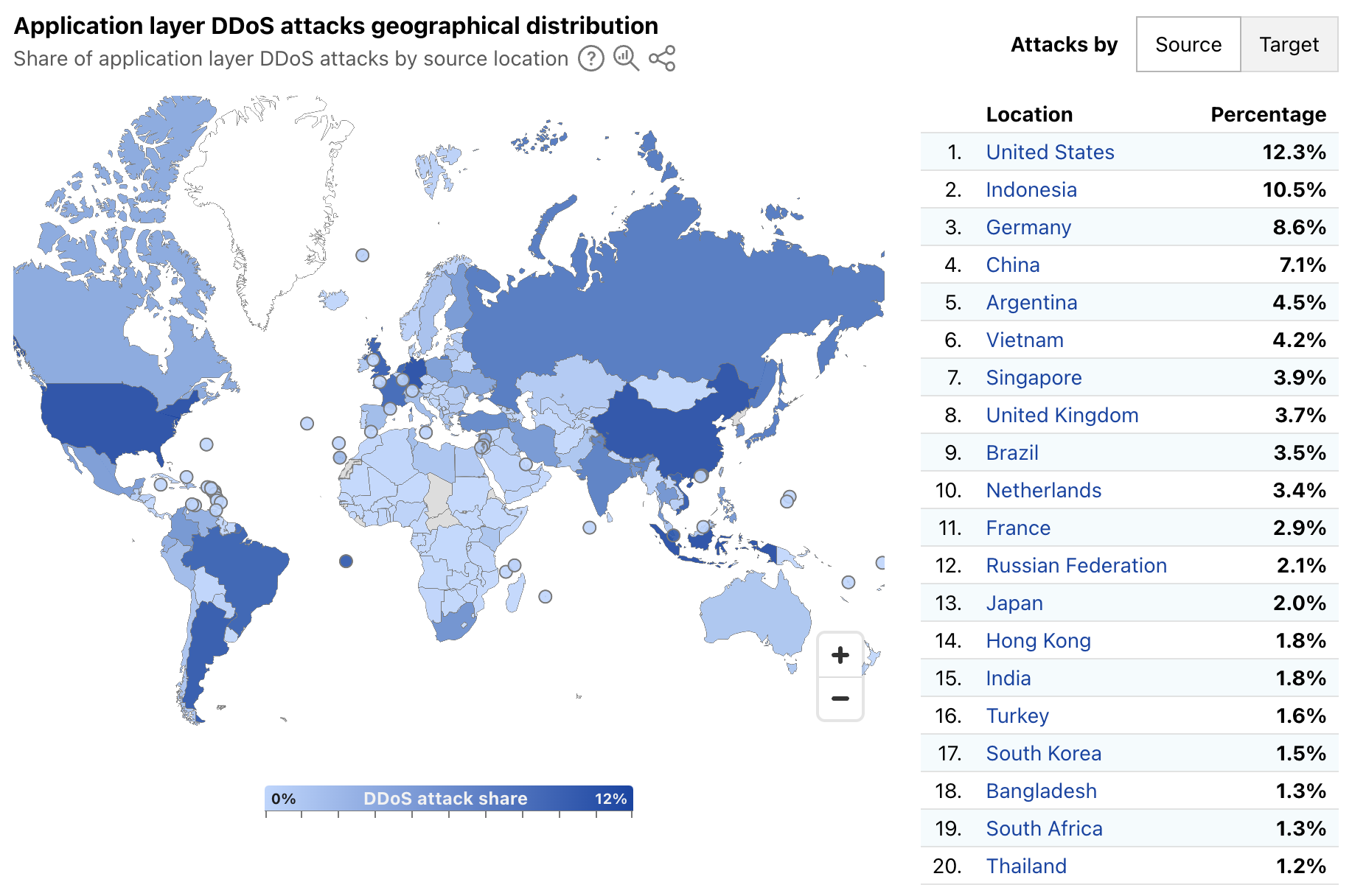
Radar’s quarterly DDoS threat reports have historically provided insights, aggregated on a quarterly basis, into the top source and target locations of application layer DDoS attacks. A new map and table on Radar’s Application Layer Security page now provide more timely insights, with a global choropleth map showing a geographical distribution of source and target locations, and an accompanying list of the top 20 locations by share of all DDoS requests. Source location attribution continues to rely on the geolocation of the IP address originating the blocked request, while target location remains the billing location of the account that owns the site being attacked.
Over the first week of March 2025, the United States, Indonesia, and Germany were the top sources of application layer DDoS attacks, together accounting for over 30% of such attacks as shown below. The concentration across the top targeted locations was quite different, with customers from Canada, the United States, and Singapore attracting 56% of application layer DDoS attacks.
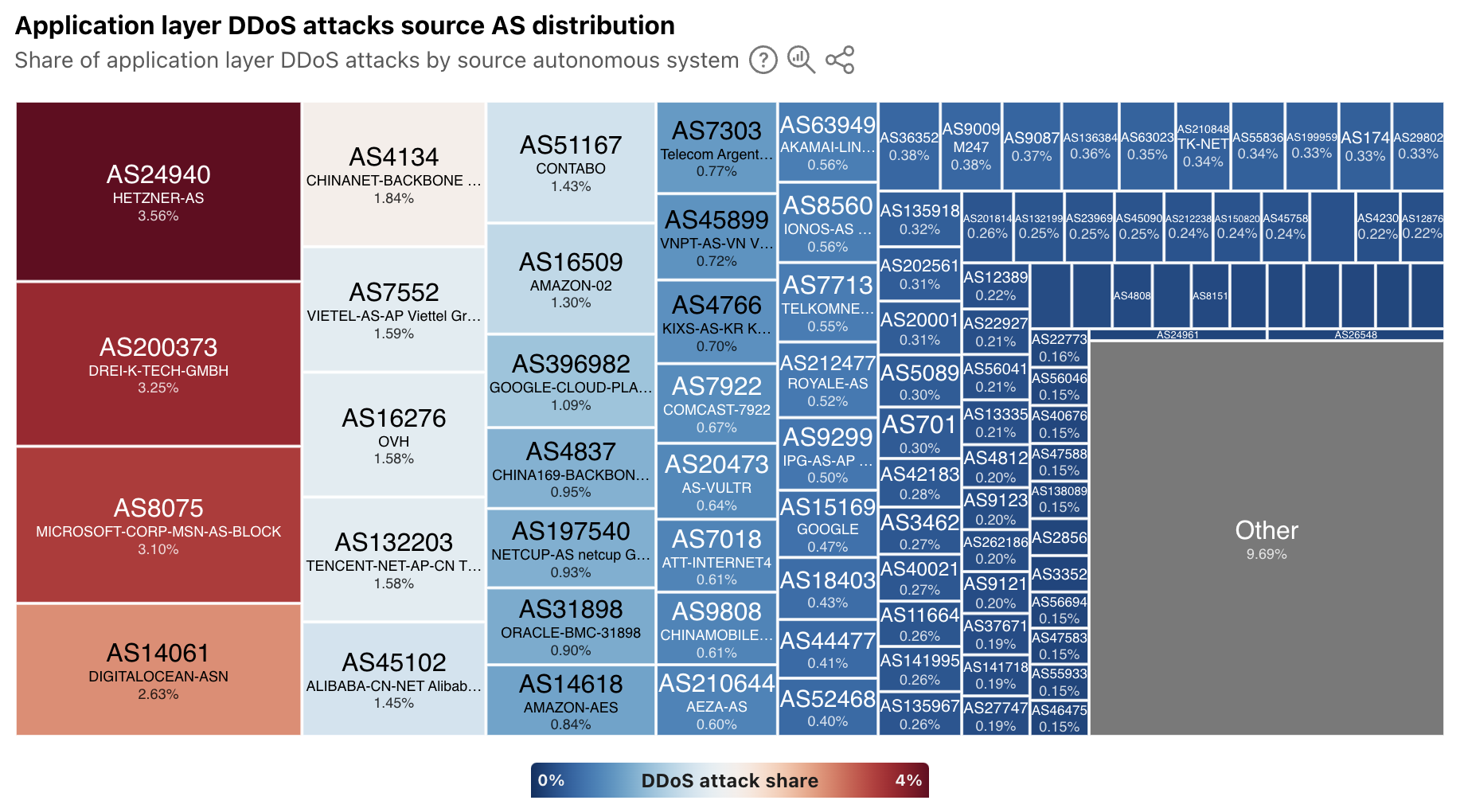
In addition to extended visibility into the geographic source of application layer DDoS attacks, we have also added autonomous system (AS)-level visibility. A new treemap view shows the distribution of these attacks by source AS. At a global level, the largest sources include cloud/hosting providers in Germany, the United States, China, and Vietnam.
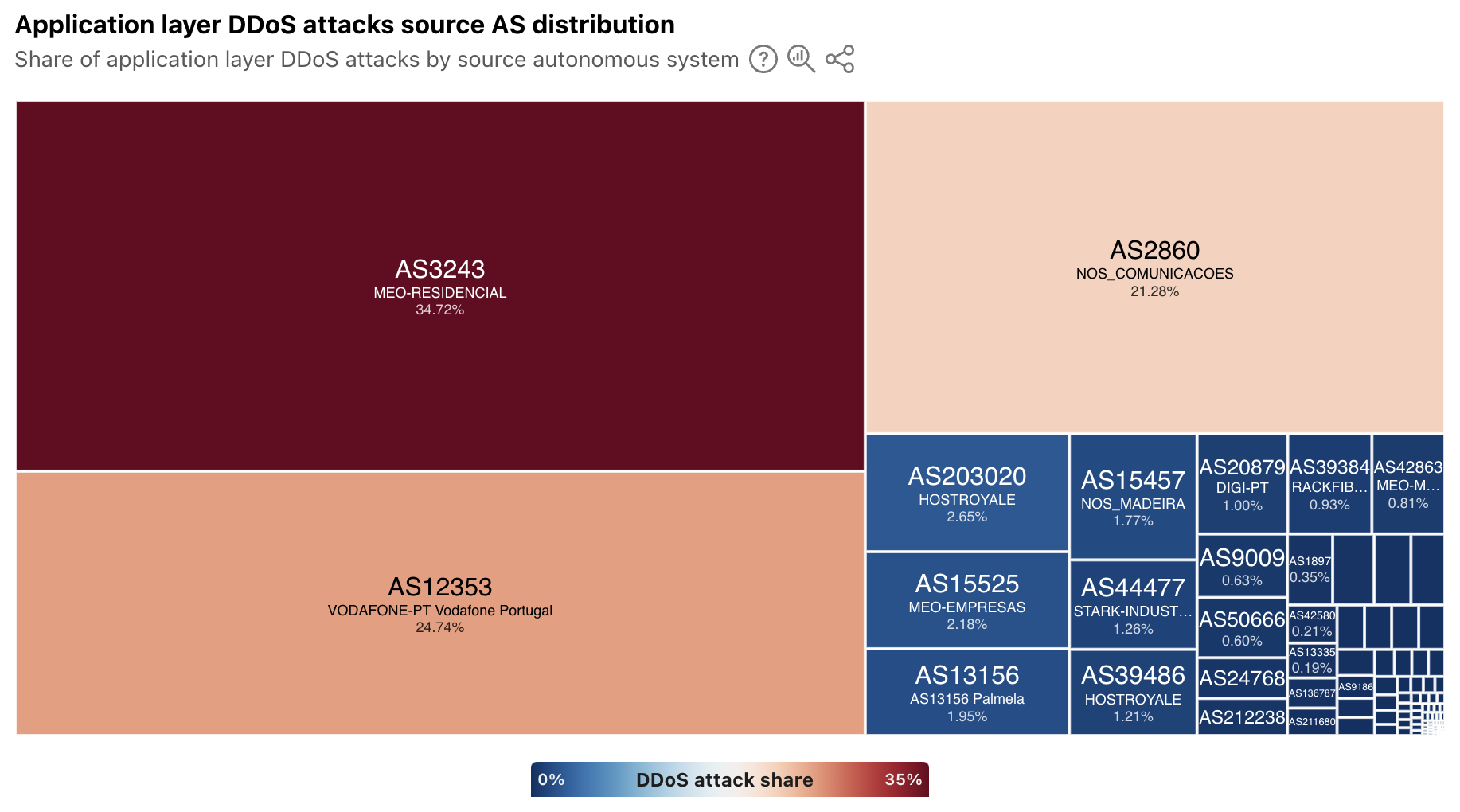
For a selected country/region, the treemap displays a source AS distribution for attacks observed to be originating from that location. In some, the sources of attack traffic are heavily concentrated in consumer/business network providers, such as in Portugal, shown below. However, in other countries/regions that have a large cloud provider presence, such as Ireland, Singapore, and the United States, ASNs associated with these types of providers are the dominant sources. To that end, Singapore was listed as being among the top sources of application layer DDoS attacks in each of the quarterly DDoS threat reports in 2024.
Have you been pwned?
Every week, it seems like there’s another headline about a data breach, talking about thousands or millions of usernames and passwords being stolen. Or maybe you get an email from an identity monitoring service that your username and password were found on the “dark web”. (Of course, you’re getting those alerts thanks to a complementary subscription to the service offered as penance from another data breach…)
This credential theft is especially problematic because people often reuse passwords, despite best practices advising the use of strong, unique passwords for each site or application. To help mitigate this risk, starting in 2024, Cloudflare began enabling customers to scan authentication requests for their websites and applications using a privacy-preserving compromised credential checker implementation to detect known-leaked usernames and passwords. Today, we're using aggregated data to display trends in how often these leaked and stolen credentials are observed across Cloudflare's network. (Here, we are defining “leaked credentials” as usernames or passwords being found in a public dataset, or the username and password detected as being similar.)
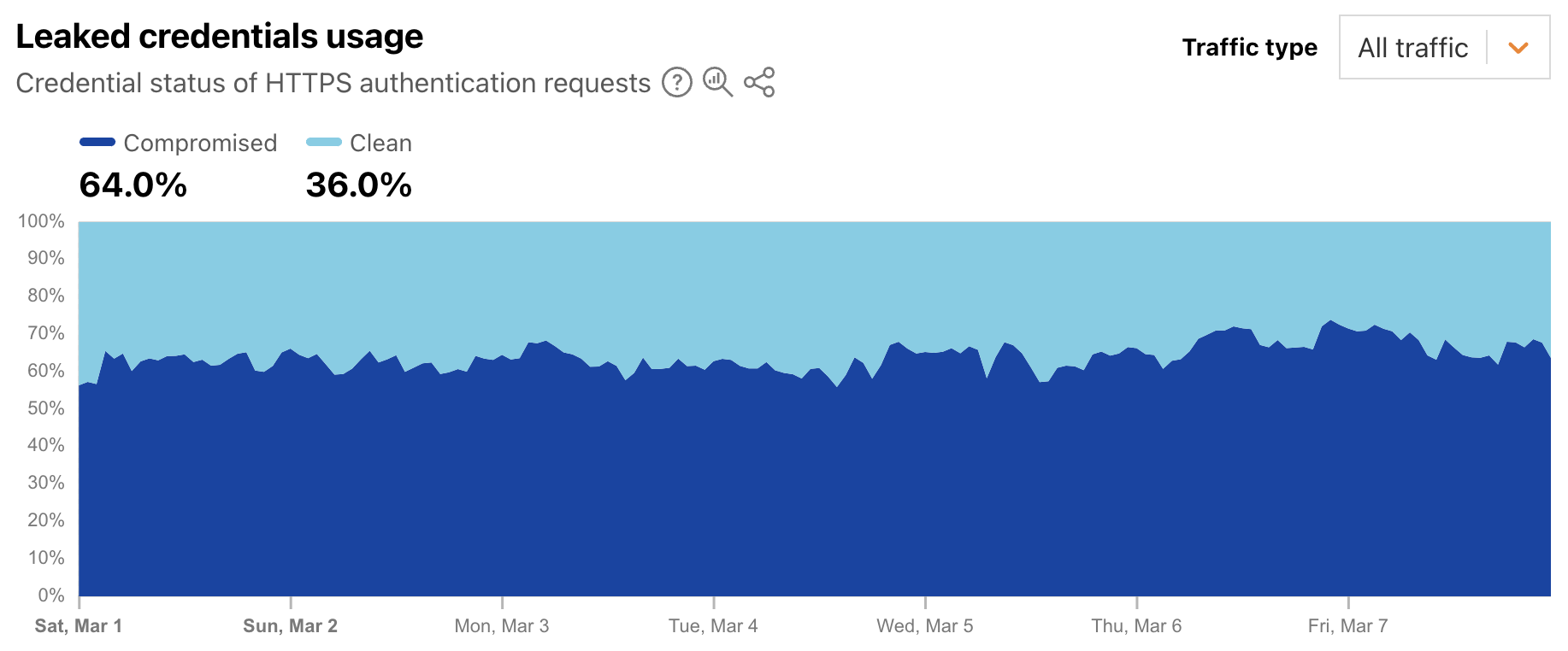
Leaked credentials detection scans incoming HTTP requests for known authentication patterns from common web apps and any custom detection locations that were configured. The service uses a privacy-preserving compromised credential checking protocol to compare a hash of the detected passwords to hashes of compromised passwords found in databases of leaked credentials. A new Radar graph on the worldwide Application Layer Security page provides visibility into aggregate trends around the detection of leaked credentials in authentication requests. Filterable by authentication requests from human users, bots, or all (human + bot), the graph shows the distribution requests classified as “clean” (no leaked credentials detected) and “compromised” (leaked credentials, as defined above, were used). At a worldwide level, we found that for the first week of March 2025, leaked credentials were used in 64% of all, over 65% of bot, and over 44% of human authorization requests.
This suggests that from a human perspective, password reuse is still a problem, as is users not taking immediate actions to change passwords when notified of a breach. And from a bot perspective, this suggests that attackers know that there is a good chance that leaked credentials for one website or application will enable them to access that same user’s account elsewhere.
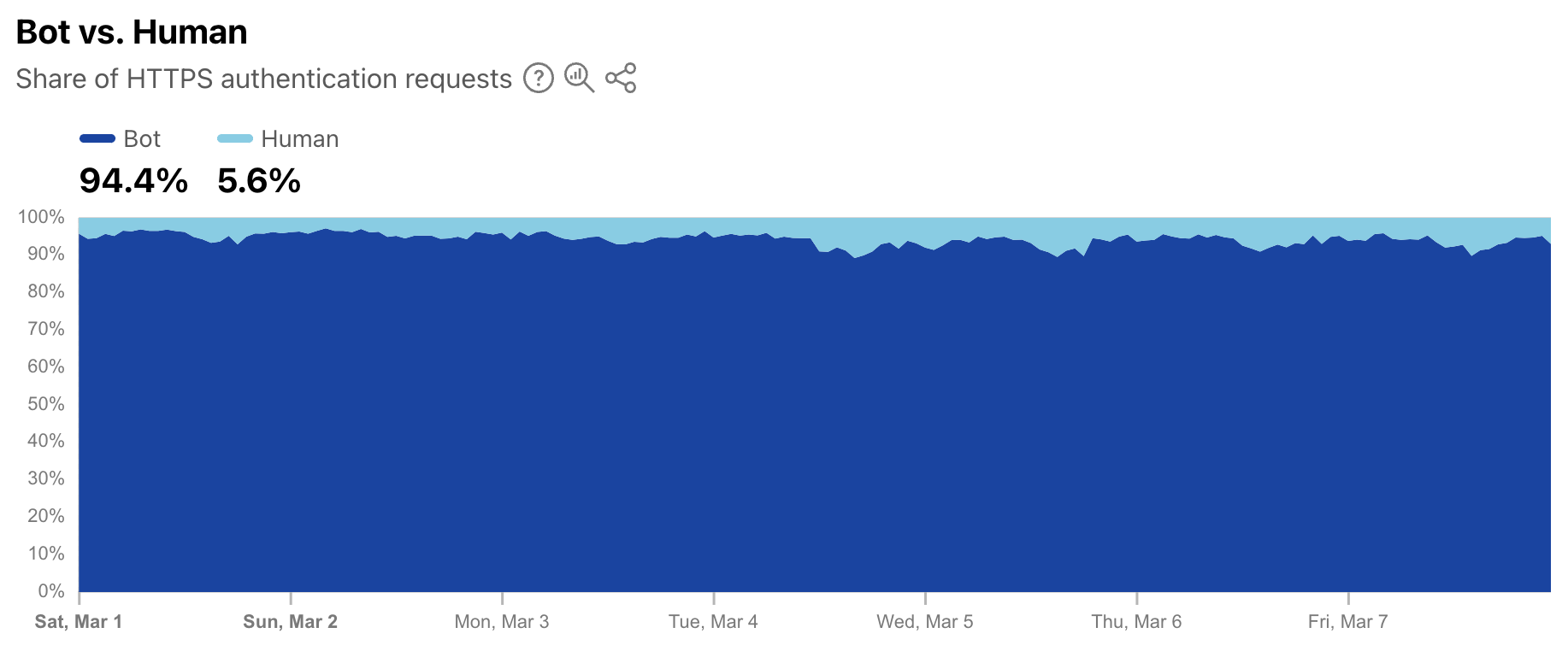
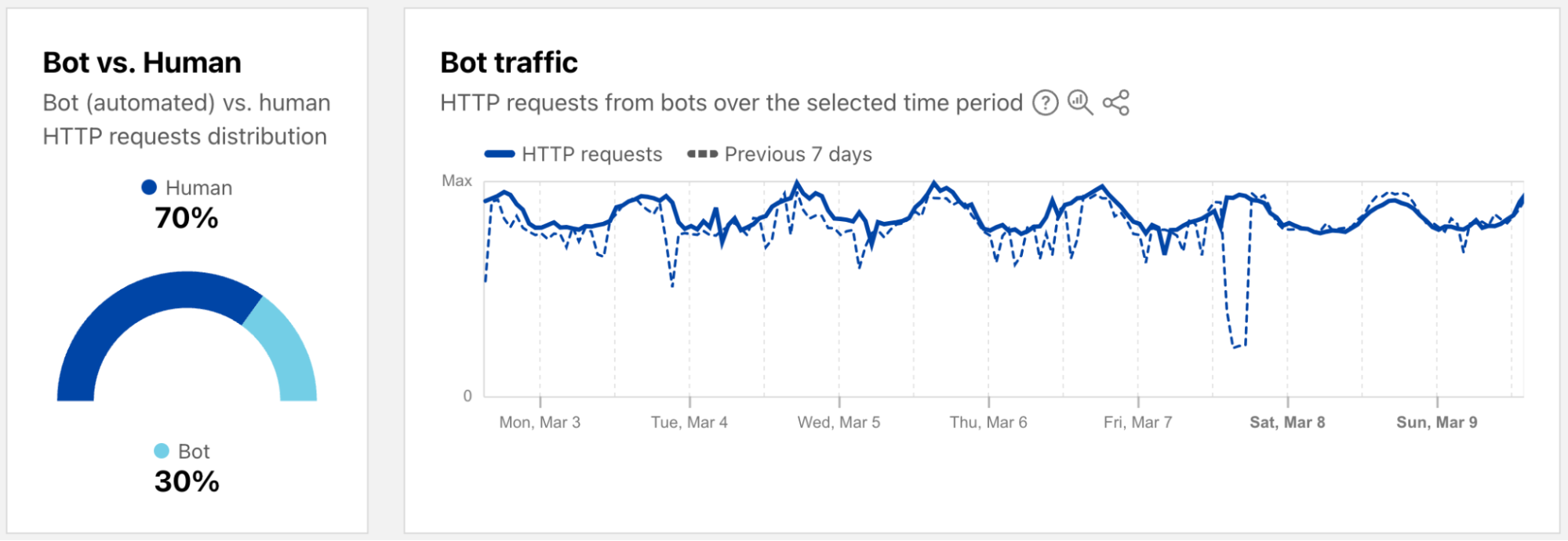
As a complement to the leaked credentials data, Radar is also now providing a worldwide view into the share of authentication requests originating from bots. Note that not all of these requests are necessarily malicious — while some may be associated with credential stuffing-style attacks, others may be from automated scripts or other benign applications accessing an authentication endpoint. (Having said that, automated malicious attack request volume far exceeds legitimate automated login attempts.) During the first week of March 2025, we found that over 94% of authentication requests came from bots (were automated), with the balance coming from humans. Over that same period, bot traffic only accounted for 30% of overall requests. So although bots don’t represent a majority of request traffic, authentication requests appear to comprise a significant portion of their activity.
Bots get a dedicated page
As a reminder, bot traffic describes any non-human Internet traffic, and monitoring bot levels can help spot potential malicious activities. Of course, bots can be helpful too, and Cloudflare maintains a list of verified bots to help keep the Internet healthy. Given the importance of monitoring bot activity, we have launched a new dedicated Bots page in the Traffic section of Cloudflare Radar to support these efforts. For both worldwide and location views over the selected time period, the page shows the distribution of bot (automated) vs. human HTTP requests, as well as a graph showing bot traffic trends. (Our bot score, combining machine learning, heuristics, and other techniques, is used to identify automated requests likely to be coming from bots.)
Both the 2023 and 2024 Cloudflare Radar Year in Review microsites included a “Bot Traffic Sources” section, showing the locations and networks that Cloudflare determined that the largest shares of automated/likely automated traffic was originating from. However, these traffic shares were published just once a year, aggregating traffic from January through the end of November.
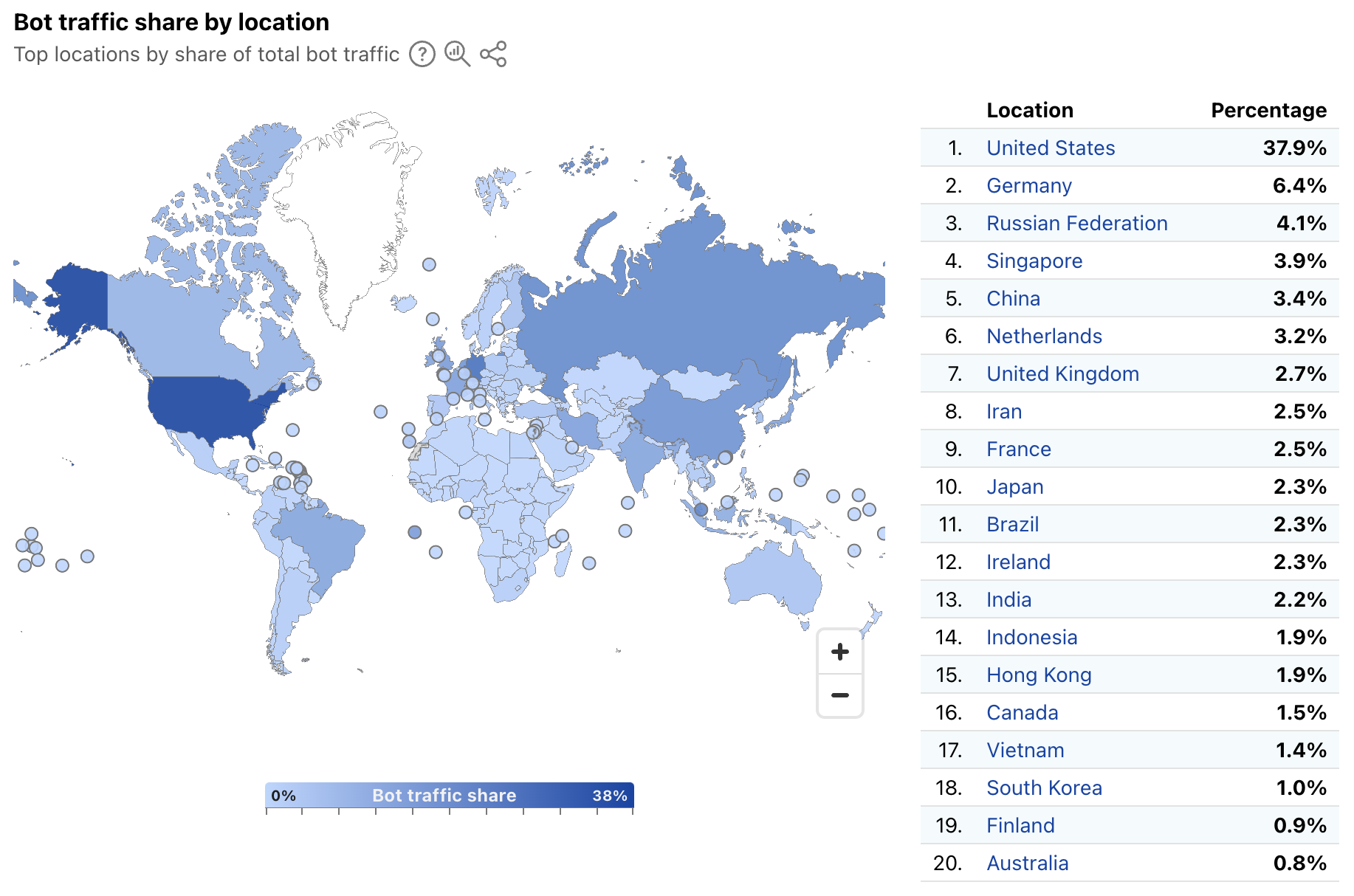
In order to provide a more timely perspective, these insights are now available on the new Radar Bots page. Similar to the new DDoS attacks content discussed above, the worldwide view includes a choropleth map and table illustrating the locations originating the largest shares of all bot traffic. (Note that a similar Traffic Characteristics map and table on the Traffic Overview page ranks locations by the bot traffic share of the location’s total traffic.) Similar to Year in Review data linked above, the United States continues to originate the largest share of bot traffic.
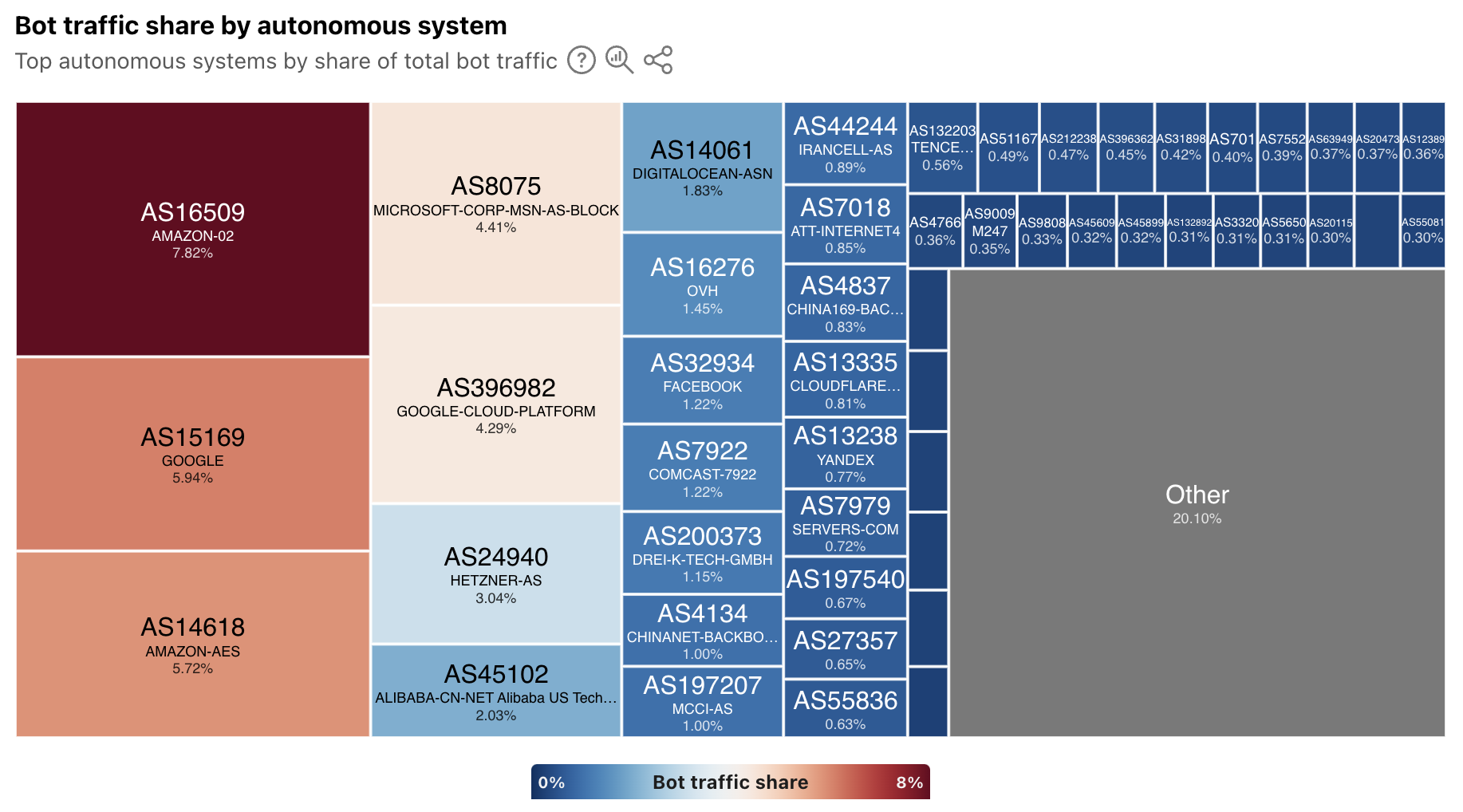
In addition, the worldwide view also breaks out bot traffic share by AS, mirroring the treemap shown in the Year in Review. As we have noted previously, cloud platform providers account for a significant amount of bot traffic.
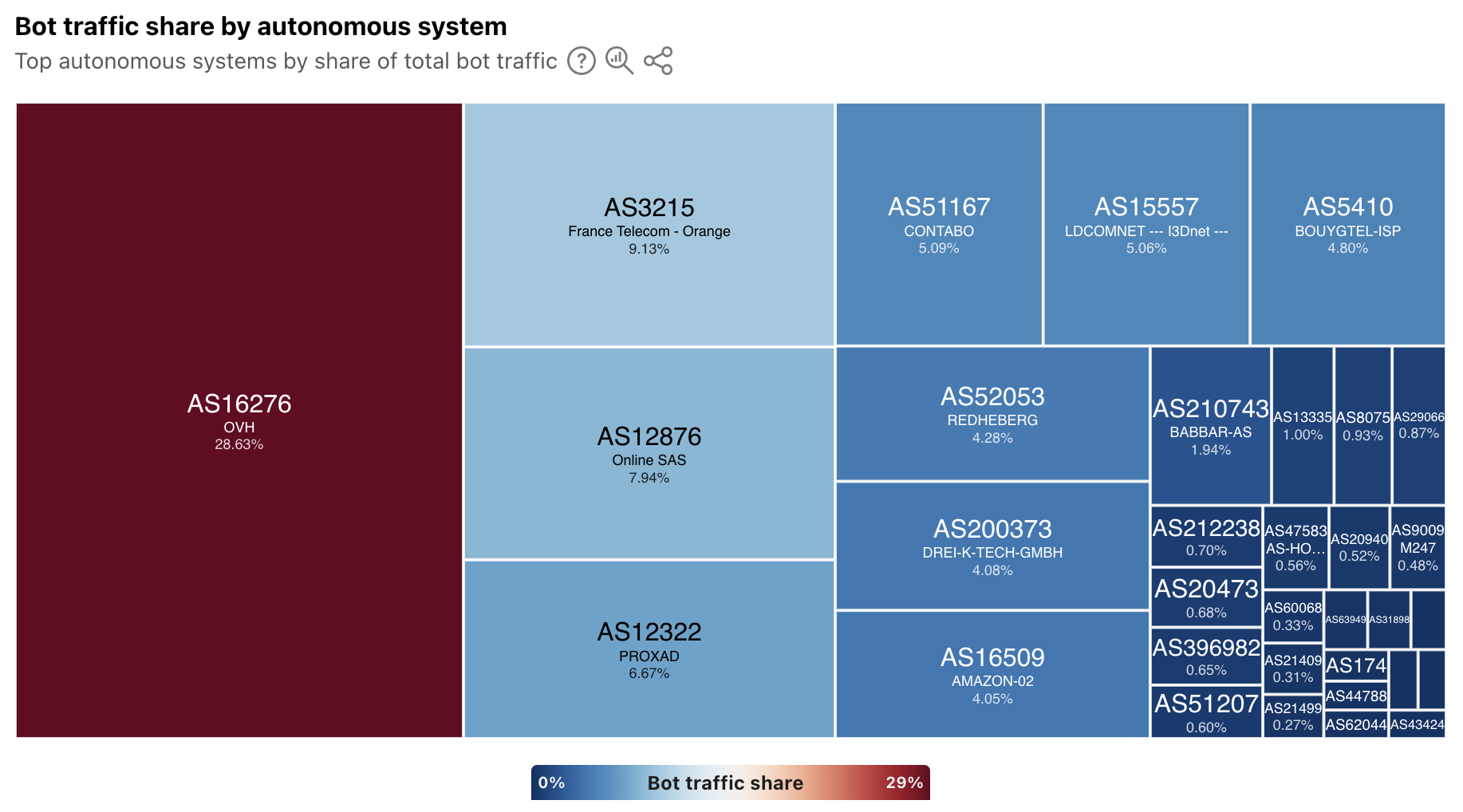
At a location level, depending on the country/region selected, the top sources of bot traffic may be cloud/hosting providers, consumer/business network providers, or a mix. For instance, France’s distribution is shown below, and four ASNs account for just over half of the country’s bot traffic. Of these ASNs, two (AS16276 and AS12876) belong to cloud/hosting providers, and two (AS3215 and AS12322) belong to network providers.
In addition, the Verified Bots list has been moved to the new Bots page on Radar. The data shown and functionality remains unchanged, and links to the old location will automatically be redirected to the new one.
Summary
The Cloudflare dashboard provides customers with specific views of security trends, application and network layer attacks, and bot activity across their sites and applications. While these views are useful at an individual customer level, aggregated views at a worldwide, location, and network level provide a macro-level perspective on trends and activity. These aggregated views available on Cloudflare Radar not only help customers understand how their observations compare to the larger whole, but they also help the industry understand emerging threats that may require action.
The underlying data for the graphs and data discussed above is available via the Radar API (Application Layer, Network Layer, Bots, Leaked Credentials). The data can also be interactively explored in more detail across locations, networks, and time periods using Radar’s Data Explorer and AI Assistant. And as always, Radar and Data Explorer charts and graphs are downloadable for sharing, and embeddable for use in your own blog posts, websites, or dashboards.
In 2024, we announced Log Explorer, giving customers the ability to store and query their HTTP and security event logs natively within the Cloudflare network. Today, we are excited to announce that Log Explorer now supports logs from our Zero Trust product suite. In addition, customers can create custom dashboards to monitor suspicious or unusual activity.
Every day, Cloudflare detects and protects customers against billions of threats, including DDoS attacks, bots, web application exploits, and more. SOC analysts, who are charged with keeping their companies safe from the growing spectre of Internet threats, may want to investigate these threats to gain additional insights on attacker behavior and protect against future attacks. Log Explorer, by collecting logs from various Cloudflare products, provides a single starting point for investigations. As a result, analysts can avoid forwarding logs to other tools, maximizing productivity and minimizing costs. Further, analysts can monitor signals specific to their organizations using custom dashboards.
Zero Trust dataset support in Log Explorer
Log Explorer stores your Cloudflare logs for a 30-day retention period so that you can analyze them natively and in a single interface, within the Cloudflare Dashboard. Cloudflare log data is diverse, reflecting the breadth of capabilities available. For example, HTTP requests contain information about the client such as their IP address, request method, autonomous system (ASN), request paths, and TLS versions used. Additionally, Cloudflare’s Application Security WAF Detections enrich these HTTP request logs with additional context, such as the WAF attack score, to identify threats.
Today we are announcing that seven additional Cloudflare product datasets are now available in Log Explorer. These seven datasets are the logs generated from our Zero Trust product suite, and include logs from Access, Gateway DNS, Gateway HTTP, Gateway Network, CASB, Zero
By reviewing Access logs and HTTP request logs, we can reveal attempts to access resources or systems without proper permissions, including brute force password attacks, indicating potential security breaches or malicious activity.
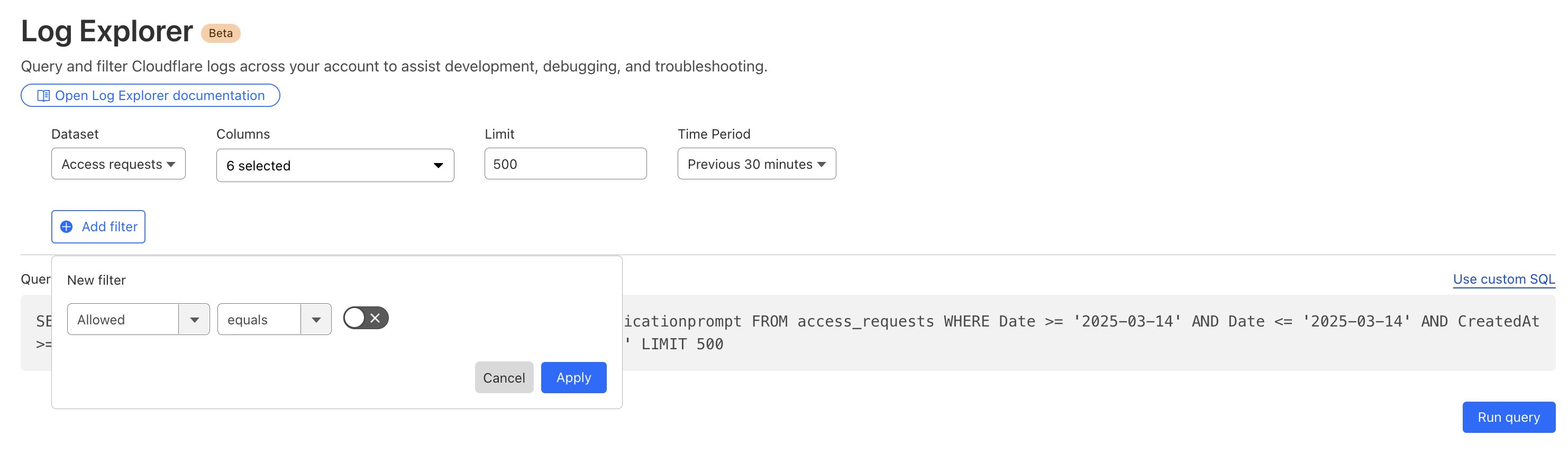
Below, we filter Access Logs on the Allowed field, to see activity related to unauthorized access.
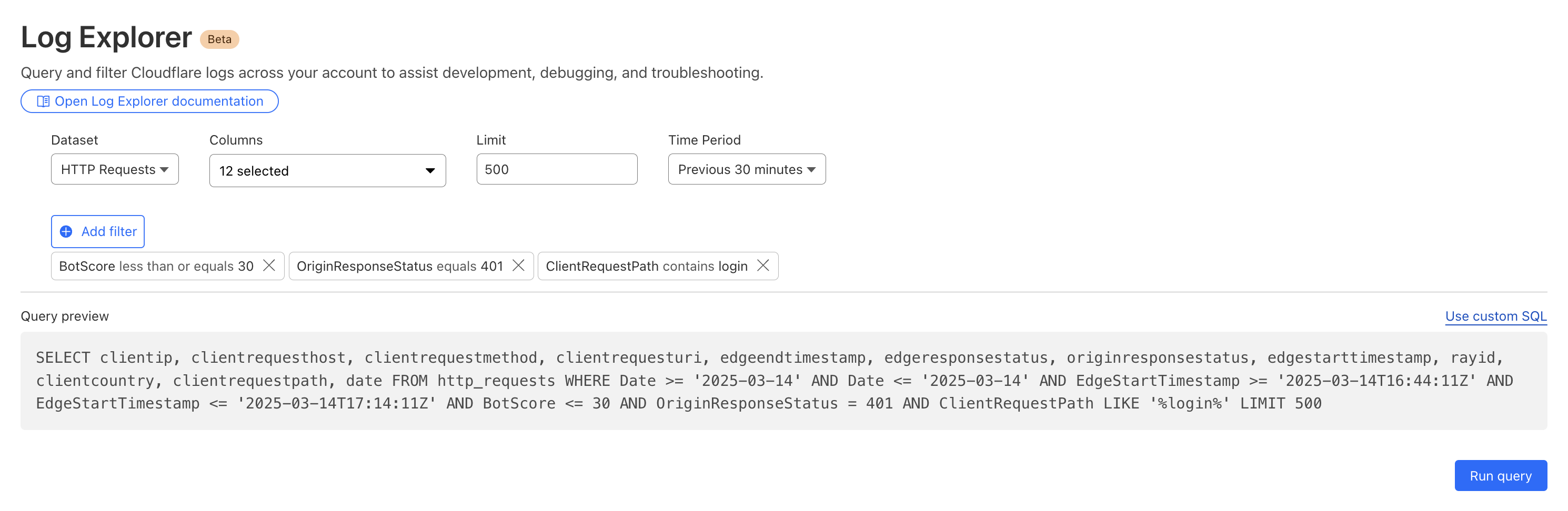
By then reviewing the HTTP logs for the requests identified in the previous query, we can assess if bot networks are the source of unauthorized activity.
With this information, you can craft targeted Custom Rules to block the offending traffic.
Detecting malware
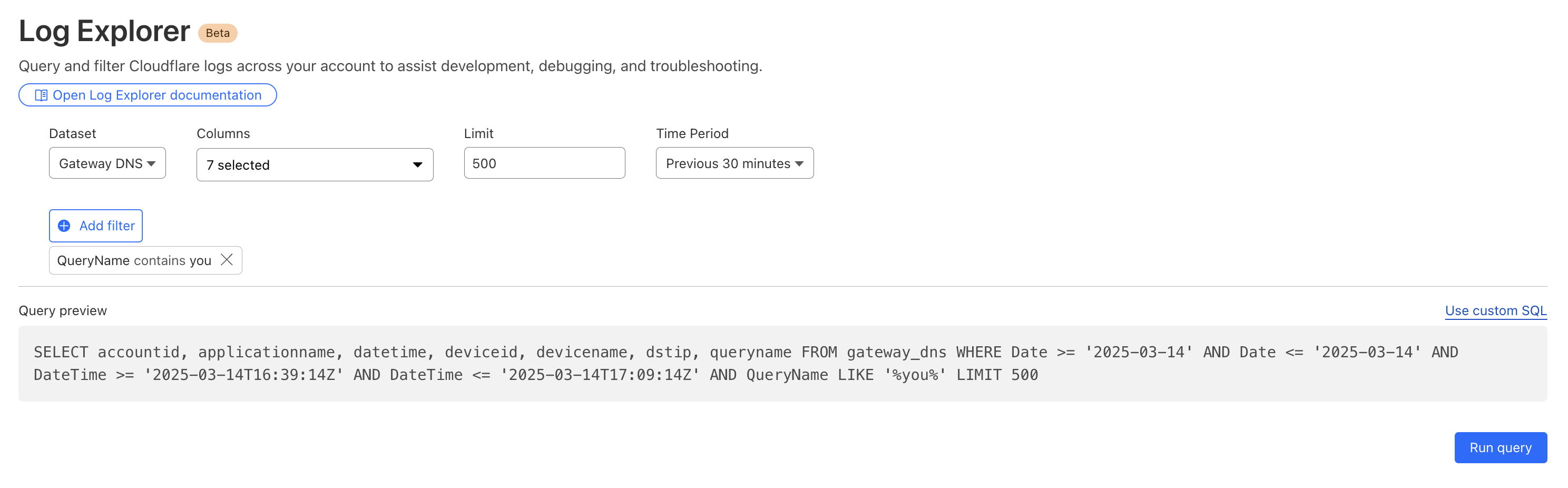
Cloudflare's Web Gateway can track which websites users are accessing, allowing administrators to identify and block access to malicious or inappropriate sites. These logs can be used to detect if a user’s machine or account is compromised by malware attacks. When reviewing logs, this may become apparent when we look for records that show a rapid succession of attempts to browse known malicious sites, such as hostnames that have long strings of seemingly random characters that hide their true destination. In this example, we can query logs looking for requests to a spoofed YouTube URL.
Monitoring what matters using custom dashboards
Security monitoring is not one size fits all. For instance, companies in the retail or financial industries worry about fraud, while every company is concerned about data exfiltration, of information like trade secrets. And any form of personally identifiable information (PII) is a target for data breaches or ransomware attacks.
While log exploration helps you react to threats, our new custom dashboards allow you to define the specific metrics you need in order to monitor threats you are concerned about.
Getting started is easy, with the ability to create a chart using natural language. A natural language interface is integrated into the chart create/edit experience, enabling you to describe in your own words the chart you want to create. Similar to the AI Assistant we announced during Security Week 2024, the prompt translates your language to the appropriate chart configuration, which can then be added to a new or existing custom dashboard.
Use a prompt: Enter a query like “Compare status code ranges over time”. The AI model decides the most appropriate visualization and constructs your chart configuration.
Customize your chart: Select the chart elements manually, including the chart type, title, dataset to query, metrics, and filters. This option gives you full control over your chart’s structure.
Video shows entering a natural language description of desired metric “compare status code ranges over time”, preview chart shown is a time series grouped by error code ranges, selects “add chart” to save to dashboard.
For more help getting started, we have some pre-built templates that you can use for monitoring specific uses. Available templates currently include:
Bot monitoring: Identify automated traffic accessing your website
API Security: Monitor the data transfer and exceptions of API endpoints within your application
API Performance: See timing data for API endpoints in your application, along with error rates
Account Takeover: View login attempts, usage of leaked credentials, and identify account takeover attacks
Performance Monitoring: Identify slow hosts and paths on your origin server, and view time to first byte (TTFB) metrics over time
Templates provide a good starting point, and once you create your dashboard, you can add or remove individual charts using the same natural language chart creator.
Video shows editing chart from an existing dashboard and moving individual charts via drag and drop.
Example use cases
Custom dashboards can be used to monitor for suspicious activity, or to keep an eye on performance and errors for your domains. Let’s explore some examples of suspicious activity that we can monitor using custom dashboards.
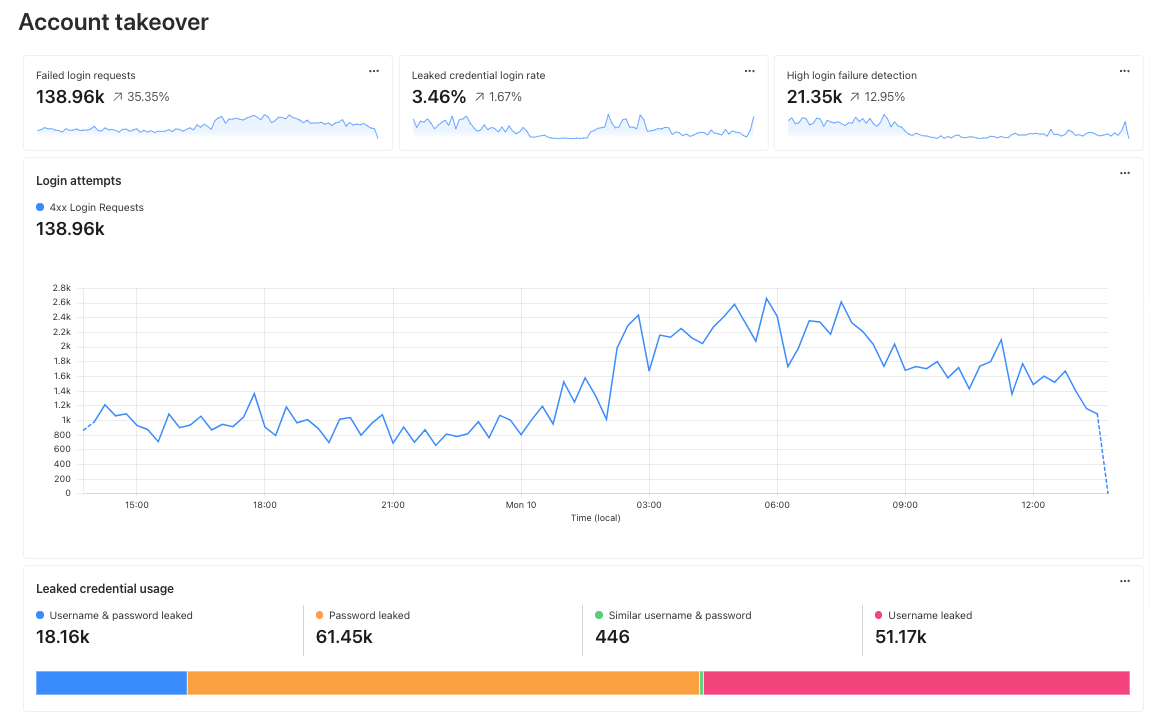
Take, for example, our use case from above: investigating unauthorized access. With custom dashboards, you can create a dashboard using the Account takeover template to monitor for suspicious login activity related to your domain.
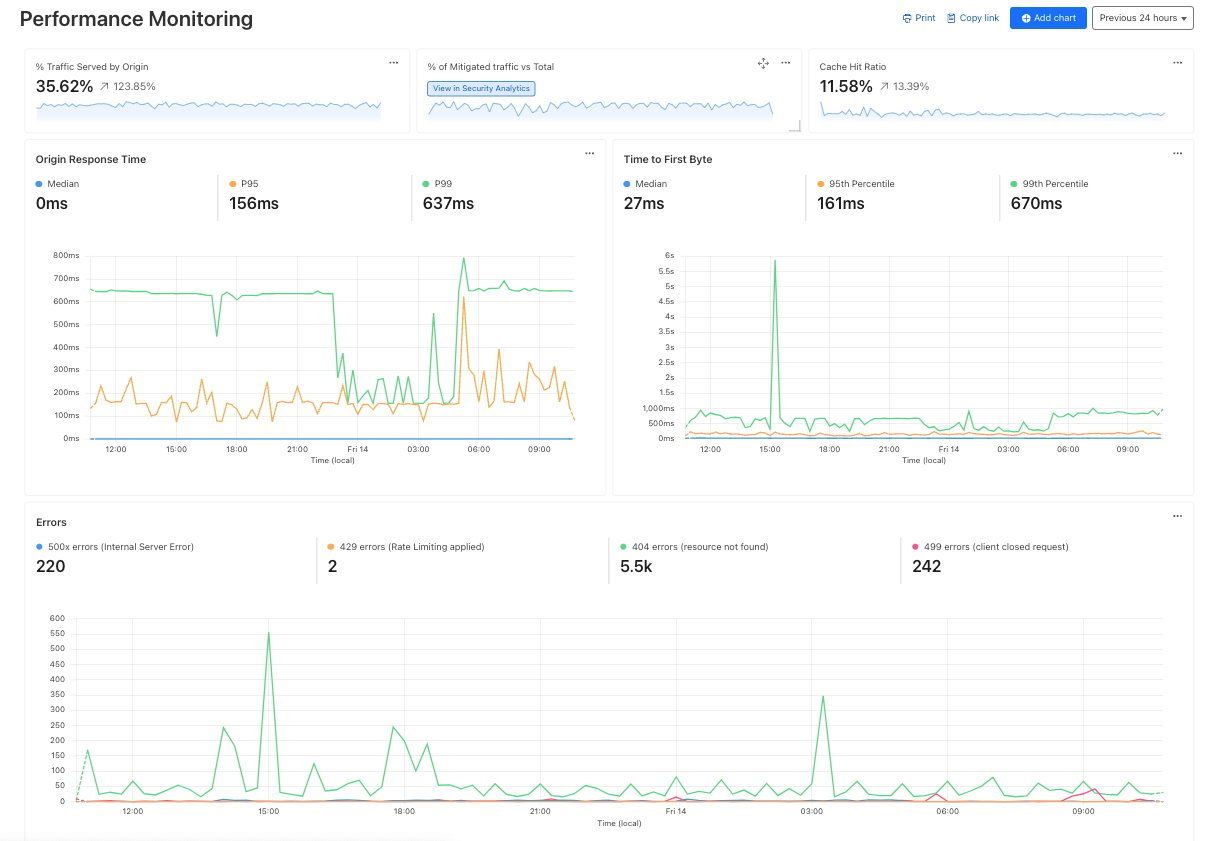
As another example, spikes in requests or errors are common indicators that something is wrong, and they can sometimes be signals of suspicious activity. With the Performance Monitoring template, you can view origin response time and time to first byte metrics as well as monitor for common errors. For example, in this chart, the spikes in 404 errors could be an indication of an unauthorized scan of your endpoints.
Seamlessly integrated into the Cloudflare platform
When using custom dashboards, if you observe a traffic pattern or spike in errors that you would like to further investigate, you can click the button to “View in Security Analytics” in order to drill down further into the data and craft custom WAF rules to mitigate the threat.
These tools, seamlessly integrated into the Cloudflare platform, will enable users to discover, investigate, and mitigate threats all in one place, reducing time to resolution and overall cost of ownership by eliminating the need to forward logs to third party security analysis tools. And because it is a native part of Cloudflare, you can immediately use the data from your investigation to craft targeted rules that will block these threats.
What’s next
Stay tuned as we continue to develop more capabilities in the areas of observability and forensics, with additional features including:
Custom alerts: create alerts based on specific metrics or anomalies
Scheduled query detections: craft log queries and run them on a schedule to detect malicious activity
More integration: further streamlining the journey between detect, investigate, and mitigate across the full Cloudflare platform.
How to get it
Current Log Explorer beta users get immediate access to the new custom dashboards feature. Pricing will be made available to everyone during Q2 2025. Between now and then, these features continue to be available at no cost.
Let us know if you are interested in joining our Beta program by completing this form, and a member of our team will contact you.
In today’s fast-paced digital landscape, companies are managing an increasingly complex mix of environments — from SaaS applications and public cloud platforms to on-prem data centers and hybrid setups. This diverse infrastructure offers flexibility and scalability, but also opens up new attack surfaces.
To support both business continuity and security needs, “security must evolve from being reactive to predictive”. Maintaining a healthy security posture entails monitoring and strengthening your security defenses to identify risks, ensure compliance, and protect against evolving threats. With our newest capabilities, you can now use Cloudflare to achieve a healthy posture across your SaaS and web applications. This addresses any security team’s ultimate (daily) question: How well are our assets and documents protected?
A predictive security posture relies on the following key components:
Real-time discovery and inventory of all your assets and documents
Continuous asset-aware threat detection and risk assessment
Prioritised remediation suggestions to increase your protection
Today, we are sharing how we have built these key components across SaaS and web applications, and how you can use them to manage your business’s security posture.
Your security posture at a glance
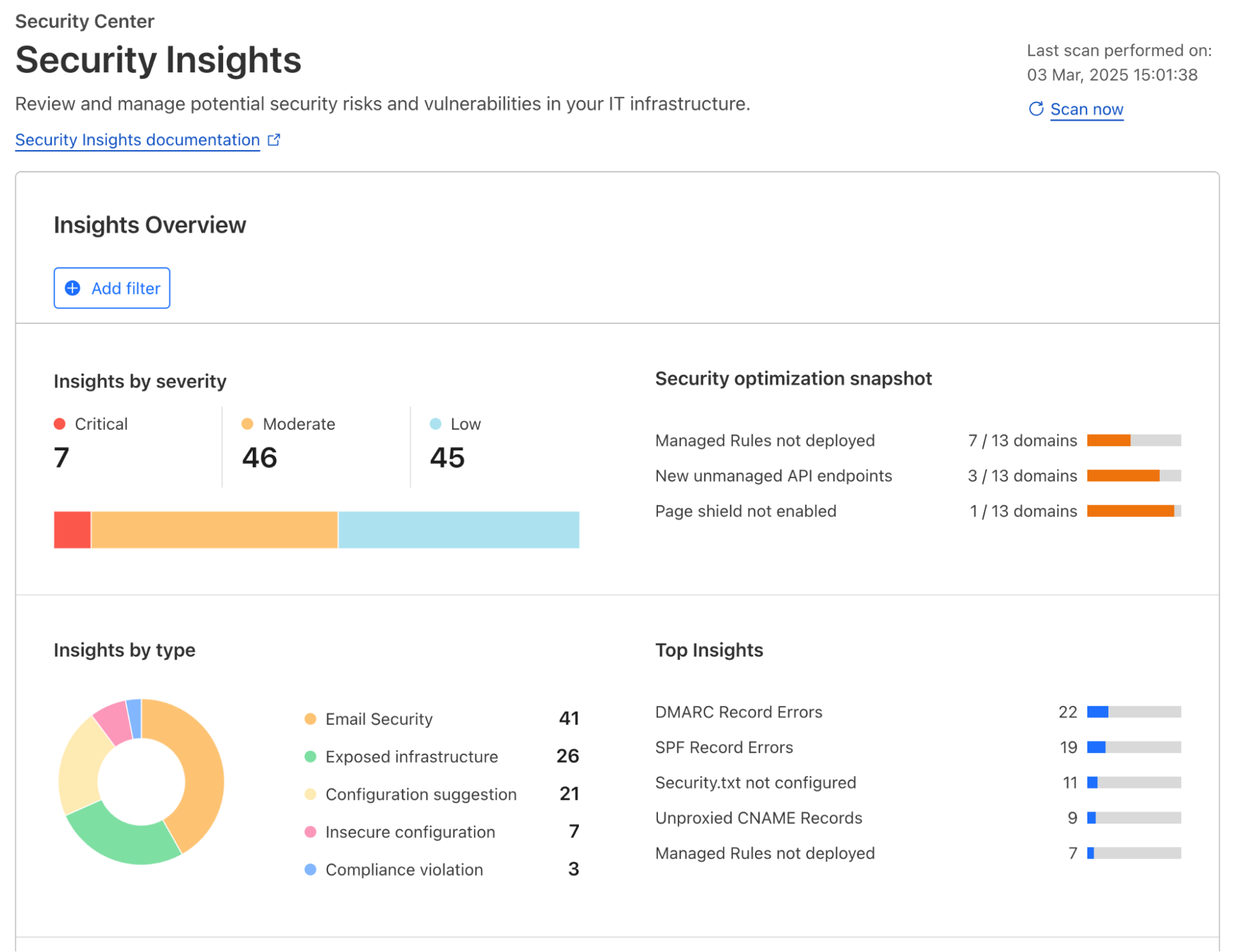
Regardless of the applications you have connected to Cloudflare’s global network, Cloudflare actively scans for risks and misconfigurations associated with each one of them on a regular cadence. Identified risks and misconfigurations are surfaced in the dashboard under Security Center as insights.
Insights are grouped by their severity, type of risks, and corresponding Cloudflare solution, providing various angles for you to zoom in to what you want to focus on. When applicable, a one-click resolution is provided for selected insight types, such as setting minimum TLS version to 1.2 which is recommended by PCI DSS. This simplicity is highly appreciated by customers that are managing a growing set of assets being deployed across the organization.
To help shorten the time to resolution even further, we have recently added role-based access control (RBAC) to Security Insights in the Cloudflare dashboard. Now for individual security practitioners, they have access to a distilled view of the insights that are relevant for their role. A user with an administrator role (a CSO, for example) has access to, and visibility into, all insights.
In addition to account-wide Security Insights, we also provide posture overviews that are closer to the corresponding security configurations of your SaaS and web applications. Let’s dive into each of them.
Securing your SaaS applications
Without centralized posture management, SaaS applications can feel like the security wild west. They contain a wealth of sensitive information – files, databases, workspaces, designs, invoices, or anything your company needs to operate, but control is limited to the vendor’s settings, leaving you with less visibility and fewer customization options. Moreover, team members are constantly creating, updating, and deleting content that can cause configuration drift and data exposure, such as sharing files publicly, adding PII to non-compliant databases, or giving access to third party integrations. With Cloudflare, you have visibility across your SaaS application fleet in one dashboard.
Posture findings across your SaaS fleet
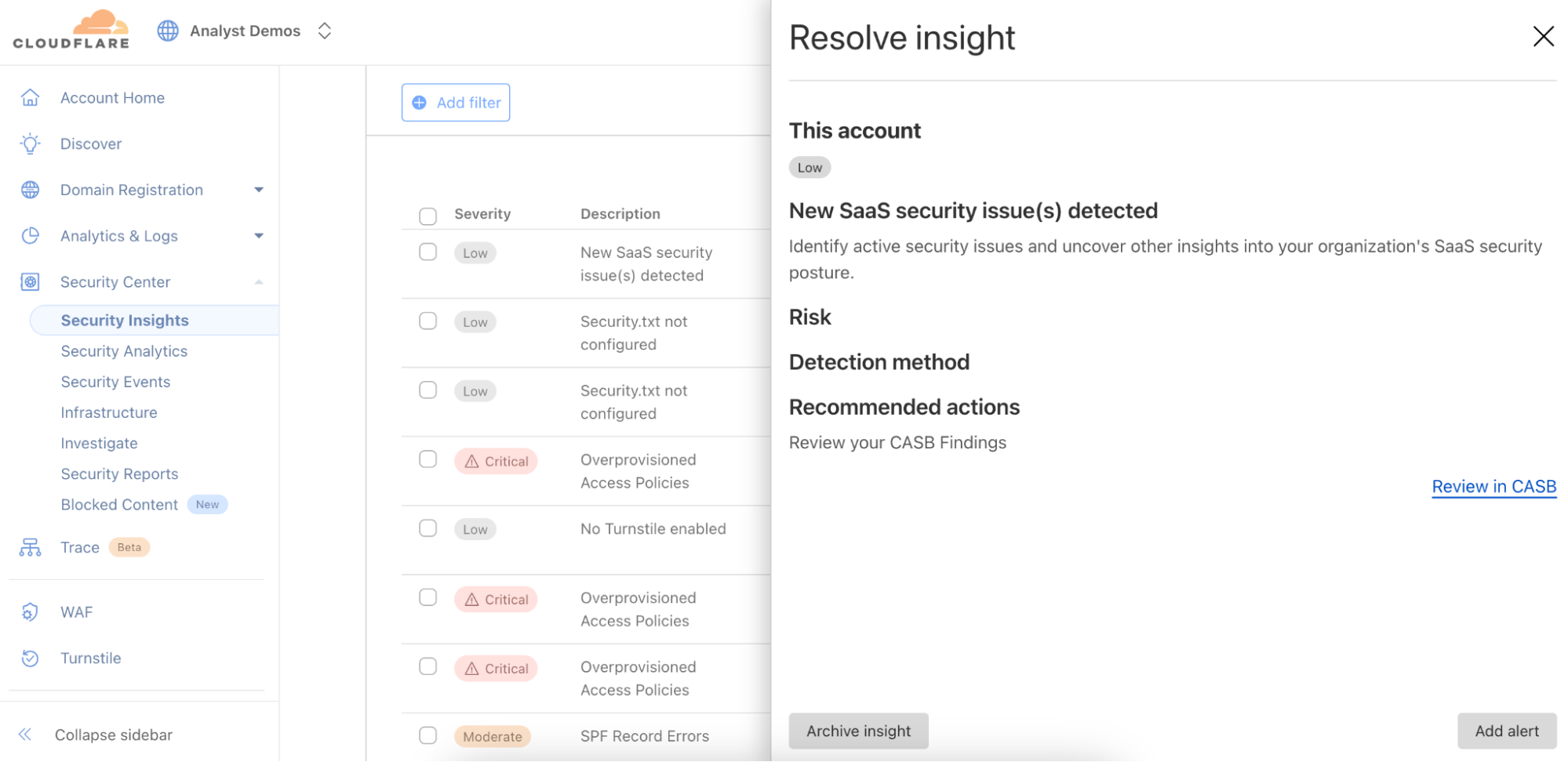
From the account-wide Security Insights, you can review insights for potential SaaS security issues:
You can choose to dig further with Cloud Access Security Broker (CASB) for a thorough review of the misconfigurations, risks, and failures to meet best practices across your SaaS fleet. You can identify a wealth of security information including, but not limited to:
Publicly available or externally shared files
Third-party applications with read or edit access
Unknown or anonymous user access
Databases with exposed credentials
Users without two-factor authentication
Inactive user accounts
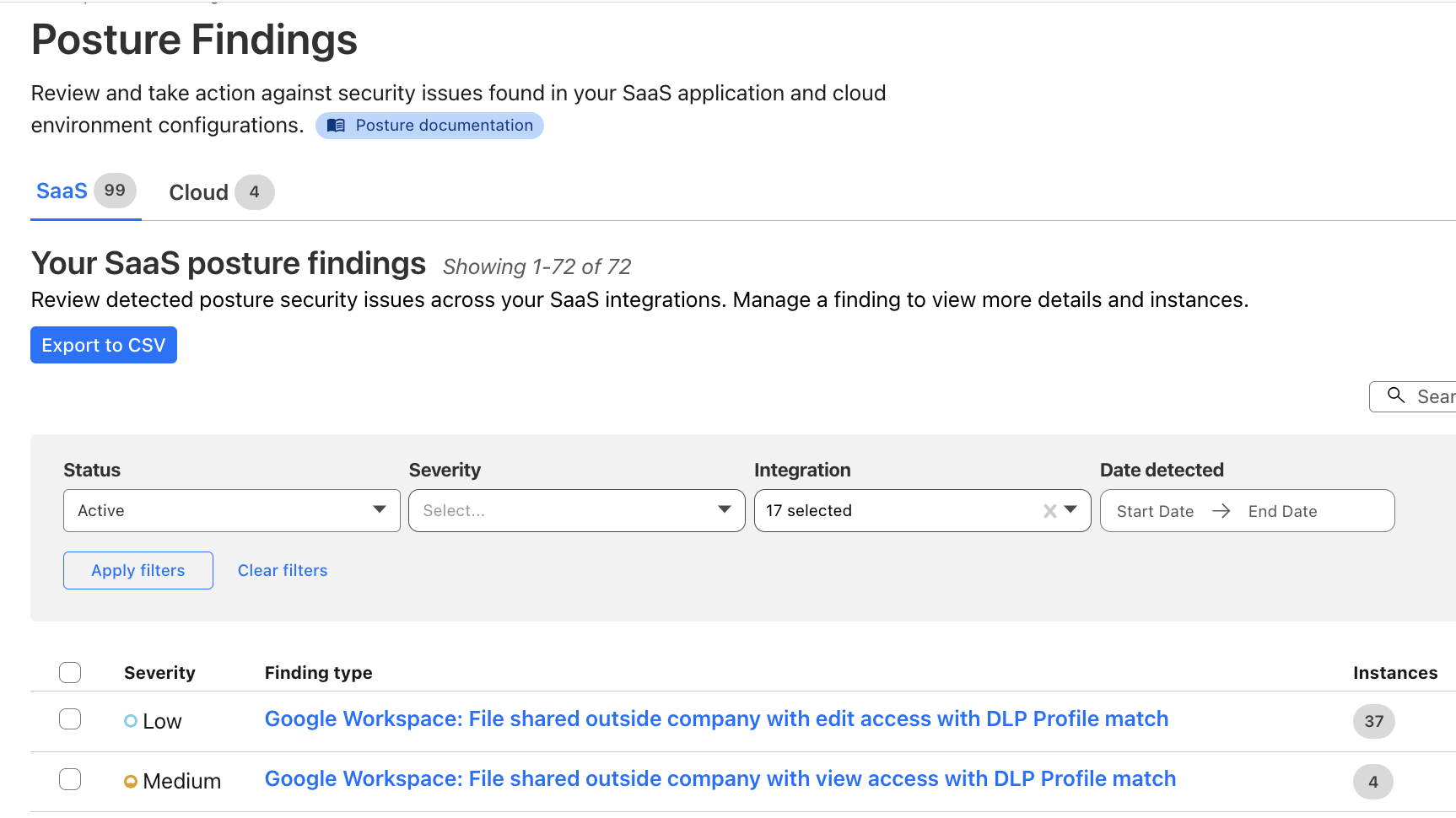
You can also explore the Posture Findings page, which provides easy searching and navigation across documents that are stored within the SaaS applications.
Additionally, you can create policies to prevent configuration drift in your environment. Prevention-based policies help maintain a secure configuration and compliance standards, while reducing alert fatigue for Security Operations teams, and these policies can prevent the inappropriate movement or exfiltration of sensitive data. Unifying controls and visibility across environments makes it easier to lock down regulated data classes, maintain detailed audit trails via logs, and improve your security posture to reduce the risk of breaches.
How it works: new, real-time SaaS documents discovery
Delivering SaaS security posture information to our customers requires collecting vast amounts of data from a wide range of platforms. In order to ensure that all the documents living in your SaaS apps (files, designs, etc.) are secure, we need to collect information about their configuration — are they publicly shared, do third-party apps have access, is multi-factor authentication (MFA) enabled?
We previously did this with crawlers, which would pull data from the SaaS APIs. However, we were plagued with rate limits from the SaaS vendors when working with larger datasets. This forced us to work in batches and ramp scanning up and down as the vendors permitted. This led to stale findings and would make remediation cumbersome and unclear – for example, Cloudflare would be reporting that a file is still shared publicly for a short period after the permissions were removed, leading to customer confusion.
To fix this, we upgraded our data collection pipeline to be dynamic and real-time, reacting to changes in your environment as they occur, whether it’s a new security finding, an updated asset, or a critical alert from a vendor. We started with our Microsoft asset discovery and posture findings, providing you real-time insight into your Microsoft Admin Center, OneDrive, Outlook, and SharePoint configurations. We will be rapidly expanding support to additional SaaS vendors going forward.
Listening for update events from Cloudflare Workers
Cloudflare Workers serve as the entry point for vendor webhooks, handling asset change notifications from external services. The workflow unfolds as follows:
Webhook listener: An initial Worker acts as the webhook listener, receiving asset change messages from vendors.
Data storage & queuing: Upon receiving a message, the Worker uploads the raw payload of the change notification to Cloudflare R2 for persistence, and publishes it to a Cloudflare Queue dedicated to raw asset changes.
Transformation Worker: A second Worker, bound as a consumer to the raw asset change queue, processes the incoming messages. This Worker transforms the raw vendor-specific data into a generic format suitable for CASB. The transformed data is then:
Stored in Cloudflare R2 for future reference.
Published on another Cloudflare Queue, designated for transformed messages.
CASB Processing: Consumers & Crawlers
Once the transformed messages reach the CASB layer, they undergo further processing:
Polling consumer: CASB has a consumer that polls the transformed message queue. Upon receiving a message, it determines the relevant handler required for processing.
Crawler execution: The handler then maps the message to an appropriate crawler, which interacts with the vendor API to fetch the most up-to-date asset details.
Data storage: The retrieved asset data is stored in the CASB database, ensuring it is accessible for security and compliance checks.
With this improvement, we are now processing 10 to 20 Microsoft updates per second, or 864,000 to 1.72 million updates daily, giving customers incredibly fast visibility into their environment. Look out for expansion to other SaaS vendors in the coming months.
Securing your web applications
A unique challenge of securing web applications is that no one size fits all. An asset-aware posture management bridges the gap between a universal security solution and unique business needs, offering tailored recommendations for security teams to protect what matters.
Posture overview from attacks to threats and risks
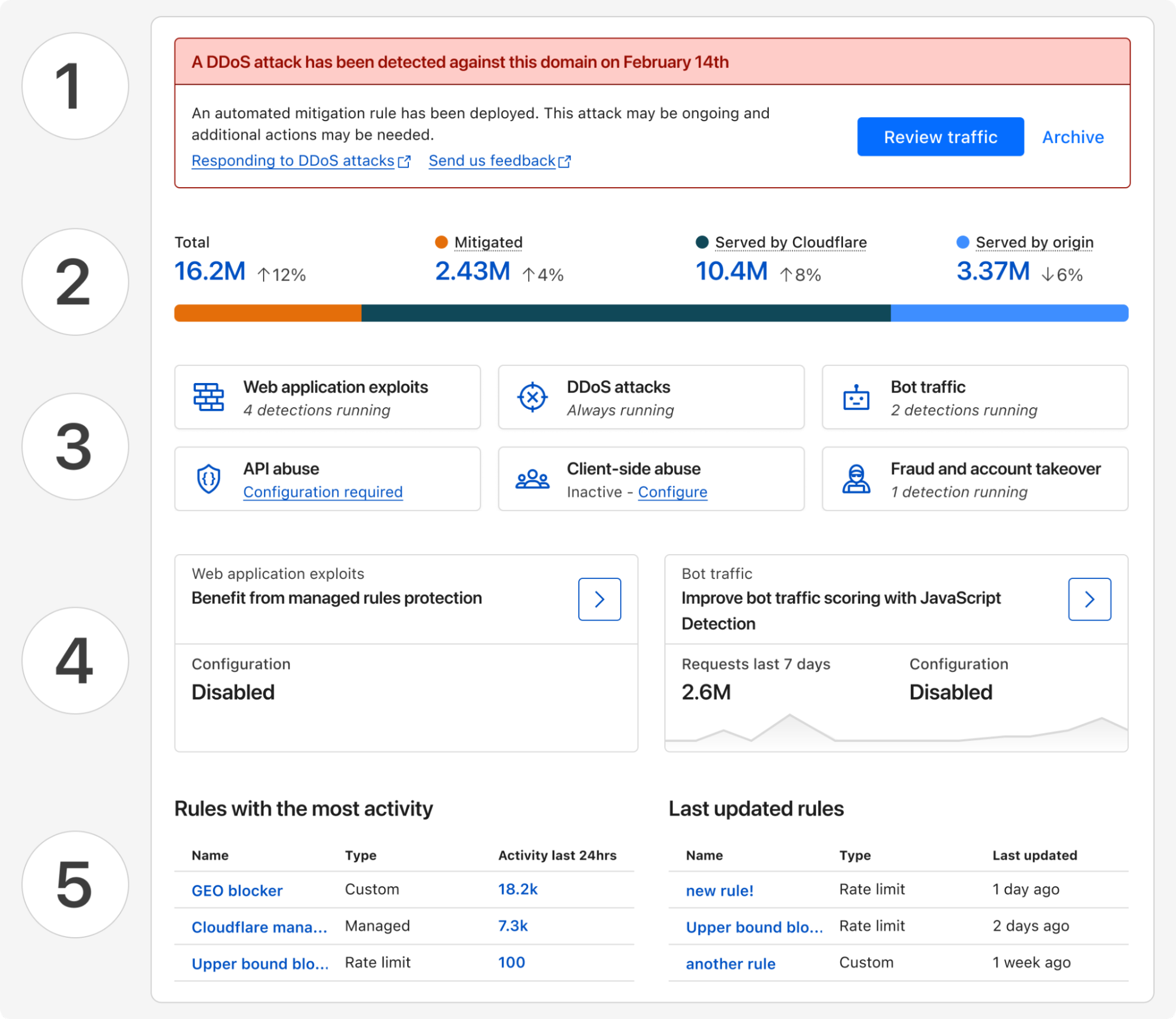
Starting today, all Cloudflare customers have access to Security Overview, a new landing page customized for each of your onboarded domains. This page aggregates and prioritizes security suggestions across all your web applications:
Any (ongoing) attacks detected that require immediate attention
Disposition (mitigated, served by Cloudflare, served by origin) of all proxied traffic over the last 7 days
Summary of currently active security modules that are detecting threats
Suggestions of how to improve your security posture with a step-by-step guide
And a glimpse of your most active and lately updated security rules
These tailored security suggestions are surfaced based on your traffic profile and business needs, which is made possible by discovering your proxied web assets.
Discovery of web assets
Many web applications, regardless of their industry or use case, require similar functionality: user identification, accepting payment information, etc. By discovering the assets serving this functionality, we can build and run targeted threat detection to protect them in depth.
As an example, bot traffic towards marketing pages versus login pages have different business impacts. Content scraping may be happening targeting your marketing materials, which you may or may not want to allow, while credential stuffing on your login page deserves immediate attention.
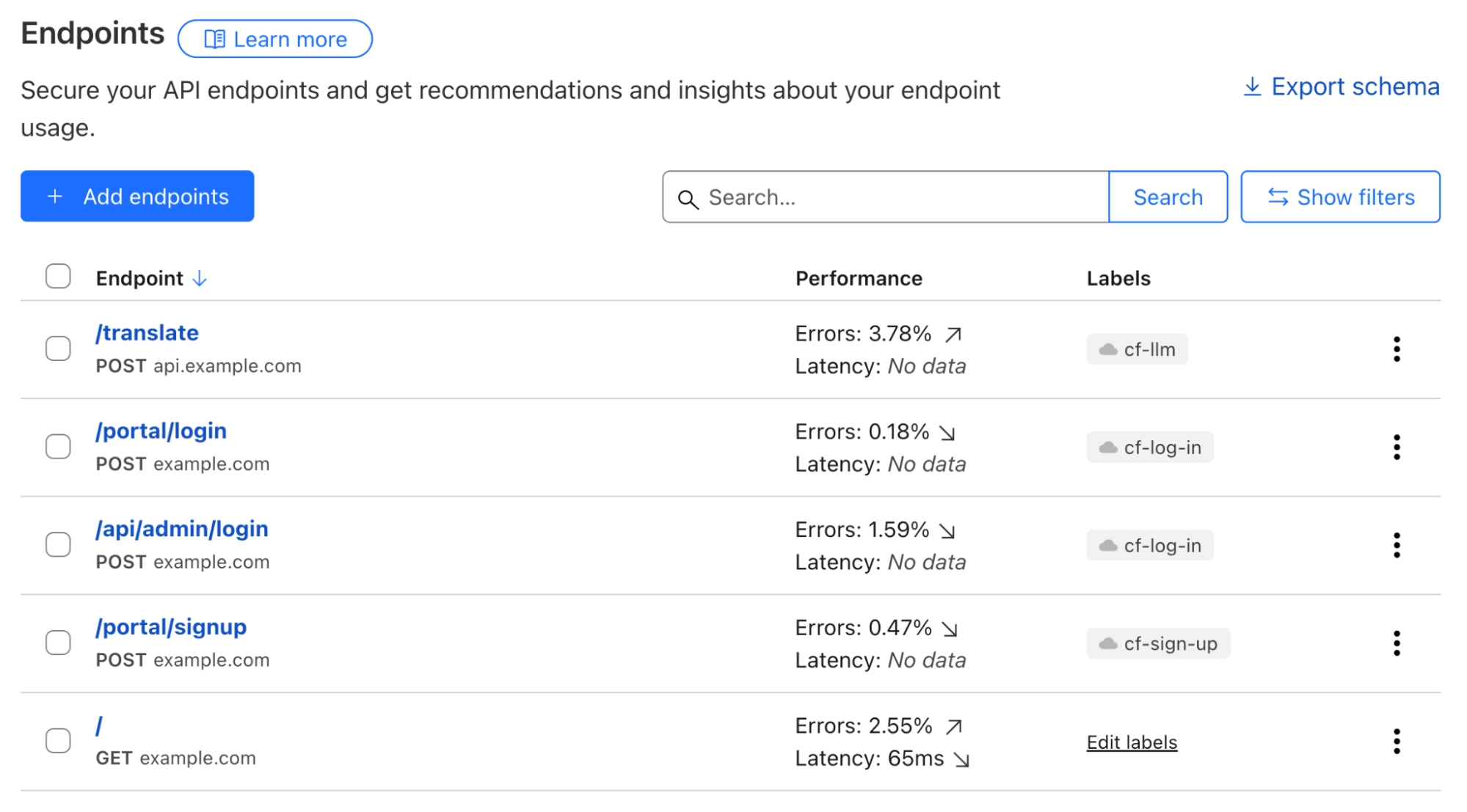
Web assets are described by a list of endpoints; and labelling each of them defines their business goals. A simple example can be POST requests to path /portal/login, which likely describes an API for user authentication. While the GET requests to path /portal/login denote the actual login webpage.
To describe business goals of endpoints, labels come into play. POST requests to the /portal/login endpoint serving end users and to the /api/admin/login endpoint used by employees can both can be labelled using the same cf-log-inmanaged label, letting Cloudflare know that usernames and passwords would be expected to be sent to these endpoints.
API Shield customers can already make use of endpoint labelling. In early Q2 2025, we are adding label discovery and suggestion capabilities, starting with three labels, cf-log-in, cf-sign-up, and cf-rss-feed. All other customers can manually add these labels to the saved endpoints. One example, explained below, is preventing disposable emails from being used during sign-ups.
Always-on threat detection and risk assessment
Use-case driven threat detection
Customers told us that, with the growing excitement around generative AI, they need support to secure this new technology while not hindering innovation. Being able to discover LLM-powered services allows fine-tuning security controls that are relevant for this particular technology, such as inspecting prompts, limit prompting rates based on token usage, etc. In a separate Security Week blog post, we will share how we build Cloudflare Firewall for AI, and how you can easily protect your generative AI workloads.
Account fraud detection, which encompasses multiple attack vectors, is another key area that we are focusing on in 2025.
On many login and signup pages, a CAPTCHA solution is commonly used to only allow human beings through, assuming only bots perform undesirable actions. Put aside that most visual CAPTCHA puzzles can be easily solved by AI nowadays, such an approach cannot effectively solve the root cause of most account fraud vectors. For example, human beings using disposable emails to sign up single-use accounts to take advantage of signup promotions.
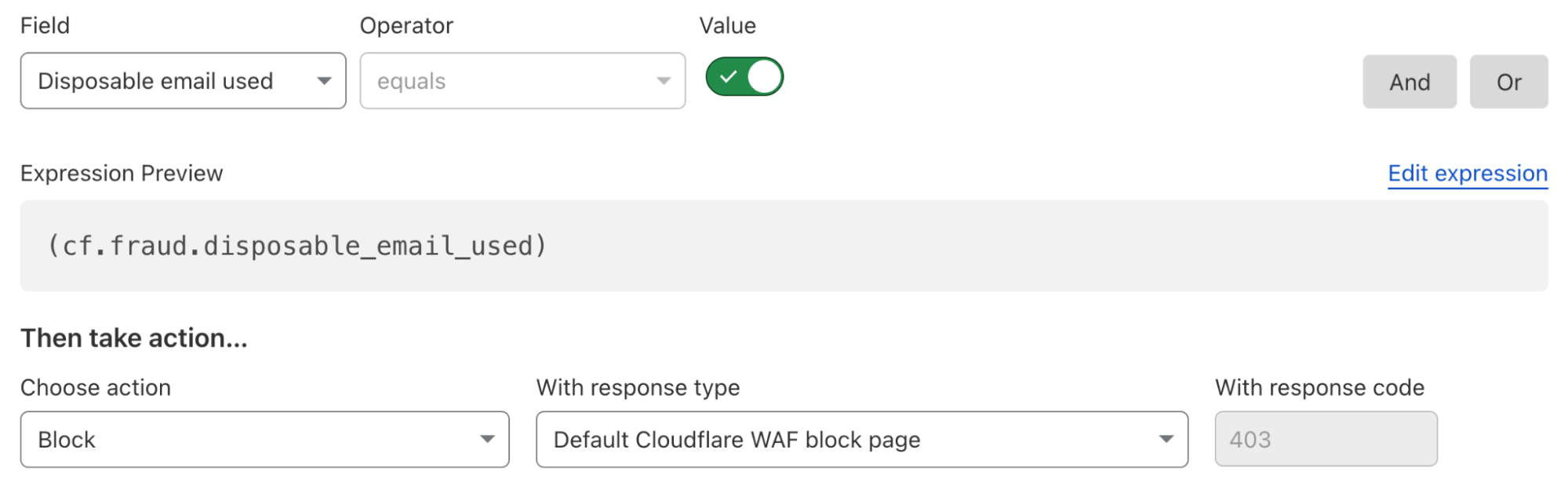
To solve this fraudulent sign up issue, a security rule currently under development could be deployed as below to block all attempts that use disposable emails as a user identifier, regardless of whether the requester was automated or not. All existing or future cf-log-in and cf-sign-up labelled endpoints are protected by this single rule, as they both require user identification.
Our fast expanding use-case driven threat detections are all running by default, from the first moment you onboarded your traffic to Cloudflare. The instant available detection results can be reviewed through security analytics, helping you make swift informed decisions.
API endpoint risk assessment
APIs have their own set of risks and vulnerabilities, and today Cloudflare is delivering seven new risk scans through API Posture Management. This new capability of API Shield helps reduce risk by identifying security issues and fixing them early, before APIs are attacked. Because APIs are typically made up of many different backend services, security teams need to pinpoint which backend service is vulnerable so that development teams may remediate the identified issues.
Our new API posture management risk scans do exactly that: users can quickly identify which API endpoints are at risk to a number of vulnerabilities, including sensitive data exposure, authentication status, Broken Object Level Authorization (BOLA) attacks, and more.
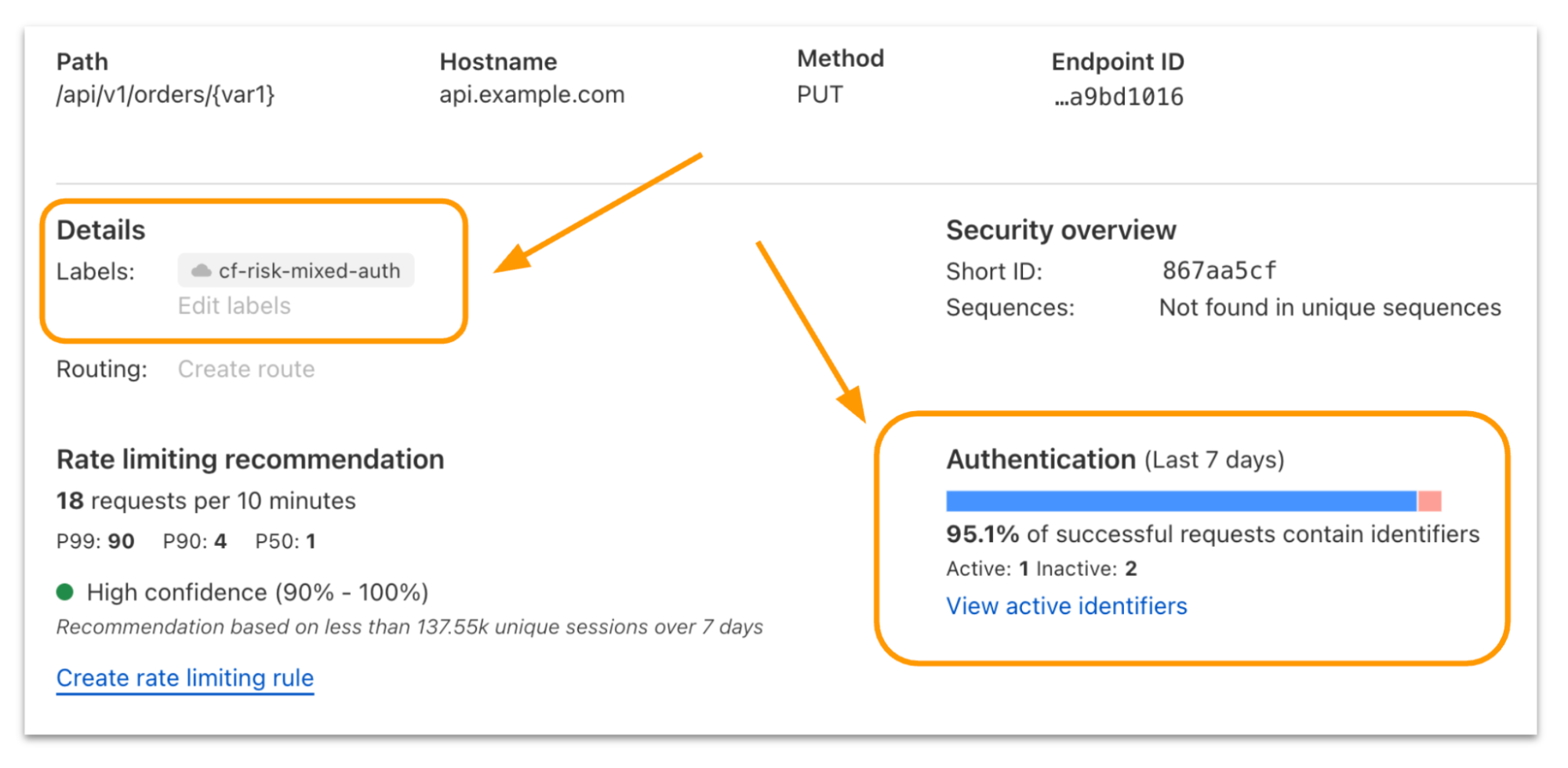
Authentication Posture is one risk scan you’ll see in the new system. We focused on it to start with because sensitive data is at risk when API authentication is assumed to be enforced but is actually broken. Authentication Posture helps customers identify authentication misconfigurations for APIs and alerts of their presence. This is achieved by scanning for successful requests against the API and noting their authentication status. API Shield scans traffic daily and labels API endpoints that have missing and mixed authentication for further review.
For customers that have configured session IDs in API Shield, you can find the new risk scan labels and authentication details per endpoint in API Shield. Security teams can take this detail to their development teams to fix the broken authentication.
We’re launching today with scans for authentication posture, sensitive data, underprotected APIs, BOLA attacks, and anomaly scanning for API performance across errors, latency, and response size.
Simplify maintaining a good security posture with Cloudflare
Achieving a good security posture in a fast-moving environment requires innovative solutions that can transform complexity into simplicity. Bringing together the ability to continuously assess threats and risks across both public and private IT environments through a single platform is our first step in supporting our customers’ efforts to maintain a healthy security posture.
To further enhance the relevance of security insights and suggestions provided and help you better prioritize your actions, we are looking into integrating Cloudflare’s global view of threat landscapes. With this, you gain additional perspectives, such as what the biggest threats to your industry are, and what attackers are targeting at the current moment. Stay tuned for more updates later this year.
If you haven’t done so yet, onboard your SaaS and web applications to Cloudflare today to gain instant insights into how to improve your business’s security posture.
Today, one of the greatest challenges that cyber defenders face is analyzing detection hits from indicator feeds, which provide metadata about specific indicators of compromise (IOCs), like IP addresses, ASNs, domains, URLs, and hashes. While indicator feeds have proliferated across the threat intelligence industry, most feeds contain no contextual information about why an indicator was placed on the feed. Another limitation of most feeds today is that they focus solely on blockable indicators and cannot easily accommodate more complex cases, such as a threat actor exploiting a CVE or an insider threat. Instead, this sort of complex threat intelligence is left for long form reporting. However, long-form reporting comes with its own challenges, such as the time required for writing and editing, which can lead to significant delays in releasing timely threat intelligence.
To help address these challenges, we are excited to launch our threat events platform for Cloudforce One customers. Every day, Cloudflare blocks billions of cyber threats. This new platform contains contextual data about the threats we monitor and mitigate on the Cloudflare network and is designed to empower security practitioners and decision makers with actionable insights from a global perspective.
On average, we process 71 million HTTP requests per second and 44 million DNS queries per second. This volume of traffic provides us with valuable insights and a comprehensive view of current (real-time) threats. The new threat events platform leverages the insights from this traffic to offer a comprehensive, real-time view of threat activity occurring on the Internet, enabling Cloudforce One customers to better protect their assets and respond to emerging threats.
How we built the threat events platform leveraging Cloudflare’s traffic insights
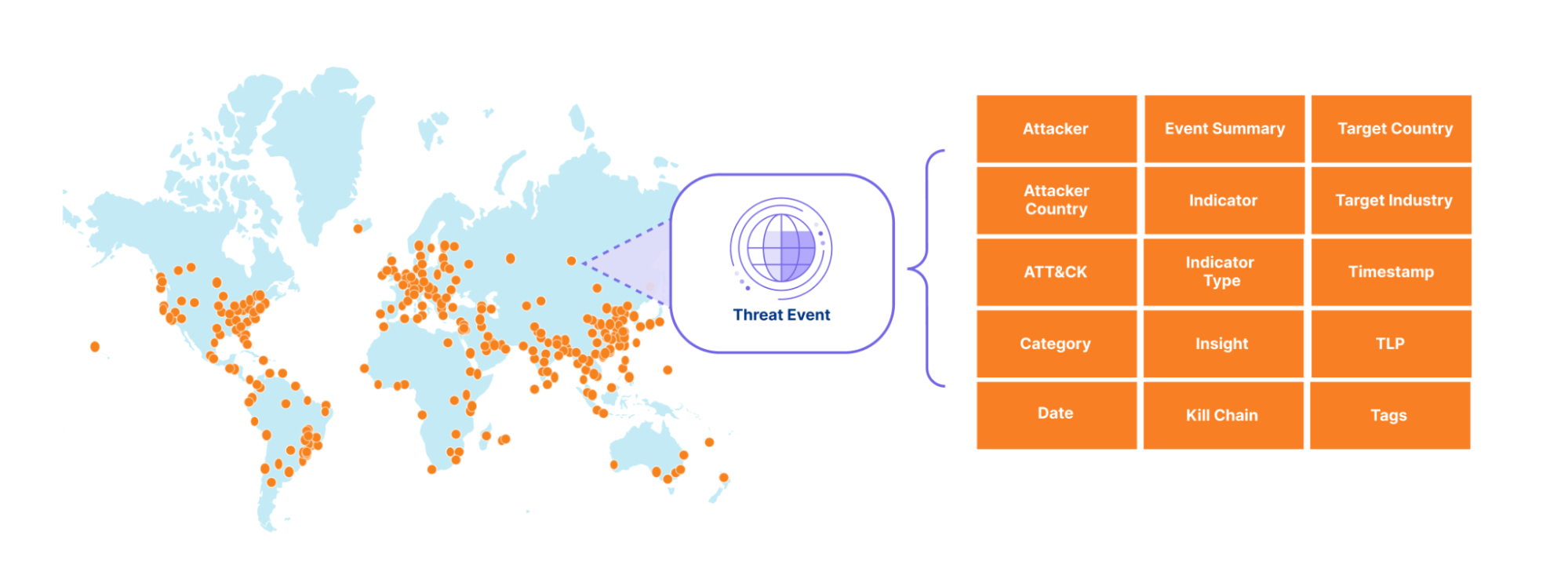
The sheer volume of threat activity observed across Cloudflare’s network would overwhelm any system or SOC analyst. So instead, we curate this activity into a stream of events that include not only indicators of compromise (IOCs) but also context, making it easier to take action based on Cloudflare’s unique data. To start off, we expose events related to denial of service (DOS) attacks observed across our network, along with the advanced threat operations tracked by our Cloudforce One Intelligence team, like the various tools, techniques, and procedures used by the threat actors we are tracking. We mapped the events to the MITRE ATT&CK framework and to the cyber kill chain stages. In the future, we will add events related to traffic blocked by our Web Application Firewall (WAF), Zero Trust Gateway, Zero Trust Email Security Business Email Compromise, and many other Cloudflare-proprietary datasets. Together, these events will provide our customers with a detailed view of threat activity occurring across the Internet.
Each event in our threat events summarizes specific threat activity we have observed, similar to a STIX2 sighting object and provides contextual information in its summary, detailed view and via the mapping to the MITRE ATT&Ck and KillChain stages. For an example entry, please see the API documentation.
Our goal is to empower customers to better understand the threat landscape by providing key information that allows them to investigate and address both broad and specific questions about threats targeting their organization. For example:
Who is targeting my industry vertical?
Who is targeting my country?
What indicators can I use to block attacks targeting my verticals?
What has an adversary done across the kill chain over some period of time?
Each event has a unique identifier that links it to the identified threat activity, enabling our Cloudforce One threat intelligence analysts to provide additional context in follow-on investigations.
How we built the threat events platform using Cloudflare Workers
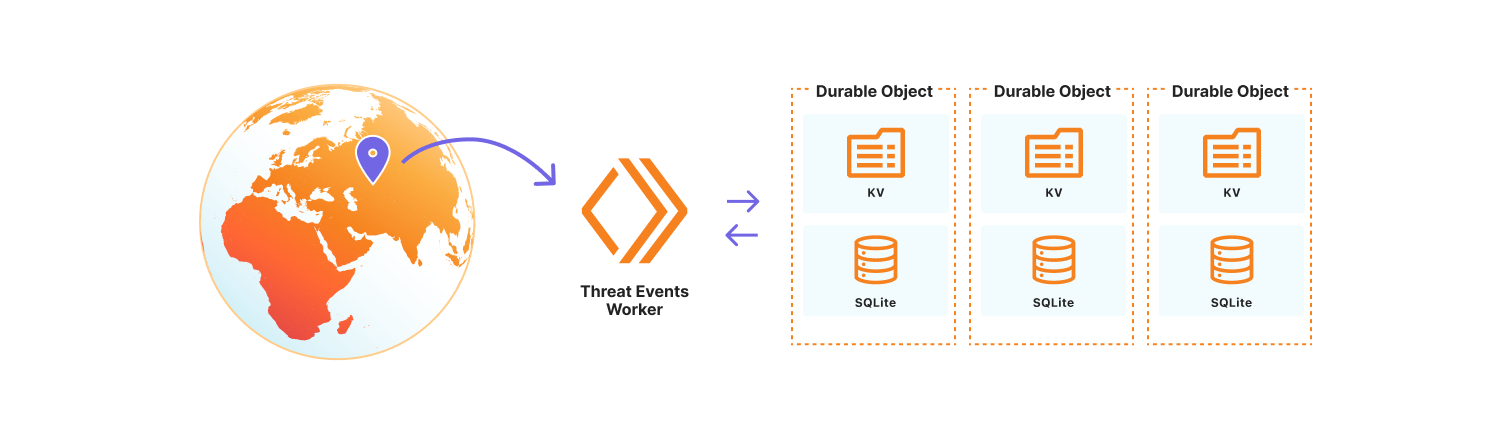
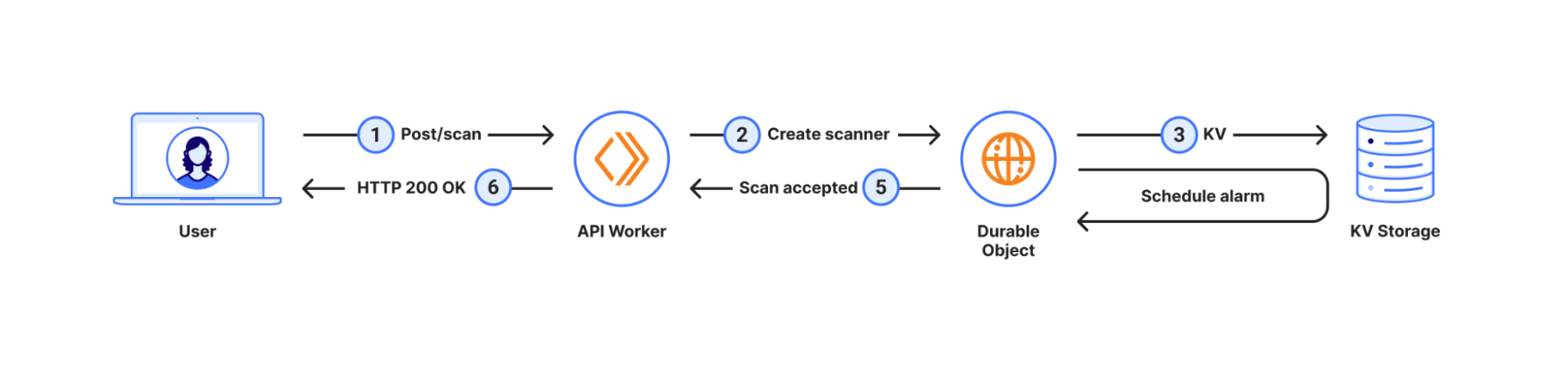
We chose to use the Cloudflare Developer Platform to build out the threat events platform, as it allowed us to leverage the versatility and seamless integration of Cloudflare Workers. At its core, the platform is a Cloudflare Worker that uses SQLite-backed Durable Objects to store events observed on the Cloudflare network. We opted to use Durable Objects over D1, Cloudflare’s serverless SQL database solution, because it permits us to dynamically create SQL tables to store uniquely customizable datasets. Storing datasets this way allows threat events to scale across our network, so we are resilient to surges in data that might correlate with the unpredictable nature of attacks on the Internet. It also permits us to control events by data source, share a subset of datasets with trusted partners, or restrict access to only authorized users. Lastly, the metadata for each individual threat event is stored in the Durable Object KV so that we may store contextual data beyond our fixed, searchable fields. This data may be in the form of requests-per-second for our denial of service events, or sourcing information so Cloudforce One analysts can tie the event to the exact threat activity for further investigation.
How to use threat events
Cloudforce One customers can access threat events through the Cloudflare Dashboard in Security Center or via the Cloudforce One threat events API. Each exposes the stream of threat activity occurring across the Internet as seen by Cloudflare, and are customizable by user-defined filters.
In the Cloudflare Dashboard, users have access to an Attacker Timelapse view, designed to answer strategic questions, as well as a more granular events table for drilling down into attack details. This approach ensures that users have the most relevant information at their fingertips.
Events Table
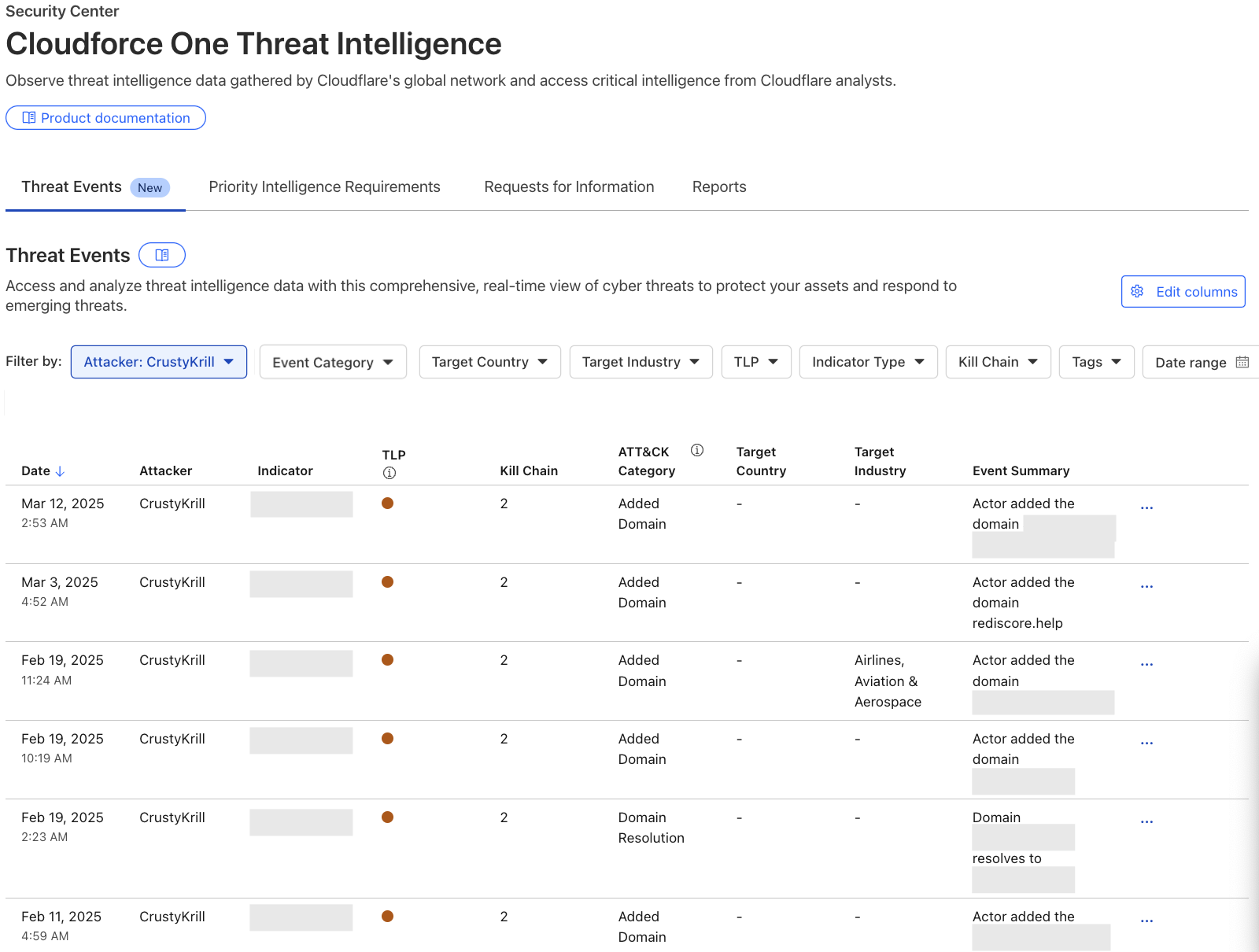
The events table is a detailed view in the Security Center where users can drill down into specific threat activity filtered by various criteria. It is here that users can explore specific threat events and adversary campaigns using Cloudflare’s traffic insights. Most importantly, this table will provide our users with actionable Indicators of Compromise and an event summary so that they can properly defend their services. All of the data available in our events table is equally accessible via the Cloudforce One threat events API.
To showcase the power of threat events, let’s explore a real-world case:
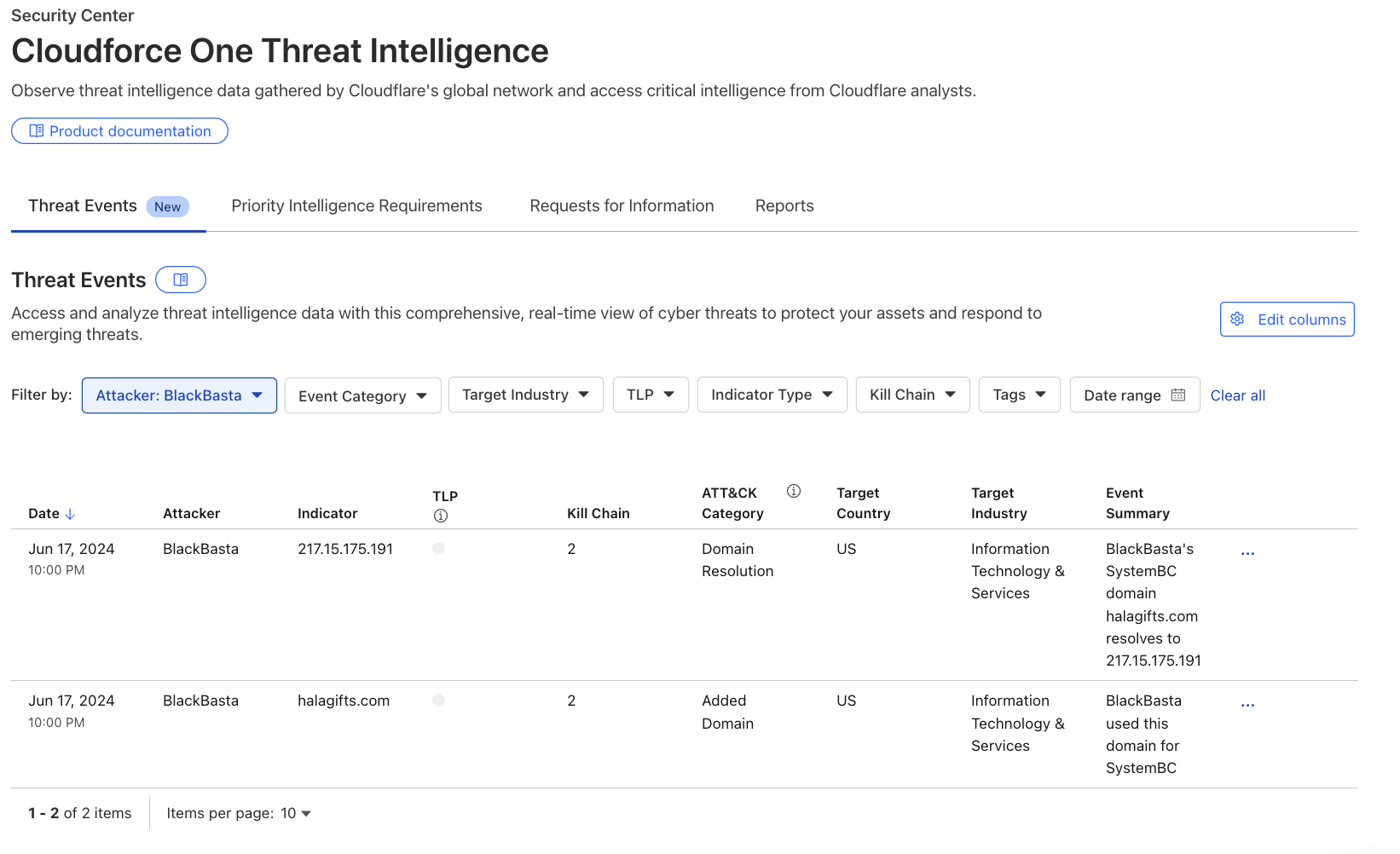
Recently leaked chats of the Black Basta criminal enterprise exposed details about their victims, methods, and infrastructure purchases. Although we can’t confirm whether the leaked chats were manipulated in any way, the infrastructure discussed in the chats was simple to verify. As a result, this threat intelligence is now available as events in the threat events, along with additional unique Cloudflare context.
Analysts searching for domains, hosts, and file samples used by Black Basta can leverage the threat events to gain valuable insight into this threat actor’s operations. For example, in the threat events UI, a user can filter the “Attacker” column by selecting ‘BlackBasta’ in the dropdown, as shown in the image below. This provides a curated list of verified IP addresses, domains, and file hashes for further investigation. For more detailed information on Cloudflare’s unique visibility into Black Basta threat activity see Black Basta’s blunder: exploiting the gang’s leaked chats.
Why we are publishing threat events
Our customers face a myriad of cyber threats that can disrupt operations and compromise sensitive data. As adversaries become increasingly sophisticated, the need for timely and relevant threat intelligence has never been more critical. This is why we are introducing threat events, which provides deeper insights into these threats.
The threat events platform aims to fill this gap by offering a more detailed and contextualized view of ongoing threat activity. This feature allows analysts to self-serve and explore incidents through customizable filters, enabling them to identify patterns and respond effectively. By providing access to real-time threat data, we empower organizations to make informed decisions about their security strategies.
To validate the value of our threat events platform, we had a Fortune 20 threat intelligence team put it to the test. They conducted an analysis against 110 other sources, and we ranked as their #1 threat intelligence source. They found us "very much a unicorn" in the threat intelligence space. It’s early days, but the initial feedback confirms that our intelligence is not only unique but also delivering exceptional value to defenders.
What’s next
While Cloudforce One customers now have access to our API and dashboard, allowing for seamless integration of threat intelligence into their existing systems, they will also soon have access to more visualisations and analytics for the threat events in order to better understand and report back on their findings. This upcoming UI will include enhanced visualizations of attacker timelines, campaign overviews, and attack graphs, providing even deeper insights into the threats facing your organization. Moreover, we’ll add the ability to integrate with existing SIEM platforms and share indicators across systems.
Read more about the threat intelligence research our team publishes here or reach out to your account team about how to leverage our new threat events to enhance your cybersecurity posture.
At Cloudflare, we are constantly innovating and launching new features and capabilities across our product portfolio. Today, we're releasing a number of new features aimed at improving the security tools available to our customers.
Automated security level: Cloudflare’s Security Level setting has been improved and no longer requires manual configuration. By integrating botnet data along with other request rate signals, all customers are protected from confirmed known malicious botnet traffic without any action required.
Cipher suite selection: You now have greater control over encryption settings via the Cloudflare dashboard, including specific cipher suite selection based on our client or compliance requirements.
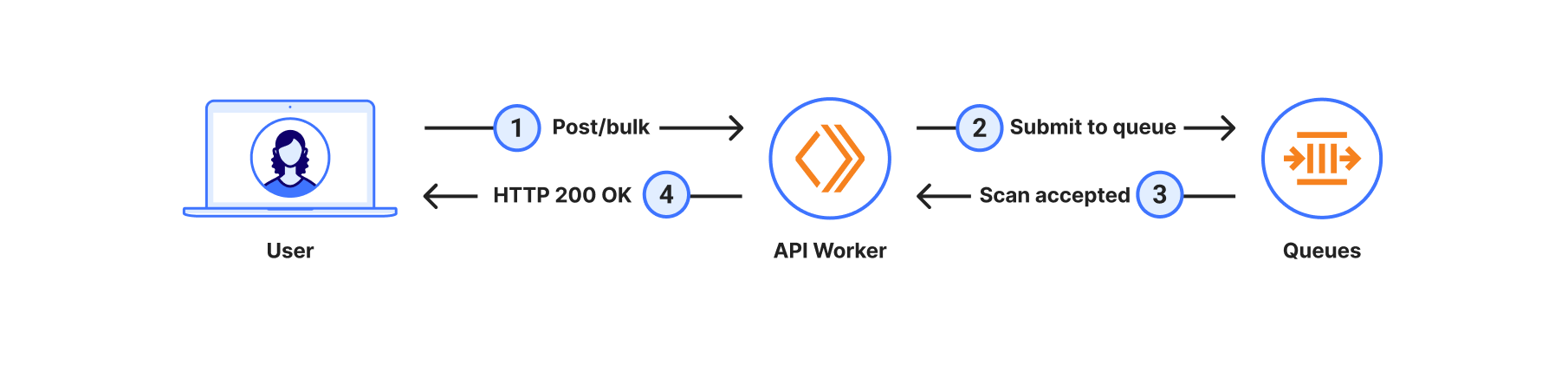
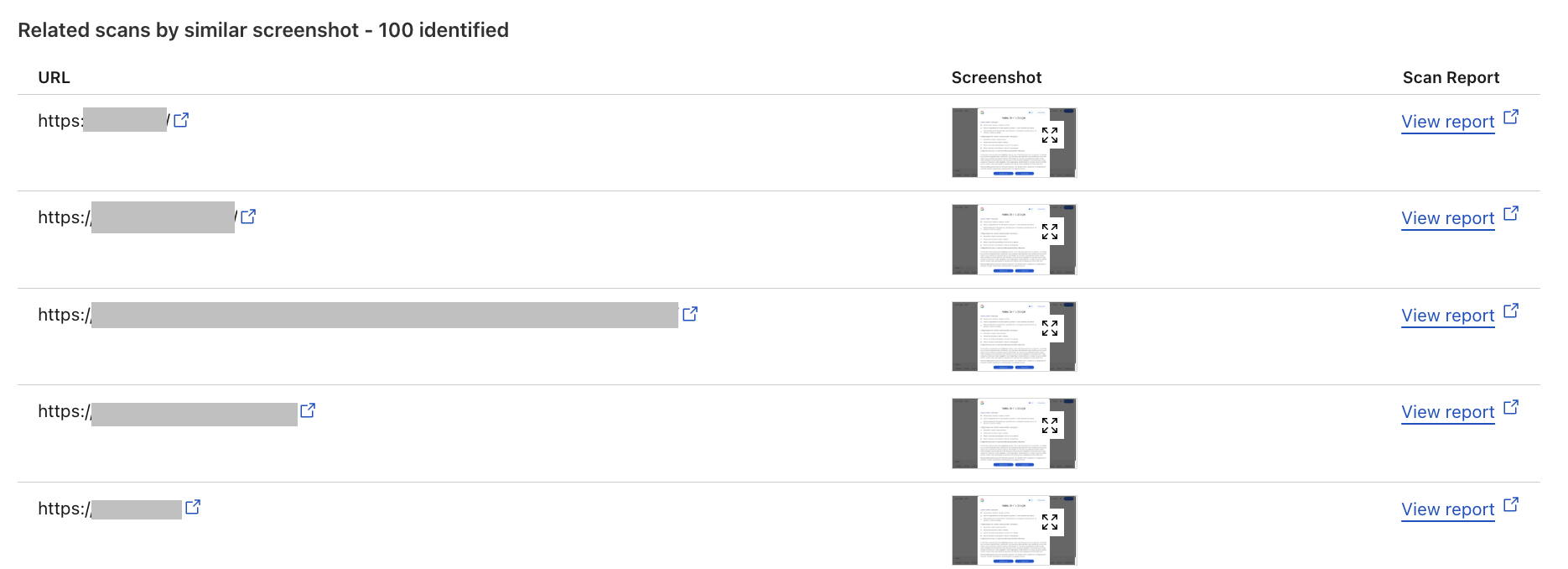
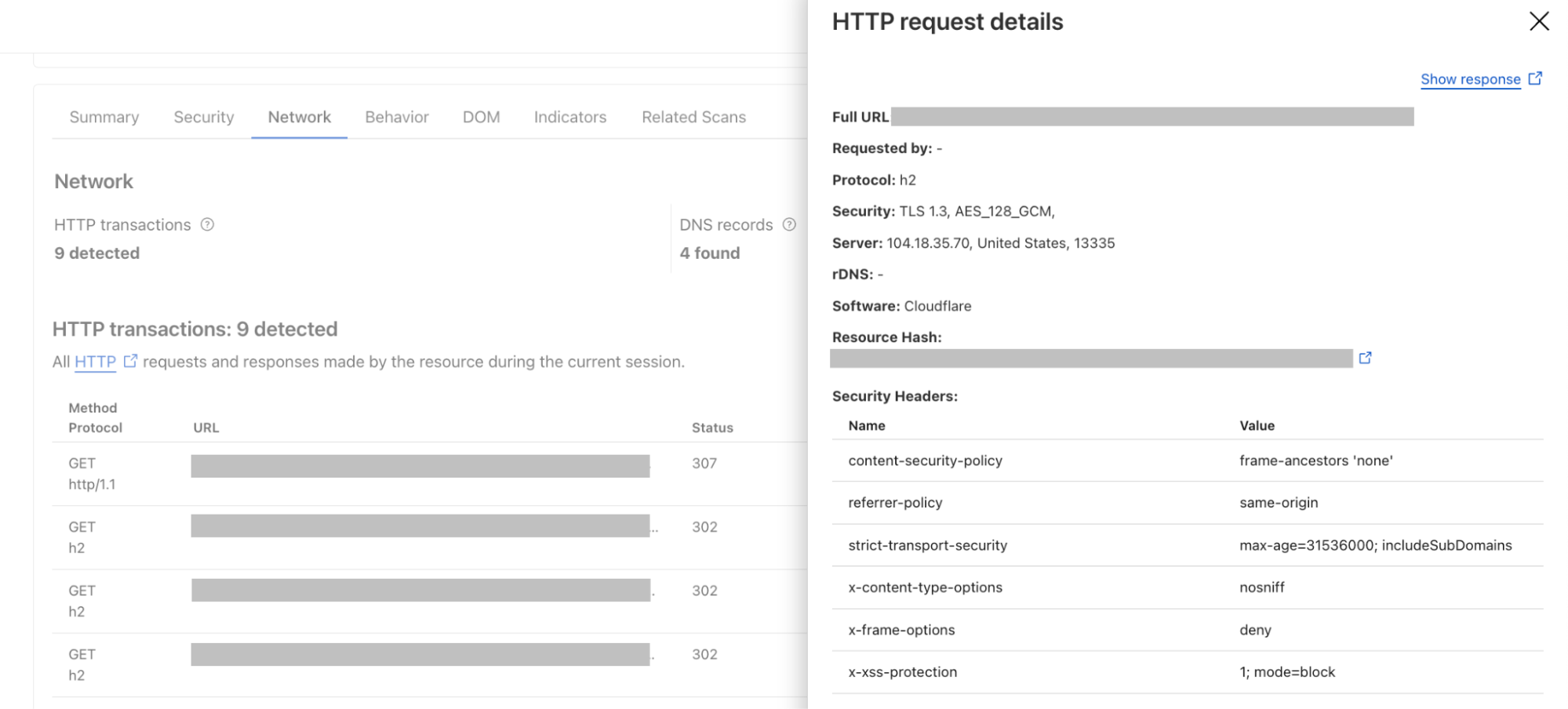
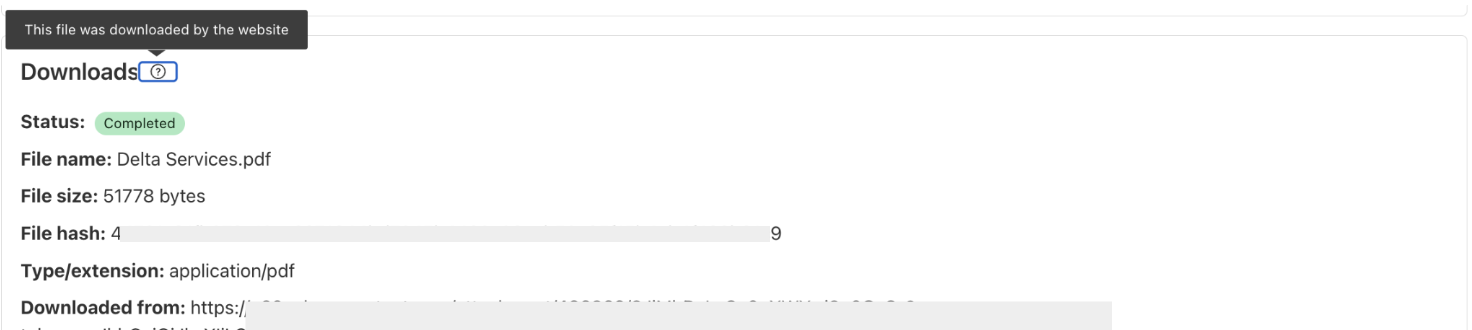
Improved URL scanner: New features include bulk scanning, similarity search, location picker and more.
These updates are designed to give you more power and flexibility when managing online security, from proactive threat detection to granular control over encryption settings.
Automating Security Level to provide stronger protection for all
Cloudflare’s Security Level feature was designed to protect customer websites from malicious activity.
Available to all Cloudflare customers, including the free tier, it has always had very simple logic: if a connecting client IP address has shown malicious behavior across our network, issue a managed challenge. The system tracks malicious behavior by assigning a threat score to each IP address. The more bad behavior is observed, the higher the score. Cloudflare customers could configure the threshold that would trigger the challenge.
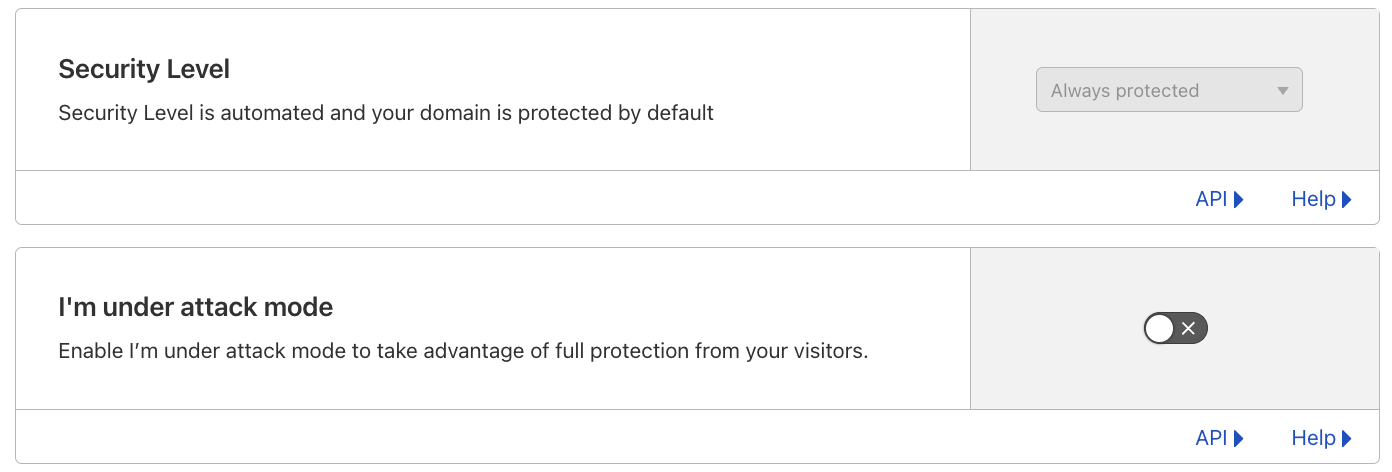
We are now announcing an update to how Security Level works, by combining the IP address threat signal with threshold and botnet data. The resulting detection improvements have allowed us to automate the configuration, no longer requiring customers to set a threshold.
The Security Level setting is now Always protected in the dashboard, and ip_threat_score fields in WAF Custom Rules will no longer be populated. No change is required by Cloudflare customers. The “I am under attack” option remains unchanged.
Stronger protection, by default, for all customers
Although we always favor simplicity, privacy-related services, including our own WARP, have seen growing use. Meanwhile, carrier-grade network address translation (CGNATs) and outbound forward proxies have been widely used for many years.
These services often result in multiple users sharing the same IP address, which can lead to legitimate users being challenged unfairly since individual addresses don’t strictly correlate with unique client behavior. Moreover, threat actors have become increasingly adept at anonymizing and dynamically changing their IP addresses using tools like VPNs, proxies, and botnets, further diminishing the reliability of IP addresses as a standalone indicator of malicious activity. Recognising these limitations, it was time for us to revisit Security Level’s logic to reduce the number of false positives being observed.
In February 2024, we introduced a new security system that automatically combines the real-time DDoS score with a traffic threshold and a botnet tracking system. The real-time DDoS score is part of our autonomous DDoS detection system, which analyzes traffic patterns to identify potential threats. This system superseded and replaced the existing Security Level logic, and is deployed on all customer traffic, including free plans. After thorough monitoring and analysis over the past year, we have confirmed that these behavior-based mitigation systems provide more accurate results. Notably, we've observed a significant reduction in false positives, demonstrating the limitations of the previous IP address-only logic.
Better botnet tracking
Our new logic combines IP address signals with behavioral and threshold indicators to improve the accuracy of botnet detection. While IP addresses alone can be unreliable due to potential false positives, we enhance their utility by integrating them with additional signals. We monitor surges in traffic from known "bad" IP addresses and further refine this data by examining specific properties such as path, accept, and host headers.
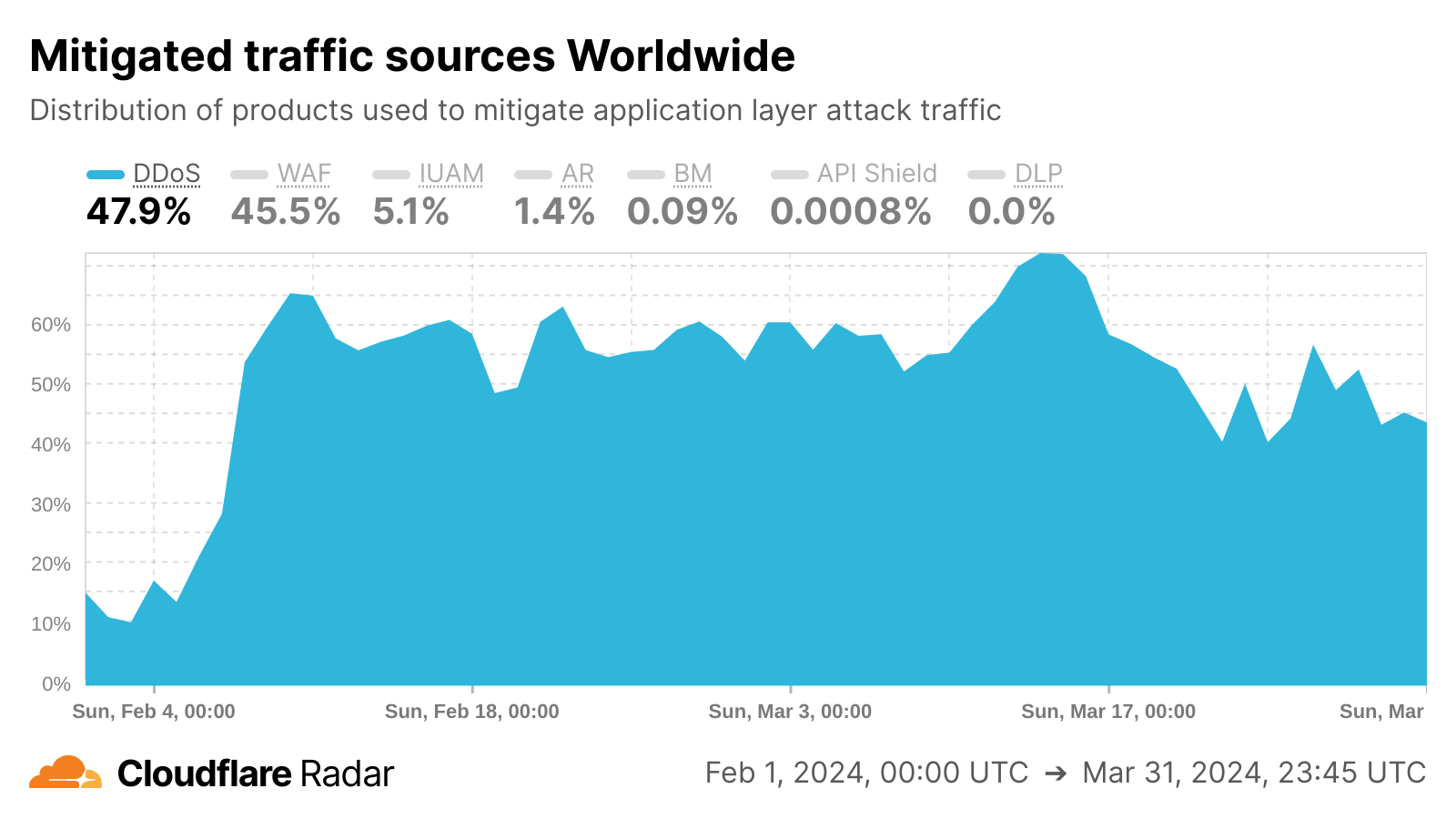
We also introduced a new botnet tracking system that continuously detects and tracks botnet activity across the Cloudflare network. From our unique vantage point as a reverse proxy for nearly 20% of all websites, we maintain a dynamic database of IP addresses associated with botnet activity. This database is continuously updated, enabling us to automatically respond to emerging threats without manual intervention. This effect is visible in the Cloudflare Radar chart below, as we saw sharp growth in DDoS mitigations in February 2024 as the botnet tracking system was implemented.
What it means for our customers and their users
Customers now get better protection while having to manage fewer configurations, and they can rest assured that their online presence remains fully protected. These security measures are integrated and enabled by default across all of our plans, ensuring protection without the need for manual configuration or rule management.
This improvement is particularly beneficial for users accessing sites through proxy services or CGNATs, as these setups can sometimes trigger unnecessary security checks, potentially disrupting access to websites.
What’s next
Our team is looking at defining the next generation of threat scoring mechanisms. This initiative aims to provide our customers with more relevant and effective controls and tools to combat today's and tomorrow's potential security threats.
Effective March 17, 2025, we are removing the option to configure manual rules using the threat score parameter in the Cloudflare dashboard. The "I'm Under Attack" mode remains available, allowing users to issue managed challenges to all traffic when needed.
By the end of Q1 2026, we anticipate disabling all rules that rely on IP threat score. This means that using the threat score parameter in the Rulesets API and via Terraform won’t be available after the end of the transition period. However, we encourage customers to be proactive and edit or remove the rules containing the threat score parameter starting today.
Cipher suite selection now available in the UI
Building upon our core security features, we're also giving you more control over your encryption: cipher suite selection is now available in the Cloudflare dashboard!
When a client initiates a visit to a Cloudflare-protected website, a TLS handshake occurs, where clients present a list of supported cipher suites — cryptographic algorithms crucial for secure connections. While newer algorithms enhance security, balancing this with broad compatibility is key, as some customers prioritise reach by supporting older devices, even with less secure ciphers. To accommodate varied client needs, Cloudflare's default settings emphasise wide compatibility, allowing customers to tailor cipher suite selection based on their priorities: strong security, compliance (PCI DSS, FIPS 140-2), or legacy device support.
Previously, customizing cipher suites required multiple API calls, proving cumbersome for many users. Now, Cloudflare introduces Cipher Suite Selection to the dashboard. This feature introduces user-friendly selection flows like security recommendations, compliance presets, and custom selections.
Understanding cipher suites
Cipher suites are collections of cryptographic algorithms used for key exchange, authentication, encryption, and message integrity, essential for a TLS handshake. During the handshake’s initiation, the client sends a "client hello" message containing a list of supported cipher suites. The server responds with a "server hello" message, choosing a cipher suite from the client's list based on security and compatibility. This chosen cipher suite forms the basis of TLS termination and plays a crucial role in establishing a secure HTTPS connection. Here’s a quick overview of each component:
Key exchange algorithm: Secures the exchange of encryption keys between parties.
Authentication algorithm: Verifies the identities of the communicating parties.
Encryption algorithm: Ensures the confidentiality of the data.
Message integrity algorithm: Confirms that the data remains unaltered during transmission.
Perfect forward secrecyis an important feature of modern cipher suites. It ensures that each session's encryption keys are generated independently, which means that even if a server’s private key is compromised in the future, past communications remain secure.
What we are offering
You can find cipher suite configuration under Edge Certificates in your zone’s SSL/TLS dashboard. There, you will be able to view your allow-listed set of cipher suites.
Additionally, you will be able to choose from three different user flows, depending on your specific use case, to seamlessly select your appropriate list. Those three user flows are: security recommendation selection, compliance selection, or custom selection. The goal of the user flows is to outfit customers with cipher suites that match their goals and priorities, whether those are maximum compatibility or best possible security.
1. Security recommendations
To streamline the process, we have turned our cipher suites recommendations into selectable options. This is in an effort to expose our customers to cipher suites in a tangible way and enable them to choose between different security configurations and compatibility. Here is what they mean:
Modern: Provides the highest level of security and performance with support for Perfect Forward Secrecy and Authenticated Encryption (AEAD). Ideal for customers who prioritize top-notch security and performance, such as financial institutions, healthcare providers, or government agencies. This selection requires TLS 1.3 to be enabled and the minimum TLS version set to 1.2.
Compatible: Balances security and compatibility by offering forward-secret cipher suites that are broadly compatible with older systems. Suitable for most customers who need a good balance between security and reach. This selection also requires TLS 1.3 to be enabled and the minimum TLS version set to 1.2.
Legacy: Optimizes for the widest reach, supporting a wide range of legacy devices and systems. Best for customers who do not handle sensitive data and need to accommodate a variety of visitors. This option is ideal for blogs or organizations that rely on older systems.
2. Compliance selection
Additionally, we have also turned our compliance recommendations into selectable options to make it easier for our customers to meet their PCI DSS or FIPS-140-2 requirements.
PCI DSS Compliance: Ensures that your cipher suite selection aligns with PCI DSS standards for protecting cardholder data. This option will enforce a requirement to set a minimum TLS version of 1.2, and TLS 1.3 to be enabled, to maintain compliance.
Since the list of supported cipher suites require TLS 1.3 to be enabled and a minimum TLS version of 1.2 in order to be compliant, we will disable compliance selection until the zone settings are updated to meet those requirements. This effort is to ensure that our customers are truly compliant and have the proper zone settings to be so.
FIPS 140-2 Compliance: Tailored for customers needing to meet federal security standards for cryptographic modules. Ensures that your encryption practices comply with FIPS 140-2 requirements.
3. Custom selection
For customers needing precise control, the custom selection flow allows individual cipher suite selection, excluding TLS 1.3 suites which are automatically enabled with TLS 1.3. To prevent disruptions, guardrails ensure compatibility by validating that the minimum TLS version aligns with the selected cipher suites and that the SSL/TLS certificate is compatible (e.g., RSA certificates require RSA cipher suites).
API
The API will still be available to our customers. This aims to support an existing framework, especially to customers who are already API reliant. Additionally, Cloudflare preserves the specified cipher suites in the order they are set via the API and that control of ordering will remain unique to our API offering.
With your Advanced Certificate Manager or Cloudflare for SaaS subscription, head to Edge Certificates in your zone’s SSL dashboard and give it a try today!
Smarter scanning, safer Internet with the new version of URL Scanner
Cloudflare's URL Scanner is a tool designed to detect and analyze potential security threats like phishing and malware by scanning and evaluating websites, providing detailed insights into their safety and technology usage. We've leveraged our own URL Scanner to enhance our internal Trust & Safety efforts, automating the detection and mitigation of some forms of abuse on our platform. This has not only strengthened our own security posture, but has also directly influenced the development of the new features we're announcing today.
Phishing attacks are on the rise across the Internet, and we saw a major opportunity to be "customer zero" for our URL Scanner to address abuse on our own network. By working closely with our Trust & Safety team to understand how the URL Scanner could better identify potential phishing attempts, we've improved the speed and accuracy of our response to abuse reports, making the Internet safer for everyone. Today, we're excited to share the new API version and the latest updates to URL Scanner, which include the ability to scan from specific geographic locations, bulk scanning, search by Indicators of Compromise (IOCs), improved UI and information display, comprehensive IOC listings, advanced sorting options, and more. These features are the result of our own experiences in leveraging URL Scanner to safeguard our platform and our customers, and we're confident that they will prove useful to our security analysts and threat intelligence users.
Scan up to 100 URLs at once by using bulk submissions
Cloudflare Enterprise customers can now conduct routine scans of their web assets to identify emerging vulnerabilities, ensuring that potential threats are addressed proactively, by using the Bulk Scanning API endpoint. Another use case for the bulk scanning functionality is developers leveraging bulk scanning to verify that all URLs your team is accessing are secure and free from potential exploits before launching new websites or updates.
Scanning of multiple URLs addresses the specific needs of our users engaged in threat hunting. Many of them maintain extensive lists of URLs that require swift investigation to identify potential threats. Currently, they face the task of submitting these URLs one by one, which not only slows down their workflow but also increases the manual effort involved in their security processes. With the introduction of bulk submission capabilities, users can now submit up to 100 URLs at a time for scanning.
How we built the bulk scanning feature
Let’s look at a regular workflow:
In this workflow, when the user submits a new scan, we create a Durable Object with the same ID as the scan, save the scan options, like the URL to scan, to the Durable Objects’s storage and schedule an alarm for a few seconds later. This allows us to respond immediately to the user, signalling a successful submission. A few seconds later the alarm triggers, and we start the scan itself.
However, with bulk scanning, the process is slightly different:
In this case, there are no Durable Objects involved just yet; the system simply sends each URL in the bulk scan submission as a new message to the queue.
Notice that in both of these cases the scan is triggered asynchronously. In the first case, it starts when the Durable Objects alarm fires and, in the second case, when messages in the queue are consumed. While the durable object alarm will always fire in a few seconds, messages in the queue have no predetermined processing time, they may be processed seconds to minutes later, depending on how many messages are already in the queue and how fast the system processes them.
When users bulk scan, having the scan done at some point in time is more important than having it done now. When using the regular scan workflow, users are limited in the number of scans per minute they can submit. However, when using bulk scan this is not a concern, and users can simply send all URLs they want to process in a single HTTP request. This comes with the tradeoff that scans may take longer to complete, which is a perfect fit for Cloudflare Queues. Having the ability to configure retries, max batch size, max batch timeouts, and max concurrency is something we’ve found very useful. As the scans are completed asynchronously, users can request the resulting scan reports via the API.
Discover related scans and better IOC search
The Related Scans feature allows API, Cloudflare dashboard and Radar users alike to view related scans directly within the URL Scanner Report. This helps users analyze and understand the context of a scanned URL by providing insights into similar URLs based on various attributes. Filter and search through URL Scanner reports to retrieve information on related scans, including those with identical favicons, similar HTML structures, and matching IP addresses.
The Related Scans tab presents a table with key headers corresponding to four distinct filters. Each entry includes the scanned URL and a direct link to view the detailed scan report, allowing for quick access to further information.
We've introduced the ability to search by indicators of compromise (IOCs), such as IP addresses and hashes, directly within the user interface. Additionally, we've added advanced filtering options by various criteria, including screenshots, hashes, favicons, and HTML body content. This allows for more efficient organization and prioritization of URLs based on specific needs. While attackers often make minor modifications to the HTML structure of phishing pages to evade detection, our advanced filtering options enable users to search for URLs with similar HTML content. This means that even if the visual appearance of a phishing page changes slightly, we can still identify connections to known phishing campaigns by comparing the underlying HTML structure. This proactive approach helps users identify and block these threats effectively.
Another use case for the advanced filtering options is the search by hash; a user who has identified a malicious JavaScript file through a previous investigation can now search using the file's hash. By clicking on an HTTP transaction, you'll find a direct link to the relevant hash, immediately allowing you to pivot your investigation. The real benefit comes from identifying other potentially malicious sites that have that same hash. This means that if you know a given script is bad, you can quickly uncover other compromised websites delivering the same malware.
The user interface has also undergone significant improvements to enhance the overall experience. Other key updates include:
Page title and favicon surfaced, providing immediate visual context
Detailed summaries are now available
Redirect chains allow users to understand the navigation path of a URL
The ability to scan files from URLs that trigger an automatic file download
Download HAR files
With the latest updates to our URL Scanner, users can now download both the HAR (HTTP Archive) file and the JSON report from their scans. The HAR file provides a detailed record of all interactions between the web browser and the scanned website, capturing crucial data such as request and response headers, timings, and status codes. This format is widely recognized in the industry and can be easily analyzed using various tools, making it invaluable for developers and security analysts alike.
For instance, a threat intelligence analyst investigating a suspicious URL can download the HAR file to examine the network requests made during the scan. By analyzing this data, they can identify potential malicious behavior, such as unexpected redirects and correlate these findings with other threat intelligence sources. Meanwhile, the JSON report offers a structured overview of the scan results, including security verdicts and associated IOCs, which can be integrated into broader security workflows or automated systems.
New API version
Finally, we’re announcing a new version of our API, allowing users to transition effortlessly to our service without needing to overhaul their existing workflows. Moving forward, any future features will be integrated into this updated API version, ensuring that users have access to the latest advancements in our URL scanning technology.
We understand that many organizations rely on automation and integrations with our previous API version. Therefore, we want to reassure our customers that there will be no immediate deprecation of the old API. Users can continue to use the existing API without disruption, giving them the flexibility to migrate at their own pace. We invite you to try the new API today and explore these new features to help with your web security efforts.
Never miss an update
In summary, these updates to Security Level, cipher suite selection, and URL Scanner help us provide comprehensive, accessible, and proactive security solutions. Whether you're looking for automated protection, granular control over your encryption, or advanced threat detection capabilities, these new features are designed to empower you to build a safer and more secure online presence. We encourage you to explore these features in your Cloudflare dashboard and discover how they can benefit your specific needs.
We’ll continue to share roundup blog posts as we build and innovate. Follow along on the Cloudflare Blog for the latest news and updates.

 Entrar