Entrar

How SentinelOne Blocked APT29's CaptiveCrunch Campaign
Once the corporate network stopped being defensible, the control had to move to the device, as SentinelOne® has long argued.
That move carried one assumption with it. Wherever the laptop sits, name resolution tells it the truth and the agent can reach its own cloud. Almost nothing in the stack checks either half.
In July 2026, Microsoft disclosed a campaign that breaks both and named it CaptiveCrunch. A captive portal is the sign-in page a public Wi-Fi network pushes in front of you before it lets you online. Hotels, airports, conference centres, the splash screen you click through without reading. That is where this campaign starts.
CaptiveCrunch is the work of APT29, the cyber-espionage arm of Russia's Foreign Intelligence Service. Microsoft tracks the group as Midnight Blizzard, and elsewhere it is Cozy Bear. Outside the industry it is best known for the SolarWinds compromise.
We saw the same operation from the endpoint, across multiple environments we protect in three regions. We also found the adversary answering from inside the victims' own networks, which no public account of the campaign describes.
The Adversary Was on the Victim's Own Network Segment
Public accounts of CaptiveCrunch describe compromised captive-portal infrastructure, but our telemetry shows something narrower. The DnsPoison indicator recorded LLMNR responses on UDP/5355 carrying the adversary's address on roughly a third of affected hosts.
The queries carried randomised canary hostnames. LLMNR is link-local multicast that does not traverse routers. Anything answering those queries had to be sitting on the victim's own broadcast domain.
A Responder-style spoofer was sitting on the shared network, and no DNS server anywhere in the chain was compromised.
The techniques in play:
T1557.001 (LLMNR/NBT-NS Poisoning and SMB Relay)
T1557 (Adversary-in-the-Middle)
T1659 (Content Injection), for the fake updates served in response to connectivity checks
T1584.008 (Compromise Infrastructure: Network Devices), per public accounts, for the captive portal gateways
From the same layer-two segment as the laptop, the spoofer raced the legitimate resolver and won often enough to matter. Across affected hosts, clean and poisoned answers for the same domain interleaved seconds apart.
Success rates ranged from 5.6% to 84% depending on the network. The spoofer replayed the genuine CNAME chain and rewrote only the terminal A record.
Then Windows delivered the lure itself. To check whether a network needs a sign-in page, Windows fetches a known file over plain HTTP. If the reply is not what it expects, it assumes a captive portal and opens the default browser for sign-in. All of that is documented behaviour.
An adversary who rewrites the reply on-path gets the operating system to open the browser at their page. The lure needed no email and no link, but everything after that still needed a person at the keyboard.
The payload was a browser updater matched to the victim's own browser. Microsoft documented ClickFix-style lures for this campaign. In those, the victim is walked through running a command. We saw no such lure on our endpoints, where downloading the file and launching it was manual every time.
Nothing you own sits in the path on someone else's LAN, so the control has to live on the host.
Disable LLMNR. It is the best host control and also the bluntest. It takes away the protocol the adversary is answering on, which no detection rule can do. LLMNR's fallback is rarely load-bearing in a managed estate.
Why the Usual Controls Were Not In the Path
The attack runs on someone else's network, so your network controls are not involved. Your DNS filtering is not involved either, because the spoofer forges answers on the wire before trusted resolvers respond.
The browser renders the lure because Windows told it to. The chain has no email, link, attachment, or scripting host in it.
There is also almost no behaviour to detect, because everything dangerous about this payload happens after a process is created. Before that, nearly every step belongs to the operating system or the network. That is not the kind of behaviour a detection engine is built to catch.
The payload is CornFlake, a Go remote access trojan. CornFlake in turn deploys ChocoShell, a PowerShell infostealer that runs entirely in memory. Microsoft's analysis of the same payload itemises what each of them does.
CornFlake, on the host:
Surveillance: A raw-input keylogger, clipboard monitoring, on-demand screenshots, microphone and webcam capture, and USB monitoring.
Persistence: Service registration, Run keys, and scheduled tasks, with a watchdog to restore whatever a defender removes.
ChocoShell, deployed by CornFlake and resident only in memory:
Cookie theft: Live cookie extraction from browser process memory and a defeat for Chrome's App-Bound Encryption.
Token theft: Microsoft 365 and Entra ID tokens lifted from the Token Broker cache.
Evasion: It disables AMSI through .NET reflection and runs a timing-based check for sandboxes and virtual machines before collecting anything.
Escalation: It chains three UAC bypasses in fallback order through the SilentCleanup task, wsreset.exe, and sdclt.exe.
Until it runs, the file sits inert in Downloads.
Deciding Locally, On the File, Before it Runs
The adversary controlled the network the laptop sat on and had cut the agent's path to its cloud. That left the file, judged on the agent with nothing else in the loop.
The agent convicted every copy that landed, each before it could execute. That is one hundred percent of delivered payloads in one hundred percent of affected environments. We verified both figures twice against the telemetry. One endpoint ran an agent nearly a year out of date and reached the same verdict as current ones.
Then we tested for the things that would mean we were wrong. Every check came back empty:
No process creations from the Downloads folder on any affected host
No adversary-attributable persistence
No lateral movement
No post-incident C2 contact
No payload hashes remaining
What It Looked Like in the Console
The investigating analyst recorded his screen while walking the Storylines on the endpoint where the payload came closest to running.
Because the Storylines are scattered across the campaign, he worked in two views. One was the management console, and the other was the Threat Operations Center, which clusters the same events more legibly.
Storyline 1: Delivery, With the Poisoning Visible On One Screen
It opens with Windows launching Edge with the connectivity-check URL as its argument.
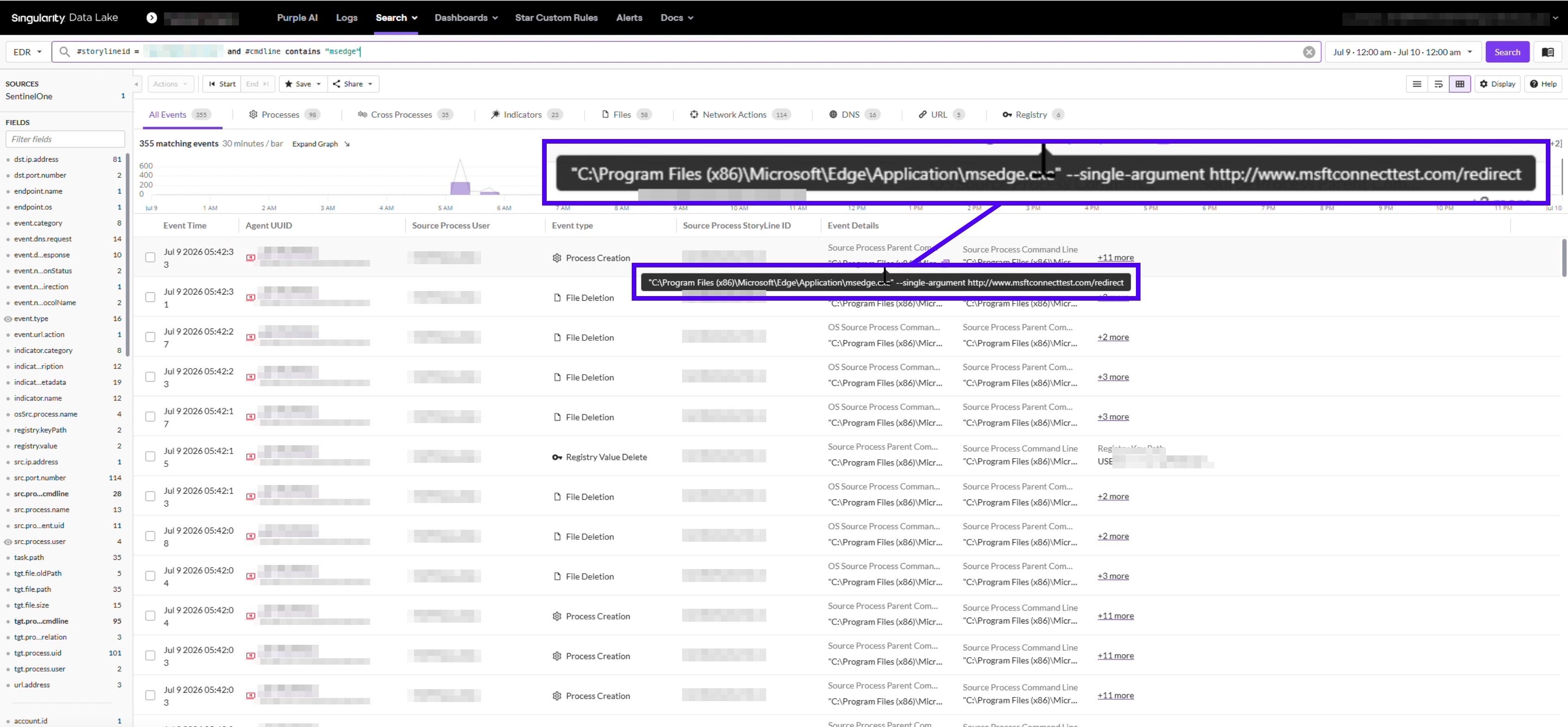
Scroll into the DNS events on that same Storyline and the race is sitting there in plain view. One request for a domain resolves to a legitimate address. Scroll down, same domain, and it resolves to the adversary's address.
The same name was answered both ways, minutes apart, on one machine. Only injection racing a real resolver produces that pattern. Later comes the download, a browser updater with a (5) suffix on its filename.
The suffix means the browser had already written four earlier copies to the same folder. Our analyst took that to mean someone kept going back for it and tried to run the last one.
Deep Visibility does not record mouse clicks. Manual launching is an inference from the filename and the process chain, and we are flagging it as one.
Storyline 2: A Token Request While the Login Domain Was Poisoned
A different Storyline shows connections out to the adversary's address. Follow the URL events and the timing lines up with the delivery window.
The request is a POST to the OAuth token endpoint. Open the DNS events on that same Storyline, and the Microsoft login domain is already resolving to the adversary's address.
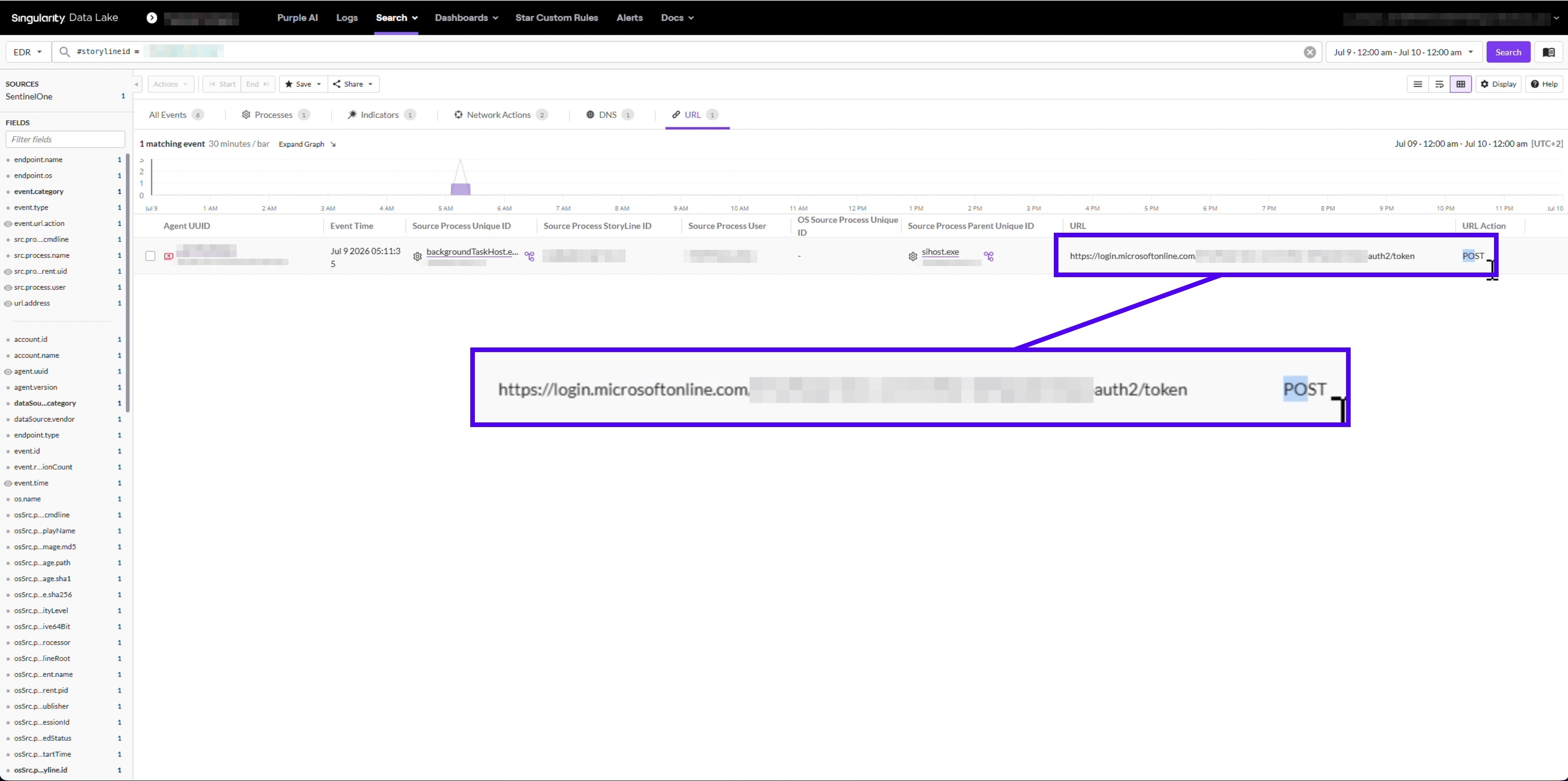
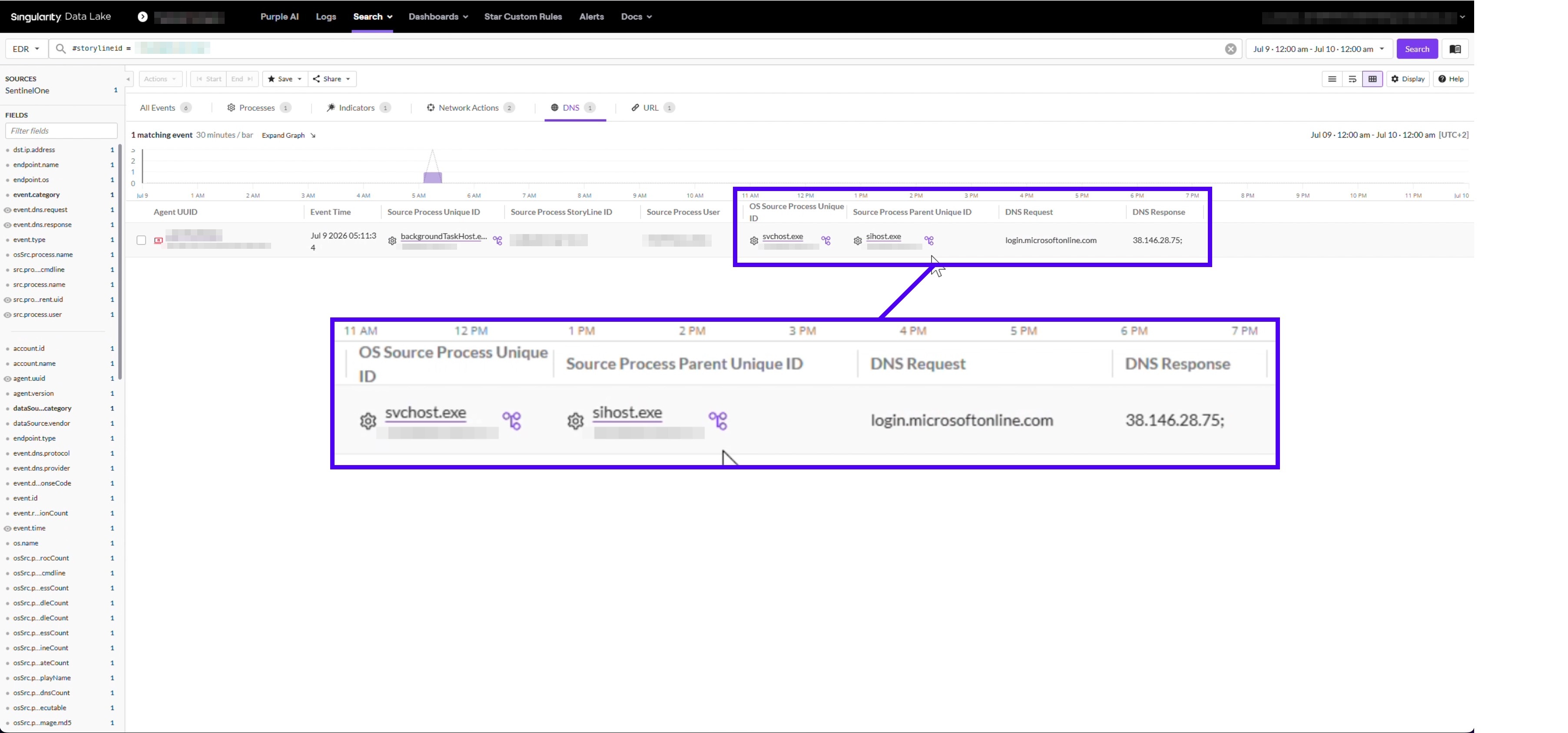
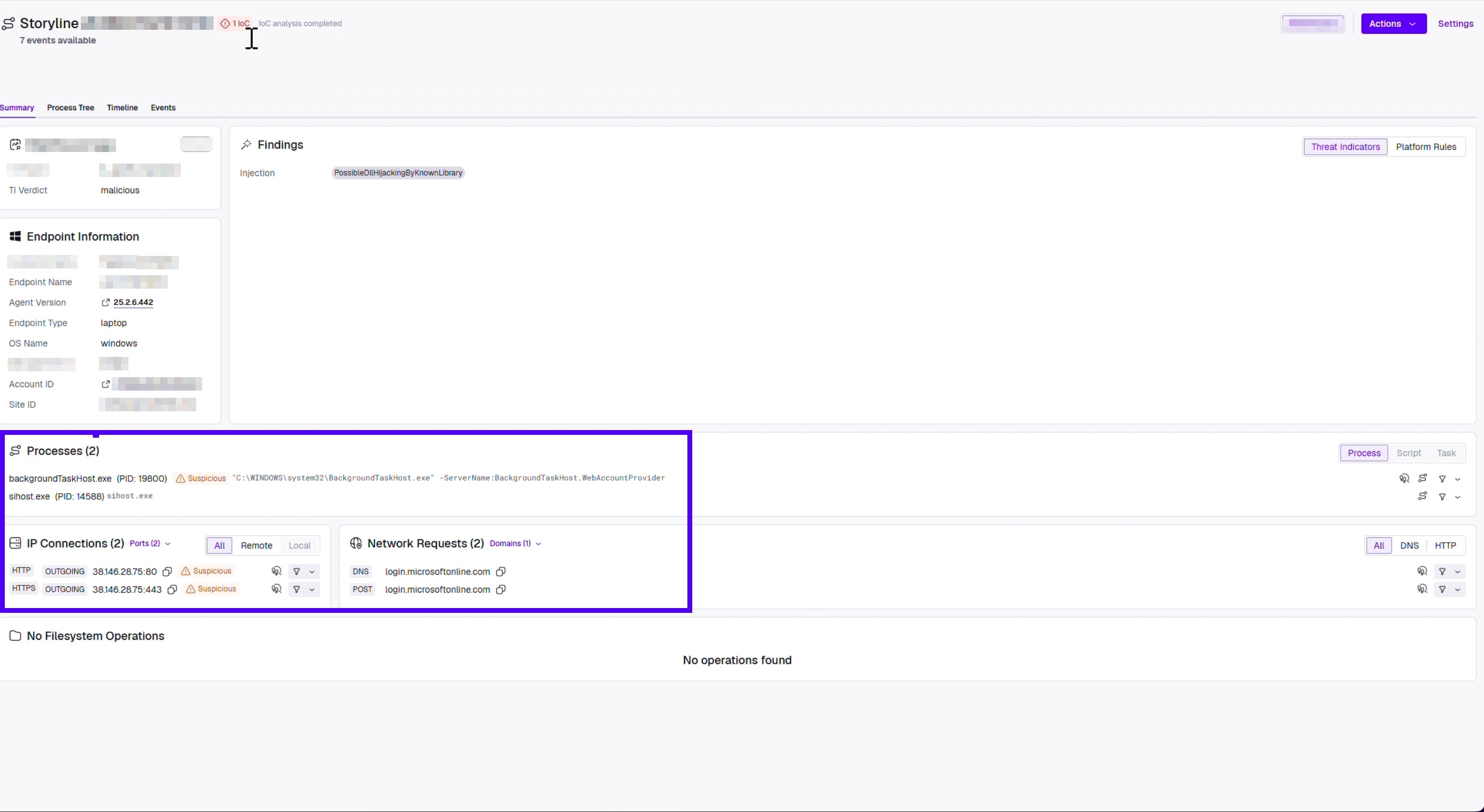
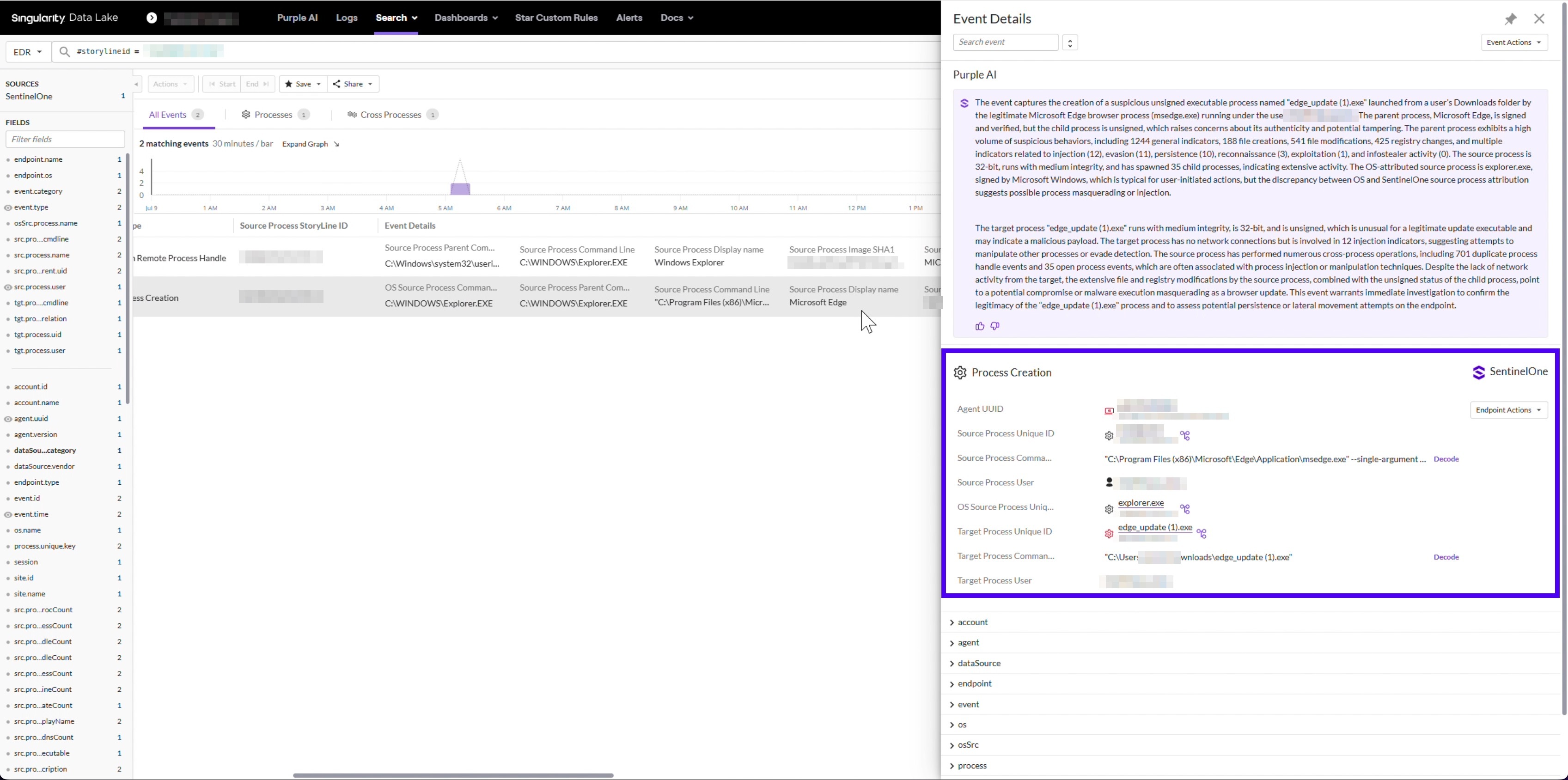
We can confirm token requests were issued while the poisoning was active, to a login domain resolving to the adversary. We cannot confirm what happened to them. Endpoint telemetry records the intended destination of a request, not the outcome of the TLS handshake. That handshake content is not something we have or can obtain.
Across the campaign there were 49 such requests. On one endpoint they began roughly 24 hours before any payload arrived, on another ten minutes before. Roughly half of the affected endpoints saw poisoning and no payload at all. That is a reasonable sign the malware was never the sole objective.
Storyline 3: The Verdict
It starts with the launch attempt, from the same browser process that had carried the operation from the start.
Static AI caught the download attempts, and the agent quarantined the file. On the launch attempt, the console records the payload blocked before launch and quarantined in under 100 milliseconds. It names the engine and the detection type on that event.
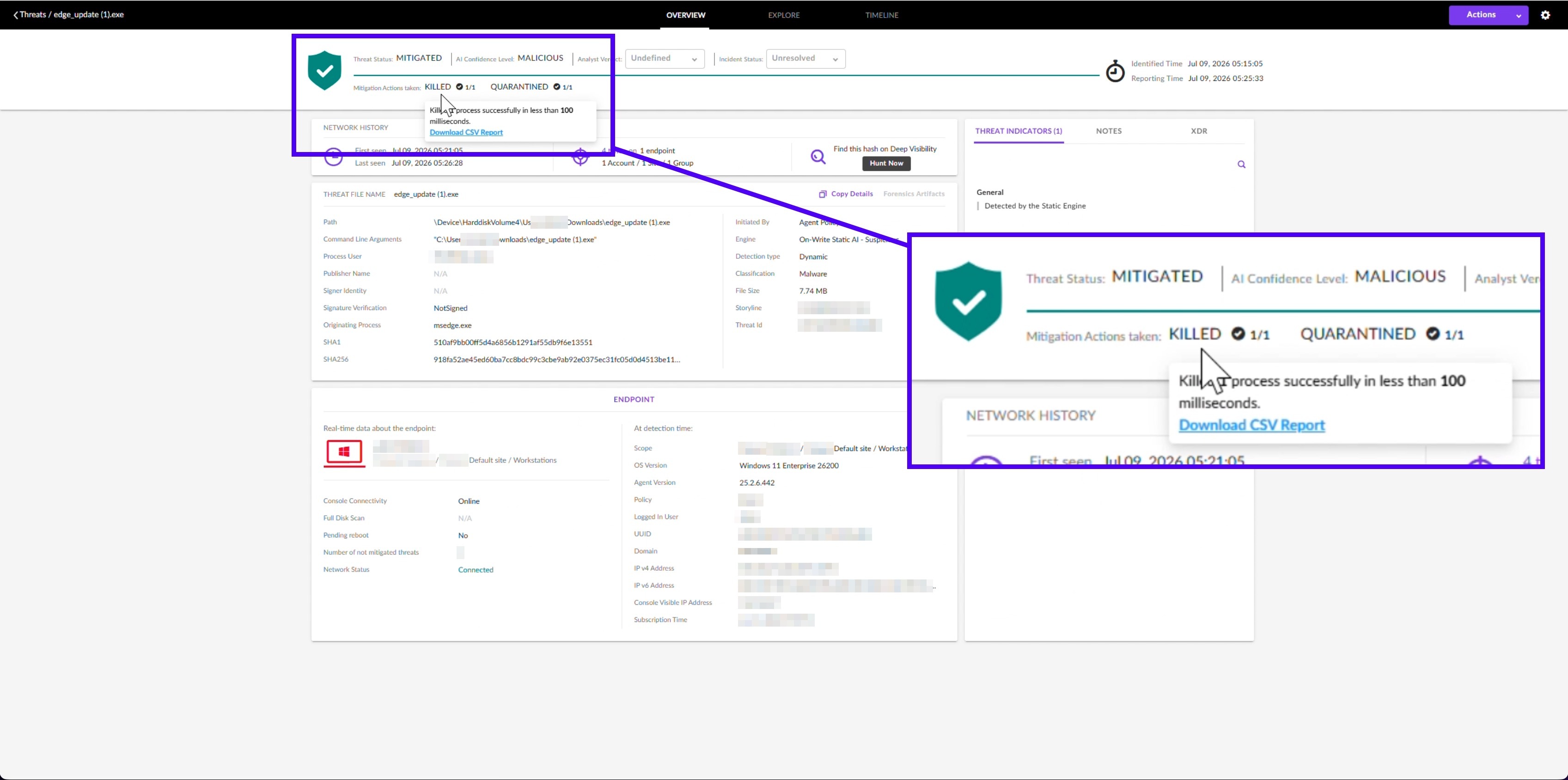
Earlier in the same sequence, Static AI convicted a .crdownload, the partial file a browser writes mid-download. That file was not named .exe, was not complete, and carried a partial hash rather than the payload's finished one.
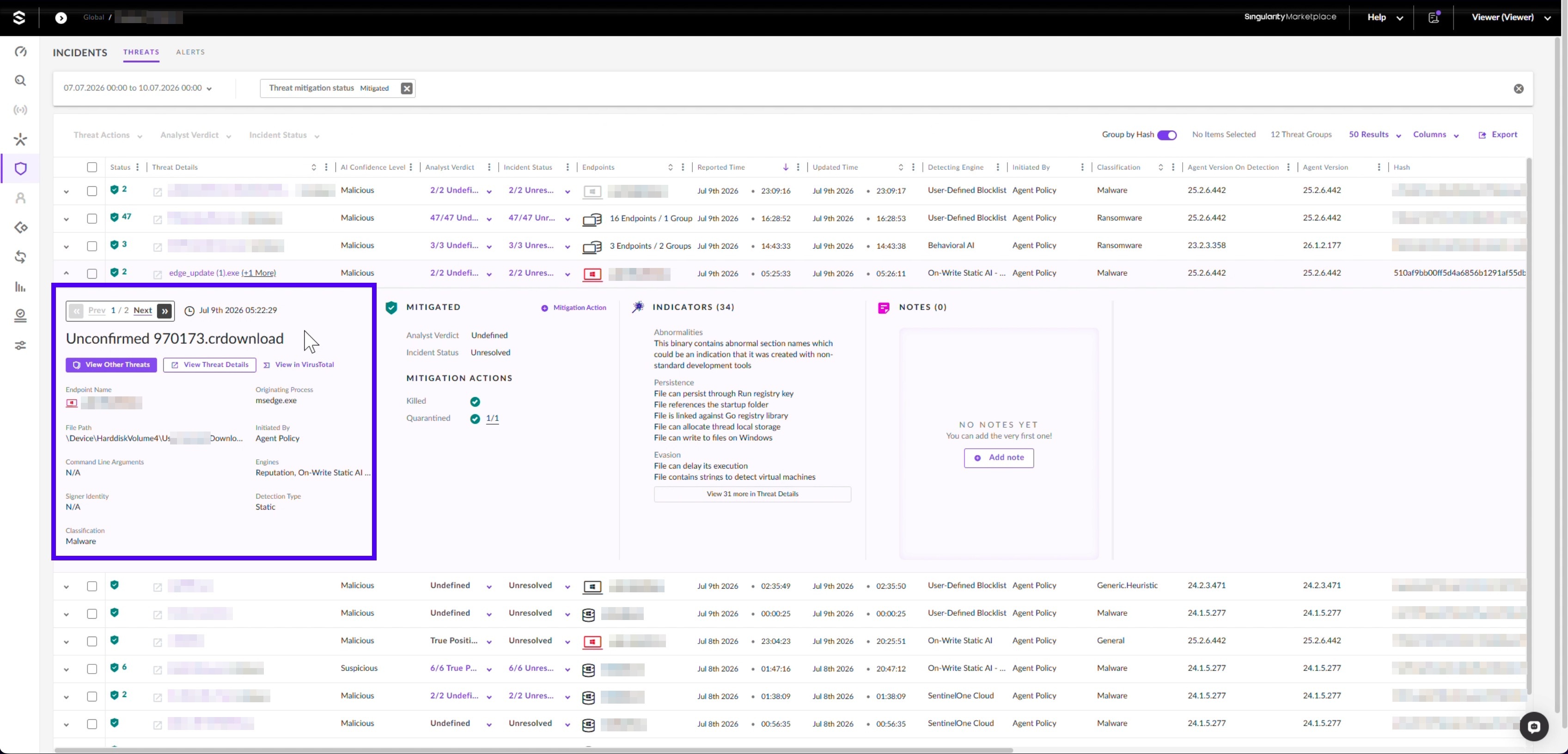
Static AI read its structure and reached a verdict while the file was still arriving. It needed no signature, finished artifact, or lookup. The later (5) suffix shows the downloads kept coming. Nothing that landed ever ran.
Hunting for the Pattern, and the Identity Question the Endpoint Cannot Answer
Every behavioural signal missed at least one confirmed victim. Only two signals fired on every affected endpoint: the adversary's address and the poisoned DNS answer. Both depend on one address the operator can rotate at will.
Run these steps as a scheduled threat hunt rather than as a detection rule. Most of the work is correlation that costs something to run.
Primary Hunt: One Address Answering for Unrelated Domain Owners
Count distinct registrable domains (eTLD+1) spanning unrelated vendor ecosystems that resolve to the same public address. In our test against roughly ten thousand IPs and domains from affected environments, two surfaced, and both were the adversary.
Take DNS resolution events across the hunt window, keeping the queried name and the answered address.
Drop answers in private and carrier-grade ranges.
Reduce each queried name to its registrable domain using the Public Suffix List.
Group by answered address and count distinct registrable domains.
Map each registrable domain to its owning organisation and count distinct owners per address.
Step five separates a CDN from the adversary. An address answering for many domains owned by one organisation is a CDN. An address answering for many unrelated owners is not anything legitimate.
Counting raw answers instead fires on 389 of 9,375 addresses at a threshold of five. Azure Front Door and Cisco Umbrella top that list, and this hunt must never alert on that traffic.
Azure Front Door answers for azure.com, office.com, live.com, and microsoft.com. The adversary's address answered for Adobe, Apple, Akamai, AnyDesk, BeyondTrust, Brother, Microsoft, and roughly 128 others.
This hunt surfaced nearly a third of the endpoints we confirmed. No alert had flagged any of them. It runs across whole accounts, so it reaches machines beyond the ones you have already been handed.
Supporting inputs, weaker alone and useful in combination:
An LLMNR response carrying a non-RFC1918 address. Expect travel noise, since some hotel and carrier networks hand out addressing outside RFC1918 that is odd but harmless.
wpad.[your domain] resolving to a non-RFC1918 address.
The connectivity-check URL in a browser command line, followed within sixty seconds by an executable or .crdownload in Downloads.
Failed _ldap._tcp SRV lookups for your own domain controllers in the same window, placing the machine outside your own network.
If your staff roam, review the identity side for any suspected exposure window. Look for sign-ins from unfamiliar infrastructure, anomalous token issuance, and unexpected device registrations. Check there for what happened to the token requests.
Why the File Verdict Held
The agent convicted every copy of the file, on current and year-old agents alike. It did so while the adversary answered DNS for our own cloud endpoints in two regions. The network was the adversary's, down to the answer the agent received when it tried to reach its own console.
Static AI ships inside the SentinelOne agent. It reads a file's structure and reaches a verdict on the endpoint, without a signature update or a cloud round-trip. The Singularity™ Platform is built that way on purpose, because an agent cut off from its cloud needs a verdict.
APT29 showed here that it can cut an agent off from its cloud. Test what renders a verdict on your endpoints when the network is hostile and your console is unreachable. If it requires a lookup, that is your gap.
Third Party Disclaimer:
All third-party product names, logos, and brands mentioned in this publication are the property of their respective owners and are for identification purposes only. Use of these names, logos, and brands does not imply affiliation, endorsement, sponsorship, or association with the third-party.