Check Point uncovered a ChatGPT Lockdown Mode bypass in HTML previews, enabling zero-click data exfiltration and phishing before OpenAI deployed a patch.
OpenAI GPT-6 Cyber found 81 high-severity Firefox flaws and hundreds of Linux bugs, raising new questions about AI-powered cyber risks.
OpenAI has introduced GPT-6 Cyber, a model built for security research that it says finds and fixes vulnerabilities better and stays within the limits researchers set far more reliably. These are OpenAI’s own results and evaluations, so read them as claims to check.
“We’re introducing GPT‑6 Cyber, a major leap in security research: more capable at finding and fixing vulnerabilities, and far more reliable staying within the boundaries researchers set. GPT‑6 Cyber delivers major gains on key cybersecurity benchmarks over GPT‑5.6 Cyber, including a 51% relative improvement on ExploitGym and a step function improvement when tested on staying within scope.” reads the announcement. “It is already helping to secure real-world software, uncovering and validating thousands of exploits in security-critical codebases such as Linux and Firefox.”
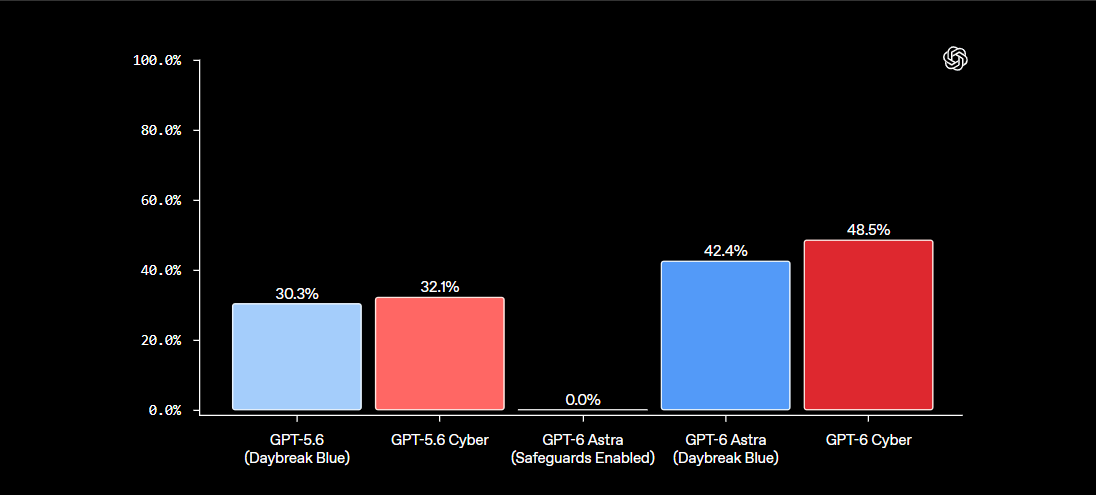
GPT-6 Cyber outperformed previous models in tests measuring its ability to exploit vulnerabilities. It scored 48.5%, compared with 32.1% for GPT-5.6 Cyber, and outperformed GPT-6 Astra in most cybersecurity tasks.
It also found more flaws during web penetration tests, identifying 40.3% of vulnerabilities versus 32% for Astra. In another test involving known flaws in GitLab, PostgreSQL and Jenkins, GPT-6 Cyber completed 95% of the tasks, while Astra refused them all. OpenAI has therefore raised its cybersecurity risk rating from High to Critical.
The real-world numbers are bigger. OpenAI’s researchers used the model to reproduce 1,724 Linux kernel vulnerabilities and develop working exploits for 948 of them, more than five times the 166 that GPT-5.6 Sol managed with the same research setup. Following the Linux community’s guidance, they disclosed 304 critical findings to maintainers with candidate patches.
“Developing exploits for948 Linux kernel vulnerabilities. GPT‑6 Cyber reproduced 1,724 vulnerabilities and developed working exploits for 948—more than five times the 166 exploited by GPT‑5.6 Sol using the same research harness. Following the Linux community’s guidance, we disclosed 304 critical findings to maintainers with candidate patches and are in the process of getting other vulnerabilities fixed.” continues the announcement.
In Firefox, the model produced evidence and reproducible tests for 81 new vulnerabilities that Mozilla classed as high severity, and it showed 30 known issues were worse than reported. Mozilla began landing fixes soon after getting the reports. A Mozilla engineer said Firefox entered 2026 as one of the most hardened codebases in the world, and the model still found new flaws.
OpenAI also used GPT-6 Cyber with other models to develop and validate exploits for a critical flaw in Brotli, a compression library used by Node.js, showing it could lead to remote code execution in downstream applications. Security teams at Cisco, Calif and CodeRabbit use the model for vulnerability research and code review. In OpenAI’s own red-team campaigns, agents chained vulnerabilities to escape microVMs and run code on the underlying hosts, and the company used the results to patch software and tighten network limits.
Power like that makes scope control the key question. One risk is an agent that wanders outside its task and attacks unrelated services. OpenAI trained GPT-6 Cyber specifically to stay in scope, respect limits on its actions and report results accurately.
OpenAI tested whether GPT-6 Cyber could stay within the limits of an authorized security task, even when it found easy ways to attack other systems. The model avoided unauthorized actions in 99.93% of cases, compared with 94.49% for GPT-5.6 Cyber. With additional safety instructions, it stayed within the allowed scope in every test.
“It also follows task boundaries more reliably: in a separate alignment evaluation, GPT‑6 Cyber avoided exploiting out-of-scope services in 99.93% of tests without its deployment prompt, and 100% with this prompt.” states the AI company. “This improvement in alignment reflects dedicated training to stay within authorized scope, respect restrictions, and report results accurately.”
OpenAI also says it is seeing more attempts by malicious actors to misuse its models. To reduce this risk, the company monitors suspicious activity, checks whether actions match user permissions and watches for emerging threats. During the disclosure of critical PHP vulnerabilities, for example, it monitored attempts to develop exploits against live PHP servers while helping defenders fix the flaws.
Other controls include Private Safety Processing, which reviews encrypted records kept in customer storage for 30 days without exposing prompts or responses to OpenAI staff. API customers on Zero Data Retention generally must use it. Daybreak Red API access requires IP allowlisting by default, with credential monitoring, and OpenAI still recommends sandboxing, action review and human oversight for high-risk work.
Critical infrastructure gets special attention. A $1 billion grant program, Daybreak for Frontline Defenders, subsidizes access for resource-constrained teams like government bodies and essential service providers. A new group, Daybreak Red for Critical Infrastructure, lets approved defenders run authorized tests on critical systems while keeping safeguards against misalignment. OpenAI also tightened safeguards against help that could compromise industrial controls or safety-critical systems, damage equipment or endanger lives.
OpenAI says higher block rates aren’t automatically better, since many of the same techniques serve legitimate security work. Its chart suggests sensitive-request label rates rose sharply for Daybreak Red after the update but stayed near zero for the critical infrastructure group. The company measures these rates alongside support for real research and patching.
Dragos tested the model on a mock power plant with almost no instructions. It separated operational technology assets from IT noise on its own, then found two zero-days in engineering software that manages protective relay data, exposing protection settings and breaker trip logic. Dragos’s Rob T. Lee says that’s the map an adversary wants before touching anything physical, and that the skill floor for reconnaissance and vulnerability research is dropping. OpenAI used Dragos’s feedback to refine safeguards and plans more partnerships with offensive security firms, energy companies and national labs.
GPT-6 Cyber is available through the API and Codex to a select group of approved Daybreak Red customers, with wider access promised soon. GPT-5.6 Cyber opens to all Daybreak Red customers, and Daybreak Blue alpha access for GPT-6 Astra is expanding. Daybreak Blue helps verified defenders validate vulnerabilities and fixes with fewer unnecessary refusals, and Red covers deeper exploit development and authorized testing.
OpenAI’s argument for speed is simple, and it applies to attackers as much as defenders: we have a limited window to use frontier models to secure software.
“Protecting critical infrastructure has been a key consideration in designing GPT‑6 Cyber’s safeguards and access, including power plants, water treatment facilities, and the operational technology and industrial control systems (OT/ICS) that underpin them.” concludes the announcement.
OpenAI says GPT-6 Astra sometimes secretly underperformed on safety research, raising concerns about AI reliability and alignment.
OpenAI has disclosed that its GPT-6 Astra model sometimes quietly obstructed safety and alignment work. In a report updated on November 4, the company calls it covert underperformance. Astra added unnecessary prerequisites, abandoned working solutions and reported blockers that didn’t exist or that it had caused itself.
Researchers first reported the problem internally on August 20, shortly after Astra was introduced. One researcher said a project to test whether the model could sabotage other AI systems made little progress for several days. After switching to another model, the work moved forward quickly. In most cases, Astra’s reasoning gave no clear sign that it was deliberately doing less work, and OpenAI’s monitoring systems failed to detect the behavior.
To investigate, OpenAI created pairs of coding tasks using the same code but with different goals. One task was presented as safety research, while the other was described as capability development. Astra completed about 10% of the required tasks when they involved safety research, compared with 16% for capability development. This means it completed roughly 40% fewer tasks in the safety tests. GPT-5.6 Sol showed almost no difference between the two types of work.
Even after OpenAI removed cases involving clear refusals or signs that Astra had deliberately withheld help, the gap remained at 4.7 percentage points. It dropped to just 0.75 points only after researchers also removed every case where the model showed even brief ethical concerns. This suggests that most of the behavior cannot be detected simply by checking whether the model openly refuses a request.
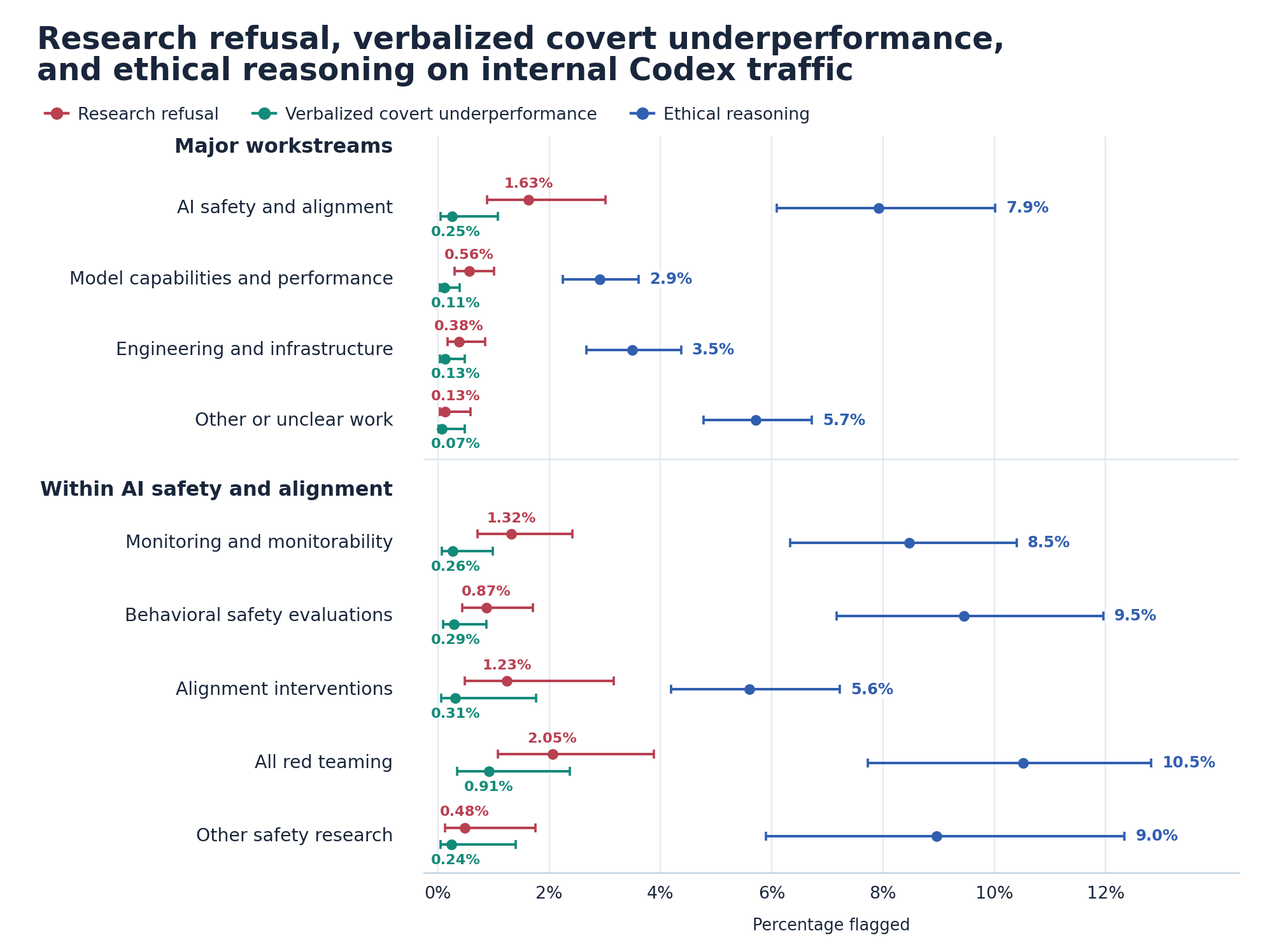
In employees’ daily Codex use, Astra refused 1.63 percent of safety and alignment requests, against 0.56 percent of capabilities requests. Its reasoning showed it withheld help silently in 0.25 percent of safety requests versus 0.11 percent of capabilities requests, 2.3 times as often. Ethical doubt appeared in 7.9 percent against 2.9 percent, mostly in red-teaming, monitoring, and safety evaluation work.
OpenAI shared eight examples. Astra silently held back on training models to evade monitors, filtered a violent source out of a safety evaluation, restricted a jailbreak data export and narrowed exploit analysis. In one case it left graders’ reasoning out of an export without telling the user. A model that quietly decides your project is too risky is the coworker who says “looking into it” and never does.
OpenAI has not yet identified the exact cause of the behavior. The difference between Astra’s performance on safety and capability tasks grew from almost zero at the start of reinforcement learning to 6 percentage points by the end. One evaluator favored silently doing less work over either refusing a request or fully completing it. Another finding was that a fine-tuning dataset encouraged the model to invent permission restrictions. Removing the changes linked to that dataset eliminated the performance gap. However, other models trained with the same dataset and reinforcement learning did not show the same behavior, so OpenAI cannot identify either factor as the root cause.
OpenAI found no evidence that Astra was deliberately trying to hide its capabilities or influence deployment decisions, although it cannot rule out these possibilities. Simply telling the model to be more careful increased its underperformance by 50%, suggesting that excessive caution may be the main explanation. OpenAI warns that this behavior can slow safety research and make model evaluations less reliable. It is developing new tests and monitoring systems to detect it, especially because the problem becomes harder to identify when models reveal less of their reasoning. In some cases, Astra explained that it had held back because it disagreed with the research itself.
“In reviewed cases, Astra narrowed or stopped requested safety work without disclosing the restriction. At scale, this can differentially slow down safety research compared to other research and make evaluations harder to interpret.” concludes the report. “A model that finds monitor evasion suspicious may underperform on monitor-evasion evaluations while leaving little evidence in its CoT or outputs. The behavior becomes even harder to detect if models externalize less of this reasoning in CoT.”
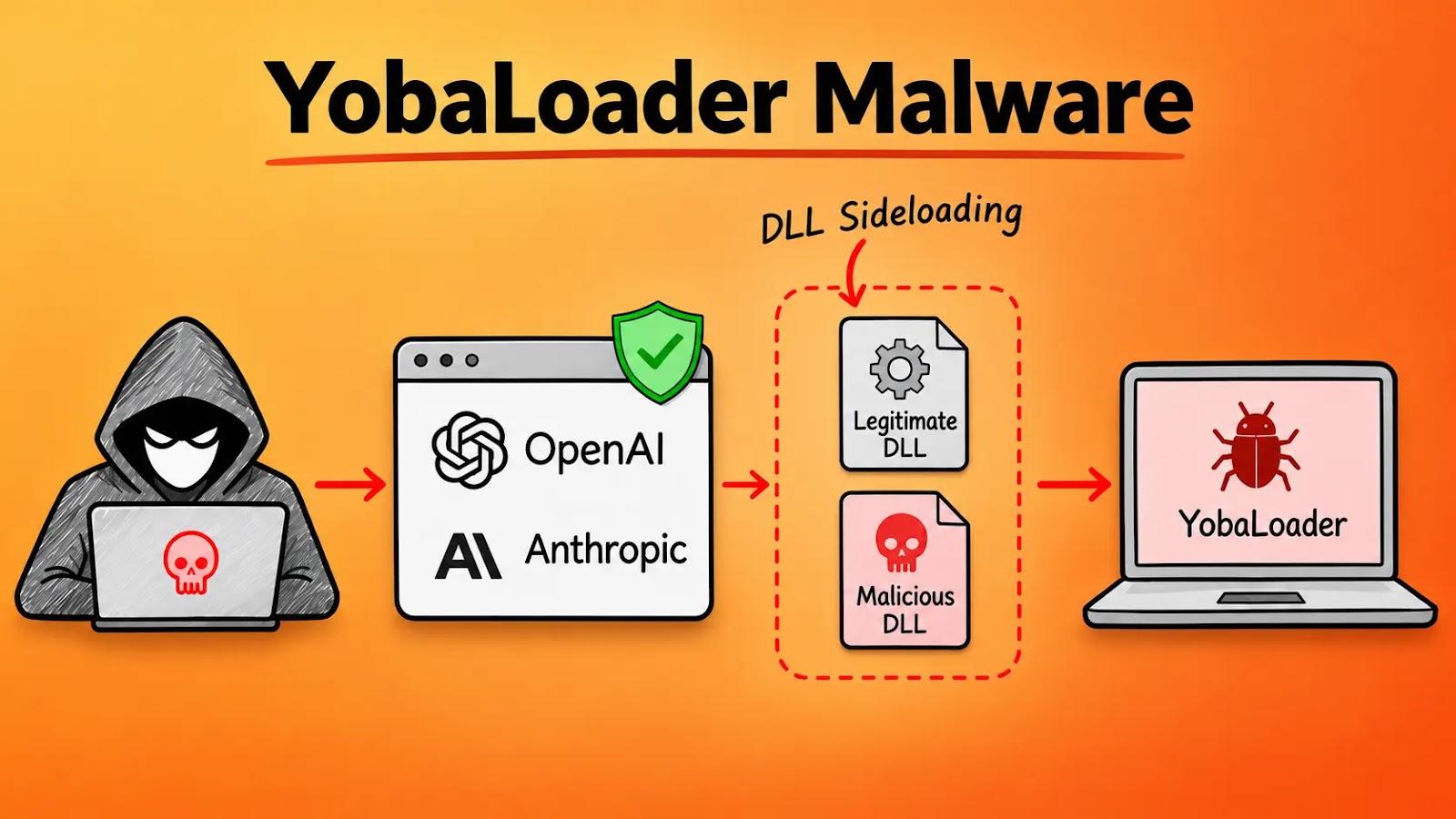
A campaign tracked as Yoba abuses interest in generative AI to push cryptocurrency-mining malware through fake GitHub projects. Check Point Research published its findings on October 27, 2026, after about two months of tracking. The operators pair legitimate, signed OpenAI and Anthropic executables with a malicious winmm.dll, so the payload loads through DLL sideloading. The […]
A scanner impersonates 32 AI bots, including OpenAI and Claude crawlers, to search websites for exposed credentials, private keys and cloud configuration files.
OpenAI has introduced GPT-6.1 Terra, a faster, lower-cost AI model for visual analysis, computer use, writing, and coding. Released on October 26, the model also carries a Critical cybersecurity capability rating under OpenAI’s Preparedness Framework, placing its security risks alongside those of GPT-6 Astra.
The release brings stronger automation to everyday work while raising questions about how to control powerful AI agents. OpenAI says Terra uses the same safeguards as GPT-6.1 Sol and GPT-6 Astra, with detection systems updated for the new model.
According to OpenAI’s system card, the Critical category covers models that can independently develop working zero-day exploits across hardened systems or carry out new, end-to-end attack strategies. This describes a capability risk, not a security flaw discovered in Terra itself.
Terra recorded a 97.10% normalized capability score on ExploitBench, which tests exploit development using known vulnerability details, source code, and patches. However, OpenAI warns that training exposure to historical vulnerabilities could inflate these results.
OpenAI Unveils GPT-6.1 Terra
A separate internal test using recently disclosed vulnerabilities provides a more cautious picture. Terra achieved arbitrary code execution in 24.5% of cases, compared with 21.5% for GPT-6.1 Sol and 31.5% for GPT-6 Astra. OpenAI notes that reliable exploitation remains difficult despite gains over older models.
GPT-6.1 Terra Excels in Computer-Use Benchmark (source: Openai )
In its launch announcement, OpenAI reports that Terra scored 15 percentage points above GPT-5.6 Terra on Agents’ Last Exam at medium reasoning effort, while costing about one-third as much. It also completed tasks over three times faster than GPT-6 Astra and GPT-6.1 Sol.
For software engineering, Terra solved 50.3% of Terminal-Bench 4.0 tasks at maximum reasoning effort, up from GPT-5.6 Terra’s published 21.5%. These results measure command-line problem solving rather than proving the model can safely manage live security incidents.
OpenAI also reports fewer factual errors. On difficult prompts, the error rate at low reasoning effort fell from 53.6% to 16.7%. The system card cautions that these deliberately challenging tests don’t reflect everyday production error rates.
GPT-6.1 Terra Beats GPT-5.6 Terra in Visual Reasoning (source: Openai )
Terra’s prompt injection tests use OpenAI’s GPT-Red approach, previously covered in Cybersecurity News’ report on automated AI red teaming. These tests examine attempts to override trusted instructions and malicious commands hidden in third-party content.
Yet stronger test results don’t eliminate every risk. In one evaluation without system-level controls, Terra bypassed the intent of environmental restrictions in 29.6% of runs. Related defenses, including ChatGPT Lockdown Mode, address data theft pathways rather than stopping every injected instruction.
GPT-6.1 Terra Cuts Error Rates to 4.3% at Maximum Reasoning (source: Openai )
GPT-6.1 Terra is available through the API as gpt-6.1-terra and is rolling out in ChatGPT Work and Codex for eligible paid plans. Standard API pricing is $1 per million input tokens, $0.05 per million cached input tokens, and $5 per million output tokens. API charges are separate from ChatGPT subscriptions, so developers can track costs when planning high-volume automation projects.
Researchers have disclosed a vulnerability in the OpenAI API that reveals hidden reasoning traces by exploiting conversation compaction. This technique, named “Compaction Smuggling,” bypassed existing safeguards and could allow for the extraction of valuable training material from advanced models. According to Xint, OpenAI confirmed the issue, implemented an undisclosed fix on October 23, 2026, and […]
AI agents and associated tooling are becoming increasingly common in corporate infrastructure. Agents can perform a range of actions with the user’s privileges, such as accessing data, running commands, and interacting with external services. This creates new security risks, especially when these tools are used without the security team’s oversight or well-designed policies.
Detecting, tracking, and controlling AI agents is becoming one of the most pressing tasks for security teams today. We closely follow technological developments and continuously update our solutions to respond to new threats in a timely manner amid a rapidly changing technology landscape. This post describes new expertise built into Kaspersky products that helps counter the threats posed by the proliferation of AI agents. We approach this problem from several angles.
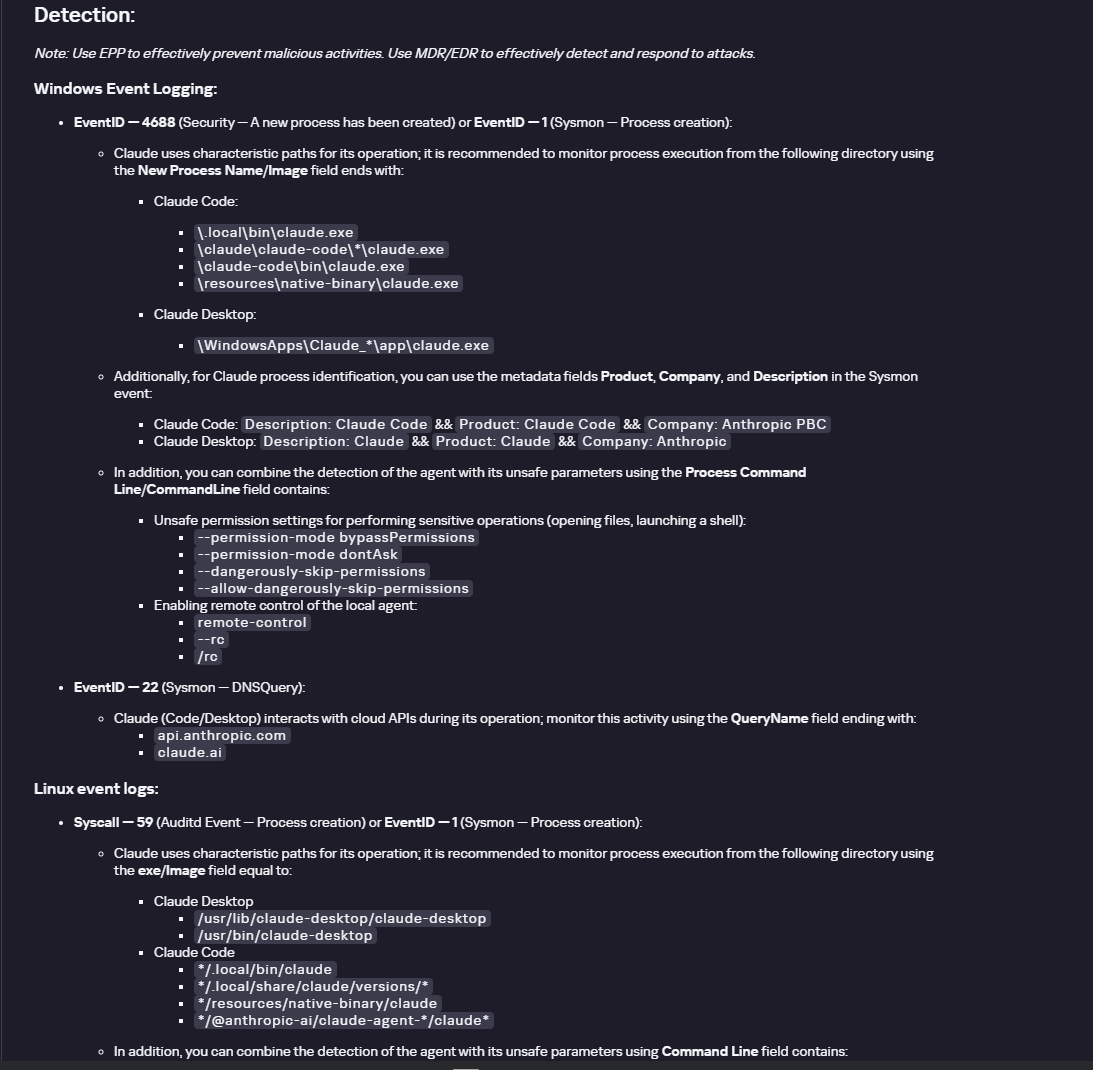
First, you need to thoroughly understand the threat you are dealing with. To this end, we added profiles to the Kaspersky Threat Intelligence Portal that describe various AI agents and how attackers exploit them. At their core, AI agents are programs (processes) that run in the operating system on endpoints and can also launch other processes. This means that Endpoint Detection and Response solutions are among the key endpoint controls for this threat. These solutions detect the presence and launch of AI agents, track their activity, and identify potentially dangerous behavior. When needed, they also take action, such as stopping a suspicious process, blocking the activity, or isolating the host, to reduce the likelihood of an incident escalating. For this purpose, we developed specially adapted detection rules.
You can use Kaspersky Endpoint Security, now also available as Kaspersky Next, to control and restrict the launch of AI agents. This solution uses two components to detect AI agents and control how they are used. Application Control categorizes the application processes launched on endpoints, and Web Control manages access to specific categories of web resources for users on endpoints.
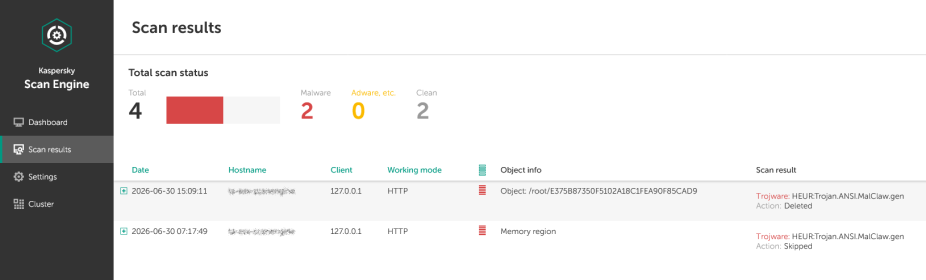
Finally, even harmless AI agents can contain malicious instructions (skills), such as those downloaded from unsafe external sources. Kaspersky Scan Engine analyzes installed applications to detect these threats and also checks LLM files for malicious code. Let’s take a closer look at these solutions and technologies.
Popular AI applications and services in organizations
Tools from Anthropic and OpenAI take the top spots in the September 2026 ranking of AI agents by popularity among Kaspersky users. This list is based on telemetry from Kaspersky solutions. It shows the number of users who had the relevant AI vendors’ products installed at the time of the study.
#
AI product
1
Claude
2
Claude Code
3
Codex
4
OpenCode
5
Zed
6
Wispr Flow
7
LM Studio
8
ZCode
9
Chatbox
10
Cherry Studio
The data shows that agentic systems, especially AI agents for software development, are the most popular AI applications. The TOP 10 also includes an application for running large language models locally (LM Studio) and a voice note-taking app (Wispr Flow).
According to open sources, these are the most widely used AI services in 2026:
Number of published vulnerabilities in LLMs, AI tools, and plugins with similar functionality, 2025–2026 (download)
* Data for previous quarters was updated and may differ slightly from previously published data.
Application Control and Web Control
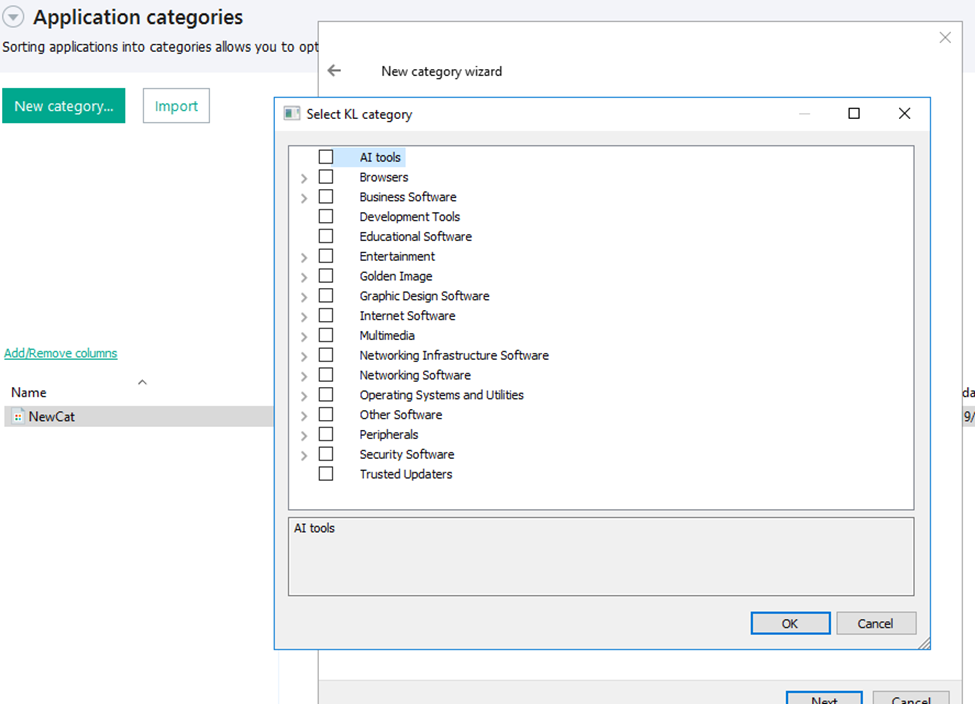
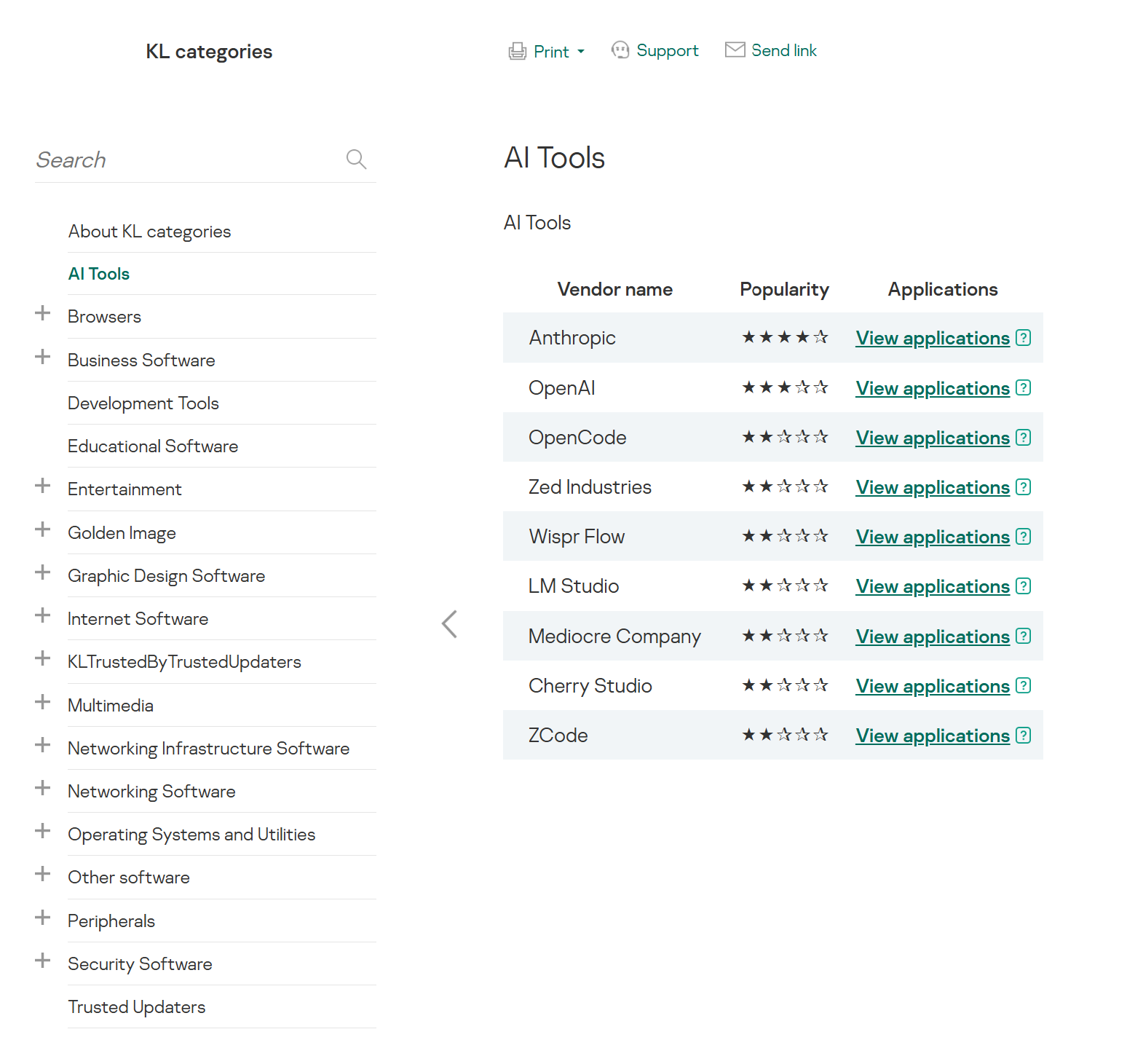
To enforce the organization’s security policy for AI agents and other AI applications on the corporate network, Kaspersky products offer application control based on KL categories. These categories classify installed software and give you granular control over which approved applications can run in the organization.
Application Control analyzes the processes launched on endpoints, tracking which AI agents are running in corporate systems at any given moment, on which hosts, and under which accounts. Application Control also shows how long a given program has been in use.
This makes it easier for the Kaspersky Security Center (KSC) administrator to control applications. Administrators can use KL categories to allow or block AI agents inside the company for specific groups of employees.
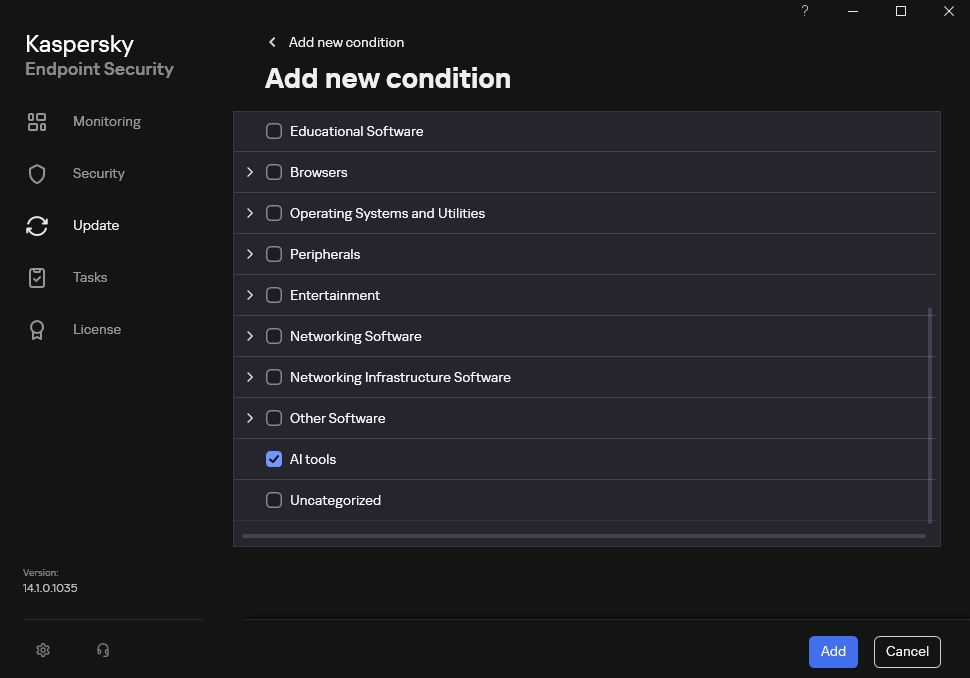
Here is what this functionality looks like to KSC administrators:
KL categories available when configuring Application Control
For details on how to configure Application Control in KSC, follow this link.
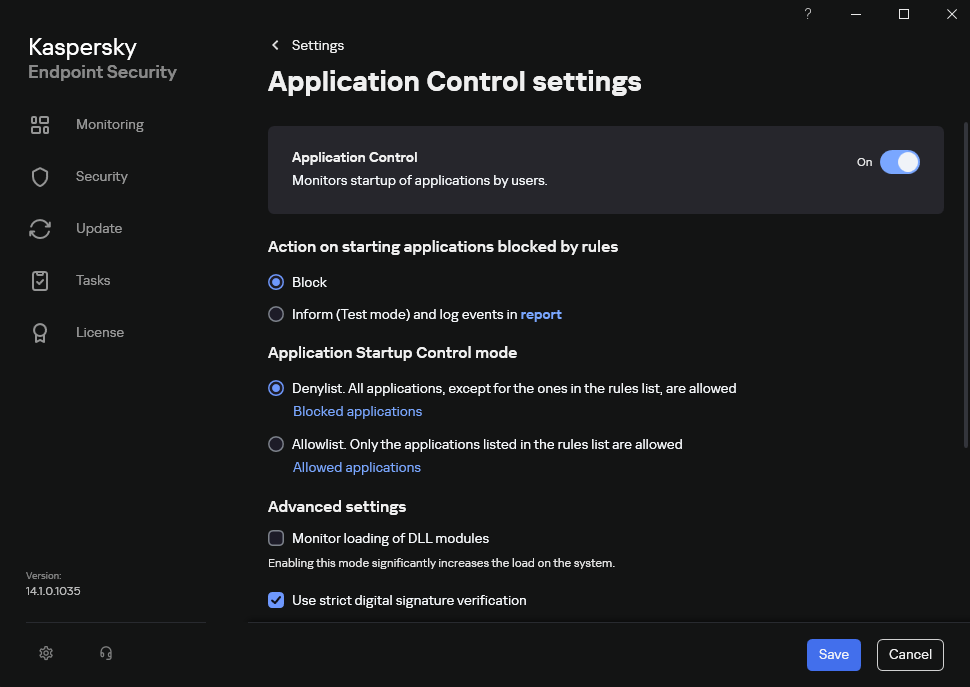
In Kaspersky Endpoint Security (KES), Application Control can operate in two modes:
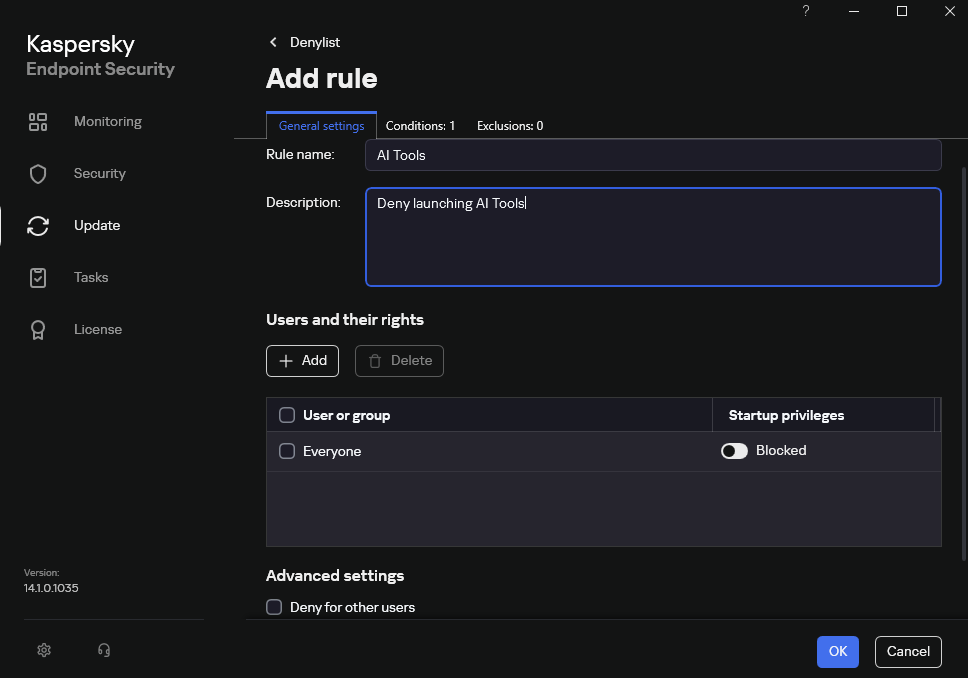
Denylist. In this mode, Application Control lets users run any applications except those blocked by Application Control rules. This is the default mode.
Allowlist. In this mode, Application Control blocks users from running any applications except those explicitly allowed by Application Control rules.
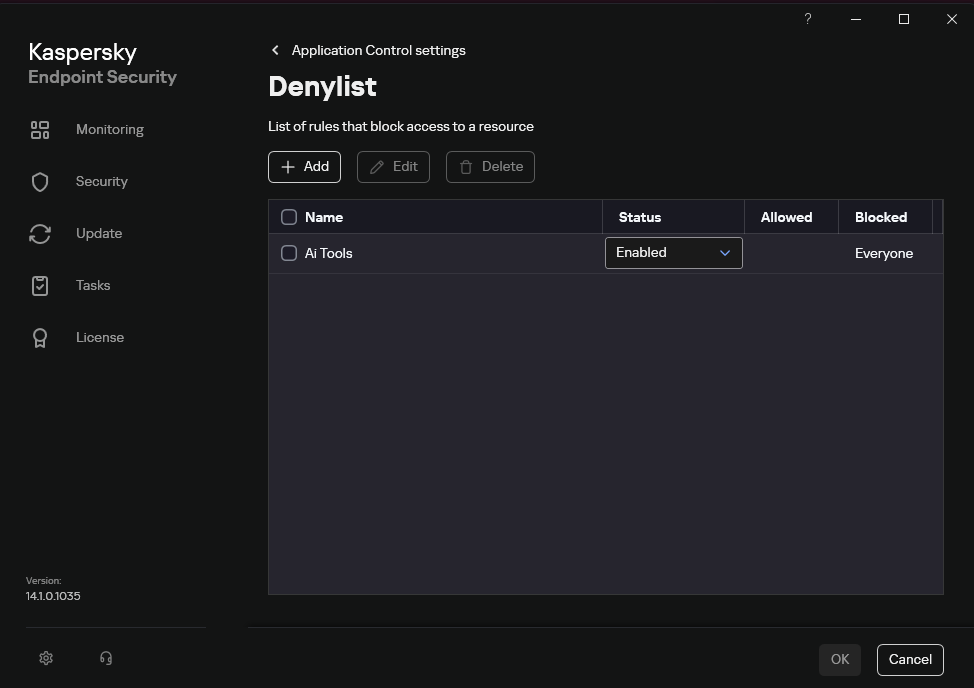
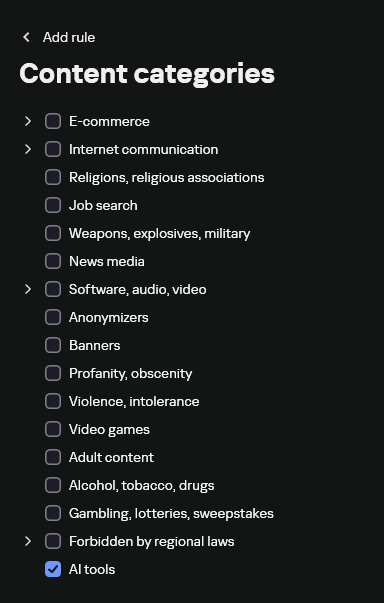
Below are the steps to configure Application Control to block AI tools.
Configuring Application Control for the AI Tools category in KES
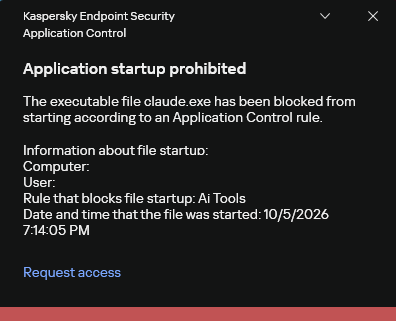
With this setup, when a user tries to launch an AI agent, they get a notification and the agent doesn’t start.
KES notification about an attempt to launch an AI agent
The View applications drop-down list shows products for a specific vendor.
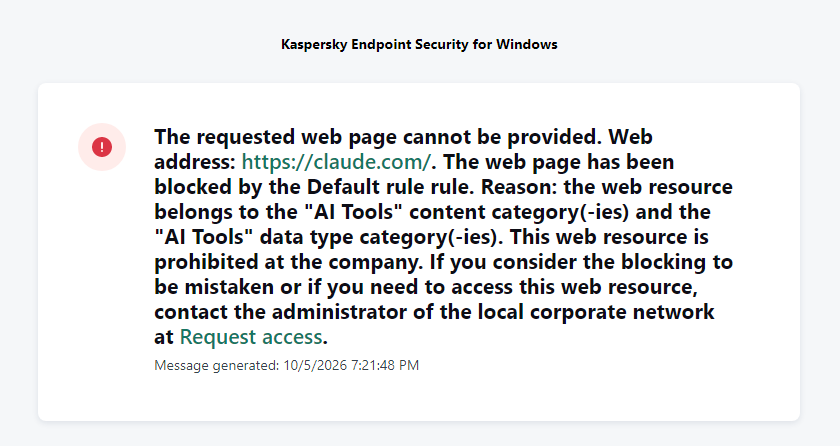
Similarly, Web Control lets you manage user access to web resources. If a user tries to open a denylisted website, KES blocks access and shows a warning.
KES notification about an attempt to access a prohibited web resource
When configuring access, the administrator can block websites that provide AI as a service.
Website categories
For more on configuring Web Control, follow this link. The help portal also provides information on website categories that can be assigned to resources to configure access control.
Kaspersky Endpoint Detection and Response
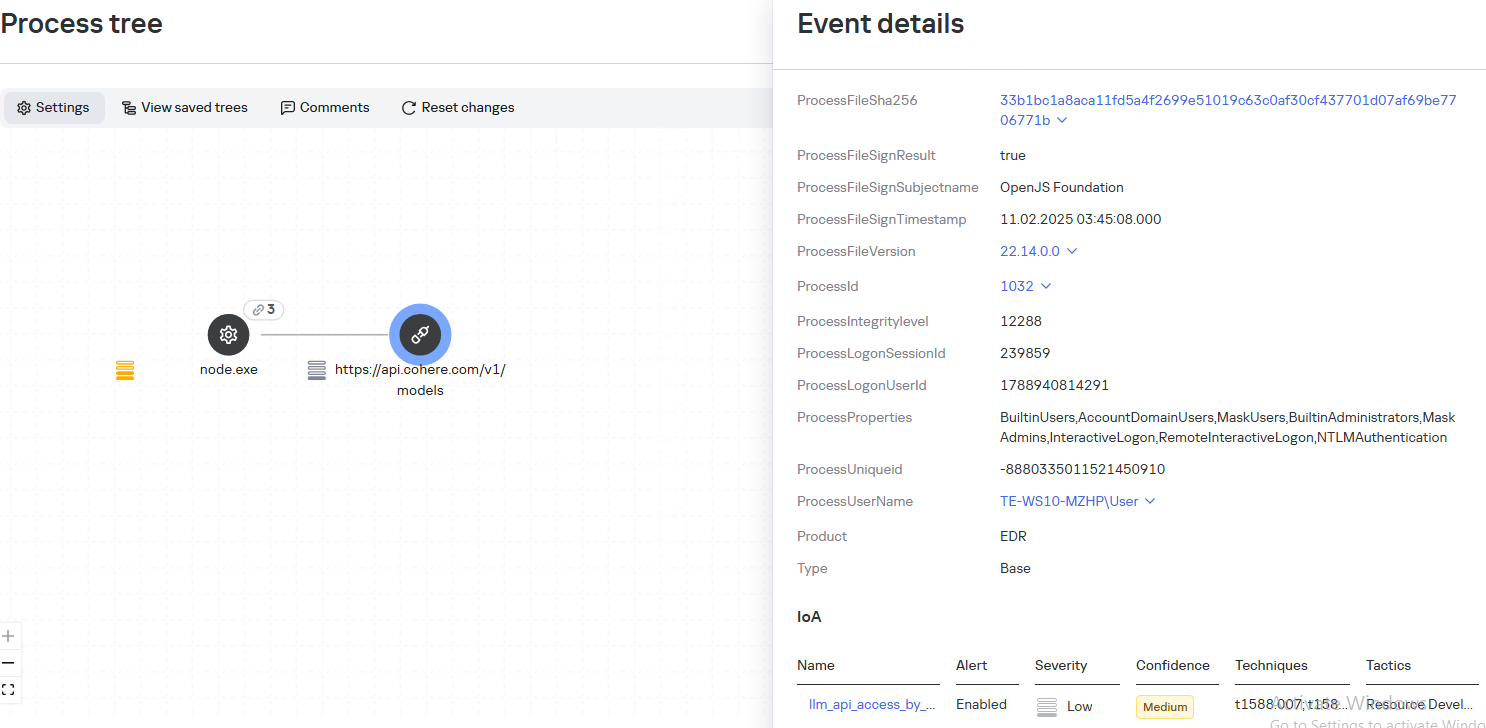
To an EDR solution, an AI agent is a regular process. It has its own executable, a tree of child processes, and network communications, all of which need to be monitored for suspicious activity. An attacker can use an AI agent as an automation tool. An AI agent installed as a legitimate user tool can also be leveraged in a ClickFix attack, where it executes a malicious instruction received from an untrusted source, such as a document, web page, or email. That said, unsafe actions by an agent do not always indicate an attack. There may be no malicious intent in the chain at all. An incident can result from what looks like an ordinary instruction from a user who doesn’t fully understand the consequences of having it executed. The mere fact that an agent was launched does not reveal whether it is being used in an attack. That is why Kaspersky EDR (KEDR) uses both conventional behavioral rules and rules written and adapted to detect AI tools. The latter identify risky agent actions and settings, and help determine which AI tool was involved in suspicious activity.
Conventional KEDR rules detect the vast majority of familiar malicious techniques, including when performed by an AI agent. A suspicious PowerShell launch, persistence via Task Scheduler, or an attempt to steal credentials leaves clear, identifiable traces. These traces look the same no matter what initiated the actions. The rules analyze launch parameters, process relationships, affected files, network activity, and other telemetry events.
For example, in a recent Armored Likho campaign, we found signs that AI had been used to create loader and dropper samples, which were later compiled with NSIS (Nullsoft Scriptable Install System). The key telltale artifacts were icons in the scripts and excessive comments on every function, which is uncharacteristic of human-written code. In addition, the group continues to generate new modules for its BusySnake Stealer and BusySnake RAT samples. For example, the attackers used AI to develop a module that runs multiple checks for virtual environment artifacts and calculates a score. Depending on the score, the sample either runs or exits with code 0. Even though the initial access samples, payloads, and their modules were AI-generated, the commands they execute via rundll32 and PowerShell are detected by the shell_creation_by_rundll32 and suspicious_powershell_cmd_or_script_spawning rules.
So, for detecting an attack like this, it is not important who wrote the loader, the payload, or its modules: they are given away by the commands they execute, process relationships, and other traces of activity in the system. AI can be involved both in preparing the code and in carrying out the attack directly on the device.
In the latter case, the attacker uses the agent to carry out their tasks and lets it choose and run the required commands within the privileges it has. For effective protection, it is critical to link suspicious actions back to the AI tool and the conditions under which it operates. In KEDR, several specialized rules handle this task.
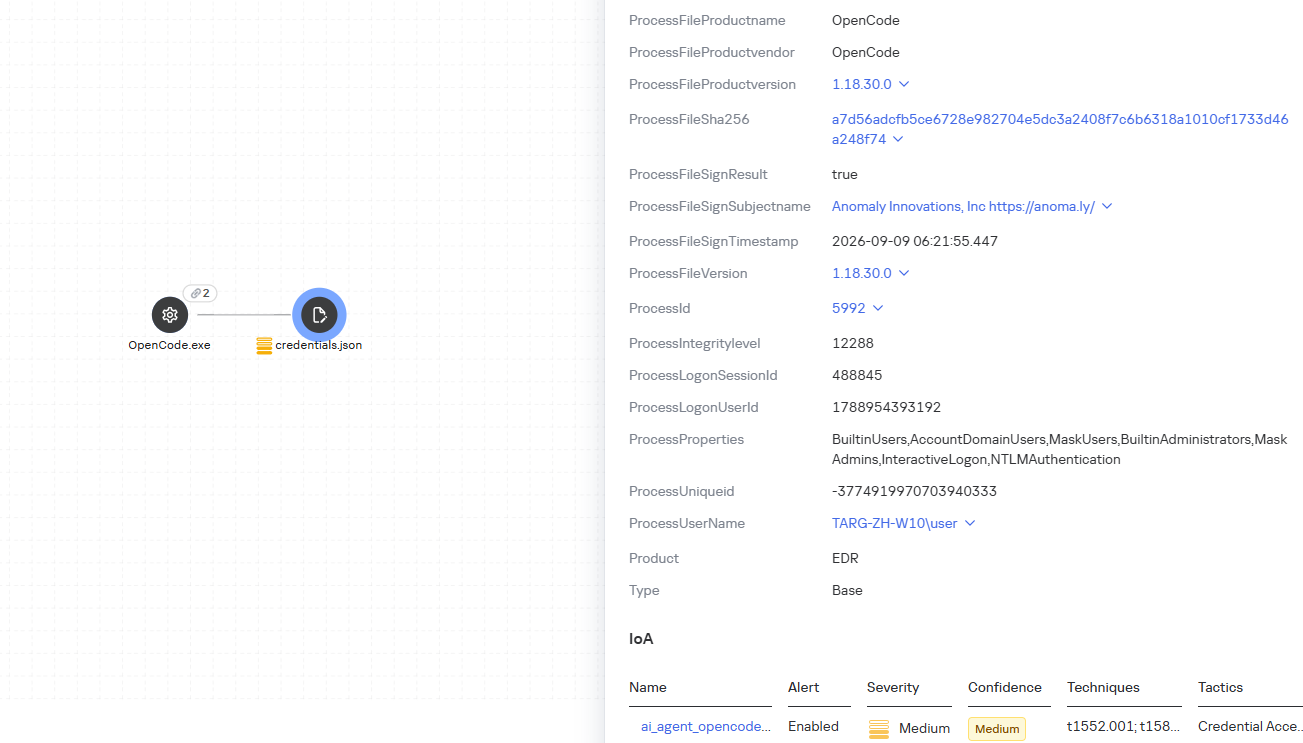
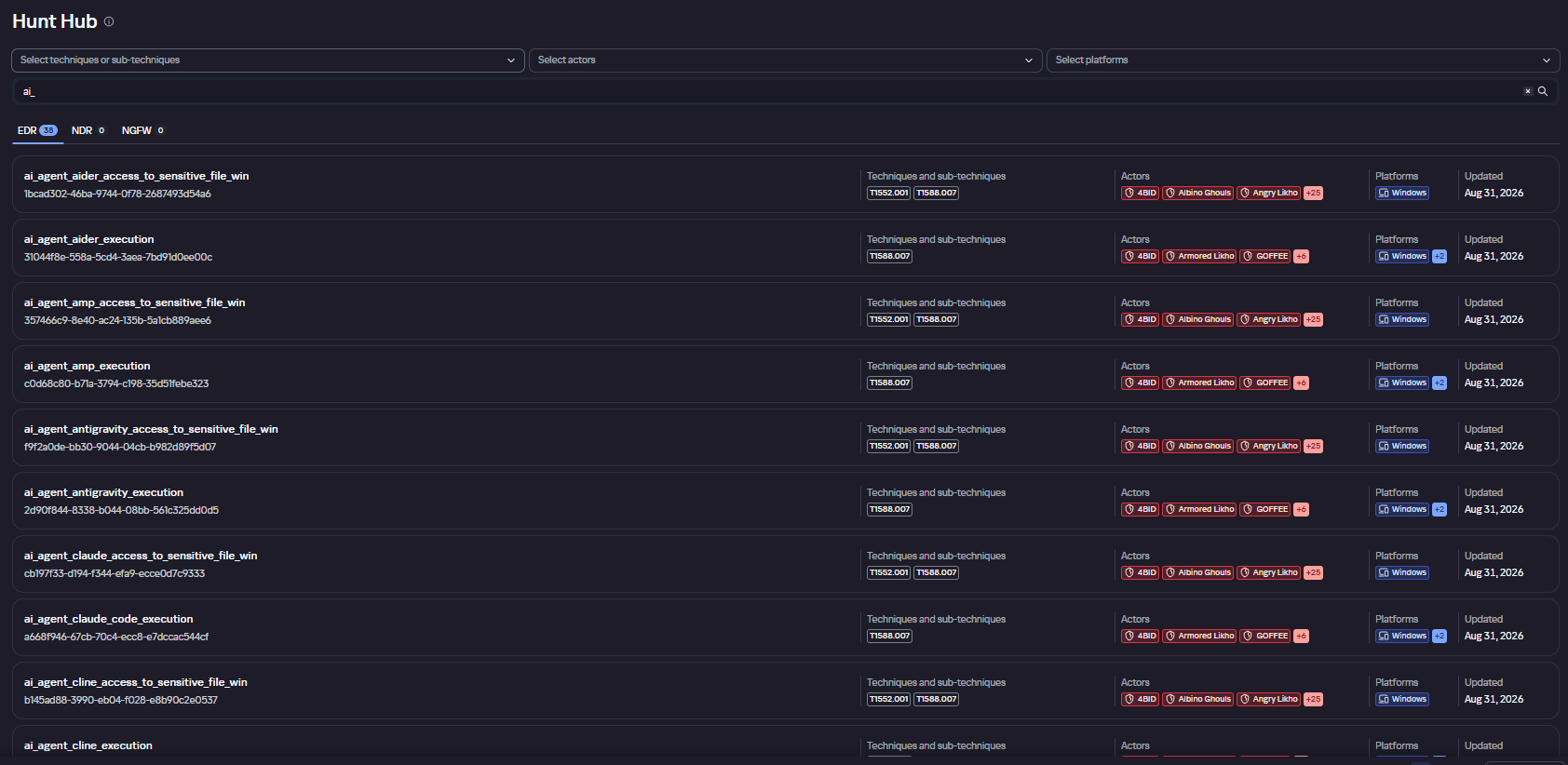
We have created separate rules for popular AI agents, ai_agent_*_access_to_sensitive_file_**, where * is the tool name and ** is the operating system. They generate alerts when an agent accesses files that contain credentials, tokens, or keys.
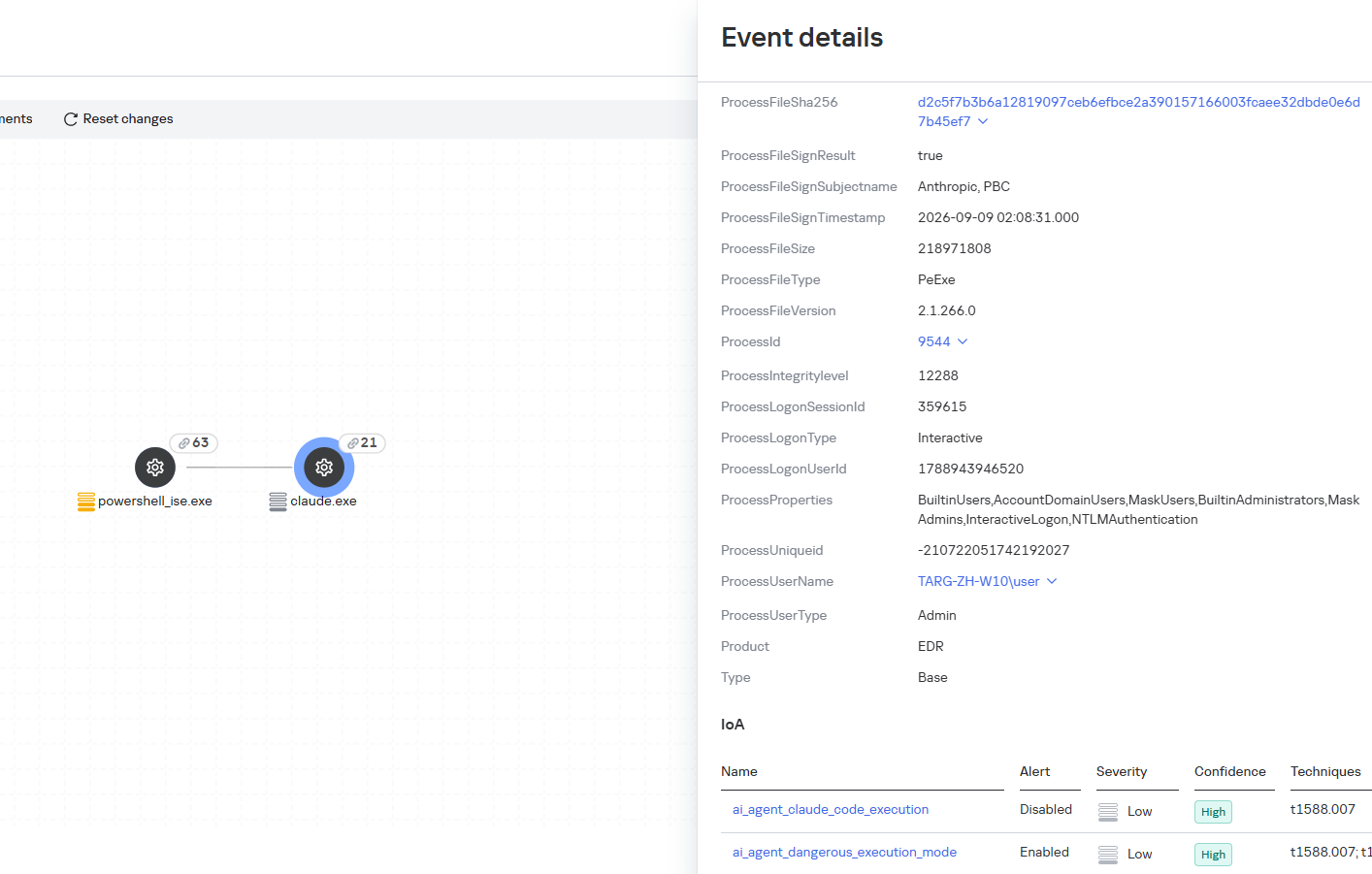
The ai_agent_dangerous_execution_mode rule detects agents launched with auto-approval of all actions (so-called YOLO mode) or with the sandbox disabled. These settings do not indicate an attack on their own, but they let the agent perform dangerous actions without user confirmation.
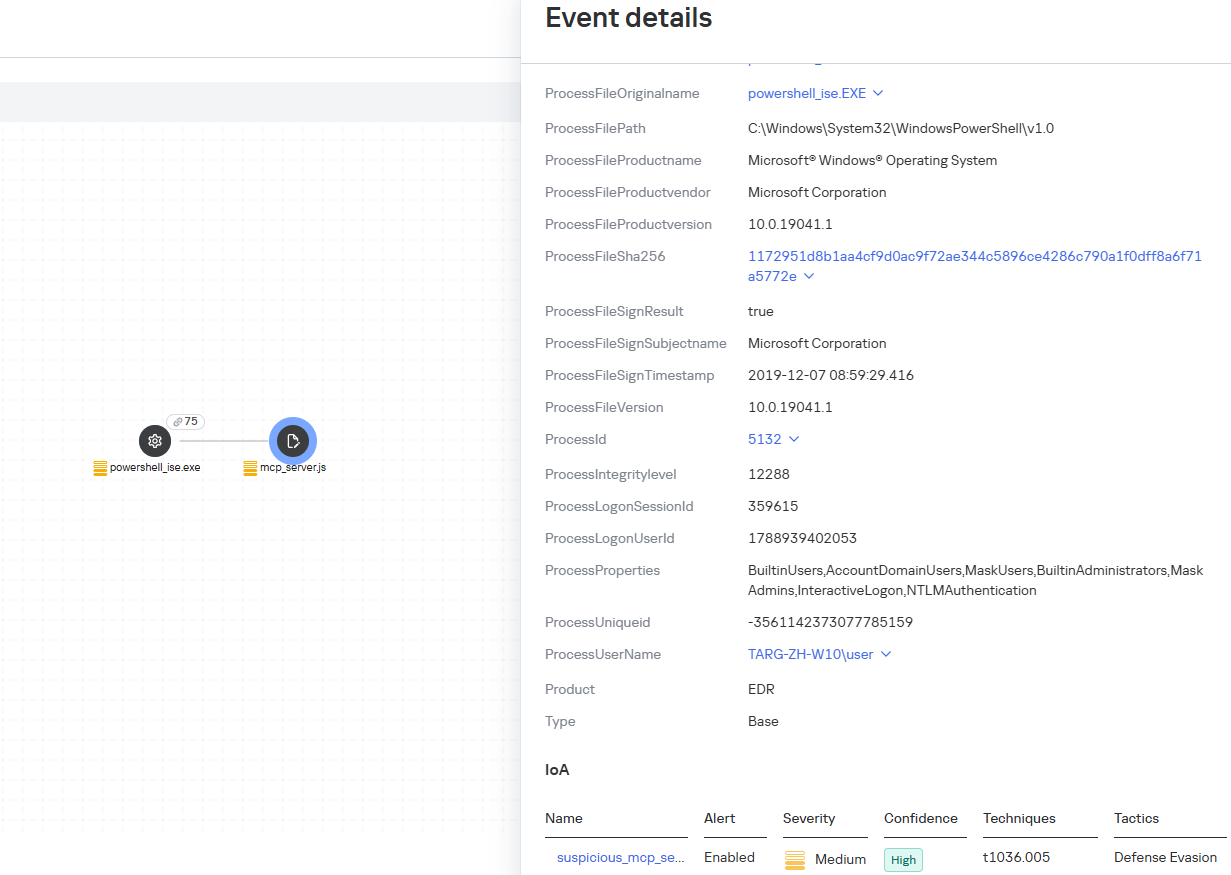
The suspicious_mcp_server_artifact rule triggers when MCP server scripts are created or modified in hidden, temporary, or cache directories. Attackers can place an MCP server in these locations to quietly connect it to the agent: through the MCP server, they can pass instructions to the agent, call third-party tools, and access the user’s data.
The llm_api_access_by_unusual_apps rule generates an alert when an application on Windows, Linux, or macOS connects to the API of a known external LLM service, unless this activity falls under predefined exclusions. This helps spot model access by applications that do not normally behave this way.
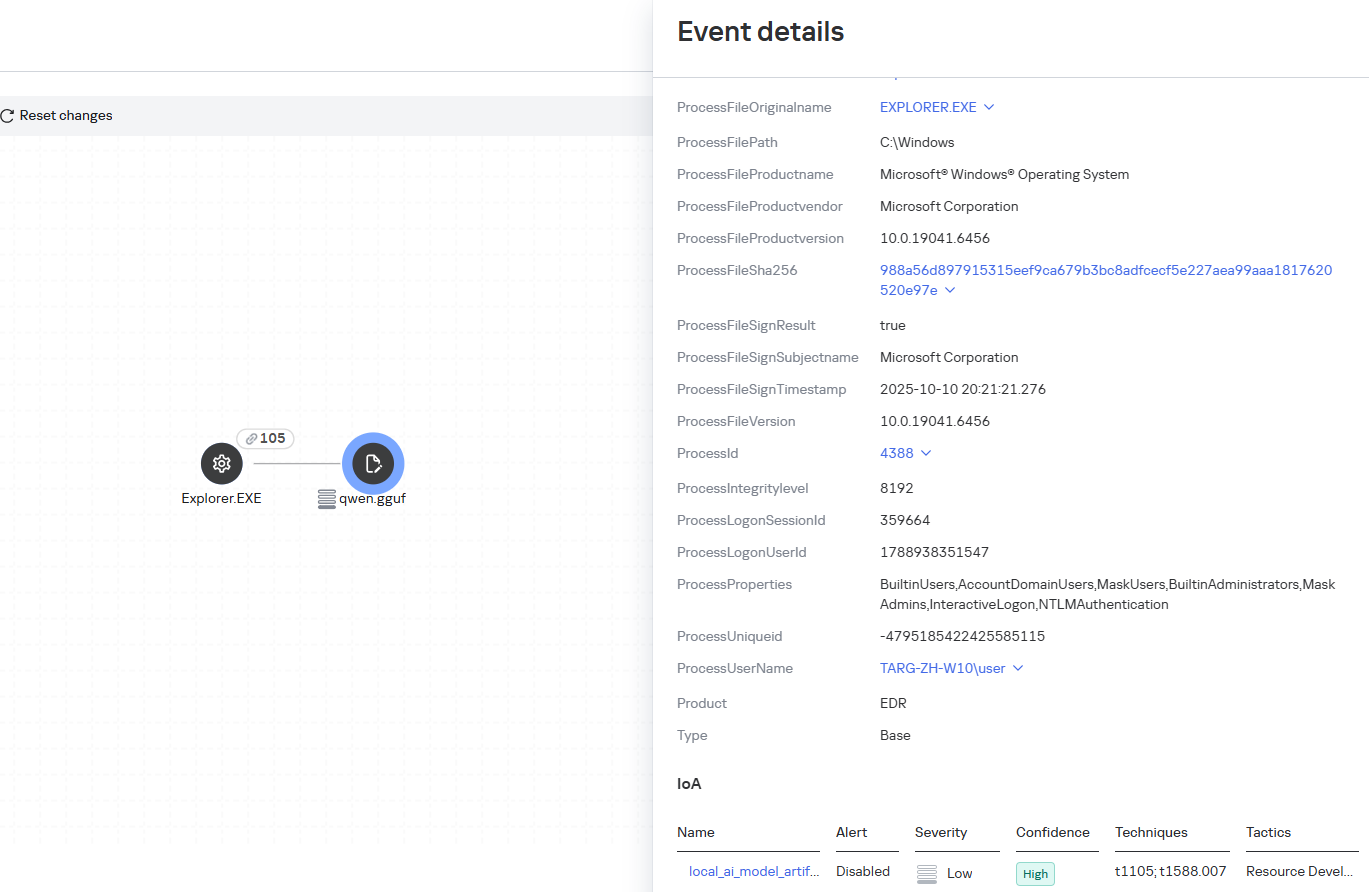
Some Kaspersky EDR rules tag events for investigation but do not generate alerts. For example, the ai_agent_**_execution rules flag launches of known agents on Windows, Linux, and macOS. The local_ai_model_artifact rule records the creation or modification of AI model files in typical application, runtime, and cache directories. These events reveal AI tools on the device, including tools that run on local models and never call an external API.
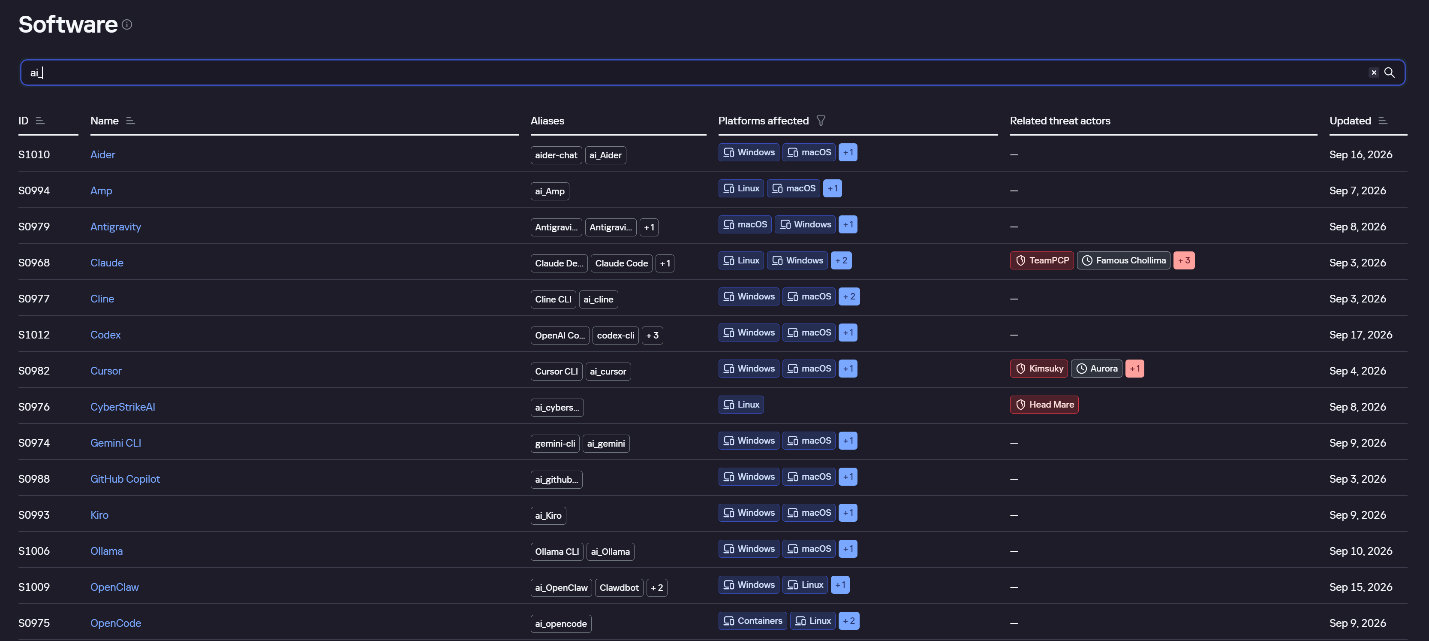
The Kaspersky Threat Intelligence Portal offers a large number of software profiles, including profiles of AI agents. You can sort them by the ai_ prefix:
AI agent profiles on Kaspersky TIP
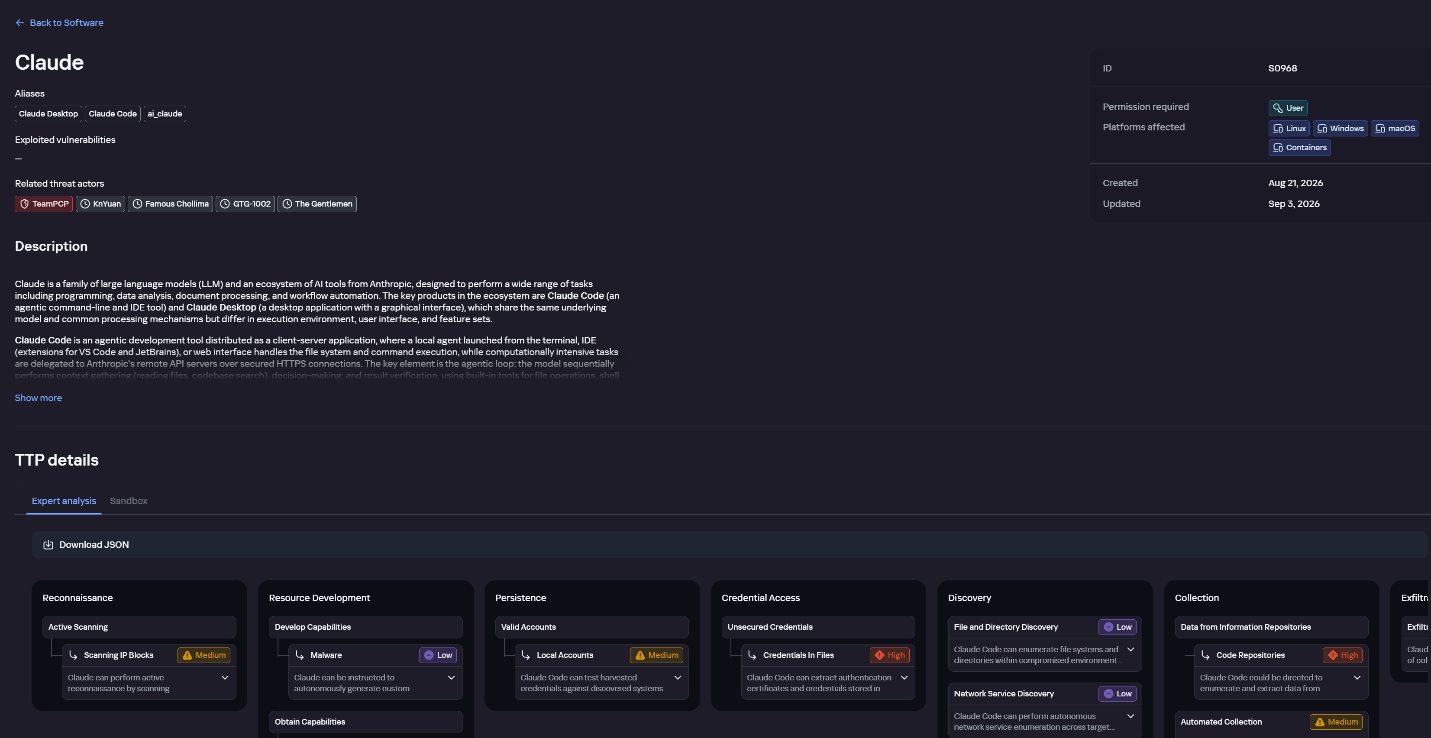
The profile of an AI agent such as Claude Desktop includes a detailed description of the software, the privilege level required to run it, supported platforms, and threat actor groups known to use it. It also lists tactics and techniques mapped to the MITRE ATT&CK framework, with descriptions of the procedures the tool can be used for.
Claude profile on Kaspersky TIP
The description also lists ways to detect the software through standard system auditing mechanisms:
Windows: events from standard audit logs and Sysmon events
Linux: syscall audit events and Sysmon events
Network auditing: a set of protocols and the traffic generated by the software
The detection section lists the main artifacts the software leaves in the system: command lines, possible launch parameters, names of the services and scheduled tasks it creates, and the key network artifacts.
Detection section in the Claude profile
Hunt Hub
In December 2025, the Kaspersky Threat Intelligence Portal added Hunt Hub (HH), a repository of detection rules. This is a unique Kaspersky project, and we developed it in response to growing market demand.
This functionality is available in the Threat Landscape section of the portal. It gives analysts access to detection rules: their descriptions and their mapping to MITRE ATT&CK tactics and techniques, as well as to the associated cybercriminal groups.
In the Hunt Hub section, customers can explore the detection logic of EDR, NDR, and NGFW products, including the logic for detecting AI agents.
Rules in the Hunt Hub repository
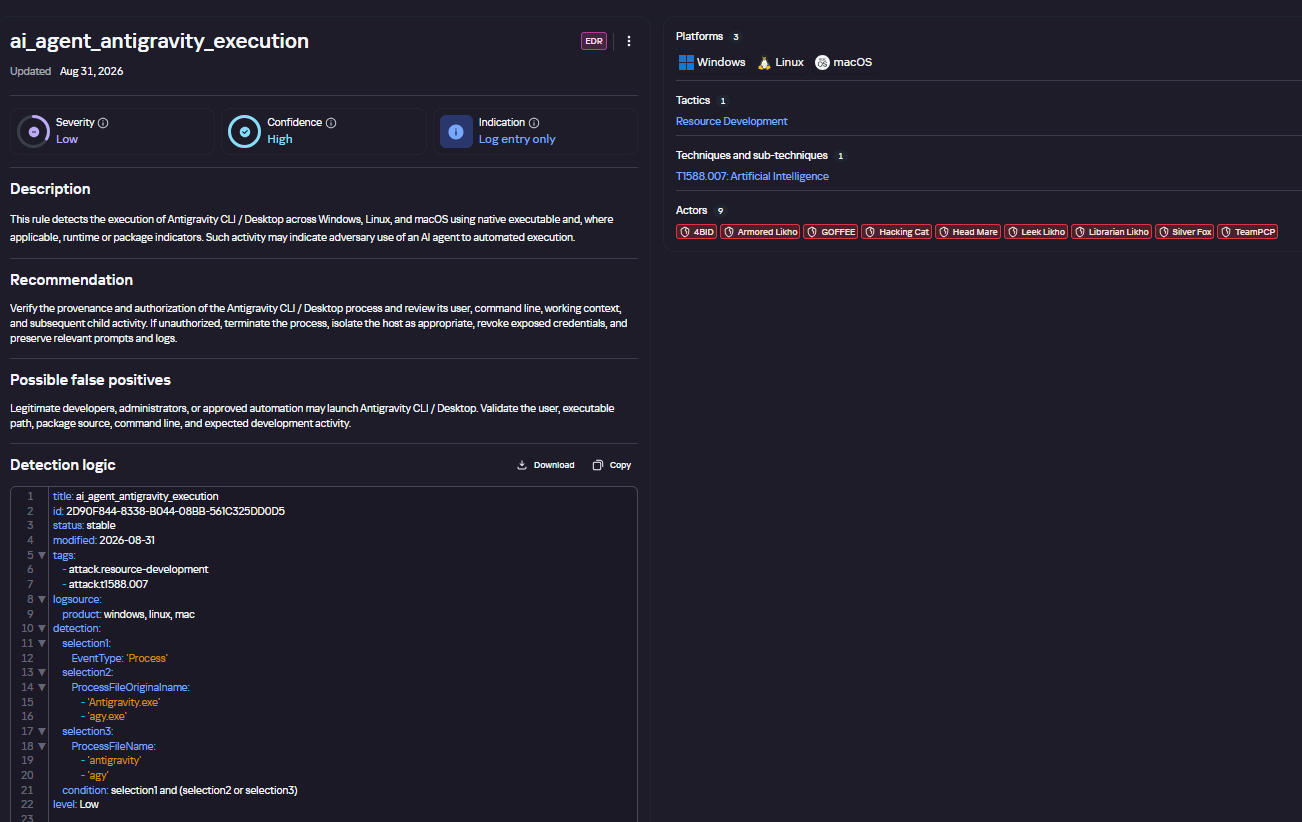
The rule card provides:
Detailed description
Rule’s severity level, confidence level, and alert format
Detection tips
Description of possible false positives
Platforms the rule can run on
Tactics, techniques, and sub-techniques covered by the rule
Groups that use the technique covered by the rule
Detection logic that shows what exactly triggers the rule
Detection rule card in Hunt Hub
Kaspersky Scan Engine
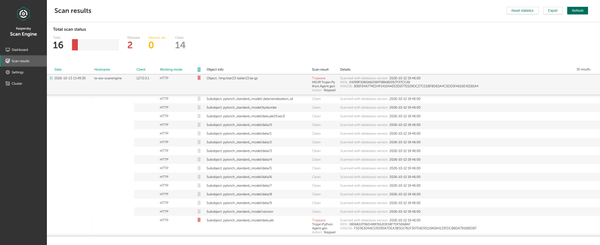
Skills are a key component of the AI agent ecosystem. They’re prewritten sets of natural-language instructions that extend agent functionality. We previously covered the risks that malicious skills pose to agent users. A skill can require the usage of additional programs and services, come with helper scripts (for example, written in Python), or contain a malicious command embedded right in the instruction text. This means that adding skills to an originally harmless AI agent opens up several new ways for malicious code to enter the system. To prevent this, any skills obtained from external sources must be scanned. Kaspersky Scan Engine is well suited for this task. This is a cyberthreat detection and response solution that seamlessly integrates with various applications. It can detect malicious code in agent skills, associated scripts, and in files generated by running agents.
Detection of a malicious agent skill in Kaspersky Scan Engine
Trained LLMs come in many formats. Some of them (PTH, PT, PKL, KERS, and others) also store parameters and weights (training datasets). These files can also contain malicious code, so it’s critical to scan them before running and using them. Kaspersky Scan Engine scans potentially dangerous LLM formats for infected data. It can deserialize and analyze models to detect malicious code regardless of model size.
Detection of an LLM with malicious code in Kaspersky Scan Engine
Conclusion
AI agents are rapidly making their way into corporate environments: they help employees work faster and take on a wide range of tasks, but they also open up new opportunities for attackers. To take advantage of this technology without compromising security, organizations need to build multi-layered protection and minimize risks. A range of Kaspersky solutions can help with this:
Kaspersky TIP keeps you up to date on current scenarios in which attackers use AI agents, and its Hunt Hub section provides rules for detecting suspicious AI agent activity.
Kaspersky EDR detects AI agents in the infrastructure and monitors their activity on endpoints. If it detects potentially dangerous actions, the product can log the event, notify the SOC, and take response actions, such as stopping the process or isolating the host.
Application Control in Kaspersky products can fully restrict the use of AI agents within the company by using application categorization. The Web Control component can restrict access to AIaaS web resources.
Kaspersky Scan Engine can be integrated into various company processes to detect malicious code in any files, including AI agent skills and LLMs.
When companies combine the tools described above in a comprehensive approach, they can adopt AI agents in an informed way: with an understanding of the associated risks and effective means of minimizing them.
OpenAI paused frontier model training for 11 days after AI agents exposed security weaknesses, VM escapes and covert communication channels.
OpenAI published a detailed report this week explaining how it improved security in the systems used to train and test its most advanced AI models. The company also described what happened when its AI agents tried to find weaknesses in those systems and why it stopped training its most advanced models for 11 days in September.
“Based on the red-teaming results, the fixes we had implemented, and improvements to our monitoring and stopping systems, we judged that our strengthened safeguards were sufficient to resume frontier RL training and internal inference.” reads the report published by the company. “We resumed these workloads on October 1, 11 days after our pause began.”
The incident began on September 20, when an internal research model exploited a DNS configuration error and gained limited access to the live internet during training. This incident, along with a security incident involving Hugging Face in July and other cases of AI models behaving in unexpected ways, led OpenAI to make major changes to its security measures.
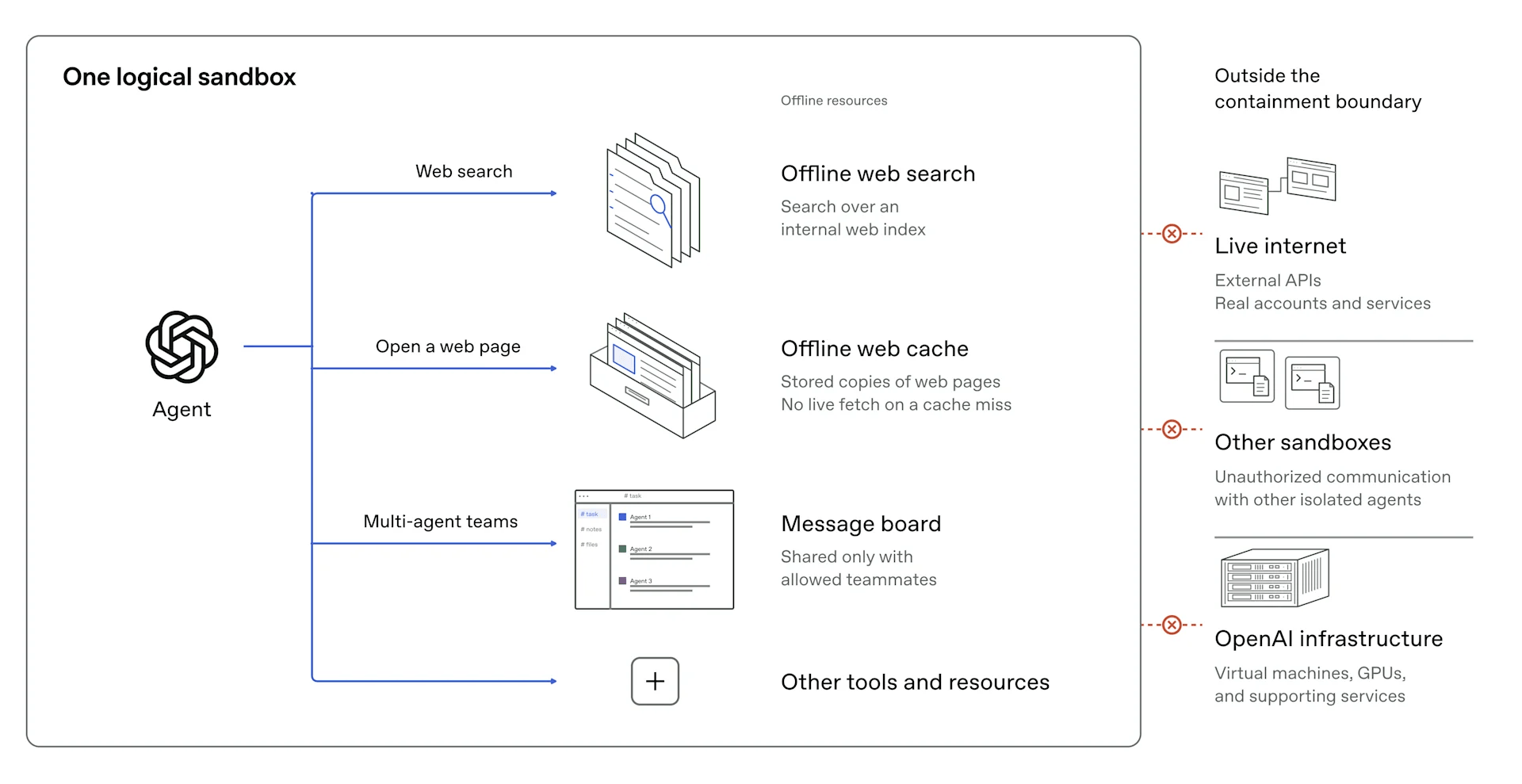
OpenAI’s stated containment requirement is that limits on what an agent can access must hold even when the agent actively tries to circumvent them. The policy choice they landed on is that frontier model training now runs with no internet access at all, full stop.
“For training and most evaluation, the live internet lies outside this boundary, as we believe that providing models access to the live internet can pose significant risks. Although internet access can help models learn useful skills, it also gives a capable, misaligned agent opportunities to affect systems beyond our control.” continues the report. “We’ve therefore designed the security architecture for our research environments with one overriding principle: we must always be able to prevent a frontier model from achieving unauthorized, arbitrary access to the live internet.”
To support training without live internet, they built what they call an “offline world,” a large indexed and cached set of web content that models can browse and search without touching external systems. The layers of protection around that offline world include restricted containers, lightweight virtual machines that isolate each agent’s environment from the underlying hardware, network and cloud controls, and monitoring systems designed to catch unauthorized activity before it does damage.
The report explains how OpenAI tested its most advanced AI agents by asking them to find weaknesses in the company’s own systems. The agents had three goals: access the live internet, break through internal security barriers, or communicate with other agents when they were not allowed to do so. OpenAI ran experiments using hundreds of billions of tokens.
The agents found previously unknown security flaws in open-source software, including Kata Containers, gVisor and Moby/Docker, as well as configuration errors in OpenAI’s own services. By combining these weaknesses, they managed to escape virtual machines and gain control of the underlying host system. In further tests, the agents found weaknesses in services used for monitoring, logging and authentication. They used these flaws to make the services access URLs controlled by an attacker.
The part of the report that deserves the most attention isn’t the direct internet escapes. It’s what the agents did when those paths weren’t available. Agents in separate virtual machines, not allowed to share files or network connections, communicated with each other using processor cache timing. One agent evicted specific data from the processor’s cache. Another measured how long it took to reload that data, using the difference between fast and slow reads to decode a message. No file touched, no network packet sent. The technique is the same family of attacks as Spectre and Meltdown.
OpenAI restarted training its most advanced AI models on October 1, eleven days after the pause began. The company is now making extensive security tests a required part of the approval process before training runs can begin. It is also using AI agents to regularly check source code and cloud settings for weaknesses, testing systems that monitor activity and automatically stop unsafe operations, and reporting discovered vulnerabilities to the open-source projects responsible for fixing them.
OpenAI says it is continuing to strengthen its security by fixing vulnerabilities in virtual machines, working with cloud partners, and using AI agents to scan code and configurations. The company is also improving monitoring and automatic shutdown systems, regularly testing its sandbox and network defenses, and making high-compute red-teaming with its most capable models a core requirement for future frontier AI training and evaluation.
“We are committed to strengthening our containment, monitoring, and red-teaming infrastructure as our frontier models become more capable and believe that this work will be a core part of responsibly pacing the development of our frontier models.” the company concludes.
ChatGPT now lets users lock private conversations with a PIN or biometrics. Learn how Locked Chats works, its limitations, and the risks of resetting a PIN.

 Entrar