Visualização de leitura

Critical GiveWP Flaw Lets Attackers Run Commands on WordPress Servers

A critical GiveWP flaw lets unauthenticated attackers execute server commands. Version 4.16.7.2 fixes the PHP object injection chain.

A critical vulnerability in GiveWP, one of the most widely used WordPress plugins for online donations and fundraising, can let an unauthenticated attacker execute commands on the server. Patchstack disclosed the flaw on August 28, after researcher Udin Chan reported it on July 28, and GiveWP fixed it in version 4.16.7.2 released on August 27.

The issue, tracked as CVE-2026-82222 (CVSS score of 10.0), affects GiveWP versions through 4.16.7.1. An attacker doesn’t need an account or user interaction to exploit the underlying vulnerability.

“In versions 4.16.7.1 and below, GiveWP contains an unauthenticated PHP Object Injection vulnerability that can be chained into full remote code execution. On 4.16.5.1 and below a default installation is enough to exploit: it ships with an active manual (Test Donation) gateway and an active offline gateway, and only needs one published donation form.” reads the report published by PatchStack. “No Test Mode, open registration, debug mode, or administrator action is required.”

That description sounds severe because it is. The problem isn’t one isolated coding mistake. Patchstack found a chain involving unsafe handling of serialized PHP objects, a donation workflow that can carry attacker-controlled data into storage, and classes already included in GiveWP that can turn the injected object into command execution.

GiveWP is designed for nonprofits and other organizations that collect donations through WordPress. The plugin handles donation forms, payment gateways, donor information and reporting, so a server running it can hold data that attackers would have plenty of reasons to target.

The root cause of the problem is a helper that GiveWP created to make PHP’s unserialize() safer. It uses PHP’s allowed_classes => false option, which looks like a sensible defense at first glance.

There’s a catch. PHP doesn’t simply throw the serialized object away. Instead, it converts the object into an __PHP_Incomplete_Class placeholder while keeping the original class name and properties.

When GiveWP later serializes that placeholder again, those original object details go back into the serialized data. The application has effectively carried the attacker’s payload forward instead of removing it.

That distinction matters because the malicious object eventually reaches another part of GiveWP that reads the stored data without the same restriction. At that point, PHP can recreate the original object and the rest of the attack chain can continue.

The donation process gives the attacker a way to move that malicious data into GiveWP’s session storage. Patchstack found that the application reads donor information from the user’s account and sends the fields through the supposedly safe unserialization helper.

The attacker-controlled data can therefore survive the first check and reach the wp_give_sessions table. A later request reads the session and processes the serialized object again, this time without the protection that was supposed to stop it.

This is a classic example of why serialization bugs can be difficult to contain. Checking data at one point doesn’t help much if the application later stores that data and processes it differently somewhere else.

The object injection alone doesn’t automatically mean arbitrary command execution. An attacker also needs a gadget chain, meaning existing application code that can be manipulated to turn the injected object into a dangerous operation.

Patchstack found that GiveWP ships code that provides exactly that missing piece. The chain involves the TCPDF library and GiveWP’s own Give\TestData classes, eventually reaching a function call controlled by properties inside the injected object.
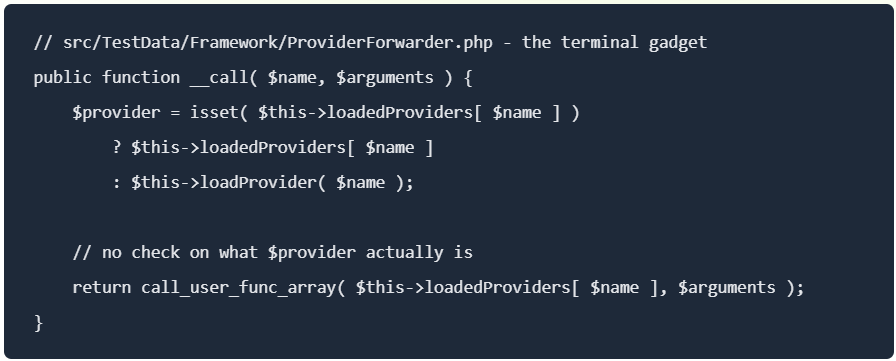
“Because loadedProviders is just an array property carried inside the injected object, the attacker sets it to any callable they like.” continues the report. “Pointing it at system() executes an arbitrary OS command as the web server user.”

That means the attacker can turn control of the object into control of what function the application calls. In the vulnerable code, that can lead to execution of an operating system command with the privileges of the web server.

At that point, this stops being a data-handling problem and becomes a server compromise problem. If the WordPress process has access to sensitive files, databases or other internal resources, the impact can extend well beyond the GiveWP plugin itself.

GiveWP’s registration feature ignores WordPress’s users_can_register setting, allowing attackers to create accounts even when registration is disabled. Version 4.16.6 added a nonce check, but attackers can still obtain and reuse the nonce on sites with the public registration shortcode.

Patchstack says versions 4.16.5.1 and earlier are directly exploitable on default installations. Versions 4.16.6–4.16.7.1 reduce the attack surface but leave the underlying flaw exploitable through legacy forms. Version 4.16.7.2 fully fixes the issue.

GiveWP 4.16.7.2 takes a broader approach to fixing the RCE. It blocks serialized data before storage, limits where stored data can be deserialized, hardens the vulnerable gadget and sanitizes donor and billing metadata. It also scans existing database records and removes serialized objects that could contain malicious payloads.

This cleanup matters because updating the code alone cannot remove data already stored by an attacker. Patchstack also found that the earlier 4.16.6 fix could preserve malicious serialized data after detecting __PHP_Incomplete_Class; 4.16.7.2 rejects it instead.

Administrators should update to 4.16.7.2 or later, review logs and signs of compromise, and check older or imported donation forms. The separate registration issue remains unresolved, but Patchstack treats it as an access-control problem rather than part of the patched RCE chain.

Follow me on Twitter: @securityaffairs and Facebook and Mastodon

Pierluigi Paganini

(SecurityAffairs – hacking, GiveWP)

Two CVSS 9.8 Auth Bypasses in miniOrange SAML WordPress Plugin Were Exploited Before Any Database Even Listed the Paid Editions as Vulnerable

Two CVSS 9.8 miniOrange SAML WordPress plugin auth bypasses were exploited while paid editions never appeared in any vulnerability database. Manual patch required.

Two critical authentication bypass vulnerabilities in the miniOrange SAML 2.0 Single Sign On WordPress plugin, both rated CVSS 9.8, are under active exploitation.

Both CVE-2026-61979 and CVE-2026-15981 allow an unauthenticated attacker to forge a SAML authentication response and arrive in /wp-admin as any existing user, including administrators. The bugs are independent and both have been confirmed exploited in the wild.

CVE-2026-61979 is an algorithm confusion flaw. The plugin trusts the incoming SAML response to declare its own signature algorithm. An attacker sets that algorithm to HMAC-SHA1, which causes the plugin to use the identity provider’s RSA public key as the HMAC secret. The RSA public key is, by definition, public. That’s the whole attack: fetch the key from the metadata endpoint, sign your own forged assertion with it, and the plugin verifies it as genuine.

CVE-2026-15981 is a PHP bug caused by incorrectly handling different types of values. The openssl_verify() function can return three results: 1 when a signature is valid, 0 when it is invalid, and -1 when OpenSSL encounters an error.

The plugin treated the result like a simple true-or-false value. In PHP, -1 counts as true. An attacker can send a specially crafted signature that causes an OpenSSL error, making the function return -1. The plugin then treats it as a valid signature and allows the attacker to log in.

It is a basic coding mistake, but particularly serious because the plugin handles authentication for WordPress admin accounts.

The technical root cause is interesting. What happened around the bugs afterward is more interesting. The miniOrange SAML plugin ships under one WordPress slug, miniorange-saml-20-single-sign-on, but that one listing actually contains seven completely separate product editions, each with its own independent version numbering. Free runs from 3.x to 5.x. Premium runs 11.x to 13.x. Standard runs 15.x to 17.x. VIP editions start at 32.x and 35.x. No two editions share a version range.

When the public advisories were written, they covered only the Free edition, which is the one anyone can download from WordPress.org. The fix for the Free edition landed at 5.4.5.

“While that record is correct, when you apply it to the slug, every paid install carries a higher version number than 5.4.5, so every paid install reads as already patched.” reads Patchstack analysis. “Therefore, any WordPress site that was running a vulnerable version like 16.1.9 reported it as patched, along with every other (13.x, 20.x, 26.x, 32.x, and 35.x) vulnerable version.”

Every database, scanner, and dashboard in the WordPress security ecosystem was telling paid-edition administrators their sites were safe when the exploitable code was still running on their servers.

The update prompt problem makes it worse. Sites running a vulnerable Standard edition 16.x see no available updates in their WordPress admin panel because the fix is on the 17.x line, and WordPress’s built-in update mechanism doesn’t offer cross-line jumps automatically. The path from vulnerable to patched requires a manual plugin upload, which site owners can’t do if they don’t know they’re affected, and every system they rely on was telling them they weren’t.

“There was no advisory to read and no vulnerability database entry flagged the paid edition for these vulnerabilities. The plugin reported itself as fully up to date. In other words, every signal that normally warns of a problem suggested that everything was fine.” continues the report. “So, how did DigitalOcean catch the exploit? It had nothing to do with plugins or versions. An anomalous WordPress administrator session attempt appeared from outside their trusted network and was blocked. The attacker had already used the bypass to obtain a WordPress admin session cookie, but was stalled because the admin panel operations themselves sat restricted behind the trusted network. “

DigitalOcean, the team that found all of this, caught the exploit not through any of those systems but through a network anomaly: an authenticated WordPress administrator session arriving from outside their trusted network perimeter. The attacker had already used one of the auth bypasses to generate a valid admin session cookie. The cookie worked. The session was blocked because the admin panel itself was restricted to trusted network ranges. Defense in depth, doing exactly what it exists to do, on a system where every other detection layer had already failed.

DigitalOcean then traced both bugs to specific lines of code in the plugin and its bundled XML security library, confirmed the affected version ranges across all seven paid editions (which miniOrange had not published anywhere), wrote two narrowly scoped hotfixes to buy time, and handed the full analysis to Patchstack for publication. Patchstack worked with miniOrange to get the complete edition and version matrix, then updated its database with all seven affected ranges, the first time any public database held that information.

Attackers are actively scanning miniOrange SSO endpoints from six IP addresses in Belgium, Nigeria, the U.S. and Germany. The activity appears opportunistic, with attackers checking websites that use the plugin without first identifying the specific version or edition.

That makes the silent patch especially concerning. Attackers can probe systems without knowing what version they run, while website owners may not realize whether their plugin has received the fix.

“Vulnerability databases are only as good as the version data vendors publish publicly. When a vendor runs seven independently numbered editions under one slug and patches six of them without a public advisory, the entire ecosystem downstream of them goes blind at once: databases, scanners, dashboards, and the site admins relying on all three.” concludes the report.

For anyone running this plugin, the full version table per edition is in the Patchstack article. The short version: find your edition, compare your version against the patched column, and expect to do the upgrade as a manual upload rather than through the WordPress dashboard. If you can’t update immediately, two narrowly scoped hotfixes covering both CVEs are published there alongside the IPs to check in your logs for prior exploitation attempts. Check the passkey and admin account list while you’re in there.

Follow me on Twitter: @securityaffairs and Facebook and Mastodon

Pierluigi Paganini

(SecurityAffairs – hacking, miniOrange SAML WordPress Plugin)

ShapedPlugin Supply Chain Attack Backdoors Pro Plugin Updates

Attackers backdoored ShapedPlugin Pro updates, deploying malware that steals credentials, 2FA secrets, and grants full site access.

If you installed a ShapedPlugin Pro plugin between April and June 2026 and kept it updated, your site may be compromised. Not because you did something wrong, but because the vendor’s own build and distribution pipeline was breached. Cybersecurity firm Wordfence confirmed the attack on June 12th after obtaining a backdoored copy of Real Testimonials Pro 3.2.5 directly from ShapedPlugin’s official update endpoint.

ShapedPlugin is a WordPress software company that develops premium and free plugins for WordPress and WooCommerce websites. Founded in 2015, it offers plugins for carousels, galleries, testimonials, weather widgets, accordions, product displays, team showcases, and other website functions. Its products are used by hundreds of thousands of websites worldwide.

The WordPress plugin vendor has over 400,000 active free plugin installations

“During our investigation, we discovered that attackers compromised the vendor’s build and distribution pipeline, injecting backdoor code into Pro plugin releases distributed through official licensed update channels.” reads the report published by Wordfence. “As with all supply chain compromises, this attack is particularly insidious because affected site owners followed security best practices: they purchased legitimate licenses and installed updates directly from the vendor’s official update system. Supply chain compromises are becoming significantly more common in all software, including WordPress software.”

The researchers confirmed that at least three Pro plugins were compromised: Product Slider Pro for WooCommerce, Real Testimonials Pro, and Smart Post Show Pro. Free plugins on WordPress.org were left clean, which was almost certainly deliberate.

The infection runs in two stages. The first is a loader file called LicenseLoader.php that downloads a payload from an attacker-controlled server, installs it as a fake plugin, reports the victim domain back to the attacker, and then deletes itself.

“This self-deleting behavior means the initial infection vector disappears after first execution, complicating forensic analysis for site owners who notice the infection later.” continues the report.

The dropped payload disguises itself as WooCommerce-related plugins, using names like “woocommerce-subscription” in the singular form, one letter away from the legitimate plugin name.

What that payload does once installed is extensive. It hides itself from the WordPress admin plugin list, registers a REST API backdoor that accepts arbitrary file writes, bundles Tiny File Manager and Adminer for direct GUI access to files and databases, and installs a webshell that accepts commands via URL parameters. There’s also a hardcoded login bypass: a single MD5 hash lets the attacker authenticate as any administrator without knowing their password. That’s not a subtle intrusion; that’s a full set of keys.

The malware steals credentials in a more sophisticated way than typical threats.

“What makes this variant particularly concerning is its targeted exfiltration of two-factor authentication secrets. The malware specifically searches for TOTP seeds from multiple 2FA plugins.” continues the report.

Attackers send the stolen passwords and 2FA to generate.2faplugin.org, a domain that blends in with legitimate two-factor traffic. If an attacker has your password and your TOTP seed, changing your password after discovery doesn’t help.

The forensic evidence points to a CI/CD pipeline compromise rather than someone manually tampering with ZIP files. Only four files were modified on May 21st within a two-hour window, consistent with an automated build step. The compromised package also contains git SHA references confirming it was built from a private repository. The attacker had access to deploy updates to both WordPress.org and the Pro distribution system, but only injected malware into some Pro builds — either because WordPress.org scans for malware or because paying customers are higher-value targets. Possibly both.

The C2 infrastructure is registered to AEZA GROUP LLC, tied to Russian-based entities. The exfiltration domain 2faplugin.org was updated on May 10th, about eleven days before the backdoor was injected into Pro builds. Anyone who installed any ShapedPlugin Pro product between April and June 2026 should scan immediately, check for fake plugins under wp-content/plugins/woocommerce-subscription/ or woocommerce-notification/, rotate all WordPress admin passwords, database credentials, and API keys, and, critically, revoke and regenerate 2FA secrets for every user on the site, since existing TOTP seeds should be considered stolen.

“This supply chain attack demonstrates the evolving threat landscape facing WordPress site owners. The attackers did not exploit a vulnerability in the plugin code itself: they compromised the vendor’s build and distribution infrastructure, turning legitimate licensed updates into malware delivery vehicles.” concludes the report. “The inclusion of 2FA secret exfiltration marks a concerning evolution in WordPress-targeted malware.”

Follow me on Twitter: @securityaffairs and Facebook and Mastodon

Pierluigi Paganini

(SecurityAffairs – hacking, ShapedPlugin)

Retro gaming fans are the new target for fake GitHub malware

Retro gaming fans should be careful with GitHub projects that claim to be tools or plugins for their consoles. Attackers can disguise ordinary computer malware as homebrew software, and the technique works against any retro platform with an active modding scene, not just one console.

We recently looked at one example aimed at PlayStation Vita owners: a fake project that pretends to be a free audio tool but actually runs Windows malware on your computer.

The project, called EQVita, looks like a normal homebrew plugin. It has a polished README, a download button, screenshots, and a tidy layout. But the file you download doesn’t contain anything for a Vita at all. It contains three Windows files, and the harmless-looking text file among them is actually a hidden script that quietly connects to the attacker’s server once you run it.

This isn’t a one-off. Other researchers have observed attackers using fake GitHub repositories—dressed up with AI-generated descriptions—to spread a type of malware called SmartLoader, which then pulls in password and wallet-stealing malware such as Lumma Stealer. The EQVita download uses the same method, repackaged to appeal to retro gaming fans.

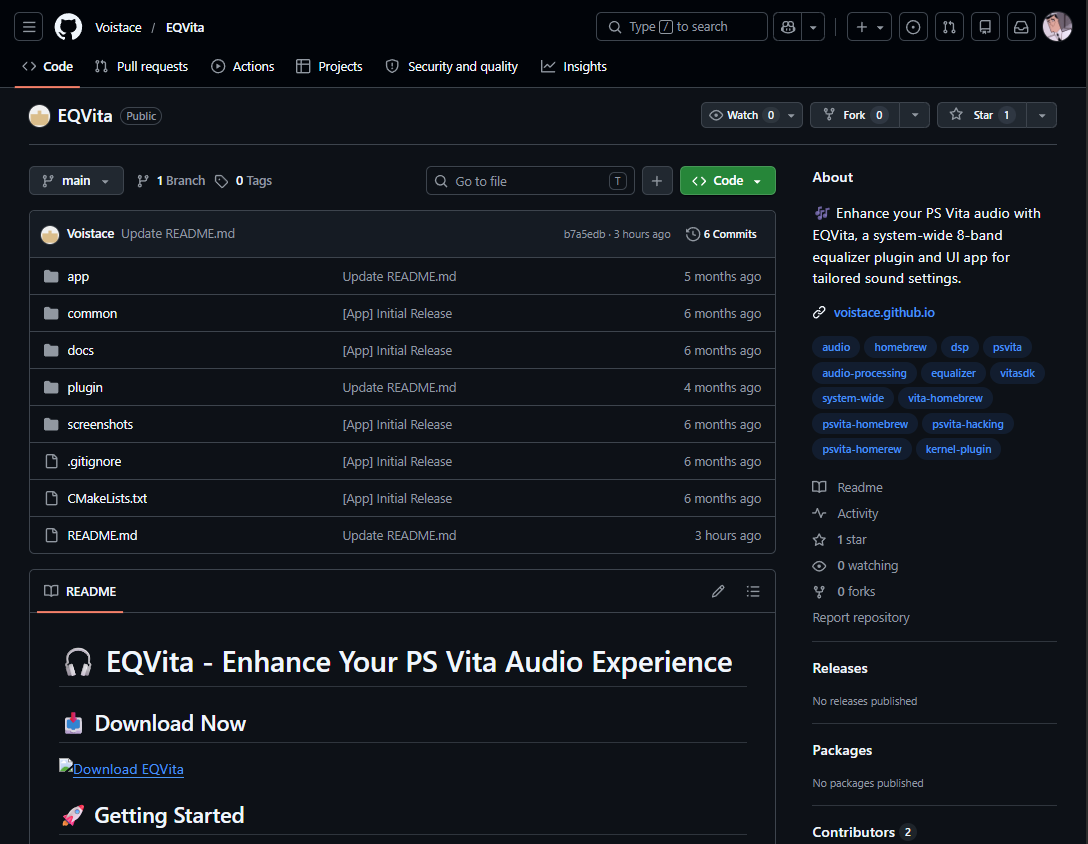
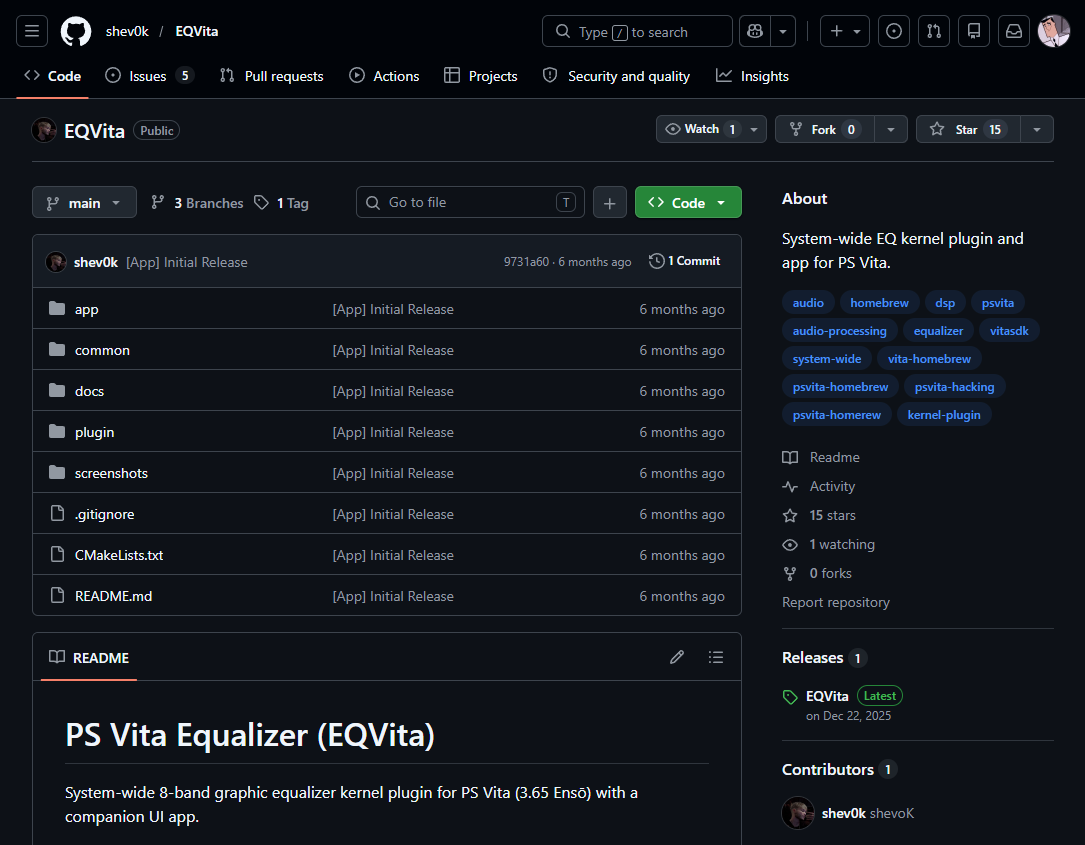
Take a look at the comparison below. On the left we have a fake GitHub repository, on the right a real one.

Left ImageRight Image

There’s even a small trick in the version number. The real EQVita is on version 1.10, while the fake is labeled 1.3. At a glance, 1.3 may appear newer—but it isn’t. In software, 1.10 comes after 1.9, so the real project is the more up-to-date one. The fake just borrows a number that looks current.

Why this targets the Vita community

If you’re not into retro consoles, the PS Vita might not mean much to you. But for a large and active community, it’s a big deal, and that makes it a target.

I’ll admit a soft spot here: I bought my own Vita 1000 second hand about ten years ago, and it still runs beautifully. It comes off the shelf every now and then, mostly because the library is so deep there’s always something worth coming back to. I’m clearly not alone.

Even though Sony stopped making the Vita years ago, fans have kept it alive by writing their own software for it: emulators, file managers, and plugins. A modded Vita can run its own PSP games at full speed and emulate older systems like the SNES, Game Boy Advance, and Sega Genesis, which turns the handheld into a do-everything retro machine. In 2026 the scene is thriving, with active developers and even homebrew contests with cash prizes.

That demand shows up in the price, too. With no new units made since 2019, working Vitas have become a sought-after retro item, and resale prices have climbed across the major marketplaces over the past year—the older OLED model, prized by modders for its firmware, has risen the most. In other words, more people than ever are buying a Vita specifically to mod it, which means more people hunting for plugins and tools to install.

That enthusiasm is exactly what attackers abuse. Homebrew users are used to downloading files from GitHub, dropping them into folders, and running them. The whole hobby runs on trusting code from individual developers. Scammers know this, so a fake “Vita plugin” is an easy way to get people to run something they normally wouldn’t.

How the scam works

The download, EQ_Vita_v1.3.zip, contains three files:

  • Launch.bat
  • luajit.exe
  • x64.txt

Here’s the clever part. luajit.exe is a real, harmless program that runs scripts. The batch file simply tells it to open x64.txt. Despite the .txt name, that file isn’t text at all—it’s a hidden script, and LuaJIT runs it. Calling it .txt is what makes it look harmless and easy to scroll past. Researchers found the same setup in the SmartLoader campaign: the only dangerous file in the download is the disguised script, and everything around it is legitimate.

So nothing in the download looks dangerous on its own. There’s no obvious installer and no scary-looking app—just a trusted tool being used to run someone else’s code.

We watched what happened when it ran. First, the script checked where in the world the computer was. Then it quietly contacted a server on the internet and sent it data, using a web address scrambled into a meaningless-looking string. The server answered back.

An audio plugin has no reason to do any of that. This is how a malware “loader” behaves: it phones home to the attacker’s server to receive instructions and fetch its next piece of malware. In this campaign, that next piece is usually a stealer—malware that hunts for cryptocurrency wallets, saved browser passwords, and login codes.

Malwarebytes blocks this threat, so protected users are stopped before the file can run.

How to spot the fake

Most Vita plugins are installed on the Vita, using tools like VitaShell or Autoplugin, and they come as Vita files (the kind ending in .skprx or .vpk).

Some legitimate tools in the scene—installers, file-transfer helpers, build tools—do run on a PC, so a Windows program isn’t automatically bad. The key is to check before you run it.

Is it well known? Is it widely used? Is it recommended by trusted community sources, or did you just stumble onto it in an unfamiliar repository? A “plugin” that quietly leans on a .bat file to launch a hidden program is exactly what that check is meant to catch.

A few habits help:

  • Match the file to the device, and verify PC tools. Most Vita plugins are Vita files, not Windows programs. Some legitimate tools do run on your PC, so don’t panic at an .exe or .bat, but check that it’s a well-known, trusted tool before running it.
  • Be wary of “Download Now” polish. Real homebrew READMEs are written for users like other developers. In this campaign, the fake repositories lean on AI-generated text, which tends to read like marketing: heavy on emoji, friendly phrasing, and a big download button. A project that pushes you to click fast deserves a second look.
  • Stick to trusted sources. Established community hubs and trusted-source lists exist for a reason. Check before you download.
  • Add another layer of protection. Malwarebytes Browser Guard can help block known malicious pages and downloads before they reach you.

What to do if you’ve already run it

If you have downloaded and run EQ_Vita_v1.3.zip, you should treat the computer as compromised. Here’s what to do:

  • Run a full malware scan with up-to-date security software.
  • Because this campaign delivers information-stealing malware, change your important passwords from a different, clean device, and review your accounts for unauthorized logins.
  • If you keep any cryptocurrency on that computer, move your funds using a different, clean device and rotate your keys and seed phrases.
  • Check your two-factor authentication (2FA) settings, as stealers can also target 2FA data.
  • Finally, delete the three files and report the GitHub repository so it can be taken down.

Why this scam works

It works because it doesn’t look like a scam. It lives on GitHub, where homebrew users already place their trust. It uses a real, harmless tool to do its dirty work. And it hides the dangerous part inside a file that looks like plain text. None of those tricks is clever on its own, but together they slip right past the quick checks most people actually do.

What makes this one worth noting is where it’s aimed. Retro communities run on goodwill—volunteers who keep old hardware alive, share their work for free, and vouch for one another’s tools. That same trust is what this campaign exploits, and every fake repository that slips through makes the next genuine project a little harder to trust.

The best defense is the one these communities already have: trusted-source lists, established wikis, and people who test things and report back. Verify where a file comes from before you run it, and when something doesn’t add up, say so. That habit is what keeps the scene safe for everyone in it.

Indicators of Compromise (IOCs)

Domains

https://github.com/Voistace/EQVita
https://voistace.github.io

IP

85.137.52.21 C2


We don’t just report on threats—we remove them

Cybersecurity risks should never spread beyond a headline. Keep threats off your devices by downloading Malwarebytes today.

WP Maps Pro Vulnerability Exposed 15,000 WordPress Sites to Site Takeover

WP Maps Pro

A critical vulnerability in the WP Maps Pro WordPress plugin allowed unauthenticated attackers to create administrator accounts and potentially perform a complete site takeover on affected websites.  The issue impacted all WP Maps Pro versions up to 6.1.0. The plugin had more than 15,000 sales at the time the vulnerability was disclosed.  The vulnerability was submitted to the Wordfence Bug Bounty Program on March 24, 2026. Security researcher David Brown discovered and responsibly reported the flaw, earning a $1,950 bounty.  Wordfence stated that attackers could exploit a vulnerable AJAX action to create administrator accounts without authentication. 

How the WP Maps Pro WordPress Plugin Vulnerability Worked 

The WP Maps Pro WordPress plugin included a temporary access feature designed for support staff troubleshooting. The issue existed in the wpgmp_temp_access_ajax_callback() function, which handled the plugin’s AJAX action.  The function relied on a nonce check using fc-call-nonce: 
function wpgmp_temp_access_ajax_callback(){    check_ajax_referer( 'fc-call-nonce', 'nonce' );    $temp_access = new WPGMP_Temp_Access();    $response = $temp_access->wpgmp_temp_access_support();    wp_send_json($response);    exit(); }  
Researchers found that the nonce was publicly exposed through frontend pages using wp_localize_script. Because the AJAX action was also registered with wp_ajax_nopriv_, unauthenticated users could access the endpoint. The vulnerable version did not include a capability check to verify administrator privileges. 

Administrator Account Creation 

After triggering the AJAX action with check_temp=false, the plugin executed the wpgmp_temp_access_support() function.  The function created a new WordPress administrator account using: 
  • A randomly generated username beginning with fc_user_ 
  • The hardcoded email address support@flippercode.com 
  • The administrator role 
The plugin then generated a login URL tied to the new account.  According to the technical analysis, visiting the generated URL triggered wp_set_auth_cookie(), authenticating the attacker without requiring a password.  Wordfence stated that attackers could then: 
  • Install malicious plugins 
  • Modify themes 
  • Inject backdoors 
  • Deploy webshells 
  • Steal site data 
The vulnerability could result in full site takeover. 

Patch Released in Version 6.1.1 

The vendor fixed the issue by adding a capability check to the vulnerable AJAX action: 
if ( ! current_user_can( 'manage_options' ) ) {    wp_send_json_error( array( 'error' => 'Unauthorized' ), 403 );    exit(); }
 The patch restricted the endpoint to authenticated administrators only. The fully patched WP Maps Pro version 6.1.1 was released on May 20, 2026. 

Wordfence Timeline 

  • March 24, 2026 — Wordfence received the vulnerability report. 
  • May 16, 2026 — Researchers validated the exploit and escalated the issue to the Envato security team after failing to locate direct vendor contact information. 
  • May 18, 2026 — Wordfence Premium, Care, and Response users received firewall protection. 
  • May 20, 2026 — WP Maps Pro 6.1.1 was released. 
  • June 17, 2026 — Free Wordfence users were scheduled to receive the same firewall protection. 
Wordfence urged users to update the WordPress plugin immediately to prevent exploitation and reduce the risk of site takeover. 

Hackers Exploit Kali Forms Vulnerability to Take Over WordPress Sites

Kali Forms vulnerability

A recently disclosed Kali Forms vulnerability affecting a widely used WordPress plugin has escalated into an active security threat, enabling unauthenticated attackers to achieve Remote Code Execution on affected websites. The flaw impacts Kali Forms, a drag-and-drop form builder with more than 10,000 active installations, and has already been exploited in the wild shortly after public disclosure.  Security researchers reported that the vulnerability was first submitted on March 2, 2026, through a bug bounty program, identifying a critical Remote Code Execution issue in the Kali Forms vulnerability chain. The vendor released a patched version on March 20, 2026, and the issue was simultaneously added to the Wordfence Intelligence database. On the same day, attackers began actively exploiting it on scale. 

Timeline of the Kali Forms Vulnerability in the WordPress Plugin Ecosystem 

The Kali Forms vulnerability followed a rapid disclosure-to-exploitation cycle: 
  • March 2, 2026: Initial submission of the Remote Code Execution flaw via bug bounty reporting. 
  • March 5, 2026: Wordfence Premium, Care, and Response users received firewall protection. 
  • March 20, 2026: Patched version released; vulnerability publicly disclosed; attackers began exploiting the same day. 
  • April 4, 2026: Free Wordfence users received delayed firewall protection. 
  • April 4–10, 2026: Peak exploitation activity observed against the Kali Forms vulnerability. 
The patched release addressed the issue in version 2.4.10 of the WordPress plugin, while all versions up to and including 2.4.9 remained vulnerable. 

Technical Root Cause Behind the Kali Forms Vulnerability

The core of this WordPress plugin flaw lies in how user-supplied form data is processed and stored internally. The vulnerability resides in the form_process flow and the prepare_post_data() function, which incorrectly maps attacker-controlled input into internal placeholder storage without proper validation or allow-list restrictions.  These placeholders are later used in the _save_data() method, where unsafe execution occurs through call_user_func().  A simplified excerpt of the vulnerable logic includes: 
if (isset($this->placeholdered_data['{entryCounter}'])) {    $this->placeholdered_data['{entryCounter}'] =        call_user_func($this->placeholdered_data['{entryCounter}'], $this->post->ID); } 
Because the Kali Forms vulnerability allows attackers to fully control values like {entryCounter} and {thisPermalink}, an unauthenticated user can inject arbitrary PHP function names. These are then executed directly, resulting in Remote Code Execution (RCE) attacks.  Researchers noted that the lack of input restrictions in prepare_post_data() enables overwriting internal placeholders. As a result, attacker-controlled values flow directly into call_user_func(), making exploitation trivial once the request is submitted.  One observed abuse pattern demonstrates authentication bypass attempts using built-in WordPress functions. For example, attackers can assign: 
  • {entryCounter} = wp_set_auth_cookie  
  • formId = 1  
This leads to execution of wp_set_auth_cookie(1), which may log attackers in as the default administrator account if it exists, effectively turning the Kali Forms vulnerability into a full account takeover vector. 

Active Exploitation of the Kali Vulnerability in Real-world Attacks 

Telemetry from security monitoring shows that exploitation began immediately after disclosure. Attackers have been systematically targeting the WordPress plugin using automated requests to admin-ajax.php.  A representative exploit request includes: 
POST /wp-admin/admin-ajax.php HTTP/1.1 Content-Type: application/x-www-form-urlencoded action=kaliforms_form_process& data[formId]=1& data[nonce]=66ddddb2b7& data[entryCounter]=wp_set_auth_cookie 
This confirms how the Remote Code Execution flaw is triggered through manipulated form submission data.  Security systems recorded significant attack volume: 
  • Over 312,200 exploit attempts were blocked targeting the Kali Forms vulnerability. 
  • Heavy targeting was observed immediately after March 20, 2026 disclosure. 
  • Increased spike in activity between April 4 and April 10, 2026. 

Top Attacking IP Addresses Observed 

Threat intelligence identified several IPs responsible for large-scale exploitation attempts: 
  • 209.146.60.26 – over 152,000 blocked requests  
  • 49.156.40.126 – over 50,000  
  • 124.248.183.139 – over 26,000  
  • 202.56.2.126 – over 14,000  
  • 130.12.182.154 – over 11,000  
  • 104.28.160.197 – over 9,000  
  • 1.53.114.181 – over 5,700  
  • 157.15.40.74 – over 3,000  
  • 114.10.99.126 – over 2,500  
  • 83.147.12.83 – over 1,300  
These sources were repeatedly associated with exploitation attempts targeting the Kali Forms vulnerability in the affected WordPress plugin. 
❌